Questions as text
Q1 · Global positioning systems (GPS) are used by navigation devices to allow drivers of cars… 9626/32 Feb/March 2017
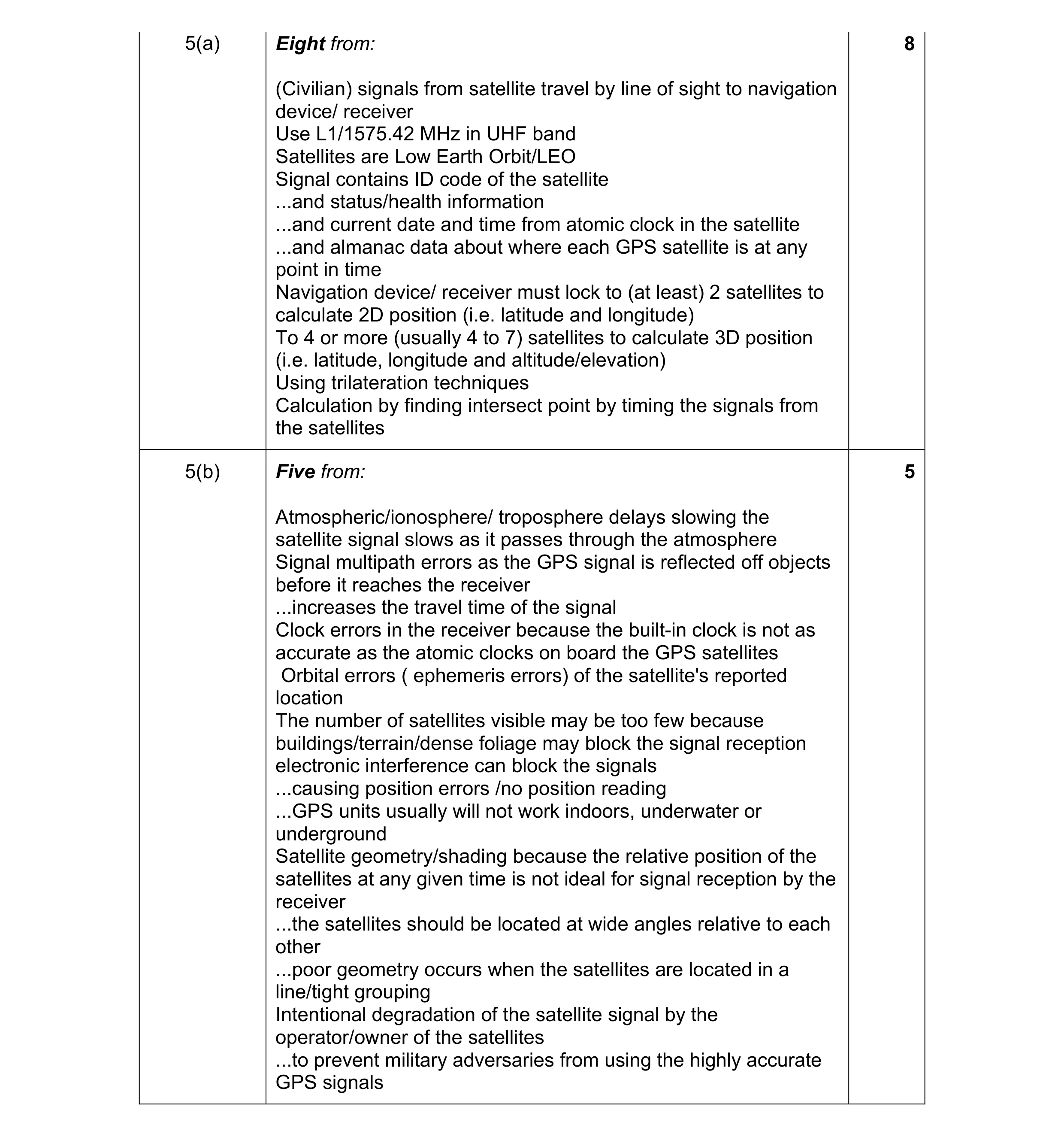
5 Global positioning systems (GPS) are used by navigation devices to allow drivers of cars to find locations and destinations. (a) Describe how GPS signals from satellites are used by navigation devices to determine a location. … … … … … … … … … … … … … … … … … … … … [8] (b) Describe the factors that could degrade a GPS signal, when it is transmitted to a navigation device, and affect the accuracy of the location found by that device. … … … … … … … … … … … … … … [5]
13 marks
Mark scheme: 5(a) Eight from: 8 (Civilian) signals from satellite travel by line of sight to navigation device/ receiver Use L1/1575.42 MHz in UHF band Satellites are Low Earth Orbit/LEO Signal contains ID code of the satellite ...and status/health information ...and current date and time from atomic clock in the satellite ...and almanac data about where each GPS satellite is at any point in time Navigation device/ receiver must lock to (at least) 2 satellites to calculate 2D position (i.e. latitude and longitude) To 4 or more (usually 4 to 7) satellites to calculate 3D position (i.e. latitude, longitude and altitude/elevation) Using trilateration techniques Calculation by finding intersect point by timing the signals from the satellites 5(b) Five from: 5 Atmospheric/ionosphere/ troposphere delays slowing the satellite signal slows as it passes through the atmosphere Signal multipath errors as the GPS signal is reflected off objects before it reaches the receiver ...increases the travel time of the signal Clock errors in the receiver because the built-in clock is not as accurate as the atomic clocks on board the GPS satellites Orbital errors ( ephemeris errors) of the satellite's reported location The number of satellites visible may be too few because buildings/terrain/dense foliage may block the signal reception electronic interference can block the signals ...causing position errors /no position reading ...GPS units usually will not work indoors, underwater or underground Satellite geometry/shading because the relative position of the satellites at any given time is not ideal for signal reception by the receiver ...the satellites should be located at wide angles relative to each other ...poor geometry occurs when the satellites are located in a line/tight grouping Intentional degradation of the satellite signal by the operator/owner of the satellites ...to prevent military adversaries from using the highly accurate GPS signals
This question in 9626/32 Feb/March 2017
Q2 · WiFi is often used to connect devices to the internet 9626/32 Oct/Nov 2017
9 WiFi is often used to connect devices to the internet. In some buildings, WiFi signals may be degraded so that data transfer appears to be ‘slow’. Explain how you could try to ensure that the WiFi system suffers minimal signal degradation. … … … … … … … … … … … … … … … … … … … … [8]
8 marks
Mark scheme: 9 Eight from: 8 Other devices can cause interference ...remove other devices e.g. microwave ovens/cordless telephones on same frequency which can interfere with signal ...WiFi uses 2.4Ghz and/or 5GHz frequency Ensure that access points do not use same frequencies/channels... ...other access points may use same WiFi channel and interfere with user’s channel Restrict use of e.g. Bluetooth® ...Bluetooth® signals can cause interference Restrict use of mobile phones... ...mobile telephone systems can cause interference Adjust wireless access point settings... ...wireless access point rate control set too high ...results in many retries Wireless devices can only send or receive but not both at the same time ...effectively cuts the bandwidth in half give devices with already established connections higher priority ...e.g. video streaming ...other devices appear to have slower access times/data transfer rates Radio waves are slowed/blocked/’bent’ by objects ...walls/insulation/metal objects may degrade/block WiFi signals so use materials that are transparent to wireless signals Restrict choice of channels... ...automated channel choice can cause ‘channel hopping’ ...too many changes slows access times Restrict use of ‘legacy’ bands for WiFi ...routers are slower if they have to broadcast on several bands simultaneously Set access point antennas to optimum position/orientation ...may be set too low/wrong angle/hidden.
This question in 9626/32 Oct/Nov 2017
Q3 · A home network uses a router to connect to the internet 9626/33 Oct/Nov 2017
7 A home network uses a router to connect to the internet. (a) The router will act as a ‘default gateway’. Define ‘default gateway’. … … … … … … [2] (b) The router uses wireless technology to allow devices in the home to connect to it. Discuss the benefits and drawbacks of using wireless technology to connect devices to the router. … … … … … … … … … … … … … … … … … … … … [8]
10 marks
Mark scheme: 7(a) Two from e.g.: 2 Default means that this gateway/address is used unless another address is specified Router/computer node that has details of where to forward data packets … if no route known already Device that passes traffic from local subnet to devices on other subnet 7(b) Eight from e.g.: 8 Benefits: Devices are easier to move around as no wires needed... ...no need to physically connect ...no trailing wires to trip over Greater productivity by home-workers as they can carry laptop/device with them while doing other tasks Ease of expansion with new devices as single access point required ...devices can be added without need to add cables/space for connection/additional hubs/switches ...no need to drill holes/damage house fittings/walls for cables Less expensive than wired connections so no cost of new hubs/switches/sockets/wires Drawbacks: Security issues so encryption required which may be difficult to set up Range issues as it is restricted to only 10s of metres from access point … physical objects may interfere with signal … reduced signal strength as distances from access point increases Reliability issues ...subject to interference from other wireless devices/electrical items Speed issues as rate of data transfer is lower than for cabled connections ...may vary during a session leading to poor user experience. Max 6 for all benefits or all drawbacks. 1 mark is available for a reasoned conclusion.
This question in 9626/33 Oct/Nov 2017
Q4 · Evaluate the use of the infra-red method of data transmission in wireless communications 9626/32 Oct/Nov 2018
8 Evaluate the use of the infra-red method of data transmission in wireless communications. … … … … … … … … … … … … … … … … … … … … [8]
8 marks
Mark scheme: 8 Eight from: 8 Suitable for use in ‘free-space’ i.e. no physical connection medium such as cable or fibre Infra-red LEDs allow point-to-point optical commnciations Infra-red LEDs allow high data rates using laser technology Infra-red LEDs allow relatively inexpensive compared to other radio technologies Uses pulsing modulation/on-off signals which can restrict rates to low data rates in free space Suitable for short distance communication between devices (usually only maximum of a few metres) May not work relaibly when too close together Line of sight required so objects block the signals Not subject to interference as much as other radio technologies Has low power requirements so suitable for use in small/mobile devices/remote controls Can be more secure than other radio technologies as range is low/easily blocked by objects. Max six for all positives or all negatives. 1 mark available for a resoned conclusion/opinion.
This question in 9626/32 Oct/Nov 2018
Q5 · Evaluate the use of Bluetooth® wireless technology for communication between devices 9626/33 Oct/Nov 2018
3 Evaluate the use of Bluetooth® wireless technology for communication between devices. … … … … … … … … … … … … … … … … … … … … [8]
8 marks
Mark scheme: 3 This question to be marked as a Level of Response. 8 Level 3 (7–8 marks) Candidates will evaluate, giving advantages and disadvantages of, a range of devices, in detail the use of Bluetooth® wireless technology for communication between devices. The information will be relevant, clear, organised and presented in a structured and coherent format. There will be a reasoned conclusion/opinion. Subject specific terminology will be used accurately and appropriately. Level 2 (4–6 marks) Candidates will explain, with advantages and disadvantages, the use of Bluetooth ® wireless technology for communication between devices. For the most part, the information will be relevant and presented in a structured and coherent format. There may be a reasoned conclusion/opinion. Subject specific terminology will be used appropriately and for the most part correctly. Level 1 (1–3 marks) Candidates will describe the use of Bluetooth® wireless technology for communication between devices. Answers may be in the form of a list. There will be little or no use of specialist terms. Level 0 (0 marks) Response with no valid content. Answers may make reference to e.g. Bluetooth® has... ..a range of applications/uses for wireless communications between devices like phones/ headsets/speakers/ ..a range of applications/uses for control of communications between devices Advantages: Bluetooth® requires minimal setup e.g. just a few button presses and (possibly) a 4 digit code so is easy to use/setup or pair/bond devices c.f. other network types Bluetooth® is low energy technology so suitable for mobile devices Bluetooth® is standardised so easy to implement/most devices will connect readily Bluetooth® is standard in a range of devices e.g. smartphones, speakers, headsets Bluetooth® is not easy to intercept nor will it easily interfere with other device connections
This question in 9626/33 Oct/Nov 2018
Q6 · Homer uses headphones to listen to the audio from movies playing on his television 9626/32 May/June 2019
10 Homer uses headphones to listen to the audio from movies playing on his television. Homer is trying to decide whether to use Bluetooth or cables to connect his headphones to the TV while he watches the movies. Choose, with reasons, the most appropriate of these methods so that Homer can hear the soundtrack while watching movies. … … … … … … … … … … … … [5]
5 marks
Mark scheme: 10 Five from: 5 Cable ensures an uninterrupted connection to the TV Cable does not suffer from dynamic range limitations as does Bluetooth transmission so (action) movies do not have same impact Cable does not suffer from limited frequency ranges as does Bluetooth transmission so movie experience can be spoiled Cable does not need power in the headphones so can be used without preparation when watching movies / unlimited by battery going flat Bluetooth can suffer from interference from other wireless devices which can spoil the sound (effects) from movie Bluetooth takes time to process so video and audio are out of sync / lip sync issues spoil the movie experience Bluetooth headphones can be larger / uncomfortable / heavy due to battery requirements to movie watchers who get tired of using them before end of movie Bluetooth headphones do not work if battery is flat / needs charging, so cannot listen to sound of movie.
This question in 9626/32 May/June 2019
Q7 · Describe three different networking protocols that would be used for data transfer on a… 9626/31 Oct/Nov 2019
2 (a) Describe three different networking protocols that would be used for data transfer on a LAN. … … … … … … … … [3] A company has devices that use WiFi to connect to its LAN. (b) Describe how data is transmitted between a device and a wireless access point. … … … … … … … … … … [4] (c) Some of the company’s devices can connect to other devices using Bluetooth instead of WiFi. Compare and contrast the use of Bluetooth with WiFi for data transfer. … … … … … … … … … … … … … … [6]
13 marks
Mark scheme: 2(a) Three protocols from e.g.: 3 FTP/file transfer protocol for uploading data/files/pages to server HTTP/hypertext transfer protocol for accessing web pages HTTPS/hypertext transfer protocol secure for secure data transfer SMTP/IMAP/POP to send/receive emails TCP/IP for packet transmission SSH for secure access to a server/another workstation SFTP for secure method of uploading data to a server SMB for transferring files to a file server TELNET to connect computers to a switch/router. 2(b) Four from: 4 Uses radio waves in 2.4 GHz/5 Ghz frequency ranges/(900 MHz and 3.6/60 GHz frequency bands) Data frames are modulated onto carrier wave Spread spectrum used for higher power levels Two channels used for full duplex exchange of data/most WiFi is half-duplex WiFi network uses SSID to identify itself Access point and device must be connected to same WiFi network/SSID to be able to exchange data Data is encrypted for security during transmission Devices must use IEEE 802.11 protocols/standards IEEE 802.11 has a number of variants a/b/g/n/ac(/ad/ah/aj/ax/ay/az) (must have 3 to gain this extra mark) 14 channels on 2.4 GHz which are 5 MHz spaced/device uses channels spaced apart to reduce channel interference. 2(c) Candidates may refer to e.g.: 6 Two similarities from: They are both communication systems Both use wireless technology Both have more limited range than cabled networks Both have limited bandwidth compared to cable networks Four differences from: Bluetooth has a shorter range than WiFi Bluetooth is restricted by solid objects/barriers/walls whereas WiFi can penetrate most barriers to some extent Bluetooth has a lower bandwidth than WiFi Bluetooth requires ‘pairing’ of devices whereas WiFi (often/usually) requires a full log in procedure Bluetooth data transfer is ‘one to one’ whereas WiFi facilitates communication between several devices.
This question in 9626/31 Oct/Nov 2019
Q8 · Describe three different networking protocols that would be used for data transfer on a… 9626/33 Oct/Nov 2019
2 (a) Describe three different networking protocols that would be used for data transfer on a LAN. … … … … … … … … [3] A company has devices that use WiFi to connect to its LAN. (b) Describe how data is transmitted between a device and a wireless access point. … … … … … … … … … … [4] (c) Some of the company’s devices can connect to other devices using Bluetooth instead of WiFi. Compare and contrast the use of Bluetooth with WiFi for data transfer. … … … … … … … … … … … … … … [6]
13 marks
Mark scheme: 2(a) Three protocols from e.g.: 3 FTP/file transfer protocol for uploading data/files/pages to server HTTP/hypertext transfer protocol for accessing web pages HTTPS/hypertext transfer protocol secure for secure data transfer SMTP/IMAP/POP to send/receive emails TCP/IP for packet transmission SSH for secure access to a server/another workstation SFTP for secure method of uploading data to a server SMB for transferring files to a file server TELNET to connect computers to a switch/router. 2(b) Four from: 4 Uses radio waves in 2.4 GHz/5 Ghz frequency ranges/(900 MHz and 3.6/60 GHz frequency bands) Data frames are modulated onto carrier wave Spread spectrum used for higher power levels Two channels used for full duplex exchange of data/most WiFi is half-duplex WiFi network uses SSID to identify itself Access point and device must be connected to same WiFi network/SSID to be able to exchange data Data is encrypted for security during transmission Devices must use IEEE 802.11 protocols/standards IEEE 802.11 has a number of variants a/b/g/n/ac(/ad/ah/aj/ax/ay/az) (must have 3 to gain this extra mark) 14 channels on 2.4 GHz which are 5 MHz spaced/device uses channels spaced apart to reduce channel interference. 2(c) Candidates may refer to e.g.: 6 Two similarities from: They are both communication systems Both use wireless technology Both have more limited range than cabled networks Both have limited bandwidth compared to cable networks Four differences from: Bluetooth has a shorter range than WiFi Bluetooth is restricted by solid objects/barriers/walls whereas WiFi can penetrate most barriers to some extent Bluetooth has a lower bandwidth than WiFi Bluetooth requires ‘pairing’ of devices whereas WiFi (often/usually) requires a full log in procedure Bluetooth data transfer is ‘one to one’ whereas WiFi facilitates communication between several devices.
This question in 9626/33 Oct/Nov 2019
Q9 · Evaluate, by weighing up the advantages and disadvantages, the use of wireless… 9626/32 Feb/March 2020
8 Evaluate, by weighing up the advantages and disadvantages, the use of wireless communications in the home. … … … … … … … … … … … … … … … … … … … … [8]
8 marks
Mark scheme: 8 Eight from e.g.: 8 Enables distribution of internet/network traffic/television and radio signals around home Allows (remote) control of devices/TVs/devices without the need for wired connections Allows use of multiple wireless handsets to use one wired landline so no need for extra lines/connections to landline Allows use of wireless doorbells without damage to infrastructure of building/doors Allows communication without disruption/unsightliness of wires so can be used in historic buildings Allows multiple devices to connect to central points/internet access points so no need for additional internet connections/ISPs Allows easy sharing of devices/printers/scanners between computers so no need for complex configuration/setup routines/installations Allows devices to be moved around/mobility of devices while in use so user can work anywhere Allows use of (discrete) hearing aids connected to e.g. TV sets so no need for embarrassment of user/high sound volumes that disturb others Allows use of remote control/monitoring of household appliances when away from home Allows remote placement of security devices/cameras to avoid tampering/revealing placement position Can be subject to interference from electronic devices/microwave ovens/fridges so can prove unreliable Can create security issues if not set up properly so users’ personal information can be at risk. Must be at least 1 advantage and 1 disadvantage for full marks. One mark available for reasoned opinion/conclusion.
This question in 9626/32 Feb/March 2020
Q10 · A company has a local area network (LAN) that can be accessed by its staff using their… 9626/32 May/June 2020
1 A company has a local area network (LAN) that can be accessed by its staff using their desktop computers, laptops and mobile devices. The desktop computers use a wired connection but the laptops and mobile devices connect via wireless access points (WAPs). Describe the drawbacks of using WAPs to access the network. … … … … … … … … … … … … … … … … … … … … [8]
8 marks
Mark scheme: Question Answer Marks 1 Eight from: 8 Maximum number of clients (usually) (voluntarily) restricted (to e.g. 100– 200). Number or transmitters/radios/e.g. 4 radios in access point restricts number of clients. Range can be restricted by obstacles/materials that obstacles are made of. Range can be restricted by the height of placement of access point. Range can be restricted by the positioning/direction of antenna(s). Range can be restricted by the presence of other electronic devices in vicinity. Limited number of frequencies are available for data transmission. The number of frequencies available varies in different jurisdictions to avoid interference. Large numbers of access points on the same/overlapping frequencies can interfere with each other. Data transmission speed/bandwidth is usually lower/less than wired connection over long distance. Bandwidth of wired can still be high/1000 Mbits/s at 100 m but wireless usually cannot achieve this. Wireless access points have increased security considerations c.f. wired connections so must use password/security keys to connect/join to the access point. Enforced use of passwords can slow down work/frustrate staff when connecting is slow/key is forgotten. Wireless transmissions can be more easily intercepted so data must/should be encrypted. If network key is stolen/publicised, then the key must be changed so every device must reconnect with new key. Additional login details required for guests/temporary workers add to processing requirements in WAP. Security measures add an overhead/slow down processing/data transfer speed. Use of access points may require additional physical/shielding/use of Faraday cages in structure of building to prevent interception of transmissions which increases costs/add structural design complexity/restricts use of mobile connections by users inside the cage.
This question in 9626/32 May/June 2020
Q11 · A company has a local area network (LAN) that can be accessed by its staff using their… 9626/33 Oct/Nov 2020
12 A company has a local area network (LAN) that can be accessed by its staff using their desktop and laptop computers as well as their smartphones. (a) Describe the role of wireless access points (WAPs) in the network. … … … … … … [2] (b) Describe how wireless access points (WAPs) can be configured to improve network security. … … … … … … … … … … … … … … [6]
8 marks
Mark scheme: 12(a) Two from: 2 Allow/enable wireless/Wi-Fi connections from devices Connected to the wired network/LAN by ethernet Extend the network so that computers do not need to be in a fixed place/at a network outlet Provide secure access using password/network key. 12(b) Six from: 6 Hide the service set identifier (SSID)/cloak the network so that it does not appear in the list of wireless networks Use of SSID hiding provides limited protection Filter MAC addresses to allow only those known/preconfigured to connect Ensure that the WAP is not issuing IP addresses to unknown devices Use encryption for the traffic between WAP and connected devices Use an (up-to-date) encryption protocol such Wi-Fi protected Access (WPA) and (later variants) Avoid using out-of-date protocols such as Wired Equivalent Privacy (WEP)/Temporal Key Integrity Protocol (TKIP) Require users to enter a ‘network key’/security key/passphrase when connecting Use a key that should be at least 14 characters long to make it ‘uncrackable’.
This question in 9626/33 Oct/Nov 2020
Q12 · Airports provide public WiFi access to the internet for their customers 9626/32 Feb/March 2021
8 Airports provide public WiFi access to the internet for their customers. Discuss the advantages and disadvantages of using public WiFi to access the internet. … … … … … … … … … … … … … … … … … … … … [8]
8 marks
Mark scheme: 8 Eight from e.g.: 8 Advantages: User can use WiFi at low cost/free/with no sign-up fee Allows mobile connections so productivity of (commercial/business) customers is increased Convenient to use when travelling/away from home to keep in contact with others Avoids use of data allowance on mobile phone network/4G connections Disadvantages: Connections can be unreliable Some internet services may not be available/may be restricted by airport Advertisements/commercial messages may be inserted into session by airport Airport may require contact details/credit card details/sign up before allowing connection Wireless traffic can be intercepted by others on/nearby WiFi network Can be subject to ‘man in middle’ attacks to capture personal/financial data Personal/private data can be stolen and used in fraud Malware/malicious code can be placed/injected into web pages/emails Bandwidth may be limited unless extra fees paid. Must be at least 2 of each for full marks 1 mark available for a reasoned opinion/conclusion.
This question in 9626/32 Feb/March 2021
Q13 · Describe the limitations of using wireless access points (WAPs) to connect portable… 9626/32 May/June 2021
1 Describe the limitations of using wireless access points (WAPs) to connect portable computers to a cabled network. … … … … … … … … … … … … … … [6]
6 marks
This question in 9626/32 May/June 2021
Q14 · Bluetooth and infrared can both be used to send data between devices 9626/32 May/June 2021
13 Bluetooth and infrared can both be used to send data between devices. Contrast, by describing the differences between, the use of Bluetooth and the use of infrared for transmitting data between devices. … … … … … … … … … … … … … … [6]
6 marks
This question in 9626/32 May/June 2021
Q15 · A photographer has used her smartphone to capture some images and wishes to transfer… 9626/32 Oct/Nov 2021
4 A photographer has used her smartphone to capture some images and wishes to transfer these images to her laptop for editing. She has decided to transfer the images using Bluetooth. Describe the benefits and drawbacks of using Bluetooth to transfer the images. … … … … … … … … … … … … … … … … … … … … [7]
7 marks
Mark scheme: 4 Seven from: 7 Benefits: It is cheap/free to use so there are no extra charges/already installed in many devices It uses less power than e.g. WiFi so no need to connect smartphone to chargers so often Easy to install/setup/pair devices/no need for lengthy passwords/connection keys Connections are ‘remembered’ so repeat usage is simple It is wireless so is convenient to use Can (usually) connect despite obstacles/without line of sight Has a greater range than infra-red connections/useful range for use on e.g. a desk It is short range so signals are not easy to intercept/pictures will not be stolen/copied during transmission Drawbacks: Connection can be ‘hacked into’ when devices are idle Only allows short range communication between devices Data transfer rates can be slow/variable/unpredictable for large images Has a low bandwidth compared to e.g. WiFi/cable connections Can only connect few devices at once Can lose connection due to interference/radio/opaque obstacles/other devices in vicinity Can receive cell/smart phone viruses. Must be at least 1 of each for full marks. Max 5 marks if bullets/list of points.
This question in 9626/32 Oct/Nov 2021
Q16 · Mobile devices can use Near Field Communication (NFC) and Bluetooth to exchange data 9626/32 Oct/Nov 2022
4 Mobile devices can use Near Field Communication (NFC) and Bluetooth to exchange data. (a) Describe three uses of NFC in mobile devices. 1 … … … 2 … … … 3 … … … [3] (b) Discuss the differences between NFC and Bluetooth when used for exchanging data between mobile devices. … … … … … … … … … … … … … [6]
9 marks
Mark scheme: 4(a) Three from, e.g.: 3 Making/using contactless/mobile payments systems instead of e.g. credit/loyalty cards Identifying user when using transit passes/ticketing systems In social networking for sharing images/contacts/video files (between close devices) Exchange personal details for entering computer games systems/online gaming Unlocking doors with smart locks. 4(b) Six from: 6 NFC max working distance is <20cm whereas Bluetooth is c.100m… …so users/devices have to be (very) close NFC sets up in <0.1 sec whereas Bluetooth can take up to 6 seconds/NFC sets up much quicker than Bluetooth NFC has lower bitrate than Bluetooth/400kps v. 2.1Mbit/s… …so is not suitable for (very) large files Data exchange is slower using NFC …so takes longer to transfer e.g. photos/video files NFC uses (much) less power than Bluetooth NFC can be used to activate passive/unpowered tags whereas Bluetooth cannot NFC connections are automatic whereas Bluetooth connection requires access code/PIN NFC connections are peer-to-peer/one-to-one whereas Bluetooth can have up to seven devices simultaneously NFC is an emerging/new technology so fewer/older devices do not have it/cannot use it. Max 4 marks if bullets/list of statements/points.
This question in 9626/32 Oct/Nov 2022
Q17 · Contrast the use of Wi-fi and cabled Ethernet connections for transmitting data between… 9626/32 Feb/March 2023
2 Contrast the use of Wi-fi and cabled Ethernet connections for transmitting data between computing devices on LANs. … … … … … … … … … … … … … … [6]
6 marks
Mark scheme: 2 Six from: 6 • Wi-Fi data transfer speeds are lower than those of cabled/wired Ethernet • Wi-Fi has a higher latency than cabled/wired Ethernet • Wi-Fi requires negotiation/recognition of connection between devices whereas cabled/wired Ethernet does not/Ethernet devices listen for/send signals onto transmission media and ‘hope’ destination device is listening/receives them • Security using Wi-Fi requires that the connection be encrypted whereas cabled/wired Ethernet does not • Connection to Wi-Fi requires user input of credentials whereas connection to cabled/wired Ethernet does not • Encrypted data in Wi-Fi signals is easier to intercept than data carried by cabled/wired/physical Ethernet connections • Wi-Fi is easier/cheaper to install than cabled/wired Ethernet which requires installation of infrastructure/cables/disturbance of existing structures • Wi-Fi can suffer from signal interference from other devices/environment whereas cabled/wired Ethernet does not • Devices using Wi-Fi can be mobile/portable/connected/disconnected easily whereas Ethernet requires devices to be physically connected.
This question in 9626/32 Feb/March 2023
Q18 · Bluetooth and Wi-fi are wireless technologies used to exchange data between devices 9626/32 May/June 2023
4 Bluetooth and Wi-fi are wireless technologies used to exchange data between devices. (a) Contrast Bluetooth with Wi-fi as methods of wireless communication. … … … … … … … … [4] (b) Describe how a Bluetooth connection is established between two devices. … … … … … … … … … … … … [5]
9 marks
Mark scheme: 4(a) Four from: 4 Bluetooth is designed for use/used between two/up to 8 devices whereas Wi-Fi allows for multiple/many devices to be connected Bluetooth does not (usually) use a central access point whereas Wi-Fi can use a central access point Bluetooth is symmetrical/two devices whereas Wi-Fi is asymmetrical/one central access point to many remote devices Bluetooth is restricted to short range connections whereas Wi-Fi can cover a wide/larger geographical area Bluetooth is more affected/range reduced by obstacles/line-of-sight requirements than Wi-Fi connections Bluetooth connections (by device) are simpler to establish/require simple/minimal setup whereas Wi-Fi requires negotiation/authentication credentials to be exchanged between devices Bluetooth has lower bandwidth/data transfer rates than Wi-Fi Bluetooth is less susceptible to (radio/electromagnetic) interference than Wi-Fi Bluetooth is less secure than Wi-Fi Bluetooth requires less power than Wi-Fi to exchange data. 4(b) Five from: 5 Turn on/open Bluetooth on both devices Ensure that the devices are in range/can detect/find each other Set one device to search for available devices Device is found/selected/responds/discoverable Device requires a passcode/user response by e.g. pressing a button/key/passcode entered/default passcode sent Passcode checked (by both devices)/connection/passcode confirmed on other device Devices are paired Frequencies/channels to use are decided.
This question in 9626/32 May/June 2023
Q19 · Near Field Communication (NFC) is a communication method 9626/32 Feb/March 2024
1 Near Field Communication (NFC) is a communication method. Describe how NFC can be used by mobile devices. … … … … … … … … … … … … … … [6]
6 marks
Mark scheme: Question Answer Marks 1 Six from e.g.: 6 • Used to bootstrap other wireless connections/Wi-Fi/Bluetooth (by exchanging setup credentials) • Used in games to customise objects/figures/characters (with e.g. personal data/enter online games) • Used in tags to automatically program/amend settings/command smartphones to carry out tasks/access a website • Used as identity tags/documentation in e.g. passports/ID cards • Used in access/login cards/car key systems • Used in social networking to share contacts/images/messages • Used in contactless payment systems in mobile devices/smartphones.
This question in 9626/32 Feb/March 2024
Q20 · Computer devices can connect to a local area network (LAN) 9626/31 May/June 2024
5 Computer devices can connect to a local area network (LAN). Wi-Fi connections can only be used within range of a wireless access point (WAP). (a) Explain why Wi-Fi connections to a WAP have a limited range. … … … … … … … … [3] (b) Explain how the connection range of Wi-Fi can be increased. … … … … … … … … [3] Devices use ethernet technology to send data on cabled LANs. (c) Explain why ethernet technology is used on LANs to send data. … … … … … … … … … … [4]
10 marks
Mark scheme: 5(a) Three from: Wi-Fi transmitters/WAP are restricted to (very) low power The radio waves/signals degrade/do not travel/propagate over long distances/are attenuated over distance Do not penetrate solid objects/walls very well/easily/some materials can block Wi-Fi signals Ensures that Wi-Fi can be used in networks that are close together/in homes/apartments/business sharing buildings Ensure they do not interfere with each other Ensure that they are less accessible to eavesdroppers Because of interference from other transmissions (e.g.: from other devices) Reduces the/any possibility of (any) (perceived) harmful effects on human health. 3 5(b) Three from: Place WAPs in open environment/high up/unimpeded by objects/walls so that radio waves are not obstructed/signal strength is reduced Install additional/WAPs/extenders/repeaters/booster/use powerline connections (so that blind-spots are covered) Increase power output of WAP (1st) so that radio waves travel further (1) Use 2.4GHz (frequencies) (instead of 5Ghz frequencies) (1st) this has greater range/radio waves at this frequency travel further/can penetrate objects better (1) Ensure that WAP uses channels that are not used by adjacent/overlapping/neighbours channels avoid (co-channel) interference which can slow/impede data transmission. 3 5(c) Four from: Transmission media/cables are robust/resistant to electrical noise/interference/resistant to data degradation Can achieve very high rates of data transfer/high bandwidths compared to other methods of connection/data transfer. More secure than wireless/high security Ethernet uses a connectionless mode of communication/no acknowledgment of frames (1st) so less network traffic (1) All nodes/devices (on Ethernet) have the same privileges/no client-server issues/negotiation needed No routing required/possible/no need for hubs or switches. 4
This question in 9626/31 May/June 2024
Q21 · Devices on a network can be connected by Wi-Fi 9626/32 May/June 2024
1 Devices on a network can be connected by Wi-Fi. Describe how a Wi-Fi connection is used to transfer data between devices. … … … … … … … … … … … … … … [6]
6 marks
Mark scheme: Question Answer Marks 1 Six from: 6 Is wireless/no cables used Uses radio/electromagnetic waves (to carry data) (uses/in) 2.4/5 gigahertz (2.4 G Hz)/5 G Hz) bands) Frequencies divided into channels for send/receive (1st) channel can be changed automatically to avoid interference/congestion (1) Uses network key/passphrase/password For access control/(ID and) authentication of devices (at establishment of connection) exchange of credentials to set up connection Encryption of data may be used Data is wrapped/encapsulated in frames/datagrams (1st) comparable to (but not same as)/just like/similar to Ethernet frames (1) Frames carry the source/destination MAC addresses (in the same way as do Ethernet frames)(1st) Carries a data payload (in frame) Devices send out beacon frames/packets (1st) to announce/inform other devices of presence/SSID (1) Management frames are used when devices join and leave the Wi-Fi network Control frames are used to set up/control/change the channels/acknowledge when data has been received.
This question in 9626/32 May/June 2024
Q22 · Computer devices can connect to a local area network (LAN) 9626/33 May/June 2024
5 Computer devices can connect to a local area network (LAN). Wi-Fi connections can only be used within range of a wireless access point (WAP). (a) Explain why Wi-Fi connections to a WAP have a limited range. … … … … … … … … [3] (b) Explain how the connection range of Wi-Fi can be increased. … … … … … … … … [3] Devices use ethernet technology to send data on cabled LANs. (c) Explain why ethernet technology is used on LANs to send data. … … … … … … … … … … [4]
10 marks
Mark scheme: 5(a) Three from: Wi-Fi transmitters/WAP are restricted to (very) low power The radio waves/signals degrade/do not travel/propagate over long distances/are attenuated over distance Do not penetrate solid objects/walls very well/easily/some materials can block Wi-Fi signals Ensures that Wi-Fi can be used in networks that are close together/in homes/apartments/business sharing buildings Ensure they do not interfere with each other Ensure that they are less accessible to eavesdroppers Because of interference from other transmissions (e.g.: from other devices) Reduces the/any possibility of (any) (perceived) harmful effects on human health. 3 5(b) Three from: Place WAPs in open environment/high up/unimpeded by objects/walls so that radio waves are not obstructed/signal strength is reduced Install additional/WAPs/extenders/repeaters/booster/use powerline connections (so that blind-spots are covered) Increase power output of WAP (1st) so that radio waves travel further (1) Use 2.4GHz (frequencies) (instead of 5Ghz frequencies) (1st) this has greater range/radio waves at this frequency travel further/can penetrate objects better (1) Ensure that WAP uses channels that are not used by adjacent/overlapping/neighbours channels avoid (co-channel) interference which can slow/impede data transmission. 3 5(c) Four from: Transmission media/cables are robust/resistant to electrical noise/interference/resistant to data degradation Can achieve very high rates of data transfer/high bandwidths compared to other methods of connection/data transfer. More secure than wireless/high security Ethernet uses a connectionless mode of communication/no acknowledgment of frames (1st) so less network traffic (1) All nodes/devices (on Ethernet) have the same privileges/no client-server issues/negotiation needed No routing required/possible/no need for hubs or switches. 4
This question in 9626/33 May/June 2024
Q23 · The role of a wireless access point (WAP) is to enable wireless devices to make a secure… 9626/32 May/June 2025
3 The role of a wireless access point (WAP) is to enable wireless devices to make a secure connection to a wired network. Describe how a WAP carries out this role. … … … … … … … … … … … … … … [6]
6 marks
Mark scheme: 3 SIX from: 6 • Contains / uses a WNIC (to provide Wi-Fi connectivity) • Uses radio (waves / signals) • Transmits beacon packets (1st) – informing WNICs in devices of its presence (1) • Wireless devices scan for available WAPs • Carry name of network / SSID for identification by user • Carry details of the radio frequencies / type / format of wireless network in use • SSID can be hidden / blank to hide network from (casual) users • Uses wireless protected access (WPA) security • WAP asks for passphrase / code / password when device requests connection • WAP rejects connection if incorrect passphrase // if correct connection is allowed • WAP uses passphrase / code to generate (encryption) keys • Keys are one-off / not re-used for other connections • (end-to-end) encryption of data (during transmission) • All connecting devices use same security method as WAP • Enterprise networks have central control of WAP security • (Provides / has) backhaul with sufficient bandwidth for all connected devices
This question in 9626/32 May/June 2025
Q24 · A supermarket uses Wi-Fi instead of copper cables in its stores to connect sales… 9626/33 Oct/Nov 2025
6 A supermarket uses Wi-Fi instead of copper cables in its stores to connect sales terminals into its network. Discuss the advantages and disadvantages of using Wi-Fi for the connections. … … … … … … … … … … … … … … … … … … … … [8]
8 marks
Mark scheme: 6 Eight from: 8 Command word: Discuss – write about issues(s) or topic(s) in a structured way. Max six from: Advantages: • No wires to cause physical / electrical hazards for customers / staff • Can be used where physical wiring is not possible / too expensive / not allowed • No installation / maintenance of physical wiring / infrastructure so costs are reduced • Cleaning / servicing (of checkout areas) is more convenient without network wiring • Checkouts / point of sale terminals can be added / removed without disrupting network connections • Checkouts / point of sale terminals can be moved / relocated without the need to alter network wiring • No need to damage / alter e.g. walls / displays / floors / infrastructure • No cables to get damaged Max six from: Disadvantages: • Requires complex / more network security / enforced security than wired connections • Range is limited / affected by obstacles / materials / goods / construction materials in store • More WAPS may be needed to cover the area / network becomes more complex • Range may restrict the placement of checkouts / point of sale terminals • More susceptible to unauthorised access / eavesdropping / cyber attacks • Range may extend beyond store perimeter so more difficult to keep secure • Susceptible to interference from other / staff / customer Wi-Fi devices • From electrical devices in the store / valid example e.g.: food freezers / TV sets.
This question in 9626/33 Oct/Nov 2025
 2 / 24
 3 / 24
 4 / 24
 5 / 24
 6 / 24
 9 / 24
 10 / 24
 11 / 24
 12 / 24
 13 / 24
 14 / 24
 15 / 24
 16 / 24
 17 / 24
 18 / 24
 19 / 24
 21 / 24
 23 / 24
 24 / 24
 13
13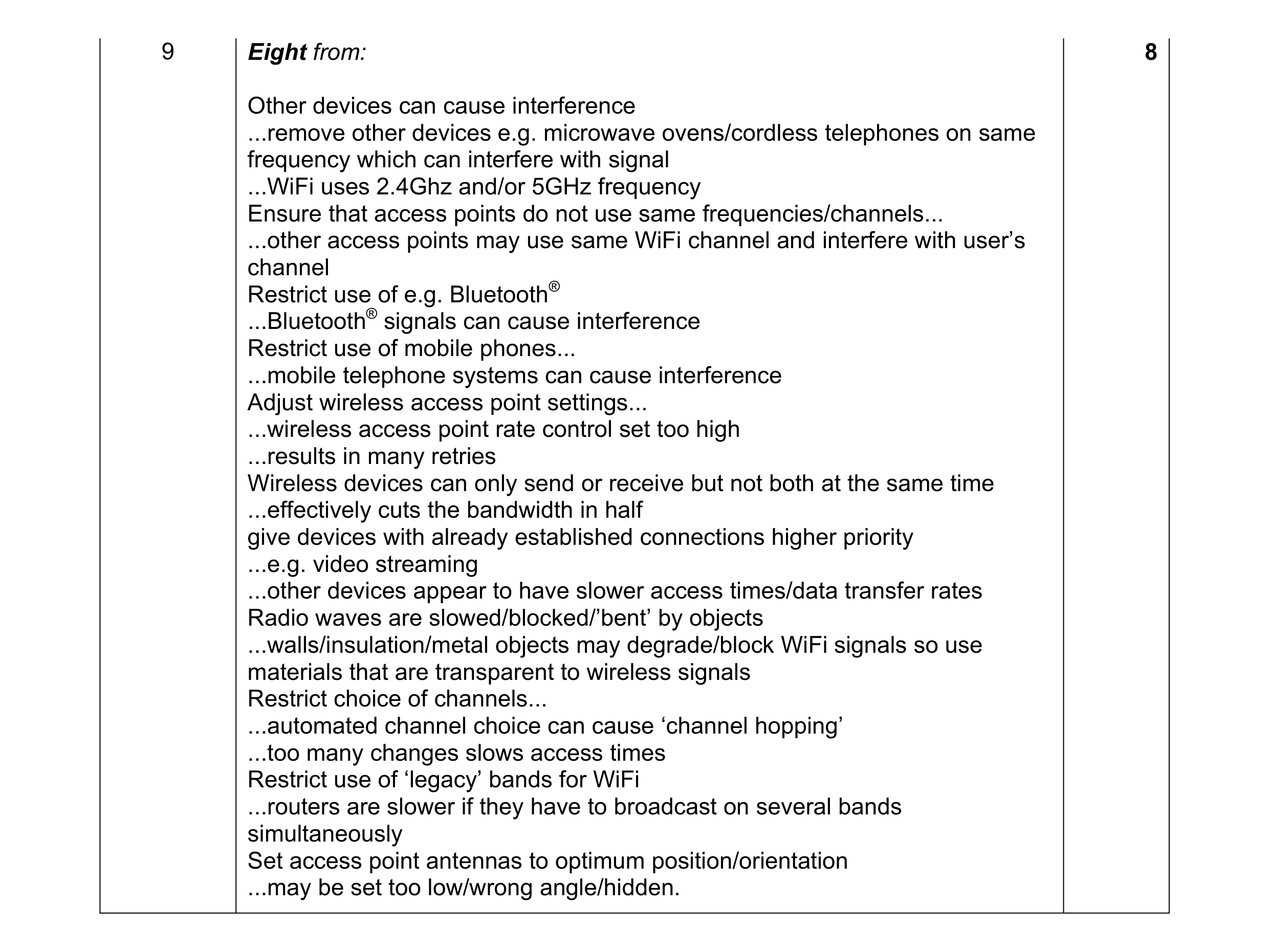 8
8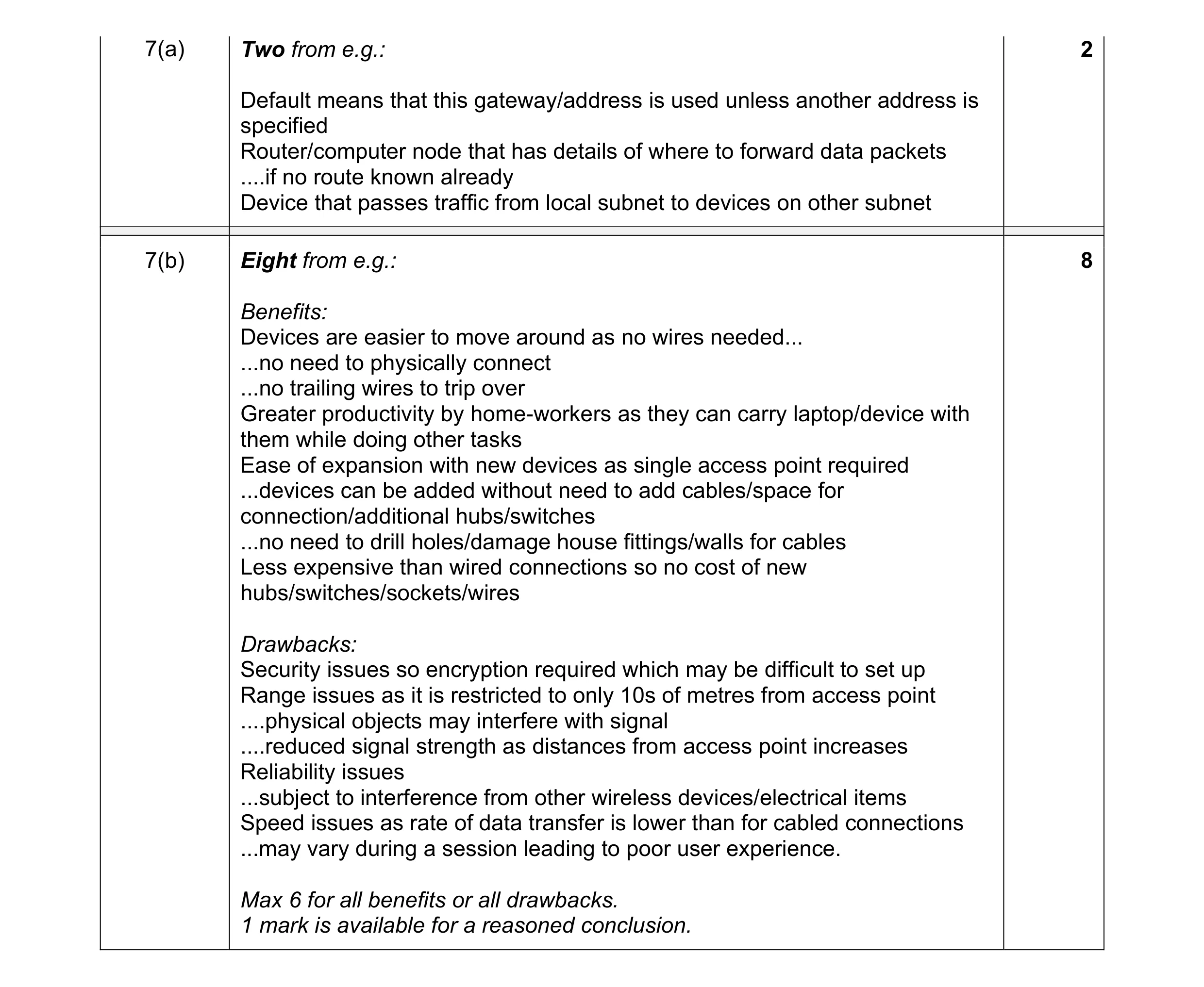 10
10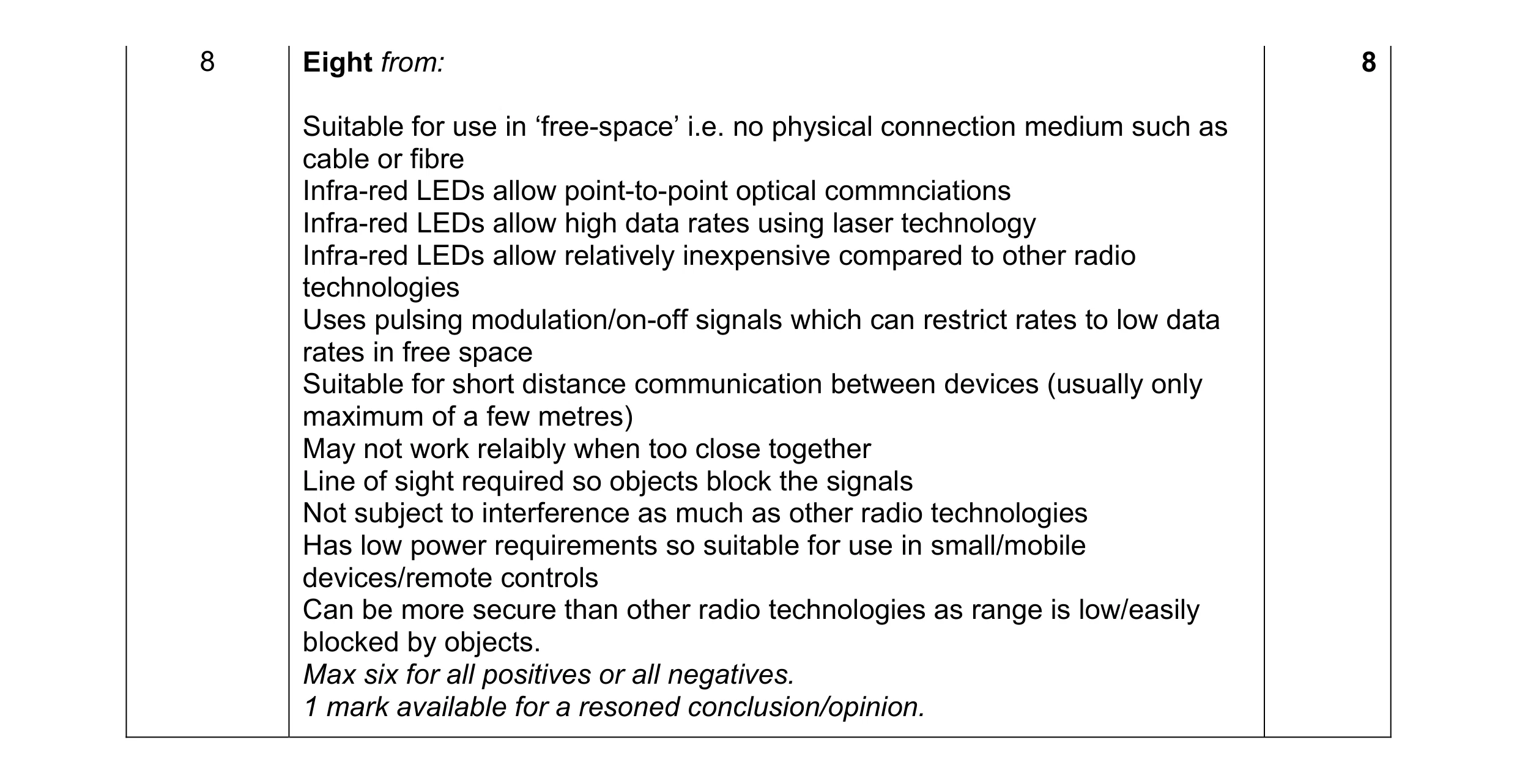 8
8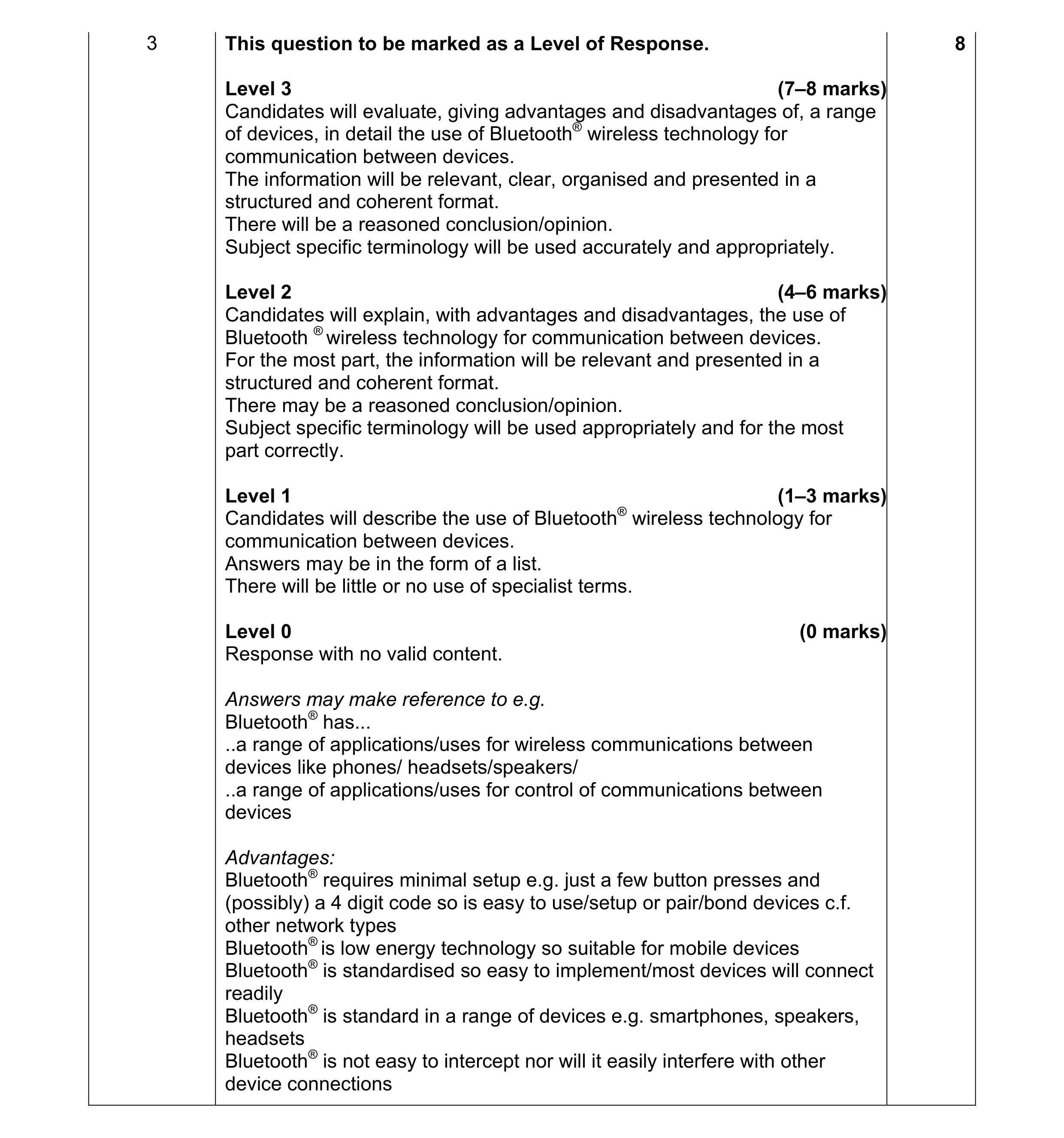 8
8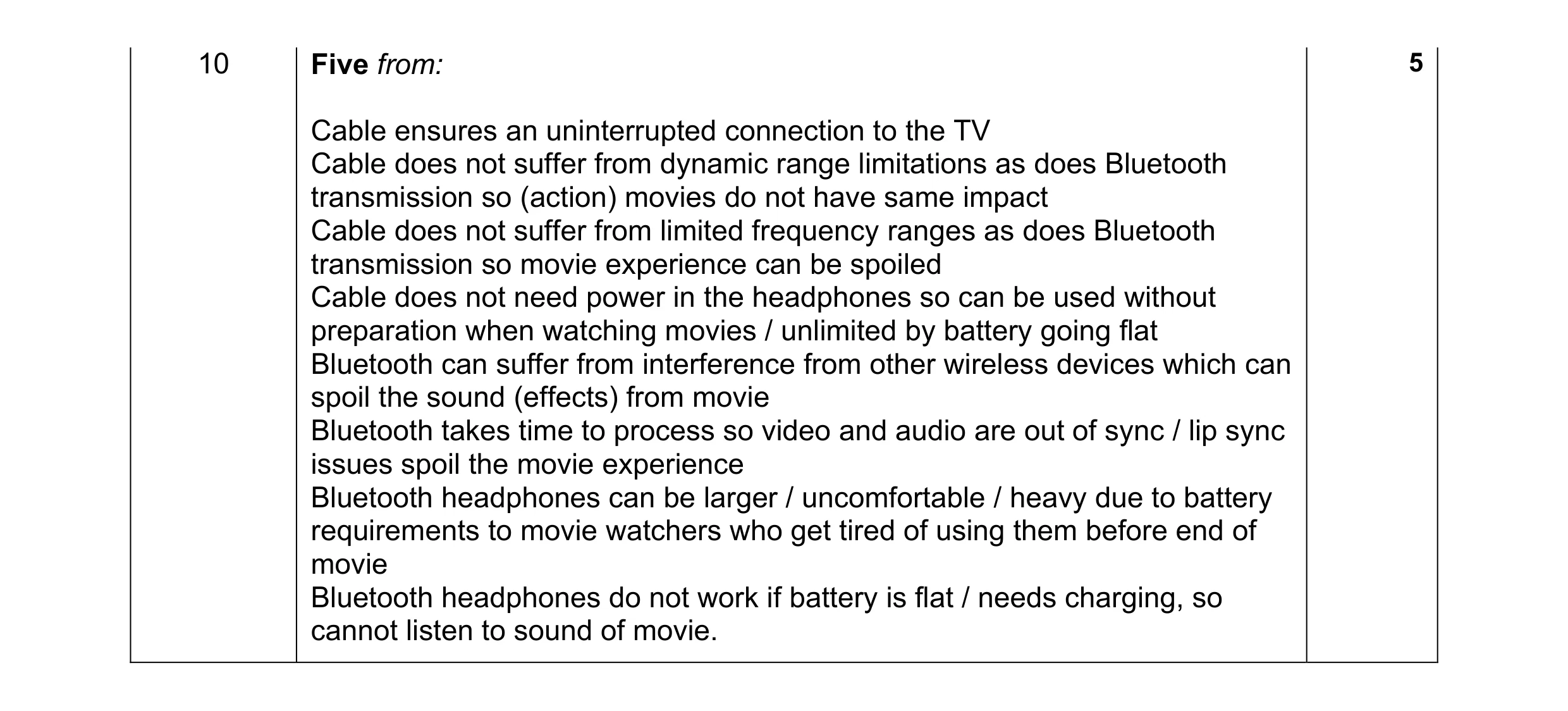 5
5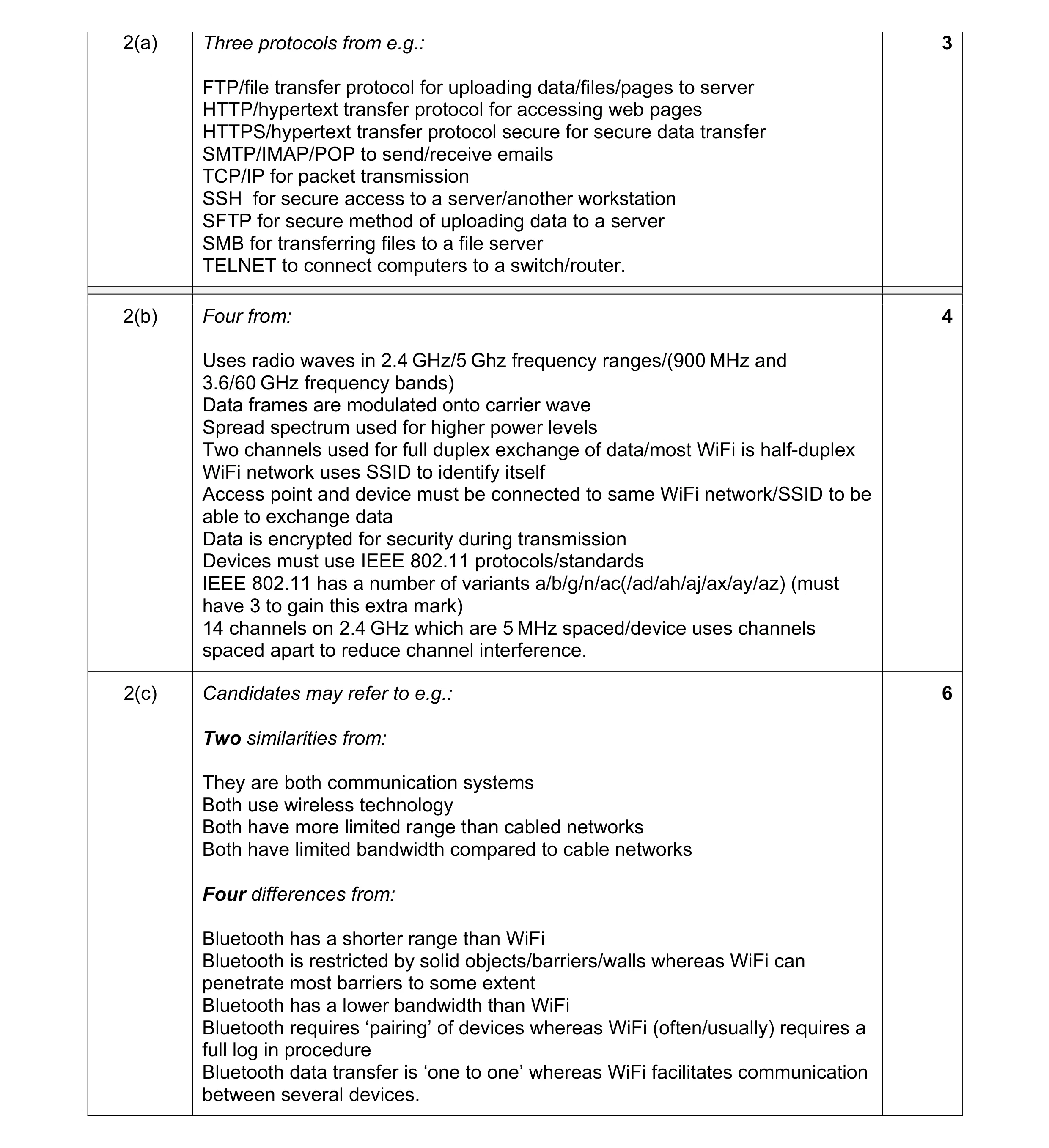 13
13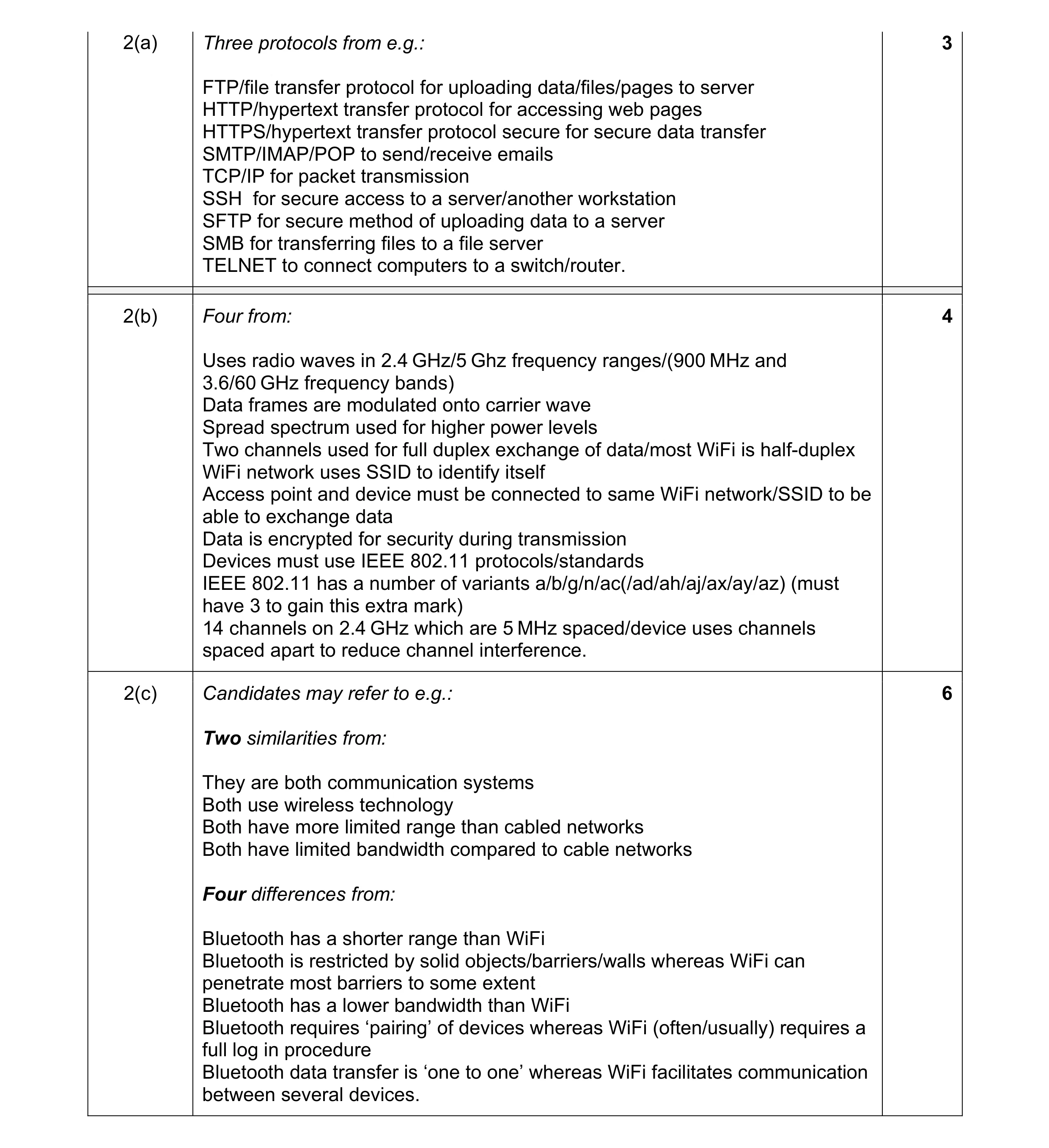 13
13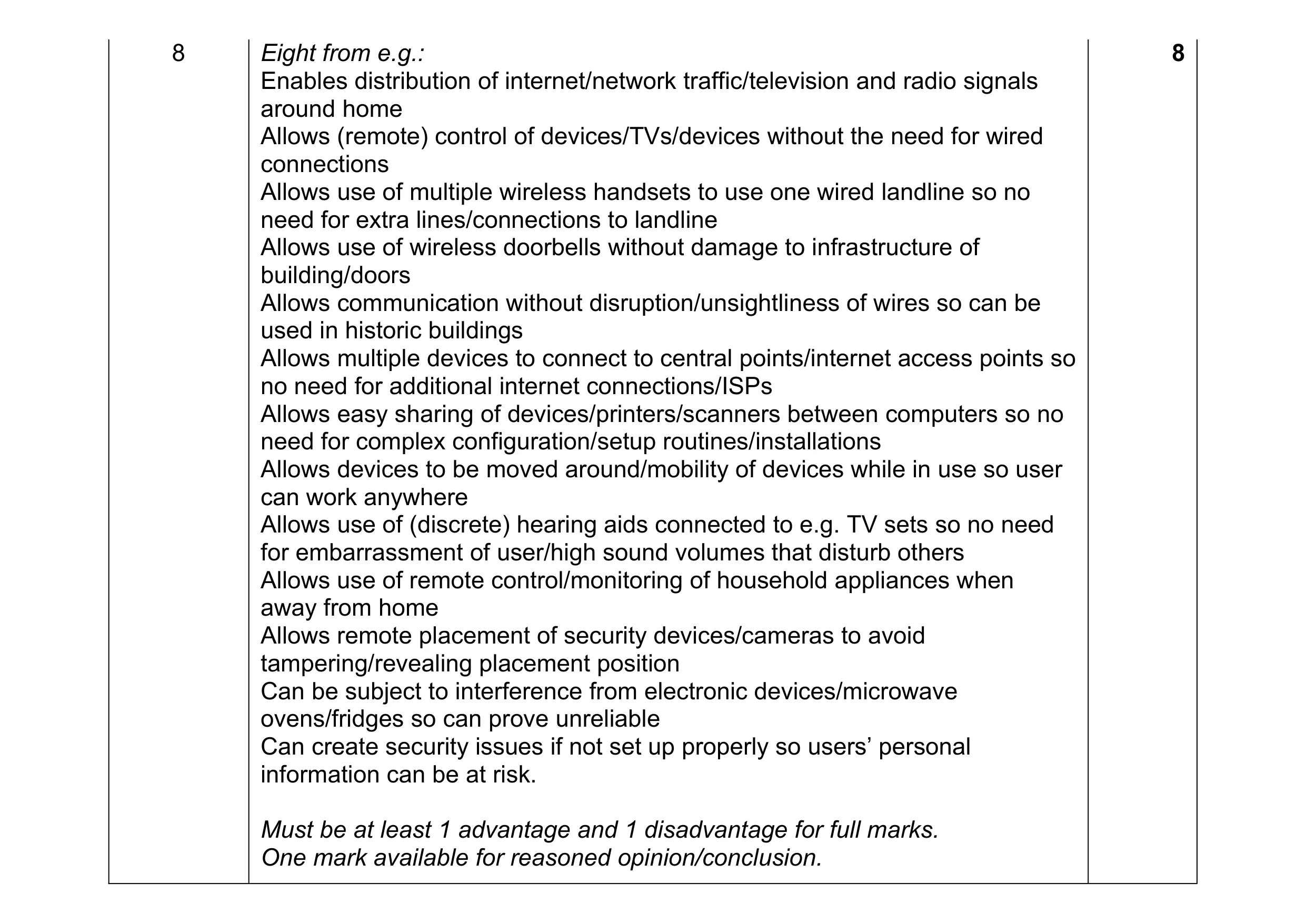 8
8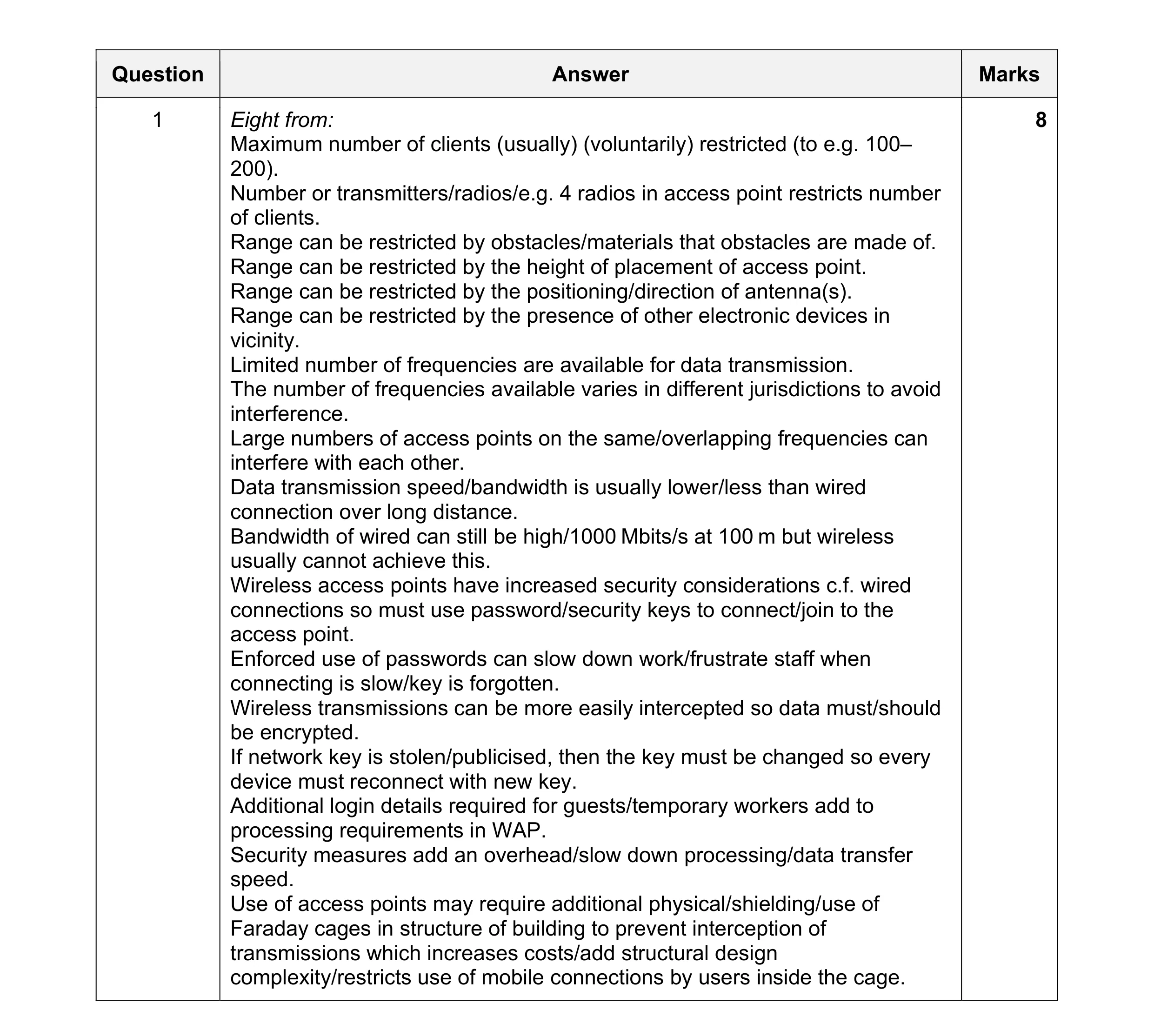 8
8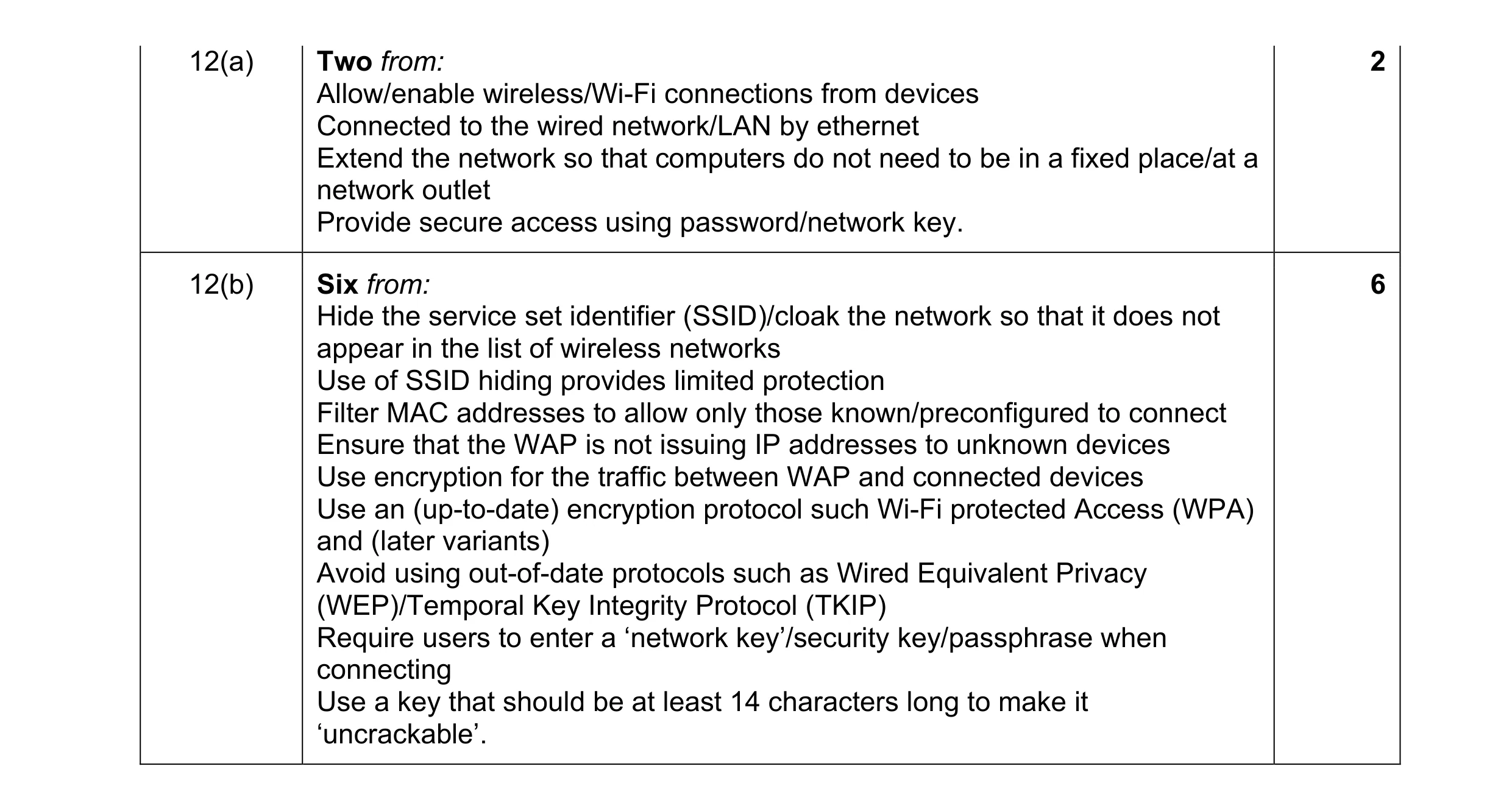 8
8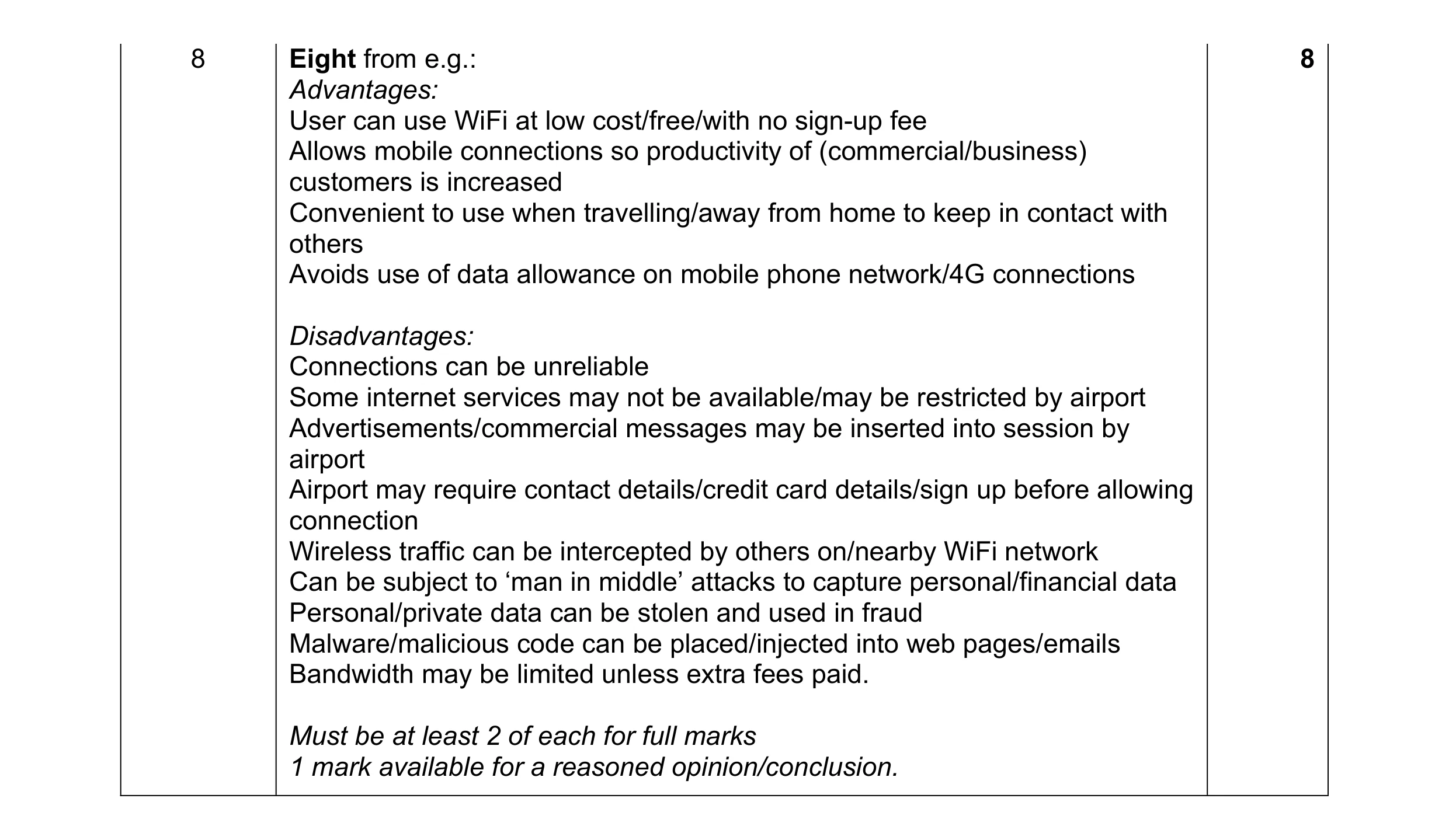 8
8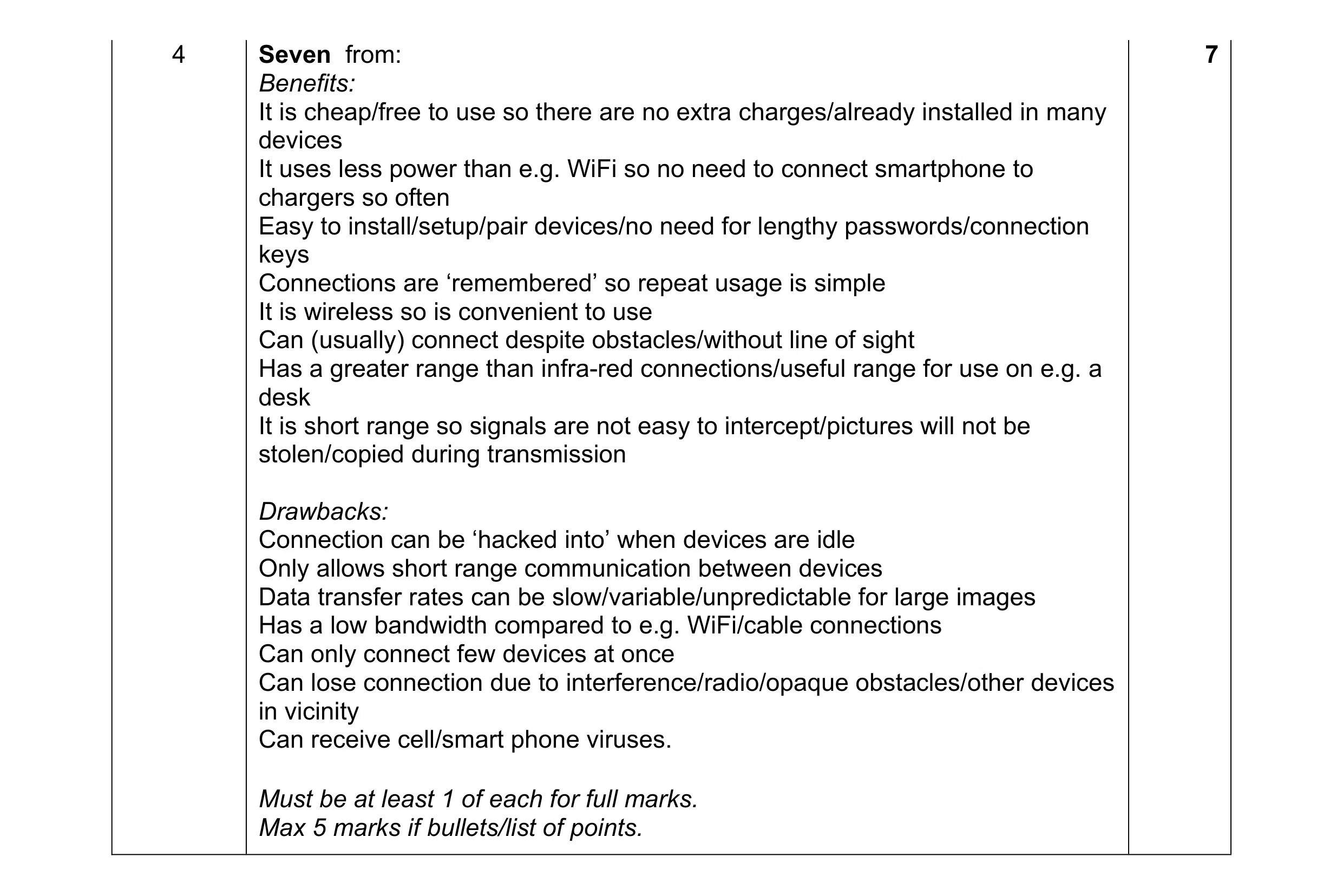 7
7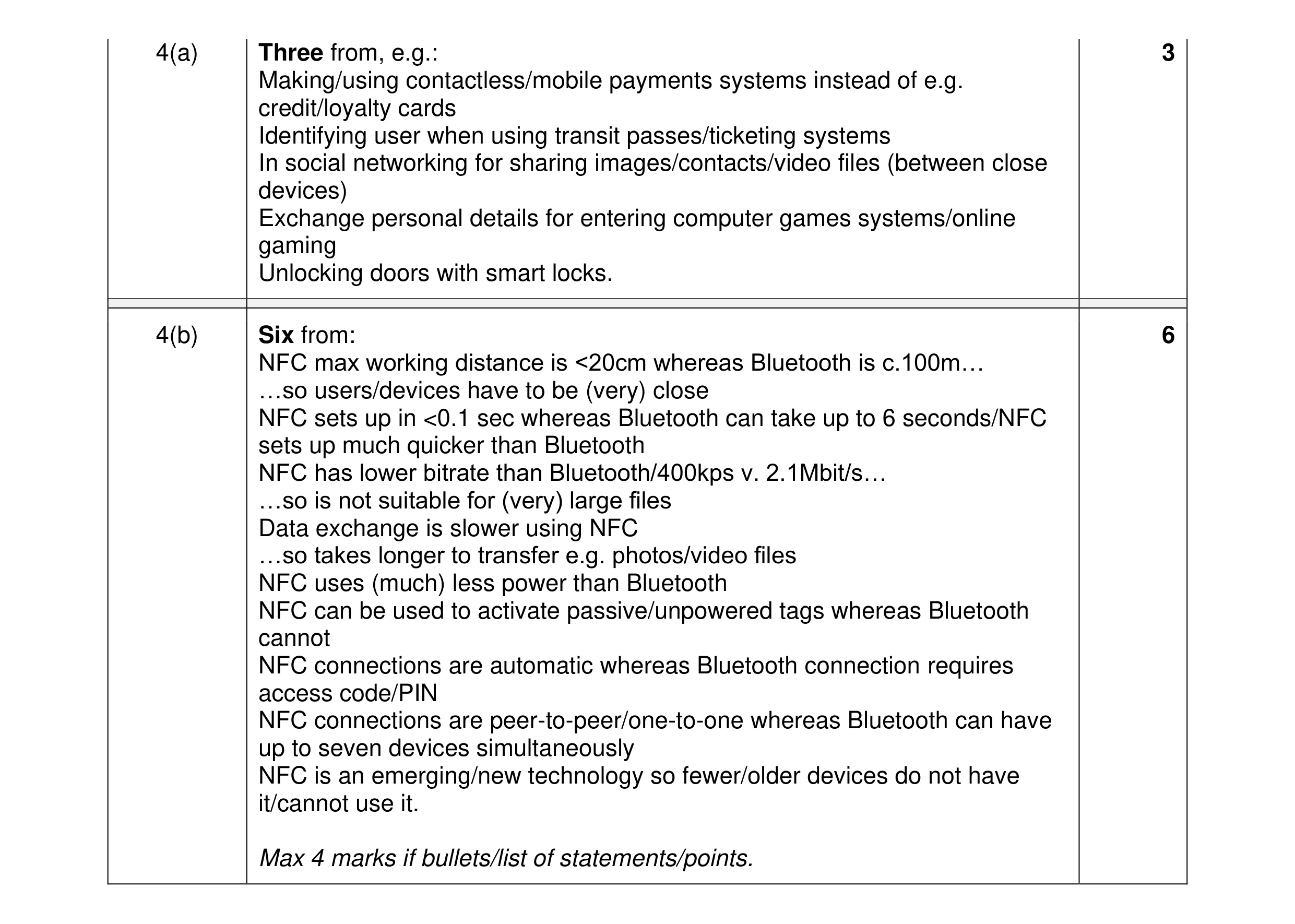 9
9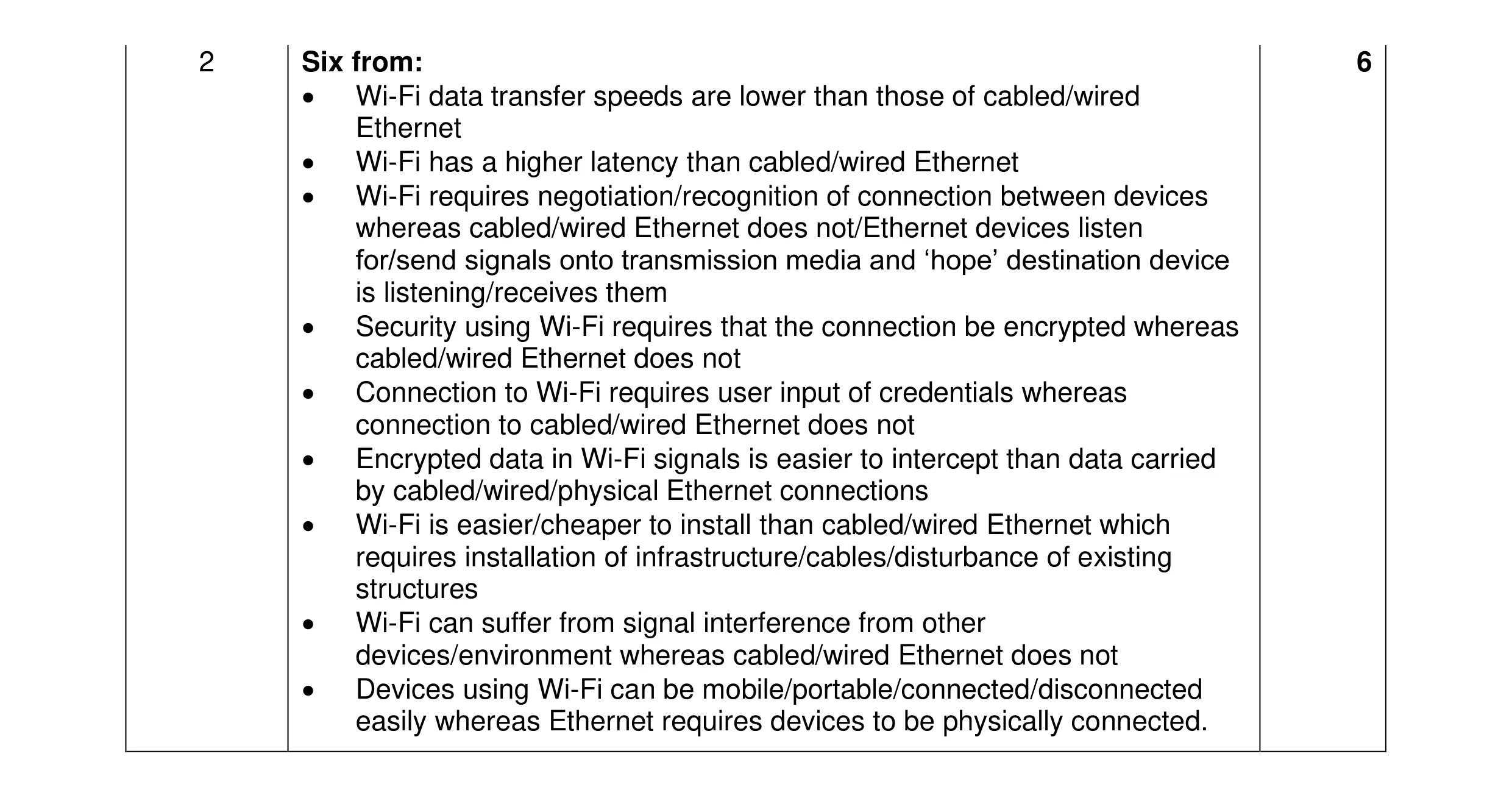 6
6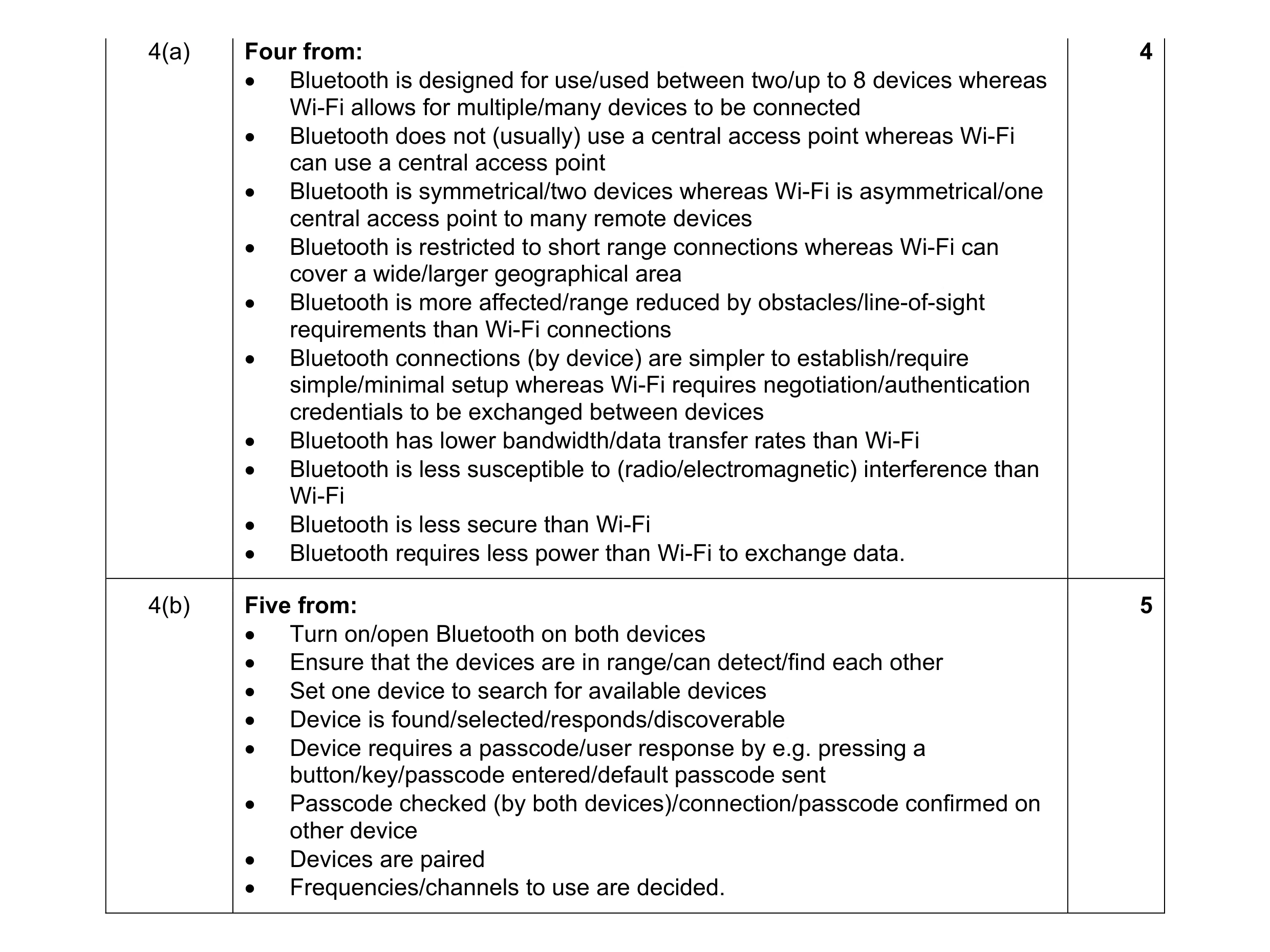 9
9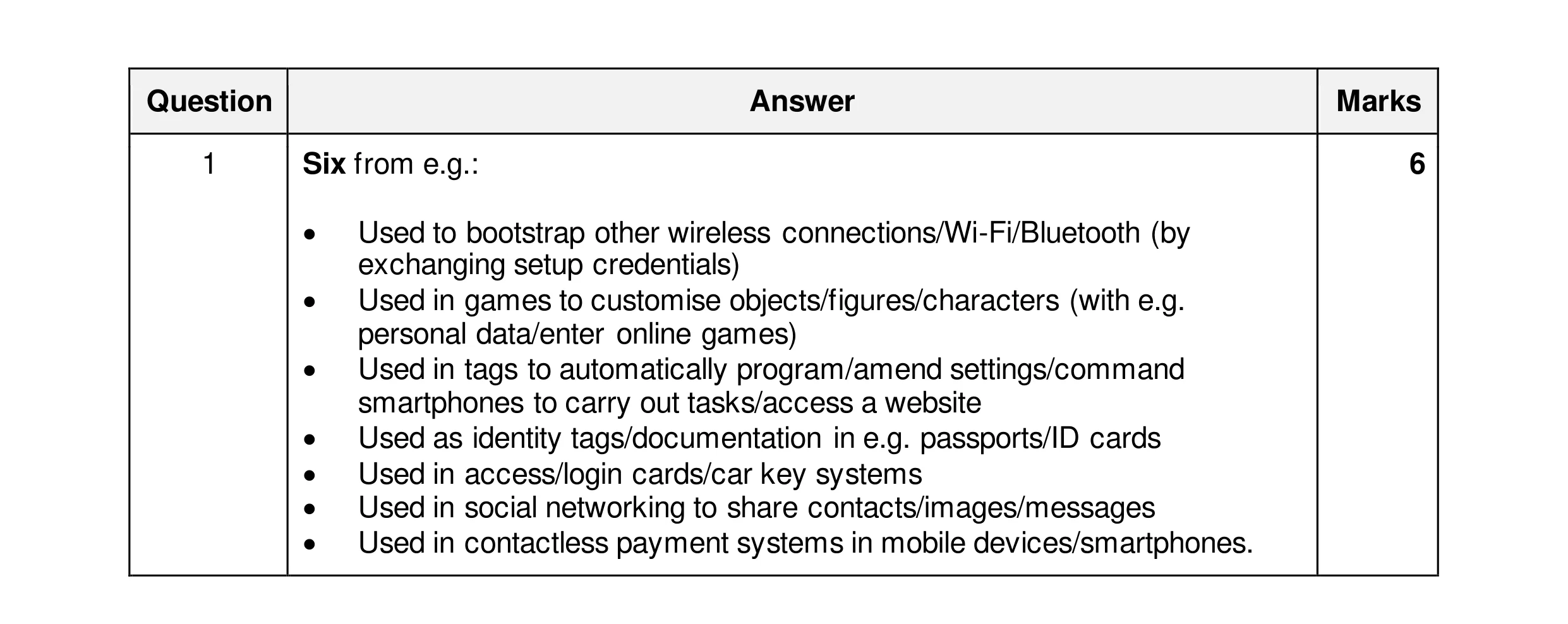 6
6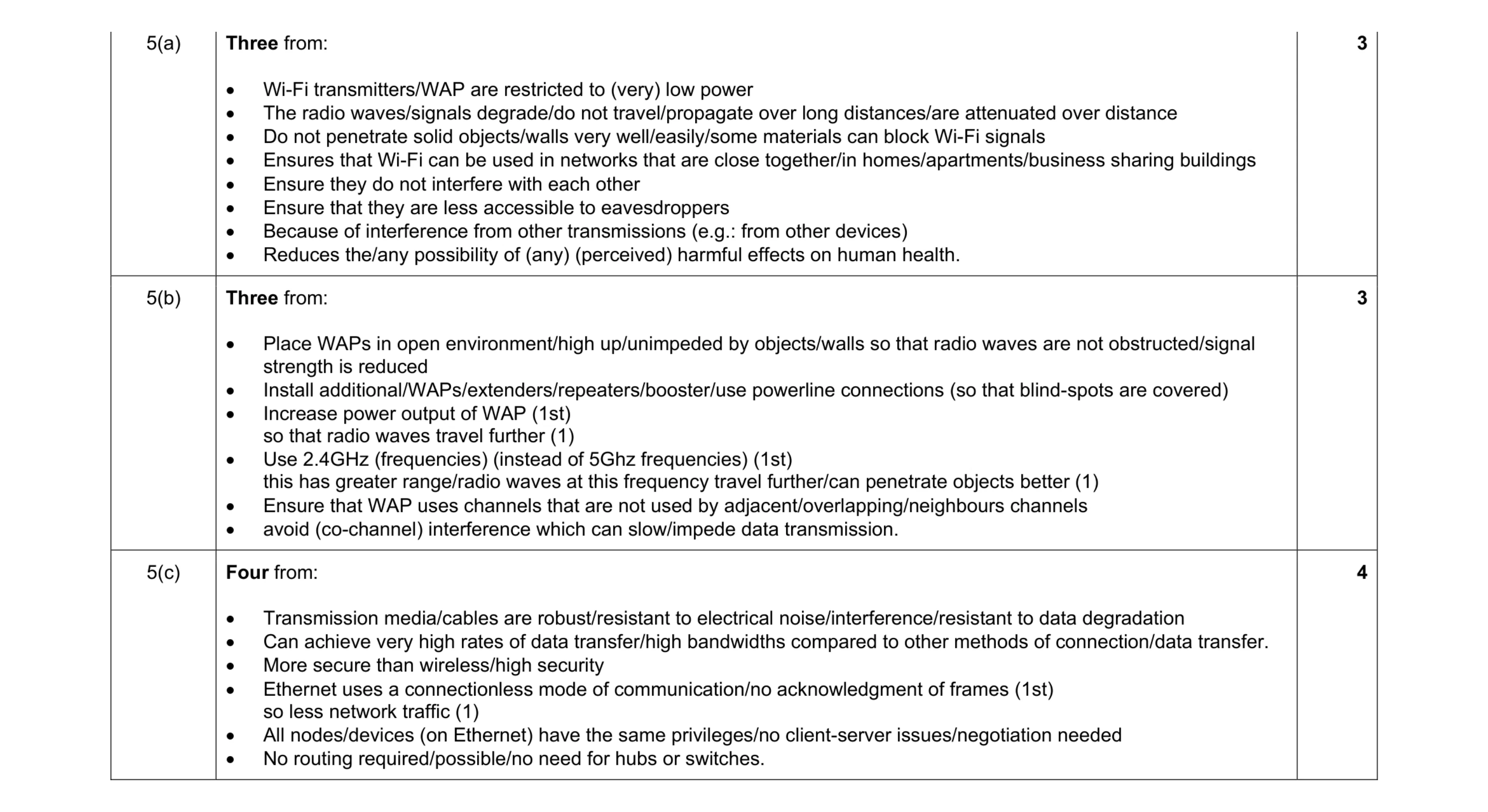 10
10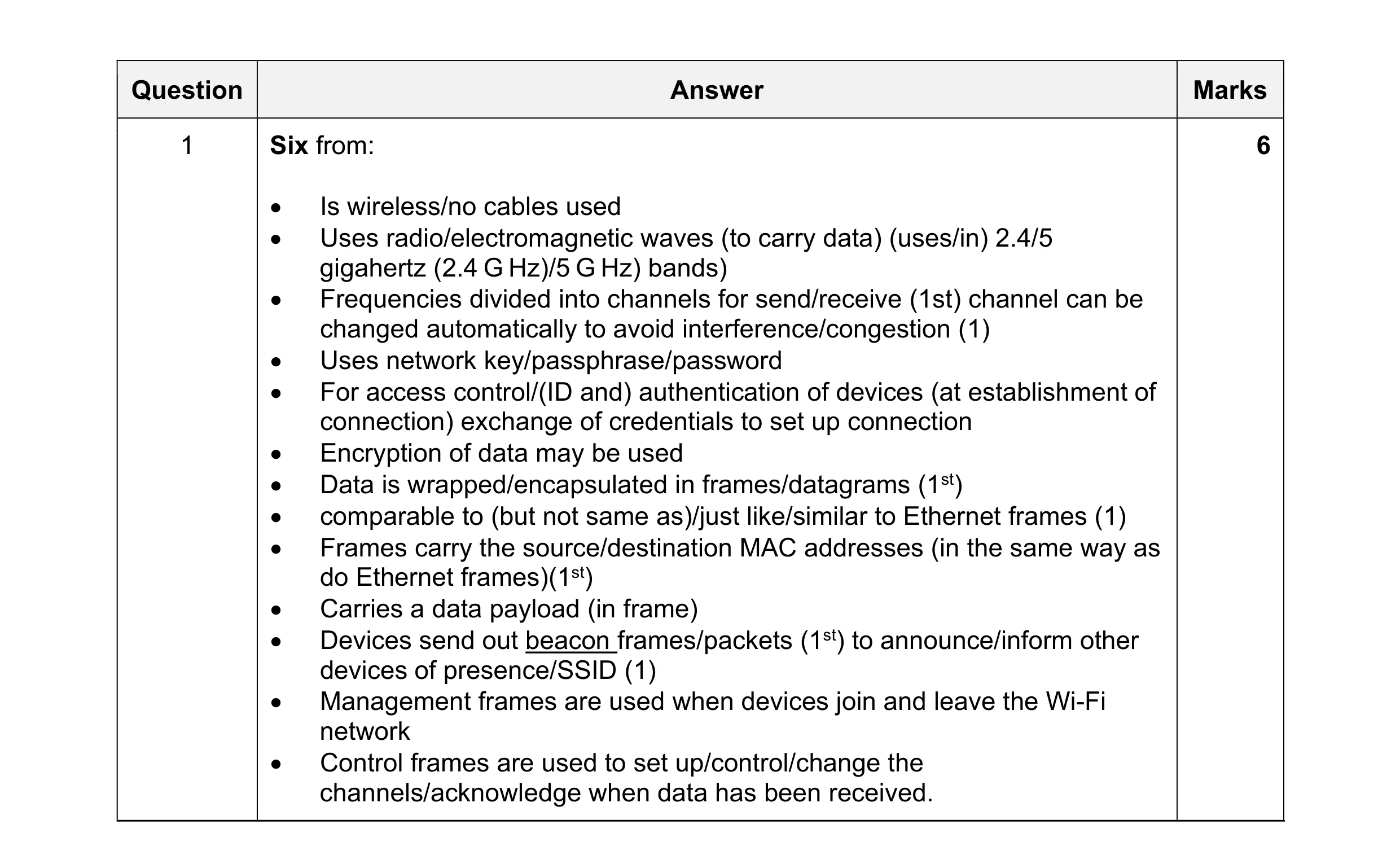 6
6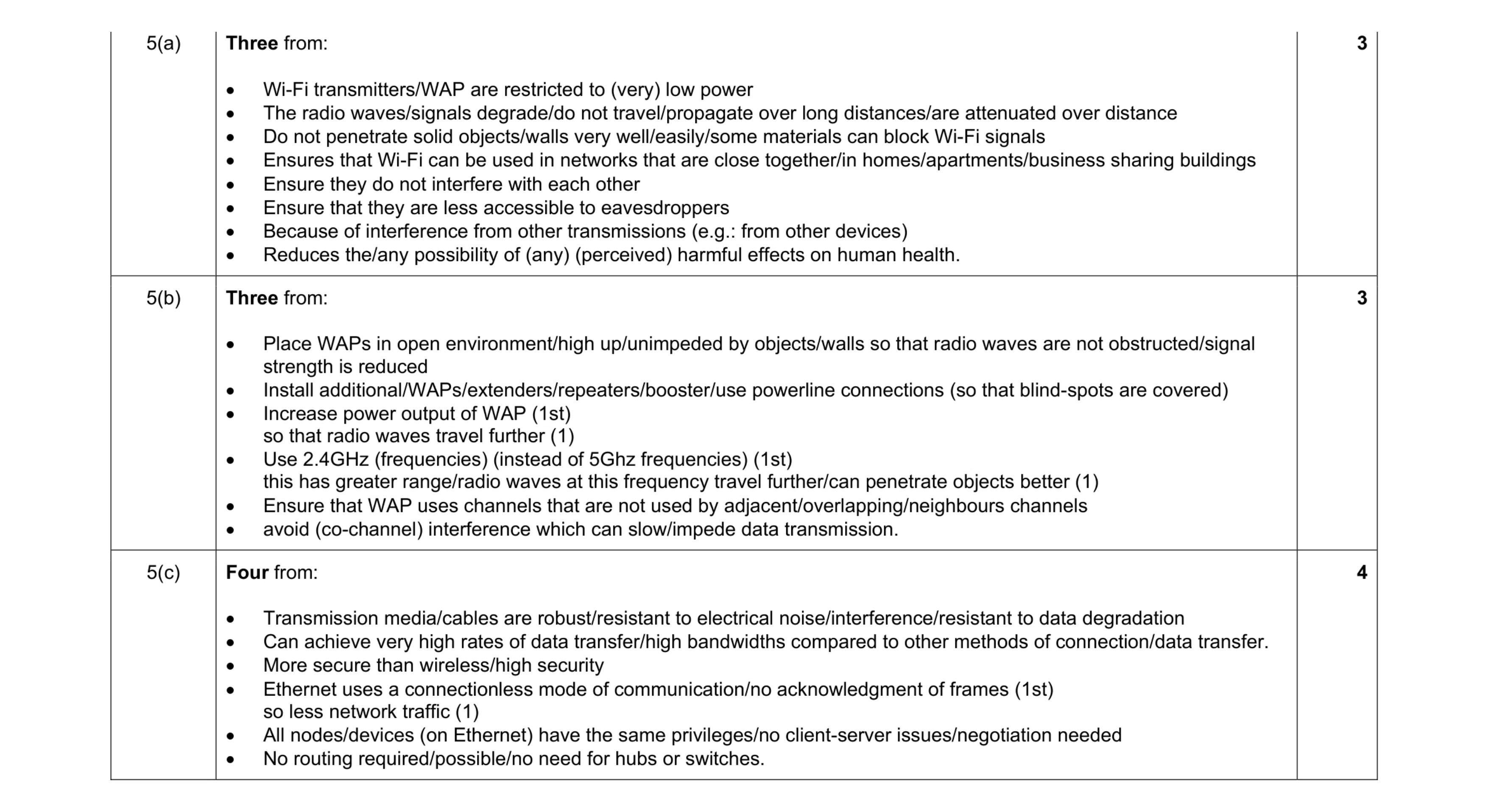 10
10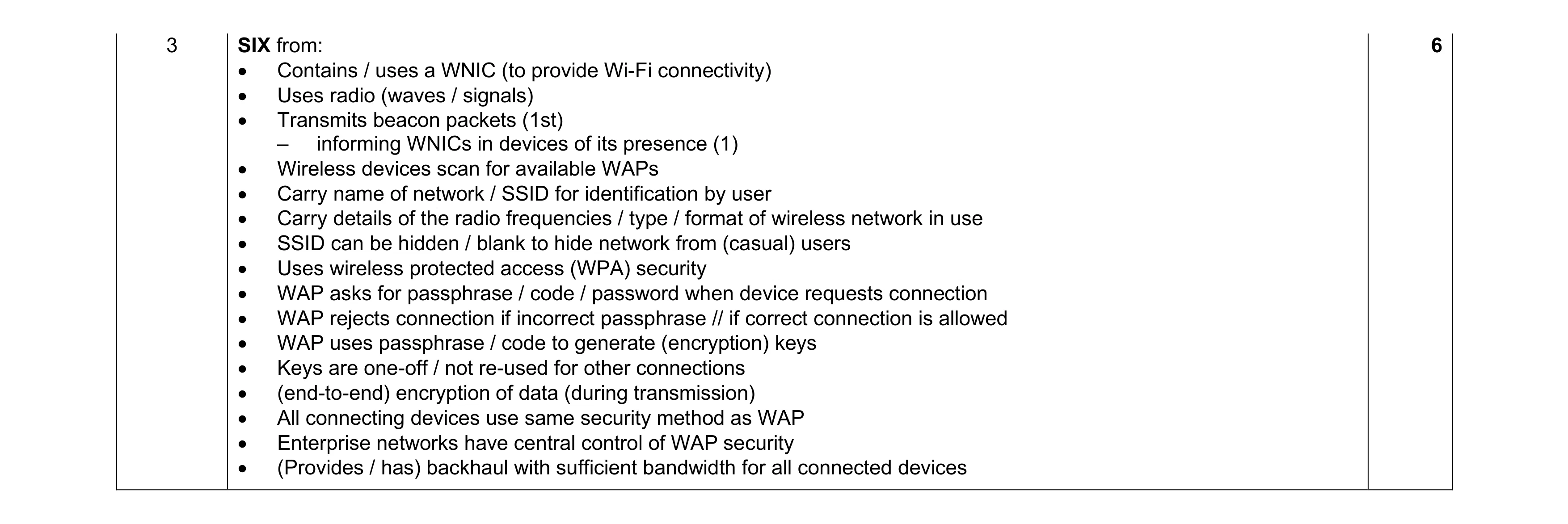 6
6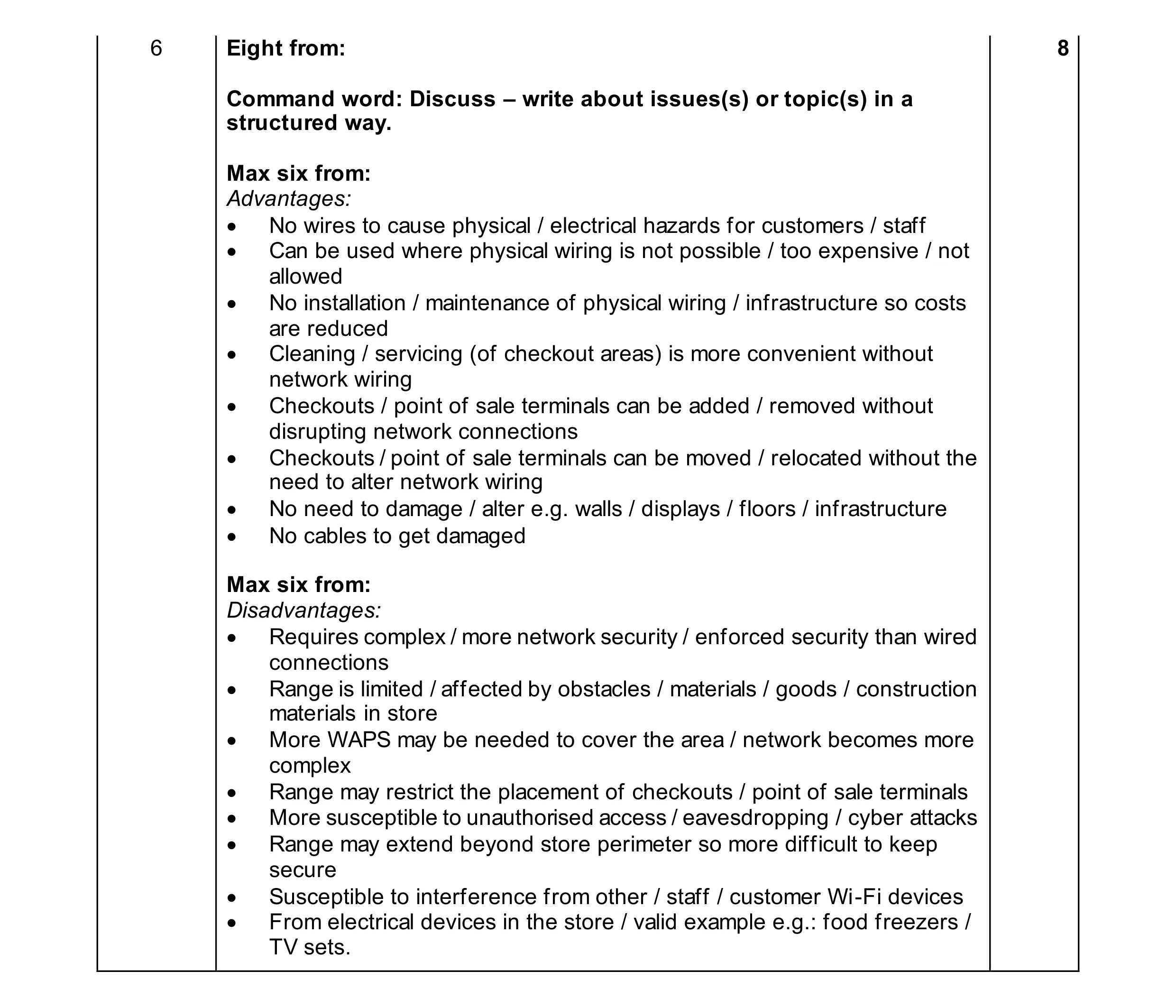 8
8