Cambridge A Level Information Technology (from 2017) 9626 — 2025 May/June Paper 3 · Variant 2
9626/32/M/J/25 · 11 questions · 70 marks · 105 min
The question paper and its mark scheme, free to read here and free to download. This is Cambridge’s own paper, exactly as it was sat.
Question paper12 pages






Mark scheme16 pages
Answers below. Sit the paper first if you are practising.





Questions as text
Q1 · 3D printing is used to create objects
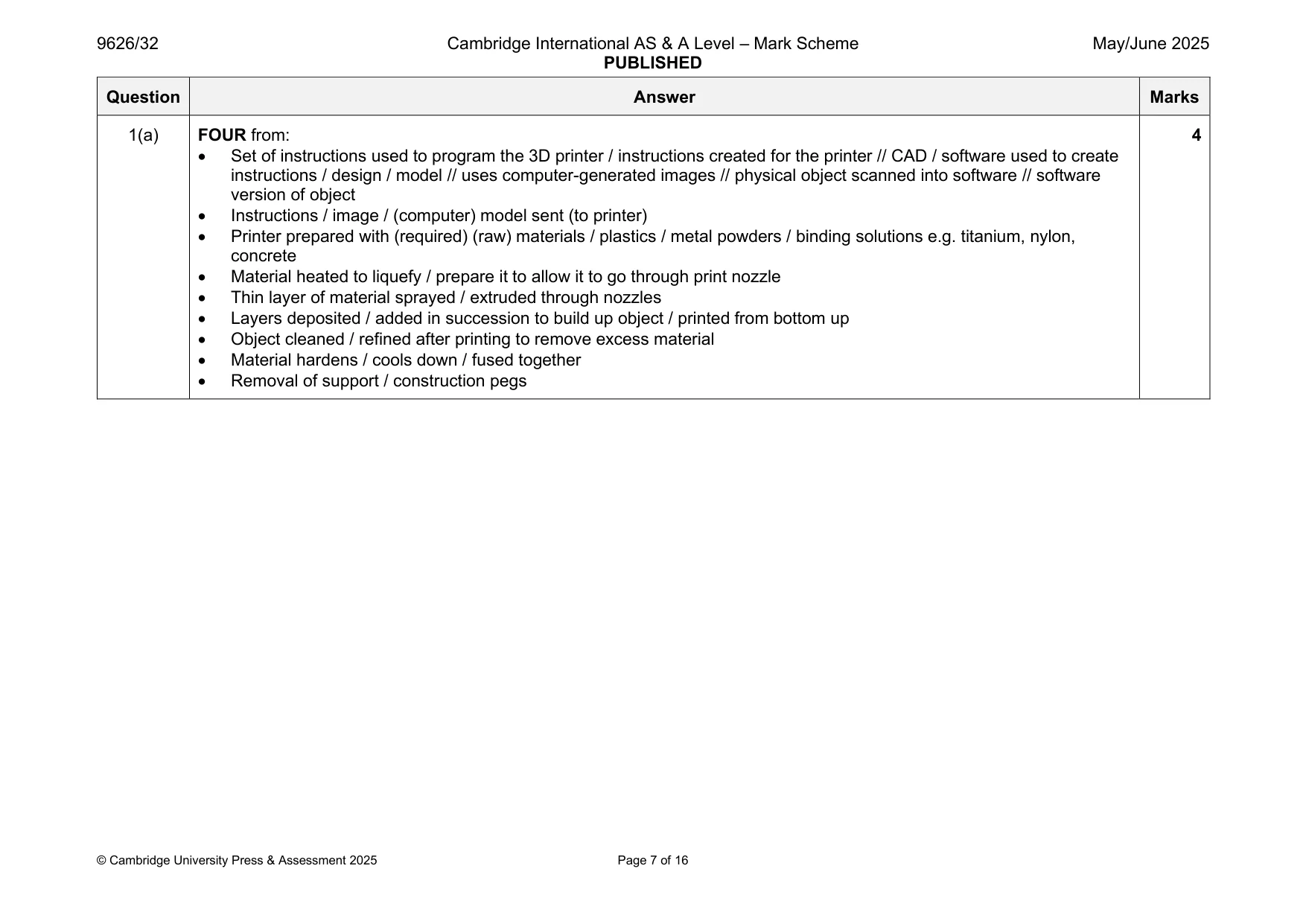
1 3D printing is used to create objects. (a) Describe the process of 3D printing an object. ................................................................................................................................................... ................................................................................................................................................... ................................................................................................................................................... ................................................................................................................................................... ................................................................................................................................................... ................................................................................................................................................... ................................................................................................................................................... ................................................................................................................................................... ................................................................................................................................................... ............................................................................................................................................. [4] (b) Describe how 3D printing is used to improve healthcare. ................................................................................................................................................... ................................................................................................................................................... ................................................................................................................................................... ................................................................................................................................................... ................................................................................................................................................... ................................................................................................................................................... ................................................................................................................................................... ................................................................................................................................................... ................................................................................................................................................... ............................................................................................................................................. [4]
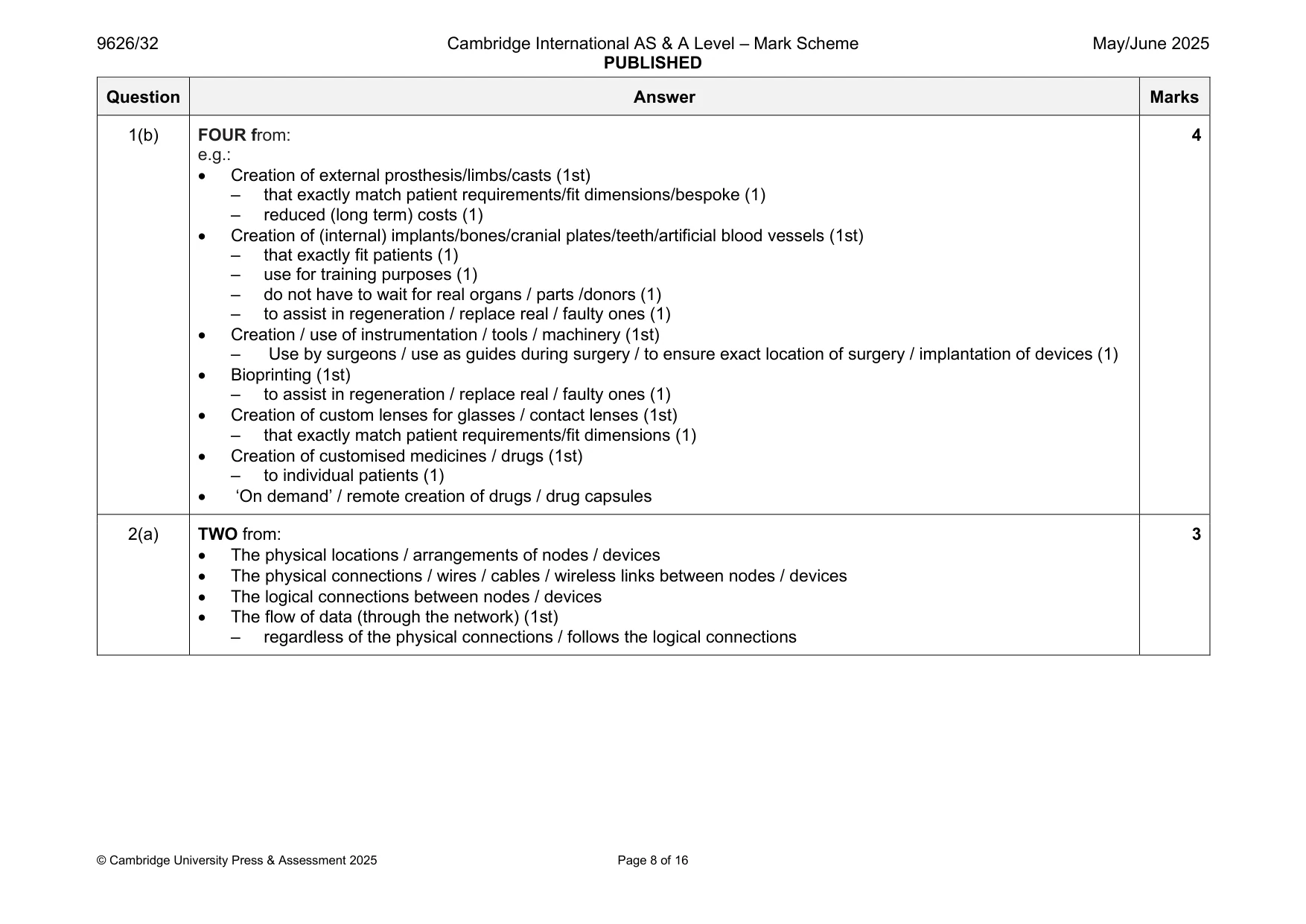
Mark scheme: Question Answer Marks 1(a) FOUR from: 4 • Set of instructions used to program the 3D printer / instructions created for the printer // CAD / software used to create instructions / design / model // uses computer-generated images // physical object scanned into software // software version of object • Instructions / image / (computer) model sent (to printer) • Printer prepared with (required) (raw) materials / plastics / metal powders / binding solutions e.g. titanium, nylon, concrete • Material heated to liquefy / prepare it to allow it to go through print nozzle • Thin layer of material sprayed / extruded through nozzles • Layers deposited / added in succession to build up object / printed from bottom up • Object cleaned / refined after printing to remove excess material • Material hardens / cools down / fused together • Removal of support / construction pegs 1(b) FOUR from: 4 e.g.: • Creation of external prosthesis/limbs/casts (1st) – that exactly match patient requirements/fit dimensions/bespoke (1) – reduced (long term) costs (1) • Creation of (internal) implants/bones/cranial plates/teeth/artificial blood vessels (1st) – that exactly fit patients (1) – use for training purposes (1) – do not have to wait for real organs / parts /donors (1) – to assist in regeneration / replace real / faulty ones (1) • Creation / use of instrumentation / tools / machinery (1st) – Use by surgeons / use as guides during surgery / to ensure exact location of surgery / implantation of devices (1) • Bioprinting (1st) – to assist in regeneration / replace real / faulty ones (1) • Creation of custom lenses for glasses / contact lenses (1st) – that exactly match patient requirements/fit dimensions (1) • Creation of customised medicines / drugs (1st) – to individual patients (1) • ‘On demand’ / remote creation of drugs / drug capsules
Q2 · Two characteristics of a network are its topology and its architecture
2 Two characteristics of a network are its topology and its architecture. (a) Describe what is meant by network topology. ................................................................................................................................................... ................................................................................................................................................... ................................................................................................................................................... ................................................................................................................................................... ................................................................................................................................................... ................................................................................................................................................... ................................................................................................................................................... ............................................................................................................................................. [3] (b) Describe what is meant by network architecture. ................................................................................................................................................... ................................................................................................................................................... ................................................................................................................................................... ................................................................................................................................................... ................................................................................................................................................... ................................................................................................................................................... ................................................................................................................................................... ............................................................................................................................................. [3]
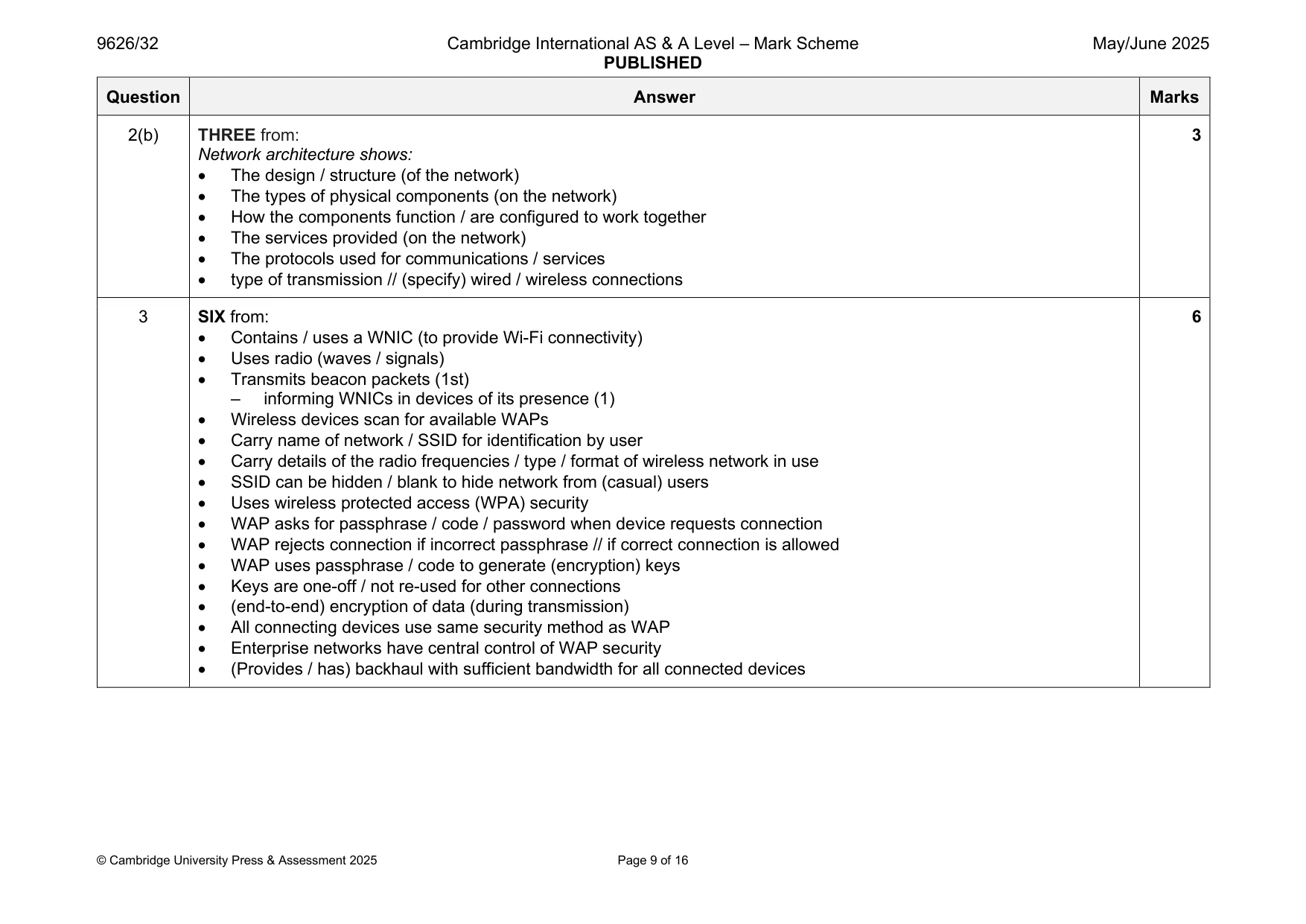
Mark scheme: 2(a) TWO from: 3 • The physical locations / arrangements of nodes / devices • The physical connections / wires / cables / wireless links between nodes / devices • The logical connections between nodes / devices • The flow of data (through the network) (1st) – regardless of the physical connections / follows the logical connections 2(b) THREE from: 3 Network architecture shows: • The design / structure (of the network) • The types of physical components (on the network) • How the components function / are configured to work together • The services provided (on the network) • The protocols used for communications / services • type of transmission // (specify) wired / wireless connections
Q3 · The role of a wireless access point (WAP) is to enable wireless devices to make a secure…
3 The role of a wireless access point (WAP) is to enable wireless devices to make a secure connection to a wired network. Describe how a WAP carries out this role. .......................................................................................................................................................... .......................................................................................................................................................... .......................................................................................................................................................... .......................................................................................................................................................... .......................................................................................................................................................... .......................................................................................................................................................... .......................................................................................................................................................... .......................................................................................................................................................... .......................................................................................................................................................... .......................................................................................................................................................... .......................................................................................................................................................... .......................................................................................................................................................... .......................................................................................................................................................... .................................................................................................................................................... [6]
Mark scheme: 3 SIX from: 6 • Contains / uses a WNIC (to provide Wi-Fi connectivity) • Uses radio (waves / signals) • Transmits beacon packets (1st) – informing WNICs in devices of its presence (1) • Wireless devices scan for available WAPs • Carry name of network / SSID for identification by user • Carry details of the radio frequencies / type / format of wireless network in use • SSID can be hidden / blank to hide network from (casual) users • Uses wireless protected access (WPA) security • WAP asks for passphrase / code / password when device requests connection • WAP rejects connection if incorrect passphrase // if correct connection is allowed • WAP uses passphrase / code to generate (encryption) keys • Keys are one-off / not re-used for other connections • (end-to-end) encryption of data (during transmission) • All connecting devices use same security method as WAP • Enterprise networks have central control of WAP security • (Provides / has) backhaul with sufficient bandwidth for all connected devices
Q4 · The colour select tool in image-editing software is a selection tool that can be used to…
4 The colour select tool in image-editing software is a selection tool that can be used to select, remove or hide parts of a bitmap image. Analyse the use of three other selection tools that are provided by bitmap image-editing software. .......................................................................................................................................................... .......................................................................................................................................................... .......................................................................................................................................................... .......................................................................................................................................................... .......................................................................................................................................................... .......................................................................................................................................................... .......................................................................................................................................................... .......................................................................................................................................................... .......................................................................................................................................................... .......................................................................................................................................................... .......................................................................................................................................................... .......................................................................................................................................................... .......................................................................................................................................................... .................................................................................................................................................... [6]
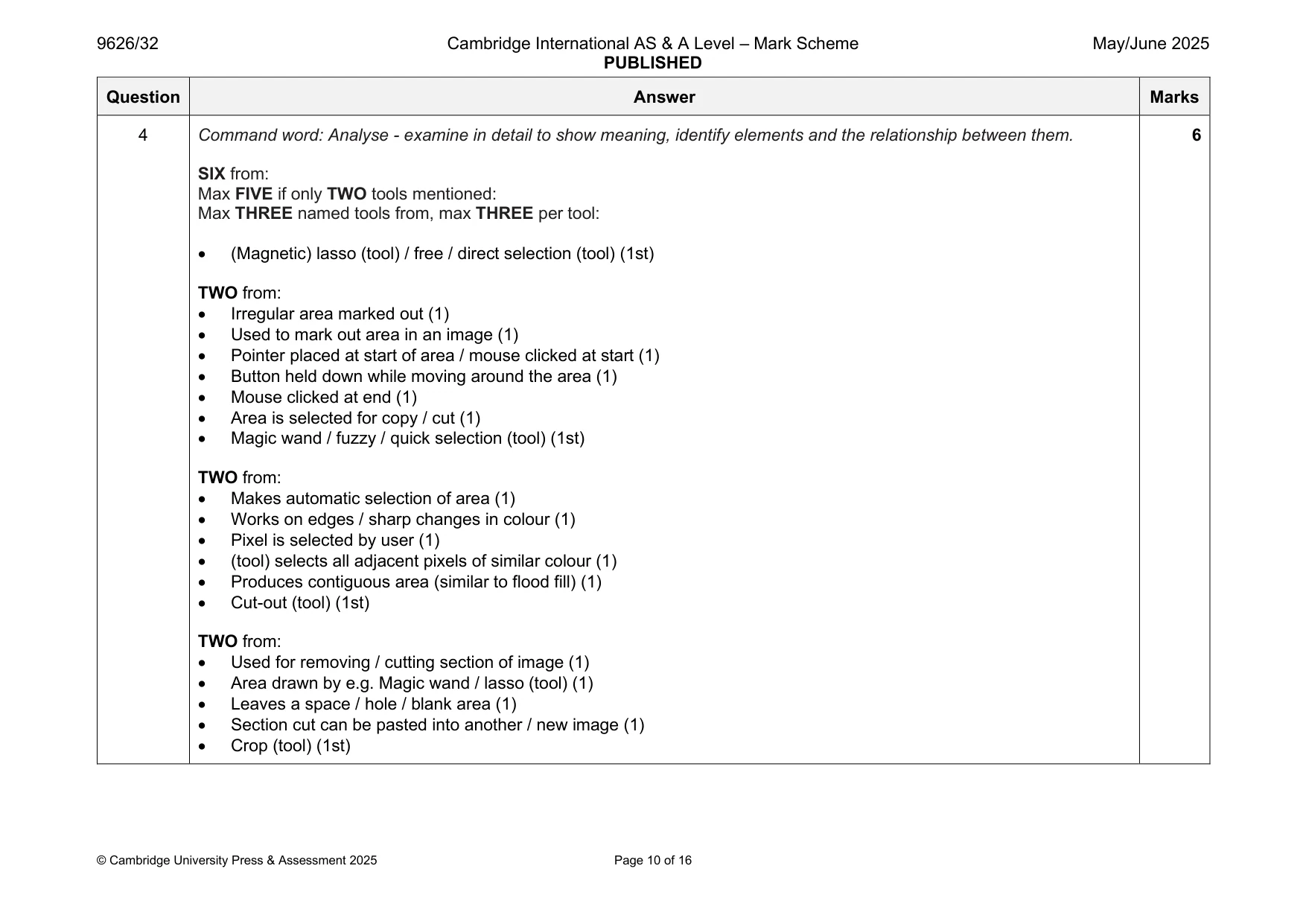
Mark scheme: 4 Command word: Analyse - examine in detail to show meaning, identify elements and the relationship between them. 6 SIX from: Max FIVE if only TWO tools mentioned: Max THREE named tools from, max THREE per tool: • (Magnetic) lasso (tool) / free / direct selection (tool) (1st) TWO from: • Irregular area marked out (1) • Used to mark out area in an image (1) • Pointer placed at start of area / mouse clicked at start (1) • Button held down while moving around the area (1) • Mouse clicked at end (1) • Area is selected for copy / cut (1) • Magic wand / fuzzy / quick selection (tool) (1st) TWO from: • Makes automatic selection of area (1) • Works on edges / sharp changes in colour (1) • Pixel is selected by user (1) • (tool) selects all adjacent pixels of similar colour (1) • Produces contiguous area (similar to flood fill) (1) • Cut-out (tool) (1st) TWO from: • Used for removing / cutting section of image (1) • Area drawn by e.g. Magic wand / lasso (tool) (1) • Leaves a space / hole / blank area (1) • Section cut can be pasted into another / new image (1) • Crop (tool) (1st) 4 TWO from: • Removes unwanted areas (1) • From edges of images (1) • Marked out by straight lines / rectangular area (1) • Masking (tools) (1st) TWO from: • Used to cover / overlay area (1) • Change the opacity / transparency of area (1) • Using alpha channel / layer (1) • Mask is a layer on top of image area (1)
Q5 · Discuss the benefits and drawbacks of mobile networks
5 Discuss the benefits and drawbacks of mobile networks. .......................................................................................................................................................... .......................................................................................................................................................... .......................................................................................................................................................... .......................................................................................................................................................... .......................................................................................................................................................... .......................................................................................................................................................... .......................................................................................................................................................... .......................................................................................................................................................... .......................................................................................................................................................... .......................................................................................................................................................... .......................................................................................................................................................... .......................................................................................................................................................... .......................................................................................................................................................... .......................................................................................................................................................... .......................................................................................................................................................... .......................................................................................................................................................... .......................................................................................................................................................... .......................................................................................................................................................... .......................................................................................................................................................... .................................................................................................................................................... [8]
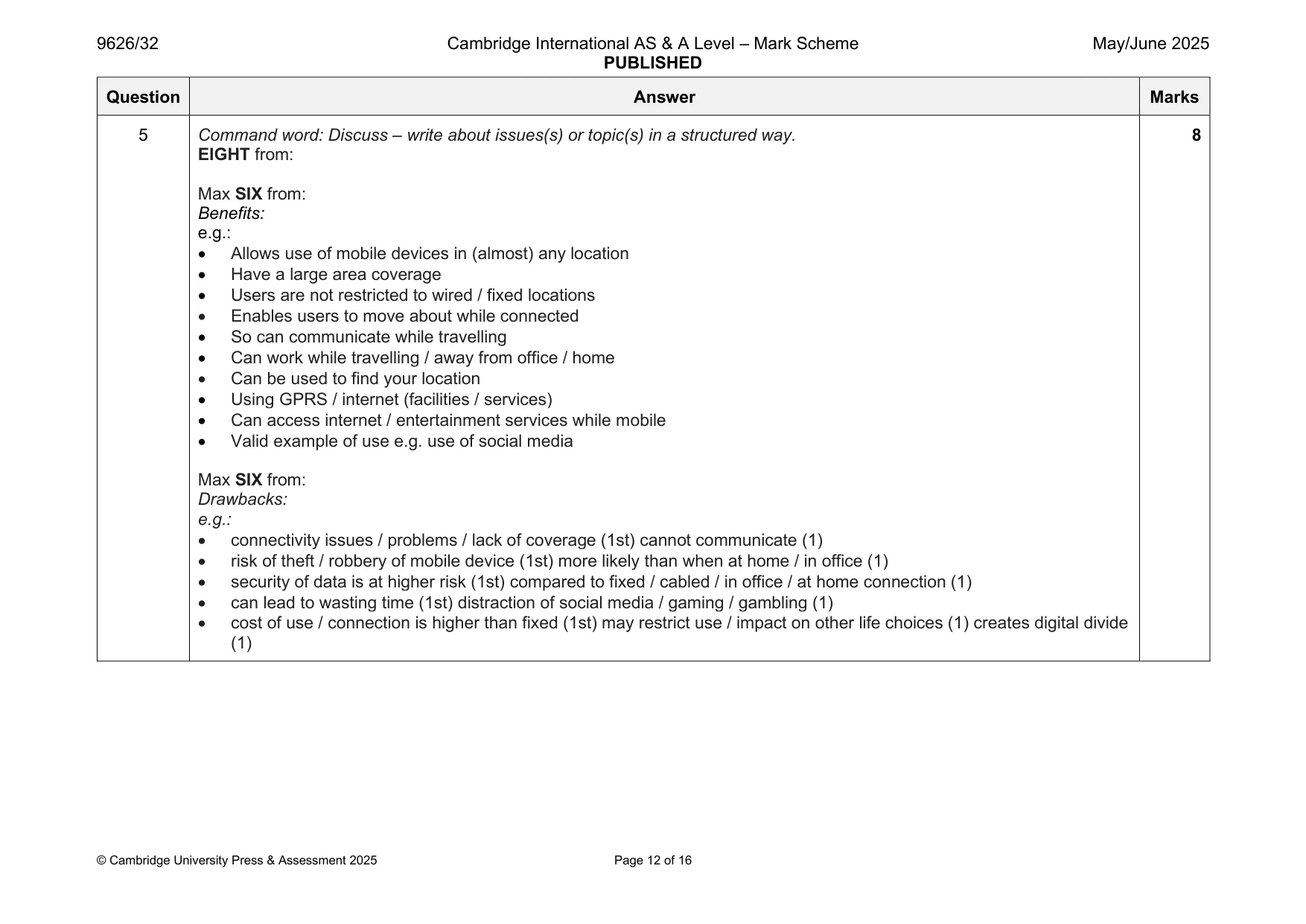
Mark scheme: 5 Command word: Discuss – write about issues(s) or topic(s) in a structured way. 8 EIGHT from: Max SIX from: Benefits: e.g.: • Allows use of mobile devices in (almost) any location • Have a large area coverage • Users are not restricted to wired / fixed locations • Enables users to move about while connected • So can communicate while travelling • Can work while travelling / away from office / home • Can be used to find your location • Using GPRS / internet (facilities / services) • Can access internet / entertainment services while mobile • Valid example of use e.g. use of social media Max SIX from: Drawbacks: e.g.: • connectivity issues / problems / lack of coverage (1st) cannot communicate (1) • risk of theft / robbery of mobile device (1st) more likely than when at home / in office (1) • security of data is at higher risk (1st) compared to fixed / cabled / in office / at home connection (1) • can lead to wasting time (1st) distraction of social media / gaming / gambling (1) • cost of use / connection is higher than fixed (1st) may restrict use / impact on other life choices (1) creates digital divide (1)
Q6 · Test plans are written early in the development cycle of new systems
6 Test plans are written early in the development cycle of new systems. Describe the tasks that are carried out when creating a test plan. .......................................................................................................................................................... .......................................................................................................................................................... .......................................................................................................................................................... .......................................................................................................................................................... .......................................................................................................................................................... .......................................................................................................................................................... .......................................................................................................................................................... .......................................................................................................................................................... .......................................................................................................................................................... .......................................................................................................................................................... .......................................................................................................................................................... .......................................................................................................................................................... .......................................................................................................................................................... .................................................................................................................................................... [6]
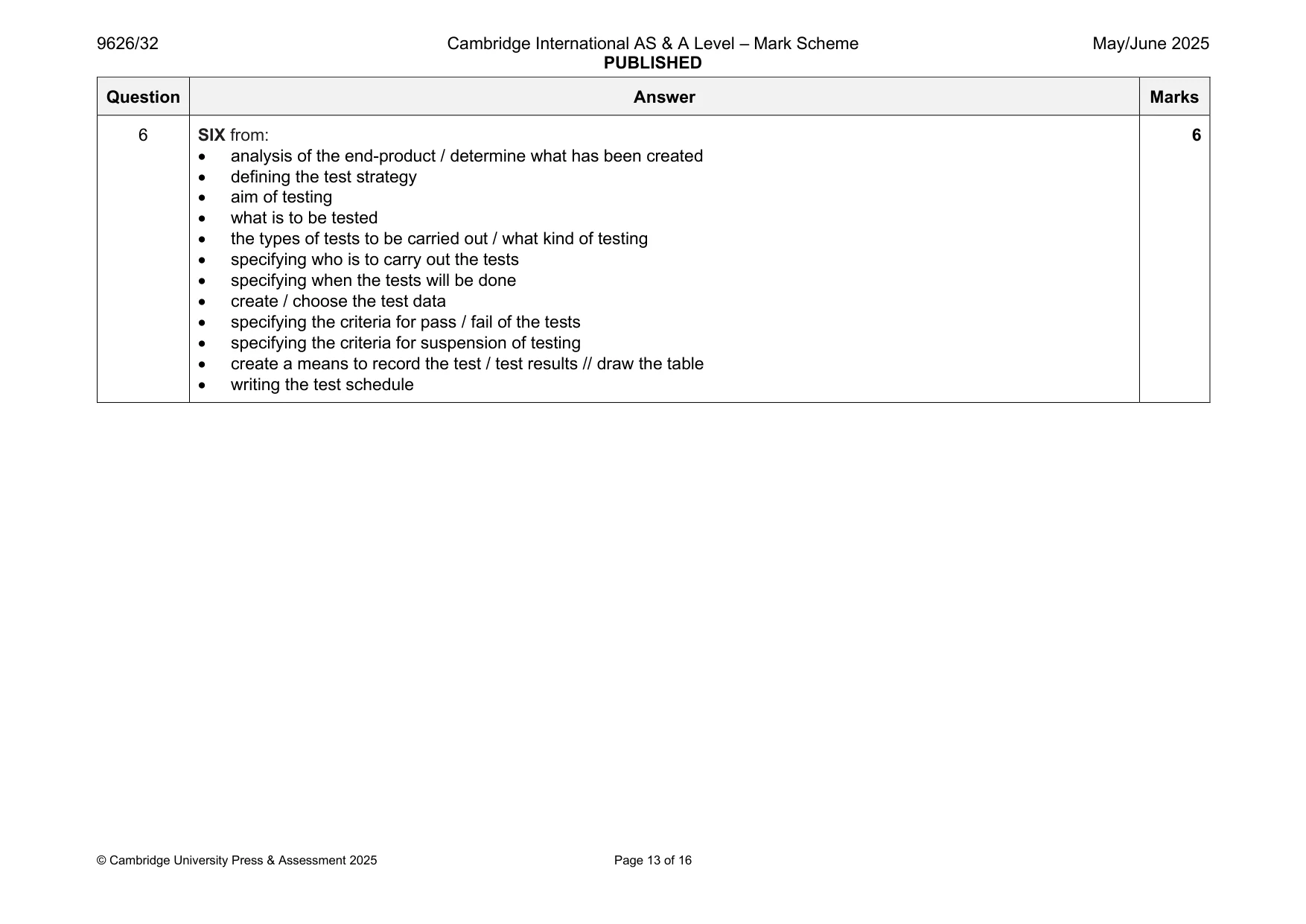
Mark scheme: 6 SIX from: 6 • analysis of the end-product / determine what has been created • defining the test strategy • aim of testing • what is to be tested • the types of tests to be carried out / what kind of testing • specifying who is to carry out the tests • specifying when the tests will be done • create / choose the test data • specifying the criteria for pass / fail of the tests • specifying the criteria for suspension of testing • create a means to record the test / test results // draw the table • writing the test schedule
Q7 · Performance Evaluation and Review Technique (PERT) charts are used when planning a project
7 Performance Evaluation and Review Technique (PERT) charts are used when planning a project. PERT charts can be drawn either as activity-on-node diagrams or as activity-on-arrow diagrams. Compare, by commenting on the similarities and differences, activity-on-node and activity-on-arrow PERT diagrams. .......................................................................................................................................................... .......................................................................................................................................................... .......................................................................................................................................................... .......................................................................................................................................................... .......................................................................................................................................................... .......................................................................................................................................................... .......................................................................................................................................................... .......................................................................................................................................................... .......................................................................................................................................................... .......................................................................................................................................................... .......................................................................................................................................................... .......................................................................................................................................................... .......................................................................................................................................................... .................................................................................................................................................... [6]
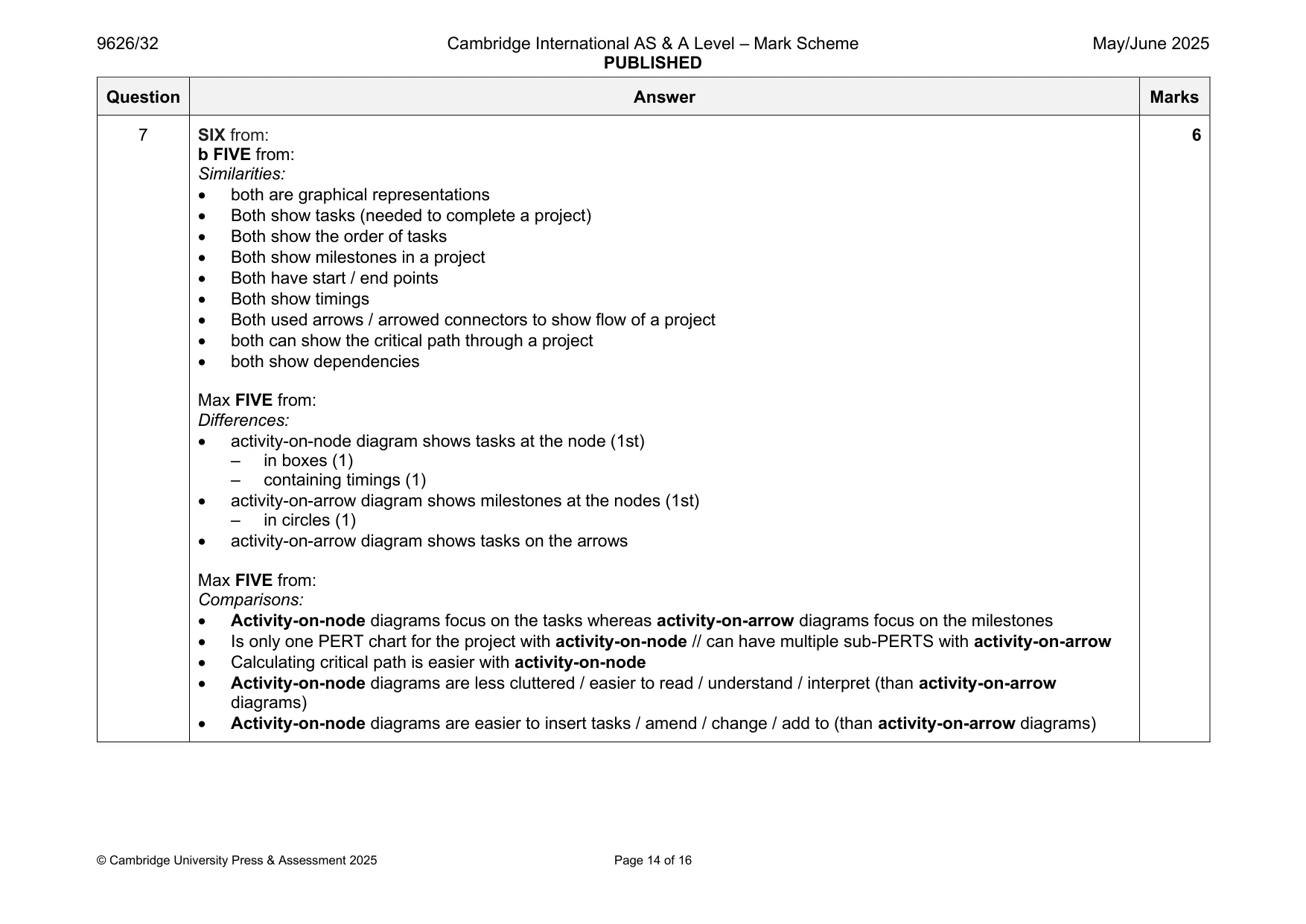
Mark scheme: 7 SIX from: 6 b FIVE from: Similarities: • both are graphical representations • Both show tasks (needed to complete a project) • Both show the order of tasks • Both show milestones in a project • Both have start / end points • Both show timings • Both used arrows / arrowed connectors to show flow of a project • both can show the critical path through a project • both show dependencies Max FIVE from: Differences: • activity-on-node diagram shows tasks at the node (1st) – in boxes (1) – containing timings (1) • activity-on-arrow diagram shows milestones at the nodes (1st) – in circles (1) • activity-on-arrow diagram shows tasks on the arrows Max FIVE from: Comparisons: • Activity-on-node diagrams focus on the tasks whereas activity-on-arrow diagrams focus on the milestones • Is only one PERT chart for the project with activity-on-node // can have multiple sub-PERTS with activity-on-arrow • Calculating critical path is easier with activity-on-node • Activity-on-node diagrams are less cluttered / easier to read / understand / interpret (than activity-on-arrow diagrams) • Activity-on-node diagrams are easier to insert tasks / amend / change / add to (than activity-on-arrow diagrams)
More questions on Tools and techniques for project management tasks
Q8 · Computer animation software can move and reshape objects
8 Computer animation software can move and reshape objects. (a) Describe how inbetweening (tweening) can be used to create the illusion of smooth movement of an object. ................................................................................................................................................... ................................................................................................................................................... ................................................................................................................................................... ................................................................................................................................................... ................................................................................................................................................... ............................................................................................................................................. [2] (b) Morphing can be used to smoothly change a shape into another shape. Describe how animation software uses pixel mapping to morph one shape into another. ................................................................................................................................................... ................................................................................................................................................... ................................................................................................................................................... ................................................................................................................................................... ................................................................................................................................................... ................................................................................................................................................... ................................................................................................................................................... ................................................................................................................................................... ................................................................................................................................................... ............................................................................................................................................. [4]
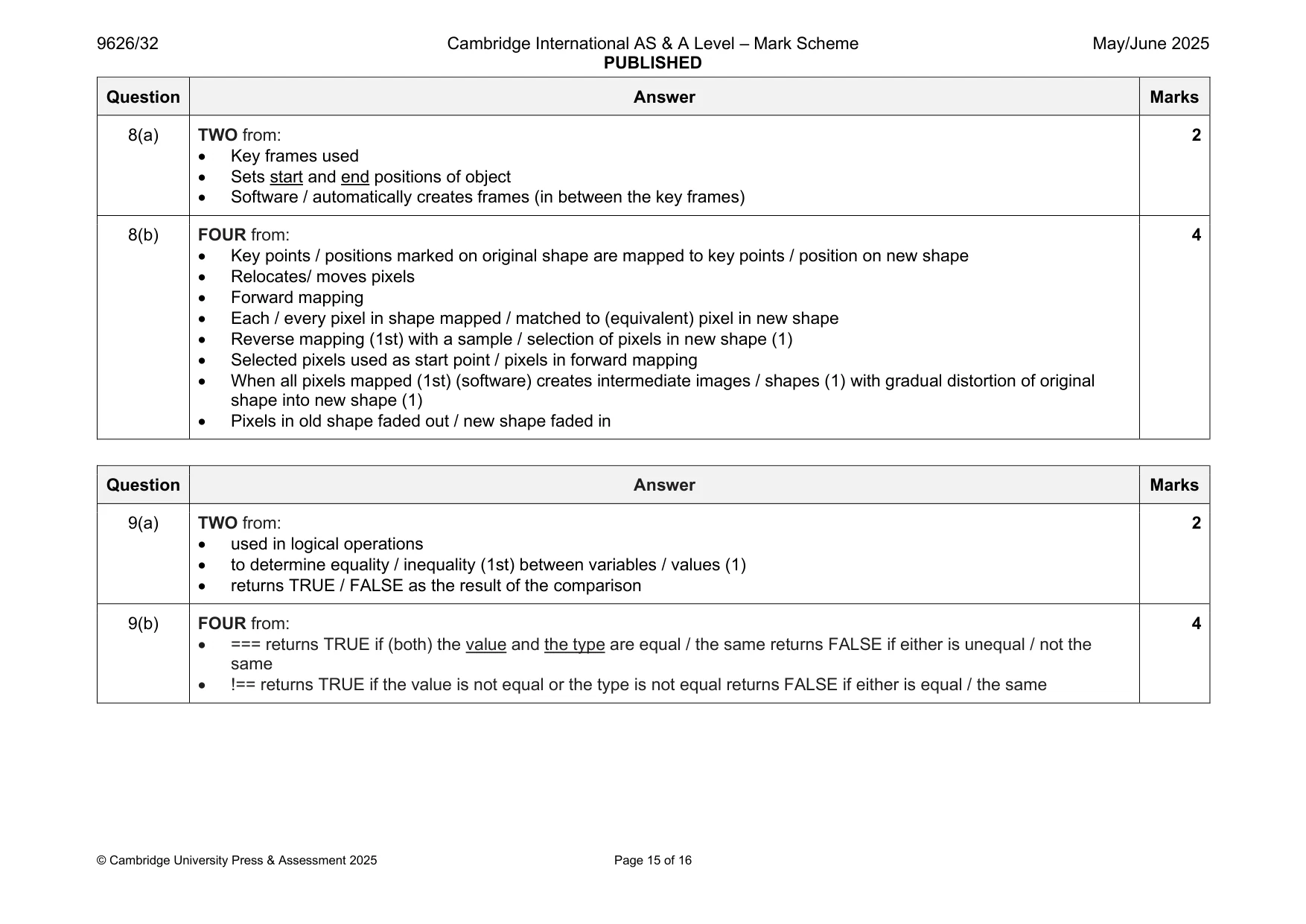
Mark scheme: 8(a) TWO from: 2 • Key frames used • Sets start and end positions of object • Software / automatically creates frames (in between the key frames) 8(b) FOUR from: 4 • Key points / positions marked on original shape are mapped to key points / position on new shape • Relocates/ moves pixels • Forward mapping • Each / every pixel in shape mapped / matched to (equivalent) pixel in new shape • Reverse mapping (1st) with a sample / selection of pixels in new shape (1) • Selected pixels used as start point / pixels in forward mapping • When all pixels mapped (1st) (software) creates intermediate images / shapes (1) with gradual distortion of original shape into new shape (1) • Pixels in old shape faded out / new shape faded in
Q9 · JavaScript statements can contain comparison operators such as > and <
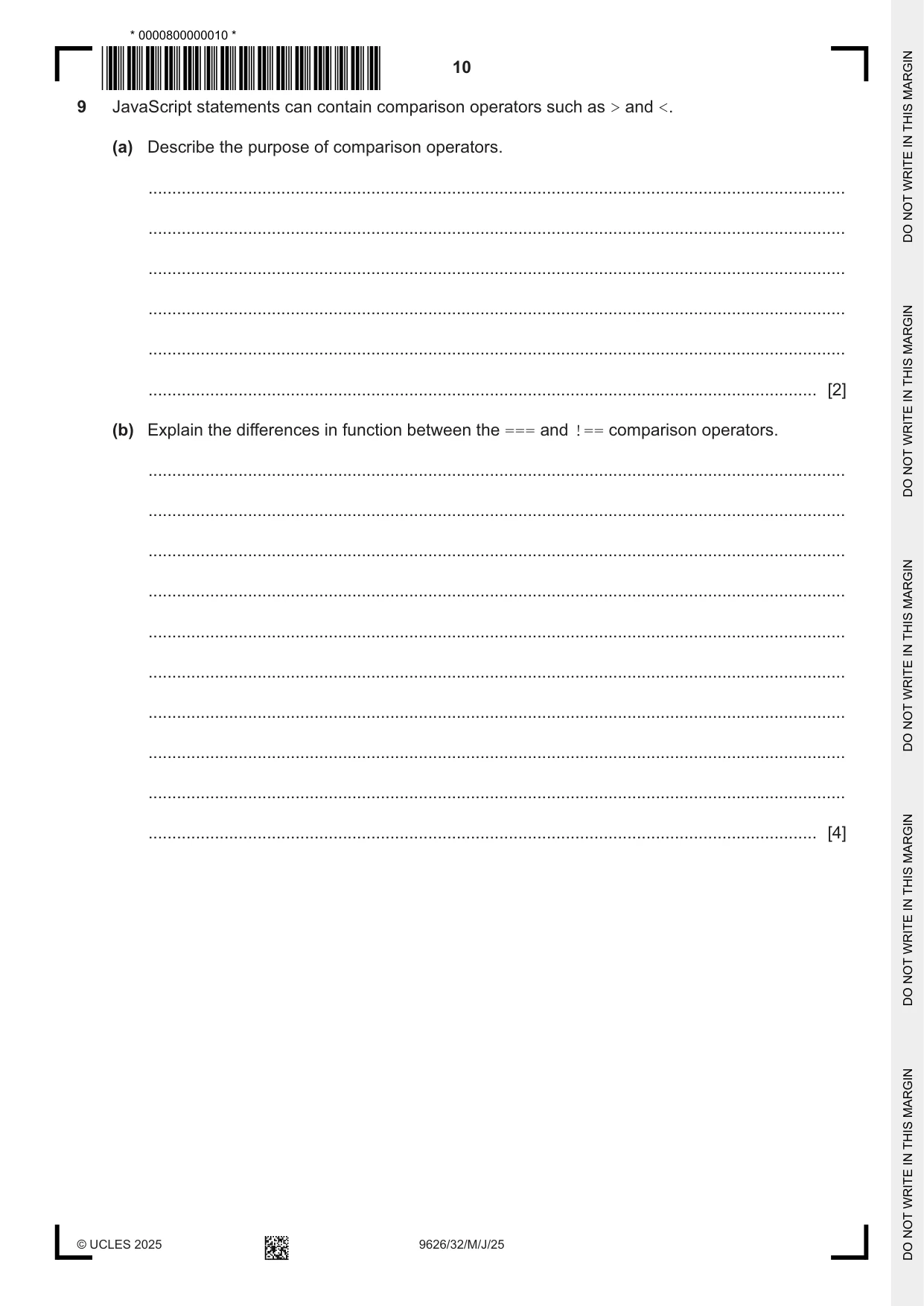
9 JavaScript statements can contain comparison operators such as > and <. (a) Describe the purpose of comparison operators. ................................................................................................................................................... ................................................................................................................................................... ................................................................................................................................................... ................................................................................................................................................... ................................................................................................................................................... ............................................................................................................................................. [2] (b) Explain the differences in function between the === and !== comparison operators. ................................................................................................................................................... ................................................................................................................................................... ................................................................................................................................................... ................................................................................................................................................... ................................................................................................................................................... ................................................................................................................................................... ................................................................................................................................................... ................................................................................................................................................... ................................................................................................................................................... ............................................................................................................................................. [4]
Mark scheme: 9(a) TWO from: 2 • used in logical operations • to determine equality / inequality (1st) between variables / values (1) • returns TRUE / FALSE as the result of the comparison 9(b) FOUR from: 4 • === returns TRUE if (both) the value and the type are equal / the same returns FALSE if either is unequal / not the same • !== returns TRUE if the value is not equal or the type is not equal returns FALSE if either is equal / the same
Q10 · Blockchain technology is used as a distributed ledger in cryptocurrencies
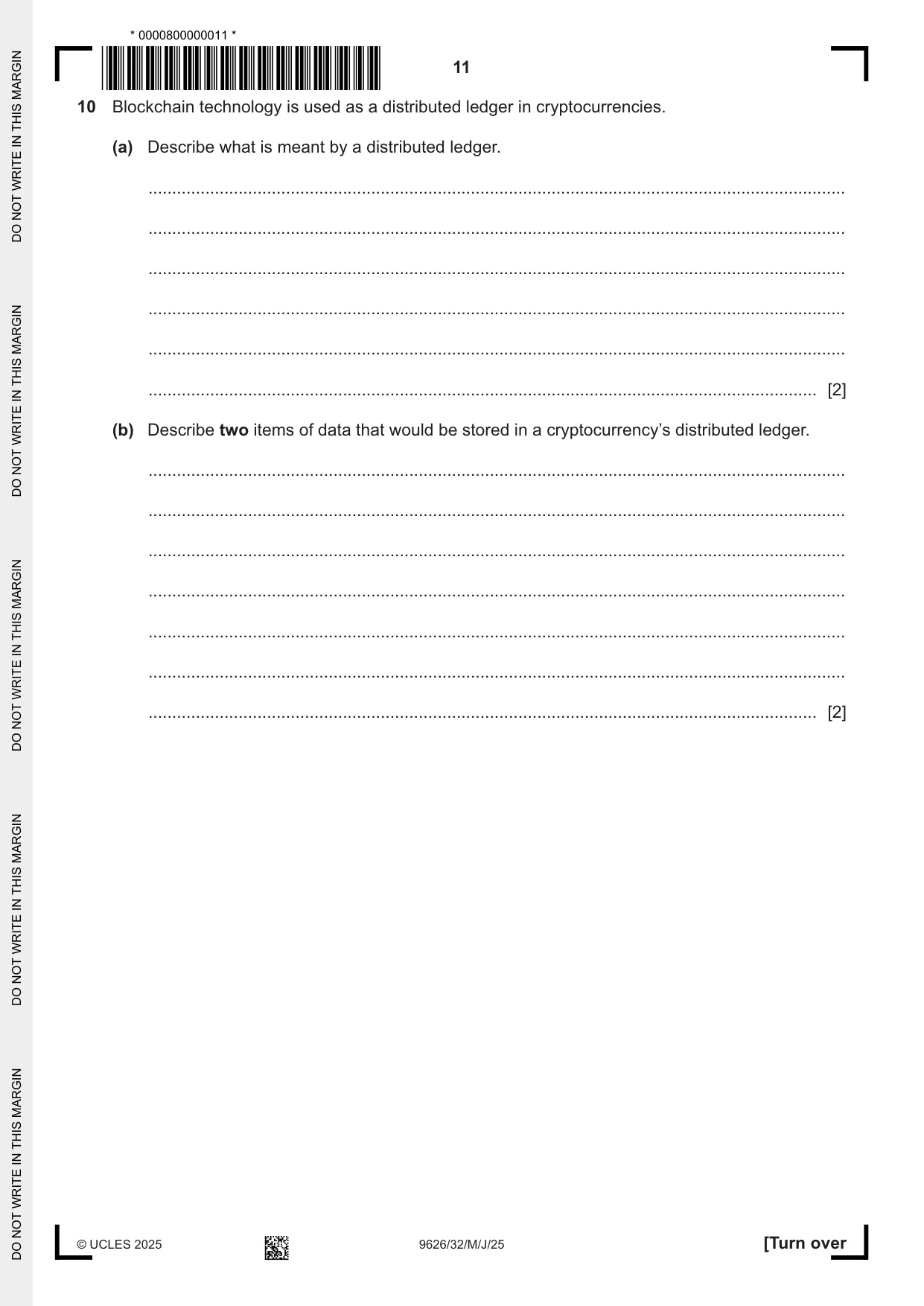
10 Blockchain technology is used as a distributed ledger in cryptocurrencies. (a) Describe what is meant by a distributed ledger. ................................................................................................................................................... ................................................................................................................................................... ................................................................................................................................................... ................................................................................................................................................... ................................................................................................................................................... ............................................................................................................................................. [2] (b) Describe two items of data that would be stored in a cryptocurrency’s distributed ledger. ................................................................................................................................................... ................................................................................................................................................... ................................................................................................................................................... ................................................................................................................................................... ................................................................................................................................................... ................................................................................................................................................... ............................................................................................................................................. [2]
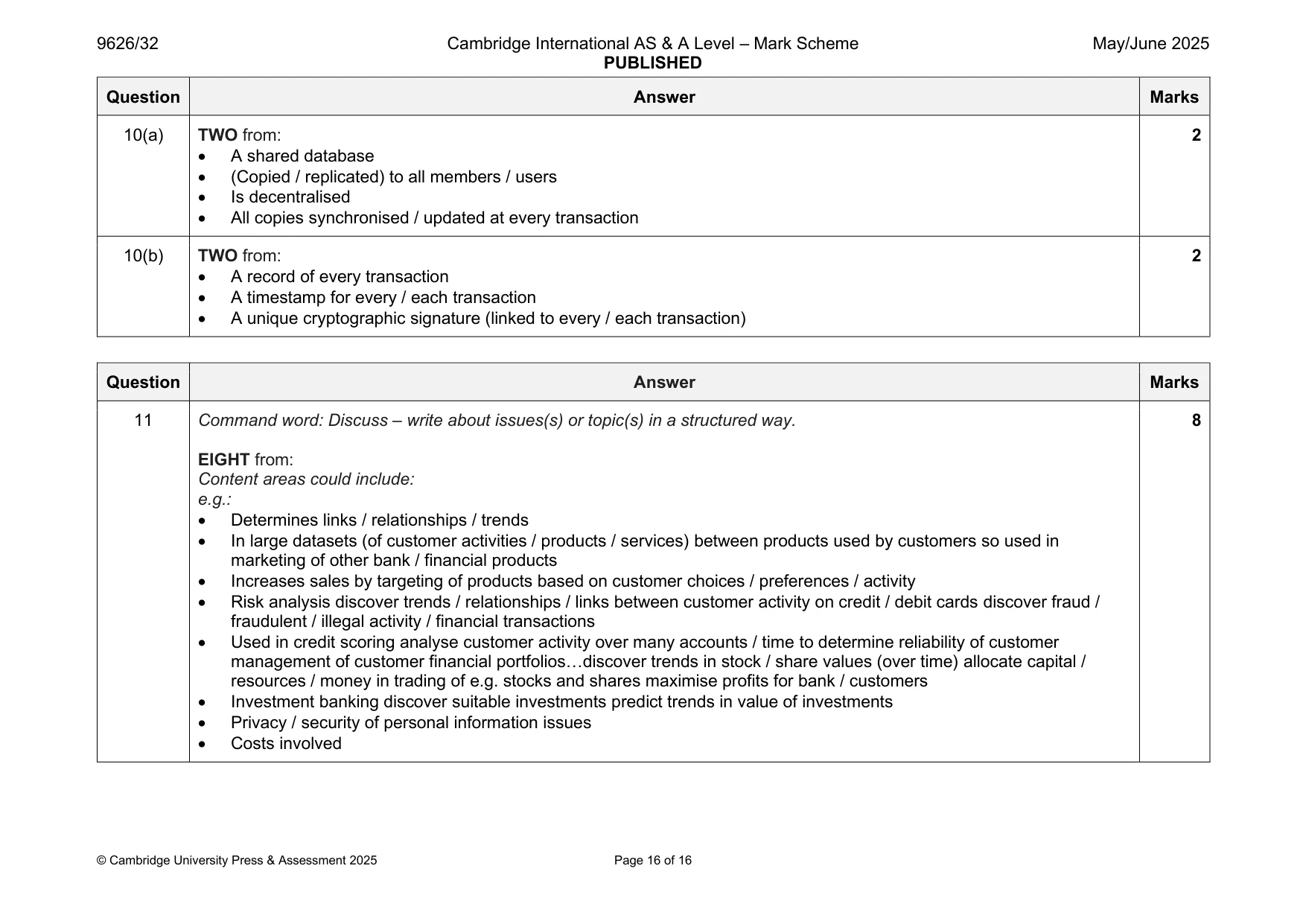
Mark scheme: 10(a) TWO from: 2 • A shared database • (Copied / replicated) to all members / users • Is decentralised • All copies synchronised / updated at every transaction 10(b) TWO from: 2 • A record of every transaction • A timestamp for every / each transaction • A unique cryptographic signature (linked to every / each transaction)
Q11 · Discuss the use of data mining by banking organisations
11 Discuss the use of data mining by banking organisations. .......................................................................................................................................................... .......................................................................................................................................................... .......................................................................................................................................................... .......................................................................................................................................................... .......................................................................................................................................................... .......................................................................................................................................................... .......................................................................................................................................................... .......................................................................................................................................................... .......................................................................................................................................................... .......................................................................................................................................................... .......................................................................................................................................................... .......................................................................................................................................................... .......................................................................................................................................................... .......................................................................................................................................................... .......................................................................................................................................................... .......................................................................................................................................................... .......................................................................................................................................................... .......................................................................................................................................................... .......................................................................................................................................................... .................................................................................................................................................... [8]
Mark scheme: 11 Command word: Discuss – write about issues(s) or topic(s) in a structured way. 8 EIGHT from: Content areas could include: e.g.: • Determines links / relationships / trends • In large datasets (of customer activities / products / services) between products used by customers so used in marketing of other bank / financial products • Increases sales by targeting of products based on customer choices / preferences / activity • Risk analysis discover trends / relationships / links between customer activity on credit / debit cards discover fraud / fraudulent / illegal activity / financial transactions • Used in credit scoring analyse customer activity over many accounts / time to determine reliability of customer management of customer financial portfolios…discover trends in stock / share values (over time) allocate capital / resources / money in trading of e.g. stocks and shares maximise profits for bank / customers • Investment banking discover suitable investments predict trends in value of investments • Privacy / security of personal information issues • Costs involved
What was in this paper
The subtopics covered by these 11 questions, and how many questions each got. Open one in a new tab to see every Cambridge question on it.
What you needed in this session
Cambridge’s own grade thresholds for 2025 May/June, Paper 3 · Variant 2. A higher threshold means an easier paper — the bar moves with how the cohort did.