Cambridge A Level Information Technology (from 2017) 9626 — 2023 Feb/March Paper 3 · Variant 2
9626/32/F/M/23 · 10 questions · 70 marks · ≈79 min
The question paper and its mark scheme, free to read here and free to download. This is Cambridge’s own paper, exactly as it was sat.
Question paper12 pages







Mark scheme11 pages
Answers below. Sit the paper first if you are practising.
Questions as text
Q1 · Cellular networks use 3G, 4G and 5G systems for mobile communications so that users can…
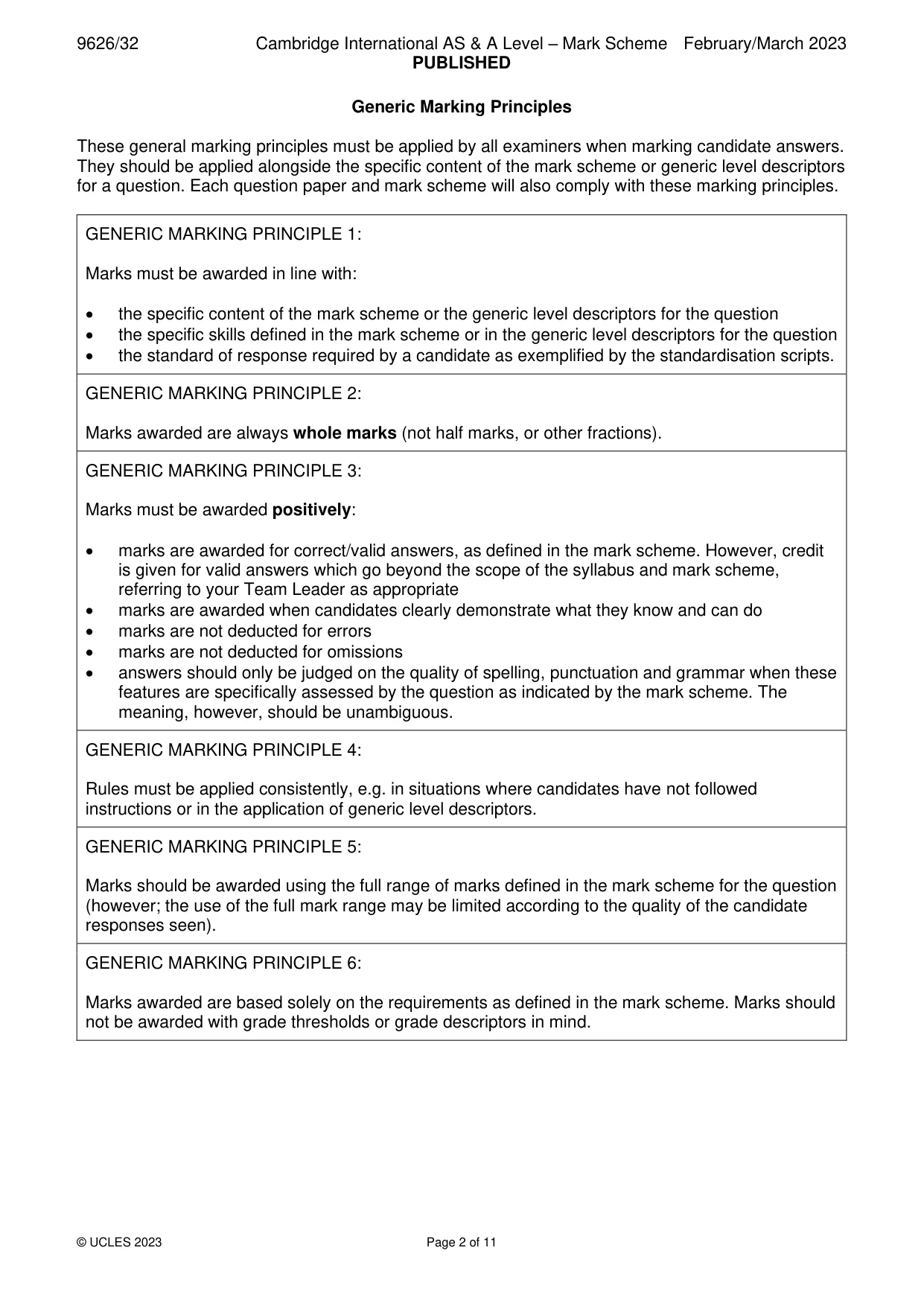
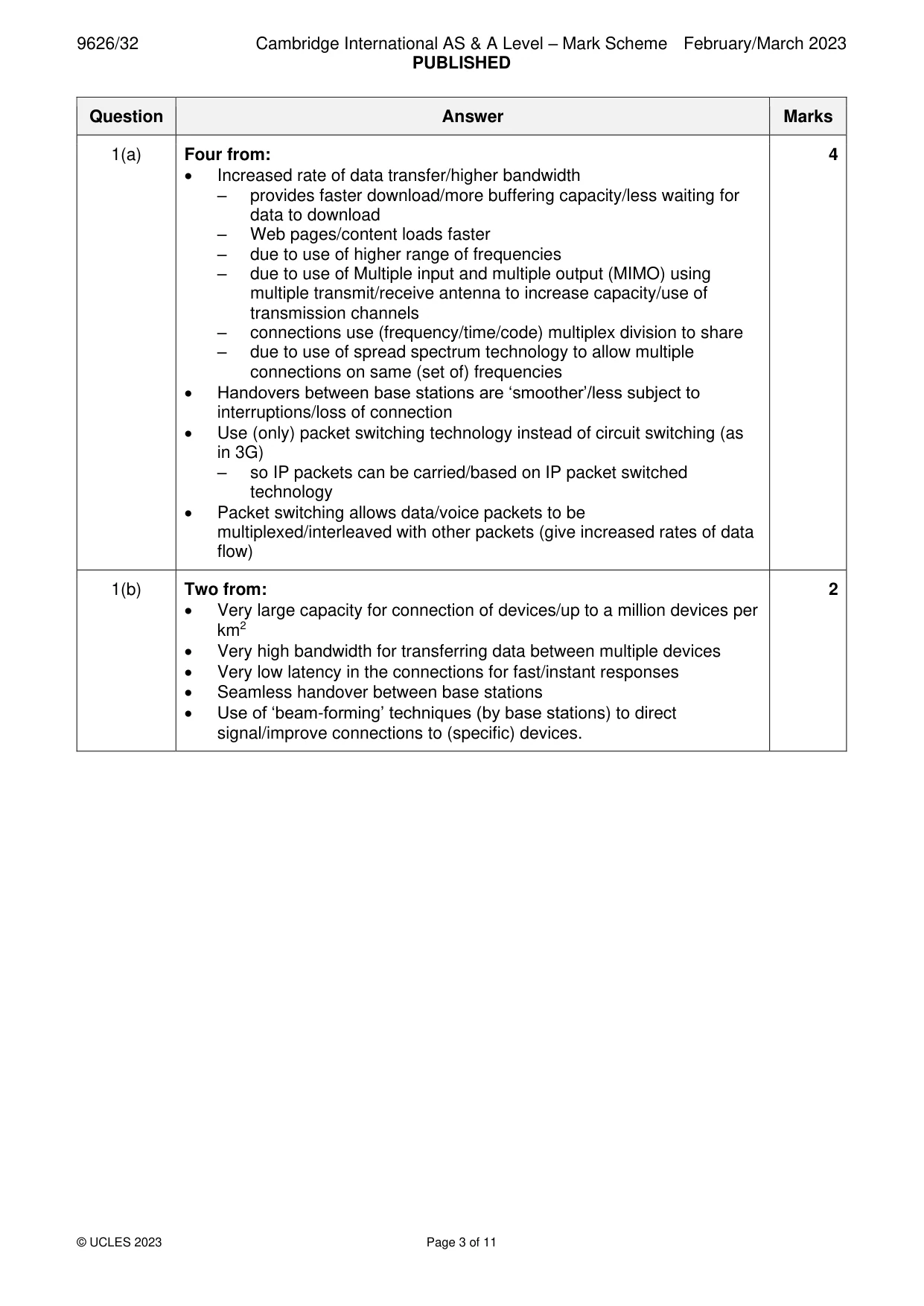
1 Cellular networks use 3G, 4G and 5G systems for mobile communications so that users can access internet services. (a) Explain how 4G cellular networks provide a better service than 3G networks for smartphone users accessing internet services. ................................................................................................................................................... ................................................................................................................................................... ................................................................................................................................................... ................................................................................................................................................... ................................................................................................................................................... ................................................................................................................................................... ................................................................................................................................................... ................................................................................................................................................... ................................................................................................................................................... ............................................................................................................................................. [4] (b) Describe two features of 5G mobile communication systems that make them suitable for connecting smart devices together into large networks. ................................................................................................................................................... ................................................................................................................................................... ................................................................................................................................................... ................................................................................................................................................... ................................................................................................................................................... ............................................................................................................................................. [2]
Mark scheme: Question Answer Marks 1(a) Four from: 4 • Increased rate of data transfer/higher bandwidth – provides faster download/more buffering capacity/less waiting for data to download – Web pages/content loads faster – due to use of higher range of frequencies – due to use of Multiple input and multiple output (MIMO) using multiple transmit/receive antenna to increase capacity/use of transmission channels – connections use (frequency/time/code) multiplex division to share – due to use of spread spectrum technology to allow multiple connections on same (set of) frequencies • Handovers between base stations are ‘smoother’/less subject to interruptions/loss of connection • Use (only) packet switching technology instead of circuit switching (as in 3G) – so IP packets can be carried/based on IP packet switched technology • Packet switching allows data/voice packets to be multiplexed/interleaved with other packets (give increased rates of data flow) 1(b) Two from: 2 • Very large capacity for connection of devices/up to a million devices per km2 • Very high bandwidth for transferring data between multiple devices • Very low latency in the connections for fast/instant responses • Seamless handover between base stations • Use of ‘beam-forming’ techniques (by base stations) to direct signal/improve connections to (specific) devices.
Q2 · Contrast the use of Wi-fi and cabled Ethernet connections for transmitting data between…
2 Contrast the use of Wi-fi and cabled Ethernet connections for transmitting data between computing devices on LANs. .......................................................................................................................................................... .......................................................................................................................................................... .......................................................................................................................................................... .......................................................................................................................................................... .......................................................................................................................................................... .......................................................................................................................................................... .......................................................................................................................................................... .......................................................................................................................................................... .......................................................................................................................................................... .......................................................................................................................................................... .......................................................................................................................................................... .......................................................................................................................................................... .......................................................................................................................................................... .................................................................................................................................................... [6]
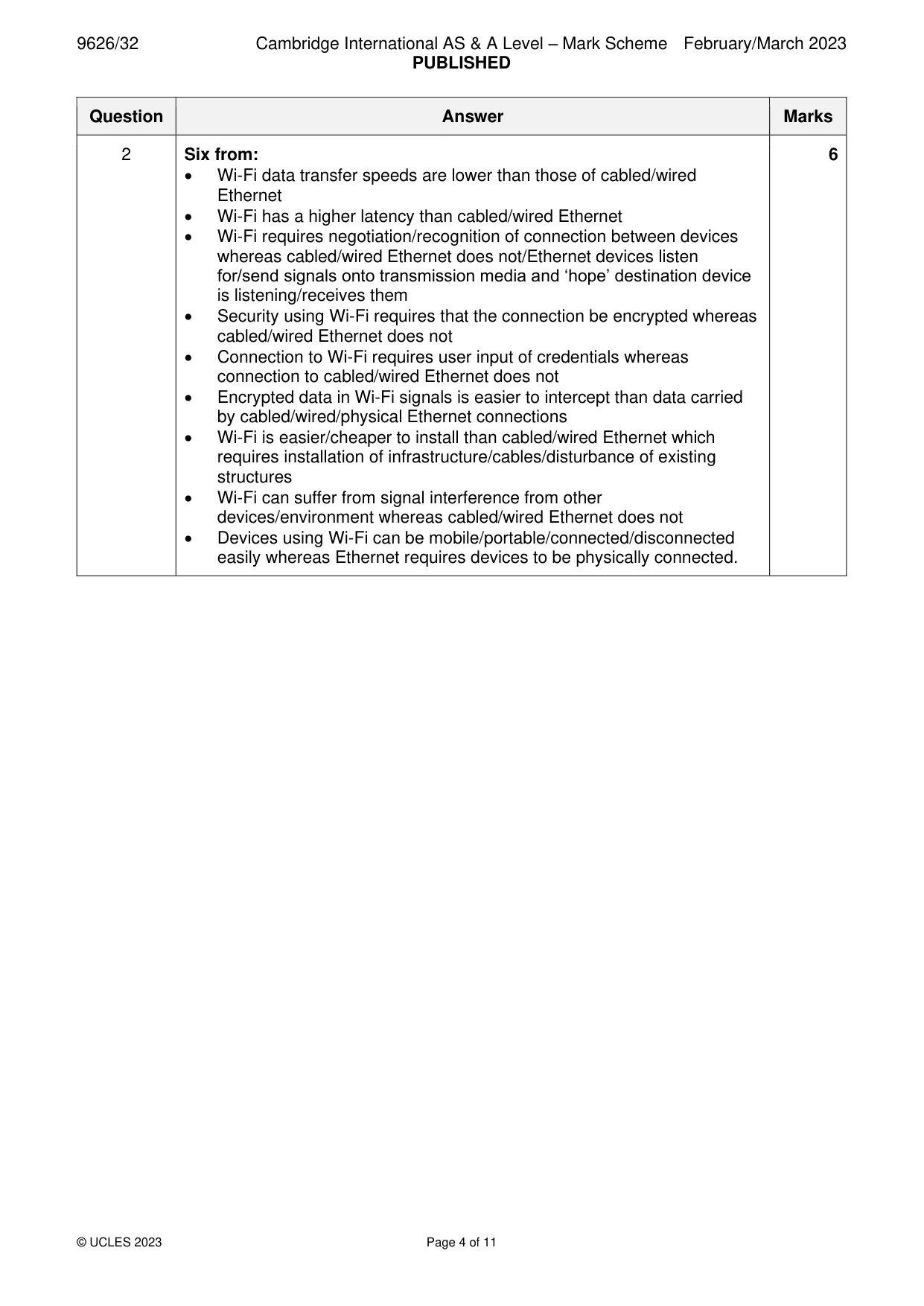
Mark scheme: 2 Six from: 6 • Wi-Fi data transfer speeds are lower than those of cabled/wired Ethernet • Wi-Fi has a higher latency than cabled/wired Ethernet • Wi-Fi requires negotiation/recognition of connection between devices whereas cabled/wired Ethernet does not/Ethernet devices listen for/send signals onto transmission media and ‘hope’ destination device is listening/receives them • Security using Wi-Fi requires that the connection be encrypted whereas cabled/wired Ethernet does not • Connection to Wi-Fi requires user input of credentials whereas connection to cabled/wired Ethernet does not • Encrypted data in Wi-Fi signals is easier to intercept than data carried by cabled/wired/physical Ethernet connections • Wi-Fi is easier/cheaper to install than cabled/wired Ethernet which requires installation of infrastructure/cables/disturbance of existing structures • Wi-Fi can suffer from signal interference from other devices/environment whereas cabled/wired Ethernet does not • Devices using Wi-Fi can be mobile/portable/connected/disconnected easily whereas Ethernet requires devices to be physically connected.
Q3 · Compare the use of static and dynamic routing when sending data packets through IP…
3 Compare the use of static and dynamic routing when sending data packets through IP networks. You must include similarities and differences. .......................................................................................................................................................... .......................................................................................................................................................... .......................................................................................................................................................... .......................................................................................................................................................... .......................................................................................................................................................... .......................................................................................................................................................... .......................................................................................................................................................... .......................................................................................................................................................... .......................................................................................................................................................... .......................................................................................................................................................... .......................................................................................................................................................... .......................................................................................................................................................... .......................................................................................................................................................... .................................................................................................................................................... [6]
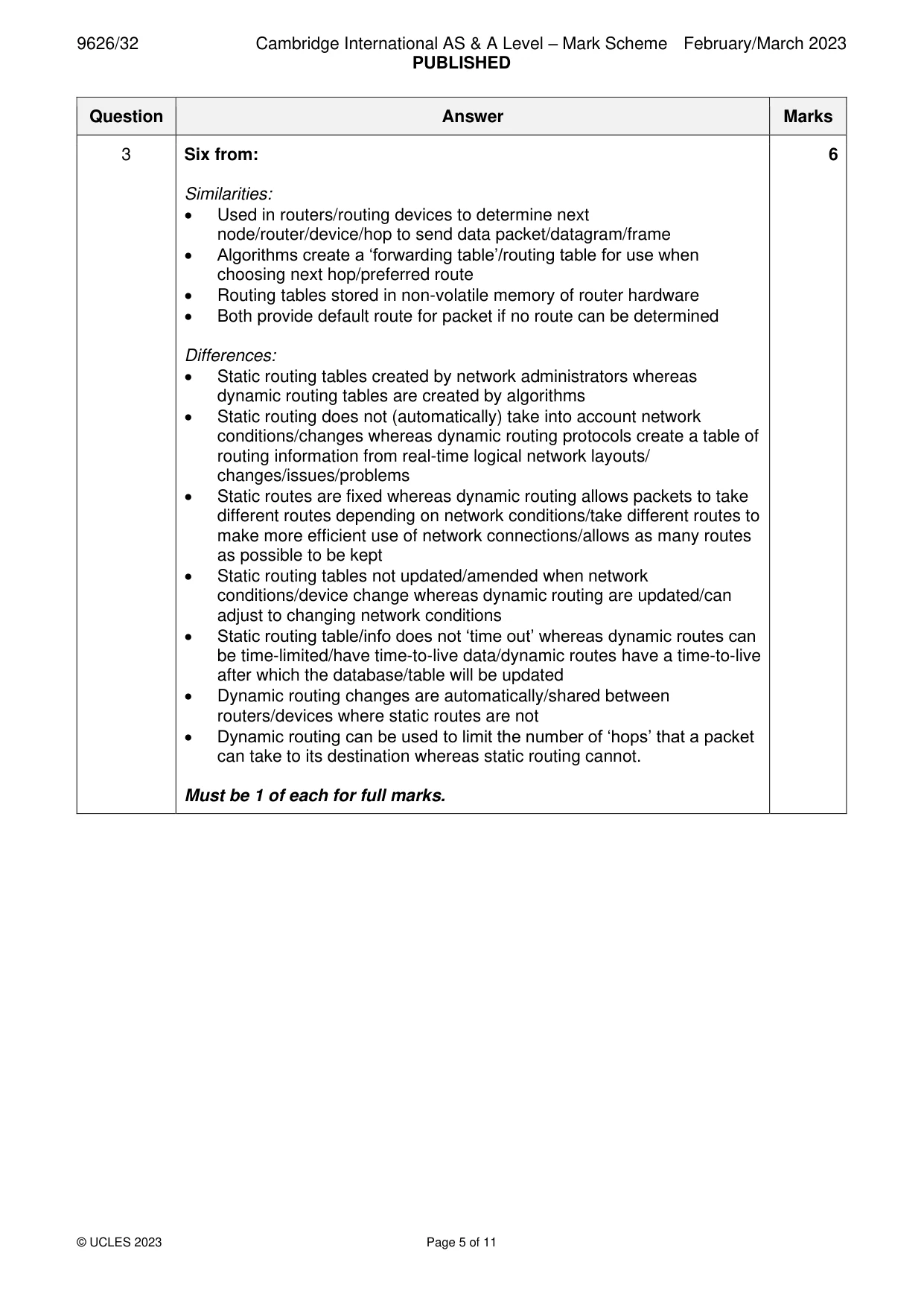
Mark scheme: 3 Six from: 6 Similarities: • Used in routers/routing devices to determine next node/router/device/hop to send data packet/datagram/frame • Algorithms create a ‘forwarding table’/routing table for use when choosing next hop/preferred route • Routing tables stored in non-volatile memory of router hardware • Both provide default route for packet if no route can be determined Differences: • Static routing tables created by network administrators whereas dynamic routing tables are created by algorithms • Static routing does not (automatically) take into account network conditions/changes whereas dynamic routing protocols create a table of routing information from real-time logical network layouts/ changes/issues/problems • Static routes are fixed whereas dynamic routing allows packets to take different routes depending on network conditions/take different routes to make more efficient use of network connections/allows as many routes as possible to be kept • Static routing tables not updated/amended when network conditions/device change whereas dynamic routing are updated/can adjust to changing network conditions • Static routing table/info does not ‘time out’ whereas dynamic routes can be time-limited/have time-to-live data/dynamic routes have a time-to-live after which the database/table will be updated • Dynamic routing changes are automatically/shared between routers/devices where static routes are not • Dynamic routing can be used to limit the number of ‘hops’ that a packet can take to its destination whereas static routing cannot. Must be 1 of each for full marks.
Q4 · A newly developed computer system is being evaluated for ease of use
4 A newly developed computer system is being evaluated for ease of use. (a) Describe four aspects of the ease of use of the new system that could be examined in the evaluation. ................................................................................................................................................... ................................................................................................................................................... ................................................................................................................................................... ................................................................................................................................................... ................................................................................................................................................... ................................................................................................................................................... ................................................................................................................................................... ................................................................................................................................................... ................................................................................................................................................... ............................................................................................................................................. [4] (b) Describe two other purposes of an evaluation of the new system. ................................................................................................................................................... ................................................................................................................................................... ................................................................................................................................................... ................................................................................................................................................... ................................................................................................................................................... ............................................................................................................................................. [2]
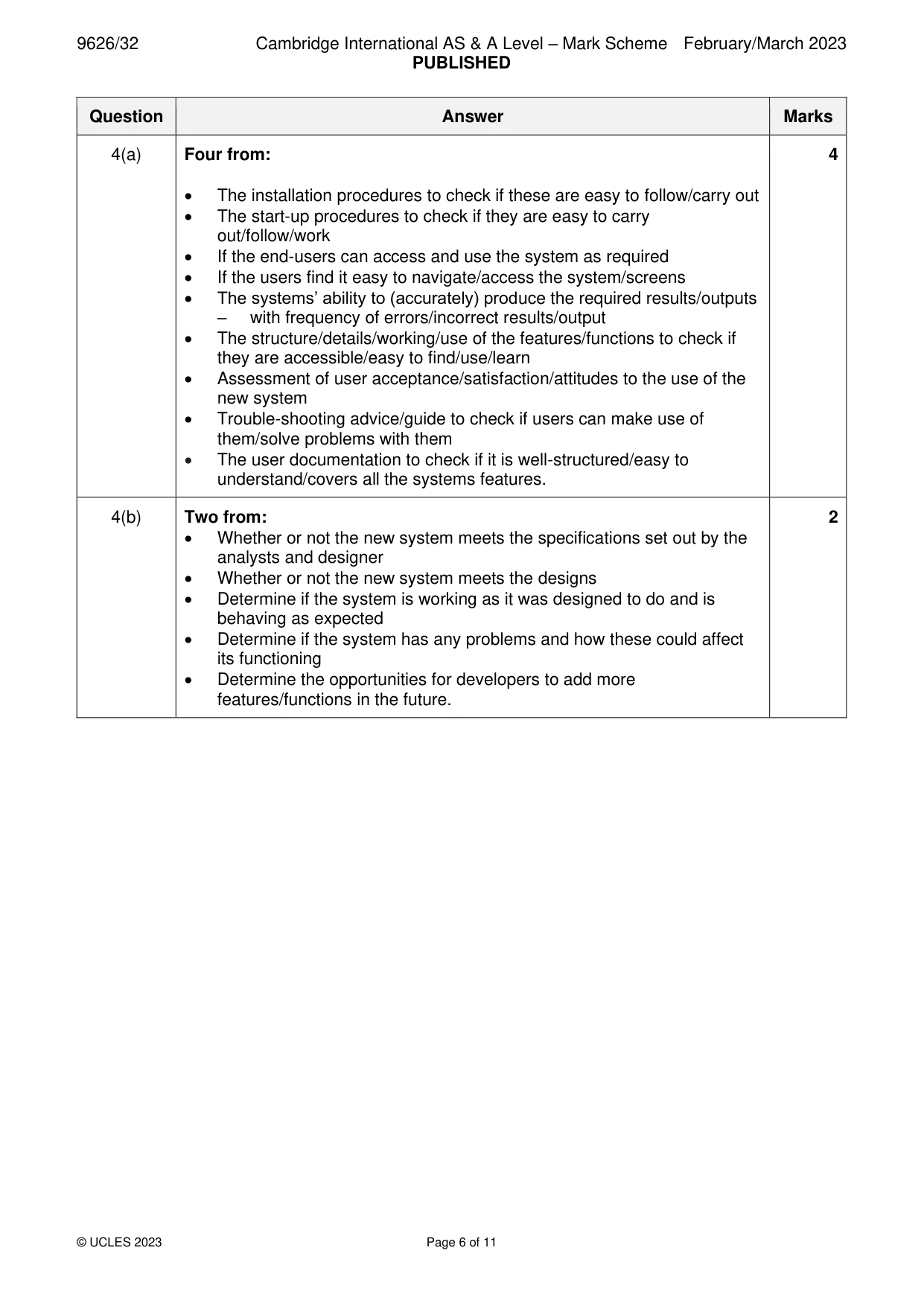
Mark scheme: 4(a) Four from: 4 • The installation procedures to check if these are easy to follow/carry out • The start-up procedures to check if they are easy to carry out/follow/work • If the end-users can access and use the system as required • If the users find it easy to navigate/access the system/screens • The systems’ ability to (accurately) produce the required results/outputs – with frequency of errors/incorrect results/output • The structure/details/working/use of the features/functions to check if they are accessible/easy to find/use/learn • Assessment of user acceptance/satisfaction/attitudes to the use of the new system • Trouble-shooting advice/guide to check if users can make use of them/solve problems with them • The user documentation to check if it is well-structured/easy to understand/covers all the systems features. 4(b) Two from: 2 • Whether or not the new system meets the specifications set out by the analysts and designer • Whether or not the new system meets the designs • Determine if the system is working as it was designed to do and is behaving as expected • Determine if the system has any problems and how these could affect its functioning • Determine the opportunities for developers to add more features/functions in the future.
Q5 · A retail company has a computer system used by all of its departments
5 A retail company has a computer system used by all of its departments. Pilot running will be used to implement a new computer system. Discuss the benefits and drawbacks of using pilot running to implement the new system. .......................................................................................................................................................... .......................................................................................................................................................... .......................................................................................................................................................... .......................................................................................................................................................... .......................................................................................................................................................... .......................................................................................................................................................... .......................................................................................................................................................... .......................................................................................................................................................... .......................................................................................................................................................... .......................................................................................................................................................... .......................................................................................................................................................... .......................................................................................................................................................... .......................................................................................................................................................... .......................................................................................................................................................... .......................................................................................................................................................... .......................................................................................................................................................... .......................................................................................................................................................... .......................................................................................................................................................... .......................................................................................................................................................... .......................................................................................................................................................... .................................................................................................................................................... [8]
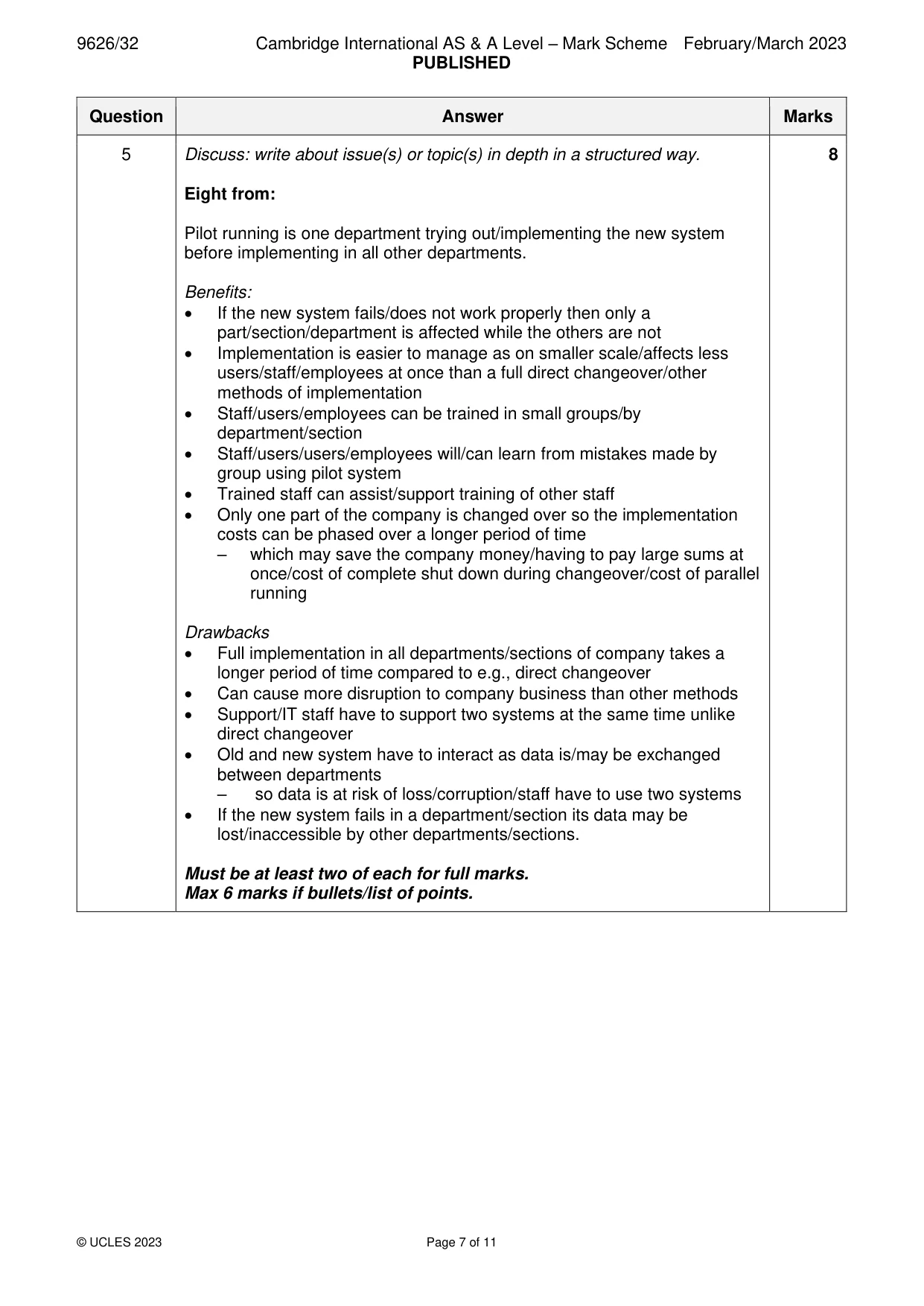
Mark scheme: 5 Discuss: write about issue(s) or topic(s) in depth in a structured way. 8 Eight from: Pilot running is one department trying out/implementing the new system before implementing in all other departments. Benefits: • If the new system fails/does not work properly then only a part/section/department is affected while the others are not • Implementation is easier to manage as on smaller scale/affects less users/staff/employees at once than a full direct changeover/other methods of implementation • Staff/users/employees can be trained in small groups/by department/section • Staff/users/users/employees will/can learn from mistakes made by group using pilot system • Trained staff can assist/support training of other staff • Only one part of the company is changed over so the implementation costs can be phased over a longer period of time – which may save the company money/having to pay large sums at once/cost of complete shut down during changeover/cost of parallel running Drawbacks • Full implementation in all departments/sections of company takes a longer period of time compared to e.g., direct changeover • Can cause more disruption to company business than other methods • Support/IT staff have to support two systems at the same time unlike direct changeover • Old and new system have to interact as data is/may be exchanged between departments – so data is at risk of loss/corruption/staff have to use two systems • If the new system fails in a department/section its data may be lost/inaccessible by other departments/sections. Must be at least two of each for full marks. Max 6 marks if bullets/list of points.
Q6 · Describe how news organisations use social media
6 Describe how news organisations use social media. .......................................................................................................................................................... .......................................................................................................................................................... .......................................................................................................................................................... .......................................................................................................................................................... .......................................................................................................................................................... .......................................................................................................................................................... .......................................................................................................................................................... .......................................................................................................................................................... .......................................................................................................................................................... .......................................................................................................................................................... .......................................................................................................................................................... .......................................................................................................................................................... .......................................................................................................................................................... .................................................................................................................................................... [6]
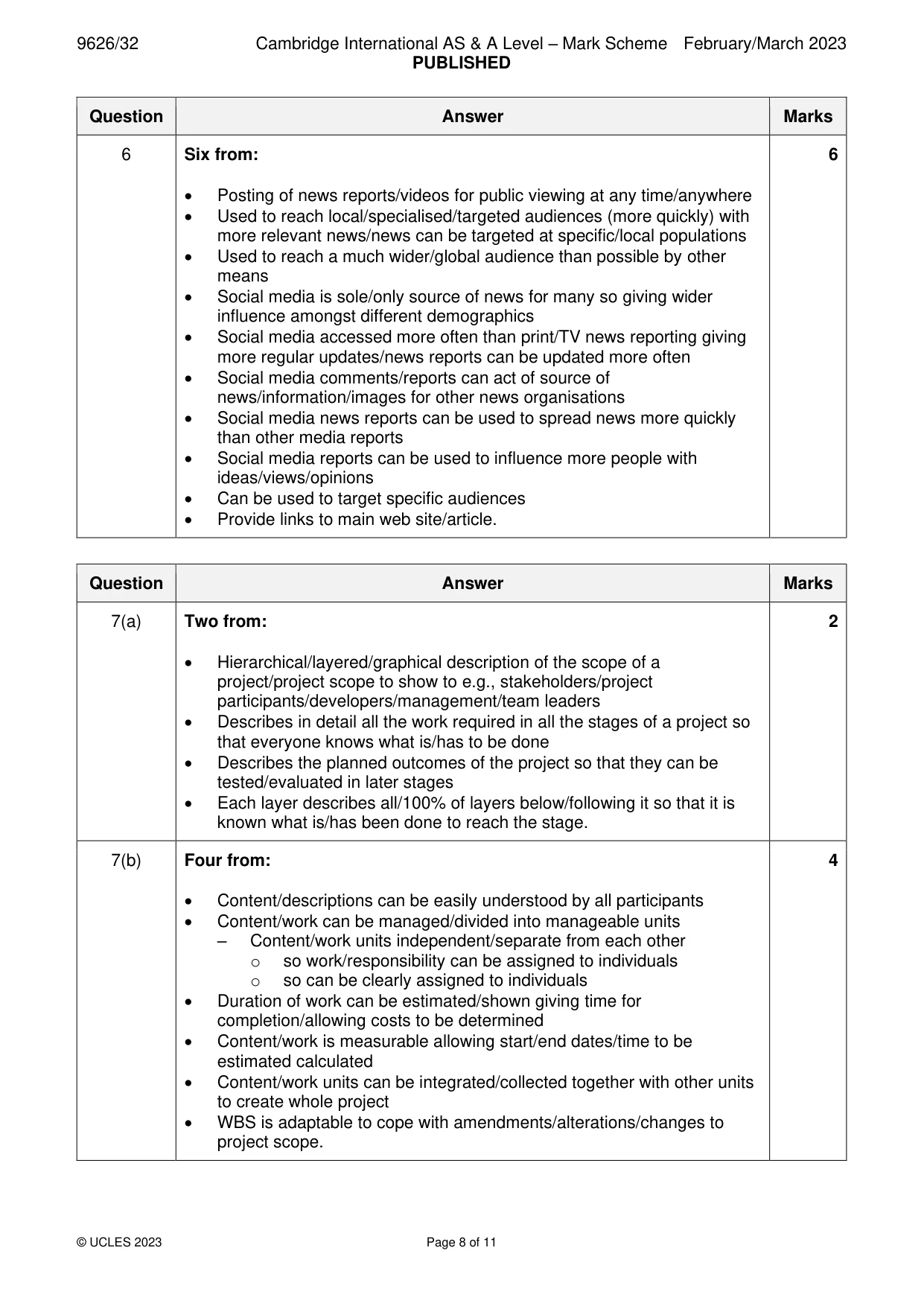
Mark scheme: 6 Six from: 6 • Posting of news reports/videos for public viewing at any time/anywhere • Used to reach local/specialised/targeted audiences (more quickly) with more relevant news/news can be targeted at specific/local populations • Used to reach a much wider/global audience than possible by other means • Social media is sole/only source of news for many so giving wider influence amongst different demographics • Social media accessed more often than print/TV news reporting giving more regular updates/news reports can be updated more often • Social media comments/reports can act of source of news/information/images for other news organisations • Social media news reports can be used to spread news more quickly than other media reports • Social media reports can be used to influence more people with ideas/views/opinions • Can be used to target specific audiences • Provide links to main web site/article.
Q7 · A Work Breakdown Structure (WBS), included in the Performance Evaluation and Review…
7 A Work Breakdown Structure (WBS), included in the Performance Evaluation and Review Technique (PERT), is created during the planning of a project. (a) Explain the purpose of a WBS. ................................................................................................................................................... ................................................................................................................................................... ................................................................................................................................................... ................................................................................................................................................... ................................................................................................................................................... ............................................................................................................................................. [2] (b) Describe the characteristics of a well designed WBS. ................................................................................................................................................... ................................................................................................................................................... ................................................................................................................................................... ................................................................................................................................................... ................................................................................................................................................... ................................................................................................................................................... ................................................................................................................................................... ................................................................................................................................................... ................................................................................................................................................... ............................................................................................................................................. [4]
Mark scheme: 7(a) Two from: 2 • Hierarchical/layered/graphical description of the scope of a project/project scope to show to e.g., stakeholders/project participants/developers/management/team leaders • Describes in detail all the work required in all the stages of a project so that everyone knows what is/has to be done • Describes the planned outcomes of the project so that they can be tested/evaluated in later stages • Each layer describes all/100% of layers below/following it so that it is known what is/has been done to reach the stage. 7(b) Four from: 4 • Content/descriptions can be easily understood by all participants • Content/work can be managed/divided into manageable units – Content/work units independent/separate from each other o so work/responsibility can be assigned to individuals o so can be clearly assigned to individuals • Duration of work can be estimated/shown giving time for completion/allowing costs to be determined • Content/work is measurable allowing start/end dates/time to be estimated calculated • Content/work units can be integrated/collected together with other units to create whole project • WBS is adaptable to cope with amendments/alterations/changes to project scope.
More questions on Tools and techniques for project management tasks
Q8 · JavaScript code can be written to perform different actions depending on different…
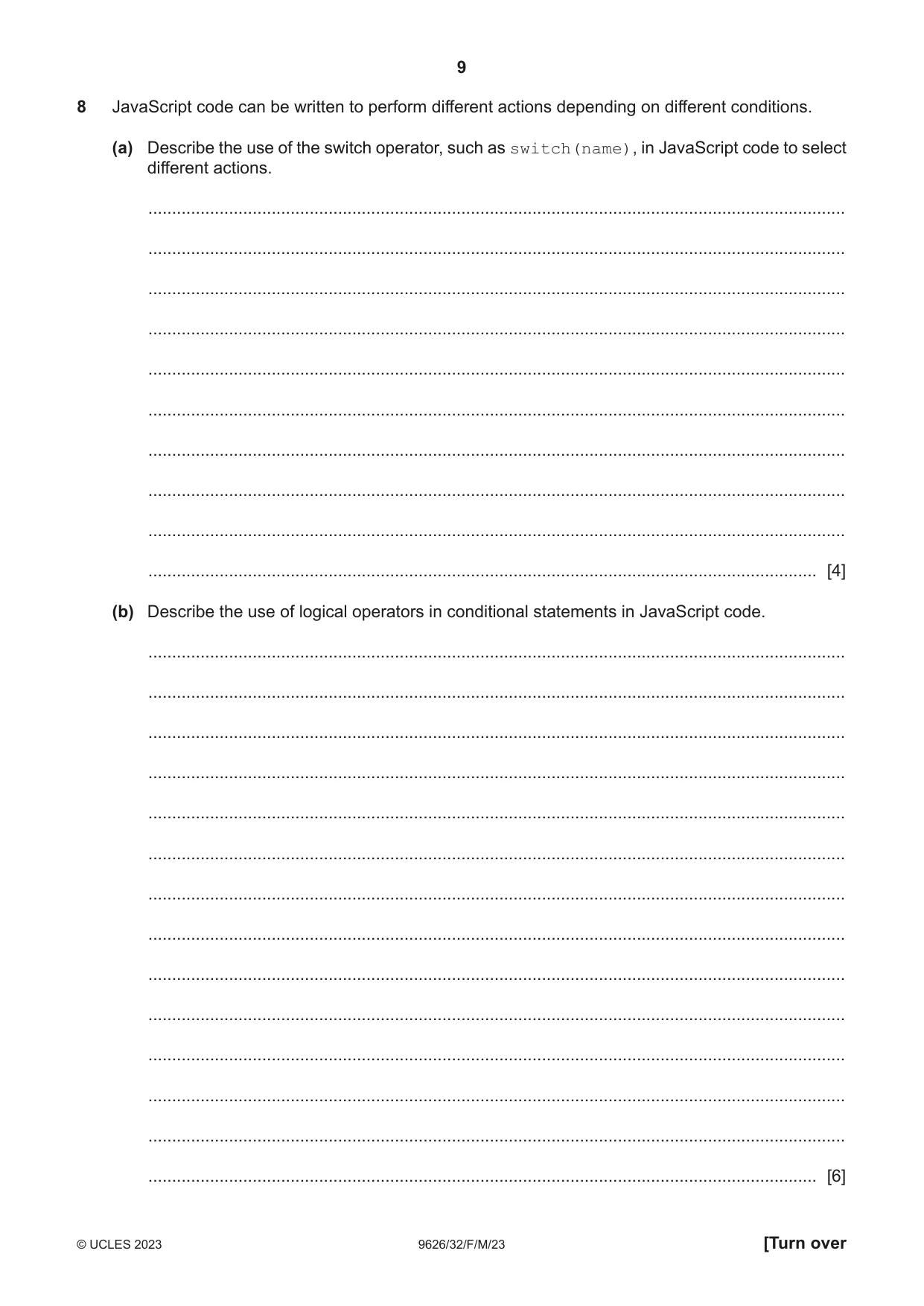
8 JavaScript code can be written to perform different actions depending on different conditions. (a) Describe the use of the switch operator, such as switch(name), in JavaScript code to select different actions. ................................................................................................................................................... ................................................................................................................................................... ................................................................................................................................................... ................................................................................................................................................... ................................................................................................................................................... ................................................................................................................................................... ................................................................................................................................................... ................................................................................................................................................... ................................................................................................................................................... ............................................................................................................................................. [4] (b) Describe the use of logical operators in conditional statements in JavaScript code. ................................................................................................................................................... ................................................................................................................................................... ................................................................................................................................................... ................................................................................................................................................... ................................................................................................................................................... ................................................................................................................................................... ................................................................................................................................................... ................................................................................................................................................... ................................................................................................................................................... ................................................................................................................................................... ................................................................................................................................................... ................................................................................................................................................... ................................................................................................................................................... ............................................................................................................................................. [6]
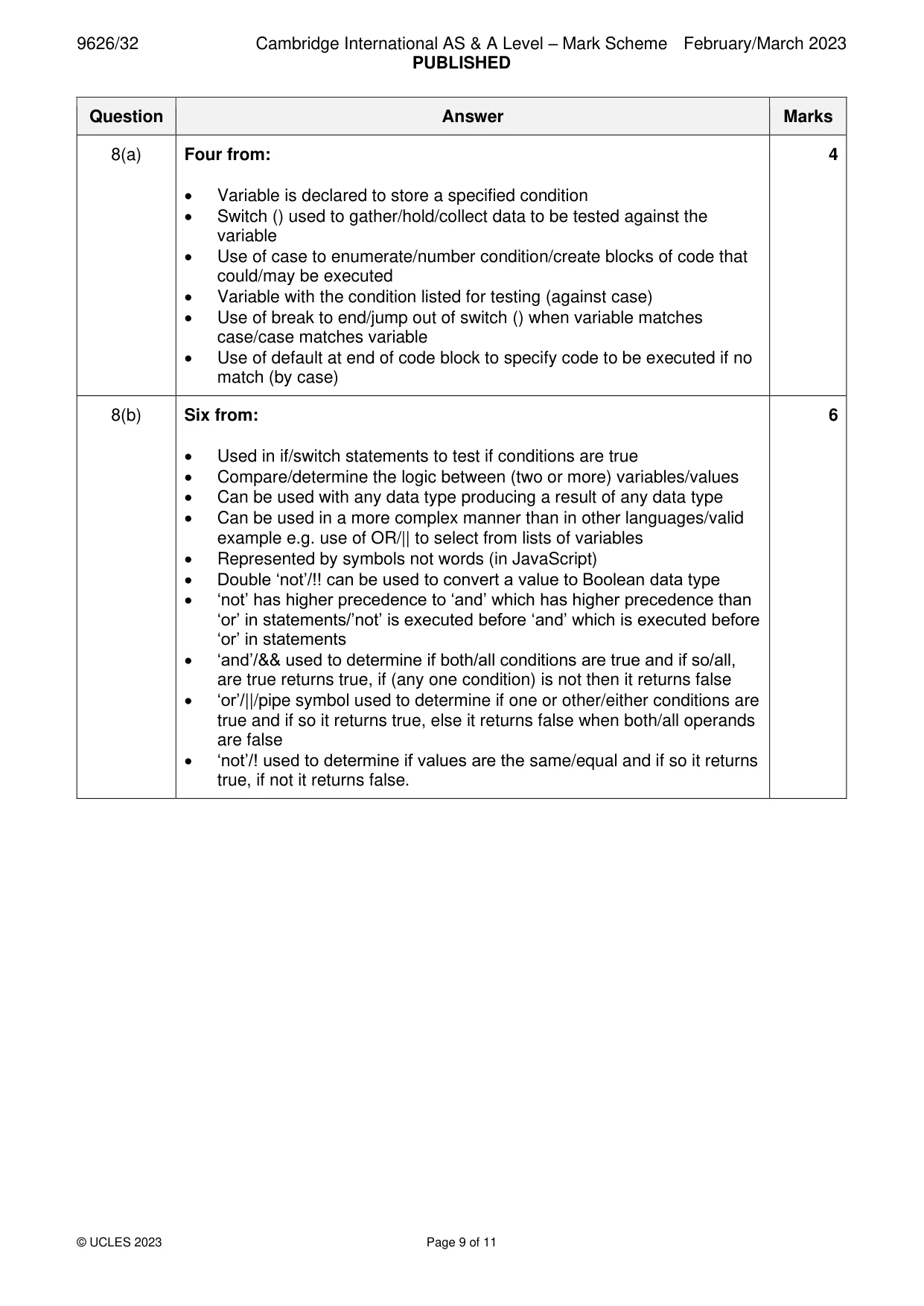
Mark scheme: 8(a) Four from: 4 • Variable is declared to store a specified condition • Switch () used to gather/hold/collect data to be tested against the variable • Use of case to enumerate/number condition/create blocks of code that could/may be executed • Variable with the condition listed for testing (against case) • Use of break to end/jump out of switch () when variable matches case/case matches variable • Use of default at end of code block to specify code to be executed if no match (by case) 8(b) Six from: 6 • Used in if/switch statements to test if conditions are true • Compare/determine the logic between (two or more) variables/values • Can be used with any data type producing a result of any data type • Can be used in a more complex manner than in other languages/valid example e.g. use of OR/|| to select from lists of variables • Represented by symbols not words (in JavaScript) • Double ‘not’/!! can be used to convert a value to Boolean data type • ‘not’ has higher precedence to ‘and’ which has higher precedence than ‘or’ in statements/’not’ is executed before ‘and’ which is executed before ‘or’ in statements • ‘and’/&& used to determine if both/all conditions are true and if so/all, are true returns true, if (any one condition) is not then it returns false • ‘or’/||/pipe symbol used to determine if one or other/either conditions are true and if so it returns true, else it returns false when both/all operands are false • ‘not’/! used to determine if values are the same/equal and if so it returns true, if not it returns false.
Q9 · Evaluate the use of prototyping in software development
9 Evaluate the use of prototyping in software development. .......................................................................................................................................................... .......................................................................................................................................................... .......................................................................................................................................................... .......................................................................................................................................................... .......................................................................................................................................................... .......................................................................................................................................................... .......................................................................................................................................................... .......................................................................................................................................................... .......................................................................................................................................................... .......................................................................................................................................................... .......................................................................................................................................................... .......................................................................................................................................................... .......................................................................................................................................................... .......................................................................................................................................................... .......................................................................................................................................................... .......................................................................................................................................................... .......................................................................................................................................................... .......................................................................................................................................................... .......................................................................................................................................................... .......................................................................................................................................................... .................................................................................................................................................... [8]
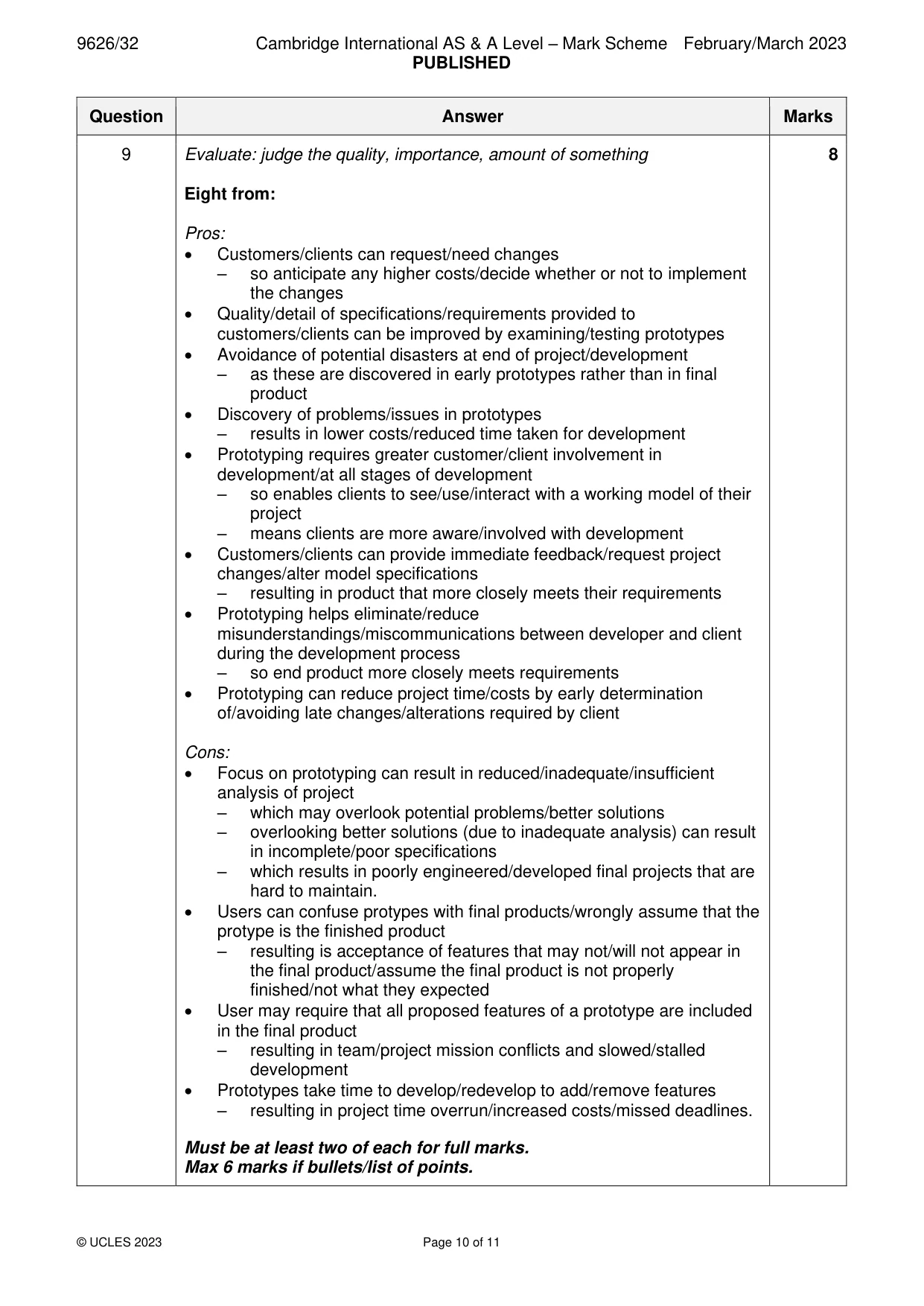
Mark scheme: 9 Evaluate: judge the quality, importance, amount of something 8 Eight from: Pros: • Customers/clients can request/need changes – so anticipate any higher costs/decide whether or not to implement the changes • Quality/detail of specifications/requirements provided to customers/clients can be improved by examining/testing prototypes • Avoidance of potential disasters at end of project/development – as these are discovered in early prototypes rather than in final product • Discovery of problems/issues in prototypes – results in lower costs/reduced time taken for development • Prototyping requires greater customer/client involvement in development/at all stages of development – so enables clients to see/use/interact with a working model of their project – means clients are more aware/involved with development • Customers/clients can provide immediate feedback/request project changes/alter model specifications – resulting in product that more closely meets their requirements • Prototyping helps eliminate/reduce misunderstandings/miscommunications between developer and client during the development process – so end product more closely meets requirements • Prototyping can reduce project time/costs by early determination of/avoiding late changes/alterations required by client Cons: • Focus on prototyping can result in reduced/inadequate/insufficient analysis of project – which may overlook potential problems/better solutions – overlooking better solutions (due to inadequate analysis) can result in incomplete/poor specifications – which results in poorly engineered/developed final projects that are hard to maintain. • Users can confuse protypes with final products/wrongly assume that the protype is the finished product – resulting is acceptance of features that may not/will not appear in the final product/assume the final product is not properly finished/not what they expected • User may require that all proposed features of a prototype are included in the final product – resulting in team/project mission conflicts and slowed/stalled development • Prototypes take time to develop/redevelop to add/remove features – resulting in project time overrun/increased costs/missed deadlines. Must be at least two of each for full marks. Max 6 marks if bullets/list of points.
Q10 · A digital camera captures bitmap images
10 A digital camera captures bitmap images. These images can be converted into editable vector shapes. (a) Describe how a bitmap image is converted into editable vector shapes. ................................................................................................................................................... ................................................................................................................................................... ................................................................................................................................................... ................................................................................................................................................... ................................................................................................................................................... ............................................................................................................................................. [2] (b) Vector images can be used on web pages. Discuss the advantages and disadvantages of using a vector image with editable shapes instead of a bitmap image. ................................................................................................................................................... ................................................................................................................................................... ................................................................................................................................................... ................................................................................................................................................... ................................................................................................................................................... ................................................................................................................................................... ................................................................................................................................................... ................................................................................................................................................... ................................................................................................................................................... ................................................................................................................................................... ................................................................................................................................................... ................................................................................................................................................... ................................................................................................................................................... ............................................................................................................................................. [6]
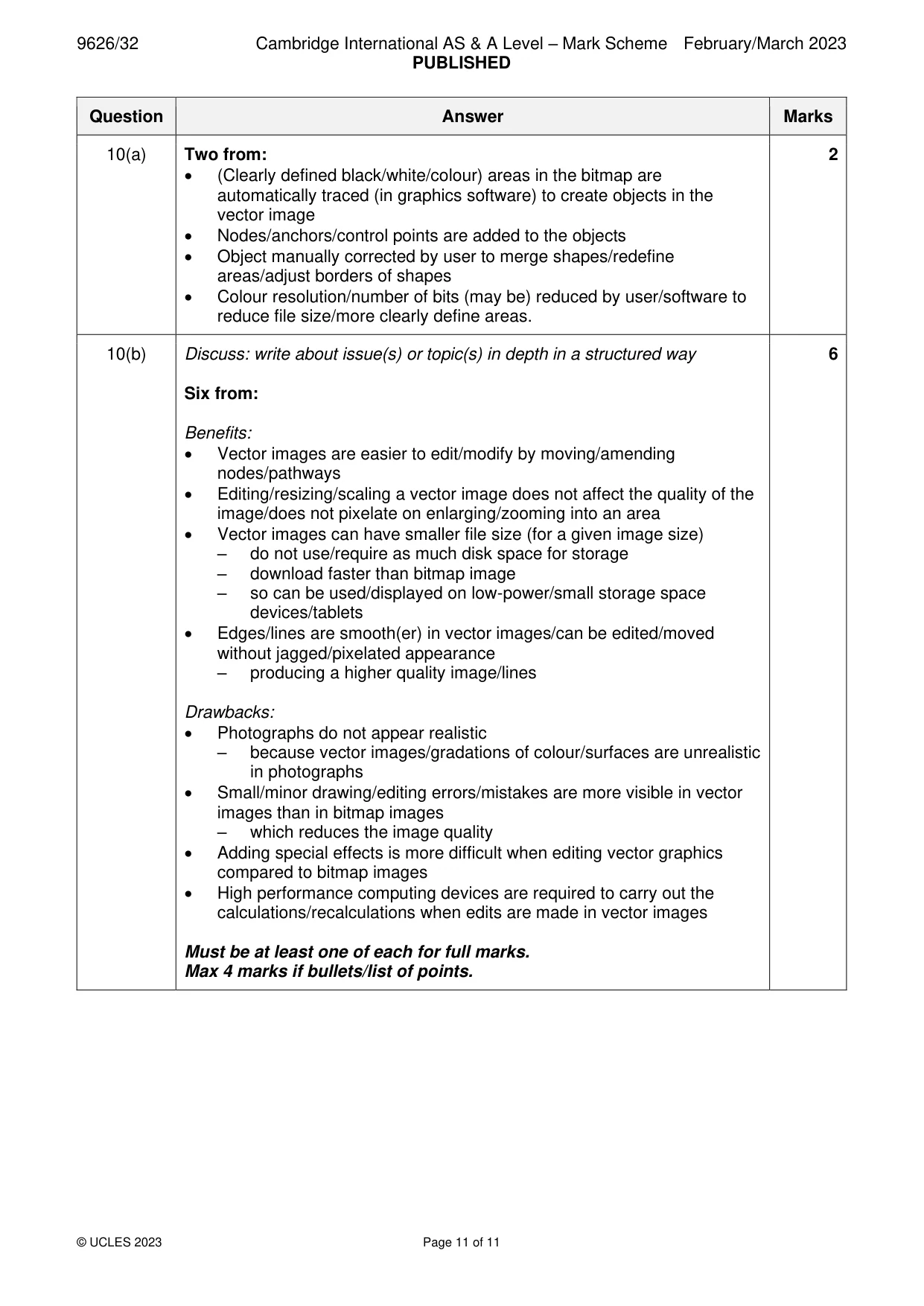
Mark scheme: 10(a) Two from: 2 • (Clearly defined black/white/colour) areas in the bitmap are automatically traced (in graphics software) to create objects in the vector image • Nodes/anchors/control points are added to the objects • Object manually corrected by user to merge shapes/redefine areas/adjust borders of shapes • Colour resolution/number of bits (may be) reduced by user/software to reduce file size/more clearly define areas. 10(b) Discuss: write about issue(s) or topic(s) in depth in a structured way 6 Six from: Benefits: • Vector images are easier to edit/modify by moving/amending nodes/pathways • Editing/resizing/scaling a vector image does not affect the quality of the image/does not pixelate on enlarging/zooming into an area • Vector images can have smaller file size (for a given image size) – do not use/require as much disk space for storage – download faster than bitmap image – so can be used/displayed on low-power/small storage space devices/tablets • Edges/lines are smooth(er) in vector images/can be edited/moved without jagged/pixelated appearance – producing a higher quality image/lines Drawbacks: • Photographs do not appear realistic – because vector images/gradations of colour/surfaces are unrealistic in photographs • Small/minor drawing/editing errors/mistakes are more visible in vector images than in bitmap images – which reduces the image quality • Adding special effects is more difficult when editing vector graphics compared to bitmap images • High performance computing devices are required to carry out the calculations/recalculations when edits are made in vector images Must be at least one of each for full marks. Max 4 marks if bullets/list of points.
What was in this paper
The subtopics covered by these 10 questions, and how many questions each got. Open one in a new tab to see every Cambridge question on it.
What you needed in this session
Cambridge’s own grade thresholds for 2023 Feb/March, Paper 3 · Variant 2. A higher threshold means an easier paper — the bar moves with how the cohort did.