Cambridge A Level Information Technology (from 2017) 9626 — 2020 Feb/March Paper 3 · Variant 2
9626/32/F/M/20 · 10 questions · 90 marks · ≈101 min
The question paper and its mark scheme, free to read here and free to download. This is Cambridge’s own paper, exactly as it was sat.
Question paper16 pages














Mark scheme9 pages
Answers below. Sit the paper first if you are practising.

Questions as text
Q1 · Explain how project management software is used to schedule tasks
1 Explain how project management software is used to schedule tasks. .......................................................................................................................................................... .......................................................................................................................................................... .......................................................................................................................................................... .......................................................................................................................................................... .......................................................................................................................................................... .......................................................................................................................................................... .......................................................................................................................................................... .......................................................................................................................................................... .......................................................................................................................................................... .......................................................................................................................................................... .......................................................................................................................................................... .......................................................................................................................................................... .......................................................................................................................................................... .................................................................................................................................................... [6]
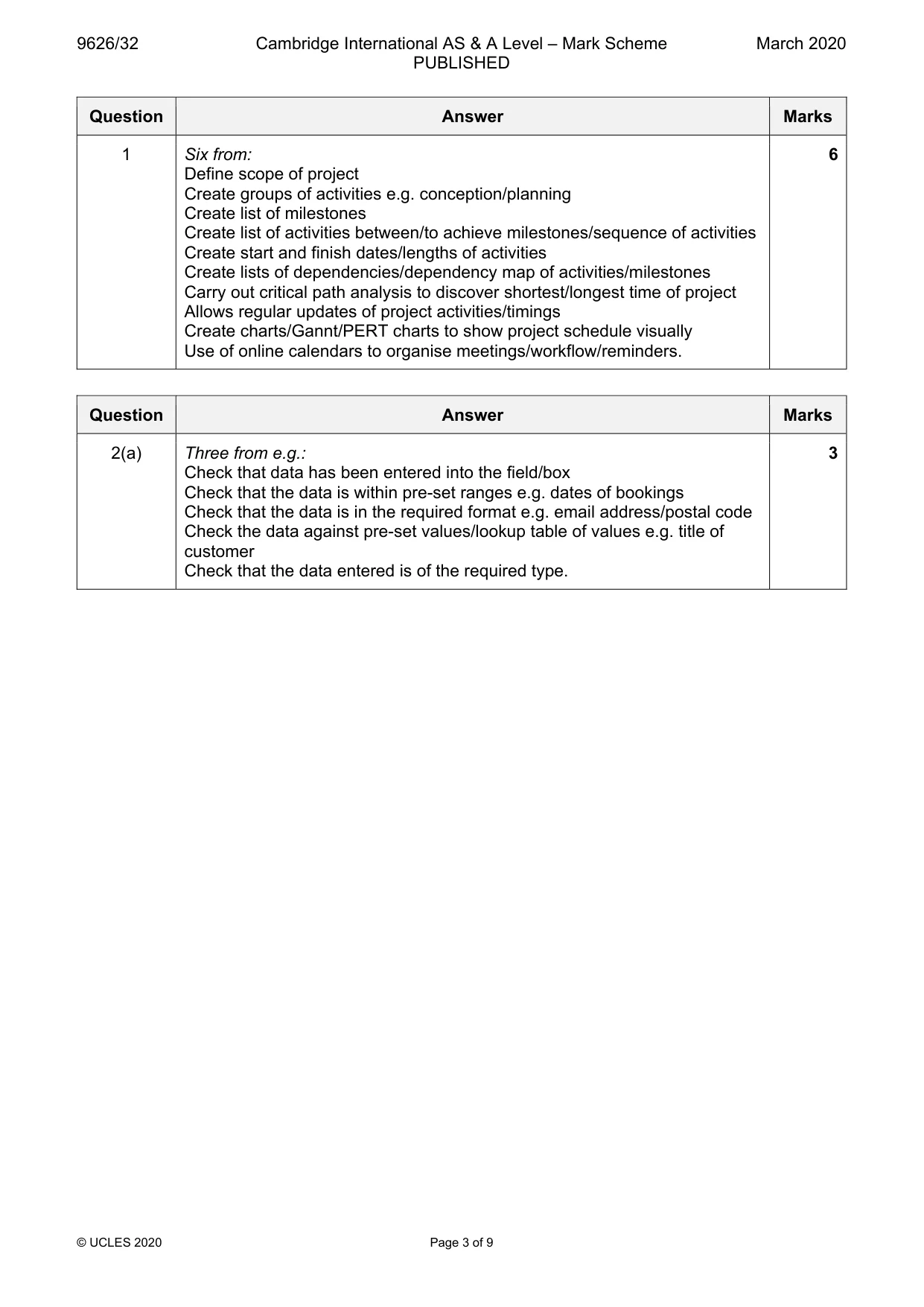
Mark scheme: Question Answer Marks 1 Six from: 6 Define scope of project Create groups of activities e.g. conception/planning Create list of milestones Create list of activities between/to achieve milestones/sequence of activities Create start and finish dates/lengths of activities Create lists of dependencies/dependency map of activities/milestones Carry out critical path analysis to discover shortest/longest time of project Allows regular updates of project activities/timings Create charts/Gannt/PERT charts to show project schedule visually Use of online calendars to organise meetings/workflow/reminders.
Q2 · A railway company wants to allow customers to book tickets for journeys using its website
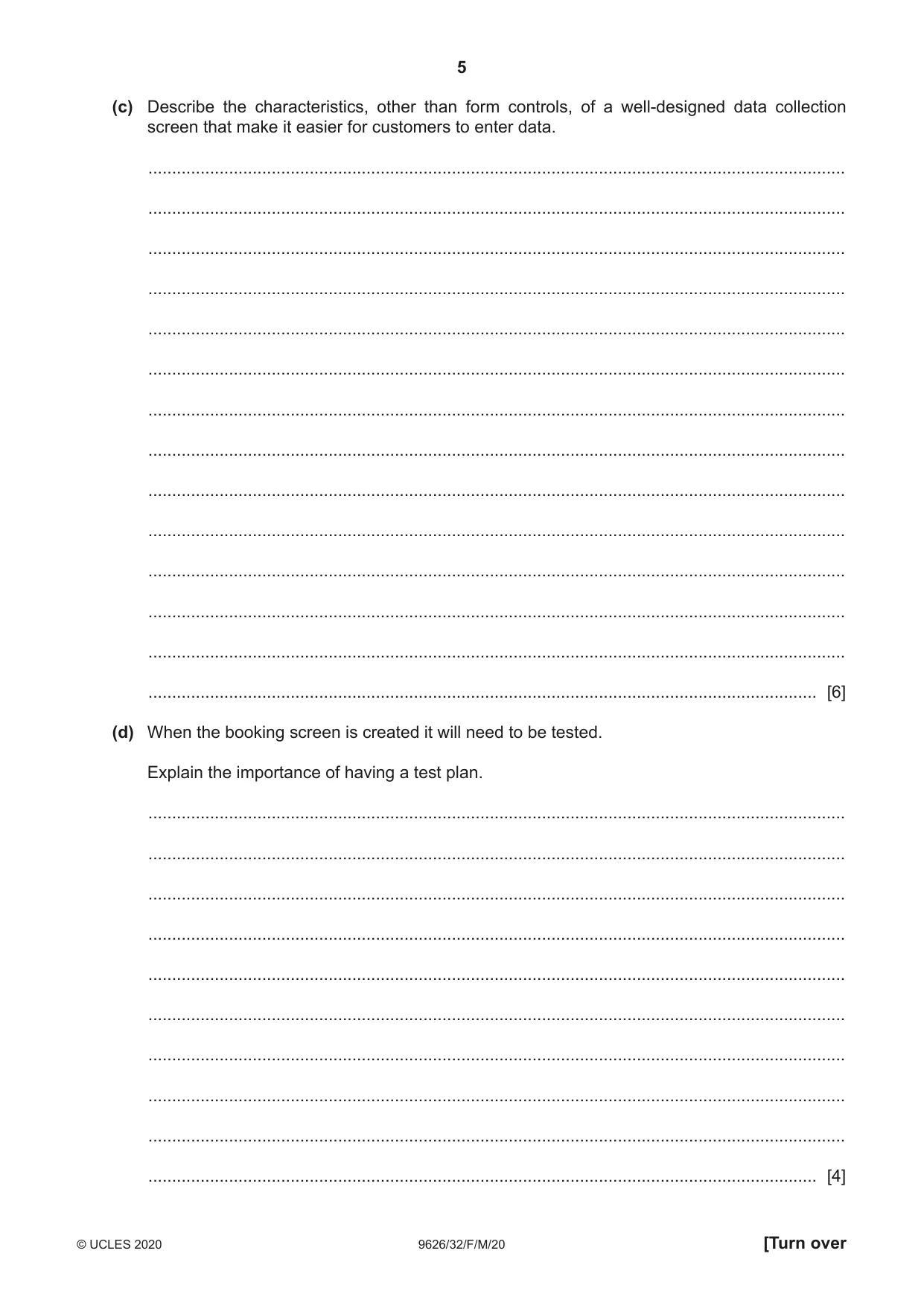
2 A railway company wants to allow customers to book tickets for journeys using its website. A new booking screen will use form controls to collect data about the customer and about the requested journeys. The screen is intended to make it easier for customers to enter the details. (a) Describe, in detail, three checks that could be carried out on the data as it is collected on the booking screen. 1 ................................................................................................................................................ ................................................................................................................................................... ................................................................................................................................................... 2 ................................................................................................................................................ ................................................................................................................................................... ................................................................................................................................................... 3 ................................................................................................................................................ ................................................................................................................................................... ............................................................................................................................................. [3] (b) Describe four form controls that could be used on the new booking screen and for each form control describe an appropriate use on the new screen. ................................................................................................................................................... ................................................................................................................................................... ................................................................................................................................................... ................................................................................................................................................... ................................................................................................................................................... ................................................................................................................................................... ................................................................................................................................................... ................................................................................................................................................... ................................................................................................................................................... ................................................................................................................................................... ................................................................................................................................................... ................................................................................................................................................... ................................................................................................................................................... ................................................................................................................................................... ................................................................................................................................................... ................................................................................................................................................... ................................................................................................................................................... ................................................................................................................................................... ................................................................................................................................................... ............................................................................................................................................. [8] (c) Describe the characteristics, other than form controls, of a well-designed data collection screen that make it easier for customers to enter data. ................................................................................................................................................... ................................................................................................................................................... ................................................................................................................................................... ................................................................................................................................................... ................................................................................................................................................... ................................................................................................................................................... ................................................................................................................................................... ................................................................................................................................................... ................................................................................................................................................... ................................................................................................................................................... ................................................................................................................................................... ................................................................................................................................................... ................................................................................................................................................... ............................................................................................................................................. [6] (d) When the booking screen is created it will need to be tested. Explain the importance of having a test plan. ................................................................................................................................................... ................................................................................................................................................... ................................................................................................................................................... ................................................................................................................................................... ................................................................................................................................................... ................................................................................................................................................... ................................................................................................................................................... ................................................................................................................................................... ................................................................................................................................................... ............................................................................................................................................. [4]
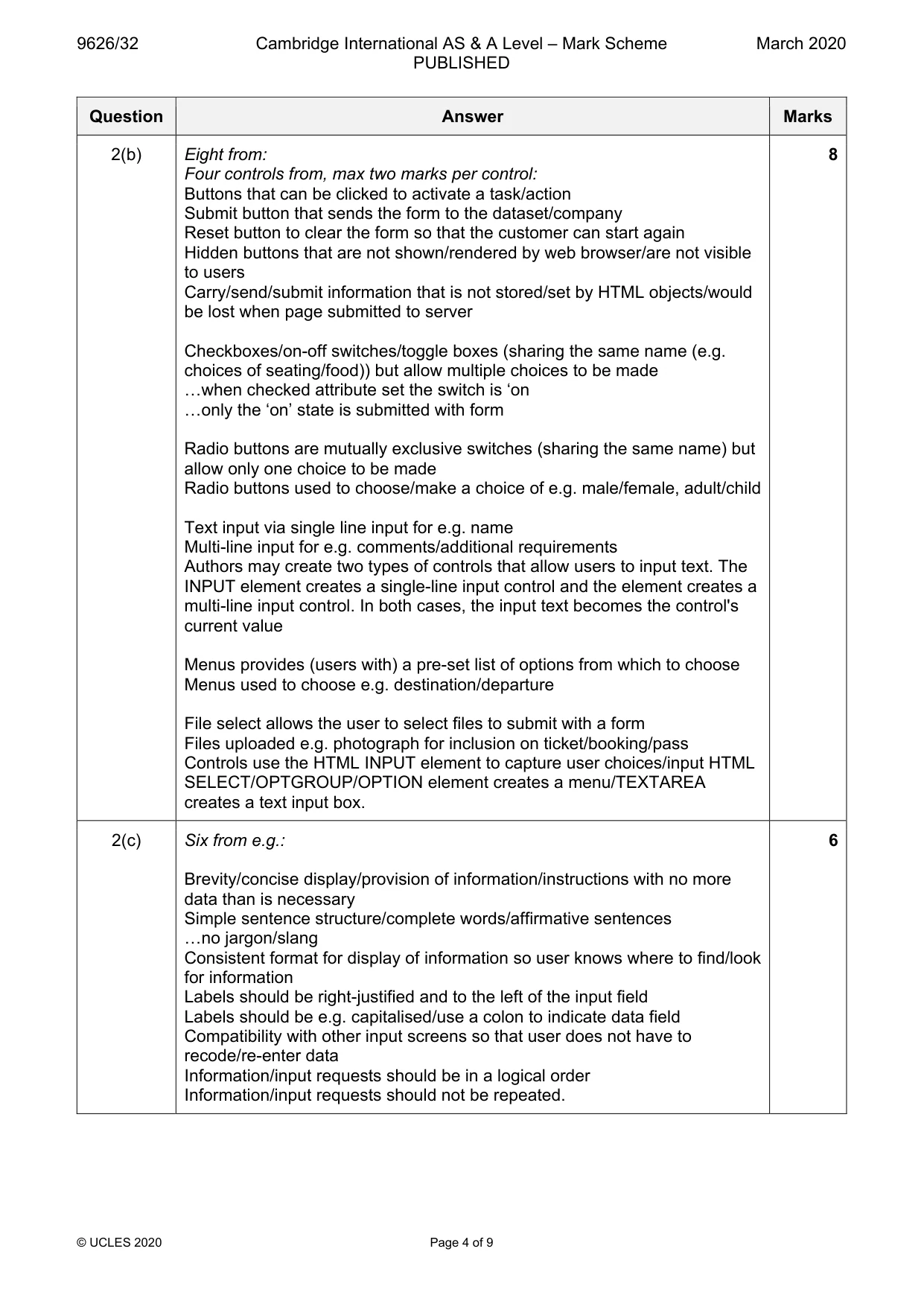
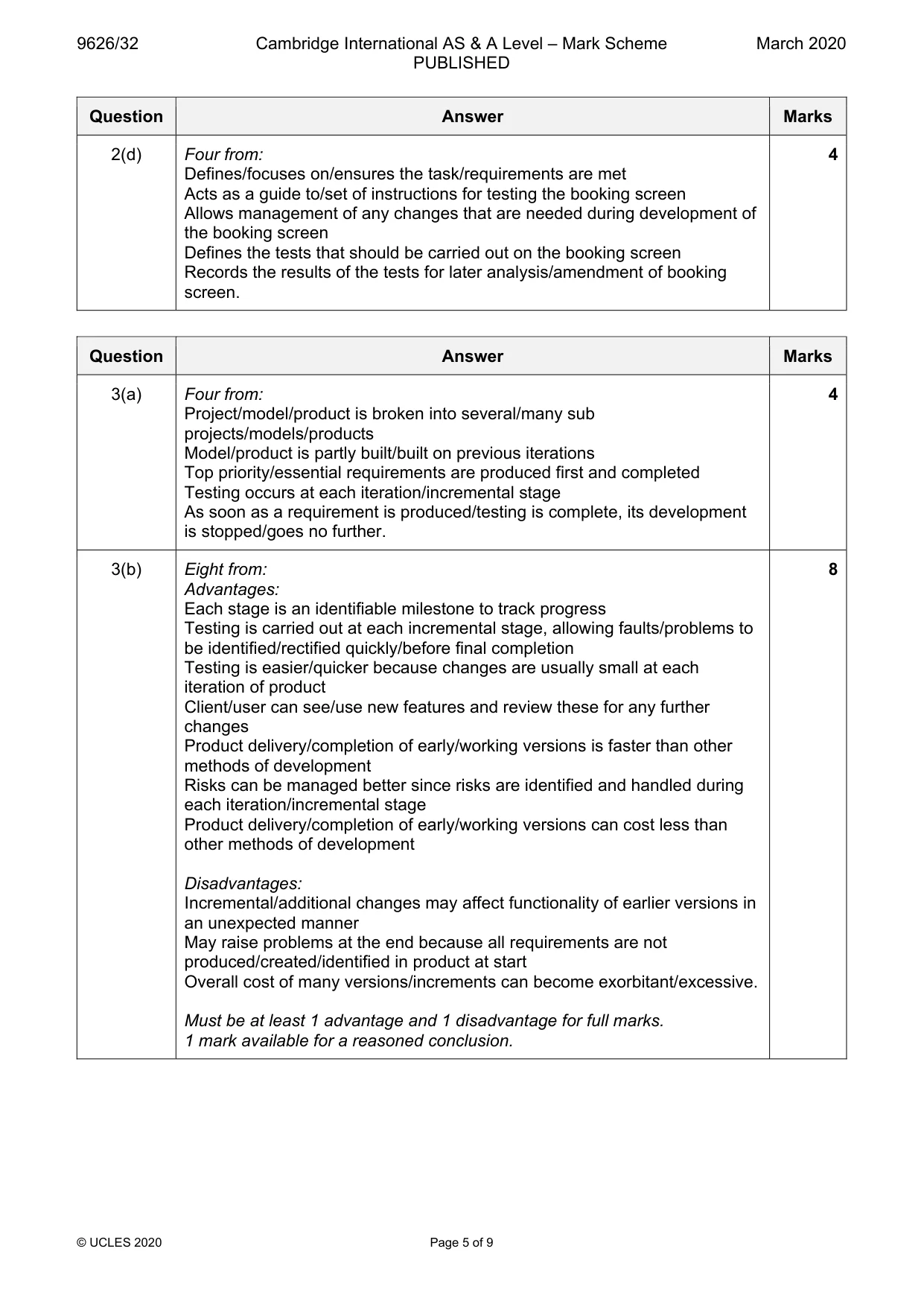
Mark scheme: 2(a) Three from e.g.: 3 Check that data has been entered into the field/box Check that the data is within pre-set ranges e.g. dates of bookings Check that the data is in the required format e.g. email address/postal code Check the data against pre-set values/lookup table of values e.g. title of customer Check that the data entered is of the required type. 2(b) Eight from: 8 Four controls from, max two marks per control: Buttons that can be clicked to activate a task/action Submit button that sends the form to the dataset/company Reset button to clear the form so that the customer can start again Hidden buttons that are not shown/rendered by web browser/are not visible to users Carry/send/submit information that is not stored/set by HTML objects/would be lost when page submitted to server Checkboxes/on-off switches/toggle boxes (sharing the same name (e.g. choices of seating/food)) but allow multiple choices to be made …when checked attribute set the switch is ‘on …only the ‘on’ state is submitted with form Radio buttons are mutually exclusive switches (sharing the same name) but allow only one choice to be made Radio buttons used to choose/make a choice of e.g. male/female, adult/child Text input via single line input for e.g. name Multi-line input for e.g. comments/additional requirements Authors may create two types of controls that allow users to input text. The INPUT element creates a single-line input control and the element creates a multi-line input control. In both cases, the input text becomes the control's current value Menus provides (users with) a pre-set list of options from which to choose Menus used to choose e.g. destination/departure File select allows the user to select files to submit with a form Files uploaded e.g. photograph for inclusion on ticket/booking/pass Controls use the HTML INPUT element to capture user choices/input HTML SELECT/OPTGROUP/OPTION element creates a menu/TEXTAREA creates a text input box. 2(c) Six from e.g.: 6 Brevity/concise display/provision of information/instructions with no more data than is necessary Simple sentence structure/complete words/affirmative sentences …no jargon/slang Consistent format for display of information so user knows where to find/look for information Labels should be right-justified and to the left of the input field Labels should be e.g. capitalised/use a colon to indicate data field Compatibility with other input screens so that user does not have to recode/re-enter data Information/input requests should be in a logical order Information/input requests should not be repeated. 2(d) Four from: 4 Defines/focuses on/ensures the task/requirements are met Acts as a guide to/set of instructions for testing the booking screen Allows management of any changes that are needed during development of the booking screen Defines the tests that should be carried out on the booking screen Records the results of the tests for later analysis/amendment of booking screen.
Q3 · Describe the characteristics of incremental prototyping
3 (a) Describe the characteristics of incremental prototyping. ................................................................................................................................................... ................................................................................................................................................... ................................................................................................................................................... ................................................................................................................................................... ................................................................................................................................................... ................................................................................................................................................... ................................................................................................................................................... ................................................................................................................................................... ................................................................................................................................................... ............................................................................................................................................. [4] (b) Discuss the advantages and disadvantages of incremental prototyping. ................................................................................................................................................... ................................................................................................................................................... ................................................................................................................................................... ................................................................................................................................................... ................................................................................................................................................... ................................................................................................................................................... ................................................................................................................................................... ................................................................................................................................................... ................................................................................................................................................... ................................................................................................................................................... ................................................................................................................................................... ................................................................................................................................................... ................................................................................................................................................... ................................................................................................................................................... ................................................................................................................................................... ................................................................................................................................................... ................................................................................................................................................... ................................................................................................................................................... ................................................................................................................................................... ............................................................................................................................................. [8]
Mark scheme: 3(a) Four from: 4 Project/model/product is broken into several/many sub projects/models/products Model/product is partly built/built on previous iterations Top priority/essential requirements are produced first and completed Testing occurs at each iteration/incremental stage As soon as a requirement is produced/testing is complete, its development is stopped/goes no further. 3(b) Eight from: 8 Advantages: Each stage is an identifiable milestone to track progress Testing is carried out at each incremental stage, allowing faults/problems to be identified/rectified quickly/before final completion Testing is easier/quicker because changes are usually small at each iteration of product Client/user can see/use new features and review these for any further changes Product delivery/completion of early/working versions is faster than other methods of development Risks can be managed better since risks are identified and handled during each iteration/incremental stage Product delivery/completion of early/working versions can cost less than other methods of development Disadvantages: Incremental/additional changes may affect functionality of earlier versions in an unexpected manner May raise problems at the end because all requirements are not produced/created/identified in product at start Overall cost of many versions/increments can become exorbitant/excessive. Must be at least 1 advantage and 1 disadvantage for full marks. 1 mark available for a reasoned conclusion.
Q4 · Describe how 3D printing would be used when creating objects for use in space exploration
4 Describe how 3D printing would be used when creating objects for use in space exploration. .......................................................................................................................................................... .......................................................................................................................................................... .......................................................................................................................................................... .......................................................................................................................................................... .......................................................................................................................................................... .......................................................................................................................................................... .......................................................................................................................................................... .......................................................................................................................................................... .......................................................................................................................................................... .......................................................................................................................................................... .......................................................................................................................................................... .......................................................................................................................................................... .......................................................................................................................................................... .................................................................................................................................................... [6]
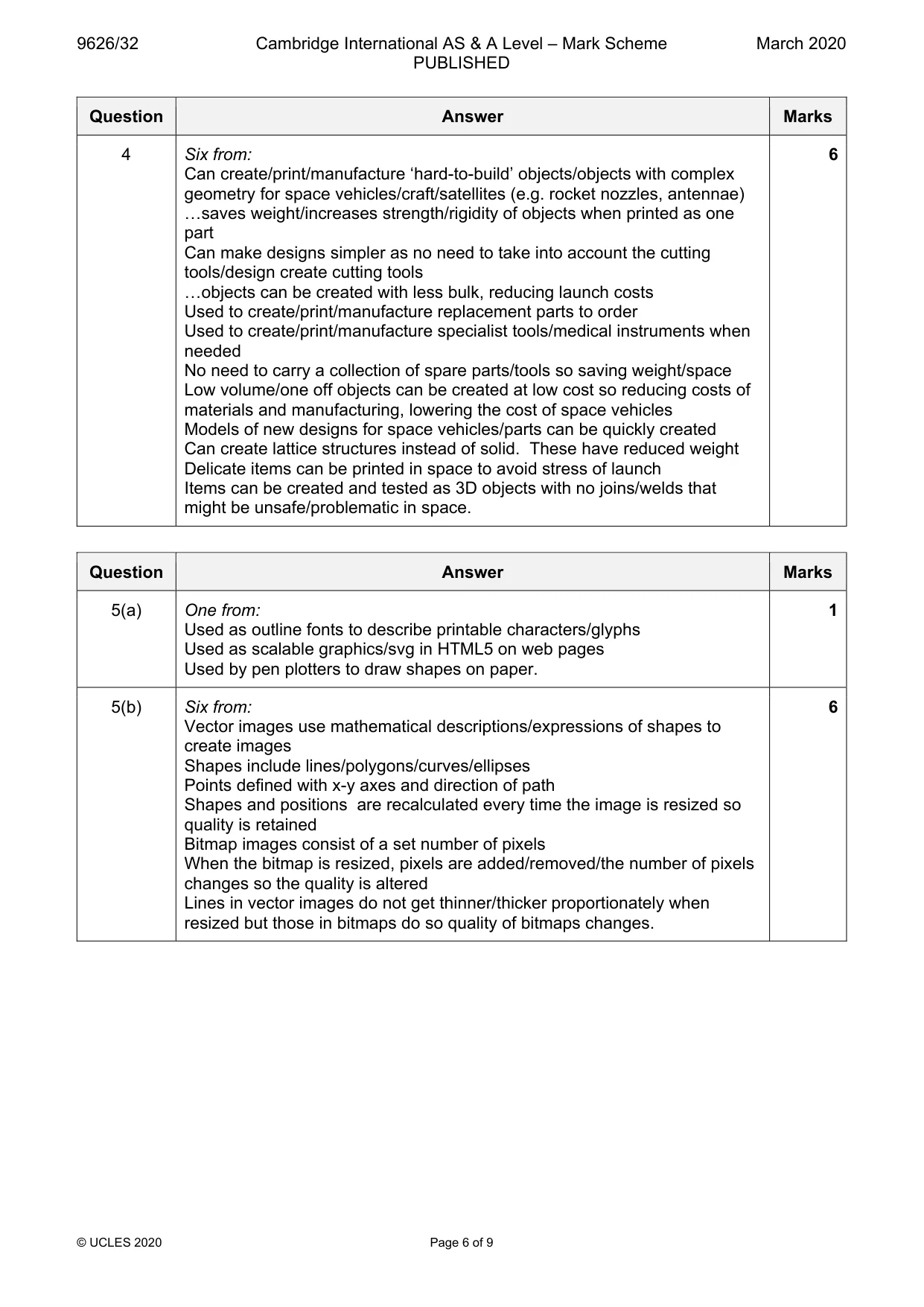
Mark scheme: 4 Six from: 6 Can create/print/manufacture ‘hard-to-build’ objects/objects with complex geometry for space vehicles/craft/satellites (e.g. rocket nozzles, antennae) …saves weight/increases strength/rigidity of objects when printed as one part Can make designs simpler as no need to take into account the cutting tools/design create cutting tools …objects can be created with less bulk, reducing launch costs Used to create/print/manufacture replacement parts to order Used to create/print/manufacture specialist tools/medical instruments when needed No need to carry a collection of spare parts/tools so saving weight/space Low volume/one off objects can be created at low cost so reducing costs of materials and manufacturing, lowering the cost of space vehicles Models of new designs for space vehicles/parts can be quickly created Can create lattice structures instead of solid. These have reduced weight Delicate items can be printed in space to avoid stress of launch Items can be created and tested as 3D objects with no joins/welds that might be unsafe/problematic in space.
Q5 · Computer graphics software can create shapes as vector graphics or as bitmap images
5 Computer graphics software can create shapes as vector graphics or as bitmap images. (a) Identify one use of vector graphics in computing. ................................................................................................................................................... ................................................................................................................................................... ............................................................................................................................................. [1] (b) Explain, in detail, why vector graphics can be resized without losing image quality but bitmap images usually cannot. ................................................................................................................................................... ................................................................................................................................................... ................................................................................................................................................... ................................................................................................................................................... ................................................................................................................................................... ................................................................................................................................................... ................................................................................................................................................... ................................................................................................................................................... ................................................................................................................................................... ................................................................................................................................................... ................................................................................................................................................... ................................................................................................................................................... ................................................................................................................................................... ............................................................................................................................................. [6]
Mark scheme: 5(a) One from: 1 Used as outline fonts to describe printable characters/glyphs Used as scalable graphics/svg in HTML5 on web pages Used by pen plotters to draw shapes on paper. 5(b) Six from: 6 Vector images use mathematical descriptions/expressions of shapes to create images Shapes include lines/polygons/curves/ellipses Points defined with x-y axes and direction of path Shapes and positions are recalculated every time the image is resized so quality is retained Bitmap images consist of a set number of pixels When the bitmap is resized, pixels are added/removed/the number of pixels changes so the quality is altered Lines in vector images do not get thinner/thicker proportionately when resized but those in bitmaps do so quality of bitmaps changes.
Q6 · A chain of supermarkets has a computer system which deals with stock control, payroll…
6 A chain of supermarkets has a computer system which deals with stock control, payroll, Point of Sale (POS) terminals and a customer database. The computer system is to be replaced with a new system. Analyse the suitability of using phased implementation in this situation. .......................................................................................................................................................... .......................................................................................................................................................... .......................................................................................................................................................... .......................................................................................................................................................... .......................................................................................................................................................... .......................................................................................................................................................... .......................................................................................................................................................... .......................................................................................................................................................... .......................................................................................................................................................... .......................................................................................................................................................... .......................................................................................................................................................... .......................................................................................................................................................... .......................................................................................................................................................... .......................................................................................................................................................... .......................................................................................................................................................... .......................................................................................................................................................... .......................................................................................................................................................... .......................................................................................................................................................... .......................................................................................................................................................... .................................................................................................................................................... [8]
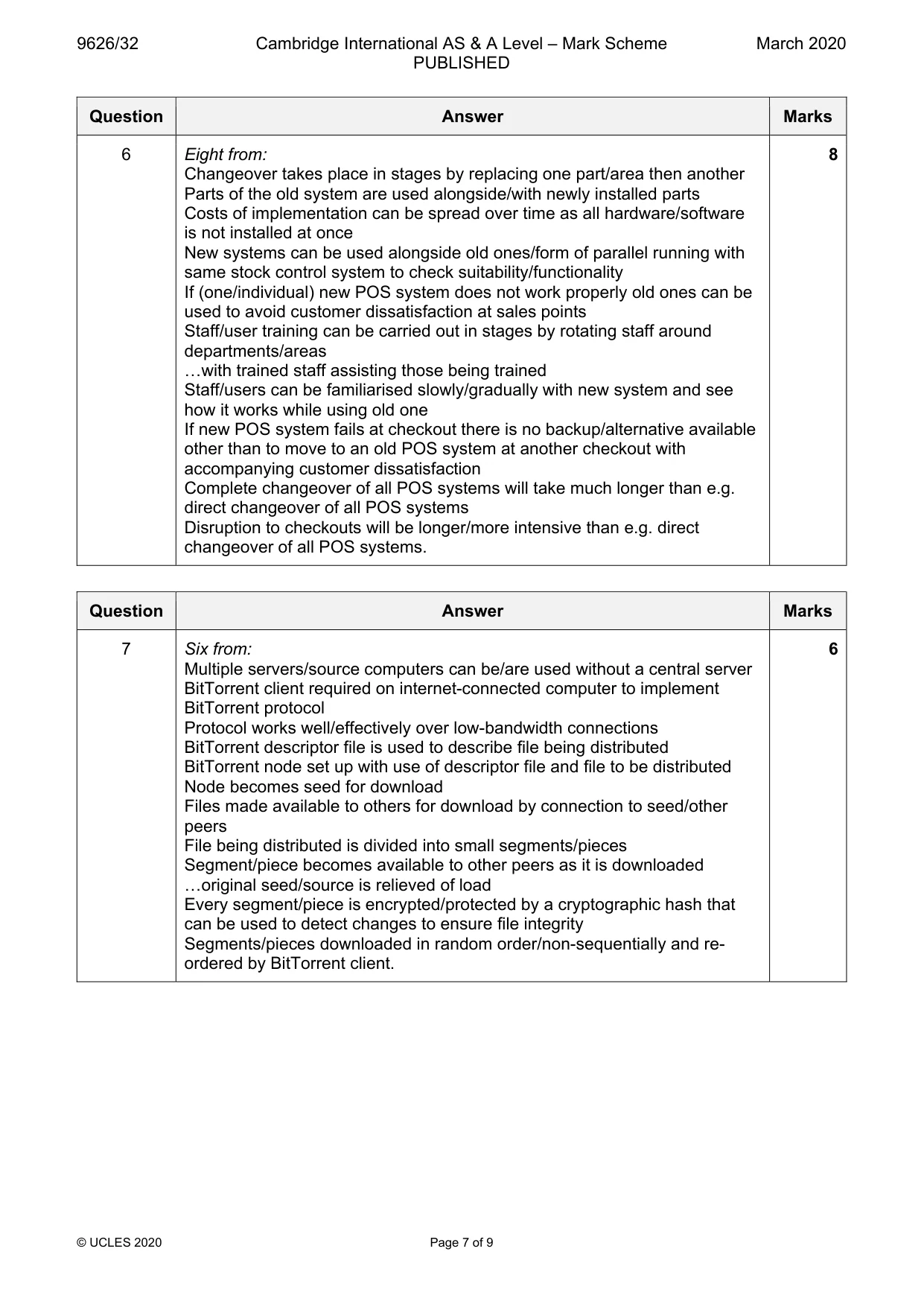
Mark scheme: 6 Eight from: 8 Changeover takes place in stages by replacing one part/area then another Parts of the old system are used alongside/with newly installed parts Costs of implementation can be spread over time as all hardware/software is not installed at once New systems can be used alongside old ones/form of parallel running with same stock control system to check suitability/functionality If (one/individual) new POS system does not work properly old ones can be used to avoid customer dissatisfaction at sales points Staff/user training can be carried out in stages by rotating staff around departments/areas …with trained staff assisting those being trained Staff/users can be familiarised slowly/gradually with new system and see how it works while using old one If new POS system fails at checkout there is no backup/alternative available other than to move to an old POS system at another checkout with accompanying customer dissatisfaction Complete changeover of all POS systems will take much longer than e.g. direct changeover of all POS systems Disruption to checkouts will be longer/more intensive than e.g. direct changeover of all POS systems.
Q7 · Describe how peer-to-peer file sharing can be carried out using the BitTorrent protocol
7 Describe how peer-to-peer file sharing can be carried out using the BitTorrent protocol. .......................................................................................................................................................... .......................................................................................................................................................... .......................................................................................................................................................... .......................................................................................................................................................... .......................................................................................................................................................... .......................................................................................................................................................... .......................................................................................................................................................... .......................................................................................................................................................... .......................................................................................................................................................... .......................................................................................................................................................... .......................................................................................................................................................... .......................................................................................................................................................... .......................................................................................................................................................... .................................................................................................................................................... [6]
Mark scheme: 7 Six from: 6 Multiple servers/source computers can be/are used without a central server BitTorrent client required on internet-connected computer to implement BitTorrent protocol Protocol works well/effectively over low-bandwidth connections BitTorrent descriptor file is used to describe file being distributed BitTorrent node set up with use of descriptor file and file to be distributed Node becomes seed for download Files made available to others for download by connection to seed/other peers File being distributed is divided into small segments/pieces Segment/piece becomes available to other peers as it is downloaded …original seed/source is relieved of load Every segment/piece is encrypted/protected by a cryptographic hash that can be used to detect changes to ensure file integrity Segments/pieces downloaded in random order/non-sequentially and re- ordered by BitTorrent client.
Q8 · Evaluate, by weighing up the advantages and disadvantages, the use of wireless…
8 Evaluate, by weighing up the advantages and disadvantages, the use of wireless communications in the home. .......................................................................................................................................................... .......................................................................................................................................................... .......................................................................................................................................................... .......................................................................................................................................................... .......................................................................................................................................................... .......................................................................................................................................................... .......................................................................................................................................................... .......................................................................................................................................................... .......................................................................................................................................................... .......................................................................................................................................................... .......................................................................................................................................................... .......................................................................................................................................................... .......................................................................................................................................................... .......................................................................................................................................................... .......................................................................................................................................................... .......................................................................................................................................................... .......................................................................................................................................................... .......................................................................................................................................................... .......................................................................................................................................................... .................................................................................................................................................... [8]
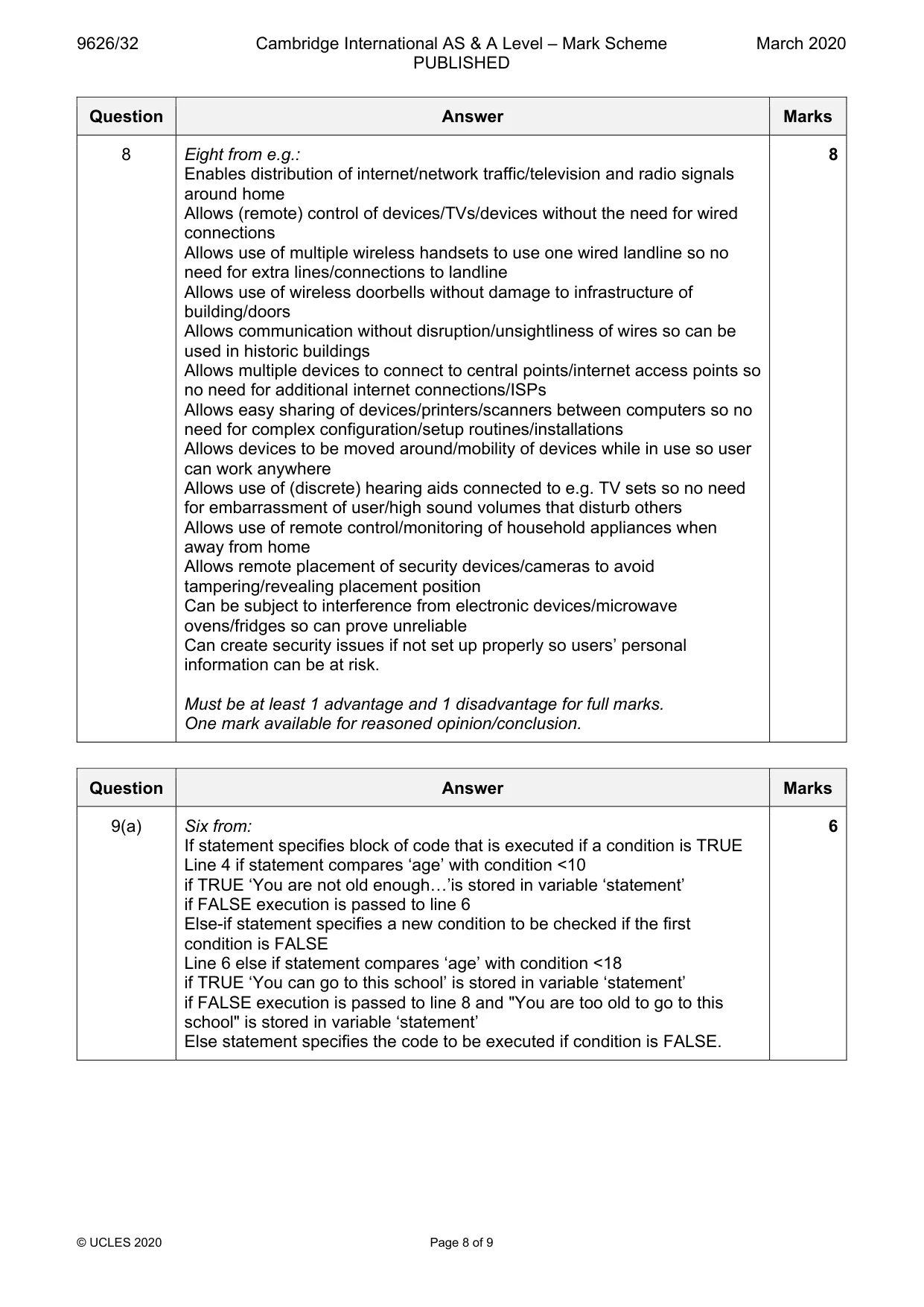
Mark scheme: 8 Eight from e.g.: 8 Enables distribution of internet/network traffic/television and radio signals around home Allows (remote) control of devices/TVs/devices without the need for wired connections Allows use of multiple wireless handsets to use one wired landline so no need for extra lines/connections to landline Allows use of wireless doorbells without damage to infrastructure of building/doors Allows communication without disruption/unsightliness of wires so can be used in historic buildings Allows multiple devices to connect to central points/internet access points so no need for additional internet connections/ISPs Allows easy sharing of devices/printers/scanners between computers so no need for complex configuration/setup routines/installations Allows devices to be moved around/mobility of devices while in use so user can work anywhere Allows use of (discrete) hearing aids connected to e.g. TV sets so no need for embarrassment of user/high sound volumes that disturb others Allows use of remote control/monitoring of household appliances when away from home Allows remote placement of security devices/cameras to avoid tampering/revealing placement position Can be subject to interference from electronic devices/microwave ovens/fridges so can prove unreliable Can create security issues if not set up properly so users’ personal information can be at risk. Must be at least 1 advantage and 1 disadvantage for full marks. One mark available for reasoned opinion/conclusion.
Q9 · In JavaScript, conditional statements can be used to carry out specific actions based…
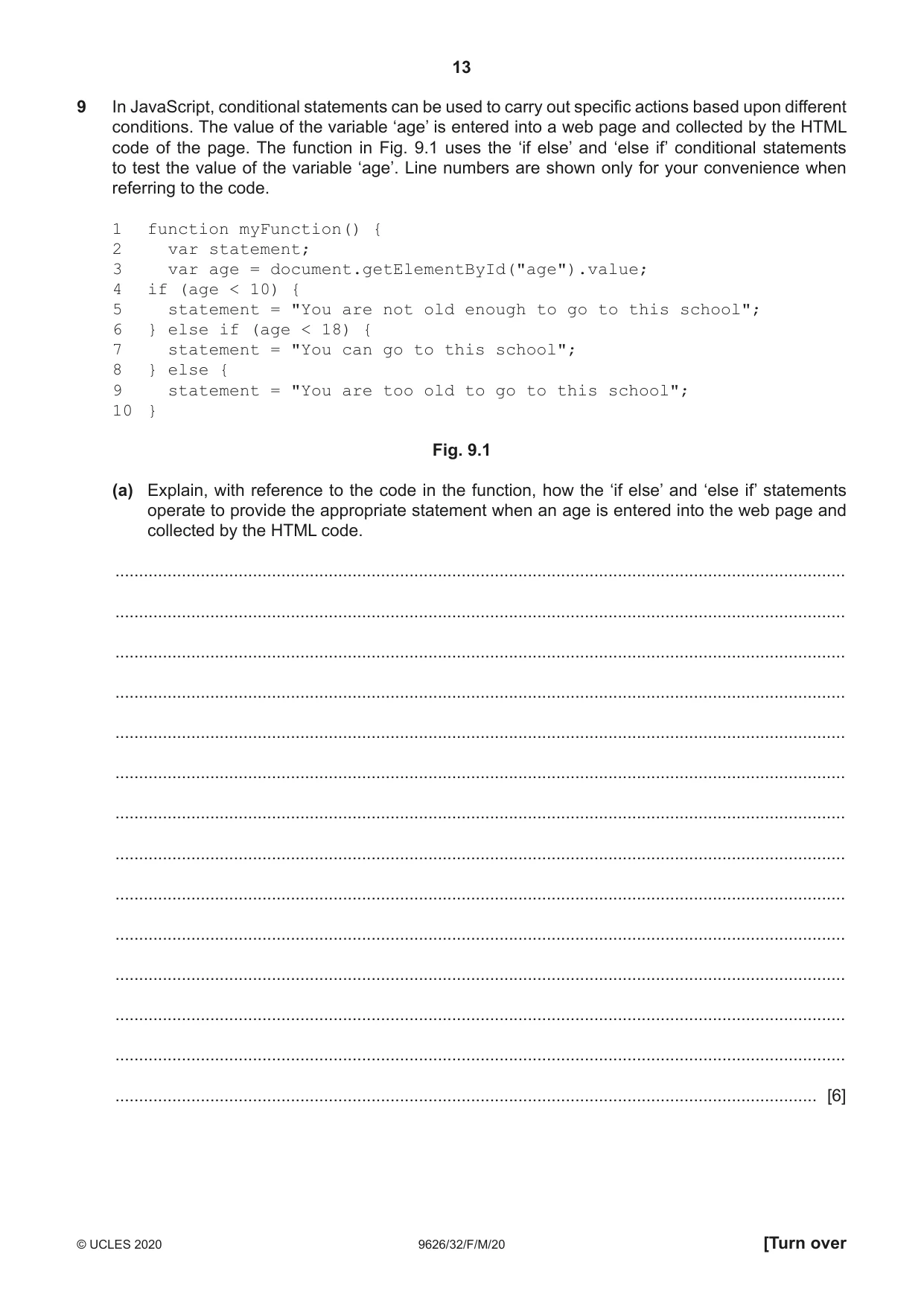
9 In JavaScript, conditional statements can be used to carry out specific actions based upon different conditions. The value of the variable ‘age’ is entered into a web page and collected by the HTML code of the page. The function in Fig. 9.1 uses the ‘if else’ and ‘else if’ conditional statements to test the value of the variable ‘age’. Line numbers are shown only for your convenience when referring to the code. 1 function myFunction() { 2 var statement; 3 var age = document.getElementById("age").value; 4 if (age < 10) { 5 statement = "You are not old enough to go to this school"; 6 } else if (age < 18) { 7 statement = "You can go to this school"; 8 } else { 9 statement = "You are too old to go to this school"; 10 } Fig. 9.1 (a) Explain, with reference to the code in the function, how the ‘if else’ and ‘else if’ statements operate to provide the appropriate statement when an age is entered into the web page and collected by the HTML code. .......................................................................................................................................................... .......................................................................................................................................................... .......................................................................................................................................................... .......................................................................................................................................................... .......................................................................................................................................................... .......................................................................................................................................................... .......................................................................................................................................................... .......................................................................................................................................................... .......................................................................................................................................................... .......................................................................................................................................................... .......................................................................................................................................................... .......................................................................................................................................................... .......................................................................................................................................................... .................................................................................................................................................... [6] (b) The code could have been written using the ‘switch’ function, e.g. lines 4 to 7 could have been: 4 switch(true) { 5 case age < 10: 6 statement = "You are not old enough to go to this school"; 7 break; with additional lines for the other conditions. Explain the drawbacks of using the ‘switch’ function. ................................................................................................................................................... ................................................................................................................................................... ................................................................................................................................................... ................................................................................................................................................... ................................................................................................................................................... ................................................................................................................................................... ................................................................................................................................................... ................................................................................................................................................... ................................................................................................................................................... ............................................................................................................................................. [4]
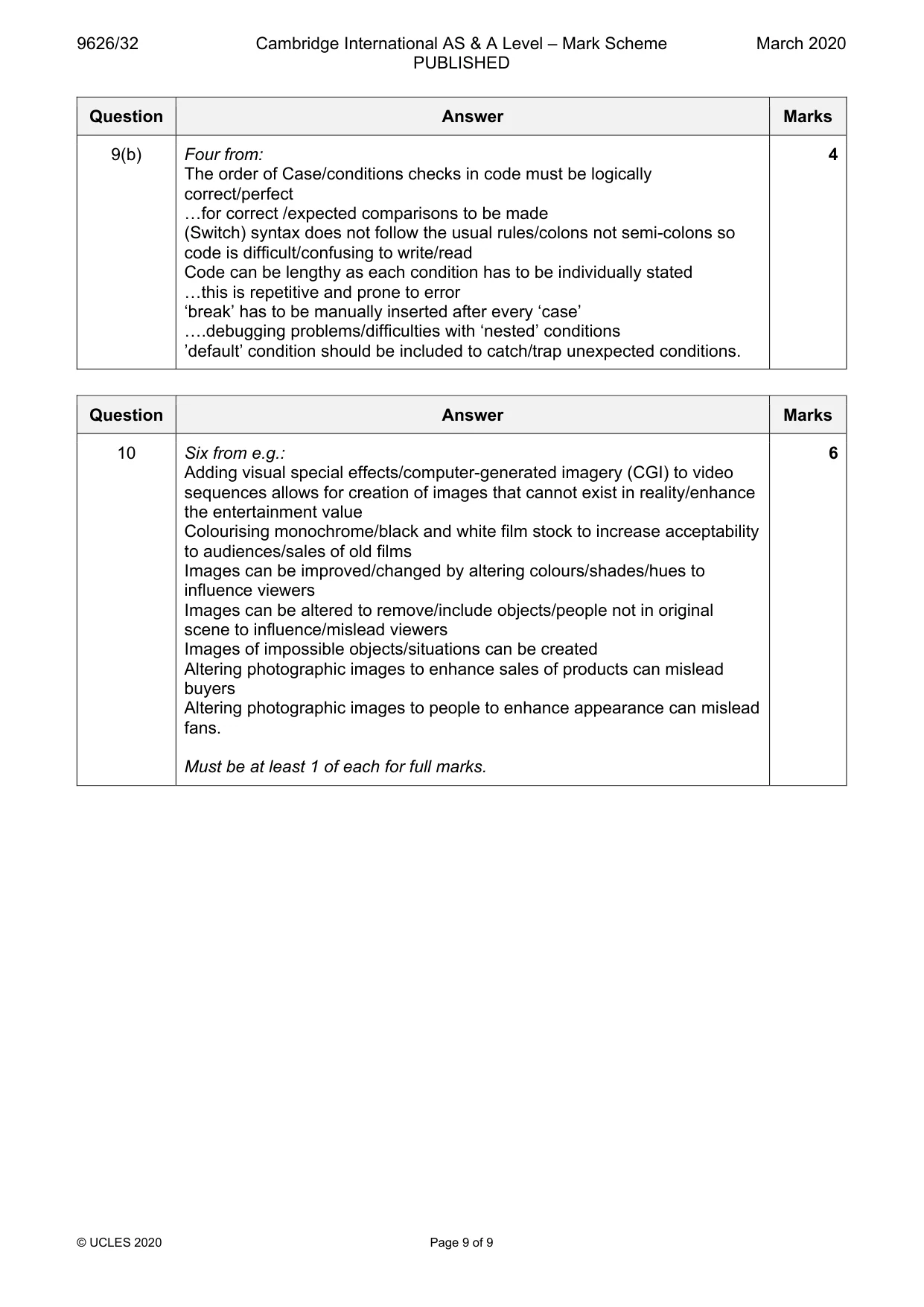
Mark scheme: 9(a) Six from: 6 If statement specifies block of code that is executed if a condition is TRUE Line 4 if statement compares ‘age’ with condition <10 if TRUE ‘You are not old enough…’is stored in variable ‘statement’ if FALSE execution is passed to line 6 Else-if statement specifies a new condition to be checked if the first condition is FALSE Line 6 else if statement compares ‘age’ with condition <18 if TRUE ‘You can go to this school’ is stored in variable ‘statement’ if FALSE execution is passed to line 8 and "You are too old to go to this school" is stored in variable ‘statement’ Else statement specifies the code to be executed if condition is FALSE. 9(b) Four from: 4 The order of Case/conditions checks in code must be logically correct/perfect …for correct /expected comparisons to be made (Switch) syntax does not follow the usual rules/colons not semi-colons so code is difficult/confusing to write/read Code can be lengthy as each condition has to be individually stated …this is repetitive and prone to error ‘break’ has to be manually inserted after every ‘case’ ….debugging problems/difficulties with ‘nested’ conditions ’default’ condition should be included to catch/trap unexpected conditions.
Q10 · Evaluate, by weighing up the advantages and disadvantages, the impact of image editing in…
10 Evaluate, by weighing up the advantages and disadvantages, the impact of image editing in the making of movies. .......................................................................................................................................................... .......................................................................................................................................................... .......................................................................................................................................................... .......................................................................................................................................................... .......................................................................................................................................................... .......................................................................................................................................................... .......................................................................................................................................................... .......................................................................................................................................................... .......................................................................................................................................................... .......................................................................................................................................................... .......................................................................................................................................................... .......................................................................................................................................................... .......................................................................................................................................................... .................................................................................................................................................... [6]
Mark scheme: 10 Six from e.g.: 6 Adding visual special effects/computer-generated imagery (CGI) to video sequences allows for creation of images that cannot exist in reality/enhance the entertainment value Colourising monochrome/black and white film stock to increase acceptability to audiences/sales of old films Images can be improved/changed by altering colours/shades/hues to influence viewers Images can be altered to remove/include objects/people not in original scene to influence/mislead viewers Images of impossible objects/situations can be created Altering photographic images to enhance sales of products can mislead buyers Altering photographic images to people to enhance appearance can mislead fans. Must be at least 1 of each for full marks.
What was in this paper
The subtopics covered by these 10 questions, and how many questions each got. Open one in a new tab to see every Cambridge question on it.
What you needed in this session
Cambridge’s own grade thresholds for 2020 Feb/March, Paper 3 · Variant 2. A higher threshold means an easier paper — the bar moves with how the cohort did.