Cambridge A Level Information Technology (from 2017) 9626 — 2020 Oct/Nov Paper 3 · Variant 3

9626/33/O/N/20 · 12 questions · 90 marks · ≈101 min

The question paper and its mark scheme, free to read here and free to download. This is Cambridge’s own paper, exactly as it was sat.

Question paper16 pages
Cambridge A Level Information Technology (from 2017) 9626 2020 Oct/Nov Paper 3 · Variant 3 question paper, page 1 of 16
Page 1 of 16
Cambridge A Level Information Technology (from 2017) 9626 2020 Oct/Nov Paper 3 · Variant 3 question paper, page 2 of 16
Page 2 of 16
Cambridge A Level Information Technology (from 2017) 9626 2020 Oct/Nov Paper 3 · Variant 3 question paper, page 3 of 16
Page 3 of 16
Cambridge A Level Information Technology (from 2017) 9626 2020 Oct/Nov Paper 3 · Variant 3 question paper, page 4 of 16
Page 4 of 16
Cambridge A Level Information Technology (from 2017) 9626 2020 Oct/Nov Paper 3 · Variant 3 question paper, page 5 of 16
Page 5 of 16
Cambridge A Level Information Technology (from 2017) 9626 2020 Oct/Nov Paper 3 · Variant 3 question paper, page 6 of 16
Page 6 of 16
Cambridge A Level Information Technology (from 2017) 9626 2020 Oct/Nov Paper 3 · Variant 3 question paper, page 7 of 16
Page 7 of 16
Cambridge A Level Information Technology (from 2017) 9626 2020 Oct/Nov Paper 3 · Variant 3 question paper, page 8 of 16
Page 8 of 16
Cambridge A Level Information Technology (from 2017) 9626 2020 Oct/Nov Paper 3 · Variant 3 question paper, page 9 of 16
Page 9 of 16
Cambridge A Level Information Technology (from 2017) 9626 2020 Oct/Nov Paper 3 · Variant 3 question paper, page 10 of 16
Page 10 of 16
Cambridge A Level Information Technology (from 2017) 9626 2020 Oct/Nov Paper 3 · Variant 3 question paper, page 11 of 16
Page 11 of 16
Cambridge A Level Information Technology (from 2017) 9626 2020 Oct/Nov Paper 3 · Variant 3 question paper, page 12 of 16
Page 12 of 16
Cambridge A Level Information Technology (from 2017) 9626 2020 Oct/Nov Paper 3 · Variant 3 question paper, page 13 of 16
Page 13 of 16
Cambridge A Level Information Technology (from 2017) 9626 2020 Oct/Nov Paper 3 · Variant 3 question paper, page 14 of 16
Page 14 of 16
Cambridge A Level Information Technology (from 2017) 9626 2020 Oct/Nov Paper 3 · Variant 3 question paper, page 15 of 16
Page 15 of 16
Cambridge A Level Information Technology (from 2017) 9626 2020 Oct/Nov Paper 3 · Variant 3 question paper, page 16 of 16
Page 16 of 16

Mark scheme10 pages

Answers below. Sit the paper first if you are practising.
Mark scheme, page 1 of 10
Page 1 of 10
Mark scheme, page 2 of 10
Page 2 of 10
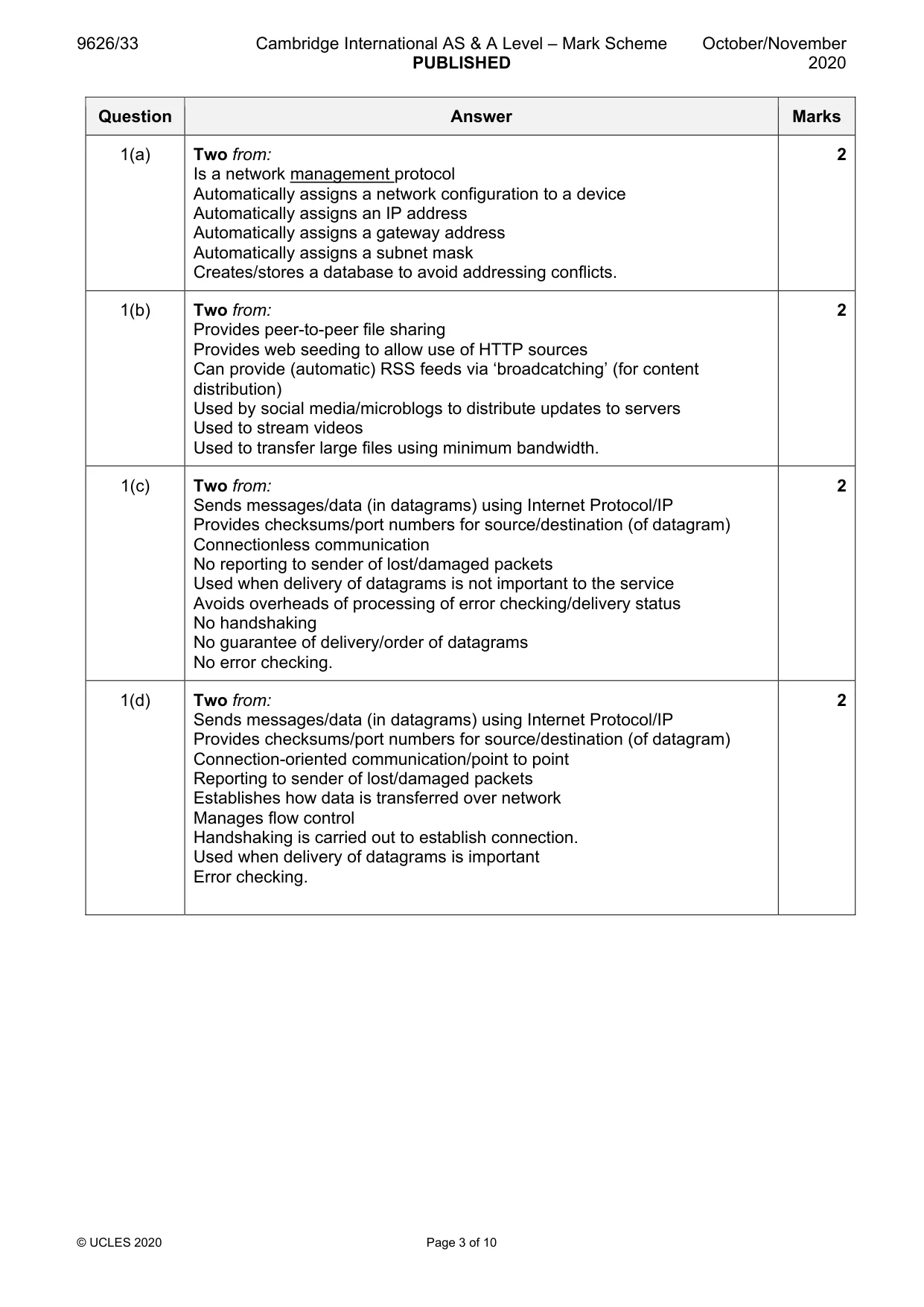
Mark scheme, page 3 of 10
Page 3 of 10
Mark scheme, page 4 of 10
Page 4 of 10
Mark scheme, page 5 of 10
Page 5 of 10
Mark scheme, page 6 of 10
Page 6 of 10
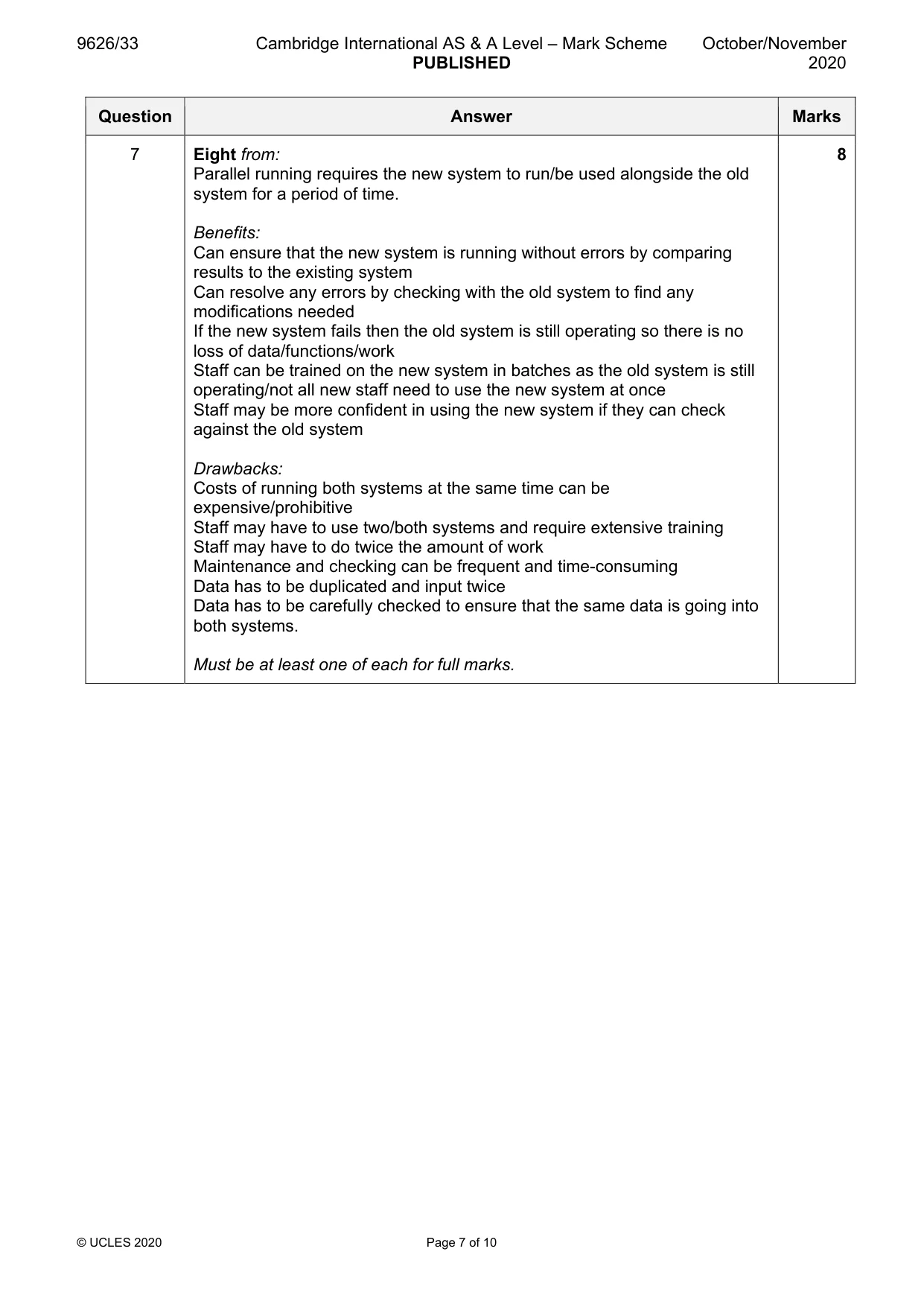
Mark scheme, page 7 of 10
Page 7 of 10
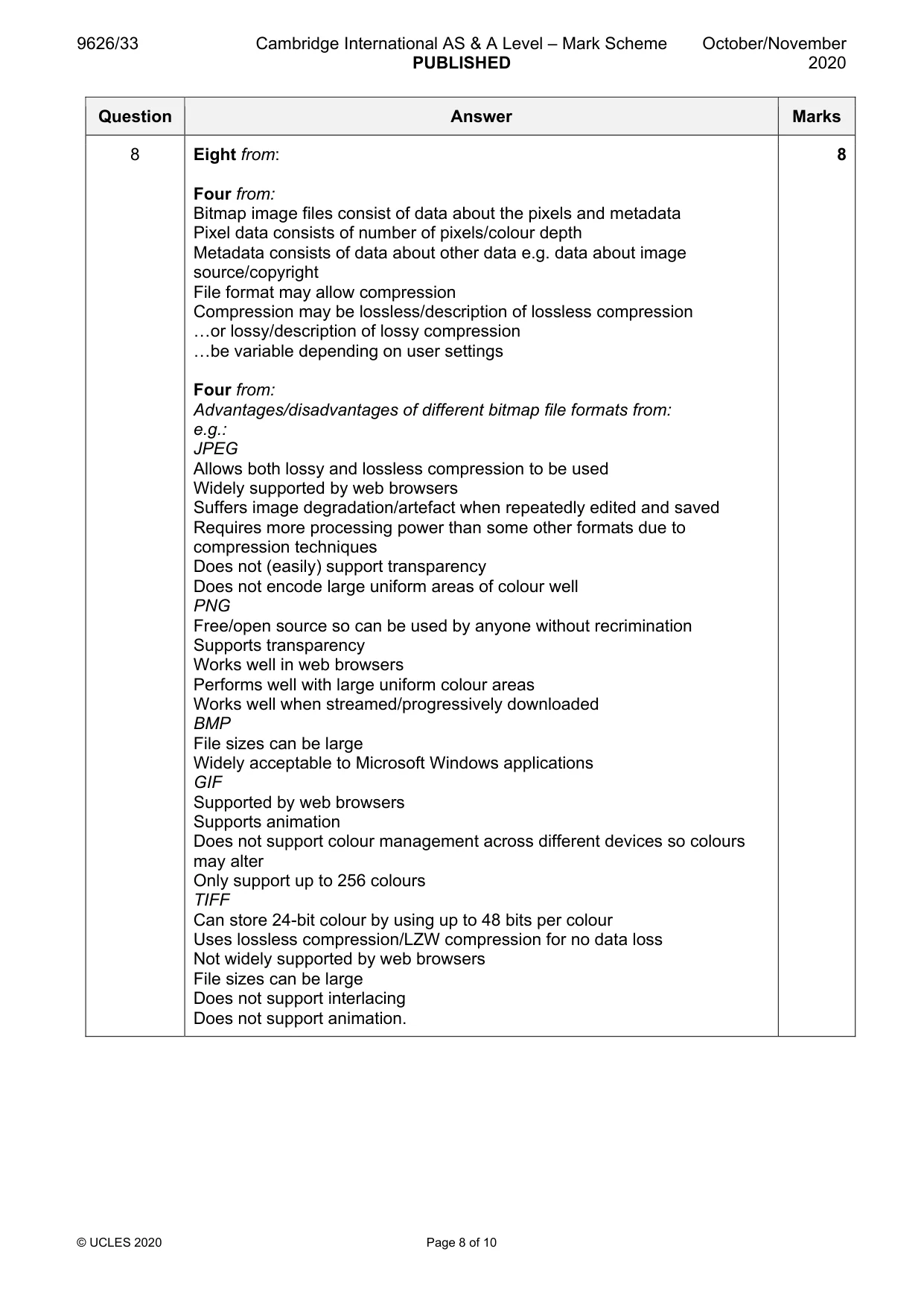
Mark scheme, page 8 of 10
Page 8 of 10
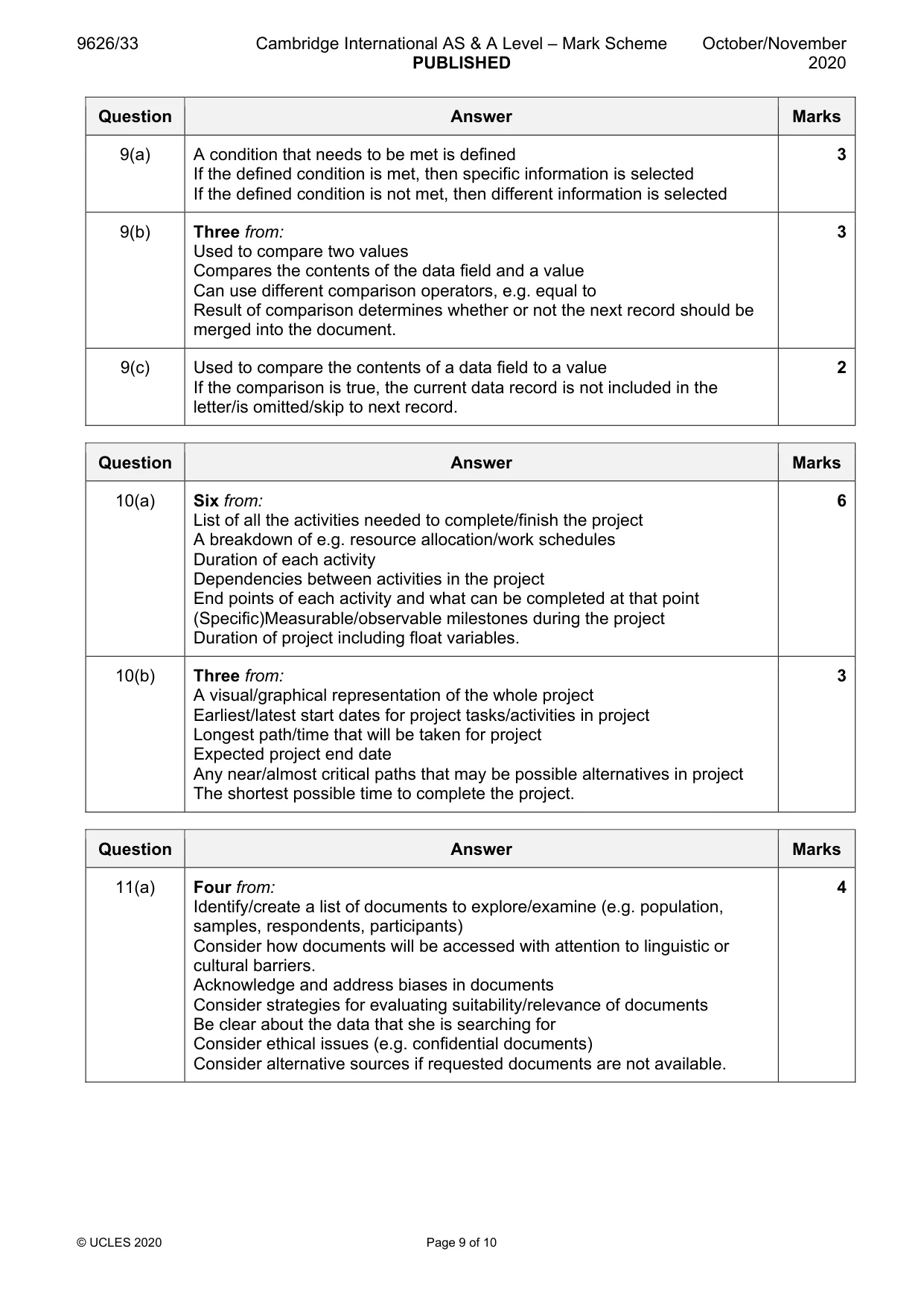
Mark scheme, page 9 of 10
Page 9 of 10
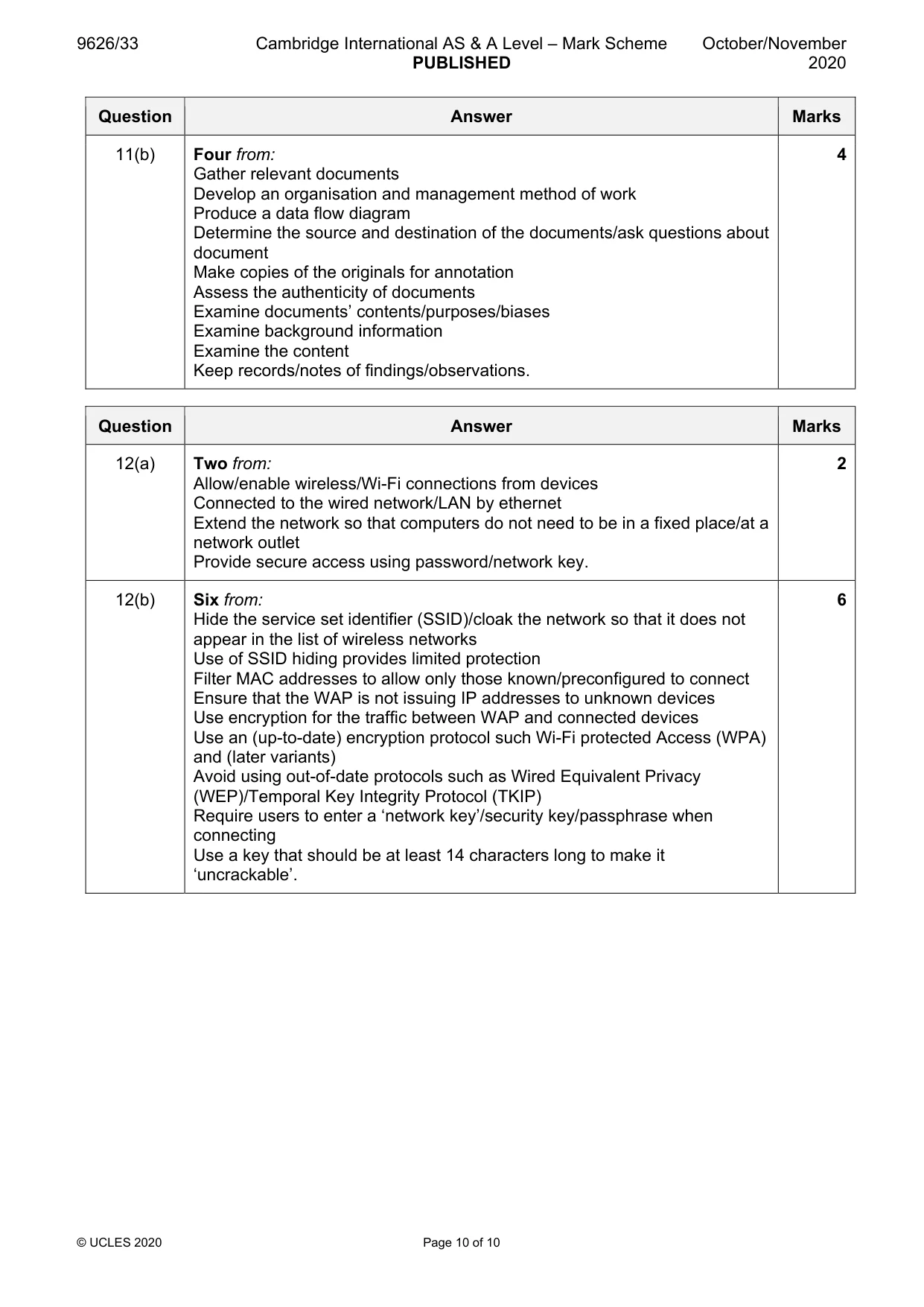
Mark scheme, page 10 of 10
Page 10 of 10

Questions as text

Q1 · LANs and WANs use protocols to send, receive and route data across networks

1 LANs and WANs use protocols to send, receive and route data across networks. Describe, in detail, each of the following protocols. (a) Dynamic Host Configuration Protocol (DHCP) ................................................................................................................................................... ................................................................................................................................................... ................................................................................................................................................... ................................................................................................................................................... ............................................................................................................................................. [2] (b) BitTorrent ................................................................................................................................................... ................................................................................................................................................... ................................................................................................................................................... ................................................................................................................................................... ............................................................................................................................................. [2] (c) User Datagram Protocol (UDP) ................................................................................................................................................... ................................................................................................................................................... ................................................................................................................................................... ................................................................................................................................................... ............................................................................................................................................. [2] (d) Transmission Control Protocol (TCP) ................................................................................................................................................... ................................................................................................................................................... ................................................................................................................................................... ................................................................................................................................................... ............................................................................................................................................. [2]

Mark scheme: Question Answer Marks 1(a) Two from: 2 Is a network management protocol Automatically assigns a network configuration to a device Automatically assigns an IP address Automatically assigns a gateway address Automatically assigns a subnet mask Creates/stores a database to avoid addressing conflicts. 1(b) Two from: 2 Provides peer-to-peer file sharing Provides web seeding to allow use of HTTP sources Can provide (automatic) RSS feeds via ‘broadcatching’ (for content distribution) Used by social media/microblogs to distribute updates to servers Used to stream videos Used to transfer large files using minimum bandwidth. 1(c) Two from: 2 Sends messages/data (in datagrams) using Internet Protocol/IP Provides checksums/port numbers for source/destination (of datagram) Connectionless communication No reporting to sender of lost/damaged packets Used when delivery of datagrams is not important to the service Avoids overheads of processing of error checking/delivery status No handshaking No guarantee of delivery/order of datagrams No error checking. 1(d) Two from: 2 Sends messages/data (in datagrams) using Internet Protocol/IP Provides checksums/port numbers for source/destination (of datagram) Connection-oriented communication/point to point Reporting to sender of lost/damaged packets Establishes how data is transferred over network Manages flow control Handshaking is carried out to establish connection. Used when delivery of datagrams is important Error checking.

More questions on Network protocols

Q2 · Companies are concerned that their employee files may be viewed and used by unauthorised…

2 Companies are concerned that their employee files may be viewed and used by unauthorised people. A company uses access rights (permissions) to protect files stored on its network. Explain how different access rights can be used to control access to files. .......................................................................................................................................................... .......................................................................................................................................................... .......................................................................................................................................................... .......................................................................................................................................................... .......................................................................................................................................................... .......................................................................................................................................................... .......................................................................................................................................................... .......................................................................................................................................................... .......................................................................................................................................................... .......................................................................................................................................................... .......................................................................................................................................................... .......................................................................................................................................................... .......................................................................................................................................................... .................................................................................................................................................... [6]

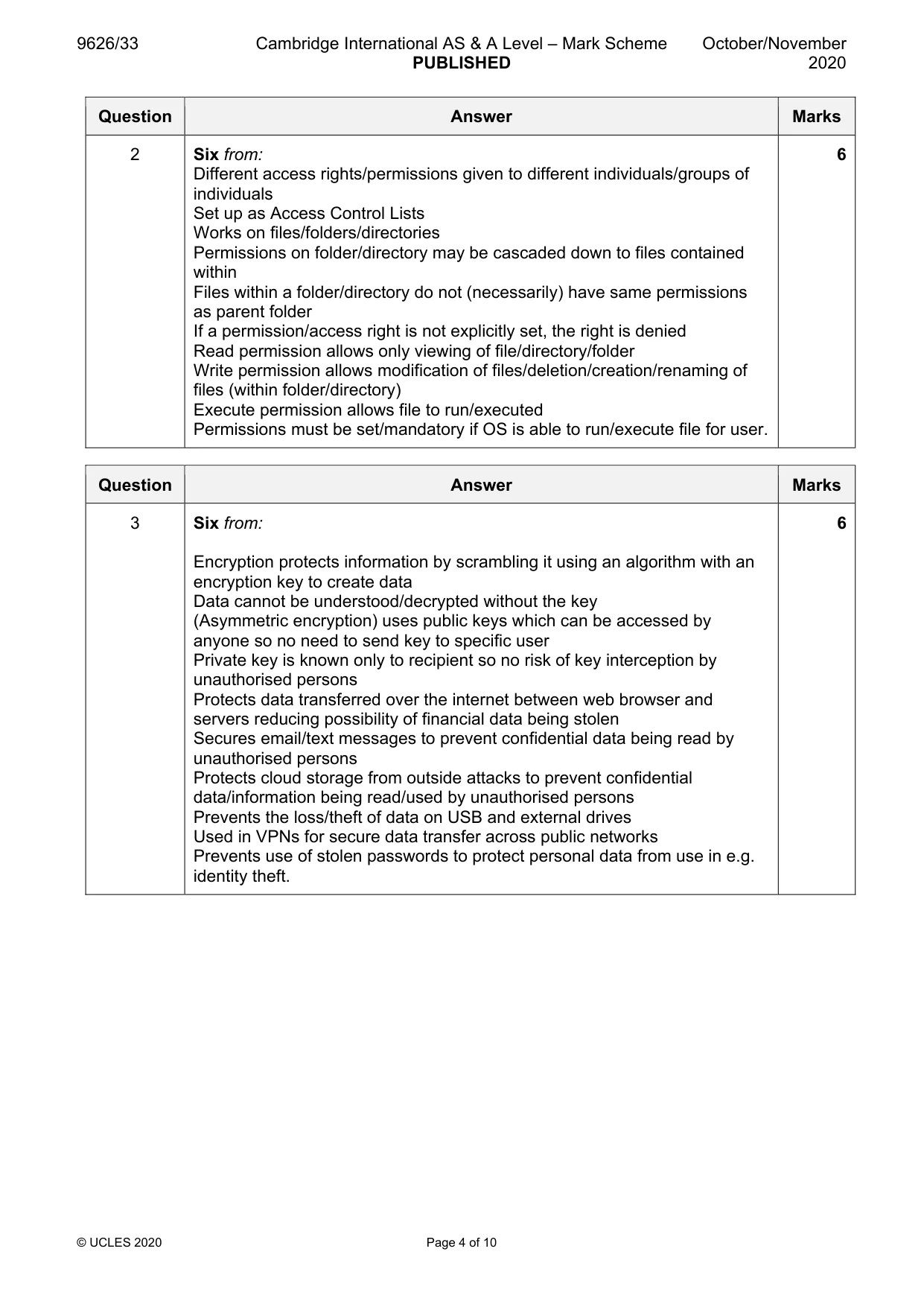
Mark scheme: 2 Six from: 6 Different access rights/permissions given to different individuals/groups of individuals Set up as Access Control Lists Works on files/folders/directories Permissions on folder/directory may be cascaded down to files contained within Files within a folder/directory do not (necessarily) have same permissions as parent folder If a permission/access right is not explicitly set, the right is denied Read permission allows only viewing of file/directory/folder Write permission allows modification of files/deletion/creation/renaming of files (within folder/directory) Execute permission allows file to run/executed Permissions must be set/mandatory if OS is able to run/execute file for user.

More questions on Network security

Q3 · IT crime (cybercrime) is crime committed using computers and networks

3 IT crime (cybercrime) is crime committed using computers and networks. Explain how encryption can be used to combat IT crime. .......................................................................................................................................................... .......................................................................................................................................................... .......................................................................................................................................................... .......................................................................................................................................................... .......................................................................................................................................................... .......................................................................................................................................................... .......................................................................................................................................................... .......................................................................................................................................................... .......................................................................................................................................................... .......................................................................................................................................................... .......................................................................................................................................................... .......................................................................................................................................................... .......................................................................................................................................................... .................................................................................................................................................... [6]

Mark scheme: 3 Six from: 6 Encryption protects information by scrambling it using an algorithm with an encryption key to create data Data cannot be understood/decrypted without the key (Asymmetric encryption) uses public keys which can be accessed by anyone so no need to send key to specific user Private key is known only to recipient so no risk of key interception by unauthorised persons Protects data transferred over the internet between web browser and servers reducing possibility of financial data being stolen Secures email/text messages to prevent confidential data being read by unauthorised persons Protects cloud storage from outside attacks to prevent confidential data/information being read/used by unauthorised persons Prevents the loss/theft of data on USB and external drives Used in VPNs for secure data transfer across public networks Prevents use of stolen passwords to protect personal data from use in e.g. identity theft.

Q4 · A company employs a large number of teleworkers

4 A company employs a large number of teleworkers. Discuss the effects of teleworking on the workers. .......................................................................................................................................................... .......................................................................................................................................................... .......................................................................................................................................................... .......................................................................................................................................................... .......................................................................................................................................................... .......................................................................................................................................................... .......................................................................................................................................................... .......................................................................................................................................................... .......................................................................................................................................................... .......................................................................................................................................................... .......................................................................................................................................................... .......................................................................................................................................................... .......................................................................................................................................................... .......................................................................................................................................................... .......................................................................................................................................................... .......................................................................................................................................................... .......................................................................................................................................................... .......................................................................................................................................................... .......................................................................................................................................................... .................................................................................................................................................... [8]

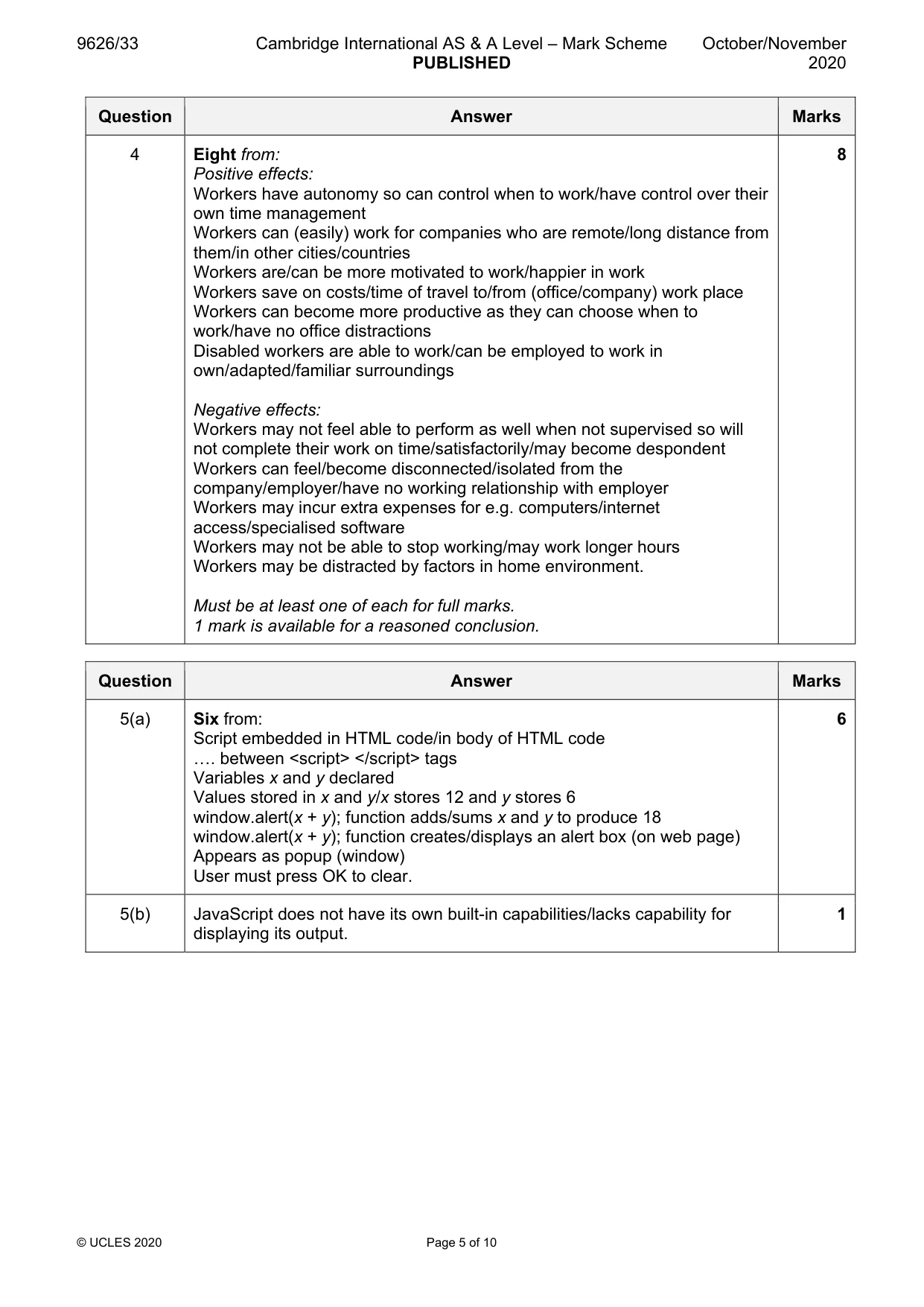
Mark scheme: 4 Eight from: 8 Positive effects: Workers have autonomy so can control when to work/have control over their own time management Workers can (easily) work for companies who are remote/long distance from them/in other cities/countries Workers are/can be more motivated to work/happier in work Workers save on costs/time of travel to/from (office/company) work place Workers can become more productive as they can choose when to work/have no office distractions Disabled workers are able to work/can be employed to work in own/adapted/familiar surroundings Negative effects: Workers may not feel able to perform as well when not supervised so will not complete their work on time/satisfactorily/may become despondent Workers can feel/become disconnected/isolated from the company/employer/have no working relationship with employer Workers may incur extra expenses for e.g. computers/internet access/specialised software Workers may not be able to stop working/may work longer hours Workers may be distracted by factors in home environment. Must be at least one of each for full marks. 1 mark is available for a reasoned conclusion.

More questions on The impact of IT

Q5 · The JavaScript code shown in Fig

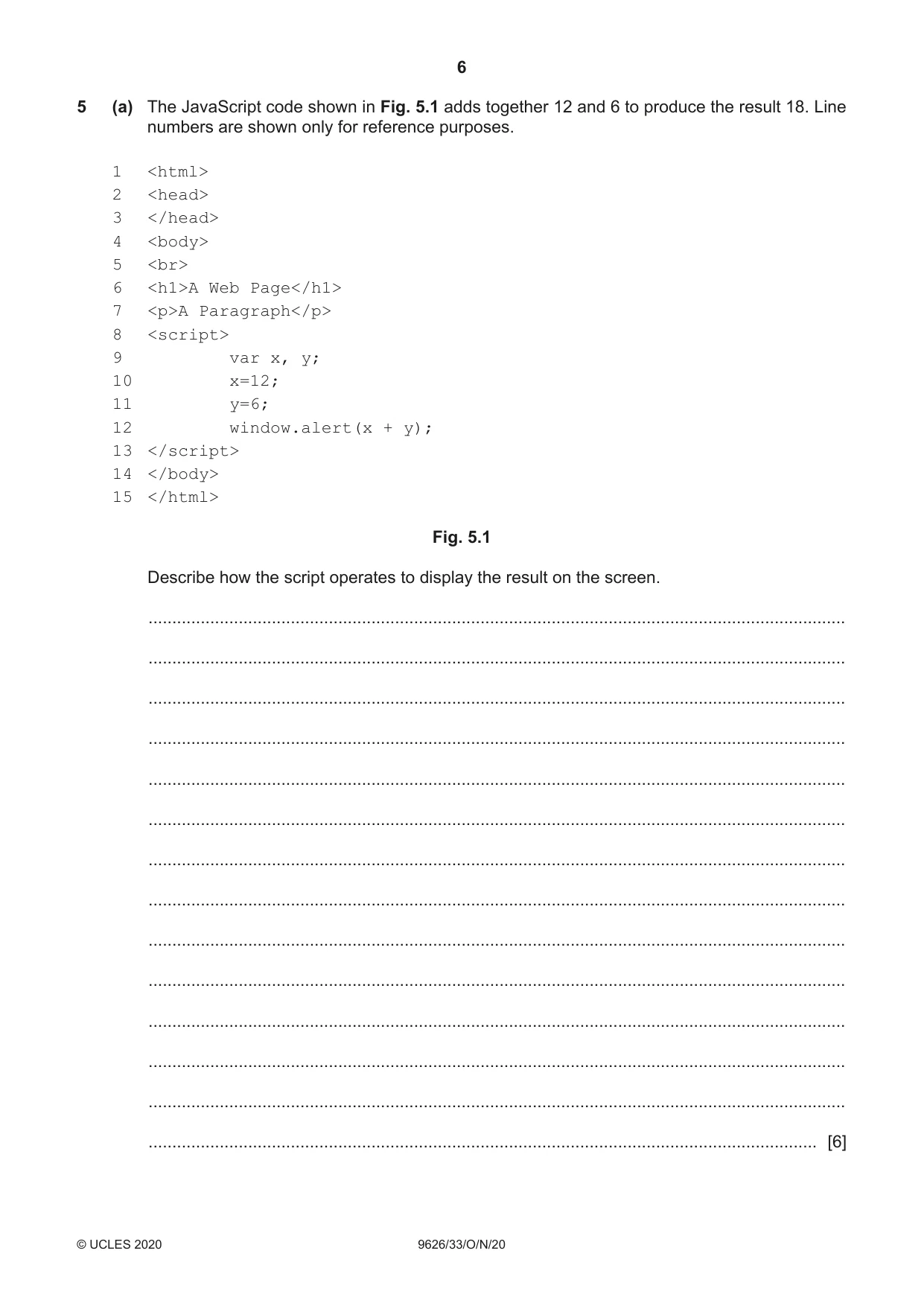
5 (a) The JavaScript code shown in Fig. 5.1 adds together 12 and 6 to produce the result 18. Line numbers are shown only for reference purposes. 1 <html> 2 <head> 3 </head> 4 <body> 5 <br> 6 <h1>A Web Page</h1> 7 <p>A Paragraph</p> 8 <script> 9 var x, y; 10 x=12; 11 y=6; 12 window.alert(x + y); 13 </script> 14 </body> 15 </html> Fig. 5.1 Describe how the script operates to display the result on the screen. ................................................................................................................................................... ................................................................................................................................................... ................................................................................................................................................... ................................................................................................................................................... ................................................................................................................................................... ................................................................................................................................................... ................................................................................................................................................... ................................................................................................................................................... ................................................................................................................................................... ................................................................................................................................................... ................................................................................................................................................... ................................................................................................................................................... ................................................................................................................................................... ............................................................................................................................................. [6] JavaScript uses the display capabilities of web browsers’ windows to output the results of its scripts. (b) Explain why JavaScript uses a browser’s windows to display results of running scripts. ................................................................................................................................................... ................................................................................................................................................... ................................................................................................................................................... ............................................................................................................................................. [1]

Mark scheme: 5(a) Six from: 6 Script embedded in HTML code/in body of HTML code …. between <script> </script> tags Variables x and y declared Values stored in x and y/x stores 12 and y stores 6 window.alert(x + y); function adds/sums x and y to produce 18 window.alert(x + y); function creates/displays an alert box (on web page) Appears as popup (window) User must press OK to clear. 5(b) JavaScript does not have its own built-in capabilities/lacks capability for 1 displaying its output.

More questions on Programming for the web

Q6 · A company makes shoes and boots and uses automatic stock control in its operations

6 A company makes shoes and boots and uses automatic stock control in its operations. Describe how automatic stock control could be used by the company. .......................................................................................................................................................... .......................................................................................................................................................... .......................................................................................................................................................... .......................................................................................................................................................... .......................................................................................................................................................... .......................................................................................................................................................... .......................................................................................................................................................... .......................................................................................................................................................... .......................................................................................................................................................... .......................................................................................................................................................... .......................................................................................................................................................... .......................................................................................................................................................... .......................................................................................................................................................... .................................................................................................................................................... [6]

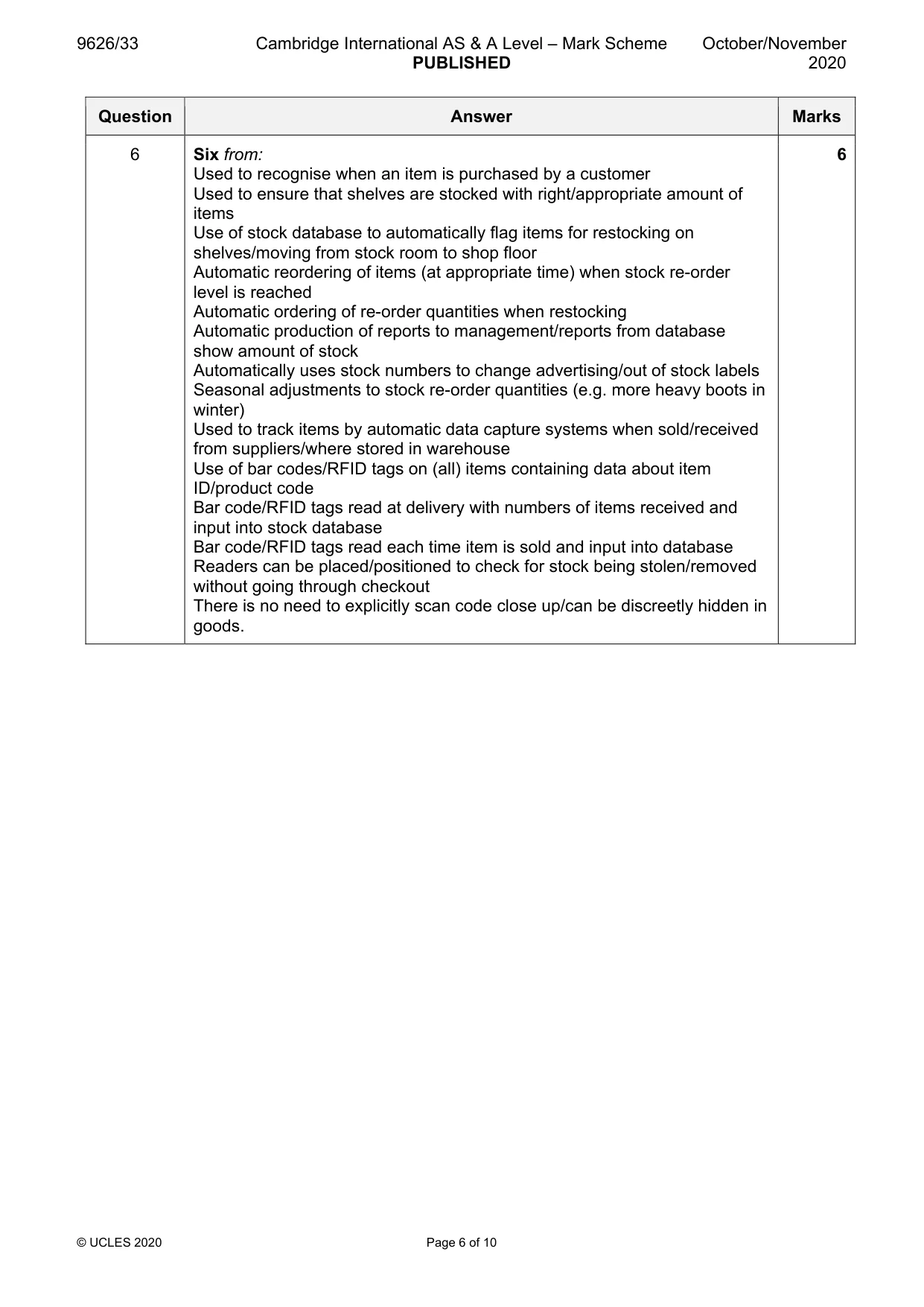
Mark scheme: 6 Six from: 6 Used to recognise when an item is purchased by a customer Used to ensure that shelves are stocked with right/appropriate amount of items Use of stock database to automatically flag items for restocking on shelves/moving from stock room to shop floor Automatic reordering of items (at appropriate time) when stock re-order level is reached Automatic ordering of re-order quantities when restocking Automatic production of reports to management/reports from database show amount of stock Automatically uses stock numbers to change advertising/out of stock labels Seasonal adjustments to stock re-order quantities (e.g. more heavy boots in winter) Used to track items by automatic data capture systems when sold/received from suppliers/where stored in warehouse Use of bar codes/RFID tags on (all) items containing data about item ID/product code Bar code/RFID tags read at delivery with numbers of items received and input into stock database Bar code/RFID tags read each time item is sold and input into database Readers can be placed/positioned to check for stock being stolen/removed without going through checkout There is no need to explicitly scan code close up/can be discreetly hidden in goods.

Q7 · A bank is installing a new computer system to replace its existing system

7 A bank is installing a new computer system to replace its existing system. Analyse the suitability of the parallel running implementation method in this situation. .......................................................................................................................................................... .......................................................................................................................................................... .......................................................................................................................................................... .......................................................................................................................................................... .......................................................................................................................................................... .......................................................................................................................................................... .......................................................................................................................................................... .......................................................................................................................................................... .......................................................................................................................................................... .......................................................................................................................................................... .......................................................................................................................................................... .......................................................................................................................................................... .......................................................................................................................................................... .......................................................................................................................................................... .......................................................................................................................................................... .......................................................................................................................................................... .......................................................................................................................................................... .......................................................................................................................................................... .......................................................................................................................................................... .................................................................................................................................................... [8]

Mark scheme: 7 Eight from: 8 Parallel running requires the new system to run/be used alongside the old system for a period of time. Benefits: Can ensure that the new system is running without errors by comparing results to the existing system Can resolve any errors by checking with the old system to find any modifications needed If the new system fails then the old system is still operating so there is no loss of data/functions/work Staff can be trained on the new system in batches as the old system is still operating/not all new staff need to use the new system at once Staff may be more confident in using the new system if they can check against the old system Drawbacks: Costs of running both systems at the same time can be expensive/prohibitive Staff may have to use two/both systems and require extensive training Staff may have to do twice the amount of work Maintenance and checking can be frequent and time-consuming Data has to be duplicated and input twice Data has to be carefully checked to ensure that the same data is going into both systems. Must be at least one of each for full marks.

More questions on Implementation

Q8 · Bitmap images can be saved in different file formats

8 Bitmap images can be saved in different file formats. Images may be compressed when saving to a file. Analyse the use of different file formats for storing compressed bitmap images. .......................................................................................................................................................... .......................................................................................................................................................... .......................................................................................................................................................... .......................................................................................................................................................... .......................................................................................................................................................... .......................................................................................................................................................... .......................................................................................................................................................... .......................................................................................................................................................... .......................................................................................................................................................... .......................................................................................................................................................... .......................................................................................................................................................... .......................................................................................................................................................... .......................................................................................................................................................... .......................................................................................................................................................... .......................................................................................................................................................... .......................................................................................................................................................... .......................................................................................................................................................... .......................................................................................................................................................... .......................................................................................................................................................... .................................................................................................................................................... [8]

Mark scheme: 8 Eight from: 8 Four from: Bitmap image files consist of data about the pixels and metadata Pixel data consists of number of pixels/colour depth Metadata consists of data about other data e.g. data about image source/copyright File format may allow compression Compression may be lossless/description of lossless compression …or lossy/description of lossy compression …be variable depending on user settings Four from: Advantages/disadvantages of different bitmap file formats from: e.g.: JPEG Allows both lossy and lossless compression to be used Widely supported by web browsers Suffers image degradation/artefact when repeatedly edited and saved Requires more processing power than some other formats due to compression techniques Does not (easily) support transparency Does not encode large uniform areas of colour well PNG Free/open source so can be used by anyone without recrimination Supports transparency Works well in web browsers Performs well with large uniform colour areas Works well when streamed/progressively downloaded BMP File sizes can be large Widely acceptable to Microsoft Windows applications GIF Supported by web browsers Supports animation Does not support colour management across different devices so colours may alter Only support up to 256 colours TIFF Can store 24-bit colour by using up to 48 bits per colour Uses lossless compression/LZW compression for no data loss Not widely supported by web browsers File sizes can be large Does not support interlacing Does not support animation.

More questions on Compression

Q9 · When creating letters by mail merge, mail merge rules can be used to automatically select…

9 When creating letters by mail merge, mail merge rules can be used to automatically select data from sources for inclusion in the letters. Describe the use of the following mail merge rules to select data. (a) If...Then...Else ................................................................................................................................................... ................................................................................................................................................... ................................................................................................................................................... ................................................................................................................................................... ................................................................................................................................................... ................................................................................................................................................... ................................................................................................................................................... ............................................................................................................................................. [3] (b) Next Record If ................................................................................................................................................... ................................................................................................................................................... ................................................................................................................................................... ................................................................................................................................................... ................................................................................................................................................... ................................................................................................................................................... ................................................................................................................................................... ............................................................................................................................................. [3] (c) Skip Record If ................................................................................................................................................... ................................................................................................................................................... ................................................................................................................................................... ................................................................................................................................................... ................................................................................................................................................... ............................................................................................................................................. [2]

Mark scheme: 9(a) A condition that needs to be met is defined 3 If the defined condition is met, then specific information is selected If the defined condition is not met, then different information is selected 9(b) Three from: 3 Used to compare two values Compares the contents of the data field and a value Can use different comparison operators, e.g. equal to Result of comparison determines whether or not the next record should be merged into the document. 9(c) Used to compare the contents of a data field to a value 2 If the comparison is true, the current data record is not included in the letter/is omitted/skip to next record.

More questions on Mail merge

Q10 · Planners often draw diagrams of the stages in a project so that a critical path can be…

10 Planners often draw diagrams of the stages in a project so that a critical path can be calculated. (a) Describe what must be included in a diagram so that the critical path of a project can be calculated. ................................................................................................................................................... ................................................................................................................................................... ................................................................................................................................................... ................................................................................................................................................... ................................................................................................................................................... ................................................................................................................................................... ................................................................................................................................................... ................................................................................................................................................... ................................................................................................................................................... ................................................................................................................................................... ................................................................................................................................................... ................................................................................................................................................... ................................................................................................................................................... ............................................................................................................................................. [6] (b) Describe three outcomes that can be determined from a critical path analysis of a project. 1 ................................................................................................................................................ ................................................................................................................................................... ................................................................................................................................................... 2 ................................................................................................................................................ ................................................................................................................................................... ................................................................................................................................................... 3 ................................................................................................................................................ ................................................................................................................................................... ............................................................................................................................................. [3]

Mark scheme: 10(a) Six from: 6 List of all the activities needed to complete/finish the project A breakdown of e.g. resource allocation/work schedules Duration of each activity Dependencies between activities in the project End points of each activity and what can be completed at that point (Specific)Measurable/observable milestones during the project Duration of project including float variables. 10(b) Three from: 3 A visual/graphical representation of the whole project Earliest/latest start dates for project tasks/activities in project Longest path/time that will be taken for project Expected project end date Any near/almost critical paths that may be possible alternatives in project The shortest possible time to complete the project.

More questions on Tools and techniques for project management tasks

Q11 · Mae, a systems analyst, will use document analysis to carry out research into a company

11 Mae, a systems analyst, will use document analysis to carry out research into a company. (a) Describe the steps she should go through when preparing to examine the company documents. ................................................................................................................................................... ................................................................................................................................................... ................................................................................................................................................... ................................................................................................................................................... ................................................................................................................................................... ................................................................................................................................................... ................................................................................................................................................... ................................................................................................................................................... ................................................................................................................................................... ............................................................................................................................................. [4] (b) Describe the steps Mae should go through when examining the company documents. ................................................................................................................................................... ................................................................................................................................................... ................................................................................................................................................... ................................................................................................................................................... ................................................................................................................................................... ................................................................................................................................................... ................................................................................................................................................... ................................................................................................................................................... ................................................................................................................................................... ............................................................................................................................................. [4]

Mark scheme: 11(a) Four from: 4 Identify/create a list of documents to explore/examine (e.g. population, samples, respondents, participants) Consider how documents will be accessed with attention to linguistic or cultural barriers. Acknowledge and address biases in documents Consider strategies for evaluating suitability/relevance of documents Be clear about the data that she is searching for Consider ethical issues (e.g. confidential documents) Consider alternative sources if requested documents are not available. 11(b) Four from: 4 Gather relevant documents Develop an organisation and management method of work Produce a data flow diagram Determine the source and destination of the documents/ask questions about document Make copies of the originals for annotation Assess the authenticity of documents Examine documents’ contents/purposes/biases Examine background information Examine the content Keep records/notes of findings/observations.

More questions on Analysis

Q12 · A company has a local area network (LAN) that can be accessed by its staff using their…

12 A company has a local area network (LAN) that can be accessed by its staff using their desktop and laptop computers as well as their smartphones. (a) Describe the role of wireless access points (WAPs) in the network. ................................................................................................................................................... ................................................................................................................................................... ................................................................................................................................................... ................................................................................................................................................... ................................................................................................................................................... ............................................................................................................................................. [2] (b) Describe how wireless access points (WAPs) can be configured to improve network security. ................................................................................................................................................... ................................................................................................................................................... ................................................................................................................................................... ................................................................................................................................................... ................................................................................................................................................... ................................................................................................................................................... ................................................................................................................................................... ................................................................................................................................................... ................................................................................................................................................... ................................................................................................................................................... ................................................................................................................................................... ................................................................................................................................................... ................................................................................................................................................... ............................................................................................................................................. [6]

Mark scheme: 12(a) Two from: 2 Allow/enable wireless/Wi-Fi connections from devices Connected to the wired network/LAN by ethernet Extend the network so that computers do not need to be in a fixed place/at a network outlet Provide secure access using password/network key. 12(b) Six from: 6 Hide the service set identifier (SSID)/cloak the network so that it does not appear in the list of wireless networks Use of SSID hiding provides limited protection Filter MAC addresses to allow only those known/preconfigured to connect Ensure that the WAP is not issuing IP addresses to unknown devices Use encryption for the traffic between WAP and connected devices Use an (up-to-date) encryption protocol such Wi-Fi protected Access (WPA) and (later variants) Avoid using out-of-date protocols such as Wired Equivalent Privacy (WEP)/Temporal Key Integrity Protocol (TKIP) Require users to enter a ‘network key’/security key/passphrase when connecting Use a key that should be at least 14 characters long to make it ‘uncrackable’.

More questions on Network security

What was in this paper

The subtopics covered by these 12 questions, and how many questions each got. Open one in a new tab to see every Cambridge question on it.

What you needed in this session

Cambridge’s own grade thresholds for 2020 Oct/Nov, Paper 3 · Variant 3. A higher threshold means an easier paper — the bar moves with how the cohort did.

A55/90
B46/90
C42/90
D38/90
E34/90
14 15 Fig. 5.1 Describe how the script operates to display the result on the screen. … … … … … … … … … … … … … … [6]\n\n7 9626/33/O/N/20 © UCLES 2020 [Turn over JavaScript uses the display capabilities of web browsers’ windows to output the results of its scripts. (b) Explain why JavaScript uses a browser’s windows to display results of running scripts. … … … … [1] 6 A company makes shoes and boots and uses automatic stock control in its operations. Describe how automatic stock control could be used by the company. … … … … … … … … … … … … … … [6]\n\n8 9626/33/O/N/20 © UCLES 2020 7 A bank is installing a new computer system to replace its existing system. Analyse the suitability of the parallel running implementation method in this situation. … … … … … … … … … … … … … … … … … … … … [8]\n\n9 9626/33/O/N/20 © UCLES 2020 [Turn over 8 Bitmap images can be saved in different file formats. Images may be compressed when saving to a file. Analyse the use of different file formats for storing compressed bitmap images. … … … … … … … … … … … … … … … … … … … … [8]\n\n10 9626/33/O/N/20 © UCLES 2020 9 When creating letters by mail merge, mail merge rules can be used to automatically select data from sources for inclusion in the letters. Describe the use of the following mail merge rules to select data. (a) If...Then...Else … … … … … … … … [3] (b) Next Record If … … … … … … … … [3] (c) Skip Record If … … … … … … [2]\n\n11 9626/33/O/N/20 © UCLES 2020 [Turn over 10 Planners often draw diagrams of the stages in a project so that a critical path can be calculated. (a) Describe what must be included in a diagram so that the critical path of a project can be calculated. … … … … … … … … … … … … … … [6] (b) Describe three outcomes that can be determined from a critical path analysis of a project. 1 … … … 2 … … … 3 … … … [3]\n\n12 9626/33/O/N/20 © UCLES 2020 11 Mae, a systems analyst, will use document analysis to carry out research into a company. (a) Describe the steps she should go through when preparing to examine the company documents. … … … … … … … … … … [4] (b) Describe the steps Mae should go through when examining the company documents. … … … … … … … … … … [4]\n\n13 9626/33/O/N/20 © UCLES 2020 12 A company has a local area network (LAN) that can be accessed by its staff using their desktop and laptop computers as well as their smartphones. (a) Describe the role of wireless access points (WAPs) in the network. … … … … … … [2] (b) Describe how wireless access points (WAPs) can be configured to improve network security. … … … … … … … … … … … … … … [6]\n\n14 9626/33/O/N/20 © UCLES 2020 BLANK PAGE\n\n15 9626/33/O/N/20 © UCLES 2020 BLANK PAGE\n\n16 9626/33/O/N/20 © UCLES 2020 Permission to reproduce items where third-party owned material protected by copyright is included has been sought and cleared where possible. Every reasonable effort has been made by the publisher (UCLES) to trace copyright holders, but if any items requiring clearance have unwittingly been included, the publisher will be pleased to make amends at the earliest possible opportunity. To avoid the issue of disclosure of answer-related information to candidates, all copyright acknowledgements are reproduced online in the Cambridge Assessment International Education Copyright Acknowledgements Booklet. This is produced for each series of examinations and is freely available to download at www.cambridgeinternational.org after the live examination series. Cambridge Assessment International Education is part of the Cambridge Assessment Group. Cambridge Assessment is the brand name of the University of Cambridge Local Examinations Syndicate (UCLES), which itself is a department of the University of Cambridge. BLANK PAGE","hasPart":[{"@type":"Question","position":"1","name":"Q1 · LANs and WANs use protocols to send, receive and route data across networks","text":"1 LANs and WANs use protocols to send, receive and route data across networks. Describe, in detail, each of the following protocols. (a) Dynamic Host Configuration Protocol (DHCP) ................................................................................................................................................... ................................................................................................................................................... ................................................................................................................................................... ................................................................................................................................................... ............................................................................................................................................. [2] (b) BitTorrent ................................................................................................................................................... ................................................................................................................................................... ................................................................................................................................................... ................................................................................................................................................... ............................................................................................................................................. [2] (c) User Datagram Protocol (UDP) ................................................................................................................................................... ................................................................................................................................................... ................................................................................................................................................... ................................................................................................................................................... ............................................................................................................................................. [2] (d) Transmission Control Protocol (TCP) ................................................................................................................................................... ................................................................................................................................................... ................................................................................................................................................... ................................................................................................................................................... ............................................................................................................................................. [2]","acceptedAnswer":{"@type":"Answer","text":"Question Answer Marks 1(a) Two from: 2 Is a network management protocol Automatically assigns a network configuration to a device Automatically assigns an IP address Automatically assigns a gateway address Automatically assigns a subnet mask Creates/stores a database to avoid addressing conflicts. 1(b) Two from: 2 Provides peer-to-peer file sharing Provides web seeding to allow use of HTTP sources Can provide (automatic) RSS feeds via ‘broadcatching’ (for content distribution) Used by social media/microblogs to distribute updates to servers Used to stream videos Used to transfer large files using minimum bandwidth. 1(c) Two from: 2 Sends messages/data (in datagrams) using Internet Protocol/IP Provides checksums/port numbers for source/destination (of datagram) Connectionless communication No reporting to sender of lost/damaged packets Used when delivery of datagrams is not important to the service Avoids overheads of processing of error checking/delivery status No handshaking No guarantee of delivery/order of datagrams No error checking. 1(d) Two from: 2 Sends messages/data (in datagrams) using Internet Protocol/IP Provides checksums/port numbers for source/destination (of datagram) Connection-oriented communication/point to point Reporting to sender of lost/damaged packets Establishes how data is transferred over network Manages flow control Handshaking is carried out to establish connection. Used when delivery of datagrams is important Error checking."},"additionalProperty":[{"@type":"PropertyValue","name":"marks","value":8}],"about":{"@type":"Thing","name":"Network protocols"},"educationalAlignment":{"@type":"AlignmentObject","alignmentType":"educationalSubject","educationalFramework":"Cambridge Information Technology (from 2017) 9626 syllabus","targetName":"Network protocols"}},{"@type":"Question","position":"2","name":"Q2 · Companies are concerned that their employee files may be viewed and used by unauthorised…","text":"2 Companies are concerned that their employee files may be viewed and used by unauthorised people. A company uses access rights (permissions) to protect files stored on its network. Explain how different access rights can be used to control access to files. .......................................................................................................................................................... .......................................................................................................................................................... .......................................................................................................................................................... .......................................................................................................................................................... .......................................................................................................................................................... .......................................................................................................................................................... .......................................................................................................................................................... .......................................................................................................................................................... .......................................................................................................................................................... .......................................................................................................................................................... .......................................................................................................................................................... .......................................................................................................................................................... .......................................................................................................................................................... .................................................................................................................................................... [6]","acceptedAnswer":{"@type":"Answer","text":"2 Six from: 6 Different access rights/permissions given to different individuals/groups of individuals Set up as Access Control Lists Works on files/folders/directories Permissions on folder/directory may be cascaded down to files contained within Files within a folder/directory do not (necessarily) have same permissions as parent folder If a permission/access right is not explicitly set, the right is denied Read permission allows only viewing of file/directory/folder Write permission allows modification of files/deletion/creation/renaming of files (within folder/directory) Execute permission allows file to run/executed Permissions must be set/mandatory if OS is able to run/execute file for user."},"additionalProperty":[{"@type":"PropertyValue","name":"marks","value":6}],"about":{"@type":"Thing","name":"Network security"},"educationalAlignment":{"@type":"AlignmentObject","alignmentType":"educationalSubject","educationalFramework":"Cambridge Information Technology (from 2017) 9626 syllabus","targetName":"Network security"}},{"@type":"Question","position":"3","name":"Q3 · IT crime (cybercrime) is crime committed using computers and networks","text":"3 IT crime (cybercrime) is crime committed using computers and networks. Explain how encryption can be used to combat IT crime. .......................................................................................................................................................... .......................................................................................................................................................... .......................................................................................................................................................... .......................................................................................................................................................... .......................................................................................................................................................... .......................................................................................................................................................... .......................................................................................................................................................... .......................................................................................................................................................... .......................................................................................................................................................... .......................................................................................................................................................... .......................................................................................................................................................... .......................................................................................................................................................... .......................................................................................................................................................... .................................................................................................................................................... [6]","acceptedAnswer":{"@type":"Answer","text":"3 Six from: 6 Encryption protects information by scrambling it using an algorithm with an encryption key to create data Data cannot be understood/decrypted without the key (Asymmetric encryption) uses public keys which can be accessed by anyone so no need to send key to specific user Private key is known only to recipient so no risk of key interception by unauthorised persons Protects data transferred over the internet between web browser and servers reducing possibility of financial data being stolen Secures email/text messages to prevent confidential data being read by unauthorised persons Protects cloud storage from outside attacks to prevent confidential data/information being read/used by unauthorised persons Prevents the loss/theft of data on USB and external drives Used in VPNs for secure data transfer across public networks Prevents use of stolen passwords to protect personal data from use in e.g. identity theft."},"additionalProperty":[{"@type":"PropertyValue","name":"marks","value":6}],"about":{"@type":"Thing","name":"Encryption"},"educationalAlignment":{"@type":"AlignmentObject","alignmentType":"educationalSubject","educationalFramework":"Cambridge Information Technology (from 2017) 9626 syllabus","targetName":"Encryption"}},{"@type":"Question","position":"4","name":"Q4 · A company employs a large number of teleworkers","text":"4 A company employs a large number of teleworkers. Discuss the effects of teleworking on the workers. .......................................................................................................................................................... .......................................................................................................................................................... .......................................................................................................................................................... .......................................................................................................................................................... .......................................................................................................................................................... .......................................................................................................................................................... .......................................................................................................................................................... .......................................................................................................................................................... .......................................................................................................................................................... .......................................................................................................................................................... .......................................................................................................................................................... .......................................................................................................................................................... .......................................................................................................................................................... .......................................................................................................................................................... .......................................................................................................................................................... .......................................................................................................................................................... .......................................................................................................................................................... .......................................................................................................................................................... .......................................................................................................................................................... .................................................................................................................................................... [8]","acceptedAnswer":{"@type":"Answer","text":"4 Eight from: 8 Positive effects: Workers have autonomy so can control when to work/have control over their own time management Workers can (easily) work for companies who are remote/long distance from them/in other cities/countries Workers are/can be more motivated to work/happier in work Workers save on costs/time of travel to/from (office/company) work place Workers can become more productive as they can choose when to work/have no office distractions Disabled workers are able to work/can be employed to work in own/adapted/familiar surroundings Negative effects: Workers may not feel able to perform as well when not supervised so will not complete their work on time/satisfactorily/may become despondent Workers can feel/become disconnected/isolated from the company/employer/have no working relationship with employer Workers may incur extra expenses for e.g. computers/internet access/specialised software Workers may not be able to stop working/may work longer hours Workers may be distracted by factors in home environment. Must be at least one of each for full marks. 1 mark is available for a reasoned conclusion."},"additionalProperty":[{"@type":"PropertyValue","name":"marks","value":8}],"about":{"@type":"Thing","name":"The impact of IT"},"educationalAlignment":{"@type":"AlignmentObject","alignmentType":"educationalSubject","educationalFramework":"Cambridge Information Technology (from 2017) 9626 syllabus","targetName":"The impact of IT"}},{"@type":"Question","position":"5","name":"Q5 · The JavaScript code shown in Fig","text":"5 (a) The JavaScript code shown in Fig. 5.1 adds together 12 and 6 to produce the result 18. Line numbers are shown only for reference purposes. 1 2 3 4 5
6

A Web Page

7

A Paragraph

8 14 15 Fig. 5.1 Describe how the script operates to display the result on the screen. ................................................................................................................................................... ................................................................................................................................................... ................................................................................................................................................... ................................................................................................................................................... ................................................................................................................................................... ................................................................................................................................................... ................................................................................................................................................... ................................................................................................................................................... ................................................................................................................................................... ................................................................................................................................................... ................................................................................................................................................... ................................................................................................................................................... ................................................................................................................................................... ............................................................................................................................................. [6] JavaScript uses the display capabilities of web browsers’ windows to output the results of its scripts. (b) Explain why JavaScript uses a browser’s windows to display results of running scripts. ................................................................................................................................................... ................................................................................................................................................... ................................................................................................................................................... ............................................................................................................................................. [1]","acceptedAnswer":{"@type":"Answer","text":"5(a) Six from: 6 Script embedded in HTML code/in body of HTML code …. between tags Variables x and y declared Values stored in x and y/x stores 12 and y stores 6 window.alert(x + y); function adds/sums x and y to produce 18 window.alert(x + y); function creates/displays an alert box (on web page) Appears as popup (window) User must press OK to clear. 5(b) JavaScript does not have its own built-in capabilities/lacks capability for 1 displaying its output."},"additionalProperty":[{"@type":"PropertyValue","name":"marks","value":7}],"about":{"@type":"Thing","name":"Programming for the web"},"educationalAlignment":{"@type":"AlignmentObject","alignmentType":"educationalSubject","educationalFramework":"Cambridge Information Technology (from 2017) 9626 syllabus","targetName":"Programming for the web"}},{"@type":"Question","position":"6","name":"Q6 · A company makes shoes and boots and uses automatic stock control in its operations","text":"6 A company makes shoes and boots and uses automatic stock control in its operations. Describe how automatic stock control could be used by the company. .......................................................................................................................................................... .......................................................................................................................................................... .......................................................................................................................................................... .......................................................................................................................................................... .......................................................................................................................................................... .......................................................................................................................................................... .......................................................................................................................................................... .......................................................................................................................................................... .......................................................................................................................................................... .......................................................................................................................................................... .......................................................................................................................................................... .......................................................................................................................................................... .......................................................................................................................................................... .................................................................................................................................................... [6]","acceptedAnswer":{"@type":"Answer","text":"6 Six from: 6 Used to recognise when an item is purchased by a customer Used to ensure that shelves are stocked with right/appropriate amount of items Use of stock database to automatically flag items for restocking on shelves/moving from stock room to shop floor Automatic reordering of items (at appropriate time) when stock re-order level is reached Automatic ordering of re-order quantities when restocking Automatic production of reports to management/reports from database show amount of stock Automatically uses stock numbers to change advertising/out of stock labels Seasonal adjustments to stock re-order quantities (e.g. more heavy boots in winter) Used to track items by automatic data capture systems when sold/received from suppliers/where stored in warehouse Use of bar codes/RFID tags on (all) items containing data about item ID/product code Bar code/RFID tags read at delivery with numbers of items received and input into stock database Bar code/RFID tags read each time item is sold and input into database Readers can be placed/positioned to check for stock being stolen/removed without going through checkout There is no need to explicitly scan code close up/can be discreetly hidden in goods."},"additionalProperty":[{"@type":"PropertyValue","name":"marks","value":6}],"about":{"@type":"Thing","name":"File and data management"},"educationalAlignment":{"@type":"AlignmentObject","alignmentType":"educationalSubject","educationalFramework":"Cambridge Information Technology (from 2017) 9626 syllabus","targetName":"File and data management"}},{"@type":"Question","position":"7","name":"Q7 · A bank is installing a new computer system to replace its existing system","text":"7 A bank is installing a new computer system to replace its existing system. Analyse the suitability of the parallel running implementation method in this situation. .......................................................................................................................................................... .......................................................................................................................................................... .......................................................................................................................................................... .......................................................................................................................................................... .......................................................................................................................................................... .......................................................................................................................................................... .......................................................................................................................................................... .......................................................................................................................................................... .......................................................................................................................................................... .......................................................................................................................................................... .......................................................................................................................................................... .......................................................................................................................................................... .......................................................................................................................................................... .......................................................................................................................................................... .......................................................................................................................................................... .......................................................................................................................................................... .......................................................................................................................................................... .......................................................................................................................................................... .......................................................................................................................................................... .................................................................................................................................................... [8]","acceptedAnswer":{"@type":"Answer","text":"7 Eight from: 8 Parallel running requires the new system to run/be used alongside the old system for a period of time. Benefits: Can ensure that the new system is running without errors by comparing results to the existing system Can resolve any errors by checking with the old system to find any modifications needed If the new system fails then the old system is still operating so there is no loss of data/functions/work Staff can be trained on the new system in batches as the old system is still operating/not all new staff need to use the new system at once Staff may be more confident in using the new system if they can check against the old system Drawbacks: Costs of running both systems at the same time can be expensive/prohibitive Staff may have to use two/both systems and require extensive training Staff may have to do twice the amount of work Maintenance and checking can be frequent and time-consuming Data has to be duplicated and input twice Data has to be carefully checked to ensure that the same data is going into both systems. Must be at least one of each for full marks."},"additionalProperty":[{"@type":"PropertyValue","name":"marks","value":8}],"about":{"@type":"Thing","name":"Implementation"},"educationalAlignment":{"@type":"AlignmentObject","alignmentType":"educationalSubject","educationalFramework":"Cambridge Information Technology (from 2017) 9626 syllabus","targetName":"Implementation"}},{"@type":"Question","position":"8","name":"Q8 · Bitmap images can be saved in different file formats","text":"8 Bitmap images can be saved in different file formats. Images may be compressed when saving to a file. Analyse the use of different file formats for storing compressed bitmap images. .......................................................................................................................................................... .......................................................................................................................................................... .......................................................................................................................................................... .......................................................................................................................................................... .......................................................................................................................................................... .......................................................................................................................................................... .......................................................................................................................................................... .......................................................................................................................................................... .......................................................................................................................................................... .......................................................................................................................................................... .......................................................................................................................................................... .......................................................................................................................................................... .......................................................................................................................................................... .......................................................................................................................................................... .......................................................................................................................................................... .......................................................................................................................................................... .......................................................................................................................................................... .......................................................................................................................................................... .......................................................................................................................................................... .................................................................................................................................................... [8]","acceptedAnswer":{"@type":"Answer","text":"8 Eight from: 8 Four from: Bitmap image files consist of data about the pixels and metadata Pixel data consists of number of pixels/colour depth Metadata consists of data about other data e.g. data about image source/copyright File format may allow compression Compression may be lossless/description of lossless compression …or lossy/description of lossy compression …be variable depending on user settings Four from: Advantages/disadvantages of different bitmap file formats from: e.g.: JPEG Allows both lossy and lossless compression to be used Widely supported by web browsers Suffers image degradation/artefact when repeatedly edited and saved Requires more processing power than some other formats due to compression techniques Does not (easily) support transparency Does not encode large uniform areas of colour well PNG Free/open source so can be used by anyone without recrimination Supports transparency Works well in web browsers Performs well with large uniform colour areas Works well when streamed/progressively downloaded BMP File sizes can be large Widely acceptable to Microsoft Windows applications GIF Supported by web browsers Supports animation Does not support colour management across different devices so colours may alter Only support up to 256 colours TIFF Can store 24-bit colour by using up to 48 bits per colour Uses lossless compression/LZW compression for no data loss Not widely supported by web browsers File sizes can be large Does not support interlacing Does not support animation."},"additionalProperty":[{"@type":"PropertyValue","name":"marks","value":8}],"about":{"@type":"Thing","name":"Compression"},"educationalAlignment":{"@type":"AlignmentObject","alignmentType":"educationalSubject","educationalFramework":"Cambridge Information Technology (from 2017) 9626 syllabus","targetName":"Compression"}},{"@type":"Question","position":"9","name":"Q9 · When creating letters by mail merge, mail merge rules can be used to automatically select…","text":"9 When creating letters by mail merge, mail merge rules can be used to automatically select data from sources for inclusion in the letters. Describe the use of the following mail merge rules to select data. (a) If...Then...Else ................................................................................................................................................... ................................................................................................................................................... ................................................................................................................................................... ................................................................................................................................................... ................................................................................................................................................... ................................................................................................................................................... ................................................................................................................................................... ............................................................................................................................................. [3] (b) Next Record If ................................................................................................................................................... ................................................................................................................................................... ................................................................................................................................................... ................................................................................................................................................... ................................................................................................................................................... ................................................................................................................................................... ................................................................................................................................................... ............................................................................................................................................. [3] (c) Skip Record If ................................................................................................................................................... ................................................................................................................................................... ................................................................................................................................................... ................................................................................................................................................... ................................................................................................................................................... ............................................................................................................................................. [2]","acceptedAnswer":{"@type":"Answer","text":"9(a) A condition that needs to be met is defined 3 If the defined condition is met, then specific information is selected If the defined condition is not met, then different information is selected 9(b) Three from: 3 Used to compare two values Compares the contents of the data field and a value Can use different comparison operators, e.g. equal to Result of comparison determines whether or not the next record should be merged into the document. 9(c) Used to compare the contents of a data field to a value 2 If the comparison is true, the current data record is not included in the letter/is omitted/skip to next record."},"additionalProperty":[{"@type":"PropertyValue","name":"marks","value":8}],"about":{"@type":"Thing","name":"Mail merge"},"educationalAlignment":{"@type":"AlignmentObject","alignmentType":"educationalSubject","educationalFramework":"Cambridge Information Technology (from 2017) 9626 syllabus","targetName":"Mail merge"}},{"@type":"Question","position":"10","name":"Q10 · Planners often draw diagrams of the stages in a project so that a critical path can be…","text":"10 Planners often draw diagrams of the stages in a project so that a critical path can be calculated. (a) Describe what must be included in a diagram so that the critical path of a project can be calculated. ................................................................................................................................................... ................................................................................................................................................... ................................................................................................................................................... ................................................................................................................................................... ................................................................................................................................................... ................................................................................................................................................... ................................................................................................................................................... ................................................................................................................................................... ................................................................................................................................................... ................................................................................................................................................... ................................................................................................................................................... ................................................................................................................................................... ................................................................................................................................................... ............................................................................................................................................. [6] (b) Describe three outcomes that can be determined from a critical path analysis of a project. 1 ................................................................................................................................................ ................................................................................................................................................... ................................................................................................................................................... 2 ................................................................................................................................................ ................................................................................................................................................... ................................................................................................................................................... 3 ................................................................................................................................................ ................................................................................................................................................... ............................................................................................................................................. [3]","acceptedAnswer":{"@type":"Answer","text":"10(a) Six from: 6 List of all the activities needed to complete/finish the project A breakdown of e.g. resource allocation/work schedules Duration of each activity Dependencies between activities in the project End points of each activity and what can be completed at that point (Specific)Measurable/observable milestones during the project Duration of project including float variables. 10(b) Three from: 3 A visual/graphical representation of the whole project Earliest/latest start dates for project tasks/activities in project Longest path/time that will be taken for project Expected project end date Any near/almost critical paths that may be possible alternatives in project The shortest possible time to complete the project."},"additionalProperty":[{"@type":"PropertyValue","name":"marks","value":9}],"about":{"@type":"Thing","name":"Tools and techniques for project management tasks"},"educationalAlignment":{"@type":"AlignmentObject","alignmentType":"educationalSubject","educationalFramework":"Cambridge Information Technology (from 2017) 9626 syllabus","targetName":"Tools and techniques for project management tasks"}},{"@type":"Question","position":"11","name":"Q11 · Mae, a systems analyst, will use document analysis to carry out research into a company","text":"11 Mae, a systems analyst, will use document analysis to carry out research into a company. (a) Describe the steps she should go through when preparing to examine the company documents. ................................................................................................................................................... ................................................................................................................................................... ................................................................................................................................................... ................................................................................................................................................... ................................................................................................................................................... ................................................................................................................................................... ................................................................................................................................................... ................................................................................................................................................... ................................................................................................................................................... ............................................................................................................................................. [4] (b) Describe the steps Mae should go through when examining the company documents. ................................................................................................................................................... ................................................................................................................................................... ................................................................................................................................................... ................................................................................................................................................... ................................................................................................................................................... ................................................................................................................................................... ................................................................................................................................................... ................................................................................................................................................... ................................................................................................................................................... ............................................................................................................................................. [4]","acceptedAnswer":{"@type":"Answer","text":"11(a) Four from: 4 Identify/create a list of documents to explore/examine (e.g. population, samples, respondents, participants) Consider how documents will be accessed with attention to linguistic or cultural barriers. Acknowledge and address biases in documents Consider strategies for evaluating suitability/relevance of documents Be clear about the data that she is searching for Consider ethical issues (e.g. confidential documents) Consider alternative sources if requested documents are not available. 11(b) Four from: 4 Gather relevant documents Develop an organisation and management method of work Produce a data flow diagram Determine the source and destination of the documents/ask questions about document Make copies of the originals for annotation Assess the authenticity of documents Examine documents’ contents/purposes/biases Examine background information Examine the content Keep records/notes of findings/observations."},"additionalProperty":[{"@type":"PropertyValue","name":"marks","value":8}],"about":{"@type":"Thing","name":"Analysis"},"educationalAlignment":{"@type":"AlignmentObject","alignmentType":"educationalSubject","educationalFramework":"Cambridge Information Technology (from 2017) 9626 syllabus","targetName":"Analysis"}},{"@type":"Question","position":"12","name":"Q12 · A company has a local area network (LAN) that can be accessed by its staff using their…","text":"12 A company has a local area network (LAN) that can be accessed by its staff using their desktop and laptop computers as well as their smartphones. (a) Describe the role of wireless access points (WAPs) in the network. ................................................................................................................................................... ................................................................................................................................................... ................................................................................................................................................... ................................................................................................................................................... ................................................................................................................................................... ............................................................................................................................................. [2] (b) Describe how wireless access points (WAPs) can be configured to improve network security. ................................................................................................................................................... ................................................................................................................................................... ................................................................................................................................................... ................................................................................................................................................... ................................................................................................................................................... ................................................................................................................................................... ................................................................................................................................................... ................................................................................................................................................... ................................................................................................................................................... ................................................................................................................................................... ................................................................................................................................................... ................................................................................................................................................... ................................................................................................................................................... ............................................................................................................................................. [6]","acceptedAnswer":{"@type":"Answer","text":"12(a) Two from: 2 Allow/enable wireless/Wi-Fi connections from devices Connected to the wired network/LAN by ethernet Extend the network so that computers do not need to be in a fixed place/at a network outlet Provide secure access using password/network key. 12(b) Six from: 6 Hide the service set identifier (SSID)/cloak the network so that it does not appear in the list of wireless networks Use of SSID hiding provides limited protection Filter MAC addresses to allow only those known/preconfigured to connect Ensure that the WAP is not issuing IP addresses to unknown devices Use encryption for the traffic between WAP and connected devices Use an (up-to-date) encryption protocol such Wi-Fi protected Access (WPA) and (later variants) Avoid using out-of-date protocols such as Wired Equivalent Privacy (WEP)/Temporal Key Integrity Protocol (TKIP) Require users to enter a ‘network key’/security key/passphrase when connecting Use a key that should be at least 14 characters long to make it ‘uncrackable’."},"additionalProperty":[{"@type":"PropertyValue","name":"marks","value":8}],"about":{"@type":"Thing","name":"Network security"},"educationalAlignment":{"@type":"AlignmentObject","alignmentType":"educationalSubject","educationalFramework":"Cambridge Information Technology (from 2017) 9626 syllabus","targetName":"Network security"}}]},{"@context":"https://schema.org","@type":"BreadcrumbList","itemListElement":[{"@type":"ListItem","position":1,"name":"Home","item":"https://pastlit.com"},{"@type":"ListItem","position":2,"name":"Cambridge A Level","item":"https://pastlit.com/alevel"},{"@type":"ListItem","position":3,"name":"Information Technology (from 2017) 9626","item":"https://pastlit.com/alevel/information-technology-from-2017-9626"},{"@type":"ListItem","position":4,"name":"Yearly papers","item":"https://pastlit.com/alevel/information-technology-from-2017-9626#papers-by-year"},{"@type":"ListItem","position":5,"name":"2020 Oct/Nov","item":"https://pastlit.com/alevel/information-technology-from-2017-9626/2020-oct-nov"},{"@type":"ListItem","position":6,"name":"Paper 3 · Variant 3","item":"https://pastlit.com/alevel/information-technology-from-2017-9626/2020-oct-nov/paper-33"}]}]