Cambridge A Level Information Technology (from 2017) 9626 — 2019 Oct/Nov Paper 3 · Variant 3
9626/33/O/N/19 · 14 questions · 90 marks · ≈101 min
The question paper and its mark scheme, free to read here and free to download. This is Cambridge’s own paper, exactly as it was sat.
Question paper20 pages








Mark scheme11 pages
Answers below. Sit the paper first if you are practising.
Questions as text
Q1 · An online retailer sells his goods through his website
1 An online retailer sells his goods through his website. He has used e-business software to create an online store. (a) Describe the purpose of a shopping cart within the software. ................................................................................................................................................... ................................................................................................................................................... ............................................................................................................................................. [2] (b) Apart from the shopping cart, describe, including their use, the software or software modules that the retailer used to set up the online store. ................................................................................................................................................... ................................................................................................................................................... ................................................................................................................................................... ................................................................................................................................................... ................................................................................................................................................... ................................................................................................................................................... ................................................................................................................................................... ................................................................................................................................................... ................................................................................................................................................... ................................................................................................................................................... ................................................................................................................................................... ................................................................................................................................................... ................................................................................................................................................... ................................................................................................................................................... ................................................................................................................................................... ................................................................................................................................................... ................................................................................................................................................... ................................................................................................................................................... ................................................................................................................................................... ............................................................................................................................................. [8]
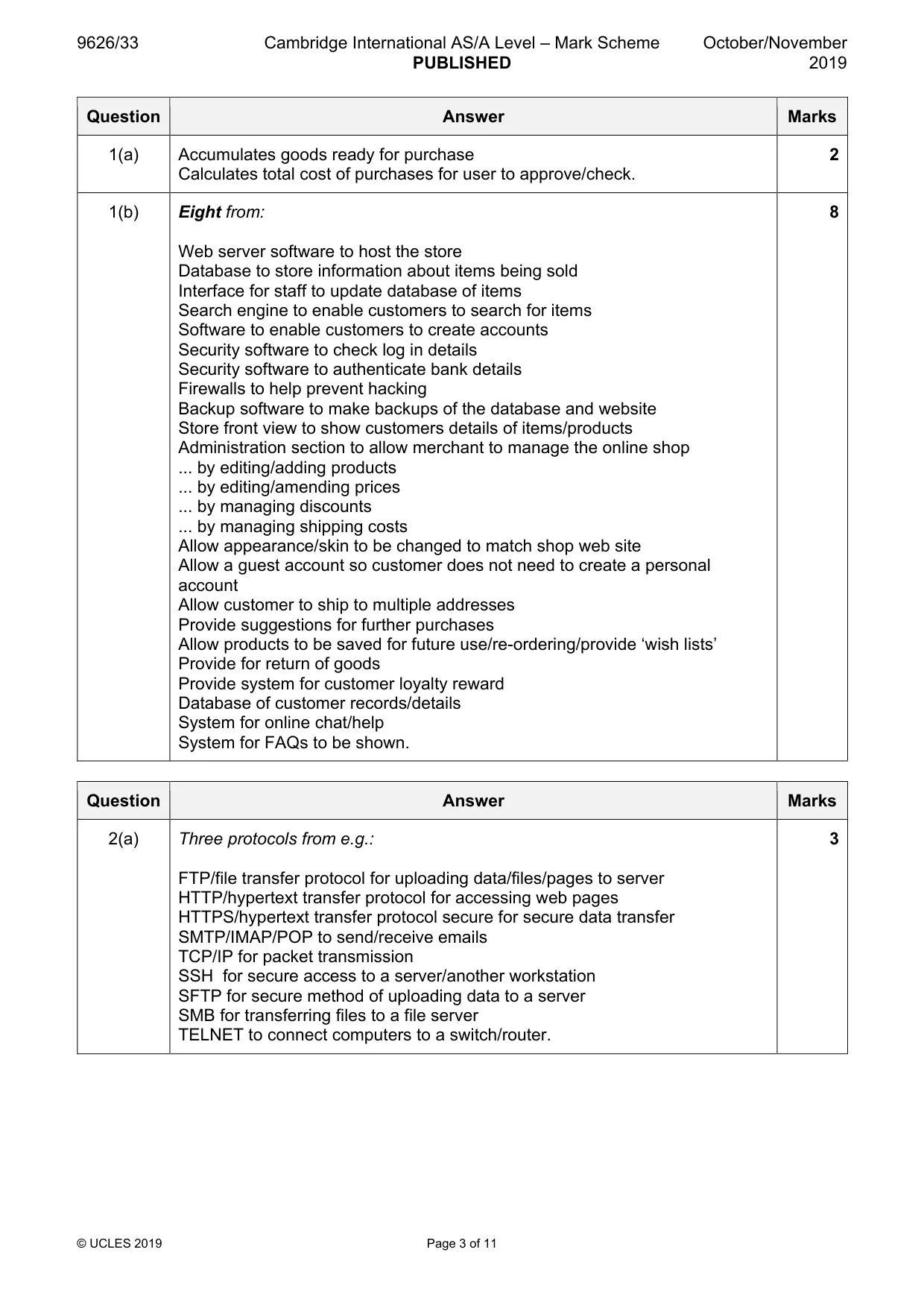
Mark scheme: Question Answer Marks 1(a) Accumulates goods ready for purchase 2 Calculates total cost of purchases for user to approve/check. 1(b) Eight from: 8 Web server software to host the store Database to store information about items being sold Interface for staff to update database of items Search engine to enable customers to search for items Software to enable customers to create accounts Security software to check log in details Security software to authenticate bank details Firewalls to help prevent hacking Backup software to make backups of the database and website Store front view to show customers details of items/products Administration section to allow merchant to manage the online shop ... by editing/adding products ... by editing/amending prices ... by managing discounts ... by managing shipping costs Allow appearance/skin to be changed to match shop web site Allow a guest account so customer does not need to create a personal account Allow customer to ship to multiple addresses Provide suggestions for further purchases Allow products to be saved for future use/re-ordering/provide ‘wish lists’ Provide for return of goods Provide system for customer loyalty reward Database of customer records/details System for online chat/help System for FAQs to be shown.
Q2 · Describe three different networking protocols that would be used for data transfer on a…
2 (a) Describe three different networking protocols that would be used for data transfer on a LAN. ................................................................................................................................................... ................................................................................................................................................... ................................................................................................................................................... ................................................................................................................................................... ................................................................................................................................................... ................................................................................................................................................... ................................................................................................................................................... ............................................................................................................................................. [3] A company has devices that use WiFi to connect to its LAN. (b) Describe how data is transmitted between a device and a wireless access point. ................................................................................................................................................... ................................................................................................................................................... ................................................................................................................................................... ................................................................................................................................................... ................................................................................................................................................... ................................................................................................................................................... ................................................................................................................................................... ................................................................................................................................................... ................................................................................................................................................... ............................................................................................................................................. [4] (c) Some of the company’s devices can connect to other devices using Bluetooth instead of WiFi. Compare and contrast the use of Bluetooth with WiFi for data transfer. ................................................................................................................................................... ................................................................................................................................................... ................................................................................................................................................... ................................................................................................................................................... ................................................................................................................................................... ................................................................................................................................................... ................................................................................................................................................... ................................................................................................................................................... ................................................................................................................................................... ................................................................................................................................................... ................................................................................................................................................... ................................................................................................................................................... ................................................................................................................................................... ............................................................................................................................................. [6]
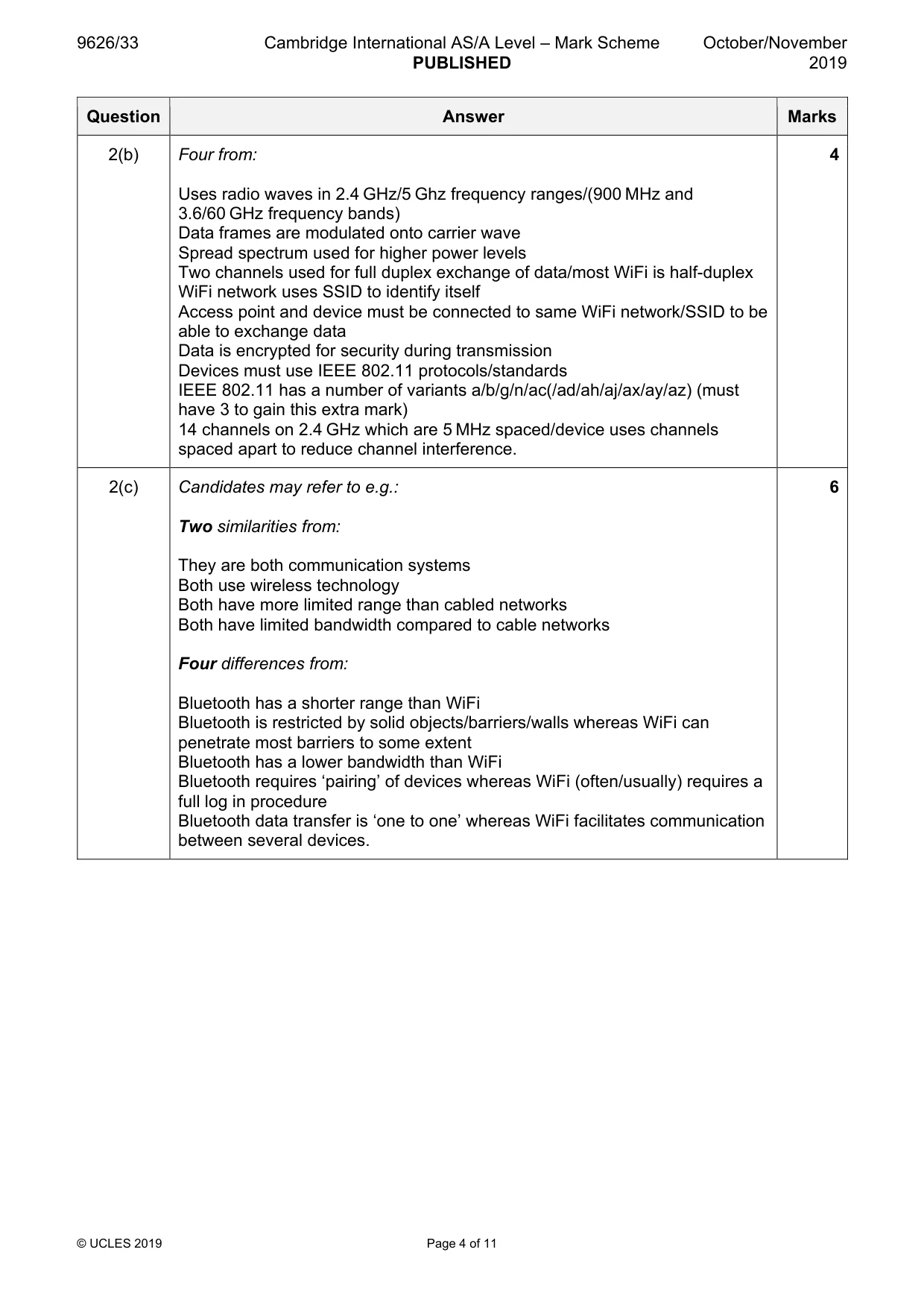
Mark scheme: 2(a) Three protocols from e.g.: 3 FTP/file transfer protocol for uploading data/files/pages to server HTTP/hypertext transfer protocol for accessing web pages HTTPS/hypertext transfer protocol secure for secure data transfer SMTP/IMAP/POP to send/receive emails TCP/IP for packet transmission SSH for secure access to a server/another workstation SFTP for secure method of uploading data to a server SMB for transferring files to a file server TELNET to connect computers to a switch/router. 2(b) Four from: 4 Uses radio waves in 2.4 GHz/5 Ghz frequency ranges/(900 MHz and 3.6/60 GHz frequency bands) Data frames are modulated onto carrier wave Spread spectrum used for higher power levels Two channels used for full duplex exchange of data/most WiFi is half-duplex WiFi network uses SSID to identify itself Access point and device must be connected to same WiFi network/SSID to be able to exchange data Data is encrypted for security during transmission Devices must use IEEE 802.11 protocols/standards IEEE 802.11 has a number of variants a/b/g/n/ac(/ad/ah/aj/ax/ay/az) (must have 3 to gain this extra mark) 14 channels on 2.4 GHz which are 5 MHz spaced/device uses channels spaced apart to reduce channel interference. 2(c) Candidates may refer to e.g.: 6 Two similarities from: They are both communication systems Both use wireless technology Both have more limited range than cabled networks Both have limited bandwidth compared to cable networks Four differences from: Bluetooth has a shorter range than WiFi Bluetooth is restricted by solid objects/barriers/walls whereas WiFi can penetrate most barriers to some extent Bluetooth has a lower bandwidth than WiFi Bluetooth requires ‘pairing’ of devices whereas WiFi (often/usually) requires a full log in procedure Bluetooth data transfer is ‘one to one’ whereas WiFi facilitates communication between several devices.
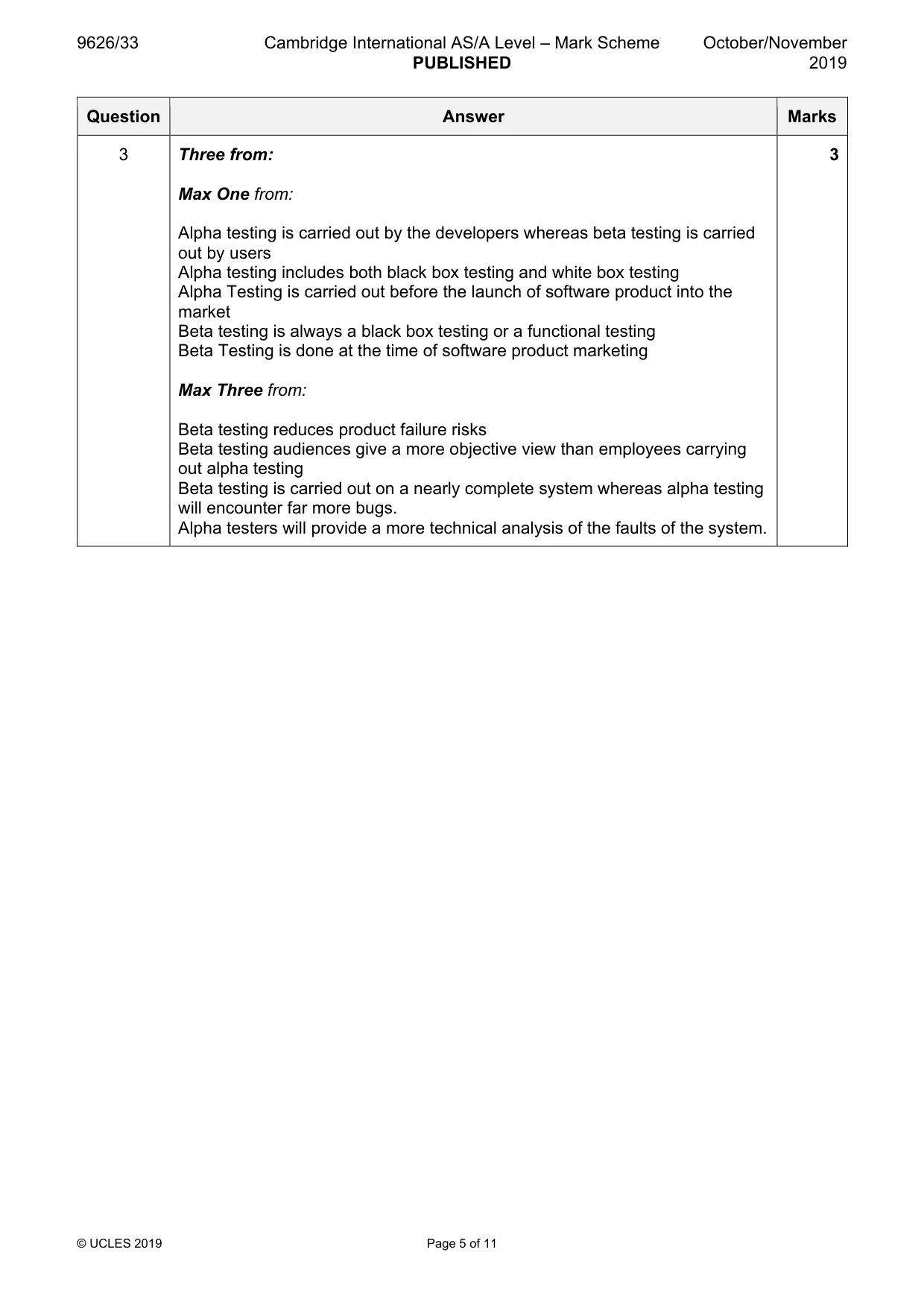
Q3 · Analyse the difference between alpha testing and beta testing
3 Analyse the difference between alpha testing and beta testing. .......................................................................................................................................................... .......................................................................................................................................................... .......................................................................................................................................................... .......................................................................................................................................................... .......................................................................................................................................................... .......................................................................................................................................................... .......................................................................................................................................................... .................................................................................................................................................... [3]
Mark scheme: 3 Three from: 3 Max One from: Alpha testing is carried out by the developers whereas beta testing is carried out by users Alpha testing includes both black box testing and white box testing Alpha Testing is carried out before the launch of software product into the market Beta testing is always a black box testing or a functional testing Beta Testing is done at the time of software product marketing Max Three from: Beta testing reduces product failure risks Beta testing audiences give a more objective view than employees carrying out alpha testing Beta testing is carried out on a nearly complete system whereas alpha testing will encounter far more bugs. Alpha testers will provide a more technical analysis of the faults of the system.
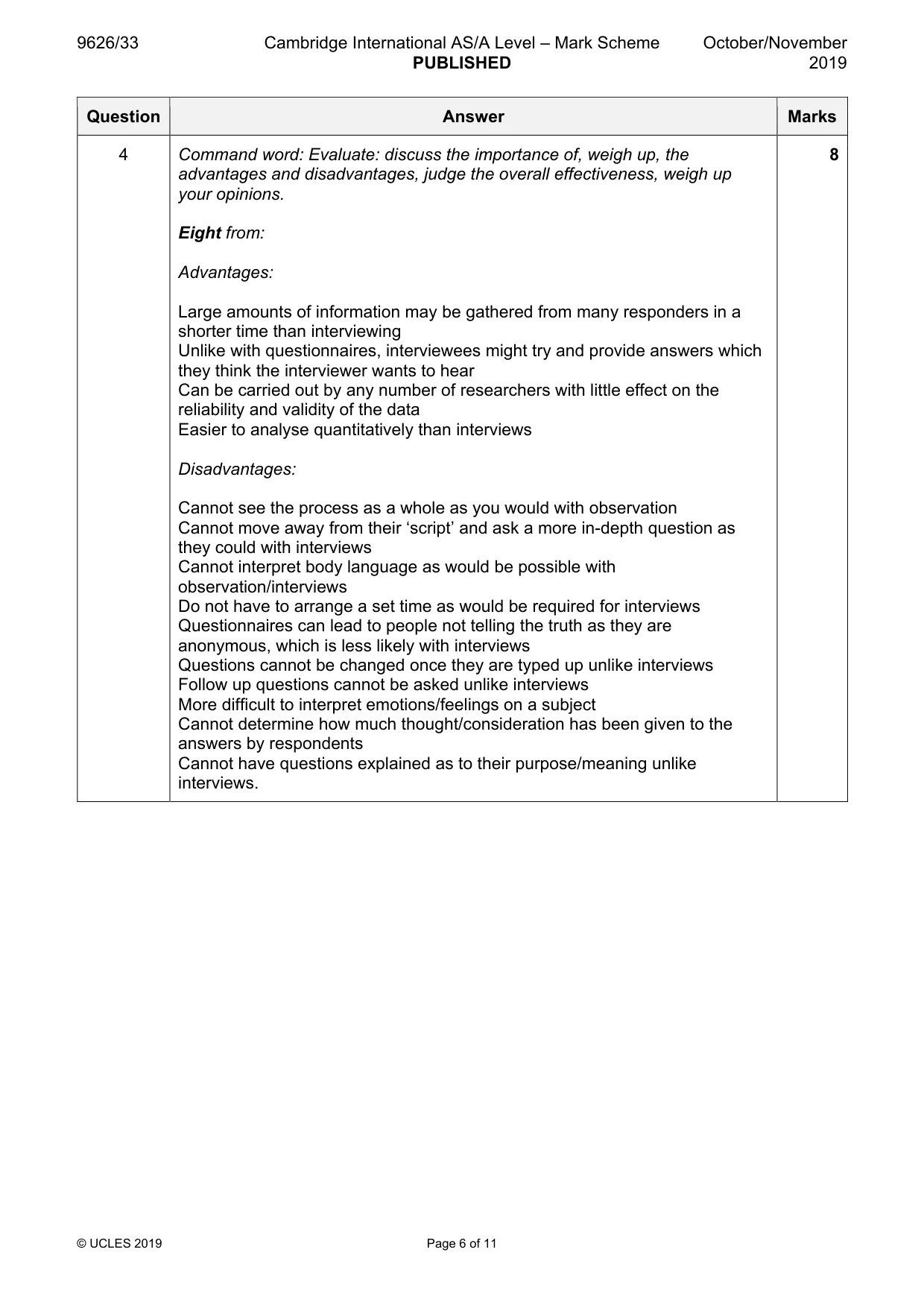
Q4 · Evaluate the use of questionnaires in comparison to interviews and observation when…
4 Evaluate the use of questionnaires in comparison to interviews and observation when collecting data. .......................................................................................................................................................... .......................................................................................................................................................... .......................................................................................................................................................... .......................................................................................................................................................... .......................................................................................................................................................... .......................................................................................................................................................... .......................................................................................................................................................... .......................................................................................................................................................... .......................................................................................................................................................... .......................................................................................................................................................... .......................................................................................................................................................... .......................................................................................................................................................... .......................................................................................................................................................... .......................................................................................................................................................... .......................................................................................................................................................... .......................................................................................................................................................... .......................................................................................................................................................... .......................................................................................................................................................... .......................................................................................................................................................... .................................................................................................................................................... [8]
Mark scheme: 4 Command word: Evaluate: discuss the importance of, weigh up, the 8 advantages and disadvantages, judge the overall effectiveness, weigh up your opinions. Eight from: Advantages: Large amounts of information may be gathered from many responders in a shorter time than interviewing Unlike with questionnaires, interviewees might try and provide answers which they think the interviewer wants to hear Can be carried out by any number of researchers with little effect on the reliability and validity of the data Easier to analyse quantitatively than interviews Disadvantages: Cannot see the process as a whole as you would with observation Cannot move away from their ‘script’ and ask a more in-depth question as they could with interviews Cannot interpret body language as would be possible with observation/interviews Do not have to arrange a set time as would be required for interviews Questionnaires can lead to people not telling the truth as they are anonymous, which is less likely with interviews Questions cannot be changed once they are typed up unlike interviews Follow up questions cannot be asked unlike interviews More difficult to interpret emotions/feelings on a subject Cannot determine how much thought/consideration has been given to the answers by respondents Cannot have questions explained as to their purpose/meaning unlike interviews.
Q5 · A software company has employed a team of programmers to create a new computer game
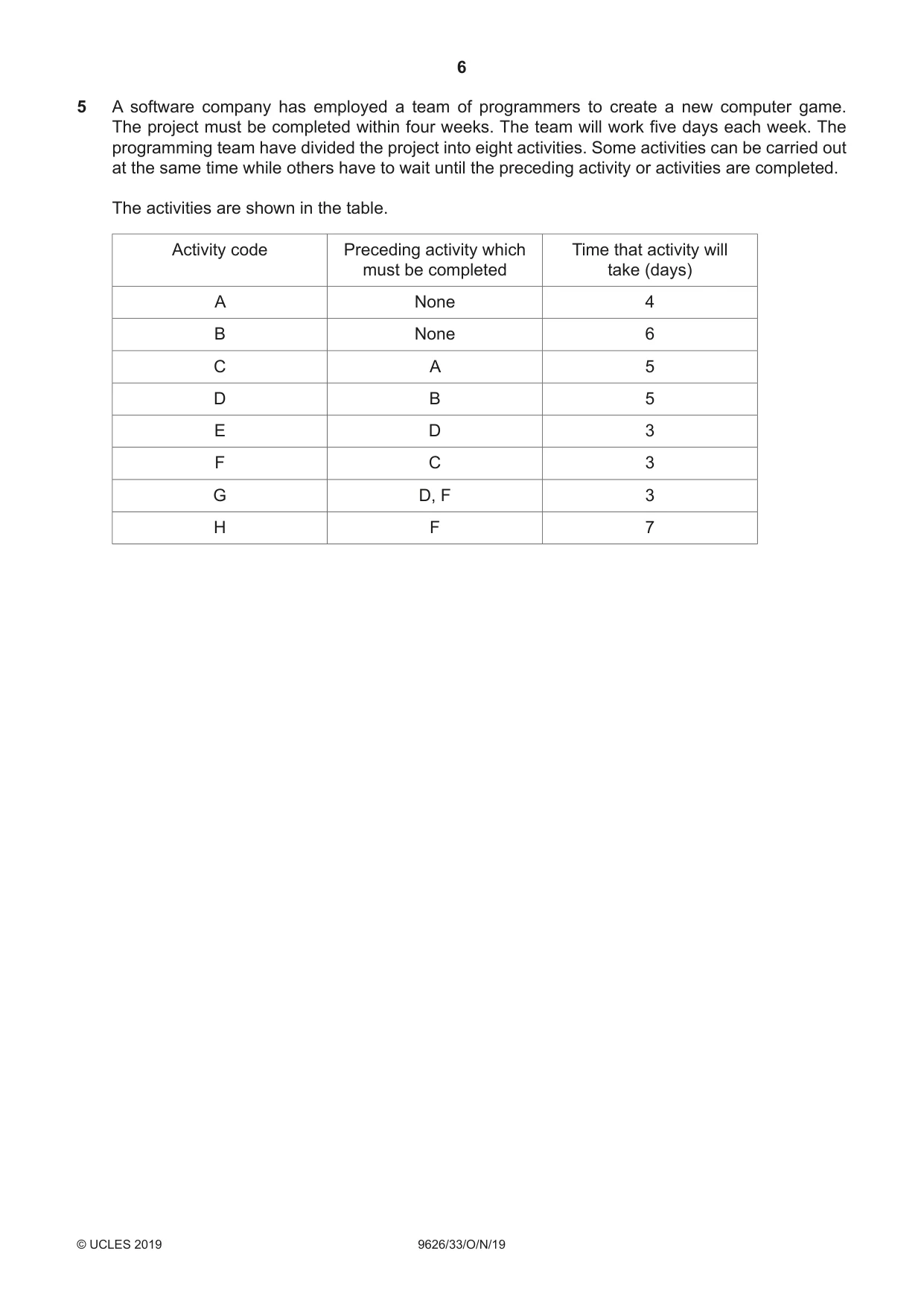
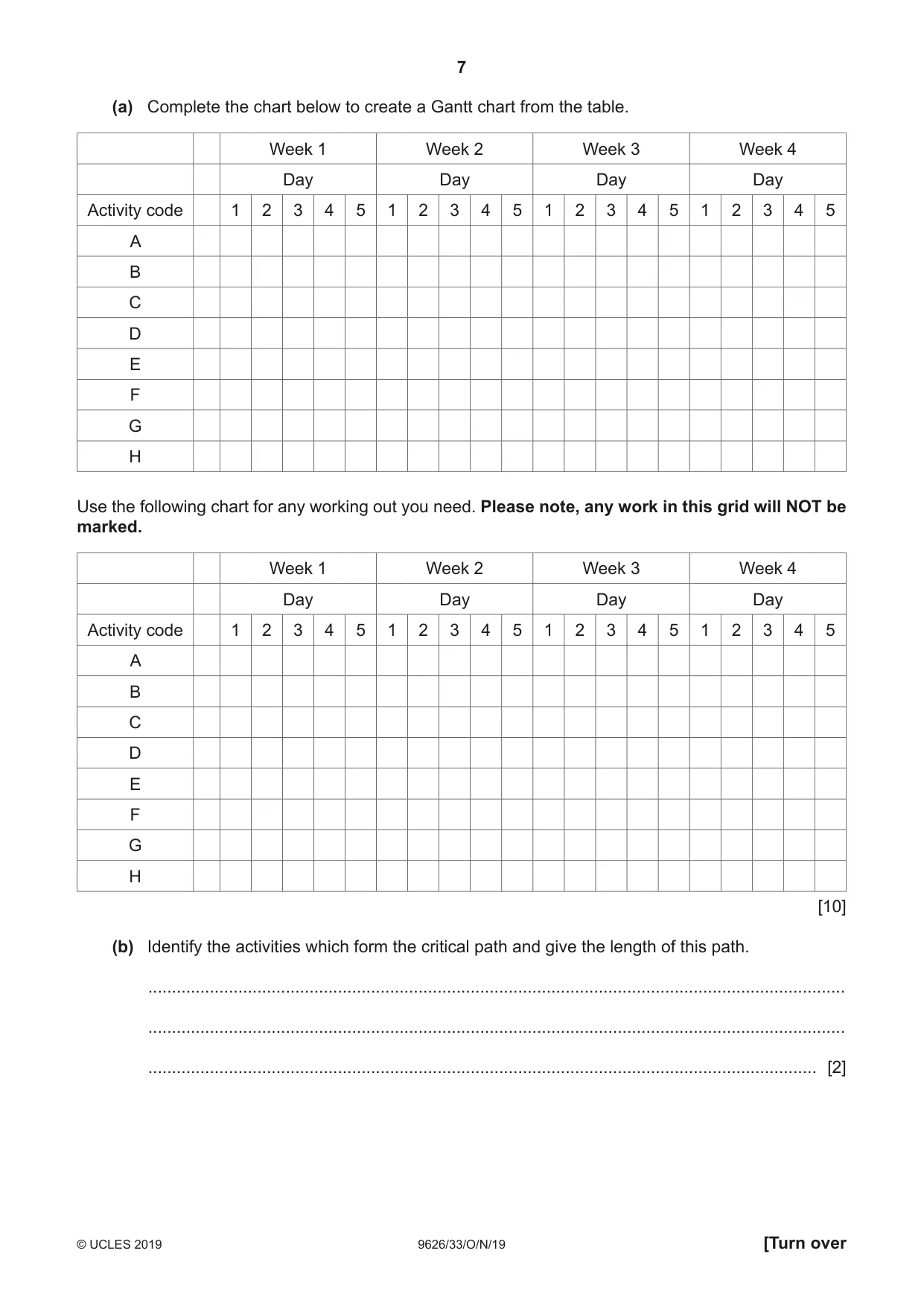
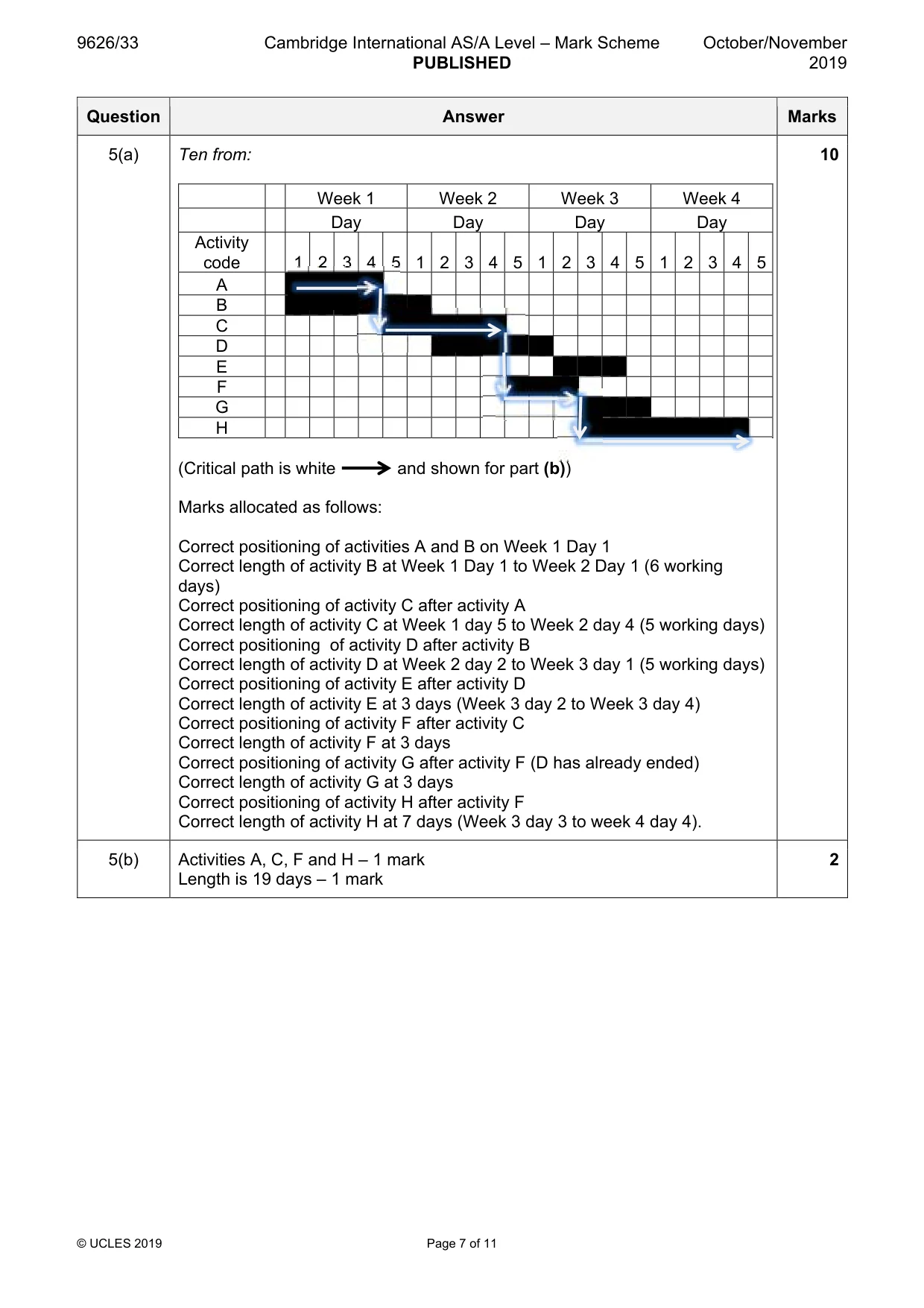
5 A software company has employed a team of programmers to create a new computer game. The project must be completed within four weeks. The team will work five days each week. The programming team have divided the project into eight activities. Some activities can be carried out at the same time while others have to wait until the preceding activity or activities are completed. The activities are shown in the table. Activity code Preceding activity which Time that activity will must be completed take (days) A None 4 B None 6 C A 5 D B 5 E D 3 F C 3 G D, F 3 H F 7 (a) Complete the chart below to create a Gantt chart from the table. Week 1 Week 2 Week 3 Week 4 Day Day Day Day Activity code 1 2 3 4 5 1 2 3 4 5 1 2 3 4 5 1 2 3 4 5 A B C D E F G H Use the following chart for any working out you need. Please note, any work in this grid will NOT be marked. Week 1 Week 2 Week 3 Week 4 Day Day Day Day Activity code 1 2 3 4 5 1 2 3 4 5 1 2 3 4 5 1 2 3 4 5 A B C D E F G H [10] (b) Identify the activities which form the critical path and give the length of this path. ................................................................................................................................................... ................................................................................................................................................... ............................................................................................................................................. [2]
Mark scheme: 5(a) Ten from: 10 Week 1 Week 2 Week 3 Week 4 Day Day Day Day Activity code 1 2 3 4 5 1 2 3 4 5 1 2 3 4 5 1 2 3 4 5 A B C D E F G H (Critical path is white and shown for part (b)) Marks allocated as follows: Correct positioning of activities A and B on Week 1 Day 1 Correct length of activity B at Week 1 Day 1 to Week 2 Day 1 (6 working days) Correct positioning of activity C after activity A Correct length of activity C at Week 1 day 5 to Week 2 day 4 (5 working days) Correct positioning of activity D after activity B Correct length of activity D at Week 2 day 2 to Week 3 day 1 (5 working days) Correct positioning of activity E after activity D Correct length of activity E at 3 days (Week 3 day 2 to Week 3 day 4) Correct positioning of activity F after activity C Correct length of activity F at 3 days Correct positioning of activity G after activity F (D has already ended) Correct length of activity G at 3 days Correct positioning of activity H after activity F Correct length of activity H at 7 days (Week 3 day 3 to week 4 day 4). 5(b) Activities A, C, F and H – 1 mark 2 Length is 19 days – 1 mark
More questions on Tools and techniques for project management tasks
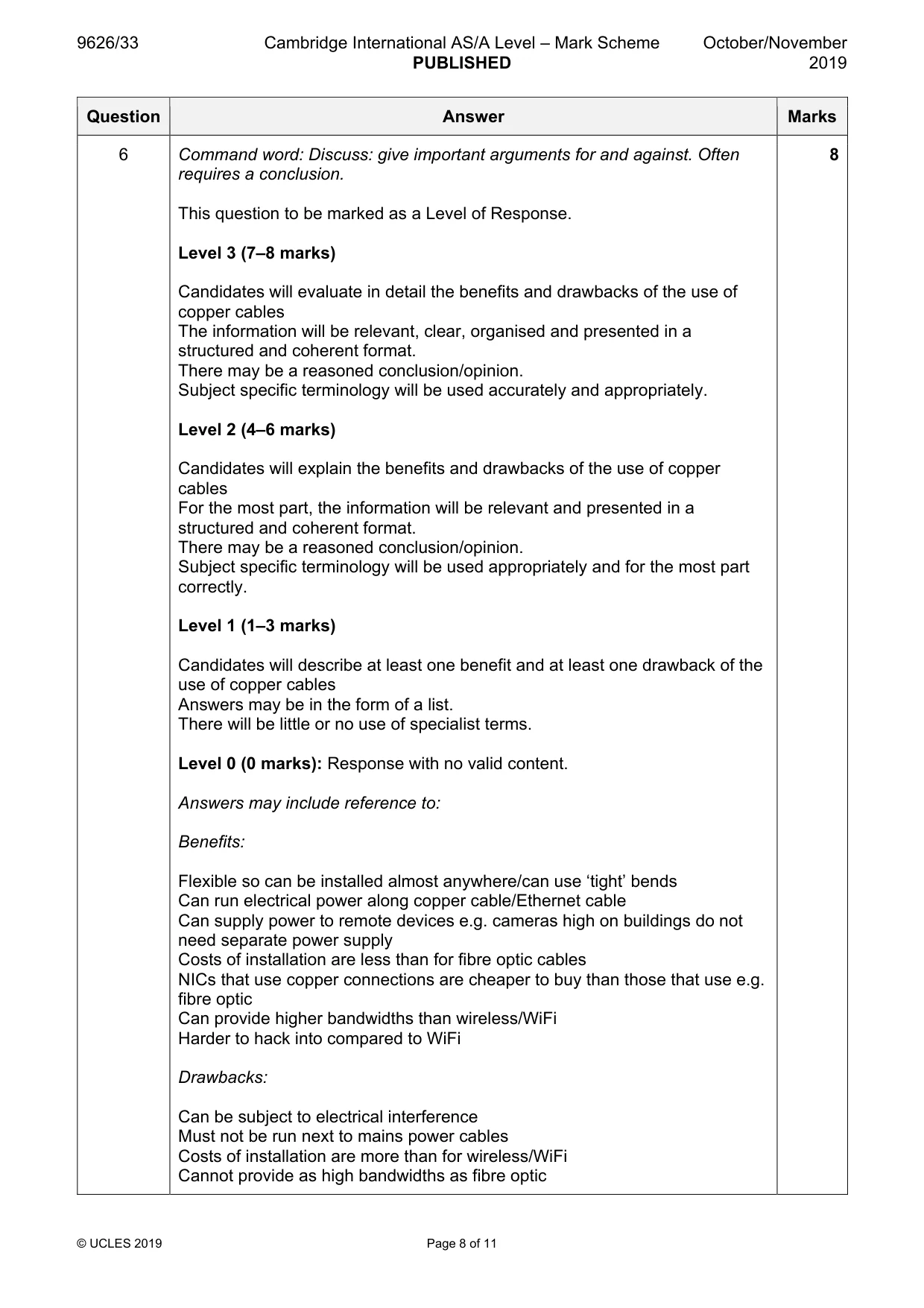
Q6 · Discuss the benefits and drawbacks of using ethernet cables containing copper within a…
6 Discuss the benefits and drawbacks of using ethernet cables containing copper within a computer network. .......................................................................................................................................................... .......................................................................................................................................................... .......................................................................................................................................................... .......................................................................................................................................................... .......................................................................................................................................................... .......................................................................................................................................................... .......................................................................................................................................................... .......................................................................................................................................................... .......................................................................................................................................................... .......................................................................................................................................................... .......................................................................................................................................................... .......................................................................................................................................................... .......................................................................................................................................................... .......................................................................................................................................................... .......................................................................................................................................................... .......................................................................................................................................................... .......................................................................................................................................................... .......................................................................................................................................................... .......................................................................................................................................................... .................................................................................................................................................... [8]
Mark scheme: 6 Command word: Discuss: give important arguments for and against. Often 8 requires a conclusion. This question to be marked as a Level of Response. Level 3 (7–8 marks) Candidates will evaluate in detail the benefits and drawbacks of the use of copper cables The information will be relevant, clear, organised and presented in a structured and coherent format. There may be a reasoned conclusion/opinion. Subject specific terminology will be used accurately and appropriately. Level 2 (4–6 marks) Candidates will explain the benefits and drawbacks of the use of copper cables For the most part, the information will be relevant and presented in a structured and coherent format. There may be a reasoned conclusion/opinion. Subject specific terminology will be used appropriately and for the most part correctly. Level 1 (1–3 marks) Candidates will describe at least one benefit and at least one drawback of the use of copper cables Answers may be in the form of a list. There will be little or no use of specialist terms. Level 0 (0 marks): Response with no valid content. Answers may include reference to: Benefits: Flexible so can be installed almost anywhere/can use ‘tight’ bends Can run electrical power along copper cable/Ethernet cable Can supply power to remote devices e.g. cameras high on buildings do not need separate power supply Costs of installation are less than for fibre optic cables NICs that use copper connections are cheaper to buy than those that use e.g. fibre optic Can provide higher bandwidths than wireless/WiFi Harder to hack into compared to WiFi Drawbacks: Can be subject to electrical interference Must not be run next to mains power cables Costs of installation are more than for wireless/WiFi Cannot provide as high bandwidths as fibre optic
Q7 · Describe the benefits of using back-ups to prevent loss of data from computer systems
7 (a) Describe the benefits of using back-ups to prevent loss of data from computer systems. ................................................................................................................................................... ................................................................................................................................................... ................................................................................................................................................... ................................................................................................................................................... ................................................................................................................................................... ................................................................................................................................................... ................................................................................................................................................... ................................................................................................................................................... ............................................................................................................................................. [3] (b) Describe the drawbacks of using back-ups to prevent loss of data from computer systems. ................................................................................................................................................... ................................................................................................................................................... ................................................................................................................................................... ................................................................................................................................................... ................................................................................................................................................... ................................................................................................................................................... ................................................................................................................................................... ................................................................................................................................................... ............................................................................................................................................. [3]
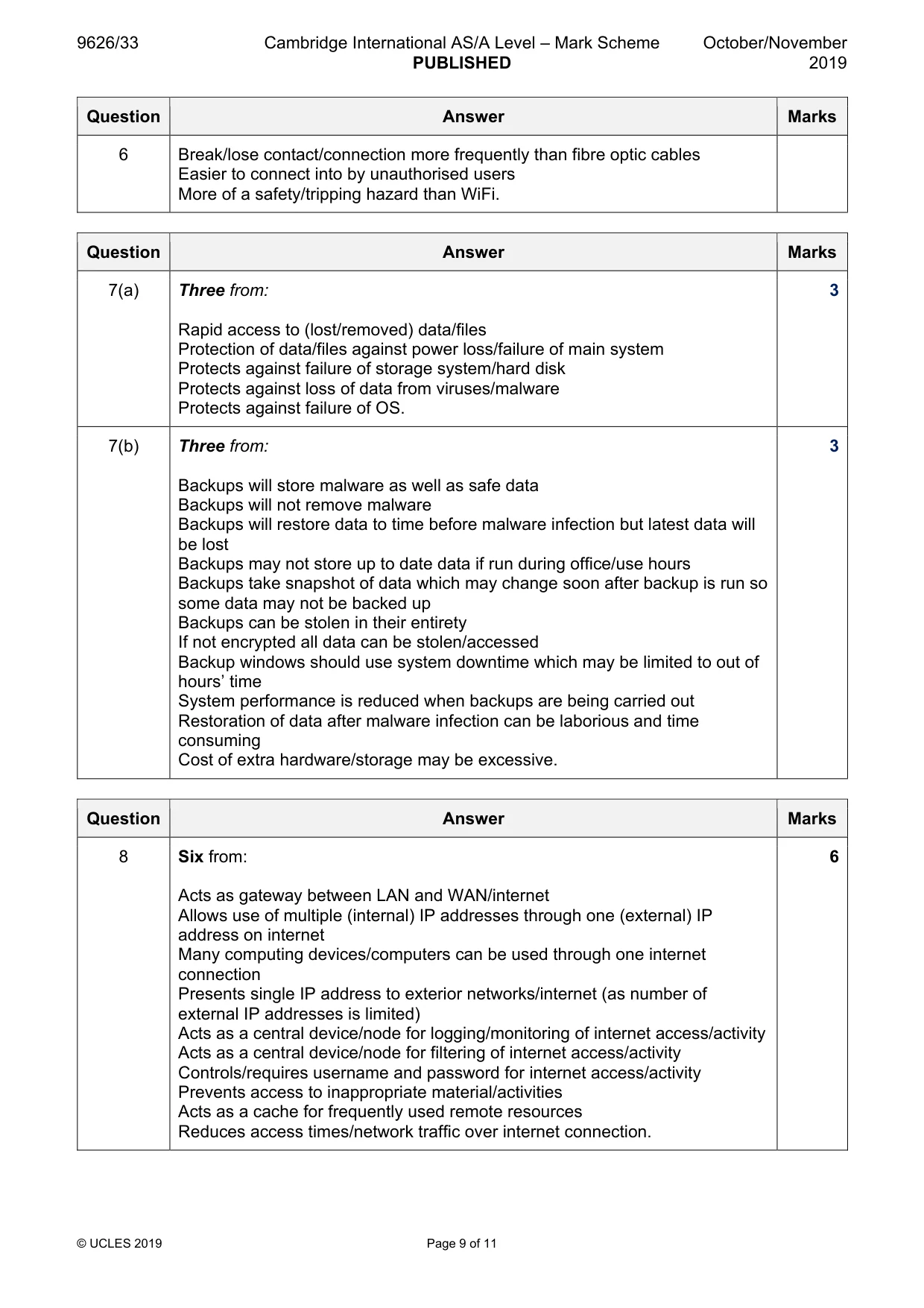
Mark scheme: 7(a) Three from: 3 Rapid access to (lost/removed) data/files Protection of data/files against power loss/failure of main system Protects against failure of storage system/hard disk Protects against loss of data from viruses/malware Protects against failure of OS. 7(b) Three from: 3 Backups will store malware as well as safe data Backups will not remove malware Backups will restore data to time before malware infection but latest data will be lost Backups may not store up to date data if run during office/use hours Backups take snapshot of data which may change soon after backup is run so some data may not be backed up Backups can be stolen in their entirety If not encrypted all data can be stolen/accessed Backup windows should use system downtime which may be limited to out of hours’ time System performance is reduced when backups are being carried out Restoration of data after malware infection can be laborious and time consuming Cost of extra hardware/storage may be excessive.
Q8 · A school uses a proxy server to distribute web pages to work stations
8 A school uses a proxy server to distribute web pages to work stations. Describe the role of this proxy server. .......................................................................................................................................................... .......................................................................................................................................................... .......................................................................................................................................................... .......................................................................................................................................................... .......................................................................................................................................................... .......................................................................................................................................................... .......................................................................................................................................................... .......................................................................................................................................................... .......................................................................................................................................................... .......................................................................................................................................................... .......................................................................................................................................................... .......................................................................................................................................................... .......................................................................................................................................................... .................................................................................................................................................... [6]
Mark scheme: 8 Six from: 6 Acts as gateway between LAN and WAN/internet Allows use of multiple (internal) IP addresses through one (external) IP address on internet Many computing devices/computers can be used through one internet connection Presents single IP address to exterior networks/internet (as number of external IP addresses is limited) Acts as a central device/node for logging/monitoring of internet access/activity Acts as a central device/node for filtering of internet access/activity Controls/requires username and password for internet access/activity Prevents access to inappropriate material/activities Acts as a cache for frequently used remote resources Reduces access times/network traffic over internet connection.
Q9 · A company has two sites, A and B
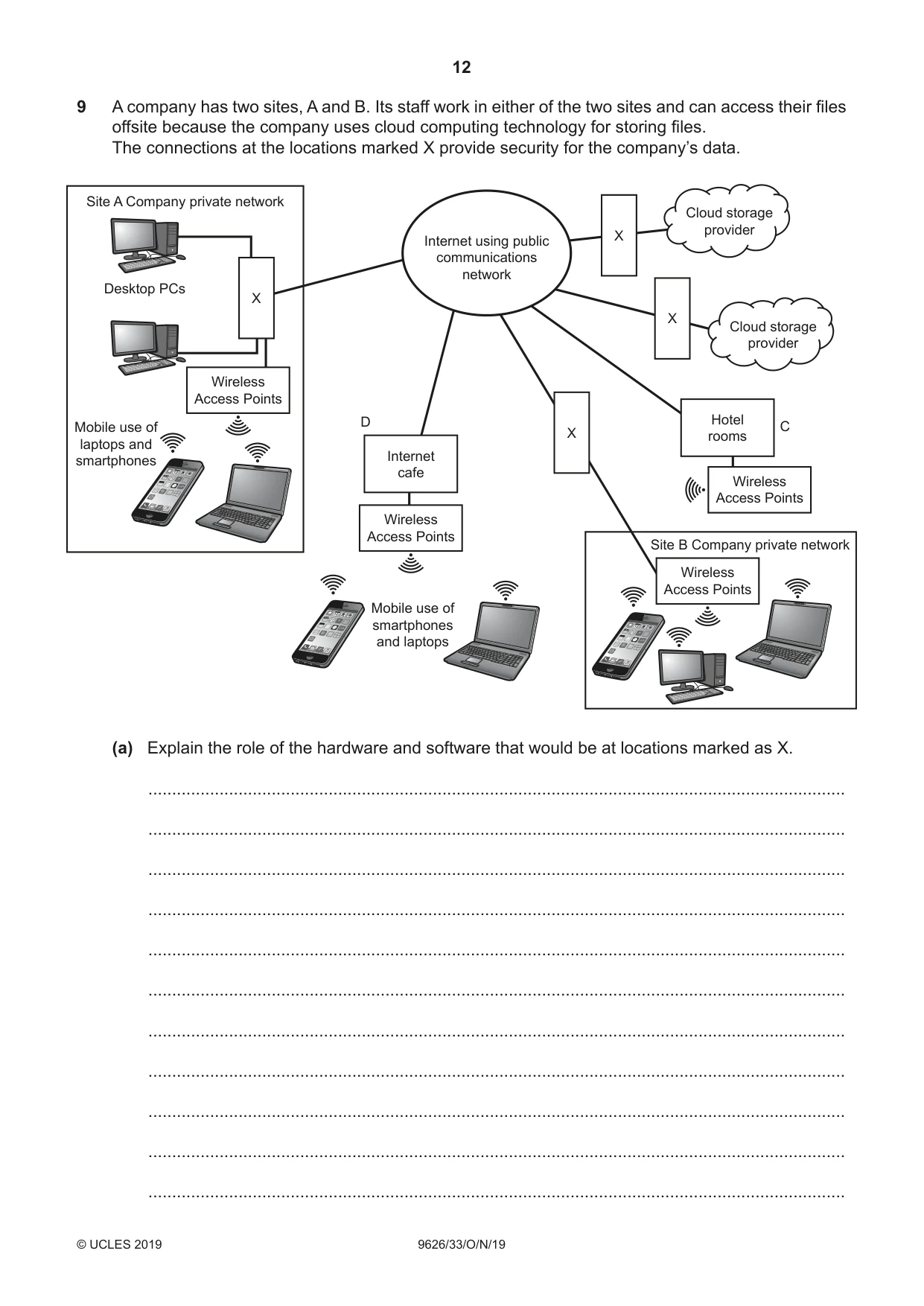
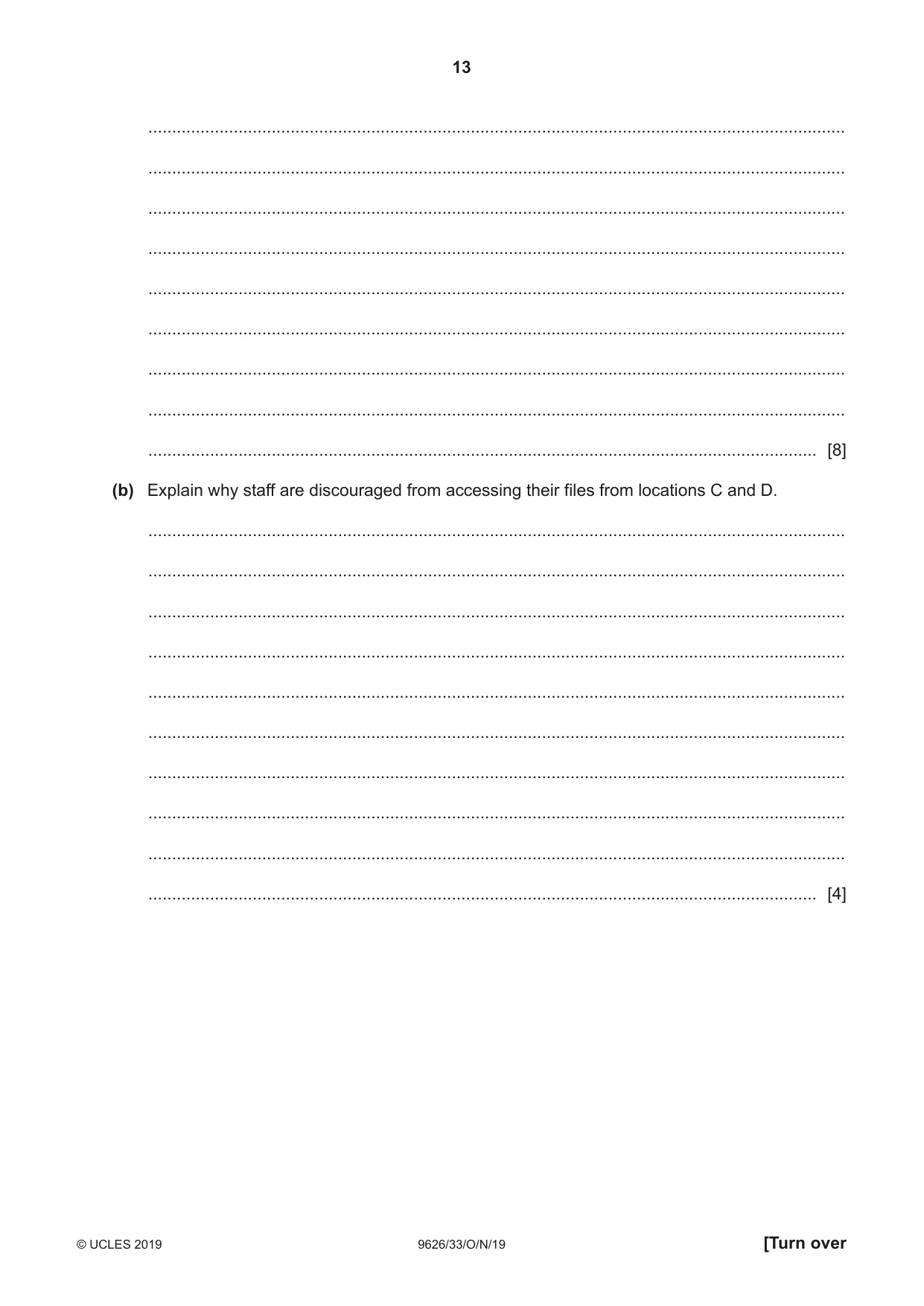
9 A company has two sites, A and B. Its staff work in either of the two sites and can access their files offsite because the company uses cloud computing technology for storing files. The connections at the locations marked X provide security for the company’s data. Site A Company private network Cloud storage provider X Internet using public communications network Desktop PCs X X Cloud storage provider Wireless Access Points D Hotel CMobile use of X rooms laptops and Internetsmartphones cafe Wireless Access Points Wireless Access Points Site B Company private network Wireless Access Points Mobile use of smartphones and laptops (a) Explain the role of the hardware and software that would be at locations marked as X. ................................................................................................................................................... ................................................................................................................................................... ................................................................................................................................................... ................................................................................................................................................... ................................................................................................................................................... ................................................................................................................................................... ................................................................................................................................................... ................................................................................................................................................... ................................................................................................................................................... ................................................................................................................................................... ................................................................................................................................................... ................................................................................................................................................... ................................................................................................................................................... ................................................................................................................................................... ................................................................................................................................................... ................................................................................................................................................... ................................................................................................................................................... ................................................................................................................................................... ................................................................................................................................................... ............................................................................................................................................. [8] (b) Explain why staff are discouraged from accessing their files from locations C and D. ................................................................................................................................................... ................................................................................................................................................... ................................................................................................................................................... ................................................................................................................................................... ................................................................................................................................................... ................................................................................................................................................... ................................................................................................................................................... ................................................................................................................................................... ................................................................................................................................................... ............................................................................................................................................. [4]
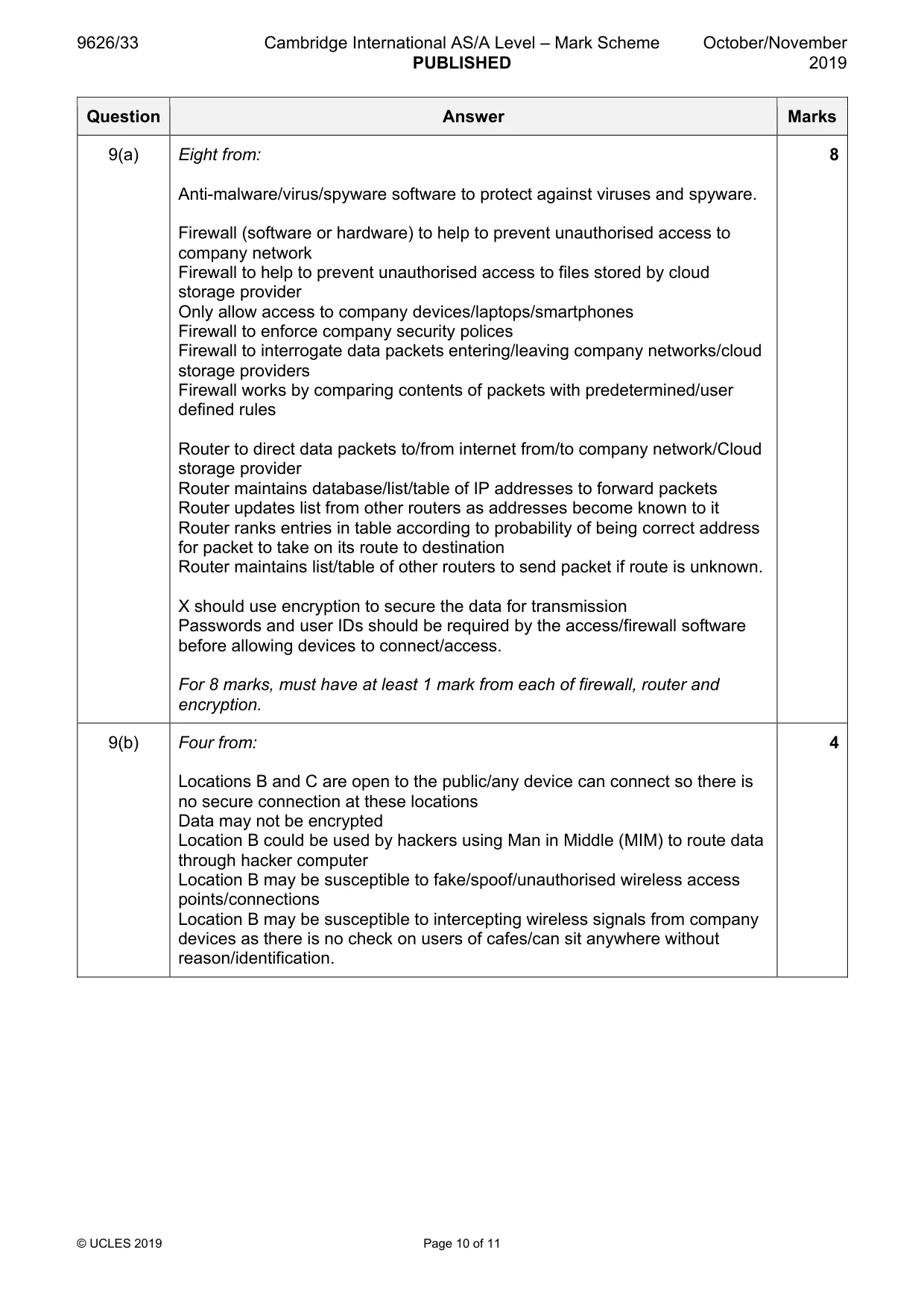
Mark scheme: 9(a) Eight from: 8 Anti-malware/virus/spyware software to protect against viruses and spyware. Firewall (software or hardware) to help to prevent unauthorised access to company network Firewall to help to prevent unauthorised access to files stored by cloud storage provider Only allow access to company devices/laptops/smartphones Firewall to enforce company security polices Firewall to interrogate data packets entering/leaving company networks/cloud storage providers Firewall works by comparing contents of packets with predetermined/user defined rules Router to direct data packets to/from internet from/to company network/Cloud storage provider Router maintains database/list/table of IP addresses to forward packets Router updates list from other routers as addresses become known to it Router ranks entries in table according to probability of being correct address for packet to take on its route to destination Router maintains list/table of other routers to send packet if route is unknown. X should use encryption to secure the data for transmission Passwords and user IDs should be required by the access/firewall software before allowing devices to connect/access. For 8 marks, must have at least 1 mark from each of firewall, router and encryption. 9(b) Four from: 4 Locations B and C are open to the public/any device can connect so there is no secure connection at these locations Data may not be encrypted Location B could be used by hackers using Man in Middle (MIM) to route data through hacker computer Location B may be susceptible to fake/spoof/unauthorised wireless access points/connections Location B may be susceptible to intercepting wireless signals from company devices as there is no check on users of cafes/can sit anywhere without reason/identification.
Q10 · A new photograph of a person in her office is required but the person is not available…
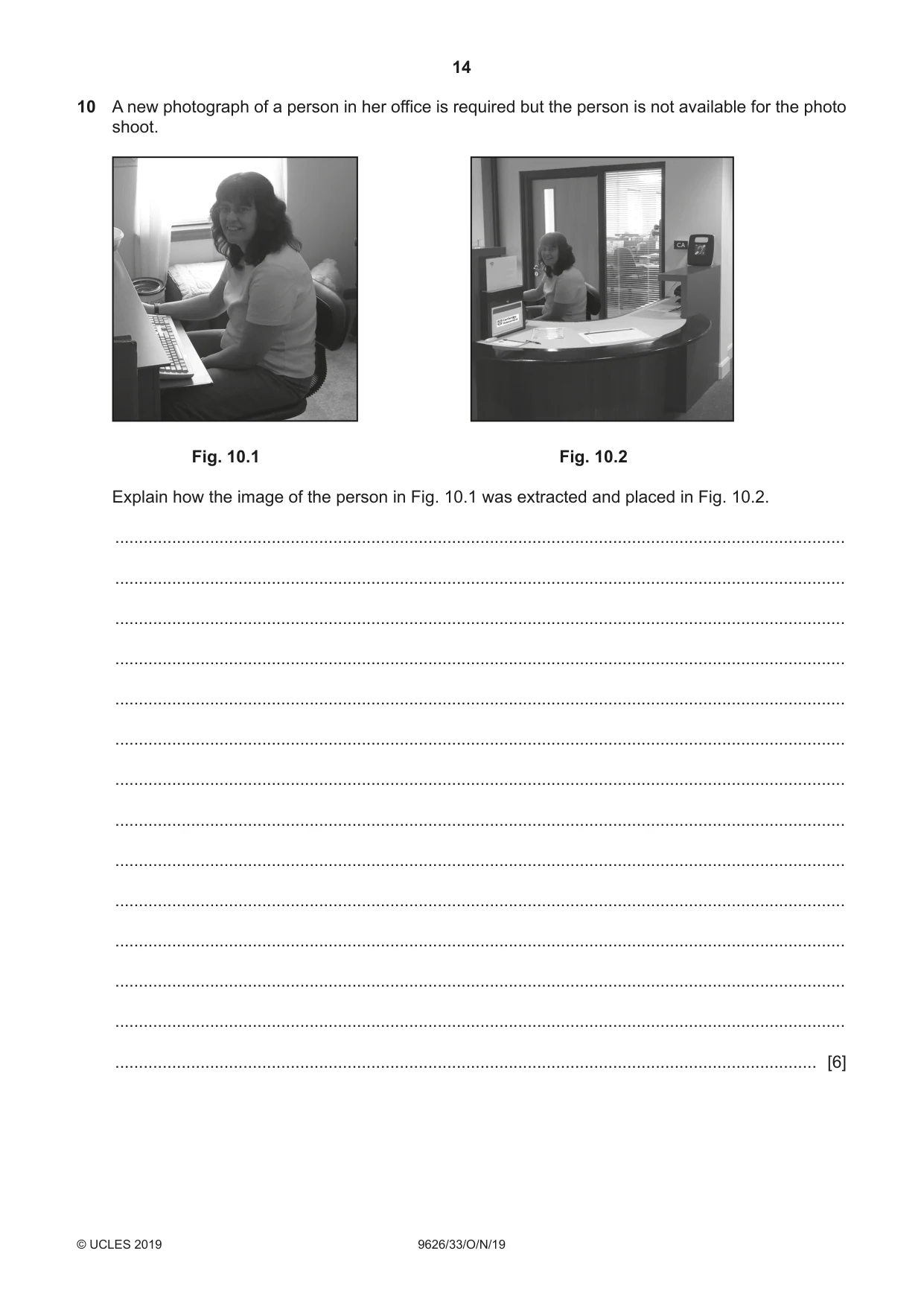
10 A new photograph of a person in her office is required but the person is not available for the photo shoot. Fig. 10.1 Fig. 10.2 Explain how the image of the person in Fig. 10.1 was extracted and placed in Fig. 10.2. .......................................................................................................................................................... .......................................................................................................................................................... .......................................................................................................................................................... .......................................................................................................................................................... .......................................................................................................................................................... .......................................................................................................................................................... .......................................................................................................................................................... .......................................................................................................................................................... .......................................................................................................................................................... .......................................................................................................................................................... .......................................................................................................................................................... .......................................................................................................................................................... .......................................................................................................................................................... .................................................................................................................................................... [6]
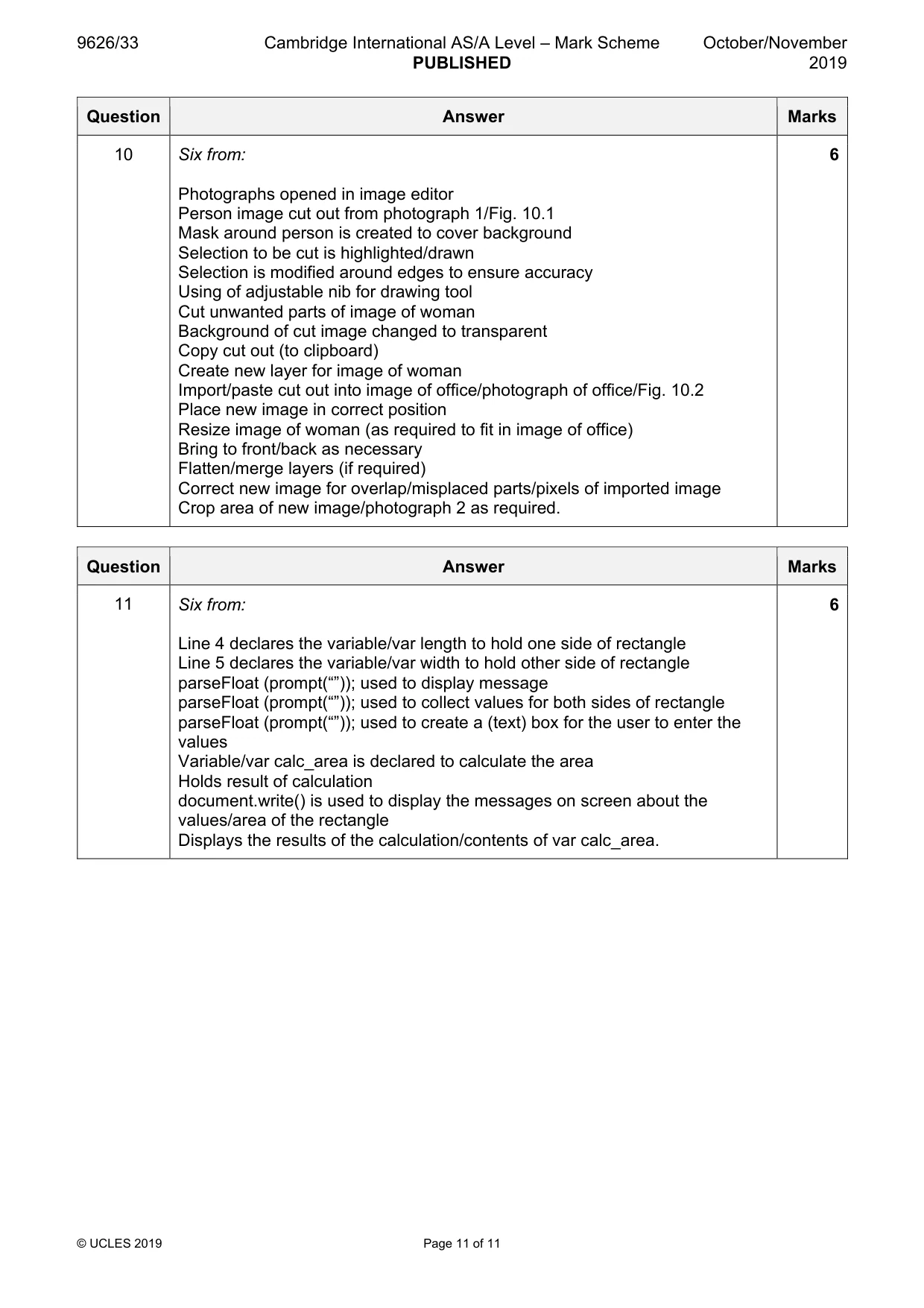
Mark scheme: 10 Six from: 6 Photographs opened in image editor Person image cut out from photograph 1/Fig. 10.1 Mask around person is created to cover background Selection to be cut is highlighted/drawn Selection is modified around edges to ensure accuracy Using of adjustable nib for drawing tool Cut unwanted parts of image of woman Background of cut image changed to transparent Copy cut out (to clipboard) Create new layer for image of woman Import/paste cut out into image of office/photograph of office/Fig. 10.2 Place new image in correct position Resize image of woman (as required to fit in image of office) Bring to front/back as necessary Flatten/merge layers (if required) Correct new image for overlap/misplaced parts/pixels of imported image Crop area of new image/photograph 2 as required.
Q11 · The area of a rectangle can be calculated using the JavaScript embedded in a web page as…
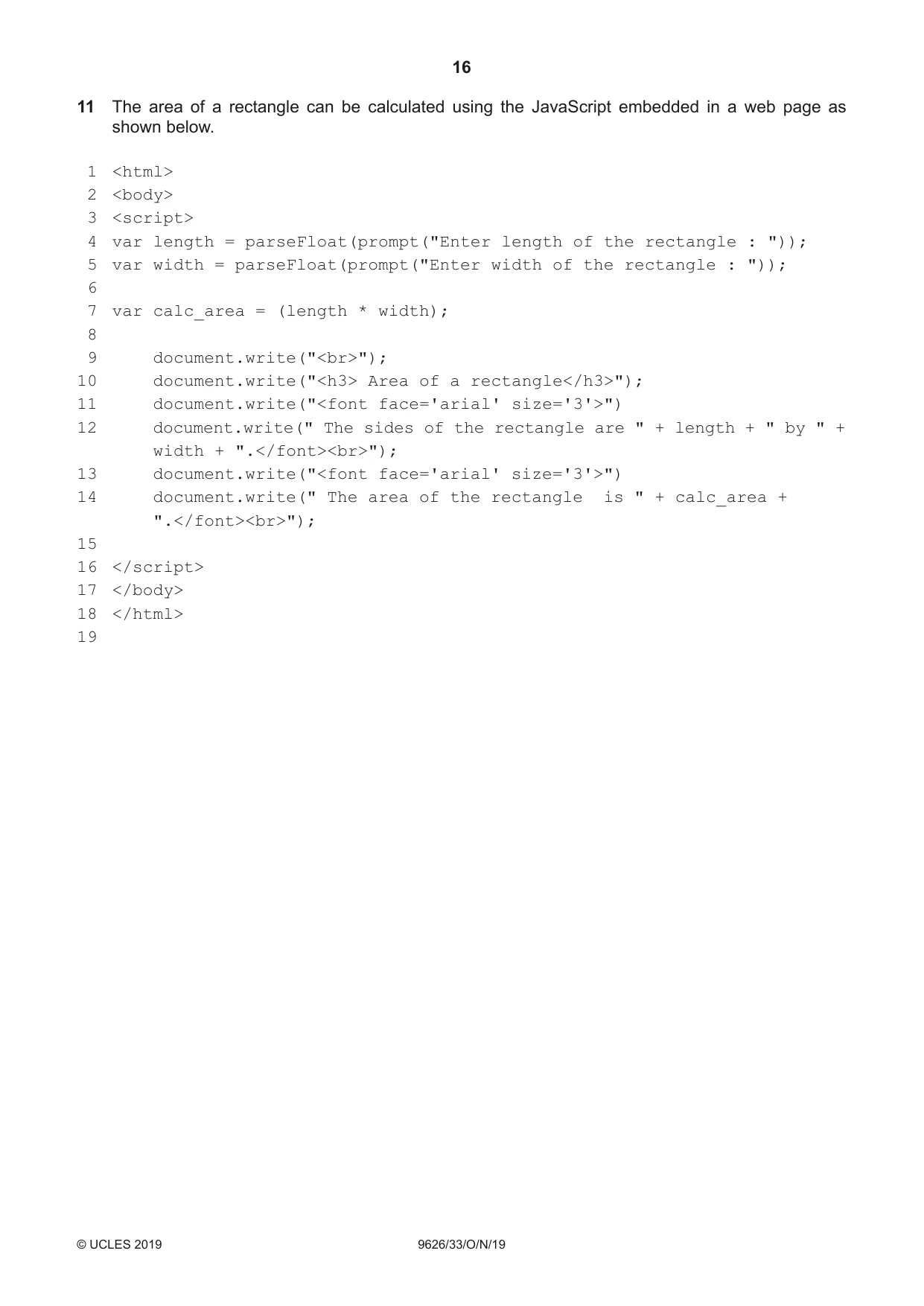
11 The area of a rectangle can be calculated using the JavaScript embedded in a web page as shown below. 1 <html> 2 <body> 3 <script> 4 var length = parseFloat(prompt("Enter length of the rectangle : ")); 5 var width = parseFloat(prompt("Enter width of the rectangle : ")); 6 7 var calc_area = (length * width); 8 9 document.write("<br>"); 10 document.write("<h3> Area of a rectangle</h3>"); 11 document.write("<font face='arial' size='3'>")
Mark scheme: 11 Six from: 6 Line 4 declares the variable/var length to hold one side of rectangle Line 5 declares the variable/var width to hold other side of rectangle parseFloat (prompt(“”)); used to display message parseFloat (prompt(“”)); used to collect values for both sides of rectangle parseFloat (prompt(“”)); used to create a (text) box for the user to enter the values Variable/var calc_area is declared to calculate the area Holds result of calculation document.write() is used to display the messages on screen about the values/area of the rectangle Displays the results of the calculation/contents of var calc_area.
Q12 · Document.write(" The sides of the rectangle are " + length + " by " + width +…
12 document.write(" The sides of the rectangle are " + length + " by " + width + ".</font><br>");
Q14 · Document.write(" The area of the rectangle is " + calc_area + ".</font><br>");
14 document.write(" The area of the rectangle is " + calc_area + ".</font><br>");
Q18 · </html> 19 Explain, with reference to the code shown, how the JavaScript collects the…
18 </html> 19 Explain, with reference to the code shown, how the JavaScript collects the dimensions of the rectangle, calculates the area and displays the area on-screen. The lines of the code are numbered only for your convenience when referring to the code. .......................................................................................................................................................... .......................................................................................................................................................... .......................................................................................................................................................... .......................................................................................................................................................... .......................................................................................................................................................... .......................................................................................................................................................... .......................................................................................................................................................... .......................................................................................................................................................... .......................................................................................................................................................... .......................................................................................................................................................... .......................................................................................................................................................... .......................................................................................................................................................... .......................................................................................................................................................... .................................................................................................................................................... [6]
What was in this paper
The subtopics covered by these 14 questions, and how many questions each got. Open one in a new tab to see every Cambridge question on it.
What you needed in this session
Cambridge’s own grade thresholds for 2019 Oct/Nov, Paper 3 · Variant 3. A higher threshold means an easier paper — the bar moves with how the cohort did.