Cambridge A Level Information Technology (from 2017) 9626 — 2024 May/June Paper 3 · Variant 2
9626/32/M/J/24 · 9 questions · 70 marks · ≈79 min
The question paper and its mark scheme, free to read here and free to download. This is Cambridge’s own paper, exactly as it was sat.
Question paper12 pages





Mark scheme11 pages
Answers below. Sit the paper first if you are practising.


Questions as text
Q1 · Devices on a network can be connected by Wi-Fi
1 Devices on a network can be connected by Wi-Fi. Describe how a Wi-Fi connection is used to transfer data between devices. .......................................................................................................................................................... .......................................................................................................................................................... .......................................................................................................................................................... .......................................................................................................................................................... .......................................................................................................................................................... .......................................................................................................................................................... .......................................................................................................................................................... .......................................................................................................................................................... .......................................................................................................................................................... .......................................................................................................................................................... .......................................................................................................................................................... .......................................................................................................................................................... .......................................................................................................................................................... .................................................................................................................................................... [6]
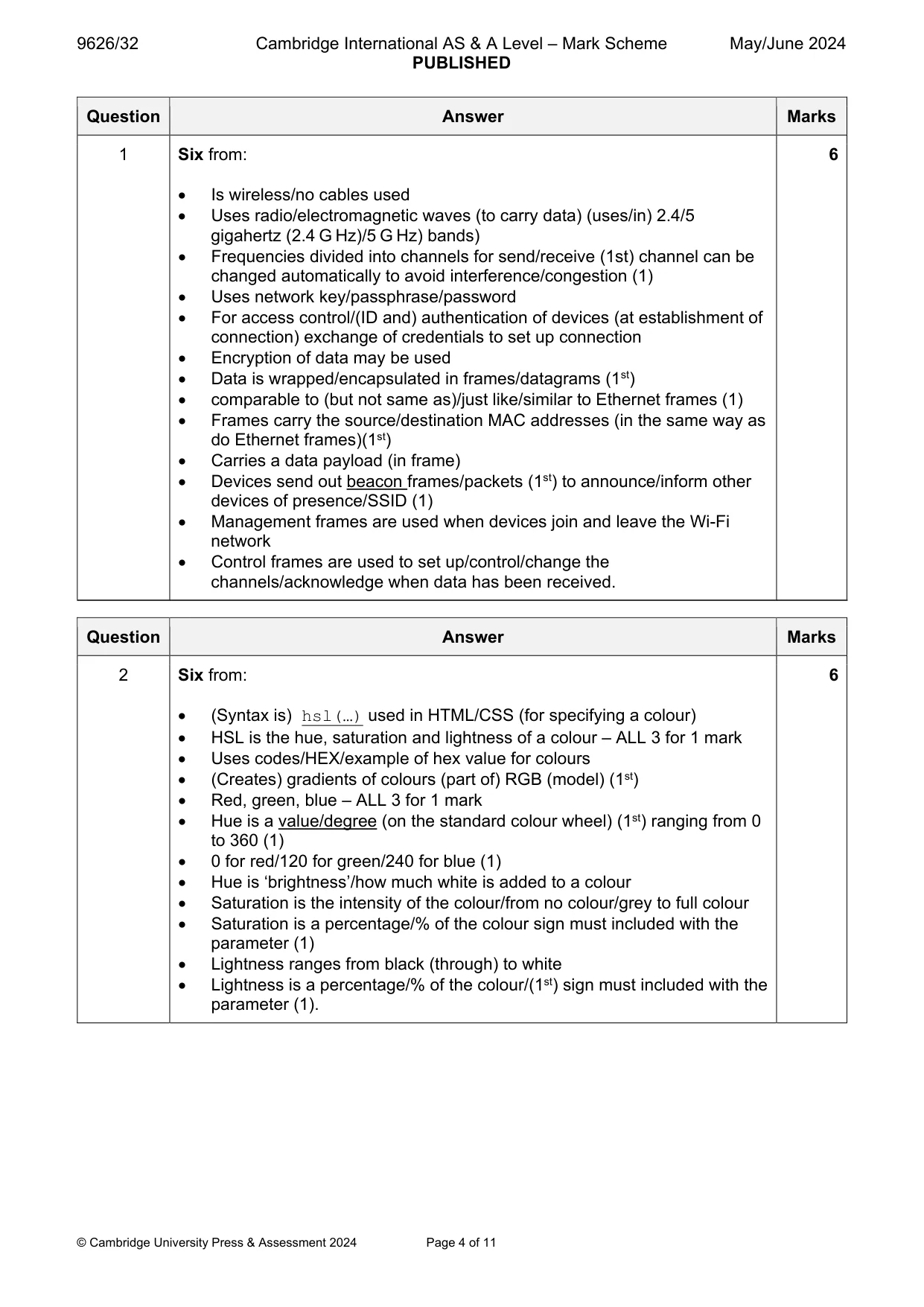
Mark scheme: Question Answer Marks 1 Six from: 6 Is wireless/no cables used Uses radio/electromagnetic waves (to carry data) (uses/in) 2.4/5 gigahertz (2.4 G Hz)/5 G Hz) bands) Frequencies divided into channels for send/receive (1st) channel can be changed automatically to avoid interference/congestion (1) Uses network key/passphrase/password For access control/(ID and) authentication of devices (at establishment of connection) exchange of credentials to set up connection Encryption of data may be used Data is wrapped/encapsulated in frames/datagrams (1st) comparable to (but not same as)/just like/similar to Ethernet frames (1) Frames carry the source/destination MAC addresses (in the same way as do Ethernet frames)(1st) Carries a data payload (in frame) Devices send out beacon frames/packets (1st) to announce/inform other devices of presence/SSID (1) Management frames are used when devices join and leave the Wi-Fi network Control frames are used to set up/control/change the channels/acknowledge when data has been received.
Q2 · Web pages can be made more attractive and easier to read by using colours
2 Web pages can be made more attractive and easier to read by using colours. All major web browsers support the use of HSL to specify the colours used in web pages. Explain how HSL is used to specify colours. .......................................................................................................................................................... .......................................................................................................................................................... .......................................................................................................................................................... .......................................................................................................................................................... .......................................................................................................................................................... .......................................................................................................................................................... .......................................................................................................................................................... .......................................................................................................................................................... .......................................................................................................................................................... .......................................................................................................................................................... .......................................................................................................................................................... .......................................................................................................................................................... .......................................................................................................................................................... .................................................................................................................................................... [6]
Mark scheme: 2 Six from: 6 (Syntax is) hsl(…) used in HTML/CSS (for specifying a colour) HSL is the hue, saturation and lightness of a colour – ALL 3 for 1 mark Uses codes/HEX/example of hex value for colours (Creates) gradients of colours (part of) RGB (model) (1st) Red, green, blue – ALL 3 for 1 mark Hue is a value/degree (on the standard colour wheel) (1st) ranging from 0 to 360 (1) 0 for red/120 for green/240 for blue (1) Hue is ‘brightness’/how much white is added to a colour Saturation is the intensity of the colour/from no colour/grey to full colour Saturation is a percentage/% of the colour sign must included with the parameter (1) Lightness ranges from black (through) to white Lightness is a percentage/% of the colour/(1st) sign must included with the parameter (1).
Q3 · Describe the differences between 2D and 3D computer animation
3 Describe the differences between 2D and 3D computer animation. .......................................................................................................................................................... .......................................................................................................................................................... .......................................................................................................................................................... .......................................................................................................................................................... .......................................................................................................................................................... .......................................................................................................................................................... .......................................................................................................................................................... .......................................................................................................................................................... .......................................................................................................................................................... .......................................................................................................................................................... .......................................................................................................................................................... .......................................................................................................................................................... .......................................................................................................................................................... .................................................................................................................................................... [6]
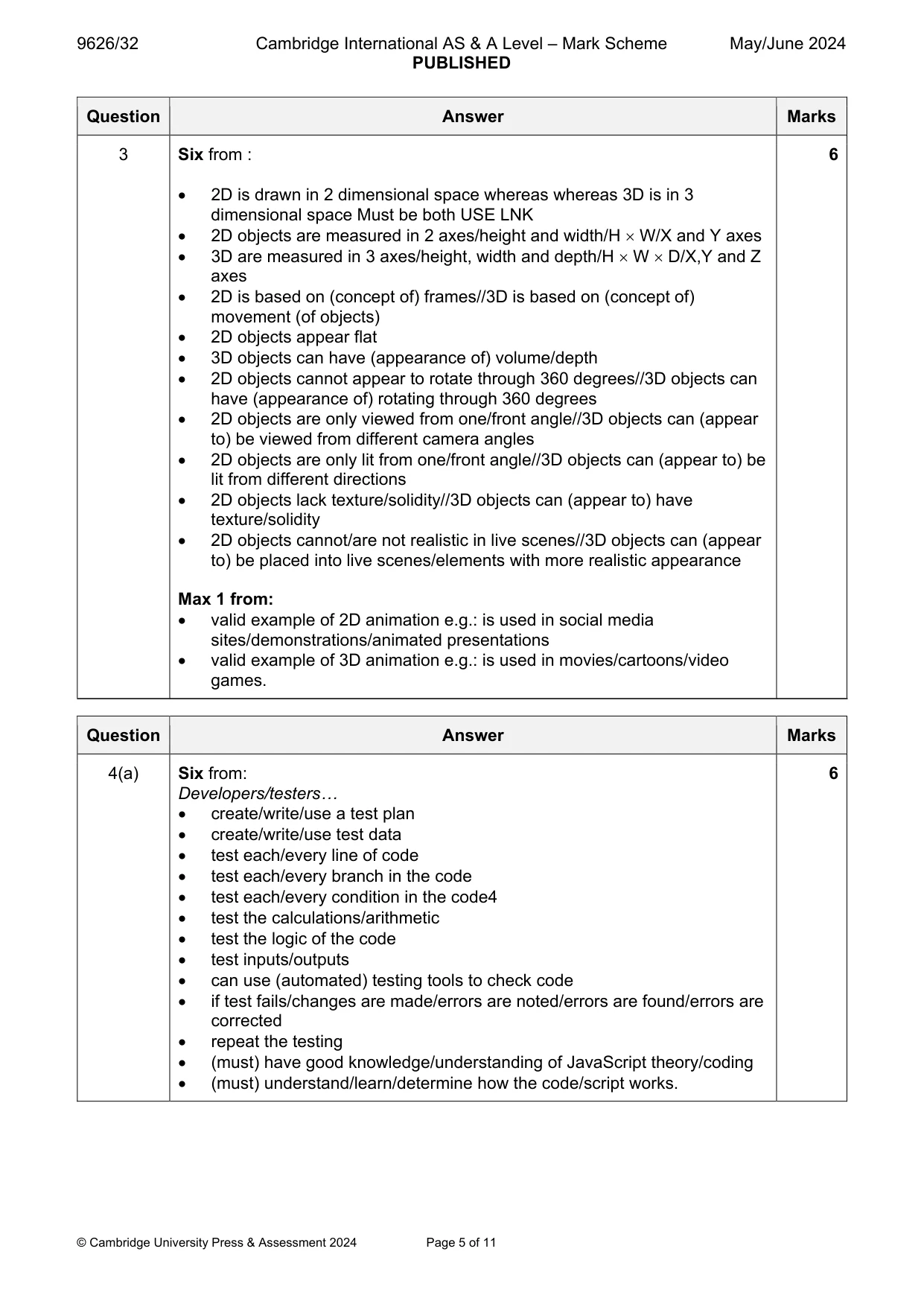
Mark scheme: 3 Six from : 6 2D is drawn in 2 dimensional space whereas whereas 3D is in 3 dimensional space Must be both USE LNK 2D objects are measured in 2 axes/height and width/H W/X and Y axes 3D are measured in 3 axes/height, width and depth/H W D/X,Y and Z axes 2D is based on (concept of) frames//3D is based on (concept of) movement (of objects) 2D objects appear flat 3D objects can have (appearance of) volume/depth 2D objects cannot appear to rotate through 360 degrees//3D objects can have (appearance of) rotating through 360 degrees 2D objects are only viewed from one/front angle//3D objects can (appear to) be viewed from different camera angles 2D objects are only lit from one/front angle//3D objects can (appear to) be lit from different directions 2D objects lack texture/solidity//3D objects can (appear to) have texture/solidity 2D objects cannot/are not realistic in live scenes//3D objects can (appear to) be placed into live scenes/elements with more realistic appearance Max 1 from: valid example of 2D animation e.g.: is used in social media sites/demonstrations/animated presentations valid example of 3D animation e.g.: is used in movies/cartoons/video games.
Q4 · JavaScript code has been developed for an interactive website
4 JavaScript code has been developed for an interactive website. White box testing is carried out by the developers. (a) Describe how white box testing is used to test the code. ................................................................................................................................................... ................................................................................................................................................... ................................................................................................................................................... ................................................................................................................................................... ................................................................................................................................................... ................................................................................................................................................... ................................................................................................................................................... ................................................................................................................................................... ................................................................................................................................................... ................................................................................................................................................... ................................................................................................................................................... ................................................................................................................................................... ................................................................................................................................................... ............................................................................................................................................. [6] (b) Describe one way that JavaScript code can add interactivity to a web page. ................................................................................................................................................... ................................................................................................................................................... ................................................................................................................................................... ............................................................................................................................................. [1] (c) HTML events occur when users interact with a web page. Describe how JavaScript code can be made to react to an HTML event. ................................................................................................................................................... ................................................................................................................................................... ................................................................................................................................................... ................................................................................................................................................... ................................................................................................................................................... ................................................................................................................................................... ................................................................................................................................................... ................................................................................................................................................... ................................................................................................................................................... ................................................................................................................................................... ................................................................................................................................................... ............................................................................................................................................. [5]
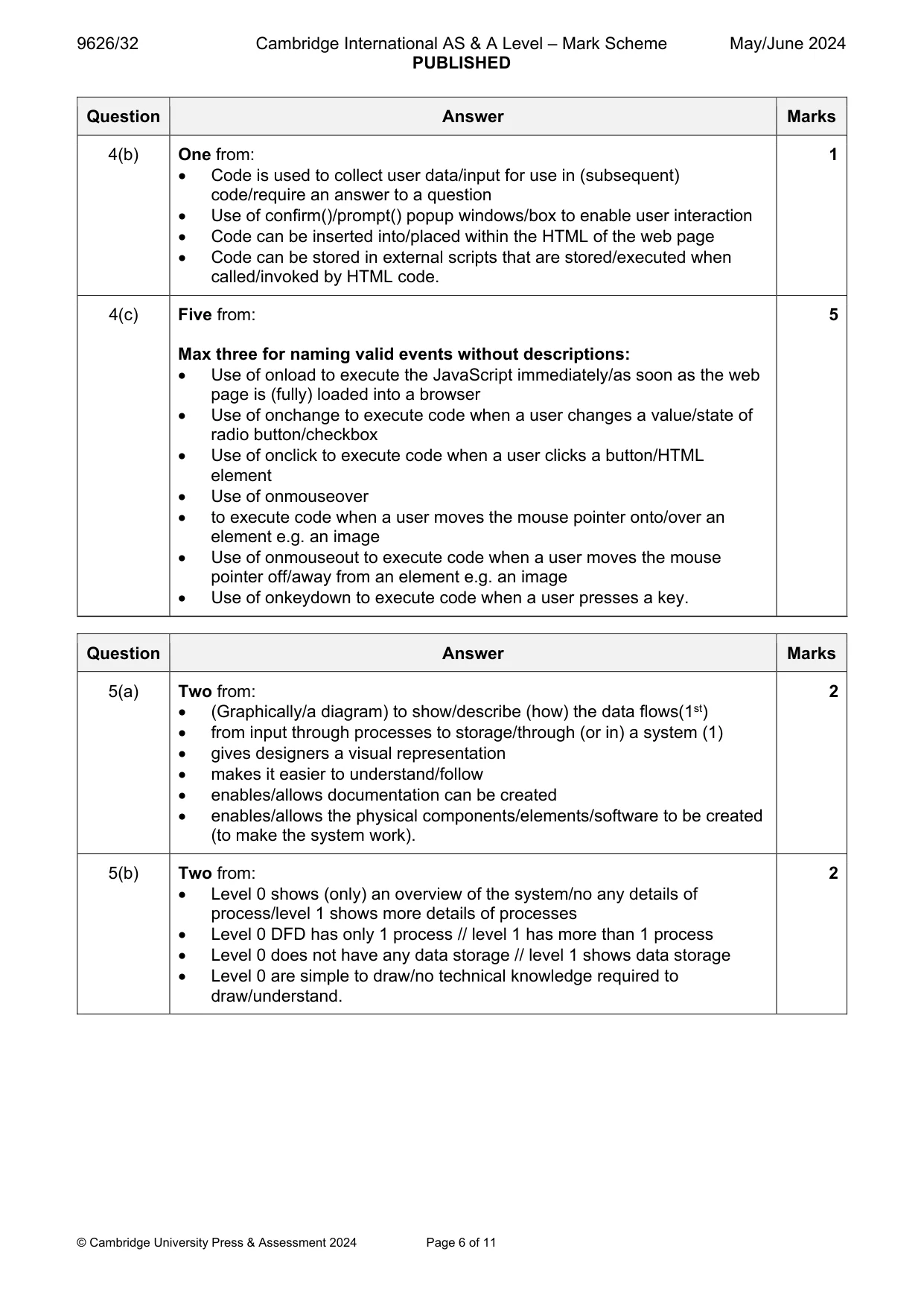
Mark scheme: 4(a) Six from: 6 Developers/testers… create/write/use a test plan create/write/use test data test each/every line of code test each/every branch in the code test each/every condition in the code4 test the calculations/arithmetic test the logic of the code test inputs/outputs can use (automated) testing tools to check code if test fails/changes are made/errors are noted/errors are found/errors are corrected repeat the testing (must) have good knowledge/understanding of JavaScript theory/coding (must) understand/learn/determine how the code/script works. 4(b) One from: 1 Code is used to collect user data/input for use in (subsequent) code/require an answer to a question Use of confirm()/prompt() popup windows/box to enable user interaction Code can be inserted into/placed within the HTML of the web page Code can be stored in external scripts that are stored/executed when called/invoked by HTML code. 4(c) Five from: 5 Max three for naming valid events without descriptions: Use of onload to execute the JavaScript immediately/as soon as the web page is (fully) loaded into a browser Use of onchange to execute code when a user changes a value/state of radio button/checkbox Use of onclick to execute code when a user clicks a button/HTML element Use of onmouseover to execute code when a user moves the mouse pointer onto/over an element e.g. an image Use of onmouseout to execute code when a user moves the mouse pointer off/away from an element e.g. an image Use of onkeydown to execute code when a user presses a key.
Q5 · Data flow diagrams (DFD) are drawn when designing a new computer system
5 Data flow diagrams (DFD) are drawn when designing a new computer system. (a) Explain the purpose of a DFD. ................................................................................................................................................... ................................................................................................................................................... ................................................................................................................................................... ................................................................................................................................................... ................................................................................................................................................... ............................................................................................................................................. [2] (b) When a new computer system is being designed, the designers draw a level 0 (context-level) DFD before drawing a level 1 DFD. Describe two differences between a level 0 DFD and a level 1 DFD. ................................................................................................................................................... ................................................................................................................................................... ................................................................................................................................................... ................................................................................................................................................... ................................................................................................................................................... ............................................................................................................................................. [2]
Mark scheme: 5(a) Two from: 2 (Graphically/a diagram) to show/describe (how) the data flows(1st) from input through processes to storage/through (or in) a system (1) gives designers a visual representation makes it easier to understand/follow enables/allows documentation can be created enables/allows the physical components/elements/software to be created (to make the system work). 5(b) Two from: 2 Level 0 shows (only) an overview of the system/no any details of process/level 1 shows more details of processes Level 0 DFD has only 1 process // level 1 has more than 1 process Level 0 does not have any data storage // level 1 shows data storage Level 0 are simple to draw/no technical knowledge required to draw/understand.
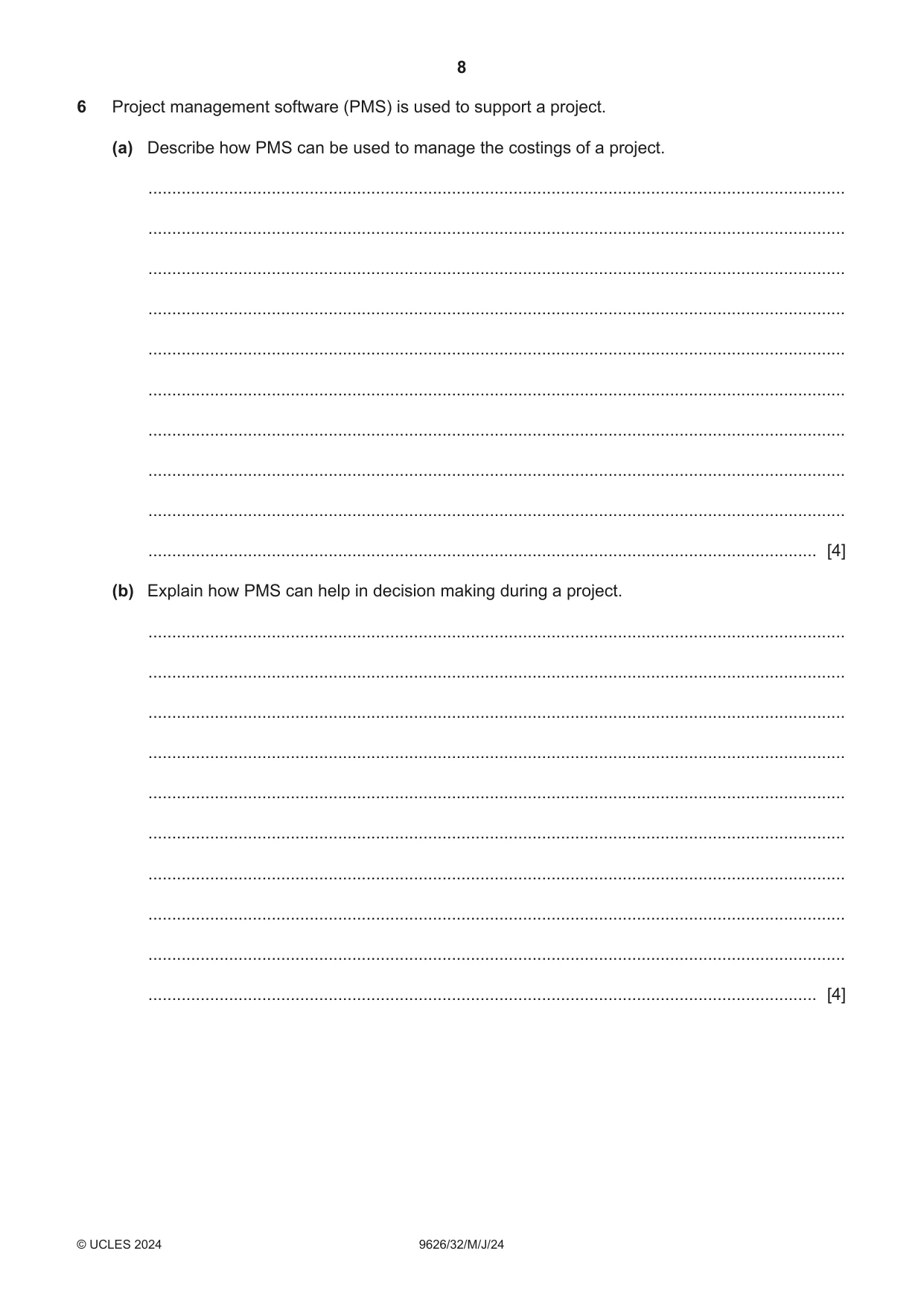
Q6 · Project management software (PMS) is used to support a project
6 Project management software (PMS) is used to support a project. (a) Describe how PMS can be used to manage the costings of a project. ................................................................................................................................................... ................................................................................................................................................... ................................................................................................................................................... ................................................................................................................................................... ................................................................................................................................................... ................................................................................................................................................... ................................................................................................................................................... ................................................................................................................................................... ................................................................................................................................................... ............................................................................................................................................. [4] (b) Explain how PMS can help in decision making during a project. ................................................................................................................................................... ................................................................................................................................................... ................................................................................................................................................... ................................................................................................................................................... ................................................................................................................................................... ................................................................................................................................................... ................................................................................................................................................... ................................................................................................................................................... ................................................................................................................................................... ............................................................................................................................................. [4]
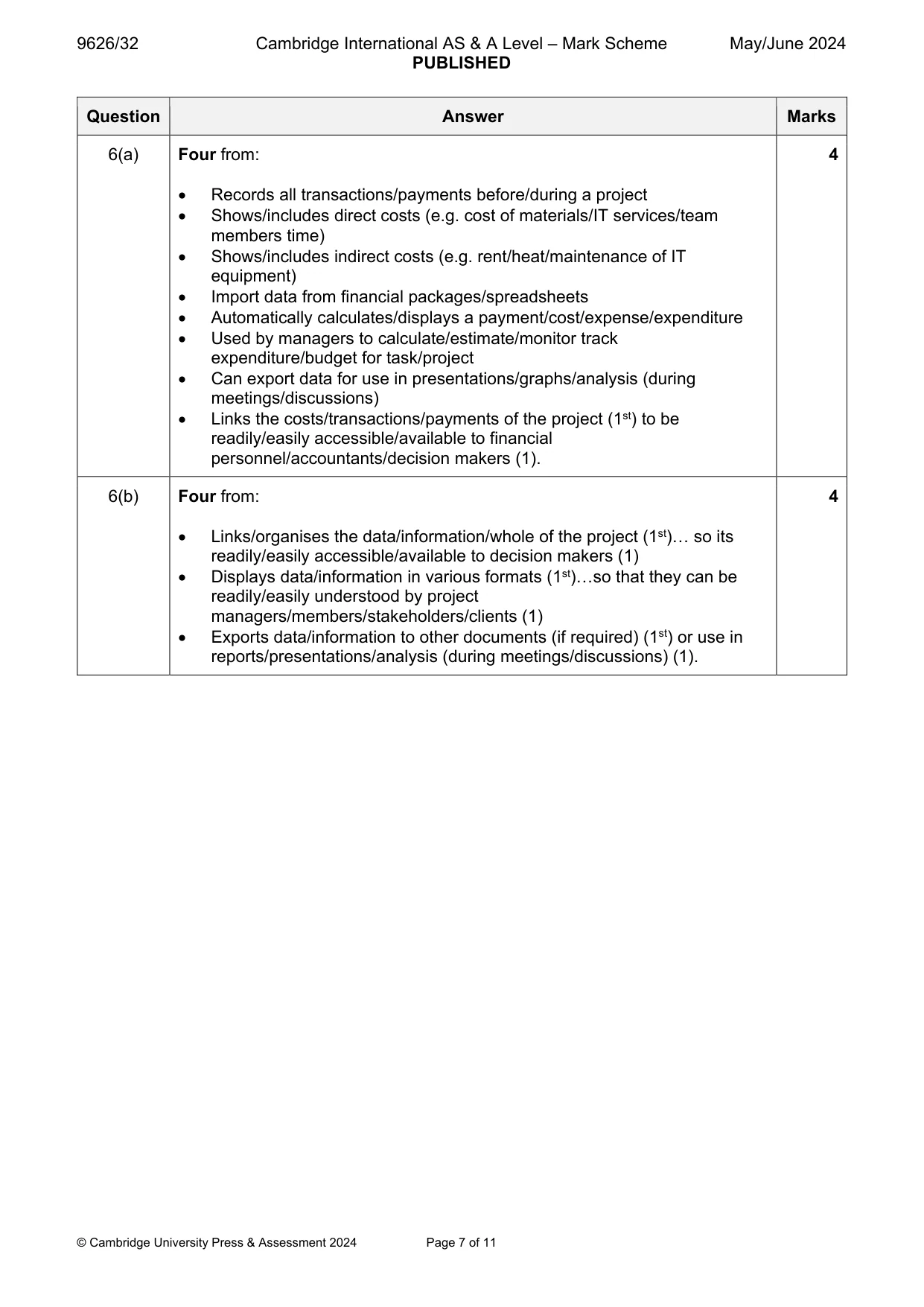
Mark scheme: 6(a) Four from: 4 Records all transactions/payments before/during a project Shows/includes direct costs (e.g. cost of materials/IT services/team members time) Shows/includes indirect costs (e.g. rent/heat/maintenance of IT equipment) Import data from financial packages/spreadsheets Automatically calculates/displays a payment/cost/expense/expenditure Used by managers to calculate/estimate/monitor track expenditure/budget for task/project Can export data for use in presentations/graphs/analysis (during meetings/discussions) Links the costs/transactions/payments of the project (1st) to be readily/easily accessible/available to financial personnel/accountants/decision makers (1). 6(b) Four from: 4 Links/organises the data/information/whole of the project (1st)… so its readily/easily accessible/available to decision makers (1) Displays data/information in various formats (1st)…so that they can be readily/easily understood by project managers/members/stakeholders/clients (1) Exports data/information to other documents (if required) (1st) or use in reports/presentations/analysis (during meetings/discussions) (1).
Q7 · Explain how technology-enhanced learning can have an impact on the autonomy of learners
7 Explain how technology-enhanced learning can have an impact on the autonomy of learners. .......................................................................................................................................................... .......................................................................................................................................................... .......................................................................................................................................................... .......................................................................................................................................................... .......................................................................................................................................................... .......................................................................................................................................................... .......................................................................................................................................................... .......................................................................................................................................................... .......................................................................................................................................................... .......................................................................................................................................................... .......................................................................................................................................................... .......................................................................................................................................................... .......................................................................................................................................................... .................................................................................................................................................... [6]
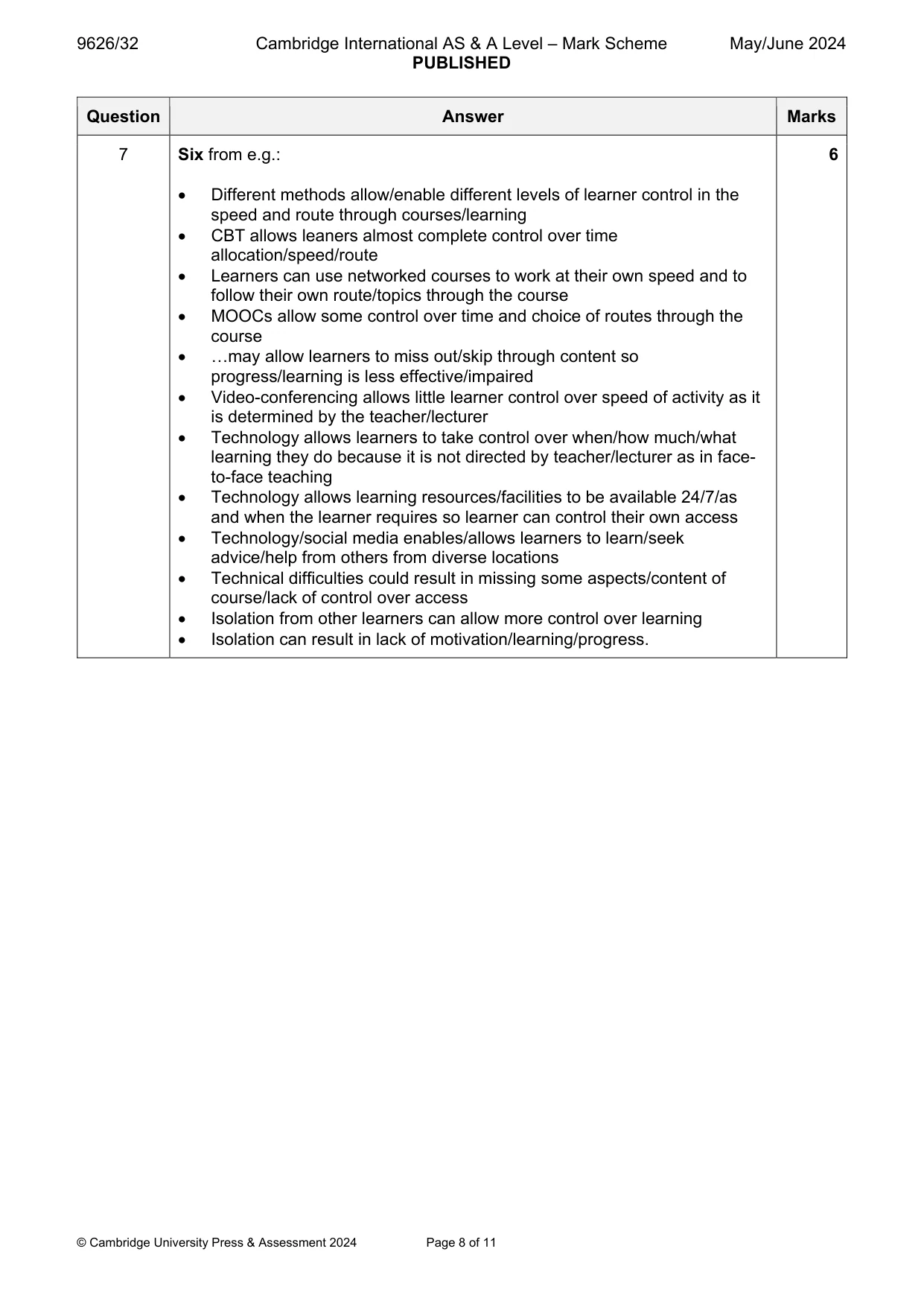
Mark scheme: 7 Six from e.g.: 6 Different methods allow/enable different levels of learner control in the speed and route through courses/learning CBT allows leaners almost complete control over time allocation/speed/route Learners can use networked courses to work at their own speed and to follow their own route/topics through the course MOOCs allow some control over time and choice of routes through the course …may allow learners to miss out/skip through content so progress/learning is less effective/impaired Video-conferencing allows little learner control over speed of activity as it is determined by the teacher/lecturer Technology allows learners to take control over when/how much/what learning they do because it is not directed by teacher/lecturer as in face- to-face teaching Technology allows learning resources/facilities to be available 24/7/as and when the learner requires so learner can control their own access Technology/social media enables/allows learners to learn/seek advice/help from others from diverse locations Technical difficulties could result in missing some aspects/content of course/lack of control over access Isolation from other learners can allow more control over learning Isolation can result in lack of motivation/learning/progress.
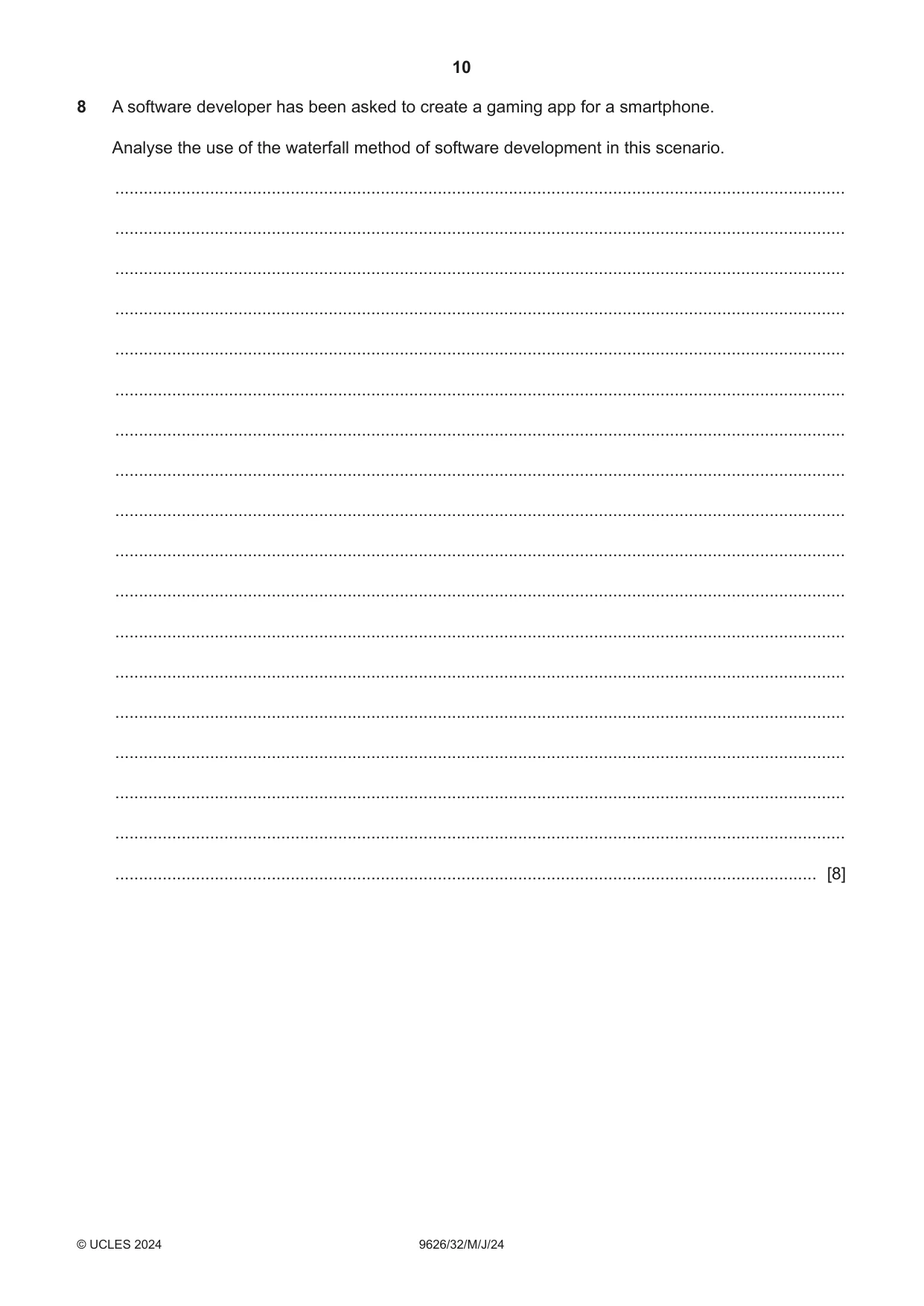
Q8 · A software developer has been asked to create a gaming app for a smartphone
8 A software developer has been asked to create a gaming app for a smartphone. Analyse the use of the waterfall method of software development in this scenario. .......................................................................................................................................................... .......................................................................................................................................................... .......................................................................................................................................................... .......................................................................................................................................................... .......................................................................................................................................................... .......................................................................................................................................................... .......................................................................................................................................................... .......................................................................................................................................................... .......................................................................................................................................................... .......................................................................................................................................................... .......................................................................................................................................................... .......................................................................................................................................................... .......................................................................................................................................................... .......................................................................................................................................................... .......................................................................................................................................................... .......................................................................................................................................................... .......................................................................................................................................................... .................................................................................................................................................... [8]
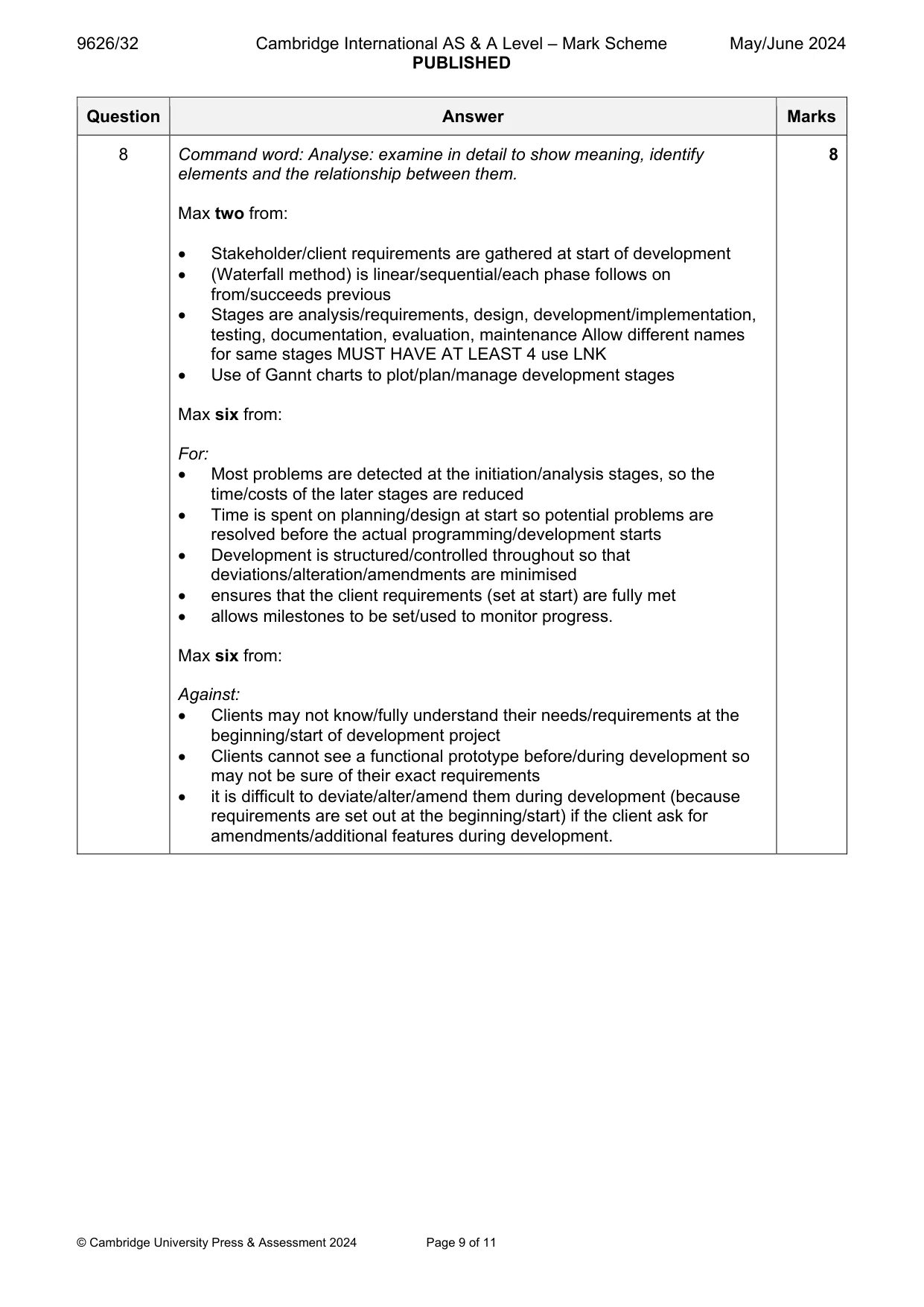
Mark scheme: 8 Command word: Analyse: examine in detail to show meaning, identify 8 elements and the relationship between them. Max two from: Stakeholder/client requirements are gathered at start of development (Waterfall method) is linear/sequential/each phase follows on from/succeeds previous Stages are analysis/requirements, design, development/implementation, testing, documentation, evaluation, maintenance Allow different names for same stages MUST HAVE AT LEAST 4 use LNK Use of Gannt charts to plot/plan/manage development stages Max six from: For: Most problems are detected at the initiation/analysis stages, so the time/costs of the later stages are reduced Time is spent on planning/design at start so potential problems are resolved before the actual programming/development starts Development is structured/controlled throughout so that deviations/alteration/amendments are minimised ensures that the client requirements (set at start) are fully met allows milestones to be set/used to monitor progress. Max six from: Against: Clients may not know/fully understand their needs/requirements at the beginning/start of development project Clients cannot see a functional prototype before/during development so may not be sure of their exact requirements it is difficult to deviate/alter/amend them during development (because requirements are set out at the beginning/start) if the client ask for amendments/additional features during development.
Q9 · A company network has a file server and a print server
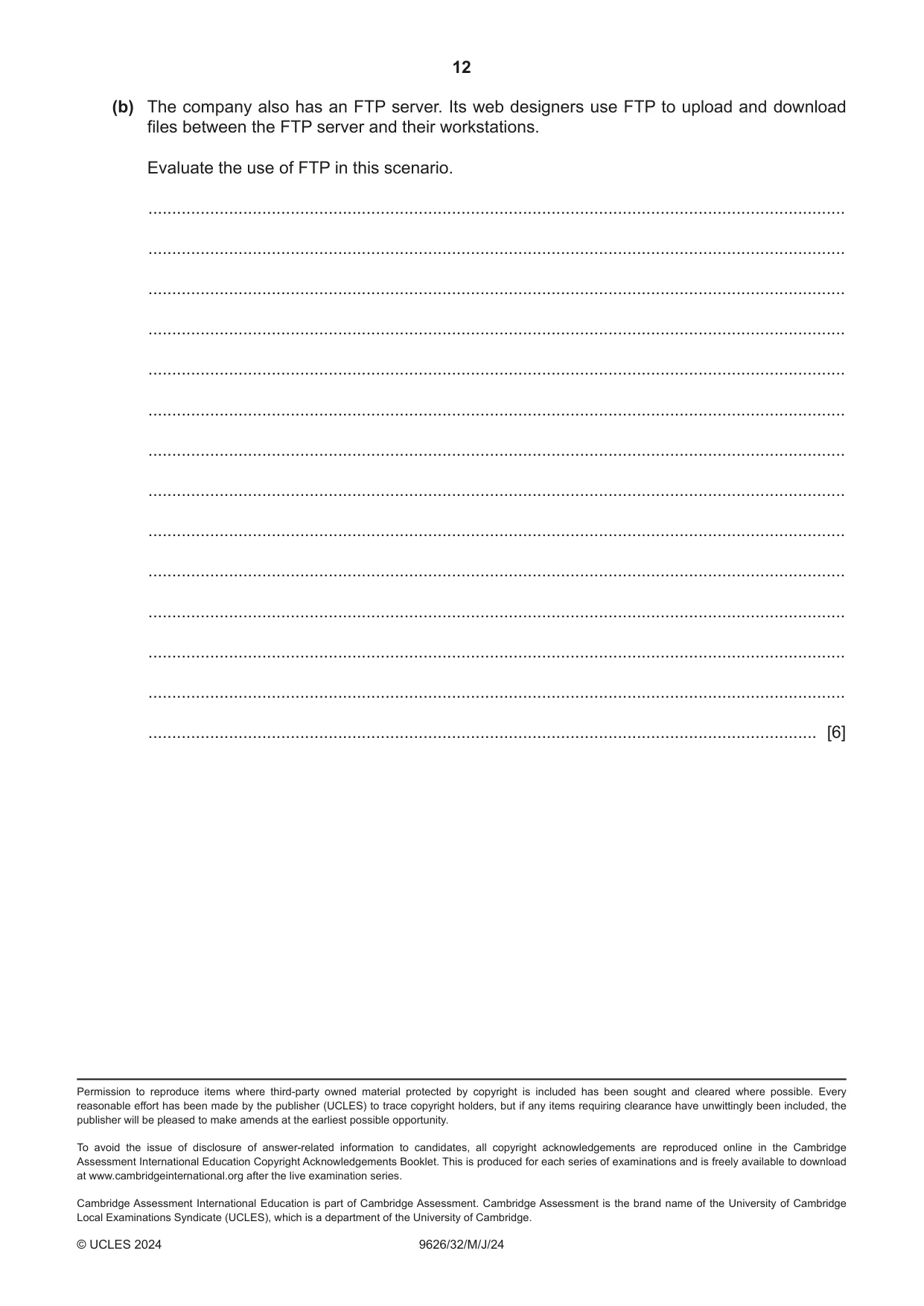
9 A company network has a file server and a print server. Employees store their files on the file server and use the print server when they need hard copies of their work. (a) Discuss the benefits and drawbacks of the use of a print server on company networks. ................................................................................................................................................... ................................................................................................................................................... ................................................................................................................................................... ................................................................................................................................................... ................................................................................................................................................... ................................................................................................................................................... ................................................................................................................................................... ................................................................................................................................................... ................................................................................................................................................... ................................................................................................................................................... ................................................................................................................................................... ................................................................................................................................................... ................................................................................................................................................... ................................................................................................................................................... ................................................................................................................................................... ................................................................................................................................................... ................................................................................................................................................... ............................................................................................................................................. [8] (b) The company also has an FTP server. Its web designers use FTP to upload and download files between the FTP server and their workstations. Evaluate the use of FTP in this scenario. ................................................................................................................................................... ................................................................................................................................................... ................................................................................................................................................... ................................................................................................................................................... ................................................................................................................................................... ................................................................................................................................................... ................................................................................................................................................... ................................................................................................................................................... ................................................................................................................................................... ................................................................................................................................................... ................................................................................................................................................... ................................................................................................................................................... ................................................................................................................................................... ............................................................................................................................................. [6]
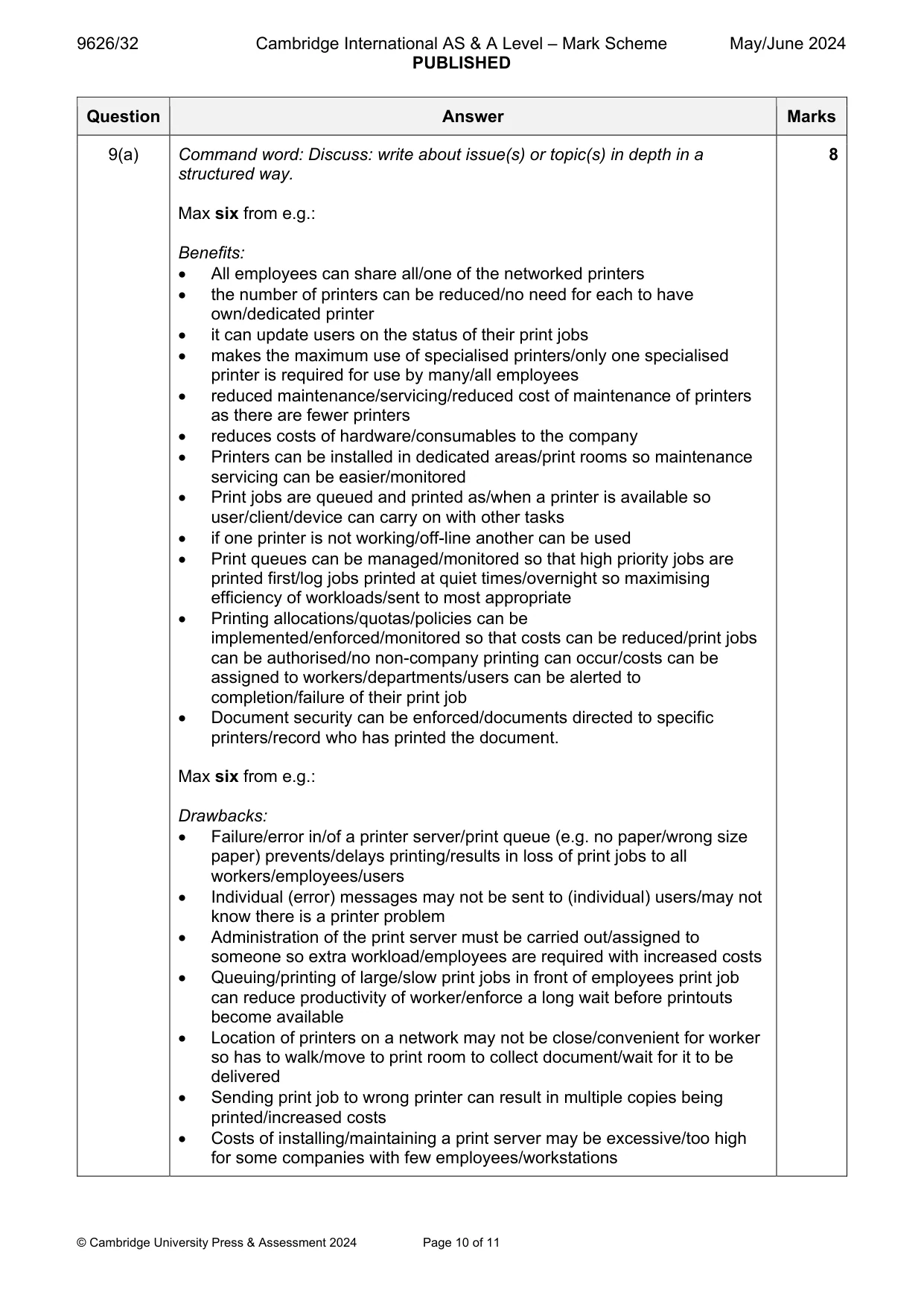
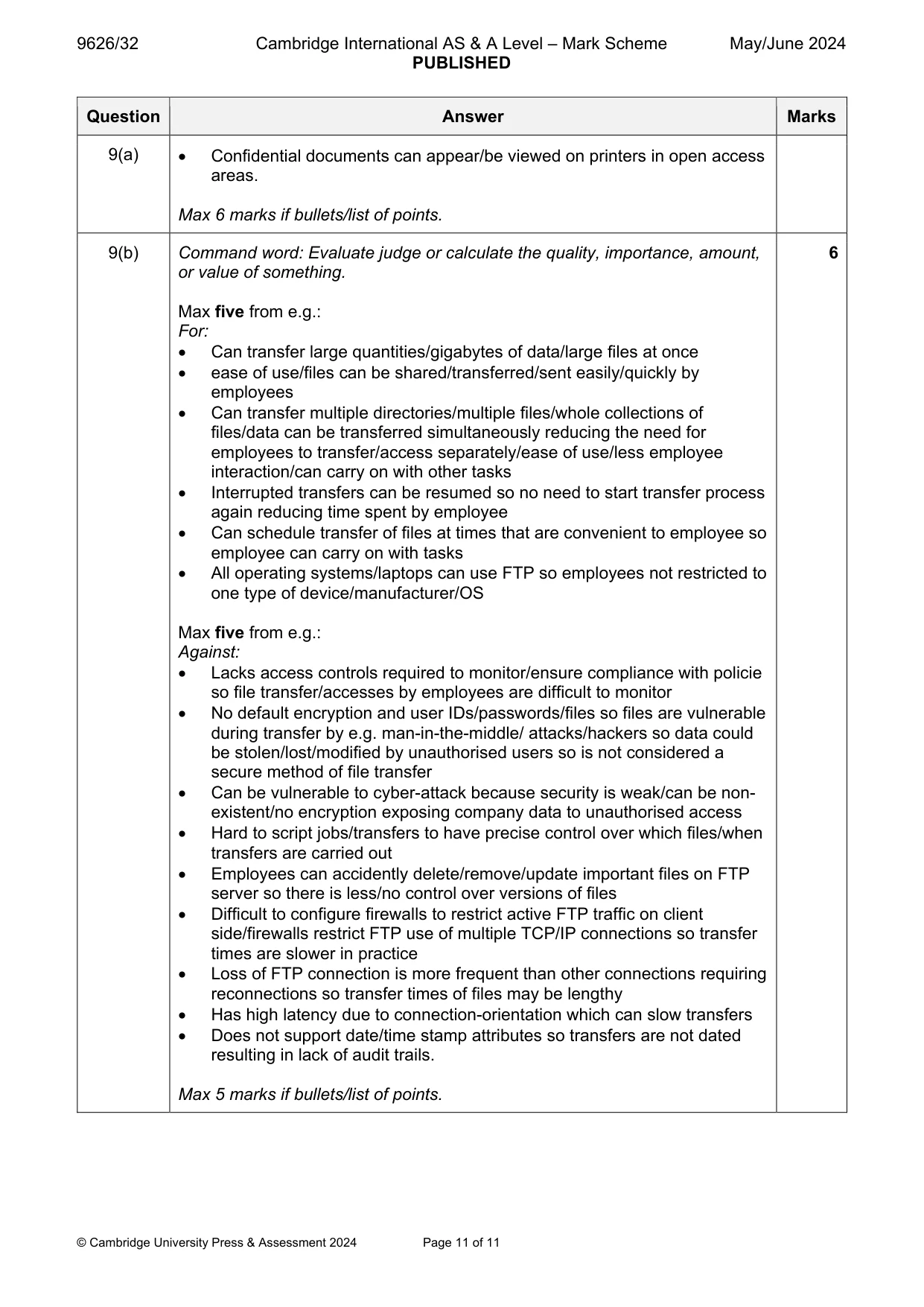
Mark scheme: 9(a) Command word: Discuss: write about issue(s) or topic(s) in depth in a 8 structured way. Max six from e.g.: Benefits: All employees can share all/one of the networked printers the number of printers can be reduced/no need for each to have own/dedicated printer it can update users on the status of their print jobs makes the maximum use of specialised printers/only one specialised printer is required for use by many/all employees reduced maintenance/servicing/reduced cost of maintenance of printers as there are fewer printers reduces costs of hardware/consumables to the company Printers can be installed in dedicated areas/print rooms so maintenance servicing can be easier/monitored Print jobs are queued and printed as/when a printer is available so user/client/device can carry on with other tasks if one printer is not working/off-line another can be used Print queues can be managed/monitored so that high priority jobs are printed first/log jobs printed at quiet times/overnight so maximising efficiency of workloads/sent to most appropriate Printing allocations/quotas/policies can be implemented/enforced/monitored so that costs can be reduced/print jobs can be authorised/no non-company printing can occur/costs can be assigned to workers/departments/users can be alerted to completion/failure of their print job Document security can be enforced/documents directed to specific printers/record who has printed the document. Max six from e.g.: Drawbacks: Failure/error in/of a printer server/print queue (e.g. no paper/wrong size paper) prevents/delays printing/results in loss of print jobs to all workers/employees/users Individual (error) messages may not be sent to (individual) users/may not know there is a printer problem Administration of the print server must be carried out/assigned to someone so extra workload/employees are required with increased costs Queuing/printing of large/slow print jobs in front of employees print job can reduce productivity of worker/enforce a long wait before printouts become available Location of printers on a network may not be close/convenient for worker so has to walk/move to print room to collect document/wait for it to be delivered Sending print job to wrong printer can result in multiple copies being printed/increased costs Costs of installing/maintaining a print server may be excessive/too high for some companies with few employees/workstations 9(a) Confidential documents can appear/be viewed on printers in open access areas. Max 6 marks if bullets/list of points. 9(b) Command word: Evaluate judge or calculate the quality, importance, amount, 6 or value of something. Max five from e.g.: For: Can transfer large quantities/gigabytes of data/large files at once ease of use/files can be shared/transferred/sent easily/quickly by employees Can transfer multiple directories/multiple files/whole collections of files/data can be transferred simultaneously reducing the need for employees to transfer/access separately/ease of use/less employee interaction/can carry on with other tasks Interrupted transfers can be resumed so no need to start transfer process again reducing time spent by employee Can schedule transfer of files at times that are convenient to employee so employee can carry on with tasks All operating systems/laptops can use FTP so employees not restricted to one type of device/manufacturer/OS Max five from e.g.: Against: Lacks access controls required to monitor/ensure compliance with policie so file transfer/accesses by employees are difficult to monitor No default encryption and user IDs/passwords/files so files are vulnerable during transfer by e.g. man-in-the-middle/ attacks/hackers so data could be stolen/lost/modified by unauthorised users so is not considered a secure method of file transfer Can be vulnerable to cyber-attack because security is weak/can be non- existent/no encryption exposing company data to unauthorised access Hard to script jobs/transfers to have precise control over which files/when transfers are carried out Employees can accidently delete/remove/update important files on FTP server so there is less/no control over versions of files Difficult to configure firewalls to restrict active FTP traffic on client side/firewalls restrict FTP use of multiple TCP/IP connections so transfer times are slower in practice Loss of FTP connection is more frequent than other connections requiring reconnections so transfer times of files may be lengthy Has high latency due to connection-orientation which can slow transfers Does not support date/time stamp attributes so transfers are not dated resulting in lack of audit trails. Max 5 marks if bullets/list of points.
What was in this paper
The subtopics covered by these 9 questions, and how many questions each got. Open one in a new tab to see every Cambridge question on it.
What you needed in this session
Cambridge’s own grade thresholds for 2024 May/June, Paper 3 · Variant 2. A higher threshold means an easier paper — the bar moves with how the cohort did.