Questions as text
Q1 · A wide area network uses a number of different protocols 9626/31 May/June 2017
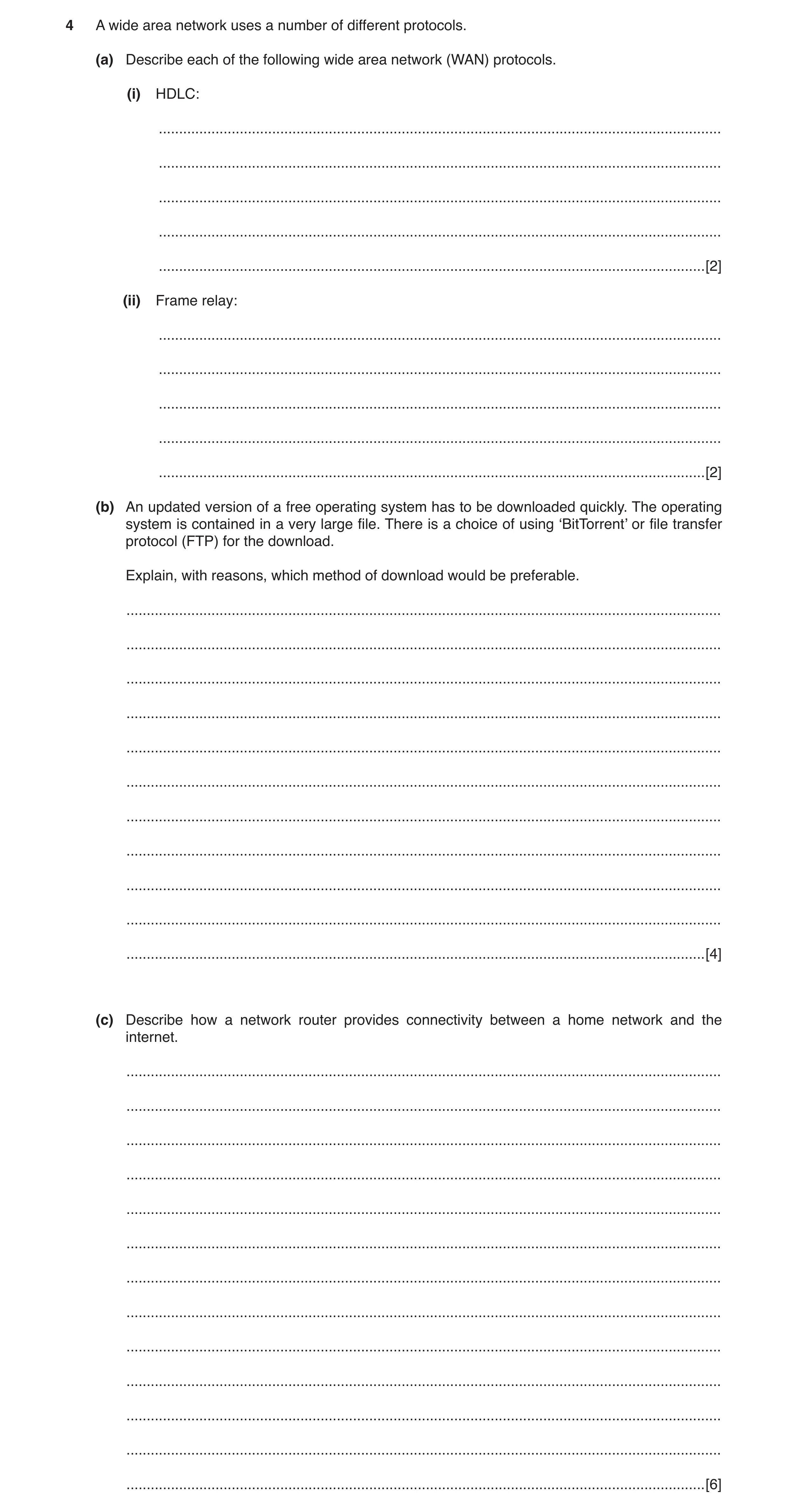
4 A wide area network uses a number of different protocols. (a) Describe each of the following wide area network (WAN) protocols. (i) HDLC: … … … … … [2] (ii) Frame relay: … … … … … [2] (b) An updated version of a free operating system has to be downloaded quickly. The operating system is contained in a very large file. There is a choice of using ‘BitTorrent’ or file transfer protocol (FTP) for the download. Explain, with reasons, which method of download would be preferable. … … … … … … … … … … … [4] (c) Describe how a network router provides connectivity between a home network and the internet. … … … … … … … … … … … … … [6]
14 marks
Mark scheme: 4(a)(i) Two from: 2 (HDLC is): High-Level Data Link Control Layer 2 (data link) protocol Connects point-to-point serial devices/leased lines Uses error correction Routers encapsulate HDLC before putting on LAN. 4(a)(ii) Two from: 2 (Frame relay is): Layer 2 and 3/data link/network layer protocol Puts data into variable-sized packets/frames Does not include error-correction/error corrections is done by devices ...can be unreliable Specifies physical and logical link layers Used in packet switching Used on integrated services digital network (ISDN) Used in permanent virtual circuits (PVC) Can provide QoS ...worth constant bitrate/emulation of circuit switching. 4(b) Four from: 4 If many people want the OS at once bit torrent is resistant to flash-dot/crowds/website overload/dos/FTP is not resistant to flash-dot/crowds/website overload/dos Bit torrents can be paused/stopped and restarted/FTP cannot restart if paused, so if interrupted the download has to be done again Bit torrent makes many small data requests from different IP connections/addresses/FTP is from one IP connection/address so is quicker to download the large OS file Bit torrent downloads file sections randomly/rarest first/ FTP is sequential download of file sections Bit torrent can be slow to get up to full speed/FTP achieves full speed as soon as it starts download and can achieve very high download speeds. 4(c) Six from: 6 Has two or more connections to different networks Router reads address information in the packet header ...to determine destination of packet ...has a routing table/policy ...contains data on all possible routes to groups of addresses ...priorities for connections for handling data packets ...routing tables are dynamic/can be updated ...directs packet to next router if destination address not known ...direct packets to address if destination is known Router updates ‘hop’ count every time it forwards a packet ...when ‘hop’ count limit is reached packet is dropped/discarded ...usually a maximum of 16 hops ...or marked as undeliverable ...so packet does not live forever on network/internet.
This question in 9626/31 May/June 2017
Q2 · A wide area network uses a number of different protocols 9626/33 May/June 2017
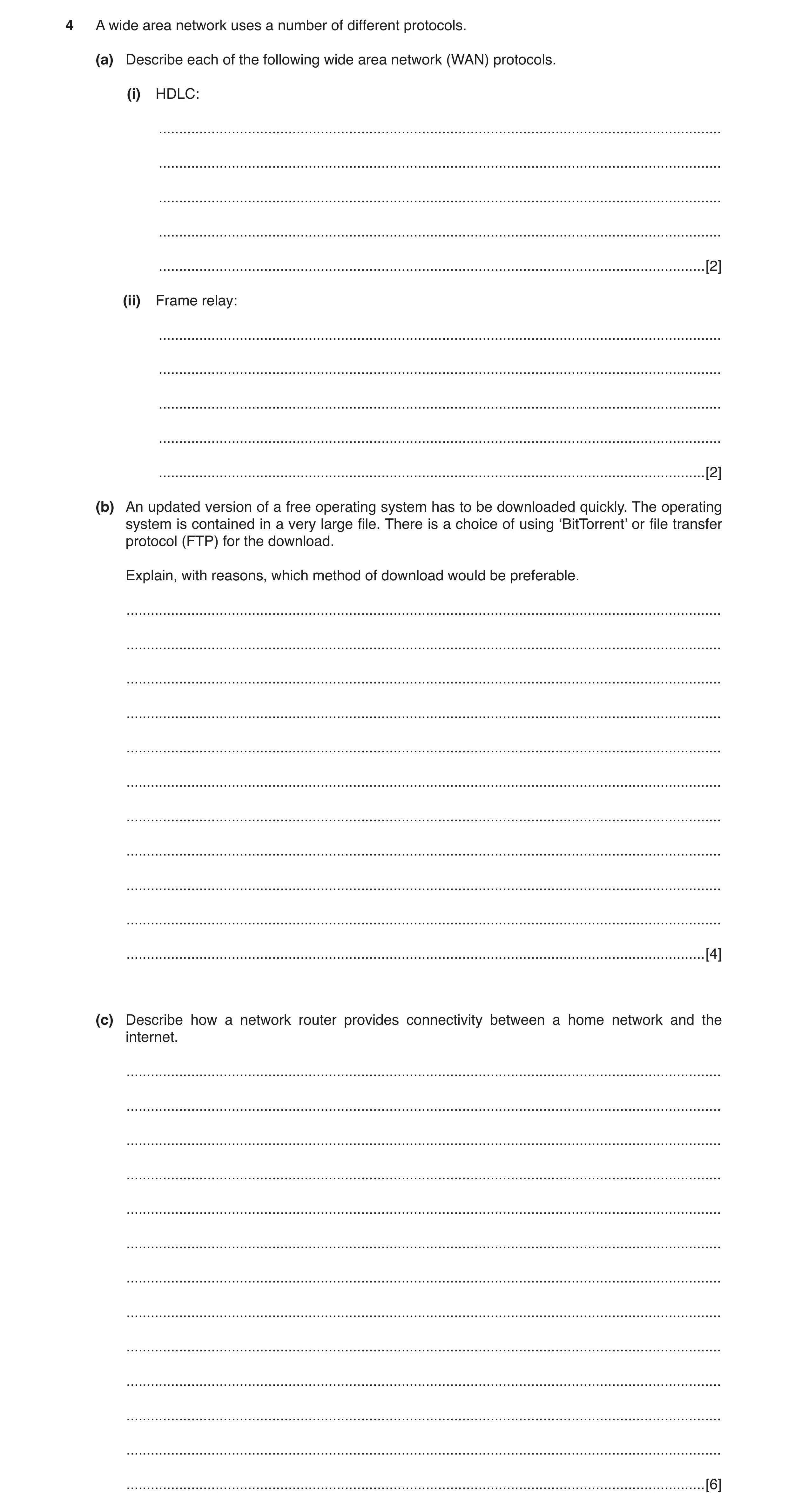
4 A wide area network uses a number of different protocols. (a) Describe each of the following wide area network (WAN) protocols. (i) HDLC: … … … … … [2] (ii) Frame relay: … … … … … [2] (b) An updated version of a free operating system has to be downloaded quickly. The operating system is contained in a very large file. There is a choice of using ‘BitTorrent’ or file transfer protocol (FTP) for the download. Explain, with reasons, which method of download would be preferable. … … … … … … … … … … … [4] (c) Describe how a network router provides connectivity between a home network and the internet. … … … … … … … … … … … … … [6]
14 marks
Mark scheme: 4(a)(i) Two from: 2 (HDLC is): High-Level Data Link Control Layer 2 (data link) protocol Connects point-to-point serial devices/leased lines Uses error correction Routers encapsulate HDLC before putting on LAN. 4(a)(ii) Two from: 2 (Frame relay is): Layer 2 and 3/data link/network layer protocol Puts data into variable-sized packets/frames Does not include error-correction/error corrections is done by devices ...can be unreliable Specifies physical and logical link layers Used in packet switching Used on integrated services digital network (ISDN) Used in permanent virtual circuits (PVC) Can provide QoS ...worth constant bitrate/emulation of circuit switching. 4(b) Four from: 4 If many people want the OS at once bit torrent is resistant to flash-dot/crowds/website overload/dos/FTP is not resistant to flash-dot/crowds/website overload/dos Bit torrents can be paused/stopped and restarted/FTP cannot restart if paused, so if interrupted the download has to be done again Bit torrent makes many small data requests from different IP connections/addresses/FTP is from one IP connection/address so is quicker to download the large OS file Bit torrent downloads file sections randomly/rarest first/ FTP is sequential download of file sections Bit torrent can be slow to get up to full speed/FTP achieves full speed as soon as it starts download and can achieve very high download speeds. 4(c) Six from: 6 Has two or more connections to different networks Router reads address information in the packet header ...to determine destination of packet ...has a routing table/policy ...contains data on all possible routes to groups of addresses ...priorities for connections for handling data packets ...routing tables are dynamic/can be updated ...directs packet to next router if destination address not known ...direct packets to address if destination is known Router updates ‘hop’ count every time it forwards a packet ...when ‘hop’ count limit is reached packet is dropped/discarded ...usually a maximum of 16 hops ...or marked as undeliverable ...so packet does not live forever on network/internet.
This question in 9626/33 May/June 2017
Q3 · There are a number of different types of protocols 9626/32 Feb/March 2018
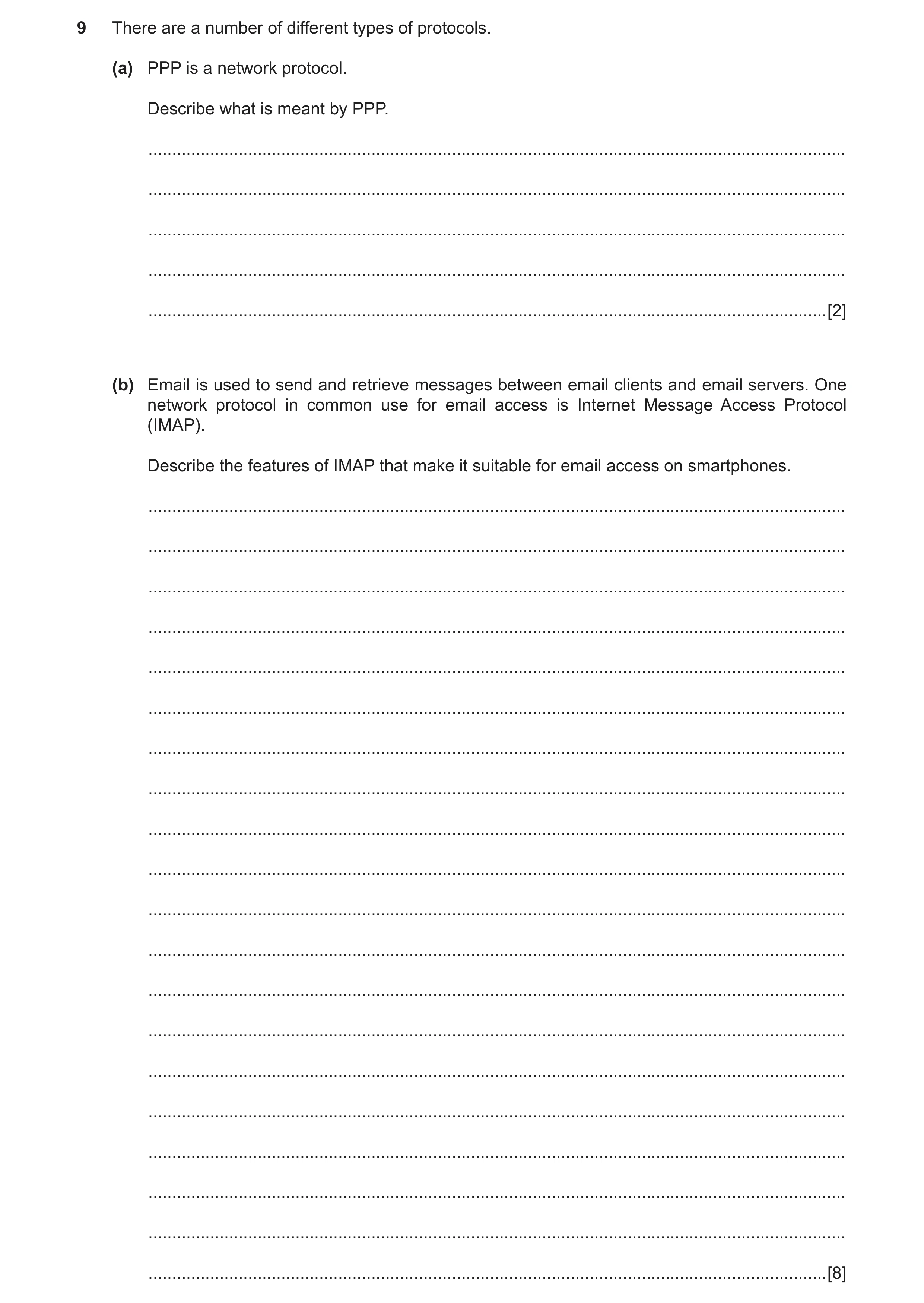
9 There are a number of different types of protocols. (a) PPP is a network protocol. Describe what is meant by PPP. … … … … … [2] (b) Email is used to send and retrieve messages between email clients and email servers. One network protocol in common use for email access is Internet Message Access Protocol (IMAP). Describe the features of IMAP that make it suitable for email access on smartphones. … … … … … … … … … … … … … … … … … … … … [8]
10 marks
Mark scheme: 9(a) Two from: 2 (PPP is) Point to Point Protocol Used in (most) dial-up connections Has link monitoring capability/can log how many errors occur Can maintain multiple links and enable them to function as single link Provides authentication via password authentication protocol (PAP)/challenge-handshake protocol (CHAP) Requires a username/password to allow dial in to network. 9(b) Eight from: 8 Can use multiple email clients simultaneously Allows use of same email system on mobile devices and PCs at same time Changes on one device are reflected on other devices connected at same time Provides multiple mail boxes Can create/use folders/mailboxes on server Can copy messages Email clients stay connected to server Email messages downloaded as and when they arrive at server Provides faster response time to emails to recipient compared to POP3 Allows access to sections of message/partial messages/partial fetch Messages with attachments can be retrieved without downloading the attachment Can stream content as it is being retrieved Message state information available Uses flags stored on server to check whether message has been read/replied to/deleted Can be seen across connected devices Server-side searches can be carried out Email client can search server for email messages using user-defined criteria.
This question in 9626/32 Feb/March 2018
Q4 · Describe three different networking protocols that would be used for data transfer on a… 9626/31 Oct/Nov 2019
2 (a) Describe three different networking protocols that would be used for data transfer on a LAN. … … … … … … … … [3] A company has devices that use WiFi to connect to its LAN. (b) Describe how data is transmitted between a device and a wireless access point. … … … … … … … … … … [4] (c) Some of the company’s devices can connect to other devices using Bluetooth instead of WiFi. Compare and contrast the use of Bluetooth with WiFi for data transfer. … … … … … … … … … … … … … … [6]
13 marks
Mark scheme: 2(a) Three protocols from e.g.: 3 FTP/file transfer protocol for uploading data/files/pages to server HTTP/hypertext transfer protocol for accessing web pages HTTPS/hypertext transfer protocol secure for secure data transfer SMTP/IMAP/POP to send/receive emails TCP/IP for packet transmission SSH for secure access to a server/another workstation SFTP for secure method of uploading data to a server SMB for transferring files to a file server TELNET to connect computers to a switch/router. 2(b) Four from: 4 Uses radio waves in 2.4 GHz/5 Ghz frequency ranges/(900 MHz and 3.6/60 GHz frequency bands) Data frames are modulated onto carrier wave Spread spectrum used for higher power levels Two channels used for full duplex exchange of data/most WiFi is half-duplex WiFi network uses SSID to identify itself Access point and device must be connected to same WiFi network/SSID to be able to exchange data Data is encrypted for security during transmission Devices must use IEEE 802.11 protocols/standards IEEE 802.11 has a number of variants a/b/g/n/ac(/ad/ah/aj/ax/ay/az) (must have 3 to gain this extra mark) 14 channels on 2.4 GHz which are 5 MHz spaced/device uses channels spaced apart to reduce channel interference. 2(c) Candidates may refer to e.g.: 6 Two similarities from: They are both communication systems Both use wireless technology Both have more limited range than cabled networks Both have limited bandwidth compared to cable networks Four differences from: Bluetooth has a shorter range than WiFi Bluetooth is restricted by solid objects/barriers/walls whereas WiFi can penetrate most barriers to some extent Bluetooth has a lower bandwidth than WiFi Bluetooth requires ‘pairing’ of devices whereas WiFi (often/usually) requires a full log in procedure Bluetooth data transfer is ‘one to one’ whereas WiFi facilitates communication between several devices.
This question in 9626/31 Oct/Nov 2019
Q5 · A bank stores details of customer accounts on its computer system 9626/32 Oct/Nov 2019
8 A bank stores details of customer accounts on its computer system. Customers and staff can access the accounts by logging in to the bank’s website. (a) Describe the security methods that could be used to ensure that the person logging in is authorised to do so. … … … … … … … … … … … … … … [6] (b) The bank insists that its staff use a VPN when accessing the accounts from outside the bank’s intranet. Describe the network protocols that could be used by this VPN. … … … … … … … … … … … … … … [6]
12 marks
Mark scheme: 8(a) Six from: 6 Use of user ID with password/PIN known only to user Request random selection of three of the digits of password/PIN Transaction authentication number sent to customer/generated by code machine held by customer or by number on screen/sent to cell phone of customer « ... OTP/TAN is entered after user ID/password/PIN as next level of authentication « ... OTP/TAN checked against list issued to/held by customer Use of one-time password generated by a security token Multi-factor authentication using tokens/sequence of characters Use of security questions/memorable words plus example Use of biometrics such as fingerprint/retinal scan Query use of different devices to log in. 8(b) Six from: 6 IP security (IPsec) encrypting the data in the packet/encrypting entire packet Layer 2 Tunnel Protocol (L2TP) and IPsec where L2TP creates the tunnel while IPsec does the encryption Secure Socket Layer/SSL creates handshake system in conjunction with Transport Layer Security/TLS Point-to-Point Tunnelling Protocol/PPTP to create a tunnel and encapsulate the data packet An additional protocol will handle the encryption, e.g. TCP Secure Shell (SSH) SSH will create the tunnel and carry out the encryption of the tunnel (not the data).
This question in 9626/32 Oct/Nov 2019
Q6 · Describe three different networking protocols that would be used for data transfer on a… 9626/33 Oct/Nov 2019
2 (a) Describe three different networking protocols that would be used for data transfer on a LAN. … … … … … … … … [3] A company has devices that use WiFi to connect to its LAN. (b) Describe how data is transmitted between a device and a wireless access point. … … … … … … … … … … [4] (c) Some of the company’s devices can connect to other devices using Bluetooth instead of WiFi. Compare and contrast the use of Bluetooth with WiFi for data transfer. … … … … … … … … … … … … … … [6]
13 marks
Mark scheme: 2(a) Three protocols from e.g.: 3 FTP/file transfer protocol for uploading data/files/pages to server HTTP/hypertext transfer protocol for accessing web pages HTTPS/hypertext transfer protocol secure for secure data transfer SMTP/IMAP/POP to send/receive emails TCP/IP for packet transmission SSH for secure access to a server/another workstation SFTP for secure method of uploading data to a server SMB for transferring files to a file server TELNET to connect computers to a switch/router. 2(b) Four from: 4 Uses radio waves in 2.4 GHz/5 Ghz frequency ranges/(900 MHz and 3.6/60 GHz frequency bands) Data frames are modulated onto carrier wave Spread spectrum used for higher power levels Two channels used for full duplex exchange of data/most WiFi is half-duplex WiFi network uses SSID to identify itself Access point and device must be connected to same WiFi network/SSID to be able to exchange data Data is encrypted for security during transmission Devices must use IEEE 802.11 protocols/standards IEEE 802.11 has a number of variants a/b/g/n/ac(/ad/ah/aj/ax/ay/az) (must have 3 to gain this extra mark) 14 channels on 2.4 GHz which are 5 MHz spaced/device uses channels spaced apart to reduce channel interference. 2(c) Candidates may refer to e.g.: 6 Two similarities from: They are both communication systems Both use wireless technology Both have more limited range than cabled networks Both have limited bandwidth compared to cable networks Four differences from: Bluetooth has a shorter range than WiFi Bluetooth is restricted by solid objects/barriers/walls whereas WiFi can penetrate most barriers to some extent Bluetooth has a lower bandwidth than WiFi Bluetooth requires ‘pairing’ of devices whereas WiFi (often/usually) requires a full log in procedure Bluetooth data transfer is ‘one to one’ whereas WiFi facilitates communication between several devices.
This question in 9626/33 Oct/Nov 2019
Q7 · LANs and WANs use protocols to send, receive and route data across networks 9626/33 Oct/Nov 2020
1 LANs and WANs use protocols to send, receive and route data across networks. Describe, in detail, each of the following protocols. (a) Dynamic Host Configuration Protocol (DHCP) … … … … … [2] (b) BitTorrent … … … … … [2] (c) User Datagram Protocol (UDP) … … … … … [2] (d) Transmission Control Protocol (TCP) … … … … … [2]
8 marks
Mark scheme: Question Answer Marks 1(a) Two from: 2 Is a network management protocol Automatically assigns a network configuration to a device Automatically assigns an IP address Automatically assigns a gateway address Automatically assigns a subnet mask Creates/stores a database to avoid addressing conflicts. 1(b) Two from: 2 Provides peer-to-peer file sharing Provides web seeding to allow use of HTTP sources Can provide (automatic) RSS feeds via ‘broadcatching’ (for content distribution) Used by social media/microblogs to distribute updates to servers Used to stream videos Used to transfer large files using minimum bandwidth. 1(c) Two from: 2 Sends messages/data (in datagrams) using Internet Protocol/IP Provides checksums/port numbers for source/destination (of datagram) Connectionless communication No reporting to sender of lost/damaged packets Used when delivery of datagrams is not important to the service Avoids overheads of processing of error checking/delivery status No handshaking No guarantee of delivery/order of datagrams No error checking. 1(d) Two from: 2 Sends messages/data (in datagrams) using Internet Protocol/IP Provides checksums/port numbers for source/destination (of datagram) Connection-oriented communication/point to point Reporting to sender of lost/damaged packets Establishes how data is transferred over network Manages flow control Handshaking is carried out to establish connection. Used when delivery of datagrams is important Error checking.
This question in 9626/33 Oct/Nov 2020
Q8 · Three interconnected networks (numbered 1 to 3) that use internet protocol (IP) and… 9626/32 Feb/March 2021
1 Fig. 1.1 shows three interconnected networks (numbered 1 to 3) that use internet protocol (IP) and packet switching when transmitting files. Network 1 has a server that is used for video streaming. Network 2 has servers that provide a company with a website used for selling DVDs online. Network 3 is a network in a home. There are routers on the internet that can be used to connect the networks. A user on the home network is watching a video that is being streamed from the server on network 1. At the same time a shopper on the home network is using a web browser to access the company website on network 2 to buy some DVDs online. Routers on internet Router C Router A Router F Router B Router D Video Website on streaming server on server on Network 2 Network 1 Router E Laptop used for Computer used watching streamed for online shopping video Home network Network 3 Fig. 1.1 (a) Describe how the video stream is transferred from the server on network 1 to the user on network 3. … … … … … … … … … … … … … … [6] (b) The viewing experience can sometimes be spoiled by the online shopping affecting the video streaming. Describe how router E on the home network can be configured to ensure that this does not happen. … … … … … … [2] (c) Explain why HTTPS is used for communication between the shopper’s web browser and the company website. … … … … … … … … … … … … … … [6]
14 marks
Mark scheme: Question Answer Marks 1(a) Six from: 6 The home computer requests/initiates the stream NIC on server determines destination address for file Video file is converted into (IP) packets by NIC on server NIC on server constructs and sends packets from server/use of packet switching IP packets contain details of destination address/destination IP address Packets are sent from network 1 to router A Router A compares packet (IP) destination IP with routing table(s) Router A chooses appropriate/best next router to send packets based on contents of routing table(s) Applies (any) quality of service (QoS) rules to prioritise the packets (of the streamed video) Sends packet(s) to next router(s) Next router(s) carry out same tasks as router A to pass packets through the networks Router E receives packets from the internet routers ….and transfers/passes them to internal/home/user network/to laptop viewing video Dynamic routing tables of routers may be set up/updated to ensure QoS for streaming. 1(b) Two from: 2 Use router’s quality of service/QoS configuration to prioritise the video stream Use (the router’s) traffic shaping configuration to prioritise the video stream Set up/configure specific ports for the video service/application to use ‘Intelligent’ QoS will prioritise in pre-determined order: voice, video, application traffic, print services/file downloads 1(c) Six from: 6 Extension of HTTP to provide secure communications/Hyper Text Transfer Protocol Secure Encrypts using Transport Layer Security (TLS)/Secure Sockets Layer (SSL) Protects/ensures the integrity of data sent to/from website over internet/through the networks Operates at application layer to encrypt/decrypt using TLS Authenticates website using a (public key) certificate Controls access by restricting access to the site to authorised users Protects the privacy of data sent to/from website over internet/through the networks Protects against man-in-the-middle attacks/eavesdropping on the data Protects against alteration/modification of websites Protects against insertion of malware/malicious code into website code.
This question in 9626/32 Feb/March 2021
Q9 · Packet switching is one way of transmitting data between computers in networks 9626/31 Oct/Nov 2022
2 Packet switching is one way of transmitting data between computers in networks. The User Datagram Protocol (UDP) is a protocol used when creating data packets to send to other computers on the network. (a) Explain how the contents of the header are used when sending a data packet using UDP. … … … … … … … … … … … … … [6] (b) Describe the drawbacks of using UDP to send data over a network. … … … … … … … … … [3]
9 marks
Mark scheme: 2(a) Six from: 6 Four fields of 2 bytes/16 bits each to hold data about addressing and about the payload data Source port number field used to reply if needed/set to zero if not used/not required Destination port field used to specify receiver address/port number Destination port field is mandatory/always required for delivery purposes (Total) length of packet/header plus data field in bytes used in error checking Length is minimum length of 8 bytes/length of header Checksum field containing results of calculation to check for errors Checksum value is optional in IPv4 but mandatory in IPv6;/set to zero if no value calculated. 2(b) Three from: 3 UDP does not provide acknowledgement of the receipt of a packet so it is deemed unreliable as packets may be lost UDP does provide for ordering of packets so there is no tracking of messages UDP does not provide congestion control so these have to be separately carried out/at application level Recipient must provide mechanisms to address lack of handshake/ordering/duplication of data/messages which increases complexity/overheads.
This question in 9626/31 Oct/Nov 2022
Q10 · Explain how an FTP server carries out its role in a computer network 9626/32 Oct/Nov 2022
3 Explain how an FTP server carries out its role in a computer network. … … … … … … … … … … … … … [6]
6 marks
Mark scheme: 3 Six from: 6 Uses file transfer protocol to transfer data across a network between client and server File transfer protocol site/FTP addresses begin with ftp:// to indicate protocol required for transfer/announce their presence/only respond to requests using this protocol Server listens for USER and PASS commands/for username and password from client Server uses control connection on port 21 Active mode uses port 21 for data connection with client Passive mode is used if client is behind firewall/unable to receive incoming TCP connections Passive mode sets up different/arbitrary port for client server data connections USER/PASS are not encrypted/is clear text unless STPS/FTPS (on port 22) is used Server sends acknowledgement to client if credentials accepted and session is opened Anonymous access can be used for downloads from server but not uploads of files Server allows checkpoint/restart support so downloads can be resumed if interrupted.
This question in 9626/32 Oct/Nov 2022
Q11 · Packet switching is one way of transmitting data between computers in networks 9626/33 Oct/Nov 2022
2 Packet switching is one way of transmitting data between computers in networks. The User Datagram Protocol (UDP) is a protocol used when creating data packets to send to other computers on the network. (a) Explain how the contents of the header are used when sending a data packet using UDP. … … … … … … … … … … … … … [6] (b) Describe the drawbacks of using UDP to send data over a network. … … … … … … … … … [3]
9 marks
Mark scheme: 2(a) Six from: 6 Four fields of 2 bytes/16 bits each to hold data about addressing and about the payload data Source port number field used to reply if needed/set to zero if not used/not required Destination port field used to specify receiver address/port number Destination port field is mandatory/always required for delivery purposes (Total) length of packet/header plus data field in bytes used in error checking Length is minimum length of 8 bytes/length of header Checksum field containing results of calculation to check for errors Checksum value is optional in IPv4 but mandatory in IPv6;/set to zero if no value calculated. 2(b) Three from: 3 UDP does not provide acknowledgement of the receipt of a packet so it is deemed unreliable as packets may be lost UDP does provide for ordering of packets so there is no tracking of messages UDP does not provide congestion control so these have to be separately carried out/at application level Recipient must provide mechanisms to address lack of handshake/ordering/duplication of data/messages which increases complexity/overheads.
This question in 9626/33 Oct/Nov 2022
Q12 · When data is transmitted across networks it needs to be protected from interception and… 9626/32 May/June 2023
3 When data is transmitted across networks it needs to be protected from interception and eavesdropping. (a) Explain how each of these network security protocols operates. (i) Secure Shell (SSH) … … … … … … [2] (ii) Internet Protocol Security (IPsec) … … … … … … [2] (b) Explain why the use of Telnet for remote login may put data at risk. … … … … … … [2]
6 marks
Mark scheme: 3(a)(i) Two from: 2 Encryption of data (is (end-to-end) between application/software/apps) Creates a (secure) link Uses client server model Connects application/program/app/terminal with a (remote) server Works at application layer of TCP/IP/OSI protocol suites (Uses authentication with) automatically created (private/public) keys (to provide encryption of data) (Provides encryption) so that observer/interceptor cannot understand/not make sense of the data. 3(a)(ii) Two from: 2 Exchange of keys at start of session/digital certificates are used for authentication/pre-shared keys (to be used) are negotiated/established at start of session All data (that is exchanged) during session is encrypted using the agreed keys Different sets of keys are used (for data encryption) for different sessions Can support (both) pre-shared key/private and public key encryption of data so that the data is not understandable without the keys Works at Internet layer of protocol suites/stacks so encryption is at device level/supports VPNs. 3(b) Two from: 2 Data/login details is/are not encrypted by default/automatically Data is in plain text so analysing/capturing network traffic by eavesdroppers/interceptors/unauthorised viewers can allow them to understand the data Connections are not authenticated Anyone/unauthorised users/devices may connect/create links/connections without being challenged/alerts generated Unauthorised connections may be used to gather information/data/passwords and these can be used access confidential/personal/financial data/all data (Anyone who knows the login details) can be used to change configuration/rules/allow access to prohibited areas by intruders/unauthorised users.
This question in 9626/32 May/June 2023
Q13 · The OSI and the TCP/IP reference models are used to describe communications in networks 9626/32 May/June 2023
6 The OSI and the TCP/IP reference models are used to describe communications in networks. (a) Describe three similarities between these models. … … … … … … … … [3] (b) Describe three differences between these models. … … … … … … … … [3]
6 marks
Mark scheme: 6(a) Three from: 3 Use a logical framework for defining/implementing network standards Use a layered structure/architecture to describe/standardise the functions of protocols Each layer only defines/describes a specific/set of function/only that function Complex functionality is divided into simpler sections for easier understanding of network functionality Existing standards are referenced by layers/functions of layers Define standards/functionalities that allow manufacturers to create/produce devices/components that work with other manufacturers products. 6(b) Three from: 3 OSI model has seven layers whereas TCP/IP model has four/five layers/more layers in OSI model than in TCP/IP model OSI functionality at application level has three separate layers to cover/include TCP/IP’s one/single application layer application layer/application layer in TCP/IP is application+presentation+session layer of OSI model OSI has separate physical and data link layers whereas TCP/IP originally combined these into one layer/Link layer OSI network layer provides for both connection-oriented and connectionless links whereas TCP/IP network layer provides only for connectionless OSI Transport layer provides only connection-oriented link whereas TCP/IP Transport layers provides for both connection-oriented and connectionless links OSI Transport layer provides for a guarantee of the delivery of packets whereas TCP/IP Transport layer does not.
This question in 9626/32 May/June 2023
Q14 · A company network has a file server and a print server 9626/32 May/June 2024
9 A company network has a file server and a print server. Employees store their files on the file server and use the print server when they need hard copies of their work. (a) Discuss the benefits and drawbacks of the use of a print server on company networks. … … … … … … … … … … … … … … … … … … [8] (b) The company also has an FTP server. Its web designers use FTP to upload and download files between the FTP server and their workstations. Evaluate the use of FTP in this scenario. … … … … … … … … … … … … … … [6]
14 marks
Mark scheme: 9(a) Command word: Discuss: write about issue(s) or topic(s) in depth in a 8 structured way. Max six from e.g.: Benefits: All employees can share all/one of the networked printers the number of printers can be reduced/no need for each to have own/dedicated printer it can update users on the status of their print jobs makes the maximum use of specialised printers/only one specialised printer is required for use by many/all employees reduced maintenance/servicing/reduced cost of maintenance of printers as there are fewer printers reduces costs of hardware/consumables to the company Printers can be installed in dedicated areas/print rooms so maintenance servicing can be easier/monitored Print jobs are queued and printed as/when a printer is available so user/client/device can carry on with other tasks if one printer is not working/off-line another can be used Print queues can be managed/monitored so that high priority jobs are printed first/log jobs printed at quiet times/overnight so maximising efficiency of workloads/sent to most appropriate Printing allocations/quotas/policies can be implemented/enforced/monitored so that costs can be reduced/print jobs can be authorised/no non-company printing can occur/costs can be assigned to workers/departments/users can be alerted to completion/failure of their print job Document security can be enforced/documents directed to specific printers/record who has printed the document. Max six from e.g.: Drawbacks: Failure/error in/of a printer server/print queue (e.g. no paper/wrong size paper) prevents/delays printing/results in loss of print jobs to all workers/employees/users Individual (error) messages may not be sent to (individual) users/may not know there is a printer problem Administration of the print server must be carried out/assigned to someone so extra workload/employees are required with increased costs Queuing/printing of large/slow print jobs in front of employees print job can reduce productivity of worker/enforce a long wait before printouts become available Location of printers on a network may not be close/convenient for worker so has to walk/move to print room to collect document/wait for it to be delivered Sending print job to wrong printer can result in multiple copies being printed/increased costs Costs of installing/maintaining a print server may be excessive/too high for some companies with few employees/workstations 9(a) Confidential documents can appear/be viewed on printers in open access areas. Max 6 marks if bullets/list of points. 9(b) Command word: Evaluate judge or calculate the quality, importance, amount, 6 or value of something. Max five from e.g.: For: Can transfer large quantities/gigabytes of data/large files at once ease of use/files can be shared/transferred/sent easily/quickly by employees Can transfer multiple directories/multiple files/whole collections of files/data can be transferred simultaneously reducing the need for employees to transfer/access separately/ease of use/less employee interaction/can carry on with other tasks Interrupted transfers can be resumed so no need to start transfer process again reducing time spent by employee Can schedule transfer of files at times that are convenient to employee so employee can carry on with tasks All operating systems/laptops can use FTP so employees not restricted to one type of device/manufacturer/OS Max five from e.g.: Against: Lacks access controls required to monitor/ensure compliance with policie so file transfer/accesses by employees are difficult to monitor No default encryption and user IDs/passwords/files so files are vulnerable during transfer by e.g. man-in-the-middle/ attacks/hackers so data could be stolen/lost/modified by unauthorised users so is not considered a secure method of file transfer Can be vulnerable to cyber-attack because security is weak/can be non- existent/no encryption exposing company data to unauthorised access Hard to script jobs/transfers to have precise control over which files/when transfers are carried out Employees can accidently delete/remove/update important files on FTP server so there is less/no control over versions of files Difficult to configure firewalls to restrict active FTP traffic on client side/firewalls restrict FTP use of multiple TCP/IP connections so transfer times are slower in practice Loss of FTP connection is more frequent than other connections requiring reconnections so transfer times of files may be lengthy Has high latency due to connection-orientation which can slow transfers Does not support date/time stamp attributes so transfers are not dated resulting in lack of audit trails. Max 5 marks if bullets/list of points.
This question in 9626/32 May/June 2024
Q15 · Using tunneling protocols in networking can affect the security of the data 9626/32 Oct/Nov 2024
6 Using tunneling protocols in networking can affect the security of the data. (a) Explain how tunneling protocols can increase data security. … … … … … … … … … … [4] (b) Explain how tunneling protocols can decrease data security. … … … … … … [2]
6 marks
Mark scheme: 6(a) Four from: 4 • Tunneling protocols used to exchange data between networks across public networks which ensures that the data is kept private • Tunneling protocols encapsulate data by repackaging / wrapping it / TCP / IP packets into a different format which hides the actual type / contents / protocols of the data • Tunneling protocols work at the Link Layer (of protocol suites / OSI model) which hides the actual use of the internet / transport / higher layers / other services from observers / interceptors • Tunnelling protocols used to encrypt payload of other protocols when carried over public networks so target / destination addresses / services / contents are hidden from interceptors / routers / firewalls • Use of SSL (on port 22) / TLS / IPSec / HTTPS to encrypt data / which provides / ensures data security / end-to-end encryption during transmission / exchange. 6(b) Two from: 2 • Can be used to bypass / travel through firewall by hiding / encapsulating protocols that would normally be blocked (1st) – when unwrapped the hidden protocols put data behind the firewall at risk (1) • (Tunneling) connection can be used to make unauthorised connections via ports that are normally blocked by firewalls • Can use different ports to those normally used to third party proxy servers which puts data behind the firewall at risk.
This question in 9626/32 Oct/Nov 2024
Q16 · The Open Systems Interconnection (OSI) model for communications has seven layers that… 9626/32 Feb/March 2025
5 The Open Systems Interconnection (OSI) model for communications has seven layers that define the protocols to be used when devices communicate with each other. Describe the function of the presentation layer of the OSI model. … … … … … … … … … [3]
3 marks
Mark scheme: 5 One mark per bullet point to a maximum of three marks. 3 • (When sending) converts data from applications into correct format for transmission / passing to next layer / layer 5 / session layer (1st) • because different software applications use different / their own file format / syntax (1) • Interface between application and session layer // prepares data for application / session layer • Applies (any) encryption required • (When receiving) decrypts data from session layer / layer 5 • Converts data into format software application can use / uses.
This question in 9626/32 Feb/March 2025
Q17 · The internet and transport layers are included in the TCP/IP suite of network protocols 9626/31 May/June 2025
6 The internet and transport layers are included in the TCP/IP suite of network protocols. (a) Describe the function of the internet layer. … … … … … … … … … … [4] (b) Identify one network protocol that works at the internet layer. … … … [1] (c) The internet layer passes packets to the transport layer. Identify one network protocol that works at the transport layer. … … … [1]
6 marks
Mark scheme: 6(a) FOUR from: 4 • provides for / set out rules (only) for the addressing of data packets / sending packets from device to another (1st) does not specify type of connection/delivery/error checking / notifications of delivery (1) • adds source/destination address to packets (from transport layer) • protocols at this layer change addresses / add additional addresses when packet is routed from one network to another / across networks • checks address of arriving packet to see if it’s at correct IP address (1st) if not discards packet (1) 6(b) ONE from: 1 • IP / IPv4 / IPv6 / internet protocol // (protocol) for setting/providing addresses of devices/network • IPsec // (protocol) for encrypting/authenticating packets/VPN • ICMP (internet control message protocol) // (protocol) used by routers to send information to other routers • ECN (explicit congestion notification) // (protocol) used by routers to handle/deal with network congestion • IGMP (Internet Group Management Protocol) // (protocol) used to send directly to devices that have requested data packets 6(c) ONE from: 1 • Transmission control protocol (TCP) // (protocol to) establish / create connection / connection-oriented data links between client / server / Provide for reliable / error-checked / retransmission of missing packets • User datagram protocol (UDP) // (protocol to provide) connectionless links / no error checking necessary / used for DNS / DHCP / routing protocols
This question in 9626/31 May/June 2025
Q18 · Network protocols are sets of rules that determine how data is transmitted on a network… 9626/33 May/June 2025
1 Network protocols are sets of rules that determine how data is transmitted on a network so that devices can communicate with each other. Describe the use of each of these network protocols. (a) Telnet … … … … … … [2] (b) Layer 2 Tunneling Protocol (L2TP) … … … … … … … … [3] (c) User Datagram Protocol (UDP) … … … … … … … … [3]
8 marks
Mark scheme: Question Answer Marks 1(a) TWO from: 2 • create connection between (virtual) terminal and remote host • can allow unrestricted access to system • for network diagnosis / valid example of Telnet use 1(b) THREE from: 3 • create a connection allowing packets from one network to travel across another / different (protocol) network • connects to another network without packets being examined / altered / recognised in any way • connect two IP LANs that use different protocols • support VPNs for a data connection / link between devices • used to overcome restrictions on networks / use of forbidden protocol / wrap packets inside packets of allowed protocols so they can travel on the network 1(c) THREE from: 3 • send packets by connection-less method • used where error-checking of packets is not necessary / not done • used by DHCP clients / servers to exchange network details • Used for streaming services • Used by routers exchanging routing data – the simple network management protocol (SNMP) • used by using the domain name system (DNS) when looking up IP addresses / domain names
This question in 9626/33 May/June 2025
Q19 · The network interface card (NIC) in a device is automatically assigned an internet… 9626/32 Oct/Nov 2025
9 The network interface card (NIC) in a device is automatically assigned an internet protocol (IP) address when the device connects to a network. (a) Describe how the IP address is automatically assigned to the NIC. … … … … … … … … [3] (b) Describe how the IP address is used when exchanging data with other devices. … … … … … … … … … … [4]
7 marks
Mark scheme: 9(a) Three from: 3 • Use of DHCP server (in the network) • NIC looks for a DHCP server • Using UDP (to communicate) • Sends a (dhcpdiscover) request on network (as it connects) • Server sends (dhcpoffer) / offers NIC an IP address • NIC sends (dhcprequest) and accepts IP address • Server acknowledges / sends ACK response with details of IP address (and other parameters). 9(b) Four from: 4 • Uniquely identifies NIC / device on the network • Has two parts identifying the network and the specific device / network address and device address • Destination / source IP address is in the packets (1st) in the header (1) • NIC recognises packet with its IP address (1st) it receives it / passes it to / up network stack of device for processing (1) discards / ignores all other packets (1) • Used by routers to send packets between devices on other networks / in routing of packets.
This question in 9626/32 Oct/Nov 2025
 4 / 22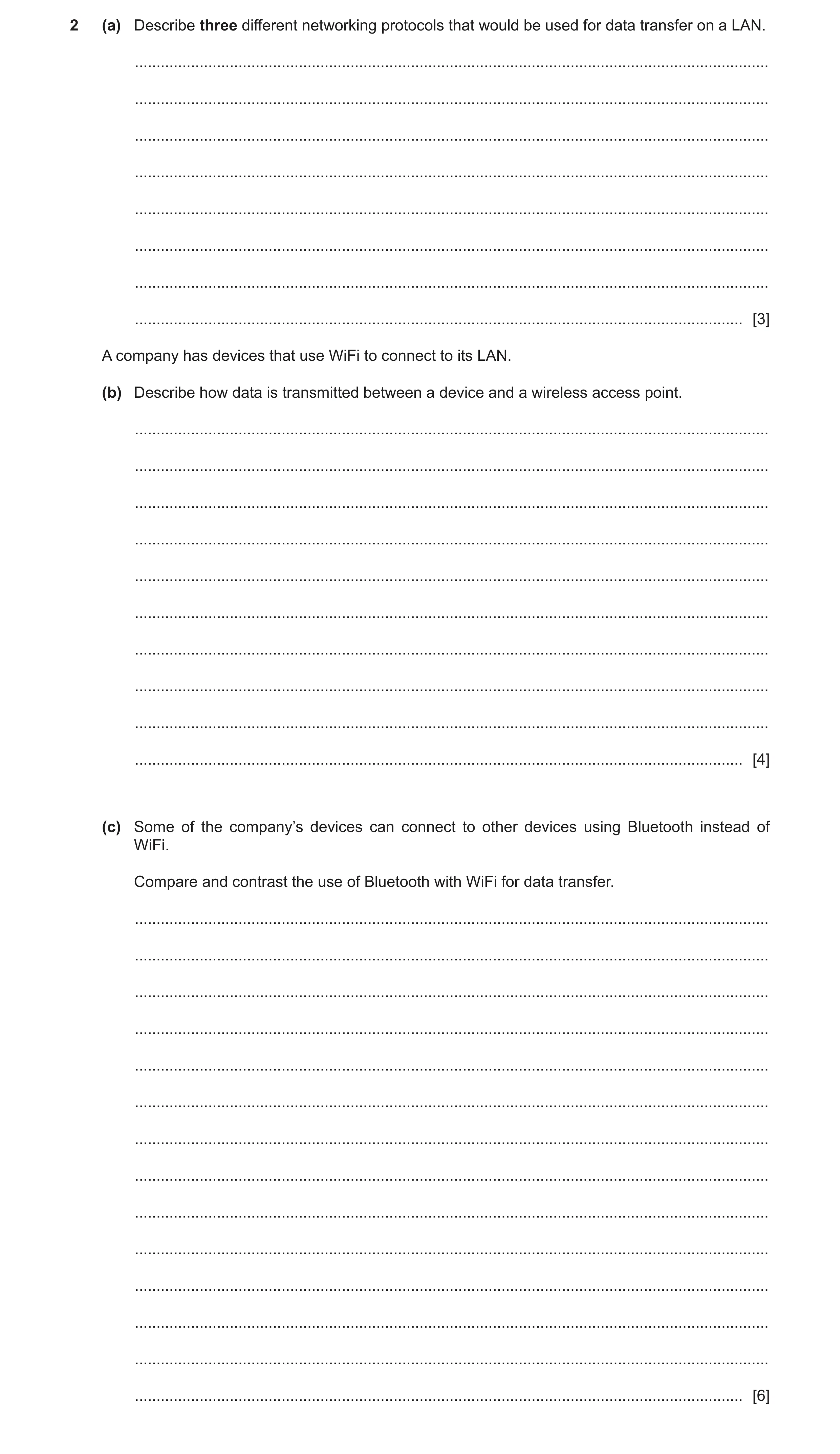
 9 / 22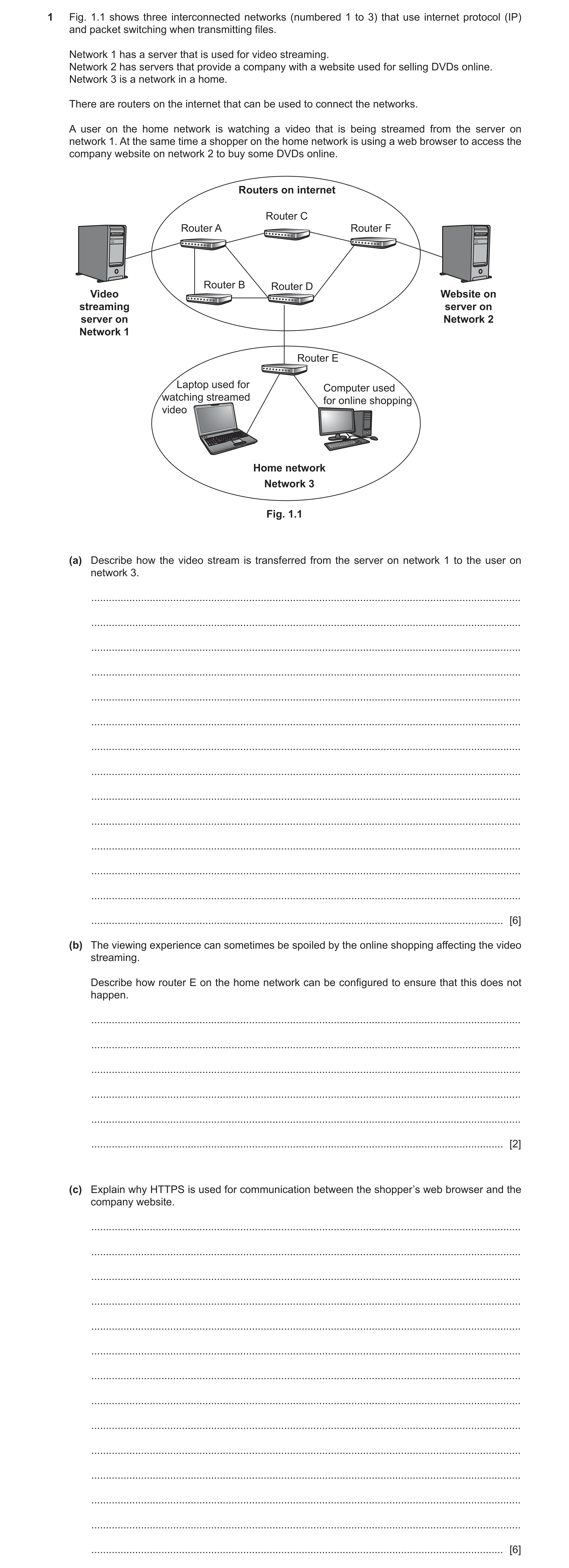
 12 / 22
 13 / 22
 14 / 22
 15 / 22
 16 / 22
 18 / 22
 19 / 22
 20 / 22
 21 / 22
 22 / 22
 14
14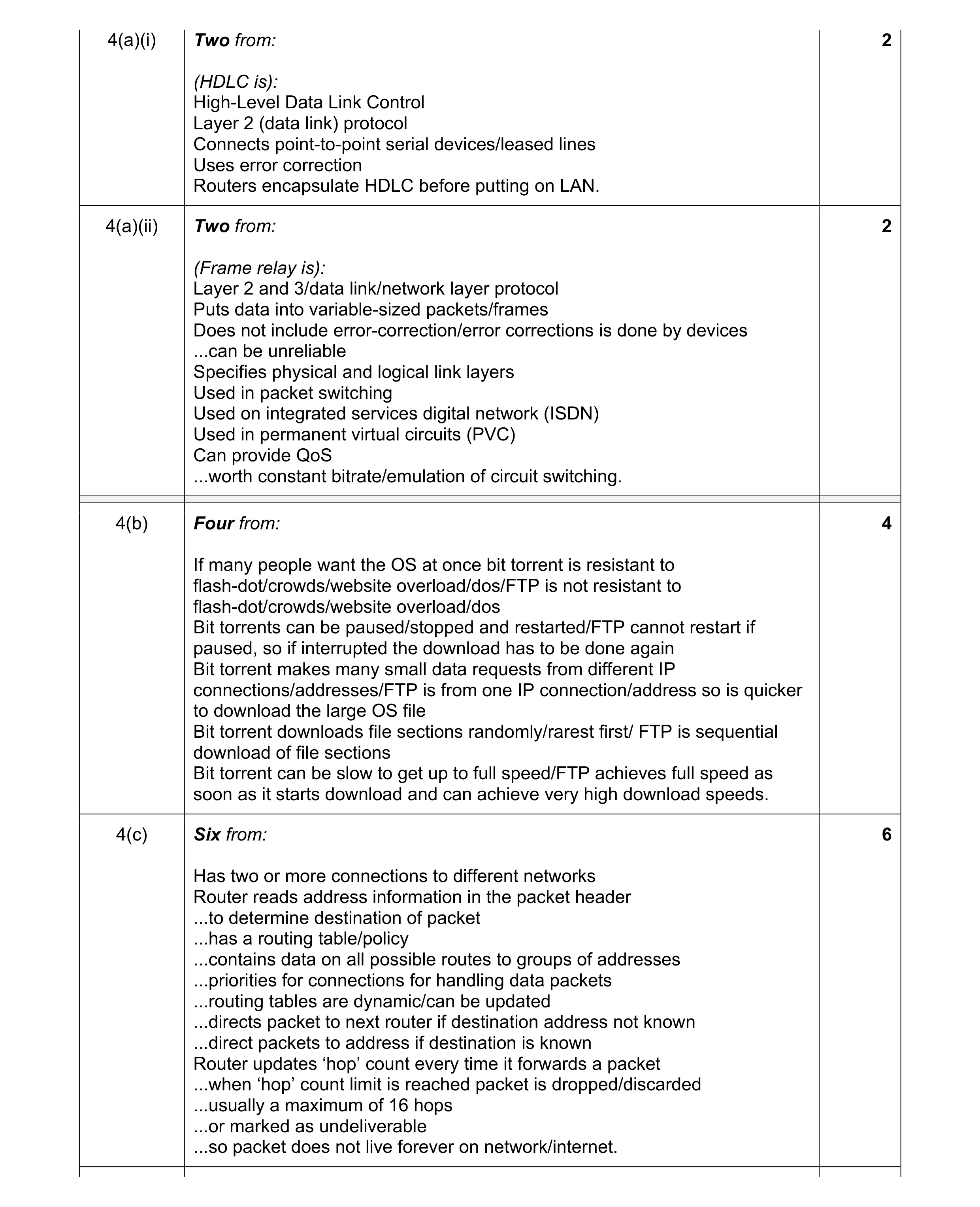 14
14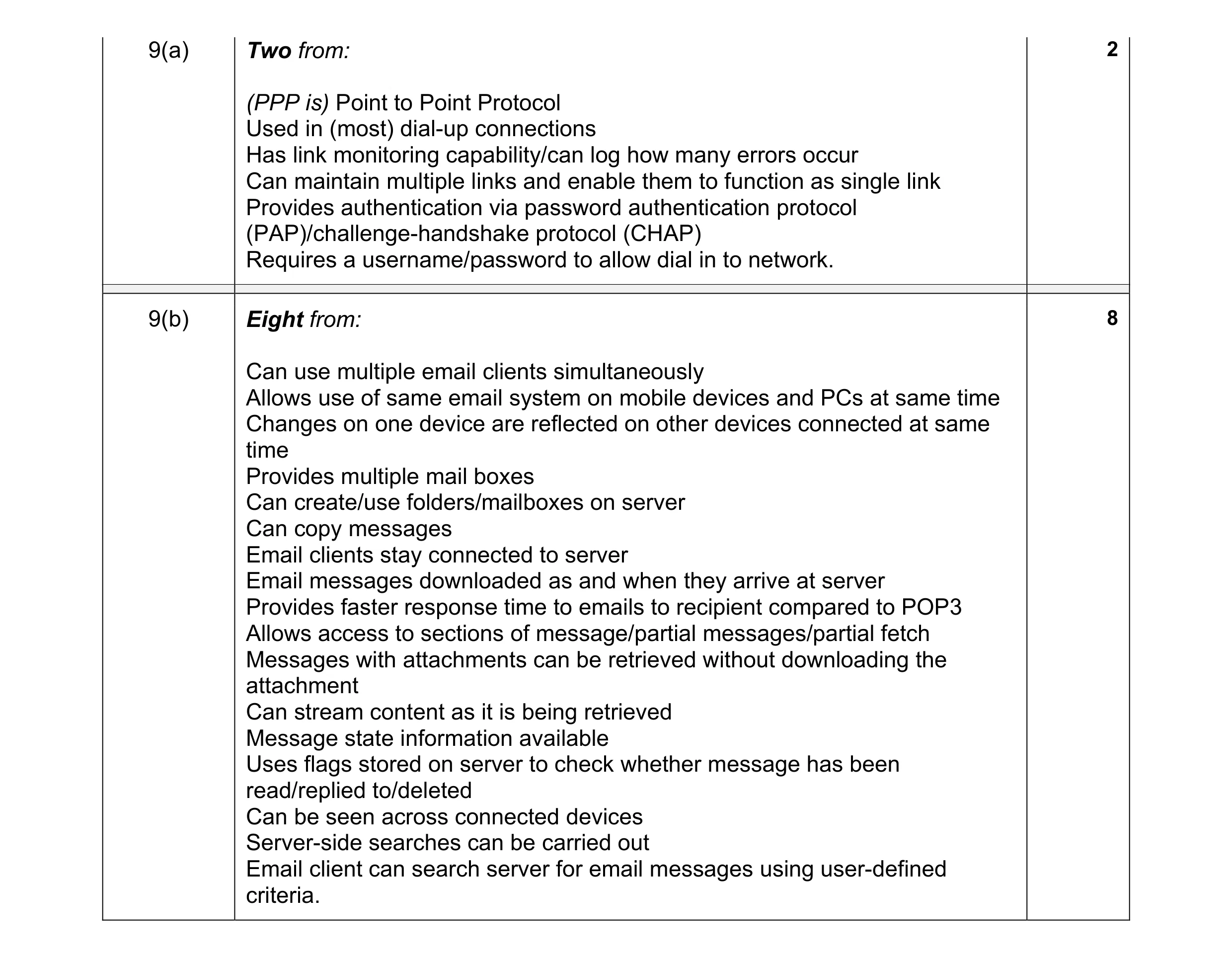 10
10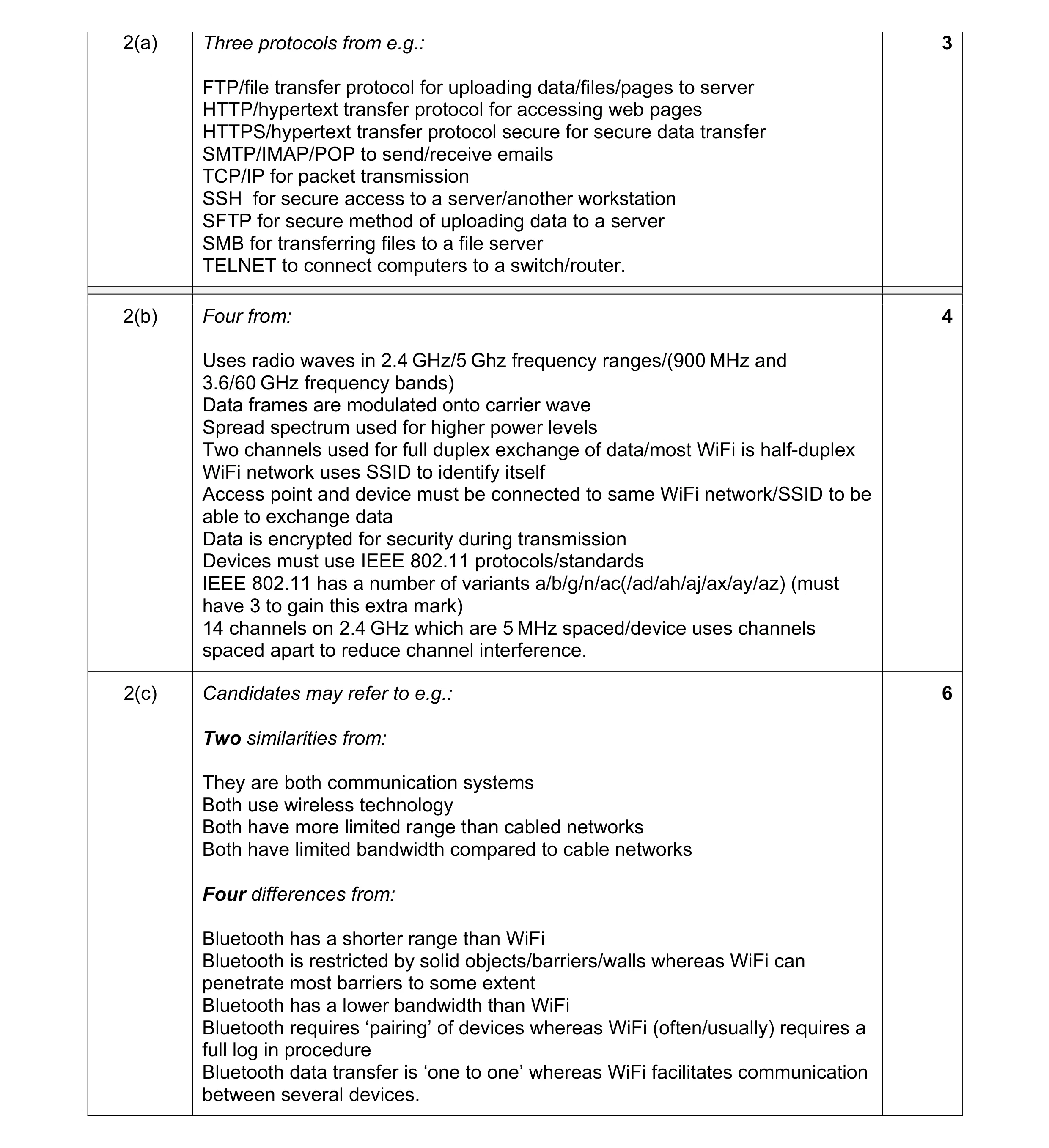 13
13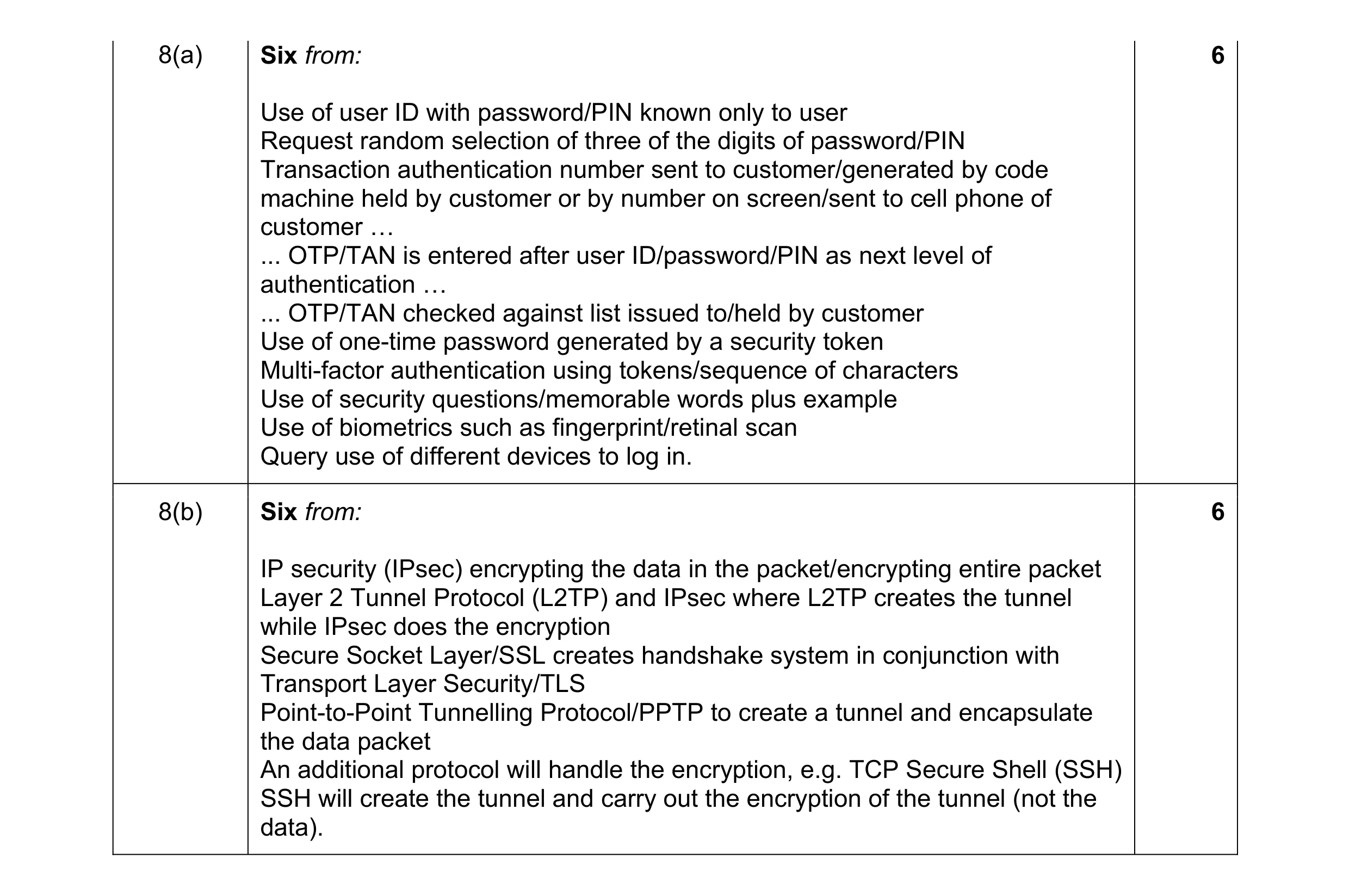 12
12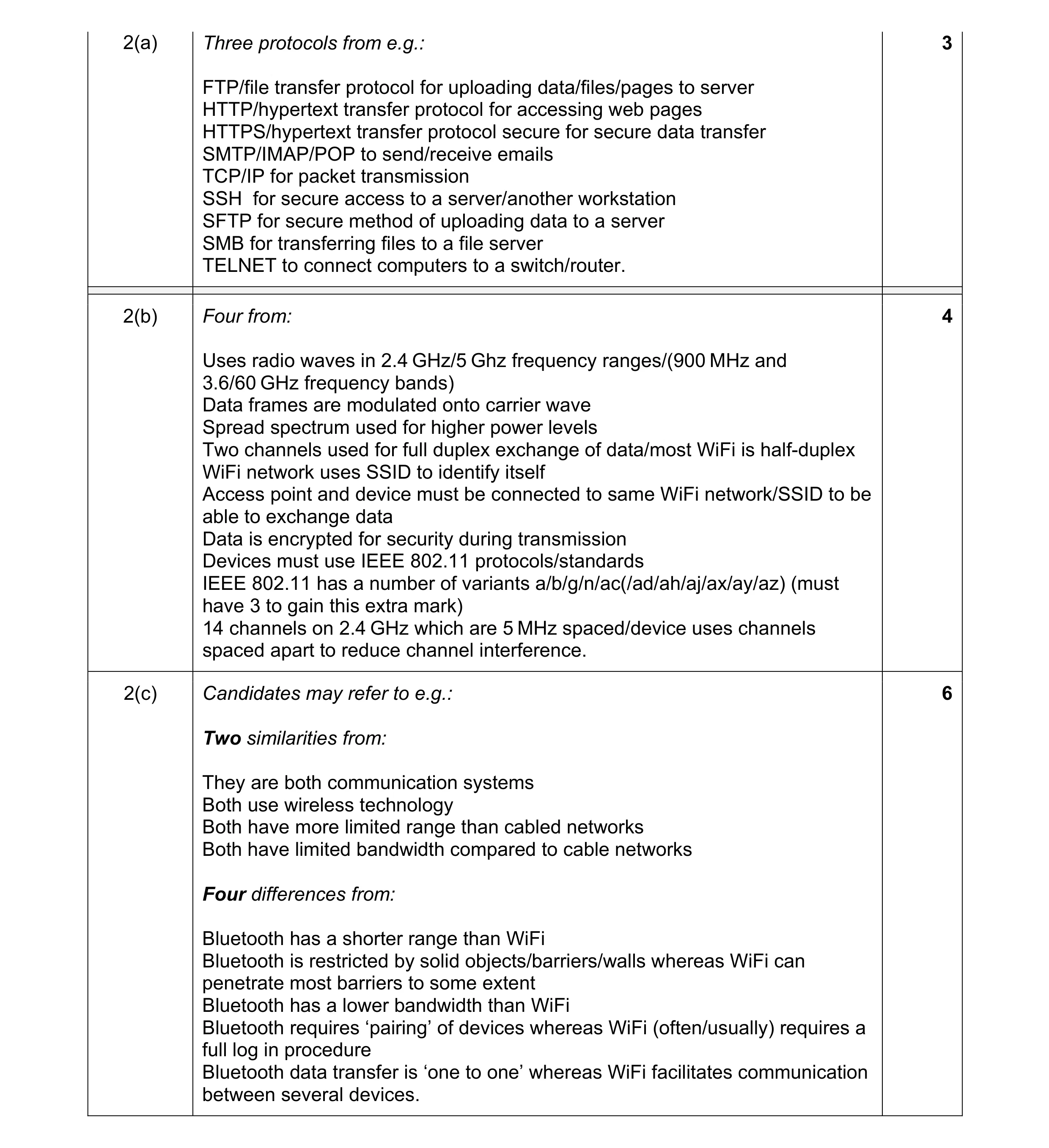 13
13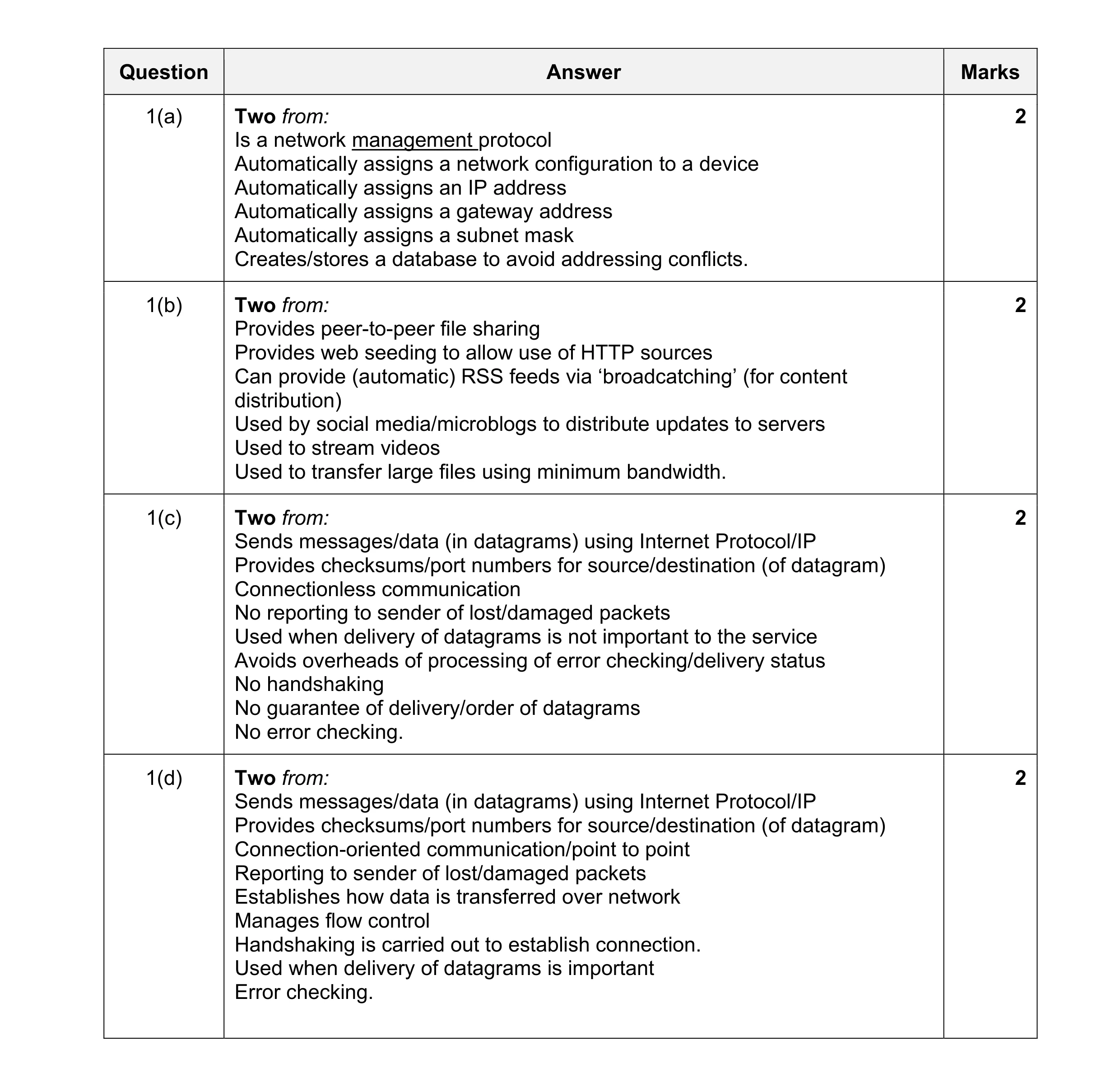 8
8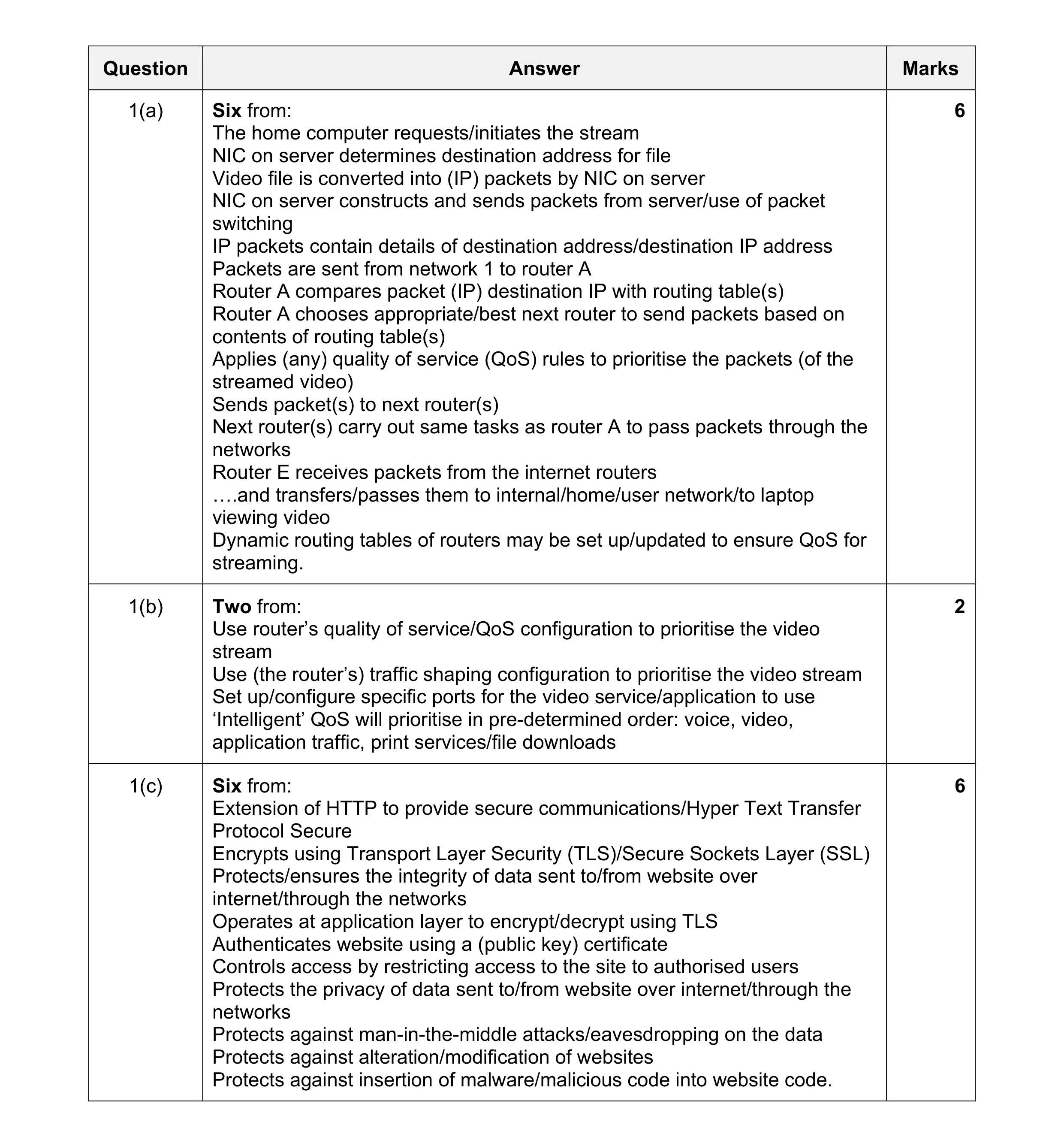 14
14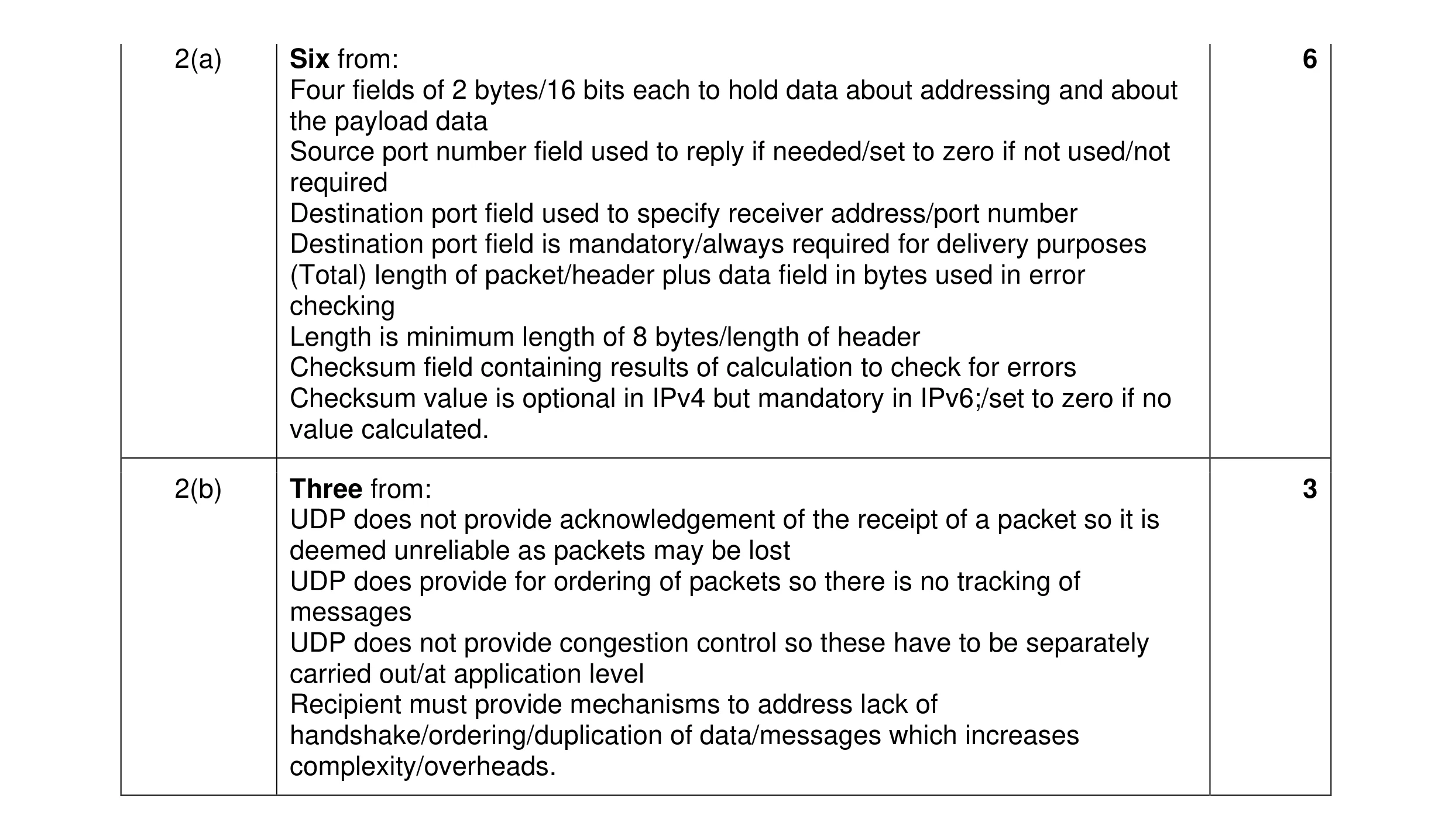 9
9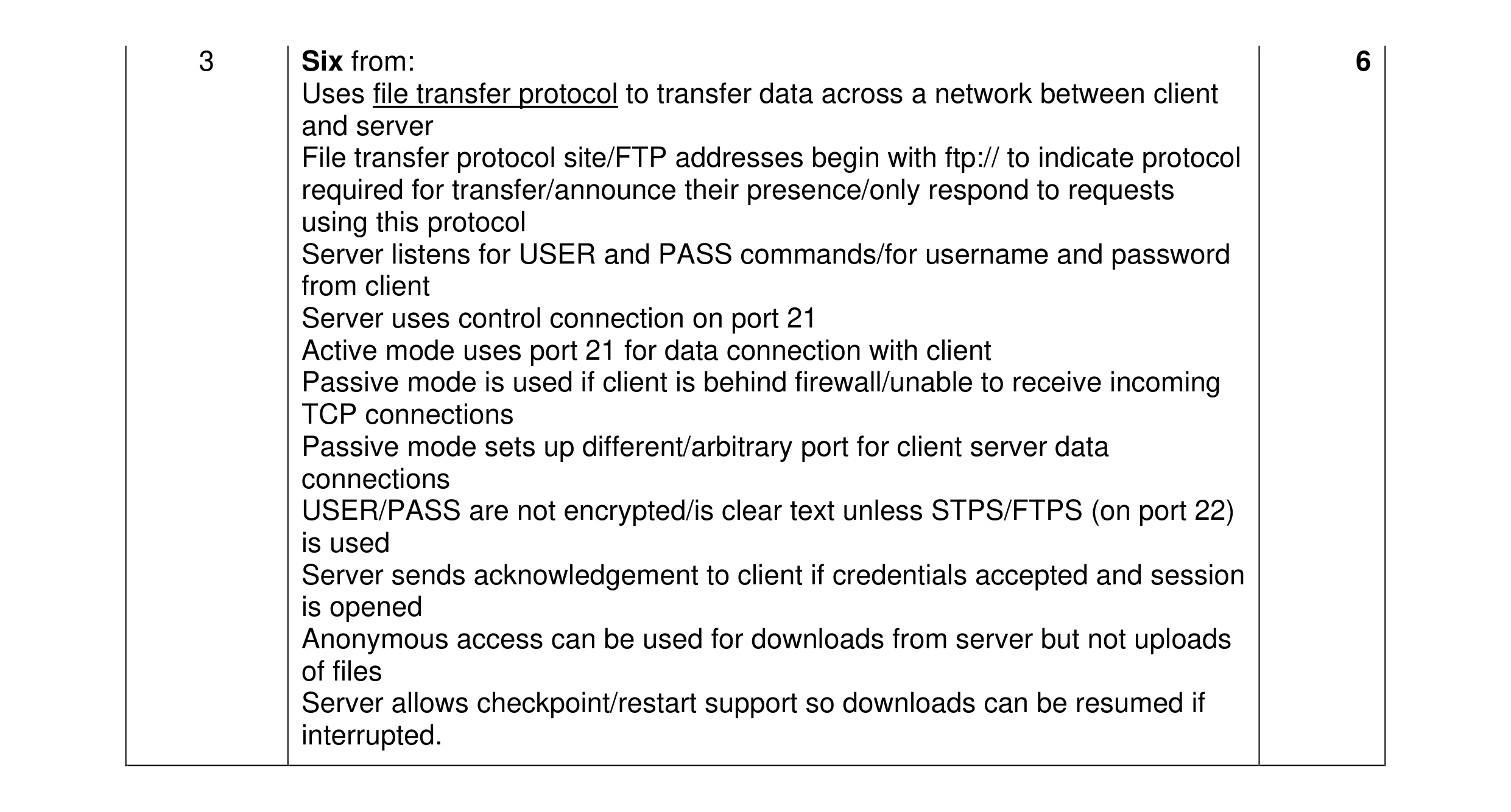 6
6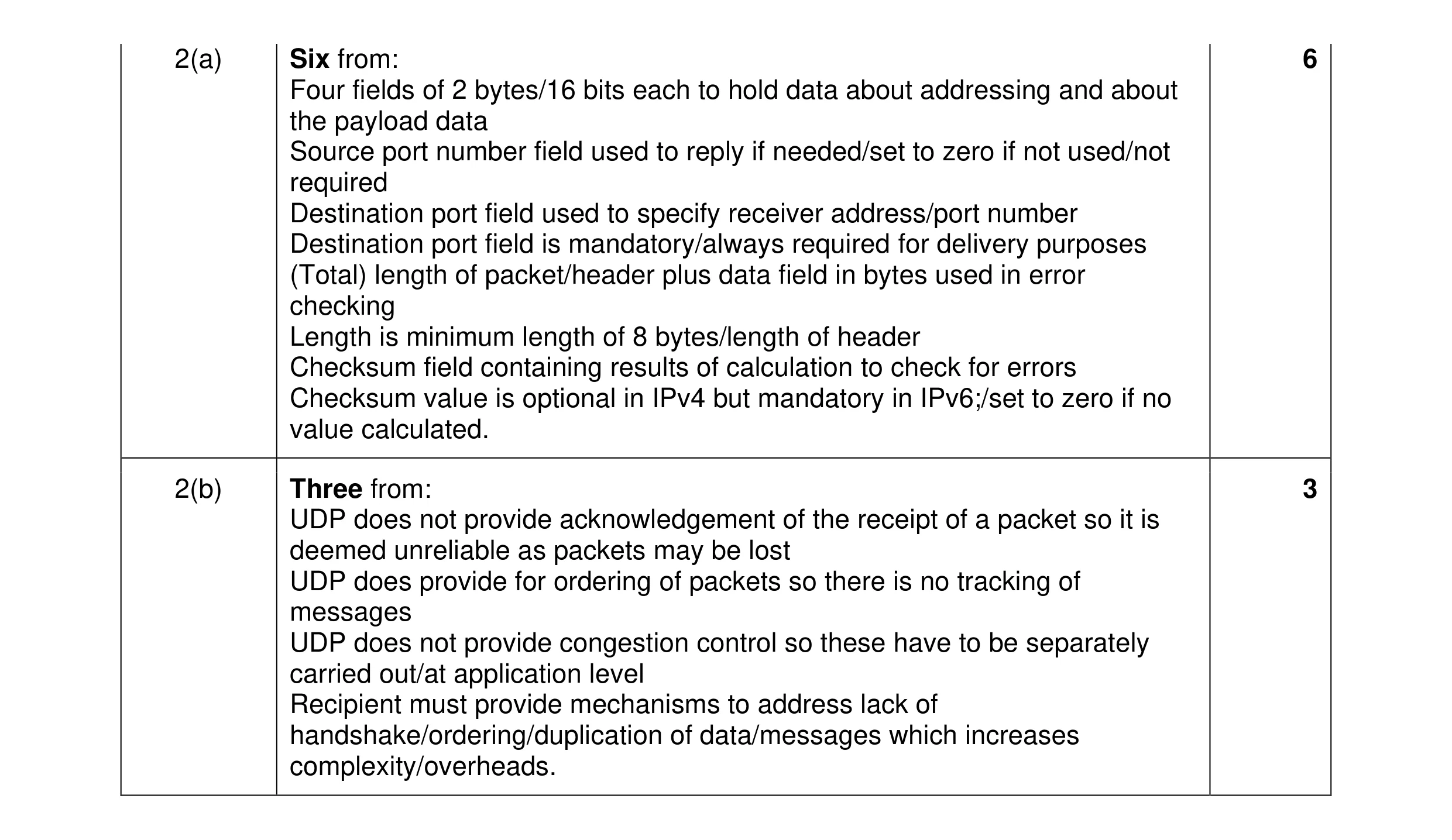 9
9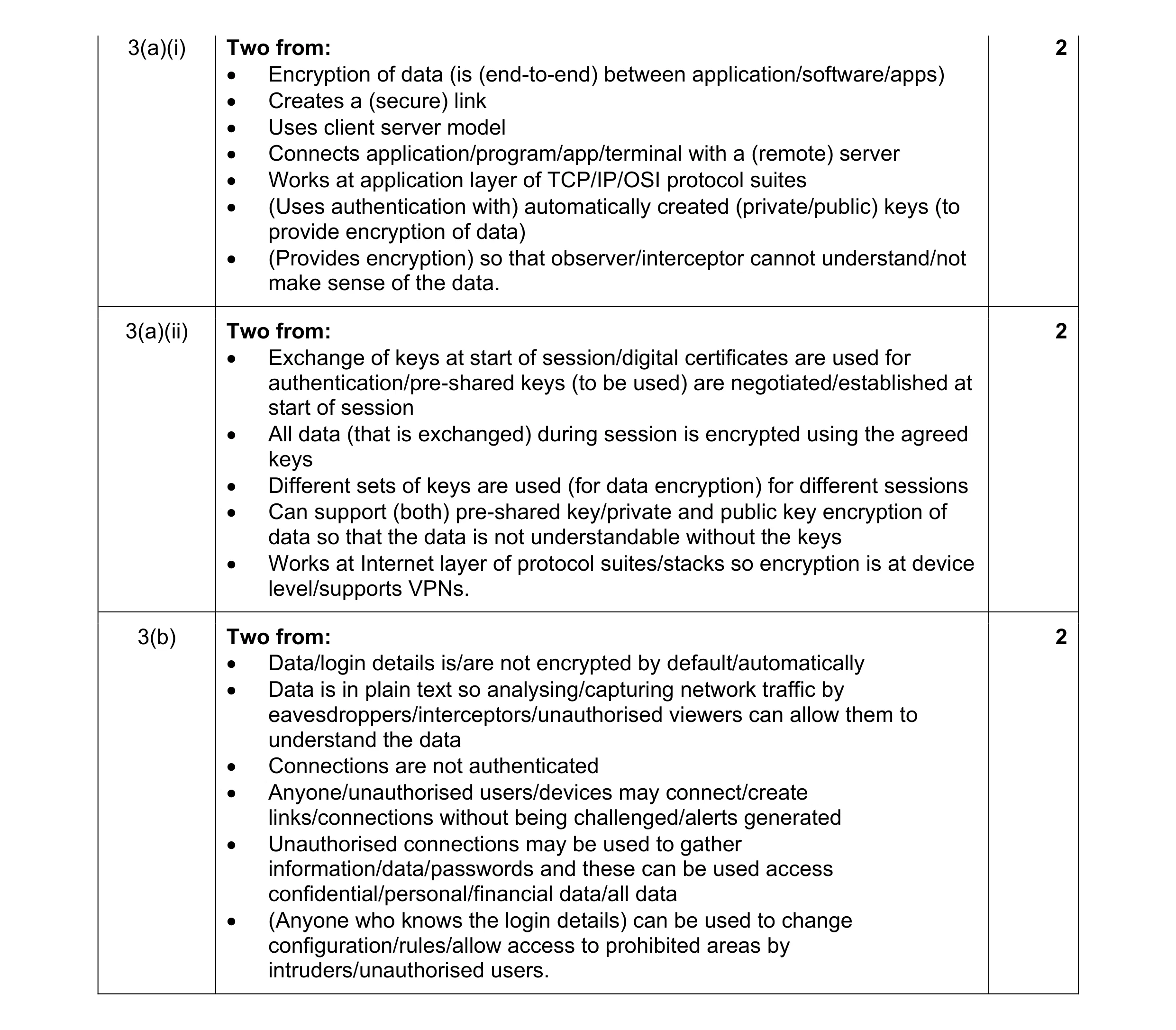 6
6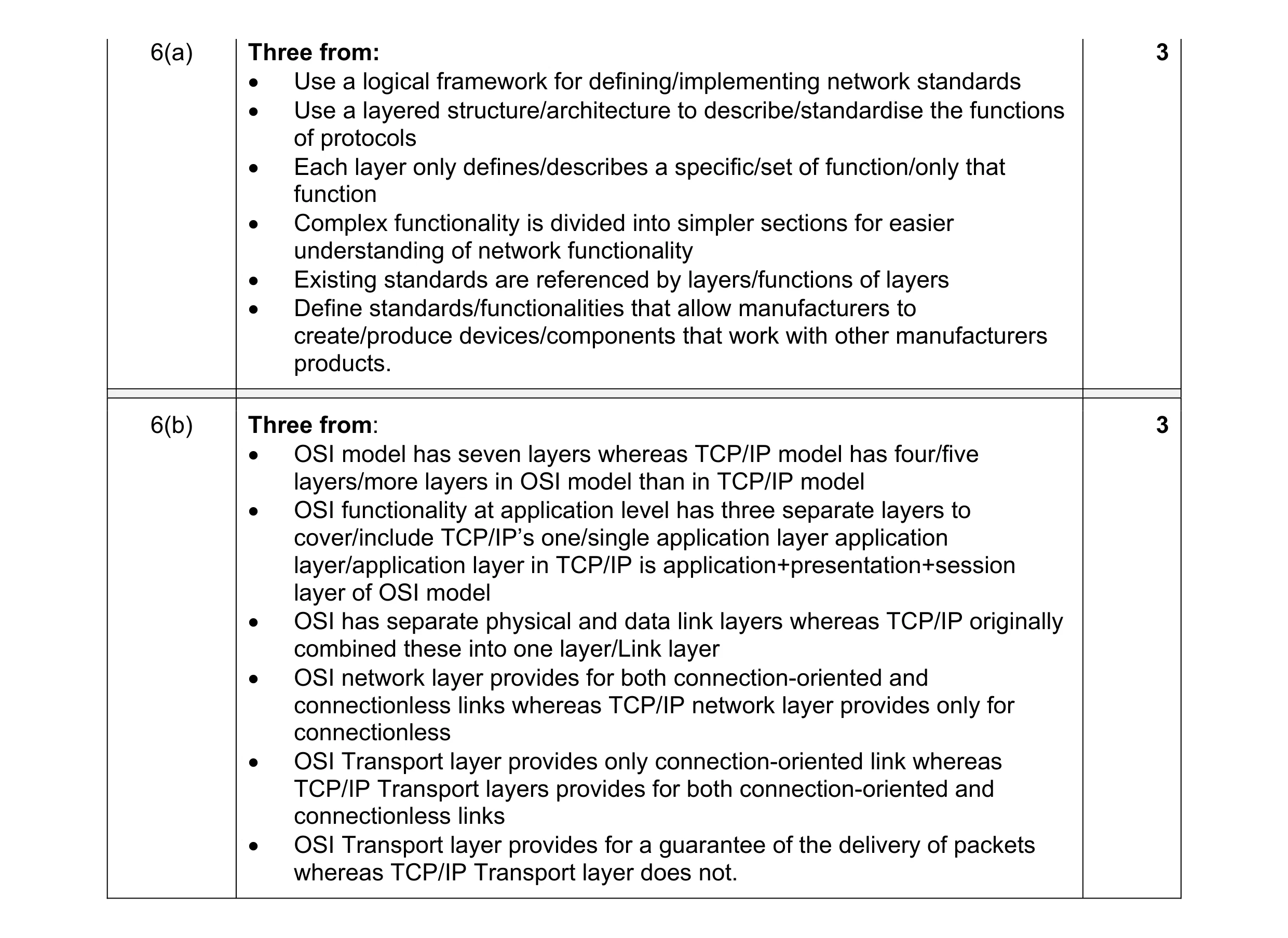 6
6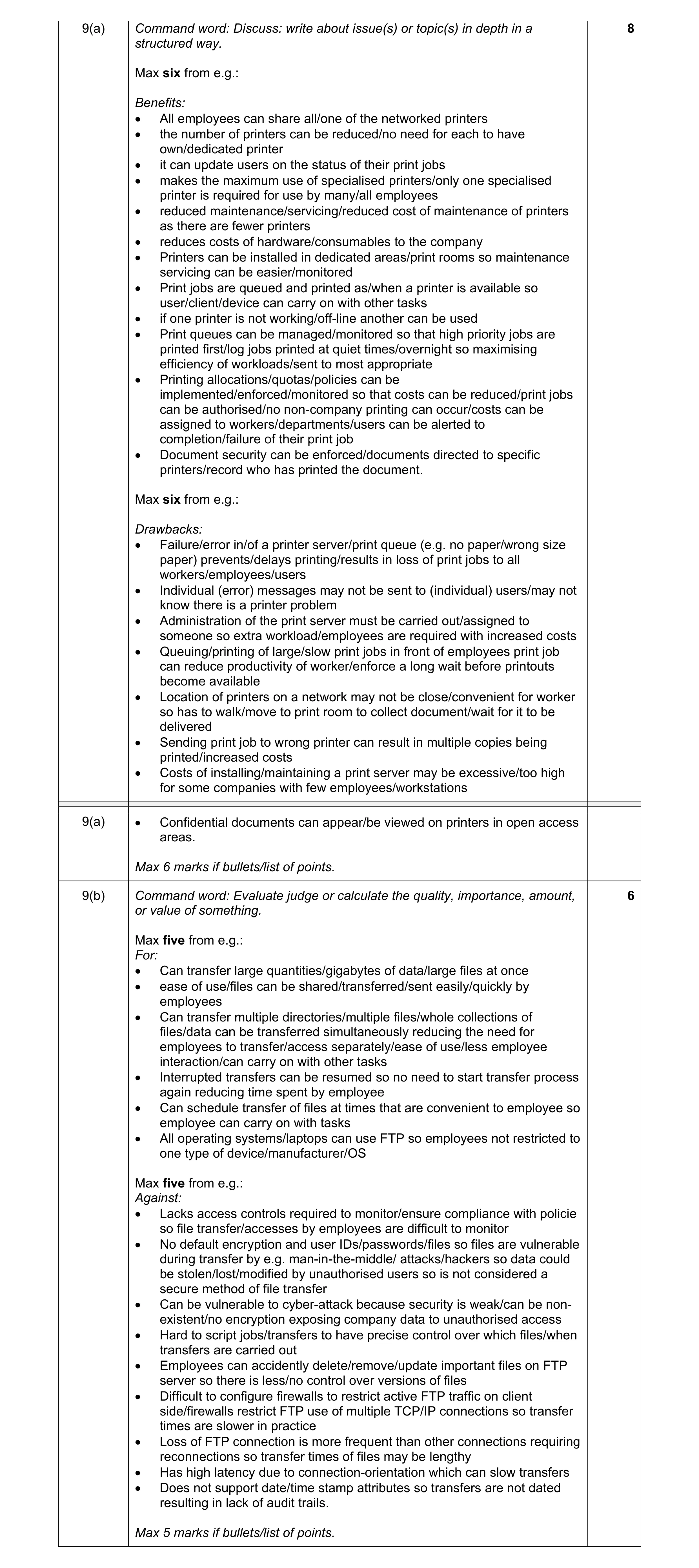 14
14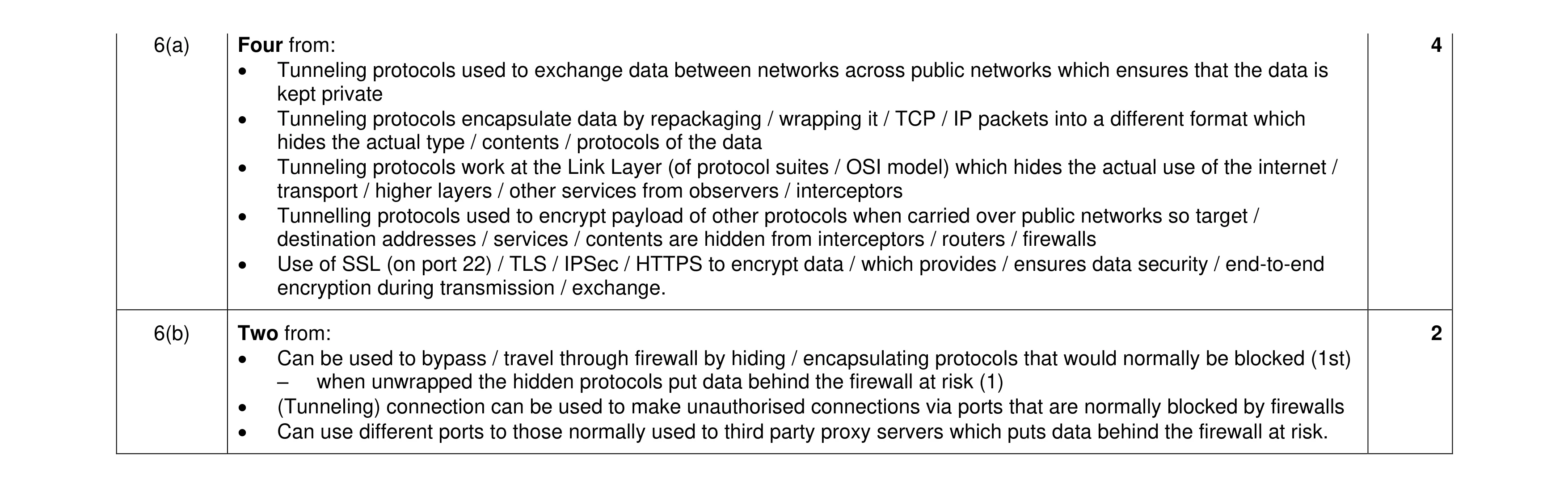 6
6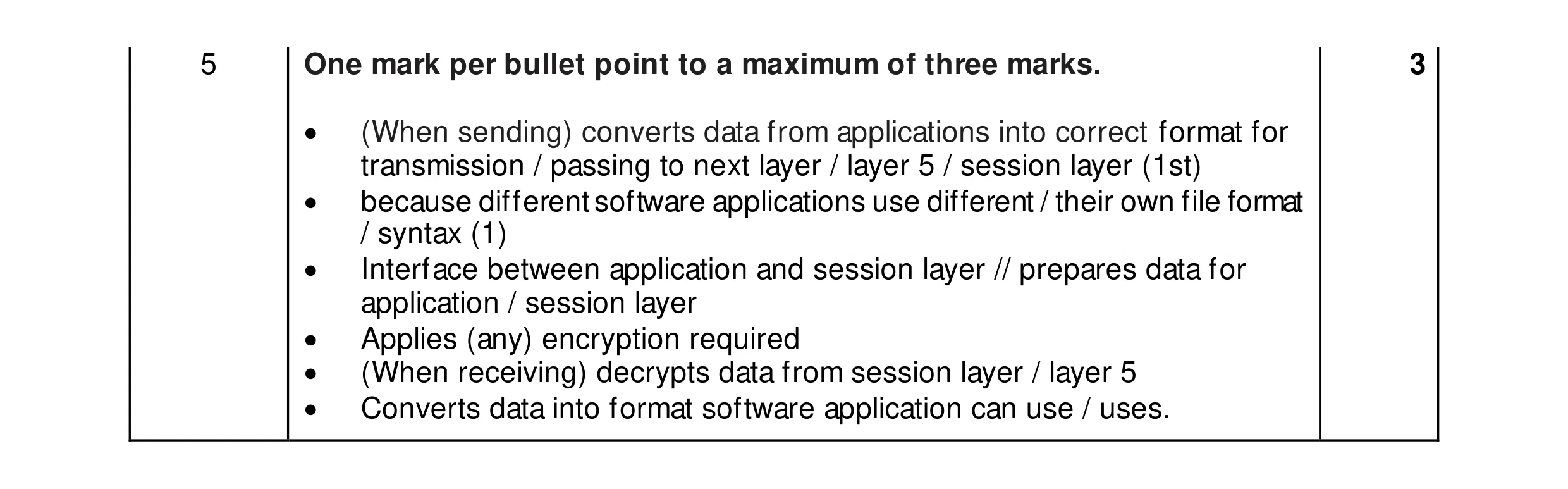 3
3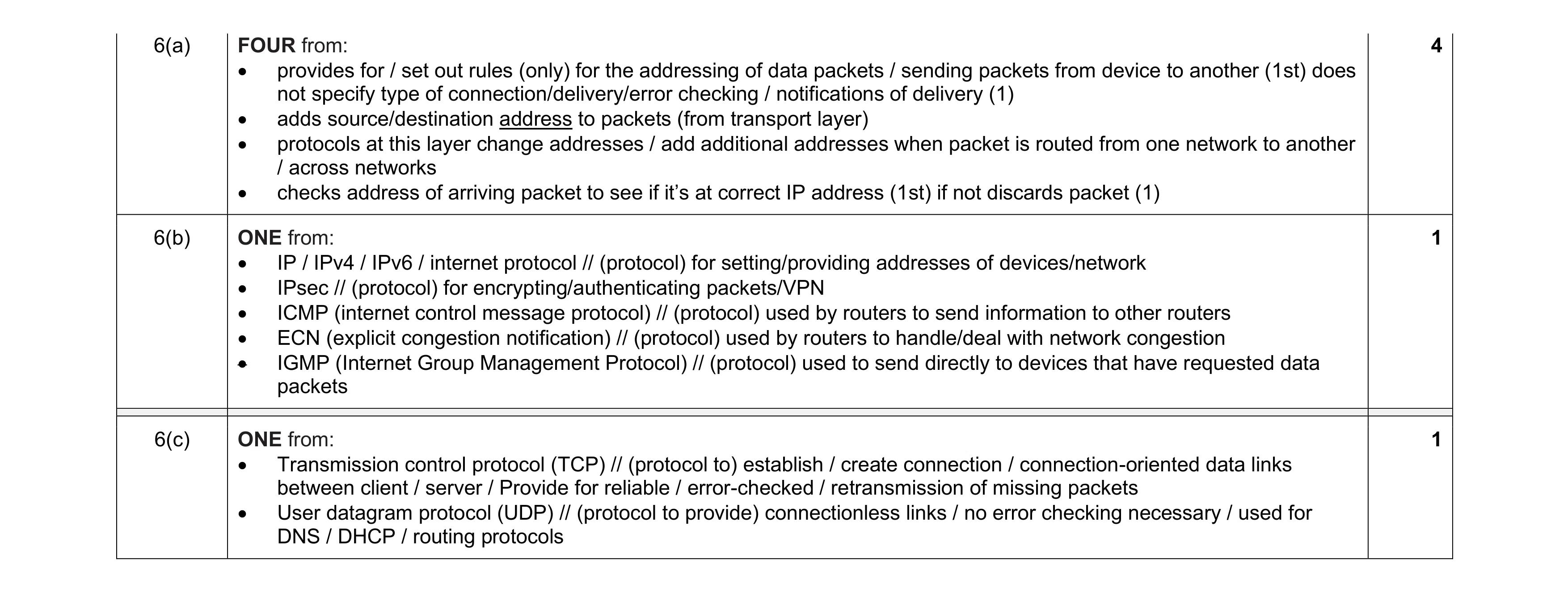 6
6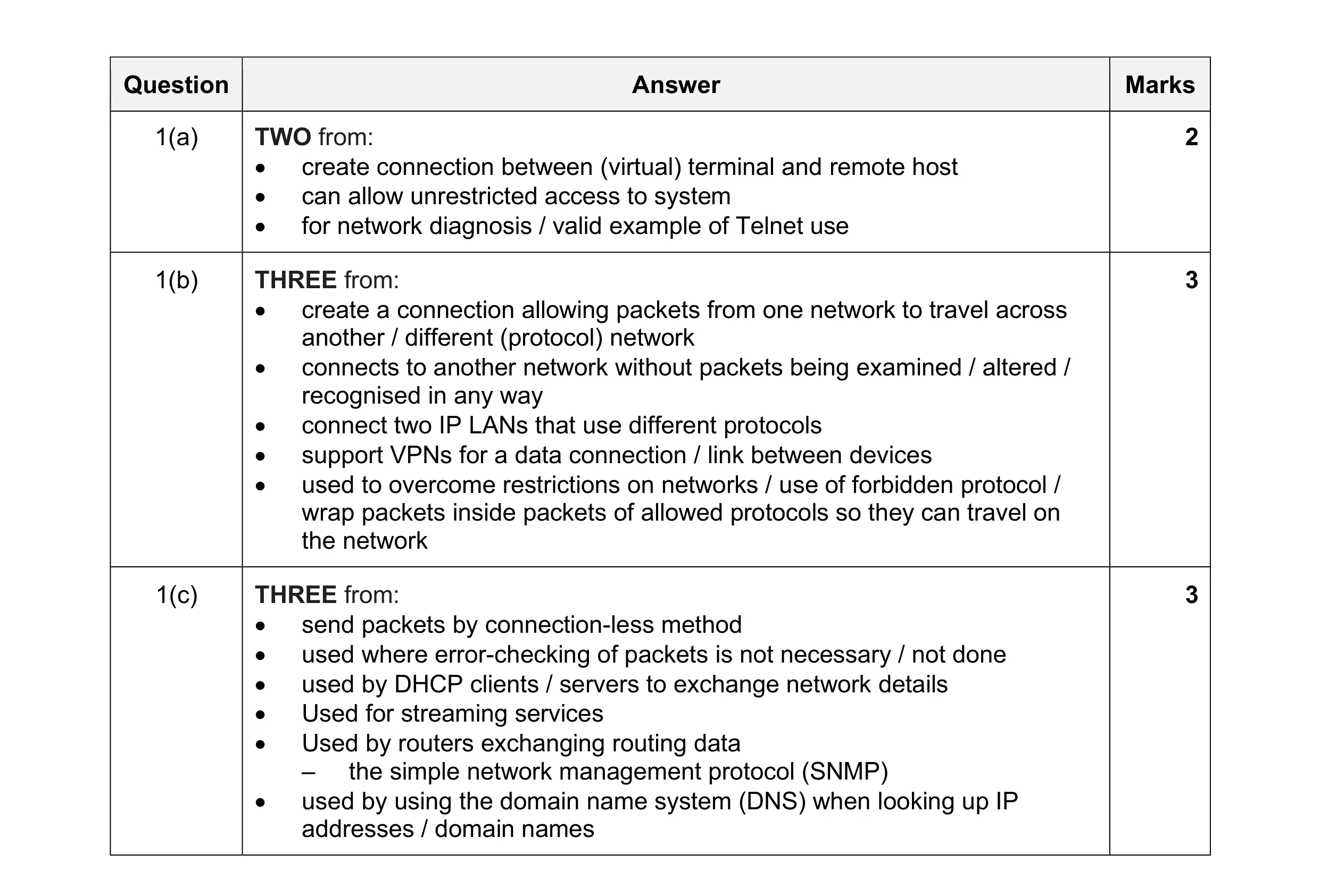 8
8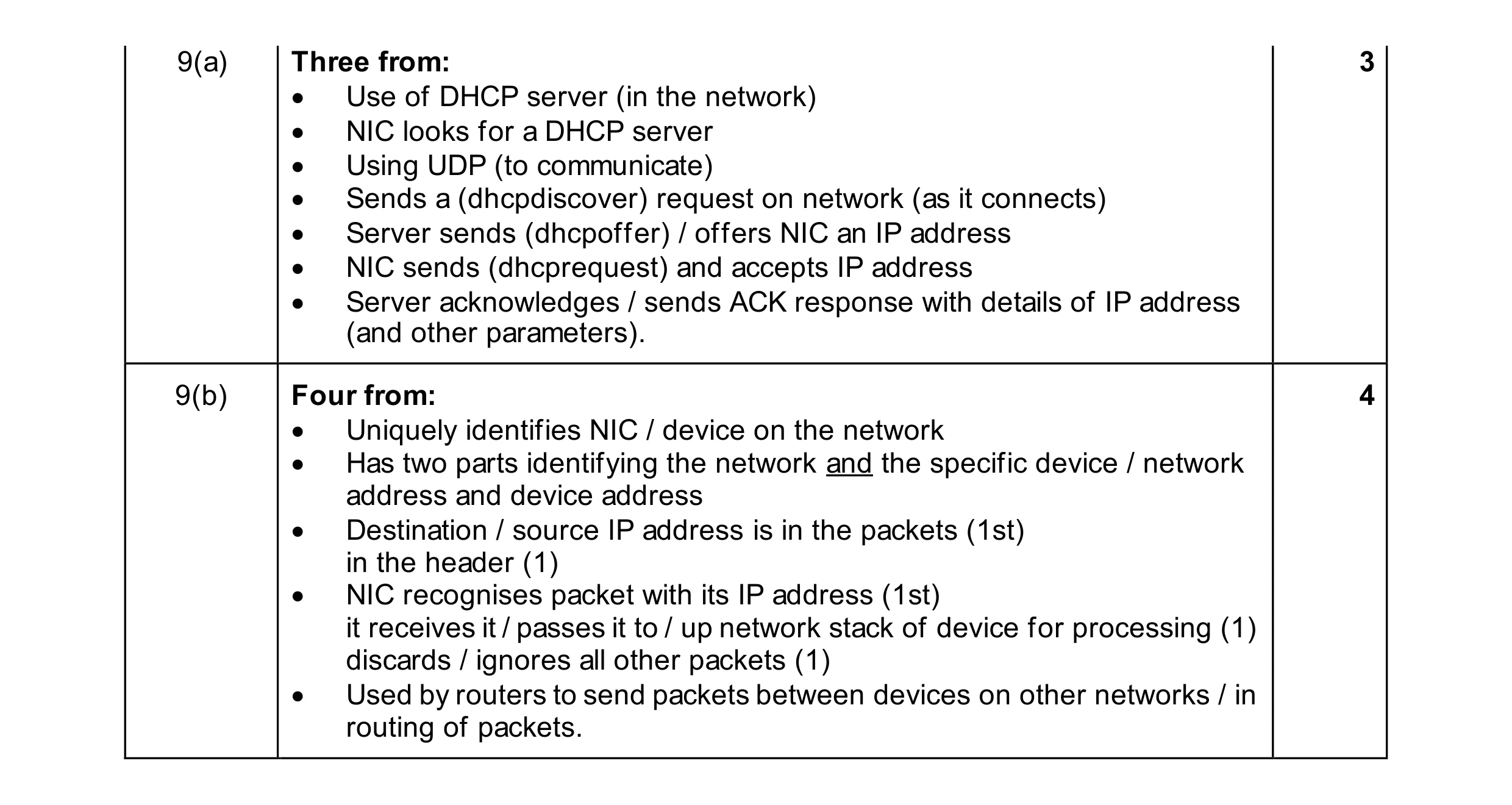 7
7