Questions as text
Q1 · A customer in a restaurant can pay the bill with a credit card using a mobile chip and… 9626/32 Feb/March 2017
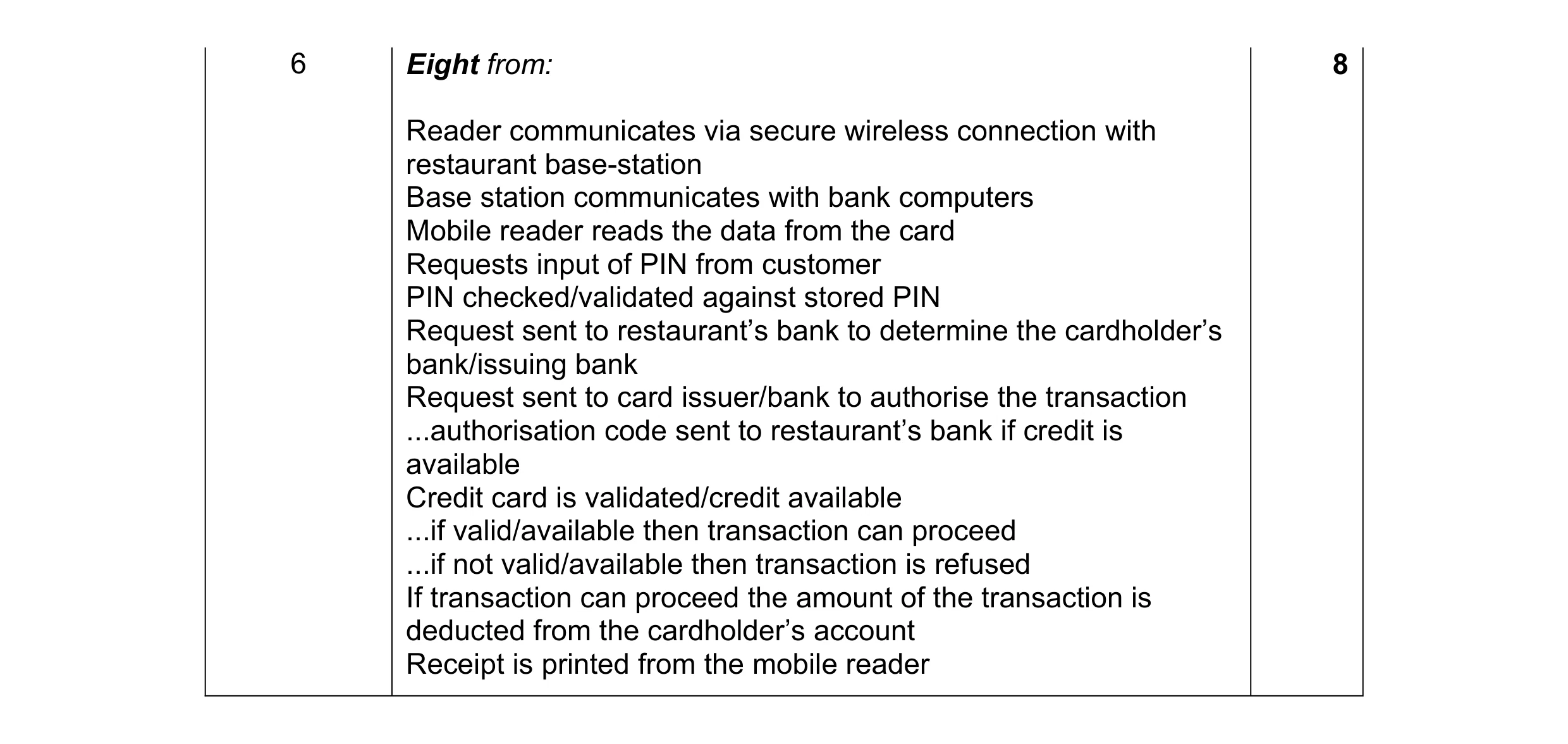
6 A customer in a restaurant can pay the bill with a credit card using a mobile chip and pin reader carried by a waiter. Describe the computer processing involved in the payment of the bill by credit card using the mobile chip and pin reader. … … … … … … … … … … … … … … … … … … … … [8]
8 marks
Mark scheme: 6 Eight from: 8 Reader communicates via secure wireless connection with restaurant base-station Base station communicates with bank computers Mobile reader reads the data from the card Requests input of PIN from customer PIN checked/validated against stored PIN Request sent to restaurant’s bank to determine the cardholder’s bank/issuing bank Request sent to card issuer/bank to authorise the transaction ...authorisation code sent to restaurant’s bank if credit is available Credit card is validated/credit available ...if valid/available then transaction can proceed ...if not valid/available then transaction is refused If transaction can proceed the amount of the transaction is deducted from the cardholder’s account Receipt is printed from the mobile reader
This question in 9626/32 Feb/March 2017
Q2 · Electronic data exchange is often called electronic data interchange 9626/32 Feb/March 2017
7 Electronic data exchange is often called electronic data interchange. An online retailer and its trading partners use electronic data interchange (EDI). (a) Define EDI. … … … … … … … [3] (b) The retailer has prepared an order that has to go to a supplier. When the supplier has received the order, an invoice asking for payment for the goods has to go back to the retailer. Explain how you would use EDI for these transactions. … … … … … … … … … … … … … … [5]
8 marks
Mark scheme: 7(a) Three from: 3 The computer-to-computer Exchange of business documents Using a standard electronic format Between business partners 7(b) Five from: 5 Prepare the documents to be sent Collect/organise the data via human interface screens/typing Extract from databases/spreadsheets/output from stock control/purchasing systems into data files Translate the documents into EDI format Convert internal data into EDI standard format Transmit the EDI documents to trading partner Use VPN/secure private network Via an EDI network provider that connects the trading partners together
This question in 9626/32 Feb/March 2017
Q3 · Packet switching is used to transfer data around networks 9626/32 Feb/March 2017
8 Packet switching is used to transfer data around networks. Discuss the benefits and drawbacks of packet switching. … … … … … … … … … … … … … … … … … … … … [8]
8 marks
Mark scheme: 8 Eight from e.g.: 8 Benefits of Packet Switching include e.g.: Makes very efficient use of the network as communication lines are shared Data packets can be routed around unusable nodes/parts of the network so if part of network/node is faulty/not working packets can still reach destination The network only has to expand slowly with increase in users compared to circuit switching Drawbacks of Packet Switching: The packaging of the data changes each time a packet is switched so there is a time overhead/latency Can cause a problem for time-critical information such as an emergency signal/video streaming Small data packages are inefficiently packaged (e.g. a data package of 600 bytes uses two packets of 512 bytes plus the address information) Max 6 for all benefits and drawbacks 1 mark available for a reasoned conclusion/opinion
This question in 9626/32 Feb/March 2017
Q4 · A wide area network uses a number of different protocols 9626/31 May/June 2017
4 A wide area network uses a number of different protocols. (a) Describe each of the following wide area network (WAN) protocols. (i) HDLC: … … … … … [2] (ii) Frame relay: … … … … … [2] (b) An updated version of a free operating system has to be downloaded quickly. The operating system is contained in a very large file. There is a choice of using ‘BitTorrent’ or file transfer protocol (FTP) for the download. Explain, with reasons, which method of download would be preferable. … … … … … … … … … … … [4] (c) Describe how a network router provides connectivity between a home network and the internet. … … … … … … … … … … … … … [6]
14 marks
Mark scheme: 4(a)(i) Two from: 2 (HDLC is): High-Level Data Link Control Layer 2 (data link) protocol Connects point-to-point serial devices/leased lines Uses error correction Routers encapsulate HDLC before putting on LAN. 4(a)(ii) Two from: 2 (Frame relay is): Layer 2 and 3/data link/network layer protocol Puts data into variable-sized packets/frames Does not include error-correction/error corrections is done by devices ...can be unreliable Specifies physical and logical link layers Used in packet switching Used on integrated services digital network (ISDN) Used in permanent virtual circuits (PVC) Can provide QoS ...worth constant bitrate/emulation of circuit switching. 4(b) Four from: 4 If many people want the OS at once bit torrent is resistant to flash-dot/crowds/website overload/dos/FTP is not resistant to flash-dot/crowds/website overload/dos Bit torrents can be paused/stopped and restarted/FTP cannot restart if paused, so if interrupted the download has to be done again Bit torrent makes many small data requests from different IP connections/addresses/FTP is from one IP connection/address so is quicker to download the large OS file Bit torrent downloads file sections randomly/rarest first/ FTP is sequential download of file sections Bit torrent can be slow to get up to full speed/FTP achieves full speed as soon as it starts download and can achieve very high download speeds. 4(c) Six from: 6 Has two or more connections to different networks Router reads address information in the packet header ...to determine destination of packet ...has a routing table/policy ...contains data on all possible routes to groups of addresses ...priorities for connections for handling data packets ...routing tables are dynamic/can be updated ...directs packet to next router if destination address not known ...direct packets to address if destination is known Router updates ‘hop’ count every time it forwards a packet ...when ‘hop’ count limit is reached packet is dropped/discarded ...usually a maximum of 16 hops ...or marked as undeliverable ...so packet does not live forever on network/internet.
This question in 9626/31 May/June 2017
Q5 · A country is considering launching a satellite to enhance its internet connectivity 9626/32 May/June 2017
10 A country is considering launching a satellite to enhance its internet connectivity. Evaluate the use of satellites for this purpose. … … … … … … … … … … … … … … … … … … … … … [8]
8 marks
Mark scheme: 10 This question to be marked as Level of Response. 8 Evaluation requires that advantages and disadvantages be discussed and weighed up in importance. Level 3 (7–8 marks) Candidates will evaluate, in detail, by discussing the advantages and disadvantages of the use of satellites for data communications. The information will be relevant, clear, organised and presented in a structured and coherent format. There may be reasoned conclusions/opinions. Subject specific terminology will be used accurately and appropriately. Level 2 (4–6 marks) Candidates will evaluate by discussing the advantages and disadvantages of the use of satellites for data communications. For the most part, the information will be relevant and presented in a structured and coherent format. There may be reasoned conclusions/opinions. Subject specific terminology will be used appropriately and for the most part correctly. Level 1 (1–3 marks) Candidates will describe by giving the advantage(s) and/or disadvantage(s) the use of satellites for data communications. Answers may be in the form of a list. There will be little or no use of specialist terms. Zero marks: Response with no valid content.
This question in 9626/32 May/June 2017
Q6 · A wide area network uses a number of different protocols 9626/33 May/June 2017
4 A wide area network uses a number of different protocols. (a) Describe each of the following wide area network (WAN) protocols. (i) HDLC: … … … … … [2] (ii) Frame relay: … … … … … [2] (b) An updated version of a free operating system has to be downloaded quickly. The operating system is contained in a very large file. There is a choice of using ‘BitTorrent’ or file transfer protocol (FTP) for the download. Explain, with reasons, which method of download would be preferable. … … … … … … … … … … … [4] (c) Describe how a network router provides connectivity between a home network and the internet. … … … … … … … … … … … … … [6]
14 marks
Mark scheme: 4(a)(i) Two from: 2 (HDLC is): High-Level Data Link Control Layer 2 (data link) protocol Connects point-to-point serial devices/leased lines Uses error correction Routers encapsulate HDLC before putting on LAN. 4(a)(ii) Two from: 2 (Frame relay is): Layer 2 and 3/data link/network layer protocol Puts data into variable-sized packets/frames Does not include error-correction/error corrections is done by devices ...can be unreliable Specifies physical and logical link layers Used in packet switching Used on integrated services digital network (ISDN) Used in permanent virtual circuits (PVC) Can provide QoS ...worth constant bitrate/emulation of circuit switching. 4(b) Four from: 4 If many people want the OS at once bit torrent is resistant to flash-dot/crowds/website overload/dos/FTP is not resistant to flash-dot/crowds/website overload/dos Bit torrents can be paused/stopped and restarted/FTP cannot restart if paused, so if interrupted the download has to be done again Bit torrent makes many small data requests from different IP connections/addresses/FTP is from one IP connection/address so is quicker to download the large OS file Bit torrent downloads file sections randomly/rarest first/ FTP is sequential download of file sections Bit torrent can be slow to get up to full speed/FTP achieves full speed as soon as it starts download and can achieve very high download speeds. 4(c) Six from: 6 Has two or more connections to different networks Router reads address information in the packet header ...to determine destination of packet ...has a routing table/policy ...contains data on all possible routes to groups of addresses ...priorities for connections for handling data packets ...routing tables are dynamic/can be updated ...directs packet to next router if destination address not known ...direct packets to address if destination is known Router updates ‘hop’ count every time it forwards a packet ...when ‘hop’ count limit is reached packet is dropped/discarded ...usually a maximum of 16 hops ...or marked as undeliverable ...so packet does not live forever on network/internet.
This question in 9626/33 May/June 2017
Q7 · A shopper has a bank account, number 65636373, with a balance of $1100 9626/33 Oct/Nov 2017
4 A shopper has a bank account, number 65636373, with a balance of $1100. The shopper wants to use electronic funds transfer to purchase a jacket for $159, a video recorder for $699 and a digital camera for $300 from different stores in a retail park. A bank card is used by the customer at the electronic funds transfer point of sale terminal in each store. The card is scanned and the PIN entered and accepted. Describe, in detail, the processes involved in the electronic funds transfer for these purchases. … … … … … … … … … … … … … … … … … … … … … [8]
8 marks
Mark scheme: 4 Eight from: 8 Bank computer uses the account number #65636373 to access the customer record … sees that the balance is $1100 which is greater than $159... … bank computer sends a message confirming that there are sufficient funds for the first purchase Retailer confirms the purchase and an EFT message is sent to the bank to transfer $159 from customer account to retailer account... ...$159 is subtracted from customer account «added to retailer account... ...leaving $941 in customer account Card reader prints receipt showing details of goods including $159 which is handed to the customer (Bank computer uses the account number #65636373 to access the customer record ) … sees that the balance is $941 which is greater than $699... ...$699 is deducted from customer account «added to second retailer account ...leaving $242 in customer account (Bank computer uses the account number #65636373 to access the customer record ) Account now has insufficient funds to meet the $300 request by the retail store’s system ...returns a message saying’ insufficient funds’ for the purchase ...the $300 purchase is declined and a printout of the ‘declined transaction’ notice is printed and given to the customer.
This question in 9626/33 Oct/Nov 2017
Q8 · Analyse the impact of network bandwidth on video-conferencing 9626/32 Feb/March 2018
2 Analyse the impact of network bandwidth on video-conferencing. … … … … … … … … … … … … … … … … … … … … [8]
8 marks
Mark scheme: 2 Eight from: 8 Bandwidth requirements are higher to allow more detail in video images Video-conferencing requires higher resolution video because there are often several people on screen at once Need to see facial features/body expressions of participants clearly One person to another (when video-conferencing) does not require high resolutions High bandwidth (of 2–4 Mbps) would deliver an (H720p) high definition image for multiple participants Low bandwidth (of 512 kbps) would be sufficient for one-to-one video- conferencing Low bandwidth does not allow high definition images so would not be able to properly see the faces of multiple participants High bandwidth would allow higher frame rates/30fps for smooth motion Limited/low bandwidth requires trade-off between resolution and frame rate Resolution priority for displaying slideshows/documents in detail Motion priority for displaying video presentations. Max 6 for all positives or all negatives. 1 mark available for a reasoned conclusion/opinion.
This question in 9626/32 Feb/March 2018
Q9 · A diagram of interconnected computer networks that use internet protocol (IP) to… 9626/32 Feb/March 2018
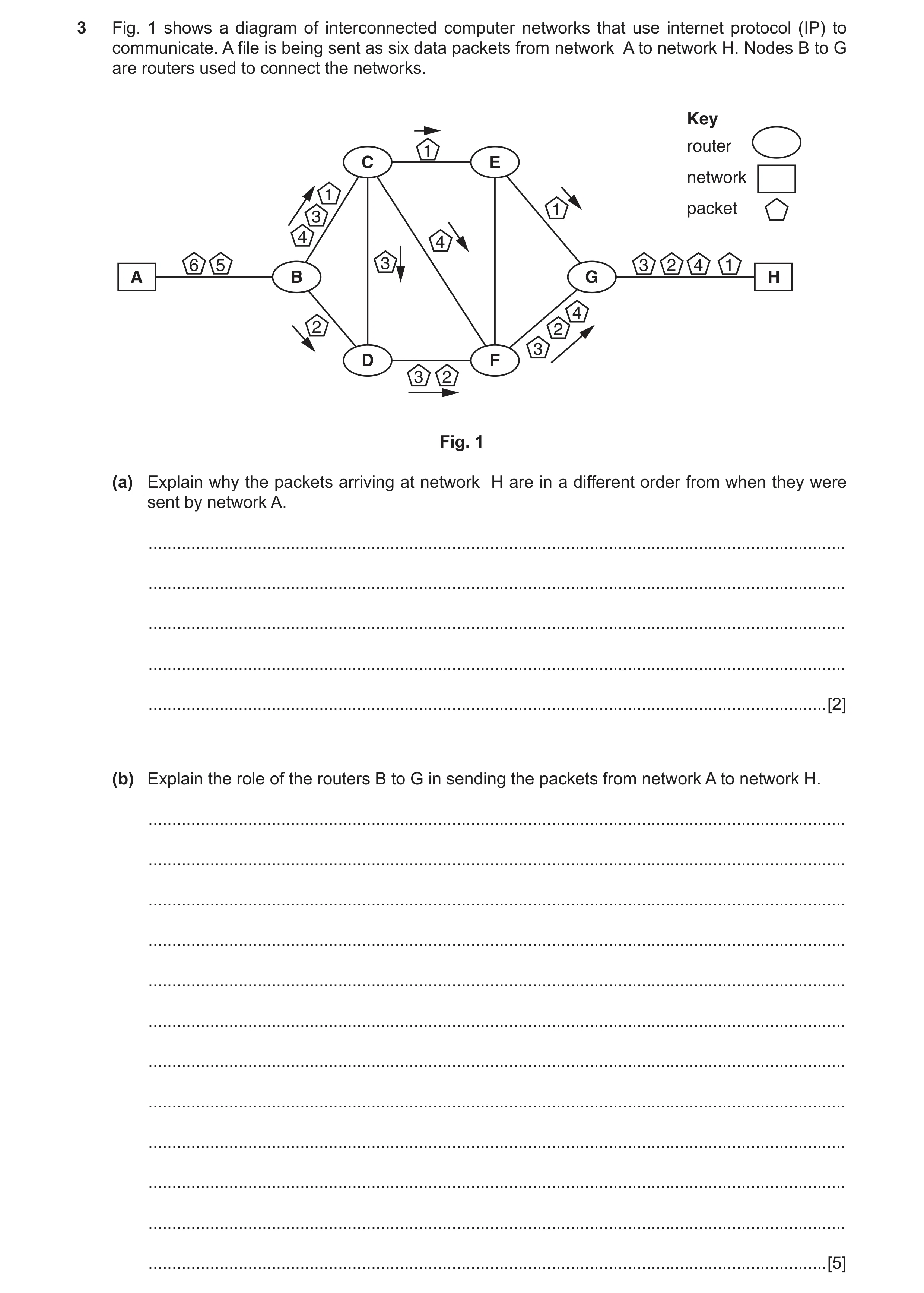
3 Fig. 1 shows a diagram of interconnected computer networks that use internet protocol (IP) to communicate. A file is being sent as six data packets from network A to network H. Nodes B to G are routers used to connect the networks. Key router 1 C E network 1 1 packet 3 4 4 6 5 3 3 2 4 1 A B G H 4 2 2 3 D F 3 2 Fig. 1 (a) Explain why the packets arriving at network H are in a different order from when they were sent by network A. … … … … … [2] (b) Explain the role of the routers B to G in sending the packets from network A to network H. … … … … … … … … … … … … [5]
7 marks
Mark scheme: 3(a) Two from: 2 Each packet takes a different route through the network Each router ‘decides’ which router to send it onto depending on other network traffic e.g. router A will send some packets to router C and some to D If next router is busy/unavailable If a packet is mis-sent/corrupt en route then re-transmission is requested from originating router Time taken along different routes is not the same Arriving at different times at network H. 3(b) Five from: 5 Each router has a stored lookup table of IP addresses/routes to the next router/network Routing table is stored at control plane of router Routing table used to choose next router/router to which to send packet Static routes B to C to E to G are pre-programmed to show route to destination Dynamic routing protocols build up a table of preferred routes between connected routers/networks B to C to F to G if router E is inefficient/out of action/in heavy demand If destination is unknown router B will send packet to next known router/C or D If C/D router does not know destination to H then packet is sent onto next router/E or F.
This question in 9626/32 Feb/March 2018
Q10 · Telecommunication companies often prefer to use fibre optic cables to transmit data 9626/32 May/June 2018
7 Telecommunication companies often prefer to use fibre optic cables to transmit data. Discuss the benefits and drawbacks of using fibre optic cables for data transmission. … … … … … … … … … … … … … … … … … … … … [8]
8 marks
Mark scheme: 7 Eight from: 8 Can provide greater bandwidth to provide faster rate of data transfer Can carry thousands more connections c.f. electrical cable so not so many cables required Lower signal losses over distance so less need for amplifiers/repeaters so less maintenance Can span longer distances so is used to cross difficult areas/gaps/seas/oceans No interaction with other cables as resistant to electrical interference/ground currents ...can be used in areas of high electromagnetic activity No crosstalk with adjacent cables so no distortion of signals Lighter in weight so can be more suitable for use in aircraft No sparks produced if faulty/cut so safer in high risk areas Resistant to corrosion so less maintenance required Smaller cable size so can be used in confined spaces Difficult to ‘hack’/listen/tap into so more secure Can go around corners/bends unlike laser beams Can be more expensive to install than copper cables Specialist test equipment is needed Specialist tools are required for joining optical fibres Physical damage is more likely to interfere with signal transmission compared to similar with copper cables Wildlife prefer the covering of optic fibres for nesting materials compared to those around copper cables Underwater fibre optic cables are more susceptible to chemical damage than copper ones e.g. hydrogen will degrade them Cannot have 90o corners unlike copper cables. Max six for all positives or all negatives. 1 mark available for a reasoned conclusion/opinion.
This question in 9626/32 May/June 2018
Q11 · Video is streamed over networks and the internet at different bit rates 9626/33 May/June 2018
1 Video is streamed over networks and the internet at different bit rates. Fig. 1 shows a summary of the bit rates that are usually required for various video resolutions. Fig. 2 shows the bandwidths that are typically available over different mobile (cell) phone connections. Output video Bit rate Type of mobile Typical maximum resolution (Mbits/s) connection to bandwidth available (pixels) network/internet for download (Mbits/s) 320 × 240 0.4 480 × 270 0.7 3G mobile connection 0.31 1024 × 576 1.5 4G mobile connection 15 1280 × 720 2.5 Bluetooth® 1.1 0.5 connection 1920 × 1080 4.0 Wi-Fi (IEEE 802.1g) wireless 54 connection Fig. 1 Fig. 2 Using all the information in Fig. 1 and Fig. 2, explain how the viewing experience of a streamed video displayed on a mobile (cell) phone screen of resolution 1024 × 576 pixels is affected by bit rate and available bandwidth. … … … … … … … … … … … … … … … … … … … … [8]
8 marks
Mark scheme: Question Answer Marks 1 Eight from: 8 The more available bandwidth on the connection the higher quality of video that can be streamed Use of a 3G connection to the internet limits video/streaming to low bit rate of 400 Kb/s Buffers not filled completely so video pauses/stops/jerky if frames not received fast enough Provides video of 320 × 240 pixels without apparent stuttering/buffering/ stop-start issues This will be a poor video/low definition video as seen on the 1024 × 576 screen Use of a 4G connection with higher bandwidth of c. 15Mbit/s allows video with higher bitrates to be viewed properly This is 1024 × 576 is possible and this is HD quality Highest bit rates of 19 / 30 Mbit/s allowing resolutions of up to 1920 × 1080 pixels Available/can be streamed over Wi-Fi (IEEE 802.1 g) wireless connections … Which have a maximum of 54 Mbit/s 1920 × 1080 pixels will have to be downscaled for viewing on the smartphone screen Which may lead to artefacts and loss of quality.
This question in 9626/33 May/June 2018
Q12 · A switched network with computers at A, B, C and D 9626/33 May/June 2018
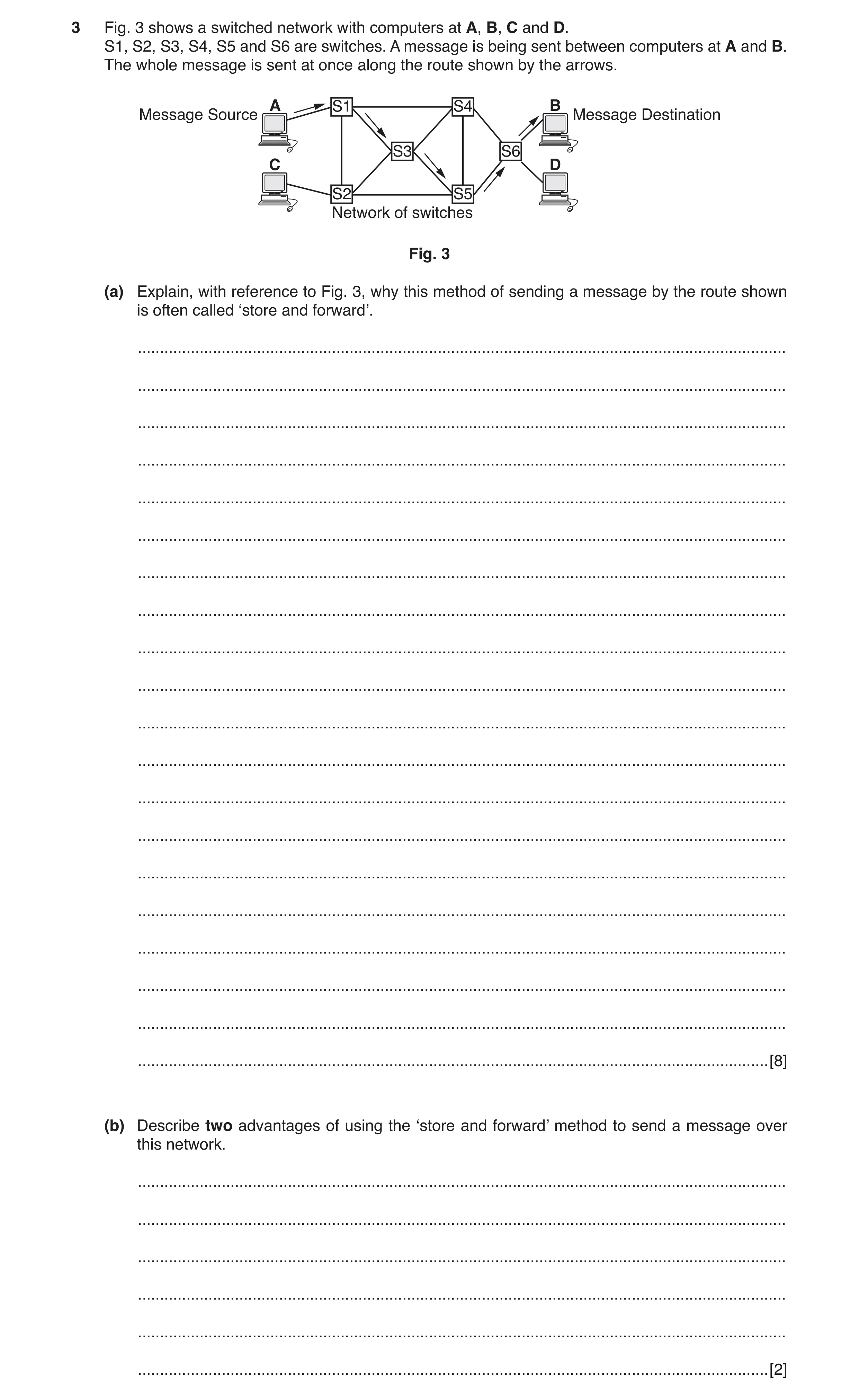
3 Fig. 3 shows a switched network with computers at A, B, C and D. S1, S2, S3, S4, S5 and S6 are switches. A message is being sent between computers at A and B. The whole message is sent at once along the route shown by the arrows. A S1 S4 B Message Source Message Destination S3 S6 C D S2 S5 Network of switches Fig. 3 (a) Explain, with reference to Fig. 3, why this method of sending a message by the route shown is often called ‘store and forward’. … … … … … … … … … … … … … … … … … … … … [8] (b) Describe two advantages of using the ‘store and forward’ method to send a message over this network. … … … … … … [2]
10 marks
Mark scheme: 3(a) Eight from: 8 S1 to S6 have their own storage devices for storing whole messages Message sent in its entirety from source to switch S1 ...S1 stores whole message on its storage device S1 connects to S3 and forwards whole message to S3 ...S3 stores whole message on its storage device ...message is deleted from S1 S3 connects to S5 and forwards whole message to S5 ...S1 stores whole message on its storage device ...message is deleted from S3 Process repeated between S5 and S6 where message is stored before forwarding to destination The source and destination of the message are not directly connected Message can be multiplexed with other messages on network Switches Method is called ‘message switching’. 3(b) Two from: 2 Improves/makes more efficient use of bandwidth because the data channels are shared among communication devices Network congestion can be reduced as messages can be stored temporarily at message switches Priorities may be used to manage network traffic Use of broadcast messaging/messages are delivered to multiple destinations makes more efficient use of network bandwidth Message can be stored until recipient decides to pick it up Process is transparent to applications the use it.
This question in 9626/33 May/June 2018
Q13 · A diagram of interconnected computer networks that use internet protocol (IP) and packet… 9626/32 Oct/Nov 2018
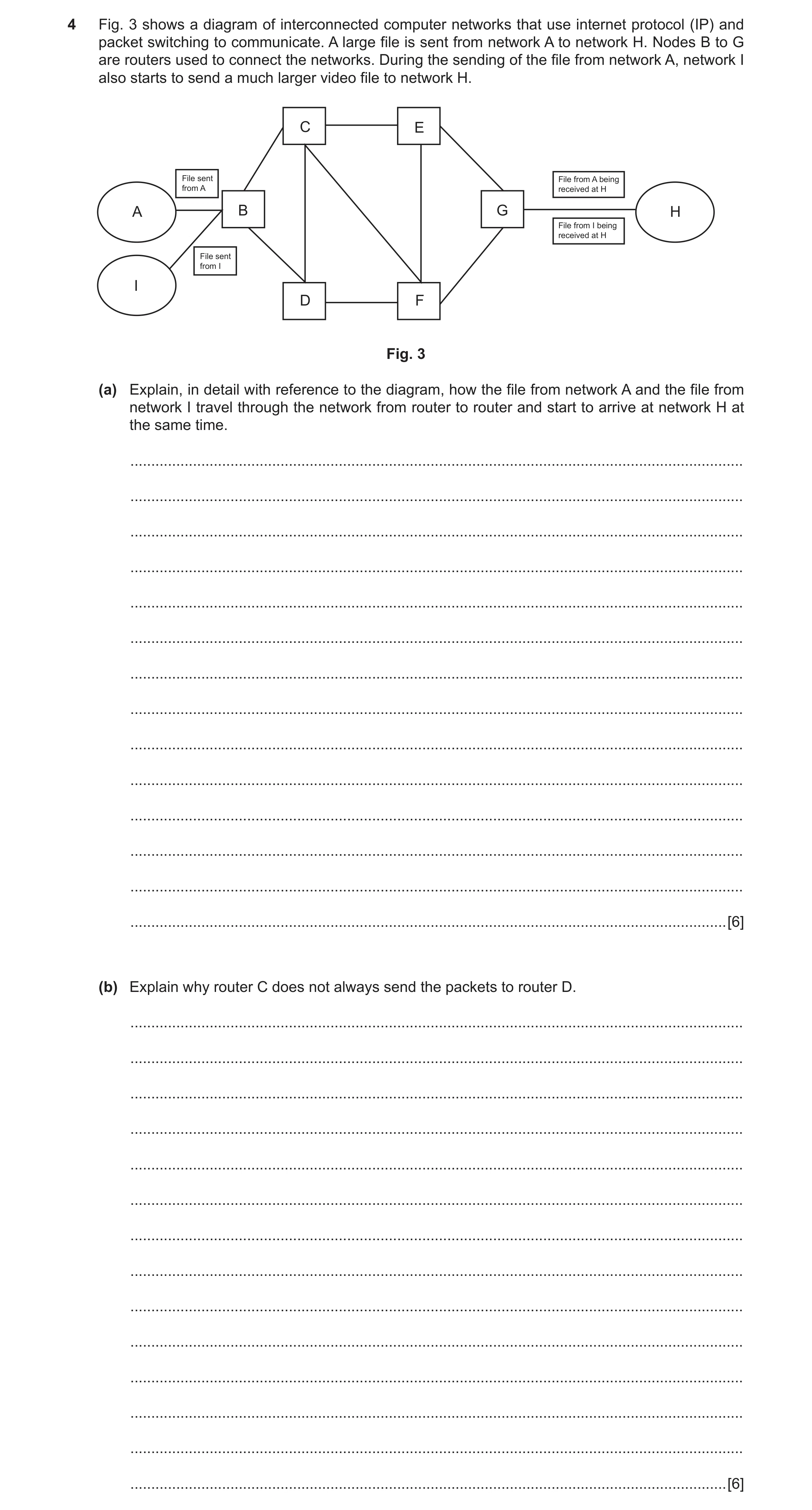
4 Fig. 3 shows a diagram of interconnected computer networks that use internet protocol (IP) and packet switching to communicate. A large file is sent from network A to network H. Nodes B to G are routers used to connect the networks. During the sending of the file from network A, network I also starts to send a much larger video file to network H. C E File sent File from A being from A received at H A B G H File from I being received at H File sent from I I D F Fig. 3 (a) Explain, in detail with reference to the diagram, how the file from network A and the file from network I travel through the network from router to router and start to arrive at network H at the same time. … … … … … … … … … … … … … … [6] (b) Explain why router C does not always send the packets to router D. … … … … … … … … … … … … … … [6]
12 marks
Mark scheme: 4(a) Six from: 6 Each packet sent by network A takes a different route through the network Each packet has source/destination address stored in header Each router has a stored lookup table of IP addresses/routes to the destination (if known) Routing table is stored at control plane of router Used to choose next router/router to send packet to Static routes are pre-programmed to show route to destination B to C to E to G Dynamic routing protocols build up table of preferred routes between connected networks B to C to F to G if router E is inefficient/out of action/in heavy demand If destination is unknown router B will send packet to next known router, C or D If C/D router does not know destination to H then packet is sent onto next router, E or F. 4(b) Six from: 6 Router D may be not responding Router D may be in heavy demand Router D may have failed/be offline There may a policy set up in router C to over-ride the routing tables so that the packets are not sent to router D To enforce a QoS for specific services that take precedence over other packets Router C may have more than one set of routing protocols because it is connecting to several different networks at once Alternative routers may respond quicker/before router D/alternative routes are available sooner than via router D.
This question in 9626/32 Oct/Nov 2018
Q14 · Describe what is meant by web-conferencing 9626/33 Oct/Nov 2018
7 (a) Describe what is meant by web-conferencing. … … … … … [2] (b) Describe how web-conferencing is made possible by internet technologies. … … … … … … … … … … … … … … [6]
8 marks
Mark scheme: 7(a) Two from: 2 Real-time collaboration/communication using web browsers between multiple users via/using the internet/network All users see the same screen at the same time in their web browsers Collaborative interaction between users/webinars/webcasts. 7(b) Six from: 6 Uses TCP/IP connections providing end-to-end data communication (TCP/IP) specifies how data is put into packets and addressed... ...how it transmitted and routed ...how it is received Can use point-to-point/circuit switching methods to provide a secure link Point-to-point limits users to just two Requires web-hosting services Using HTTP/HTTPS as a protocol for transmission and display of data Has a database server optimised for use by other services/mobile applications Use of FTP to upload/download data files Use of IRC (internet relay chat) for text-based messaging Application layer technology used also for file transfer.
This question in 9626/33 Oct/Nov 2018
Q15 · An international organisation provides communication services over the internet 9626/32 Feb/March 2019
10 An international organisation provides communication services over the internet. It enables customers to communicate messages confidentially between their offices in different countries. It uses message, circuit and packet switching technologies for the communications. Describe the differences between these three technologies as used in communicating these messages. … … … … … … … … … … … … … … … … … … … … [8]
8 marks
Mark scheme: 10 Eight from: 8 Packet switching breaks the message into discrete data packets whereas message and circuit may not do so Packet switching can introduce delays as packets may travel via different routes whereas message and circuit switching do not Packet and message switching make more efficient use of the capacity of the transmission medium than does circuit switching Circuit switching keeps the circuit connected for the whole of the duration of the transmission whereas message and switching do not Circuit switching uses the full bandwidth of the transmission medium whereas message and packet switching do not Circuit switching can guarantee a higher quality of service compared to the other methods Message switching can be less secure because messages are stored (temporarily) at nodes Circuit switching can guarantee a higher level of security of data compared to the other methods Others can use the same communication channel when packet switching is used whereas this is not possible when message and circuit switching is used.
This question in 9626/32 Feb/March 2019
Q16 · Describe how data is transmitted using fibre optic technology 9626/31 May/June 2019
5 Describe how data is transmitted using fibre optic technology. … … … … … … … … … … … … … … [6]
6 marks
Mark scheme: 5 Six from: 6 Electrical signals converted to light for transmission / converted back to electrical signals after transmission LED / laser (at node) sends / transmits a light beam / electromagnetic wave along the fibre Data is modulated onto a carrier wave Optical fibre connects the nodes / devices ADC / DAC are used to modulate / demodulate the data onto / off carrier wave Laser is used where longer distances are to be covered LED is used where shorter distances are to be covered as it is cheaper than laser Lasers produce coherent light which can allow greater bandwidth Receiver is photo detector to convert light into electricity Uses indium gallium arsenide in photo detector.
This question in 9626/31 May/June 2019
Q17 · Lasers can be used to create a data link between devices without using cables 9626/32 May/June 2019
2 Lasers can be used to create a data link between devices without using cables. (a) Describe two applications for this method of data transmission. … … … … … … [2] (b) Describe one drawback of this method of data transmission. … … … [1]
3 marks
Mark scheme: 2(a) Two from e.g.: 2 Between spacecraft (in orbit through vacuum) To connect sites across roads / other barriers not owned by sender / receiver Provide (temporary) network connection in e.g. disaster areas where cabling is not possible. 2(b) One from: 1 Short range only in atmosphere due to dispersion of (light) beam by particles in atmosphere Accurate aiming of (light) beam is more / may be more difficult Difficultly in connection is increased if sender / receiver are moving Blocked by objects / weather in path of (light) beam / line of sight.
This question in 9626/32 May/June 2019
Q18 · A packet switched network has routers at nodes labelled A, B, C, D, E, F, G and H 9626/32 May/June 2019
6 A packet switched network has routers at nodes labelled A, B, C, D, E, F, G and H. Each router stores its own ‘routing table’ which shows how it is connected to the other routers. Router Connected to routers: A B B A C D C B D E F D B C F E C F F C D E G G F H H G (a) Complete the diagram by drawing routers C, D, E, F and G with connection lines to show how the routers are inter-connected to communicate with each other. A B H [3] Router A regularly sends out packets to check that router H is reachable. When H receives a packet from A it sends a packet back to confirm that it is reachable. Assume that each router takes zero time units to receive, process and resend a packet and that each packet takes six time units to travel from one router to the next. (b) (i) Describe the shortest route that a packet can take from router A to router H. … … … [1] (ii) Calculate the shortest time taken for router A to receive an acknowledgement from router H confirming that H is reachable. … … … … … [2] (c) (i) Assuming that the packets visit each router only once, calculate the longest time it could take for router A to receive an acknowledgement from router H confirming that H is reachable. … … … … … [2] (ii) Describe the route that the packets would take. … … … [1] (d) An additional router, J, is to be added to reduce the time for packets to travel from router A to router H to a minimum. However, no further connections can be directly made to routers A and H. (i) Describe where J would be placed to reduce the travel time to a minimum. … … … [1] (ii) Calculate the new minimum time that it would take for A to receive an acknowledgement that H was reachable. … … … … … [2]
12 marks
Mark scheme: 6(a) A suitable diagram could be: 3 Three from: All correct labelled boxes for routers C, D, E, F, G All correct connecting lines between boxes / routers All connecting lines shown as double-ended arrows. 6(b)(i) (A, B), C/D, F, G, (H). 1 6(b)(ii) Two from: 2 shortest route is 5 hops so: 5 × 6 = 30 (time units) × 2 for return, 30 × 2 = 60 (time units). 6(c)(i) Two from: 2 longest route takes 7 hops so: 7 × 6 = 42 (time units) × 2 for return = 84 (time units). 6(c)(ii) One mark for all correct: 1 (A, B), D, C, E, F, G (H). 6(d)(i) Between B and G. 1 6(d)(ii) Two from: 2 4 hops × 6 = 24 × 2 = 48 (time units).
This question in 9626/32 May/June 2019
Q19 · Describe how data is transmitted using fibre optic technology 9626/33 May/June 2019
5 Describe how data is transmitted using fibre optic technology. … … … … … … … … … … … … … … [6]
6 marks
Mark scheme: 5 Six from: 6 Electrical signals converted to light for transmission / converted back to electrical signals after transmission LED / laser (at node) sends / transmits a light beam / electromagnetic wave along the fibre Data is modulated onto a carrier wave Optical fibre connects the nodes / devices ADC / DAC are used to modulate / demodulate the data onto / off carrier wave Laser is used where longer distances are to be covered LED is used where shorter distances are to be covered as it is cheaper than laser Lasers produce coherent light which can allow greater bandwidth Receiver is photo detector to convert light into electricity Uses indium gallium arsenide in photo detector.
This question in 9626/33 May/June 2019
Q20 · Discuss the benefits and drawbacks of using ethernet cables containing copper within a… 9626/31 Oct/Nov 2019
6 Discuss the benefits and drawbacks of using ethernet cables containing copper within a computer network. … … … … … … … … … … … … … … … … … … … … [8]
8 marks
Mark scheme: 6 Command word: Discuss: give important arguments for and against. Often 8 requires a conclusion. This question to be marked as a Level of Response. Level 3 (7–8 marks) Candidates will evaluate in detail the benefits and drawbacks of the use of copper cables The information will be relevant, clear, organised and presented in a structured and coherent format. There may be a reasoned conclusion/opinion. Subject specific terminology will be used accurately and appropriately. Level 2 (4–6 marks) Candidates will explain the benefits and drawbacks of the use of copper cables For the most part, the information will be relevant and presented in a structured and coherent format. There may be a reasoned conclusion/opinion. Subject specific terminology will be used appropriately and for the most part correctly. Level 1 (1–3 marks) Candidates will describe at least one benefit and at least one drawback of the use of copper cables Answers may be in the form of a list. There will be little or no use of specialist terms. Level 0 (0 marks): Response with no valid content. Answers may include reference to: Benefits: Flexible so can be installed almost anywhere/can use ‘tight’ bends Can run electrical power along copper cable/Ethernet cable Can supply power to remote devices e.g. cameras high on buildings do not need separate power supply Costs of installation are less than for fibre optic cables NICs that use copper connections are cheaper to buy than those that use e.g. fibre optic Can provide higher bandwidths than wireless/WiFi Harder to hack into compared to WiFi Drawbacks: Can be subject to electrical interference Must not be run next to mains power cables Costs of installation are more than for wireless/WiFi Cannot provide as high bandwidths as fibre optic
This question in 9626/31 Oct/Nov 2019
Q21 · Describe the benefits of using lasers to transmit data between devices 9626/32 Oct/Nov 2019
6 Describe the benefits of using lasers to transmit data between devices. … … … … … … … … … … … … … … [6]
6 marks
Mark scheme: 6 Six from: 6 Can transmit data long distances along thin fibre optic cables Laser light is coherent so is not easily lost by dispersion Can carry vast amounts of data/implement very high bandwidths for data transmission Can be used in free space/just air so no need for cables Can be used in a vacuum so can be used between spacecraft Immune to electromagnetic interference Increased security as difficult to intercept in fibre/free space No licence to use is required (for use in free space) in most areas of the world Can be used to power devices in free space.
This question in 9626/32 Oct/Nov 2019
Q22 · Discuss the benefits and drawbacks of using ethernet cables containing copper within a… 9626/33 Oct/Nov 2019
6 Discuss the benefits and drawbacks of using ethernet cables containing copper within a computer network. … … … … … … … … … … … … … … … … … … … … [8]
8 marks
Mark scheme: 6 Command word: Discuss: give important arguments for and against. Often 8 requires a conclusion. This question to be marked as a Level of Response. Level 3 (7–8 marks) Candidates will evaluate in detail the benefits and drawbacks of the use of copper cables The information will be relevant, clear, organised and presented in a structured and coherent format. There may be a reasoned conclusion/opinion. Subject specific terminology will be used accurately and appropriately. Level 2 (4–6 marks) Candidates will explain the benefits and drawbacks of the use of copper cables For the most part, the information will be relevant and presented in a structured and coherent format. There may be a reasoned conclusion/opinion. Subject specific terminology will be used appropriately and for the most part correctly. Level 1 (1–3 marks) Candidates will describe at least one benefit and at least one drawback of the use of copper cables Answers may be in the form of a list. There will be little or no use of specialist terms. Level 0 (0 marks): Response with no valid content. Answers may include reference to: Benefits: Flexible so can be installed almost anywhere/can use ‘tight’ bends Can run electrical power along copper cable/Ethernet cable Can supply power to remote devices e.g. cameras high on buildings do not need separate power supply Costs of installation are less than for fibre optic cables NICs that use copper connections are cheaper to buy than those that use e.g. fibre optic Can provide higher bandwidths than wireless/WiFi Harder to hack into compared to WiFi Drawbacks: Can be subject to electrical interference Must not be run next to mains power cables Costs of installation are more than for wireless/WiFi Cannot provide as high bandwidths as fibre optic
This question in 9626/33 Oct/Nov 2019
Q23 · Ultra-high definition television is available from video streaming services over the… 9626/31 May/June 2020
2 Ultra-high definition television is available from video streaming services over the internet. (a) Describe the features of ultra-high definition television systems that improve the viewing experience. … … … … … … … … [3] (b) Analyse how the different types of transmission media used by internet service providers affect the availability of ultra-high definition television to their customers. … … … … … … … … … … … … … … … … … … … … [8]
11 marks
Mark scheme: 2(a) Three from: 3 UHD has resolution of 4 times the number of pixels as HD/3840 × 2160 pixels (8.29 megapixels) v. 1920 × 1080 pixels (2.07 megapixels). UHD has resolution of 4K/4096 × 2160 pixels. UHD has resolution of 8K/7680 × 4320 pixels (33.18 megapixels)/16 times HD. Increased dynamic range compared to HD. Increased colour depth compared to HD. More LEDs in a given area on screen increase the resolution so there is more detail. 2(b) Eight from e.g.: 8 Internet bandwidth of c.25 megabits/sec is required. Bandwidth required for UHD is not available to all customers/from all internet providers. Satellite transmissions/signals can provide required bandwidth. Reduced number of channels will be available unless new satellites are brought into service. Wireless/mobile telephone/4G networks have restricted bandwidth so cannot provide ultra HD. Introduction of 5G will make ultra HD available but will require new phones. Copper cable networks can provide bandwidth/up to 100 Mbit/s as Cat 5 ethernet/Cat 6 1 Gbit/s. Copper telephone cabling can provide ultra HD. Distance from exchange is limited as bandwidth reduces over distance. Fibre optic cables can provide high bandwidth (10 Gbit/s). Cost of use of fibre to home/installation to home is high. Fibre to cabinet (FTC) may provide UHD to more homes. Fibre allows much longer cable runs so may reduce installation costs over long distances from exchange to home.
This question in 9626/31 May/June 2020
Q24 · Telecommunication companies are using fibre optic cables to supply internet services… 9626/31 May/June 2020
6 Telecommunication companies are using fibre optic cables to supply internet services direct to people’s homes because fibre optic cables are cheaper than copper cables. (a) Explain the reasons, other than cost, why companies prefer to use fibre optic cabling. … … … … … … … … … … [4] (b) Describe three disadvantages of using fibre optic cables. 1 … … … 2 … … … 3 … … … [3]
7 marks
Mark scheme: 6(a) Four from: 4 Can use long runs/lengths of cable compared to copper cables. Low signal loss over long distances. Greater tensile strength than copper. Not susceptible to electrical interference. Not susceptible to weather/environmental damage. Can provide very high bandwidth/internet speeds for customers. 6(b) Three from: 3 Difficult/require special equipment to splice/join if broken. Loss of signal/light at joins. If bent too much (beyond their limited physical arc) they will break. Special test equipment is often required for testing. Highly susceptible to physical damage/being cut or broken during construction/renovation/building/disturbance works. Data transmission losses often occur when wrapped around curves with small radius.
This question in 9626/31 May/June 2020
Q25 · Describe how a digital television signal is broadcast from a satellite to a receiver for… 9626/32 May/June 2020
6 Describe how a digital television signal is broadcast from a satellite to a receiver for display on a television set in a home. … … … … … … … … … … … … … … … … … … … … [8]
8 marks
Mark scheme: 6 Eight from: 8 Satellite is in geostationary orbit so appears to be at fixed point above surface of Earth. Must be at certain/correct height/c.37 000 km above equator. Satellite has transmitting dish pointed at Earth. Satellite has transponder(s) which receive(s) and transmit(s) signals (to/from Earth). Receive and transmit signals use different frequencies. Transmit (to Earth) signals are in set range/4–8 and 12–18 GHz range. Horizontal and vertical signal polarisation is used to increase capacity. Digital TV signal is encoded as standard/MPEG-2 TV signal with sound/audio (uplinked from Earth station). TV signal may be encrypted to prevent viewing without paying for service. High definition/ MPEG-4 TV signals with multi-channel sound requires more bandwidth. Receiving dish on Earth is pointed at the satellite in line of sight. Dish has Low Noise Block/LNB at antenna to amplify signal allows use of cheaper cable to receiver. Receiver/TV/set-top box decodes signal into pictures and sounds for display on TV. May include system for decrypting ‘scrambled’ pay TV signal.
This question in 9626/32 May/June 2020
Q26 · Ultra-high definition television is available from video streaming services over the… 9626/33 May/June 2020
2 Ultra-high definition television is available from video streaming services over the internet. (a) Describe the features of ultra-high definition television systems that improve the viewing experience. … … … … … … … … [3] (b) Analyse how the different types of transmission media used by internet service providers affect the availability of ultra-high definition television to their customers. … … … … … … … … … … … … … … … … … … … … [8]
11 marks
Mark scheme: 2(a) Three from: 3 UHD has resolution of 4 times the number of pixels as HD/3840 × 2160 pixels (8.29 megapixels) v. 1920 × 1080 pixels (2.07 megapixels). UHD has resolution of 4K/4096 × 2160 pixels. UHD has resolution of 8K/7680 × 4320 pixels (33.18 megapixels)/16 times HD. Increased dynamic range compared to HD. Increased colour depth compared to HD. More LEDs in a given area on screen increase the resolution so there is more detail. 2(b) Eight from e.g.: 8 Internet bandwidth of c.25 megabits/sec is required. Bandwidth required for UHD is not available to all customers/from all internet providers. Satellite transmissions/signals can provide required bandwidth. Reduced number of channels will be available unless new satellites are brought into service. Wireless/mobile telephone/4G networks have restricted bandwidth so cannot provide ultra HD. Introduction of 5G will make ultra HD available but will require new phones. Copper cable networks can provide bandwidth/up to 100 Mbit/s as Cat 5 ethernet/Cat 6 1 Gbit/s. Copper telephone cabling can provide ultra HD. Distance from exchange is limited as bandwidth reduces over distance. Fibre optic cables can provide high bandwidth (10 Gbit/s). Cost of use of fibre to home/installation to home is high. Fibre to cabinet (FTC) may provide UHD to more homes. Fibre allows much longer cable runs so may reduce installation costs over long distances from exchange to home.
This question in 9626/33 May/June 2020
Q27 · Telecommunication companies are using fibre optic cables to supply internet services… 9626/33 May/June 2020
6 Telecommunication companies are using fibre optic cables to supply internet services direct to people’s homes because fibre optic cables are cheaper than copper cables. (a) Explain the reasons, other than cost, why companies prefer to use fibre optic cabling. … … … … … … … … … … [4] (b) Describe three disadvantages of using fibre optic cables. 1 … … … 2 … … … 3 … … … [3]
7 marks
Mark scheme: 6(a) Four from: 4 Can use long runs/lengths of cable compared to copper cables. Low signal loss over long distances. Greater tensile strength than copper. Not susceptible to electrical interference. Not susceptible to weather/environmental damage. Can provide very high bandwidth/internet speeds for customers. 6(b) Three from: 3 Difficult/require special equipment to splice/join if broken. Loss of signal/light at joins. If bent too much (beyond their limited physical arc) they will break. Special test equipment is often required for testing. Highly susceptible to physical damage/being cut or broken during construction/renovation/building/disturbance works. Data transmission losses often occur when wrapped around curves with small radius.
This question in 9626/33 May/June 2020
Q28 · Three interconnected networks (numbered 1 to 3) that use internet protocol (IP) and… 9626/32 Feb/March 2021
1 Fig. 1.1 shows three interconnected networks (numbered 1 to 3) that use internet protocol (IP) and packet switching when transmitting files. Network 1 has a server that is used for video streaming. Network 2 has servers that provide a company with a website used for selling DVDs online. Network 3 is a network in a home. There are routers on the internet that can be used to connect the networks. A user on the home network is watching a video that is being streamed from the server on network 1. At the same time a shopper on the home network is using a web browser to access the company website on network 2 to buy some DVDs online. Routers on internet Router C Router A Router F Router B Router D Video Website on streaming server on server on Network 2 Network 1 Router E Laptop used for Computer used watching streamed for online shopping video Home network Network 3 Fig. 1.1 (a) Describe how the video stream is transferred from the server on network 1 to the user on network 3. … … … … … … … … … … … … … … [6] (b) The viewing experience can sometimes be spoiled by the online shopping affecting the video streaming. Describe how router E on the home network can be configured to ensure that this does not happen. … … … … … … [2] (c) Explain why HTTPS is used for communication between the shopper’s web browser and the company website. … … … … … … … … … … … … … … [6]
14 marks
Mark scheme: Question Answer Marks 1(a) Six from: 6 The home computer requests/initiates the stream NIC on server determines destination address for file Video file is converted into (IP) packets by NIC on server NIC on server constructs and sends packets from server/use of packet switching IP packets contain details of destination address/destination IP address Packets are sent from network 1 to router A Router A compares packet (IP) destination IP with routing table(s) Router A chooses appropriate/best next router to send packets based on contents of routing table(s) Applies (any) quality of service (QoS) rules to prioritise the packets (of the streamed video) Sends packet(s) to next router(s) Next router(s) carry out same tasks as router A to pass packets through the networks Router E receives packets from the internet routers ….and transfers/passes them to internal/home/user network/to laptop viewing video Dynamic routing tables of routers may be set up/updated to ensure QoS for streaming. 1(b) Two from: 2 Use router’s quality of service/QoS configuration to prioritise the video stream Use (the router’s) traffic shaping configuration to prioritise the video stream Set up/configure specific ports for the video service/application to use ‘Intelligent’ QoS will prioritise in pre-determined order: voice, video, application traffic, print services/file downloads 1(c) Six from: 6 Extension of HTTP to provide secure communications/Hyper Text Transfer Protocol Secure Encrypts using Transport Layer Security (TLS)/Secure Sockets Layer (SSL) Protects/ensures the integrity of data sent to/from website over internet/through the networks Operates at application layer to encrypt/decrypt using TLS Authenticates website using a (public key) certificate Controls access by restricting access to the site to authorised users Protects the privacy of data sent to/from website over internet/through the networks Protects against man-in-the-middle attacks/eavesdropping on the data Protects against alteration/modification of websites Protects against insertion of malware/malicious code into website code.
This question in 9626/32 Feb/March 2021
Question 29 9626/32 May/June 2021
14 (a) Describe bit streaming. … … … [1] (b) Describe the differences between real-time bit streaming and on demand bit streaming. … … … … … … [2]
3 marks
This question in 9626/32 May/June 2021
Q30 · The global positioning system (GPS) is a network of satellites orbiting the Earth 9626/32 Oct/Nov 2021
12 The global positioning system (GPS) is a network of satellites orbiting the Earth. It is used by devices such as a ‘satnav’ in a delivery vehicle that assists the driver in finding destinations. (a) Describe the benefits and drawbacks of the use of a satnav with GPS by the driver of a delivery vehicle. … … … … … … … … … … … … … … [6] (b) Explain why the satnav may not be able to provide an accurate location. … … … … … … [2] (c) The global positioning system (GPS) can be used by satnavs in vehicles and by the military. Describe three other ways that GPS may be used. … … … … … … … [3]
11 marks
Mark scheme: 12(a) Six from: 6 Benefits: Can pinpoint location of vehicle/destination with accuracy Relatively low cost/no extra cost once receiver is purchased Requires little training to use/user friendly/easy to operate No need to consult paper maps/look for directions when driving Can plot/plan routes/way points to maximise use of time/fuel efficiency Can be used to keep track of vehicle location/prove location of vehicle for deliveries Drawbacks: Local knowledge of locations/local terrain/roads is poor/can be inaccurate May have to purchase a separate/different version/map for large vehicles Can be a visual/auditory/manual distraction when driving Battery has limited use/must be connected to (12 V) power supply GPS is reliant on US satellite system so possibility of being interrupted at any time Can be used to track vehicles/drivers without their knowledge/consent/privacy issues. Must be at least 1 of each for full marks. 12(b) Two from e.g.: 2 Obstacles/in tunnels obstruct/reduce strength of signal from satellite Weather degrades signals/reduces strength of/scatters signal from satellite Cannot ‘see’ (three) satellites with sufficient strength to gather data/gather enough data to carry out calculations Low battery power so receiver cannot function/not enough power to decode/receive signals/carry out calculations. 12(c) Three from e.g.: 3 (Amateur) astronomers for positional information when searching for astronomical bodies Cartographers/map makers for determining position of geographical landmarks/buildings/features Mobile/cell phone systems to synchronise clocks for e.g. handset handoff between cell towers when handsets move from tower to tower/cell to cell Tracking objects/goods/devices as they move Geotagging of objects to record their location Tour guide applications/websites to determine what local information to display to roaming tourists Recreational use e.g. geocaching/location-based mobile games/way marking Geologists for use in tectonics/earthquake monitoring.
This question in 9626/32 Oct/Nov 2021
Q31 · Microwave transmission is used to send data between devices at different locations 9626/32 Feb/March 2022
6 Microwave transmission is used to send data between devices at different locations. (a) Explain how microwaves are used to transmit data between devices. … … … … … … … [3] (b) Describe four ways that microwave transmission is used in communication systems. … … … … … … … … … … … [4]
7 marks
Mark scheme: 6(a) Three from: 3 Uses wireless technology/beam of radio/electromagnetic waves Uses line-of sight between antennae/send and receive antennae Uses frequencies in the range 300 MHz to 300 GHz (wavelength 10 cm to 1 mm) Uses parabolic dishes with (horn) antennae to provide ‘spot’ beams Uses multiple antennae to send/receive signals (if sending/receiving simultaneously/duplex/handshaking) Data is modulated onto carrier wave using orthogonal frequency-division multiplexing (OFDM)/ Orthogonal frequency-division multiple access (OFDMA)/using a range of frequencies/polarisations Pulsed transmission of waves/polarised with matching of antennas at both ends in horizontal/vertical form 6(b) Four from: 4 Used by mobile phones systems in 3G/4G/5G communications Used by WiFi systems to link devices into a LAN Used for communications between base stations and satellites/uplink and downlinks with satellites Used in television/radio industry to transmit programmes from outside studio to studio/outside broadcasts (instead of expensive satellite links) Used to carry cellular/mobile phone systems data between masts/stations/to provide backbone carrier system Used for short-range indoor communications between devices Use to link remote/regional telephone exchanges to main exchanges without the use of copper/optical fibre cabling
This question in 9626/32 Feb/March 2022
Q32 · Frame Relay is used in networks 9626/32 May/June 2022
5 Frame Relay is used in networks. (a) Explain why Frame Relay is used. … … … … … … … … … … … … … [6] (b) Explain the drawbacks of using Frame Relay. … … … … … … … … [3]
9 marks
Mark scheme: 5(a) Six from: Supports the transport of data at high speeds through networks Is a connectionless service so each data packet passing through the network contains address information Allows use of virtual circuits which can appear permanent to users Allows multiplexing of virtual circuits to share network load/bandwidth Can only detect errors at the data link layer so there is no flow control/error control Faulty/damaged frames are dropped and there is no request for retransmission Supports variable frame sizes/data packets to accommodate different data requirements Operates at physical and data link layers so can be used for internet/broadband/ISDN connections There is no error control so it requires a reliable medium for transmission. 5(b) Three from: Frames are delivered unreliably so have to be retransmitted if sender is aware of need/sender responsibility to resend Frames/data may go missing as there is no acknowledgement of received packets Packets may not be delivered in the same sequence as when sent No flow control so cannot stop data transmission when network is congested so data can be lost Frames are discarded when the network is congested Frame/data is lost if retransmission of this frame does not occur. 3
This question in 9626/32 May/June 2022
Q33 · Discuss the advantages and disadvantages of the use of microwave transmissions for… 9626/31 Oct/Nov 2022
6 Discuss the advantages and disadvantages of the use of microwave transmissions for communications. … … … … … … … … … … … … … … … … … … … … [8]
8 marks
Mark scheme: 6 Eight from: 8 Advantages: Small/directional antennas point directly at each other …so can use same frequencies as neighbouring transmissions without interference/make economical use of radio spectrum Directional antennae provide increased performance with low power requirements Narrow microwave beams do not interfere with other equipment Small antennae/devices can be used so operations can be mobile e.g. TV sporting transmissions/can be set up quickly to cover unfolding events/can be used in portable radio systems Have large bandwidth …so can carry greater amount of data compared to other media/can carry more radio/telephone channels Disadvantages: High/tall antennae may be environmentally problematic/difficult to install in some areas Line of sight required …so antenna cannot be ’over horizon’/limited to 50 to 80 km apart …so any obstacle will interfere with transmission …so can be interfered with/intercepted Unable to penetrate obstacles/buildings/hills …so positioning of antennas may be intrusive/unsightly Weather/environmental conditions can adversely affect the transmission ‘Rain fade’ due to absorption of microwaves by water can degrade the signals High pollen counts/dust/smoke can degrade signals due to scattering of signals by particles Solar events may affect transmissions/signals so interfere with communications Most of signal passes through antennae so transmissions can be intercepted behind official antenna/in space by satellite so security can be compromised. Must be at least two Advantages and at least two Disadvantages for full marks. Max 6 marks if all bullets/statements/points.
This question in 9626/31 Oct/Nov 2022
Q34 · Bit rate is a measure of how fast data can be sent from one device to another on a network 9626/31 Oct/Nov 2022
9 Bit rate is a measure of how fast data can be sent from one device to another on a network. (a) Describe how the bit rate of a video stream is measured on a network. … … … … … [2] (b) Identify two factors that can affect the bit rate in data communication. 1 … … … 2 … … … [2]
4 marks
Mark scheme: 9(a) Two from: 2 Number of bits transmitted/carried/processed per second/unit of time Units are kbps/kilobits per second (Accept other SI/metric/decimal prefixes e.g. megabits per second) Units are 1KiB/s in binary/IS standard (this is 1024 bits/s) (Accept other IEC standard prefixes e.g. 1MiB/s) Candidates might describe how it is physically measured...accept either...e.g.: Start video streaming/play on device/send file of known size Use software to capture video traffic/known file from network (over time period of e.g. several minutes/hour) Select video stream from captured traffic and calculate bits per second. 9(b) Two from: 2 Bandwidth available on the communication channel Level of noise/signal to noise ratio/SNR on the communication channel Number of signal levels used to represent data.
This question in 9626/31 Oct/Nov 2022
Q35 · Discuss the advantages and disadvantages of the use of microwave transmissions for… 9626/33 Oct/Nov 2022
6 Discuss the advantages and disadvantages of the use of microwave transmissions for communications. … … … … … … … … … … … … … … … … … … … … [8]
8 marks
Mark scheme: 6 Eight from: 8 Advantages: Small/directional antennas point directly at each other …so can use same frequencies as neighbouring transmissions without interference/make economical use of radio spectrum Directional antennae provide increased performance with low power requirements Narrow microwave beams do not interfere with other equipment Small antennae/devices can be used so operations can be mobile e.g. TV sporting transmissions/can be set up quickly to cover unfolding events/can be used in portable radio systems Have large bandwidth …so can carry greater amount of data compared to other media/can carry more radio/telephone channels Disadvantages: High/tall antennae may be environmentally problematic/difficult to install in some areas Line of sight required …so antenna cannot be ’over horizon’/limited to 50 to 80 km apart …so any obstacle will interfere with transmission …so can be interfered with/intercepted Unable to penetrate obstacles/buildings/hills …so positioning of antennas may be intrusive/unsightly Weather/environmental conditions can adversely affect the transmission ‘Rain fade’ due to absorption of microwaves by water can degrade the signals High pollen counts/dust/smoke can degrade signals due to scattering of signals by particles Solar events may affect transmissions/signals so interfere with communications Most of signal passes through antennae so transmissions can be intercepted behind official antenna/in space by satellite so security can be compromised. Must be at least two Advantages and at least two Disadvantages for full marks. Max 6 marks if all bullets/statements/points.
This question in 9626/33 Oct/Nov 2022
Q36 · Bit rate is a measure of how fast data can be sent from one device to another on a network 9626/33 Oct/Nov 2022
9 Bit rate is a measure of how fast data can be sent from one device to another on a network. (a) Describe how the bit rate of a video stream is measured on a network. … … … … … [2] (b) Identify two factors that can affect the bit rate in data communication. 1 … … … 2 … … … [2]
4 marks
Mark scheme: 9(a) Two from: 2 Number of bits transmitted/carried/processed per second/unit of time Units are kbps/kilobits per second (Accept other SI/metric/decimal prefixes e.g. megabits per second) Units are 1KiB/s in binary/IS standard (this is 1024 bits/s) (Accept other IEC standard prefixes e.g. 1MiB/s) Candidates might describe how it is physically measured...accept either...e.g.: Start video streaming/play on device/send file of known size Use software to capture video traffic/known file from network (over time period of e.g. several minutes/hour) Select video stream from captured traffic and calculate bits per second. 9(b) Two from: 2 Bandwidth available on the communication channel Level of noise/signal to noise ratio/SNR on the communication channel Number of signal levels used to represent data.
This question in 9626/33 Oct/Nov 2022
Q37 · Compare the use of static and dynamic routing when sending data packets through IP… 9626/32 Feb/March 2023
3 Compare the use of static and dynamic routing when sending data packets through IP networks. You must include similarities and differences. … … … … … … … … … … … … … … [6]
6 marks
Mark scheme: 3 Six from: 6 Similarities: • Used in routers/routing devices to determine next node/router/device/hop to send data packet/datagram/frame • Algorithms create a ‘forwarding table’/routing table for use when choosing next hop/preferred route • Routing tables stored in non-volatile memory of router hardware • Both provide default route for packet if no route can be determined Differences: • Static routing tables created by network administrators whereas dynamic routing tables are created by algorithms • Static routing does not (automatically) take into account network conditions/changes whereas dynamic routing protocols create a table of routing information from real-time logical network layouts/ changes/issues/problems • Static routes are fixed whereas dynamic routing allows packets to take different routes depending on network conditions/take different routes to make more efficient use of network connections/allows as many routes as possible to be kept • Static routing tables not updated/amended when network conditions/device change whereas dynamic routing are updated/can adjust to changing network conditions • Static routing table/info does not ‘time out’ whereas dynamic routes can be time-limited/have time-to-live data/dynamic routes have a time-to-live after which the database/table will be updated • Dynamic routing changes are automatically/shared between routers/devices where static routes are not • Dynamic routing can be used to limit the number of ‘hops’ that a packet can take to its destination whereas static routing cannot. Must be 1 of each for full marks.
This question in 9626/32 Feb/March 2023
Q38 · Computer devices can connect to a local area network (LAN) 9626/31 May/June 2024
5 Computer devices can connect to a local area network (LAN). Wi-Fi connections can only be used within range of a wireless access point (WAP). (a) Explain why Wi-Fi connections to a WAP have a limited range. … … … … … … … … [3] (b) Explain how the connection range of Wi-Fi can be increased. … … … … … … … … [3] Devices use ethernet technology to send data on cabled LANs. (c) Explain why ethernet technology is used on LANs to send data. … … … … … … … … … … [4]
10 marks
Mark scheme: 5(a) Three from: Wi-Fi transmitters/WAP are restricted to (very) low power The radio waves/signals degrade/do not travel/propagate over long distances/are attenuated over distance Do not penetrate solid objects/walls very well/easily/some materials can block Wi-Fi signals Ensures that Wi-Fi can be used in networks that are close together/in homes/apartments/business sharing buildings Ensure they do not interfere with each other Ensure that they are less accessible to eavesdroppers Because of interference from other transmissions (e.g.: from other devices) Reduces the/any possibility of (any) (perceived) harmful effects on human health. 3 5(b) Three from: Place WAPs in open environment/high up/unimpeded by objects/walls so that radio waves are not obstructed/signal strength is reduced Install additional/WAPs/extenders/repeaters/booster/use powerline connections (so that blind-spots are covered) Increase power output of WAP (1st) so that radio waves travel further (1) Use 2.4GHz (frequencies) (instead of 5Ghz frequencies) (1st) this has greater range/radio waves at this frequency travel further/can penetrate objects better (1) Ensure that WAP uses channels that are not used by adjacent/overlapping/neighbours channels avoid (co-channel) interference which can slow/impede data transmission. 3 5(c) Four from: Transmission media/cables are robust/resistant to electrical noise/interference/resistant to data degradation Can achieve very high rates of data transfer/high bandwidths compared to other methods of connection/data transfer. More secure than wireless/high security Ethernet uses a connectionless mode of communication/no acknowledgment of frames (1st) so less network traffic (1) All nodes/devices (on Ethernet) have the same privileges/no client-server issues/negotiation needed No routing required/possible/no need for hubs or switches. 4
This question in 9626/31 May/June 2024
Q39 · Computer devices can connect to a local area network (LAN) 9626/33 May/June 2024
5 Computer devices can connect to a local area network (LAN). Wi-Fi connections can only be used within range of a wireless access point (WAP). (a) Explain why Wi-Fi connections to a WAP have a limited range. … … … … … … … … [3] (b) Explain how the connection range of Wi-Fi can be increased. … … … … … … … … [3] Devices use ethernet technology to send data on cabled LANs. (c) Explain why ethernet technology is used on LANs to send data. … … … … … … … … … … [4]
10 marks
Mark scheme: 5(a) Three from: Wi-Fi transmitters/WAP are restricted to (very) low power The radio waves/signals degrade/do not travel/propagate over long distances/are attenuated over distance Do not penetrate solid objects/walls very well/easily/some materials can block Wi-Fi signals Ensures that Wi-Fi can be used in networks that are close together/in homes/apartments/business sharing buildings Ensure they do not interfere with each other Ensure that they are less accessible to eavesdroppers Because of interference from other transmissions (e.g.: from other devices) Reduces the/any possibility of (any) (perceived) harmful effects on human health. 3 5(b) Three from: Place WAPs in open environment/high up/unimpeded by objects/walls so that radio waves are not obstructed/signal strength is reduced Install additional/WAPs/extenders/repeaters/booster/use powerline connections (so that blind-spots are covered) Increase power output of WAP (1st) so that radio waves travel further (1) Use 2.4GHz (frequencies) (instead of 5Ghz frequencies) (1st) this has greater range/radio waves at this frequency travel further/can penetrate objects better (1) Ensure that WAP uses channels that are not used by adjacent/overlapping/neighbours channels avoid (co-channel) interference which can slow/impede data transmission. 3 5(c) Four from: Transmission media/cables are robust/resistant to electrical noise/interference/resistant to data degradation Can achieve very high rates of data transfer/high bandwidths compared to other methods of connection/data transfer. More secure than wireless/high security Ethernet uses a connectionless mode of communication/no acknowledgment of frames (1st) so less network traffic (1) All nodes/devices (on Ethernet) have the same privileges/no client-server issues/negotiation needed No routing required/possible/no need for hubs or switches. 4
This question in 9626/33 May/June 2024
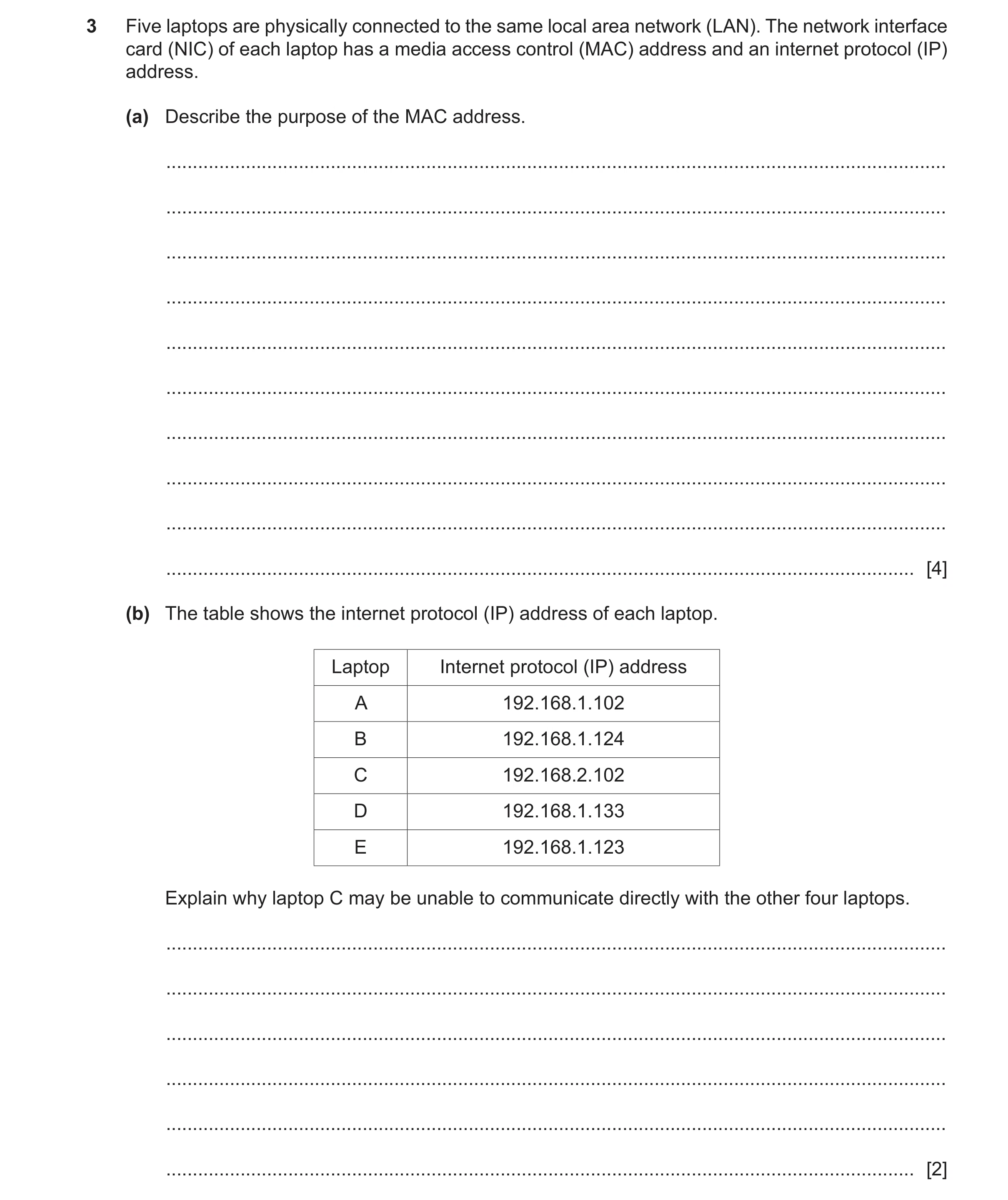
Q40 · Five laptops are physically connected to the same local area network (LAN) 9626/31 May/June 2025
3 Five laptops are physically connected to the same local area network (LAN). The network interface card (NIC) of each laptop has a media access control (MAC) address and an internet protocol (IP) address. (a) Describe the purpose of the MAC address. … … … … … … … … … … [4] (b) The table shows the internet protocol (IP) address of each laptop. Laptop Internet protocol (IP) address A 192.168.1.102 B 192.168.1.124 C 192.168.2.102 D 192.168.1.133 E 192.168.1.123 Explain why laptop C may be unable to communicate directly with the other four laptops. … … … … … … [2]
6 marks
Mark scheme: 3(a) FOUR from: 4 • (Uniquely) identifies the NIC (in a network) • Used in Ethernet frames (when sending packets) • Used as address when sending / receiving packets • Used by DHCP servers when assigning IP addresses • Used by switches to direct packets around networks • Stored in table in switches for traffic management • Identifies the manufacturer of the NIC 3(b) TWO from: 2 • There are two logical networks 192.168.1.x and 192.168.2.x/network 1 and network 2/valid reference to the two network addresses • Laptop C is on a different logical network (than the others) • The laptops are on different subnets • Packets from laptop C are undetectable / unreceivable by laptops A/B/D/E/other 4 // laptop C packets cannot be detected/received by the other laptops
This question in 9626/31 May/June 2025
Q41 · Message switching can be used in networks to transfer data between devices 9626/33 Oct/Nov 2025
5 Message switching can be used in networks to transfer data between devices. (a) Describe how message switching transfers data between devices. … … … … … … … … [3] (b) Explain why message switching is used to transfer data. … … … … … … … … … [4]
7 marks
Mark scheme: 5(a) Three from: 3 • Complete message is sent / transferred at once / in one go • Message contains destination address • Address used to send message to destination / route the message to next node • Store and forward method of transmission used (by intermediate nodes / router / switch / email servers) 5(b) Four from: 4 • Makes efficient use of available bandwidth because connections / data links / channels are shared between devices • If network fails / congestion message is not lost because messages are stored at message switches / intermediate nodes / mail servers • Networks / devices can be configured to prioritise messages so that important messages arrive first • Messages can be broadcast to several destinations at once to avoid repeating the message • Storage of message by node so message is not lost / retries of sending are possible.
This question in 9626/33 Oct/Nov 2025
Q42 · Describe how BitTorrent is used to transfer large files 9626/33 Oct/Nov 2025
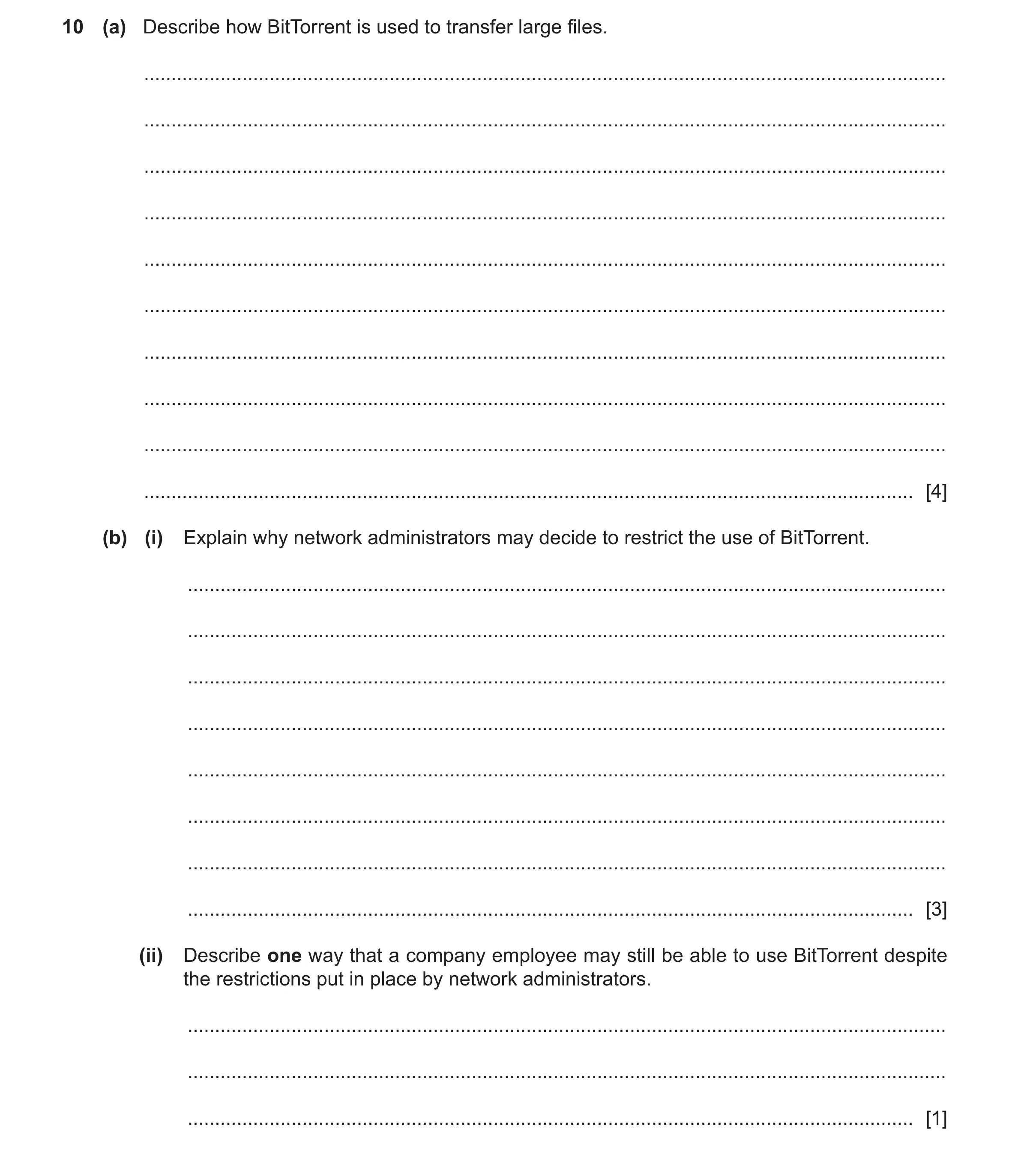
10 (a) Describe how BitTorrent is used to transfer large files. … … … … … … … … … … [4] (b) (i) Explain why network administrators may decide to restrict the use of BitTorrent. … … … … … … … … [3] (ii) Describe one way that a company employee may still be able to use BitTorrent despite the restrictions put in place by network administrators. … … … [1]
8 marks
Mark scheme: 10(a) Four from: 4 • BitTorrent client installed / used on device • Uses BitTorrent protocol to connect to other clients / devices • It is a peer-to-peer network of connected devices / devices connected into BitTorrent ‘swarm’ • Data / files are transferred between devices directly / without a central server • Connected devices use a distributed hash table (DHT) to track other clients / are tracked by others / use of a .torrent file by BitTorrent client / by tracker device • Connected devices have the IP addresses shared with all other connected devices • Tracker device does not contribute / store / send any data files • Clients search for files / files located on other clients using the DHT • Files are downloaded in bits / parts / sections • (downloaded) from multiple clients / different clients • Files are reconstructed by the client • Clients supplying files share their bandwidth to reduce time for file download to client • Clients with complete / fully downloaded files share with other clients 10(b)(i) Three from: 3 • BitTorrent protocols use a large amount of the available bandwidth which increases network traffic / slows network down • Many users all attempting to find / access / download files using BitTorrent so it makes it appear that a DDoS attack is underway • BitTorrent is based on UDP so source addresses can be ‘spoofed’ / changed / disguised • BitTorrent files can carry malware (which is distributed to all users) • It can be used to distribute / download copyright / illegal materials so can cause legal problems for the network owners • Contravenes company acceptable use policy so may be a training / disciplinary issue // not using company network for work purposes 10(b)(ii) One from: 1 • Set up a VPN • Disguise / encrypt the BitTorrent protocol as another protocol / use Message stream encryption / Protocol encryption (MSE / PE) to avoid its detection
This question in 9626/33 Oct/Nov 2025
 1 / 45
 2 / 45
 3 / 45
 5 / 45
 8 / 45
 9 / 45
 10 / 45
 11 / 45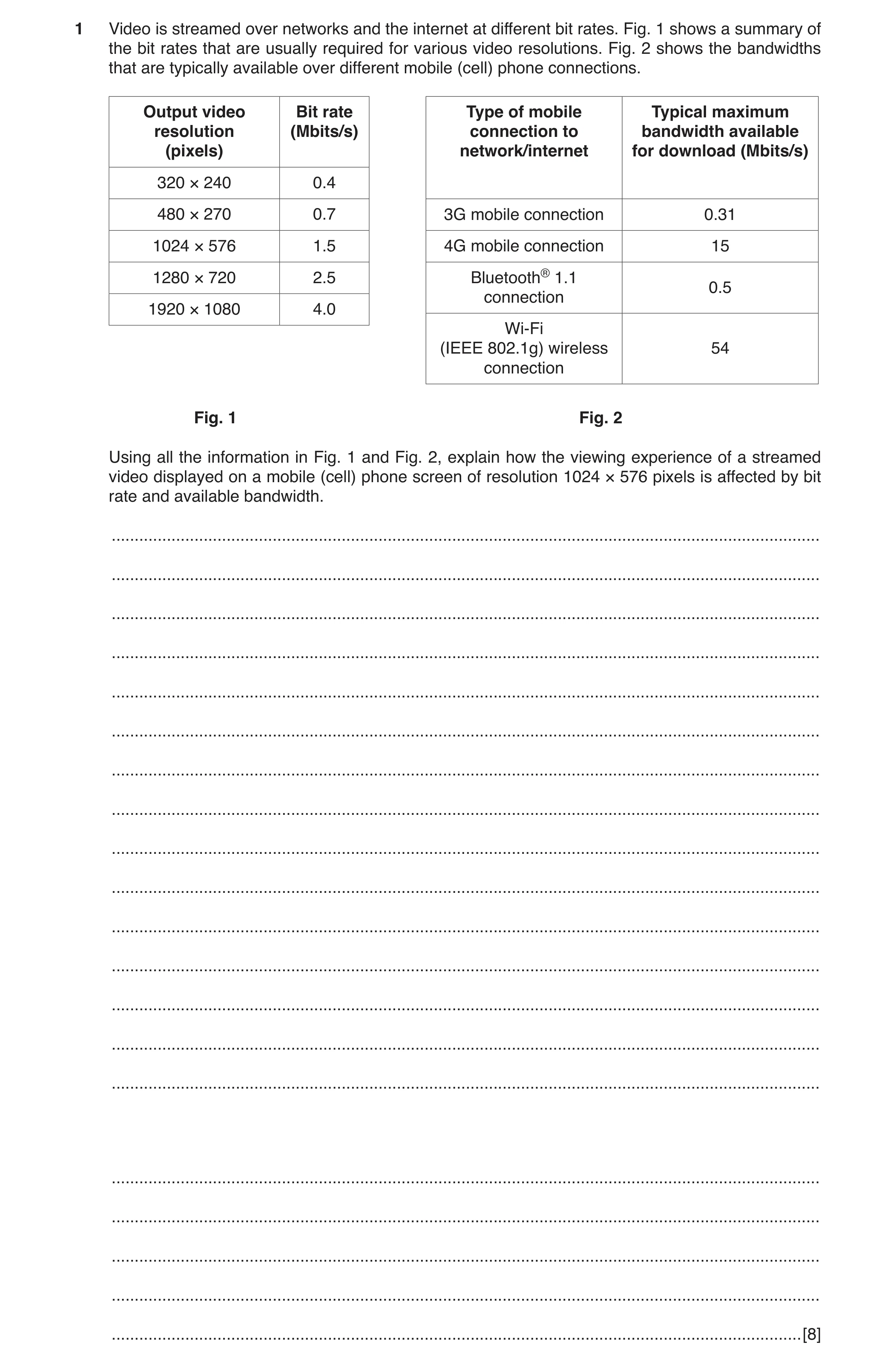
 16 / 45
 17 / 45
 18 / 45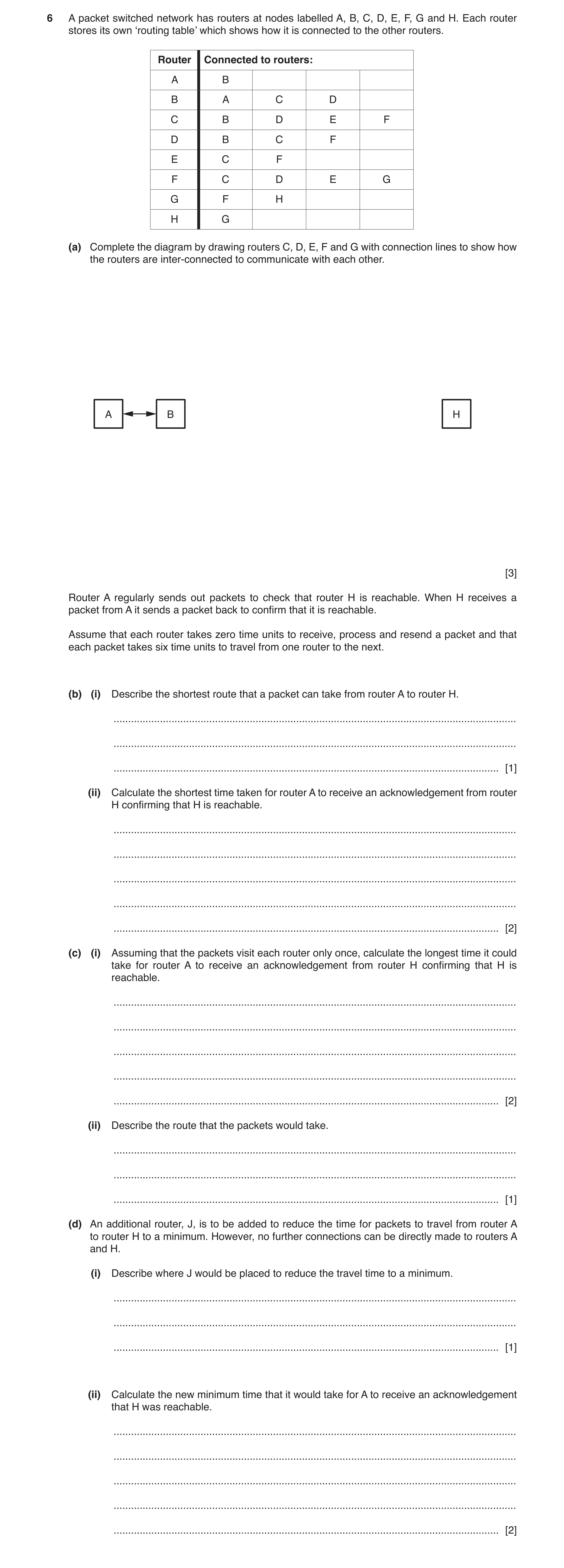
 21 / 45
 22 / 45
 23 / 45
 24 / 45
 26 / 45
 27 / 45
 29 / 45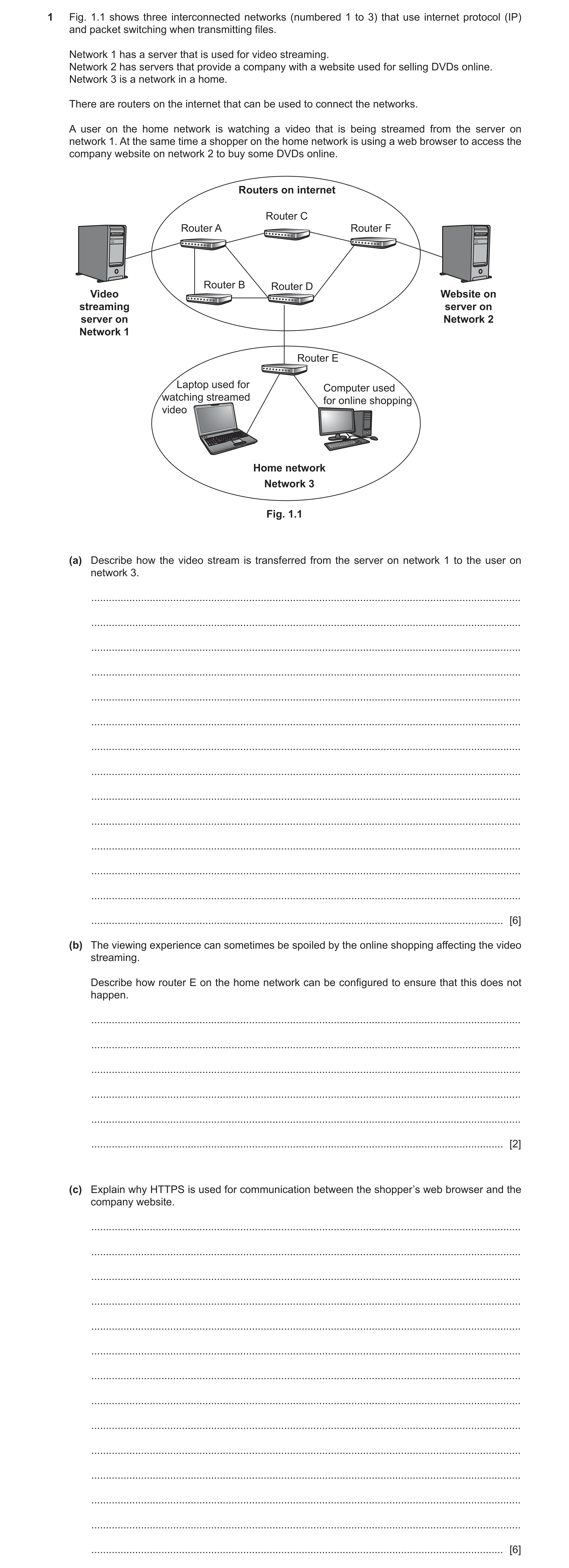
 32 / 45
 34 / 45
 35 / 45
 36 / 45
 37 / 45
 38 / 45
 39 / 45
 43 / 45
 44 / 45
 45 / 45
 8
8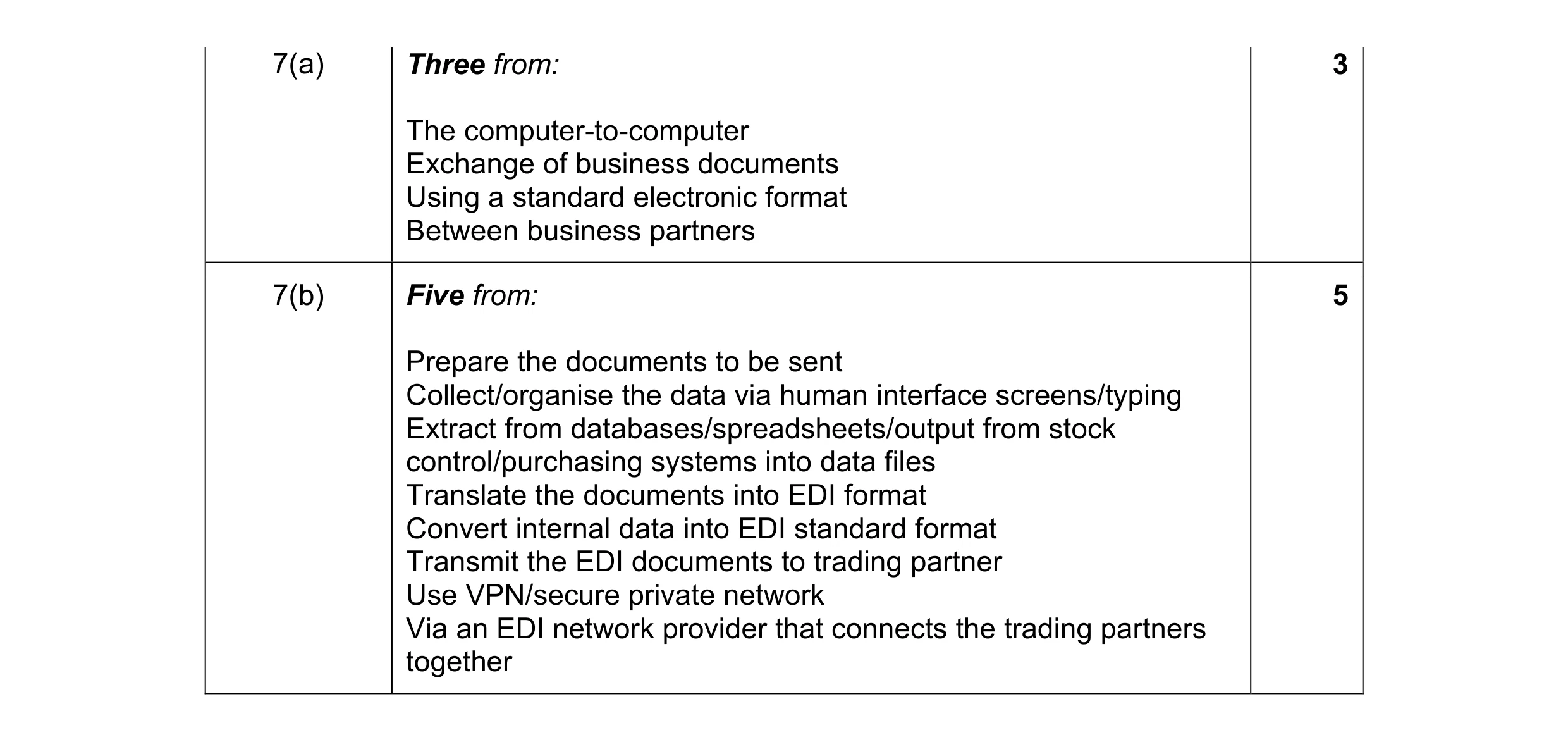 8
8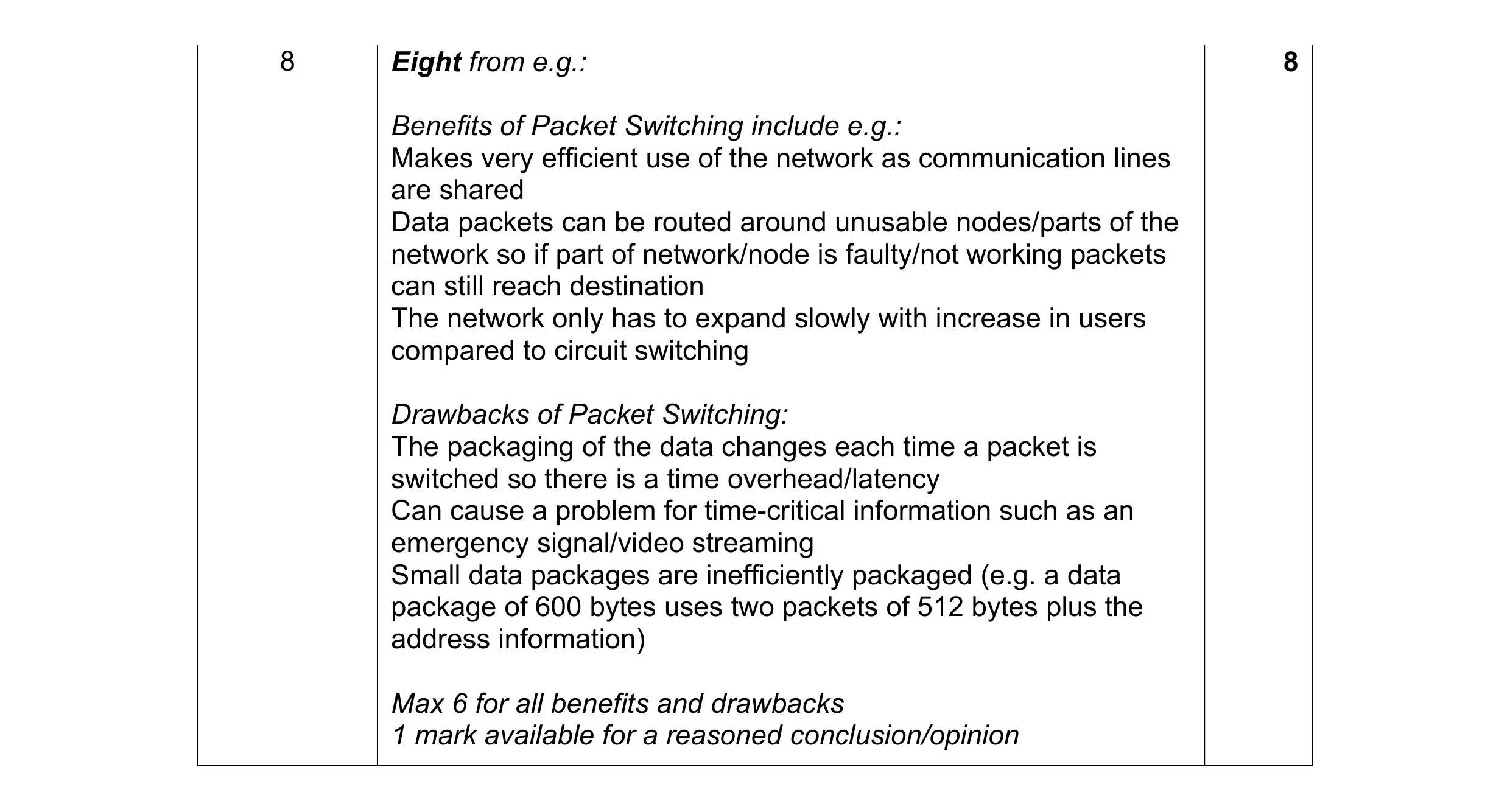 8
8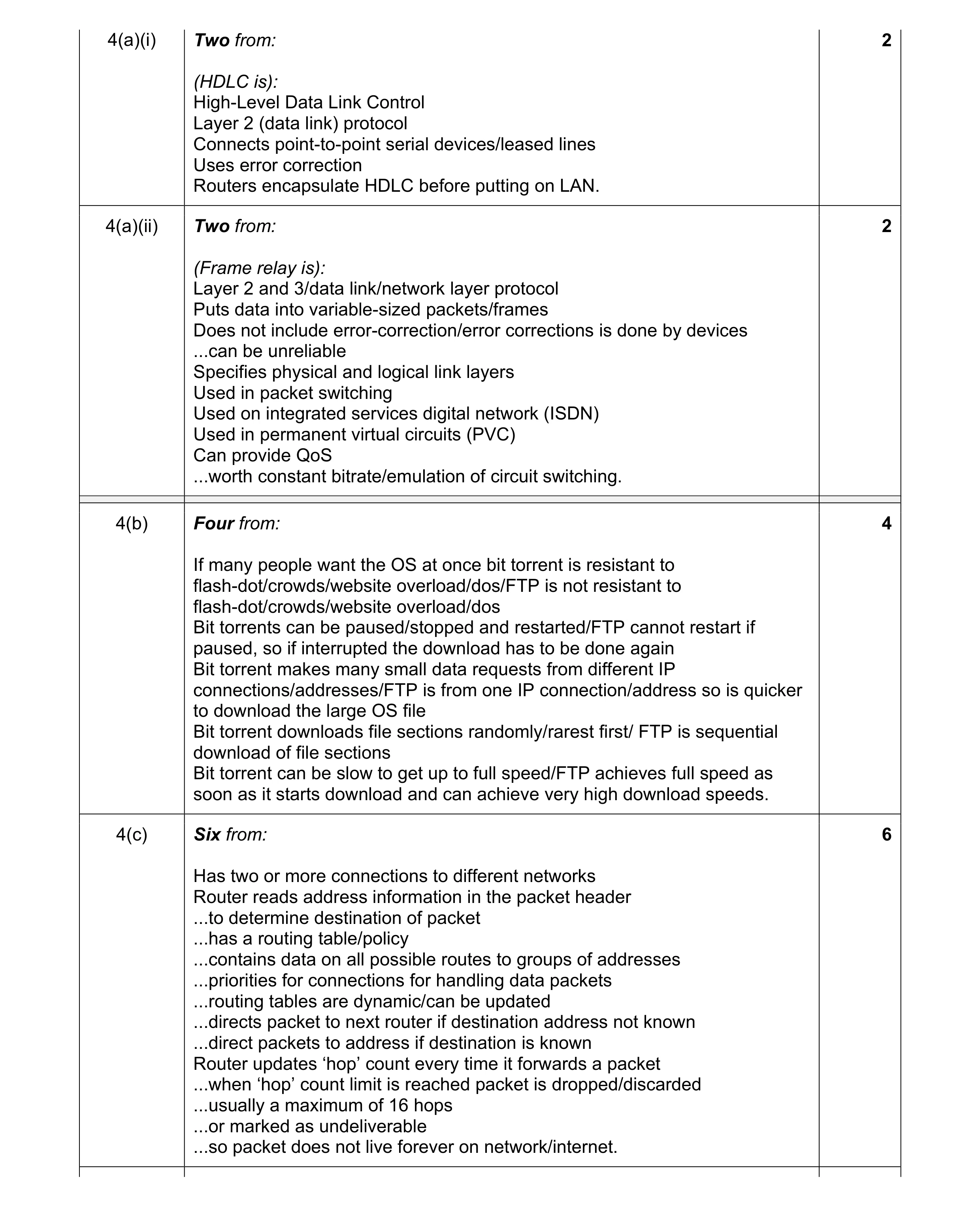 14
14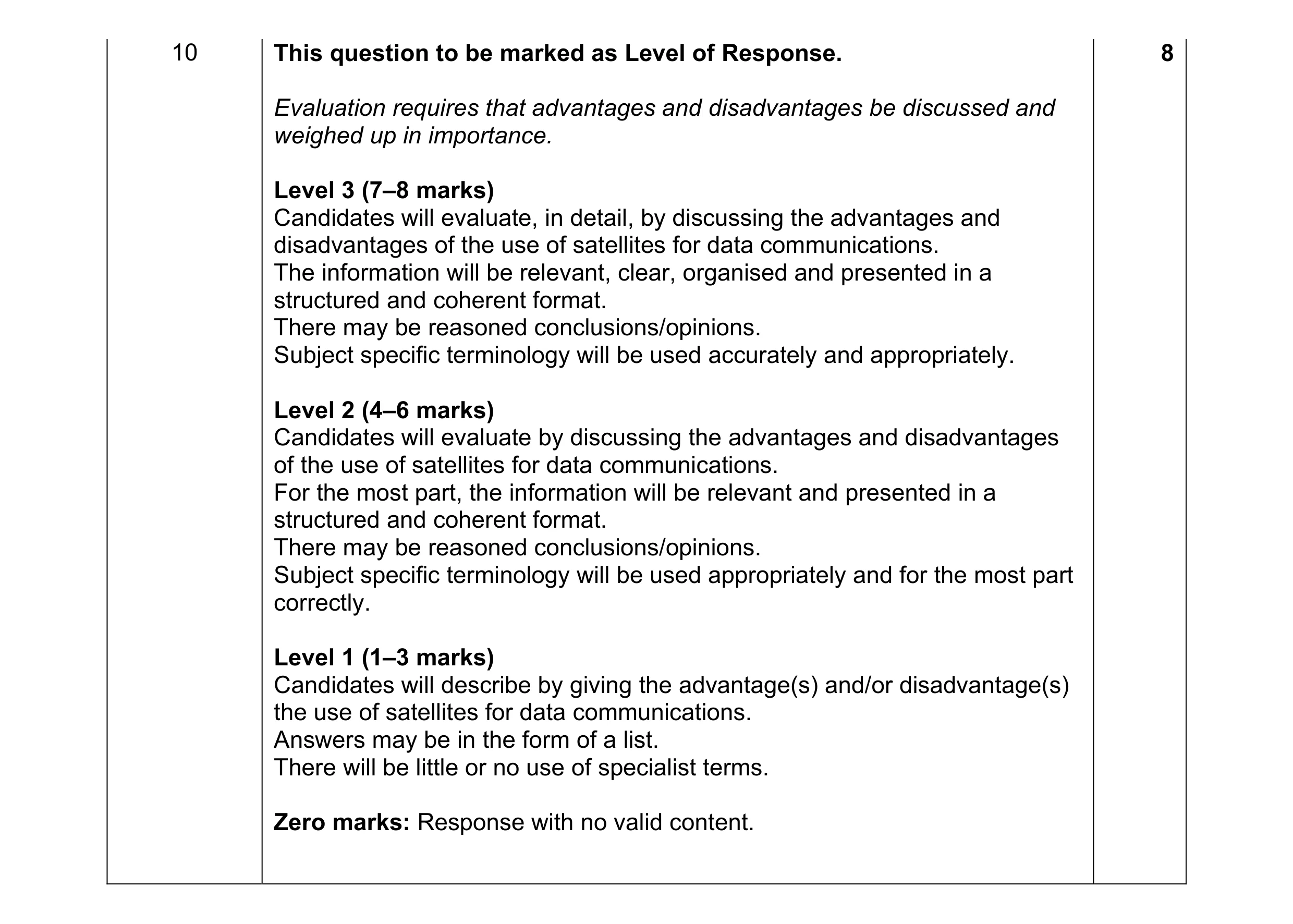 8
8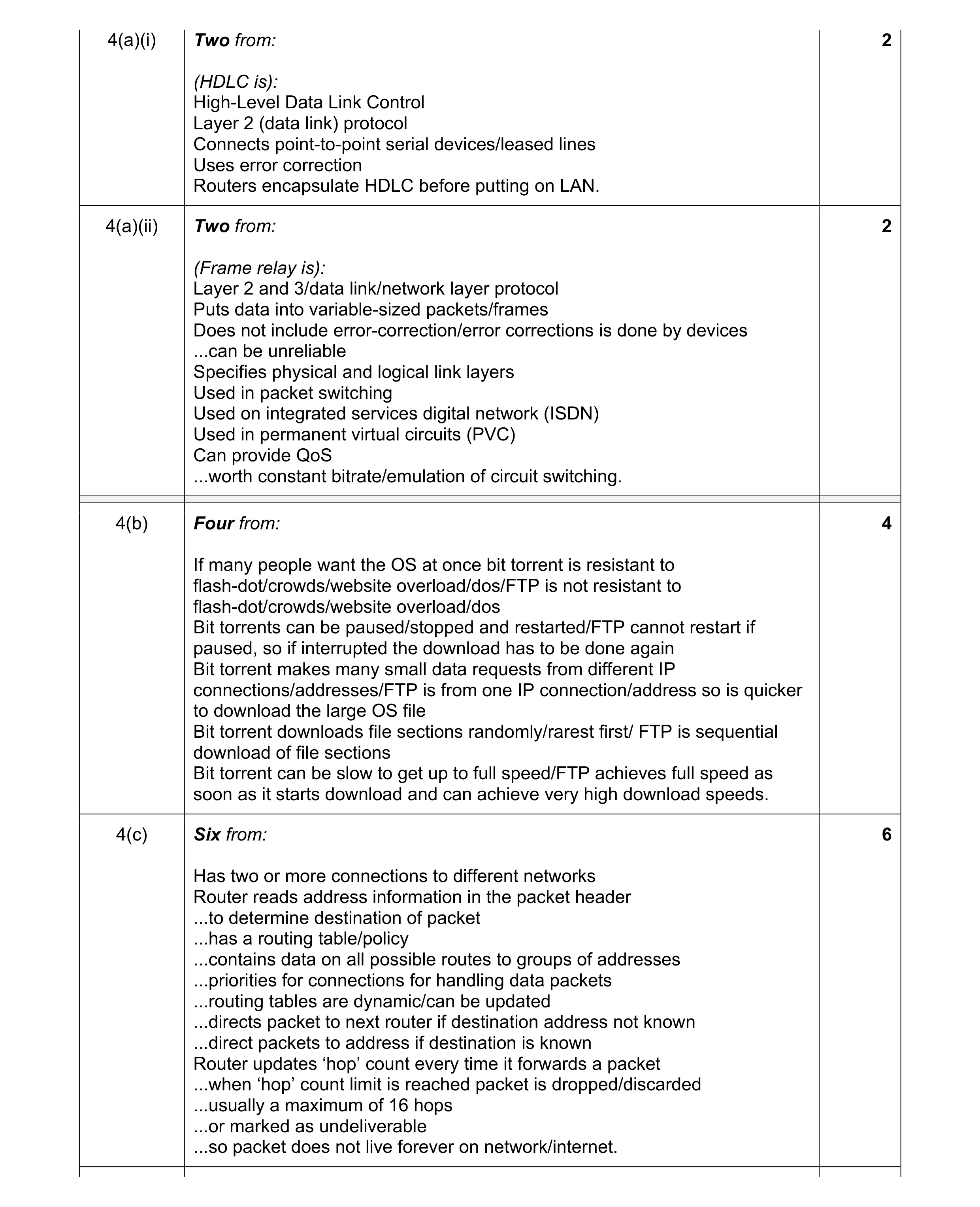 14
14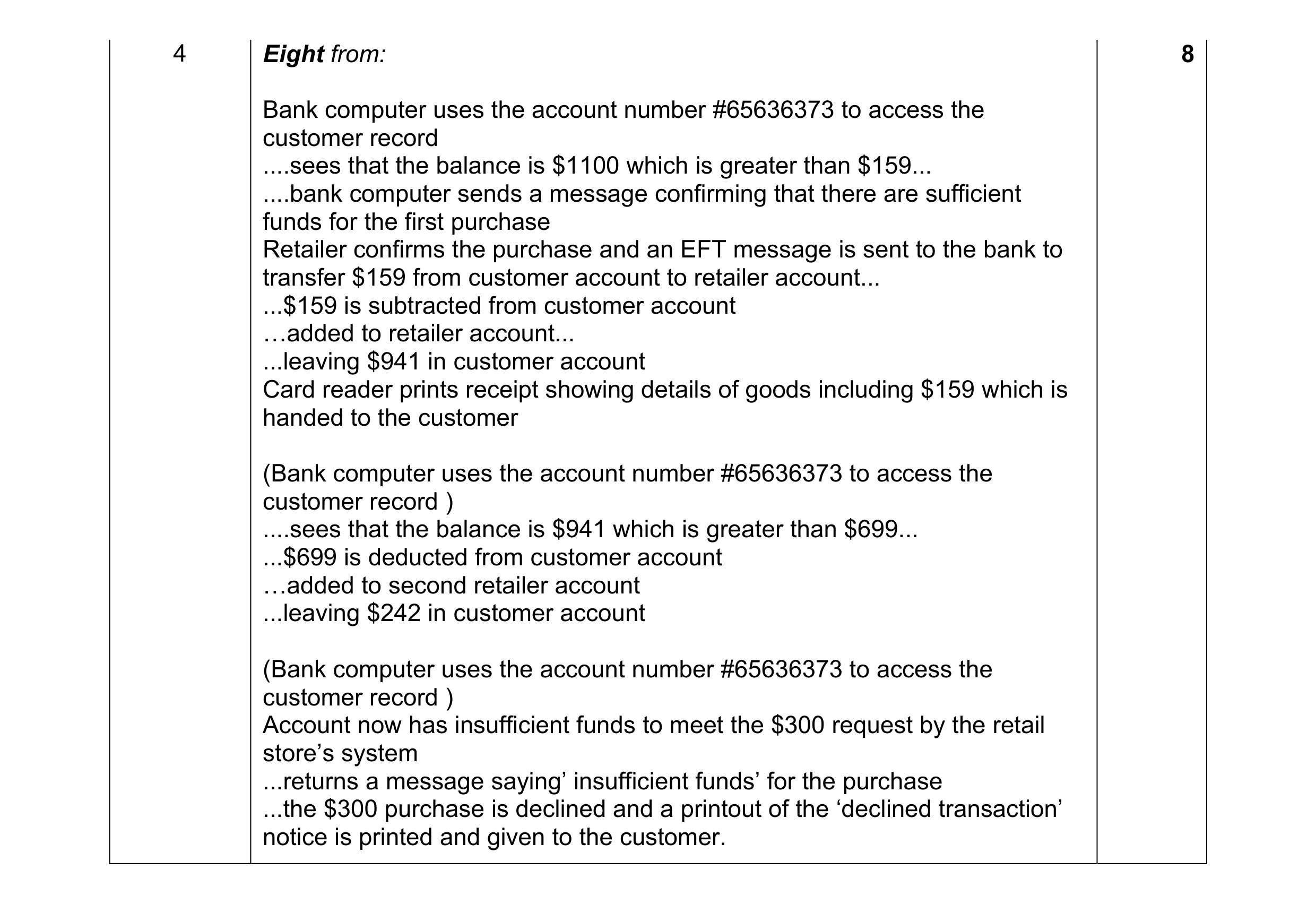 8
8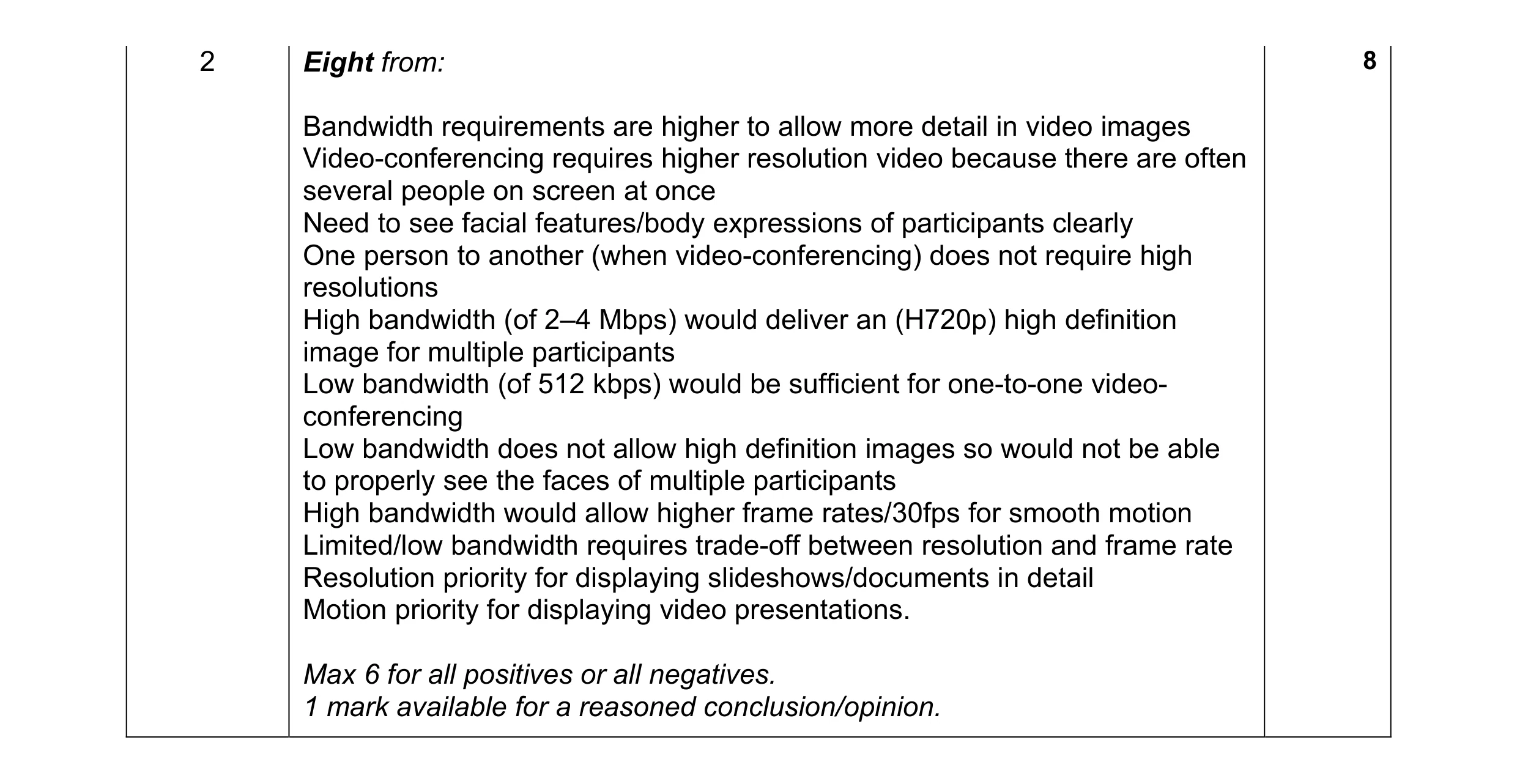 8
8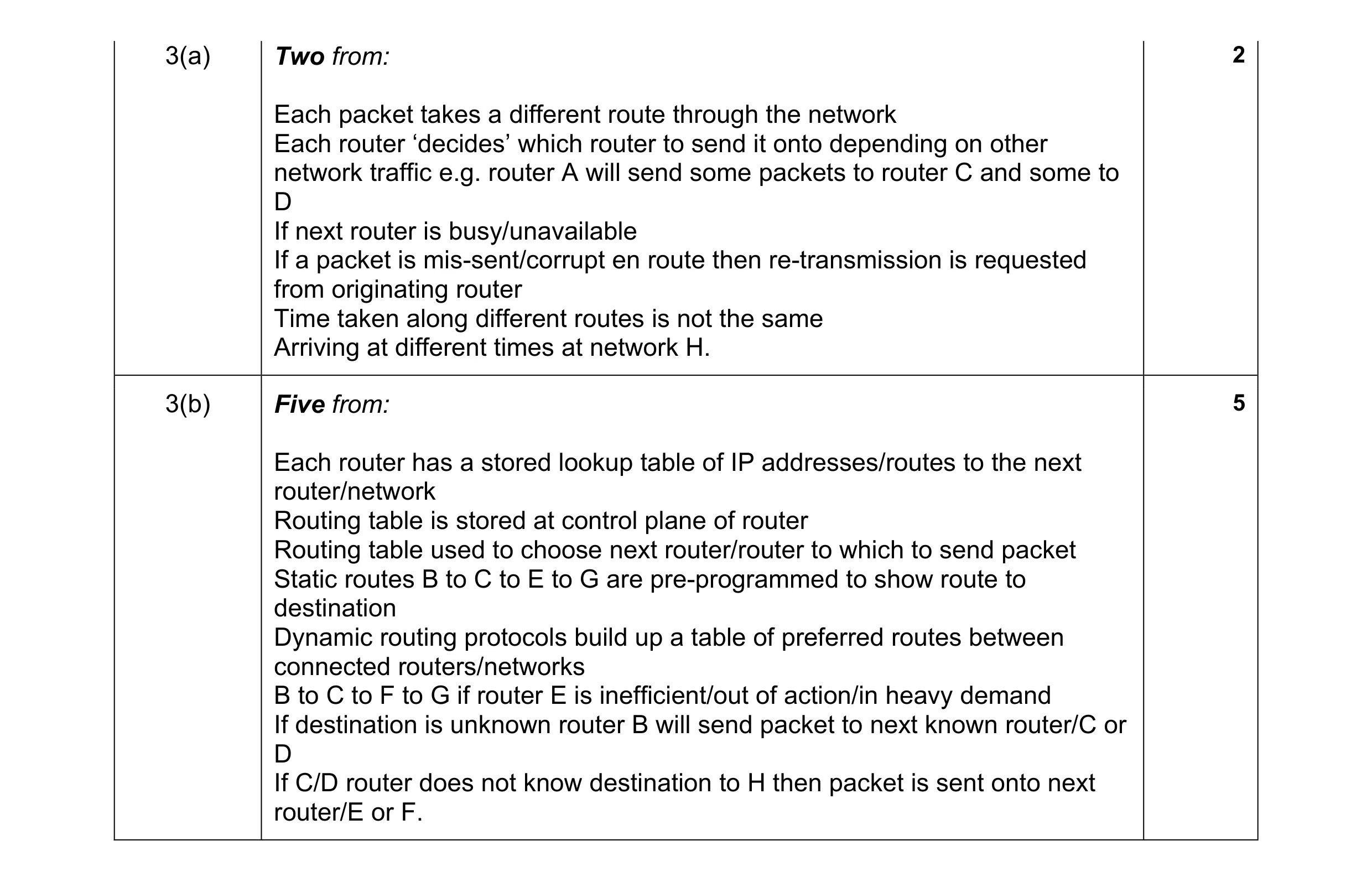 7
7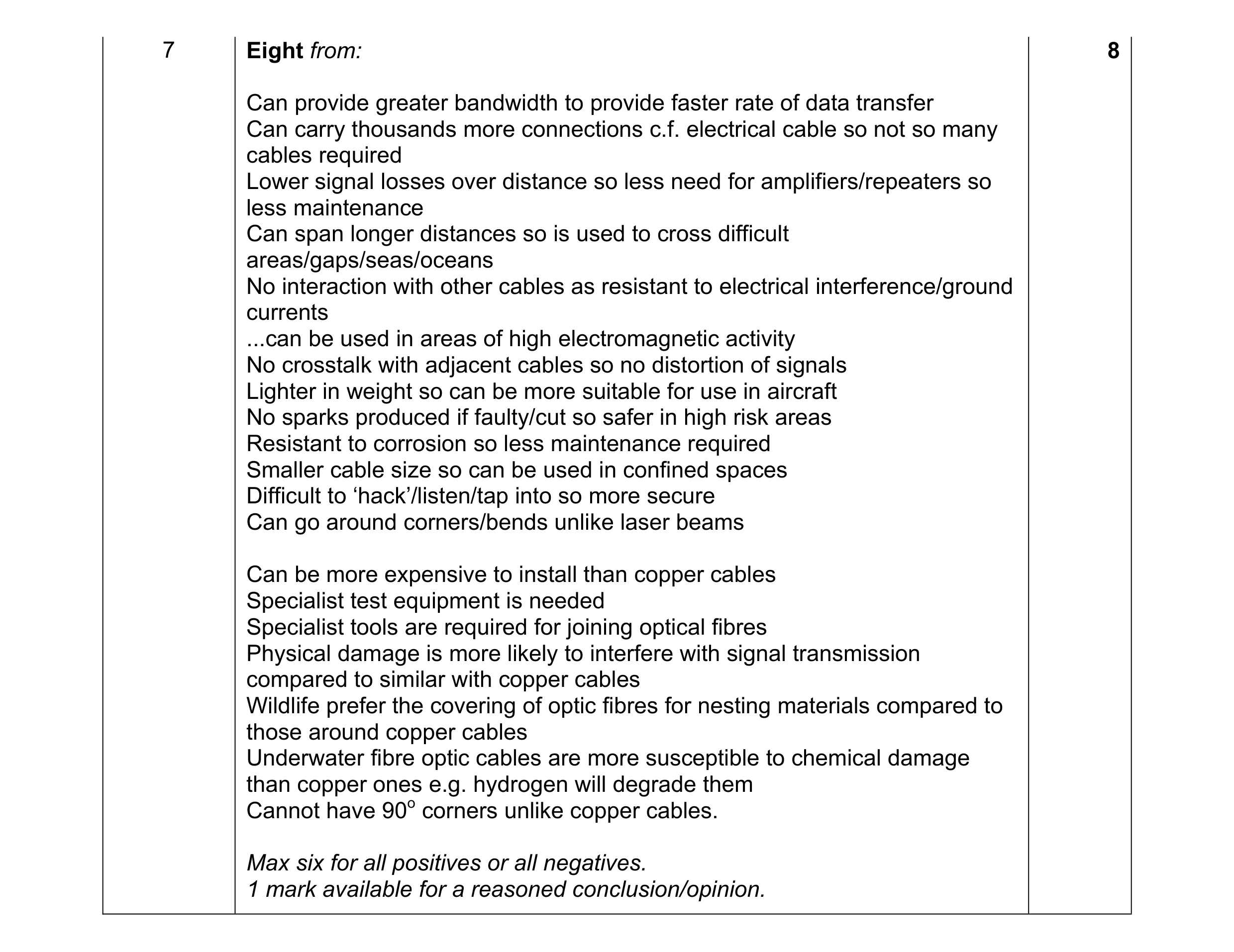 8
8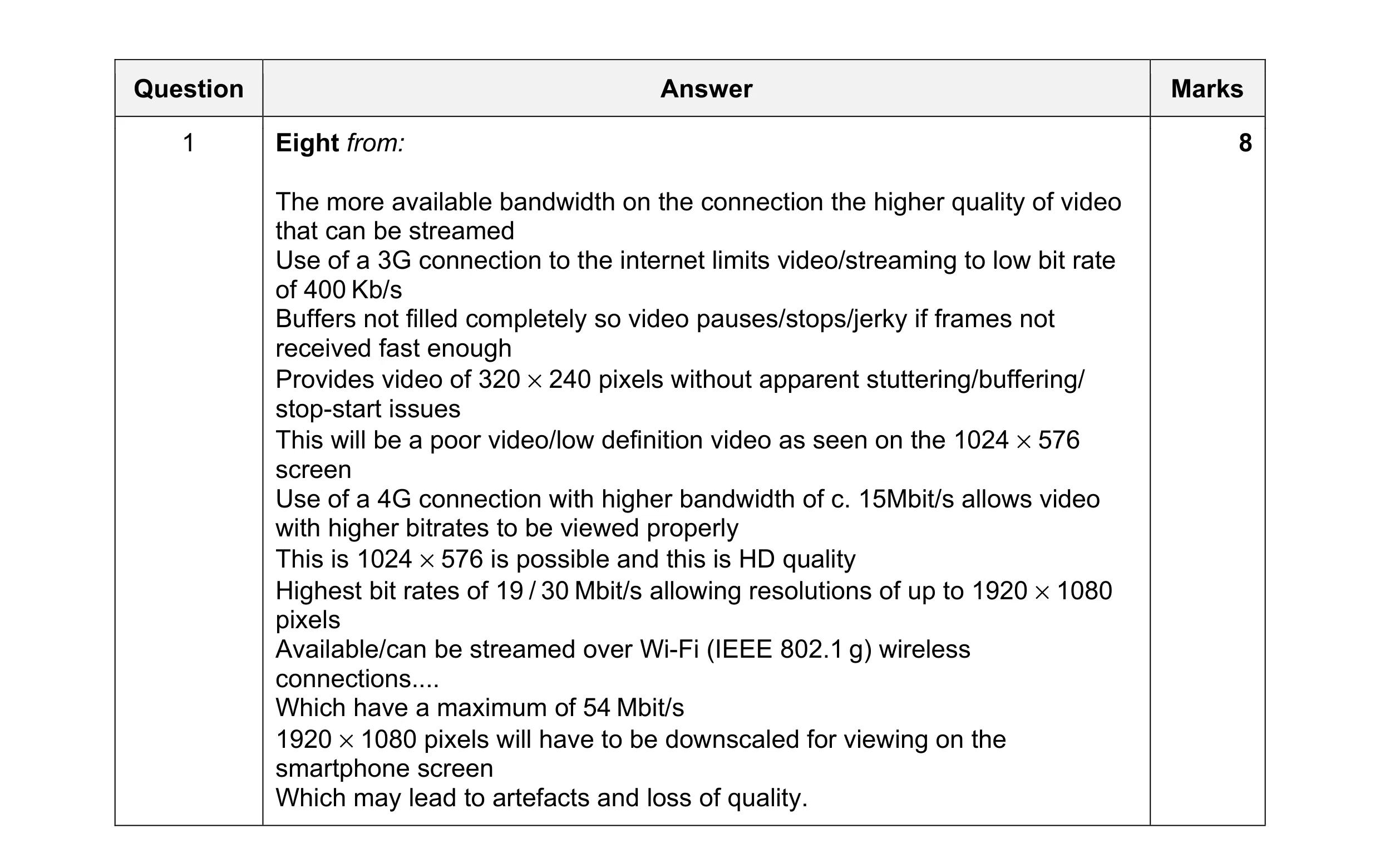 8
8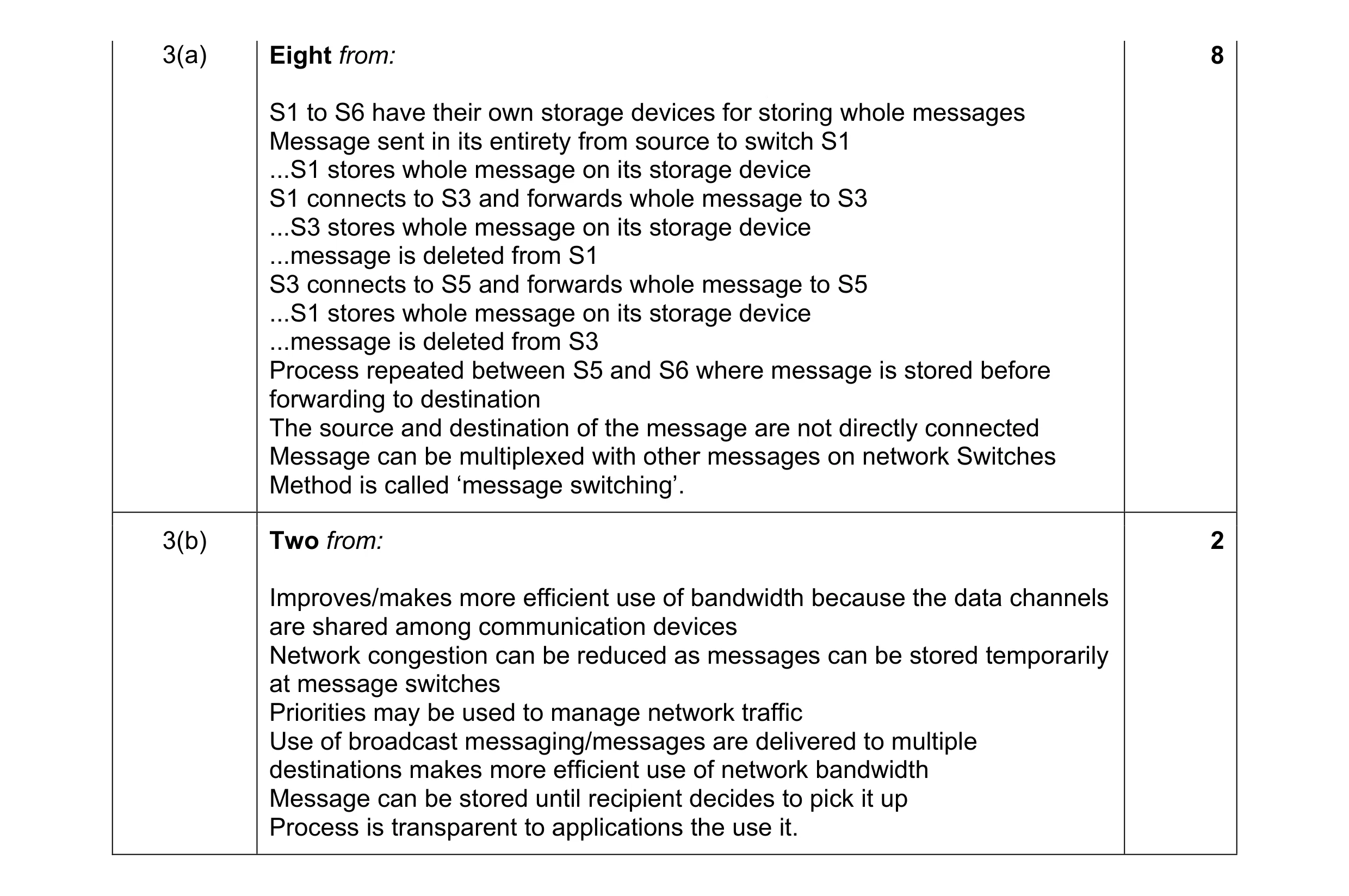 10
10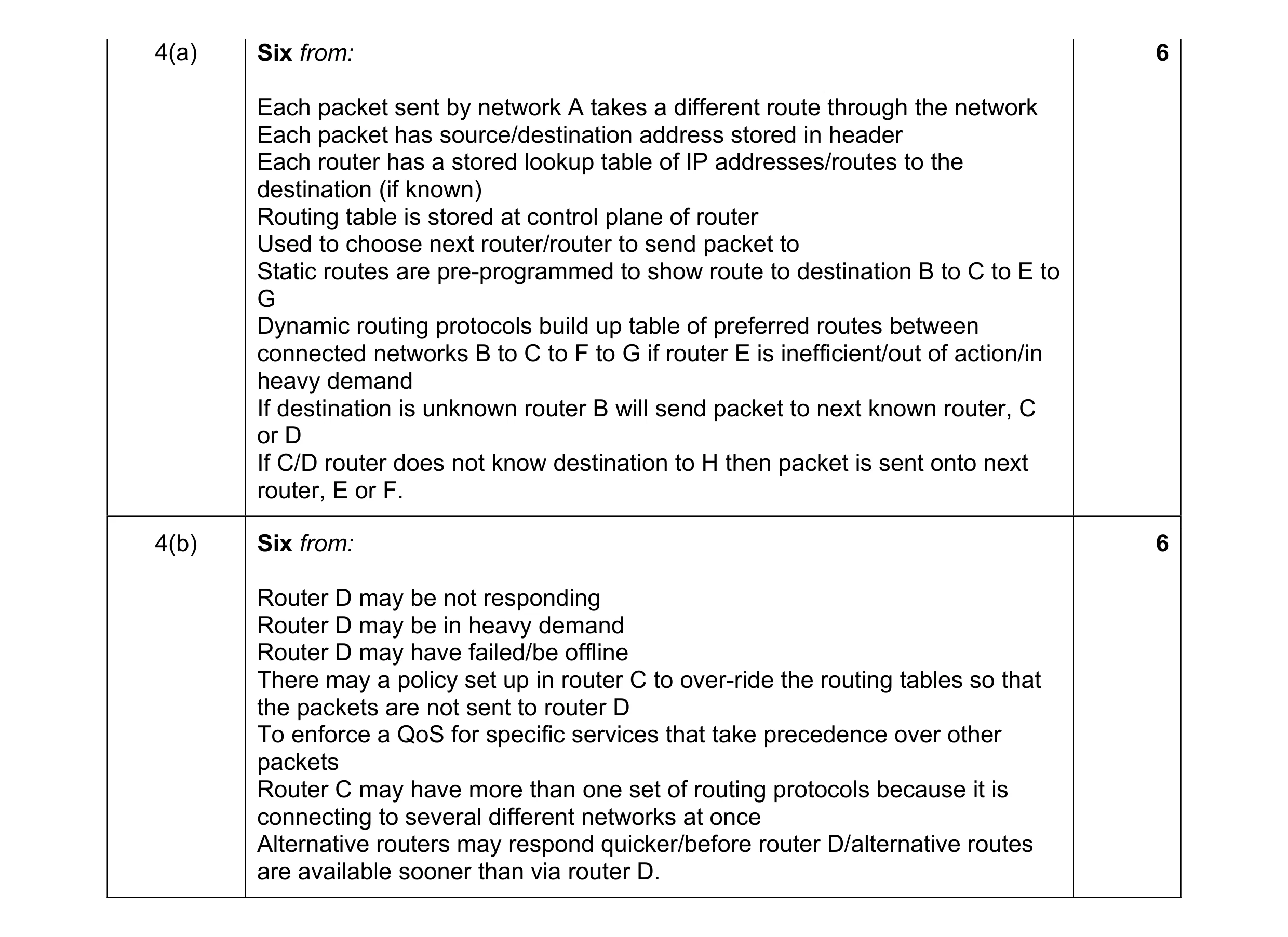 12
12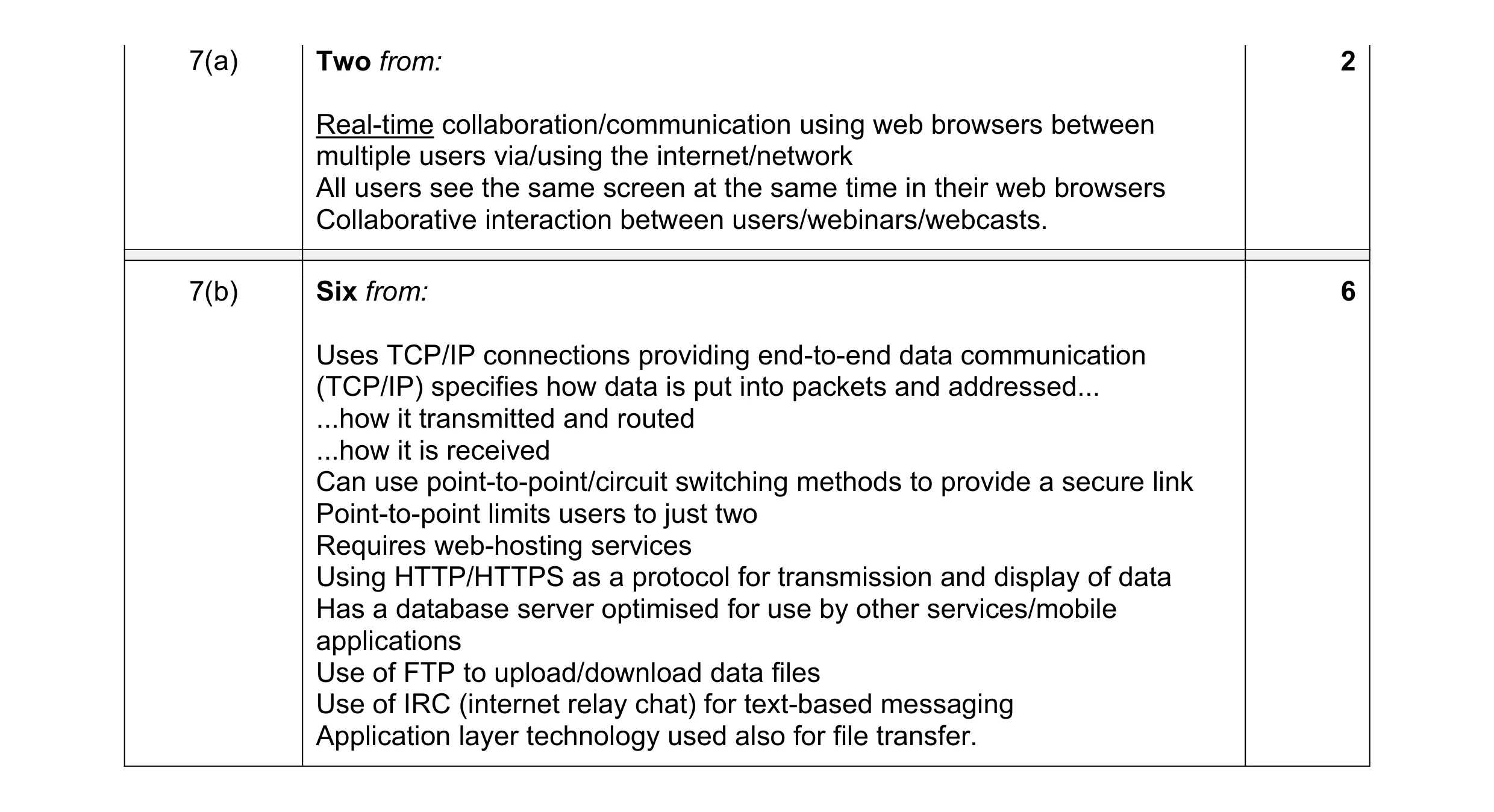 8
8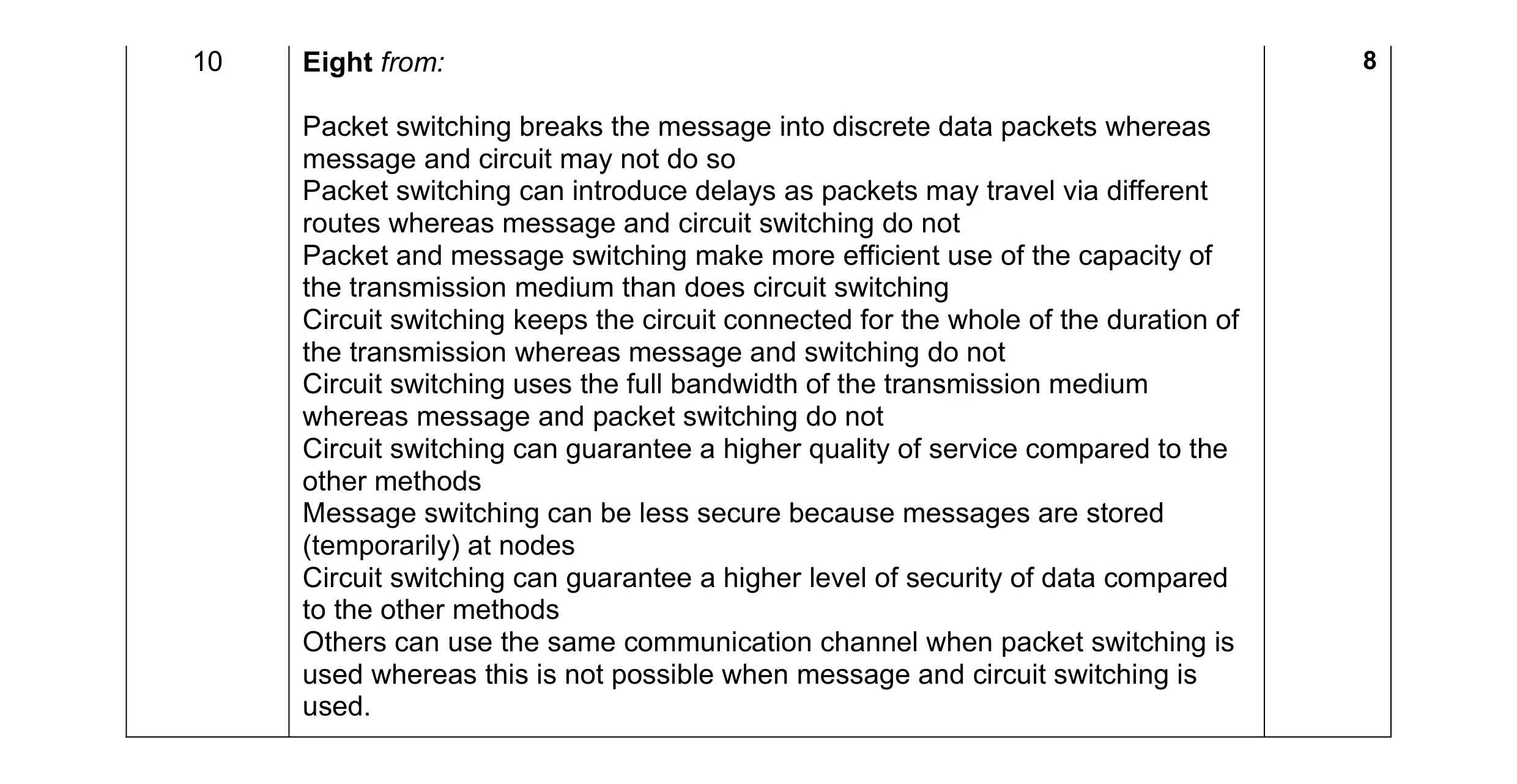 8
8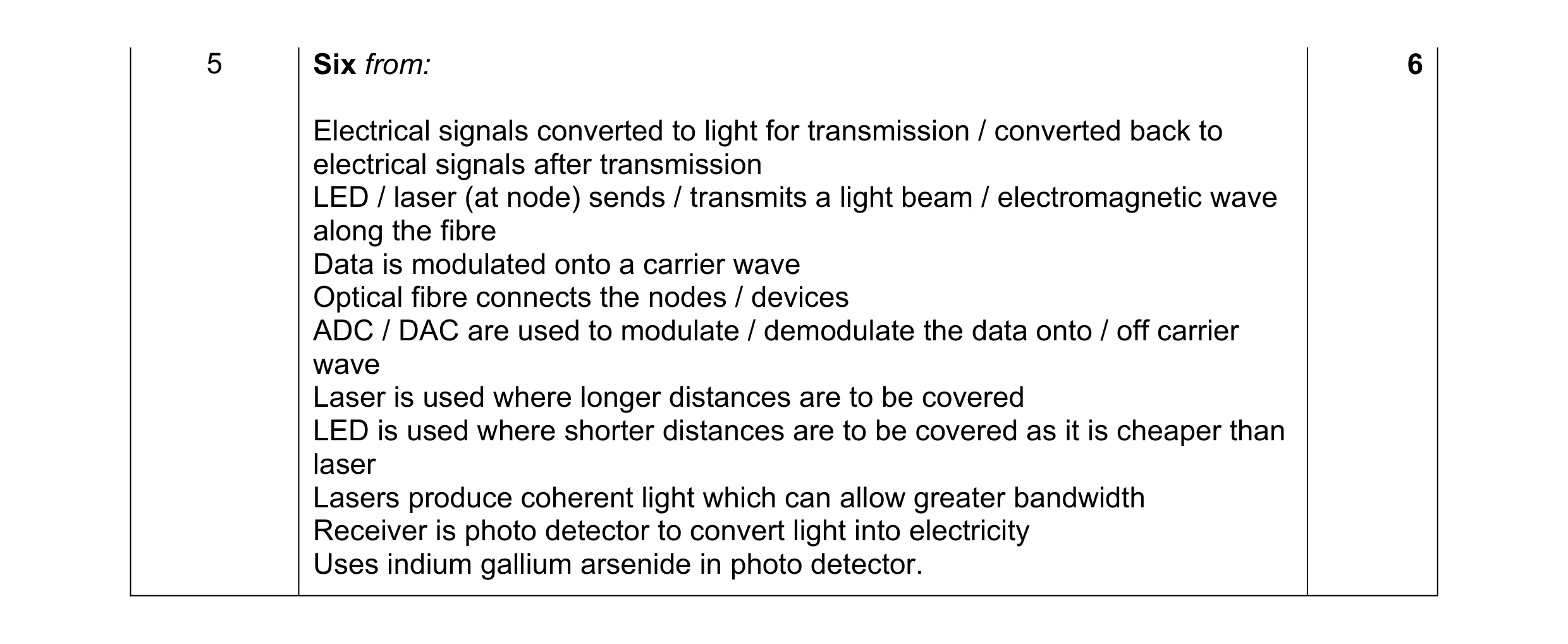 6
6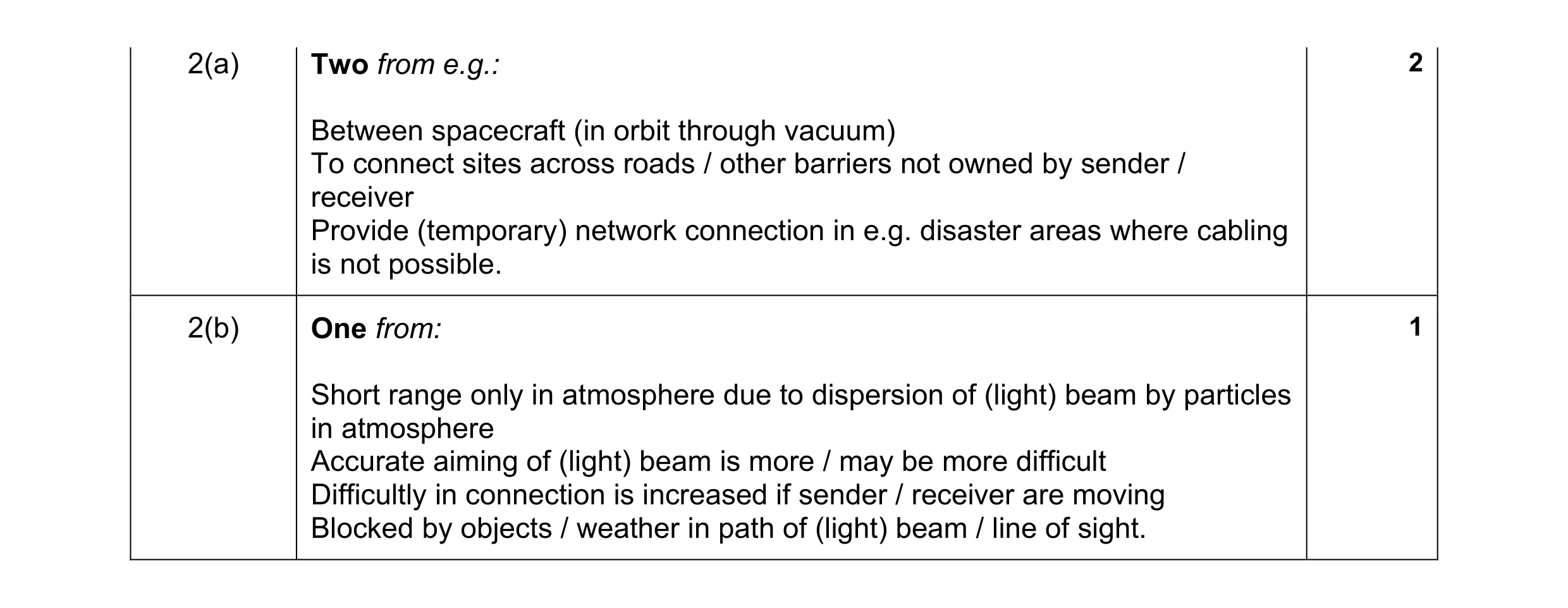 3
3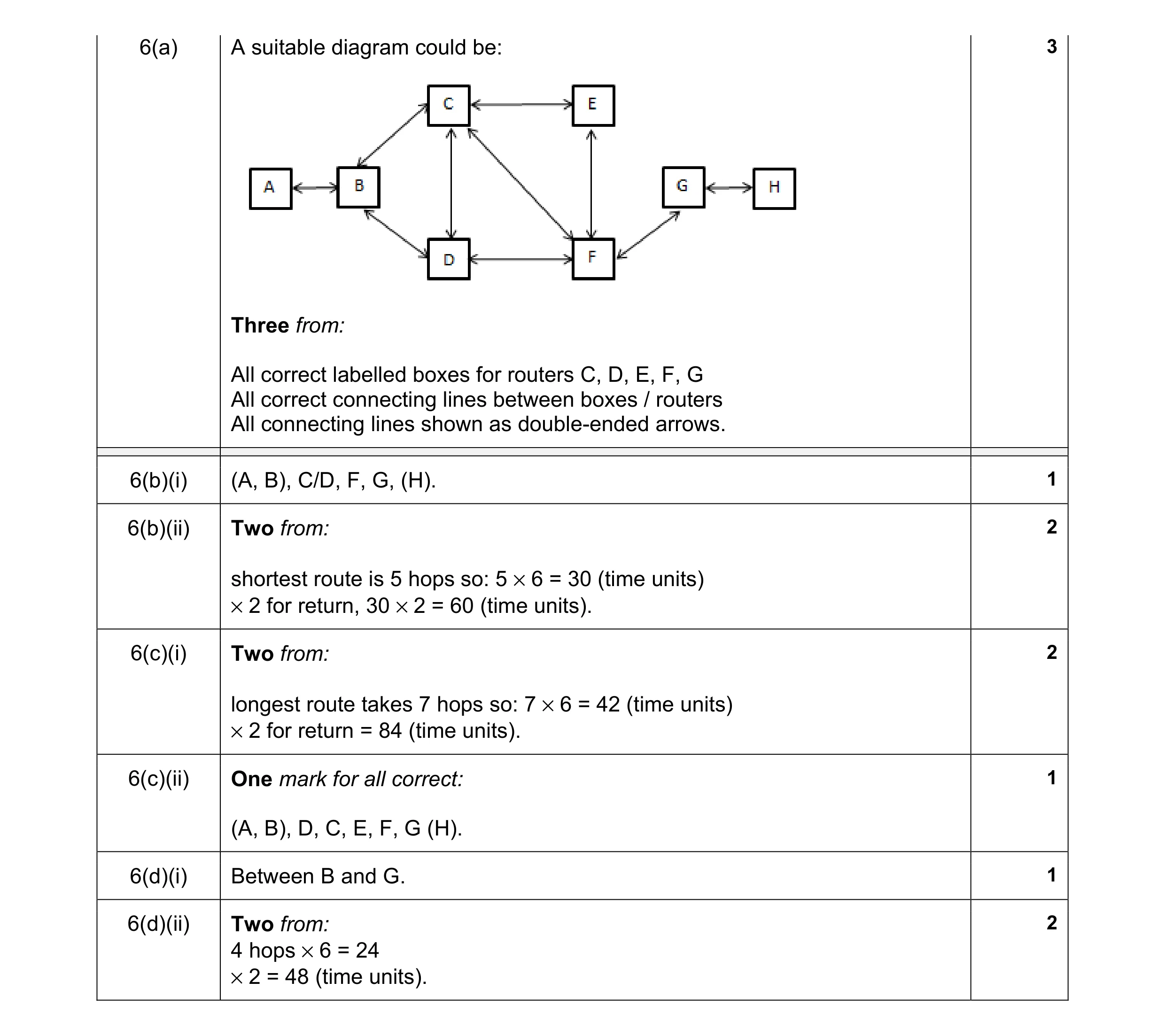 12
12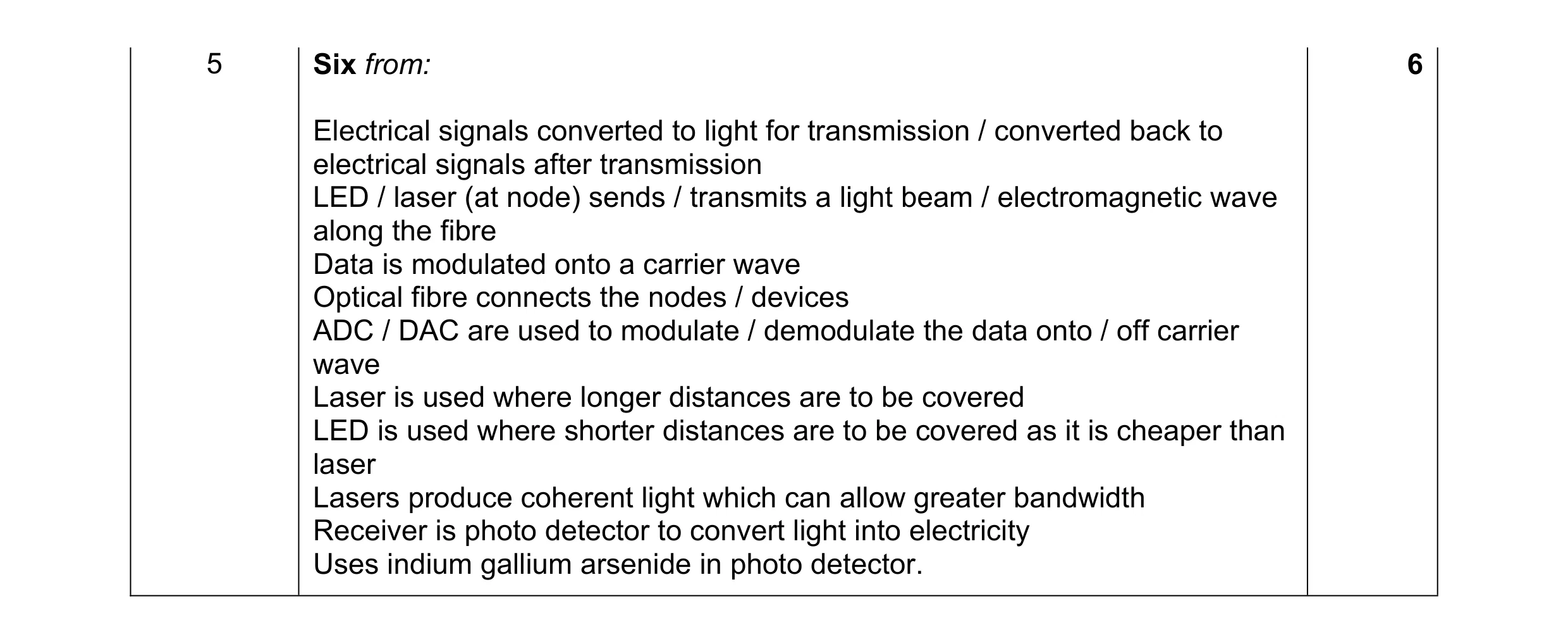 6
6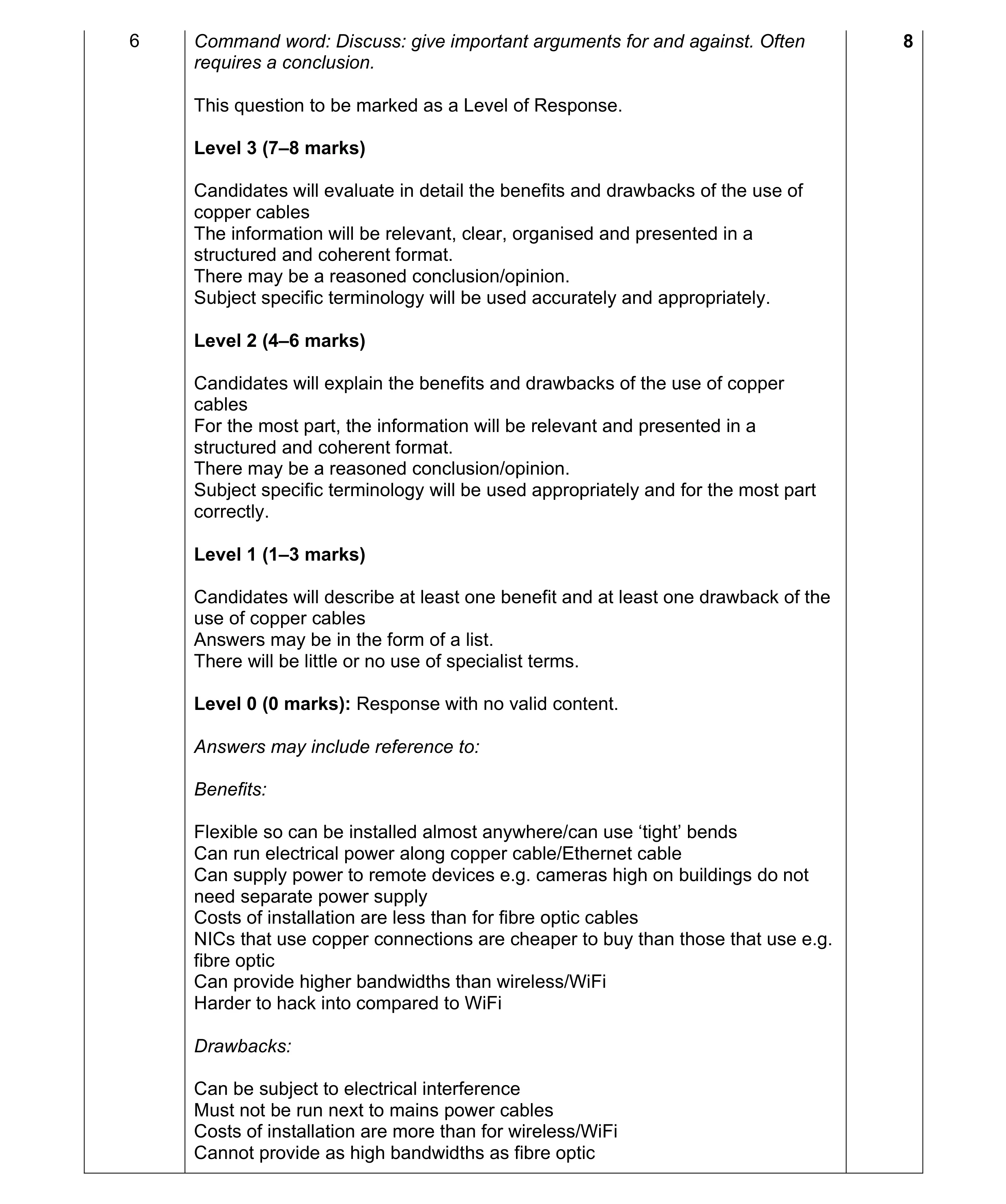 8
8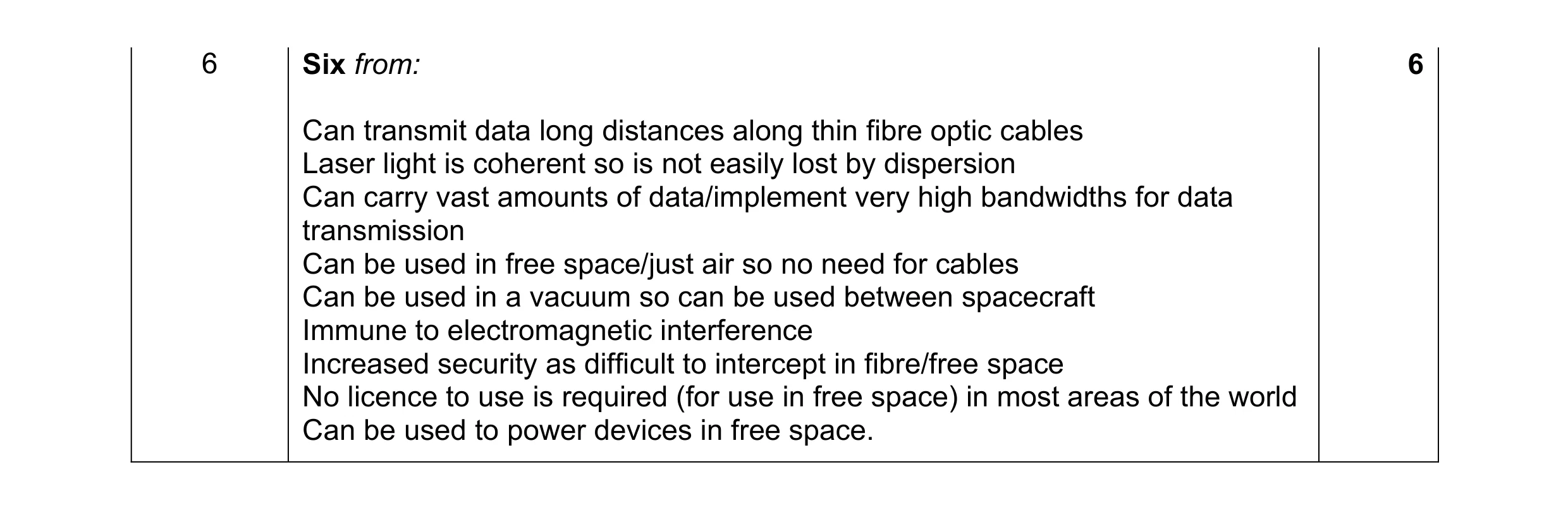 6
6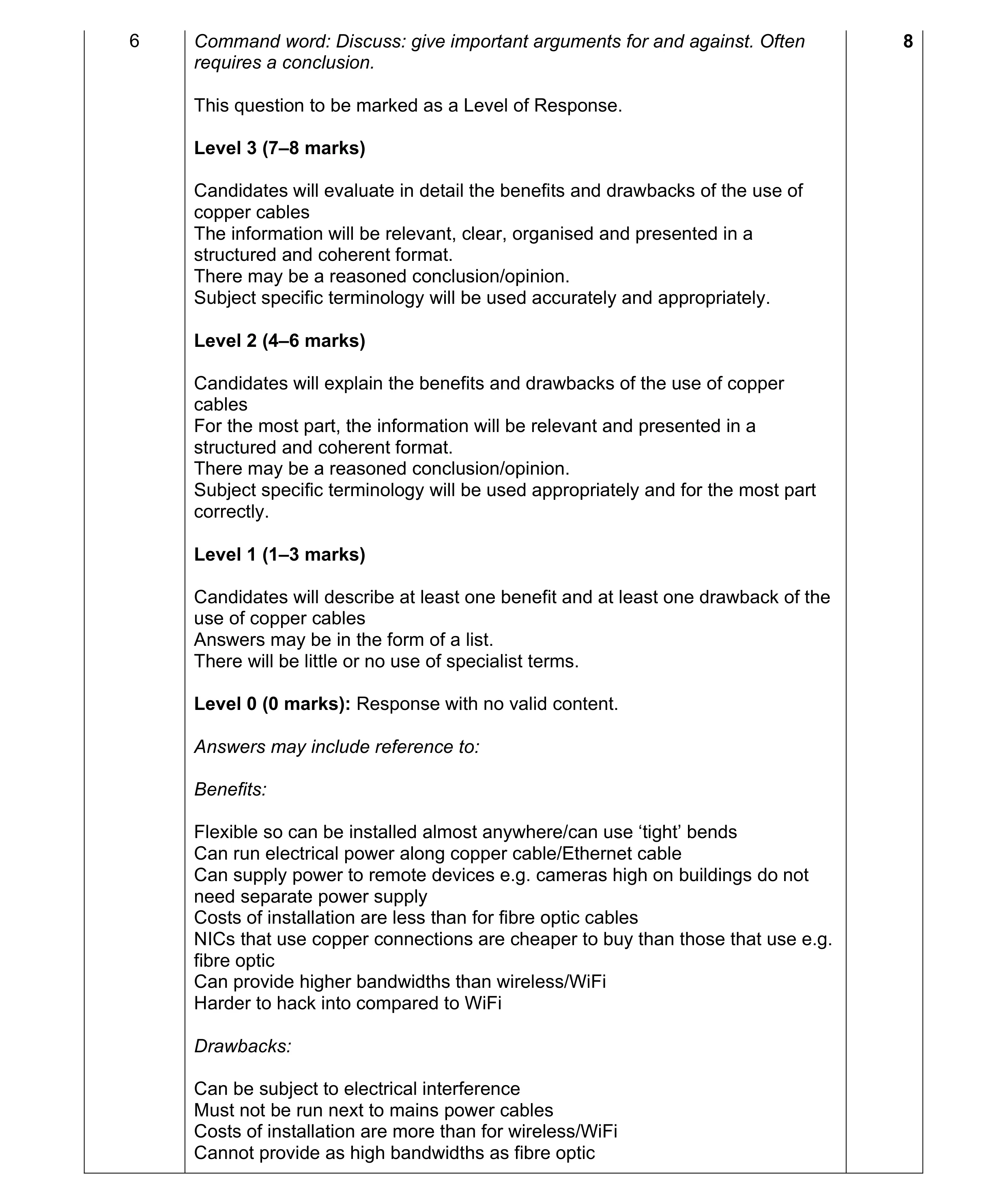 8
8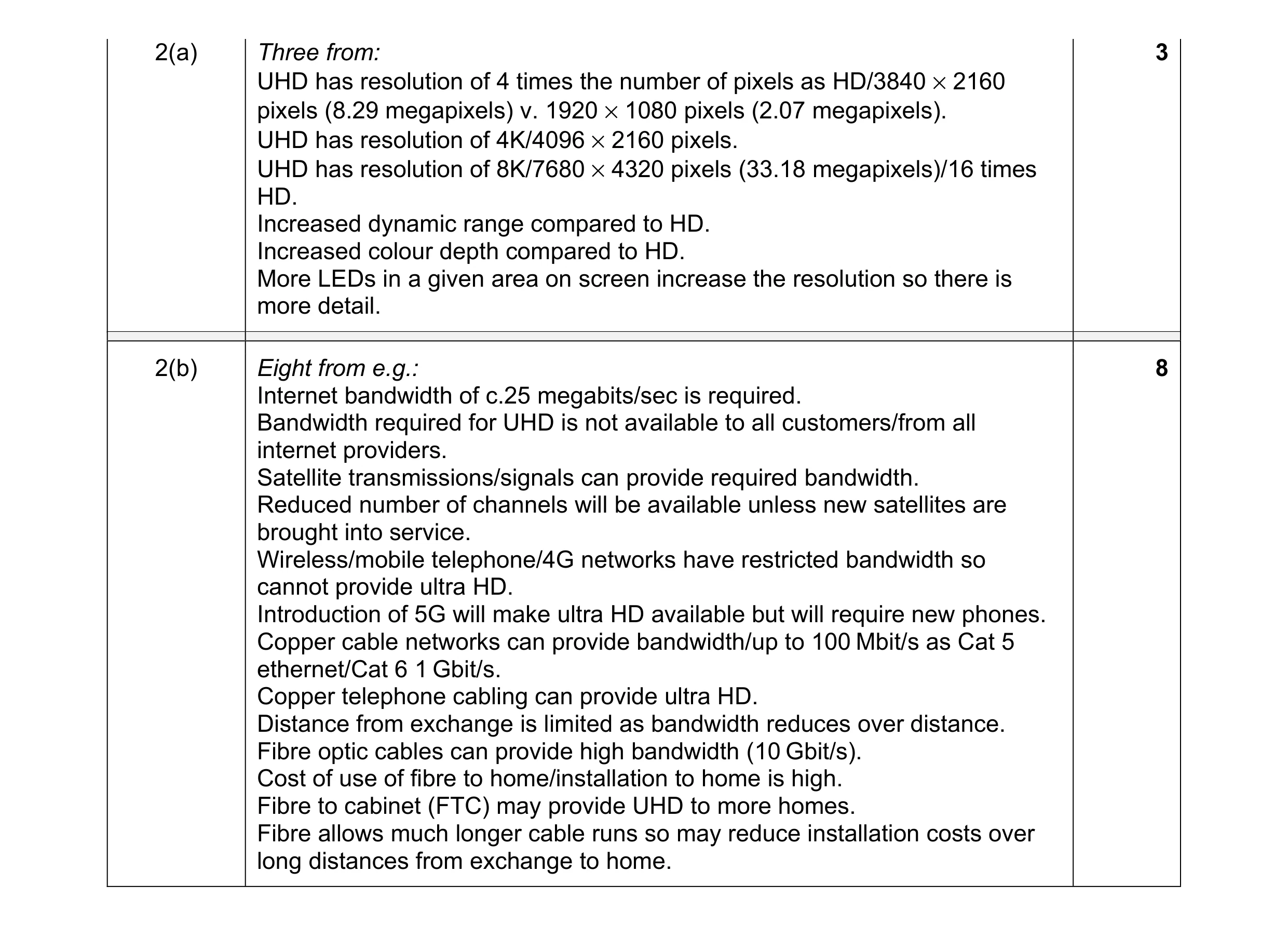 11
11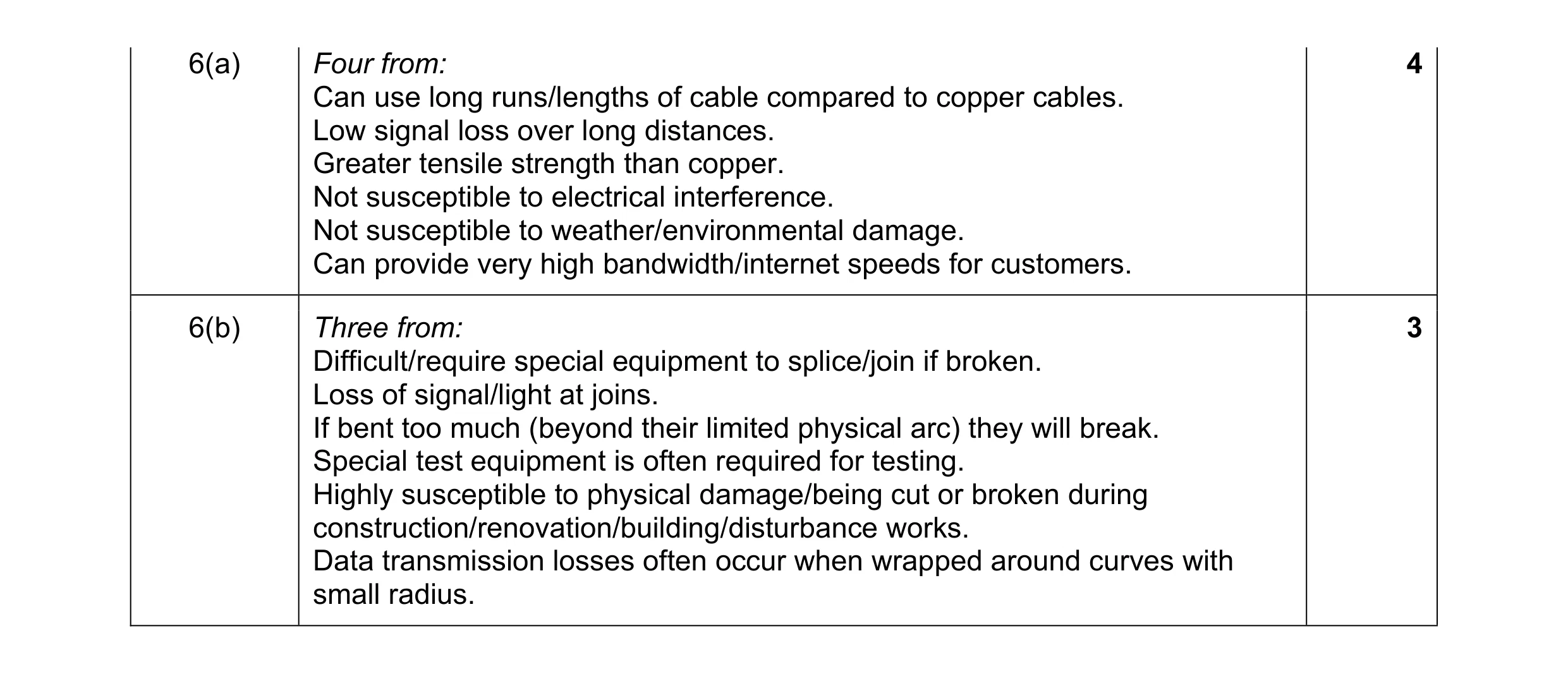 7
7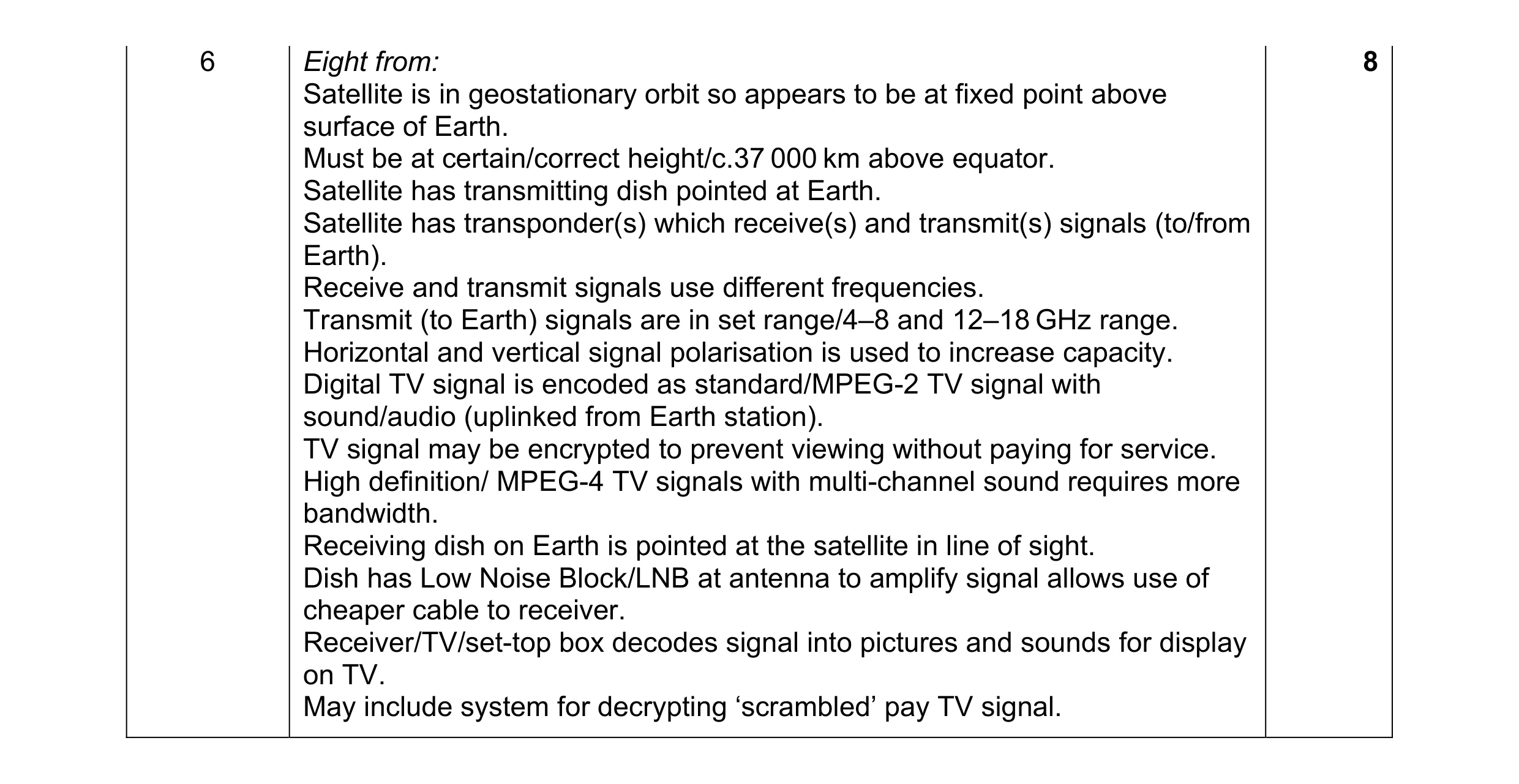 8
8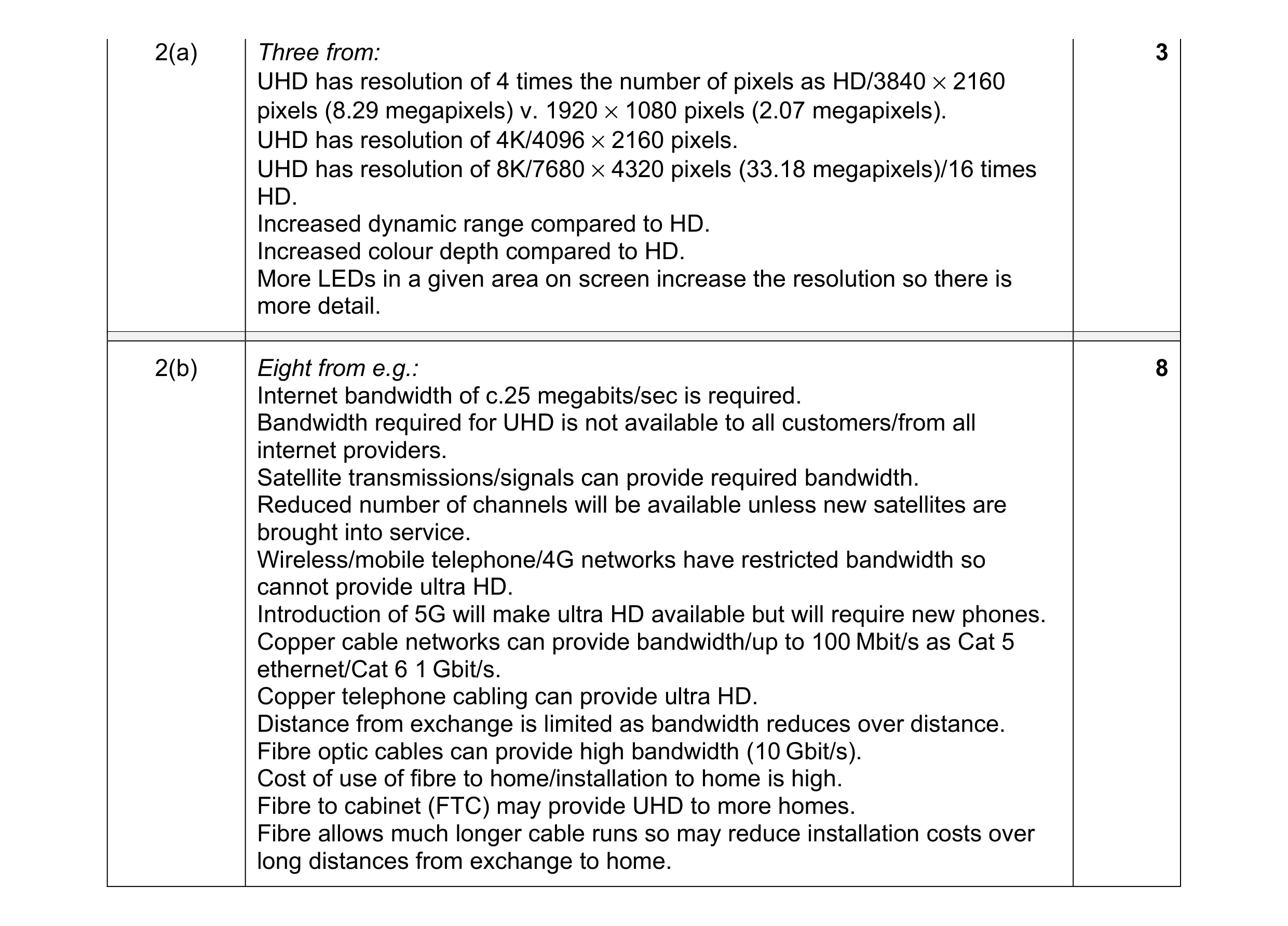 11
11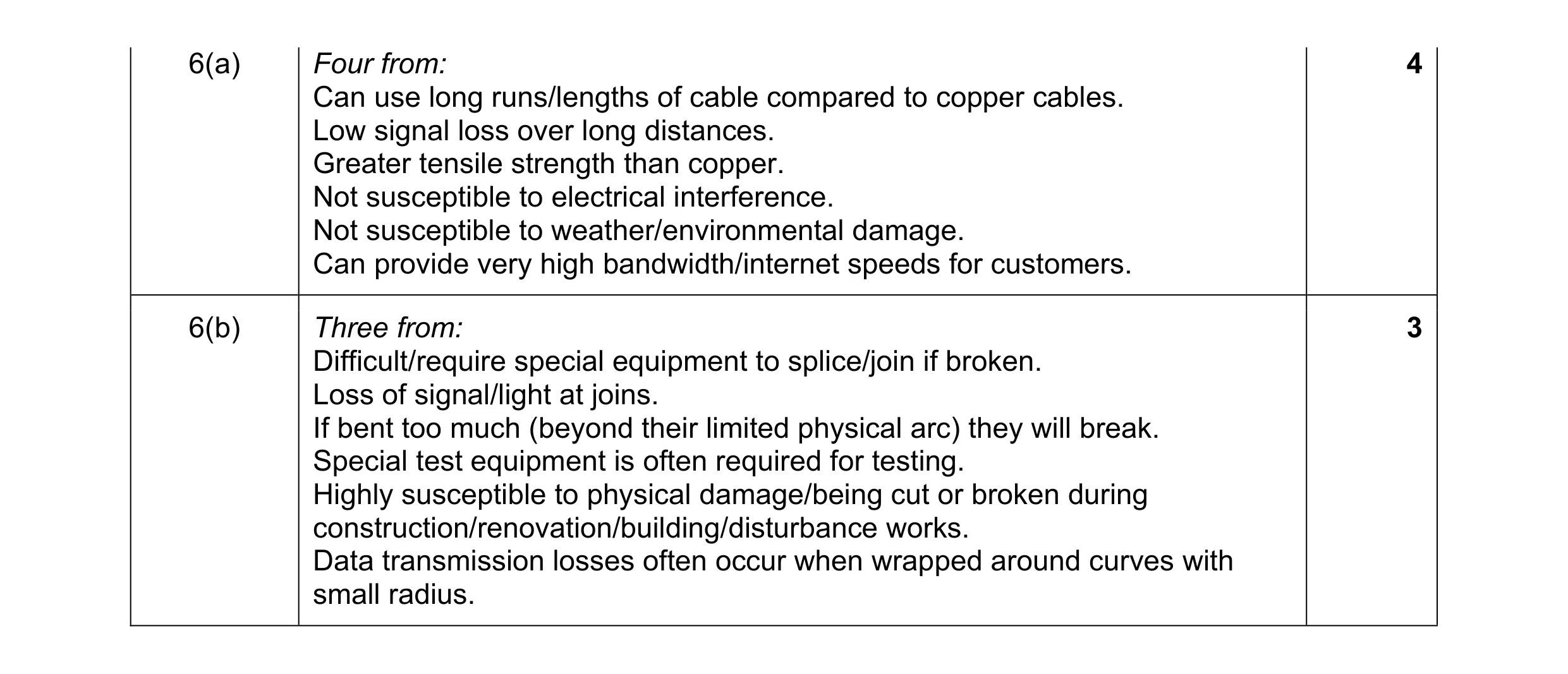 7
7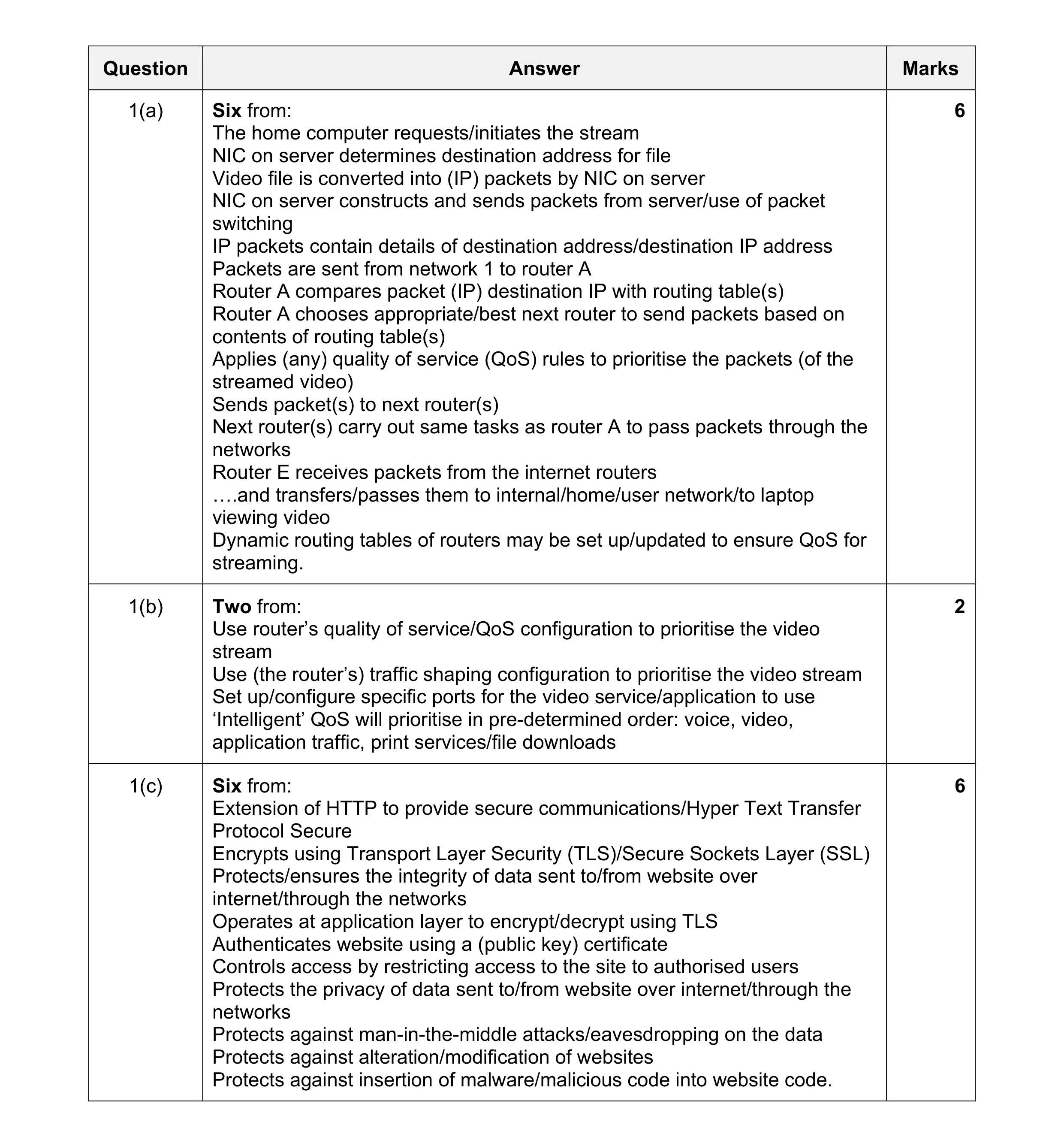 14
14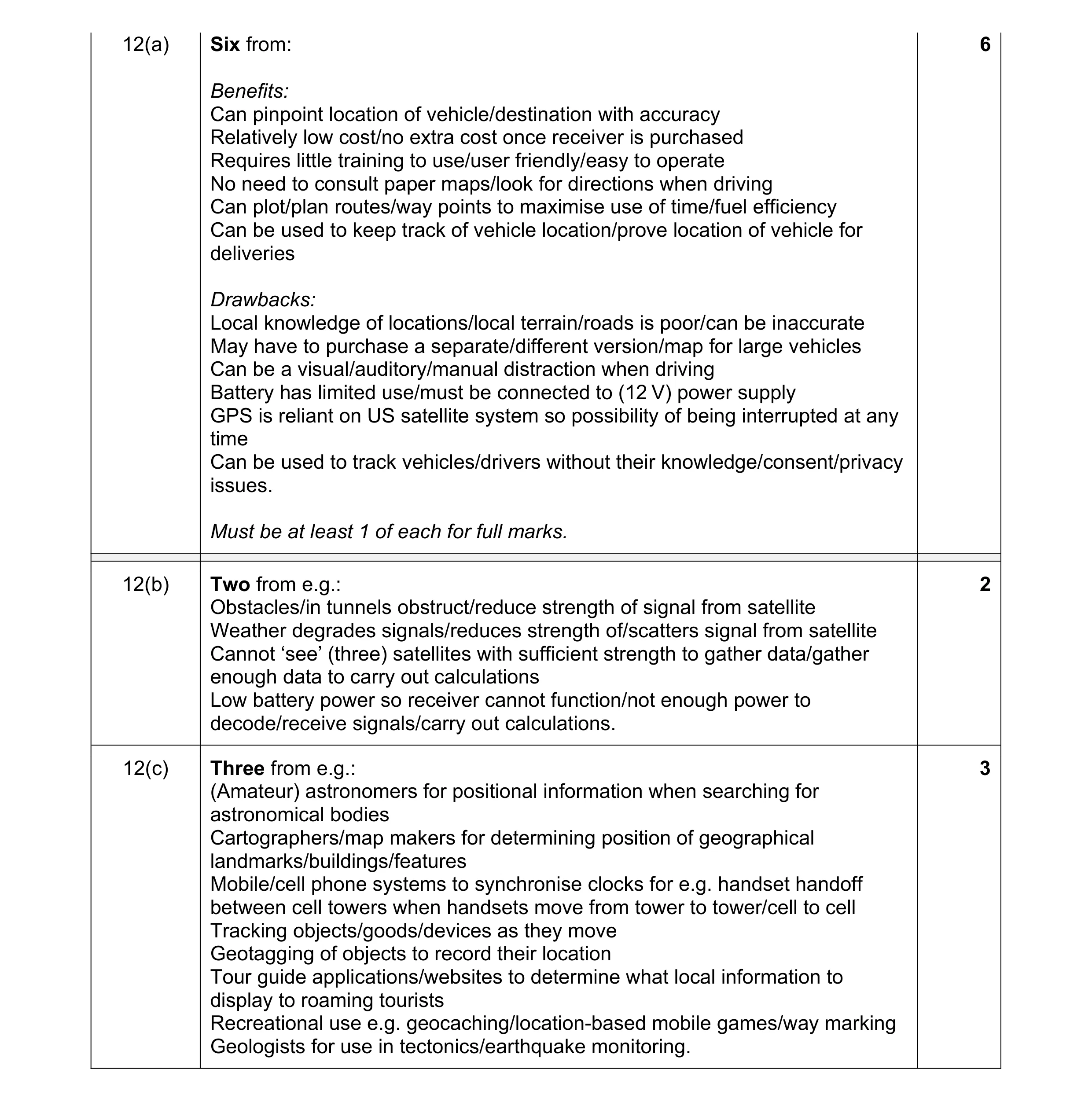 11
11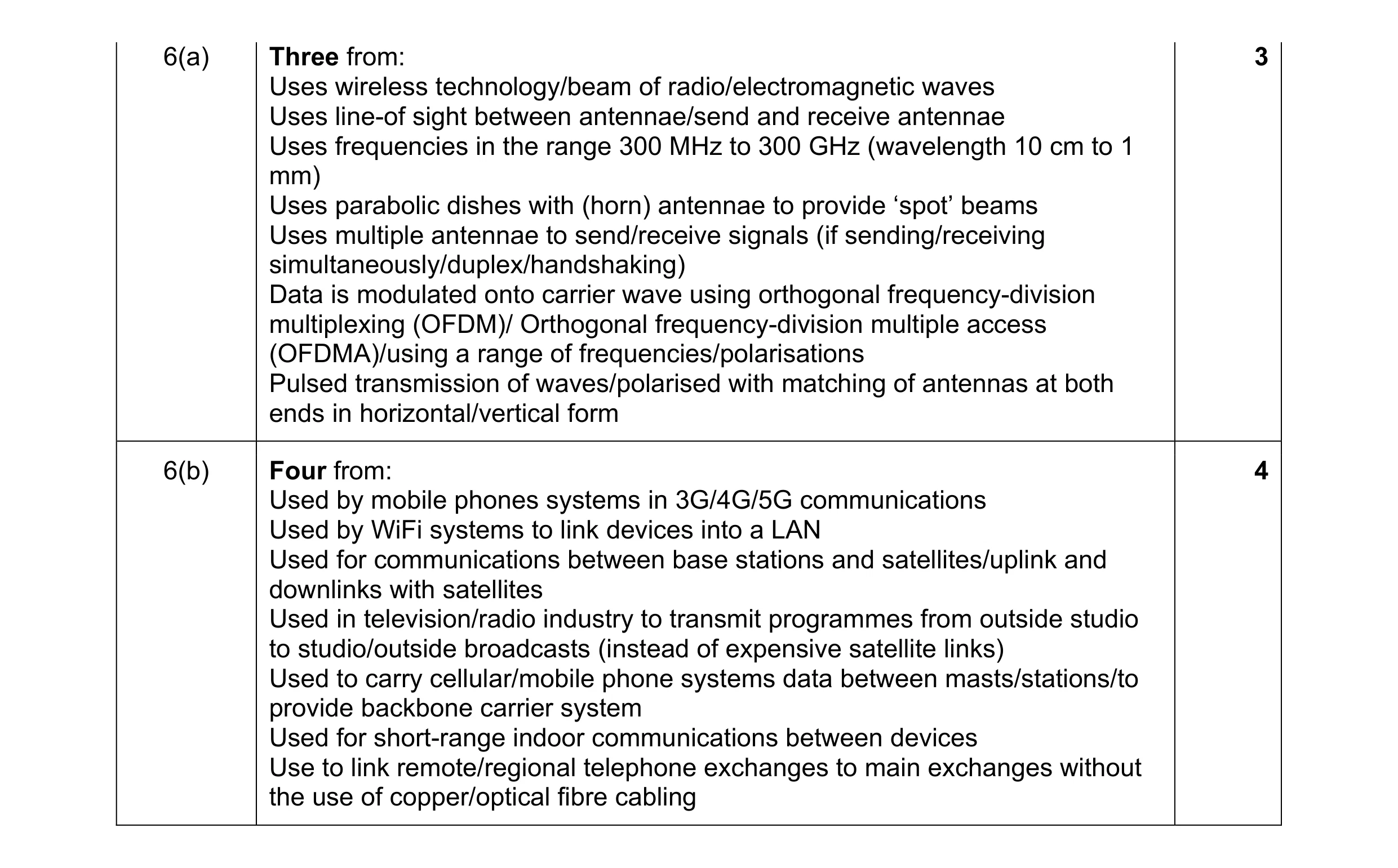 7
7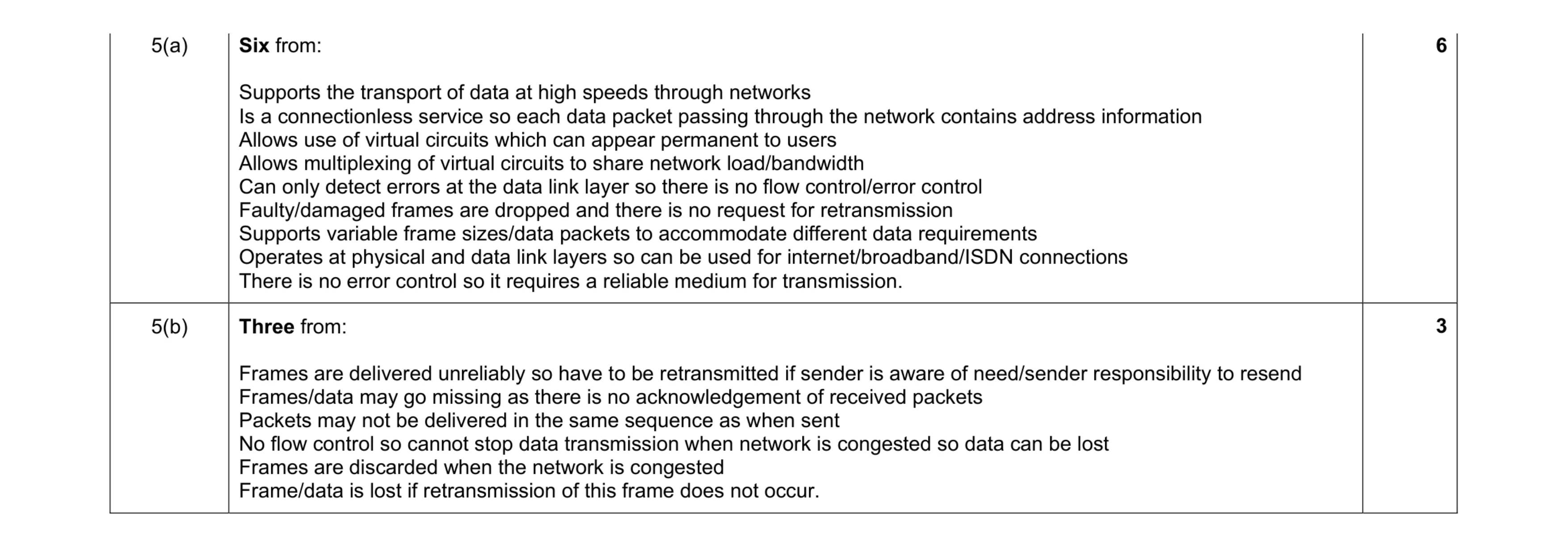 9
9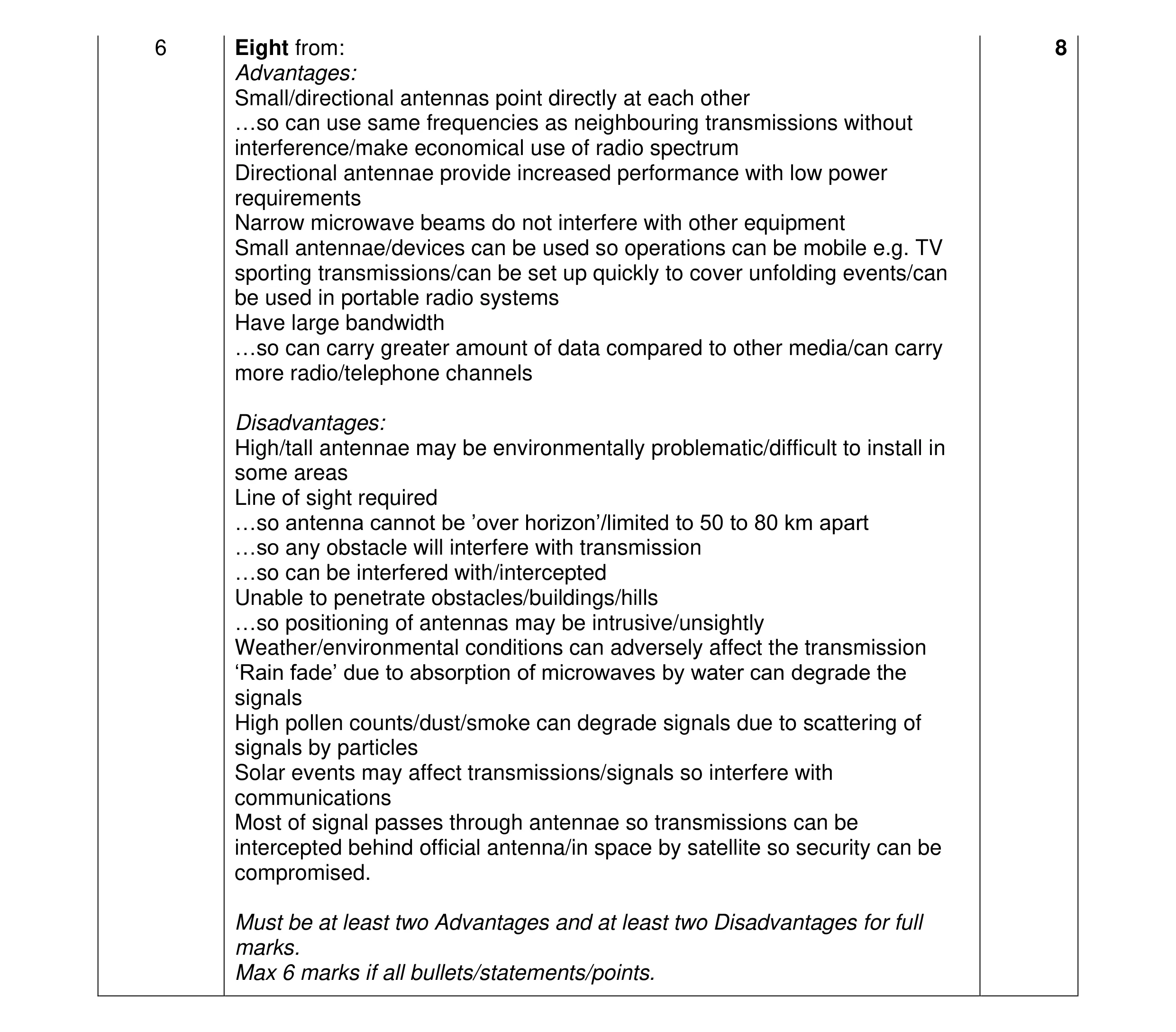 8
8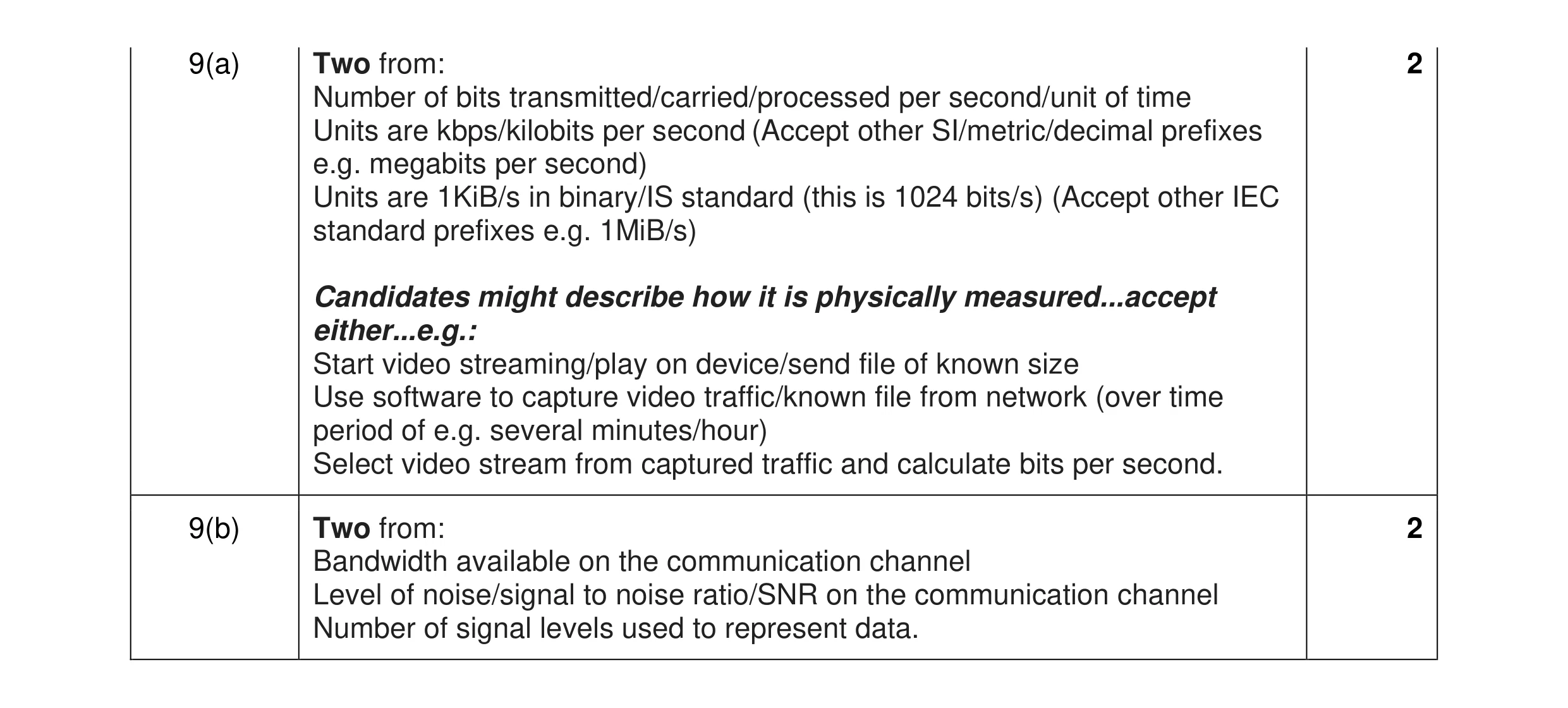 4
4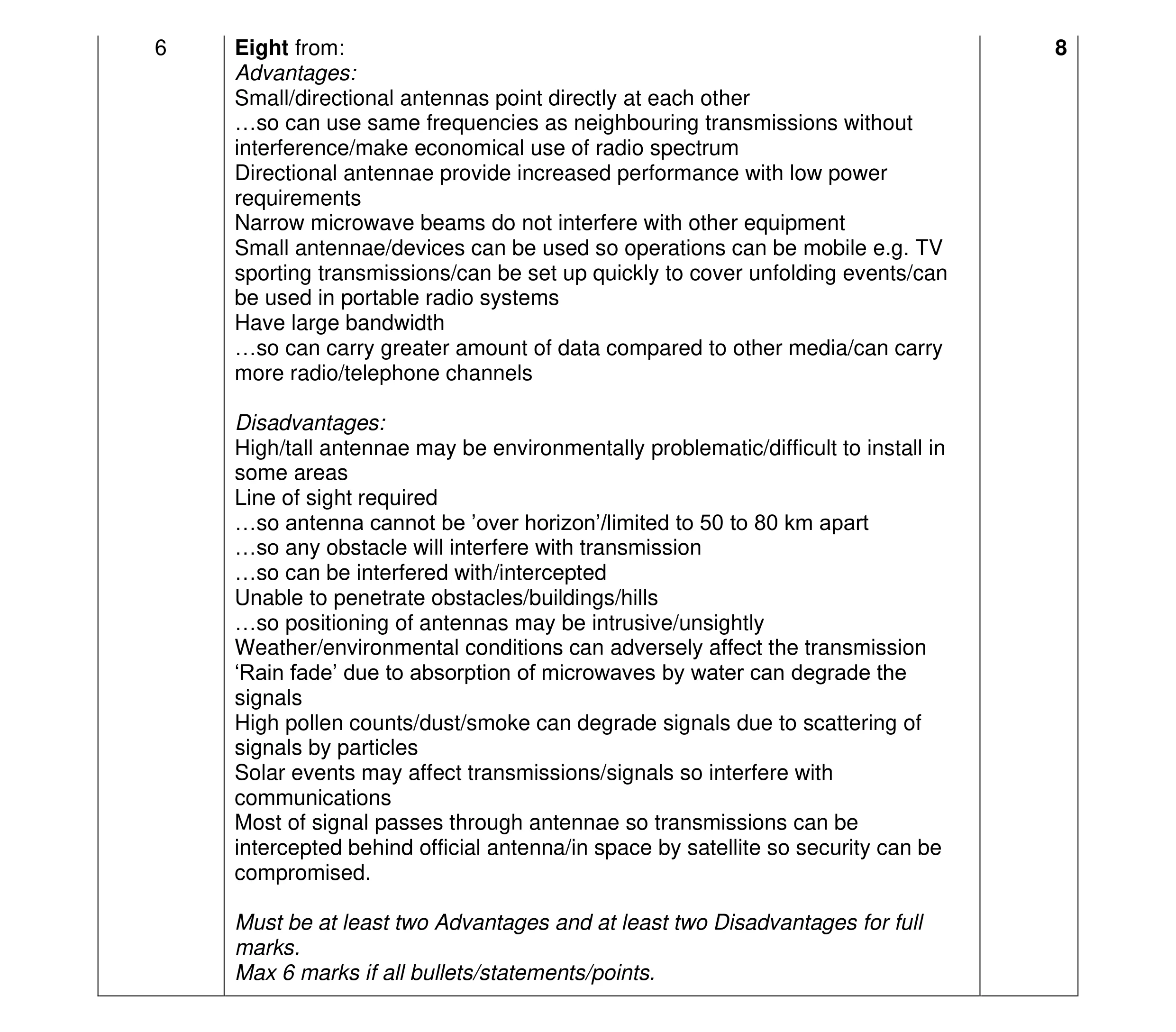 8
8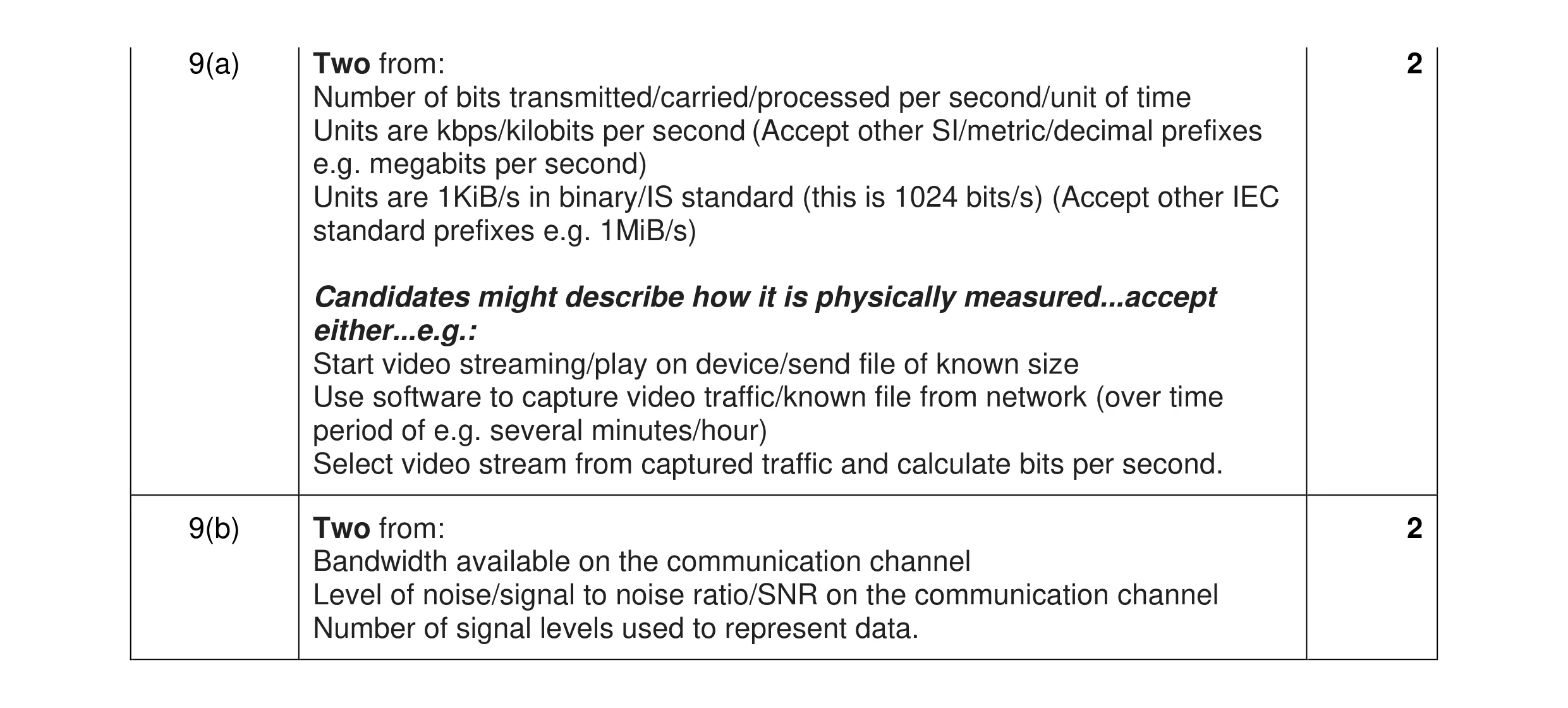 4
4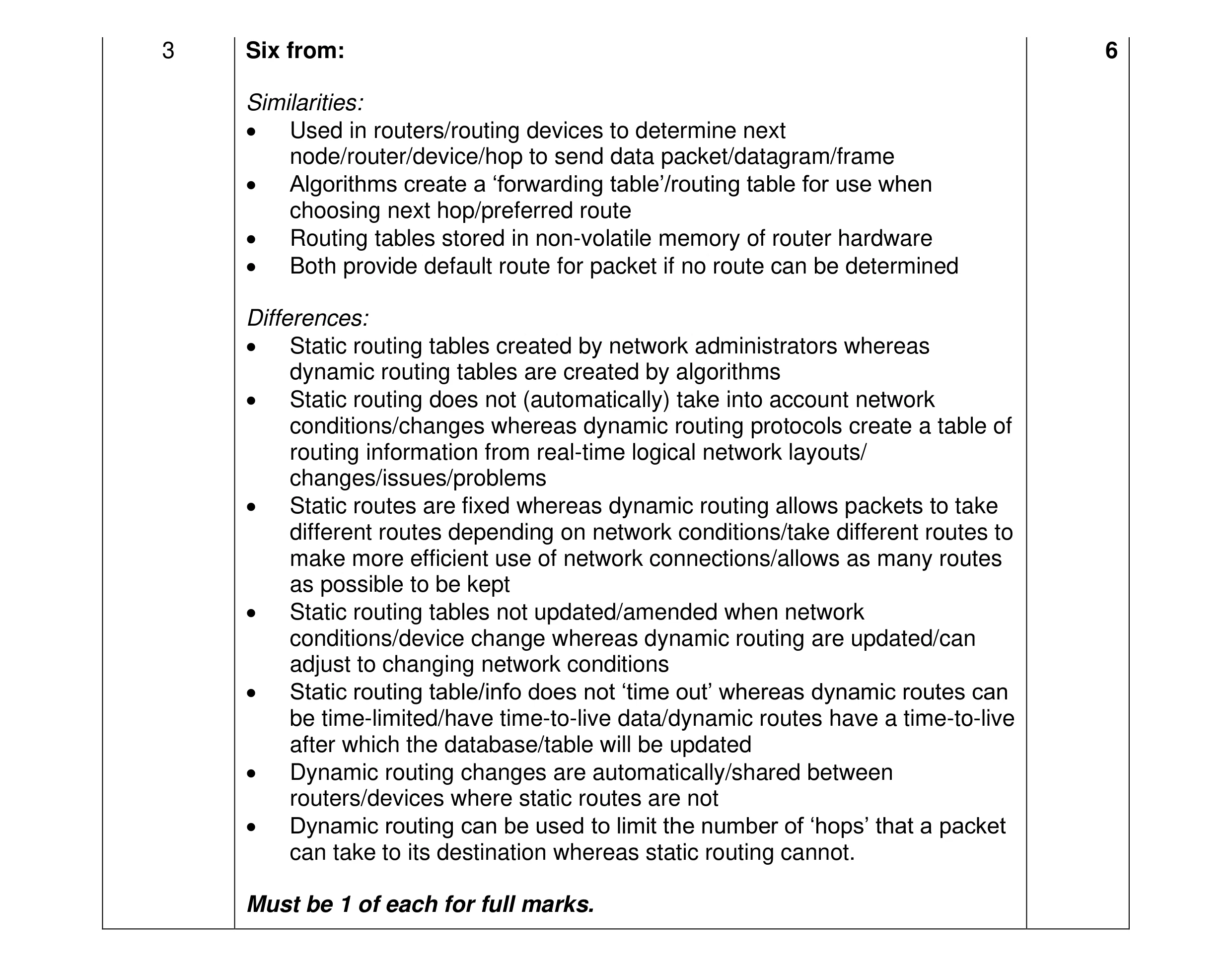 6
6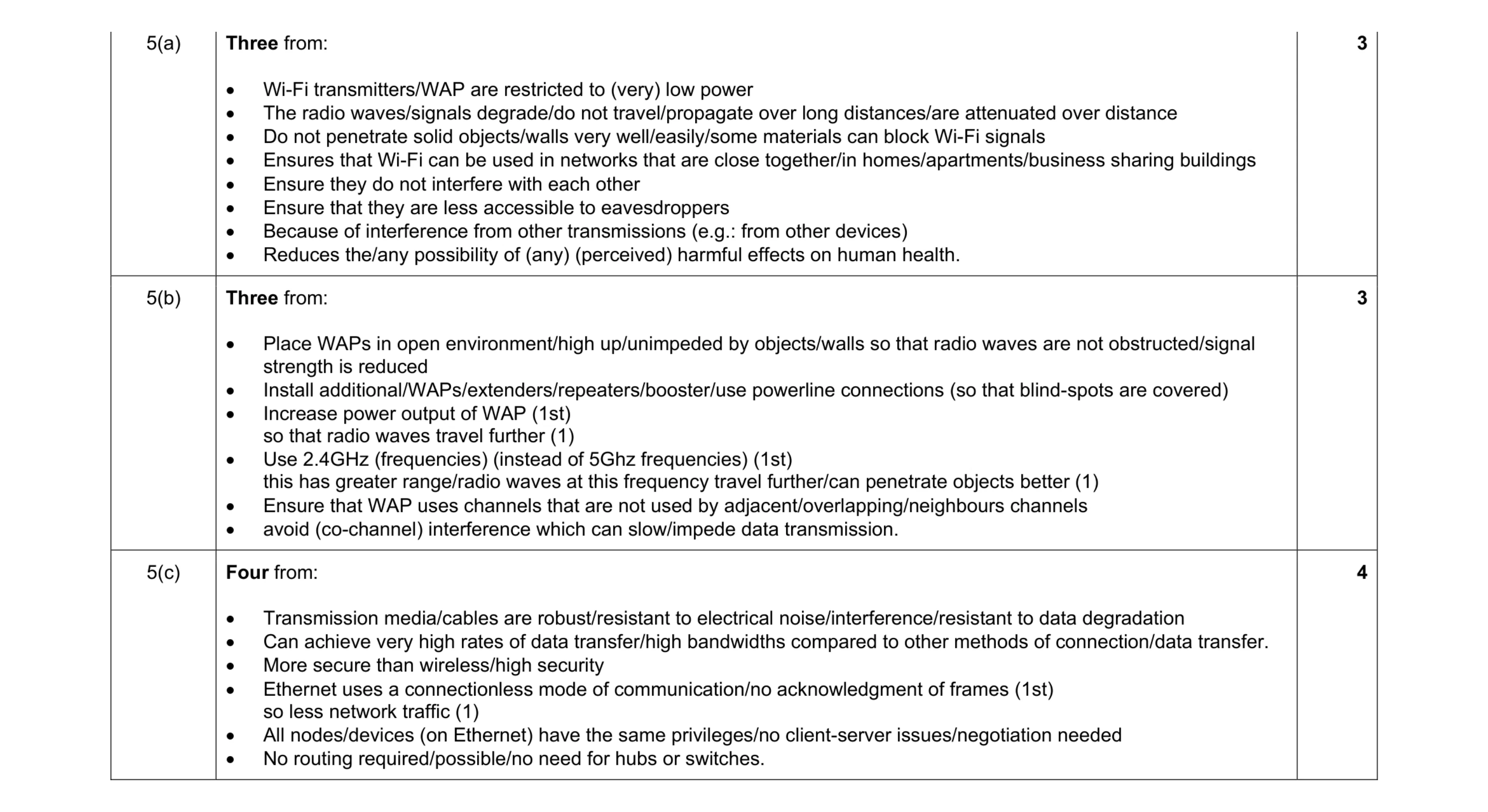 10
10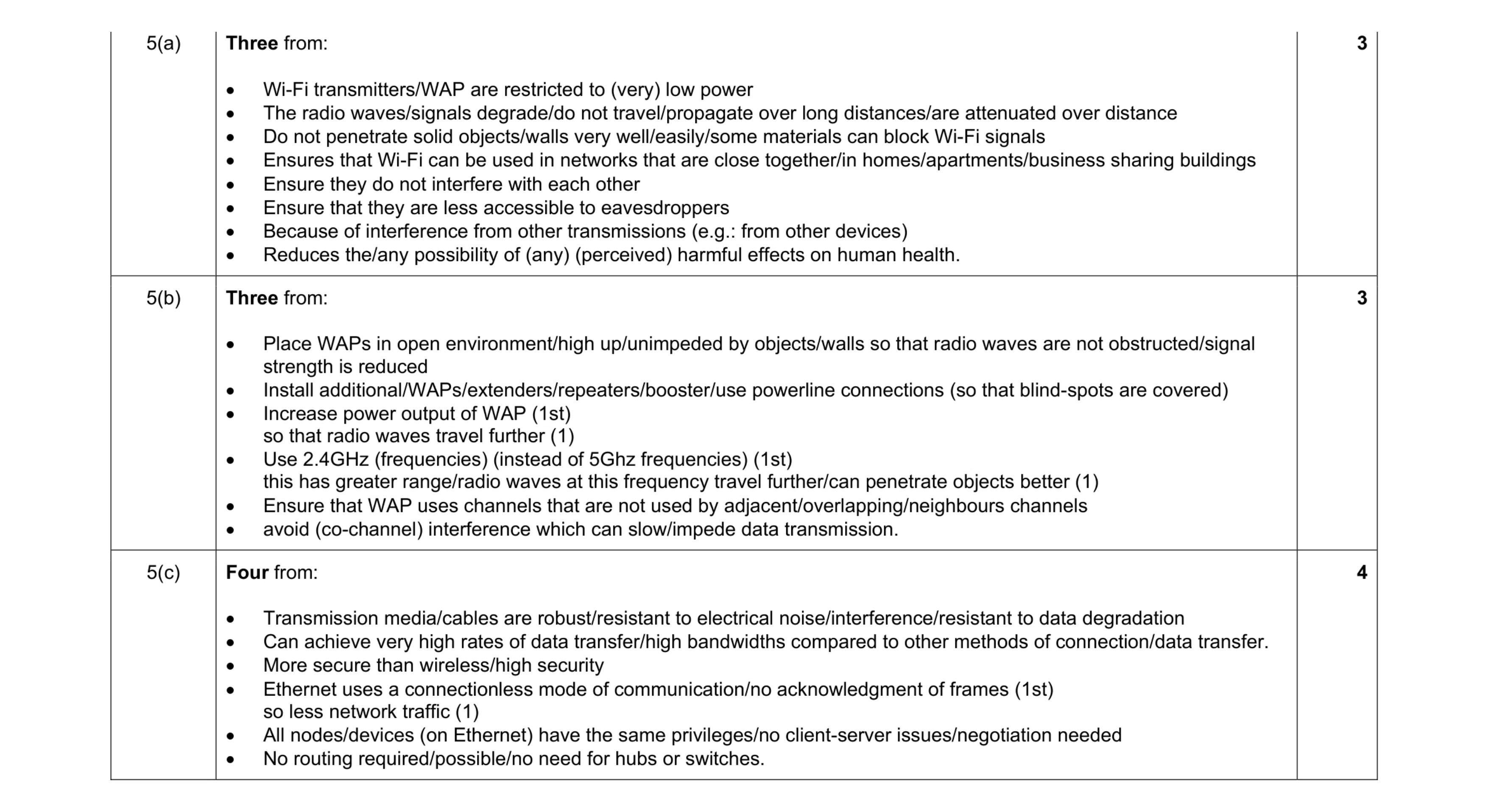 10
10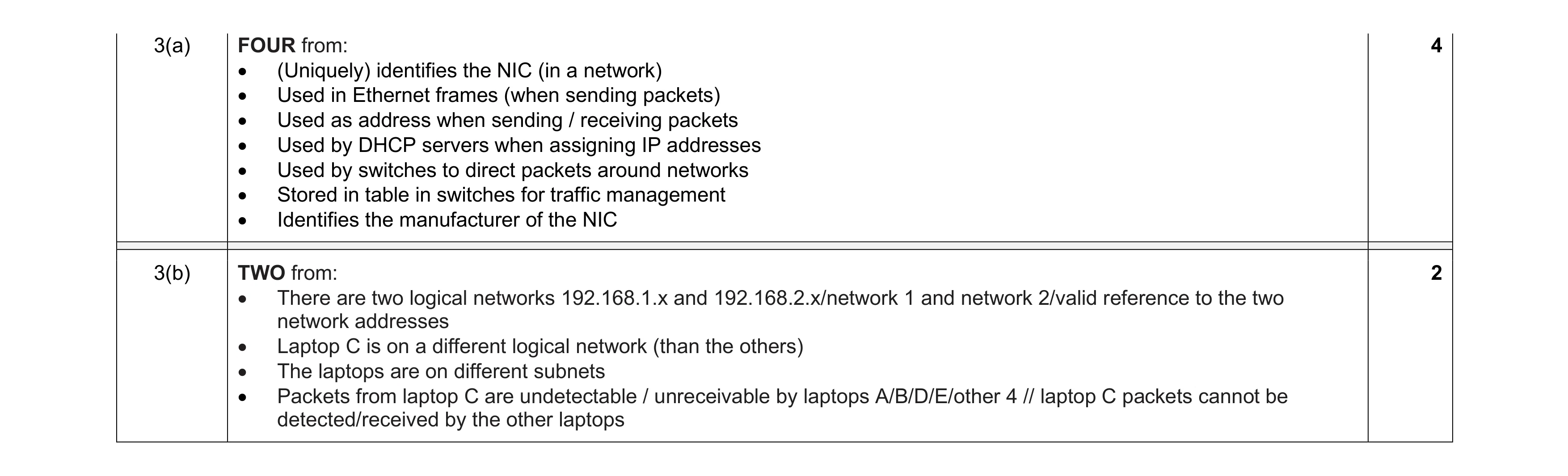 6
6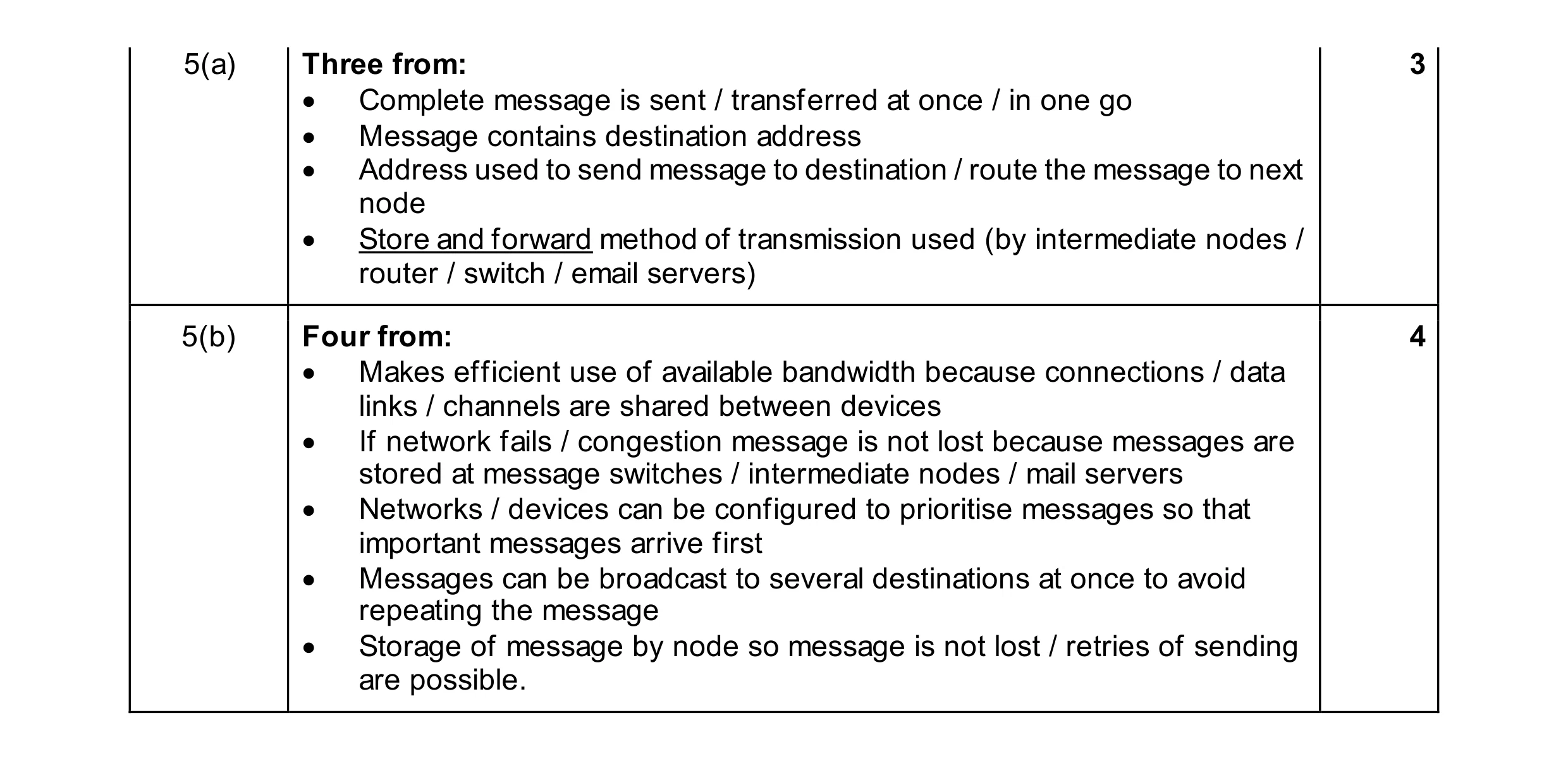 7
7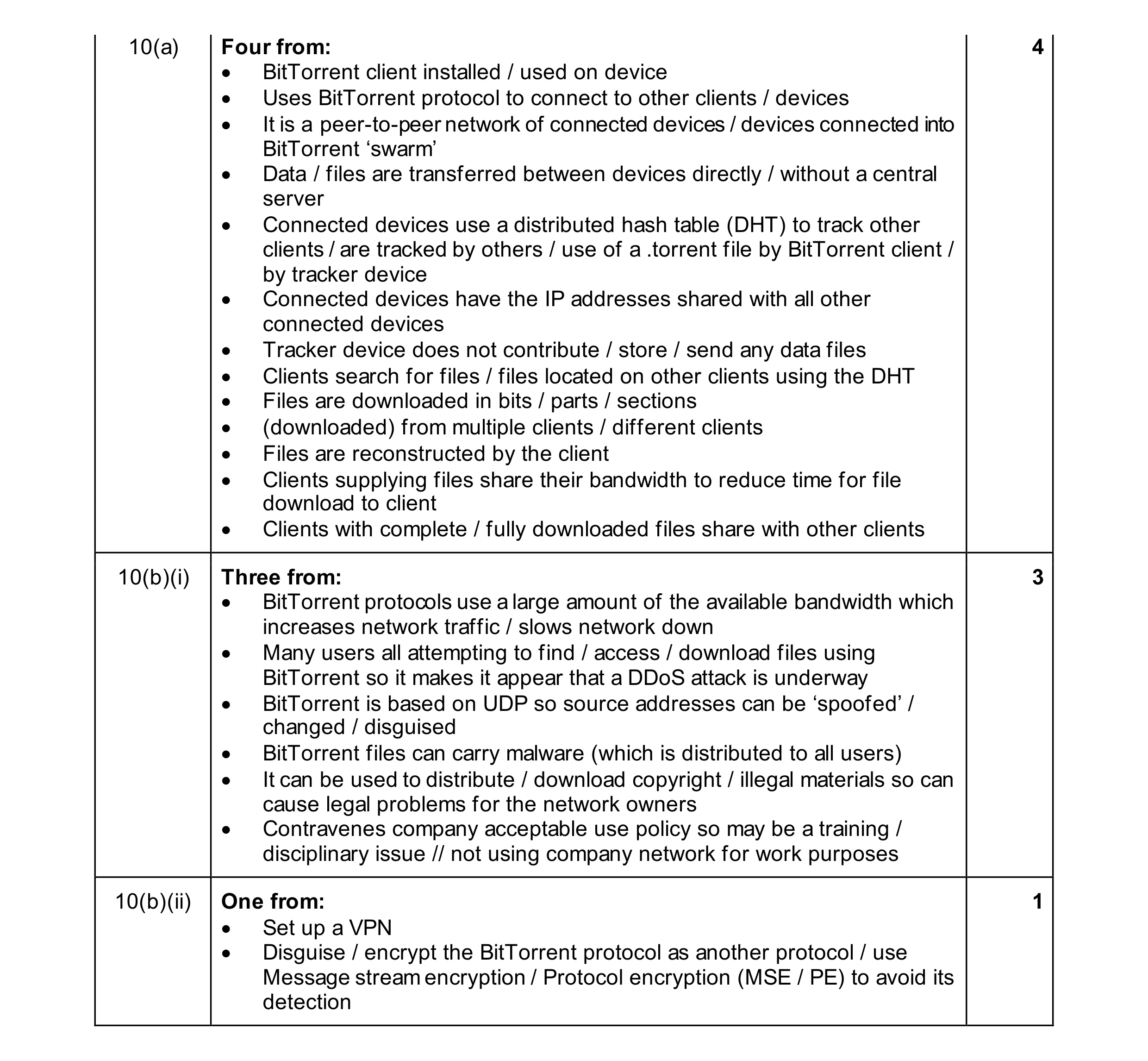 8
8