Questions as text
Q1 · An online store requires customers to create an account using its website 9626/32 May/June 2018
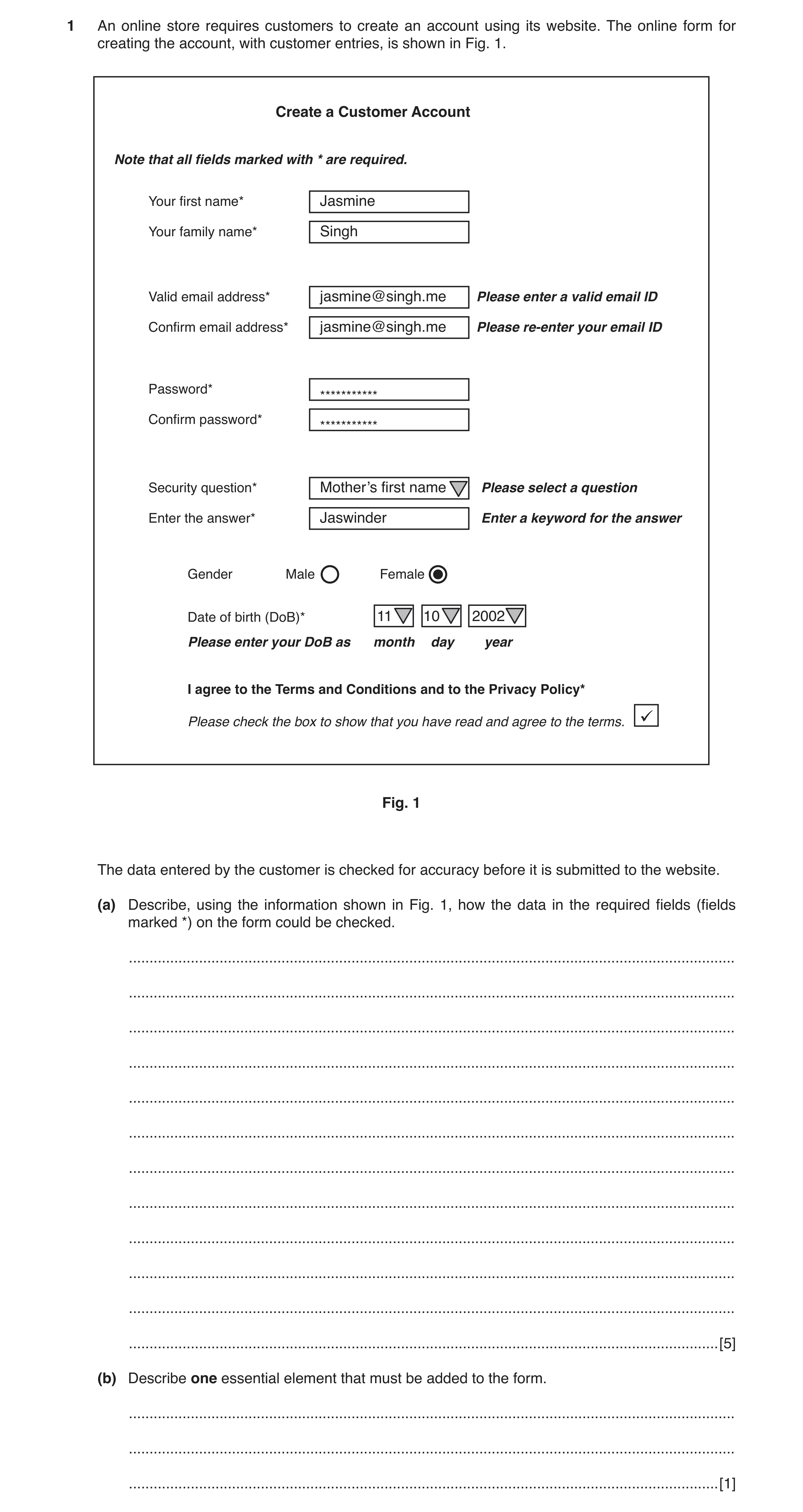
1 An online store requires customers to create an account using its website. The online form for creating the account, with customer entries, is shown in Fig. 1. Create a Customer Account Note that all fields marked with * are required. Your first name* Jasmine Your family name* Singh Valid email address* jasmine@singh.me Please enter a valid email ID Confirm email address* jasmine@singh.me Please re-enter your email ID Password* *********** Confirm password* *********** Security question* Mother’s first name Please select a question Enter the answer* Jaswinder Enter a keyword for the answer Gender Male Female Date of birth (DoB)* 11 10 2002 Please enter your DoB as month day year I agree to the Terms and Conditions and to the Privacy Policy* Please check the box to show that you have read and agree to the terms. Fig. 1 The data entered by the customer is checked for accuracy before it is submitted to the website. (a) Describe, using the information shown in Fig. 1, how the data in the required fields (fields marked *) on the form could be checked. … … … … … … … … … … … … [5] (b) Describe one essential element that must be added to the form. … … … [1]
6 marks
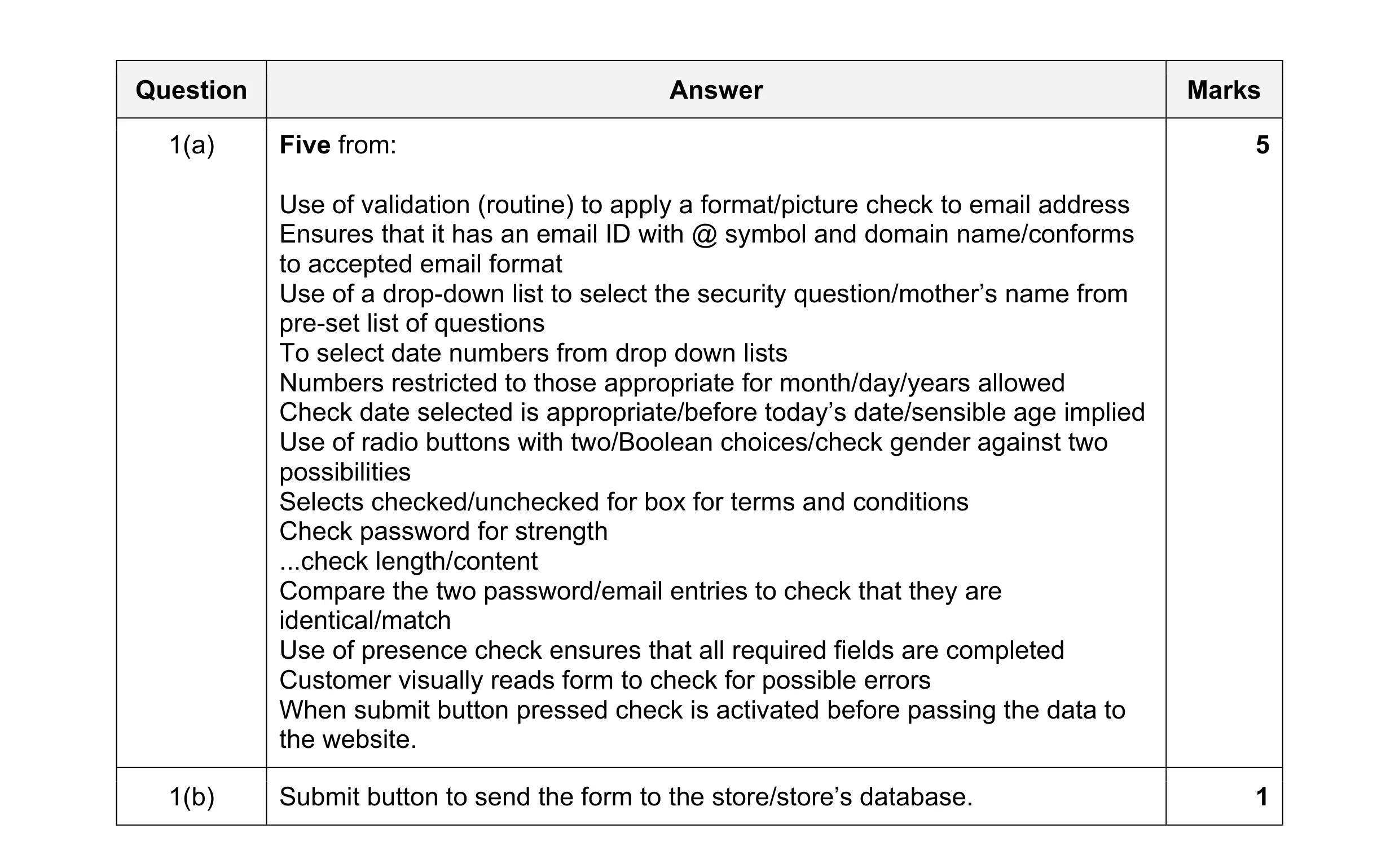
Mark scheme: Question Answer Marks 1(a) Five from: 5 Use of validation (routine) to apply a format/picture check to email address Ensures that it has an email ID with @ symbol and domain name/conforms to accepted email format Use of a drop-down list to select the security question/mother’s name from pre-set list of questions To select date numbers from drop down lists Numbers restricted to those appropriate for month/day/years allowed Check date selected is appropriate/before today’s date/sensible age implied Use of radio buttons with two/Boolean choices/check gender against two possibilities Selects checked/unchecked for box for terms and conditions Check password for strength ...check length/content Compare the two password/email entries to check that they are identical/match Use of presence check ensures that all required fields are completed Customer visually reads form to check for possible errors When submit button pressed check is activated before passing the data to the website. 1(b) Submit button to send the form to the store/store’s database. 1
This question in 9626/32 May/June 2018
Q2 · RockICT Sales sells hats to customers direct from its warehouse 9626/33 May/June 2018
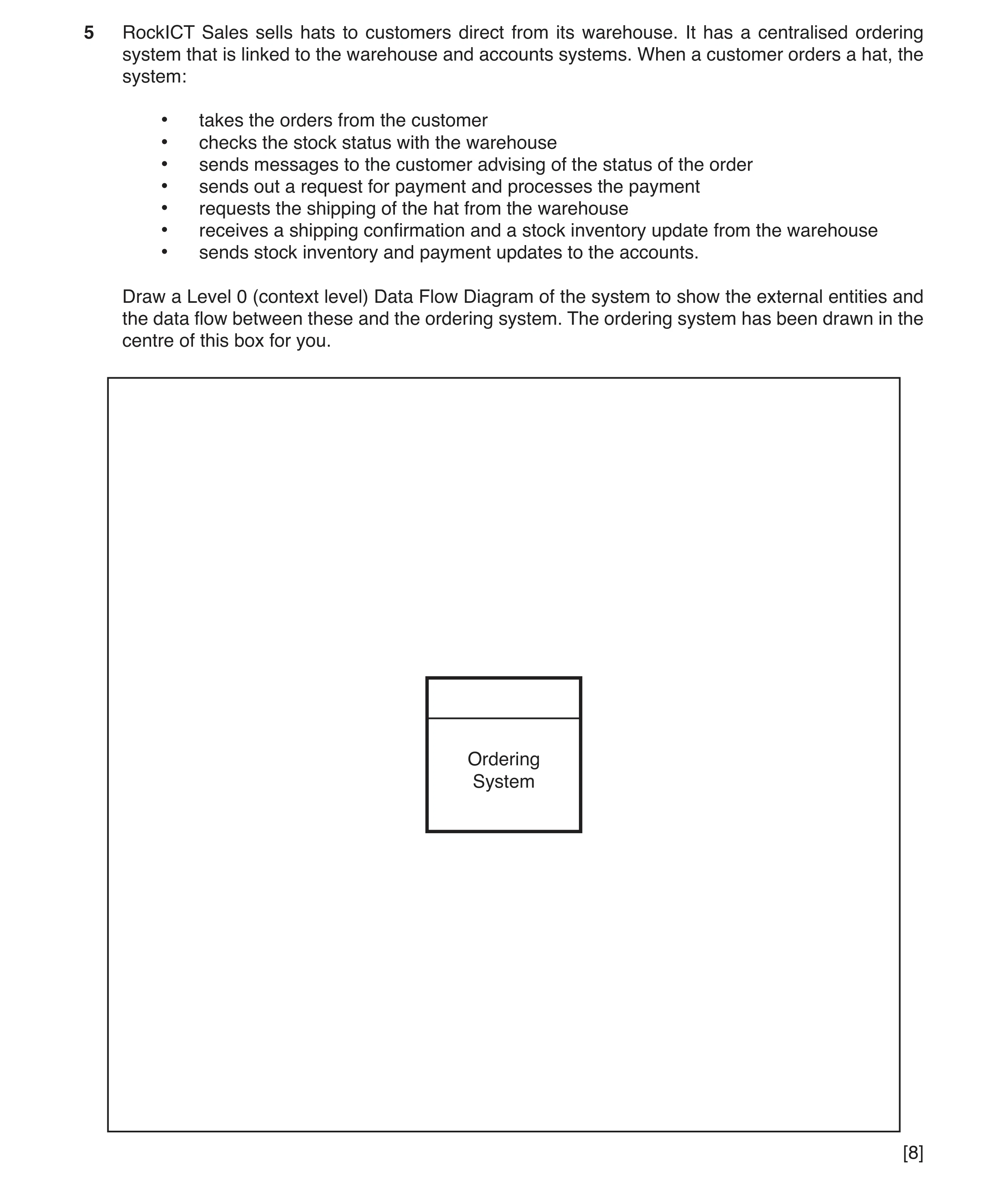
5 RockICT Sales sells hats to customers direct from its warehouse. It has a centralised ordering system that is linked to the warehouse and accounts systems. When a customer orders a hat, the system: • takes the orders from the customer • checks the stock status with the warehouse • sends messages to the customer advising of the status of the order • sends out a request for payment and processes the payment • requests the shipping of the hat from the warehouse • receives a shipping confirmation and a stock inventory update from the warehouse • sends stock inventory and payment updates to the accounts. Draw a Level 0 (context level) Data Flow Diagram of the system to show the external entities and the data flow between these and the ordering system. The ordering system has been drawn in the centre of this box for you. Ordering System [8]
8 marks
Mark scheme: 5 A simple context DFD would be e.g.: 8 Customer Payment Warehouse for Order hat of Stock Order hat request status update Stock Request messages order Ordering forfor hat hat System for Shipping payment confirmation Acknowledgement Stock inventory/ Shipping of updated payment updates payments Accounts Eight from: Identify all three entities: customer, warehouse, accounts Order from customer to ordering system Payment from customer to ordering system Request for payment to customer from ordering system Messages re order status payment to customer from ordering system Stock (check) request from ordering system to warehouse Shipping order from ordering system to warehouse Stock update from warehouse to ordering system Shipping confirmation from warehouse to ordering system Stock inventory update from ordering system to accounts Acknowledgements from accounts to ordering system.
This question in 9626/33 May/June 2018
Q3 · Computer Aided Design software has been used to create a design for a new kitchen as… 9626/32 Oct/Nov 2019
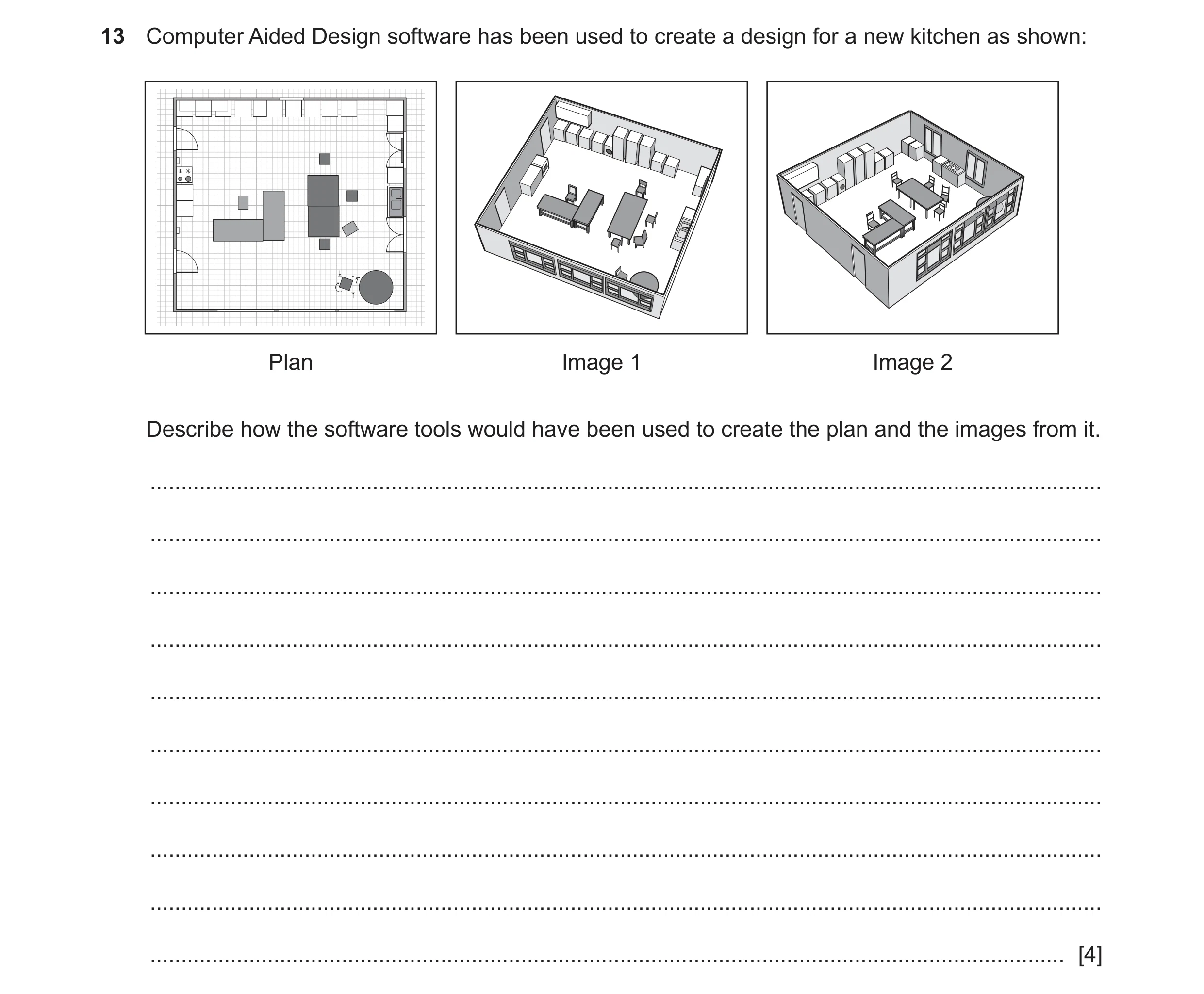
13 Computer Aided Design software has been used to create a design for a new kitchen as shown: Plan Image 1 Image 2 Describe how the software tools would have been used to create the plan and the images from it. … … … … … … … … … … [4]
4 marks
Mark scheme: 13 Four descriptions from e.g.: 4 Tools to create plan: Editing tools: The required dimensions of the room are entered Location/position of windows and doors are entered Objects are brought in from the image library and positioned Chairs and cupboards are rotated/flipped/mirrored using rotate/flip tool Chairs are replicated/copied and pasted Use a fill tool to colour the objects Flip/mirror image objects Tools to create 3D images: Push tool used to pull 2D object into 3D Drag/pull tool used to move image/pull image around to show interior/other views.
This question in 9626/32 Oct/Nov 2019
Q4 · A railway company wants to allow customers to book tickets for journeys using its website 9626/32 Feb/March 2020
2 A railway company wants to allow customers to book tickets for journeys using its website. A new booking screen will use form controls to collect data about the customer and about the requested journeys. The screen is intended to make it easier for customers to enter the details. (a) Describe, in detail, three checks that could be carried out on the data as it is collected on the booking screen. 1 … … … 2 … … … 3 … … … [3] (b) Describe four form controls that could be used on the new booking screen and for each form control describe an appropriate use on the new screen. … … … … … … … … … … … … … … … … … … … … [8] (c) Describe the characteristics, other than form controls, of a well-designed data collection screen that make it easier for customers to enter data. … … … … … … … … … … … … … … [6] (d) When the booking screen is created it will need to be tested. Explain the importance of having a test plan. … … … … … … … … … … [4]
21 marks
Mark scheme: 2(a) Three from e.g.: 3 Check that data has been entered into the field/box Check that the data is within pre-set ranges e.g. dates of bookings Check that the data is in the required format e.g. email address/postal code Check the data against pre-set values/lookup table of values e.g. title of customer Check that the data entered is of the required type. 2(b) Eight from: 8 Four controls from, max two marks per control: Buttons that can be clicked to activate a task/action Submit button that sends the form to the dataset/company Reset button to clear the form so that the customer can start again Hidden buttons that are not shown/rendered by web browser/are not visible to users Carry/send/submit information that is not stored/set by HTML objects/would be lost when page submitted to server Checkboxes/on-off switches/toggle boxes (sharing the same name (e.g. choices of seating/food)) but allow multiple choices to be made …when checked attribute set the switch is ‘on …only the ‘on’ state is submitted with form Radio buttons are mutually exclusive switches (sharing the same name) but allow only one choice to be made Radio buttons used to choose/make a choice of e.g. male/female, adult/child Text input via single line input for e.g. name Multi-line input for e.g. comments/additional requirements Authors may create two types of controls that allow users to input text. The INPUT element creates a single-line input control and the element creates a multi-line input control. In both cases, the input text becomes the control's current value Menus provides (users with) a pre-set list of options from which to choose Menus used to choose e.g. destination/departure File select allows the user to select files to submit with a form Files uploaded e.g. photograph for inclusion on ticket/booking/pass Controls use the HTML INPUT element to capture user choices/input HTML SELECT/OPTGROUP/OPTION element creates a menu/TEXTAREA creates a text input box. 2(c) Six from e.g.: 6 Brevity/concise display/provision of information/instructions with no more data than is necessary Simple sentence structure/complete words/affirmative sentences …no jargon/slang Consistent format for display of information so user knows where to find/look for information Labels should be right-justified and to the left of the input field Labels should be e.g. capitalised/use a colon to indicate data field Compatibility with other input screens so that user does not have to recode/re-enter data Information/input requests should be in a logical order Information/input requests should not be repeated. 2(d) Four from: 4 Defines/focuses on/ensures the task/requirements are met Acts as a guide to/set of instructions for testing the booking screen Allows management of any changes that are needed during development of the booking screen Defines the tests that should be carried out on the booking screen Records the results of the tests for later analysis/amendment of booking screen.
This question in 9626/32 Feb/March 2020
Q5 · A car manufacturer is using computer-aided design (CAD) to design the engine for its new… 9626/31 Oct/Nov 2021
4 A car manufacturer is using computer-aided design (CAD) to design the engine for its new electric car. Discuss the benefits and drawbacks of the use of CAD for this process. … … … … … … … … … … … … … … … … … … … … [8]
8 marks
Mark scheme: 4 Eight from: 8 Benefits: Saves time when designing/designs created in shorter time Easy to edit/change/alter/amend designs without redrawing Fewer errors/lower percentage of errors in drawings Software can automate (most of) the designs tasks Code/design/drawings can be copied and reused multiple times Designs/files can be saved and sent to others Accuracy is improved compared to manual methods of design Drawbacks: Designs can be lost because of the sudden breakdown of computers/data corruption Designs/files prone to viruses/malware Designs could be easily “hacked”/stolen Training/learning how to use the software can take a long time High cost of purchase or new systems Time/cost of training the designers to use CAD Need for regular updating of software/operating systems Needs less employment of specialised designers because of use of CAD/CAM systems. Must be at least 2 of each for full marks. Must be a proper discussion for full marks. Max 6 marks if bullets/list of points.
This question in 9626/31 Oct/Nov 2021
Q6 · Designers often use computer-aided design (CAD) 9626/32 Oct/Nov 2021
1 Designers often use computer-aided design (CAD). Fig. 1.1 shows the design of a room. Living room –2 0m 2 4 Aquarium Armchair Armchair Bookcase Chair –2 Chair Coffee table Corner sofa Desk N Name Wi... De... Hei... Vi... 38.68 m2 0m Double sm... 132 10.2 134 Open door 91.5 68 208.5 Table 150 75 74 Chair 48.6 49.9 80 Flowers 25 24 49.3 Armchair 87 92 87 2 Coffee table 125 46 40 Fig. 1.1 Describe how the features of CAD software can be used to design the room. … … … … … … … … … … … … … … … … … … … … … [8]
8 marks
Mark scheme: Question Answer Marks 1 Eight from: 8 Dimensions of rooms can be accurately/precisely determined using measurements/scales on palette Structure of room can be accurately plotted/drawn based on real measurements Pre-loaded/stored library of items/furniture can be used to display contents of rooms Sizes/shapes of items/furniture can be accurately/precisely customised to fit rooms Colours of items/furniture can be altered to suit design/try out combinations of colours Positions of items/furniture can be altered to try out designs Designs can be viewed in 2D to display a plan of the design 3D views can be generated to assist in visualisation of design for customer 3D view can be viewed from any angle/rotated to allow better understanding of the design/walkthrough for customer Design can be edited/amended/altered in real time to allow customer/designer to experiment with ideas/colours/positions of items/furniture Design can be printed/saved for customer/designer to refer to/come back to.
This question in 9626/32 Oct/Nov 2021
Q7 · A car manufacturer is using computer-aided design (CAD) to design the engine for its new… 9626/33 Oct/Nov 2021
4 A car manufacturer is using computer-aided design (CAD) to design the engine for its new electric car. Discuss the benefits and drawbacks of the use of CAD for this process. … … … … … … … … … … … … … … … … … … … … [8]
8 marks
Mark scheme: 4 Eight from: 8 Benefits: Saves time when designing/designs created in shorter time Easy to edit/change/alter/amend designs without redrawing Fewer errors/lower percentage of errors in drawings Software can automate (most of) the designs tasks Code/design/drawings can be copied and reused multiple times Designs/files can be saved and sent to others Accuracy is improved compared to manual methods of design Drawbacks: Designs can be lost because of the sudden breakdown of computers/data corruption Designs/files prone to viruses/malware Designs could be easily “hacked”/stolen Training/learning how to use the software can take a long time High cost of purchase or new systems Time/cost of training the designers to use CAD Need for regular updating of software/operating systems Needs less employment of specialised designers because of use of CAD/CAM systems. Must be at least 2 of each for full marks. Must be a proper discussion for full marks. Max 6 marks if bullets/list of points.
This question in 9626/33 Oct/Nov 2021
Q8 · A new database management system (DBMS) is to be created for a health care centre to… 9626/31 May/June 2022
9 A new database management system (DBMS) is to be created for a health care centre to store patient records. Health care professionals will use the DBMS when treating patients. A design specification has to be written before the DBMS is created. (a) Explain why a design specification is needed. … … … … … … … … … … … [4] (b) Describe the contents of a design specification for the new DBMS. … … … … … … … … … … … … … [6]
10 marks
Mark scheme: 9(a) Four from: Specify the criteria for developing/creating the new DBMS Provide clear instructions/guidance for the developers of the new DBMS Specify how the new system will meet user requirements Form part of a patent application for the design/product Form basis of accurate costings/resource allocation for product/DBMS development Be part of a legal contract between client and developers. 9(b) Six from: An introduction to the document stating its purpose for designing the DBMS A description of the intended audience of the design specification document An identification of the intended product using its names and references A summary of the contents of the document An overview of the DBMS system to be designed with its intended functions A discussion the constraints that affect the development such as use of distributed data/use of exiting modules The relationship between the data elements/modules of the database Description of the file requirements e.g. file/file access methods/list of fields within a record/data attributes/expected number of records Description of the purpose of calculations to be included Description of formulas and calculations to be used Description of error handling requirements/procedures Description of backup/recovery procedures/processes System start-up and shutdown procedures/processes Input checks performed/validation methods Description of error messages produced from invalid input Layout of report such as data contained in each field of each report Security design such as description of access control mechanisms/audit log provisions/user authentication/encryption processes. 6
This question in 9626/31 May/June 2022
Q9 · A new database management system (DBMS) is to be created for a health care centre to… 9626/33 May/June 2022
9 A new database management system (DBMS) is to be created for a health care centre to store patient records. Health care professionals will use the DBMS when treating patients. A design specification has to be written before the DBMS is created. (a) Explain why a design specification is needed. … … … … … … … … … … … [4] (b) Describe the contents of a design specification for the new DBMS. … … … … … … … … … … … … … [6]
10 marks
Mark scheme: 9(a) Four from: Specify the criteria for developing/creating the new DBMS Provide clear instructions/guidance for the developers of the new DBMS Specify how the new system will meet user requirements Form part of a patent application for the design/product Form basis of accurate costings/resource allocation for product/DBMS development Be part of a legal contract between client and developers. 9(b) Six from: An introduction to the document stating its purpose for designing the DBMS A description of the intended audience of the design specification document An identification of the intended product using its names and references A summary of the contents of the document An overview of the DBMS system to be designed with its intended functions A discussion the constraints that affect the development such as use of distributed data/use of exiting modules The relationship between the data elements/modules of the database Description of the file requirements e.g. file/file access methods/list of fields within a record/data attributes/expected number of records Description of the purpose of calculations to be included Description of formulas and calculations to be used Description of error handling requirements/procedures Description of backup/recovery procedures/processes System start-up and shutdown procedures/processes Input checks performed/validation methods Description of error messages produced from invalid input Layout of report such as data contained in each field of each report Security design such as description of access control mechanisms/audit log provisions/user authentication/encryption processes. 6
This question in 9626/33 May/June 2022
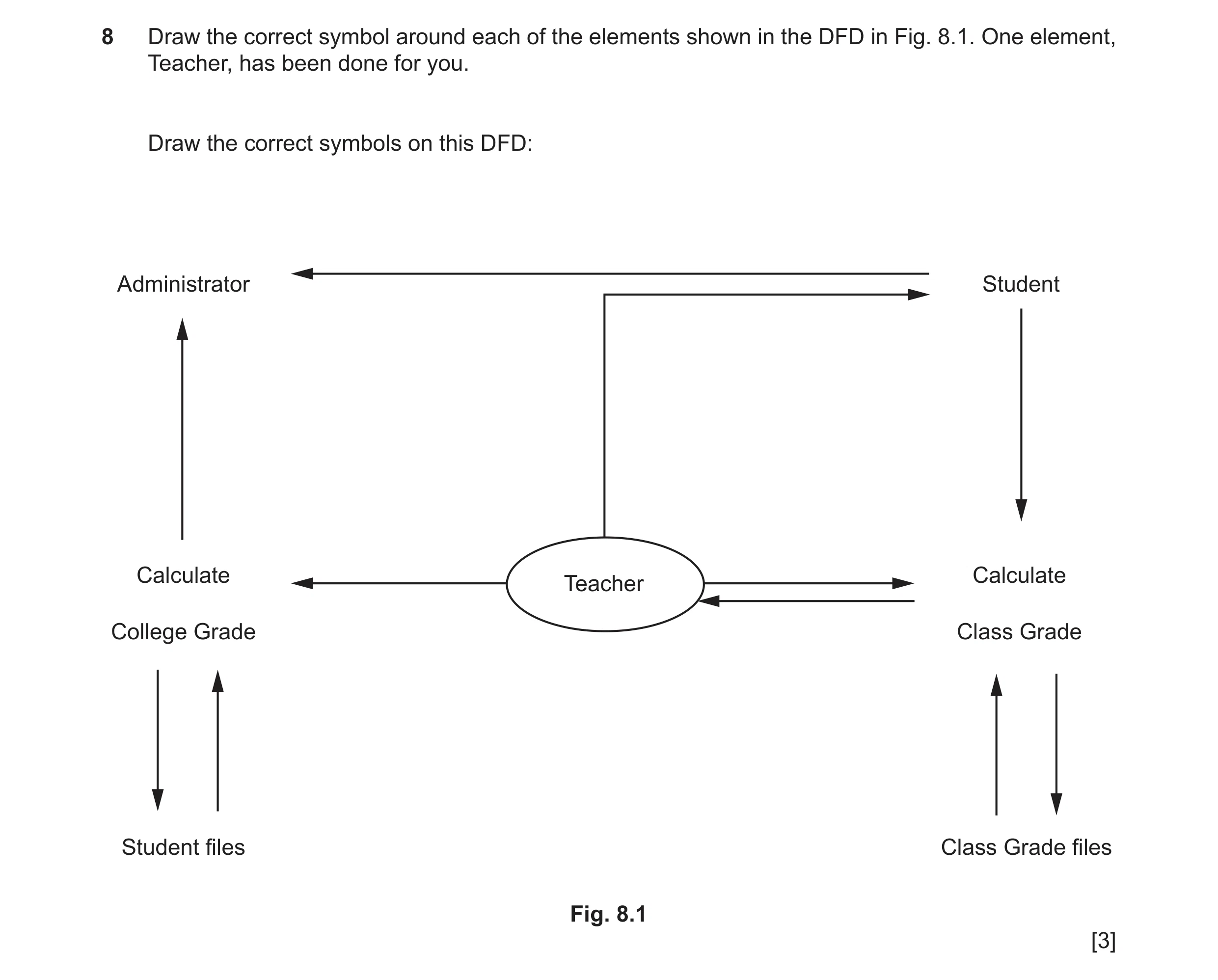
Q10 · Draw the correct symbol around each of the elements shown in the DFD in Fig 9626/32 Oct/Nov 2022
8 Draw the correct symbol around each of the elements shown in the DFD in Fig. 8.1. One element, Teacher, has been done for you. Draw the correct symbols on this DFD: Administrator Student Calculate Calculate Teacher College Grade Class Grade Student files Class Grade files Fig. 8.1 [3]
3 marks
Mark scheme: 8 Three from: 3 Source symbols on both Administrator and Student 1 mark Process symbols (calculate) symbols on both Calculate College Grade and Calculate Class Grade 1 mark Store symbols on both Student and Class grade files 1 mark The symbols, as per syllabus, are as shown:
This question in 9626/32 Oct/Nov 2022
Q11 · Data flow diagrams (DFD) are drawn when designing a new computer system 9626/32 May/June 2024
5 Data flow diagrams (DFD) are drawn when designing a new computer system. (a) Explain the purpose of a DFD. … … … … … … [2] (b) When a new computer system is being designed, the designers draw a level 0 (context-level) DFD before drawing a level 1 DFD. Describe two differences between a level 0 DFD and a level 1 DFD. … … … … … … [2]
4 marks
Mark scheme: 5(a) Two from: 2 (Graphically/a diagram) to show/describe (how) the data flows(1st) from input through processes to storage/through (or in) a system (1) gives designers a visual representation makes it easier to understand/follow enables/allows documentation can be created enables/allows the physical components/elements/software to be created (to make the system work). 5(b) Two from: 2 Level 0 shows (only) an overview of the system/no any details of process/level 1 shows more details of processes Level 0 DFD has only 1 process // level 1 has more than 1 process Level 0 does not have any data storage // level 1 shows data storage Level 0 are simple to draw/no technical knowledge required to draw/understand.
This question in 9626/32 May/June 2024
Q12 · A system specification is written when a new system is to be designed and developed 9626/33 May/June 2025
3 A system specification is written when a new system is to be designed and developed. Describe the purpose of the system specification. … … … … … … … … … … … … … … [6]
6 marks
Mark scheme: 3 SIX from: 6 • Describes the new system • Describes how it meets the user requirements • Defines the features / functions of the new system • Specifies how new system interfaces with old / remaining systems • Defines the behaviour of the new system • Describes the data to be used by the system • Specifies how the new system resolves / attempts to resolve any problems found in the old system • Defines / describes the operating system to be used / required for the new system • Specifies the hardware to be used / required for the new system • Specifies the software requirements for the new system • Specifies the maintenance / upgrades required • Describes the types of end-users of the new system • Specifies the access rights of each type of end-user • Used as a basis of the design specification
This question in 9626/33 May/June 2025
 3 / 14
 4 / 14
 7 / 14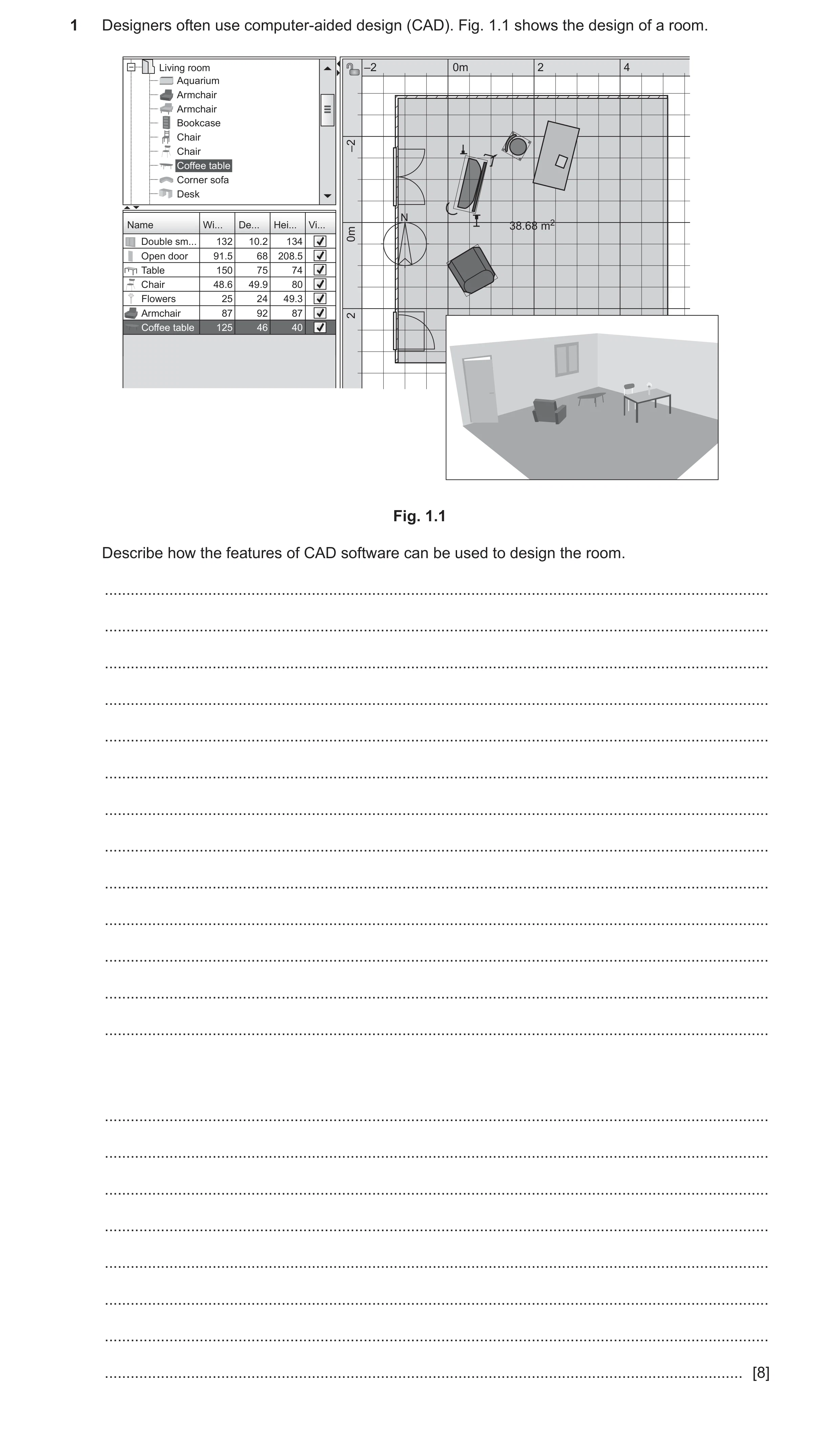
 9 / 14
 10 / 14
 11 / 14
 12 / 14
 13 / 14
 14 / 14
 6
6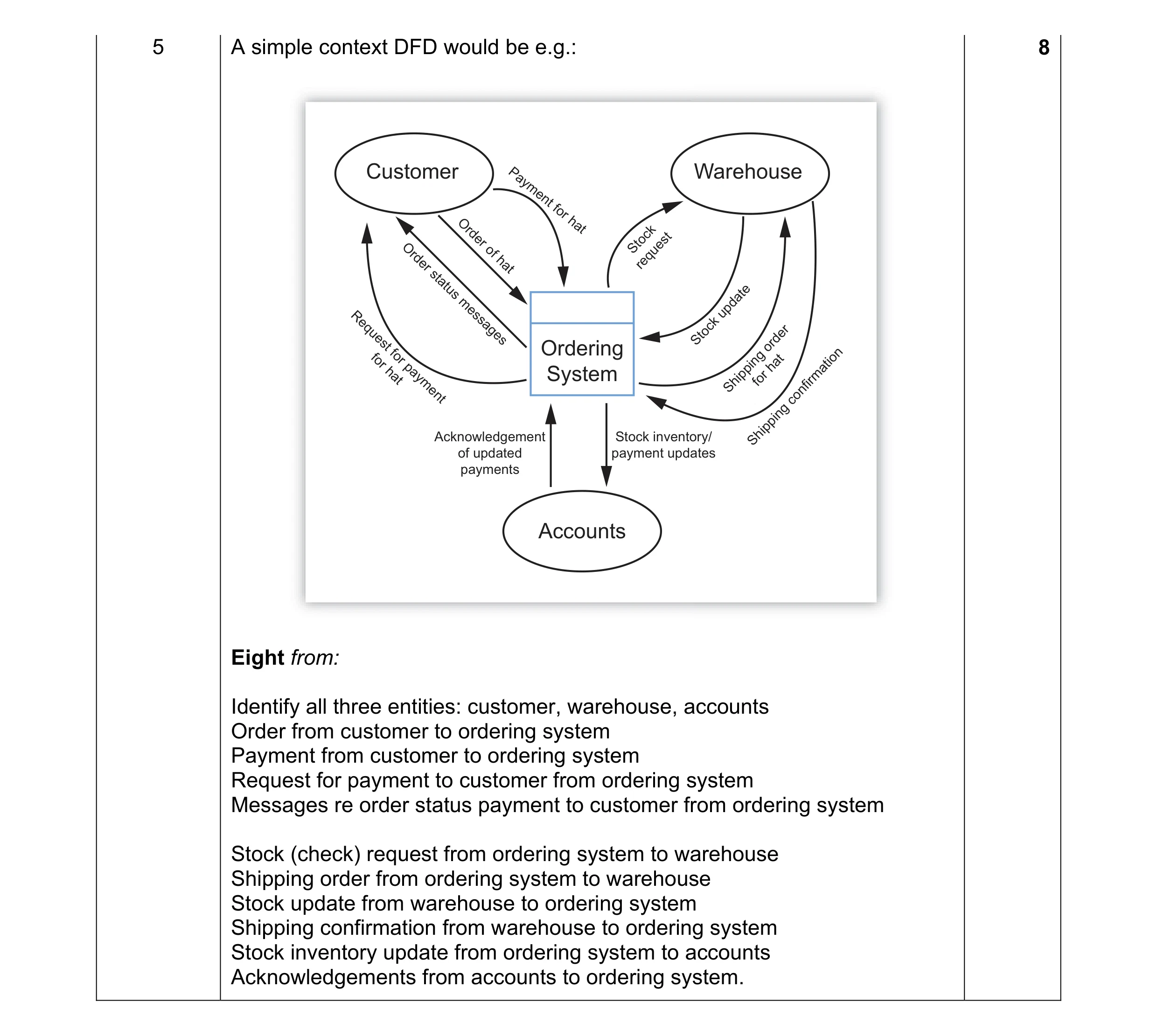 8
8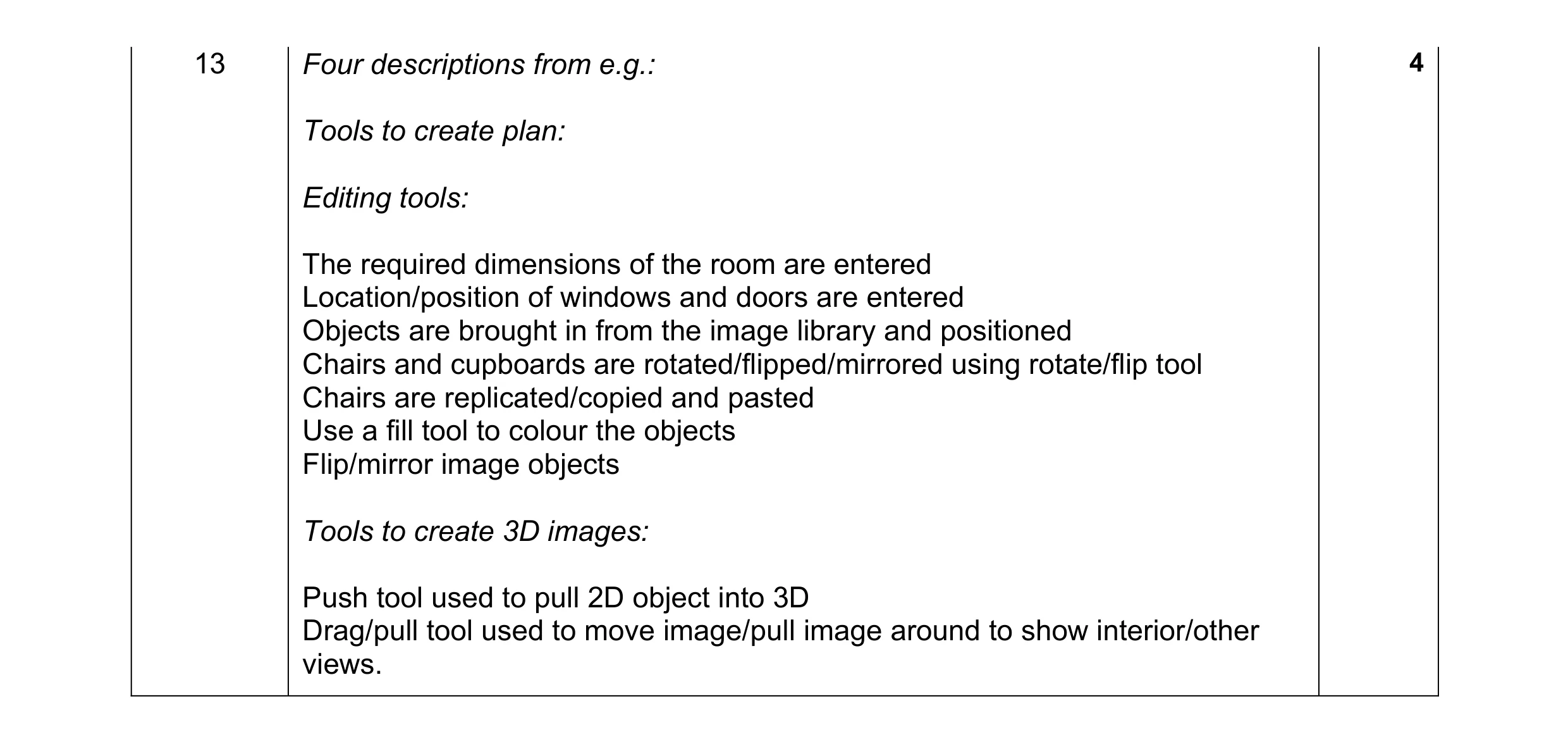 4
4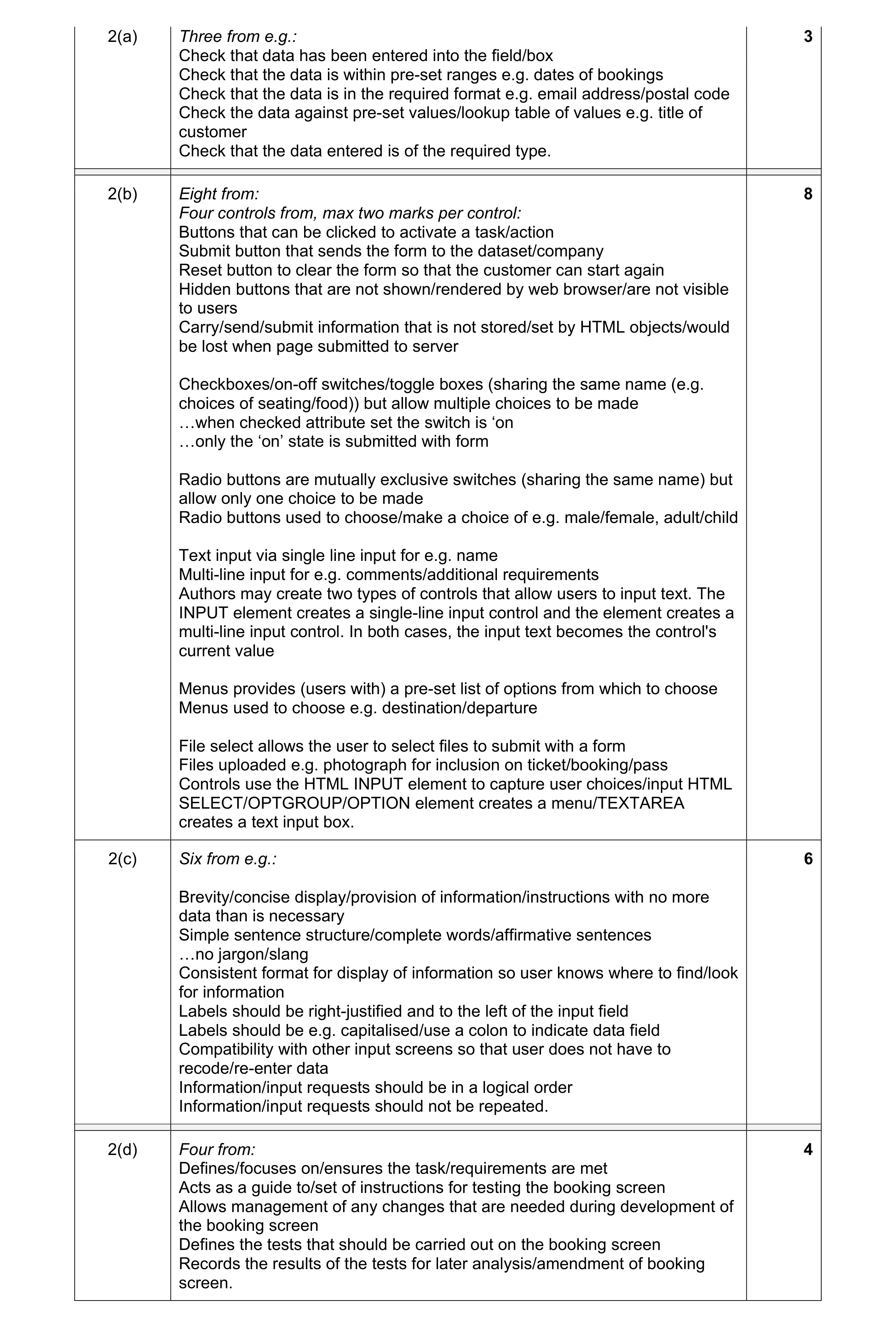 21
21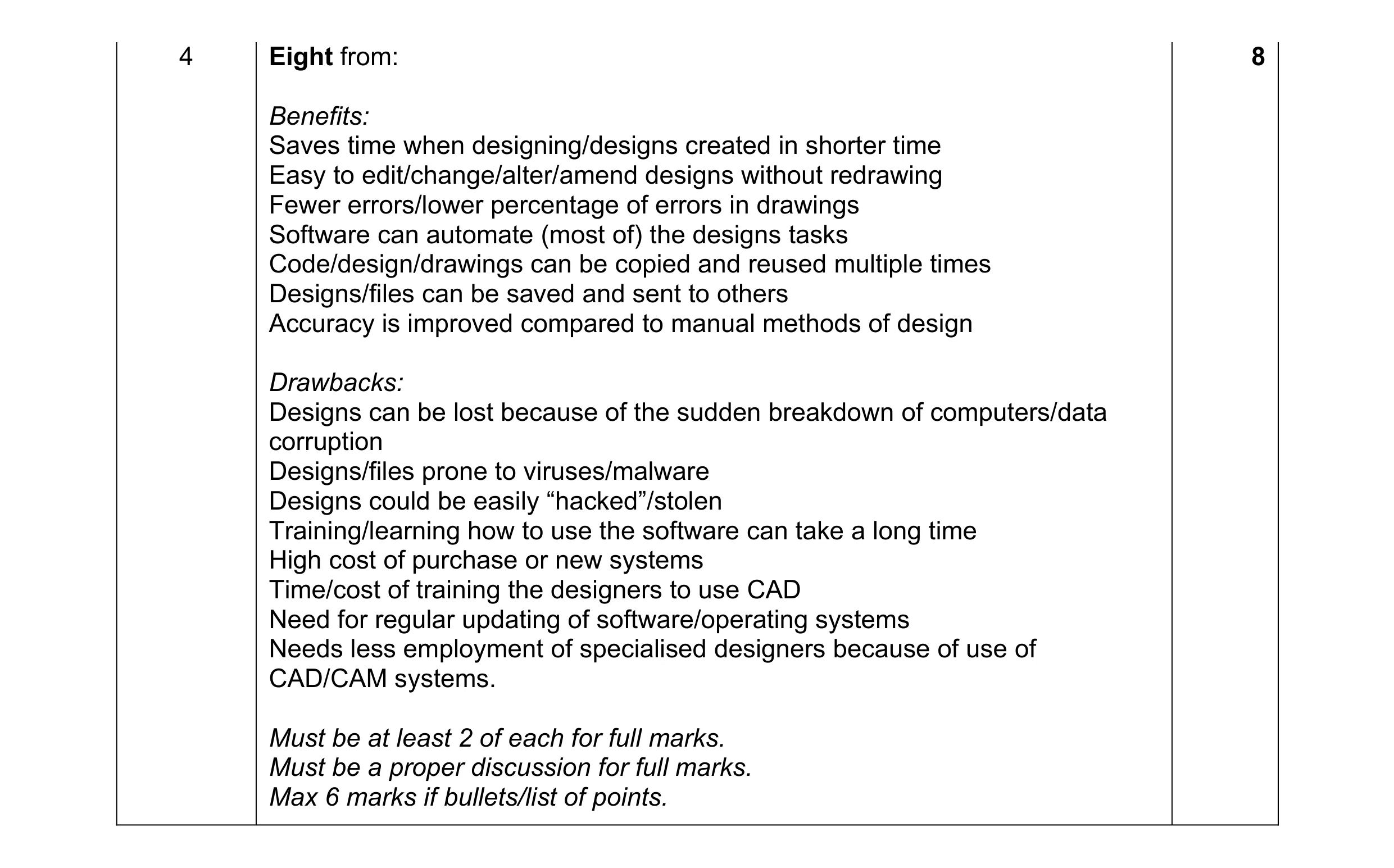 8
8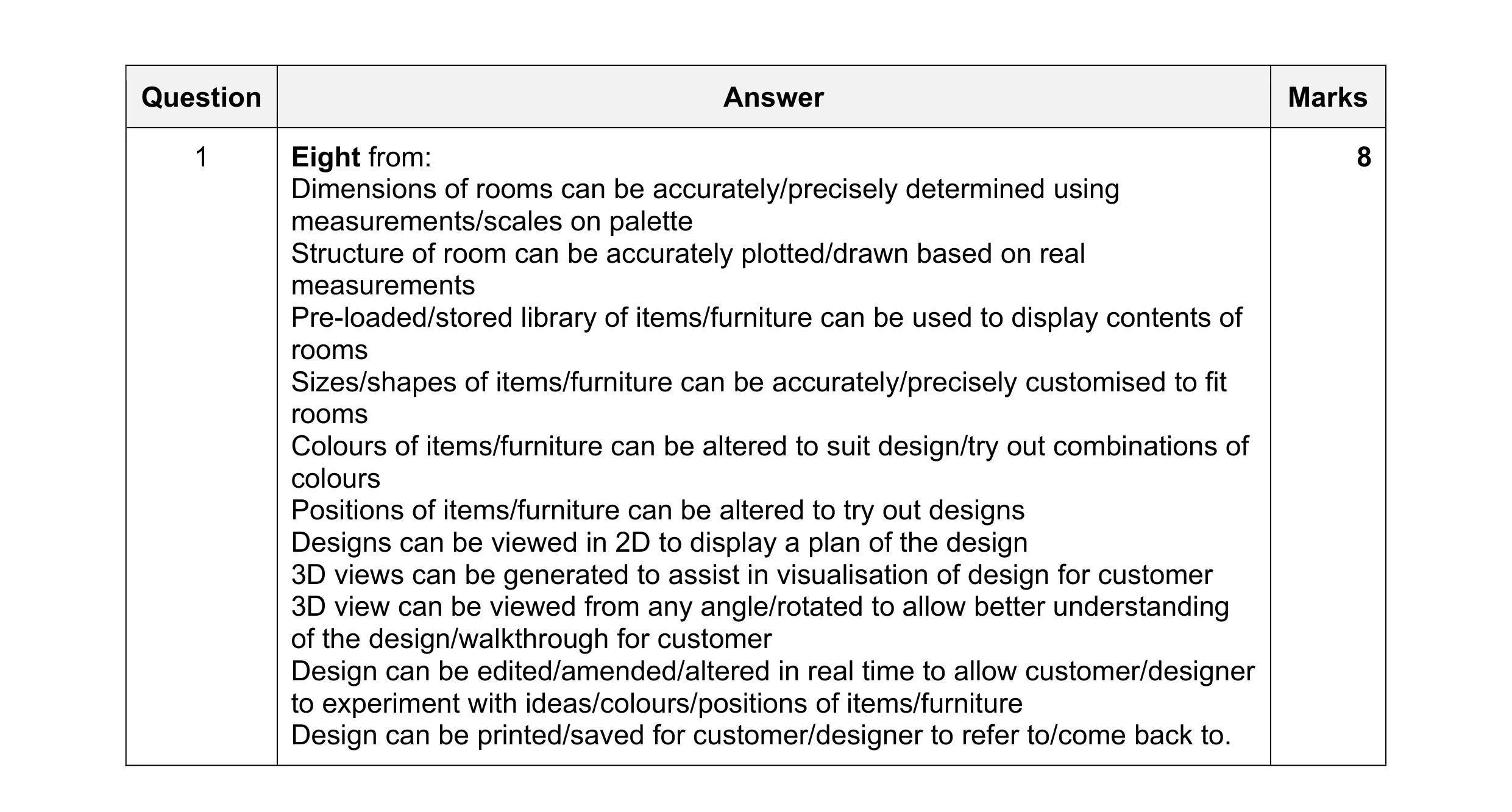 8
8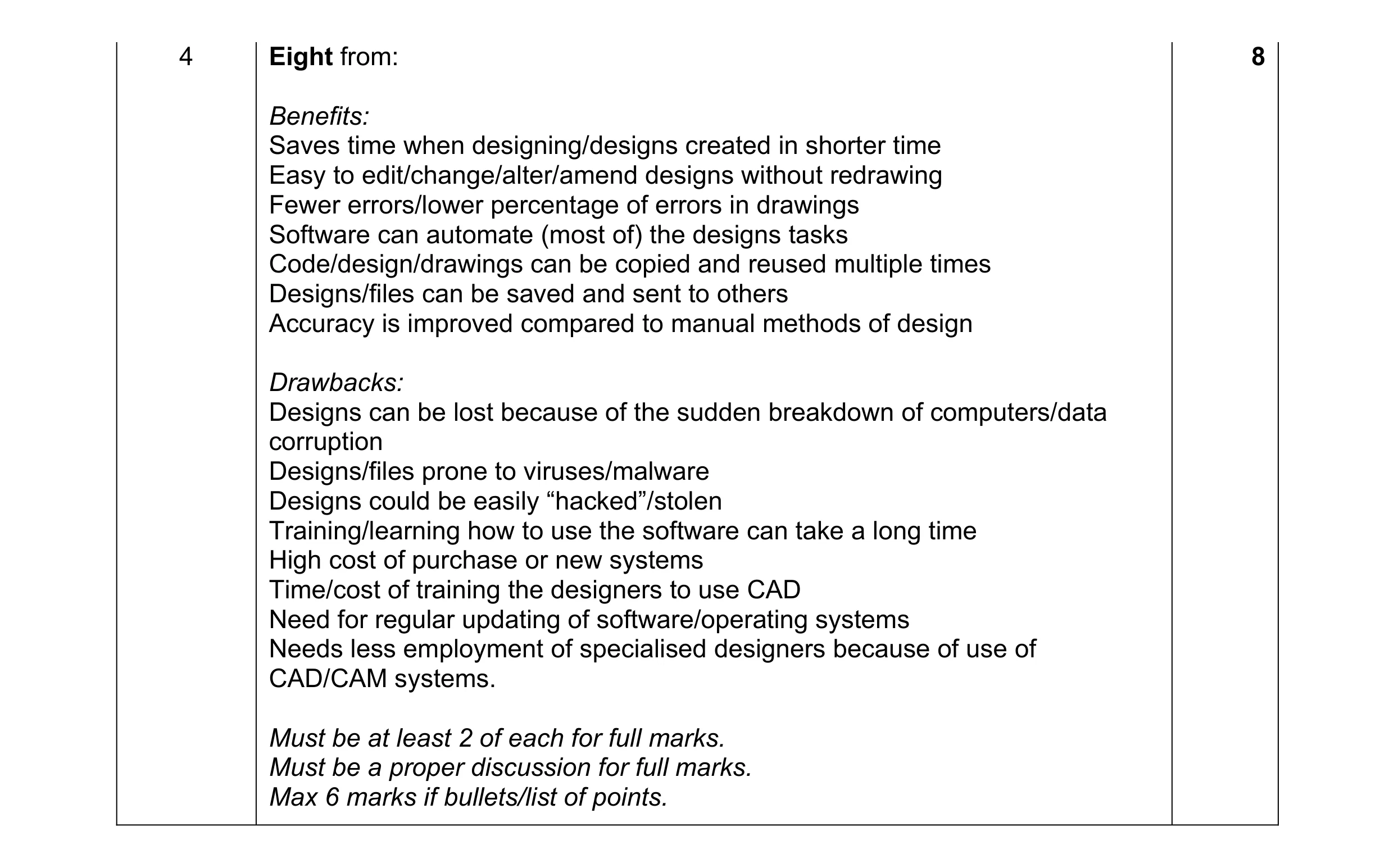 8
8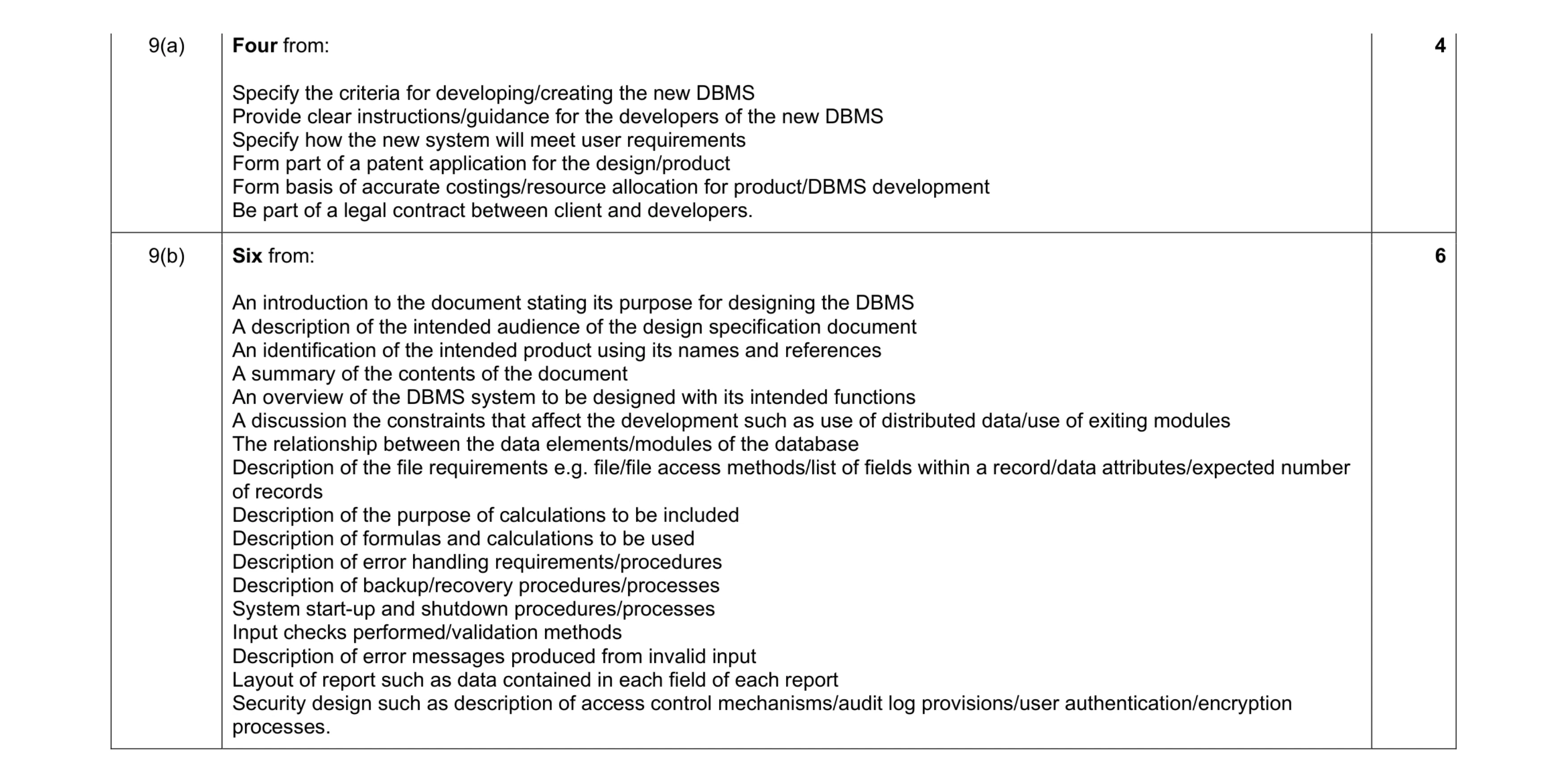 10
10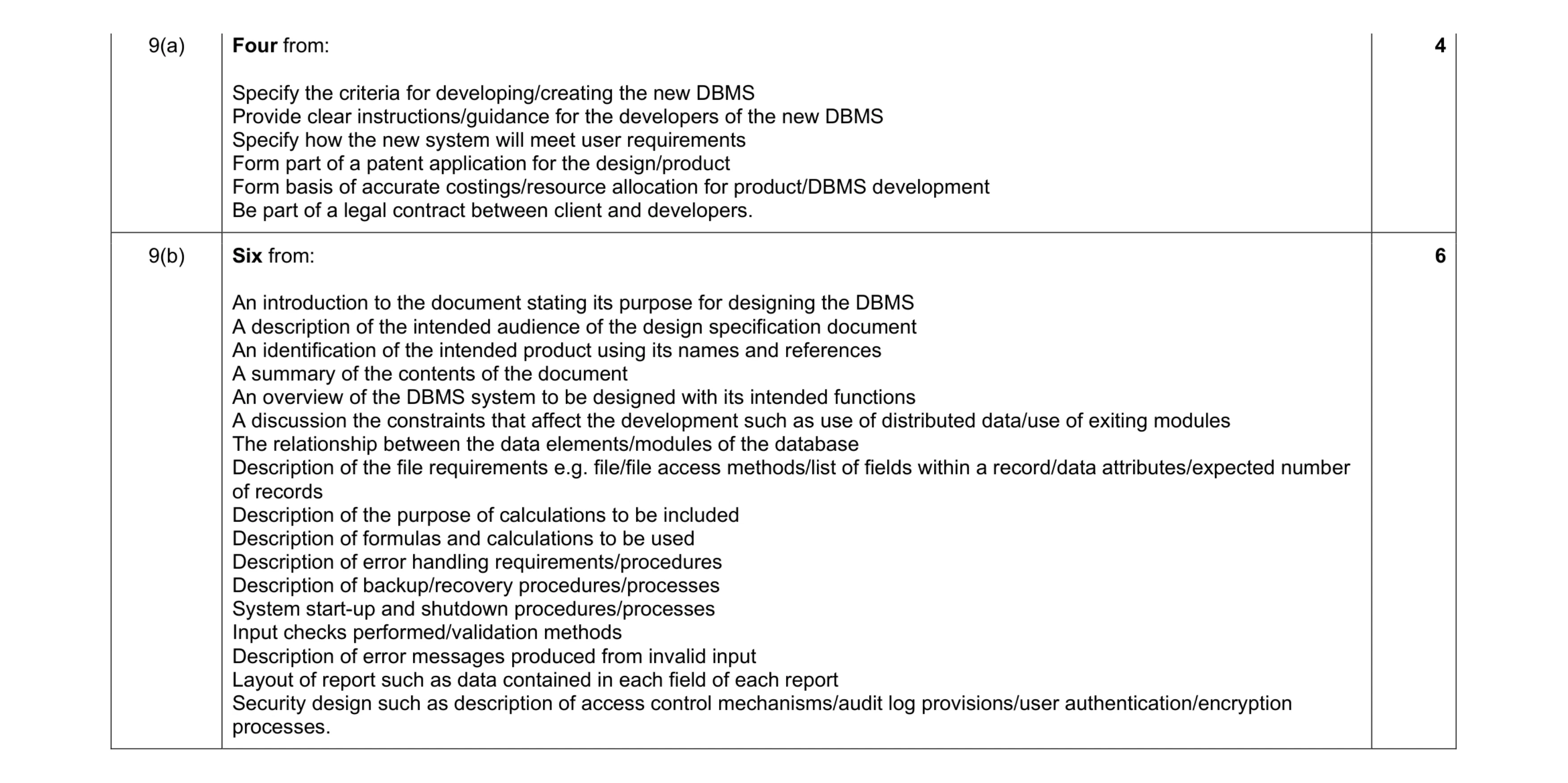 10
10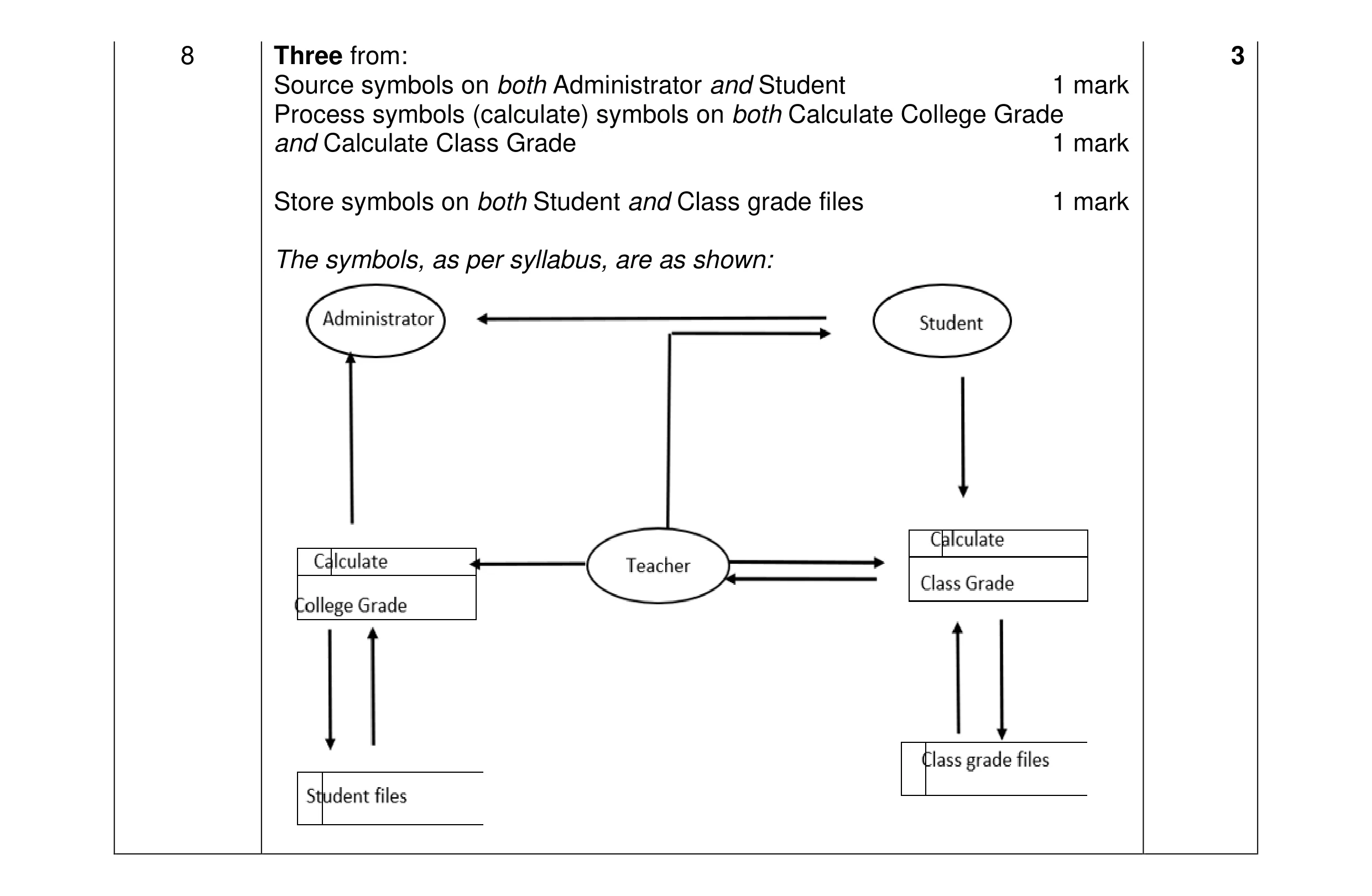 3
3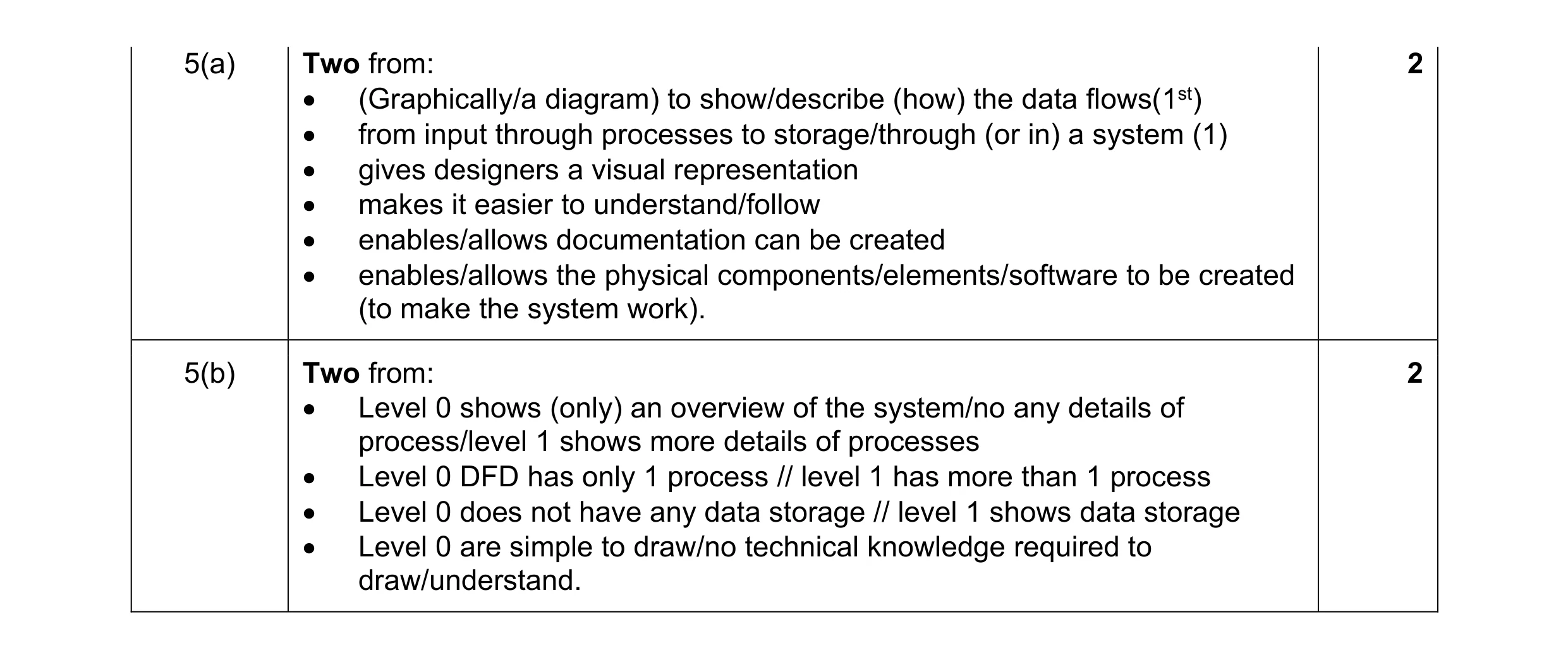 4
4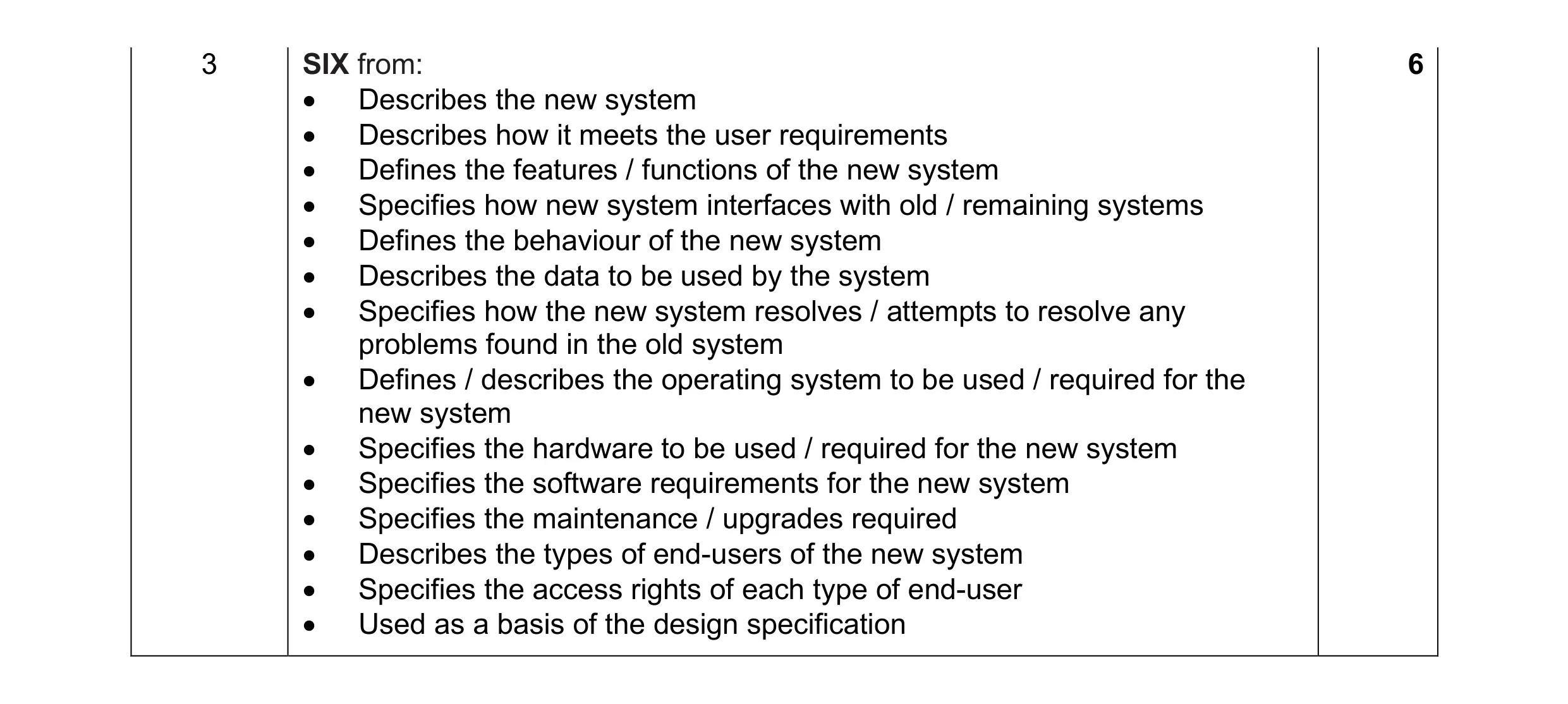 6
6