Questions as text
Q1 · A large company employs a small team of workers to design a new, complex product 9626/31 May/June 2017
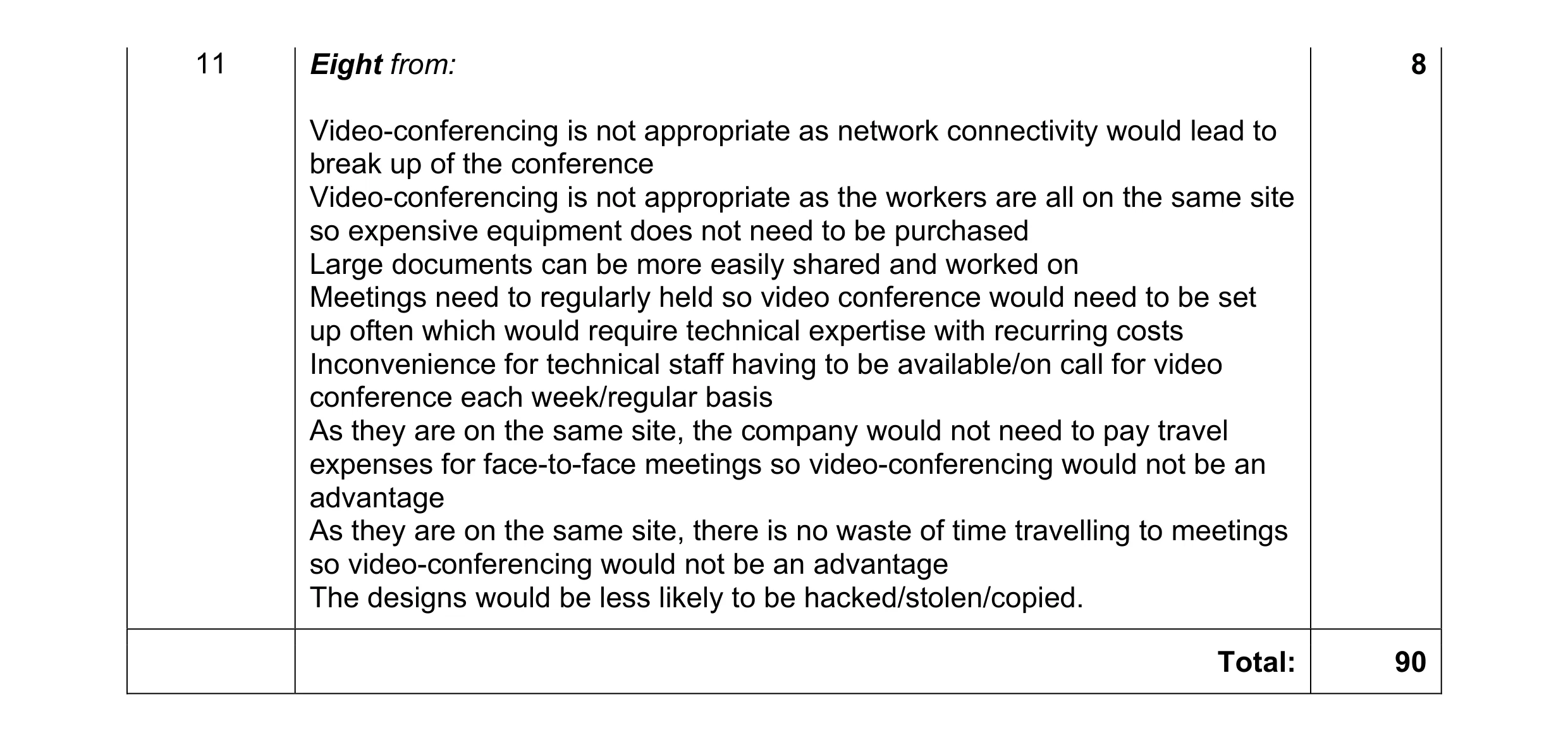
11 A large company employs a small team of workers to design a new, complex product. They all work on the same site and need to discuss possible designs and costings and to exchange documentation on a weekly basis. Network connections are intermittent. The company could use video-conferencing or face-to-face meetings for the workers’ discussions. Identify, giving reasons, the more appropriate method. … … … … … … … … … … … … … … … … … … … … … [8]
8 marks
Mark scheme: 11 Eight from: 8 Video-conferencing is not appropriate as network connectivity would lead to break up of the conference Video-conferencing is not appropriate as the workers are all on the same site so expensive equipment does not need to be purchased Large documents can be more easily shared and worked on Meetings need to regularly held so video conference would need to be set up often which would require technical expertise with recurring costs Inconvenience for technical staff having to be available/on call for video conference each week/regular basis As they are on the same site, the company would not need to pay travel expenses for face-to-face meetings so video-conferencing would not be an advantage As they are on the same site, there is no waste of time travelling to meetings so video-conferencing would not be an advantage The designs would be less likely to be hacked/stolen/copied. Total: 90
This question in 9626/31 May/June 2017
Q2 · A large company employs a small team of workers to design a new, complex product 9626/33 May/June 2017
11 A large company employs a small team of workers to design a new, complex product. They all work on the same site and need to discuss possible designs and costings and to exchange documentation on a weekly basis. Network connections are intermittent. The company could use video-conferencing or face-to-face meetings for the workers’ discussions. Identify, giving reasons, the more appropriate method. … … … … … … … … … … … … … … … … … … … … … [8]
8 marks
Mark scheme: 11 Eight from: 8 Video-conferencing is not appropriate as network connectivity would lead to break up of the conference Video-conferencing is not appropriate as the workers are all on the same site so expensive equipment does not need to be purchased Large documents can be more easily shared and worked on Meetings need to regularly held so video conference would need to be set up often which would require technical expertise with recurring costs Inconvenience for technical staff having to be available/on call for video conference each week/regular basis As they are on the same site, the company would not need to pay travel expenses for face-to-face meetings so video-conferencing would not be an advantage As they are on the same site, there is no waste of time travelling to meetings so video-conferencing would not be an advantage The designs would be less likely to be hacked/stolen/copied. Total: 90
This question in 9626/33 May/June 2017
Q3 · Describe what is meant by web-conferencing 9626/33 Oct/Nov 2018
7 (a) Describe what is meant by web-conferencing. … … … … … [2] (b) Describe how web-conferencing is made possible by internet technologies. … … … … … … … … … … … … … … [6]
8 marks
Mark scheme: 7(a) Two from: 2 Real-time collaboration/communication using web browsers between multiple users via/using the internet/network All users see the same screen at the same time in their web browsers Collaborative interaction between users/webinars/webcasts. 7(b) Six from: 6 Uses TCP/IP connections providing end-to-end data communication (TCP/IP) specifies how data is put into packets and addressed... ...how it transmitted and routed ...how it is received Can use point-to-point/circuit switching methods to provide a secure link Point-to-point limits users to just two Requires web-hosting services Using HTTP/HTTPS as a protocol for transmission and display of data Has a database server optimised for use by other services/mobile applications Use of FTP to upload/download data files Use of IRC (internet relay chat) for text-based messaging Application layer technology used also for file transfer.
This question in 9626/33 Oct/Nov 2018
Q4 · A packet switched network has routers at nodes labelled A, B, C, D, E, F, G and H 9626/32 May/June 2019
6 A packet switched network has routers at nodes labelled A, B, C, D, E, F, G and H. Each router stores its own ‘routing table’ which shows how it is connected to the other routers. Router Connected to routers: A B B A C D C B D E F D B C F E C F F C D E G G F H H G (a) Complete the diagram by drawing routers C, D, E, F and G with connection lines to show how the routers are inter-connected to communicate with each other. A B H [3] Router A regularly sends out packets to check that router H is reachable. When H receives a packet from A it sends a packet back to confirm that it is reachable. Assume that each router takes zero time units to receive, process and resend a packet and that each packet takes six time units to travel from one router to the next. (b) (i) Describe the shortest route that a packet can take from router A to router H. … … … [1] (ii) Calculate the shortest time taken for router A to receive an acknowledgement from router H confirming that H is reachable. … … … … … [2] (c) (i) Assuming that the packets visit each router only once, calculate the longest time it could take for router A to receive an acknowledgement from router H confirming that H is reachable. … … … … … [2] (ii) Describe the route that the packets would take. … … … [1] (d) An additional router, J, is to be added to reduce the time for packets to travel from router A to router H to a minimum. However, no further connections can be directly made to routers A and H. (i) Describe where J would be placed to reduce the travel time to a minimum. … … … [1] (ii) Calculate the new minimum time that it would take for A to receive an acknowledgement that H was reachable. … … … … … [2]
12 marks
Mark scheme: 6(a) A suitable diagram could be: 3 Three from: All correct labelled boxes for routers C, D, E, F, G All correct connecting lines between boxes / routers All connecting lines shown as double-ended arrows. 6(b)(i) (A, B), C/D, F, G, (H). 1 6(b)(ii) Two from: 2 shortest route is 5 hops so: 5 × 6 = 30 (time units) × 2 for return, 30 × 2 = 60 (time units). 6(c)(i) Two from: 2 longest route takes 7 hops so: 7 × 6 = 42 (time units) × 2 for return = 84 (time units). 6(c)(ii) One mark for all correct: 1 (A, B), D, C, E, F, G (H). 6(d)(i) Between B and G. 1 6(d)(ii) Two from: 2 4 hops × 6 = 24 × 2 = 48 (time units).
This question in 9626/32 May/June 2019
Q5 · Describe how peer-to-peer file sharing can be carried out using the BitTorrent protocol 9626/32 Feb/March 2020
7 Describe how peer-to-peer file sharing can be carried out using the BitTorrent protocol. … … … … … … … … … … … … … … [6]
6 marks
Mark scheme: 7 Six from: 6 Multiple servers/source computers can be/are used without a central server BitTorrent client required on internet-connected computer to implement BitTorrent protocol Protocol works well/effectively over low-bandwidth connections BitTorrent descriptor file is used to describe file being distributed BitTorrent node set up with use of descriptor file and file to be distributed Node becomes seed for download Files made available to others for download by connection to seed/other peers File being distributed is divided into small segments/pieces Segment/piece becomes available to other peers as it is downloaded …original seed/source is relieved of load Every segment/piece is encrypted/protected by a cryptographic hash that can be used to detect changes to ensure file integrity Segments/pieces downloaded in random order/non-sequentially and re- ordered by BitTorrent client.
This question in 9626/32 Feb/March 2020
Q6 · A group of company managers are going to use a web-conference to discuss the… 9626/32 May/June 2020
9 A group of company managers are going to use a web-conference to discuss the documentation about a new product. (a) The developers already have a desktop computer system. Describe the additional computer hardware they need in order to participate in a web-conference. … … … … … … … … [3] (b) Describe, in detail, how a web-conference can be used to discuss their visual materials and documents. … … … … … … … … … … … … … … … … … … … … [8]
11 marks
Mark scheme: 9(a) Three from: 3 Microphone(s) to capture sounds of voices of developers. Video camera/scanner to capture documentation/diagrams. Speakers to output sounds of voices of developers. (Large) monitor/dual monitor to output video/images of developers/documents. Telephone system with conference call facilities. Specialised collaboration devices/meeting wall with integrated camera/monitor/audio/document sharing devices/systems. Router/NIC to connect to network/internet. 9(b) Eight from: 8 Application/browser must support HTML/JavaScript/animation/instant messaging/streaming video and audio. Users log into the system/conference. A leader/manager controls the sessions and which documents are viewed. Audio mute/unmute controls participants interaction and volume levels …use of text chat to discuss documents. Recording of comments from participants for later review. Can include whiteboard facilities to share documents/diagrams. Use of screen-sharing to share document views/control of documents. Can use slideshow presentations with remote mouse control/markup tools. Use of surveys/polls to gather views of participants on documents. Use of screen annotation tools to markup documents.
This question in 9626/32 May/June 2020
Q7 · Peer-to-peer networking can account for a large percentage of all internet traffic 9626/31 Oct/Nov 2021
3 Peer-to-peer networking can account for a large percentage of all internet traffic. It is often used to transfer large files. (a) Describe how peer-to-peer networking uses BitTorrent to transfer large data files between several users. … … … … … … … … … … … … … … [6] (b) Describe how the use of BitTorrent for peer-to-peer networking can cause security issues to arise. … … … … … … … … … … … … … [6]
12 marks
Mark scheme: 3(a) Six from: 6 Peers/nodes share/partition workloads/processing power without the need for a central server Nodes work as both client and server for other nodes Nodes can connect randomly/unstructured or in specific topology/structured mode Unstructured mode is robust when nodes join/drop out frequently but makes finding a specific file more difficult Structured mode is organised (using hash tables) and files can be found/searched for easily Peer-to-peer software is run on computer/node Software queries other nodes/computers to find required file Search request has ‘time to live’ (TTL) after which it ceases to search Search request propagates from queried machines/nodes to others When found, software downloads/copies file from node to node Other nodes/computers can copy downloaded file from each node Sections/fragments of file can be copied from different nodes at once, increasing the overall speed of whole file transfer to a node. 3(b) Six from: 6 Nodes are more susceptible to remote attack/intrusion IP address of users is clearly visible to others so (much) easier for hackers/malicious users to target Knowledge of IP address can be used to steal user data/files/information resulting in fraud/identity theft/blackmail Malicious code can deliberately falsify routing tables of nodes Answers/replies to requests can contain malicious code/malware Downloaded files can contain/be malware as true source is unknown/not verified Authors of transferred files may be/are unknown so transferred software may not be as advertised/contain trojans/malware that send data back to author Sections of downloaded files can be replaced with malware Downloaded Bit Torrent files often stored by default in folder along with other user data exposing the data to others Can inadvertently expose other areas of storage to others leading to unintentional access to data/session can be left open unintentionally Bit Torrent traffic is not encrypted by default/if no VPN is used and UDP and TCP ports are used by Bit Torrent, may be subject to monitoring by ISP so user data may be stored for all to see/read Bit Torrent transfers are monitored/shared by others who may have malicious intent Many Bit Torrent transfers are of copyrighted material which may give rise to legal issues.
This question in 9626/31 Oct/Nov 2021
Q8 · Peer-to-peer networking can account for a large percentage of all internet traffic 9626/33 Oct/Nov 2021
3 Peer-to-peer networking can account for a large percentage of all internet traffic. It is often used to transfer large files. (a) Describe how peer-to-peer networking uses BitTorrent to transfer large data files between several users. … … … … … … … … … … … … … … [6] (b) Describe how the use of BitTorrent for peer-to-peer networking can cause security issues to arise. … … … … … … … … … … … … … [6]
12 marks
Mark scheme: 3(a) Six from: 6 Peers/nodes share/partition workloads/processing power without the need for a central server Nodes work as both client and server for other nodes Nodes can connect randomly/unstructured or in specific topology/structured mode Unstructured mode is robust when nodes join/drop out frequently but makes finding a specific file more difficult Structured mode is organised (using hash tables) and files can be found/searched for easily Peer-to-peer software is run on computer/node Software queries other nodes/computers to find required file Search request has ‘time to live’ (TTL) after which it ceases to search Search request propagates from queried machines/nodes to others When found, software downloads/copies file from node to node Other nodes/computers can copy downloaded file from each node Sections/fragments of file can be copied from different nodes at once, increasing the overall speed of whole file transfer to a node. 3(b) Six from: 6 Nodes are more susceptible to remote attack/intrusion IP address of users is clearly visible to others so (much) easier for hackers/malicious users to target Knowledge of IP address can be used to steal user data/files/information resulting in fraud/identity theft/blackmail Malicious code can deliberately falsify routing tables of nodes Answers/replies to requests can contain malicious code/malware Downloaded files can contain/be malware as true source is unknown/not verified Authors of transferred files may be/are unknown so transferred software may not be as advertised/contain trojans/malware that send data back to author Sections of downloaded files can be replaced with malware Downloaded Bit Torrent files often stored by default in folder along with other user data exposing the data to others Can inadvertently expose other areas of storage to others leading to unintentional access to data/session can be left open unintentionally Bit Torrent traffic is not encrypted by default/if no VPN is used and UDP and TCP ports are used by Bit Torrent, may be subject to monitoring by ISP so user data may be stored for all to see/read Bit Torrent transfers are monitored/shared by others who may have malicious intent Many Bit Torrent transfers are of copyrighted material which may give rise to legal issues.
This question in 9626/33 Oct/Nov 2021
Q9 · Contrast the characteristics of local area networks (LANs) and wide area networks (WANs) 9626/32 Feb/March 2022
1 Contrast the characteristics of local area networks (LANs) and wide area networks (WANs). … … … … … … … … … … … … … [6]
6 marks
Mark scheme: Question Answer Marks 1 Command word: Contrast: identify/comment on differences. 6 Six from: LAN covers a smaller geographical area/valid examples than WAN LAN has higher data transfer speed/greater bandwidth than WAN LAN uses Ethernet/Token Ring technologies whereas WAN uses ATM/Frame relay/different protocols/technologies used LANs (usually) connect together into bigger LANs using fibre optic/wireless technologies whereas WANs connect together with public telecommunication systems to create larger WAN LANs are (usually) owned by one organisation whereas WANs are (usually/often) owned by a number/collective ownership LANs have fewer data transmission errors than WANs LANs have fewer network congestion problems than WANs LANs use Layer 1or 2 devices/switches/bridges/hubs/repeaters whereas WANs use Layer 3 devices/Routers/Multi-layer Switches.
This question in 9626/32 Feb/March 2022
Q10 · A company designs and manages the construction of buildings 9626/32 Oct/Nov 2022
6 A company designs and manages the construction of buildings. It has a client-server network for use by its designers and project managers so that they have access to the software resources they require. Justify the use of the client-server model of networking in the company. … … … … … … … … … … … … … … … … … … … … [8]
8 marks
Mark scheme: 6 Eight from: 8 Data/files/applications is/are centralised on a file/database/applications server ..so only one copy has to be maintained/updated/backed up Data/files/applications can be mirrored to other servers for increased performance …without the need to copy to each device in use Disaster recovery is easier/quicker as backups used tor recover data to server …rather than to individual user devices Servers can be updated/upgraded/maintained/relocated …without affecting the user/need to update individual user devices System is easily scalable/more servers can be deployed …without disruption to users/without need to update/upgrade user devices Data/files can be shared across different computing platforms/desktops/laptops/OS/mobile devices Data/files/applications can be accessed from different locations/mobile devices Data/files can be queried using SQL/DBMS systems from any corporate device using same user-interface …regardless of location/device Enhanced security of data/data is not stored locally by user but controlled centrally/setup at time of deployment of client-server system Servers can be set up to carry out different roles/allow different access rights for different client devices.
This question in 9626/32 Oct/Nov 2022
Q11 · Peer-to-peer networking can be used by companies to connect computing devices 9626/31 Oct/Nov 2023
5 Peer-to-peer networking can be used by companies to connect computing devices. Discuss the advantages and disadvantages of peer-to-peer networking by companies. … … … … … … … … … … … … … … … … … … … … [8]
8 marks
Mark scheme: 5 Discuss: write about issues(s) or topic(s) in depth in a structured way 8 Eight from: Advantages: Max 6 from: • No centralised system/server(s)/devices function independently • so failure of one device does not affect the others/only files on failed device are lost • Access to files is local/faster/does not need/require authentication • so workers/users may be more productive • No requirement for specialised/dedicated network operating systems/each device functions • as its own server/stores own files/exchanges files with any other • Less/no technical knowledge required to setup/maintain connections/network • so less technical/support staff/technicians are required • No central records of access are stored/users can remain anonymous • so can be used to share secret/confidential/illegal files • Network can be scaled/devices can be added with ease/no impact on network performance Disadvantages: Max 6 from: • Files/resources are not centrally organised/referenced • so can be difficult to locate specific files • Risk of malware/viruses is higher • as responsibility of management/prevention is on each user/not centrally organised • Security is lower as access/permissions/authentication is per device and not centrally deployed/managed/any one with access to the device can use all resources/access all files • Backup systems are per device and not centrally organised • so it’s the responsibility of the user to backup files stored on that device • Company files/document templates may exist in different versions • so consistency across the company is difficult to achieve • Files required by workers cannot be previewed/scanned/checked before download/access from other devices • Remote access to other devices can be unsecured/easier/undetected • as there is no central control over access/users/authentication which may lead to files/data being compromised/stolen • if one device down may affect workflow of others. Max 6 if all advantages or all disadvantages. Max 6 marks if bullets/list of points.
This question in 9626/31 Oct/Nov 2023
Q12 · Peer-to-peer networking can be used by companies to connect computing devices 9626/33 Oct/Nov 2023
5 Peer-to-peer networking can be used by companies to connect computing devices. Discuss the advantages and disadvantages of peer-to-peer networking by companies. … … … … … … … … … … … … … … … … … … … … [8]
8 marks
Mark scheme: 5 Discuss: write about issues(s) or topic(s) in depth in a structured way 8 Eight from: Advantages: Max 6 from: • No centralised system/server(s)/devices function independently • so failure of one device does not affect the others/only files on failed device are lost • Access to files is local/faster/does not need/require authentication • so workers/users may be more productive • No requirement for specialised/dedicated network operating systems/each device functions • as its own server/stores own files/exchanges files with any other • Less/no technical knowledge required to setup/maintain connections/network • so less technical/support staff/technicians are required • No central records of access are stored/users can remain anonymous • so can be used to share secret/confidential/illegal files • Network can be scaled/devices can be added with ease/no impact on network performance Disadvantages: Max 6 from: • Files/resources are not centrally organised/referenced • so can be difficult to locate specific files • Risk of malware/viruses is higher • as responsibility of management/prevention is on each user/not centrally organised • Security is lower as access/permissions/authentication is per device and not centrally deployed/managed/any one with access to the device can use all resources/access all files • Backup systems are per device and not centrally organised • so it’s the responsibility of the user to backup files stored on that device • Company files/document templates may exist in different versions • so consistency across the company is difficult to achieve • Files required by workers cannot be previewed/scanned/checked before download/access from other devices • Remote access to other devices can be unsecured/easier/undetected • as there is no central control over access/users/authentication which may lead to files/data being compromised/stolen • if one device down may affect workflow of others. Max 6 if all advantages or all disadvantages. Max 6 marks if bullets/list of points.
This question in 9626/33 Oct/Nov 2023
Q13 · Web browsers are clients which request services, such as web pages, from a web server 9626/31 May/June 2024
8 Web browsers are clients which request services, such as web pages, from a web server. This is an example of the use of the client-server model of networking. Justify the use of client-server networking in this scenario. … … … … … … … … … … … … … … [6]
6 marks
Mark scheme: 8 Command word: Justify: support a case with evidence/argument. Six from: New clients/web browsers can be added/join/connect to the server as and when required without the need for changes in configurations New/more servers can be added as and when demand/traffic increases without users/browsers being disrupted Control is centralised because all requests are to the server/no client can control the system so security is enhanced/increased Server resources/new technology can be updated without reference/need to change/update clients/browsers websites can be centrally updated/managed Centralised control of backup means that clients/web browsers/users do not need to take action/can be automated Servers can be accessed/used by/from many different platforms/applications/users. 6
This question in 9626/31 May/June 2024
Q14 · Web browsers are clients which request services, such as web pages, from a web server 9626/33 May/June 2024
8 Web browsers are clients which request services, such as web pages, from a web server. This is an example of the use of the client-server model of networking. Justify the use of client-server networking in this scenario. … … … … … … … … … … … … … … [6]
6 marks
Mark scheme: 8 Command word: Justify: support a case with evidence/argument. Six from: New clients/web browsers can be added/join/connect to the server as and when required without the need for changes in configurations New/more servers can be added as and when demand/traffic increases without users/browsers being disrupted Control is centralised because all requests are to the server/no client can control the system so security is enhanced/increased Server resources/new technology can be updated without reference/need to change/update clients/browsers websites can be centrally updated/managed Centralised control of backup means that clients/web browsers/users do not need to take action/can be automated Servers can be accessed/used by/from many different platforms/applications/users. 6
This question in 9626/33 May/June 2024
Q15 · Peer-to-peer networks are used for sharing files 9626/32 Feb/March 2025
2 Peer-to-peer networks are used for sharing files. (a) Describe the architecture of peer-to-peer networks. … … … … … … [2] (b) Describe the benefits and drawbacks of peer-to-peer networks. … … … … … … … … … … … … … … [6]
8 marks
Mark scheme: 2(a) One mark per bullet point to a maximum of two marks. 2 • Each peer is equal in status to every other peer • Each peer functions as a client on the network • Each peer functions as a server on the network • The client and server functions occur at the same time / simultaneously • Peers connect directly to other peers / no central control / server / decentralised. 2(b) One mark per bullet point to a maximum of six marks. 6 Max 5 from : Benefits: • reduced costs • no need of central server • no specialised networking knowledge is required • specialised technical / maintenance staff are not needed • failure of one peer does not affect the others • dedicated network operating system is not required • file transfer can be restarted if interrupted Max 5 from : Drawbacks: • files / resources are not centrally organised • finding required files / resources may be difficult / time-consuming • no central backup of files • increased risk of virus / malware spread • system / device / network performance can be compromised (1st) • if there are many peer-to-peer devices (1) • reduced security of (personal) data (1st) • because peer-to-peer devices have access to all other devices (1).
This question in 9626/32 Feb/March 2025
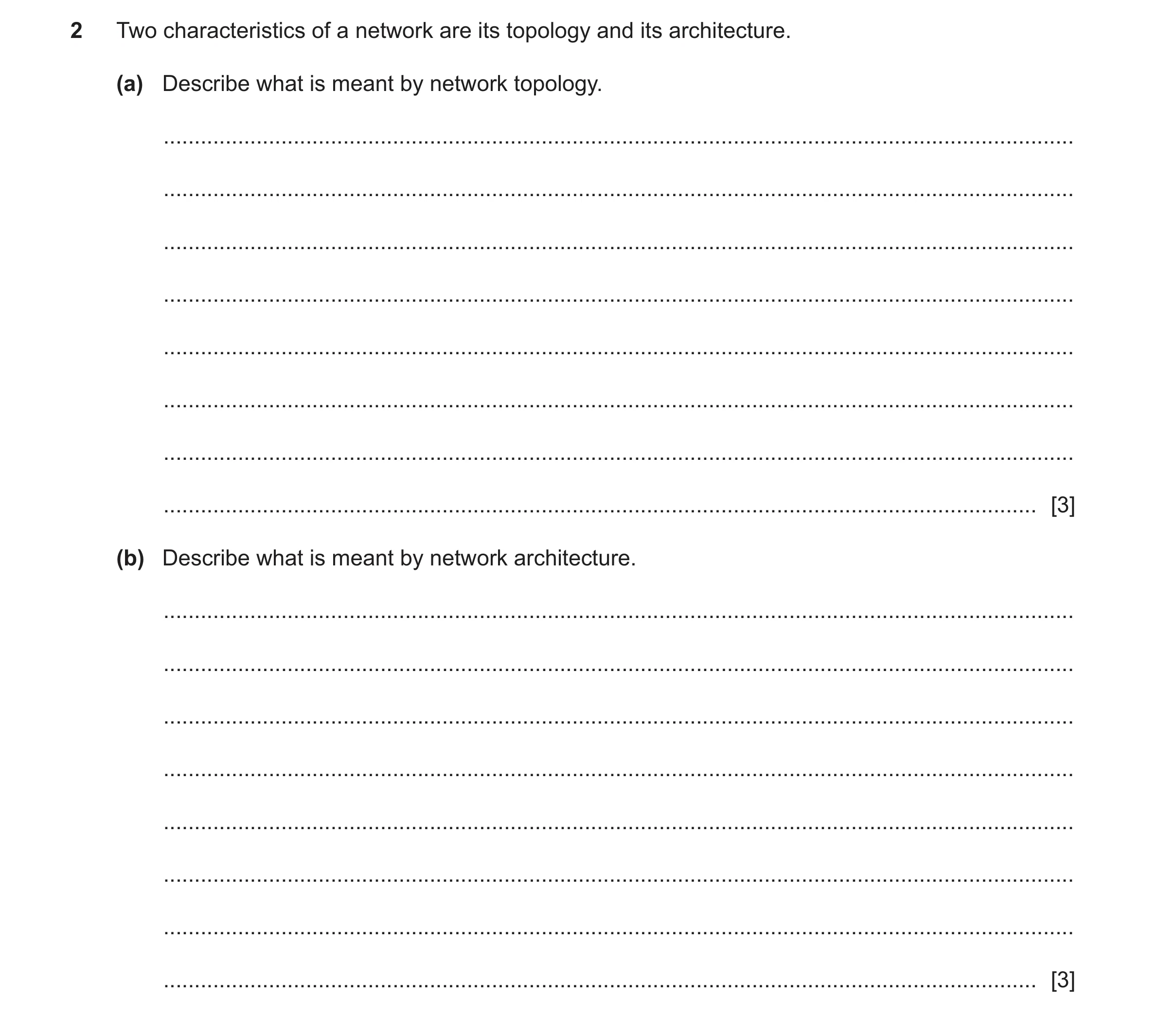
Q16 · Two characteristics of a network are its topology and its architecture 9626/32 May/June 2025
2 Two characteristics of a network are its topology and its architecture. (a) Describe what is meant by network topology. … … … … … … … … [3] (b) Describe what is meant by network architecture. … … … … … … … … [3]
6 marks
Mark scheme: 2(a) TWO from: 3 • The physical locations / arrangements of nodes / devices • The physical connections / wires / cables / wireless links between nodes / devices • The logical connections between nodes / devices • The flow of data (through the network) (1st) – regardless of the physical connections / follows the logical connections 2(b) THREE from: 3 Network architecture shows: • The design / structure (of the network) • The types of physical components (on the network) • How the components function / are configured to work together • The services provided (on the network) • The protocols used for communications / services • type of transmission // (specify) wired / wireless connections
This question in 9626/32 May/June 2025
 1 / 17
 2 / 17
 3 / 17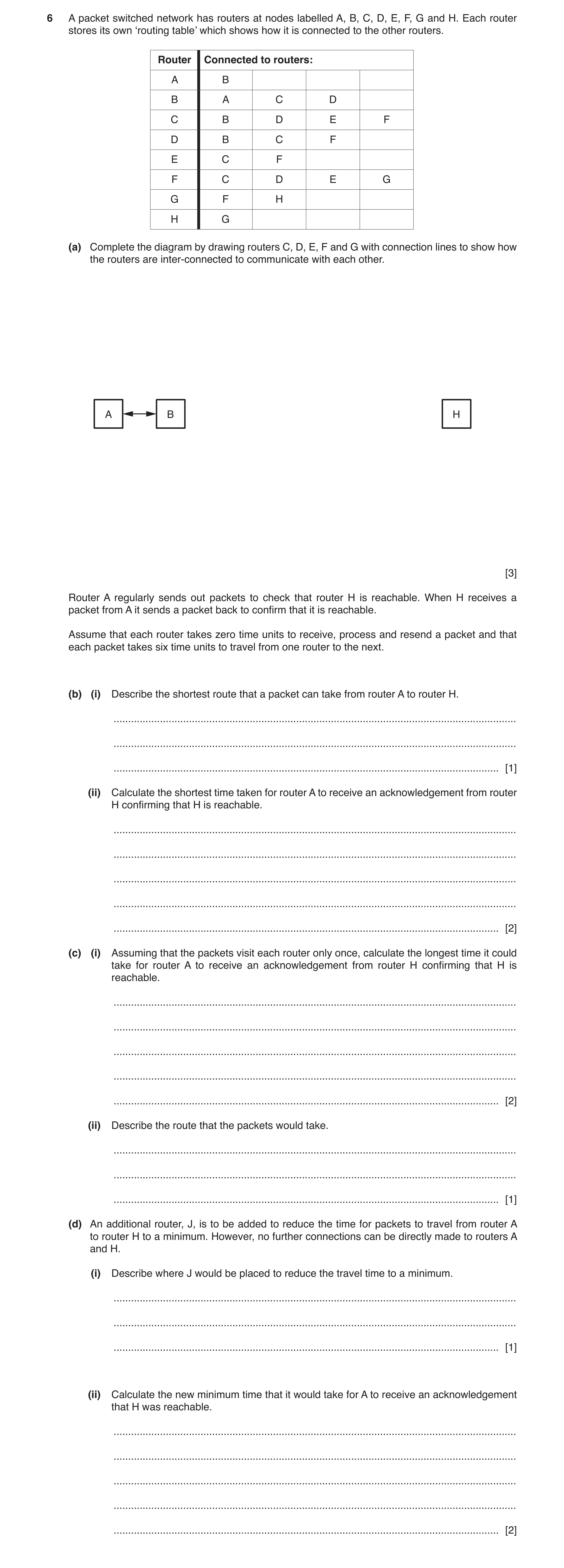
 6 / 17
 8 / 17
 9 / 17
 10 / 17
 11 / 17
 12 / 17
 13 / 17
 14 / 17
 15 / 17
 16 / 17
 17 / 17
 8
8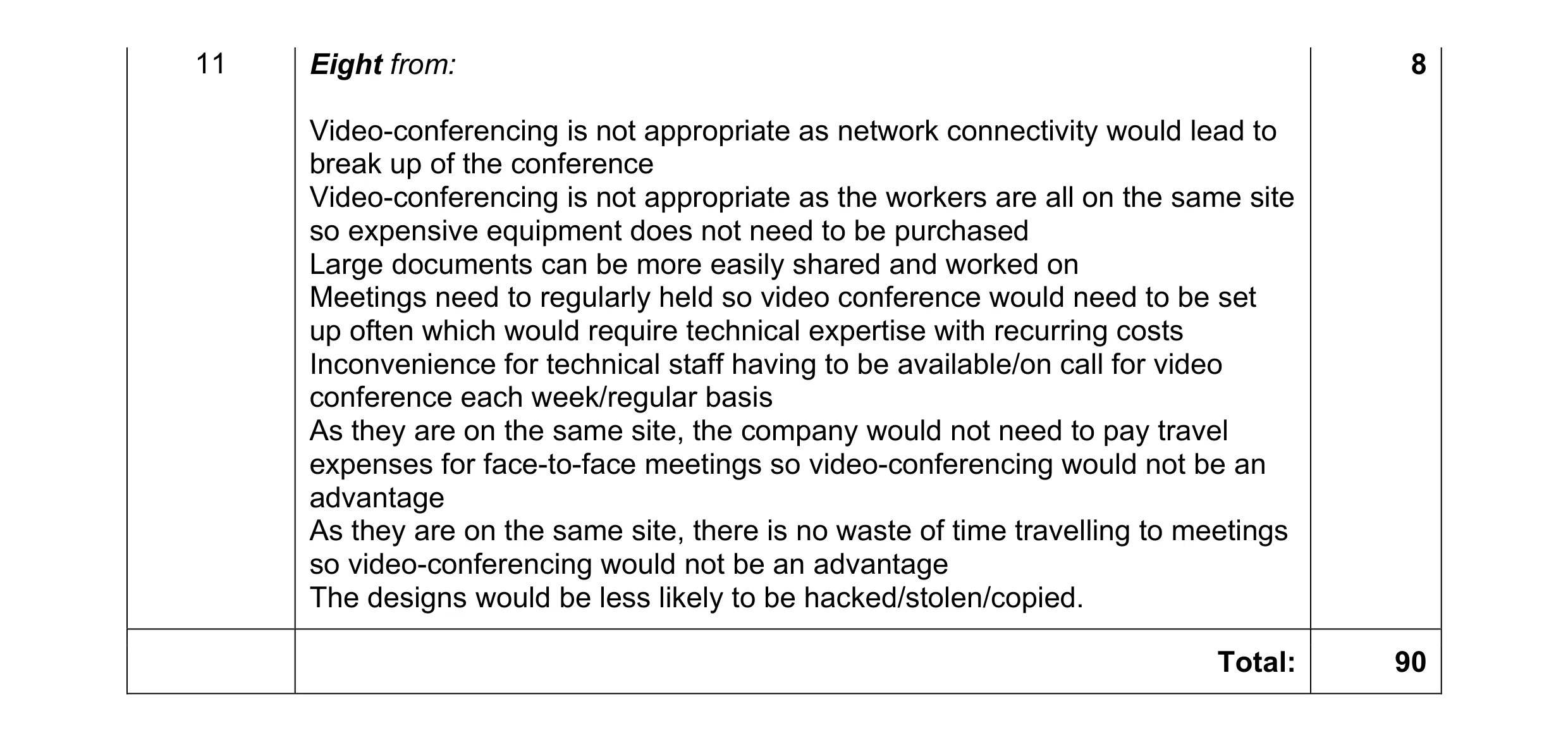 8
8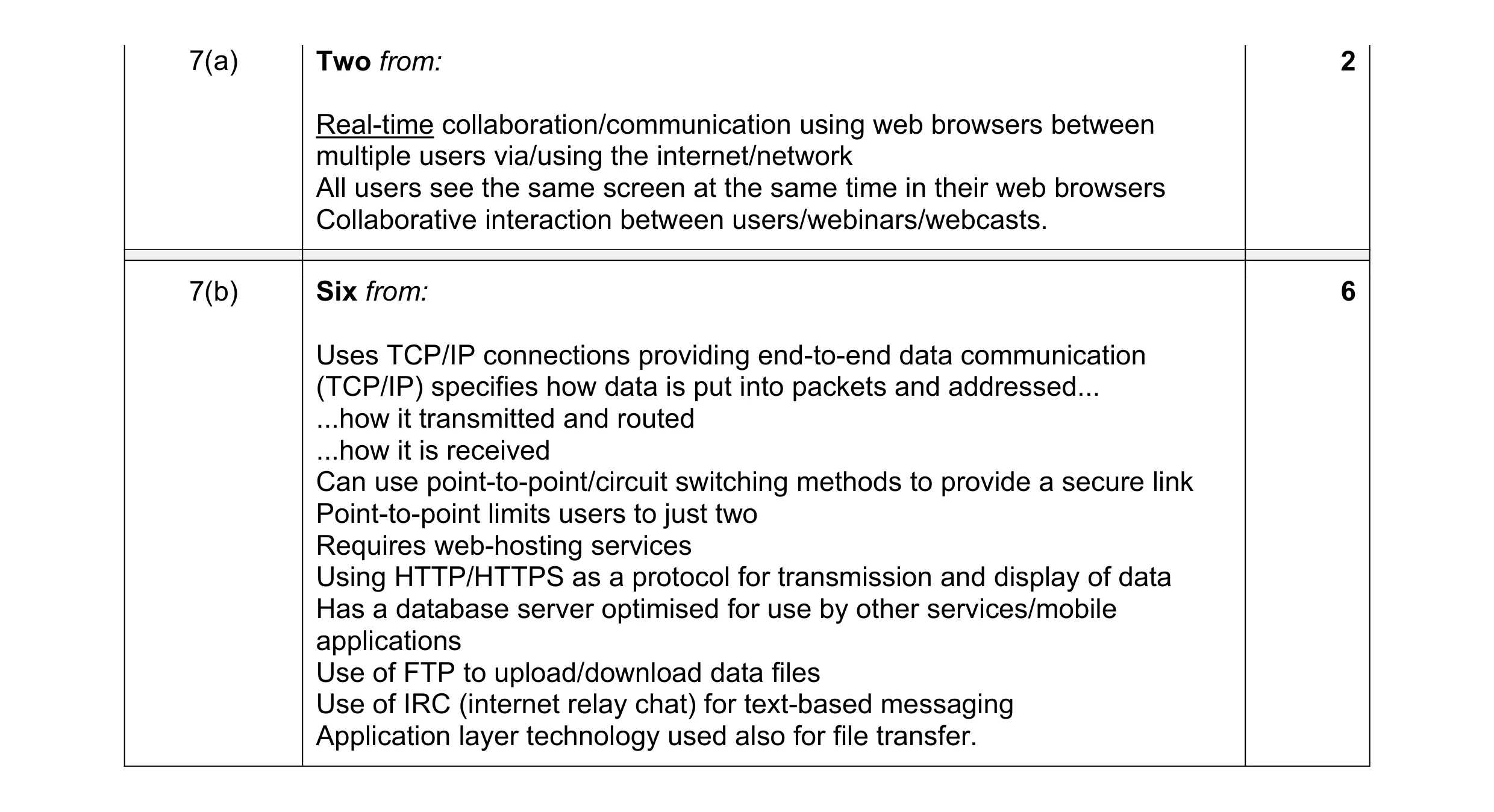 8
8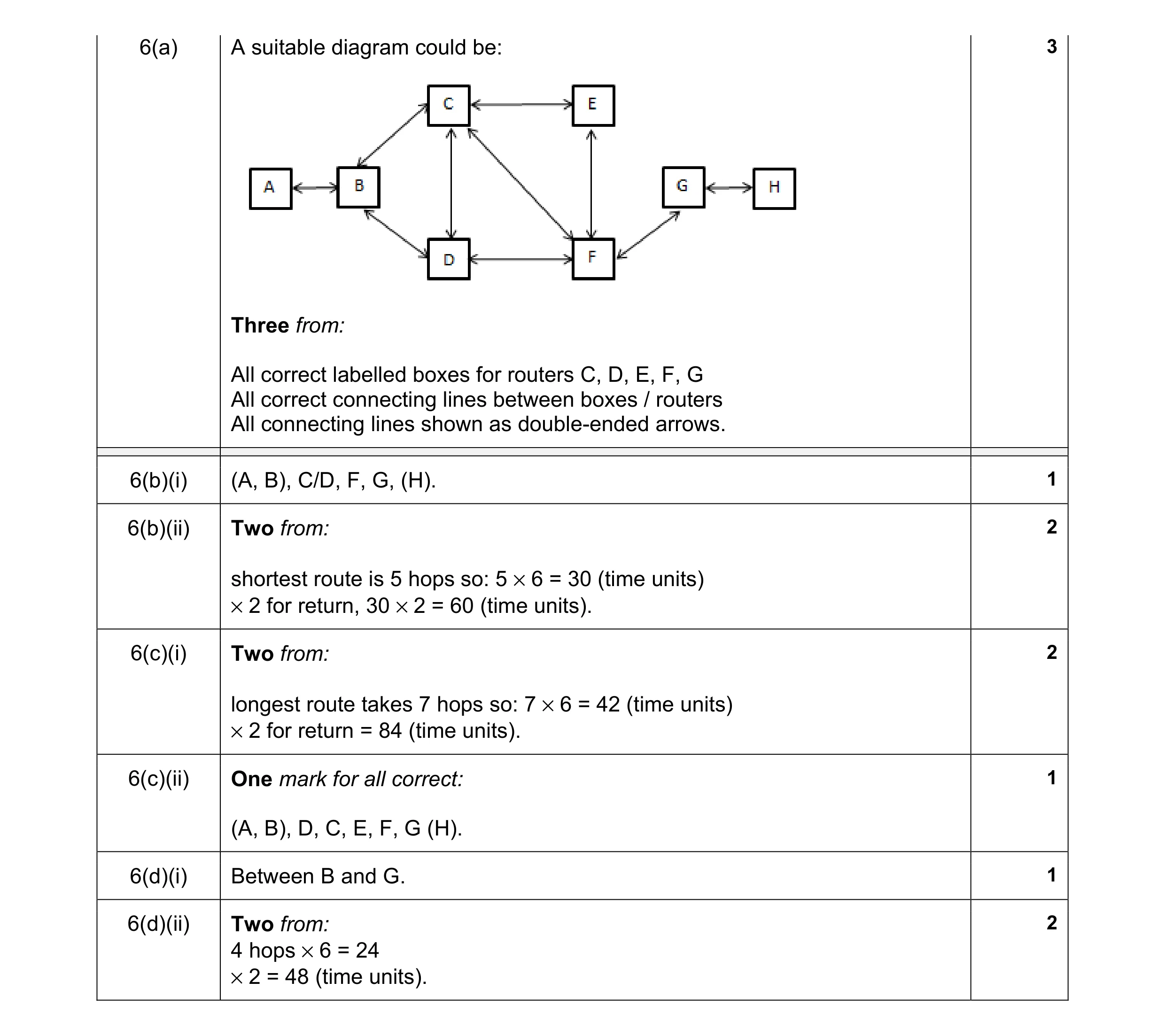 12
12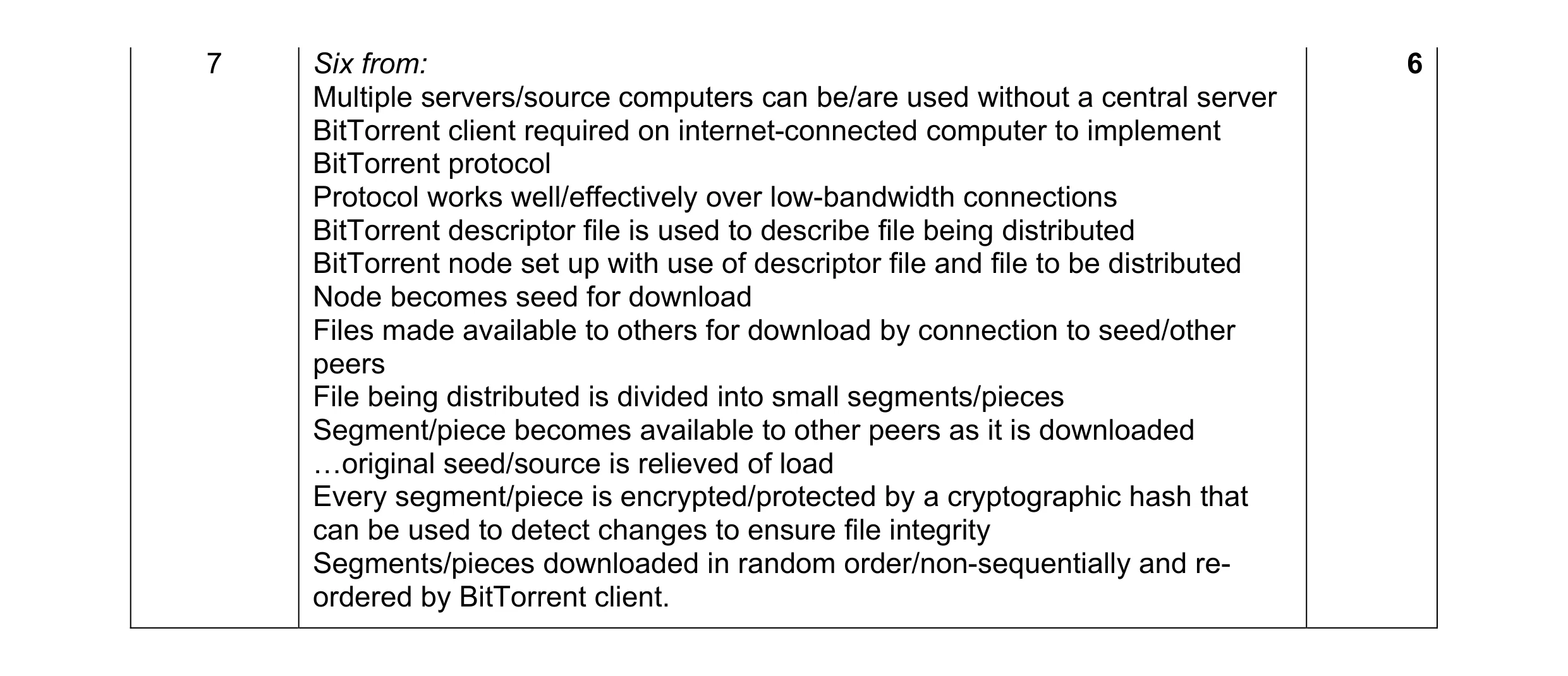 6
6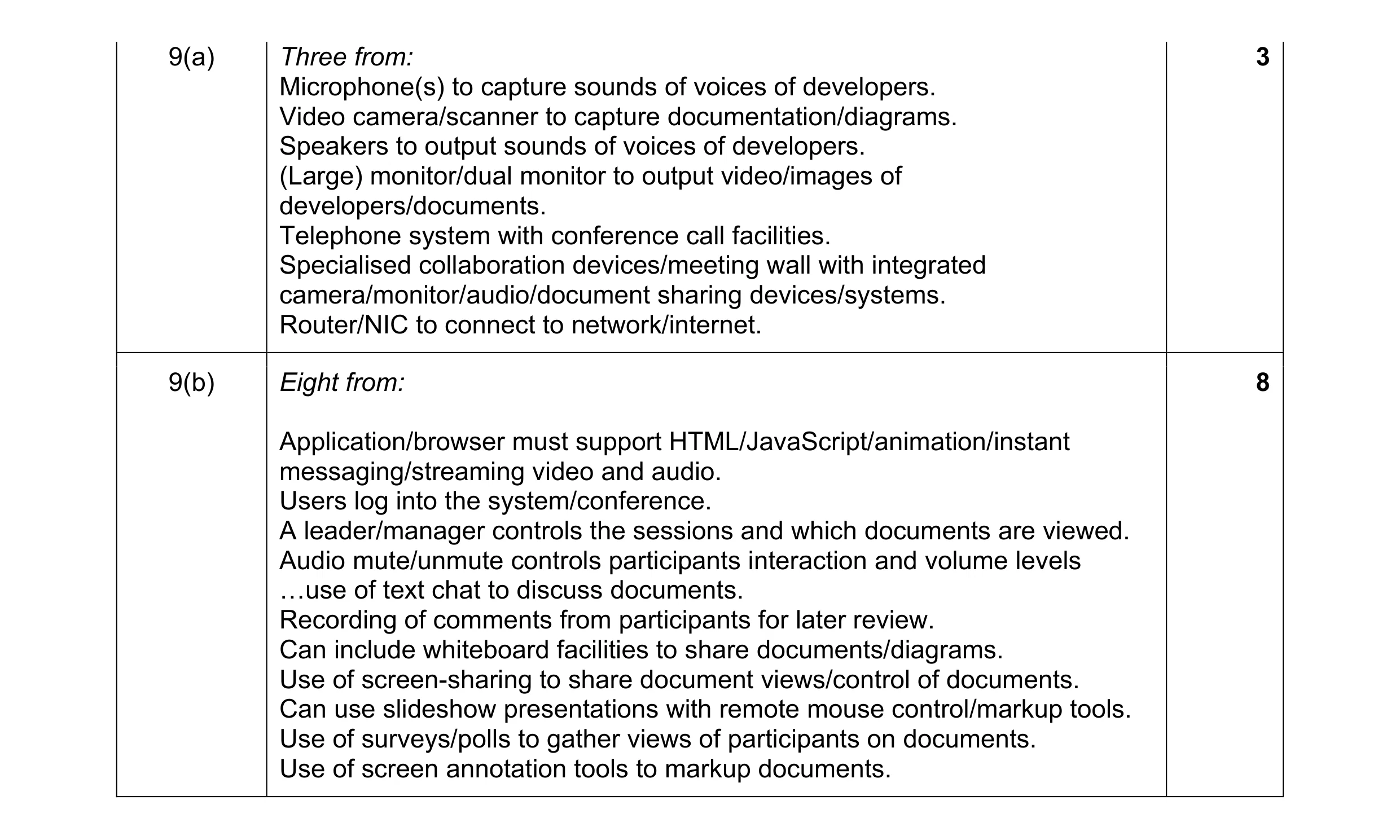 11
11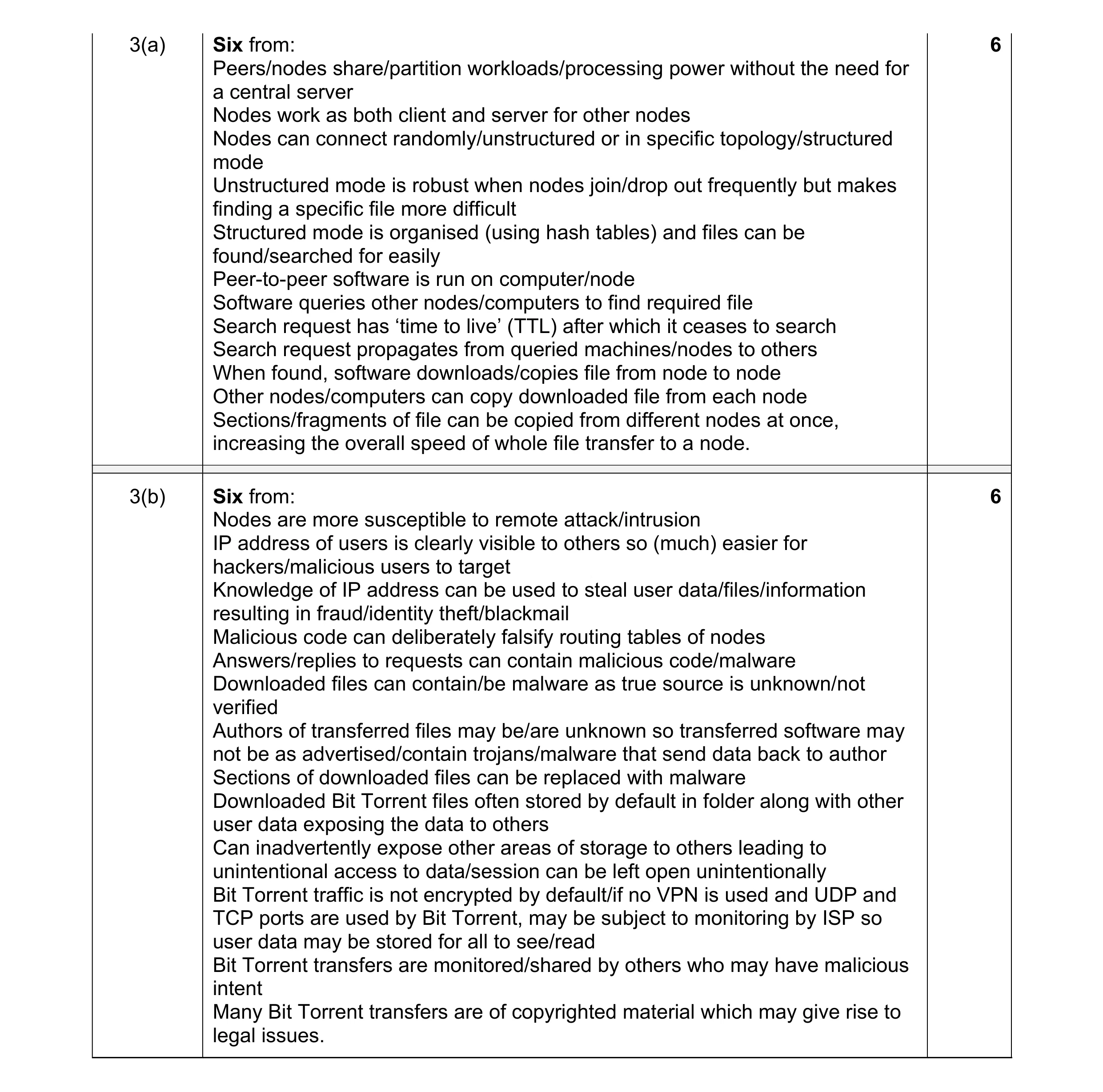 12
12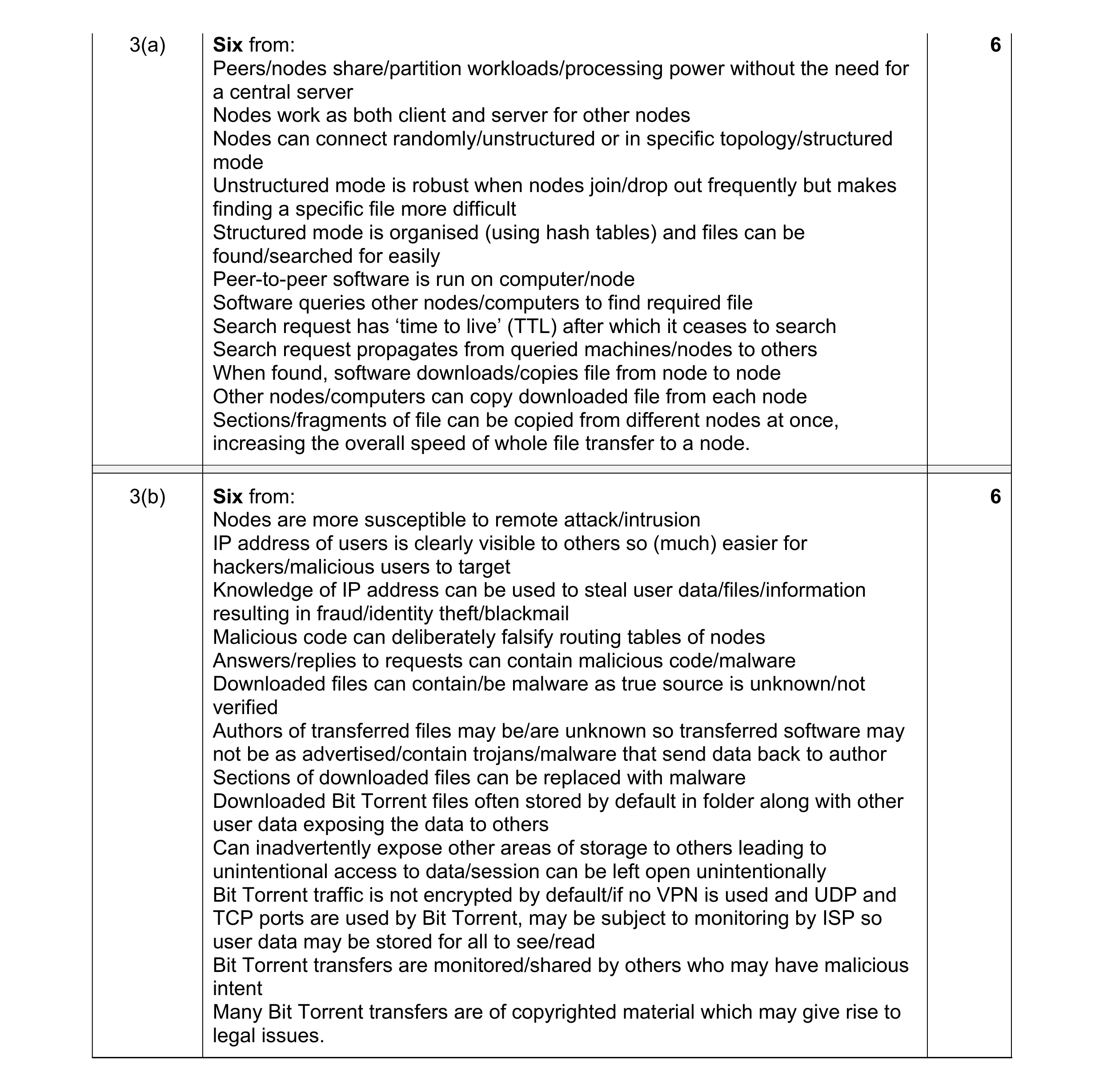 12
12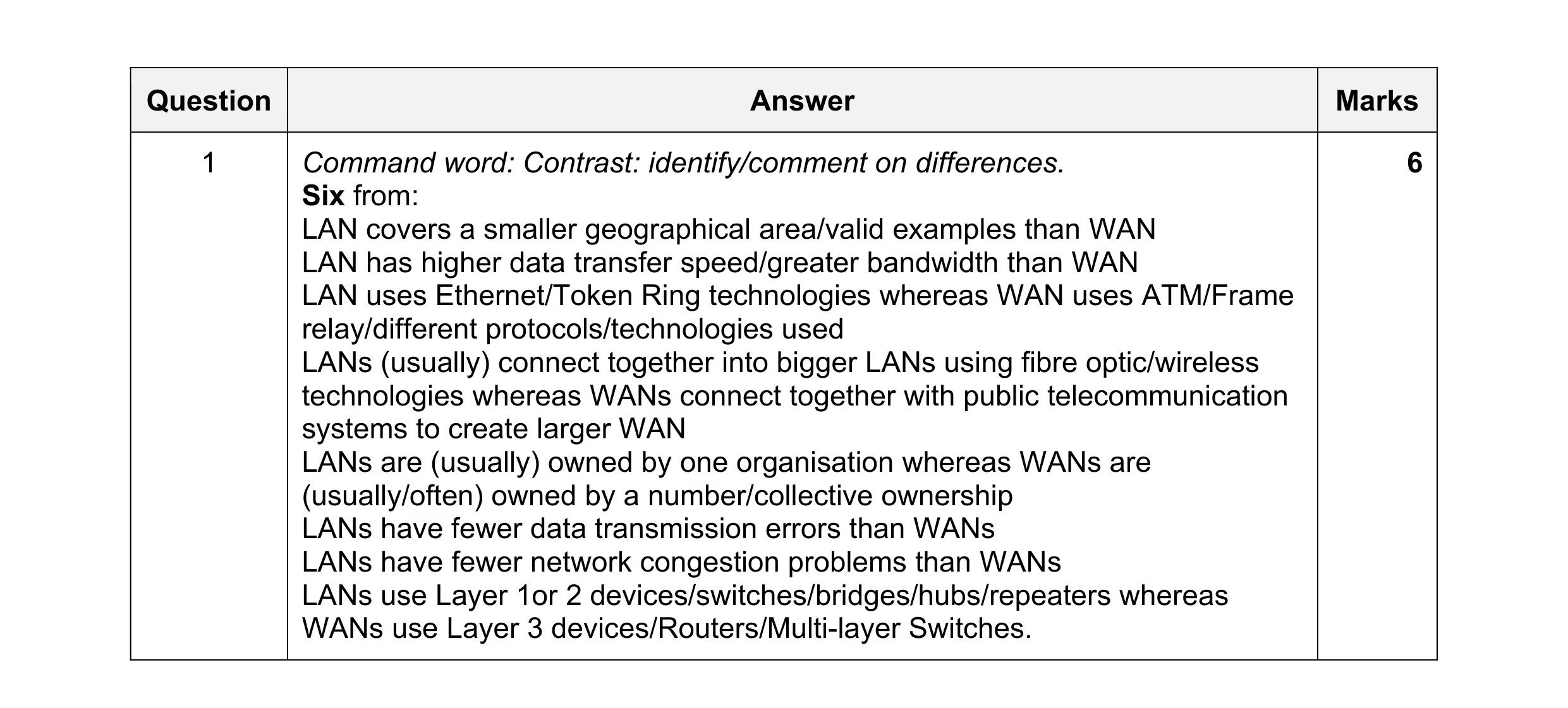 6
6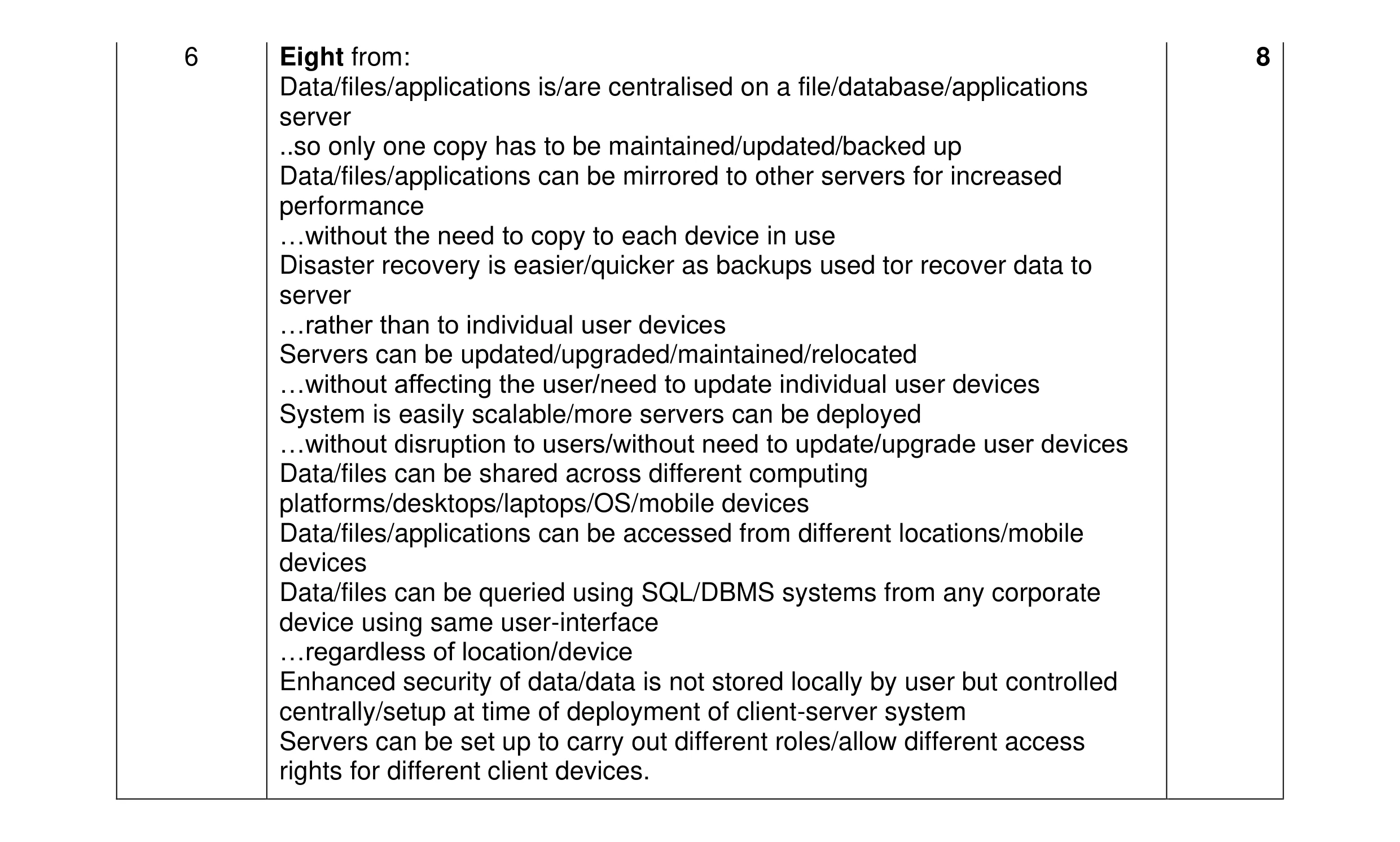 8
8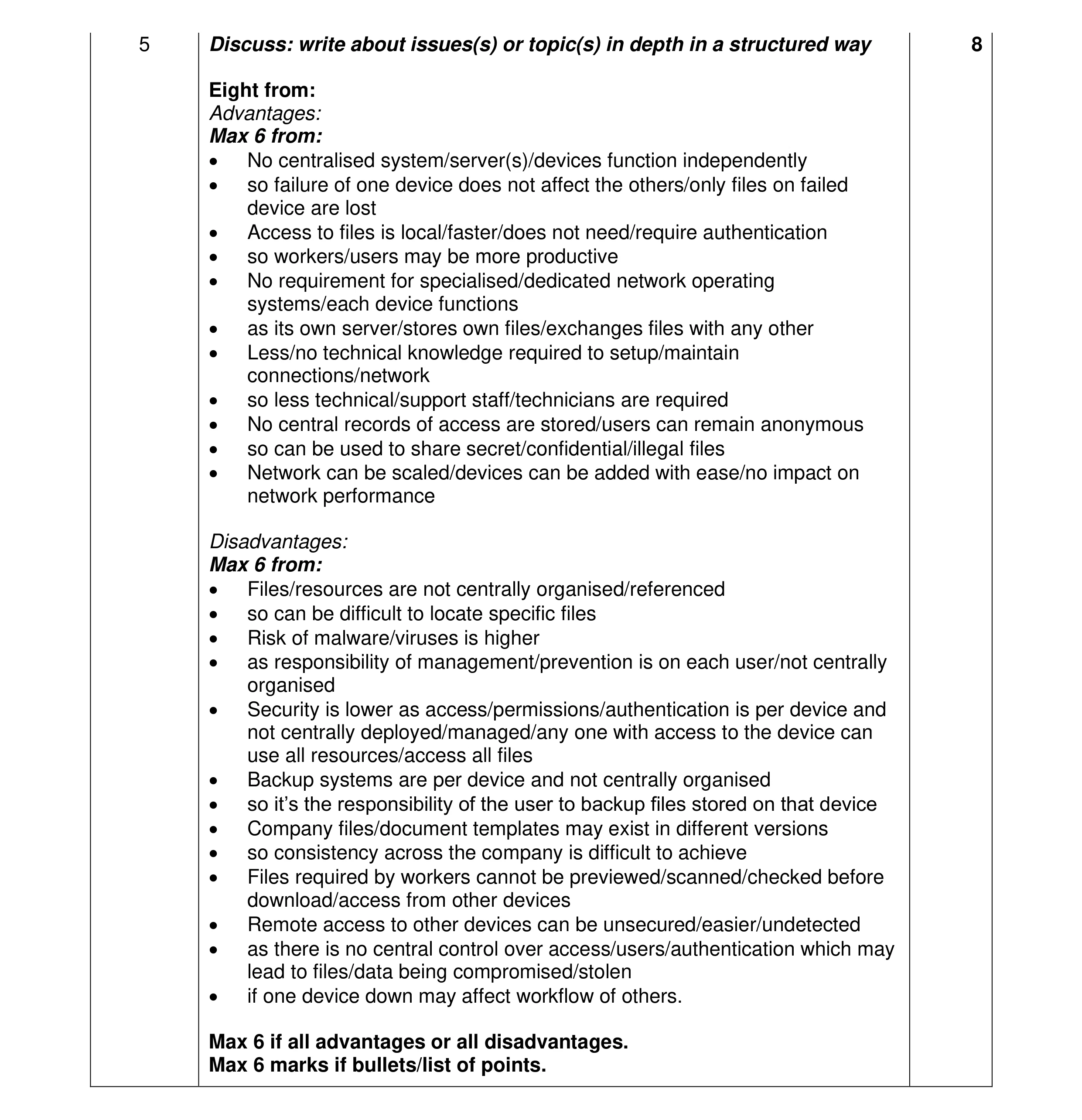 8
8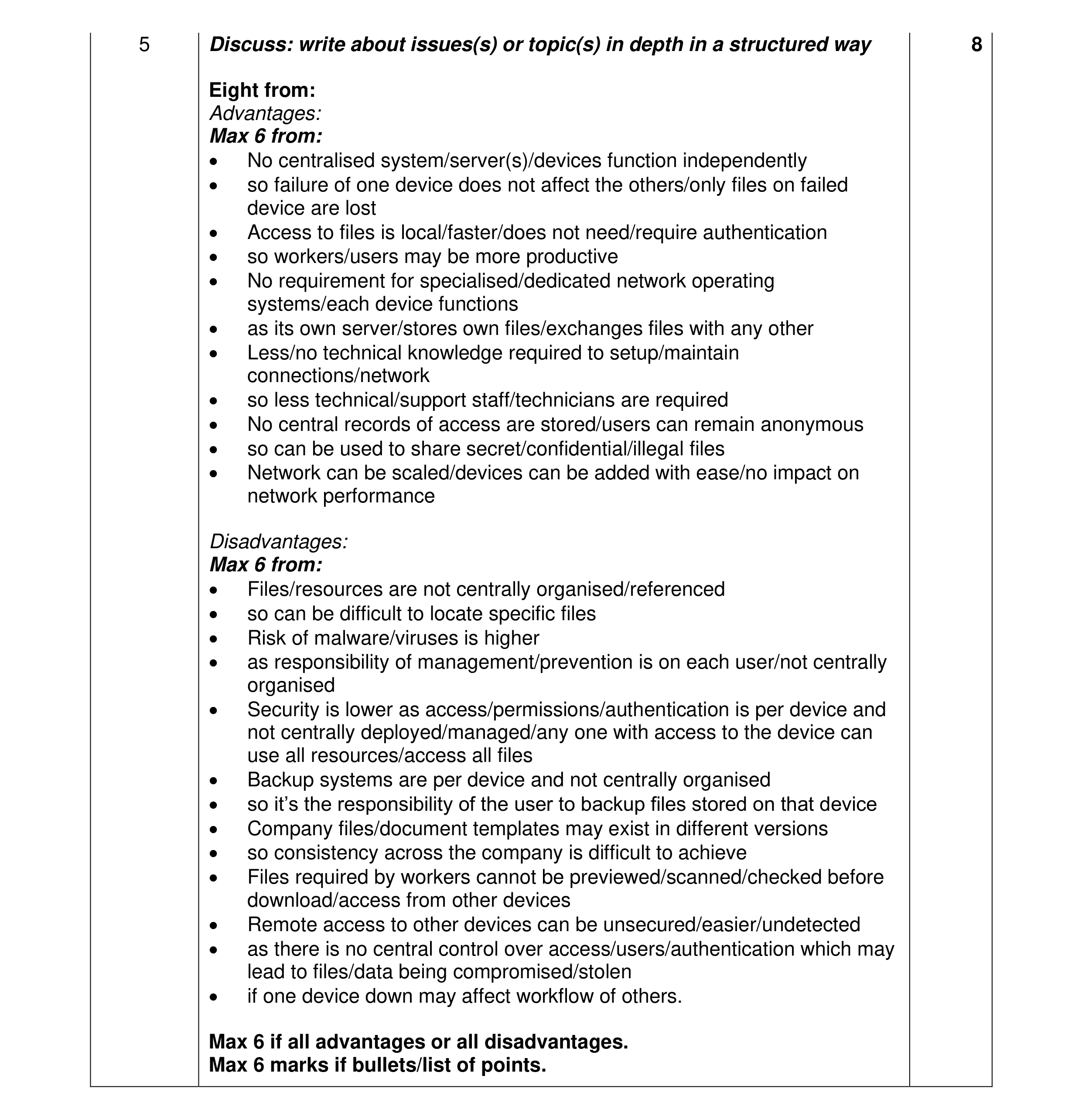 8
8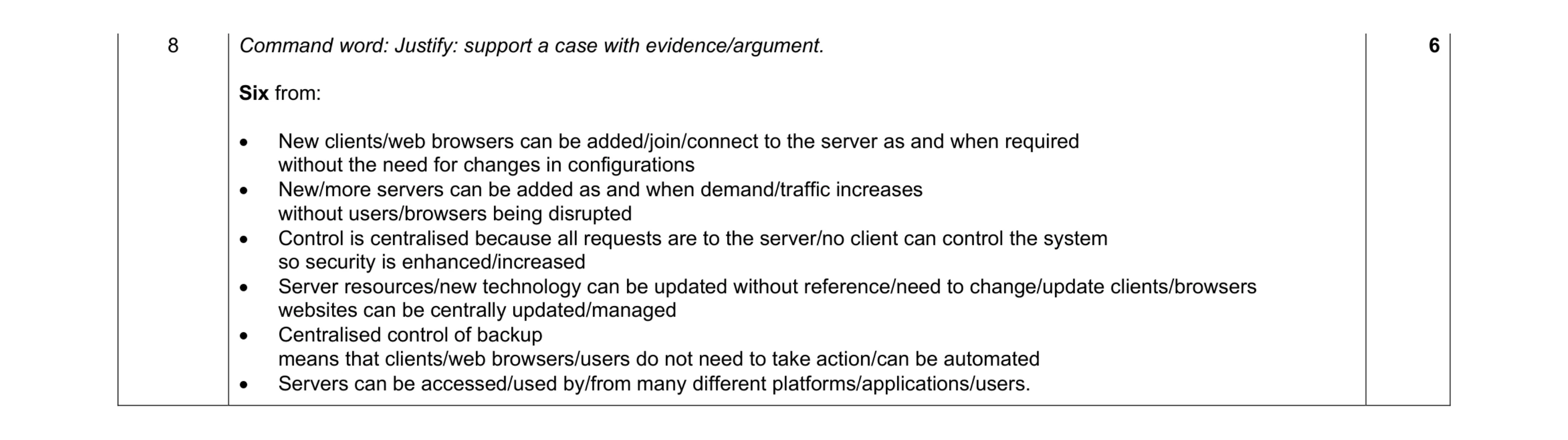 6
6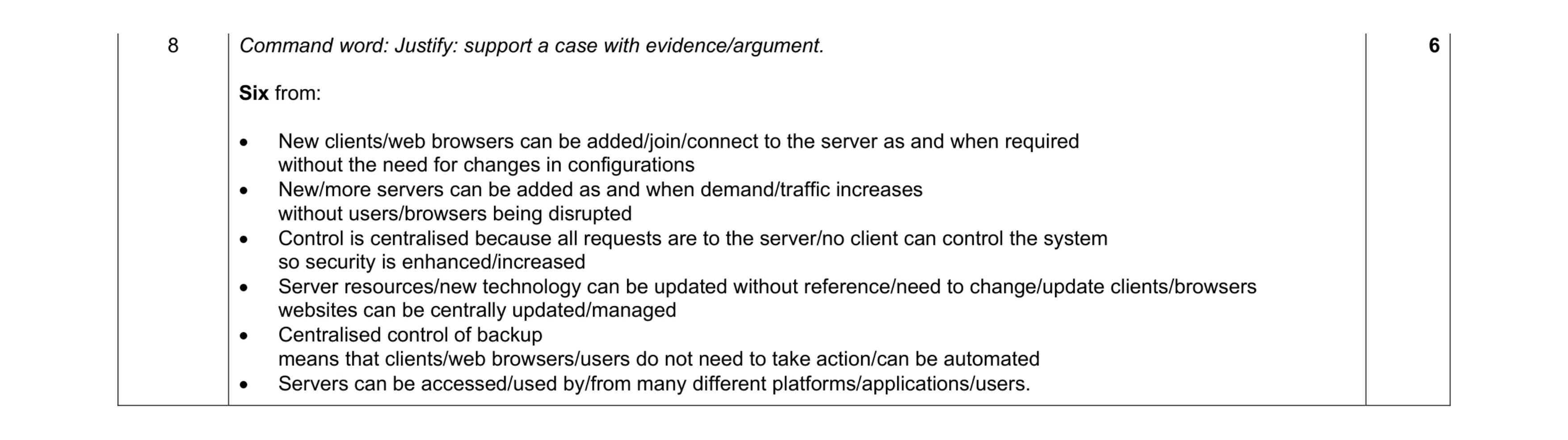 6
6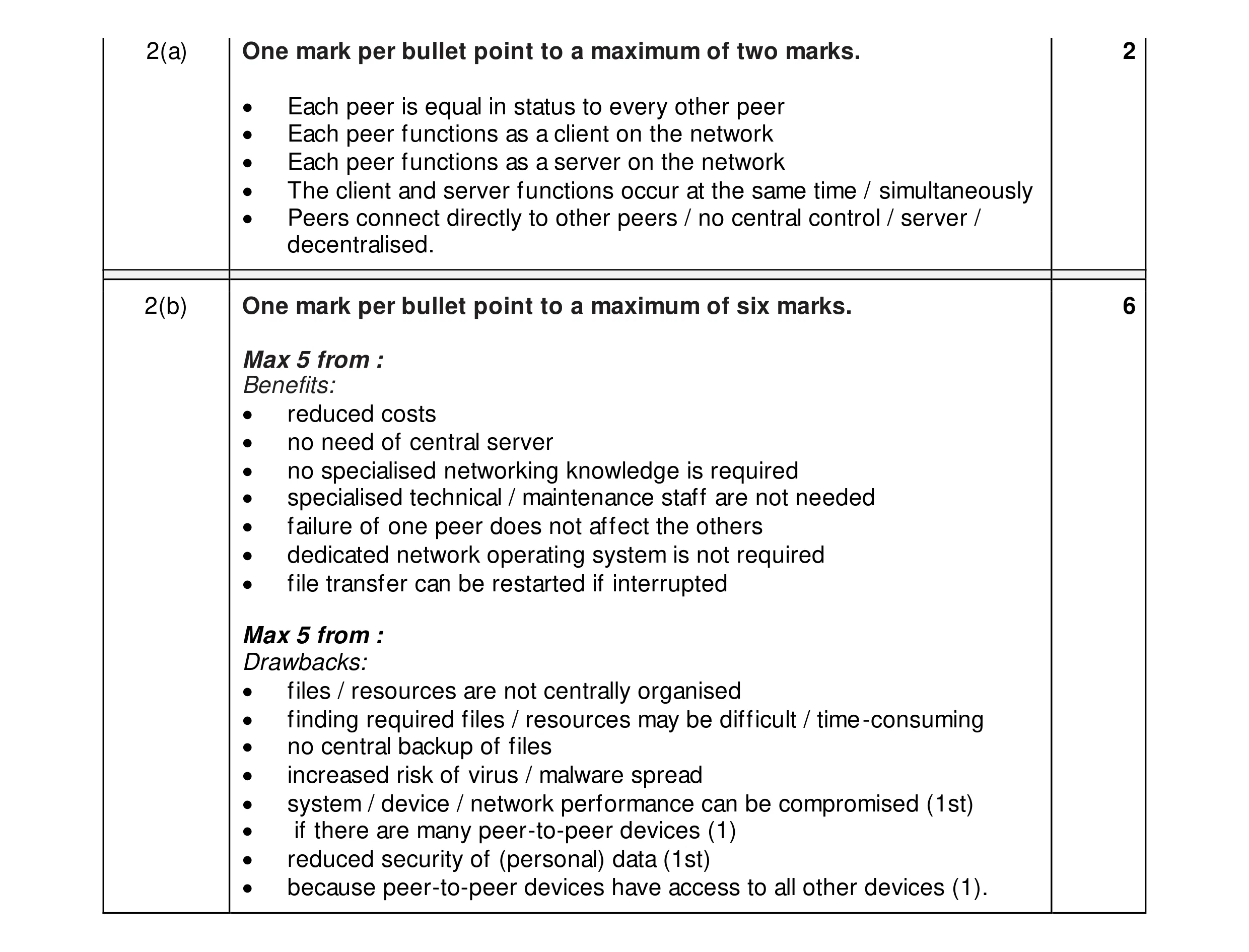 8
8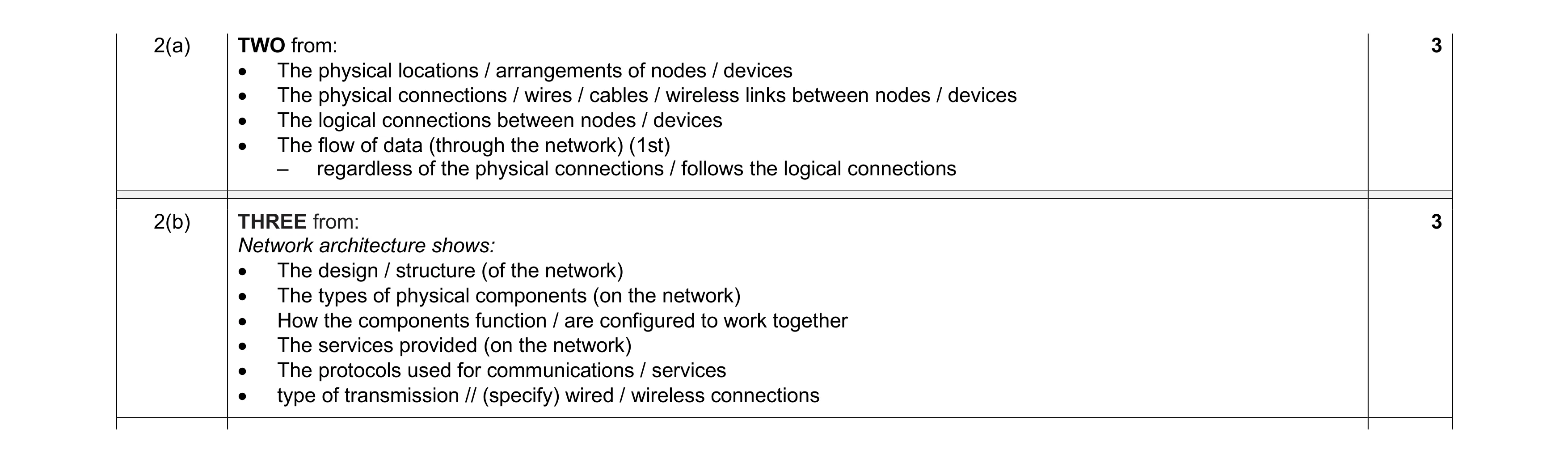 6
6