Questions as text
Q1 · Study the following pseudocode 9618/21 May/June 2021
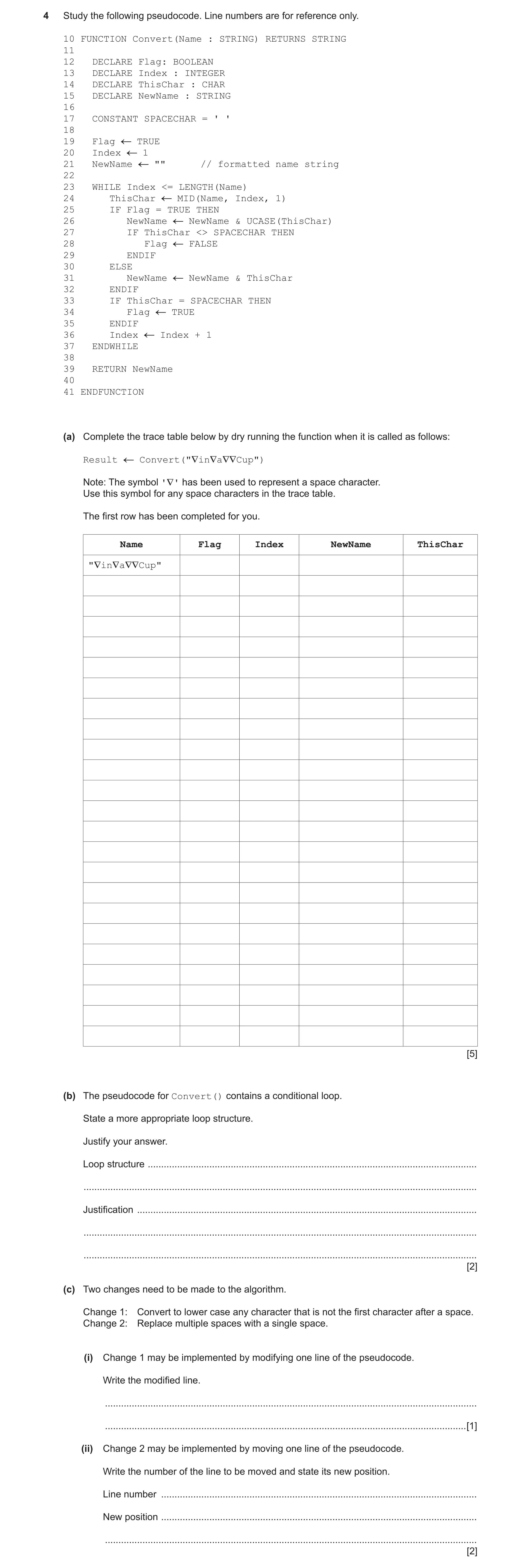
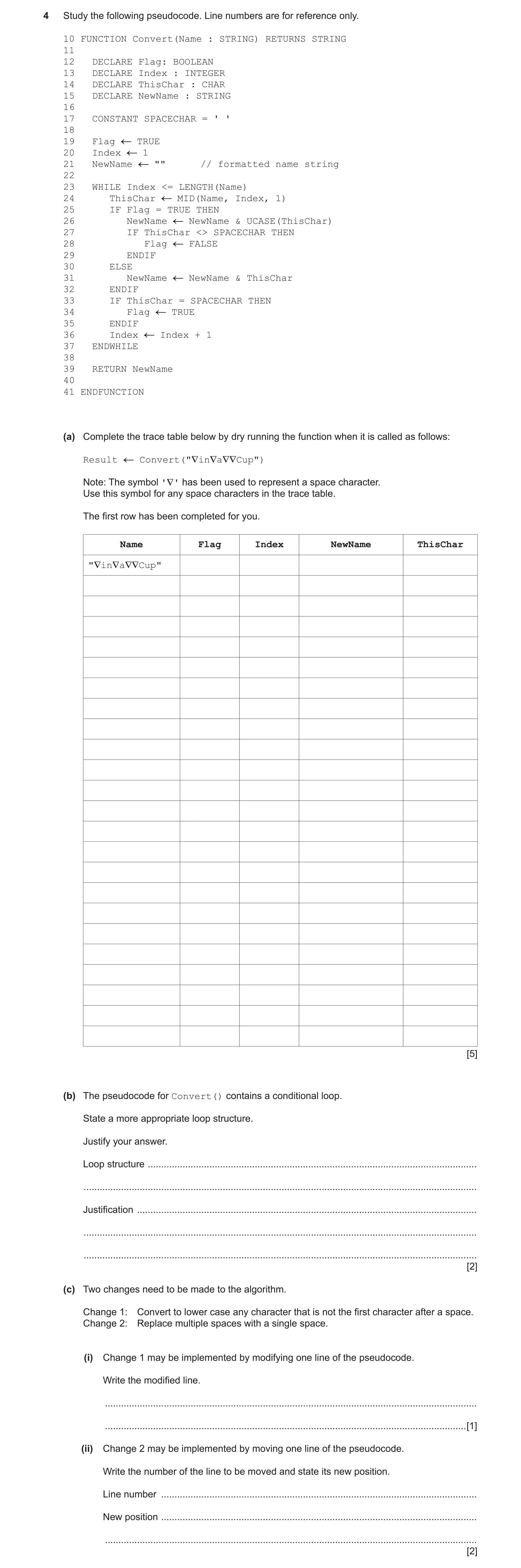
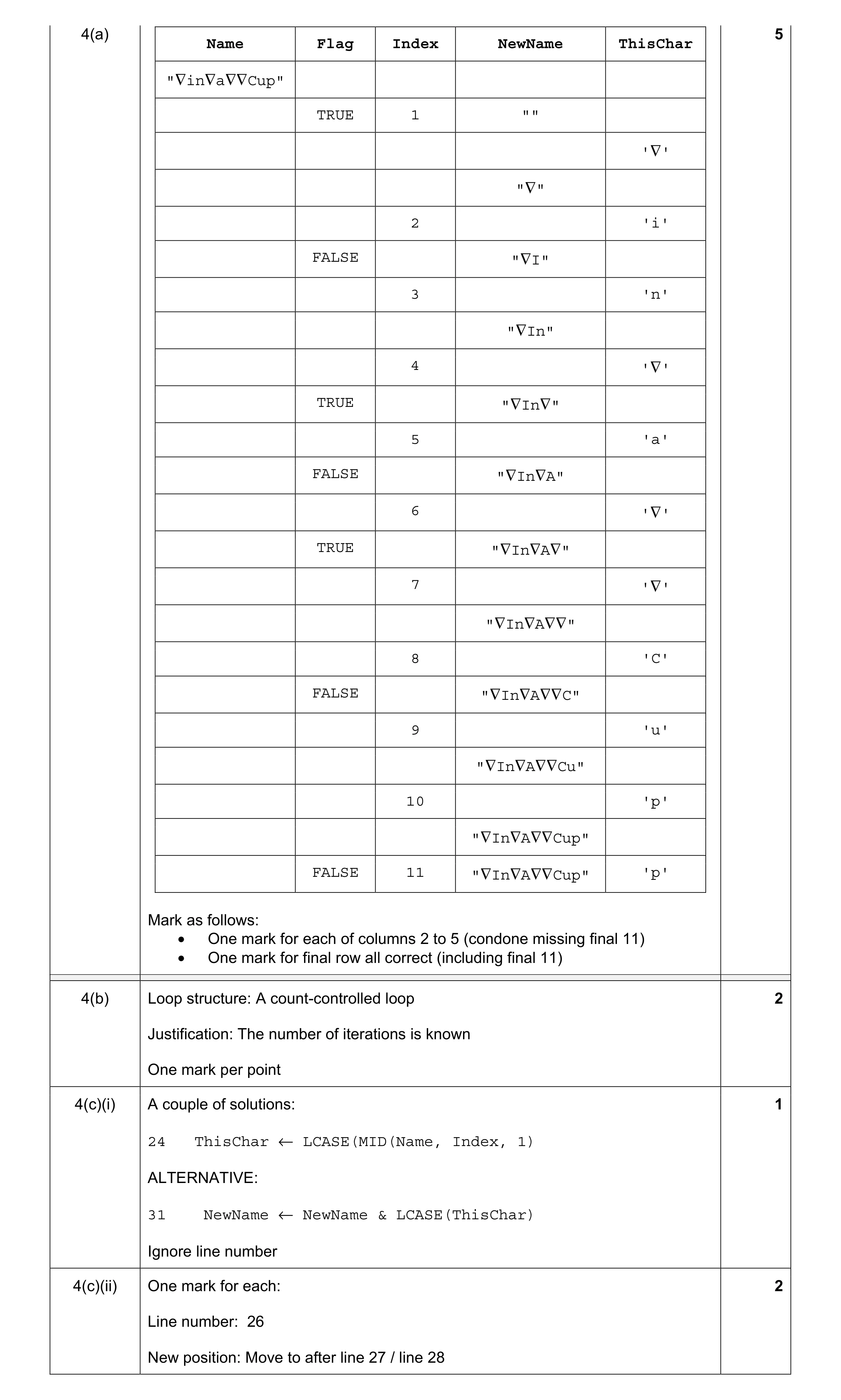
4 Study the following pseudocode. Line numbers are for reference only. 10 FUNCTION Convert(Name : STRING) RETURNS STRING 11 12 DECLARE Flag: BOOLEAN 13 DECLARE Index : INTEGER 14 DECLARE ThisChar : CHAR 15 DECLARE NewName : STRING 16 17 CONSTANT SPACECHAR = ' ' 18 19 Flag TRUE 20 Index 1 21 NewName "" // formatted name string 22 23 WHILE Index <= LENGTH(Name) 24 ThisChar MID(Name, Index, 1) 25 IF Flag = TRUE THEN 26 NewName NewName & UCASE(ThisChar) 27 IF ThisChar <> SPACECHAR THEN 28 Flag FALSE 29 ENDIF 30 ELSE 31 NewName NewName & ThisChar 32 ENDIF 33 IF ThisChar = SPACECHAR THEN 34 Flag TRUE 35 ENDIF 36 Index Index + 1 37 ENDWHILE 38 39 RETURN NewName 40 41 ENDFUNCTION (a) Complete the trace table below by dry running the function when it is called as follows: Result Convert("∇in∇a∇∇Cup") Note: The symbol '∇' has been used to represent a space character. Use this symbol for any space characters in the trace table. The first row has been completed for you. Name Flag Index NewName ThisChar "∇in∇a∇∇Cup" [5] (b) The pseudocode for Convert() contains a conditional loop. State a more appropriate loop structure. Justify your answer. Loop structure … … Justification … … … [2] (c) Two changes need to be made to the algorithm. Change 1: Convert to lower case any character that is not the first character after a space. Change 2: Replace multiple spaces with a single space. (i) Change 1 may be implemented by modifying one line of the pseudocode. Write the modified line. … … [1] (ii) Change 2 may be implemented by moving one line of the pseudocode. Write the number of the line to be moved and state its new position. Line number … New position … … [2]
10 marks
Mark scheme: 4(a) 5 Name Flag Index NewName ThisChar "∇in∇a∇∇Cup" TRUE 1 "" '∇' "∇" 2 'i' FALSE "∇I" 3 'n' "∇In" 4 '∇' TRUE "∇In∇" 5 'a' FALSE "∇In∇A" 6 '∇' TRUE "∇In∇A∇" 7 '∇' "∇In∇A∇∇" 8 'C' FALSE "∇In∇A∇∇C" 9 'u' "∇In∇A∇∇Cu" 10 'p' "∇In∇A∇∇Cup" FALSE 11 "∇In∇A∇∇Cup" 'p' Mark as follows: • One mark for each of columns 2 to 5 (condone missing final 11) • One mark for final row all correct (including final 11) 4(b) Loop structure: A count-controlled loop 2 Justification: The number of iterations is known One mark per point 4(c)(i) A couple of solutions: 1 24 ThisChar ← LCASE(MID(Name, Index, 1) ALTERNATIVE: 31 NewName ← NewName & LCASE(ThisChar) Ignore line number 4(c)(ii) One mark for each: 2 Line number: 26 New position: Move to after line 27 / line 28
This question in 9618/21 May/June 2021
Q2 · Complete the following table by giving the appropriate data type in each case 9618/22 May/June 2021
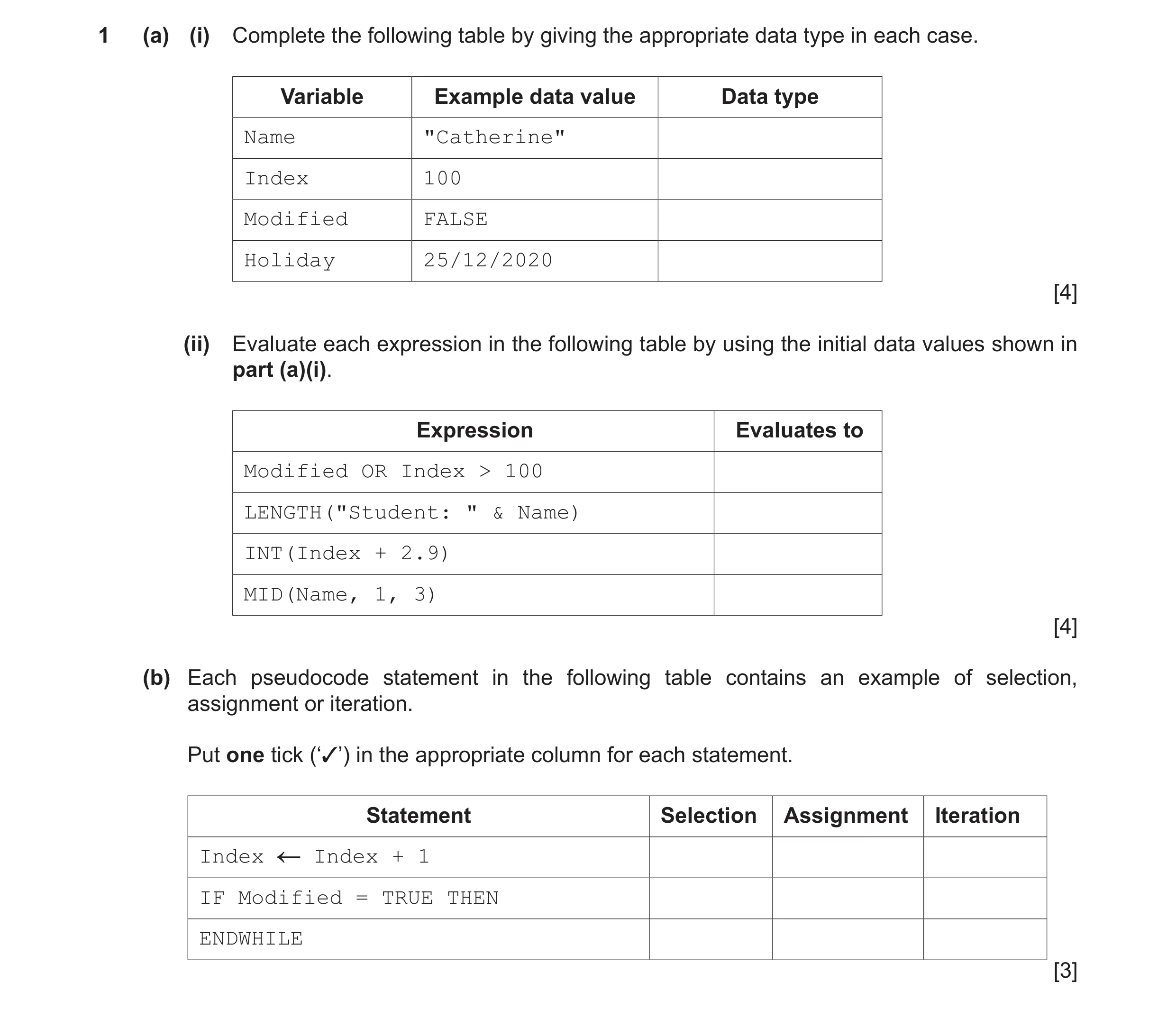
1 (a) (i) Complete the following table by giving the appropriate data type in each case. Variable Example data value Data type Name "Catherine" Index 100 Modified FALSE Holiday 25/12/2020 [4] (ii) Evaluate each expression in the following table by using the initial data values shown in part (a)(i). Expression Evaluates to Modified OR Index > 100 LENGTH("Student: " & Name) INT(Index + 2.9) MID(Name, 1, 3) [4] (b) Each pseudocode statement in the following table contains an example of selection, assignment or iteration. Put one tick (‘✓’) in the appropriate column for each statement. Statement Selection Assignment Iteration Index Index + 1 IF Modified = TRUE THEN ENDWHILE [3]
11 marks
Mark scheme: Question Answer Marks 1(a)(i) 4 Variable Example data value Data type Name "Catherine" STRING Index 100 INTEGER Modified FALSE BOOLEAN Holiday 25/12/2020 DATE One mark per data type 1(a)(ii) 4 Expression Evaluates to Modified OR Index > 100 FALSE LENGTH("Student: " & Name) 18 INT(Index + 2.9) 102 MID(Name, 1, 3) "Cat" One mark per value Quotation marks must be present for final row and must be capital C 1(b) 3 Statement Selection Assignment Iteration Index ← Index + 1 IF Modified = TRUE THEN ENDWHILE One mark per row
This question in 9618/22 May/June 2021
Q3 · A student is learning about arrays 9618/22 May/June 2021
5 (a) A student is learning about arrays. She wants to write a program to: • declare a 1D array RNum of 100 elements of type INTEGER • assign each element a random value in the range 1 to 200 inclusive • count and output how many numbers generated were between 66 and 173 inclusive. (i) Write pseudocode to represent the algorithm. … … … … … … … … … … … … … … [6] (ii) The student decides to modify the algorithm so that each element of the array will contain a unique value. Describe the changes that the student needs to make to the algorithm. … … … … … … [3] (b) The following is a pseudocode function. Line numbers are given for reference only. 01 FUNCTION StringClean(InString : STRING) RETURNS STRING 02 03 DECLARE NextChar : CHAR 04 DECLARE OutString : STRING 05 DECLARE Counter : INTEGER 06 07 OutString "" 08 09 FOR Counter 1 TO LENGTH(InString) 10 NextChar MID(InString, Counter, 1) 11 NextChar LCASE(NextChar) 12 IF NOT((NextChar < 'a') OR (NextChar > 'z')) THEN 13 OutString OutString & NextChar 14 ENDIF 15 NEXT Counter 16 17 RETURN OutString 18 19 ENDFUNCTION (i) Examine the pseudocode and complete the following table. Answer Give a line number containing an example of an initialisation statement. Give a line number containing the start of a repeating block of code. Give a line number containing a logic operation. Give the number of parameters to the function MID(). [4] (ii) Write a simplified version of the statement in line 12. … … [2]
15 marks
Mark scheme: 5(a)(i) DECLARE RNum : ARRAY[1:100] OF INTEGER 6 DECLARE Index, Count : INTEGER Count ← 0 FOR Index ← 1 TO 100 RNum[Index] ← INT(RAND(200)) + 1 IF RNum[Index] >= 66 AND RNum[Index] <= 173 THEN Count ← Count + 1 ENDIF NEXT Index OUTPUT Count Mark as follows: 1 Array declaration 2 Loop for 100 iterations 3 Array element index 'syntax' (left-hand side of assignment expression) in a loop 4 Use of RAND() to generate value in range (and assign to array element) in a loop 5 Check if random number within range and if so, increment count in a loop 6 Output of count (following a reasonable attempt) after the loop 5(a)(ii) One mark per bullet / sub-bullet point 3 1 Initialise the array to a rogue value (to indicate 'unassigned' element) 2 Add a conditional loop to: 3 Generate and store a random number (in the correct range) 4 Check the stored number against values already in the array 5 If the stored number is found then generate another random value 6 Otherwise add it to the array (and exit loop) Note: Max 3 marks 5(b)(i) 4 Answer Give a line number containing an example of an 07 initialisation statement. Give a line number containing the start of a repeating 09 / 10 block of code. Give a line number containing a logic statement. 12 Give the number of parameters of function MID(). 3 One mark for each row 5(b)(ii) IF (NextChar >= 'a') AND (NextChar <= 'z') THEN 2 One mark for IF ... AND ... One mark for both conditions
This question in 9618/22 May/June 2021
Q4 · A program is needed to take a string containing a full name and to produce a new string… 9618/22 May/June 2021
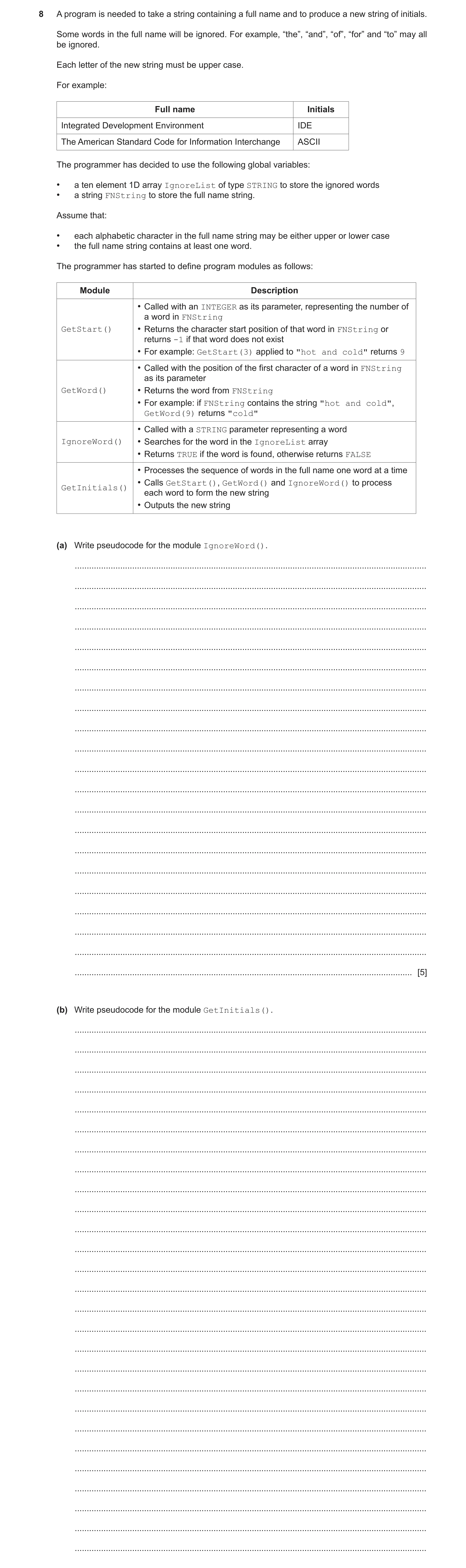
8 A program is needed to take a string containing a full name and to produce a new string of initials. Some words in the full name will be ignored. For example, “the”, “and”, “of”, “for” and “to” may all be ignored. Each letter of the new string must be upper case. For example: Full name Initials Integrated Development Environment IDE The American Standard Code for Information Interchange ASCII The programmer has decided to use the following global variables: • a ten element 1D array IgnoreList of type STRING to store the ignored words • a string FNString to store the full name string. Assume that: • each alphabetic character in the full name string may be either upper or lower case • the full name string contains at least one word. The programmer has started to define program modules as follows: Module Description • Called with an INTEGER as its parameter, representing the number of a word in FNString GetStart() • Returns the character start position of that word in FNString or returns -1 if that word does not exist • For example: GetStart(3) applied to "hot and cold" returns 9 • Called with the position of the first character of a word in FNString as its parameter GetWord() • Returns the word from FNString • For example: if FNString contains the string "hot and cold", GetWord(9) returns "cold" • Called with a STRING parameter representing a word IgnoreWord() • Searches for the word in the IgnoreList array • Returns TRUE if the word is found, otherwise returns FALSE • Processes the sequence of words in the full name one word at a time • Calls GetStart(), GetWord() and IgnoreWord() to process GetInitials() each word to form the new string • Outputs the new string (a) Write pseudocode for the module IgnoreWord(). … … … … … … … … … … … … … … … … … … … … … [5] (b) Write pseudocode for the module GetInitials(). … … … … … … … … … … … … … … … … … … … … … … … … … … …
5 marks
Mark scheme: 8(a) FUNCTION IgnoreWord (ThisWord : STRING) RETURNS BOOLEAN 5 DECLARE Found : BOOLEAN DECLARE Index : INTEGER Found ← False Index ← 1 ThisWord ← TO_LOWER(ThisWord) REPEAT IF TO_LOWER(IgnoreList[Index]) = ThisWord THEN Found ← TRUE ENDIF Index ← Index + 1 UNTIL Found = TRUE OR Index > 10 RETURN Found ENDFUNCTION 1 mark for each of the following: 1 Loop through array elements 2 Convert both strings to same case 3 Compare array element with parameter in a loop 4 Set a flag (or similar) if match found (after reasonable attempt at MP3) in a loop 5 Return TRUE or FALSE in all cases Note: Max 4 if function declaration incorrect 8(b) Procedure GetInitials() 8 DECLARE NewString, NextWord : STRING DECLARE ThisWordNum, Index : INTEGER ThisWordNum ← 0 NewString ← "" REPEAT ThisWordNum ← ThisWordNum + 1 Index ← GetStart(ThisWordNum) IF Index <> -1 THEN //if there is ThisWordNum NextWord ← GetWord(Index) IF IgnoreWord(NextWord) = FALSE THEN NewString ← NewString & UCASE(LEFT(NextWord, 1)) ENDIF ENDIF UNTIL Index = -1 OUTPUT NewString ENDPROCEDURE 1 mark for each of the following: 1 Declare NewString and initialise to empty string 2 Conditional loop to pick out all words from FNString 3 Evaluate result of GetStart() in a loop 4 Test result <> -1 and if not: 5 Assign result of GetWord()to a variable in a loop 6 Test result of IgnoreWord()in a loop 7 If not ignored, add the next initial letter to NewString in a loop 8 Increment ThisWordNum (must have been initialised) in a loop 9 Output NewString (must be all upper case) outside loop Note: Max 8 marks
This question in 9618/22 May/June 2021
Q5 · Study the following pseudocode 9618/23 May/June 2021
4 Study the following pseudocode. Line numbers are for reference only. 10 FUNCTION Convert(Name : STRING) RETURNS STRING 11 12 DECLARE Flag: BOOLEAN 13 DECLARE Index : INTEGER 14 DECLARE ThisChar : CHAR 15 DECLARE NewName : STRING 16 17 CONSTANT SPACECHAR = ' ' 18 19 Flag TRUE 20 Index 1 21 NewName "" // formatted name string 22 23 WHILE Index <= LENGTH(Name) 24 ThisChar MID(Name, Index, 1) 25 IF Flag = TRUE THEN 26 NewName NewName & UCASE(ThisChar) 27 IF ThisChar <> SPACECHAR THEN 28 Flag FALSE 29 ENDIF 30 ELSE 31 NewName NewName & ThisChar 32 ENDIF 33 IF ThisChar = SPACECHAR THEN 34 Flag TRUE 35 ENDIF 36 Index Index + 1 37 ENDWHILE 38 39 RETURN NewName 40 41 ENDFUNCTION (a) Complete the trace table below by dry running the function when it is called as follows: Result Convert("∇in∇a∇∇Cup") Note: The symbol '∇' has been used to represent a space character. Use this symbol for any space characters in the trace table. The first row has been completed for you. Name Flag Index NewName ThisChar "∇in∇a∇∇Cup" [5] (b) The pseudocode for Convert() contains a conditional loop. State a more appropriate loop structure. Justify your answer. Loop structure … … Justification … … … [2] (c) Two changes need to be made to the algorithm. Change 1: Convert to lower case any character that is not the first character after a space. Change 2: Replace multiple spaces with a single space. (i) Change 1 may be implemented by modifying one line of the pseudocode. Write the modified line. … … [1] (ii) Change 2 may be implemented by moving one line of the pseudocode. Write the number of the line to be moved and state its new position. Line number … New position … … [2]
10 marks
Mark scheme: 4(a) 5 Name Flag Index NewName ThisChar "∇in∇a∇∇Cup" TRUE 1 "" '∇' "∇" 2 'i' FALSE "∇I" 3 'n' "∇In" 4 '∇' TRUE "∇In∇" 5 'a' FALSE "∇In∇A" 6 '∇' TRUE "∇In∇A∇" 7 '∇' "∇In∇A∇∇" 8 'C' FALSE "∇In∇A∇∇C" 9 'u' "∇In∇A∇∇Cu" 10 'p' "∇In∇A∇∇Cup" FALSE 11 "∇In∇A∇∇Cup" 'p' Mark as follows: • One mark for each of columns 2 to 5 (condone missing final 11) • One mark for final row all correct (including final 11) 4(b) Loop structure: A count-controlled loop 2 Justification: The number of iterations is known One mark per point 4(c)(i) A couple of solutions: 1 24 ThisChar ← LCASE(MID(Name, Index, 1) ALTERNATIVE: 31 NewName ← NewName & LCASE(ThisChar) Ignore line number 4(c)(ii) One mark for each: 2 Line number: 26 New position: Move to after line 27 / line 28
This question in 9618/23 May/June 2021
Q6 · A program controls the heating system in a sports hall 9618/21 Oct/Nov 2021
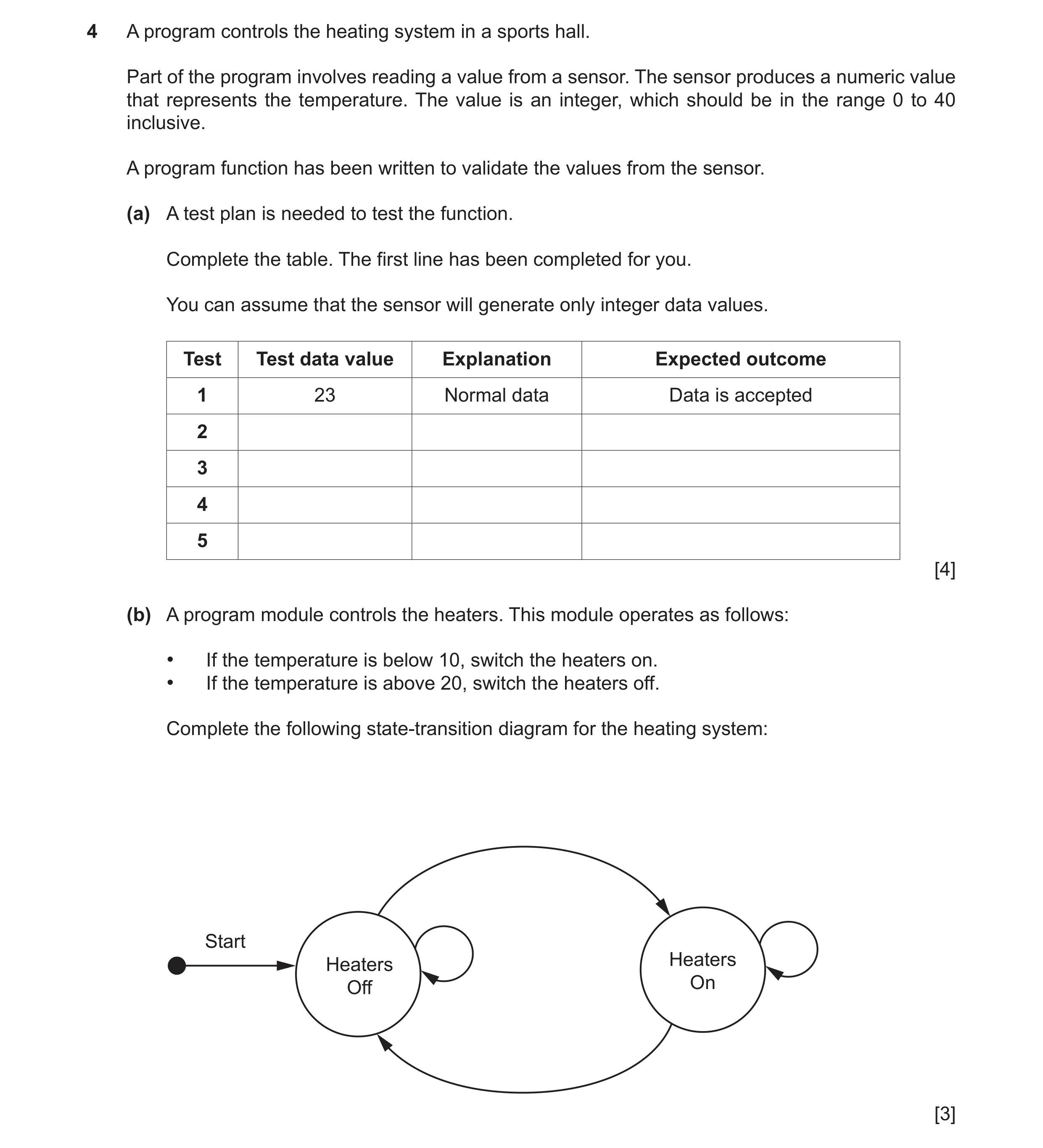
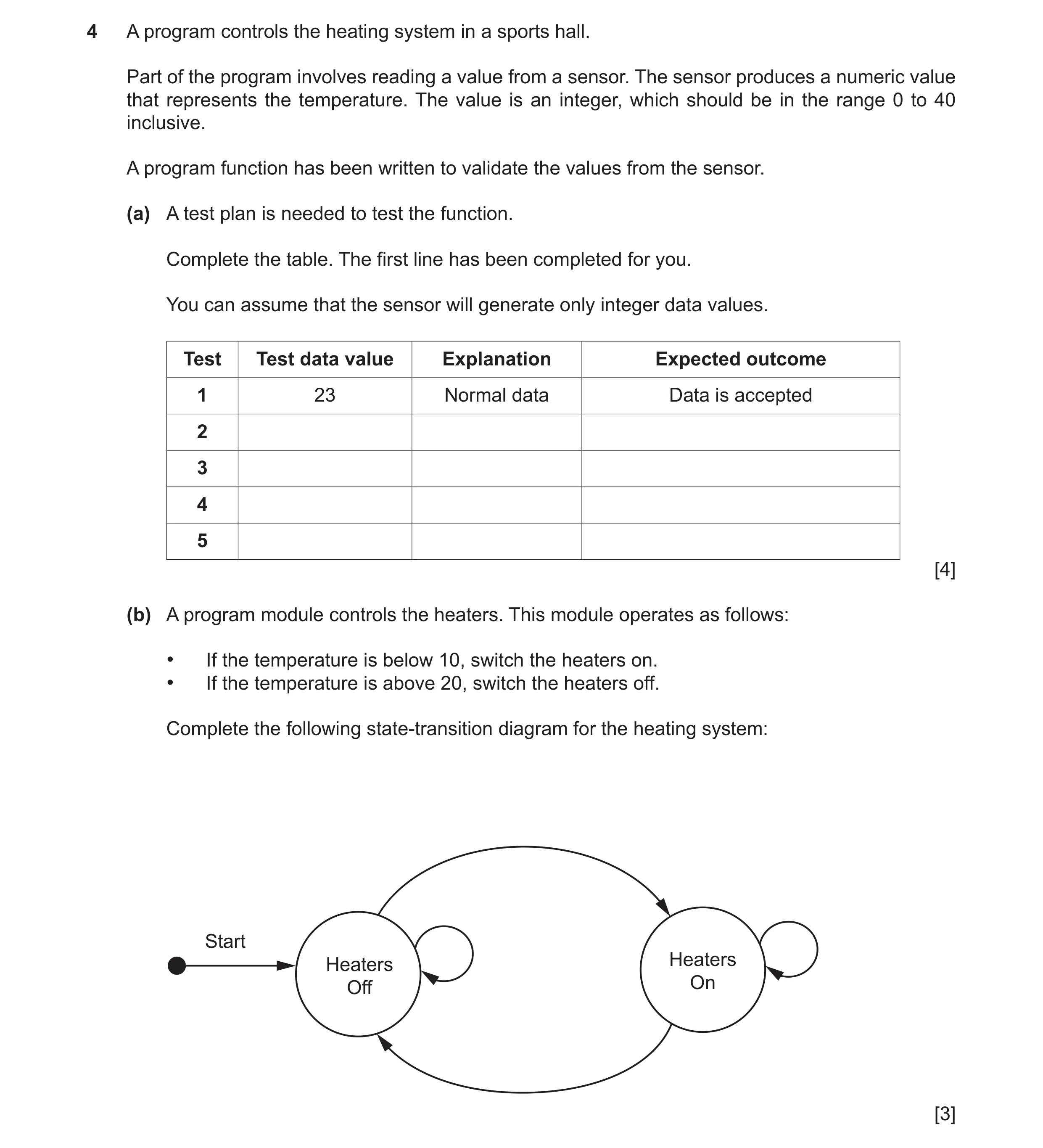
4 A program controls the heating system in a sports hall. Part of the program involves reading a value from a sensor. The sensor produces a numeric value that represents the temperature. The value is an integer, which should be in the range 0 to 40 inclusive. A program function has been written to validate the values from the sensor. (a) A test plan is needed to test the function. Complete the table. The first line has been completed for you. You can assume that the sensor will generate only integer data values. Test Test data value Explanation Expected outcome 1 23 Normal data Data is accepted 2 3 4 5 [4] (b) A program module controls the heaters. This module operates as follows: • If the temperature is below 10, switch the heaters on. • If the temperature is above 20, switch the heaters off. Complete the following state-transition diagram for the heating system: Start Heaters Heaters Off On [3]
7 marks
Mark scheme: 4(a) 4 Test Test data value Explanation Expected Outcome 1 23 Normal Data Data is accepted 2 0 Boundary Data Data is accepted 3 40 Boundary Data Data is accepted 4 >= 41 Abnormal Data Data is rejected 5 <= −1 Abnormal Data Data is rejected One mark per row for rows 2 to 5. 4(b) 3 One mark for each label: • Temp < 10 (Heaters Off to Heaters On) • Temp > 20 (Heaters On to Heaters Off) • on BOTH loops (non-contradictory values)
This question in 9618/21 Oct/Nov 2021
Q7 · A mobile phone has a touchscreen 9618/21 Oct/Nov 2021
6 A mobile phone has a touchscreen. The screen is represented by a grid, divided into 800 rows and 1280 columns. The grid is represented by a 2D array Screen of type INTEGER. An array element will be set to 0 unless the user touches that part of the screen. Many array elements are set to 1 by a single touch of a finger or a stylus. The following diagram shows a simplified touchscreen. The dark line represents a touch to the screen. All grid elements that are wholly or partly inside the outline will be set to 1. These elements are shaded. The element shaded in black represents the centre point. 11 6 A program is needed to find the coordinates (the row and column) of the centre point. The centre point on the diagram above is row 6, column 11. Assume: • the user may only touch one area at a time • screen rotation does not affect the touchscreen. The programmer has started to define program modules as follows: Module Description • Called with three parameters of type INTEGER: ◦a row numberSetRow()(generates test ◦the number of pixels to be skipped starting from column 1 data) ◦the number of pixels that should be set to 1 • Sets the required number of pixels to 1 For example, SetRow(3, 8, 5) will give row 3 as in the diagram shown. • Takes two parameters of type INTEGER: ◦a row number ◦a start column (1 or 1280) SearchInRow() • Searches the given row from the start column (either left to right or right to left) for the first column that contains an element set to 1 • Returns the column number of the first element in the given row that is set to 1 • Returns −1 if no element is set to 1 • Takes two parameters of type INTEGER: ◦a column number ◦a start row (1 or 800) SearchInCol() • Searches the given column from the start row (either up or down) for the first row that contains an element set to 1 • Returns the row number of the first element in the given column that is set to 1 • Returns −1 if no element is set to 1 (a) Write pseudocode to implement the module SetRow(). … … … … … … … … … … … … [5] (b) The module description of SearchInRow() is provided here for reference. Module Description • Takes two parameters of type INTEGER: ◦a row number ◦a start column (1 or 1280) SearchInRow() • Searches the given row from the start column (either left to right or right to left) for the first column that contains an element set to 1 • Returns the column number of the first element in the given row that is set to 1 • Returns −1 if no element is set to 1 Write pseudocode to implement the module SearchInRow(). … … … … … … … … … … … … … … … … … … … … …
5 marks
Mark scheme: 6(a) PROCEDURE SetRow(Row, SkipNum, SetNum : INTEGER) 5 DECLARE Col : INTEGER // array is 1280 x 800 FOR Col ← SkipNum + 1 TO SkipNum + SetNum Screen[Row, Col] ← 1 NEXT Index ENDPROCEDURE ALTERNATIVE 1: FOR Col ← 1 TO SetNum Screen[Row, SkipNum + Col] ← 1 NEXT Col ALTERNATIVE 2: WHILE SetNum > 0 Screen[Row, SkipNum + SetNum] ← 1 SetNum ← SetNum - 1 ENDWHILE Mark as follows: 1 Procedure heading and ending including parameters 2 Declaration of local Integer for Col 3 Count-controlled loop with meaningful start number 4 correct stop number 5 Reference Screen Array element and set to 1 in a loop 6(b) FUNCTION SearchInRow(ThisRow, StartCol : INTEGER) RETURNS 8 INTEGER DECLARE ThisCol, Step : INTEGER DECLARE Found: BOOLEAN // array is 1280 x 800 Found ← FALSE ThisCol ← StartCol // first decide which way to search IF StartCol = 1 THEN Step ← 1 EndCol ← 1281 ELSE Step ← -1 EndCol ← 0 ENDIF WHILE ThisCol <> EndCol AND Found = FALSE IF Screen[ThisRow, ThisCol] <> 1 THEN ThisCol ← ThisCol + Step ELSE Found ← TRUE ENDIF ENDWHILE IF Found = FALSE THEN ThisCol ← -1 ENDIF RETURN ThisCol ENDFUNCTION Mark as follows: 1 Interpreting StartCol parameter to determine direction of search 2 An attempt at searching both up and down 3 Conditional Loop / Count-controlled loop with use of ThisCol index 4 Using correct values for StartCol, EndCol and Step 5 Reference a Screen element and compare with 1 in a loop 6 If equal save column or immediately Return column in a loop 7 Return column number or −1 Loop(s) terminate when element with value = 1 found Max 7 marks if function heading, including return type, and ending is incorrect or incomplete 6(c) FUNCTION GetCentreCol(ThisRow : INTEGER) RETURNS INTEGER 6 DECLARE StartCol, EndCol, CentreCol : INTEGER StartCol ← SearchInRow(ThisRow, 1) IF StartCol = -1 THEN CentreCol ← StartCol ELSE EndCol ← SearchInRow(ThisRow, 1280) CentreCol ← INT((StartCol + EndCol)/2) ENDIF RETURN CentreCol ENDFUNCTION Mark as follows: 1 Declaration of local INTEGER for return value 2 Use SearchInRow() with correct parameters and check for -1 3 Use SearchInRow(ThisRow, 1) and SearchInRow(ThisRow, 1280) 4 Calculate centre column 5 Use of INT() function // use of DIV 6 Return –1 or centre value Max 5 marks if function heading, including return type, and ending is incorrect or incomplete
This question in 9618/21 Oct/Nov 2021
Q8 · The following is a procedure design in pseudocode 9618/22 Oct/Nov 2021
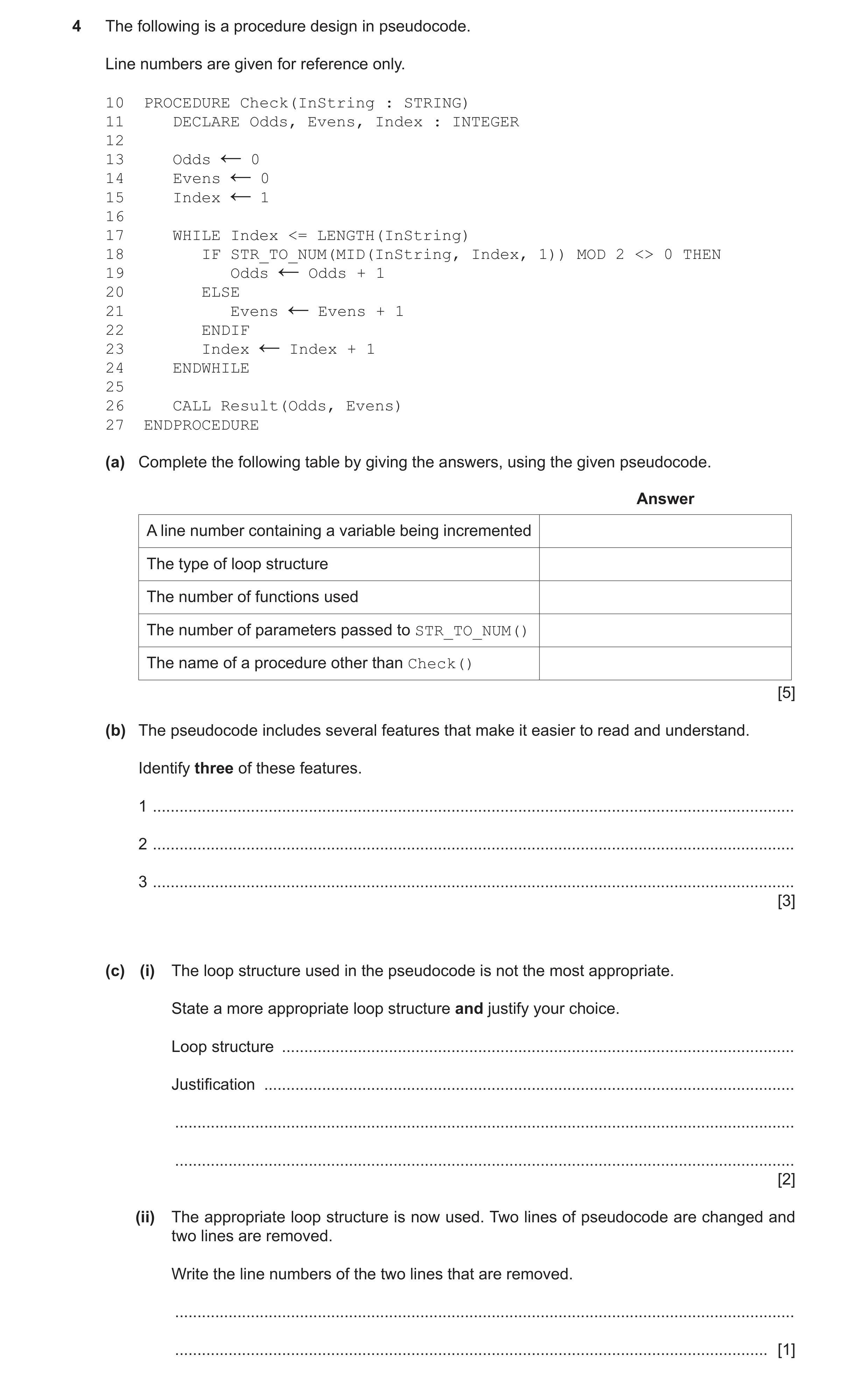
4 The following is a procedure design in pseudocode. Line numbers are given for reference only. 10 PROCEDURE Check(InString : STRING) 11 DECLARE Odds, Evens, Index : INTEGER 12 13 Odds 0 ← 14 Evens 0 ← 15 Index 1 ← 16 17 WHILE Index <= LENGTH(InString) 18 IF STR_TO_NUM(MID(InString, Index, 1)) MOD 2 <> 0 THEN 19 Odds Odds + 1 ← 20 ELSE 21 Evens Evens + 1 ← 22 ENDIF 23 Index Index + 1 ← 24 ENDWHILE 25 26 CALL Result(Odds, Evens) 27 ENDPROCEDURE (a) Complete the following table by giving the answers, using the given pseudocode. Answer A line number containing a variable being incremented The type of loop structure The number of functions used The number of parameters passed to STR_TO_NUM() The name of a procedure other than Check() [5] (b) The pseudocode includes several features that make it easier to read and understand. Identify three of these features. 1 … 2 … 3 … [3] (c) (i) The loop structure used in the pseudocode is not the most appropriate. State a more appropriate loop structure and justify your choice. Loop structure … Justification … … … [2] (ii) The appropriate loop structure is now used. Two lines of pseudocode are changed and two lines are removed. Write the line numbers of the two lines that are removed. … … [1]
11 marks
Mark scheme: 4(a) 5 Answer A line number containing a variable being incremented 19 / 21 / 23 The type of loop structure pre-condition The number of functions used 3 The number of parameters passed to function 1 STR_TO_NUM() The name of a procedure other than Check() Result 4(b) One mark per point: 3 • Meaningful variable names • Indentation / white space / blank lines • Capitalisation of keywords 4(c)(i) One mark per point: 2 Structure: A count-controlled loop Justification: The number of iterations is known // repeats for the length of InString 4(c)(ii) 15, 23 1 One mark for both line numbers
This question in 9618/22 Oct/Nov 2021
Q9 · A program controls the heating system in a sports hall 9618/23 Oct/Nov 2021
4 A program controls the heating system in a sports hall. Part of the program involves reading a value from a sensor. The sensor produces a numeric value that represents the temperature. The value is an integer, which should be in the range 0 to 40 inclusive. A program function has been written to validate the values from the sensor. (a) A test plan is needed to test the function. Complete the table. The first line has been completed for you. You can assume that the sensor will generate only integer data values. Test Test data value Explanation Expected outcome 1 23 Normal data Data is accepted 2 3 4 5 [4] (b) A program module controls the heaters. This module operates as follows: • If the temperature is below 10, switch the heaters on. • If the temperature is above 20, switch the heaters off. Complete the following state-transition diagram for the heating system: Start Heaters Heaters Off On [3]
7 marks
Mark scheme: 4(a) 4 Test Test data value Explanation Expected Outcome 1 23 Normal Data Data is accepted 2 0 Boundary Data Data is accepted 3 40 Boundary Data Data is accepted 4 >= 41 Abnormal Data Data is rejected 5 <= −1 Abnormal Data Data is rejected One mark per row for rows 2 to 5. 4(b) 3 One mark for each label: • Temp < 10 (Heaters Off to Heaters On) • Temp > 20 (Heaters On to Heaters Off) • on BOTH loops (non-contradictory values)
This question in 9618/23 Oct/Nov 2021
Q10 · A mobile phone has a touchscreen 9618/23 Oct/Nov 2021
6 A mobile phone has a touchscreen. The screen is represented by a grid, divided into 800 rows and 1280 columns. The grid is represented by a 2D array Screen of type INTEGER. An array element will be set to 0 unless the user touches that part of the screen. Many array elements are set to 1 by a single touch of a finger or a stylus. The following diagram shows a simplified touchscreen. The dark line represents a touch to the screen. All grid elements that are wholly or partly inside the outline will be set to 1. These elements are shaded. The element shaded in black represents the centre point. 11 6 A program is needed to find the coordinates (the row and column) of the centre point. The centre point on the diagram above is row 6, column 11. Assume: • the user may only touch one area at a time • screen rotation does not affect the touchscreen. The programmer has started to define program modules as follows: Module Description • Called with three parameters of type INTEGER: ◦a row numberSetRow()(generates test ◦the number of pixels to be skipped starting from column 1 data) ◦the number of pixels that should be set to 1 • Sets the required number of pixels to 1 For example, SetRow(3, 8, 5) will give row 3 as in the diagram shown. • Takes two parameters of type INTEGER: ◦a row number ◦a start column (1 or 1280) SearchInRow() • Searches the given row from the start column (either left to right or right to left) for the first column that contains an element set to 1 • Returns the column number of the first element in the given row that is set to 1 • Returns −1 if no element is set to 1 • Takes two parameters of type INTEGER: ◦a column number ◦a start row (1 or 800) SearchInCol() • Searches the given column from the start row (either up or down) for the first row that contains an element set to 1 • Returns the row number of the first element in the given column that is set to 1 • Returns −1 if no element is set to 1 (a) Write pseudocode to implement the module SetRow(). … … … … … … … … … … … … [5] (b) The module description of SearchInRow() is provided here for reference. Module Description • Takes two parameters of type INTEGER: ◦a row number ◦a start column (1 or 1280) SearchInRow() • Searches the given row from the start column (either left to right or right to left) for the first column that contains an element set to 1 • Returns the column number of the first element in the given row that is set to 1 • Returns −1 if no element is set to 1 Write pseudocode to implement the module SearchInRow(). … … … … … … … … … … … … … … … … … … … … …
5 marks
Mark scheme: 6(a) PROCEDURE SetRow(Row, SkipNum, SetNum : INTEGER) 5 DECLARE Col : INTEGER // array is 1280 x 800 FOR Col ← SkipNum + 1 TO SkipNum + SetNum Screen[Row, Col] ← 1 NEXT Index ENDPROCEDURE ALTERNATIVE 1: FOR Col ← 1 TO SetNum Screen[Row, SkipNum + Col] ← 1 NEXT Col ALTERNATIVE 2: WHILE SetNum > 0 Screen[Row, SkipNum + SetNum] ← 1 SetNum ← SetNum - 1 ENDWHILE Mark as follows: 1 Procedure heading and ending including parameters 2 Declaration of local Integer for Col 3 Count-controlled loop with meaningful start number 4 correct stop number 5 Reference Screen Array element and set to 1 in a loop 6(b) FUNCTION SearchInRow(ThisRow, StartCol : INTEGER) RETURNS 8 INTEGER DECLARE ThisCol, Step : INTEGER DECLARE Found: BOOLEAN // array is 1280 x 800 Found ← FALSE ThisCol ← StartCol // first decide which way to search IF StartCol = 1 THEN Step ← 1 EndCol ← 1281 ELSE Step ← -1 EndCol ← 0 ENDIF WHILE ThisCol <> EndCol AND Found = FALSE IF Screen[ThisRow, ThisCol] <> 1 THEN ThisCol ← ThisCol + Step ELSE Found ← TRUE ENDIF ENDWHILE IF Found = FALSE THEN ThisCol ← -1 ENDIF RETURN ThisCol ENDFUNCTION Mark as follows: 1 Interpreting StartCol parameter to determine direction of search 2 An attempt at searching both up and down 3 Conditional Loop / Count-controlled loop with use of ThisCol index 4 Using correct values for StartCol, EndCol and Step 5 Reference a Screen element and compare with 1 in a loop 6 If equal save column or immediately Return column in a loop 7 Return column number or −1 Loop(s) terminate when element with value = 1 found Max 7 marks if function heading, including return type, and ending is incorrect or incomplete 6(c) FUNCTION GetCentreCol(ThisRow : INTEGER) RETURNS INTEGER 6 DECLARE StartCol, EndCol, CentreCol : INTEGER StartCol ← SearchInRow(ThisRow, 1) IF StartCol = -1 THEN CentreCol ← StartCol ELSE EndCol ← SearchInRow(ThisRow, 1280) CentreCol ← INT((StartCol + EndCol)/2) ENDIF RETURN CentreCol ENDFUNCTION Mark as follows: 1 Declaration of local INTEGER for return value 2 Use SearchInRow() with correct parameters and check for -1 3 Use SearchInRow(ThisRow, 1) and SearchInRow(ThisRow, 1280) 4 Calculate centre column 5 Use of INT() function // use of DIV 6 Return –1 or centre value Max 5 marks if function heading, including return type, and ending is incorrect or incomplete
This question in 9618/23 Oct/Nov 2021
Q11 · An algorithm will: • output each integer value between 100 and 200 that ends with the… 9618/21 May/June 2022
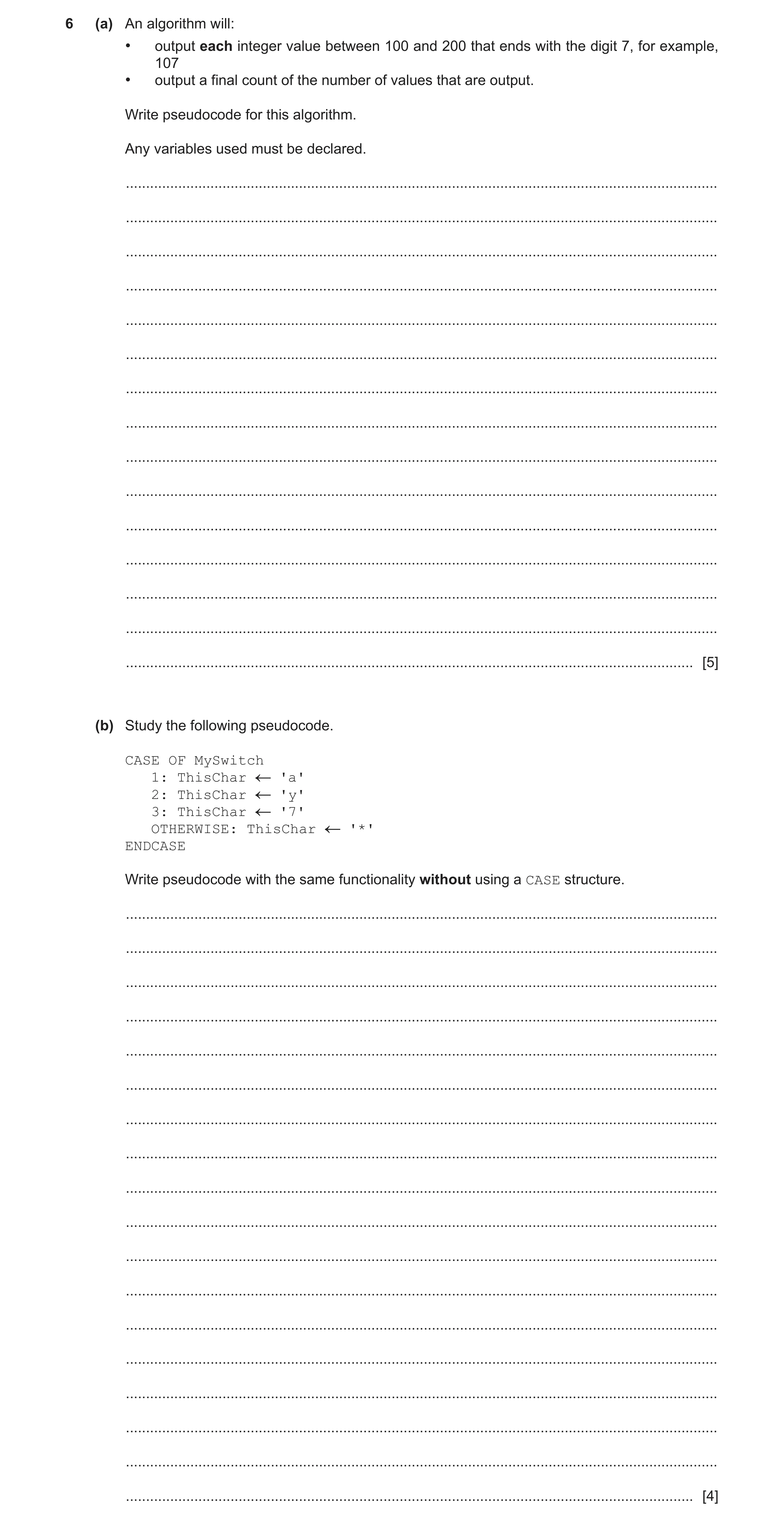
6 (a) An algorithm will: • output each integer value between 100 and 200 that ends with the digit 7, for example, 107 • output a final count of the number of values that are output. Write pseudocode for this algorithm. Any variables used must be declared. … … … … … … … … … … … … … … … [5] (b) Study the following pseudocode. CASE OF MySwitch 1: ThisChar 'a' 2: ThisChar 'y' 3: ThisChar '7' OTHERWISE: ThisChar '*' ENDCASE Write pseudocode with the same functionality without using a CASE structure. … … … … … … … … … … … … … … … … … … [4]
9 marks
Mark scheme: 6(a) Simple Solution: 5 DECLARE ThisInt, Count : INTEGER Count 0 FOR ThisInt 100 TO 200 IF ThisInt MOD 10 = 7 THEN OUTPUT ThisInt Count Count + 1 ENDIF NEXT ThisInt OUTPUT Count Mark as follows: 1 Declare loop variable and counter as integers, counter initialised 2 Loop 100 to 200, no step defined 3 Test value in a loop 4 Output selected value and incrementing a counter in a loop 5 Output the counter, following a reasonable attempt, after the loop Alternative Solution: DECLARE ThisInt, Count : INTEGER Count 0 FOR ThisInt 107 TO 197 STEP 10 OUTPUT ThisInt Count Count + 1 NEXT ThisInt OUTPUT Count Mark as follows: 1 Declare loop variable and counter as integers, , counter initialised 2 Loop (107 to 197) 3 STEP 10 or explicit increment if conditional loop used 4 Output each value and incrementing a counter in a loop 5 Output the counter, following a reasonable attempt, after the loop 6(b) IF MySwitch = 1 THEN 4 ThisChar 'a' ELSE IF MySwitch = 2 THEN ThisChar 'y' ELSE IF MySwitch = 3 THEN ThisChar '7' ELSE ThisChar '*' ENDIF ENDIF ENDIF Mark as follows: 1. ANY test of MySwitch = 1, 2 or 3 2. All three comparisons and corresponding assignments 3. OTHERWISE, or initial assignment of default value 4. Completely correct IF...THEN...ELSE...ENDIF syntax
This question in 9618/21 May/June 2022
Q12 · Study the following pseudocode 9618/22 May/June 2022
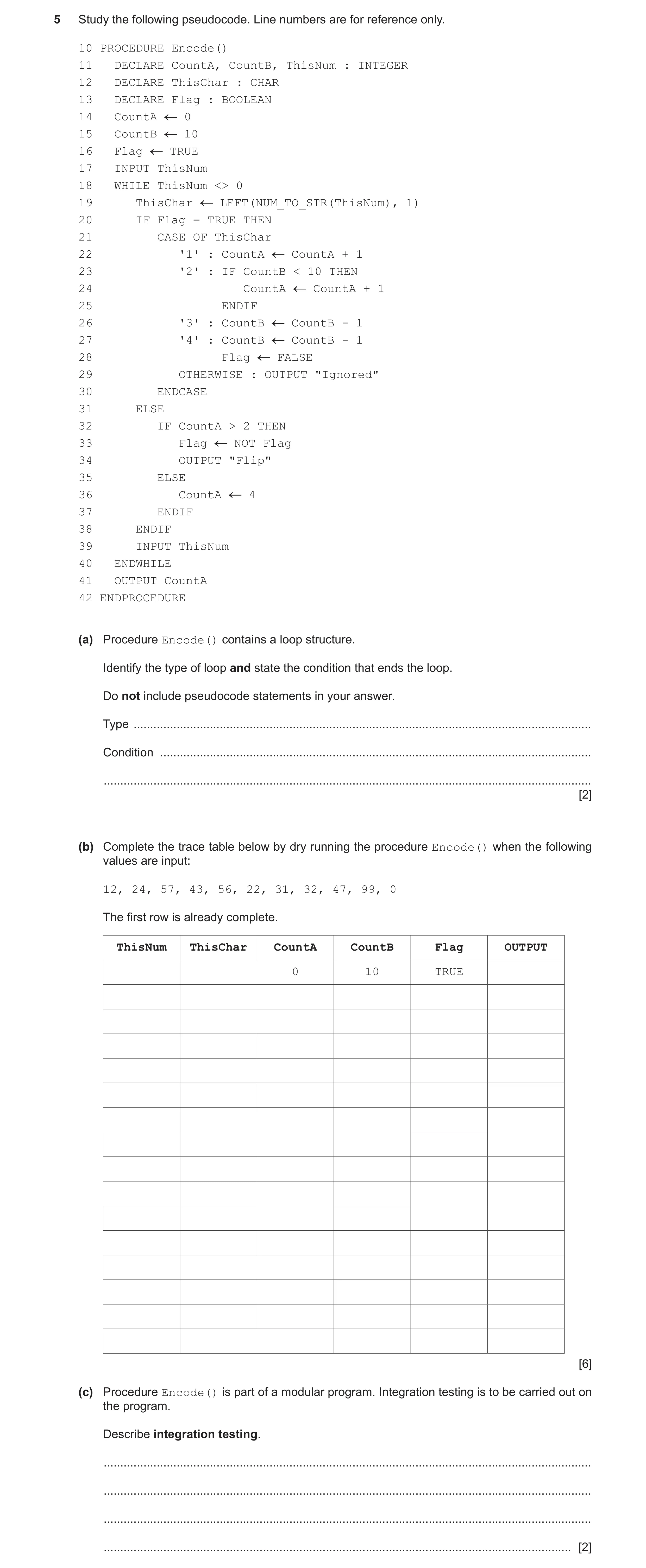
5 Study the following pseudocode. Line numbers are for reference only. 10 PROCEDURE Encode() 11 DECLARE CountA, CountB, ThisNum : INTEGER 12 DECLARE ThisChar : CHAR 13 DECLARE Flag : BOOLEAN 14 CountA 0 15 CountB 10 16 Flag TRUE 17 INPUT ThisNum 18 WHILE ThisNum <> 0 19 ThisChar LEFT(NUM_TO_STR(ThisNum), 1) 20 IF Flag = TRUE THEN 21 CASE OF ThisChar 22 '1' : CountA CountA + 1 23 '2' : IF CountB < 10 THEN 24 CountA CountA + 1 25 ENDIF 26 '3' : CountB CountB - 1 27 '4' : CountB CountB - 1 28 Flag FALSE 29 OTHERWISE : OUTPUT "Ignored" 30 ENDCASE 31 ELSE 32 IF CountA > 2 THEN 33 Flag NOT Flag 34 OUTPUT "Flip" 35 ELSE 36 CountA 4 37 ENDIF 38 ENDIF 39 INPUT ThisNum 40 ENDWHILE 41 OUTPUT CountA 42 ENDPROCEDURE (a) Procedure Encode() contains a loop structure. Identify the type of loop and state the condition that ends the loop. Do not include pseudocode statements in your answer. Type … Condition … … [2] (b) Complete the trace table below by dry running the procedure Encode() when the following values are input: 12, 24, 57, 43, 56, 22, 31, 32, 47, 99, 0 The first row is already complete. ThisNum ThisChar CountA CountB Flag OUTPUT 0 10 TRUE [6] (c) Procedure Encode() is part of a modular program. Integration testing is to be carried out on the program. Describe integration testing. … … … … [2]
10 marks
Mark scheme: 5(a) One mark for type and one mark for condition: 2 Independent marks Type: pre-condition Condition: when the value of ThisNum / the input value is equal to zero 5(b) 6 ThisNum ThisChar CountA CountB Flag OUTPUT 0 10 TRUE 12 '1' 1 24 '2' 57 '5' "Ignored" 43 '4' 9 FALSE '5' 56 4 22 '2' TRUE "Flip" '3' 31 8 32 '3' 7 47 '4' 6 FALSE 99 '9' TRUE "Flip" 0 4 Marks as follows: One mark per outlined group If no marks per group then mark by columns (columns 3 to 6) for max 4 5(c) One mark per point: 2 Modules that have already been tested individually are combined into a single (sub) program which is then tested as a whole
This question in 9618/22 May/June 2022
Q13 · A string represents a series of whole numbers, separated by commas 9618/22 May/June 2022
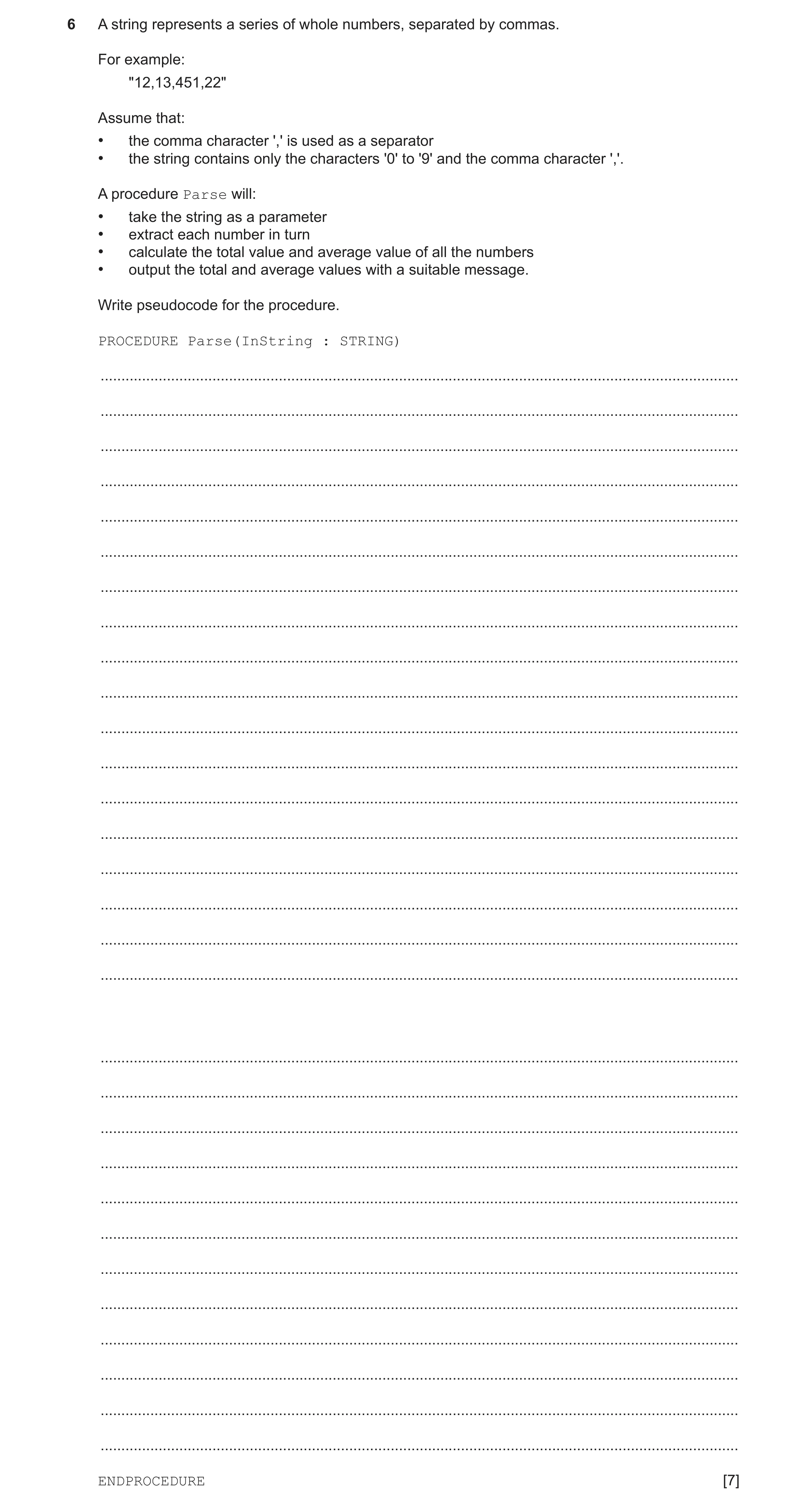
6 A string represents a series of whole numbers, separated by commas. For example: "12,13,451,22" Assume that: • the comma character ',' is used as a separator • the string contains only the characters '0' to '9' and the comma character ','. A procedure Parse will: • take the string as a parameter • extract each number in turn • calculate the total value and average value of all the numbers • output the total and average values with a suitable message. Write pseudocode for the procedure. PROCEDURE Parse(InString : STRING) … … … … … … … … … … … … … … … … … … … … … … … … … … … … … … ENDPROCEDURE [7]
7 marks
Mark scheme: 6 PROCEDURE Parse(InString : STRING) 7 DECLARE Count, Total, Index : INTEGER DECLARE Average : REAL DECLARE NumString : STRING DECLARE ThisChar : CHAR CONSTANT COMMA = ',' Count 0 Total 0 NumString "" FOR Index 1 to LENGTH(InString) ThisChar MID(InString, Index, 1) IF ThisChar = COMMA THEN Total Total + STR_TO_NUM(NumString) Count Count + 1 NumString "" ELSE NumString NumString & ThisChar // build the number string ENDIF NEXT Index // now process the final number Total Total + STR_TO_NUM(NumString) Count Count + 1 Average Total / Count OUTPUT "The total was ", Total, " and the average was ", Average ENDPROCEDURE Marks as follows: 1 Declare and initialise Count, Total and NumString 2 Loop for number of characters in InString 3 Extract a character and test for comma in a loop 4 If comma, convert NumString to integer and update Total and Count 5 and reset NumString 6 Otherwise append character to NumString 7 Calculate average AND final output statement(s) outside the loop
This question in 9618/22 May/June 2022
Q14 · A program allows a user to save passwords used to log in to websites 9618/22 May/June 2022
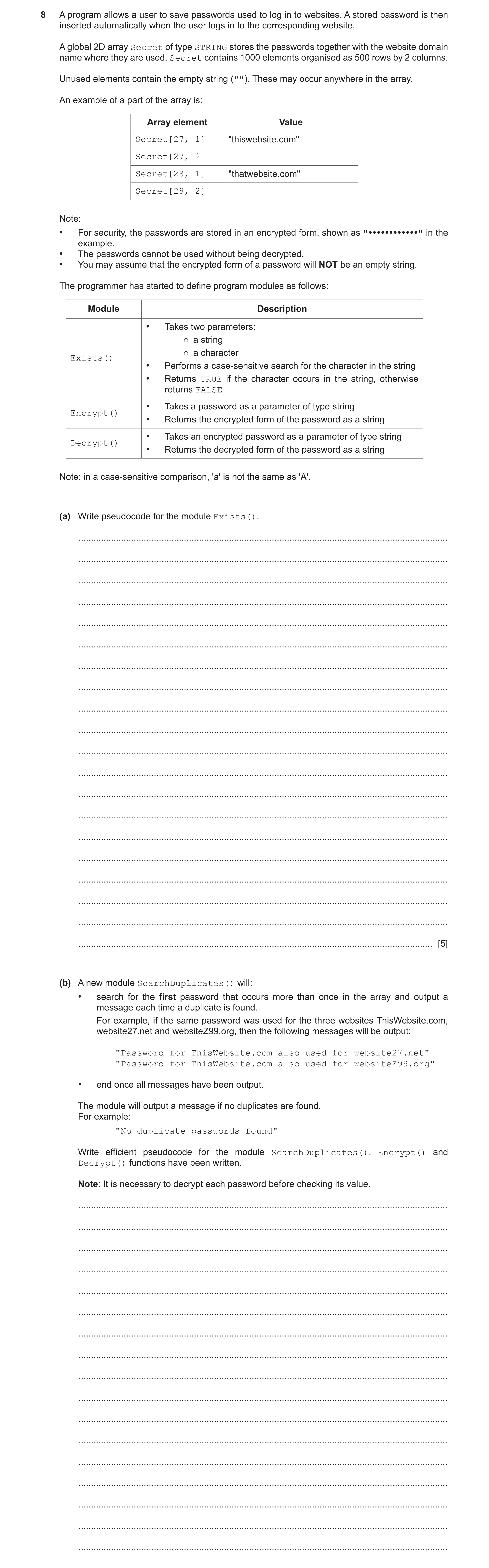
8 A program allows a user to save passwords used to log in to websites. A stored password is then inserted automatically when the user logs in to the corresponding website. A global 2D array Secret of type STRING stores the passwords together with the website domain name where they are used. Secret contains 1000 elements organised as 500 rows by 2 columns. Unused elements contain the empty string (""). These may occur anywhere in the array. An example of a part of the array is: Array element Value Secret[27, 1] "thiswebsite.com" Secret[27, 2] Secret[28, 1] "thatwebsite.com" Secret[28, 2] Note: • For security, the passwords are stored in an encrypted form, shown as "" in the example. • The passwords cannot be used without being decrypted. • You may assume that the encrypted form of a password will NOT be an empty string. The programmer has started to define program modules as follows: Module Description • Takes two parameters: ○ a string ○ a character Exists() • Performs a case-sensitive search for the character in the string • Returns TRUE if the character occurs in the string, otherwise returns FALSE • Takes a password as a parameter of type string Encrypt() • Returns the encrypted form of the password as a string • Takes an encrypted password as a parameter of type string Decrypt() • Returns the decrypted form of the password as a string Note: in a case-sensitive comparison, 'a' is not the same as 'A'. (a) Write pseudocode for the module Exists(). … … … … … … … … … … … … … … … … … … … … [5] (b) A new module SearchDuplicates() will: • search for the first password that occurs more than once in the array and output a message each time a duplicate is found. For example, if the same password was used for the three websites ThisWebsite.com, website27.net and websiteZ99.org, then the following messages will be output: "Password for ThisWebsite.com also used for website27.net" "Password for ThisWebsite.com also used for websiteZ99.org" • end once all messages have been output. The module will output a message if no duplicates are found. For example: "No duplicate passwords found" Write efficient pseudocode for the module SearchDuplicates(). Encrypt() and Decrypt() functions have been written. Note: It is necessary to decrypt each password before checking its value. … … … … … … … … … … … … … … … … …
5 marks
Mark scheme: 8(a) FUNCTION Exists(ThisString : STRING, Search : CHAR) 5 RETURNS BOOLEAN DECLARE Found : BOOLEAN DECLARE Index : INTEGER Found FALSE Index 1 WHILE Found = FALSE AND Index <= LENGTH(ThisString) IF MID(ThisString, Index, 1) = Search THEN Found TRUE ELSE Index Index + 1 ENDIF ENDWHILE RETURN Found ENDFUNCTION Marks as follows (Conditional loop solution): 1 Conditional loop while character not found and not end of string 2 Extract a char in a loop 3 Compare with parameter without case conversion in a loop 4 If match found, set termination logic in a loop 5 Return BOOLEAN value ALTERNATIVE (Using Count-controlled loop): FOR Index 1 TO LENGTH(ThisString) IF MID(ThisString, Index, 1) = Search THEN RETURN TRUE ENDIF NEXT Index RETURN FALSE Marks as follows (Count-controlled loop variant): 1 Loop for length of ThisString (allow from 0 or 1) 2 Extract a char in a loop 3 Compare with parameter without case conversion in a loop 4 If match found, immediate RETURN of TRUE 5 Return FALSE after the loop // Return Boolean if no immediate RETURN 8(b) PROCEDURE SearchDuplicates() 8 DECLARE IndexA, IndexB : INTEGER DECLARE ThisPassword, ThisValue : STRING DECLARE Duplicates : BOOLEAN Duplicates FALSE IndexA 1 WHILE Duplicates = FALSE AND IndexA < 500 ThisValue Secret[IndexA, 2] IF ThisValue <> "" THEN ThisPassword Decrypt(ThisValue) FOR IndexB IndexA + 1 TO 500 // IF Secret[IndexB, 2] <> "" THEN IF Decrypt(Secret[IndexB, 2]) = ThisPassword THEN OUTPUT "Password for " & Secret[IndexA, 1] & "also used for " & Secret[IndexB, 1] Duplicates TRUE ENDIF ENDIF NEXT IndexB ENDIF IndexA IndexA + 1 ENDWHILE IF Duplicates = FALSE THEN OUTPUT "No duplicate passwords found" ENDIF ENDPROCEDURE Marks as follows to Max 8: 1. (Any) conditional loop... 2. ... from 1 to 499 while (attempt at) no duplicate 3. Skip unused password 4. Use Decrypt() and assign return value to ThisPassword 5. Inner loop from outer loop index + 1 to 500 searching for duplicates 6. Compare ThisPassword with subsequent passwords (after use of Decrypt()) 7. If match found, set outer loop termination 8. and attempt an Output message giving duplicate 9. Output 'No duplicate passwords found' message if no duplicates found after the loop 8(c) One mark for each point that is referenced: 6 1 Initialise password to empty string at the start and return (attempted) password at the end of the function 2 Two loops to generate 3 groups of 4 characters // One loop to generate 12 / 14 characters 3 Use of RandomChar()to generate a character in a loop 4 Reject character if Exists()returns TRUE, otherwise form string in a loop 5 (Attempt to) use hyphens to link three groups 6 Three groups of four characters generated correctly with hyphens and without duplication (completely working algorithm)
This question in 9618/22 May/June 2022
Q15 · The following table contains pseudocode examples 9618/23 May/June 2022
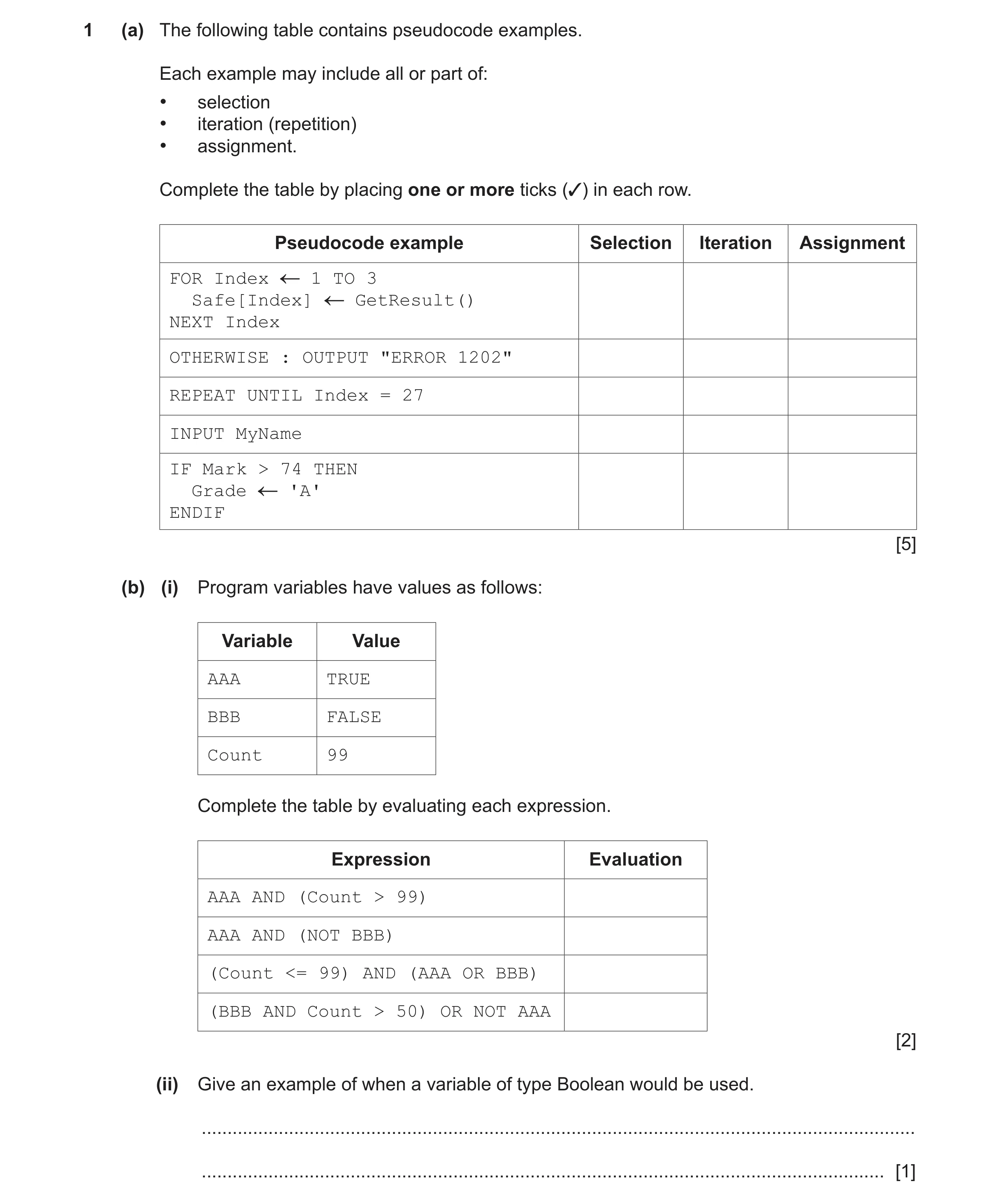
1 (a) The following table contains pseudocode examples. Each example may include all or part of: • selection • iteration (repetition) • assignment. Complete the table by placing one or more ticks (✓) in each row. Pseudocode example Selection Iteration Assignment FOR Index 1 TO 3 Safe[Index] GetResult() NEXT Index OTHERWISE : OUTPUT "ERROR 1202" REPEAT UNTIL Index = 27 INPUT MyName IF Mark > 74 THEN Grade 'A' ENDIF [5] (b) (i) Program variables have values as follows: Variable Value AAA TRUE BBB FALSE Count 99 Complete the table by evaluating each expression. Expression Evaluation AAA AND (Count > 99) AAA AND (NOT BBB) (Count <= 99) AND (AAA OR BBB) (BBB AND Count > 50) OR NOT AAA [2] (ii) Give an example of when a variable of type Boolean would be used. … … [1]
8 marks
Mark scheme: Question Answer Marks 1(a) One mark per row 5 1(b)(i) 1 mark for any two rows correct 2 1 mark for all rows correct 1(b)(ii) One mark from: 1 To terminate a (conditional) loop when a value has been found When the variable can take only one of two possible values (Accept by example): When a variable is recording when an action has been done e.g. Yes or No // light is on
This question in 9618/23 May/June 2022
Q16 · A program will store attendance data about each employee of a company 9618/23 May/June 2022
5 A program will store attendance data about each employee of a company. The data will be held in a record structure of type Employee. The fields that will be needed are as shown: Field Typical value Comment EmployeeNumber 123 A numeric value starting from 1 Name "Smith,Eric" Format: <last name>','<first name> Department "1B" May contain letters and numbers Born 13/02/2006 Must not be before 04/02/1957 Attendance 97.40 Represents a percentage (a) (i) Write pseudocode to declare the record structure for type Employee. … … … … … … … [4] (ii) A 1D array Staff containing 500 elements will be used to store the employee records. Write pseudocode to declare the Staff array. … … [2] (b) There may be more records in the array than there are employees in the company. In this case, some records of the array will be unused. (i) State why it is good practice to have a standard way to indicate unused array elements. … … [1] (ii) Give one way of indicating an unused record in the Staff array. … … [1] (c) A procedure Absentees() will output the EmployeeNumber and the Name of all employees who have an Attendance value of 90.00 or less. Write pseudocode for the procedure Absentees(). Assume that the Staff array is global. … … … … … … … … … … … … … … … … … … [4]
12 marks
Mark scheme: 5(a)(i) TYPE Employee 4 DECLARE EmployeeNumber : INTEGER DECLARE Name : STRING DECLARE Department : STRING DECLARE Born : DATE DECLARE Attendance : REAL ENDTYPE One mark for each: 1. TYPE Employee and ENDTYPE 2. Fields: EmployeeNumber and Name and Department 3. Field: Born 4. Field: Attendance 5(a)(ii) DECLARE Staff : ARRAY [1:500] OF Employee 2 One mark per underlined phrase 5(b)(i) Example answers to Max 1: 1 So that unused elements may be recognised when processing / searching Otherwise the element may contain old / unexpected data 5(b)(ii) Use of any 'impossible' field value, for example: 1 An EmployeeNumber field. e.g. < 1 An empty string / impossible string e.g. "EMPTY" for name or department DOB a long time ago... Zero / Negative value for attendance 5(c) PROCEDURE Absentees() 4 DECLARE Index : INTEGER FOR Index 1 TO 500 IF Staff[Index].EmployeeNumber <> −1 THEN // not empty IF Staff[Index].Attendance <= 90 THEN OUTPUT Staff[Index].EmployeeNumber OUTPUT Staff[Index].Name ENDIF ENDIF NEXT Index ENDPROCEDURE Marks as follows to Max 4: 1 Procedure heading and ending and declaration of loop counter 2 loop through 500 elements 3 attempt to skip unused element 4 test Staff[Index].Attendance <= 90 in a loop 5 if so, output EmployeeNumber and Name fields in a loop
This question in 9618/23 May/June 2022
Q17 · The factorial of a number is the product of all the integers from 1 to that number 9618/23 May/June 2022
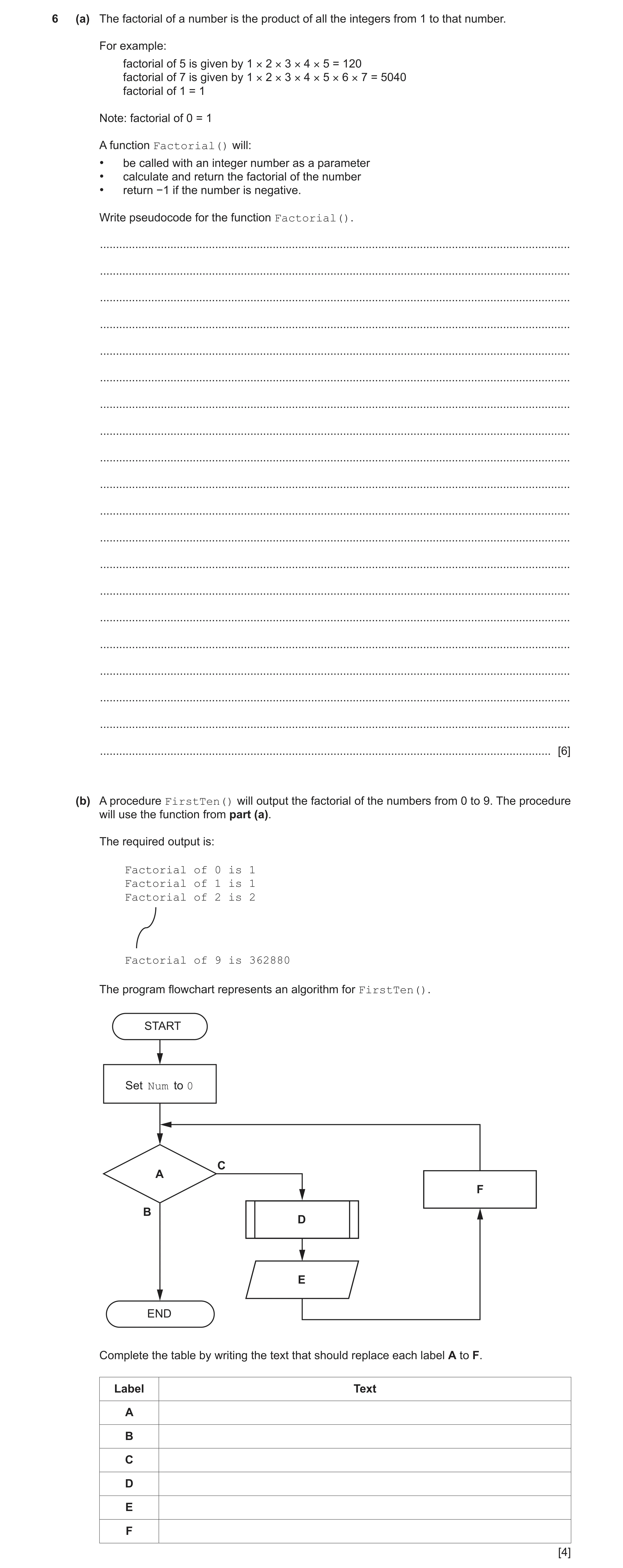
6 (a) The factorial of a number is the product of all the integers from 1 to that number. For example: factorial of 5 is given by 1 × 2 × 3 × 4 × 5 = 120 factorial of 7 is given by 1 × 2 × 3 × 4 × 5 × 6 × 7 = 5040 factorial of 1 = 1 Note: factorial of 0 = 1 A function Factorial() will: • be called with an integer number as a parameter • calculate and return the factorial of the number • return −1 if the number is negative. Write pseudocode for the function Factorial(). … … … … … … … … … … … … … … … … … … … … [6] (b) A procedure FirstTen() will output the factorial of the numbers from 0 to 9. The procedure will use the function from part (a). The required output is: Factorial of 0 is 1 Factorial of 1 is 1 Factorial of 2 is 2 Factorial of 9 is 362880 The program flowchart represents an algorithm for FirstTen(). START Set Num to 0 C A F B D E END Complete the table by writing the text that should replace each label A to F. Label Text A B C D E F [4]
10 marks
Mark scheme: 6(a) FUNCTION Factorial(ThisNum : INTEGER) RETURNS INTEGER 6 DECLARE Value : INTEGER IF ThisNum < 0 THEN Value -1 ELSE Value 1 WHILE ThisNum <> 0 Value Value * ThisNum ThisNum ThisNum – 1 ENDWHILE ENDIF RETURN Value ENDFUNCTION Marks as follows to Max 6: 1 Function heading and ending including parameter and return value 2 Declaration and initialisation (to 1) of local Integer Value for result 3 Check for illegal value (< 0) 4 (Conditional) loop while ThisNum not zero // loop for ThisNum iterations 5 Attempt to form answer by successive multiplication 6 Completely correct MP5 7 Return INTEGER value correctly in both cases: ThisNum < 0 and >= 0 ALTERNATIVE RECURSIVE SOLUTION: FUNCTION Factorial(ThisNum : INTEGER) RETURNS INTEGER IF ThisNum > 1 THEN RETURN ThisNum * Factorial(ThisNum – 1) ELSE IF ThisNum = 1 OR ThisNum = 0 THEN RETURN 1 ELSE RETURN -1 ENDIF ENDIF ENDFUNCTION Marks as follows: 1 Function heading and ending including parameter and return value 2 Test for ThisNum > 1 3 and if so return product of Thisnum and Factorial(ThisNum-1) 4 Check for special case... 5 ...return 1 for 0 and 1 and return −1 for negative values 6 Return INTEGER value (correctly in all cases) 6(b) One mark for: 4 Rows A, B AND C Each of rows D, E and F Label Text A Is Num > 9? B YES C NO D Set <Identifier> to Factorial(Num) E OUTPUT "Factorial of ", Num, " is ", <Identifier> F Set Num to Num + 1 // Increment Num
This question in 9618/23 May/June 2022
Q18 · The following pseudocode algorithm attempts to check whether a string is a valid email… 9618/21 Oct/Nov 2022
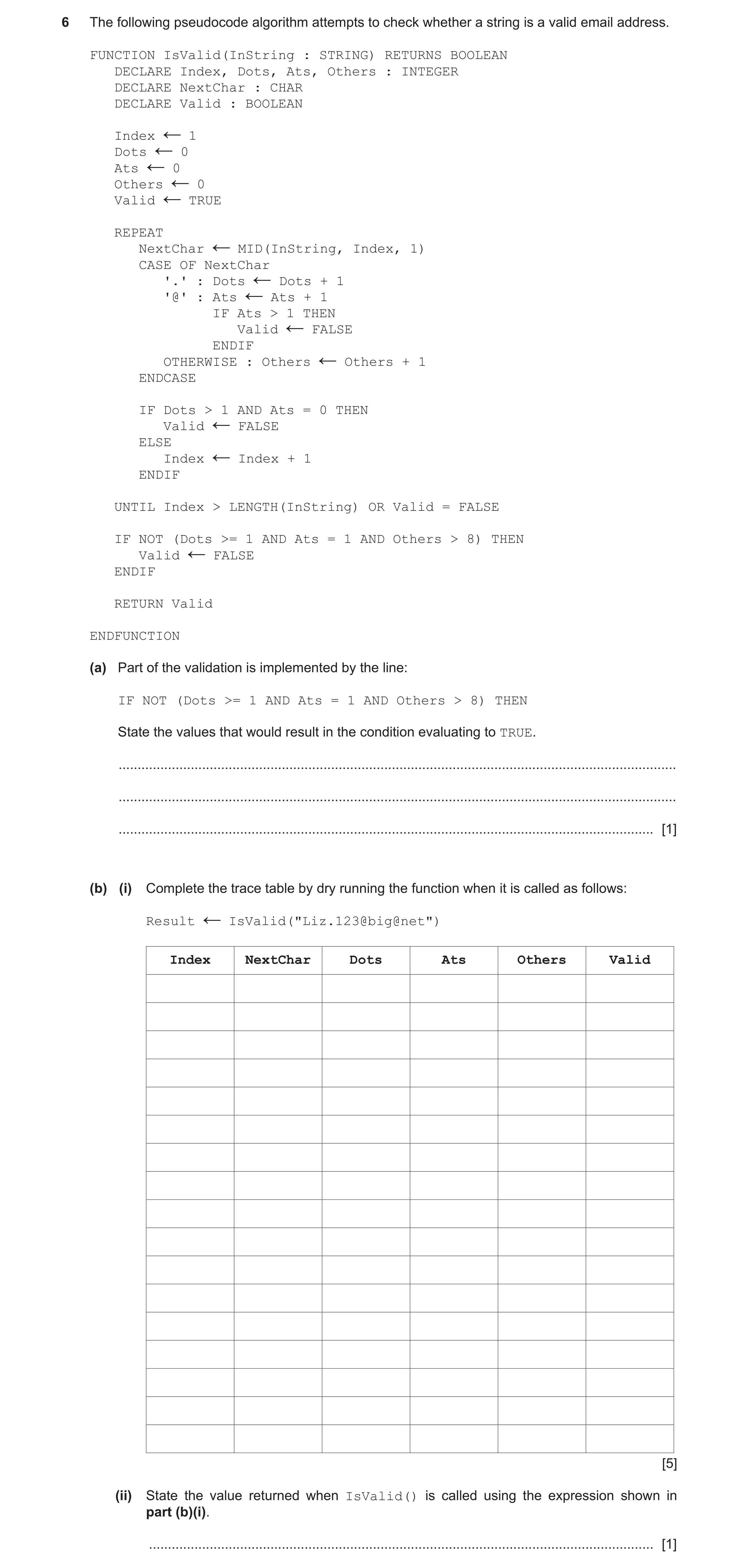
6 The following pseudocode algorithm attempts to check whether a string is a valid email address. FUNCTION IsValid(InString : STRING) RETURNS BOOLEAN DECLARE Index, Dots, Ats, Others : INTEGER DECLARE NextChar : CHAR DECLARE Valid : BOOLEAN Index 1 ← Dots 0 ← Ats 0 ← Others 0 ← Valid TRUE ← REPEAT NextChar MID(InString, Index, 1) ← CASE OF NextChar '.' : Dots Dots + 1 ← '@' : Ats Ats + 1 ← IF Ats > 1 THEN Valid FALSE ← ENDIF OTHERWISE : Others Others + 1 ← ENDCASE IF Dots > 1 AND Ats = 0 THEN Valid FALSE ← ELSE Index Index + 1 ← ENDIF UNTIL Index > LENGTH(InString) OR Valid = FALSE IF NOT (Dots >= 1 AND Ats = 1 AND Others > 8) THEN Valid FALSE ← ENDIF RETURN Valid ENDFUNCTION (a) Part of the validation is implemented by the line: IF NOT (Dots >= 1 AND Ats = 1 AND Others > 8) THEN State the values that would result in the condition evaluating to TRUE. … … … [1] (b) (i) Complete the trace table by dry running the function when it is called as follows: Result IsValid("Liz.123@big@net") ← Index NextChar Dots Ats Others Valid [5] (ii) State the value returned when IsValid() is called using the expression shown in part (b)(i). … [1]
7 marks
Mark scheme: 6(a) One mark for any part correct (accept equivalent wording) (Max 1): 1 • Condition evaluates to TRUE if bracket contents evaluate to FALSE: • Bracket contents evaluate to FALSE if: • Dots: zero / less than one or • Ats: not equal to one or • Others: less than nine 6(b)(i) One mark for each area as outlined: 5 Ats Index NextChar Dots Others Valid 0 0 0 TRUE 1 'L' 1 2 'i' 2 3 'z' 3 4 '.' 1 5 '1' 4 6 '2' 5 7 '3' 6 8 '@' 1 9 'b' 7 10 'i' 8 11 'g' 9 12 '@' 2 FALSE 6(b)(ii) FALSE 1
This question in 9618/21 Oct/Nov 2022
Q19 · The program flowchart represents a simple algorithm 9618/22 Oct/Nov 2022
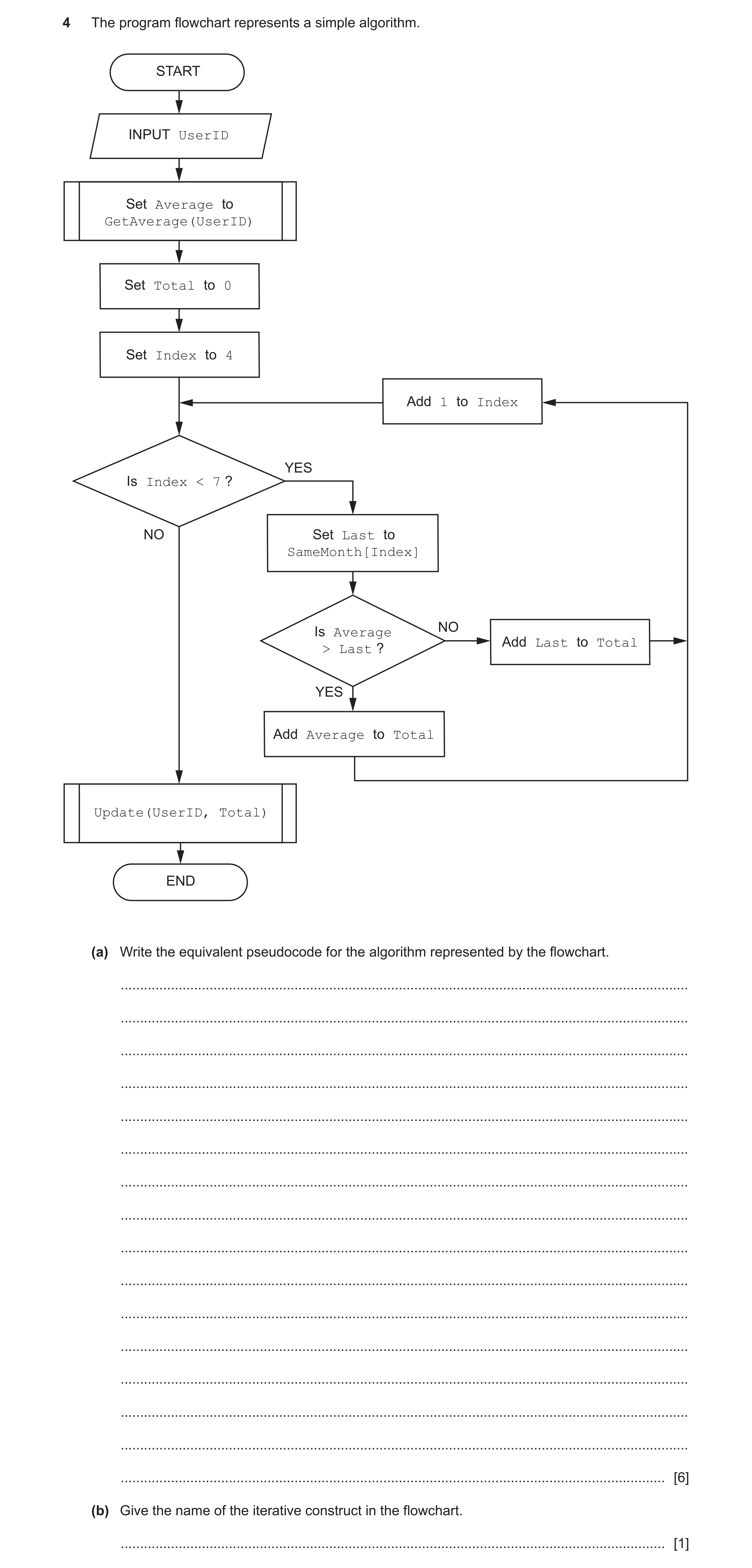
4 The program flowchart represents a simple algorithm. START INPUT UserID Set Average to GetAverage(UserID) Set Total to 0 Set Index to 4 Add 1 to Index YES Is Index < 7 ? NO Set Last to SameMonth[Index] NO Is Average Add Last to Total ? > Last YES Add Average to Total Update(UserID, Total) END (a) Write the equivalent pseudocode for the algorithm represented by the flowchart. … … … … … … … … … … … … … … … … [6] (b) Give the name of the iterative construct in the flowchart. … [1]
7 marks
Mark scheme: 4(a) One mark per point: 6 1 Input UserID and use of GetAverage()and assignment 2 Initialisation of Total to zero and Index to 4 3 Conditional loop with Index from 4 to 6 4 Assignment of Last from element SameMonth[Index] in a loop 5 Structure: IF...THEN...ELSE...ENDIF in a loop 6 Correct assignments and final call to Update()after the loop INPUT UserID Average GetAverage(UserID) Total 0 Index 4 WHILE Index < 7 // REPEAT Last SameMonth[Index] IF Average > Last THEN Total Total + Average ELSE Total Total + Last ENDIF Index Index + 1 ENDWHILE // UNTIL Index = 7 CALL Update(UserID, Total) Alternative solution using FOR loop: One mark per point FOR loop solution: 1 Input UserID and use of GetAverage()and assignment 2 Initialisation of Total to zero 3 loop Index from 4 to 6 4 Assignment of Last from array SameMonth in a loop 5 Comparison IF...THEN...ELSE...ENDIF in a loop 6 Appropriate assignments in a loop AND final call to Update()after the loop INPUT UserID Average GetAverage(UserID) Total 0 FOR Index 4 TO 6 Last SameMonth[Index] IF Average > Last THEN Total Total + Average ELSE Total Total + Last ENDIF NEXT Index CALL Update(UserID, Total) 4(b) Pre-condition (loop) / count-controlled (loop) 1
This question in 9618/22 Oct/Nov 2022
Q20 · Components are weighed during manufacture 9618/23 Oct/Nov 2022
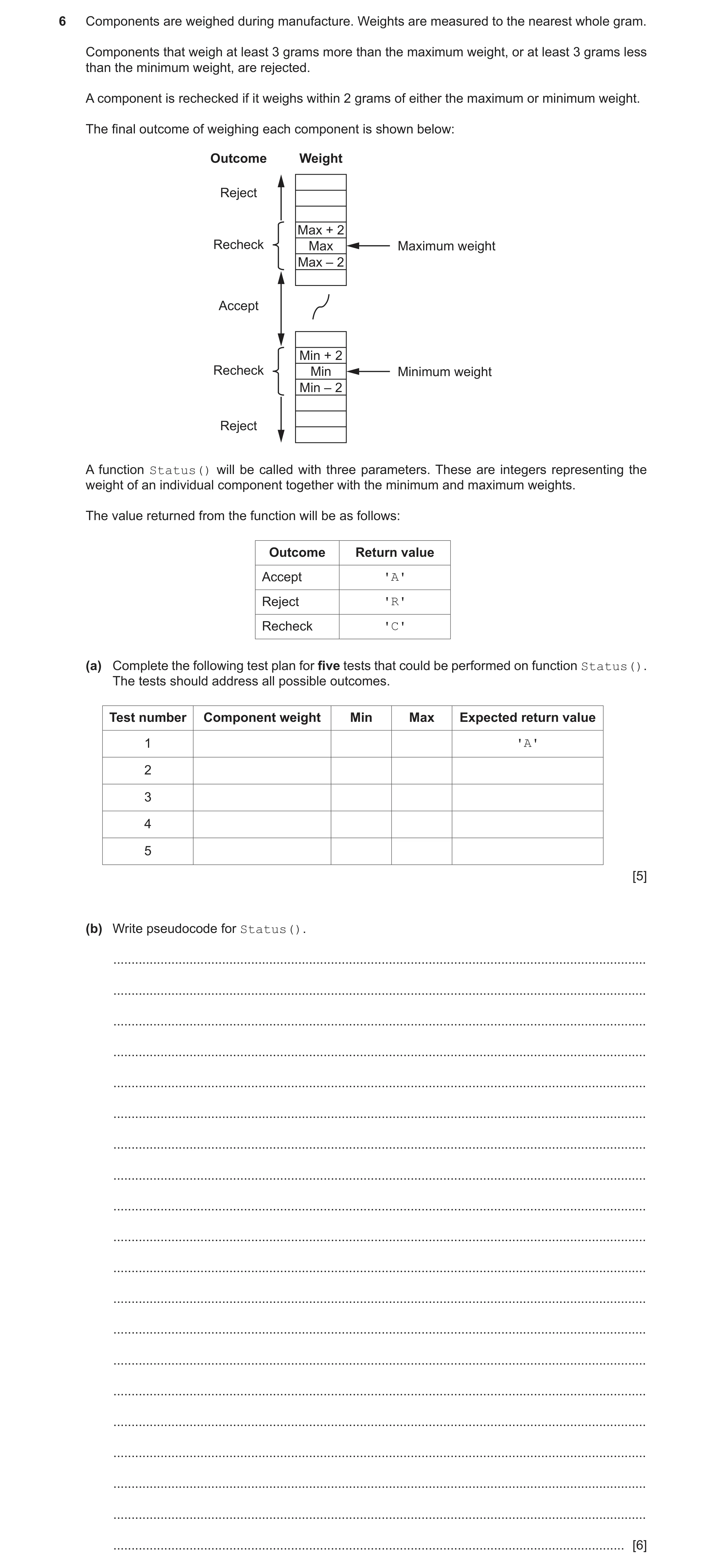
6 Components are weighed during manufacture. Weights are measured to the nearest whole gram. Components that weigh at least 3 grams more than the maximum weight, or at least 3 grams less than the minimum weight, are rejected. A component is rechecked if it weighs within 2 grams of either the maximum or minimum weight. The final outcome of weighing each component is shown below: Outcome Weight Reject Max + 2 Recheck Max Maximum weight Max – 2 Accept Min + 2 Recheck Min Minimum weight Min – 2 Reject A function Status() will be called with three parameters. These are integers representing the weight of an individual component together with the minimum and maximum weights. The value returned from the function will be as follows: Outcome Return value Accept 'A' Reject 'R' Recheck 'C' (a) Complete the following test plan for five tests that could be performed on function Status(). The tests should address all possible outcomes. Test number Component weight Min Max Expected return value 1 'A' 2 3 4 5 [5] (b) Write pseudocode for Status(). … … … … … … … … … … … … … … … … … … … … [6]
11 marks
Mark scheme: 6(a) One mark per row 5 Examples: Test Component Expected return Min Max number weight value 1 300 290 315 'A' 2 > 317 290 315 'R' 3 317 290 315 'C' 4 288 290 315 'C' 5 < 288 290 315 'R' 6(b) One mark per point: 6 1 Function heading and ending including parameters 2 Declaration of local variable for Result / alt mechanism 3 Check for Reject 4 Check for Accept 5 Check for Recheck (or just default to third option) 6 Return Result following a reasonable attempt Function Status(Actual, Min, Max : INTEGER) RETURNS CHAR DECLARE Result : CHAR CONSTANT Accept = 'A' CONSTANT Reject = 'R' CONSTANT ReCheck = 'C' Result ReCheck //Check if reject IF Actual > Max + 2 OR Actual < Min – 2 THEN Result Reject ENDIF //Check if acceptable IF Actual < Max - 2 AND Actual > Min + 2 THEN Result Accept ENDIF RETURN Result ENDFUNCTION
This question in 9618/23 Oct/Nov 2022
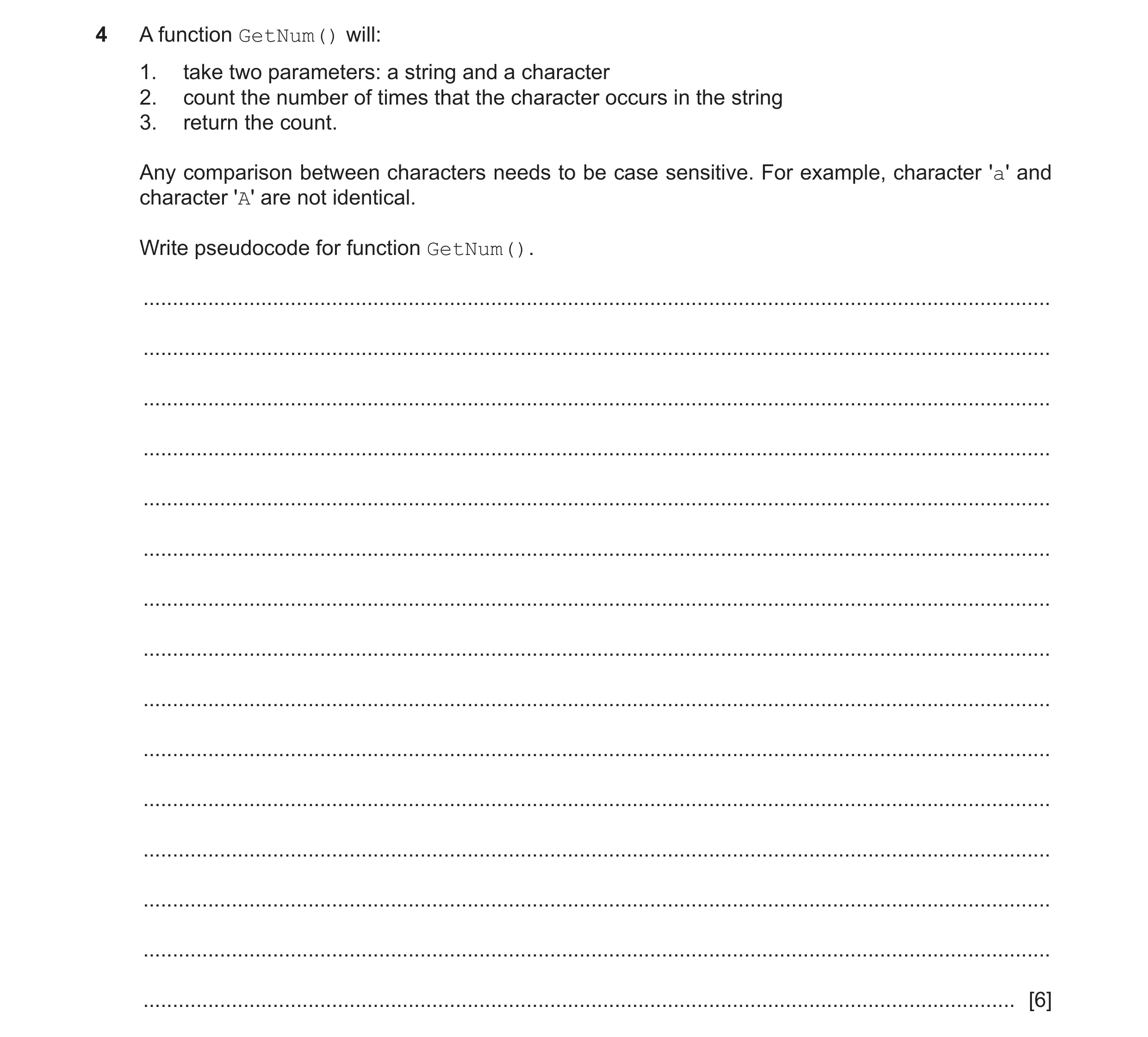
Q21 · A function GetNum() will: 1 9618/22 May/June 2023
4 A function GetNum() will: 1. take two parameters: a string and a character 2. count the number of times that the character occurs in the string 3. return the count. Any comparison between characters needs to be case sensitive. For example, character 'a' and character 'A' are not identical. Write pseudocode for function GetNum(). … … … … … … … … … … … … … … … [6]
6 marks
Mark scheme: 4 Function GetNum(ThisString : STRING, ThisChar : CHAR) 6 RETURNS INTEGER DECLARE Index, Count : INTEGER Count 0 FOR Index 1 TO LENGTH(ThisString) IF MID(ThisString, Index, 1) = ThisChar THEN Count Count + 1 ENDIF NEXT Index RETURN Count ENDFUNCTION Mark as follows: 1 Function heading and end, including parameters and return type 2 Declare local Integers for Index and Count 3 Loop for length of ThisString 4 Extract a character and compare with parameter in a loop 5 Increment Count if match in a loop 6 Return Count after loop
This question in 9618/22 May/June 2023
Q22 · A procedure Square() will take an integer value in the range 1 to 9 as a parameter and… 9618/22 May/June 2023
6 A procedure Square() will take an integer value in the range 1 to 9 as a parameter and output a number square. The boundary of a number square is made up of the character representing the parameter value. The inside of the number square is made up of the asterisk character (*). Parameter value 1 2 3 4 ... 9 9 99 9 9 9 4 33 1 22 22 ** * 9* * 33 444* * 3* 333 ** ** *** 444 ... 9**99 4** 4444 9*** **** Output 9*9*** *** ********* *** 9** 9 ******* 99999999 999999999 The pseudocode OUTPUT command starts each output on a new line. For example, the following three OUTPUT statements would result in the outputs as shown: OUTPUT "Hello" OUTPUT "ginger" OUTPUT "cat" Resulting output: Hello ginger cat Write pseudocode for procedure Square(). Parameter validation is not required. … … … … … … … … … … … … … … … … … … … … … … … … … … … … … … … … [6]
6 marks
Mark scheme: 6 Example of iterative solution: 6 PROCEDURE Square(Dim : INTEGER) DECLARE Count : INTEGER DECLARE ThisChar : CHAR DECLARE StringA, StringB : STRING CONSTANT FILLER = '*' StringA "" ThisChar NUM_TO_STR(Dim) FOR Count 1 TO Dim StringA StringA & ThisChar //build up first & last line NEXT Count StringB ThisChar FOR Count 1 TO Dim - 2 StringB StringB & FILLER //build up intermediate line NEXT Count StringB StringB & ThisChar // add final digit OUTPUT StringA FOR Count 1 TO Dim - 2 OUTPUT StringB NEXT Count IF Dim <> 1 THEN OUTPUT StringA ENDIF ENDPROCEDURE For loop-based solutions, mark as follows: 1 Procedure heading and ending including parameter 2 Loop using parameter, containing attempt to construct first line / last line 3 Construct first line / last line 4 Attempt at loop to construct intermediate line 5 Output first / last line of square when Dim > 2 6 Output all intermediate lines in a loop 7 Correct output of first two squares Note: Max 6 marks 6 Example of selection-based solution: PROCEDURE Square(Dim : INTEGER) DECLARE Count : INTEGER CASE OF Dim 1 : OUTPUT "1" 2 : OUTPUT "22" OUTPUT "22" 3 : OUTPUT "333" OUTPUT "3*3" OUTPUT "333" 4 : OUTPUT "4444" FOR Count 1 TO 2 OUTPUT "4**4" NEXT Count OUTPUT "4444" 5 : OUTPUT "55555" FOR Count 1 TO 3 OUTPUT "5***5" NEXT Count OUTPUT "55555" 6 : OUTPUT "666666" FOR Count 1 TO 4 OUTPUT "6****6" NEXT Count OUTPUT "666666" 7 : OUTPUT "7777777" FOR Count 1 TO 5 OUTPUT "7*****7" NEXT Count OUTPUT "7777777" 8 : OUTPUT "88888888" FOR Count 1 TO 6 OUTPUT "8******8" NEXT Count OUTPUT "88888888" 9 : OUTPUT "999999999" FOR Count 1 TO 7 OUTPUT "9*******9" NEXT Count OUTPUT "999999999" ENDCASE ENDPROCEDURE For in-line / selection-based solutions, mark as follows: 1 Procedure heading and ending including parameter 2 Correct use of parameter to select all required squares 3 Correct output of first two squares 4 At least six squares correctly output 5 At least one loop to output lines with multiple asterisks 6 All number squares output correctly
This question in 9618/22 May/June 2023
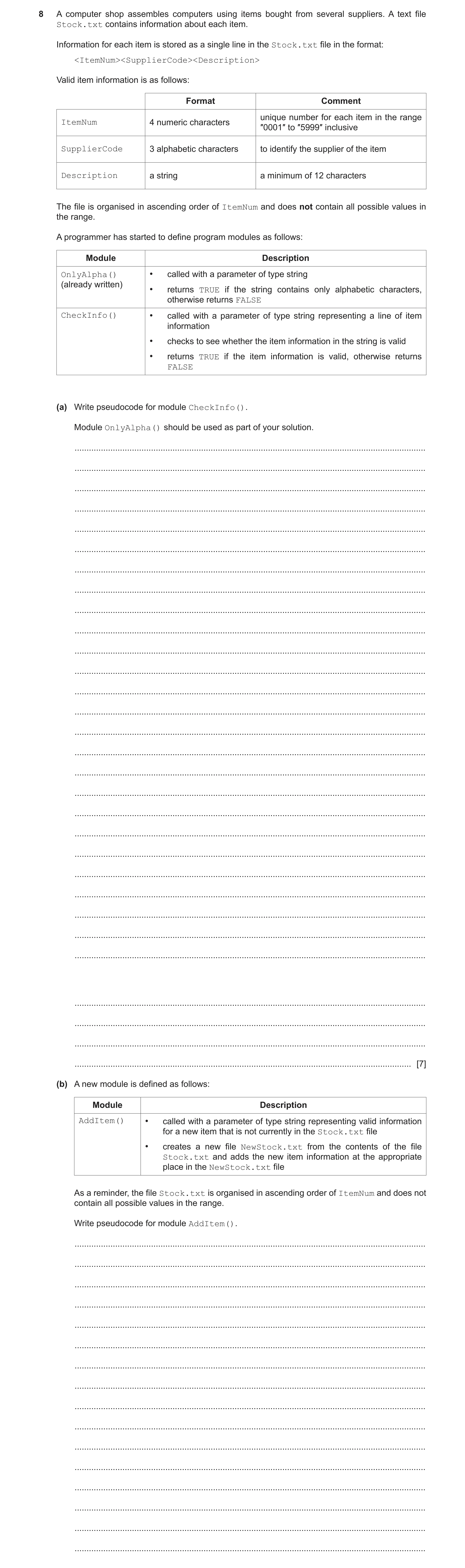
Q23 · A computer shop assembles computers using items bought from several suppliers 9618/22 May/June 2023
8 A computer shop assembles computers using items bought from several suppliers. A text file Stock.txt contains information about each item. Information for each item is stored as a single line in the Stock.txt file in the format: <ItemNum><SupplierCode><Description> Valid item information is as follows: Format Comment unique number for each item in the range ItemNum 4 numeric characters ″0001″ to ″5999″ inclusive SupplierCode 3 alphabetic characters to identify the supplier of the item Description a string a minimum of 12 characters The file is organised in ascending order of ItemNum and does not contain all possible values in the range. A programmer has started to define program modules as follows: Module Description OnlyAlpha() • called with a parameter of type string (already written) • returns TRUE if the string contains only alphabetic characters, otherwise returns FALSE CheckInfo() • called with a parameter of type string representing a line of item information • checks to see whether the item information in the string is valid • returns TRUE if the item information is valid, otherwise returns FALSE (a) Write pseudocode for module CheckInfo(). Module OnlyAlpha() should be used as part of your solution. … … … … … … … … … … … … … … … … … … … … … … … … … … … … … … [7] (b) A new module is defined as follows: Module Description AddItem() • called with a parameter of type string representing valid information for a new item that is not currently in the Stock.txt file • creates a new file NewStock.txt from the contents of the file Stock.txt and adds the new item information at the appropriate place in the NewStock.txt file As a reminder, the file Stock.txt is organised in ascending order of ItemNum and does not contain all possible values in the range. Write pseudocode for module AddItem(). … … … … … … … … … … … … … … … …
7 marks
Mark scheme: 8(a) FUNCTION CheckInfo(NewLine: STRING) RETURNS BOOLEAN 7 DECLARE ThisNum : STRING DECLARE Index : INTEGER IF LENGTH(NewLine) < 19 THEN RETURN FALSE ENDIF FOR Index 1 TO 4 IF NOT IS_NUM(MID(NewLine, Index, 1)) THEN RETURN FALSE ENDIF NEXT Index ThisNum LEFT(Newline, 4) IF ThisNum < "0001" OR ThisNum > "5999" THEN RETURN FALSE ENDIF IF NOT OnlyAlpha(MID(Newline, 5, 3)) THEN RETURN FALSE ENDIF RETURN TRUE ENDFUNCTION Mark as follows: 1 Test length of parameter 2 Extract first 4 characters of parameter (as ItemNum) 3 Test first four characters are all numeric 4 Test ItemNum in range "0001" to "5999" 5 Extract characters 5 to 7 of parameter (as SupplierCode) 6 Use of OnlyAlpha()with extracted SupplierCode 7 Return BOOLEAN value correctly in all cases, must have been declared as local 8(b) PROCEDURE AddItem(NewLine : STRING) 7 DECLARE NewItemNum, ThisItemNum : STRING OPENFILE "Stock.txt" FOR READ OPENFILE "NewStock.txt" FOR WRITE NewItemNum LEFT(NewLine, 4) WHILE NOT EOF("Stock.txt") READFILE("Stock.txt", ThisLine) ThisItemNum LEFT(ThisLine, 4) IF ThisItemNum > NewItemNum THEN WRITEFILE("NewStock.txt", NewLine) // write New Line... NewItemNum "9999" // ...once only ENDIF WRITEFILE("NewStock.txt", ThisLine) ENDWHILE IF NewItemNum <> "9999" THEN WRITEFILE("NewStock.txt", NewLine) //New last line in the file ENDIF CLOSEFILE "Stock.txt" CLOSEFILE "NewStock.txt" ENDPROCEDURE Mark as follows: 1 Open both files, in correct modes, and subsequently close 2 Conditional loop until end of file Stock.txt 3 Read a line from Stock.txt AND extract ThisItemNum in a loop 4 Test ThisItemNum > NewItemNum then write NewLine to NewStock.txt 5 ...including mechanism to only do this once only 6 Write line read from Stock to NewStock 7 Deal with the case where NewLine is the new last line 8(b) Example of array-based solution: PROCEDURE AddItem(NewLine : STRING) DECLARE ThisItemNum, ThisLine : STRING DECLARE Temp : ARRAY [1:5999] OF STRING DECLARE Index : INTEGER FOR Index 1 TO 5999 Temp[Index] "" //Initialise array NEXT Index Index STR_TO_NUM(LEFT(NewLine, 4)) Temp[Index] NewLine //Add new line to array OPENFILE "Stock.txt" FOR READ WHILE NOT EOF("Stock.txt") READFILE("Stock.txt", ThisLine) Index STR_TO_NUM(LEFT(ThisLine, 4)) Temp[Index] ThisLine //Add line from file to array ENDWHILE CLOSEFILE "Stock.txt" OPENFILE "NewStock.txt" FOR WRITE FOR Index 1 TO 5999 IF Temp[Index] <> "" THEN //Write non-blank element... WRITEFILE("NewStock.txt", Temp[Index]) //...to new file ENDIF NEXT Index CLOSEFILE "NewStock.txt" ENDPROCEDURE Mark as follows: 1 Open both files, in correct modes, and subsequently close 2 Declare AND initialise Temp array 3 Store NewLine in appropriate array element 4 Loop until end of file Stock.txt 5 Read a line from Stock.txt AND extract Index in a loop 6 Assign line read to appropriate array element in a loop 7 Loop through array, writing non-blank elements to file NewStock.txt 8(c) One mark for method: 3 Method: Stub testing Two marks for description: The modules SuppExists() and CheckSupplier() are replaced by dummy modules ...which return a known result / contain an output statement to show they have been called
This question in 9618/22 May/June 2023
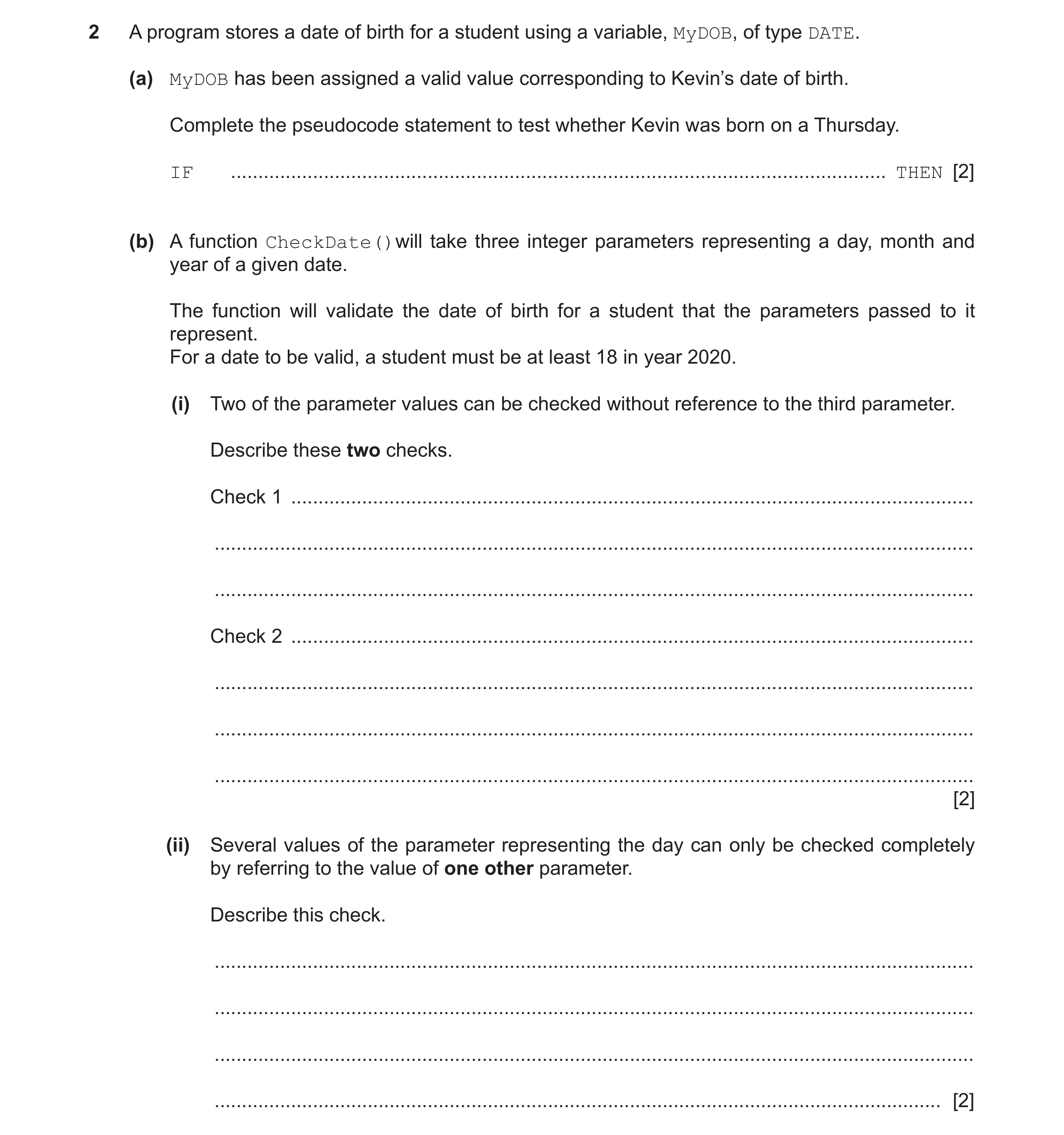
Q24 · A program stores a date of birth for a student using a variable, MyDOB, of type DATE 9618/23 May/June 2023
2 A program stores a date of birth for a student using a variable, MyDOB, of type DATE. (a) MyDOB has been assigned a valid value corresponding to Kevin’s date of birth. Complete the pseudocode statement to test whether Kevin was born on a Thursday. IF … THEN [2] (b) A function CheckDate()will take three integer parameters representing a day, month and year of a given date. The function will validate the date of birth for a student that the parameters passed to it represent. For a date to be valid, a student must be at least 18 in year 2020. (i) Two of the parameter values can be checked without reference to the third parameter. Describe these two checks. Check 1 … … … Check 2 … … … … [2] (ii) Several values of the parameter representing the day can only be checked completely by referring to the value of one other parameter. Describe this check. … … … … [2]
6 marks
Mark scheme: 2(a) One mark for each underlined part 2 IF DAYINDEX(MyDOB) = 5 THEN 2(b)(i) MP1 Value for month is between 1 and 12 (inclusive) 2 MP2 Value of year is <= 2002 2(b)(ii) MP1 Reference to month and day 2 MP2 Clear description for a check that the day number matches with a relevant month (Either day matches with month // month matches with day)
This question in 9618/23 May/June 2023
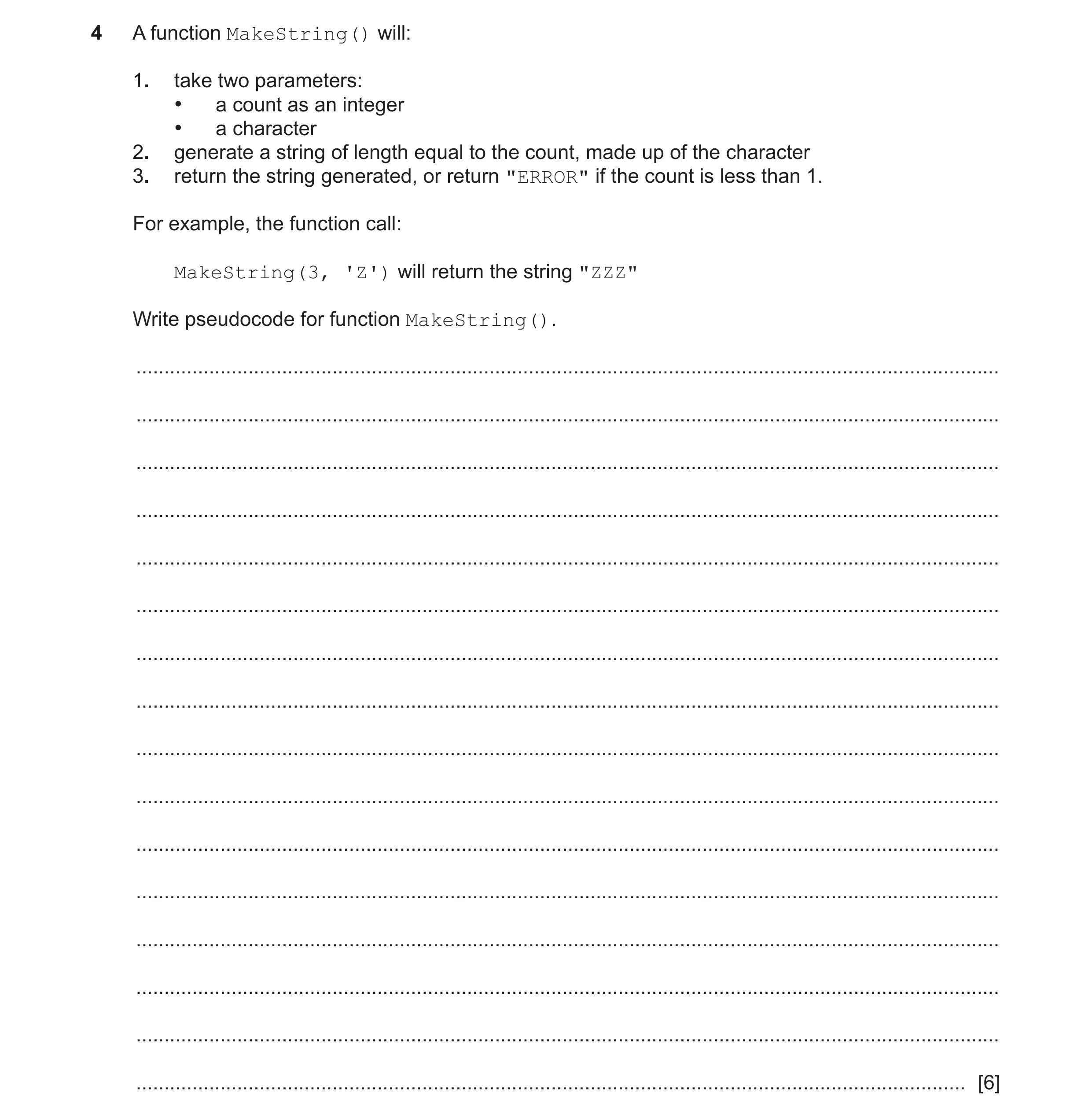
Q25 · A function MakeString() will: 1 9618/23 May/June 2023
4 A function MakeString() will: 1. take two parameters: • a count as an integer • a character 2. generate a string of length equal to the count, made up of the character 3. return the string generated, or return "ERROR" if the count is less than 1. For example, the function call: MakeString(3, 'Z') will return the string "ZZZ" Write pseudocode for function MakeString(). … … … … … … … … … … … … … … … … [6]
6 marks
Mark scheme: 4 FUNCTION MakeString(Count : INTEGER, AChar : CHAR) 6 RETURNS STRING DECLARE MyString : STRING DECLARE Index : INTEGER IF Count < 1 THEN MyString "ERROR" ELSE MyString "" FOR Index 1 TO Count MyString MyString & AChar NEXT Index ENDIF RETURN MyString ENDFUNCTION MP1 Function heading and end including parameters and return type MP2 Declaration of locals Index and MyString MP3 Test for Count < 1 and if true, assign "ERROR" to MyString / Immediate RETURN MP4 Loop for Count iterations MP5 Use of concatenate – must have been initialised in a loop MP6 Return STRING (correctly in both cases)
This question in 9618/23 May/June 2023
 4 / 45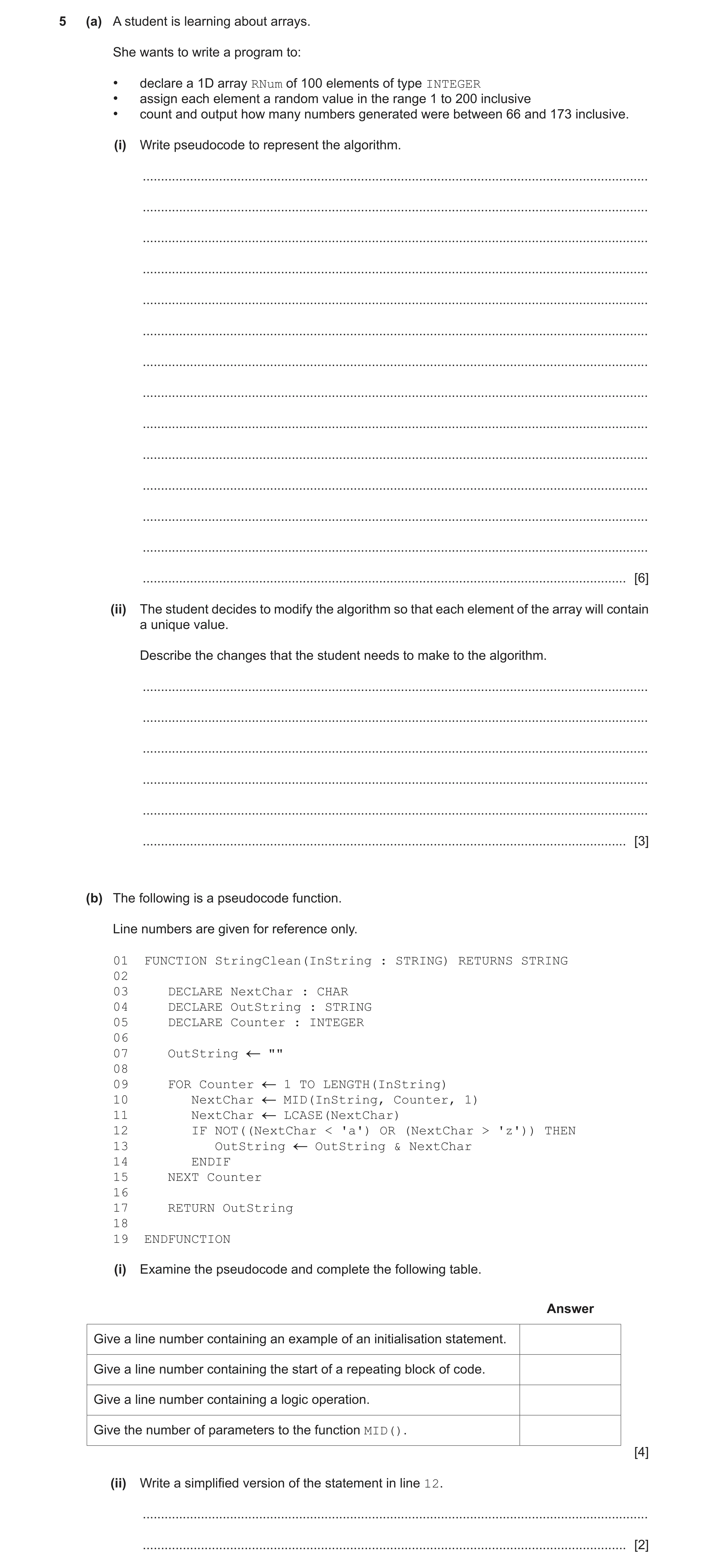
 12 / 45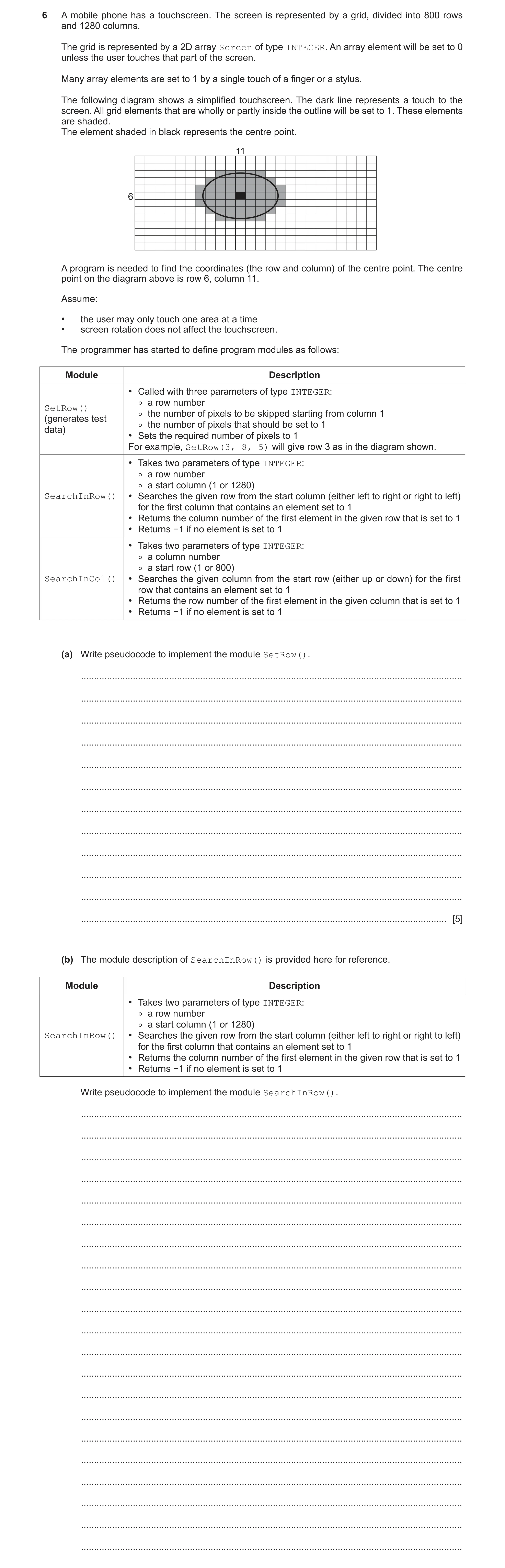
 17 / 45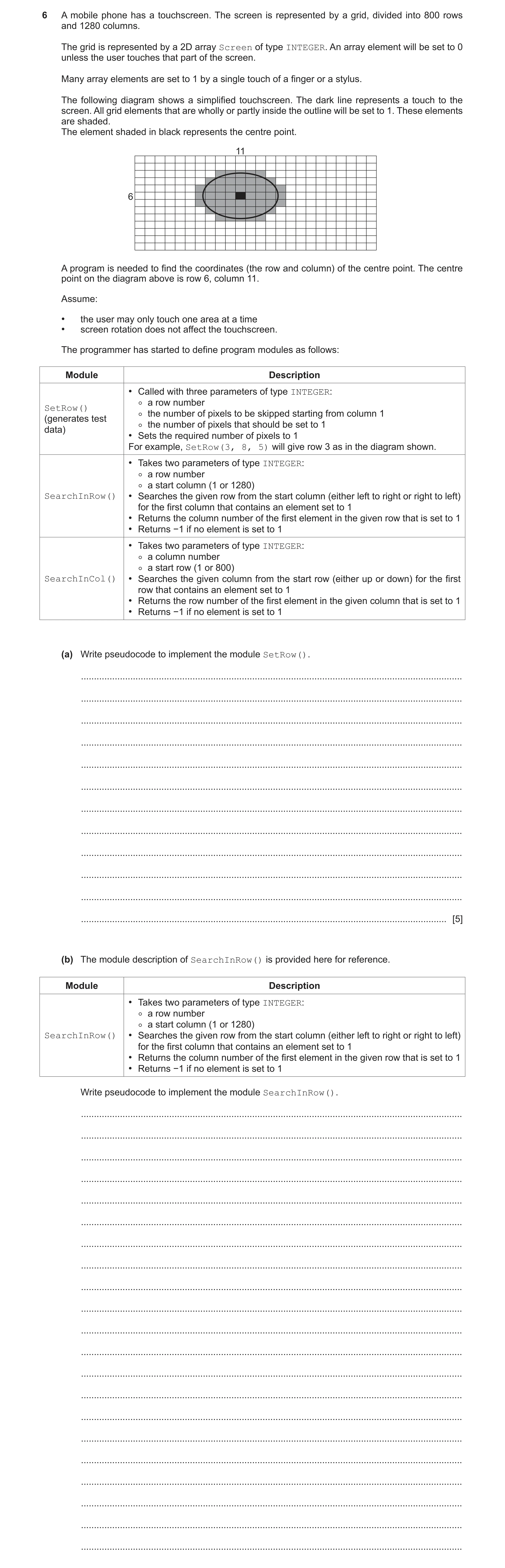
 28 / 45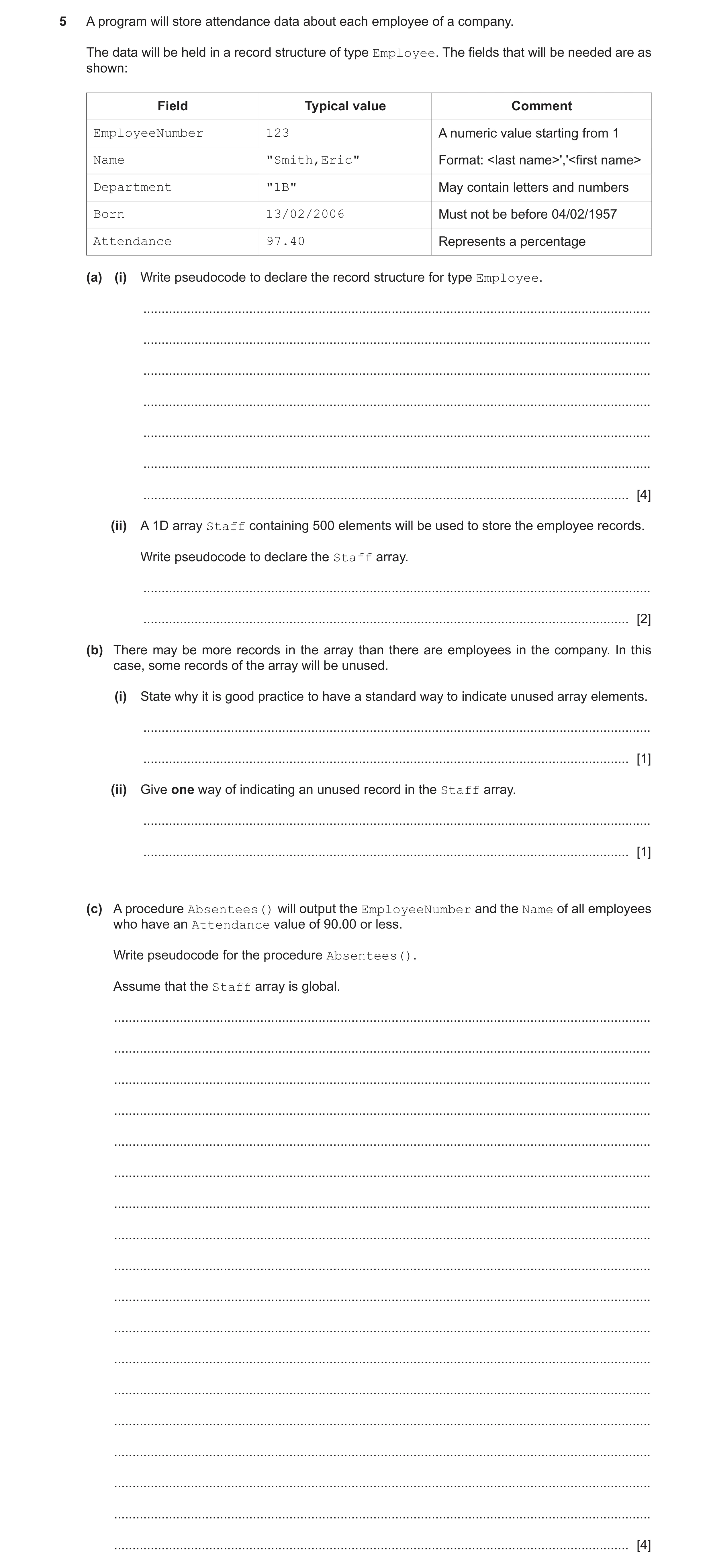
 38 / 45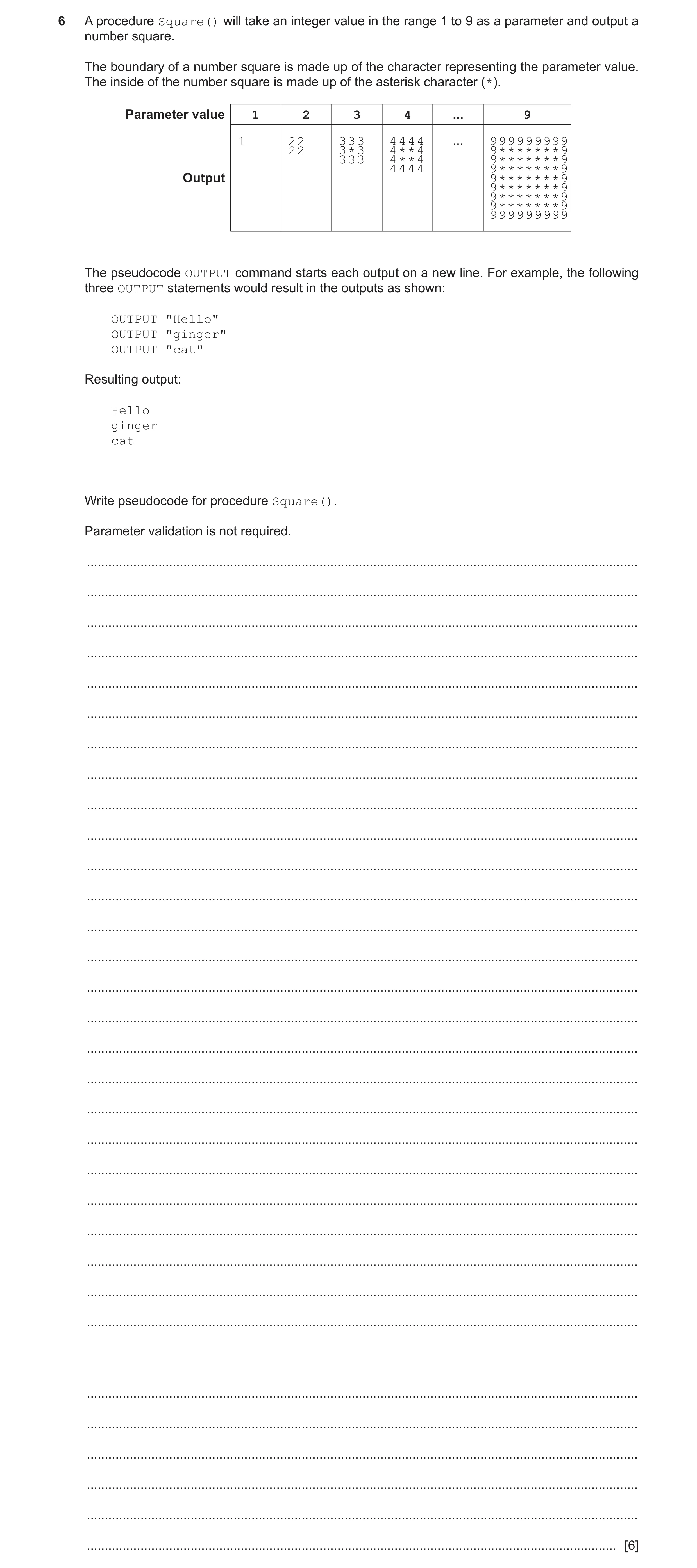
 44 / 45
 45 / 45
 10
10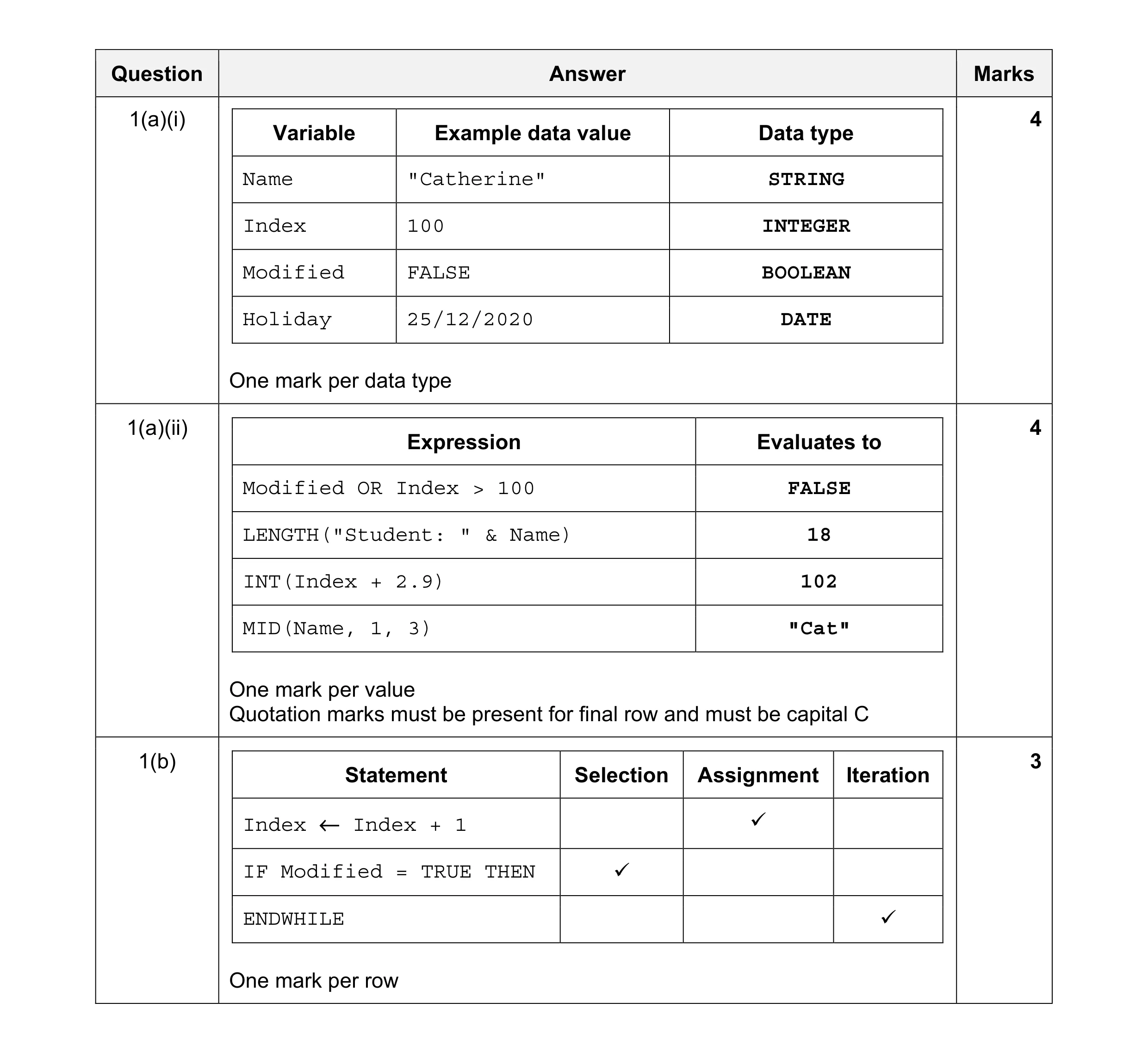 11
11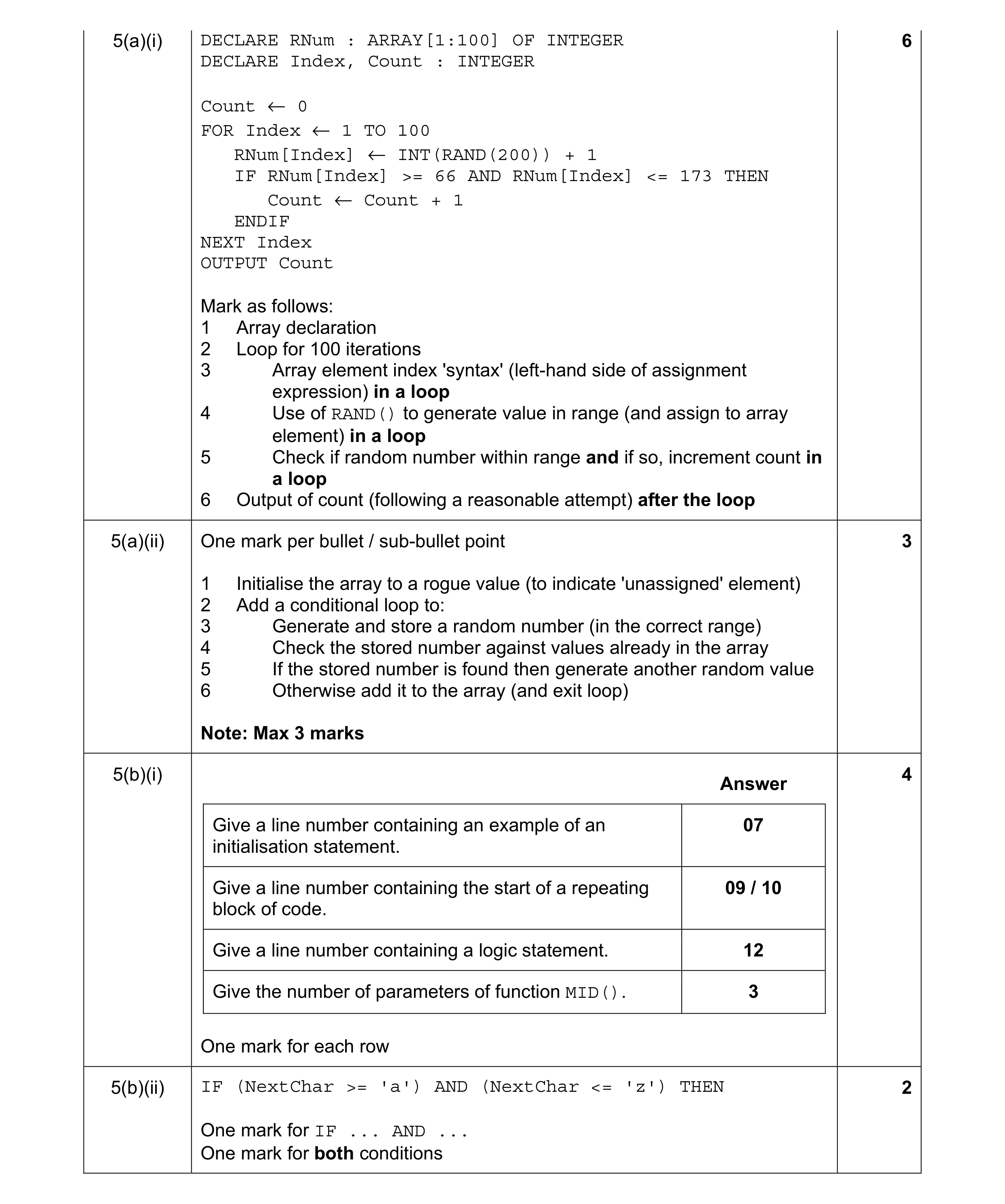 15
15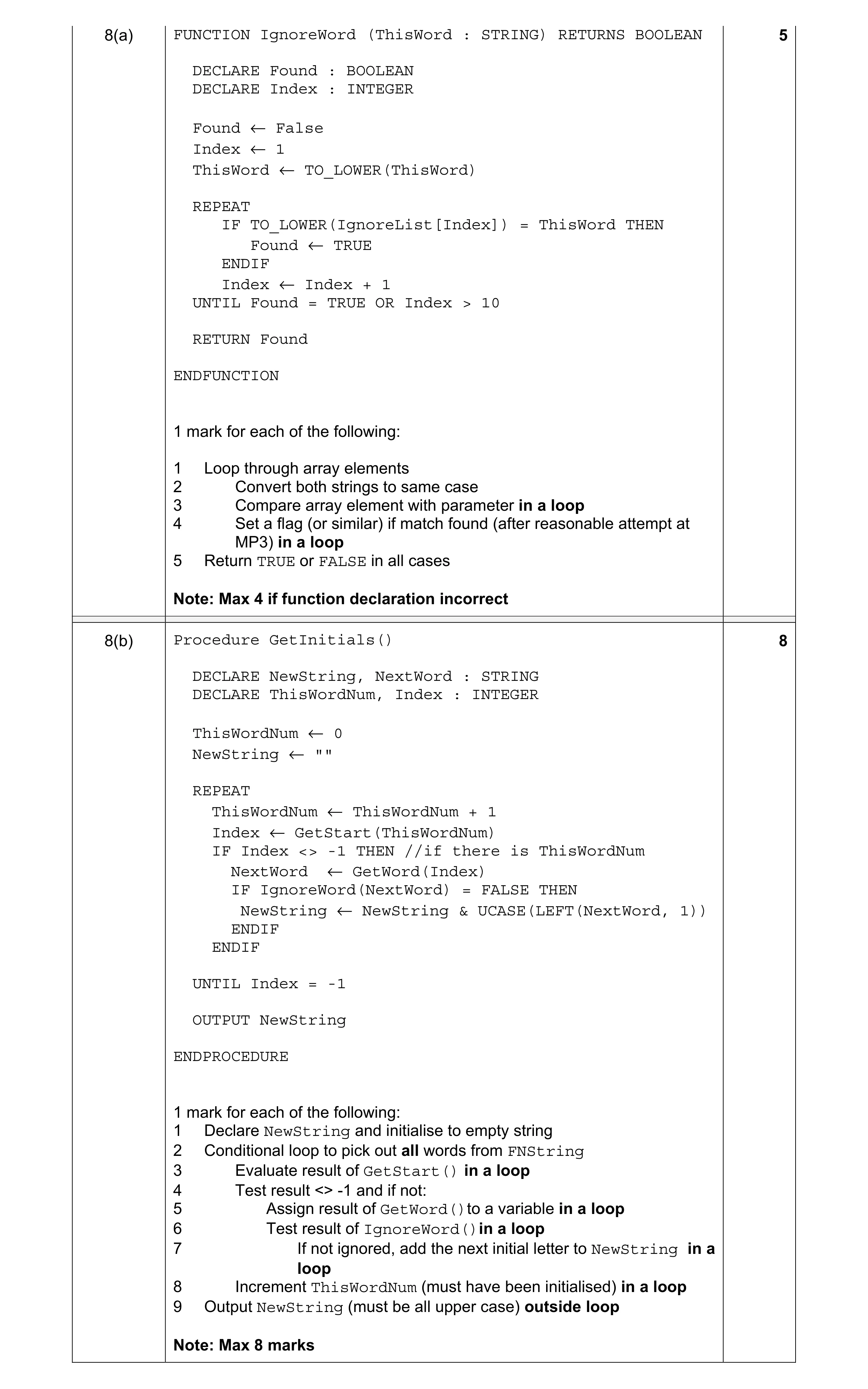 5
5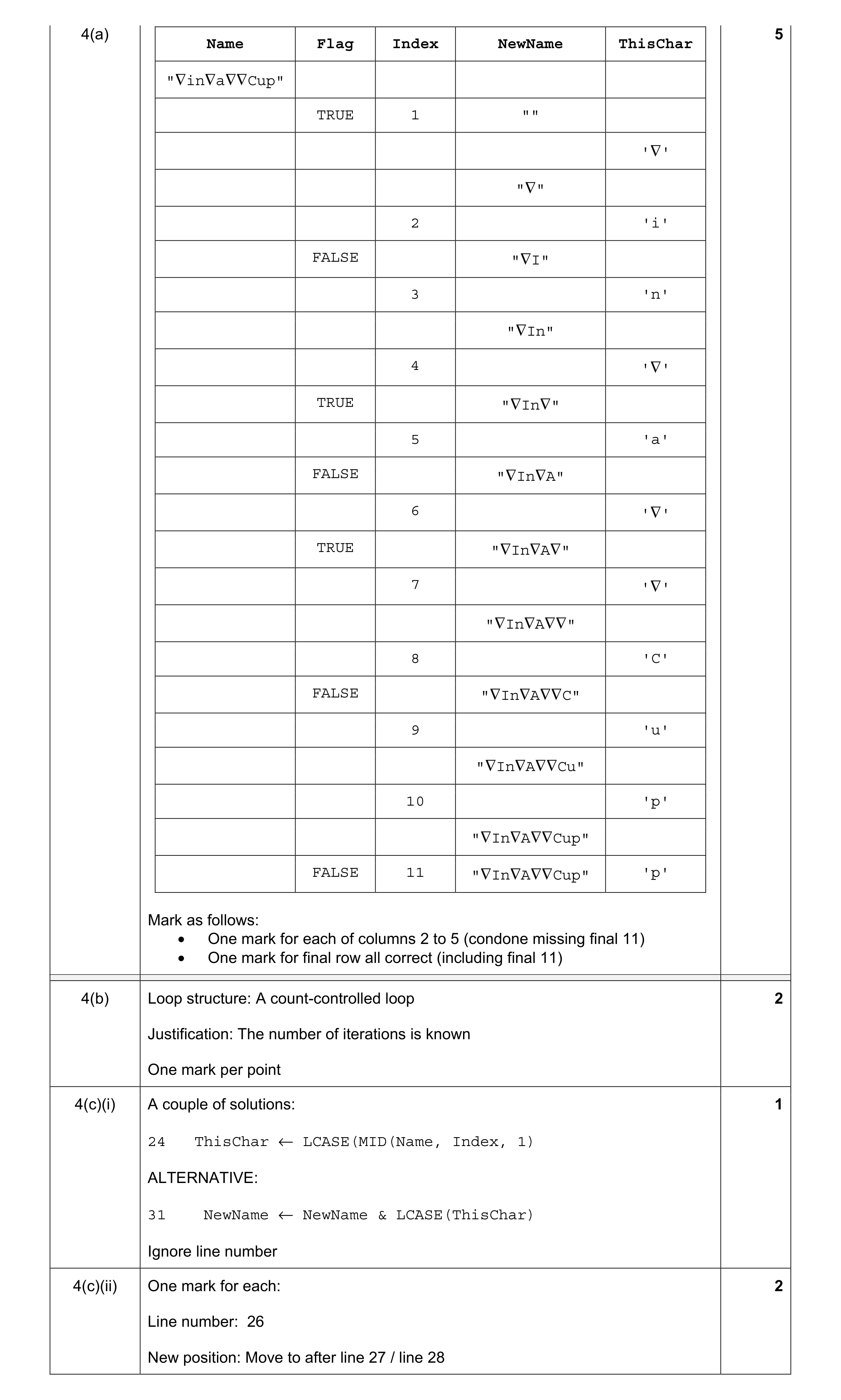 10
10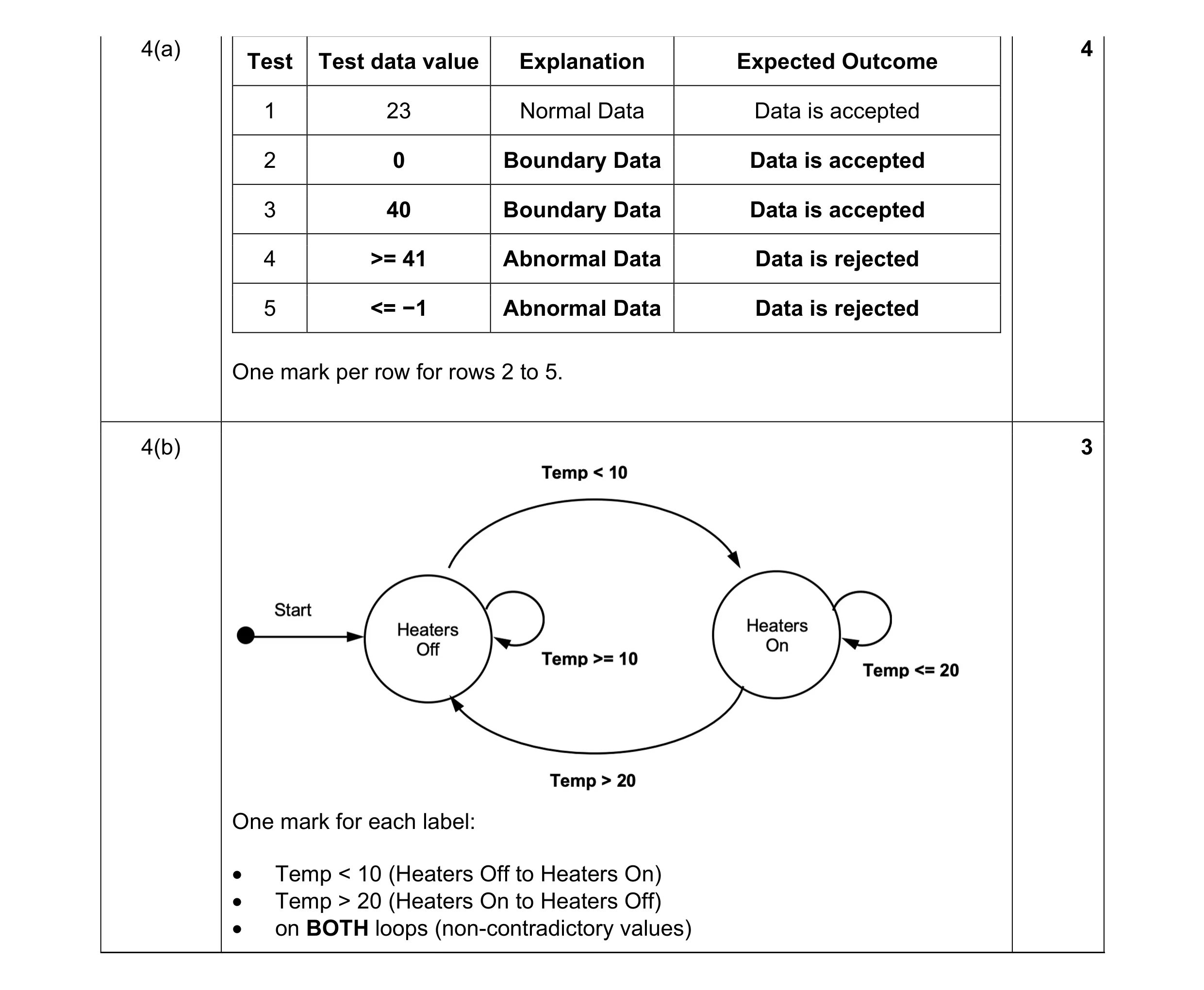 7
7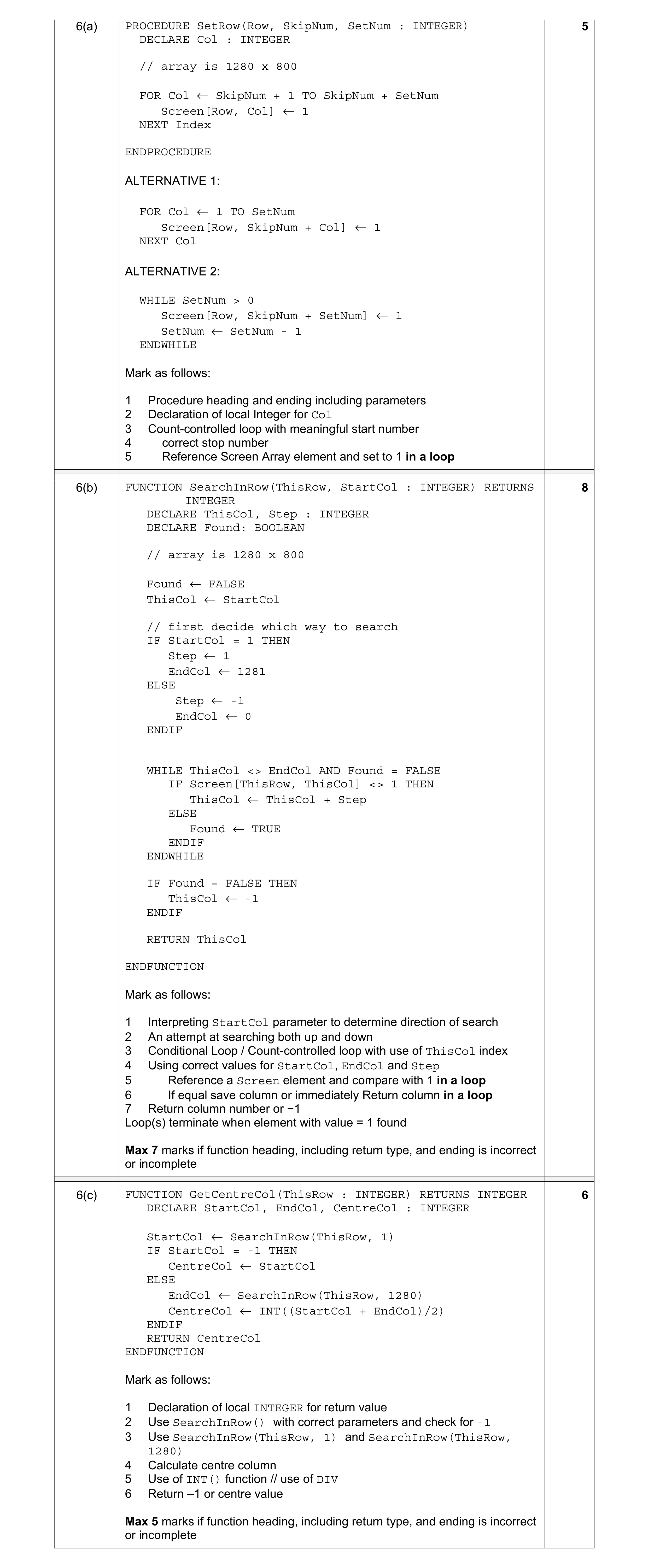 5
5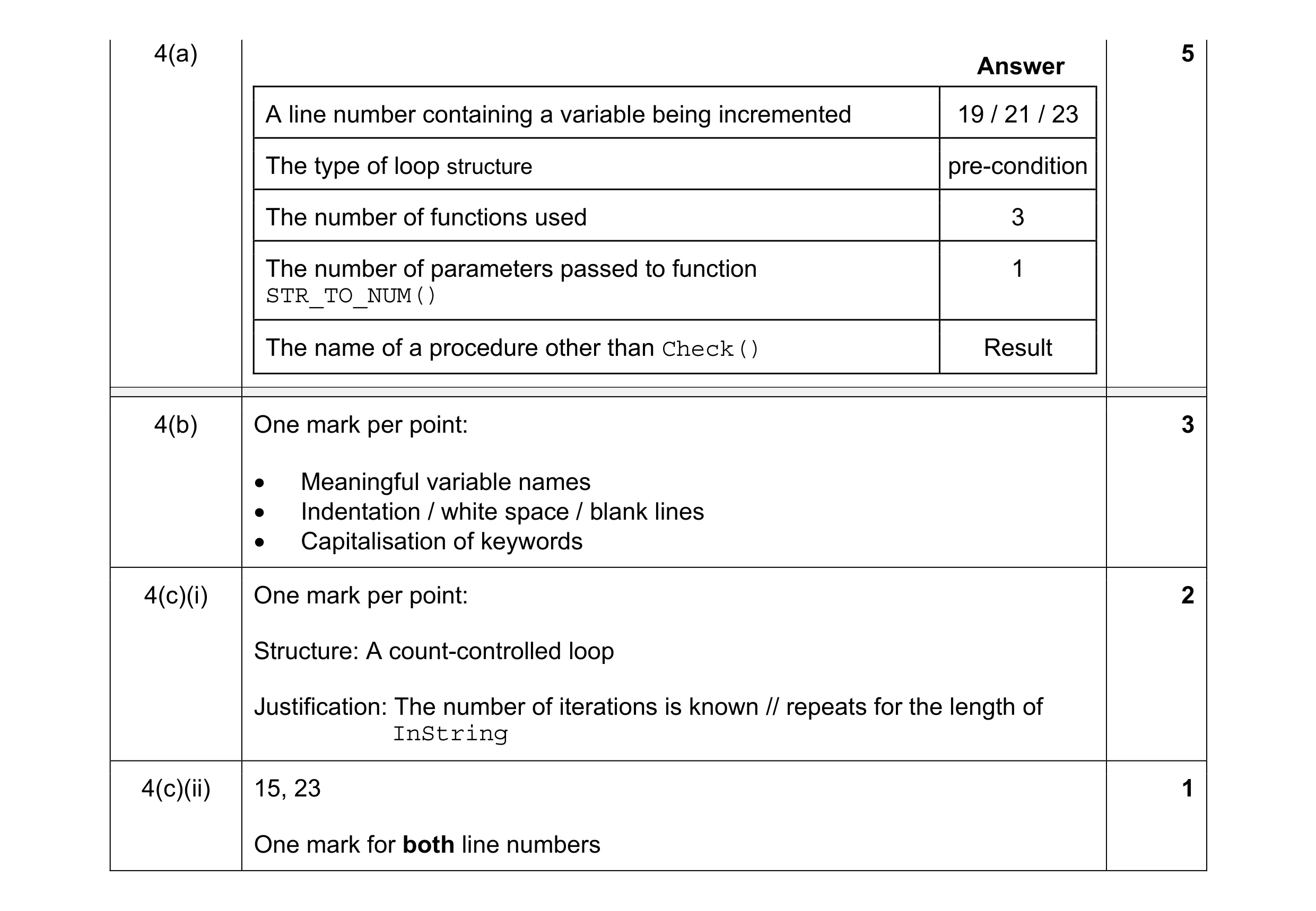 11
11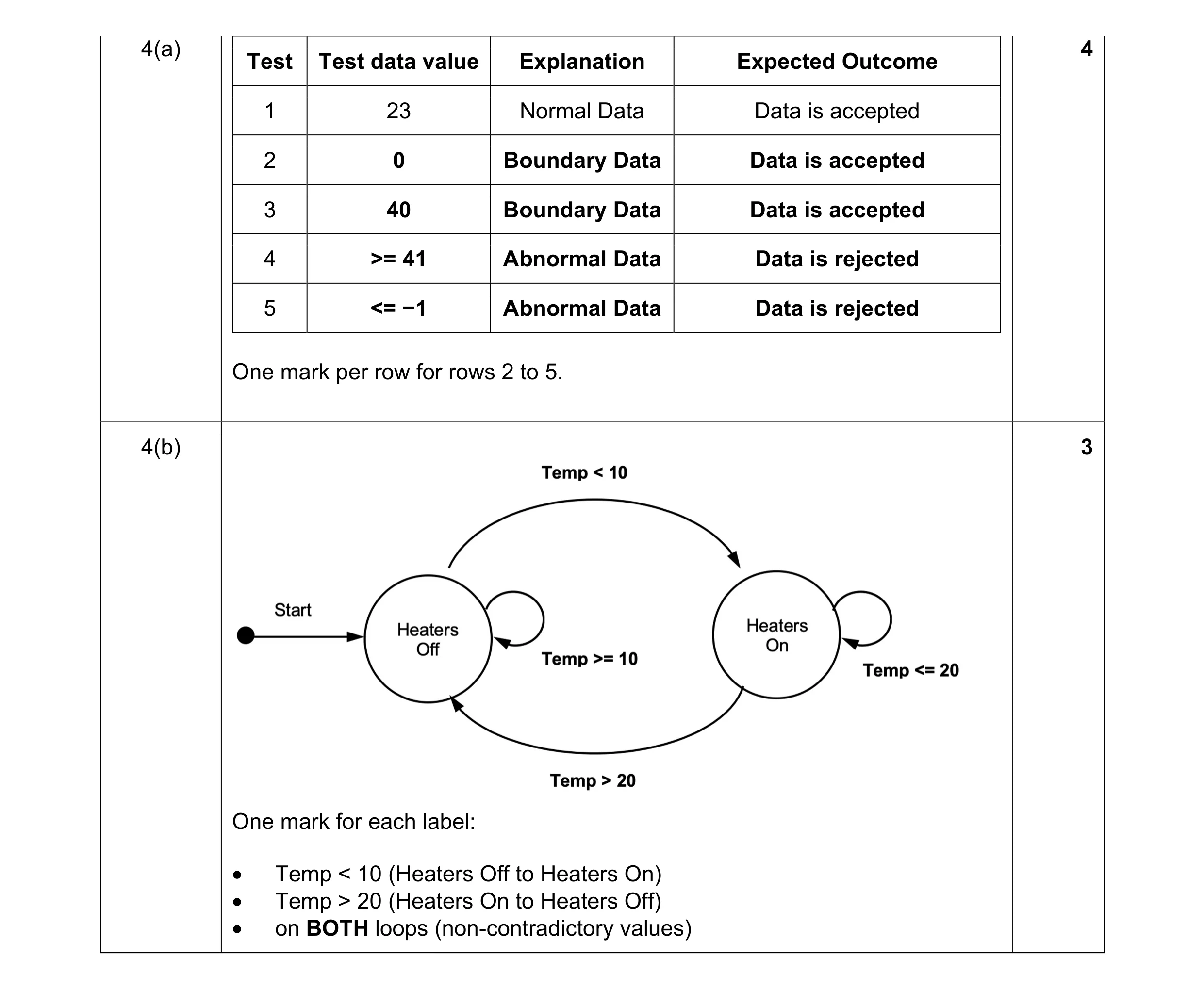 7
7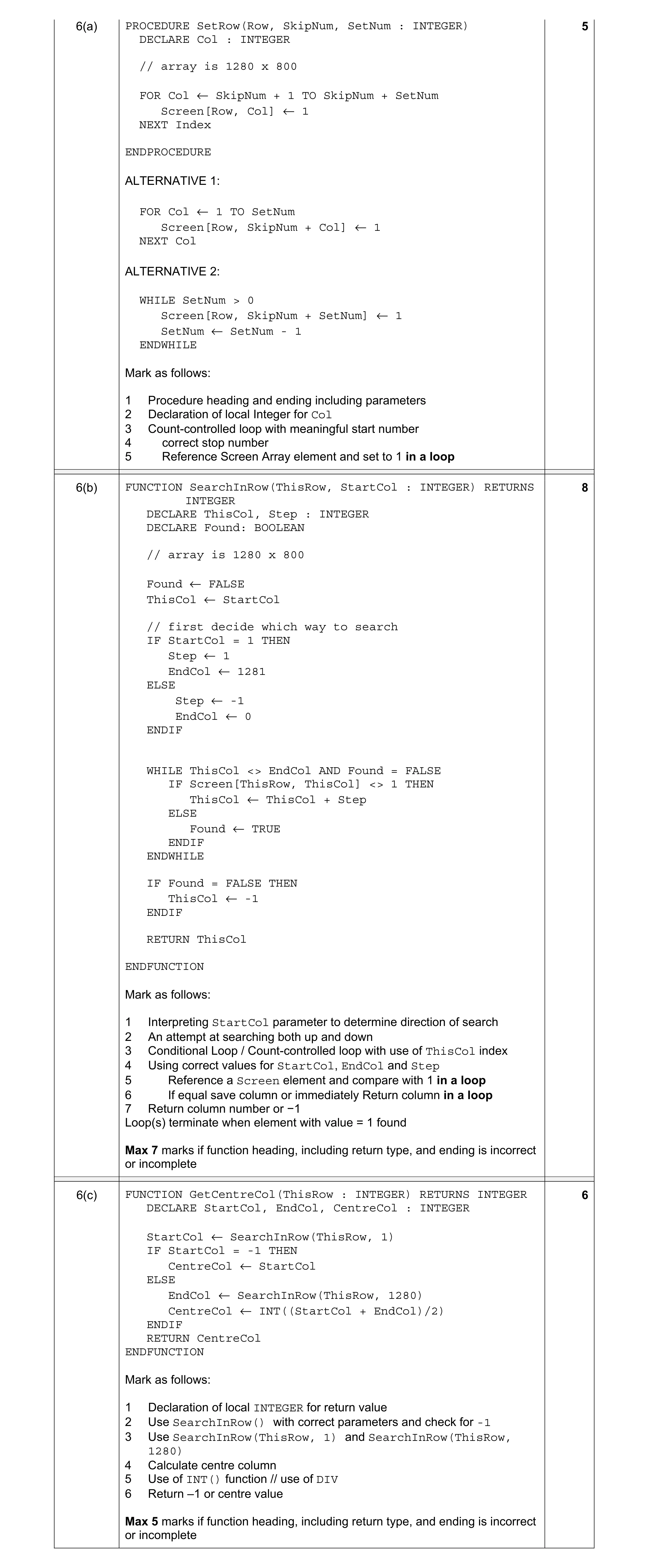 5
5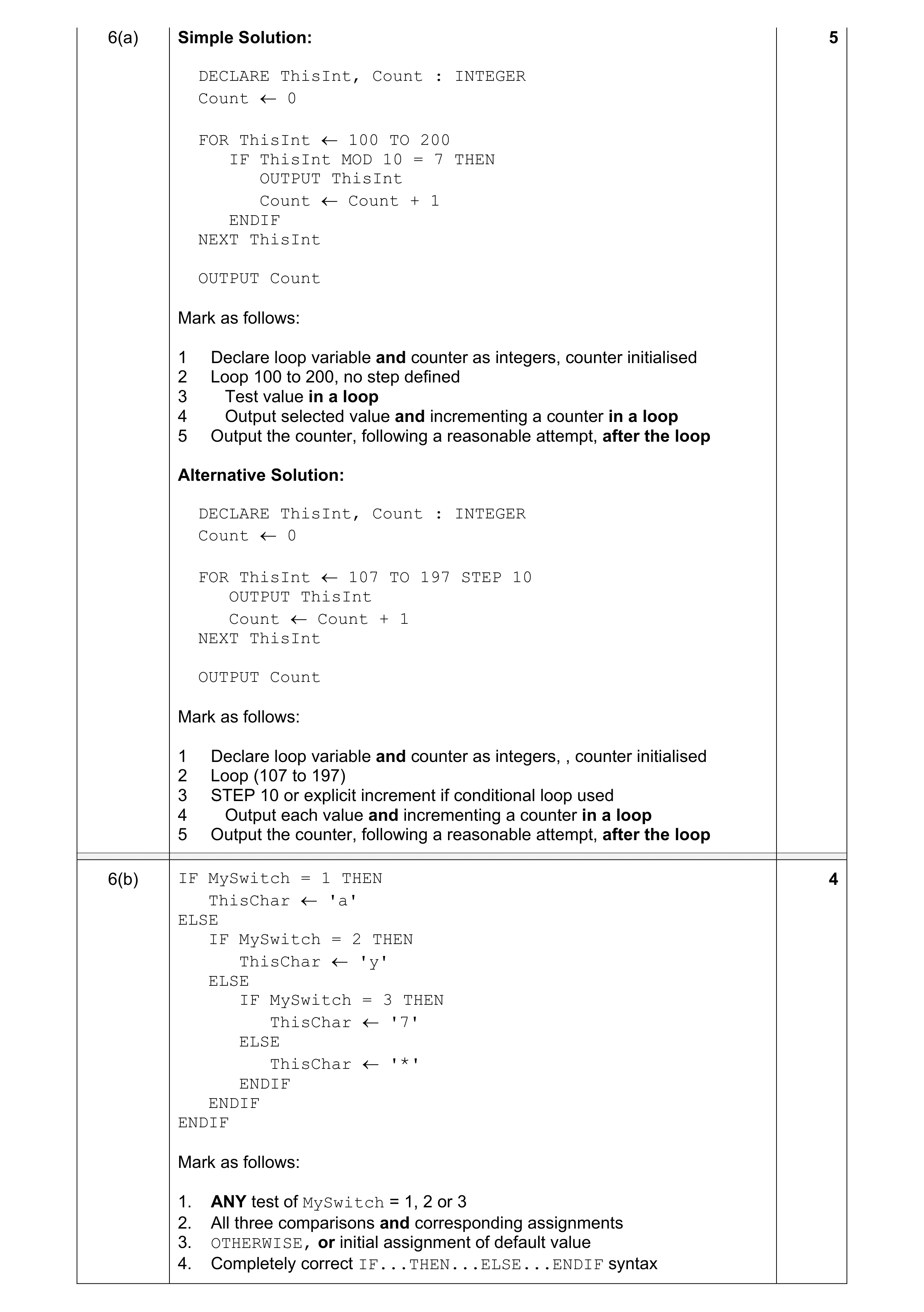 9
9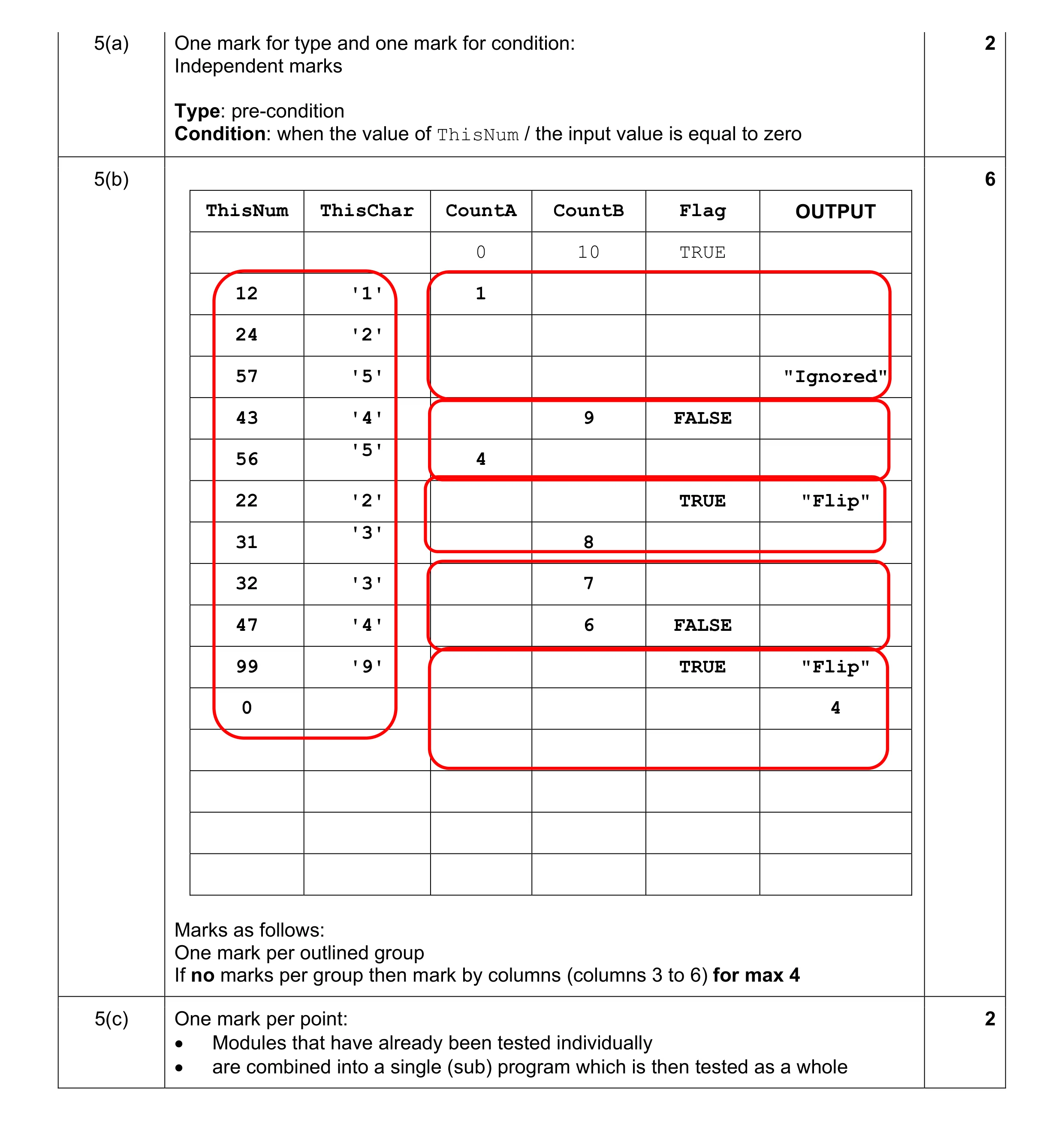 10
10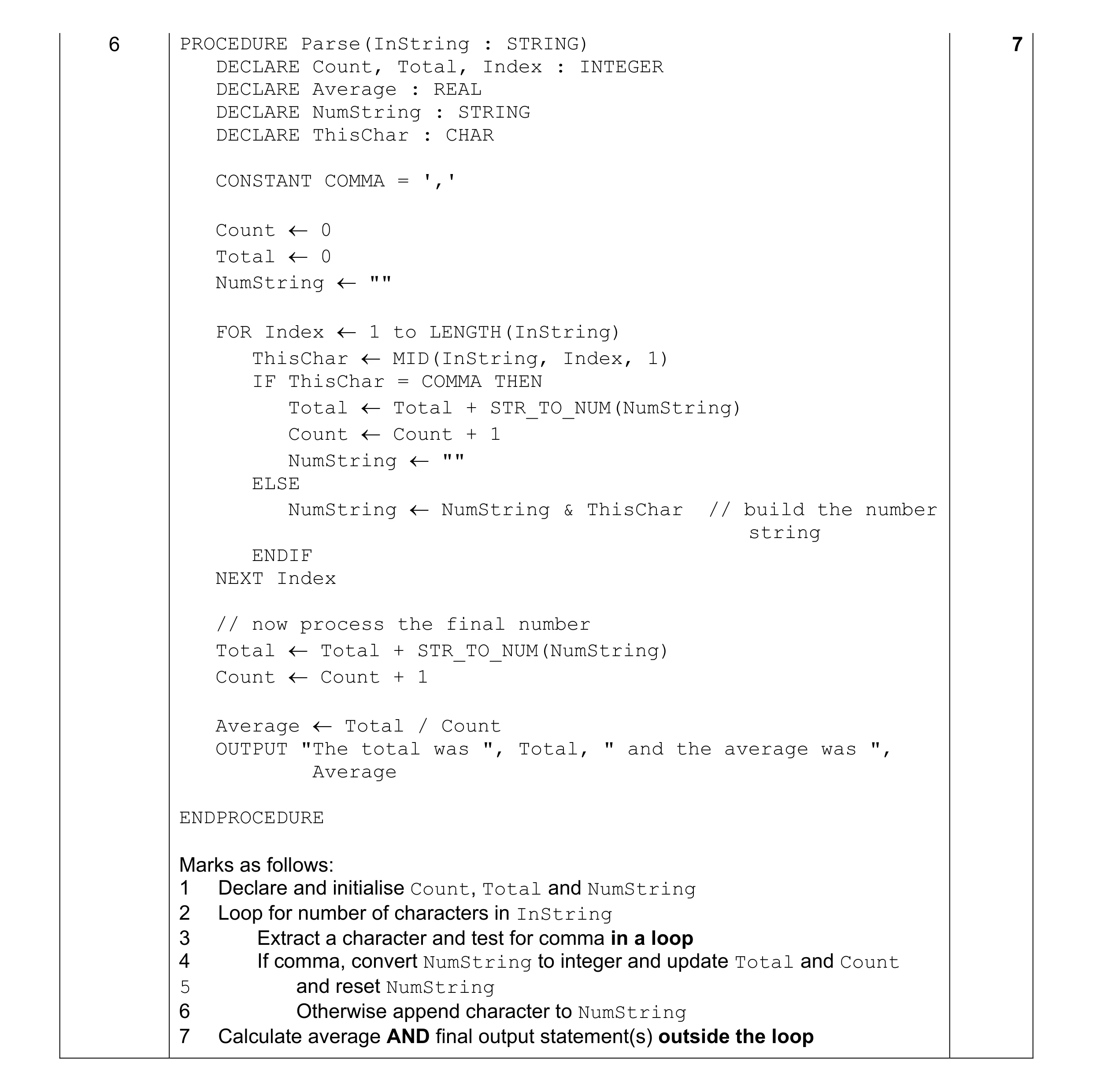 7
7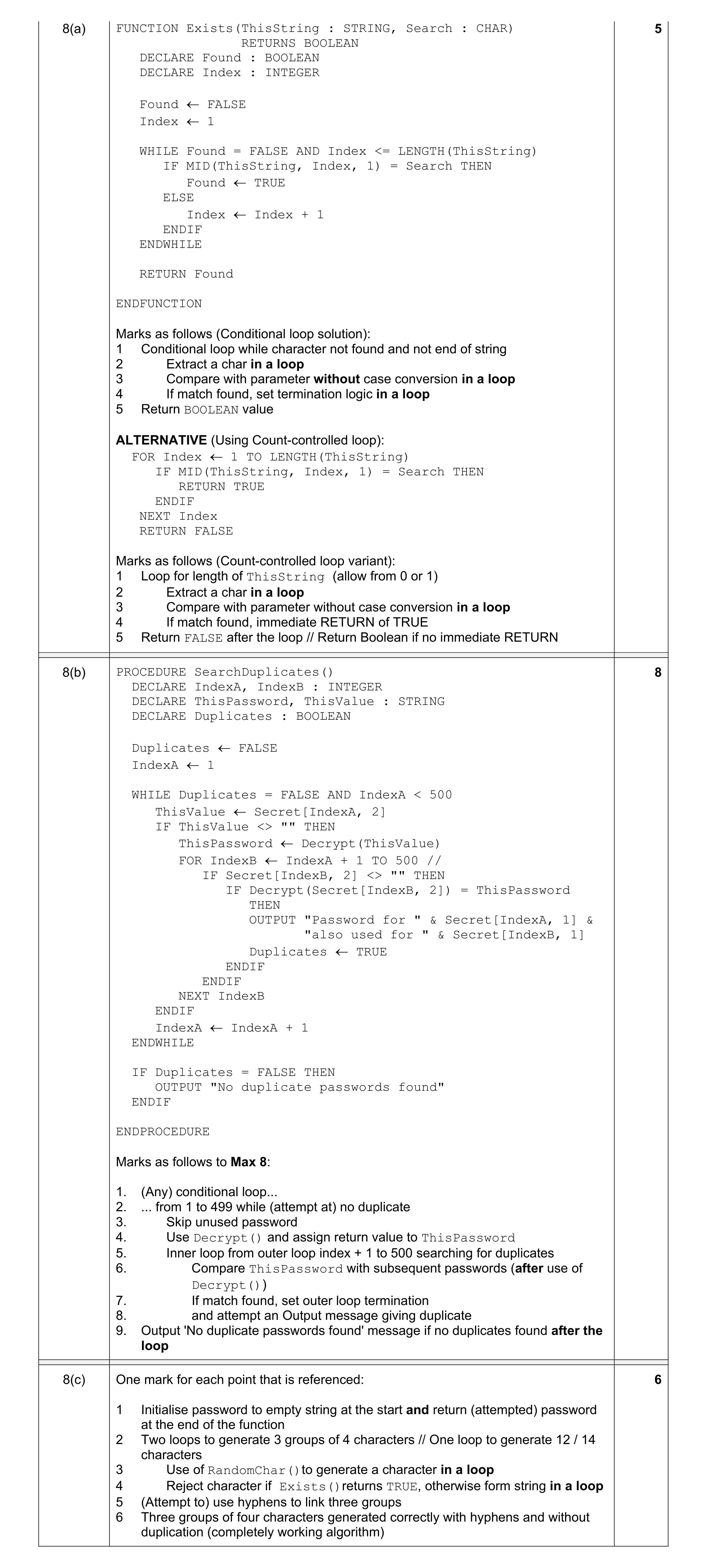 5
5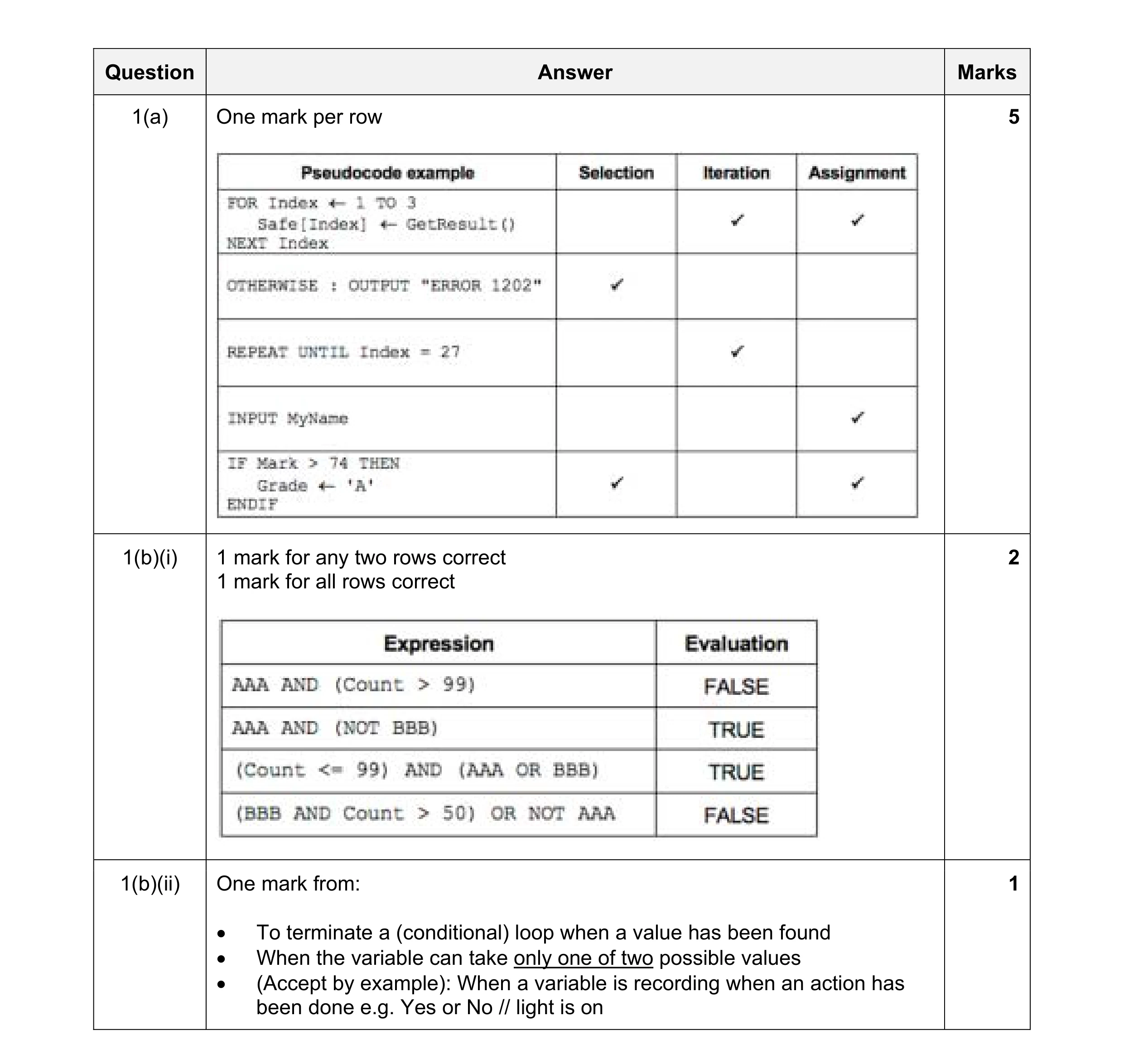 8
8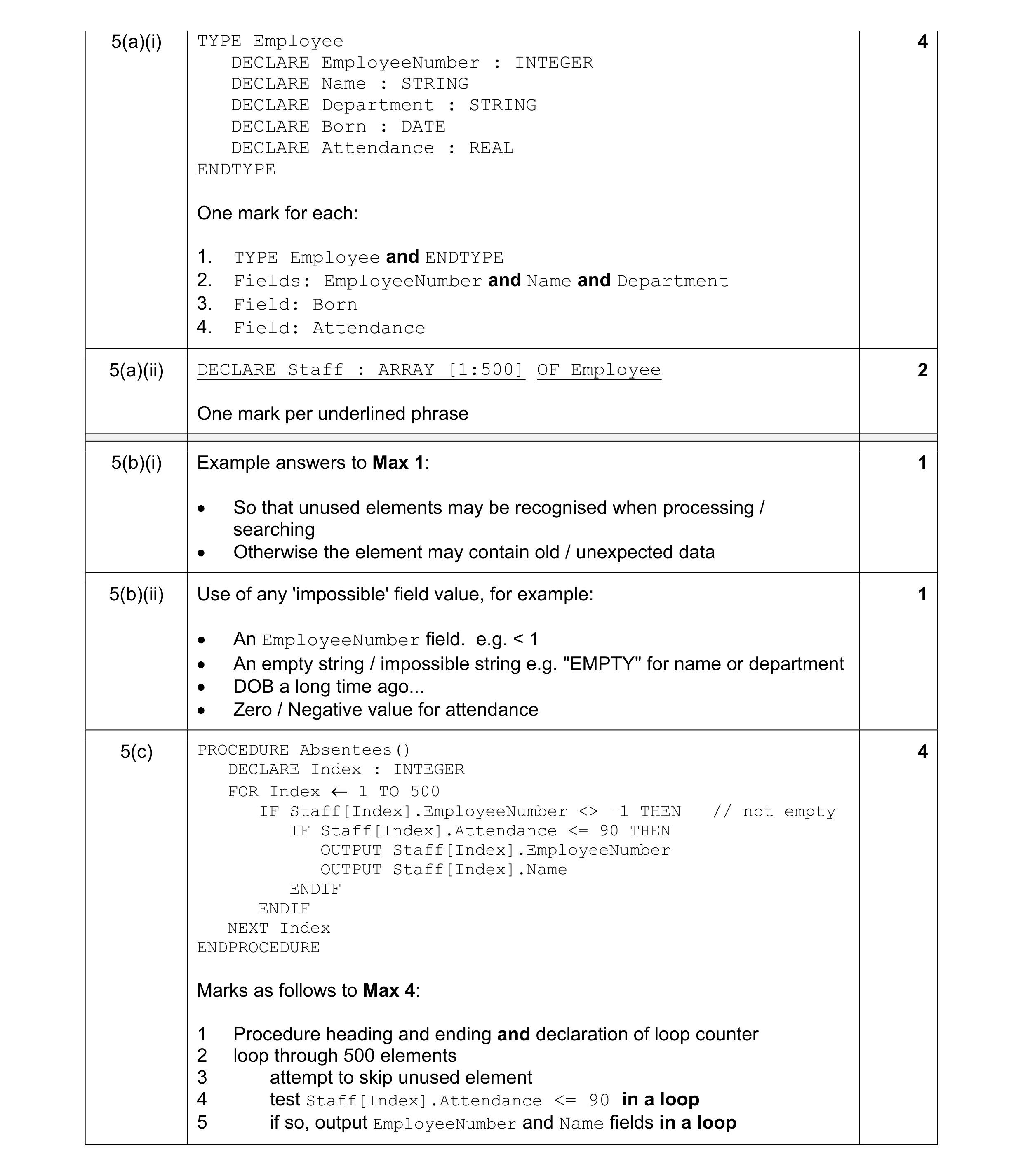 12
12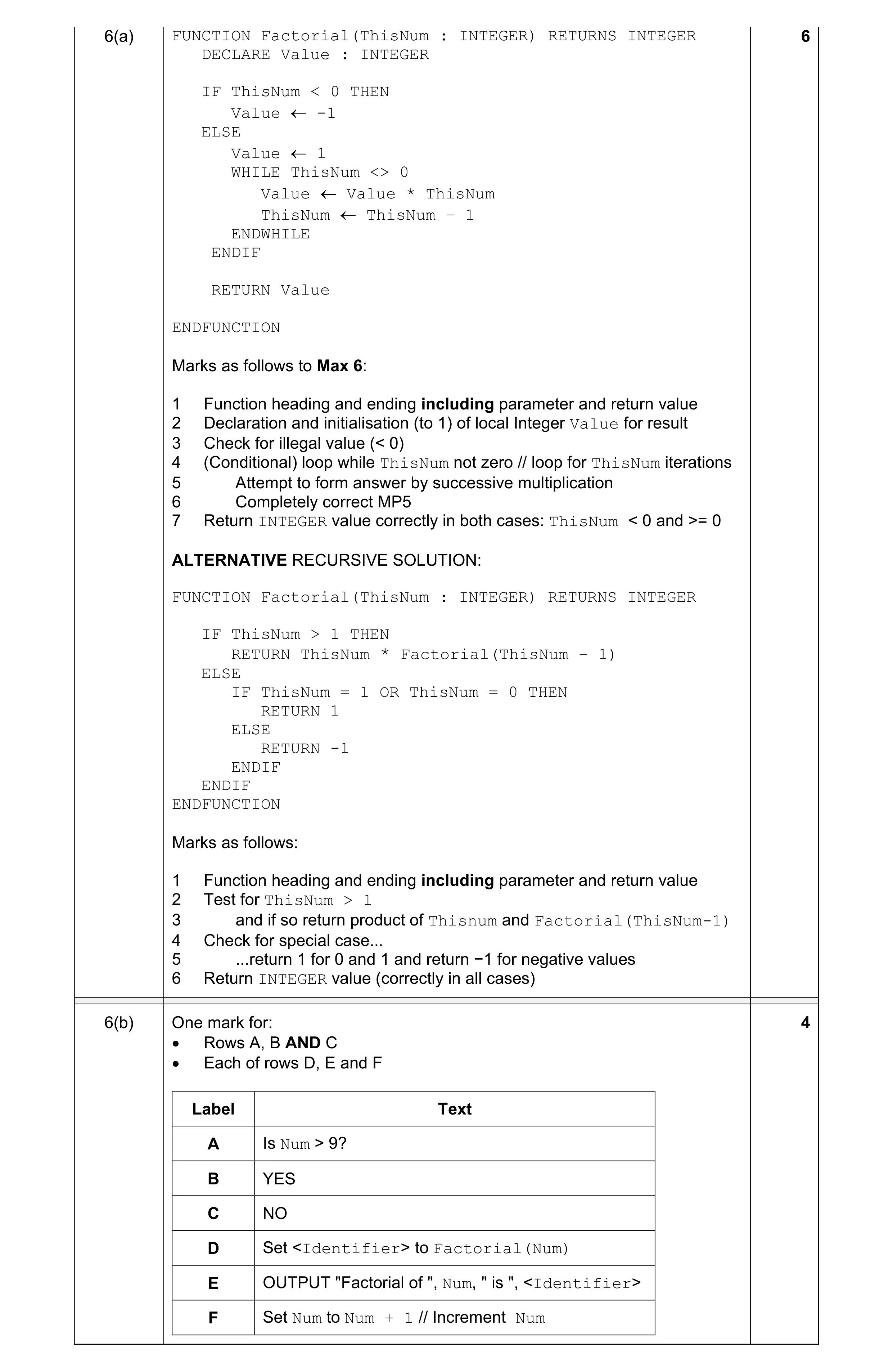 10
10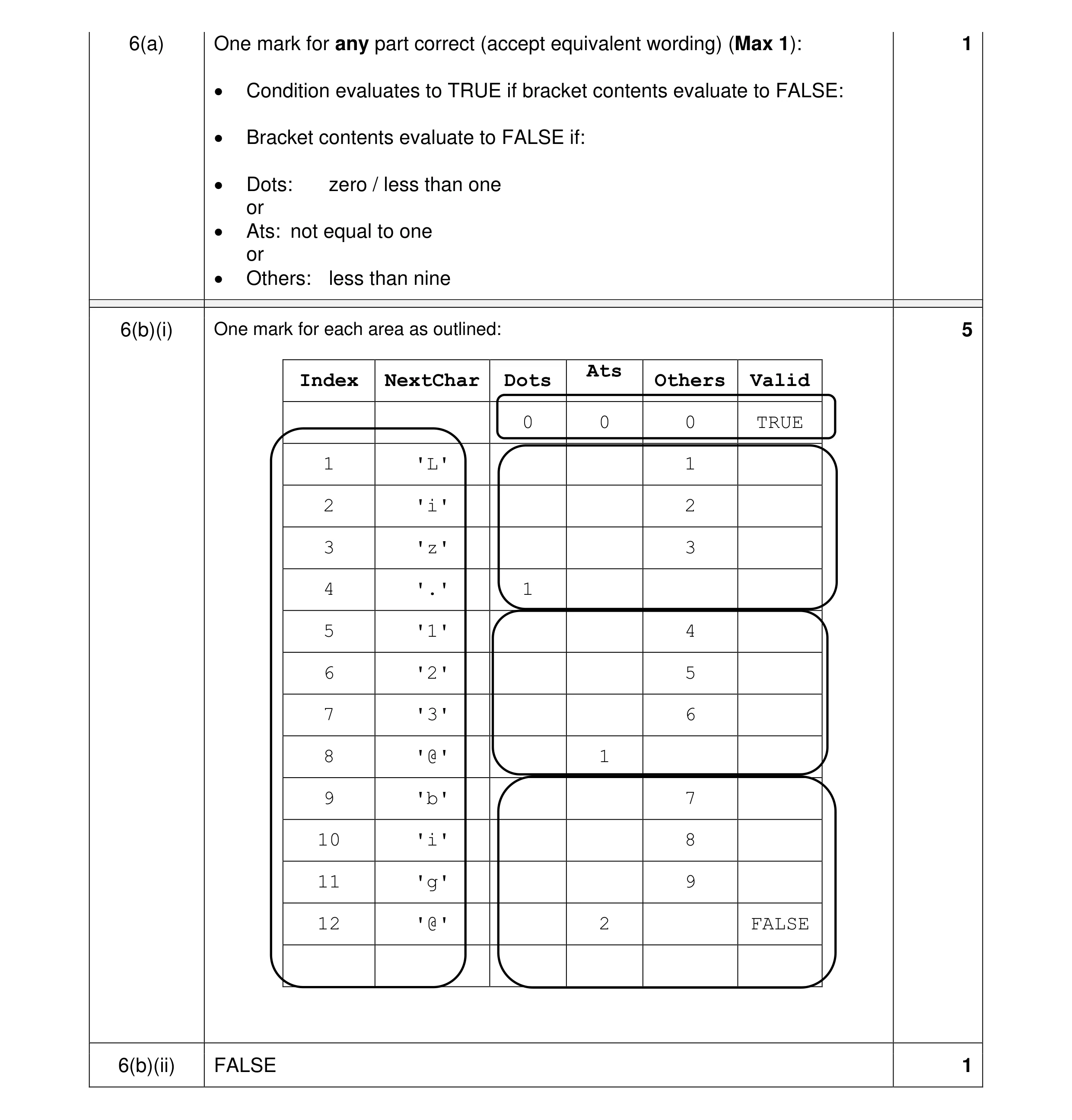 7
7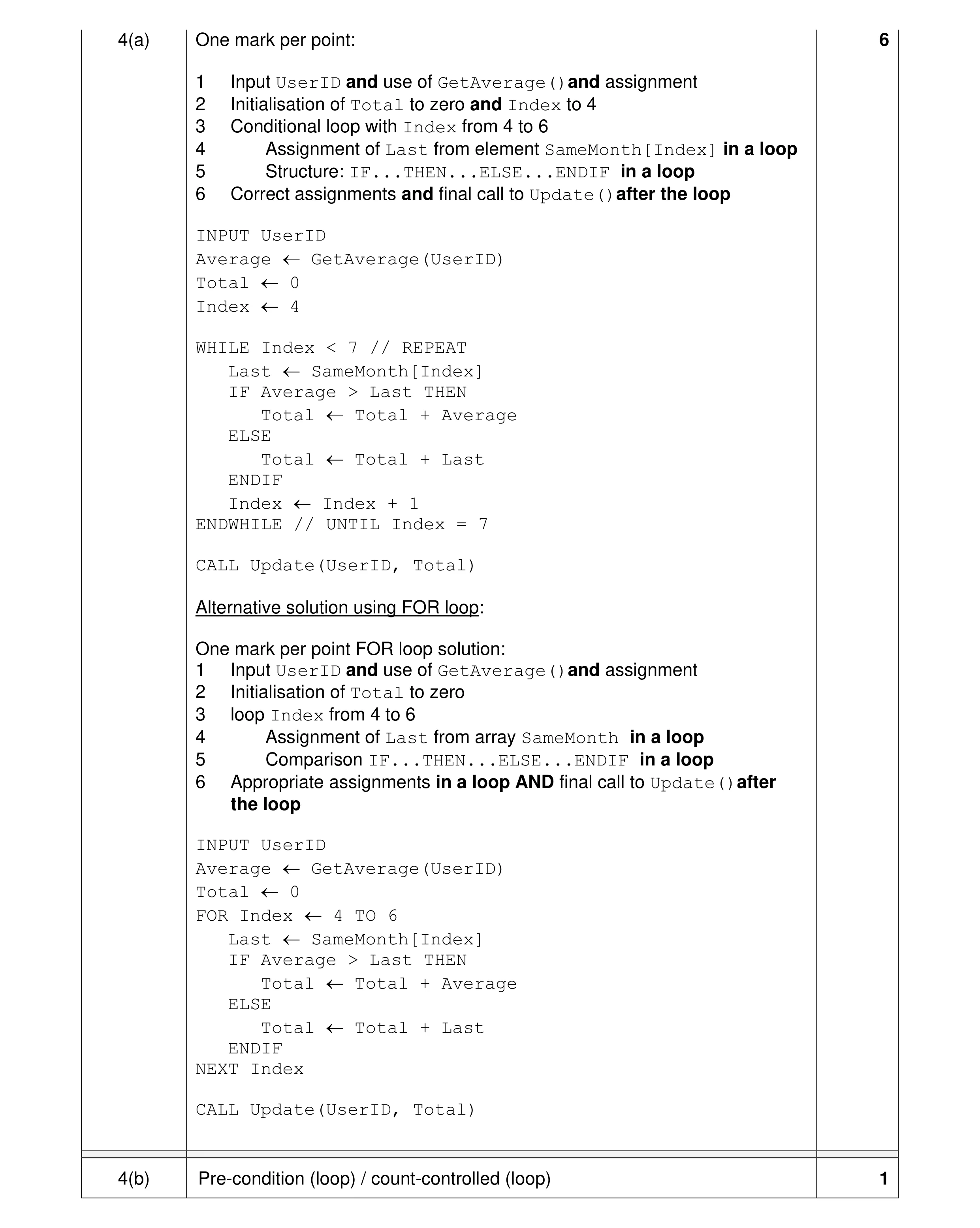 7
7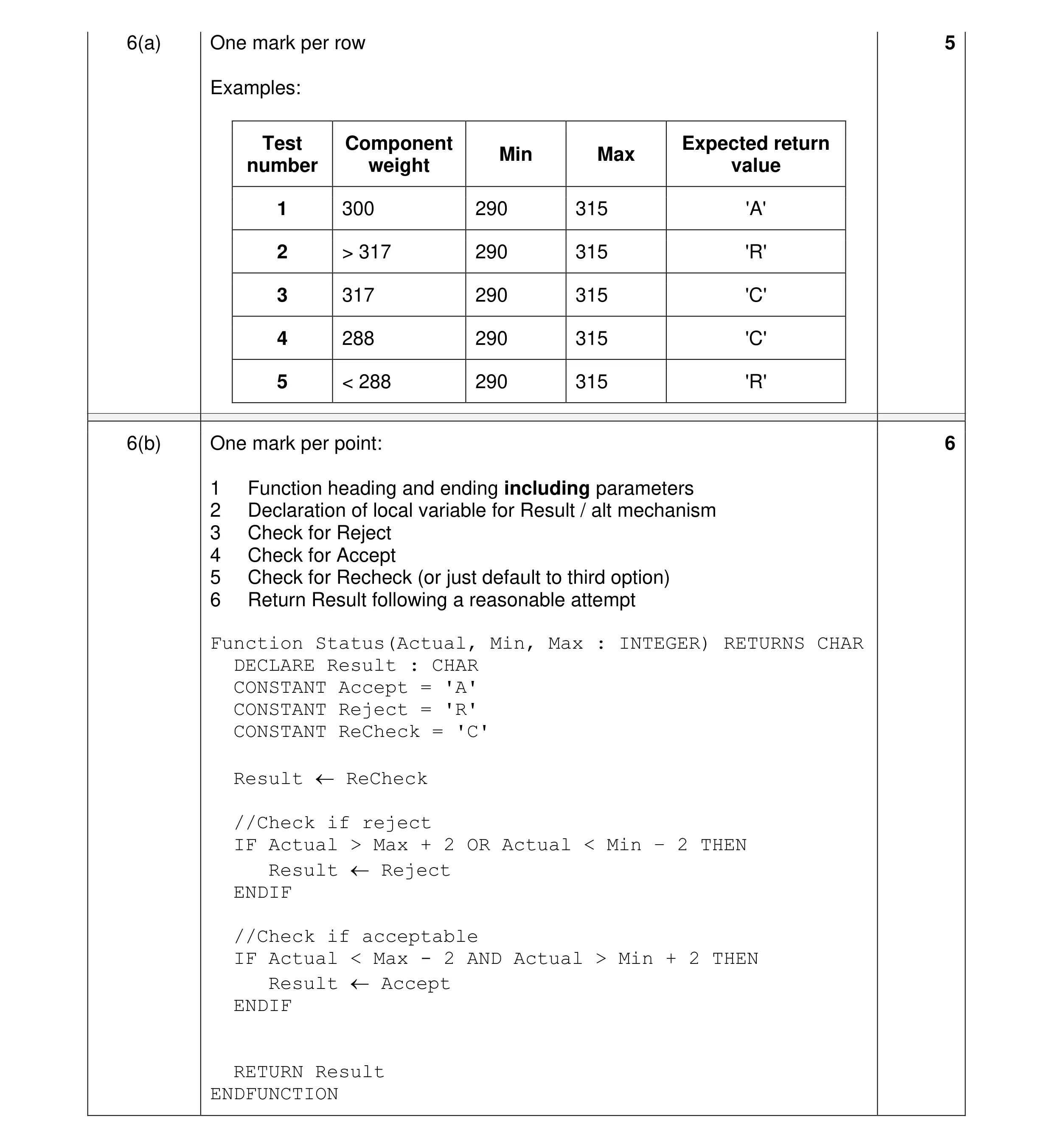 11
11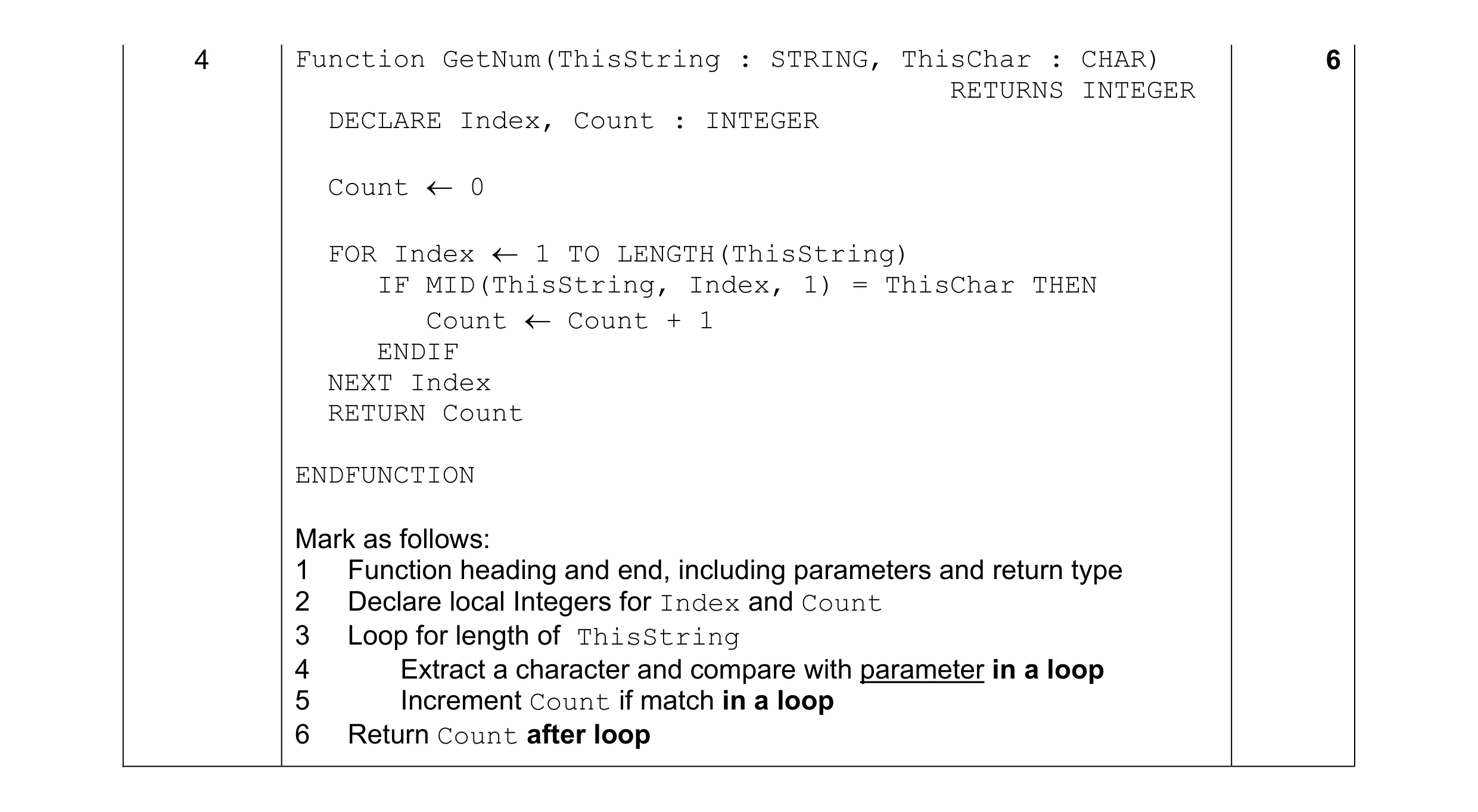 6
6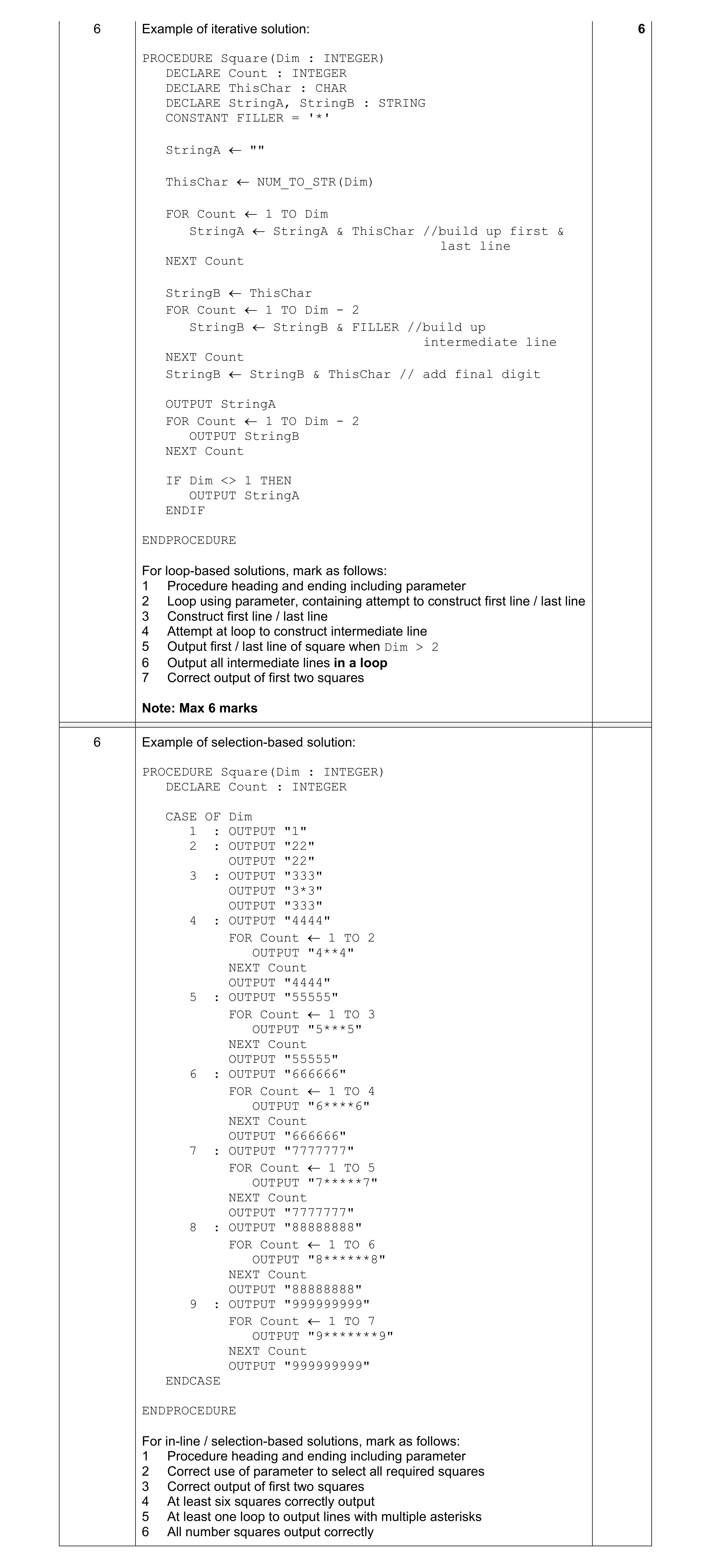 6
6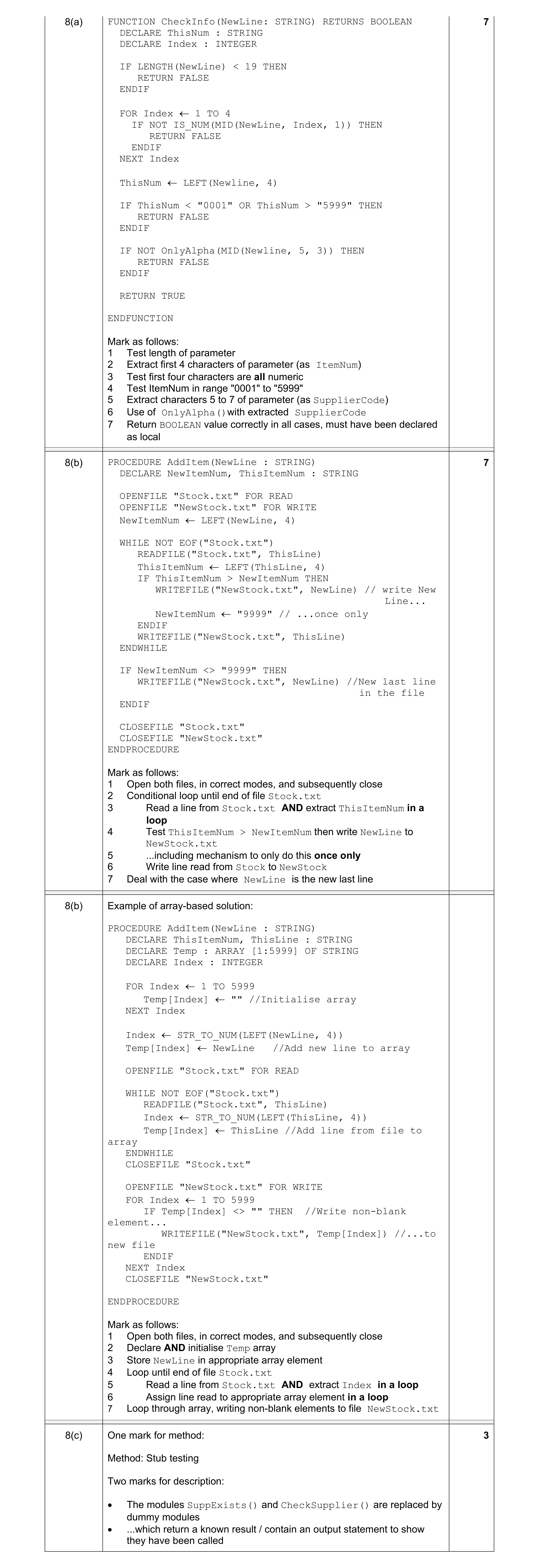 7
7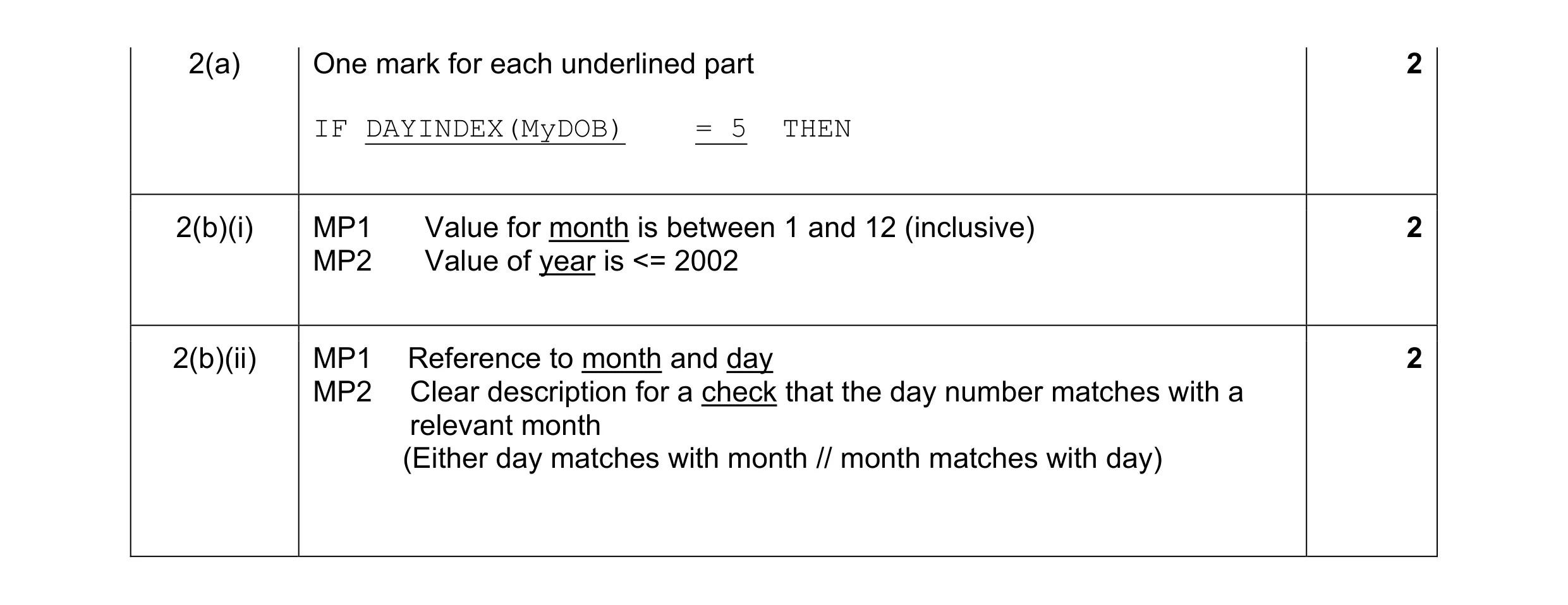 6
6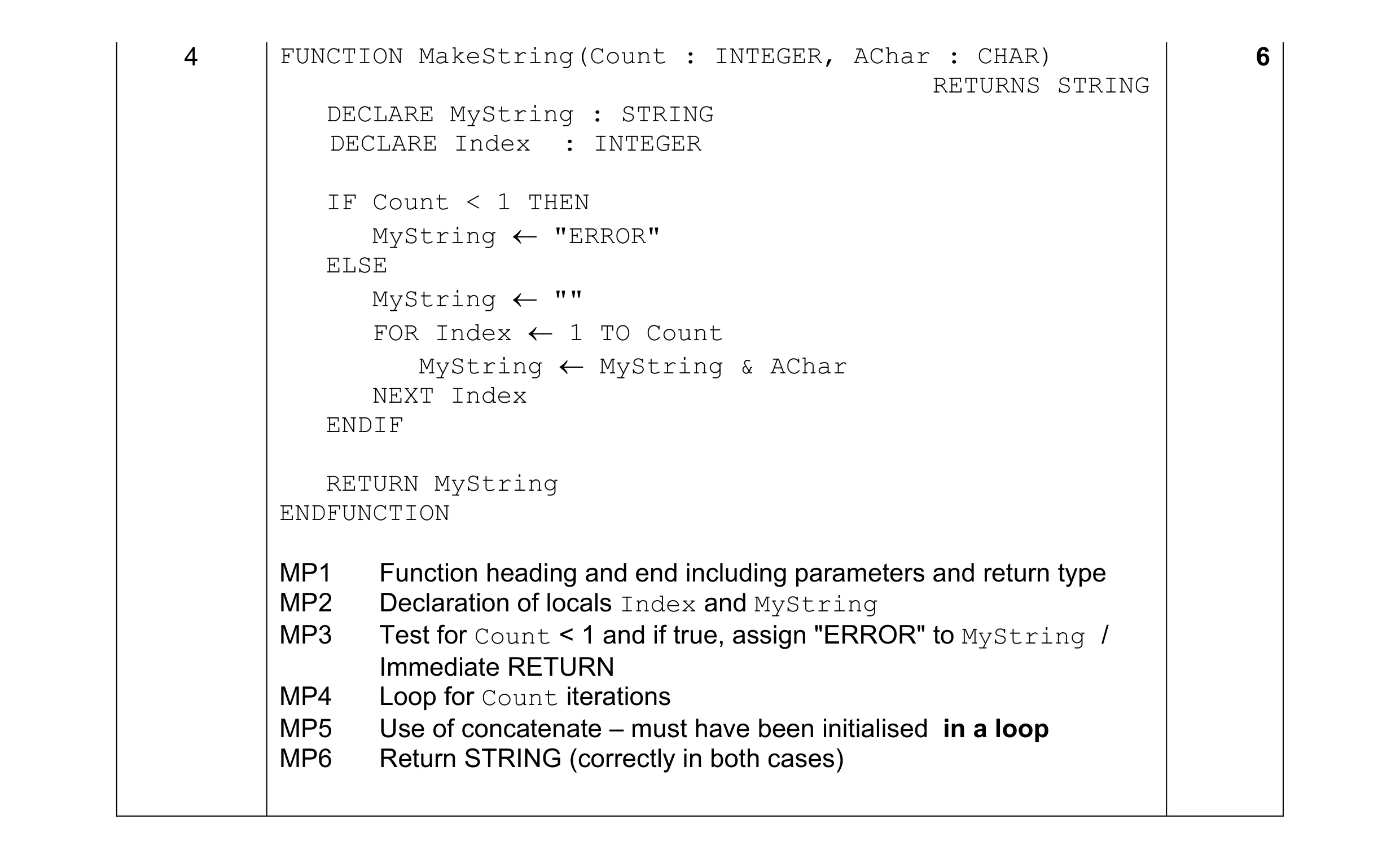 6
6