Cambridge A Level Computer Science 9618 — 2022 May/June Paper 2 · Variant 1
9618/21/M/J/22 · 8 questions · 75 marks · ≈84 min
The question paper and its mark scheme, free to read here and free to download. This is Cambridge’s own paper, exactly as it was sat.
Question paper20 pages




Mark scheme12 pages
Answers below. Sit the paper first if you are practising.
Questions as text
Q1 · A programmer draws a program flowchart to show the sequence of steps required to solve a…
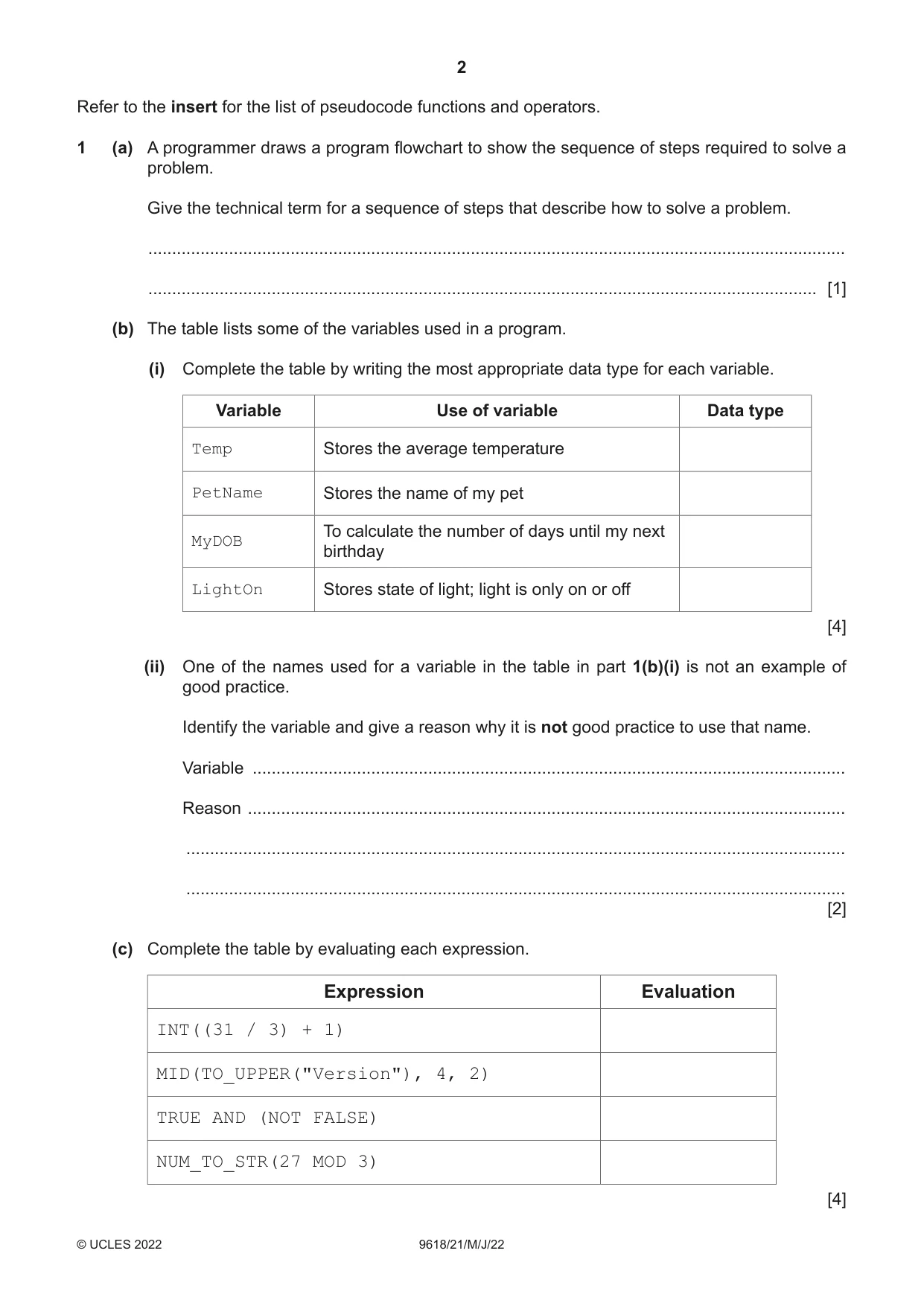
1 (a) A programmer draws a program flowchart to show the sequence of steps required to solve a problem. Give the technical term for a sequence of steps that describe how to solve a problem. ................................................................................................................................................... ............................................................................................................................................. [1] (b) The table lists some of the variables used in a program. (i) Complete the table by writing the most appropriate data type for each variable. Variable Use of variable Data type Temp Stores the average temperature PetName Stores the name of my pet To calculate the number of days until my next MyDOB birthday LightOn Stores state of light; light is only on or off [4] (ii) One of the names used for a variable in the table in part 1(b)(i) is not an example of good practice. Identify the variable and give a reason why it is not good practice to use that name. Variable ............................................................................................................................. Reason .............................................................................................................................. ........................................................................................................................................... ........................................................................................................................................... [2] (c) Complete the table by evaluating each expression. Expression Evaluation INT((31 / 3) + 1) MID(TO_UPPER("Version"), 4, 2) TRUE AND (NOT FALSE) NUM_TO_STR(27 MOD 3) [4]
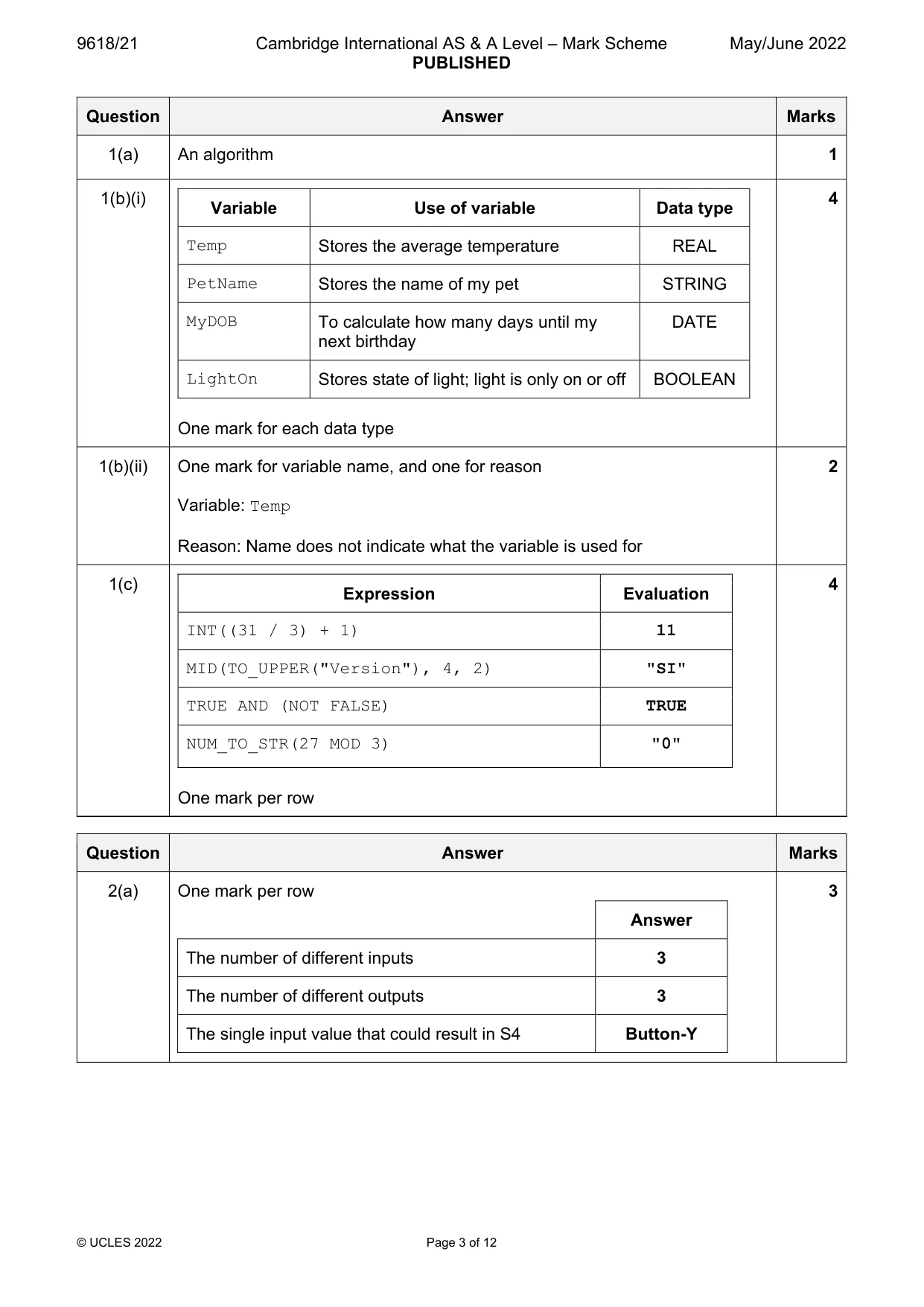
Mark scheme: Question Answer Marks 1(a) An algorithm 1 1(b)(i) 4 Variable Use of variable Data type Temp Stores the average temperature REAL PetName Stores the name of my pet STRING MyDOB To calculate how many days until my DATE next birthday LightOn Stores state of light; light is only on or off BOOLEAN One mark for each data type 1(b)(ii) One mark for variable name, and one for reason 2 Variable: Temp Reason: Name does not indicate what the variable is used for 1(c) 4 Expression Evaluation INT((31 / 3) + 1) 11 MID(TO_UPPER("Version"), 4, 2) "SI" TRUE AND (NOT FALSE) TRUE NUM_TO_STR(27 MOD 3) "0" One mark per row
Q2 · Examine the following state-transition diagram
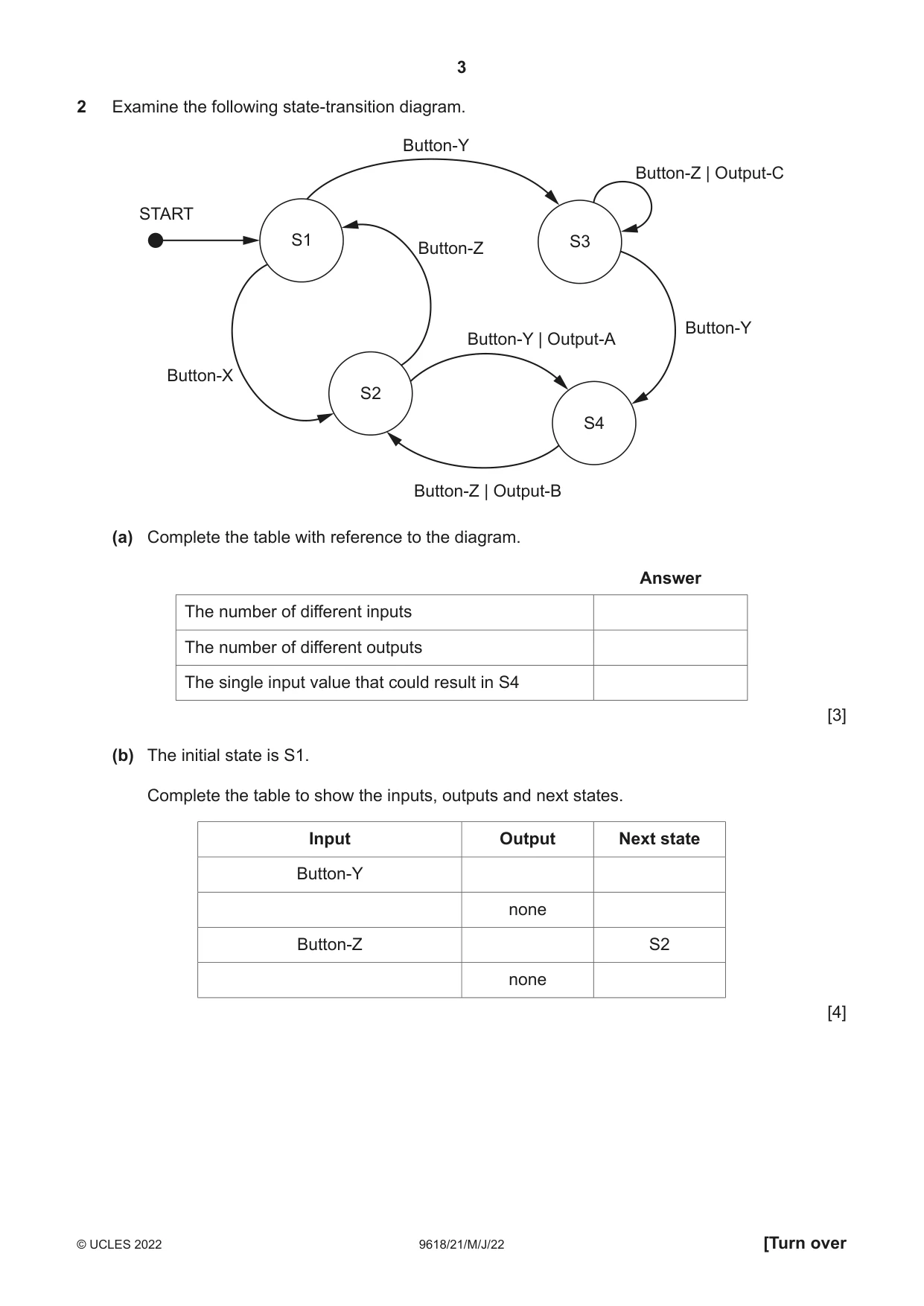
2 Examine the following state-transition diagram. Button-Y Button-Z | Output-C START S1 S3 Button-Z Button-Y Button-Y | Output-A Button-X S2 S4 Button-Z | Output-B (a) Complete the table with reference to the diagram. Answer The number of different inputs The number of different outputs The single input value that could result in S4 [3] (b) The initial state is S1. Complete the table to show the inputs, outputs and next states. Input Output Next state Button-Y none Button-Z S2 none [4]
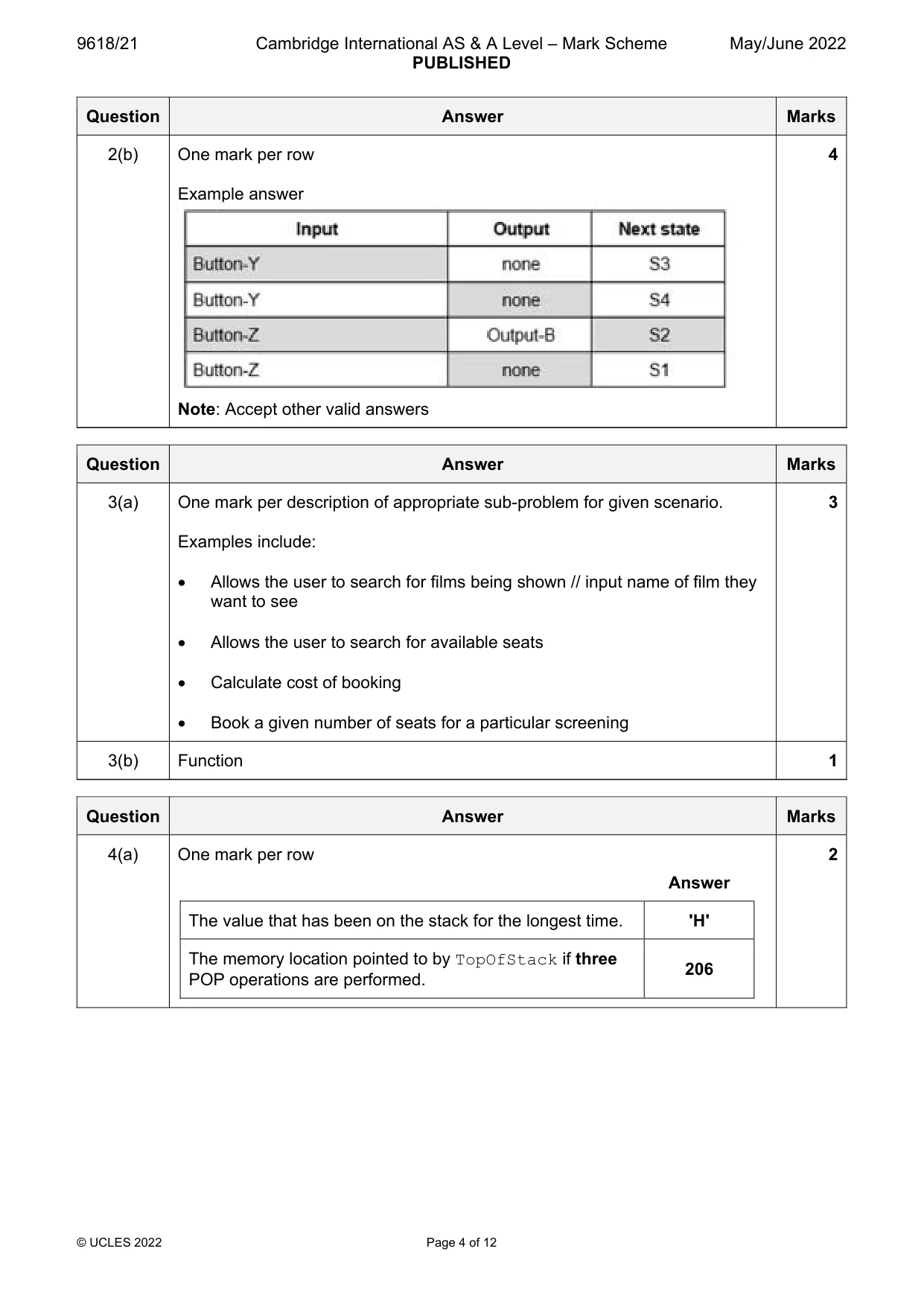
Mark scheme: 2(a) One mark per row 3 Answer The number of different inputs 3 The number of different outputs 3 The single input value that could result in S4 Button-Y 2(b) One mark per row 4 Example answer Note: Accept other valid answers
Q3 · The manager of a cinema wants a program to allow users to book seats
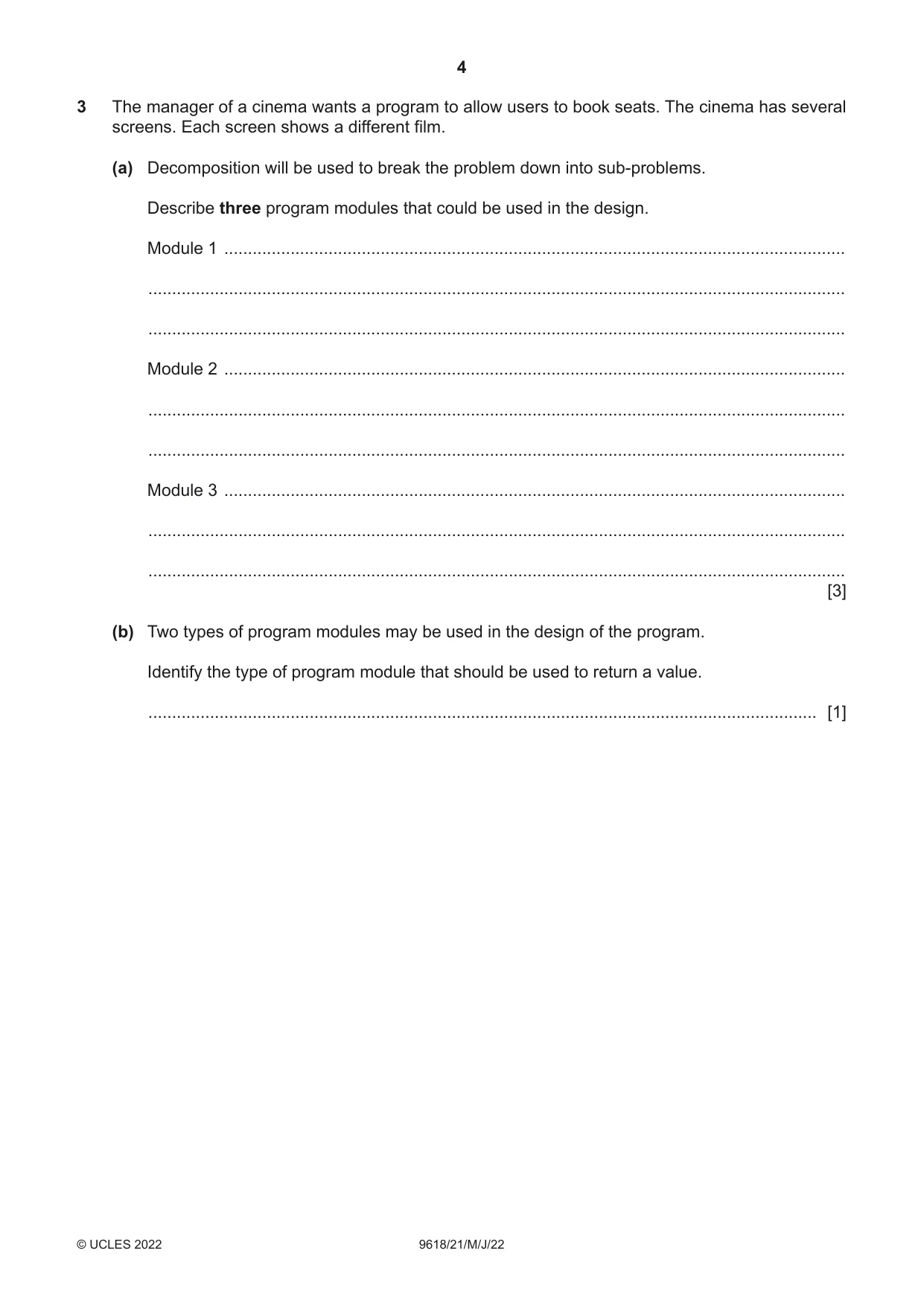
3 The manager of a cinema wants a program to allow users to book seats. The cinema has several screens. Each screen shows a different film. (a) Decomposition will be used to break the problem down into sub-problems. Describe three program modules that could be used in the design. Module 1 ................................................................................................................................... ................................................................................................................................................... ................................................................................................................................................... Module 2 ................................................................................................................................... ................................................................................................................................................... ................................................................................................................................................... Module 3 ................................................................................................................................... ................................................................................................................................................... ................................................................................................................................................... [3] (b) Two types of program modules may be used in the design of the program. Identify the type of program module that should be used to return a value. ............................................................................................................................................. [1]
Mark scheme: 3(a) One mark per description of appropriate sub-problem for given scenario. 3 Examples include: Allows the user to search for films being shown // input name of film they want to see Allows the user to search for available seats Calculate cost of booking Book a given number of seats for a particular screening 3(b) Function 1
Q4 · A stack is created using a high-level language
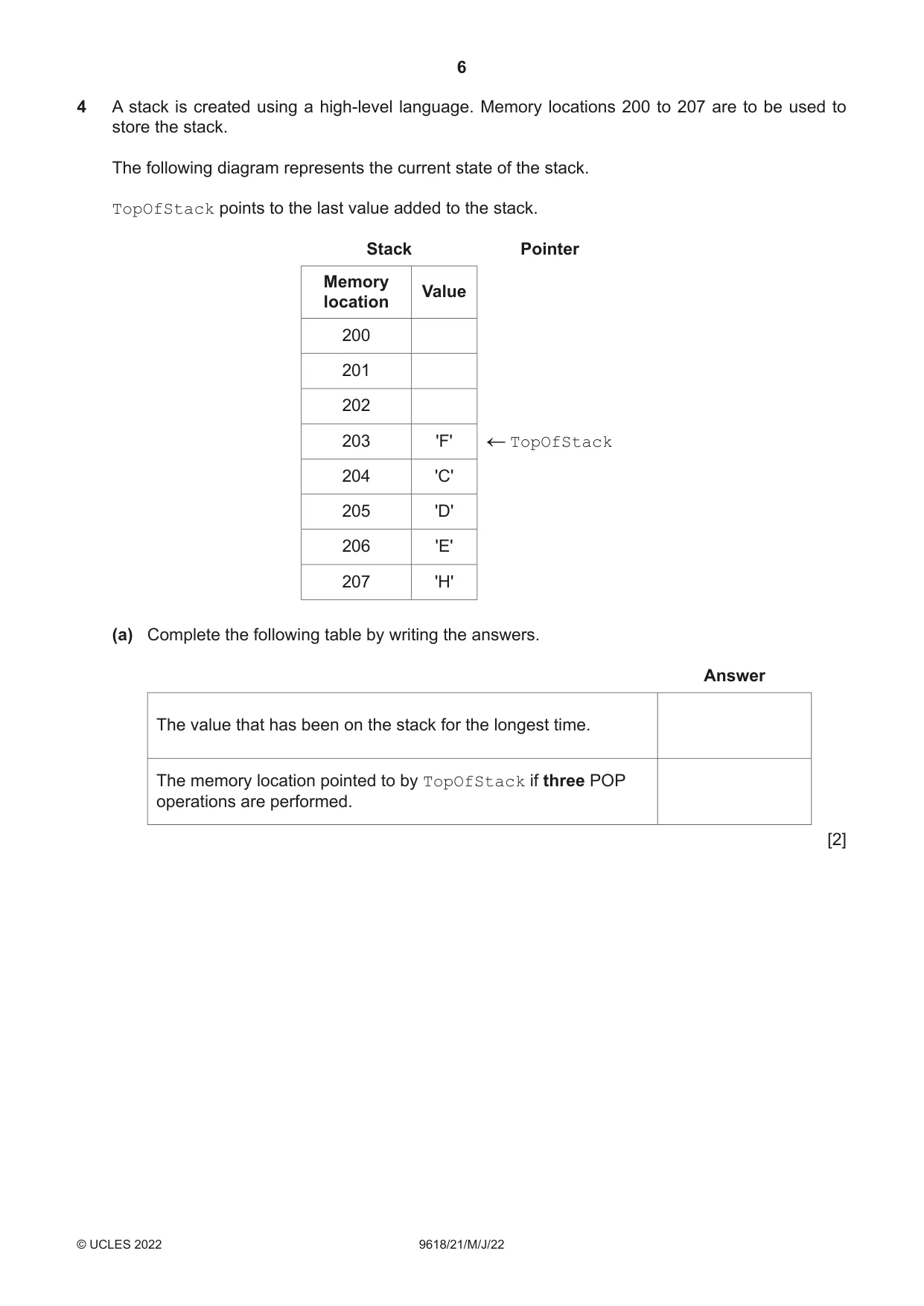
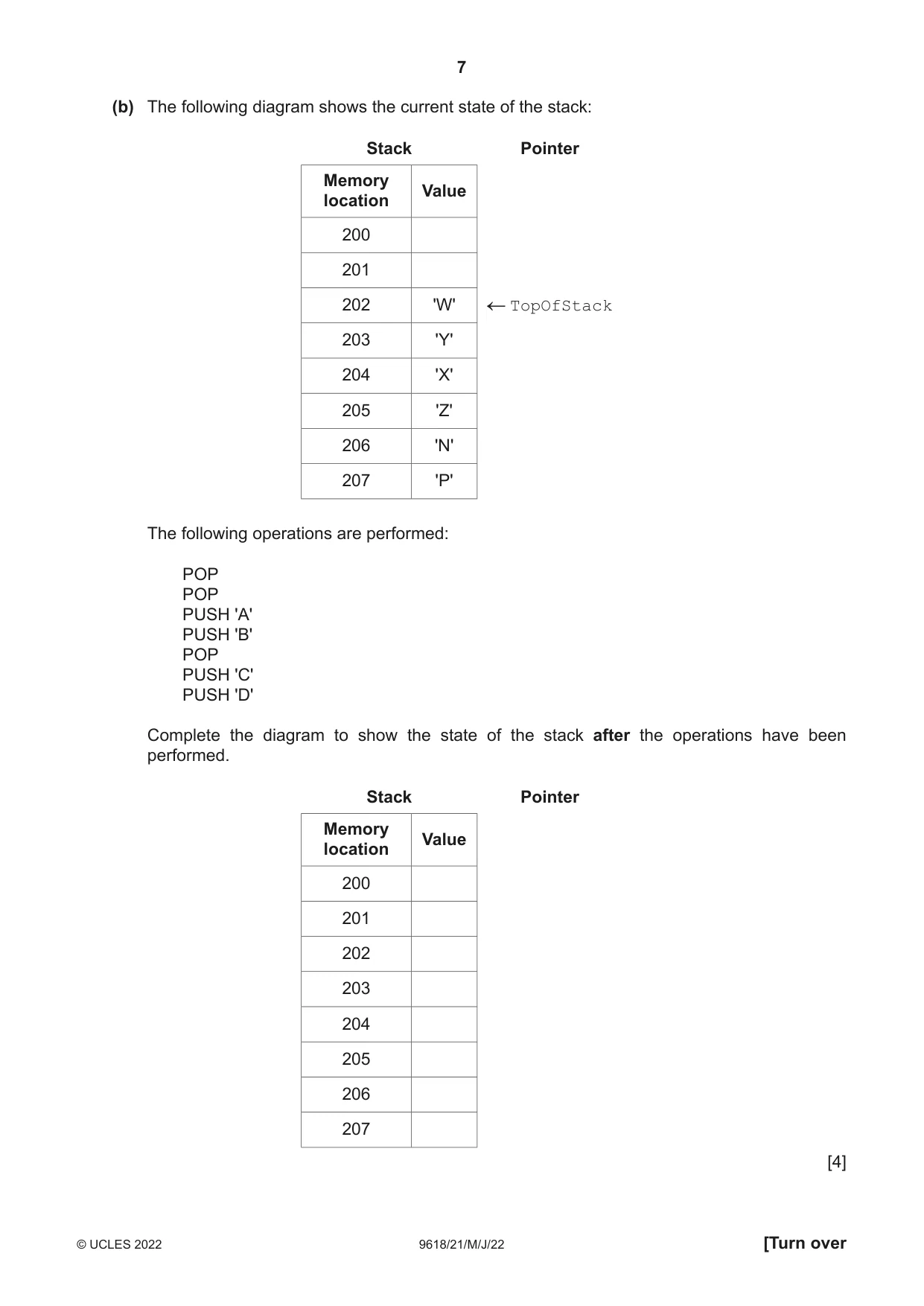
4 A stack is created using a high-level language. Memory locations 200 to 207 are to be used to store the stack. The following diagram represents the current state of the stack. TopOfStack points to the last value added to the stack. Stack Pointer Memory Value location 200 201 202 203 'F' TopOfStack 204 'C' 205 'D' 206 'E' 207 'H' (a) Complete the following table by writing the answers. Answer The value that has been on the stack for the longest time. The memory location pointed to by TopOfStack if three POP operations are performed. [2] (b) The following diagram shows the current state of the stack: Stack Pointer Memory Value location 200 201 202 'W' TopOfStack 203 'Y' 204 'X' 205 'Z' 206 'N' 207 'P' The following operations are performed: POP POP PUSH 'A' PUSH 'B' POP PUSH 'C' PUSH 'D' Complete the diagram to show the state of the stack after the operations have been performed. Stack Pointer Memory Value location 200 201 202 203 204 205 206 207 [4]
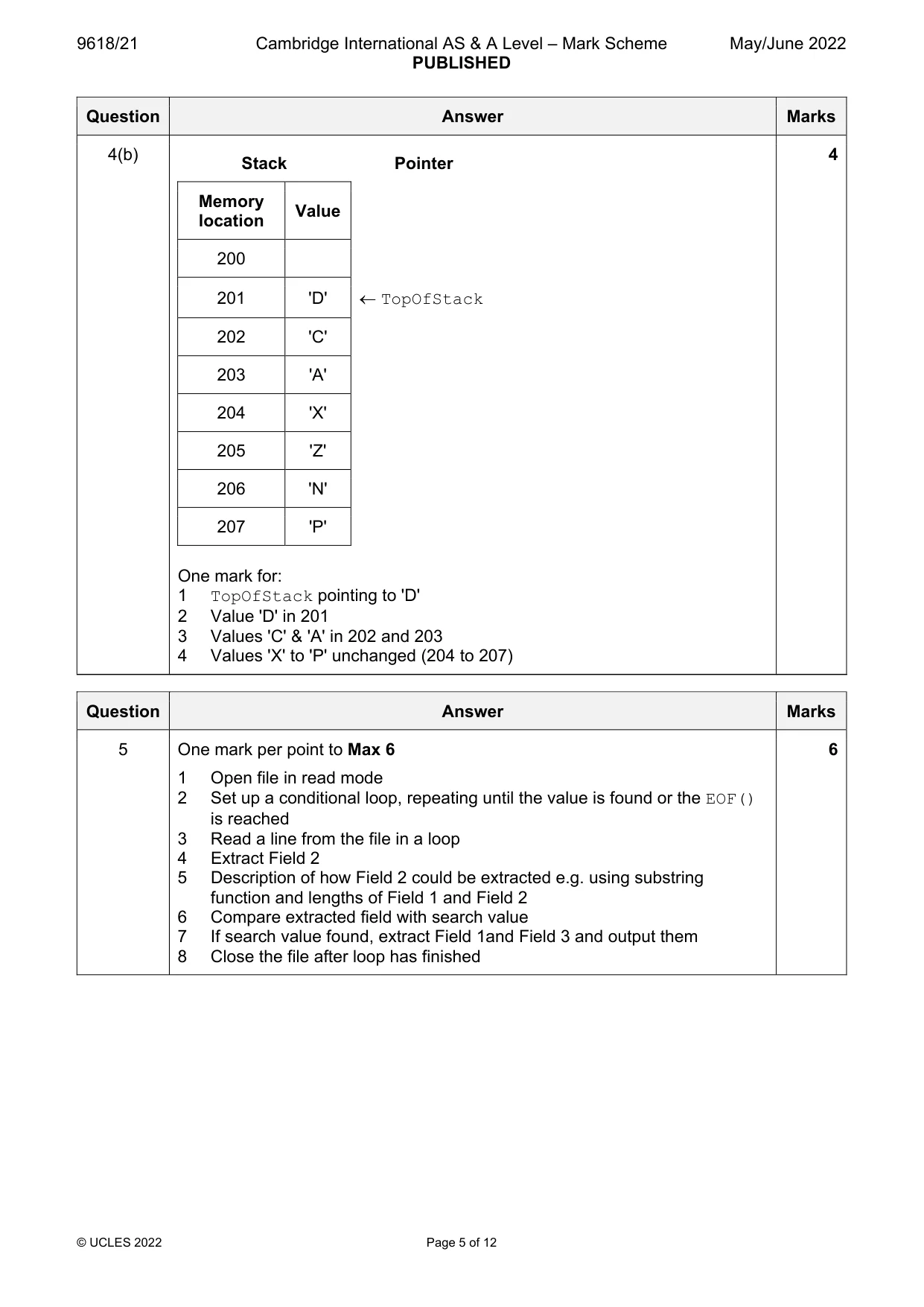
Mark scheme: 4(a) One mark per row 2 Answer The value that has been on the stack for the longest time. 'H' The memory location pointed to by TopOfStack if three 206 POP operations are performed. 4(b) 4 Stack Pointer Memory Value location 200 201 'D' TopOfStack 202 'C' 203 'A' 204 'X' 205 'Z' 206 'N' 207 'P' One mark for: 1 TopOfStack pointing to 'D' 2 Value 'D' in 201 3 Values 'C' & 'A' in 202 and 203 4 Values 'X' to 'P' unchanged (204 to 207)
Q5 · Each line of a text file contains data organised into fixed-length fields as shown…
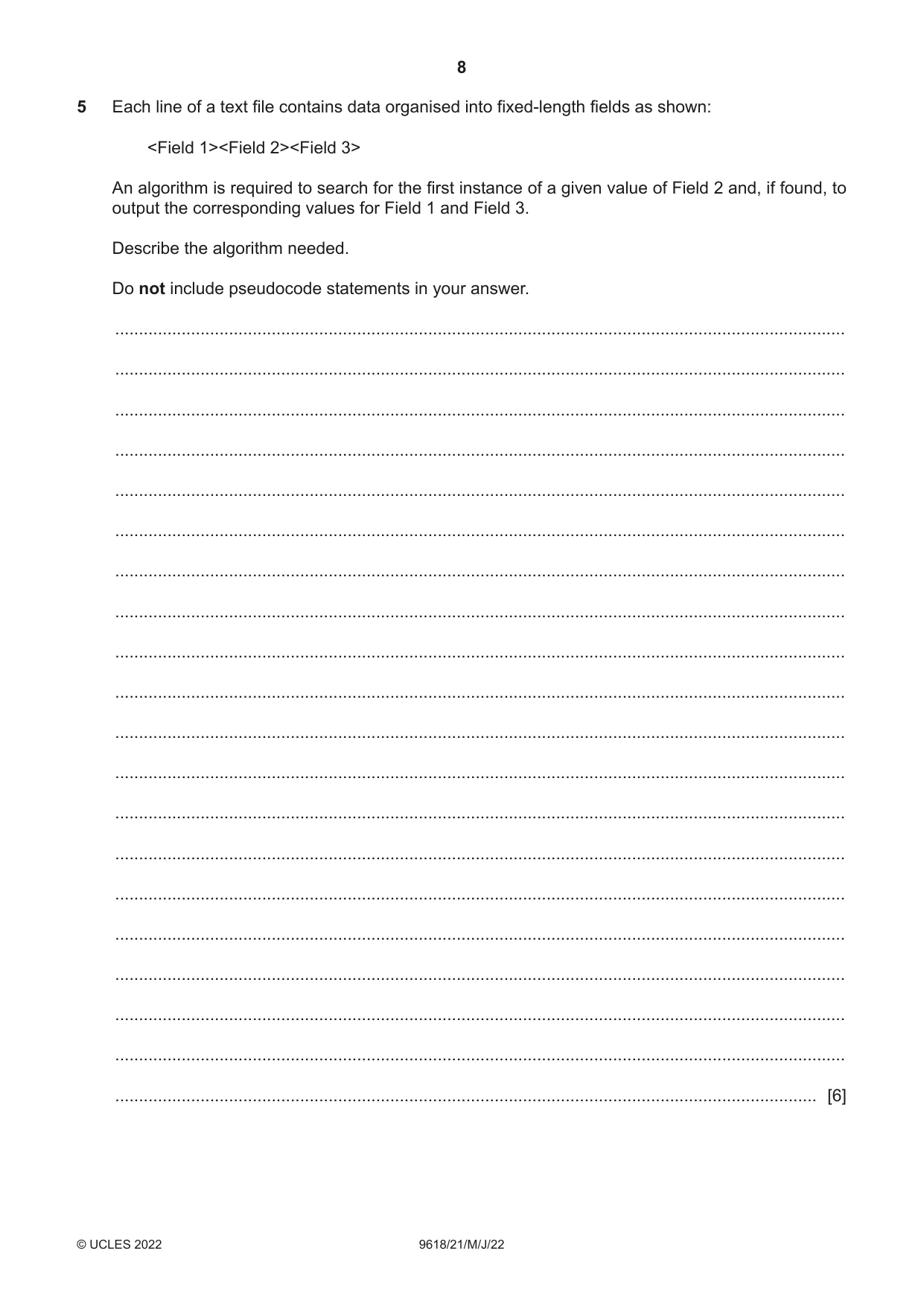
5 Each line of a text file contains data organised into fixed-length fields as shown: <Field 1><Field 2><Field 3> An algorithm is required to search for the first instance of a given value of Field 2 and, if found, to output the corresponding values for Field 1 and Field 3. Describe the algorithm needed. Do not include pseudocode statements in your answer. .......................................................................................................................................................... .......................................................................................................................................................... .......................................................................................................................................................... .......................................................................................................................................................... .......................................................................................................................................................... .......................................................................................................................................................... .......................................................................................................................................................... .......................................................................................................................................................... .......................................................................................................................................................... .......................................................................................................................................................... .......................................................................................................................................................... .......................................................................................................................................................... .......................................................................................................................................................... .......................................................................................................................................................... .......................................................................................................................................................... .......................................................................................................................................................... .......................................................................................................................................................... .......................................................................................................................................................... .......................................................................................................................................................... .................................................................................................................................................... [6]
Mark scheme: 5 One mark per point to Max 6 6 1 Open file in read mode 2 Set up a conditional loop, repeating until the value is found or the EOF() is reached 3 Read a line from the file in a loop 4 Extract Field 2 5 Description of how Field 2 could be extracted e.g. using substring function and lengths of Field 1 and Field 2 6 Compare extracted field with search value 7 If search value found, extract Field 1and Field 3 and output them 8 Close the file after loop has finished
Q6 · An algorithm will: • output each integer value between 100 and 200 that ends with the…
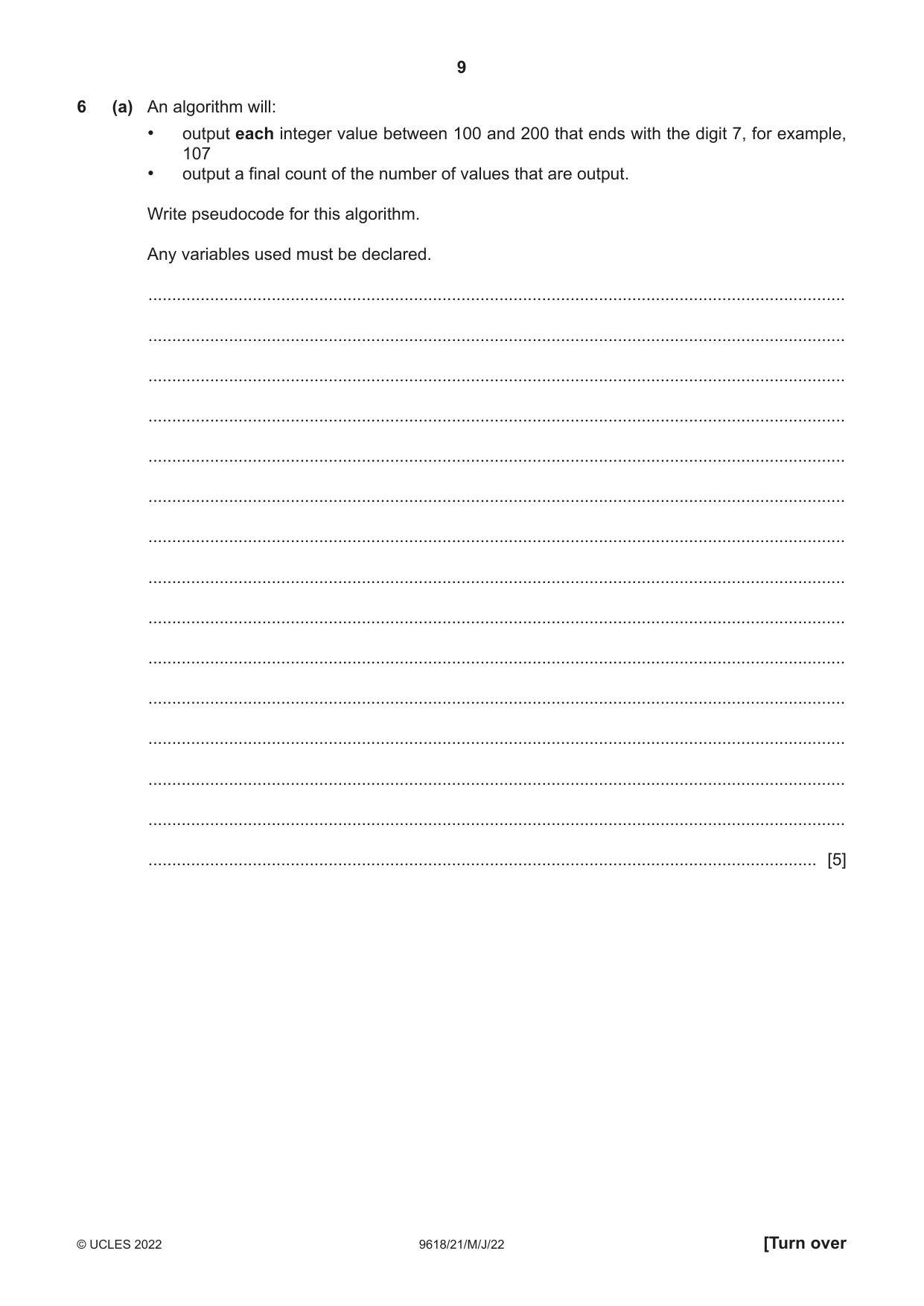
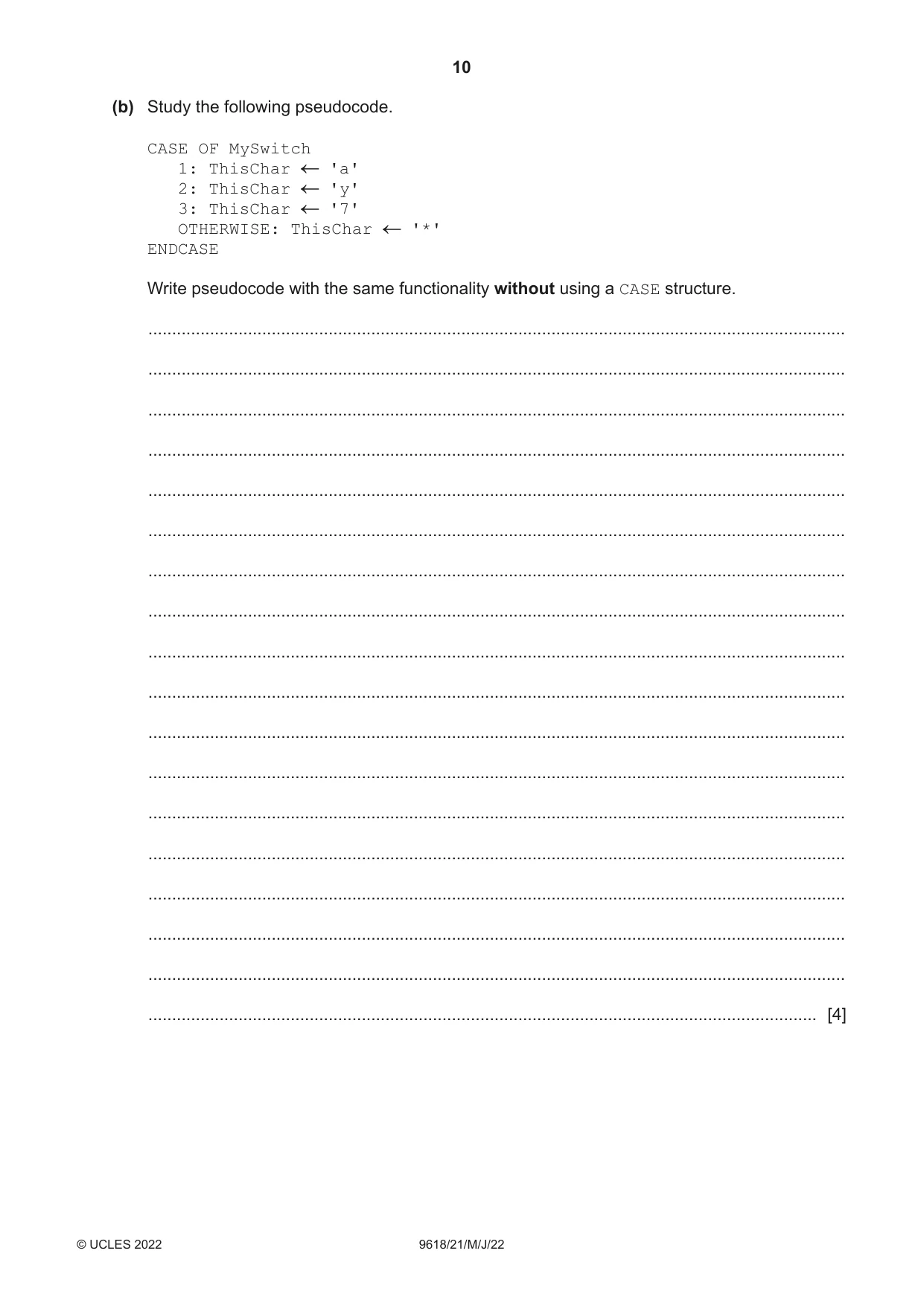
6 (a) An algorithm will: • output each integer value between 100 and 200 that ends with the digit 7, for example, 107 • output a final count of the number of values that are output. Write pseudocode for this algorithm. Any variables used must be declared. ................................................................................................................................................... ................................................................................................................................................... ................................................................................................................................................... ................................................................................................................................................... ................................................................................................................................................... ................................................................................................................................................... ................................................................................................................................................... ................................................................................................................................................... ................................................................................................................................................... ................................................................................................................................................... ................................................................................................................................................... ................................................................................................................................................... ................................................................................................................................................... ................................................................................................................................................... ............................................................................................................................................. [5] (b) Study the following pseudocode. CASE OF MySwitch 1: ThisChar 'a' 2: ThisChar 'y' 3: ThisChar '7' OTHERWISE: ThisChar '*' ENDCASE Write pseudocode with the same functionality without using a CASE structure. ................................................................................................................................................... ................................................................................................................................................... ................................................................................................................................................... ................................................................................................................................................... ................................................................................................................................................... ................................................................................................................................................... ................................................................................................................................................... ................................................................................................................................................... ................................................................................................................................................... ................................................................................................................................................... ................................................................................................................................................... ................................................................................................................................................... ................................................................................................................................................... ................................................................................................................................................... ................................................................................................................................................... ................................................................................................................................................... ................................................................................................................................................... ............................................................................................................................................. [4]
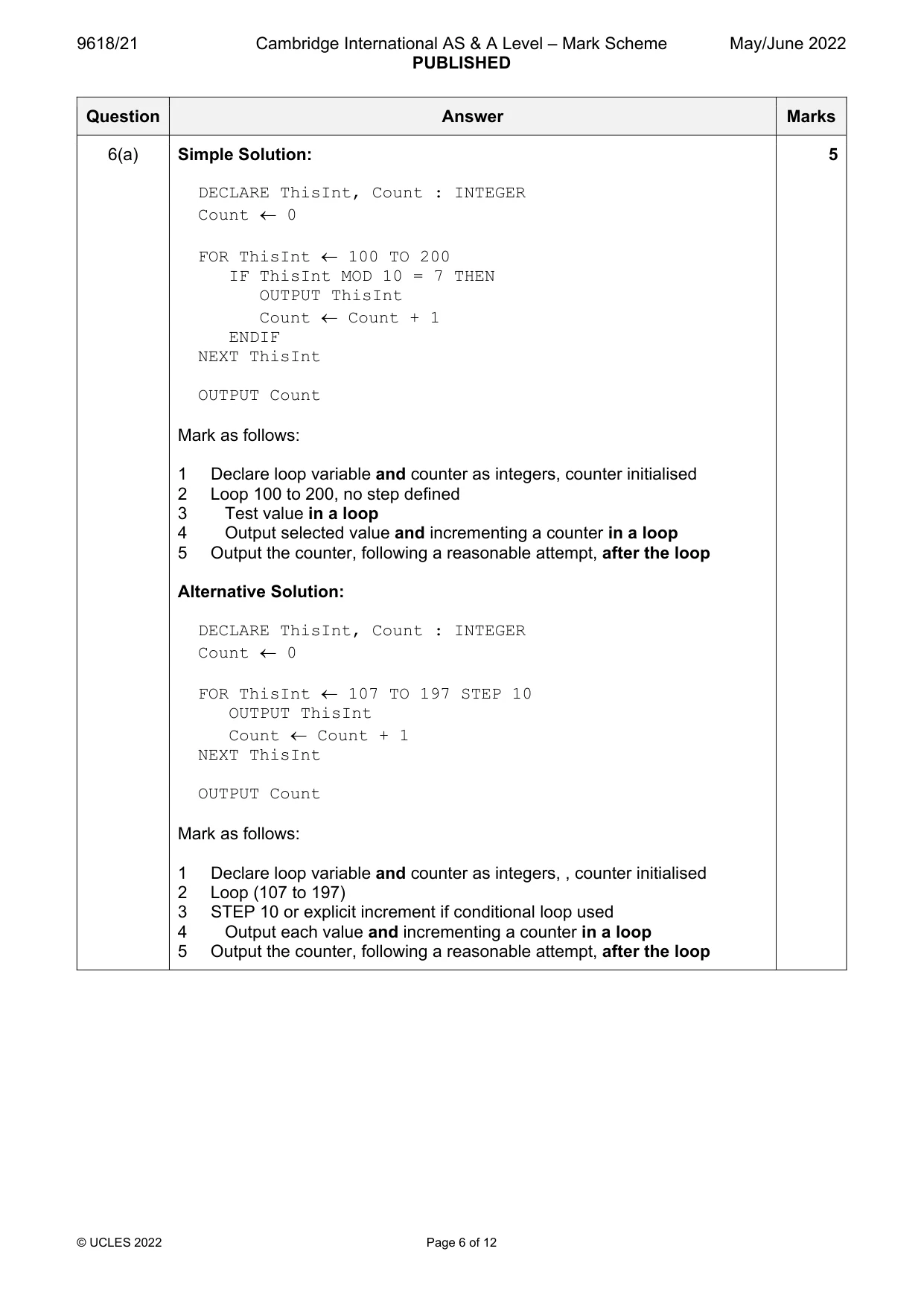
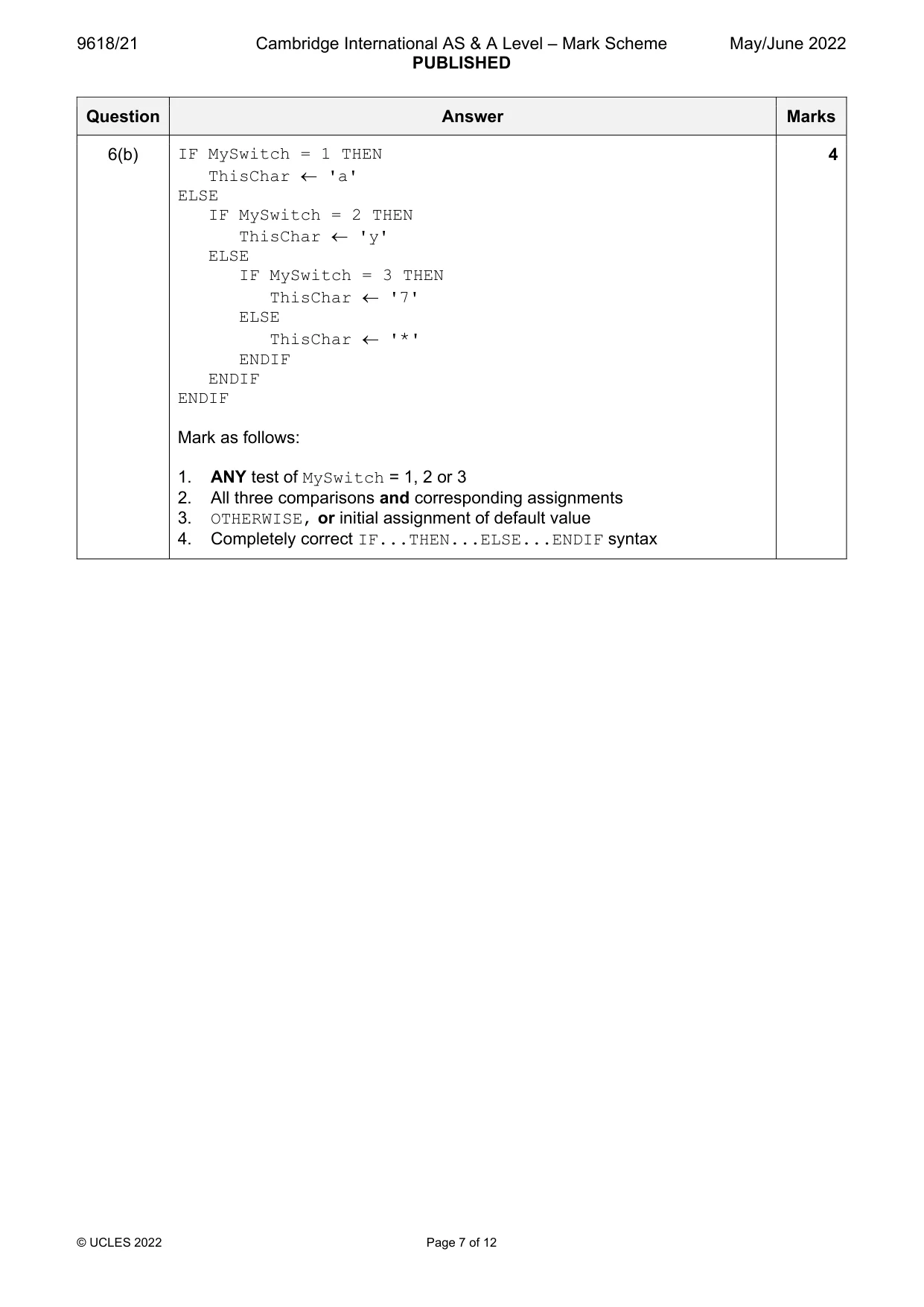
Mark scheme: 6(a) Simple Solution: 5 DECLARE ThisInt, Count : INTEGER Count 0 FOR ThisInt 100 TO 200 IF ThisInt MOD 10 = 7 THEN OUTPUT ThisInt Count Count + 1 ENDIF NEXT ThisInt OUTPUT Count Mark as follows: 1 Declare loop variable and counter as integers, counter initialised 2 Loop 100 to 200, no step defined 3 Test value in a loop 4 Output selected value and incrementing a counter in a loop 5 Output the counter, following a reasonable attempt, after the loop Alternative Solution: DECLARE ThisInt, Count : INTEGER Count 0 FOR ThisInt 107 TO 197 STEP 10 OUTPUT ThisInt Count Count + 1 NEXT ThisInt OUTPUT Count Mark as follows: 1 Declare loop variable and counter as integers, , counter initialised 2 Loop (107 to 197) 3 STEP 10 or explicit increment if conditional loop used 4 Output each value and incrementing a counter in a loop 5 Output the counter, following a reasonable attempt, after the loop 6(b) IF MySwitch = 1 THEN 4 ThisChar 'a' ELSE IF MySwitch = 2 THEN ThisChar 'y' ELSE IF MySwitch = 3 THEN ThisChar '7' ELSE ThisChar '*' ENDIF ENDIF ENDIF Mark as follows: 1. ANY test of MySwitch = 1, 2 or 3 2. All three comparisons and corresponding assignments 3. OTHERWISE, or initial assignment of default value 4. Completely correct IF...THEN...ELSE...ENDIF syntax
Q7 · A string is a palindrome if it reads the same forwards as backwards
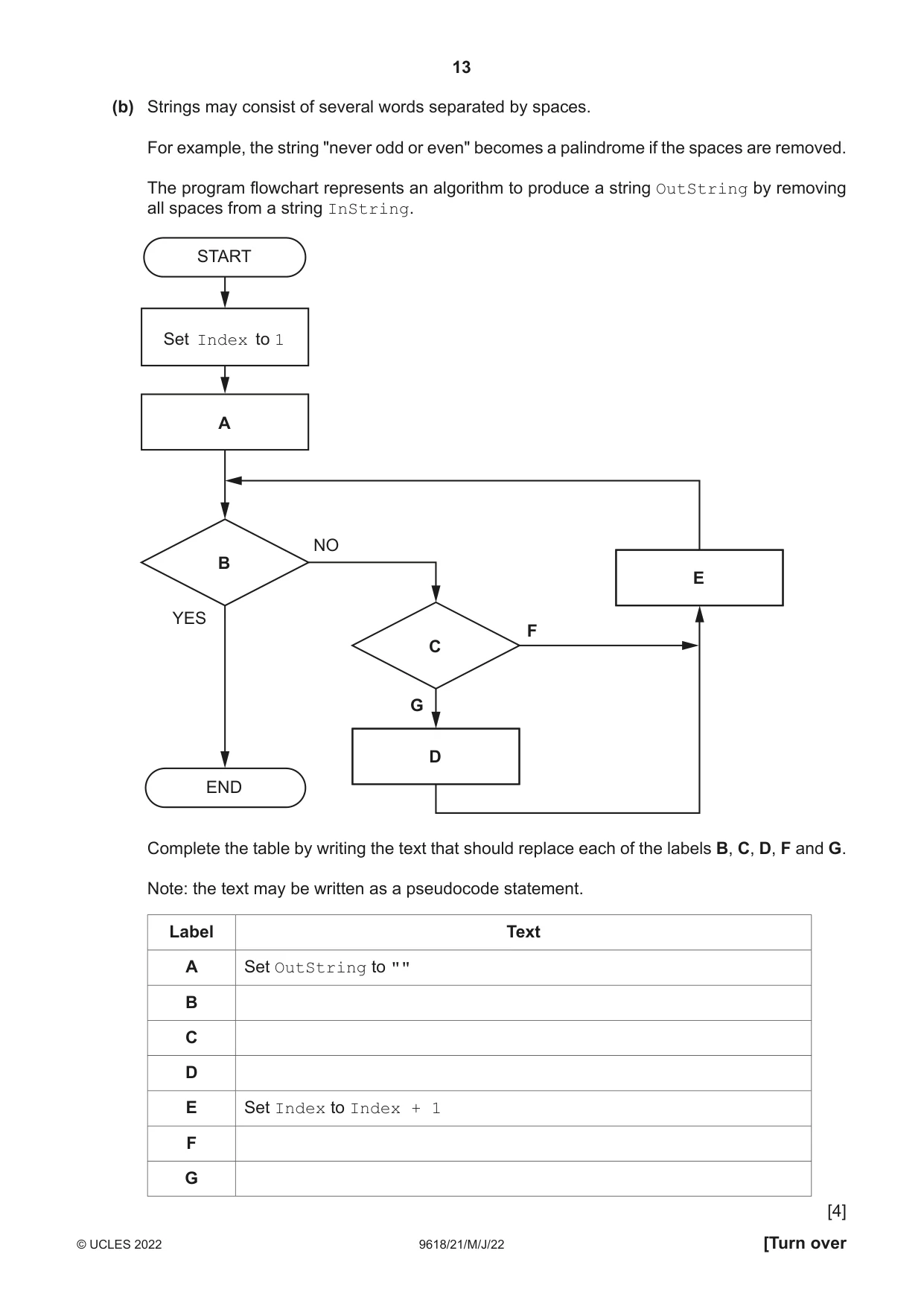
7 A string is a palindrome if it reads the same forwards as backwards. The following strings are examples of palindromes: "Racecar" "madam" "12344321" Upper-case and lower-case characters need to be treated the same. For example, 'A' is equivalent to 'a'. (a) A function IsPalindrome() will take a string parameter. The function will return TRUE if the string is a palindrome and will return FALSE if the string is not a palindrome. Write pseudocode for IsPalindrome(). ................................................................................................................................................... ................................................................................................................................................... ................................................................................................................................................... ................................................................................................................................................... ................................................................................................................................................... ................................................................................................................................................... ................................................................................................................................................... ................................................................................................................................................... ................................................................................................................................................... ................................................................................................................................................... ................................................................................................................................................... ................................................................................................................................................... ................................................................................................................................................... ................................................................................................................................................... ................................................................................................................................................... ................................................................................................................................................... ................................................................................................................................................... ................................................................................................................................................... ................................................................................................................................................... ................................................................................................................................................... ................................................................................................................................................... ................................................................................................................................................... ................................................................................................................................................... ................................................................................................................................................... ................................................................................................................................................... ................................................................................................................................................... ................................................................................................................................................... ................................................................................................................................................... ................................................................................................................................................... ............................................................................................................................................. [7] (b) Strings may consist of several words separated by spaces. For example, the string "never odd or even" becomes a palindrome if the spaces are removed. The program flowchart represents an algorithm to produce a string OutString by removing all spaces from a string InString. START Set Index to 1 A NO B E YES F C G D END Complete the table by writing the text that should replace each of the labels B, C, D, F and G. Note: the text may be written as a pseudocode statement. Label Text A Set OutString to "" B C D E Set Index to Index + 1 F G [4]
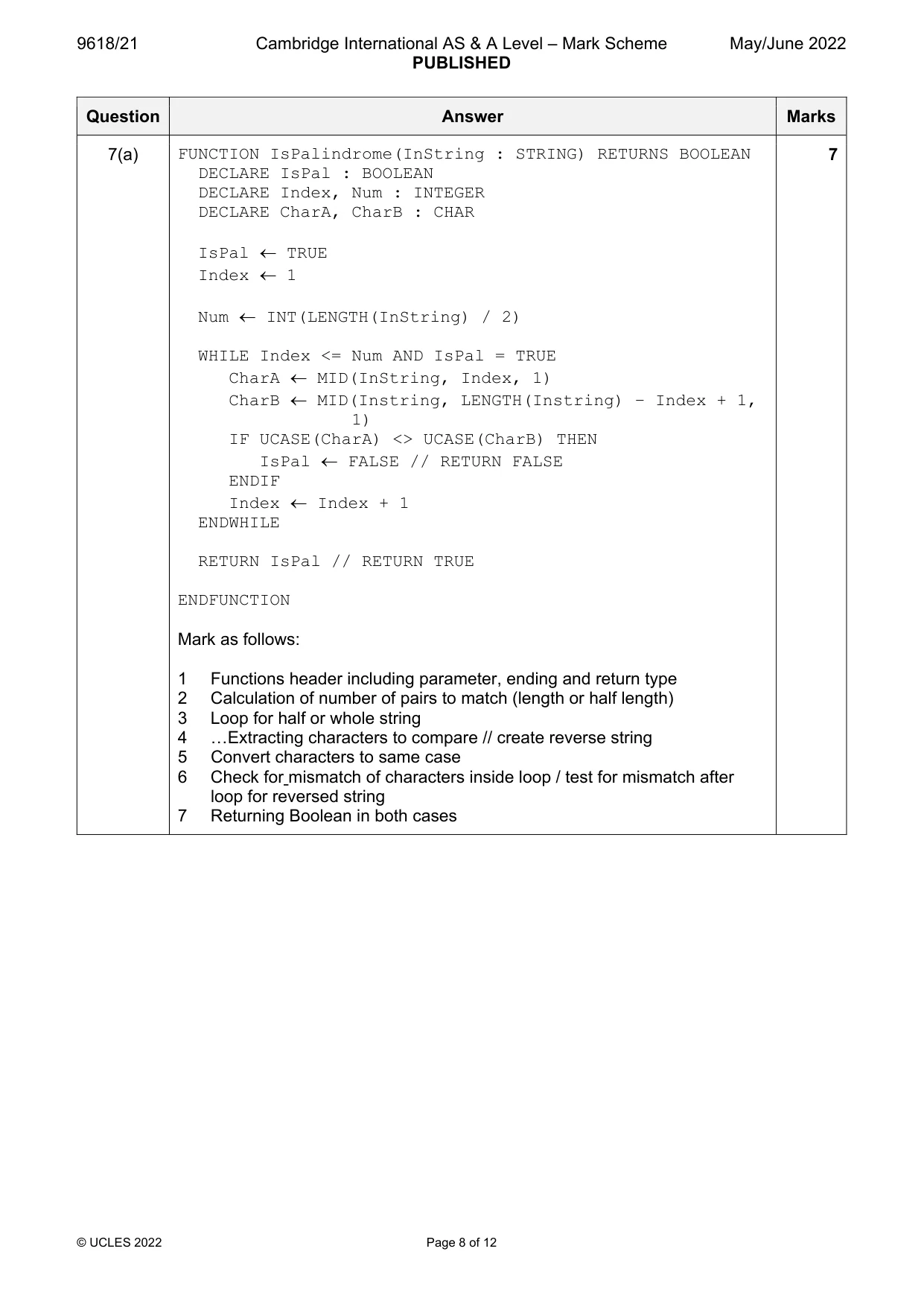
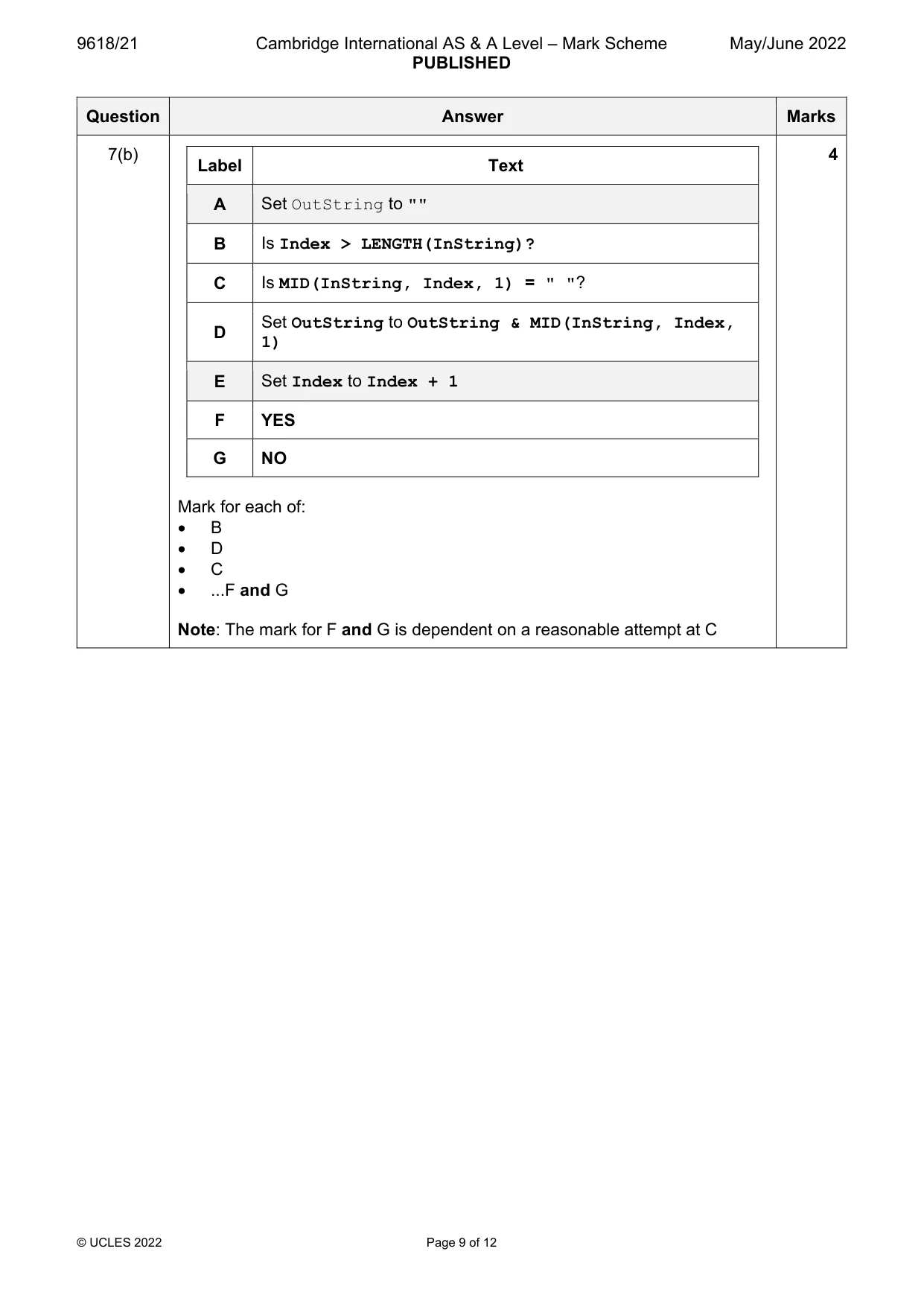
Mark scheme: 7(a) FUNCTION IsPalindrome(InString : STRING) RETURNS BOOLEAN 7 DECLARE IsPal : BOOLEAN DECLARE Index, Num : INTEGER DECLARE CharA, CharB : CHAR IsPal TRUE Index 1 Num INT(LENGTH(InString) / 2) WHILE Index <= Num AND IsPal = TRUE CharA MID(InString, Index, 1) CharB MID(Instring, LENGTH(Instring) – Index + 1, 1) IF UCASE(CharA) <> UCASE(CharB) THEN IsPal FALSE // RETURN FALSE ENDIF Index Index + 1 ENDWHILE RETURN IsPal // RETURN TRUE ENDFUNCTION Mark as follows: 1 Functions header including parameter, ending and return type 2 Calculation of number of pairs to match (length or half length) 3 Loop for half or whole string 4 …Extracting characters to compare // create reverse string 5 Convert characters to same case 6 Check for mismatch of characters inside loop / test for mismatch after loop for reversed string 7 Returning Boolean in both cases 7(b) 4 Label Text A Set OutString to "" B Is Index > LENGTH(InString)? C Is MID(InString, Index, 1) = " "? Set OutString to OutString & MID(InString, Index, D 1) E Set Index to Index + 1 F YES G NO Mark for each of: B D C ...F and G Note: The mark for F and G is dependent on a reasonable attempt at C
Q8 · A program allows a user to save passwords used to login to websites
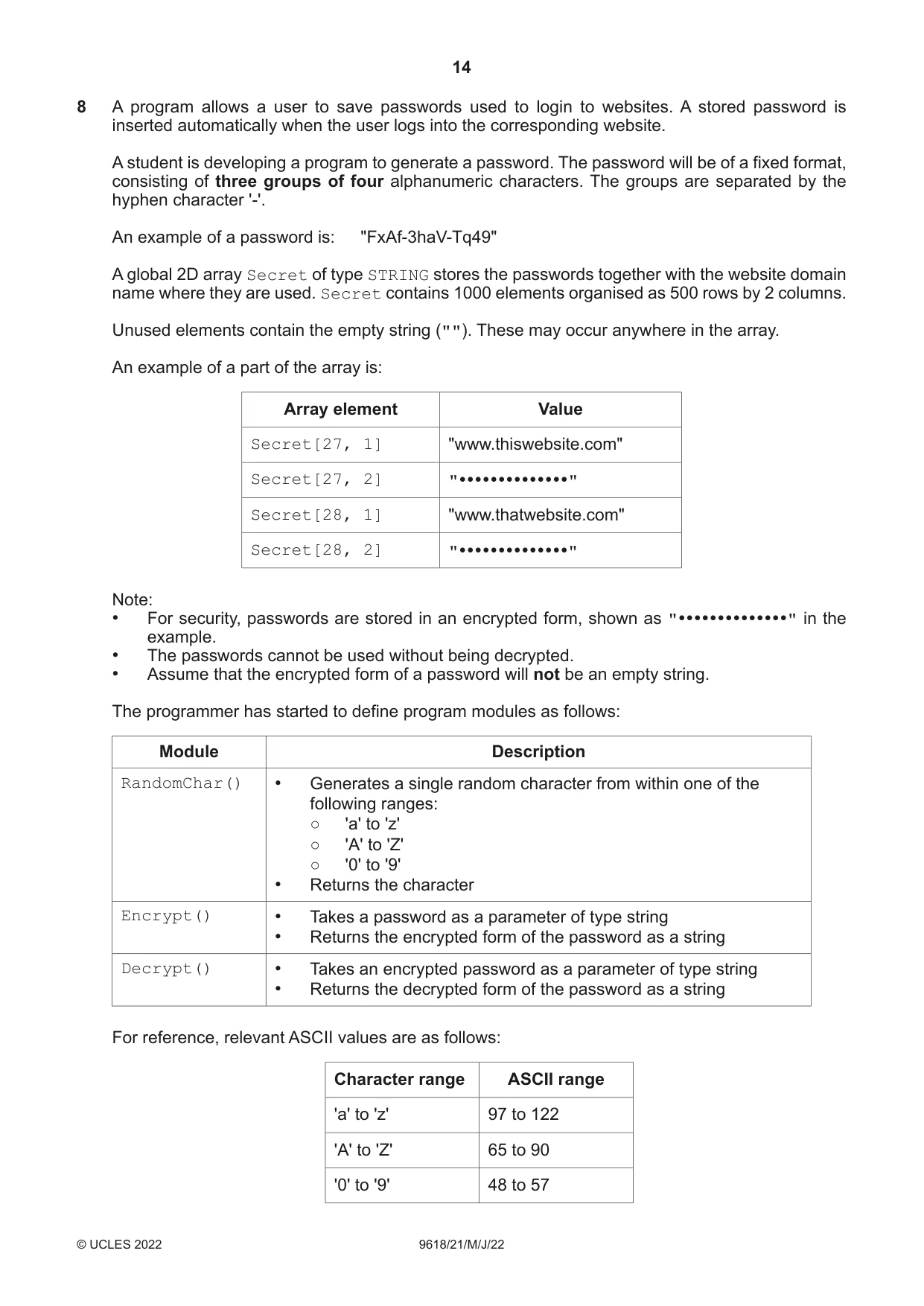
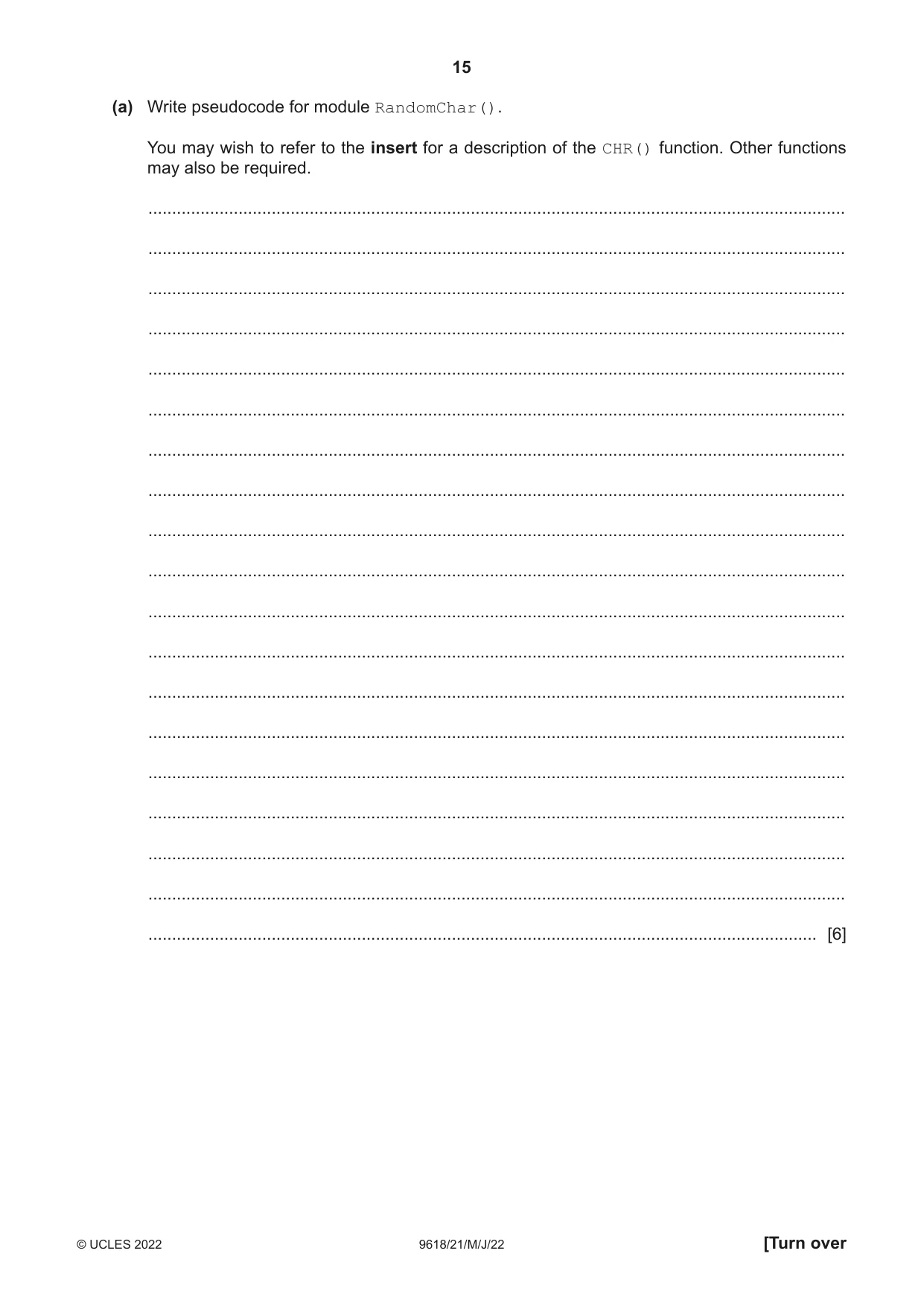
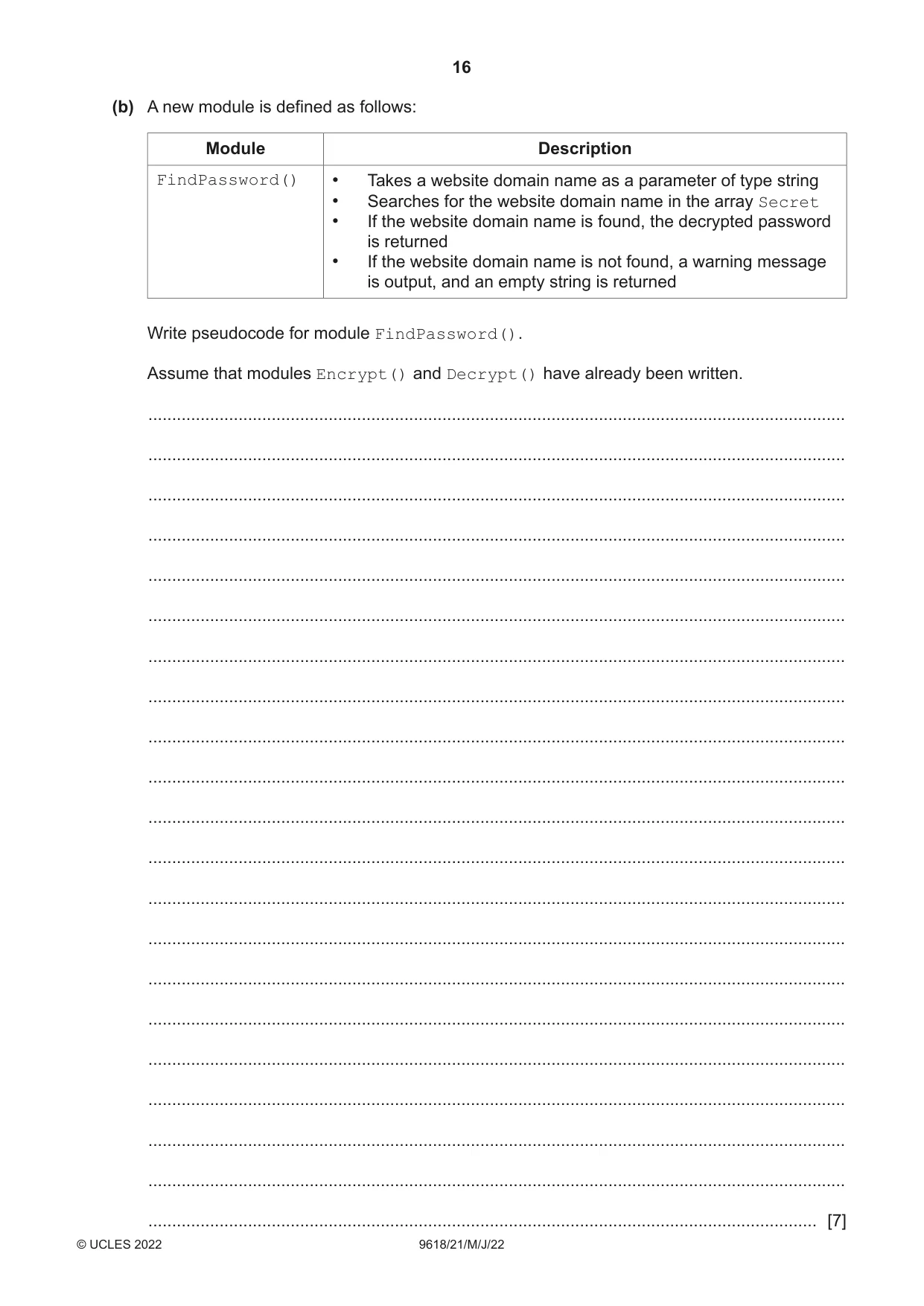
8 A program allows a user to save passwords used to login to websites. A stored password is inserted automatically when the user logs into the corresponding website. A student is developing a program to generate a password. The password will be of a fixed format, consisting of three groups of four alphanumeric characters. The groups are separated by the hyphen character '-'. An example of a password is: "FxAf-3haV-Tq49" A global 2D array Secret of type STRING stores the passwords together with the website domain name where they are used. Secret contains 1000 elements organised as 500 rows by 2 columns. Unused elements contain the empty string (""). These may occur anywhere in the array. An example of a part of the array is: Array element Value Secret[27, 1] "www.thiswebsite.com" Secret[27, 2] Secret[28, 1] "www.thatwebsite.com" Secret[28, 2] Note: • For security, passwords are stored in an encrypted form, shown as "" in the example. • The passwords cannot be used without being decrypted. • Assume that the encrypted form of a password will not be an empty string. The programmer has started to define program modules as follows: Module Description RandomChar() • Generates a single random character from within one of the following ranges: ○ 'a' to 'z' ○ 'A' to 'Z' ○ '0' to '9' • Returns the character Encrypt() • Takes a password as a parameter of type string • Returns the encrypted form of the password as a string Decrypt() • Takes an encrypted password as a parameter of type string • Returns the decrypted form of the password as a string For reference, relevant ASCII values are as follows: Character range ASCII range 'a' to 'z' 97 to 122 'A' to 'Z' 65 to 90 '0' to '9' 48 to 57 (a) Write pseudocode for module RandomChar(). You may wish to refer to the insert for a description of the CHR() function. Other functions may also be required. ................................................................................................................................................... ................................................................................................................................................... ................................................................................................................................................... ................................................................................................................................................... ................................................................................................................................................... ................................................................................................................................................... ................................................................................................................................................... ................................................................................................................................................... ................................................................................................................................................... ................................................................................................................................................... ................................................................................................................................................... ................................................................................................................................................... ................................................................................................................................................... ................................................................................................................................................... ................................................................................................................................................... ................................................................................................................................................... ................................................................................................................................................... ................................................................................................................................................... ............................................................................................................................................. [6] (b) A new module is defined as follows: Module Description FindPassword() • Takes a website domain name as a parameter of type string • Searches for the website domain name in the array Secret • If the website domain name is found, the decrypted password is returned • If the website domain name is not found, a warning message is output, and an empty string is returned Write pseudocode for module FindPassword(). Assume that modules Encrypt() and Decrypt() have already been written. ................................................................................................................................................... ................................................................................................................................................... ................................................................................................................................................... ................................................................................................................................................... ................................................................................................................................................... ................................................................................................................................................... ................................................................................................................................................... ................................................................................................................................................... ................................................................................................................................................... ................................................................................................................................................... ................................................................................................................................................... ................................................................................................................................................... ................................................................................................................................................... ................................................................................................................................................... ................................................................................................................................................... ................................................................................................................................................... ................................................................................................................................................... ................................................................................................................................................... ................................................................................................................................................... ...................................................................................................................................................
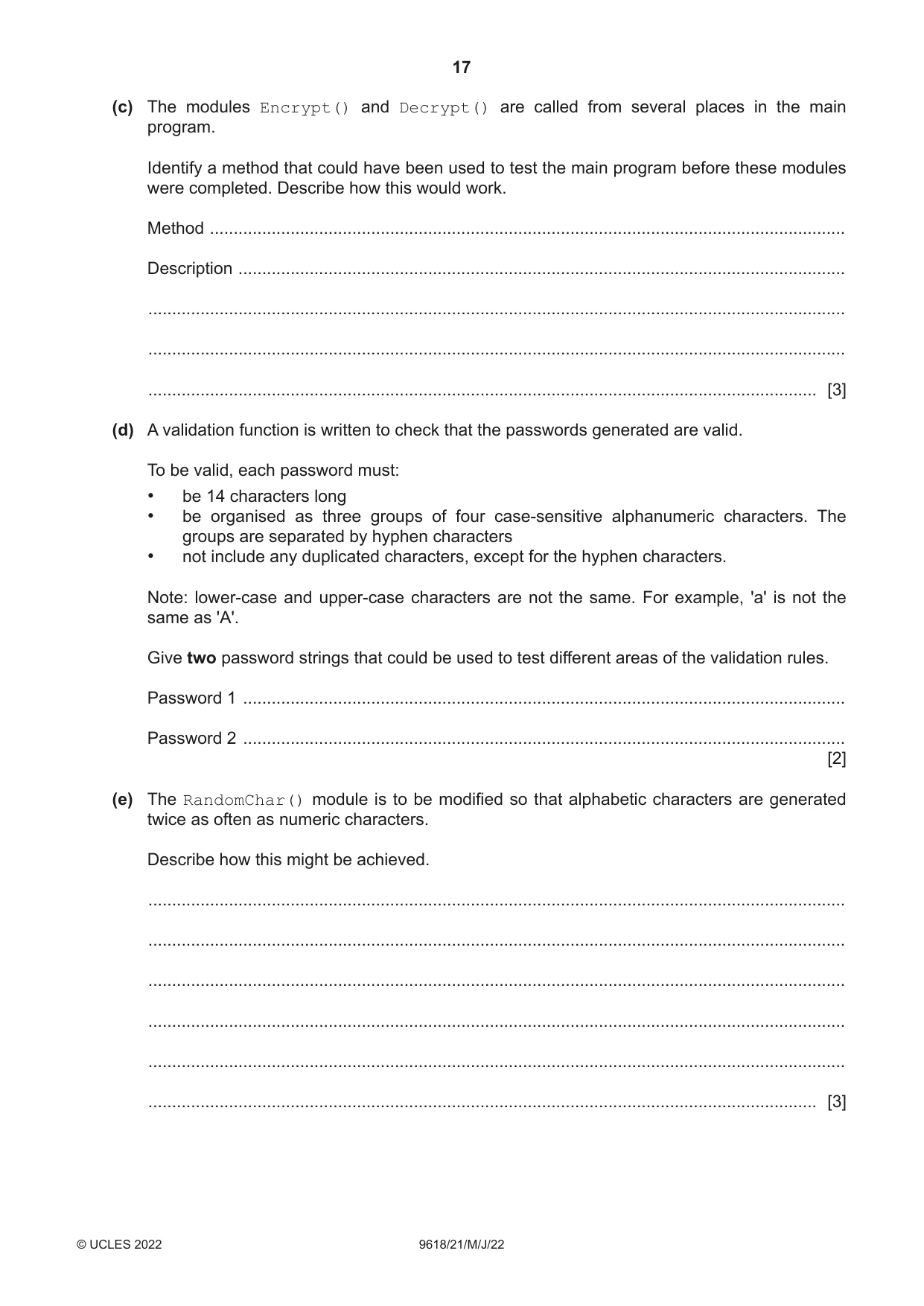
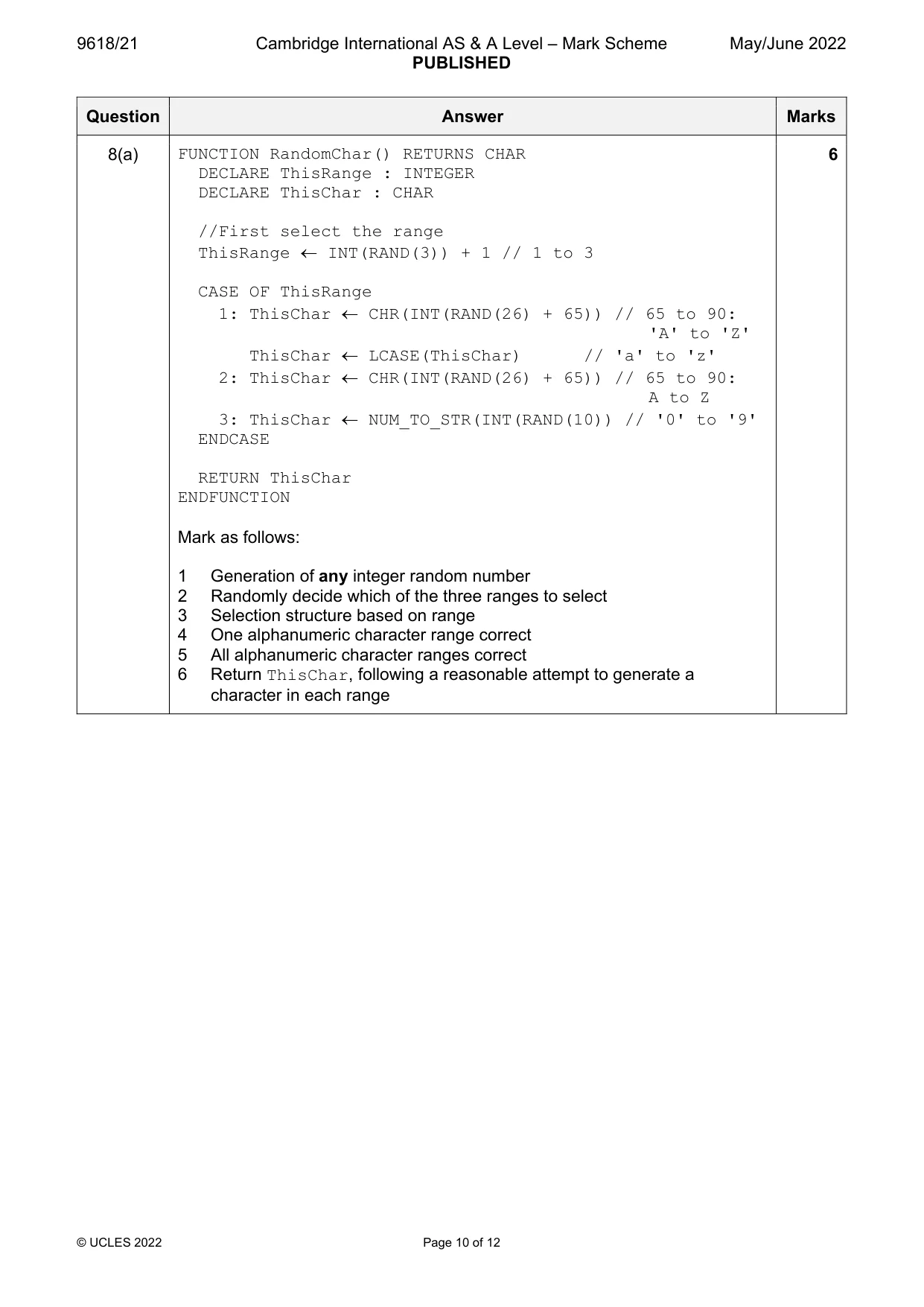
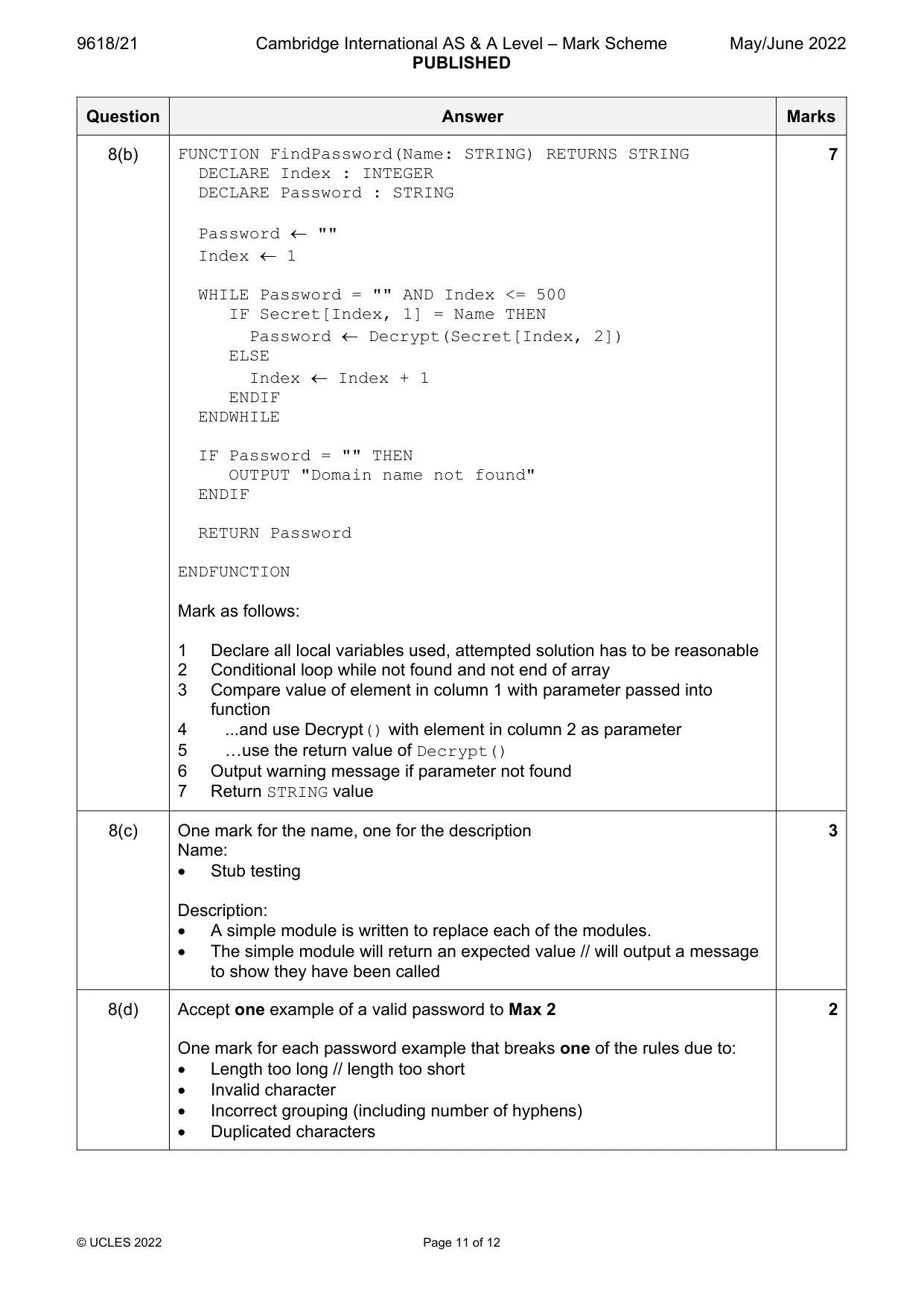
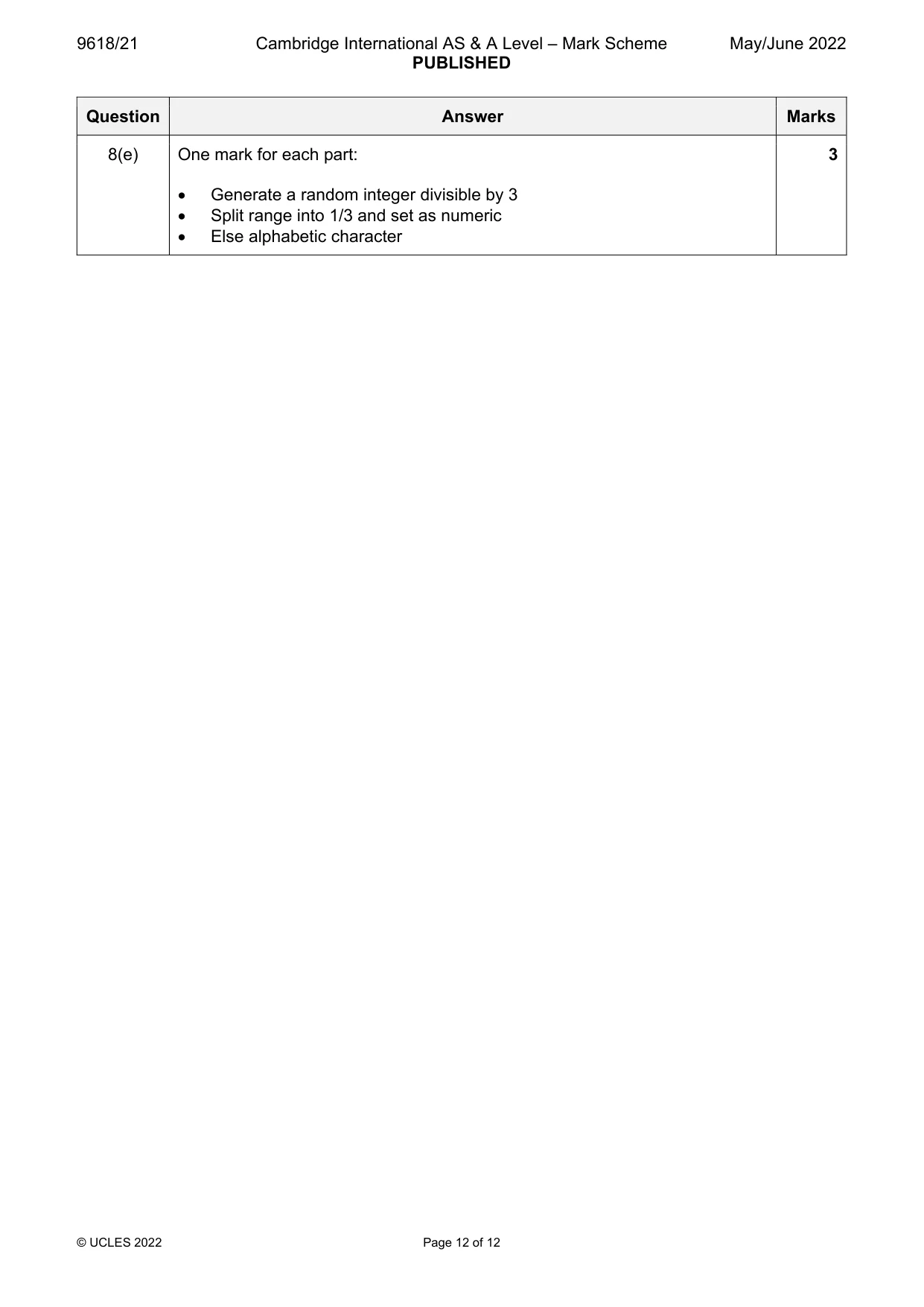
Mark scheme: 8(a) FUNCTION RandomChar() RETURNS CHAR 6 DECLARE ThisRange : INTEGER DECLARE ThisChar : CHAR //First select the range ThisRange INT(RAND(3)) + 1 // 1 to 3 CASE OF ThisRange 1: ThisChar CHR(INT(RAND(26) + 65)) // 65 to 90: 'A' to 'Z' ThisChar LCASE(ThisChar) // 'a' to 'z' 2: ThisChar CHR(INT(RAND(26) + 65)) // 65 to 90: A to Z 3: ThisChar NUM_TO_STR(INT(RAND(10)) // '0' to '9' ENDCASE RETURN ThisChar ENDFUNCTION Mark as follows: 1 Generation of any integer random number 2 Randomly decide which of the three ranges to select 3 Selection structure based on range 4 One alphanumeric character range correct 5 All alphanumeric character ranges correct 6 Return ThisChar, following a reasonable attempt to generate a character in each range 8(b) FUNCTION FindPassword(Name: STRING) RETURNS STRING 7 DECLARE Index : INTEGER DECLARE Password : STRING Password "" Index 1 WHILE Password = "" AND Index <= 500 IF Secret[Index, 1] = Name THEN Password Decrypt(Secret[Index, 2]) ELSE Index Index + 1 ENDIF ENDWHILE IF Password = "" THEN OUTPUT "Domain name not found" ENDIF RETURN Password ENDFUNCTION Mark as follows: 1 Declare all local variables used, attempted solution has to be reasonable 2 Conditional loop while not found and not end of array 3 Compare value of element in column 1 with parameter passed into function 4 ...and use Decrypt() with element in column 2 as parameter 5 …use the return value of Decrypt() 6 Output warning message if parameter not found 7 Return STRING value 8(c) One mark for the name, one for the description 3 Name: Stub testing Description: A simple module is written to replace each of the modules. The simple module will return an expected value // will output a message to show they have been called 8(d) Accept one example of a valid password to Max 2 2 One mark for each password example that breaks one of the rules due to: Length too long // length too short Invalid character Incorrect grouping (including number of hyphens) Duplicated characters 8(e) One mark for each part: 3 Generate a random integer divisible by 3 Split range into 1/3 and set as numeric Else alphabetic character
What was in this paper
The subtopics covered by these 8 questions, and how many questions each got. Open one in a new tab to see every Cambridge question on it.
What you needed in this session
Cambridge’s own grade thresholds for 2022 May/June, Paper 2 · Variant 1. A higher threshold means an easier paper — the bar moves with how the cohort did.