Cambridge A Level Computer Science 9618 — 2021 May/June Paper 2 · Variant 2
9618/22/M/J/21 · 8 questions · 75 marks · ≈84 min
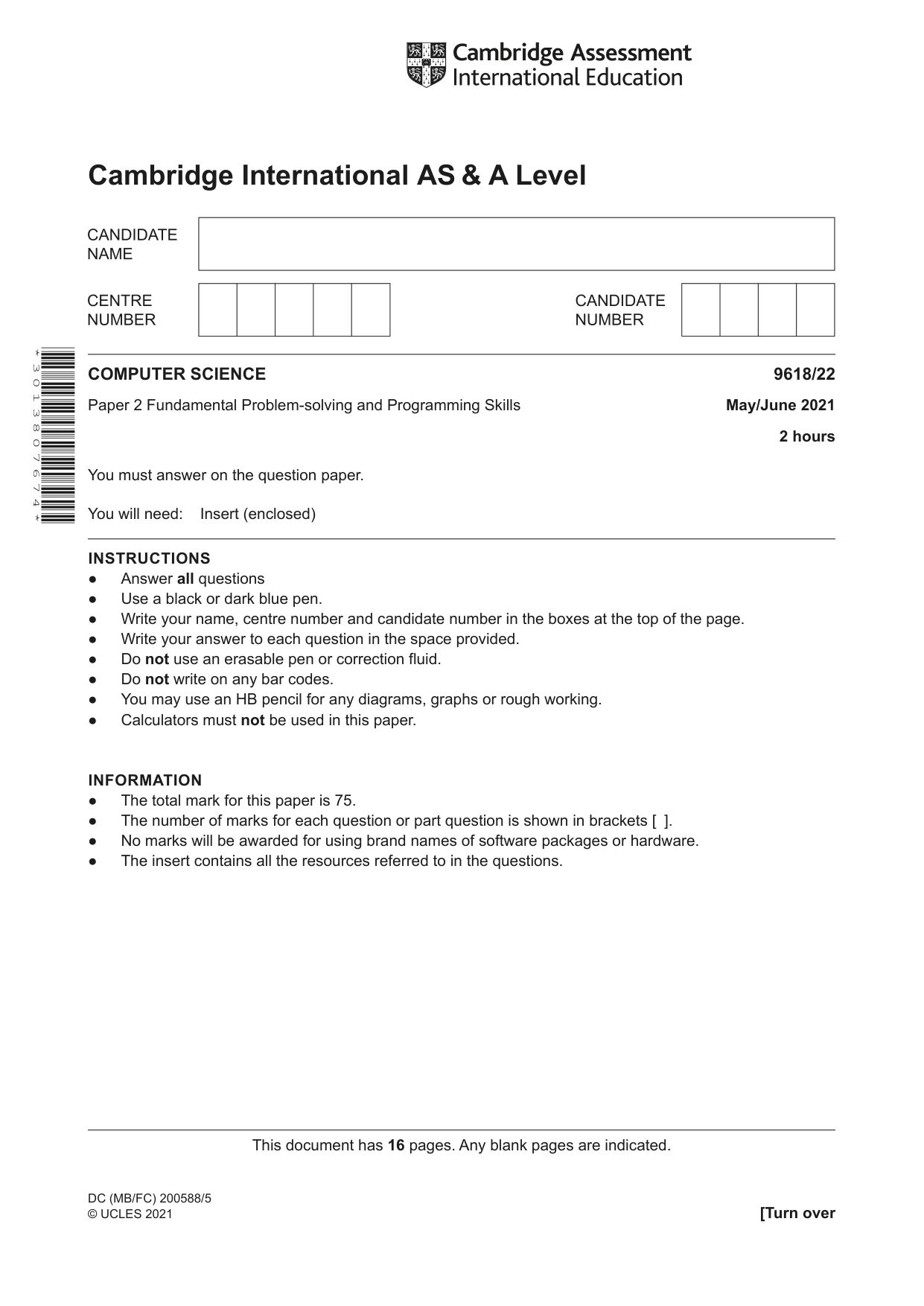
The question paper and its mark scheme, free to read here and free to download. This is Cambridge’s own paper, exactly as it was sat.
Question paper16 pages


Mark scheme10 pages
Answers below. Sit the paper first if you are practising.
Questions as text
Q1 · Complete the following table by giving the appropriate data type in each case
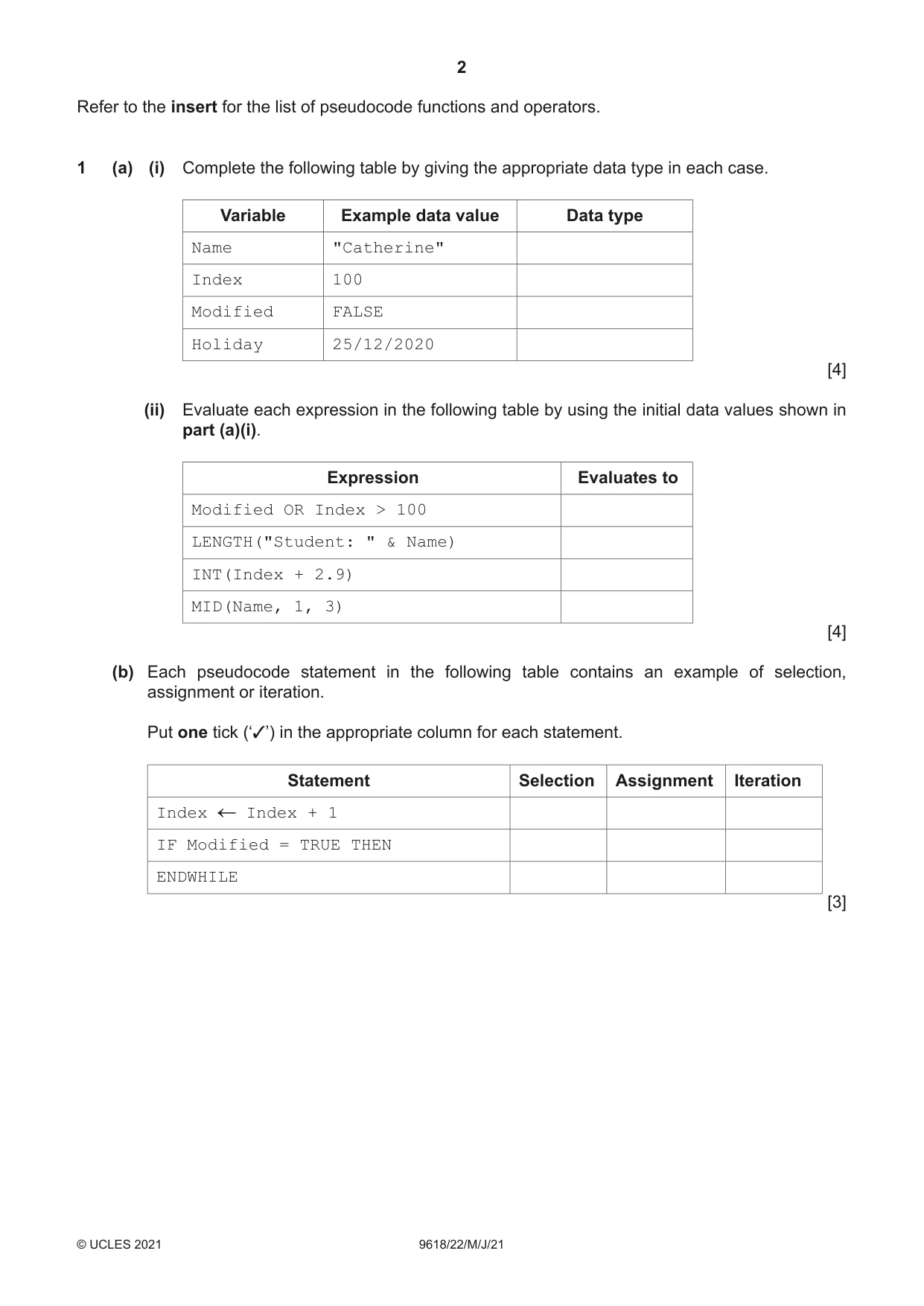
1 (a) (i) Complete the following table by giving the appropriate data type in each case. Variable Example data value Data type Name "Catherine" Index 100 Modified FALSE Holiday 25/12/2020 [4] (ii) Evaluate each expression in the following table by using the initial data values shown in part (a)(i). Expression Evaluates to Modified OR Index > 100 LENGTH("Student: " & Name) INT(Index + 2.9) MID(Name, 1, 3) [4] (b) Each pseudocode statement in the following table contains an example of selection, assignment or iteration. Put one tick (‘✓’) in the appropriate column for each statement. Statement Selection Assignment Iteration Index Index + 1 IF Modified = TRUE THEN ENDWHILE [3]
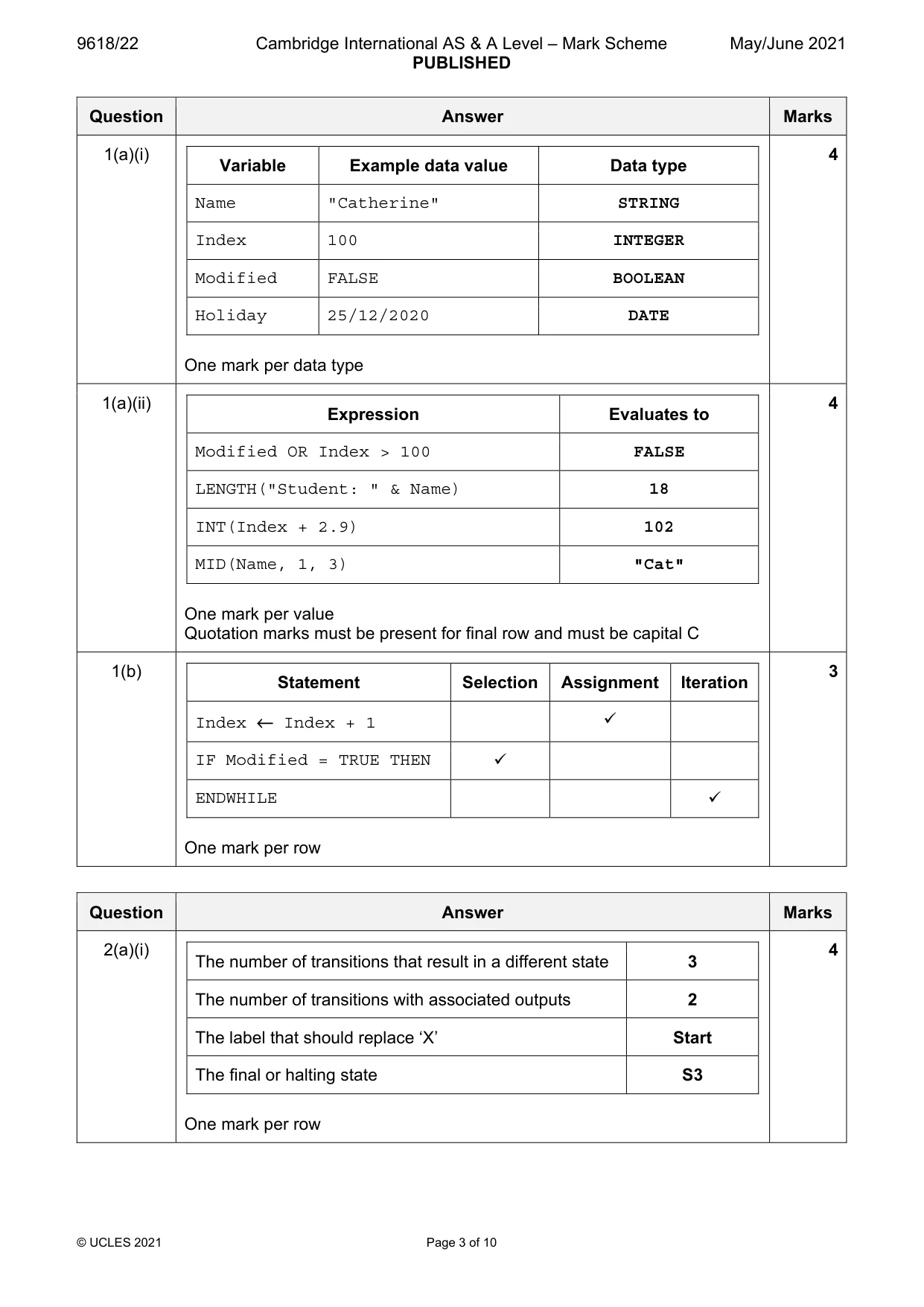
Mark scheme: Question Answer Marks 1(a)(i) 4 Variable Example data value Data type Name "Catherine" STRING Index 100 INTEGER Modified FALSE BOOLEAN Holiday 25/12/2020 DATE One mark per data type 1(a)(ii) 4 Expression Evaluates to Modified OR Index > 100 FALSE LENGTH("Student: " & Name) 18 INT(Index + 2.9) 102 MID(Name, 1, 3) "Cat" One mark per value Quotation marks must be present for final row and must be capital C 1(b) 3 Statement Selection Assignment Iteration Index ← Index + 1 IF Modified = TRUE THEN ENDWHILE One mark per row
Q2 · Examine the following state-transition diagram
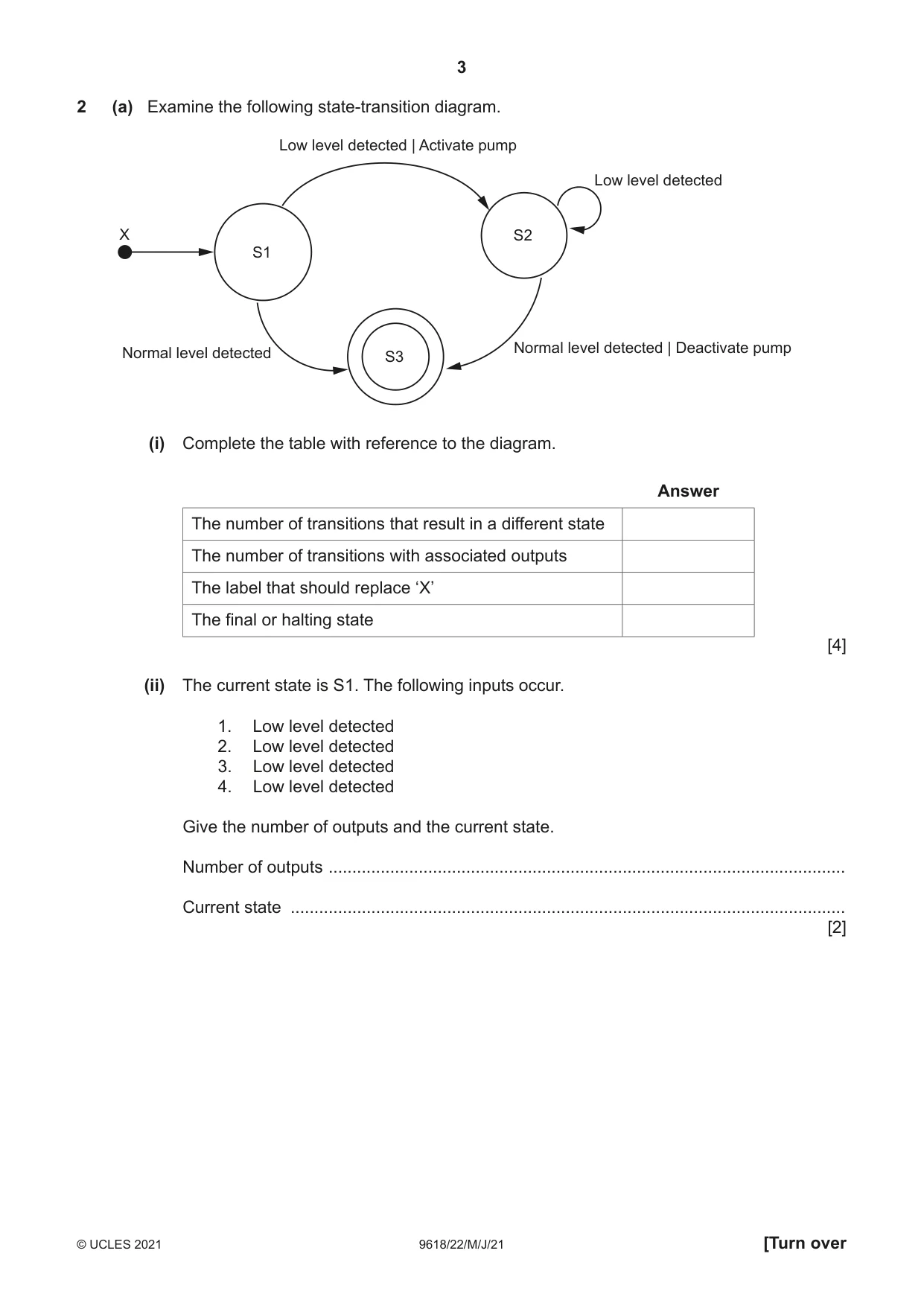
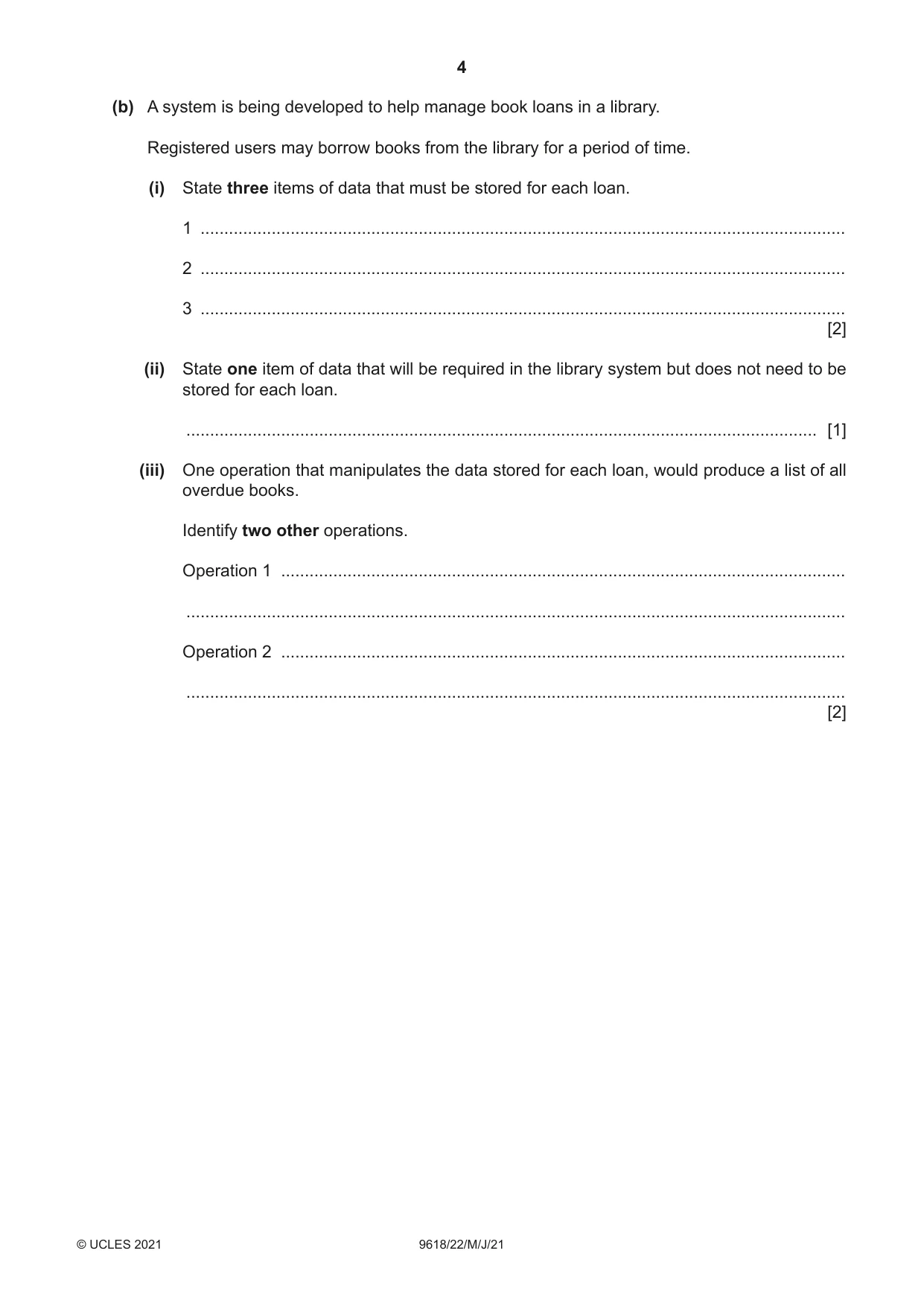
2 (a) Examine the following state-transition diagram. Low level detected | Activate pump Low level detected X S2 S1 Normal level detected | Deactivate pump Normal level detected S3 (i) Complete the table with reference to the diagram. Answer The number of transitions that result in a different state The number of transitions with associated outputs The label that should replace ‘X’ The final or halting state [4] (ii) The current state is S1. The following inputs occur. 1. Low level detected 2. Low level detected 3. Low level detected 4. Low level detected Give the number of outputs and the current state. Number of outputs ............................................................................................................. Current state ..................................................................................................................... [2] (b) A system is being developed to help manage book loans in a library. Registered users may borrow books from the library for a period of time. (i) State three items of data that must be stored for each loan. 1 ........................................................................................................................................ 2 ........................................................................................................................................ 3 ........................................................................................................................................ [2] (ii) State one item of data that will be required in the library system but does not need to be stored for each loan. ..................................................................................................................................... [1] (iii) One operation that manipulates the data stored for each loan, would produce a list of all overdue books. Identify two other operations. Operation 1 ....................................................................................................................... ........................................................................................................................................... Operation 2 ....................................................................................................................... ........................................................................................................................................... [2]
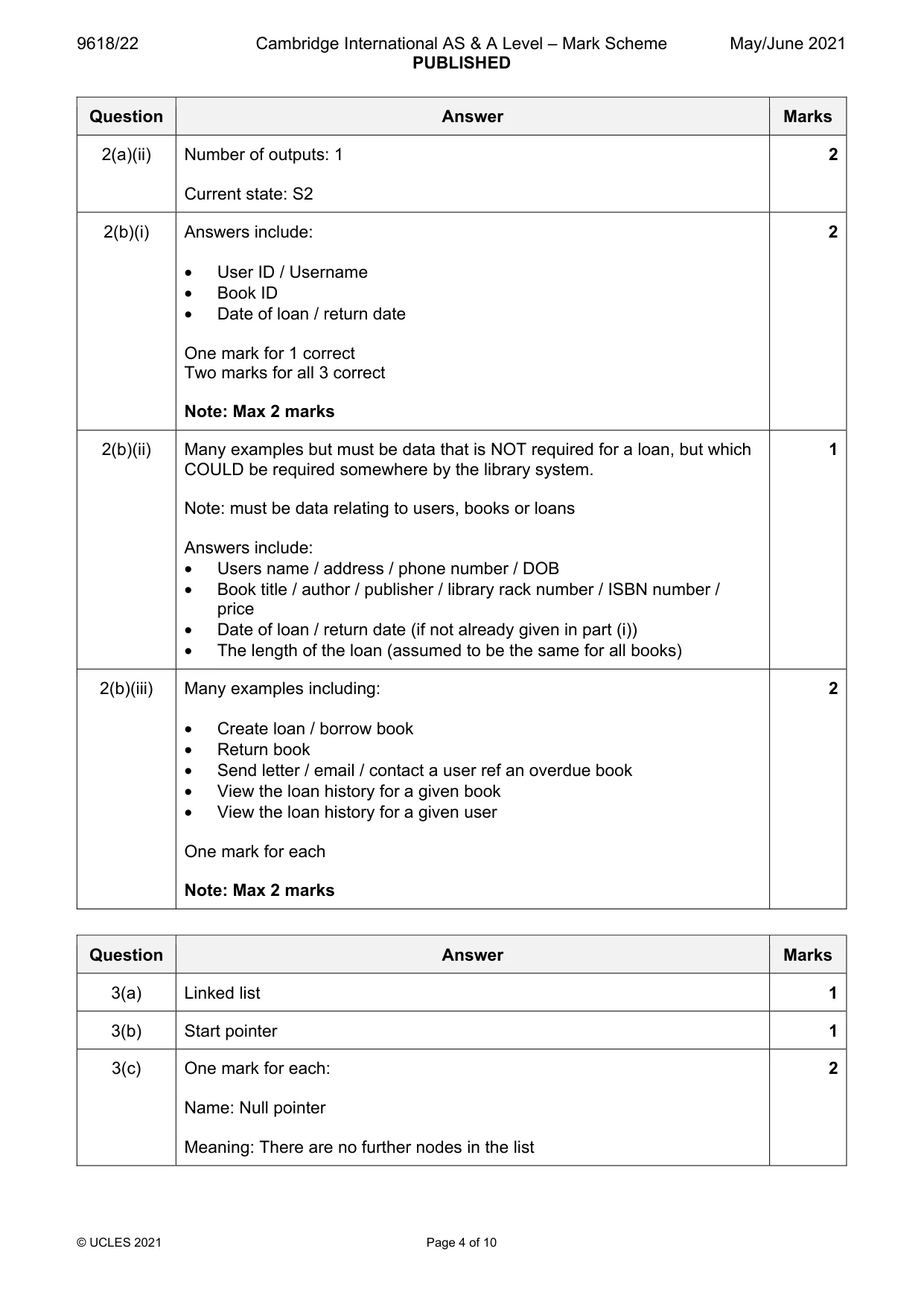
Mark scheme: 2(a)(i) 4 The number of transitions that result in a different state 3 The number of transitions with associated outputs 2 The label that should replace ‘X’ Start The final or halting state S3 One mark per row 2(a)(ii) Number of outputs: 1 2 Current state: S2 2(b)(i) Answers include: 2 • User ID / Username • Book ID • Date of loan / return date One mark for 1 correct Two marks for all 3 correct Note: Max 2 marks 2(b)(ii) Many examples but must be data that is NOT required for a loan, but which 1 COULD be required somewhere by the library system. Note: must be data relating to users, books or loans Answers include: • Users name / address / phone number / DOB • Book title / author / publisher / library rack number / ISBN number / price • Date of loan / return date (if not already given in part (i)) • The length of the loan (assumed to be the same for all books) 2(b)(iii) Many examples including: 2 • Create loan / borrow book • Return book • Send letter / email / contact a user ref an overdue book • View the loan history for a given book • View the loan history for a given user One mark for each Note: Max 2 marks
Q3 · The following diagram represents an Abstract Data Type (ADT)
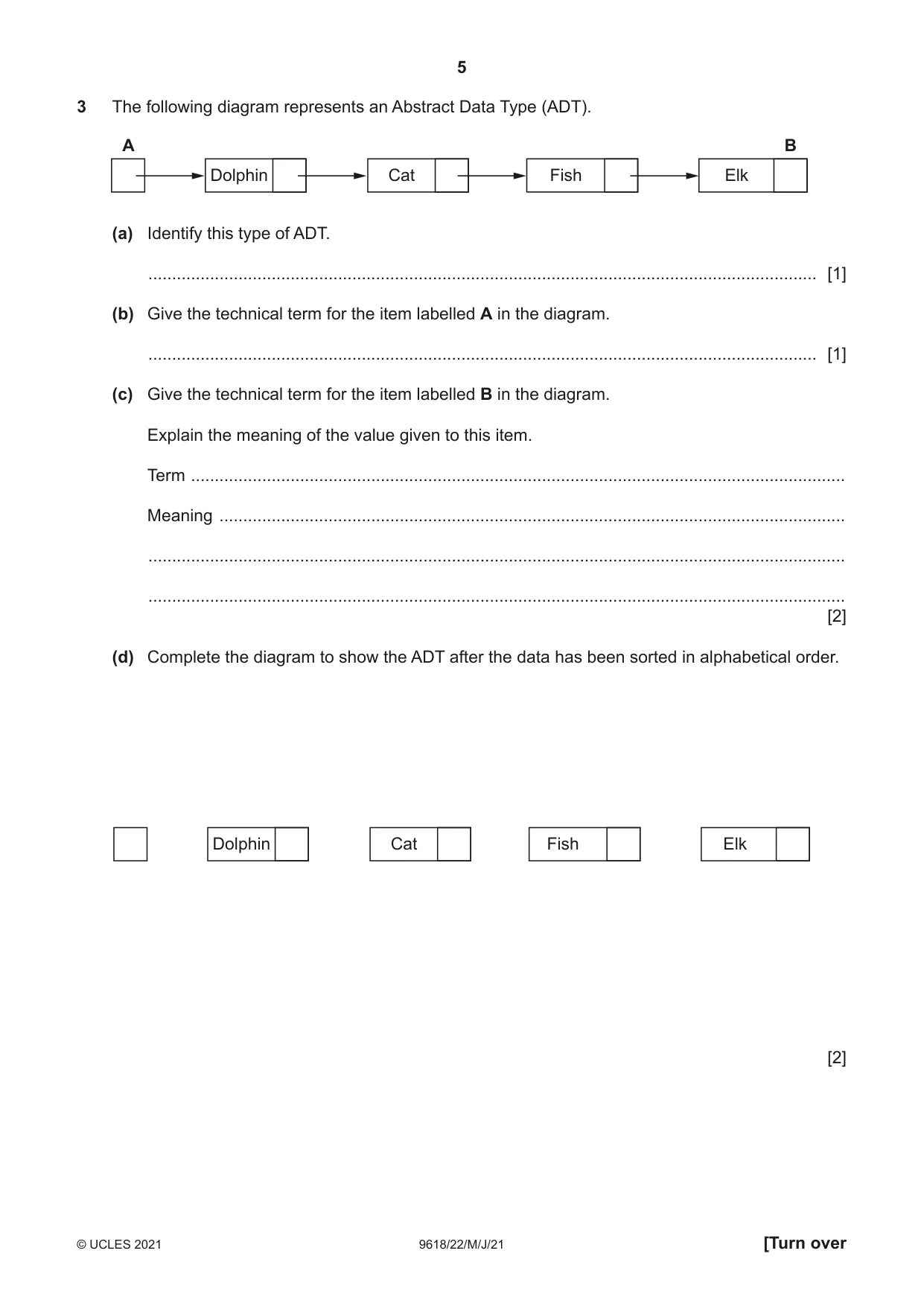
3 The following diagram represents an Abstract Data Type (ADT). A B Dolphin Cat Fish Elk (a) Identify this type of ADT. ............................................................................................................................................. [1] (b) Give the technical term for the item labelled A in the diagram. ............................................................................................................................................. [1] (c) Give the technical term for the item labelled B in the diagram. Explain the meaning of the value given to this item. Term .......................................................................................................................................... Meaning .................................................................................................................................... ................................................................................................................................................... ................................................................................................................................................... [2] (d) Complete the diagram to show the ADT after the data has been sorted in alphabetical order. Dolphin Cat Fish Elk [2]
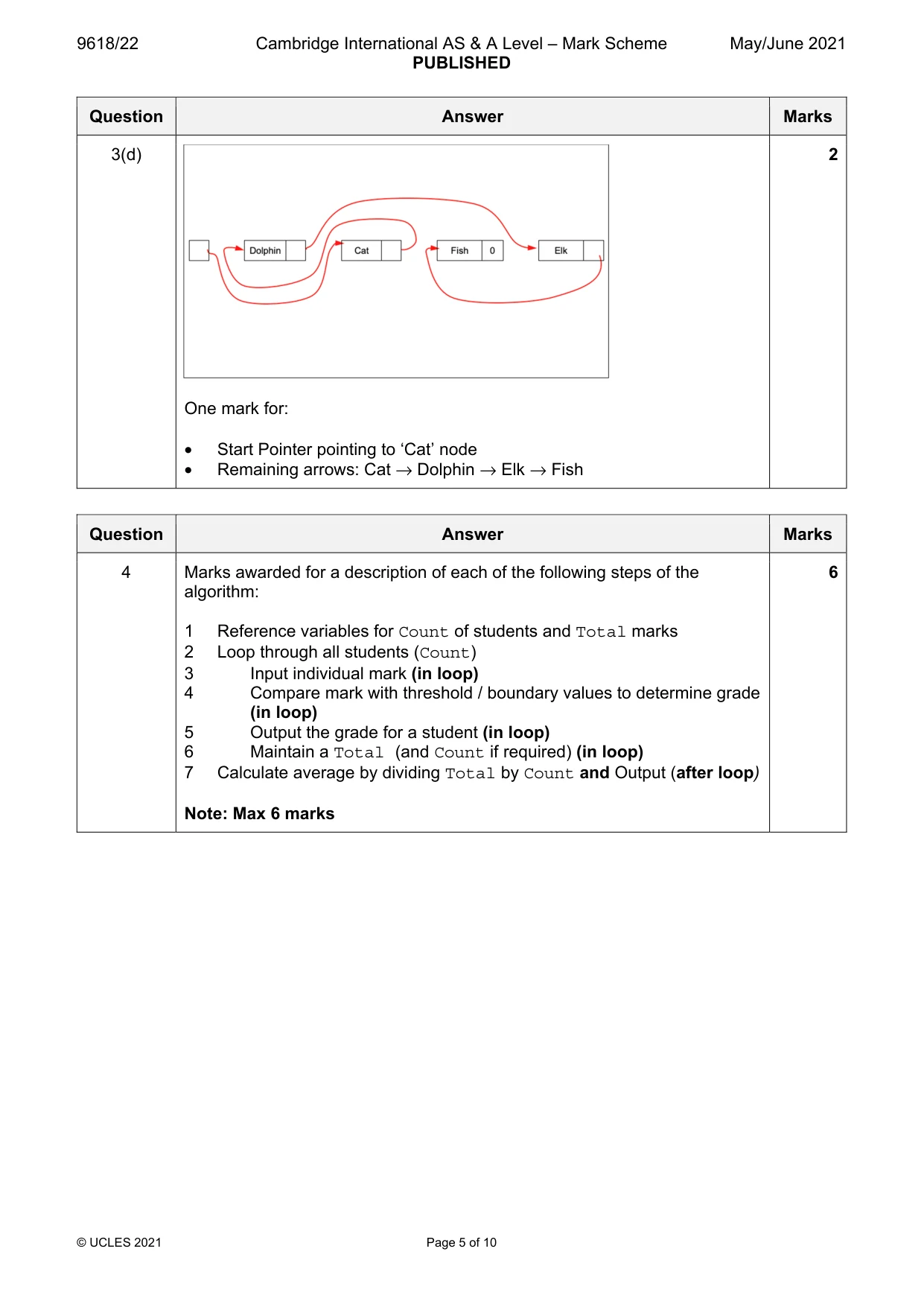
Mark scheme: 3(a) Linked list 1 3(b) Start pointer 1 3(c) One mark for each: 2 Name: Null pointer Meaning: There are no further nodes in the list 3(d) 2 One mark for: • Start Pointer pointing to ‘Cat’ node • Remaining arrows: Cat → Dolphin → Elk → Fish
Q4 · A teacher uses a paper-based system to store marks for a class test
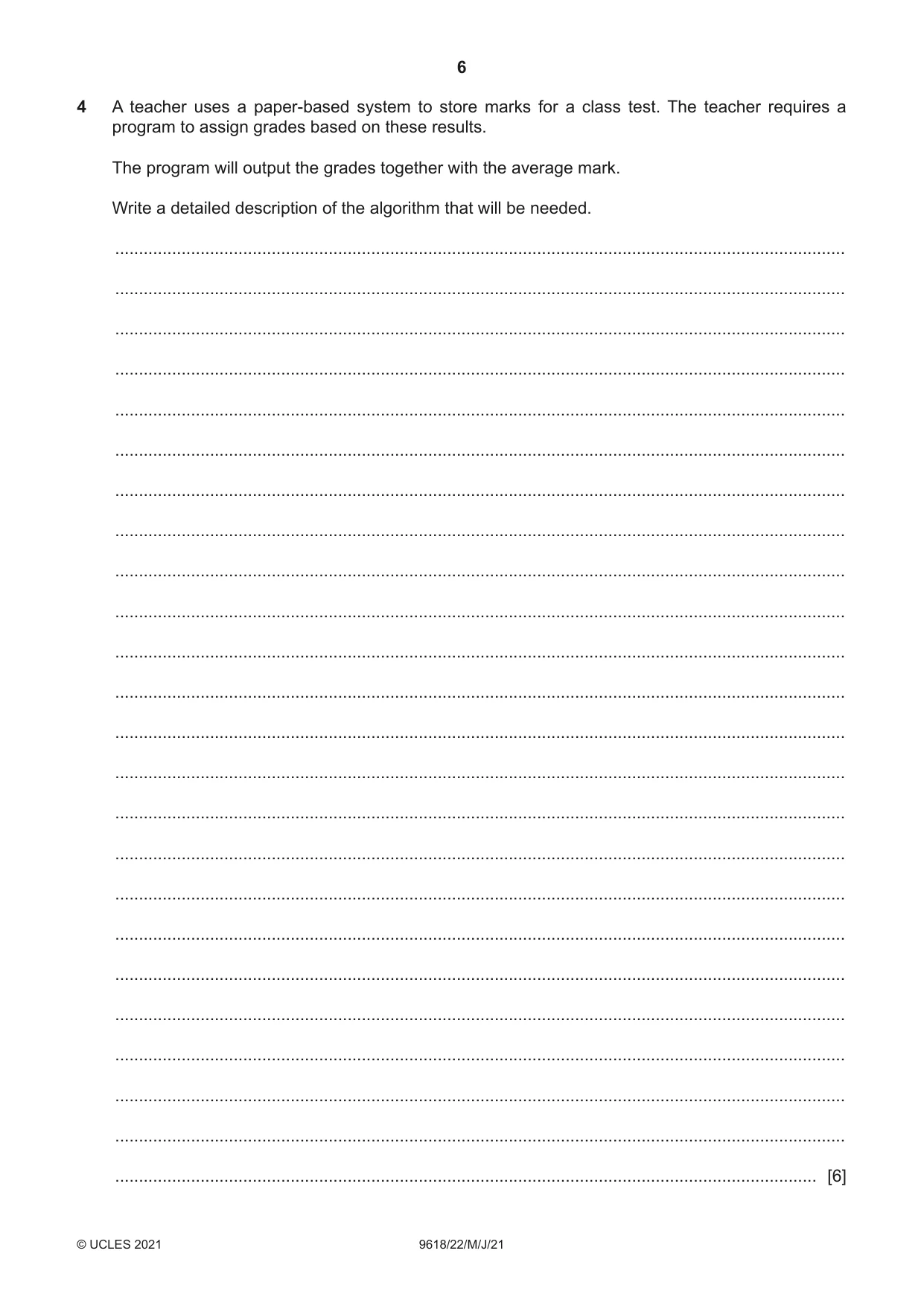
4 A teacher uses a paper-based system to store marks for a class test. The teacher requires a program to assign grades based on these results. The program will output the grades together with the average mark. Write a detailed description of the algorithm that will be needed. .......................................................................................................................................................... .......................................................................................................................................................... .......................................................................................................................................................... .......................................................................................................................................................... .......................................................................................................................................................... .......................................................................................................................................................... .......................................................................................................................................................... .......................................................................................................................................................... .......................................................................................................................................................... .......................................................................................................................................................... .......................................................................................................................................................... .......................................................................................................................................................... .......................................................................................................................................................... .......................................................................................................................................................... .......................................................................................................................................................... .......................................................................................................................................................... .......................................................................................................................................................... .......................................................................................................................................................... .......................................................................................................................................................... .......................................................................................................................................................... .......................................................................................................................................................... .......................................................................................................................................................... .......................................................................................................................................................... .................................................................................................................................................... [6]
Mark scheme: 4 Marks awarded for a description of each of the following steps of the 6 algorithm: 1 Reference variables for Count of students and Total marks 2 Loop through all students (Count) 3 Input individual mark (in loop) 4 Compare mark with threshold / boundary values to determine grade (in loop) 5 Output the grade for a student (in loop) 6 Maintain a Total (and Count if required) (in loop) 7 Calculate average by dividing Total by Count and Output (after loop) Note: Max 6 marks
Q5 · A student is learning about arrays
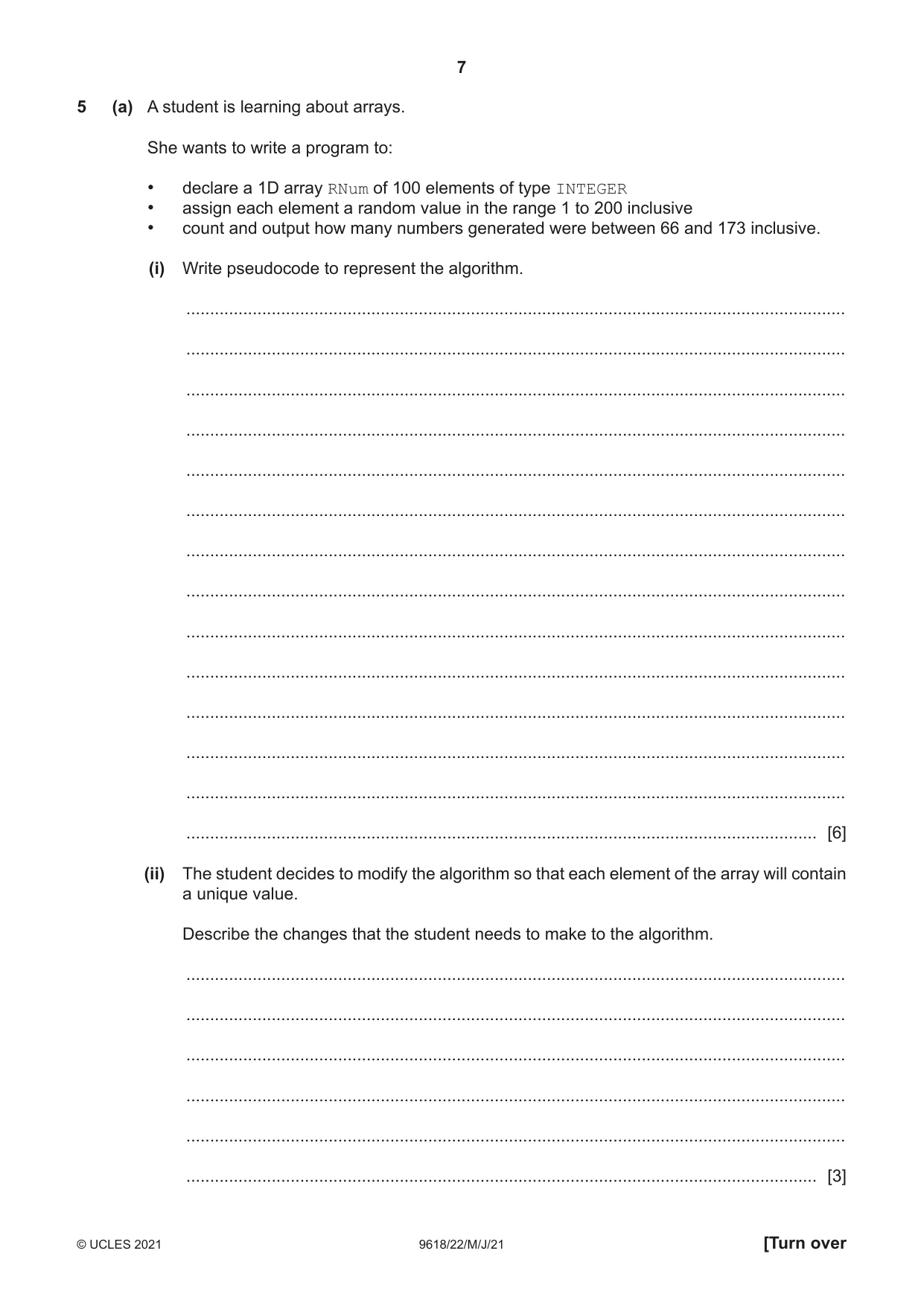
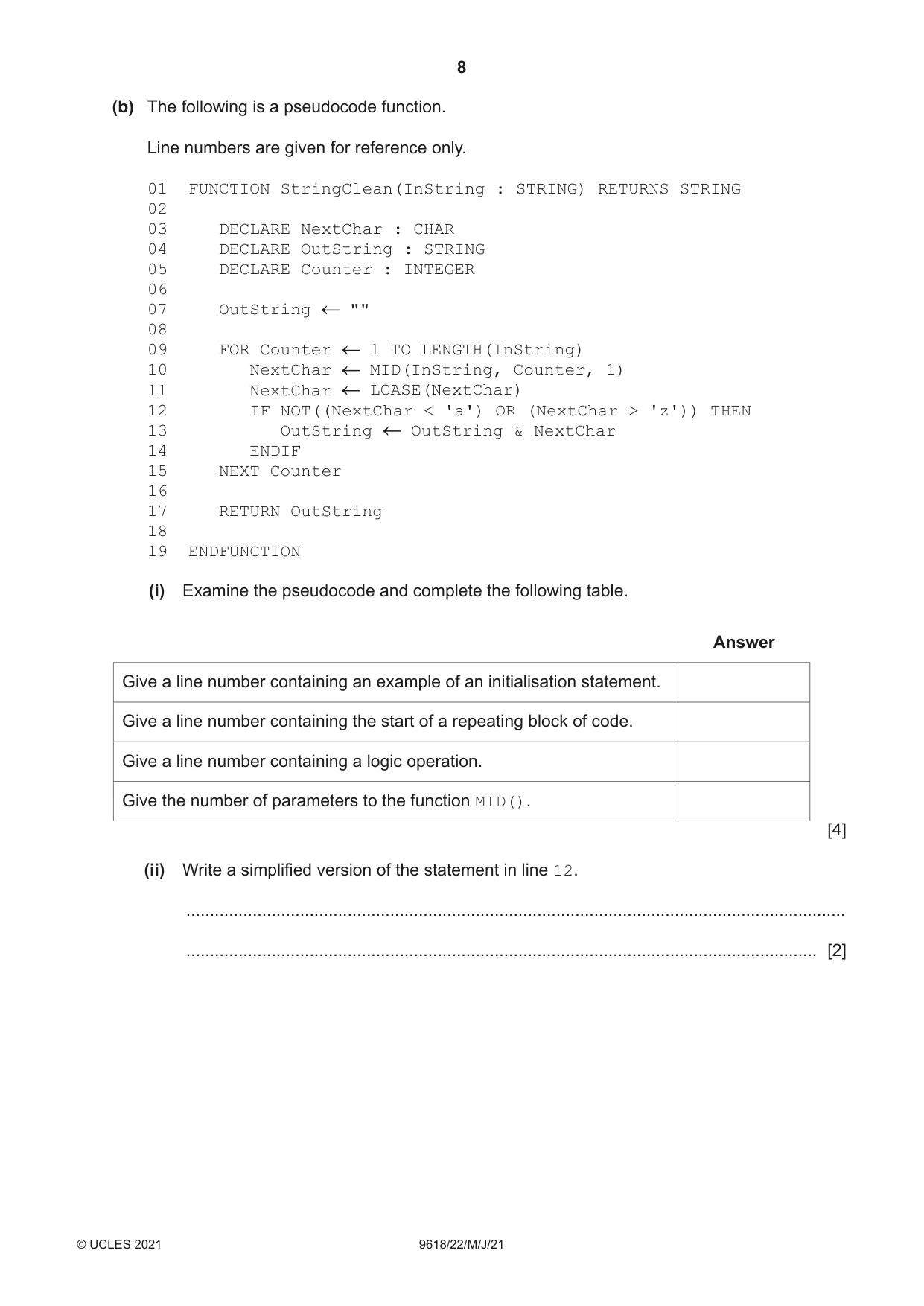
5 (a) A student is learning about arrays. She wants to write a program to: • declare a 1D array RNum of 100 elements of type INTEGER • assign each element a random value in the range 1 to 200 inclusive • count and output how many numbers generated were between 66 and 173 inclusive. (i) Write pseudocode to represent the algorithm. ........................................................................................................................................... ........................................................................................................................................... ........................................................................................................................................... ........................................................................................................................................... ........................................................................................................................................... ........................................................................................................................................... ........................................................................................................................................... ........................................................................................................................................... ........................................................................................................................................... ........................................................................................................................................... ........................................................................................................................................... ........................................................................................................................................... ........................................................................................................................................... ..................................................................................................................................... [6] (ii) The student decides to modify the algorithm so that each element of the array will contain a unique value. Describe the changes that the student needs to make to the algorithm. ........................................................................................................................................... ........................................................................................................................................... ........................................................................................................................................... ........................................................................................................................................... ........................................................................................................................................... ..................................................................................................................................... [3] (b) The following is a pseudocode function. Line numbers are given for reference only. 01 FUNCTION StringClean(InString : STRING) RETURNS STRING 02 03 DECLARE NextChar : CHAR 04 DECLARE OutString : STRING 05 DECLARE Counter : INTEGER 06 07 OutString "" 08 09 FOR Counter 1 TO LENGTH(InString) 10 NextChar MID(InString, Counter, 1) 11 NextChar LCASE(NextChar) 12 IF NOT((NextChar < 'a') OR (NextChar > 'z')) THEN 13 OutString OutString & NextChar 14 ENDIF 15 NEXT Counter 16 17 RETURN OutString 18 19 ENDFUNCTION (i) Examine the pseudocode and complete the following table. Answer Give a line number containing an example of an initialisation statement. Give a line number containing the start of a repeating block of code. Give a line number containing a logic operation. Give the number of parameters to the function MID(). [4] (ii) Write a simplified version of the statement in line 12. ........................................................................................................................................... ..................................................................................................................................... [2]
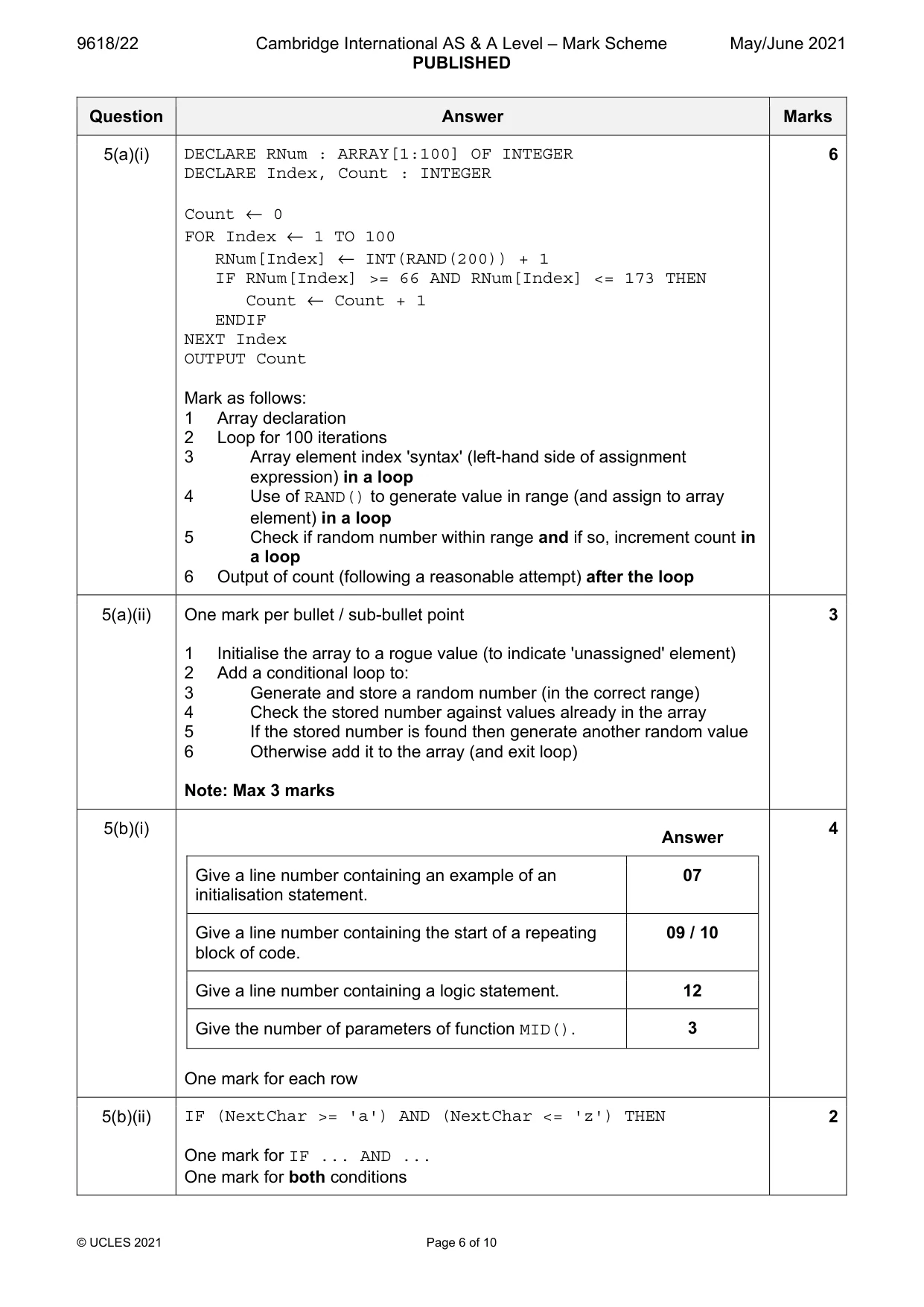
Mark scheme: 5(a)(i) DECLARE RNum : ARRAY[1:100] OF INTEGER 6 DECLARE Index, Count : INTEGER Count ← 0 FOR Index ← 1 TO 100 RNum[Index] ← INT(RAND(200)) + 1 IF RNum[Index] >= 66 AND RNum[Index] <= 173 THEN Count ← Count + 1 ENDIF NEXT Index OUTPUT Count Mark as follows: 1 Array declaration 2 Loop for 100 iterations 3 Array element index 'syntax' (left-hand side of assignment expression) in a loop 4 Use of RAND() to generate value in range (and assign to array element) in a loop 5 Check if random number within range and if so, increment count in a loop 6 Output of count (following a reasonable attempt) after the loop 5(a)(ii) One mark per bullet / sub-bullet point 3 1 Initialise the array to a rogue value (to indicate 'unassigned' element) 2 Add a conditional loop to: 3 Generate and store a random number (in the correct range) 4 Check the stored number against values already in the array 5 If the stored number is found then generate another random value 6 Otherwise add it to the array (and exit loop) Note: Max 3 marks 5(b)(i) 4 Answer Give a line number containing an example of an 07 initialisation statement. Give a line number containing the start of a repeating 09 / 10 block of code. Give a line number containing a logic statement. 12 Give the number of parameters of function MID(). 3 One mark for each row 5(b)(ii) IF (NextChar >= 'a') AND (NextChar <= 'z') THEN 2 One mark for IF ... AND ... One mark for both conditions
Q6 · A procedure CountVowels() will: • be called with a string containing alphanumeric…
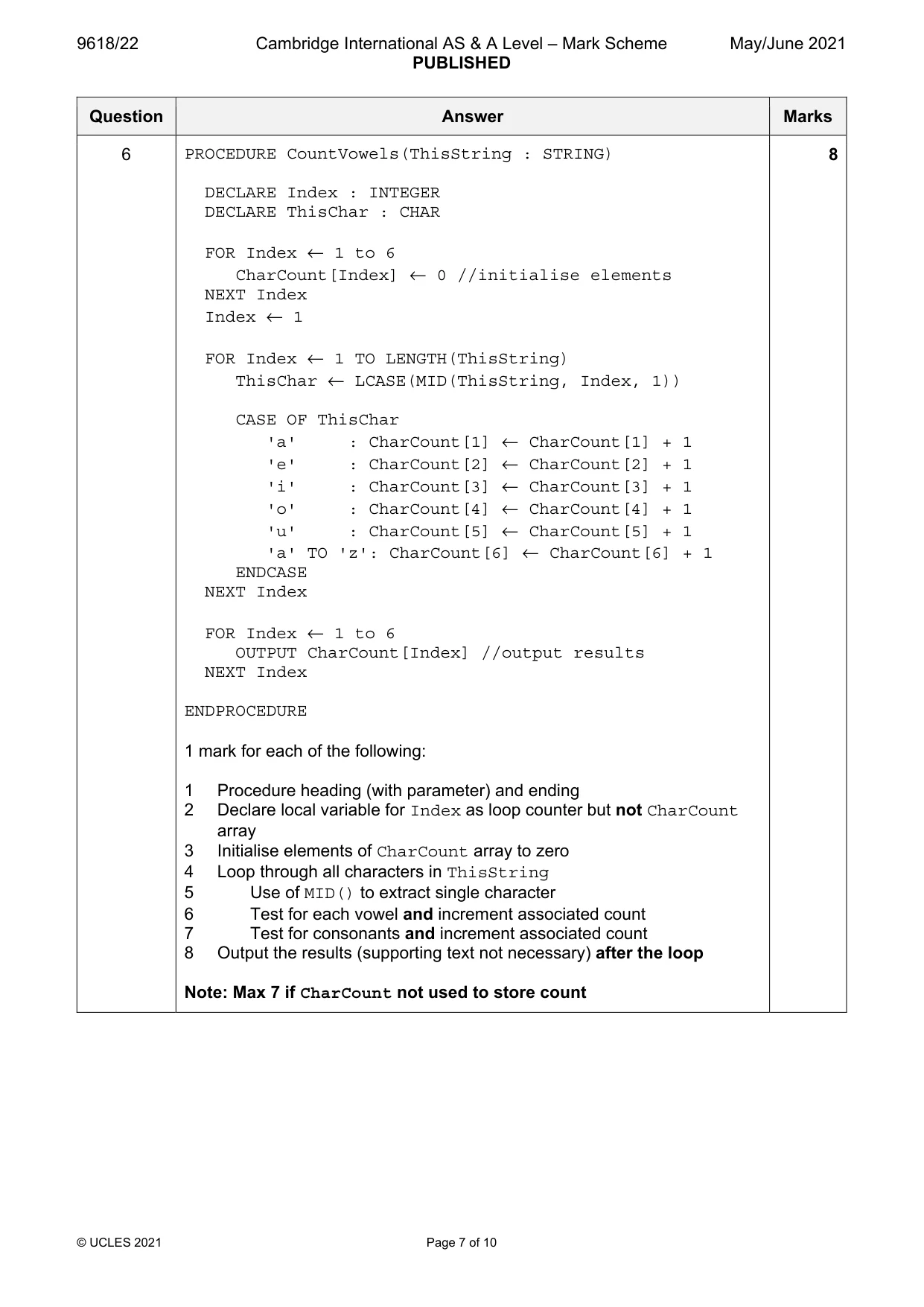
6 A procedure CountVowels() will: • be called with a string containing alphanumeric characters as its parameter • count and output the number of occurrences of each vowel (a, e, i, o, u) in the string • count and output the number of occurrences of the other alphabetic characters (as a single total). The string may contain both upper and lower case characters. Each count value will be stored in a unique element of a global 1D array CharCount of type INTEGER. The array will contain six elements. Write pseudocode for the procedure CountVowels(). .......................................................................................................................................................... .......................................................................................................................................................... .......................................................................................................................................................... .......................................................................................................................................................... .......................................................................................................................................................... .......................................................................................................................................................... .......................................................................................................................................................... .......................................................................................................................................................... .......................................................................................................................................................... .......................................................................................................................................................... .......................................................................................................................................................... .......................................................................................................................................................... .......................................................................................................................................................... .......................................................................................................................................................... .......................................................................................................................................................... .......................................................................................................................................................... .......................................................................................................................................................... .......................................................................................................................................................... .......................................................................................................................................................... .......................................................................................................................................................... .......................................................................................................................................................... .......................................................................................................................................................... .......................................................................................................................................................... .......................................................................................................................................................... .......................................................................................................................................................... .................................................................................................................................................... [8]
Mark scheme: 6 PROCEDURE CountVowels(ThisString : STRING) 8 DECLARE Index : INTEGER DECLARE ThisChar : CHAR FOR Index ← 1 to 6 CharCount[Index] ← 0 //initialise elements NEXT Index Index ← 1 FOR Index ← 1 TO LENGTH(ThisString) ThisChar ← LCASE(MID(ThisString, Index, 1)) CASE OF ThisChar 'a' : CharCount[1] ← CharCount[1] + 1 'e' : CharCount[2] ← CharCount[2] + 1 'i' : CharCount[3] ← CharCount[3] + 1 'o' : CharCount[4] ← CharCount[4] + 1 'u' : CharCount[5] ← CharCount[5] + 1 'a' TO 'z': CharCount[6] ← CharCount[6] + 1 ENDCASE NEXT Index FOR Index ← 1 to 6 OUTPUT CharCount[Index] //output results NEXT Index ENDPROCEDURE 1 mark for each of the following: 1 Procedure heading (with parameter) and ending 2 Declare local variable for Index as loop counter but not CharCount array 3 Initialise elements of CharCount array to zero 4 Loop through all characters in ThisString 5 Use of MID() to extract single character 6 Test for each vowel and increment associated count 7 Test for consonants and increment associated count 8 Output the results (supporting text not necessary) after the loop Note: Max 7 if CharCount not used to store count
Q7 · A procedure, FormatName(): • is called with a string containing words and spaces as its…
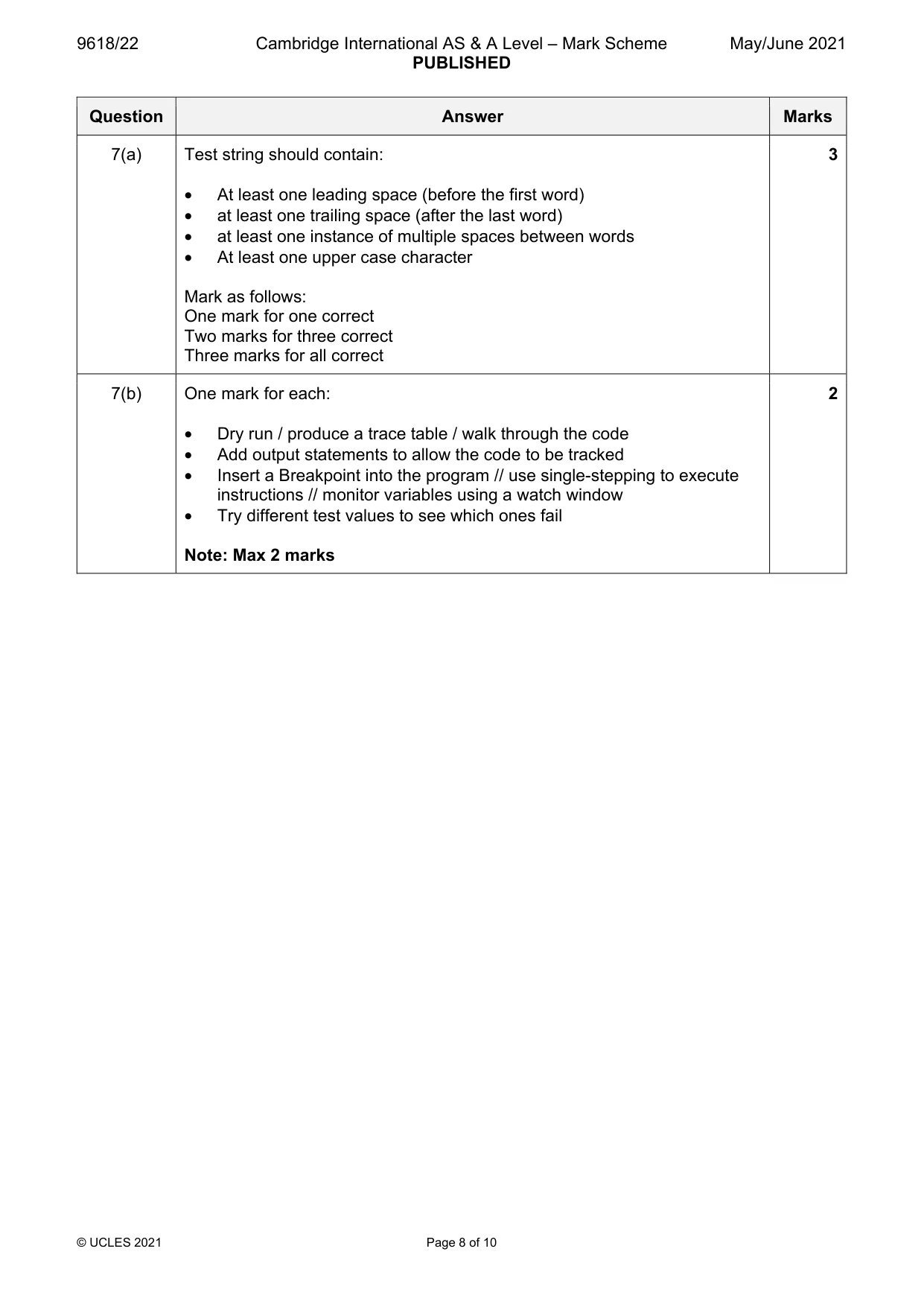
7 A procedure, FormatName(): • is called with a string containing words and spaces as its parameter. In this context, a word is any sequence of characters that does not contain a space character. • creates a new formatted string from this string with the following requirements: 1. Any leading spaces removed (spaces before the first word). 2. Any trailing spaces removed (spaces after the last word). 3. Any multiple spaces between words converted to a single space. 4. All characters converted to lower case. The FormatName() procedure has been written in a programming language and is to be tested using the black-box method. (a) Give a test string that could be used to show that all four formatting requirements have been applied correctly. Use the symbol ‘∇’ to represent a space character. ............................................................................................................................................. [3] (b) The FormatName() procedure should assign a value to the global variable FString. There is a fault in the program, which means that the assignment does not always take place. Explain two ways of exposing the fault. ................................................................................................................................................... ................................................................................................................................................... ................................................................................................................................................... ................................................................................................................................................... ............................................................................................................................................. [2]
Mark scheme: 7(a) Test string should contain: 3 • At least one leading space (before the first word) • at least one trailing space (after the last word) • at least one instance of multiple spaces between words • At least one upper case character Mark as follows: One mark for one correct Two marks for three correct Three marks for all correct 7(b) One mark for each: 2 • Dry run / produce a trace table / walk through the code • Add output statements to allow the code to be tracked • Insert a Breakpoint into the program // use single-stepping to execute instructions // monitor variables using a watch window • Try different test values to see which ones fail Note: Max 2 marks
Q8 · A program is needed to take a string containing a full name and to produce a new string…
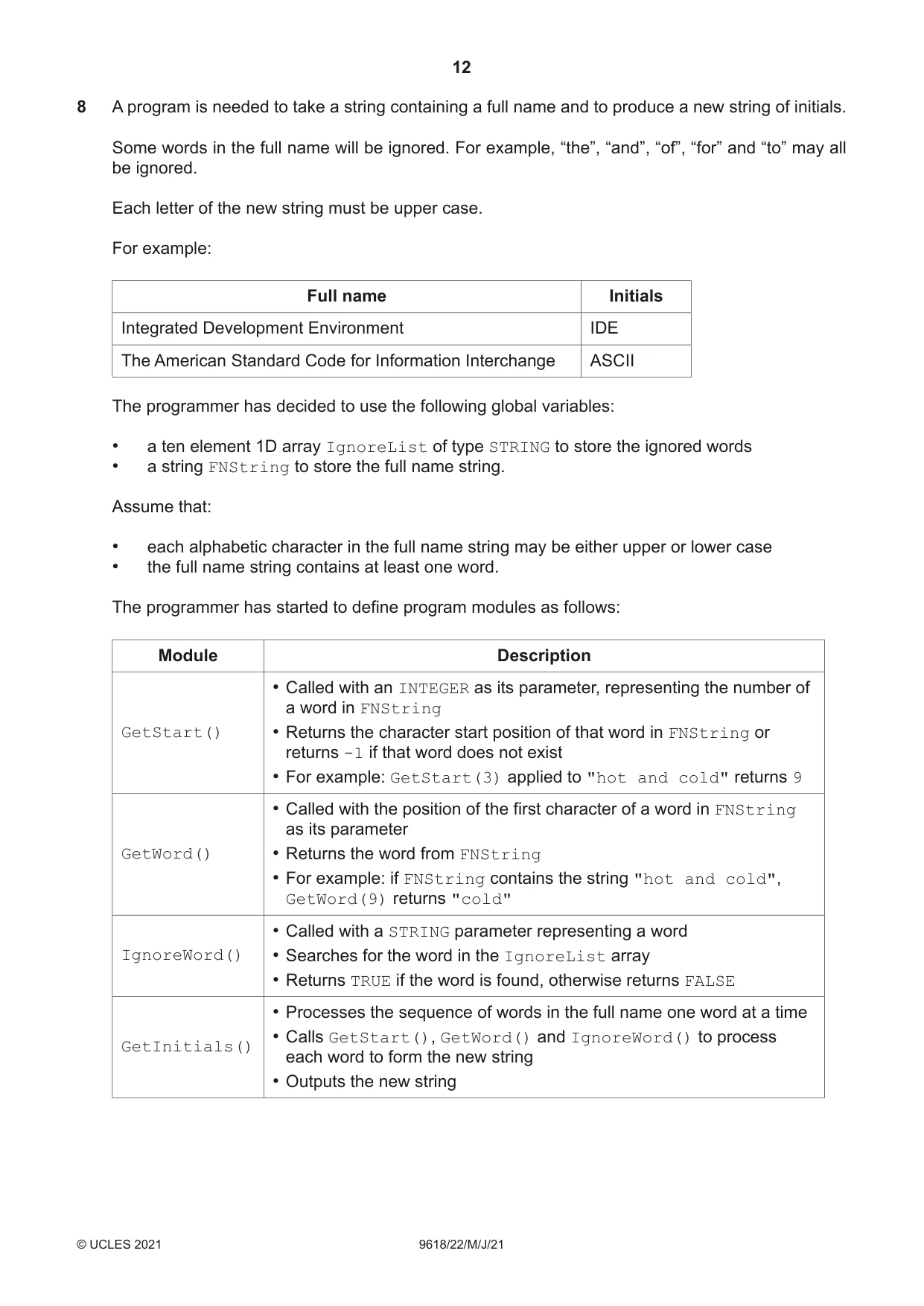
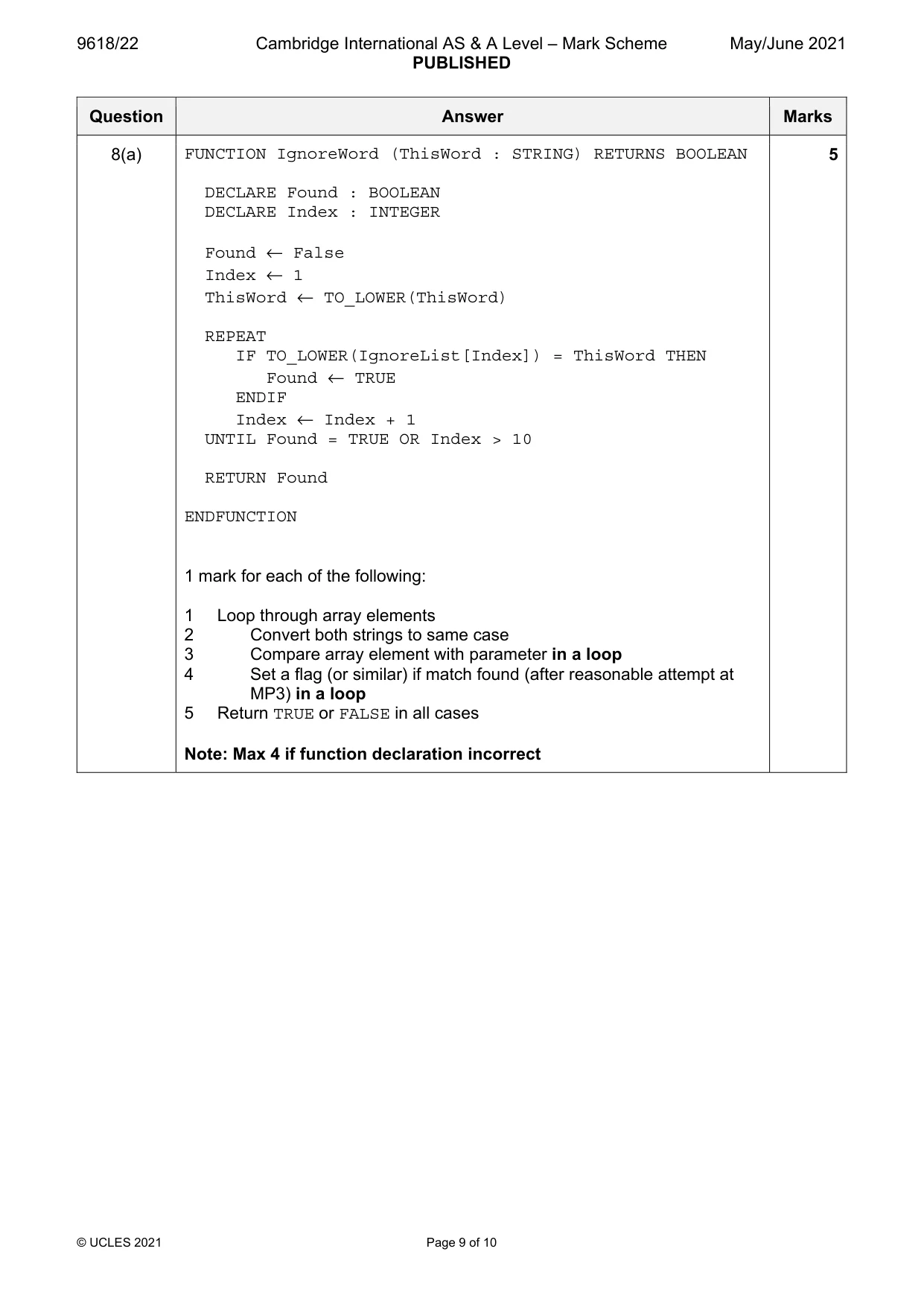
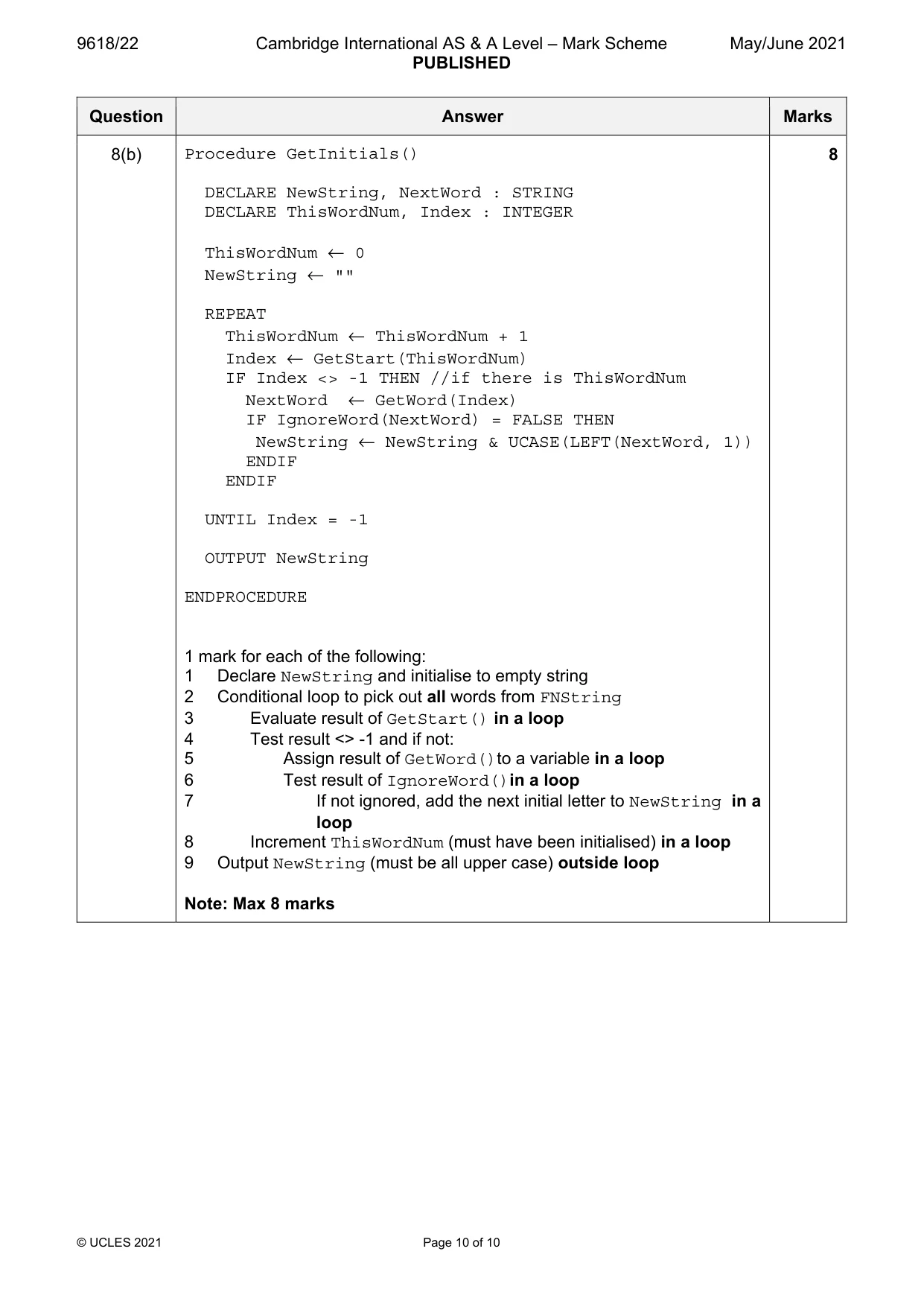
8 A program is needed to take a string containing a full name and to produce a new string of initials. Some words in the full name will be ignored. For example, “the”, “and”, “of”, “for” and “to” may all be ignored. Each letter of the new string must be upper case. For example: Full name Initials Integrated Development Environment IDE The American Standard Code for Information Interchange ASCII The programmer has decided to use the following global variables: • a ten element 1D array IgnoreList of type STRING to store the ignored words • a string FNString to store the full name string. Assume that: • each alphabetic character in the full name string may be either upper or lower case • the full name string contains at least one word. The programmer has started to define program modules as follows: Module Description • Called with an INTEGER as its parameter, representing the number of a word in FNString GetStart() • Returns the character start position of that word in FNString or returns -1 if that word does not exist • For example: GetStart(3) applied to "hot and cold" returns 9 • Called with the position of the first character of a word in FNString as its parameter GetWord() • Returns the word from FNString • For example: if FNString contains the string "hot and cold", GetWord(9) returns "cold" • Called with a STRING parameter representing a word IgnoreWord() • Searches for the word in the IgnoreList array • Returns TRUE if the word is found, otherwise returns FALSE • Processes the sequence of words in the full name one word at a time • Calls GetStart(), GetWord() and IgnoreWord() to process GetInitials() each word to form the new string • Outputs the new string (a) Write pseudocode for the module IgnoreWord(). ................................................................................................................................................... ................................................................................................................................................... ................................................................................................................................................... ................................................................................................................................................... ................................................................................................................................................... ................................................................................................................................................... ................................................................................................................................................... ................................................................................................................................................... ................................................................................................................................................... ................................................................................................................................................... ................................................................................................................................................... ................................................................................................................................................... ................................................................................................................................................... ................................................................................................................................................... ................................................................................................................................................... ................................................................................................................................................... ................................................................................................................................................... ................................................................................................................................................... ................................................................................................................................................... ................................................................................................................................................... ............................................................................................................................................. [5] (b) Write pseudocode for the module GetInitials(). ................................................................................................................................................... ................................................................................................................................................... ................................................................................................................................................... ................................................................................................................................................... ................................................................................................................................................... ................................................................................................................................................... ................................................................................................................................................... ................................................................................................................................................... ................................................................................................................................................... ................................................................................................................................................... ................................................................................................................................................... ................................................................................................................................................... ................................................................................................................................................... ................................................................................................................................................... ................................................................................................................................................... ................................................................................................................................................... ................................................................................................................................................... ................................................................................................................................................... ................................................................................................................................................... ................................................................................................................................................... ................................................................................................................................................... ................................................................................................................................................... ................................................................................................................................................... ................................................................................................................................................... ................................................................................................................................................... ................................................................................................................................................... ...................................................................................................................................................
Mark scheme: 8(a) FUNCTION IgnoreWord (ThisWord : STRING) RETURNS BOOLEAN 5 DECLARE Found : BOOLEAN DECLARE Index : INTEGER Found ← False Index ← 1 ThisWord ← TO_LOWER(ThisWord) REPEAT IF TO_LOWER(IgnoreList[Index]) = ThisWord THEN Found ← TRUE ENDIF Index ← Index + 1 UNTIL Found = TRUE OR Index > 10 RETURN Found ENDFUNCTION 1 mark for each of the following: 1 Loop through array elements 2 Convert both strings to same case 3 Compare array element with parameter in a loop 4 Set a flag (or similar) if match found (after reasonable attempt at MP3) in a loop 5 Return TRUE or FALSE in all cases Note: Max 4 if function declaration incorrect 8(b) Procedure GetInitials() 8 DECLARE NewString, NextWord : STRING DECLARE ThisWordNum, Index : INTEGER ThisWordNum ← 0 NewString ← "" REPEAT ThisWordNum ← ThisWordNum + 1 Index ← GetStart(ThisWordNum) IF Index <> -1 THEN //if there is ThisWordNum NextWord ← GetWord(Index) IF IgnoreWord(NextWord) = FALSE THEN NewString ← NewString & UCASE(LEFT(NextWord, 1)) ENDIF ENDIF UNTIL Index = -1 OUTPUT NewString ENDPROCEDURE 1 mark for each of the following: 1 Declare NewString and initialise to empty string 2 Conditional loop to pick out all words from FNString 3 Evaluate result of GetStart() in a loop 4 Test result <> -1 and if not: 5 Assign result of GetWord()to a variable in a loop 6 Test result of IgnoreWord()in a loop 7 If not ignored, add the next initial letter to NewString in a loop 8 Increment ThisWordNum (must have been initialised) in a loop 9 Output NewString (must be all upper case) outside loop Note: Max 8 marks
What was in this paper
The subtopics covered by these 8 questions, and how many questions each got. Open one in a new tab to see every Cambridge question on it.
What you needed in this session
Cambridge’s own grade thresholds for 2021 May/June, Paper 2 · Variant 2. A higher threshold means an easier paper — the bar moves with how the cohort did.