Cambridge A Level Computer Science 9618 — 2021 Oct/Nov Paper 2 · Variant 3
9618/23/O/N/21 · 6 questions · 75 marks · ≈84 min
The question paper and its mark scheme, free to read here and free to download. This is Cambridge’s own paper, exactly as it was sat.
Question paper20 pages




Mark scheme11 pages
Answers below. Sit the paper first if you are practising.
Questions as text
Q1 · Sylvia is testing a program that has been written by her colleague
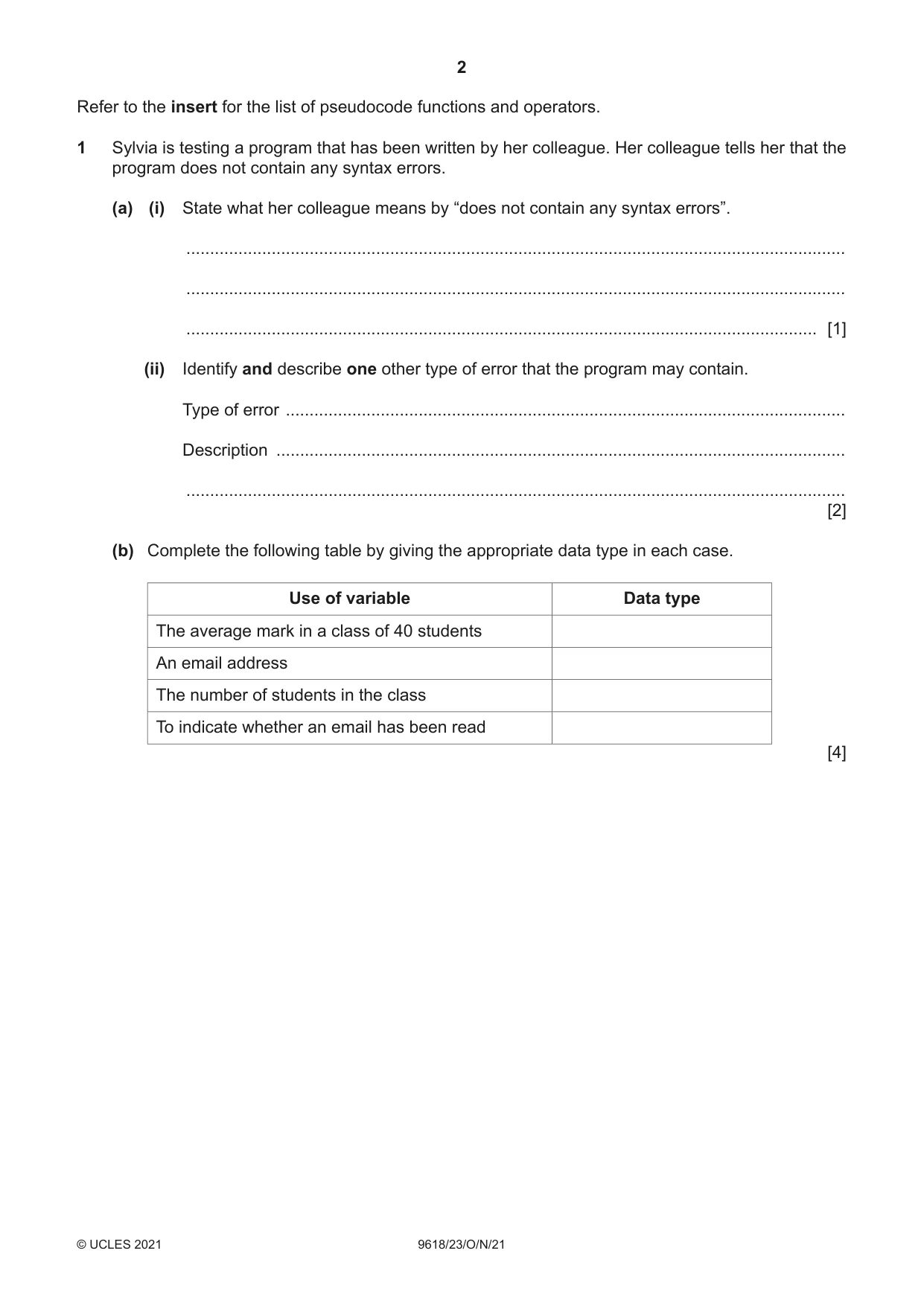
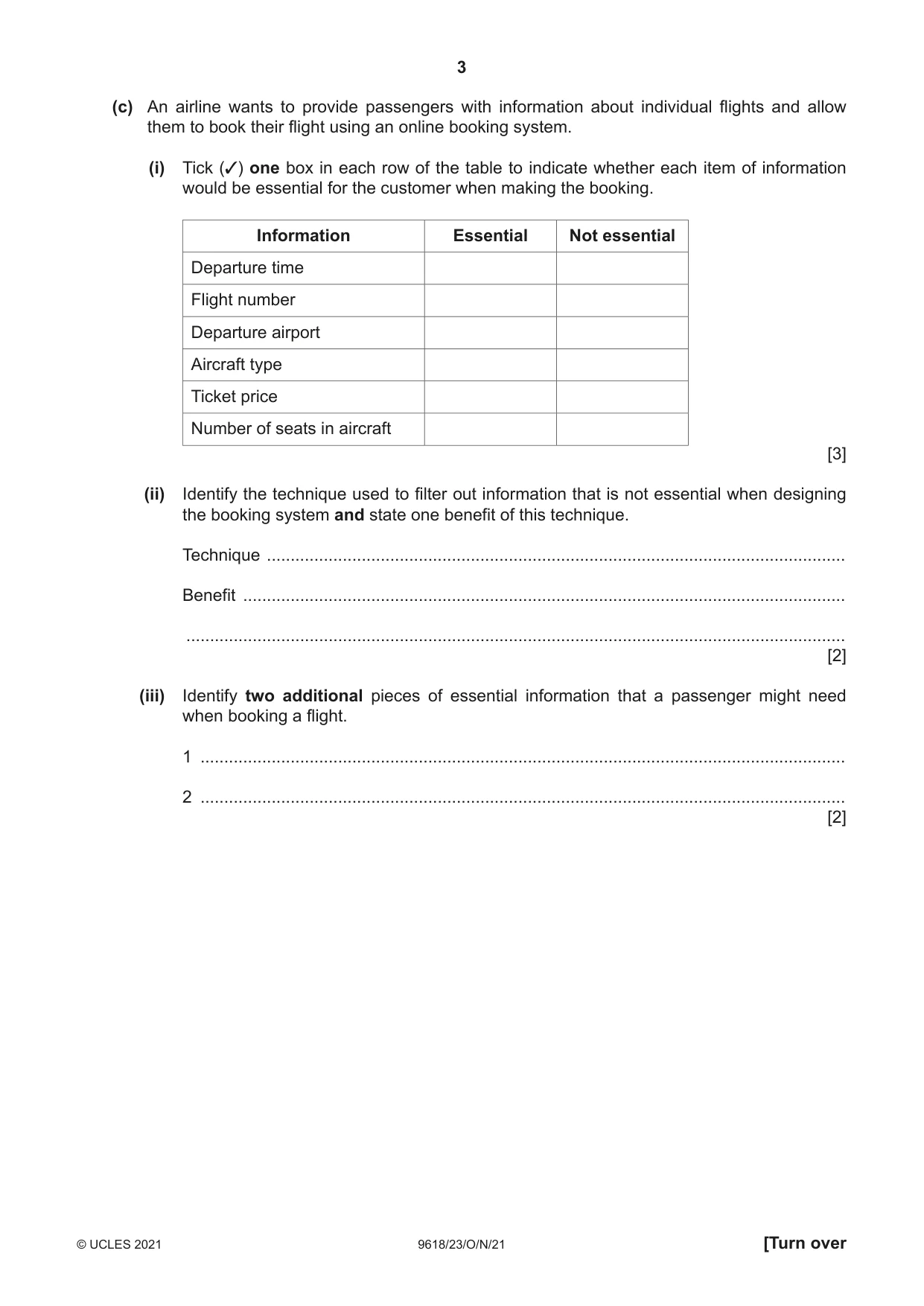
1 Sylvia is testing a program that has been written by her colleague. Her colleague tells her that the program does not contain any syntax errors. (a) (i) State what her colleague means by “does not contain any syntax errors”. ........................................................................................................................................... ........................................................................................................................................... ..................................................................................................................................... [1] (ii) Identify and describe one other type of error that the program may contain. Type of error ...................................................................................................................... Description ........................................................................................................................ ........................................................................................................................................... [2] (b) Complete the following table by giving the appropriate data type in each case. Use of variable Data type The average mark in a class of 40 students An email address The number of students in the class To indicate whether an email has been read [4] (c) An airline wants to provide passengers with information about individual flights and allow them to book their flight using an online booking system. (i) Tick (3) one box in each row of the table to indicate whether each item of information would be essential for the customer when making the booking. Information Essential Not essential Departure time Flight number Departure airport Aircraft type Ticket price Number of seats in aircraft [3] (ii) Identify the technique used to filter out information that is not essential when designing the booking system and state one benefit of this technique. Technique .......................................................................................................................... Benefit ............................................................................................................................... ........................................................................................................................................... [2] (iii) Identify two additional pieces of essential information that a passenger might need when booking a flight. 1 ........................................................................................................................................ 2 ........................................................................................................................................ [2]
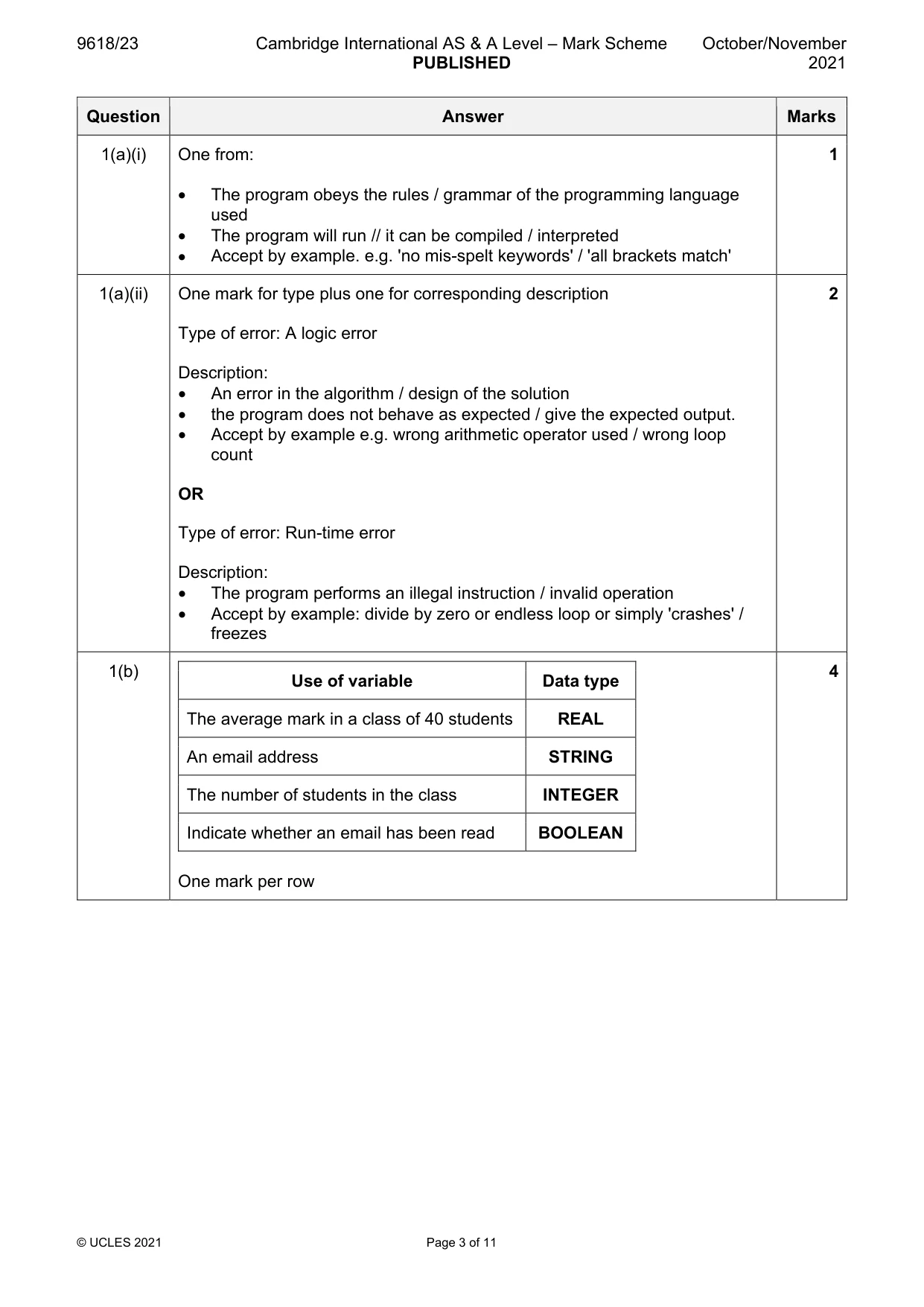
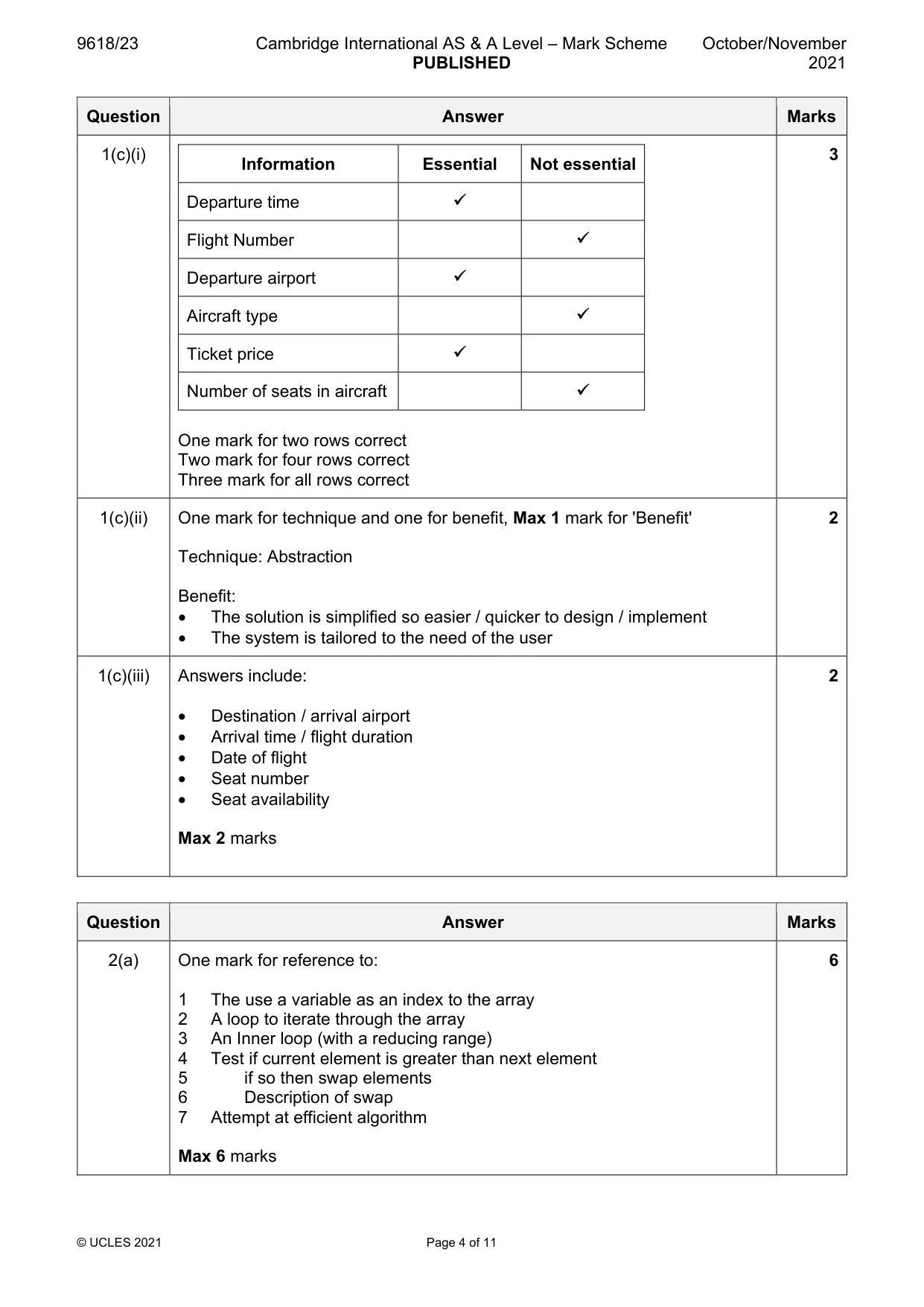
Mark scheme: Question Answer Marks 1(a)(i) One from: 1 • The program obeys the rules / grammar of the programming language used • The program will run // it can be compiled / interpreted • Accept by example. e.g. 'no mis-spelt keywords' / 'all brackets match' 1(a)(ii) One mark for type plus one for corresponding description 2 Type of error: A logic error Description: • An error in the algorithm / design of the solution • the program does not behave as expected / give the expected output. • Accept by example e.g. wrong arithmetic operator used / wrong loop count OR Type of error: Run-time error Description: • The program performs an illegal instruction / invalid operation • Accept by example: divide by zero or endless loop or simply 'crashes' / freezes 1(b) 4 Use of variable Data type The average mark in a class of 40 students REAL An email address STRING The number of students in the class INTEGER Indicate whether an email has been read BOOLEAN One mark per row 1(c)(i) 3 Information Essential Not essential Departure time Flight Number Departure airport Aircraft type Ticket price Number of seats in aircraft One mark for two rows correct Two mark for four rows correct Three mark for all rows correct 1(c)(ii) One mark for technique and one for benefit, Max 1 mark for 'Benefit' 2 Technique: Abstraction Benefit: • The solution is simplified so easier / quicker to design / implement • The system is tailored to the need of the user 1(c)(iii) Answers include: 2 • Destination / arrival airport • Arrival time / flight duration • Date of flight • Seat number • Seat availability Max 2 marks
Q2 · An algorithm to sort a 1D array into ascending order is described as follows: • move the…
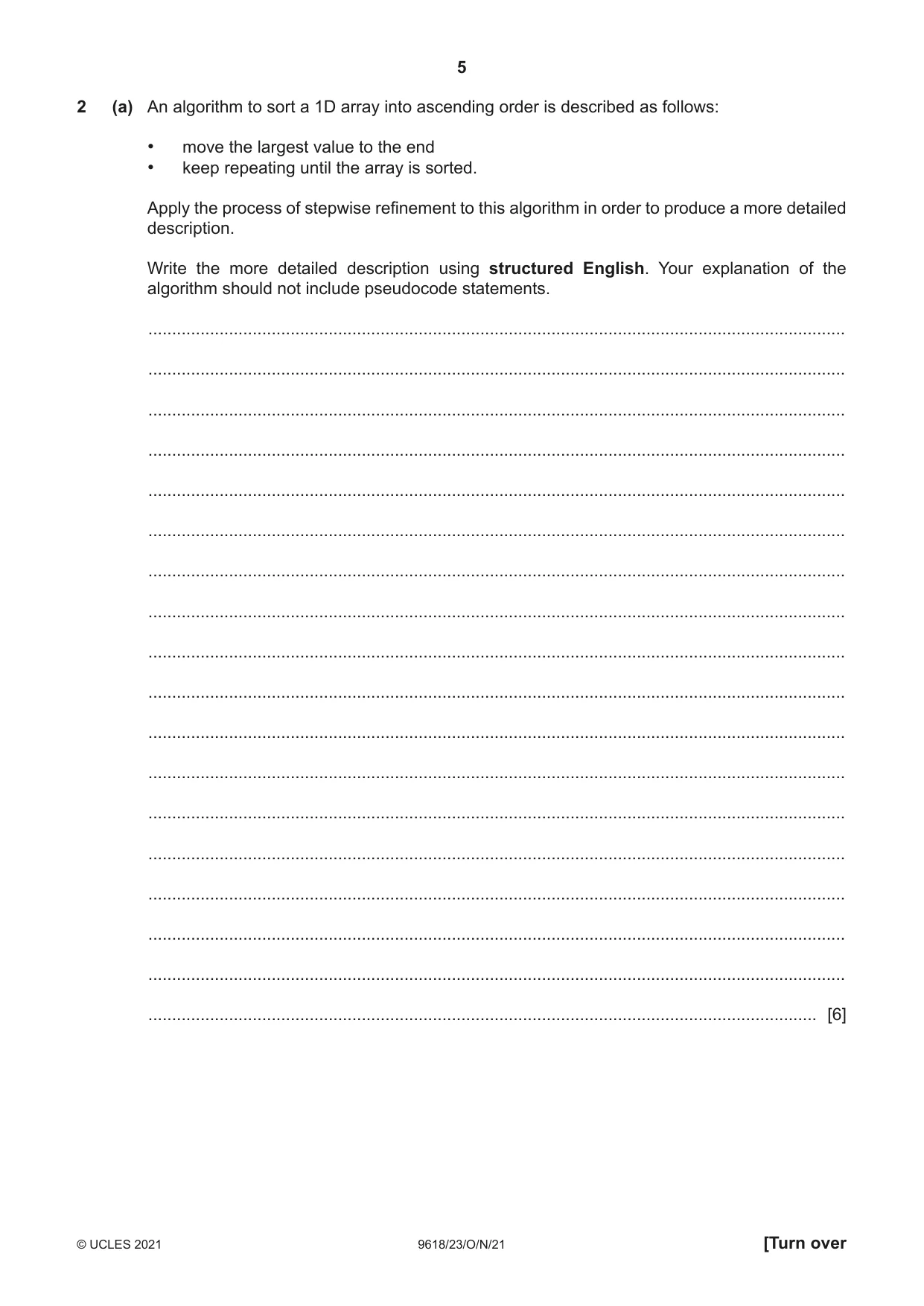
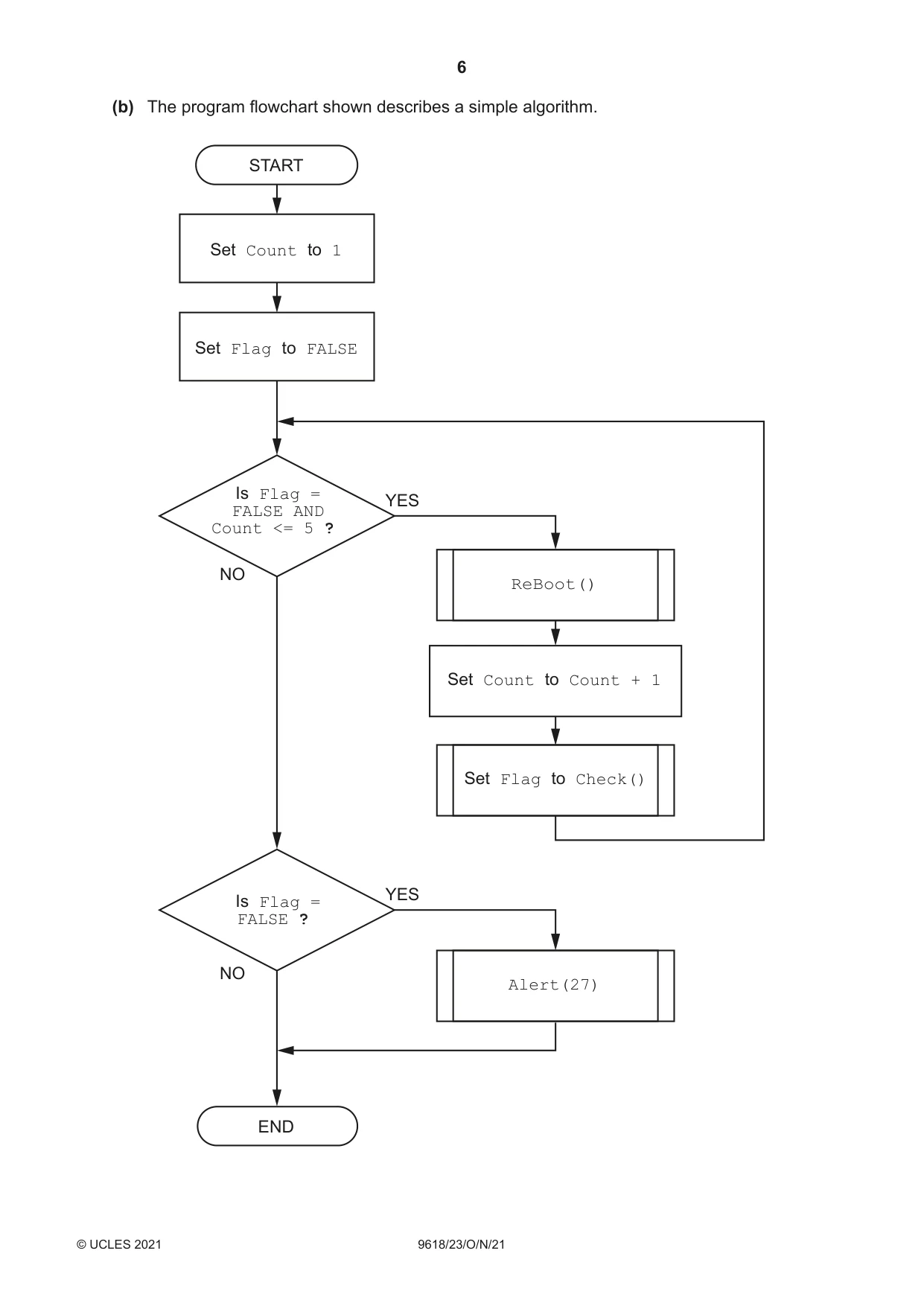
2 (a) An algorithm to sort a 1D array into ascending order is described as follows: • move the largest value to the end • keep repeating until the array is sorted. Apply the process of stepwise refinement to this algorithm in order to produce a more detailed description. Write the more detailed description using structured English. Your explanation of the algorithm should not include pseudocode statements. ................................................................................................................................................... ................................................................................................................................................... ................................................................................................................................................... ................................................................................................................................................... ................................................................................................................................................... ................................................................................................................................................... ................................................................................................................................................... ................................................................................................................................................... ................................................................................................................................................... ................................................................................................................................................... ................................................................................................................................................... ................................................................................................................................................... ................................................................................................................................................... ................................................................................................................................................... ................................................................................................................................................... ................................................................................................................................................... ................................................................................................................................................... ............................................................................................................................................. [6] (b) The program flowchart shown describes a simple algorithm. START Set Count to 1 Set Flag to FALSE Is Flag = YES FALSE AND Count <= 5 ? NO ReBoot() Set Count to Count + 1 Set Flag to Check() YES Is Flag = FALSE ? NO Alert(27) END Write pseudocode for the simple algorithm shown on page 6. .................................................................................................................................................................. .................................................................................................................................................................. .................................................................................................................................................................. .................................................................................................................................................................. .................................................................................................................................................................. .................................................................................................................................................................. .................................................................................................................................................................. .................................................................................................................................................................. .................................................................................................................................................................. .................................................................................................................................................................. .................................................................................................................................................................. .................................................................................................................................................................. .................................................................................................................................................................. .................................................................................................................................................................. .................................................................................................................................................................. ............................................................................................................................................................ [6]
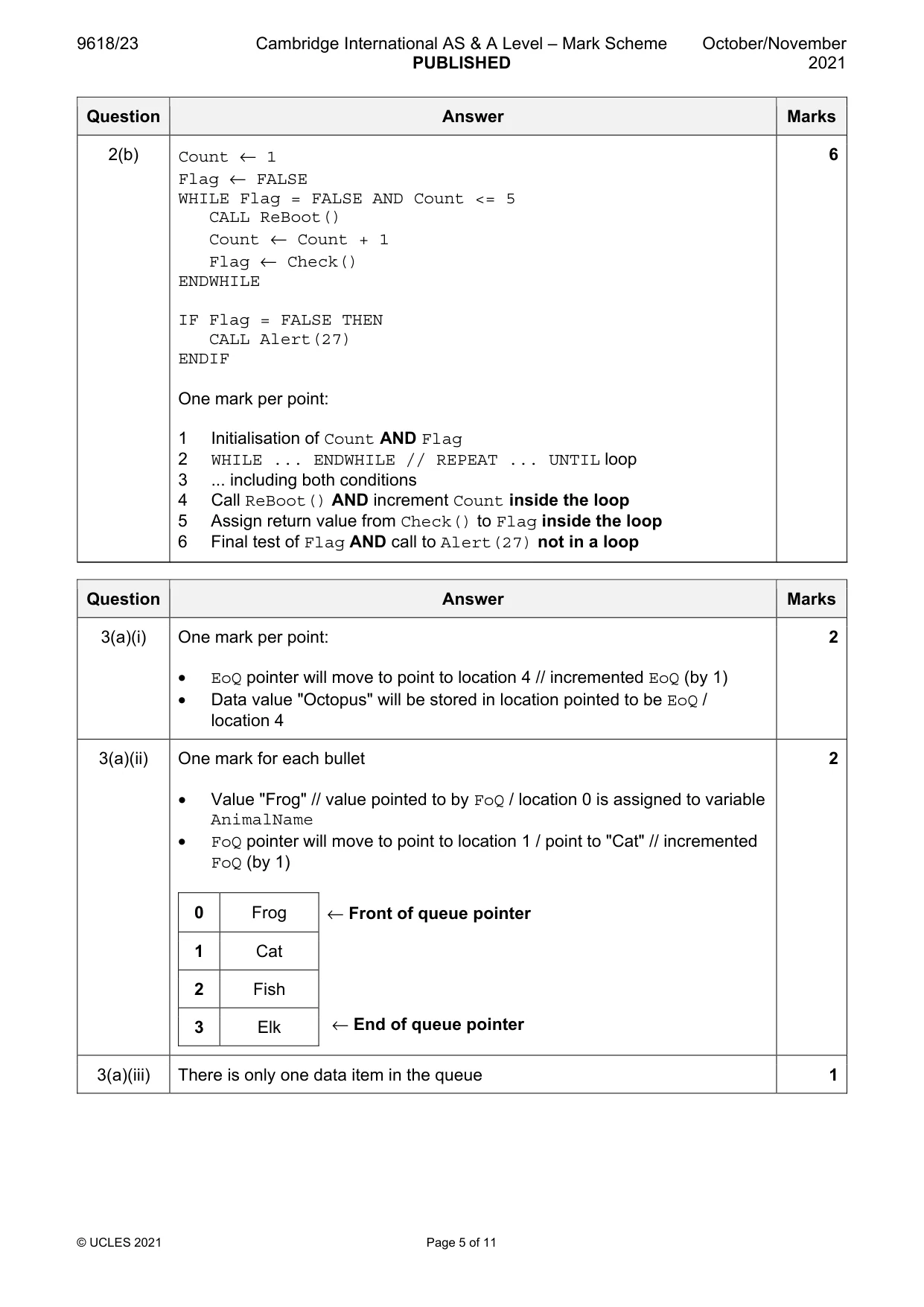
Mark scheme: 2(a) One mark for reference to: 6 1 The use a variable as an index to the array 2 A loop to iterate through the array 3 An Inner loop (with a reducing range) 4 Test if current element is greater than next element 5 if so then swap elements 6 Description of swap 7 Attempt at efficient algorithm Max 6 marks 2(b) Count ← 1 6 Flag ← FALSE WHILE Flag = FALSE AND Count <= 5 CALL ReBoot() Count ← Count + 1 Flag ← Check() ENDWHILE IF Flag = FALSE THEN CALL Alert(27) ENDIF One mark per point: 1 Initialisation of Count AND Flag 2 WHILE ... ENDWHILE // REPEAT ... UNTIL loop 3 ... including both conditions 4 Call ReBoot() AND increment Count inside the loop 5 Assign return value from Check() to Flag inside the loop 6 Final test of Flag AND call to Alert(27) not in a loop
Q3 · The diagram below represents a queue Abstract Data Type (ADT) that can hold a maximum of…
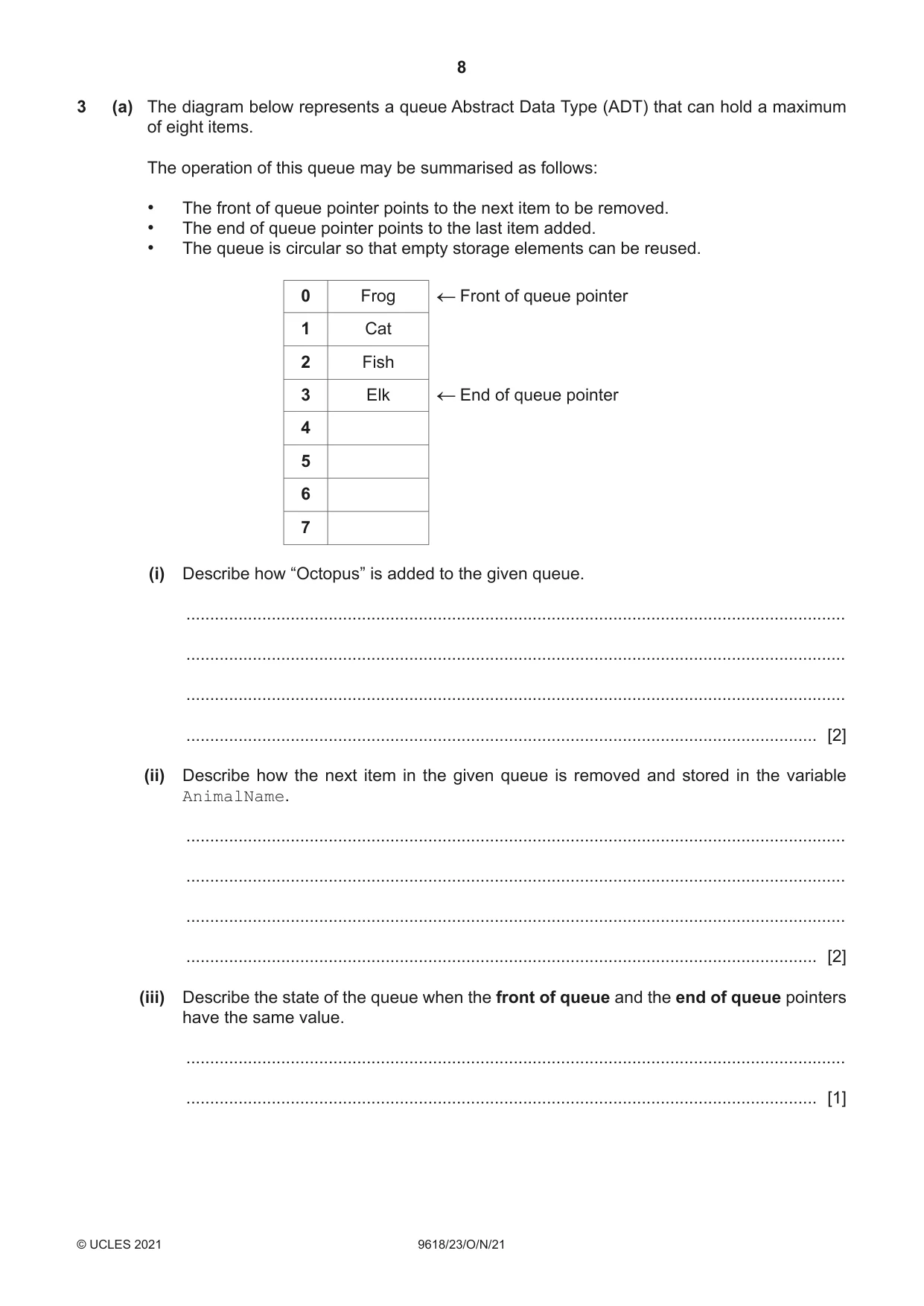
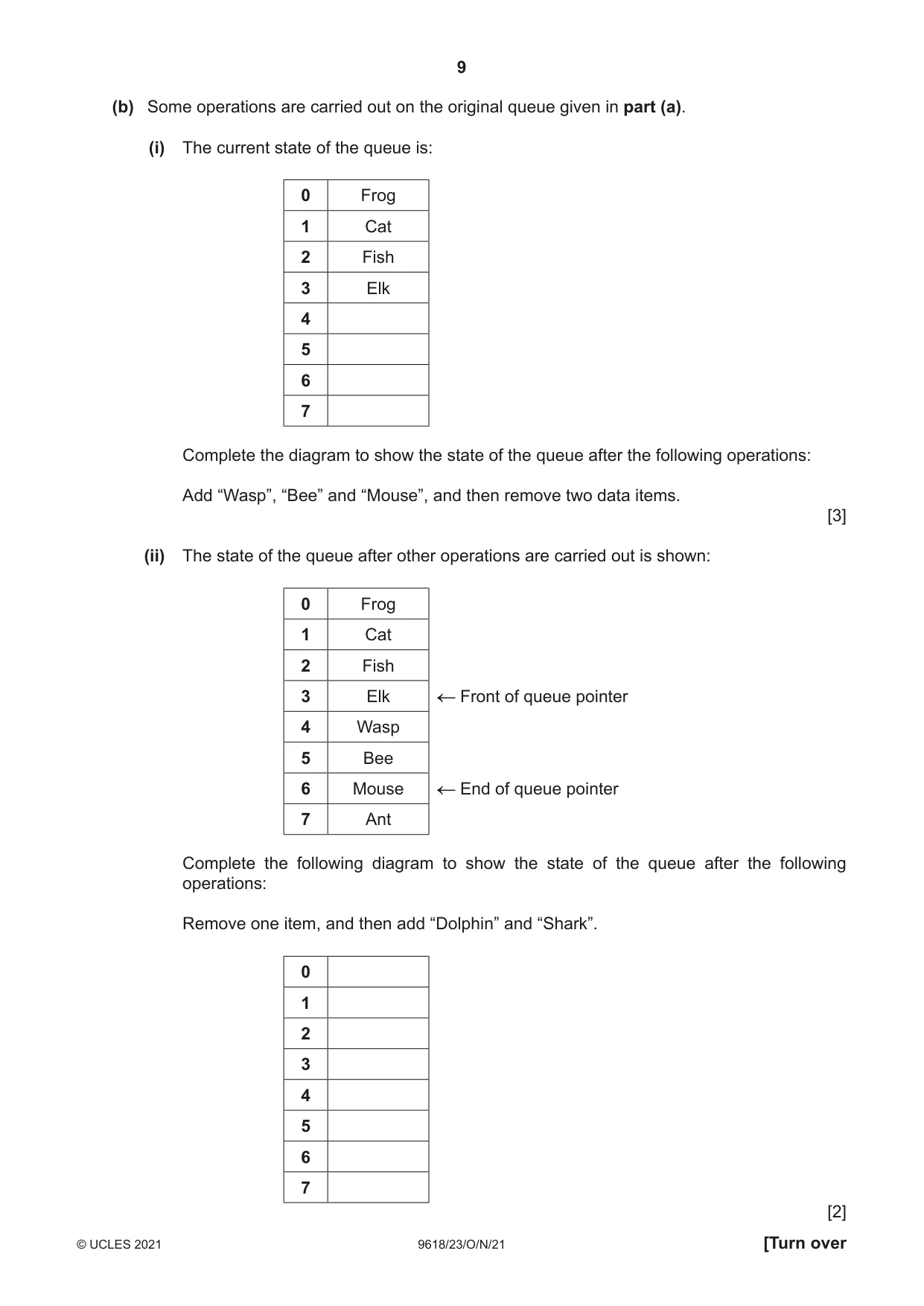
3 (a) The diagram below represents a queue Abstract Data Type (ADT) that can hold a maximum of eight items. The operation of this queue may be summarised as follows: • The front of queue pointer points to the next item to be removed. • The end of queue pointer points to the last item added. • The queue is circular so that empty storage elements can be reused. 0 Frog Front of queue pointer 1 Cat 2 Fish 3 Elk End of queue pointer 4 5 6 7 (i) Describe how “Octopus” is added to the given queue. ........................................................................................................................................... ........................................................................................................................................... ........................................................................................................................................... ..................................................................................................................................... [2] (ii) Describe how the next item in the given queue is removed and stored in the variable AnimalName. ........................................................................................................................................... ........................................................................................................................................... ........................................................................................................................................... ..................................................................................................................................... [2] (iii) Describe the state of the queue when the front of queue and the end of queue pointers have the same value. ........................................................................................................................................... ..................................................................................................................................... [1] (b) Some operations are carried out on the original queue given in part (a). (i) The current state of the queue is: 0 Frog 1 Cat 2 Fish 3 Elk 4 5 6 7 Complete the diagram to show the state of the queue after the following operations: Add “Wasp”, “Bee” and “Mouse”, and then remove two data items. [3] (ii) The state of the queue after other operations are carried out is shown: 0 Frog 1 Cat 2 Fish 3 Elk Front of queue pointer 4 Wasp 5 Bee 6 Mouse End of queue pointer 7 Ant Complete the following diagram to show the state of the queue after the following operations: Remove one item, and then add “Dolphin” and “Shark”. 0 1 2 3 4 5 6 7 [2] (c) The queue is implemented using a 1D array. Describe the algorithm that should be used to modify the end of queue pointer when adding an item to the queue. Your algorithm should detect any potential error conditions. ................................................................................................................................................... ................................................................................................................................................... ................................................................................................................................................... ................................................................................................................................................... ................................................................................................................................................... ............................................................................................................................................. [3]
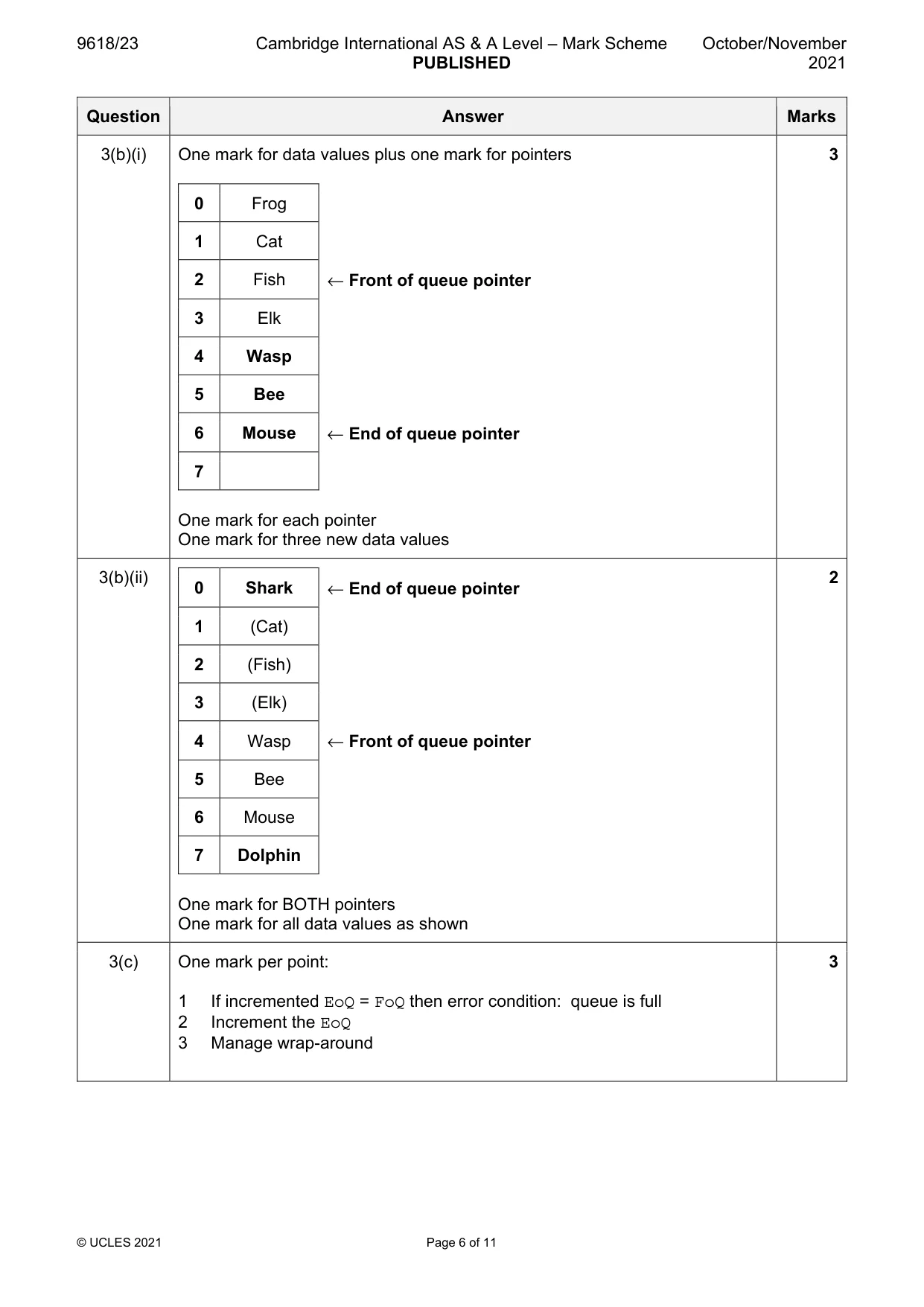
Mark scheme: 3(a)(i) One mark per point: 2 • EoQ pointer will move to point to location 4 // incremented EoQ (by 1) • Data value "Octopus" will be stored in location pointed to be EoQ / location 4 3(a)(ii) One mark for each bullet 2 • Value "Frog" // value pointed to by FoQ / location 0 is assigned to variable AnimalName • FoQ pointer will move to point to location 1 / point to "Cat" // incremented FoQ (by 1) 0 Frog ← Front of queue pointer 1 Cat 2 Fish 3 Elk ← End of queue pointer 3(a)(iii) There is only one data item in the queue 1 3(b)(i) One mark for data values plus one mark for pointers 3 0 Frog 1 Cat 2 Fish ← Front of queue pointer 3 Elk 4 Wasp 5 Bee 6 Mouse ← End of queue pointer 7 One mark for each pointer One mark for three new data values 3(b)(ii) 2 0 Shark ← End of queue pointer 1 (Cat) 2 (Fish) 3 (Elk) 4 Wasp ← Front of queue pointer 5 Bee 6 Mouse 7 Dolphin One mark for BOTH pointers One mark for all data values as shown 3(c) One mark per point: 3 1 If incremented EoQ = FoQ then error condition: queue is full 2 Increment the EoQ 3 Manage wrap-around
Q4 · A program controls the heating system in a sports hall
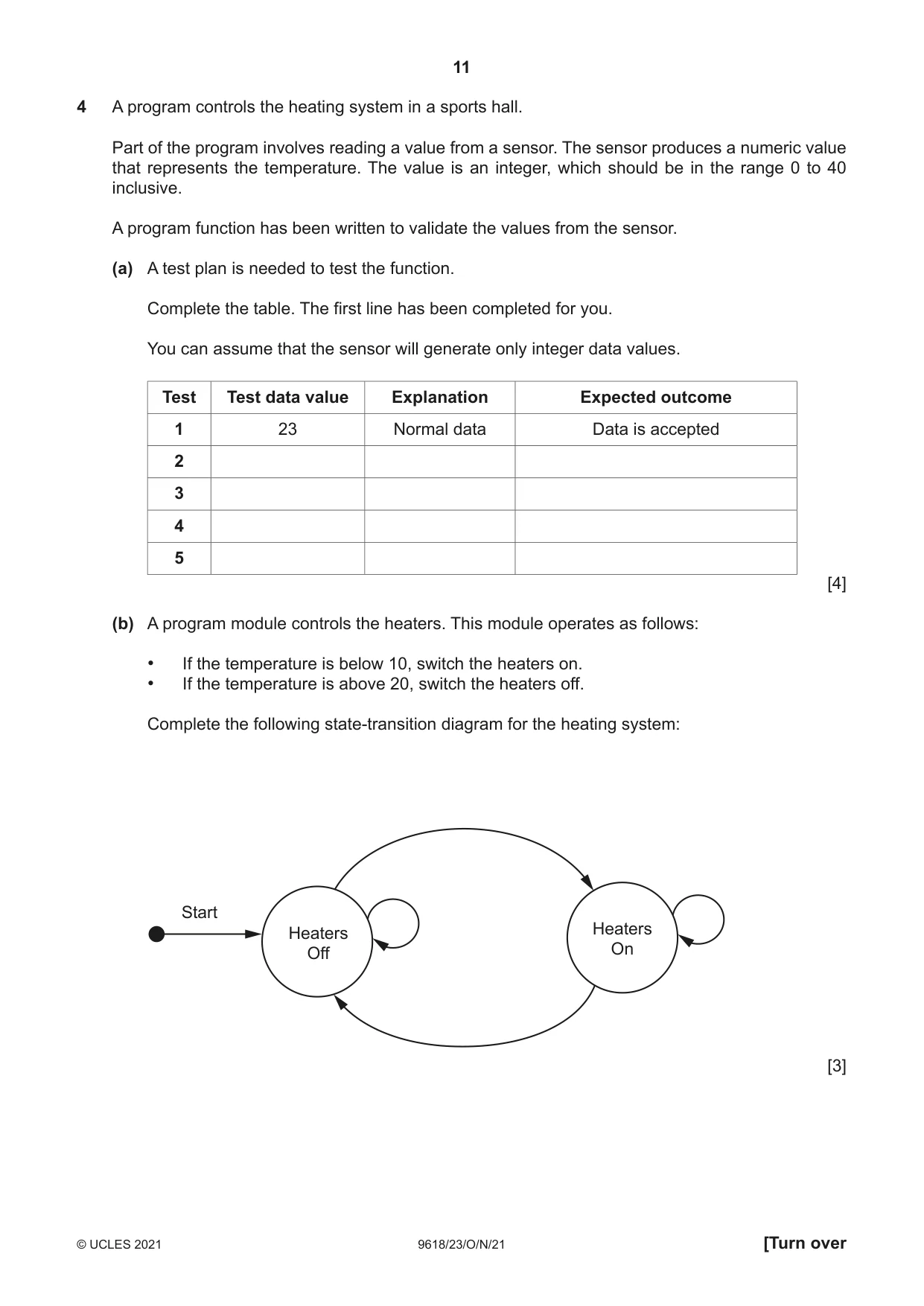
4 A program controls the heating system in a sports hall. Part of the program involves reading a value from a sensor. The sensor produces a numeric value that represents the temperature. The value is an integer, which should be in the range 0 to 40 inclusive. A program function has been written to validate the values from the sensor. (a) A test plan is needed to test the function. Complete the table. The first line has been completed for you. You can assume that the sensor will generate only integer data values. Test Test data value Explanation Expected outcome 1 23 Normal data Data is accepted 2 3 4 5 [4] (b) A program module controls the heaters. This module operates as follows: • If the temperature is below 10, switch the heaters on. • If the temperature is above 20, switch the heaters off. Complete the following state-transition diagram for the heating system: Start Heaters Heaters Off On [3]
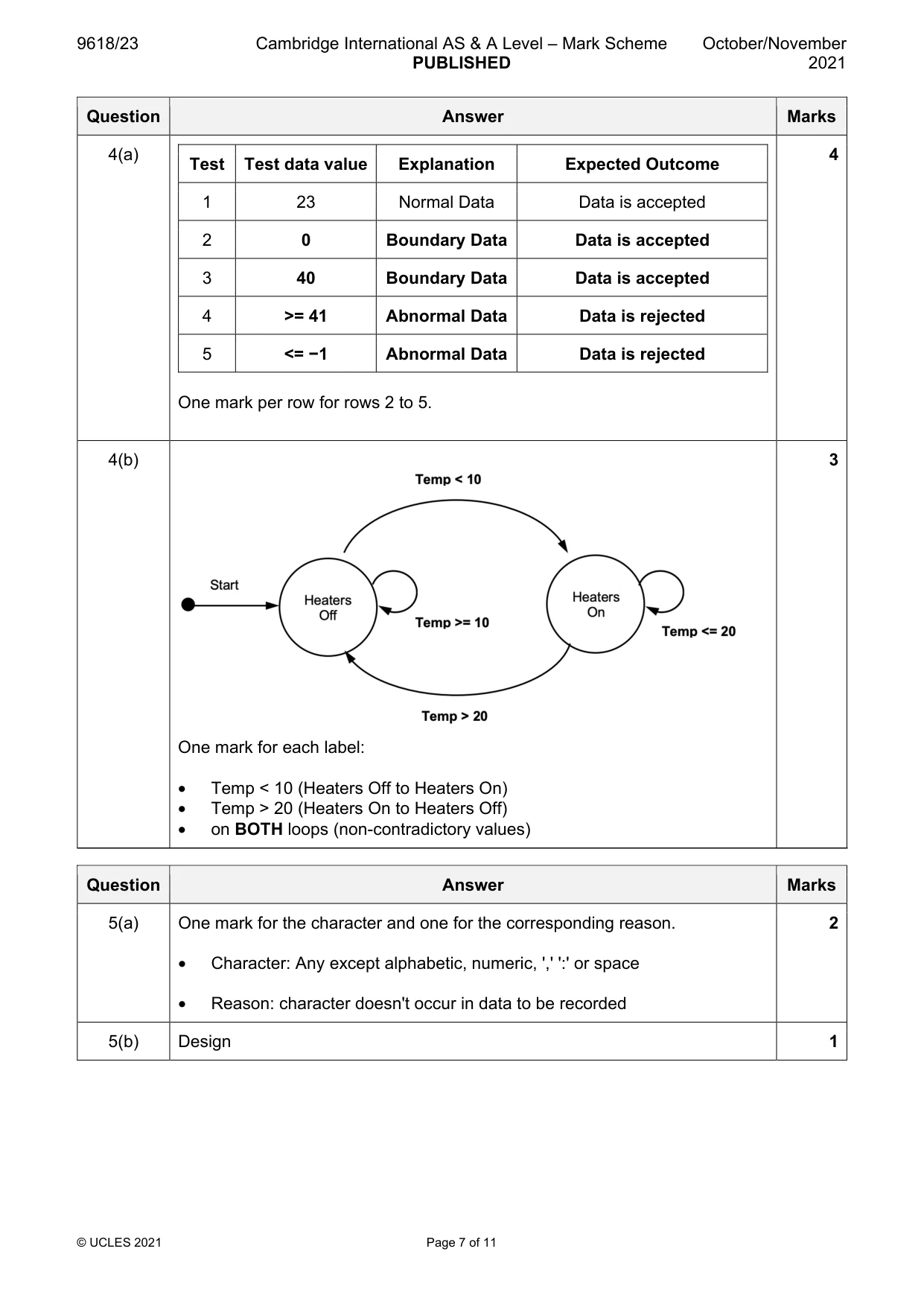
Mark scheme: 4(a) 4 Test Test data value Explanation Expected Outcome 1 23 Normal Data Data is accepted 2 0 Boundary Data Data is accepted 3 40 Boundary Data Data is accepted 4 >= 41 Abnormal Data Data is rejected 5 <= −1 Abnormal Data Data is rejected One mark per row for rows 2 to 5. 4(b) 3 One mark for each label: • Temp < 10 (Heaters Off to Heaters On) • Temp > 20 (Heaters On to Heaters Off) • on BOTH loops (non-contradictory values)
Q5 · The following data items will be recorded each time a student successfully logs on to the…
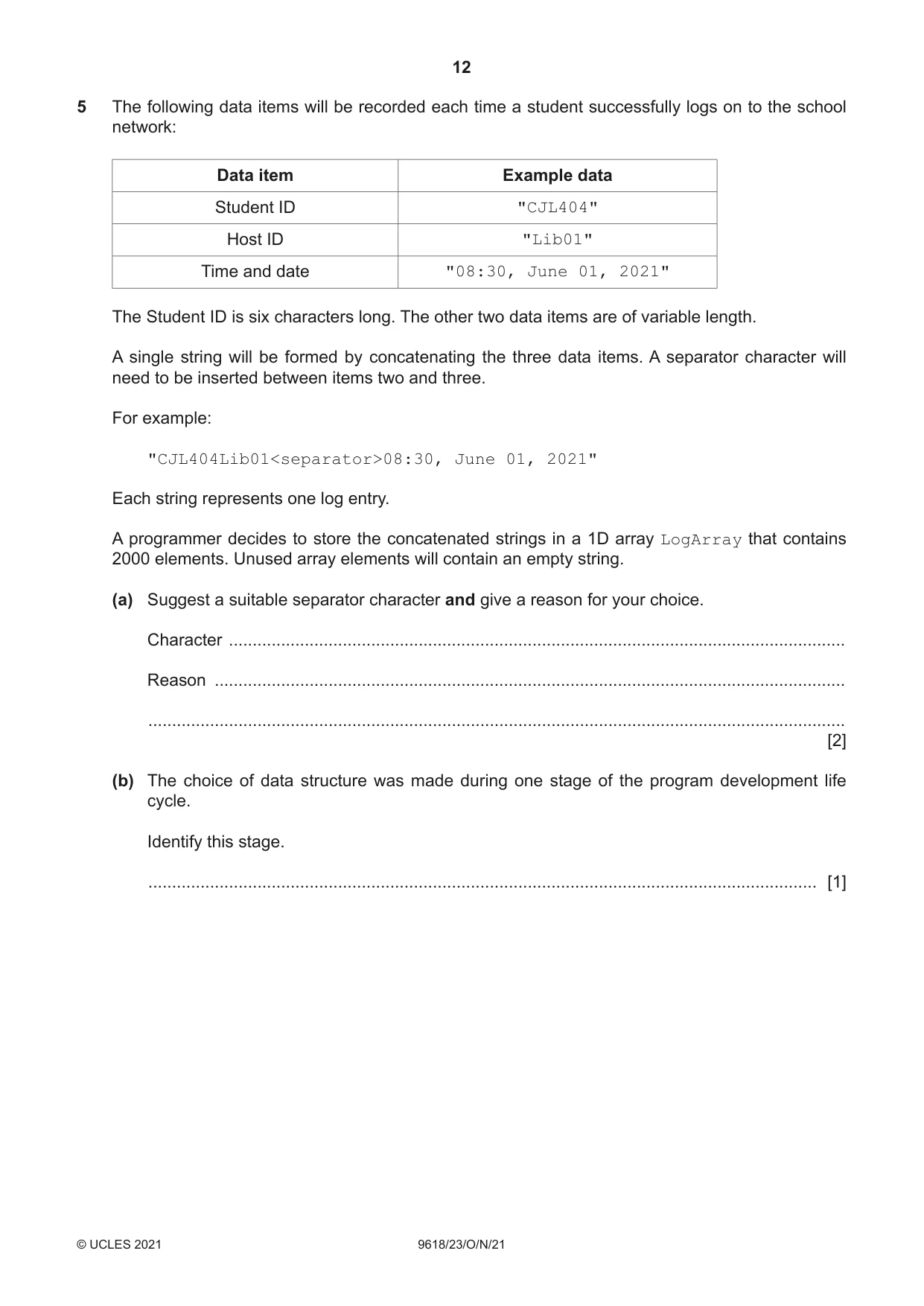
5 The following data items will be recorded each time a student successfully logs on to the school network: Data item Example data Student ID "CJL404" Host ID "Lib01" Time and date "08:30, June 01, 2021" The Student ID is six characters long. The other two data items are of variable length. A single string will be formed by concatenating the three data items. A separator character will need to be inserted between items two and three. For example: "CJL404Lib01<separator>08:30, June 01, 2021" Each string represents one log entry. A programmer decides to store the concatenated strings in a 1D array LogArray that contains 2000 elements. Unused array elements will contain an empty string. (a) Suggest a suitable separator character and give a reason for your choice. Character .................................................................................................................................. Reason ..................................................................................................................................... ................................................................................................................................................... [2] (b) The choice of data structure was made during one stage of the program development life cycle. Identify this stage. ............................................................................................................................................. [1] (c) A function LogEvents() will: • take a Student ID as a parameter • for each element in the array that matches the Student ID parameter: ◦ add the value of the array element to the existing text file LogFile ◦ assign an empty string to the array element • count the number of lines added to the file • return this count. Write pseudocode for the function LogEvents(). .......................................................................................................................................................... .......................................................................................................................................................... .......................................................................................................................................................... .......................................................................................................................................................... .......................................................................................................................................................... .......................................................................................................................................................... .......................................................................................................................................................... .......................................................................................................................................................... .......................................................................................................................................................... .......................................................................................................................................................... .......................................................................................................................................................... .......................................................................................................................................................... .......................................................................................................................................................... .......................................................................................................................................................... .......................................................................................................................................................... .......................................................................................................................................................... .......................................................................................................................................................... .......................................................................................................................................................... .......................................................................................................................................................... .......................................................................................................................................................... .......................................................................................................................................................... .......................................................................................................................................................... .......................................................................................................................................................... .................................................................................................................................................... [7]
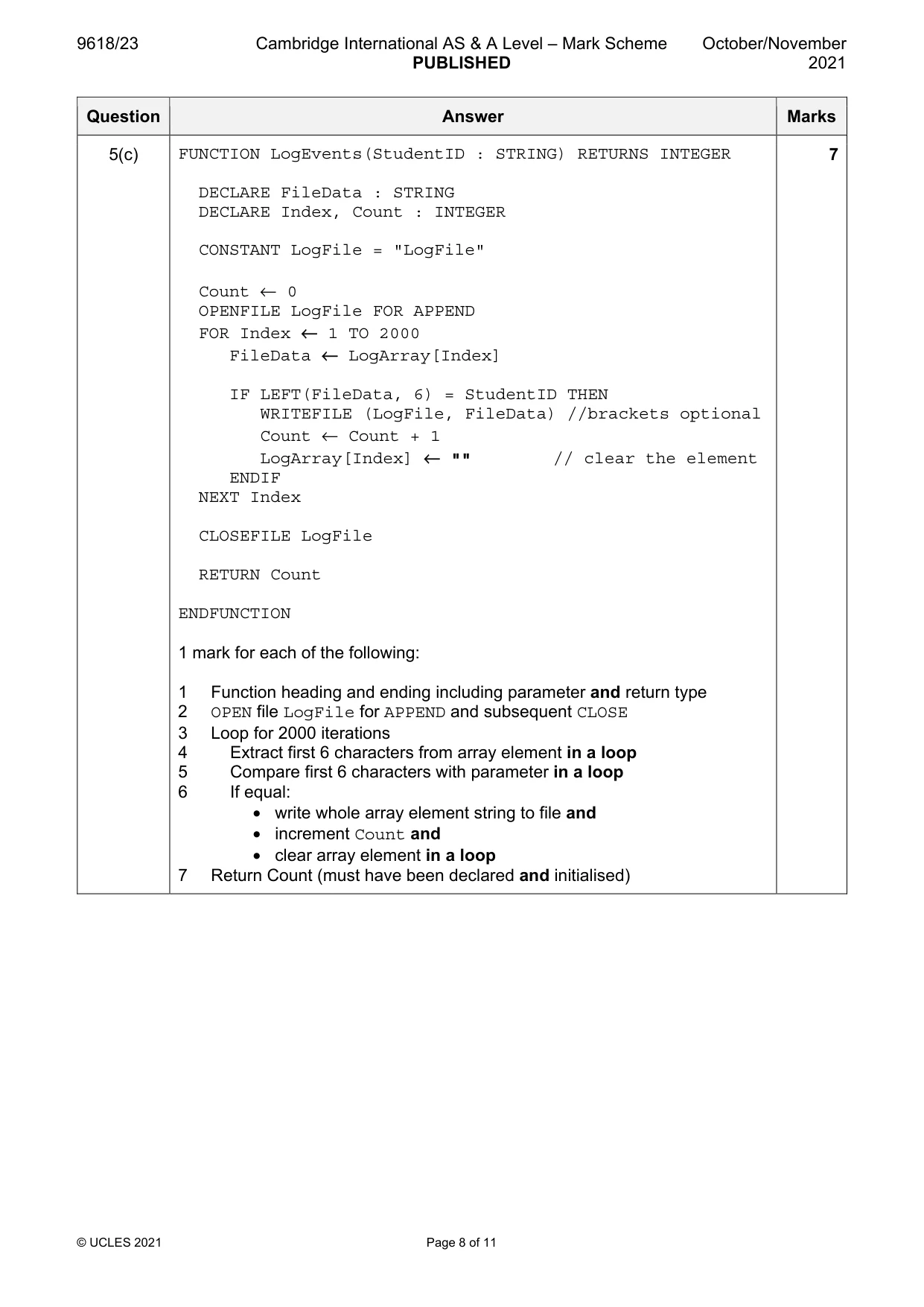
Mark scheme: 5(a) One mark for the character and one for the corresponding reason. 2 • Character: Any except alphabetic, numeric, ',' ':' or space • Reason: character doesn't occur in data to be recorded 5(b) Design 1 5(c) FUNCTION LogEvents(StudentID : STRING) RETURNS INTEGER 7 DECLARE FileData : STRING DECLARE Index, Count : INTEGER CONSTANT LogFile = "LogFile" Count ← 0 OPENFILE LogFile FOR APPEND FOR Index ← 1 TO 2000 FileData ← LogArray[Index] IF LEFT(FileData, 6) = StudentID THEN WRITEFILE (LogFile, FileData) //brackets optional Count ← Count + 1 LogArray[Index] ← "" // clear the element ENDIF NEXT Index CLOSEFILE LogFile RETURN Count ENDFUNCTION 1 mark for each of the following: 1 Function heading and ending including parameter and return type 2 OPEN file LogFile for APPEND and subsequent CLOSE 3 Loop for 2000 iterations 4 Extract first 6 characters from array element in a loop 5 Compare first 6 characters with parameter in a loop 6 If equal: • write whole array element string to file and • increment Count and • clear array element in a loop 7 Return Count (must have been declared and initialised)
Q6 · A mobile phone has a touchscreen
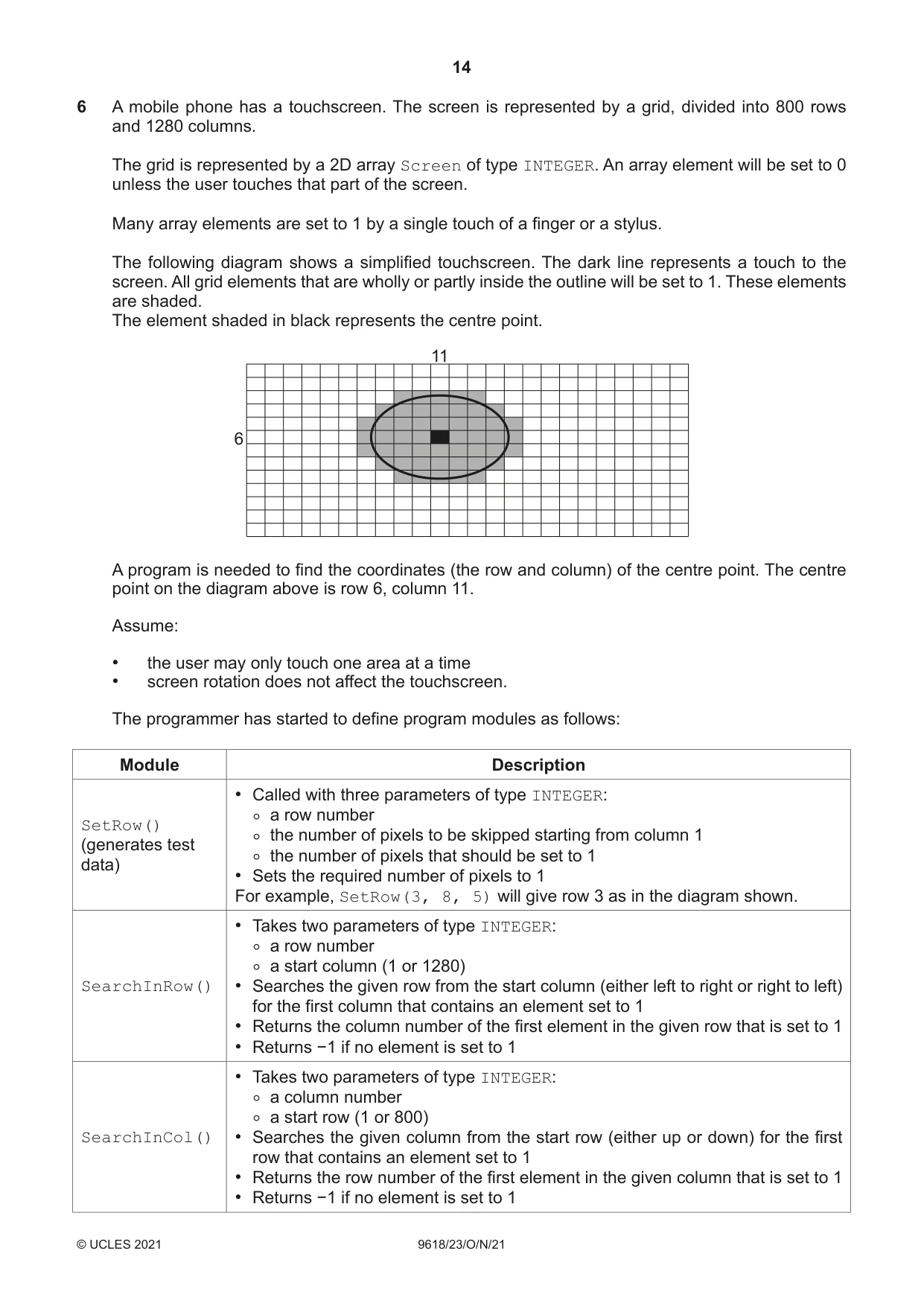
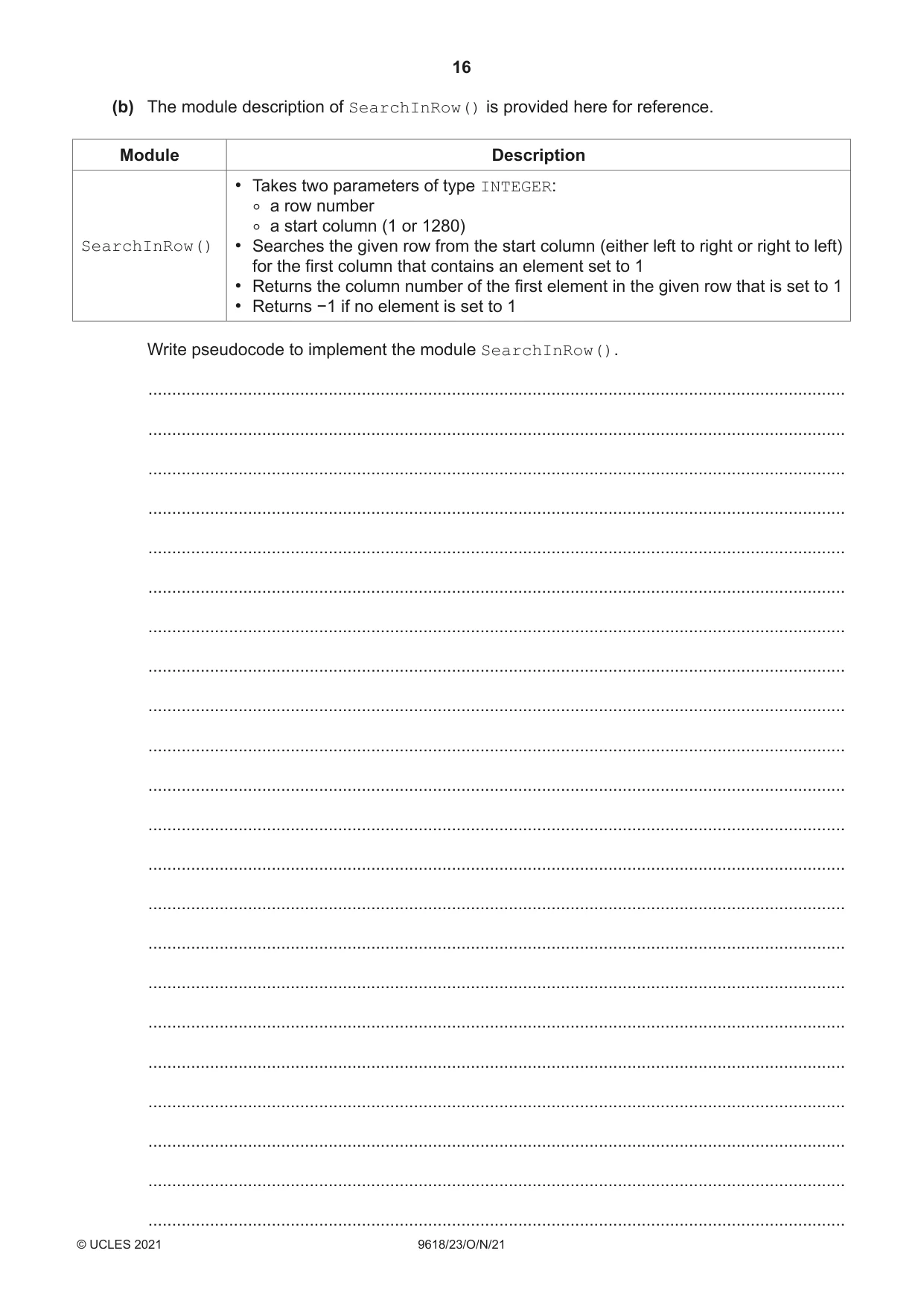
6 A mobile phone has a touchscreen. The screen is represented by a grid, divided into 800 rows and 1280 columns. The grid is represented by a 2D array Screen of type INTEGER. An array element will be set to 0 unless the user touches that part of the screen. Many array elements are set to 1 by a single touch of a finger or a stylus. The following diagram shows a simplified touchscreen. The dark line represents a touch to the screen. All grid elements that are wholly or partly inside the outline will be set to 1. These elements are shaded. The element shaded in black represents the centre point. 11 6 A program is needed to find the coordinates (the row and column) of the centre point. The centre point on the diagram above is row 6, column 11. Assume: • the user may only touch one area at a time • screen rotation does not affect the touchscreen. The programmer has started to define program modules as follows: Module Description • Called with three parameters of type INTEGER: ◦a row numberSetRow()(generates test ◦the number of pixels to be skipped starting from column 1 data) ◦the number of pixels that should be set to 1 • Sets the required number of pixels to 1 For example, SetRow(3, 8, 5) will give row 3 as in the diagram shown. • Takes two parameters of type INTEGER: ◦a row number ◦a start column (1 or 1280) SearchInRow() • Searches the given row from the start column (either left to right or right to left) for the first column that contains an element set to 1 • Returns the column number of the first element in the given row that is set to 1 • Returns −1 if no element is set to 1 • Takes two parameters of type INTEGER: ◦a column number ◦a start row (1 or 800) SearchInCol() • Searches the given column from the start row (either up or down) for the first row that contains an element set to 1 • Returns the row number of the first element in the given column that is set to 1 • Returns −1 if no element is set to 1 (a) Write pseudocode to implement the module SetRow(). ................................................................................................................................................... ................................................................................................................................................... ................................................................................................................................................... ................................................................................................................................................... ................................................................................................................................................... ................................................................................................................................................... ................................................................................................................................................... ................................................................................................................................................... ................................................................................................................................................... ................................................................................................................................................... ................................................................................................................................................... ............................................................................................................................................. [5] (b) The module description of SearchInRow() is provided here for reference. Module Description • Takes two parameters of type INTEGER: ◦a row number ◦a start column (1 or 1280) SearchInRow() • Searches the given row from the start column (either left to right or right to left) for the first column that contains an element set to 1 • Returns the column number of the first element in the given row that is set to 1 • Returns −1 if no element is set to 1 Write pseudocode to implement the module SearchInRow(). ................................................................................................................................................... ................................................................................................................................................... ................................................................................................................................................... ................................................................................................................................................... ................................................................................................................................................... ................................................................................................................................................... ................................................................................................................................................... ................................................................................................................................................... ................................................................................................................................................... ................................................................................................................................................... ................................................................................................................................................... ................................................................................................................................................... ................................................................................................................................................... ................................................................................................................................................... ................................................................................................................................................... ................................................................................................................................................... ................................................................................................................................................... ................................................................................................................................................... ................................................................................................................................................... ................................................................................................................................................... ...................................................................................................................................................
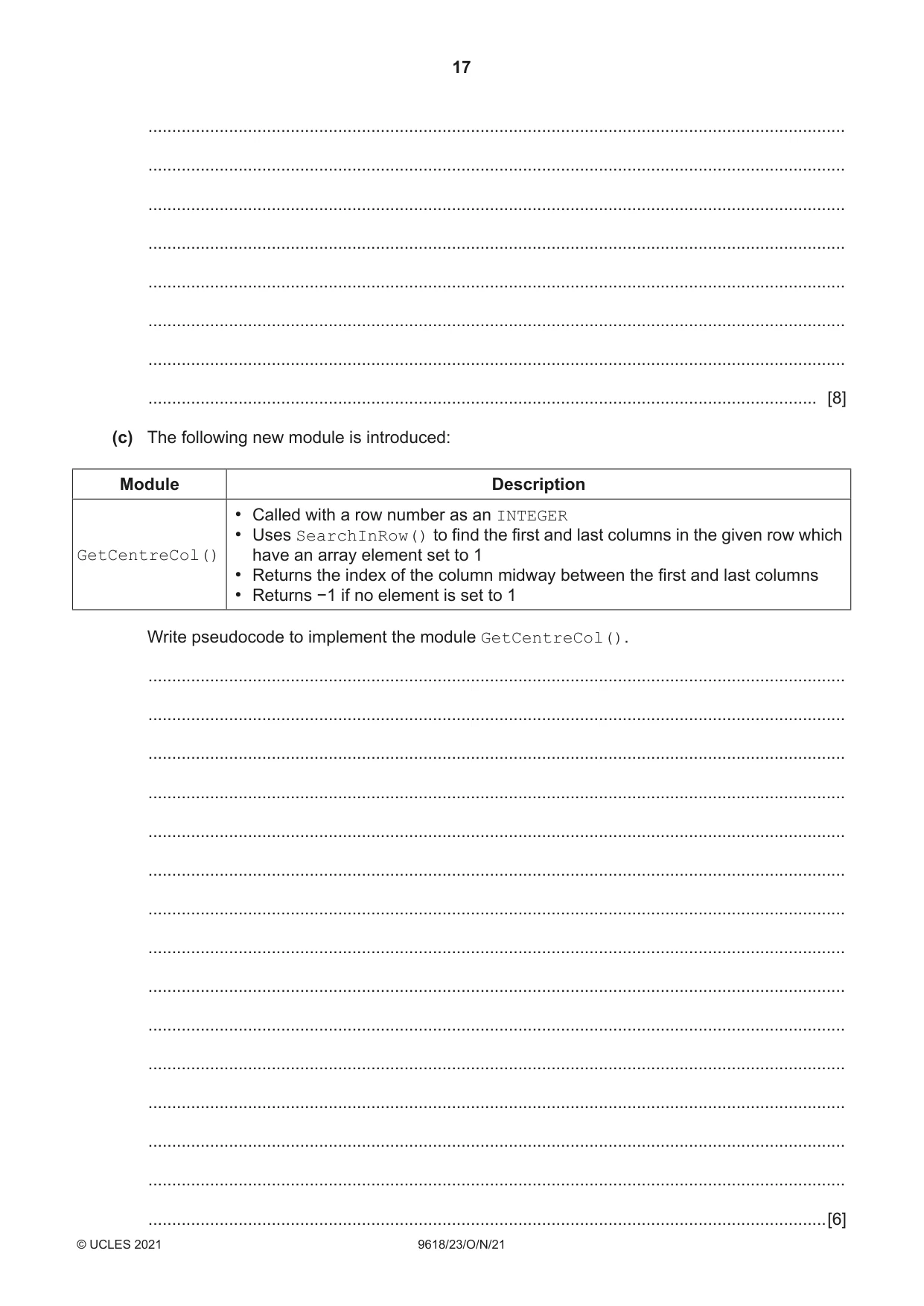
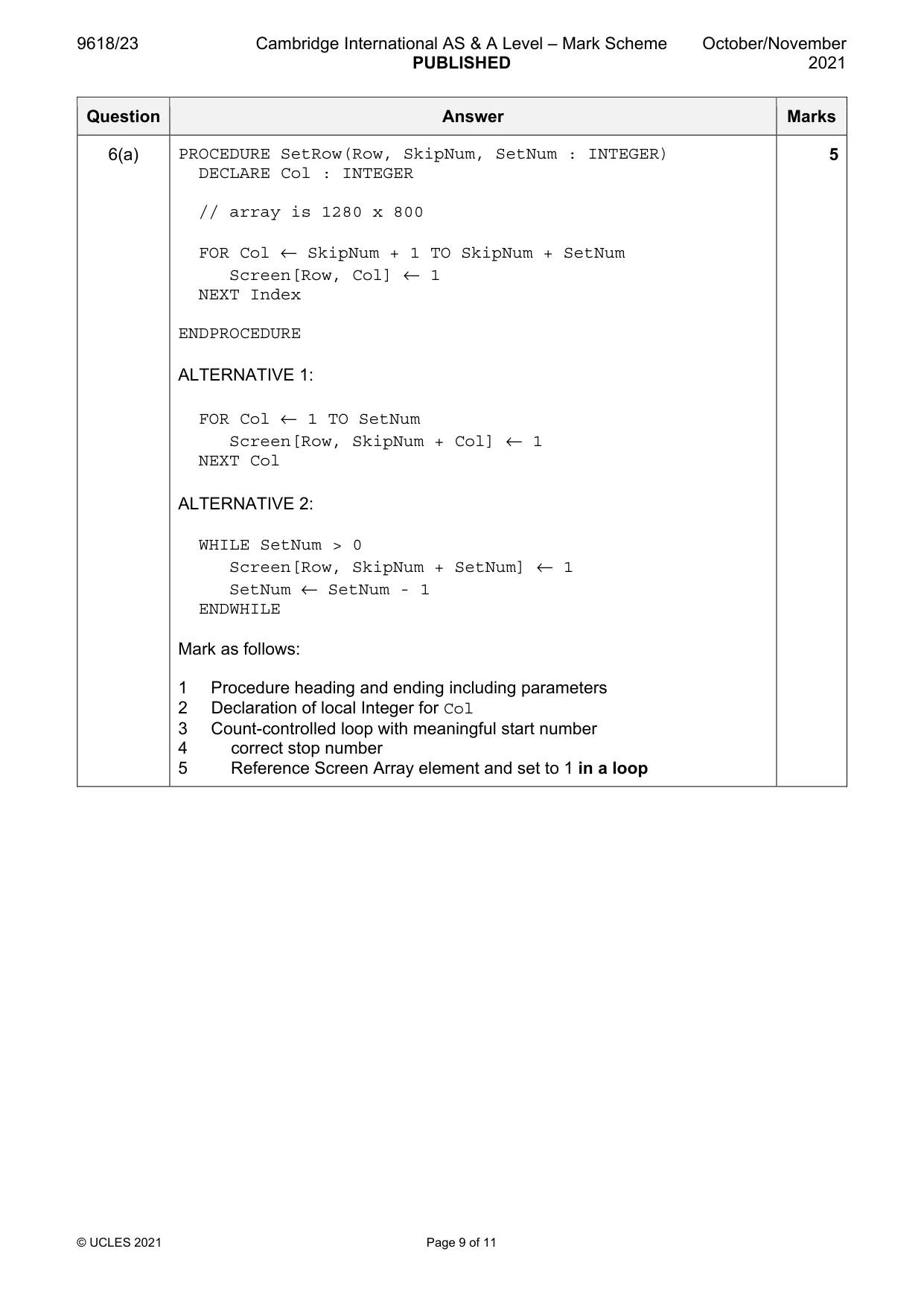
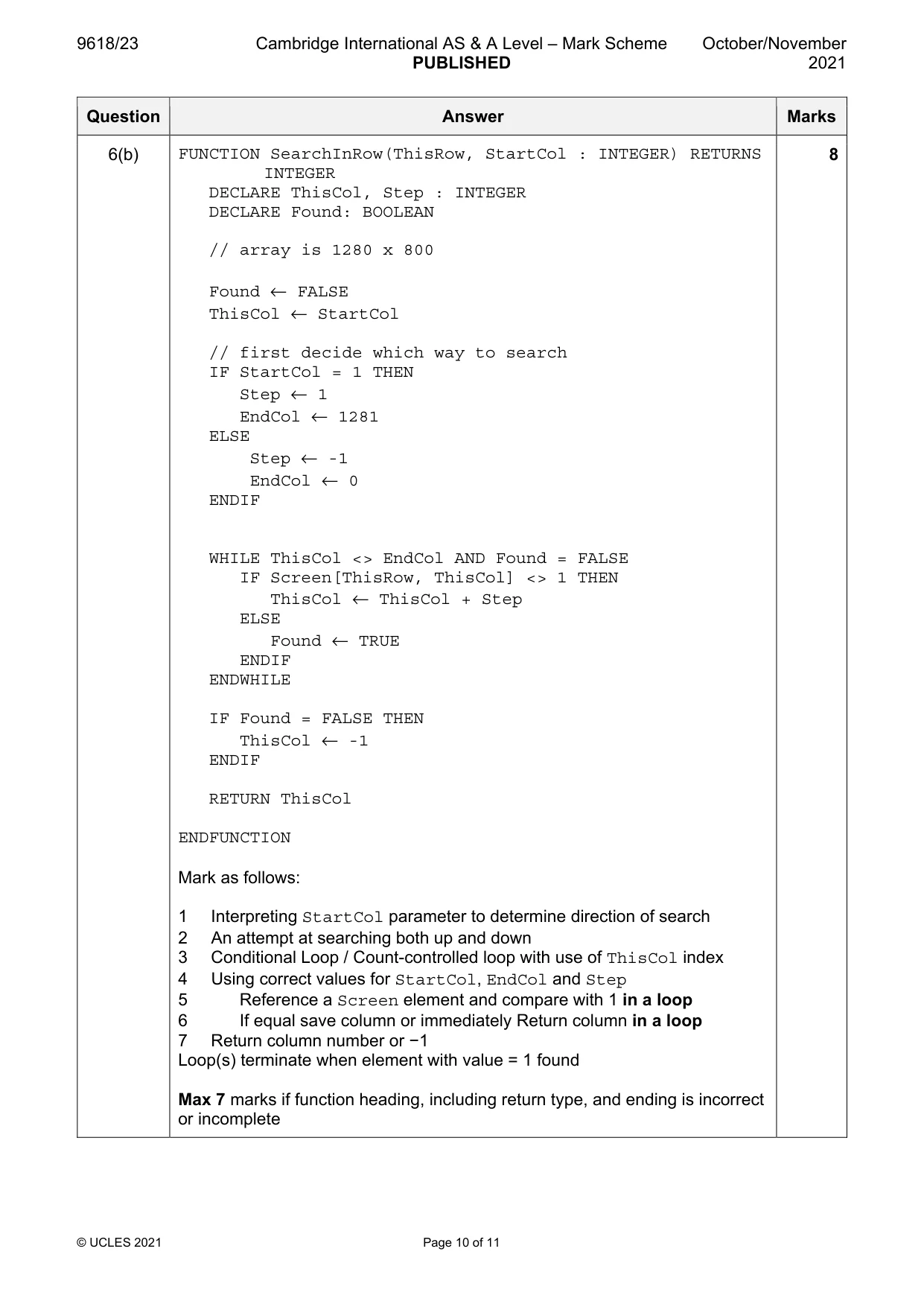
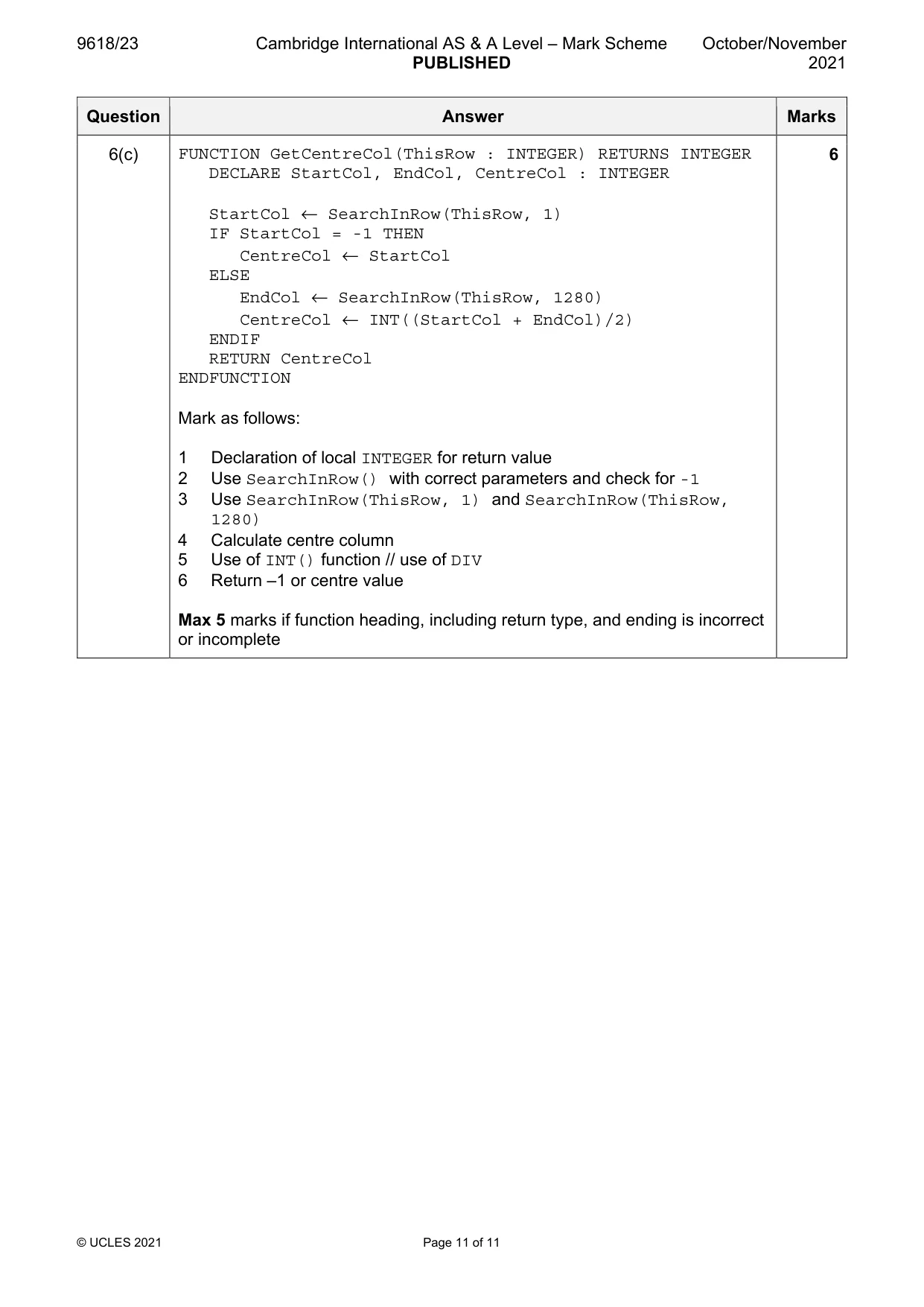
Mark scheme: 6(a) PROCEDURE SetRow(Row, SkipNum, SetNum : INTEGER) 5 DECLARE Col : INTEGER // array is 1280 x 800 FOR Col ← SkipNum + 1 TO SkipNum + SetNum Screen[Row, Col] ← 1 NEXT Index ENDPROCEDURE ALTERNATIVE 1: FOR Col ← 1 TO SetNum Screen[Row, SkipNum + Col] ← 1 NEXT Col ALTERNATIVE 2: WHILE SetNum > 0 Screen[Row, SkipNum + SetNum] ← 1 SetNum ← SetNum - 1 ENDWHILE Mark as follows: 1 Procedure heading and ending including parameters 2 Declaration of local Integer for Col 3 Count-controlled loop with meaningful start number 4 correct stop number 5 Reference Screen Array element and set to 1 in a loop 6(b) FUNCTION SearchInRow(ThisRow, StartCol : INTEGER) RETURNS 8 INTEGER DECLARE ThisCol, Step : INTEGER DECLARE Found: BOOLEAN // array is 1280 x 800 Found ← FALSE ThisCol ← StartCol // first decide which way to search IF StartCol = 1 THEN Step ← 1 EndCol ← 1281 ELSE Step ← -1 EndCol ← 0 ENDIF WHILE ThisCol <> EndCol AND Found = FALSE IF Screen[ThisRow, ThisCol] <> 1 THEN ThisCol ← ThisCol + Step ELSE Found ← TRUE ENDIF ENDWHILE IF Found = FALSE THEN ThisCol ← -1 ENDIF RETURN ThisCol ENDFUNCTION Mark as follows: 1 Interpreting StartCol parameter to determine direction of search 2 An attempt at searching both up and down 3 Conditional Loop / Count-controlled loop with use of ThisCol index 4 Using correct values for StartCol, EndCol and Step 5 Reference a Screen element and compare with 1 in a loop 6 If equal save column or immediately Return column in a loop 7 Return column number or −1 Loop(s) terminate when element with value = 1 found Max 7 marks if function heading, including return type, and ending is incorrect or incomplete 6(c) FUNCTION GetCentreCol(ThisRow : INTEGER) RETURNS INTEGER 6 DECLARE StartCol, EndCol, CentreCol : INTEGER StartCol ← SearchInRow(ThisRow, 1) IF StartCol = -1 THEN CentreCol ← StartCol ELSE EndCol ← SearchInRow(ThisRow, 1280) CentreCol ← INT((StartCol + EndCol)/2) ENDIF RETURN CentreCol ENDFUNCTION Mark as follows: 1 Declaration of local INTEGER for return value 2 Use SearchInRow() with correct parameters and check for -1 3 Use SearchInRow(ThisRow, 1) and SearchInRow(ThisRow, 1280) 4 Calculate centre column 5 Use of INT() function // use of DIV 6 Return –1 or centre value Max 5 marks if function heading, including return type, and ending is incorrect or incomplete
What was in this paper
The subtopics covered by these 6 questions, and how many questions each got. Open one in a new tab to see every Cambridge question on it.
What you needed in this session
Cambridge’s own grade thresholds for 2021 Oct/Nov, Paper 2 · Variant 3. A higher threshold means an easier paper — the bar moves with how the cohort did.