Questions as text
Q1 · Animators create effects by ‘morphing’ images from one into another 9626/32 May/June 2017
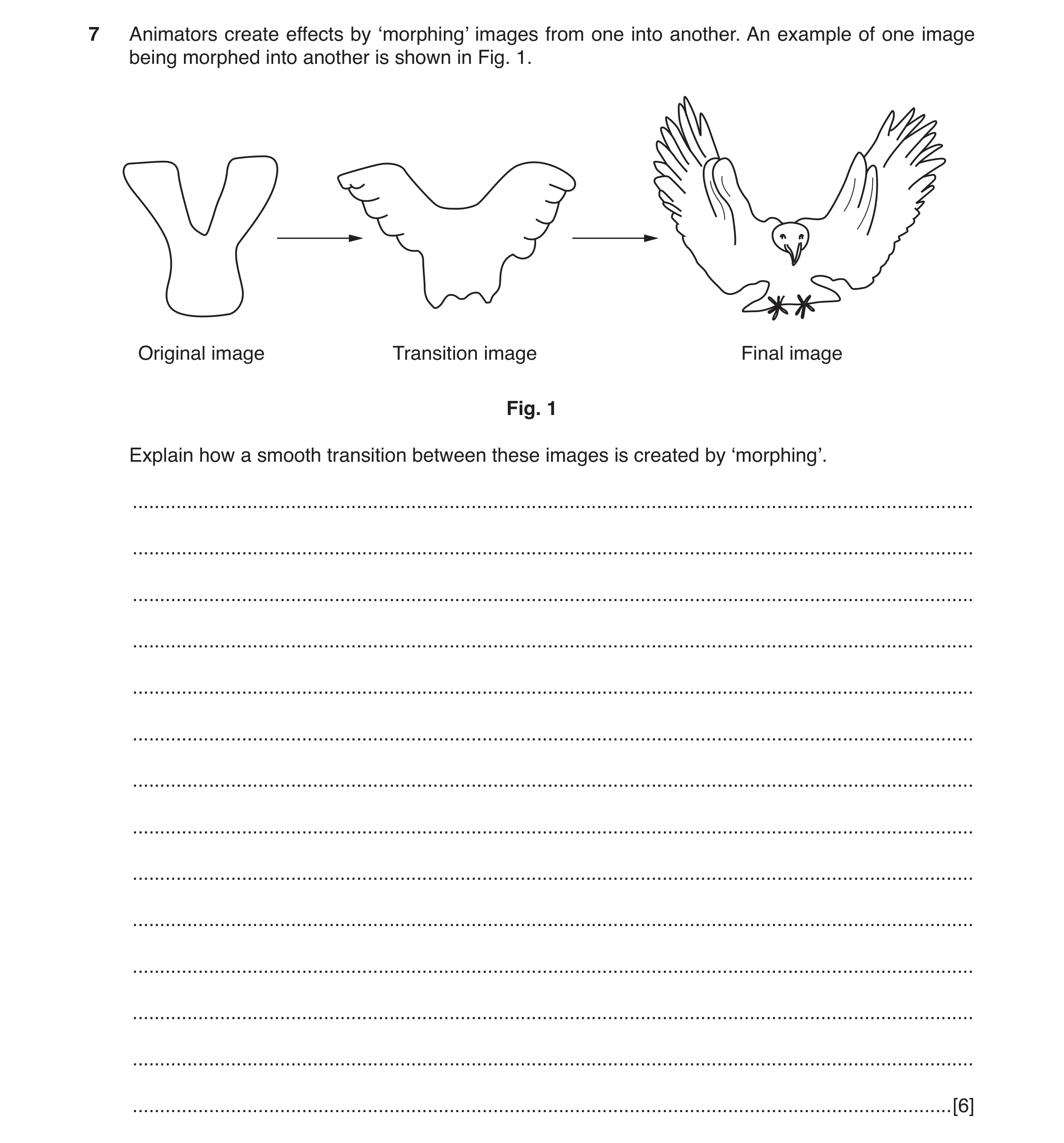
7 Animators create effects by ‘morphing’ images from one into another. An example of one image being morphed into another is shown in Fig. 1. Original image Transition image Final image Fig. 1 Explain how a smooth transition between these images is created by ‘morphing’. … … … … … … … … … … … … … … [6]
6 marks
Mark scheme: 7 Six from: 6 Warping/deforming these from the original images so final image has same shape «use of forward mapping «each pixel in original image is mapped to an appropriate «pixel in final image «use of reverse mapping «each pixel in the final image is sampled for an usable/ appropriate pixel in the original «all final image pixels are mapped to an original image pixel Cross-dissolving the images «a sequence of images shows a gradual fade from one to the other «via a (series of) transition images «original image is gradually distorted and faded out «final image starts out totally warped to the first and is faded in.
This question in 9626/32 May/June 2017
Q2 · An animator is producing a digital cartoon showing a dancer in action on a beach 9626/32 Oct/Nov 2017
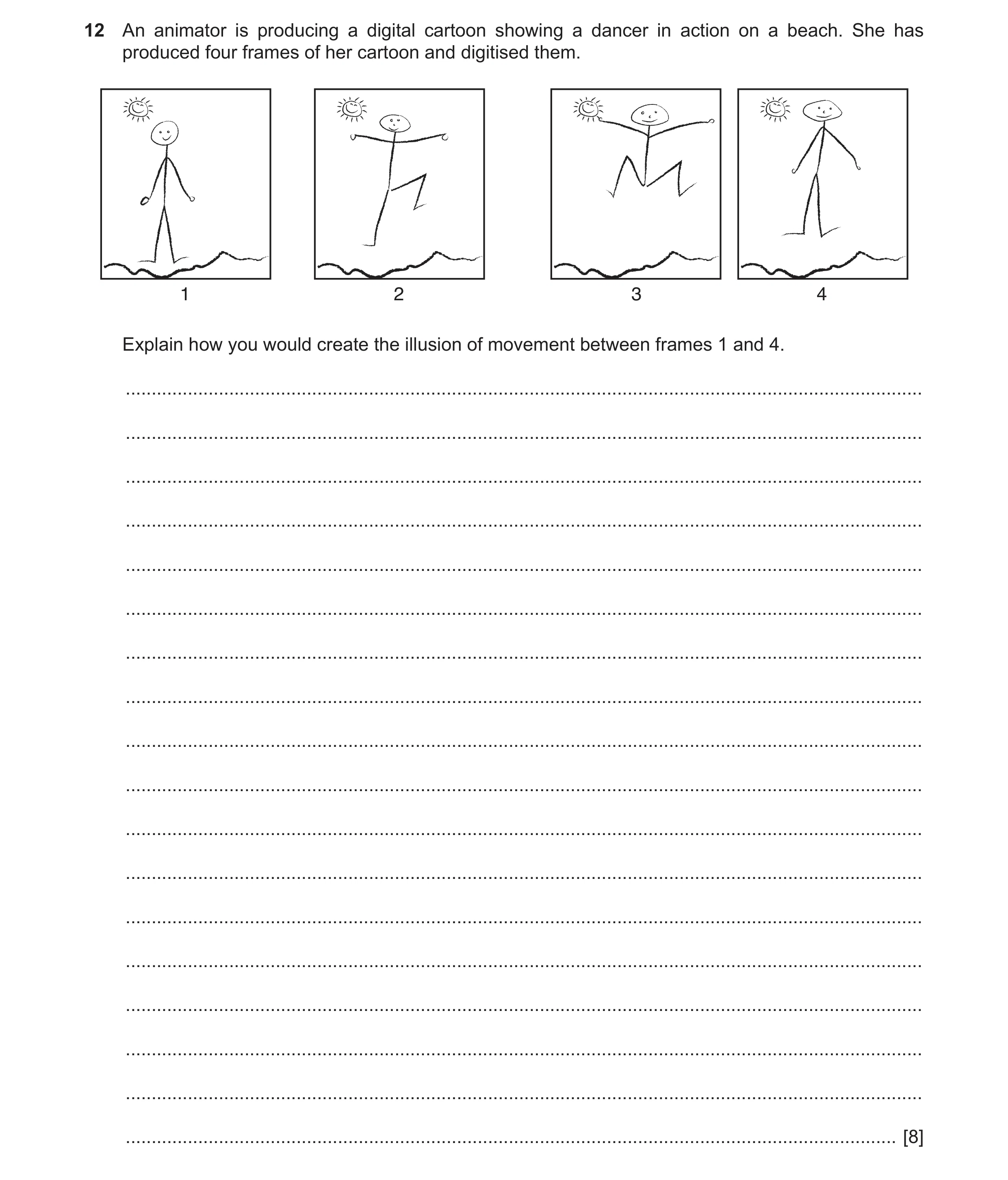
12 An animator is producing a digital cartoon showing a dancer in action on a beach. She has produced four frames of her cartoon and digitised them. 1 2 3 4 Explain how you would create the illusion of movement between frames 1 and 4. … … … … … … … … … … … … … … … … … … [8]
8 marks
Mark scheme: 12 Eight from: 8 Using the four frames as key frames ...filling in of frames between frames 1, 2, 3 and 4 ...using variable frame frequency depending on content ...fewer frames between frames 1 and 2 than e.g. between 2 and 3 ...as background is stationary then lower frame rate than foreground characters May be low frame rate so makes motion jerky/unrealistic Need to add at least 8 frames in order to create smooth movement Need to add enough frames so that frame rate is below ‘flicker fusion’ threshold« ...else movement will appear to flicker and illusion of movement is destroyed Motion blurring of the figures between frames 1 and 2 etc. can simulate faster movement.
This question in 9626/32 Oct/Nov 2017
Q3 · An animator used a computer to produce an animation consisting of eight frames 9626/33 May/June 2018
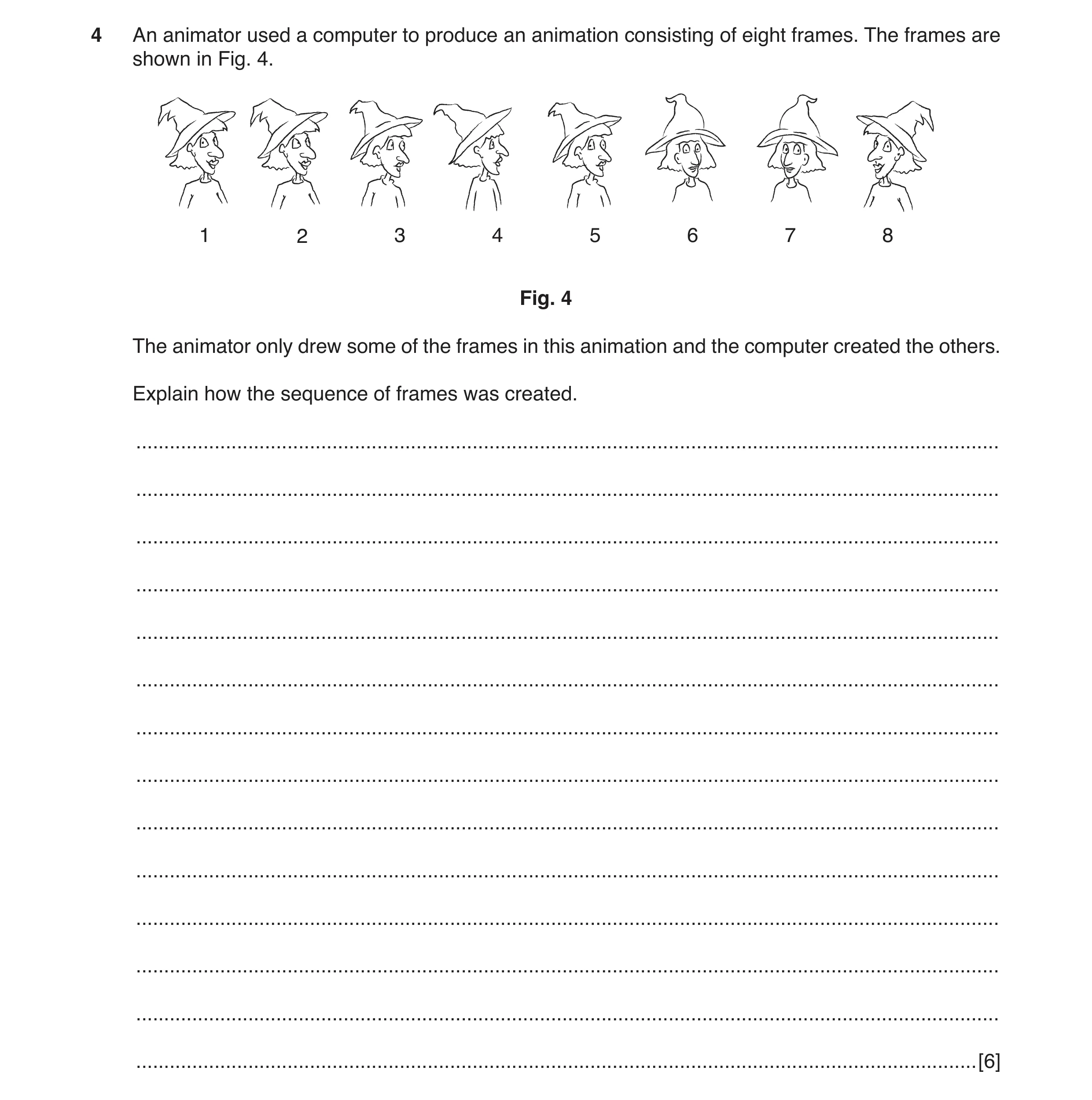
4 An animator used a computer to produce an animation consisting of eight frames. The frames are shown in Fig. 4. 1 2 3 4 5 6 7 8 Fig. 4 The animator only drew some of the frames in this animation and the computer created the others. Explain how the sequence of frames was created. … … … … … … … … … … … … … … [6]
6 marks
Mark scheme: 4 Six from: 6 Animator drew frames 1 and 5 and 8 Frame 8 created by flipping/reflecting of frame 1 These are used as key frames Frame 1 was duplicated/copied (by computer) to create frames 2, 3 and 4 Frame 5 was duplicated/copied (by computer) to create frames 6 and 7 Key frames define the start and end point of transitions that can be used by a computer-based animation application Tweening was used to create frames in between.
This question in 9626/33 May/June 2018
Q4 · A typical animation has 24 frames for every second of running time (24 fps) 9626/31 May/June 2019
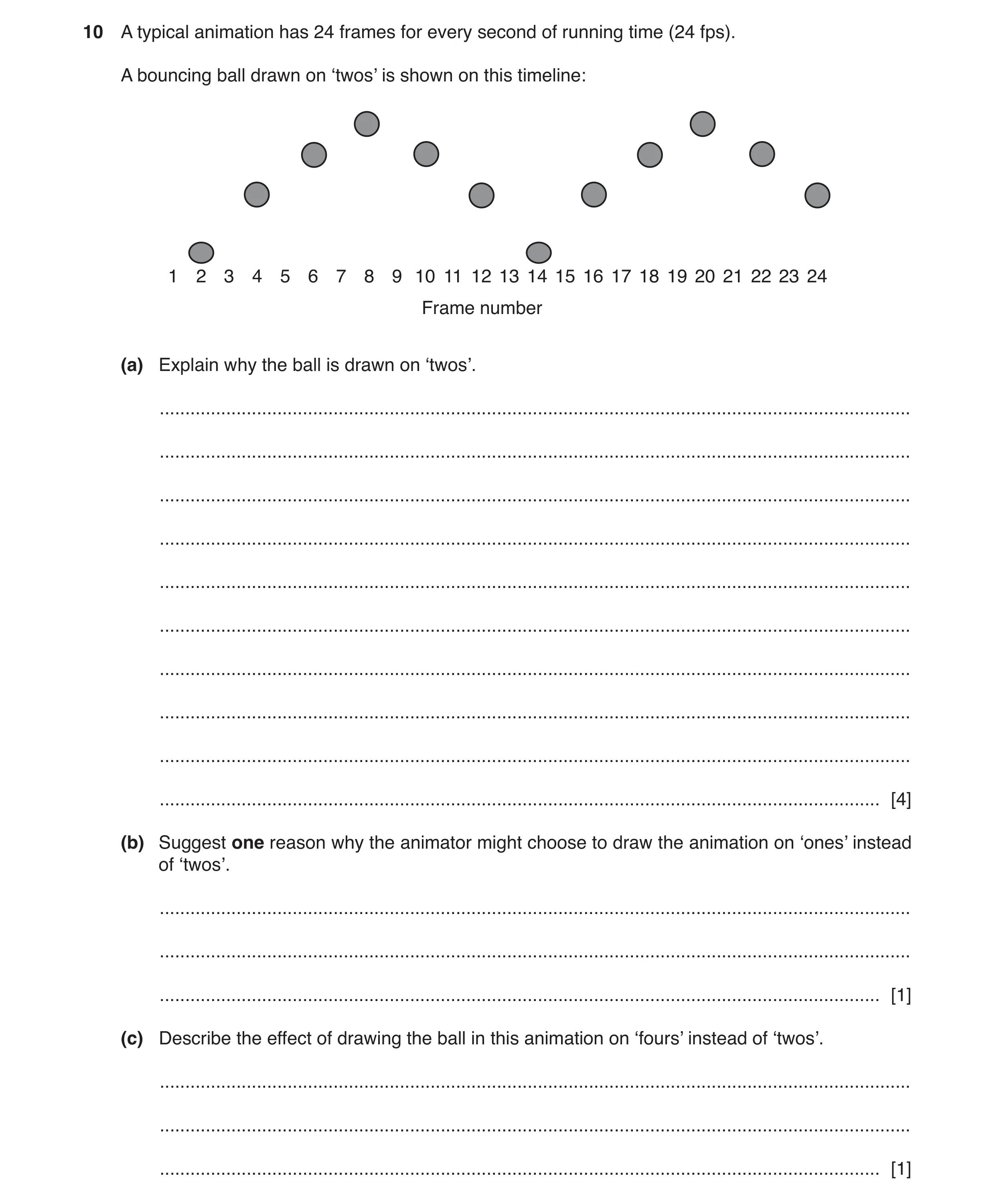
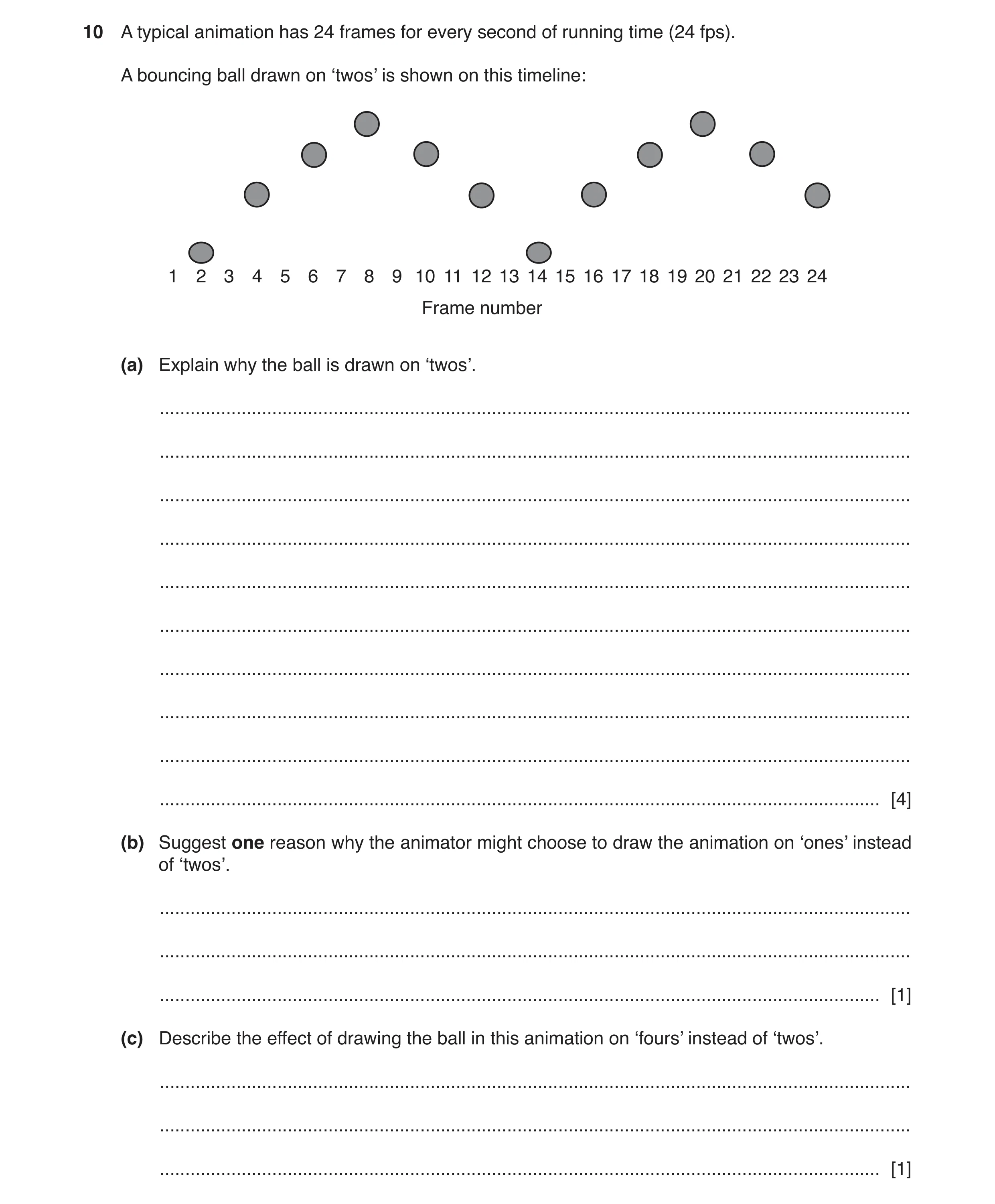
10 A typical animation has 24 frames for every second of running time (24 fps). A bouncing ball drawn on ‘twos’ is shown on this timeline: 1 2 3 4 5 6 7 8 9 10 11 12 13 14 15 16 17 18 19 20 21 22 23 24 Frame number (a) Explain why the ball is drawn on ‘twos’. … … … … … … … … … … [4] (b) Suggest one reason why the animator might choose to draw the animation on ‘ones’ instead of ‘twos’. … … … [1] (c) Describe the effect of drawing the ball in this animation on ‘fours’ instead of ‘twos’. … … … [1]
6 marks
Mark scheme: 10(a) Four from: 4 Animator only needs to draw 12 frames instead of the full 24 so saves time / effort ...fewer animators / less computer time needed for the whole project (Drawing on ‘twos’) makes slow animations look / appear smoother to the eye Less precision / accuracy is needed than for drawing on ‘ones’ (‘ones’ animation does not look jerky) so drawing can be done faster / with less skill from animator (Drawing on ‘twos’) makes animations appear more lively / active than when drawn on ‘ones’. 10(b) One from: 1 Action needs to appear very fast / active Animation can include a flurry of activity around the main object Can portray a very smooth animation of many objects in the animation. 10(c) One from: 1 The animation may appear jerky / flashing of objects on / off Objects move very fast.
This question in 9626/31 May/June 2019
Q5 · A typical animation has 24 frames for every second of running time (24 fps) 9626/33 May/June 2019
10 A typical animation has 24 frames for every second of running time (24 fps). A bouncing ball drawn on ‘twos’ is shown on this timeline: 1 2 3 4 5 6 7 8 9 10 11 12 13 14 15 16 17 18 19 20 21 22 23 24 Frame number (a) Explain why the ball is drawn on ‘twos’. … … … … … … … … … … [4] (b) Suggest one reason why the animator might choose to draw the animation on ‘ones’ instead of ‘twos’. … … … [1] (c) Describe the effect of drawing the ball in this animation on ‘fours’ instead of ‘twos’. … … … [1]
6 marks
Mark scheme: 10(a) Four from: 4 Animator only needs to draw 12 frames instead of the full 24 so saves time / effort ...fewer animators / less computer time needed for the whole project (Drawing on ‘twos’) makes slow animations look / appear smoother to the eye Less precision / accuracy is needed than for drawing on ‘ones’ (‘ones’ animation does not look jerky) so drawing can be done faster / with less skill from animator (Drawing on ‘twos’) makes animations appear more lively / active than when drawn on ‘ones’. 10(b) One from: 1 Action needs to appear very fast / active Animation can include a flurry of activity around the main object Can portray a very smooth animation of many objects in the animation. 10(c) One from: 1 The animation may appear jerky / flashing of objects on / off Objects move very fast.
This question in 9626/33 May/June 2019
Q6 · Animators use several techniques when creating their animations 9626/31 May/June 2020
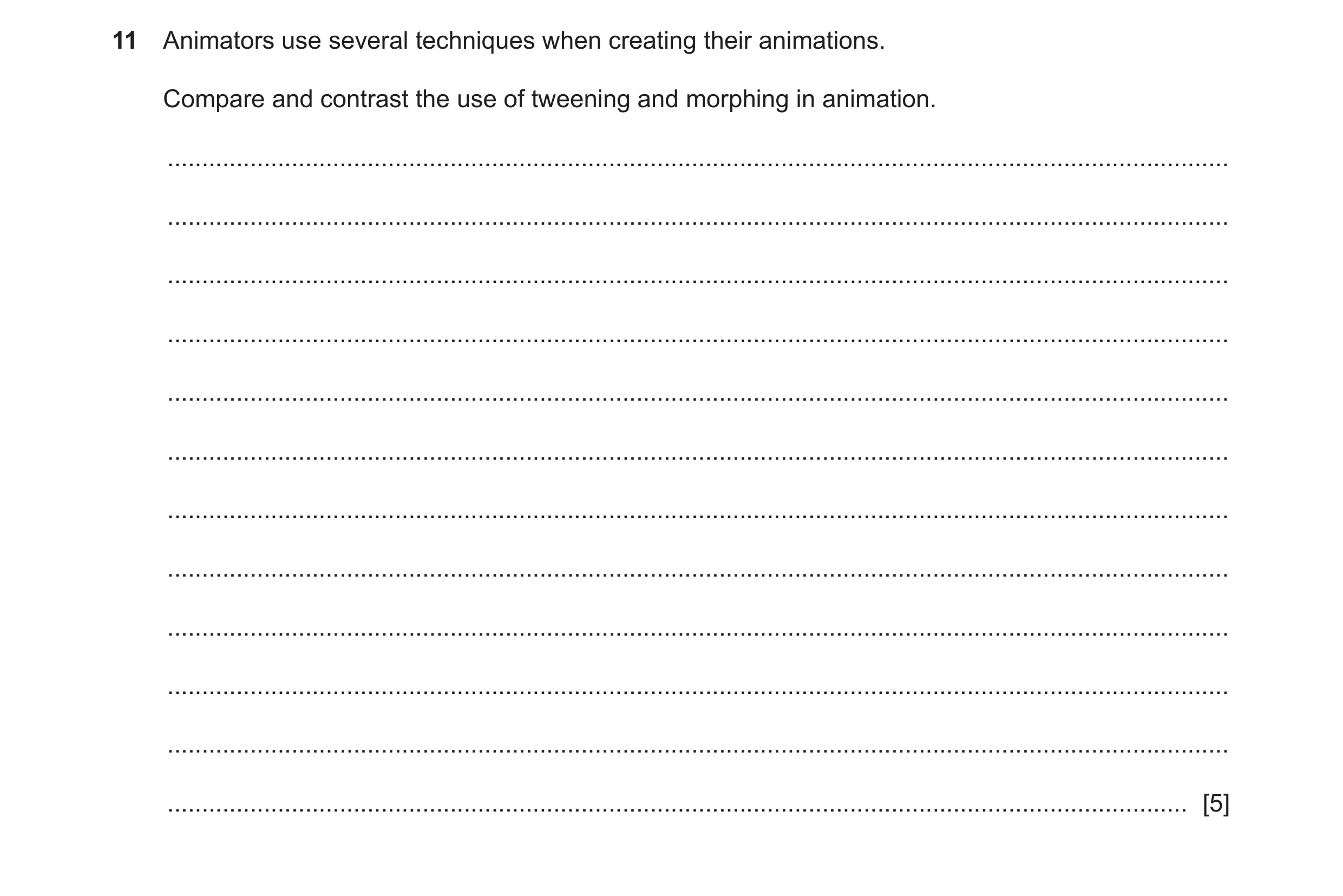
11 Animators use several techniques when creating their animations. Compare and contrast the use of tweening and morphing in animation. … … … … … … … … … … … … [5]
5 marks
Mark scheme: 11 Five from: 5 Similarities: Morphing and tweening can both change the shape an object. Morphing and tweening can both change the motion of object. Morphing and tweening can both change the size/colour/location of object. Differences: Morphing changes one object into a totally/completely different object. Changes by morphing are smooth/fluid. Morphing (often) overlays grid on image and uses it to remap new image over old, whereas tweening uses location points. Tweening changes animated object’s location/motion by creating intermediate frames. Tweening requires establishment of key frames. Tweening moves points of location of the object to new points whereas morphing does not (usually) do so. Must have at least one from each to gain full marks.
This question in 9626/31 May/June 2020
Q7 · Animators use several techniques when creating their animations 9626/33 May/June 2020
11 Animators use several techniques when creating their animations. Compare and contrast the use of tweening and morphing in animation. … … … … … … … … … … … … [5]
5 marks
Mark scheme: 11 Five from: 5 Similarities: Morphing and tweening can both change the shape an object. Morphing and tweening can both change the motion of object. Morphing and tweening can both change the size/colour/location of object. Differences: Morphing changes one object into a totally/completely different object. Changes by morphing are smooth/fluid. Morphing (often) overlays grid on image and uses it to remap new image over old, whereas tweening uses location points. Tweening changes animated object’s location/motion by creating intermediate frames. Tweening requires establishment of key frames. Tweening moves points of location of the object to new points whereas morphing does not (usually) do so. Must have at least one from each to gain full marks.
This question in 9626/33 May/June 2020
Q8 · Animations often show objects, for example figures moving about the screen 9626/31 May/June 2022
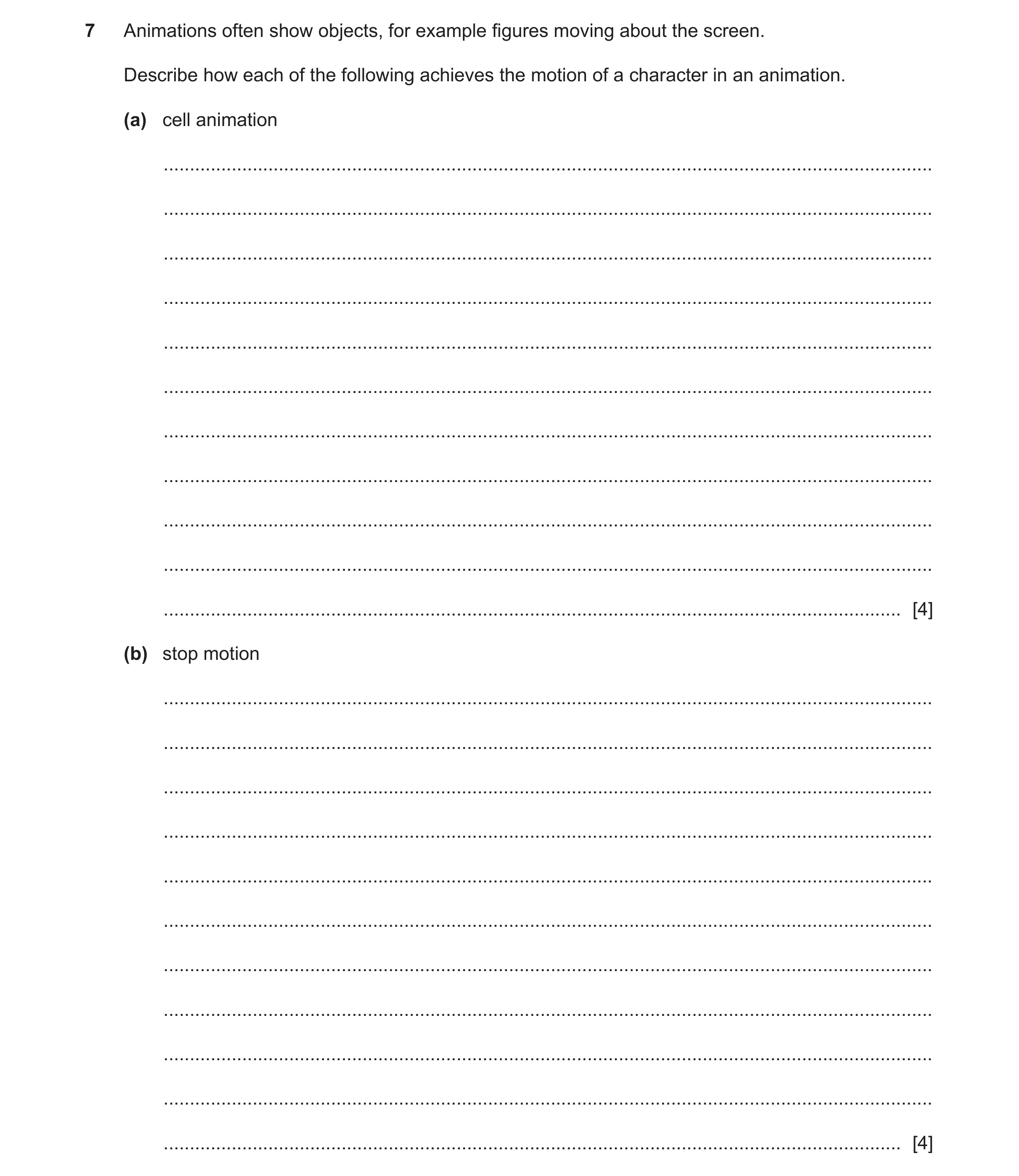
7 Animations often show objects, for example figures moving about the screen. Describe how each of the following achieves the motion of a character in an animation. (a) cell animation … … … … … … … … … … … [4] (b) stop motion … … … … … … … … … … … [4]
8 marks
Mark scheme: 7(a) Four from: Background/non-moving objects drawn on one cell and placed at bottom of stack of cells Character to be moved drawn on transparent cell (Transparent cell) placed on top of background and photographed/digitised Character redrawn as moved (on transparent cell) and replaced Re-photographed/digitised in next frame Process repeated for subsequent frames. Question Answer Marks 7(b) Four from: Scene/characters arranged and lighted/lit Camera/computer app/software setup Frame recorded/photographed Frame checked/viewed for corrections/deleted if not required Characters/objects moved slightly and re-photographed into new frame Use of ’onion-skinning’/faint outline of previous frame in software/app to show placement of characters/objects Frames duplicated (in app/software) to slow the motion down e.g. when character changes direction suddenly. 4 2
This question in 9626/31 May/June 2022
Q9 · Animations often show objects, for example figures moving about the screen 9626/33 May/June 2022
7 Animations often show objects, for example figures moving about the screen. Describe how each of the following achieves the motion of a character in an animation. (a) cell animation … … … … … … … … … … … [4] (b) stop motion … … … … … … … … … … … [4]
8 marks
Mark scheme: 7(a) Four from: Background/non-moving objects drawn on one cell and placed at bottom of stack of cells Character to be moved drawn on transparent cell (Transparent cell) placed on top of background and photographed/digitised Character redrawn as moved (on transparent cell) and replaced Re-photographed/digitised in next frame Process repeated for subsequent frames. Question Answer Marks 7(b) Four from: Scene/characters arranged and lighted/lit Camera/computer app/software setup Frame recorded/photographed Frame checked/viewed for corrections/deleted if not required Characters/objects moved slightly and re-photographed into new frame Use of ’onion-skinning’/faint outline of previous frame in software/app to show placement of characters/objects Frames duplicated (in app/software) to slow the motion down e.g. when character changes direction suddenly. 4 2
This question in 9626/33 May/June 2022
Q10 · Different methods can be used to make objects appear to move in computer animations 9626/32 Oct/Nov 2023
2 Different methods can be used to make objects appear to move in computer animations. (a) Explain why key frames are used in computer animations. … … … … … … [2] (b) Describe how property key frames are used in computer animation. … … … … … … … … … … [4]
6 marks
Mark scheme: 2(a) Two from: 2 • To define/specify the start and end point of a movement (of the objects) • To define/specify the movement (of the objects) (1st) − that the viewer will see (1) • To define/specify the timing of the movement (1st) − by the position of the key frame in a sequence of frames (1). 2(b) Four from: 4 • (Property key frame explicitly) defines/specifies the (one or more) properties/parameters of an object in a frame • (Objects properties) can be edited/changed/amended (within a property key frame) • (Property key frames) can be used to create in-between (tween) frames without the need to draw each frame individually • Can be used (as ‘roving’ property key frames) • Used to ensure that the speed of motion is consistent between frames/throughout a tween • Used to alter/amend/adjust the speed of motion at beginning and end of tween sequence so that it appears more realistic between frames/throughout a tween • Can be used to impose/add properties of one object onto other (1st) − by copying/placing property key frames in timelines/between sequences (1).
This question in 9626/32 Oct/Nov 2023
Q11 · Objects in computer animations have properties 9626/32 Feb/March 2024
5 Objects in computer animations have properties. Describe the following properties. (a) Orientation … … … … … … … … [3] (b) Transparency … … … … … … … … [3]
6 marks
Mark scheme: 5(a) Three from: 3 Max three from: • (Orientation) is a camera property that is set in a keyframe • Surface sets the target for the camera on the object surface • Provides a sense of gravity for the object • Space sets the target for the camera at the centre of the object. OR May be interpreted as ‘rotation which is a layer property’ Max three from: • Sets the x, y, and z rotation angles around a fixed point (the origin) in a layer • (Rotation) around the x-axis is the roll, yaw, angle. • (Rotation) around the y-axis is the inclination, pitch, angle. • (Rotation) around the z-axis is the azimuth, heading, angle. 5(b) Three from: 3 • (Sets the visibility of the objects/layers so) other layers in the display can be seen underneath. • Can be set to different percentages (of transparency/opacity) to change the visibility of layers underneath • Adjusted in keyframes to affect following frames • Can be adjusted so that some colours are removed/green screen effects • Can set a ‘transparency track’ in keyframes so transparency/opacity percentage changes between keyframes.
This question in 9626/32 Feb/March 2024
Q12 · Describe how stroke and fill settings can be used to change the appearance of text in a… 9626/31 May/June 2024
2 Describe how stroke and fill settings can be used to change the appearance of text in a computer animation. … … … … … … … … … … … … … … [6]
6 marks
Mark scheme: 2 Six from: Max 5 from: Stroke is: an outline around the text letters Can be animated to move around the letters Can be set to fade in/out around the letters Can be set to different formats/colours e.g. dotted/dashed/thickness Can be set to different corner formats e.g. sharp/smooth/rounded Max 5 from: Fill: changes the contents of the letter shapes Change the colour of the letter/shape (content/interior) Use of (multicolour) colour gradients to gradually change one colour into another linear gradients change colour along a single axis (horizontal or vertical) radial gradients change colour in an outward/inward direction starting from/to a central focal point direction/focal point of gradient can be changed.
This question in 9626/31 May/June 2024
Q13 · Describe the differences between 2D and 3D computer animation 9626/32 May/June 2024
3 Describe the differences between 2D and 3D computer animation. … … … … … … … … … … … … … … [6]
6 marks
Mark scheme: 3 Six from : 6 2D is drawn in 2 dimensional space whereas whereas 3D is in 3 dimensional space Must be both USE LNK 2D objects are measured in 2 axes/height and width/H W/X and Y axes 3D are measured in 3 axes/height, width and depth/H W D/X,Y and Z axes 2D is based on (concept of) frames//3D is based on (concept of) movement (of objects) 2D objects appear flat 3D objects can have (appearance of) volume/depth 2D objects cannot appear to rotate through 360 degrees//3D objects can have (appearance of) rotating through 360 degrees 2D objects are only viewed from one/front angle//3D objects can (appear to) be viewed from different camera angles 2D objects are only lit from one/front angle//3D objects can (appear to) be lit from different directions 2D objects lack texture/solidity//3D objects can (appear to) have texture/solidity 2D objects cannot/are not realistic in live scenes//3D objects can (appear to) be placed into live scenes/elements with more realistic appearance Max 1 from: valid example of 2D animation e.g.: is used in social media sites/demonstrations/animated presentations valid example of 3D animation e.g.: is used in movies/cartoons/video games.
This question in 9626/32 May/June 2024
Q14 · Describe how stroke and fill settings can be used to change the appearance of text in a… 9626/33 May/June 2024
2 Describe how stroke and fill settings can be used to change the appearance of text in a computer animation. … … … … … … … … … … … … … … [6]
6 marks
Mark scheme: 2 Six from: Max 5 from: Stroke is: an outline around the text letters Can be animated to move around the letters Can be set to fade in/out around the letters Can be set to different formats/colours e.g. dotted/dashed/thickness Can be set to different corner formats e.g. sharp/smooth/rounded Max 5 from: Fill: changes the contents of the letter shapes Change the colour of the letter/shape (content/interior) Use of (multicolour) colour gradients to gradually change one colour into another linear gradients change colour along a single axis (horizontal or vertical) radial gradients change colour in an outward/inward direction starting from/to a central focal point direction/focal point of gradient can be changed.
This question in 9626/33 May/June 2024
Q15 · Explain how each of the following computer animation methods creates the illusion of… 9626/32 Oct/Nov 2024
9 (a) Explain how each of the following computer animation methods creates the illusion of movement. (i) stop motion … … … … … … [2] (ii) key frame … … … … … … … … [3] (b) Describe one property of an object that can be affected by altering its timings in an animated sequence. … … … [1]
6 marks
Mark scheme: 9(a)(i) Two from: 2 • Each frame is created / drawn / rendered individually / separately • Objects are drawn in (slightly) new position in succeeding frames • 12 / 24 / valid number of frames created for each second of video. 9(a)(ii) Three from: 3 • (Key frame) used to define state / set parameters / set position of objects in the frame at start of sequence • Next / subsequent key frames set new parameters / positions / state of objects in the frame • By user action of dragging / moving / changing colour / size of objects / backgrounds in key frames • (Computer animation) software interpolates / creates intermediate frames / uses tweening to create (natural-looking) flow between key frames • Time between key frames / object position gives illusion of movement (at different speeds). 9(b) One from: 1 • Weight of an object e.g. cricket ball v. balloon when hit / blown • Scale of an object e.g. large object moves slower than small / inertia affects • Emotional state of a character e.g. lethargic / nervous v. alert / excited movements • Provides the illusion / perception of speed • Gives meaning to the movement / motion.
This question in 9626/32 Oct/Nov 2024
Q16 · Describe what is meant by CGI in animation 9626/33 Oct/Nov 2024
10 (a) Describe what is meant by CGI in animation. … … … … … … [2] (b) (i) Describe cel animation. … … … … … … [2] (ii) Cel animation is rarely used to create animations. Explain why computer software has replaced cel animation. … … … … … … [2]
6 marks
Mark scheme: 10(a) Two from: 2 • Computer generated imagery // images that are created by computers • For use in movies / TV programmes / commercials / games / simulators / art / printed media • 2D / 3D objects that can be animated / appear to move • Text / figures / objects / spaces / environments / background in which action is set • Create special effects / SFX. 10(b)(i) Two from: 2 • Manually painting images onto celluloid sheets • (Painting many images) each with a small amount of movement of objects • Photographing each individual cel on to film / video • Displaying each cel in sequence to produce illusion of movement. 10(b)(ii) Two from: 2 • Can reduce costs because (computer software / application has) replaced skilled / large teams of animators • (Computer software / application) can create sequences / complete animations in shorter time than hand-drawing • (Computer software / application) uses key frames can create sequences / complete animations with greater accuracy / realism of movements • Animations are always / already digital so (digital) photography is not required removing errors / inconsistences in images / cels.
This question in 9626/33 Oct/Nov 2024
Q17 · In computer animation, frames are played in sequence to create the illusion that an… 9626/32 Feb/March 2025
4 In computer animation, frames are played in sequence to create the illusion that an object is moving. (a) Describe what is meant by a frame in a computer animation. … … … … … … [2] (b) Explain how changes in the frame rate can affect how objects appear to move. … … … … … … … … … … [4]
6 marks
Mark scheme: 4(a) One mark per bullet point to a maximum of two marks. 2 • (Part of a) sequence • can contain images / shapes / objects / text (in a frame) • contains all the parameters / information about the objects / shapes • can be key (frame at start / end of sequence for changing position / appearance of objects) • can be property (frame at start / end / in sequence for changing properties / parameters / appearance of objects). 4(b) One mark per bullet point to a maximum of four marks. 4 • frame rate is number of frames per second • (low number of frames) means flicker will become apparent / movement is jerky / on-off / stop-go • high / increasing number of frames per second / drawing more frames for a movement means movement appears smooth // fewer frames per second less smooth • increase the (running) frame rate reduces the length of the animation / finishes faster / sooner (1st) • unless more frames are added (1).
This question in 9626/32 Feb/March 2025
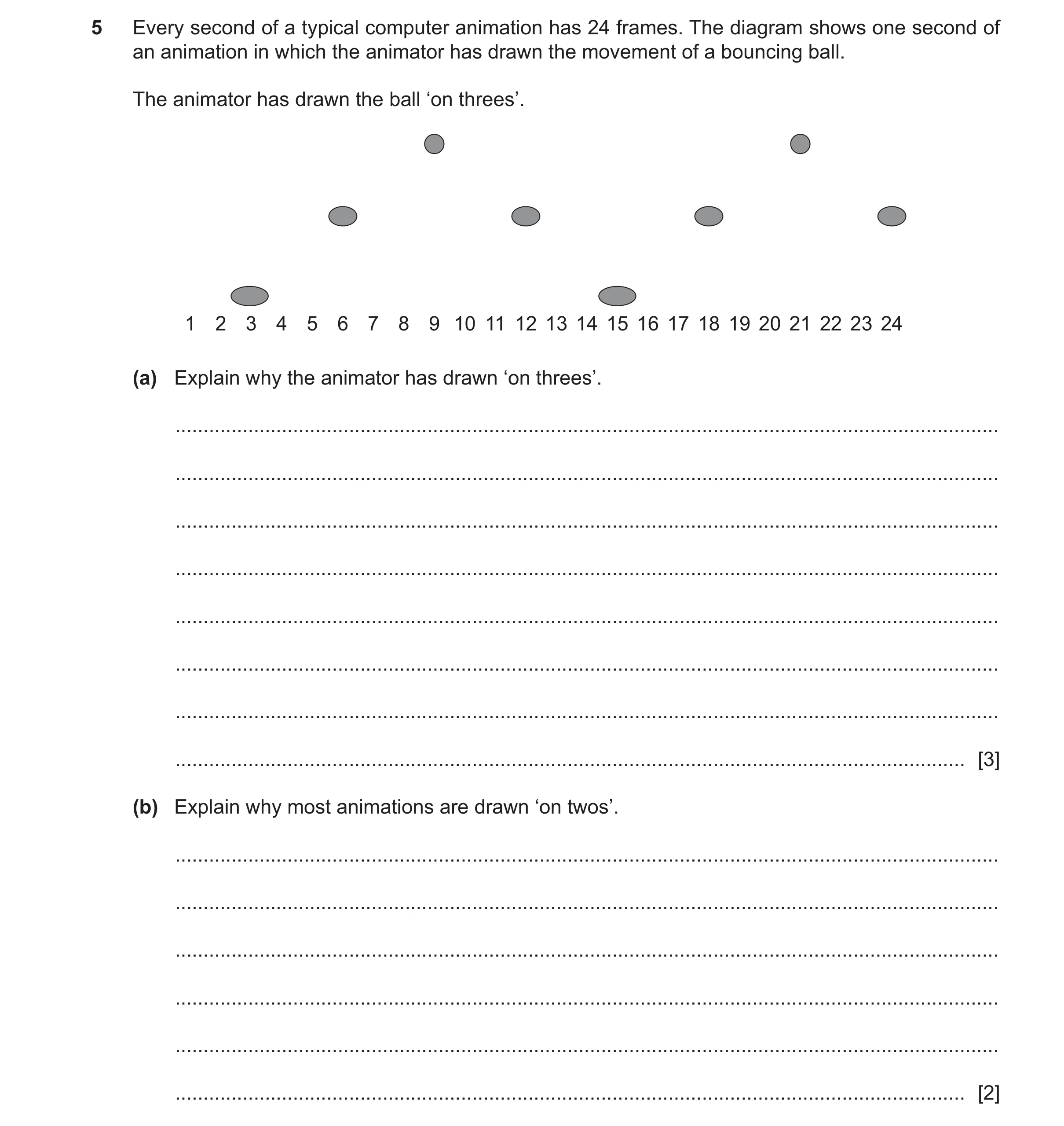
Q18 · Every second of a typical computer animation has 24 frames 9626/31 May/June 2025
5 Every second of a typical computer animation has 24 frames. The diagram shows one second of an animation in which the animator has drawn the movement of a bouncing ball. The animator has drawn the ball ‘on threes’. 1 2 3 4 5 6 7 8 9 10 11 12 13 14 15 16 17 18 19 20 21 22 23 24 (a) Explain why the animator has drawn ‘on threes’. … … … … … … … … [3] (b) Explain why most animations are drawn ‘on twos’. … … … … … … [2]
5 marks
Mark scheme: 5(a) THREE from: 3 • ball appears to move slower (compared to on (1s/2s) • less time taken / to draw / create a second of animation • needs to draw 8 frames instead of 24 / fewer frames • can lower the frame rate for the sequence without affecting rest of animation • animation appears jerky / choppy/lively • suitable for action / anime 5(b) TWO from: 2 • creates smooth movement of objects • less frames need to be drawn • takes less time than on 1s
This question in 9626/31 May/June 2025
Q19 · Computer animation software can move and reshape objects 9626/32 May/June 2025
8 Computer animation software can move and reshape objects. (a) Describe how inbetweening (tweening) can be used to create the illusion of smooth movement of an object. … … … … … … [2] (b) Morphing can be used to smoothly change a shape into another shape. Describe how animation software uses pixel mapping to morph one shape into another. … … … … … … … … … … [4]
6 marks
Mark scheme: 8(a) TWO from: 2 • Key frames used • Sets start and end positions of object • Software / automatically creates frames (in between the key frames) 8(b) FOUR from: 4 • Key points / positions marked on original shape are mapped to key points / position on new shape • Relocates/ moves pixels • Forward mapping • Each / every pixel in shape mapped / matched to (equivalent) pixel in new shape • Reverse mapping (1st) with a sample / selection of pixels in new shape (1) • Selected pixels used as start point / pixels in forward mapping • When all pixels mapped (1st) (software) creates intermediate images / shapes (1) with gradual distortion of original shape into new shape (1) • Pixels in old shape faded out / new shape faded in
This question in 9626/32 May/June 2025
Q20 · In computer animation, objects can be made to appear to move at different speeds 9626/33 Oct/Nov 2025
8 In computer animation, objects can be made to appear to move at different speeds. Describe how an animator can control the speed at which objects appear to move. … … … … … … … … … … … … … … [6]
6 marks
Mark scheme: 8 Six from: 6 • Use of timeline − to decide when movement occurs − how fast movement occurs / how fast change of position occurs • Spacing / position of object within a frame − change from frame to frame − smaller spacing appears as slower movement − larger spacing appears as faster movement • Number of frames used to complete the movement − many frames appear as slow movement − few frames appear as fast movement − animating on ones / twos / threes − on 1s means fast action − on 2s means ‘normal’ movement − on 3s means slow movement • Use ‘slow in slow out’ approach − first / last few frames / spacing of movement less than middle set of frames − more realistic start / stop of movement
This question in 9626/33 Oct/Nov 2025
 1 / 18
 2 / 18
 3 / 18
 4 / 18
 5 / 18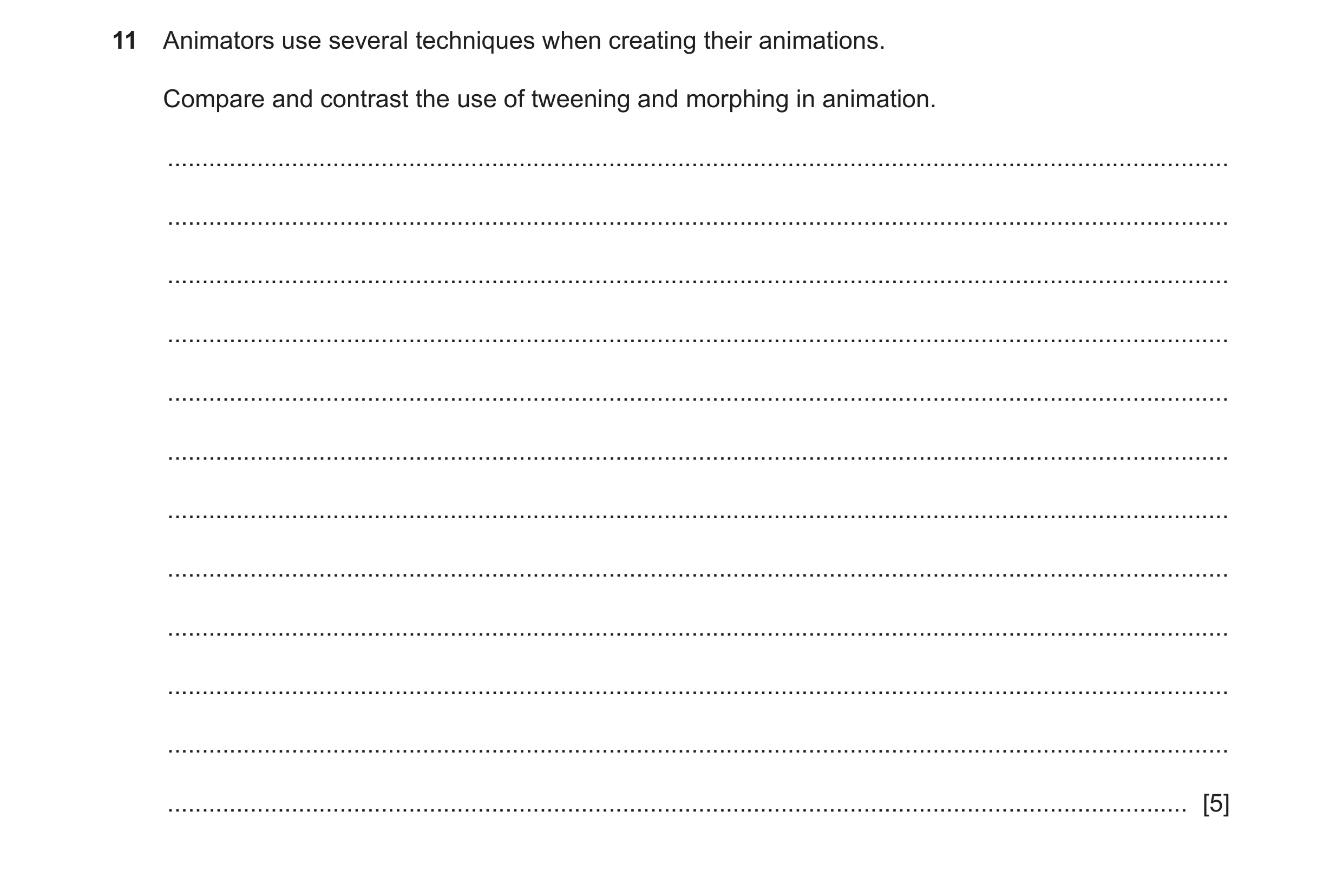
 6 / 18
 7 / 18
 8 / 18
 9 / 18
 10 / 18
 11 / 18
 12 / 18
 13 / 18
 14 / 18
 15 / 18
 16 / 18
 17 / 18
 18 / 18
 6
6 8
8 6
6 6
6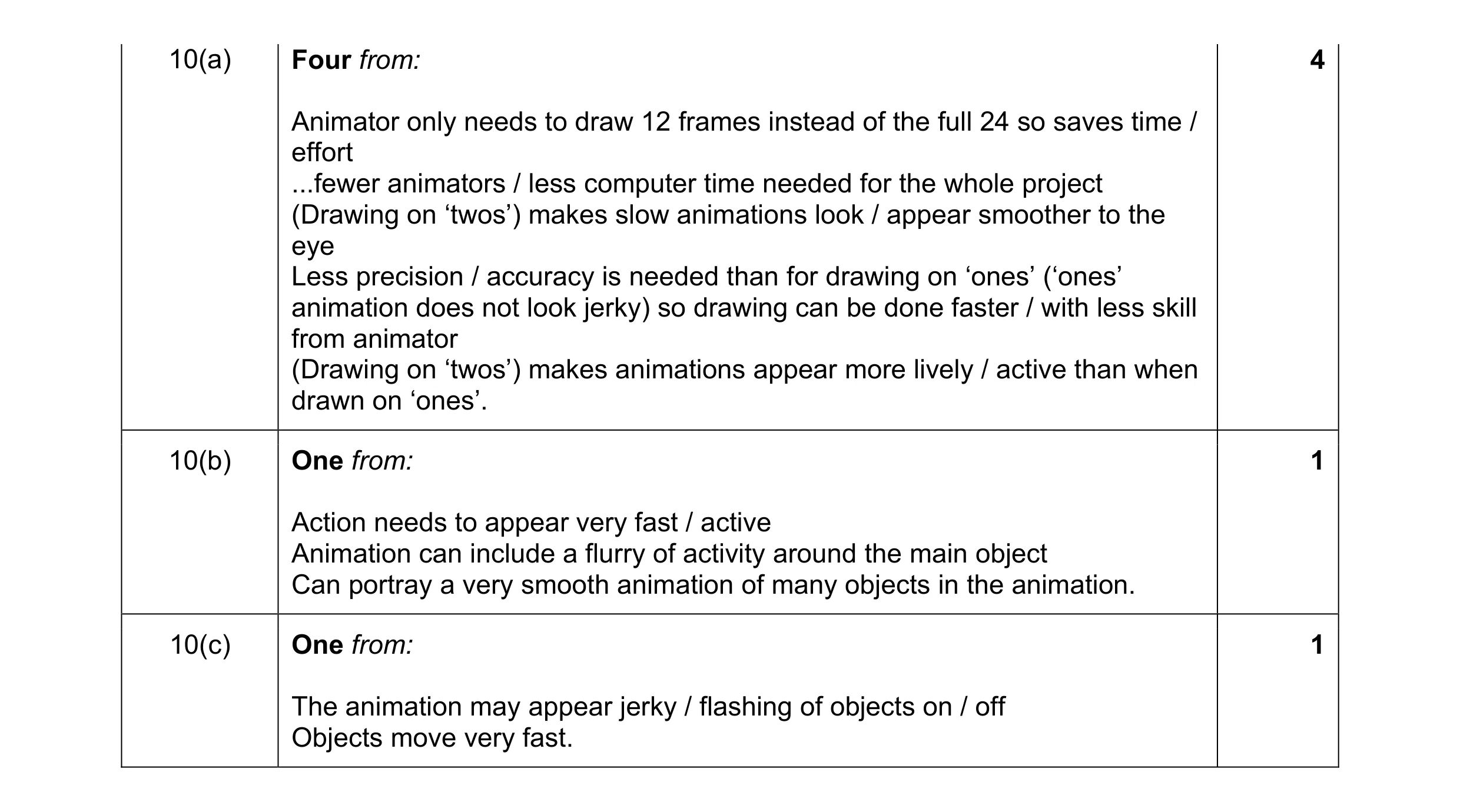 6
6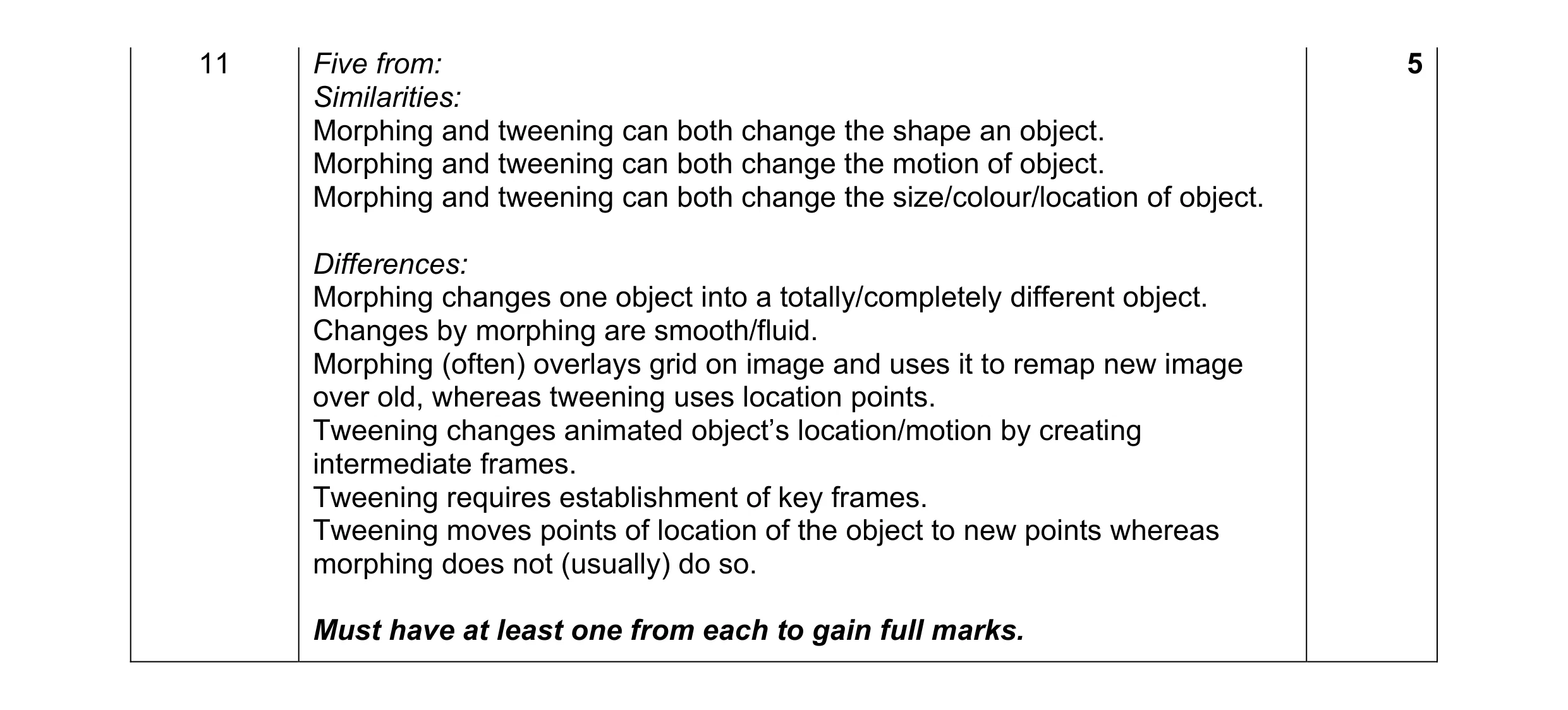 5
5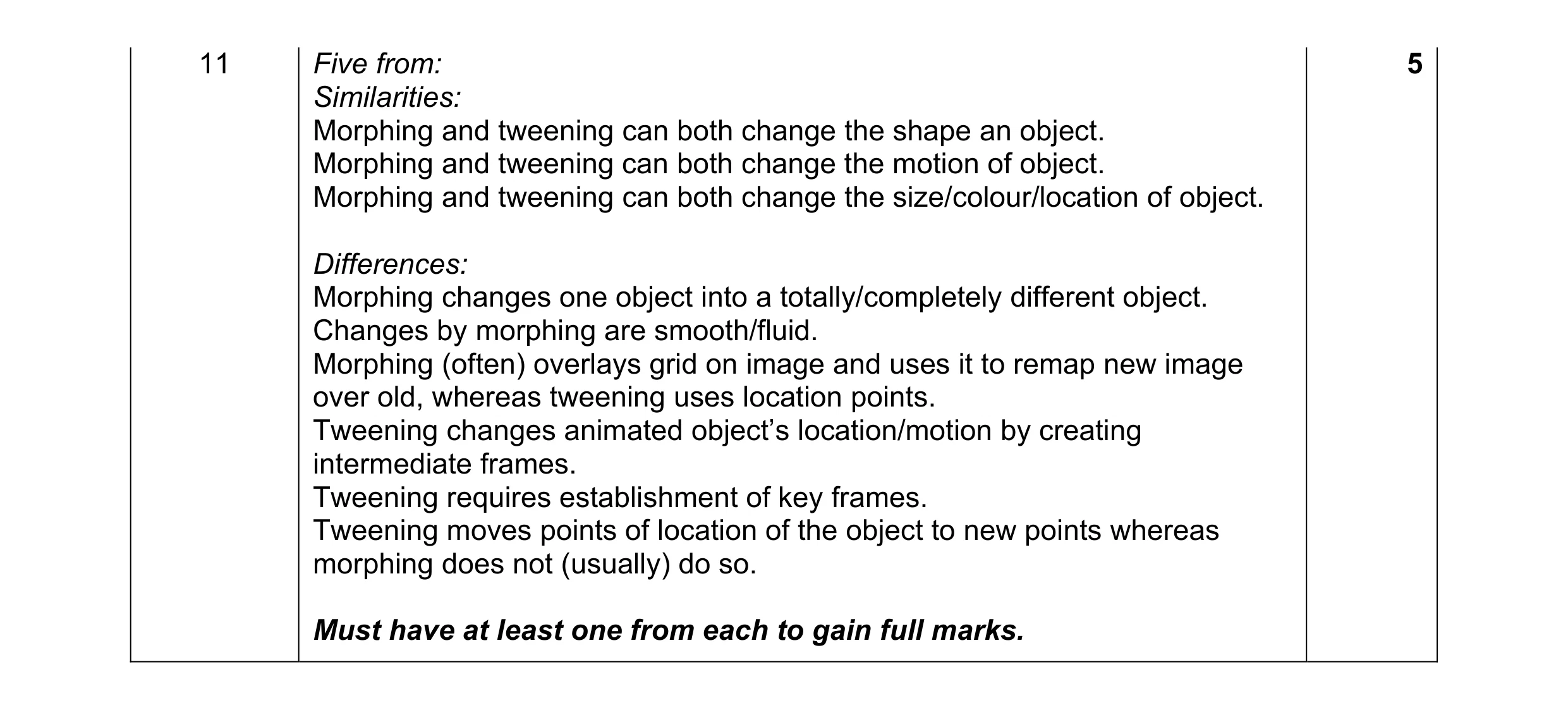 5
5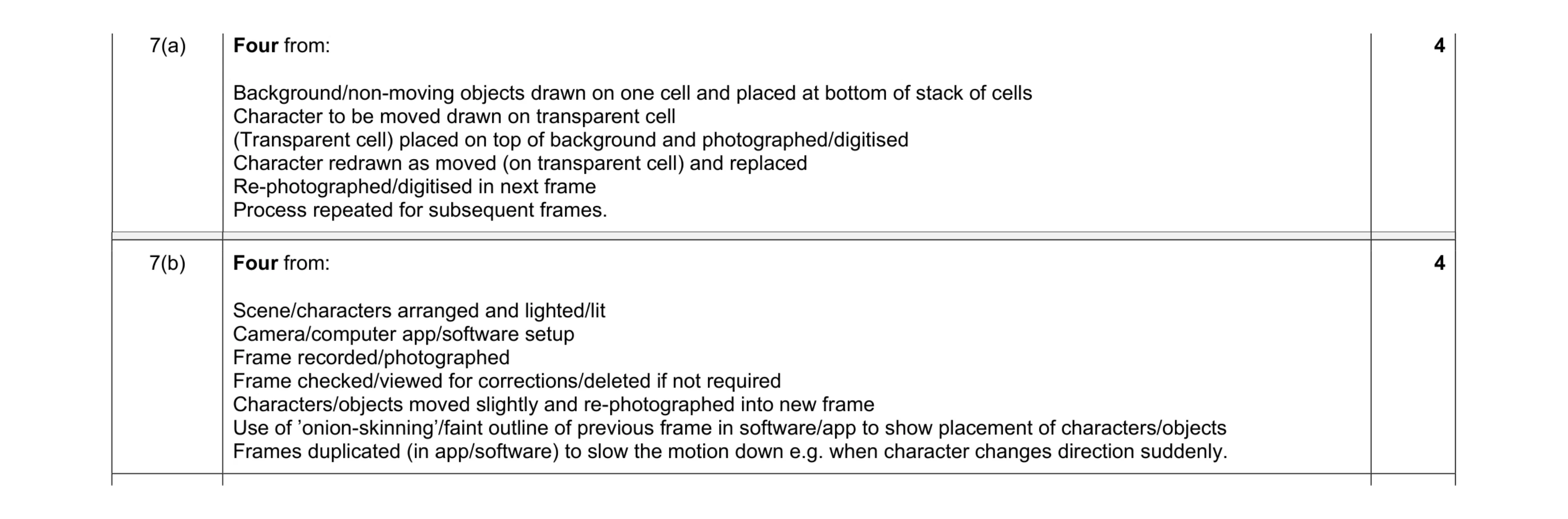 8
8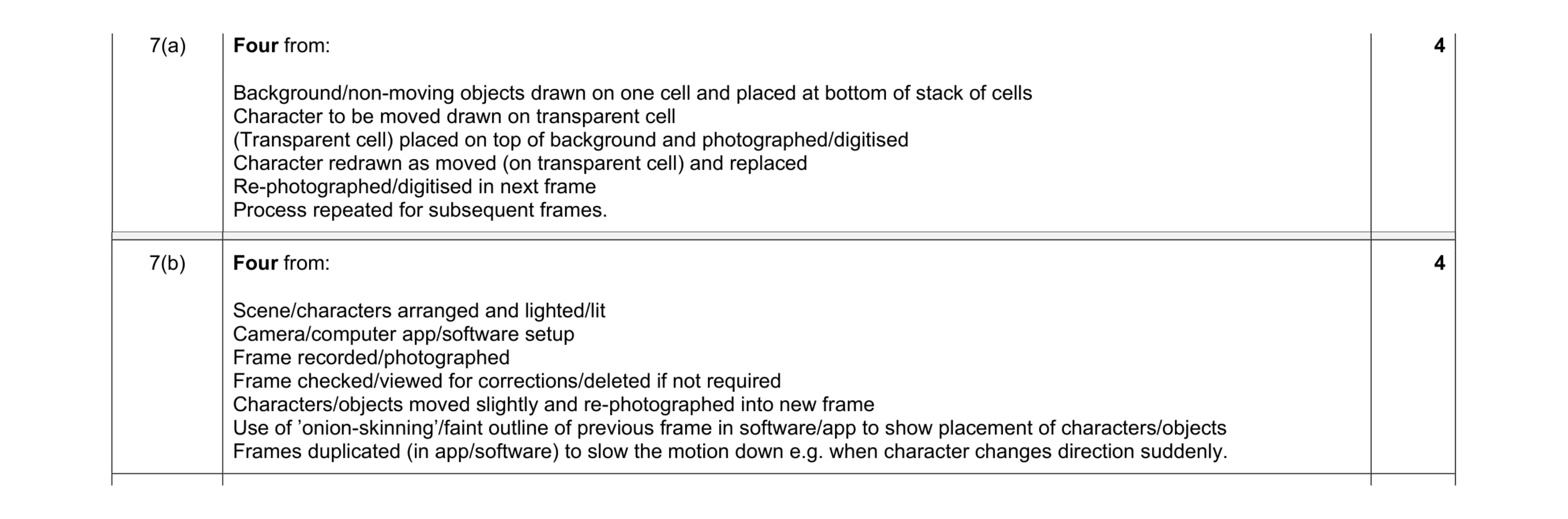 8
8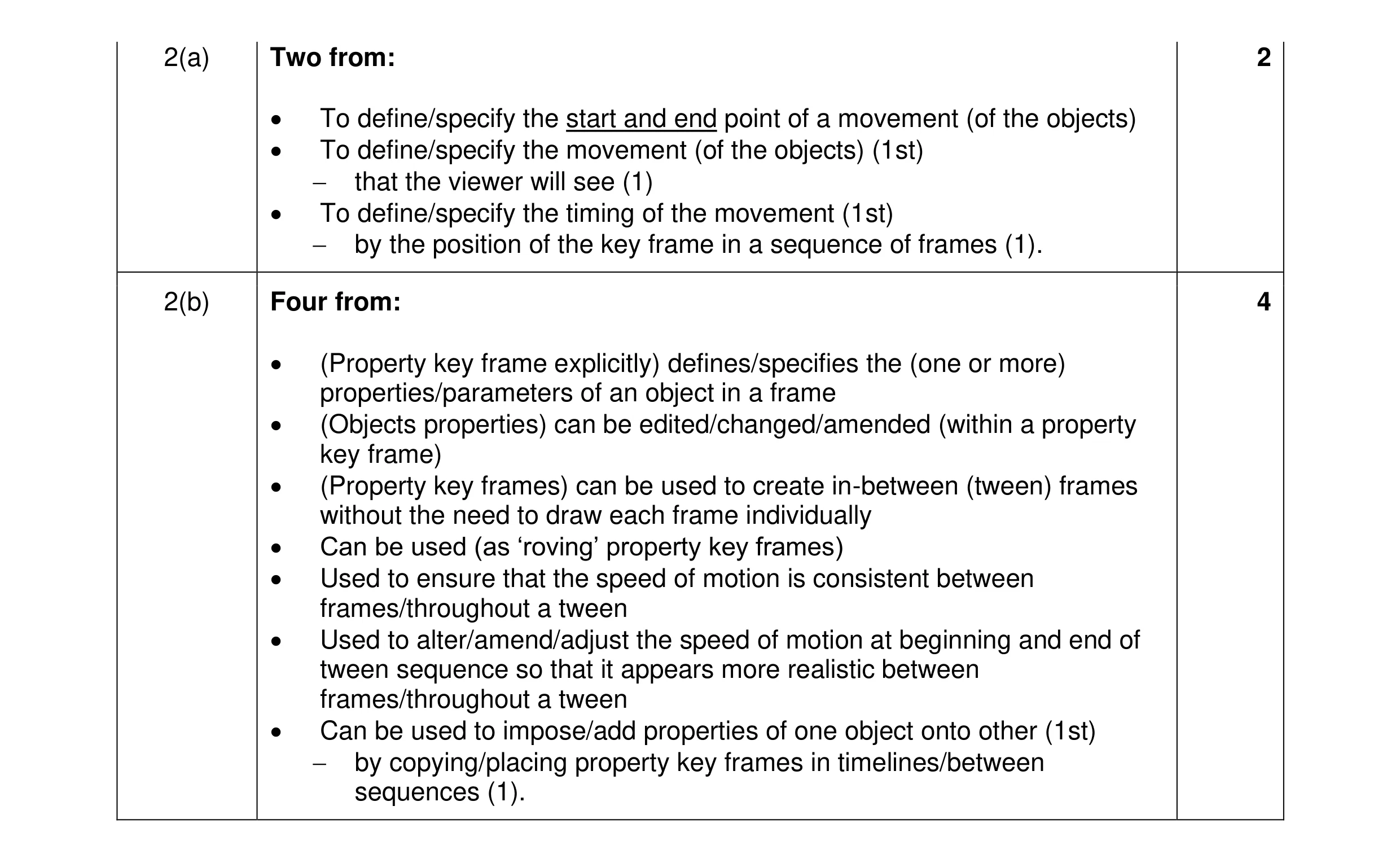 6
6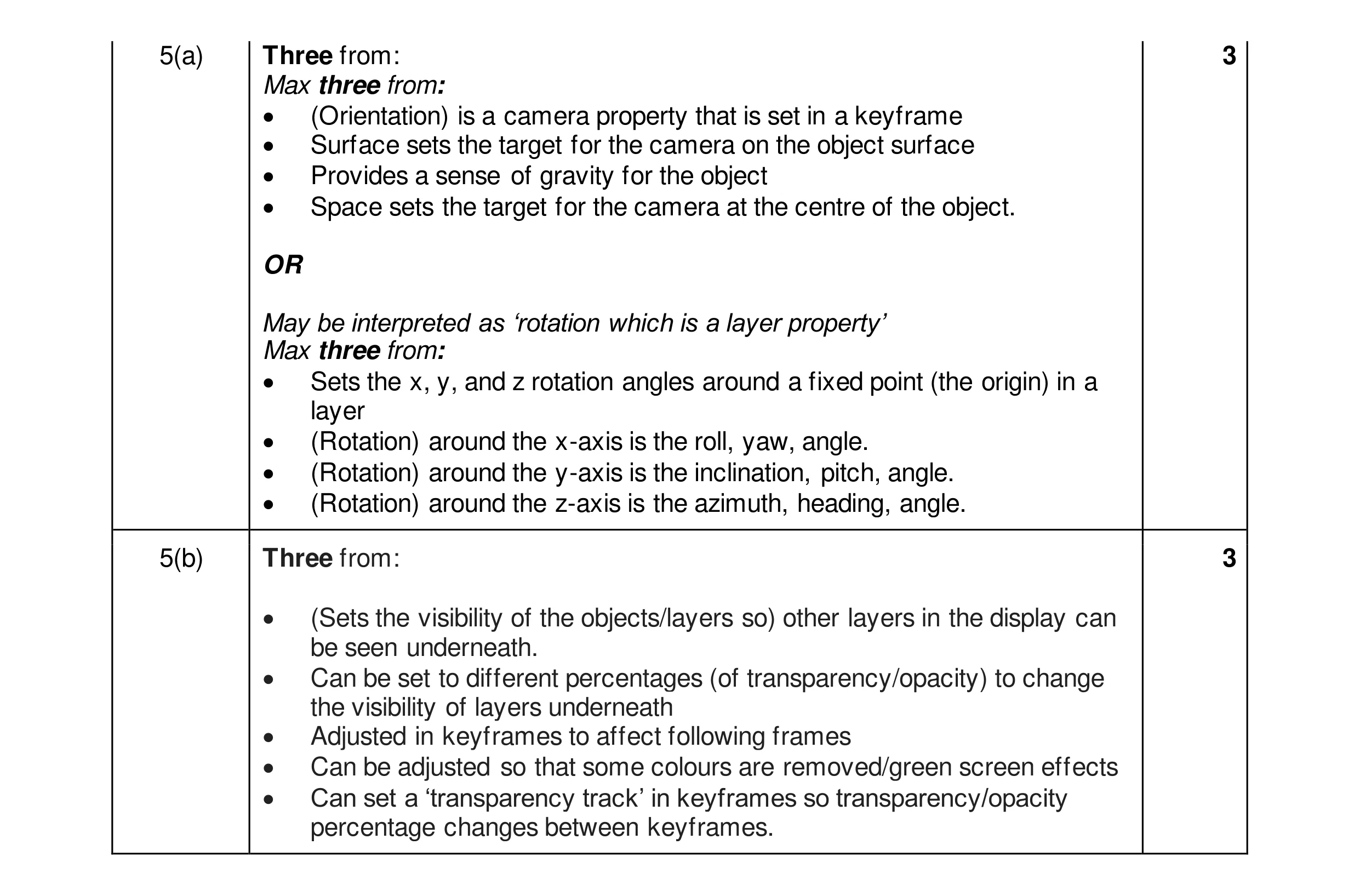 6
6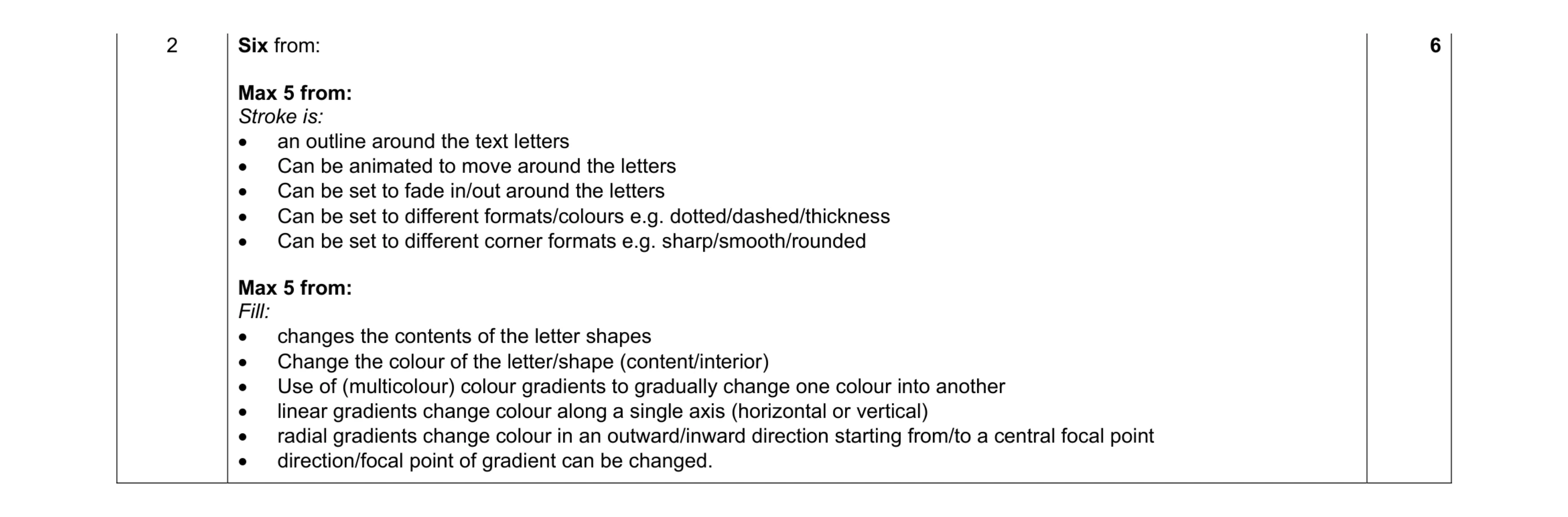 6
6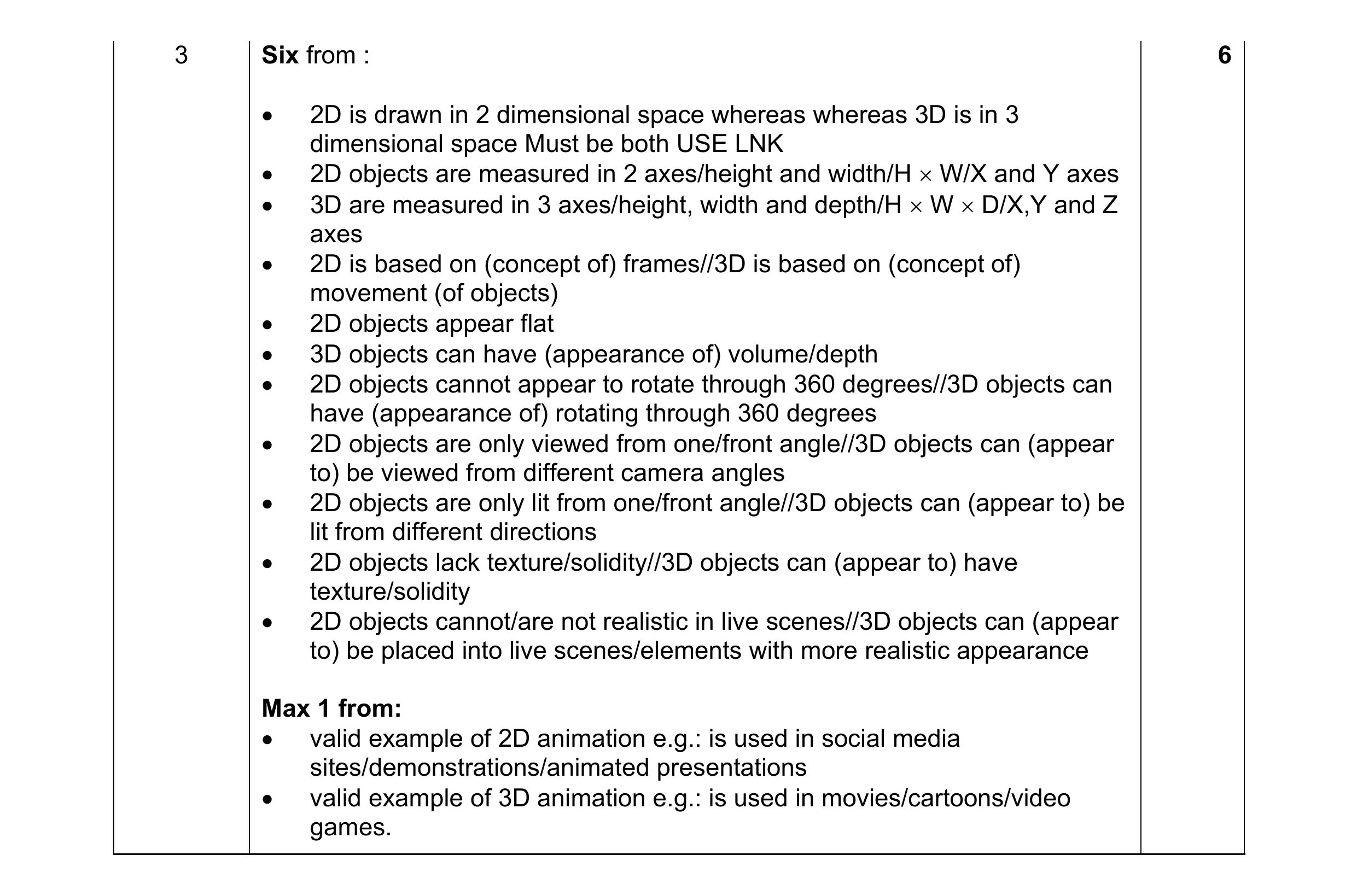 6
6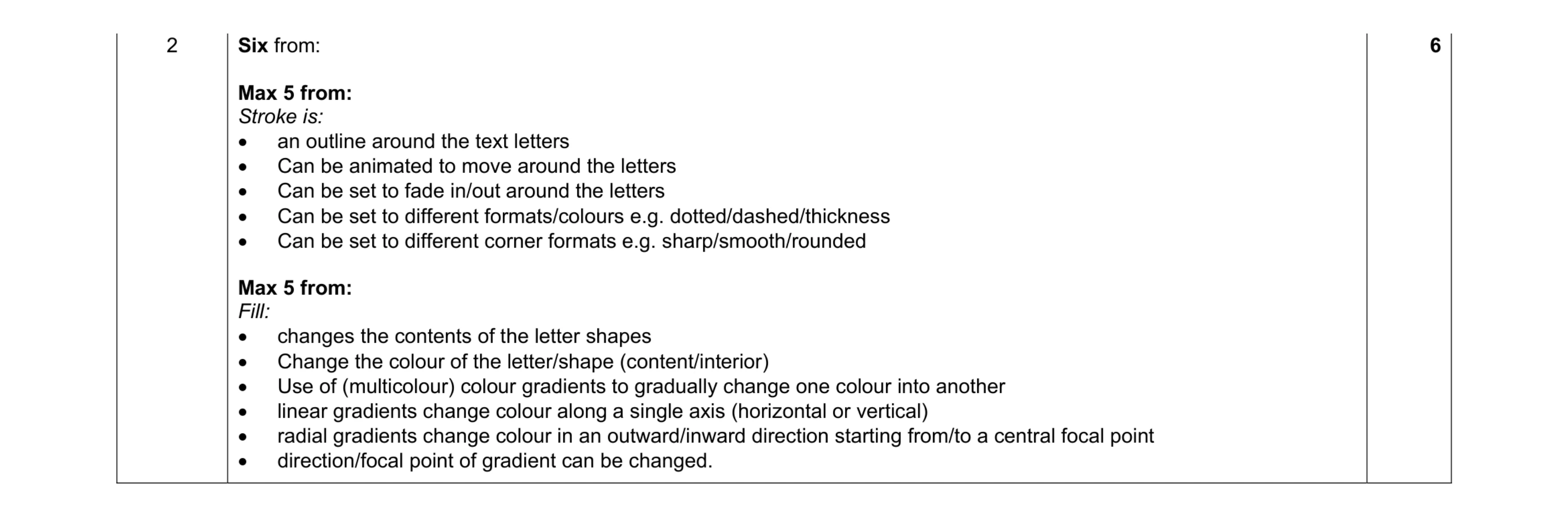 6
6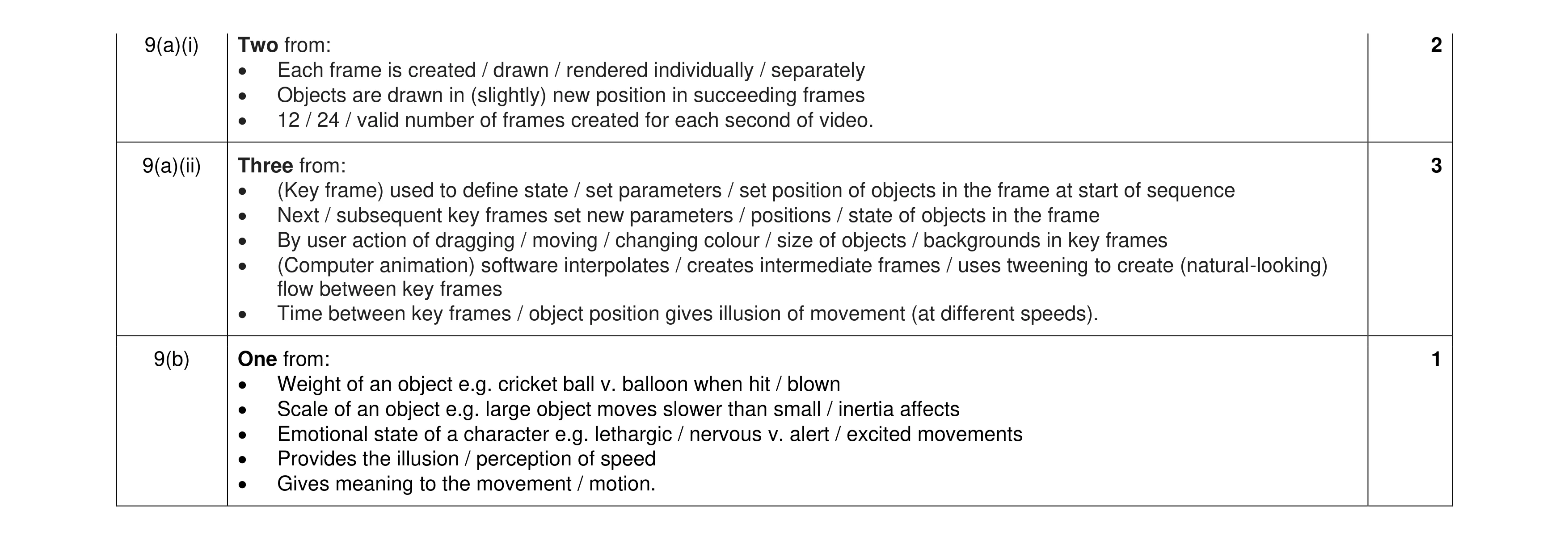 6
6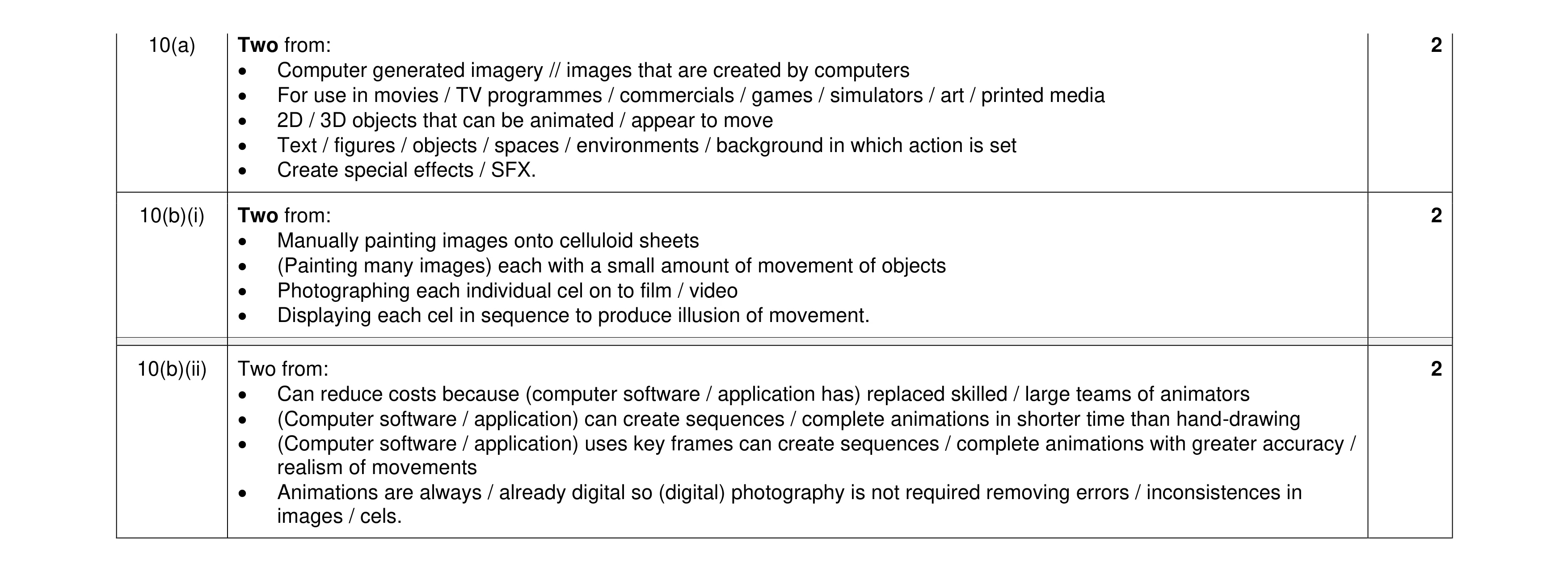 6
6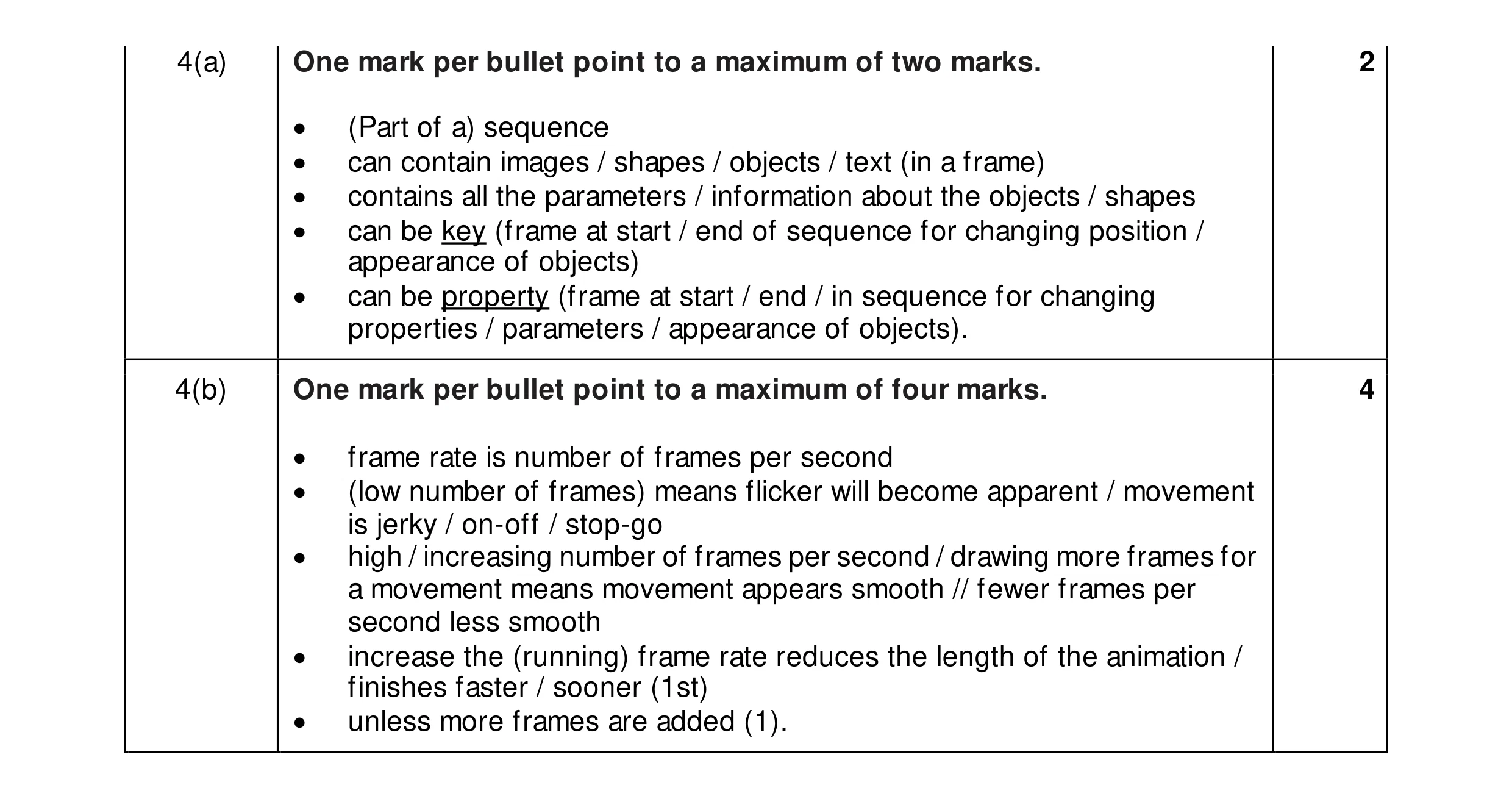 6
6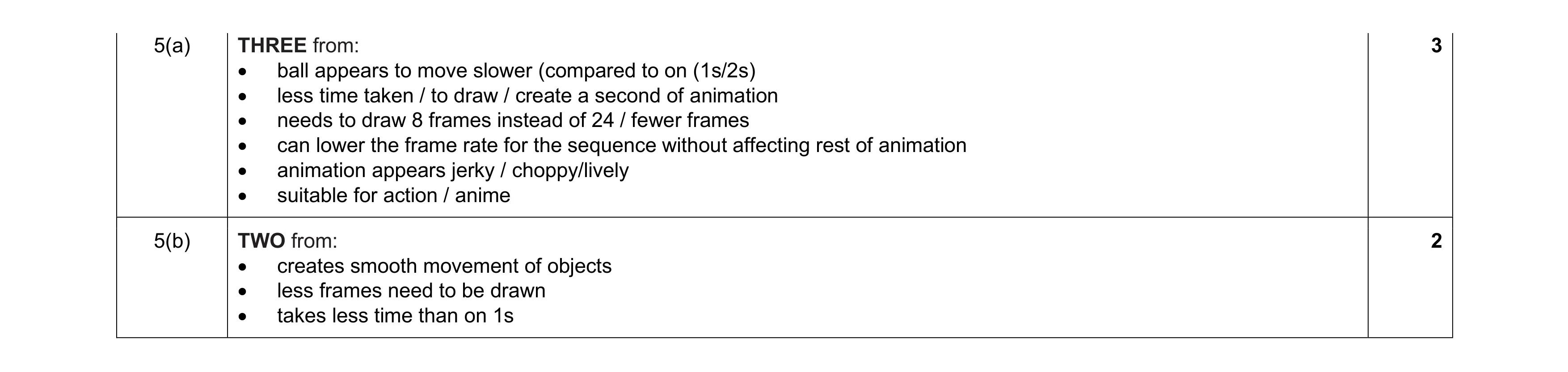 5
5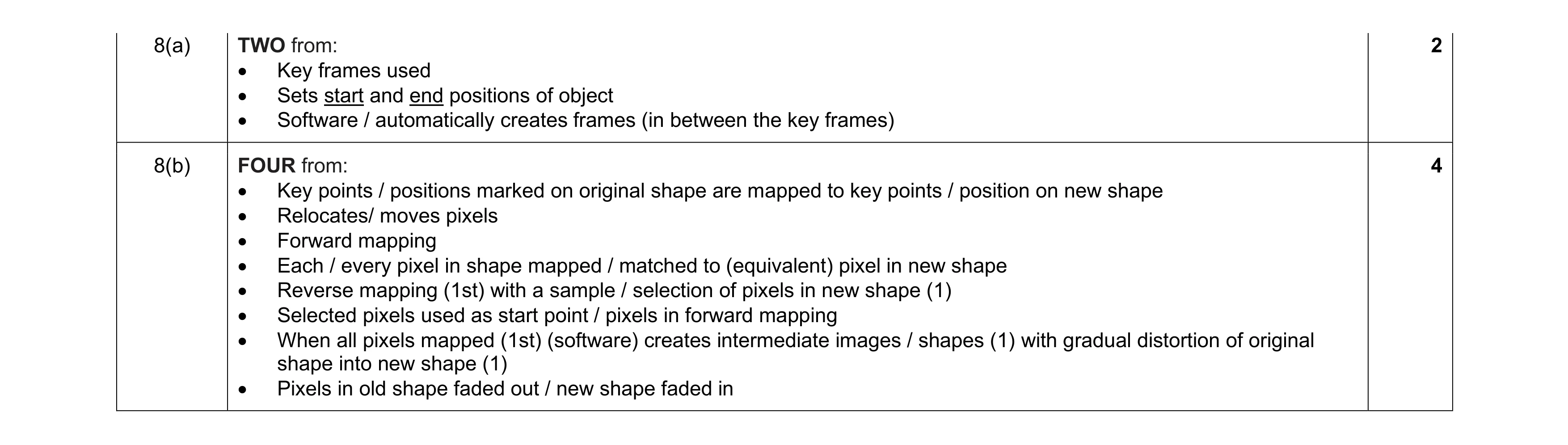 6
6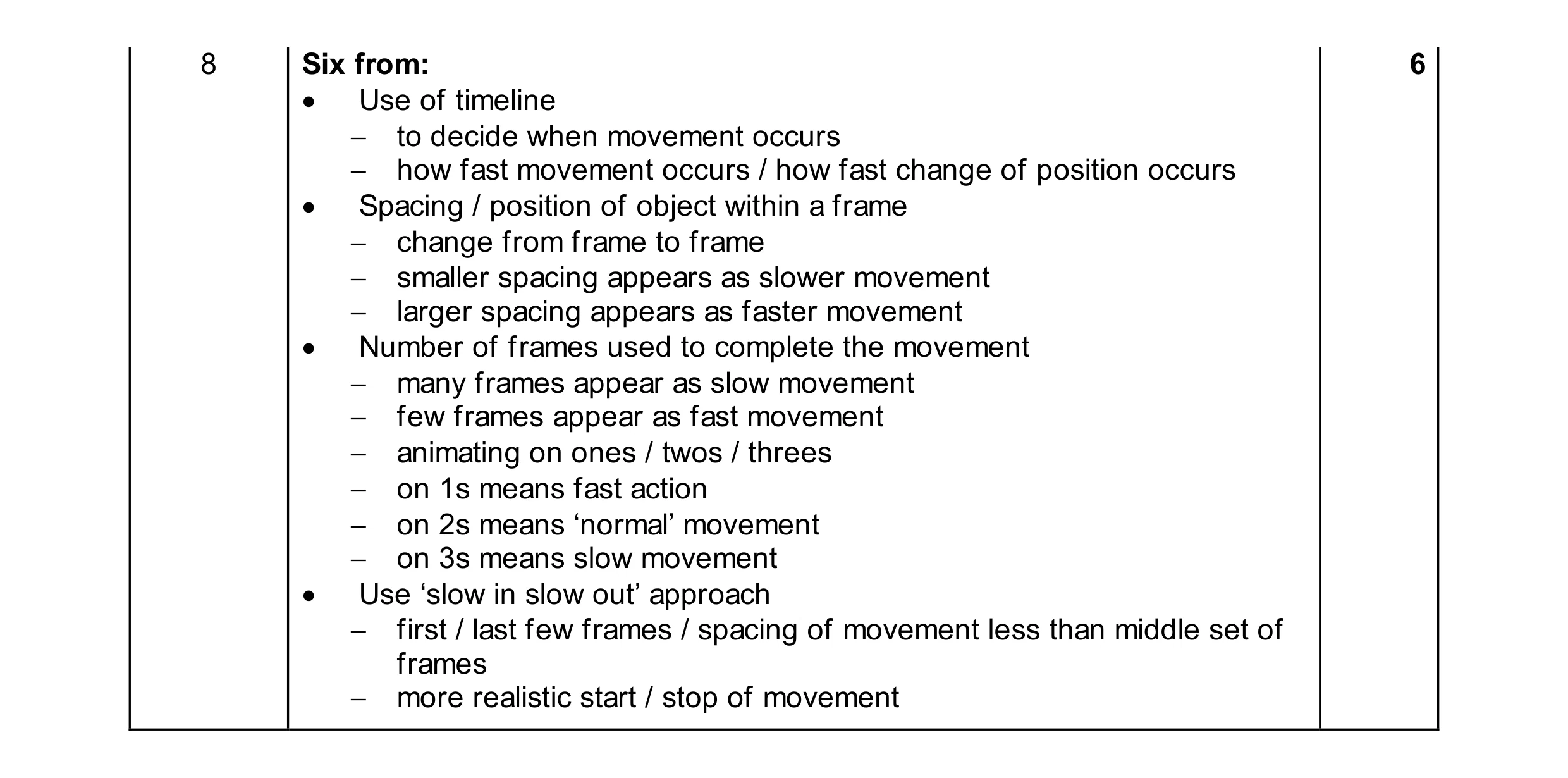 6
6