Questions as text
Q1 · A wide area network uses a number of different protocols 9626/31 May/June 2017
4 A wide area network uses a number of different protocols. (a) Describe each of the following wide area network (WAN) protocols. (i) HDLC: … … … … … [2] (ii) Frame relay: … … … … … [2] (b) An updated version of a free operating system has to be downloaded quickly. The operating system is contained in a very large file. There is a choice of using ‘BitTorrent’ or file transfer protocol (FTP) for the download. Explain, with reasons, which method of download would be preferable. … … … … … … … … … … … [4] (c) Describe how a network router provides connectivity between a home network and the internet. … … … … … … … … … … … … … [6]
14 marks
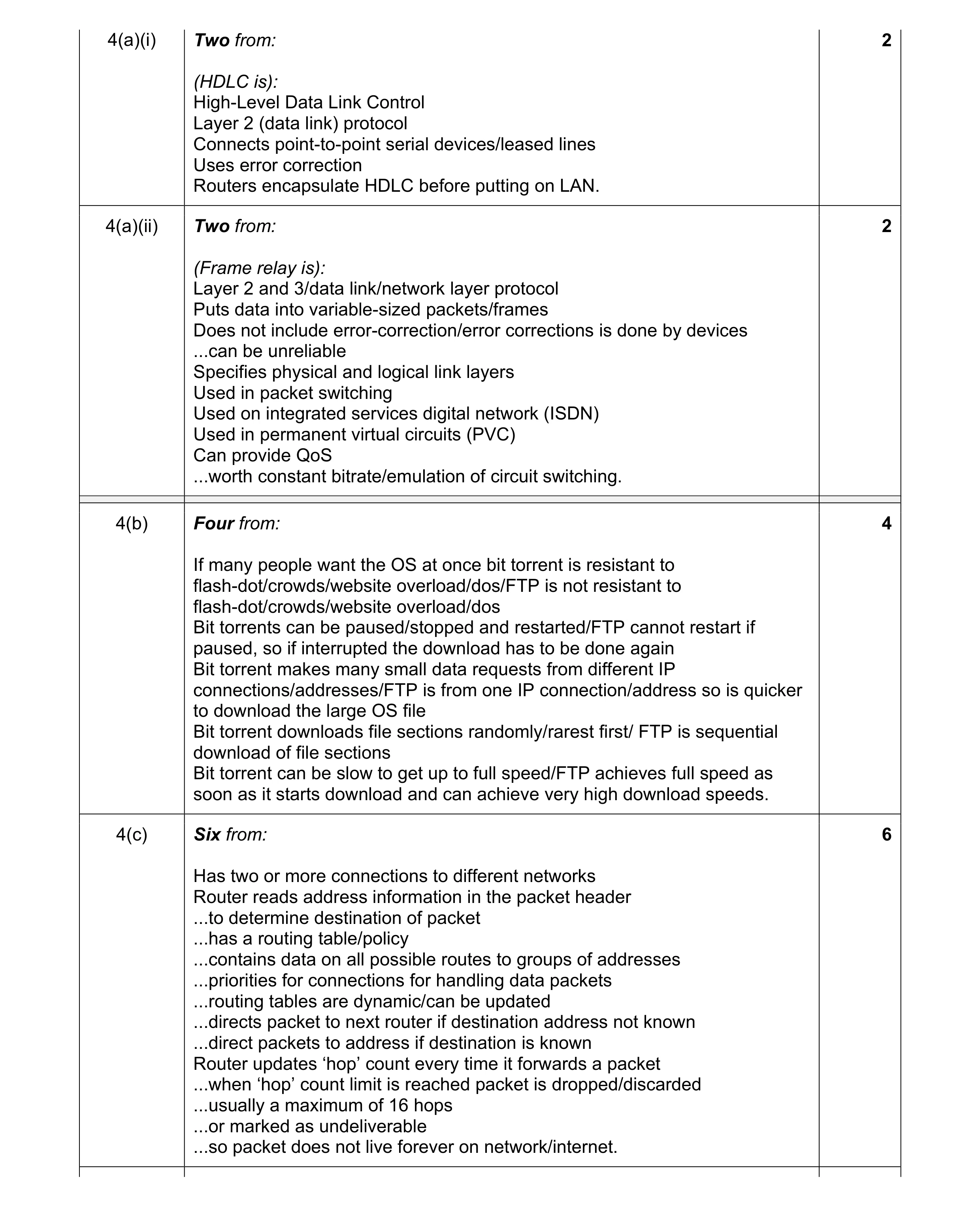
Mark scheme: 4(a)(i) Two from: 2 (HDLC is): High-Level Data Link Control Layer 2 (data link) protocol Connects point-to-point serial devices/leased lines Uses error correction Routers encapsulate HDLC before putting on LAN. 4(a)(ii) Two from: 2 (Frame relay is): Layer 2 and 3/data link/network layer protocol Puts data into variable-sized packets/frames Does not include error-correction/error corrections is done by devices ...can be unreliable Specifies physical and logical link layers Used in packet switching Used on integrated services digital network (ISDN) Used in permanent virtual circuits (PVC) Can provide QoS ...worth constant bitrate/emulation of circuit switching. 4(b) Four from: 4 If many people want the OS at once bit torrent is resistant to flash-dot/crowds/website overload/dos/FTP is not resistant to flash-dot/crowds/website overload/dos Bit torrents can be paused/stopped and restarted/FTP cannot restart if paused, so if interrupted the download has to be done again Bit torrent makes many small data requests from different IP connections/addresses/FTP is from one IP connection/address so is quicker to download the large OS file Bit torrent downloads file sections randomly/rarest first/ FTP is sequential download of file sections Bit torrent can be slow to get up to full speed/FTP achieves full speed as soon as it starts download and can achieve very high download speeds. 4(c) Six from: 6 Has two or more connections to different networks Router reads address information in the packet header ...to determine destination of packet ...has a routing table/policy ...contains data on all possible routes to groups of addresses ...priorities for connections for handling data packets ...routing tables are dynamic/can be updated ...directs packet to next router if destination address not known ...direct packets to address if destination is known Router updates ‘hop’ count every time it forwards a packet ...when ‘hop’ count limit is reached packet is dropped/discarded ...usually a maximum of 16 hops ...or marked as undeliverable ...so packet does not live forever on network/internet.
This question in 9626/31 May/June 2017
Q2 · A wide area network uses a number of different protocols 9626/33 May/June 2017
4 A wide area network uses a number of different protocols. (a) Describe each of the following wide area network (WAN) protocols. (i) HDLC: … … … … … [2] (ii) Frame relay: … … … … … [2] (b) An updated version of a free operating system has to be downloaded quickly. The operating system is contained in a very large file. There is a choice of using ‘BitTorrent’ or file transfer protocol (FTP) for the download. Explain, with reasons, which method of download would be preferable. … … … … … … … … … … … [4] (c) Describe how a network router provides connectivity between a home network and the internet. … … … … … … … … … … … … … [6]
14 marks
Mark scheme: 4(a)(i) Two from: 2 (HDLC is): High-Level Data Link Control Layer 2 (data link) protocol Connects point-to-point serial devices/leased lines Uses error correction Routers encapsulate HDLC before putting on LAN. 4(a)(ii) Two from: 2 (Frame relay is): Layer 2 and 3/data link/network layer protocol Puts data into variable-sized packets/frames Does not include error-correction/error corrections is done by devices ...can be unreliable Specifies physical and logical link layers Used in packet switching Used on integrated services digital network (ISDN) Used in permanent virtual circuits (PVC) Can provide QoS ...worth constant bitrate/emulation of circuit switching. 4(b) Four from: 4 If many people want the OS at once bit torrent is resistant to flash-dot/crowds/website overload/dos/FTP is not resistant to flash-dot/crowds/website overload/dos Bit torrents can be paused/stopped and restarted/FTP cannot restart if paused, so if interrupted the download has to be done again Bit torrent makes many small data requests from different IP connections/addresses/FTP is from one IP connection/address so is quicker to download the large OS file Bit torrent downloads file sections randomly/rarest first/ FTP is sequential download of file sections Bit torrent can be slow to get up to full speed/FTP achieves full speed as soon as it starts download and can achieve very high download speeds. 4(c) Six from: 6 Has two or more connections to different networks Router reads address information in the packet header ...to determine destination of packet ...has a routing table/policy ...contains data on all possible routes to groups of addresses ...priorities for connections for handling data packets ...routing tables are dynamic/can be updated ...directs packet to next router if destination address not known ...direct packets to address if destination is known Router updates ‘hop’ count every time it forwards a packet ...when ‘hop’ count limit is reached packet is dropped/discarded ...usually a maximum of 16 hops ...or marked as undeliverable ...so packet does not live forever on network/internet.
This question in 9626/33 May/June 2017
Q3 · A home network uses a router to connect to the internet 9626/33 Oct/Nov 2017
7 A home network uses a router to connect to the internet. (a) The router will act as a ‘default gateway’. Define ‘default gateway’. … … … … … … [2] (b) The router uses wireless technology to allow devices in the home to connect to it. Discuss the benefits and drawbacks of using wireless technology to connect devices to the router. … … … … … … … … … … … … … … … … … … … … [8]
10 marks
Mark scheme: 7(a) Two from e.g.: 2 Default means that this gateway/address is used unless another address is specified Router/computer node that has details of where to forward data packets … if no route known already Device that passes traffic from local subnet to devices on other subnet 7(b) Eight from e.g.: 8 Benefits: Devices are easier to move around as no wires needed... ...no need to physically connect ...no trailing wires to trip over Greater productivity by home-workers as they can carry laptop/device with them while doing other tasks Ease of expansion with new devices as single access point required ...devices can be added without need to add cables/space for connection/additional hubs/switches ...no need to drill holes/damage house fittings/walls for cables Less expensive than wired connections so no cost of new hubs/switches/sockets/wires Drawbacks: Security issues so encryption required which may be difficult to set up Range issues as it is restricted to only 10s of metres from access point … physical objects may interfere with signal … reduced signal strength as distances from access point increases Reliability issues ...subject to interference from other wireless devices/electrical items Speed issues as rate of data transfer is lower than for cabled connections ...may vary during a session leading to poor user experience. Max 6 for all benefits or all drawbacks. 1 mark is available for a reasoned conclusion.
This question in 9626/33 Oct/Nov 2017
Q4 · A diagram of interconnected computer networks that use internet protocol (IP) to… 9626/32 Feb/March 2018
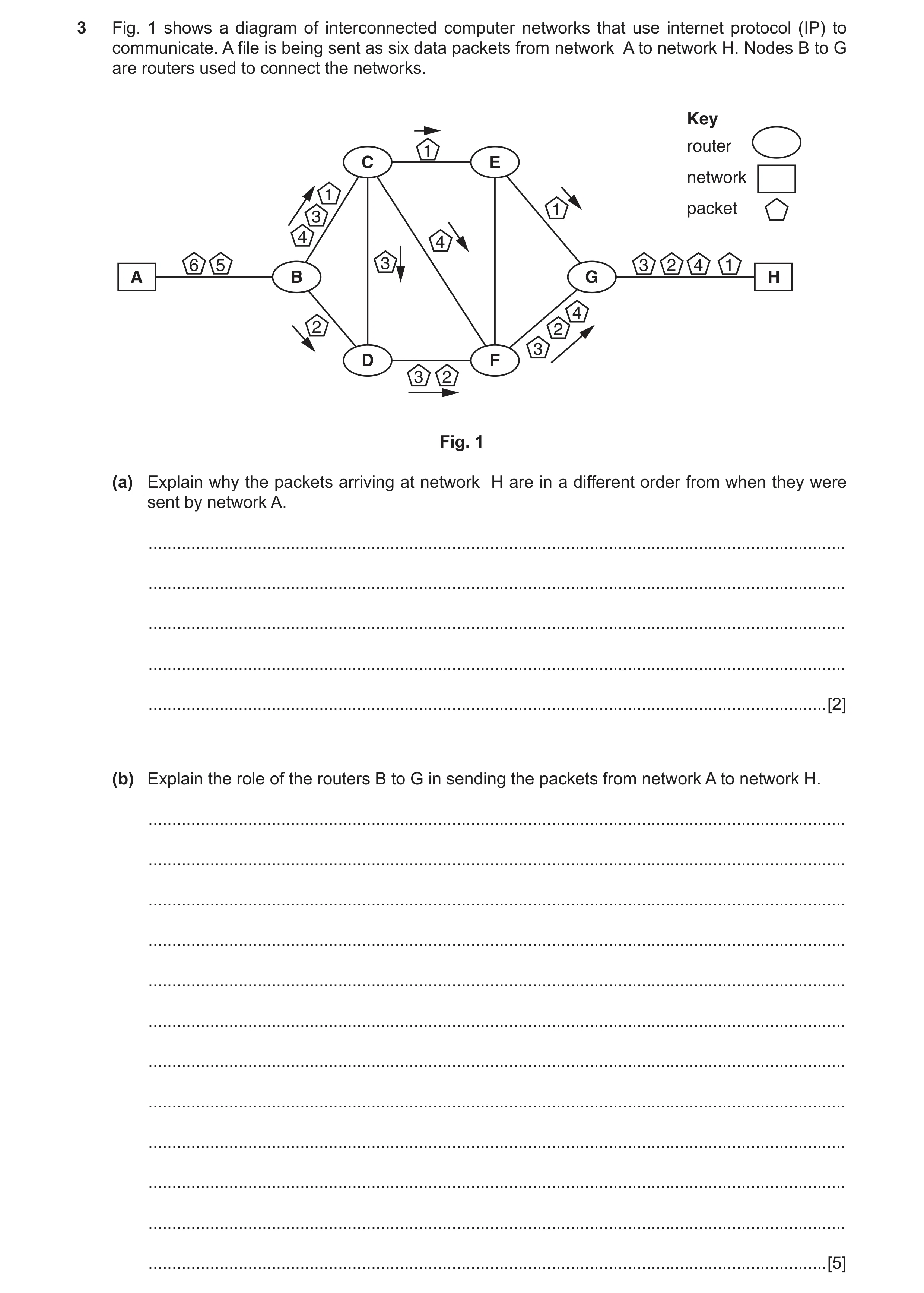
3 Fig. 1 shows a diagram of interconnected computer networks that use internet protocol (IP) to communicate. A file is being sent as six data packets from network A to network H. Nodes B to G are routers used to connect the networks. Key router 1 C E network 1 1 packet 3 4 4 6 5 3 3 2 4 1 A B G H 4 2 2 3 D F 3 2 Fig. 1 (a) Explain why the packets arriving at network H are in a different order from when they were sent by network A. … … … … … [2] (b) Explain the role of the routers B to G in sending the packets from network A to network H. … … … … … … … … … … … … [5]
7 marks
Mark scheme: 3(a) Two from: 2 Each packet takes a different route through the network Each router ‘decides’ which router to send it onto depending on other network traffic e.g. router A will send some packets to router C and some to D If next router is busy/unavailable If a packet is mis-sent/corrupt en route then re-transmission is requested from originating router Time taken along different routes is not the same Arriving at different times at network H. 3(b) Five from: 5 Each router has a stored lookup table of IP addresses/routes to the next router/network Routing table is stored at control plane of router Routing table used to choose next router/router to which to send packet Static routes B to C to E to G are pre-programmed to show route to destination Dynamic routing protocols build up a table of preferred routes between connected routers/networks B to C to F to G if router E is inefficient/out of action/in heavy demand If destination is unknown router B will send packet to next known router/C or D If C/D router does not know destination to H then packet is sent onto next router/E or F.
This question in 9626/32 Feb/March 2018
Q5 · Computing devices use network interface cards 9626/32 May/June 2019
7 Computing devices use network interface cards. (a) Describe the role of a network interface card. … … … … … … … … … … [4] (b) Describe how a network interface card is involved in the sending and receiving of data. … … … … … … … … … … … … … … … … … [7]
11 marks
Mark scheme: 7(a) Four from: 4 Provides access (for protocols) to physical / wireless transmission medium Creates the protocol stack (using its electrical components) Allows communications between LANs / WANs (using the protocols it has created) Provides low level addressing at MAC level Works at physical and data level of OSI model / OSI layer 1 and 2. 7(b) Seven from: 7 Accepts data from CPU via internal buses Converts parallel data stream to linear / serial data stream and vice versa for transmission / after reception to / from transmission medium Data is sent / received in frames When sending: NIC is notified that frame has been created by OS in a buffer NIC accesses / reads buffer / memory directly by DMA NIC determines address and creates data frame NIC transmits completed frame to transmission medium NIC notifies OS that frame has been sent When receiving: NIC monitors transmission medium for frames NIC reads frame from transmission medium into buffer using DMA NIC checks frame contents and calculates checksum to verify integrity of data NIC interrupts host OS to indicate that a frame has arrived Max. 6 if all sending or all receiving.
This question in 9626/32 May/June 2019
Q6 · A group of company managers are going to use a web-conference to discuss the… 9626/32 May/June 2020
9 A group of company managers are going to use a web-conference to discuss the documentation about a new product. (a) The developers already have a desktop computer system. Describe the additional computer hardware they need in order to participate in a web-conference. … … … … … … … … [3] (b) Describe, in detail, how a web-conference can be used to discuss their visual materials and documents. … … … … … … … … … … … … … … … … … … … … [8]
11 marks
Mark scheme: 9(a) Three from: 3 Microphone(s) to capture sounds of voices of developers. Video camera/scanner to capture documentation/diagrams. Speakers to output sounds of voices of developers. (Large) monitor/dual monitor to output video/images of developers/documents. Telephone system with conference call facilities. Specialised collaboration devices/meeting wall with integrated camera/monitor/audio/document sharing devices/systems. Router/NIC to connect to network/internet. 9(b) Eight from: 8 Application/browser must support HTML/JavaScript/animation/instant messaging/streaming video and audio. Users log into the system/conference. A leader/manager controls the sessions and which documents are viewed. Audio mute/unmute controls participants interaction and volume levels …use of text chat to discuss documents. Recording of comments from participants for later review. Can include whiteboard facilities to share documents/diagrams. Use of screen-sharing to share document views/control of documents. Can use slideshow presentations with remote mouse control/markup tools. Use of surveys/polls to gather views of participants on documents. Use of screen annotation tools to markup documents.
This question in 9626/32 May/June 2020
Q7 · Routers are components that send internet protocol (IP) packets through computer networks 9626/32 Oct/Nov 2020
2 Routers are components that send internet protocol (IP) packets through computer networks. Describe how each of the following are used in the routing of the IP packets. (a) static routing tables … … … … … … … … … … … … [5] (b) dynamic routing tables … … … … … … … … … … … … [5]
10 marks
Mark scheme: 2(a) Five from: 5 Routes are entered into a database/routes are decided/controlled by network administrator Entries are fixed/do not change/are not reconfigured automatically Defines fixed routes for packets to take from the router Used by a routing algorithm to create a ‘forwarding table’ for use when choosing next hop/preferred route Defines route of last resort/exit point from router/route to send packet if no other destination is known Provides fail-safe if dynamic routing does not provide a route Can be used to transfer routing information from one router to another/one routing protocol to another. 2(b) Five from: 5 Routing protocols create a table of routing information from real-time logical network layouts/changes/issues/problems Created automatically by algorithms/not created by network administrator Use a number of different protocols/methods to determine ‘best’ route/next router to use Routing information can be automatically shared with other routers (using same protocol) Routing information can be automatically shared with other routers to discover data about remote networks/changes in networks Can be used to limit the number of ‘hops’ that a packet can take to its destination Routes have a time-to-live after which the database/table will be updated Packets can be forwarded via different routes depending on network conditions Packets can be routed around network issues/damage/loss of a node/router Allow as many routes as possible to be kept open.
This question in 9626/32 Oct/Nov 2020
Q8 · Three interconnected networks (numbered 1 to 3) that use internet protocol (IP) and… 9626/32 Feb/March 2021
1 Fig. 1.1 shows three interconnected networks (numbered 1 to 3) that use internet protocol (IP) and packet switching when transmitting files. Network 1 has a server that is used for video streaming. Network 2 has servers that provide a company with a website used for selling DVDs online. Network 3 is a network in a home. There are routers on the internet that can be used to connect the networks. A user on the home network is watching a video that is being streamed from the server on network 1. At the same time a shopper on the home network is using a web browser to access the company website on network 2 to buy some DVDs online. Routers on internet Router C Router A Router F Router B Router D Video Website on streaming server on server on Network 2 Network 1 Router E Laptop used for Computer used watching streamed for online shopping video Home network Network 3 Fig. 1.1 (a) Describe how the video stream is transferred from the server on network 1 to the user on network 3. … … … … … … … … … … … … … … [6] (b) The viewing experience can sometimes be spoiled by the online shopping affecting the video streaming. Describe how router E on the home network can be configured to ensure that this does not happen. … … … … … … [2] (c) Explain why HTTPS is used for communication between the shopper’s web browser and the company website. … … … … … … … … … … … … … … [6]
14 marks
Mark scheme: Question Answer Marks 1(a) Six from: 6 The home computer requests/initiates the stream NIC on server determines destination address for file Video file is converted into (IP) packets by NIC on server NIC on server constructs and sends packets from server/use of packet switching IP packets contain details of destination address/destination IP address Packets are sent from network 1 to router A Router A compares packet (IP) destination IP with routing table(s) Router A chooses appropriate/best next router to send packets based on contents of routing table(s) Applies (any) quality of service (QoS) rules to prioritise the packets (of the streamed video) Sends packet(s) to next router(s) Next router(s) carry out same tasks as router A to pass packets through the networks Router E receives packets from the internet routers ….and transfers/passes them to internal/home/user network/to laptop viewing video Dynamic routing tables of routers may be set up/updated to ensure QoS for streaming. 1(b) Two from: 2 Use router’s quality of service/QoS configuration to prioritise the video stream Use (the router’s) traffic shaping configuration to prioritise the video stream Set up/configure specific ports for the video service/application to use ‘Intelligent’ QoS will prioritise in pre-determined order: voice, video, application traffic, print services/file downloads 1(c) Six from: 6 Extension of HTTP to provide secure communications/Hyper Text Transfer Protocol Secure Encrypts using Transport Layer Security (TLS)/Secure Sockets Layer (SSL) Protects/ensures the integrity of data sent to/from website over internet/through the networks Operates at application layer to encrypt/decrypt using TLS Authenticates website using a (public key) certificate Controls access by restricting access to the site to authorised users Protects the privacy of data sent to/from website over internet/through the networks Protects against man-in-the-middle attacks/eavesdropping on the data Protects against alteration/modification of websites Protects against insertion of malware/malicious code into website code.
This question in 9626/32 Feb/March 2021
Q9 · Hubs and switches are networking devices 9626/31 May/June 2021
11 Hubs and switches are networking devices. Compare and contrast how these devices carry out their roles in a network. … … … … … … … … … … … … … … [6]
6 marks
Mark scheme: 11 Six from: 6 Similarities: Both allow multiple devices to connect to a network Both devices can form a LAN Both send the received signal/IP packets onto other devices Both can transfer data to all devices on a network Differences: Hubs broadcast all received data to all devices on a network whereas switches filter/examine data packets to determine where to send them Switches store information about MAC addresses of devices whereas hubs do not Switches make more efficient use of network resources/bandwidth than hubs as they do not send all data to all devices Use of hubs can reduce network performance as they use all available bandwidth Use of switch instead of hub can reduce latency and enhance e.g. gaming experience for user. Must be at least 1 of each for full marks.
This question in 9626/31 May/June 2021
Q10 · Switches are devices used in computer networks 9626/32 May/June 2021
6 Switches are devices used in computer networks. Describe the role and operation of a network switch. … … … … … … … … … … … … … … … … … … … … [8]
8 marks
This question in 9626/32 May/June 2021
Q11 · Hubs and switches are networking devices 9626/33 May/June 2021
11 Hubs and switches are networking devices. Compare and contrast how these devices carry out their roles in a network. … … … … … … … … … … … … … … [6]
6 marks
Mark scheme: 11 Six from: 6 Similarities: Both allow multiple devices to connect to a network Both devices can form a LAN Both send the received signal/IP packets onto other devices Both can transfer data to all devices on a network Differences: Hubs broadcast all received data to all devices on a network whereas switches filter/examine data packets to determine where to send them Switches store information about MAC addresses of devices whereas hubs do not Switches make more efficient use of network resources/bandwidth than hubs as they do not send all data to all devices Use of hubs can reduce network performance as they use all available bandwidth Use of switch instead of hub can reduce latency and enhance e.g. gaming experience for user. Must be at least 1 of each for full marks.
This question in 9626/33 May/June 2021
Q12 · Web-conferencing is used to enable people to work together to produce documents 9626/31 Oct/Nov 2021
7 Web-conferencing is used to enable people to work together to produce documents. (a) Describe, in detail, the hardware that is required for web-conferencing. … … … … … … … … … … [4] (b) Describe the features of web-conferencing software. … … … … … … … … … … … … … … [6]
10 marks
Mark scheme: 7(a) Four from: 4 Computer system capable of running/processing the appropriate applications/multimedia capable Router/modem to connect to the internet Telephone equipment/VoIP system for audio exchange Speakers to output the sounds of the conference delegates Microphones for input of the voices of the delegates/convert analogue sounds to digital signals (Optional) web camera if video is required. 7(b) Six from: 6 Ability to share presentations across multiple computer systems Ability to enable co-browsing of internet/browsing as a group Ability to enable screen-sharing for group viewing of documents Implementation of instant messaging/equivalent for messaging/chat Implementation of VoIP for voice conversations Cross-platform compatibility for file sharing Ability to go ‘private’ to allow moderators/participants to have confidential conversations. A support system for participants to get help/assistance.
This question in 9626/31 Oct/Nov 2021
Q13 · The role of a network interface card (NIC) is to enable devices to communicate over a… 9626/32 Oct/Nov 2021
11 The role of a network interface card (NIC) is to enable devices to communicate over a computer network. Describe how a network interface card carries out its role. … … … … … … … … … … … … … … … … … … … … [8]
8 marks
Mark scheme: 11 Eight from: 8 Provides (physical) connection/circuitry between computing device and transmission medium Each NIC/Ethernet card has unique (48 bit) address/media access control address/MAC address Supports high speed data transmission over network medium/cable/wireless Uses the OSI model to send signals at the physical layer, transmit data packets at the network layer and operate as an interface at the TCP/IP layer. Takes data provided by CPU and sends it to destination Translates data into form that can be transferred by medium/cable/wireless Translates data received from medium/cable/wireless into form useable by receiving computer/device Converted to/from parallel structure from/to linear structure Uses interrupts for signalling CPU that it ready to receive data for sending/has data that has been received Polled by CPU to determine if NIC has data for it to deal with CPU moves data to/from NIC to memory/uses programmed input/output of data Uses DMA to transfer data to/from main memory (via system bus) independent of CPU/controlled by device other than CPU Prepares data for transmission in form of frames/datagrams with IP address/details of destination/contents Processes bits received from the physical layer and passes to the next layer.
This question in 9626/32 Oct/Nov 2021
Q14 · Web-conferencing is used to enable people to work together to produce documents 9626/33 Oct/Nov 2021
7 Web-conferencing is used to enable people to work together to produce documents. (a) Describe, in detail, the hardware that is required for web-conferencing. … … … … … … … … … … [4] (b) Describe the features of web-conferencing software. … … … … … … … … … … … … … … [6]
10 marks
Mark scheme: 7(a) Four from: 4 Computer system capable of running/processing the appropriate applications/multimedia capable Router/modem to connect to the internet Telephone equipment/VoIP system for audio exchange Speakers to output the sounds of the conference delegates Microphones for input of the voices of the delegates/convert analogue sounds to digital signals (Optional) web camera if video is required. 7(b) Six from: 6 Ability to share presentations across multiple computer systems Ability to enable co-browsing of internet/browsing as a group Ability to enable screen-sharing for group viewing of documents Implementation of instant messaging/equivalent for messaging/chat Implementation of VoIP for voice conversations Cross-platform compatibility for file sharing Ability to go ‘private’ to allow moderators/participants to have confidential conversations. A support system for participants to get help/assistance.
This question in 9626/33 Oct/Nov 2021
Q15 · IP networks can be connected by switches and routers so that data can be exchanged… 9626/32 May/June 2023
2 IP networks can be connected by switches and routers so that data can be exchanged between devices. Compare the operations of switches and routers in networks. You must include similarities and differences. … … … … … … … … … … … … … … … … … … … … [8]
8 marks
Mark scheme: 2 Eight from: 8 Similarities: Both are (networking devices) used in LANs Both use/direct/handle packets of data Both can have multiple data ports (to connect to different networks) Both can connect to multiple devices Both can send data to specific devices Both can provide high transmission speeds/rates/bandwidth Both can work in full duplex mode Both can work in broadcast, unicast and multicast mode. Differences: Routers are used in WANs and LANs whereas switches are used only in LANs Routers connect two or more networks whereas L2 switches connect nodes in same network/L3 switches can connect two networks Routers can connect devices to internet whereas switches cannot Routers cannot/do not use/direct data frames whereas (Layer 3) switches can use/direct data frames as well as packets Routers work at the network layer (Layer 3) while switches work at the Data Link Layer (Layer 2) (of OSI model) Routers work with IP addresses/switches work with MAC addresses Routers can dynamically adapt/change/use adaptive routing to change paths for packets (whereas switches cannot) Routers can function as network address translations (NAT)/switches cannot carry out NAT Routers carry out routing decisions between different networks faster than (L3)-switches whereas in a LAN a (L3)-switch is faster than a router for connecting segments/nodes Router ports have own broadcast domain whereas all ports on switches have same broadcast domain Routers store routing information/data in routing tables as IP addresses whereas switches store data in a content addressable memory table (CAM) with MAC addresses Routers may contain WAPs in same physical unit/box whereas switches are usually in wired/cabled networks only Routers work (mostly) with packet switching whereas switches can be configured for circuits, message and packet switching. Must be at least two similarities and two differences for full marks.
This question in 9626/32 May/June 2023
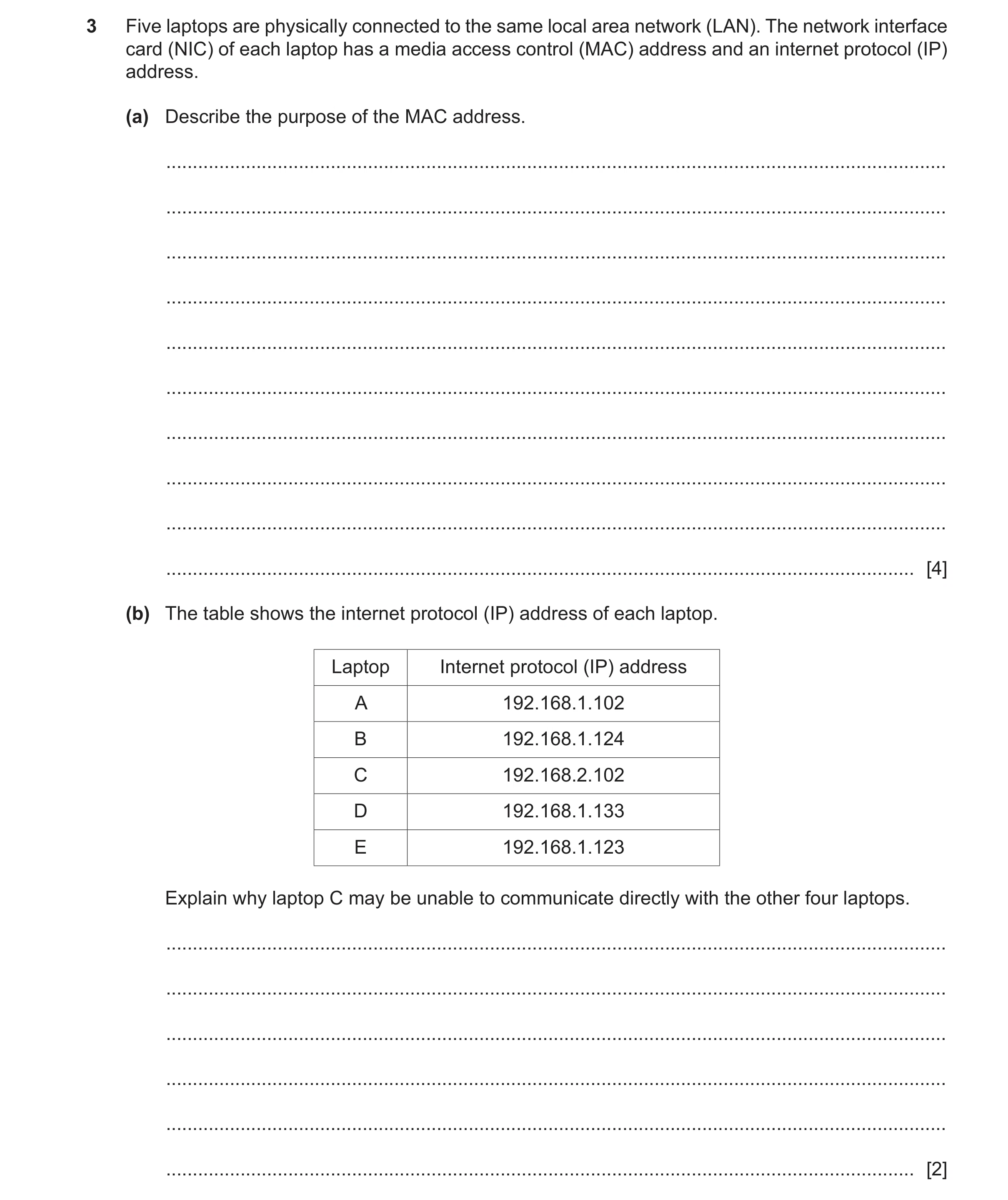
Q16 · Five laptops are physically connected to the same local area network (LAN) 9626/31 May/June 2025
3 Five laptops are physically connected to the same local area network (LAN). The network interface card (NIC) of each laptop has a media access control (MAC) address and an internet protocol (IP) address. (a) Describe the purpose of the MAC address. … … … … … … … … … … [4] (b) The table shows the internet protocol (IP) address of each laptop. Laptop Internet protocol (IP) address A 192.168.1.102 B 192.168.1.124 C 192.168.2.102 D 192.168.1.133 E 192.168.1.123 Explain why laptop C may be unable to communicate directly with the other four laptops. … … … … … … [2]
6 marks
Mark scheme: 3(a) FOUR from: 4 • (Uniquely) identifies the NIC (in a network) • Used in Ethernet frames (when sending packets) • Used as address when sending / receiving packets • Used by DHCP servers when assigning IP addresses • Used by switches to direct packets around networks • Stored in table in switches for traffic management • Identifies the manufacturer of the NIC 3(b) TWO from: 2 • There are two logical networks 192.168.1.x and 192.168.2.x/network 1 and network 2/valid reference to the two network addresses • Laptop C is on a different logical network (than the others) • The laptops are on different subnets • Packets from laptop C are undetectable / unreceivable by laptops A/B/D/E/other 4 // laptop C packets cannot be detected/received by the other laptops
This question in 9626/31 May/June 2025
 4 / 19
 5 / 19
 6 / 19
 9 / 19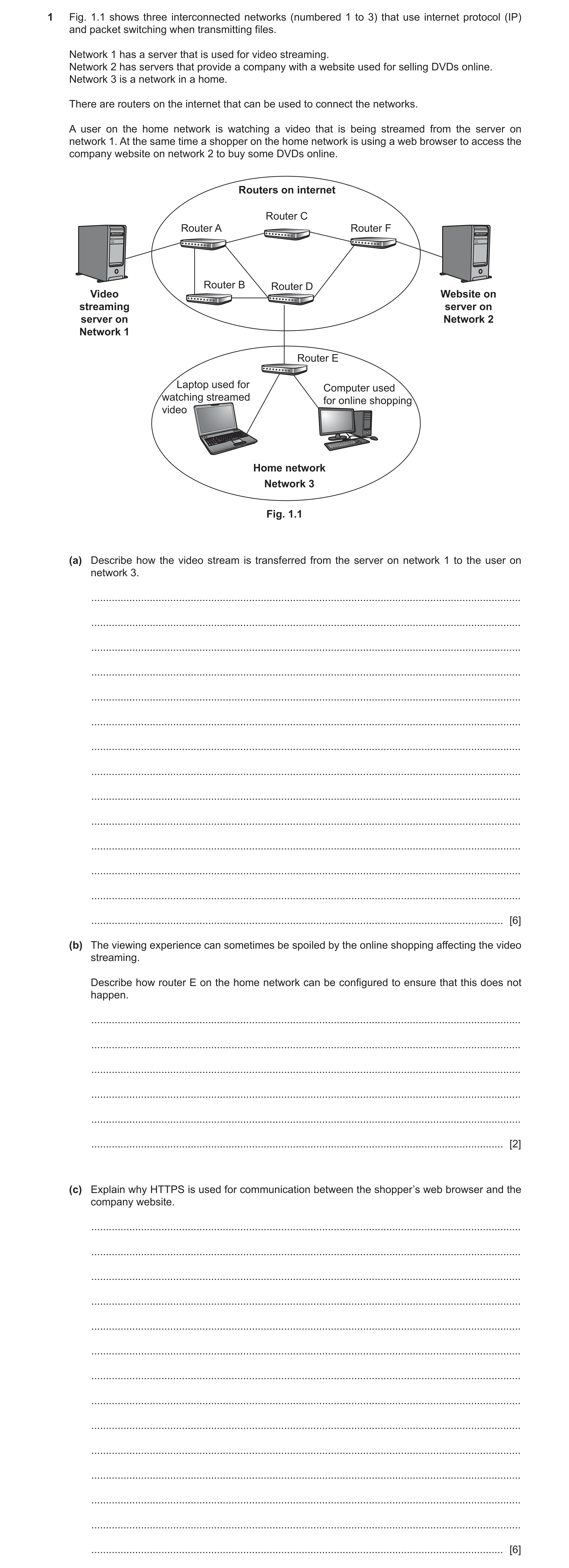
 12 / 19
 13 / 19
 14 / 19
 15 / 19
 16 / 19
 17 / 19
 18 / 19
 19 / 19
 14
14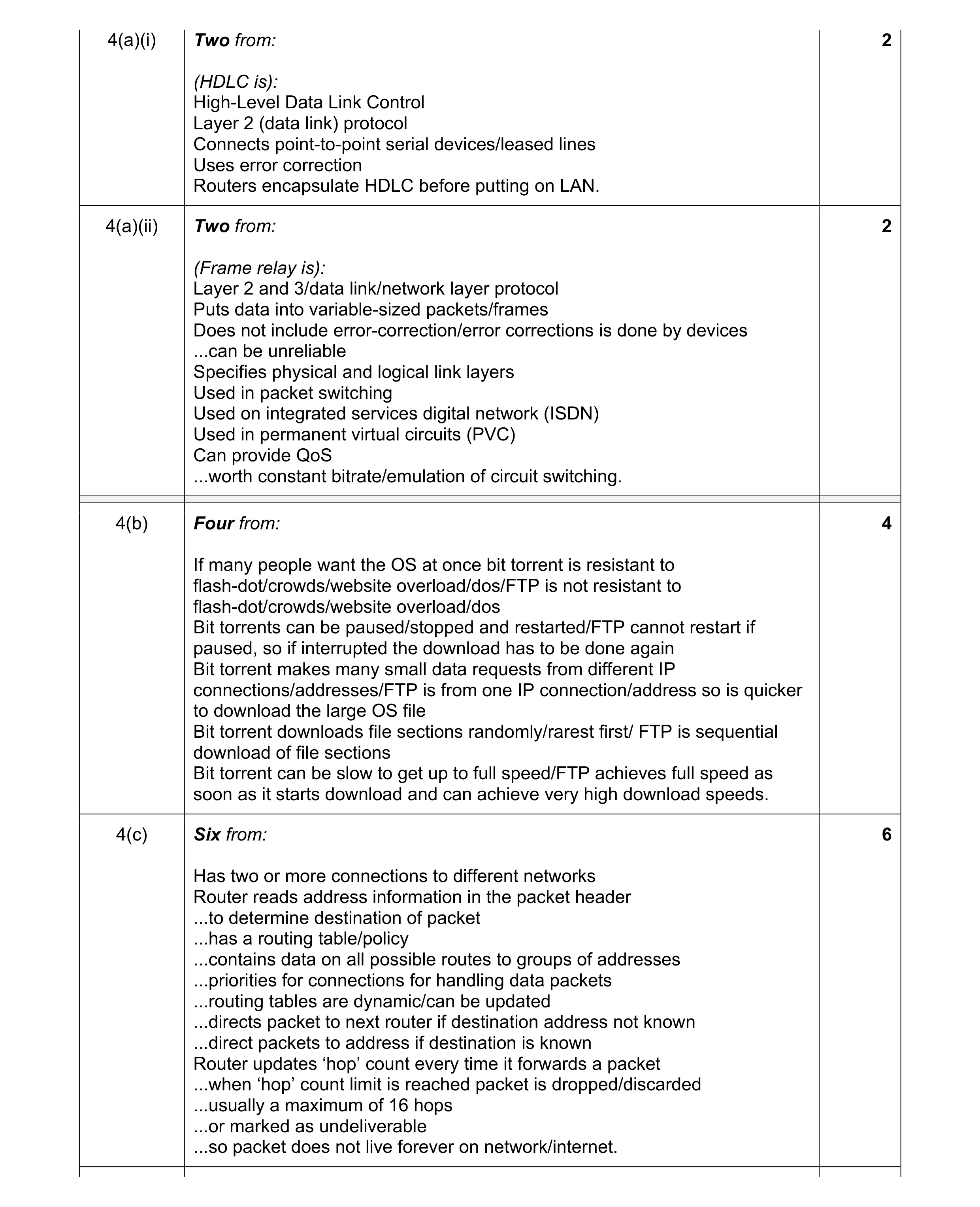 14
14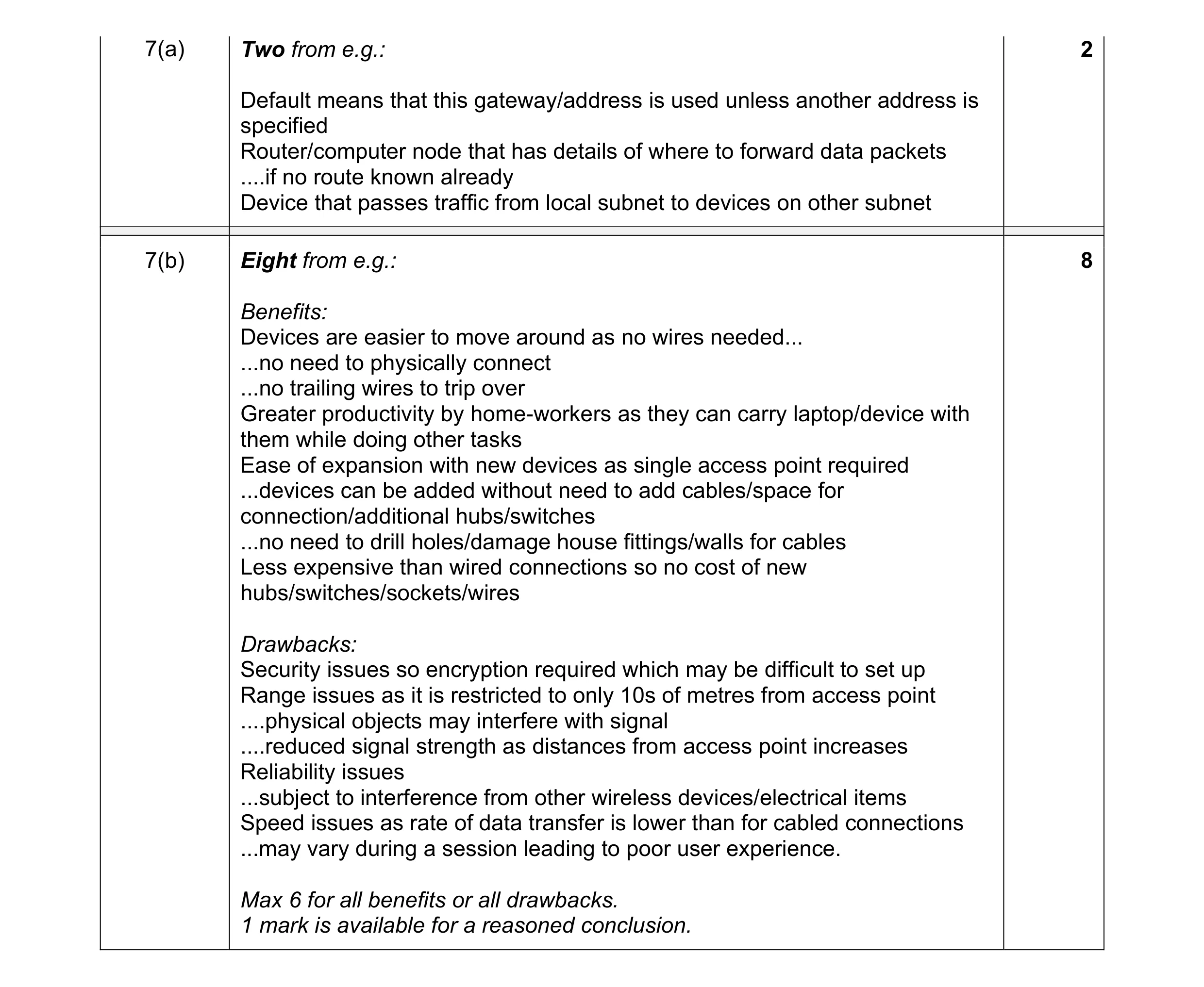 10
10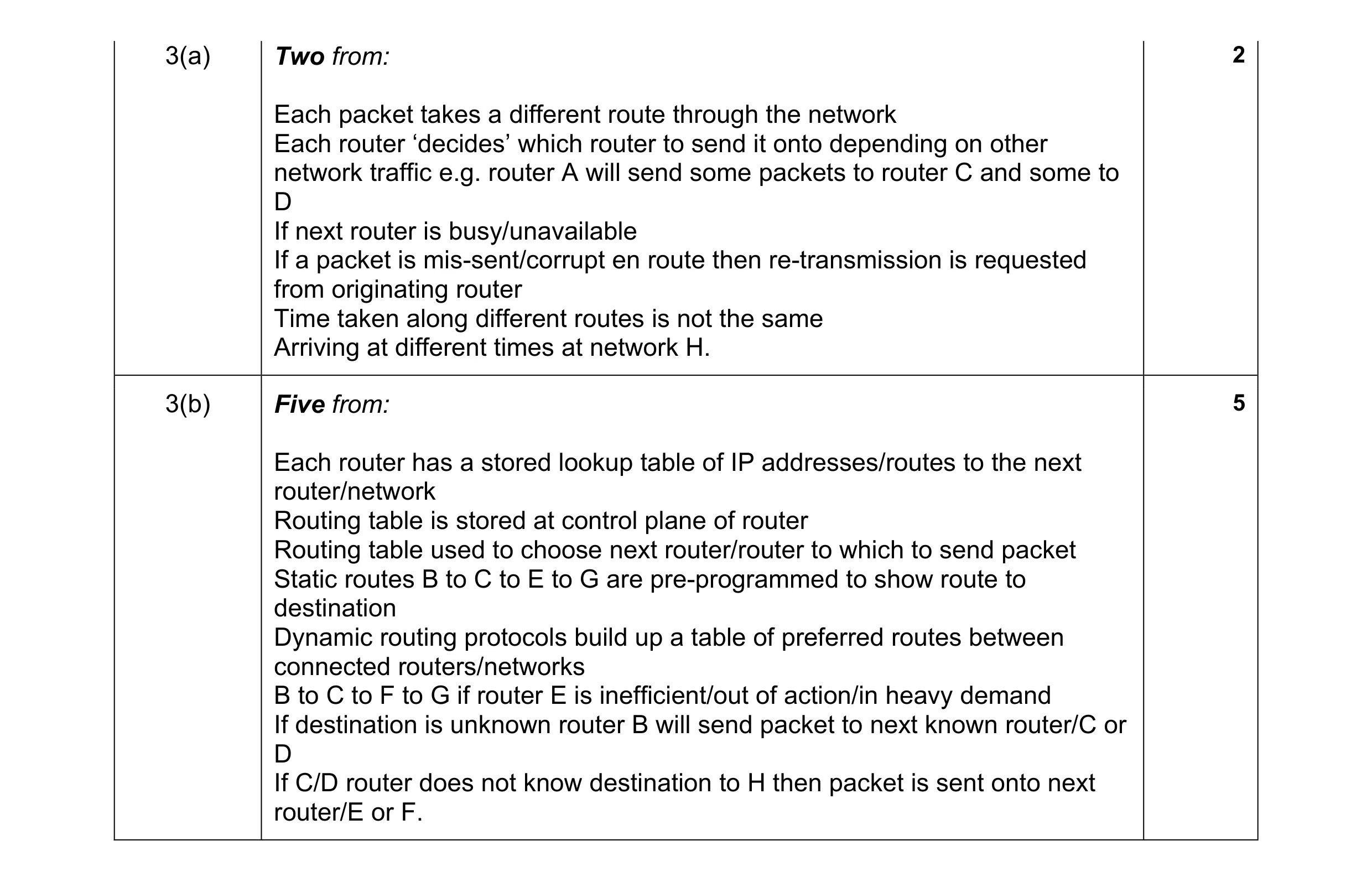 7
7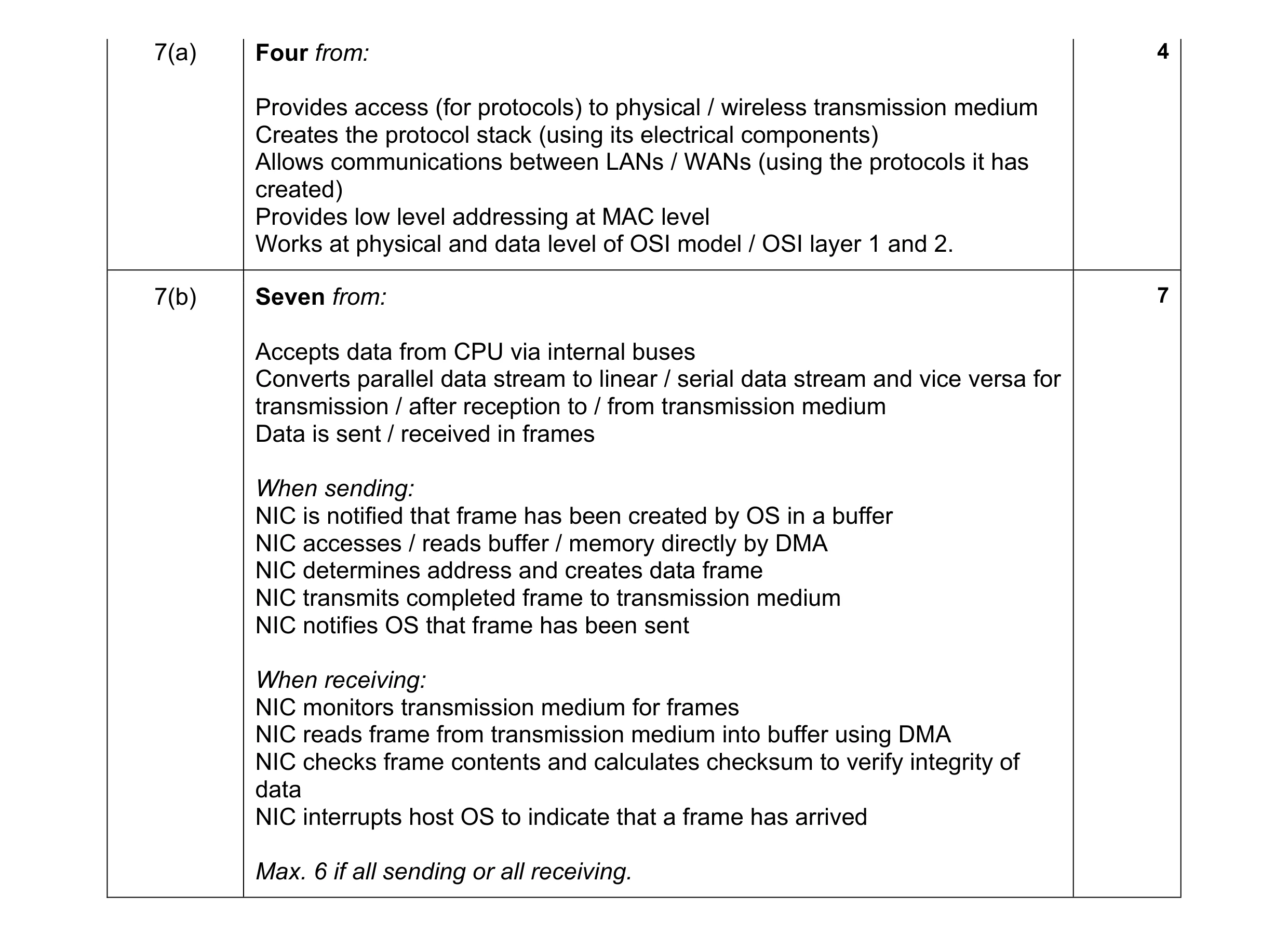 11
11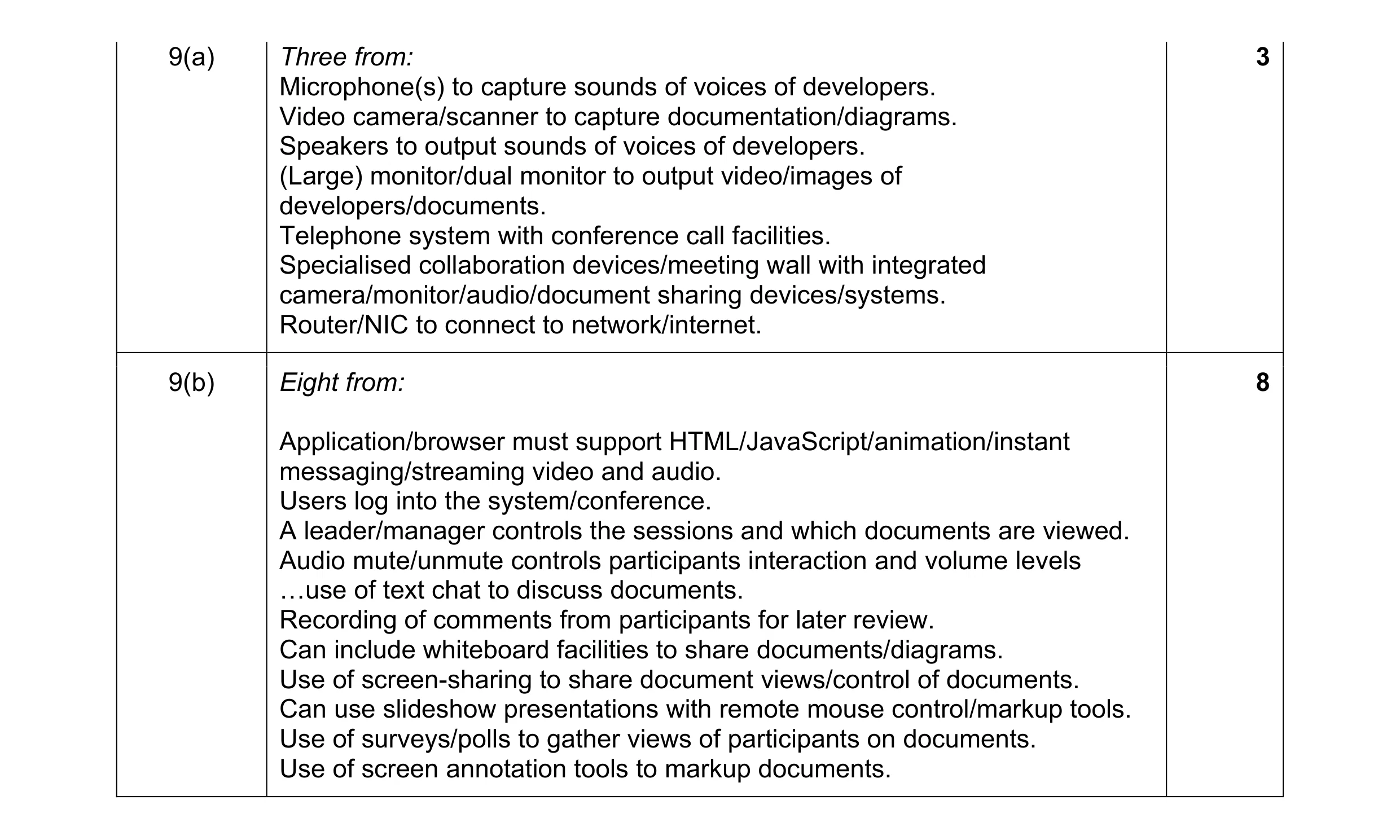 11
11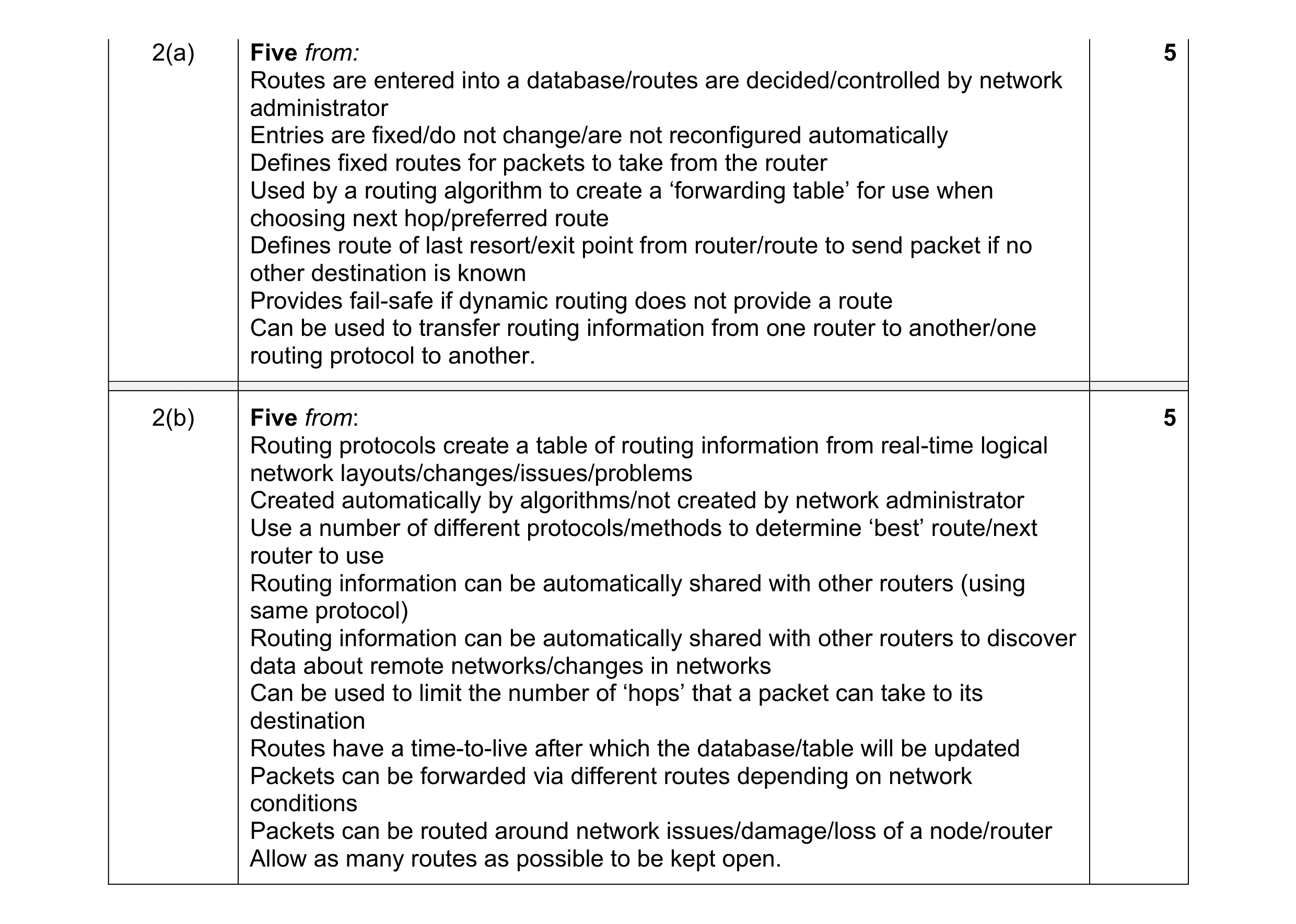 10
10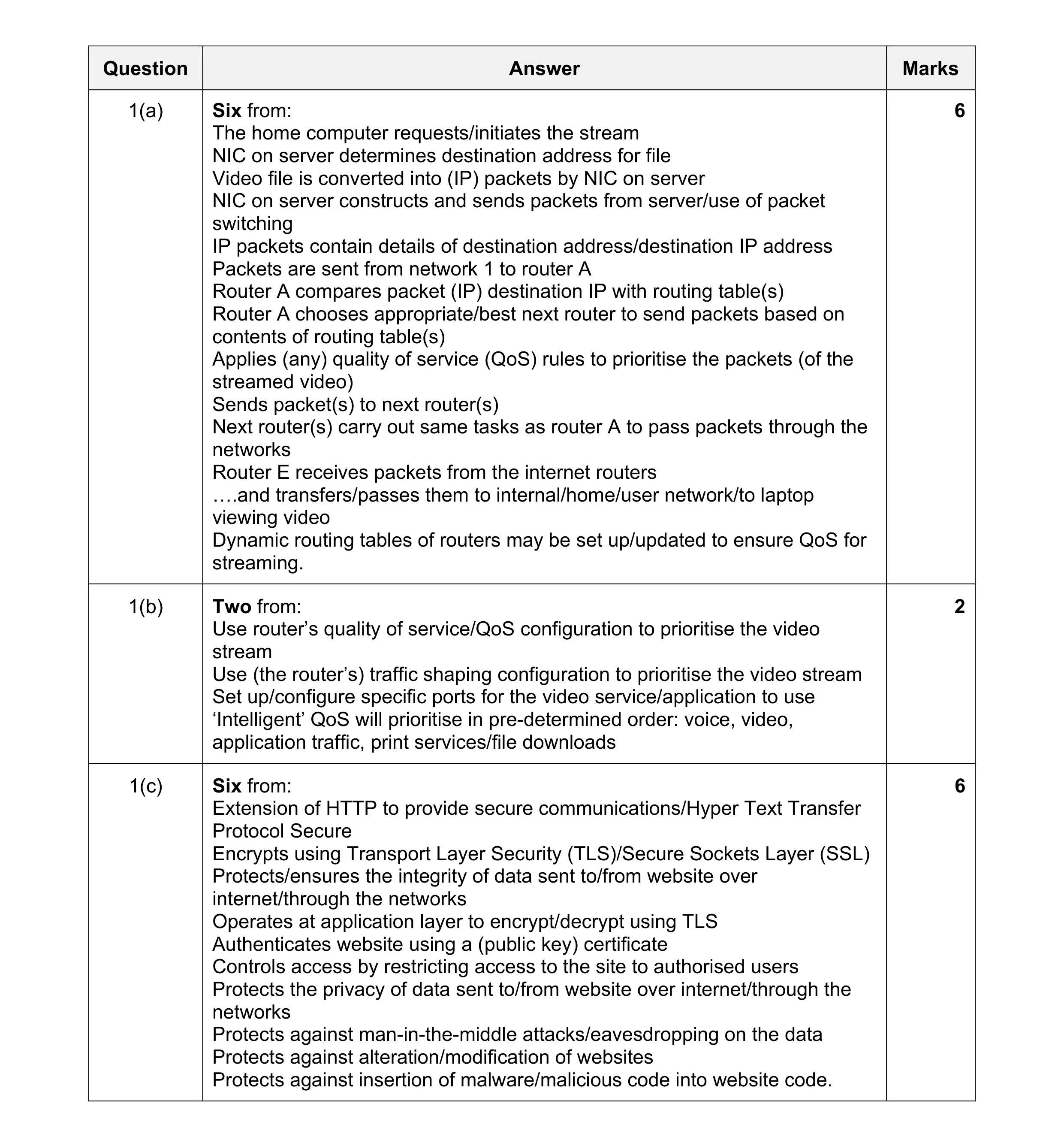 14
14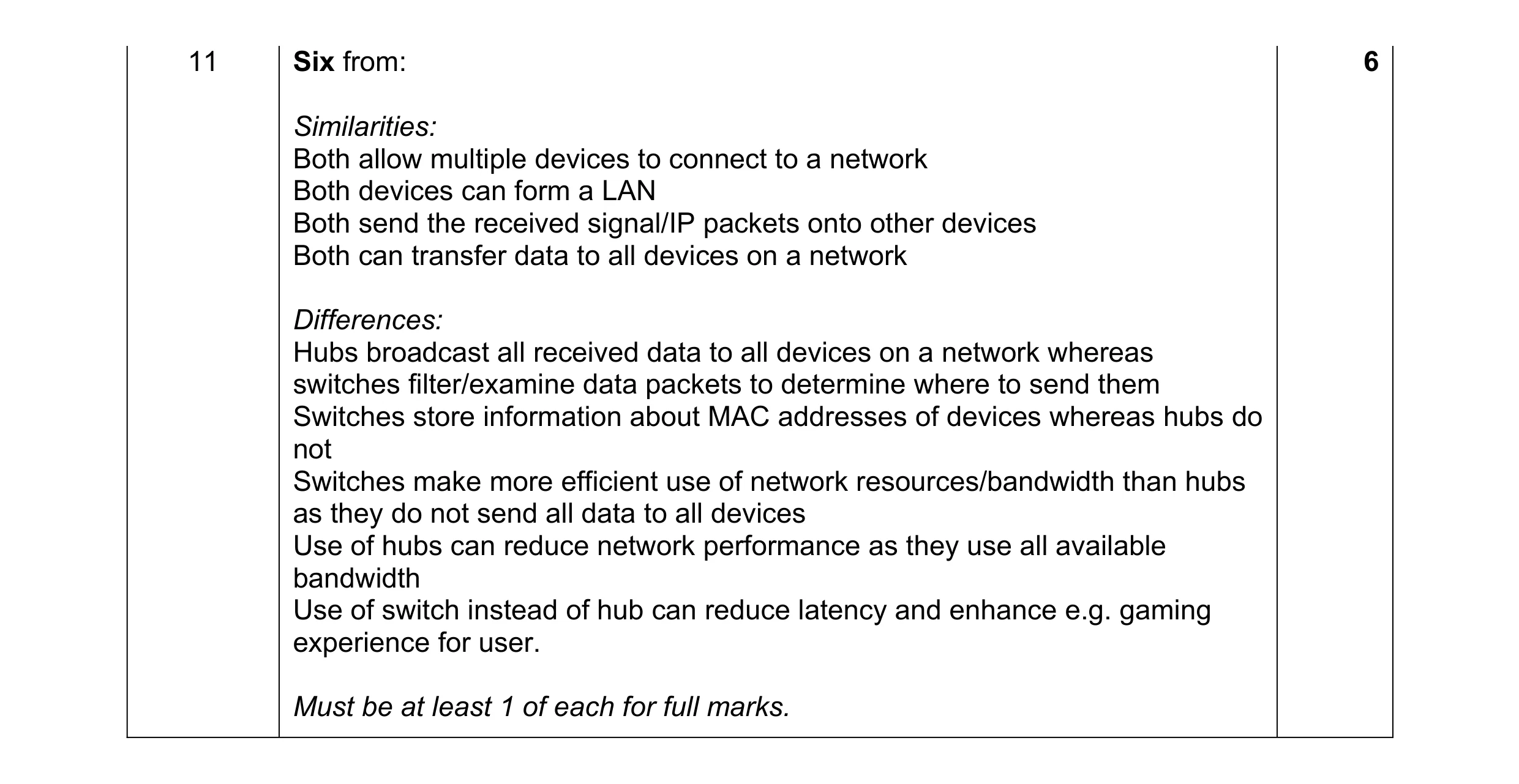 6
6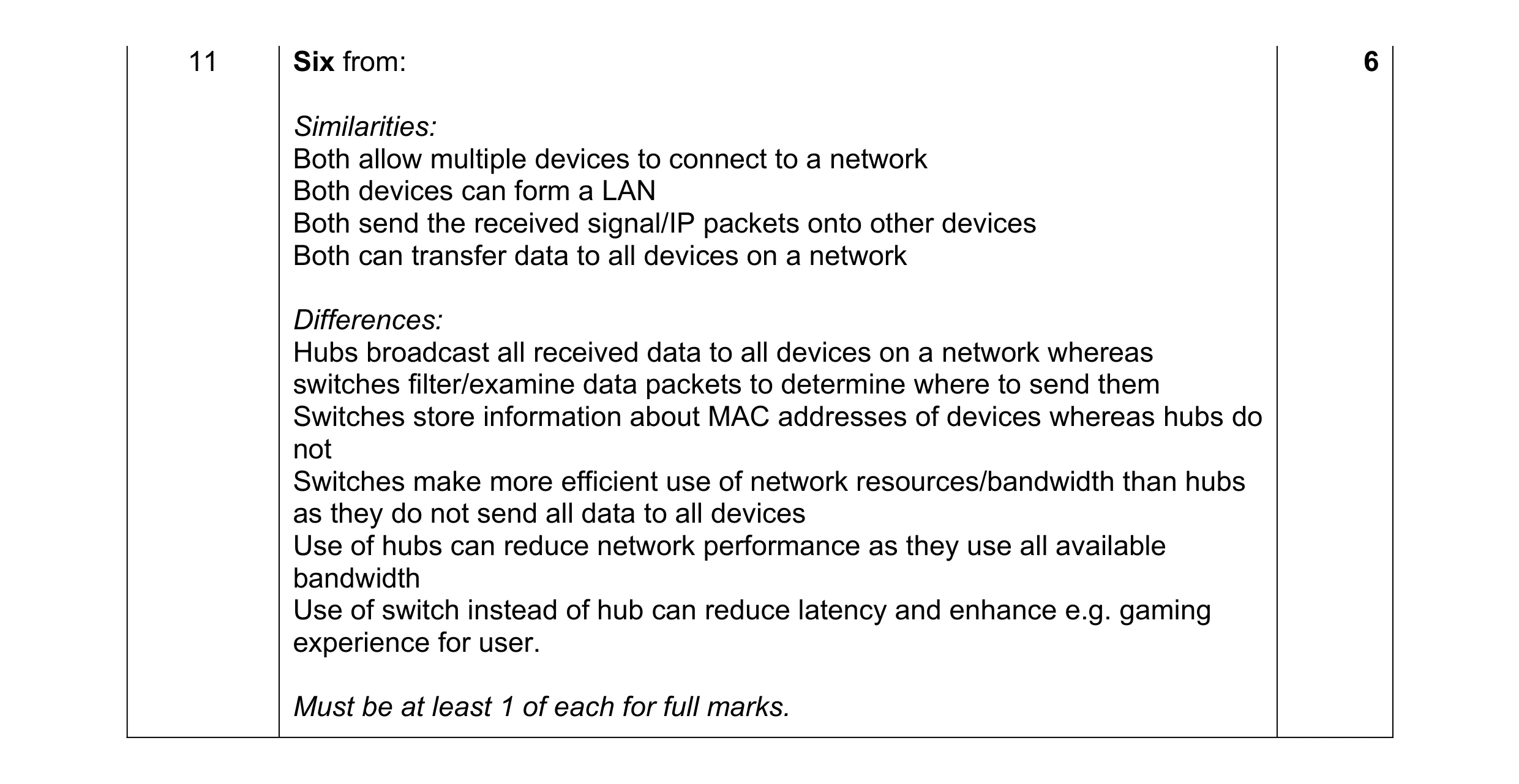 6
6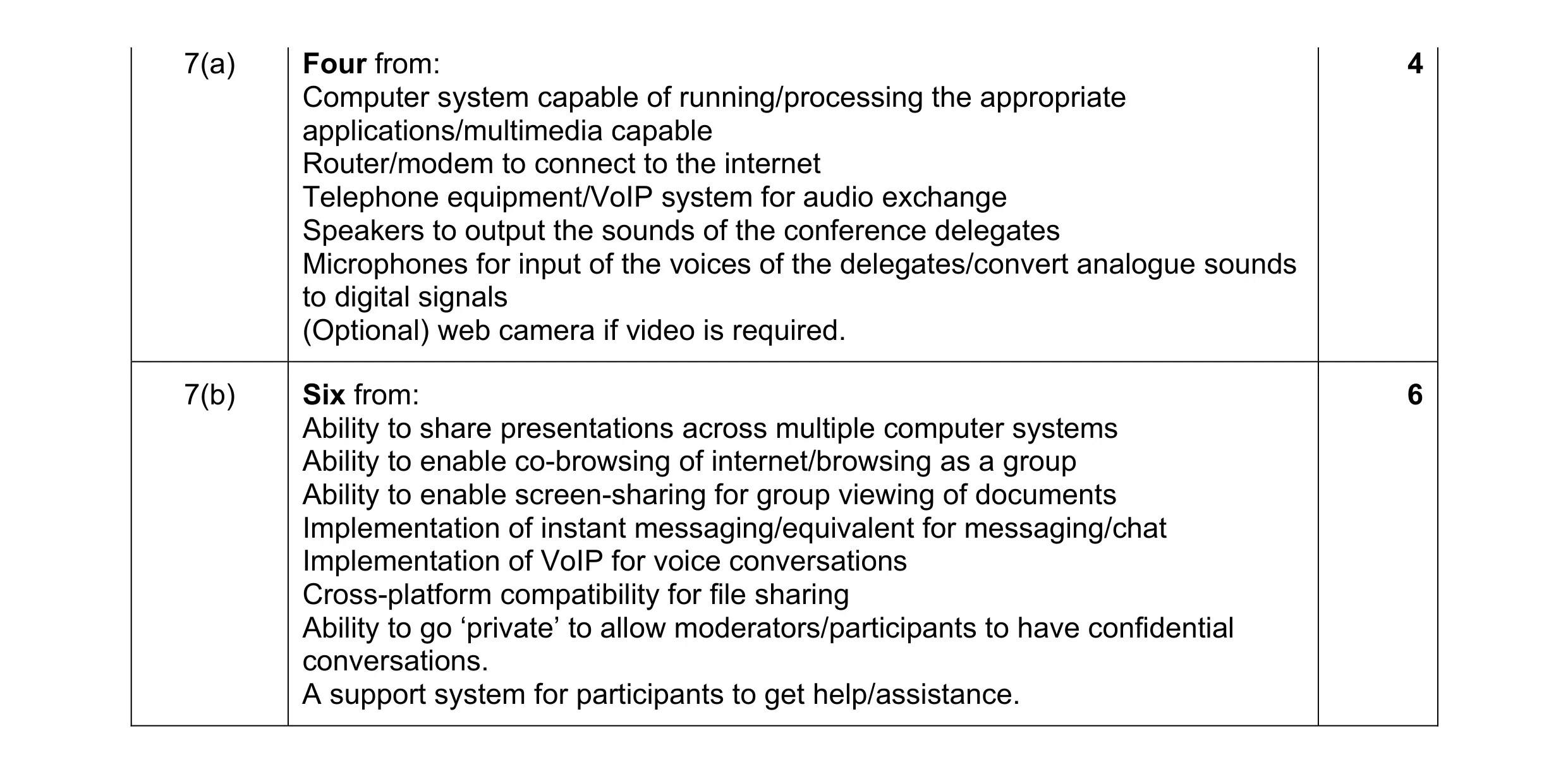 10
10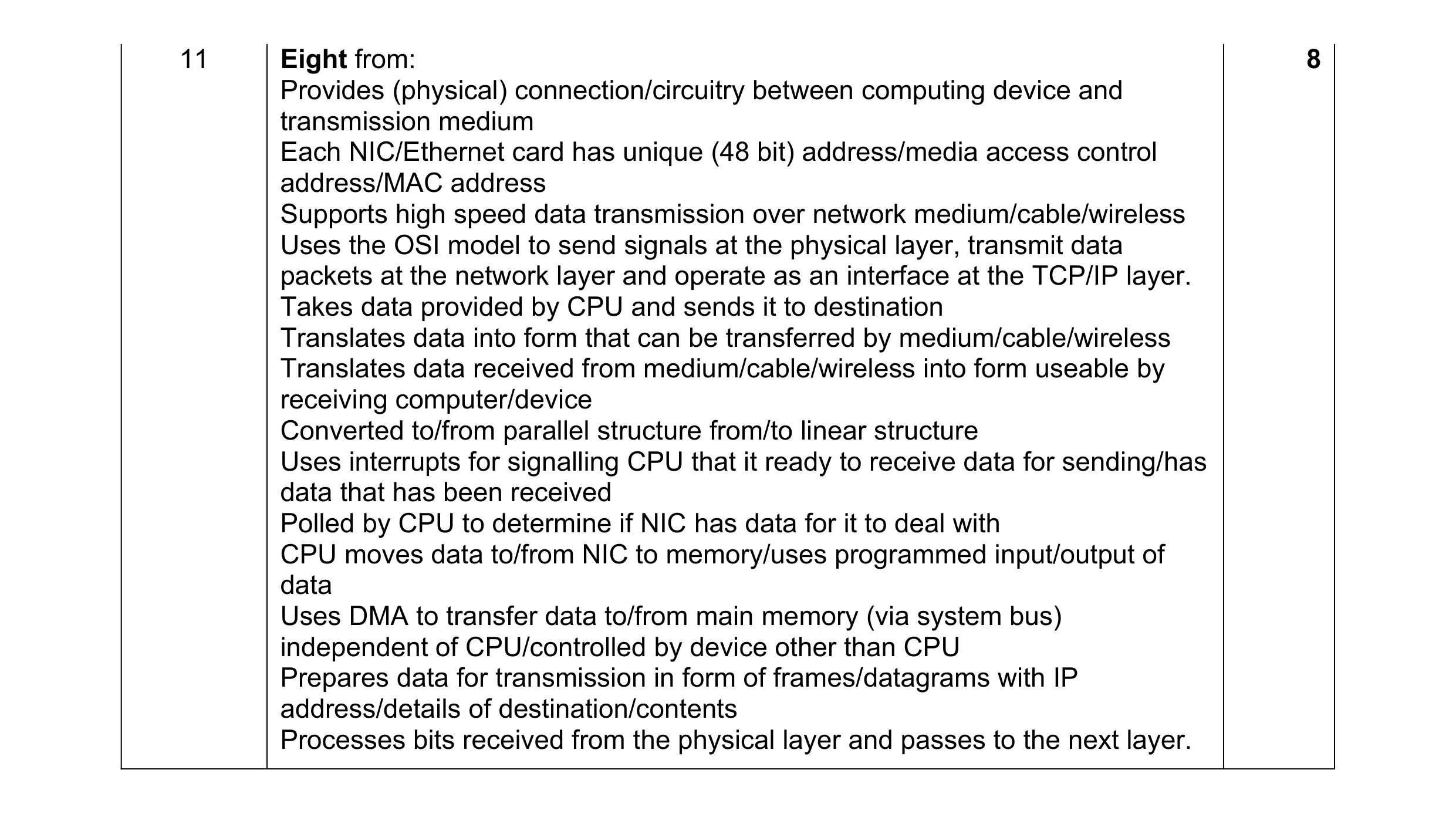 8
8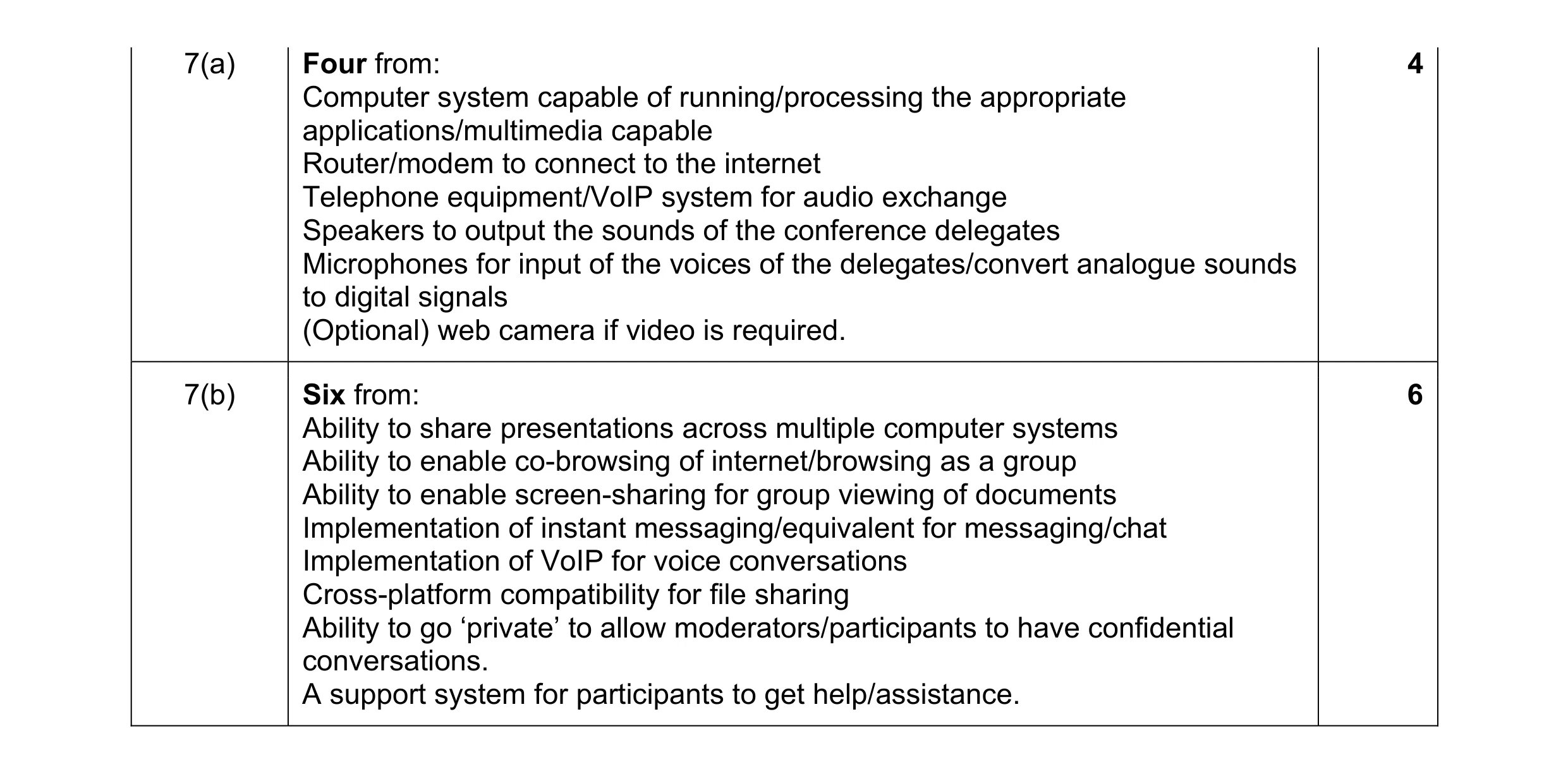 10
10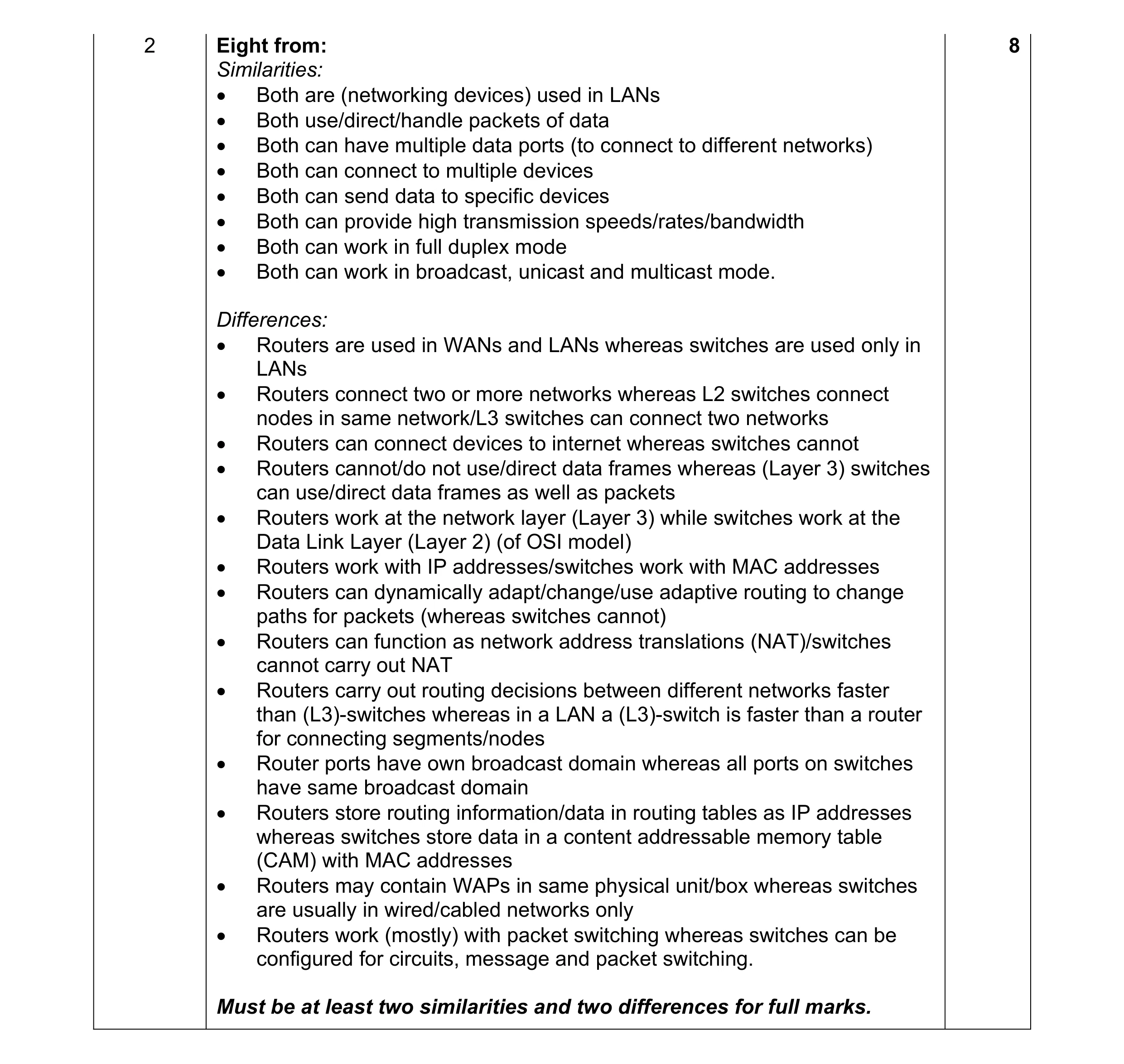 8
8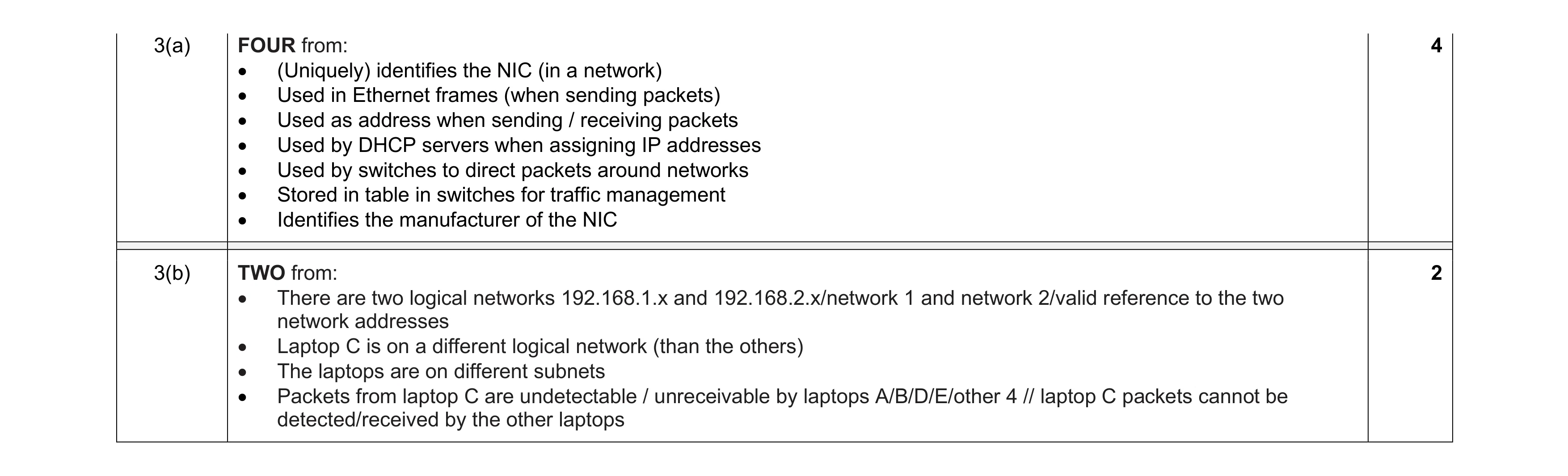 6
6