Questions as text
Q1 · Study the following pseudocode 9618/21 May/June 2021
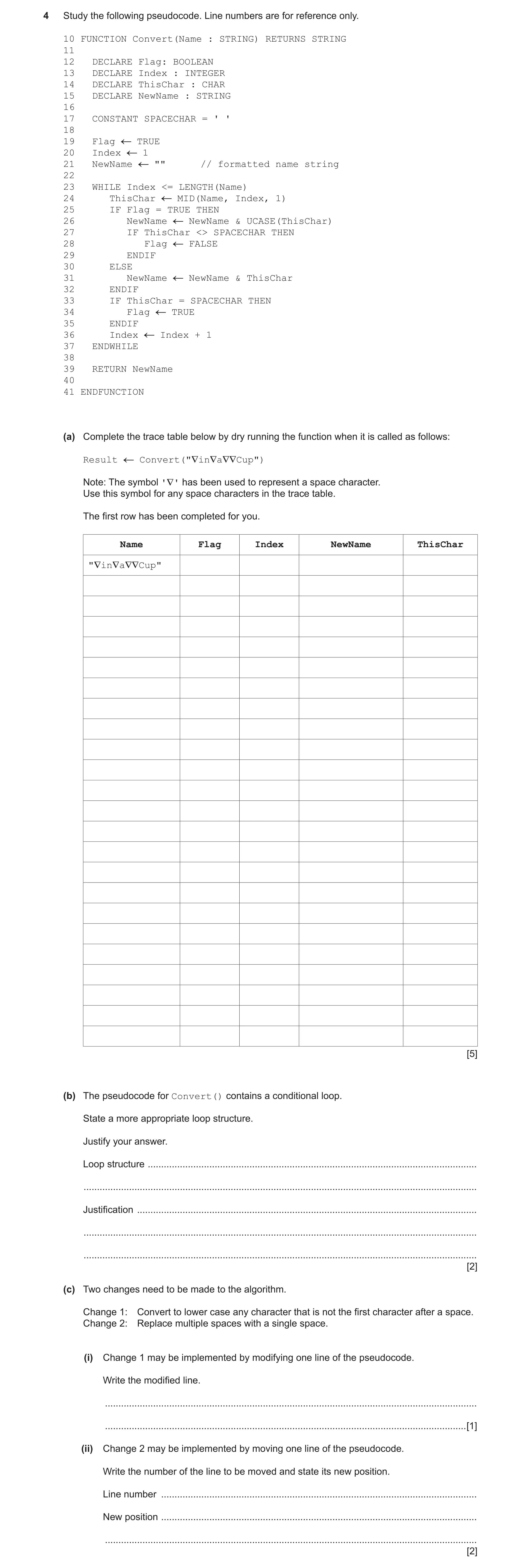
4 Study the following pseudocode. Line numbers are for reference only. 10 FUNCTION Convert(Name : STRING) RETURNS STRING 11 12 DECLARE Flag: BOOLEAN 13 DECLARE Index : INTEGER 14 DECLARE ThisChar : CHAR 15 DECLARE NewName : STRING 16 17 CONSTANT SPACECHAR = ' ' 18 19 Flag TRUE 20 Index 1 21 NewName "" // formatted name string 22 23 WHILE Index <= LENGTH(Name) 24 ThisChar MID(Name, Index, 1) 25 IF Flag = TRUE THEN 26 NewName NewName & UCASE(ThisChar) 27 IF ThisChar <> SPACECHAR THEN 28 Flag FALSE 29 ENDIF 30 ELSE 31 NewName NewName & ThisChar 32 ENDIF 33 IF ThisChar = SPACECHAR THEN 34 Flag TRUE 35 ENDIF 36 Index Index + 1 37 ENDWHILE 38 39 RETURN NewName 40 41 ENDFUNCTION (a) Complete the trace table below by dry running the function when it is called as follows: Result Convert("∇in∇a∇∇Cup") Note: The symbol '∇' has been used to represent a space character. Use this symbol for any space characters in the trace table. The first row has been completed for you. Name Flag Index NewName ThisChar "∇in∇a∇∇Cup" [5] (b) The pseudocode for Convert() contains a conditional loop. State a more appropriate loop structure. Justify your answer. Loop structure … … Justification … … … [2] (c) Two changes need to be made to the algorithm. Change 1: Convert to lower case any character that is not the first character after a space. Change 2: Replace multiple spaces with a single space. (i) Change 1 may be implemented by modifying one line of the pseudocode. Write the modified line. … … [1] (ii) Change 2 may be implemented by moving one line of the pseudocode. Write the number of the line to be moved and state its new position. Line number … New position … … [2]
10 marks
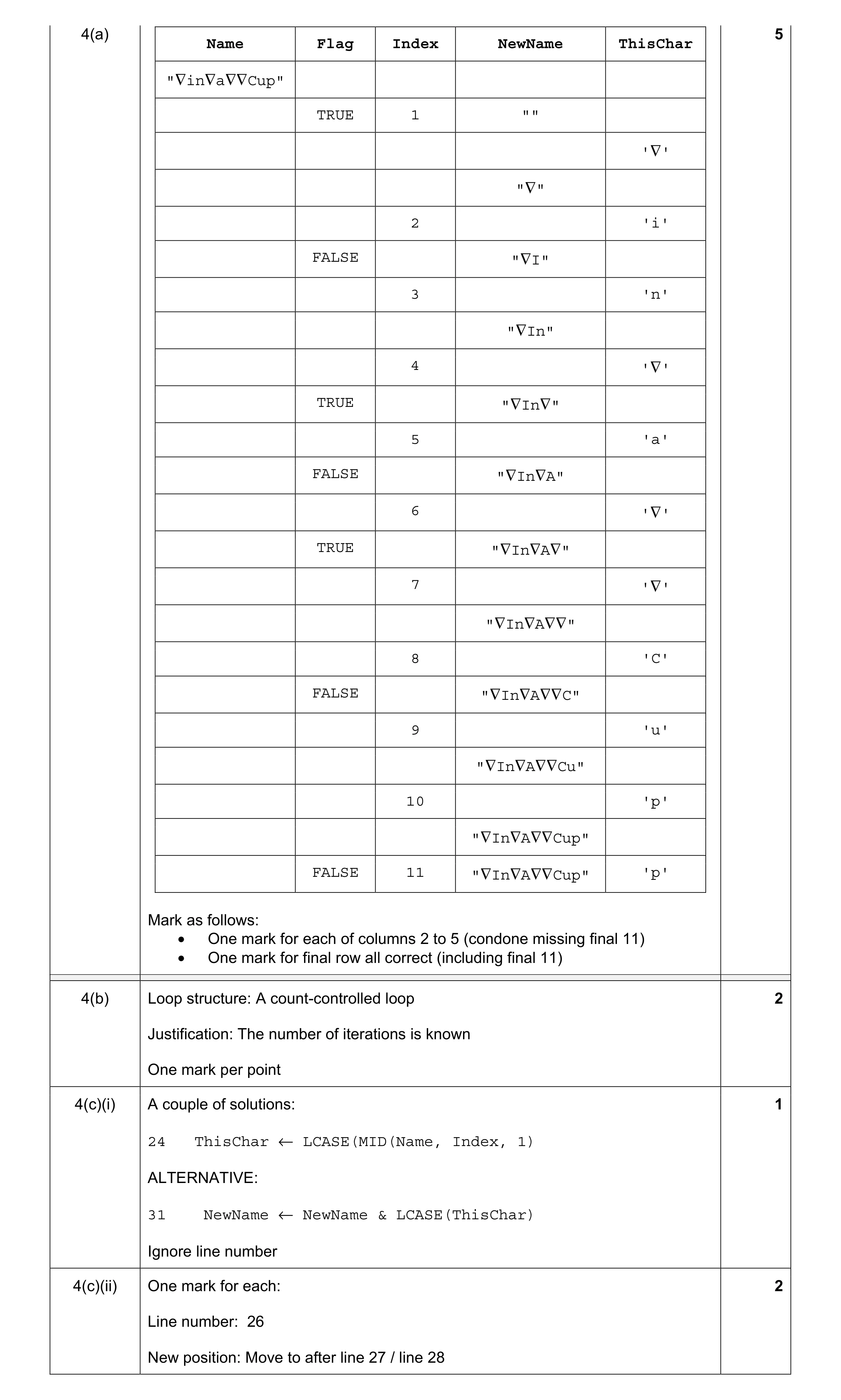
Mark scheme: 4(a) 5 Name Flag Index NewName ThisChar "∇in∇a∇∇Cup" TRUE 1 "" '∇' "∇" 2 'i' FALSE "∇I" 3 'n' "∇In" 4 '∇' TRUE "∇In∇" 5 'a' FALSE "∇In∇A" 6 '∇' TRUE "∇In∇A∇" 7 '∇' "∇In∇A∇∇" 8 'C' FALSE "∇In∇A∇∇C" 9 'u' "∇In∇A∇∇Cu" 10 'p' "∇In∇A∇∇Cup" FALSE 11 "∇In∇A∇∇Cup" 'p' Mark as follows: • One mark for each of columns 2 to 5 (condone missing final 11) • One mark for final row all correct (including final 11) 4(b) Loop structure: A count-controlled loop 2 Justification: The number of iterations is known One mark per point 4(c)(i) A couple of solutions: 1 24 ThisChar ← LCASE(MID(Name, Index, 1) ALTERNATIVE: 31 NewName ← NewName & LCASE(ThisChar) Ignore line number 4(c)(ii) One mark for each: 2 Line number: 26 New position: Move to after line 27 / line 28
This question in 9618/21 May/June 2021
Q2 · Examine the following state-transition diagram 9618/22 May/June 2021
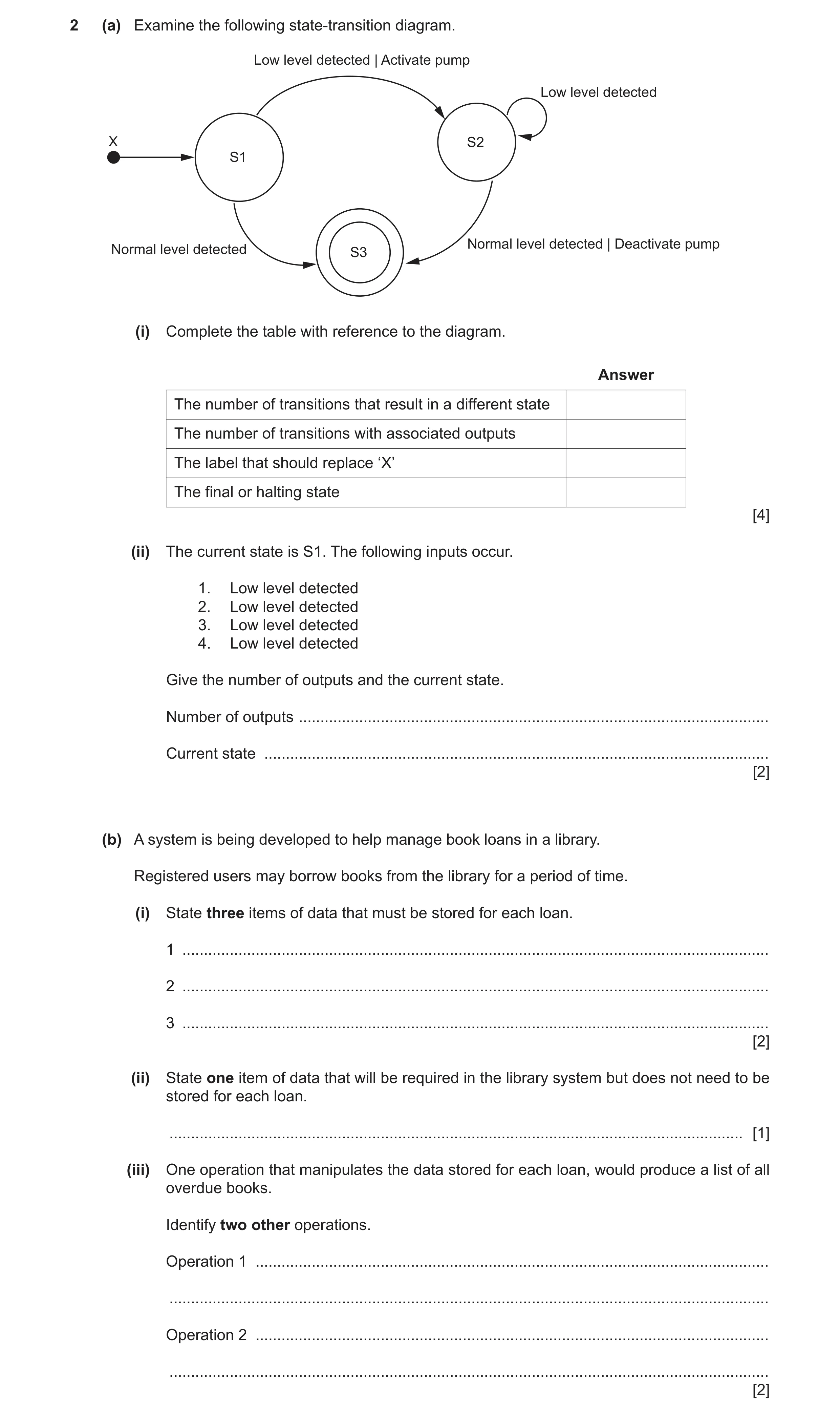
2 (a) Examine the following state-transition diagram. Low level detected | Activate pump Low level detected X S2 S1 Normal level detected | Deactivate pump Normal level detected S3 (i) Complete the table with reference to the diagram. Answer The number of transitions that result in a different state The number of transitions with associated outputs The label that should replace ‘X’ The final or halting state [4] (ii) The current state is S1. The following inputs occur. 1. Low level detected 2. Low level detected 3. Low level detected 4. Low level detected Give the number of outputs and the current state. Number of outputs … Current state … [2] (b) A system is being developed to help manage book loans in a library. Registered users may borrow books from the library for a period of time. (i) State three items of data that must be stored for each loan. 1 … 2 … 3 … [2] (ii) State one item of data that will be required in the library system but does not need to be stored for each loan. … [1] (iii) One operation that manipulates the data stored for each loan, would produce a list of all overdue books. Identify two other operations. Operation 1 … … Operation 2 … … [2]
11 marks
Mark scheme: 2(a)(i) 4 The number of transitions that result in a different state 3 The number of transitions with associated outputs 2 The label that should replace ‘X’ Start The final or halting state S3 One mark per row 2(a)(ii) Number of outputs: 1 2 Current state: S2 2(b)(i) Answers include: 2 • User ID / Username • Book ID • Date of loan / return date One mark for 1 correct Two marks for all 3 correct Note: Max 2 marks 2(b)(ii) Many examples but must be data that is NOT required for a loan, but which 1 COULD be required somewhere by the library system. Note: must be data relating to users, books or loans Answers include: • Users name / address / phone number / DOB • Book title / author / publisher / library rack number / ISBN number / price • Date of loan / return date (if not already given in part (i)) • The length of the loan (assumed to be the same for all books) 2(b)(iii) Many examples including: 2 • Create loan / borrow book • Return book • Send letter / email / contact a user ref an overdue book • View the loan history for a given book • View the loan history for a given user One mark for each Note: Max 2 marks
This question in 9618/22 May/June 2021
Q3 · Study the following pseudocode 9618/23 May/June 2021
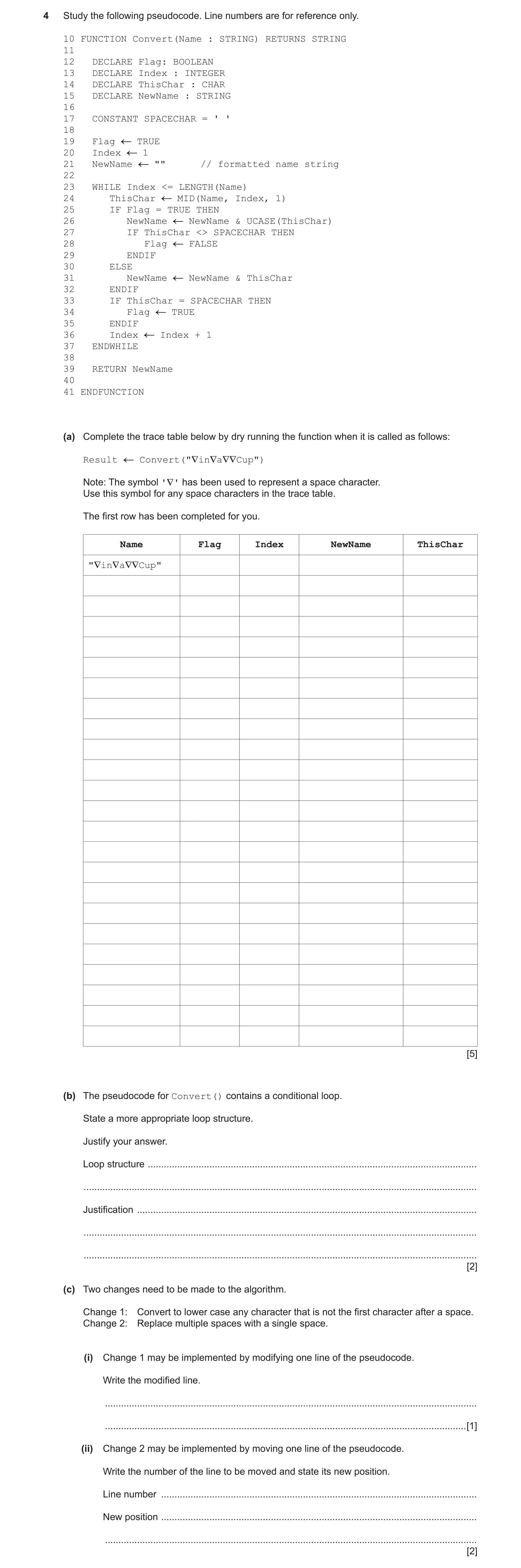
4 Study the following pseudocode. Line numbers are for reference only. 10 FUNCTION Convert(Name : STRING) RETURNS STRING 11 12 DECLARE Flag: BOOLEAN 13 DECLARE Index : INTEGER 14 DECLARE ThisChar : CHAR 15 DECLARE NewName : STRING 16 17 CONSTANT SPACECHAR = ' ' 18 19 Flag TRUE 20 Index 1 21 NewName "" // formatted name string 22 23 WHILE Index <= LENGTH(Name) 24 ThisChar MID(Name, Index, 1) 25 IF Flag = TRUE THEN 26 NewName NewName & UCASE(ThisChar) 27 IF ThisChar <> SPACECHAR THEN 28 Flag FALSE 29 ENDIF 30 ELSE 31 NewName NewName & ThisChar 32 ENDIF 33 IF ThisChar = SPACECHAR THEN 34 Flag TRUE 35 ENDIF 36 Index Index + 1 37 ENDWHILE 38 39 RETURN NewName 40 41 ENDFUNCTION (a) Complete the trace table below by dry running the function when it is called as follows: Result Convert("∇in∇a∇∇Cup") Note: The symbol '∇' has been used to represent a space character. Use this symbol for any space characters in the trace table. The first row has been completed for you. Name Flag Index NewName ThisChar "∇in∇a∇∇Cup" [5] (b) The pseudocode for Convert() contains a conditional loop. State a more appropriate loop structure. Justify your answer. Loop structure … … Justification … … … [2] (c) Two changes need to be made to the algorithm. Change 1: Convert to lower case any character that is not the first character after a space. Change 2: Replace multiple spaces with a single space. (i) Change 1 may be implemented by modifying one line of the pseudocode. Write the modified line. … … [1] (ii) Change 2 may be implemented by moving one line of the pseudocode. Write the number of the line to be moved and state its new position. Line number … New position … … [2]
10 marks
Mark scheme: 4(a) 5 Name Flag Index NewName ThisChar "∇in∇a∇∇Cup" TRUE 1 "" '∇' "∇" 2 'i' FALSE "∇I" 3 'n' "∇In" 4 '∇' TRUE "∇In∇" 5 'a' FALSE "∇In∇A" 6 '∇' TRUE "∇In∇A∇" 7 '∇' "∇In∇A∇∇" 8 'C' FALSE "∇In∇A∇∇C" 9 'u' "∇In∇A∇∇Cu" 10 'p' "∇In∇A∇∇Cup" FALSE 11 "∇In∇A∇∇Cup" 'p' Mark as follows: • One mark for each of columns 2 to 5 (condone missing final 11) • One mark for final row all correct (including final 11) 4(b) Loop structure: A count-controlled loop 2 Justification: The number of iterations is known One mark per point 4(c)(i) A couple of solutions: 1 24 ThisChar ← LCASE(MID(Name, Index, 1) ALTERNATIVE: 31 NewName ← NewName & LCASE(ThisChar) Ignore line number 4(c)(ii) One mark for each: 2 Line number: 26 New position: Move to after line 27 / line 28
This question in 9618/23 May/June 2021
Q4 · Sylvia is testing a program that has been written by her colleague 9618/21 Oct/Nov 2021
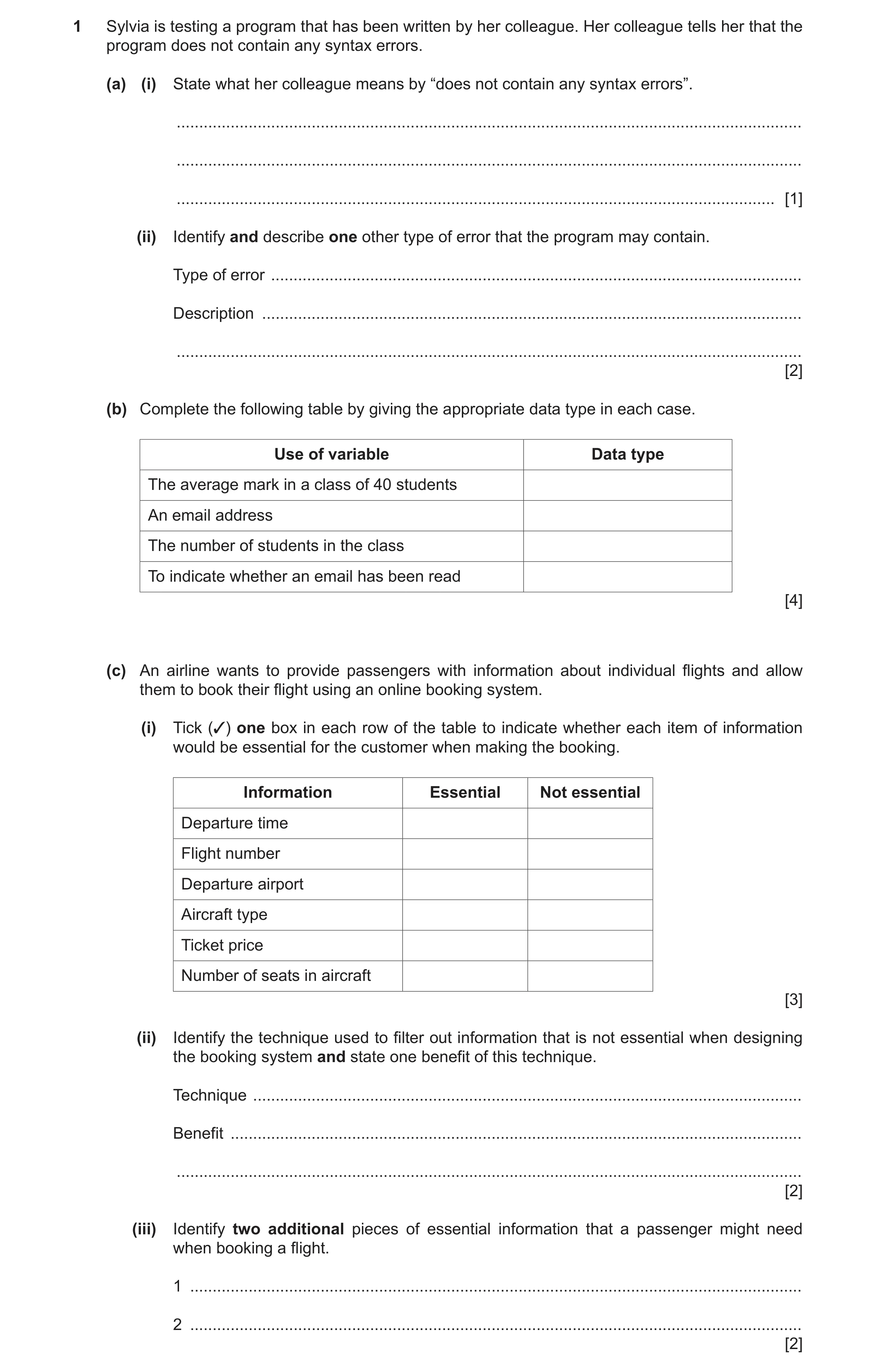
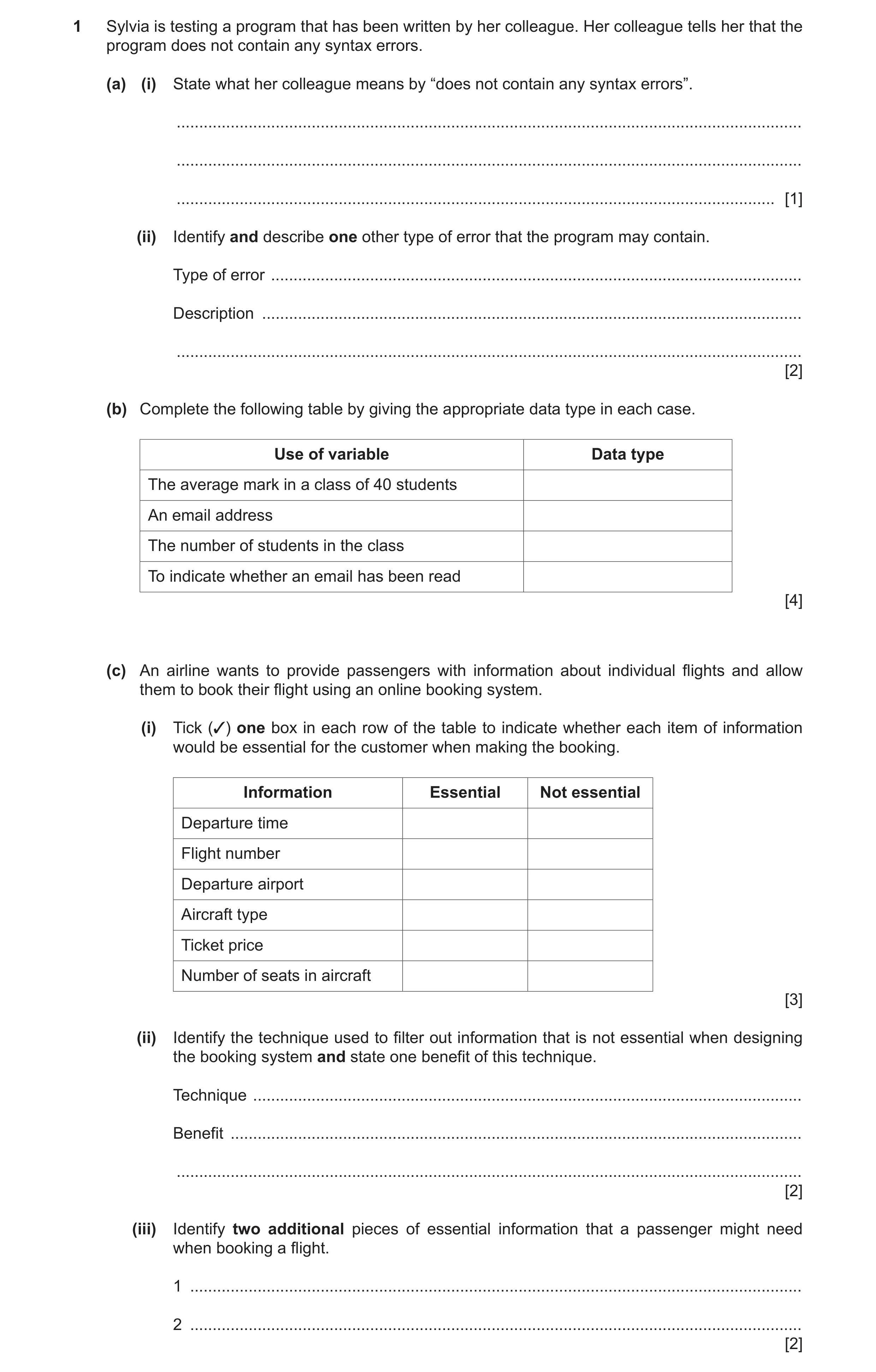
1 Sylvia is testing a program that has been written by her colleague. Her colleague tells her that the program does not contain any syntax errors. (a) (i) State what her colleague means by “does not contain any syntax errors”. … … … [1] (ii) Identify and describe one other type of error that the program may contain. Type of error … Description … … [2] (b) Complete the following table by giving the appropriate data type in each case. Use of variable Data type The average mark in a class of 40 students An email address The number of students in the class To indicate whether an email has been read [4] (c) An airline wants to provide passengers with information about individual flights and allow them to book their flight using an online booking system. (i) Tick (3) one box in each row of the table to indicate whether each item of information would be essential for the customer when making the booking. Information Essential Not essential Departure time Flight number Departure airport Aircraft type Ticket price Number of seats in aircraft [3] (ii) Identify the technique used to filter out information that is not essential when designing the booking system and state one benefit of this technique. Technique … Benefit … … [2] (iii) Identify two additional pieces of essential information that a passenger might need when booking a flight. 1 … 2 … [2]
14 marks
Mark scheme: Question Answer Marks 1(a)(i) One from: 1 • The program obeys the rules / grammar of the programming language used • The program will run // it can be compiled / interpreted • Accept by example. e.g. 'no mis-spelt keywords' / 'all brackets match' 1(a)(ii) One mark for type plus one for corresponding description 2 Type of error: A logic error Description: • An error in the algorithm / design of the solution • the program does not behave as expected / give the expected output. • Accept by example e.g. wrong arithmetic operator used / wrong loop count OR Type of error: Run-time error Description: • The program performs an illegal instruction / invalid operation • Accept by example: divide by zero or endless loop or simply 'crashes' / freezes 1(b) 4 Use of variable Data type The average mark in a class of 40 students REAL An email address STRING The number of students in the class INTEGER Indicate whether an email has been read BOOLEAN One mark per row 1(c)(i) 3 Information Essential Not essential Departure time Flight Number Departure airport Aircraft type Ticket price Number of seats in aircraft One mark for two rows correct Two mark for four rows correct Three mark for all rows correct 1(c)(ii) One mark for technique and one for benefit, Max 1 mark for 'Benefit' 2 Technique: Abstraction Benefit: • The solution is simplified so easier / quicker to design / implement • The system is tailored to the need of the user 1(c)(iii) Answers include: 2 • Destination / arrival airport • Arrival time / flight duration • Date of flight • Seat number • Seat availability Max 2 marks
This question in 9618/21 Oct/Nov 2021
Q5 · A programmer applies decomposition to a problem that she has been asked to solve 9618/22 Oct/Nov 2021
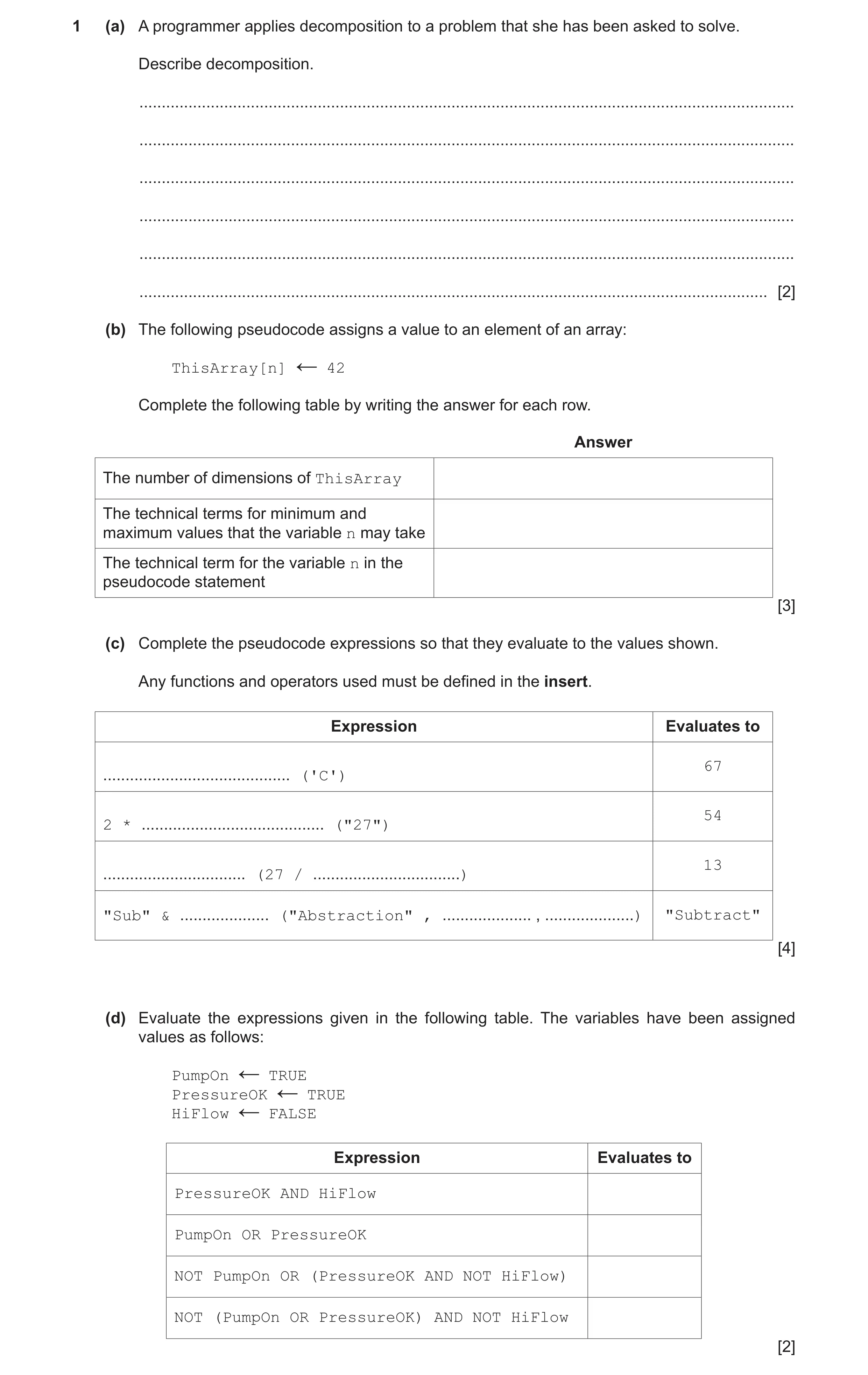
1 (a) A programmer applies decomposition to a problem that she has been asked to solve. Describe decomposition. … … … … … … [2] (b) The following pseudocode assigns a value to an element of an array: ThisArray[n] 42 ← Complete the following table by writing the answer for each row. Answer The number of dimensions of ThisArray The technical terms for minimum and maximum values that the variable n may take The technical term for the variable n in the pseudocode statement [3] (c) Complete the pseudocode expressions so that they evaluate to the values shown. Any functions and operators used must be defined in the insert. Expression Evaluates to … 67 ('C') … 54 2 * ("27") … 13 (27 / … ) "Sub" & … ("Abstraction" , … , … ) "Subtract" [4] (d) Evaluate the expressions given in the following table. The variables have been assigned values as follows: PumpOn TRUE ← PressureOK TRUE ← HiFlow FALSE ← Expression Evaluates to PressureOK AND HiFlow PumpOn OR PressureOK NOT PumpOn OR (PressureOK AND NOT HiFlow) NOT (PumpOn OR PressureOK) AND NOT HiFlow [2]
11 marks
Mark scheme: Question Answer Marks 1(a) The process involves: 2 1 Breaking down a problem / task into sub problems / steps / smaller parts 2 In order to explain / understand // easier to solve the problem 3 Leading to the concept of program modules // assigning problem parts to teams Max 2 1(b) 3 Answer The number of dimensions of ThisArray 1 The technical terms for minimum and Lower bound, upper bound maximum values that variable n may take The technical term for the variable n in the Index / Subscript pseudocode expression. One mark per row 1(c) 4 Expression Evaluates to ASC('C') 67 2 * STR_TO_NUM ("27") 54 INT(27 / 2) 13 "Sub" & MID("Abstraction" , 4 , 5) "Subtract" One mark per row Function names must be exactly as shown 1(d) 2 Expression Evaluates to PressureOK AND HiFlow FALSE PumpOn OR PressureOK TRUE NOT PumpOn OR (PressureOK AND NOT HiFlow) TRUE NOT (PumpOn OR PressureOK) AND NOT HiFlow FALSE 1 mark for any two rows correct 2 marks for all rows correct.
This question in 9618/22 Oct/Nov 2021
Q6 · A mobile phone has a touchscreen 9618/22 Oct/Nov 2021
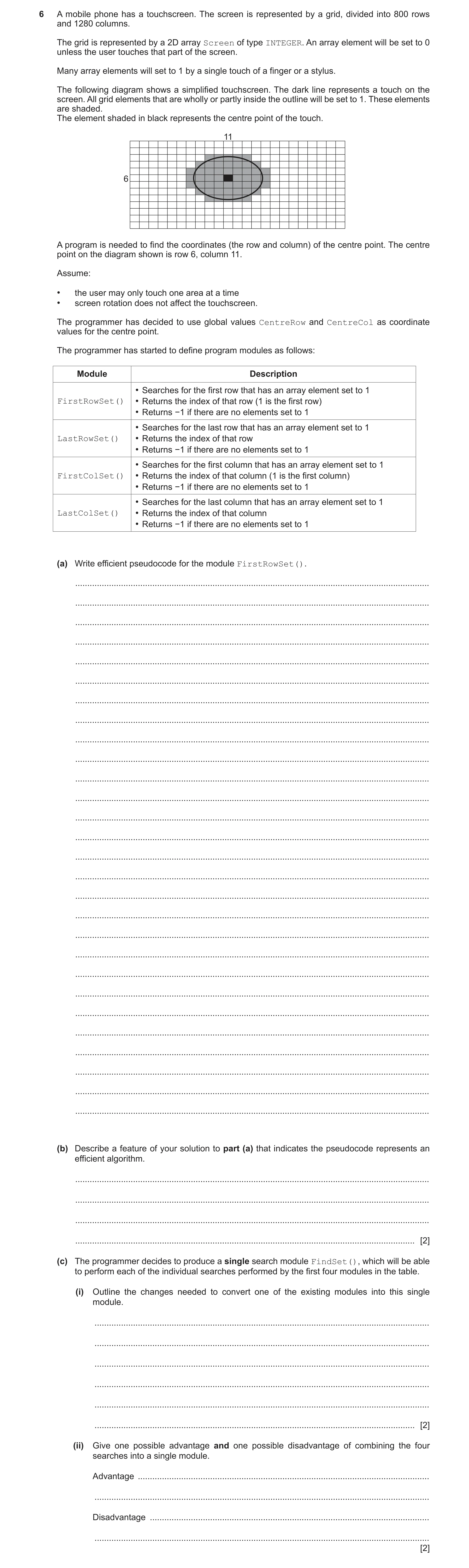
6 A mobile phone has a touchscreen. The screen is represented by a grid, divided into 800 rows and 1280 columns. The grid is represented by a 2D array Screen of type INTEGER. An array element will be set to 0 unless the user touches that part of the screen. Many array elements will set to 1 by a single touch of a finger or a stylus. The following diagram shows a simplified touchscreen. The dark line represents a touch on the screen. All grid elements that are wholly or partly inside the outline will be set to 1. These elements are shaded. The element shaded in black represents the centre point of the touch. 11 6 A program is needed to find the coordinates (the row and column) of the centre point. The centre point on the diagram shown is row 6, column 11. Assume: • the user may only touch one area at a time • screen rotation does not affect the touchscreen. The programmer has decided to use global values CentreRow and CentreCol as coordinate values for the centre point. The programmer has started to define program modules as follows: Module Description • Searches for the first row that has an array element set to 1 FirstRowSet() • Returns the index of that row (1 is the first row) • Returns −1 if there are no elements set to 1 • Searches for the last row that has an array element set to 1 LastRowSet() • Returns the index of that row • Returns −1 if there are no elements set to 1 • Searches for the first column that has an array element set to 1 FirstColSet() • Returns the index of that column (1 is the first column) • Returns −1 if there are no elements set to 1 • Searches for the last column that has an array element set to 1 LastColSet() • Returns the index of that column • Returns −1 if there are no elements set to 1 (a) Write efficient pseudocode for the module FirstRowSet(). … … … … … … … … … … … … … … … … … … … … … … … … … … … … (b) Describe a feature of your solution to part (a) that indicates the pseudocode represents an efficient algorithm. … … … … [2] (c) The programmer decides to produce a single search module FindSet(), which will be able to perform each of the individual searches performed by the first four modules in the table. (i) Outline the changes needed to convert one of the existing modules into this single module. … … … … … … [2] (ii) Give one possible advantage and one possible disadvantage of combining the four searches into a single module. Advantage … … Disadvantage … … [2]
13 marks
Mark scheme: 6(a) FUNCTION FirstRowSet() RETURNS INTEGER 7 DECLARE Row, Col : INTEGER DECLARE Found : BOOLEAN // array is 1280 × 800 Row ← 1 Found ← FALSE WHILE Row <= 800 AND Found = FALSE // top to bottom Col ← 1 WHILE Col <= 1280 AND Found = FALSE // left to right IF Screen[Row,Col] = 1 THEN Found ← TRUE // end function as soon as first // found ENDIF Col ← Col + 1 ENDWHILE Row ← Row + 1 ENDWHILE IF Found = FALSE THEN // nothing found Row ← 0 ENDIF RETURN Row - 1 ENDFUNCTION Mark as follows: 1 Function heading and ending and return type 2 (Conditional) outer loop 1 to 800 (row) 3 (Conditional) inner loop 1 to 1280 // 1280 to 1 (column) 4 Reference Screen element and test for = 1 // <> 0 5 and if true save row number and exit loops 6 Increment index variables in both inner and outer loop 7 Return Row number or −1, following a reasonable attempt 6(b) One mark for: 2 • (A flag is used to) exit the loops // iteration is terminated • as soon as a Screen element with value 1 is found 6(c)(i) One mark for: 2 • Parameter(s) need to be passed to the module to identify the type of search • Search algorithm is controlled by (global) variables / parameters Alternative: • The search algorithms from the original modules are included in the new module • The new module needs to return / store the four values (the results of the four searches) 6(c)(ii) One mark for advantage and one for disadvantage: 2 Advantage: (max 1) • Only have to change one module if specification changes • Less repetitive code / fewer lines of code • Aids re-usability Disadvantage: (max 1) • Single module more complex / more error prone / more difficult to debug ... • Single module cannot be split among programmers / teams Max 2 6(d) PROCEDURE GetCentre () 6 DECLARE StartRow, EndRow, StartCol, EndCol : INTEGER StartRow ← FirstRowSet() IF StartRow = -1 THEN CentreRow ← -1 // no 'touch' detected ELSE EndRow ← LastRowSet() StartCol ← FirstColSet() EndCol ← LastColSet() CentreRow ← INT((StartRow + EndRow)/2) CentreCol ← INT((StartCol + EndCol)/2) ENDIF ENDPROCEDURE Mark as follows: 1 Call <any Set function> and check for -1 // check for no element set 2 ...and if so set CentreRow to –1 3 Call all 4 Set functions to get 'extremity' values 4 Calculate centre row and centre column 5 Use of INT() function or DIV operator on values from MP4 6 Assign calculated values to CentreRow and CentreCol Note: Max 5 if procedure heading and ending missing or incorrect (ignore array if passed as a parameter) or any local variables are undefined or of incorrect type
This question in 9618/22 Oct/Nov 2021
Q7 · Sylvia is testing a program that has been written by her colleague 9618/23 Oct/Nov 2021
1 Sylvia is testing a program that has been written by her colleague. Her colleague tells her that the program does not contain any syntax errors. (a) (i) State what her colleague means by “does not contain any syntax errors”. … … … [1] (ii) Identify and describe one other type of error that the program may contain. Type of error … Description … … [2] (b) Complete the following table by giving the appropriate data type in each case. Use of variable Data type The average mark in a class of 40 students An email address The number of students in the class To indicate whether an email has been read [4] (c) An airline wants to provide passengers with information about individual flights and allow them to book their flight using an online booking system. (i) Tick (3) one box in each row of the table to indicate whether each item of information would be essential for the customer when making the booking. Information Essential Not essential Departure time Flight number Departure airport Aircraft type Ticket price Number of seats in aircraft [3] (ii) Identify the technique used to filter out information that is not essential when designing the booking system and state one benefit of this technique. Technique … Benefit … … [2] (iii) Identify two additional pieces of essential information that a passenger might need when booking a flight. 1 … 2 … [2]
14 marks
Mark scheme: Question Answer Marks 1(a)(i) One from: 1 • The program obeys the rules / grammar of the programming language used • The program will run // it can be compiled / interpreted • Accept by example. e.g. 'no mis-spelt keywords' / 'all brackets match' 1(a)(ii) One mark for type plus one for corresponding description 2 Type of error: A logic error Description: • An error in the algorithm / design of the solution • the program does not behave as expected / give the expected output. • Accept by example e.g. wrong arithmetic operator used / wrong loop count OR Type of error: Run-time error Description: • The program performs an illegal instruction / invalid operation • Accept by example: divide by zero or endless loop or simply 'crashes' / freezes 1(b) 4 Use of variable Data type The average mark in a class of 40 students REAL An email address STRING The number of students in the class INTEGER Indicate whether an email has been read BOOLEAN One mark per row 1(c)(i) 3 Information Essential Not essential Departure time Flight Number Departure airport Aircraft type Ticket price Number of seats in aircraft One mark for two rows correct Two mark for four rows correct Three mark for all rows correct 1(c)(ii) One mark for technique and one for benefit, Max 1 mark for 'Benefit' 2 Technique: Abstraction Benefit: • The solution is simplified so easier / quicker to design / implement • The system is tailored to the need of the user 1(c)(iii) Answers include: 2 • Destination / arrival airport • Arrival time / flight duration • Date of flight • Seat number • Seat availability Max 2 marks
This question in 9618/23 Oct/Nov 2021
Q8 · A programmer draws a program flowchart to show the sequence of steps required to solve a… 9618/21 May/June 2022
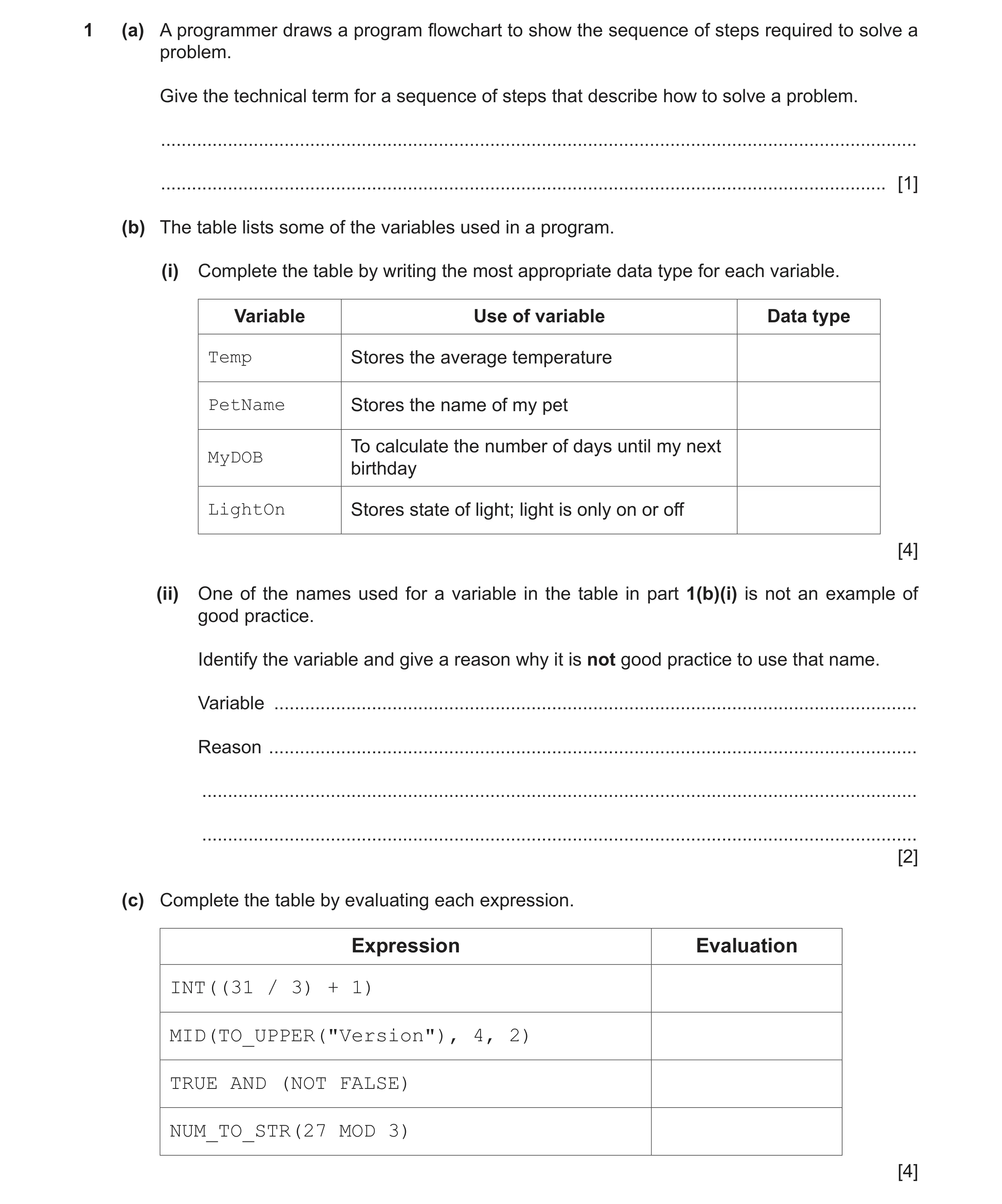
1 (a) A programmer draws a program flowchart to show the sequence of steps required to solve a problem. Give the technical term for a sequence of steps that describe how to solve a problem. … … [1] (b) The table lists some of the variables used in a program. (i) Complete the table by writing the most appropriate data type for each variable. Variable Use of variable Data type Temp Stores the average temperature PetName Stores the name of my pet To calculate the number of days until my next MyDOB birthday LightOn Stores state of light; light is only on or off [4] (ii) One of the names used for a variable in the table in part 1(b)(i) is not an example of good practice. Identify the variable and give a reason why it is not good practice to use that name. Variable … Reason … … … [2] (c) Complete the table by evaluating each expression. Expression Evaluation INT((31 / 3) + 1) MID(TO_UPPER("Version"), 4, 2) TRUE AND (NOT FALSE) NUM_TO_STR(27 MOD 3) [4]
11 marks
Mark scheme: Question Answer Marks 1(a) An algorithm 1 1(b)(i) 4 Variable Use of variable Data type Temp Stores the average temperature REAL PetName Stores the name of my pet STRING MyDOB To calculate how many days until my DATE next birthday LightOn Stores state of light; light is only on or off BOOLEAN One mark for each data type 1(b)(ii) One mark for variable name, and one for reason 2 Variable: Temp Reason: Name does not indicate what the variable is used for 1(c) 4 Expression Evaluation INT((31 / 3) + 1) 11 MID(TO_UPPER("Version"), 4, 2) "SI" TRUE AND (NOT FALSE) TRUE NUM_TO_STR(27 MOD 3) "0" One mark per row
This question in 9618/21 May/June 2022
Q9 · Examine the following state-transition diagram 9618/21 May/June 2022
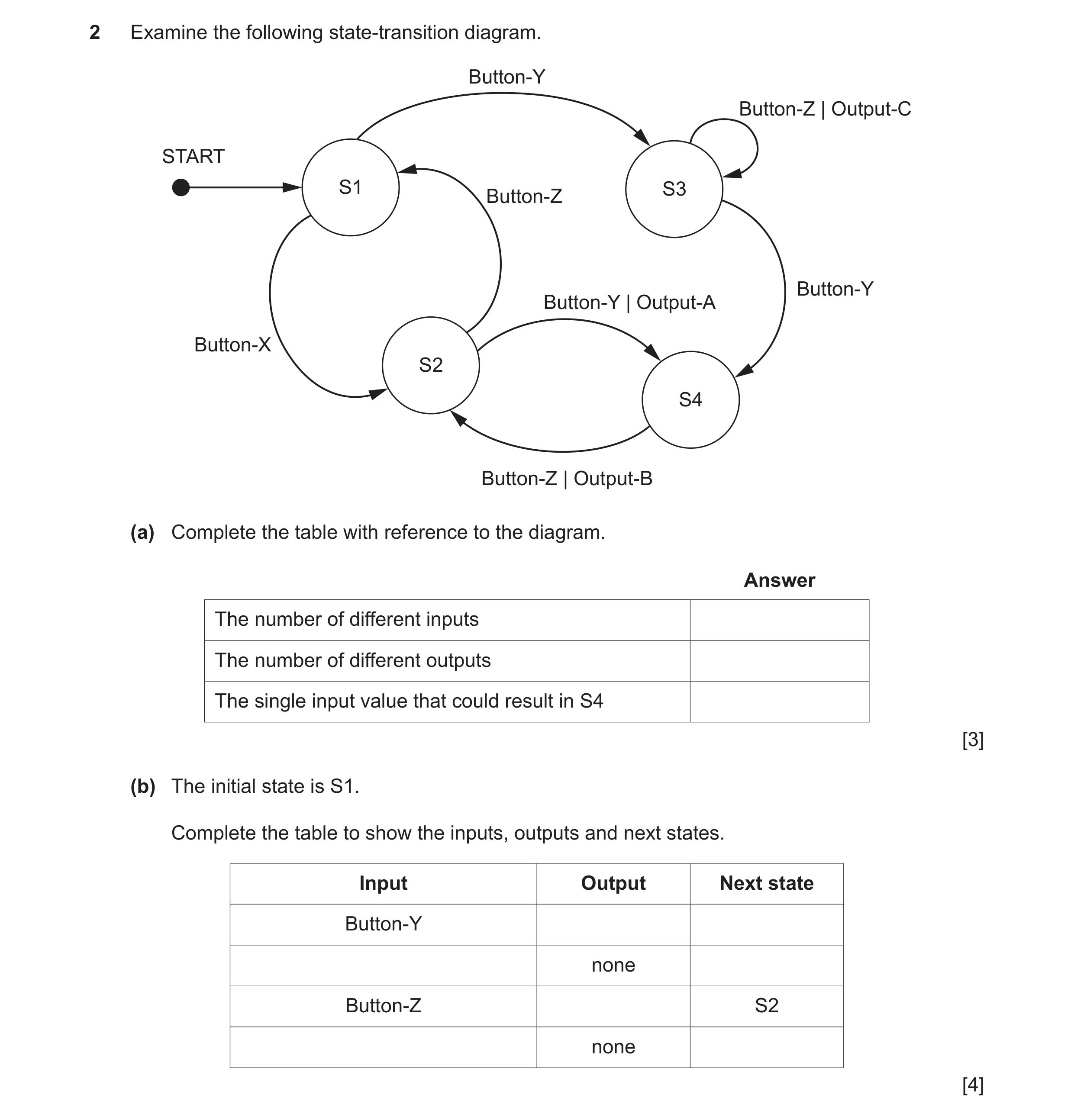
2 Examine the following state-transition diagram. Button-Y Button-Z | Output-C START S1 S3 Button-Z Button-Y Button-Y | Output-A Button-X S2 S4 Button-Z | Output-B (a) Complete the table with reference to the diagram. Answer The number of different inputs The number of different outputs The single input value that could result in S4 [3] (b) The initial state is S1. Complete the table to show the inputs, outputs and next states. Input Output Next state Button-Y none Button-Z S2 none [4]
7 marks
Mark scheme: 2(a) One mark per row 3 Answer The number of different inputs 3 The number of different outputs 3 The single input value that could result in S4 Button-Y 2(b) One mark per row 4 Example answer Note: Accept other valid answers
This question in 9618/21 May/June 2022
Q10 · The following pseudocode algorithm attempts to check whether a string is a valid email… 9618/21 Oct/Nov 2022
6 The following pseudocode algorithm attempts to check whether a string is a valid email address. FUNCTION IsValid(InString : STRING) RETURNS BOOLEAN DECLARE Index, Dots, Ats, Others : INTEGER DECLARE NextChar : CHAR DECLARE Valid : BOOLEAN Index 1 ← Dots 0 ← Ats 0 ← Others 0 ← Valid TRUE ← REPEAT NextChar MID(InString, Index, 1) ← CASE OF NextChar '.' : Dots Dots + 1 ← '@' : Ats Ats + 1 ← IF Ats > 1 THEN Valid FALSE ← ENDIF OTHERWISE : Others Others + 1 ← ENDCASE IF Dots > 1 AND Ats = 0 THEN Valid FALSE ← ELSE Index Index + 1 ← ENDIF UNTIL Index > LENGTH(InString) OR Valid = FALSE IF NOT (Dots >= 1 AND Ats = 1 AND Others > 8) THEN Valid FALSE ← ENDIF RETURN Valid ENDFUNCTION (a) Part of the validation is implemented by the line: IF NOT (Dots >= 1 AND Ats = 1 AND Others > 8) THEN State the values that would result in the condition evaluating to TRUE. … … … [1] (b) (i) Complete the trace table by dry running the function when it is called as follows: Result IsValid("Liz.123@big@net") ← Index NextChar Dots Ats Others Valid [5] (ii) State the value returned when IsValid() is called using the expression shown in part (b)(i). … [1]
7 marks
Mark scheme: 6(a) One mark for any part correct (accept equivalent wording) (Max 1): 1 • Condition evaluates to TRUE if bracket contents evaluate to FALSE: • Bracket contents evaluate to FALSE if: • Dots: zero / less than one or • Ats: not equal to one or • Others: less than nine 6(b)(i) One mark for each area as outlined: 5 Ats Index NextChar Dots Others Valid 0 0 0 TRUE 1 'L' 1 2 'i' 2 3 'z' 3 4 '.' 1 5 '1' 4 6 '2' 5 7 '3' 6 8 '@' 1 9 'b' 7 10 'i' 8 11 'g' 9 12 '@' 2 FALSE 6(b)(ii) FALSE 1
This question in 9618/21 Oct/Nov 2022
Q11 · A simple arithmetic expression is stored as a string in the format… 9618/21 Oct/Nov 2022
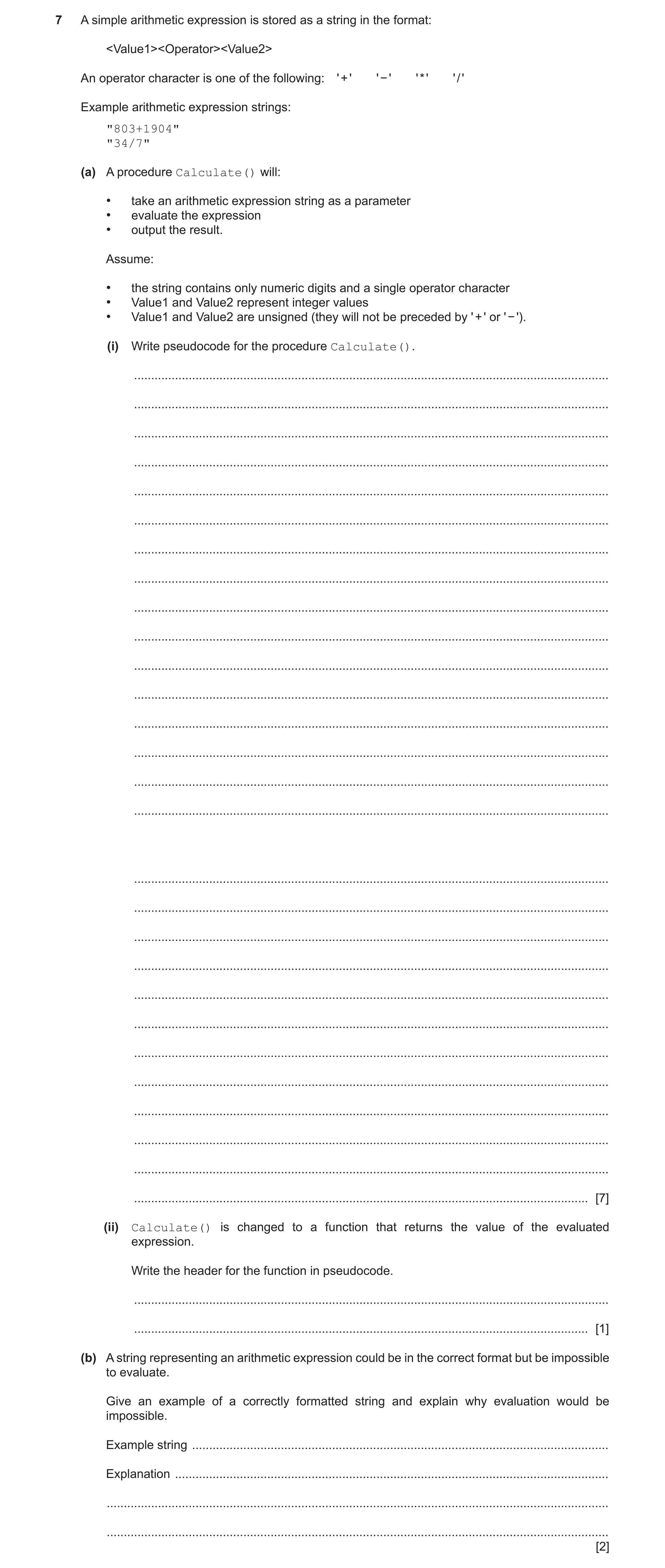
7 A simple arithmetic expression is stored as a string in the format: <Value1><Operator><Value2> An operator character is one of the following: ' + ' ' − ' ' * ' ' / ' Example arithmetic expression strings: "803+1904" "34/7" (a) A procedure Calculate() will: • take an arithmetic expression string as a parameter • evaluate the expression • output the result. Assume: • the string contains only numeric digits and a single operator character • Value1 and Value2 represent integer values • Value1 and Value2 are unsigned (they will not be preceded by ' + ' or ' − '). (i) Write pseudocode for the procedure Calculate(). … … … … … … … … … … … … … … … … … … … … … … … … … … … … [7] (ii) Calculate() is changed to a function that returns the value of the evaluated expression. Write the header for the function in pseudocode. … … [1] (b) A string representing an arithmetic expression could be in the correct format but be impossible to evaluate. Give an example of a correctly formatted string and explain why evaluation would be impossible. Example string … Explanation … … … [2]
10 marks
Mark scheme: 7(a)(i) One mark per point (Max 7) as follows: 7 1 Declaration of local variables for Par1 Par2 and Par3 2 Loop to end of (parameter) string // until operator is found 3 Extract a character in a loop... 4 Attempt at extraction of three parts of expression using substring functions 5 Completely correct extraction of all three parts of expression 6. Convert string to Integer using STR_TO_NUM(<something sensible>) 7 Attempt to interpret at least two operators (Par2): + - * / 8 Corresponding correct calculation (all operators) and final Output of result PROCEDURE Calculate(Expression : STRING) DECLARE Val1, Val2, Index : INTEGER DECLARE Result : REAL DECLARE Par1, Par2, Par3 : STRING CONSTANT PLUS = '+' CONSTANT MINUS = '-' CONSTANT MULTIPLY = '*' CONSTANT DIVIDE = '/' FOR Index 1 TO LENGTH(Expression) //search for operator ThisChar MID(Expression, Index, 1) IF IS_NUM(ThisChar) = FALSE THEN Par1 LEFT(Expression, Index – 1) Par2 ThisChar Par3 RIGHT(Expression, LENGTH(Expression) – Index) ENDIF NEXT Index Val1 STR_TO_NUM(Par1) Val2 STR_TO_NUM(Par3) CASE OF Par2 PLUS : Result Val1 + Val2 MINUS : Result Val1 - Val2 MULTIPLY : Result Val1 * Val2 DIVIDE : Result Val1 / Val2 ENDCASE OUTPUT Result ENDPROCEDURE 7(a)(ii) FUNCTION Calculate(Expression : STRING) RETURNS REAL 1 7(b) Example string: "23/0" (Any divide by zero example) 2 Reason: The result is infinity / cannot be represented / is undefined // will cause the program to crash
This question in 9618/21 Oct/Nov 2022
Q12 · An algorithm will process data from a test taken by a group of students 9618/22 Oct/Nov 2022
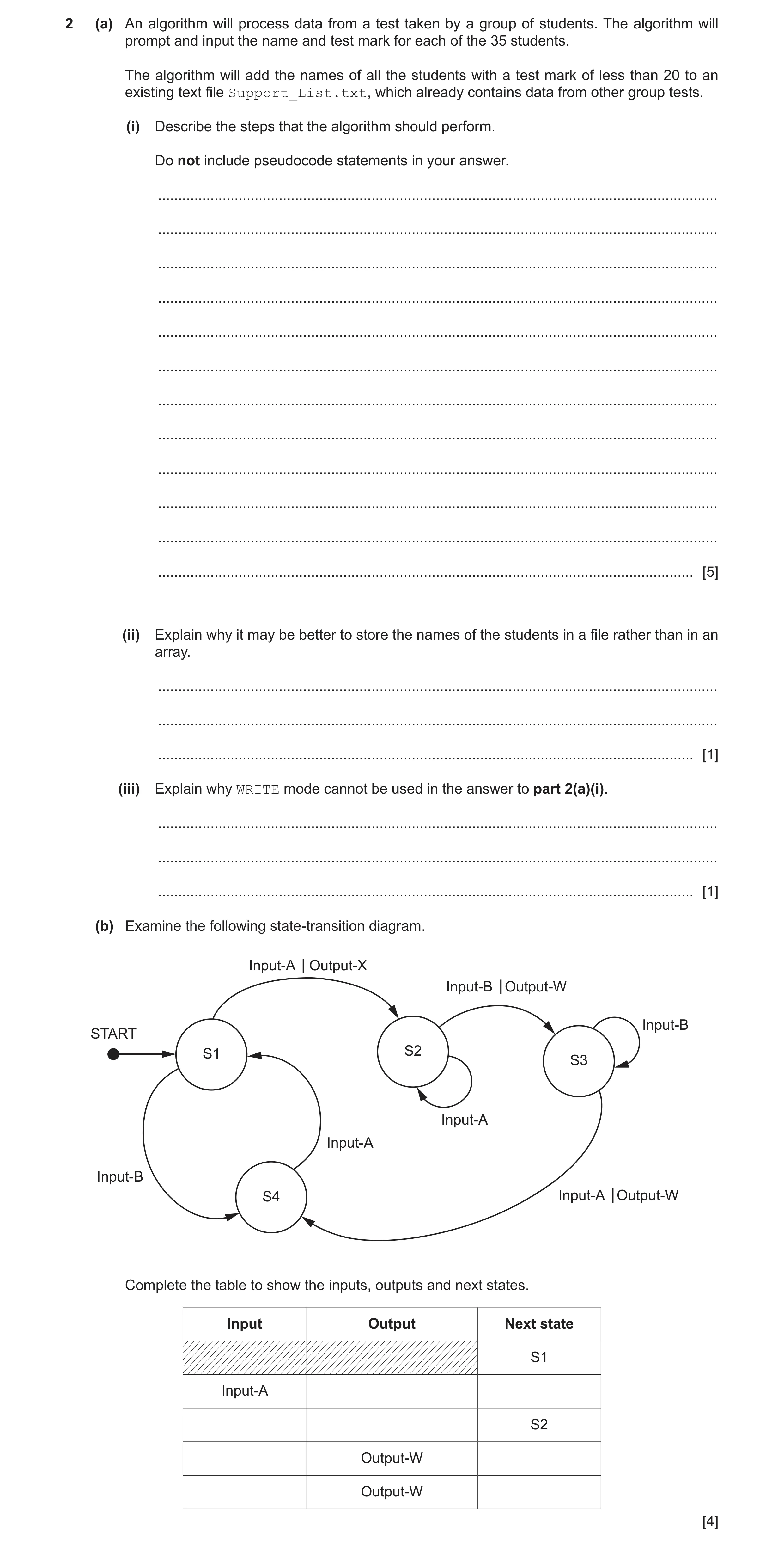
2 (a) An algorithm will process data from a test taken by a group of students. The algorithm will prompt and input the name and test mark for each of the 35 students. The algorithm will add the names of all the students with a test mark of less than 20 to an existing text file Support_List.txt, which already contains data from other group tests. (i) Describe the steps that the algorithm should perform. Do not include pseudocode statements in your answer. … … … … … … … … … … … … [5] (ii) Explain why it may be better to store the names of the students in a file rather than in an array. … … … [1] (iii) Explain why WRITE mode cannot be used in the answer to part 2(a)(i). … … … [1] (b) Examine the following state-transition diagram. Input-A Output-X Input-B Output-W Input-BSTART S1 S2 S3 Input-A Input-A Input-B S4 Input-A Output-W Complete the table to show the inputs, outputs and next states. Input Output Next state S1 Input-A S2 Output-W Output-W [4]
11 marks
Mark scheme: 2(a)(i) One mark per step (or equivalent): 5 1 Open file in APPEND mode (and subsequent Close) 2 Prompt and Input a student name and mark 3 If mark greater than or equal to 20 jump to step 5 4 Write only the name to the file 5 Repeat from Step 2 for 35 times / the number of students 2(a)(ii) Data in a file is saved after the computer is switched off / stored 1 permanently // no need to re-enter the data when the program is re-run 2(a)(iii) Example answer: 1 So that existing file data is not overwritten. 2(b) 4 One mark per row (row 2 to 5): Input Output Next state S1 Input-A Output-X S2 Input-A (none) S2 Input-B Output-W S3 Input-A Output-W S4
This question in 9618/22 Oct/Nov 2022
Q13 · Customers collect points every time they make a purchase at a store 9618/21 May/June 2023
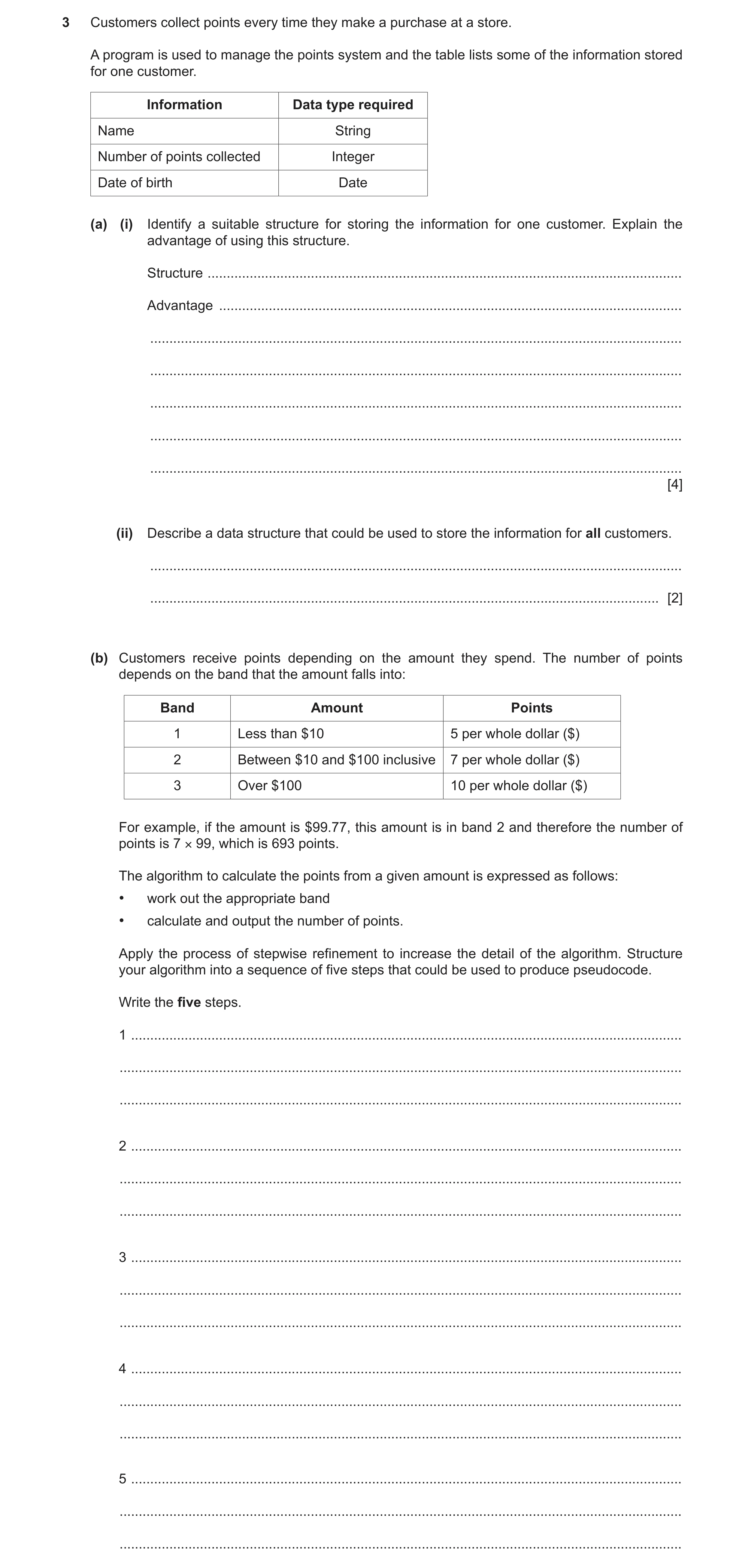
3 Customers collect points every time they make a purchase at a store. A program is used to manage the points system and the table lists some of the information stored for one customer. Information Data type required Name String Number of points collected Integer Date of birth Date (a) (i) Identify a suitable structure for storing the information for one customer. Explain the advantage of using this structure. Structure … Advantage … … … … … … [4] (ii) Describe a data structure that could be used to store the information for all customers. … … [2] (b) Customers receive points depending on the amount they spend. The number of points depends on the band that the amount falls into: Band Amount Points 1 Less than $10 5 per whole dollar ($) 2 Between $10 and $100 inclusive 7 per whole dollar ($) 3 Over $100 10 per whole dollar ($) For example, if the amount is $99.77, this amount is in band 2 and therefore the number of points is 7 × 99, which is 693 points. The algorithm to calculate the points from a given amount is expressed as follows: • work out the appropriate band • calculate and output the number of points. Apply the process of stepwise refinement to increase the detail of the algorithm. Structure your algorithm into a sequence of five steps that could be used to produce pseudocode. Write the five steps. 1 … … … 2 … … … 3 … … … 4 … … … 5 … … …
11 marks
Mark scheme: 3(a)(i) One mark for structure 4 Structure: Record One mark for each point Advantage: A set of data / all data related to one customer of different types is held under a single identifier/entity 3(a)(ii) A (1D) array of records // An array of the given type could be used 2 One mark per underlined word 3(b) One mark for reference to each: 5 1 Reference to the use of constants or variables for the two threshold values of 10 and 100 // Input amount spent (by customer and store in a numeric variable) 2 Work out one band that amount maps to 3 Work out all bands that amount maps to 4 Calculate rounded value of amount / whole number part of amount 5 Calculate the points by multiplying the (rounded) amount by the appropriate value for appropriate band /all bands 6 Output the number of points Note: Max 5 from available points
This question in 9618/21 May/June 2023
Q14 · A computer system for a shop stores information about each customer 9618/22 May/June 2023
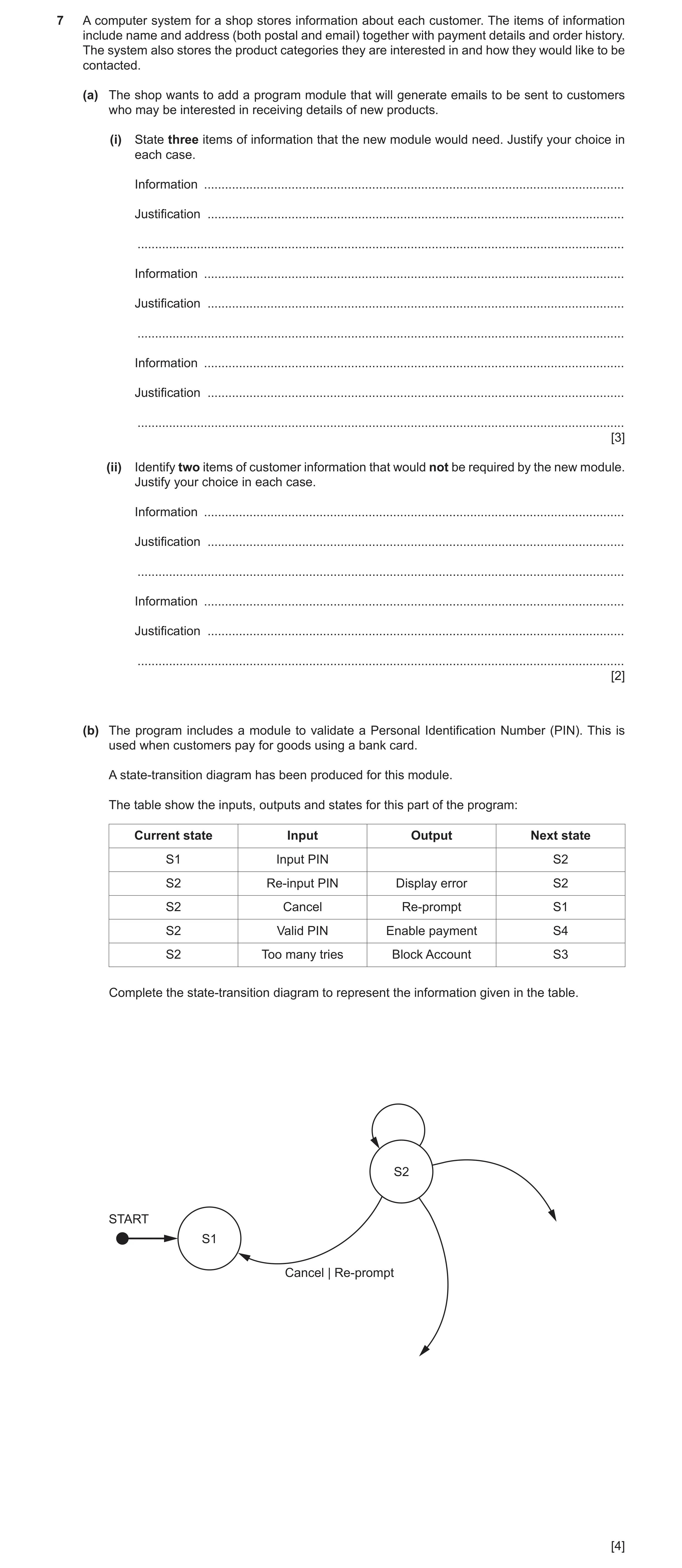
7 A computer system for a shop stores information about each customer. The items of information include name and address (both postal and email) together with payment details and order history. The system also stores the product categories they are interested in and how they would like to be contacted. (a) The shop wants to add a program module that will generate emails to be sent to customers who may be interested in receiving details of new products. (i) State three items of information that the new module would need. Justify your choice in each case. Information … Justification … … Information … Justification … … Information … Justification … … [3] (ii) Identify two items of customer information that would not be required by the new module. Justify your choice in each case. Information … Justification … … Information … Justification … … [2] (b) The program includes a module to validate a Personal Identification Number (PIN). This is used when customers pay for goods using a bank card. A state‑transition diagram has been produced for this module. The table show the inputs, outputs and states for this part of the program: Current state Input Output Next state S1 Input PIN S2 S2 Re‑input PIN Display error S2 S2 Cancel Re‑prompt S1 S2 Valid PIN Enable payment S4 S2 Too many tries Block Account S3 Complete the state‑transition diagram to represent the information given in the table. S2 START S1 Cancel | Re-prompt [4]
9 marks
Mark scheme: 7(a)(i) Correct answers include: 3 Information: customer name Justification: to personalise / address the email Information: email address Justification: so that the email can be delivered correctly Information: product category preference Justification: to check that the customer would be interested in the product Information: contact preference Justification: to check that the customer will accept contact via email Information: order history Justification: to send details of product similar to that already bought // to identify frequent shoppers Information: new product information Justification: to include information about the new product in the email One mark for each piece of information and matching justification Note: Max 3 marks 7(a)(ii) One mark for each piece of information and matching justification: 2 postal address Justification: sending an email, not a letter payment details Justification: Nothing being bought / sold at this stage order history Justification: Customer preference used to decide if new product is relevant Note: Max 2 marks 7(b) 4 One mark for each: 1 Line from S1 to S2 and label 2 S2 loop label 3 S3 circle and label on incoming 4 S4 circle and label on incoming
This question in 9618/22 May/June 2023
Q15 · A school has a library system which allows students to borrow books for a length of time 9618/23 May/June 2023
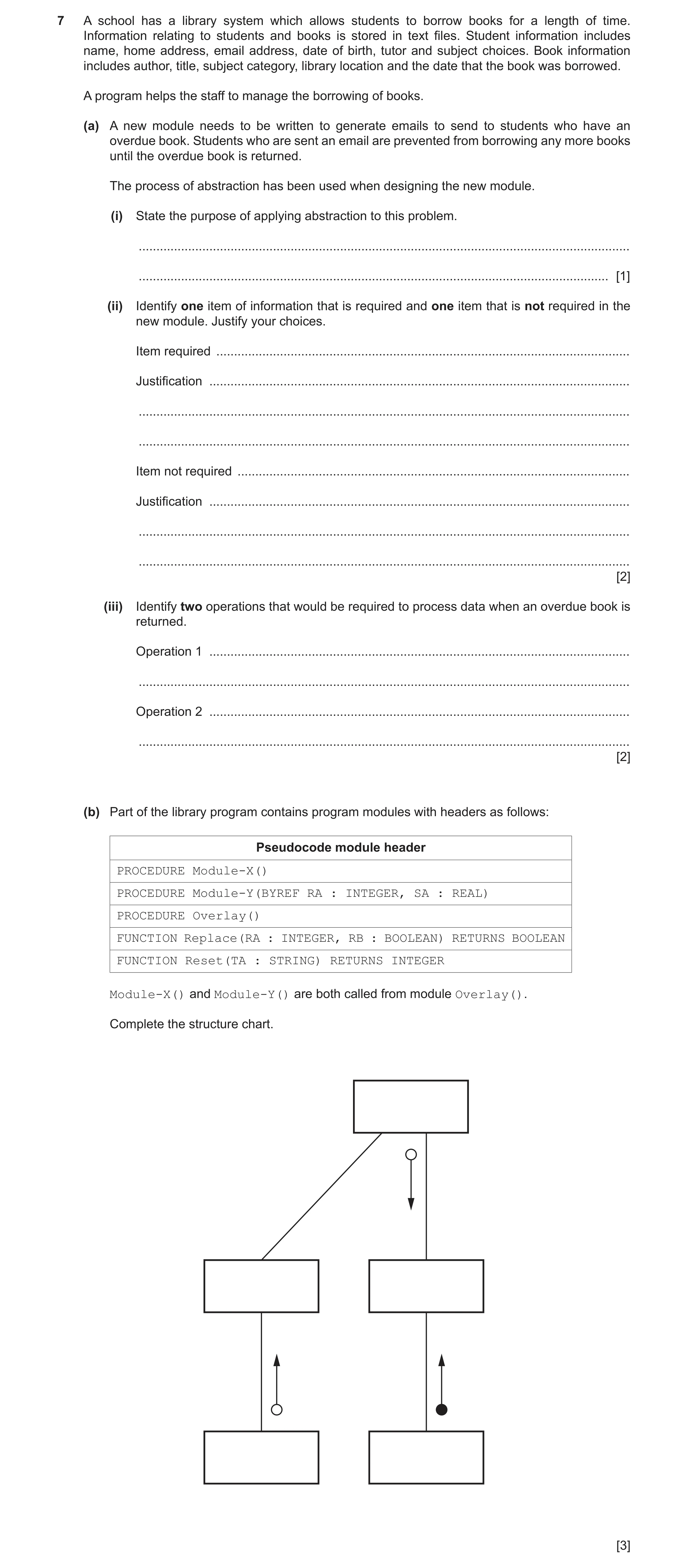
7 A school has a library system which allows students to borrow books for a length of time. Information relating to students and books is stored in text files. Student information includes name, home address, email address, date of birth, tutor and subject choices. Book information includes author, title, subject category, library location and the date that the book was borrowed. A program helps the staff to manage the borrowing of books. (a) A new module needs to be written to generate emails to send to students who have an overdue book. Students who are sent an email are prevented from borrowing any more books until the overdue book is returned. The process of abstraction has been used when designing the new module. (i) State the purpose of applying abstraction to this problem. … … [1] (ii) Identify one item of information that is required and one item that is not required in the new module. Justify your choices. Item required … Justification … … … Item not required … Justification … … … [2] (iii) Identify two operations that would be required to process data when an overdue book is returned. Operation 1 … … Operation 2 … … [2] (b) Part of the library program contains program modules with headers as follows: Pseudocode module header PROCEDURE Module-X() PROCEDURE Module-Y(BYREF RA : INTEGER, SA : REAL) PROCEDURE Overlay() FUNCTION Replace(RA : INTEGER, RB : BOOLEAN) RETURNS BOOLEAN FUNCTION Reset(TA : STRING) RETURNS INTEGER Module-X() and Module-Y() are both called from module Overlay(). Complete the structure chart. [3]
8 marks
Mark scheme: 7(a)(i) To filter out information (that is not necessary to solve the problem) // 1 to include only essential information 7(a)(ii) Required: 2 Student : Student name / email (address) Loan: Return/Issue date Book: Book title Not Required: Student: Home address / DoB / tutor / subject choices Book: Library location / category / author / book title 7(a)(iii) Max 2 marks 2 Examples could include: Clear the loan // indicate that the book has been returned // update loan history Take the student off 'block' // allow the student to borrow further books Send acknowledgement to the student when book is returned 7(b) Max 3 marks 3 MP1 All modules correctly labelled and interconnected. MP2 Correct parameters and return type to Module-X and Reset MP3 Correct parameters and return type to Module-Y and Replace MP4 Correct parameters and return type to Overlay and Module-Y
This question in 9618/23 May/June 2023
 15 / 26
 16 / 26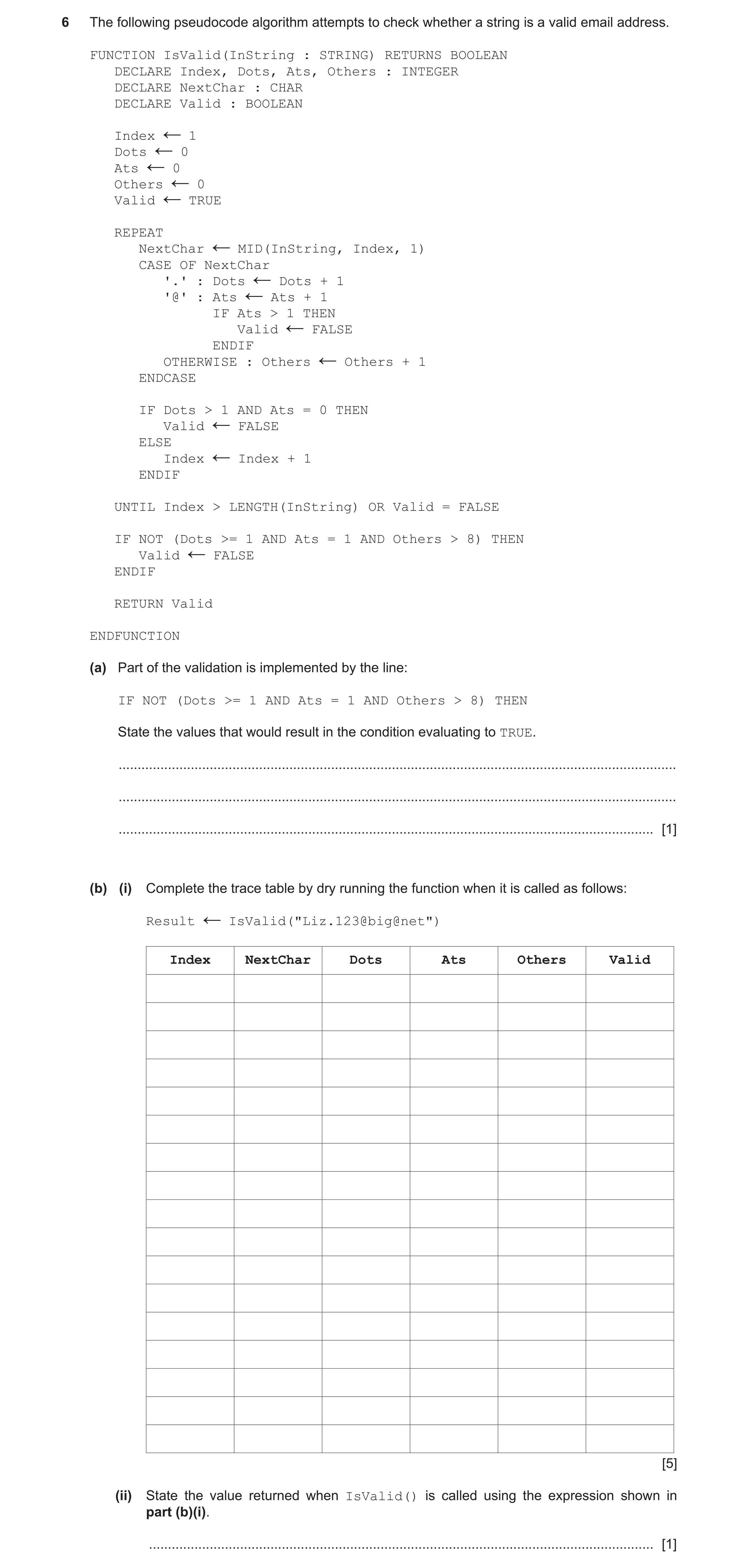
 10
10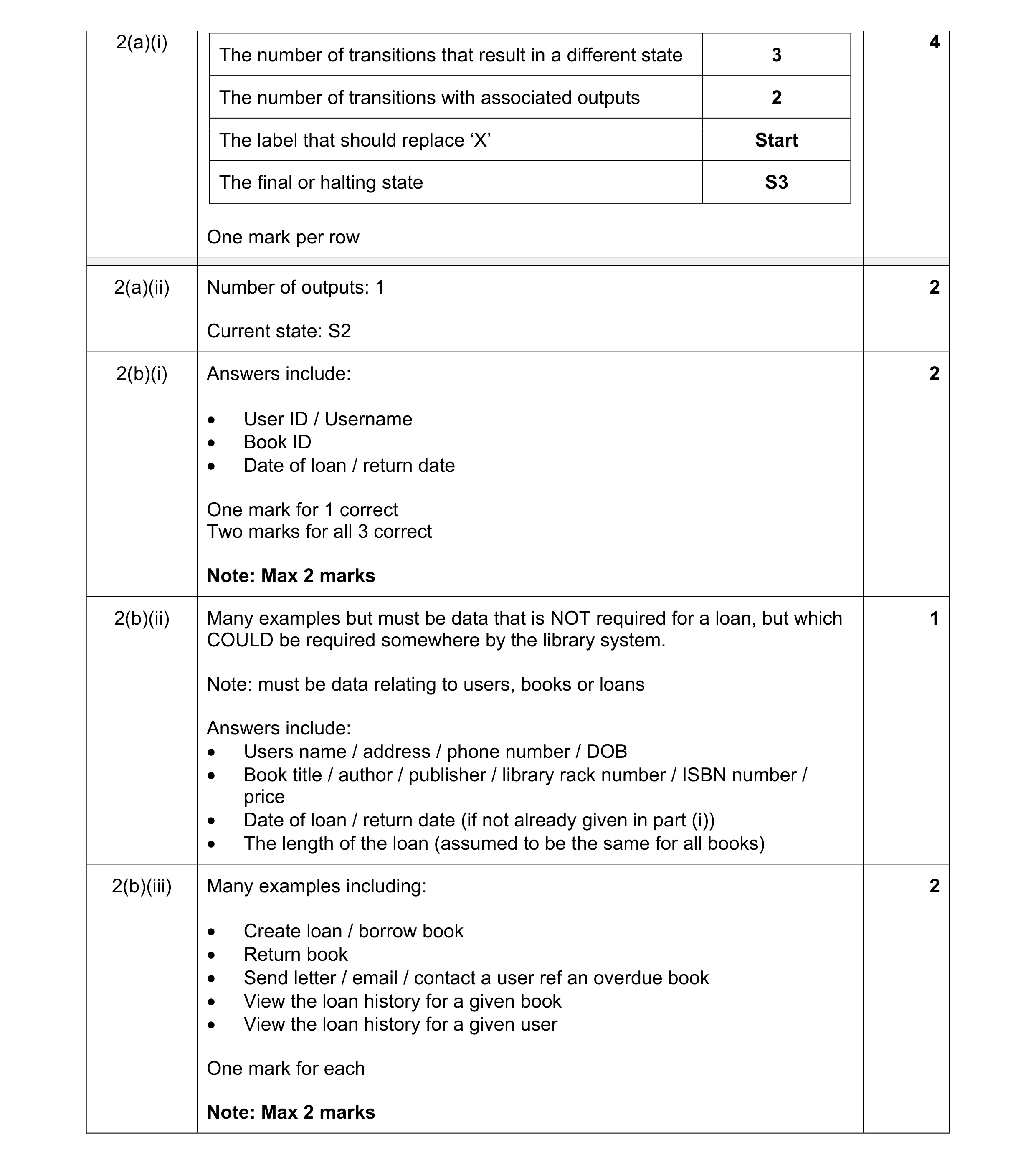 11
11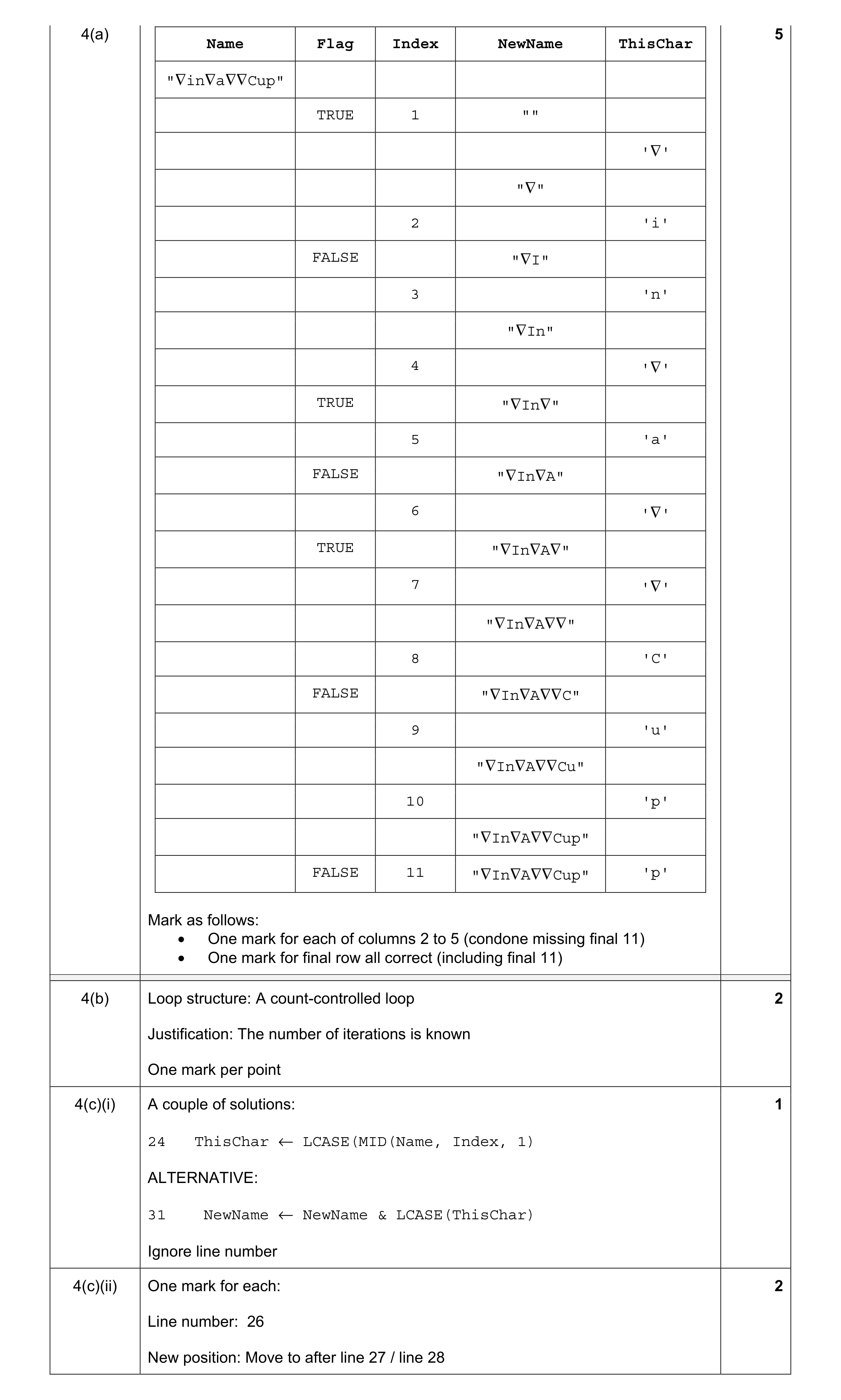 10
10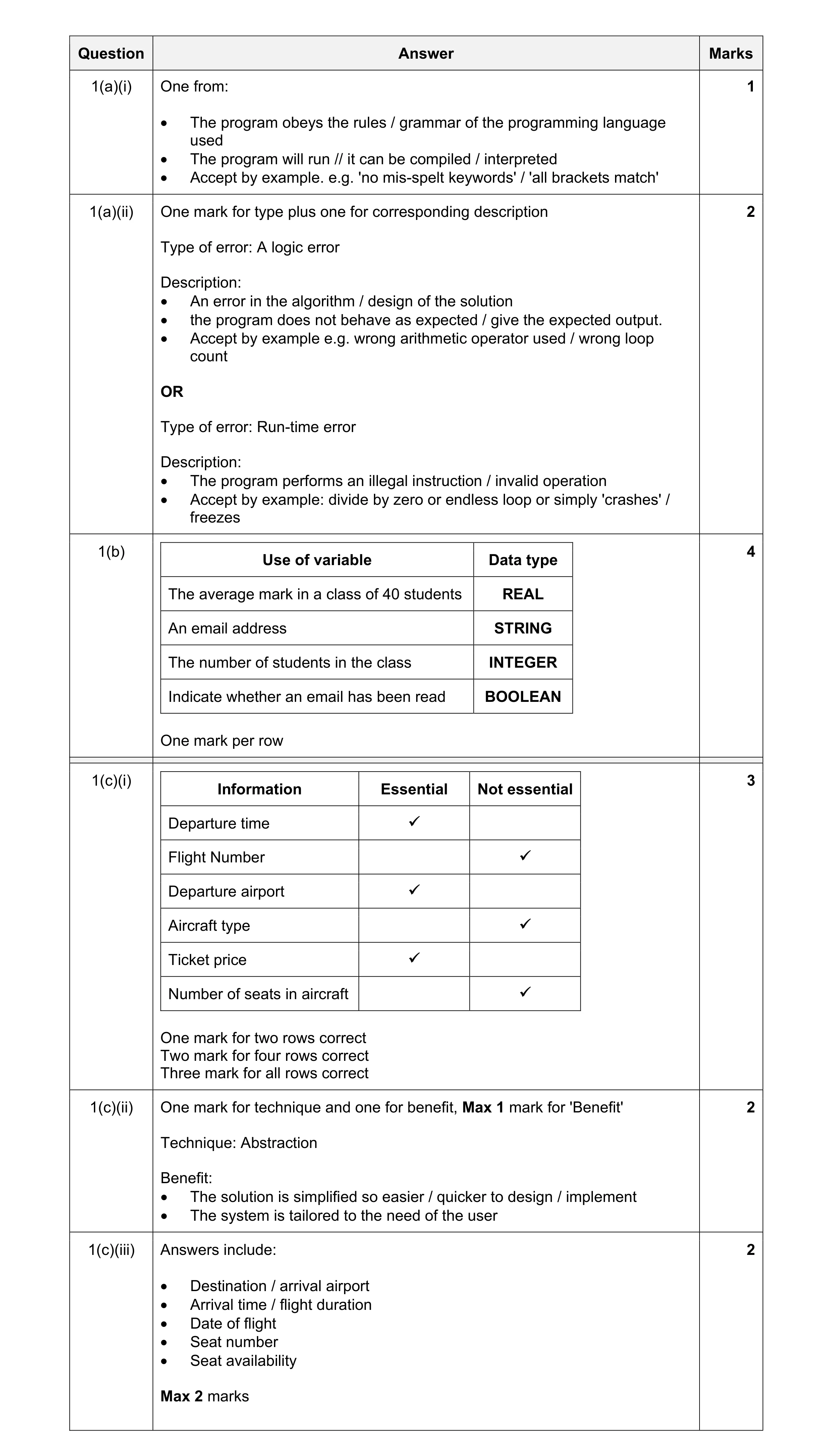 14
14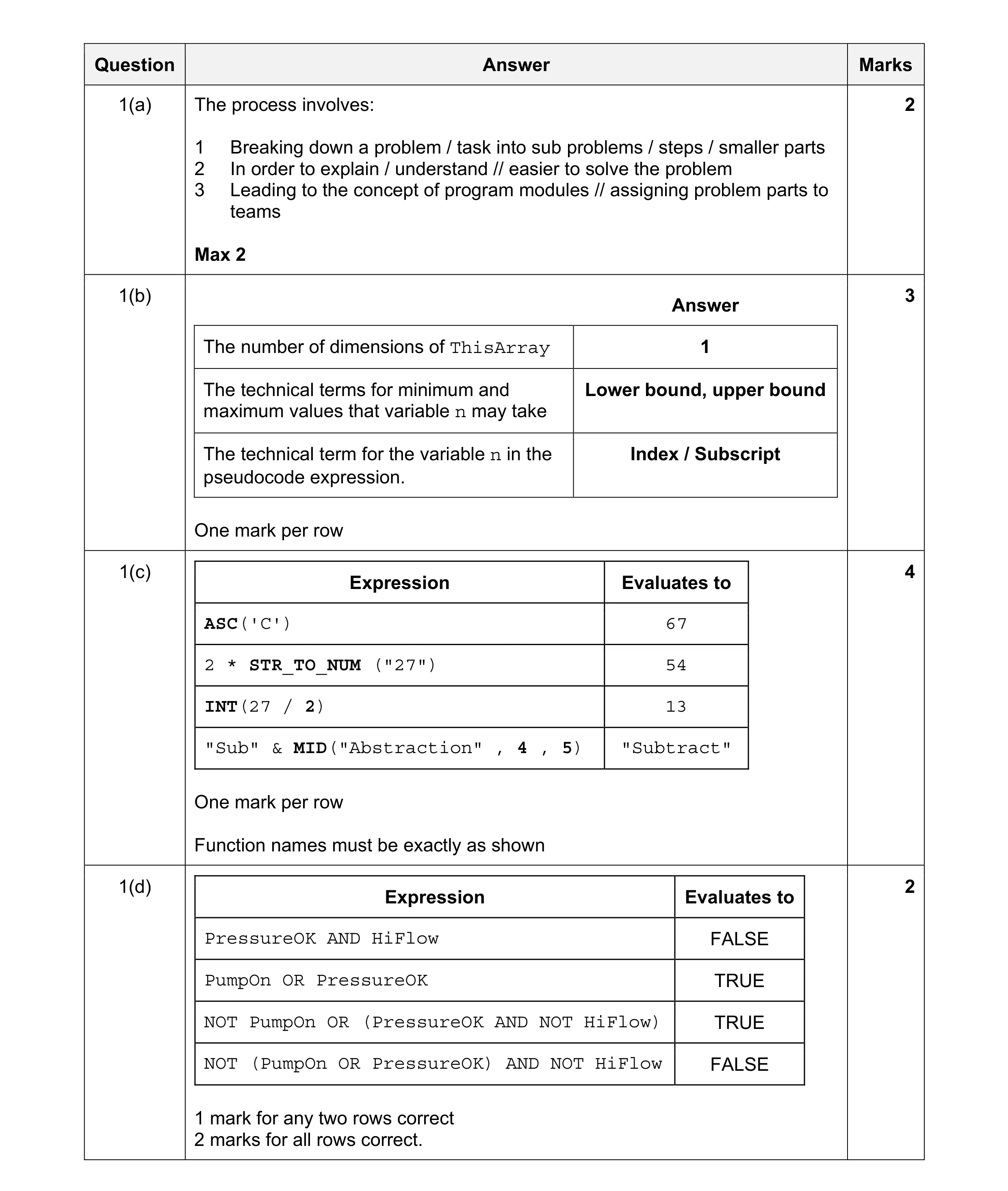 11
11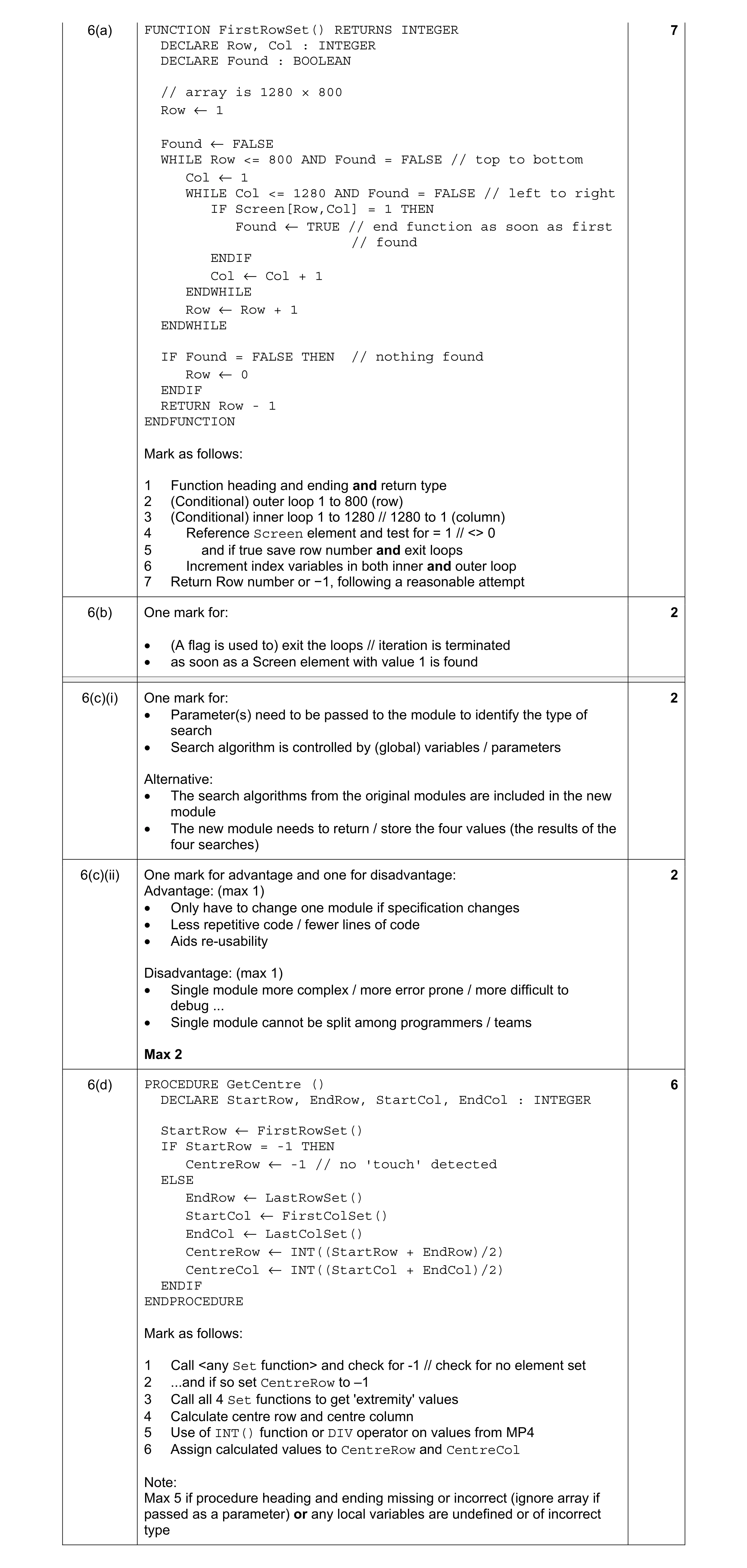 13
13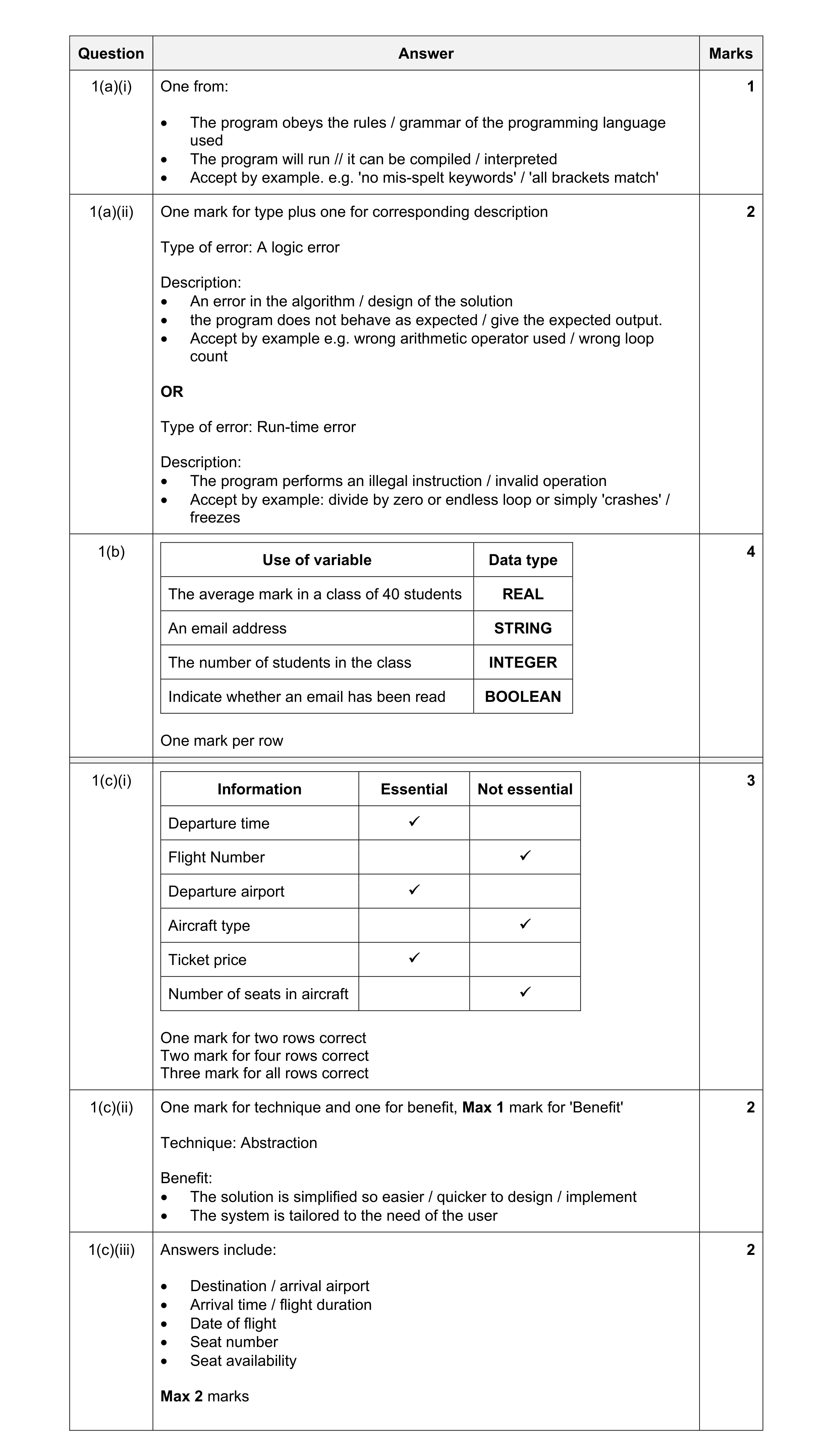 14
14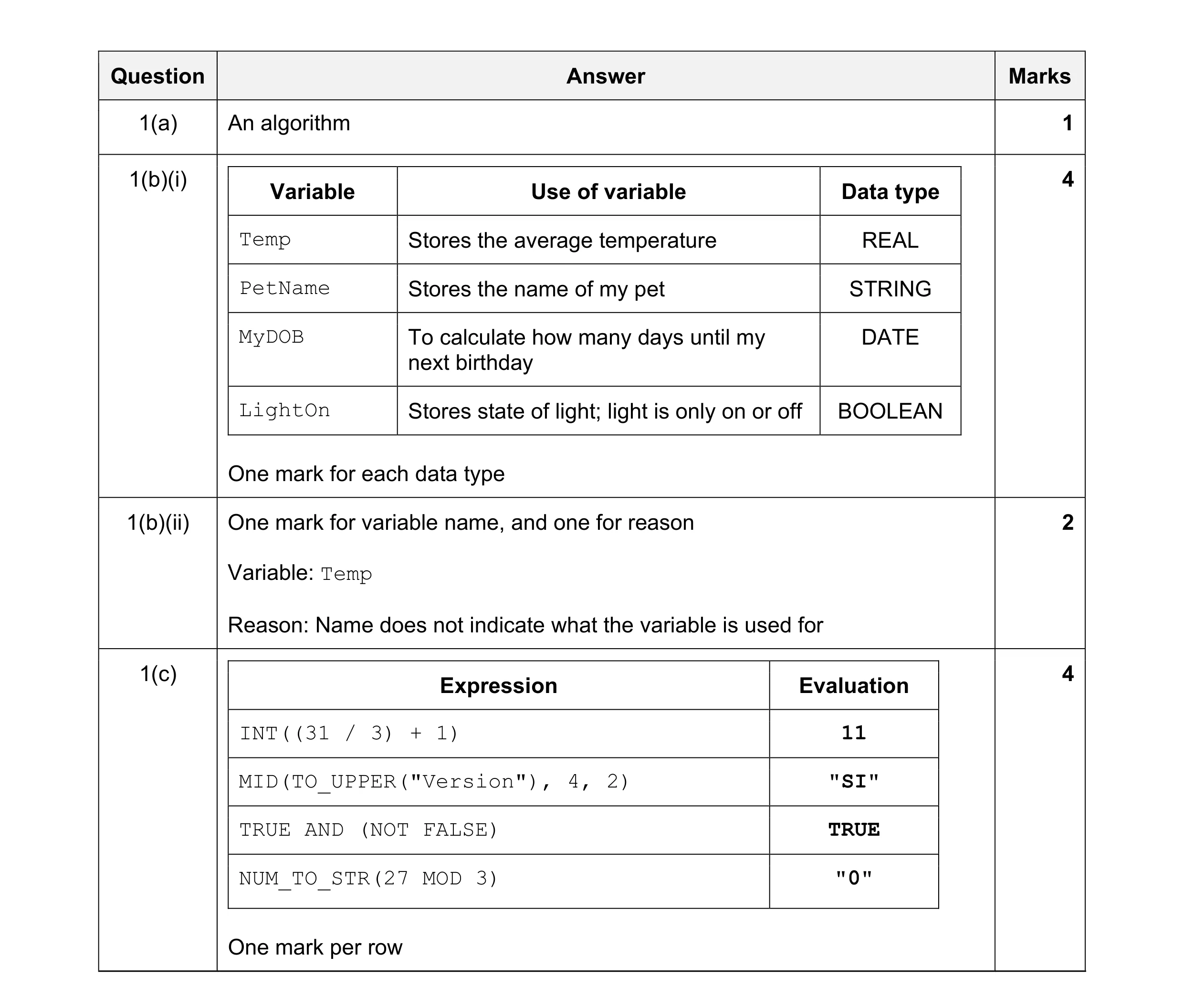 11
11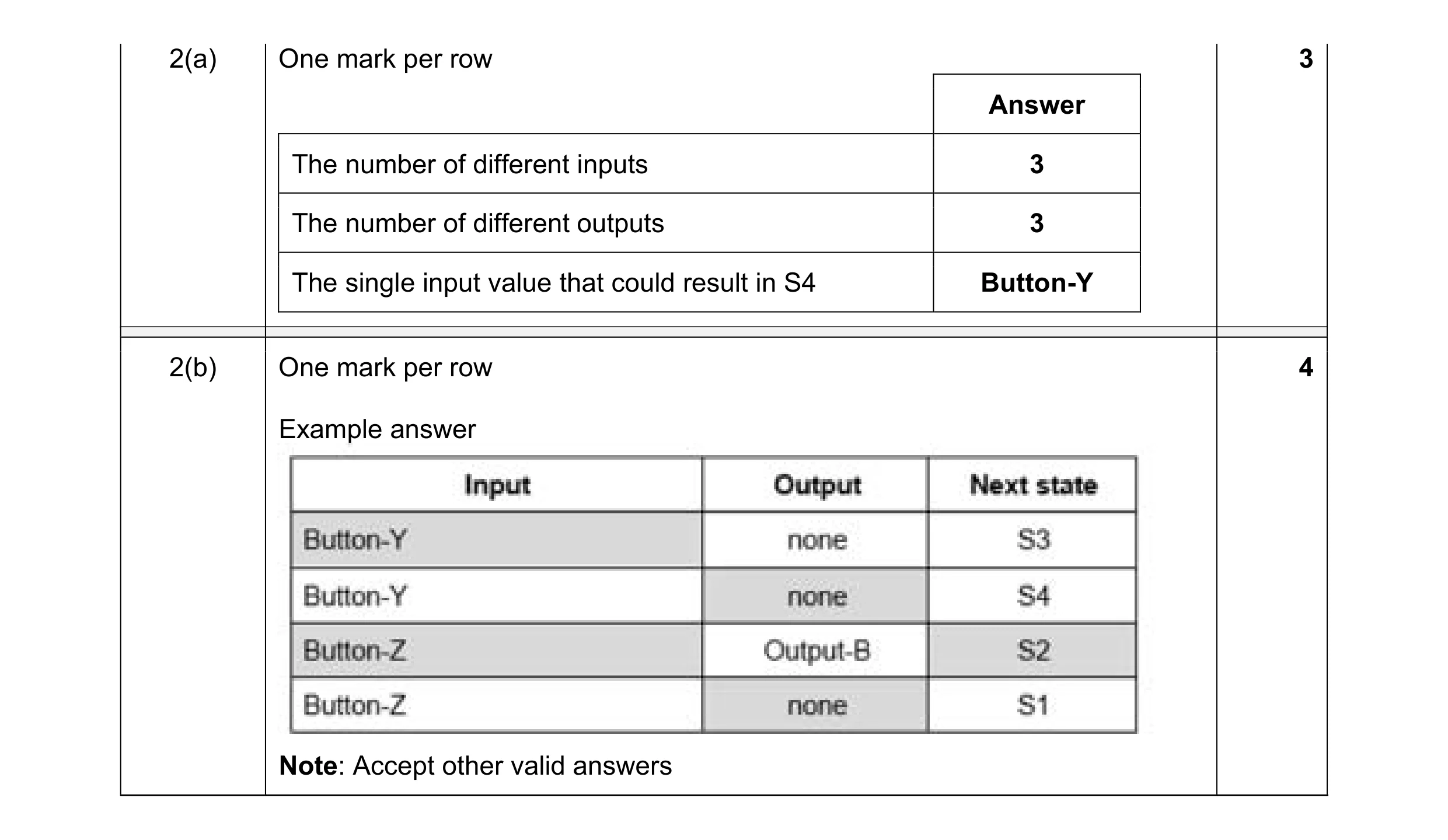 7
7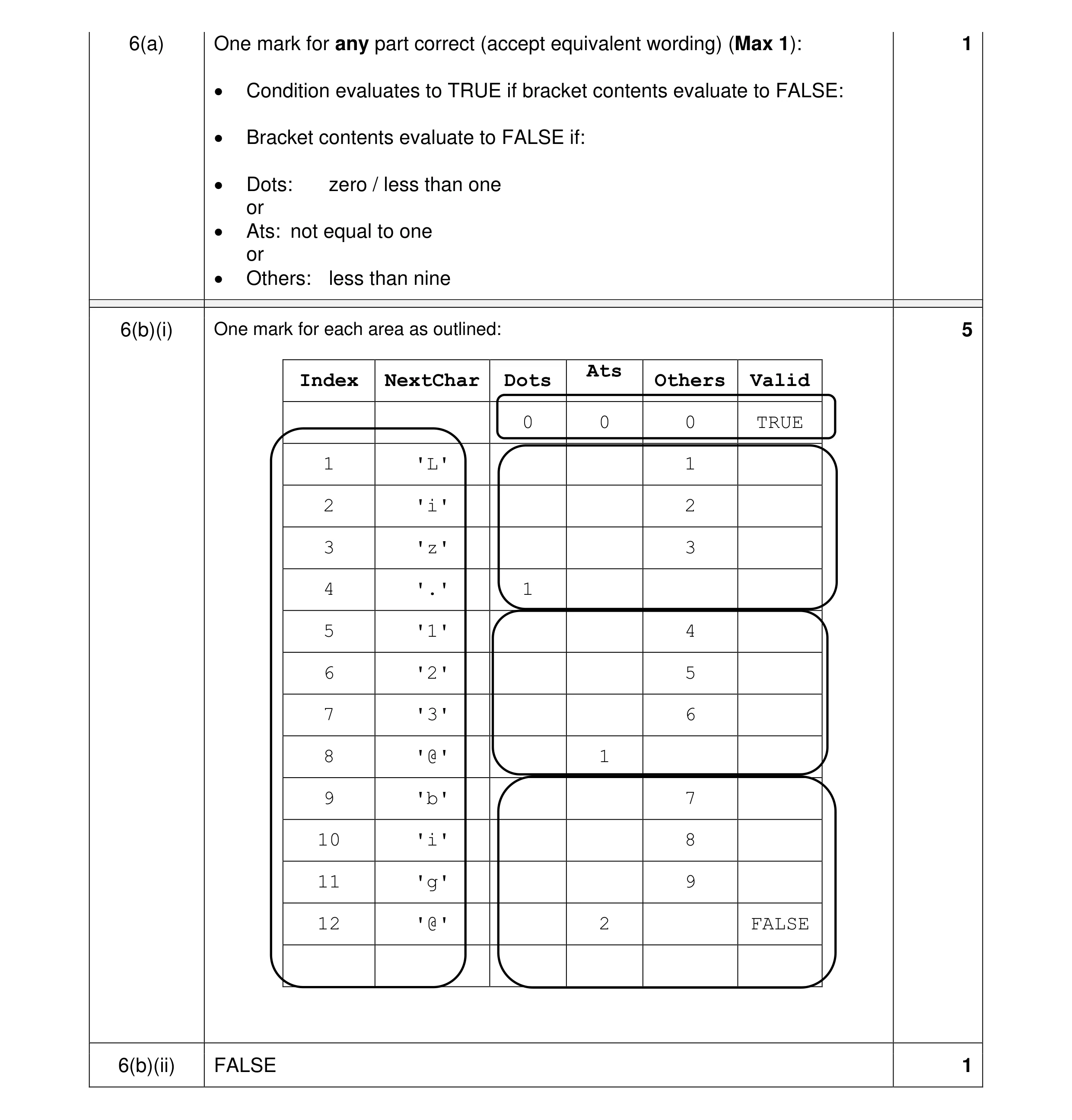 7
7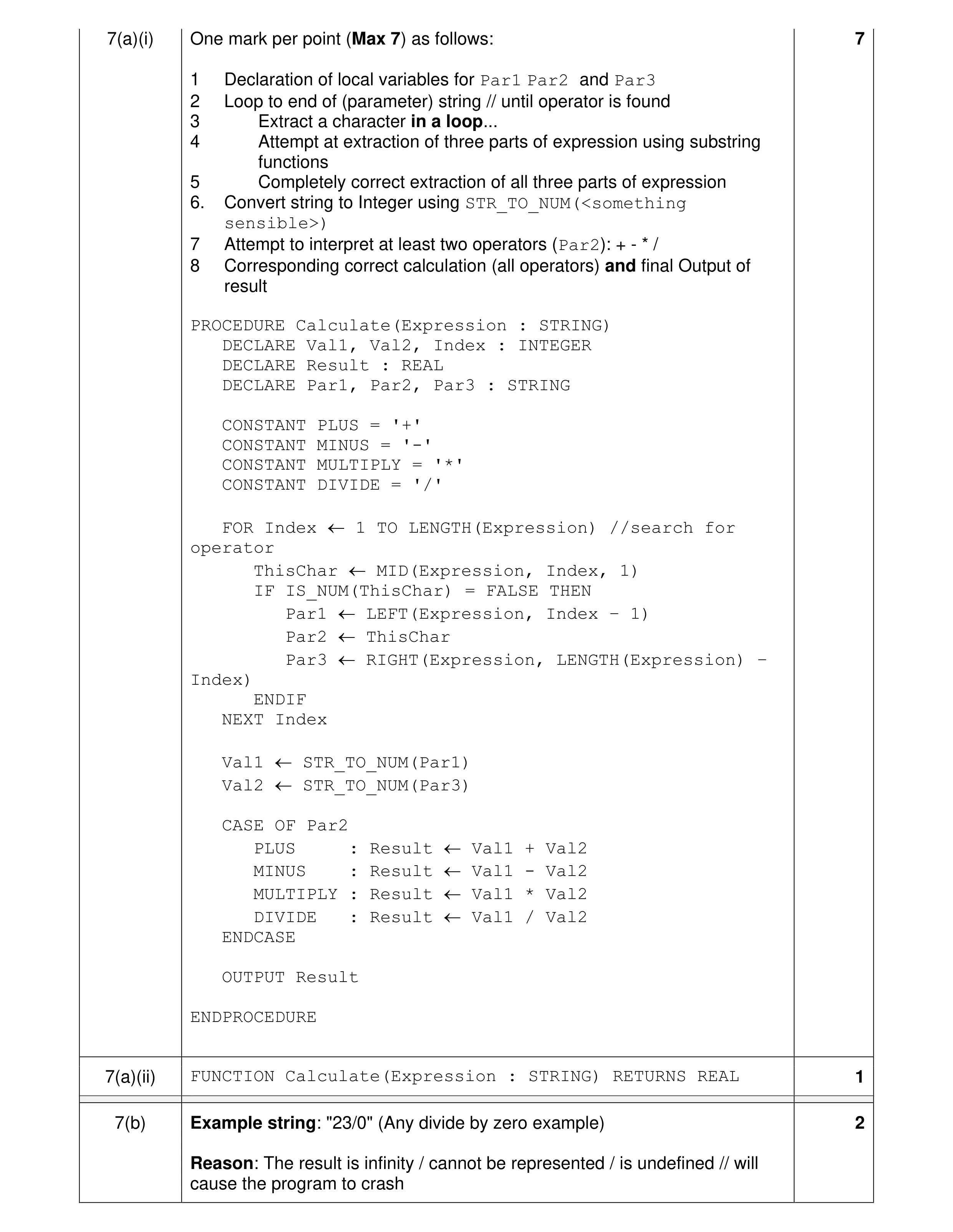 10
10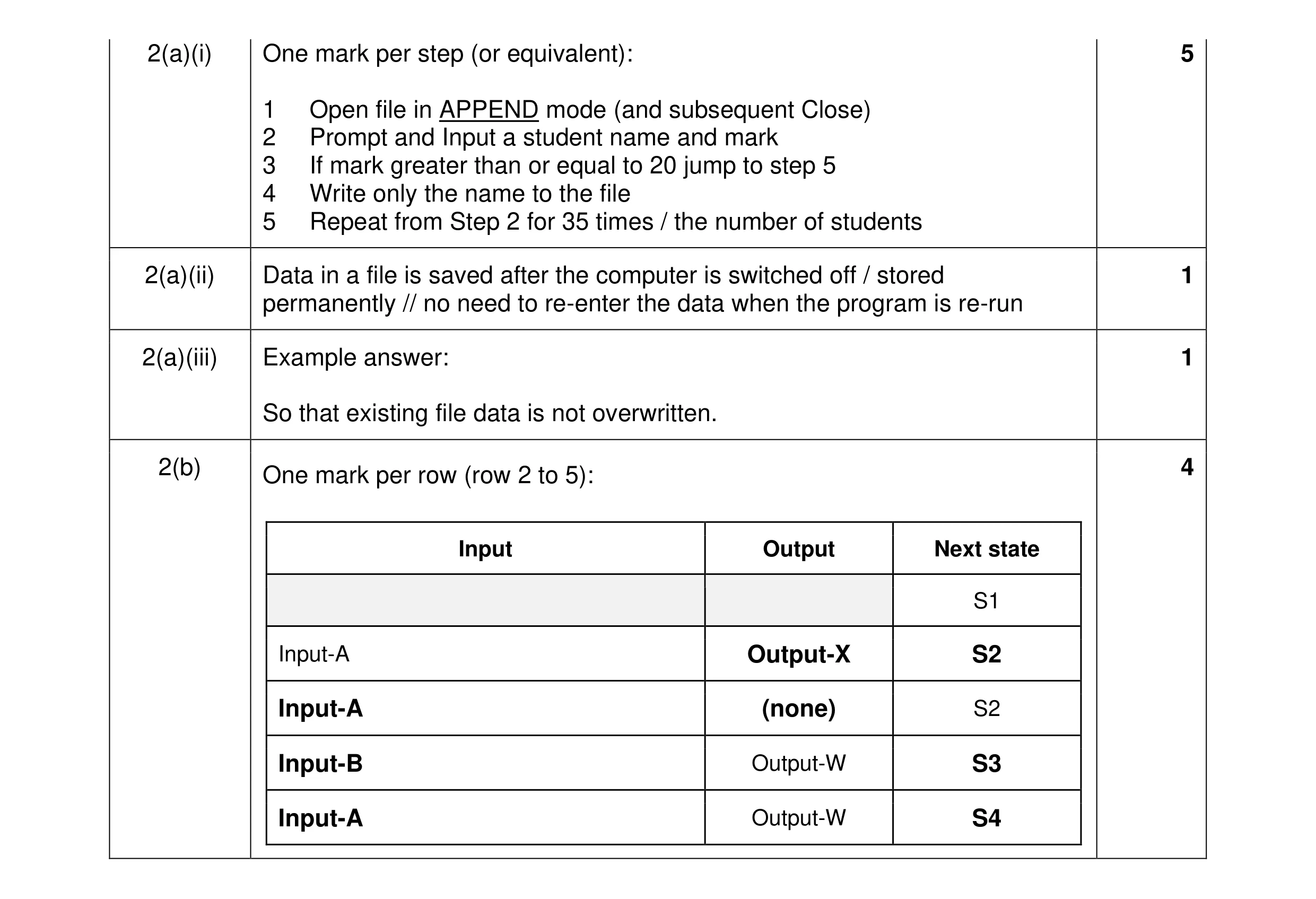 11
11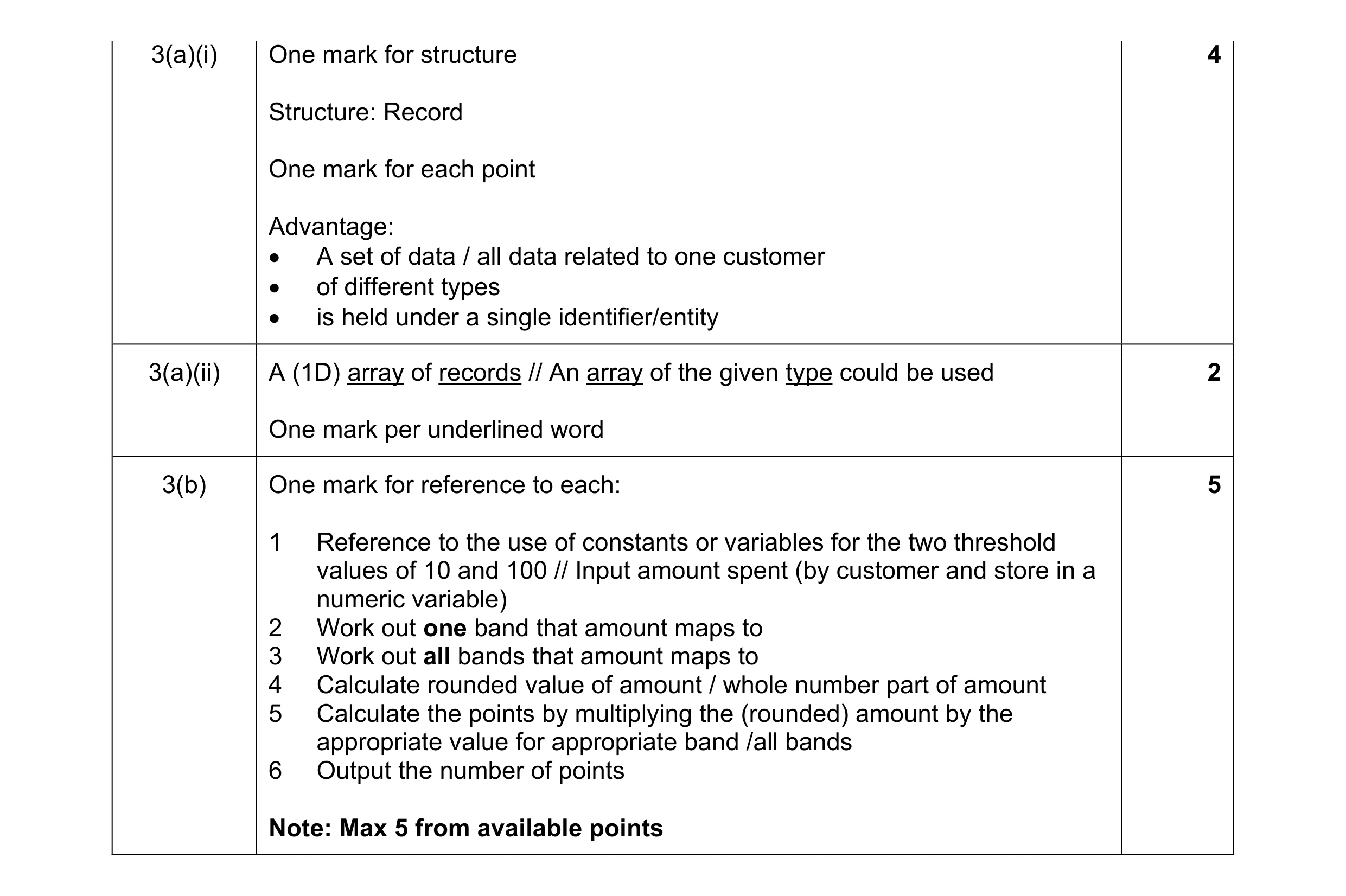 11
11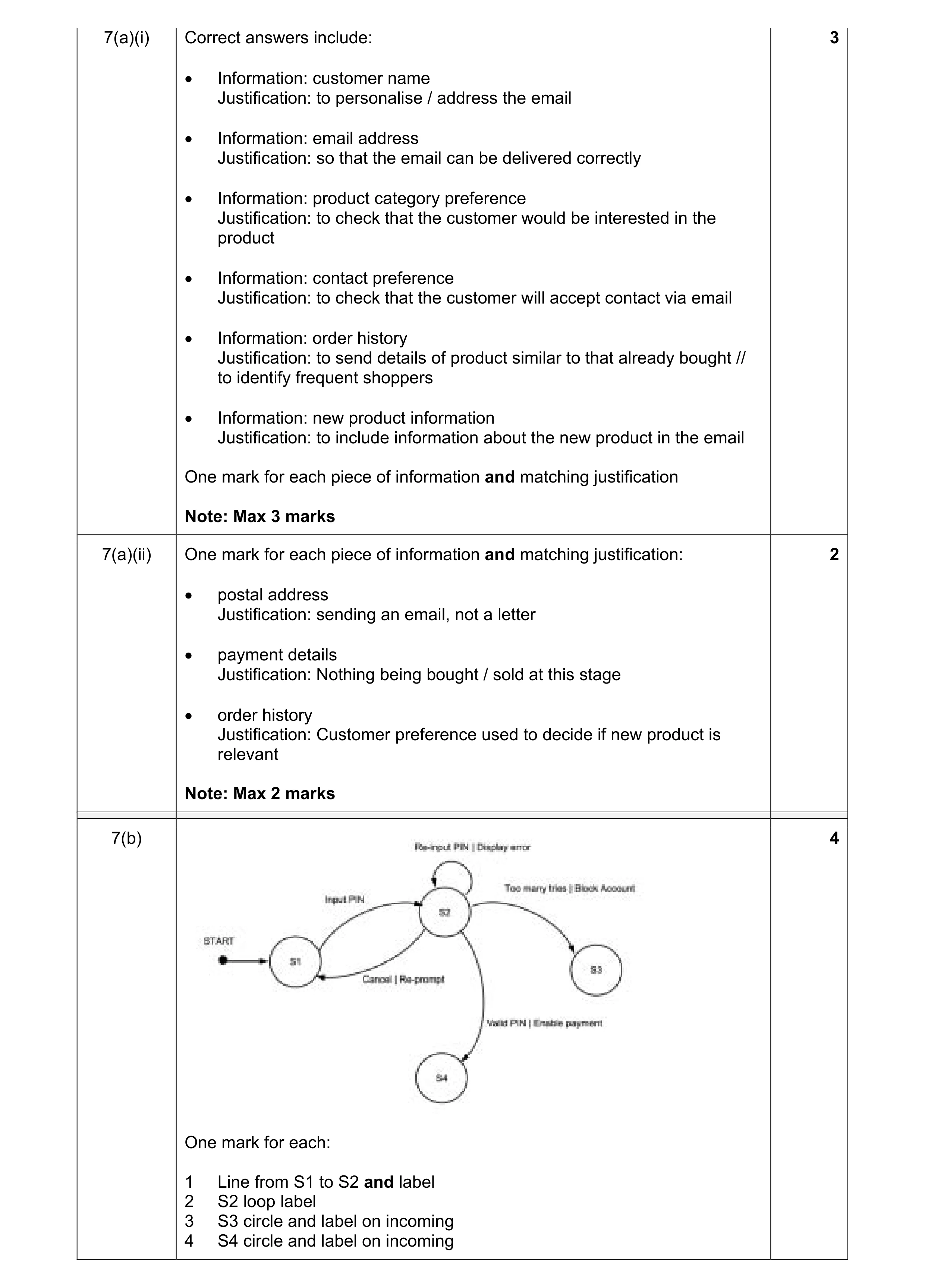 9
9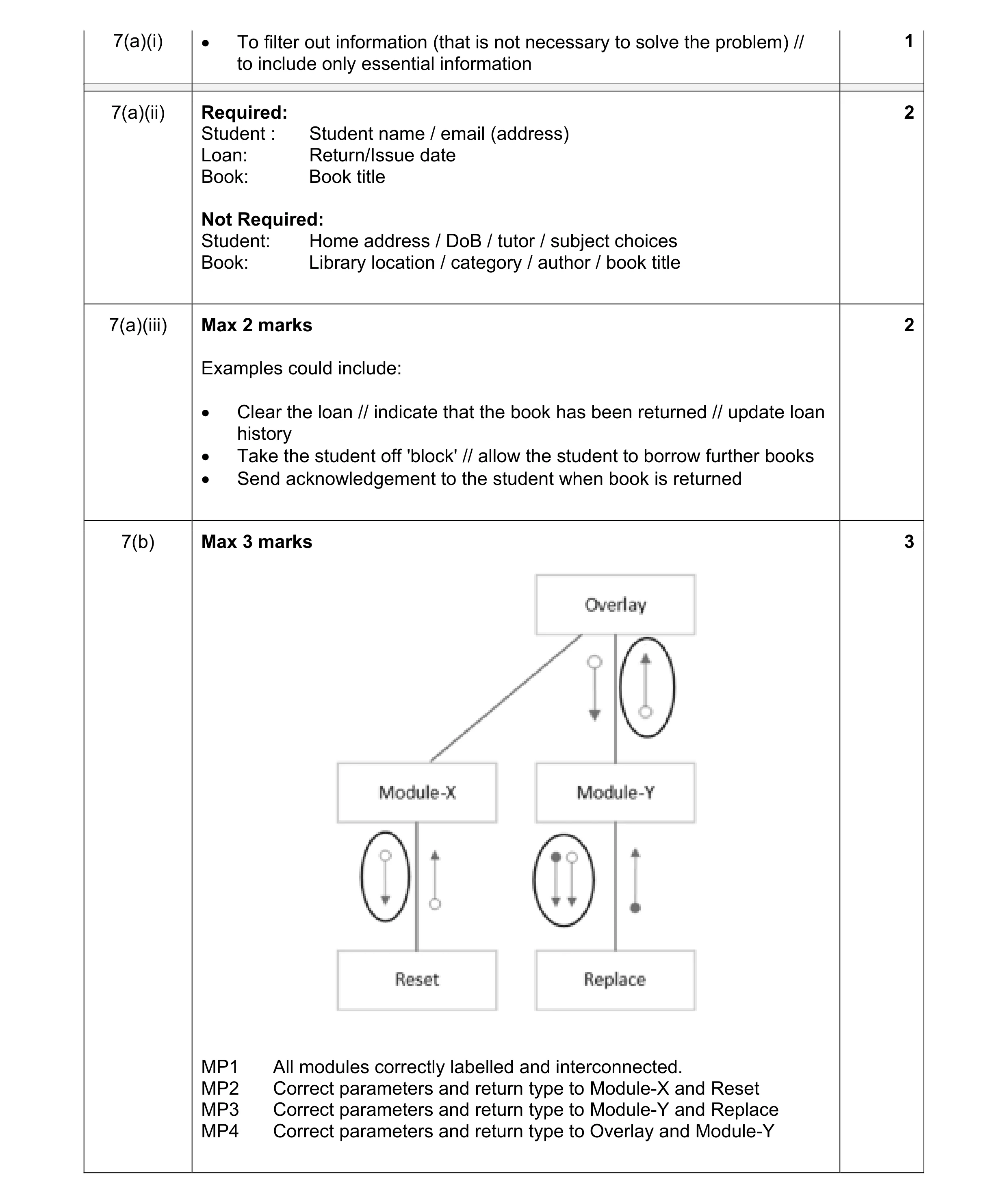 8
8