Cambridge A Level Computer Science 9618 — 2025 May/June Paper 4 · Variant 2
9618/42/M/J/25 · 3 questions · 75 marks · ≈84 min
The question paper and its mark scheme, free to read here and free to download. This is Cambridge’s own paper, exactly as it was sat.
Question paper12 pages
Mark scheme45 pages
Answers below. Sit the paper first if you are practising.
Questions as text
Q1 · A program reads data from a text file and stores it in a stack
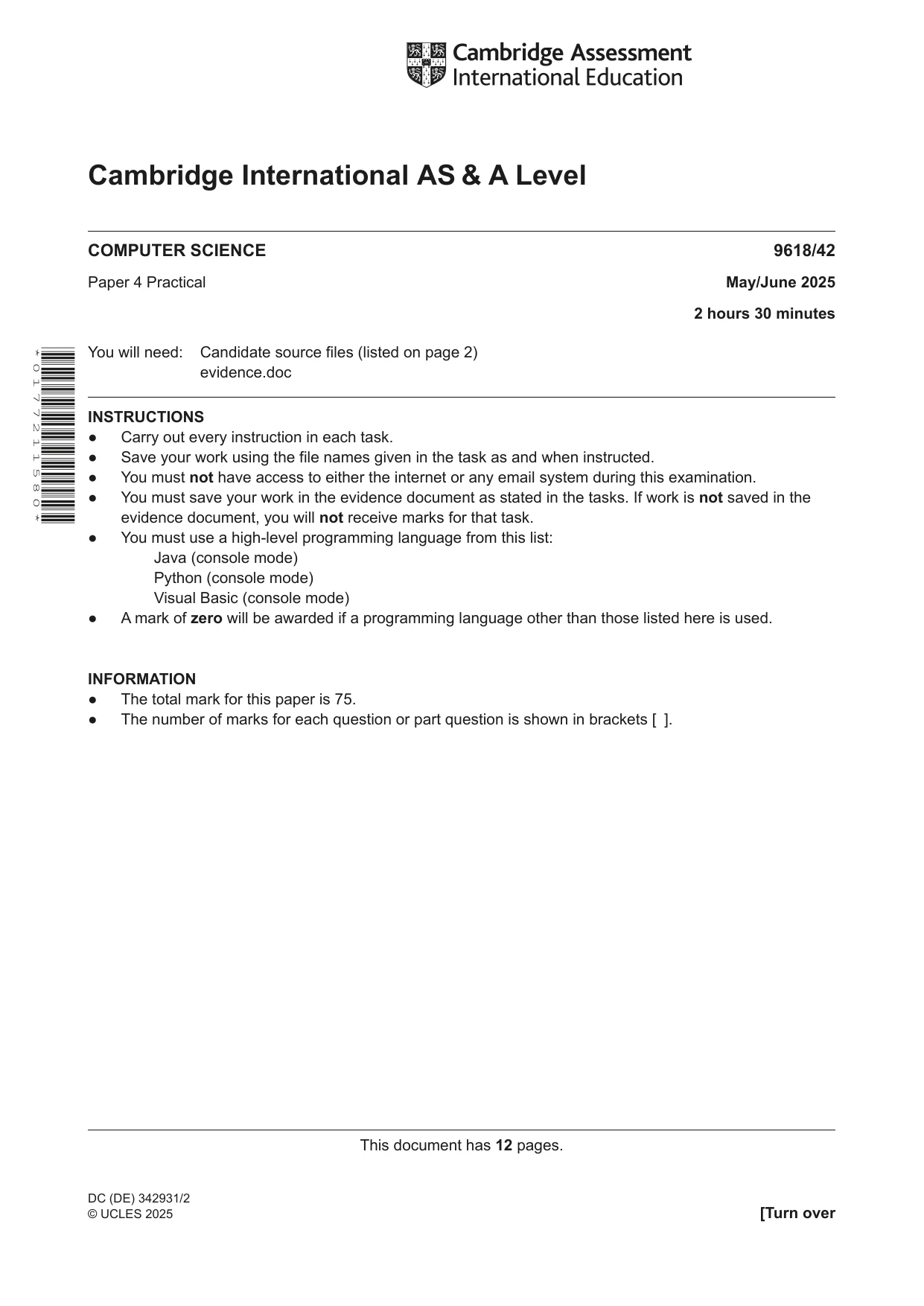
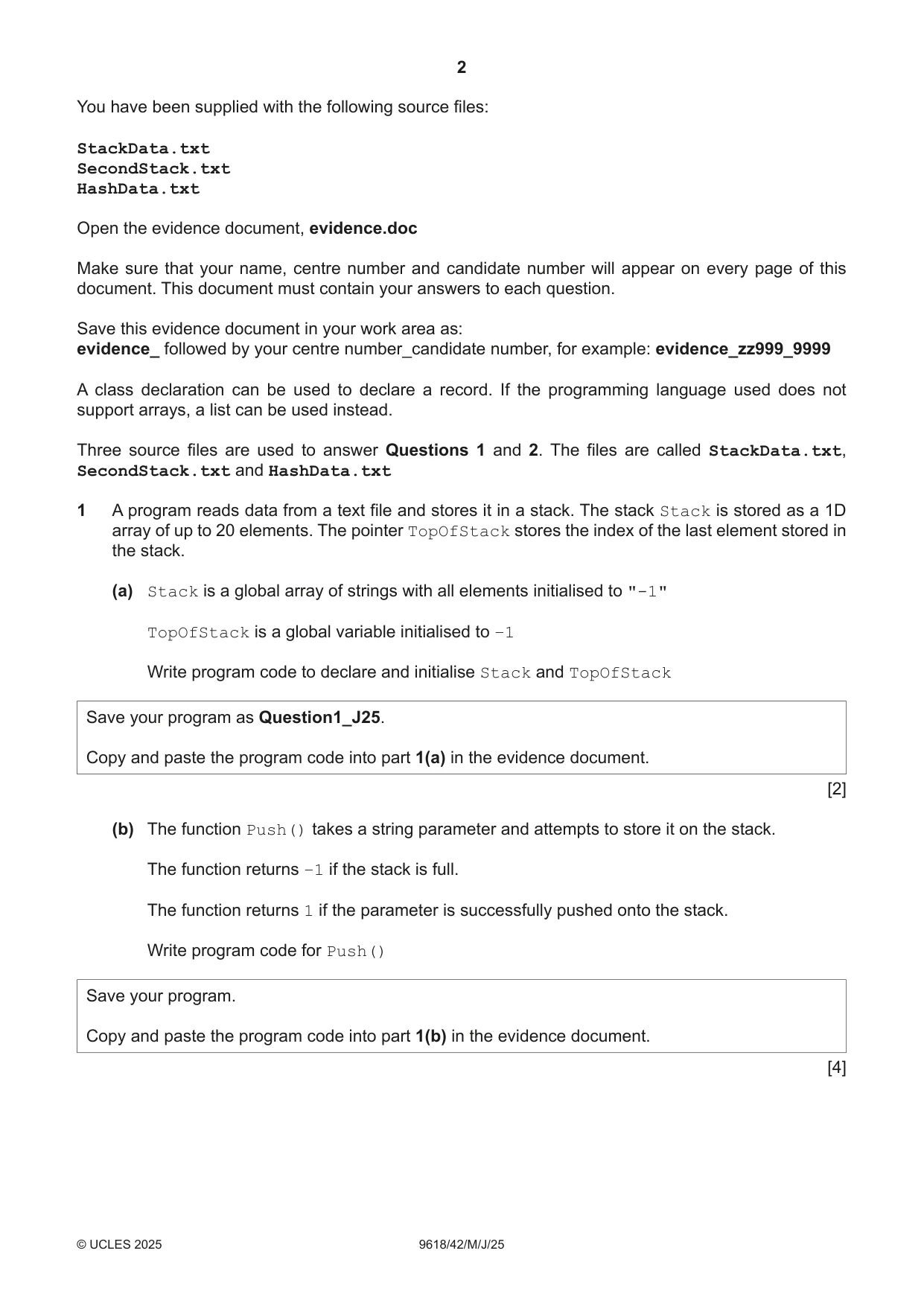
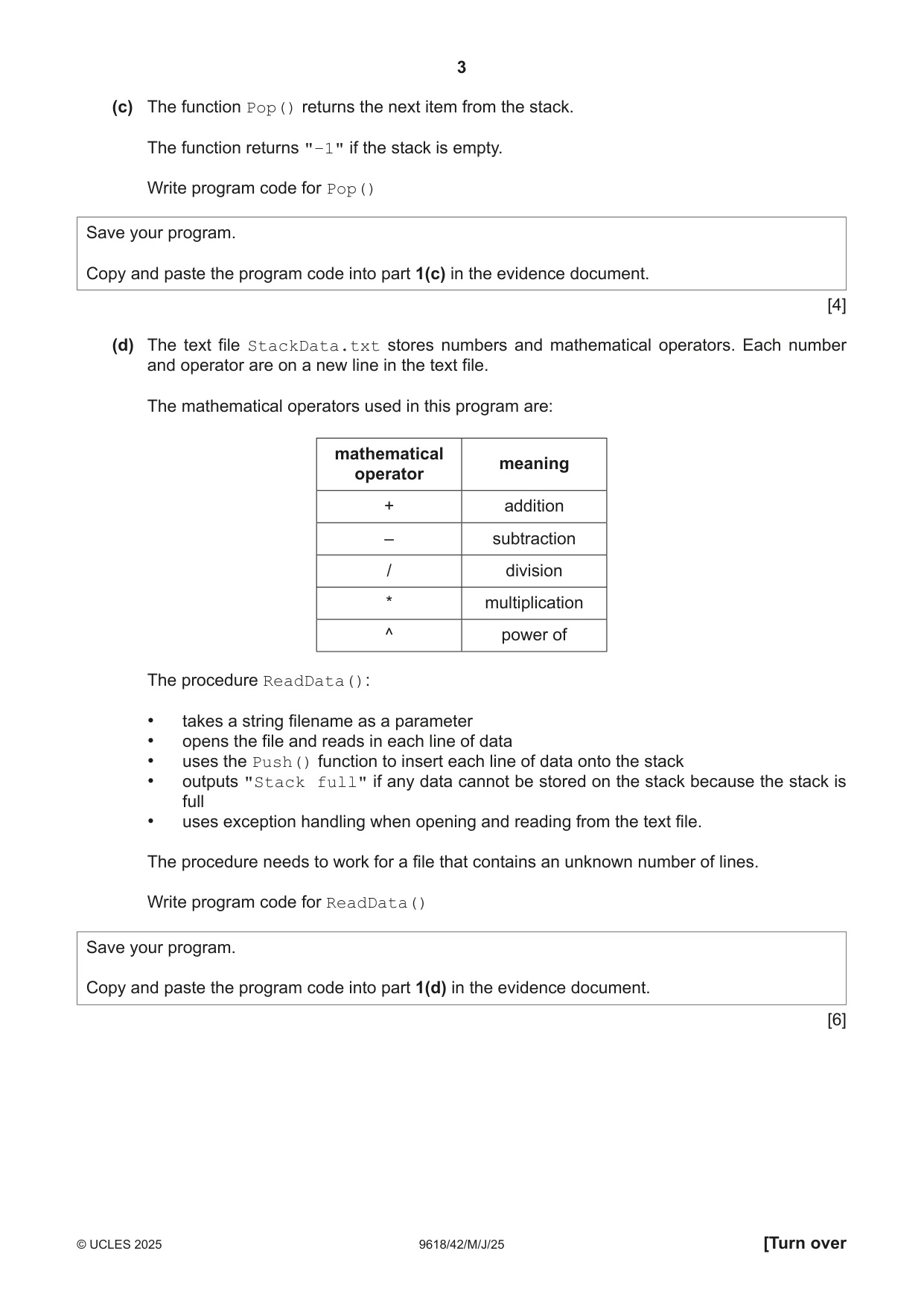
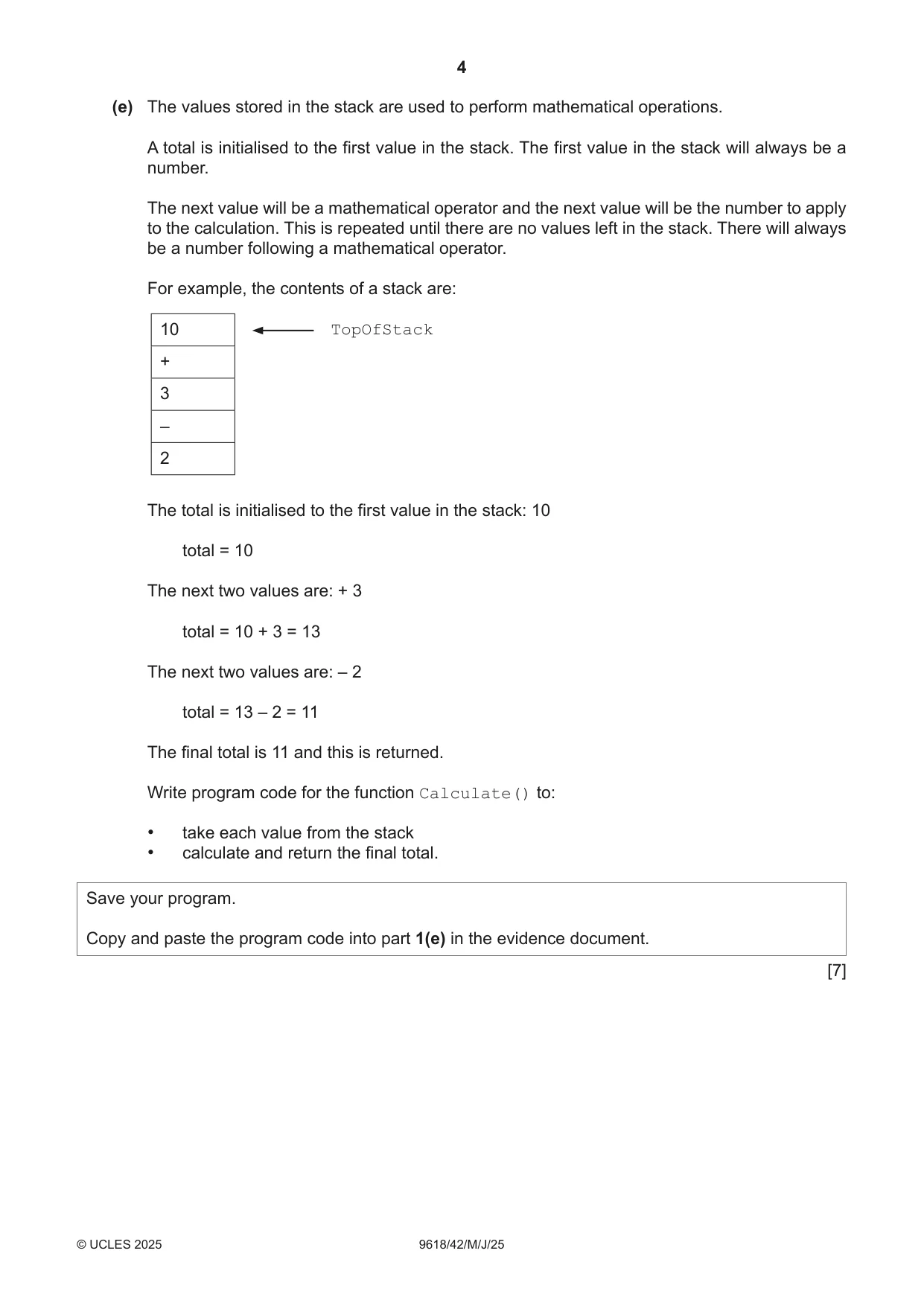
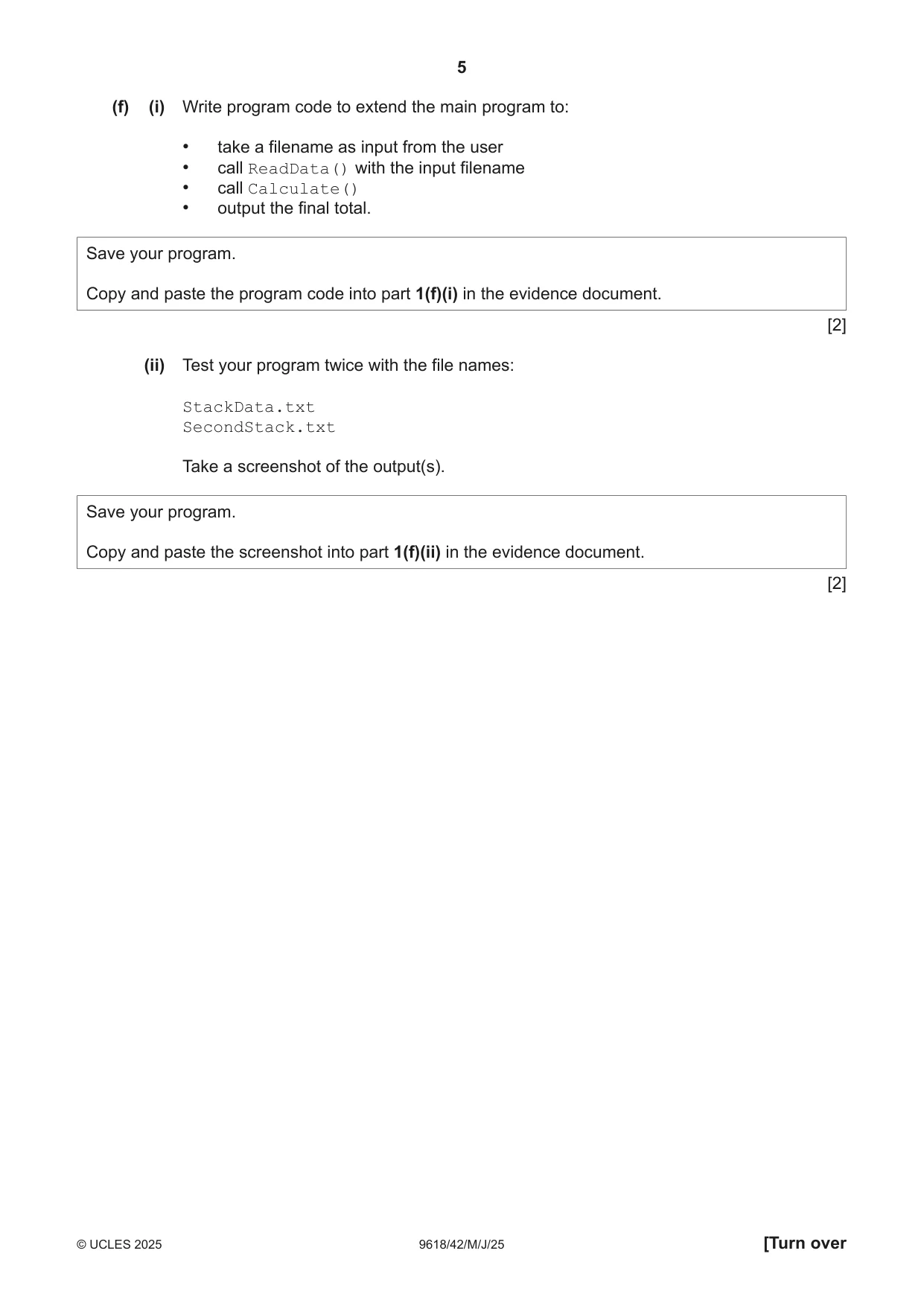
1 A program reads data from a text file and stores it in a stack. The stack Stack is stored as a 1D array of up to 20 elements. The pointer TopOfStack stores the index of the last element stored in the stack. (a) Stack is a global array of strings with all elements initialised to "-1" TopOfStack is a global variable initialised to –1 Write program code to declare and initialise Stack and TopOfStack Save your program as Question1_J25. Copy and paste the program code into part 1(a) in the evidence document. [2] (b) The function Push() takes a string parameter and attempts to store it on the stack. The function returns –1 if the stack is full. The function returns 1 if the parameter is successfully pushed onto the stack. Write program code for Push() Save your program. Copy and paste the program code into part 1(b) in the evidence document. [4] (c) The function Pop() returns the next item from the stack. The function returns "–1" if the stack is empty. Write program code for Pop() Save your program. Copy and paste the program code into part 1(c) in the evidence document. [4] (d) The text file StackData.txt stores numbers and mathematical operators. Each number and operator are on a new line in the text file. The mathematical operators used in this program are: mathematical meaning operator + addition – subtraction / division * multiplication ^ power of The procedure ReadData(): • takes a string filename as a parameter • opens the file and reads in each line of data • uses the Push() function to insert each line of data onto the stack • outputs "Stack full" if any data cannot be stored on the stack because the stack is full • uses exception handling when opening and reading from the text file. The procedure needs to work for a file that contains an unknown number of lines. Write program code for ReadData() Save your program. Copy and paste the program code into part 1(d) in the evidence document. [6] (e) The values stored in the stack are used to perform mathematical operations. A total is initialised to the first value in the stack. The first value in the stack will always be a number. The next value will be a mathematical operator and the next value will be the number to apply to the calculation. This is repeated until there are no values left in the stack. There will always be a number following a mathematical operator. For example, the contents of a stack are: 10 TopOfStack + 3 – 2 The total is initialised to the first value in the stack: 10 total = 10 The next two values are: + 3 total = 10 + 3 = 13 The next two values are: – 2 total = 13 – 2 = 11 The final total is 11 and this is returned. Write program code for the function Calculate() to: • take each value from the stack • calculate and return the final total. Save your program. Copy and paste the program code into part 1(e) in the evidence document. [7] (f) (i) Write program code to extend the main program to: • take a filename as input from the user • call ReadData() with the input filename • call Calculate() • output the final total. Save your program. Copy and paste the program code into part 1(f)(i) in the evidence document. [2] (ii) Test your program twice with the file names: StackData.txt SecondStack.txt Take a screenshot of the output(s). Save your program. Copy and paste the screenshot into part 1(f)(ii) in the evidence document. [2]
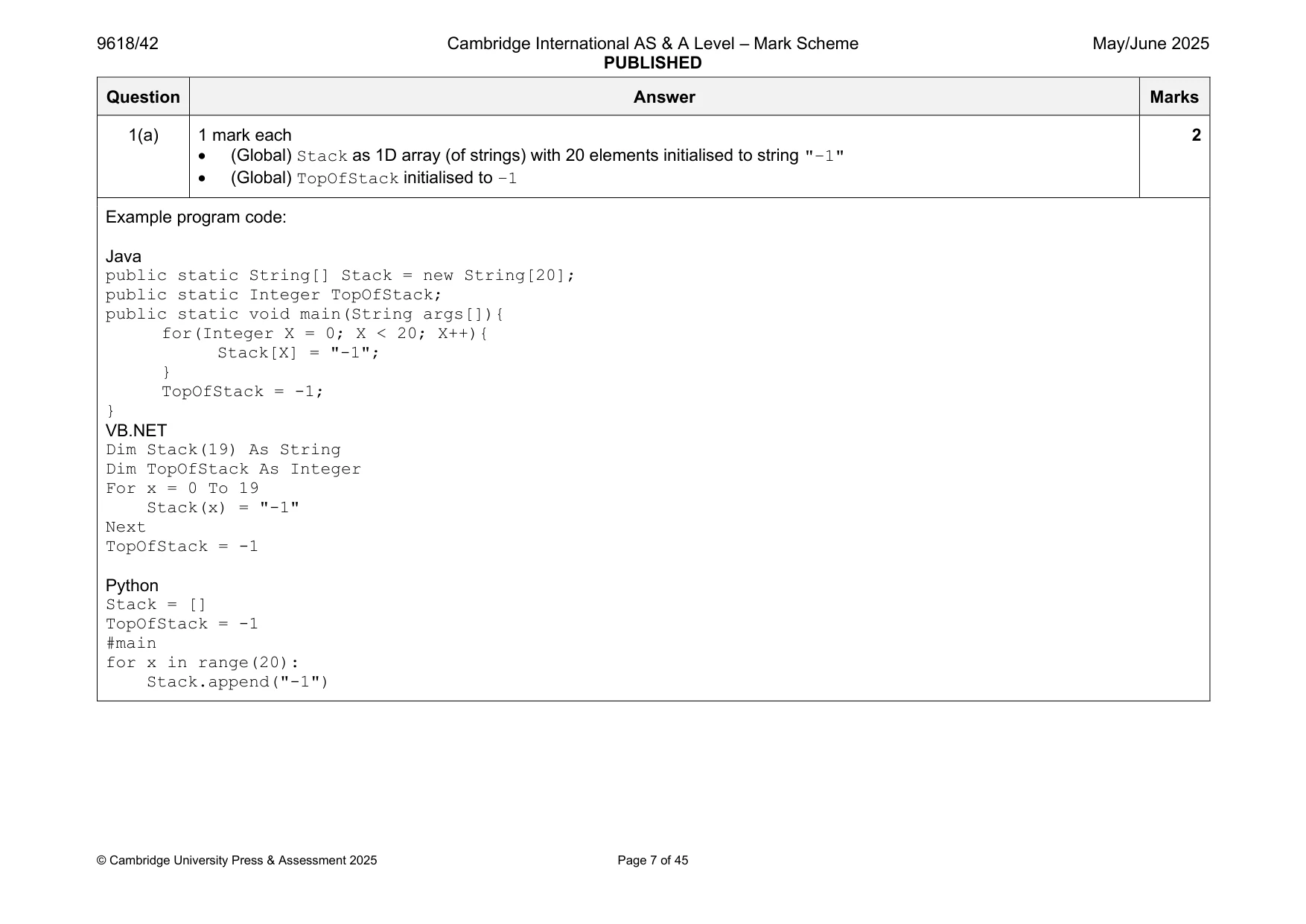
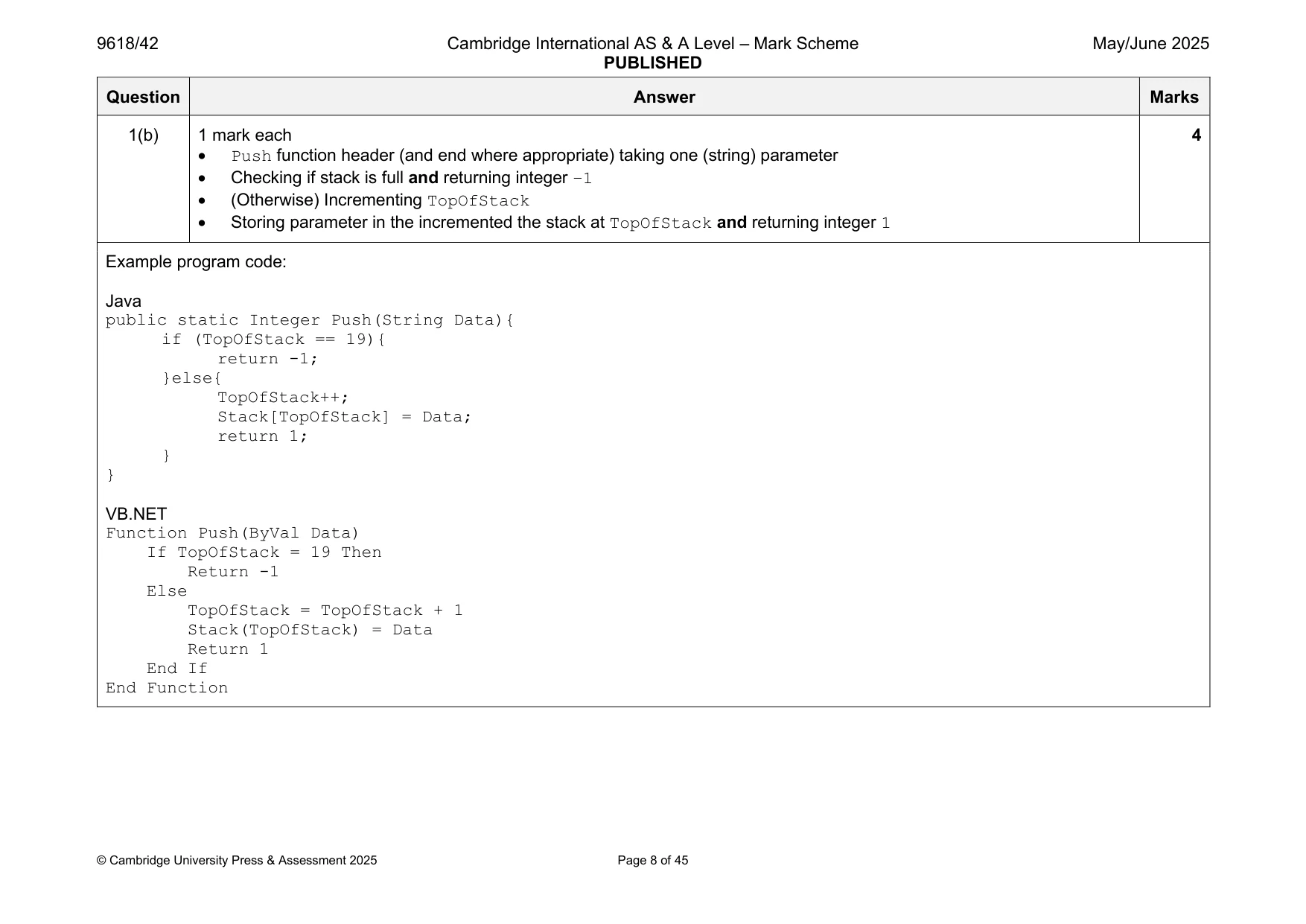
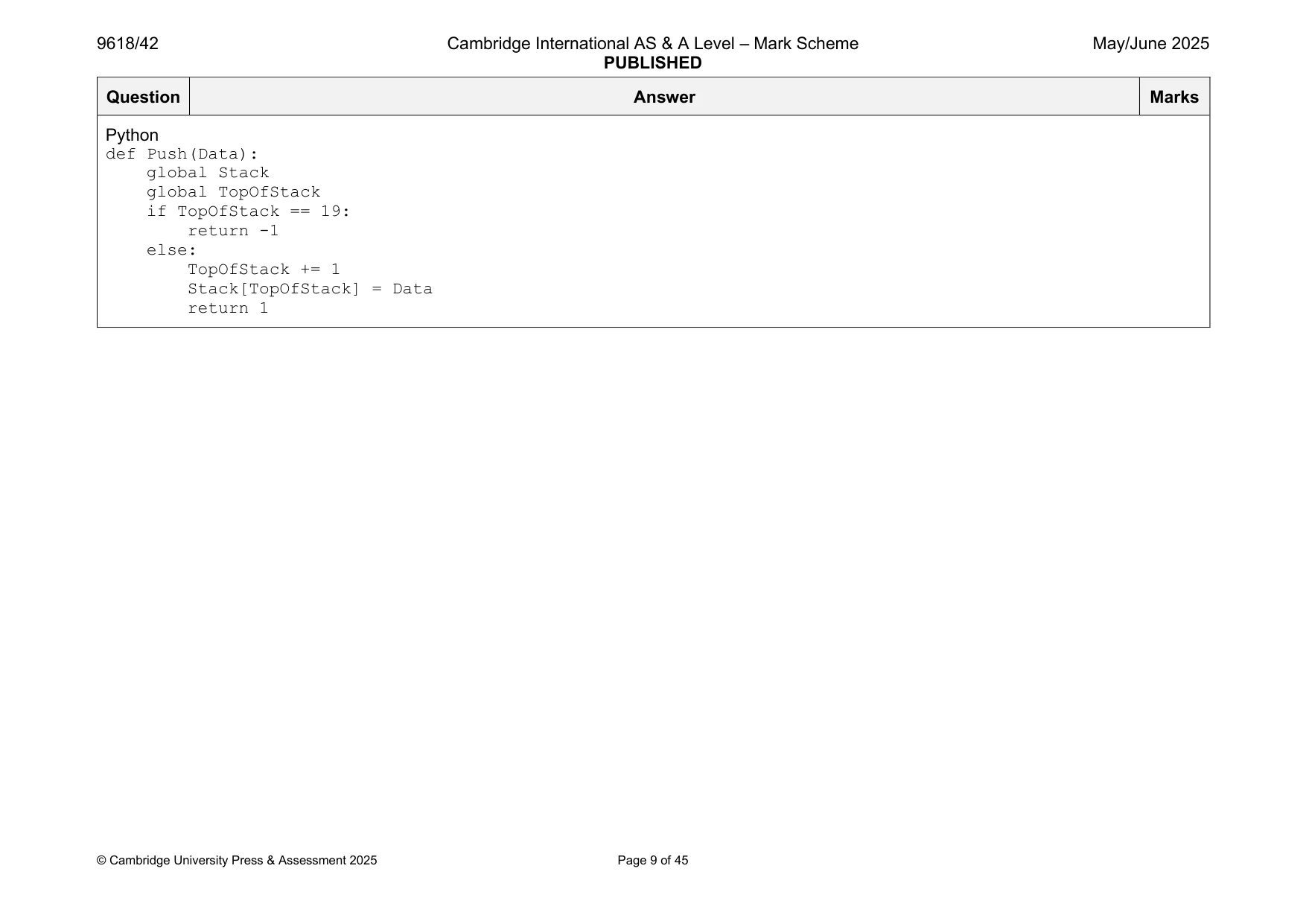
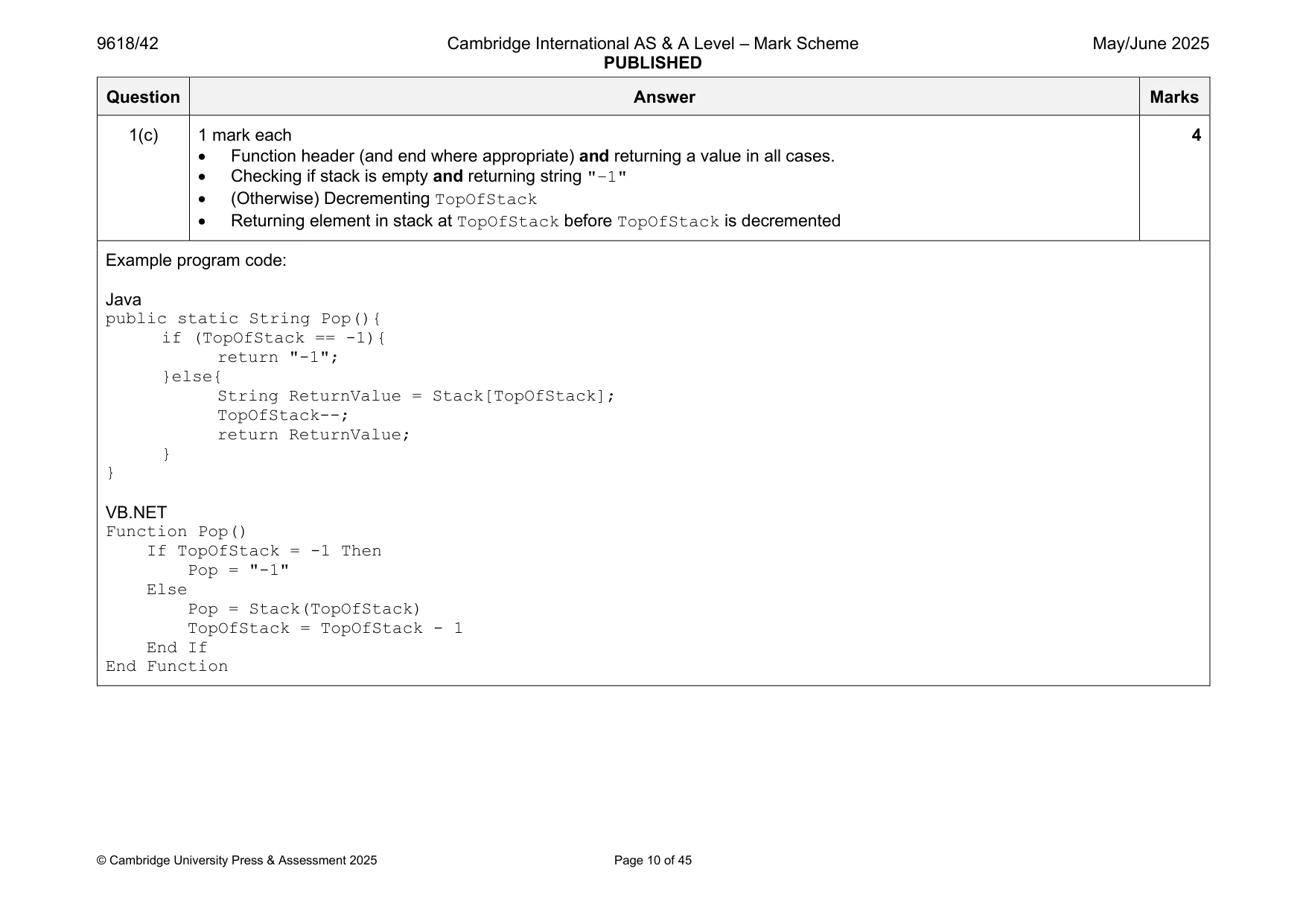
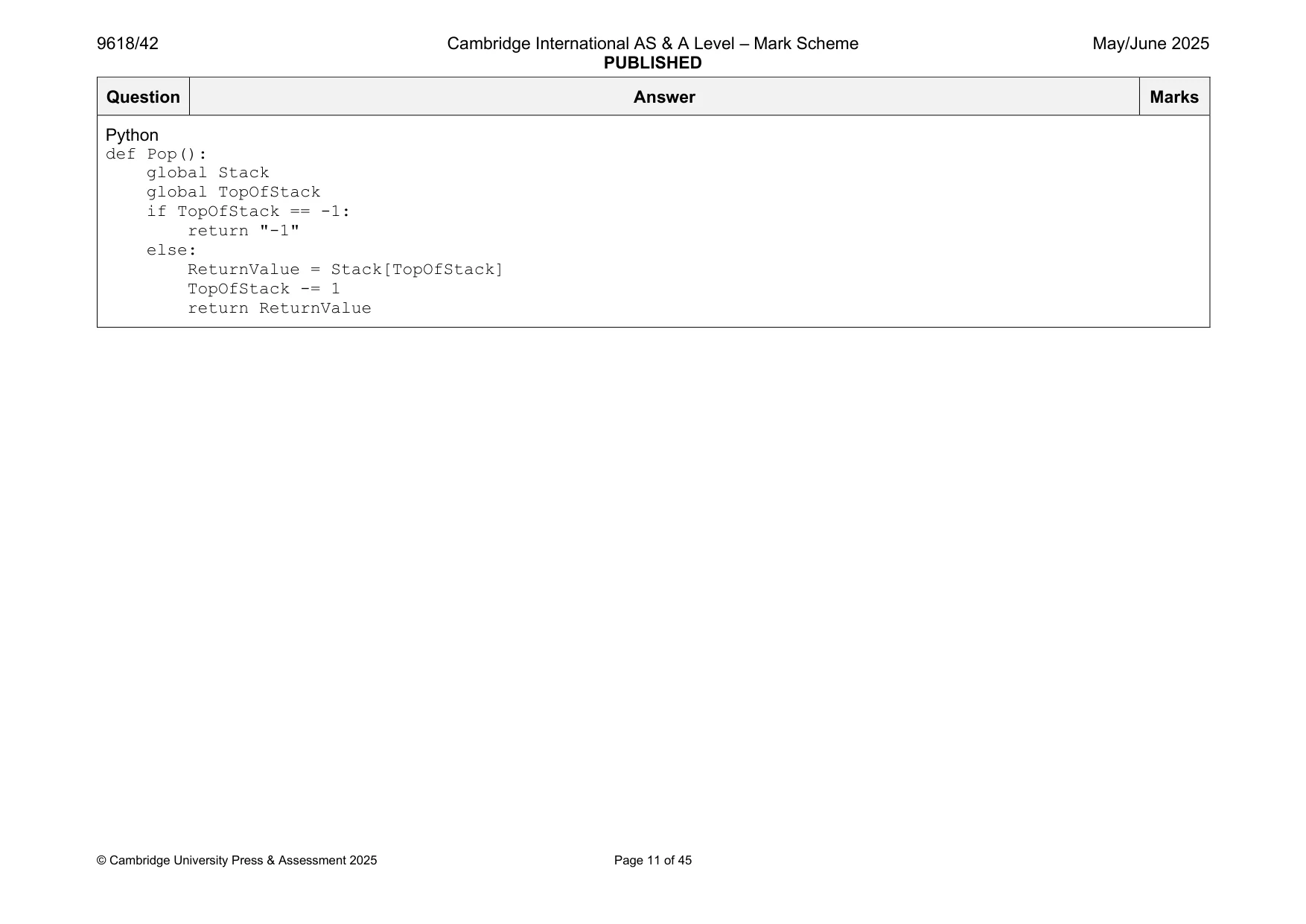
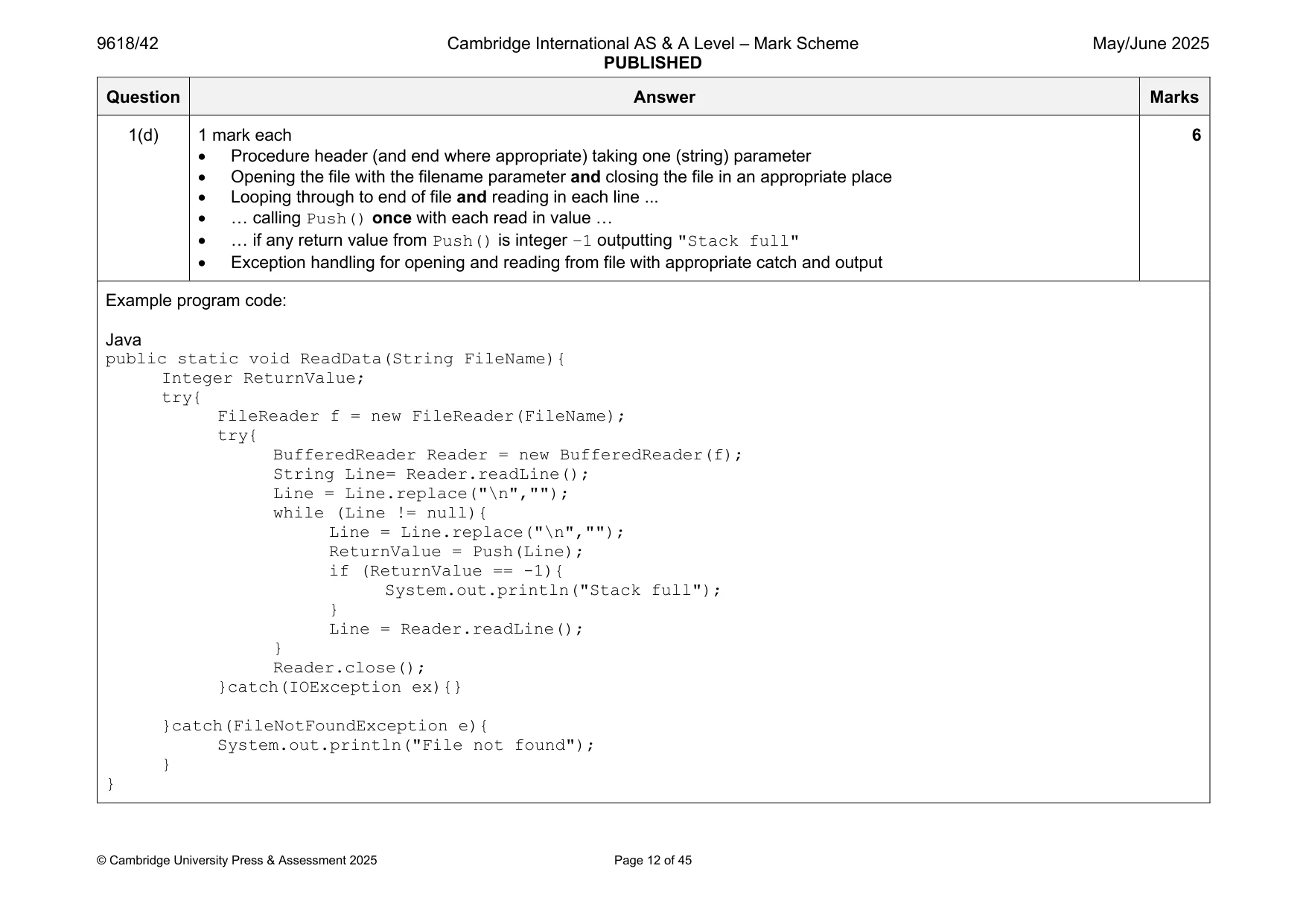
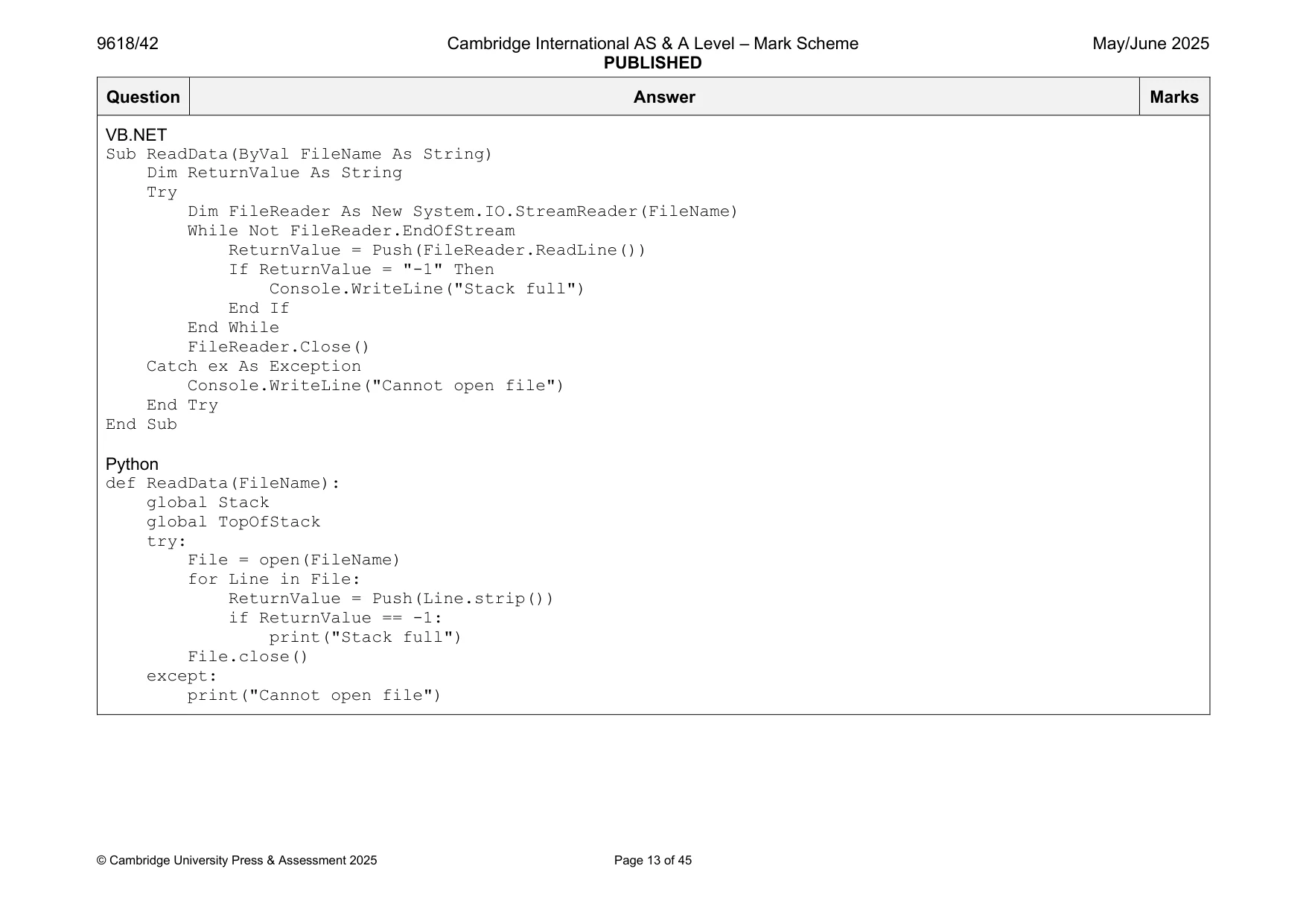
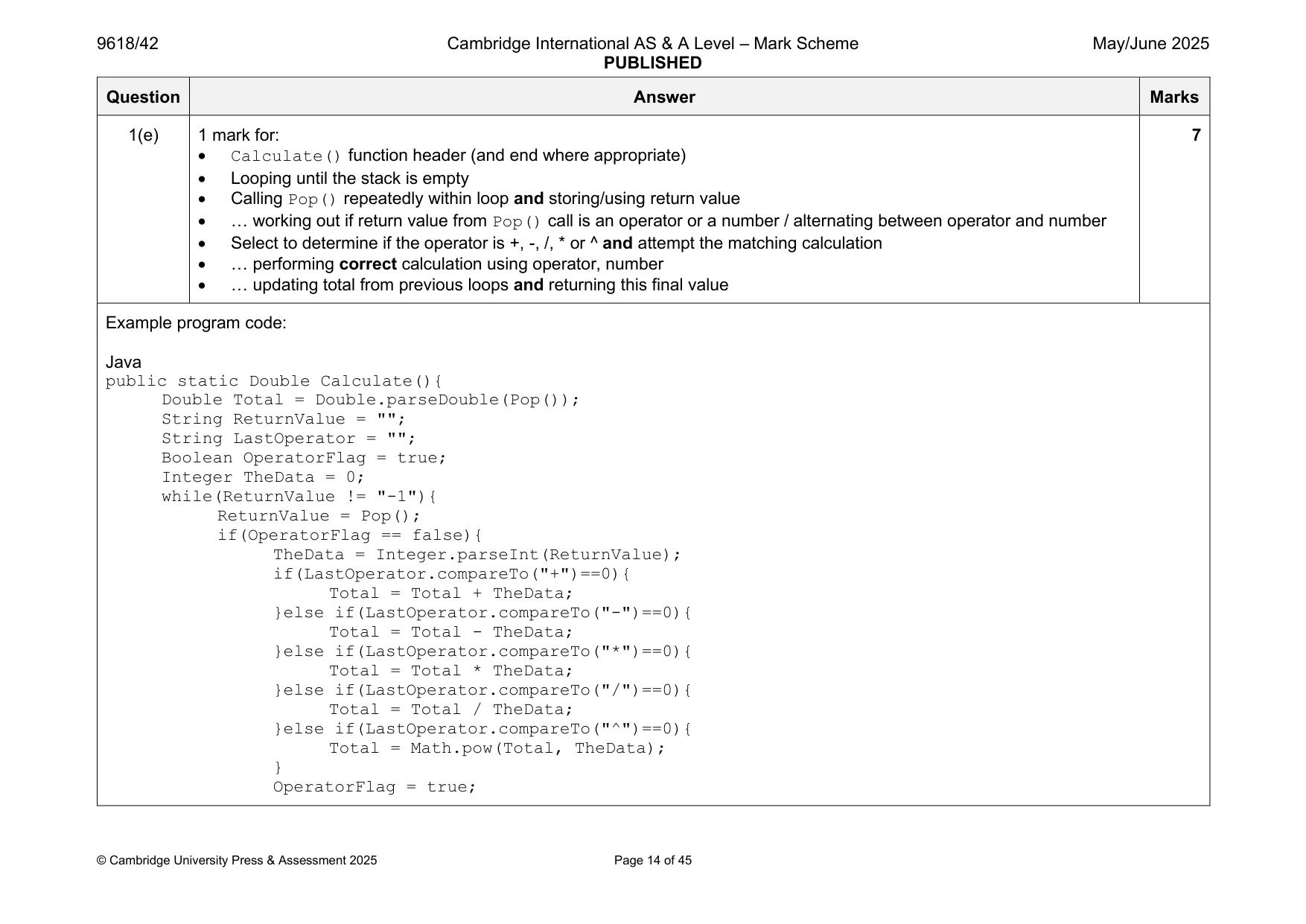
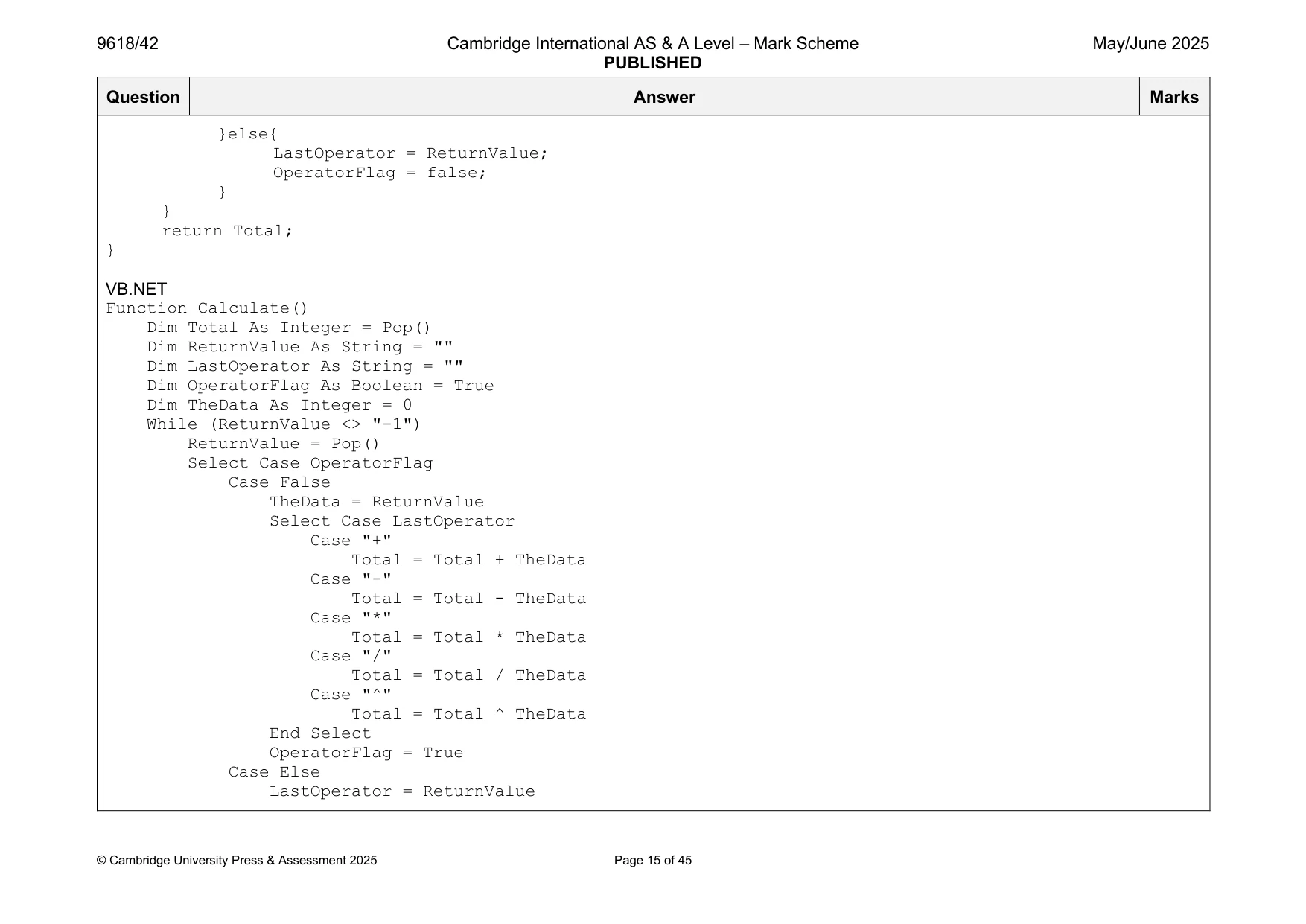
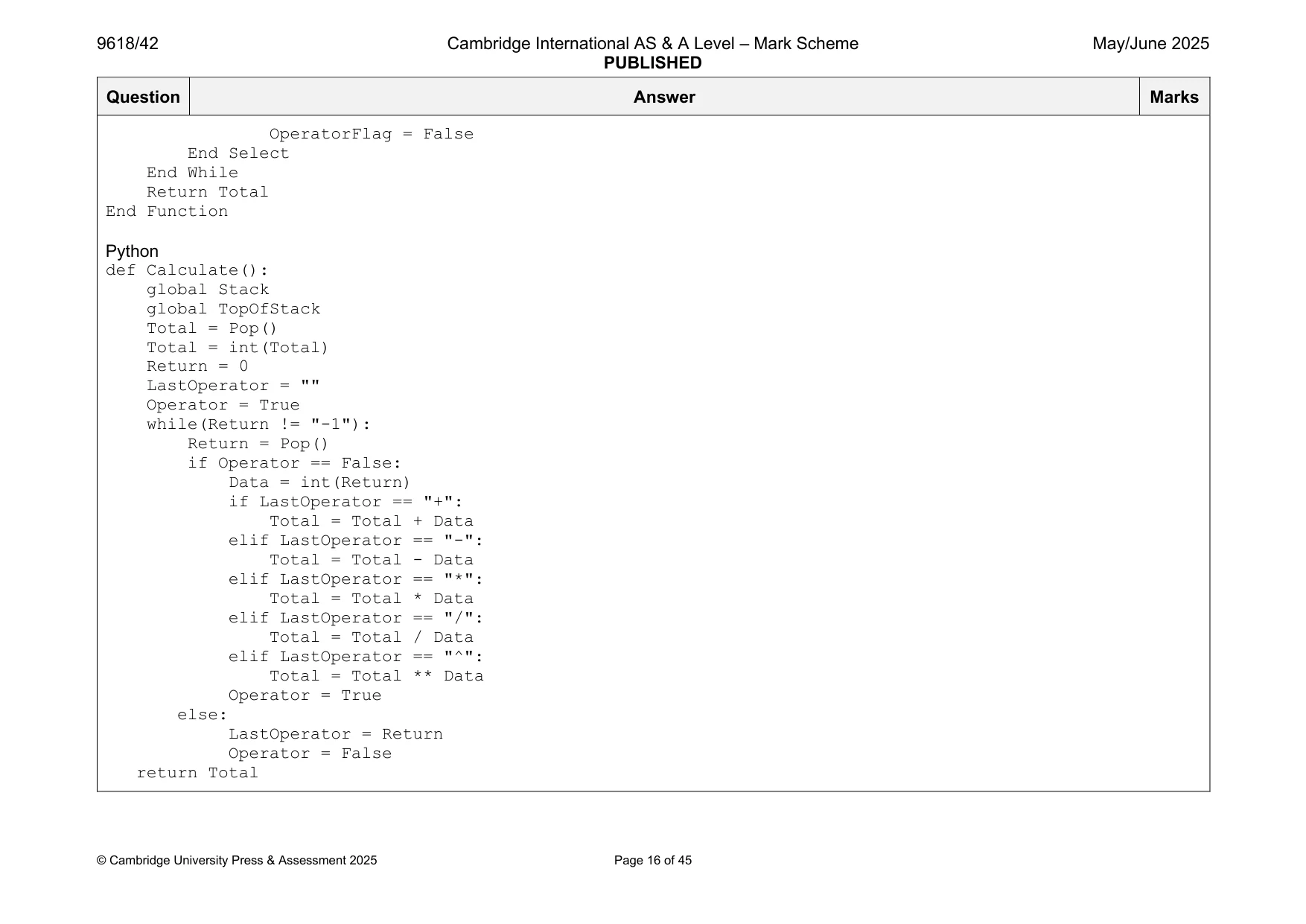
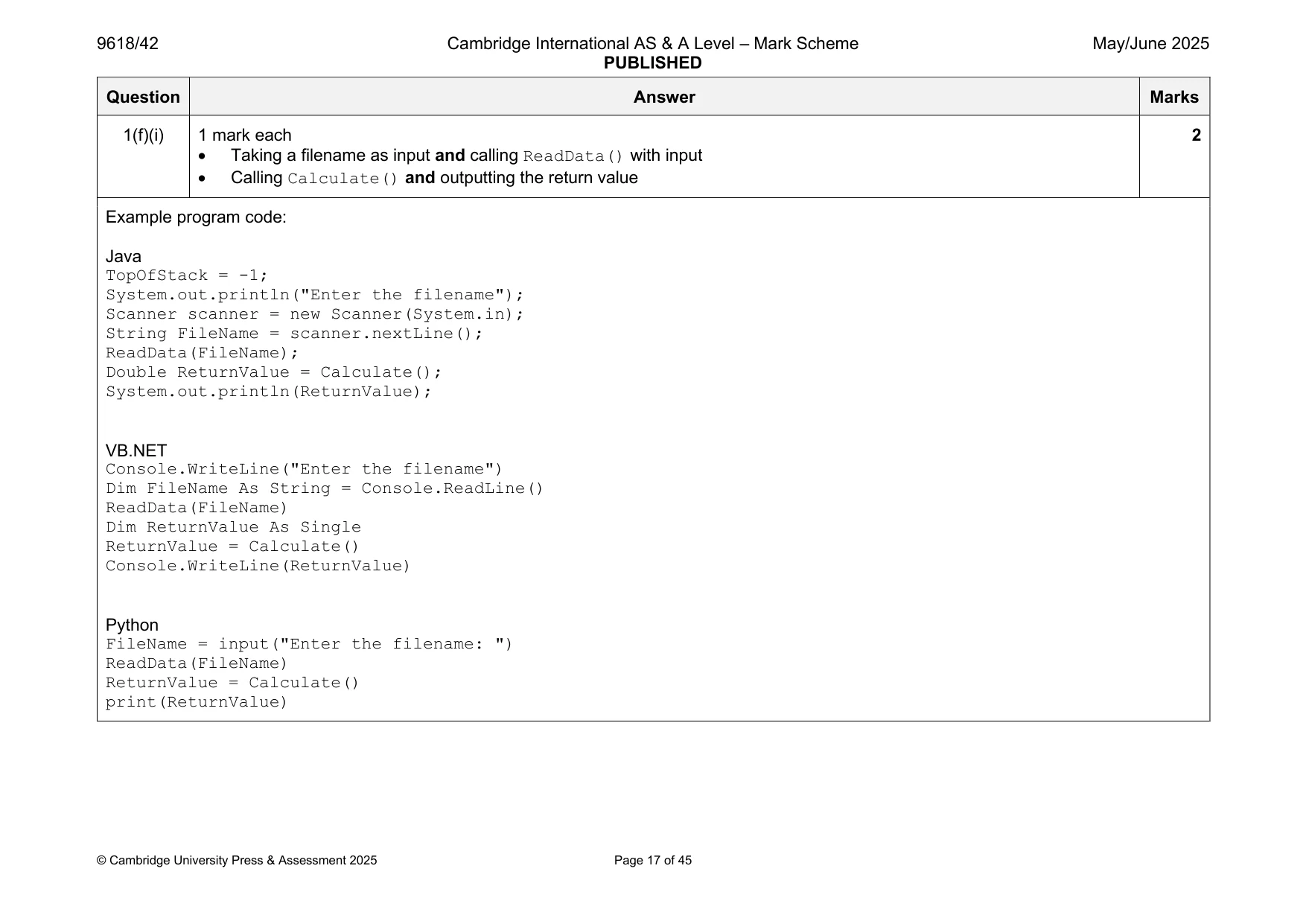
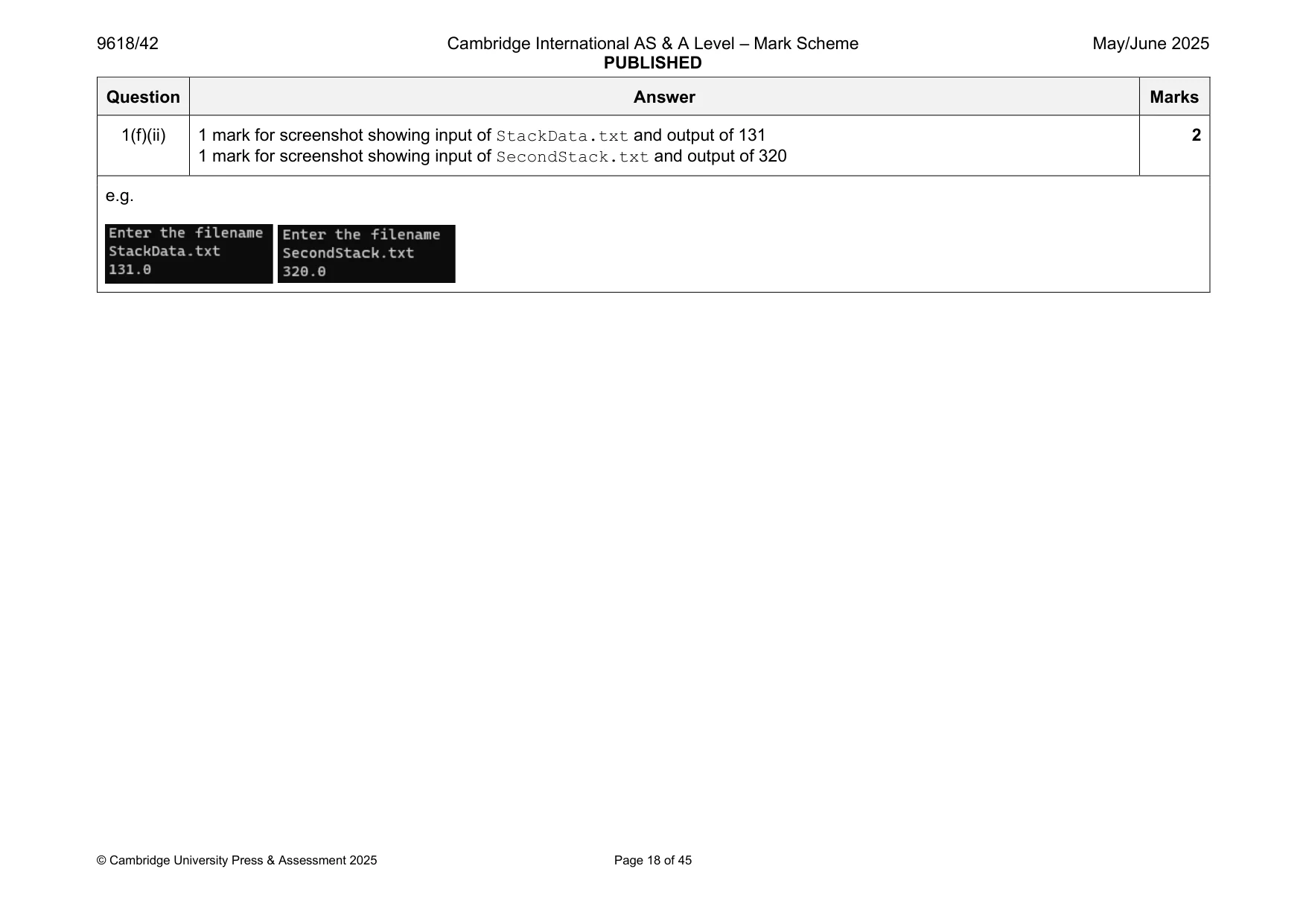
Mark scheme: Question Answer Marks 1(a) 1 mark each 2 • (Global) Stack as 1D array (of strings) with 20 elements initialised to string "–1" • (Global) TopOfStack initialised to –1 Example program code: Java public static String[] Stack = new String[20]; public static Integer TopOfStack; public static void main(String args[]){ for(Integer X = 0; X < 20; X++){ Stack[X] = "-1"; } TopOfStack = -1; } VB.NET Dim Stack(19) As String Dim TopOfStack As Integer For x = 0 To 19 Stack(x) = "-1" Next TopOfStack = -1 Python Stack = [] TopOfStack = -1 #main for x in range(20): Stack.append("-1") 1(b) 1 mark each 4 • Push function header (and end where appropriate) taking one (string) parameter • Checking if stack is full and returning integer –1 • (Otherwise) Incrementing TopOfStack • Storing parameter in the incremented the stack at TopOfStack and returning integer 1 Example program code: Java public static Integer Push(String Data){ if (TopOfStack == 19){ return -1; }else{ TopOfStack++; Stack[TopOfStack] = Data; return 1; } } VB.NET Function Push(ByVal Data) If TopOfStack = 19 Then Return -1 Else TopOfStack = TopOfStack + 1 Stack(TopOfStack) = Data Return 1 End If End Function Python def Push(Data): global Stack global TopOfStack if TopOfStack == 19: return -1 else: TopOfStack += 1 Stack[TopOfStack] = Data return 1 1(c) 1 mark each 4 • Function header (and end where appropriate) and returning a value in all cases. • Checking if stack is empty and returning string "–1" • (Otherwise) Decrementing TopOfStack • Returning element in stack at TopOfStack before TopOfStack is decremented Example program code: Java public static String Pop(){ if (TopOfStack == -1){ return "-1"; }else{ String ReturnValue = Stack[TopOfStack]; TopOfStack--; return ReturnValue; } } VB.NET Function Pop() If TopOfStack = -1 Then Pop = "-1" Else Pop = Stack(TopOfStack) TopOfStack = TopOfStack - 1 End If End Function Python def Pop(): global Stack global TopOfStack if TopOfStack == -1: return "-1" else: ReturnValue = Stack[TopOfStack] TopOfStack -= 1 return ReturnValue 1(d) 1 mark each 6 • Procedure header (and end where appropriate) taking one (string) parameter • Opening the file with the filename parameter and closing the file in an appropriate place • Looping through to end of file and reading in each line ... • … calling Push() once with each read in value … • … if any return value from Push() is integer –1 outputting "Stack full" • Exception handling for opening and reading from file with appropriate catch and output Example program code: Java public static void ReadData(String FileName){ Integer ReturnValue; try{ FileReader f = new FileReader(FileName); try{ BufferedReader Reader = new BufferedReader(f); String Line= Reader.readLine(); Line = Line.replace("\n",""); while (Line != null){ Line = Line.replace("\n",""); ReturnValue = Push(Line); if (ReturnValue == -1){ System.out.println("Stack full"); } Line = Reader.readLine(); } Reader.close(); }catch(IOException ex){} }catch(FileNotFoundException e){ System.out.println("File not found"); } } VB.NET Sub ReadData(ByVal FileName As String) Dim ReturnValue As String Try Dim FileReader As New System.IO.StreamReader(FileName) While Not FileReader.EndOfStream ReturnValue = Push(FileReader.ReadLine()) If ReturnValue = "-1" Then Console.WriteLine("Stack full") End If End While FileReader.Close() Catch ex As Exception Console.WriteLine("Cannot open file") End Try End Sub Python def ReadData(FileName): global Stack global TopOfStack try: File = open(FileName) for Line in File: ReturnValue = Push(Line.strip()) if ReturnValue == -1: print("Stack full") File.close() except: print("Cannot open file") 1(e) 1 mark for: 7 • Calculate() function header (and end where appropriate) • Looping until the stack is empty • Calling Pop() repeatedly within loop and storing/using return value • … working out if return value from Pop() call is an operator or a number / alternating between operator and number • Select to determine if the operator is +, -, /, * or ^ and attempt the matching calculation • … performing correct calculation using operator, number • … updating total from previous loops and returning this final value Example program code: Java public static Double Calculate(){ Double Total = Double.parseDouble(Pop()); String ReturnValue = ""; String LastOperator = ""; Boolean OperatorFlag = true; Integer TheData = 0; while(ReturnValue != "-1"){ ReturnValue = Pop(); if(OperatorFlag == false){ TheData = Integer.parseInt(ReturnValue); if(LastOperator.compareTo("+")==0){ Total = Total + TheData; }else if(LastOperator.compareTo("-")==0){ Total = Total - TheData; }else if(LastOperator.compareTo("*")==0){ Total = Total * TheData; }else if(LastOperator.compareTo("/")==0){ Total = Total / TheData; }else if(LastOperator.compareTo("^")==0){ Total = Math.pow(Total, TheData); } OperatorFlag = true; }else{ LastOperator = ReturnValue; OperatorFlag = false; } } return Total; } VB.NET Function Calculate() Dim Total As Integer = Pop() Dim ReturnValue As String = "" Dim LastOperator As String = "" Dim OperatorFlag As Boolean = True Dim TheData As Integer = 0 While (ReturnValue <> "-1") ReturnValue = Pop() Select Case OperatorFlag Case False TheData = ReturnValue Select Case LastOperator Case "+" Total = Total + TheData Case "-" Total = Total - TheData Case "*" Total = Total * TheData Case "/" Total = Total / TheData Case "^" Total = Total ^ TheData End Select OperatorFlag = True Case Else LastOperator = ReturnValue OperatorFlag = False End Select End While Return Total End Function Python def Calculate(): global Stack global TopOfStack Total = Pop() Total = int(Total) Return = 0 LastOperator = "" Operator = True while(Return != "-1"): Return = Pop() if Operator == False: Data = int(Return) if LastOperator == "+": Total = Total + Data elif LastOperator == "-": Total = Total - Data elif LastOperator == "*": Total = Total * Data elif LastOperator == "/": Total = Total / Data elif LastOperator == "^": Total = Total ** Data Operator = True else: LastOperator = Return Operator = False return Total 1(f)(i) 1 mark each 2 • Taking a filename as input and calling ReadData() with input • Calling Calculate() and outputting the return value Example program code: Java TopOfStack = -1; System.out.println("Enter the filename"); Scanner scanner = new Scanner(System.in); String FileName = scanner.nextLine(); ReadData(FileName); Double ReturnValue = Calculate(); System.out.println(ReturnValue); VB.NET Console.WriteLine("Enter the filename") Dim FileName As String = Console.ReadLine() ReadData(FileName) Dim ReturnValue As Single ReturnValue = Calculate() Console.WriteLine(ReturnValue) Python FileName = input("Enter the filename: ") ReadData(FileName) ReturnValue = Calculate() print(ReturnValue) 1(f)(ii) 1 mark for screenshot showing input of StackData.txt and output of 131 2 1 mark for screenshot showing input of SecondStack.txt and output of 320 e.g.
Q2 · A program stores data in a 1D array of records, HashTable
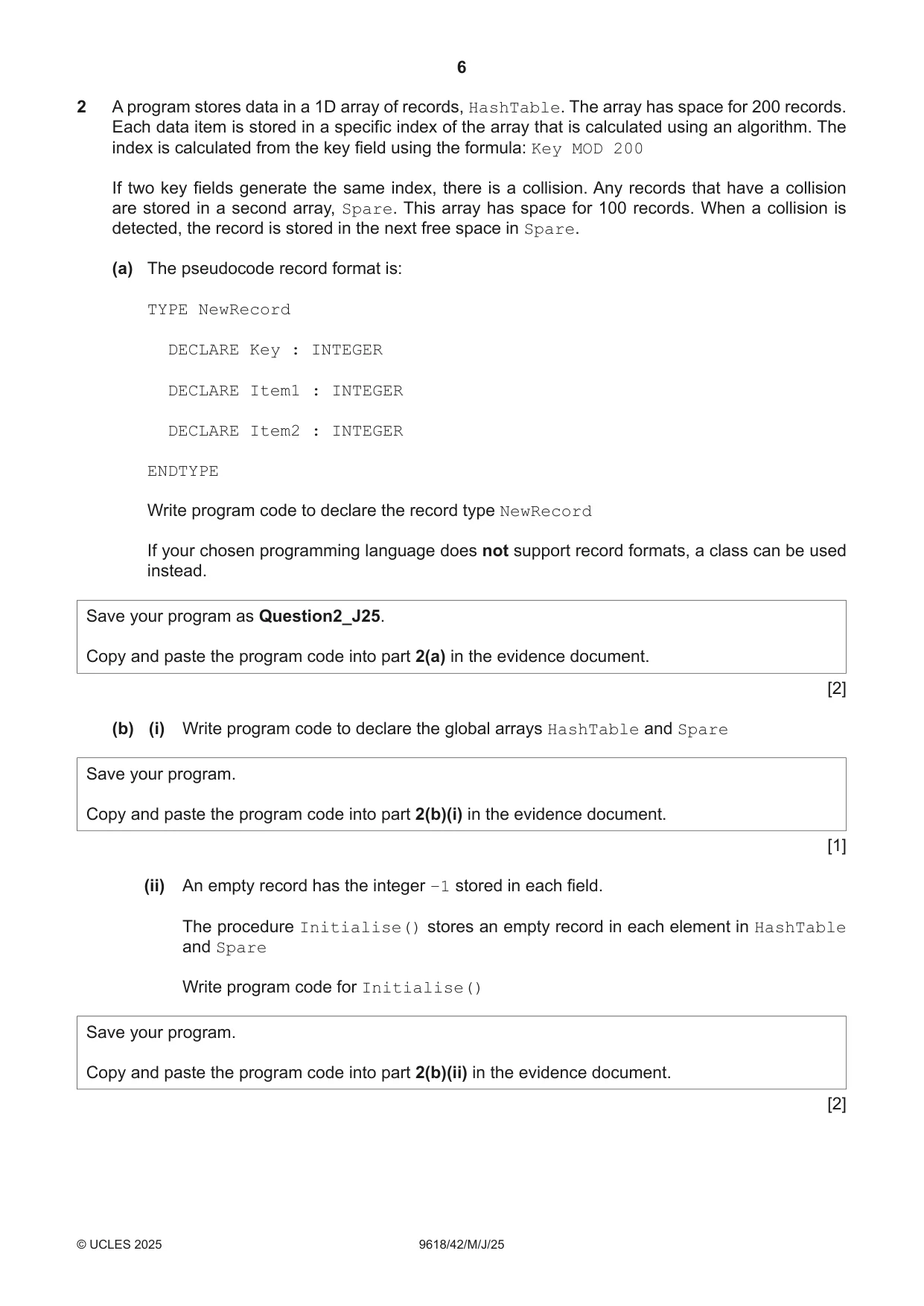
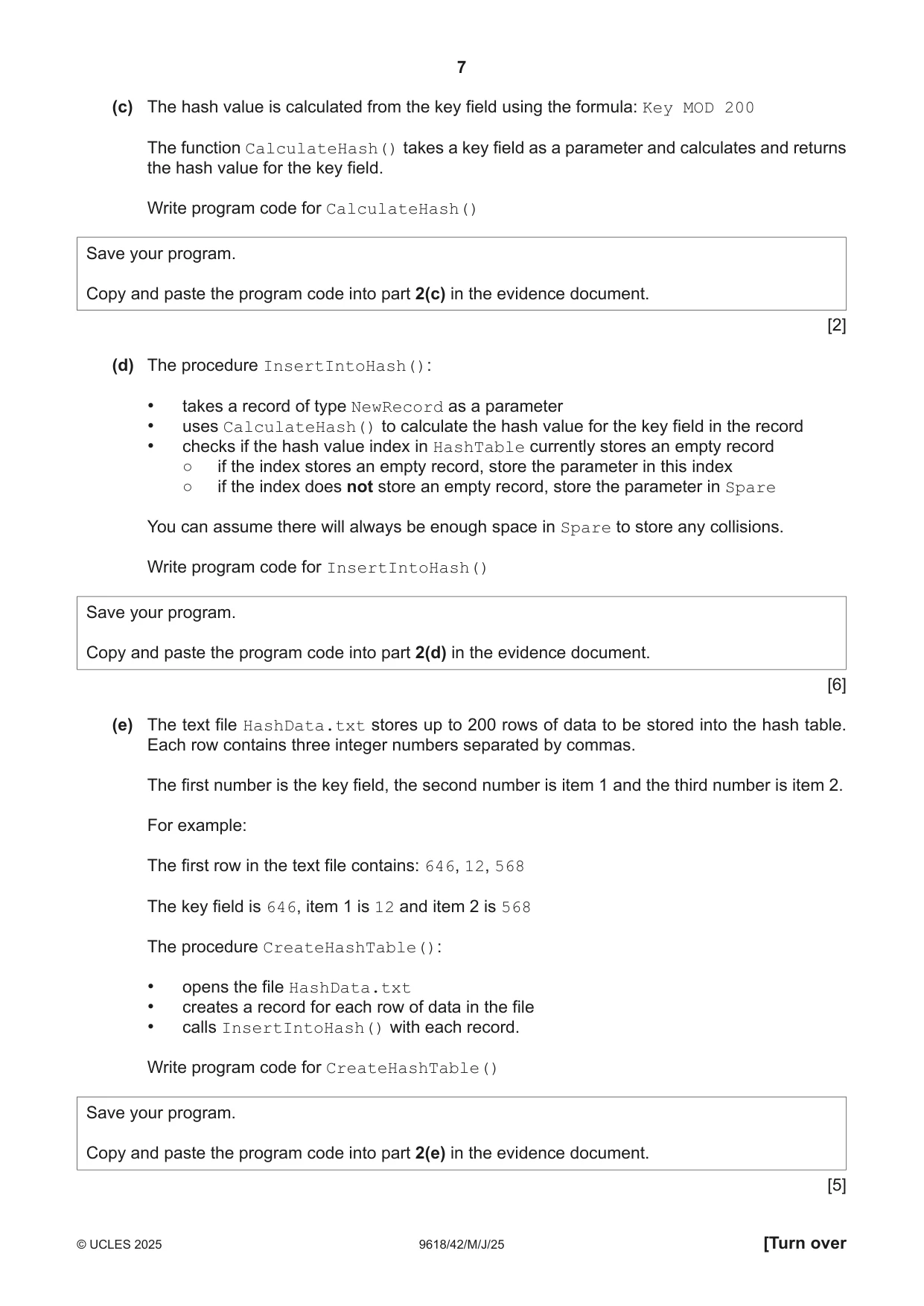
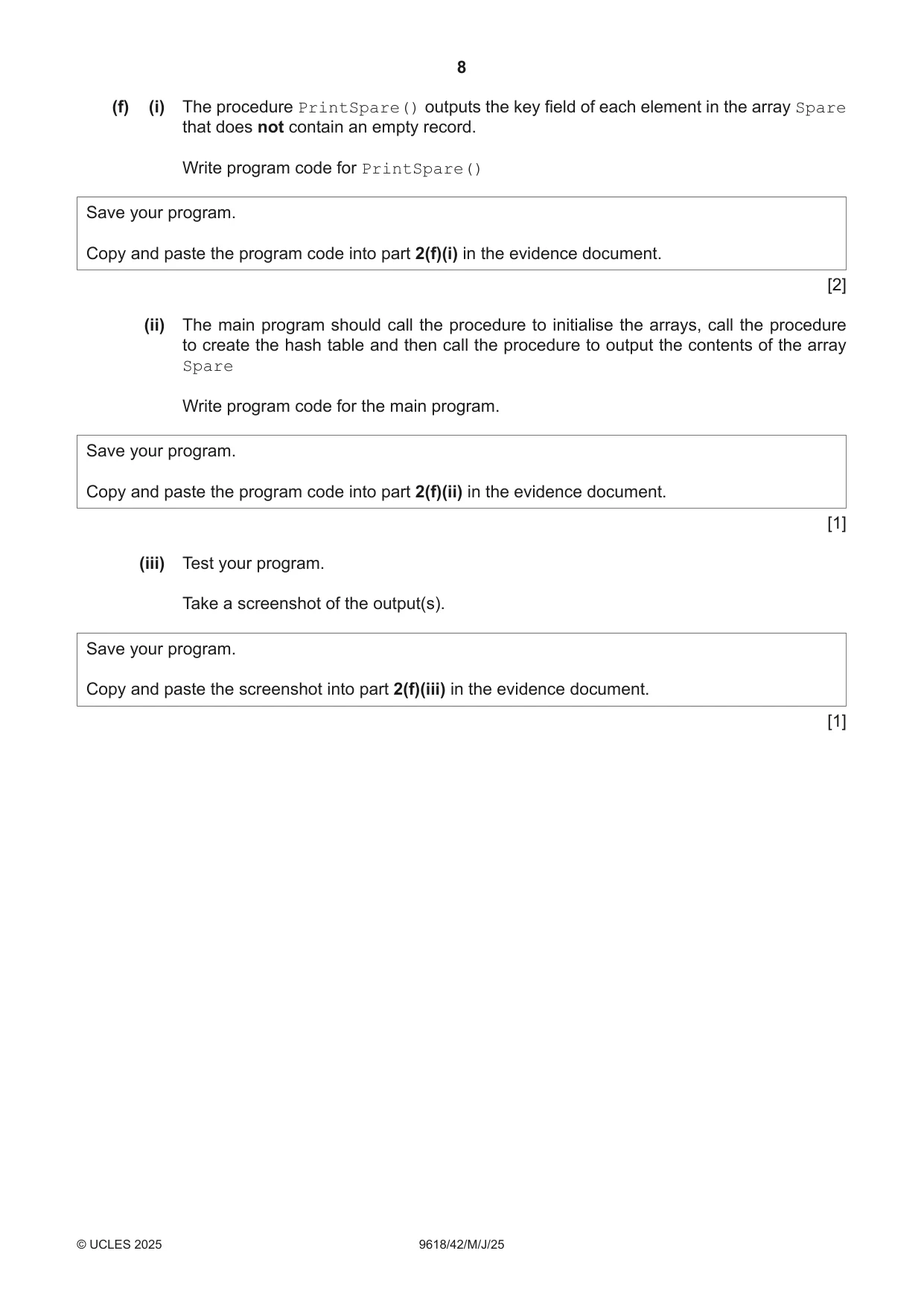
2 A program stores data in a 1D array of records, HashTable. The array has space for 200 records. Each data item is stored in a specific index of the array that is calculated using an algorithm. The index is calculated from the key field using the formula: Key MOD 200 If two key fields generate the same index, there is a collision. Any records that have a collision are stored in a second array, Spare. This array has space for 100 records. When a collision is detected, the record is stored in the next free space in Spare. (a) The pseudocode record format is: TYPE NewRecord DECLARE Key : INTEGER DECLARE Item1 : INTEGER DECLARE Item2 : INTEGER ENDTYPE Write program code to declare the record type NewRecord If your chosen programming language does not support record formats, a class can be used instead. Save your program as Question2_J25. Copy and paste the program code into part 2(a) in the evidence document. [2] (b) (i) Write program code to declare the global arrays HashTable and Spare Save your program. Copy and paste the program code into part 2(b)(i) in the evidence document. [1] (ii) An empty record has the integer –1 stored in each field. The procedure Initialise() stores an empty record in each element in HashTable and Spare Write program code for Initialise() Save your program. Copy and paste the program code into part 2(b)(ii) in the evidence document. [2] (c) The hash value is calculated from the key field using the formula: Key MOD 200 The function CalculateHash() takes a key field as a parameter and calculates and returns the hash value for the key field. Write program code for CalculateHash() Save your program. Copy and paste the program code into part 2(c) in the evidence document. [2] (d) The procedure InsertIntoHash(): • takes a record of type NewRecord as a parameter • uses CalculateHash() to calculate the hash value for the key field in the record • checks if the hash value index in HashTable currently stores an empty record ○ if the index stores an empty record, store the parameter in this index ○ if the index does not store an empty record, store the parameter in Spare You can assume there will always be enough space in Spare to store any collisions. Write program code for InsertIntoHash() Save your program. Copy and paste the program code into part 2(d) in the evidence document. [6] (e) The text file HashData.txt stores up to 200 rows of data to be stored into the hash table. Each row contains three integer numbers separated by commas. The first number is the key field, the second number is item 1 and the third number is item 2. For example: The first row in the text file contains: 646, 12, 568 The key field is 646, item 1 is 12 and item 2 is 568 The procedure CreateHashTable(): • opens the file HashData.txt • creates a record for each row of data in the file • calls InsertIntoHash() with each record. Write program code for CreateHashTable() Save your program. Copy and paste the program code into part 2(e) in the evidence document. [5] (f) (i) The procedure PrintSpare() outputs the key field of each element in the array Spare that does not contain an empty record. Write program code for PrintSpare() Save your program. Copy and paste the program code into part 2(f)(i) in the evidence document. [2] (ii) The main program should call the procedure to initialise the arrays, call the procedure to create the hash table and then call the procedure to output the contents of the array Spare Write program code for the main program. Save your program. Copy and paste the program code into part 2(f)(ii) in the evidence document. [1] (iii) Test your program. Take a screenshot of the output(s). Save your program. Copy and paste the screenshot into part 2(f)(iii) in the evidence document. [1]
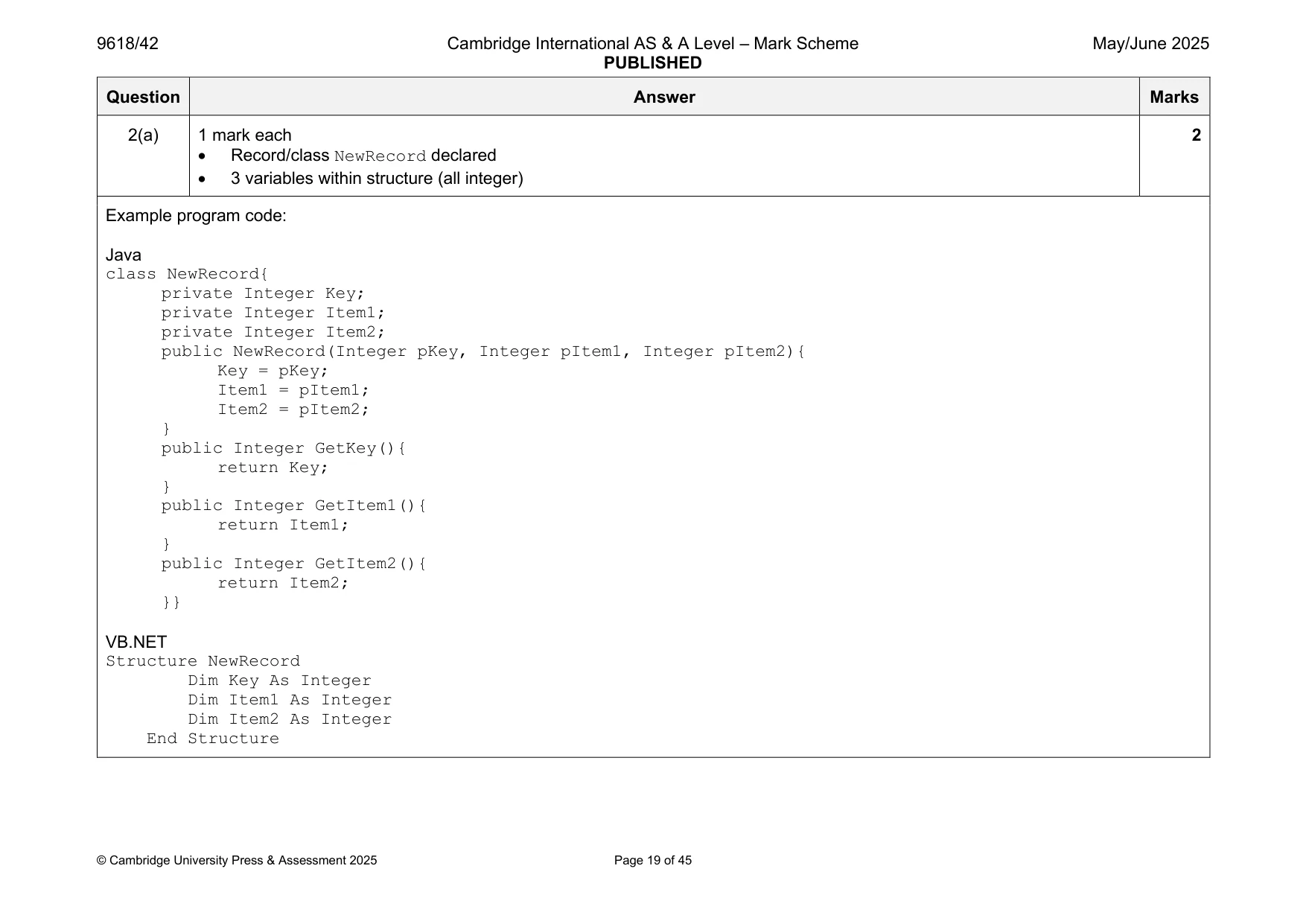
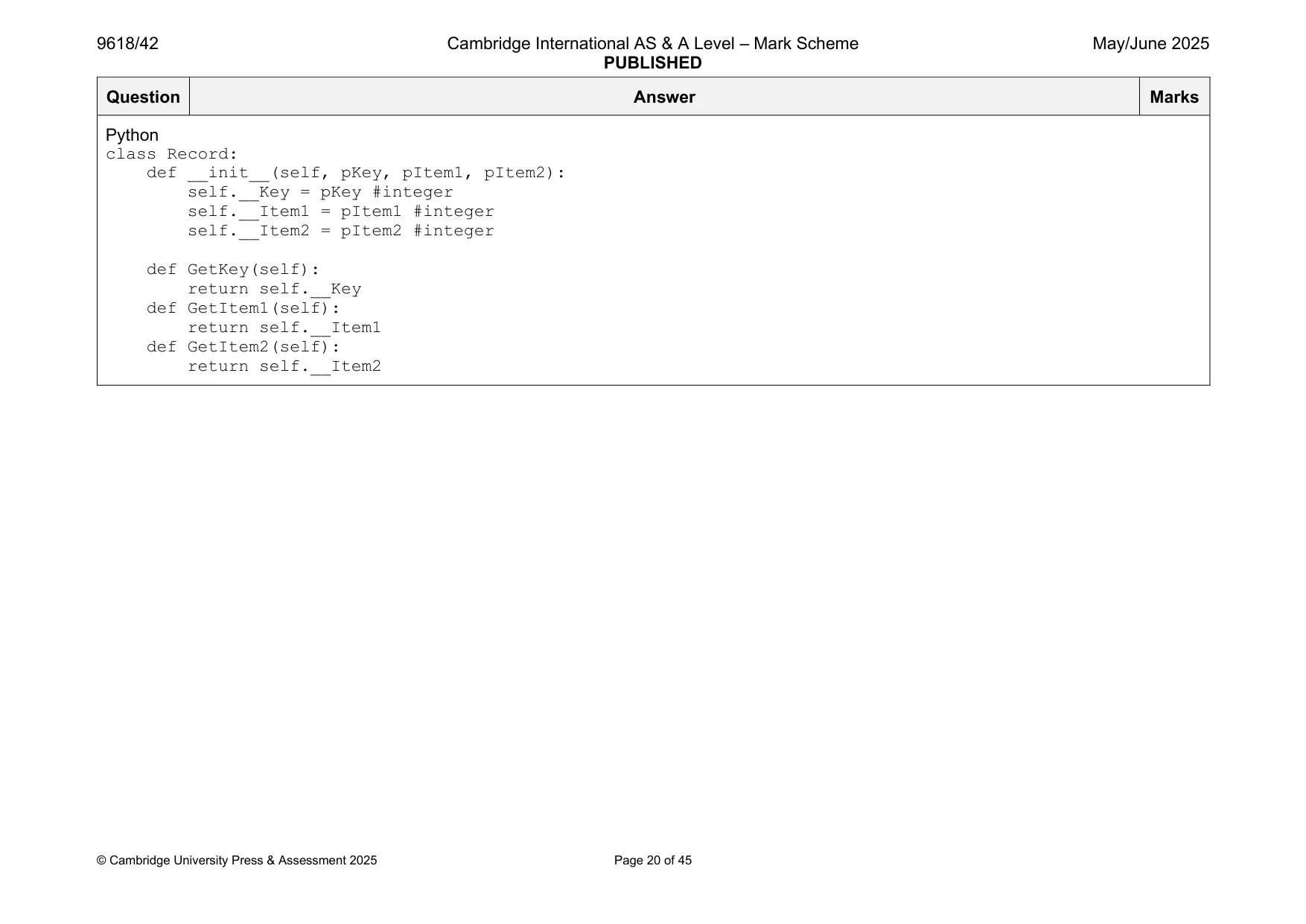
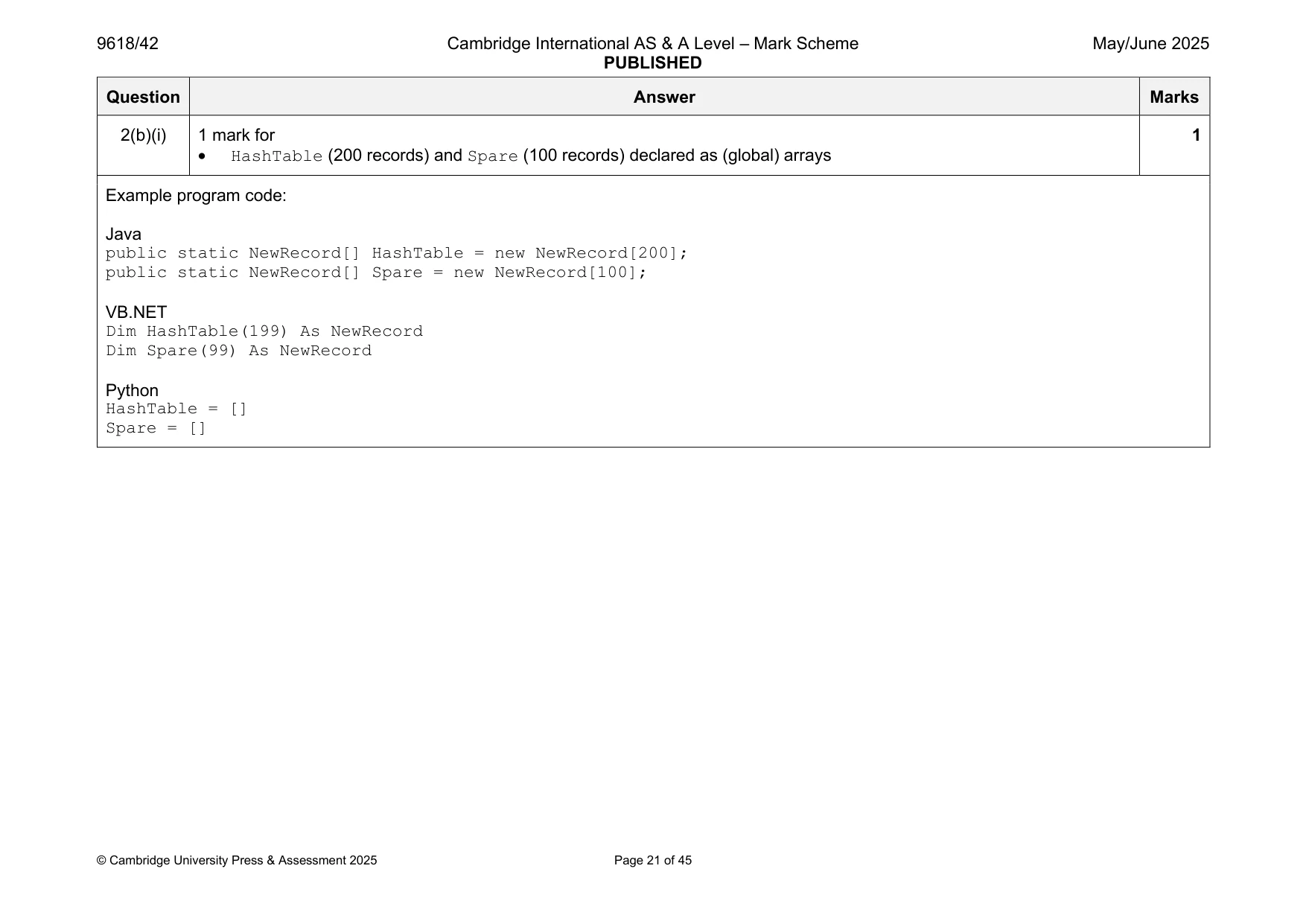
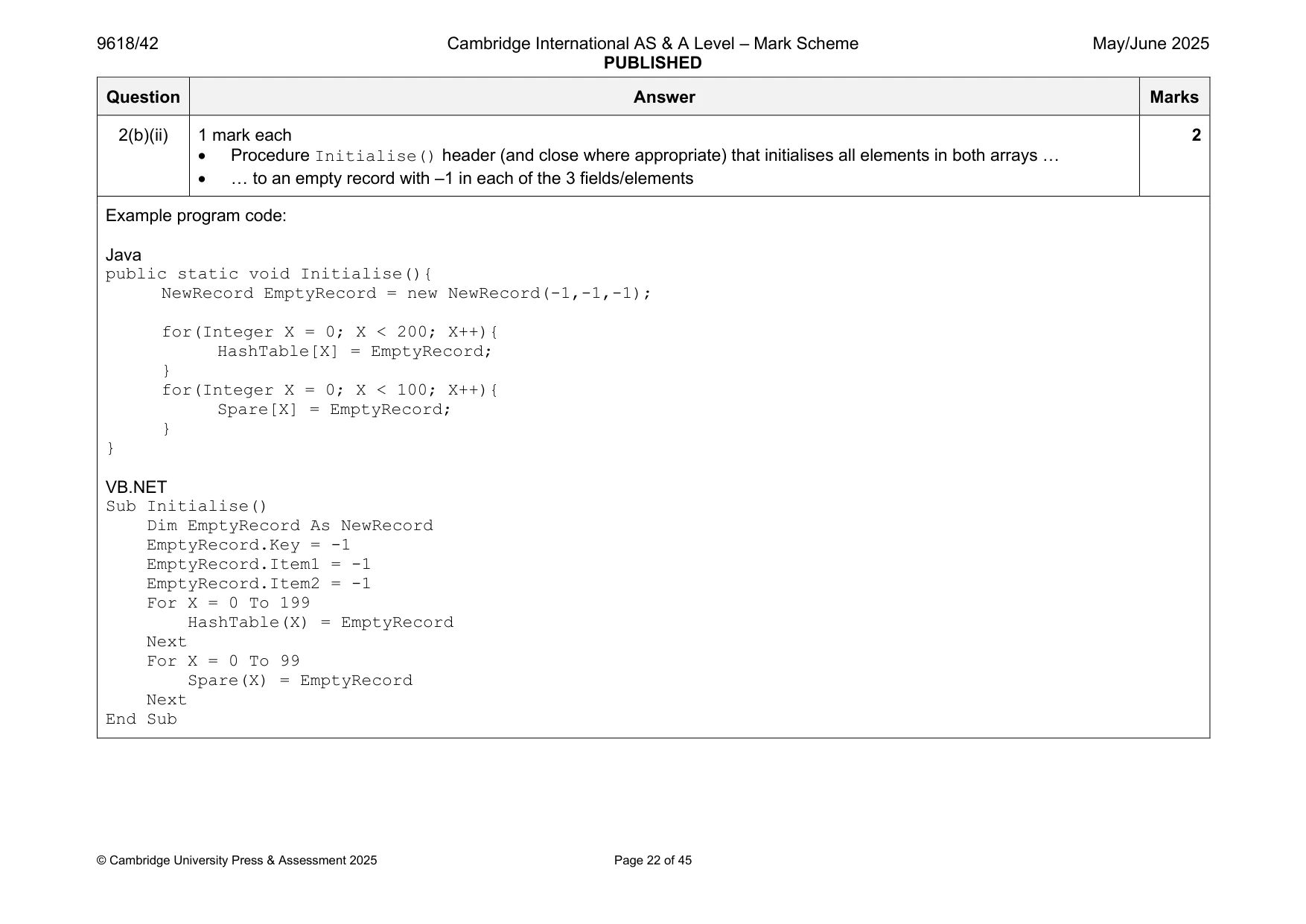
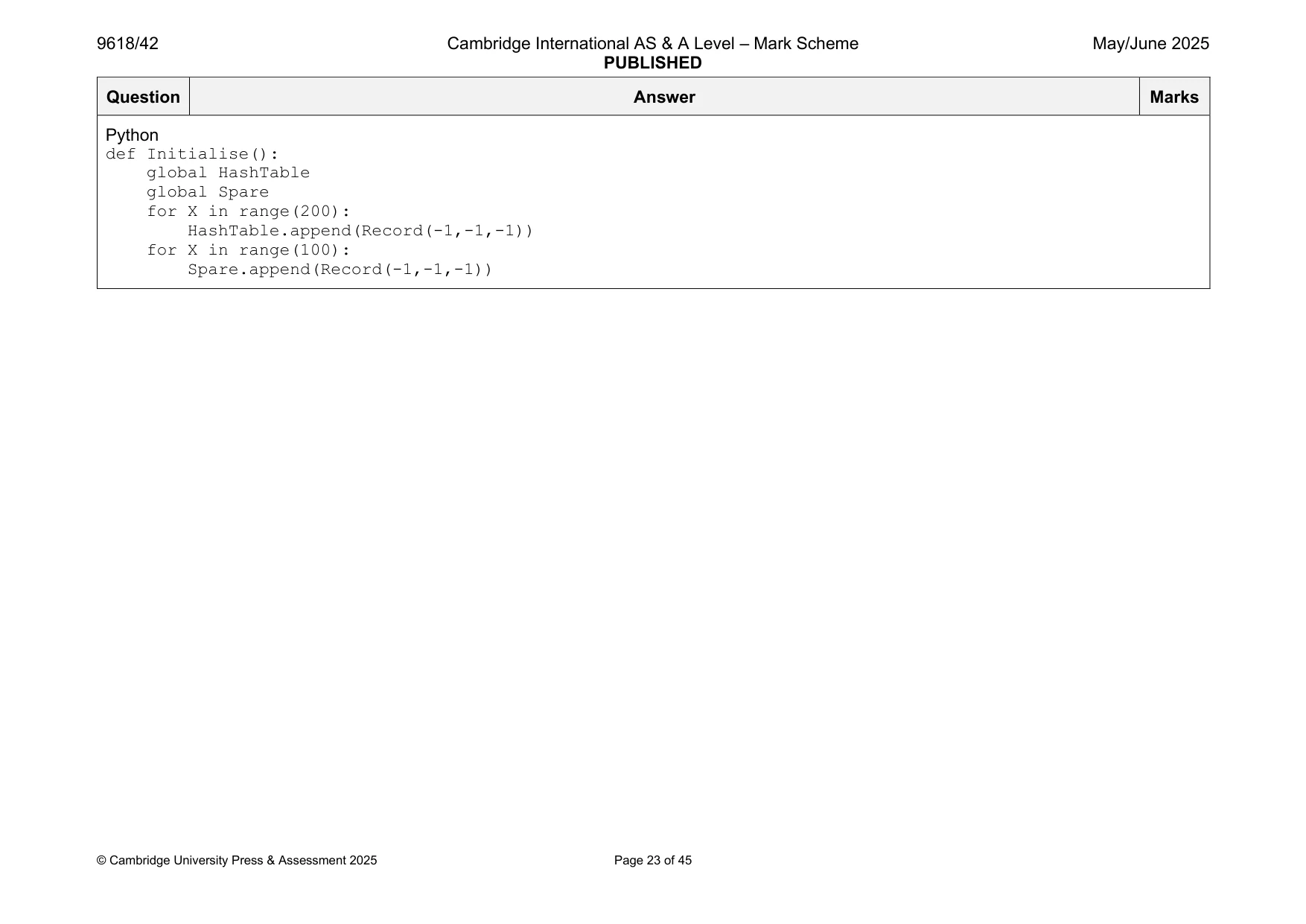
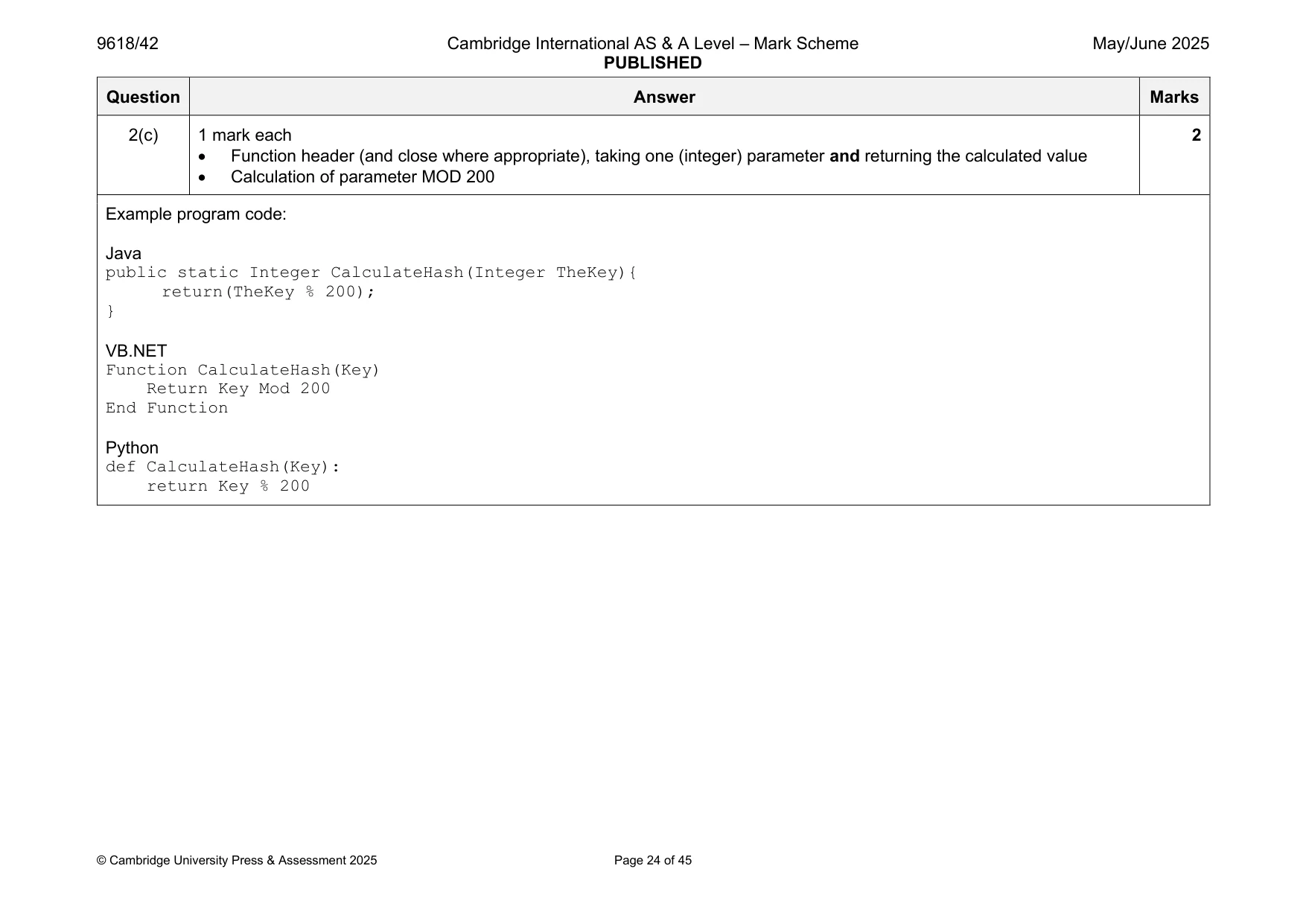
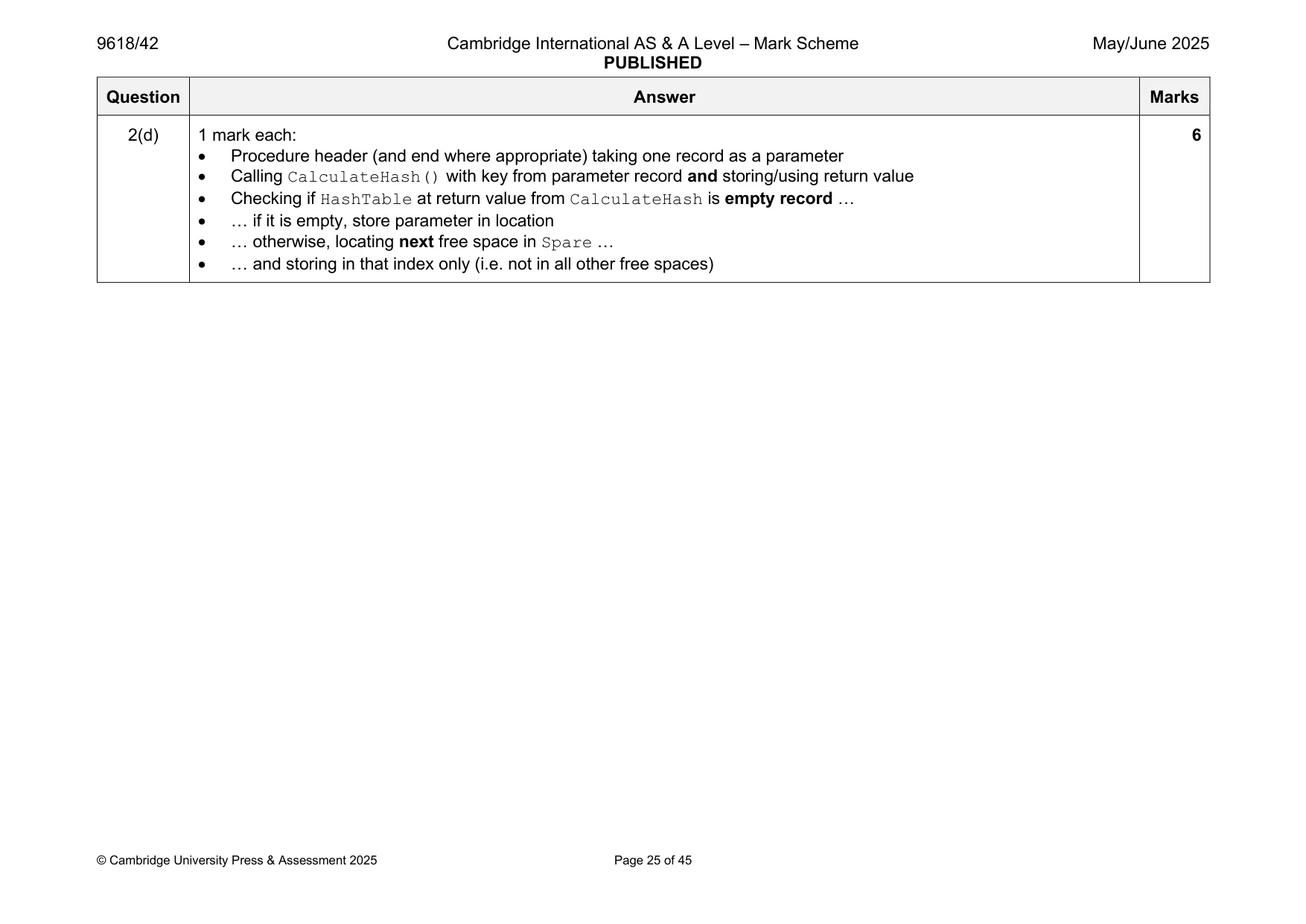
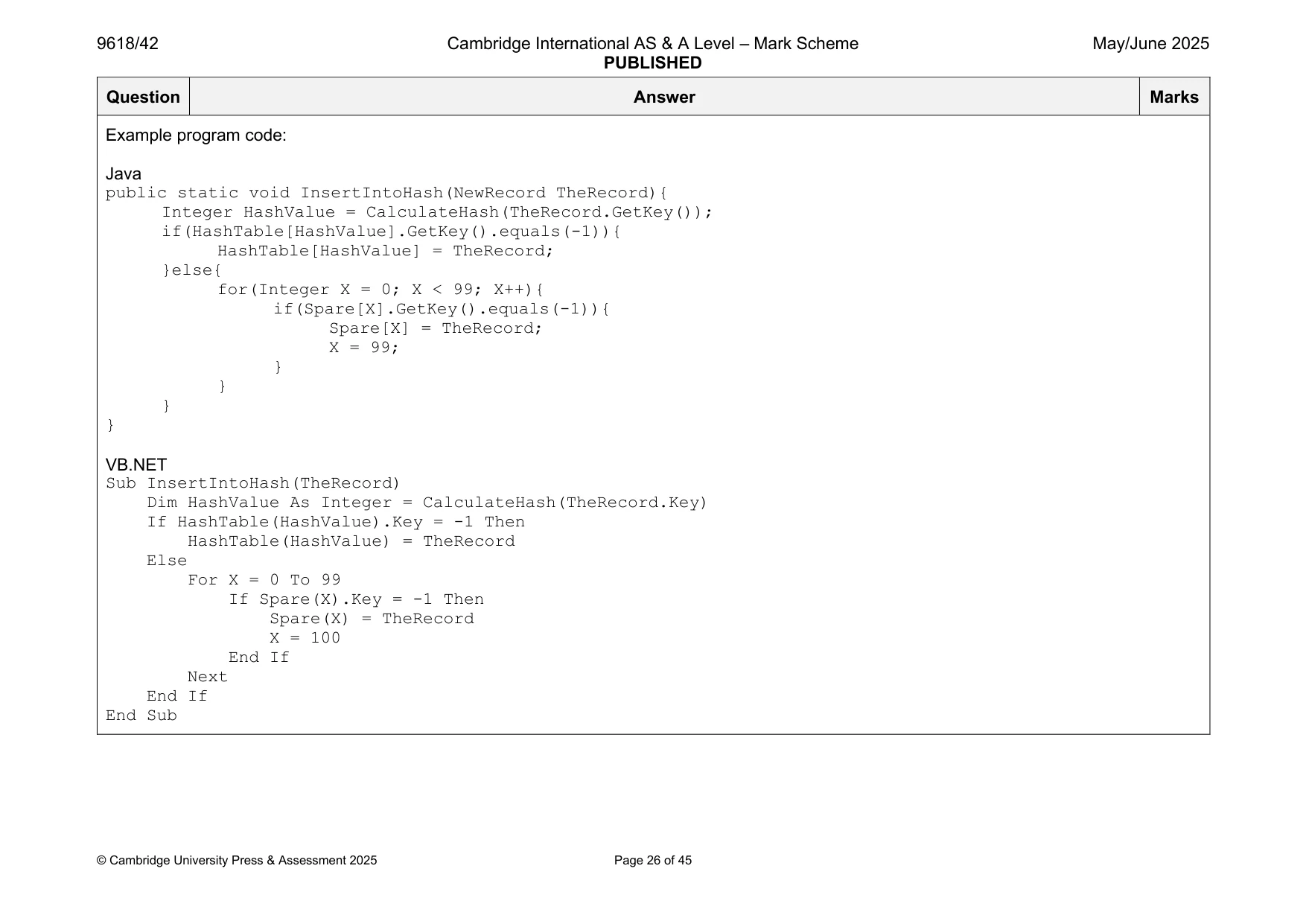
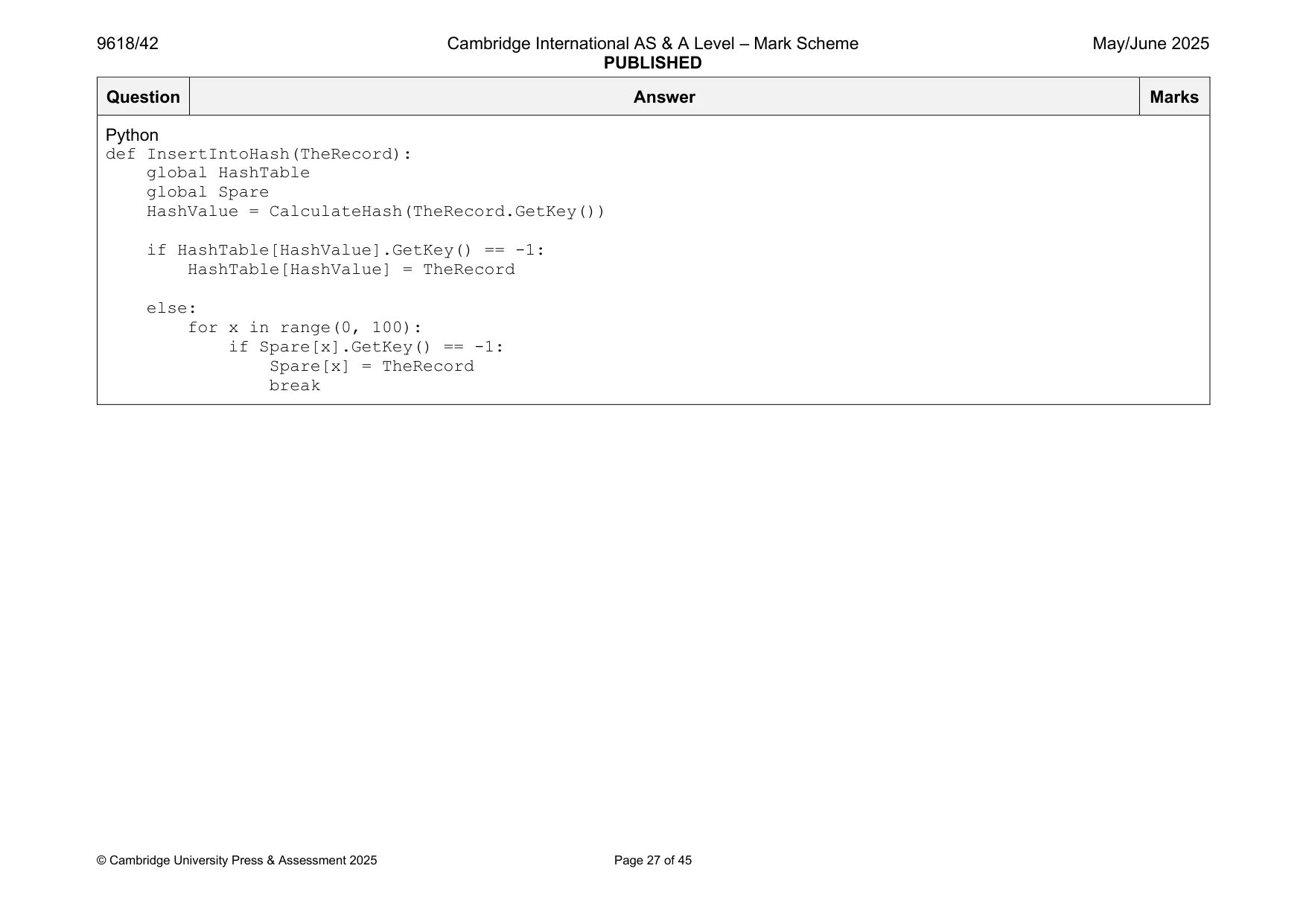
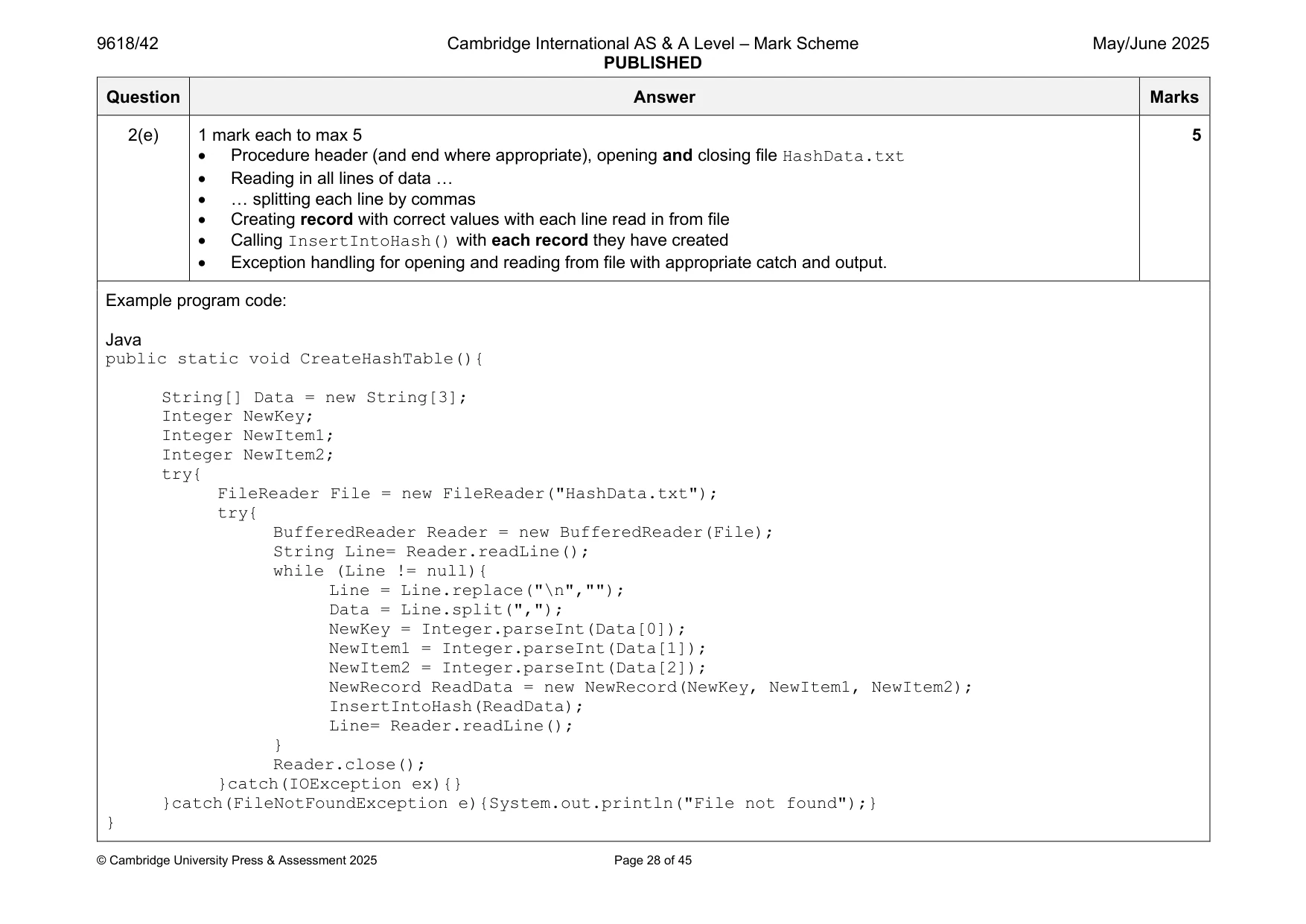
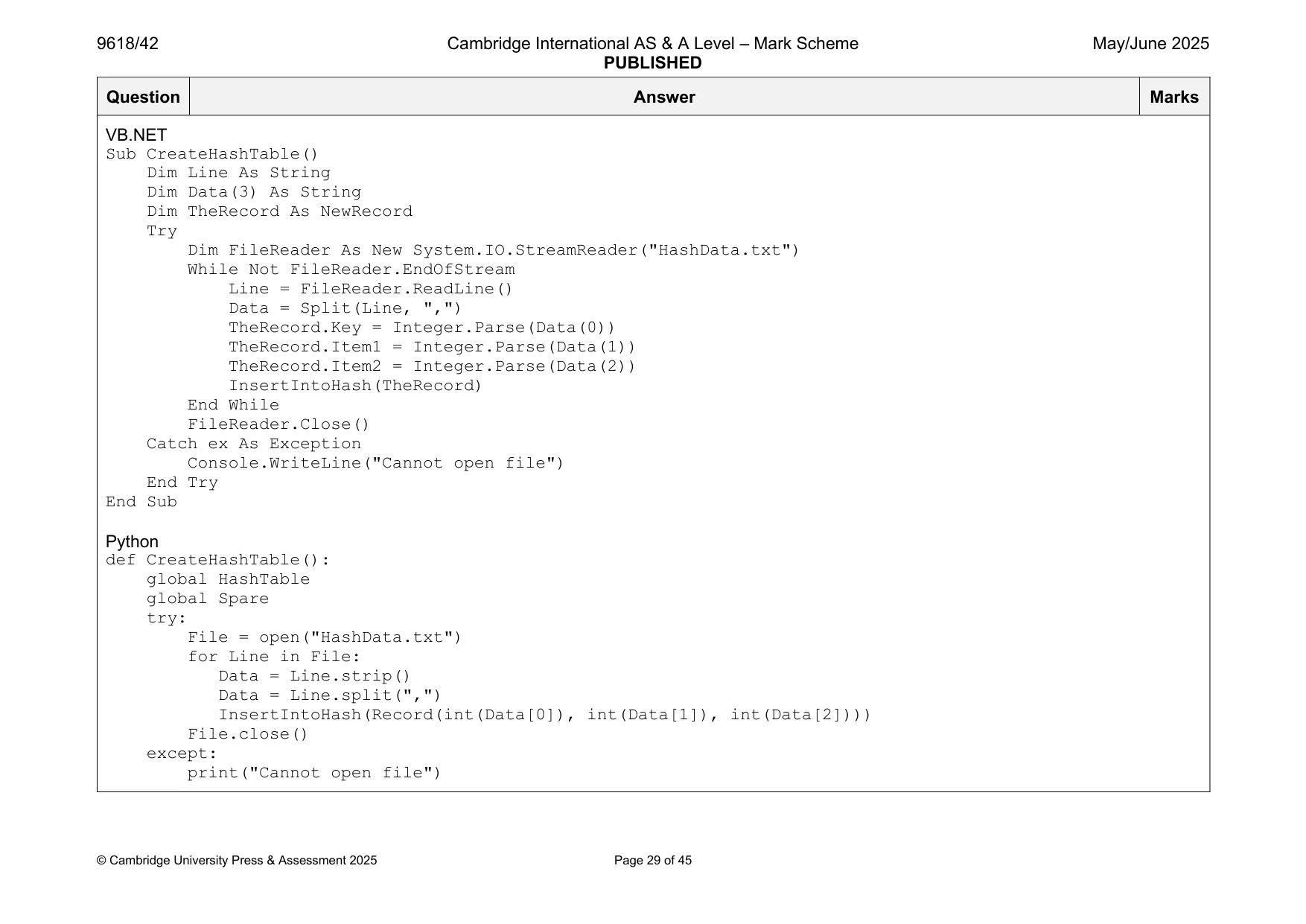
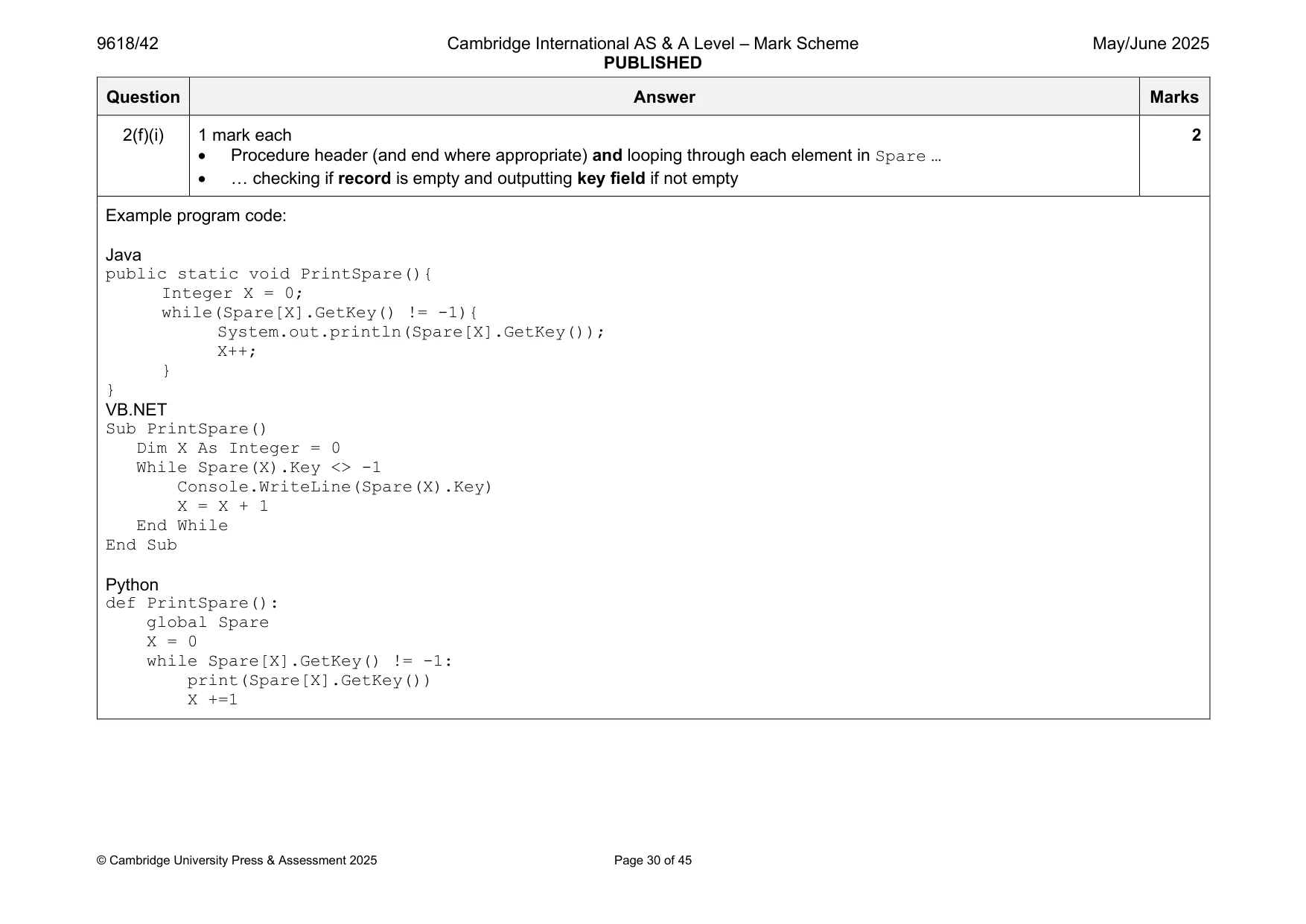
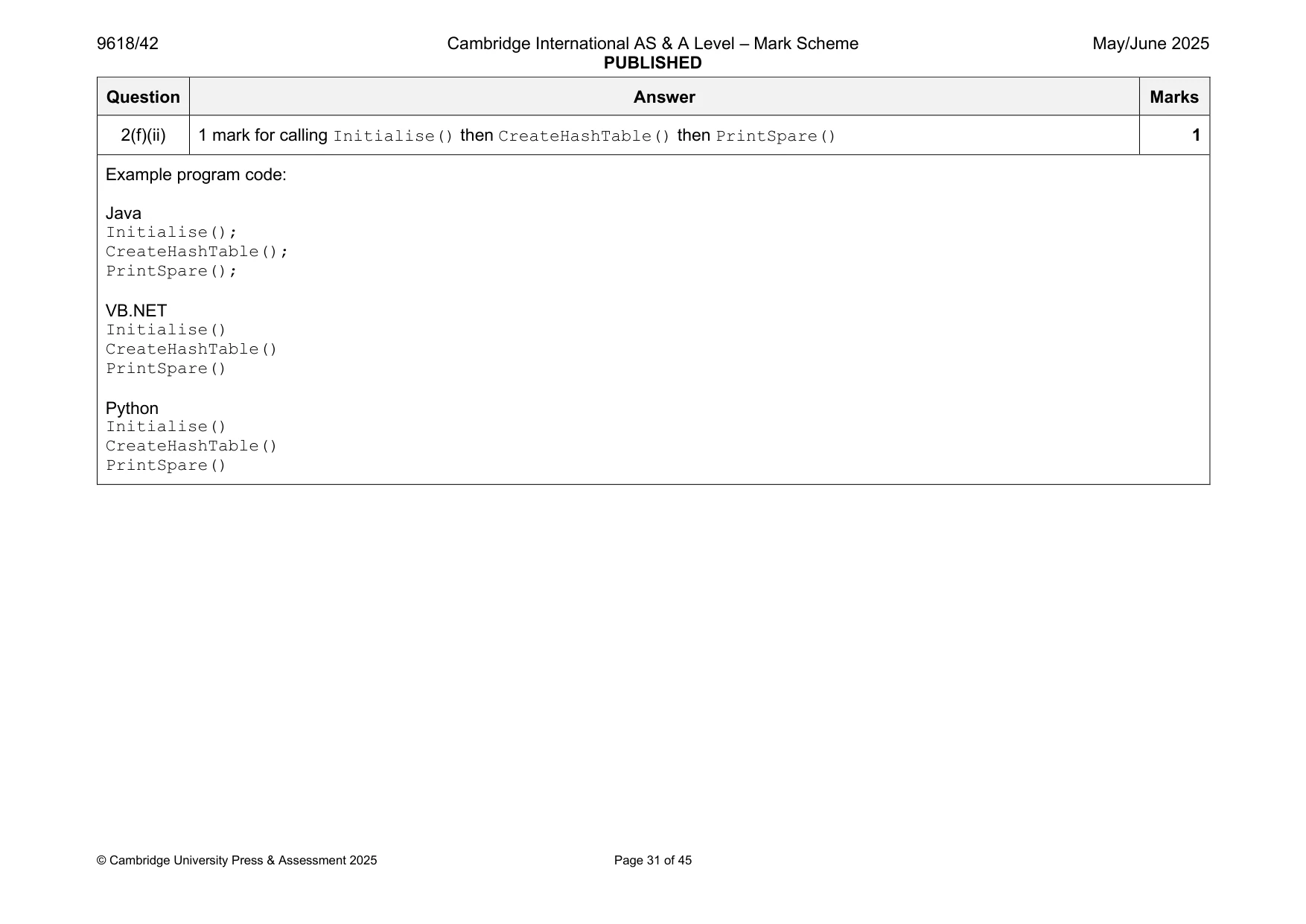
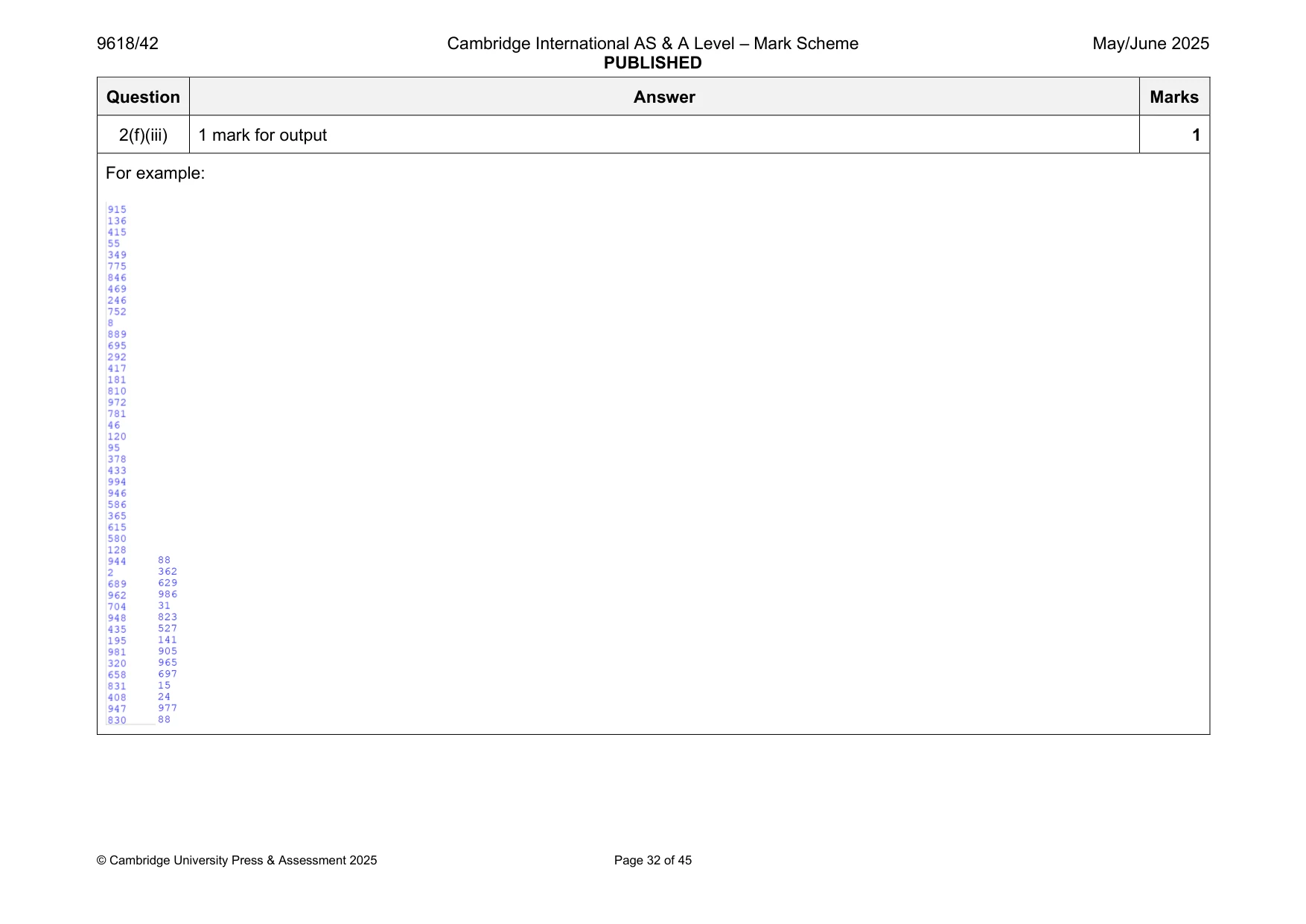
Mark scheme: 2(a) 1 mark each 2 • Record/class NewRecord declared • 3 variables within structure (all integer) Example program code: Java class NewRecord{ private Integer Key; private Integer Item1; private Integer Item2; public NewRecord(Integer pKey, Integer pItem1, Integer pItem2){ Key = pKey; Item1 = pItem1; Item2 = pItem2; } public Integer GetKey(){ return Key; } public Integer GetItem1(){ return Item1; } public Integer GetItem2(){ return Item2; }} VB.NET Structure NewRecord Dim Key As Integer Dim Item1 As Integer Dim Item2 As Integer End Structure Python class Record: def __init__(self, pKey, pItem1, pItem2): self.__Key = pKey #integer self.__Item1 = pItem1 #integer self.__Item2 = pItem2 #integer def GetKey(self): return self.__Key def GetItem1(self): return self.__Item1 def GetItem2(self): return self.__Item2 2(b)(i) 1 mark for 1 • HashTable (200 records) and Spare (100 records) declared as (global) arrays Example program code: Java public static NewRecord[] HashTable = new NewRecord[200]; public static NewRecord[] Spare = new NewRecord[100]; VB.NET Dim HashTable(199) As NewRecord Dim Spare(99) As NewRecord Python HashTable = [] Spare = [] 2(b)(ii) 1 mark each 2 • Procedure Initialise() header (and close where appropriate) that initialises all elements in both arrays … • … to an empty record with –1 in each of the 3 fields/elements Example program code: Java public static void Initialise(){ NewRecord EmptyRecord = new NewRecord(-1,-1,-1); for(Integer X = 0; X < 200; X++){ HashTable[X] = EmptyRecord; } for(Integer X = 0; X < 100; X++){ Spare[X] = EmptyRecord; } } VB.NET Sub Initialise() Dim EmptyRecord As NewRecord EmptyRecord.Key = -1 EmptyRecord.Item1 = -1 EmptyRecord.Item2 = -1 For X = 0 To 199 HashTable(X) = EmptyRecord Next For X = 0 To 99 Spare(X) = EmptyRecord Next End Sub Python def Initialise(): global HashTable global Spare for X in range(200): HashTable.append(Record(-1,-1,-1)) for X in range(100): Spare.append(Record(-1,-1,-1)) 2(c) 1 mark each 2 • Function header (and close where appropriate), taking one (integer) parameter and returning the calculated value • Calculation of parameter MOD 200 Example program code: Java public static Integer CalculateHash(Integer TheKey){ return(TheKey % 200); } VB.NET Function CalculateHash(Key) Return Key Mod 200 End Function Python def CalculateHash(Key): return Key % 200 2(d) 1 mark each: 6 • Procedure header (and end where appropriate) taking one record as a parameter • Calling CalculateHash() with key from parameter record and storing/using return value • Checking if HashTable at return value from CalculateHash is empty record … • … if it is empty, store parameter in location • … otherwise, locating next free space in Spare … • … and storing in that index only (i.e. not in all other free spaces) Example program code: Java public static void InsertIntoHash(NewRecord TheRecord){ Integer HashValue = CalculateHash(TheRecord.GetKey()); if(HashTable[HashValue].GetKey().equals(-1)){ HashTable[HashValue] = TheRecord; }else{ for(Integer X = 0; X < 99; X++){ if(Spare[X].GetKey().equals(-1)){ Spare[X] = TheRecord; X = 99; } } } } VB.NET Sub InsertIntoHash(TheRecord) Dim HashValue As Integer = CalculateHash(TheRecord.Key) If HashTable(HashValue).Key = -1 Then HashTable(HashValue) = TheRecord Else For X = 0 To 99 If Spare(X).Key = -1 Then Spare(X) = TheRecord X = 100 End If Next End If End Sub Python def InsertIntoHash(TheRecord): global HashTable global Spare HashValue = CalculateHash(TheRecord.GetKey()) if HashTable[HashValue].GetKey() == -1: HashTable[HashValue] = TheRecord else: for x in range(0, 100): if Spare[x].GetKey() == -1: Spare[x] = TheRecord break 2(e) 1 mark each to max 5 5 • Procedure header (and end where appropriate), opening and closing file HashData.txt • Reading in all lines of data … • … splitting each line by commas • Creating record with correct values with each line read in from file • Calling InsertIntoHash() with each record they have created • Exception handling for opening and reading from file with appropriate catch and output. Example program code: Java public static void CreateHashTable(){ String[] Data = new String[3]; Integer NewKey; Integer NewItem1; Integer NewItem2; try{ FileReader File = new FileReader("HashData.txt"); try{ BufferedReader Reader = new BufferedReader(File); String Line= Reader.readLine(); while (Line != null){ Line = Line.replace("\n",""); Data = Line.split(","); NewKey = Integer.parseInt(Data[0]); NewItem1 = Integer.parseInt(Data[1]); NewItem2 = Integer.parseInt(Data[2]); NewRecord ReadData = new NewRecord(NewKey, NewItem1, NewItem2); InsertIntoHash(ReadData); Line= Reader.readLine(); } Reader.close(); }catch(IOException ex){} }catch(FileNotFoundException e){System.out.println("File not found");} } VB.NET Sub CreateHashTable() Dim Line As String Dim Data(3) As String Dim TheRecord As NewRecord Try Dim FileReader As New System.IO.StreamReader("HashData.txt") While Not FileReader.EndOfStream Line = FileReader.ReadLine() Data = Split(Line, ",") TheRecord.Key = Integer.Parse(Data(0)) TheRecord.Item1 = Integer.Parse(Data(1)) TheRecord.Item2 = Integer.Parse(Data(2)) InsertIntoHash(TheRecord) End While FileReader.Close() Catch ex As Exception Console.WriteLine("Cannot open file") End Try End Sub Python def CreateHashTable(): global HashTable global Spare try: File = open("HashData.txt") for Line in File: Data = Line.strip() Data = Line.split(",") InsertIntoHash(Record(int(Data[0]), int(Data[1]), int(Data[2]))) File.close() except: print("Cannot open file") 2(f)(i) 1 mark each 2 • Procedure header (and end where appropriate) and looping through each element in Spare … • … checking if record is empty and outputting key field if not empty Example program code: Java public static void PrintSpare(){ Integer X = 0; while(Spare[X].GetKey() != -1){ System.out.println(Spare[X].GetKey()); X++; } } VB.NET Sub PrintSpare() Dim X As Integer = 0 While Spare(X).Key <> -1 Console.WriteLine(Spare(X).Key) X = X + 1 End While End Sub Python def PrintSpare(): global Spare X = 0 while Spare[X].GetKey() != -1: print(Spare[X].GetKey()) X +=1 2(f)(ii) 1 mark for calling Initialise() then CreateHashTable() then PrintSpare() 1 Example program code: Java Initialise(); CreateHashTable(); PrintSpare(); VB.NET Initialise() CreateHashTable() PrintSpare() Python Initialise() CreateHashTable() PrintSpare() 2(f)(iii) 1 mark for output 1 For example:
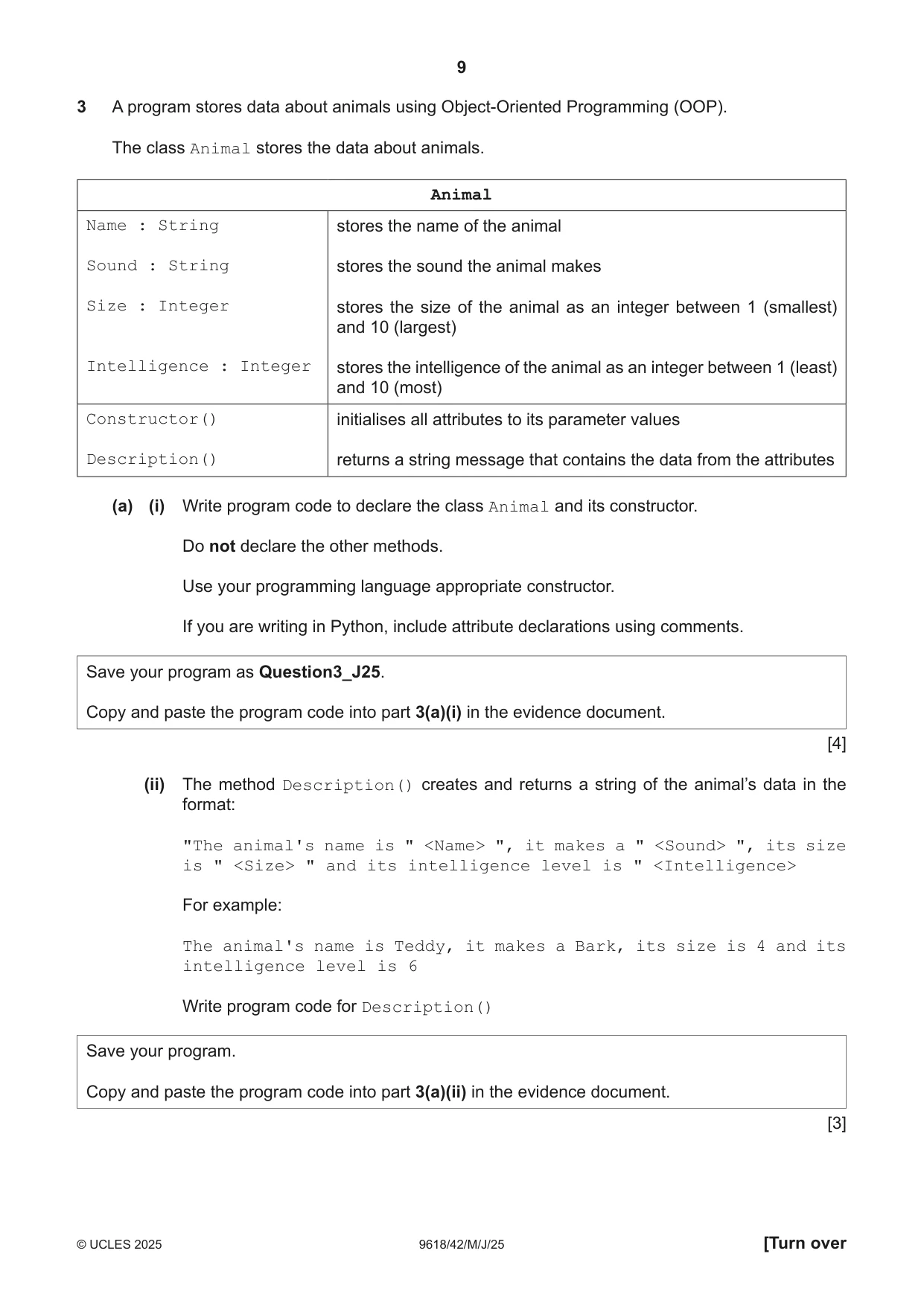
Q3 · A program stores data about animals using Object‑Oriented Programming (OOP)
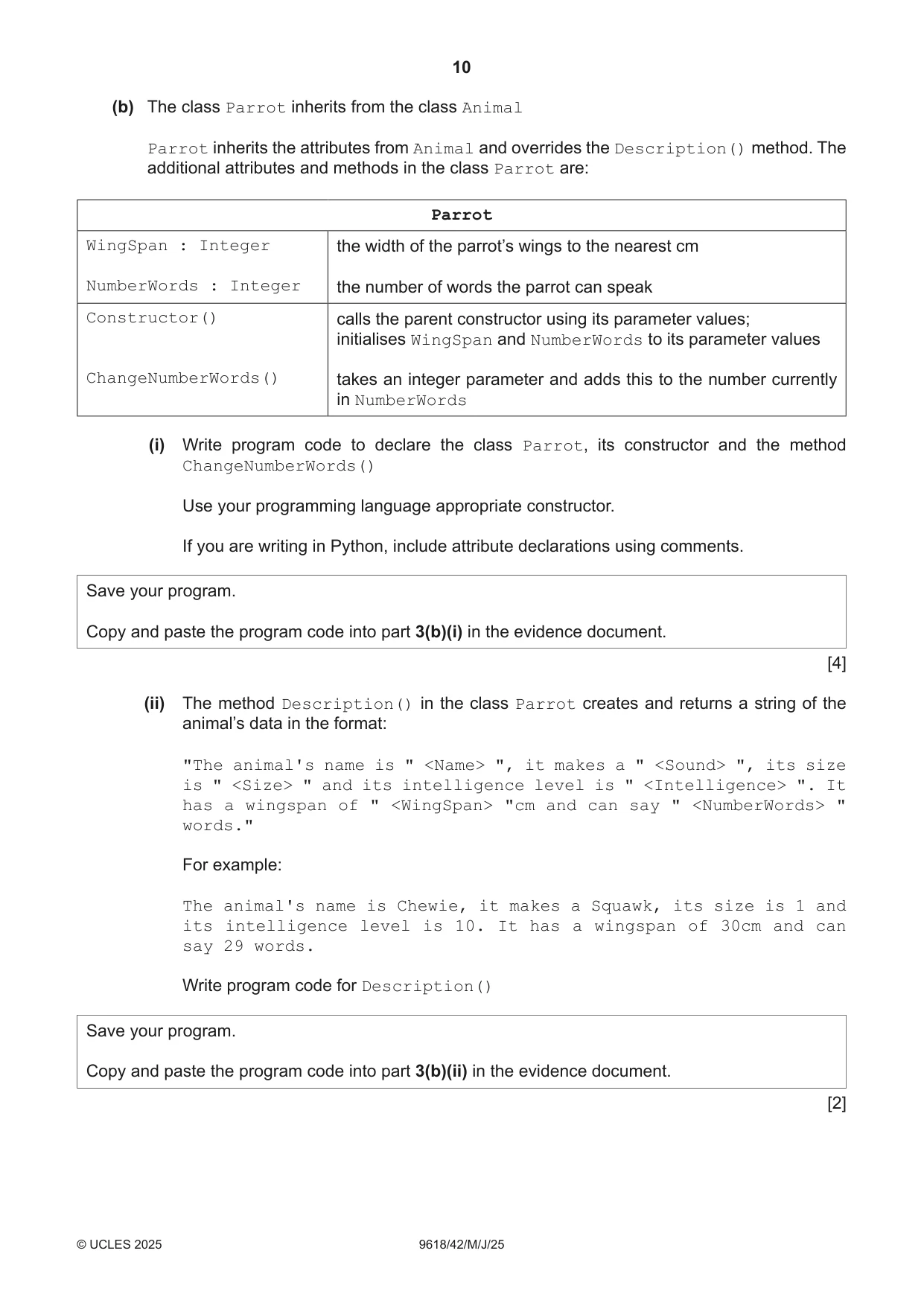
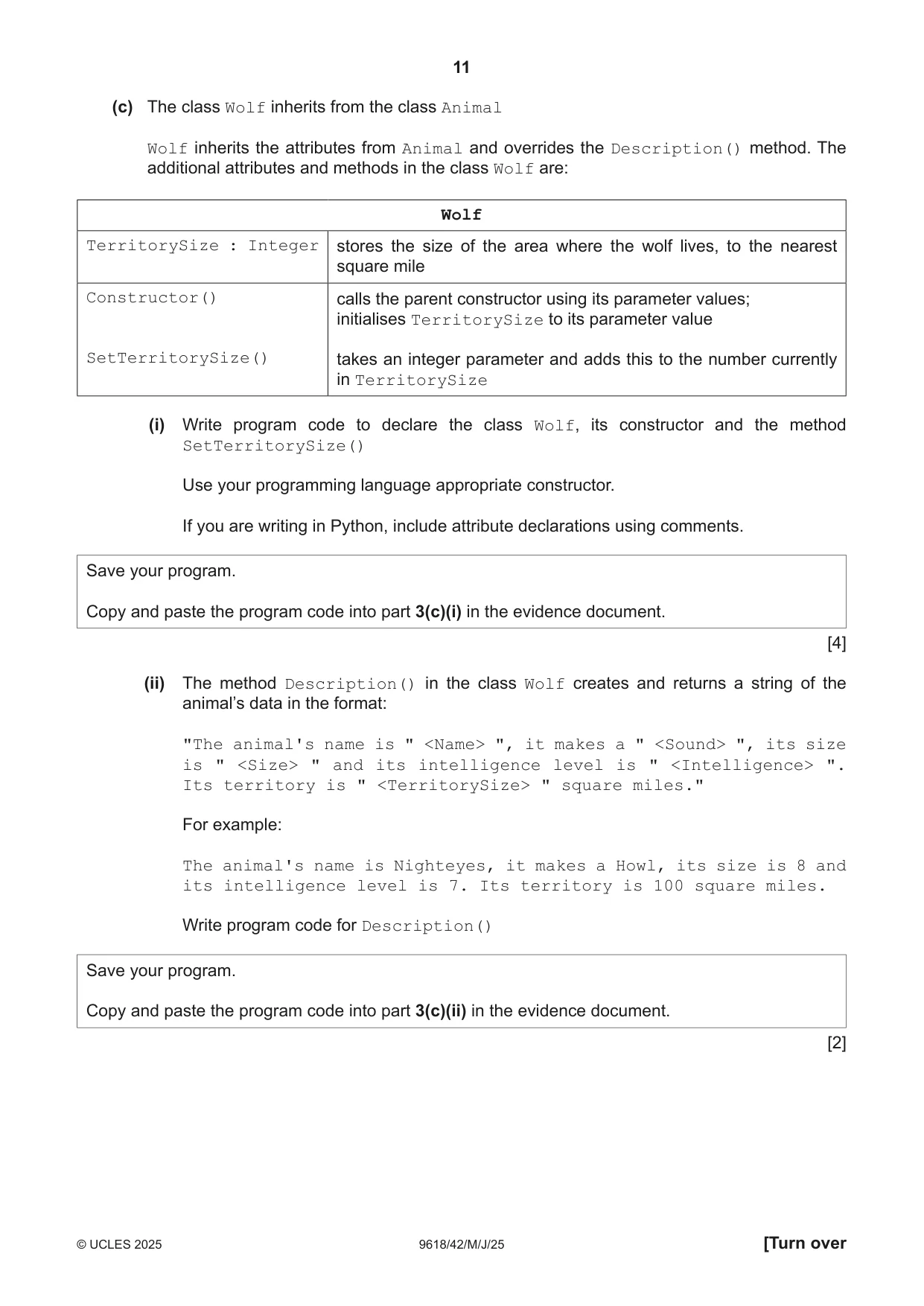
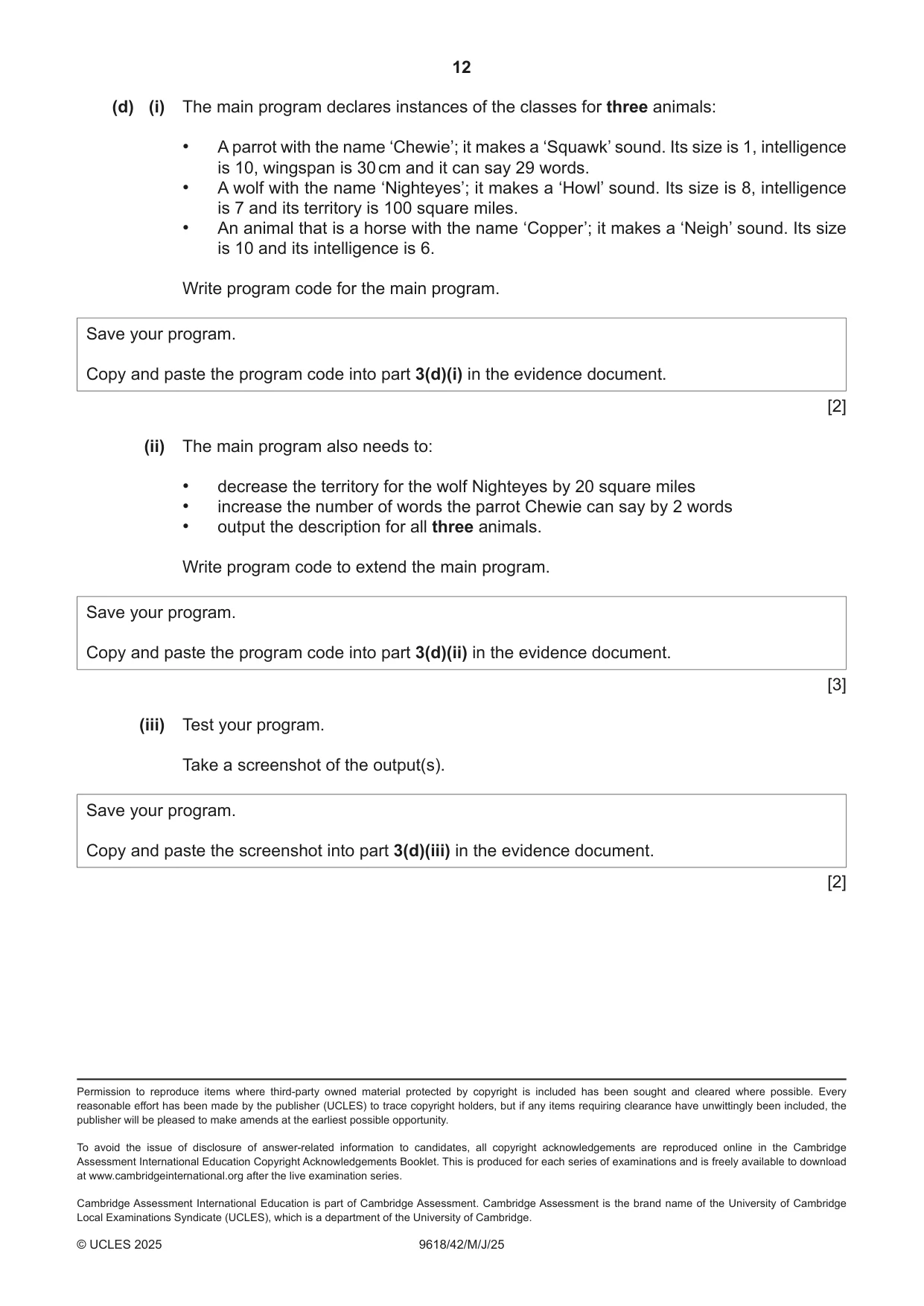
3 A program stores data about animals using Object‑Oriented Programming (OOP). The class Animal stores the data about animals. Animal Name : String stores the name of the animal Sound : String stores the sound the animal makes Size : Integer stores the size of the animal as an integer between 1 (smallest) and 10 (largest) Intelligence : Integer stores the intelligence of the animal as an integer between 1 (least) and 10 (most) Constructor() initialises all attributes to its parameter values Description() returns a string message that contains the data from the attributes (a) (i) Write program code to declare the class Animal and its constructor. Do not declare the other methods. Use your programming language appropriate constructor. If you are writing in Python, include attribute declarations using comments. Save your program as Question3_J25. Copy and paste the program code into part 3(a)(i) in the evidence document. [4] (ii) The method Description() creates and returns a string of the animal’s data in the format: "The animal's name is " <Name> ", it makes a " <Sound> ", its size is " <Size> " and its intelligence level is " <Intelligence> For example: The animal's name is Teddy, it makes a Bark, its size is 4 and its intelligence level is 6 Write program code for Description() Save your program. Copy and paste the program code into part 3(a)(ii) in the evidence document. [3] (b) The class Parrot inherits from the class Animal Parrot inherits the attributes from Animal and overrides the Description() method. The additional attributes and methods in the class Parrot are: Parrot WingSpan : Integer the width of the parrot’s wings to the nearest cm NumberWords : Integer the number of words the parrot can speak Constructor() calls the parent constructor using its parameter values; initialises WingSpan and NumberWords to its parameter values ChangeNumberWords() takes an integer parameter and adds this to the number currently in NumberWords (i) Write program code to declare the class Parrot, its constructor and the method ChangeNumberWords() Use your programming language appropriate constructor. If you are writing in Python, include attribute declarations using comments. Save your program. Copy and paste the program code into part 3(b)(i) in the evidence document. [4] (ii) The method Description() in the class Parrot creates and returns a string of the animal’s data in the format: "The animal's name is " <Name> ", it makes a " <Sound> ", its size is " <Size> " and its intelligence level is " <Intelligence> ". It has a wingspan of " <WingSpan> "cm and can say " <NumberWords> " words." For example: The animal's name is Chewie, it makes a Squawk, its size is 1 and its intelligence level is 10. It has a wingspan of 30cm and can say 29 words. Write program code for Description() Save your program. Copy and paste the program code into part 3(b)(ii) in the evidence document. [2] (c) The class Wolf inherits from the class Animal Wolf inherits the attributes from Animal and overrides the Description() method. The additional attributes and methods in the class Wolf are: Wolf TerritorySize : Integer stores the size of the area where the wolf lives, to the nearest square mile Constructor() calls the parent constructor using its parameter values; initialises TerritorySize to its parameter value SetTerritorySize() takes an integer parameter and adds this to the number currently in TerritorySize (i) Write program code to declare the class Wolf, its constructor and the method SetTerritorySize() Use your programming language appropriate constructor. If you are writing in Python, include attribute declarations using comments. Save your program. Copy and paste the program code into part 3(c)(i) in the evidence document. [4] (ii) The method Description() in the class Wolf creates and returns a string of the animal’s data in the format: "The animal's name is " <Name> ", it makes a " <Sound> ", its size is " <Size> " and its intelligence level is " <Intelligence> ". Its territory is " <TerritorySize> " square miles." For example: The animal's name is Nighteyes, it makes a Howl, its size is 8 and its intelligence level is 7. Its territory is 100 square miles. Write program code for Description() Save your program. Copy and paste the program code into part 3(c)(ii) in the evidence document. [2]
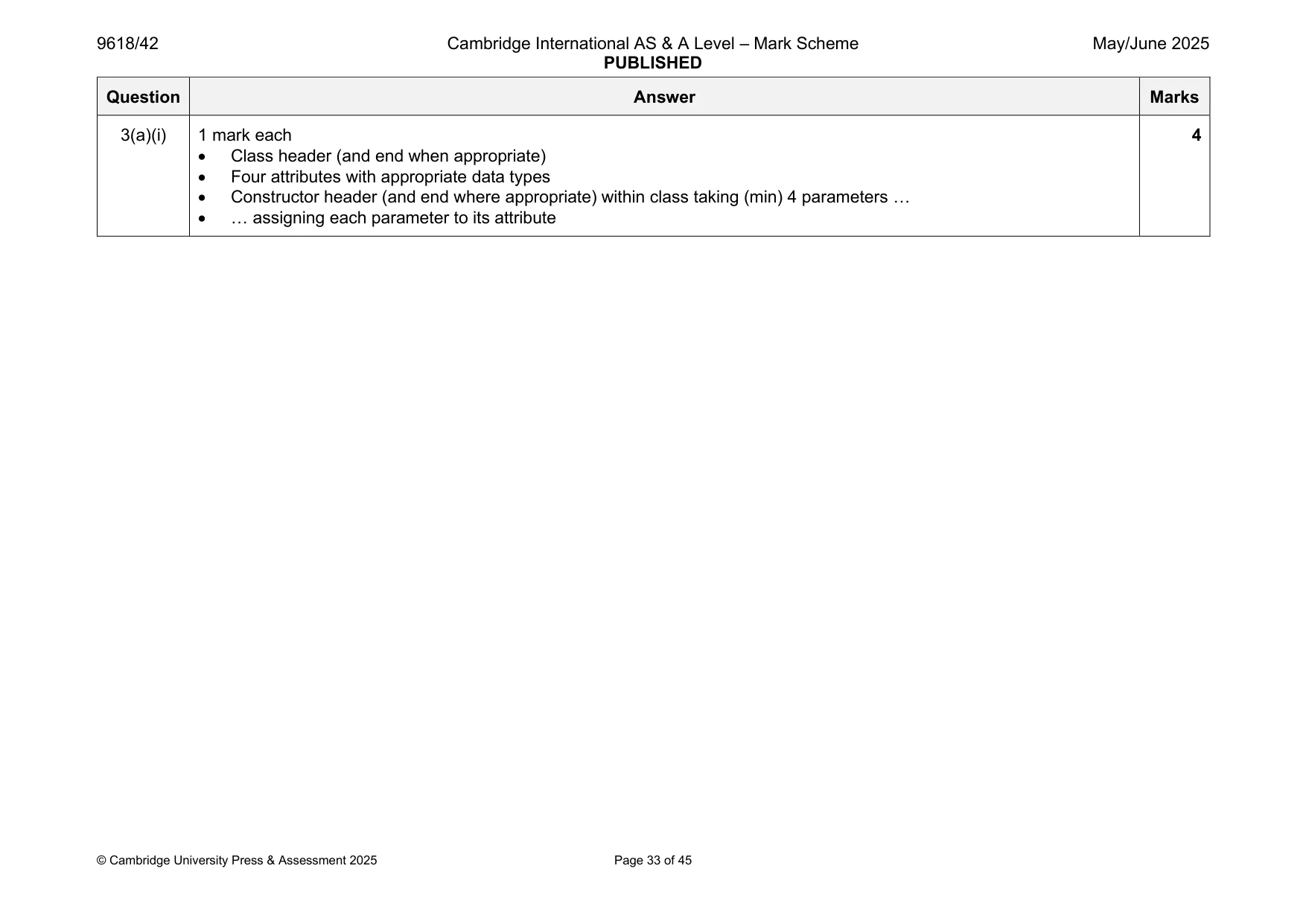
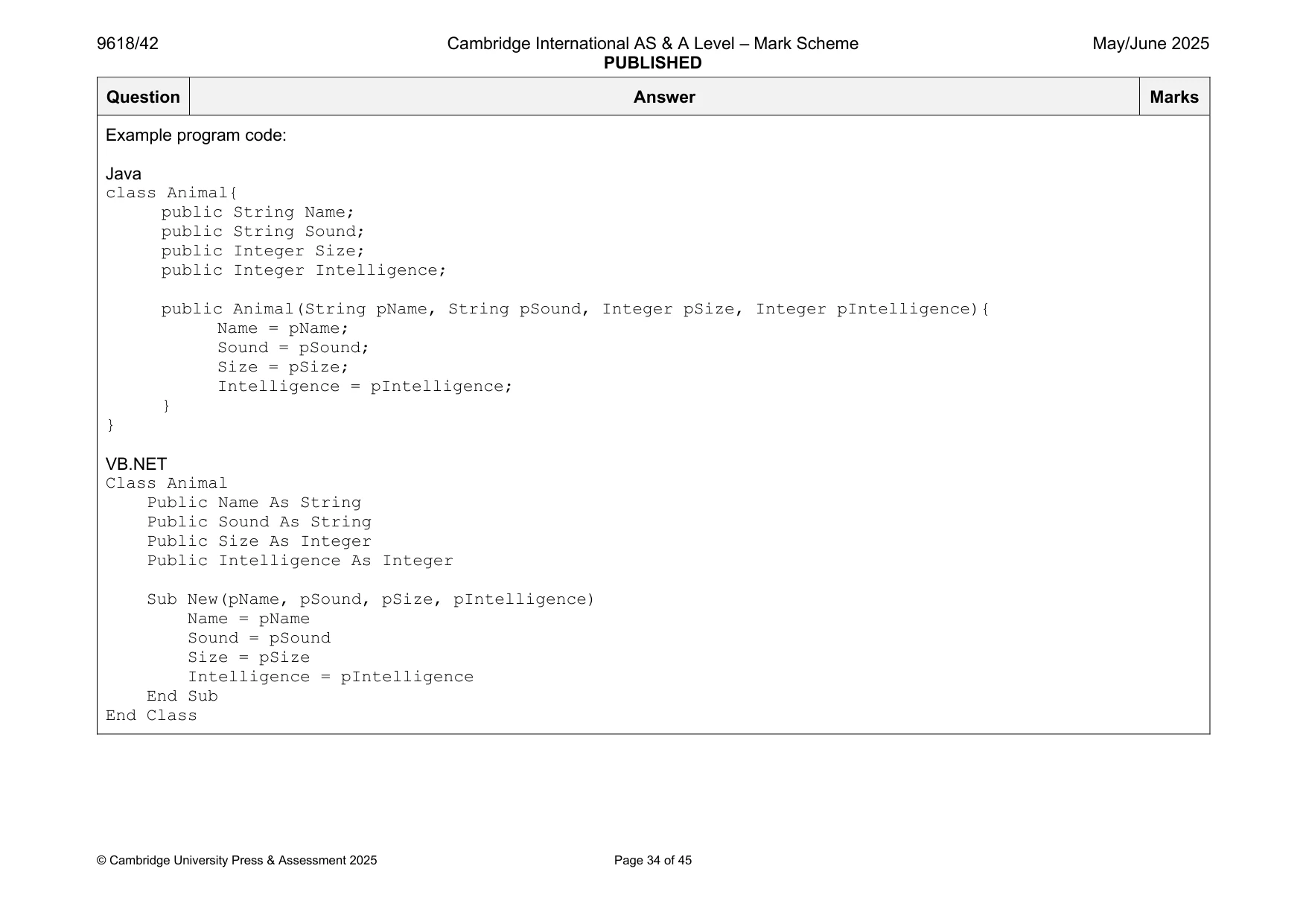
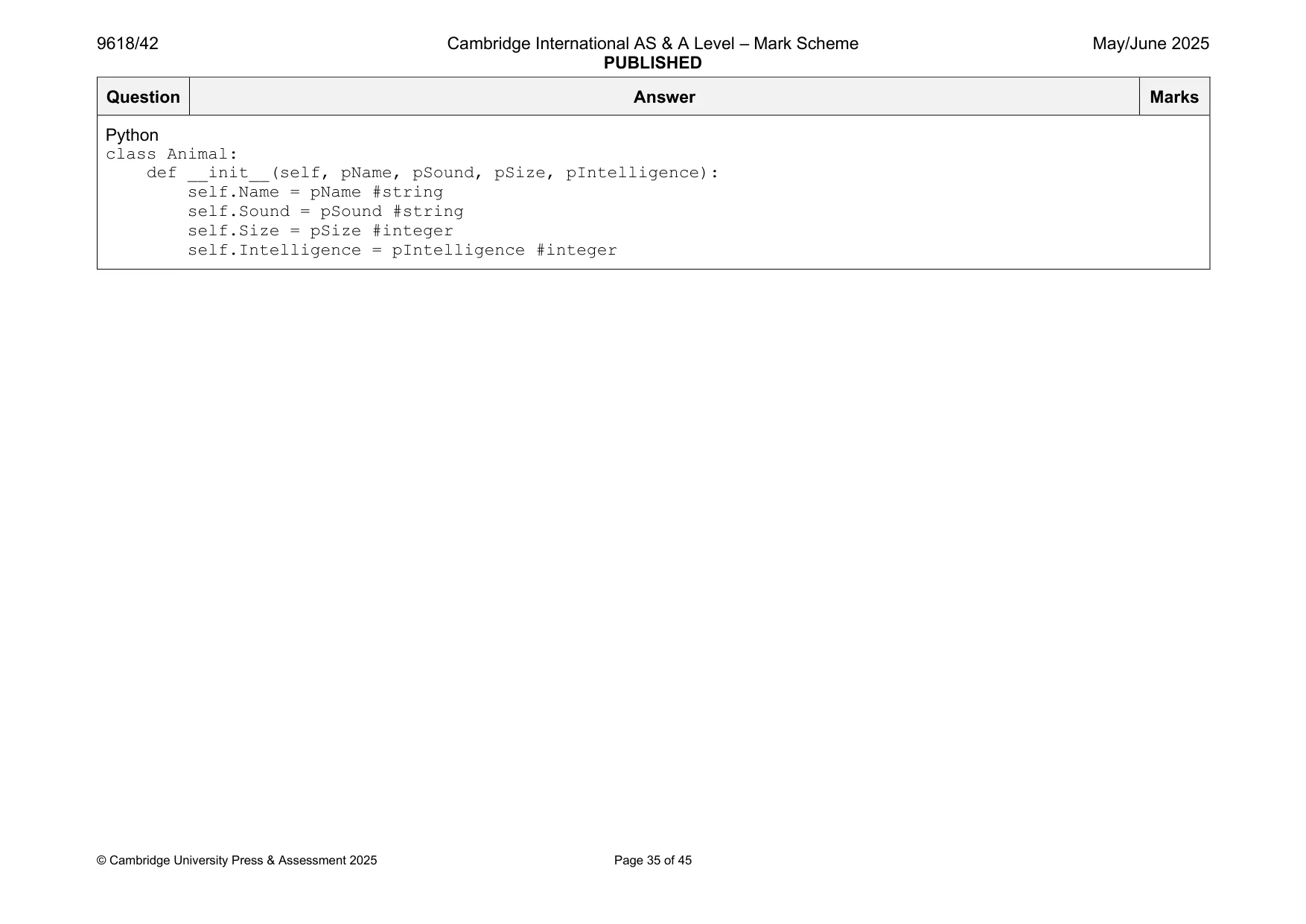
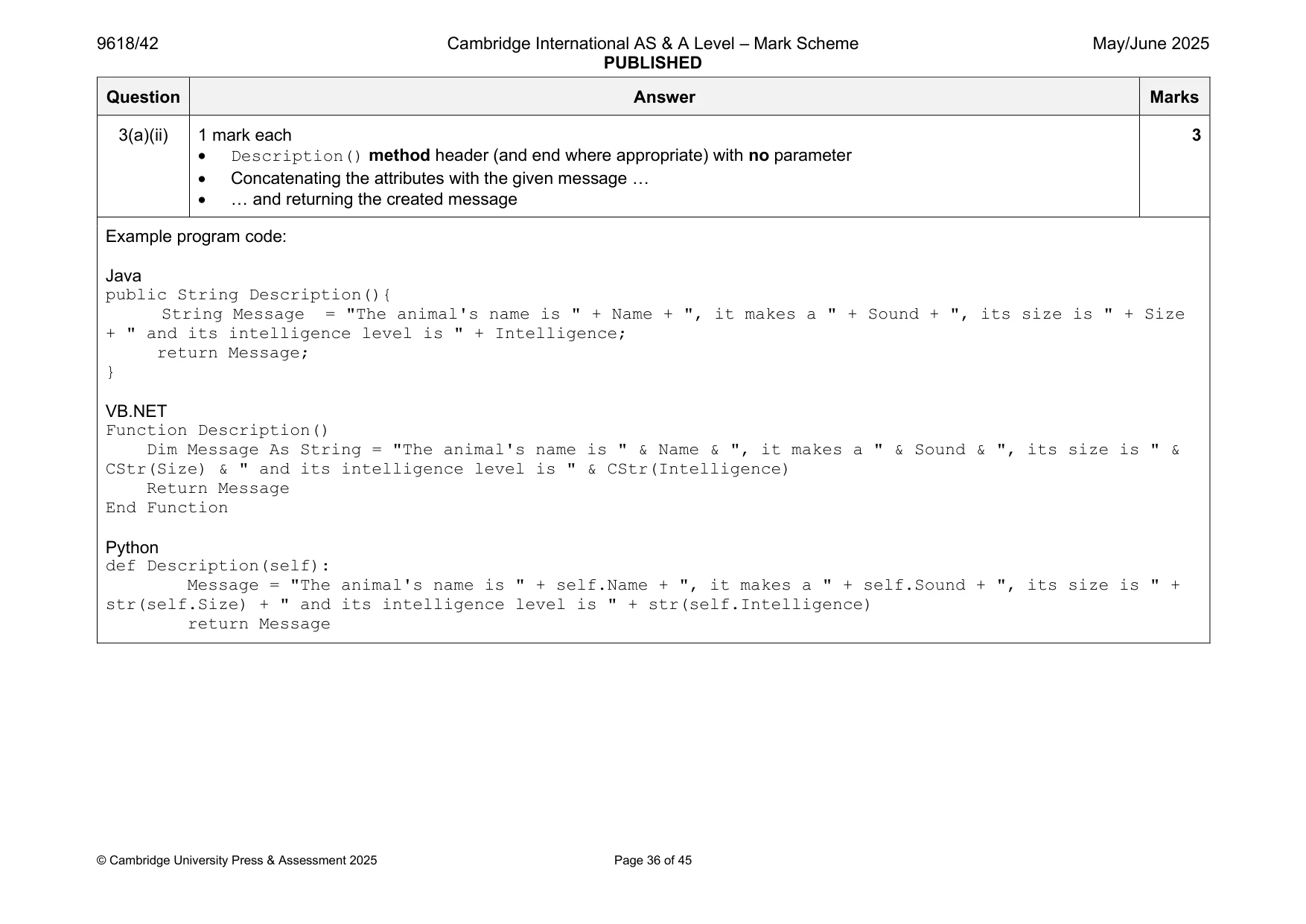
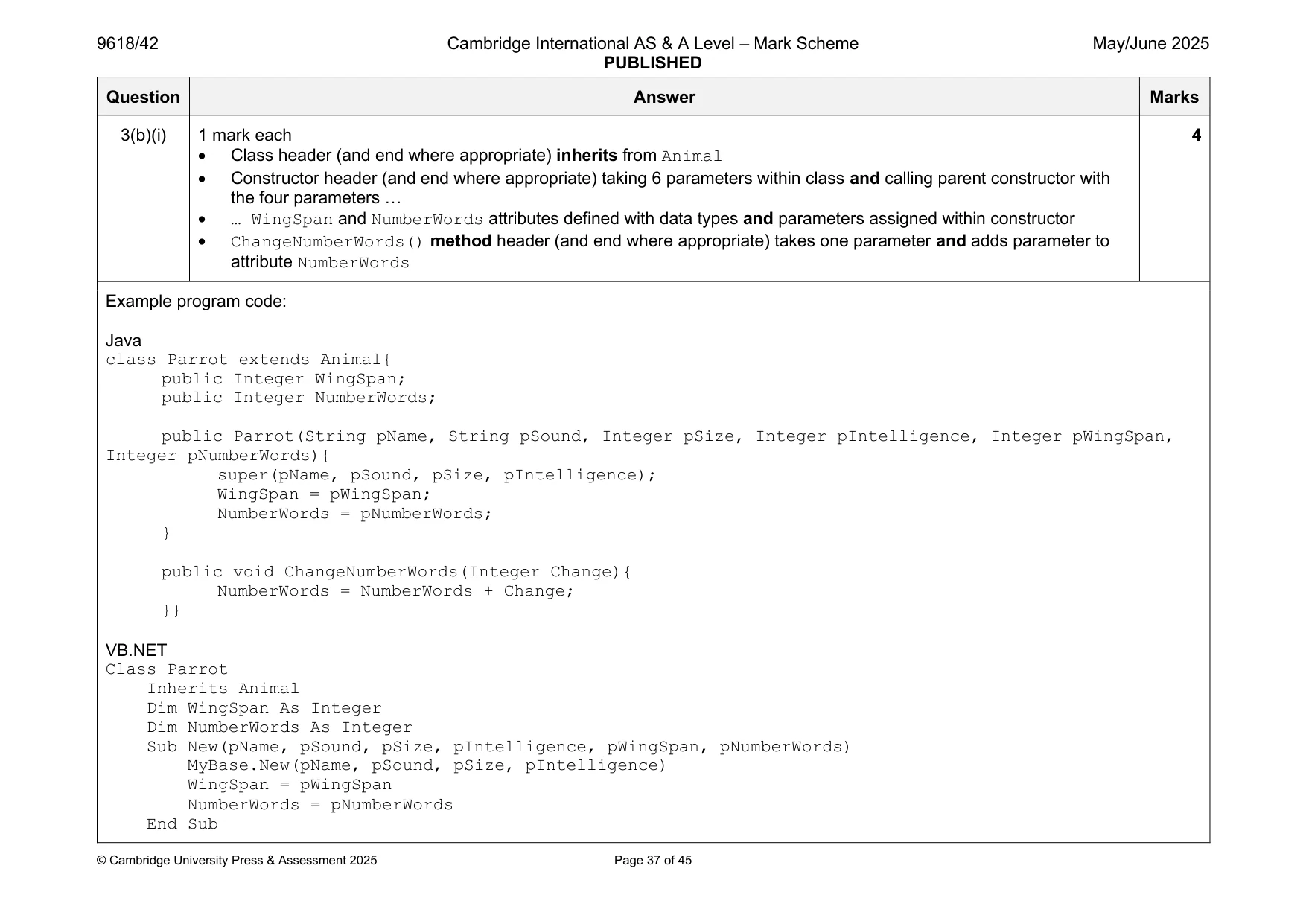
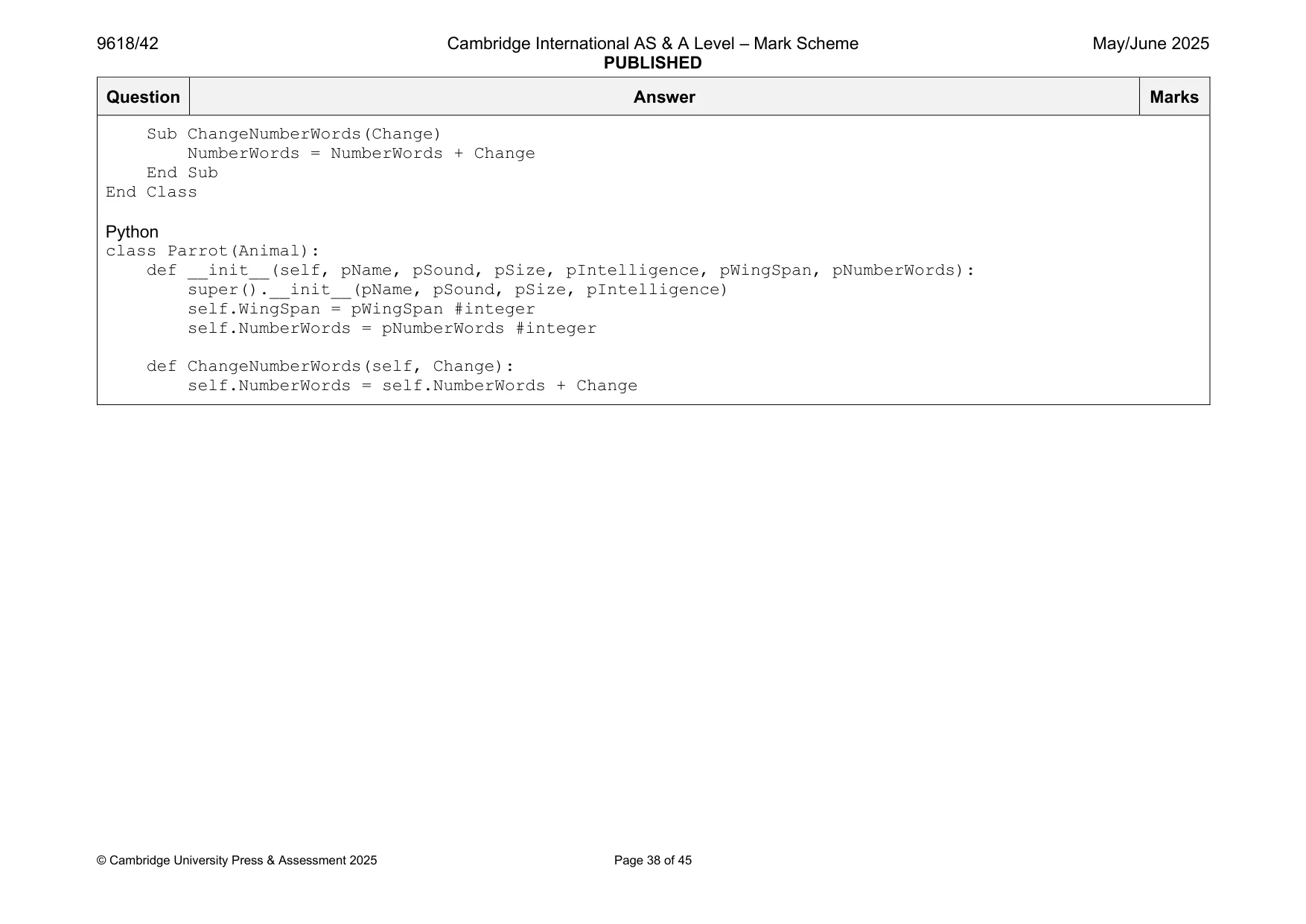
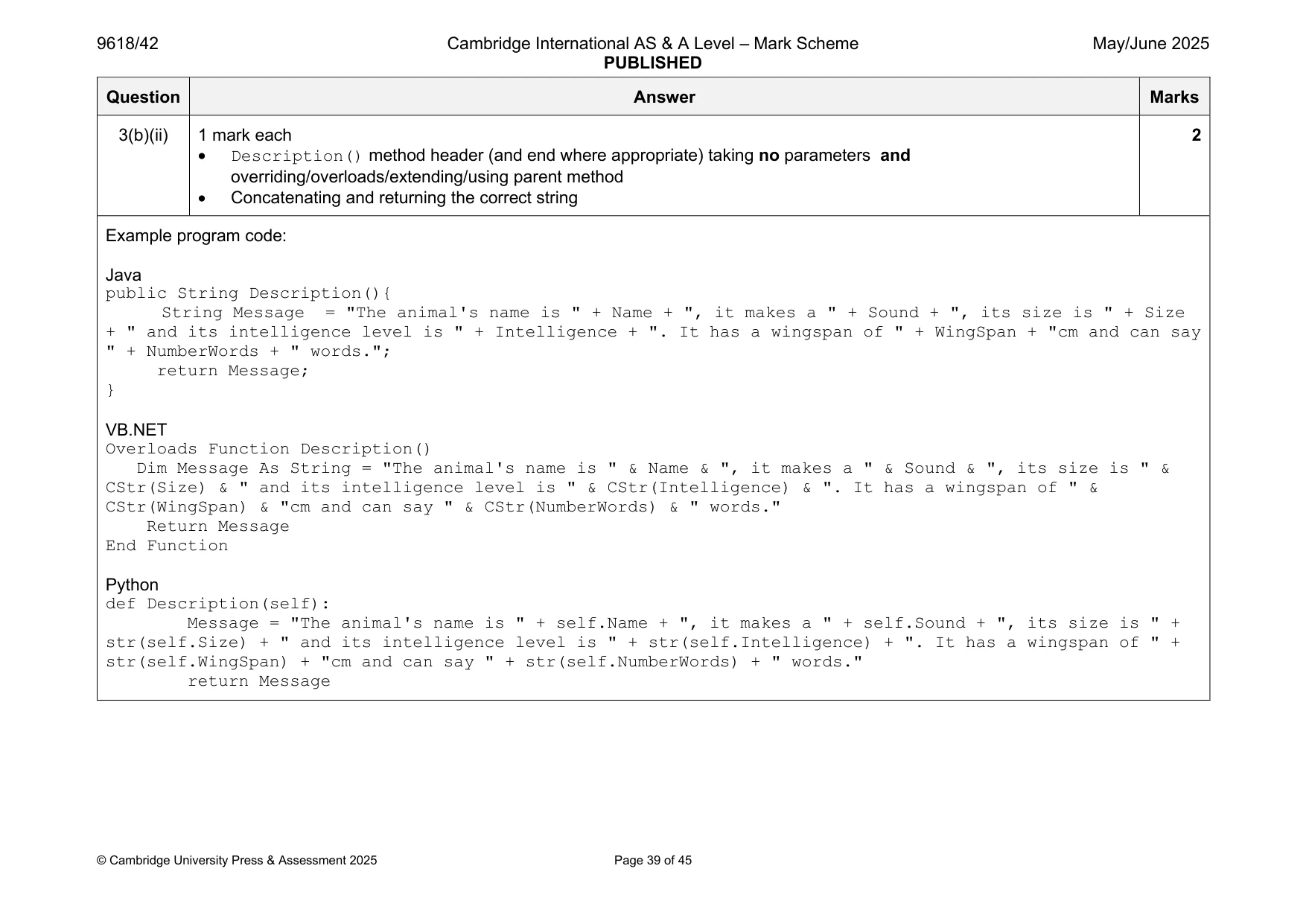
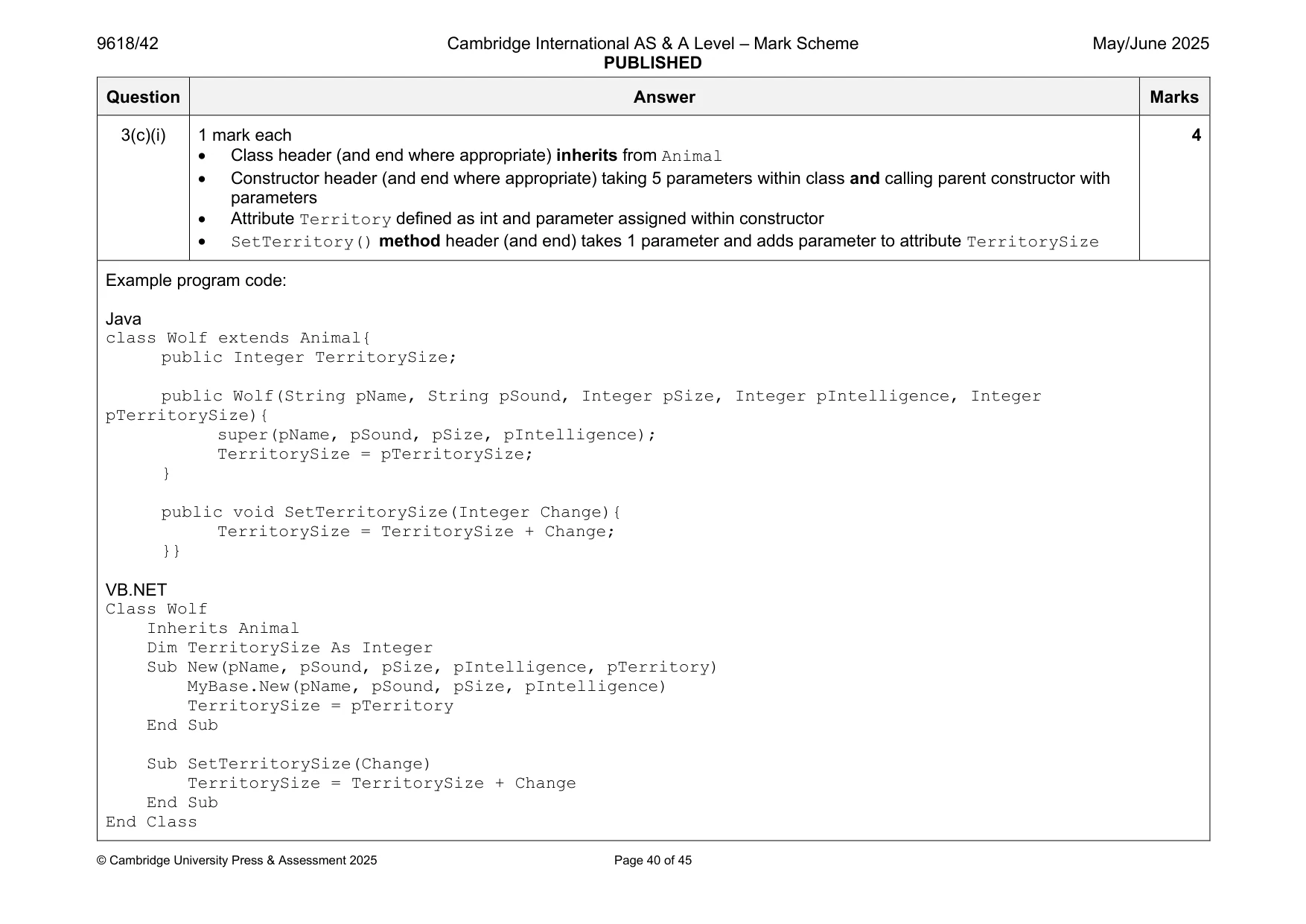
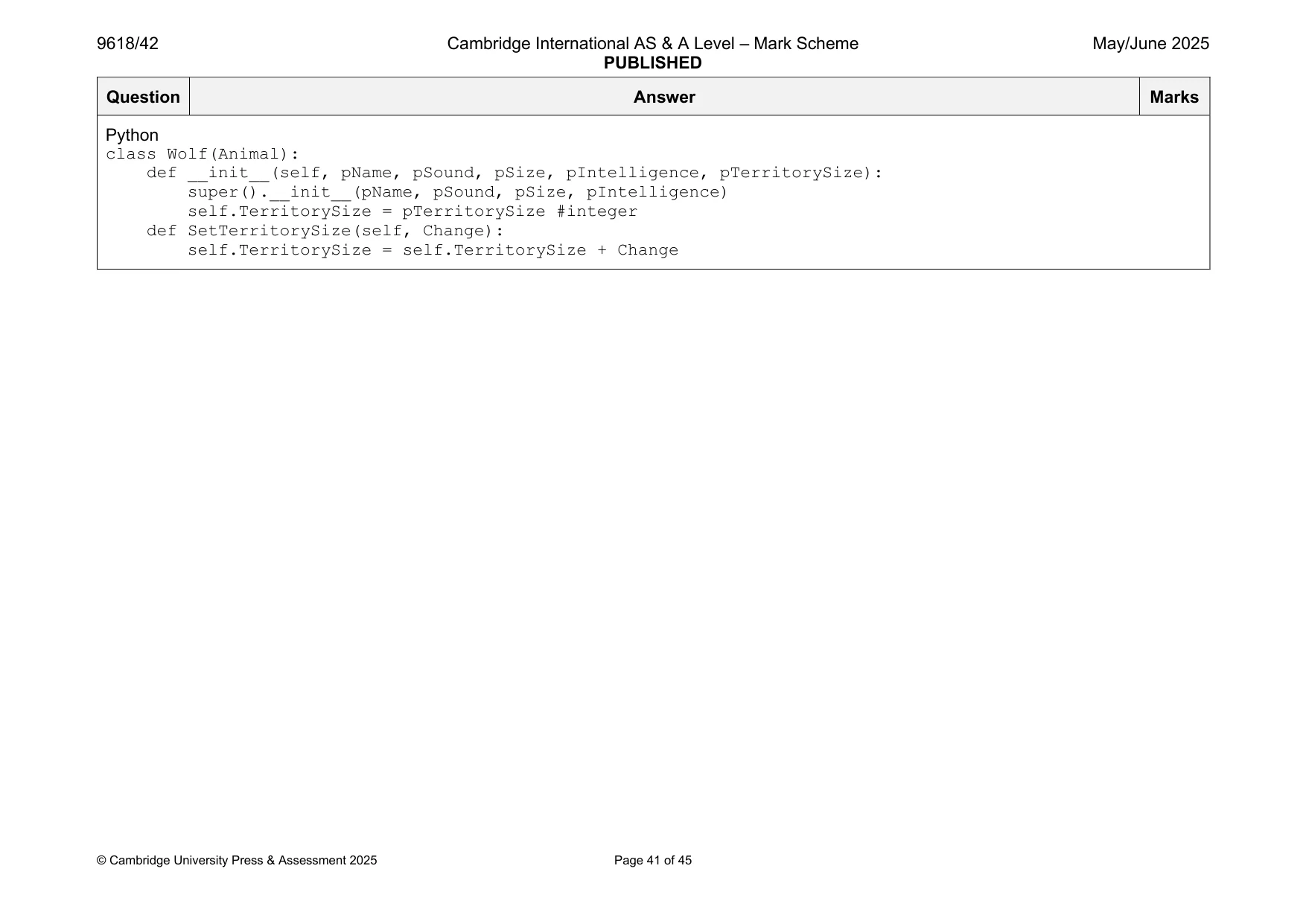
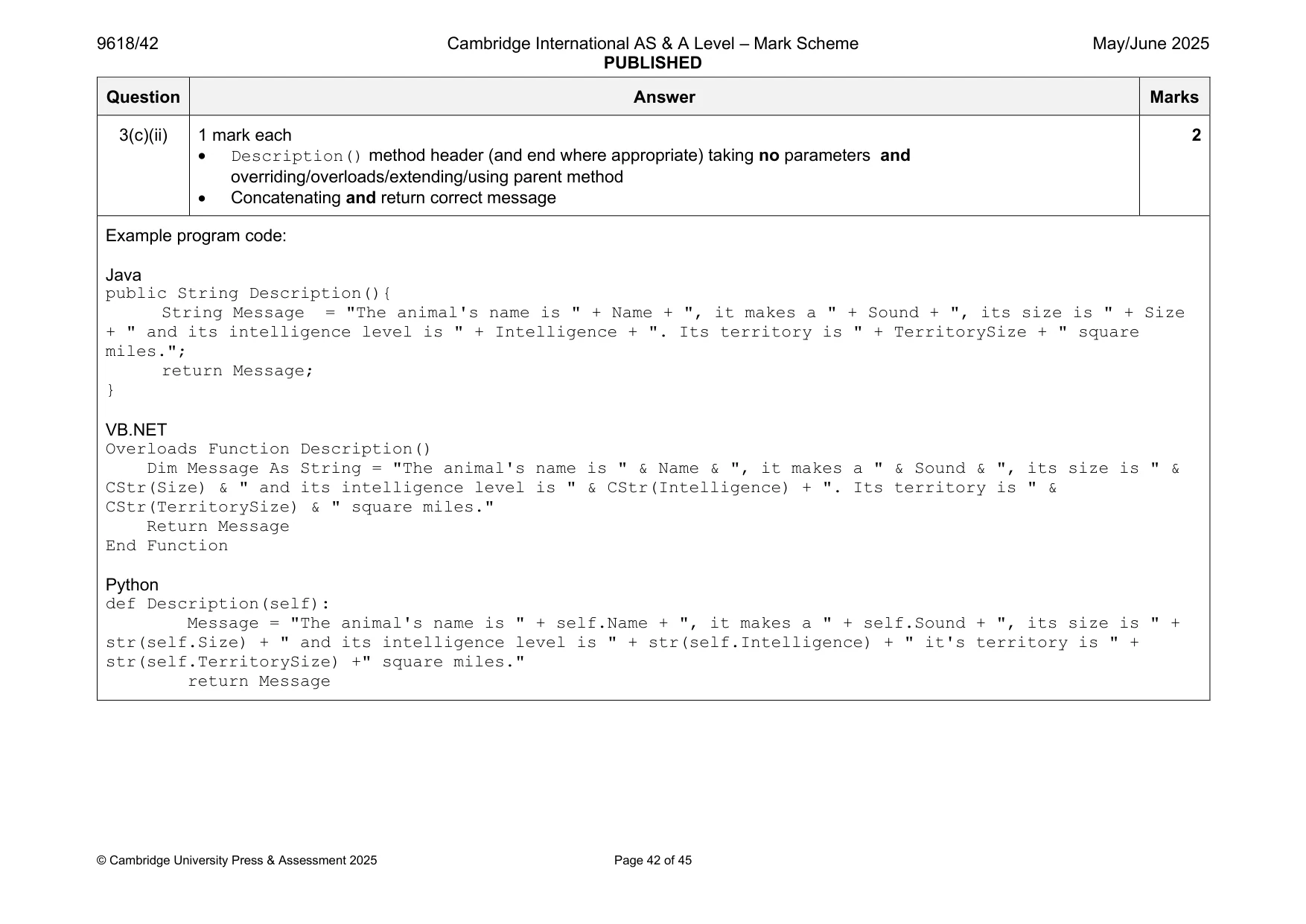
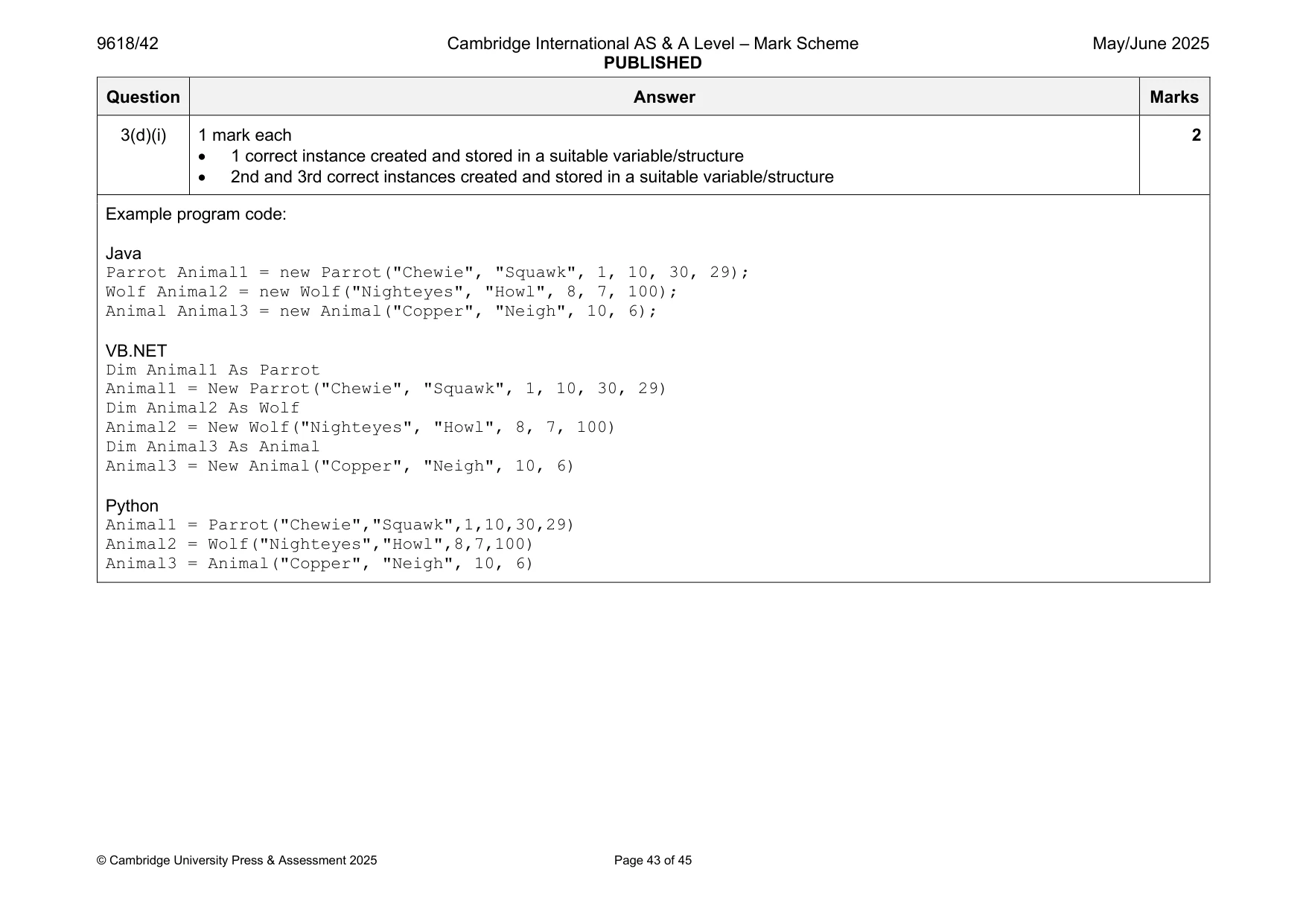
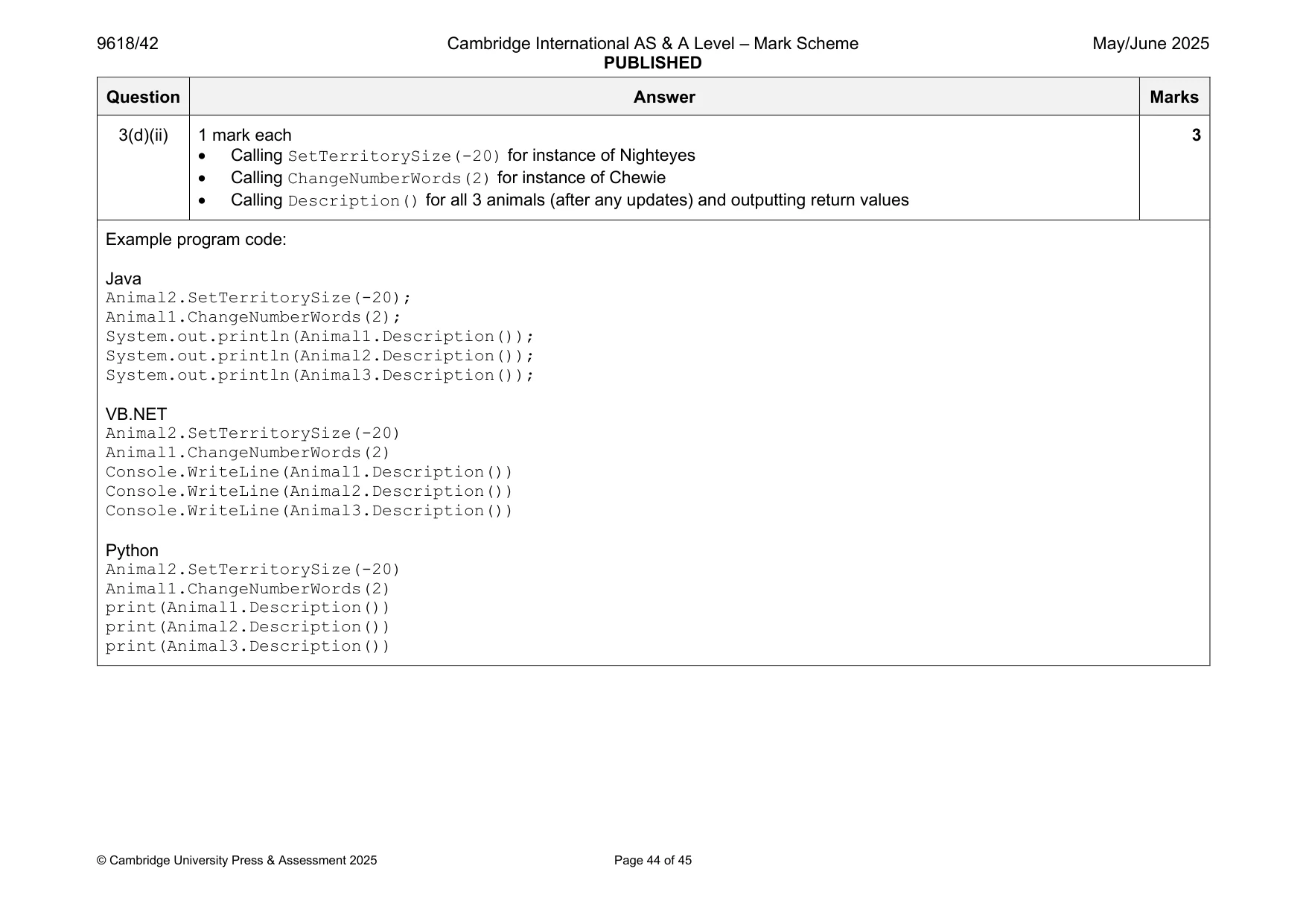
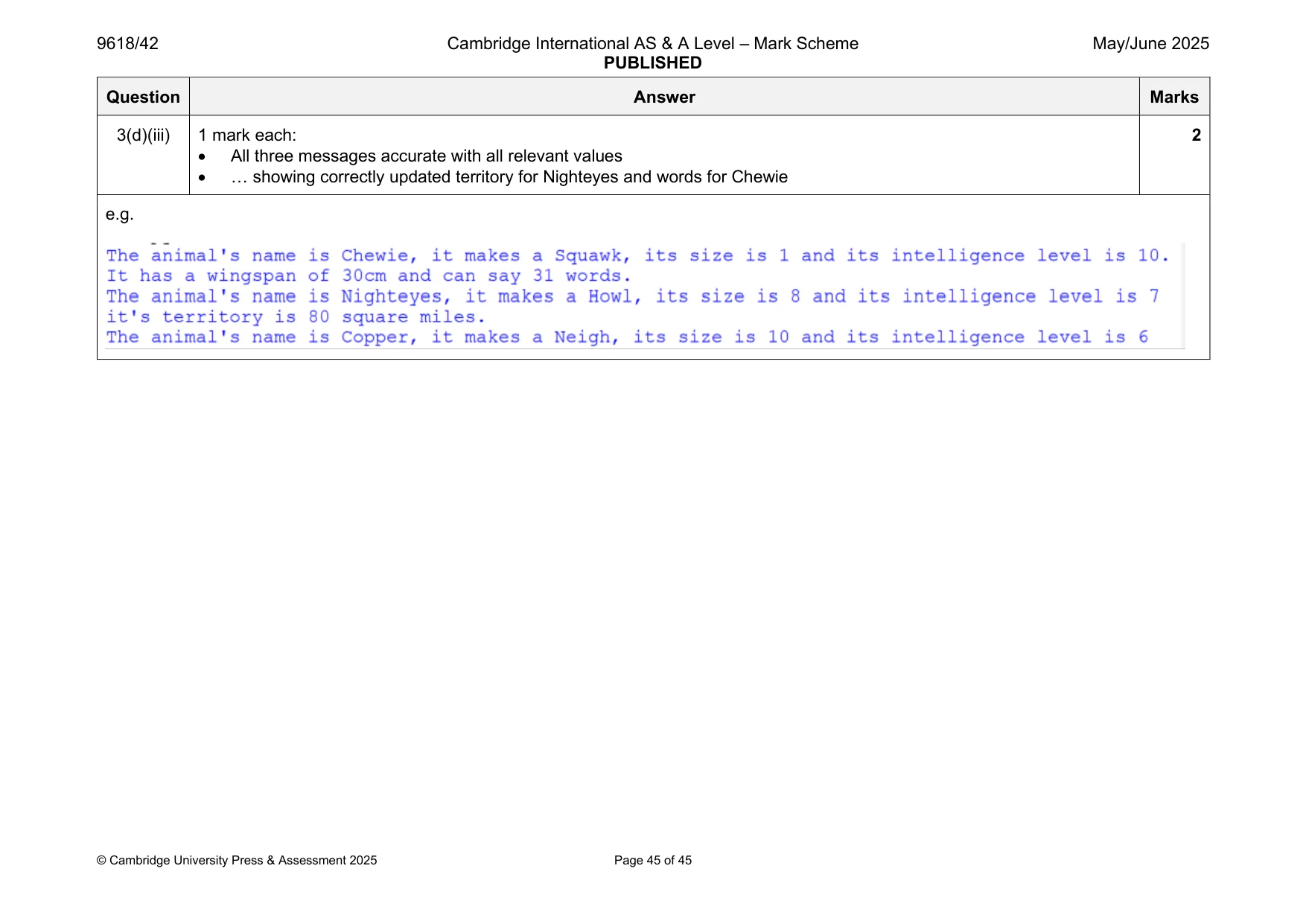
Mark scheme: 3(a)(i) 1 mark each 4 • Class header (and end when appropriate) • Four attributes with appropriate data types • Constructor header (and end where appropriate) within class taking (min) 4 parameters … • … assigning each parameter to its attribute Example program code: Java class Animal{ public String Name; public String Sound; public Integer Size; public Integer Intelligence; public Animal(String pName, String pSound, Integer pSize, Integer pIntelligence){ Name = pName; Sound = pSound; Size = pSize; Intelligence = pIntelligence; } } VB.NET Class Animal Public Name As String Public Sound As String Public Size As Integer Public Intelligence As Integer Sub New(pName, pSound, pSize, pIntelligence) Name = pName Sound = pSound Size = pSize Intelligence = pIntelligence End Sub End Class Python class Animal: def __init__(self, pName, pSound, pSize, pIntelligence): self.Name = pName #string self.Sound = pSound #string self.Size = pSize #integer self.Intelligence = pIntelligence #integer 3(a)(ii) 1 mark each 3 • Description() method header (and end where appropriate) with no parameter • Concatenating the attributes with the given message … • … and returning the created message Example program code: Java public String Description(){ String Message = "The animal's name is " + Name + ", it makes a " + Sound + ", its size is " + Size + " and its intelligence level is " + Intelligence; return Message; } VB.NET Function Description() Dim Message As String = "The animal's name is " & Name & ", it makes a " & Sound & ", its size is " & CStr(Size) & " and its intelligence level is " & CStr(Intelligence) Return Message End Function Python def Description(self): Message = "The animal's name is " + self.Name + ", it makes a " + self.Sound + ", its size is " + str(self.Size) + " and its intelligence level is " + str(self.Intelligence) return Message 3(b)(i) 1 mark each 4 • Class header (and end where appropriate) inherits from Animal • Constructor header (and end where appropriate) taking 6 parameters within class and calling parent constructor with the four parameters … • … WingSpan and NumberWords attributes defined with data types and parameters assigned within constructor • ChangeNumberWords() method header (and end where appropriate) takes one parameter and adds parameter to attribute NumberWords Example program code: Java class Parrot extends Animal{ public Integer WingSpan; public Integer NumberWords; public Parrot(String pName, String pSound, Integer pSize, Integer pIntelligence, Integer pWingSpan, Integer pNumberWords){ super(pName, pSound, pSize, pIntelligence); WingSpan = pWingSpan; NumberWords = pNumberWords; } public void ChangeNumberWords(Integer Change){ NumberWords = NumberWords + Change; }} VB.NET Class Parrot Inherits Animal Dim WingSpan As Integer Dim NumberWords As Integer Sub New(pName, pSound, pSize, pIntelligence, pWingSpan, pNumberWords) MyBase.New(pName, pSound, pSize, pIntelligence) WingSpan = pWingSpan NumberWords = pNumberWords End Sub Sub ChangeNumberWords(Change) NumberWords = NumberWords + Change End Sub End Class Python class Parrot(Animal): def __init__(self, pName, pSound, pSize, pIntelligence, pWingSpan, pNumberWords): super().__init__(pName, pSound, pSize, pIntelligence) self.WingSpan = pWingSpan #integer self.NumberWords = pNumberWords #integer def ChangeNumberWords(self, Change): self.NumberWords = self.NumberWords + Change 3(b)(ii) 1 mark each 2 • Description() method header (and end where appropriate) taking no parameters and overriding/overloads/extending/using parent method • Concatenating and returning the correct string Example program code: Java public String Description(){ String Message = "The animal's name is " + Name + ", it makes a " + Sound + ", its size is " + Size + " and its intelligence level is " + Intelligence + ". It has a wingspan of " + WingSpan + "cm and can say " + NumberWords + " words."; return Message; } VB.NET Overloads Function Description() Dim Message As String = "The animal's name is " & Name & ", it makes a " & Sound & ", its size is " & CStr(Size) & " and its intelligence level is " & CStr(Intelligence) & ". It has a wingspan of " & CStr(WingSpan) & "cm and can say " & CStr(NumberWords) & " words." Return Message End Function Python def Description(self): Message = "The animal's name is " + self.Name + ", it makes a " + self.Sound + ", its size is " + str(self.Size) + " and its intelligence level is " + str(self.Intelligence) + ". It has a wingspan of " + str(self.WingSpan) + "cm and can say " + str(self.NumberWords) + " words." return Message 3(c)(i) 1 mark each 4 • Class header (and end where appropriate) inherits from Animal • Constructor header (and end where appropriate) taking 5 parameters within class and calling parent constructor with parameters • Attribute Territory defined as int and parameter assigned within constructor • SetTerritory() method header (and end) takes 1 parameter and adds parameter to attribute TerritorySize Example program code: Java class Wolf extends Animal{ public Integer TerritorySize; public Wolf(String pName, String pSound, Integer pSize, Integer pIntelligence, Integer pTerritorySize){ super(pName, pSound, pSize, pIntelligence); TerritorySize = pTerritorySize; } public void SetTerritorySize(Integer Change){ TerritorySize = TerritorySize + Change; }} VB.NET Class Wolf Inherits Animal Dim TerritorySize As Integer Sub New(pName, pSound, pSize, pIntelligence, pTerritory) MyBase.New(pName, pSound, pSize, pIntelligence) TerritorySize = pTerritory End Sub Sub SetTerritorySize(Change) TerritorySize = TerritorySize + Change End Sub End Class Python class Wolf(Animal): def __init__(self, pName, pSound, pSize, pIntelligence, pTerritorySize): super().__init__(pName, pSound, pSize, pIntelligence) self.TerritorySize = pTerritorySize #integer def SetTerritorySize(self, Change): self.TerritorySize = self.TerritorySize + Change 3(c)(ii) 1 mark each 2 • Description() method header (and end where appropriate) taking no parameters and overriding/overloads/extending/using parent method • Concatenating and return correct message Example program code: Java public String Description(){ String Message = "The animal's name is " + Name + ", it makes a " + Sound + ", its size is " + Size + " and its intelligence level is " + Intelligence + ". Its territory is " + TerritorySize + " square miles."; return Message; } VB.NET Overloads Function Description() Dim Message As String = "The animal's name is " & Name & ", it makes a " & Sound & ", its size is " & CStr(Size) & " and its intelligence level is " & CStr(Intelligence) + ". Its territory is " & CStr(TerritorySize) & " square miles." Return Message End Function Python def Description(self): Message = "The animal's name is " + self.Name + ", it makes a " + self.Sound + ", its size is " + str(self.Size) + " and its intelligence level is " + str(self.Intelligence) + " it's territory is " + str(self.TerritorySize) +" square miles." return Message 3(d)(i) 1 mark each 2 • 1 correct instance created and stored in a suitable variable/structure • 2nd and 3rd correct instances created and stored in a suitable variable/structure Example program code: Java Parrot Animal1 = new Parrot("Chewie", "Squawk", 1, 10, 30, 29); Wolf Animal2 = new Wolf("Nighteyes", "Howl", 8, 7, 100); Animal Animal3 = new Animal("Copper", "Neigh", 10, 6); VB.NET Dim Animal1 As Parrot Animal1 = New Parrot("Chewie", "Squawk", 1, 10, 30, 29) Dim Animal2 As Wolf Animal2 = New Wolf("Nighteyes", "Howl", 8, 7, 100) Dim Animal3 As Animal Animal3 = New Animal("Copper", "Neigh", 10, 6) Python Animal1 = Parrot("Chewie","Squawk",1,10,30,29) Animal2 = Wolf("Nighteyes","Howl",8,7,100) Animal3 = Animal("Copper", "Neigh", 10, 6) 3(d)(ii) 1 mark each 3 • Calling SetTerritorySize(-20) for instance of Nighteyes • Calling ChangeNumberWords(2) for instance of Chewie • Calling Description() for all 3 animals (after any updates) and outputting return values Example program code: Java Animal2.SetTerritorySize(-20); Animal1.ChangeNumberWords(2); System.out.println(Animal1.Description()); System.out.println(Animal2.Description()); System.out.println(Animal3.Description()); VB.NET Animal2.SetTerritorySize(-20) Animal1.ChangeNumberWords(2) Console.WriteLine(Animal1.Description()) Console.WriteLine(Animal2.Description()) Console.WriteLine(Animal3.Description()) Python Animal2.SetTerritorySize(-20) Animal1.ChangeNumberWords(2) print(Animal1.Description()) print(Animal2.Description()) print(Animal3.Description()) 3(d)(iii) 1 mark each: 2 • All three messages accurate with all relevant values • … showing correctly updated territory for Nighteyes and words for Chewie e.g.
What you needed in this session
Cambridge’s own grade thresholds for 2025 May/June, Paper 4 · Variant 2. A higher threshold means an easier paper — the bar moves with how the cohort did.