Cambridge A Level Computer Science 9618 — 2025 Oct/Nov Paper 4 · Variant 2
9618/42/O/N/25 · 3 questions · 75 marks · ≈84 min
The question paper and its mark scheme, free to read here and free to download. This is Cambridge’s own paper, exactly as it was sat.
Question paper12 pages
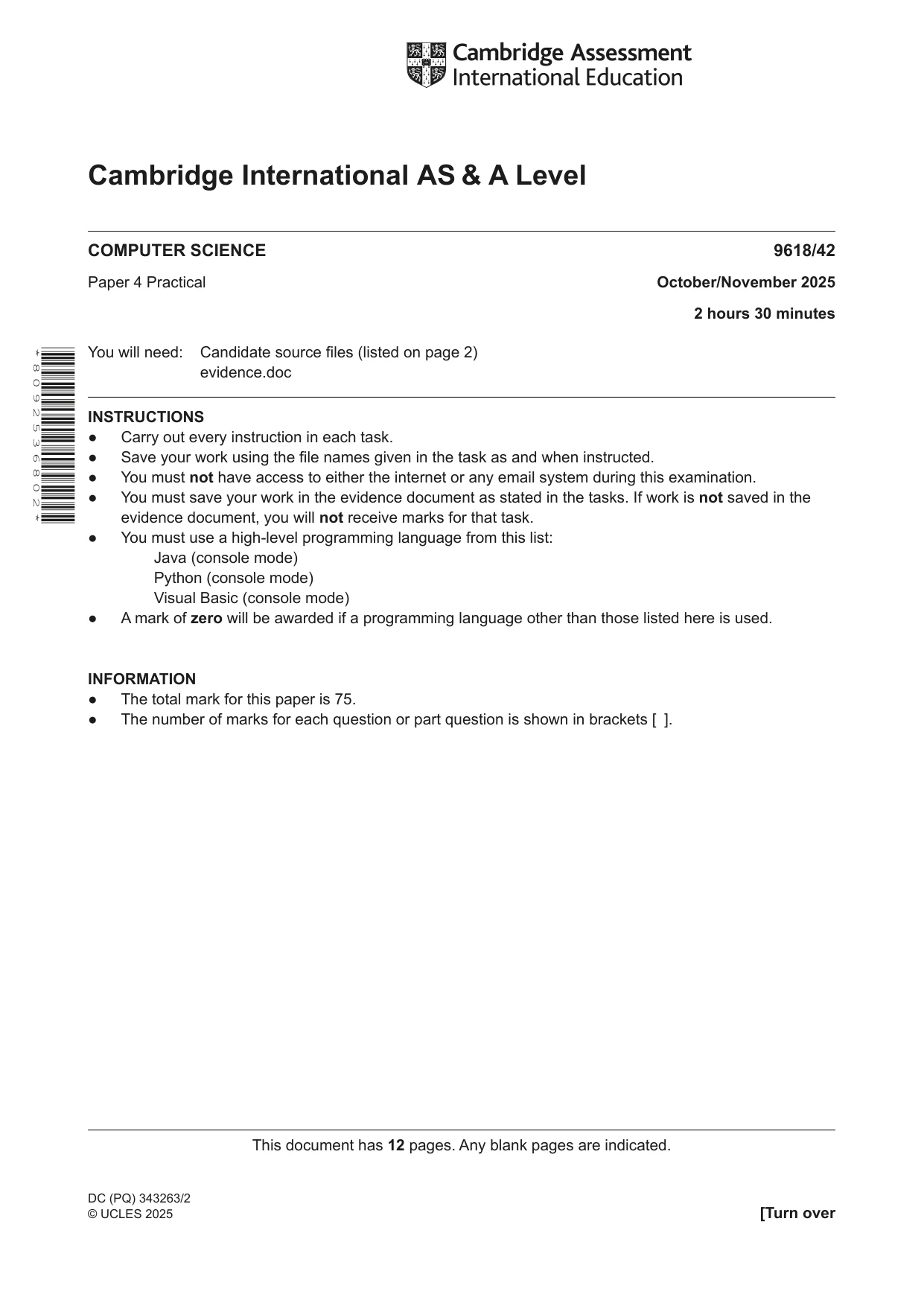

Mark scheme38 pages
Answers below. Sit the paper first if you are practising.
Questions as text
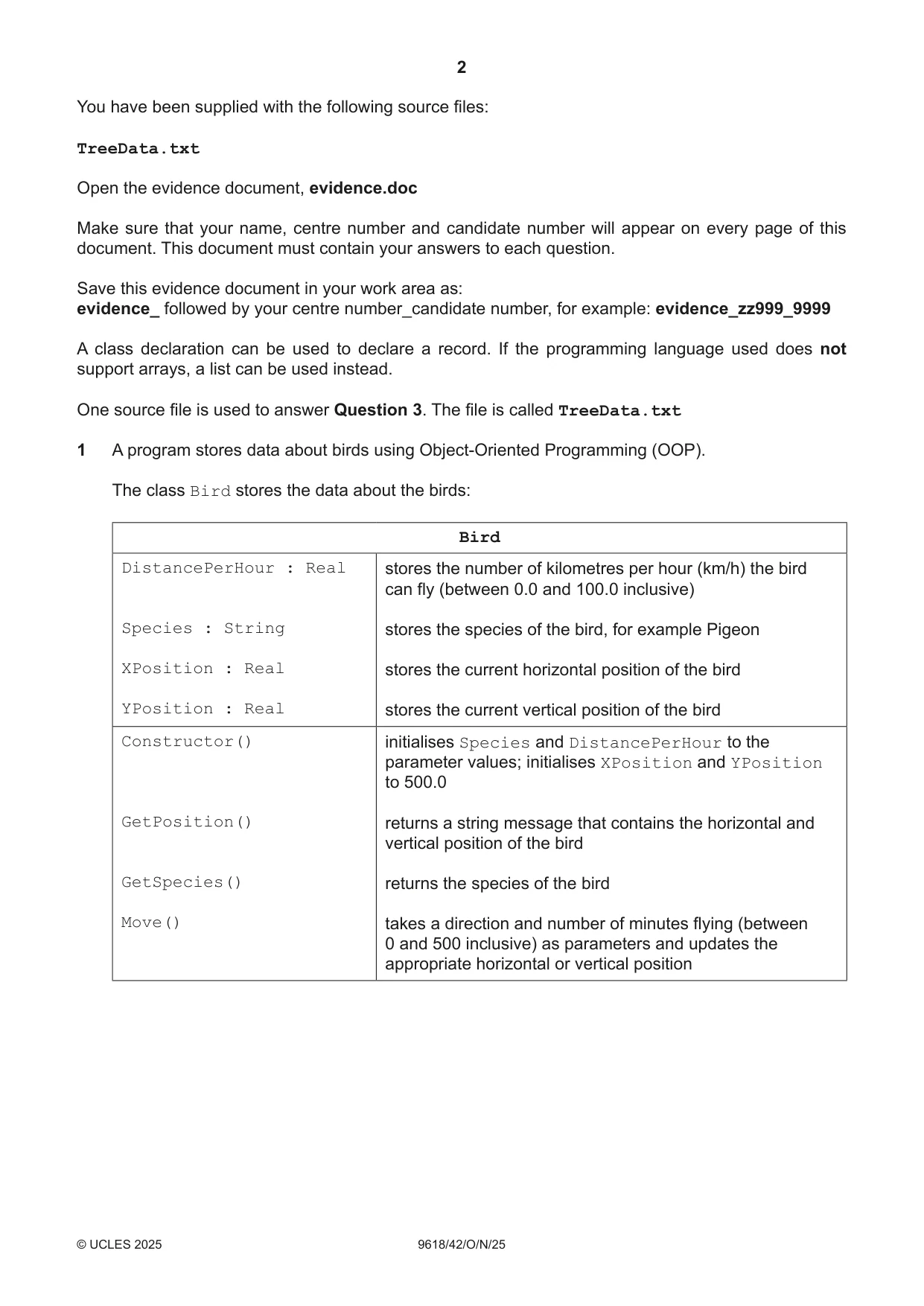
Q1 · A program stores data about birds using Object-Oriented Programming (OOP)
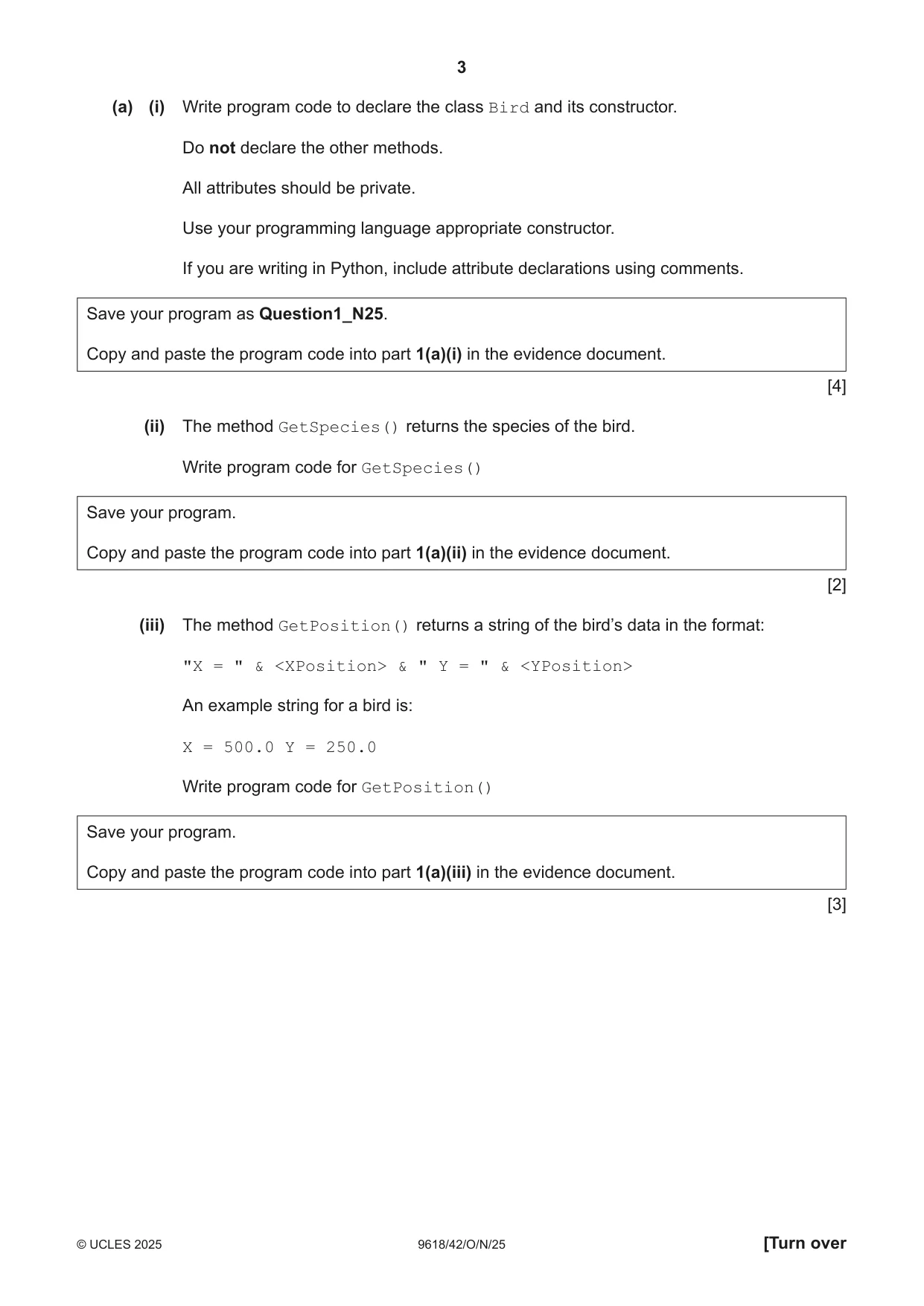
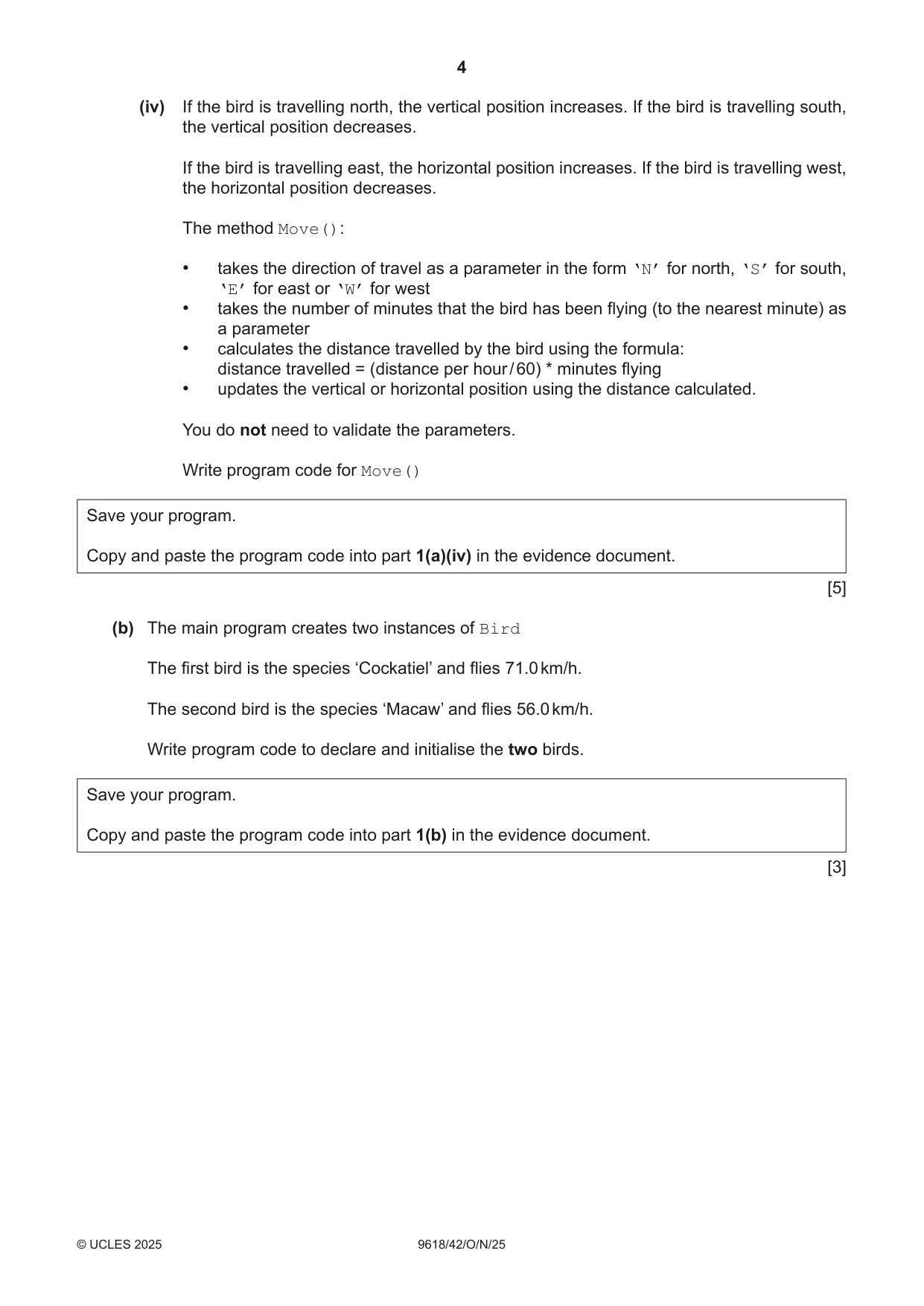
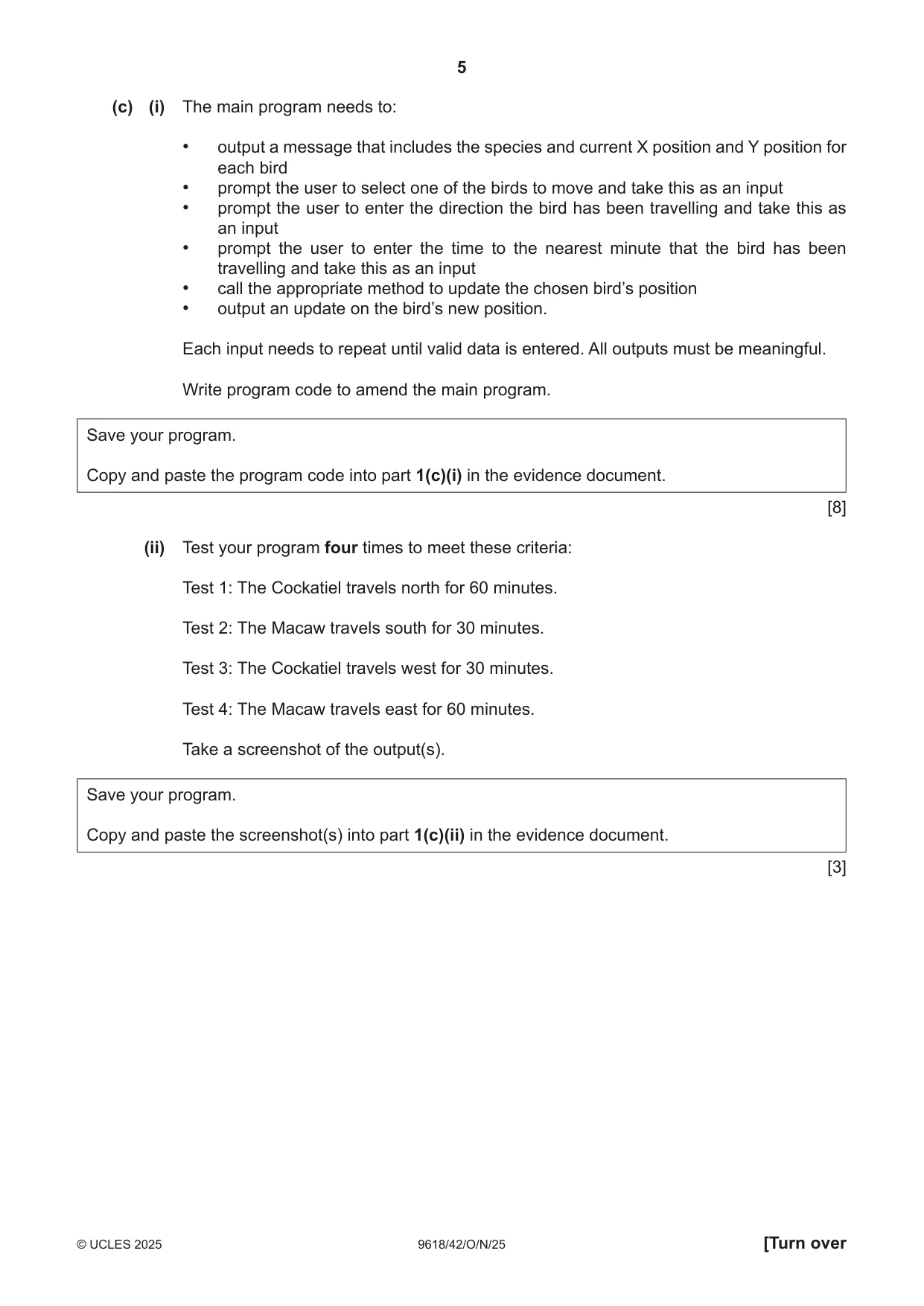
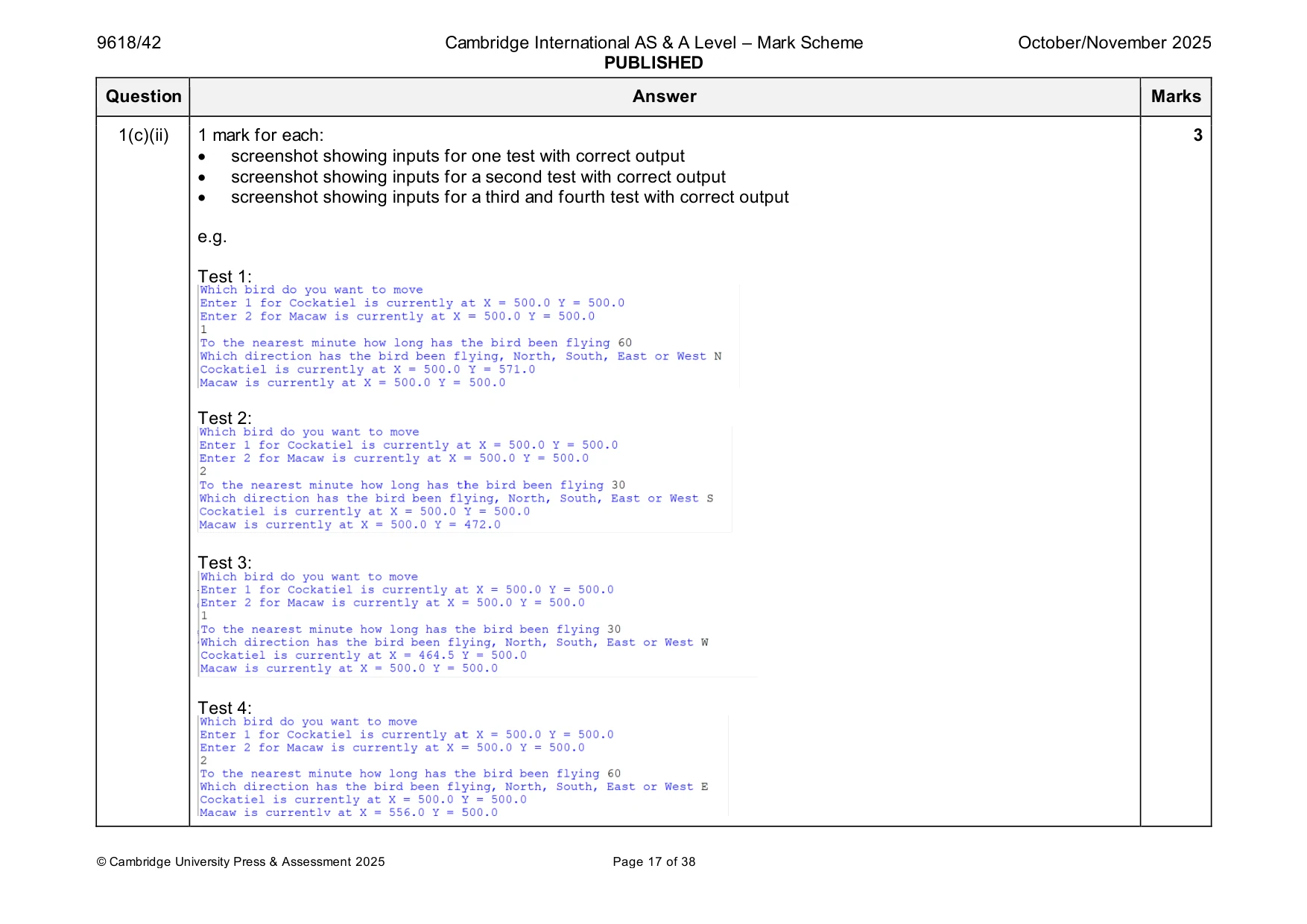
1 A program stores data about birds using Object-Oriented Programming (OOP). The class Bird stores the data about the birds: Bird DistancePerHour : Real stores the number of kilometres per hour (km/h) the bird can fly (between 0.0 and 100.0 inclusive) Species : String stores the species of the bird, for example Pigeon XPosition : Real stores the current horizontal position of the bird YPosition : Real stores the current vertical position of the bird Constructor() initialises Species and DistancePerHour to the parameter values; initialises XPosition and YPosition to 500.0 GetPosition() returns a string message that contains the horizontal and vertical position of the bird GetSpecies() returns the species of the bird Move() takes a direction and number of minutes flying (between 0 and 500 inclusive) as parameters and updates the appropriate horizontal or vertical position (a) (i) Write program code to declare the class Bird and its constructor. Do not declare the other methods. All attributes should be private. Use your programming language appropriate constructor. If you are writing in Python, include attribute declarations using comments. Save your program as Question1_N25. Copy and paste the program code into part 1(a)(i) in the evidence document. [4] (ii) The method GetSpecies() returns the species of the bird. Write program code for GetSpecies() Save your program. Copy and paste the program code into part 1(a)(ii) in the evidence document. [2] (iii) The method GetPosition() returns a string of the bird’s data in the format: "X = " & <XPosition> & " Y = " & <YPosition> An example string for a bird is: X = 500.0 Y = 250.0 Write program code for GetPosition() Save your program. Copy and paste the program code into part 1(a)(iii) in the evidence document. [3] (iv) If the bird is travelling north, the vertical position increases. If the bird is travelling south, the vertical position decreases. If the bird is travelling east, the horizontal position increases. If the bird is travelling west, the horizontal position decreases. The method Move(): • takes the direction of travel as a parameter in the form ‘N’ for north, ‘S’ for south, ‘E’ for east or ‘W’ for west • takes the number of minutes that the bird has been flying (to the nearest minute) as a parameter • calculates the distance travelled by the bird using the formula: distance travelled = (distance per hour / 60) * minutes flying • updates the vertical or horizontal position using the distance calculated. You do not need to validate the parameters. Write program code for Move() Save your program. Copy and paste the program code into part 1(a)(iv) in the evidence document. [5] (b) The main program creates two instances of Bird The first bird is the species ‘Cockatiel’ and flies 71.0 km/h. The second bird is the species ‘Macaw’ and flies 56.0 km/h. Write program code to declare and initialise the two birds. Save your program. Copy and paste the program code into part 1(b) in the evidence document. [3] (c) (i) The main program needs to: • output a message that includes the species and current X position and Y position for each bird • prompt the user to select one of the birds to move and take this as an input • prompt the user to enter the direction the bird has been travelling and take this as an input • prompt the user to enter the time to the nearest minute that the bird has been travelling and take this as an input • call the appropriate method to update the chosen bird’s position • output an update on the bird’s new position. Each input needs to repeat until valid data is entered. All outputs must be meaningful. Write program code to amend the main program. Save your program. Copy and paste the program code into part 1(c)(i) in the evidence document. [8] (ii) Test your program four times to meet these criteria: Test 1: The Cockatiel travels north for 60 minutes. Test 2: The Macaw travels south for 30 minutes. Test 3: The Cockatiel travels west for 30 minutes. Test 4: The Macaw travels east for 60 minutes. Take a screenshot of the output(s). Save your program. Copy and paste the screenshot(s) into part 1(c)(ii) in the evidence document. [3]
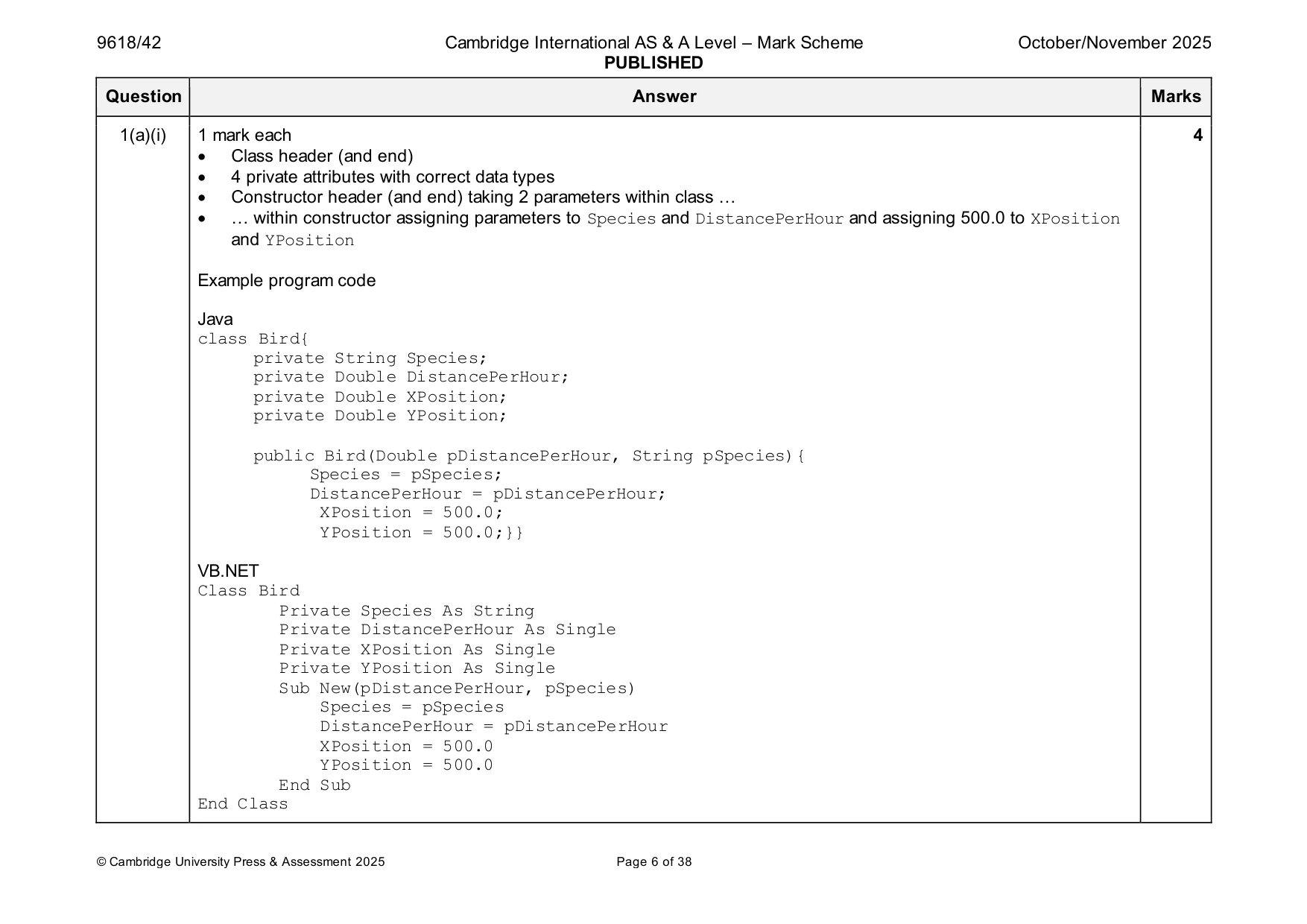
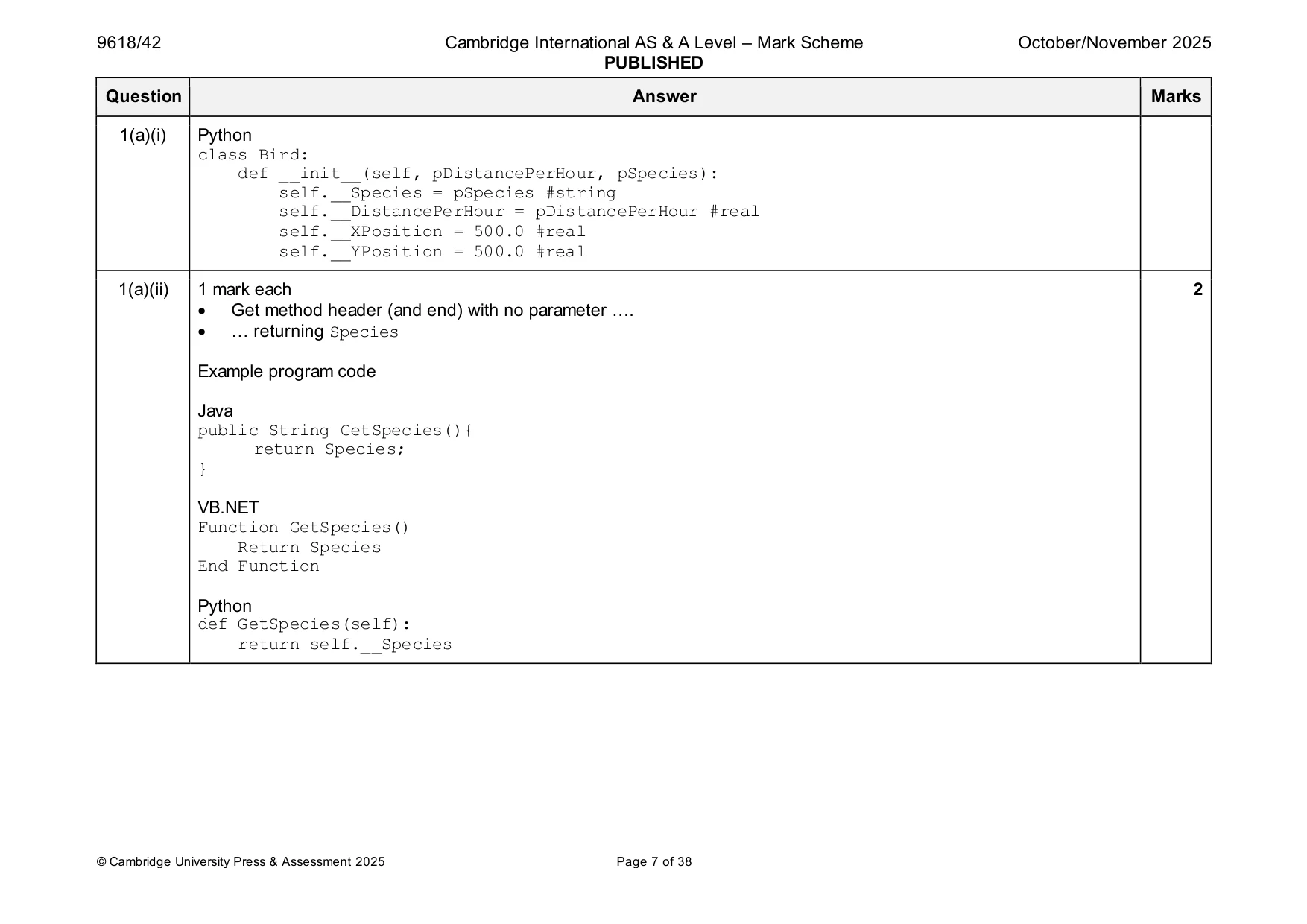
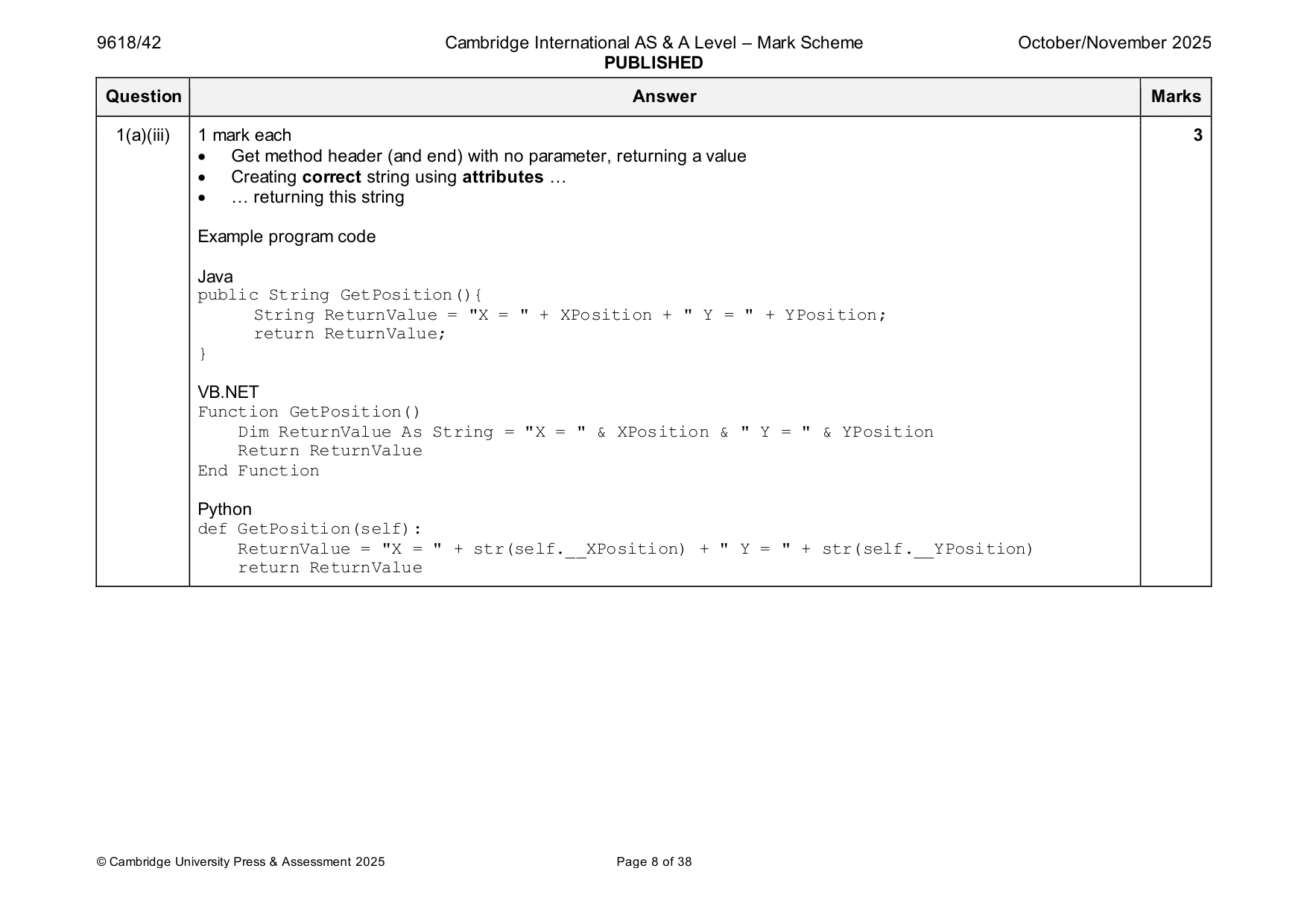
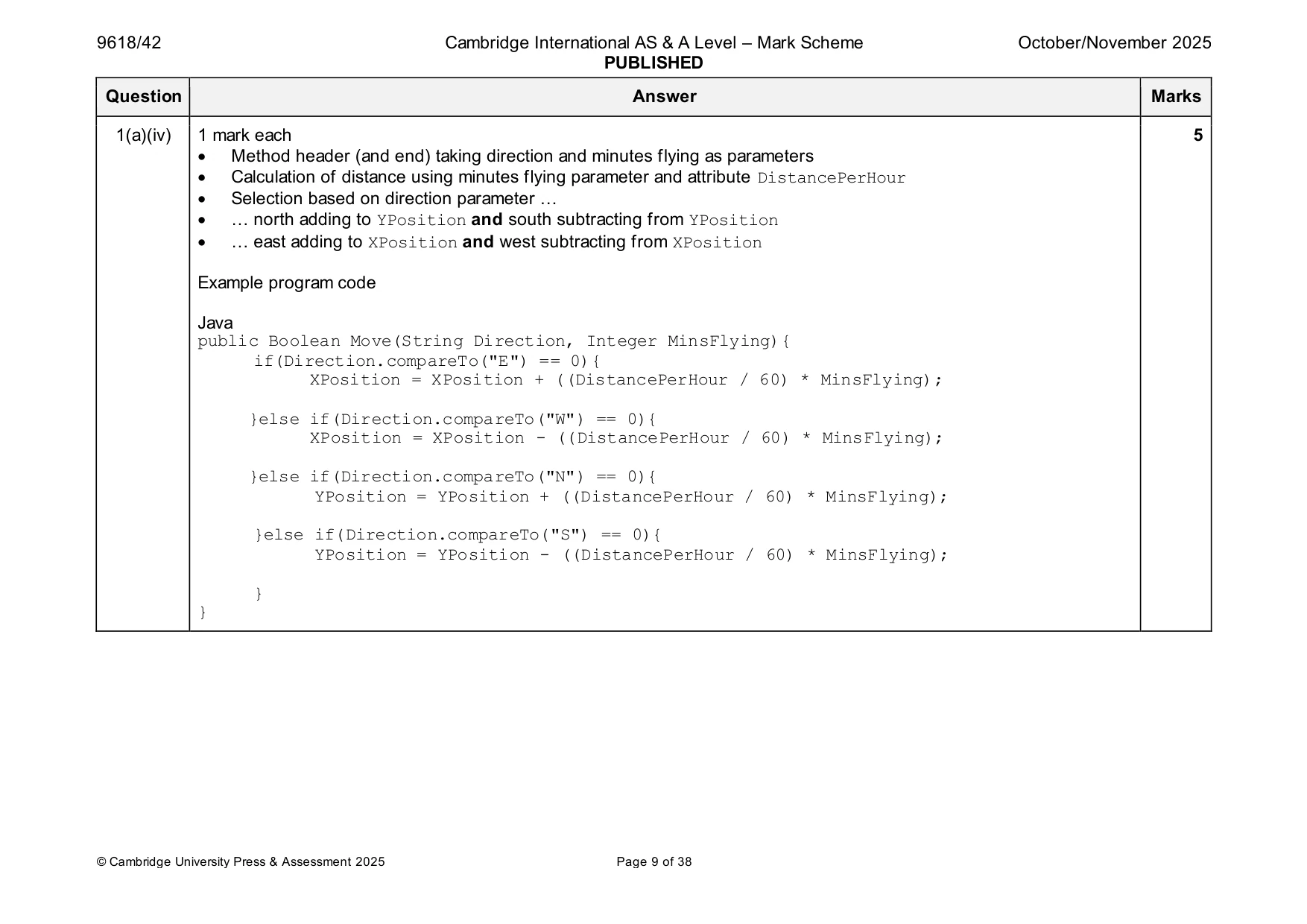
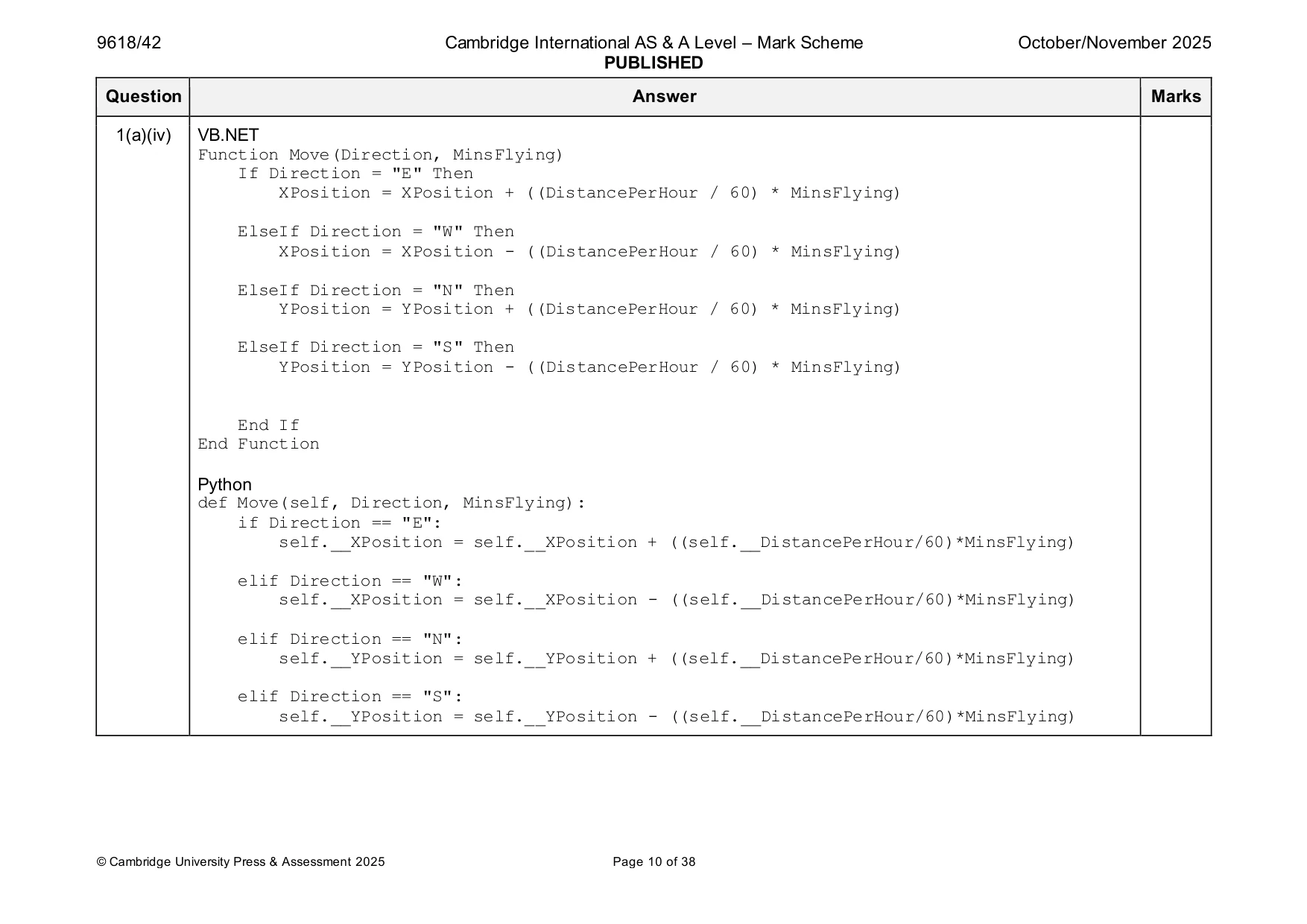
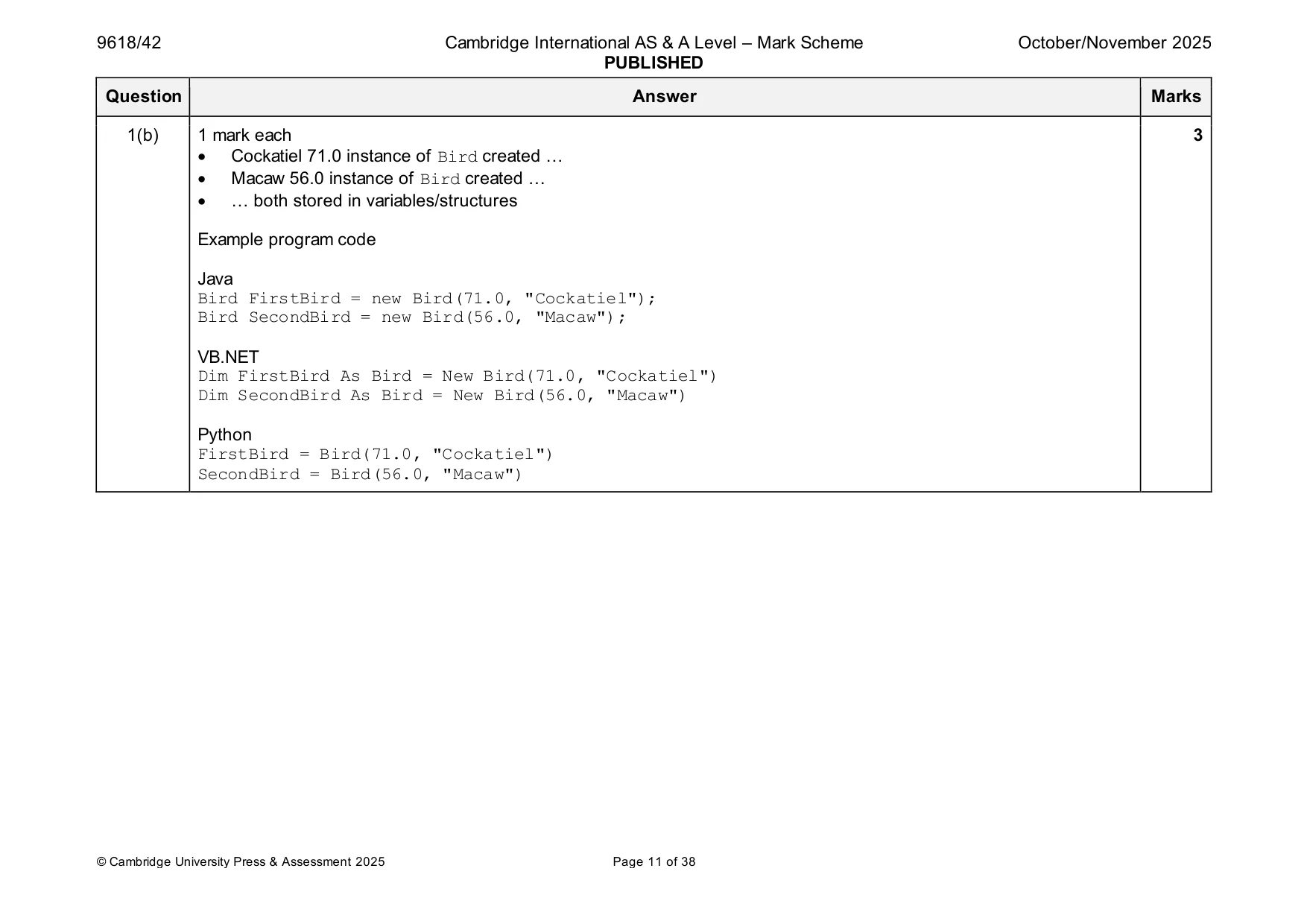
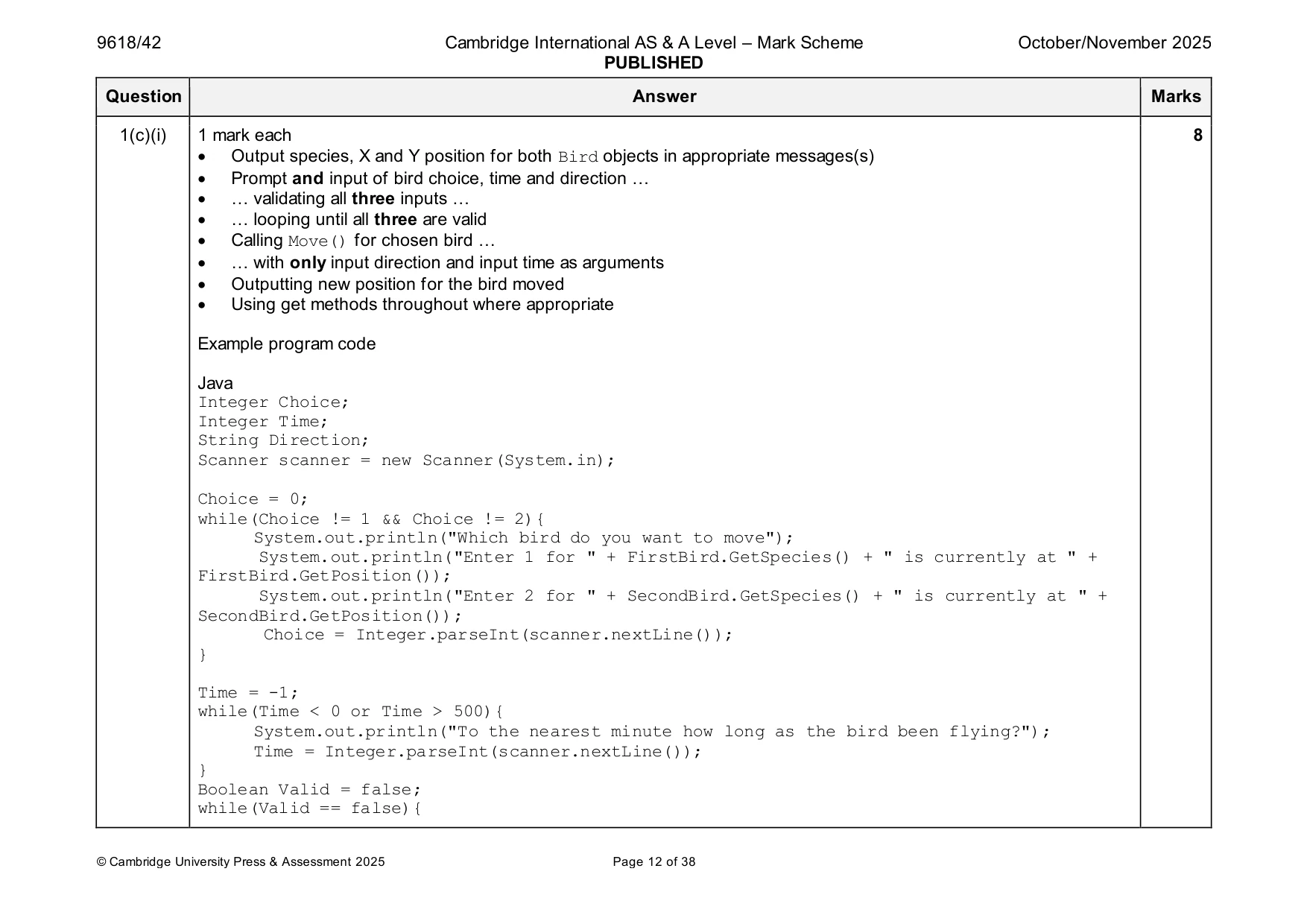
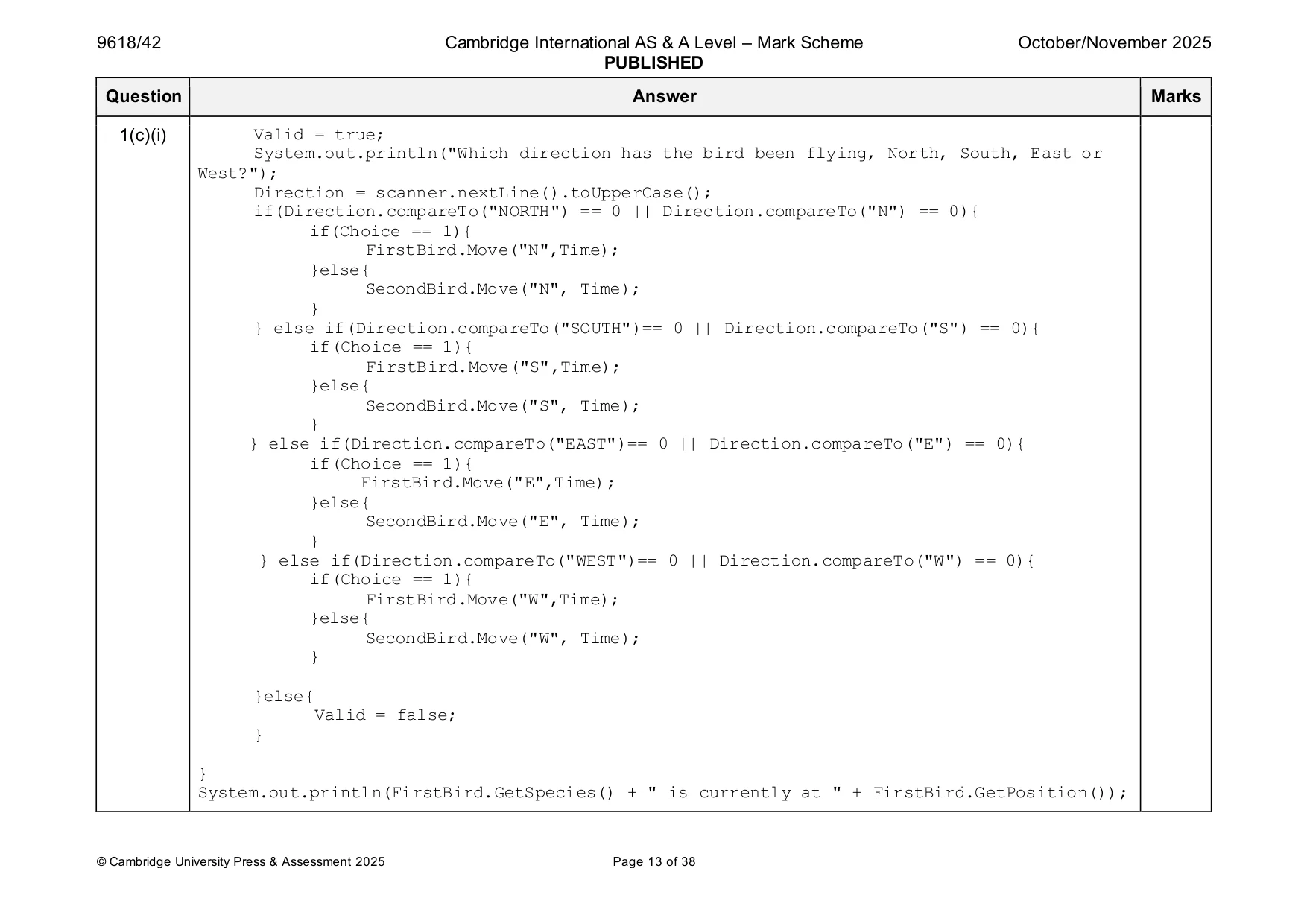
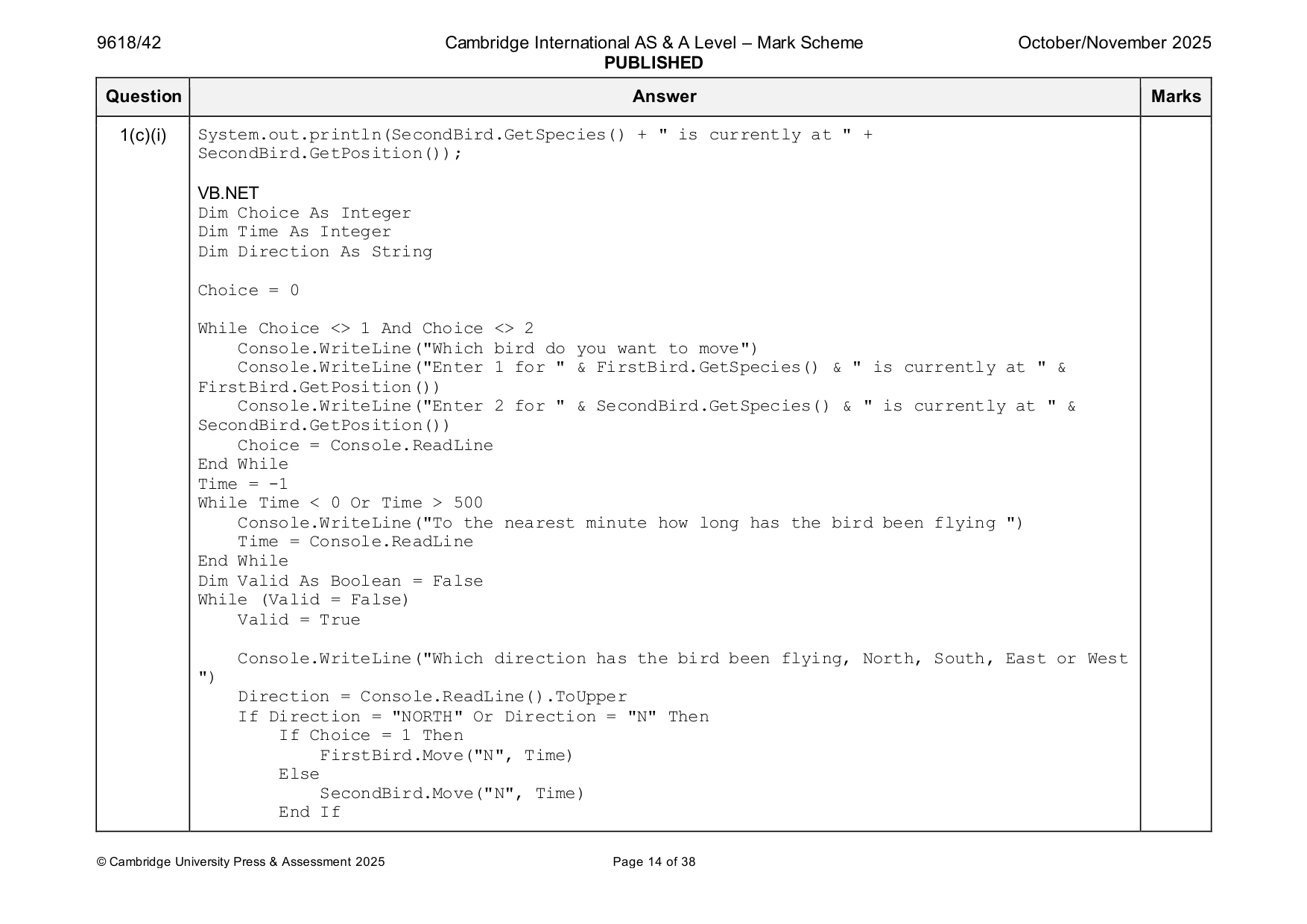
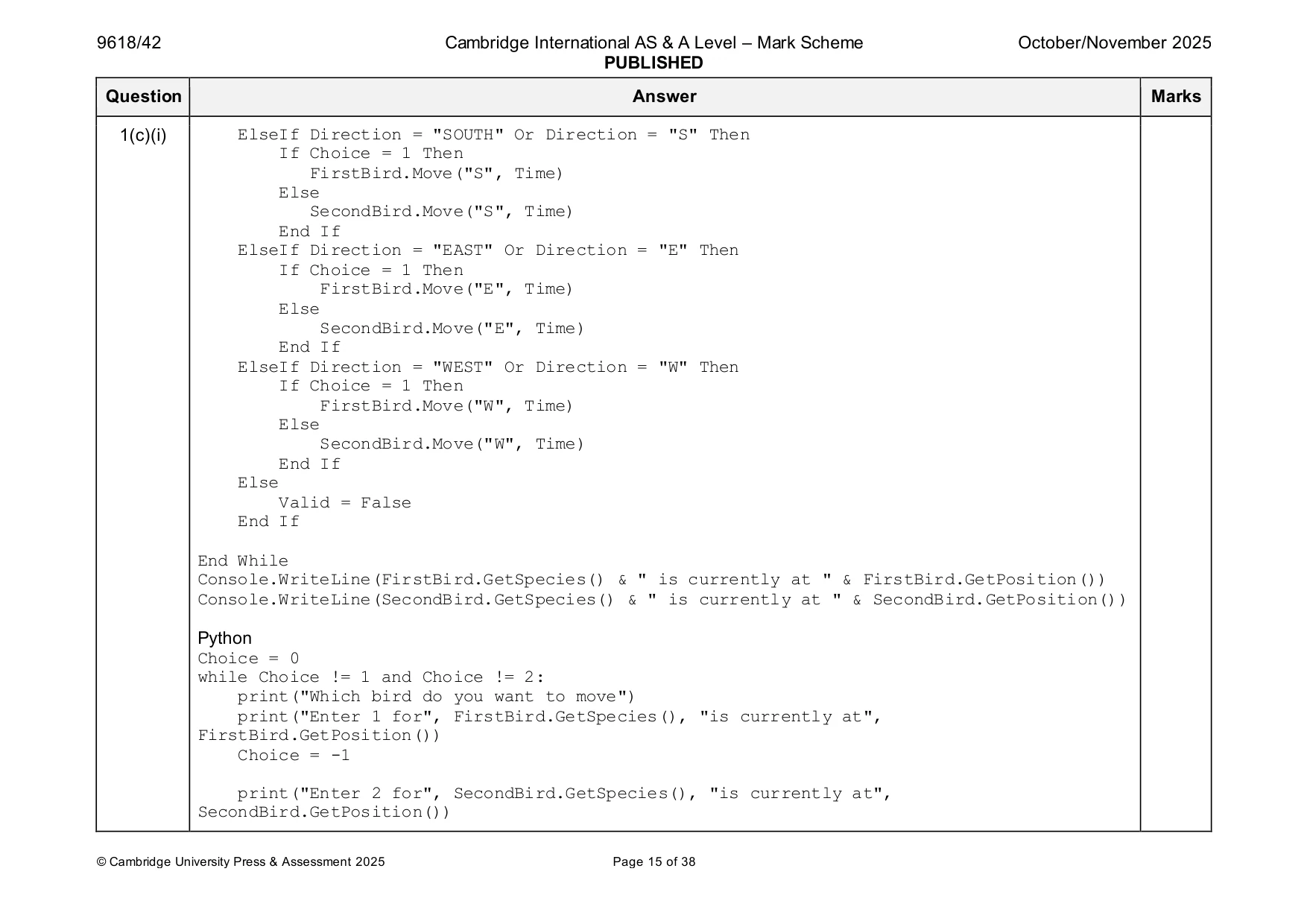
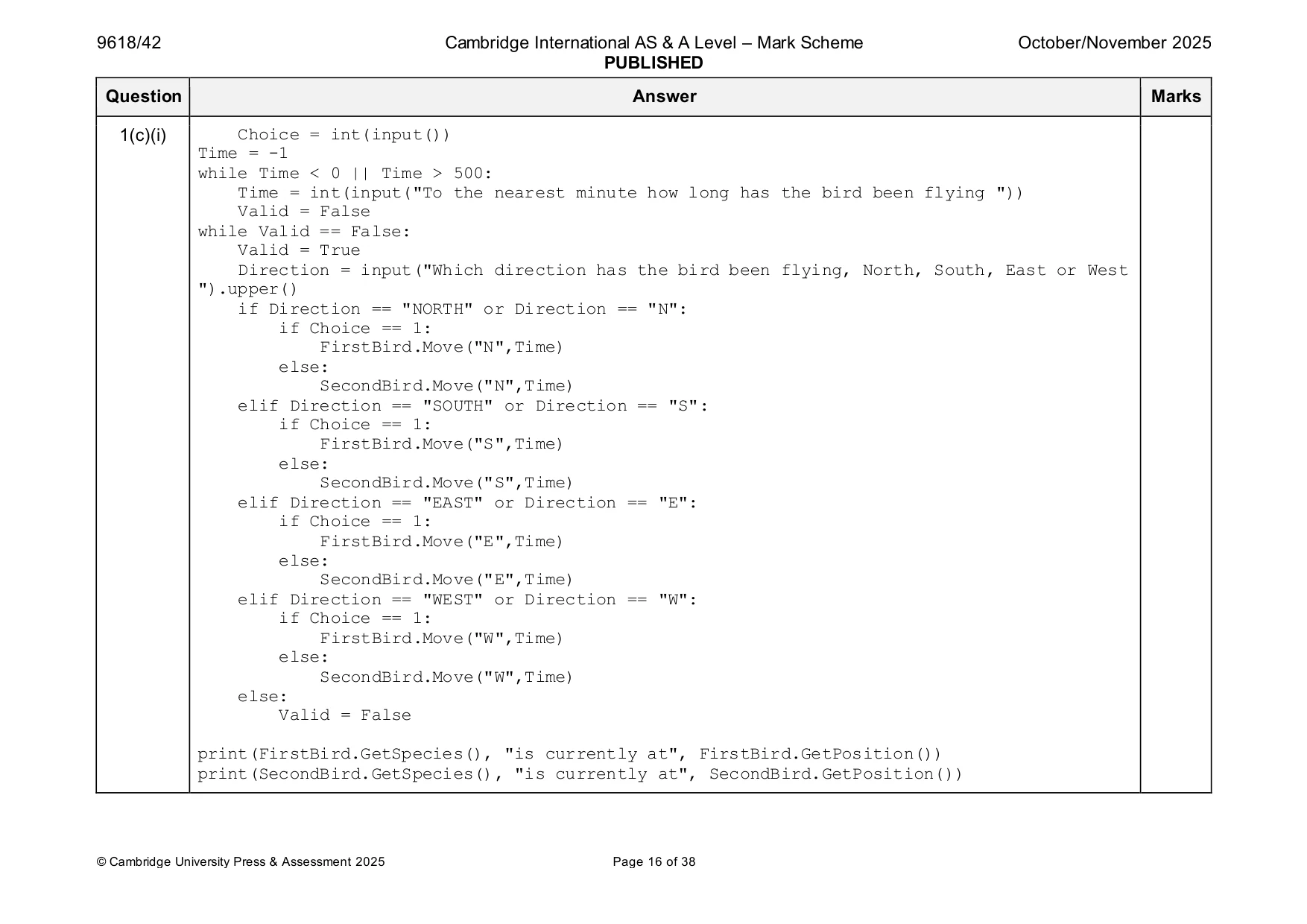
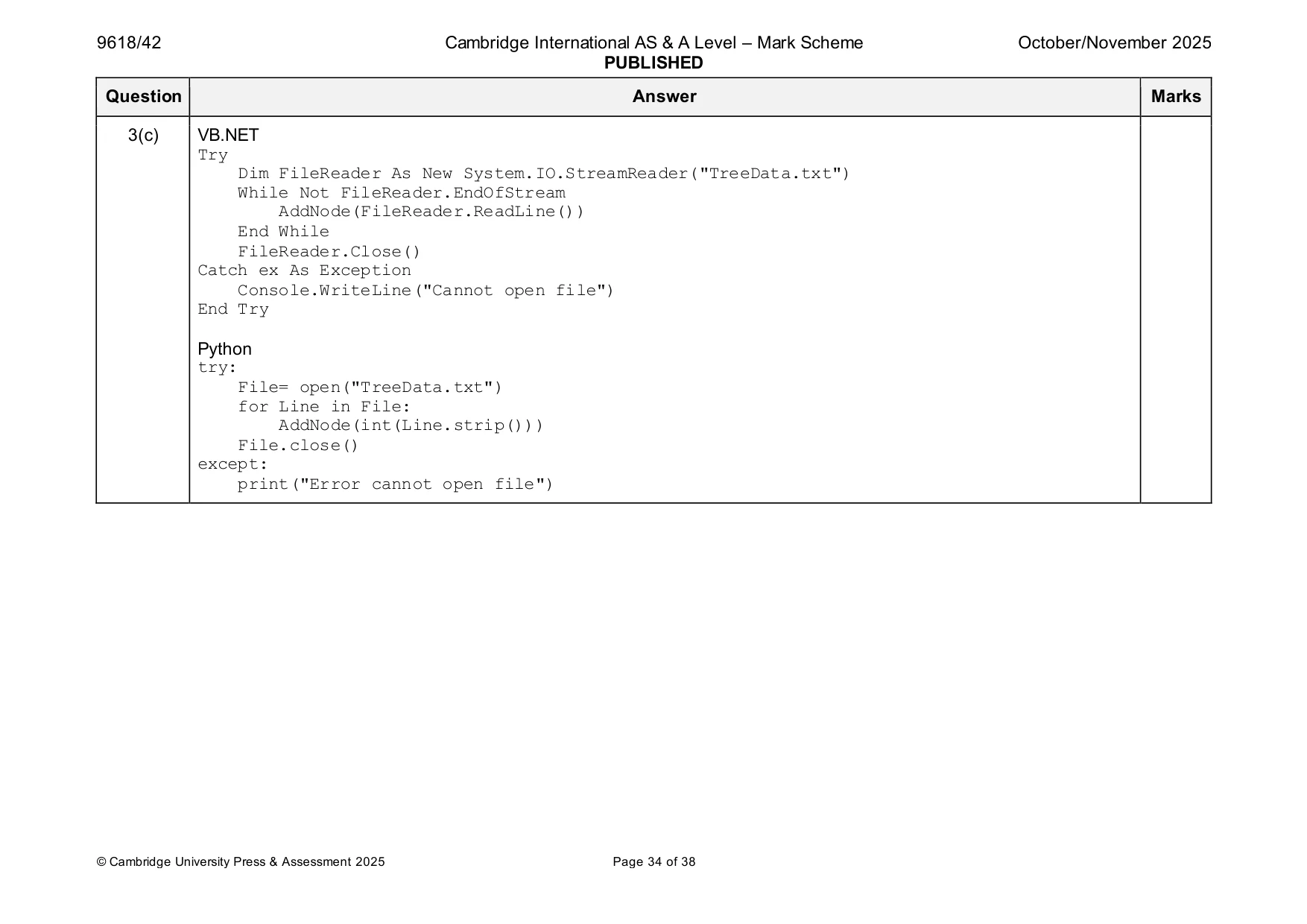
Mark scheme: Question Answer Marks 1(a)(i) 1 mark each 4 • Class header (and end) • 4 private attributes with correct data types • Constructor header (and end) taking 2 parameters within class … • … within constructor assigning parameters to Species and DistancePerHour and assigning 500.0 to XPosition and YPosition Example program code Java class Bird{ private String Species; private Double DistancePerHour; private Double XPosition; private Double YPosition; public Bird(Double pDistancePerHour, String pSpecies){ Species = pSpecies; DistancePerHour = pDistancePerHour; XPosition = 500.0; YPosition = 500.0;}} VB.NET Class Bird Private Species As String Private DistancePerHour As Single Private XPosition As Single Private YPosition As Single Sub New(pDistancePerHour, pSpecies) Species = pSpecies DistancePerHour = pDistancePerHour XPosition = 500.0 YPosition = 500.0 End Sub End Class 1(a)(i) Python class Bird: def __init__(self, pDistancePerHour, pSpecies): self.__Species = pSpecies #string self.__DistancePerHour = pDistancePerHour #real self.__XPosition = 500.0 #real self.__YPosition = 500.0 #real 1(a)(ii) 1 mark each 2 • Get method header (and end) with no parameter …. • … returning Species Example program code Java public String GetSpecies(){ return Species; } VB.NET Function GetSpecies() Return Species End Function Python def GetSpecies(self): return self.__Species 1(a)(iii) 1 mark each 3 • Get method header (and end) with no parameter, returning a value • Creating correct string using attributes … • … returning this string Example program code Java public String GetPosition(){ String ReturnValue = "X = " + XPosition + " Y = " + YPosition; return ReturnValue; } VB.NET Function GetPosition() Dim ReturnValue As String = "X = " & XPosition & " Y = " & YPosition Return ReturnValue End Function Python def GetPosition(self): ReturnValue = "X = " + str(self.__XPosition) + " Y = " + str(self.__YPosition) return ReturnValue 1(a)(iv) 1 mark each 5 • Method header (and end) taking direction and minutes flying as parameters • Calculation of distance using minutes flying parameter and attribute DistancePerHour • Selection based on direction parameter … • … north adding to YPosition and south subtracting from YPosition • … east adding to XPosition and west subtracting from XPosition Example program code Java public Boolean Move(String Direction, Integer MinsFlying){ if(Direction.compareTo("E") == 0){ XPosition = XPosition + ((DistancePerHour / 60) * MinsFlying); }else if(Direction.compareTo("W") == 0){ XPosition = XPosition - ((DistancePerHour / 60) * MinsFlying); }else if(Direction.compareTo("N") == 0){ YPosition = YPosition + ((DistancePerHour / 60) * MinsFlying); }else if(Direction.compareTo("S") == 0){ YPosition = YPosition - ((DistancePerHour / 60) * MinsFlying); } } 1(a)(iv) VB.NET Function Move(Direction, MinsFlying) If Direction = "E" Then XPosition = XPosition + ((DistancePerHour / 60) * MinsFlying) ElseIf Direction = "W" Then XPosition = XPosition - ((DistancePerHour / 60) * MinsFlying) ElseIf Direction = "N" Then YPosition = YPosition + ((DistancePerHour / 60) * MinsFlying) ElseIf Direction = "S" Then YPosition = YPosition - ((DistancePerHour / 60) * MinsFlying) End If End Function Python def Move(self, Direction, MinsFlying): if Direction == "E": self.__XPosition = self.__XPosition + ((self.__DistancePerHour/60)*MinsFlying) elif Direction == "W": self.__XPosition = self.__XPosition - ((self.__DistancePerHour/60)*MinsFlying) elif Direction == "N": self.__YPosition = self.__YPosition + ((self.__DistancePerHour/60)*MinsFlying) elif Direction == "S": self.__YPosition = self.__YPosition - ((self.__DistancePerHour/60)*MinsFlying) 1(b) 1 mark each 3 • Cockatiel 71.0 instance of Bird created … • Macaw 56.0 instance of Bird created … • … both stored in variables/structures Example program code Java Bird FirstBird = new Bird(71.0, "Cockatiel"); Bird SecondBird = new Bird(56.0, "Macaw"); VB.NET Dim FirstBird As Bird = New Bird(71.0, "Cockatiel") Dim SecondBird As Bird = New Bird(56.0, "Macaw") Python FirstBird = Bird(71.0, "Cockatiel") SecondBird = Bird(56.0, "Macaw") 1(c)(i) 1 mark each 8 • Output species, X and Y position for both Bird objects in appropriate messages(s) • Prompt and input of bird choice, time and direction … • … validating all three inputs … • … looping until all three are valid • Calling Move() for chosen bird … • … with only input direction and input time as arguments • Outputting new position for the bird moved • Using get methods throughout where appropriate Example program code Java Integer Choice; Integer Time; String Direction; Scanner scanner = new Scanner(System.in); Choice = 0; while(Choice != 1 && Choice != 2){ System.out.println("Which bird do you want to move"); System.out.println("Enter 1 for " + FirstBird.GetSpecies() + " is currently at " + FirstBird.GetPosition()); System.out.println("Enter 2 for " + SecondBird.GetSpecies() + " is currently at " + SecondBird.GetPosition()); Choice = Integer.parseInt(scanner.nextLine()); } Time = -1; while(Time < 0 or Time > 500){ System.out.println("To the nearest minute how long as the bird been flying?"); Time = Integer.parseInt(scanner.nextLine()); } Boolean Valid = false; while(Valid == false){ 1(c)(i) Valid = true; System.out.println("Which direction has the bird been flying, North, South, East or West?"); Direction = scanner.nextLine().toUpperCase(); if(Direction.compareTo("NORTH") == 0 || Direction.compareTo("N") == 0){ if(Choice == 1){ FirstBird.Move("N",Time); }else{ SecondBird.Move("N", Time); } } else if(Direction.compareTo("SOUTH")== 0 || Direction.compareTo("S") == 0){ if(Choice == 1){ FirstBird.Move("S",Time); }else{ SecondBird.Move("S", Time); } } else if(Direction.compareTo("EAST")== 0 || Direction.compareTo("E") == 0){ if(Choice == 1){ FirstBird.Move("E",Time); }else{ SecondBird.Move("E", Time); } } else if(Direction.compareTo("WEST")== 0 || Direction.compareTo("W") == 0){ if(Choice == 1){ FirstBird.Move("W",Time); }else{ SecondBird.Move("W", Time); } }else{ Valid = false; } } System.out.println(FirstBird.GetSpecies() + " is currently at " + FirstBird.GetPosition()); 1(c)(i) System.out.println(SecondBird.GetSpecies() + " is currently at " + SecondBird.GetPosition()); VB.NET Dim Choice As Integer Dim Time As Integer Dim Direction As String Choice = 0 While Choice <> 1 And Choice <> 2 Console.WriteLine("Which bird do you want to move") Console.WriteLine("Enter 1 for " & FirstBird.GetSpecies() & " is currently at " & FirstBird.GetPosition()) Console.WriteLine("Enter 2 for " & SecondBird.GetSpecies() & " is currently at " & SecondBird.GetPosition()) Choice = Console.ReadLine End While Time = -1 While Time < 0 Or Time > 500 Console.WriteLine("To the nearest minute how long has the bird been flying ") Time = Console.ReadLine End While Dim Valid As Boolean = False While (Valid = False) Valid = True Console.WriteLine("Which direction has the bird been flying, North, South, East or West ") Direction = Console.ReadLine().ToUpper If Direction = "NORTH" Or Direction = "N" Then If Choice = 1 Then FirstBird.Move("N", Time) Else SecondBird.Move("N", Time) End If 1(c)(i) ElseIf Direction = "SOUTH" Or Direction = "S" Then If Choice = 1 Then FirstBird.Move("S", Time) Else SecondBird.Move("S", Time) End If ElseIf Direction = "EAST" Or Direction = "E" Then If Choice = 1 Then FirstBird.Move("E", Time) Else SecondBird.Move("E", Time) End If ElseIf Direction = "WEST" Or Direction = "W" Then If Choice = 1 Then FirstBird.Move("W", Time) Else SecondBird.Move("W", Time) End If Else Valid = False End If End While Console.WriteLine(FirstBird.GetSpecies() & " is currently at " & FirstBird.GetPosition()) Console.WriteLine(SecondBird.GetSpecies() & " is currently at " & SecondBird.GetPosition()) Python Choice = 0 while Choice != 1 and Choice != 2: print("Which bird do you want to move") print("Enter 1 for", FirstBird.GetSpecies(), "is currently at", FirstBird.GetPosition()) Choice = -1 print("Enter 2 for", SecondBird.GetSpecies(), "is currently at", SecondBird.GetPosition()) 1(c)(i) Choice = int(input()) Time = -1 while Time < 0 || Time > 500: Time = int(input("To the nearest minute how long has the bird been flying ")) Valid = False while Valid == False: Valid = True Direction = input("Which direction has the bird been flying, North, South, East or West ").upper() if Direction == "NORTH" or Direction == "N": if Choice == 1: FirstBird.Move("N",Time) else: SecondBird.Move("N",Time) elif Direction == "SOUTH" or Direction == "S": if Choice == 1: FirstBird.Move("S",Time) else: SecondBird.Move("S",Time) elif Direction == "EAST" or Direction == "E": if Choice == 1: FirstBird.Move("E",Time) else: SecondBird.Move("E",Time) elif Direction == "WEST" or Direction == "W": if Choice == 1: FirstBird.Move("W",Time) else: SecondBird.Move("W",Time) else: Valid = False print(FirstBird.GetSpecies(), "is currently at", FirstBird.GetPosition()) print(SecondBird.GetSpecies(), "is currently at", SecondBird.GetPosition()) 1(c)(ii) 1 mark for each: 3 • screenshot showing inputs for one test with correct output • screenshot showing inputs for a second test with correct output • screenshot showing inputs for a third and fourth test with correct output e.g. Test 1: Test 2: Test 3: Test 4:
Q2 · A program stores 20 unique random integers between 0 and 100 (inclusive) in a 1D array…
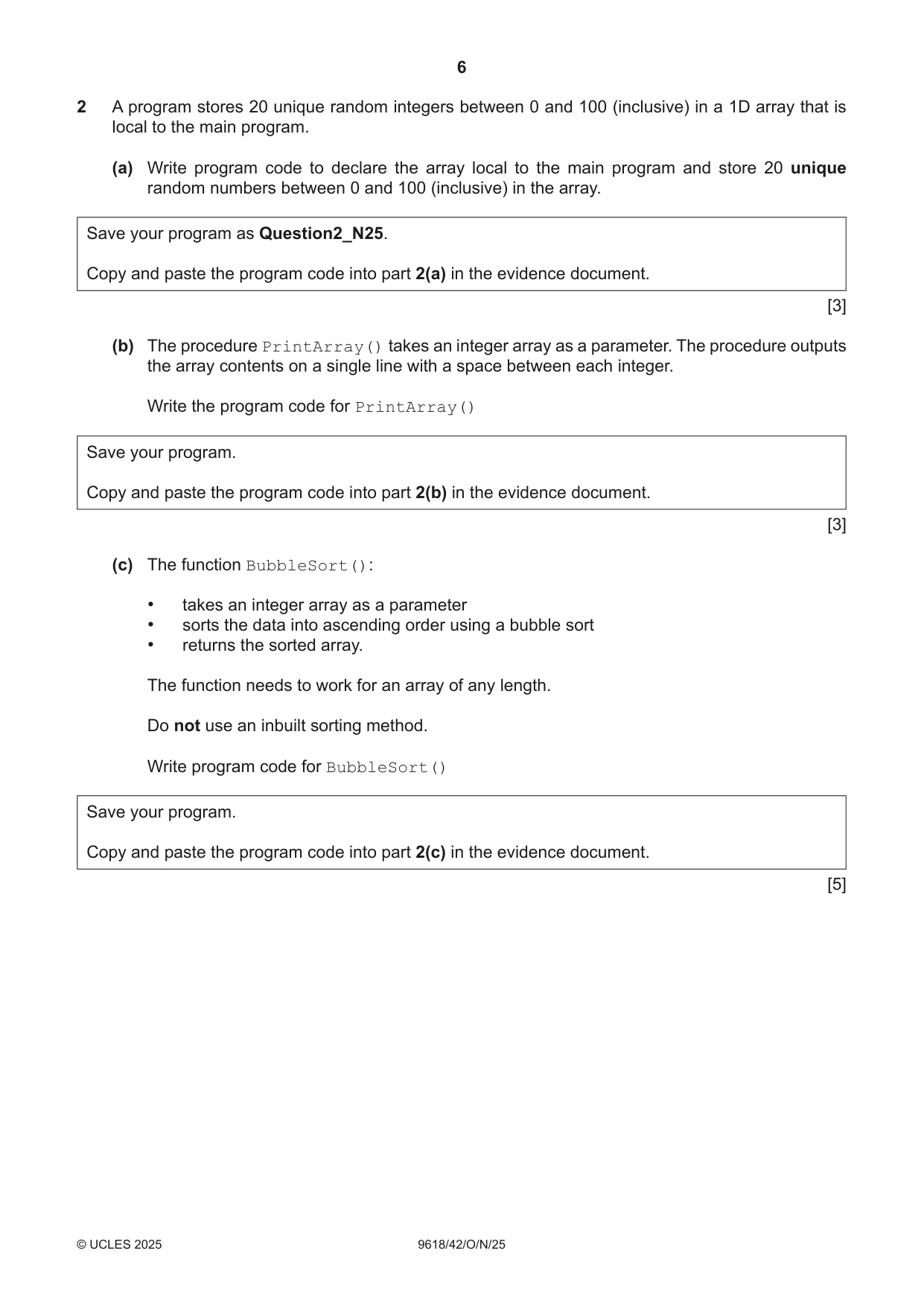
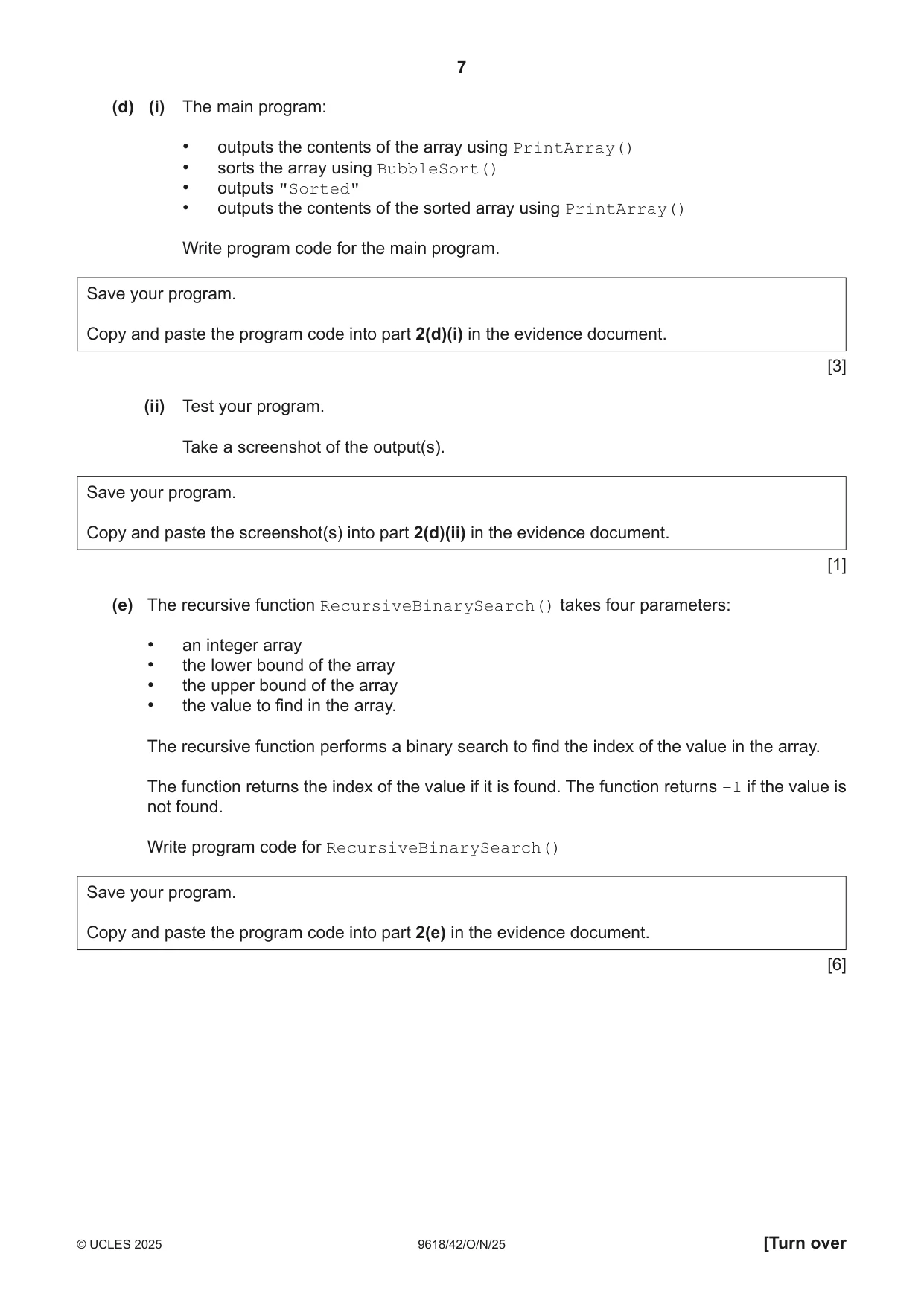
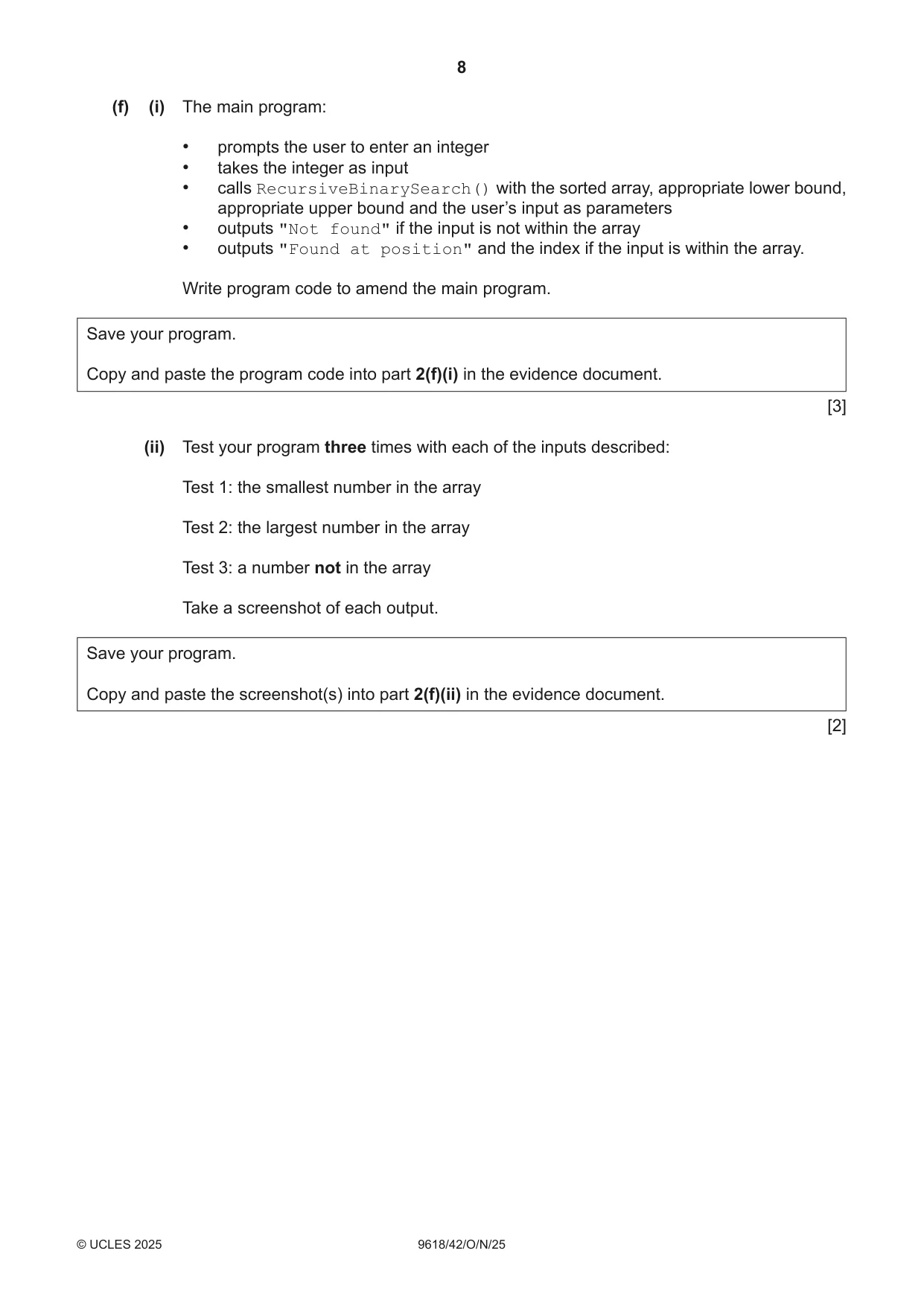
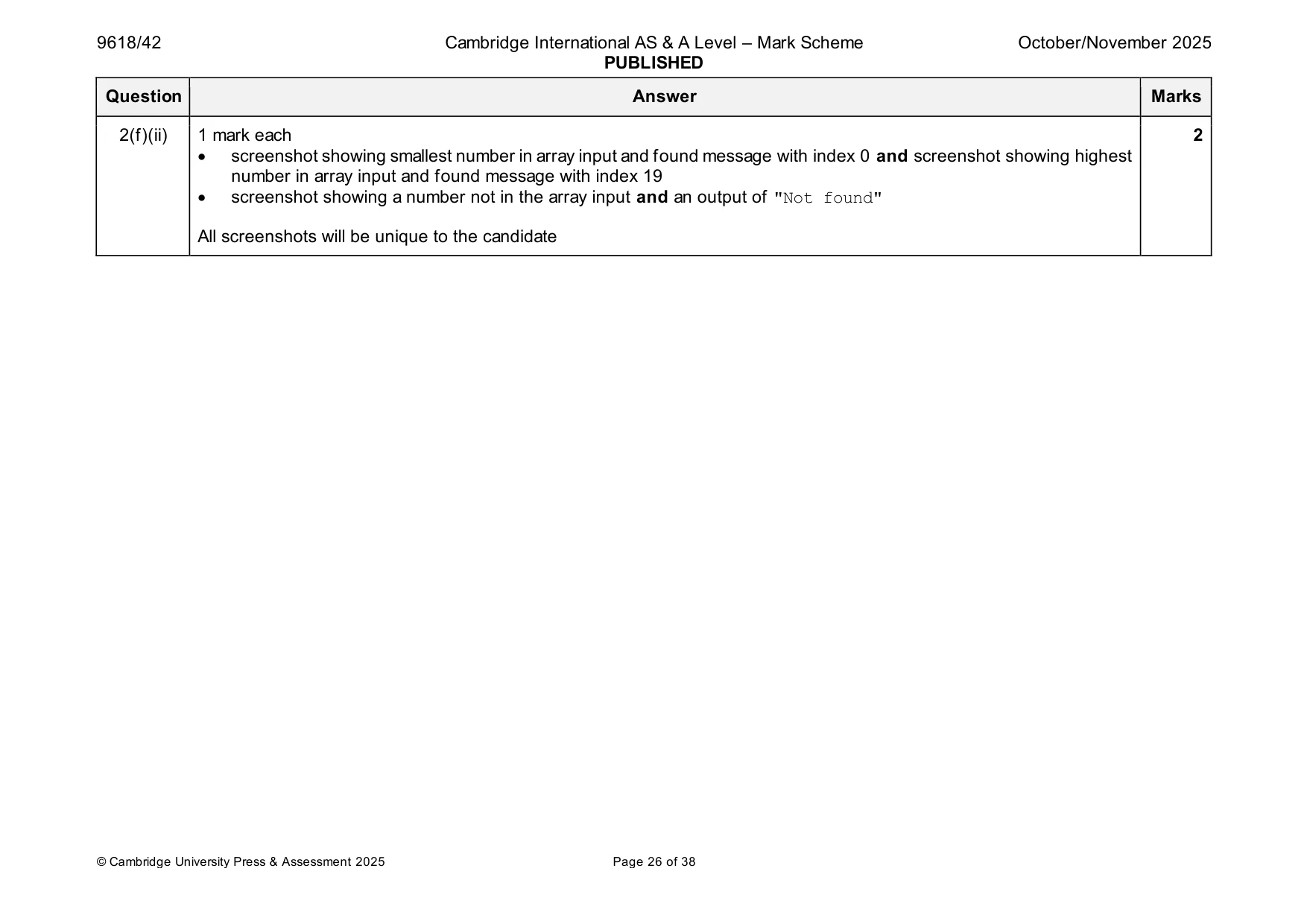
2 A program stores 20 unique random integers between 0 and 100 (inclusive) in a 1D array that is local to the main program. (a) Write program code to declare the array local to the main program and store 20 unique random numbers between 0 and 100 (inclusive) in the array. Save your program as Question2_N25. Copy and paste the program code into part 2(a) in the evidence document. [3] (b) The procedure PrintArray() takes an integer array as a parameter. The procedure outputs the array contents on a single line with a space between each integer. Write the program code for PrintArray() Save your program. Copy and paste the program code into part 2(b) in the evidence document. [3] (c) The function BubbleSort(): • takes an integer array as a parameter • sorts the data into ascending order using a bubble sort • returns the sorted array. The function needs to work for an array of any length. Do not use an inbuilt sorting method. Write program code for BubbleSort() Save your program. Copy and paste the program code into part 2(c) in the evidence document. [5] (d) (i) The main program: • outputs the contents of the array using PrintArray() • sorts the array using BubbleSort() • outputs "Sorted" • outputs the contents of the sorted array using PrintArray() Write program code for the main program. Save your program. Copy and paste the program code into part 2(d)(i) in the evidence document. [3] (ii) Test your program. Take a screenshot of the output(s). Save your program. Copy and paste the screenshot(s) into part 2(d)(ii) in the evidence document. [1] (e) The recursive function RecursiveBinarySearch() takes four parameters: • an integer array • the lower bound of the array • the upper bound of the array • the value to find in the array. The recursive function performs a binary search to find the index of the value in the array. The function returns the index of the value if it is found. The function returns –1 if the value is not found. Write program code for RecursiveBinarySearch() Save your program. Copy and paste the program code into part 2(e) in the evidence document. [6] (f) (i) The main program: • prompts the user to enter an integer • takes the integer as input • calls RecursiveBinarySearch() with the sorted array, appropriate lower bound, appropriate upper bound and the user’s input as parameters • outputs "Not found" if the input is not within the array • outputs "Found at position" and the index if the input is within the array. Write program code to amend the main program. Save your program. Copy and paste the program code into part 2(f)(i) in the evidence document. [3] (ii) Test your program three times with each of the inputs described: Test 1: the smallest number in the array Test 2: the largest number in the array Test 3: a number not in the array Take a screenshot of each output. Save your program. Copy and paste the screenshot(s) into part 2(f)(ii) in the evidence document. [2]
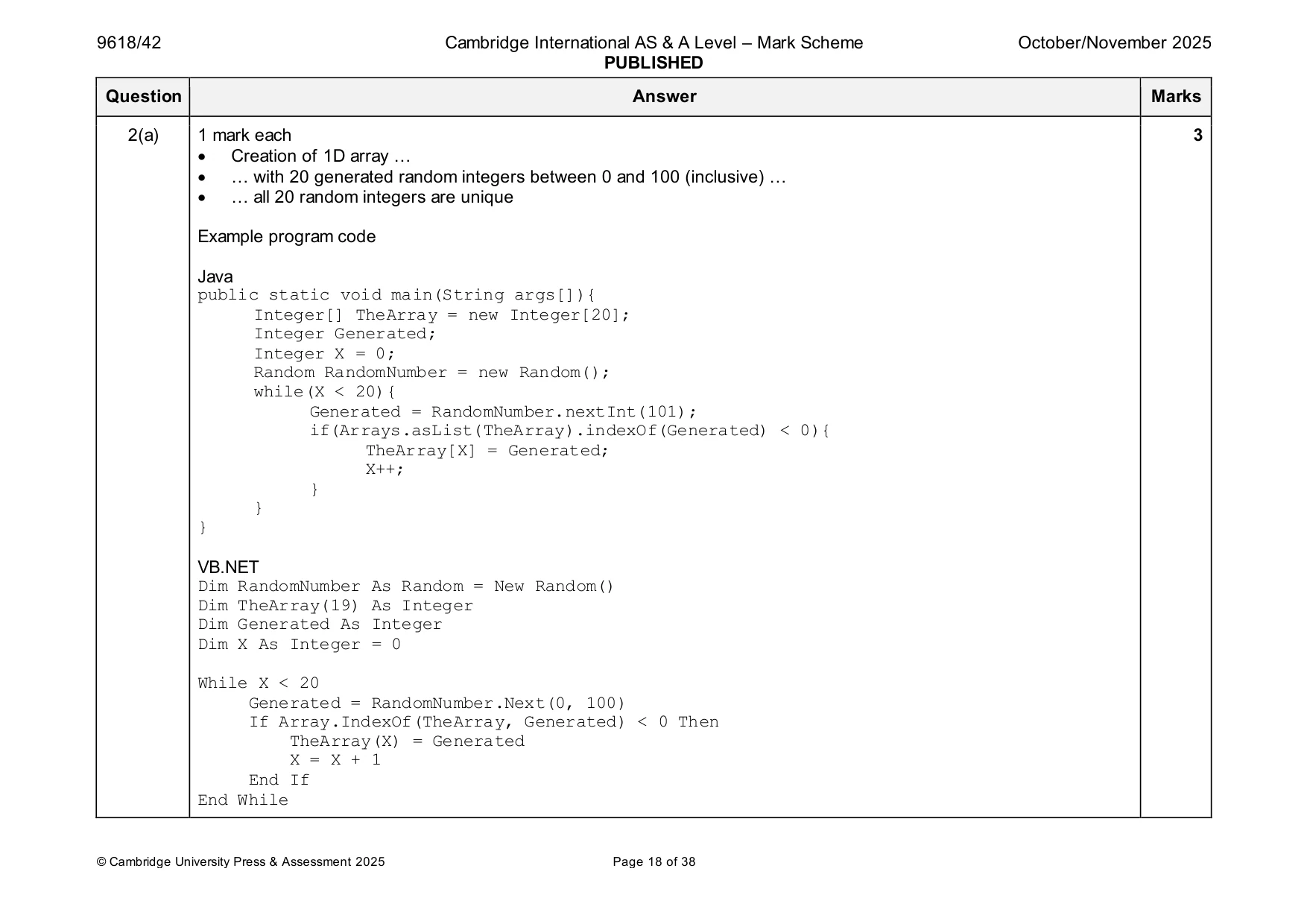
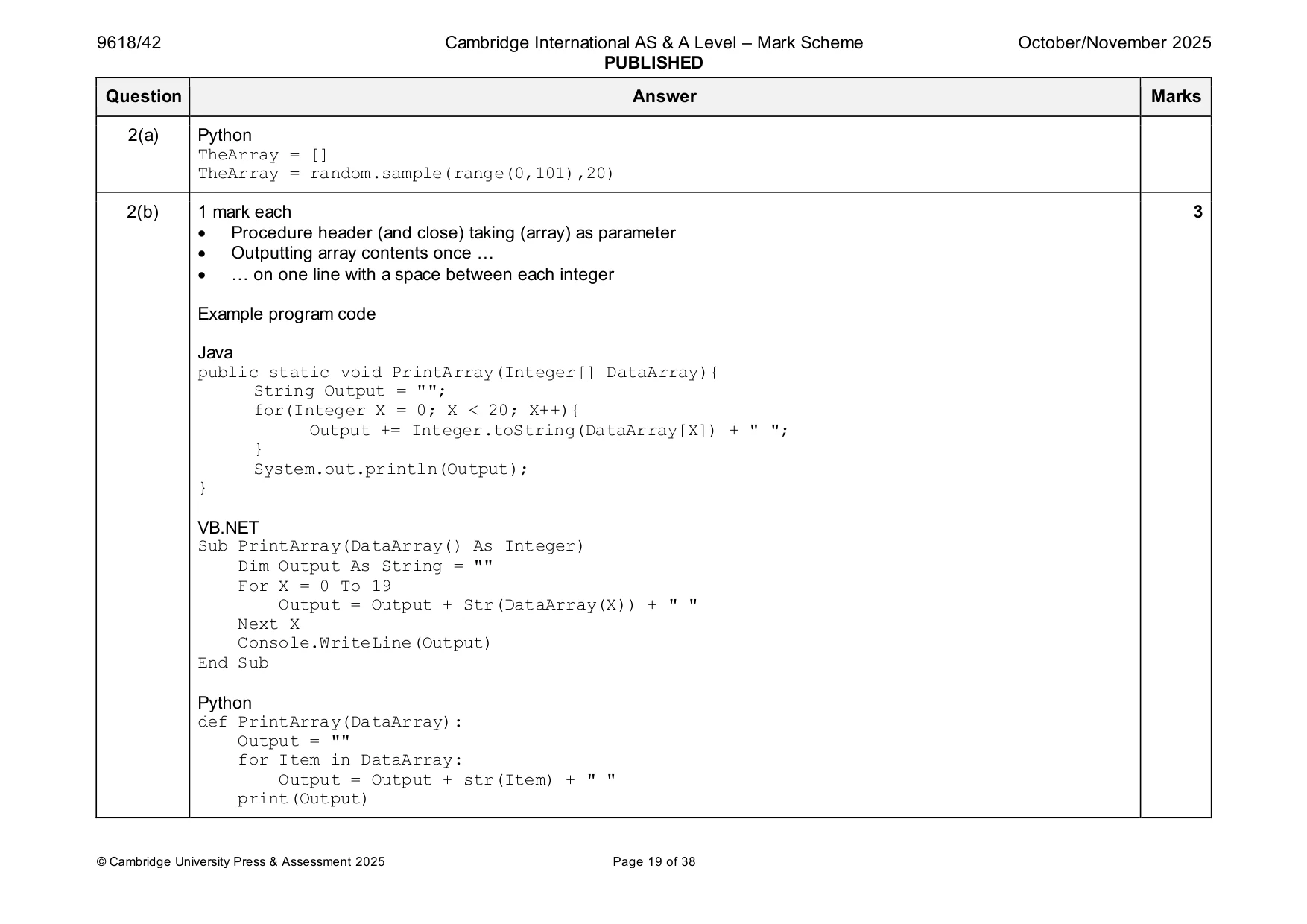
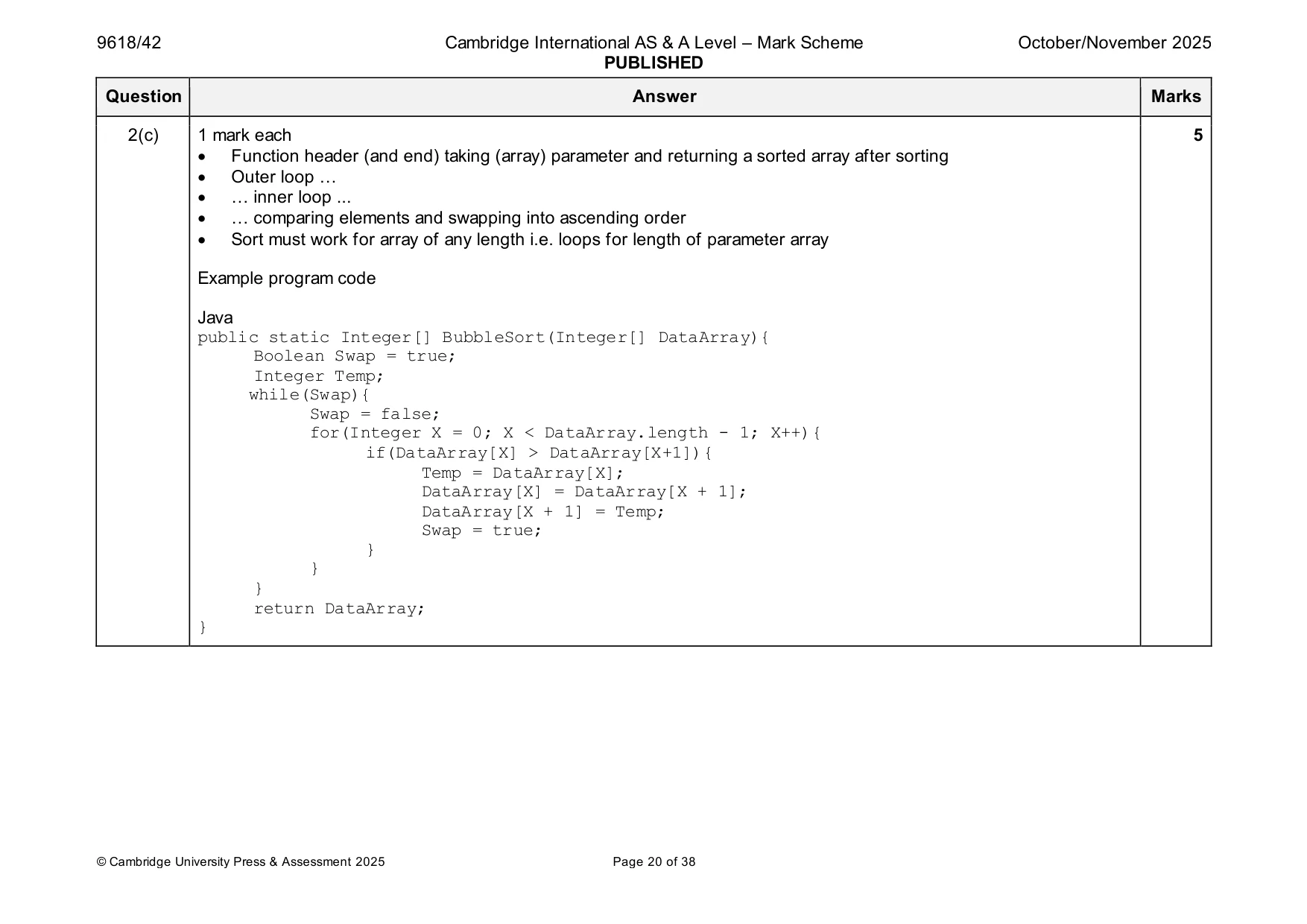
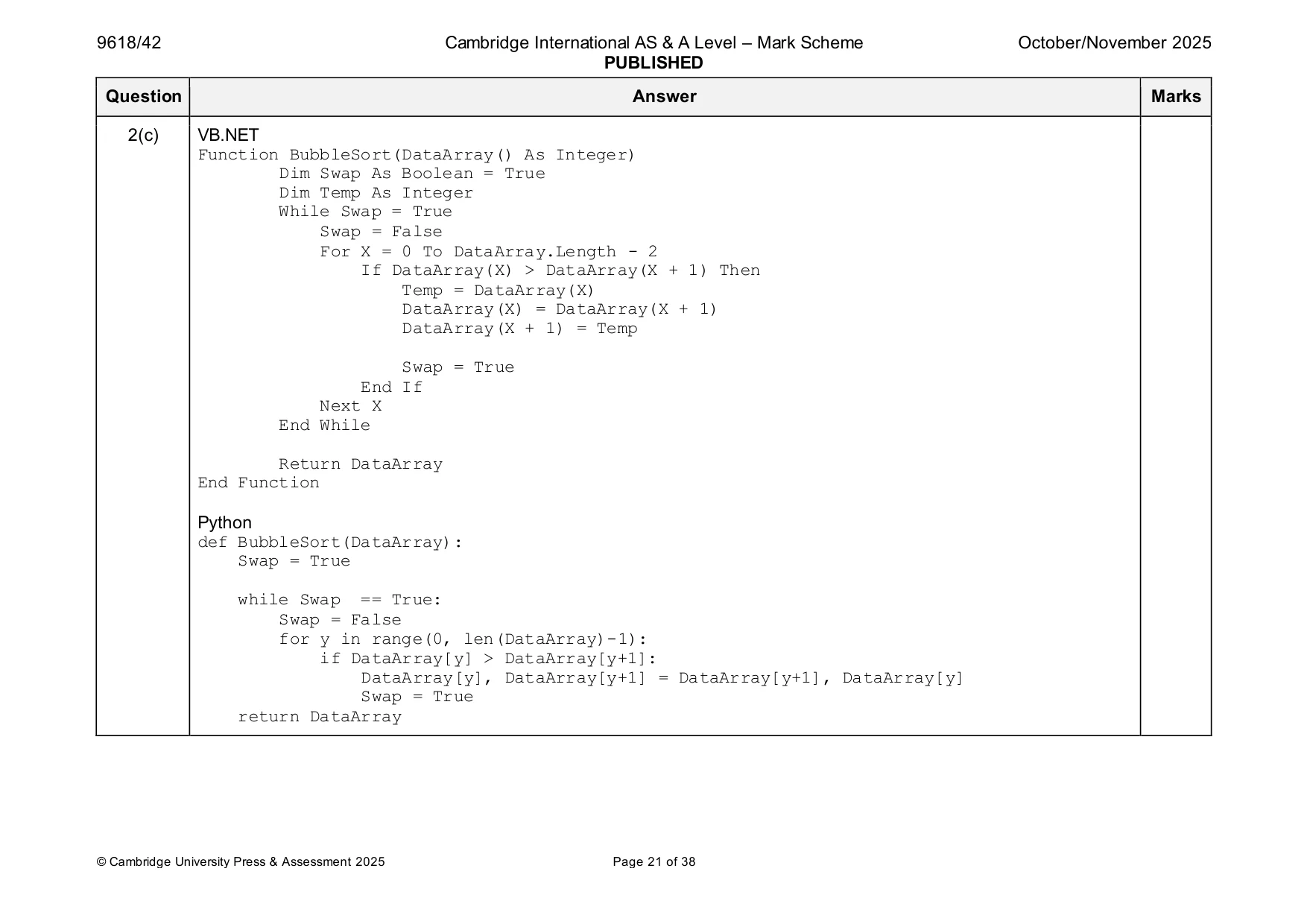
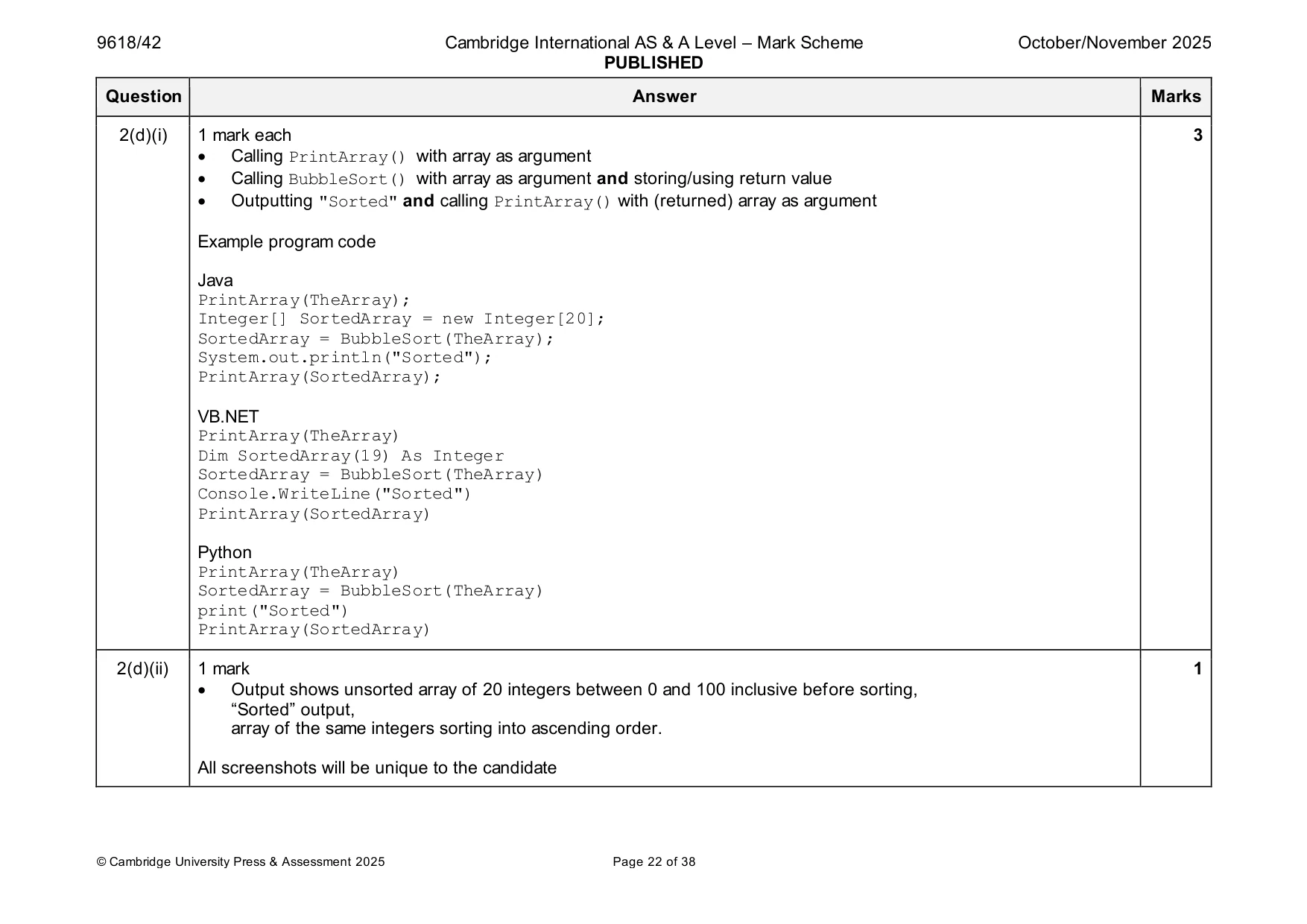
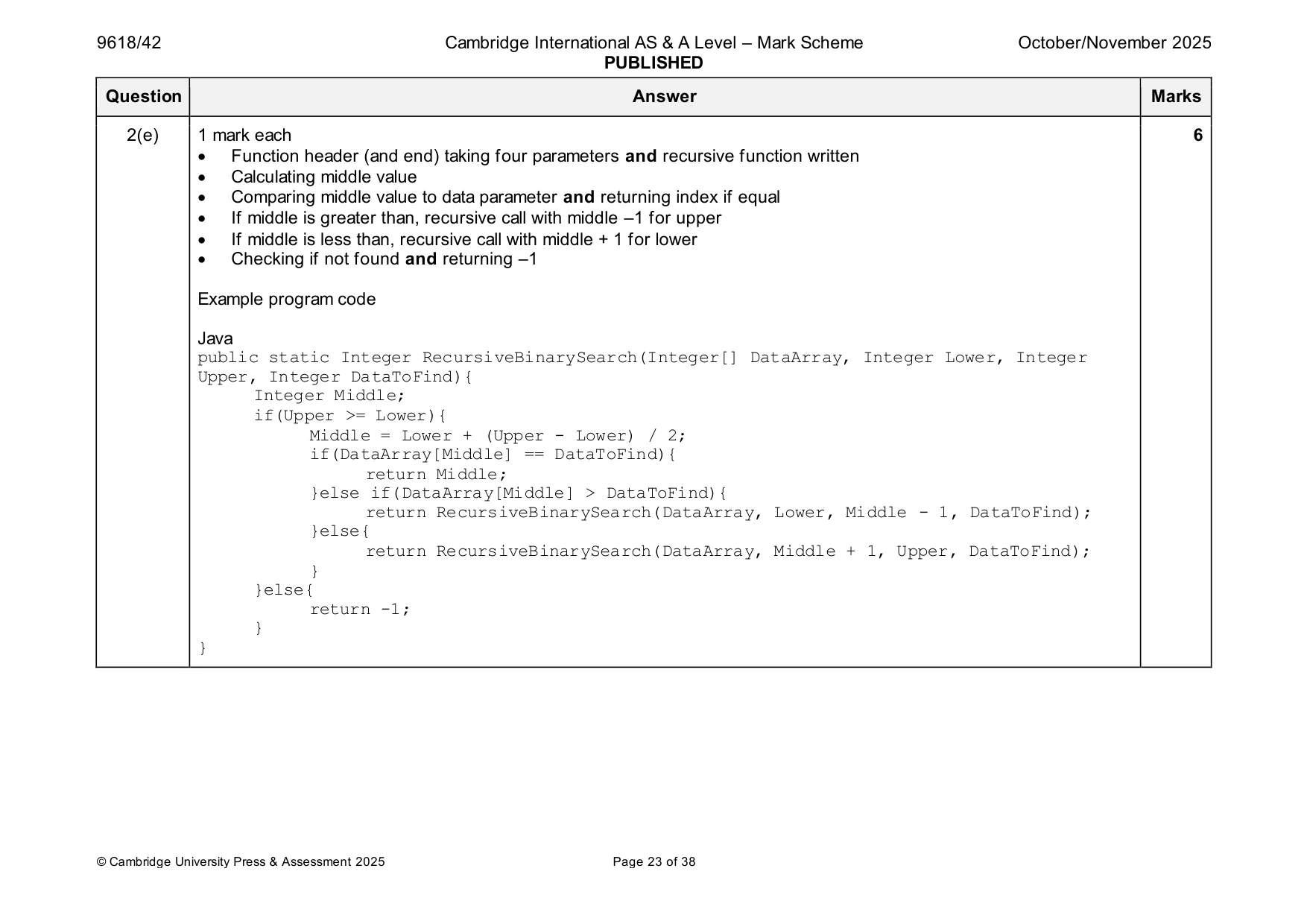
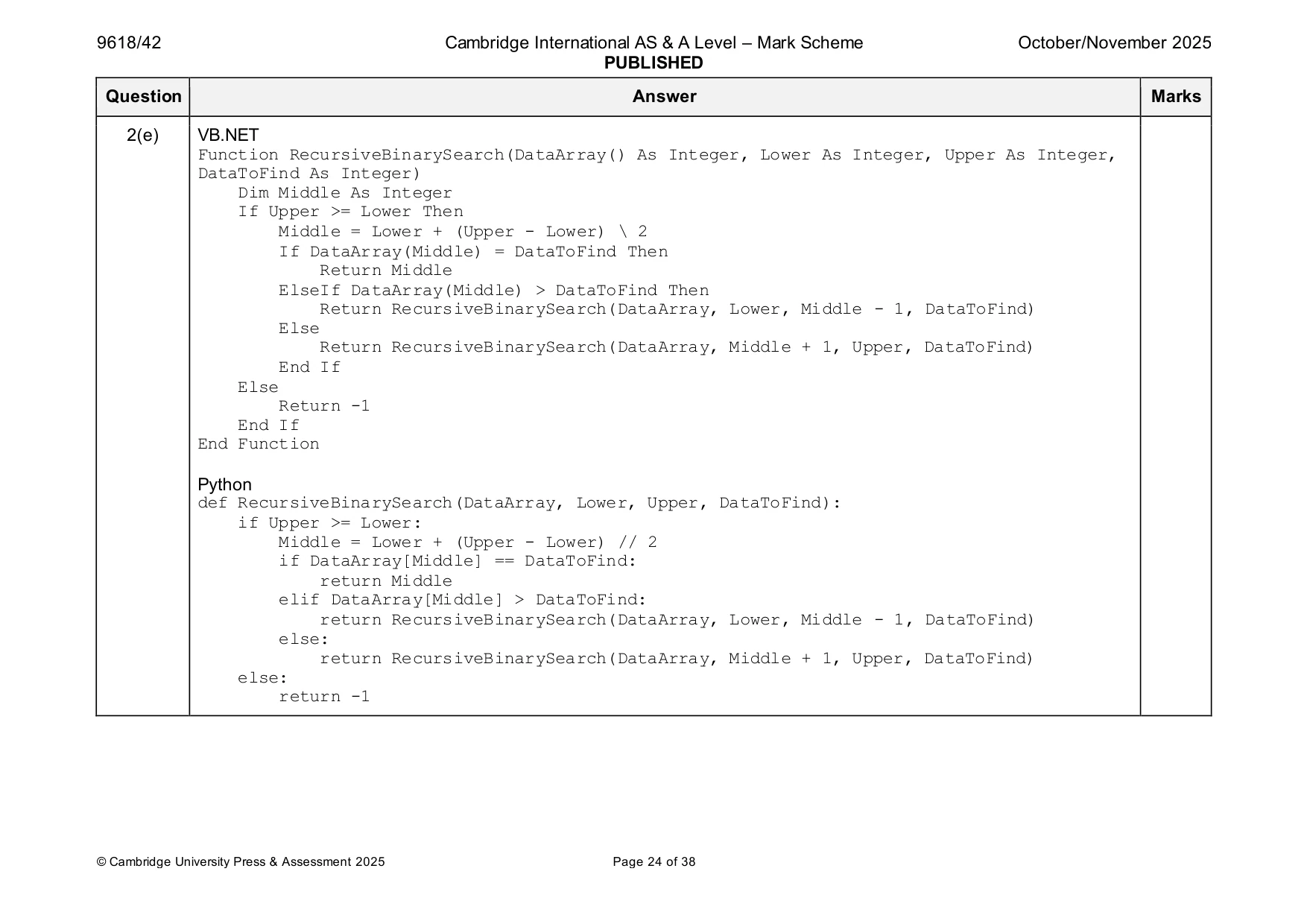
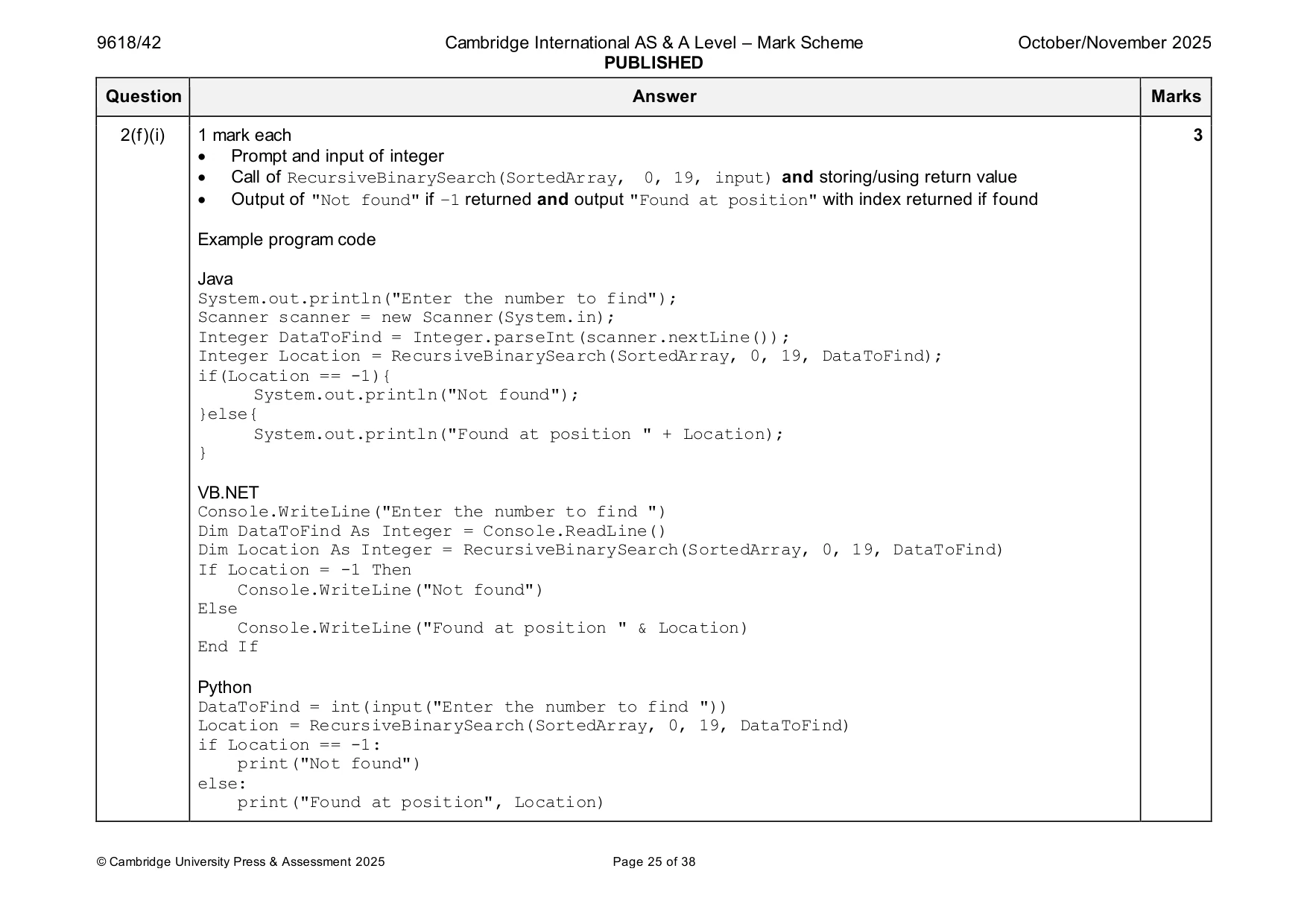
Mark scheme: 2(a) 1 mark each 3 • Creation of 1D array … • … with 20 generated random integers between 0 and 100 (inclusive) … • … all 20 random integers are unique Example program code Java public static void main(String args[]){ Integer[] TheArray = new Integer[20]; Integer Generated; Integer X = 0; Random RandomNumber = new Random(); while(X < 20){ Generated = RandomNumber.nextInt(101); if(Arrays.asList(TheArray).indexOf(Generated) < 0){ TheArray[X] = Generated; X++; } } } VB.NET Dim RandomNumber As Random = New Random() Dim TheArray(19) As Integer Dim Generated As Integer Dim X As Integer = 0 While X < 20 Generated = RandomNumber.Next(0, 100) If Array.IndexOf(TheArray, Generated) < 0 Then TheArray(X) = Generated X = X + 1 End If End While 2(a) Python TheArray = [] TheArray = random.sample(range(0,101),20) 2(b) 1 mark each 3 • Procedure header (and close) taking (array) as parameter • Outputting array contents once … • … on one line with a space between each integer Example program code Java public static void PrintArray(Integer[] DataArray){ String Output = ""; for(Integer X = 0; X < 20; X++){ Output += Integer.toString(DataArray[X]) + " "; } System.out.println(Output); } VB.NET Sub PrintArray(DataArray() As Integer) Dim Output As String = "" For X = 0 To 19 Output = Output + Str(DataArray(X)) + " " Next X Console.WriteLine(Output) End Sub Python def PrintArray(DataArray): Output = "" for Item in DataArray: Output = Output + str(Item) + " " print(Output) 2(c) 1 mark each 5 • Function header (and end) taking (array) parameter and returning a sorted array after sorting • Outer loop … • … inner loop ... • … comparing elements and swapping into ascending order • Sort must work for array of any length i.e. loops for length of parameter array Example program code Java public static Integer[] BubbleSort(Integer[] DataArray){ Boolean Swap = true; Integer Temp; while(Swap){ Swap = false; for(Integer X = 0; X < DataArray.length - 1; X++){ if(DataArray[X] > DataArray[X+1]){ Temp = DataArray[X]; DataArray[X] = DataArray[X + 1]; DataArray[X + 1] = Temp; Swap = true; } } } return DataArray; } 2(c) VB.NET Function BubbleSort(DataArray() As Integer) Dim Swap As Boolean = True Dim Temp As Integer While Swap = True Swap = False For X = 0 To DataArray.Length - 2 If DataArray(X) > DataArray(X + 1) Then Temp = DataArray(X) DataArray(X) = DataArray(X + 1) DataArray(X + 1) = Temp Swap = True End If Next X End While Return DataArray End Function Python def BubbleSort(DataArray): Swap = True while Swap == True: Swap = False for y in range(0, len(DataArray)-1): if DataArray[y] > DataArray[y+1]: DataArray[y], DataArray[y+1] = DataArray[y+1], DataArray[y] Swap = True return DataArray 2(d)(i) 1 mark each 3 • Calling PrintArray() with array as argument • Calling BubbleSort() with array as argument and storing/using return value • Outputting "Sorted" and calling PrintArray() with (returned) array as argument Example program code Java PrintArray(TheArray); Integer[] SortedArray = new Integer[20]; SortedArray = BubbleSort(TheArray); System.out.println("Sorted"); PrintArray(SortedArray); VB.NET PrintArray(TheArray) Dim SortedArray(19) As Integer SortedArray = BubbleSort(TheArray) Console.WriteLine("Sorted") PrintArray(SortedArray) Python PrintArray(TheArray) SortedArray = BubbleSort(TheArray) print("Sorted") PrintArray(SortedArray) 2(d)(ii) 1 mark 1 • Output shows unsorted array of 20 integers between 0 and 100 inclusive before sorting, “Sorted” output, array of the same integers sorting into ascending order. All screenshots will be unique to the candidate 2(e) 1 mark each 6 • Function header (and end) taking four parameters and recursive function written • Calculating middle value • Comparing middle value to data parameter and returning index if equal • If middle is greater than, recursive call with middle –1 for upper • If middle is less than, recursive call with middle + 1 for lower • Checking if not found and returning –1 Example program code Java public static Integer RecursiveBinarySearch(Integer[] DataArray, Integer Lower, Integer Upper, Integer DataToFind){ Integer Middle; if(Upper >= Lower){ Middle = Lower + (Upper - Lower) / 2; if(DataArray[Middle] == DataToFind){ return Middle; }else if(DataArray[Middle] > DataToFind){ return RecursiveBinarySearch(DataArray, Lower, Middle - 1, DataToFind); }else{ return RecursiveBinarySearch(DataArray, Middle + 1, Upper, DataToFind); } }else{ return -1; } } 2(e) VB.NET Function RecursiveBinarySearch(DataArray() As Integer, Lower As Integer, Upper As Integer, DataToFind As Integer) Dim Middle As Integer If Upper >= Lower Then Middle = Lower + (Upper - Lower) \ 2 If DataArray(Middle) = DataToFind Then Return Middle ElseIf DataArray(Middle) > DataToFind Then Return RecursiveBinarySearch(DataArray, Lower, Middle - 1, DataToFind) Else Return RecursiveBinarySearch(DataArray, Middle + 1, Upper, DataToFind) End If Else Return -1 End If End Function Python def RecursiveBinarySearch(DataArray, Lower, Upper, DataToFind): if Upper >= Lower: Middle = Lower + (Upper - Lower) // 2 if DataArray[Middle] == DataToFind: return Middle elif DataArray[Middle] > DataToFind: return RecursiveBinarySearch(DataArray, Lower, Middle - 1, DataToFind) else: return RecursiveBinarySearch(DataArray, Middle + 1, Upper, DataToFind) else: return -1 2(f)(i) 1 mark each 3 • Prompt and input of integer • Call of RecursiveBinarySearch(SortedArray, 0, 19, input) and storing/using return value • Output of "Not found" if –1 returned and output "Found at position" with index returned if found Example program code Java System.out.println("Enter the number to find"); Scanner scanner = new Scanner(System.in); Integer DataToFind = Integer.parseInt(scanner.nextLine()); Integer Location = RecursiveBinarySearch(SortedArray, 0, 19, DataToFind); if(Location == -1){ System.out.println("Not found"); }else{ System.out.println("Found at position " + Location); } VB.NET Console.WriteLine("Enter the number to find ") Dim DataToFind As Integer = Console.ReadLine() Dim Location As Integer = RecursiveBinarySearch(SortedArray, 0, 19, DataToFind) If Location = -1 Then Console.WriteLine("Not found") Else Console.WriteLine("Found at position " & Location) End If Python DataToFind = int(input("Enter the number to find ")) Location = RecursiveBinarySearch(SortedArray, 0, 19, DataToFind) if Location == -1: print("Not found") else: print("Found at position", Location) 2(f)(ii) 1 mark each 2 • screenshot showing smallest number in array input and found message with index 0 and screenshot showing highest number in array input and found message with index 19 • screenshot showing a number not in the array input and an output of "Not found" All screenshots will be unique to the candidate
Q3 · A program stores integers in ascending order in an ordered binary tree
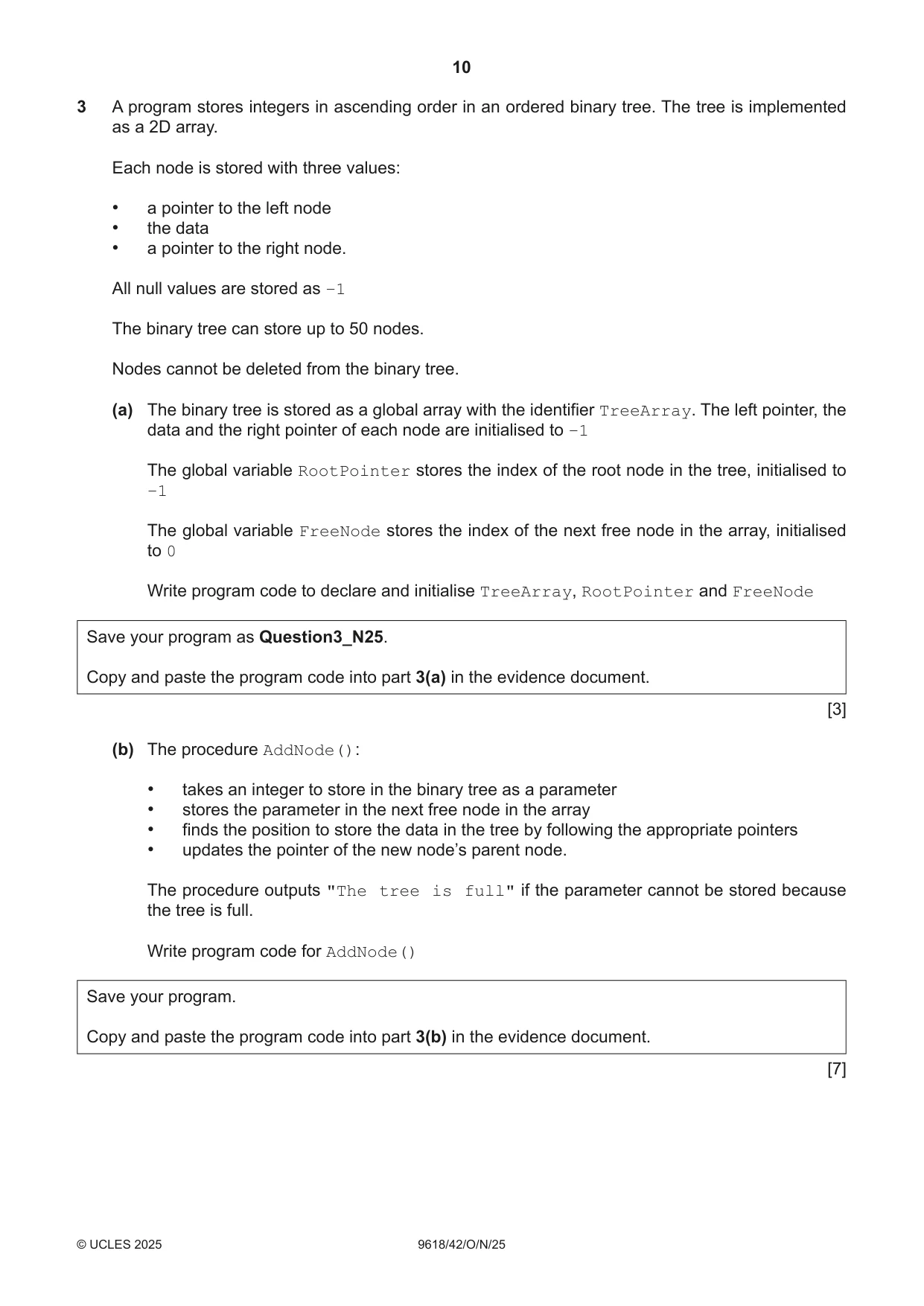
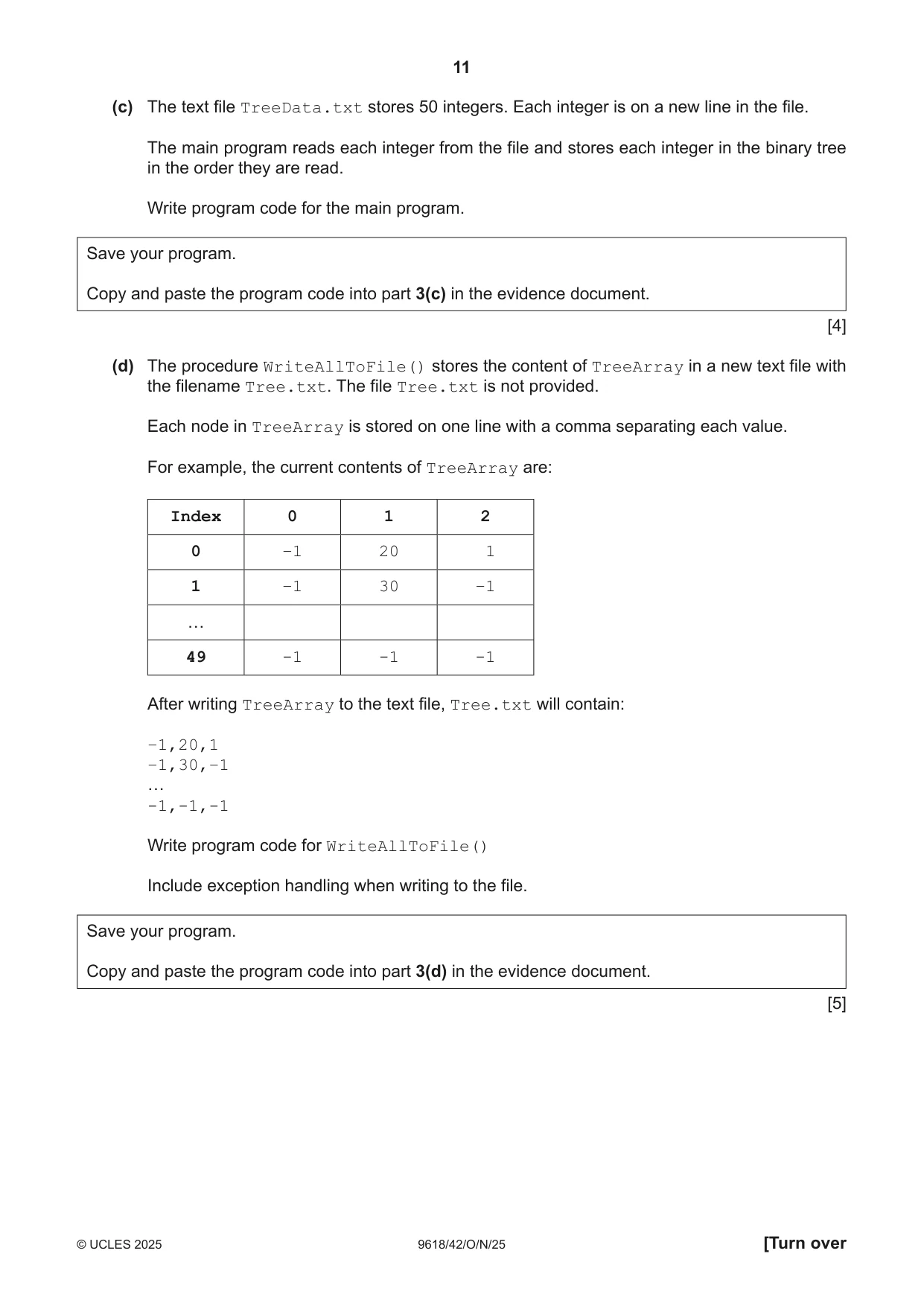
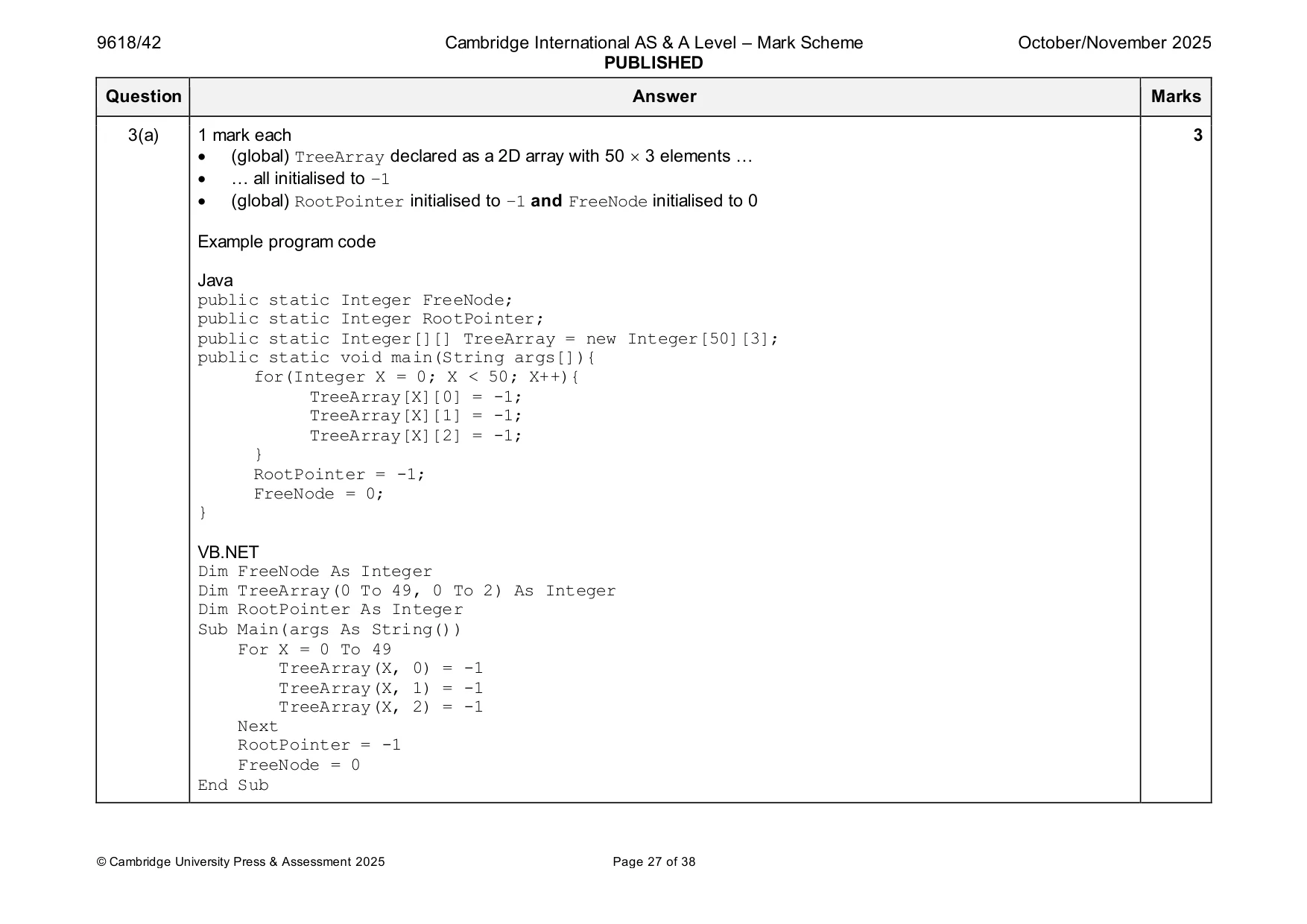
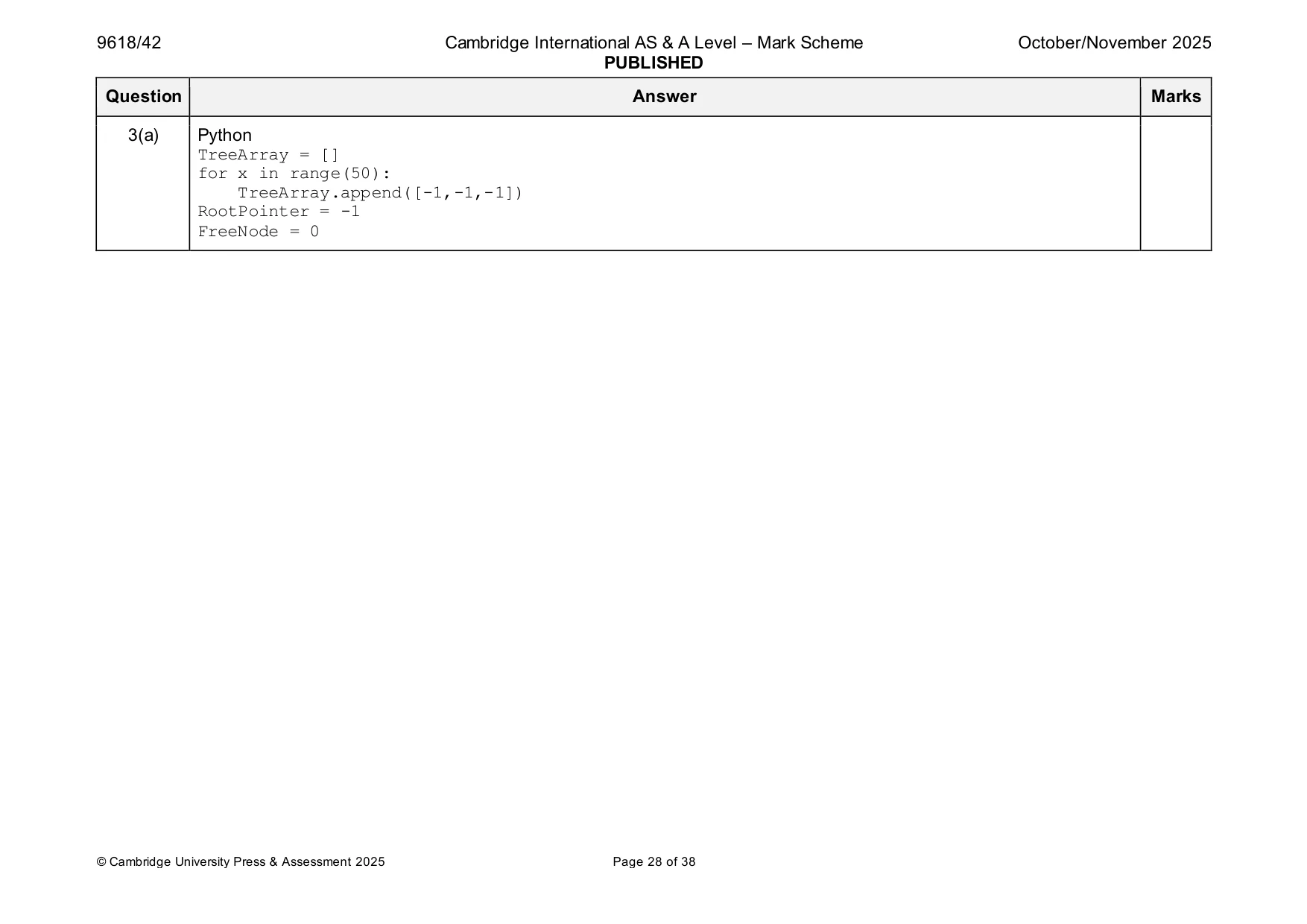
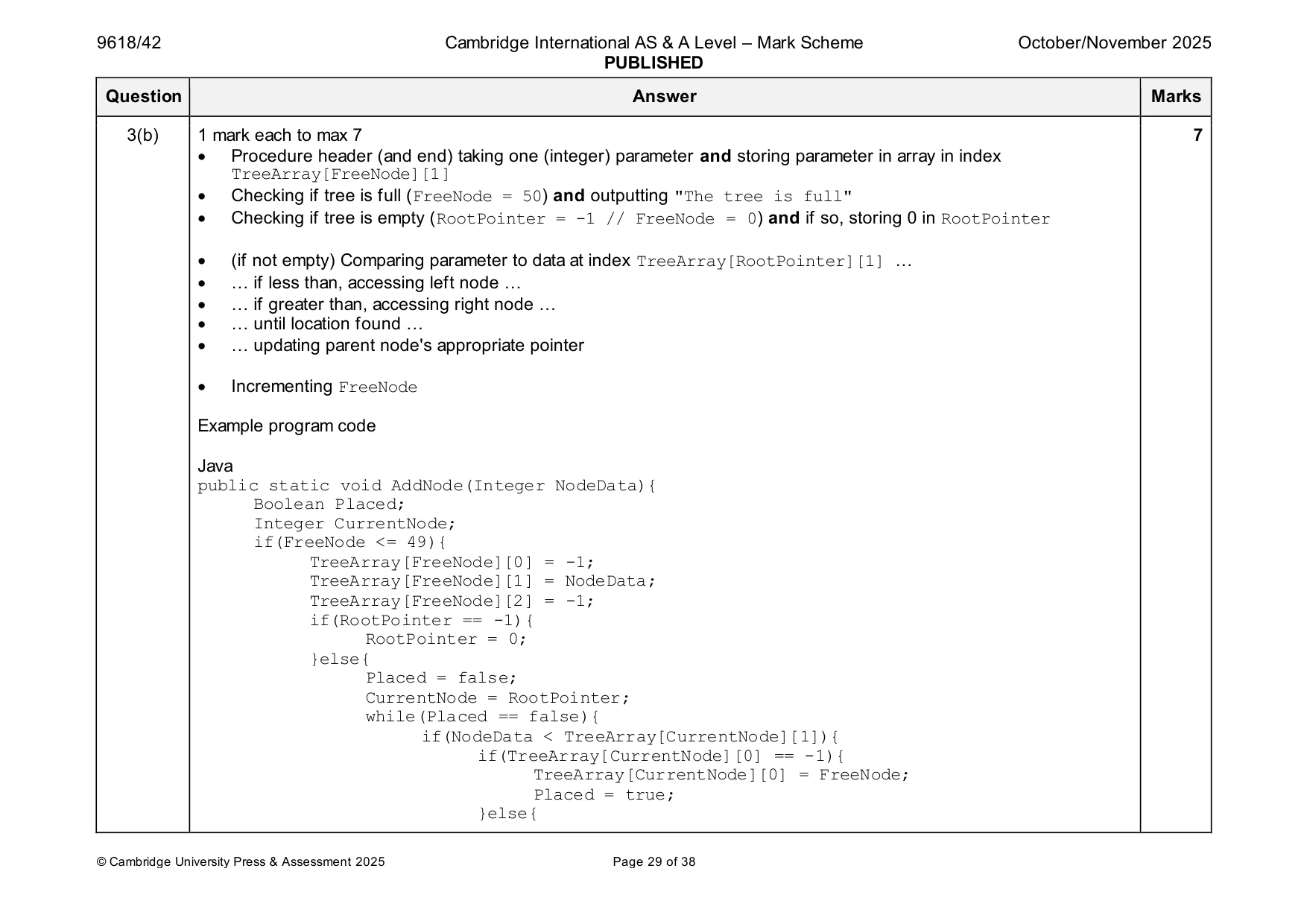
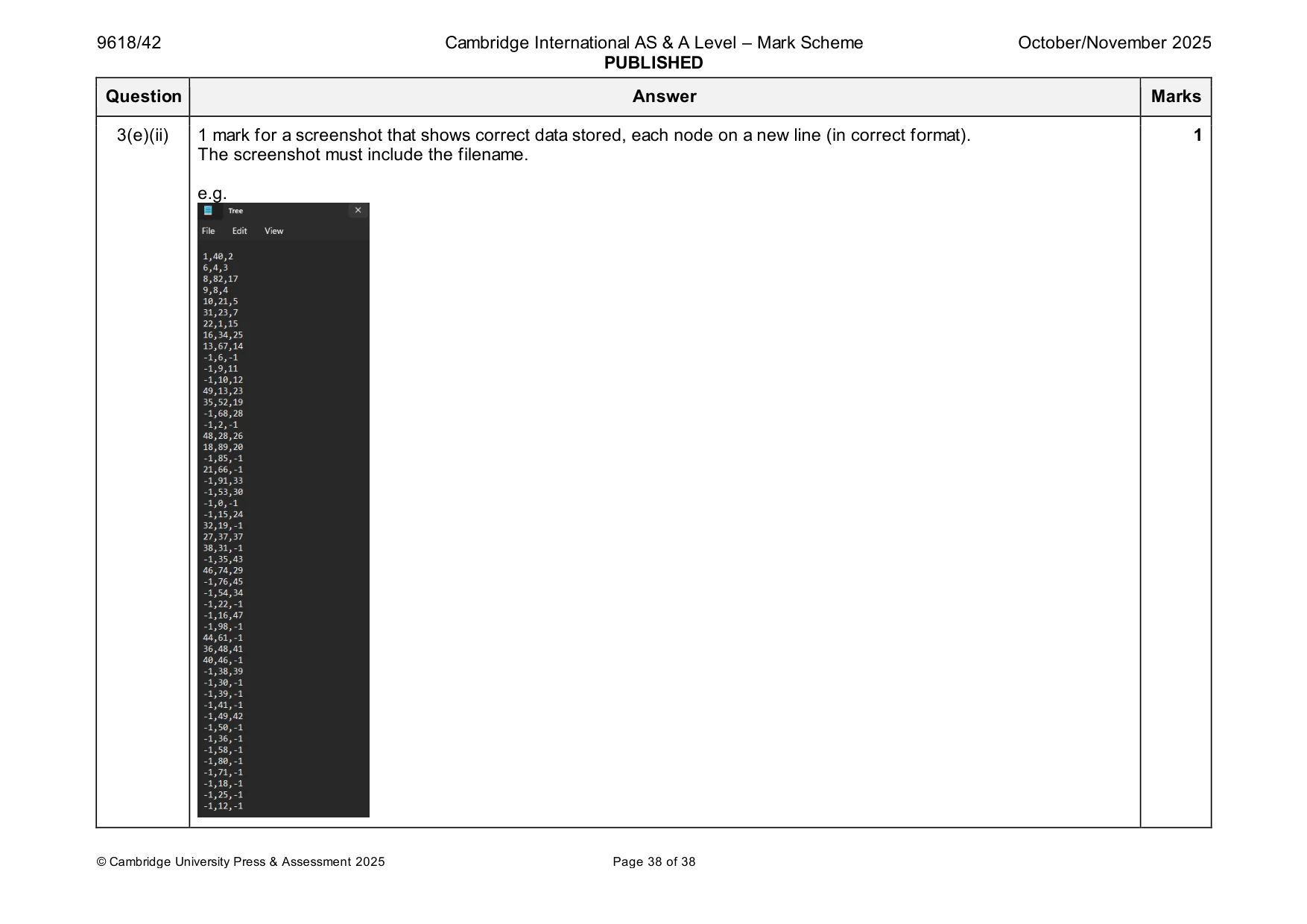
3 A program stores integers in ascending order in an ordered binary tree. The tree is implemented as a 2D array. Each node is stored with three values: • a pointer to the left node • the data • a pointer to the right node. All null values are stored as –1 The binary tree can store up to 50 nodes. Nodes cannot be deleted from the binary tree. (a) The binary tree is stored as a global array with the identifier TreeArray. The left pointer, the data and the right pointer of each node are initialised to –1 The global variable RootPointer stores the index of the root node in the tree, initialised to –1 The global variable FreeNode stores the index of the next free node in the array, initialised to 0 Write program code to declare and initialise TreeArray, RootPointer and FreeNode Save your program as Question3_N25. Copy and paste the program code into part 3(a) in the evidence document. [3] (b) The procedure AddNode(): • takes an integer to store in the binary tree as a parameter • stores the parameter in the next free node in the array • finds the position to store the data in the tree by following the appropriate pointers • updates the pointer of the new node’s parent node. The procedure outputs "The tree is full" if the parameter cannot be stored because the tree is full. Write program code for AddNode() Save your program. Copy and paste the program code into part 3(b) in the evidence document. [7] (c) The text file TreeData.txt stores 50 integers. Each integer is on a new line in the file. The main program reads each integer from the file and stores each integer in the binary tree in the order they are read. Write program code for the main program. Save your program. Copy and paste the program code into part 3(c) in the evidence document. [4] (d) The procedure WriteAllToFile() stores the content of TreeArray in a new text file with the filename Tree.txt. The file Tree.txt is not provided. Each node in TreeArray is stored on one line with a comma separating each value. For example, the current contents of TreeArray are: Index 0 1 2 0 –1 20 1 1 –1 30 –1 … 49 -1 -1 -1 After writing TreeArray to the text file, Tree.txt will contain: –1,20,1 –1,30,–1 … -1,-1,-1 Write program code for WriteAllToFile() Include exception handling when writing to the file. Save your program. Copy and paste the program code into part 3(d) in the evidence document. [5] (e) (i) Amend the main program to call WriteAllToFile() Save your program. Copy and paste the program code into part 3(e)(i) in the evidence document. [1] (ii) Test your program. Take a screenshot that shows all of the content stored in the file Tree.txt In this screenshot you need to make sure the filename is visible. Save your program. Copy and paste the screenshot(s) into part 3(e)(ii) in the evidence document. [1]
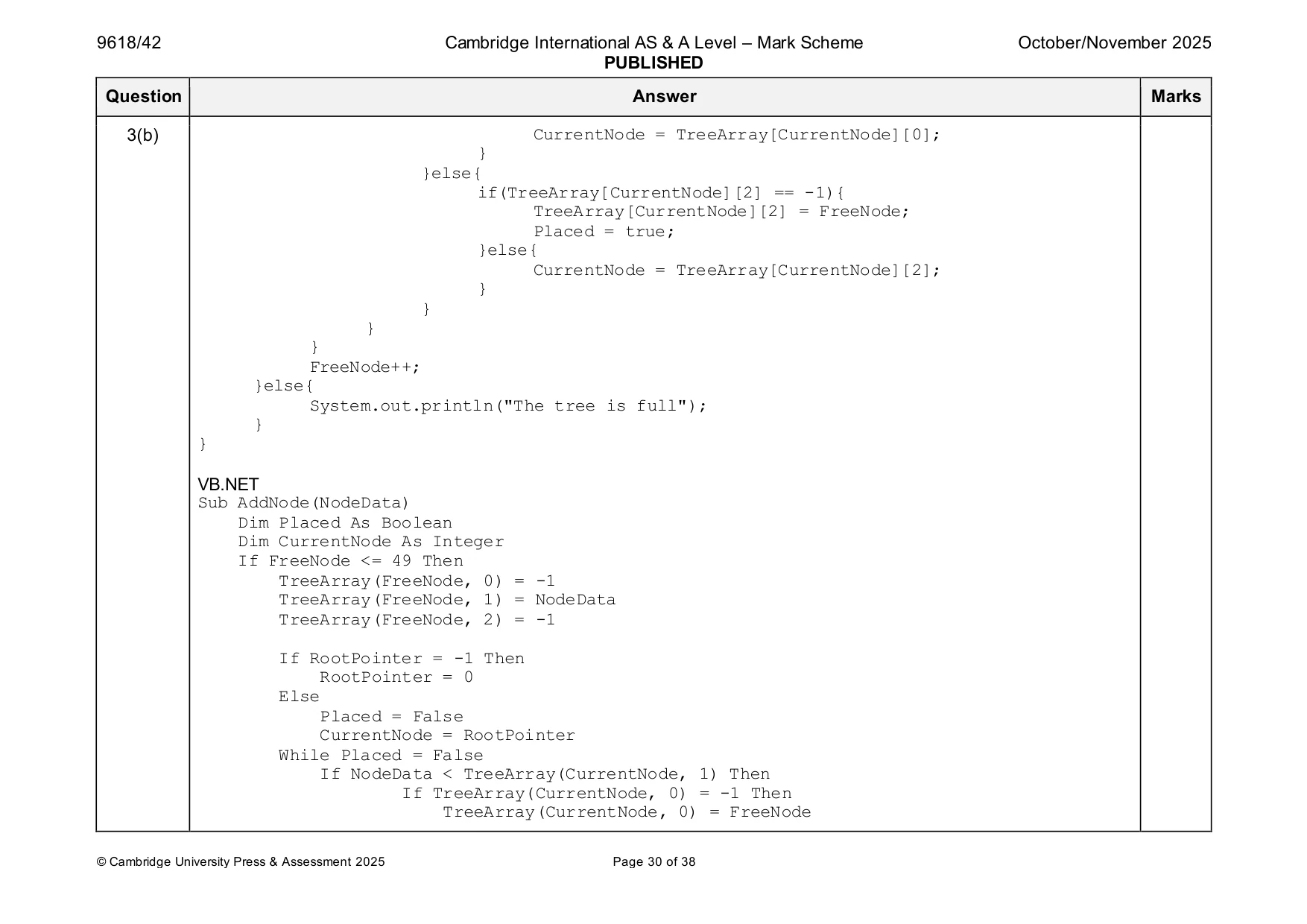
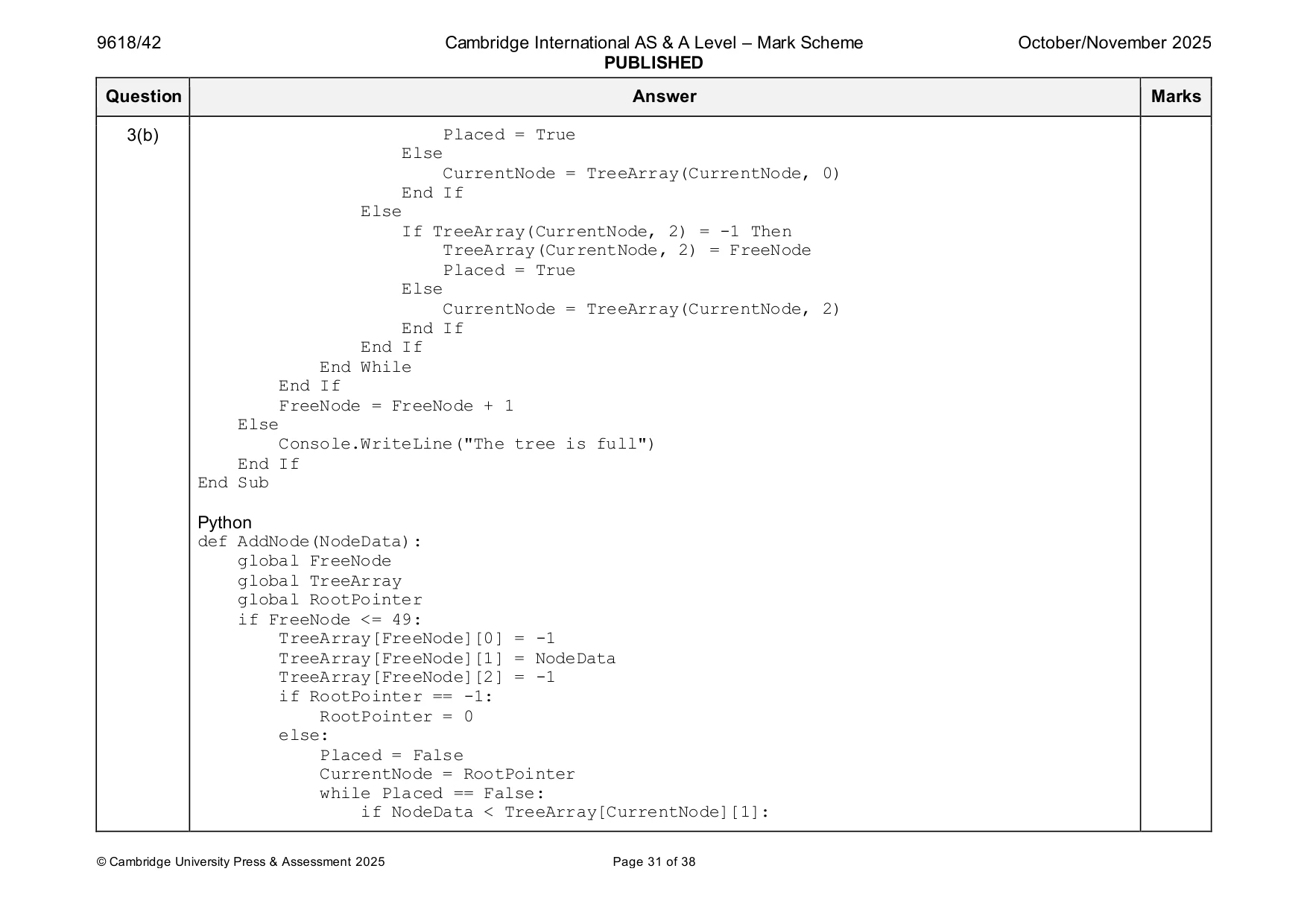
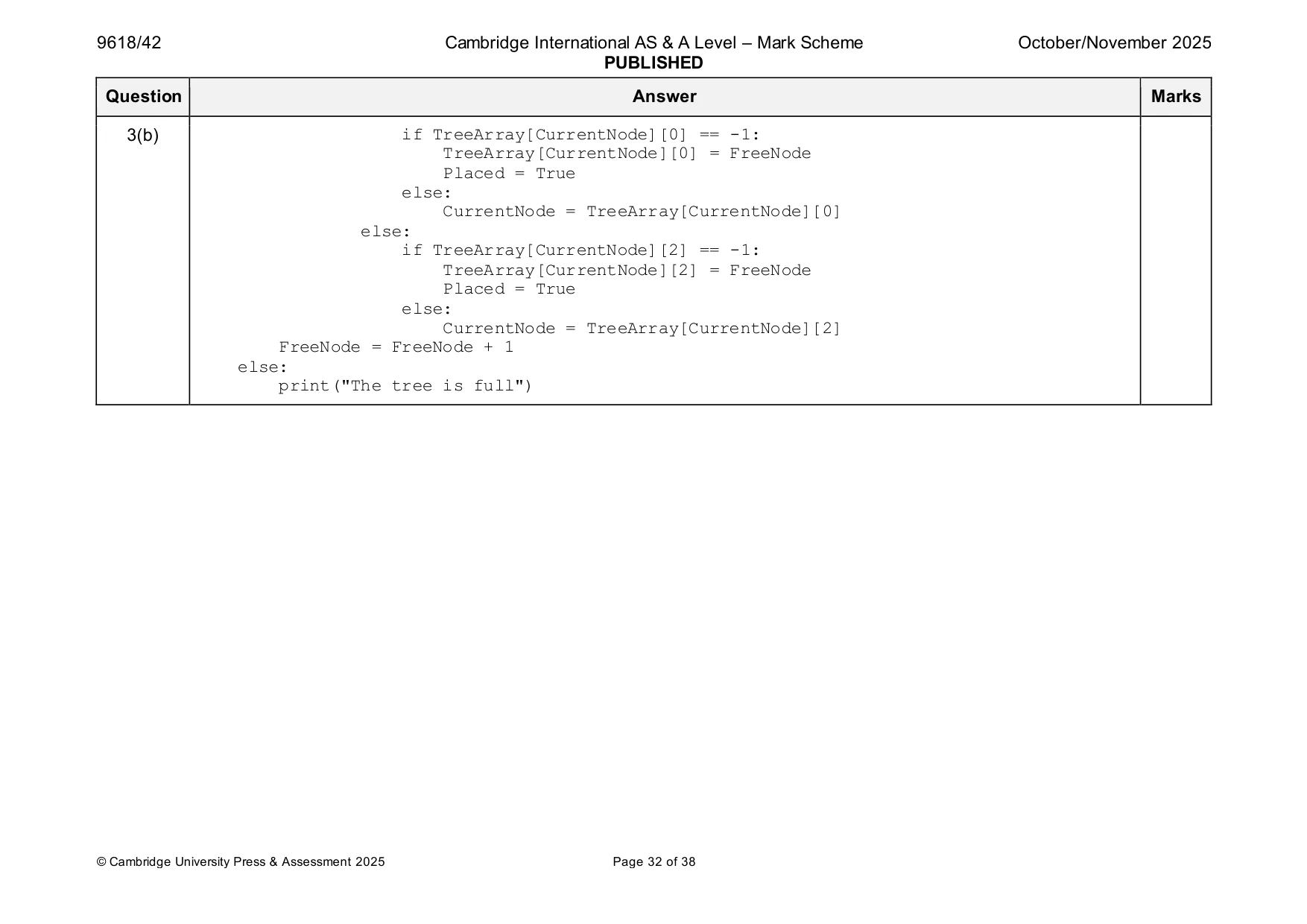
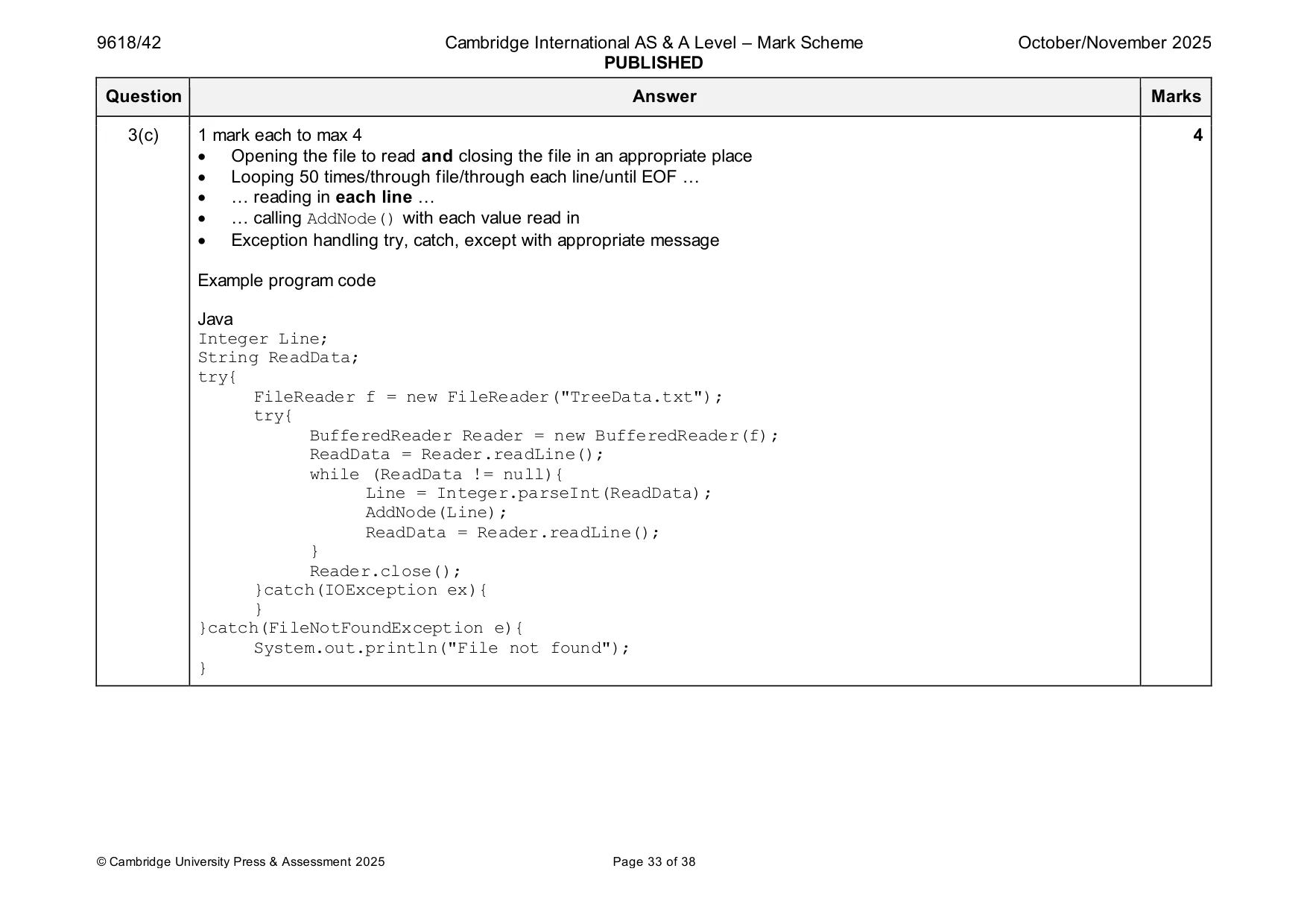
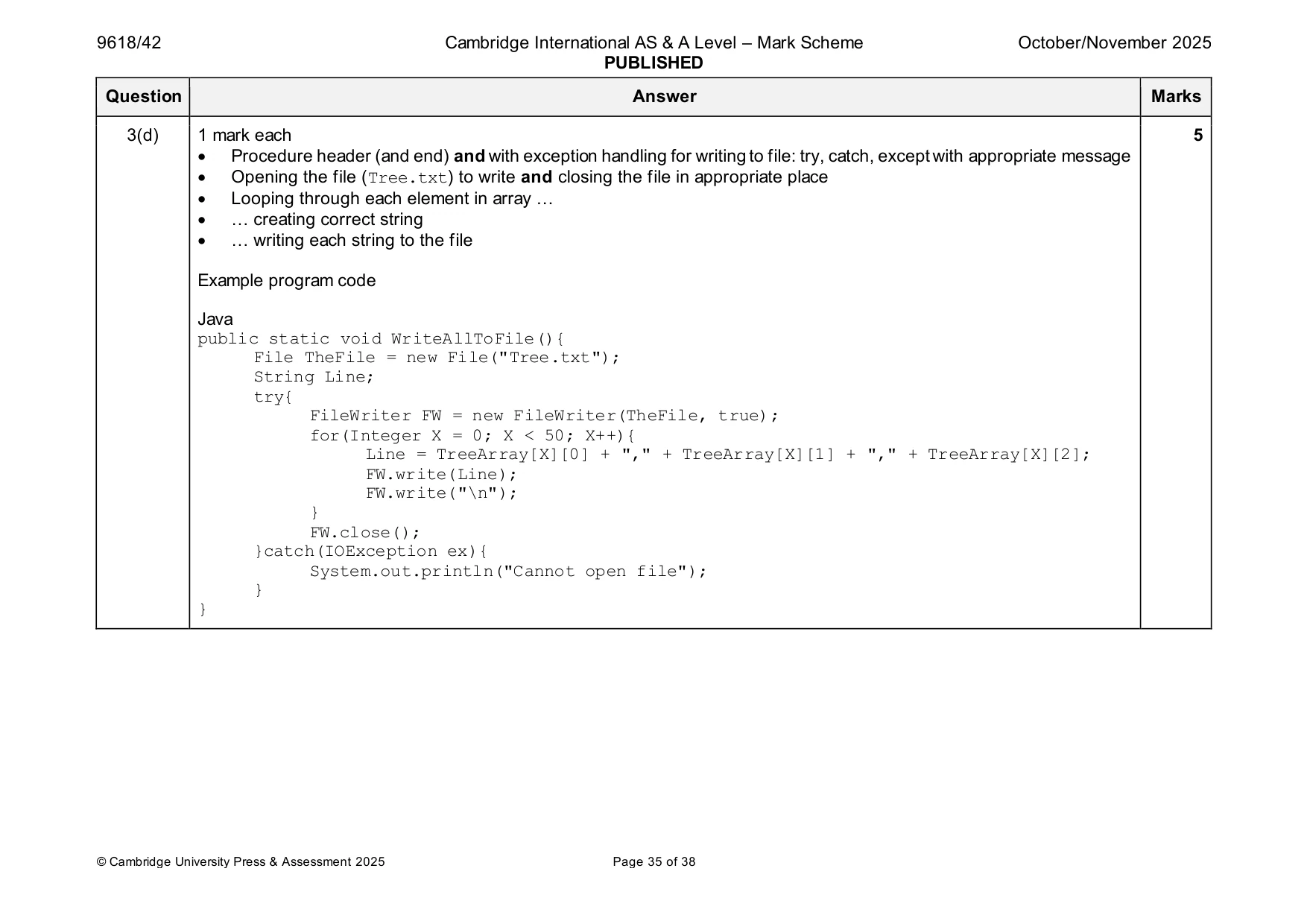
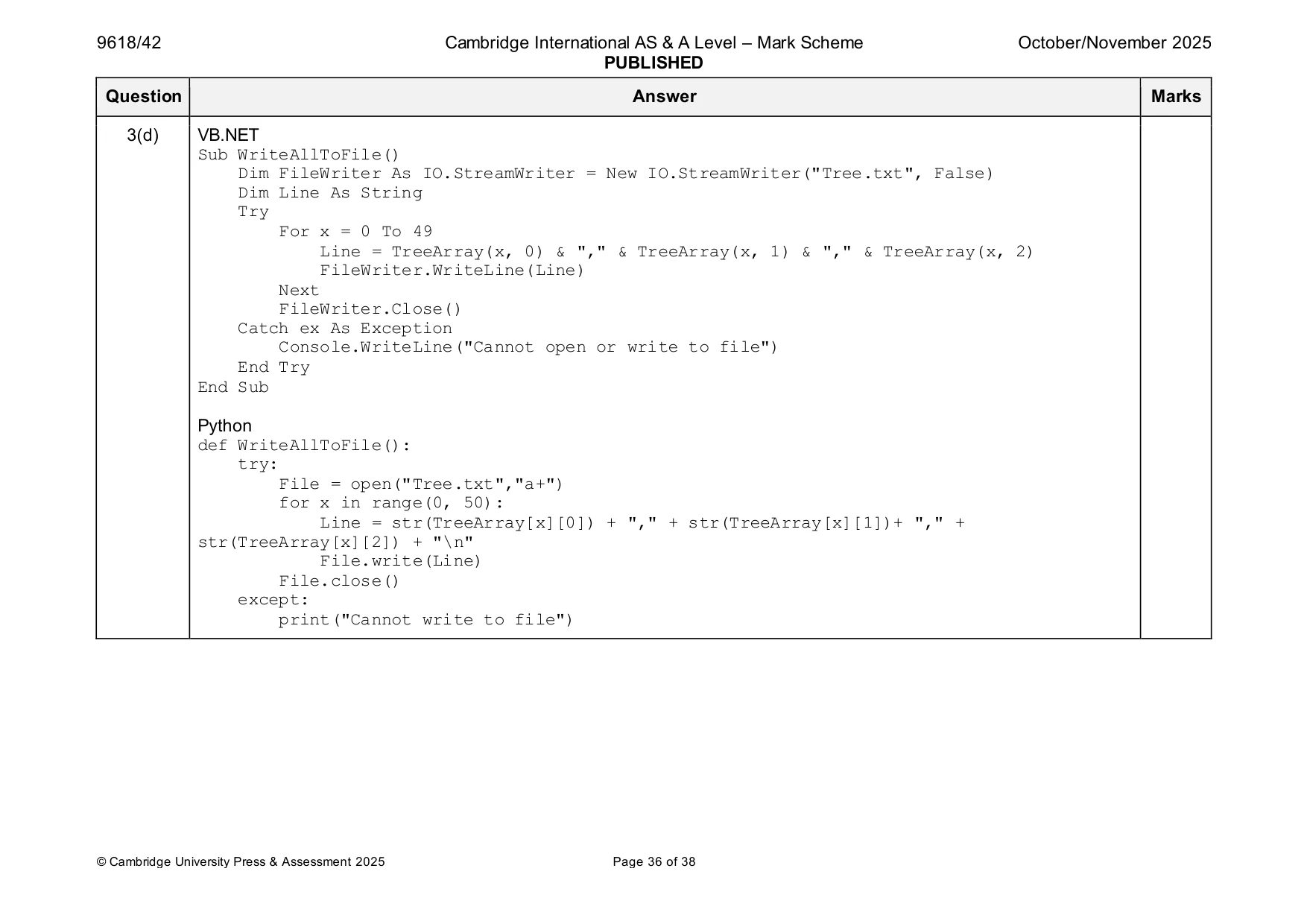
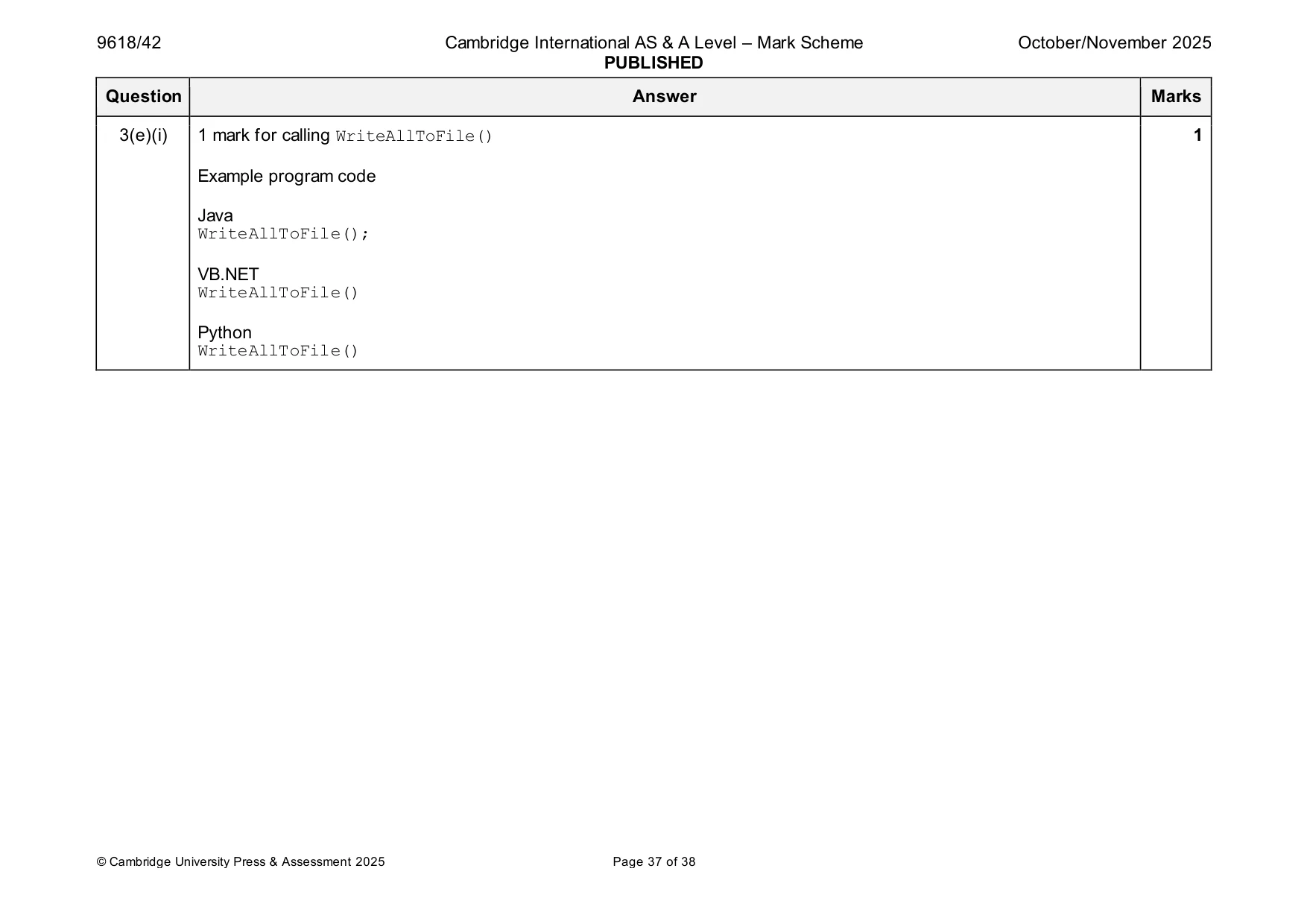
Mark scheme: 3(a) 1 mark each 3 • (global) TreeArray declared as a 2D array with 50 3 elements … • … all initialised to –1 • (global) RootPointer initialised to –1 and FreeNode initialised to 0 Example program code Java public static Integer FreeNode; public static Integer RootPointer; public static Integer[][] TreeArray = new Integer[50][3]; public static void main(String args[]){ for(Integer X = 0; X < 50; X++){ TreeArray[X][0] = -1; TreeArray[X][1] = -1; TreeArray[X][2] = -1; } RootPointer = -1; FreeNode = 0; } VB.NET Dim FreeNode As Integer Dim TreeArray(0 To 49, 0 To 2) As Integer Dim RootPointer As Integer Sub Main(args As String()) For X = 0 To 49 TreeArray(X, 0) = -1 TreeArray(X, 1) = -1 TreeArray(X, 2) = -1 Next RootPointer = -1 FreeNode = 0 End Sub 3(a) Python TreeArray = [] for x in range(50): TreeArray.append([-1,-1,-1]) RootPointer = -1 FreeNode = 0 3(b) 1 mark each to max 7 7 • Procedure header (and end) taking one (integer) parameter and storing parameter in array in index TreeArray[FreeNode][1] • Checking if tree is full (FreeNode = 50) and outputting "The tree is full" • Checking if tree is empty (RootPointer = -1 // FreeNode = 0) and if so, storing 0 in RootPointer • (if not empty) Comparing parameter to data at index TreeArray[RootPointer][1] … • … if less than, accessing left node … • … if greater than, accessing right node … • … until location found … • … updating parent node's appropriate pointer • Incrementing FreeNode Example program code Java public static void AddNode(Integer NodeData){ Boolean Placed; Integer CurrentNode; if(FreeNode <= 49){ TreeArray[FreeNode][0] = -1; TreeArray[FreeNode][1] = NodeData; TreeArray[FreeNode][2] = -1; if(RootPointer == -1){ RootPointer = 0; }else{ Placed = false; CurrentNode = RootPointer; while(Placed == false){ if(NodeData < TreeArray[CurrentNode][1]){ if(TreeArray[CurrentNode][0] == -1){ TreeArray[CurrentNode][0] = FreeNode; Placed = true; }else{ 3(b) CurrentNode = TreeArray[CurrentNode][0]; } }else{ if(TreeArray[CurrentNode][2] == -1){ TreeArray[CurrentNode][2] = FreeNode; Placed = true; }else{ CurrentNode = TreeArray[CurrentNode][2]; } } } } FreeNode++; }else{ System.out.println("The tree is full"); } } VB.NET Sub AddNode(NodeData) Dim Placed As Boolean Dim CurrentNode As Integer If FreeNode <= 49 Then TreeArray(FreeNode, 0) = -1 TreeArray(FreeNode, 1) = NodeData TreeArray(FreeNode, 2) = -1 If RootPointer = -1 Then RootPointer = 0 Else Placed = False CurrentNode = RootPointer While Placed = False If NodeData < TreeArray(CurrentNode, 1) Then If TreeArray(CurrentNode, 0) = -1 Then TreeArray(CurrentNode, 0) = FreeNode 3(b) Placed = True Else CurrentNode = TreeArray(CurrentNode, 0) End If Else If TreeArray(CurrentNode, 2) = -1 Then TreeArray(CurrentNode, 2) = FreeNode Placed = True Else CurrentNode = TreeArray(CurrentNode, 2) End If End If End While End If FreeNode = FreeNode + 1 Else Console.WriteLine("The tree is full") End If End Sub Python def AddNode(NodeData): global FreeNode global TreeArray global RootPointer if FreeNode <= 49: TreeArray[FreeNode][0] = -1 TreeArray[FreeNode][1] = NodeData TreeArray[FreeNode][2] = -1 if RootPointer == -1: RootPointer = 0 else: Placed = False CurrentNode = RootPointer while Placed == False: if NodeData < TreeArray[CurrentNode][1]: 3(b) if TreeArray[CurrentNode][0] == -1: TreeArray[CurrentNode][0] = FreeNode Placed = True else: CurrentNode = TreeArray[CurrentNode][0] else: if TreeArray[CurrentNode][2] == -1: TreeArray[CurrentNode][2] = FreeNode Placed = True else: CurrentNode = TreeArray[CurrentNode][2] FreeNode = FreeNode + 1 else: print("The tree is full") 3(c) 1 mark each to max 4 4 • Opening the file to read and closing the file in an appropriate place • Looping 50 times/through file/through each line/until EOF … • … reading in each line … • … calling AddNode() with each value read in • Exception handling try, catch, except with appropriate message Example program code Java Integer Line; String ReadData; try{ FileReader f = new FileReader("TreeData.txt"); try{ BufferedReader Reader = new BufferedReader(f); ReadData = Reader.readLine(); while (ReadData != null){ Line = Integer.parseInt(ReadData); AddNode(Line); ReadData = Reader.readLine(); } Reader.close(); }catch(IOException ex){ } }catch(FileNotFoundException e){ System.out.println("File not found"); } 3(c) VB.NET Try Dim FileReader As New System.IO.StreamReader("TreeData.txt") While Not FileReader.EndOfStream AddNode(FileReader.ReadLine()) End While FileReader.Close() Catch ex As Exception Console.WriteLine("Cannot open file") End Try Python try: File= open("TreeData.txt") for Line in File: AddNode(int(Line.strip())) File.close() except: print("Error cannot open file") 3(d) 1 mark each 5 • Procedure header (and end) and with exception handling for writing to file: try, catch, except with appropriate message • Opening the file (Tree.txt) to write and closing the file in appropriate place • Looping through each element in array … • … creating correct string • … writing each string to the file Example program code Java public static void WriteAllToFile(){ File TheFile = new File("Tree.txt"); String Line; try{ FileWriter FW = new FileWriter(TheFile, true); for(Integer X = 0; X < 50; X++){ Line = TreeArray[X][0] + "," + TreeArray[X][1] + "," + TreeArray[X][2]; FW.write(Line); FW.write("\n"); } FW.close(); }catch(IOException ex){ System.out.println("Cannot open file"); } } 3(d) VB.NET Sub WriteAllToFile() Dim FileWriter As IO.StreamWriter = New IO.StreamWriter("Tree.txt", False) Dim Line As String Try For x = 0 To 49 Line = TreeArray(x, 0) & "," & TreeArray(x, 1) & "," & TreeArray(x, 2) FileWriter.WriteLine(Line) Next FileWriter.Close() Catch ex As Exception Console.WriteLine("Cannot open or write to file") End Try End Sub Python def WriteAllToFile(): try: File = open("Tree.txt","a+") for x in range(0, 50): Line = str(TreeArray[x][0]) + "," + str(TreeArray[x][1])+ "," + str(TreeArray[x][2]) + "\n" File.write(Line) File.close() except: print("Cannot write to file") 3(e)(i) 1 mark for calling WriteAllToFile() 1 Example program code Java WriteAllToFile(); VB.NET WriteAllToFile() Python WriteAllToFile() 3(e)(ii) 1 mark for a screenshot that shows correct data stored, each node on a new line (in correct format). 1 The screenshot must include the filename. e.g.
What you needed in this session
Cambridge’s own grade thresholds for 2025 Oct/Nov, Paper 4 · Variant 2. A higher threshold means an easier paper — the bar moves with how the cohort did.