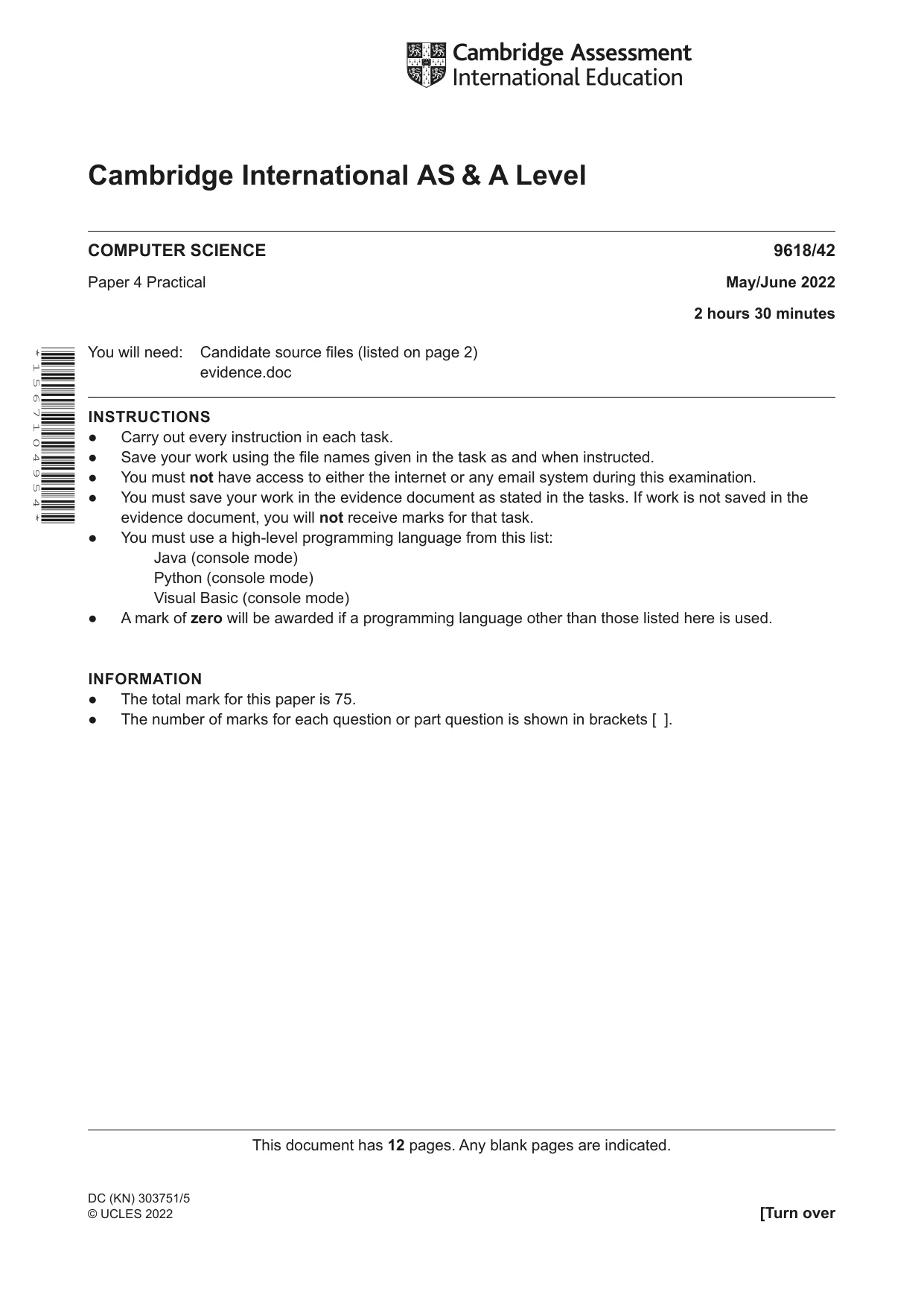
Cambridge A Level Computer Science 9618 — 2022 May/June Paper 4 · Variant 2
9618/42/M/J/22 · 3 questions · 75 marks · ≈84 min
The question paper and its mark scheme, free to read here and free to download. This is Cambridge’s own paper, exactly as it was sat.
Question paper12 pages


Mark scheme36 pages
Answers below. Sit the paper first if you are practising.
Questions as text
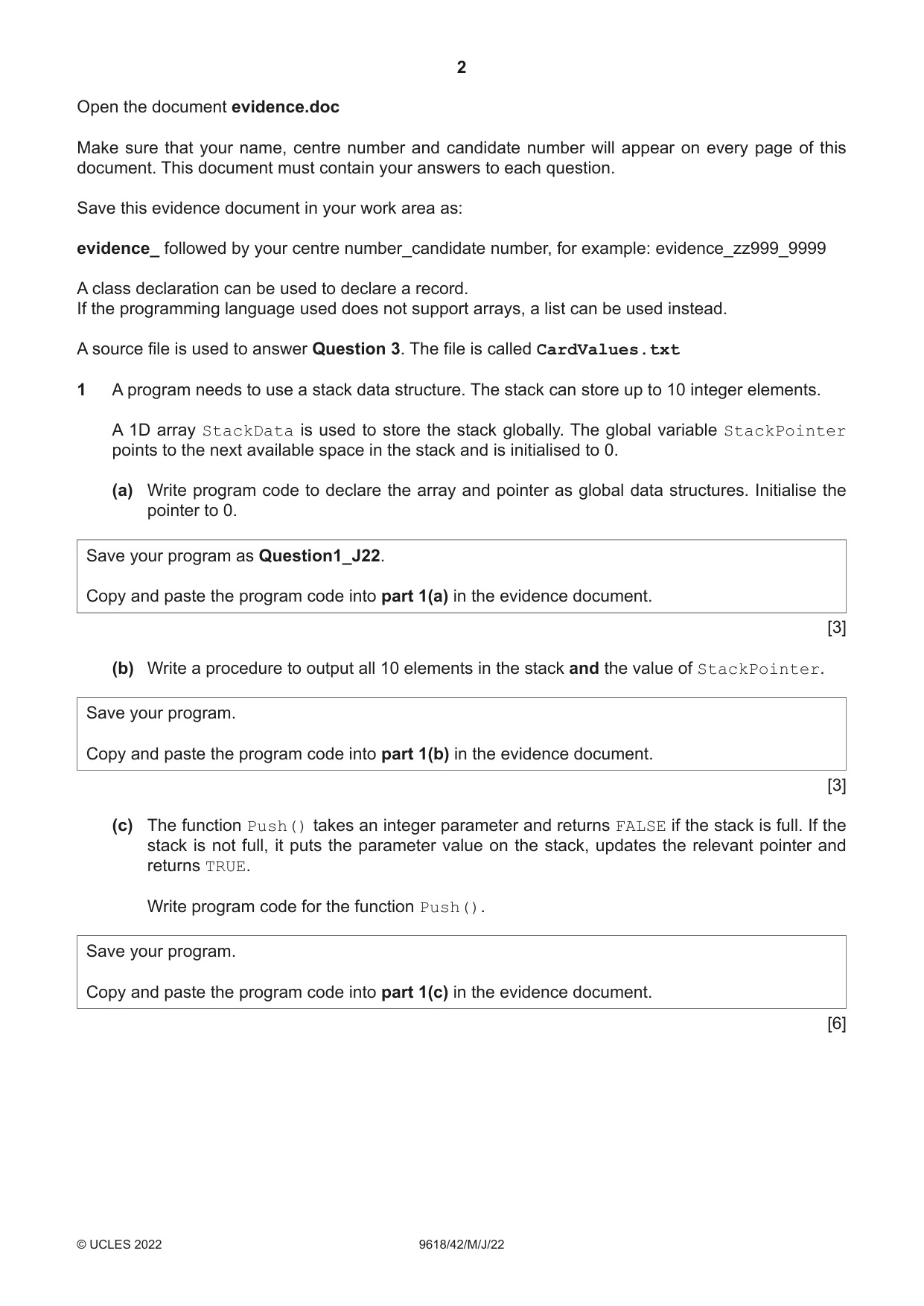
Q1 · A program needs to use a stack data structure
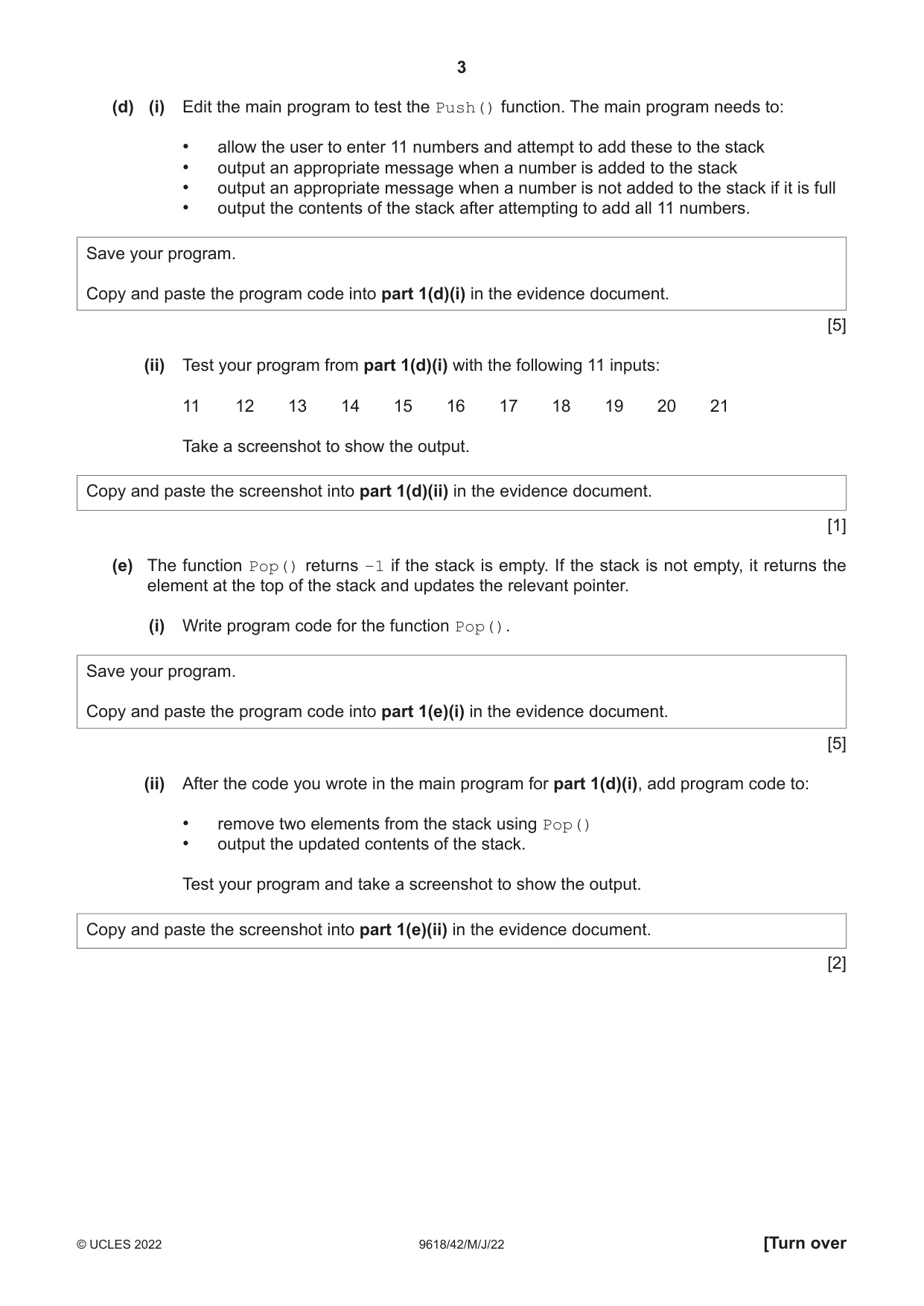
1 A program needs to use a stack data structure. The stack can store up to 10 integer elements. A 1D array StackData is used to store the stack globally. The global variable StackPointer points to the next available space in the stack and is initialised to 0. (a) Write program code to declare the array and pointer as global data structures. Initialise the pointer to 0. Save your program as Question1_J22. Copy and paste the program code into part 1(a) in the evidence document. [3] (b) Write a procedure to output all 10 elements in the stack and the value of StackPointer. Save your program. Copy and paste the program code into part 1(b) in the evidence document. [3] (c) The function Push() takes an integer parameter and returns FALSE if the stack is full. If the stack is not full, it puts the parameter value on the stack, updates the relevant pointer and returns TRUE. Write program code for the function Push(). Save your program. Copy and paste the program code into part 1(c) in the evidence document. [6] (d) (i) Edit the main program to test the Push() function. The main program needs to: • allow the user to enter 11 numbers and attempt to add these to the stack • output an appropriate message when a number is added to the stack • output an appropriate message when a number is not added to the stack if it is full • output the contents of the stack after attempting to add all 11 numbers. Save your program. Copy and paste the program code into part 1(d)(i) in the evidence document. [5] (ii) Test your program from part 1(d)(i) with the following 11 inputs: 11 12 13 14 15 16 17 18 19 20 21 Take a screenshot to show the output. Copy and paste the screenshot into part 1(d)(ii) in the evidence document. [1] (e) The function Pop() returns −1 if the stack is empty. If the stack is not empty, it returns the element at the top of the stack and updates the relevant pointer. (i) Write program code for the function Pop(). Save your program. Copy and paste the program code into part 1(e)(i) in the evidence document. [5] (ii) After the code you wrote in the main program for part 1(d)(i), add program code to: • remove two elements from the stack using Pop() • output the updated contents of the stack. Test your program and take a screenshot to show the output. Copy and paste the screenshot into part 1(e)(ii) in the evidence document. [2]
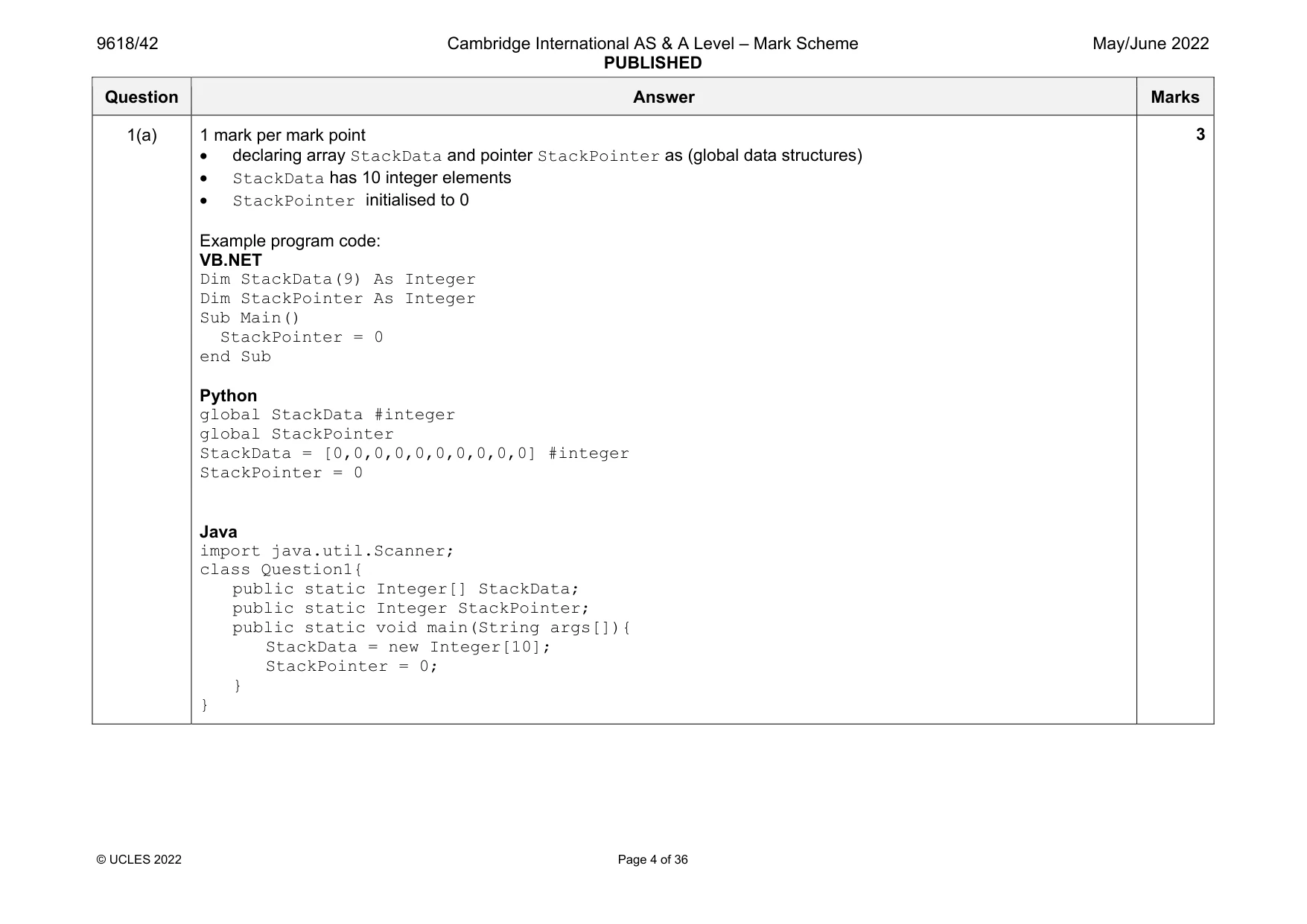
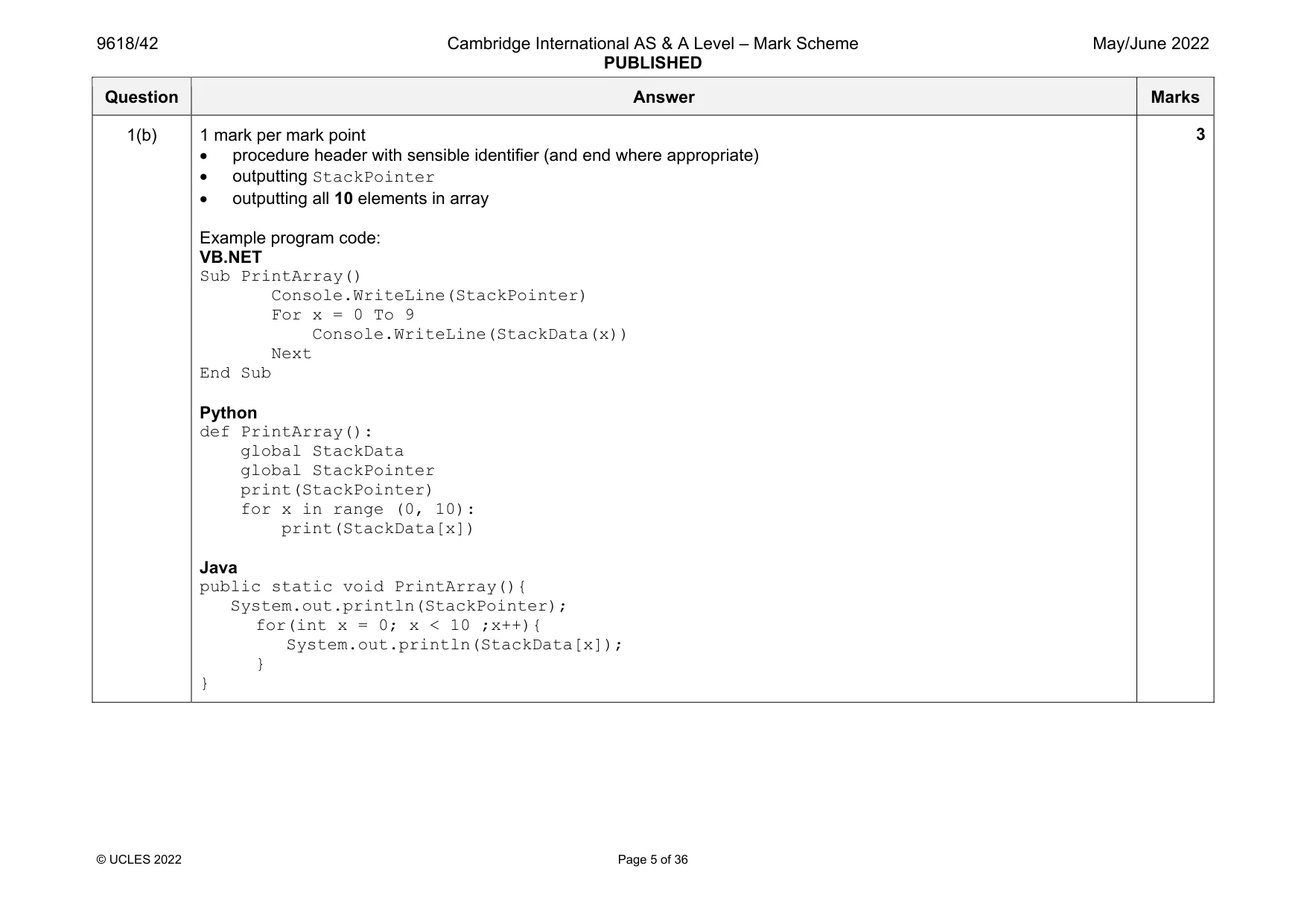
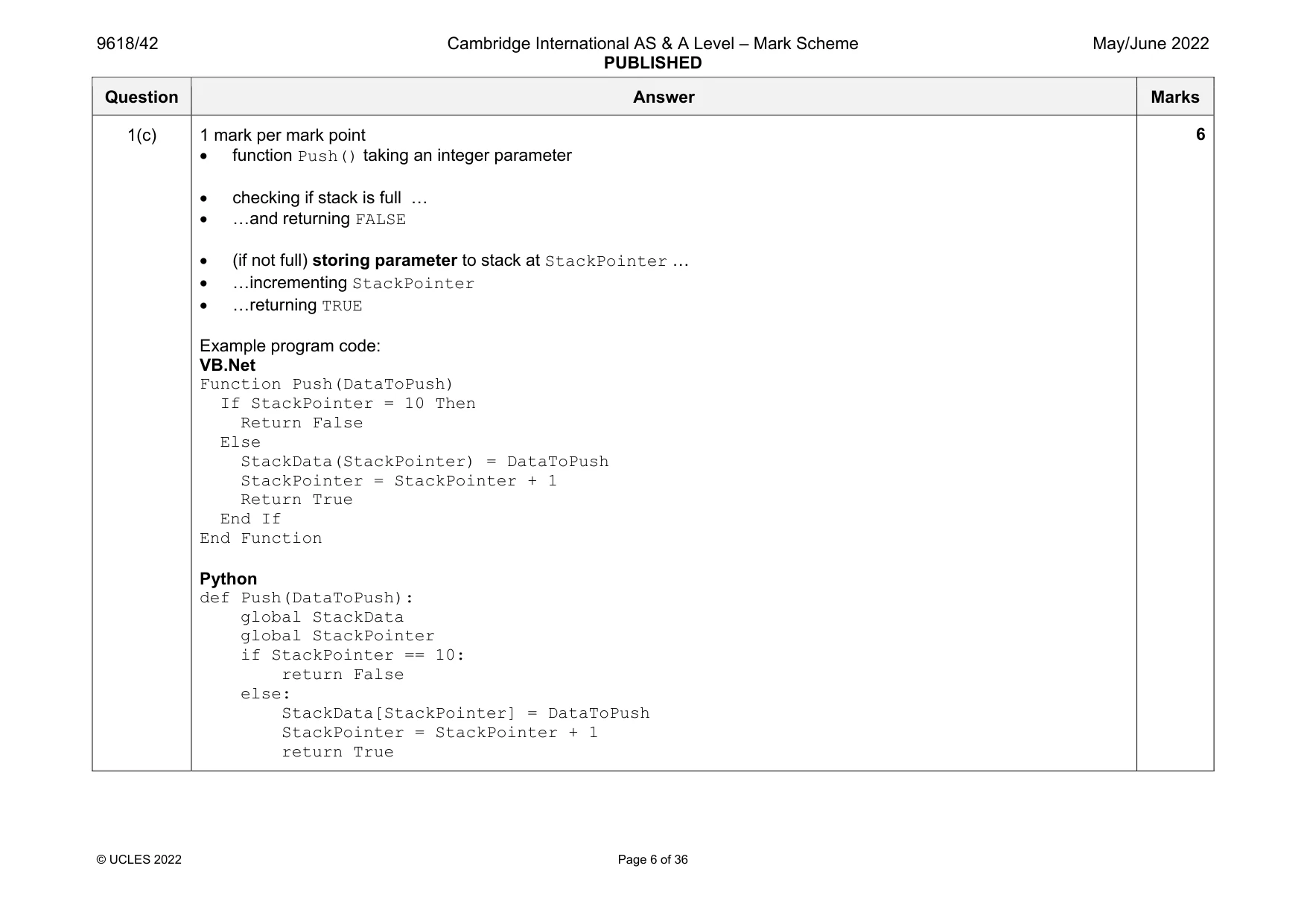
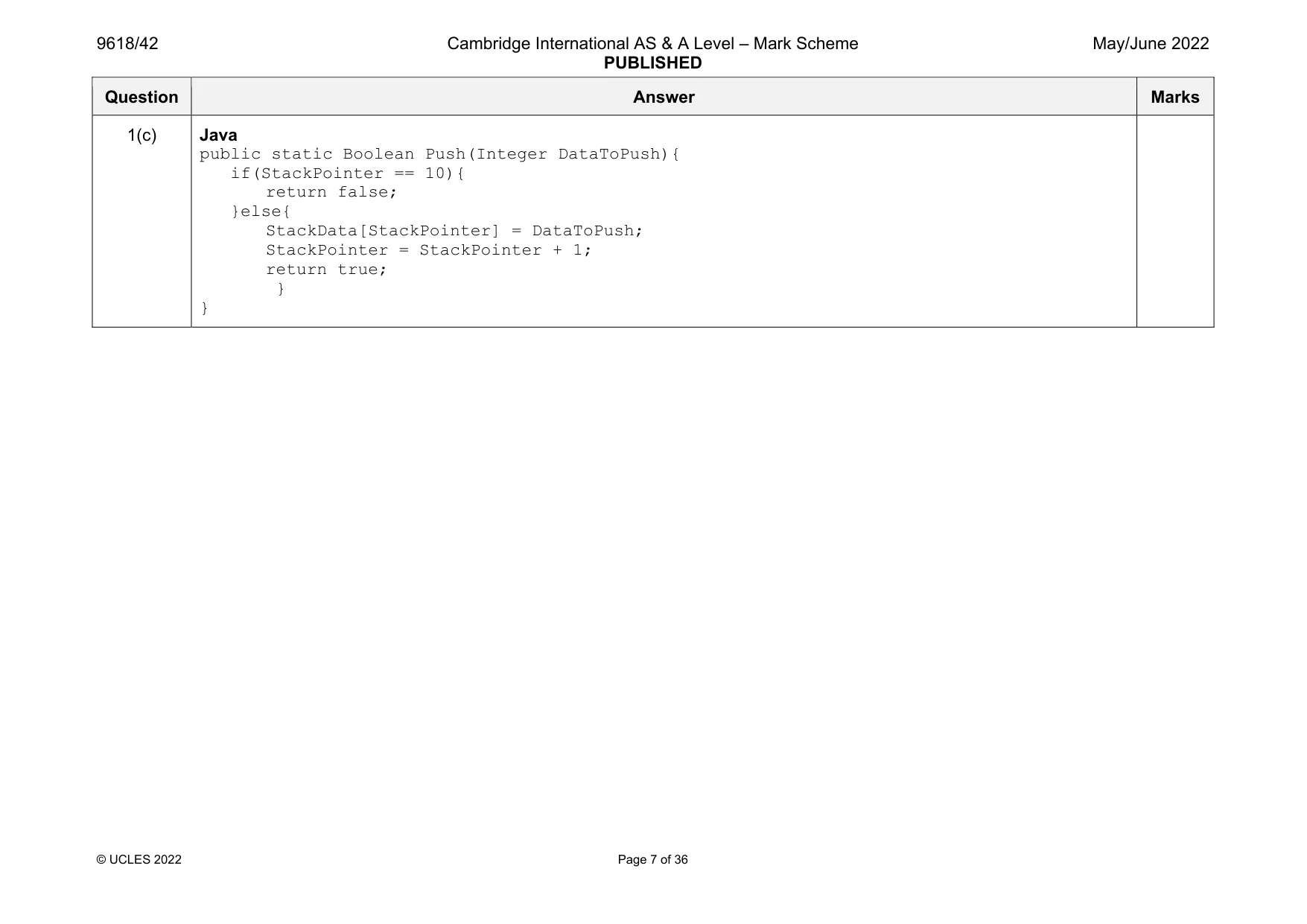
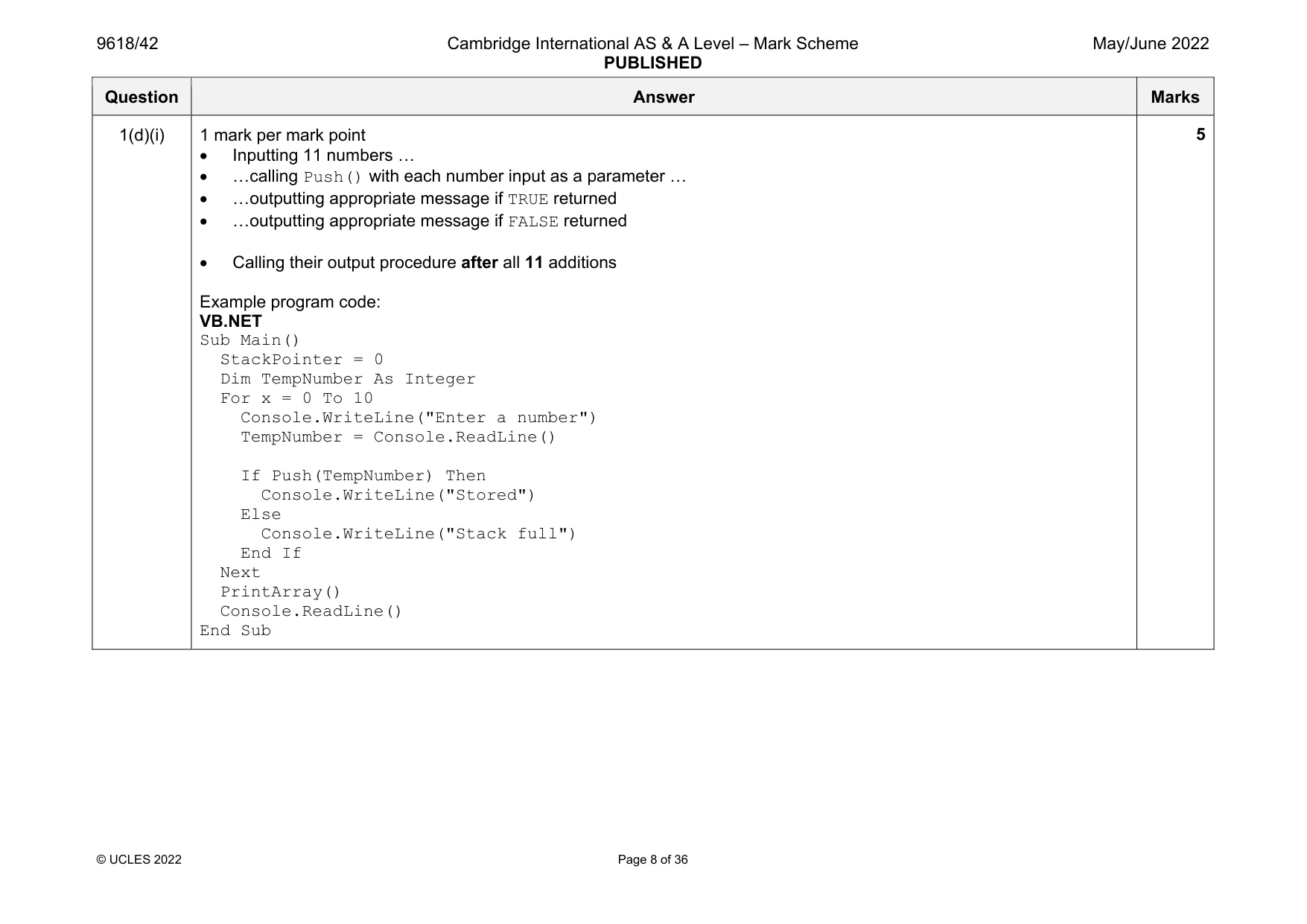
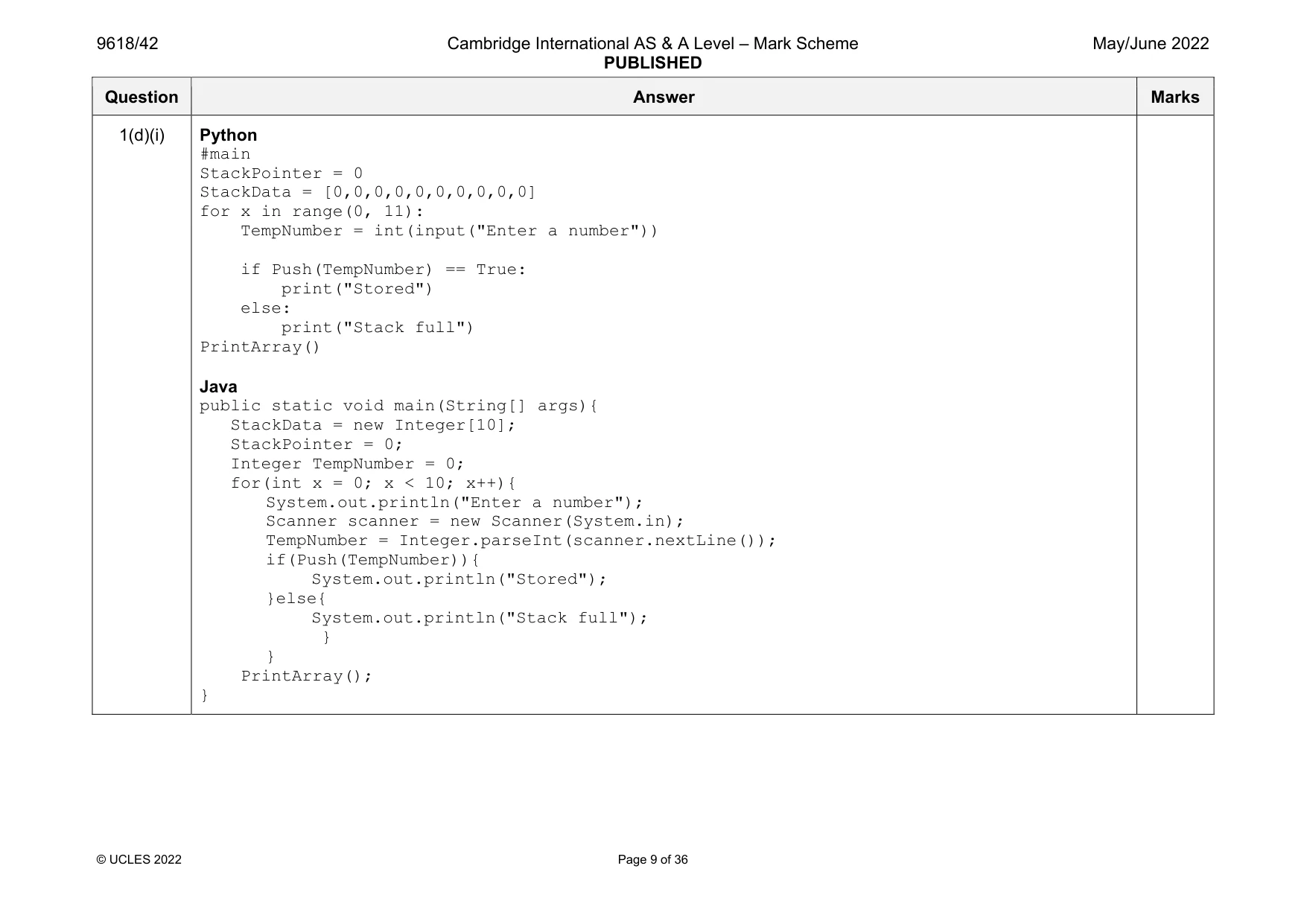
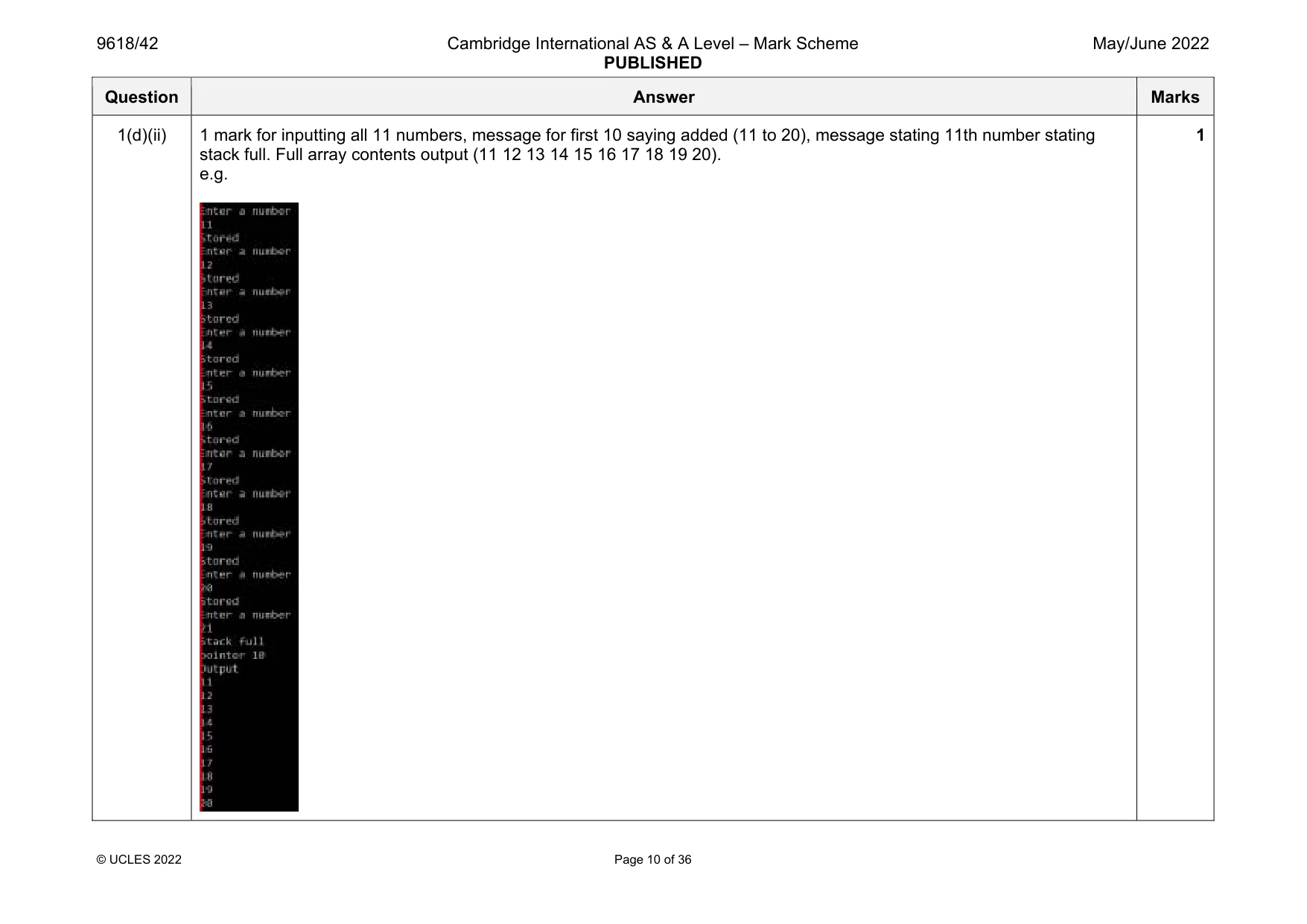
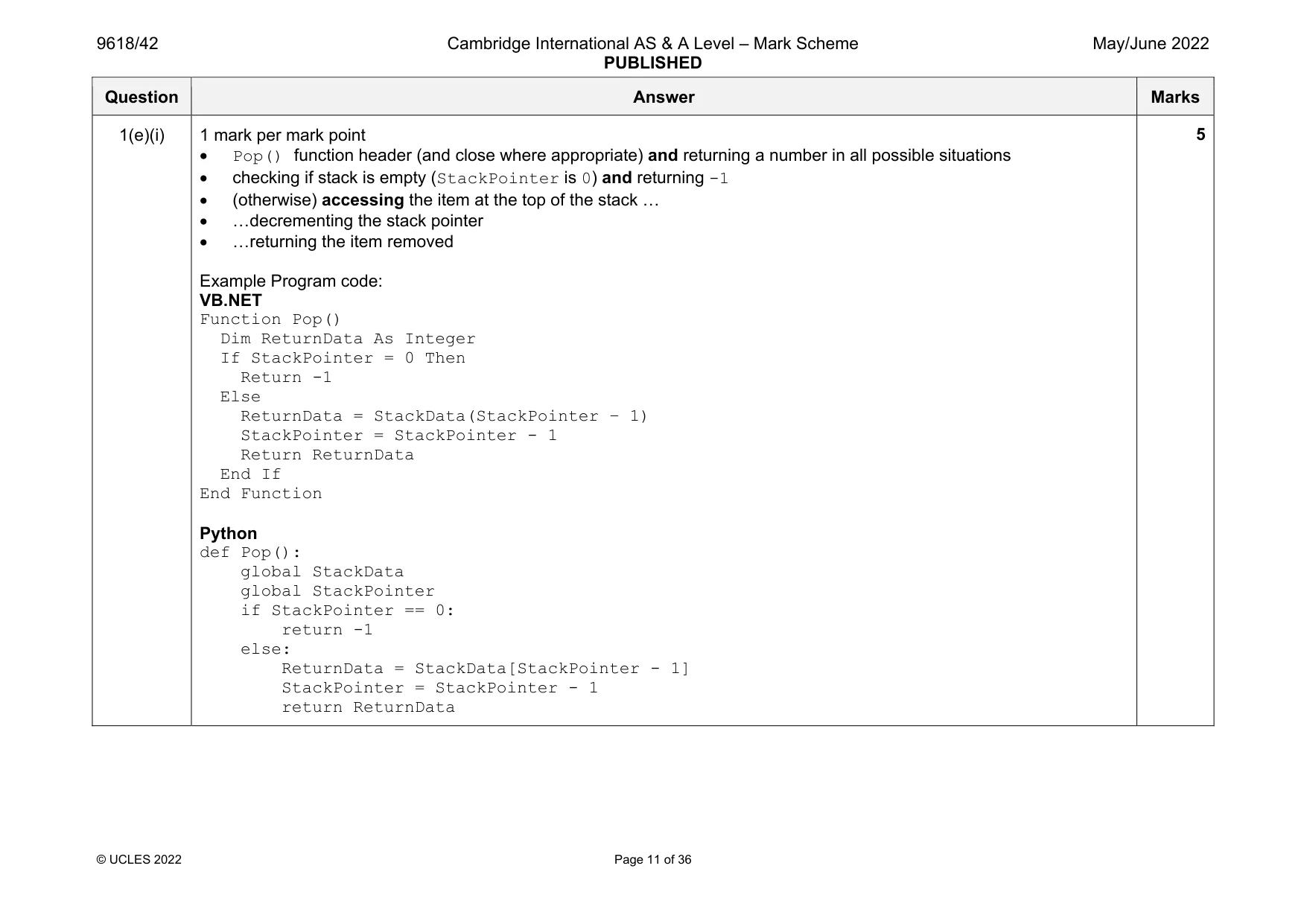
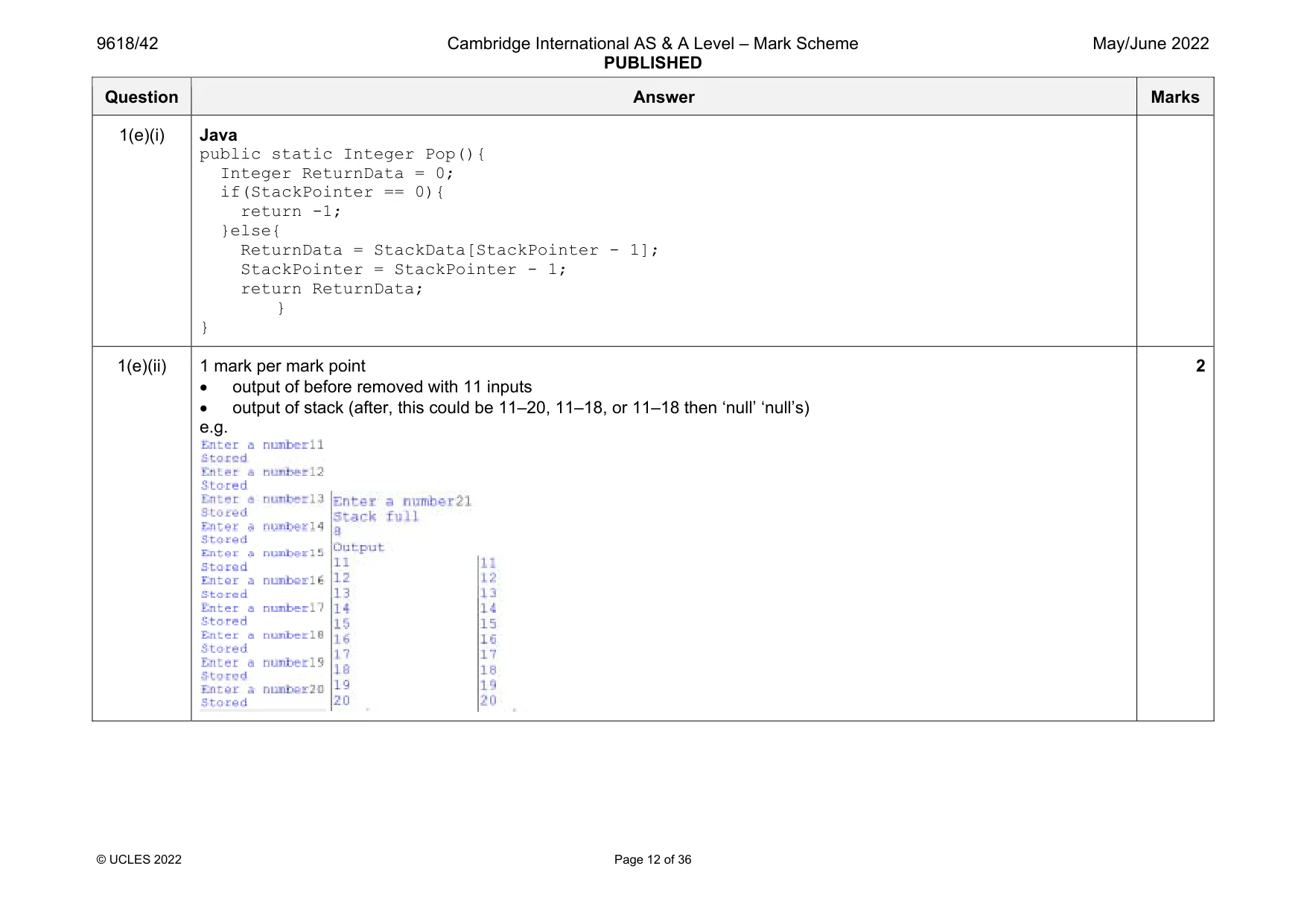
Mark scheme: 1(a) 1 mark per mark point declaring array StackData and pointer StackPointer as (global data structures) StackData has 10 integer elements StackPointer initialised to 0 Example program code: VB.NET Dim StackData(9) As Integer Dim StackPointer As Integer Sub Main() StackPointer = 0 end Sub Python global StackData #integer global StackPointer StackData = [0,0,0,0,0,0,0,0,0,0] #integer StackPointer = 0 Java import java.util.Scanner; class Question1{ public static Integer[] StackData; public static Integer StackPointer; public static void main(String args[]){ StackData = new Integer[10]; StackPointer = 0; } } Question Answer Marks 1(b) 1 mark per mark point procedure header with sensible identifier (and end where appropriate) outputting StackPointer outputting all 10 elements in array Example program code: VB.NET Sub PrintArray() Console.WriteLine(StackPointer) For x = 0 To 9 Console.WriteLine(StackData(x)) Next End Sub Python def PrintArray(): global StackData global StackPointer print(StackPointer) for x in range (0, 10): print(StackData[x]) Java public static void PrintArray(){ System.out.println(StackPointer); for(int x = 0; x < 10 ;x++){ System.out.println(StackData[x]); } } 3 Question Answer Marks 1(c) 1 mark per mark point function Push() taking an integer parameter checking if stack is full … …and returning FALSE (if not full) storing parameter to stack at StackPointer … …incrementing StackPointer …returning TRUE Example program code: VB.Net Function Push(DataToPush) If StackPointer = 10 Then Return False Else StackData(StackPointer) = DataToPush StackPointer = StackPointer + 1 Return True End If End Function Python def Push(DataToPush): global StackData global StackPointer if StackPointer == 10: return False else: StackData[StackPointer] = DataToPush StackPointer = StackPointer + 1 return True 6 Question Answer Marks 1(c) Java public static Boolean Push(Integer DataToPush){ if(StackPointer == 10){ return false; }else{ StackData[StackPointer] = DataToPush; StackPointer = StackPointer + 1; return true; } } Question Answer Marks 1(d)(i) 1 mark per mark point Inputting 11 numbers … …calling Push() with each number input as a parameter … …outputting appropriate message if TRUE returned …outputting appropriate message if FALSE returned Calling their output procedure after all 11 additions Example program code: VB.NET Sub Main() StackPointer = 0 Dim TempNumber As Integer For x = 0 To 10 Console.WriteLine("Enter a number") TempNumber = Console.ReadLine() If Push(TempNumber) Then Console.WriteLine("Stored") Else Console.WriteLine("Stack full") End If Next PrintArray() Console.ReadLine() End Sub 5 Question Answer Marks 1(d)(i) Python #main StackPointer = 0 StackData = [0,0,0,0,0,0,0,0,0,0] for x in range(0, 11): TempNumber = int(input("Enter a number")) if Push(TempNumber) == True: print("Stored") else: print("Stack full") PrintArray() Java public static void main(String[] args){ StackData = new Integer[10]; StackPointer = 0; Integer TempNumber = 0; for(int x = 0; x < 10; x++){ System.out.println("Enter a number"); Scanner scanner = new Scanner(System.in); TempNumber = Integer.parseInt(scanner.nextLine()); if(Push(TempNumber)){ System.out.println("Stored"); }else{ System.out.println("Stack full"); } } PrintArray(); } Question Answer Marks 1(d)(ii) 1 mark for inputting all 11 numbers, message for first 10 saying added (11 to 20), message stating 11th number stating stack full. Full array contents output (11 12 13 14 15 16 17 18 19 20). e.g. 1 Question Answer Marks 1(e)(i) 1 mark per mark point Pop() function header (and close where appropriate) and returning a number in all possible situations checking if stack is empty (StackPointer is 0) and returning -1 (otherwise) accessing the item at the top of the stack … …decrementing the stack pointer …returning the item removed Example Program code: VB.NET Function Pop() Dim ReturnData As Integer If StackPointer = 0 Then Return -1 Else ReturnData = StackData(StackPointer – 1) StackPointer = StackPointer - 1 Return ReturnData End If End Function Python def Pop(): global StackData global StackPointer if StackPointer == 0: return -1 else: ReturnData = StackData[StackPointer - 1] StackPointer = StackPointer - 1 return ReturnData 5 Question Answer Marks 1(e)(i) Java public static Integer Pop(){ Integer ReturnData = 0; if(StackPointer == 0){ return -1; }else{ ReturnData = StackData[StackPointer - 1]; StackPointer = StackPointer - 1; return ReturnData; } } 1(e)(ii) 1 mark per mark point output of before removed with 11 inputs output of stack (after, this could be 11–20, 11–18, or 11–18 then ‘null’ ‘null’s) e.g. 2
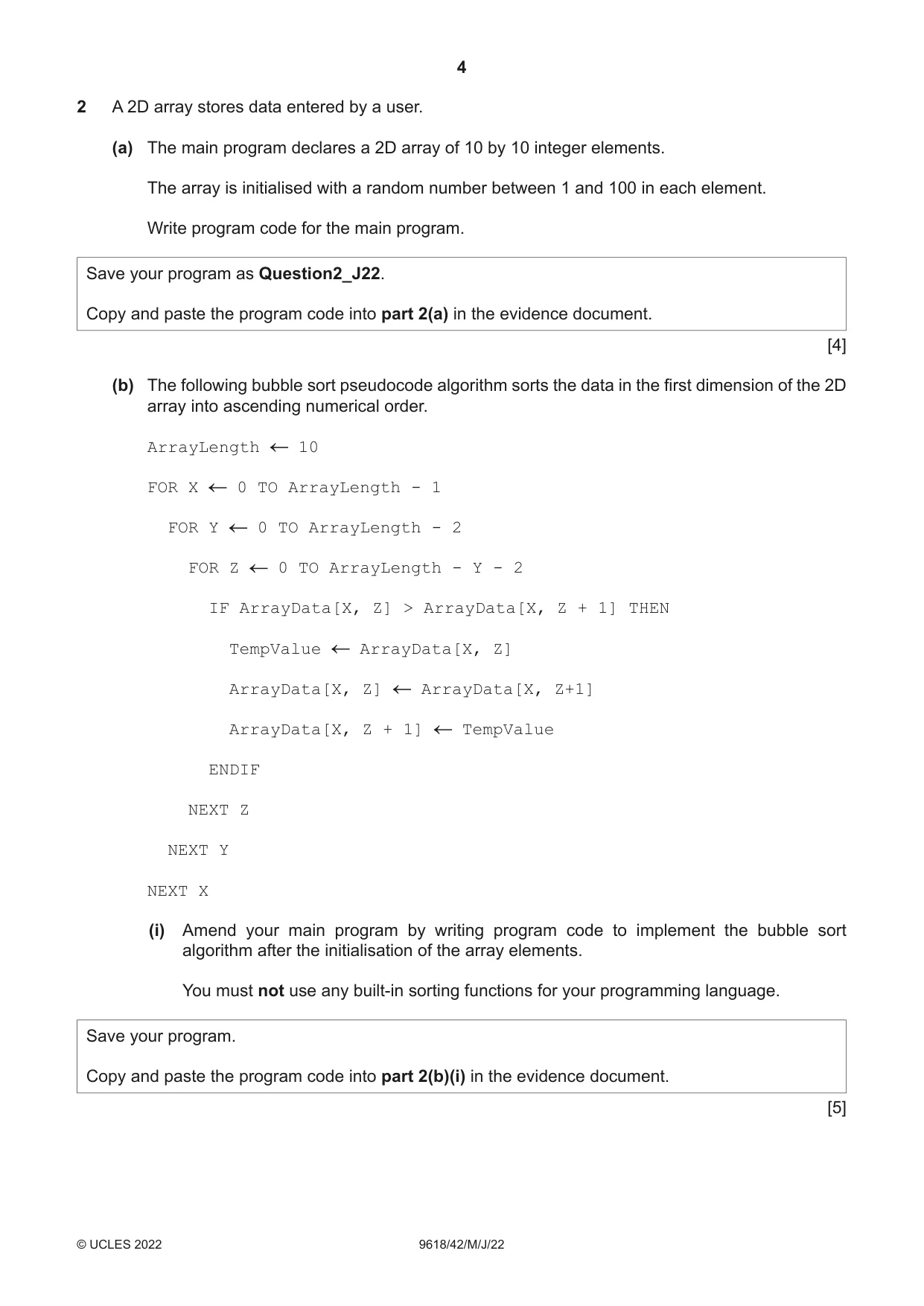
Q2 · A 2D array stores data entered by a user
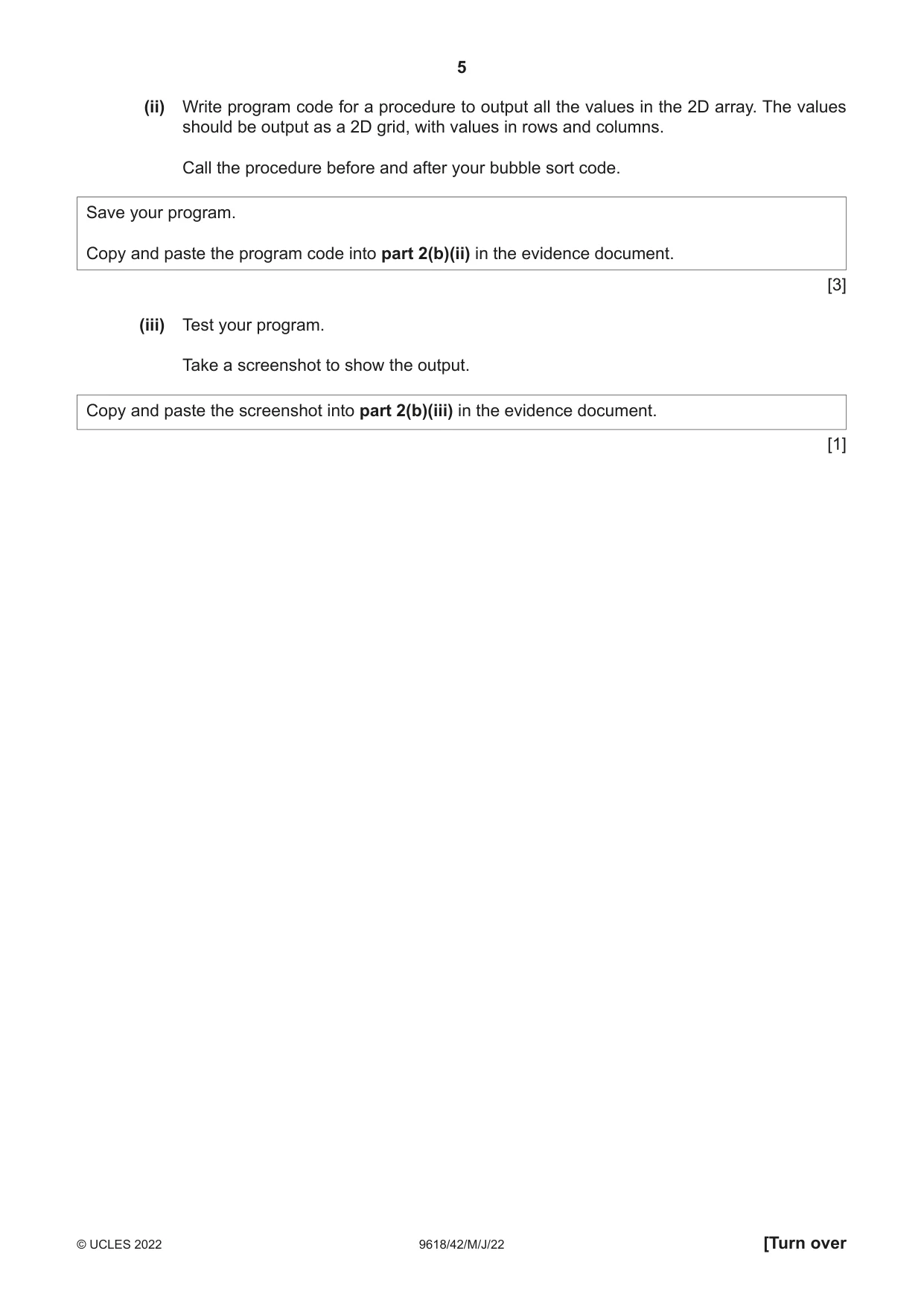
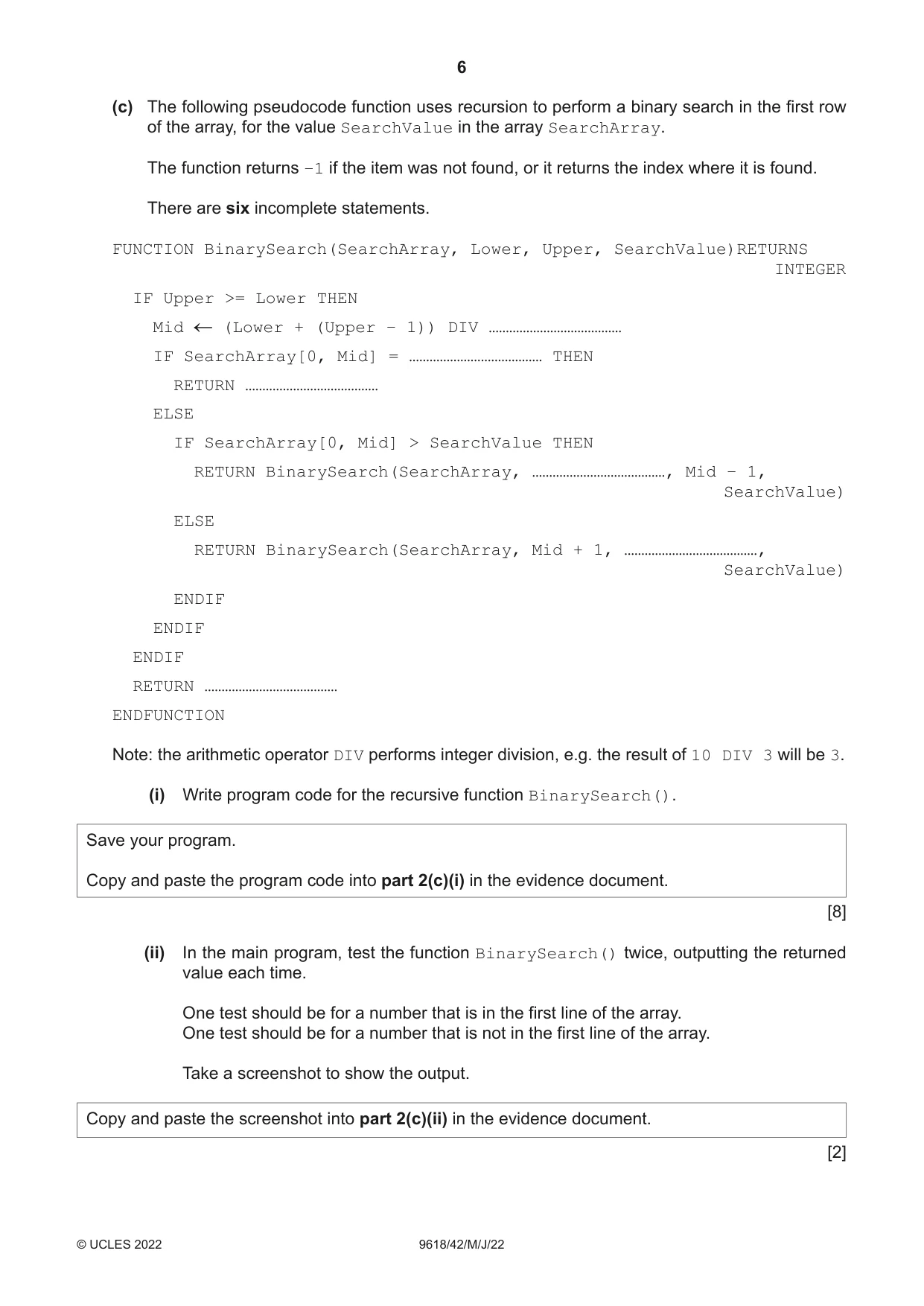
2 A 2D array stores data entered by a user. (a) The main program declares a 2D array of 10 by 10 integer elements. The array is initialised with a random number between 1 and 100 in each element. Write program code for the main program. Save your program as Question2_J22. Copy and paste the program code into part 2(a) in the evidence document. [4] (b) The following bubble sort pseudocode algorithm sorts the data in the first dimension of the 2D array into ascending numerical order. ArrayLength 10 FOR X 0 TO ArrayLength - 1 FOR Y 0 TO ArrayLength - 2 FOR Z 0 TO ArrayLength - Y - 2 IF ArrayData[X, Z] > ArrayData[X, Z + 1] THEN TempValue ArrayData[X, Z] ArrayData[X, Z] ArrayData[X, Z+1] ArrayData[X, Z + 1] TempValue ENDIF NEXT Z NEXT Y NEXT X (i) Amend your main program by writing program code to implement the bubble sort algorithm after the initialisation of the array elements. You must not use any built-in sorting functions for your programming language. Save your program. Copy and paste the program code into part 2(b)(i) in the evidence document. [5] (ii) Write program code for a procedure to output all the values in the 2D array. The values should be output as a 2D grid, with values in rows and columns. Call the procedure before and after your bubble sort code. Save your program. Copy and paste the program code into part 2(b)(ii) in the evidence document. [3] (iii) Test your program. Take a screenshot to show the output. Copy and paste the screenshot into part 2(b)(iii) in the evidence document. [1] (c) The following pseudocode function uses recursion to perform a binary search in the first row of the array, for the value SearchValue in the array SearchArray. The function returns −1 if the item was not found, or it returns the index where it is found. There are six incomplete statements. FUNCTION BinarySearch(SearchArray, Lower, Upper, SearchValue)RETURNS INTEGER IF Upper >= Lower THEN Mid (Lower + (Upper – 1)) DIV ………………………………… IF SearchArray[0, Mid] = ………………………………… THEN RETURN ………………………………… ELSE IF SearchArray[0, Mid] > SearchValue THEN RETURN BinarySearch(SearchArray, …………………………………, Mid – 1, SearchValue) ELSE RETURN BinarySearch(SearchArray, Mid + 1, …………………………………, SearchValue) ENDIF ENDIF ENDIF RETURN ………………………………… ENDFUNCTION Note: the arithmetic operator DIV performs integer division, e.g. the result of 10 DIV 3 will be 3. (i) Write program code for the recursive function BinarySearch(). Save your program. Copy and paste the program code into part 2(c)(i) in the evidence document. [8] (ii) In the main program, test the function BinarySearch() twice, outputting the returned value each time. One test should be for a number that is in the first line of the array. One test should be for a number that is not in the first line of the array. Take a screenshot to show the output. Copy and paste the screenshot into part 2(c)(ii) in the evidence document. [2]
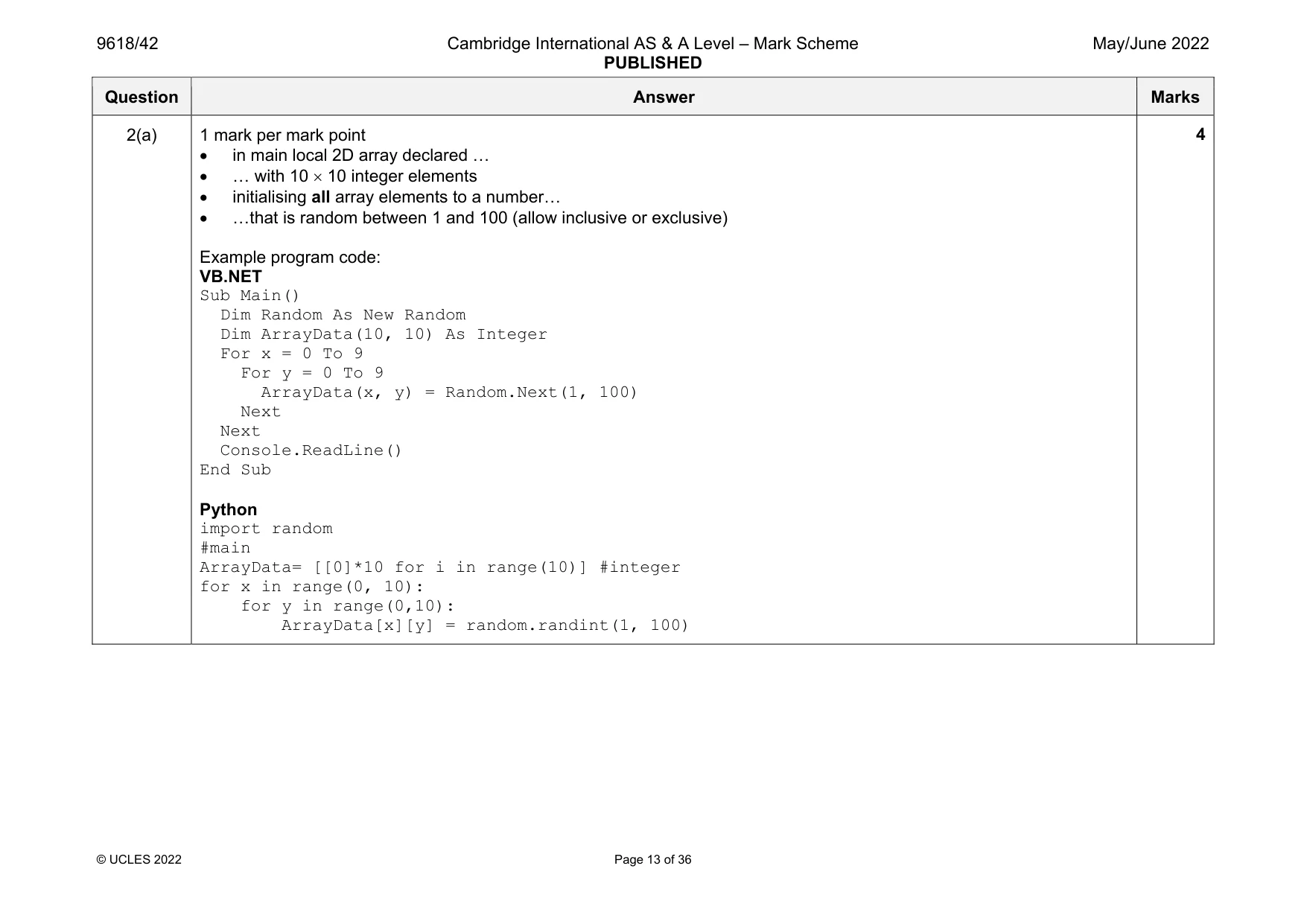
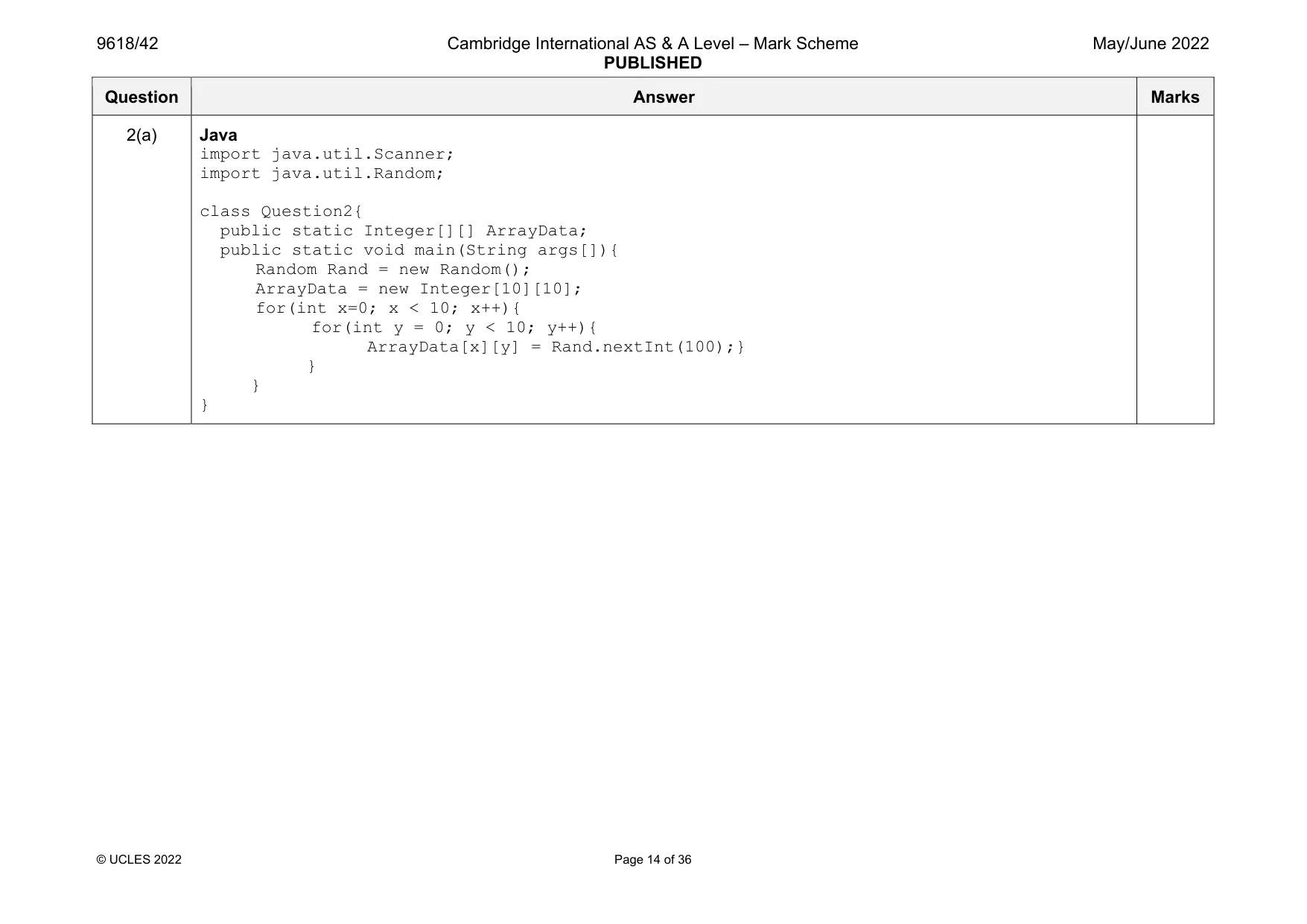
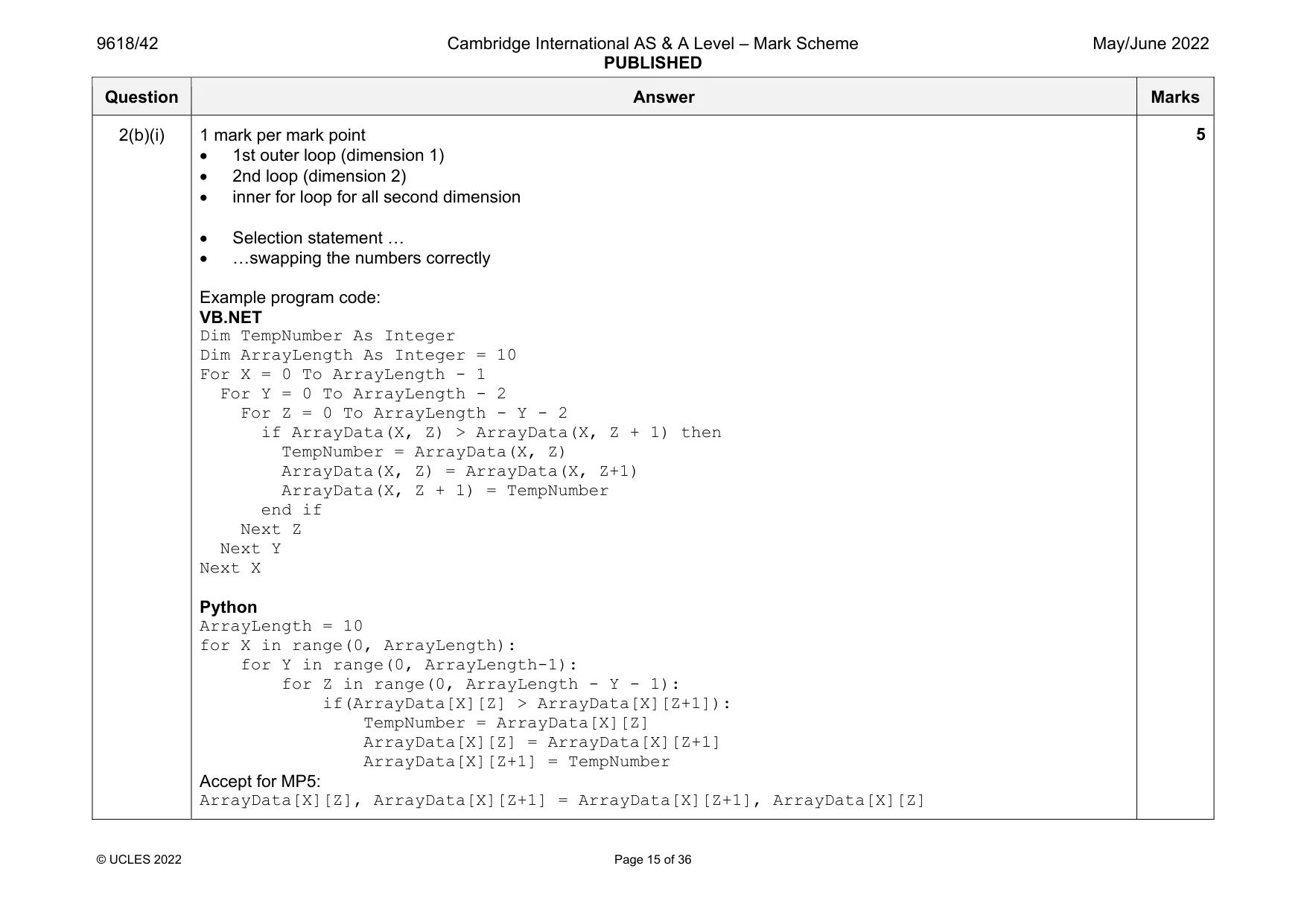
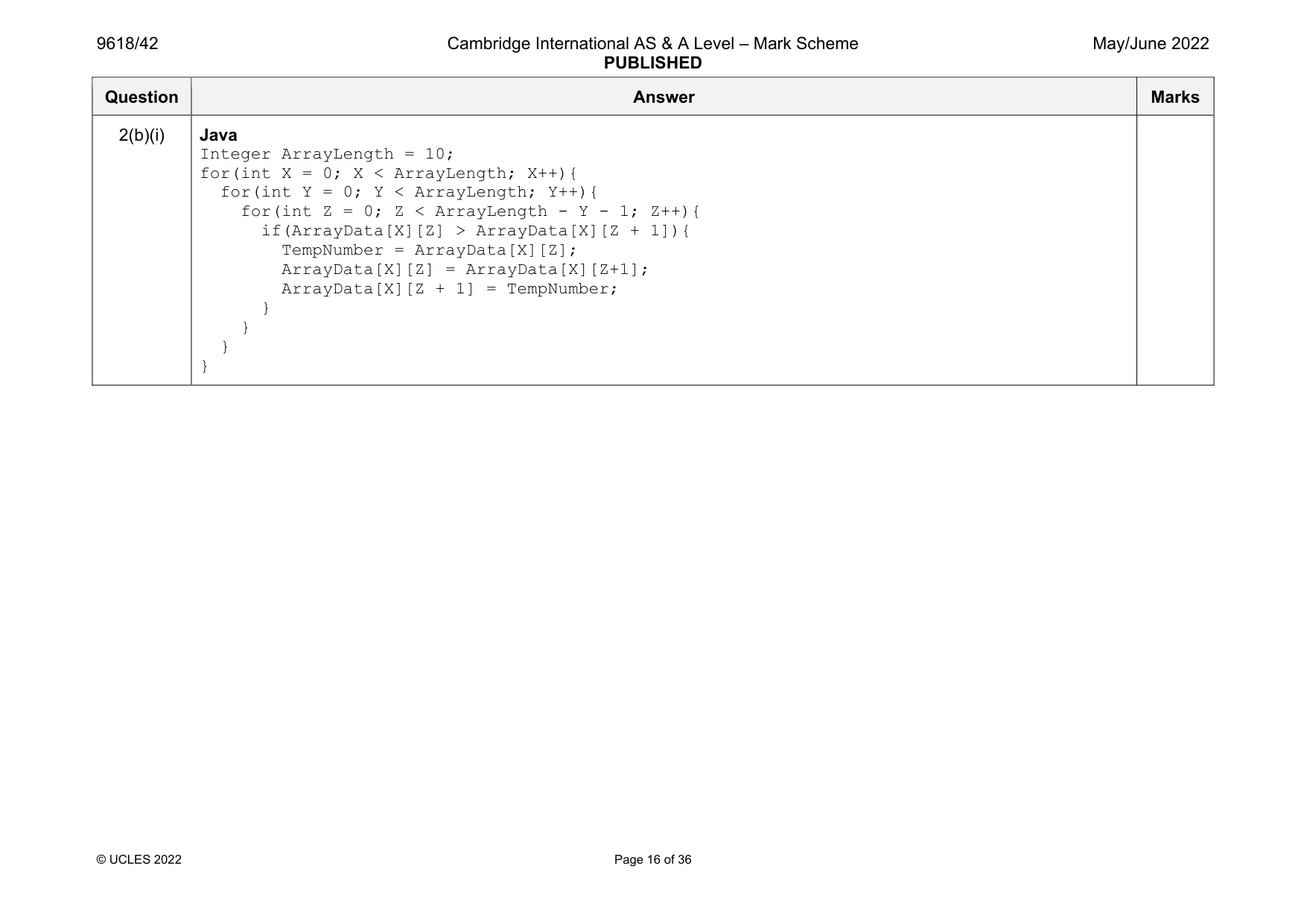
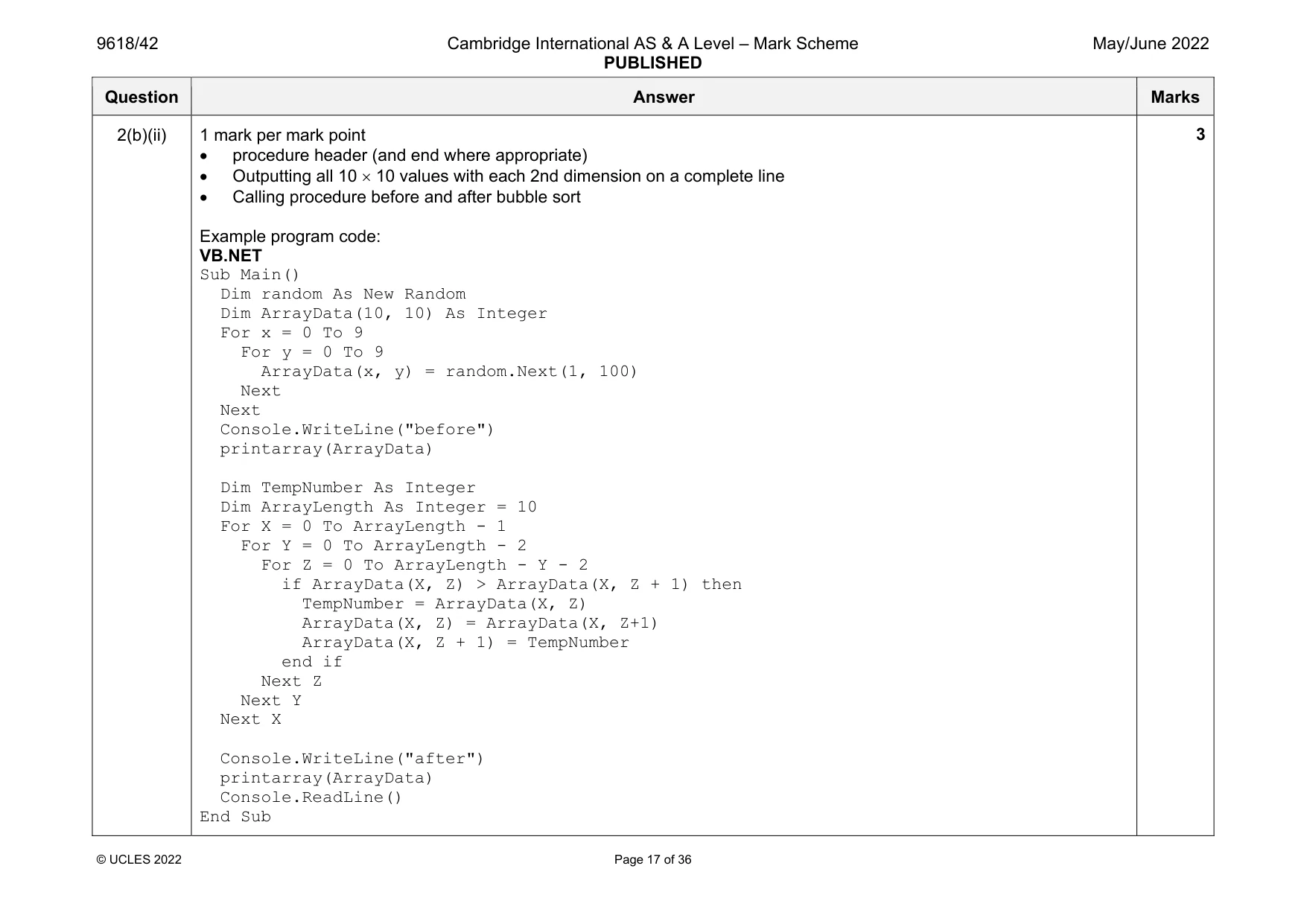
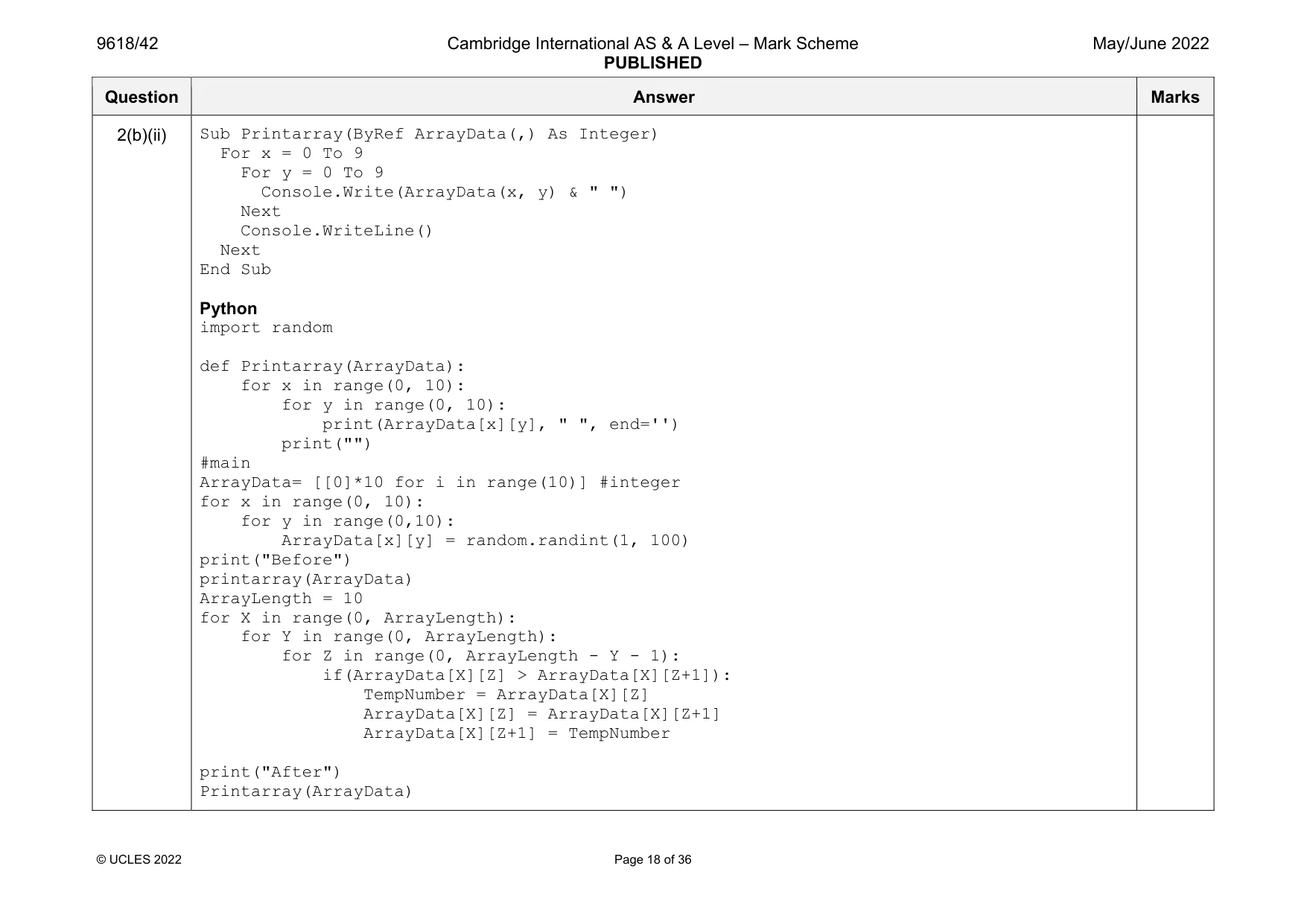
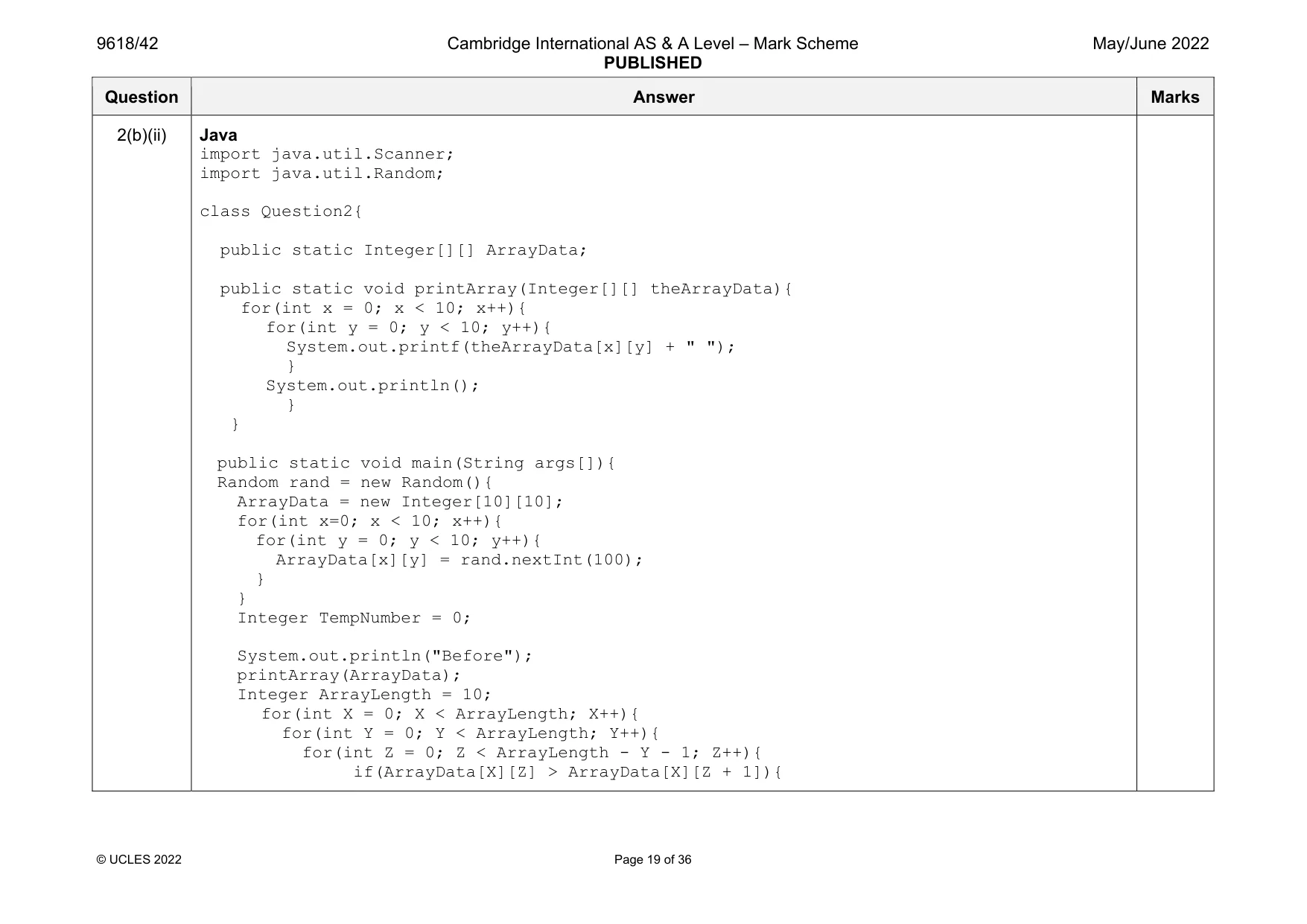
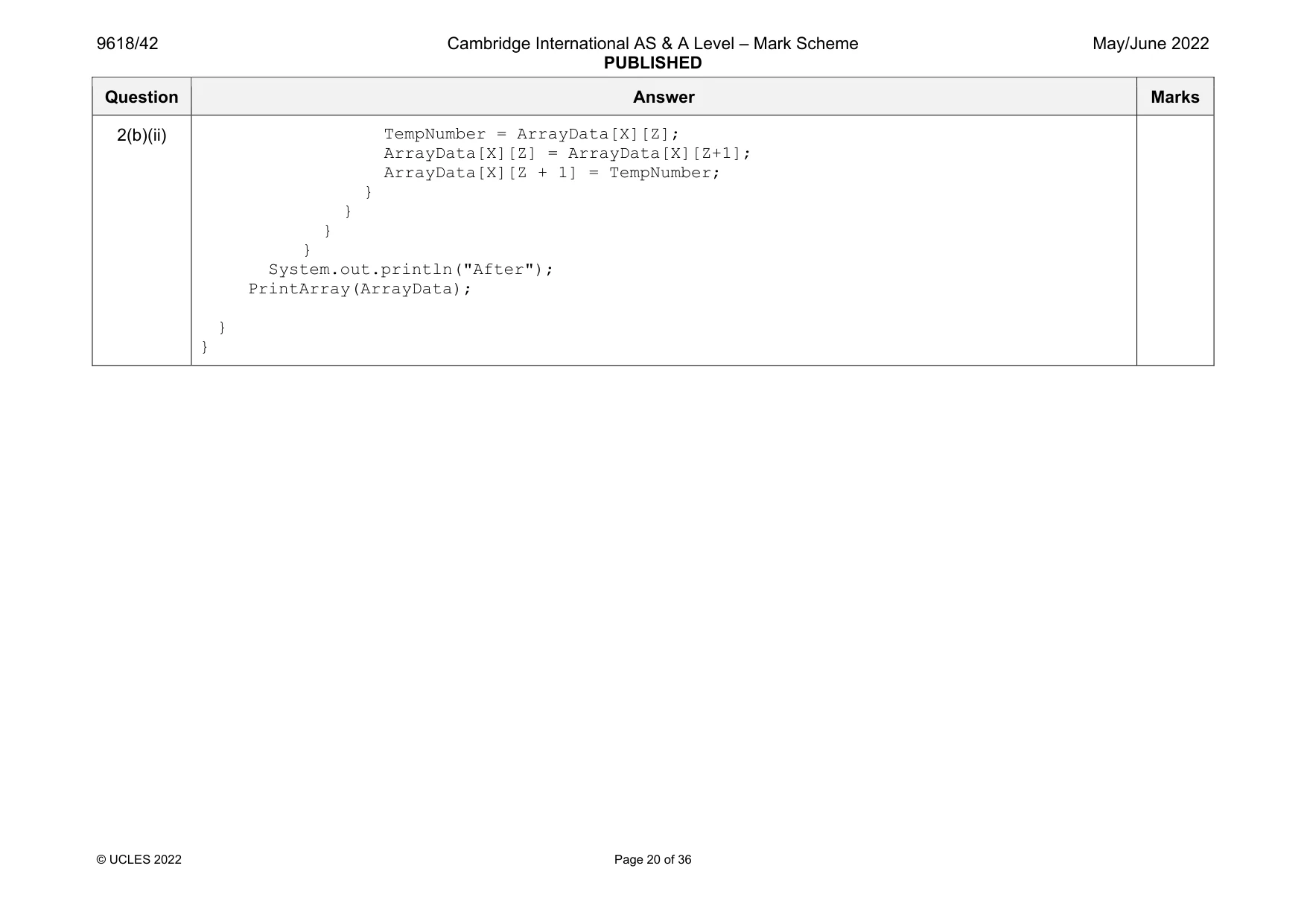
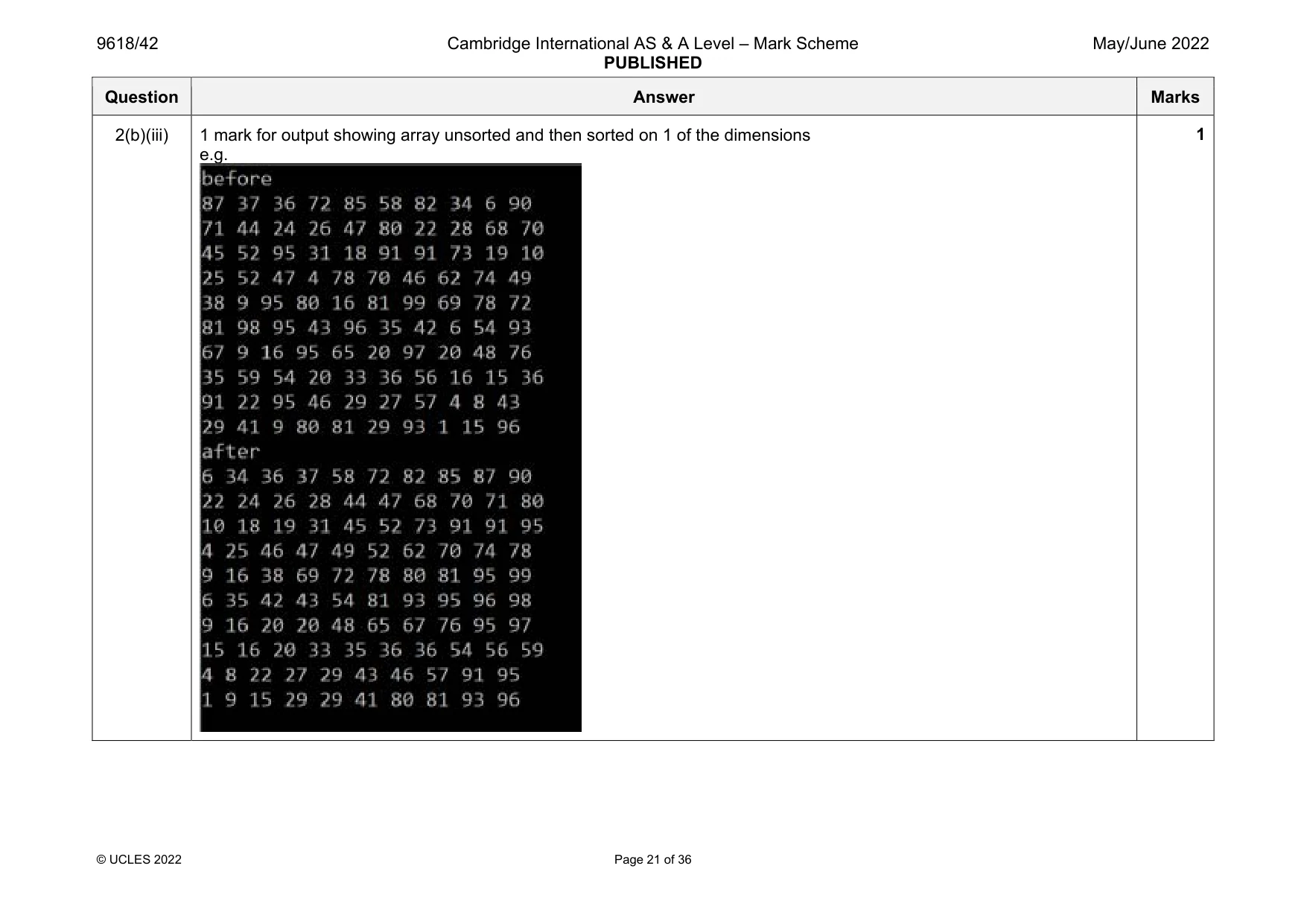
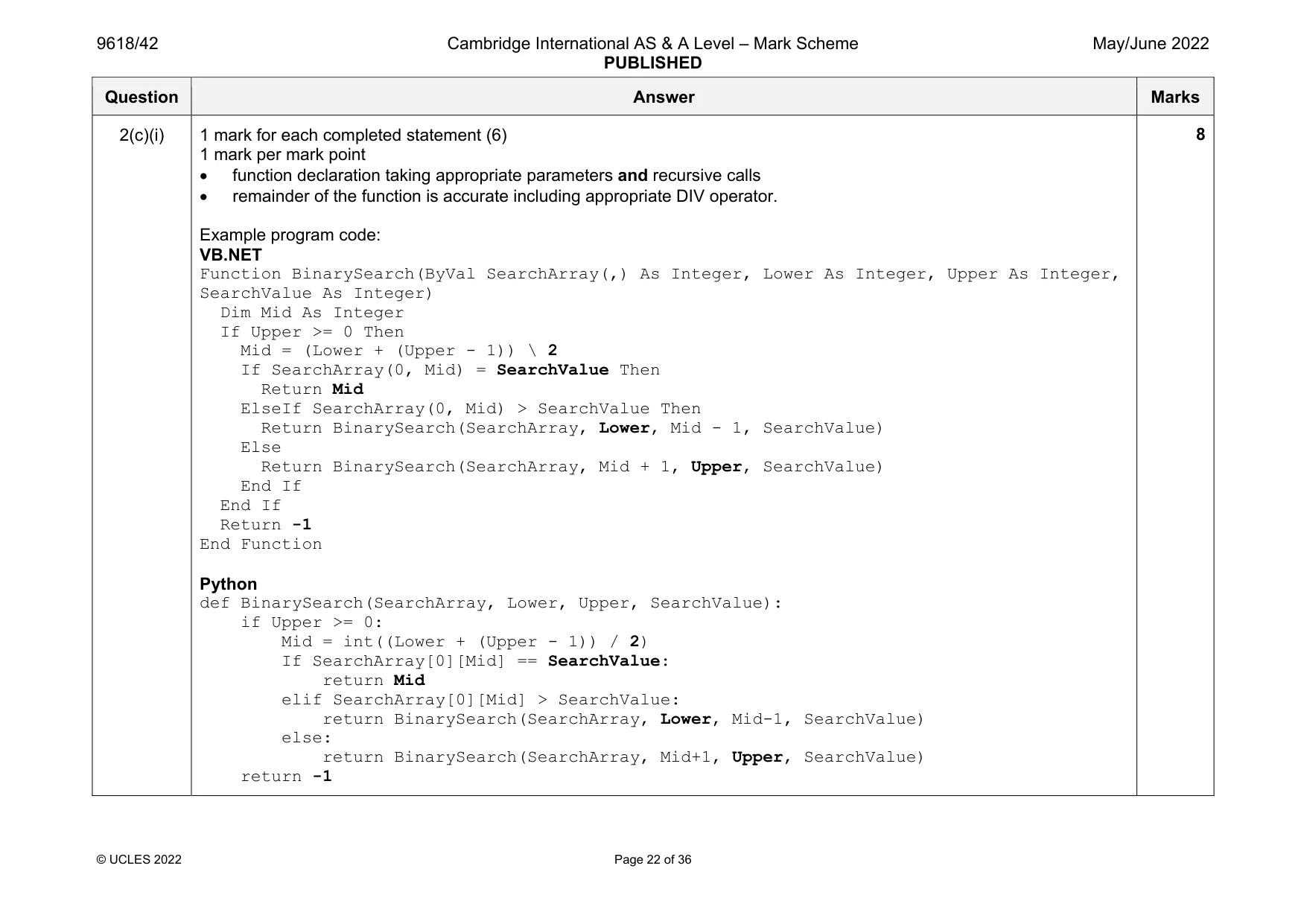
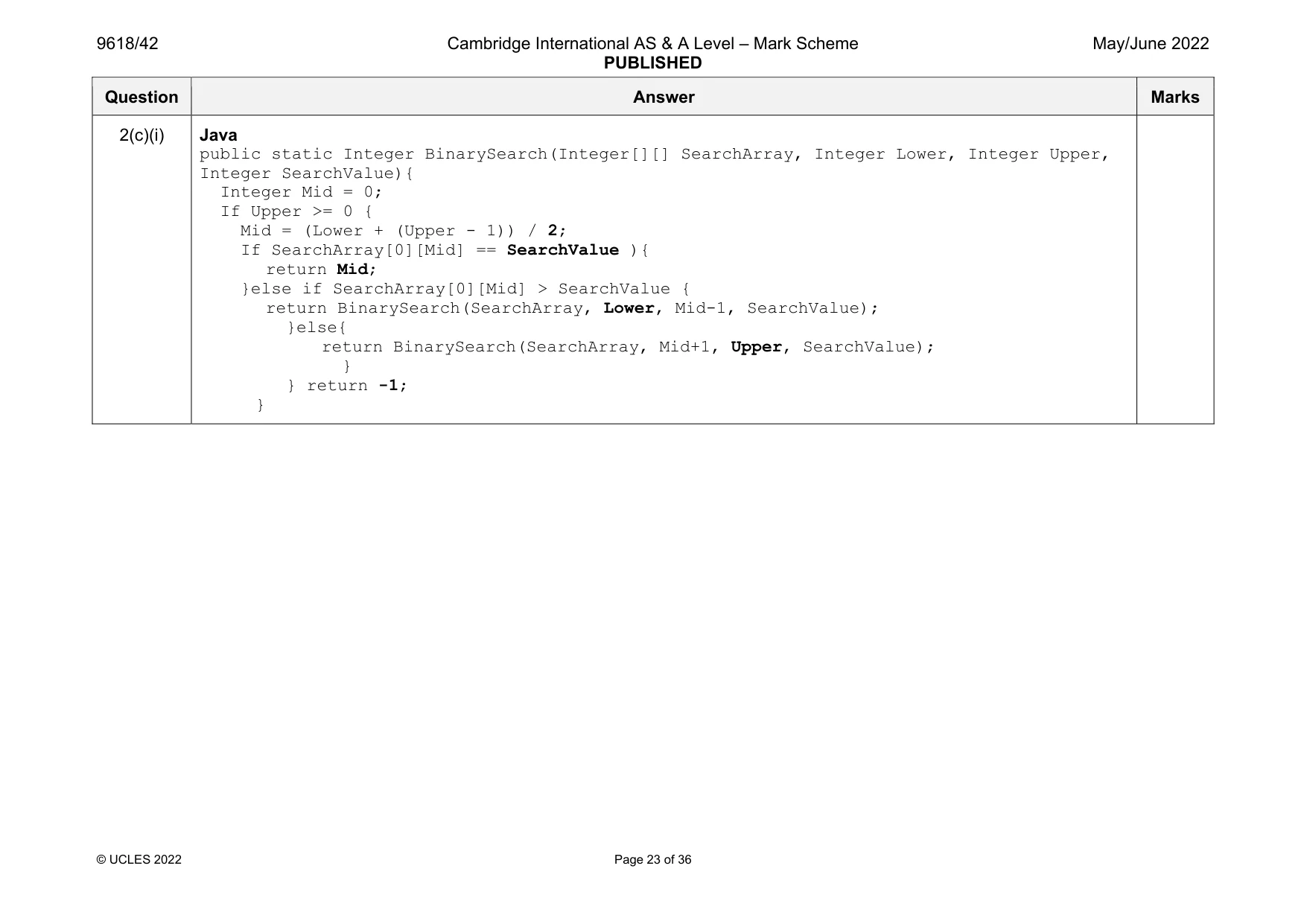
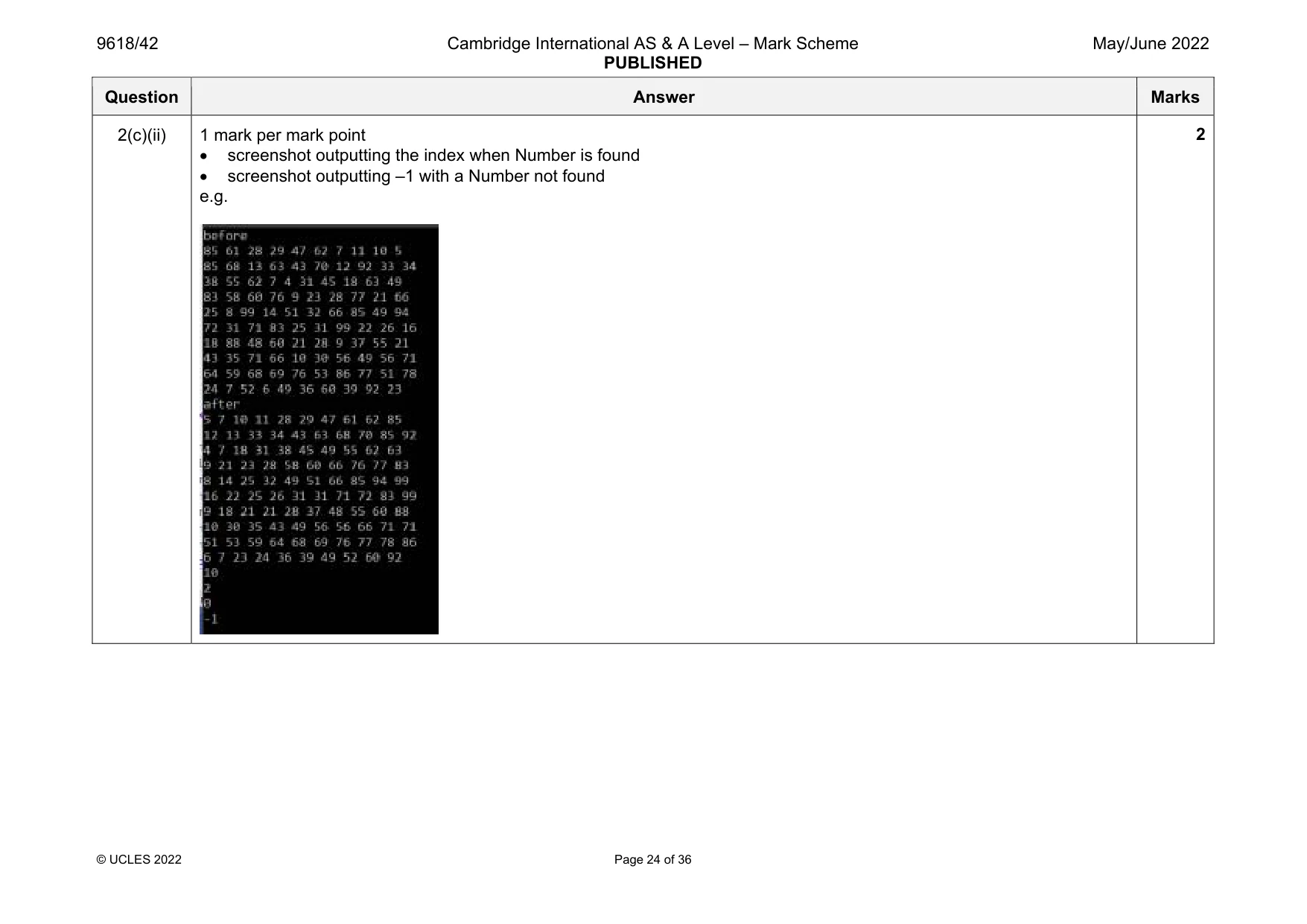
Mark scheme: 2(a) 1 mark per mark point in main local 2D array declared … … with 10 10 integer elements initialising all array elements to a number… …that is random between 1 and 100 (allow inclusive or exclusive) Example program code: VB.NET Sub Main() Dim Random As New Random Dim ArrayData(10, 10) As Integer For x = 0 To 9 For y = 0 To 9 ArrayData(x, y) = Random.Next(1, 100) Next Next Console.ReadLine() End Sub Python import random #main ArrayData= [[0]*10 for i in range(10)] #integer for x in range(0, 10): for y in range(0,10): ArrayData[x][y] = random.randint(1, 100) Question Answer Marks 2(a) Java import java.util.Scanner; import java.util.Random; class Question2{ public static Integer[][] ArrayData; public static void main(String args[]){ Random Rand = new Random(); ArrayData = new Integer[10][10]; for(int x=0; x < 10; x++){ for(int y = 0; y < 10; y++){ ArrayData[x][y] = Rand.nextInt(100);} } } } Question Answer Marks 2(b)(i) 1 mark per mark point 1st outer loop (dimension 1) 2nd loop (dimension 2) inner for loop for all second dimension Selection statement … …swapping the numbers correctly Example program code: VB.NET Dim TempNumber As Integer Dim ArrayLength As Integer = 10 For X = 0 To ArrayLength - 1 For Y = 0 To ArrayLength - 2 For Z = 0 To ArrayLength - Y - 2 if ArrayData(X, Z) > ArrayData(X, Z + 1) then TempNumber = ArrayData(X, Z) ArrayData(X, Z) = ArrayData(X, Z+1) ArrayData(X, Z + 1) = TempNumber end if Next Z Next Y Next X Python ArrayLength = 10 for X in range(0, ArrayLength): for Y in range(0, ArrayLength-1): for Z in range(0, ArrayLength - Y - 1): if(ArrayData[X][Z] > ArrayData[X][Z+1]): TempNumber = ArrayData[X][Z] ArrayData[X][Z] = ArrayData[X][Z+1] ArrayData[X][Z+1] = TempNumber Accept for MP5: ArrayData[X][Z], ArrayData[X][Z+1] = ArrayData[X][Z+1], ArrayData[X][Z] 5 Question Answer Marks 2(b)(i) Java Integer ArrayLength = 10; for(int X = 0; X < ArrayLength; X++){ for(int Y = 0; Y < ArrayLength; Y++){ for(int Z = 0; Z < ArrayLength - Y - 1; Z++){ if(ArrayData[X][Z] > ArrayData[X][Z + 1]){ TempNumber = ArrayData[X][Z]; ArrayData[X][Z] = ArrayData[X][Z+1]; ArrayData[X][Z + 1] = TempNumber; } } } } Question Answer Marks 2(b)(ii) 1 mark per mark point procedure header (and end where appropriate) Outputting all 10 10 values with each 2nd dimension on a complete line Calling procedure before and after bubble sort Example program code: VB.NET Sub Main() Dim random As New Random Dim ArrayData(10, 10) As Integer For x = 0 To 9 For y = 0 To 9 ArrayData(x, y) = random.Next(1, 100) Next Next Console.WriteLine("before") printarray(ArrayData) Dim TempNumber As Integer Dim ArrayLength As Integer = 10 For X = 0 To ArrayLength - 1 For Y = 0 To ArrayLength - 2 For Z = 0 To ArrayLength - Y - 2 if ArrayData(X, Z) > ArrayData(X, Z + 1) then TempNumber = ArrayData(X, Z) ArrayData(X, Z) = ArrayData(X, Z+1) ArrayData(X, Z + 1) = TempNumber end if Next Z Next Y Next X Console.WriteLine("after") printarray(ArrayData) Console.ReadLine() End Sub 3 Question Answer Marks 2(b)(ii) Sub Printarray(ByRef ArrayData(,) As Integer) For x = 0 To 9 For y = 0 To 9 Console.Write(ArrayData(x, y) & " ") Next Console.WriteLine() Next End Sub Python import random def Printarray(ArrayData): for x in range(0, 10): for y in range(0, 10): print(ArrayData[x][y], " ", end='') print("") #main ArrayData= [[0]*10 for i in range(10)] #integer for x in range(0, 10): for y in range(0,10): ArrayData[x][y] = random.randint(1, 100) print("Before") printarray(ArrayData) ArrayLength = 10 for X in range(0, ArrayLength): for Y in range(0, ArrayLength): for Z in range(0, ArrayLength - Y - 1): if(ArrayData[X][Z] > ArrayData[X][Z+1]): TempNumber = ArrayData[X][Z] ArrayData[X][Z] = ArrayData[X][Z+1] ArrayData[X][Z+1] = TempNumber print("After") Printarray(ArrayData) Question Answer Marks 2(b)(ii) Java import java.util.Scanner; import java.util.Random; class Question2{ public static Integer[][] ArrayData; public static void printArray(Integer[][] theArrayData){ for(int x = 0; x < 10; x++){ for(int y = 0; y < 10; y++){ System.out.printf(theArrayData[x][y] + " "); } System.out.println(); } } public static void main(String args[]){ Random rand = new Random(){ ArrayData = new Integer[10][10]; for(int x=0; x < 10; x++){ for(int y = 0; y < 10; y++){ ArrayData[x][y] = rand.nextInt(100); } } Integer TempNumber = 0; System.out.println("Before"); printArray(ArrayData); Integer ArrayLength = 10; for(int X = 0; X < ArrayLength; X++){ for(int Y = 0; Y < ArrayLength; Y++){ for(int Z = 0; Z < ArrayLength - Y - 1; Z++){ if(ArrayData[X][Z] > ArrayData[X][Z + 1]){ Question Answer Marks 2(b)(ii) TempNumber = ArrayData[X][Z]; ArrayData[X][Z] = ArrayData[X][Z+1]; ArrayData[X][Z + 1] = TempNumber; } } } } System.out.println("After"); PrintArray(ArrayData); } } Question Answer Marks 2(b)(iii) 1 mark for output showing array unsorted and then sorted on 1 of the dimensions e.g. 1 Question Answer Marks 2(c)(i) 1 mark for each completed statement (6) 1 mark per mark point function declaration taking appropriate parameters and recursive calls remainder of the function is accurate including appropriate DIV operator. Example program code: VB.NET Function BinarySearch(ByVal SearchArray(,) As Integer, Lower As Integer, Upper As Integer, SearchValue As Integer) Dim Mid As Integer If Upper >= 0 Then Mid = (Lower + (Upper - 1)) \ 2 If SearchArray(0, Mid) = SearchValue Then Return Mid ElseIf SearchArray(0, Mid) > SearchValue Then Return BinarySearch(SearchArray, Lower, Mid - 1, SearchValue) Else Return BinarySearch(SearchArray, Mid + 1, Upper, SearchValue) End If End If Return -1 End Function Python def BinarySearch(SearchArray, Lower, Upper, SearchValue): if Upper >= 0: Mid = int((Lower + (Upper - 1)) / 2) If SearchArray[0][Mid] == SearchValue: return Mid elif SearchArray[0][Mid] > SearchValue: return BinarySearch(SearchArray, Lower, Mid-1, SearchValue) else: return BinarySearch(SearchArray, Mid+1, Upper, SearchValue) return -1 8 Question Answer Marks 2(c)(i) Java public static Integer BinarySearch(Integer[][] SearchArray, Integer Lower, Integer Upper, Integer SearchValue){ Integer Mid = 0; If Upper >= 0 { Mid = (Lower + (Upper - 1)) / 2; If SearchArray[0][Mid] == SearchValue ){ return Mid; }else if SearchArray[0][Mid] > SearchValue { return BinarySearch(SearchArray, Lower, Mid-1, SearchValue); }else{ return BinarySearch(SearchArray, Mid+1, Upper, SearchValue); } } return -1; } Question Answer Marks 2(c)(ii) 1 mark per mark point screenshot outputting the index when Number is found screenshot outputting –1 with a Number not found e.g. 2
Q3 · A programmer is designing a computer game that uses a set of cards
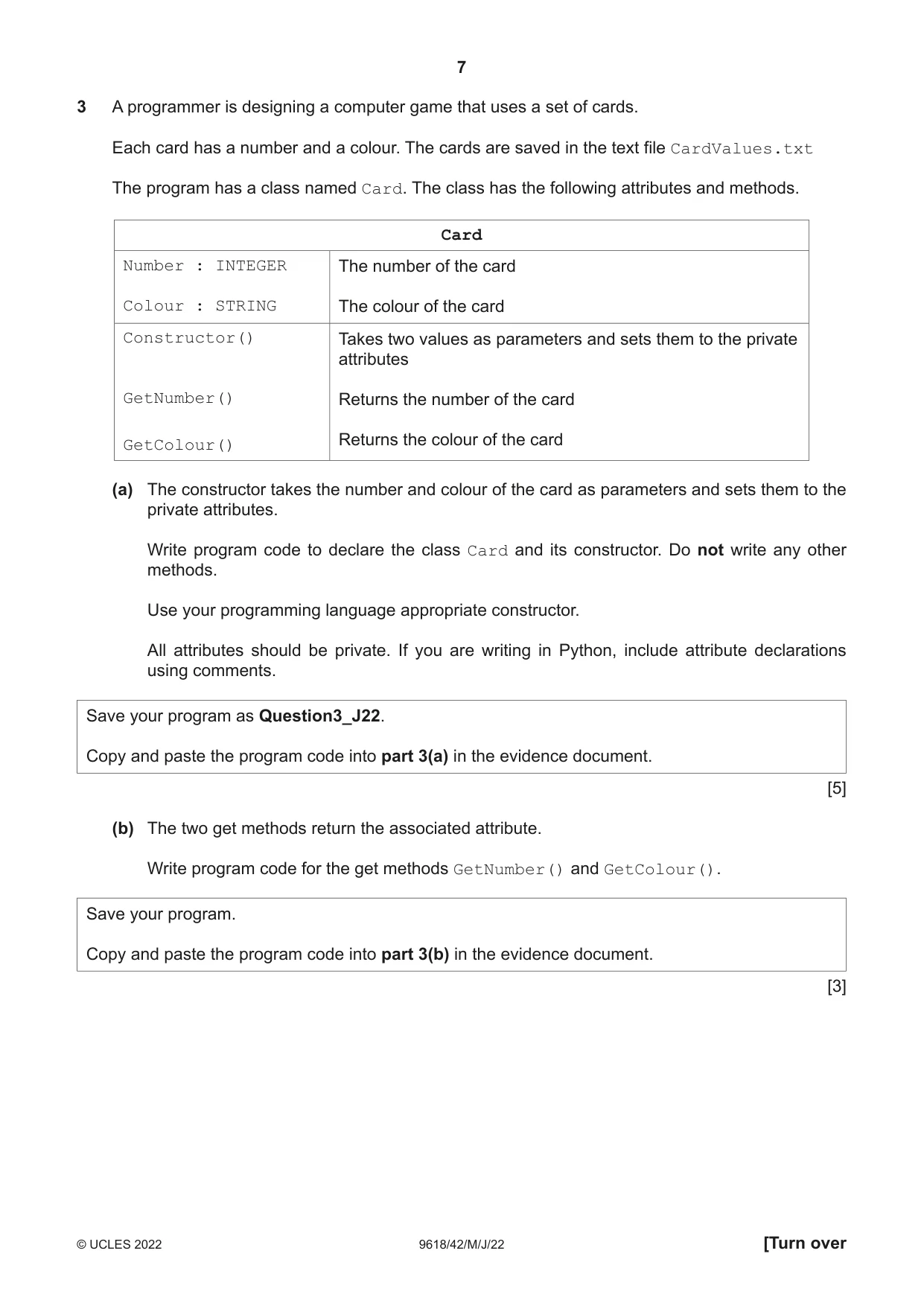
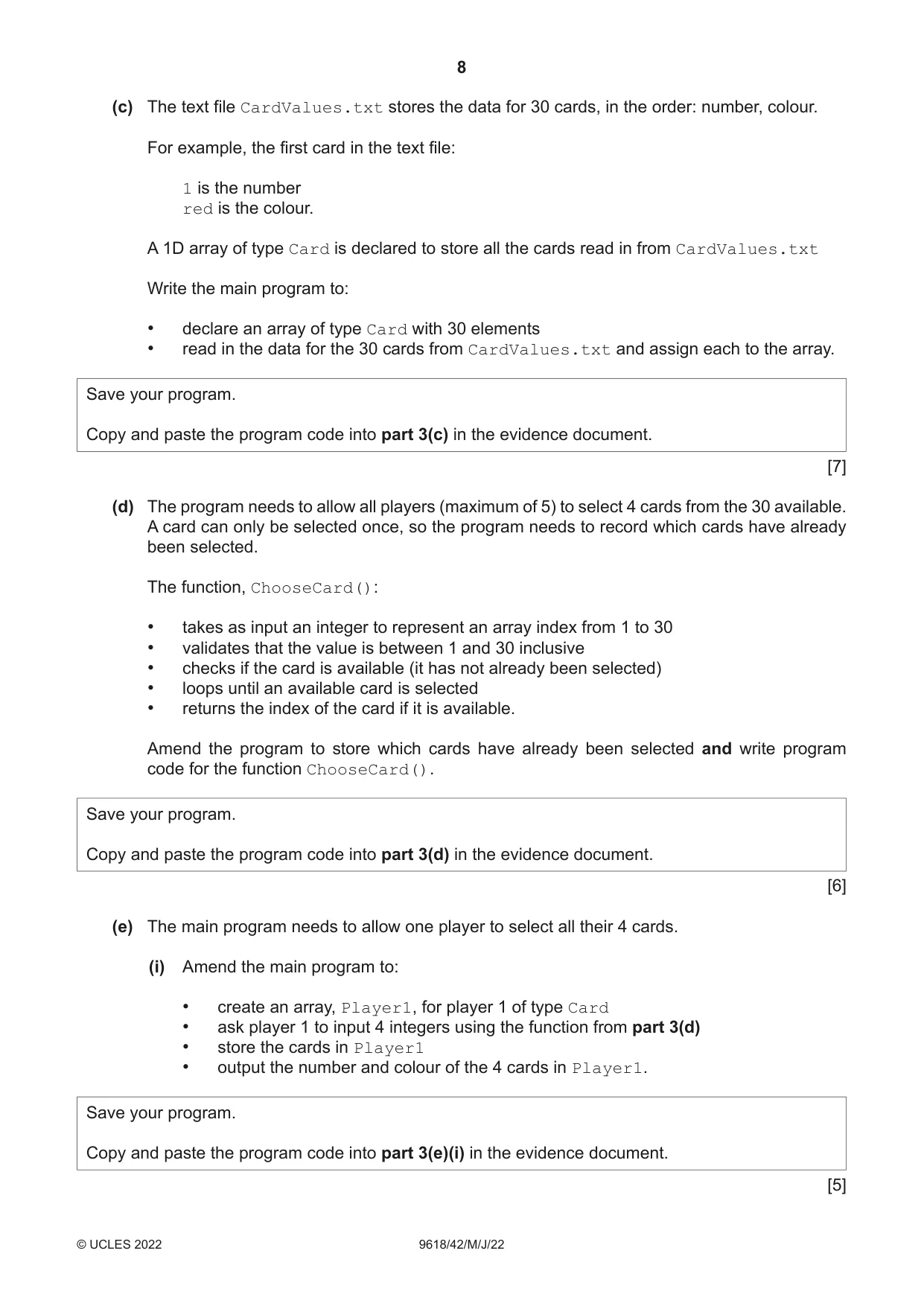
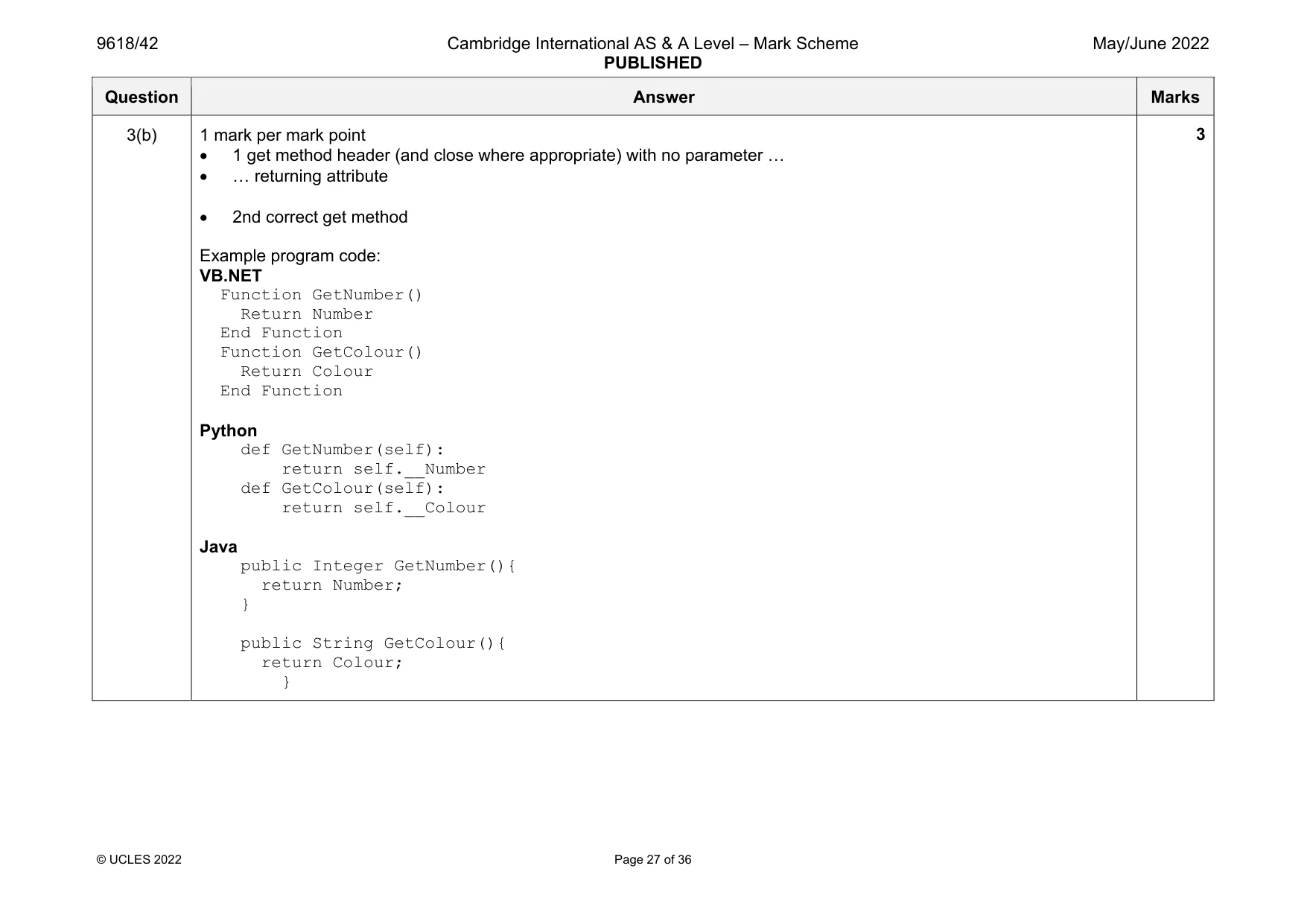
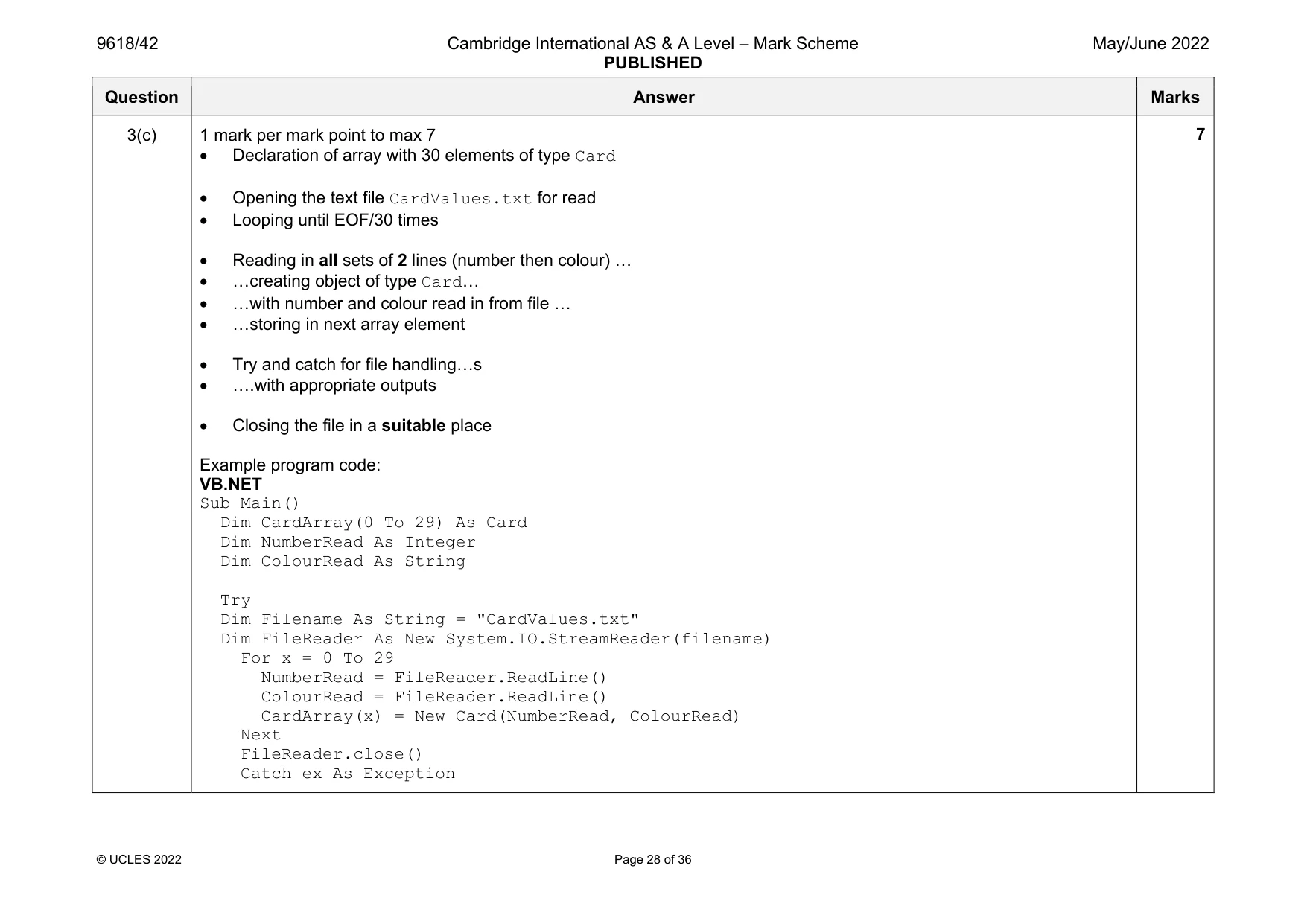
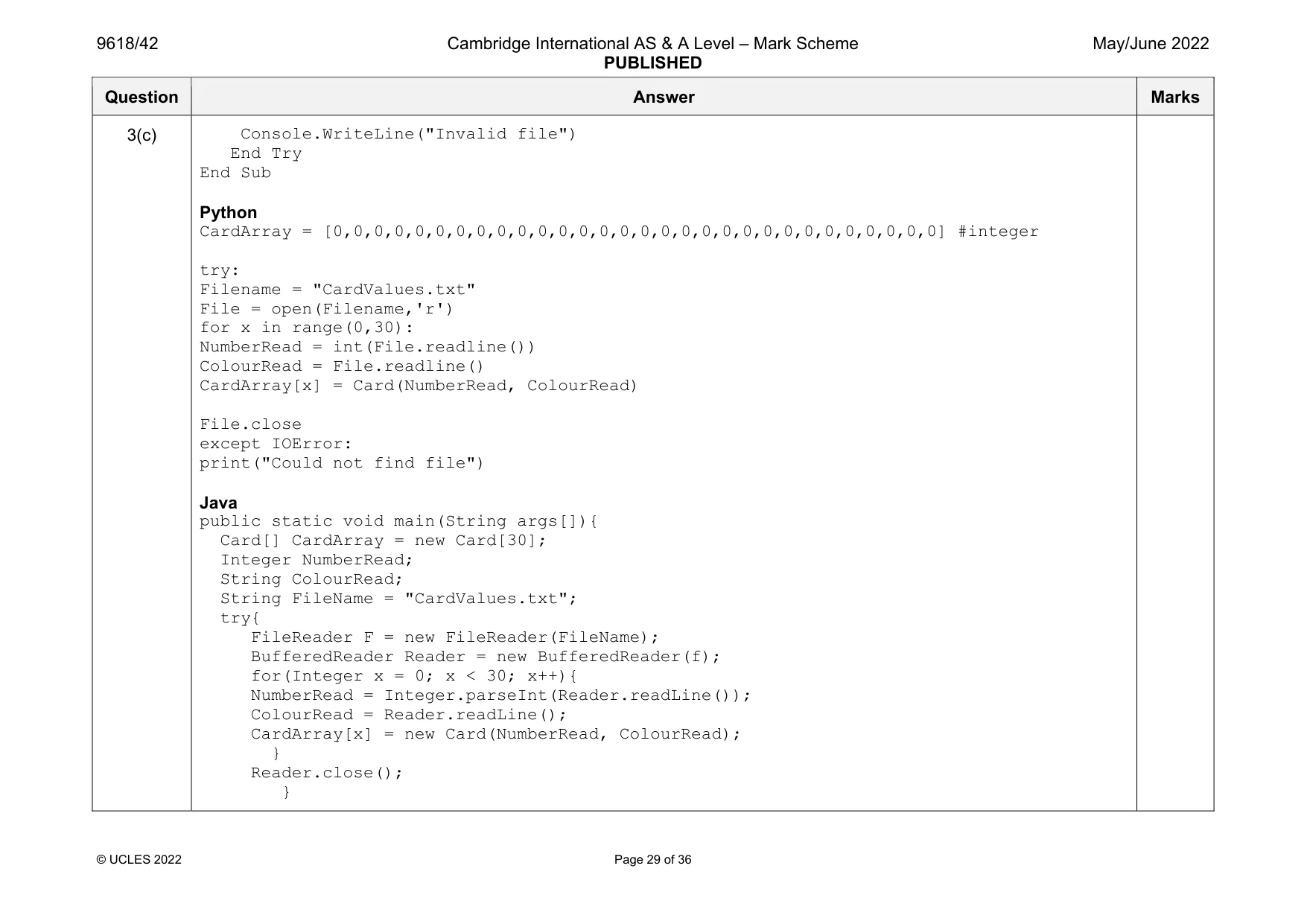
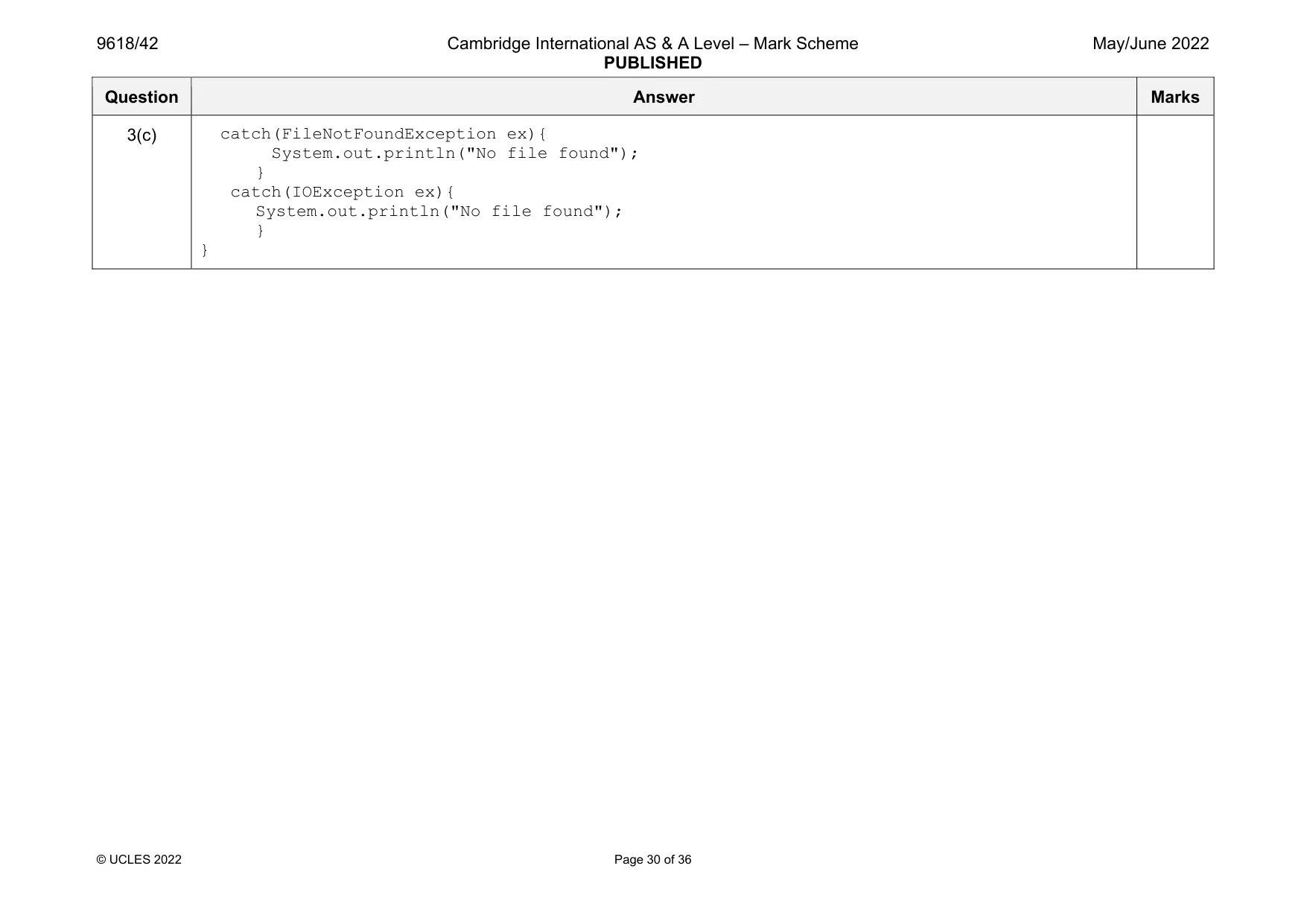
3 A programmer is designing a computer game that uses a set of cards. Each card has a number and a colour. The cards are saved in the text file CardValues.txt The program has a class named Card. The class has the following attributes and methods. Card Number : INTEGER The number of the card Colour : STRING The colour of the card Constructor() Takes two values as parameters and sets them to the private attributes GetNumber() Returns the number of the card GetColour() Returns the colour of the card (a) The constructor takes the number and colour of the card as parameters and sets them to the private attributes. Write program code to declare the class Card and its constructor. Do not write any other methods. Use your programming language appropriate constructor. All attributes should be private. If you are writing in Python, include attribute declarations using comments. Save your program as Question3_J22. Copy and paste the program code into part 3(a) in the evidence document. [5] (b) The two get methods return the associated attribute. Write program code for the get methods GetNumber() and GetColour(). Save your program. Copy and paste the program code into part 3(b) in the evidence document. [3] (c) The text file CardValues.txt stores the data for 30 cards, in the order: number, colour. For example, the first card in the text file: 1 is the number red is the colour. A 1D array of type Card is declared to store all the cards read in from CardValues.txt Write the main program to: • declare an array of type Card with 30 elements • read in the data for the 30 cards from CardValues.txt and assign each to the array. Save your program. Copy and paste the program code into part 3(c) in the evidence document. [7] (d) The program needs to allow all players (maximum of 5) to select 4 cards from the 30 available. A card can only be selected once, so the program needs to record which cards have already been selected. The function, ChooseCard(): • takes as input an integer to represent an array index from 1 to 30 • validates that the value is between 1 and 30 inclusive • checks if the card is available (it has not already been selected) • loops until an available card is selected • returns the index of the card if it is available. Amend the program to store which cards have already been selected and write program code for the function ChooseCard(). Save your program. Copy and paste the program code into part 3(d) in the evidence document. [6] (e) The main program needs to allow one player to select all their 4 cards. (i) Amend the main program to: • create an array, Player1, for player 1 of type Card • ask player 1 to input 4 integers using the function from part 3(d) • store the cards in Player1 • output the number and colour of the 4 cards in Player1. Save your program. Copy and paste the program code into part 3(e)(i) in the evidence document. [5] (ii) Test your program with the following test data: Test 1: 1 5 9 10 Test 2: 2 2 3 4 4 5 Take a screenshot to show the output. Copy and paste the screenshot into part 3(e)(ii) in the evidence document. [1]
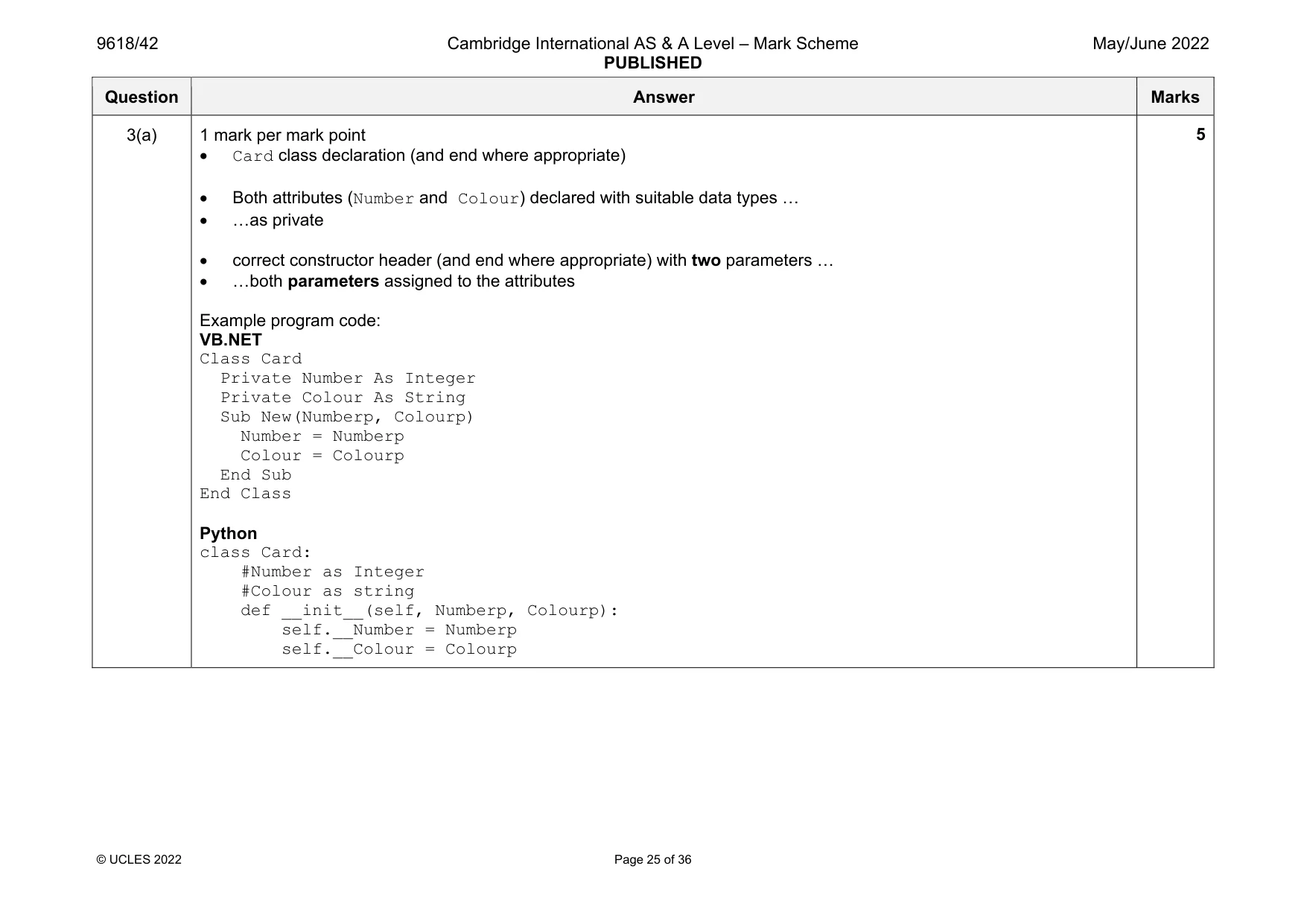
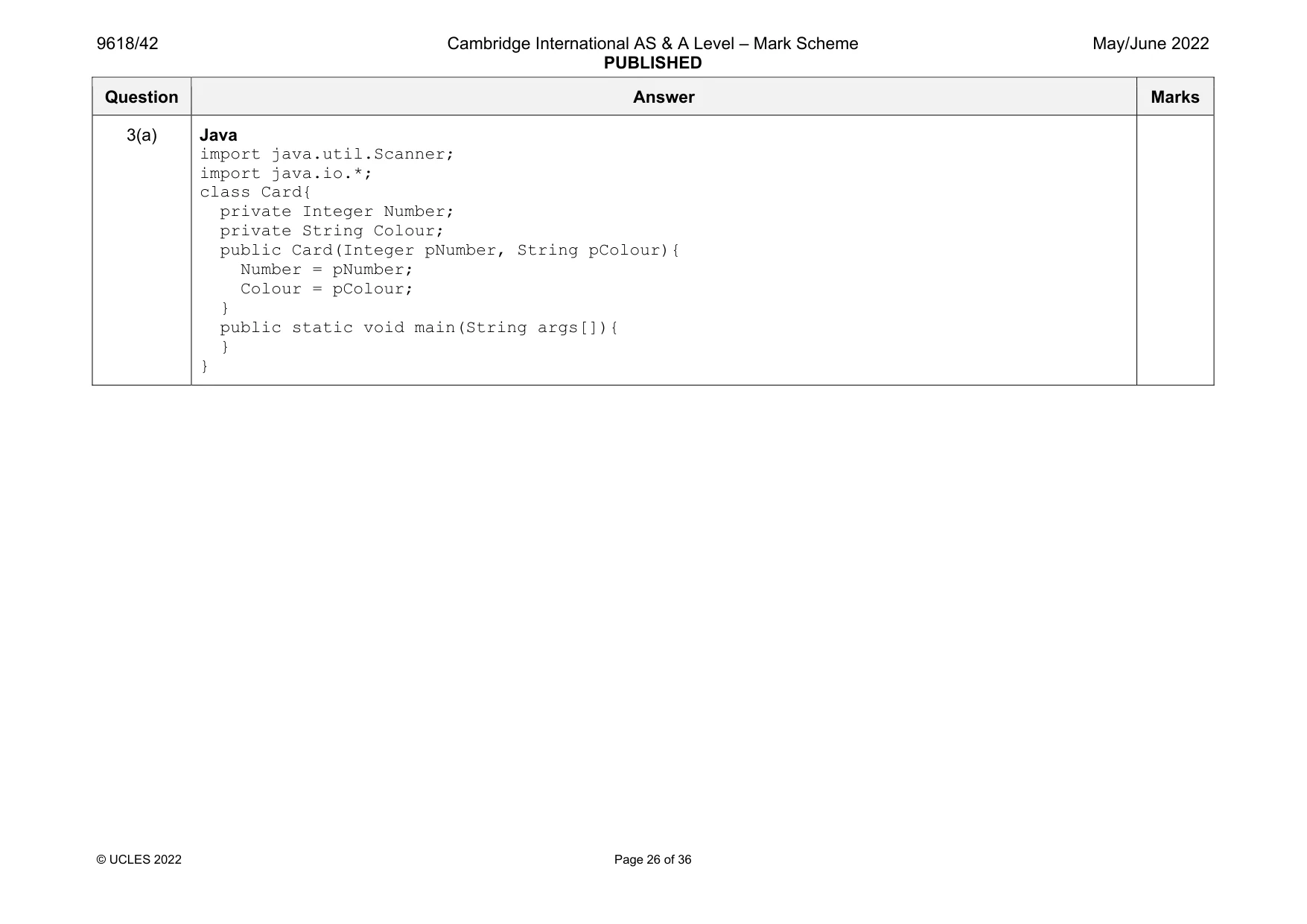
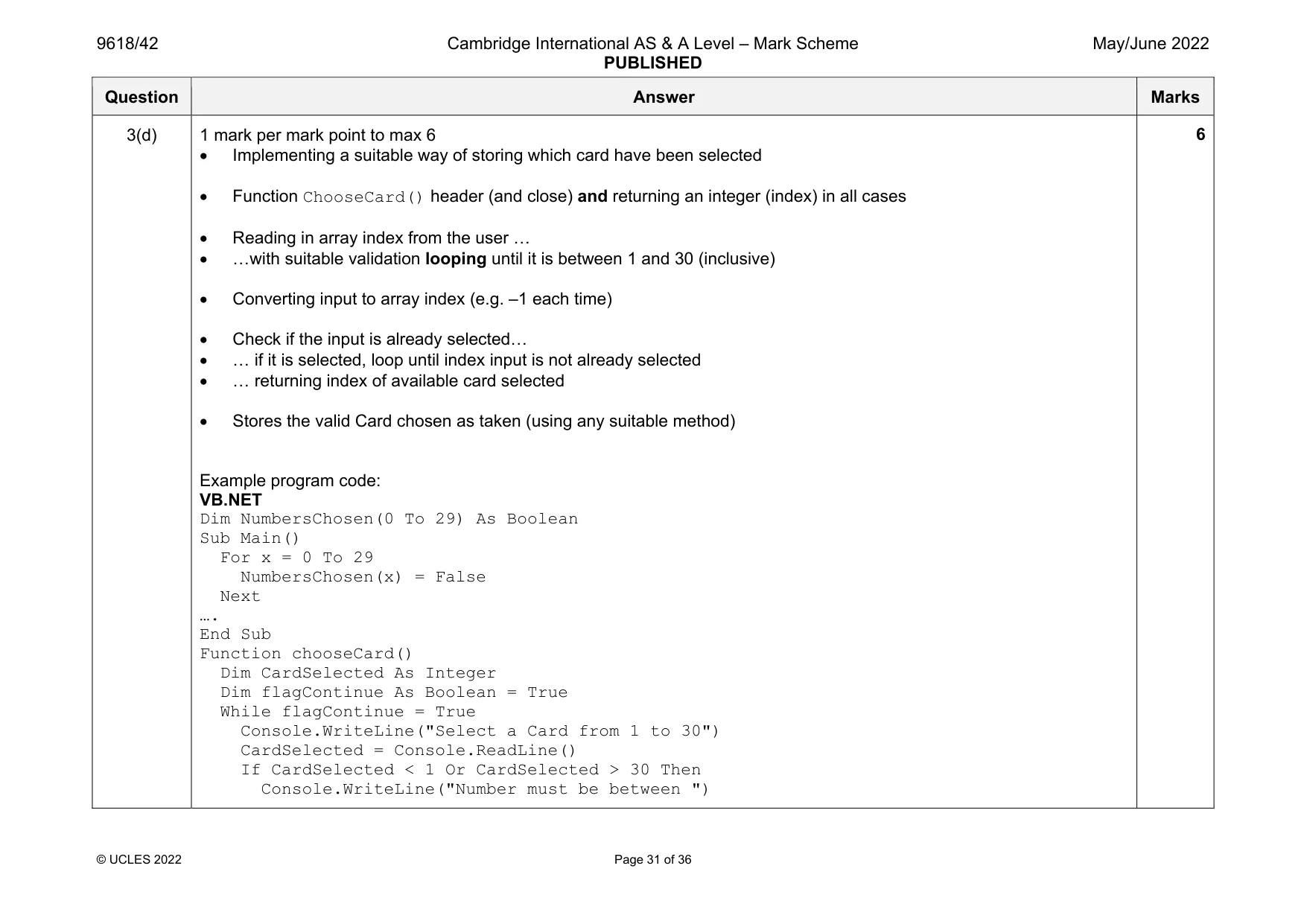
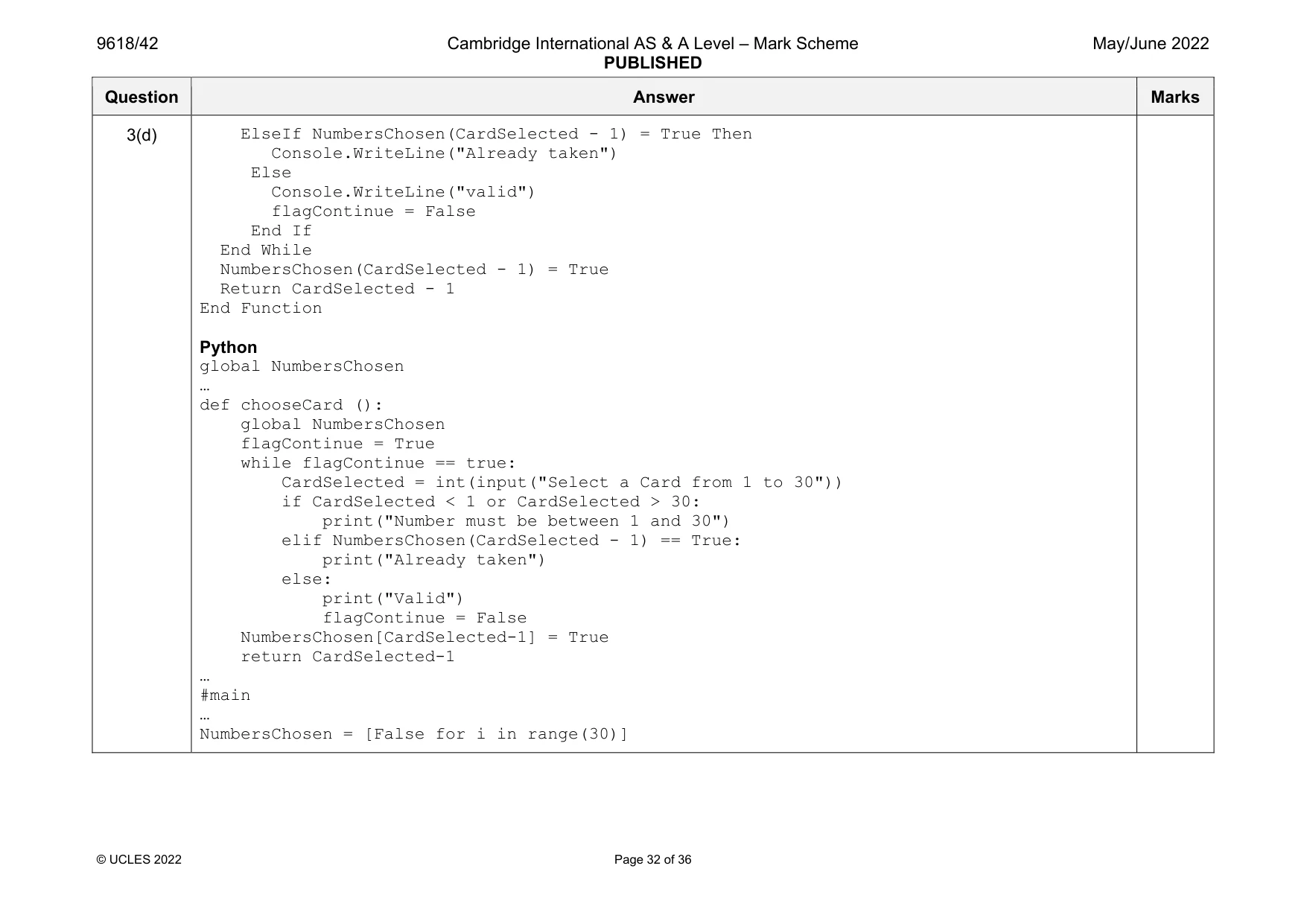
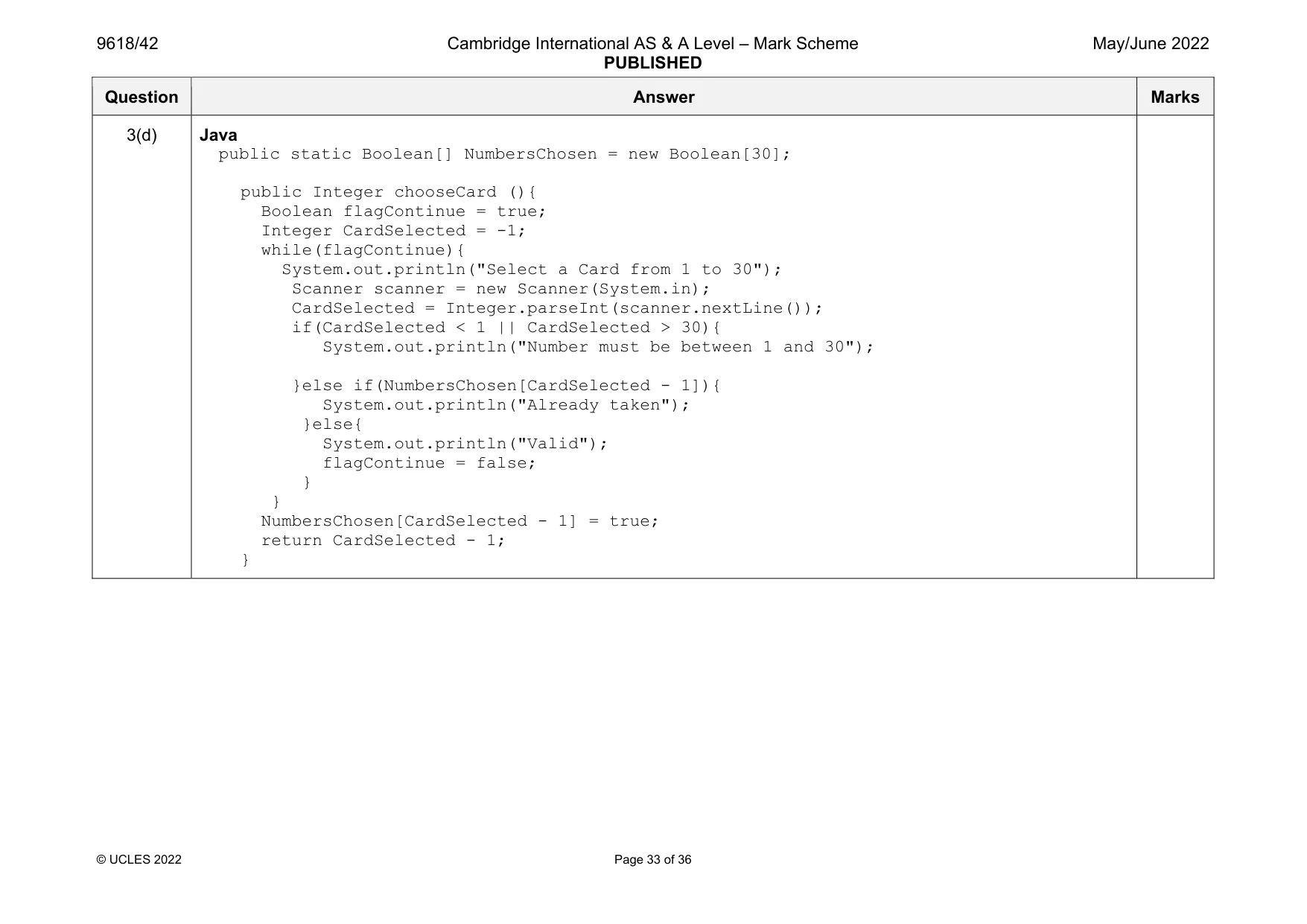
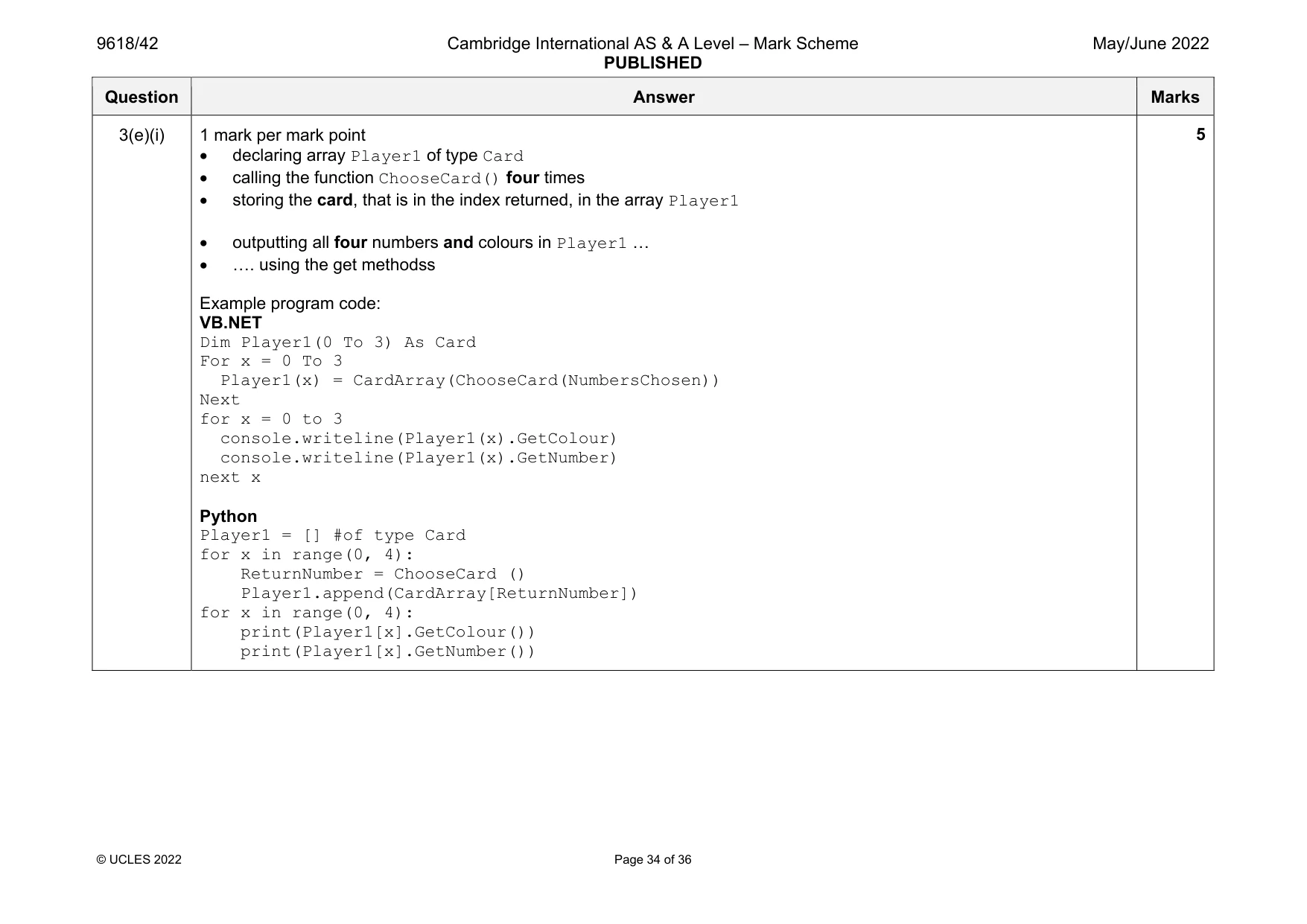
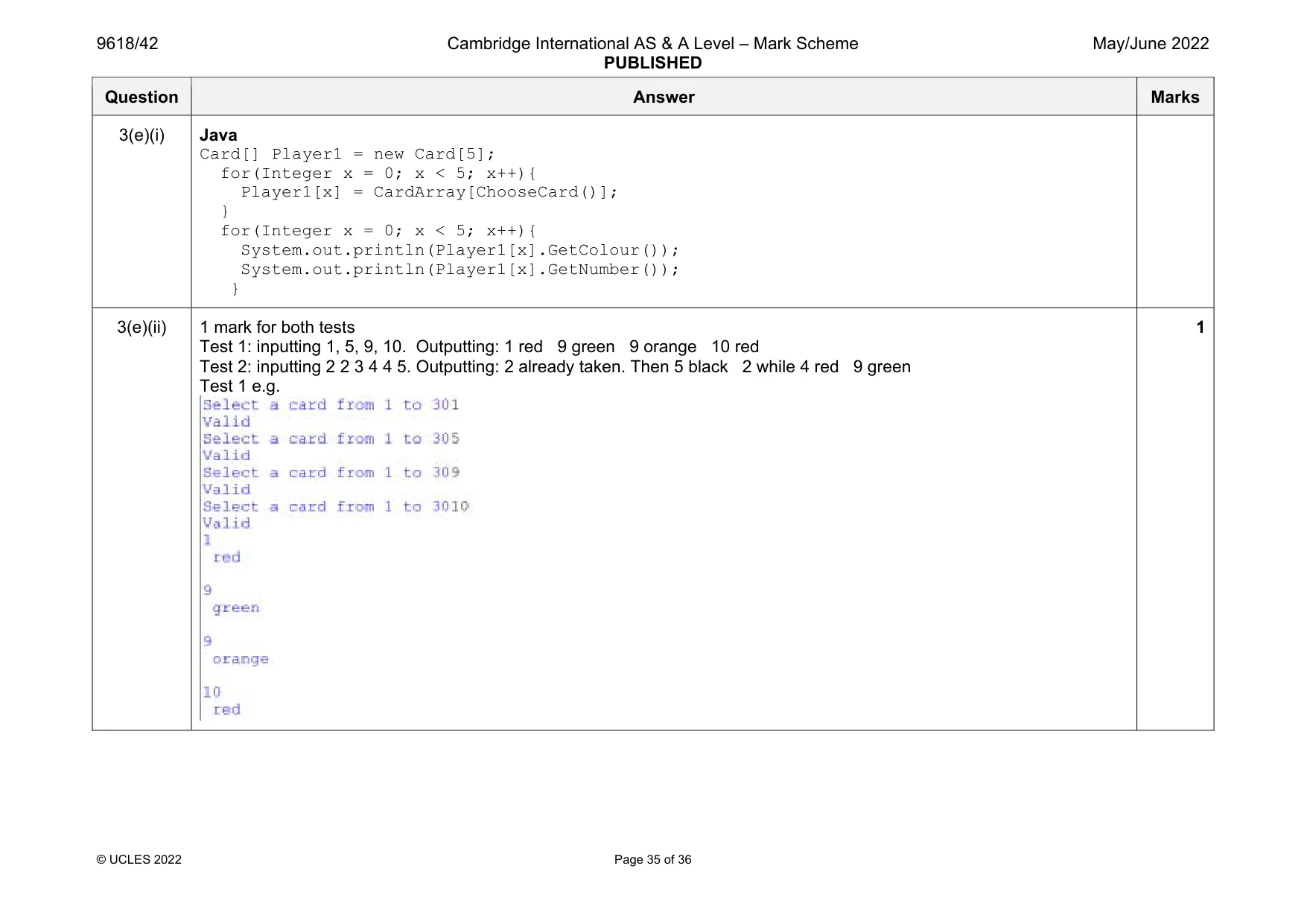
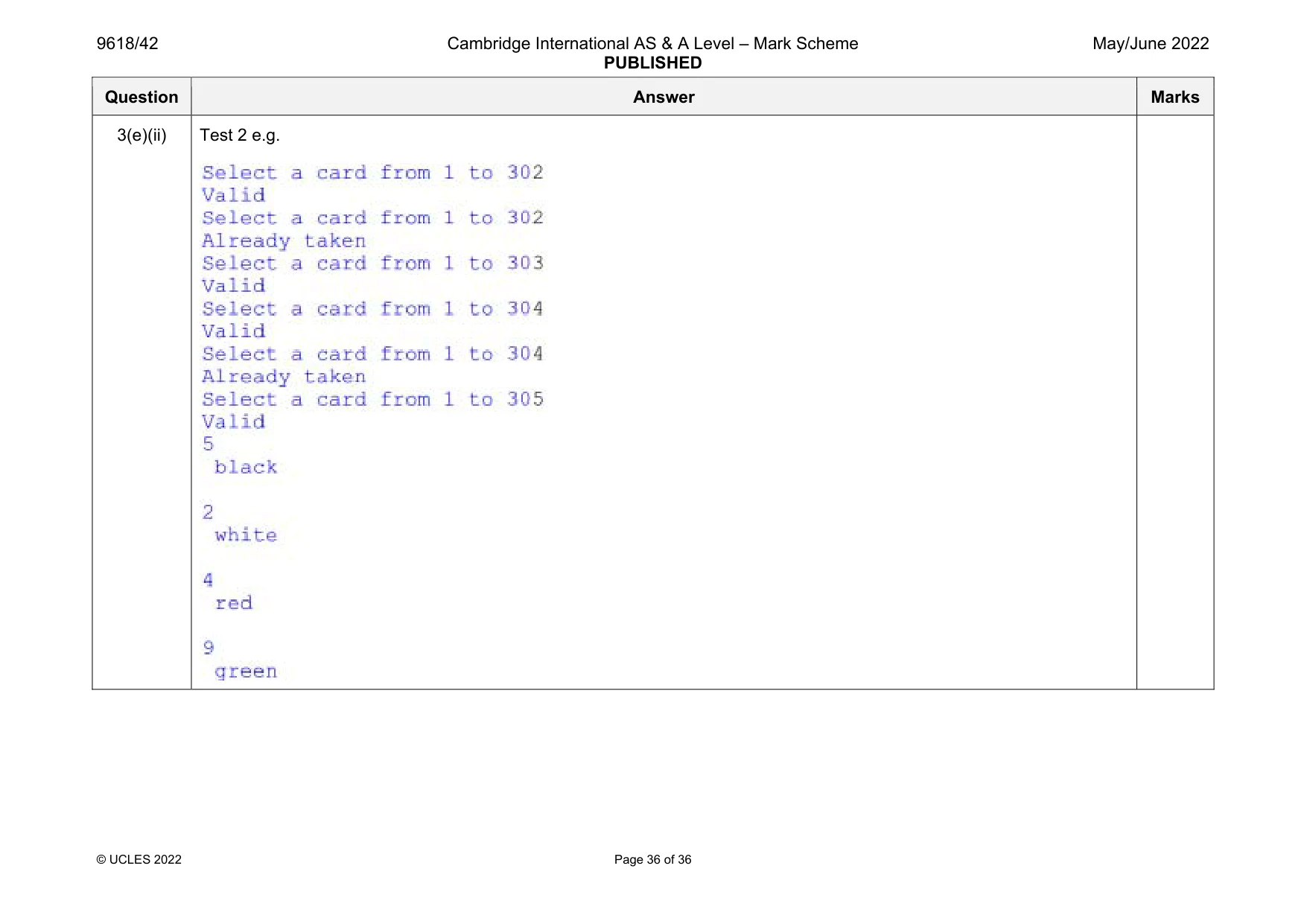
Mark scheme: 3(a) 1 mark per mark point Card class declaration (and end where appropriate) Both attributes (Number and Colour) declared with suitable data types … …as private correct constructor header (and end where appropriate) with two parameters … …both parameters assigned to the attributes Example program code: VB.NET Class Card Private Number As Integer Private Colour As String Sub New(Numberp, Colourp) Number = Numberp Colour = Colourp End Sub End Class Python class Card: #Number as Integer #Colour as string def __init__(self, Numberp, Colourp): self.__Number = Numberp self.__Colour = Colourp Question Answer Marks 3(a) Java import java.util.Scanner; import java.io.*; class Card{ private Integer Number; private String Colour; public Card(Integer pNumber, String pColour){ Number = pNumber; Colour = pColour; } public static void main(String args[]){ } } Question Answer Marks 3(b) 1 mark per mark point 1 get method header (and close where appropriate) with no parameter … … returning attribute 2nd correct get method Example program code: VB.NET Function GetNumber() Return Number End Function Function GetColour() Return Colour End Function Python def GetNumber(self): return self.__Number def GetColour(self): return self.__Colour Java public Integer GetNumber(){ return Number; } public String GetColour(){ return Colour; } 3 Question Answer Marks 3(c) 1 mark per mark point to max 7 Declaration of array with 30 elements of type Card Opening the text file CardValues.txt for read Looping until EOF/30 times Reading in all sets of 2 lines (number then colour) … …creating object of type Card… …with number and colour read in from file … …storing in next array element Try and catch for file handling…s ….with appropriate outputs Closing the file in a suitable place Example program code: VB.NET Sub Main() Dim CardArray(0 To 29) As Card Dim NumberRead As Integer Dim ColourRead As String Try Dim Filename As String = "CardValues.txt" Dim FileReader As New System.IO.StreamReader(filename) For x = 0 To 29 NumberRead = FileReader.ReadLine() ColourRead = FileReader.ReadLine() CardArray(x) = New Card(NumberRead, ColourRead) Next FileReader.close() Catch ex As Exception 7 Question Answer Marks 3(c) Console.WriteLine("Invalid file") End Try End Sub Python CardArray = [0,0,0,0,0,0,0,0,0,0,0,0,0,0,0,0,0,0,0,0,0,0,0,0,0,0,0,0,0,0] #integer try: Filename = "CardValues.txt" File = open(Filename,'r') for x in range(0,30): NumberRead = int(File.readline()) ColourRead = File.readline() CardArray[x] = Card(NumberRead, ColourRead) File.close except IOError: print("Could not find file") Java public static void main(String args[]){ Card[] CardArray = new Card[30]; Integer NumberRead; String ColourRead; String FileName = "CardValues.txt"; try{ FileReader F = new FileReader(FileName); BufferedReader Reader = new BufferedReader(f); for(Integer x = 0; x < 30; x++){ NumberRead = Integer.parseInt(Reader.readLine()); ColourRead = Reader.readLine(); CardArray[x] = new Card(NumberRead, ColourRead); } Reader.close(); } Question Answer Marks 3(c) catch(FileNotFoundException ex){ System.out.println("No file found"); } catch(IOException ex){ System.out.println("No file found"); } } Question Answer Marks 3(d) 1 mark per mark point to max 6 Implementing a suitable way of storing which card have been selected Function ChooseCard() header (and close) and returning an integer (index) in all cases Reading in array index from the user … …with suitable validation looping until it is between 1 and 30 (inclusive) Converting input to array index (e.g. –1 each time) Check if the input is already selected… … if it is selected, loop until index input is not already selected … returning index of available card selected Stores the valid Card chosen as taken (using any suitable method) Example program code: VB.NET Dim NumbersChosen(0 To 29) As Boolean Sub Main() For x = 0 To 29 NumbersChosen(x) = False Next …. End Sub Function chooseCard() Dim CardSelected As Integer Dim flagContinue As Boolean = True While flagContinue = True Console.WriteLine("Select a Card from 1 to 30") CardSelected = Console.ReadLine() If CardSelected < 1 Or CardSelected > 30 Then Console.WriteLine("Number must be between ") 6 Question Answer Marks 3(d) ElseIf NumbersChosen(CardSelected - 1) = True Then Console.WriteLine("Already taken") Else Console.WriteLine("valid") flagContinue = False End If End While NumbersChosen(CardSelected - 1) = True Return CardSelected - 1 End Function Python global NumbersChosen … def chooseCard (): global NumbersChosen flagContinue = True while flagContinue == true: CardSelected = int(input("Select a Card from 1 to 30")) if CardSelected < 1 or CardSelected > 30: print("Number must be between 1 and 30") elif NumbersChosen(CardSelected - 1) == True: print("Already taken") else: print("Valid") flagContinue = False NumbersChosen[CardSelected-1] = True return CardSelected-1 … #main … NumbersChosen = [False for i in range(30)] Question Answer Marks 3(d) Java public static Boolean[] NumbersChosen = new Boolean[30]; public Integer chooseCard (){ Boolean flagContinue = true; Integer CardSelected = -1; while(flagContinue){ System.out.println("Select a Card from 1 to 30"); Scanner scanner = new Scanner(System.in); CardSelected = Integer.parseInt(scanner.nextLine()); if(CardSelected < 1 || CardSelected > 30){ System.out.println("Number must be between 1 and 30"); }else if(NumbersChosen[CardSelected - 1]){ System.out.println("Already taken"); }else{ System.out.println("Valid"); flagContinue = false; } } NumbersChosen[CardSelected - 1] = true; return CardSelected - 1; } Question Answer Marks 3(e)(i) 1 mark per mark point declaring array Player1 of type Card calling the function ChooseCard() four times storing the card, that is in the index returned, in the array Player1 outputting all four numbers and colours in Player1 … …. using the get methodss Example program code: VB.NET Dim Player1(0 To 3) As Card For x = 0 To 3 Player1(x) = CardArray(ChooseCard(NumbersChosen)) Next for x = 0 to 3 console.writeline(Player1(x).GetColour) console.writeline(Player1(x).GetNumber) next x Python Player1 = [] #of type Card for x in range(0, 4): ReturnNumber = ChooseCard () Player1.append(CardArray[ReturnNumber]) for x in range(0, 4): print(Player1[x].GetColour()) print(Player1[x].GetNumber()) 5 Question Answer Marks 3(e)(i) Java Card[] Player1 = new Card[5]; for(Integer x = 0; x < 5; x++){ Player1[x] = CardArray[ChooseCard()]; } for(Integer x = 0; x < 5; x++){ System.out.println(Player1[x].GetColour()); System.out.println(Player1[x].GetNumber()); } 3(e)(ii) 1 mark for both tests Test 1: inputting 1, 5, 9, 10. Outputting: 1 red 9 green 9 orange 10 red Test 2: inputting 2 2 3 4 4 5. Outputting: 2 already taken. Then 5 black 2 while 4 red 9 green Test 1 e.g. 1 Question Answer Marks 3(e)(ii) Test 2 e.g.
What was in this paper
The subtopics covered by these 3 questions, and how many questions each got. Open one in a new tab to see every Cambridge question on it.
What you needed in this session
Cambridge’s own grade thresholds for 2022 May/June, Paper 4 · Variant 2. A higher threshold means an easier paper — the bar moves with how the cohort did.