Cambridge A Level Computer Science 9618 — 2022 Oct/Nov Paper 4 · Variant 1
9618/41/O/N/22 · 3 questions · 75 marks · ≈84 min
The question paper and its mark scheme, free to read here and free to download. This is Cambridge’s own paper, exactly as it was sat.
Question paper12 pages
Mark scheme23 pages
Answers below. Sit the paper first if you are practising.
Questions as text
Q1 · The text file IntegerData.txt stores 100 integer numbers between 1 and 100 inclusive
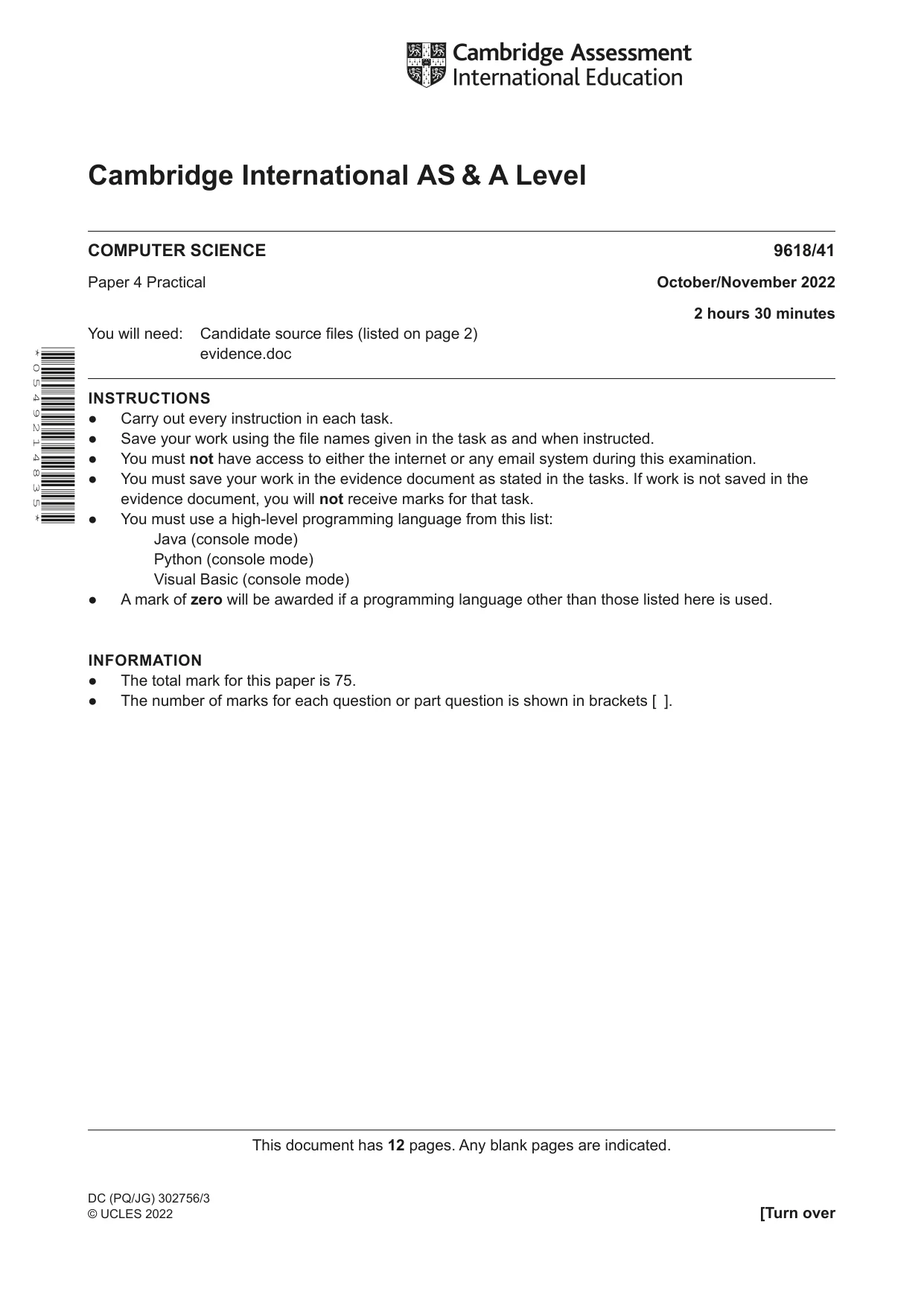
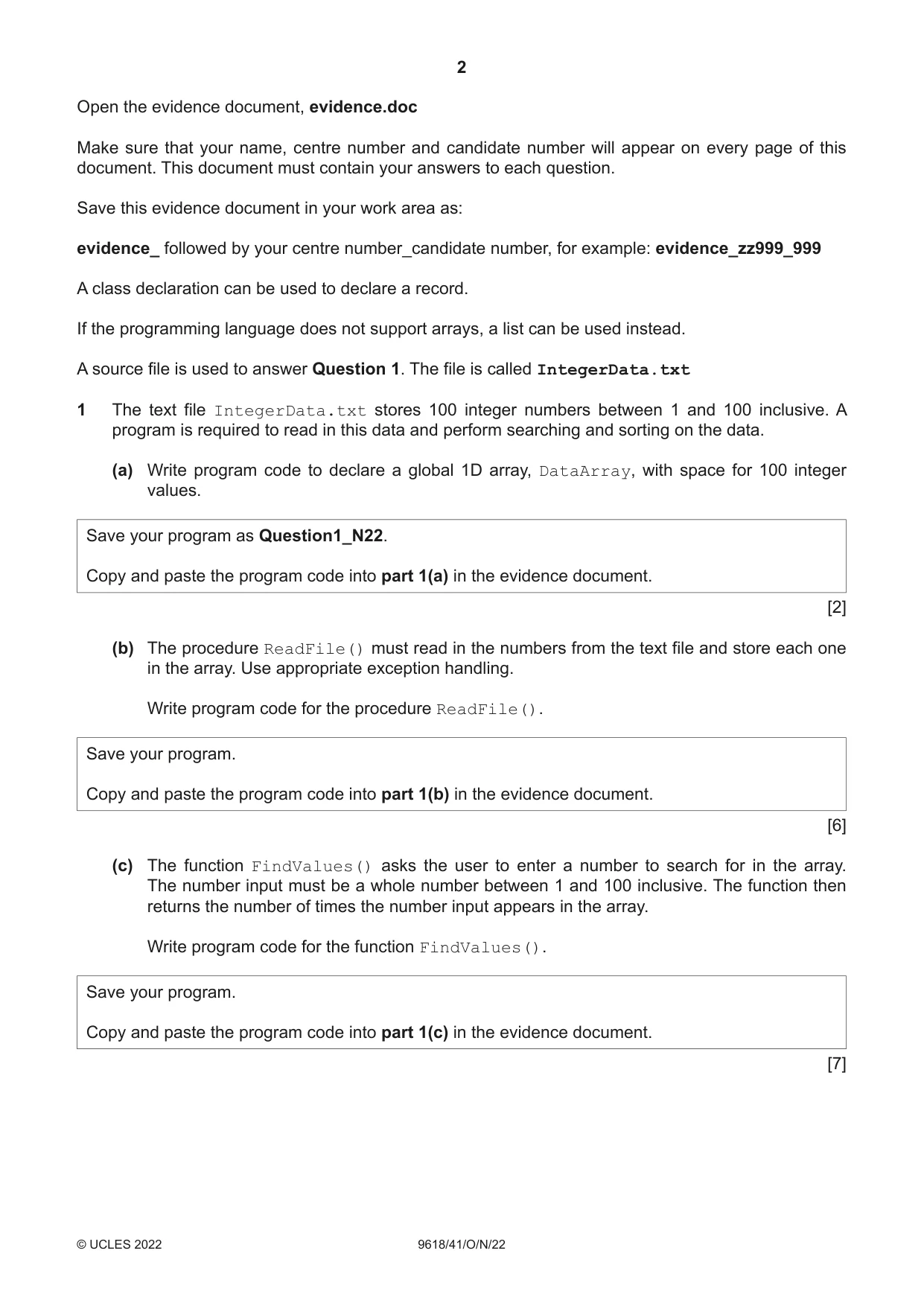
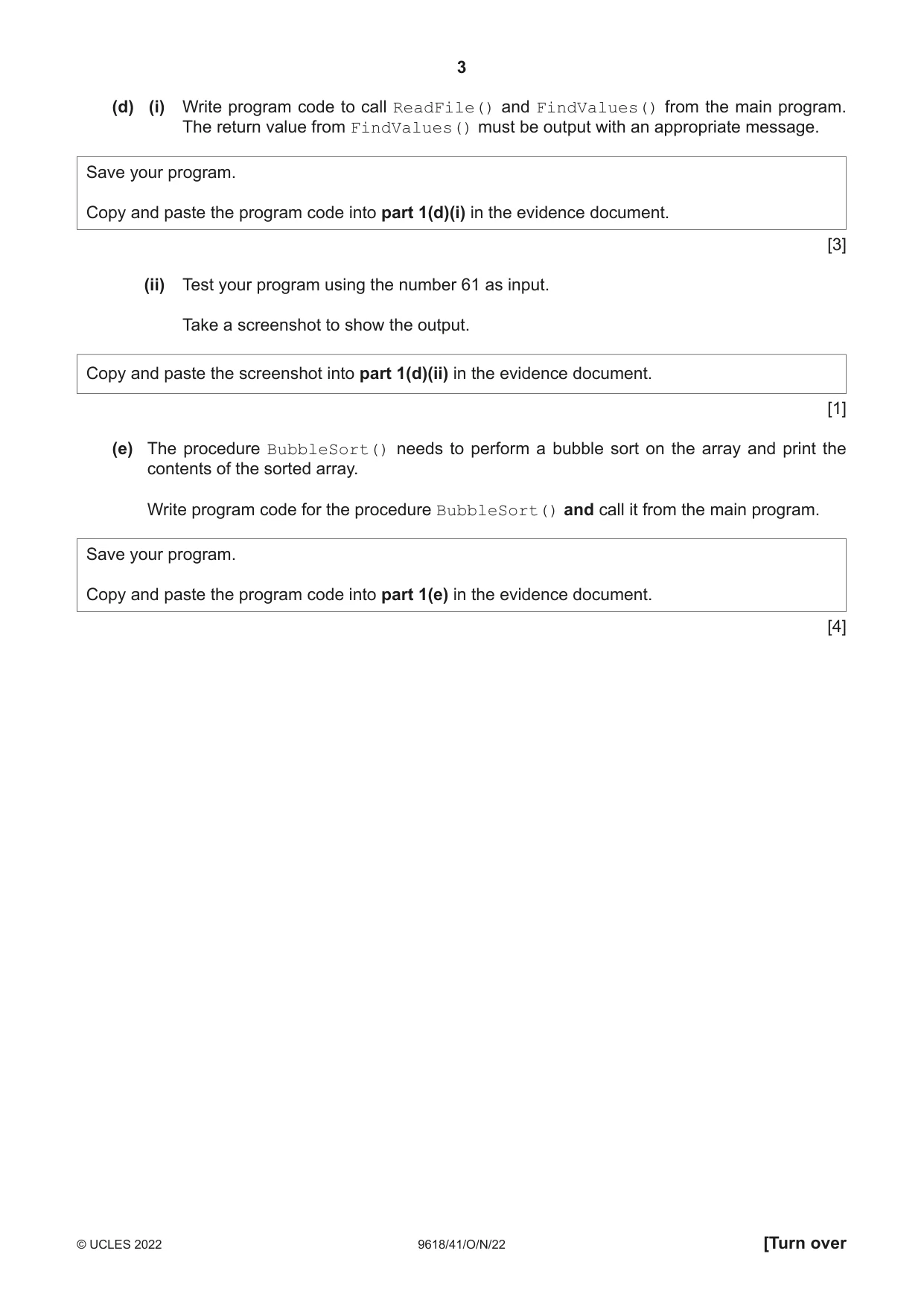
1 The text file IntegerData.txt stores 100 integer numbers between 1 and 100 inclusive. A program is required to read in this data and perform searching and sorting on the data. (a) Write program code to declare a global 1D array, DataArray, with space for 100 integer values. Save your program as Question1_N22. Copy and paste the program code into part 1(a) in the evidence document. [2] (b) The procedure ReadFile() must read in the numbers from the text file and store each one in the array. Use appropriate exception handling. Write program code for the procedure ReadFile(). Save your program. Copy and paste the program code into part 1(b) in the evidence document. [6] (c) The function FindValues() asks the user to enter a number to search for in the array. The number input must be a whole number between 1 and 100 inclusive. The function then returns the number of times the number input appears in the array. Write program code for the function FindValues(). Save your program. Copy and paste the program code into part 1(c) in the evidence document. [7] (d) (i) Write program code to call ReadFile() and FindValues() from the main program. The return value from FindValues() must be output with an appropriate message. Save your program. Copy and paste the program code into part 1(d)(i) in the evidence document. [3] (ii) Test your program using the number 61 as input. Take a screenshot to show the output. Copy and paste the screenshot into part 1(d)(ii) in the evidence document. [1] (e) The procedure BubbleSort() needs to perform a bubble sort on the array and print the contents of the sorted array. Write program code for the procedure BubbleSort() and call it from the main program. Save your program. Copy and paste the program code into part 1(e) in the evidence document. [4]
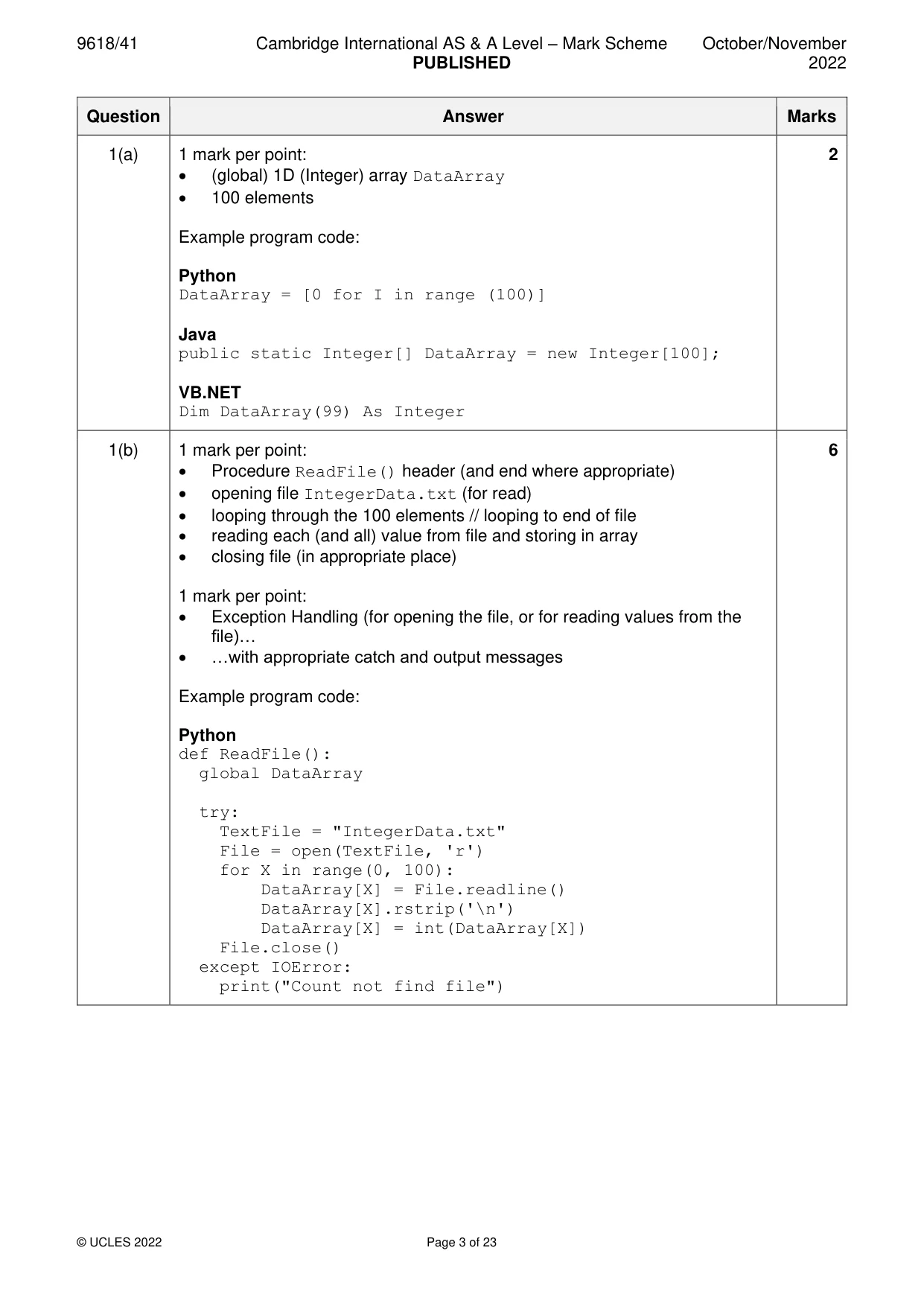
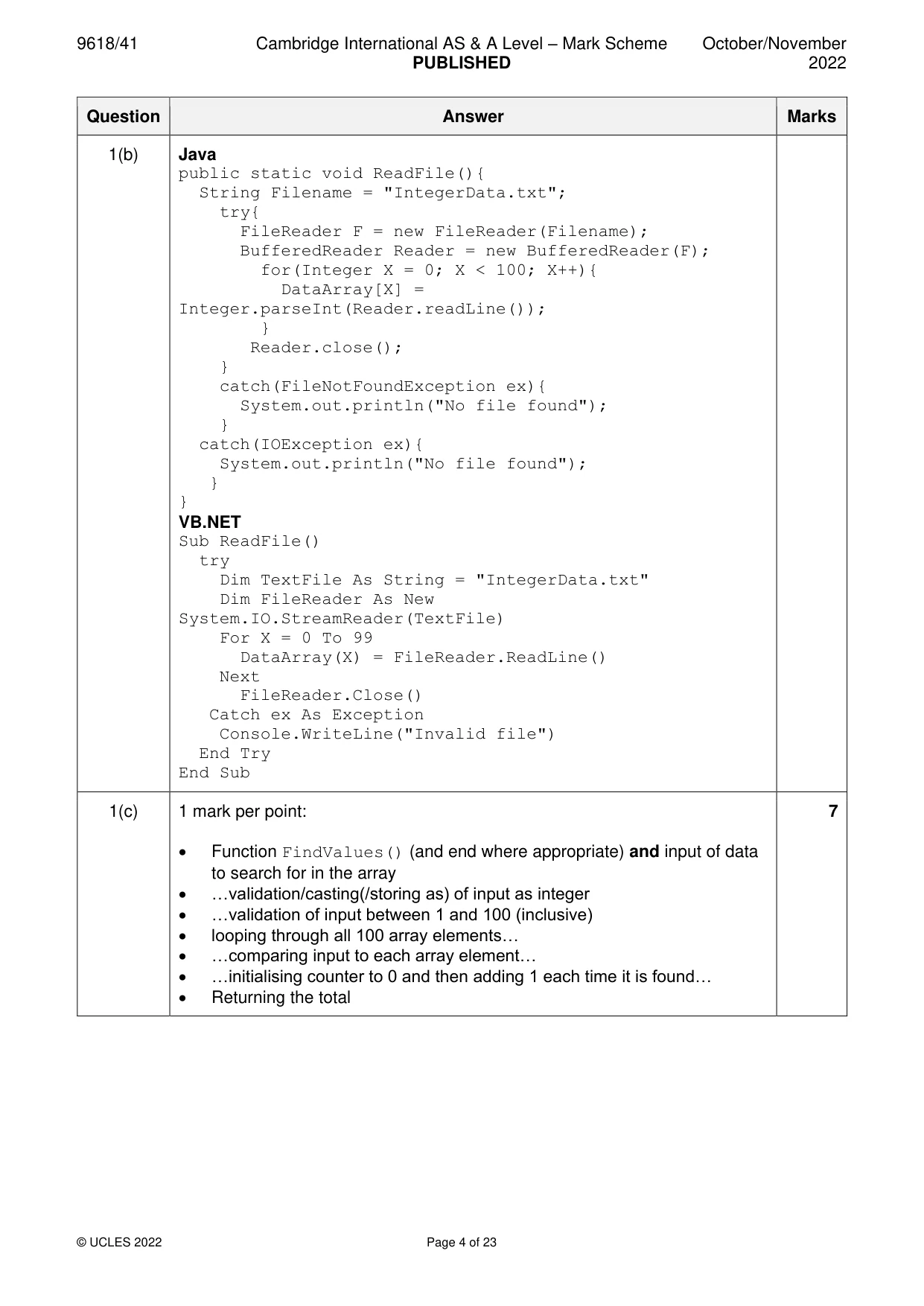
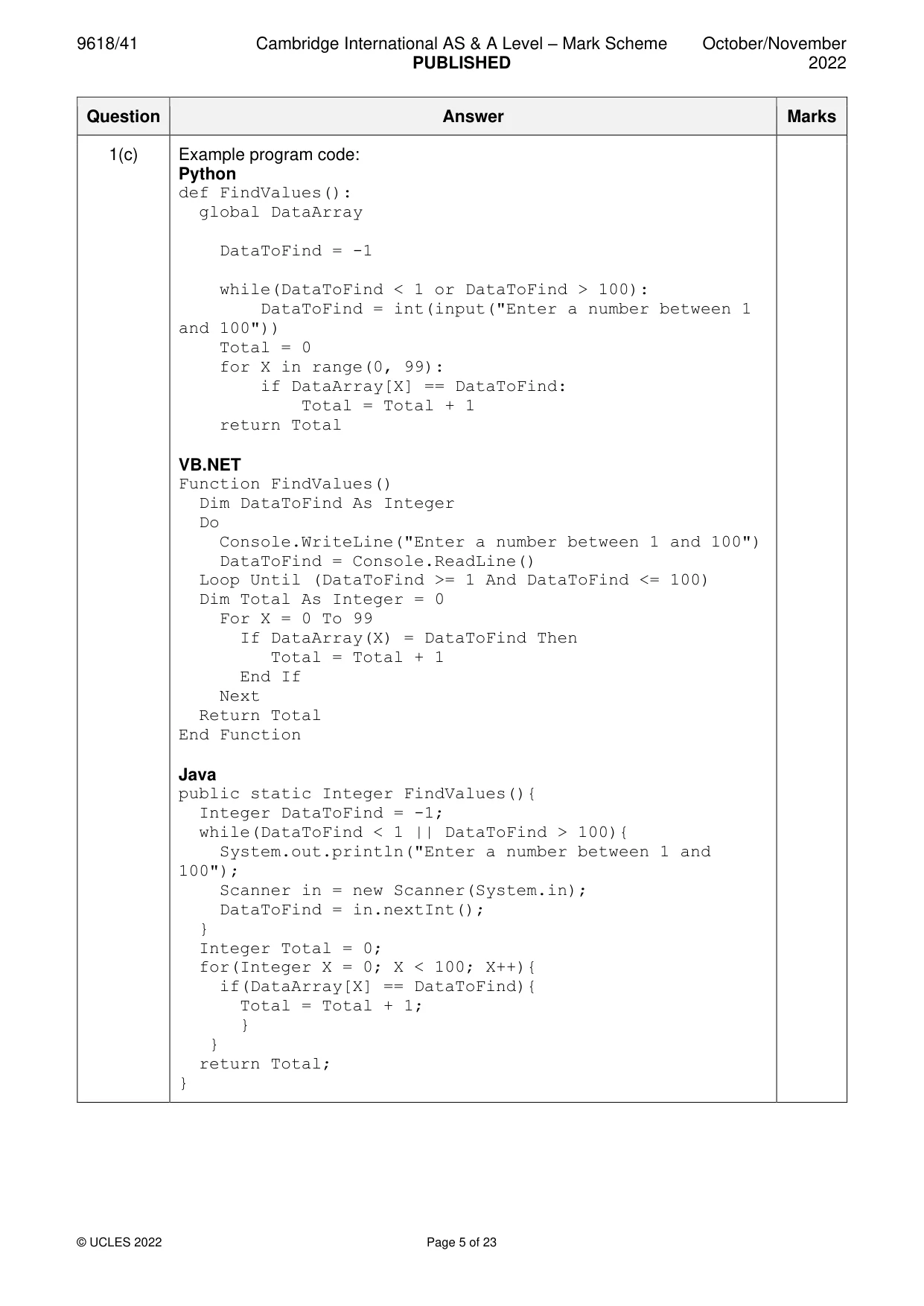
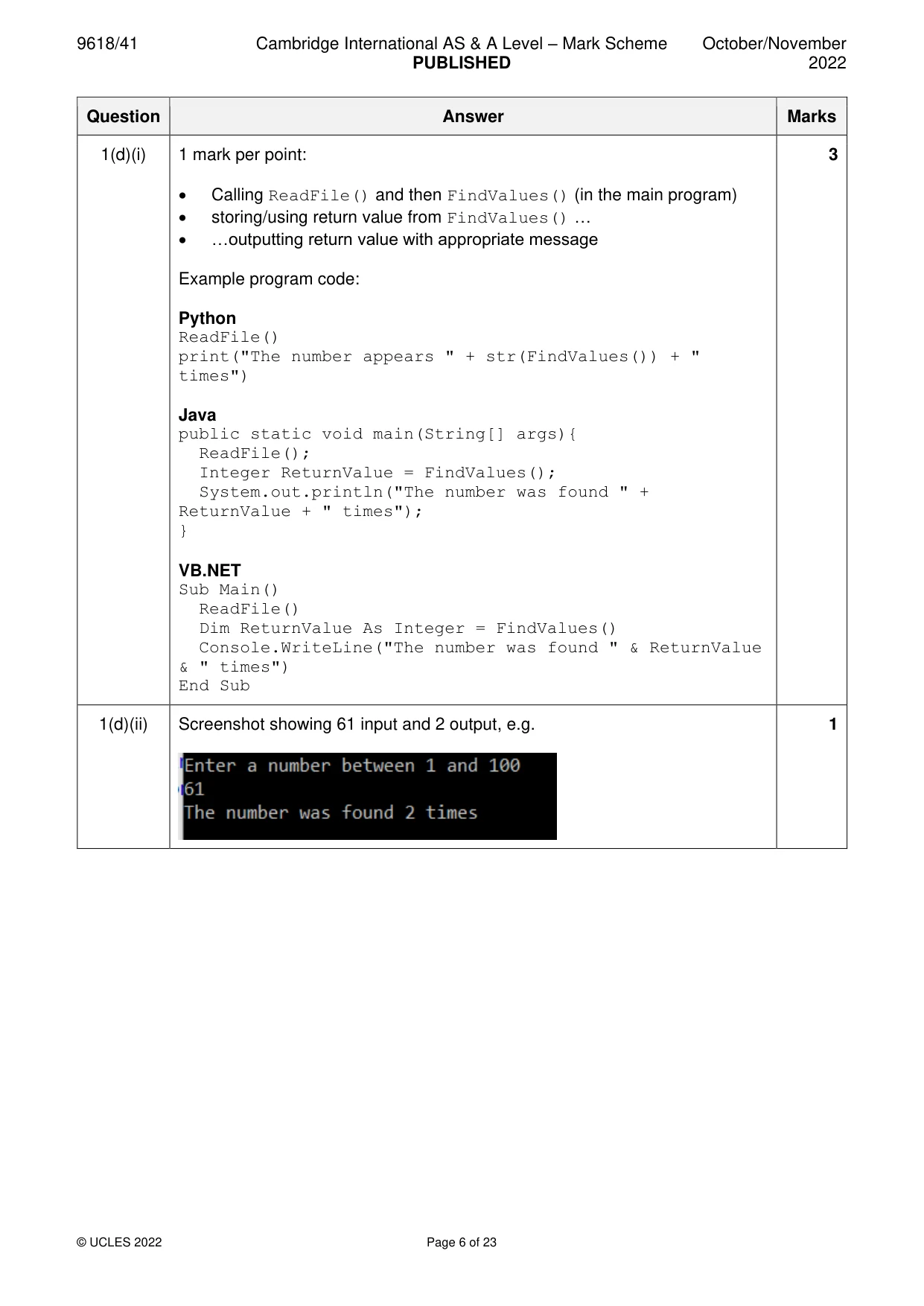
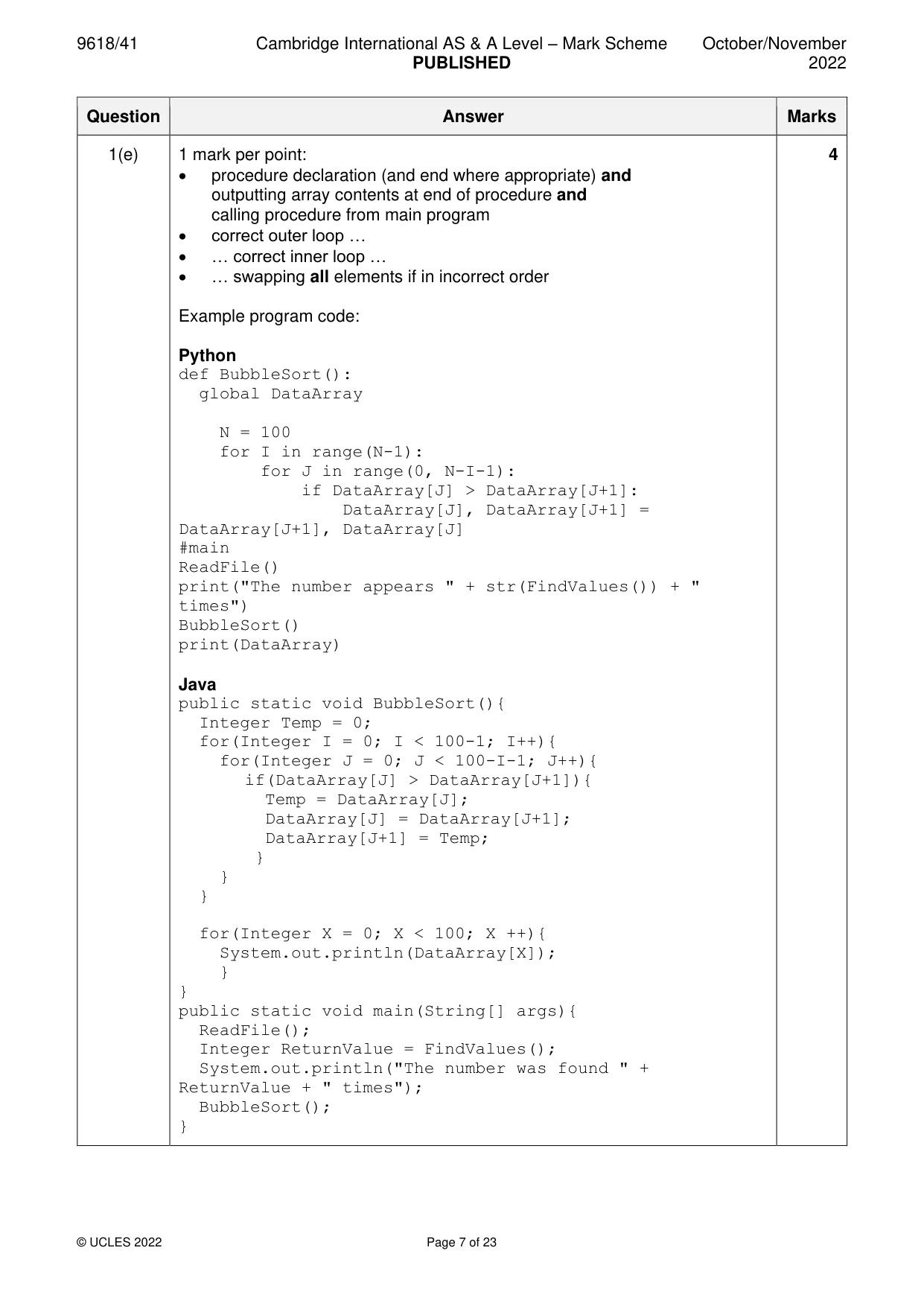
Mark scheme: Question Answer Marks 1(a) 1 mark per point: 2 • (global) 1D (Integer) array DataArray • 100 elements Example program code: Python DataArray = [0 for I in range (100)] Java public static Integer[] DataArray = new Integer[100]; VB.NET Dim DataArray(99) As Integer 1(b) 1 mark per point: 6 • Procedure ReadFile() header (and end where appropriate) • opening file IntegerData.txt (for read) • looping through the 100 elements // looping to end of file • reading each (and all) value from file and storing in array • closing file (in appropriate place) 1 mark per point: • Exception Handling (for opening the file, or for reading values from the file)… • …with appropriate catch and output messages Example program code: Python def ReadFile(): global DataArray try: TextFile = "IntegerData.txt" File = open(TextFile, 'r') for X in range(0, 100): DataArray[X] = File.readline() DataArray[X].rstrip('\n') DataArray[X] = int(DataArray[X]) File.close() except IOError: print("Count not find file") 1(b) Java public static void ReadFile(){ String Filename = "IntegerData.txt"; try{ FileReader F = new FileReader(Filename); BufferedReader Reader = new BufferedReader(F); for(Integer X = 0; X < 100; X++){ DataArray[X] = Integer.parseInt(Reader.readLine()); } Reader.close(); } catch(FileNotFoundException ex){ System.out.println("No file found"); } catch(IOException ex){ System.out.println("No file found"); } } VB.NET Sub ReadFile() try Dim TextFile As String = "IntegerData.txt" Dim FileReader As New System.IO.StreamReader(TextFile) For X = 0 To 99 DataArray(X) = FileReader.ReadLine() Next FileReader.Close() Catch ex As Exception Console.WriteLine("Invalid file") End Try End Sub 1(c) 1 mark per point: 7 • Function FindValues() (and end where appropriate) and input of data to search for in the array • …validation/casting(/storing as) of input as integer • …validation of input between 1 and 100 (inclusive) • looping through all 100 array elements… • …comparing input to each array element… • …initialising counter to 0 and then adding 1 each time it is found… • Returning the total 1(c) Example program code: Python def FindValues(): global DataArray DataToFind = -1 while(DataToFind < 1 or DataToFind > 100): DataToFind = int(input("Enter a number between 1 and 100")) Total = 0 for X in range(0, 99): if DataArray[X] == DataToFind: Total = Total + 1 return Total VB.NET Function FindValues() Dim DataToFind As Integer Do Console.WriteLine("Enter a number between 1 and 100") DataToFind = Console.ReadLine() Loop Until (DataToFind >= 1 And DataToFind <= 100) Dim Total As Integer = 0 For X = 0 To 99 If DataArray(X) = DataToFind Then Total = Total + 1 End If Next Return Total End Function Java public static Integer FindValues(){ Integer DataToFind = -1; while(DataToFind < 1 || DataToFind > 100){ System.out.println("Enter a number between 1 and 100"); Scanner in = new Scanner(System.in); DataToFind = in.nextInt(); } Integer Total = 0; for(Integer X = 0; X < 100; X++){ if(DataArray[X] == DataToFind){ Total = Total + 1; } } return Total; } 1(d)(i) 1 mark per point: 3 • Calling ReadFile() and then FindValues() (in the main program) • storing/using return value from FindValues() … • …outputting return value with appropriate message Example program code: Python ReadFile() print("The number appears " + str(FindValues()) + " times") Java public static void main(String[] args){ ReadFile(); Integer ReturnValue = FindValues(); System.out.println("The number was found " + ReturnValue + " times"); } VB.NET Sub Main() ReadFile() Dim ReturnValue As Integer = FindValues() Console.WriteLine("The number was found " & ReturnValue & " times") End Sub 1(d)(ii) Screenshot showing 61 input and 2 output, e.g. 1 1(e) 1 mark per point: 4 • procedure declaration (and end where appropriate) and outputting array contents at end of procedure and calling procedure from main program • correct outer loop … • … correct inner loop … • … swapping all elements if in incorrect order Example program code: Python def BubbleSort(): global DataArray N = 100 for I in range(N-1): for J in range(0, N-I-1): if DataArray[J] > DataArray[J+1]: DataArray[J], DataArray[J+1] = DataArray[J+1], DataArray[J] #main ReadFile() print("The number appears " + str(FindValues()) + " times") BubbleSort() print(DataArray) Java public static void BubbleSort(){ Integer Temp = 0; for(Integer I = 0; I < 100-1; I++){ for(Integer J = 0; J < 100-I-1; J++){ if(DataArray[J] > DataArray[J+1]){ Temp = DataArray[J]; DataArray[J] = DataArray[J+1]; DataArray[J+1] = Temp; } } } for(Integer X = 0; X < 100; X ++){ System.out.println(DataArray[X]); } } public static void main(String[] args){ ReadFile(); Integer ReturnValue = FindValues(); System.out.println("The number was found " + ReturnValue + " times"); BubbleSort(); } 1(e) VB.NET Sub Bubblesort() Dim Outer As Integer = 100 - 1 Dim Swap As Boolean Dim Inner As Integer Dim Temp As Integer Do Inner = 0 Swap = False Do If DataArray(Inner) > DataArray(Inner + 1) Then Temp = DataArray(Inner) DataArray(Inner) = DataArray(Inner + 1) DataArray(Inner + 1) = Temp Swap = True End If Inner = Inner + 1 Loop Until Inner = Outer Outer = Outer - 1 Loop Until Swap = False Or Outer = 0 For X = 0 To 99 Console.WriteLine(DataArray(X)) Next End Sub Sub Main() ReadFile() Dim ReturnValue As Integer = FindValues() Console.WriteLine("The number was found " & ReturnValue & " times") Bubblesort() End Sub
Q2 · A computer program is being developed that uses a set of cards
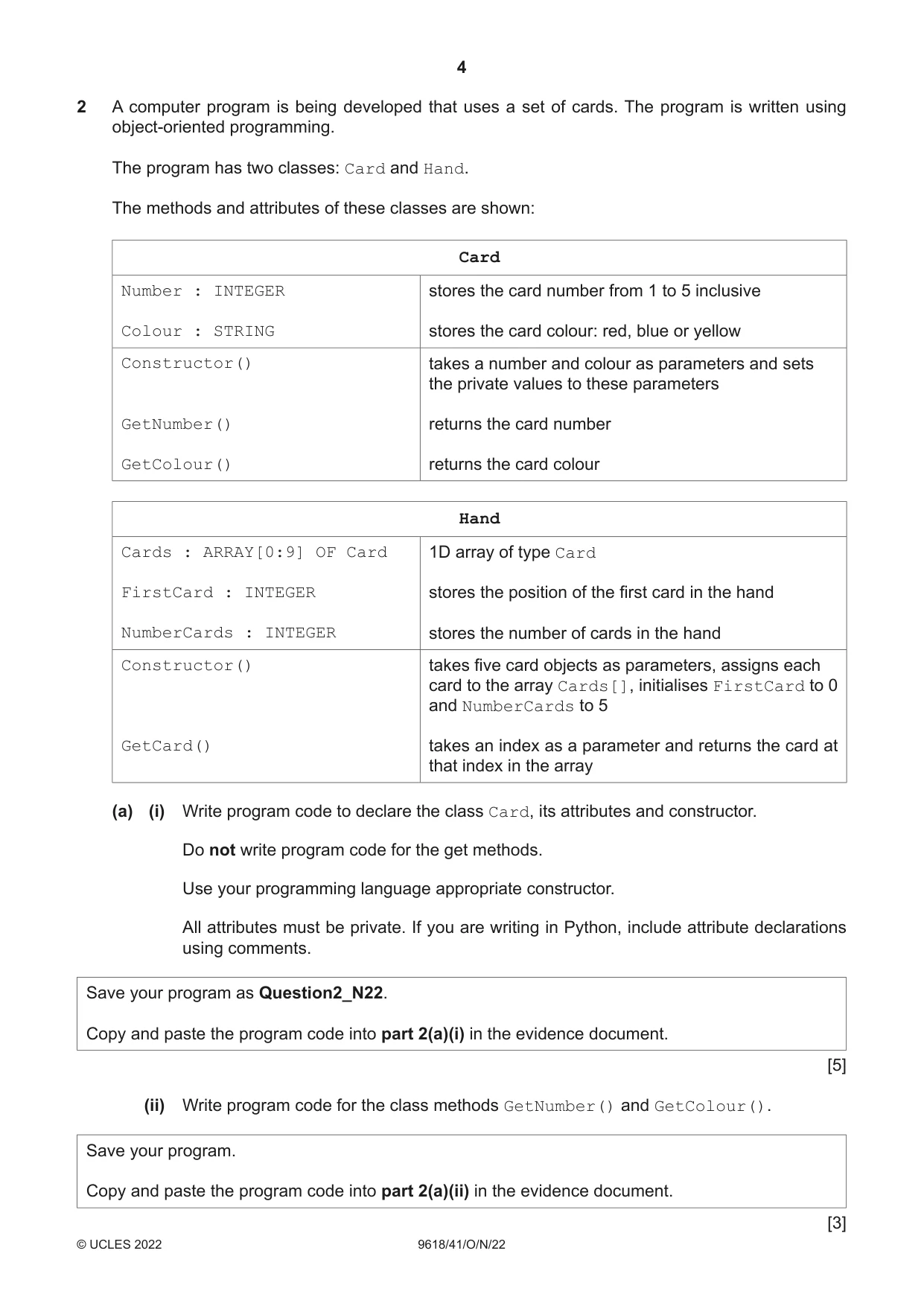
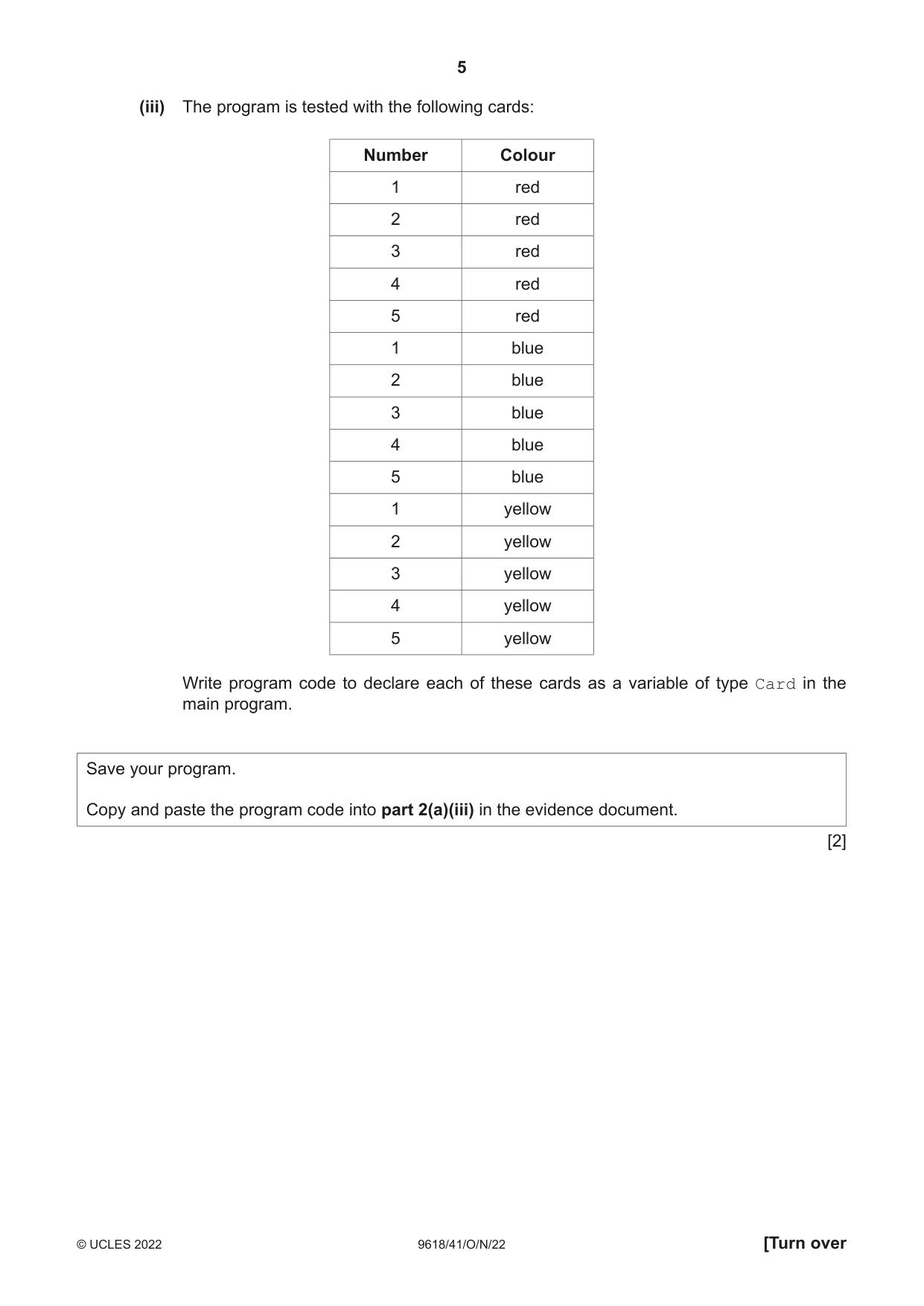
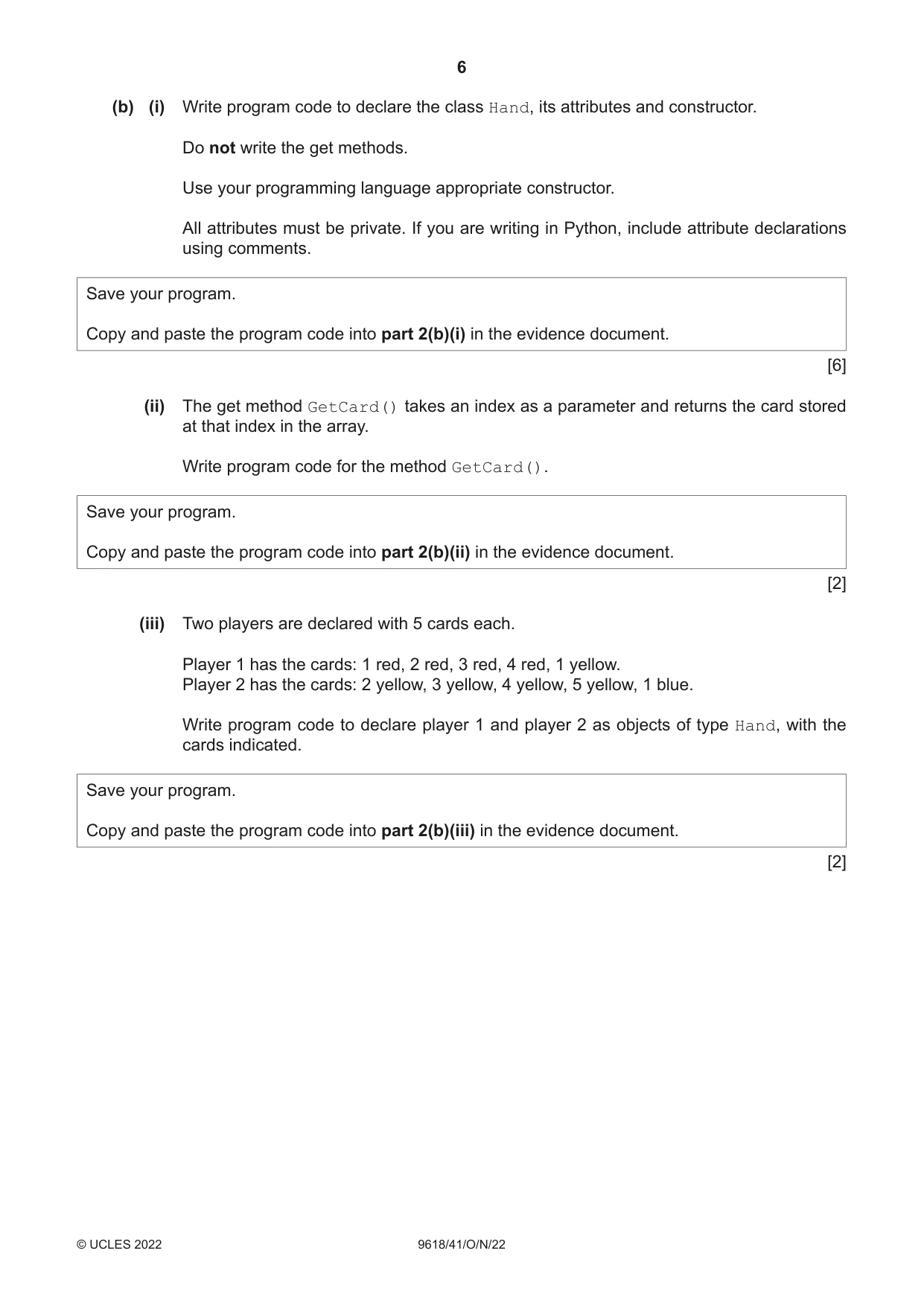
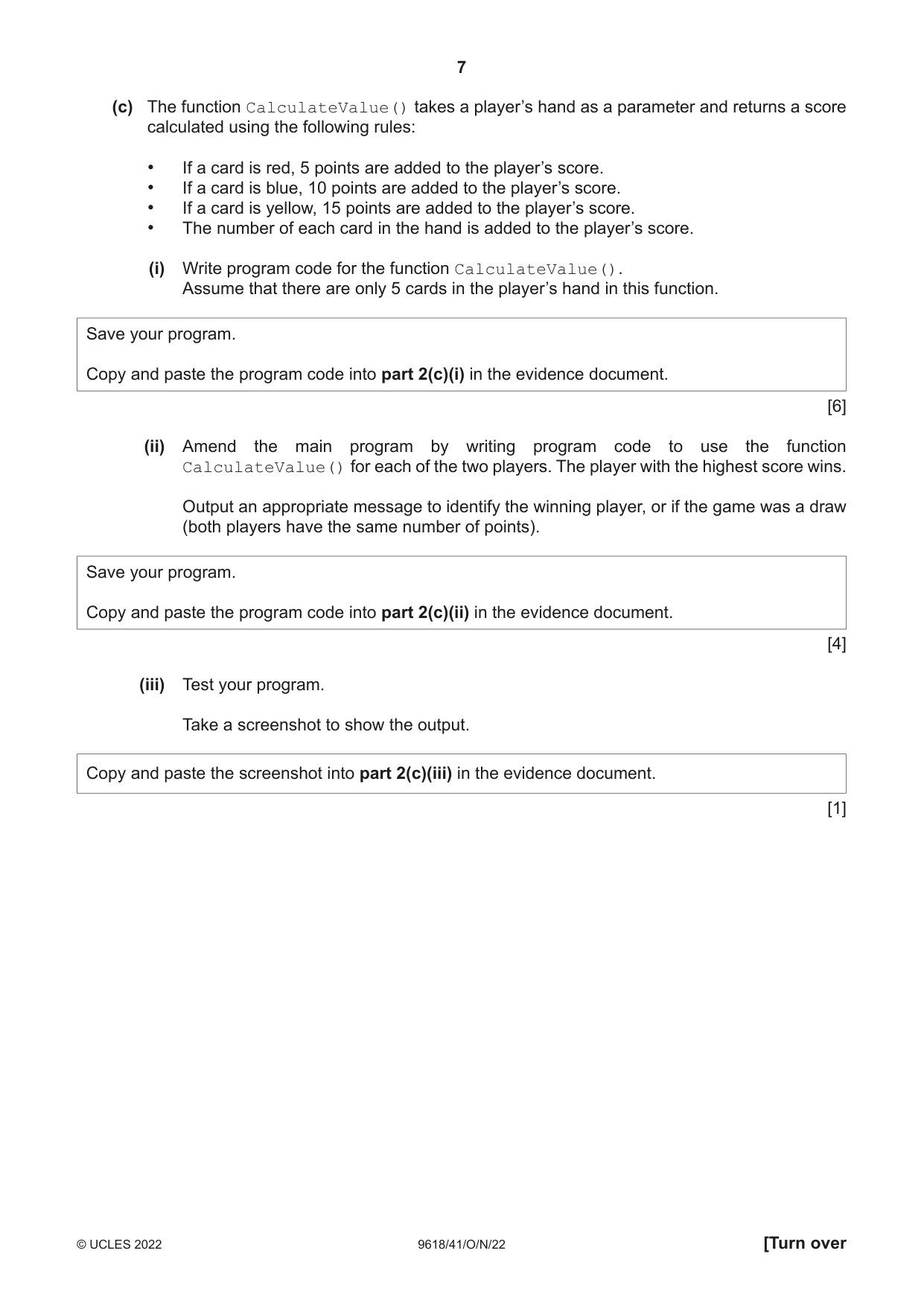
2 A computer program is being developed that uses a set of cards. The program is written using object-oriented programming. The program has two classes: Card and Hand. The methods and attributes of these classes are shown: Card Number : INTEGER stores the card number from 1 to 5 inclusive Colour : STRING stores the card colour: red, blue or yellow Constructor() takes a number and colour as parameters and sets the private values to these parameters GetNumber() returns the card number GetColour() returns the card colour Hand Cards : ARRAY[0:9] OF Card 1D array of type Card FirstCard : INTEGER stores the position of the first card in the hand NumberCards : INTEGER stores the number of cards in the hand Constructor() takes five card objects as parameters, assigns each card to the array Cards[], initialises FirstCard to 0 and NumberCards to 5 GetCard() takes an index as a parameter and returns the card at that index in the array (a) (i) Write program code to declare the class Card, its attributes and constructor. Do not write program code for the get methods. Use your programming language appropriate constructor. All attributes must be private. If you are writing in Python, include attribute declarations using comments. Save your program as Question2_N22. Copy and paste the program code into part 2(a)(i) in the evidence document. [5] (ii) Write program code for the class methods GetNumber() and GetColour(). Save your program. Copy and paste the program code into part 2(a)(ii) in the evidence document. [3] (iii) The program is tested with the following cards: Number Colour 1 red 2 red 3 red 4 red 5 red 1 blue 2 blue 3 blue 4 blue 5 blue 1 yellow 2 yellow 3 yellow 4 yellow 5 yellow Write program code to declare each of these cards as a variable of type Card in the main program. Save your program. Copy and paste the program code into part 2(a)(iii) in the evidence document. [2] (b) (i) Write program code to declare the class Hand, its attributes and constructor. Do not write the get methods. Use your programming language appropriate constructor. All attributes must be private. If you are writing in Python, include attribute declarations using comments. Save your program. Copy and paste the program code into part 2(b)(i) in the evidence document. [6] (ii) The get method GetCard() takes an index as a parameter and returns the card stored at that index in the array. Write program code for the method GetCard(). Save your program. Copy and paste the program code into part 2(b)(ii) in the evidence document. [2] (iii) Two players are declared with 5 cards each. Player 1 has the cards: 1 red, 2 red, 3 red, 4 red, 1 yellow. Player 2 has the cards: 2 yellow, 3 yellow, 4 yellow, 5 yellow, 1 blue. Write program code to declare player 1 and player 2 as objects of type Hand, with the cards indicated. Save your program. Copy and paste the program code into part 2(b)(iii) in the evidence document. [2] (c) The function CalculateValue() takes a player’s hand as a parameter and returns a score calculated using the following rules: • If a card is red, 5 points are added to the player’s score. • If a card is blue, 10 points are added to the player’s score. • If a card is yellow, 15 points are added to the player’s score. • The number of each card in the hand is added to the player’s score. (i) Write program code for the function CalculateValue(). Assume that there are only 5 cards in the player’s hand in this function. Save your program. Copy and paste the program code into part 2(c)(i) in the evidence document. [6] (ii) Amend the main program by writing program code to use the function CalculateValue() for each of the two players. The player with the highest score wins. Output an appropriate message to identify the winning player, or if the game was a draw (both players have the same number of points). Save your program. Copy and paste the program code into part 2(c)(ii) in the evidence document. [4] (iii) Test your program. Take a screenshot to show the output. Copy and paste the screenshot into part 2(c)(iii) in the evidence document. [1]
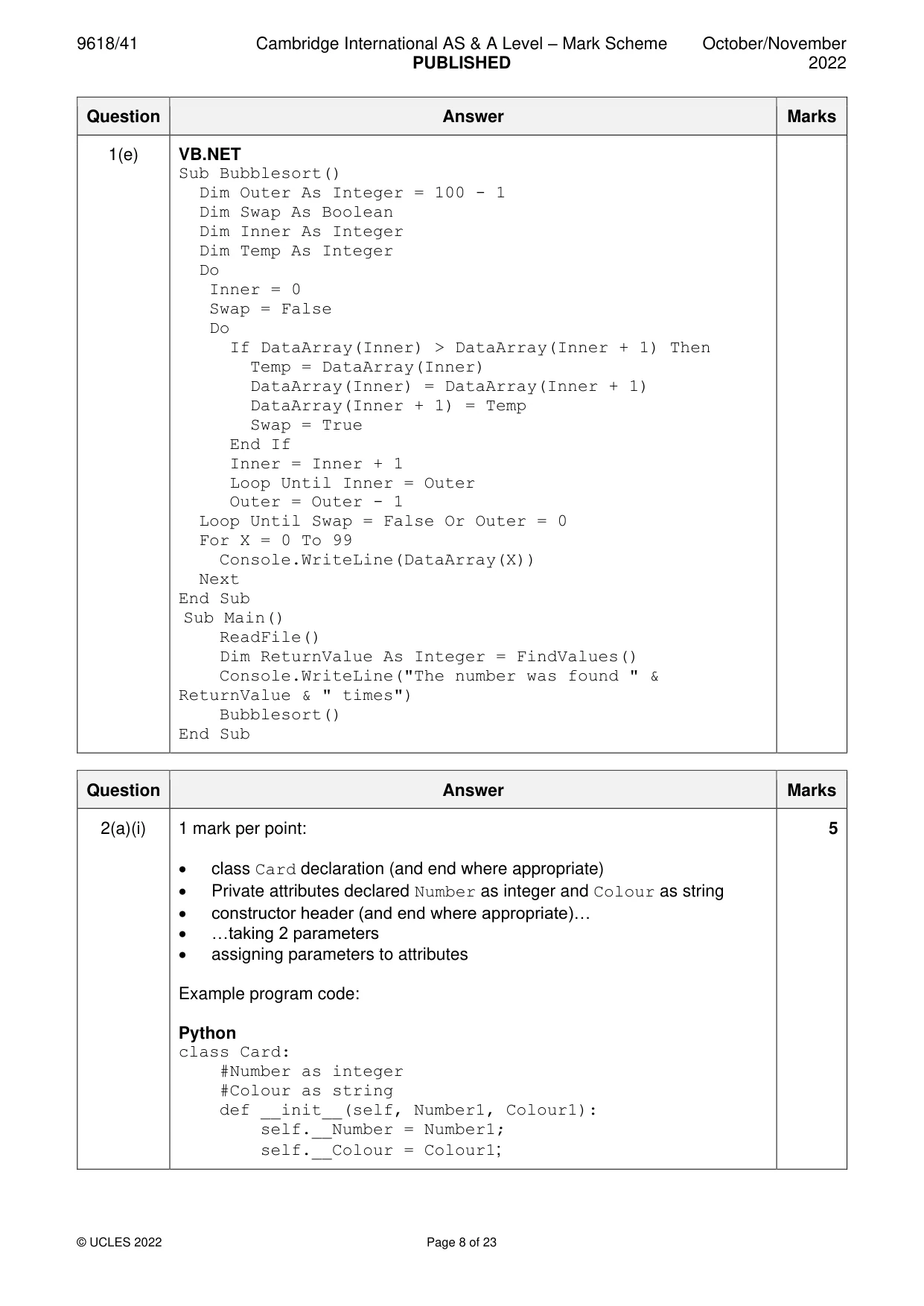
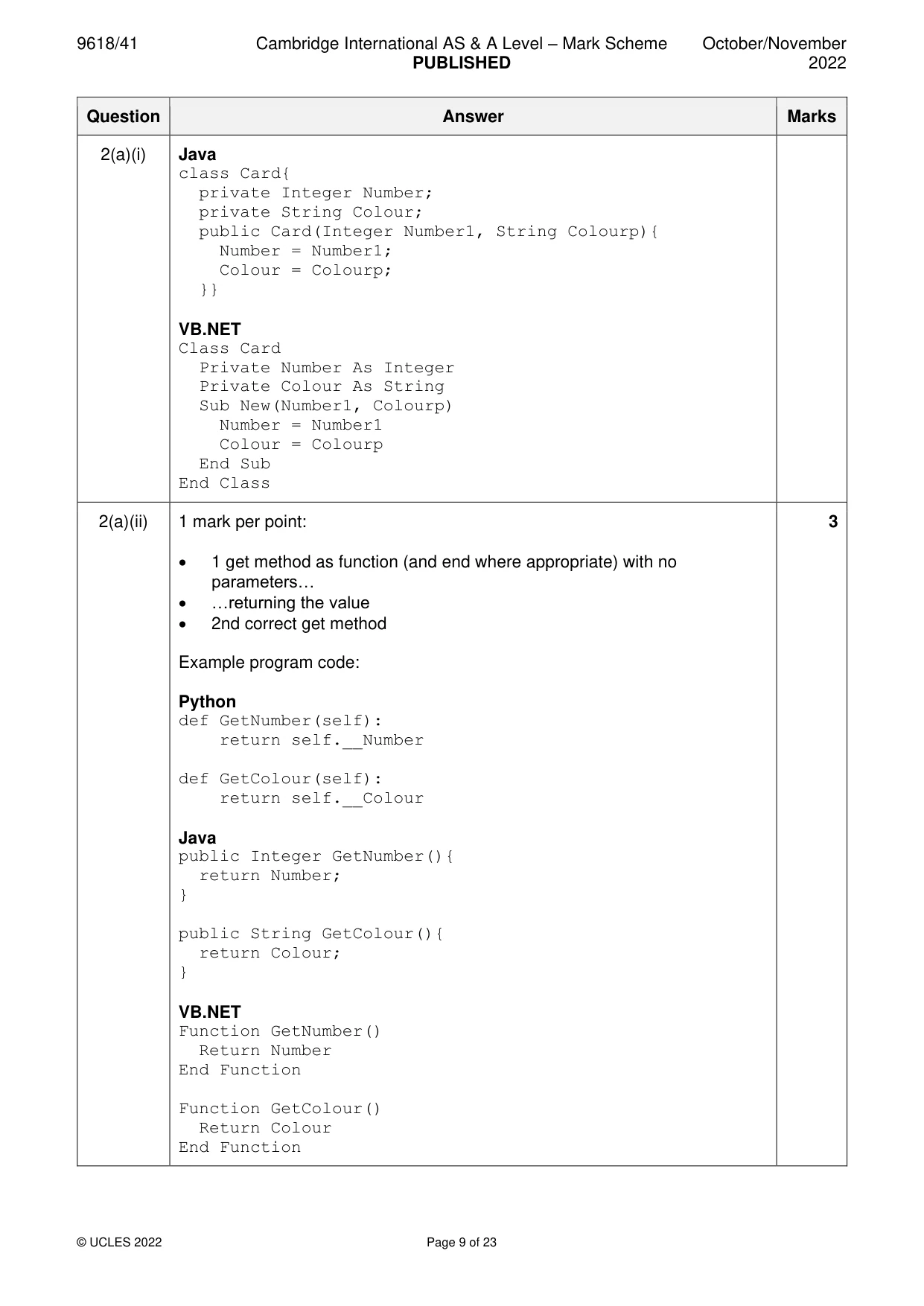
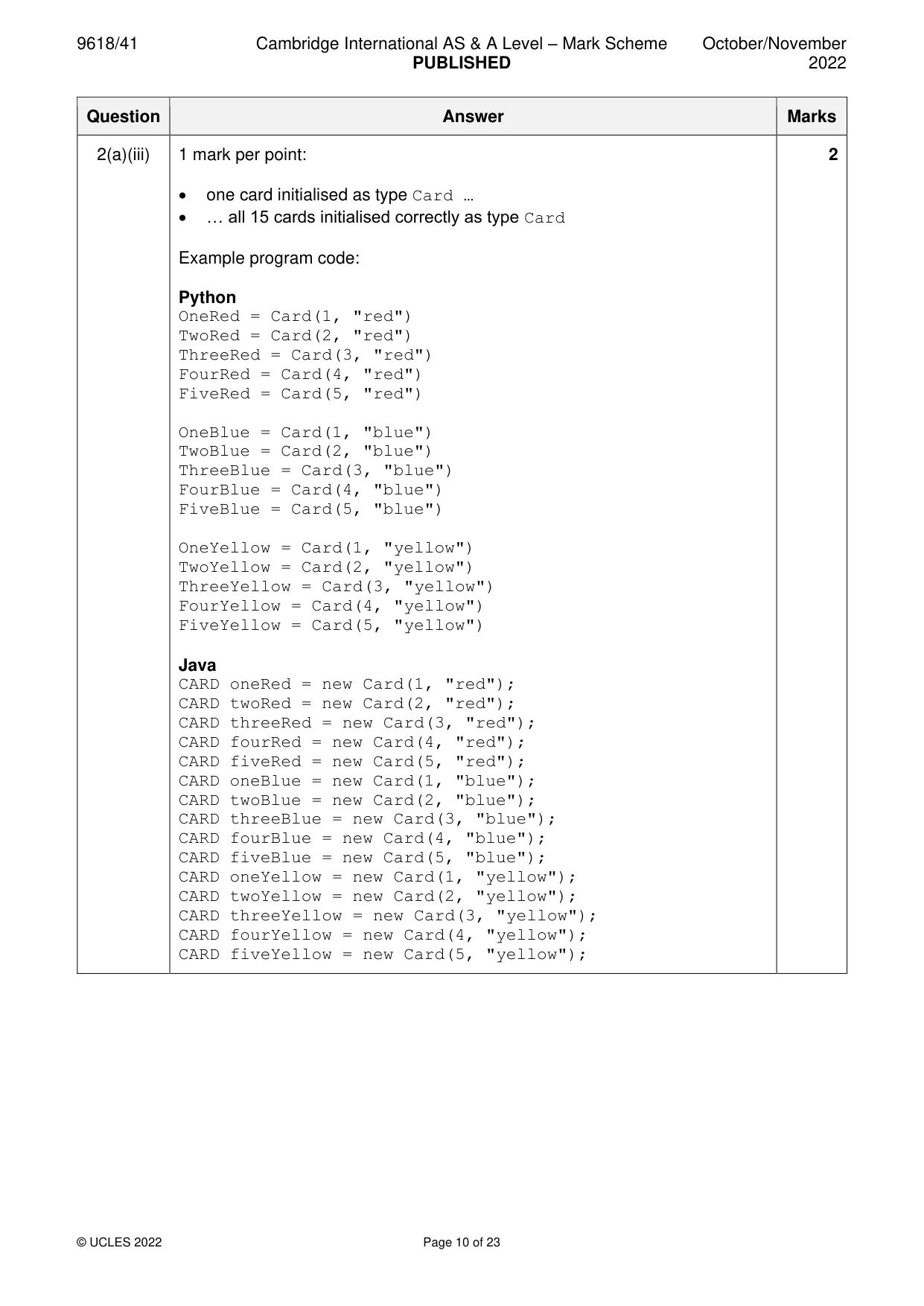
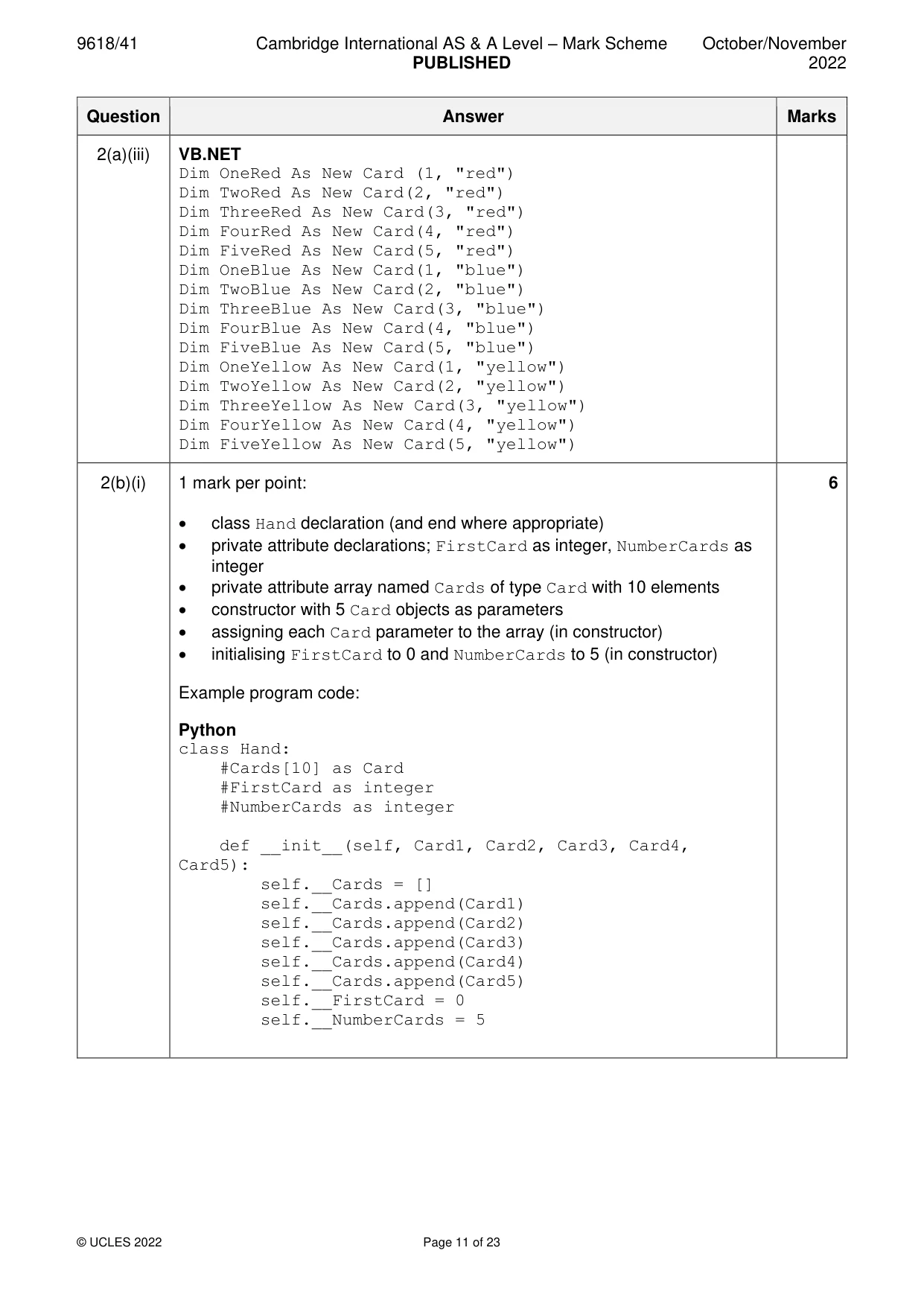
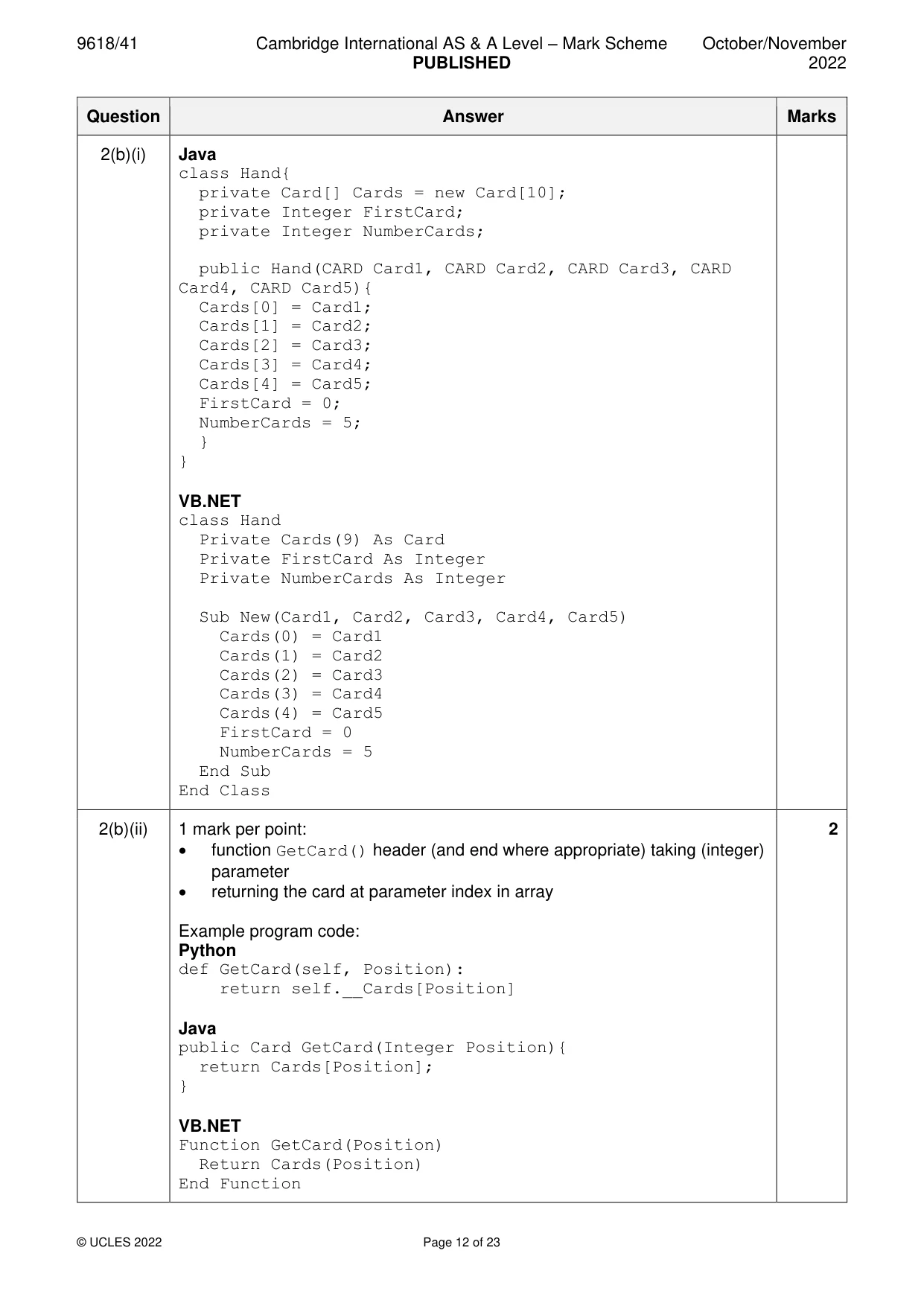
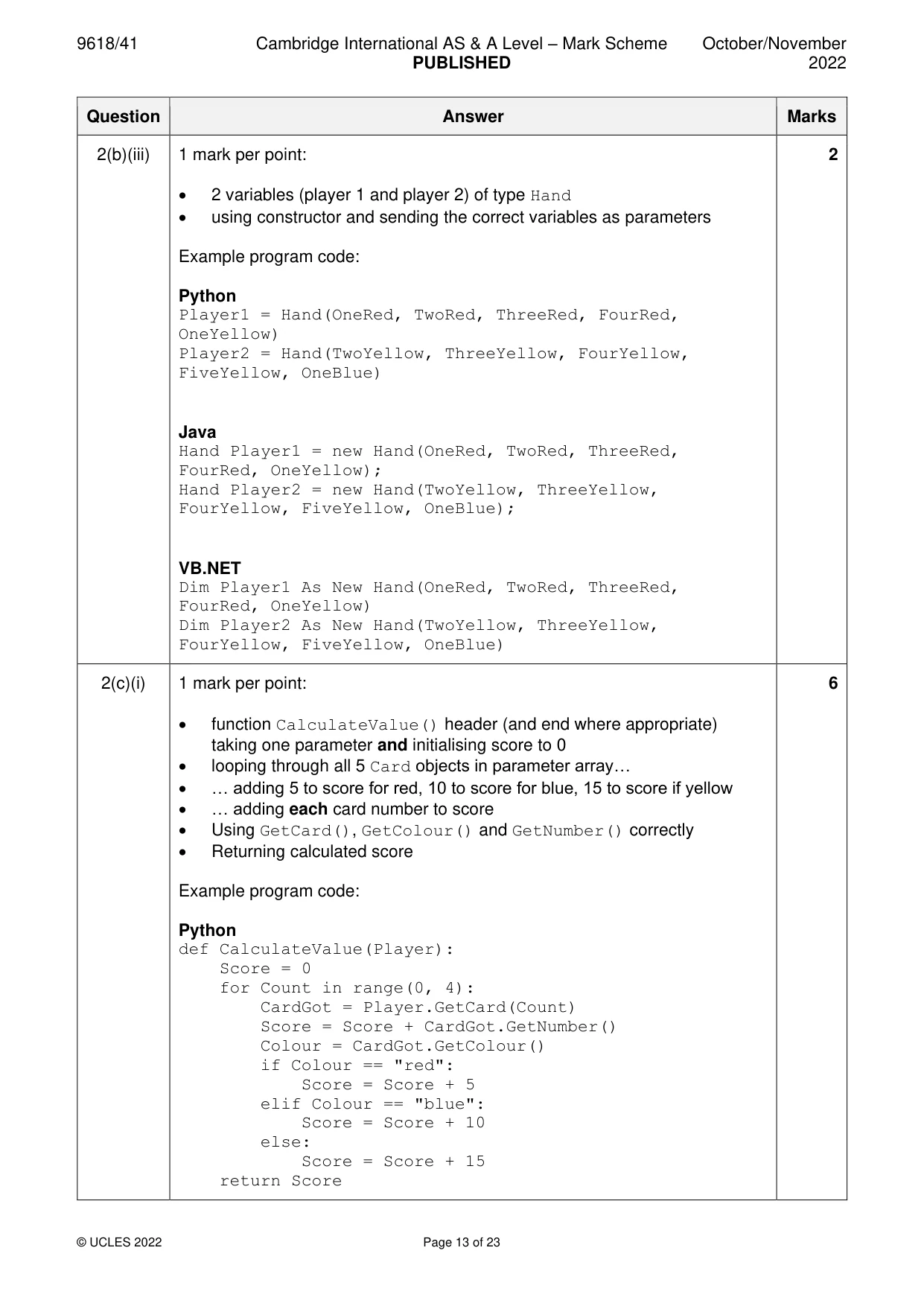
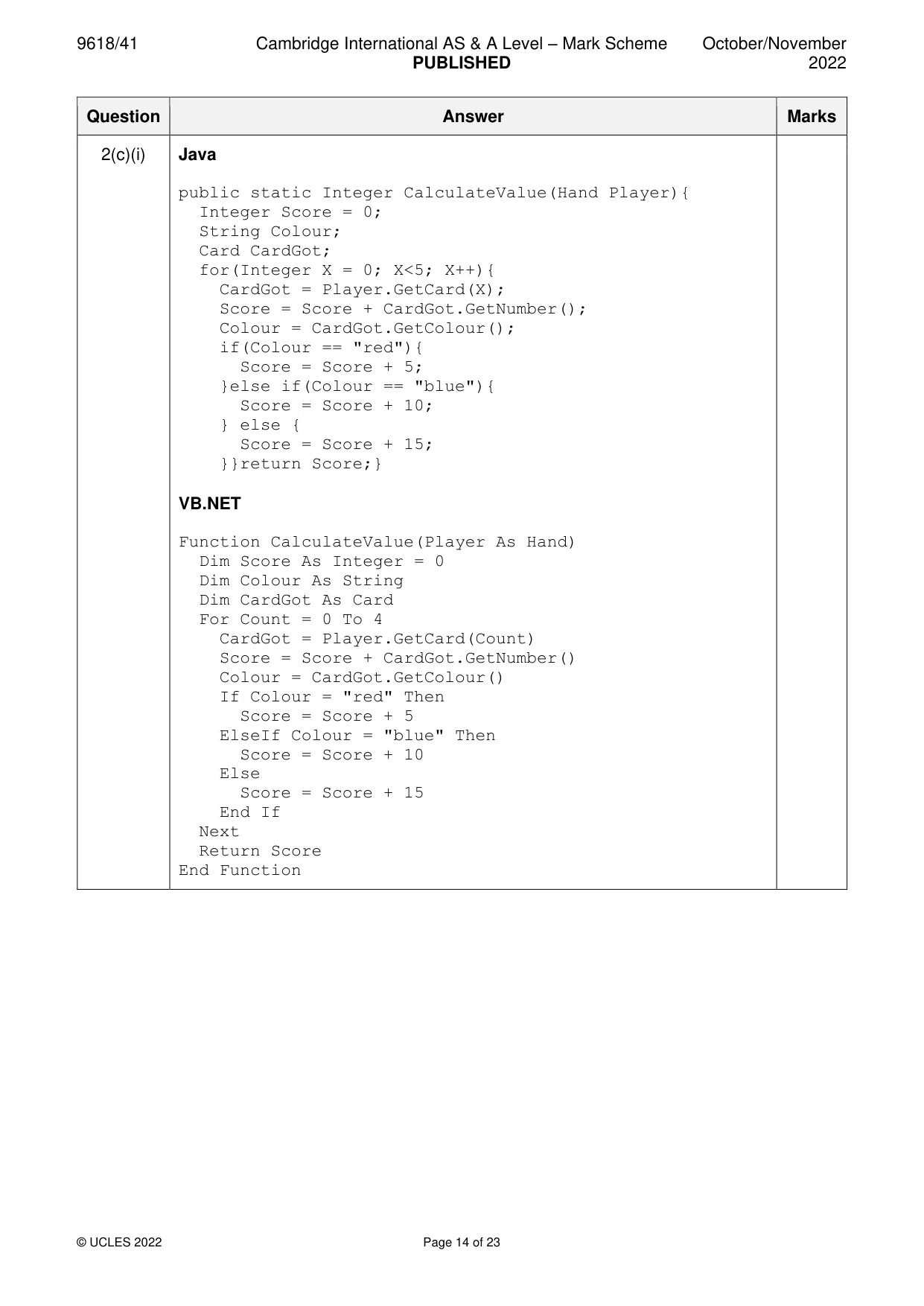
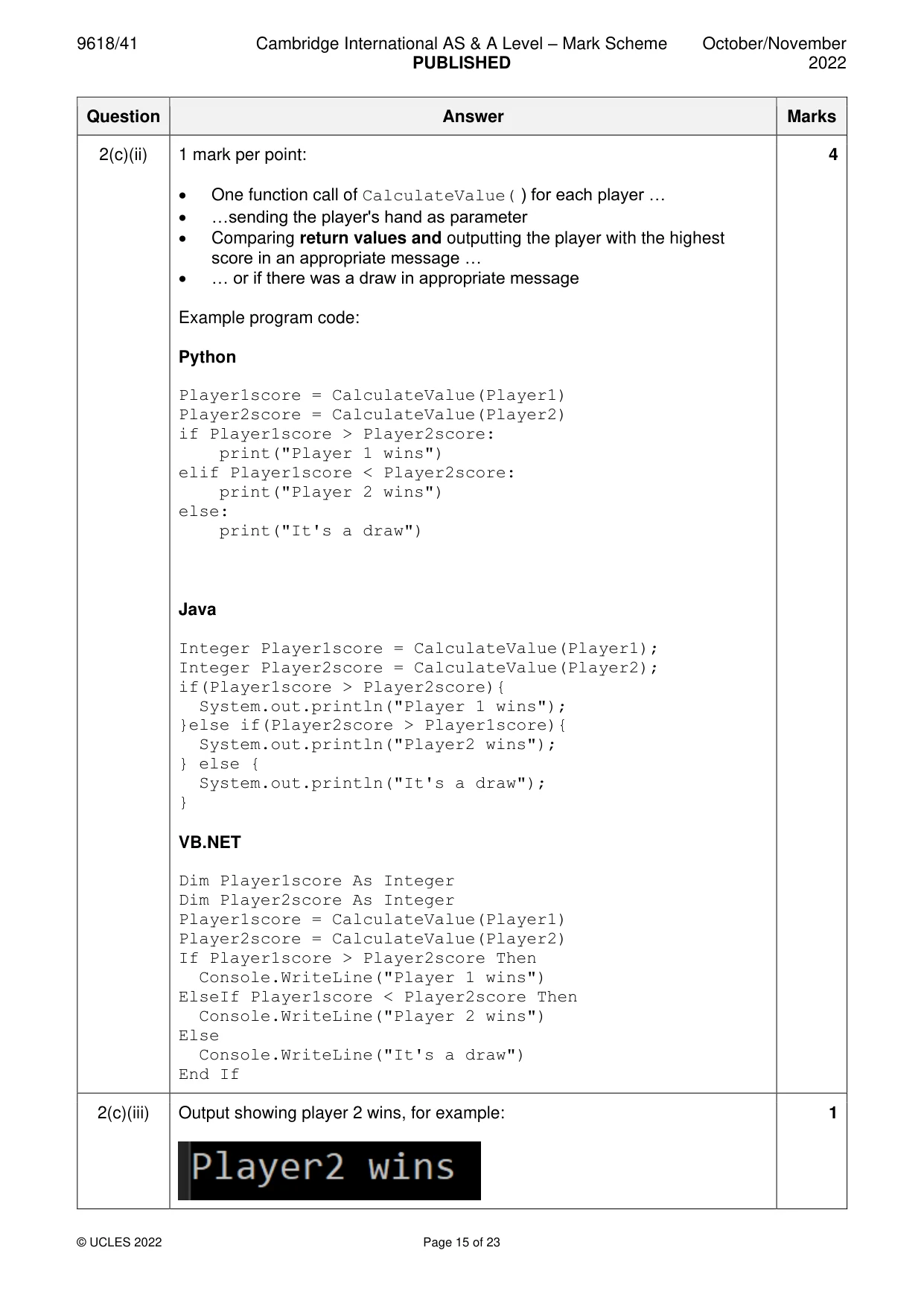
Mark scheme: 2(a)(i) 1 mark per point: 5 • class Card declaration (and end where appropriate) • Private attributes declared Number as integer and Colour as string • constructor header (and end where appropriate)… • …taking 2 parameters • assigning parameters to attributes Example program code: Python class Card: #Number as integer #Colour as string def __init__(self, Number1, Colour1): self.__Number = Number1; self.__Colour = Colour1; 2(a)(i) Java class Card{ private Integer Number; private String Colour; public Card(Integer Number1, String Colourp){ Number = Number1; Colour = Colourp; }} VB.NET Class Card Private Number As Integer Private Colour As String Sub New(Number1, Colourp) Number = Number1 Colour = Colourp End Sub End Class 2(a)(ii) 1 mark per point: 3 • 1 get method as function (and end where appropriate) with no parameters… • …returning the value • 2nd correct get method Example program code: Python def GetNumber(self): return self.__Number def GetColour(self): return self.__Colour Java public Integer GetNumber(){ return Number; } public String GetColour(){ return Colour; } VB.NET Function GetNumber() Return Number End Function Function GetColour() Return Colour End Function 2(a)(iii) 1 mark per point: 2 • one card initialised as type Card … • … all 15 cards initialised correctly as type Card Example program code: Python OneRed = Card(1, "red") TwoRed = Card(2, "red") ThreeRed = Card(3, "red") FourRed = Card(4, "red") FiveRed = Card(5, "red") OneBlue = Card(1, "blue") TwoBlue = Card(2, "blue") ThreeBlue = Card(3, "blue") FourBlue = Card(4, "blue") FiveBlue = Card(5, "blue") OneYellow = Card(1, "yellow") TwoYellow = Card(2, "yellow") ThreeYellow = Card(3, "yellow") FourYellow = Card(4, "yellow") FiveYellow = Card(5, "yellow") Java CARD oneRed = new Card(1, "red"); CARD twoRed = new Card(2, "red"); CARD threeRed = new Card(3, "red"); CARD fourRed = new Card(4, "red"); CARD fiveRed = new Card(5, "red"); CARD oneBlue = new Card(1, "blue"); CARD twoBlue = new Card(2, "blue"); CARD threeBlue = new Card(3, "blue"); CARD fourBlue = new Card(4, "blue"); CARD fiveBlue = new Card(5, "blue"); CARD oneYellow = new Card(1, "yellow"); CARD twoYellow = new Card(2, "yellow"); CARD threeYellow = new Card(3, "yellow"); CARD fourYellow = new Card(4, "yellow"); CARD fiveYellow = new Card(5, "yellow"); 2(a)(iii) VB.NET Dim OneRed As New Card (1, "red") Dim TwoRed As New Card(2, "red") Dim ThreeRed As New Card(3, "red") Dim FourRed As New Card(4, "red") Dim FiveRed As New Card(5, "red") Dim OneBlue As New Card(1, "blue") Dim TwoBlue As New Card(2, "blue") Dim ThreeBlue As New Card(3, "blue") Dim FourBlue As New Card(4, "blue") Dim FiveBlue As New Card(5, "blue") Dim OneYellow As New Card(1, "yellow") Dim TwoYellow As New Card(2, "yellow") Dim ThreeYellow As New Card(3, "yellow") Dim FourYellow As New Card(4, "yellow") Dim FiveYellow As New Card(5, "yellow") 2(b)(i) 1 mark per point: 6 • class Hand declaration (and end where appropriate) • private attribute declarations; FirstCard as integer, NumberCards as integer • private attribute array named Cards of type Card with 10 elements • constructor with 5 Card objects as parameters • assigning each Card parameter to the array (in constructor) • initialising FirstCard to 0 and NumberCards to 5 (in constructor) Example program code: Python class Hand: #Cards[10] as Card #FirstCard as integer #NumberCards as integer def __init__(self, Card1, Card2, Card3, Card4, Card5): self.__Cards = [] self.__Cards.append(Card1) self.__Cards.append(Card2) self.__Cards.append(Card3) self.__Cards.append(Card4) self.__Cards.append(Card5) self.__FirstCard = 0 self.__NumberCards = 5 2(b)(i) Java class Hand{ private Card[] Cards = new Card[10]; private Integer FirstCard; private Integer NumberCards; public Hand(CARD Card1, CARD Card2, CARD Card3, CARD Card4, CARD Card5){ Cards[0] = Card1; Cards[1] = Card2; Cards[2] = Card3; Cards[3] = Card4; Cards[4] = Card5; FirstCard = 0; NumberCards = 5; } } VB.NET class Hand Private Cards(9) As Card Private FirstCard As Integer Private NumberCards As Integer Sub New(Card1, Card2, Card3, Card4, Card5) Cards(0) = Card1 Cards(1) = Card2 Cards(2) = Card3 Cards(3) = Card4 Cards(4) = Card5 FirstCard = 0 NumberCards = 5 End Sub End Class 2(b)(ii) 1 mark per point: 2 • function GetCard() header (and end where appropriate) taking (integer) parameter • returning the card at parameter index in array Example program code: Python def GetCard(self, Position): return self.__Cards[Position] Java public Card GetCard(Integer Position){ return Cards[Position]; } VB.NET Function GetCard(Position) Return Cards(Position) End Function 2(b)(iii) 1 mark per point: 2 • 2 variables (player 1 and player 2) of type Hand • using constructor and sending the correct variables as parameters Example program code: Python Player1 = Hand(OneRed, TwoRed, ThreeRed, FourRed, OneYellow) Player2 = Hand(TwoYellow, ThreeYellow, FourYellow, FiveYellow, OneBlue) Java Hand Player1 = new Hand(OneRed, TwoRed, ThreeRed, FourRed, OneYellow); Hand Player2 = new Hand(TwoYellow, ThreeYellow, FourYellow, FiveYellow, OneBlue); VB.NET Dim Player1 As New Hand(OneRed, TwoRed, ThreeRed, FourRed, OneYellow) Dim Player2 As New Hand(TwoYellow, ThreeYellow, FourYellow, FiveYellow, OneBlue) 2(c)(i) 1 mark per point: 6 • function CalculateValue() header (and end where appropriate) taking one parameter and initialising score to 0 • looping through all 5 Card objects in parameter array… • … adding 5 to score for red, 10 to score for blue, 15 to score if yellow • … adding each card number to score • Using GetCard(), GetColour() and GetNumber() correctly • Returning calculated score Example program code: Python def CalculateValue(Player): Score = 0 for Count in range(0, 4): CardGot = Player.GetCard(Count) Score = Score + CardGot.GetNumber() Colour = CardGot.GetColour() if Colour == "red": Score = Score + 5 elif Colour == "blue": Score = Score + 10 else: Score = Score + 15 return Score 2(c)(i) Java public static Integer CalculateValue(Hand Player){ Integer Score = 0; String Colour; Card CardGot; for(Integer X = 0; X<5; X++){ CardGot = Player.GetCard(X); Score = Score + CardGot.GetNumber(); Colour = CardGot.GetColour(); if(Colour == "red"){ Score = Score + 5; }else if(Colour == "blue"){ Score = Score + 10; } else { Score = Score + 15; }}return Score;} VB.NET Function CalculateValue(Player As Hand) Dim Score As Integer = 0 Dim Colour As String Dim CardGot As Card For Count = 0 To 4 CardGot = Player.GetCard(Count) Score = Score + CardGot.GetNumber() Colour = CardGot.GetColour() If Colour = "red" Then Score = Score + 5 ElseIf Colour = "blue" Then Score = Score + 10 Else Score = Score + 15 End If Next Return Score End Function 2(c)(ii) 1 mark per point: 4 • One function call of CalculateValue( ) for each player … • …sending the player's hand as parameter • Comparing return values and outputting the player with the highest score in an appropriate message … • … or if there was a draw in appropriate message Example program code: Python Player1score = CalculateValue(Player1) Player2score = CalculateValue(Player2) if Player1score > Player2score: print("Player 1 wins") elif Player1score < Player2score: print("Player 2 wins") else: print("It's a draw") Java Integer Player1score = CalculateValue(Player1); Integer Player2score = CalculateValue(Player2); if(Player1score > Player2score){ System.out.println("Player 1 wins"); }else if(Player2score > Player1score){ System.out.println("Player2 wins"); } else { System.out.println("It's a draw"); } VB.NET Dim Player1score As Integer Dim Player2score As Integer Player1score = CalculateValue(Player1) Player2score = CalculateValue(Player2) If Player1score > Player2score Then Console.WriteLine("Player 1 wins") ElseIf Player1score < Player2score Then Console.WriteLine("Player 2 wins") Else Console.WriteLine("It's a draw") End If 2(c)(iii) Output showing player 2 wins, for example: 1
Q3 · A binary tree consists of nodes
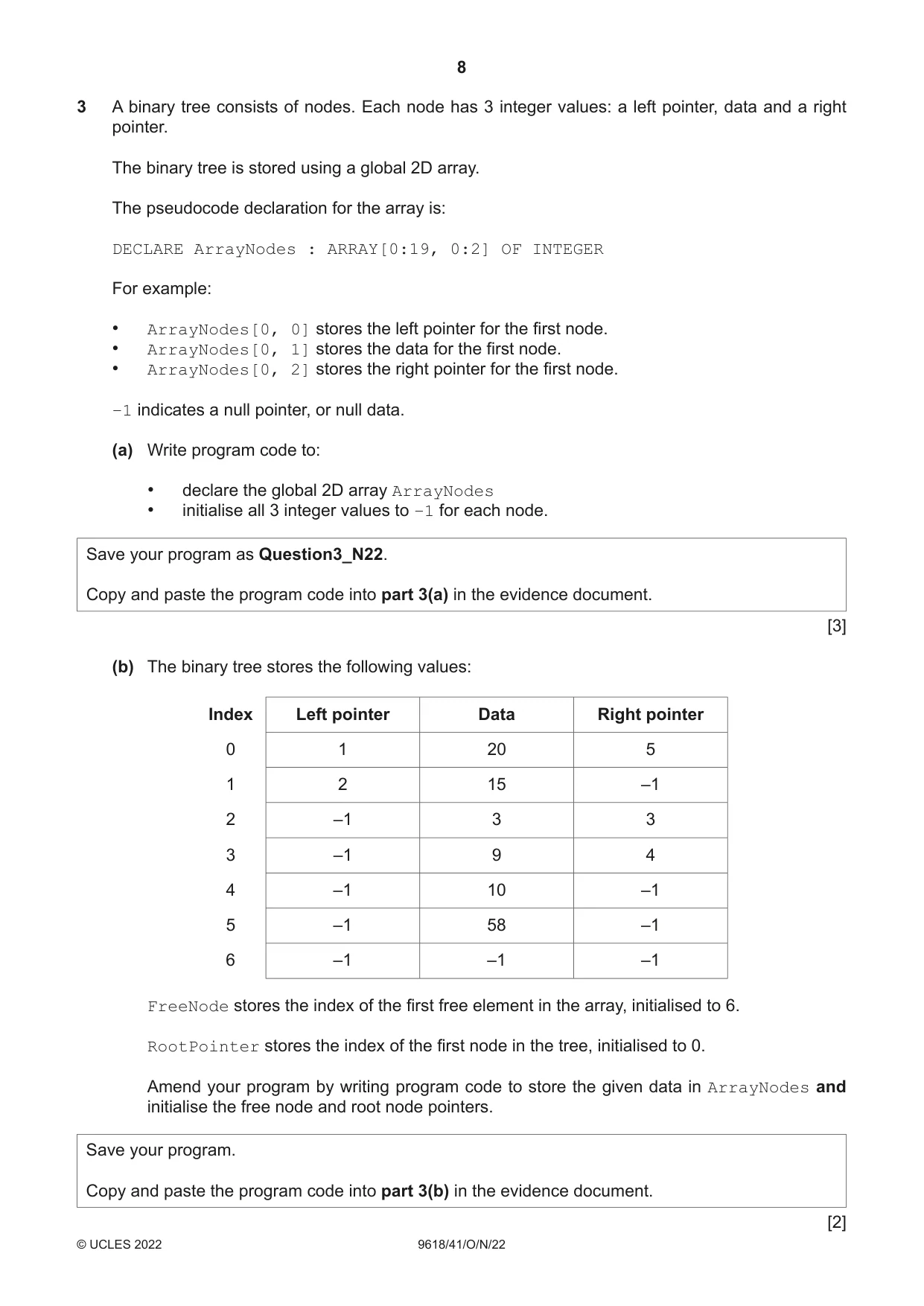
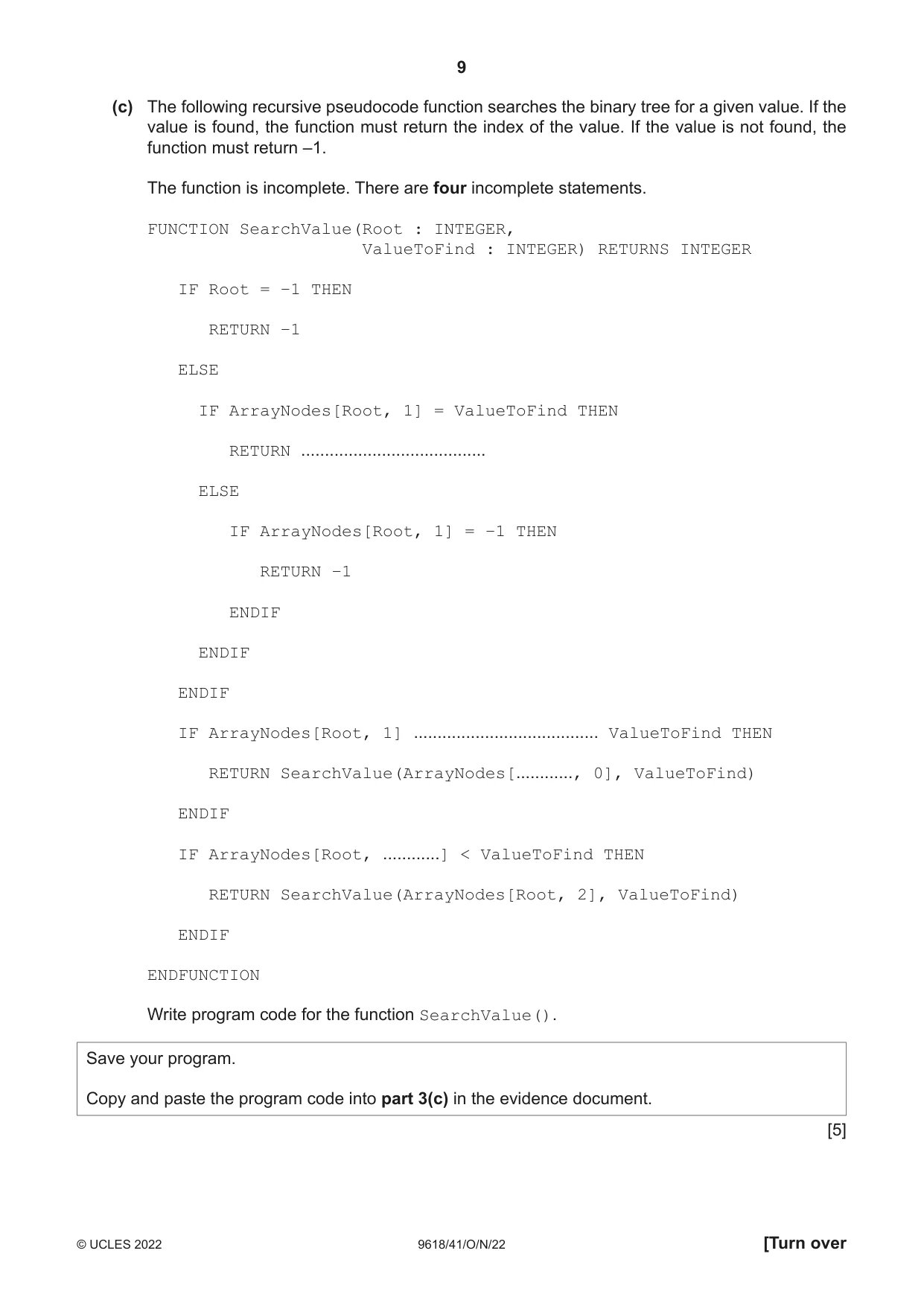
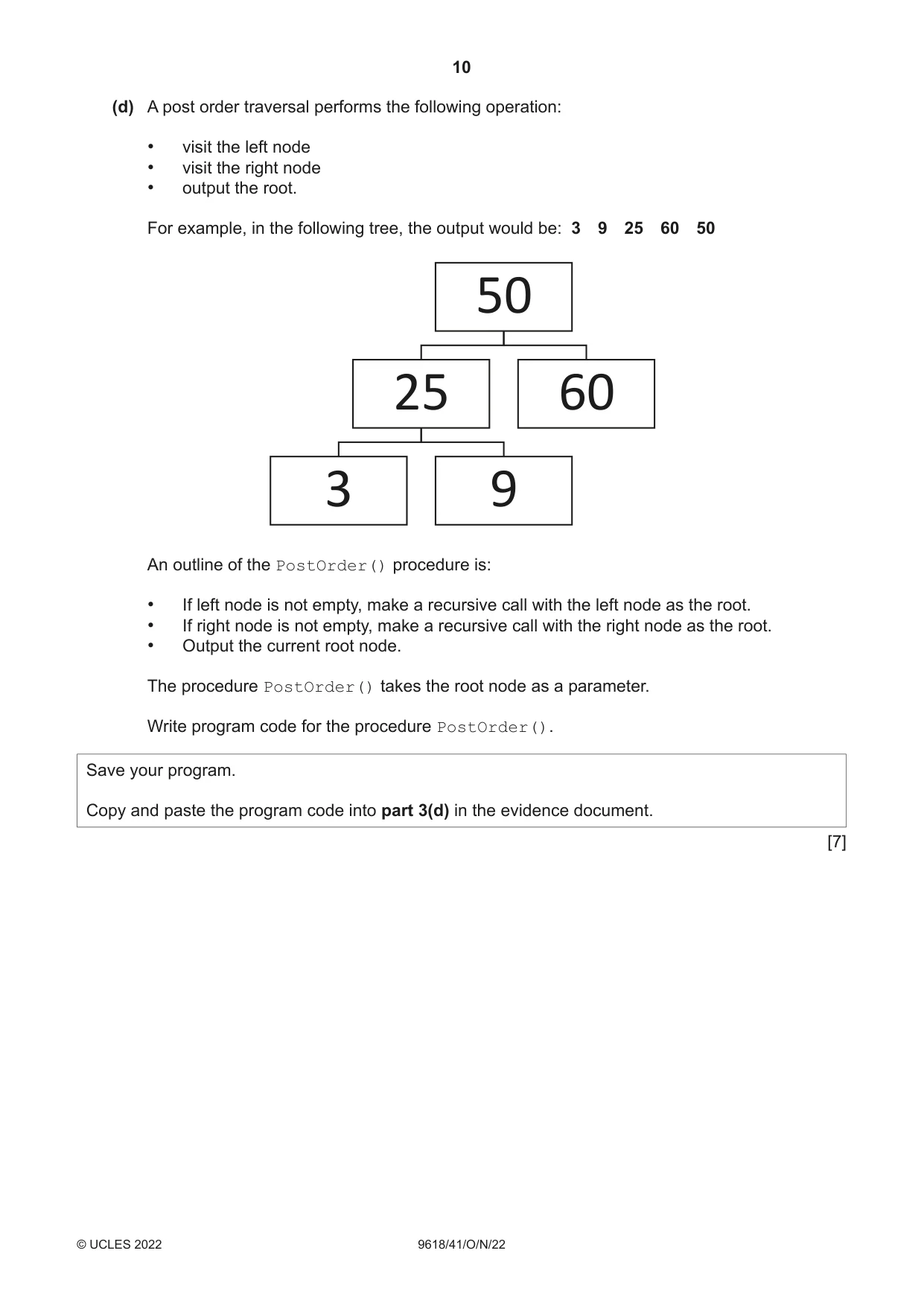
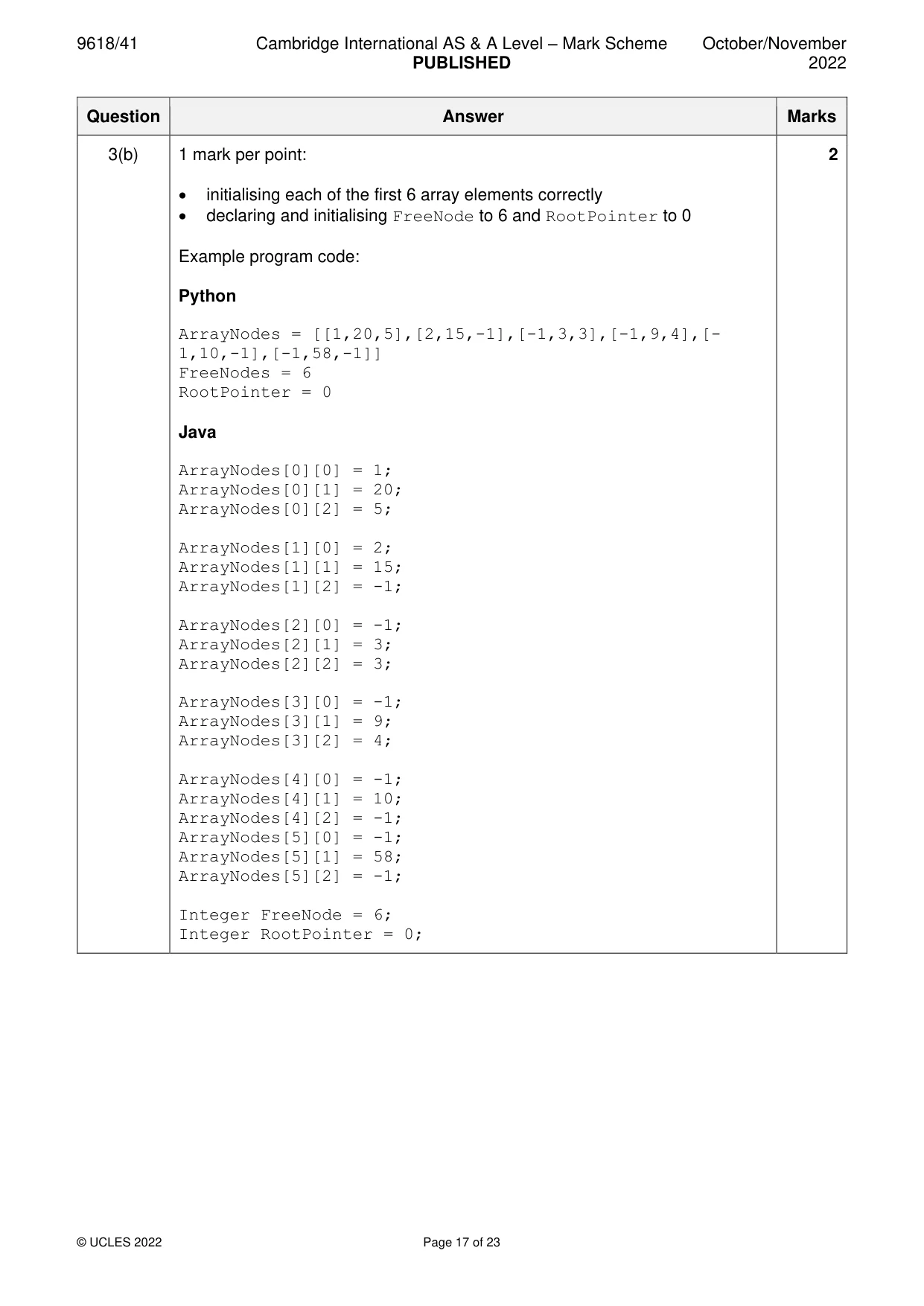
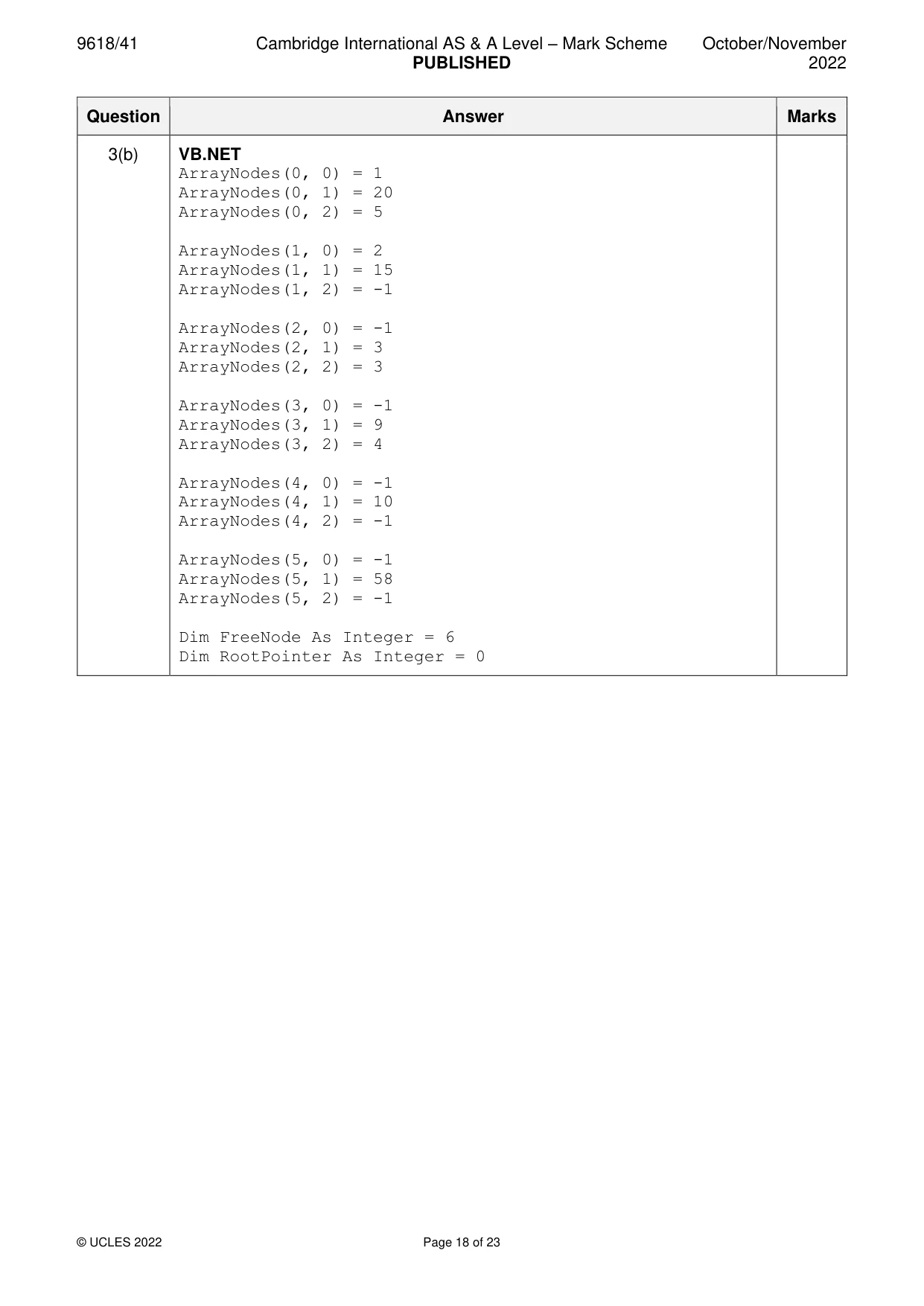
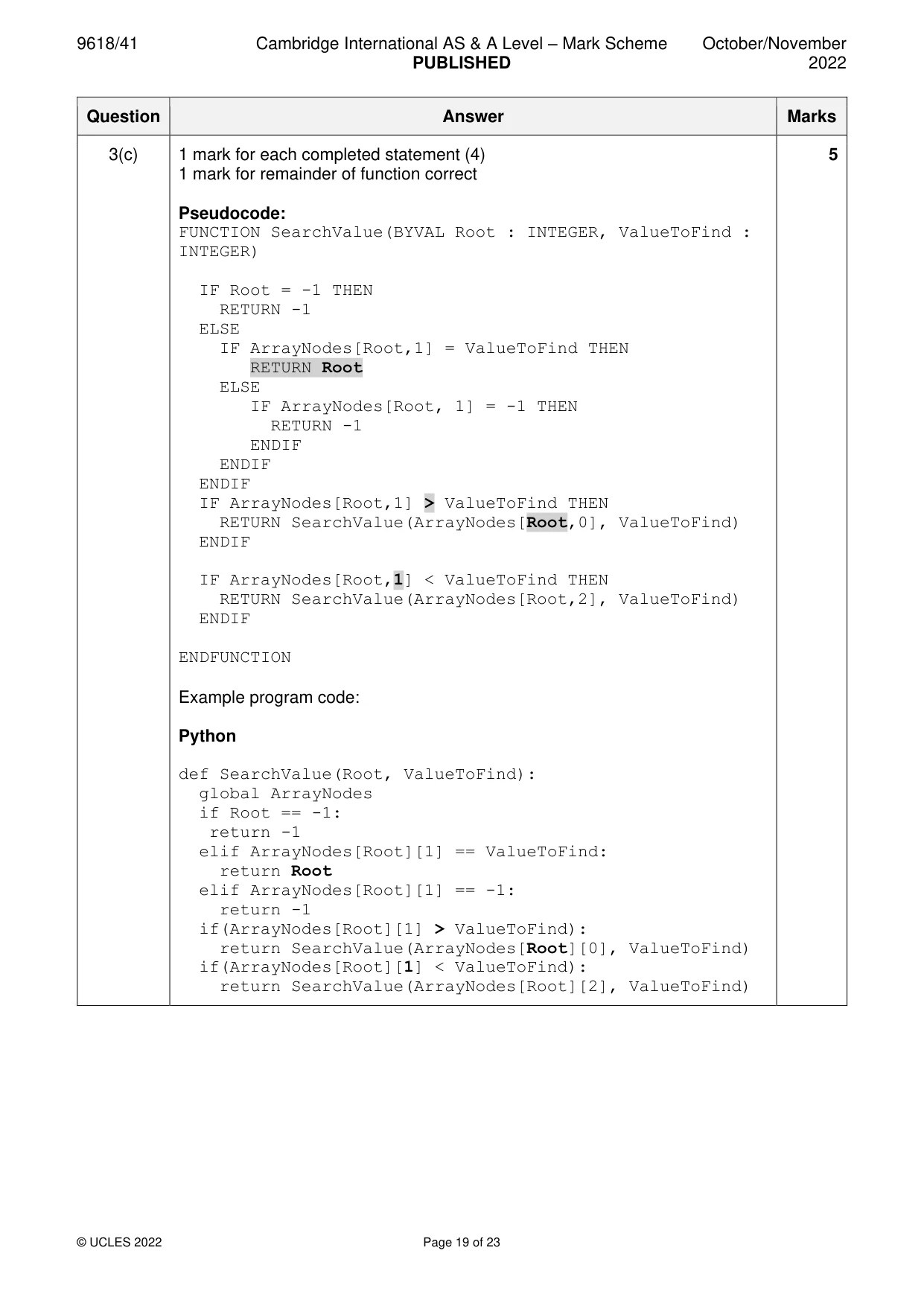
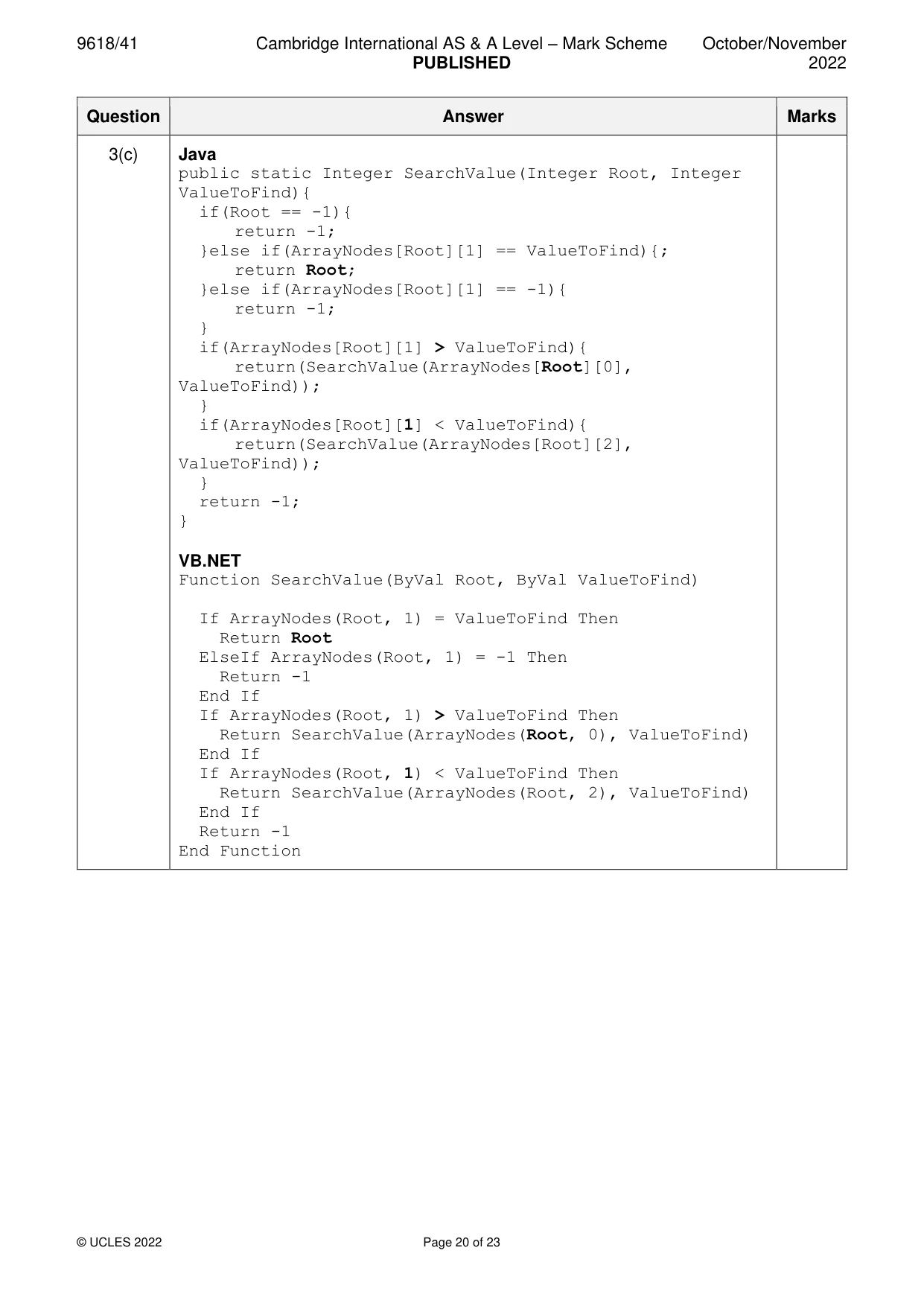
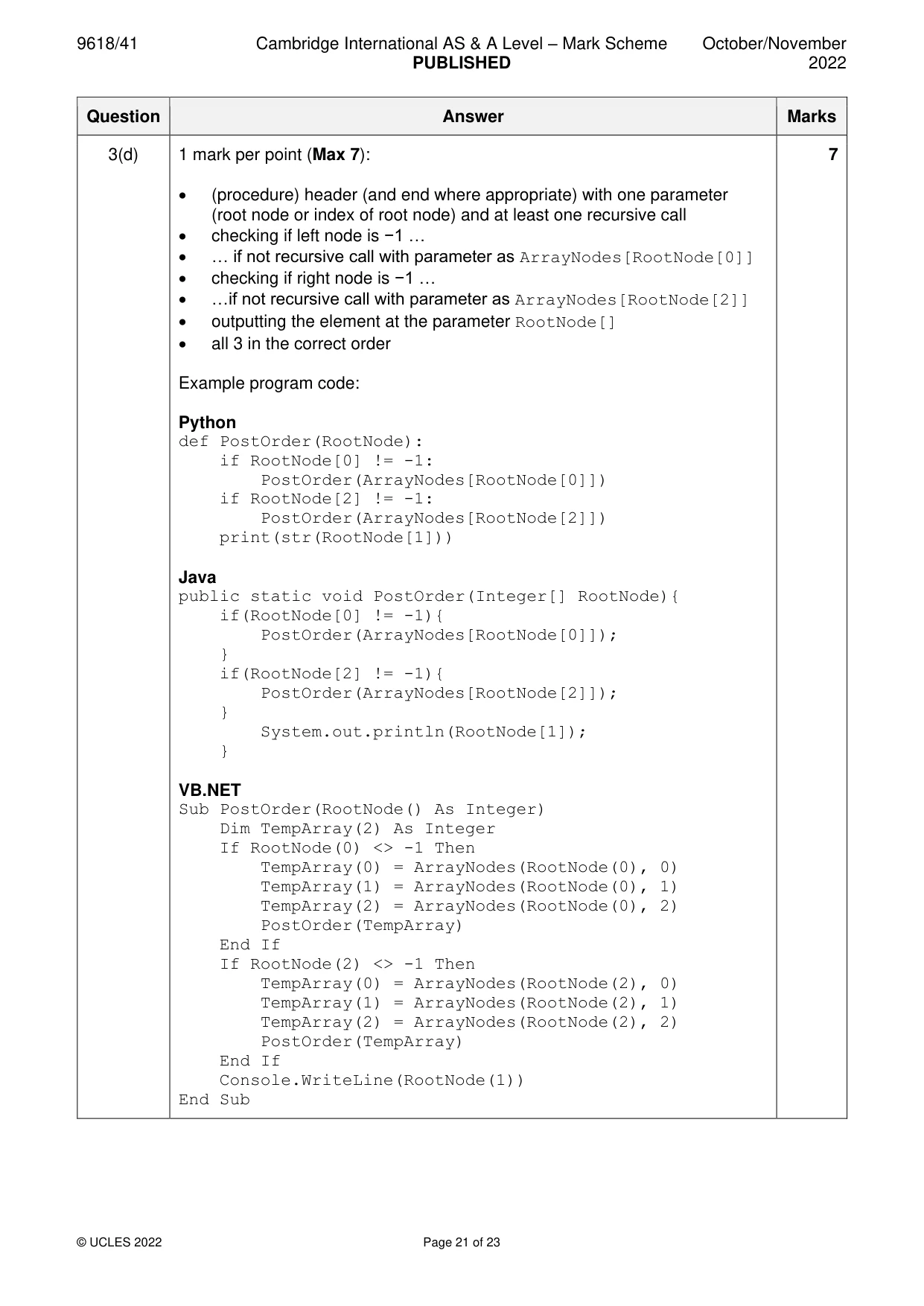
3 A binary tree consists of nodes. Each node has 3 integer values: a left pointer, data and a right pointer. The binary tree is stored using a global 2D array. The pseudocode declaration for the array is: DECLARE ArrayNodes : ARRAY[0:19, 0:2] OF INTEGER For example: • ArrayNodes[0, 0] stores the left pointer for the first node. • ArrayNodes[0, 1] stores the data for the first node. • ArrayNodes[0, 2] stores the right pointer for the first node. –1 indicates a null pointer, or null data. (a) Write program code to: • declare the global 2D array ArrayNodes • initialise all 3 integer values to –1 for each node. Save your program as Question3_N22. Copy and paste the program code into part 3(a) in the evidence document. [3] (b) The binary tree stores the following values: Index Left pointer Data Right pointer 0 1 20 5 1 2 15 –1 2 –1 3 3 3 –1 9 4 4 –1 10 –1 5 –1 58 –1 6 –1 –1 –1 FreeNode stores the index of the first free element in the array, initialised to 6. RootPointer stores the index of the first node in the tree, initialised to 0. Amend your program by writing program code to store the given data in ArrayNodes and initialise the free node and root node pointers. Save your program. Copy and paste the program code into part 3(b) in the evidence document. [2] (c) The following recursive pseudocode function searches the binary tree for a given value. If the value is found, the function must return the index of the value. If the value is not found, the function must return –1. The function is incomplete. There are four incomplete statements. FUNCTION SearchValue(Root : INTEGER, ValueToFind : INTEGER) RETURNS INTEGER IF Root = –1 THEN RETURN –1 ELSE IF ArrayNodes[Root, 1] = ValueToFind THEN RETURN ....................................... ELSE IF ArrayNodes[Root, 1] = –1 THEN RETURN –1 ENDIF ENDIF ENDIF IF ArrayNodes[Root, 1] ....................................... ValueToFind THEN RETURN SearchValue(ArrayNodes[............, 0], ValueToFind) ENDIF IF ArrayNodes[Root, ............] < ValueToFind THEN RETURN SearchValue(ArrayNodes[Root, 2], ValueToFind) ENDIF ENDFUNCTION Write program code for the function SearchValue(). Save your program. Copy and paste the program code into part 3(c) in the evidence document. [5] (d) A post order traversal performs the following operation: • visit the left node • visit the right node • output the root. For example, in the following tree, the output would be: 3 9 25 60 50 50 25 60 3 9 An outline of the PostOrder() procedure is: • If left node is not empty, make a recursive call with the left node as the root. • If right node is not empty, make a recursive call with the right node as the root. • Output the current root node. The procedure PostOrder() takes the root node as a parameter. Write program code for the procedure PostOrder(). Save your program. Copy and paste the program code into part 3(d) in the evidence document. [7]
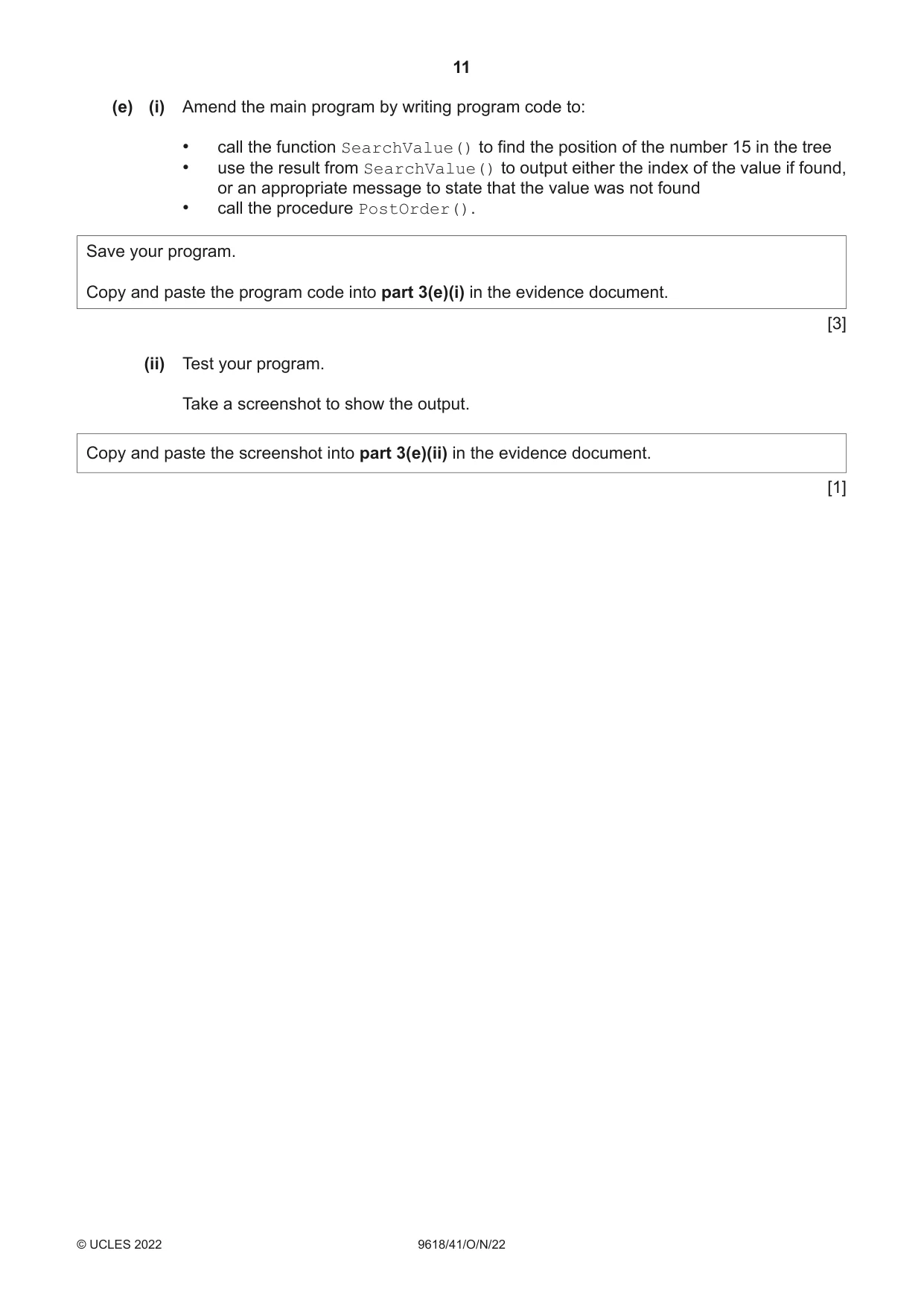
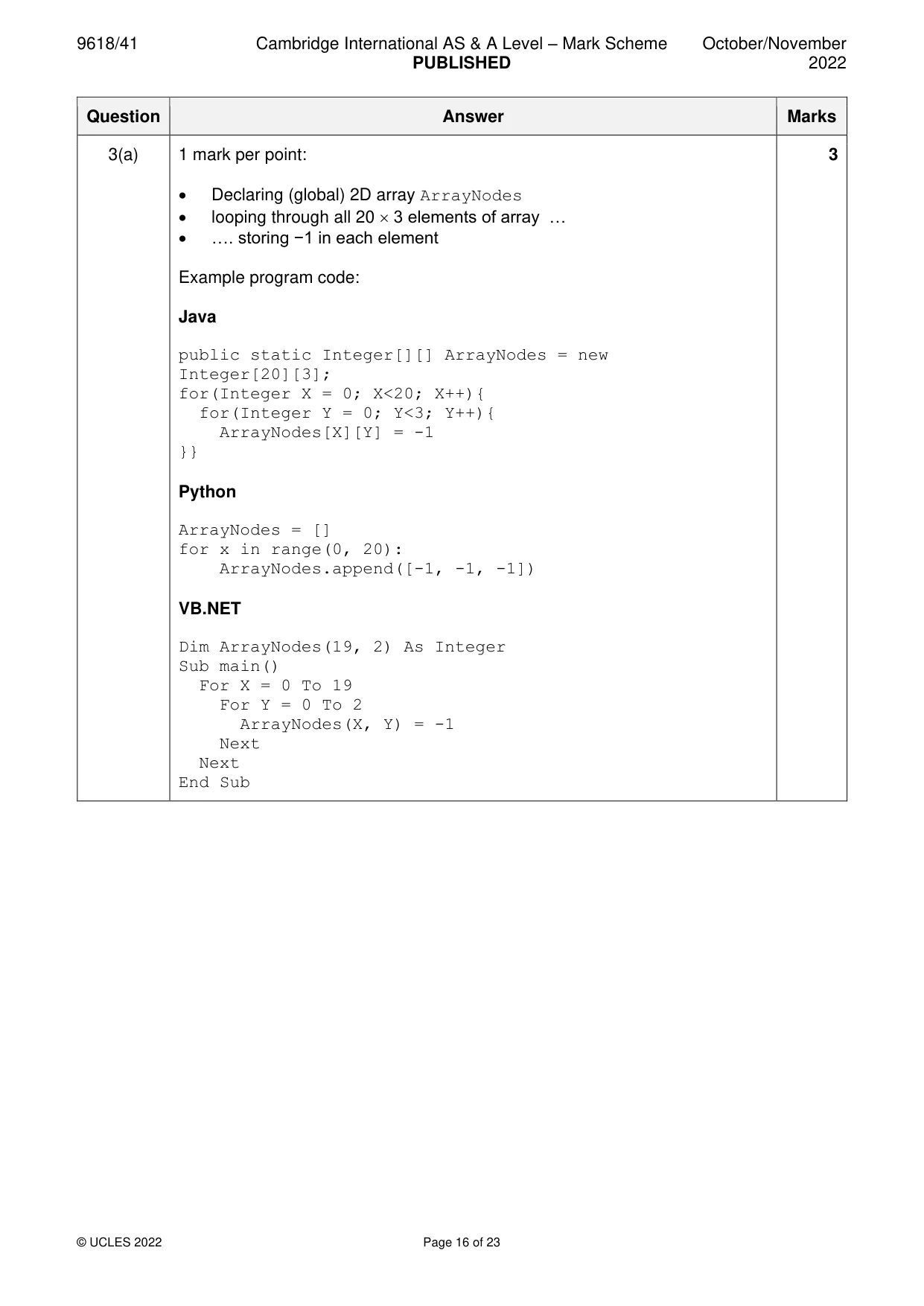
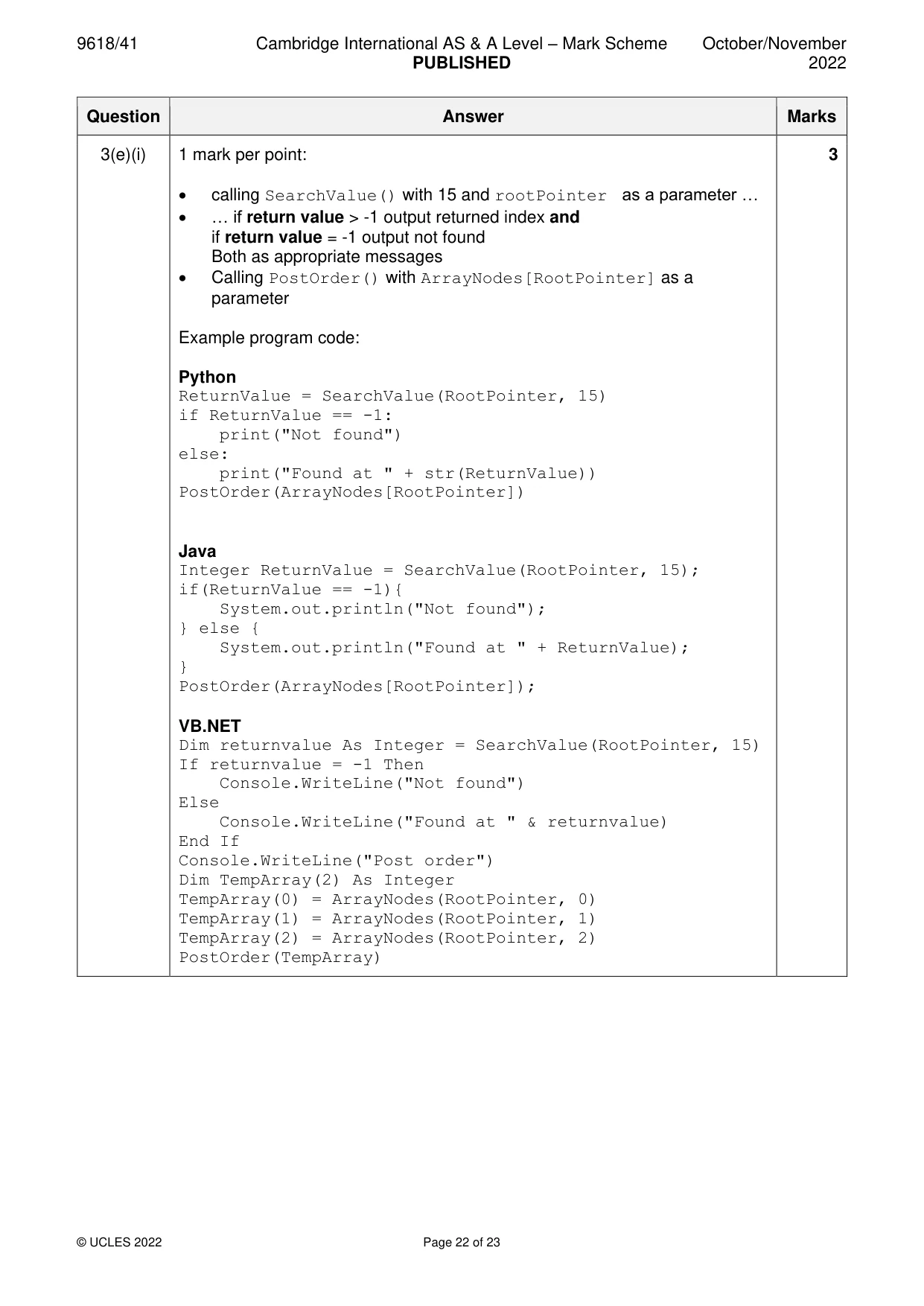
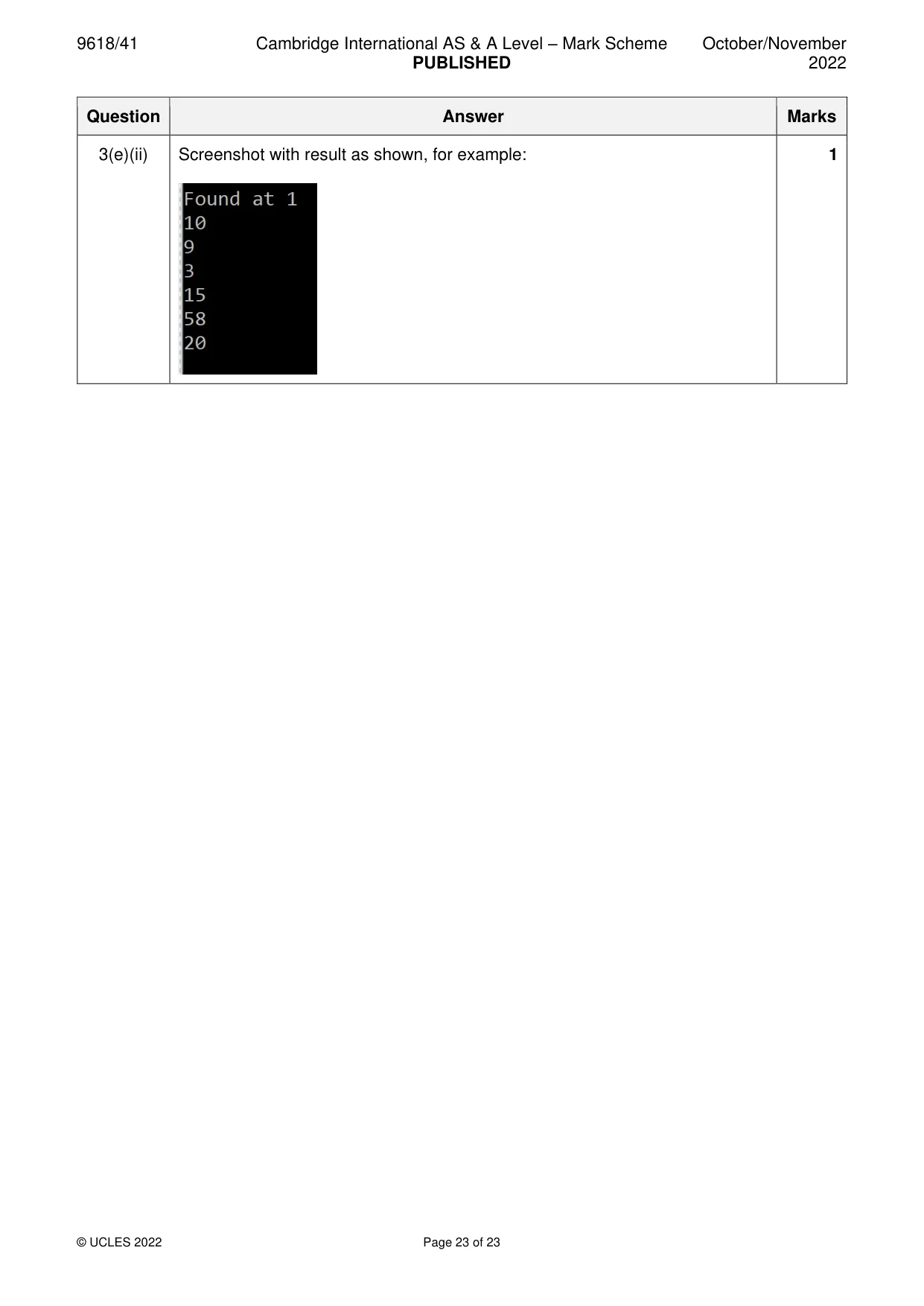
Mark scheme: 3(a) 1 mark per point: 3 • Declaring (global) 2D array ArrayNodes • looping through all 20 3 elements of array … • …. storing −1 in each element Example program code: Java public static Integer[][] ArrayNodes = new Integer[20][3]; for(Integer X = 0; X<20; X++){ for(Integer Y = 0; Y<3; Y++){ ArrayNodes[X][Y] = -1 }} Python ArrayNodes = [] for x in range(0, 20): ArrayNodes.append([-1, -1, -1]) VB.NET Dim ArrayNodes(19, 2) As Integer Sub main() For X = 0 To 19 For Y = 0 To 2 ArrayNodes(X, Y) = -1 Next Next End Sub 3(b) 1 mark per point: 2 • initialising each of the first 6 array elements correctly • declaring and initialising FreeNode to 6 and RootPointer to 0 Example program code: Python ArrayNodes = [[1,20,5],[2,15,-1],[-1,3,3],[-1,9,4],[- 1,10,-1],[-1,58,-1]] FreeNodes = 6 RootPointer = 0 Java ArrayNodes[0][0] = 1; ArrayNodes[0][1] = 20; ArrayNodes[0][2] = 5; ArrayNodes[1][0] = 2; ArrayNodes[1][1] = 15; ArrayNodes[1][2] = -1; ArrayNodes[2][0] = -1; ArrayNodes[2][1] = 3; ArrayNodes[2][2] = 3; ArrayNodes[3][0] = -1; ArrayNodes[3][1] = 9; ArrayNodes[3][2] = 4; ArrayNodes[4][0] = -1; ArrayNodes[4][1] = 10; ArrayNodes[4][2] = -1; ArrayNodes[5][0] = -1; ArrayNodes[5][1] = 58; ArrayNodes[5][2] = -1; Integer FreeNode = 6; Integer RootPointer = 0; 3(b) VB.NET ArrayNodes(0, 0) = 1 ArrayNodes(0, 1) = 20 ArrayNodes(0, 2) = 5 ArrayNodes(1, 0) = 2 ArrayNodes(1, 1) = 15 ArrayNodes(1, 2) = -1 ArrayNodes(2, 0) = -1 ArrayNodes(2, 1) = 3 ArrayNodes(2, 2) = 3 ArrayNodes(3, 0) = -1 ArrayNodes(3, 1) = 9 ArrayNodes(3, 2) = 4 ArrayNodes(4, 0) = -1 ArrayNodes(4, 1) = 10 ArrayNodes(4, 2) = -1 ArrayNodes(5, 0) = -1 ArrayNodes(5, 1) = 58 ArrayNodes(5, 2) = -1 Dim FreeNode As Integer = 6 Dim RootPointer As Integer = 0 3(c) 1 mark for each completed statement (4) 5 1 mark for remainder of function correct Pseudocode: FUNCTION SearchValue(BYVAL Root : INTEGER, ValueToFind : INTEGER) IF Root = -1 THEN RETURN -1 ELSE IF ArrayNodes[Root,1] = ValueToFind THEN RETURN Root ELSE IF ArrayNodes[Root, 1] = -1 THEN RETURN -1 ENDIF ENDIF ENDIF IF ArrayNodes[Root,1] > ValueToFind THEN RETURN SearchValue(ArrayNodes[Root,0], ValueToFind) ENDIF IF ArrayNodes[Root,1] < ValueToFind THEN RETURN SearchValue(ArrayNodes[Root,2], ValueToFind) ENDIF ENDFUNCTION Example program code: Python def SearchValue(Root, ValueToFind): global ArrayNodes if Root == -1: return -1 elif ArrayNodes[Root][1] == ValueToFind: return Root elif ArrayNodes[Root][1] == -1: return -1 if(ArrayNodes[Root][1] > ValueToFind): return SearchValue(ArrayNodes[Root][0], ValueToFind) if(ArrayNodes[Root][1] < ValueToFind): return SearchValue(ArrayNodes[Root][2], ValueToFind) 3(c) Java public static Integer SearchValue(Integer Root, Integer ValueToFind){ if(Root == -1){ return -1; }else if(ArrayNodes[Root][1] == ValueToFind){; return Root; }else if(ArrayNodes[Root][1] == -1){ return -1; } if(ArrayNodes[Root][1] > ValueToFind){ return(SearchValue(ArrayNodes[Root][0], ValueToFind)); } if(ArrayNodes[Root][1] < ValueToFind){ return(SearchValue(ArrayNodes[Root][2], ValueToFind)); } return -1; } VB.NET Function SearchValue(ByVal Root, ByVal ValueToFind) If ArrayNodes(Root, 1) = ValueToFind Then Return Root ElseIf ArrayNodes(Root, 1) = -1 Then Return -1 End If If ArrayNodes(Root, 1) > ValueToFind Then Return SearchValue(ArrayNodes(Root, 0), ValueToFind) End If If ArrayNodes(Root, 1) < ValueToFind Then Return SearchValue(ArrayNodes(Root, 2), ValueToFind) End If Return -1 End Function 3(d) 1 mark per point (Max 7): 7 • (procedure) header (and end where appropriate) with one parameter (root node or index of root node) and at least one recursive call • checking if left node is −1 … • … if not recursive call with parameter as ArrayNodes[RootNode[0]] • checking if right node is −1 … • …if not recursive call with parameter as ArrayNodes[RootNode[2]] • outputting the element at the parameter RootNode[] • all 3 in the correct order Example program code: Python def PostOrder(RootNode): if RootNode[0] != -1: PostOrder(ArrayNodes[RootNode[0]]) if RootNode[2] != -1: PostOrder(ArrayNodes[RootNode[2]]) print(str(RootNode[1])) Java public static void PostOrder(Integer[] RootNode){ if(RootNode[0] != -1){ PostOrder(ArrayNodes[RootNode[0]]); } if(RootNode[2] != -1){ PostOrder(ArrayNodes[RootNode[2]]); } System.out.println(RootNode[1]); } VB.NET Sub PostOrder(RootNode() As Integer) Dim TempArray(2) As Integer If RootNode(0) <> -1 Then TempArray(0) = ArrayNodes(RootNode(0), 0) TempArray(1) = ArrayNodes(RootNode(0), 1) TempArray(2) = ArrayNodes(RootNode(0), 2) PostOrder(TempArray) End If If RootNode(2) <> -1 Then TempArray(0) = ArrayNodes(RootNode(2), 0) TempArray(1) = ArrayNodes(RootNode(2), 1) TempArray(2) = ArrayNodes(RootNode(2), 2) PostOrder(TempArray) End If Console.WriteLine(RootNode(1)) End Sub 3(e)(i) 1 mark per point: 3 • calling SearchValue() with 15 and rootPointer as a parameter … • … if return value > -1 output returned index and if return value = -1 output not found Both as appropriate messages • Calling PostOrder() with ArrayNodes[RootPointer] as a parameter Example program code: Python ReturnValue = SearchValue(RootPointer, 15) if ReturnValue == -1: print("Not found") else: print("Found at " + str(ReturnValue)) PostOrder(ArrayNodes[RootPointer]) Java Integer ReturnValue = SearchValue(RootPointer, 15); if(ReturnValue == -1){ System.out.println("Not found"); } else { System.out.println("Found at " + ReturnValue); } PostOrder(ArrayNodes[RootPointer]); VB.NET Dim returnvalue As Integer = SearchValue(RootPointer, 15) If returnvalue = -1 Then Console.WriteLine("Not found") Else Console.WriteLine("Found at " & returnvalue) End If Console.WriteLine("Post order") Dim TempArray(2) As Integer TempArray(0) = ArrayNodes(RootPointer, 0) TempArray(1) = ArrayNodes(RootPointer, 1) TempArray(2) = ArrayNodes(RootPointer, 2) PostOrder(TempArray) 3(e)(ii) Screenshot with result as shown, for example: 1
What was in this paper
The subtopics covered by these 3 questions, and how many questions each got. Open one in a new tab to see every Cambridge question on it.
What you needed in this session
Cambridge’s own grade thresholds for 2022 Oct/Nov, Paper 4 · Variant 1. A higher threshold means an easier paper — the bar moves with how the cohort did.