Cambridge A Level Computer Science 9618 — 2024 Oct/Nov Paper 4 · Variant 1
9618/41/O/N/24 · 3 questions · 75 marks · ≈84 min
The question paper and its mark scheme, free to read here and free to download. This is Cambridge’s own paper, exactly as it was sat.
Question paper16 pages
Mark scheme37 pages
Answers below. Sit the paper first if you are practising.
Questions as text
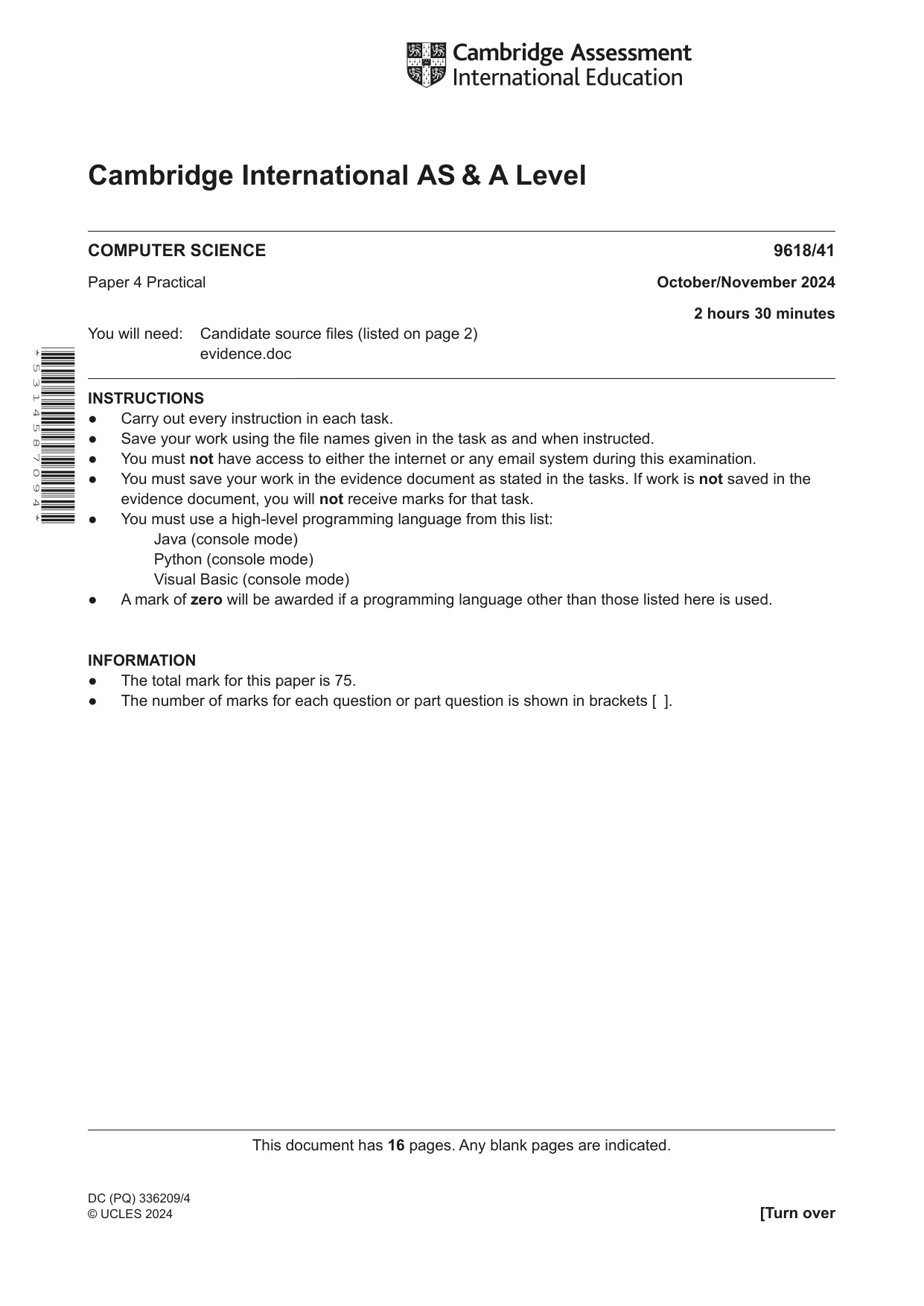
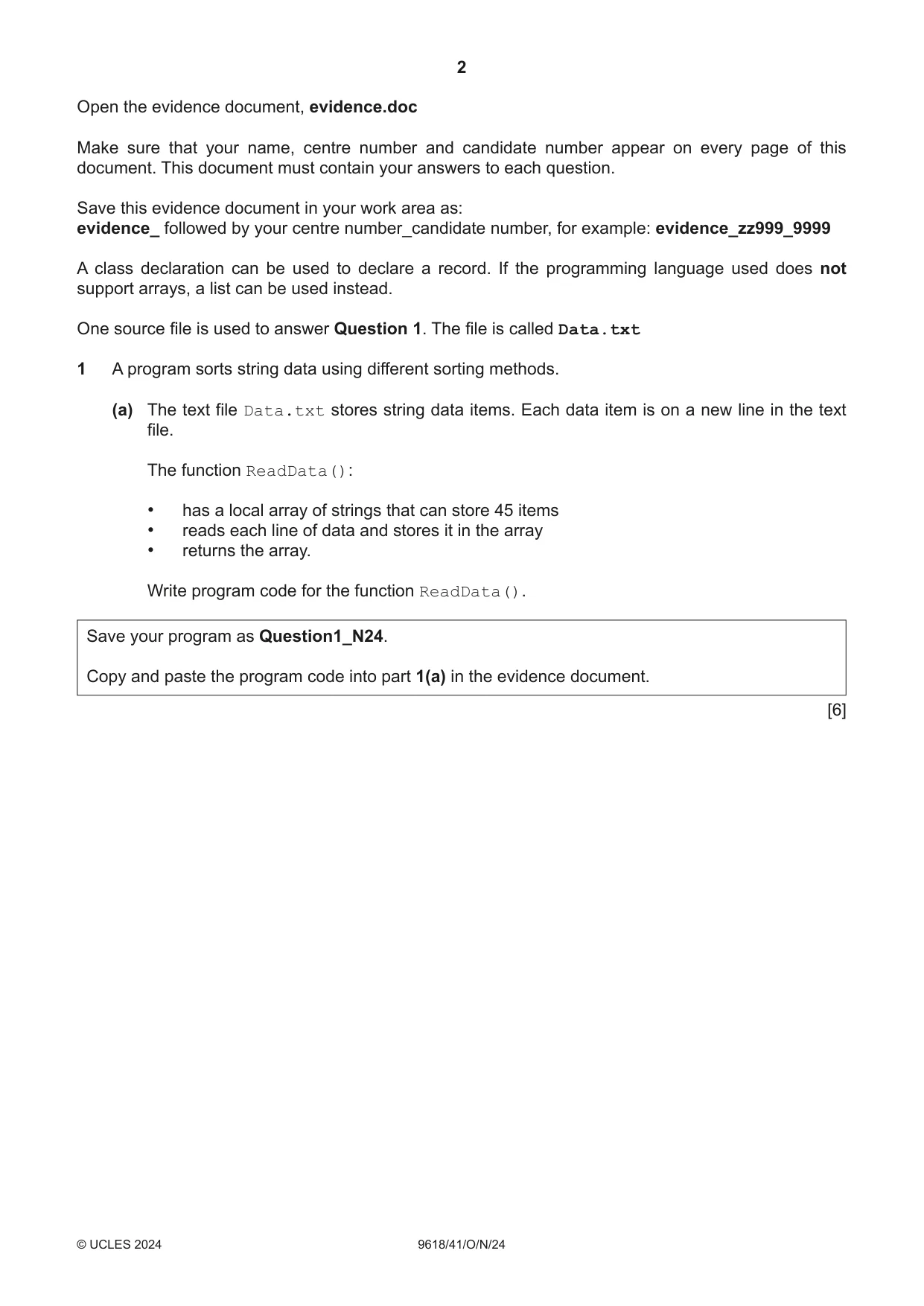
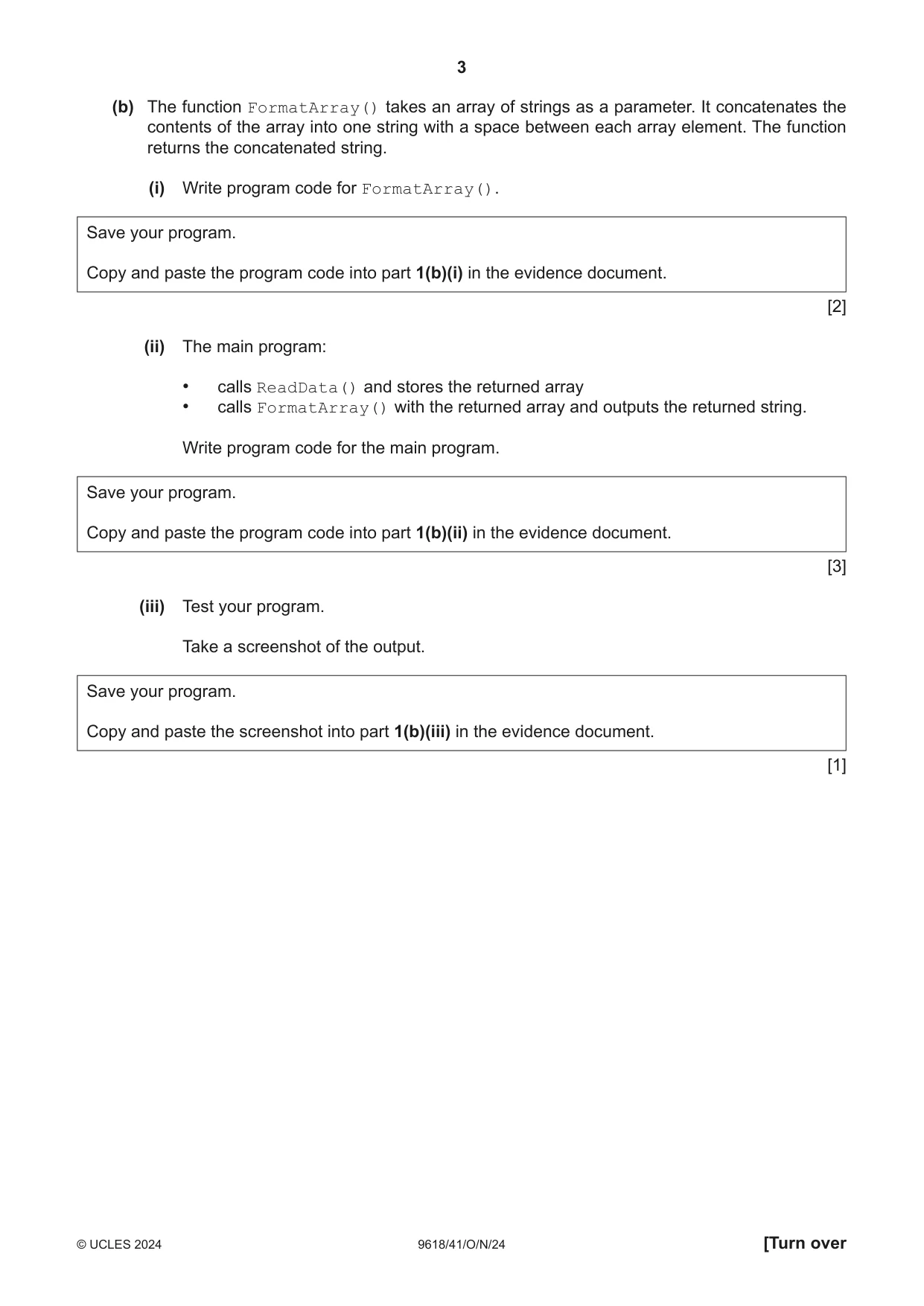
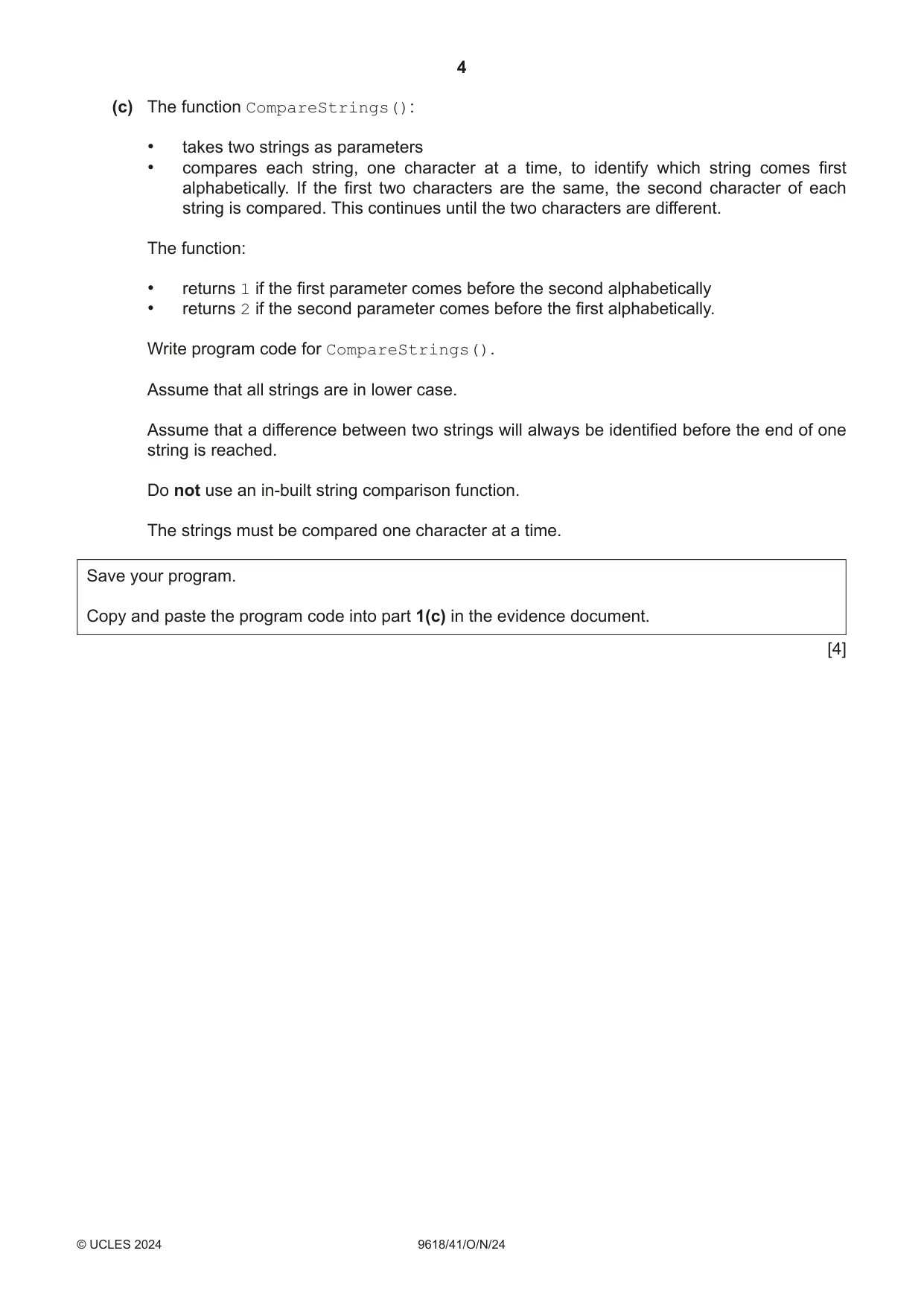
Q1 · A program sorts string data using different sorting methods
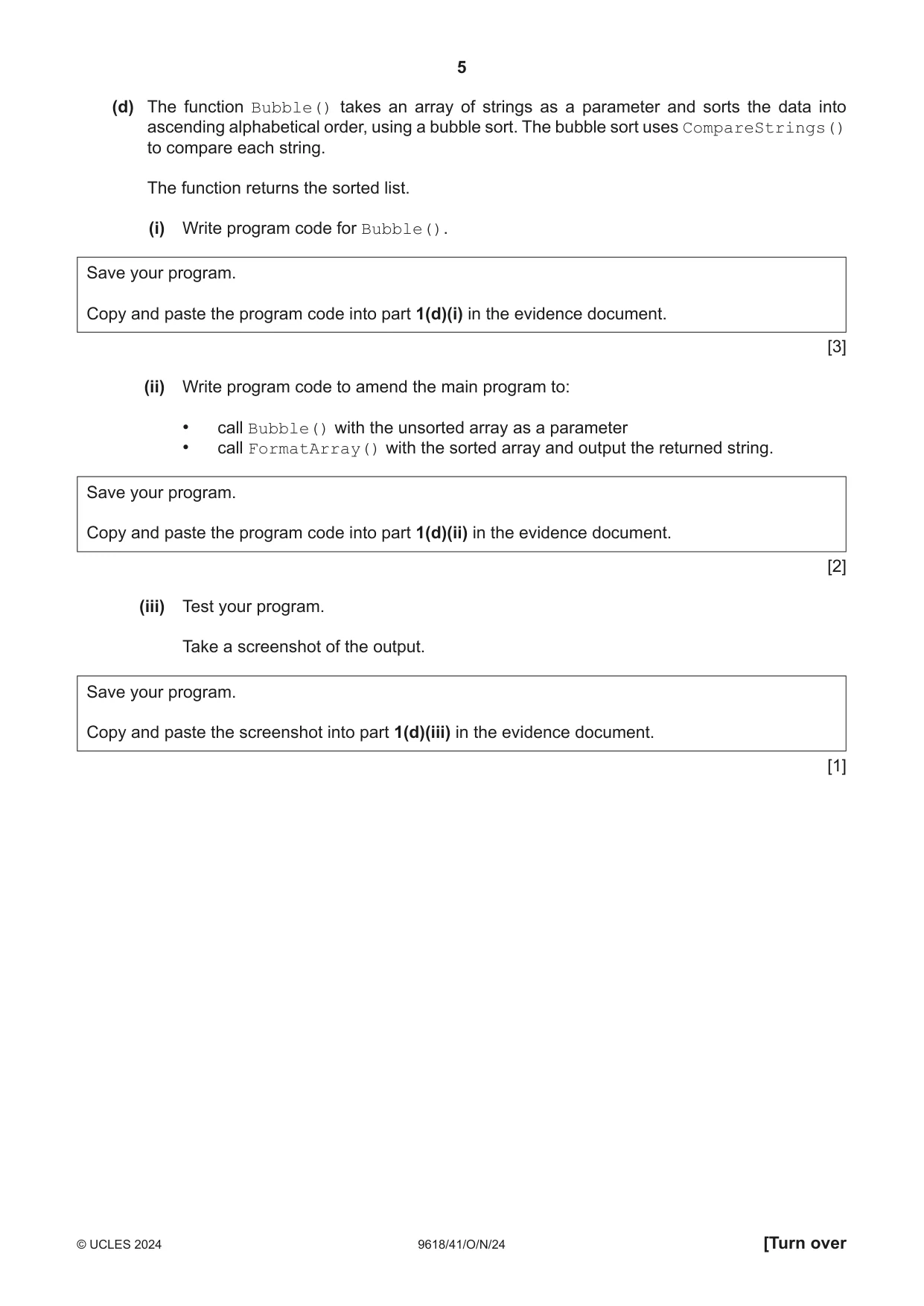
1 A program sorts string data using different sorting methods. (a) The text file Data.txt stores string data items. Each data item is on a new line in the text file. The function ReadData(): • has a local array of strings that can store 45 items • reads each line of data and stores it in the array • returns the array. Write program code for the function ReadData(). Save your program as Question1_N24. Copy and paste the program code into part 1(a) in the evidence document. [6] (b) The function FormatArray() takes an array of strings as a parameter. It concatenates the contents of the array into one string with a space between each array element. The function returns the concatenated string. (i) Write program code for FormatArray(). Save your program. Copy and paste the program code into part 1(b)(i) in the evidence document. [2] (ii) The main program: • calls ReadData() and stores the returned array • calls FormatArray() with the returned array and outputs the returned string. Write program code for the main program. Save your program. Copy and paste the program code into part 1(b)(ii) in the evidence document. [3] (iii) Test your program. Take a screenshot of the output. Save your program. Copy and paste the screenshot into part 1(b)(iii) in the evidence document. [1] (c) The function CompareStrings(): • takes two strings as parameters • compares each string, one character at a time, to identify which string comes first alphabetically. If the first two characters are the same, the second character of each string is compared. This continues until the two characters are different. The function: • returns 1 if the first parameter comes before the second alphabetically • returns 2 if the second parameter comes before the first alphabetically. Write program code for CompareStrings(). Assume that all strings are in lower case. Assume that a difference between two strings will always be identified before the end of one string is reached. Do not use an in-built string comparison function. The strings must be compared one character at a time. Save your program. Copy and paste the program code into part 1(c) in the evidence document. [4] (d) The function Bubble() takes an array of strings as a parameter and sorts the data into ascending alphabetical order, using a bubble sort. The bubble sort uses CompareStrings() to compare each string. The function returns the sorted list. (i) Write program code for Bubble(). Save your program. Copy and paste the program code into part 1(d)(i) in the evidence document. [3] (ii) Write program code to amend the main program to: • call Bubble() with the unsorted array as a parameter • call FormatArray() with the sorted array and output the returned string. Save your program. Copy and paste the program code into part 1(d)(ii) in the evidence document. [2] (iii) Test your program. Take a screenshot of the output. Save your program. Copy and paste the screenshot into part 1(d)(iii) in the evidence document. [1]
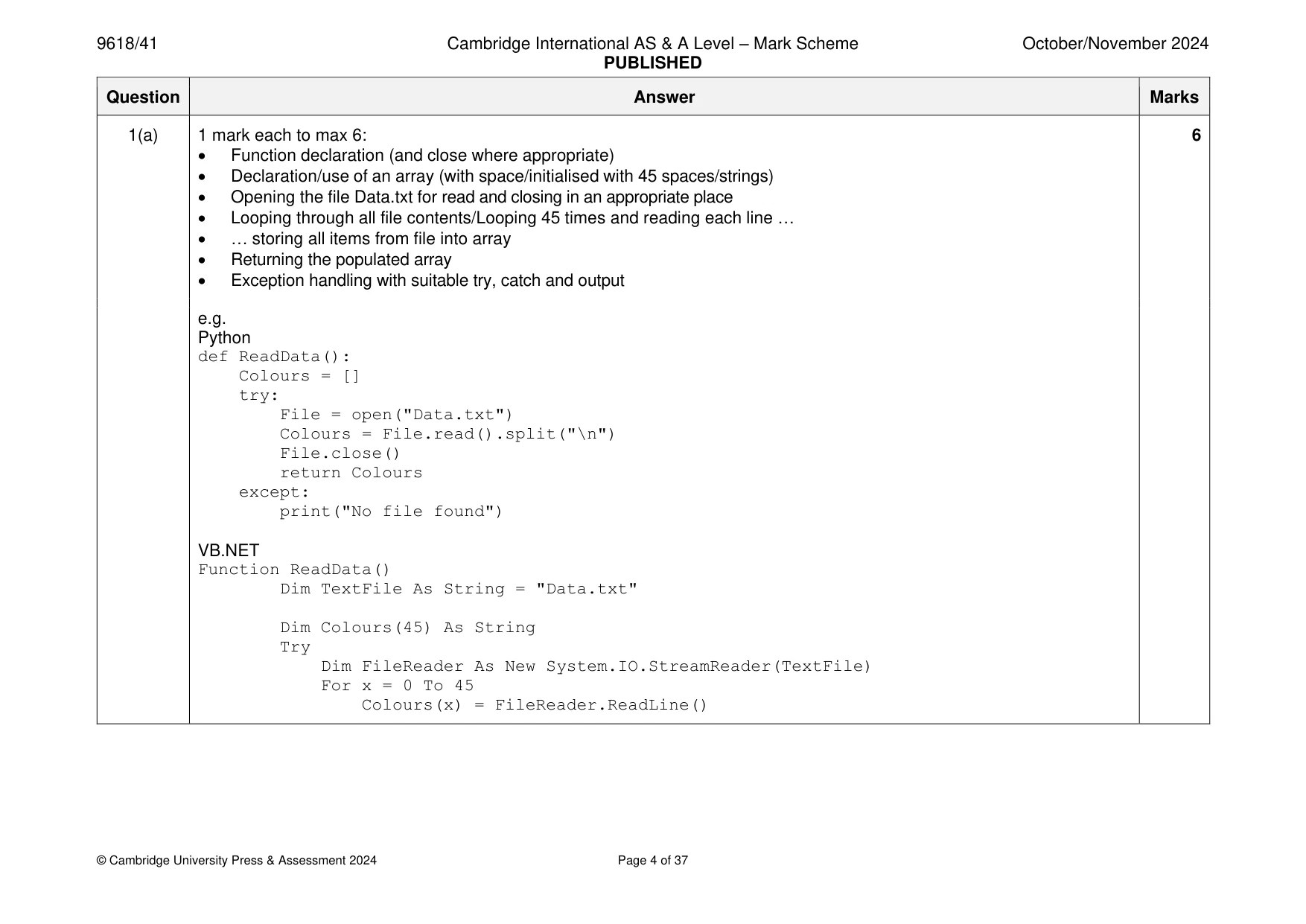
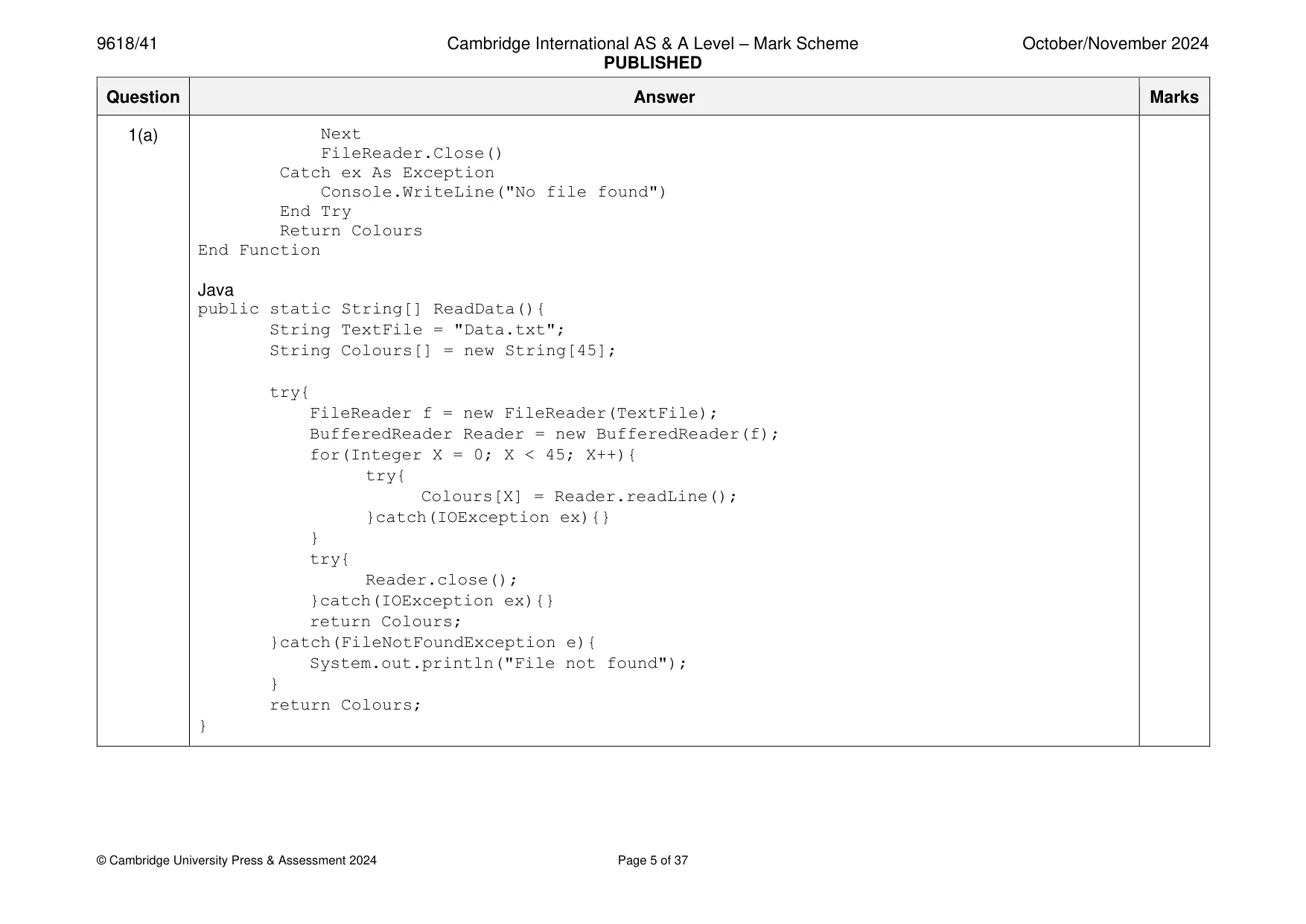
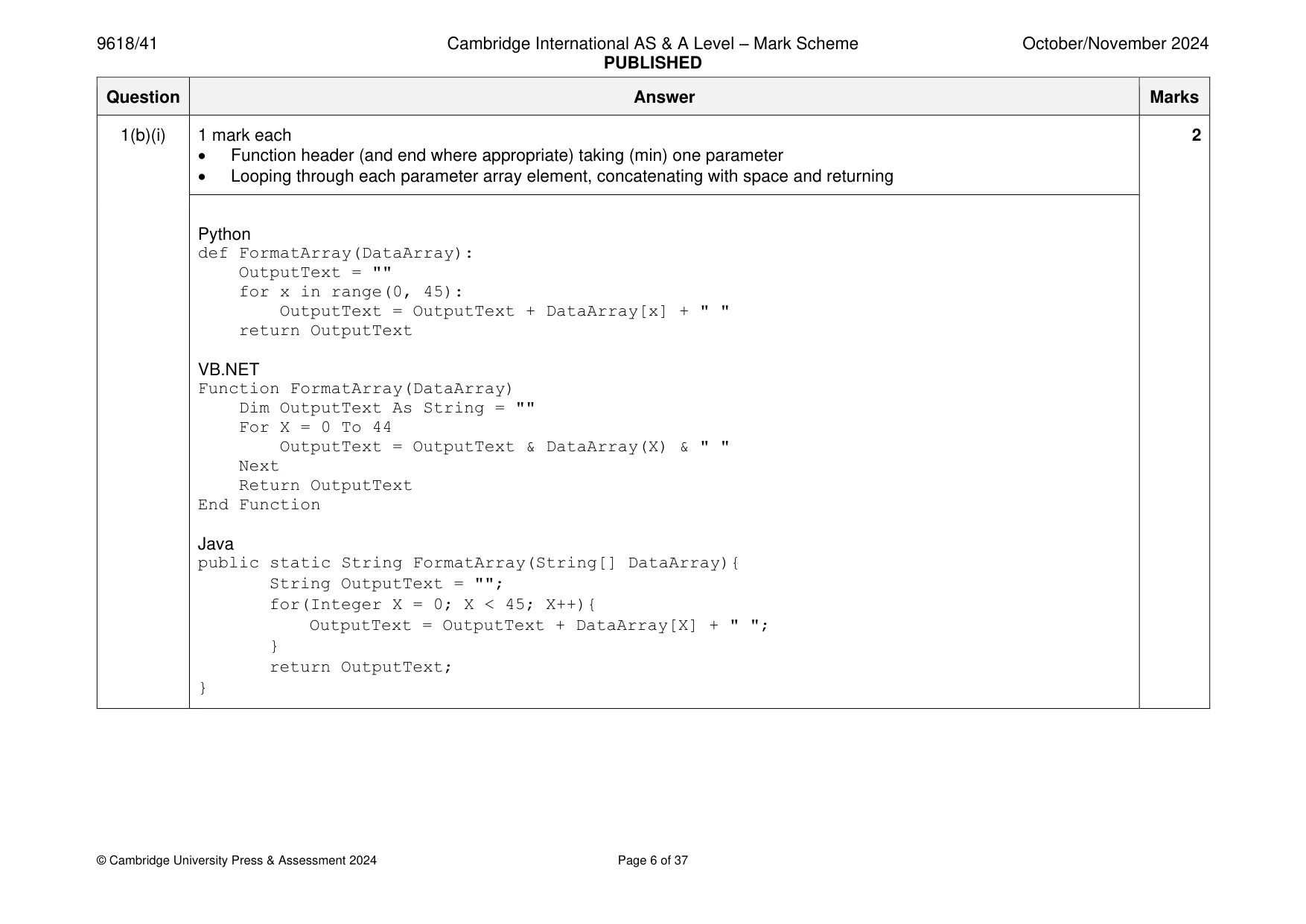
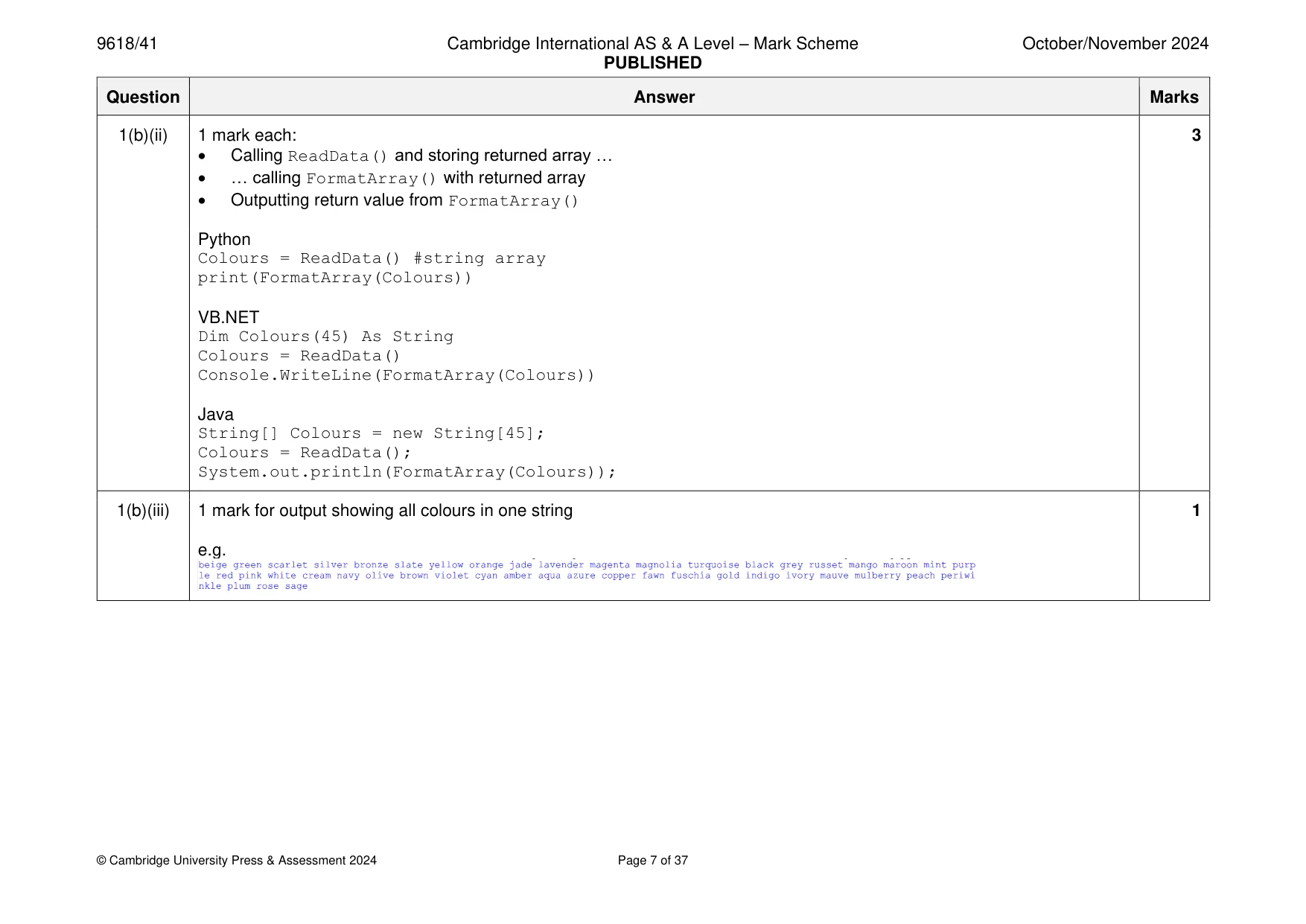
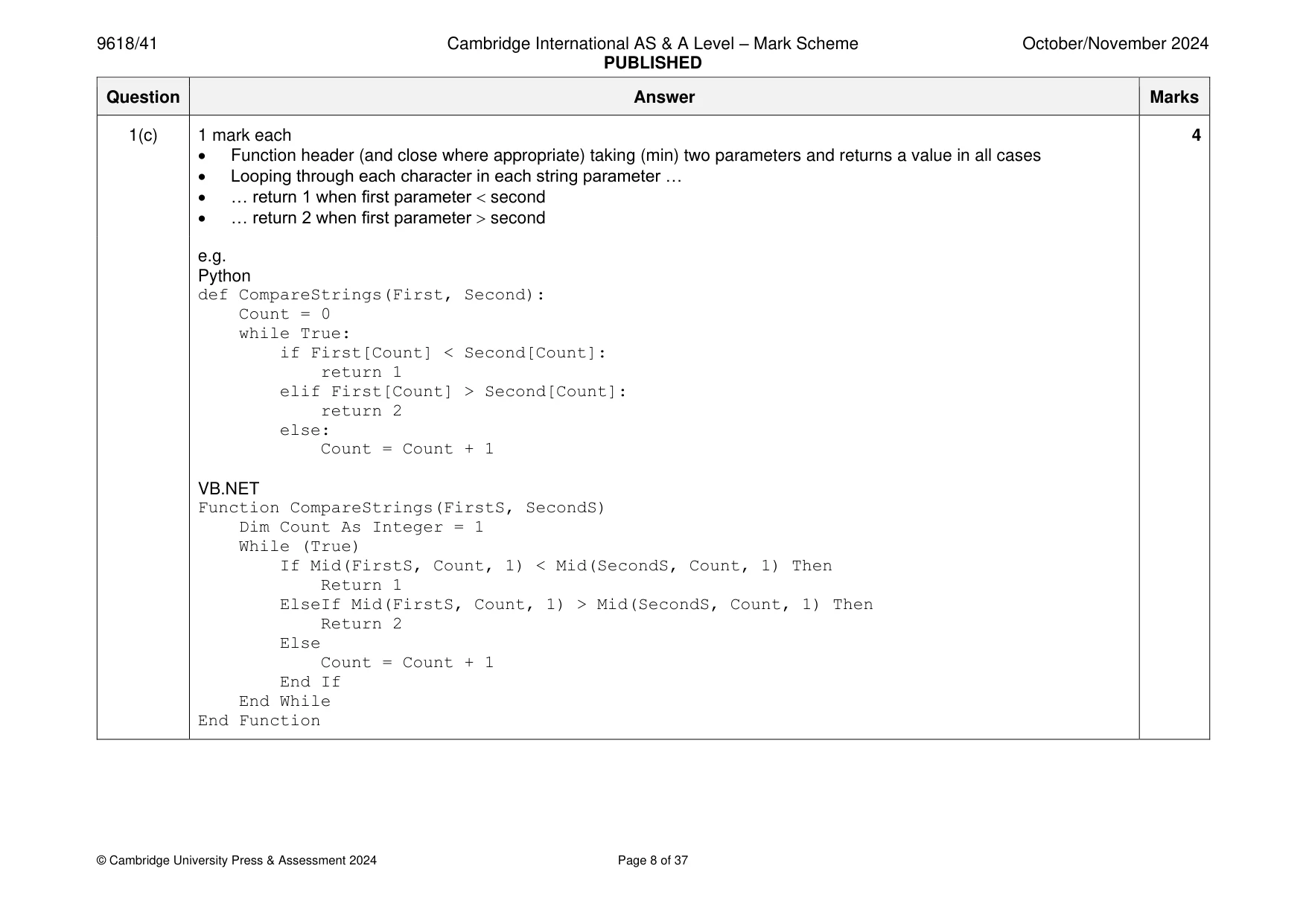
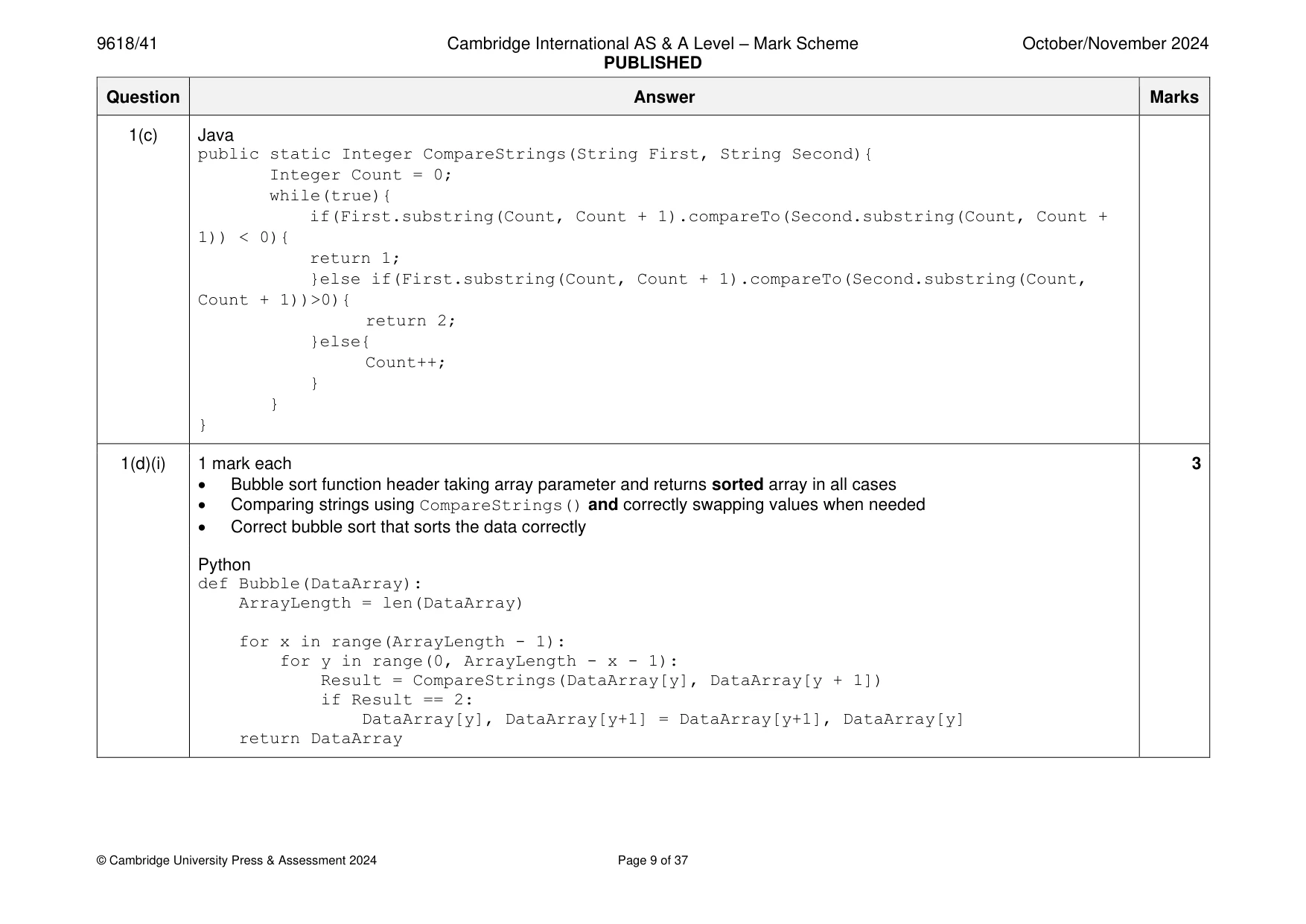
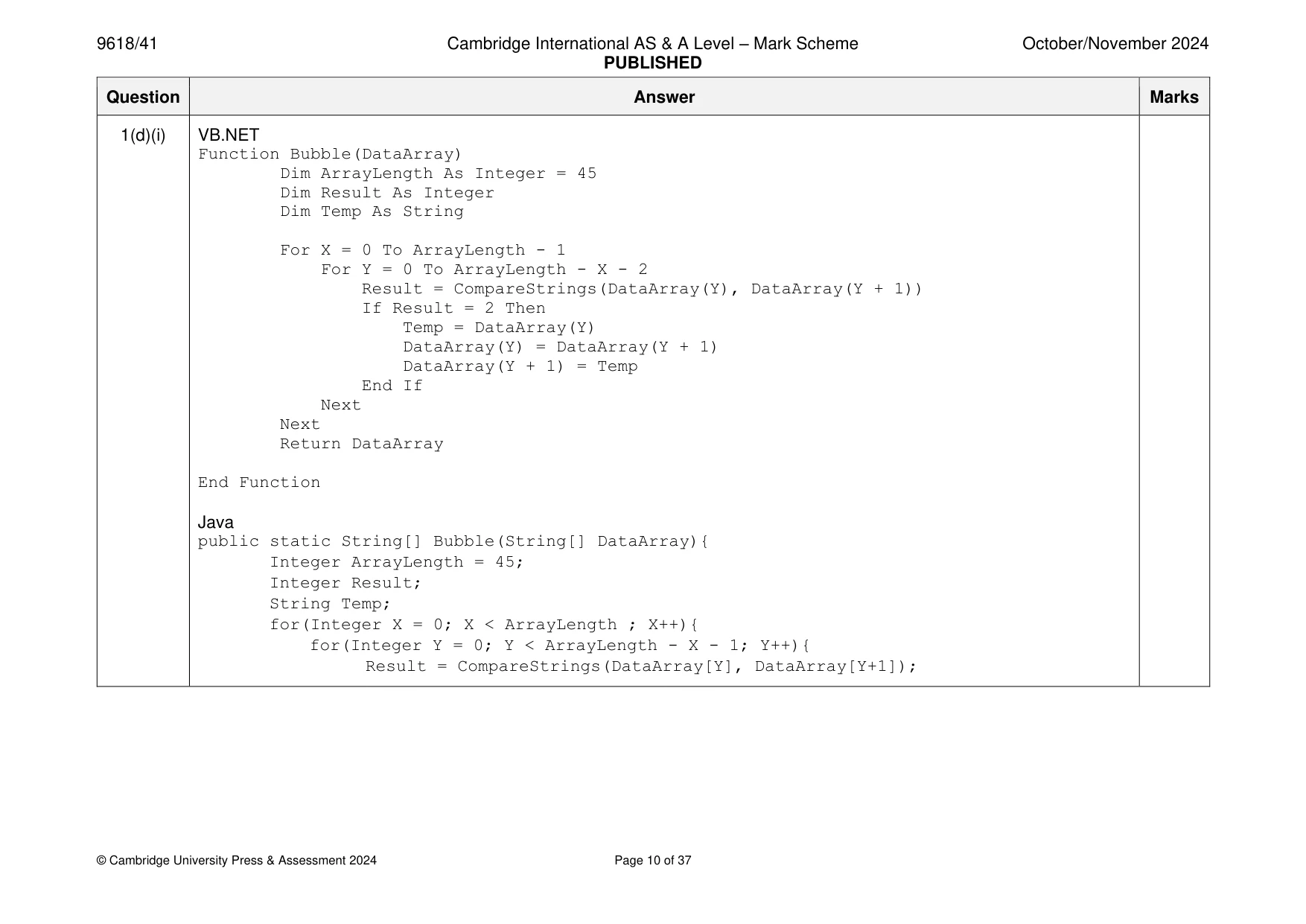
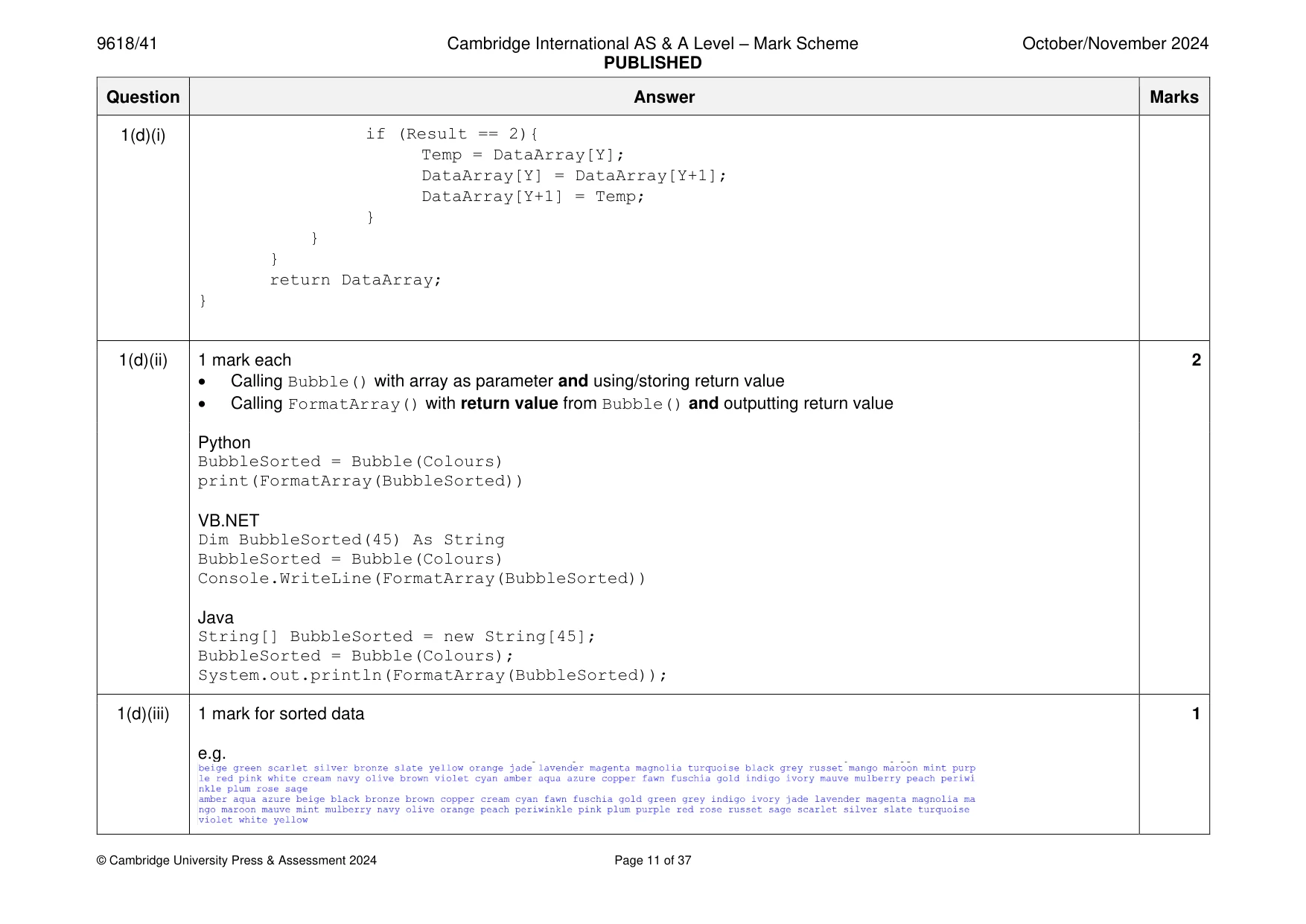
Mark scheme: Question Answer Marks 1(a) 1 mark each to max 6: 6 • Function declaration (and close where appropriate) • Declaration/use of an array (with space/initialised with 45 spaces/strings) • Opening the file Data.txt for read and closing in an appropriate place • Looping through all file contents/Looping 45 times and reading each line … • … storing all items from file into array • Returning the populated array • Exception handling with suitable try, catch and output e.g. Python def ReadData(): Colours = [] try: File = open("Data.txt") Colours = File.read().split("\n") File.close() return Colours except: print("No file found") VB.NET Function ReadData() Dim TextFile As String = "Data.txt" Dim Colours(45) As String Try Dim FileReader As New System.IO.StreamReader(TextFile) For x = 0 To 45 Colours(x) = FileReader.ReadLine() 1(a) Next FileReader.Close() Catch ex As Exception Console.WriteLine("No file found") End Try Return Colours End Function Java public static String[] ReadData(){ String TextFile = "Data.txt"; String Colours[] = new String[45]; try{ FileReader f = new FileReader(TextFile); BufferedReader Reader = new BufferedReader(f); for(Integer X = 0; X < 45; X++){ try{ Colours[X] = Reader.readLine(); }catch(IOException ex){} } try{ Reader.close(); }catch(IOException ex){} return Colours; }catch(FileNotFoundException e){ System.out.println("File not found"); } return Colours; } 1(b)(i) 1 mark each 2 • Function header (and end where appropriate) taking (min) one parameter • Looping through each parameter array element, concatenating with space and returning Python def FormatArray(DataArray): OutputText = "" for x in range(0, 45): OutputText = OutputText + DataArray[x] + " " return OutputText VB.NET Function FormatArray(DataArray) Dim OutputText As String = "" For X = 0 To 44 OutputText = OutputText & DataArray(X) & " " Next Return OutputText End Function Java public static String FormatArray(String[] DataArray){ String OutputText = ""; for(Integer X = 0; X < 45; X++){ OutputText = OutputText + DataArray[X] + " "; } return OutputText; } 1(b)(ii) 1 mark each: 3 • Calling ReadData() and storing returned array … • … calling FormatArray() with returned array • Outputting return value from FormatArray() Python Colours = ReadData() #string array print(FormatArray(Colours)) VB.NET Dim Colours(45) As String Colours = ReadData() Console.WriteLine(FormatArray(Colours)) Java String[] Colours = new String[45]; Colours = ReadData(); System.out.println(FormatArray(Colours)); 1(b)(iii) 1 mark for output showing all colours in one string 1 e.g. 1(c) 1 mark each 4 • Function header (and close where appropriate) taking (min) two parameters and returns a value in all cases • Looping through each character in each string parameter … • … return 1 when first parameter second • … return 2 when first parameter second e.g. Python def CompareStrings(First, Second): Count = 0 while True: if First[Count] < Second[Count]: return 1 elif First[Count] > Second[Count]: return 2 else: Count = Count + 1 VB.NET Function CompareStrings(FirstS, SecondS) Dim Count As Integer = 1 While (True) If Mid(FirstS, Count, 1) < Mid(SecondS, Count, 1) Then Return 1 ElseIf Mid(FirstS, Count, 1) > Mid(SecondS, Count, 1) Then Return 2 Else Count = Count + 1 End If End While End Function 1(c) Java public static Integer CompareStrings(String First, String Second){ Integer Count = 0; while(true){ if(First.substring(Count, Count + 1).compareTo(Second.substring(Count, Count + 1)) < 0){ return 1; }else if(First.substring(Count, Count + 1).compareTo(Second.substring(Count, Count + 1))>0){ return 2; }else{ Count++; } } } 1(d)(i) 1 mark each 3 • Bubble sort function header taking array parameter and returns sorted array in all cases • Comparing strings using CompareStrings() and correctly swapping values when needed • Correct bubble sort that sorts the data correctly Python def Bubble(DataArray): ArrayLength = len(DataArray) for x in range(ArrayLength - 1): for y in range(0, ArrayLength - x - 1): Result = CompareStrings(DataArray[y], DataArray[y + 1]) if Result == 2: DataArray[y], DataArray[y+1] = DataArray[y+1], DataArray[y] return DataArray 1(d)(i) VB.NET Function Bubble(DataArray) Dim ArrayLength As Integer = 45 Dim Result As Integer Dim Temp As String For X = 0 To ArrayLength - 1 For Y = 0 To ArrayLength - X - 2 Result = CompareStrings(DataArray(Y), DataArray(Y + 1)) If Result = 2 Then Temp = DataArray(Y) DataArray(Y) = DataArray(Y + 1) DataArray(Y + 1) = Temp End If Next Next Return DataArray End Function Java public static String[] Bubble(String[] DataArray){ Integer ArrayLength = 45; Integer Result; String Temp; for(Integer X = 0; X < ArrayLength ; X++){ for(Integer Y = 0; Y < ArrayLength - X - 1; Y++){ Result = CompareStrings(DataArray[Y], DataArray[Y+1]); 1(d)(i) if (Result == 2){ Temp = DataArray[Y]; DataArray[Y] = DataArray[Y+1]; DataArray[Y+1] = Temp; } } } return DataArray; } 1(d)(ii) 1 mark each 2 • Calling Bubble() with array as parameter and using/storing return value • Calling FormatArray() with return value from Bubble() and outputting return value Python BubbleSorted = Bubble(Colours) print(FormatArray(BubbleSorted)) VB.NET Dim BubbleSorted(45) As String BubbleSorted = Bubble(Colours) Console.WriteLine(FormatArray(BubbleSorted)) Java String[] BubbleSorted = new String[45]; BubbleSorted = Bubble(Colours); System.out.println(FormatArray(BubbleSorted)); 1(d)(iii) 1 mark for sorted data 1 e.g.
Q2 · A computer program is designed to simulate horses doing show jumping
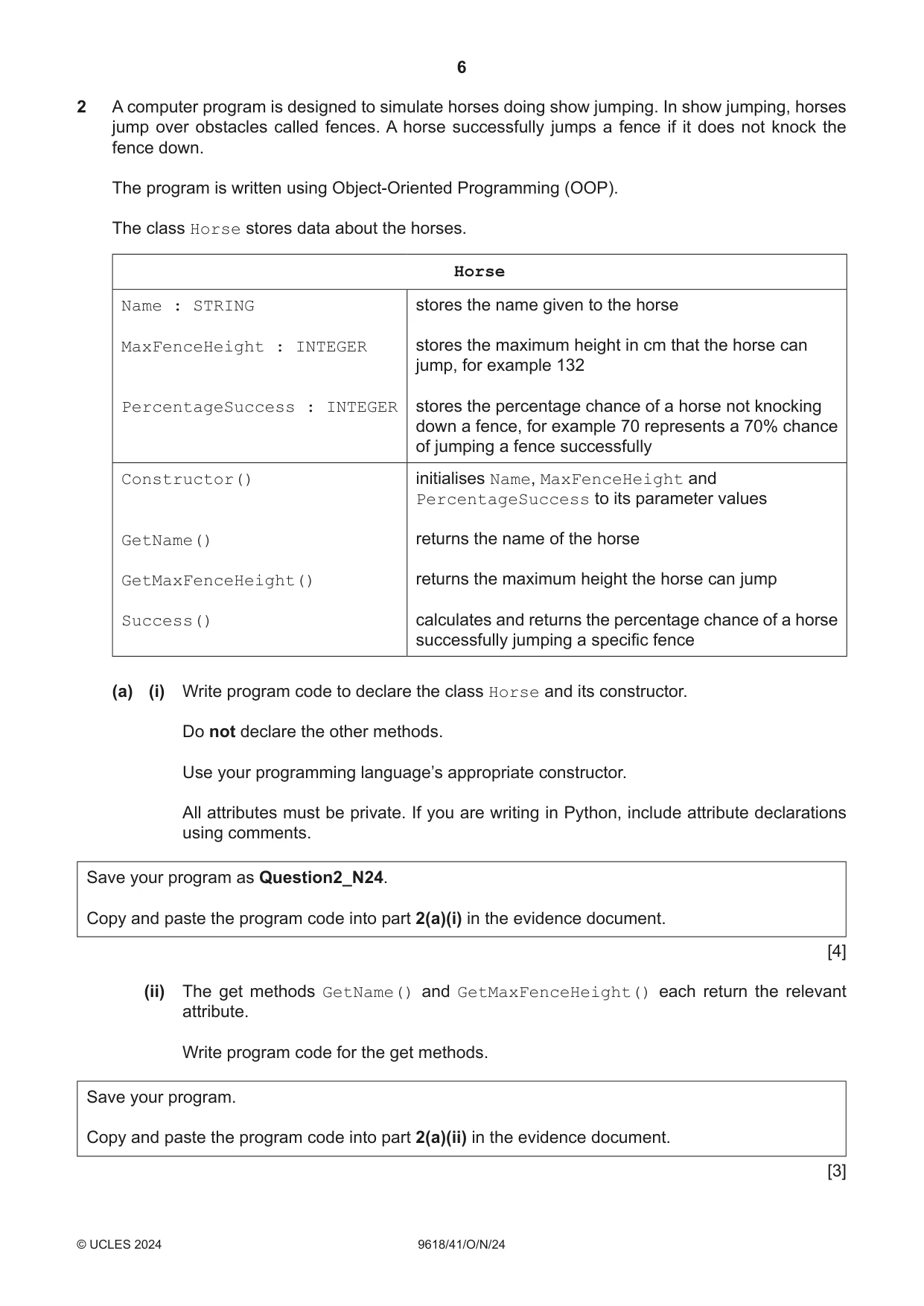
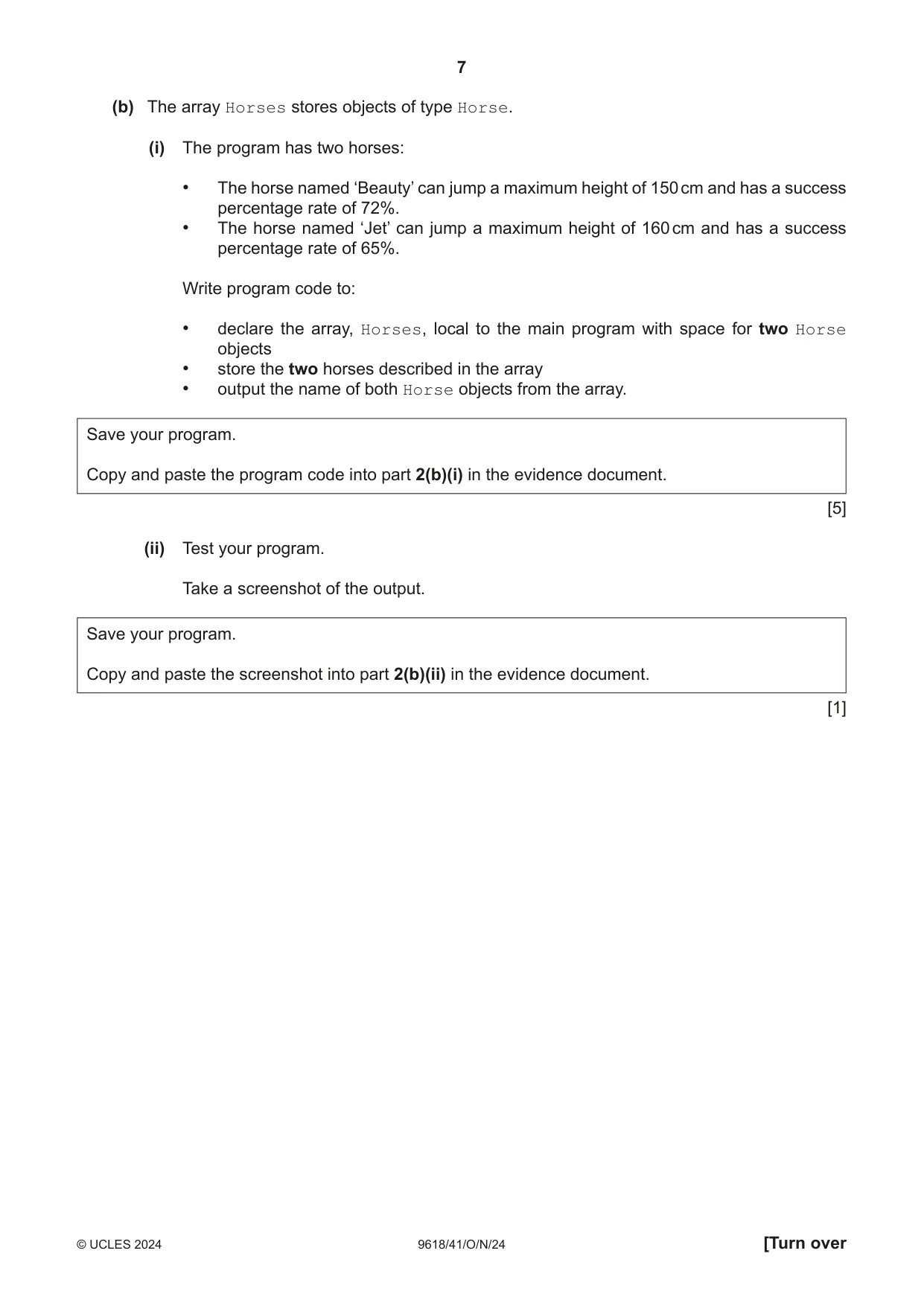
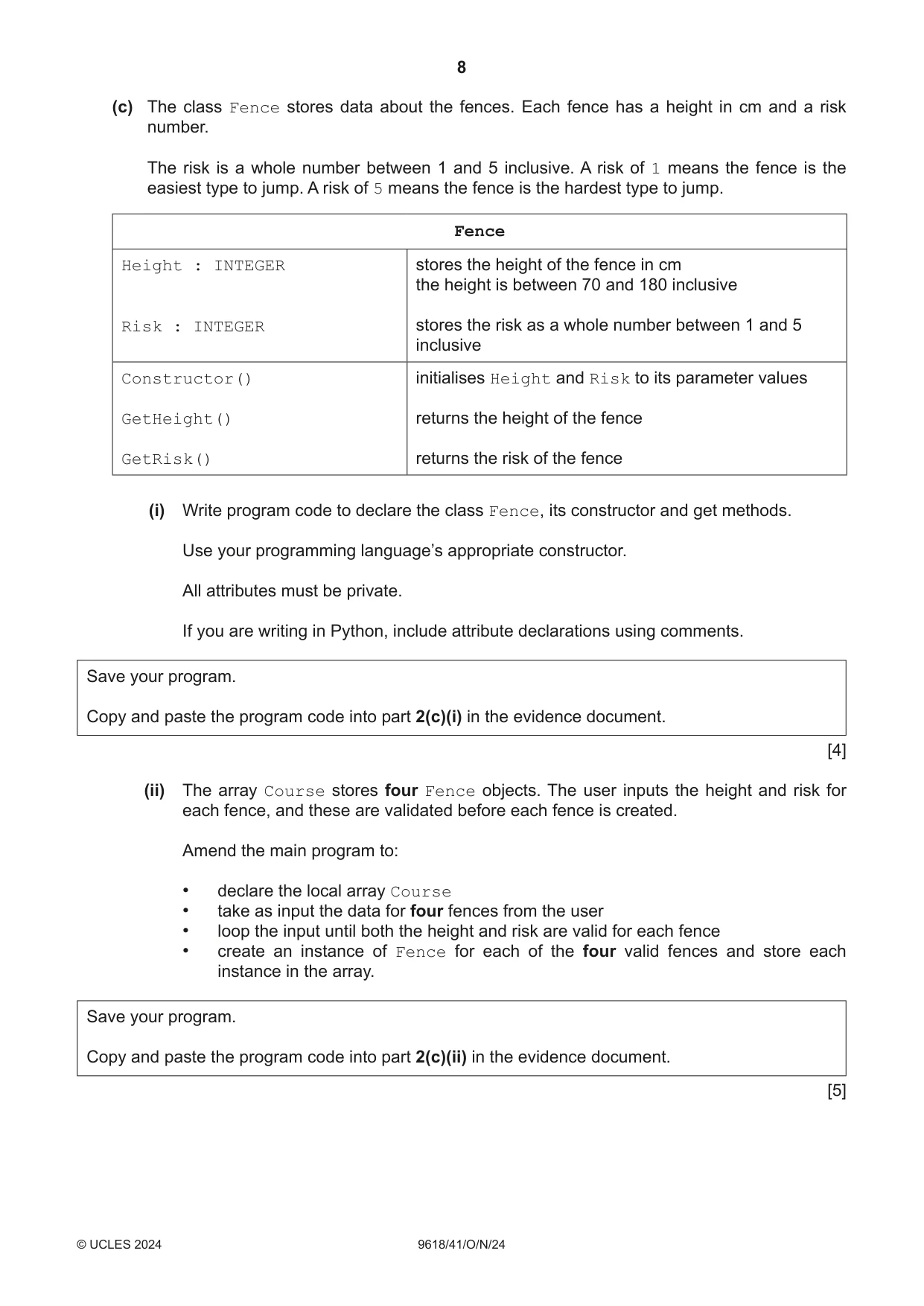
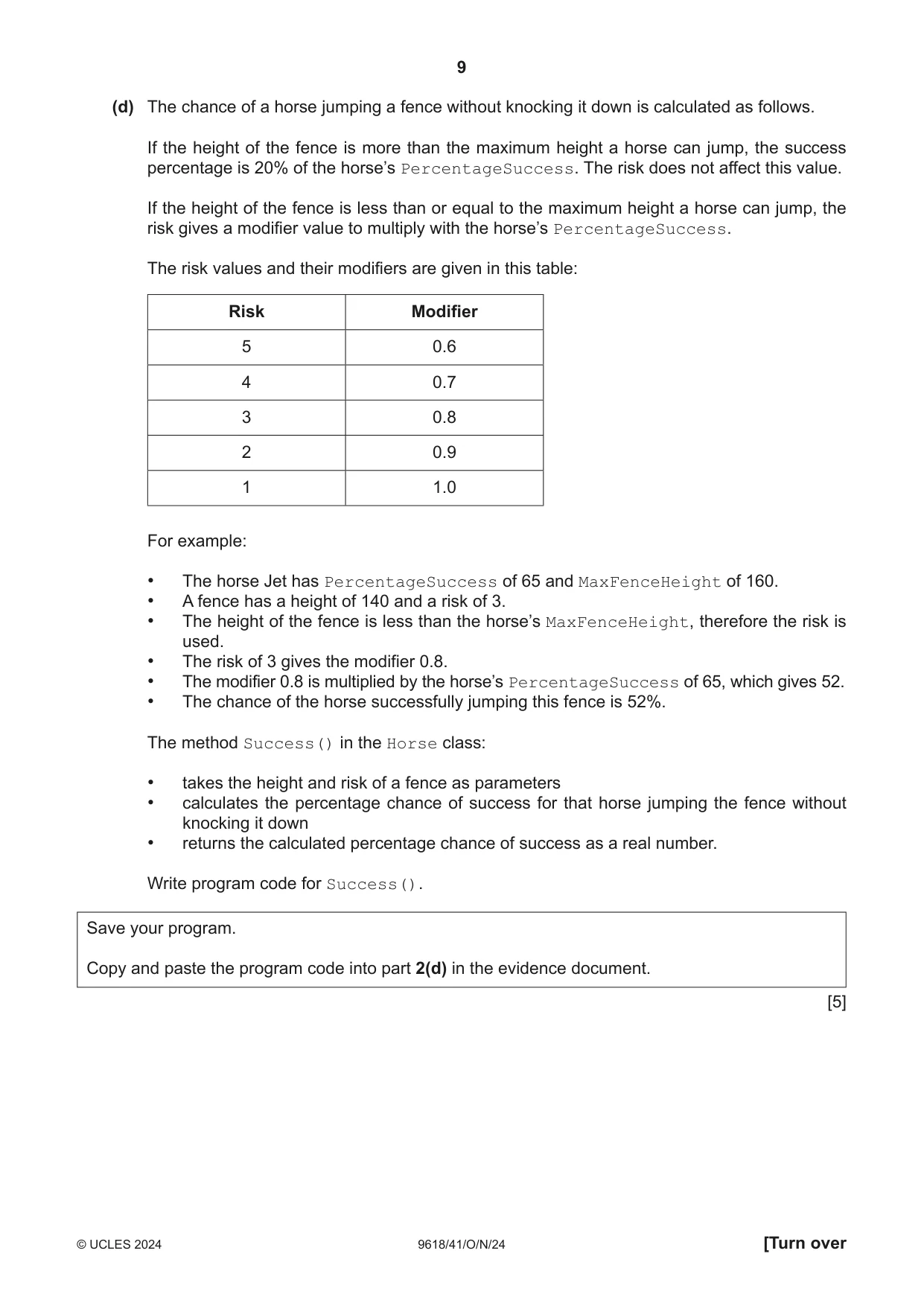
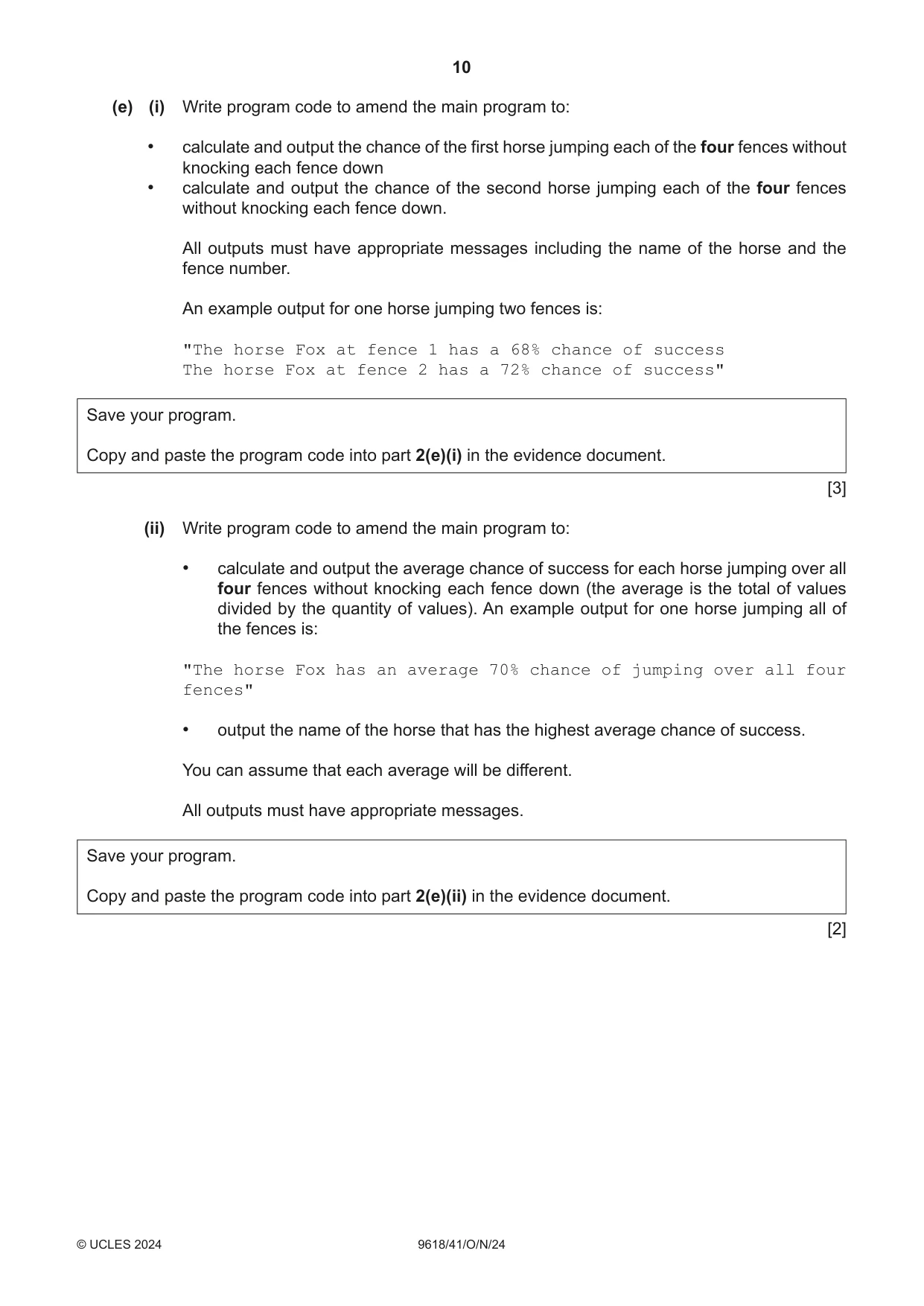
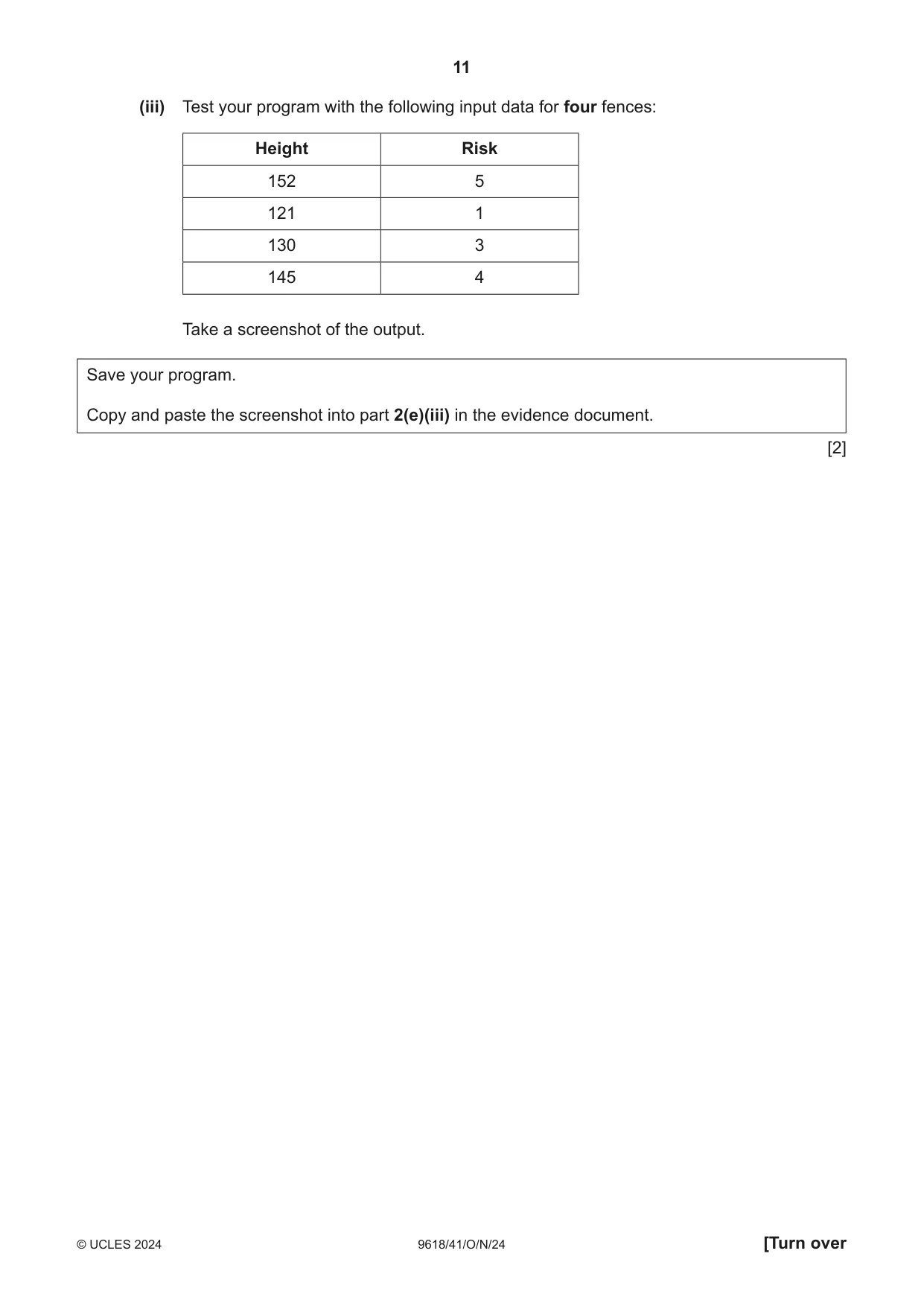
2 A computer program is designed to simulate horses doing show jumping. In show jumping, horses jump over obstacles called fences. A horse successfully jumps a fence if it does not knock the fence down. The program is written using Object-Oriented Programming (OOP). The class Horse stores data about the horses. Horse Name : STRING stores the name given to the horse MaxFenceHeight : INTEGER stores the maximum height in cm that the horse can jump, for example 132 PercentageSuccess : INTEGER stores the percentage chance of a horse not knocking down a fence, for example 70 represents a 70% chance of jumping a fence successfully Constructor() initialises Name, MaxFenceHeight and PercentageSuccess to its parameter values GetName() returns the name of the horse GetMaxFenceHeight() returns the maximum height the horse can jump Success() calculates and returns the percentage chance of a horse successfully jumping a specific fence (a) (i) Write program code to declare the class Horse and its constructor. Do not declare the other methods. Use your programming language’s appropriate constructor. All attributes must be private. If you are writing in Python, include attribute declarations using comments. Save your program as Question2_N24. Copy and paste the program code into part 2(a)(i) in the evidence document. [4] (ii) The get methods GetName() and GetMaxFenceHeight() each return the relevant attribute. Write program code for the get methods. Save your program. Copy and paste the program code into part 2(a)(ii) in the evidence document. [3] (b) The array Horses stores objects of type Horse. (i) The program has two horses: • The horse named ‘Beauty’ can jump a maximum height of 150 cm and has a success percentage rate of 72%. • The horse named ‘Jet’ can jump a maximum height of 160 cm and has a success percentage rate of 65%. Write program code to: • declare the array, Horses, local to the main program with space for two Horse objects • store the two horses described in the array • output the name of both Horse objects from the array. Save your program. Copy and paste the program code into part 2(b)(i) in the evidence document. [5] (ii) Test your program. Take a screenshot of the output. Save your program. Copy and paste the screenshot into part 2(b)(ii) in the evidence document. [1] (c) The class Fence stores data about the fences. Each fence has a height in cm and a risk number. The risk is a whole number between 1 and 5 inclusive. A risk of 1 means the fence is the easiest type to jump. A risk of 5 means the fence is the hardest type to jump. Fence Height : INTEGER stores the height of the fence in cm the height is between 70 and 180 inclusive Risk : INTEGER stores the risk as a whole number between 1 and 5 inclusive Constructor() initialises Height and Risk to its parameter values GetHeight() returns the height of the fence GetRisk() returns the risk of the fence (i) Write program code to declare the class Fence, its constructor and get methods. Use your programming language’s appropriate constructor. All attributes must be private. If you are writing in Python, include attribute declarations using comments. Save your program. Copy and paste the program code into part 2(c)(i) in the evidence document. [4] (ii) The array Course stores four Fence objects. The user inputs the height and risk for each fence, and these are validated before each fence is created. Amend the main program to: • declare the local array Course • take as input the data for four fences from the user • loop the input until both the height and risk are valid for each fence • create an instance of Fence for each of the four valid fences and store each instance in the array. Save your program. Copy and paste the program code into part 2(c)(ii) in the evidence document. [5] (d) The chance of a horse jumping a fence without knocking it down is calculated as follows. If the height of the fence is more than the maximum height a horse can jump, the success percentage is 20% of the horse’s PercentageSuccess. The risk does not affect this value. If the height of the fence is less than or equal to the maximum height a horse can jump, the risk gives a modifier value to multiply with the horse’s PercentageSuccess. The risk values and their modifiers are given in this table: Risk Modifier 5 0.6 4 0.7 3 0.8 2 0.9 1 1.0 For example: • The horse Jet has PercentageSuccess of 65 and MaxFenceHeight of 160. • A fence has a height of 140 and a risk of 3. • The height of the fence is less than the horse’s MaxFenceHeight, therefore the risk is used. • The risk of 3 gives the modifier 0.8. • The modifier 0.8 is multiplied by the horse’s PercentageSuccess of 65, which gives 52. • The chance of the horse successfully jumping this fence is 52%. The method Success() in the Horse class: • takes the height and risk of a fence as parameters • calculates the percentage chance of success for that horse jumping the fence without knocking it down • returns the calculated percentage chance of success as a real number. Write program code for Success(). Save your program. Copy and paste the program code into part 2(d) in the evidence document. [5] (e) (i) Write program code to amend the main program to: • calculate and output the chance of the first horse jumping each of the four fences without knocking each fence down • calculate and output the chance of the second horse jumping each of the four fences without knocking each fence down. All outputs must have appropriate messages including the name of the horse and the fence number. An example output for one horse jumping two fences is: "The horse Fox at fence 1 has a 68% chance of success The horse Fox at fence 2 has a 72% chance of success" Save your program. Copy and paste the program code into part 2(e)(i) in the evidence document. [3] (ii) Write program code to amend the main program to: • calculate and output the average chance of success for each horse jumping over all four fences without knocking each fence down (the average is the total of values divided by the quantity of values). An example output for one horse jumping all of the fences is: "The horse Fox has an average 70% chance of jumping over all four fences" • output the name of the horse that has the highest average chance of success. You can assume that each average will be different. All outputs must have appropriate messages. Save your program. Copy and paste the program code into part 2(e)(ii) in the evidence document. [2] (iii) Test your program with the following input data for four fences: Height Risk 152 5 121 1 130 3 145 4 Take a screenshot of the output. Save your program. Copy and paste the screenshot into part 2(e)(iii) in the evidence document. [2]
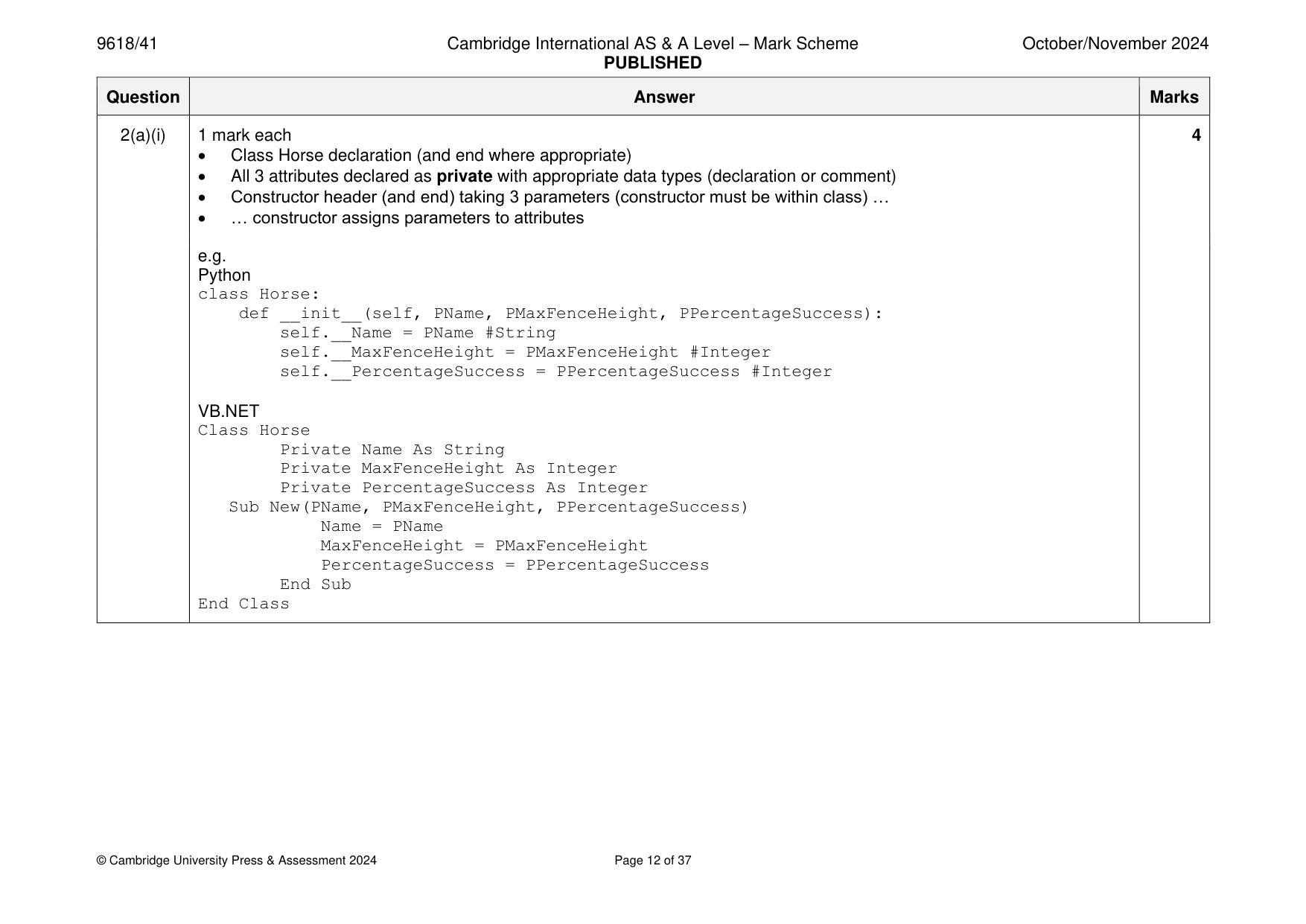
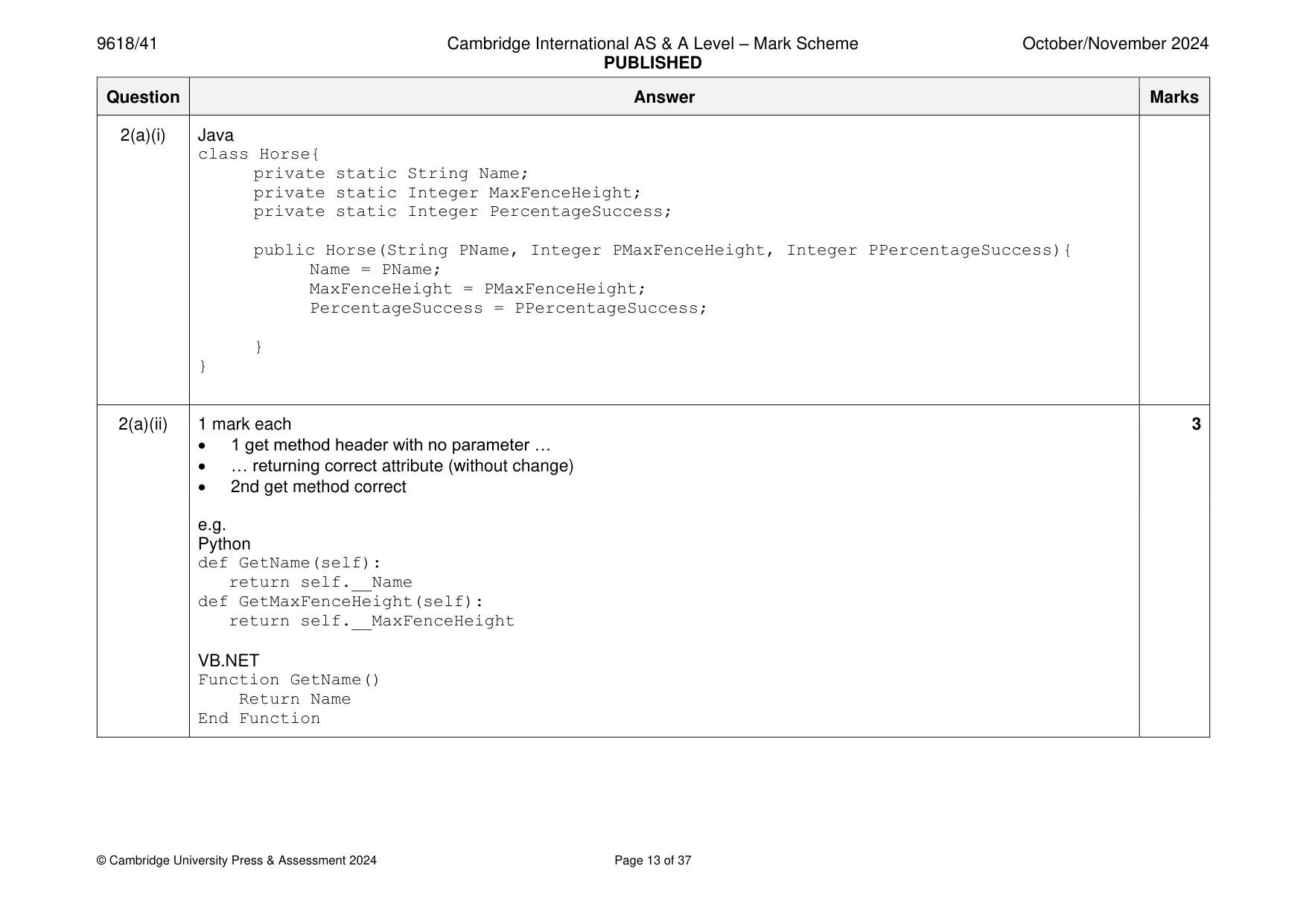
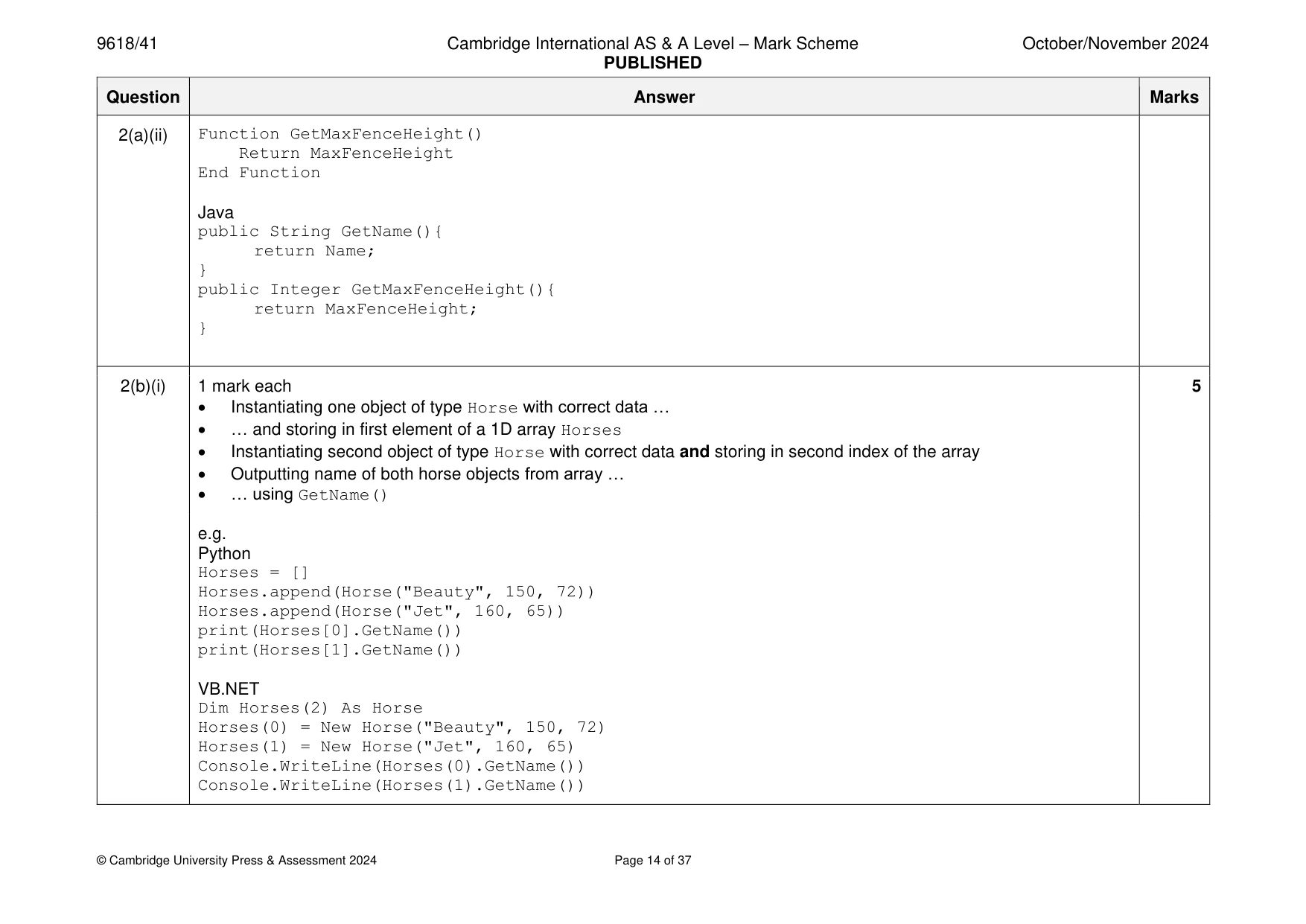
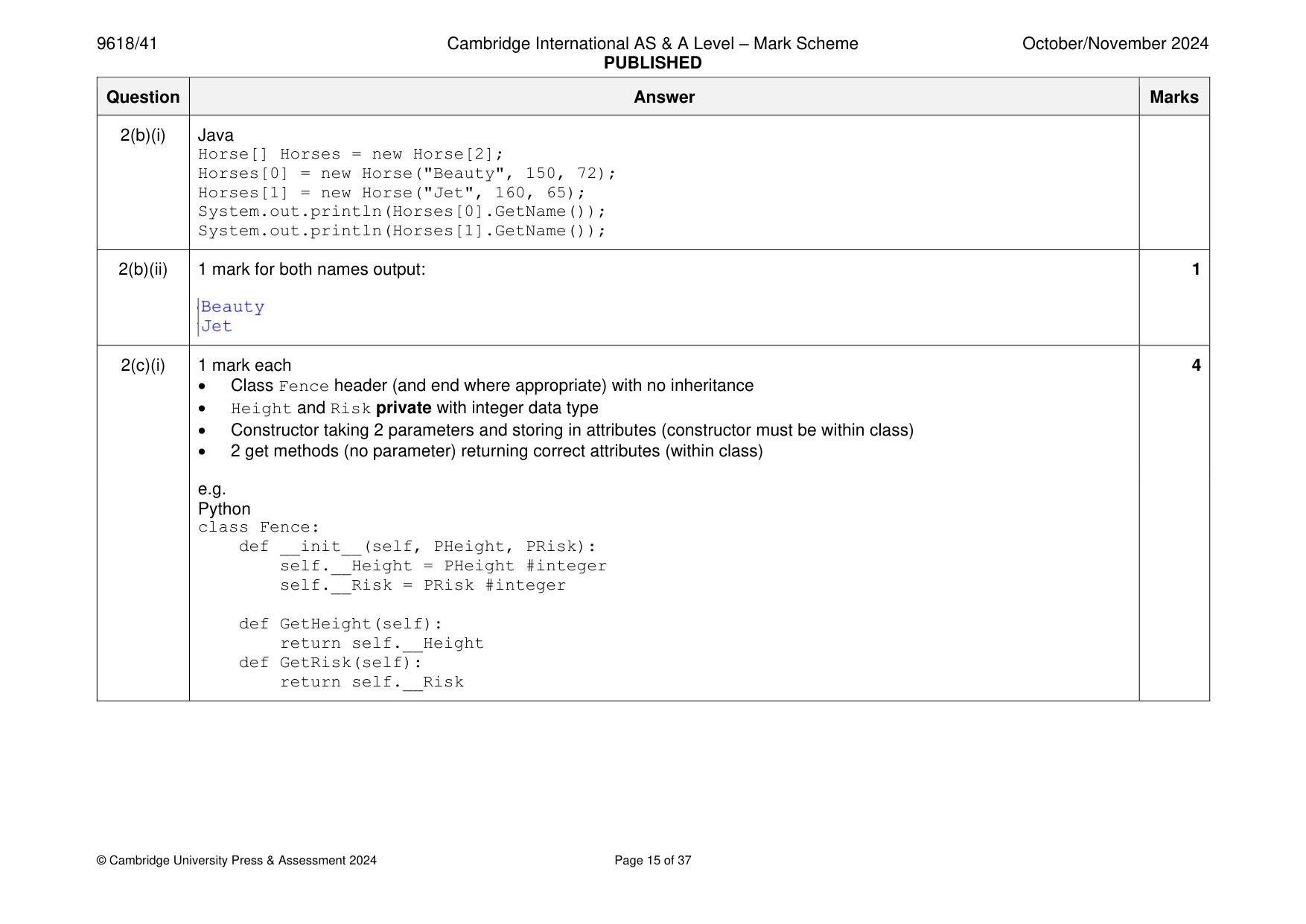
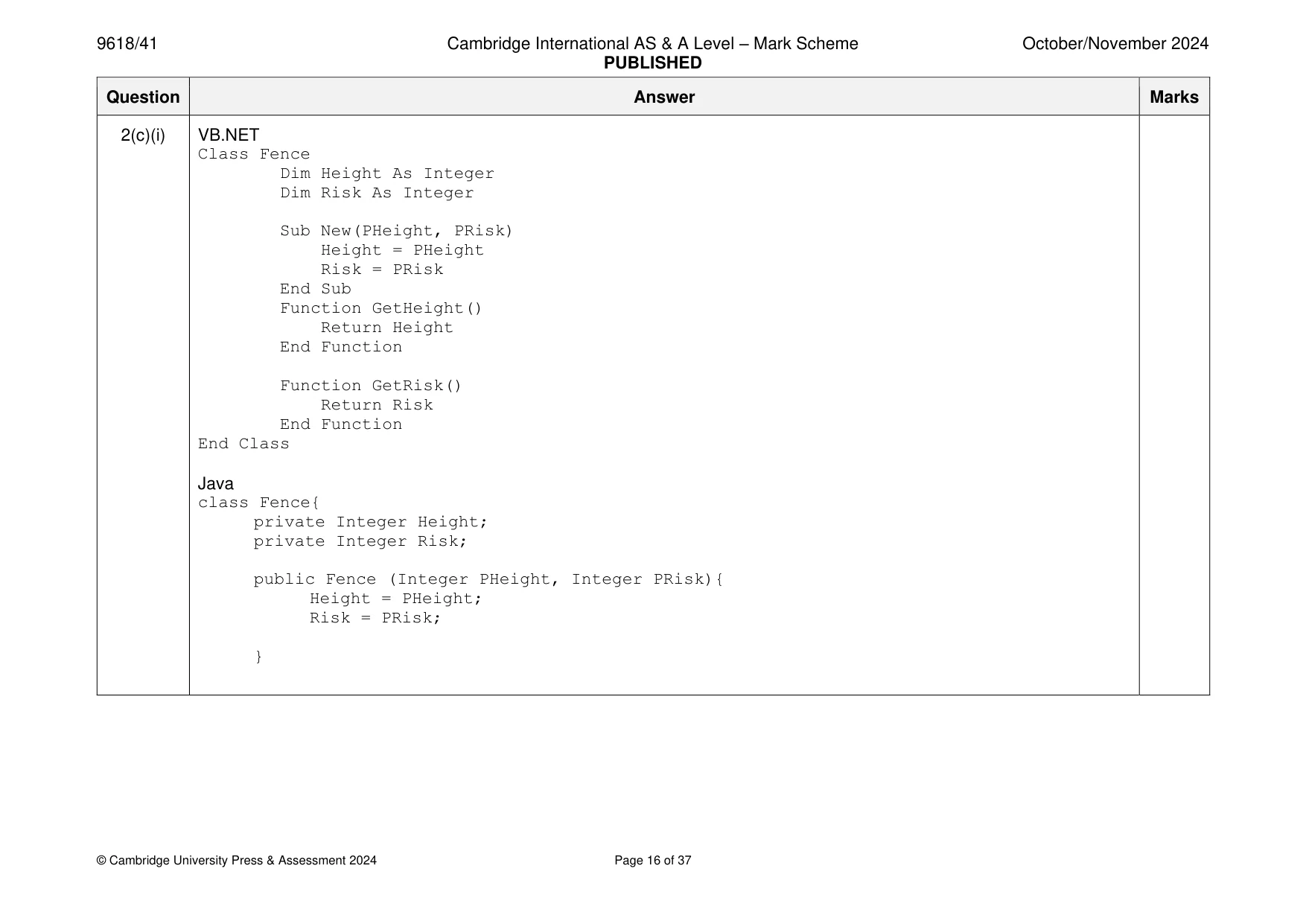
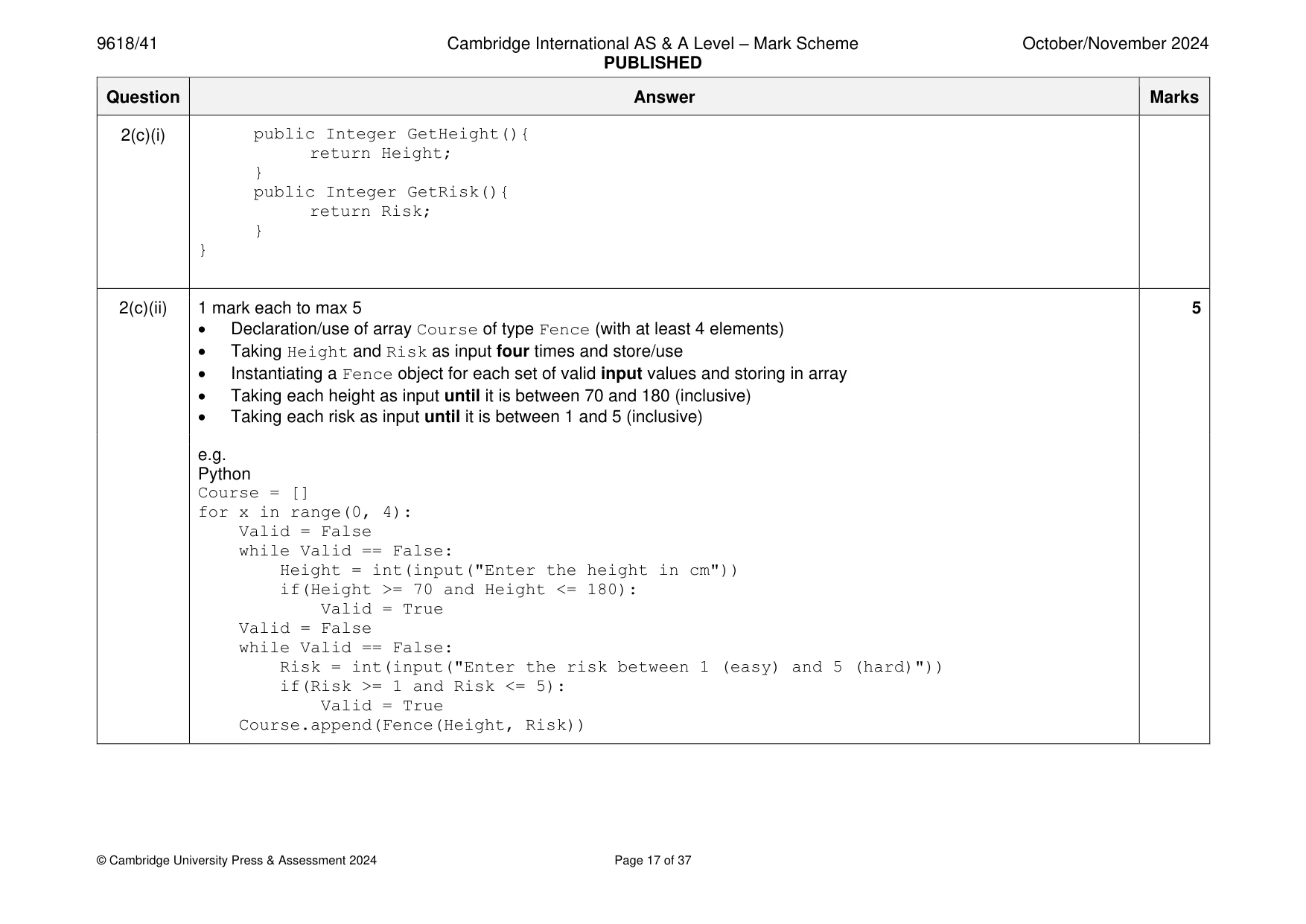
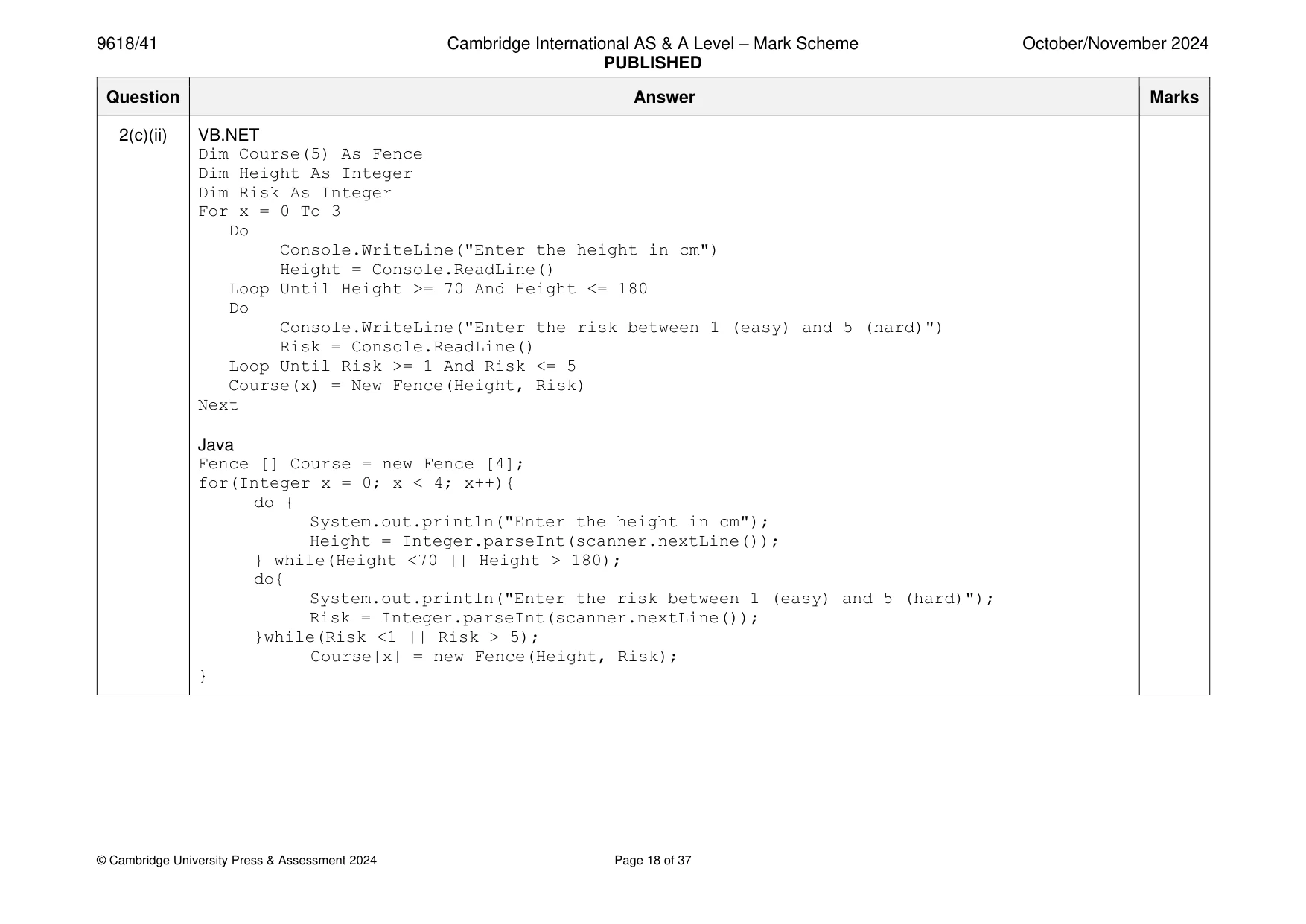
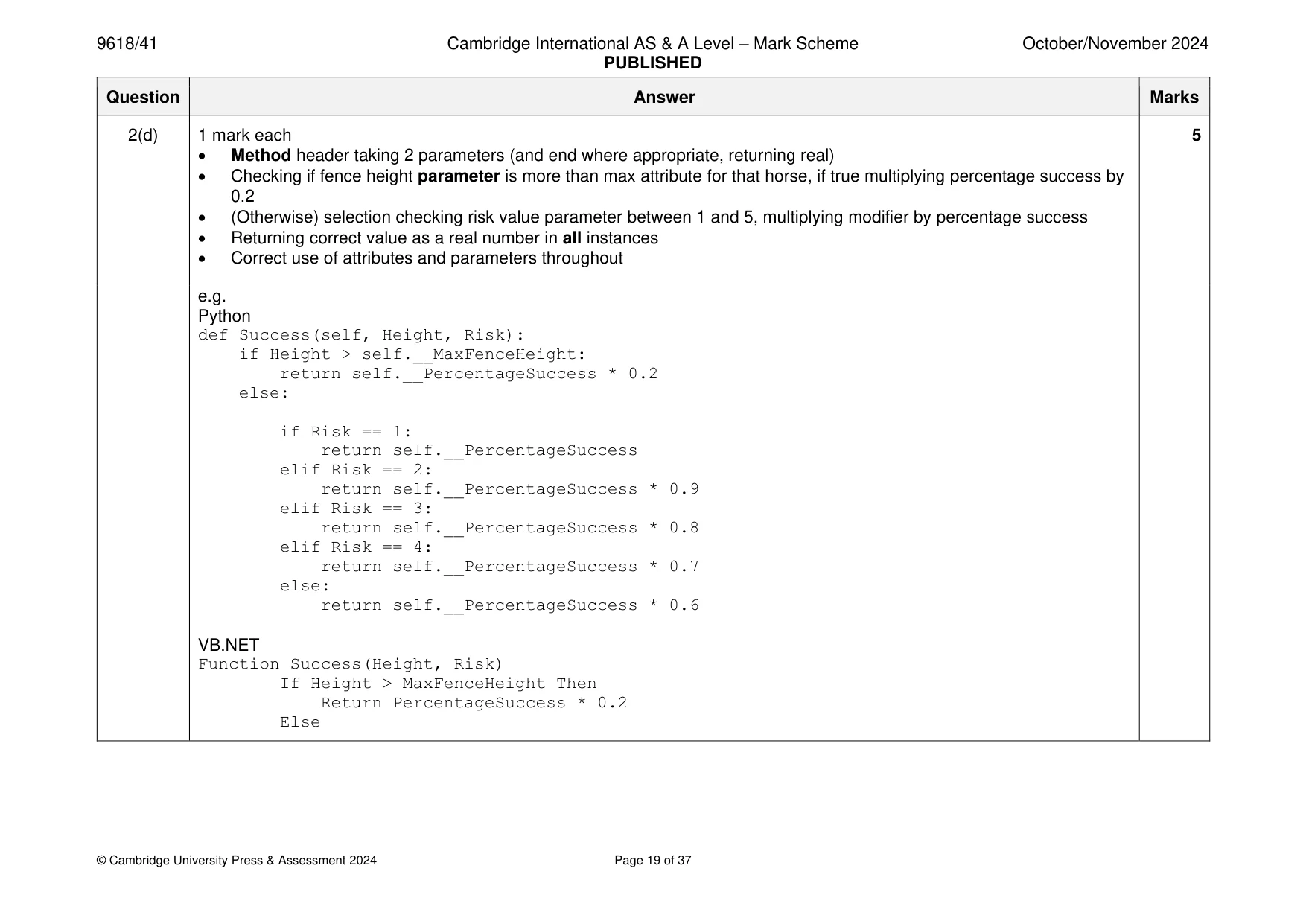
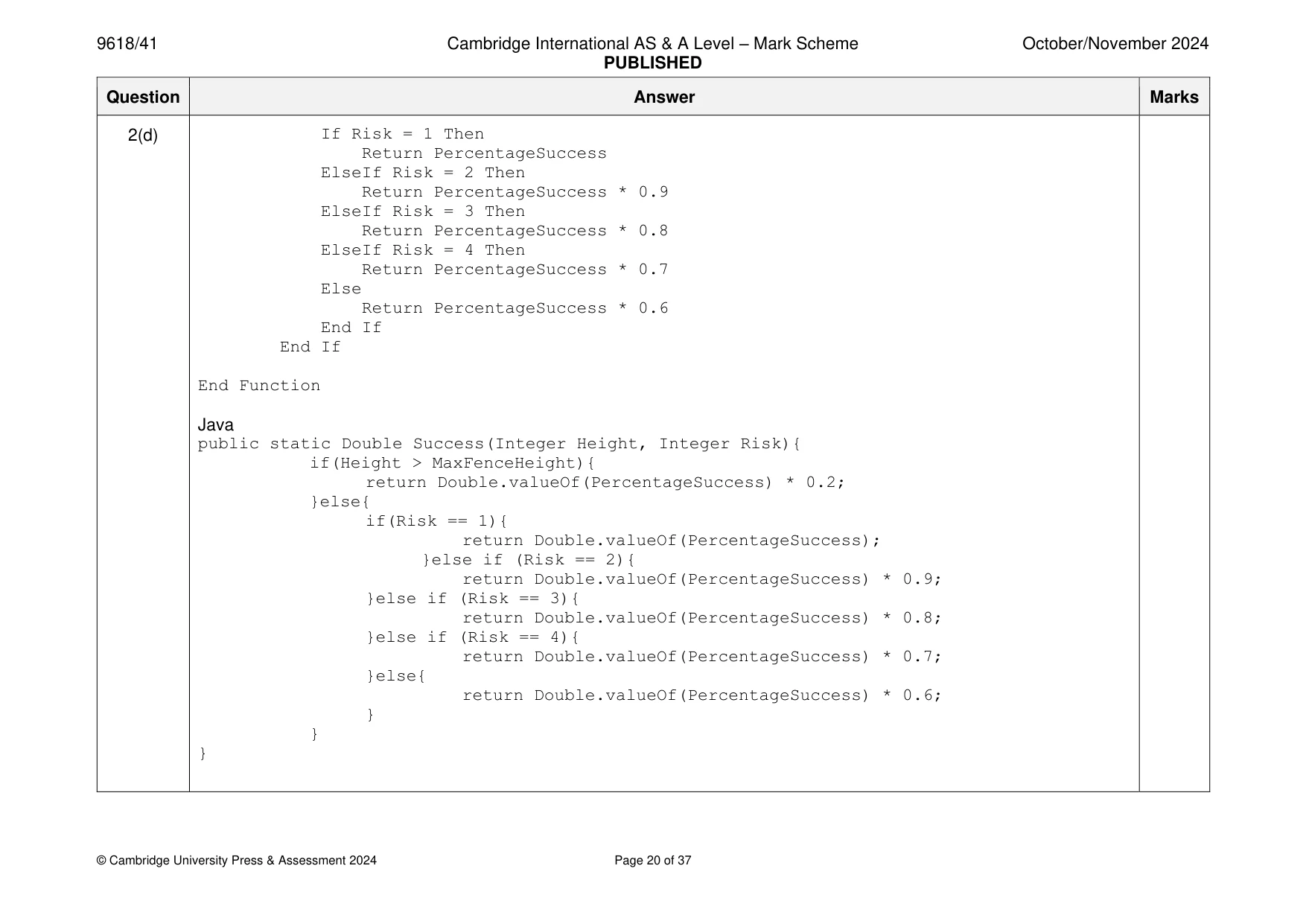
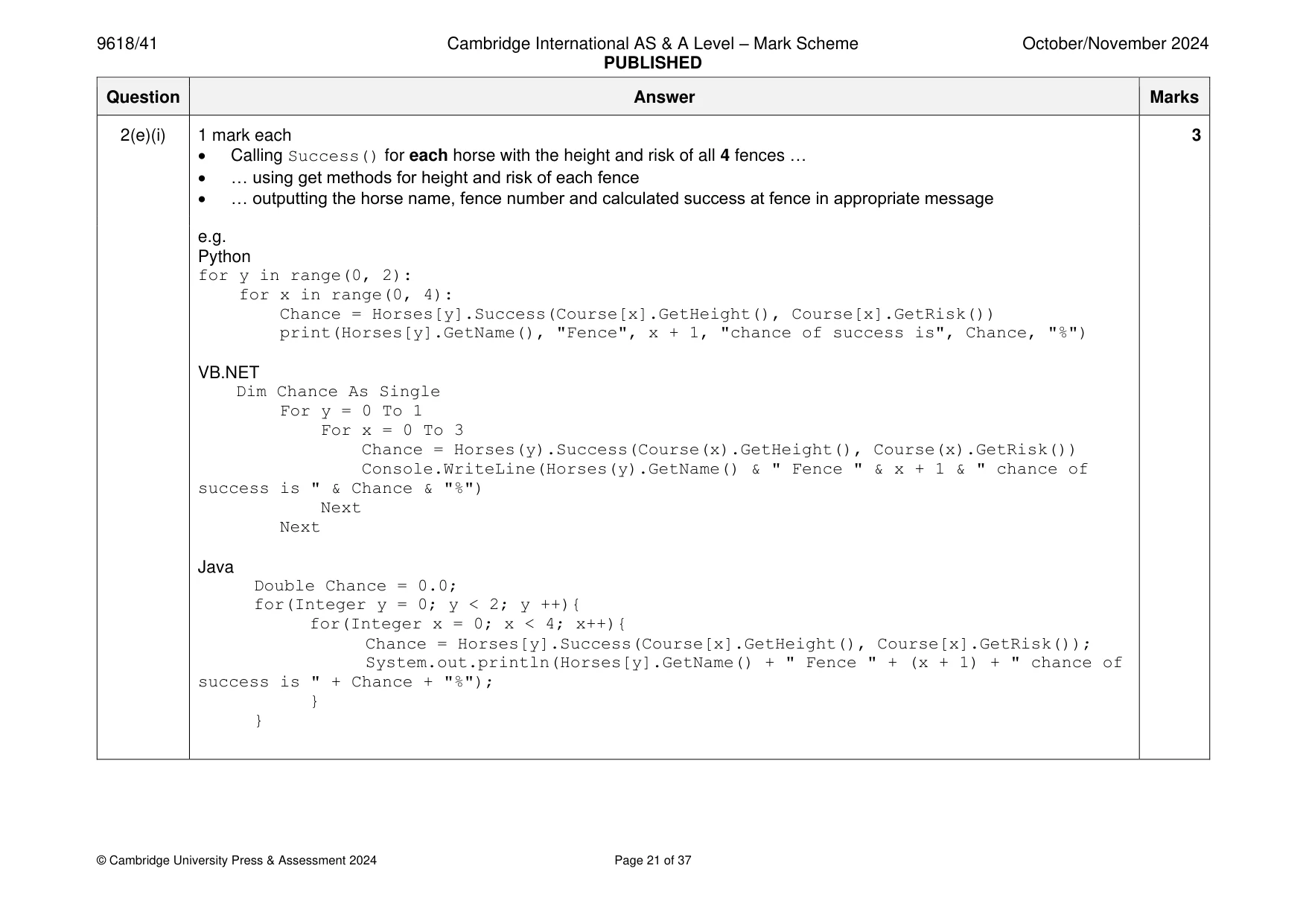
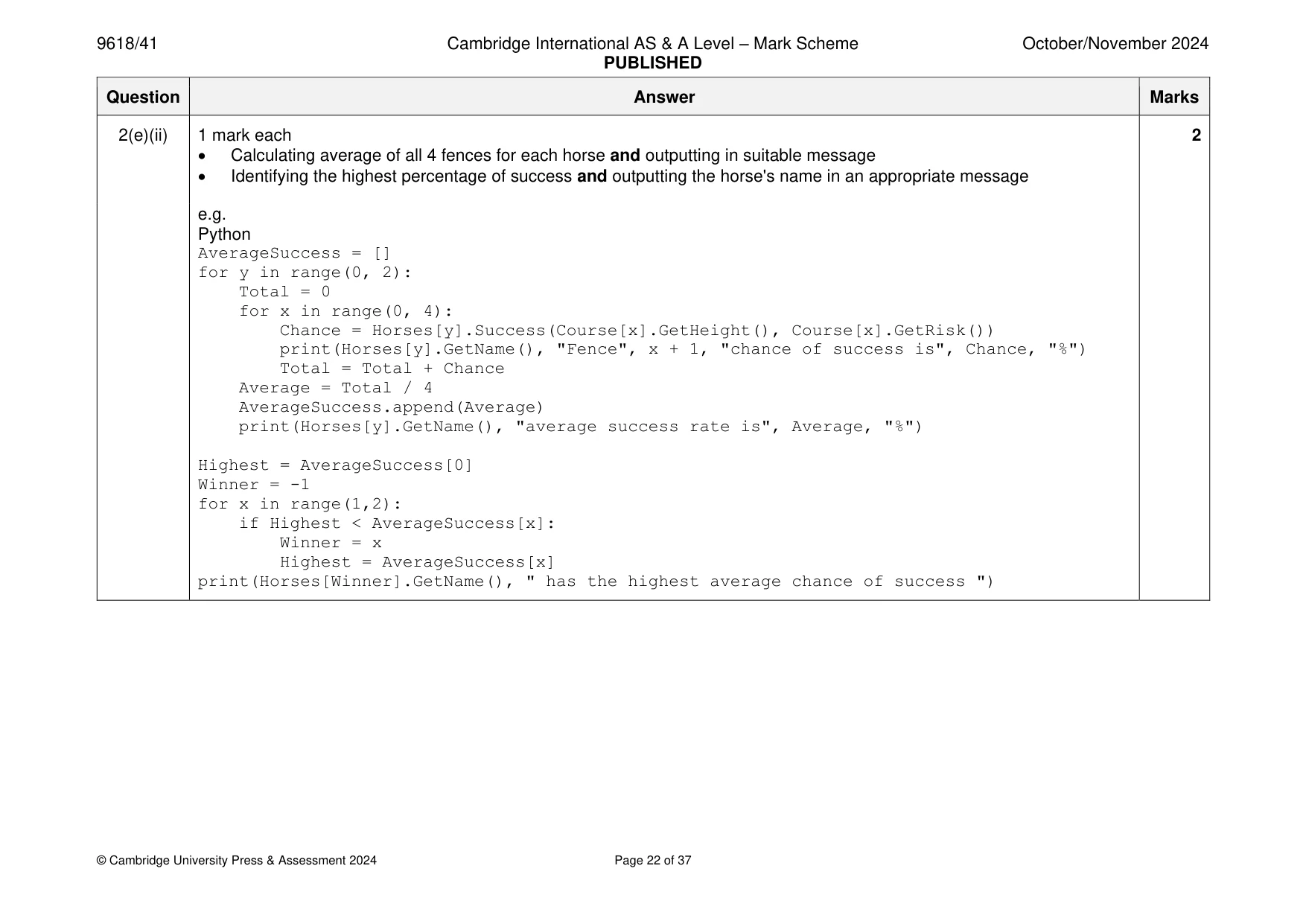
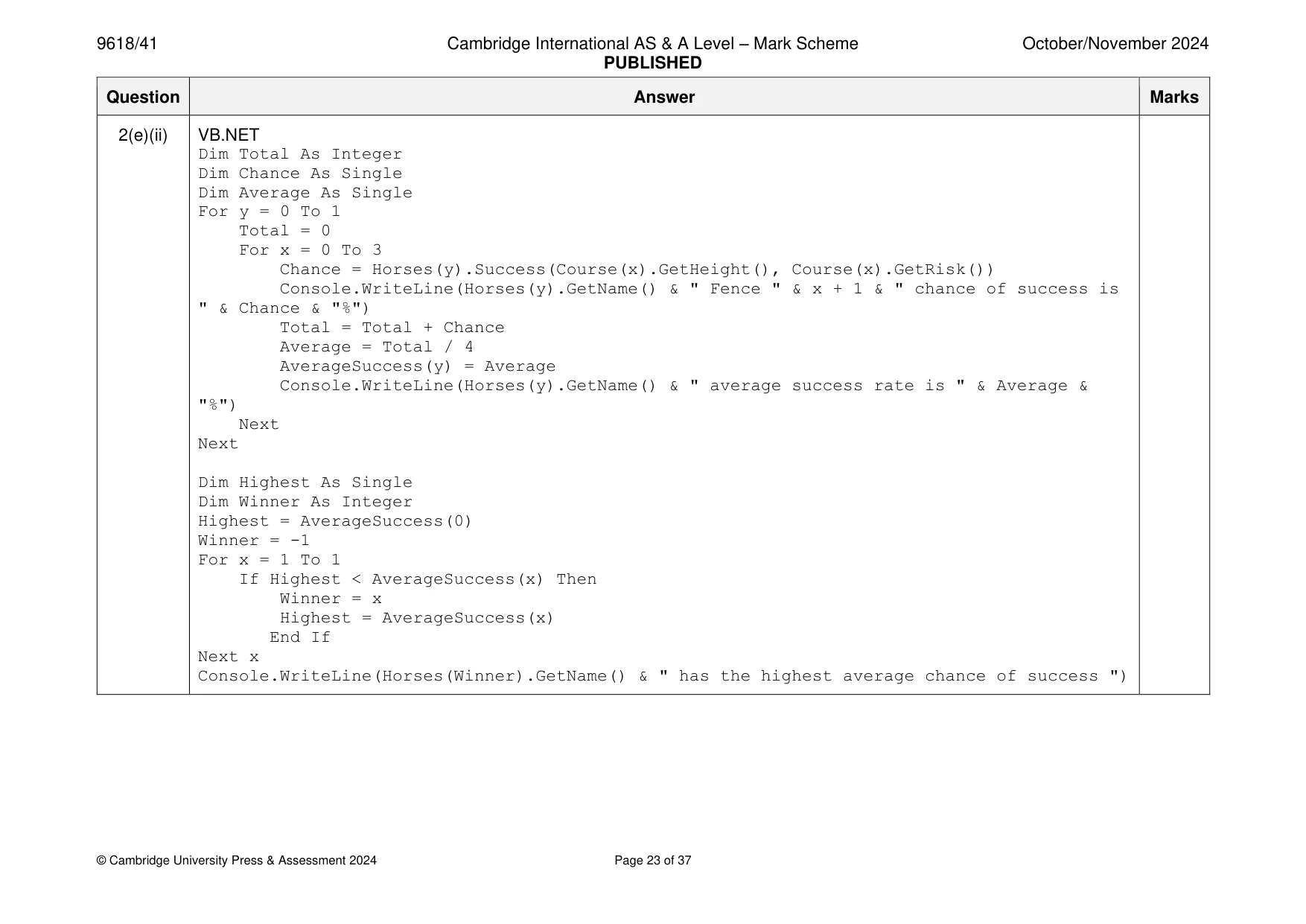
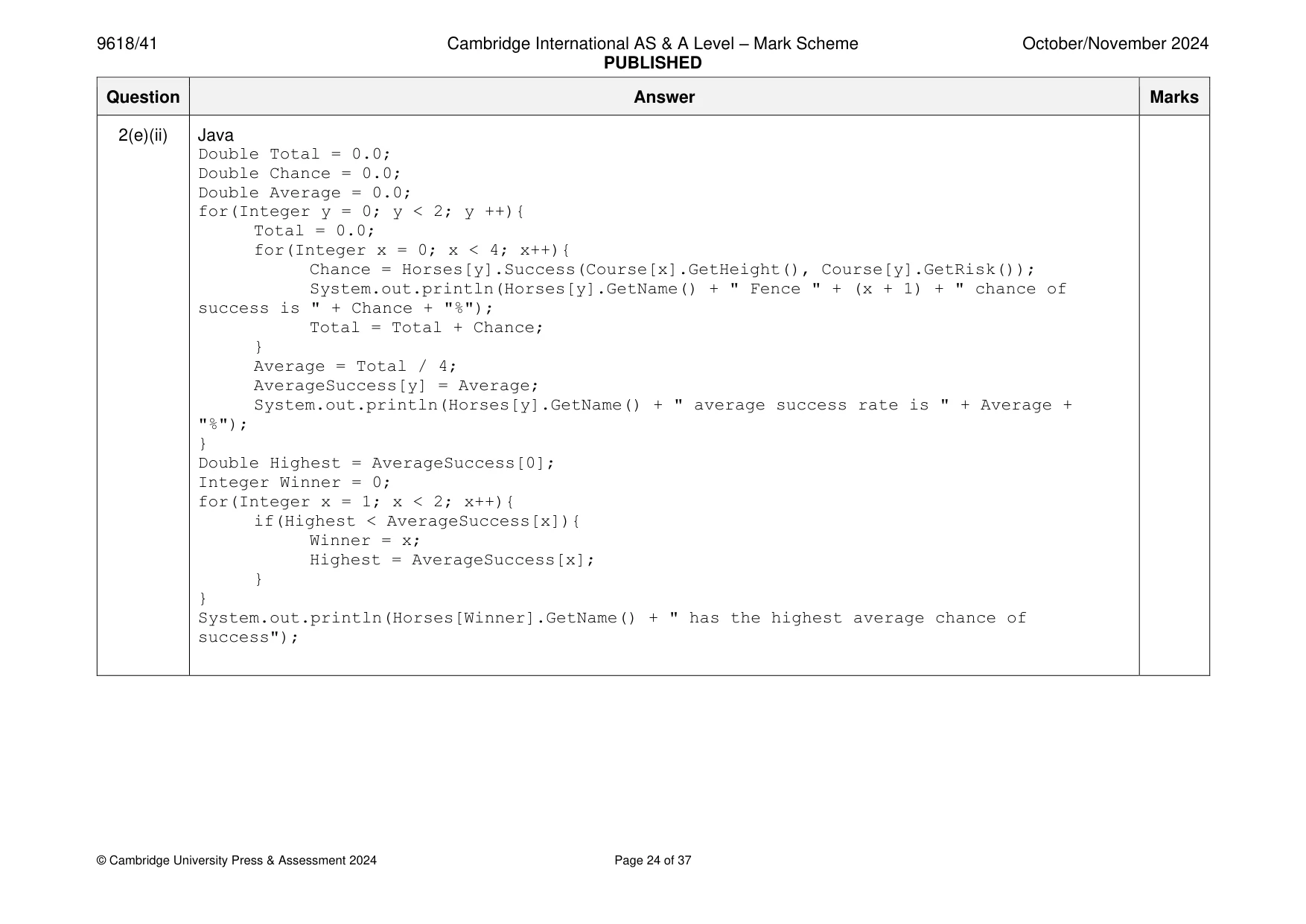
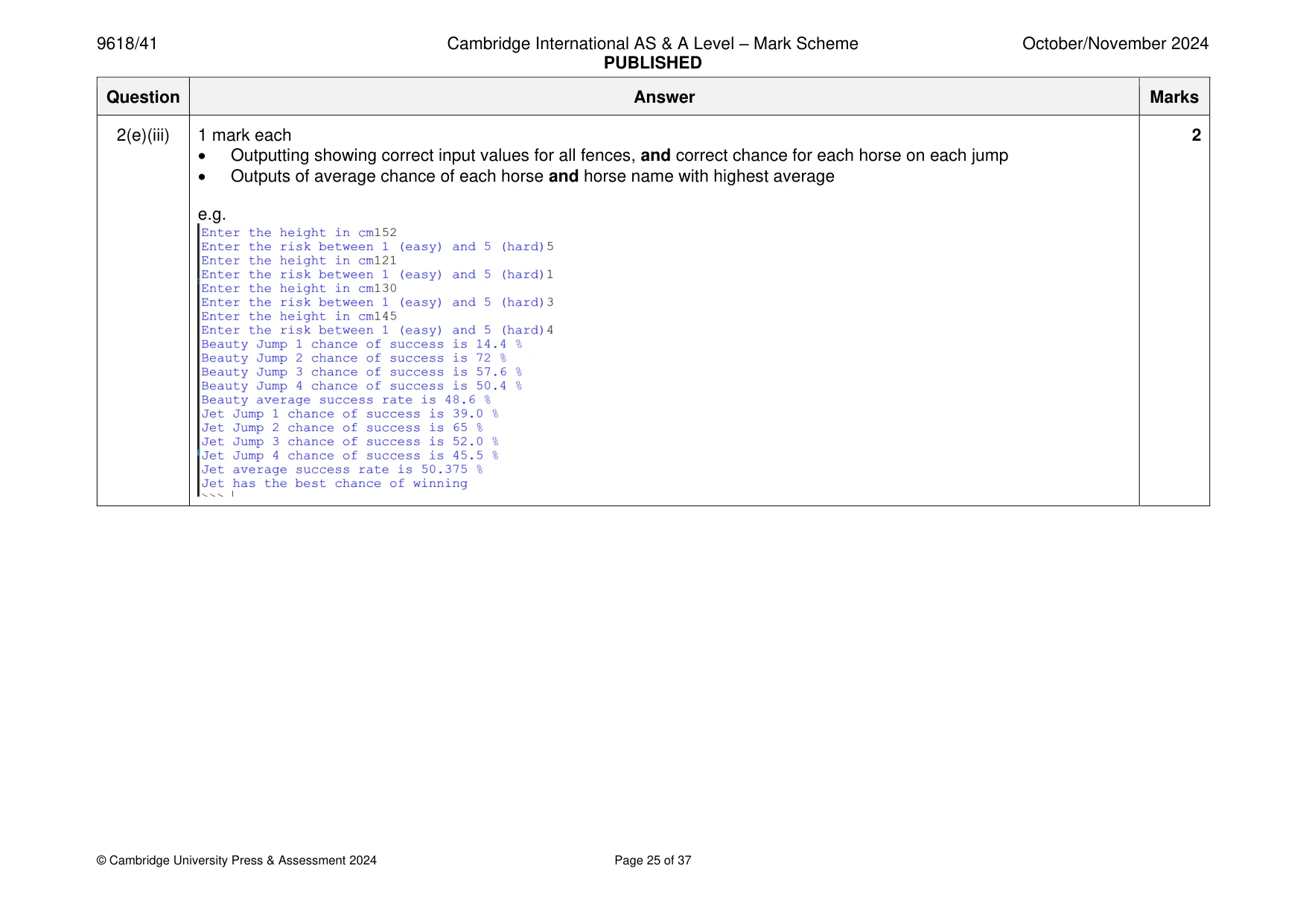
Mark scheme: 2(a)(i) 1 mark each 4 • Class Horse declaration (and end where appropriate) • All 3 attributes declared as private with appropriate data types (declaration or comment) • Constructor header (and end) taking 3 parameters (constructor must be within class) … • … constructor assigns parameters to attributes e.g. Python class Horse: def __init__(self, PName, PMaxFenceHeight, PPercentageSuccess): self.__Name = PName #String self.__MaxFenceHeight = PMaxFenceHeight #Integer self.__PercentageSuccess = PPercentageSuccess #Integer VB.NET Class Horse Private Name As String Private MaxFenceHeight As Integer Private PercentageSuccess As Integer Sub New(PName, PMaxFenceHeight, PPercentageSuccess) Name = PName MaxFenceHeight = PMaxFenceHeight PercentageSuccess = PPercentageSuccess End Sub End Class 2(a)(i) Java class Horse{ private static String Name; private static Integer MaxFenceHeight; private static Integer PercentageSuccess; public Horse(String PName, Integer PMaxFenceHeight, Integer PPercentageSuccess){ Name = PName; MaxFenceHeight = PMaxFenceHeight; PercentageSuccess = PPercentageSuccess; } } 2(a)(ii) 1 mark each 3 • 1 get method header with no parameter … • … returning correct attribute (without change) • 2nd get method correct e.g. Python def GetName(self): return self.__Name def GetMaxFenceHeight(self): return self.__MaxFenceHeight VB.NET Function GetName() Return Name End Function 2(a)(ii) Function GetMaxFenceHeight() Return MaxFenceHeight End Function Java public String GetName(){ return Name; } public Integer GetMaxFenceHeight(){ return MaxFenceHeight; } 2(b)(i) 1 mark each 5 • Instantiating one object of type Horse with correct data … • … and storing in first element of a 1D array Horses • Instantiating second object of type Horse with correct data and storing in second index of the array • Outputting name of both horse objects from array … • … using GetName() e.g. Python Horses = [] Horses.append(Horse("Beauty", 150, 72)) Horses.append(Horse("Jet", 160, 65)) print(Horses[0].GetName()) print(Horses[1].GetName()) VB.NET Dim Horses(2) As Horse Horses(0) = New Horse("Beauty", 150, 72) Horses(1) = New Horse("Jet", 160, 65) Console.WriteLine(Horses(0).GetName()) Console.WriteLine(Horses(1).GetName()) 2(b)(i) Java Horse[] Horses = new Horse[2]; Horses[0] = new Horse("Beauty", 150, 72); Horses[1] = new Horse("Jet", 160, 65); System.out.println(Horses[0].GetName()); System.out.println(Horses[1].GetName()); 2(b)(ii) 1 mark for both names output: 1 2(c)(i) 1 mark each 4 • Class Fence header (and end where appropriate) with no inheritance • Height and Risk private with integer data type • Constructor taking 2 parameters and storing in attributes (constructor must be within class) • 2 get methods (no parameter) returning correct attributes (within class) e.g. Python class Fence: def __init__(self, PHeight, PRisk): self.__Height = PHeight #integer self.__Risk = PRisk #integer def GetHeight(self): return self.__Height def GetRisk(self): return self.__Risk 2(c)(i) VB.NET Class Fence Dim Height As Integer Dim Risk As Integer Sub New(PHeight, PRisk) Height = PHeight Risk = PRisk End Sub Function GetHeight() Return Height End Function Function GetRisk() Return Risk End Function End Class Java class Fence{ private Integer Height; private Integer Risk; public Fence (Integer PHeight, Integer PRisk){ Height = PHeight; Risk = PRisk; } 2(c)(i) public Integer GetHeight(){ return Height; } public Integer GetRisk(){ return Risk; } } 2(c)(ii) 1 mark each to max 5 5 • Declaration/use of array Course of type Fence (with at least 4 elements) • Taking Height and Risk as input four times and store/use • Instantiating a Fence object for each set of valid input values and storing in array • Taking each height as input until it is between 70 and 180 (inclusive) • Taking each risk as input until it is between 1 and 5 (inclusive) e.g. Python Course = [] for x in range(0, 4): Valid = False while Valid == False: Height = int(input("Enter the height in cm")) if(Height >= 70 and Height <= 180): Valid = True Valid = False while Valid == False: Risk = int(input("Enter the risk between 1 (easy) and 5 (hard)")) if(Risk >= 1 and Risk <= 5): Valid = True Course.append(Fence(Height, Risk)) 2(c)(ii) VB.NET Dim Course(5) As Fence Dim Height As Integer Dim Risk As Integer For x = 0 To 3 Do Console.WriteLine("Enter the height in cm") Height = Console.ReadLine() Loop Until Height >= 70 And Height <= 180 Do Console.WriteLine("Enter the risk between 1 (easy) and 5 (hard)") Risk = Console.ReadLine() Loop Until Risk >= 1 And Risk <= 5 Course(x) = New Fence(Height, Risk) Next Java Fence [] Course = new Fence [4]; for(Integer x = 0; x < 4; x++){ do { System.out.println("Enter the height in cm"); Height = Integer.parseInt(scanner.nextLine()); } while(Height <70 || Height > 180); do{ System.out.println("Enter the risk between 1 (easy) and 5 (hard)"); Risk = Integer.parseInt(scanner.nextLine()); }while(Risk <1 || Risk > 5); Course[x] = new Fence(Height, Risk); } 2(d) 1 mark each 5 • Method header taking 2 parameters (and end where appropriate, returning real) • Checking if fence height parameter is more than max attribute for that horse, if true multiplying percentage success by 0.2 • (Otherwise) selection checking risk value parameter between 1 and 5, multiplying modifier by percentage success • Returning correct value as a real number in all instances • Correct use of attributes and parameters throughout e.g. Python def Success(self, Height, Risk): if Height > self.__MaxFenceHeight: return self.__PercentageSuccess * 0.2 else: if Risk == 1: return self.__PercentageSuccess elif Risk == 2: return self.__PercentageSuccess * 0.9 elif Risk == 3: return self.__PercentageSuccess * 0.8 elif Risk == 4: return self.__PercentageSuccess * 0.7 else: return self.__PercentageSuccess * 0.6 VB.NET Function Success(Height, Risk) If Height > MaxFenceHeight Then Return PercentageSuccess * 0.2 Else 2(d) If Risk = 1 Then Return PercentageSuccess ElseIf Risk = 2 Then Return PercentageSuccess * 0.9 ElseIf Risk = 3 Then Return PercentageSuccess * 0.8 ElseIf Risk = 4 Then Return PercentageSuccess * 0.7 Else Return PercentageSuccess * 0.6 End If End If End Function Java public static Double Success(Integer Height, Integer Risk){ if(Height > MaxFenceHeight){ return Double.valueOf(PercentageSuccess) * 0.2; }else{ if(Risk == 1){ return Double.valueOf(PercentageSuccess); }else if (Risk == 2){ return Double.valueOf(PercentageSuccess) * 0.9; }else if (Risk == 3){ return Double.valueOf(PercentageSuccess) * 0.8; }else if (Risk == 4){ return Double.valueOf(PercentageSuccess) * 0.7; }else{ return Double.valueOf(PercentageSuccess) * 0.6; } } } 2(e)(i) 1 mark each 3 • Calling Success() for each horse with the height and risk of all 4 fences … • … using get methods for height and risk of each fence • … outputting the horse name, fence number and calculated success at fence in appropriate message e.g. Python for y in range(0, 2): for x in range(0, 4): Chance = Horses[y].Success(Course[x].GetHeight(), Course[x].GetRisk()) print(Horses[y].GetName(), "Fence", x + 1, "chance of success is", Chance, "%") VB.NET Dim Chance As Single For y = 0 To 1 For x = 0 To 3 Chance = Horses(y).Success(Course(x).GetHeight(), Course(x).GetRisk()) Console.WriteLine(Horses(y).GetName() & " Fence " & x + 1 & " chance of success is " & Chance & "%") Next Next Java Double Chance = 0.0; for(Integer y = 0; y < 2; y ++){ for(Integer x = 0; x < 4; x++){ Chance = Horses[y].Success(Course[x].GetHeight(), Course[x].GetRisk()); System.out.println(Horses[y].GetName() + " Fence " + (x + 1) + " chance of success is " + Chance + "%"); } } 2(e)(ii) 1 mark each 2 • Calculating average of all 4 fences for each horse and outputting in suitable message • Identifying the highest percentage of success and outputting the horse's name in an appropriate message e.g. Python AverageSuccess = [] for y in range(0, 2): Total = 0 for x in range(0, 4): Chance = Horses[y].Success(Course[x].GetHeight(), Course[x].GetRisk()) print(Horses[y].GetName(), "Fence", x + 1, "chance of success is", Chance, "%") Total = Total + Chance Average = Total / 4 AverageSuccess.append(Average) print(Horses[y].GetName(), "average success rate is", Average, "%") Highest = AverageSuccess[0] Winner = -1 for x in range(1,2): if Highest < AverageSuccess[x]: Winner = x Highest = AverageSuccess[x] print(Horses[Winner].GetName(), " has the highest average chance of success ") 2(e)(ii) VB.NET Dim Total As Integer Dim Chance As Single Dim Average As Single For y = 0 To 1 Total = 0 For x = 0 To 3 Chance = Horses(y).Success(Course(x).GetHeight(), Course(x).GetRisk()) Console.WriteLine(Horses(y).GetName() & " Fence " & x + 1 & " chance of success is " & Chance & "%") Total = Total + Chance Average = Total / 4 AverageSuccess(y) = Average Console.WriteLine(Horses(y).GetName() & " average success rate is " & Average & "%") Next Next Dim Highest As Single Dim Winner As Integer Highest = AverageSuccess(0) Winner = -1 For x = 1 To 1 If Highest < AverageSuccess(x) Then Winner = x Highest = AverageSuccess(x) End If Next x Console.WriteLine(Horses(Winner).GetName() & " has the highest average chance of success ") 2(e)(ii) Java Double Total = 0.0; Double Chance = 0.0; Double Average = 0.0; for(Integer y = 0; y < 2; y ++){ Total = 0.0; for(Integer x = 0; x < 4; x++){ Chance = Horses[y].Success(Course[x].GetHeight(), Course[y].GetRisk()); System.out.println(Horses[y].GetName() + " Fence " + (x + 1) + " chance of success is " + Chance + "%"); Total = Total + Chance; } Average = Total / 4; AverageSuccess[y] = Average; System.out.println(Horses[y].GetName() + " average success rate is " + Average + "%"); } Double Highest = AverageSuccess[0]; Integer Winner = 0; for(Integer x = 1; x < 2; x++){ if(Highest < AverageSuccess[x]){ Winner = x; Highest = AverageSuccess[x]; } } System.out.println(Horses[Winner].GetName() + " has the highest average chance of success"); 2(e)(iii) 1 mark each 2 • Outputting showing correct input values for all fences, and correct chance for each horse on each jump • Outputs of average chance of each horse and horse name with highest average e.g.
Q3 · A linked list stores positive integer data in a 2D array
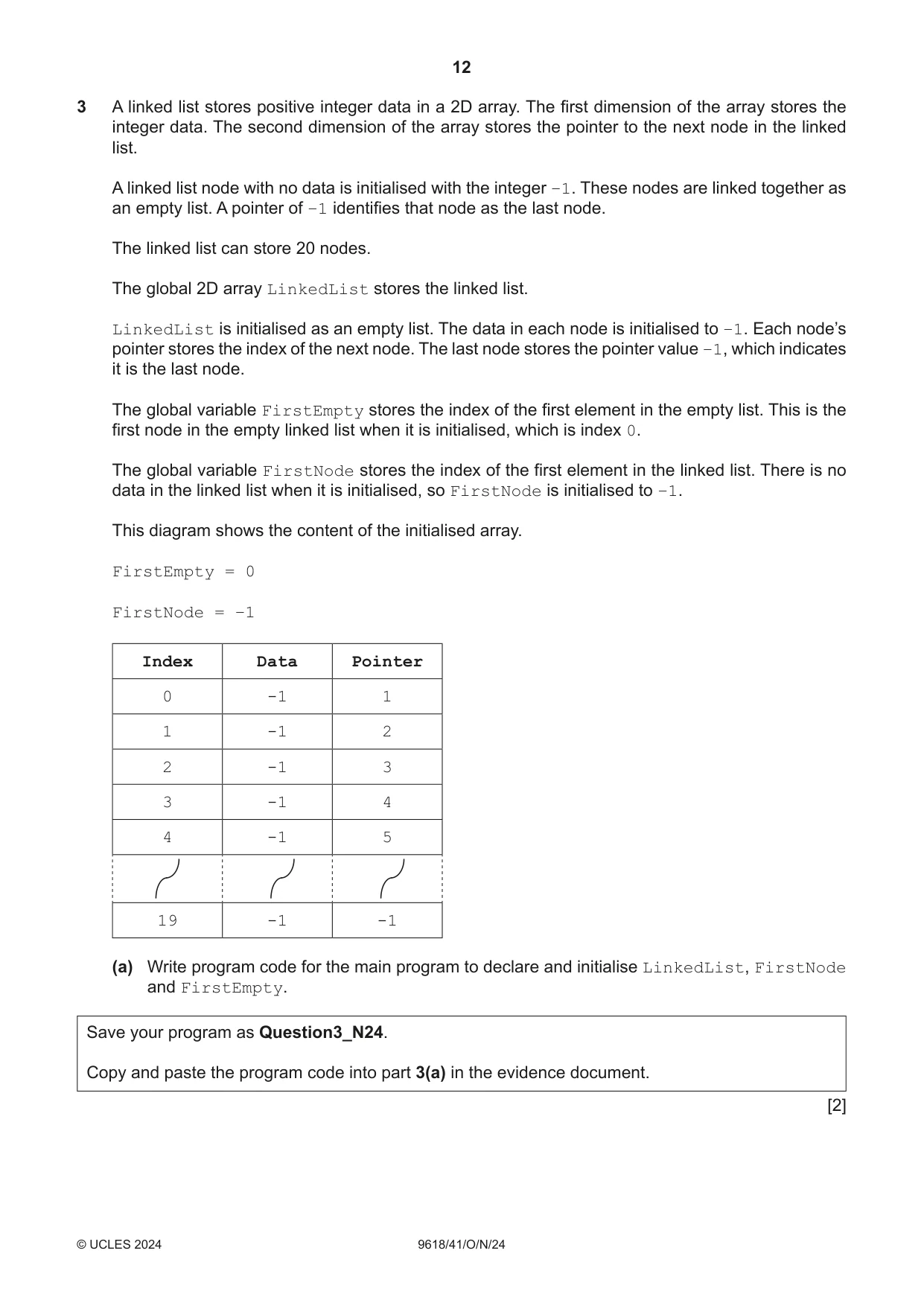
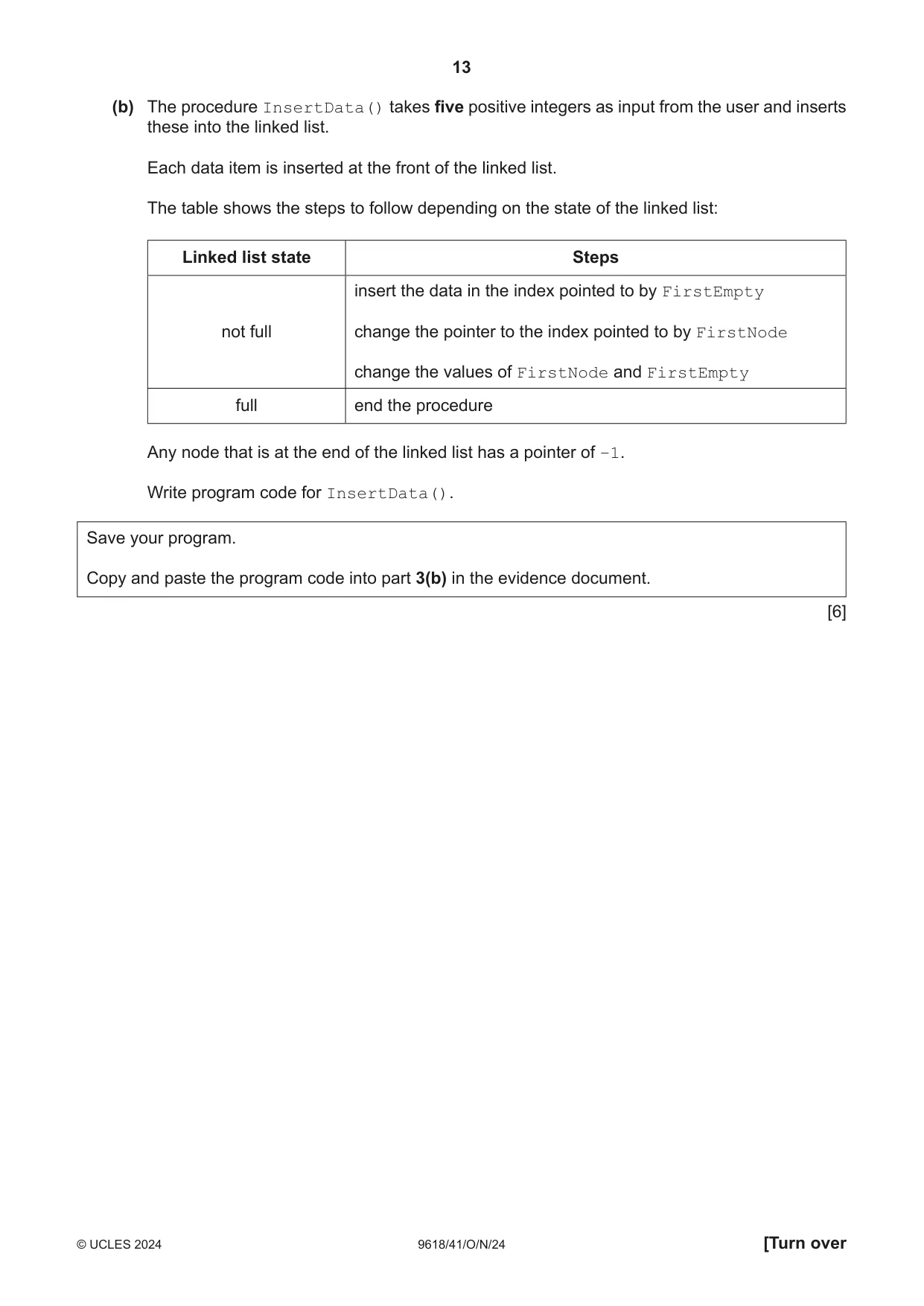
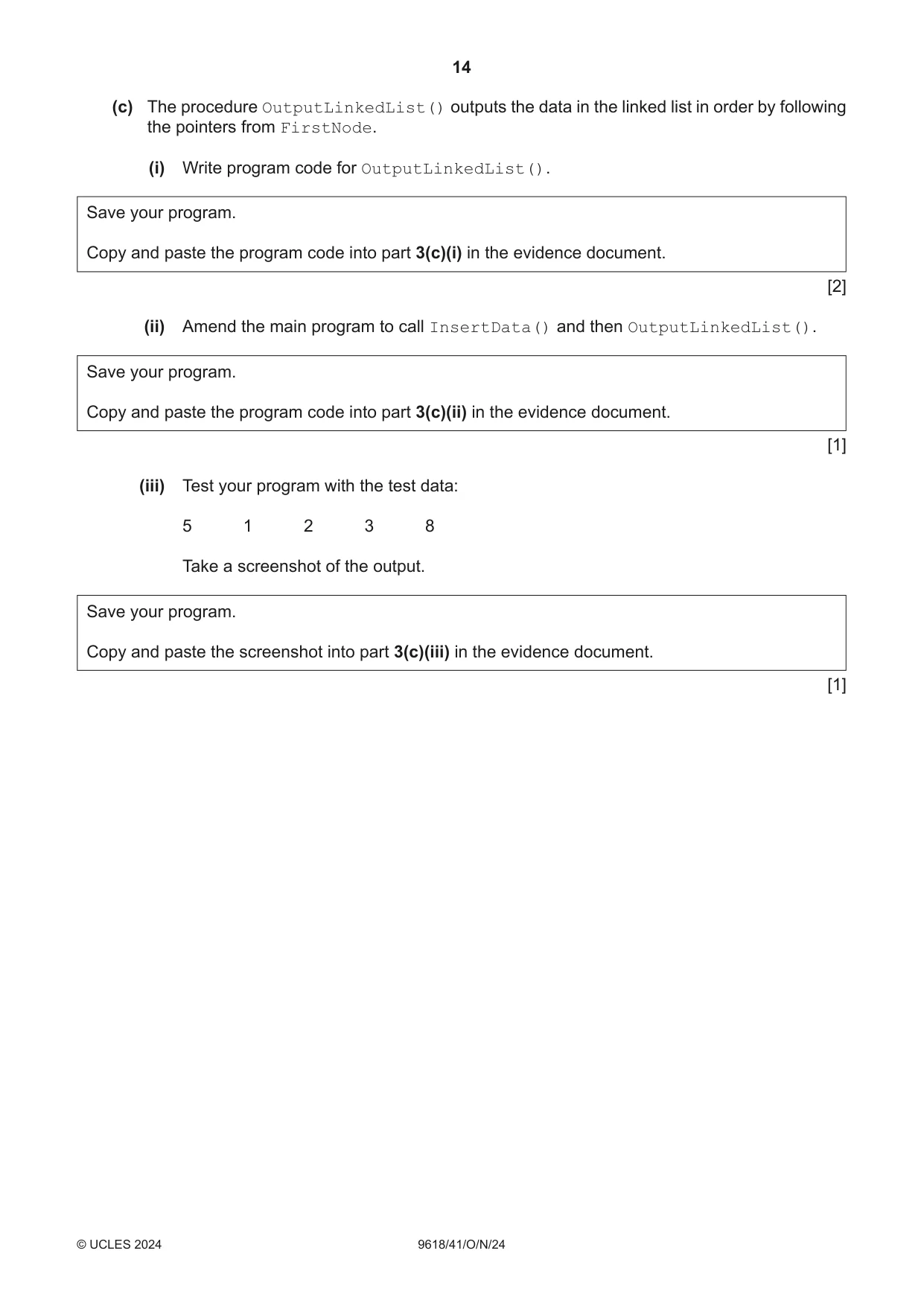
3 A linked list stores positive integer data in a 2D array. The first dimension of the array stores the integer data. The second dimension of the array stores the pointer to the next node in the linked list. A linked list node with no data is initialised with the integer –1. These nodes are linked together as an empty list. A pointer of –1 identifies that node as the last node. The linked list can store 20 nodes. The global 2D array LinkedList stores the linked list. LinkedList is initialised as an empty list. The data in each node is initialised to –1. Each node’s pointer stores the index of the next node. The last node stores the pointer value –1, which indicates it is the last node. The global variable FirstEmpty stores the index of the first element in the empty list. This is the first node in the empty linked list when it is initialised, which is index 0. The global variable FirstNode stores the index of the first element in the linked list. There is no data in the linked list when it is initialised, so FirstNode is initialised to –1. This diagram shows the content of the initialised array. FirstEmpty = 0 FirstNode = –1 Index Data Pointer 0 -1 1 1 -1 2 2 -1 3 3 -1 4 4 -1 5 19 -1 -1 (a) Write program code for the main program to declare and initialise LinkedList, FirstNode and FirstEmpty. Save your program as Question3_N24. Copy and paste the program code into part 3(a) in the evidence document. [2] (b) The procedure InsertData() takes five positive integers as input from the user and inserts these into the linked list. Each data item is inserted at the front of the linked list. The table shows the steps to follow depending on the state of the linked list: Linked list state Steps insert the data in the index pointed to by FirstEmpty not full change the pointer to the index pointed to by FirstNode change the values of FirstNode and FirstEmpty full end the procedure Any node that is at the end of the linked list has a pointer of –1. Write program code for InsertData(). Save your program. Copy and paste the program code into part 3(b) in the evidence document. [6] (c) The procedure OutputLinkedList() outputs the data in the linked list in order by following the pointers from FirstNode. (i) Write program code for OutputLinkedList(). Save your program. Copy and paste the program code into part 3(c)(i) in the evidence document. [2] (ii) Amend the main program to call InsertData() and then OutputLinkedList(). Save your program. Copy and paste the program code into part 3(c)(ii) in the evidence document. [1] (iii) Test your program with the test data: 5 1 2 3 8 Take a screenshot of the output. Save your program. Copy and paste the screenshot into part 3(c)(iii) in the evidence document. [1]
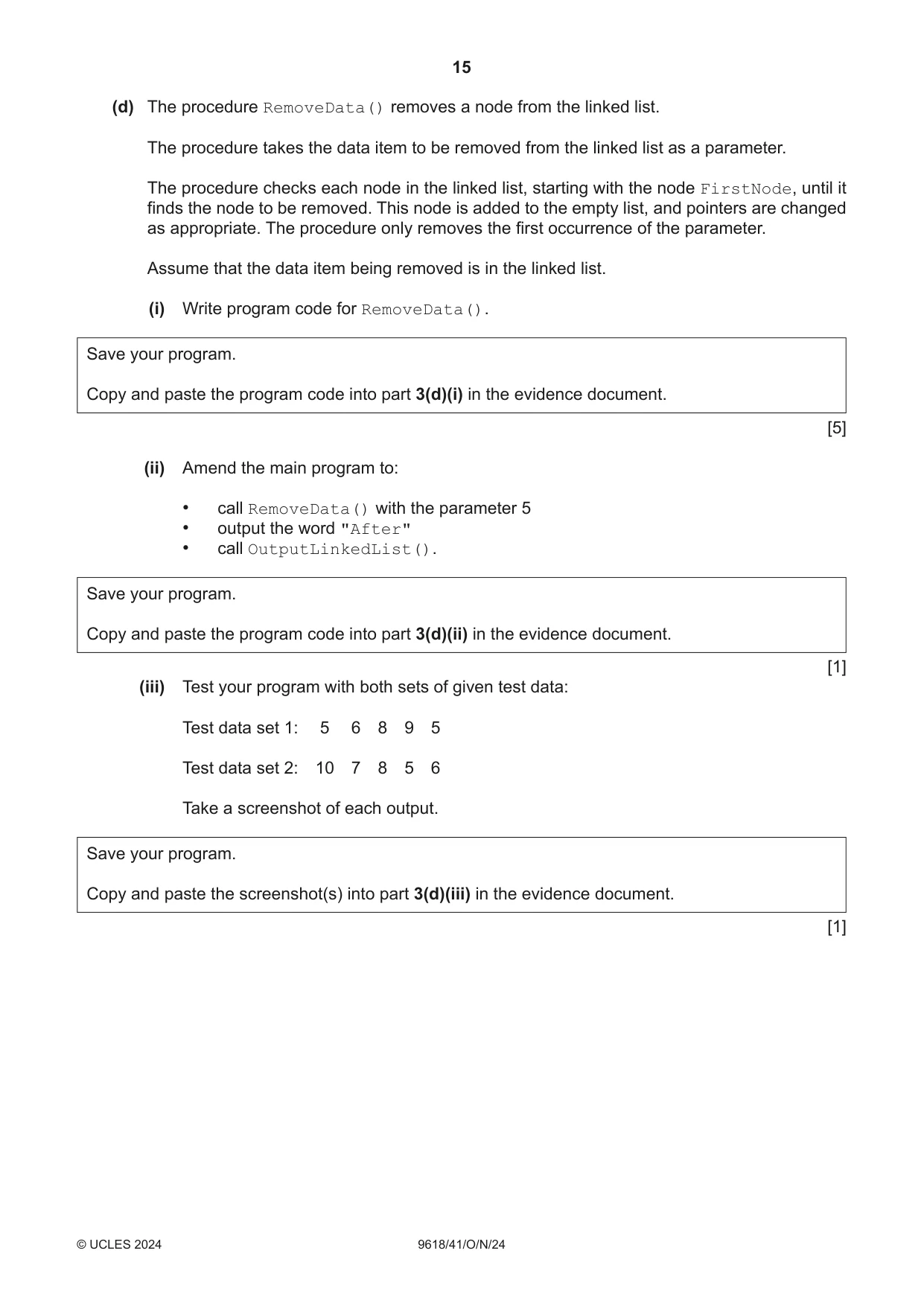
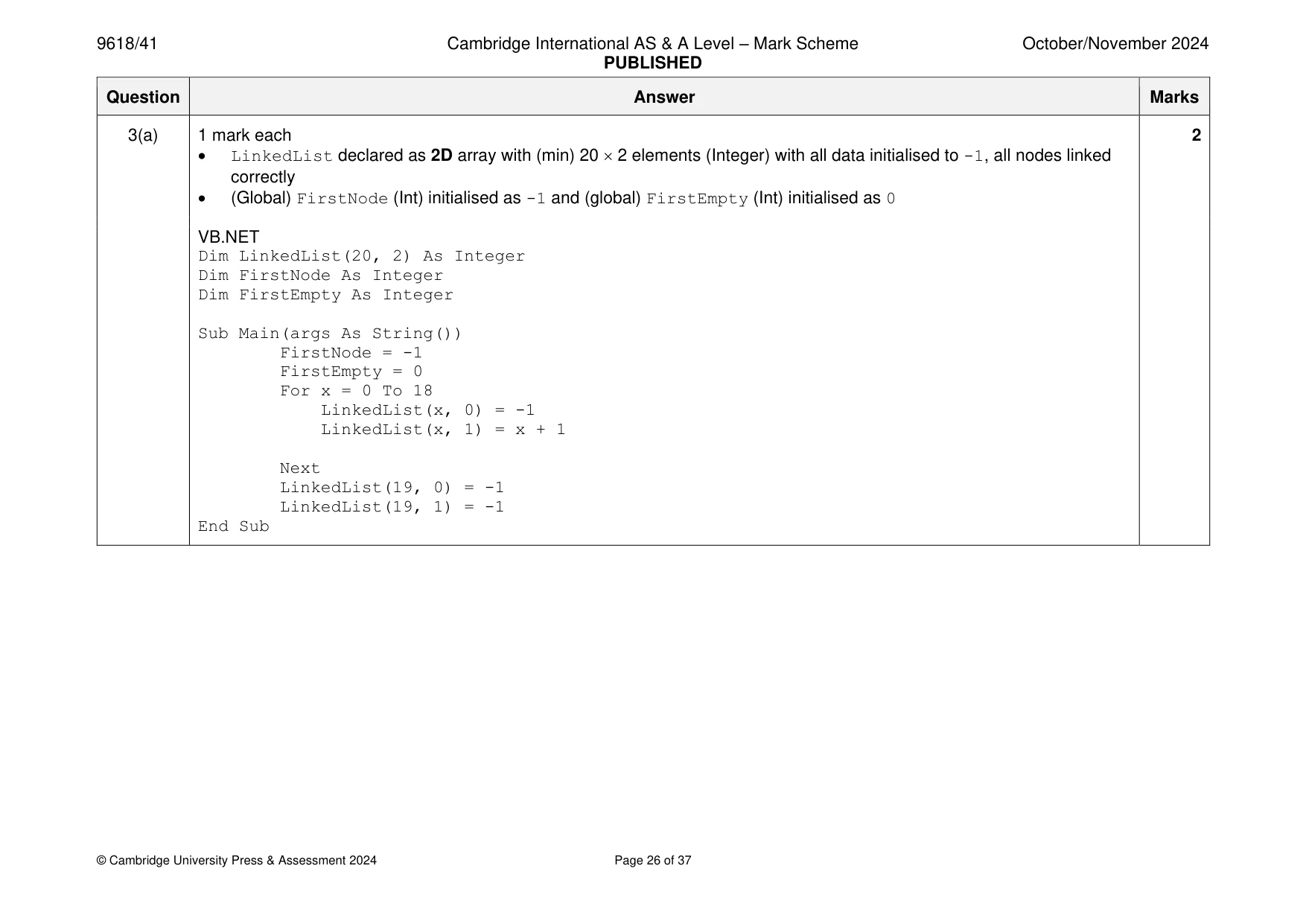
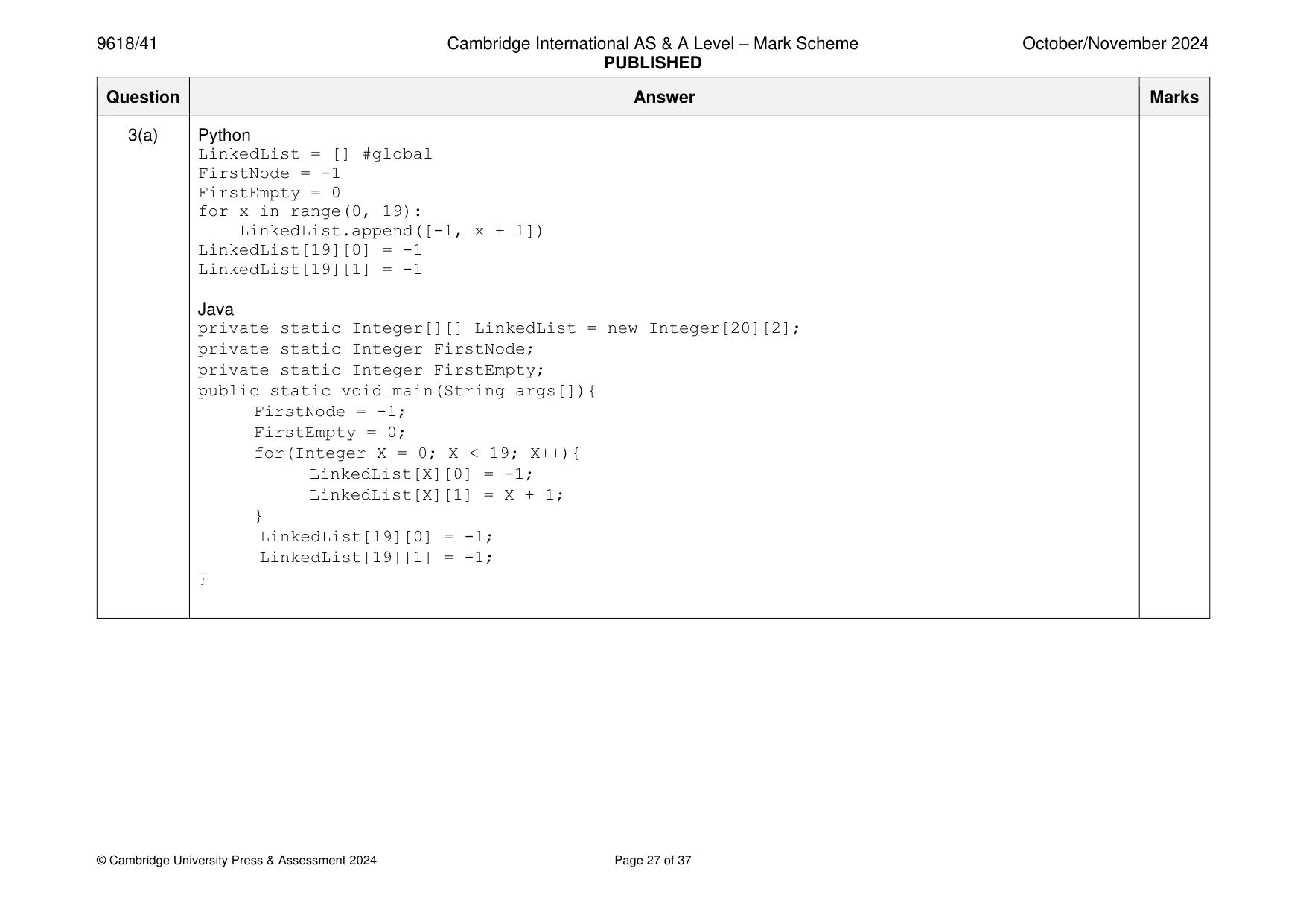
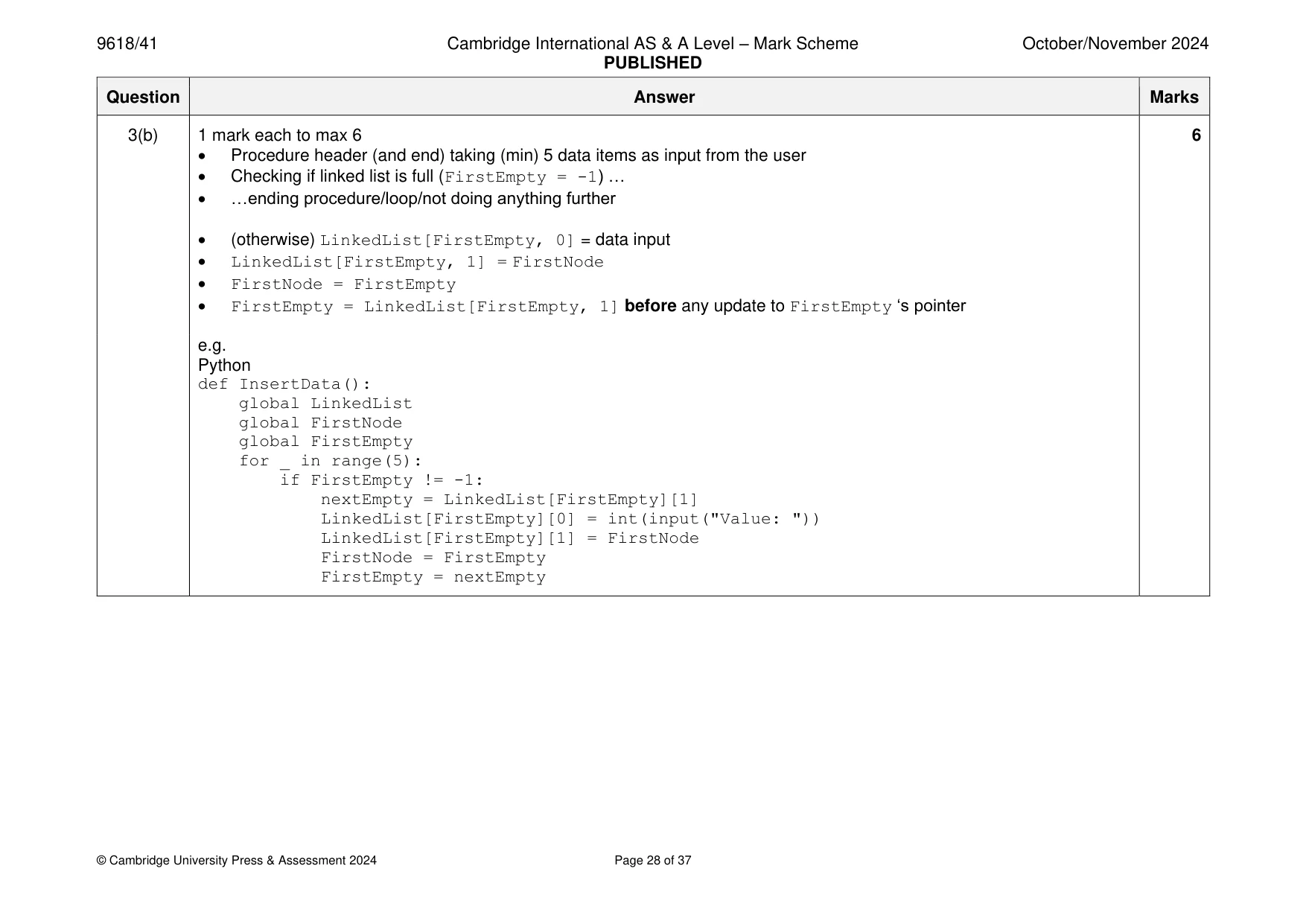
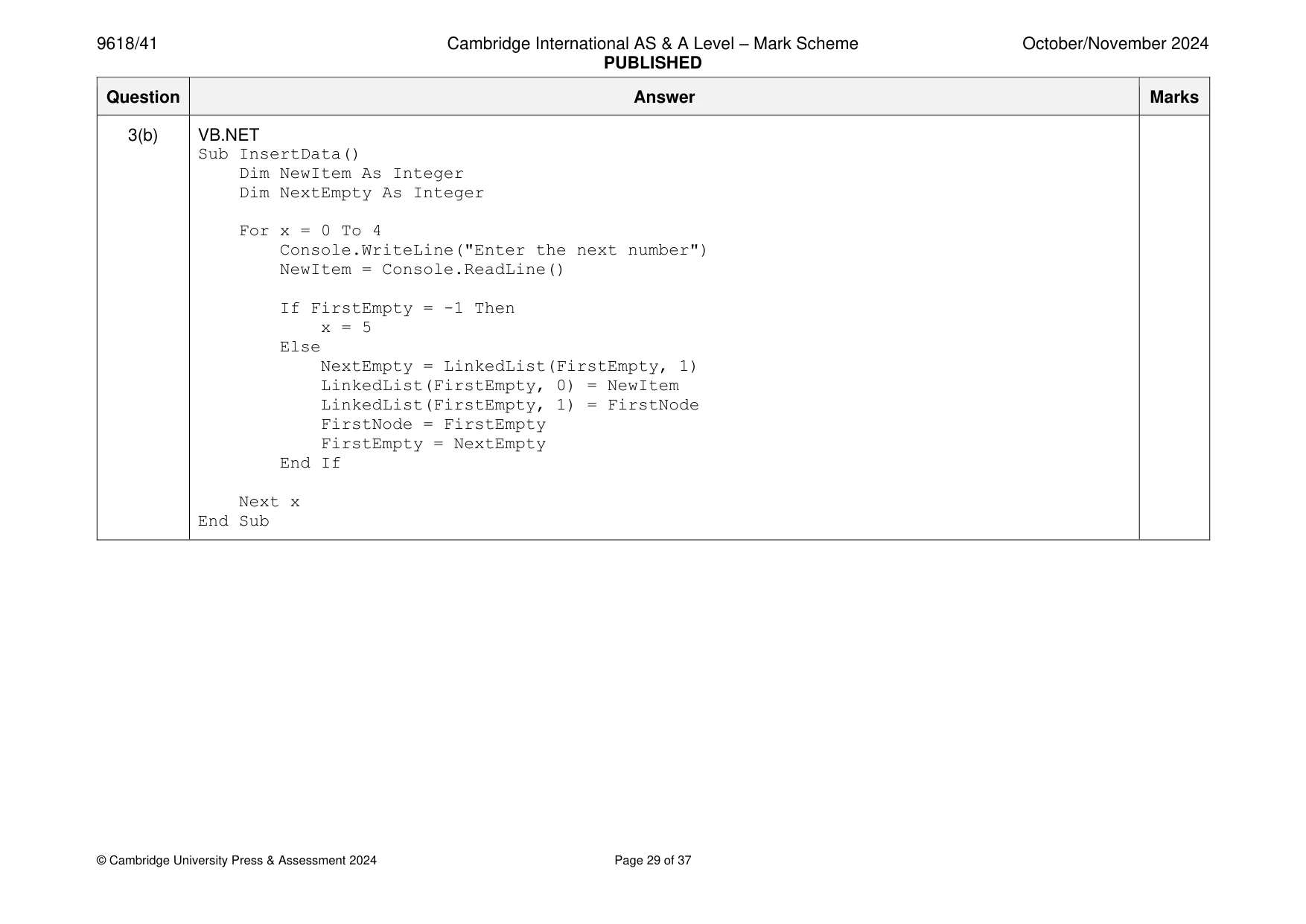
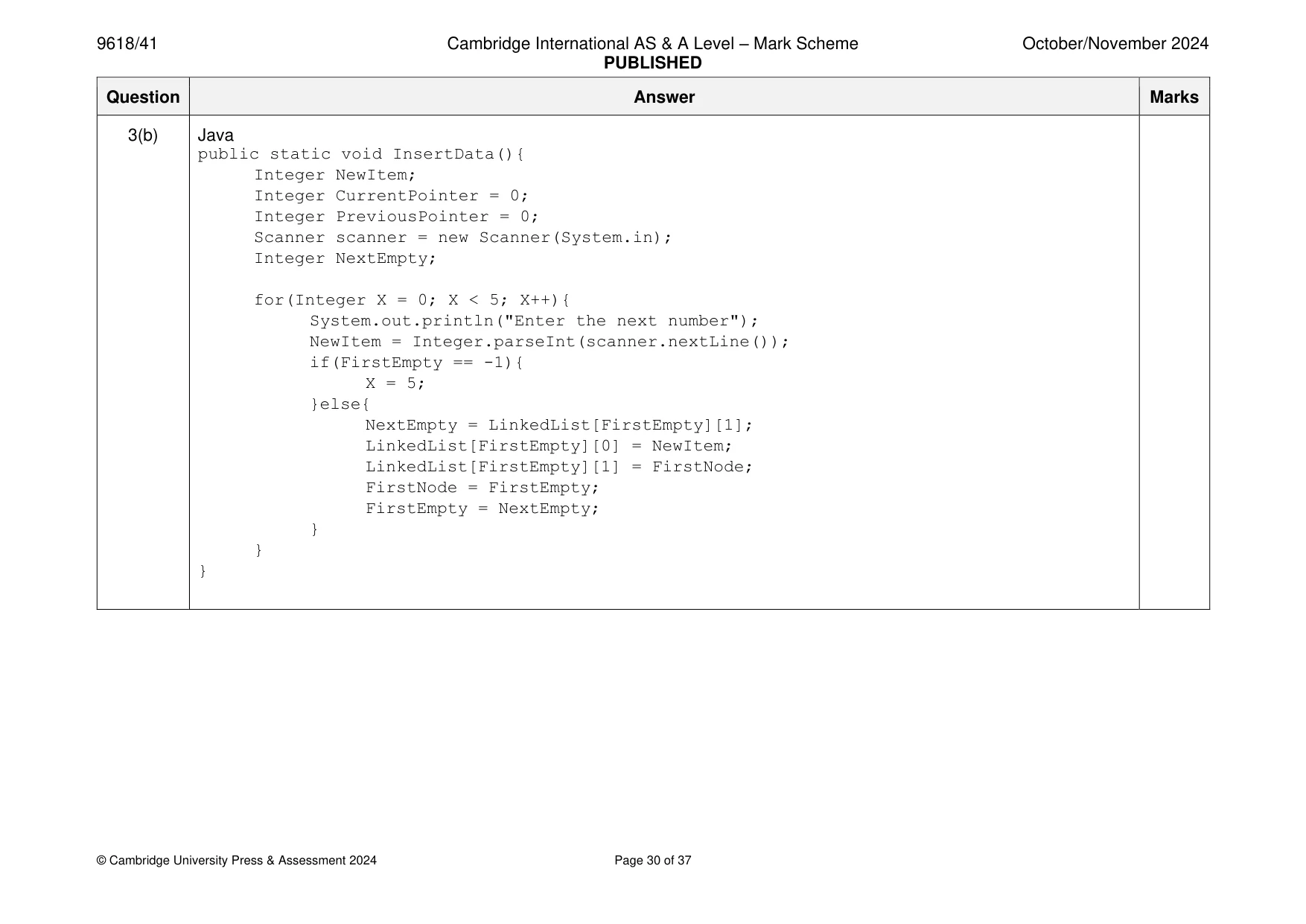
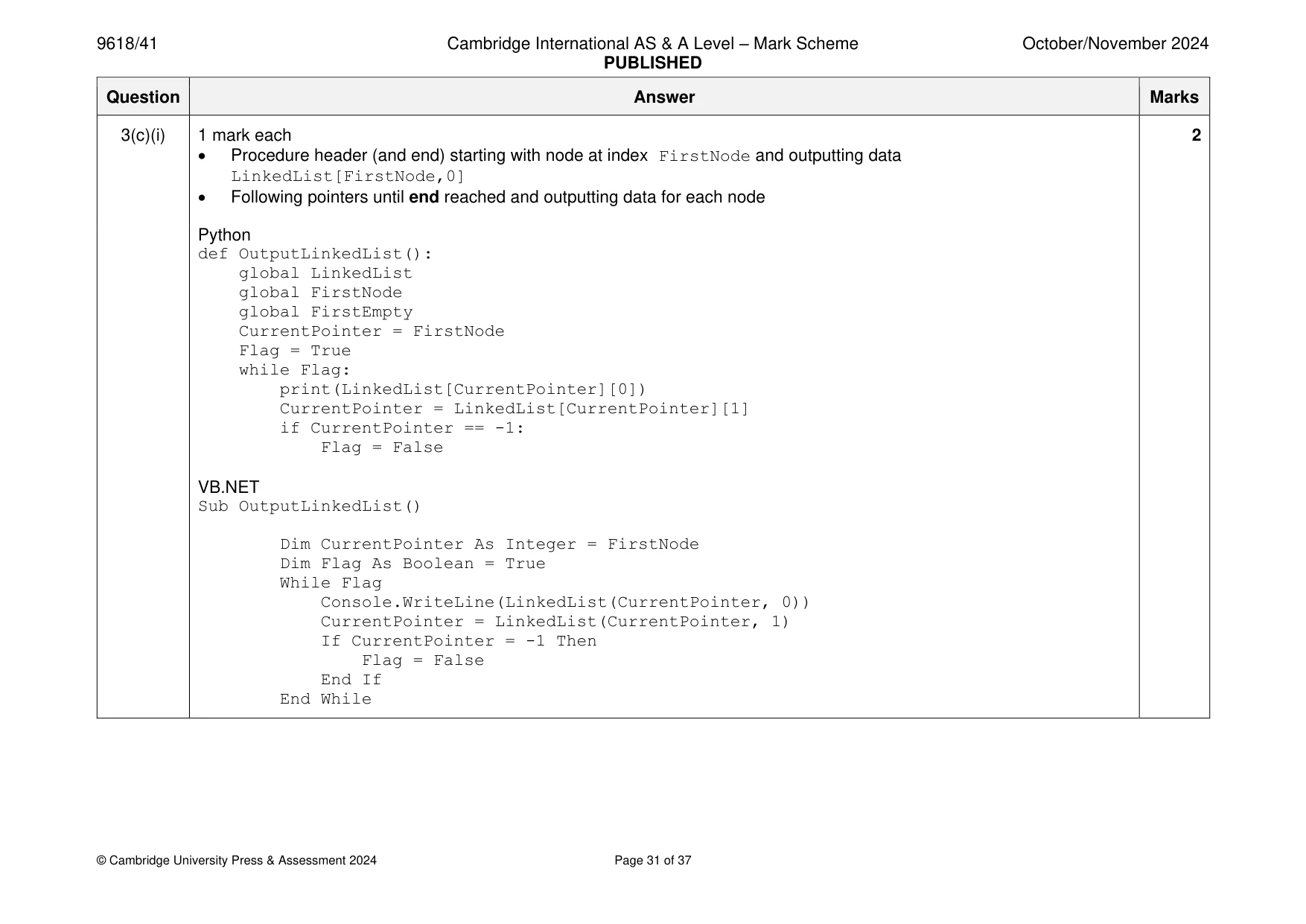
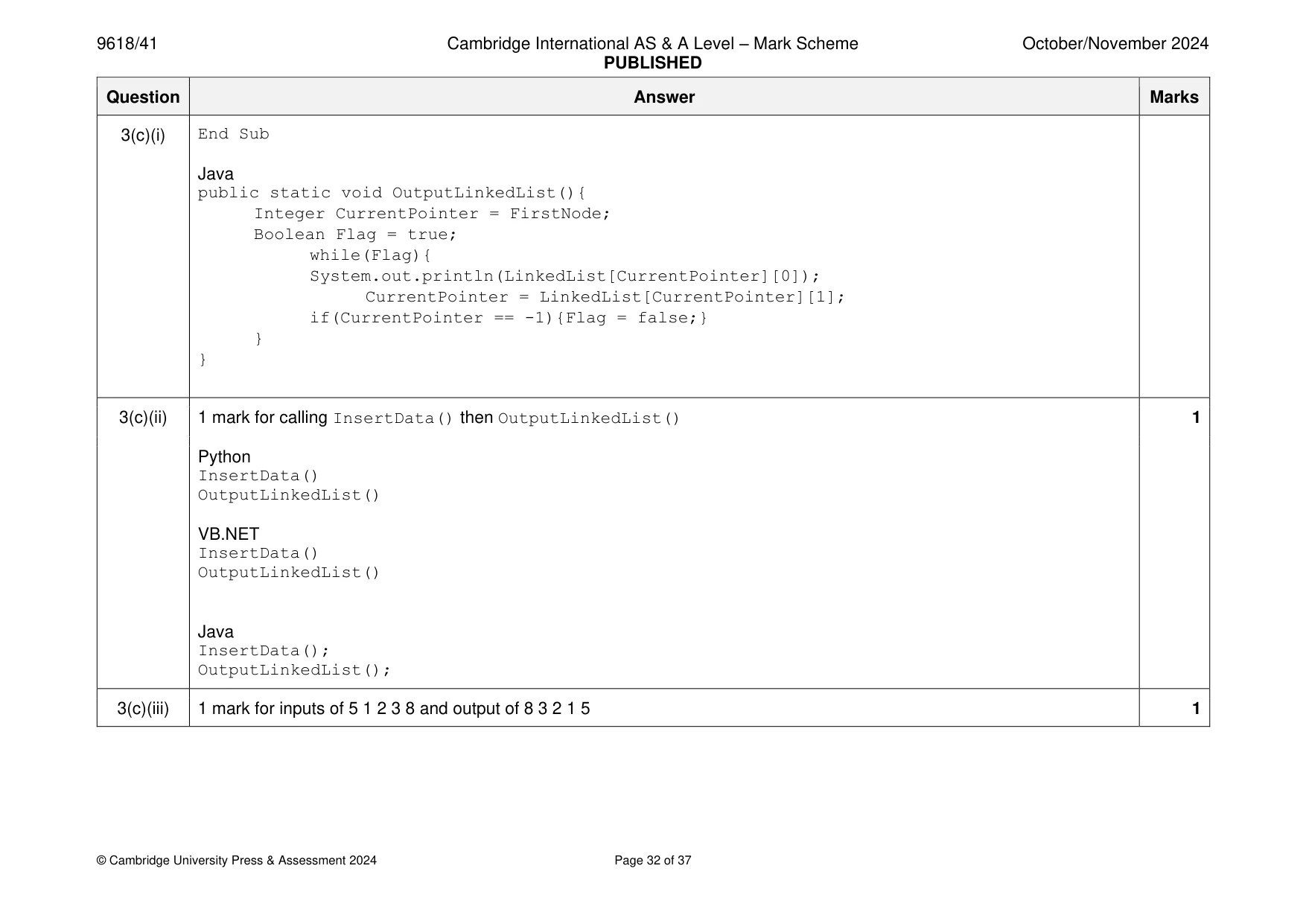
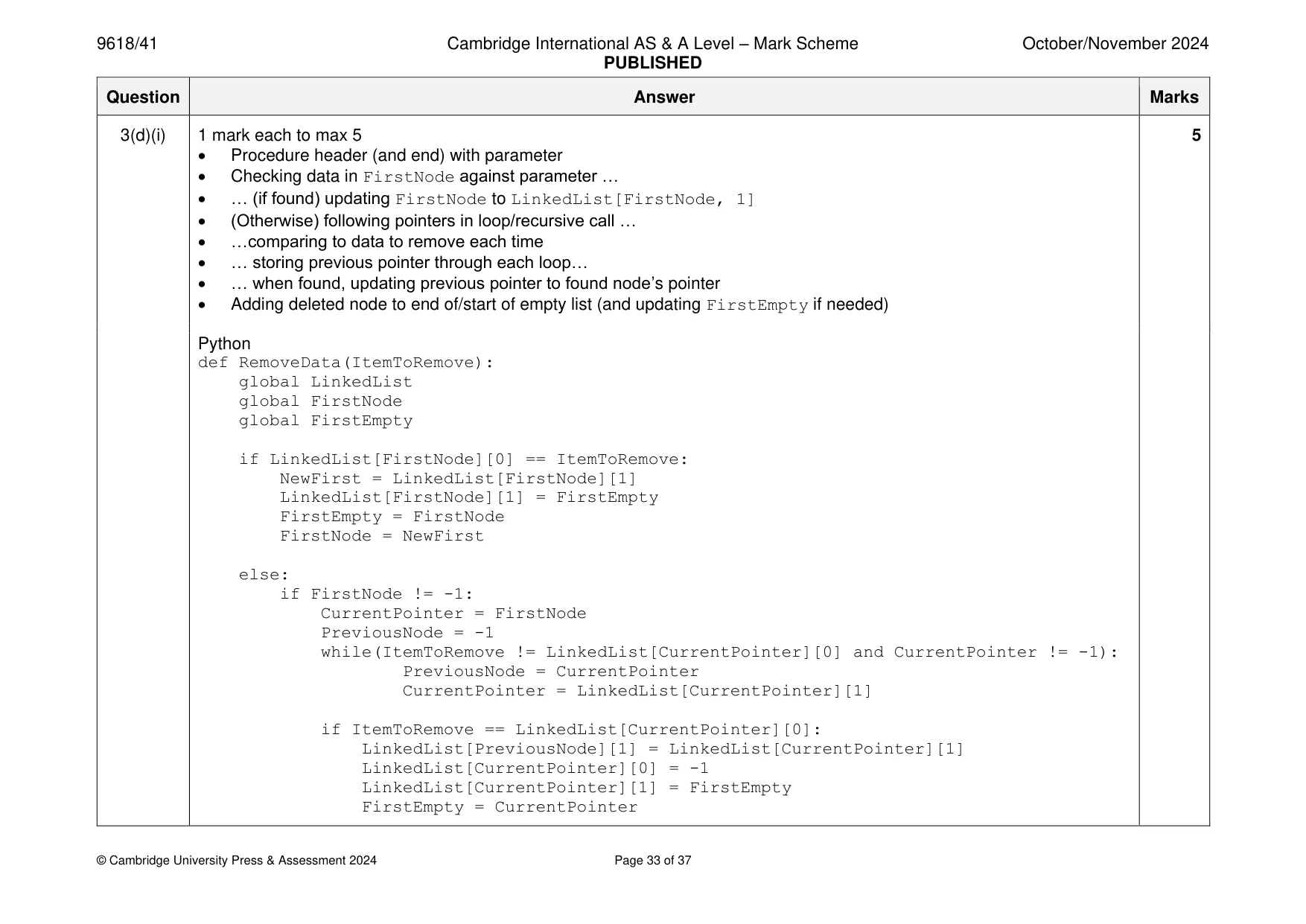
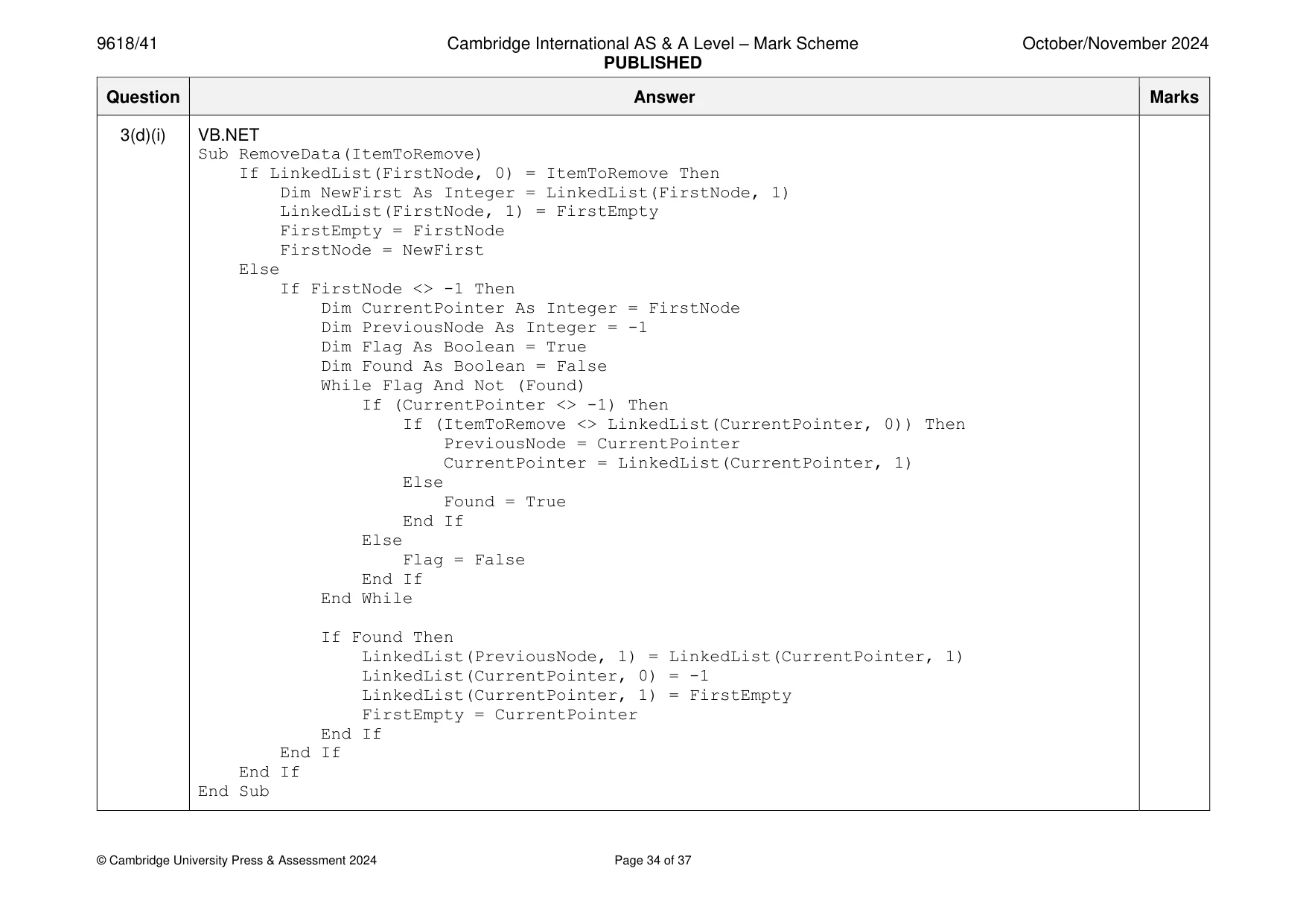
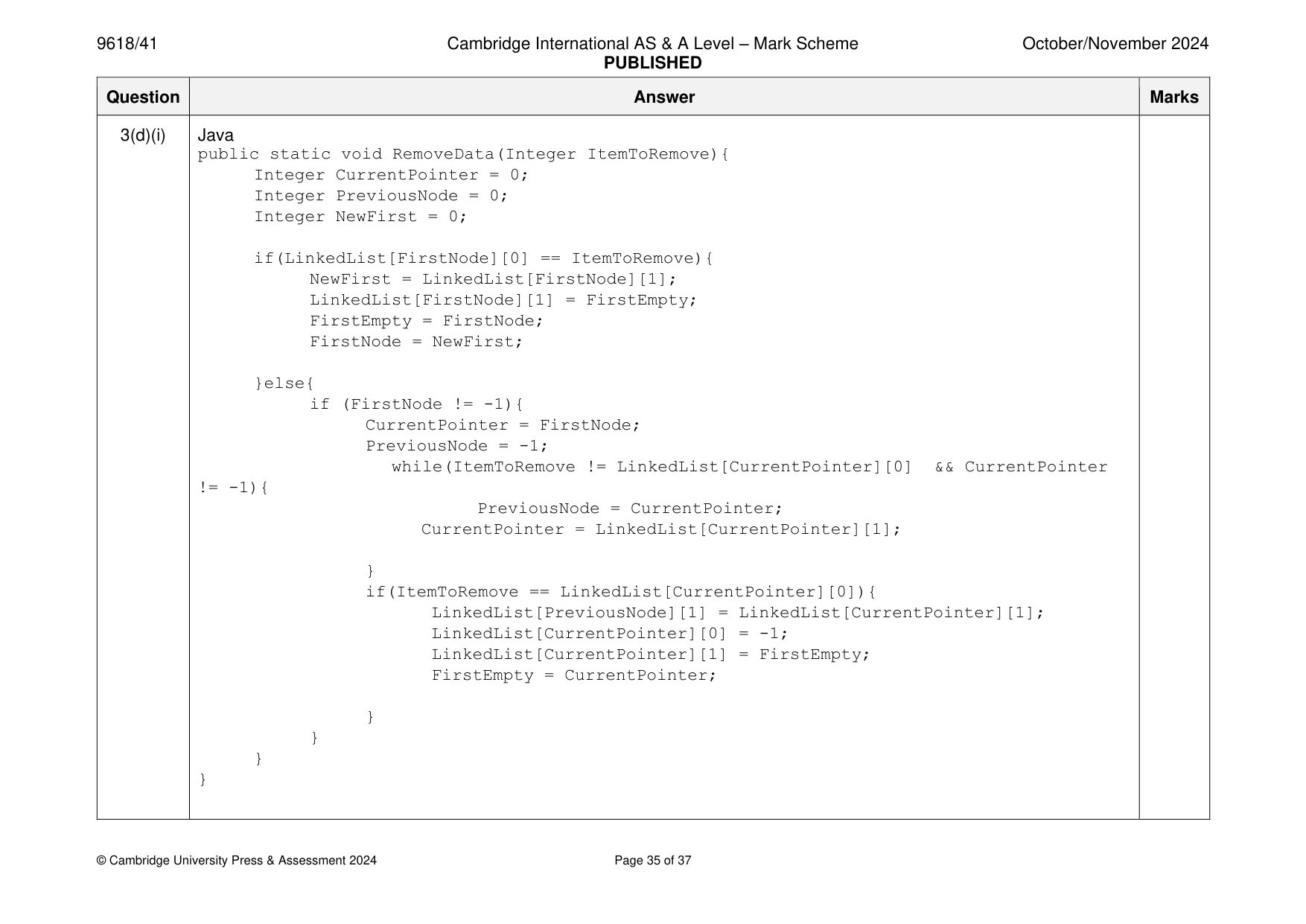
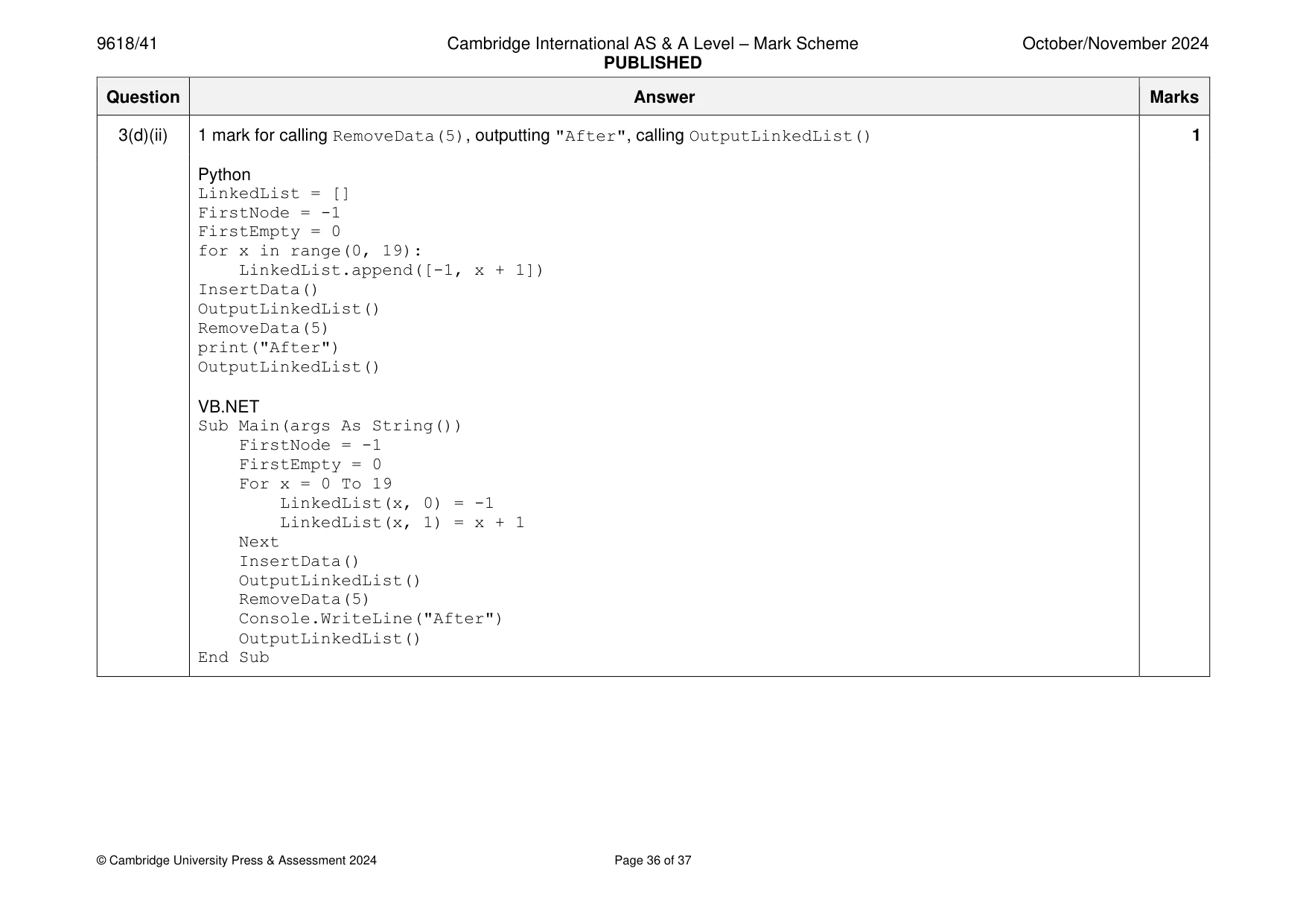
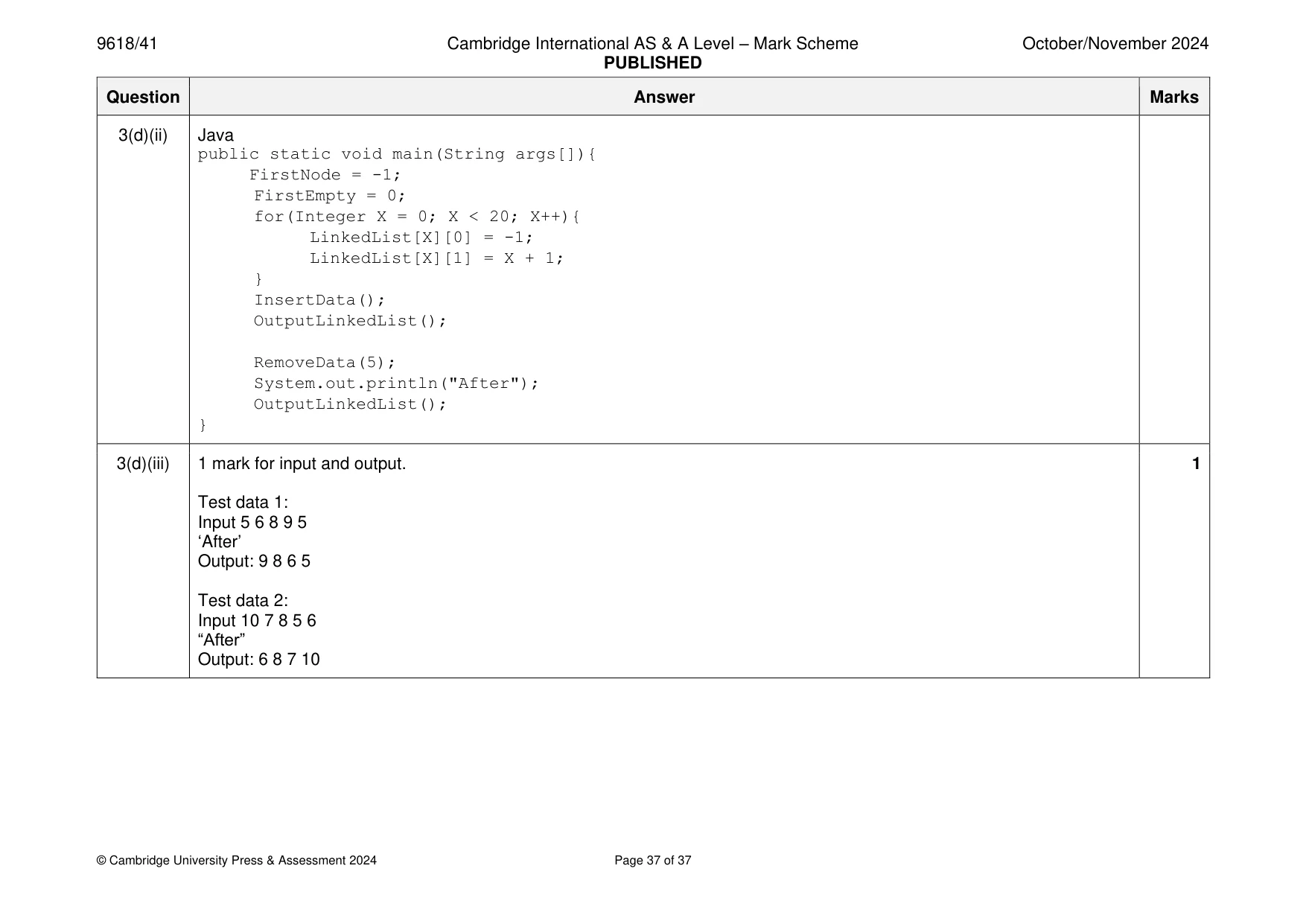
Mark scheme: 3(a) 1 mark each 2 • LinkedList declared as 2D array with (min) 20 2 elements (Integer) with all data initialised to -1, all nodes linked correctly • (Global) FirstNode (Int) initialised as -1 and (global) FirstEmpty (Int) initialised as 0 VB.NET Dim LinkedList(20, 2) As Integer Dim FirstNode As Integer Dim FirstEmpty As Integer Sub Main(args As String()) FirstNode = -1 FirstEmpty = 0 For x = 0 To 18 LinkedList(x, 0) = -1 LinkedList(x, 1) = x + 1 Next LinkedList(19, 0) = -1 LinkedList(19, 1) = -1 End Sub 3(a) Python LinkedList = [] #global FirstNode = -1 FirstEmpty = 0 for x in range(0, 19): LinkedList.append([-1, x + 1]) LinkedList[19][0] = -1 LinkedList[19][1] = -1 Java private static Integer[][] LinkedList = new Integer[20][2]; private static Integer FirstNode; private static Integer FirstEmpty; public static void main(String args[]){ FirstNode = -1; FirstEmpty = 0; for(Integer X = 0; X < 19; X++){ LinkedList[X][0] = -1; LinkedList[X][1] = X + 1; } LinkedList[19][0] = -1; LinkedList[19][1] = -1; } 3(b) 1 mark each to max 6 6 • Procedure header (and end) taking (min) 5 data items as input from the user • Checking if linked list is full (FirstEmpty = -1) … • …ending procedure/loop/not doing anything further • (otherwise) LinkedList[FirstEmpty, 0] = data input • LinkedList[FirstEmpty, 1] = FirstNode • FirstNode = FirstEmpty • FirstEmpty = LinkedList[FirstEmpty, 1] before any update to FirstEmpty ‘s pointer e.g. Python def InsertData(): global LinkedList global FirstNode global FirstEmpty for _ in range(5): if FirstEmpty != -1: nextEmpty = LinkedList[FirstEmpty][1] LinkedList[FirstEmpty][0] = int(input("Value: ")) LinkedList[FirstEmpty][1] = FirstNode FirstNode = FirstEmpty FirstEmpty = nextEmpty 3(b) VB.NET Sub InsertData() Dim NewItem As Integer Dim NextEmpty As Integer For x = 0 To 4 Console.WriteLine("Enter the next number") NewItem = Console.ReadLine() If FirstEmpty = -1 Then x = 5 Else NextEmpty = LinkedList(FirstEmpty, 1) LinkedList(FirstEmpty, 0) = NewItem LinkedList(FirstEmpty, 1) = FirstNode FirstNode = FirstEmpty FirstEmpty = NextEmpty End If Next x End Sub 3(b) Java public static void InsertData(){ Integer NewItem; Integer CurrentPointer = 0; Integer PreviousPointer = 0; Scanner scanner = new Scanner(System.in); Integer NextEmpty; for(Integer X = 0; X < 5; X++){ System.out.println("Enter the next number"); NewItem = Integer.parseInt(scanner.nextLine()); if(FirstEmpty == -1){ X = 5; }else{ NextEmpty = LinkedList[FirstEmpty][1]; LinkedList[FirstEmpty][0] = NewItem; LinkedList[FirstEmpty][1] = FirstNode; FirstNode = FirstEmpty; FirstEmpty = NextEmpty; } } } 3(c)(i) 1 mark each 2 • Procedure header (and end) starting with node at index FirstNode and outputting data LinkedList[FirstNode,0] • Following pointers until end reached and outputting data for each node Python def OutputLinkedList(): global LinkedList global FirstNode global FirstEmpty CurrentPointer = FirstNode Flag = True while Flag: print(LinkedList[CurrentPointer][0]) CurrentPointer = LinkedList[CurrentPointer][1] if CurrentPointer == -1: Flag = False VB.NET Sub OutputLinkedList() Dim CurrentPointer As Integer = FirstNode Dim Flag As Boolean = True While Flag Console.WriteLine(LinkedList(CurrentPointer, 0)) CurrentPointer = LinkedList(CurrentPointer, 1) If CurrentPointer = -1 Then Flag = False End If End While 3(c)(i) End Sub Java public static void OutputLinkedList(){ Integer CurrentPointer = FirstNode; Boolean Flag = true; while(Flag){ System.out.println(LinkedList[CurrentPointer][0]); CurrentPointer = LinkedList[CurrentPointer][1]; if(CurrentPointer == -1){Flag = false;} } } 3(c)(ii) 1 mark for calling InsertData() then OutputLinkedList() 1 Python InsertData() OutputLinkedList() VB.NET InsertData() OutputLinkedList() Java InsertData(); OutputLinkedList(); 3(c)(iii) 1 mark for inputs of 5 1 2 3 8 and output of 8 3 2 1 5 1 3(d)(i) 1 mark each to max 5 5 • Procedure header (and end) with parameter • Checking data in FirstNode against parameter … • … (if found) updating FirstNode to LinkedList[FirstNode, 1] • (Otherwise) following pointers in loop/recursive call … • …comparing to data to remove each time • … storing previous pointer through each loop… • … when found, updating previous pointer to found node’s pointer • Adding deleted node to end of/start of empty list (and updating FirstEmpty if needed) Python def RemoveData(ItemToRemove): global LinkedList global FirstNode global FirstEmpty if LinkedList[FirstNode][0] == ItemToRemove: NewFirst = LinkedList[FirstNode][1] LinkedList[FirstNode][1] = FirstEmpty FirstEmpty = FirstNode FirstNode = NewFirst else: if FirstNode != -1: CurrentPointer = FirstNode PreviousNode = -1 while(ItemToRemove != LinkedList[CurrentPointer][0] and CurrentPointer != -1): PreviousNode = CurrentPointer CurrentPointer = LinkedList[CurrentPointer][1] if ItemToRemove == LinkedList[CurrentPointer][0]: LinkedList[PreviousNode][1] = LinkedList[CurrentPointer][1] LinkedList[CurrentPointer][0] = -1 LinkedList[CurrentPointer][1] = FirstEmpty FirstEmpty = CurrentPointer 3(d)(i) VB.NET Sub RemoveData(ItemToRemove) If LinkedList(FirstNode, 0) = ItemToRemove Then Dim NewFirst As Integer = LinkedList(FirstNode, 1) LinkedList(FirstNode, 1) = FirstEmpty FirstEmpty = FirstNode FirstNode = NewFirst Else If FirstNode <> -1 Then Dim CurrentPointer As Integer = FirstNode Dim PreviousNode As Integer = -1 Dim Flag As Boolean = True Dim Found As Boolean = False While Flag And Not (Found) If (CurrentPointer <> -1) Then If (ItemToRemove <> LinkedList(CurrentPointer, 0)) Then PreviousNode = CurrentPointer CurrentPointer = LinkedList(CurrentPointer, 1) Else Found = True End If Else Flag = False End If End While If Found Then LinkedList(PreviousNode, 1) = LinkedList(CurrentPointer, 1) LinkedList(CurrentPointer, 0) = -1 LinkedList(CurrentPointer, 1) = FirstEmpty FirstEmpty = CurrentPointer End If End If End If End Sub 3(d)(i) Java public static void RemoveData(Integer ItemToRemove){ Integer CurrentPointer = 0; Integer PreviousNode = 0; Integer NewFirst = 0; if(LinkedList[FirstNode][0] == ItemToRemove){ NewFirst = LinkedList[FirstNode][1]; LinkedList[FirstNode][1] = FirstEmpty; FirstEmpty = FirstNode; FirstNode = NewFirst; }else{ if (FirstNode != -1){ CurrentPointer = FirstNode; PreviousNode = -1; while(ItemToRemove != LinkedList[CurrentPointer][0] && CurrentPointer != -1){ PreviousNode = CurrentPointer; CurrentPointer = LinkedList[CurrentPointer][1]; } if(ItemToRemove == LinkedList[CurrentPointer][0]){ LinkedList[PreviousNode][1] = LinkedList[CurrentPointer][1]; LinkedList[CurrentPointer][0] = -1; LinkedList[CurrentPointer][1] = FirstEmpty; FirstEmpty = CurrentPointer; } } } } 3(d)(ii) 1 mark for calling RemoveData(5), outputting "After", calling OutputLinkedList() 1 Python LinkedList = [] FirstNode = -1 FirstEmpty = 0 for x in range(0, 19): LinkedList.append([-1, x + 1]) InsertData() OutputLinkedList() RemoveData(5) print("After") OutputLinkedList() VB.NET Sub Main(args As String()) FirstNode = -1 FirstEmpty = 0 For x = 0 To 19 LinkedList(x, 0) = -1 LinkedList(x, 1) = x + 1 Next InsertData() OutputLinkedList() RemoveData(5) Console.WriteLine("After") OutputLinkedList() End Sub 3(d)(ii) Java public static void main(String args[]){ FirstNode = -1; FirstEmpty = 0; for(Integer X = 0; X < 20; X++){ LinkedList[X][0] = -1; LinkedList[X][1] = X + 1; } InsertData(); OutputLinkedList(); RemoveData(5); System.out.println("After"); OutputLinkedList(); } 3(d)(iii) 1 mark for input and output. 1 Test data 1: Input 5 6 8 9 5 ‘After’ Output: 9 8 6 5 Test data 2: Input 10 7 8 5 6 “After” Output: 6 8 7 10
What you needed in this session
Cambridge’s own grade thresholds for 2024 Oct/Nov, Paper 4 · Variant 1. A higher threshold means an easier paper — the bar moves with how the cohort did.