Cambridge A Level Computer Science 9618 — 2022 Oct/Nov Paper 4 · Variant 2
9618/42/O/N/22 · 3 questions · 75 marks · ≈84 min
The question paper and its mark scheme, free to read here and free to download. This is Cambridge’s own paper, exactly as it was sat.
Question paper12 pages


Mark scheme24 pages
Answers below. Sit the paper first if you are practising.
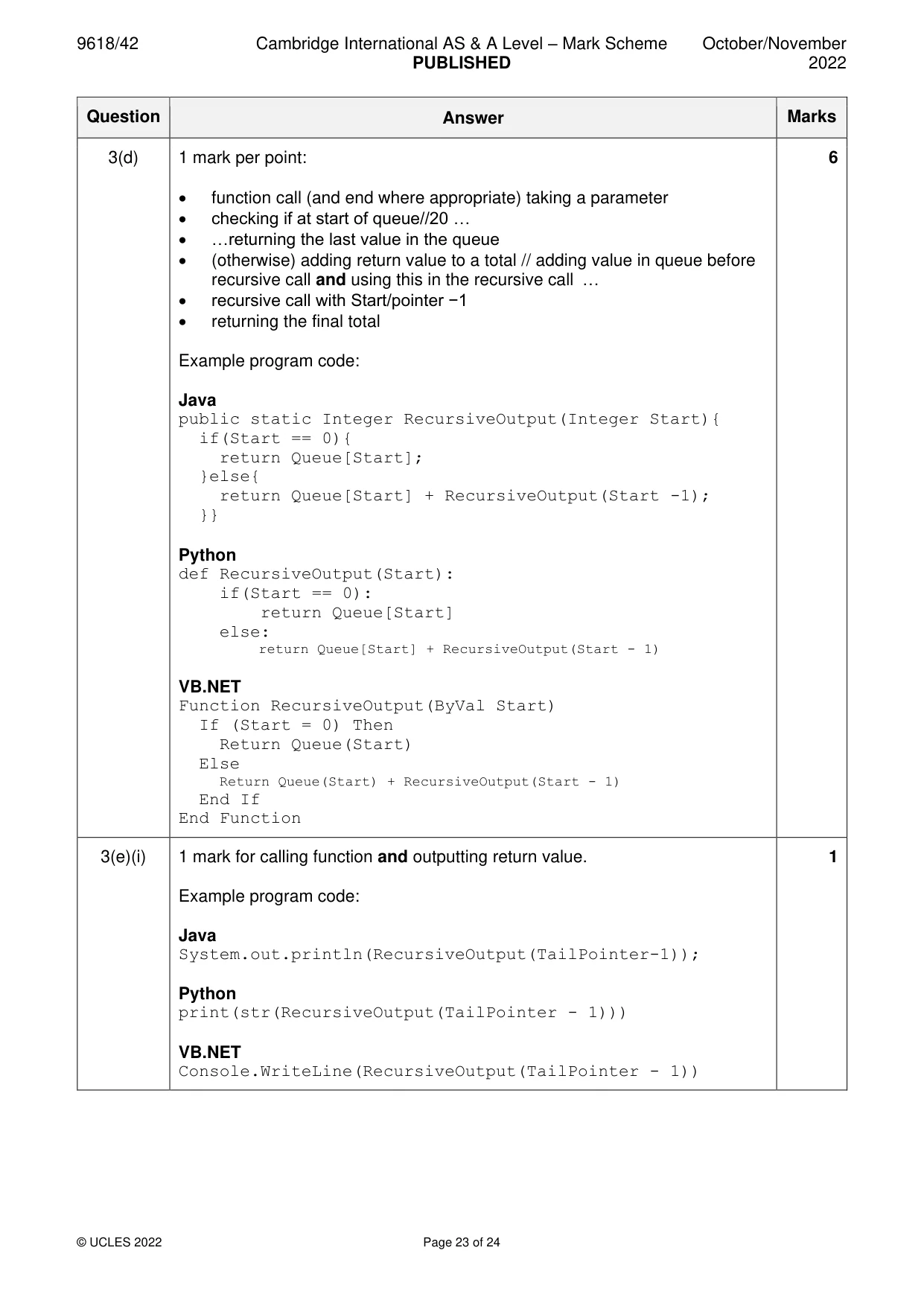
Questions as text
Q1 · A computer program is needed to store jobs in order of priority
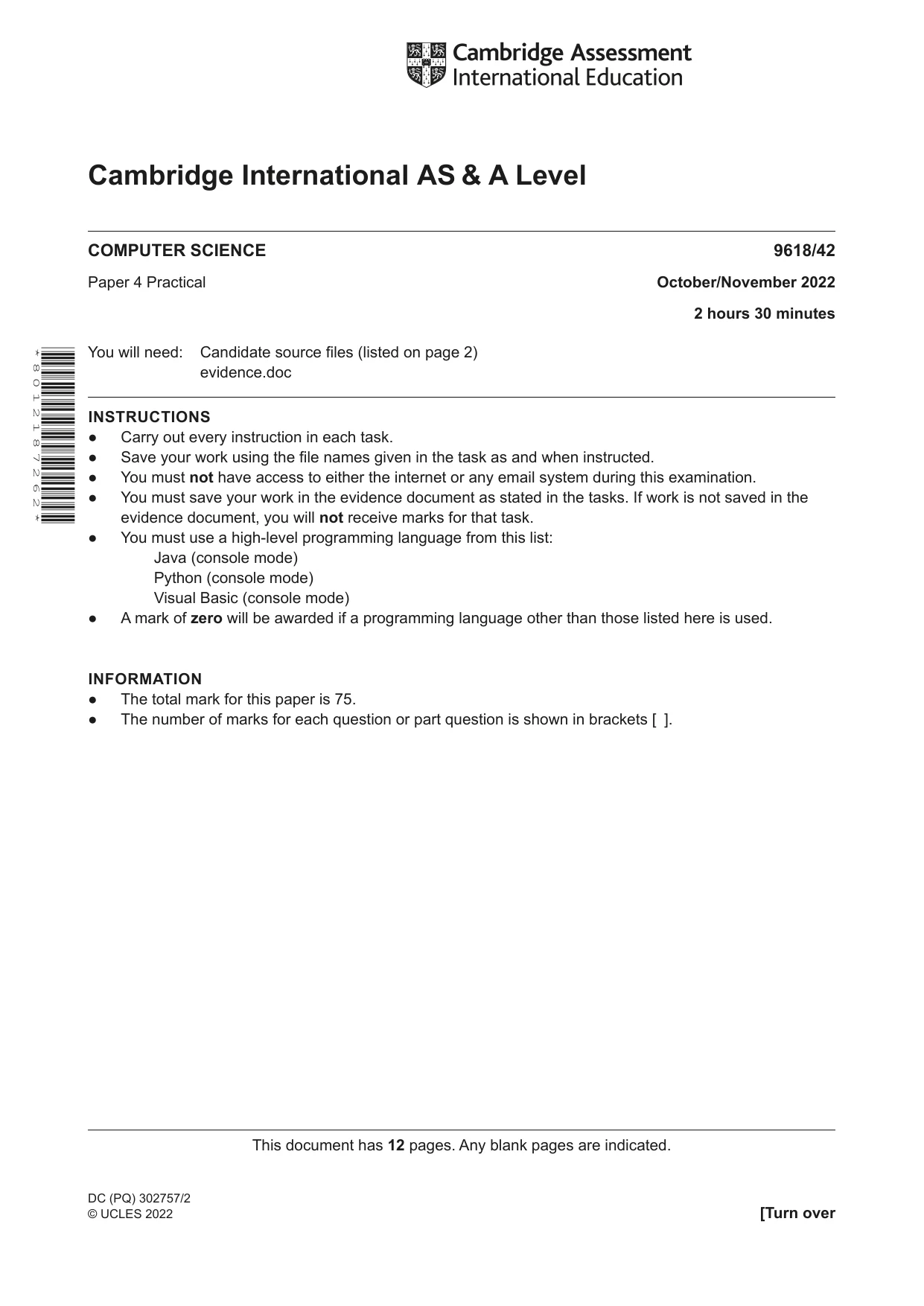
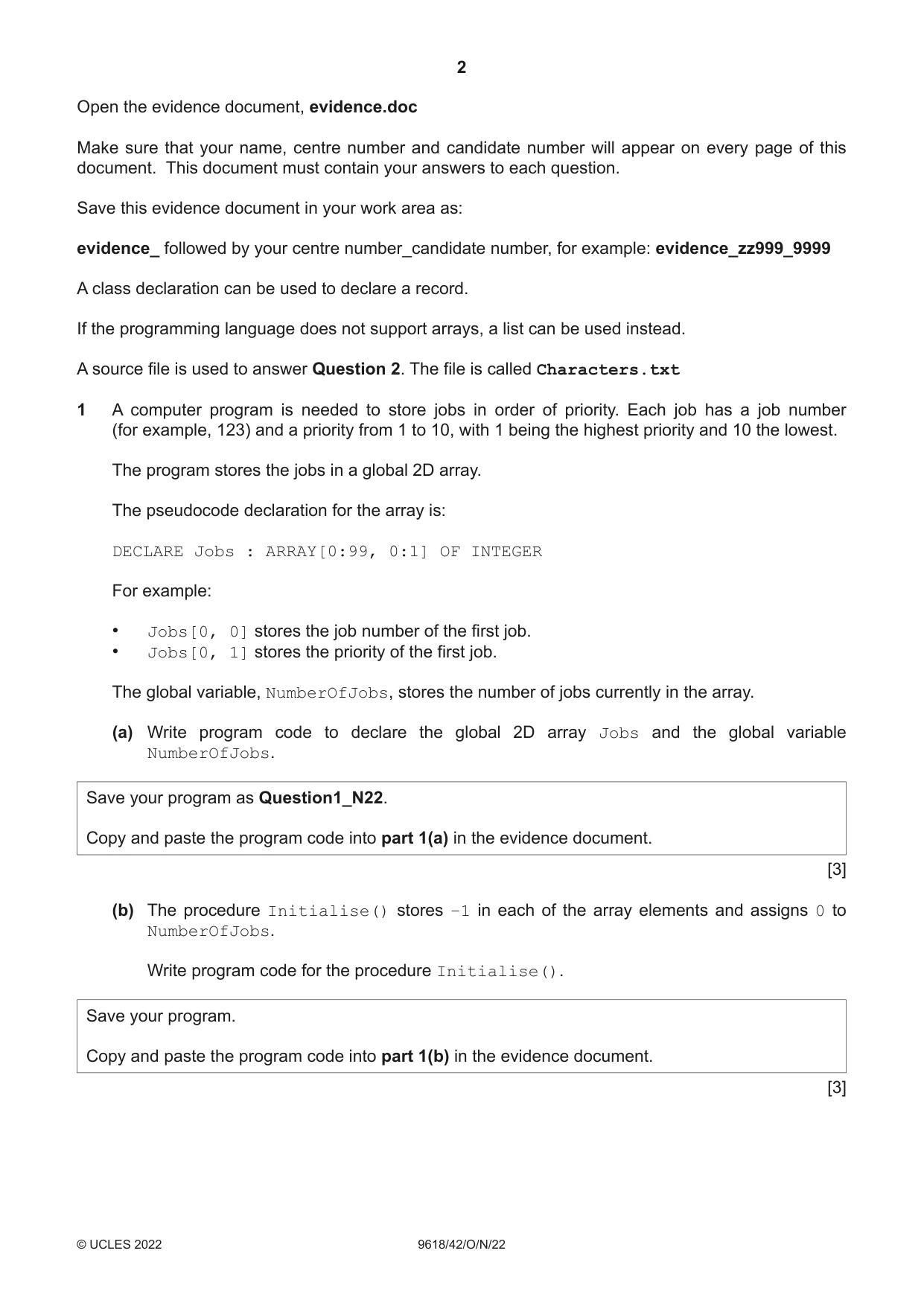
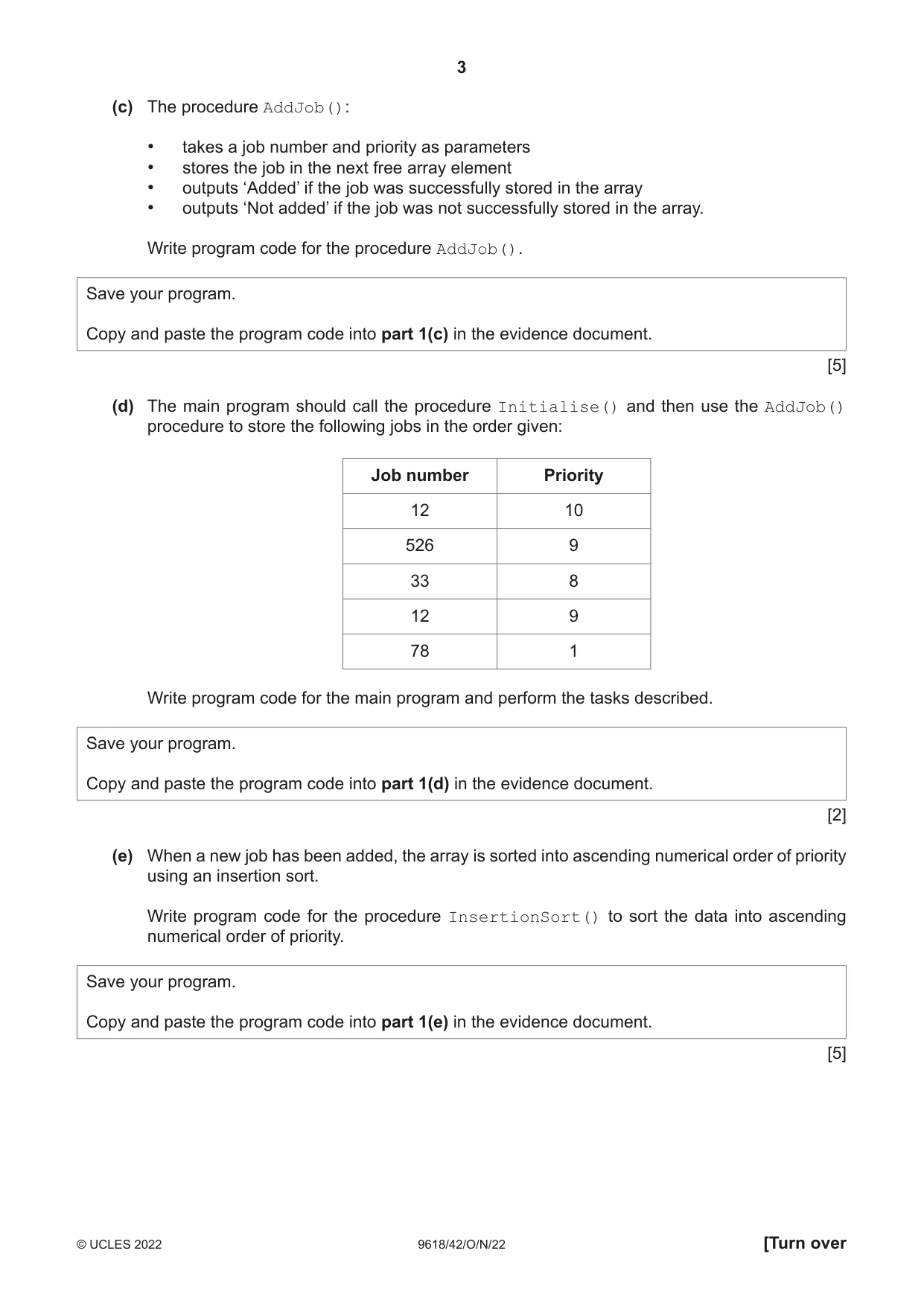
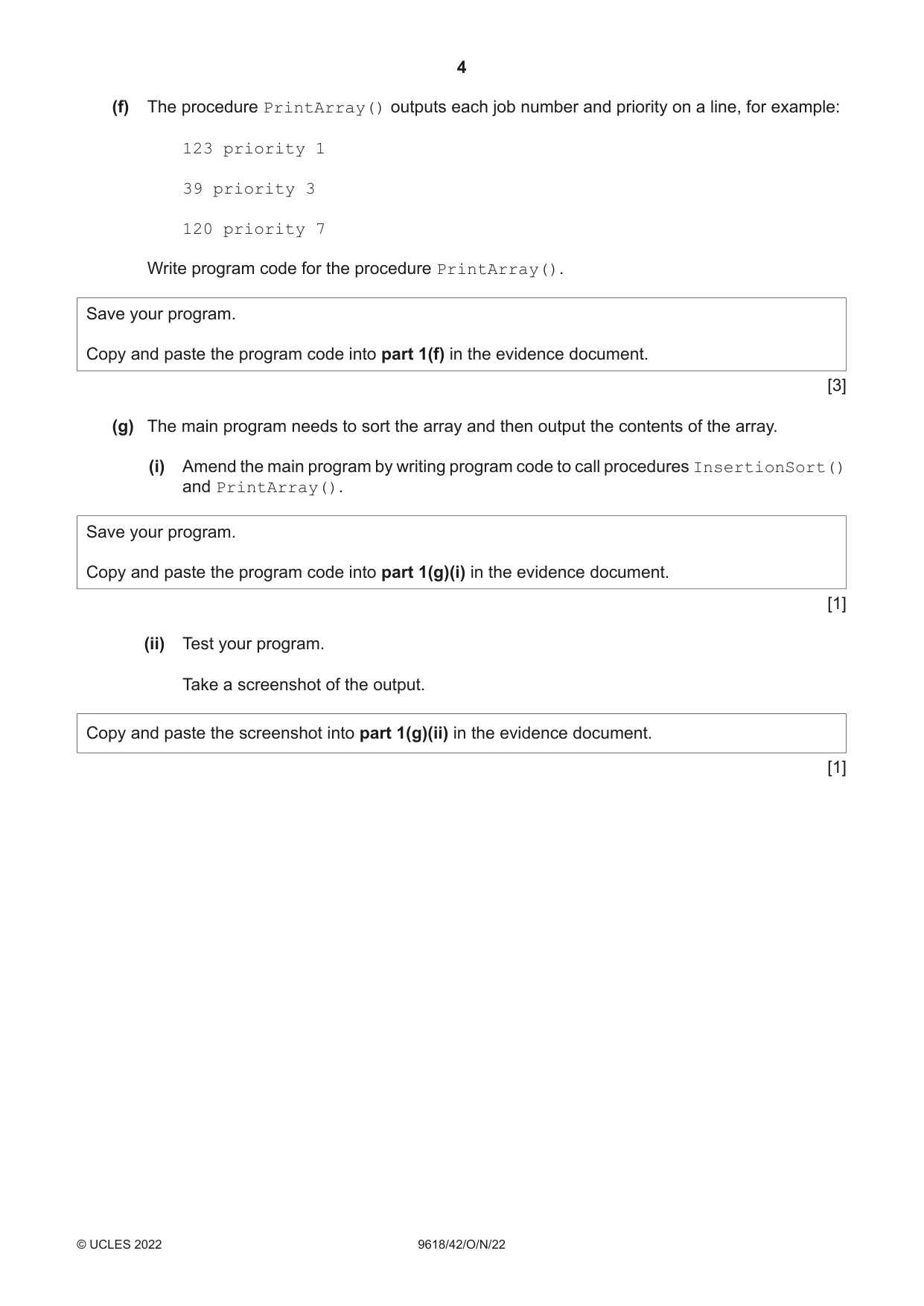
1 A computer program is needed to store jobs in order of priority. Each job has a job number (for example, 123) and a priority from 1 to 10, with 1 being the highest priority and 10 the lowest. The program stores the jobs in a global 2D array. The pseudocode declaration for the array is: DECLARE Jobs : ARRAY[0:99, 0:1] OF INTEGER For example: • Jobs[0, 0] stores the job number of the first job. • Jobs[0, 1] stores the priority of the first job. The global variable, NumberOfJobs, stores the number of jobs currently in the array. (a) Write program code to declare the global 2D array Jobs and the global variable NumberOfJobs. Save your program as Question1_N22. Copy and paste the program code into part 1(a) in the evidence document. [3] (b) The procedure Initialise() stores –1 in each of the array elements and assigns 0 to NumberOfJobs. Write program code for the procedure Initialise(). Save your program. Copy and paste the program code into part 1(b) in the evidence document. [3] (c) The procedure AddJob(): • takes a job number and priority as parameters • stores the job in the next free array element • outputs ‘Added’ if the job was successfully stored in the array • outputs ‘Not added’ if the job was not successfully stored in the array. Write program code for the procedure AddJob(). Save your program. Copy and paste the program code into part 1(c) in the evidence document. [5] (d) The main program should call the procedure Initialise() and then use the AddJob() procedure to store the following jobs in the order given: Job number Priority 12 10 526 9 33 8 12 9 78 1 Write program code for the main program and perform the tasks described. Save your program. Copy and paste the program code into part 1(d) in the evidence document. [2] (e) When a new job has been added, the array is sorted into ascending numerical order of priority using an insertion sort. Write program code for the procedure InsertionSort() to sort the data into ascending numerical order of priority. Save your program. Copy and paste the program code into part 1(e) in the evidence document. [5] (f) The procedure PrintArray() outputs each job number and priority on a line, for example: 123 priority 1 39 priority 3 120 priority 7 Write program code for the procedure PrintArray(). Save your program. Copy and paste the program code into part 1(f) in the evidence document. [3] (g) The main program needs to sort the array and then output the contents of the array. (i) Amend the main program by writing program code to call procedures InsertionSort() and PrintArray(). Save your program. Copy and paste the program code into part 1(g)(i) in the evidence document. [1] (ii) Test your program. Take a screenshot of the output. Copy and paste the screenshot into part 1(g)(ii) in the evidence document. [1]
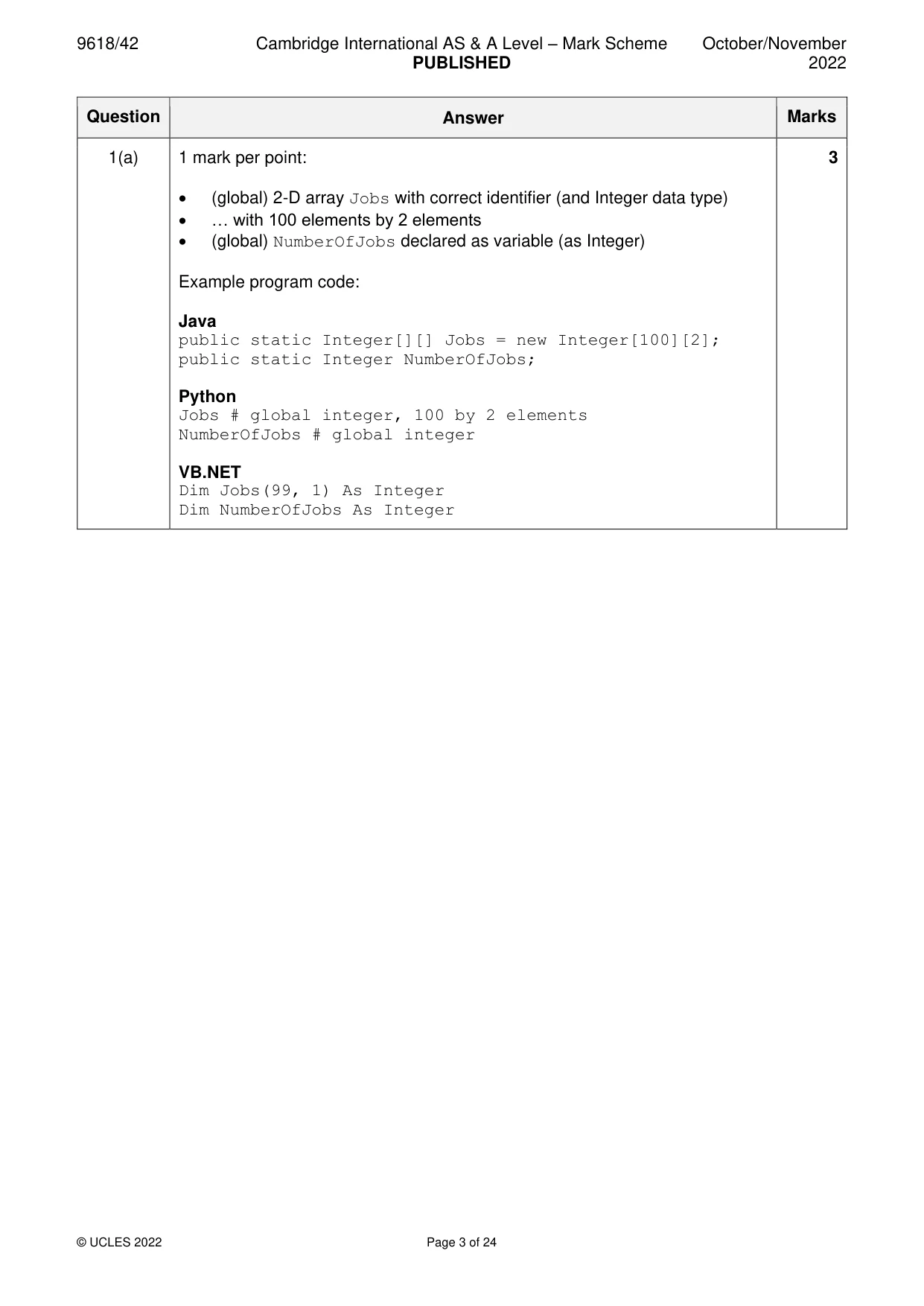
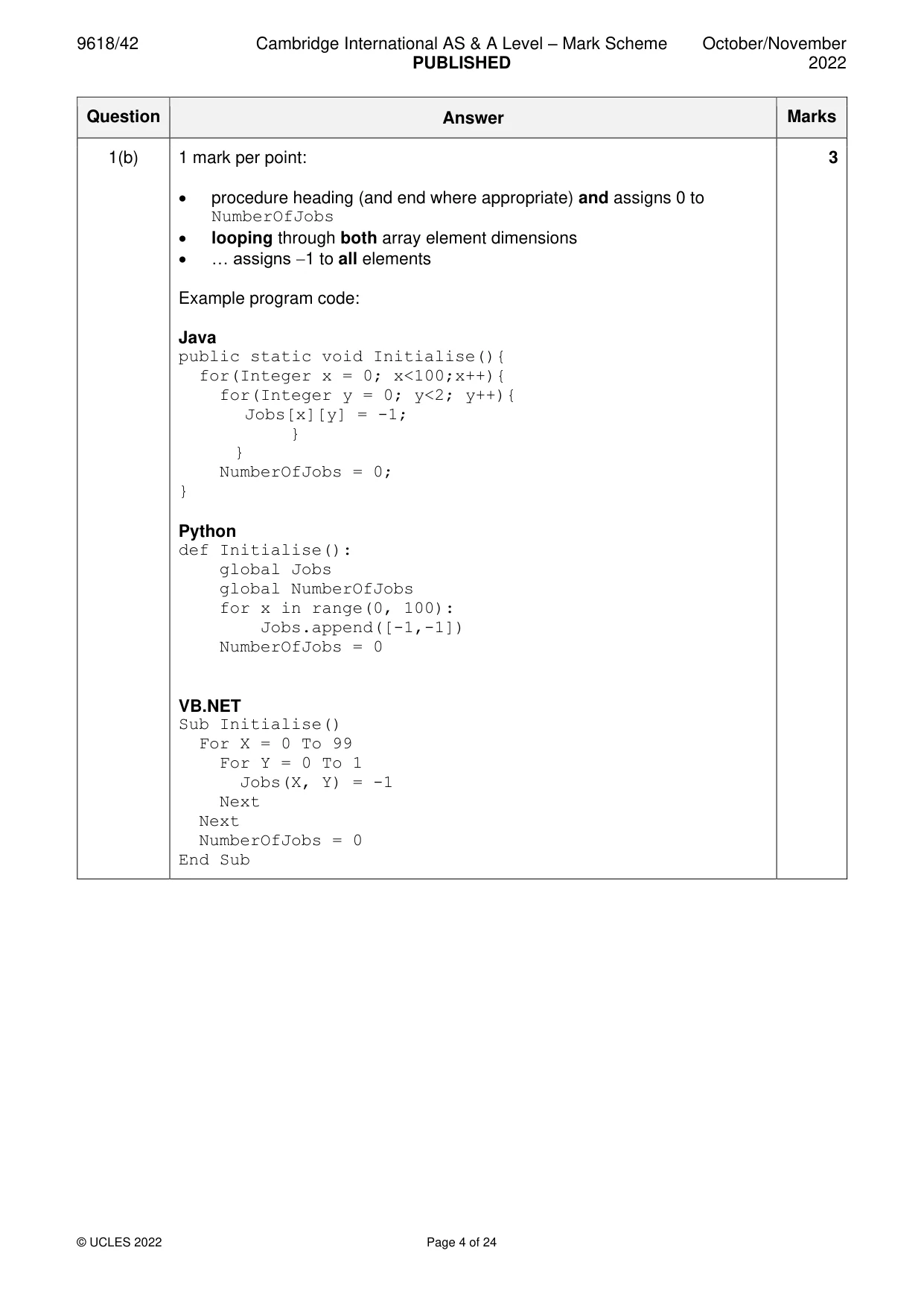
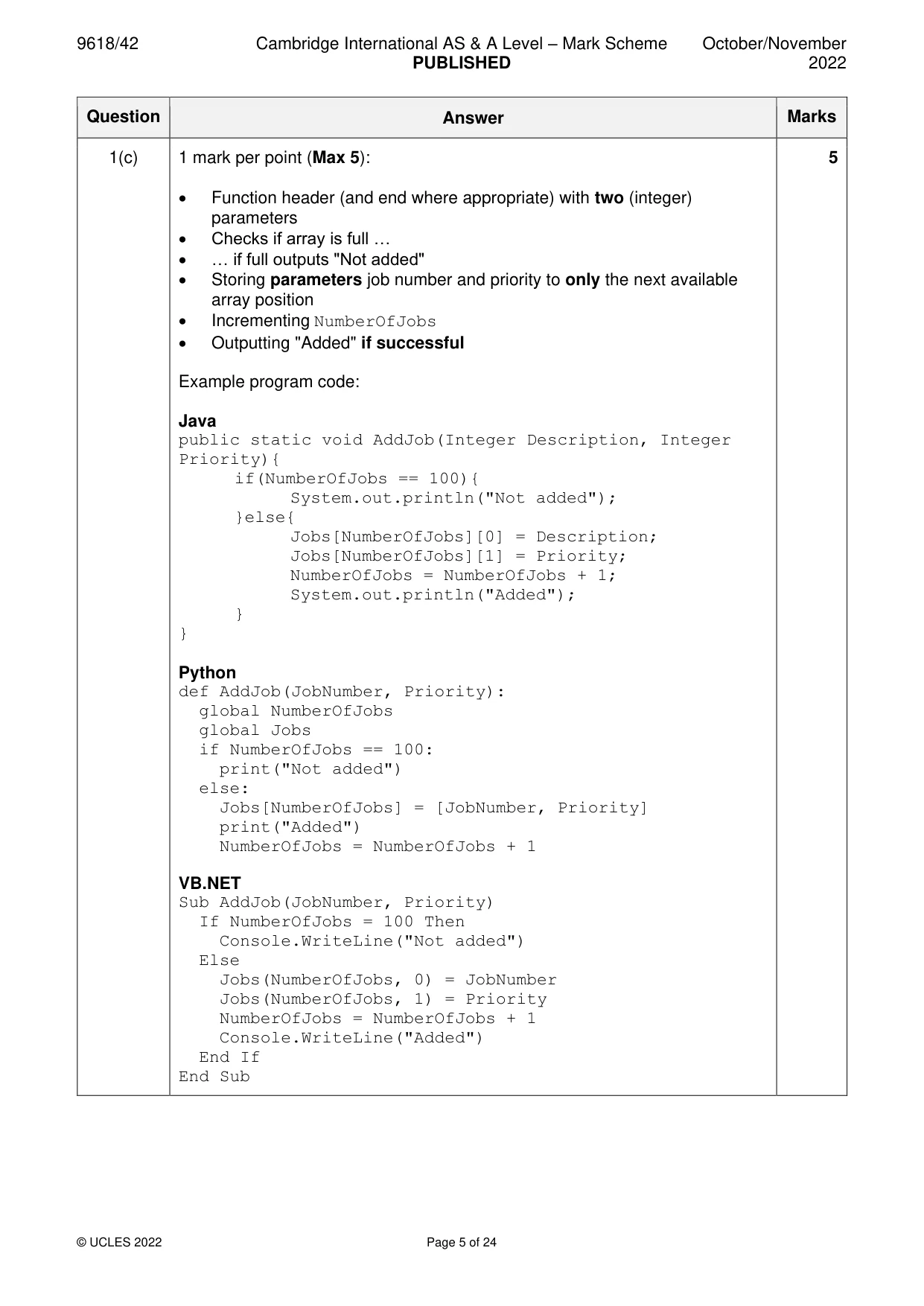
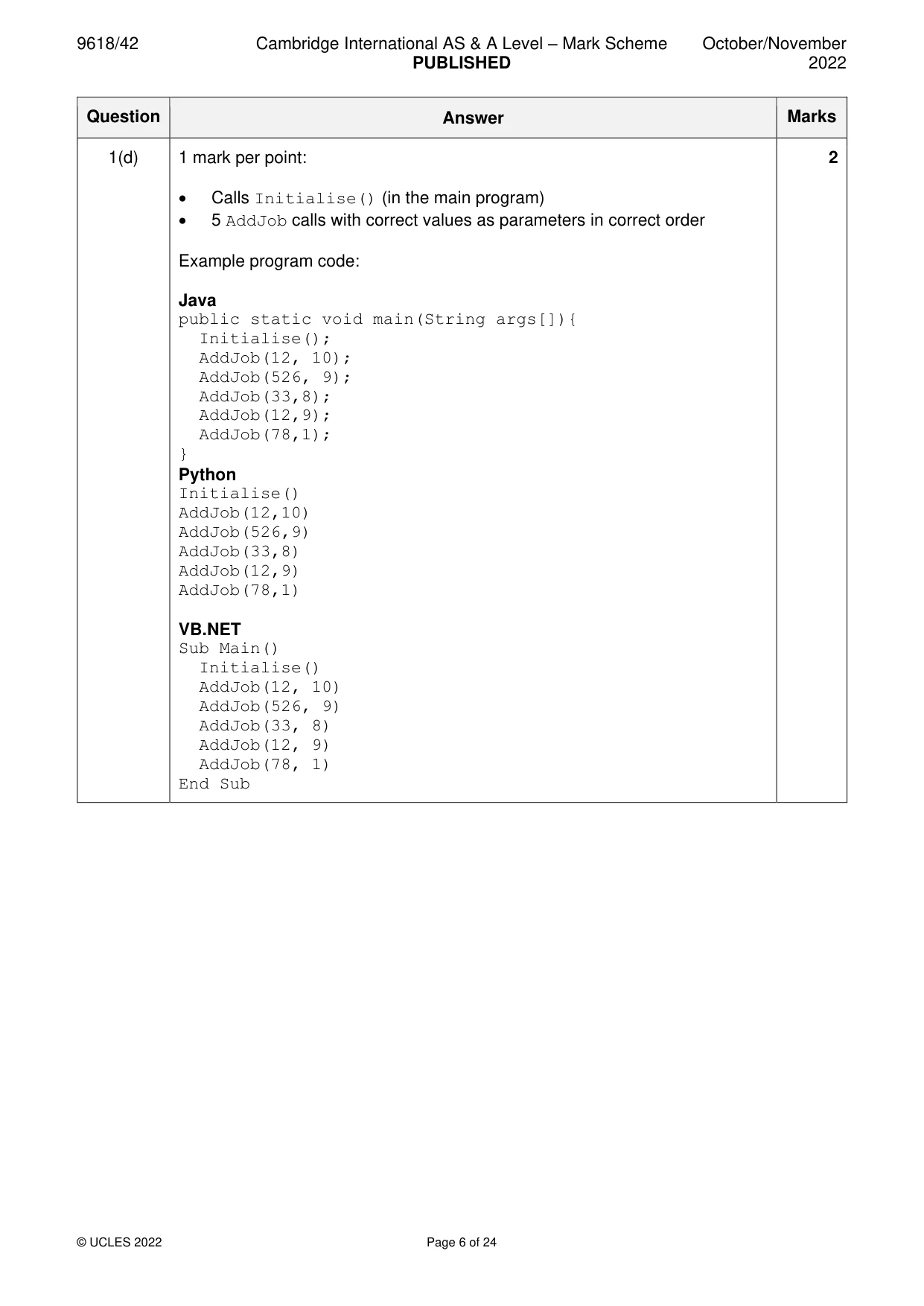
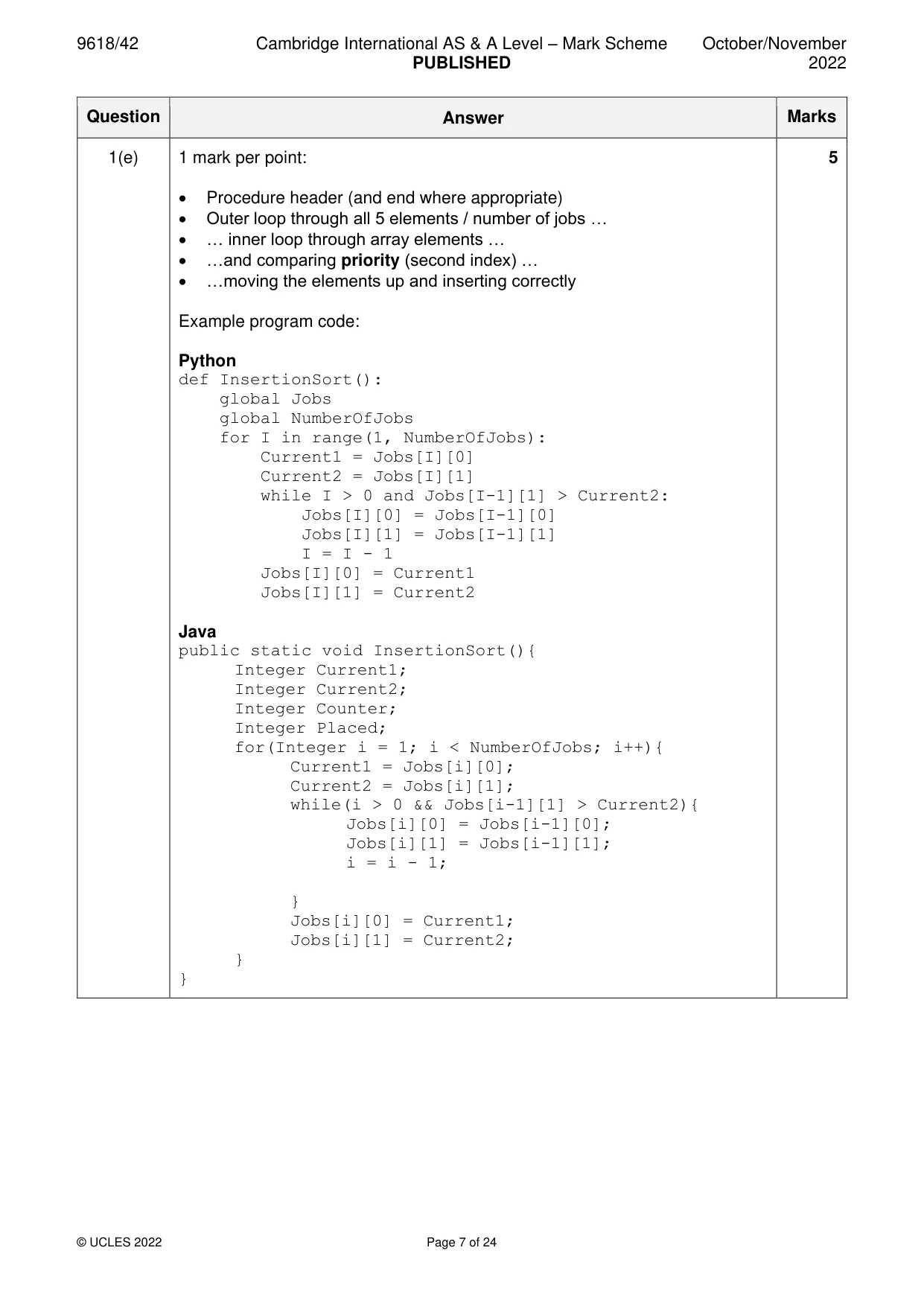
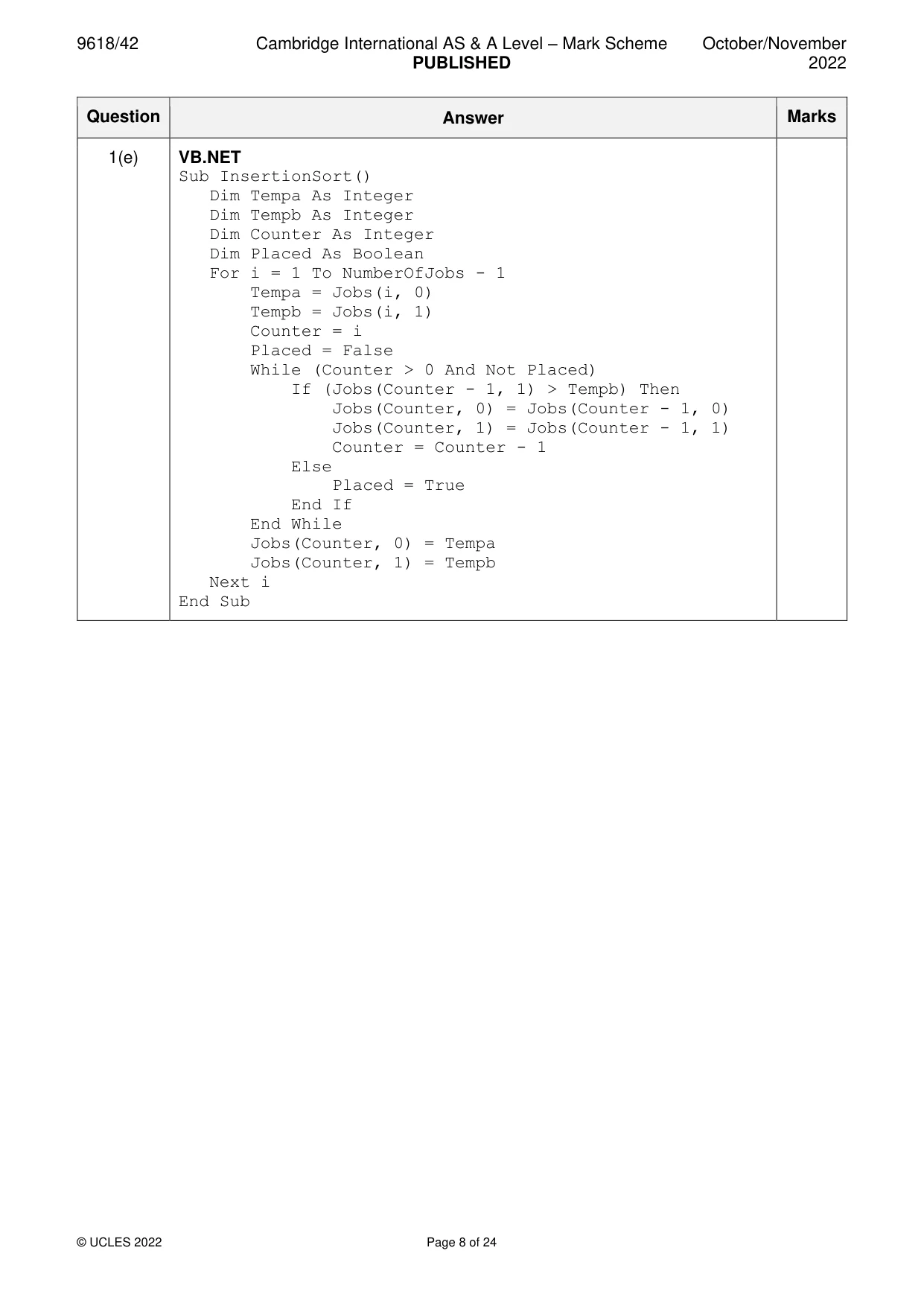
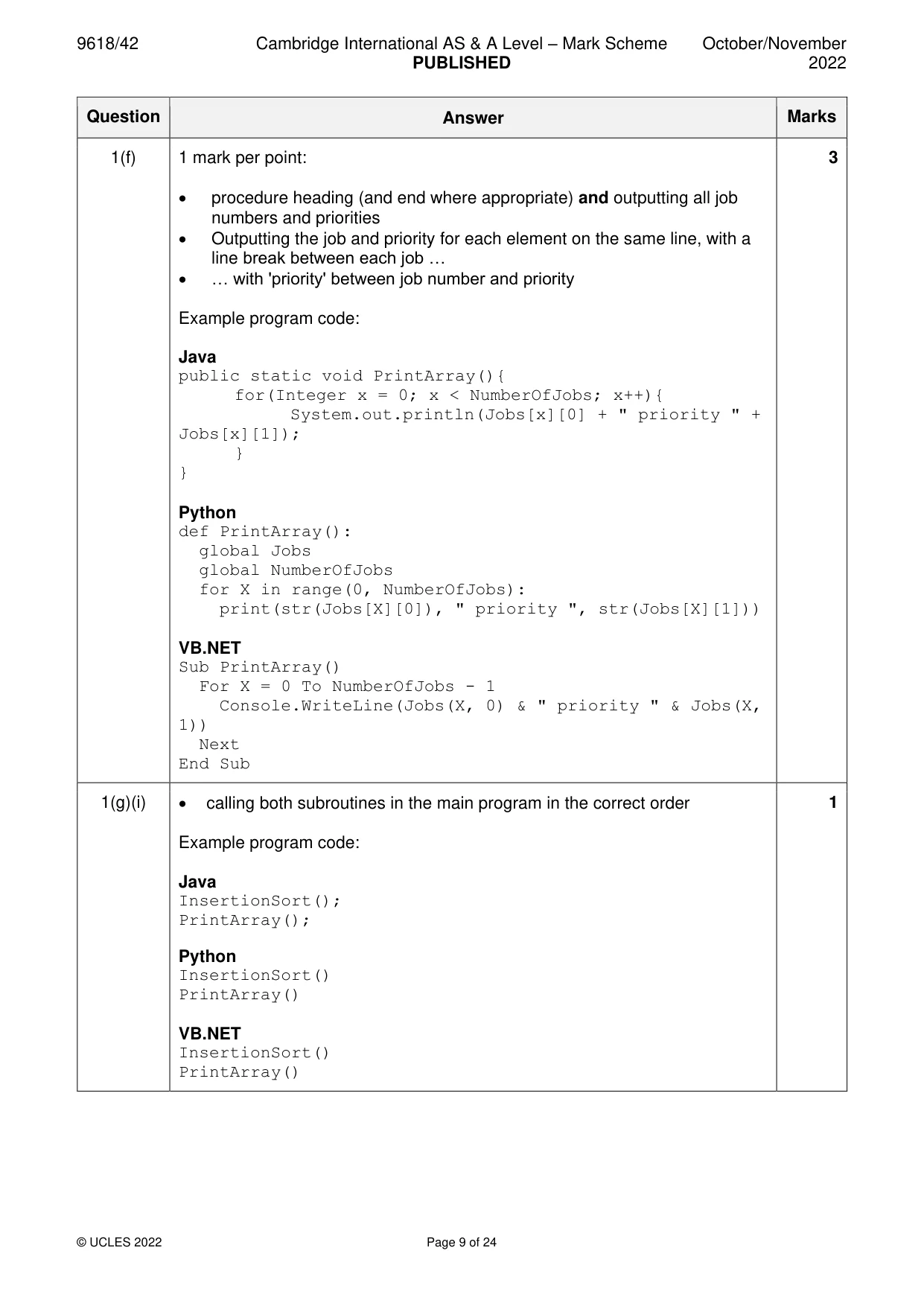
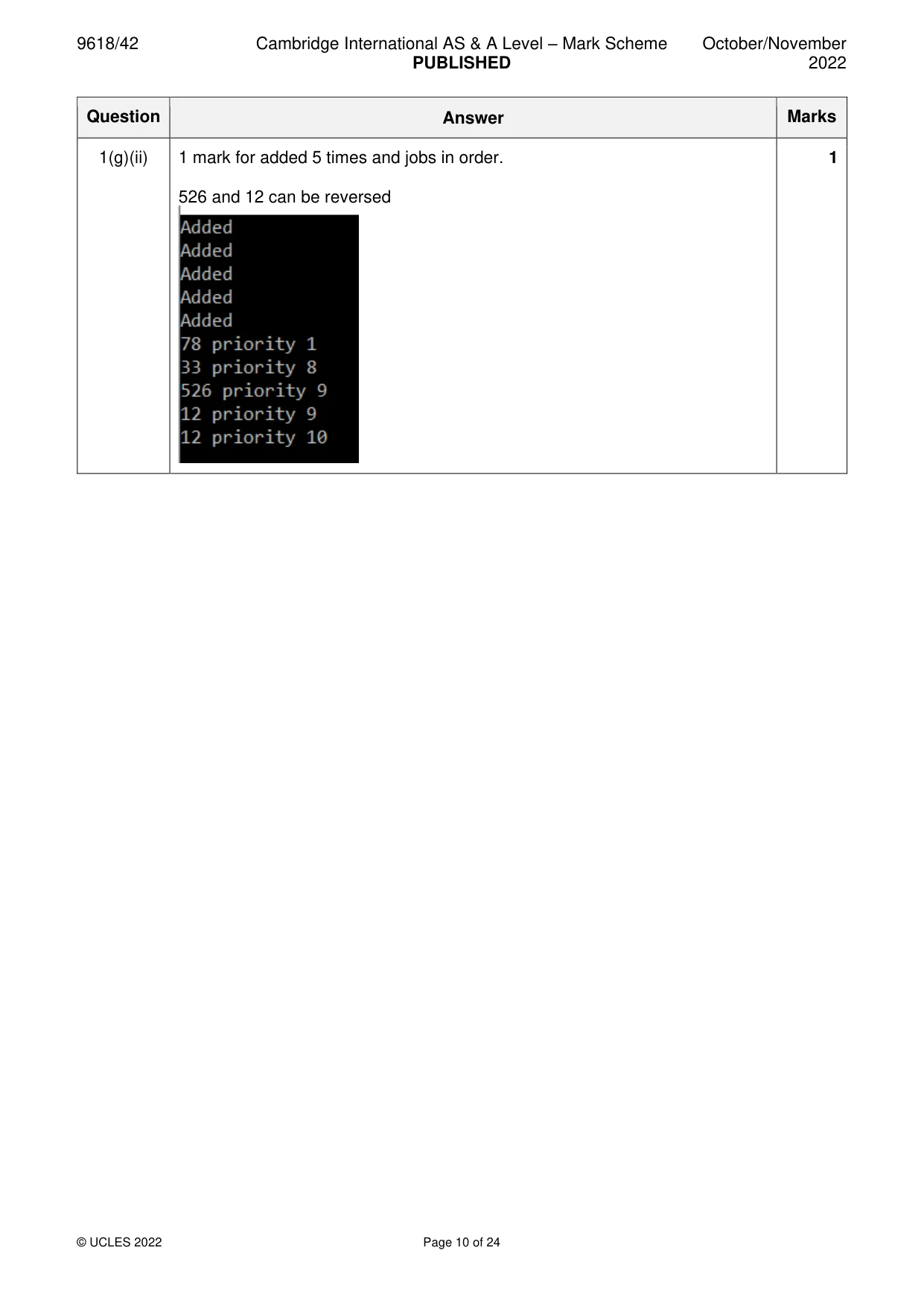
Mark scheme: Question Answer Marks 1(a) 1 mark per point: 3 • (global) 2-D array Jobs with correct identifier (and Integer data type) • … with 100 elements by 2 elements • (global) NumberOfJobs declared as variable (as Integer) Example program code: Java public static Integer[][] Jobs = new Integer[100][2]; public static Integer NumberOfJobs; Python Jobs # global integer, 100 by 2 elements NumberOfJobs # global integer VB.NET Dim Jobs(99, 1) As Integer Dim NumberOfJobs As Integer 1(b) 1 mark per point: 3 • procedure heading (and end where appropriate) and assigns 0 to NumberOfJobs • looping through both array element dimensions • … assigns −1 to all elements Example program code: Java public static void Initialise(){ for(Integer x = 0; x<100;x++){ for(Integer y = 0; y<2; y++){ Jobs[x][y] = -1; } } NumberOfJobs = 0; } Python def Initialise(): global Jobs global NumberOfJobs for x in range(0, 100): Jobs.append([-1,-1]) NumberOfJobs = 0 VB.NET Sub Initialise() For X = 0 To 99 For Y = 0 To 1 Jobs(X, Y) = -1 Next Next NumberOfJobs = 0 End Sub 1(c) 1 mark per point (Max 5): 5 • Function header (and end where appropriate) with two (integer) parameters • Checks if array is full … • … if full outputs "Not added" • Storing parameters job number and priority to only the next available array position • Incrementing NumberOfJobs • Outputting "Added" if successful Example program code: Java public static void AddJob(Integer Description, Integer Priority){ if(NumberOfJobs == 100){ System.out.println("Not added"); }else{ Jobs[NumberOfJobs][0] = Description; Jobs[NumberOfJobs][1] = Priority; NumberOfJobs = NumberOfJobs + 1; System.out.println("Added"); } } Python def AddJob(JobNumber, Priority): global NumberOfJobs global Jobs if NumberOfJobs == 100: print("Not added") else: Jobs[NumberOfJobs] = [JobNumber, Priority] print("Added") NumberOfJobs = NumberOfJobs + 1 VB.NET Sub AddJob(JobNumber, Priority) If NumberOfJobs = 100 Then Console.WriteLine("Not added") Else Jobs(NumberOfJobs, 0) = JobNumber Jobs(NumberOfJobs, 1) = Priority NumberOfJobs = NumberOfJobs + 1 Console.WriteLine("Added") End If End Sub 1(d) 1 mark per point: 2 • Calls Initialise() (in the main program) • 5 AddJob calls with correct values as parameters in correct order Example program code: Java public static void main(String args[]){ Initialise(); AddJob(12, 10); AddJob(526, 9); AddJob(33,8); AddJob(12,9); AddJob(78,1); } Python Initialise() AddJob(12,10) AddJob(526,9) AddJob(33,8) AddJob(12,9) AddJob(78,1) VB.NET Sub Main() Initialise() AddJob(12, 10) AddJob(526, 9) AddJob(33, 8) AddJob(12, 9) AddJob(78, 1) End Sub 1(e) 1 mark per point: 5 • Procedure header (and end where appropriate) • Outer loop through all 5 elements / number of jobs … • … inner loop through array elements … • …and comparing priority (second index) … • …moving the elements up and inserting correctly Example program code: Python def InsertionSort(): global Jobs global NumberOfJobs for I in range(1, NumberOfJobs): Current1 = Jobs[I][0] Current2 = Jobs[I][1] while I > 0 and Jobs[I-1][1] > Current2: Jobs[I][0] = Jobs[I-1][0] Jobs[I][1] = Jobs[I-1][1] I = I - 1 Jobs[I][0] = Current1 Jobs[I][1] = Current2 Java public static void InsertionSort(){ Integer Current1; Integer Current2; Integer Counter; Integer Placed; for(Integer i = 1; i < NumberOfJobs; i++){ Current1 = Jobs[i][0]; Current2 = Jobs[i][1]; while(i > 0 && Jobs[i-1][1] > Current2){ Jobs[i][0] = Jobs[i-1][0]; Jobs[i][1] = Jobs[i-1][1]; i = i - 1; } Jobs[i][0] = Current1; Jobs[i][1] = Current2; } } 1(e) VB.NET Sub InsertionSort() Dim Tempa As Integer Dim Tempb As Integer Dim Counter As Integer Dim Placed As Boolean For i = 1 To NumberOfJobs - 1 Tempa = Jobs(i, 0) Tempb = Jobs(i, 1) Counter = i Placed = False While (Counter > 0 And Not Placed) If (Jobs(Counter - 1, 1) > Tempb) Then Jobs(Counter, 0) = Jobs(Counter - 1, 0) Jobs(Counter, 1) = Jobs(Counter - 1, 1) Counter = Counter - 1 Else Placed = True End If End While Jobs(Counter, 0) = Tempa Jobs(Counter, 1) = Tempb Next i End Sub 1(f) 1 mark per point: 3 • procedure heading (and end where appropriate) and outputting all job numbers and priorities • Outputting the job and priority for each element on the same line, with a line break between each job … • … with 'priority' between job number and priority Example program code: Java public static void PrintArray(){ for(Integer x = 0; x < NumberOfJobs; x++){ System.out.println(Jobs[x][0] + " priority " + Jobs[x][1]); } } Python def PrintArray(): global Jobs global NumberOfJobs for X in range(0, NumberOfJobs): print(str(Jobs[X][0]), " priority ", str(Jobs[X][1])) VB.NET Sub PrintArray() For X = 0 To NumberOfJobs - 1 Console.WriteLine(Jobs(X, 0) & " priority " & Jobs(X, 1)) Next End Sub 1(g)(i) • calling both subroutines in the main program in the correct order 1 Example program code: Java InsertionSort(); PrintArray(); Python InsertionSort() PrintArray() VB.NET InsertionSort() PrintArray() 1(g)(ii) 1 mark for added 5 times and jobs in order. 1 526 and 12 can be reversed
Q2 · A computer game is being developed
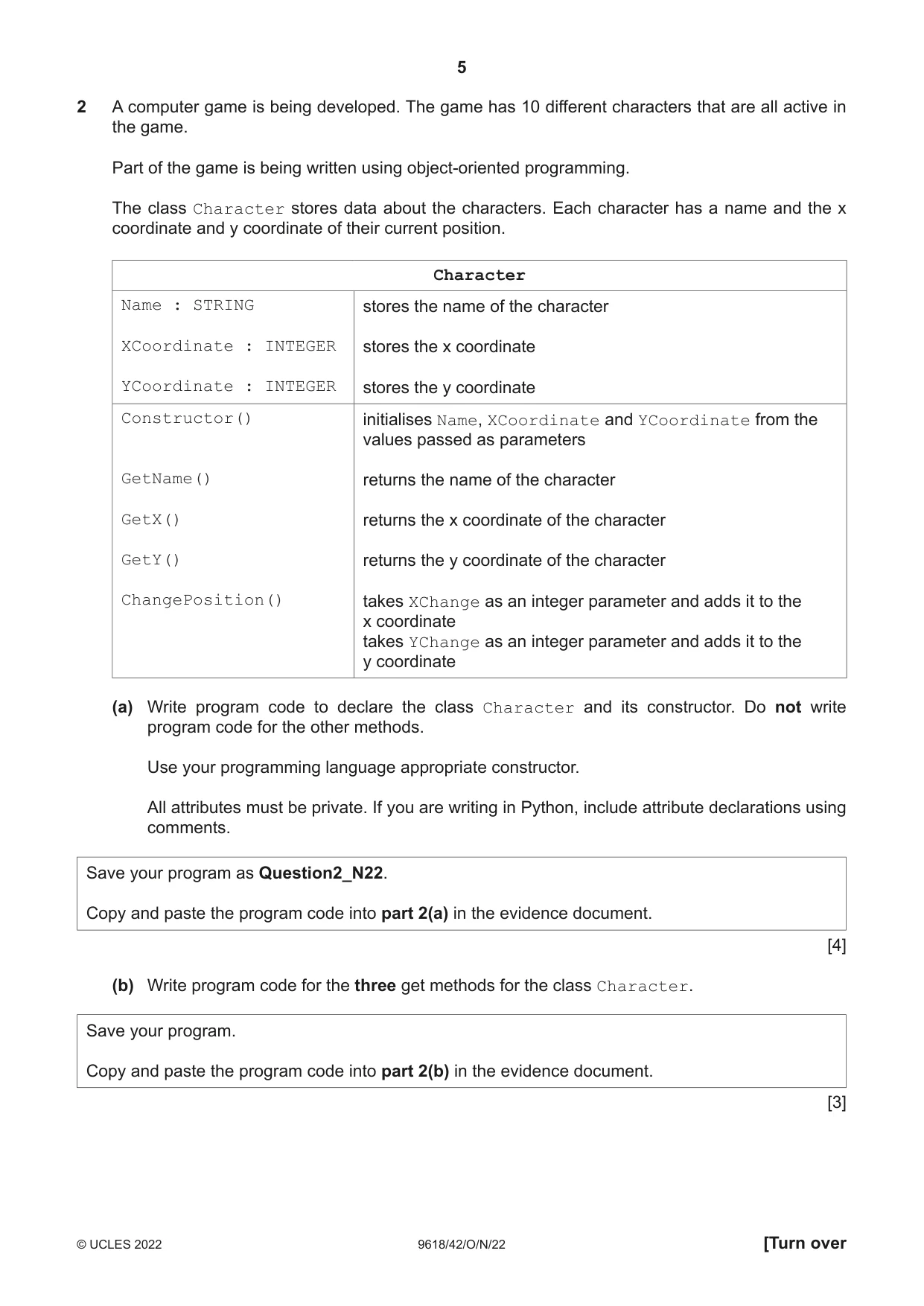
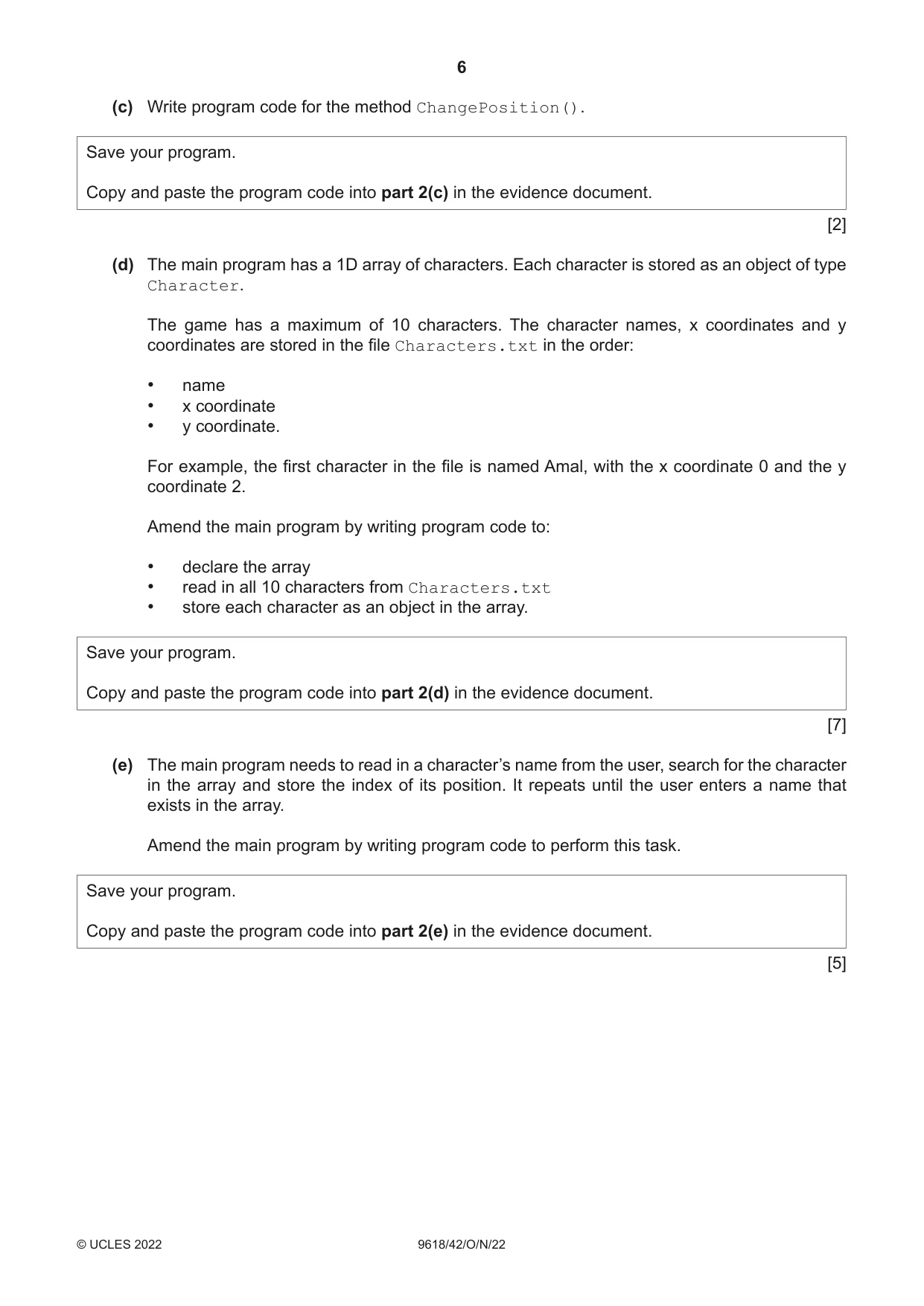
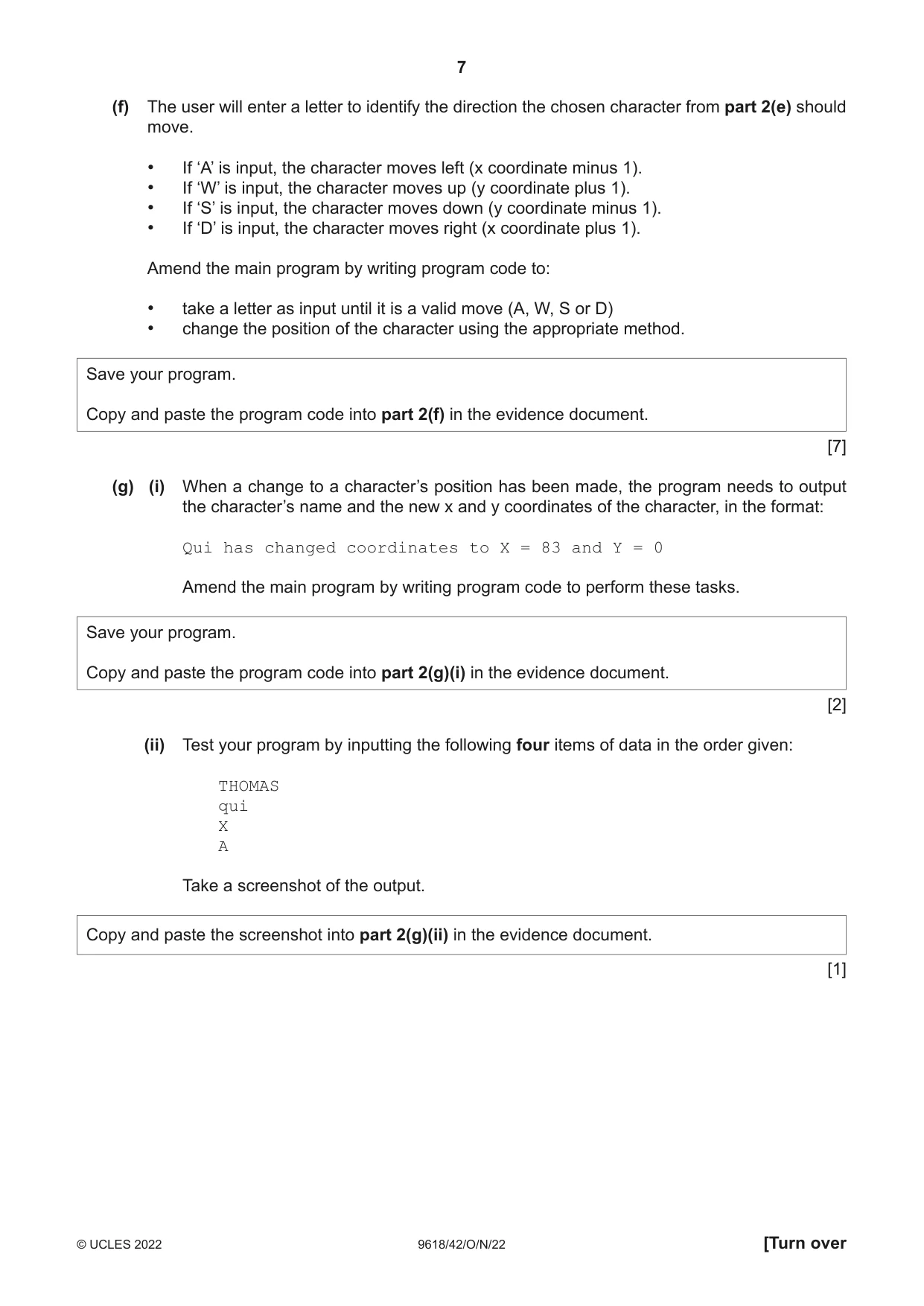
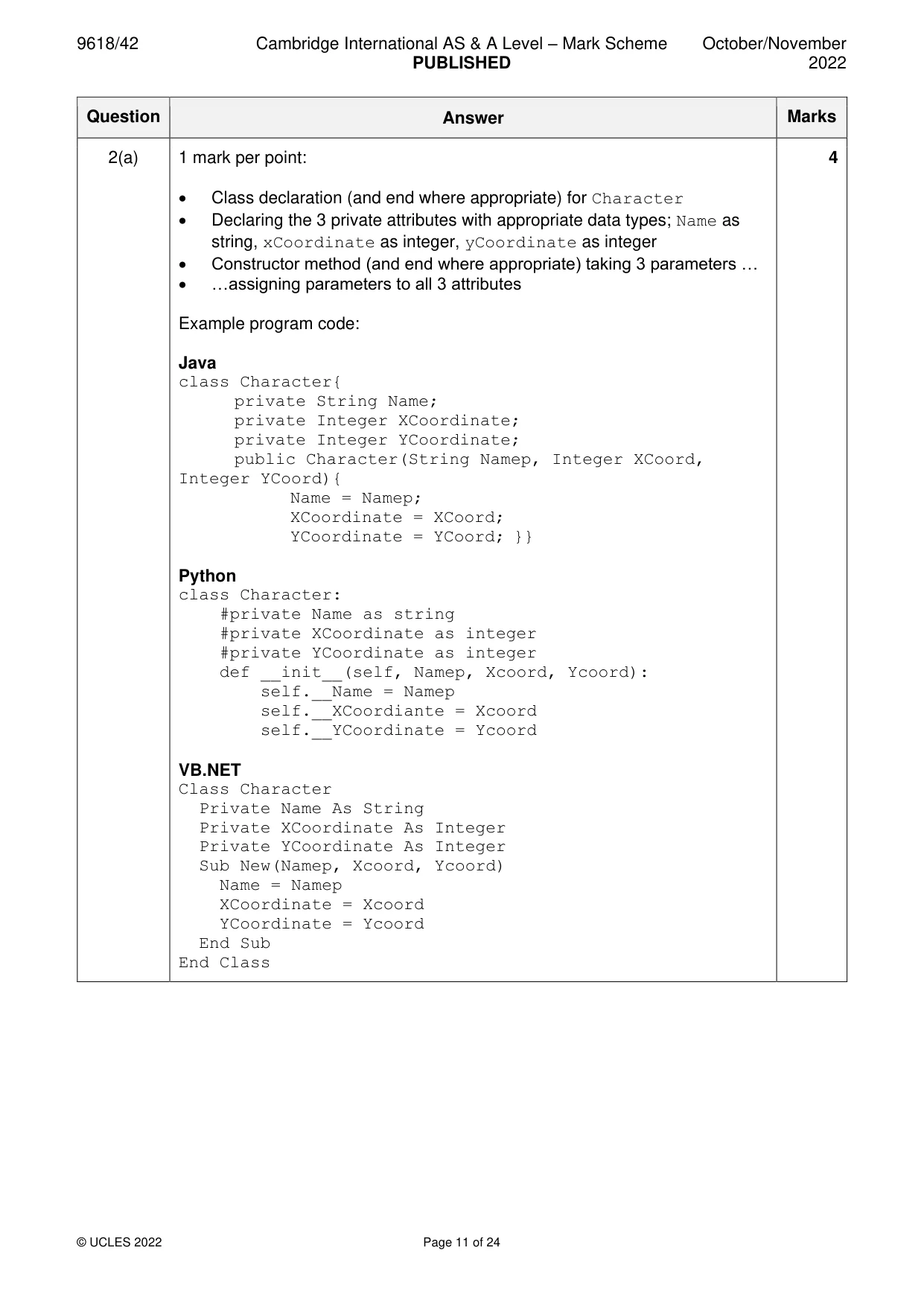
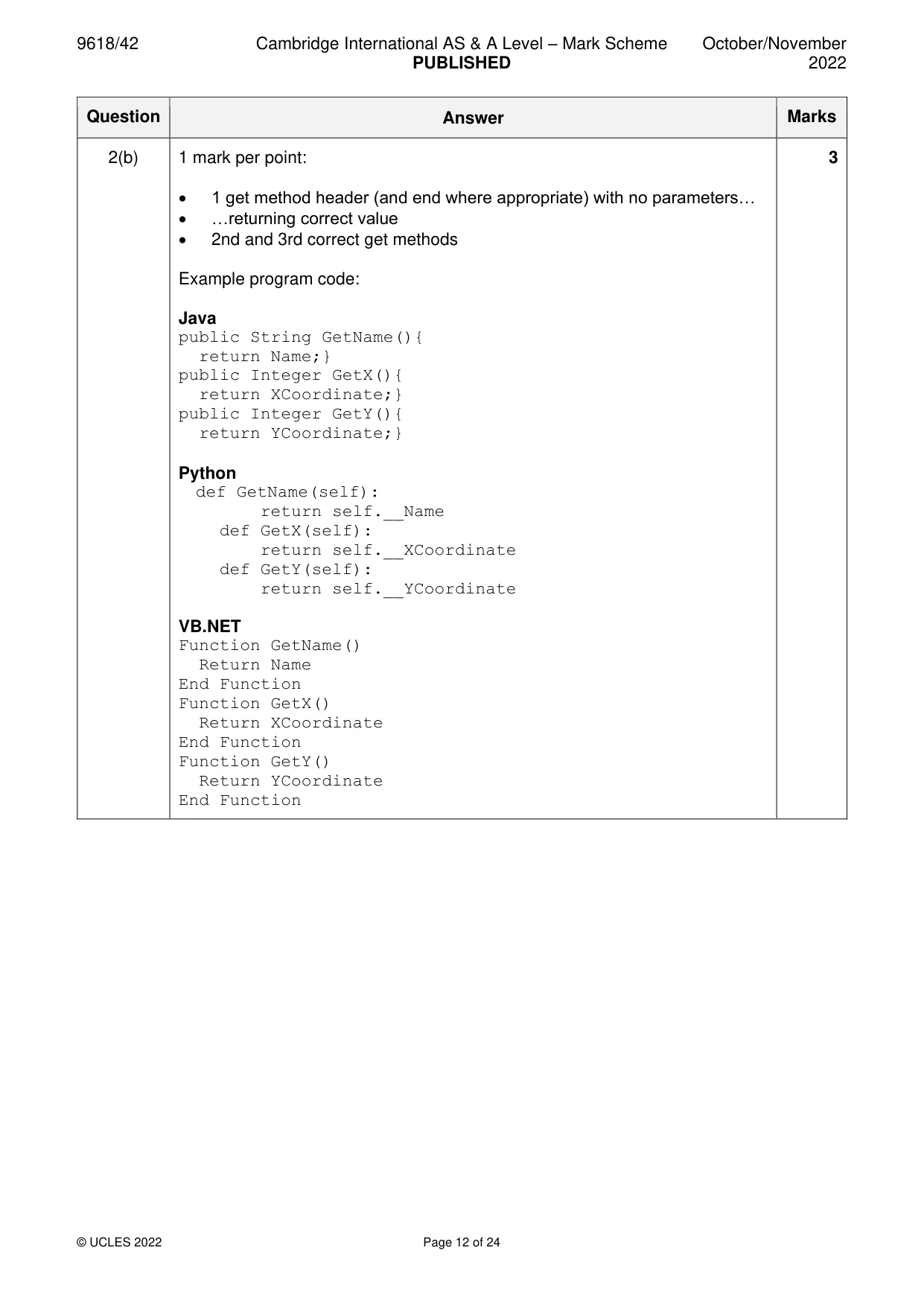
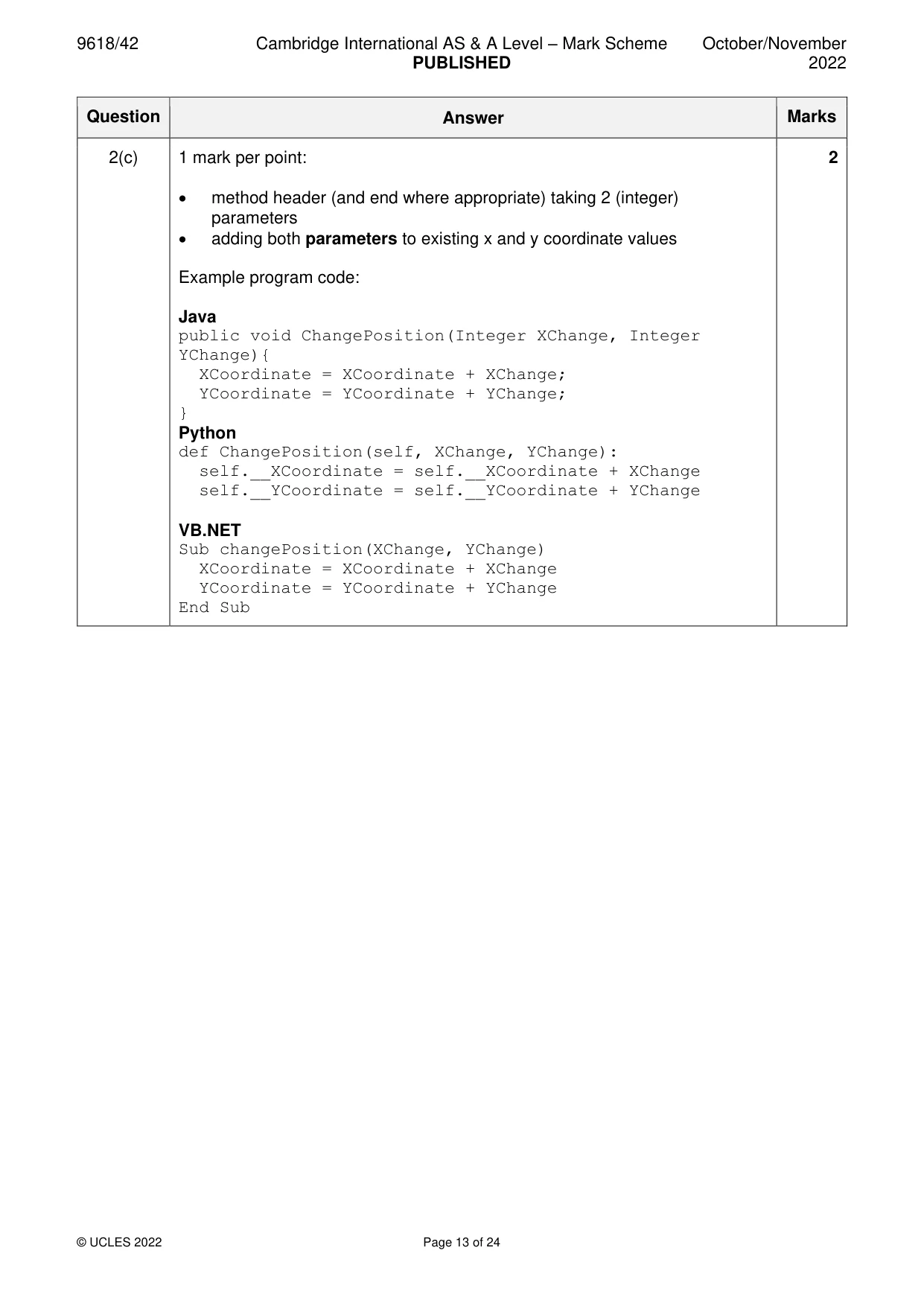
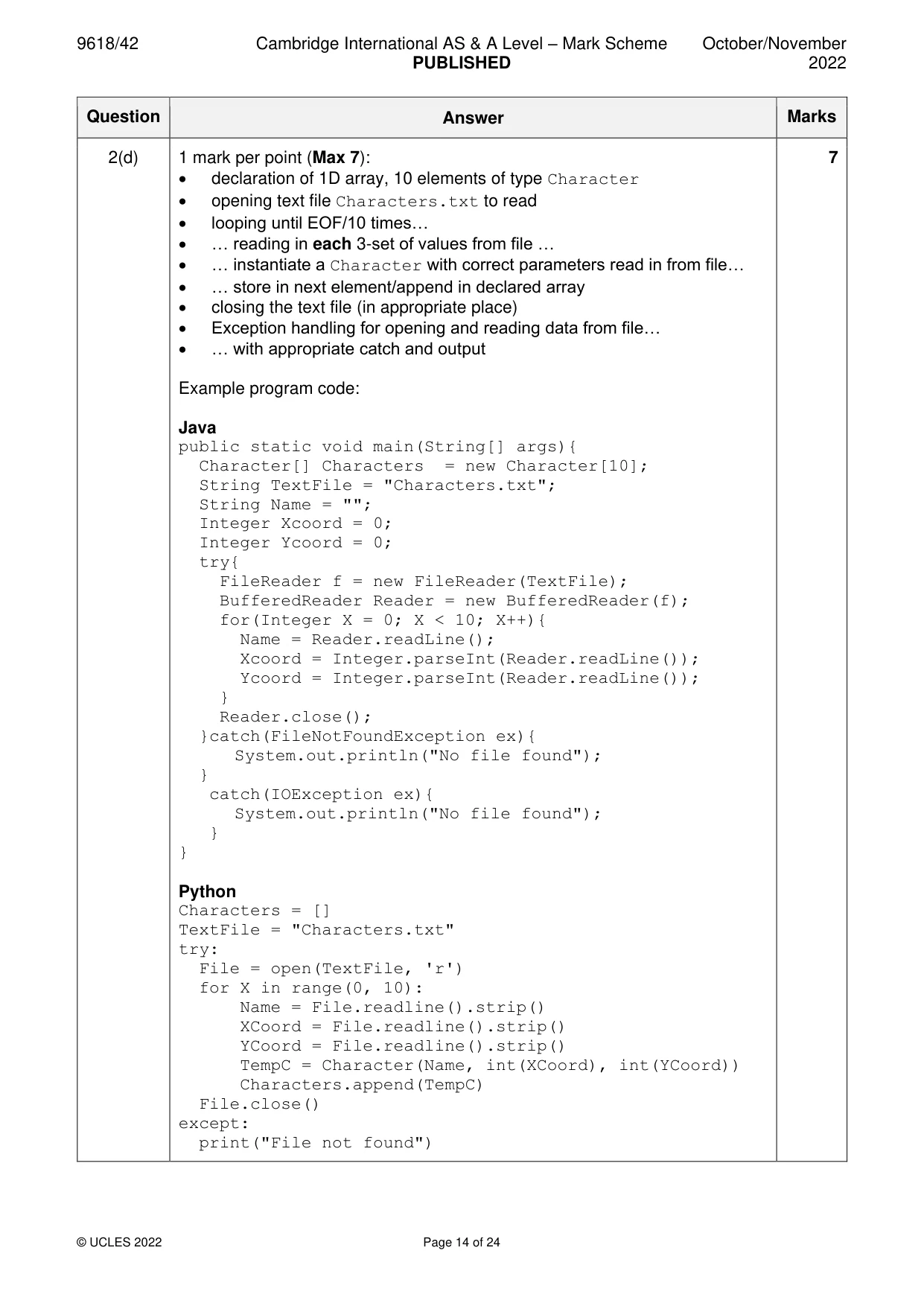
2 A computer game is being developed. The game has 10 different characters that are all active in the game. Part of the game is being written using object-oriented programming. The class Character stores data about the characters. Each character has a name and the x coordinate and y coordinate of their current position. Character Name : STRING stores the name of the character XCoordinate : INTEGER stores the x coordinate YCoordinate : INTEGER stores the y coordinate Constructor() initialises Name, XCoordinate and YCoordinate from the values passed as parameters GetName() returns the name of the character GetX() returns the x coordinate of the character GetY() returns the y coordinate of the character ChangePosition() takes XChange as an integer parameter and adds it to the x coordinate takes YChange as an integer parameter and adds it to the y coordinate (a) Write program code to declare the class Character and its constructor. Do not write program code for the other methods. Use your programming language appropriate constructor. All attributes must be private. If you are writing in Python, include attribute declarations using comments. Save your program as Question2_N22. Copy and paste the program code into part 2(a) in the evidence document. [4] (b) Write program code for the three get methods for the class Character. Save your program. Copy and paste the program code into part 2(b) in the evidence document. [3] (c) Write program code for the method ChangePosition(). Save your program. Copy and paste the program code into part 2(c) in the evidence document. [2] (d) The main program has a 1D array of characters. Each character is stored as an object of type Character. The game has a maximum of 10 characters. The character names, x coordinates and y coordinates are stored in the file Characters.txt in the order: • name • x coordinate • y coordinate. For example, the first character in the file is named Amal, with the x coordinate 0 and the y coordinate 2. Amend the main program by writing program code to: • declare the array • read in all 10 characters from Characters.txt • store each character as an object in the array. Save your program. Copy and paste the program code into part 2(d) in the evidence document. [7] (e) The main program needs to read in a character’s name from the user, search for the character in the array and store the index of its position. It repeats until the user enters a name that exists in the array. Amend the main program by writing program code to perform this task. Save your program. Copy and paste the program code into part 2(e) in the evidence document. [5] (f) The user will enter a letter to identify the direction the chosen character from part 2(e) should move. • If ‘A’ is input, the character moves left (x coordinate minus 1). • If ‘W’ is input, the character moves up (y coordinate plus 1). • If ‘S’ is input, the character moves down (y coordinate minus 1). • If ‘D’ is input, the character moves right (x coordinate plus 1). Amend the main program by writing program code to: • take a letter as input until it is a valid move (A, W, S or D) • change the position of the character using the appropriate method. Save your program. Copy and paste the program code into part 2(f) in the evidence document. [7] (g) (i) When a change to a character’s position has been made, the program needs to output the character’s name and the new x and y coordinates of the character, in the format: Qui has changed coordinates to X = 83 and Y = 0 Amend the main program by writing program code to perform these tasks. Save your program. Copy and paste the program code into part 2(g)(i) in the evidence document. [2] (ii) Test your program by inputting the following four items of data in the order given: THOMAS qui X A Take a screenshot of the output. Copy and paste the screenshot into part 2(g)(ii) in the evidence document. [1]
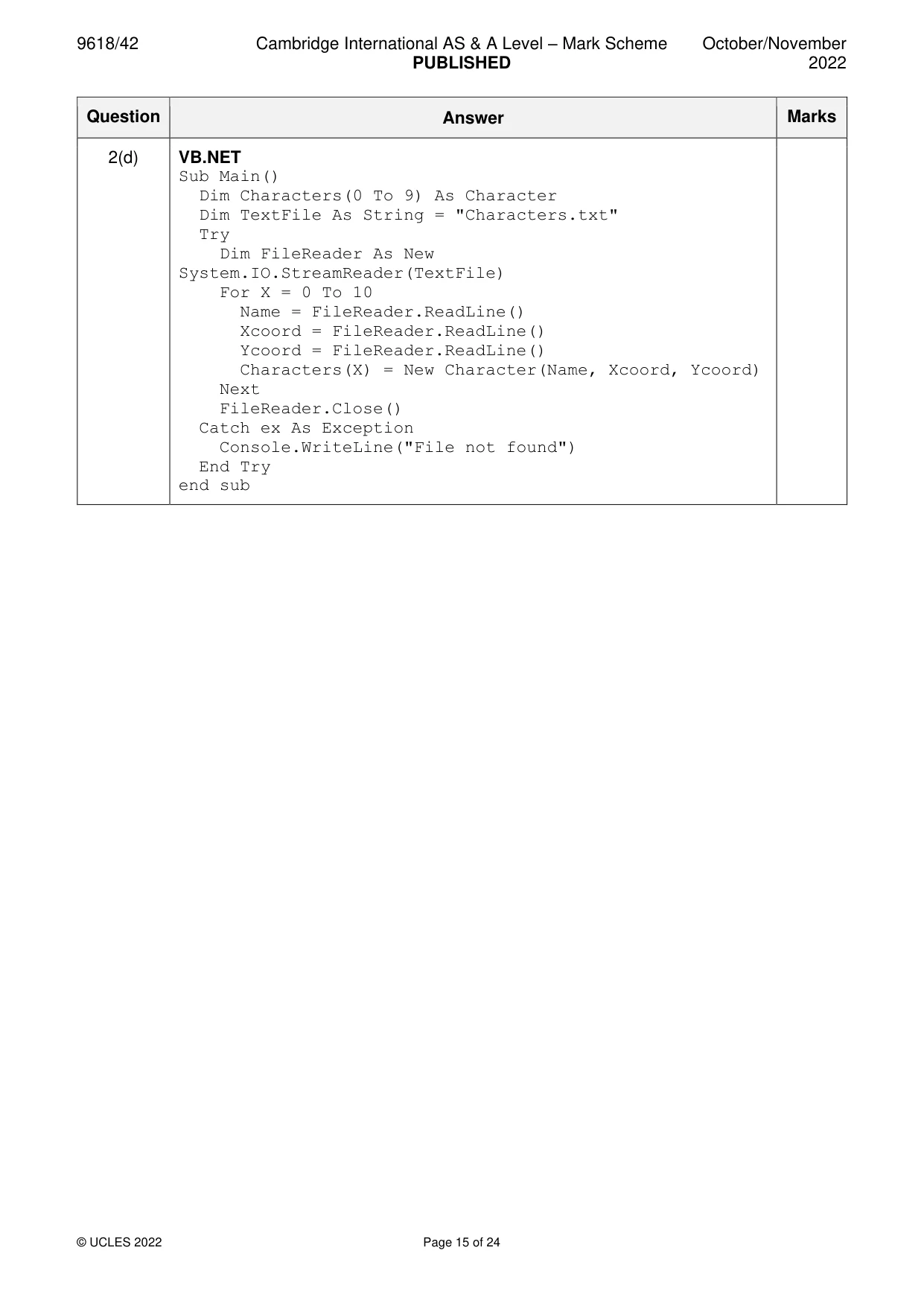
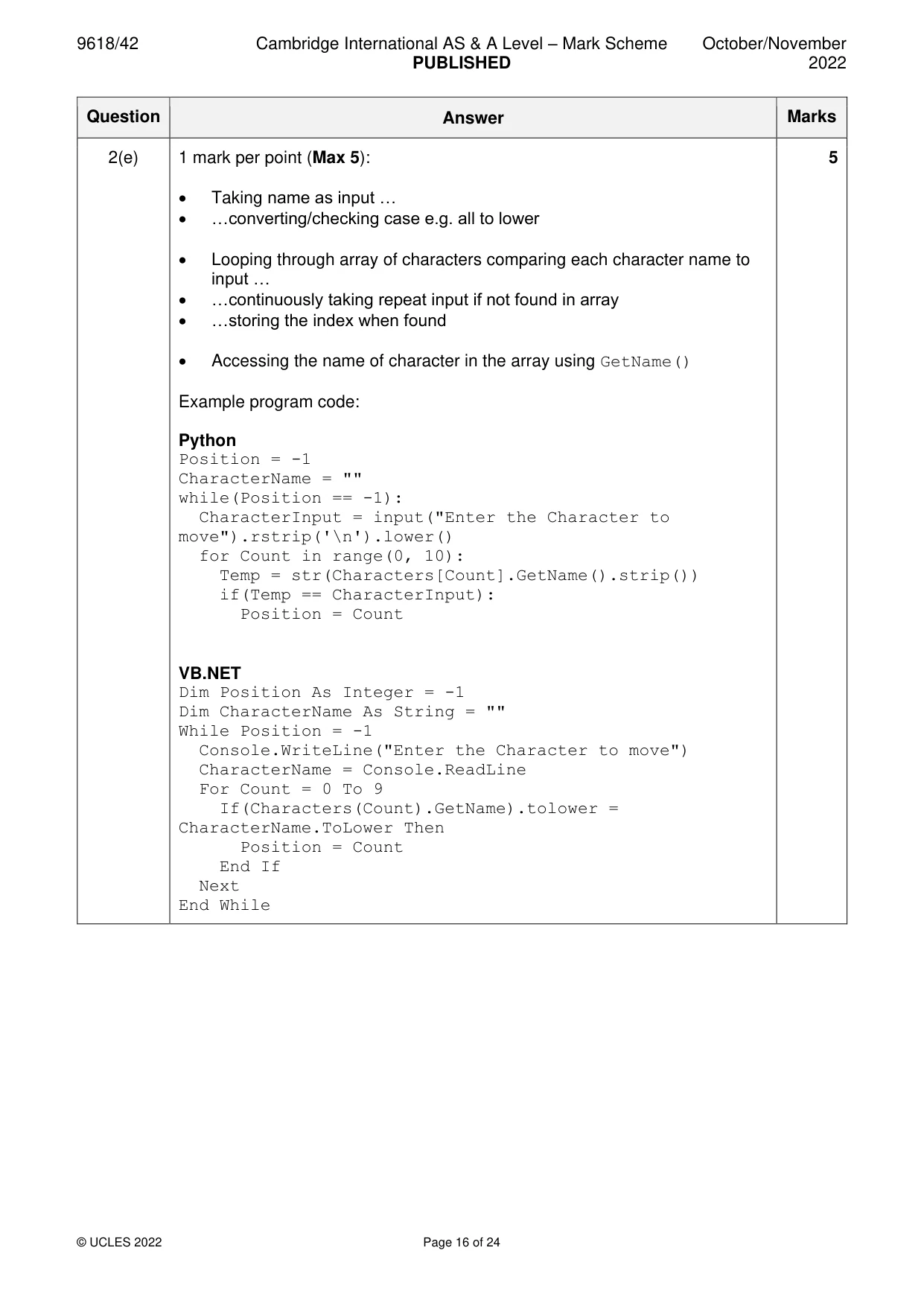
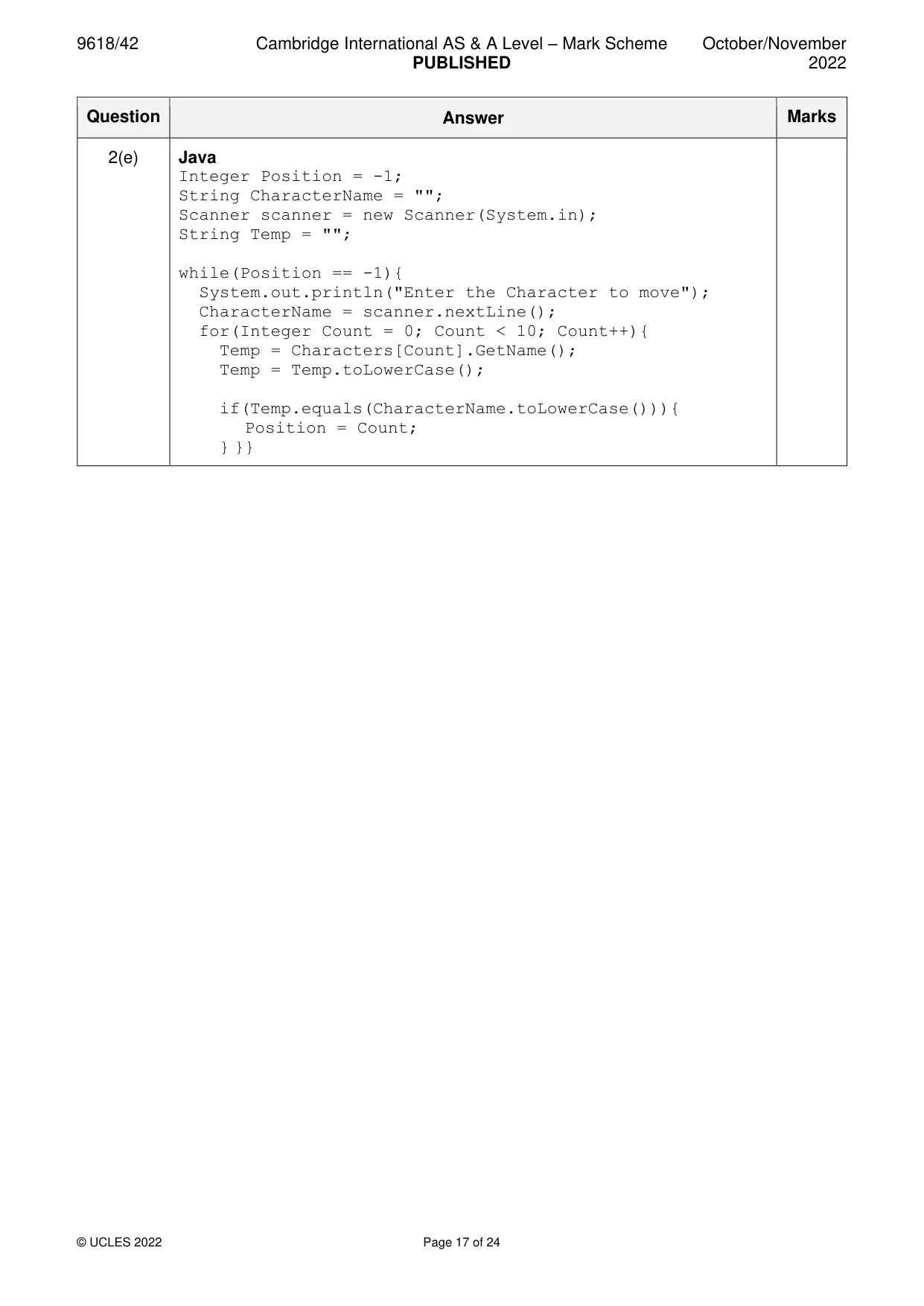
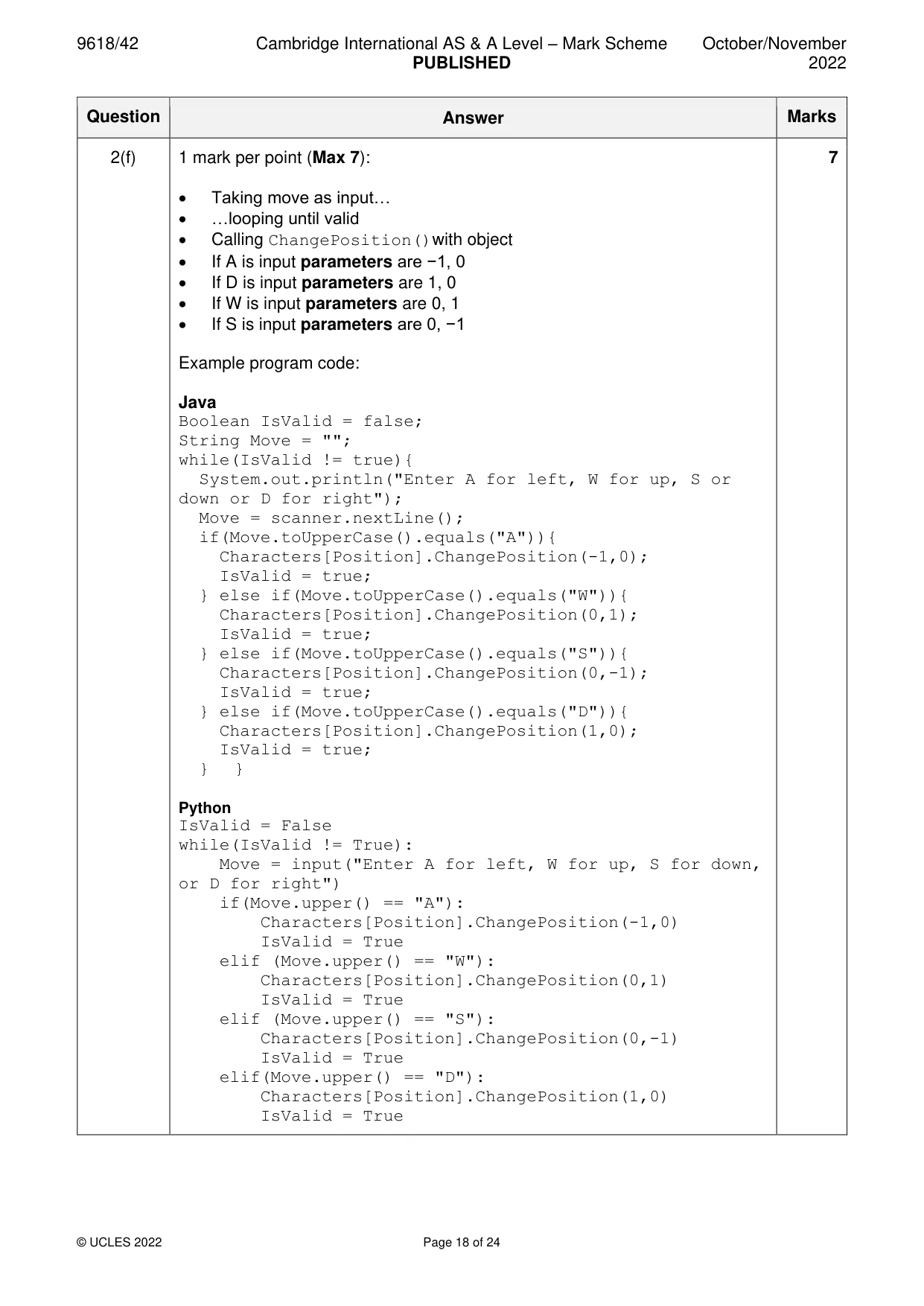
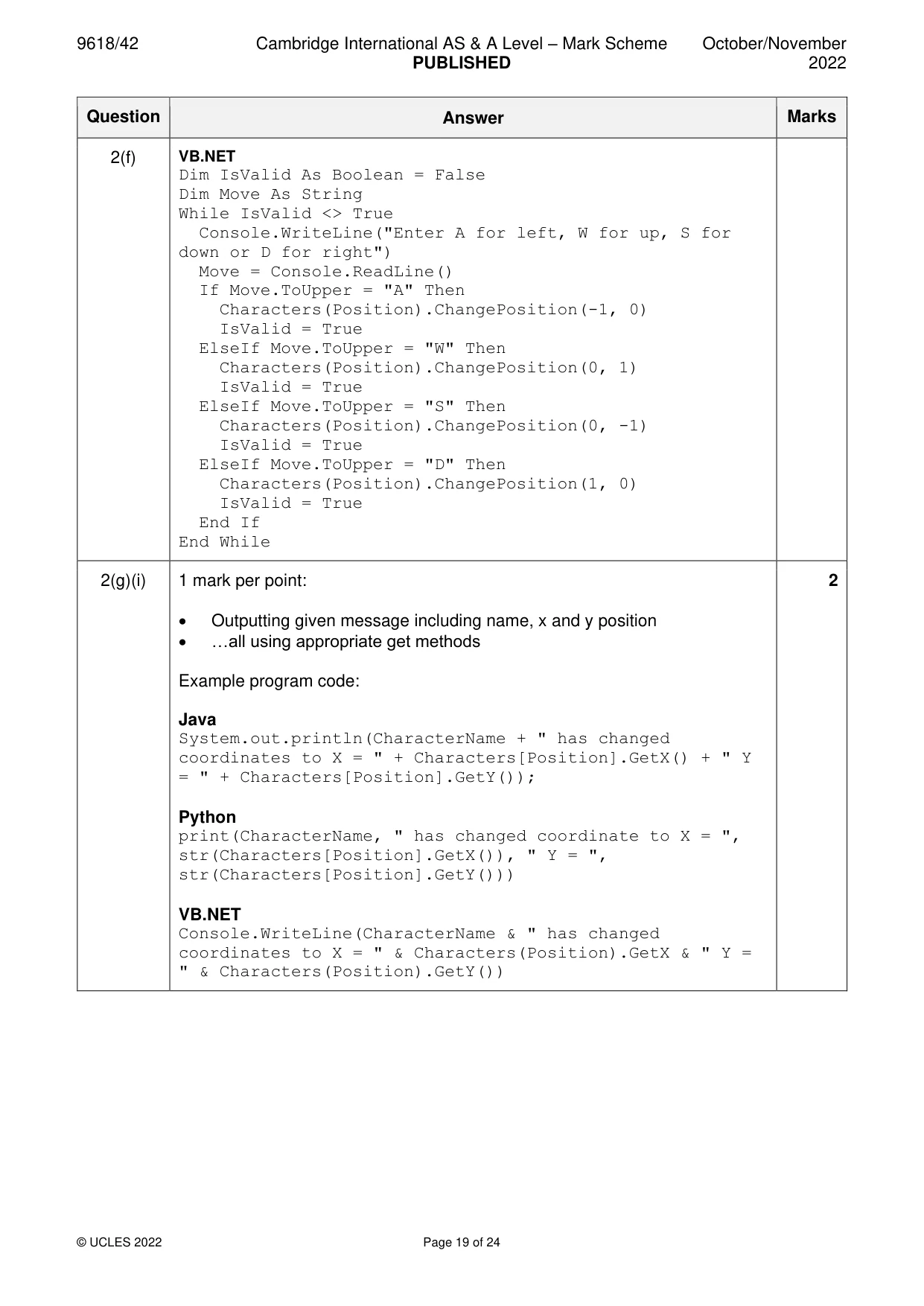
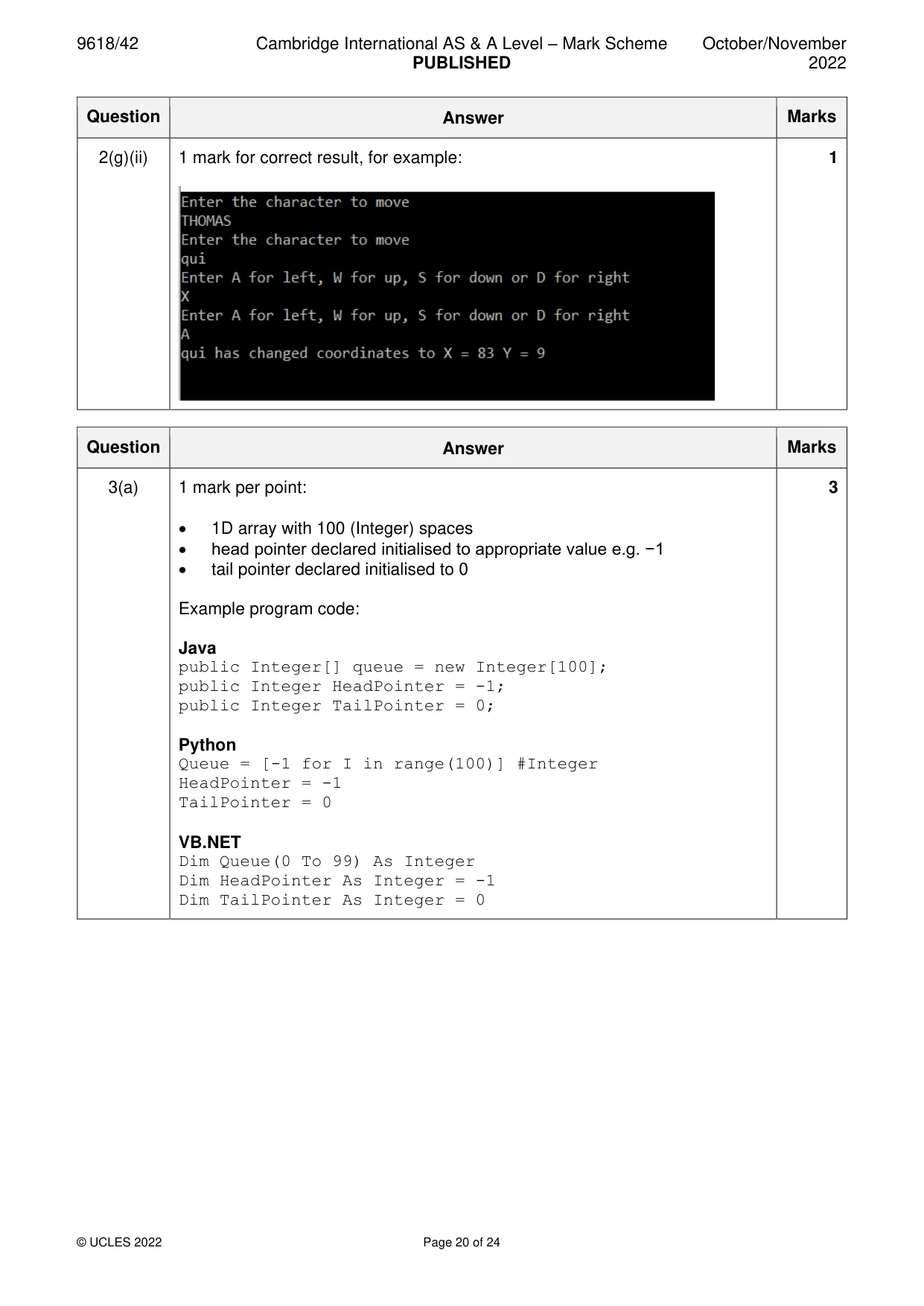
Mark scheme: 2(a) 1 mark per point: 4 • Class declaration (and end where appropriate) for Character • Declaring the 3 private attributes with appropriate data types; Name as string, xCoordinate as integer, yCoordinate as integer • Constructor method (and end where appropriate) taking 3 parameters … • …assigning parameters to all 3 attributes Example program code: Java class Character{ private String Name; private Integer XCoordinate; private Integer YCoordinate; public Character(String Namep, Integer XCoord, Integer YCoord){ Name = Namep; XCoordinate = XCoord; YCoordinate = YCoord; }} Python class Character: #private Name as string #private XCoordinate as integer #private YCoordinate as integer def __init__(self, Namep, Xcoord, Ycoord): self.__Name = Namep self.__XCoordiante = Xcoord self.__YCoordinate = Ycoord VB.NET Class Character Private Name As String Private XCoordinate As Integer Private YCoordinate As Integer Sub New(Namep, Xcoord, Ycoord) Name = Namep XCoordinate = Xcoord YCoordinate = Ycoord End Sub End Class 2(b) 1 mark per point: 3 • 1 get method header (and end where appropriate) with no parameters… • …returning correct value • 2nd and 3rd correct get methods Example program code: Java public String GetName(){ return Name;} public Integer GetX(){ return XCoordinate;} public Integer GetY(){ return YCoordinate;} Python def GetName(self): return self.__Name def GetX(self): return self.__XCoordinate def GetY(self): return self.__YCoordinate VB.NET Function GetName() Return Name End Function Function GetX() Return XCoordinate End Function Function GetY() Return YCoordinate End Function 2(c) 1 mark per point: 2 • method header (and end where appropriate) taking 2 (integer) parameters • adding both parameters to existing x and y coordinate values Example program code: Java public void ChangePosition(Integer XChange, Integer YChange){ XCoordinate = XCoordinate + XChange; YCoordinate = YCoordinate + YChange; } Python def ChangePosition(self, XChange, YChange): self.__XCoordinate = self.__XCoordinate + XChange self.__YCoordinate = self.__YCoordinate + YChange VB.NET Sub changePosition(XChange, YChange) XCoordinate = XCoordinate + XChange YCoordinate = YCoordinate + YChange End Sub 2(d) 1 mark per point (Max 7): 7 • declaration of 1D array, 10 elements of type Character • opening text file Characters.txt to read • looping until EOF/10 times… • … reading in each 3-set of values from file … • … instantiate a Character with correct parameters read in from file… • … store in next element/append in declared array • closing the text file (in appropriate place) • Exception handling for opening and reading data from file… • … with appropriate catch and output Example program code: Java public static void main(String[] args){ Character[] Characters = new Character[10]; String TextFile = "Characters.txt"; String Name = ""; Integer Xcoord = 0; Integer Ycoord = 0; try{ FileReader f = new FileReader(TextFile); BufferedReader Reader = new BufferedReader(f); for(Integer X = 0; X < 10; X++){ Name = Reader.readLine(); Xcoord = Integer.parseInt(Reader.readLine()); Ycoord = Integer.parseInt(Reader.readLine()); } Reader.close(); }catch(FileNotFoundException ex){ System.out.println("No file found"); } catch(IOException ex){ System.out.println("No file found"); } } Python Characters = [] TextFile = "Characters.txt" try: File = open(TextFile, 'r') for X in range(0, 10): Name = File.readline().strip() XCoord = File.readline().strip() YCoord = File.readline().strip() TempC = Character(Name, int(XCoord), int(YCoord)) Characters.append(TempC) File.close() except: print("File not found") 2(d) VB.NET Sub Main() Dim Characters(0 To 9) As Character Dim TextFile As String = "Characters.txt" Try Dim FileReader As New System.IO.StreamReader(TextFile) For X = 0 To 10 Name = FileReader.ReadLine() Xcoord = FileReader.ReadLine() Ycoord = FileReader.ReadLine() Characters(X) = New Character(Name, Xcoord, Ycoord) Next FileReader.Close() Catch ex As Exception Console.WriteLine("File not found") End Try end sub 2(e) 1 mark per point (Max 5): 5 • Taking name as input … • …converting/checking case e.g. all to lower • Looping through array of characters comparing each character name to input … • …continuously taking repeat input if not found in array • …storing the index when found • Accessing the name of character in the array using GetName() Example program code: Python Position = -1 CharacterName = "" while(Position == -1): CharacterInput = input("Enter the Character to move").rstrip('\n').lower() for Count in range(0, 10): Temp = str(Characters[Count].GetName().strip()) if(Temp == CharacterInput): Position = Count VB.NET Dim Position As Integer = -1 Dim CharacterName As String = "" While Position = -1 Console.WriteLine("Enter the Character to move") CharacterName = Console.ReadLine For Count = 0 To 9 If(Characters(Count).GetName).tolower = CharacterName.ToLower Then Position = Count End If Next End While 2(e) Java Integer Position = -1; String CharacterName = ""; Scanner scanner = new Scanner(System.in); String Temp = ""; while(Position == -1){ System.out.println("Enter the Character to move"); CharacterName = scanner.nextLine(); for(Integer Count = 0; Count < 10; Count++){ Temp = Characters[Count].GetName(); Temp = Temp.toLowerCase(); if(Temp.equals(CharacterName.toLowerCase())){ Position = Count; } }} 2(f) 1 mark per point (Max 7): 7 • Taking move as input… • …looping until valid • Calling ChangePosition()with object • If A is input parameters are −1, 0 • If D is input parameters are 1, 0 • If W is input parameters are 0, 1 • If S is input parameters are 0, −1 Example program code: Java Boolean IsValid = false; String Move = ""; while(IsValid != true){ System.out.println("Enter A for left, W for up, S or down or D for right"); Move = scanner.nextLine(); if(Move.toUpperCase().equals("A")){ Characters[Position].ChangePosition(-1,0); IsValid = true; } else if(Move.toUpperCase().equals("W")){ Characters[Position].ChangePosition(0,1); IsValid = true; } else if(Move.toUpperCase().equals("S")){ Characters[Position].ChangePosition(0,-1); IsValid = true; } else if(Move.toUpperCase().equals("D")){ Characters[Position].ChangePosition(1,0); IsValid = true; } } Python IsValid = False while(IsValid != True): Move = input("Enter A for left, W for up, S for down, or D for right") if(Move.upper() == "A"): Characters[Position].ChangePosition(-1,0) IsValid = True elif (Move.upper() == "W"): Characters[Position].ChangePosition(0,1) IsValid = True elif (Move.upper() == "S"): Characters[Position].ChangePosition(0,-1) IsValid = True elif(Move.upper() == "D"): Characters[Position].ChangePosition(1,0) IsValid = True 2(f) VB.NET Dim IsValid As Boolean = False Dim Move As String While IsValid <> True Console.WriteLine("Enter A for left, W for up, S for down or D for right") Move = Console.ReadLine() If Move.ToUpper = "A" Then Characters(Position).ChangePosition(-1, 0) IsValid = True ElseIf Move.ToUpper = "W" Then Characters(Position).ChangePosition(0, 1) IsValid = True ElseIf Move.ToUpper = "S" Then Characters(Position).ChangePosition(0, -1) IsValid = True ElseIf Move.ToUpper = "D" Then Characters(Position).ChangePosition(1, 0) IsValid = True End If End While 2(g)(i) 1 mark per point: 2 • Outputting given message including name, x and y position • …all using appropriate get methods Example program code: Java System.out.println(CharacterName + " has changed coordinates to X = " + Characters[Position].GetX() + " Y = " + Characters[Position].GetY()); Python print(CharacterName, " has changed coordinate to X = ", str(Characters[Position].GetX()), " Y = ", str(Characters[Position].GetY())) VB.NET Console.WriteLine(CharacterName & " has changed coordinates to X = " & Characters(Position).GetX & " Y = " & Characters(Position).GetY()) 2(g)(ii) 1 mark for correct result, for example: 1
Q3 · A program uses a linear queue to store up to 100 integers
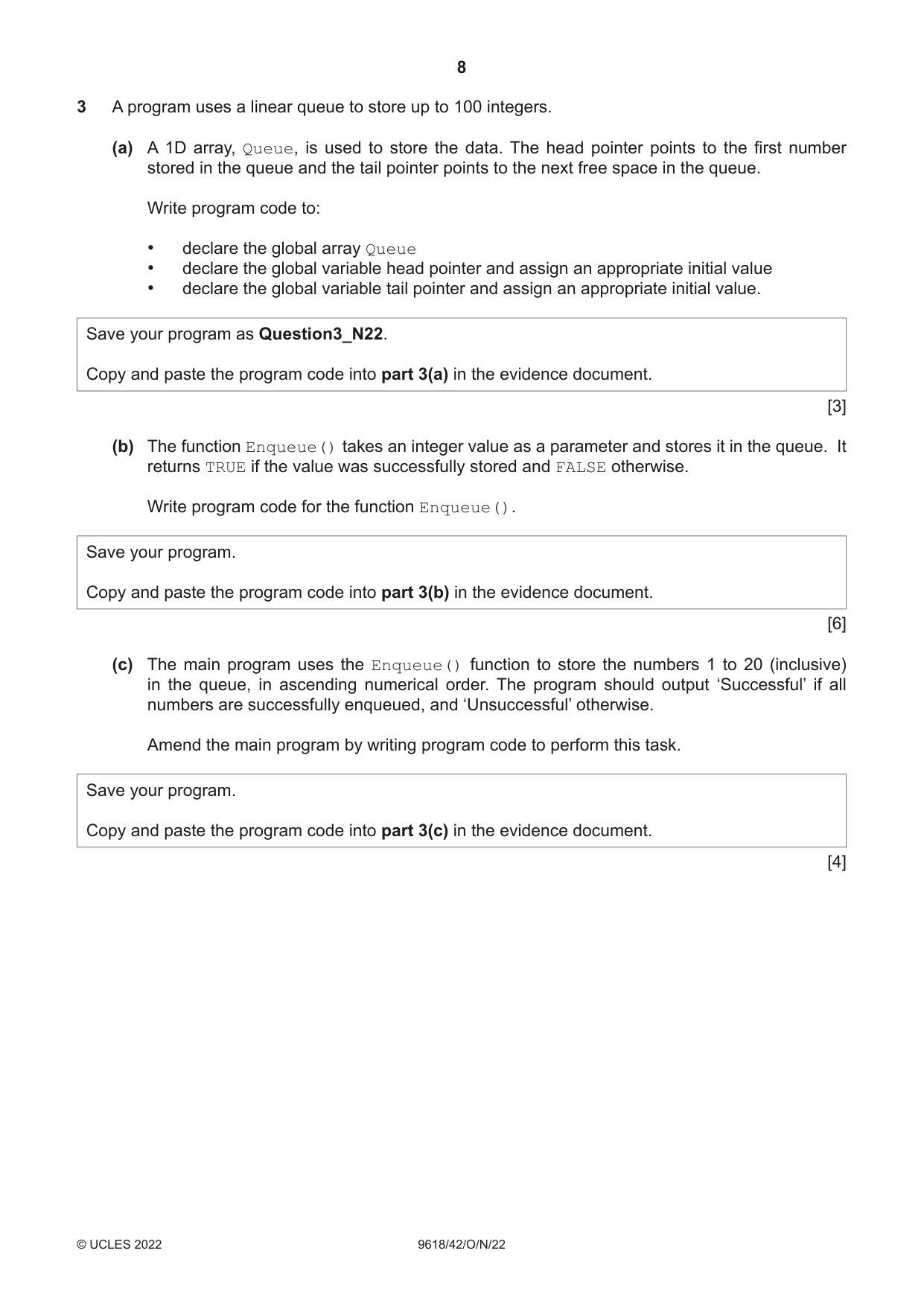
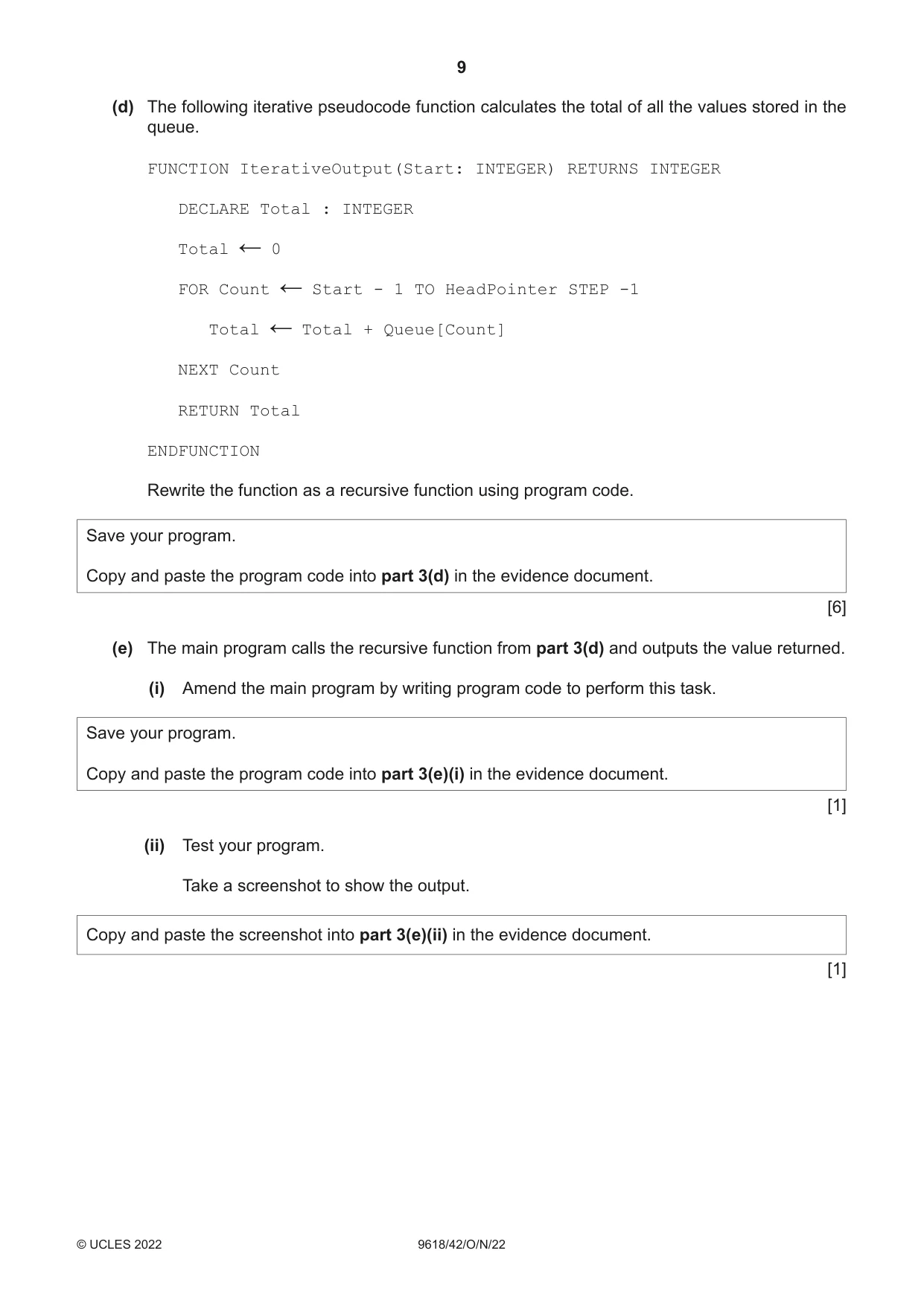
3 A program uses a linear queue to store up to 100 integers. (a) A 1D array, Queue, is used to store the data. The head pointer points to the first number stored in the queue and the tail pointer points to the next free space in the queue. Write program code to: • declare the global array Queue • declare the global variable head pointer and assign an appropriate initial value • declare the global variable tail pointer and assign an appropriate initial value. Save your program as Question3_N22. Copy and paste the program code into part 3(a) in the evidence document. [3] (b) The function Enqueue() takes an integer value as a parameter and stores it in the queue. It returns TRUE if the value was successfully stored and FALSE otherwise. Write program code for the function Enqueue(). Save your program. Copy and paste the program code into part 3(b) in the evidence document. [6] (c) The main program uses the Enqueue() function to store the numbers 1 to 20 (inclusive) in the queue, in ascending numerical order. The program should output ‘Successful’ if all numbers are successfully enqueued, and ‘Unsuccessful’ otherwise. Amend the main program by writing program code to perform this task. Save your program. Copy and paste the program code into part 3(c) in the evidence document. [4] (d) The following iterative pseudocode function calculates the total of all the values stored in the queue. FUNCTION IterativeOutput(Start: INTEGER) RETURNS INTEGER DECLARE Total : INTEGER Total 0 ← FOR Count Start - 1 TO HeadPointer STEP -1 ← Total Total + Queue[Count] ← NEXT Count RETURN Total ENDFUNCTION Rewrite the function as a recursive function using program code. Save your program. Copy and paste the program code into part 3(d) in the evidence document. [6] (e) The main program calls the recursive function from part 3(d) and outputs the value returned. (i) Amend the main program by writing program code to perform this task. Save your program. Copy and paste the program code into part 3(e)(i) in the evidence document. [1] (ii) Test your program. Take a screenshot to show the output. Copy and paste the screenshot into part 3(e)(ii) in the evidence document. [1]
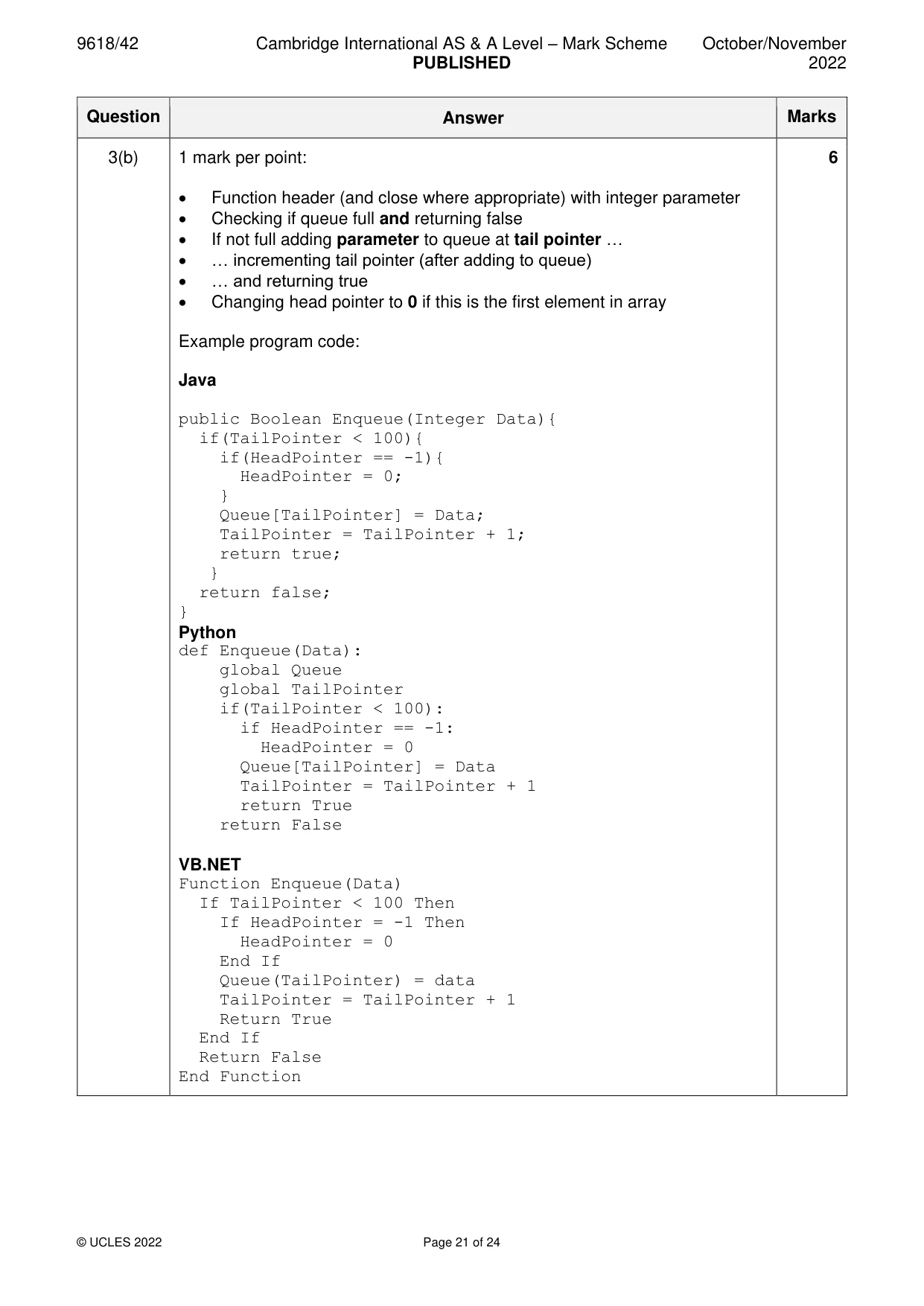
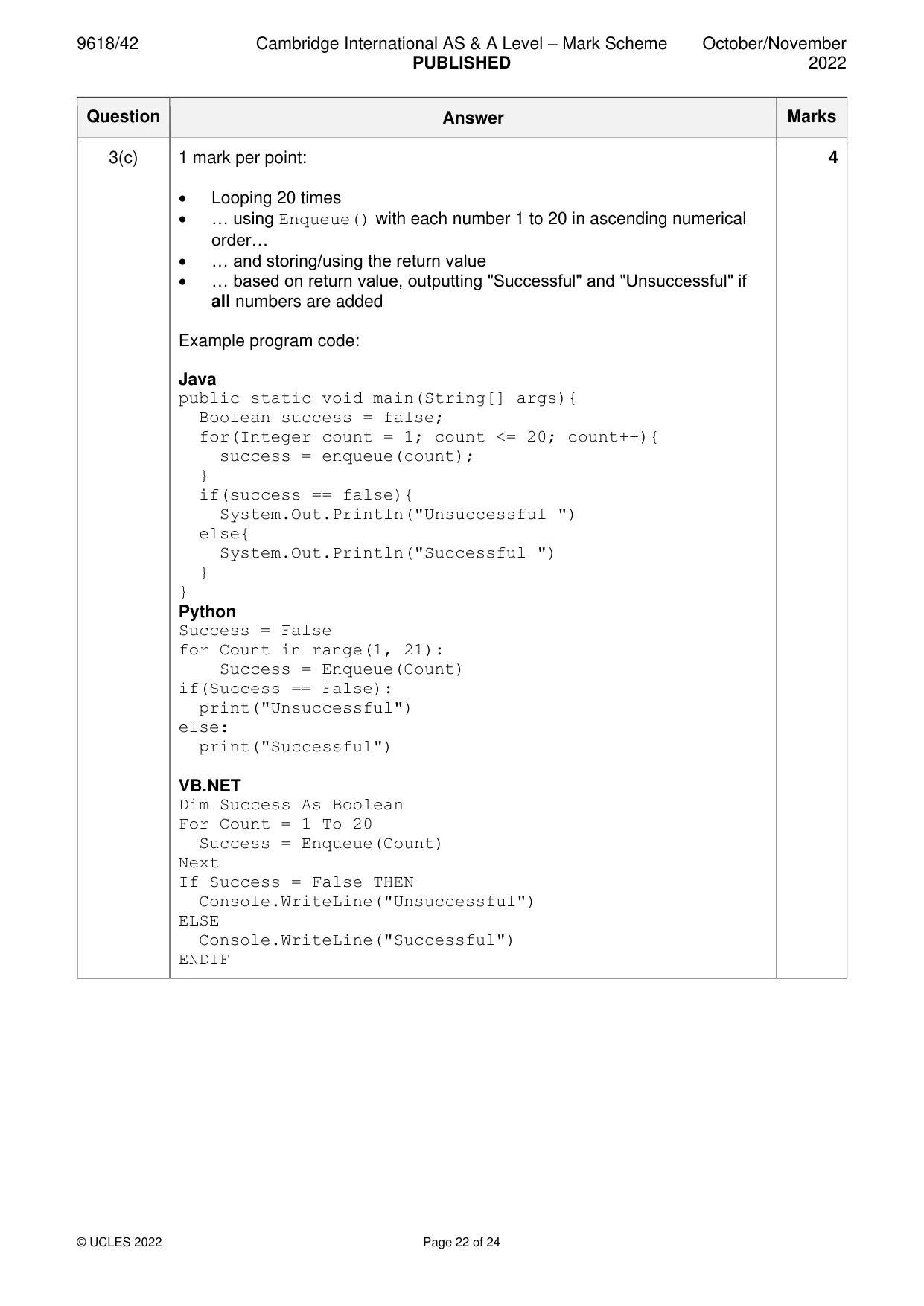
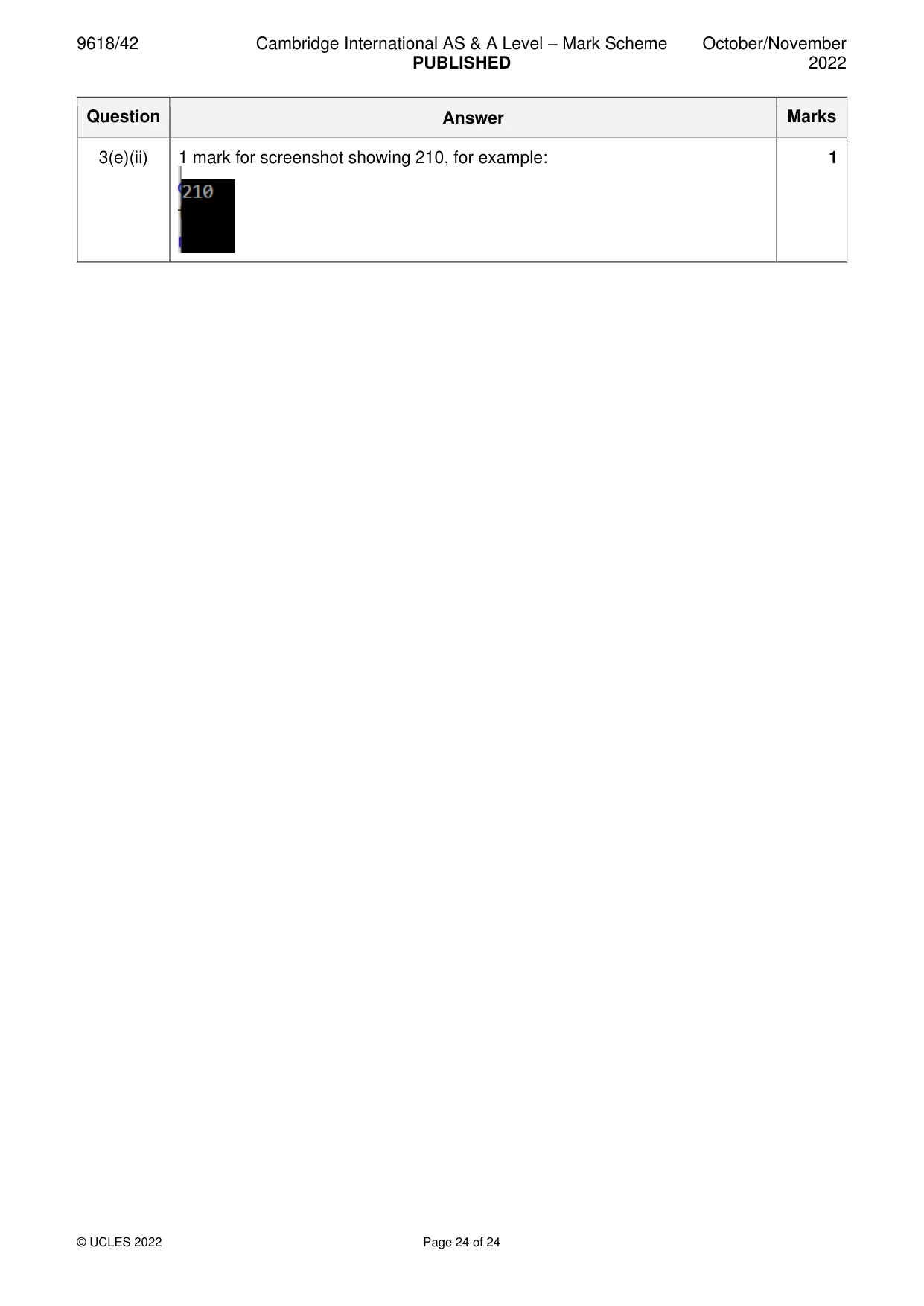
Mark scheme: 3(a) 1 mark per point: 3 • 1D array with 100 (Integer) spaces • head pointer declared initialised to appropriate value e.g. −1 • tail pointer declared initialised to 0 Example program code: Java public Integer[] queue = new Integer[100]; public Integer HeadPointer = -1; public Integer TailPointer = 0; Python Queue = [-1 for I in range(100)] #Integer HeadPointer = -1 TailPointer = 0 VB.NET Dim Queue(0 To 99) As Integer Dim HeadPointer As Integer = -1 Dim TailPointer As Integer = 0 3(b) 1 mark per point: 6 • Function header (and close where appropriate) with integer parameter • Checking if queue full and returning false • If not full adding parameter to queue at tail pointer … • … incrementing tail pointer (after adding to queue) • … and returning true • Changing head pointer to 0 if this is the first element in array Example program code: Java public Boolean Enqueue(Integer Data){ if(TailPointer < 100){ if(HeadPointer == -1){ HeadPointer = 0; } Queue[TailPointer] = Data; TailPointer = TailPointer + 1; return true; } return false; } Python def Enqueue(Data): global Queue global TailPointer if(TailPointer < 100): if HeadPointer == -1: HeadPointer = 0 Queue[TailPointer] = Data TailPointer = TailPointer + 1 return True return False VB.NET Function Enqueue(Data) If TailPointer < 100 Then If HeadPointer = -1 Then HeadPointer = 0 End If Queue(TailPointer) = data TailPointer = TailPointer + 1 Return True End If Return False End Function 3(c) 1 mark per point: 4 • Looping 20 times • … using Enqueue() with each number 1 to 20 in ascending numerical order… • … and storing/using the return value • … based on return value, outputting "Successful" and "Unsuccessful" if all numbers are added Example program code: Java public static void main(String[] args){ Boolean success = false; for(Integer count = 1; count <= 20; count++){ success = enqueue(count); } if(success == false){ System.Out.Println("Unsuccessful ") else{ System.Out.Println("Successful ") } } Python Success = False for Count in range(1, 21): Success = Enqueue(Count) if(Success == False): print("Unsuccessful") else: print("Successful") VB.NET Dim Success As Boolean For Count = 1 To 20 Success = Enqueue(Count) Next If Success = False THEN Console.WriteLine("Unsuccessful") ELSE Console.WriteLine("Successful") ENDIF 3(d) 1 mark per point: 6 • function call (and end where appropriate) taking a parameter • checking if at start of queue//20 … • …returning the last value in the queue • (otherwise) adding return value to a total // adding value in queue before recursive call and using this in the recursive call … • recursive call with Start/pointer −1 • returning the final total Example program code: Java public static Integer RecursiveOutput(Integer Start){ if(Start == 0){ return Queue[Start]; }else{ return Queue[Start] + RecursiveOutput(Start -1); }} Python def RecursiveOutput(Start): if(Start == 0): return Queue[Start] else: return Queue[Start] + RecursiveOutput(Start - 1) VB.NET Function RecursiveOutput(ByVal Start) If (Start = 0) Then Return Queue(Start) Else Return Queue(Start) + RecursiveOutput(Start - 1) End If End Function 3(e)(i) 1 mark for calling function and outputting return value. 1 Example program code: Java System.out.println(RecursiveOutput(TailPointer-1)); Python print(str(RecursiveOutput(TailPointer - 1))) VB.NET Console.WriteLine(RecursiveOutput(TailPointer - 1)) 3(e)(ii) 1 mark for screenshot showing 210, for example: 1
What was in this paper
The subtopics covered by these 3 questions, and how many questions each got. Open one in a new tab to see every Cambridge question on it.
What you needed in this session
Cambridge’s own grade thresholds for 2022 Oct/Nov, Paper 4 · Variant 2. A higher threshold means an easier paper — the bar moves with how the cohort did.