Cambridge A Level Computer Science 9618 — 2025 Oct/Nov Paper 2 · Variant 2
9618/22/O/N/25 · 8 questions · 75 marks · ≈84 min
The question paper and its mark scheme, free to read here and free to download. This is Cambridge’s own paper, exactly as it was sat.
Question paper20 pages




Mark scheme15 pages
Answers below. Sit the paper first if you are practising.

Questions as text
Q1 · The table contains pseudocode examples
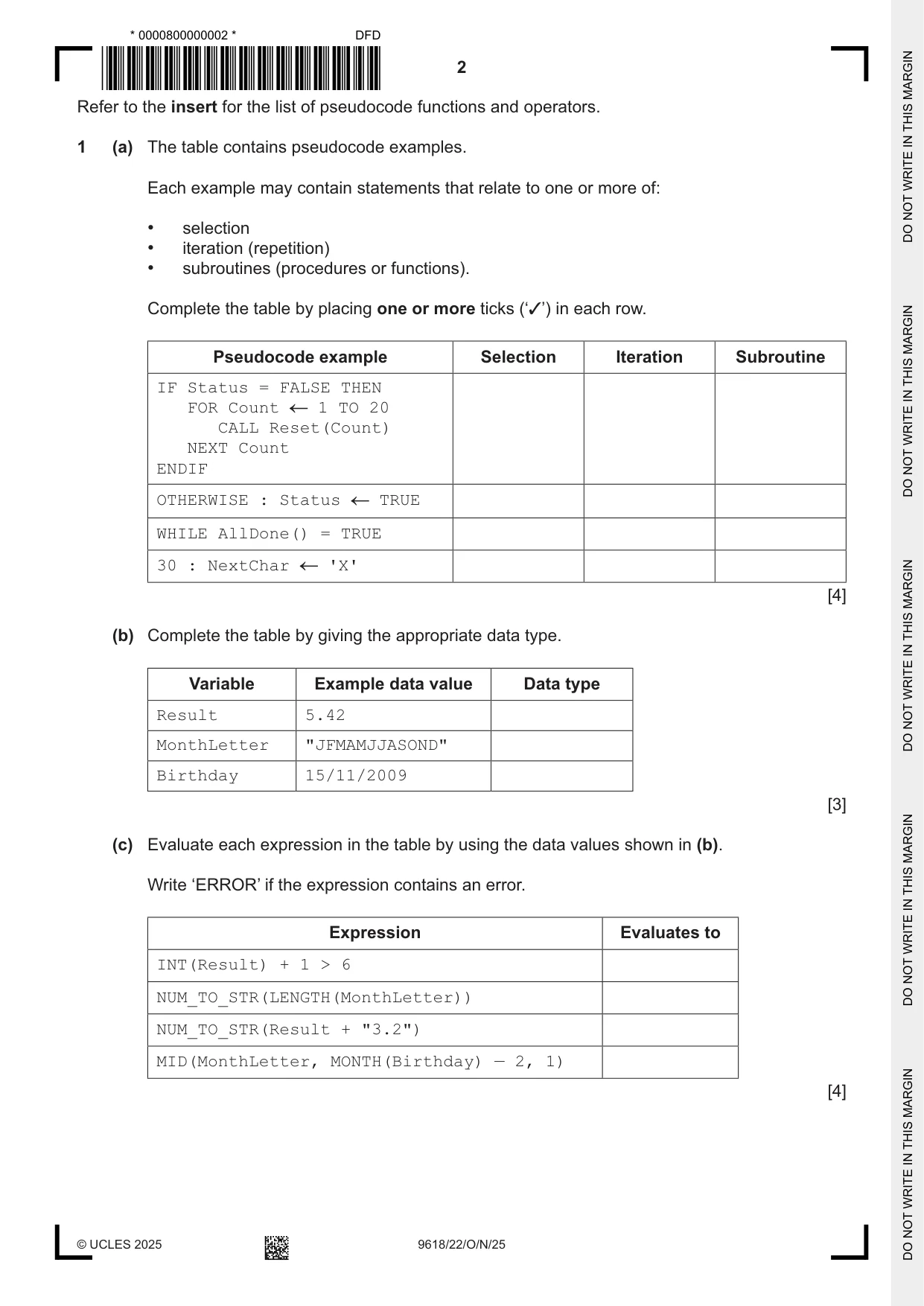
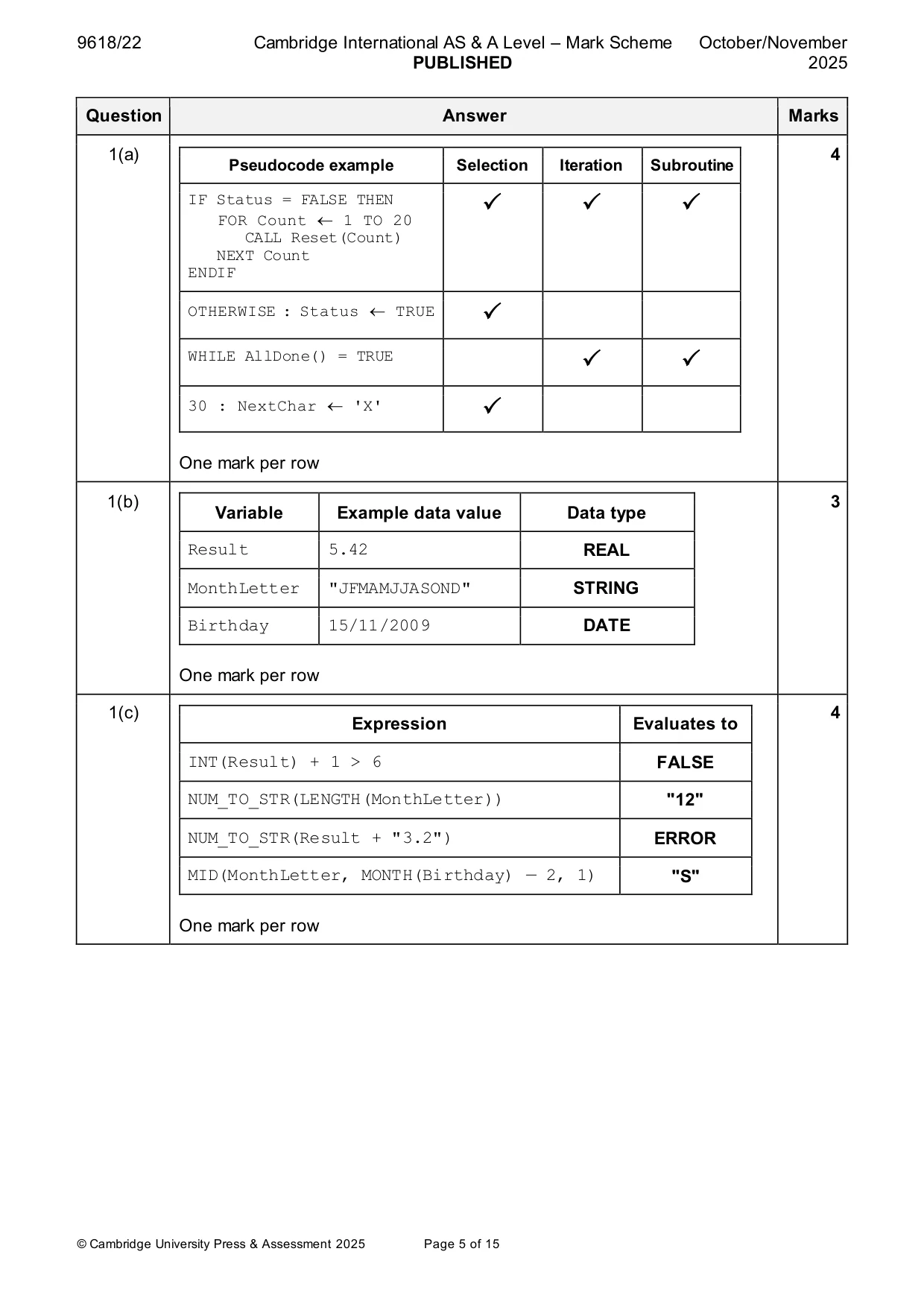
1 (a) The table contains pseudocode examples. Each example may contain statements that relate to one or more of: • selection • iteration (repetition) • subroutines (procedures or functions). Complete the table by placing one or more ticks (‘3’) in each row. Pseudocode example Selection Iteration Subroutine IF Status = FALSE THEN FOR Count 1 TO 20 CALL Reset(Count) NEXT Count ENDIF OTHERWISE : Status TRUE WHILE AllDone() = TRUE 30 : NextChar 'X' [4] (b) Complete the table by giving the appropriate data type. Variable Example data value Data type Result 5.42 MonthLetter "JFMAMJJASOND" Birthday 15/11/2009 [3] (c) Evaluate each expression in the table by using the data values shown in (b). Write ‘ERROR’ if the expression contains an error. Expression Evaluates to INT(Result) + 1 > 6 NUM_TO_STR(LENGTH(MonthLetter)) NUM_TO_STR(Result + "3.2") MID(MonthLetter, MONTH(Birthday) — 2, 1) [4]
Mark scheme: Question Answer Marks 1(a) 4 Pseudocode example Selection Iteration Subroutine IF Status = FALSE THEN FOR Count 1 TO 20 CALL Reset(Count) NEXT Count ENDIF OTHERWISE : Status TRUE WHILE AllDone() = TRUE 30 : NextChar 'X' One mark per row 1(b) 3 Variable Example data value Data type Result 5.42 REAL MonthLetter "JFMAMJJASOND" STRING Birthday 15/11/2009 DATE One mark per row 1(c) 4 Expression Evaluates to INT(Result) + 1 > 6 FALSE NUM_TO_STR(LENGTH(MonthLetter)) "12" NUM_TO_STR(Result + "3.2") ERROR MID(MonthLetter, MONTH(Birthday) — 2, 1) "S" One mark per row
Q2 · Data is a global 1D array containing 20 elements of type REAL An algorithm will: • input…
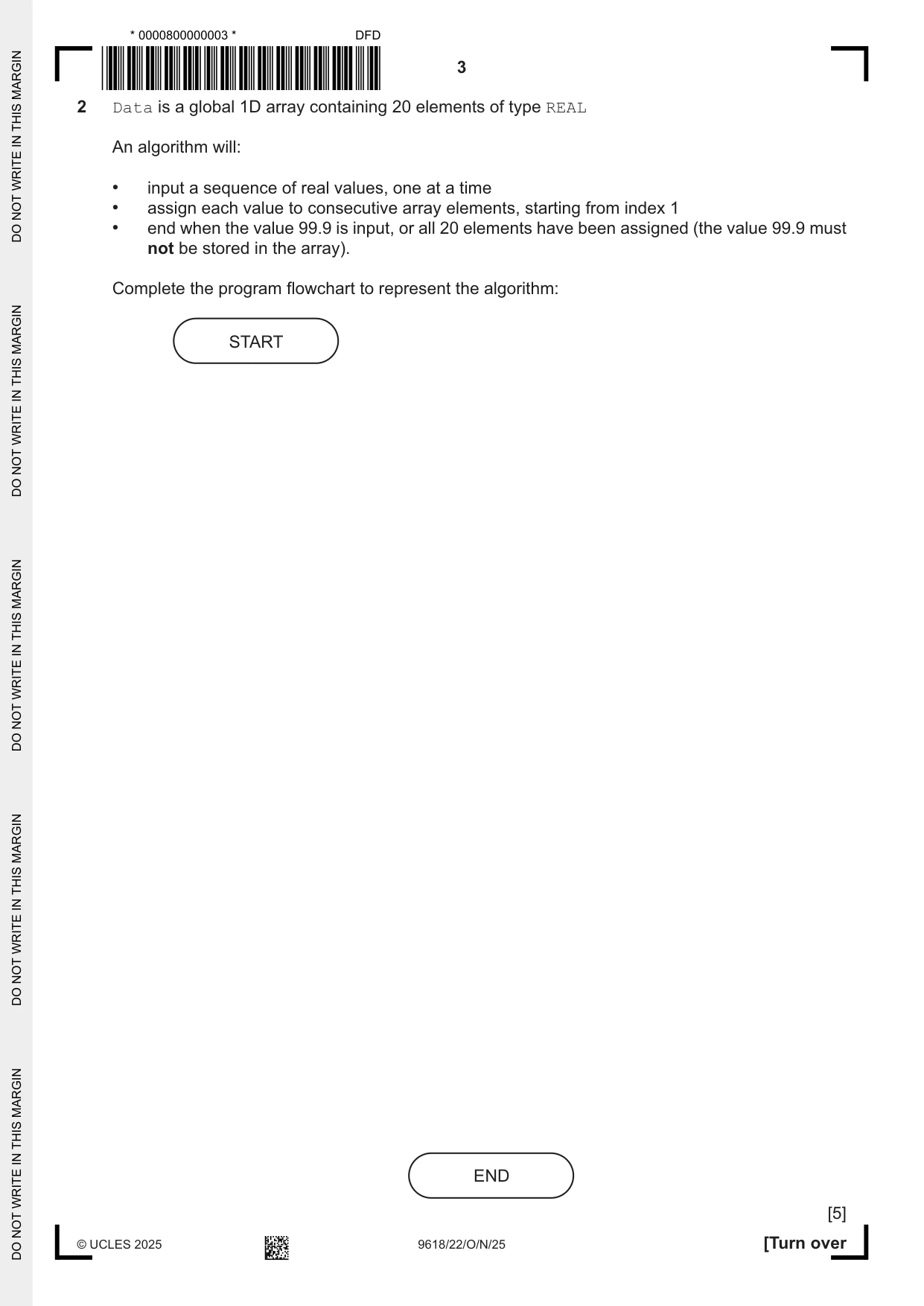
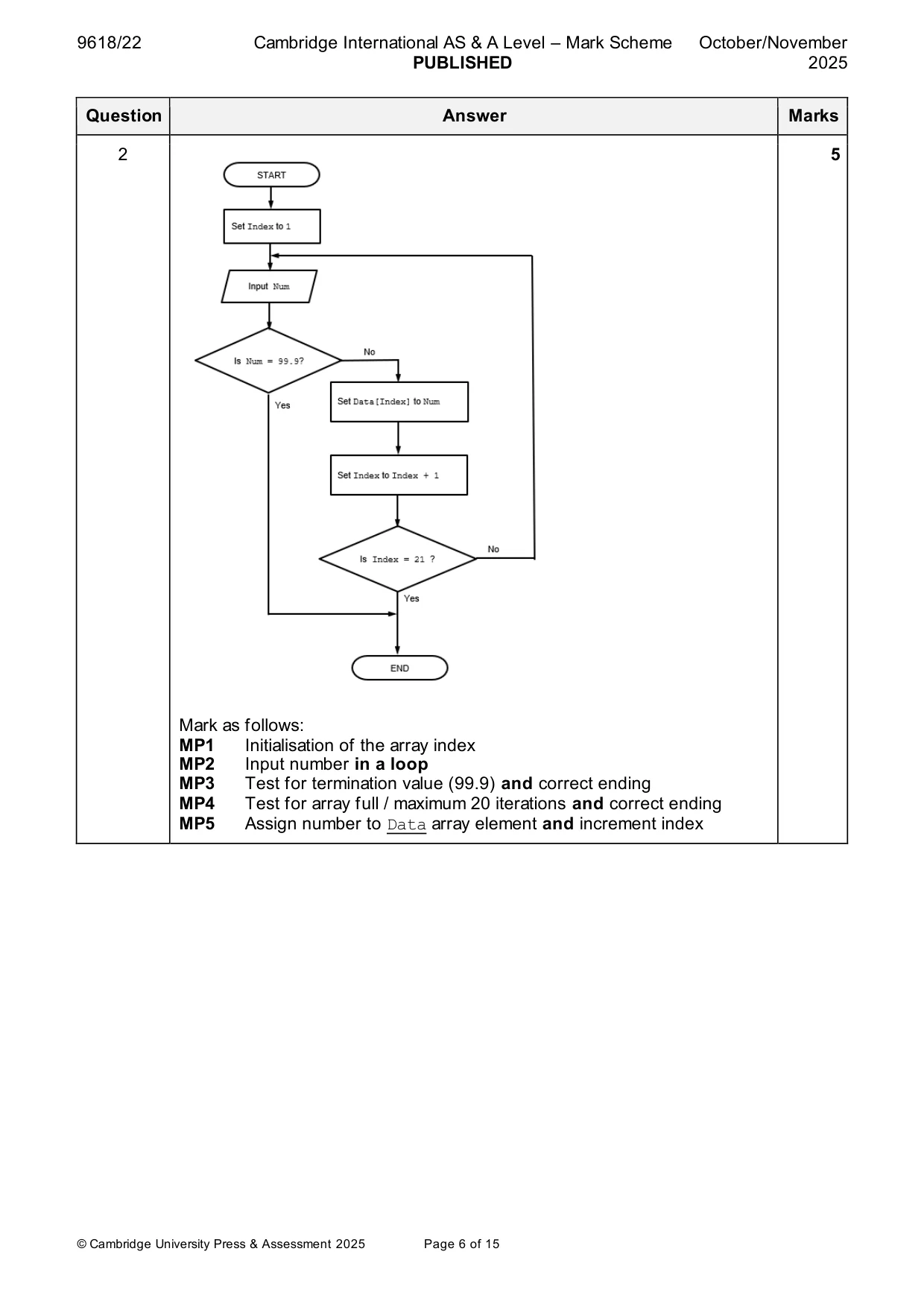
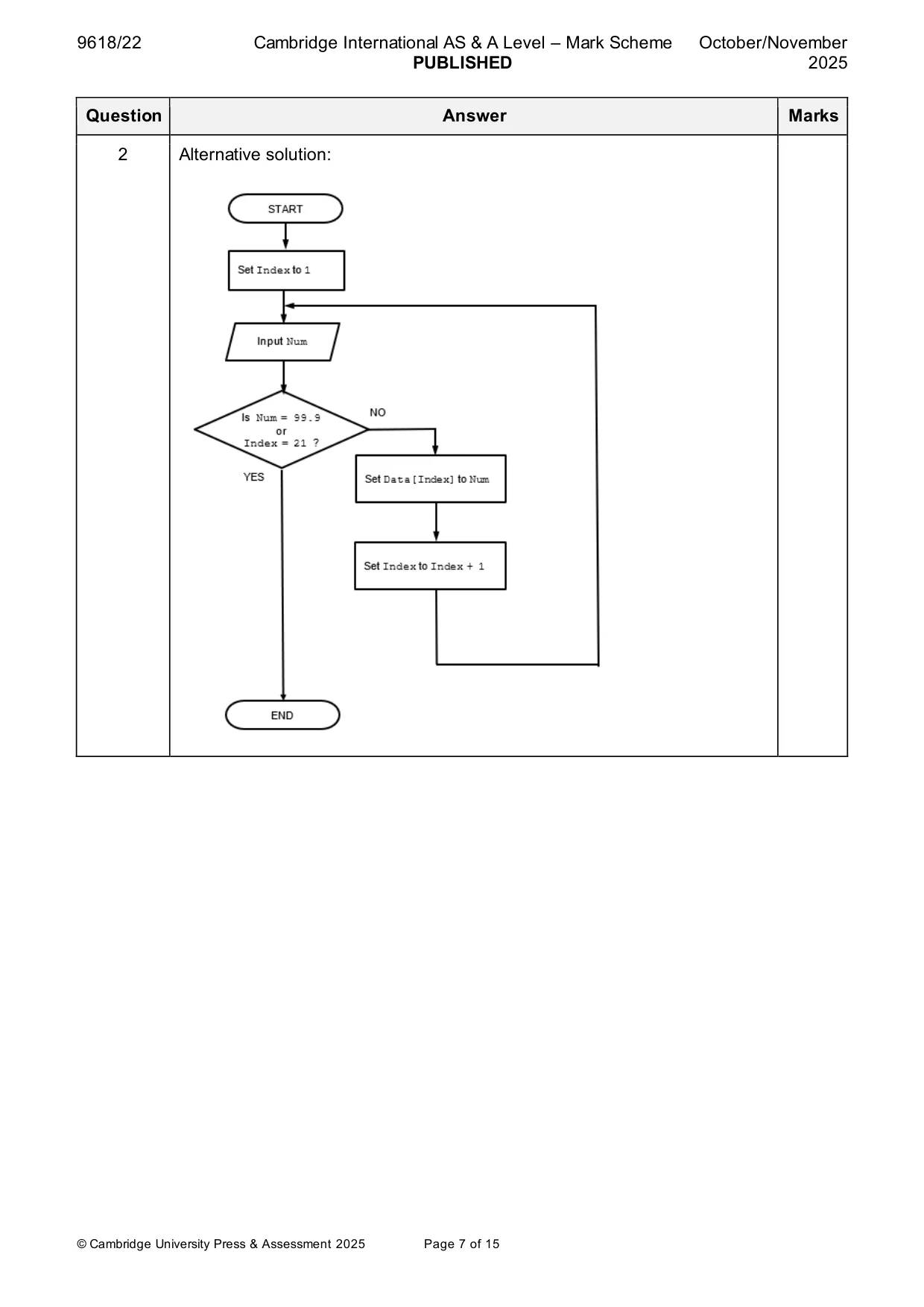
2 Data is a global 1D array containing 20 elements of type REAL An algorithm will: • input a sequence of real values, one at a time • assign each value to consecutive array elements, starting from index 1 • end when the value 99.9 is input, or all 20 elements have been assigned (the value 99.9 must not be stored in the array). Complete the program flowchart to represent the algorithm: START END [5]
Mark scheme: 2 5 Mark as follows: MP1 Initialisation of the array index MP2 Input number in a loop MP3 Test for termination value (99.9) and correct ending MP4 Test for array full / maximum 20 iterations and correct ending MP5 Assign number to Data array element and increment index 2 Alternative solution:
Q3 · A text file OldFile.txt contains IDs, names and email addresses for members of a club
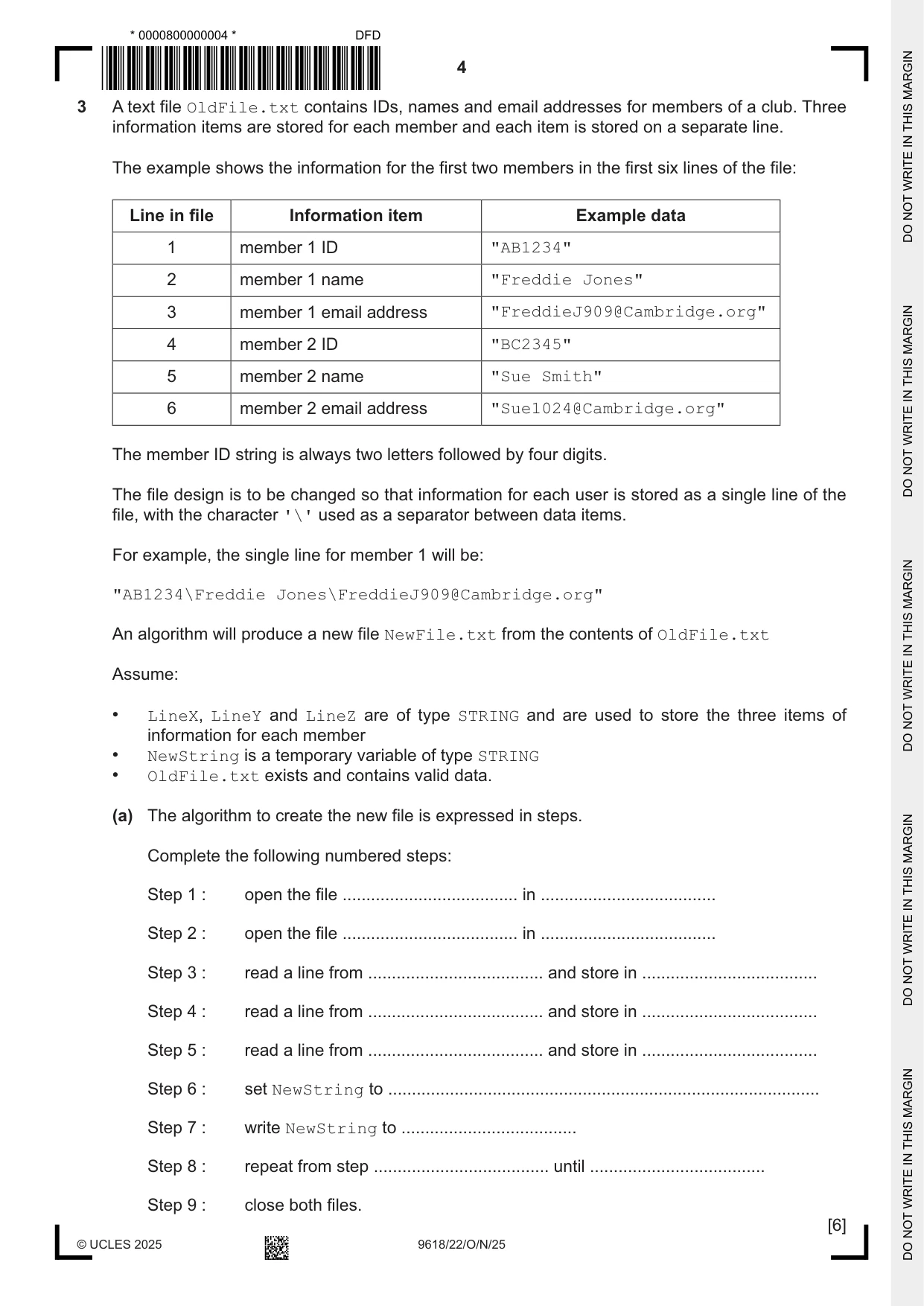
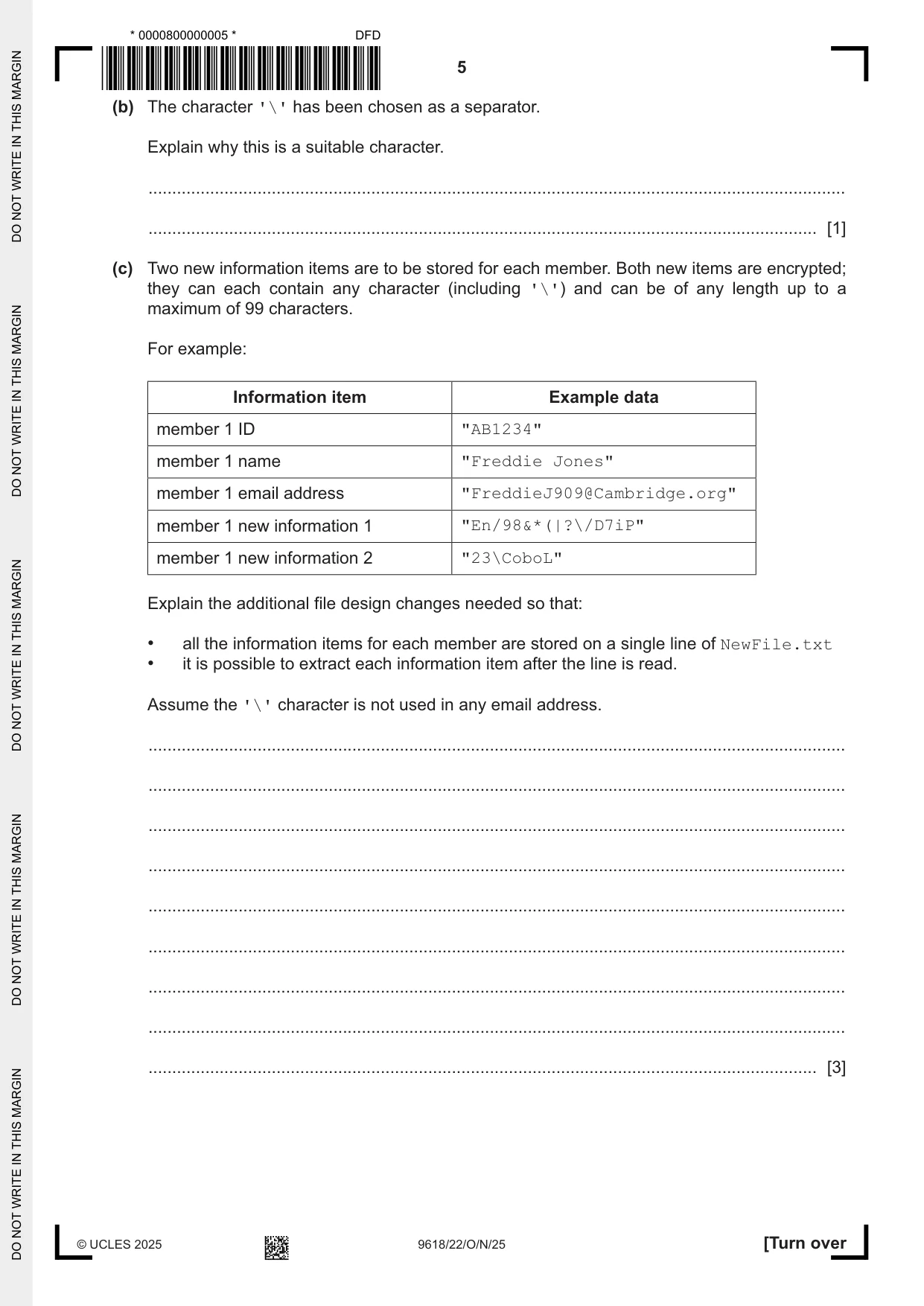
3 A text file OldFile.txt contains IDs, names and email addresses for members of a club. Three information items are stored for each member and each item is stored on a separate line. The example shows the information for the first two members in the first six lines of the file: Line in file Information item Example data 1 member 1 ID "AB1234" 2 member 1 name "Freddie Jones" 3 member 1 email address "FreddieJ909@Cambridge.org" 4 member 2 ID "BC2345" 5 member 2 name "Sue Smith" 6 member 2 email address "Sue1024@Cambridge.org" The member ID string is always two letters followed by four digits. The file design is to be changed so that information for each user is stored as a single line of the file, with the character '\' used as a separator between data items. For example, the single line for member 1 will be: "AB1234\Freddie Jones\FreddieJ909@Cambridge.org" An algorithm will produce a new file NewFile.txt from the contents of OldFile.txt Assume: • LineX, LineY and LineZ are of type STRING and are used to store the three items of information for each member • NewString is a temporary variable of type STRING • OldFile.txt exists and contains valid data. (a) The algorithm to create the new file is expressed in steps. Complete the following numbered steps: Step 1 : open the file ..................................... in ..................................... Step 2 : open the file ..................................... in ..................................... Step 3 : read a line from ..................................... and store in ..................................... Step 4 : read a line from ..................................... and store in ..................................... Step 5 : read a line from ..................................... and store in ..................................... Step 6 : set NewString to ........................................................................................... Step 7 : write NewString to ..................................... Step 8 : repeat from step ..................................... until ..................................... Step 9 : close both files. [6] (b) The character '\' has been chosen as a separator. Explain why this is a suitable character. ................................................................................................................................................... ............................................................................................................................................. [1] (c) Two new information items are to be stored for each member. Both new items are encrypted; they can each contain any character (including '\') and can be of any length up to a maximum of 99 characters. For example: Information item Example data member 1 ID "AB1234" member 1 name "Freddie Jones" member 1 email address "FreddieJ909@Cambridge.org" member 1 new information 1 "En/98&*(|?\/D7iP" member 1 new information 2 "23\CoboL" Explain the additional file design changes needed so that: • all the information items for each member are stored on a single line of NewFile.txt • it is possible to extract each information item after the line is read. Assume the '\' character is not used in any email address. ................................................................................................................................................... ................................................................................................................................................... ................................................................................................................................................... ................................................................................................................................................... ................................................................................................................................................... ................................................................................................................................................... ................................................................................................................................................... ................................................................................................................................................... ............................................................................................................................................. [3]
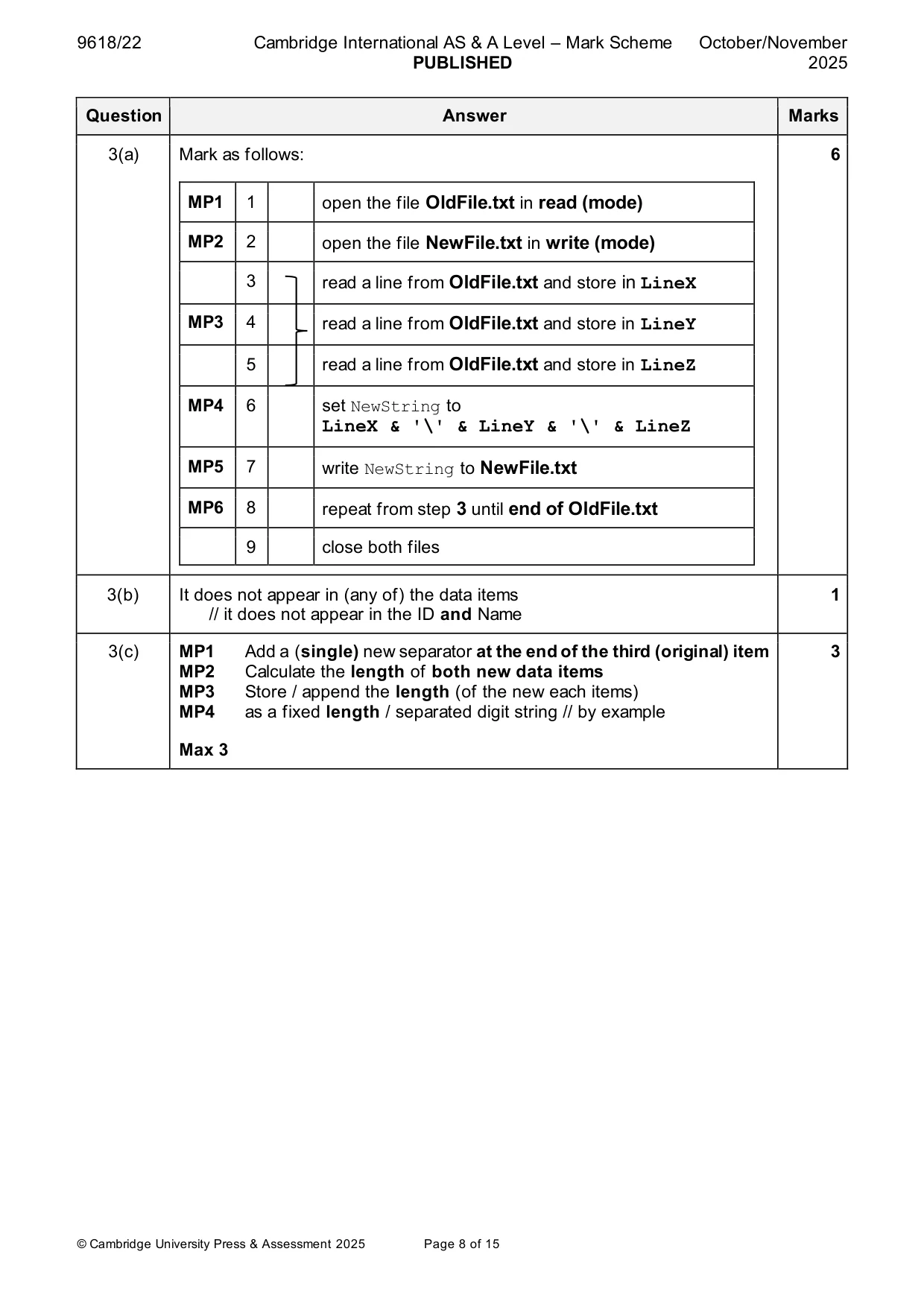
Mark scheme: 3(a) Mark as follows: 6 MP1 1 open the file OldFile.txt in read (mode) MP2 2 open the file NewFile.txt in write (mode) 3 read a line from OldFile.txt and store in LineX MP3 4 read a line from OldFile.txt and store in LineY 5 read a line from OldFile.txt and store in LineZ MP4 6 set NewString to LineX & '\' & LineY & '\' & LineZ MP5 7 write NewString to NewFile.txt MP6 8 repeat from step 3 until end of OldFile.txt 9 close both files 3(b) It does not appear in (any of) the data items 1 // it does not appear in the ID and Name 3(c) MP1 Add a (single) new separator at the end of the third (original) item 3 MP2 Calculate the length of both new data items MP3 Store / append the length (of the new each items) MP4 as a fixed length / separated digit string // by example Max 3
Q4 · A quiz has nine questions
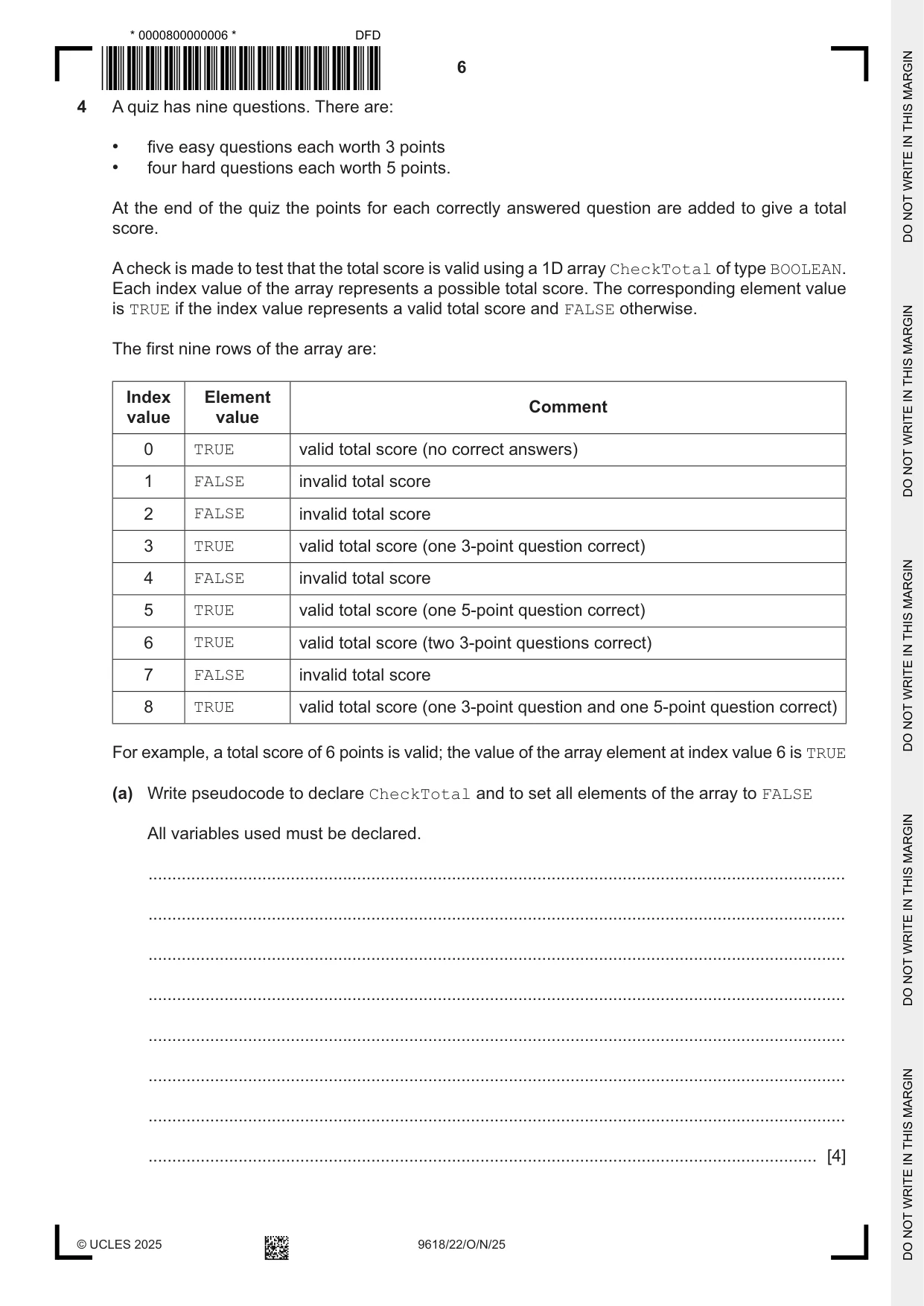
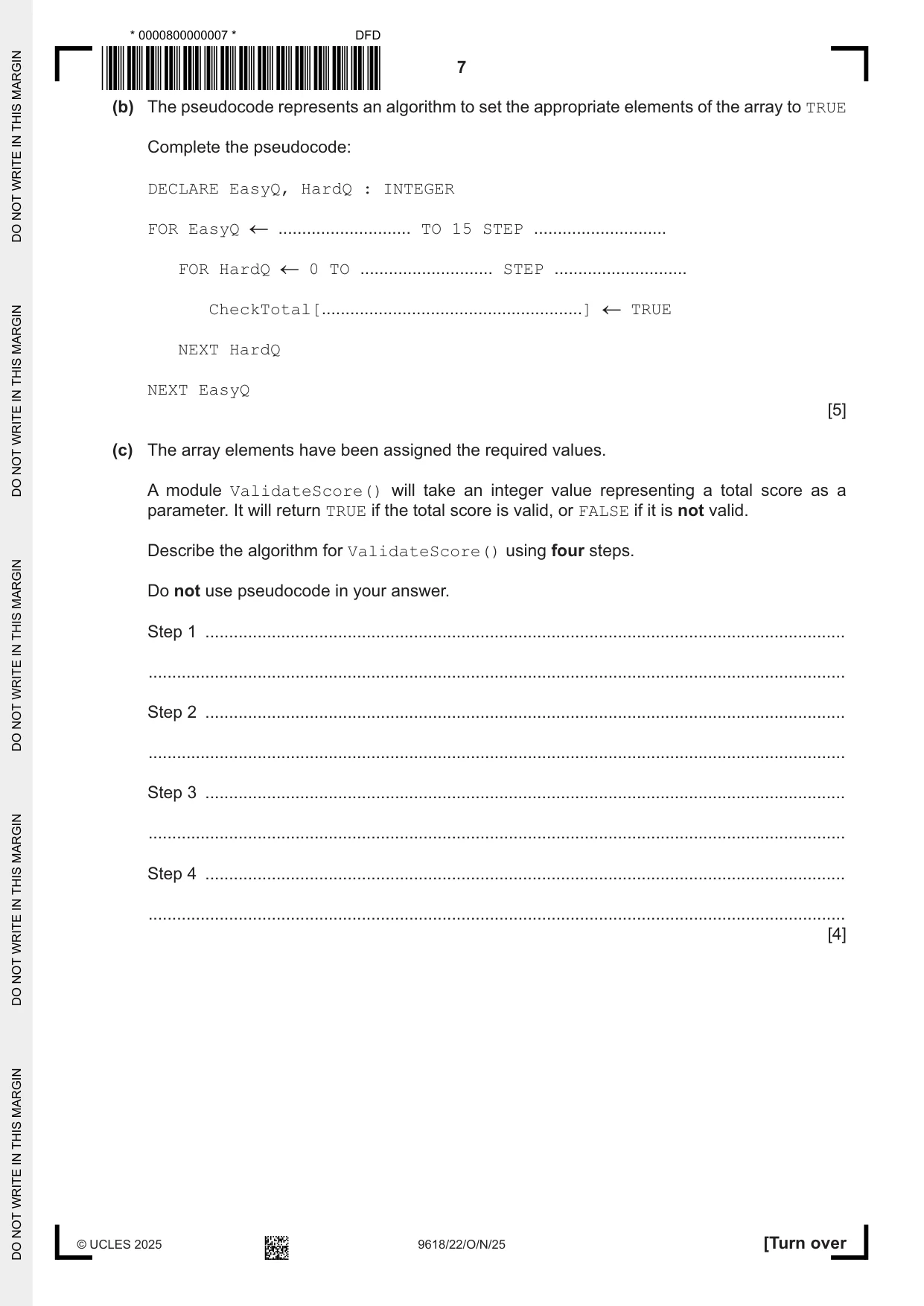
4 A quiz has nine questions. There are: • five easy questions each worth 3 points • four hard questions each worth 5 points. At the end of the quiz the points for each correctly answered question are added to give a total score. A check is made to test that the total score is valid using a 1D array CheckTotal of type BOOLEAN. Each index value of the array represents a possible total score. The corresponding element value is TRUE if the index value represents a valid total score and FALSE otherwise. The first nine rows of the array are: Index Element Comment value value 0 TRUE valid total score (no correct answers) 1 FALSE invalid total score 2 FALSE invalid total score 3 TRUE valid total score (one 3-point question correct) 4 FALSE invalid total score 5 TRUE valid total score (one 5-point question correct) 6 TRUE valid total score (two 3-point questions correct) 7 FALSE invalid total score 8 TRUE valid total score (one 3-point question and one 5-point question correct) For example, a total score of 6 points is valid; the value of the array element at index value 6 is TRUE (a) Write pseudocode to declare CheckTotal and to set all elements of the array to FALSE All variables used must be declared. ................................................................................................................................................... ................................................................................................................................................... ................................................................................................................................................... ................................................................................................................................................... ................................................................................................................................................... ................................................................................................................................................... ................................................................................................................................................... ............................................................................................................................................. [4] (b) The pseudocode represents an algorithm to set the appropriate elements of the array to TRUE Complete the pseudocode: DECLARE EasyQ, HardQ : INTEGER FOR EasyQ ............................ TO 15 STEP ............................ FOR HardQ 0 TO ............................ STEP ............................ CheckTotal[.......................................................] TRUE NEXT HardQ NEXT EasyQ [5] (c) The array elements have been assigned the required values. A module ValidateScore() will take an integer value representing a total score as a parameter. It will return TRUE if the total score is valid, or FALSE if it is not valid. Describe the algorithm for ValidateScore() using four steps. Do not use pseudocode in your answer. Step 1 ....................................................................................................................................... ................................................................................................................................................... Step 2 ....................................................................................................................................... ................................................................................................................................................... Step 3 ....................................................................................................................................... ................................................................................................................................................... Step 4 ....................................................................................................................................... ................................................................................................................................................... [4]
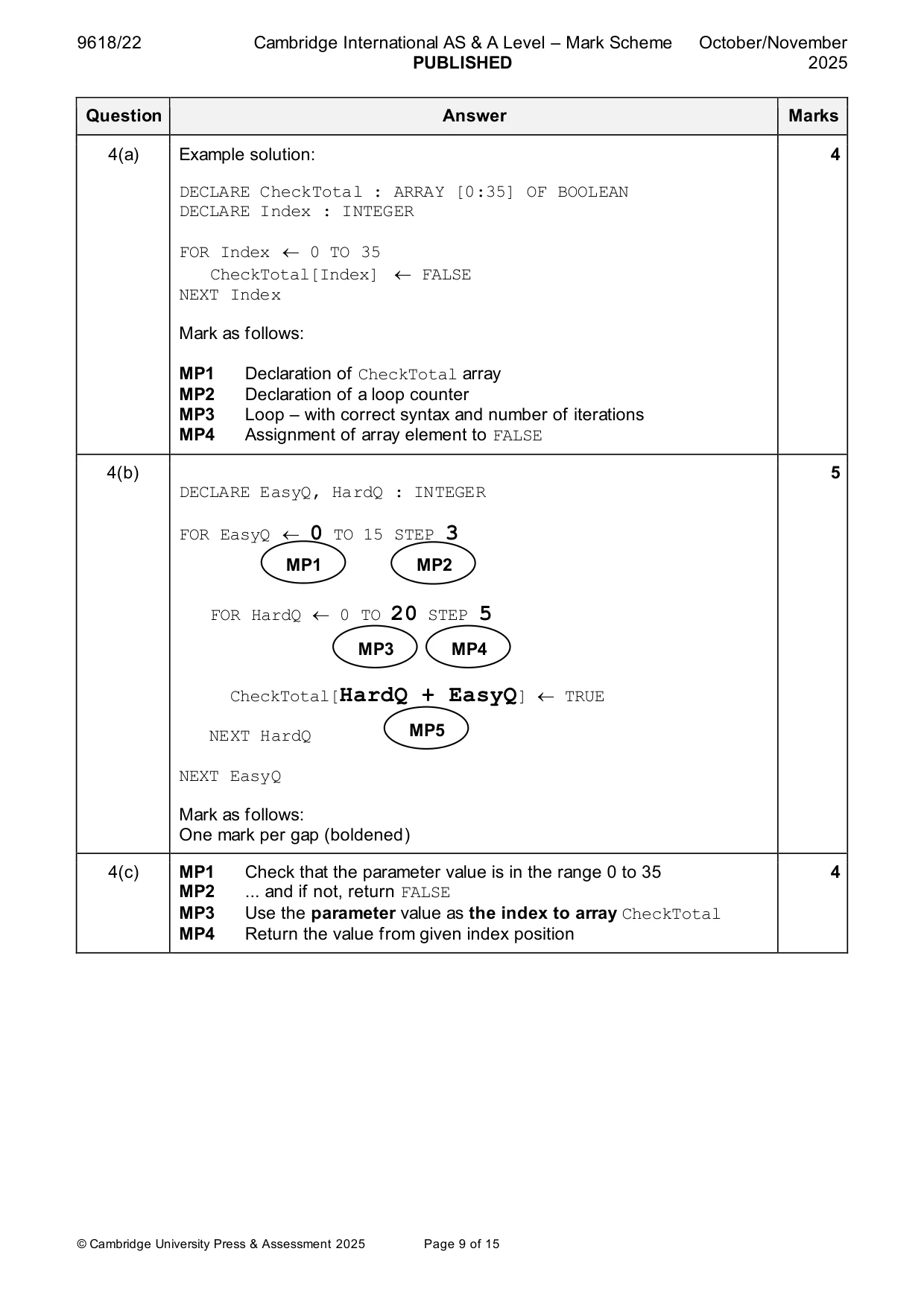
Mark scheme: 4(a) Example solution: 4 DECLARE CheckTotal : ARRAY [0:35] OF BOOLEAN DECLARE Index : INTEGER FOR Index 0 TO 35 CheckTotal[Index] FALSE NEXT Index Mark as follows: MP1 Declaration of CheckTotal array MP2 Declaration of a loop counter MP3 Loop – with correct syntax and number of iterations MP4 Assignment of array element to FALSE 4(b) 5 DECLARE EasyQ, HardQ : INTEGER FOR EasyQ 0 TO 15 STEP 3 MP1 MP2 FOR HardQ 0 TO 20 STEP 5 MP3 MP4 CheckTotal[HardQ + EasyQ] TRUE NEXT HardQ MP5 NEXT EasyQ Mark as follows: One mark per gap (boldened) 4(c) MP1 Check that the parameter value is in the range 0 to 35 4 MP2 ... and if not, return FALSE MP3 Use the parameter value as the index to array CheckTotal MP4 Return the value from given index position
Q5 · A program is developed to satisfy a specific customer requirement
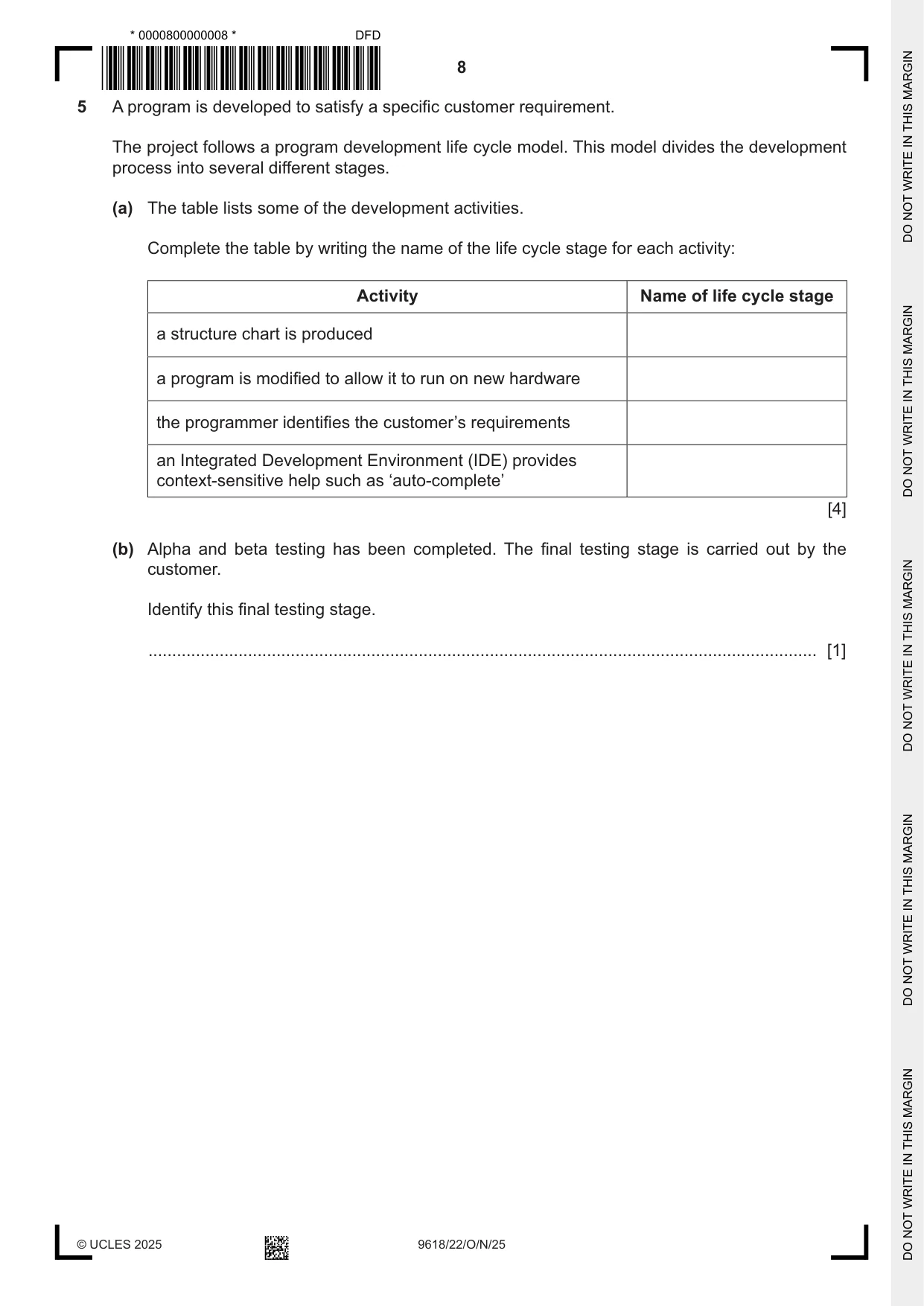
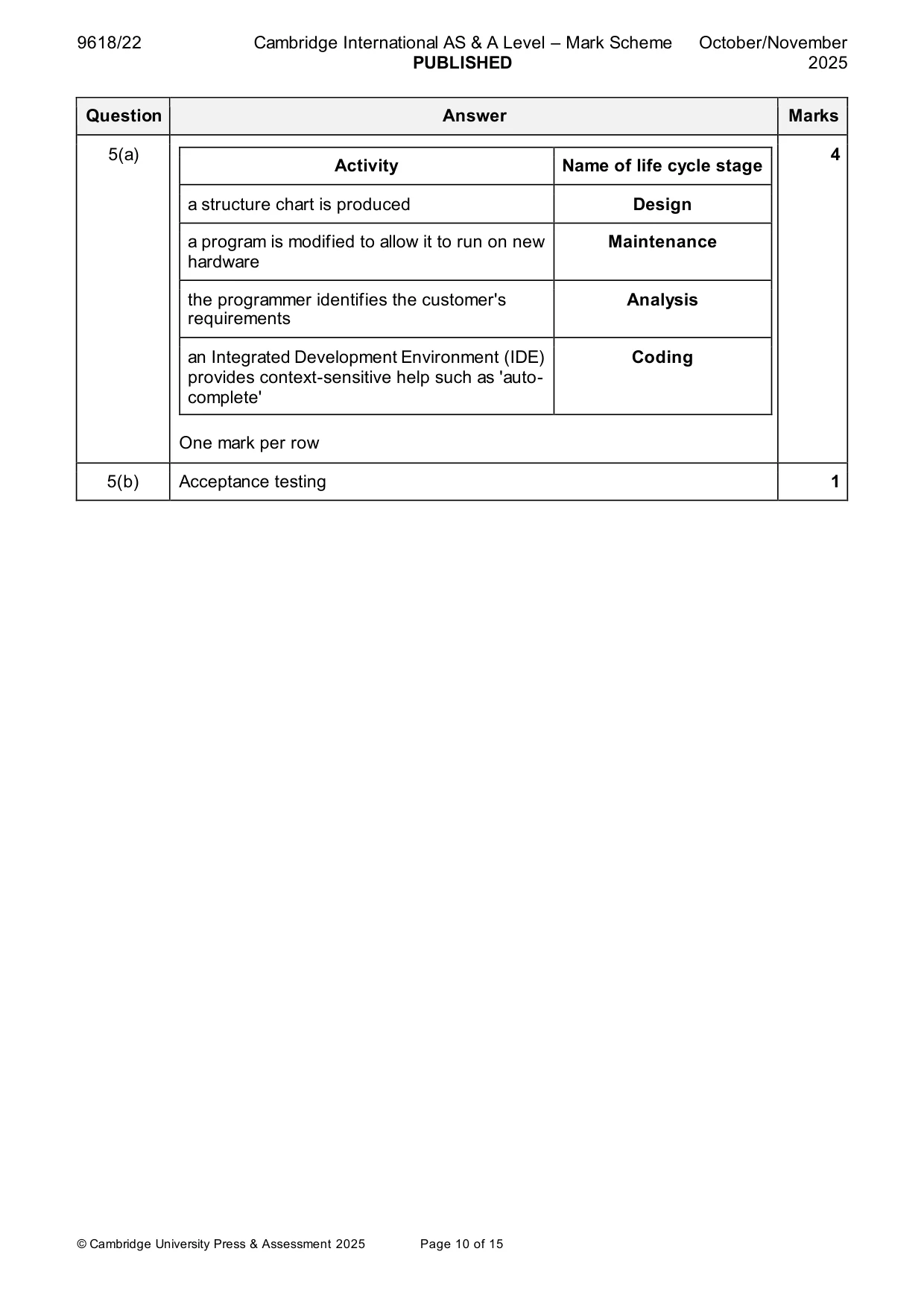
5 A program is developed to satisfy a specific customer requirement. The project follows a program development life cycle model. This model divides the development process into several different stages. (a) The table lists some of the development activities. Complete the table by writing the name of the life cycle stage for each activity: Activity Name of life cycle stage a structure chart is produced a program is modified to allow it to run on new hardware the programmer identifies the customer’s requirements an Integrated Development Environment (IDE) provides context-sensitive help such as ‘auto-complete’ [4] (b) Alpha and beta testing has been completed. The final testing stage is carried out by the customer. Identify this final testing stage. ............................................................................................................................................. [1]
Mark scheme: 5(a) 4 Activity Name of life cycle stage a structure chart is produced Design a program is modified to allow it to run on new Maintenance hardware the programmer identifies the customer's Analysis requirements an Integrated Development Environment (IDE) Coding provides context-sensitive help such as 'auto- complete' One mark per row 5(b) Acceptance testing 1
Q6 · A string function Compare() will compare two strings
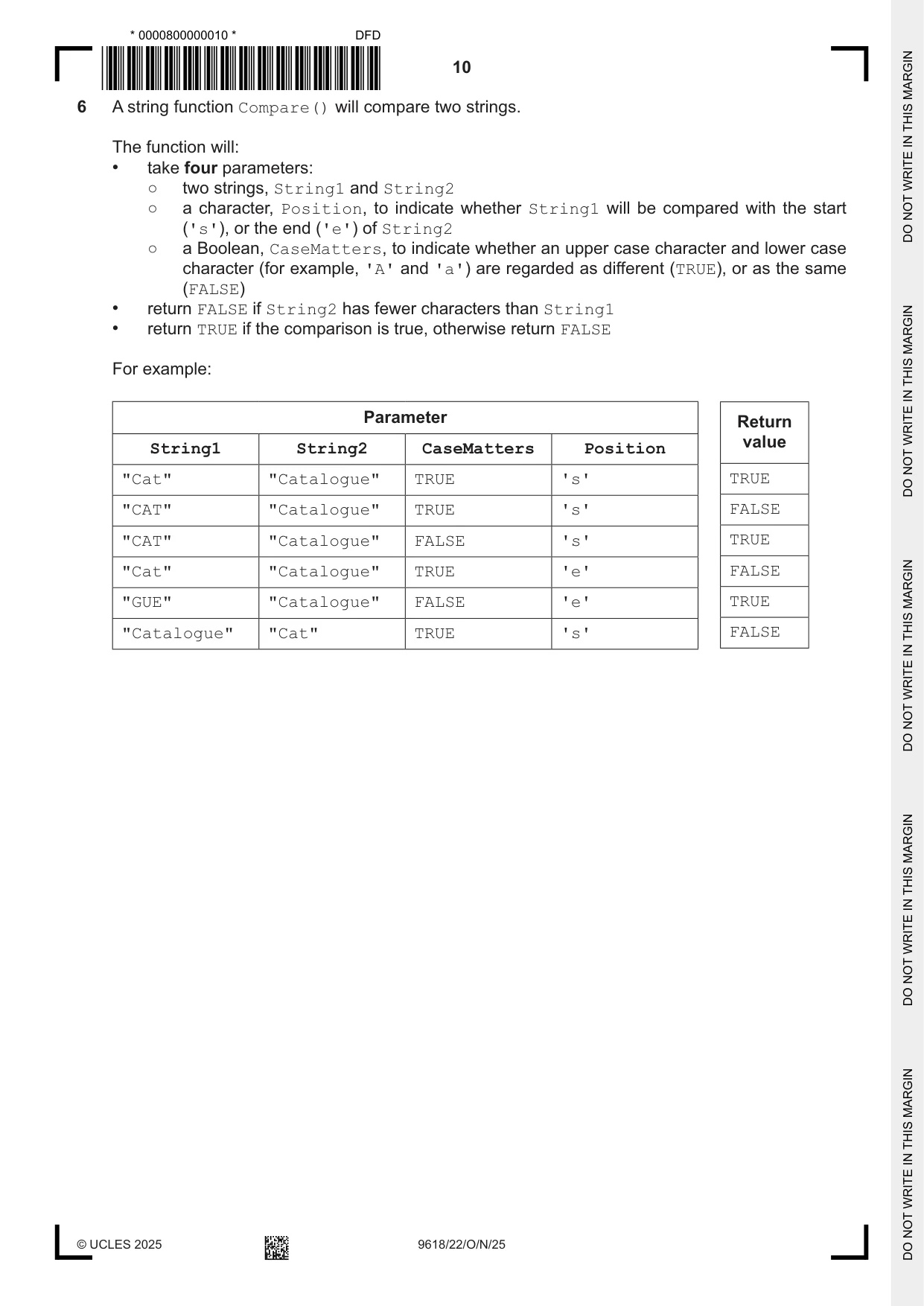
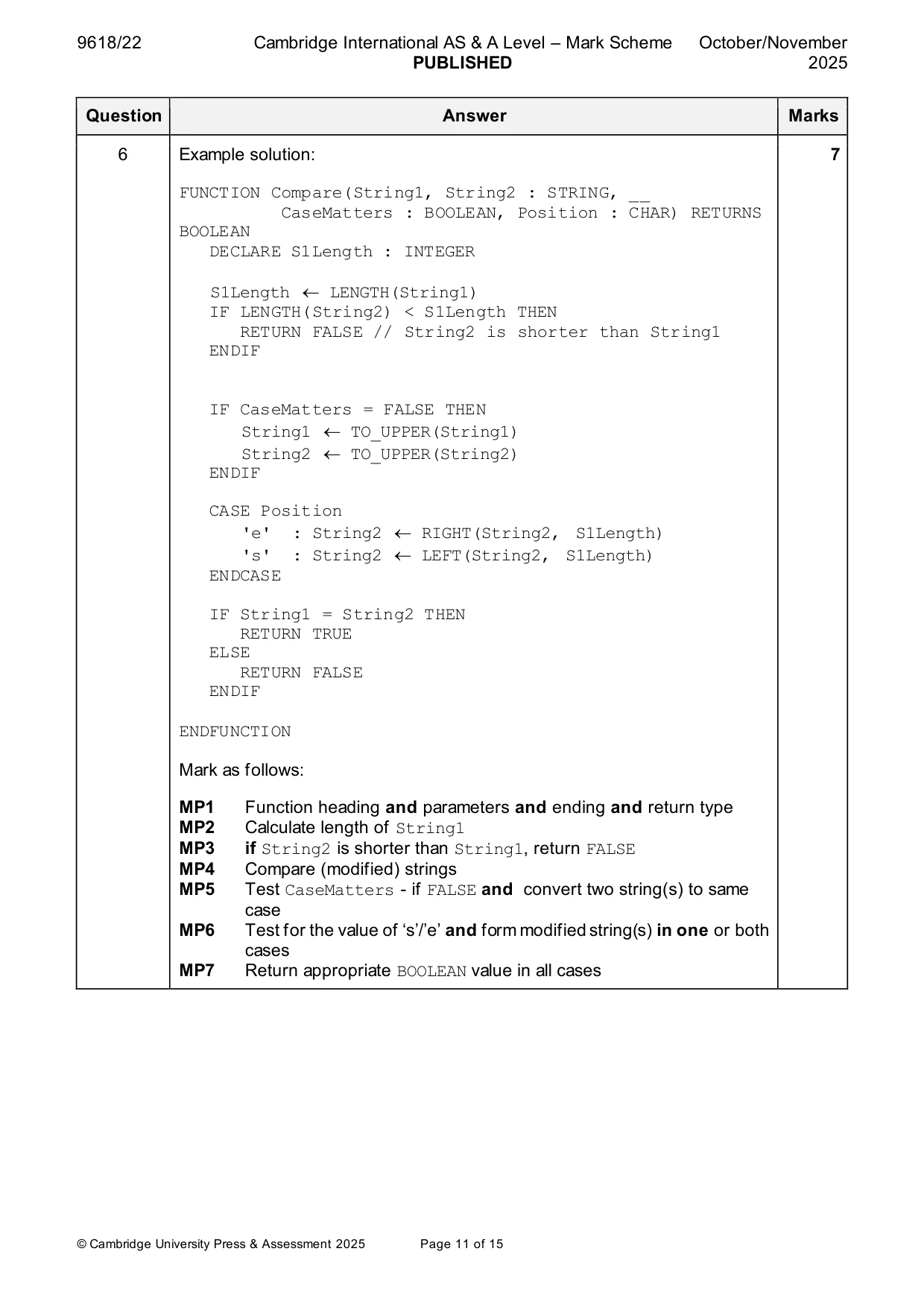
6 A string function Compare() will compare two strings. The function will: • take four parameters: ○ two strings, String1 and String2 ○ a character, Position, to indicate whether String1 will be compared with the start ('s'), or the end ('e') of String2 ○ a Boolean, CaseMatters, to indicate whether an upper case character and lower case character (for example, 'A' and 'a') are regarded as different (TRUE), or as the same (FALSE) • return FALSE if String2 has fewer characters than String1 • return TRUE if the comparison is true, otherwise return FALSE For example: Parameter Return value String1 String2 CaseMatters Position "Cat" "Catalogue" TRUE 's' TRUE "CAT" "Catalogue" TRUE 's' FALSE "CAT" "Catalogue" FALSE 's' TRUE "Cat" "Catalogue" TRUE 'e' FALSE "GUE" "Catalogue" FALSE 'e' TRUE "Catalogue" "Cat" TRUE 's' FALSE Write pseudocode for the function Compare() .......................................................................................................................................................... .......................................................................................................................................................... .......................................................................................................................................................... .......................................................................................................................................................... .......................................................................................................................................................... .......................................................................................................................................................... .......................................................................................................................................................... .......................................................................................................................................................... .......................................................................................................................................................... .......................................................................................................................................................... .......................................................................................................................................................... .......................................................................................................................................................... .......................................................................................................................................................... .......................................................................................................................................................... .......................................................................................................................................................... .......................................................................................................................................................... .......................................................................................................................................................... .......................................................................................................................................................... .......................................................................................................................................................... .......................................................................................................................................................... .......................................................................................................................................................... .......................................................................................................................................................... .......................................................................................................................................................... .......................................................................................................................................................... .......................................................................................................................................................... .......................................................................................................................................................... .................................................................................................................................................... [7]
Mark scheme: 6 Example solution: 7 FUNCTION Compare(String1, String2 : STRING, __ CaseMatters : BOOLEAN, Position : CHAR) RETURNS BOOLEAN DECLARE S1Length : INTEGER S1Length LENGTH(String1) IF LENGTH(String2) < S1Length THEN RETURN FALSE // String2 is shorter than String1 ENDIF IF CaseMatters = FALSE THEN String1 TO_UPPER(String1) String2 TO_UPPER(String2) ENDIF CASE Position 'e' : String2 RIGHT(String2, S1Length) 's' : String2 LEFT(String2, S1Length) ENDCASE IF String1 = String2 THEN RETURN TRUE ELSE RETURN FALSE ENDIF ENDFUNCTION Mark as follows: MP1 Function heading and parameters and ending and return type MP2 Calculate length of String1 MP3 if String2 is shorter than String1, return FALSE MP4 Compare (modified) strings MP5 Test CaseMatters - if FALSE and convert two string(s) to same case MP6 Test for the value of ‘s’/’e’ and form modified string(s) in one or both cases MP7 Return appropriate BOOLEAN value in all cases
Q7 · The structure chart shows part of a program design: Convert Count P2 T1 Key Analyse…
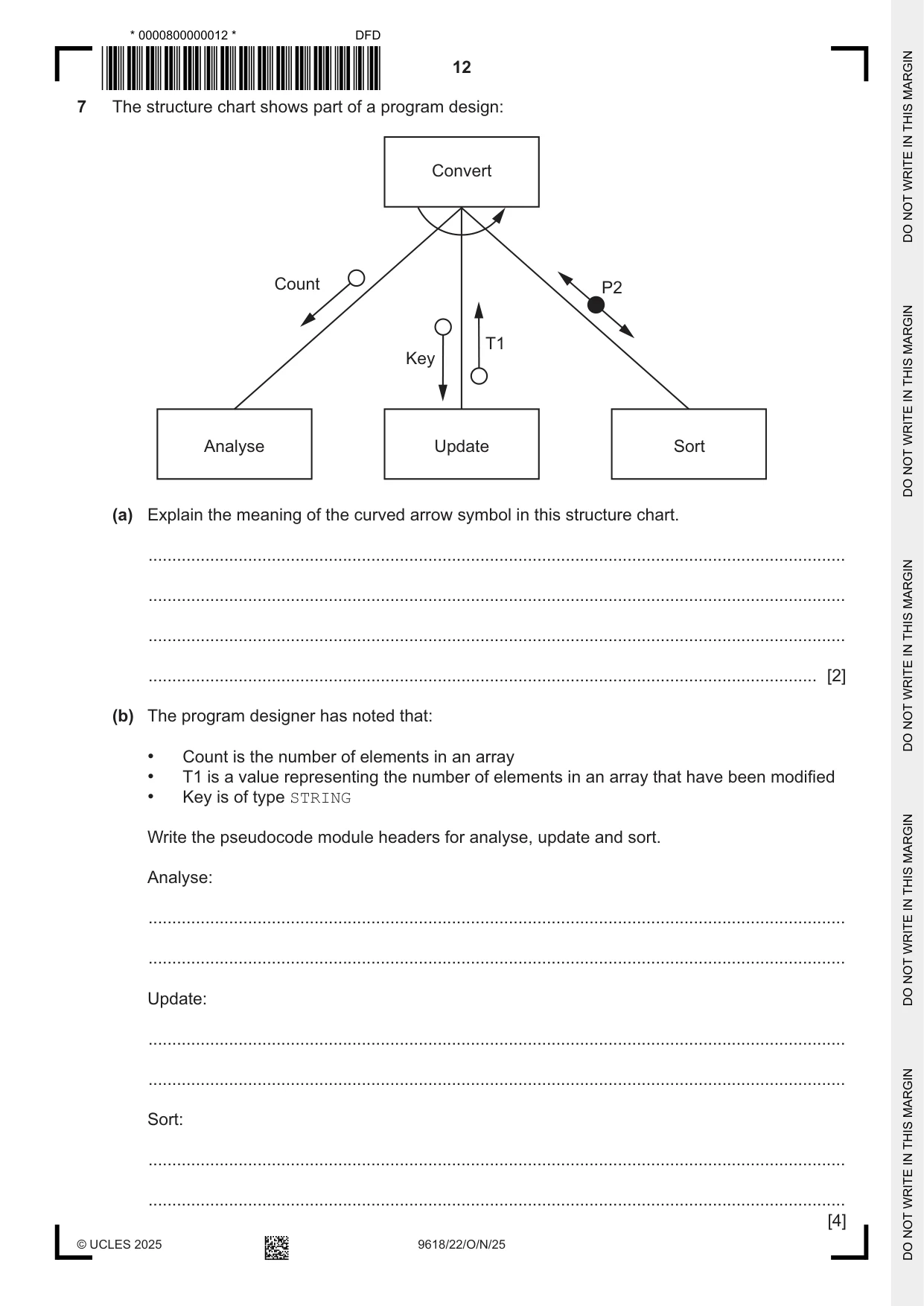
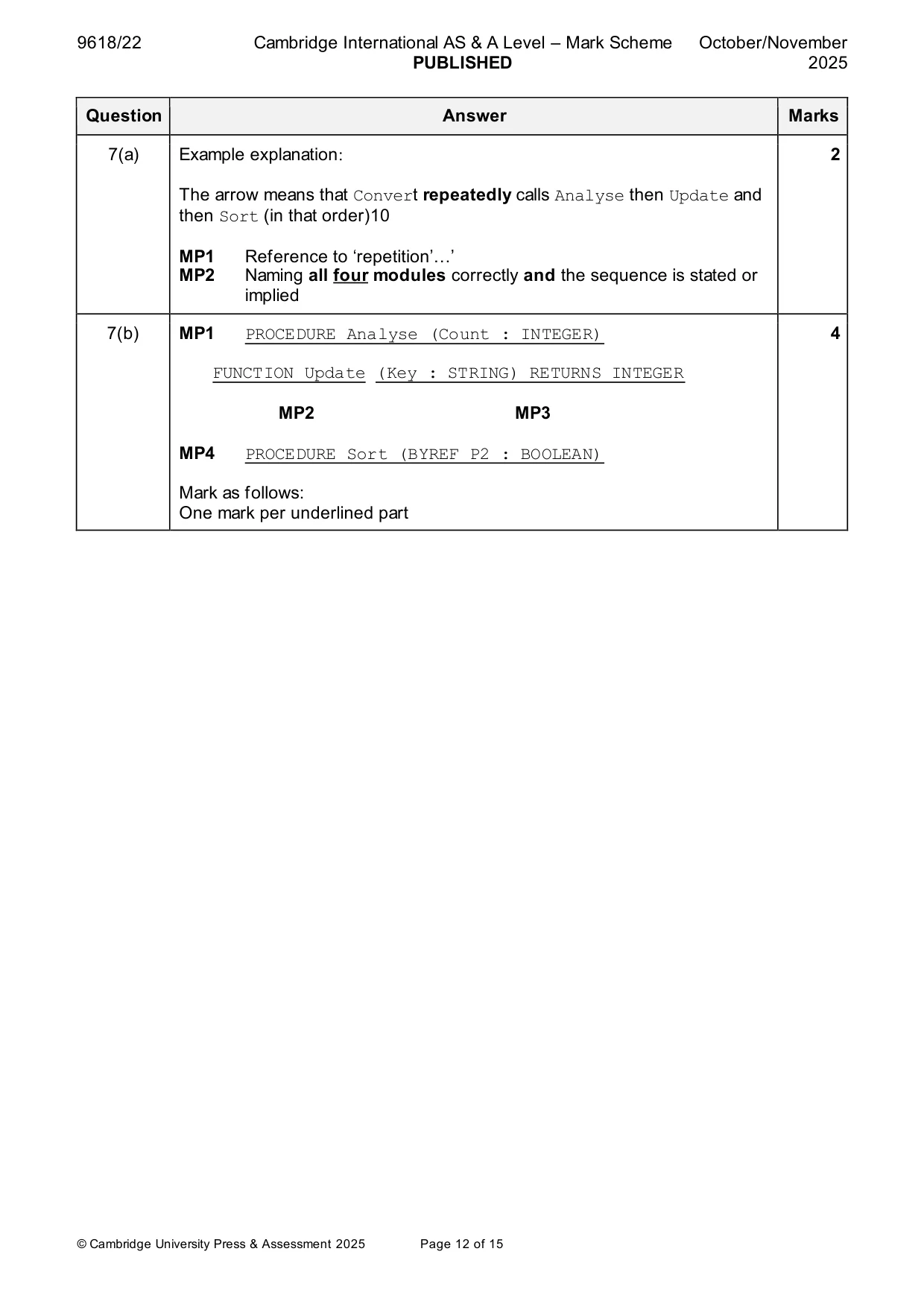
7 The structure chart shows part of a program design: Convert Count P2 T1 Key Analyse Update Sort (a) Explain the meaning of the curved arrow symbol in this structure chart. ................................................................................................................................................... ................................................................................................................................................... ................................................................................................................................................... ............................................................................................................................................. [2] (b) The program designer has noted that: • Count is the number of elements in an array • T1 is a value representing the number of elements in an array that have been modified • Key is of type STRING Write the pseudocode module headers for analyse, update and sort. Analyse: ................................................................................................................................................... ................................................................................................................................................... Update: ................................................................................................................................................... ................................................................................................................................................... Sort: ................................................................................................................................................... ................................................................................................................................................... [4]
Mark scheme: 7(a) Example explanation: 2 The arrow means that Convert repeatedly calls Analyse then Update and then Sort (in that order)10 MP1 Reference to ‘repetition’…’ MP2 Naming all four modules correctly and the sequence is stated or implied 7(b) MP1 PROCEDURE Analyse (Count : INTEGER) 4 FUNCTION Update (Key : STRING) RETURNS INTEGER MP2 MP3 MP4 PROCEDURE Sort (BYREF P2 : BOOLEAN) Mark as follows: One mark per underlined part
Q8 · A program is being developed to manage student book loans from a college library
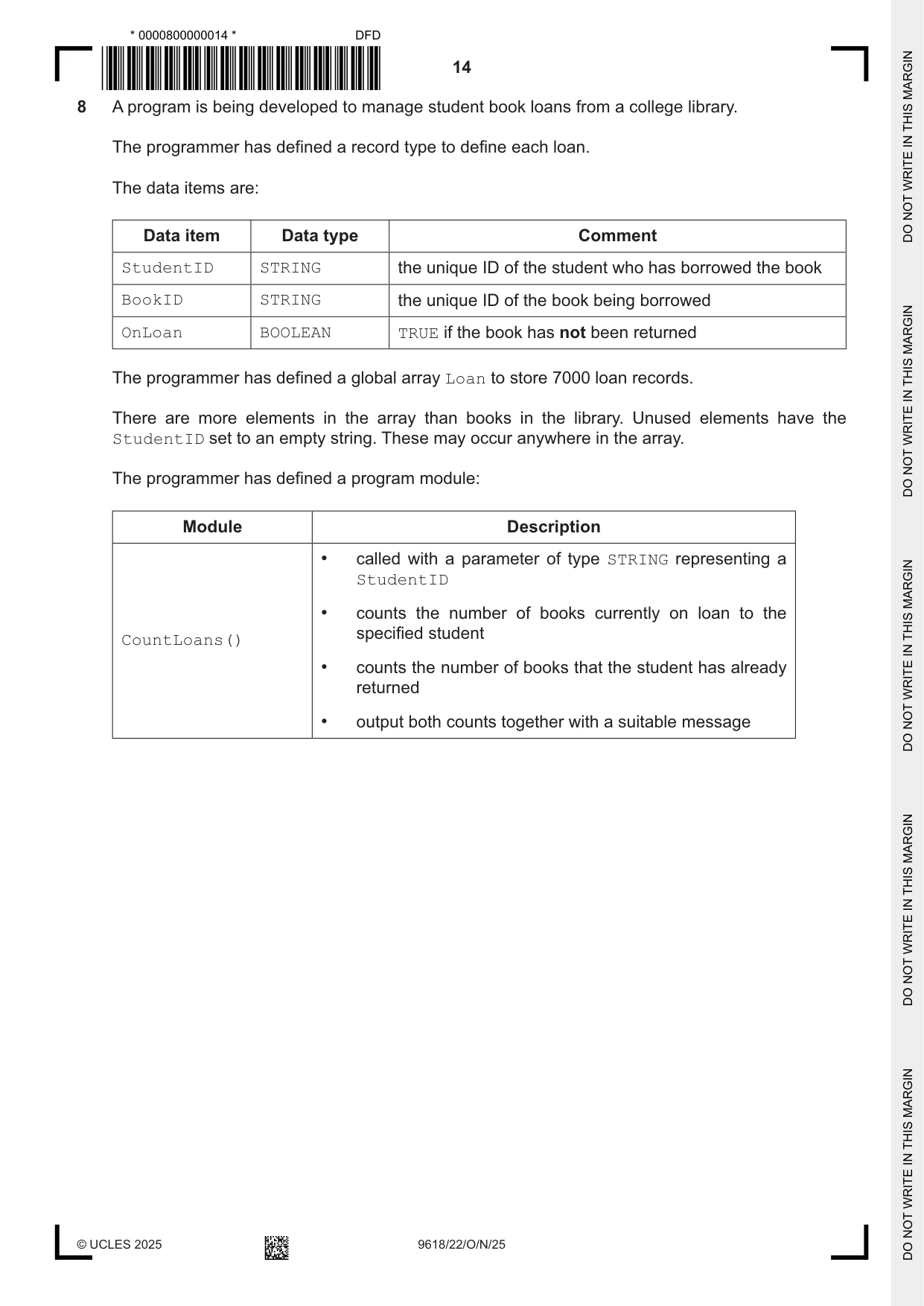
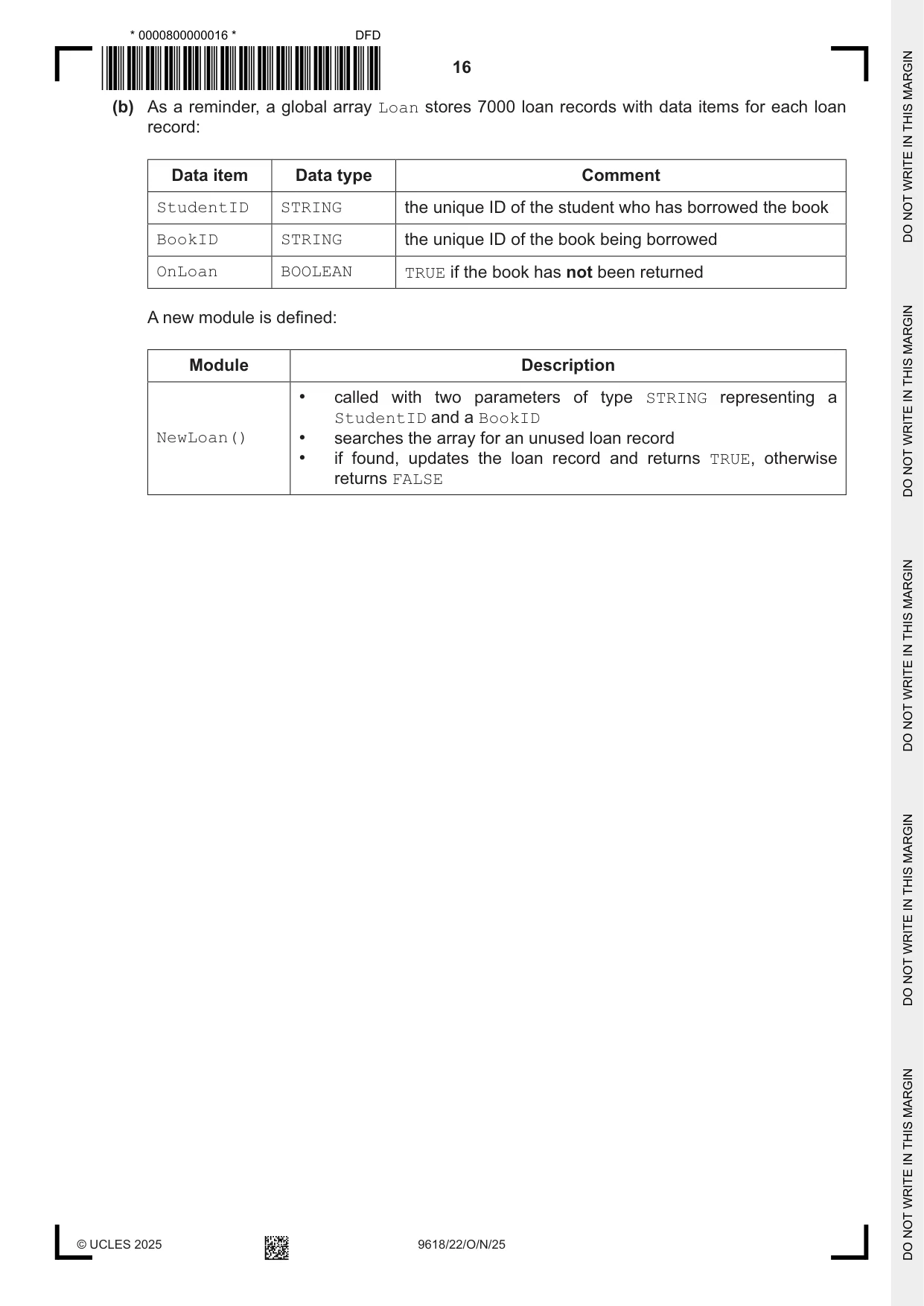
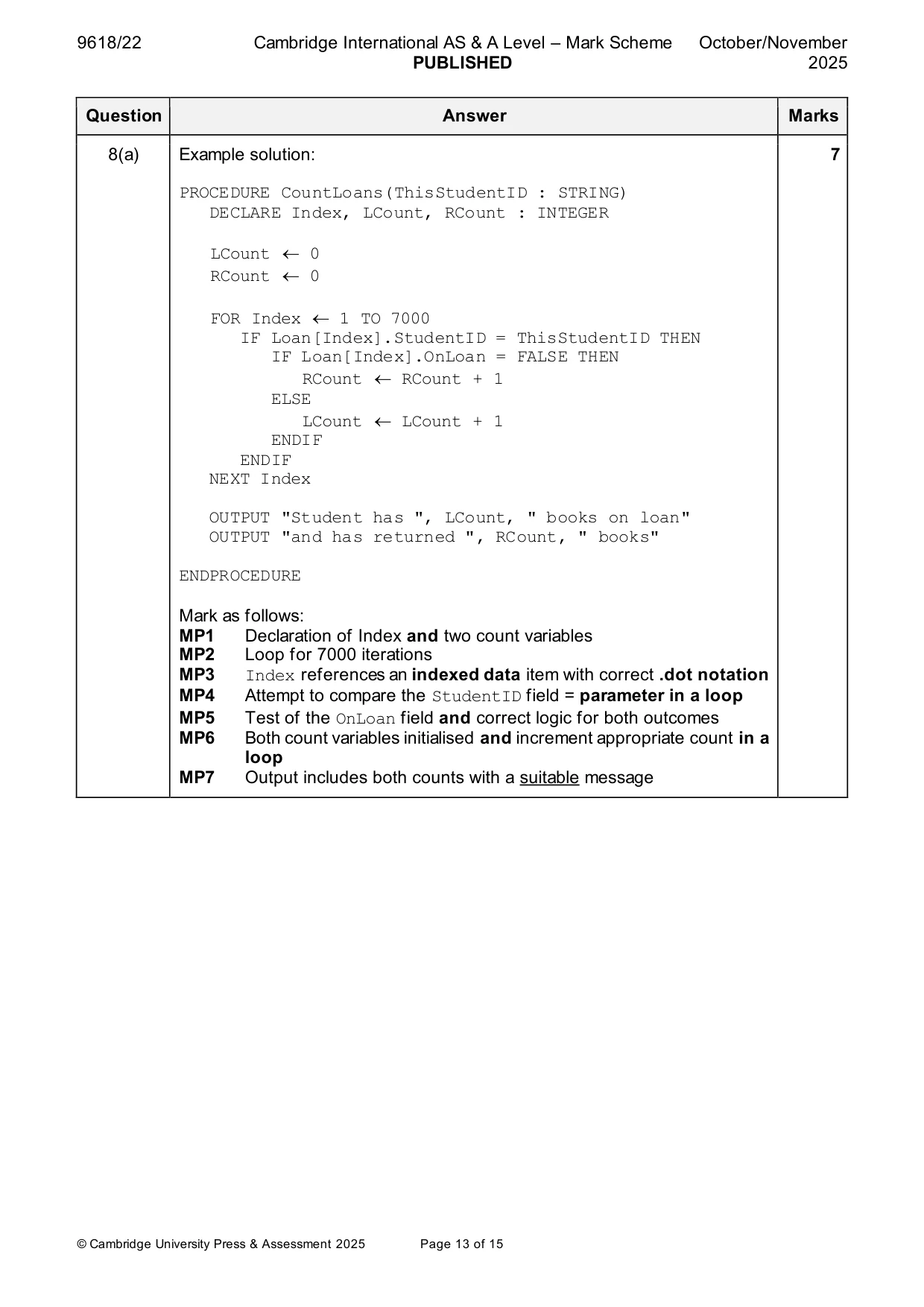
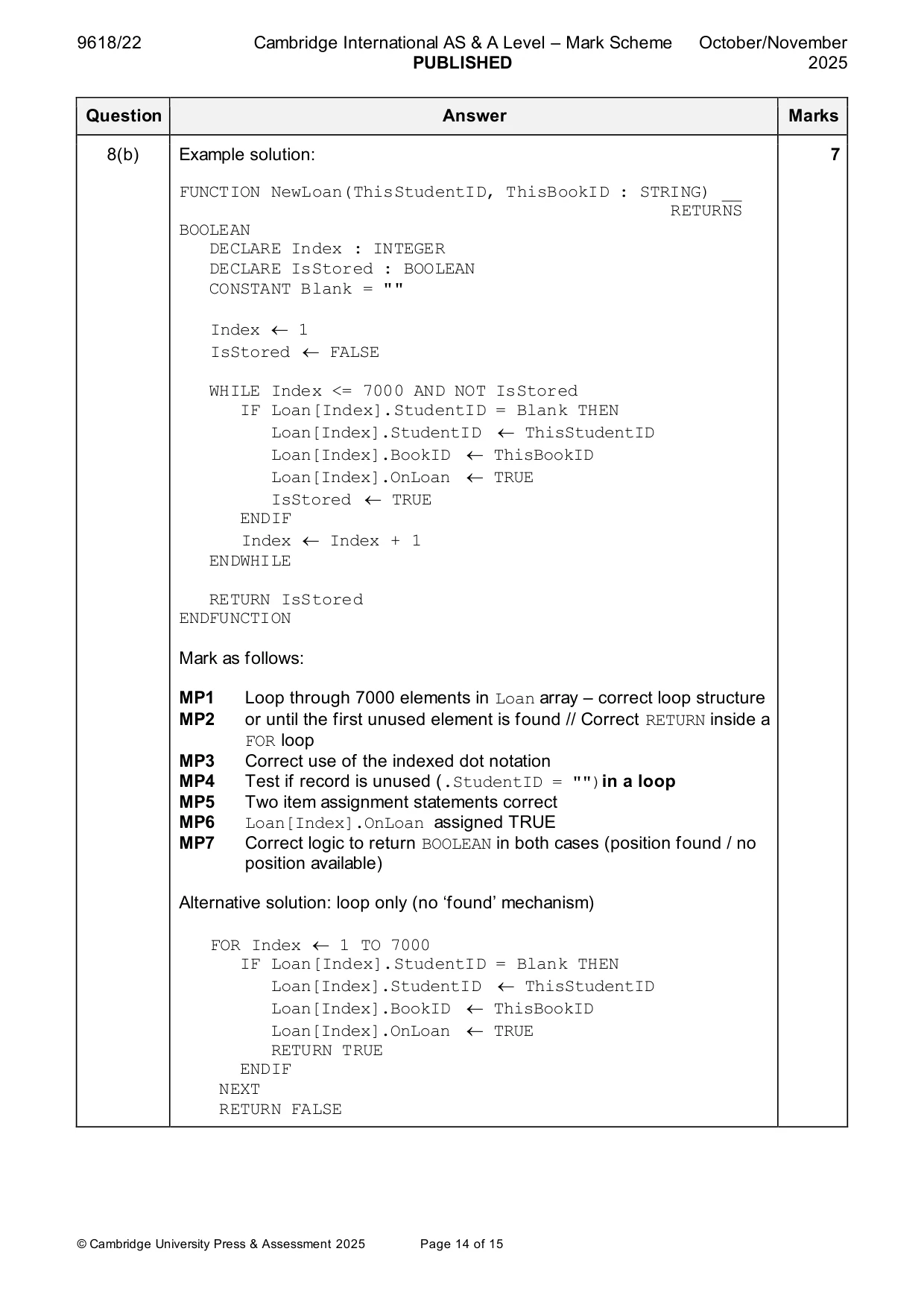
8 A program is being developed to manage student book loans from a college library. The programmer has defined a record type to define each loan. The data items are: Data item Data type Comment StudentID STRING the unique ID of the student who has borrowed the book BookID STRING the unique ID of the book being borrowed OnLoan BOOLEAN TRUE if the book has not been returned The programmer has defined a global array Loan to store 7000 loan records. There are more elements in the array than books in the library. Unused elements have the StudentID set to an empty string. These may occur anywhere in the array. The programmer has defined a program module: Module Description • called with a parameter of type STRING representing a StudentID • counts the number of books currently on loan to the specified student CountLoans() • counts the number of books that the student has already returned • output both counts together with a suitable message (a) Write pseudocode for module CountLoans() ................................................................................................................................................... ................................................................................................................................................... ................................................................................................................................................... ................................................................................................................................................... ................................................................................................................................................... ................................................................................................................................................... ................................................................................................................................................... ................................................................................................................................................... ................................................................................................................................................... ................................................................................................................................................... ................................................................................................................................................... ................................................................................................................................................... ................................................................................................................................................... ................................................................................................................................................... ................................................................................................................................................... ................................................................................................................................................... ................................................................................................................................................... ................................................................................................................................................... ................................................................................................................................................... ................................................................................................................................................... ................................................................................................................................................... ............................................................................................................................................. [7] (b) As a reminder, a global array Loan stores 7000 loan records with data items for each loan record: Data item Data type Comment StudentID STRING the unique ID of the student who has borrowed the book BookID STRING the unique ID of the book being borrowed OnLoan BOOLEAN TRUE if the book has not been returned A new module is defined: Module Description • called with two parameters of type STRING representing a StudentID and a BookID NewLoan() • searches the array for an unused loan record • if found, updates the loan record and returns TRUE, otherwise returns FALSE
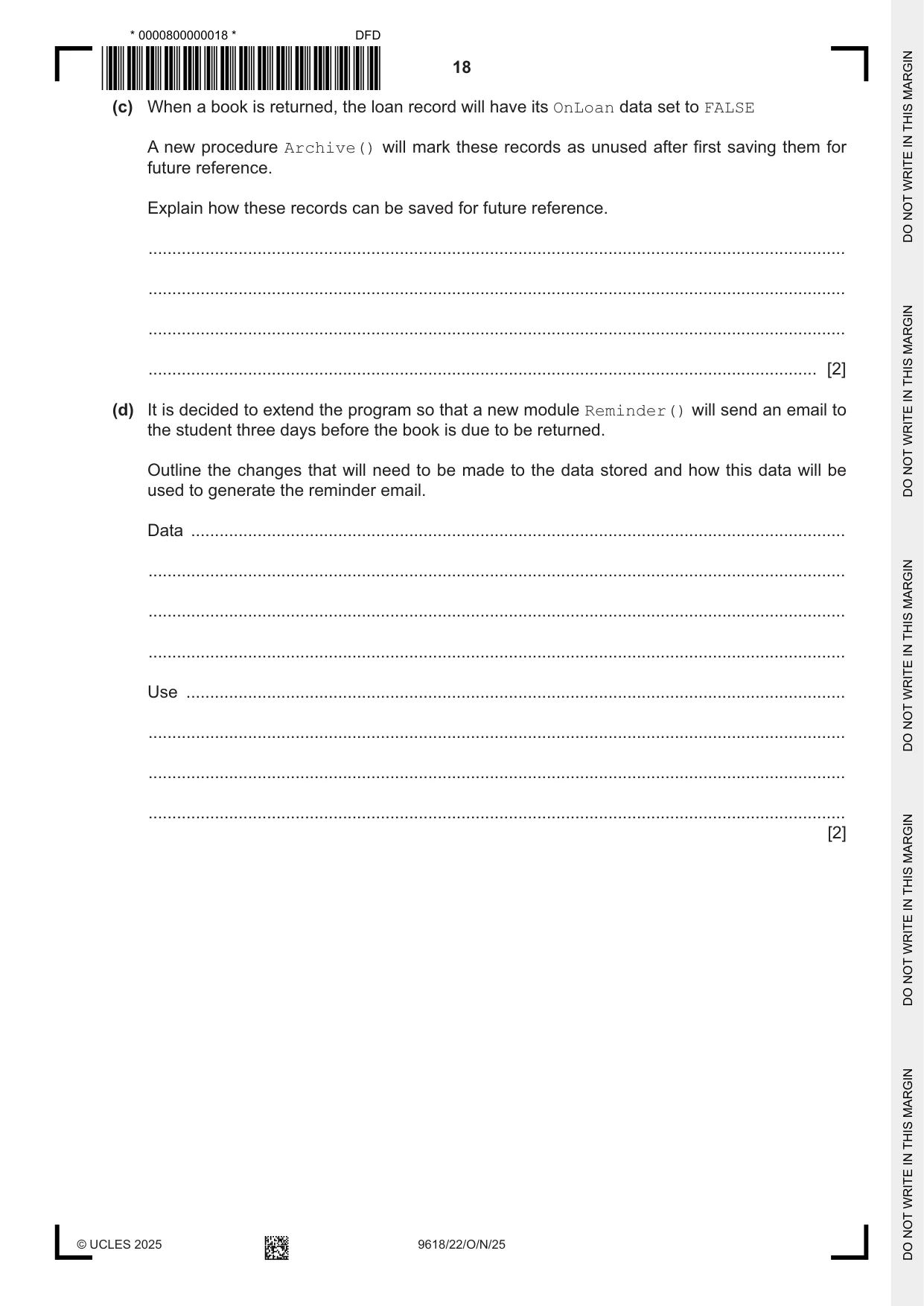
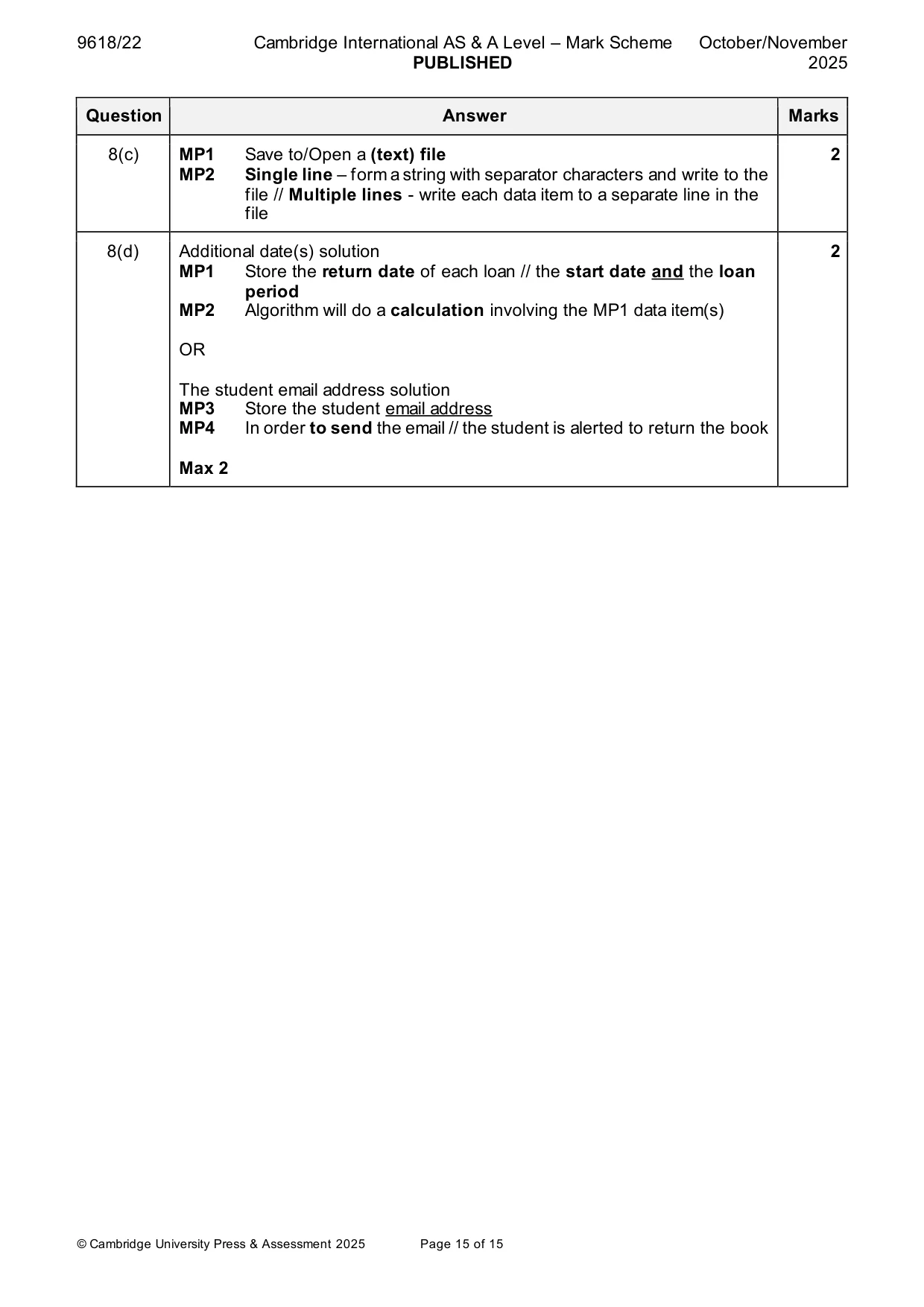
Mark scheme: 8(a) Example solution: 7 PROCEDURE CountLoans(ThisStudentID : STRING) DECLARE Index, LCount, RCount : INTEGER LCount 0 RCount 0 FOR Index 1 TO 7000 IF Loan[Index].StudentID = ThisStudentID THEN IF Loan[Index].OnLoan = FALSE THEN RCount RCount + 1 ELSE LCount LCount + 1 ENDIF ENDIF NEXT Index OUTPUT "Student has ", LCount, " books on loan" OUTPUT "and has returned ", RCount, " books" ENDPROCEDURE Mark as follows: MP1 Declaration of Index and two count variables MP2 Loop for 7000 iterations MP3 Index references an indexed data item with correct .dot notation MP4 Attempt to compare the StudentID field = parameter in a loop MP5 Test of the OnLoan field and correct logic for both outcomes MP6 Both count variables initialised and increment appropriate count in a loop MP7 Output includes both counts with a suitable message 8(b) Example solution: 7 FUNCTION NewLoan(ThisStudentID, ThisBookID : STRING) __ RETURNS BOOLEAN DECLARE Index : INTEGER DECLARE IsStored : BOOLEAN CONSTANT Blank = "" Index 1 IsStored FALSE WHILE Index <= 7000 AND NOT IsStored IF Loan[Index].StudentID = Blank THEN Loan[Index].StudentID ThisStudentID Loan[Index].BookID ThisBookID Loan[Index].OnLoan TRUE IsStored TRUE ENDIF Index Index + 1 ENDWHILE RETURN IsStored ENDFUNCTION Mark as follows: MP1 Loop through 7000 elements in Loan array – correct loop structure MP2 or until the first unused element is found // Correct RETURN inside a FOR loop MP3 Correct use of the indexed dot notation MP4 Test if record is unused (.StudentID = "")in a loop MP5 Two item assignment statements correct MP6 Loan[Index].OnLoan assigned TRUE MP7 Correct logic to return BOOLEAN in both cases (position found / no position available) Alternative solution: loop only (no ‘found’ mechanism) FOR Index 1 TO 7000 IF Loan[Index].StudentID = Blank THEN Loan[Index].StudentID ThisStudentID Loan[Index].BookID ThisBookID Loan[Index].OnLoan TRUE RETURN TRUE ENDIF NEXT RETURN FALSE 8(c) MP1 Save to/Open a (text) file 2 MP2 Single line – form a string with separator characters and write to the file // Multiple lines - write each data item to a separate line in the file 8(d) Additional date(s) solution 2 MP1 Store the return date of each loan // the start date and the loan period MP2 Algorithm will do a calculation involving the MP1 data item(s) OR The student email address solution MP3 Store the student email address MP4 In order to send the email // the student is alerted to return the book Max 2
What you needed in this session
Cambridge’s own grade thresholds for 2025 Oct/Nov, Paper 2 · Variant 2. A higher threshold means an easier paper — the bar moves with how the cohort did.