Cambridge A Level Computer Science 9618 — 2023 Oct/Nov Paper 2 · Variant 2
9618/22/O/N/23 · 8 questions · 75 marks · ≈84 min
The question paper and its mark scheme, free to read here and free to download. This is Cambridge’s own paper, exactly as it was sat.
Question paper20 pages


Mark scheme14 pages
Answers below. Sit the paper first if you are practising.

Questions as text
Q1 · A shop sells car accessories
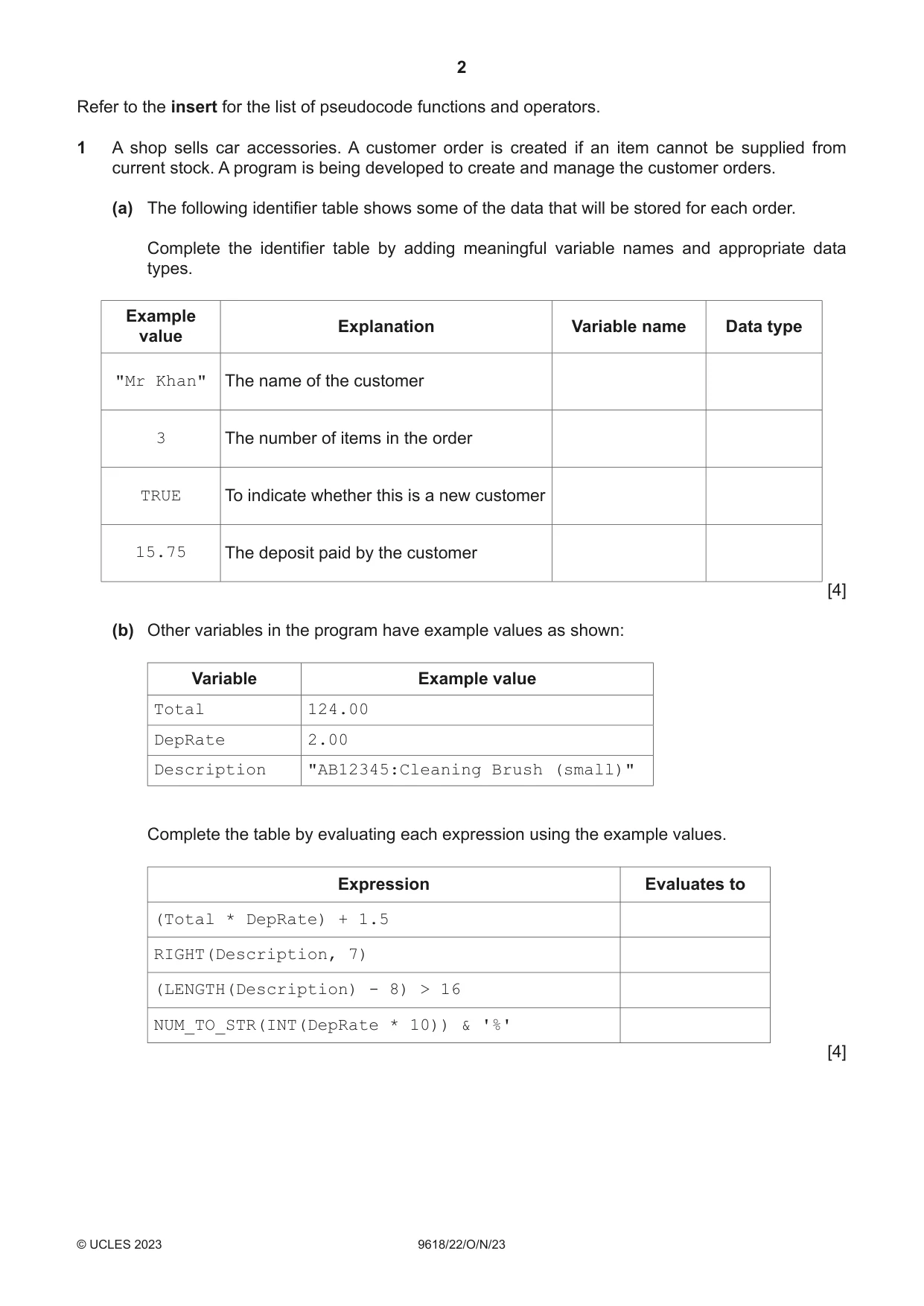
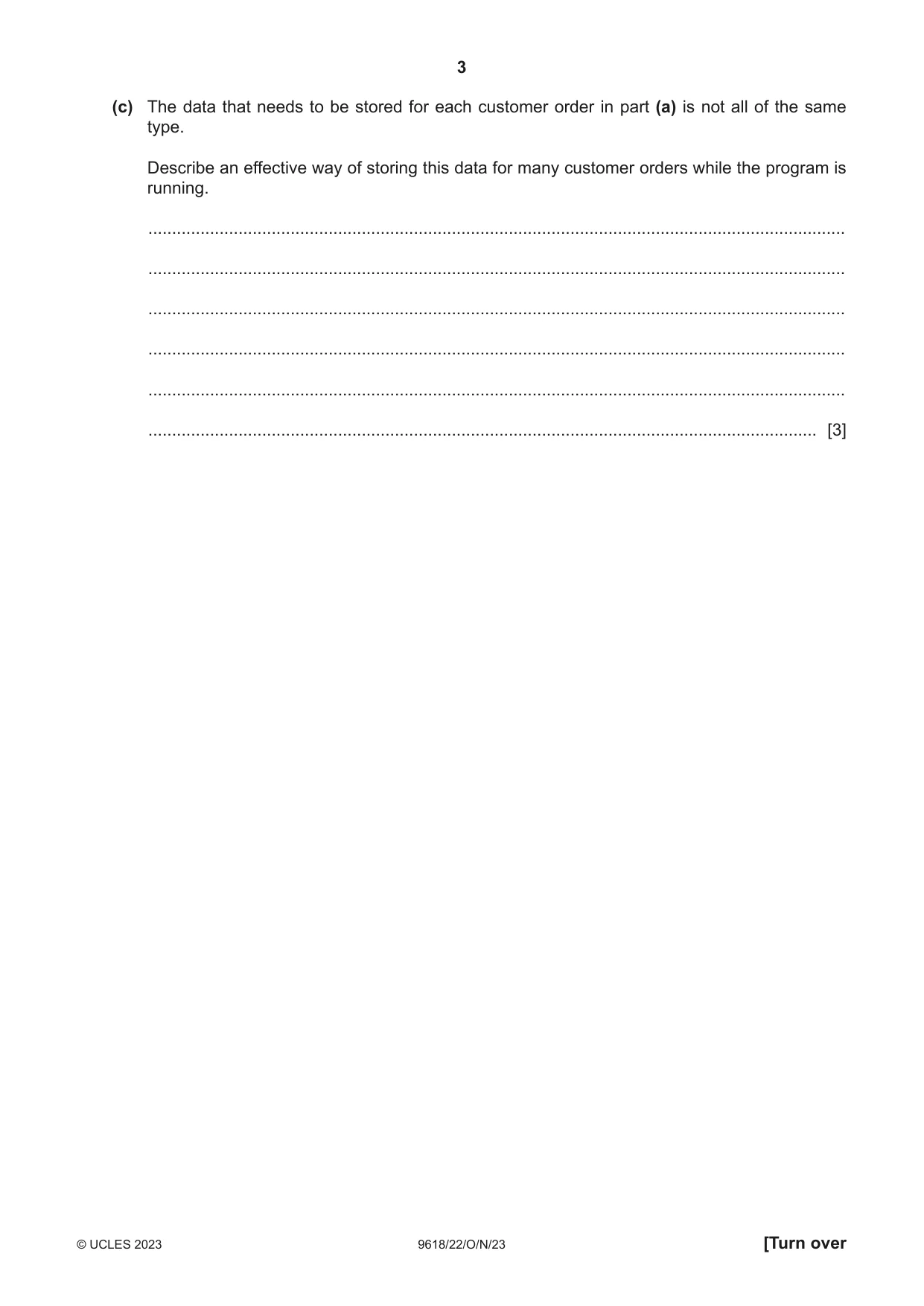
1 A shop sells car accessories. A customer order is created if an item cannot be supplied from current stock. A program is being developed to create and manage the customer orders. (a) The following identifier table shows some of the data that will be stored for each order. Complete the identifier table by adding meaningful variable names and appropriate data types. Example Explanation Variable name Data type value "Mr Khan" The name of the customer 3 The number of items in the order TRUE To indicate whether this is a new customer 15.75 The deposit paid by the customer [4] (b) Other variables in the program have example values as shown: Variable Example value Total 124.00 DepRate 2.00 Description "AB12345:Cleaning Brush (small)" Complete the table by evaluating each expression using the example values. Expression Evaluates to (Total * DepRate) + 1.5 RIGHT(Description, 7) (LENGTH(Description) - 8) > 16 NUM_TO_STR(INT(DepRate * 10)) & '%' [4] (c) The data that needs to be stored for each customer order in part (a) is not all of the same type. Describe an effective way of storing this data for many customer orders while the program is running. ................................................................................................................................................... ................................................................................................................................................... ................................................................................................................................................... ................................................................................................................................................... ................................................................................................................................................... ............................................................................................................................................. [3]
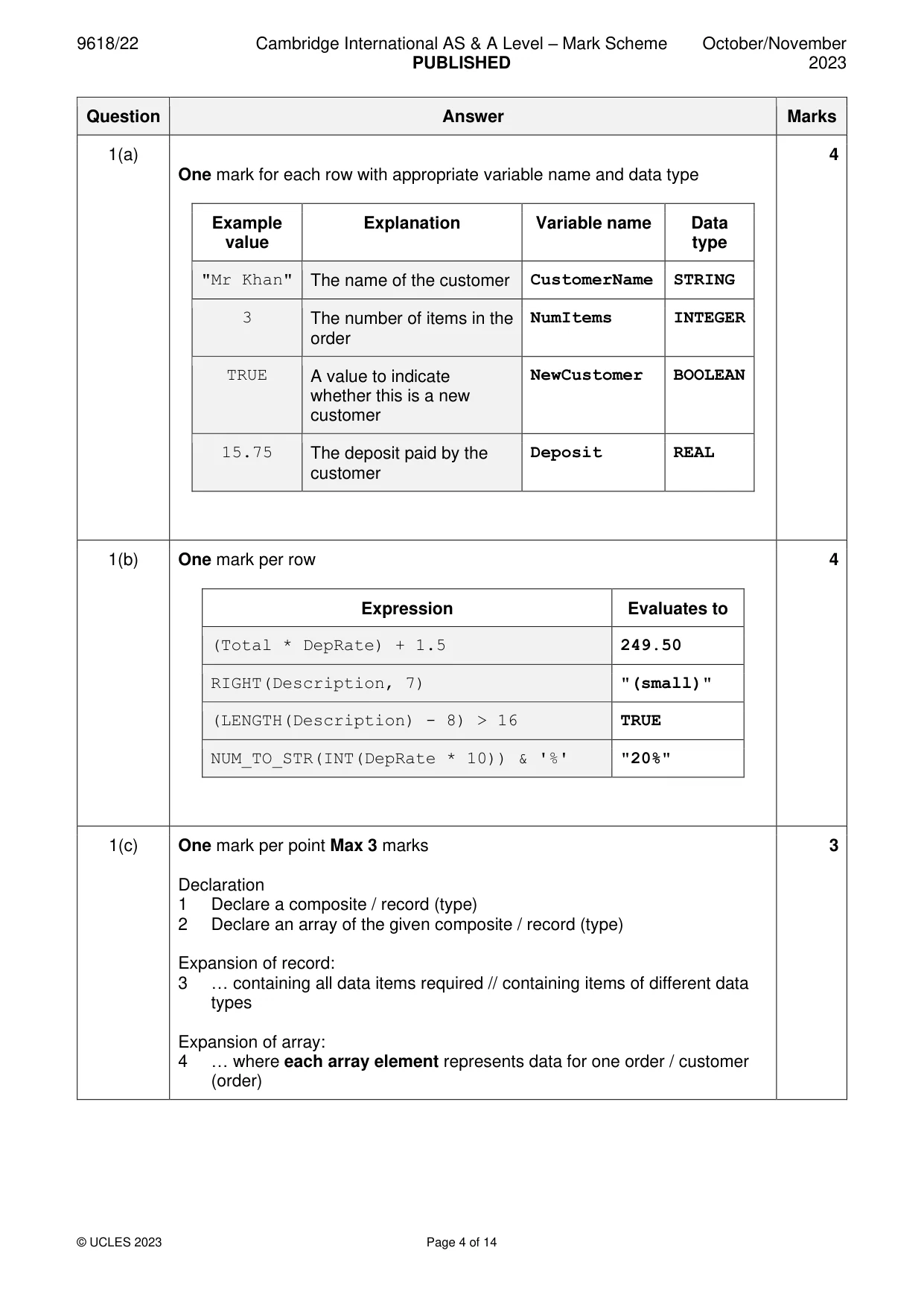
Mark scheme: Question Answer Marks 1(a) 4 One mark for each row with appropriate variable name and data type Example Explanation Variable name Data value type "Mr Khan" The name of the customer CustomerName STRING 3 The number of items in the NumItems INTEGER order TRUE A value to indicate NewCustomer BOOLEAN whether this is a new customer 15.75 The deposit paid by the Deposit REAL customer 1(b) One mark per row 4 Expression Evaluates to (Total * DepRate) + 1.5 249.50 RIGHT(Description, 7) "(small)" (LENGTH(Description) - 8) > 16 TRUE NUM_TO_STR(INT(DepRate * 10)) & '%' "20%" 1(c) One mark per point Max 3 marks 3 Declaration 1 Declare a composite / record (type) 2 Declare an array of the given composite / record (type) Expansion of record: 3 … containing all data items required // containing items of different data types Expansion of array: 4 … where each array element represents data for one order / customer (order)
Q2 · An algorithm will: 1
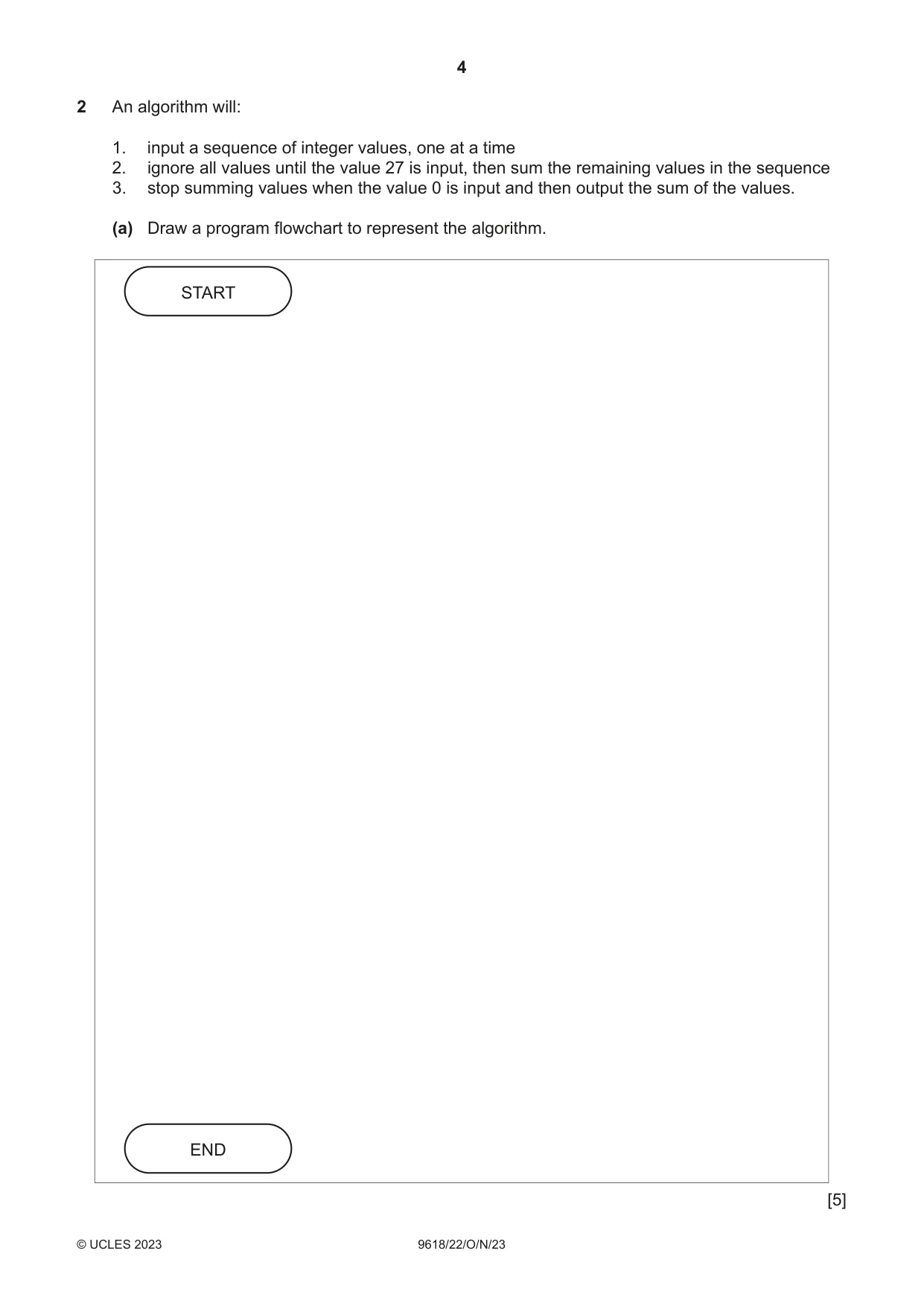
2 An algorithm will: 1. input a sequence of integer values, one at a time 2. ignore all values until the value 27 is input, then sum the remaining values in the sequence 3. stop summing values when the value 0 is input and then output the sum of the values. (a) Draw a program flowchart to represent the algorithm. START END [5] (b) The solution to the algorithm includes iteration. Give the name of a suitable loop structure that could be used. Justify your answer. Name ........................................................................................................................................ Justification ............................................................................................................................... ................................................................................................................................................... [2]
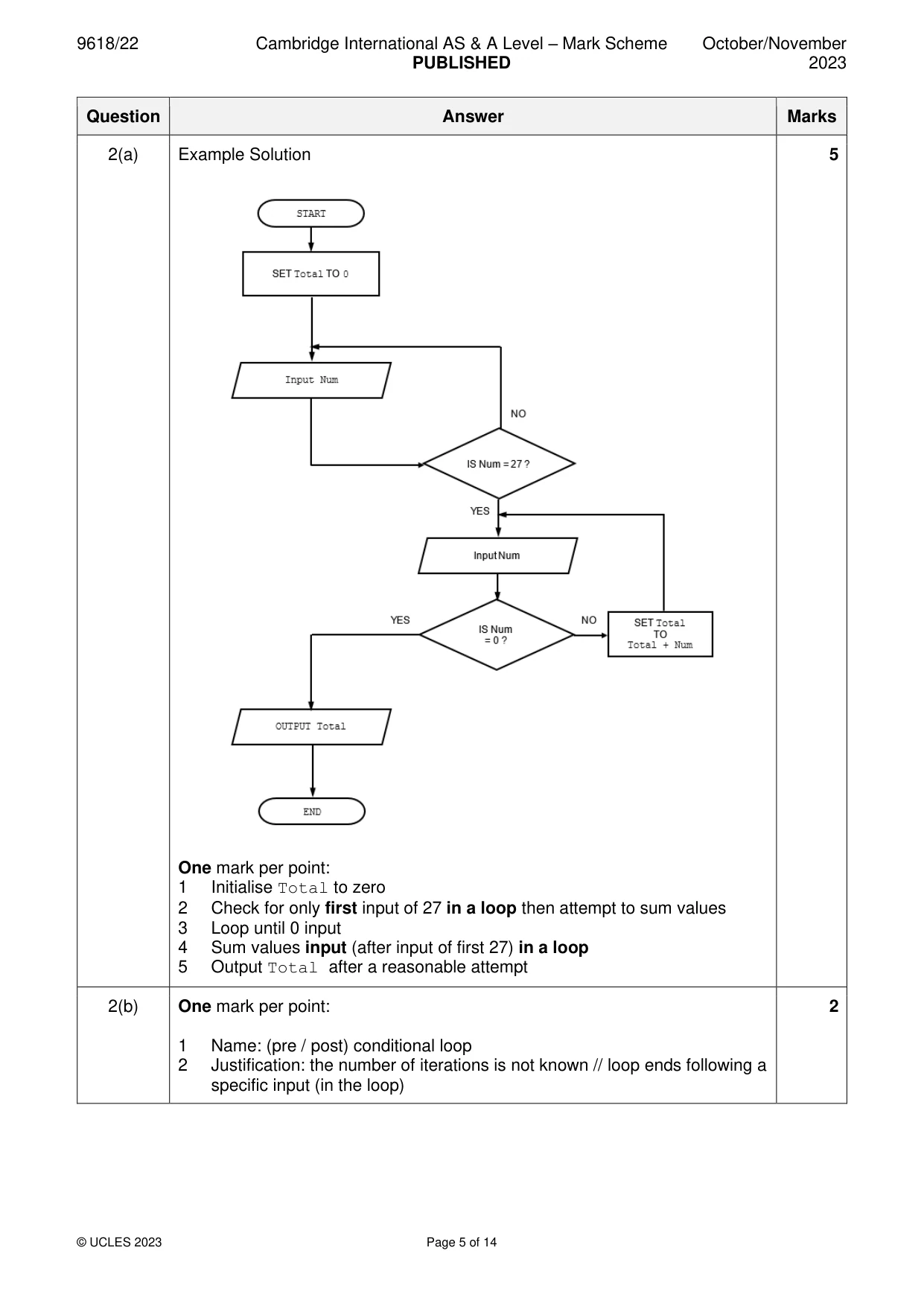
Mark scheme: 2(a) Example Solution 5 One mark per point: 1 Initialise Total to zero 2 Check for only first input of 27 in a loop then attempt to sum values 3 Loop until 0 input 4 Sum values input (after input of first 27) in a loop 5 Output Total after a reasonable attempt 2(b) One mark per point: 2 1 Name: (pre / post) conditional loop 2 Justification: the number of iterations is not known // loop ends following a specific input (in the loop)
Q3 · The diagram represents a linked list Abstract Data Type (ADT)
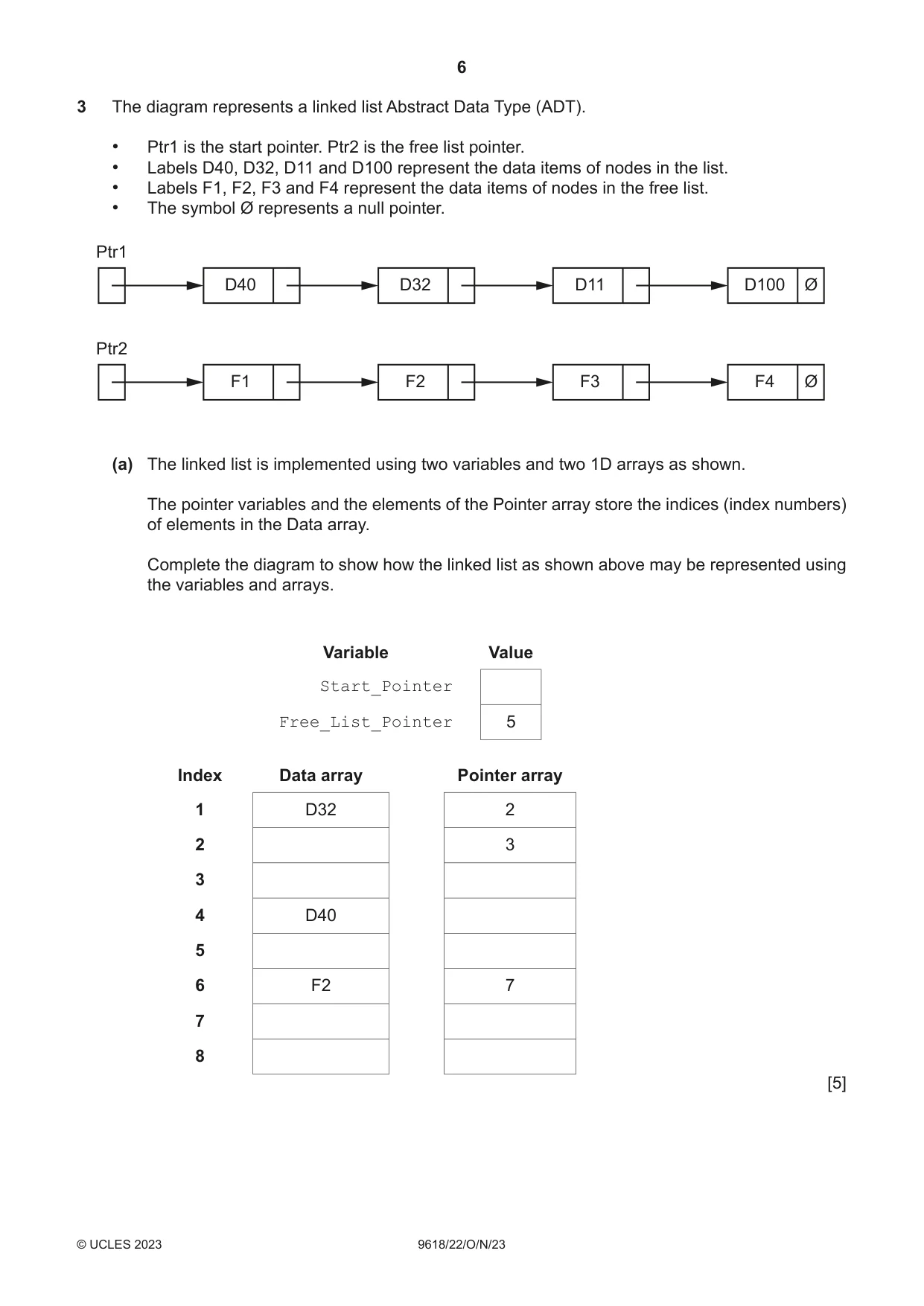
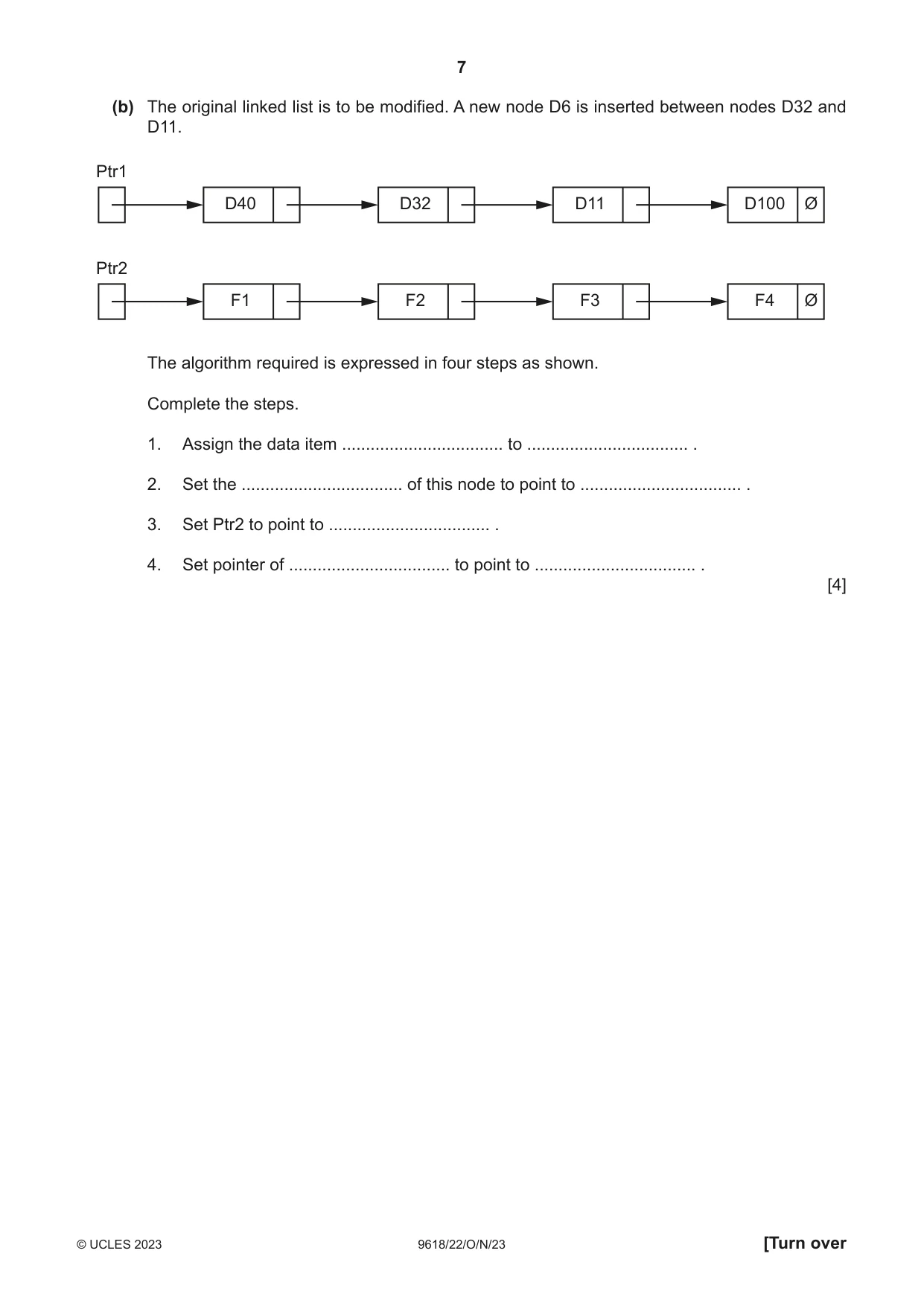
3 The diagram represents a linked list Abstract Data Type (ADT). • Ptr1 is the start pointer. Ptr2 is the free list pointer. • Labels D40, D32, D11 and D100 represent the data items of nodes in the list. • Labels F1, F2, F3 and F4 represent the data items of nodes in the free list. • The symbol Ø represents a null pointer. Ptr1 D40 D32 D11 D100 Ø Ptr2 F1 F2 F3 F4 Ø (a) The linked list is implemented using two variables and two 1D arrays as shown. The pointer variables and the elements of the Pointer array store the indices (index numbers) of elements in the Data array. Complete the diagram to show how the linked list as shown above may be represented using the variables and arrays. Variable Value Start_Pointer Free_List_Pointer 5 Index Data array Pointer array 1 D32 2 2 3 3 4 D40 5 6 F2 7 7 8 [5] (b) The original linked list is to be modified. A new node D6 is inserted between nodes D32 and D11. Ptr1 D40 D32 D11 D100 Ø Ptr2 F1 F2 F3 F4 Ø The algorithm required is expressed in four steps as shown. Complete the steps. 1. Assign the data item .................................. to .................................. . 2. Set the .................................. of this node to point to .................................. . 3. Set Ptr2 to point to .................................. . 4. Set pointer of .................................. to point to .................................. . [4]
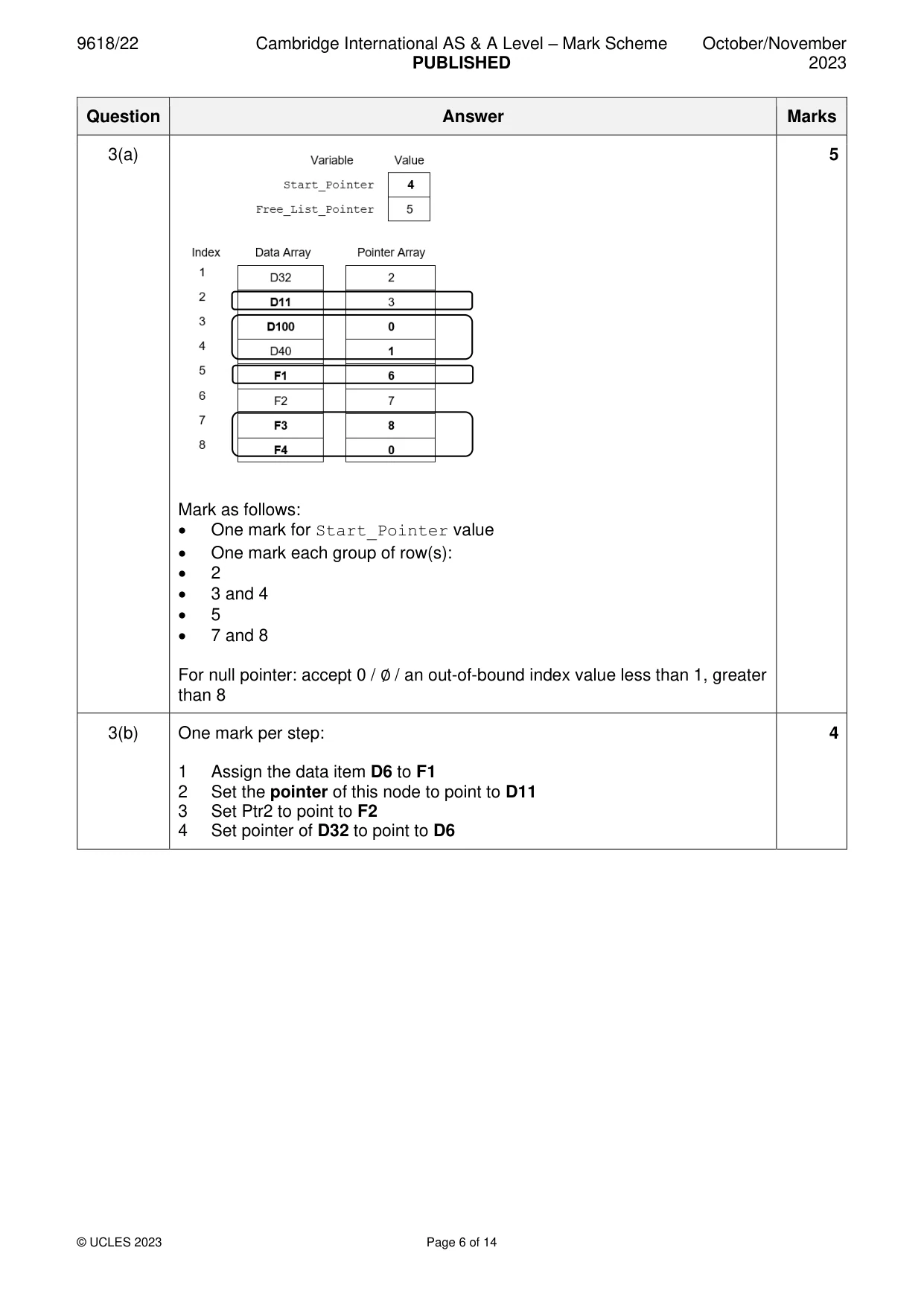
Mark scheme: 3(a) 5 Mark as follows: • One mark for Start_Pointer value • One mark each group of row(s): • 2 • 3 and 4 • 5 • 7 and 8 For null pointer: accept 0 / ∅ / an out-of-bound index value less than 1, greater than 8 3(b) One mark per step: 4 1 Assign the data item D6 to F1 2 Set the pointer of this node to point to D11 3 Set Ptr2 to point to F2 4 Set pointer of D32 to point to D6
Q4 · A procedure Count() will: 1
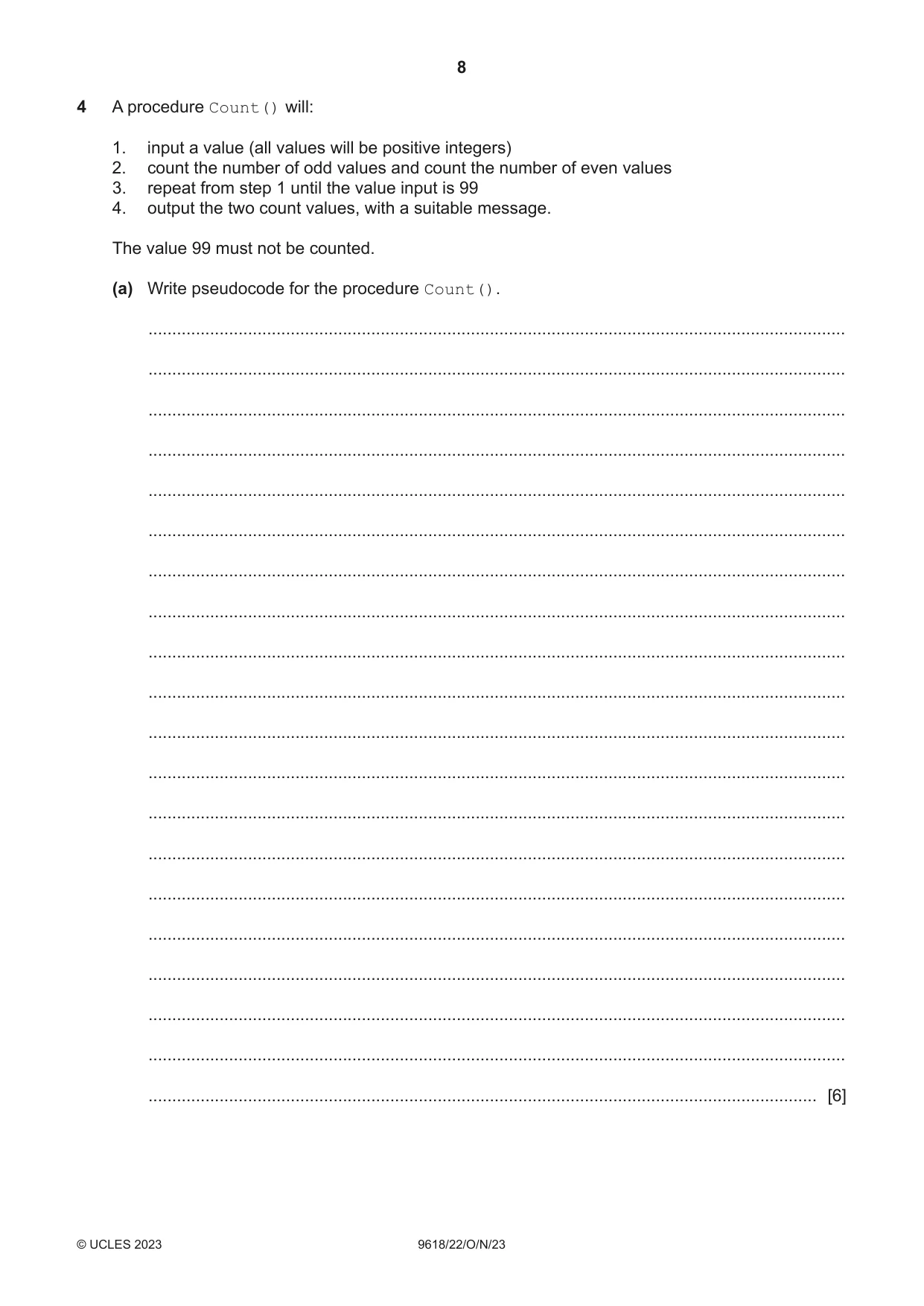
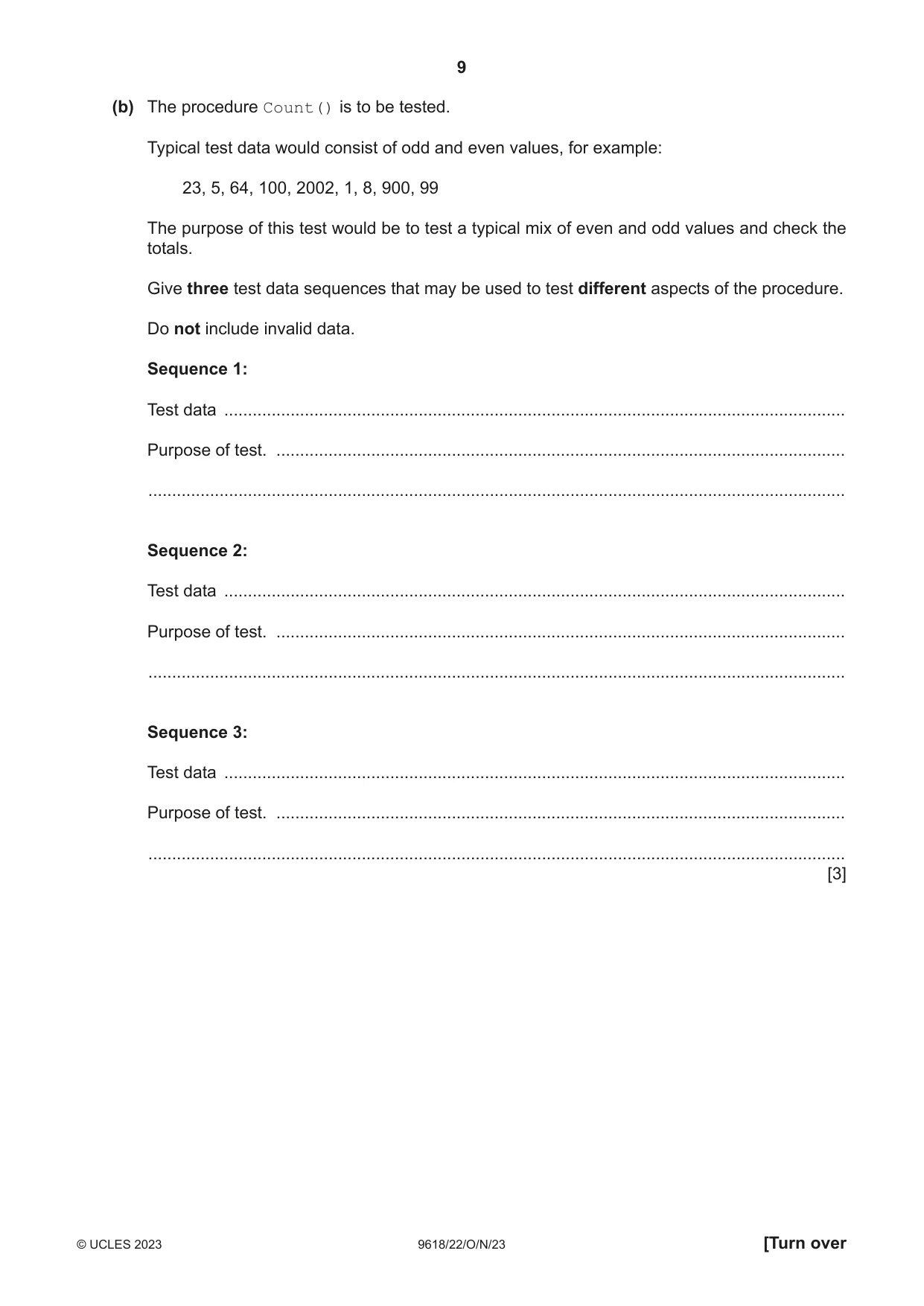
4 A procedure Count() will: 1. input a value (all values will be positive integers) 2. count the number of odd values and count the number of even values 3. repeat from step 1 until the value input is 99 4. output the two count values, with a suitable message. The value 99 must not be counted. (a) Write pseudocode for the procedure Count(). ................................................................................................................................................... ................................................................................................................................................... ................................................................................................................................................... ................................................................................................................................................... ................................................................................................................................................... ................................................................................................................................................... ................................................................................................................................................... ................................................................................................................................................... ................................................................................................................................................... ................................................................................................................................................... ................................................................................................................................................... ................................................................................................................................................... ................................................................................................................................................... ................................................................................................................................................... ................................................................................................................................................... ................................................................................................................................................... ................................................................................................................................................... ................................................................................................................................................... ................................................................................................................................................... ............................................................................................................................................. [6] (b) The procedure Count() is to be tested. Typical test data would consist of odd and even values, for example: 23, 5, 64, 100, 2002, 1, 8, 900, 99 The purpose of this test would be to test a typical mix of even and odd values and check the totals. Give three test data sequences that may be used to test different aspects of the procedure. Do not include invalid data. Sequence 1: Test data ................................................................................................................................... Purpose of test. ........................................................................................................................ ................................................................................................................................................... Sequence 2: Test data ................................................................................................................................... Purpose of test. ........................................................................................................................ ................................................................................................................................................... Sequence 3: Test data ................................................................................................................................... Purpose of test. ........................................................................................................................ ................................................................................................................................................... [3]
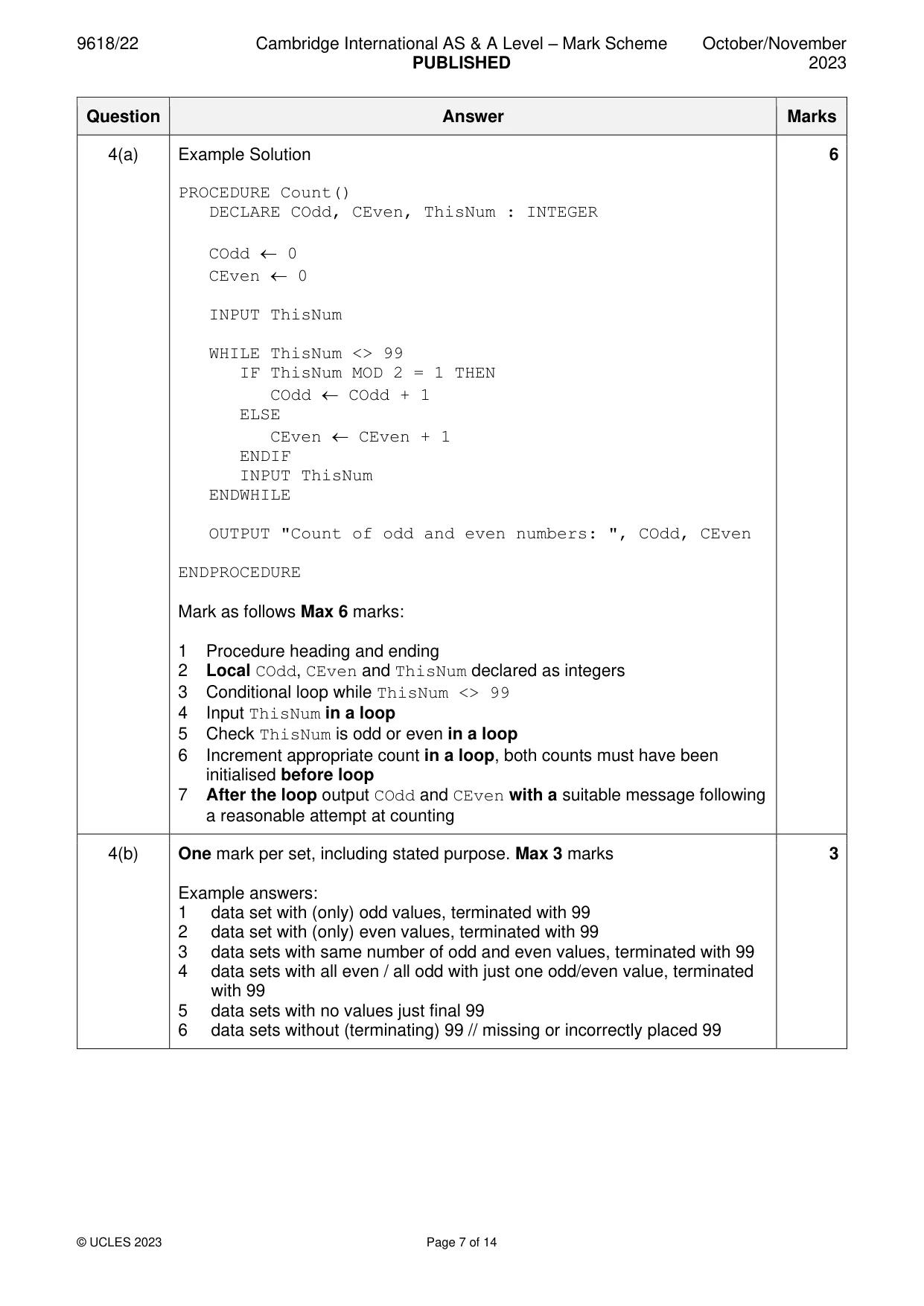
Mark scheme: 4(a) Example Solution 6 PROCEDURE Count() DECLARE COdd, CEven, ThisNum : INTEGER COdd 0 CEven 0 INPUT ThisNum WHILE ThisNum <> 99 IF ThisNum MOD 2 = 1 THEN COdd COdd + 1 ELSE CEven CEven + 1 ENDIF INPUT ThisNum ENDWHILE OUTPUT "Count of odd and even numbers: ", COdd, CEven ENDPROCEDURE Mark as follows Max 6 marks: 1 Procedure heading and ending 2 Local COdd, CEven and ThisNum declared as integers 3 Conditional loop while ThisNum <> 99 4 Input ThisNum in a loop 5 Check ThisNum is odd or even in a loop 6 Increment appropriate count in a loop, both counts must have been initialised before loop 7 After the loop output COdd and CEven with a suitable message following a reasonable attempt at counting 4(b) One mark per set, including stated purpose. Max 3 marks 3 Example answers: 1 data set with (only) odd values, terminated with 99 2 data set with (only) even values, terminated with 99 3 data sets with same number of odd and even values, terminated with 99 4 data sets with all even / all odd with just one odd/even value, terminated with 99 5 data sets with no values just final 99 6 data sets without (terminating) 99 // missing or incorrectly placed 99
Q5 · A global 1D array of integers contains four elements, which are assigned values as shown…
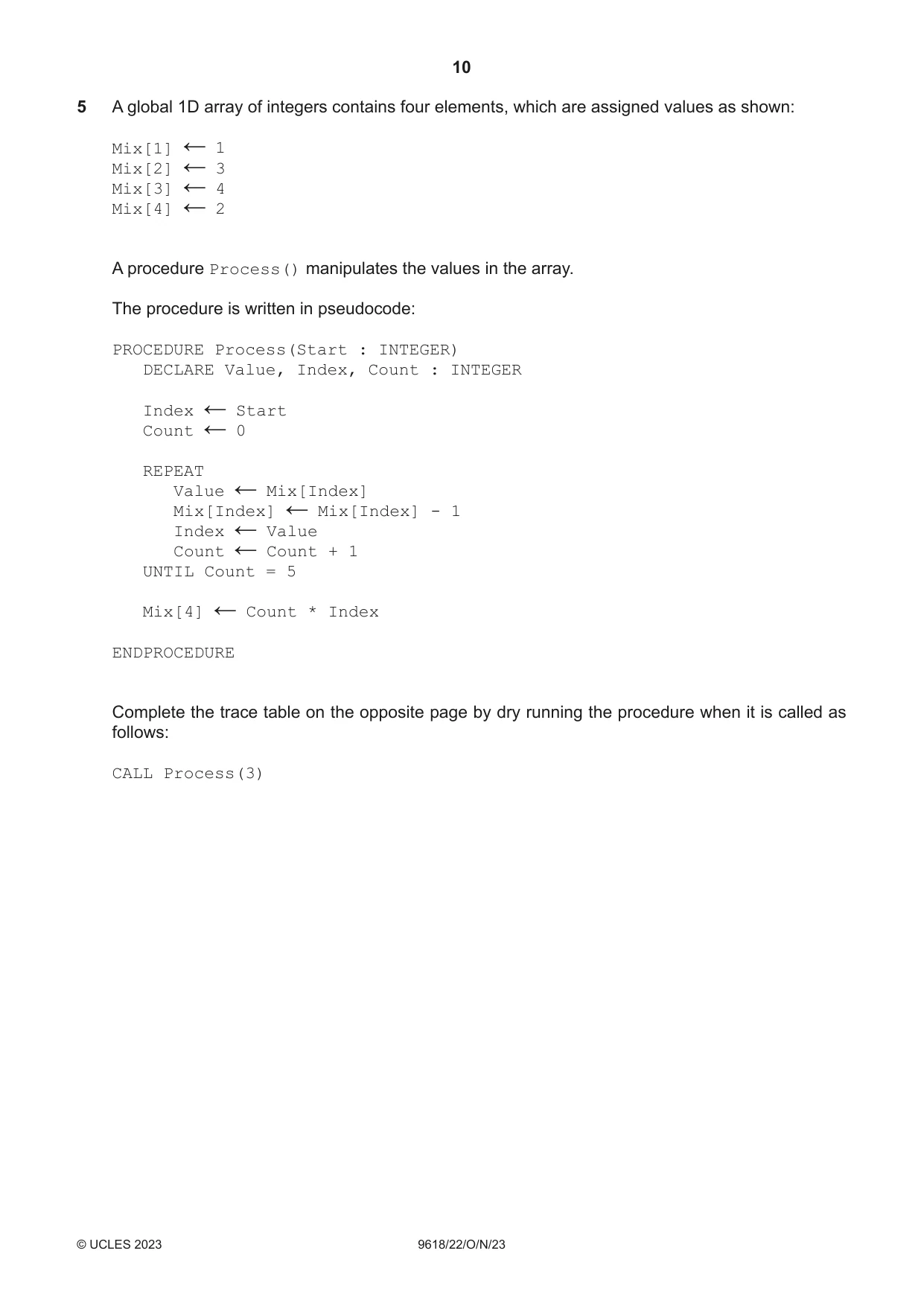
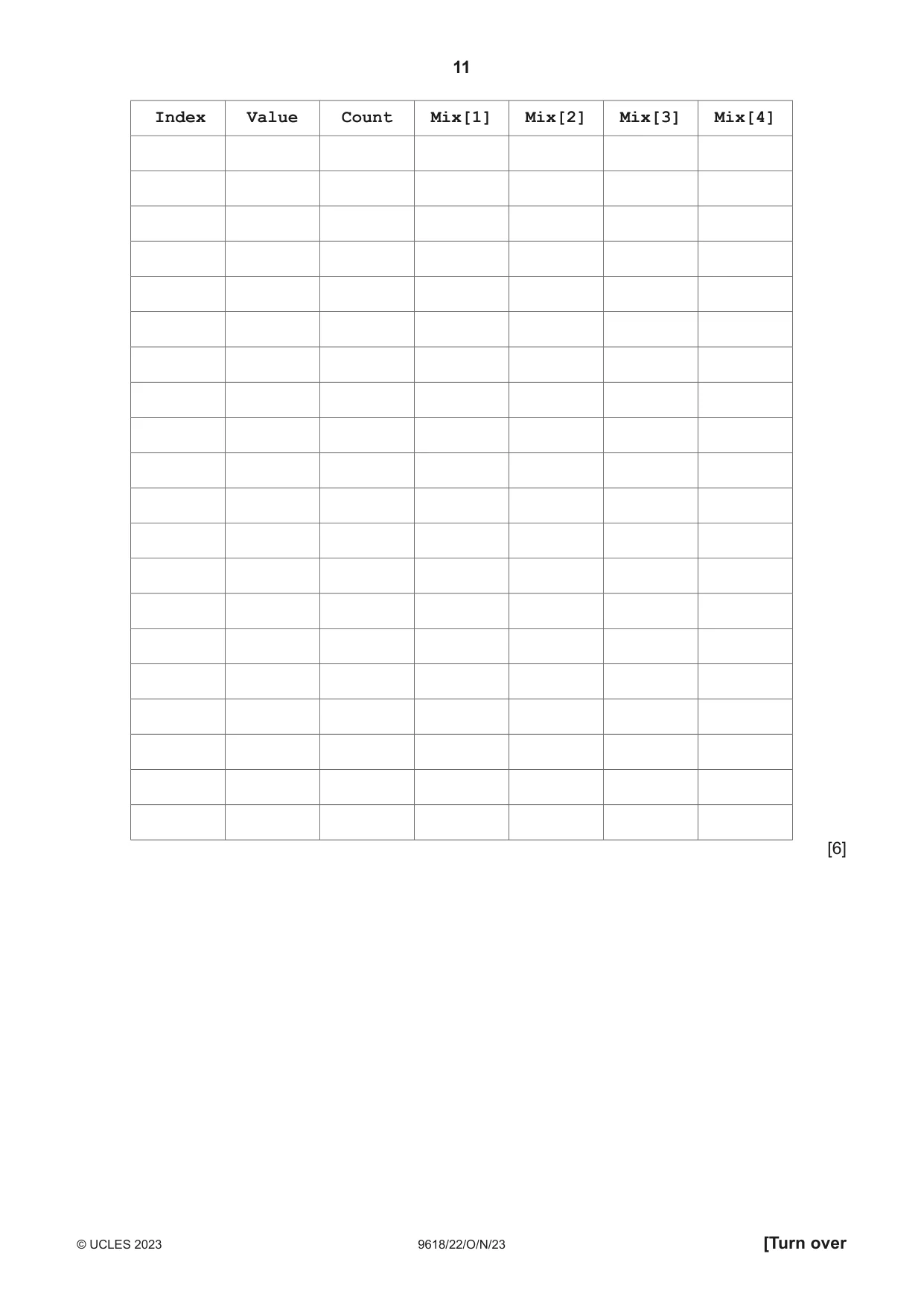
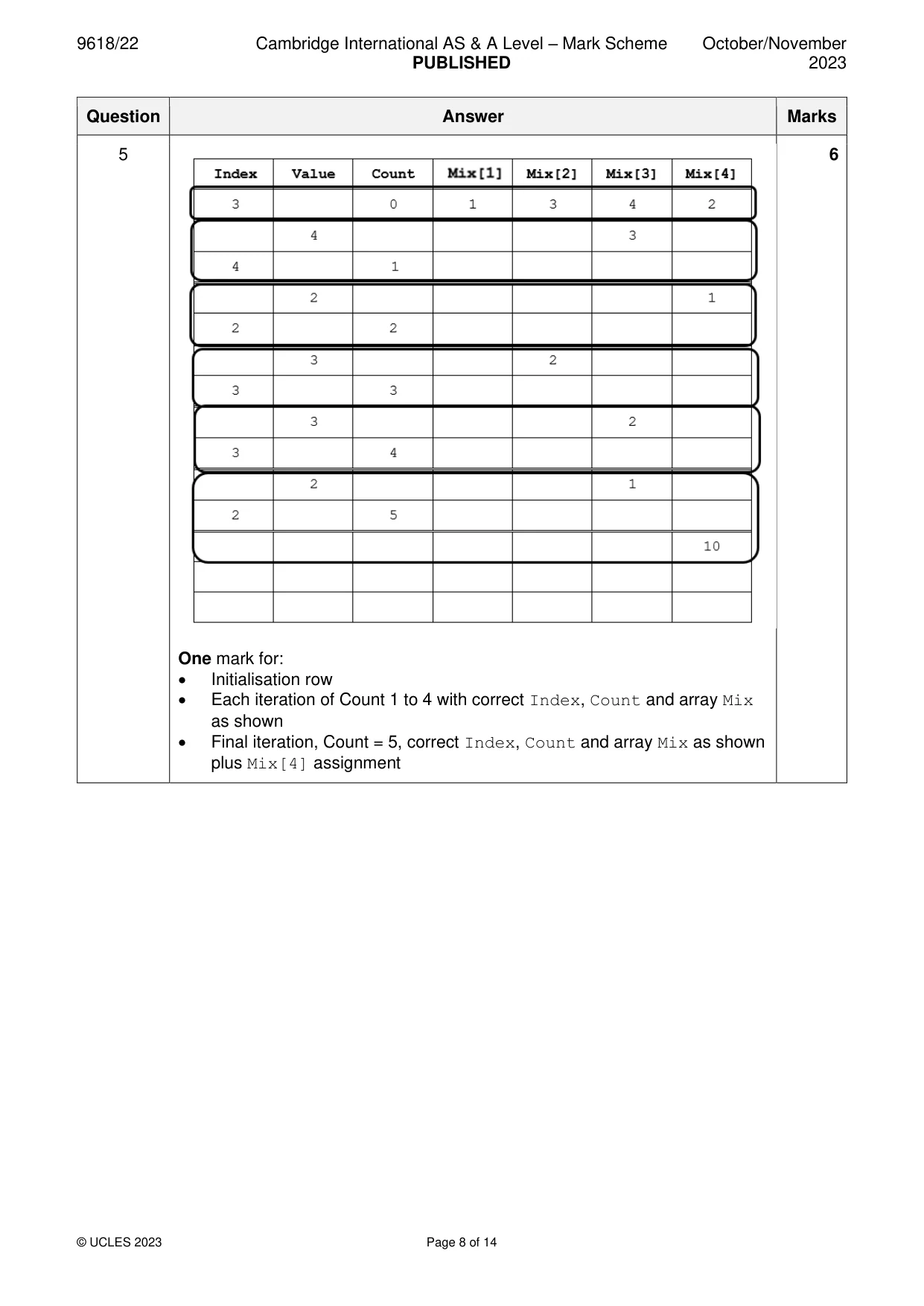
5 A global 1D array of integers contains four elements, which are assigned values as shown: Mix[1] 1 ← Mix[2] 3 ← Mix[3] 4 ← Mix[4] 2 ← A procedure Process() manipulates the values in the array. The procedure is written in pseudocode: PROCEDURE Process(Start : INTEGER) DECLARE Value, Index, Count : INTEGER Index Start ← Count 0 ← REPEAT Value Mix[Index] ← Mix[Index] Mix[Index] - 1 ← Index Value ← Count Count + 1 ← UNTIL Count = 5 Mix[4] Count * Index ← ENDPROCEDURE Complete the trace table on the opposite page by dry running the procedure when it is called as follows: CALL Process(3) Index Value Count Mix[1] Mix[2] Mix[3] Mix[4] [6]
Mark scheme: 5 6 One mark for: • Initialisation row • Each iteration of Count 1 to 4 with correct Index, Count and array Mix as shown • Final iteration, Count = 5, correct Index, Count and array Mix as shown plus Mix[4] assignment
Q6 · A procedure CreateFiles() will take two parameters: • a string representing a file name •…
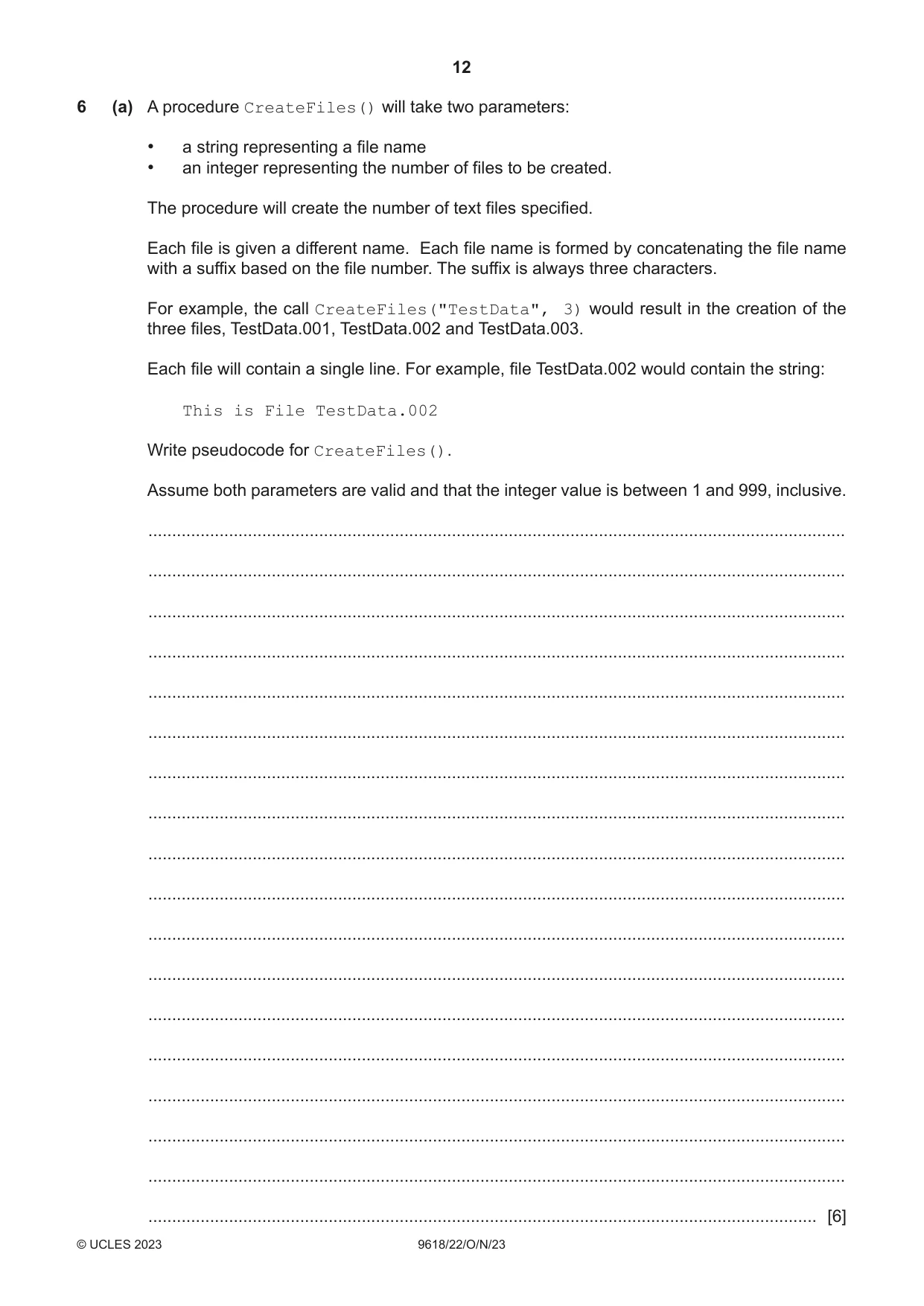
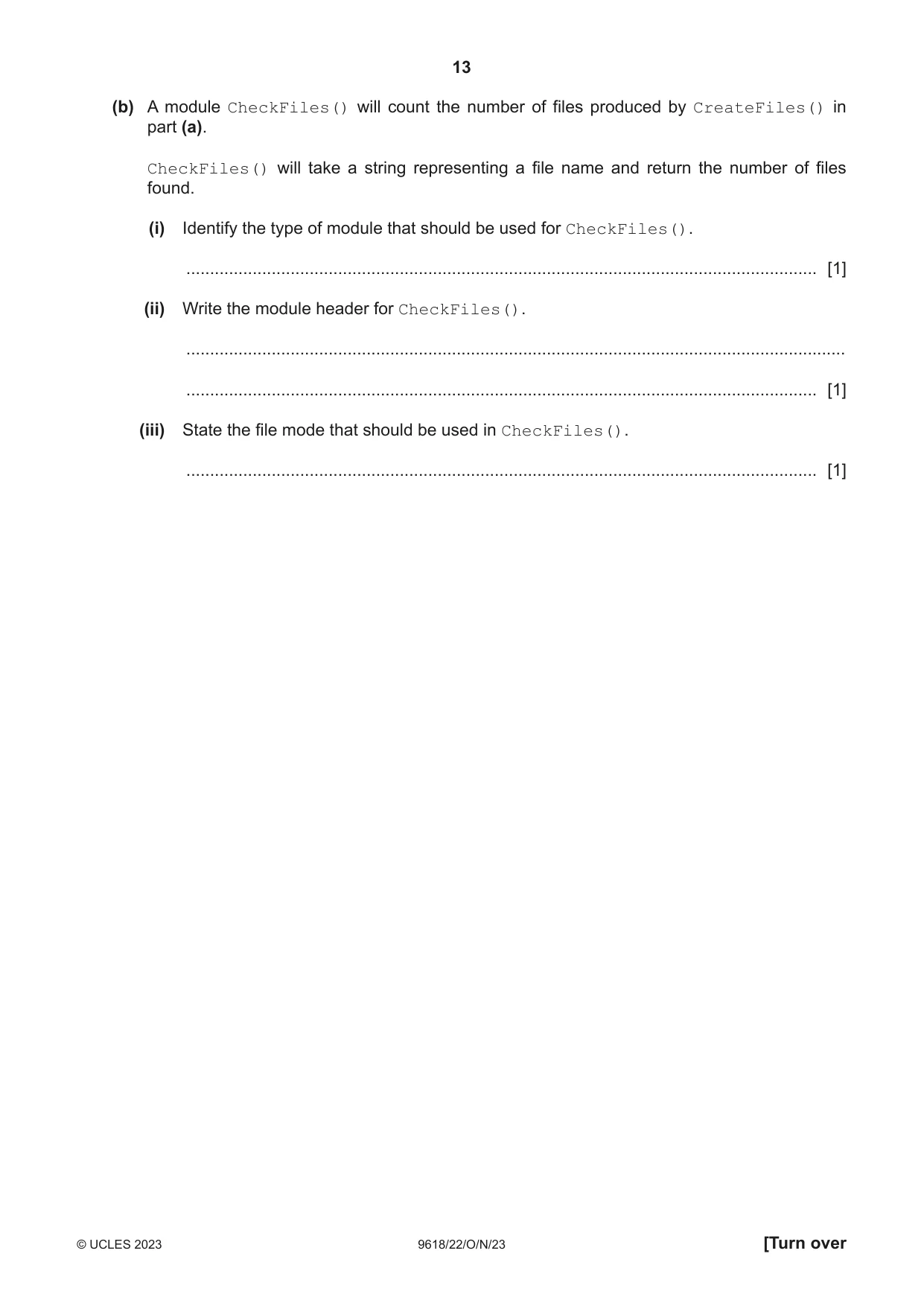
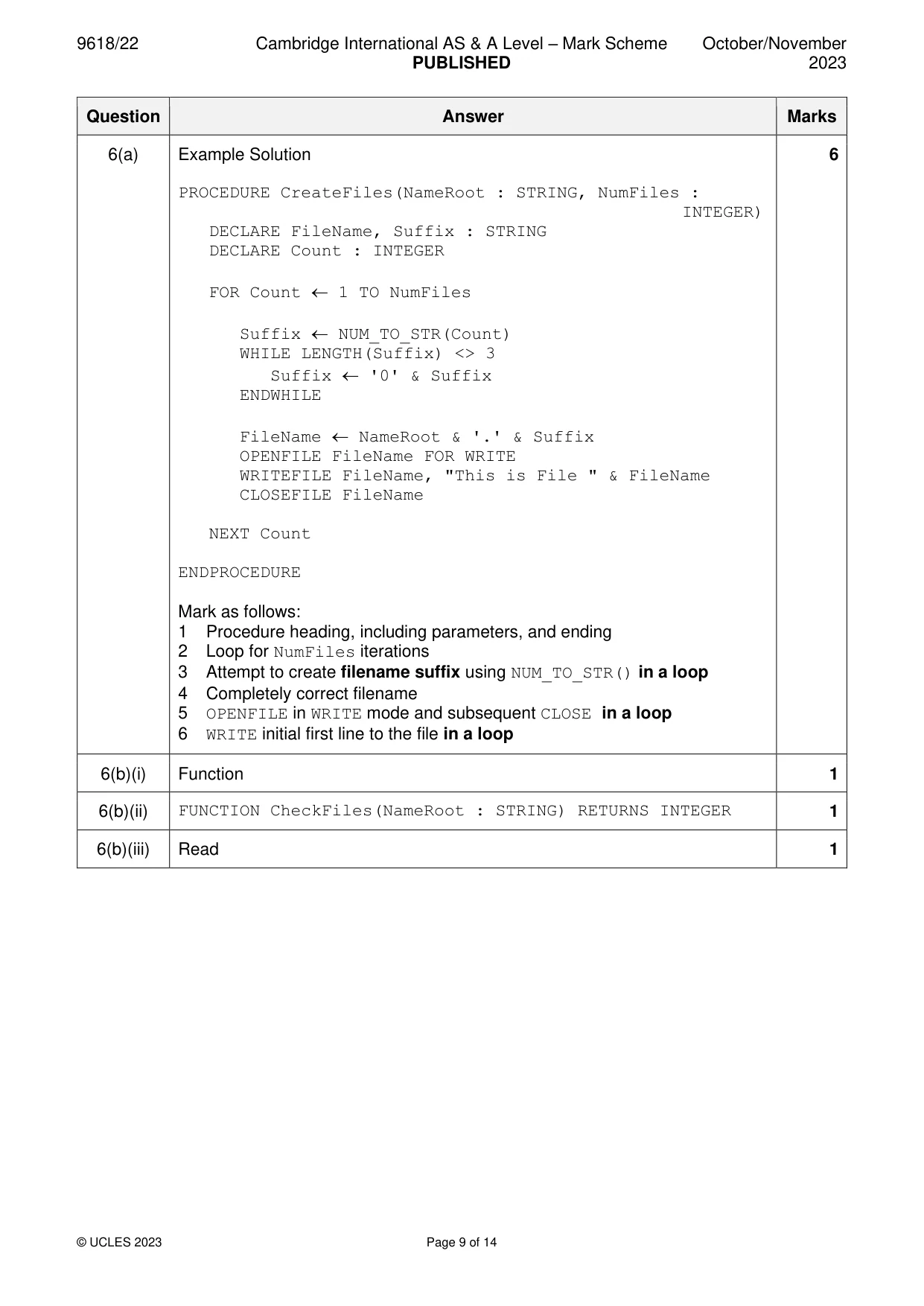
6 (a) A procedure CreateFiles() will take two parameters: • a string representing a file name • an integer representing the number of files to be created. The procedure will create the number of text files specified. Each file is given a different name. Each file name is formed by concatenating the file name with a suffix based on the file number. The suffix is always three characters. For example, the call CreateFiles("TestData", 3) would result in the creation of the three files, TestData.001, TestData.002 and TestData.003. Each file will contain a single line. For example, file TestData.002 would contain the string: This is File TestData.002 Write pseudocode for CreateFiles(). Assume both parameters are valid and that the integer value is between 1 and 999, inclusive. ................................................................................................................................................... ................................................................................................................................................... ................................................................................................................................................... ................................................................................................................................................... ................................................................................................................................................... ................................................................................................................................................... ................................................................................................................................................... ................................................................................................................................................... ................................................................................................................................................... ................................................................................................................................................... ................................................................................................................................................... ................................................................................................................................................... ................................................................................................................................................... ................................................................................................................................................... ................................................................................................................................................... ................................................................................................................................................... ................................................................................................................................................... ............................................................................................................................................. [6] (b) A module CheckFiles() will count the number of files produced by CreateFiles() in part (a). CheckFiles() will take a string representing a file name and return the number of files found. (i) Identify the type of module that should be used for CheckFiles(). ..................................................................................................................................... [1] (ii) Write the module header for CheckFiles(). ........................................................................................................................................... ..................................................................................................................................... [1] (iii) State the file mode that should be used in CheckFiles(). ..................................................................................................................................... [1]
Mark scheme: 6(a) Example Solution 6 PROCEDURE CreateFiles(NameRoot : STRING, NumFiles : INTEGER) DECLARE FileName, Suffix : STRING DECLARE Count : INTEGER FOR Count 1 TO NumFiles Suffix NUM_TO_STR(Count) WHILE LENGTH(Suffix) <> 3 Suffix '0' & Suffix ENDWHILE FileName NameRoot & '.' & Suffix OPENFILE FileName FOR WRITE WRITEFILE FileName, "This is File " & FileName CLOSEFILE FileName NEXT Count ENDPROCEDURE Mark as follows: 1 Procedure heading, including parameters, and ending 2 Loop for NumFiles iterations 3 Attempt to create filename suffix using NUM_TO_STR() in a loop 4 Completely correct filename 5 OPENFILE in WRITE mode and subsequent CLOSE in a loop 6 WRITE initial first line to the file in a loop 6(b)(i) Function 1 6(b)(ii) FUNCTION CheckFiles(NameRoot : STRING) RETURNS INTEGER 1 6(b)(iii) Read 1
Q7 · A program contains six modules: Pseudocode module header PROCEDURE Module-A() PROCEDURE…
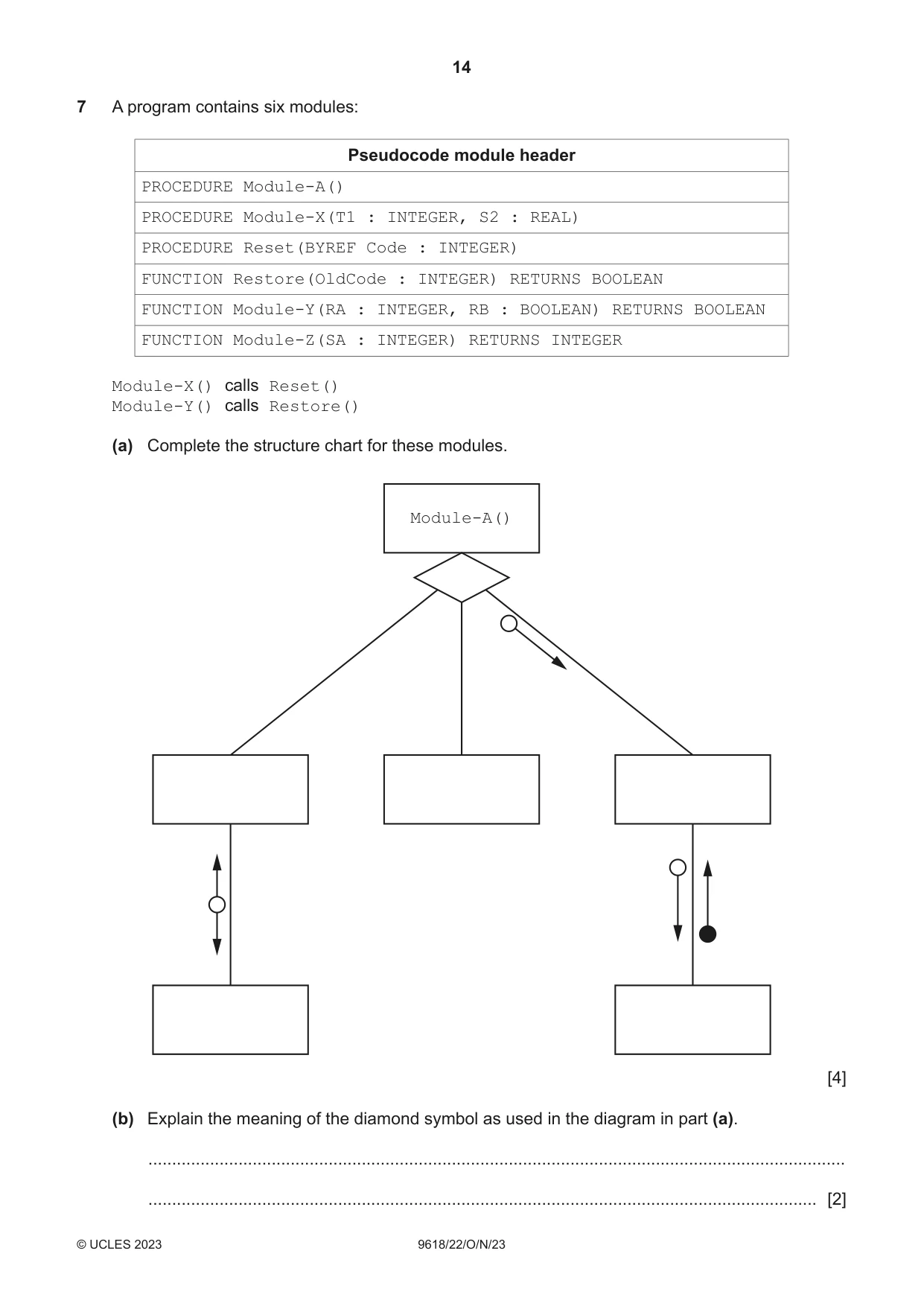
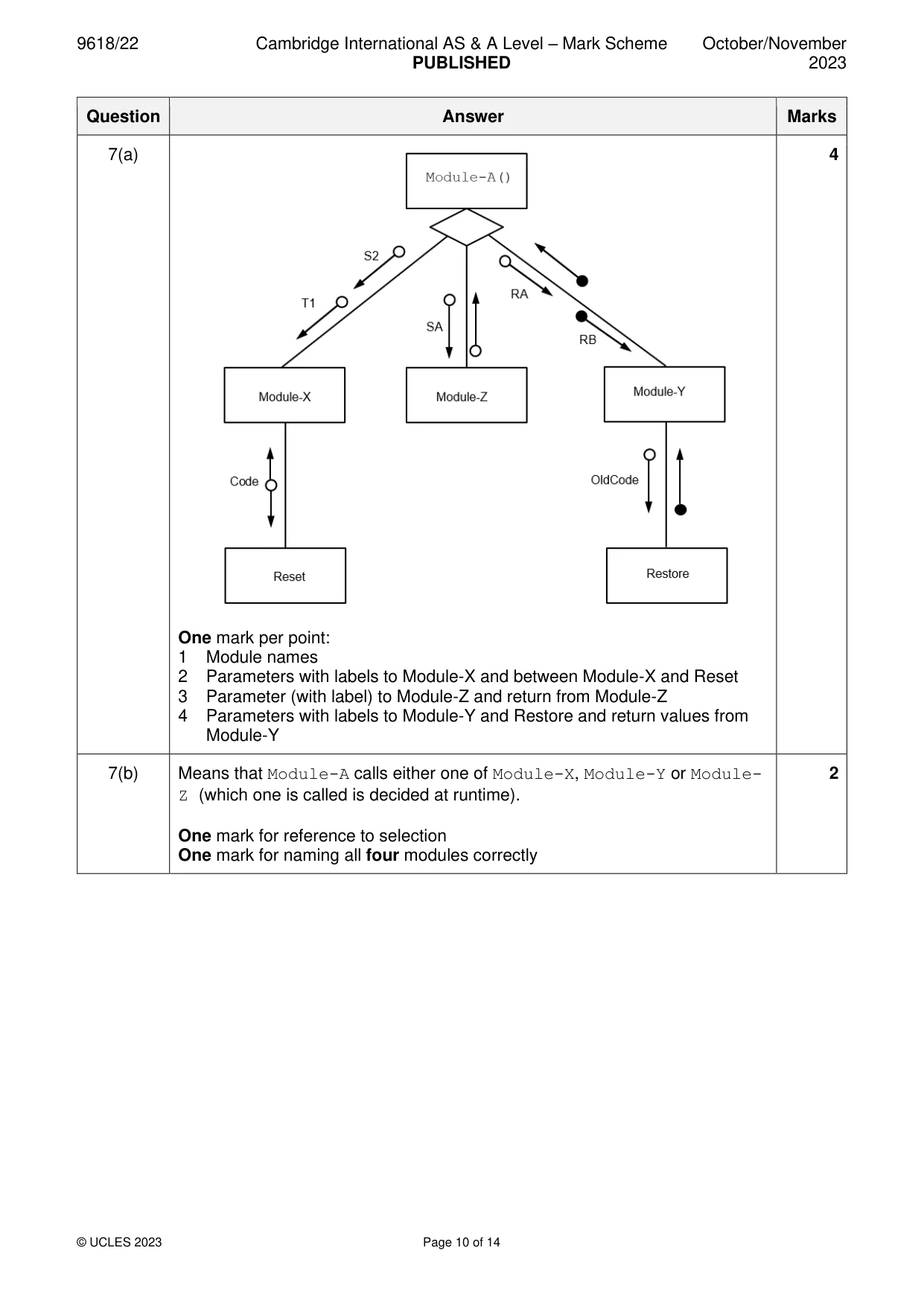
7 A program contains six modules: Pseudocode module header PROCEDURE Module-A() PROCEDURE Module-X(T1 : INTEGER, S2 : REAL) PROCEDURE Reset(BYREF Code : INTEGER) FUNCTION Restore(OldCode : INTEGER) RETURNS BOOLEAN FUNCTION Module-Y(RA : INTEGER, RB : BOOLEAN) RETURNS BOOLEAN FUNCTION Module-Z(SA : INTEGER) RETURNS INTEGER Module-X() calls Reset() Module-Y() calls Restore() (a) Complete the structure chart for these modules. Module-A() [4] (b) Explain the meaning of the diamond symbol as used in the diagram in part (a). ................................................................................................................................................... ............................................................................................................................................. [2]
Mark scheme: 7(a) 4 One mark per point: 1 Module names 2 Parameters with labels to Module-X and between Module-X and Reset 3 Parameter (with label) to Module-Z and return from Module-Z 4 Parameters with labels to Module-Y and Restore and return values from Module-Y 7(b) Means that Module-A calls either one of Module-X, Module-Y or Module- 2 Z (which one is called is decided at runtime). One mark for reference to selection One mark for naming all four modules correctly
Q8 · A class of students are developing a program to send data between computers
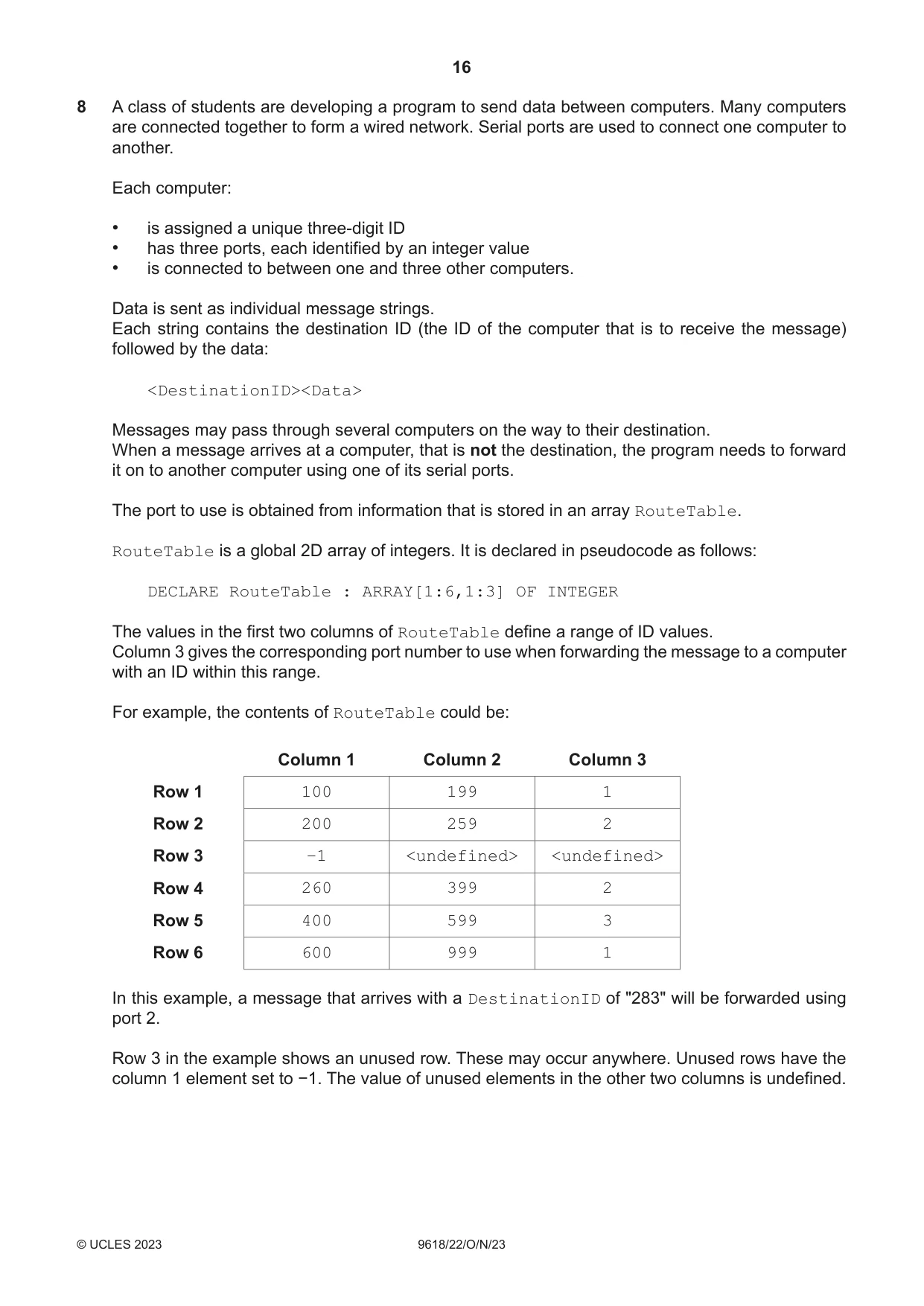
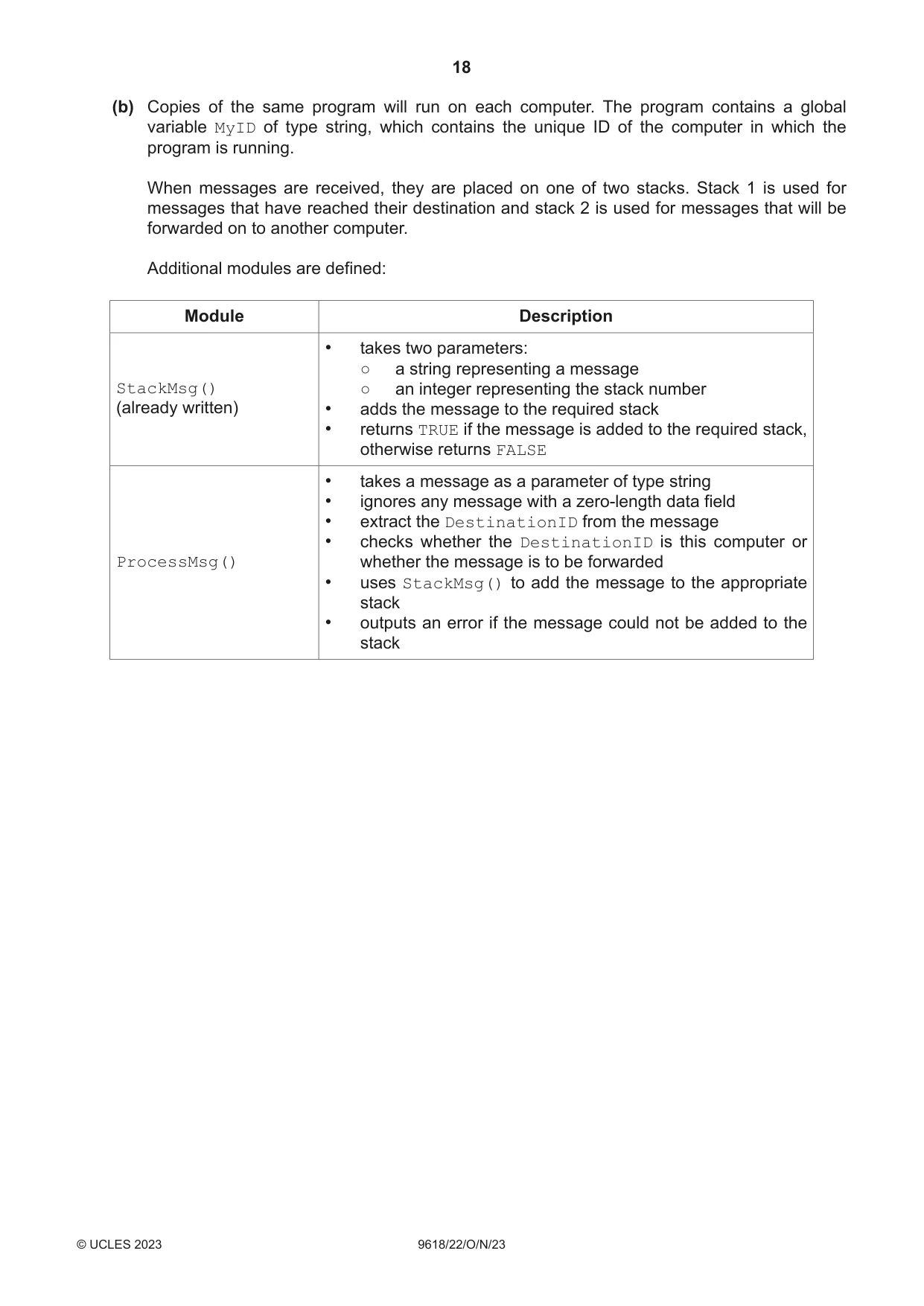
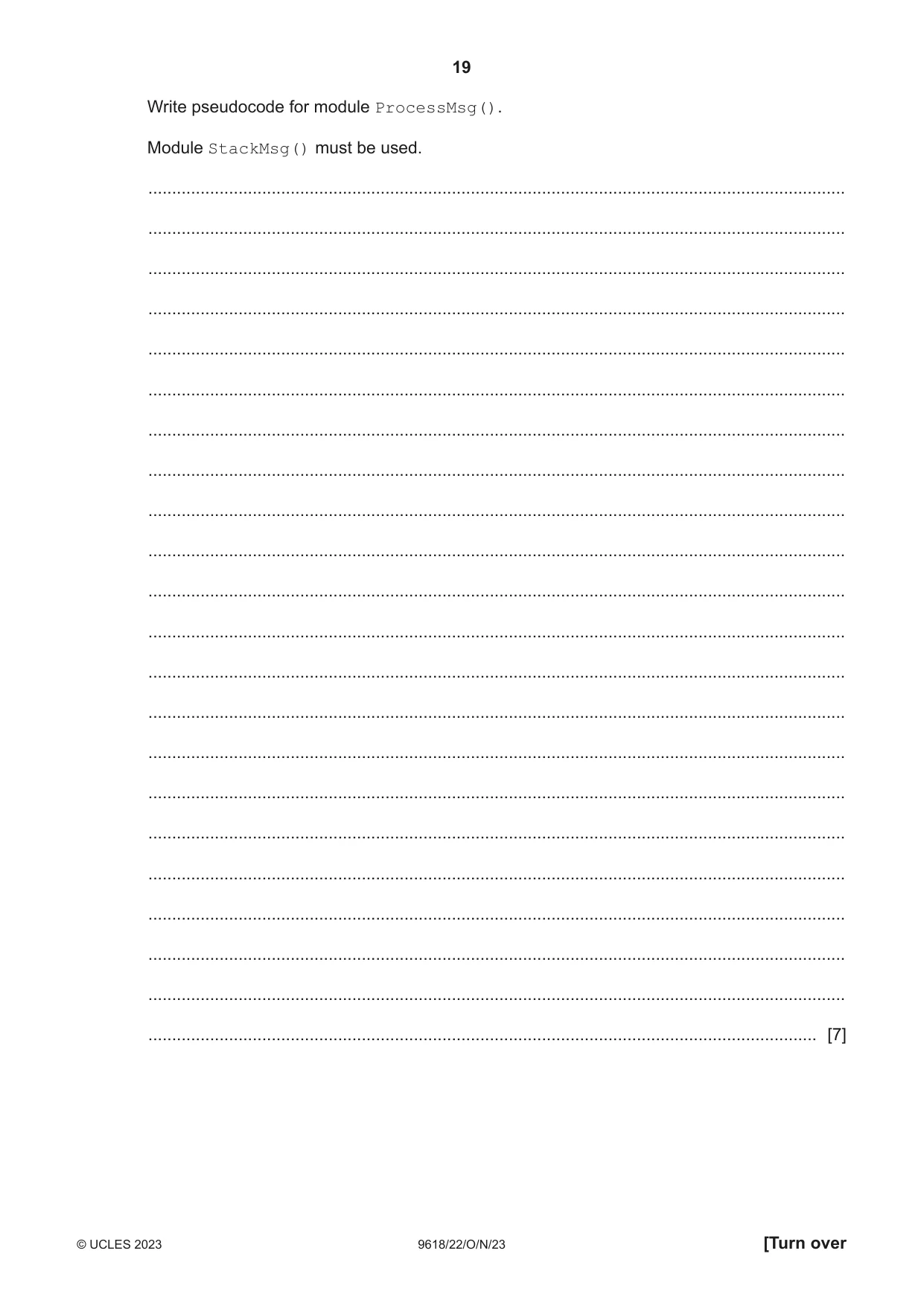
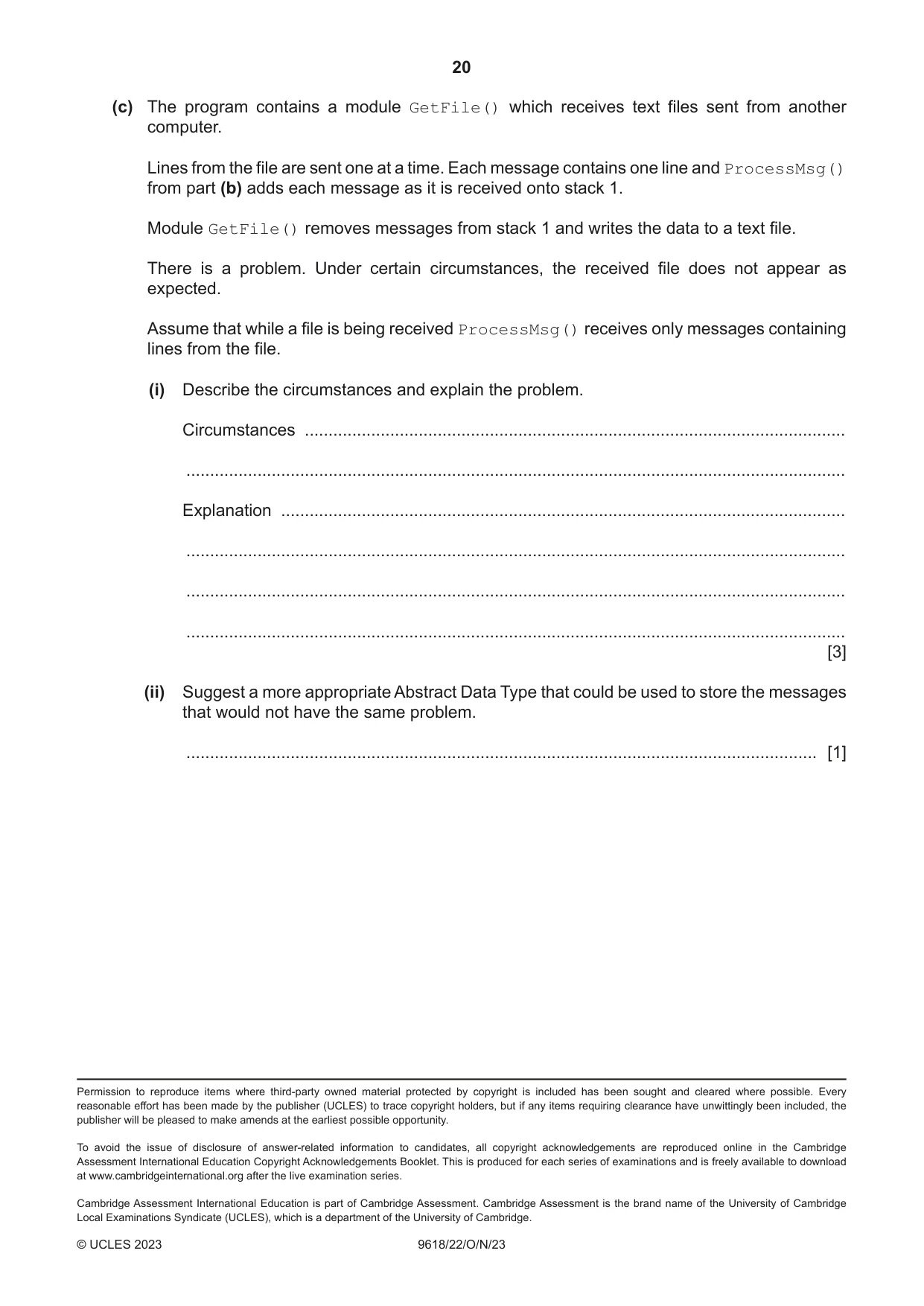
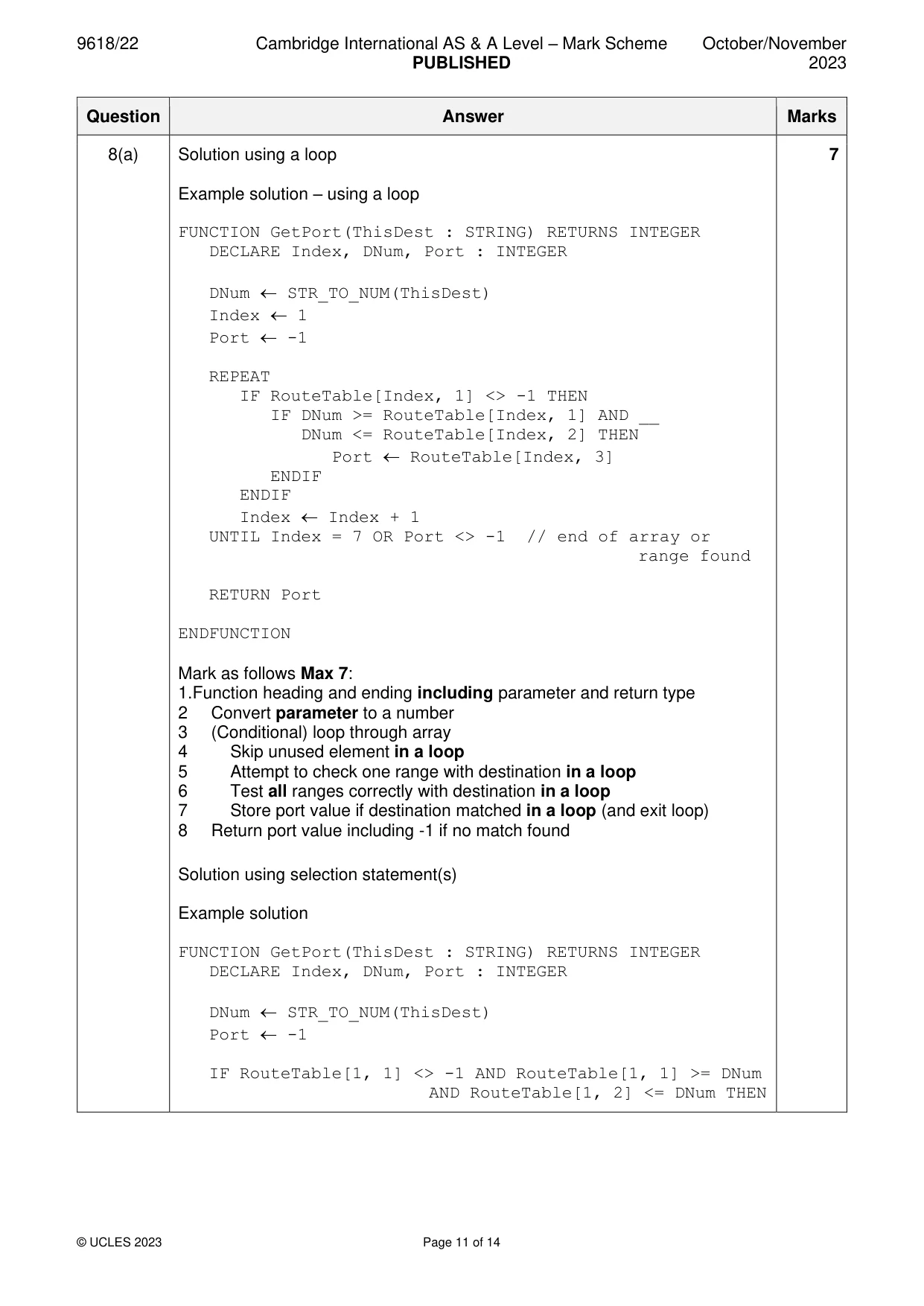
8 A class of students are developing a program to send data between computers. Many computers are connected together to form a wired network. Serial ports are used to connect one computer to another. Each computer: • is assigned a unique three-digit ID • has three ports, each identified by an integer value • is connected to between one and three other computers. Data is sent as individual message strings. Each string contains the destination ID (the ID of the computer that is to receive the message) followed by the data: <DestinationID><Data> Messages may pass through several computers on the way to their destination. When a message arrives at a computer, that is not the destination, the program needs to forward it on to another computer using one of its serial ports. The port to use is obtained from information that is stored in an array RouteTable. RouteTable is a global 2D array of integers. It is declared in pseudocode as follows: DECLARE RouteTable : ARRAY[1:6,1:3] OF INTEGER The values in the first two columns of RouteTable define a range of ID values. Column 3 gives the corresponding port number to use when forwarding the message to a computer with an ID within this range. For example, the contents of RouteTable could be: Column 1 Column 2 Column 3 Row 1 100 199 1 Row 2 200 259 2 Row 3 −1 <undefined> <undefined> Row 4 260 399 2 Row 5 400 599 3 Row 6 600 999 1 In this example, a message that arrives with a DestinationID of "283" will be forwarded using port 2. Row 3 in the example shows an unused row. These may occur anywhere. Unused rows have the column 1 element set to −1. The value of unused elements in the other two columns is undefined. The programmer has defined the first program module as follows: Module Description • takes a DestinationID as a parameter of type string • searches for the range corresponding to the DestinationID GetPort() in the array • returns the port number, or returns −1 if no corresponding range is found (a) Write pseudocode for module GetPort(). Assume DestinationID contains a valid three-digit string. ................................................................................................................................................... ................................................................................................................................................... ................................................................................................................................................... ................................................................................................................................................... ................................................................................................................................................... ................................................................................................................................................... ................................................................................................................................................... ................................................................................................................................................... ................................................................................................................................................... ................................................................................................................................................... ................................................................................................................................................... ................................................................................................................................................... ................................................................................................................................................... ................................................................................................................................................... ................................................................................................................................................... ................................................................................................................................................... ................................................................................................................................................... ................................................................................................................................................... ................................................................................................................................................... ................................................................................................................................................... ................................................................................................................................................... ............................................................................................................................................. [7] (b) Copies of the same program will run on each computer. The program contains a global variable MyID of type string, which contains the unique ID of the computer in which the program is running. When messages are received, they are placed on one of two stacks. Stack 1 is used for messages that have reached their destination and stack 2 is used for messages that will be forwarded on to another computer. Additional modules are defined: Module Description • takes two parameters: ○ a string representing a message StackMsg() ○ an integer representing the stack number (already written) • adds the message to the required stack • returns TRUE if the message is added to the required stack, otherwise returns FALSE • takes a message as a parameter of type string • ignores any message with a zero-length data field • extract the DestinationID from the message • checks whether the DestinationID is this computer or ProcessMsg() whether the message is to be forwarded • uses StackMsg() to add the message to the appropriate stack • outputs an error if the message could not be added to the stack
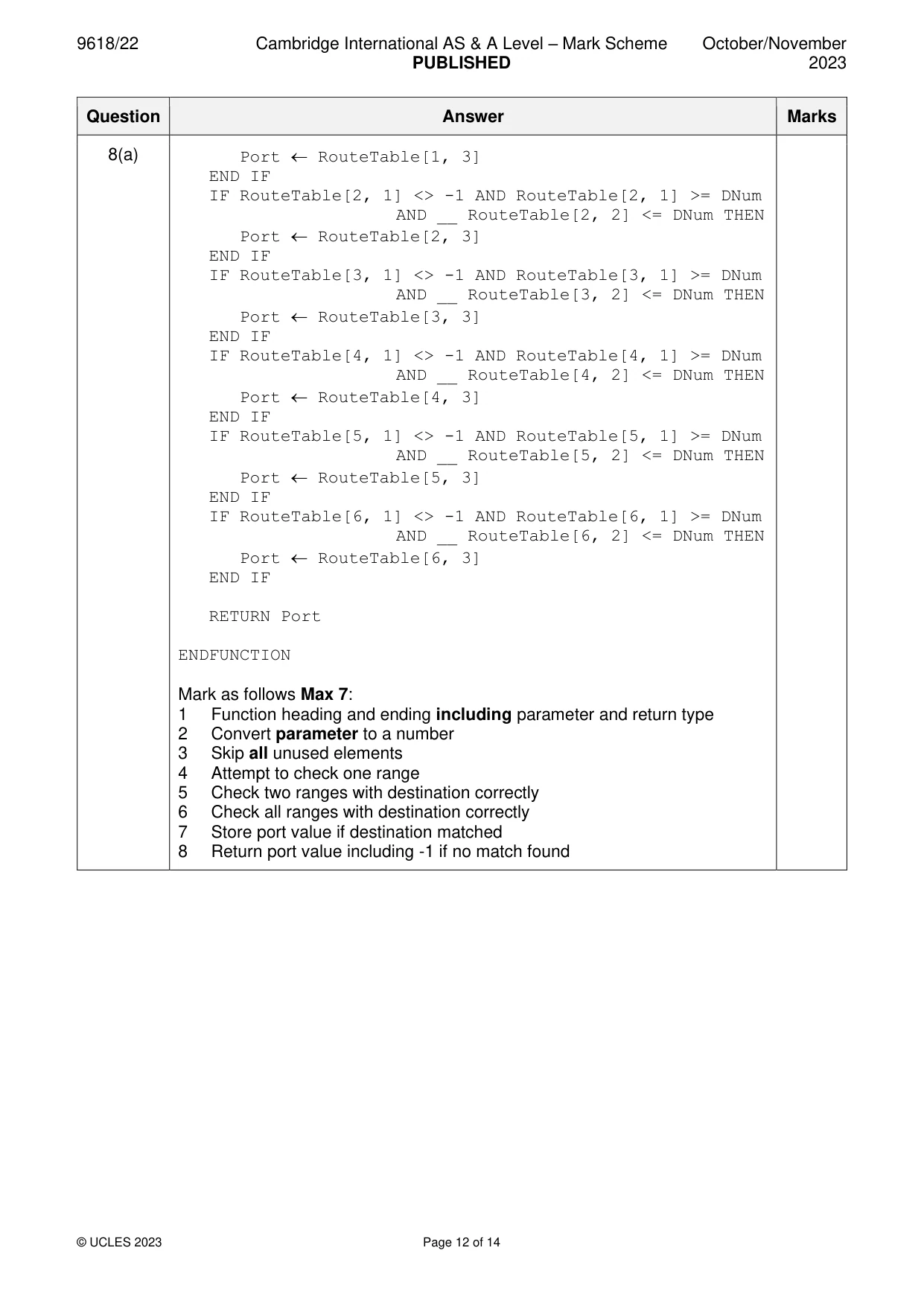
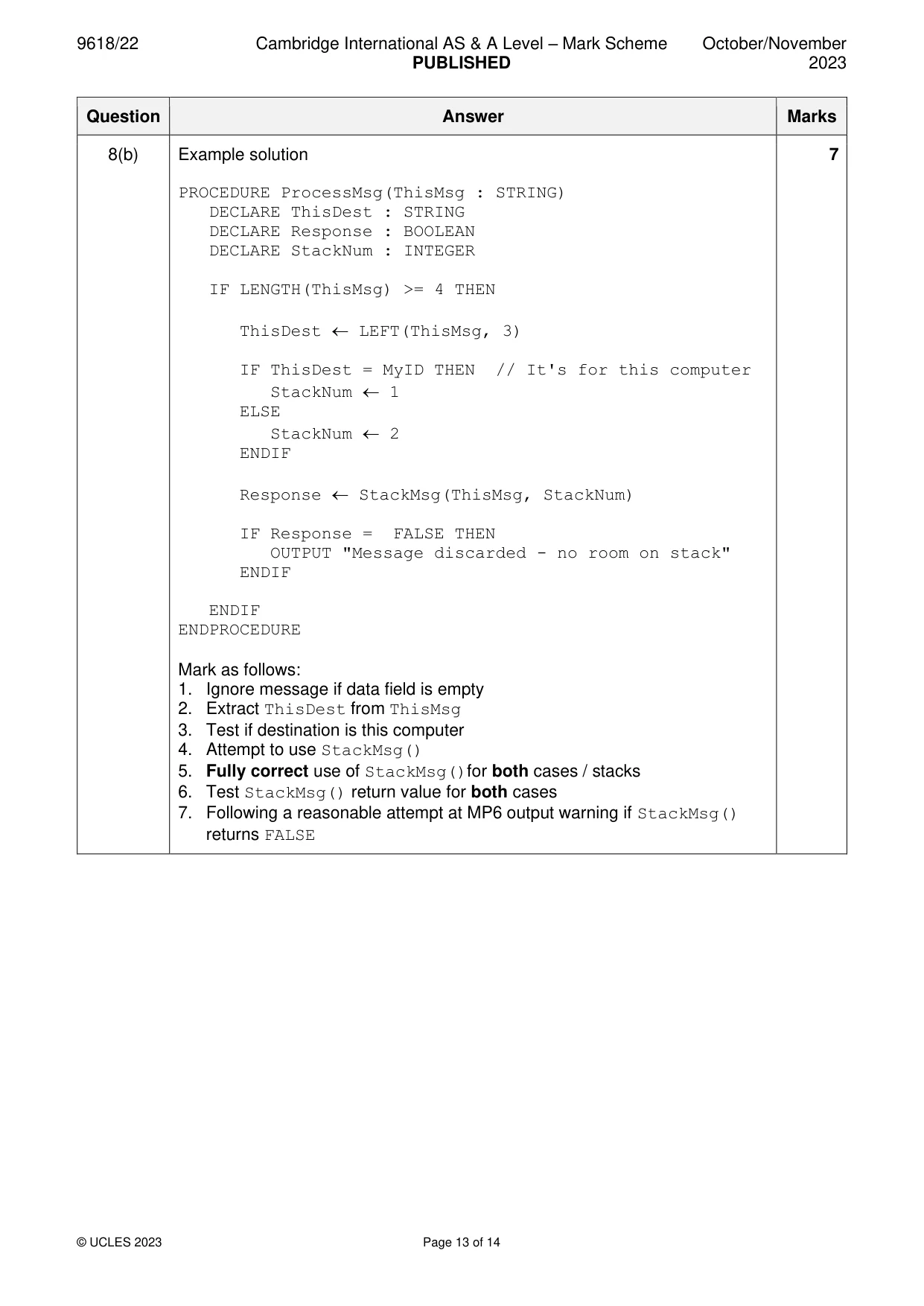
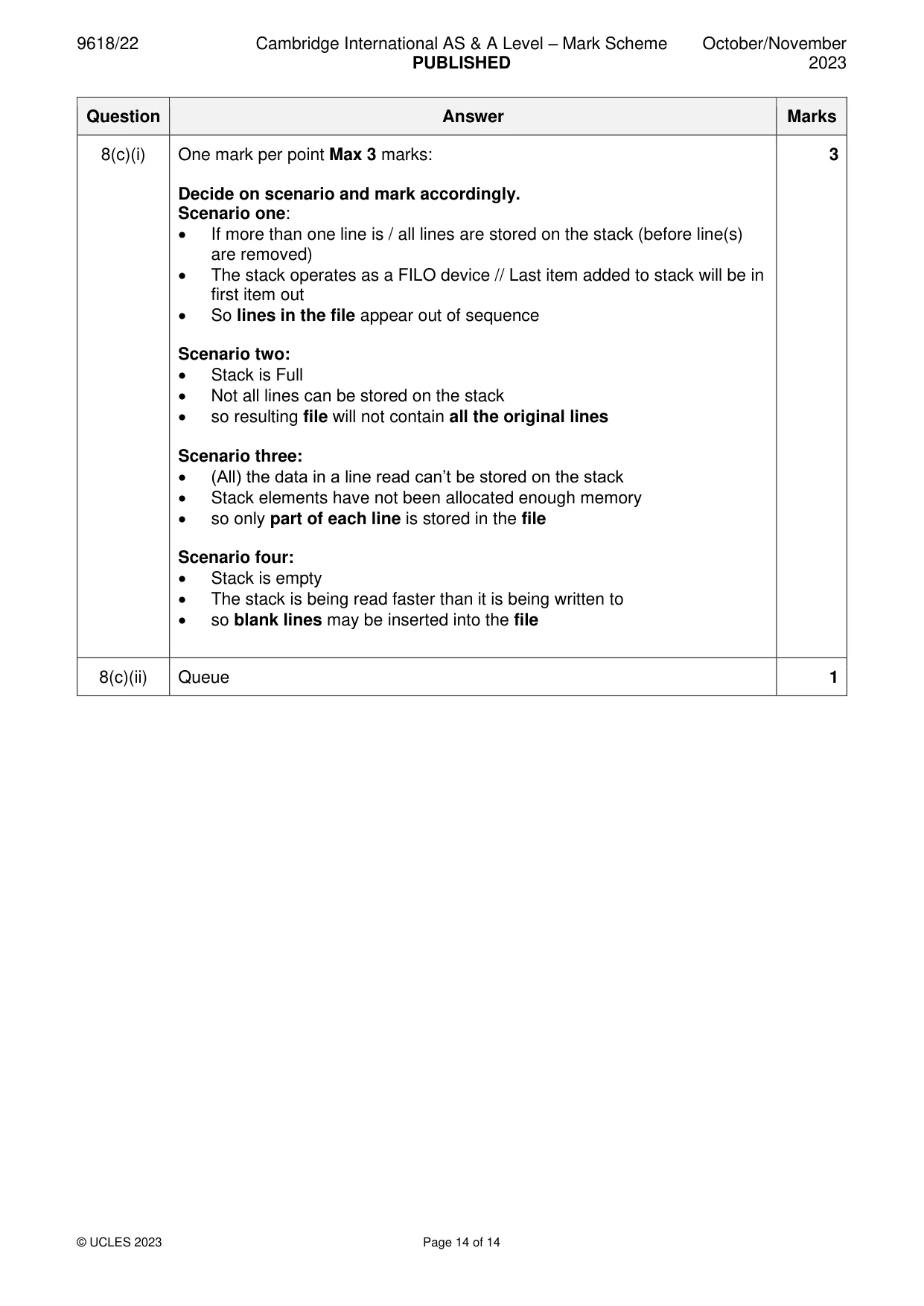
Mark scheme: 8(a) Solution using a loop 7 Example solution – using a loop FUNCTION GetPort(ThisDest : STRING) RETURNS INTEGER DECLARE Index, DNum, Port : INTEGER DNum STR_TO_NUM(ThisDest) Index 1 Port -1 REPEAT IF RouteTable[Index, 1] <> -1 THEN IF DNum >= RouteTable[Index, 1] AND __ DNum <= RouteTable[Index, 2] THEN Port RouteTable[Index, 3] ENDIF ENDIF Index Index + 1 UNTIL Index = 7 OR Port <> -1 // end of array or range found RETURN Port ENDFUNCTION Mark as follows Max 7: 1.Function heading and ending including parameter and return type 2 Convert parameter to a number 3 (Conditional) loop through array 4 Skip unused element in a loop 5 Attempt to check one range with destination in a loop 6 Test all ranges correctly with destination in a loop 7 Store port value if destination matched in a loop (and exit loop) 8 Return port value including -1 if no match found Solution using selection statement(s) Example solution FUNCTION GetPort(ThisDest : STRING) RETURNS INTEGER DECLARE Index, DNum, Port : INTEGER DNum STR_TO_NUM(ThisDest) Port -1 IF RouteTable[1, 1] <> -1 AND RouteTable[1, 1] >= DNum AND RouteTable[1, 2] <= DNum THEN 8(a) Port RouteTable[1, 3] END IF IF RouteTable[2, 1] <> -1 AND RouteTable[2, 1] >= DNum AND __ RouteTable[2, 2] <= DNum THEN Port RouteTable[2, 3] END IF IF RouteTable[3, 1] <> -1 AND RouteTable[3, 1] >= DNum AND __ RouteTable[3, 2] <= DNum THEN Port RouteTable[3, 3] END IF IF RouteTable[4, 1] <> -1 AND RouteTable[4, 1] >= DNum AND __ RouteTable[4, 2] <= DNum THEN Port RouteTable[4, 3] END IF IF RouteTable[5, 1] <> -1 AND RouteTable[5, 1] >= DNum AND __ RouteTable[5, 2] <= DNum THEN Port RouteTable[5, 3] END IF IF RouteTable[6, 1] <> -1 AND RouteTable[6, 1] >= DNum AND __ RouteTable[6, 2] <= DNum THEN Port RouteTable[6, 3] END IF RETURN Port ENDFUNCTION Mark as follows Max 7: 1 Function heading and ending including parameter and return type 2 Convert parameter to a number 3 Skip all unused elements 4 Attempt to check one range 5 Check two ranges with destination correctly 6 Check all ranges with destination correctly 7 Store port value if destination matched 8 Return port value including -1 if no match found 8(b) Example solution 7 PROCEDURE ProcessMsg(ThisMsg : STRING) DECLARE ThisDest : STRING DECLARE Response : BOOLEAN DECLARE StackNum : INTEGER IF LENGTH(ThisMsg) >= 4 THEN ThisDest LEFT(ThisMsg, 3) IF ThisDest = MyID THEN // It's for this computer StackNum 1 ELSE StackNum 2 ENDIF Response StackMsg(ThisMsg, StackNum) IF Response = FALSE THEN OUTPUT "Message discarded - no room on stack" ENDIF ENDIF ENDPROCEDURE Mark as follows: 1. Ignore message if data field is empty 2. Extract ThisDest from ThisMsg 3. Test if destination is this computer 4. Attempt to use StackMsg() 5. Fully correct use of StackMsg()for both cases / stacks 6. Test StackMsg() return value for both cases 7. Following a reasonable attempt at MP6 output warning if StackMsg() returns FALSE 8(c)(i) One mark per point Max 3 marks: 3 Decide on scenario and mark accordingly. Scenario one: • If more than one line is / all lines are stored on the stack (before line(s) are removed) • The stack operates as a FILO device // Last item added to stack will be in first item out • So lines in the file appear out of sequence Scenario two: • Stack is Full • Not all lines can be stored on the stack • so resulting file will not contain all the original lines Scenario three: • (All) the data in a line read can’t be stored on the stack • Stack elements have not been allocated enough memory • so only part of each line is stored in the file Scenario four: • Stack is empty • The stack is being read faster than it is being written to • so blank lines may be inserted into the file 8(c)(ii) Queue 1
What you needed in this session
Cambridge’s own grade thresholds for 2023 Oct/Nov, Paper 2 · Variant 2. A higher threshold means an easier paper — the bar moves with how the cohort did.