Cambridge A Level Computer Science 9618 — 2024 May/June Paper 2 · Variant 2
9618/22/M/J/24 · 8 questions · 75 marks · ≈84 min
The question paper and its mark scheme, free to read here and free to download. This is Cambridge’s own paper, exactly as it was sat.
Question paper24 pages






Mark scheme12 pages
Answers below. Sit the paper first if you are practising.

Questions as text
Q1 · The following table contains pseudocode examples
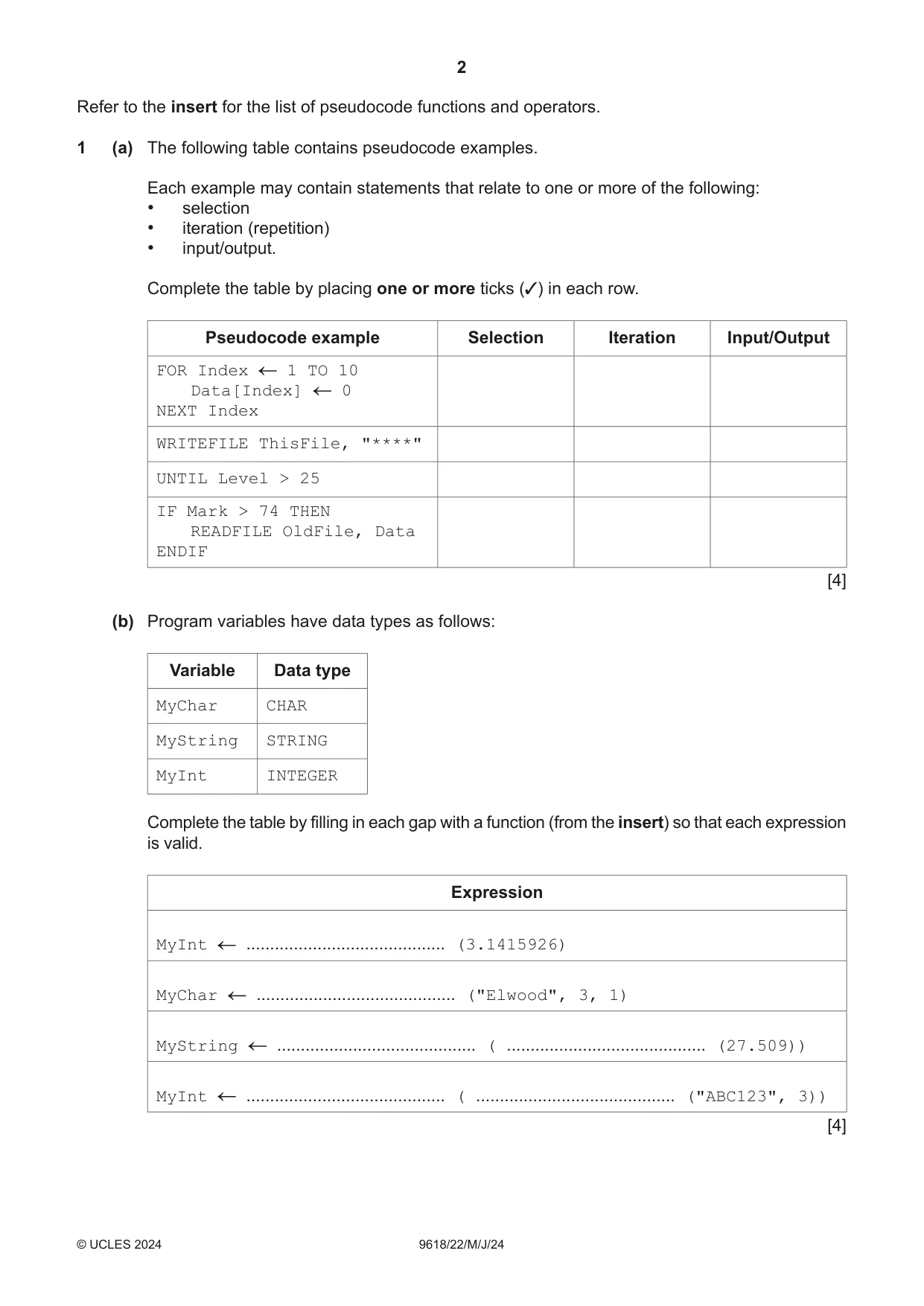
1 (a) The following table contains pseudocode examples. Each example may contain statements that relate to one or more of the following: • selection • iteration (repetition) • input/output. Complete the table by placing one or more ticks (3) in each row. Pseudocode example Selection Iteration Input/Output FOR Index 1 TO 10 Data[Index] 0 NEXT Index WRITEFILE ThisFile, "****" UNTIL Level > 25 IF Mark > 74 THEN READFILE OldFile, Data ENDIF [4] (b) Program variables have data types as follows: Variable Data type MyChar CHAR MyString STRING MyInt INTEGER Complete the table by filling in each gap with a function (from the insert) so that each expression is valid. Expression MyInt .......................................... (3.1415926) MyChar .......................................... ("Elwood", 3, 1) MyString .......................................... ( .......................................... (27.509)) MyInt .......................................... ( .......................................... ("ABC123", 3)) [4] (c) The variables given in part (b) are chosen during the design stage of the program development life cycle. The choices are to be documented to simplify program maintenance. State a suitable way of documenting the variables and give one piece of information that should be recorded, in addition to the data type. ................................................................................................................................................... ................................................................................................................................................... ............................................................................................................................................. [2]
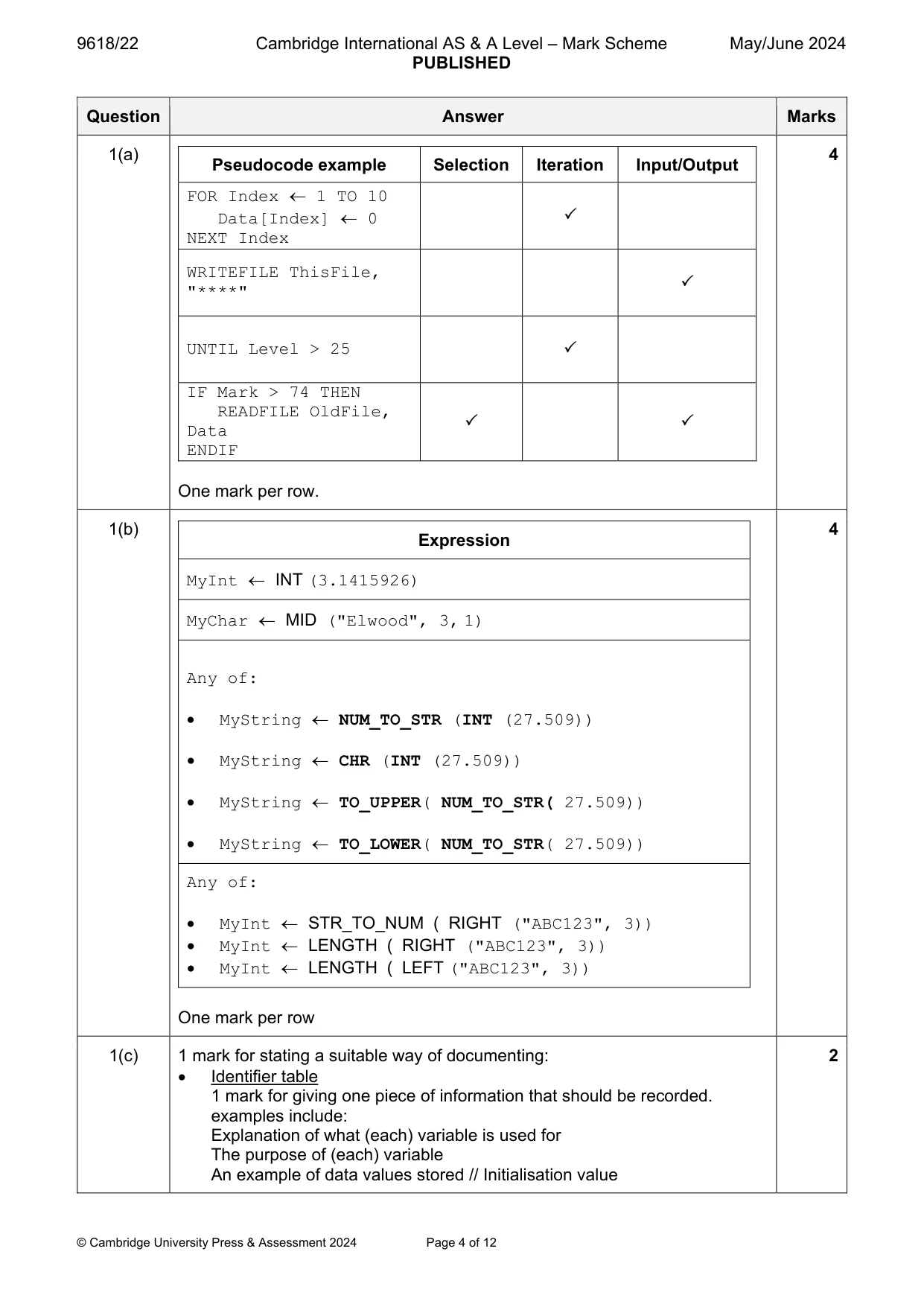
Mark scheme: Question Answer Marks 1(a) 4 Pseudocode example Selection Iteration Input/Output FOR Index 1 TO 10 Data[Index] 0 NEXT Index WRITEFILE ThisFile, "****" UNTIL Level > 25 IF Mark > 74 THEN READFILE OldFile, Data ENDIF One mark per row. 1(b) 4 Expression MyInt INT (3.1415926) MyChar MID ("Elwood", 3, 1) Any of: MyString NUM_TO_STR (INT (27.509)) MyString CHR (INT (27.509)) MyString TO_UPPER( NUM_TO_STR( 27.509)) MyString TO_LOWER( NUM_TO_STR( 27.509)) Any of: MyInt STR_TO_NUM ( RIGHT ("ABC123", 3)) MyInt LENGTH ( RIGHT ("ABC123", 3)) MyInt LENGTH ( LEFT ("ABC123", 3)) One mark per row 1(c) 1 mark for stating a suitable way of documenting: 2 Identifier table 1 mark for giving one piece of information that should be recorded. examples include: Explanation of what (each) variable is used for The purpose of (each) variable An example of data values stored // Initialisation value
Q2 · A program is being developed
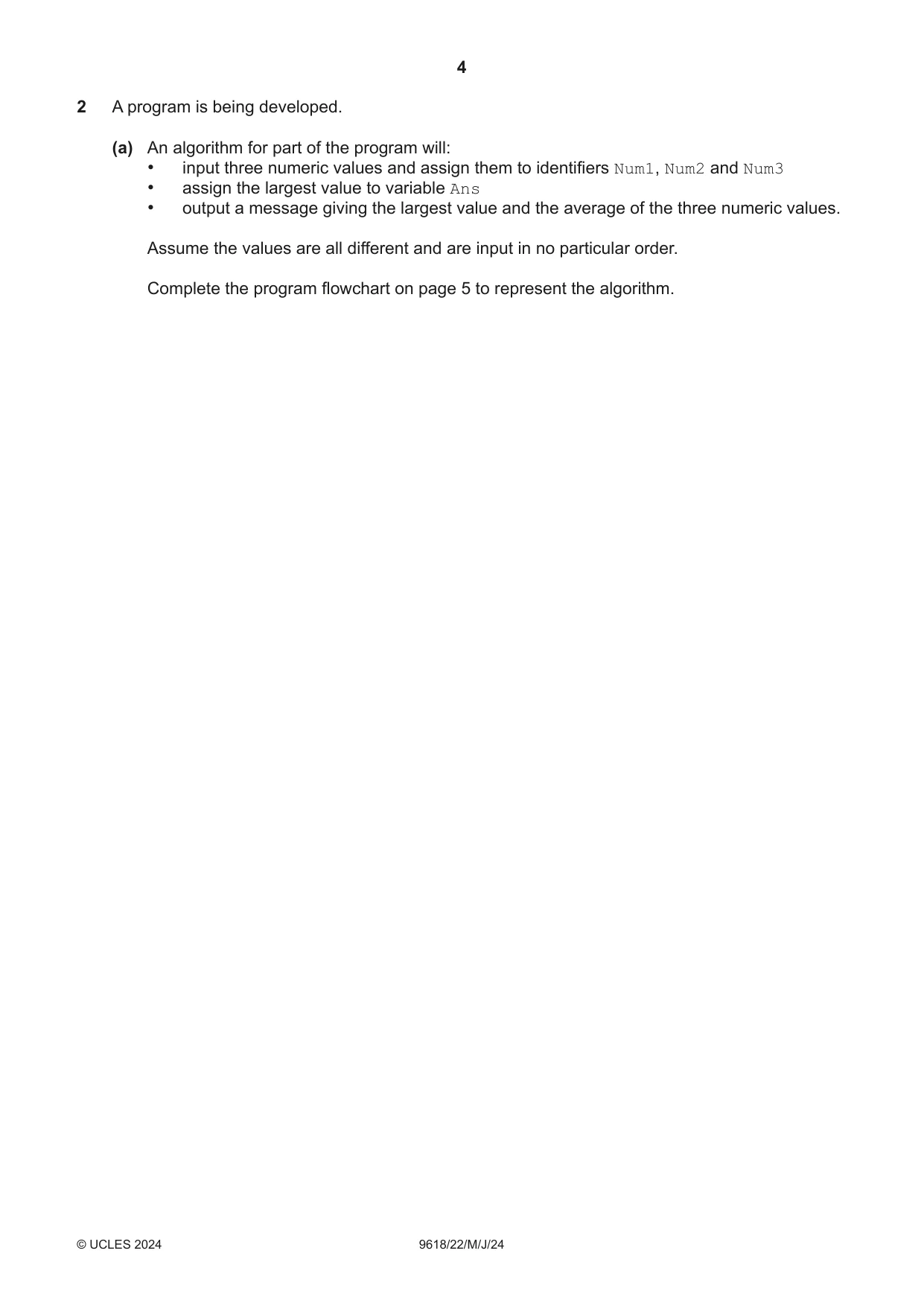
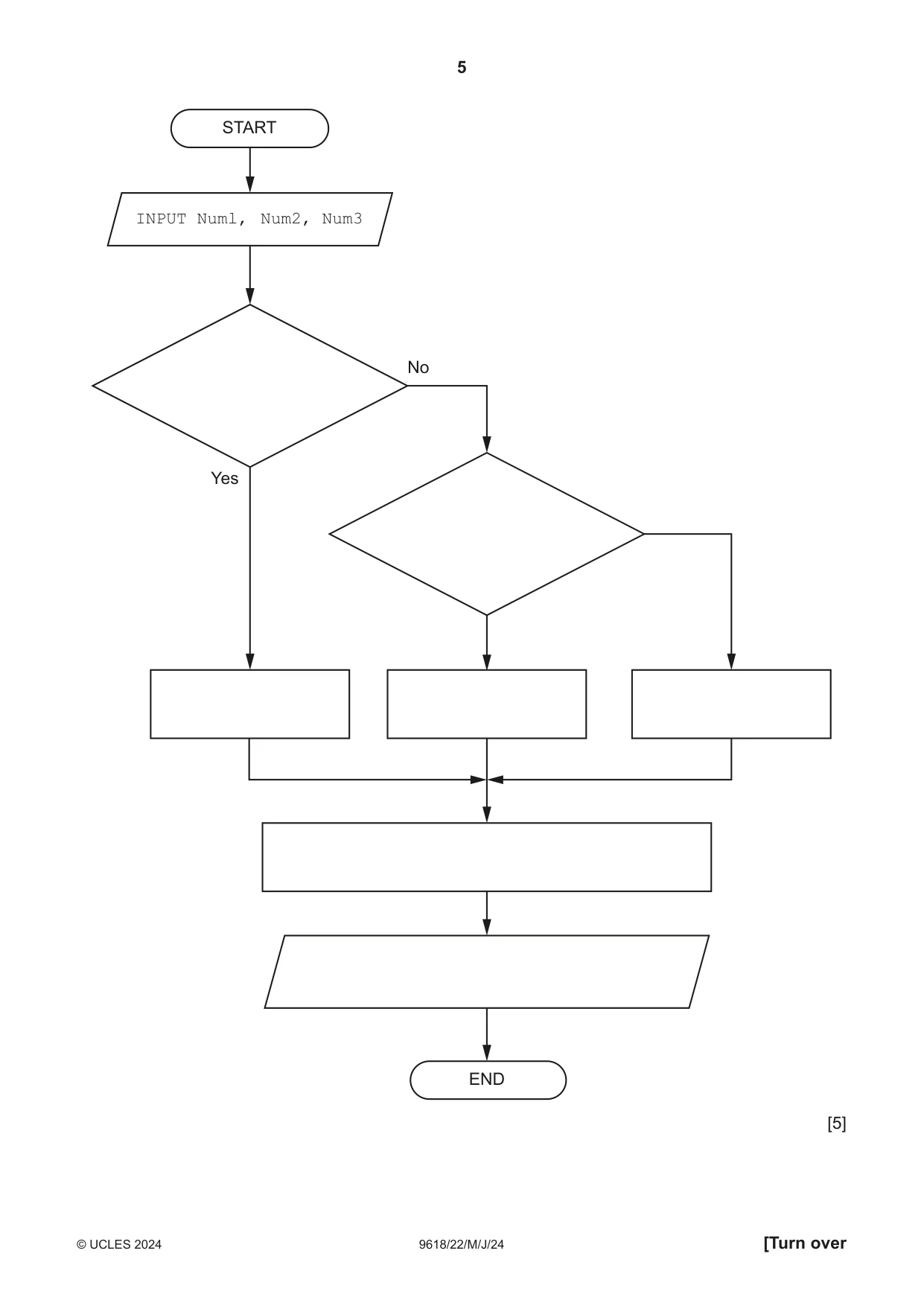
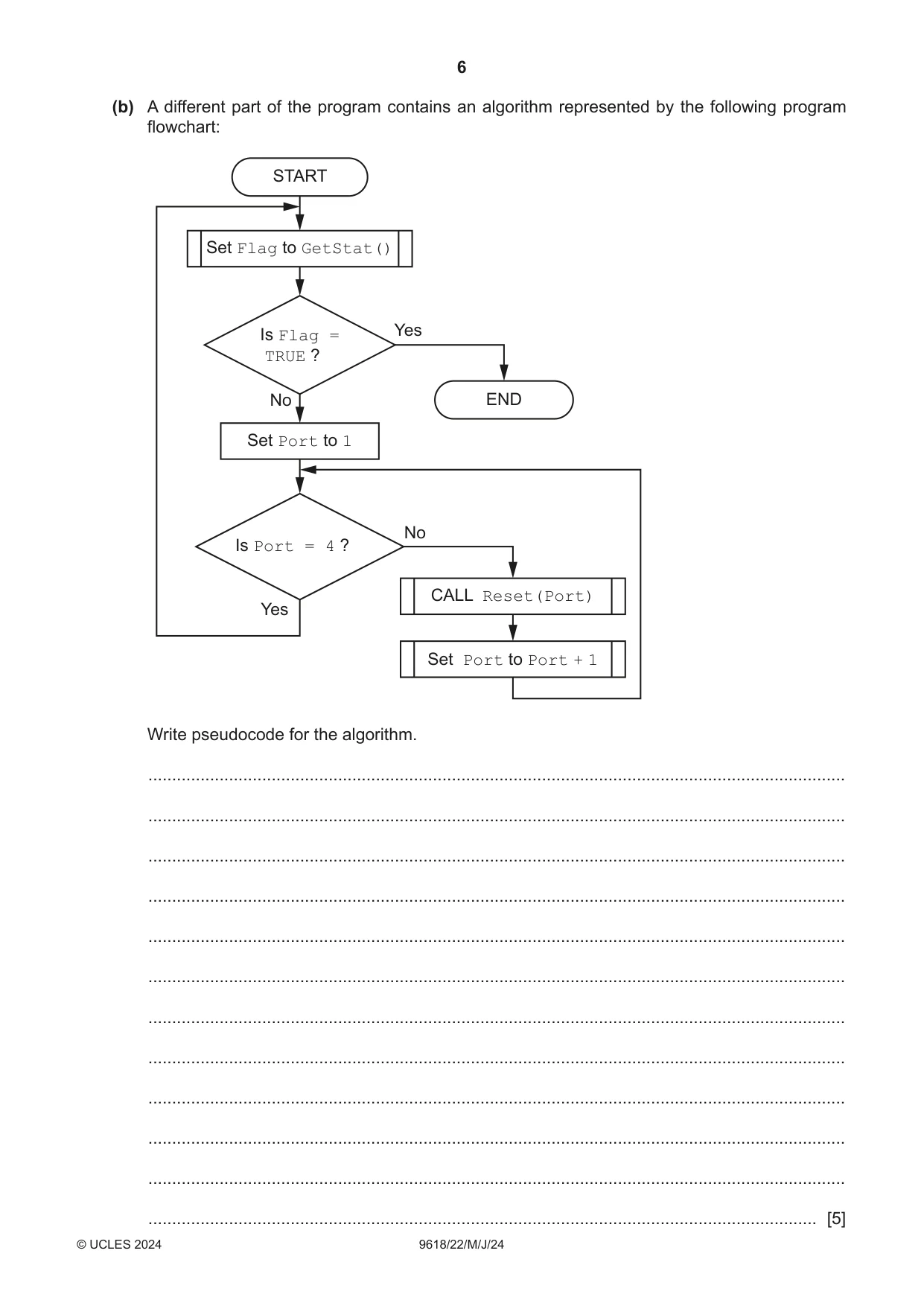
2 A program is being developed. (a) An algorithm for part of the program will: • input three numeric values and assign them to identifiers Num1, Num2 and Num3 • assign the largest value to variable Ans • output a message giving the largest value and the average of the three numeric values. Assume the values are all different and are input in no particular order. Complete the program flowchart on page 5 to represent the algorithm. START INPUT Numl, Num2, Num3 No Yes END [5] (b) A different part of the program contains an algorithm represented by the following program flowchart: START Set Flag to GetStat() Is Flag = Yes TRUE ? No END Set Port to 1 No Is Port = 4 ? CALL Reset(Port) Yes Set Port to Port + 1 Write pseudocode for the algorithm. ................................................................................................................................................... ................................................................................................................................................... ................................................................................................................................................... ................................................................................................................................................... ................................................................................................................................................... ................................................................................................................................................... ................................................................................................................................................... ................................................................................................................................................... ................................................................................................................................................... ................................................................................................................................................... ................................................................................................................................................... ............................................................................................................................................. [5]
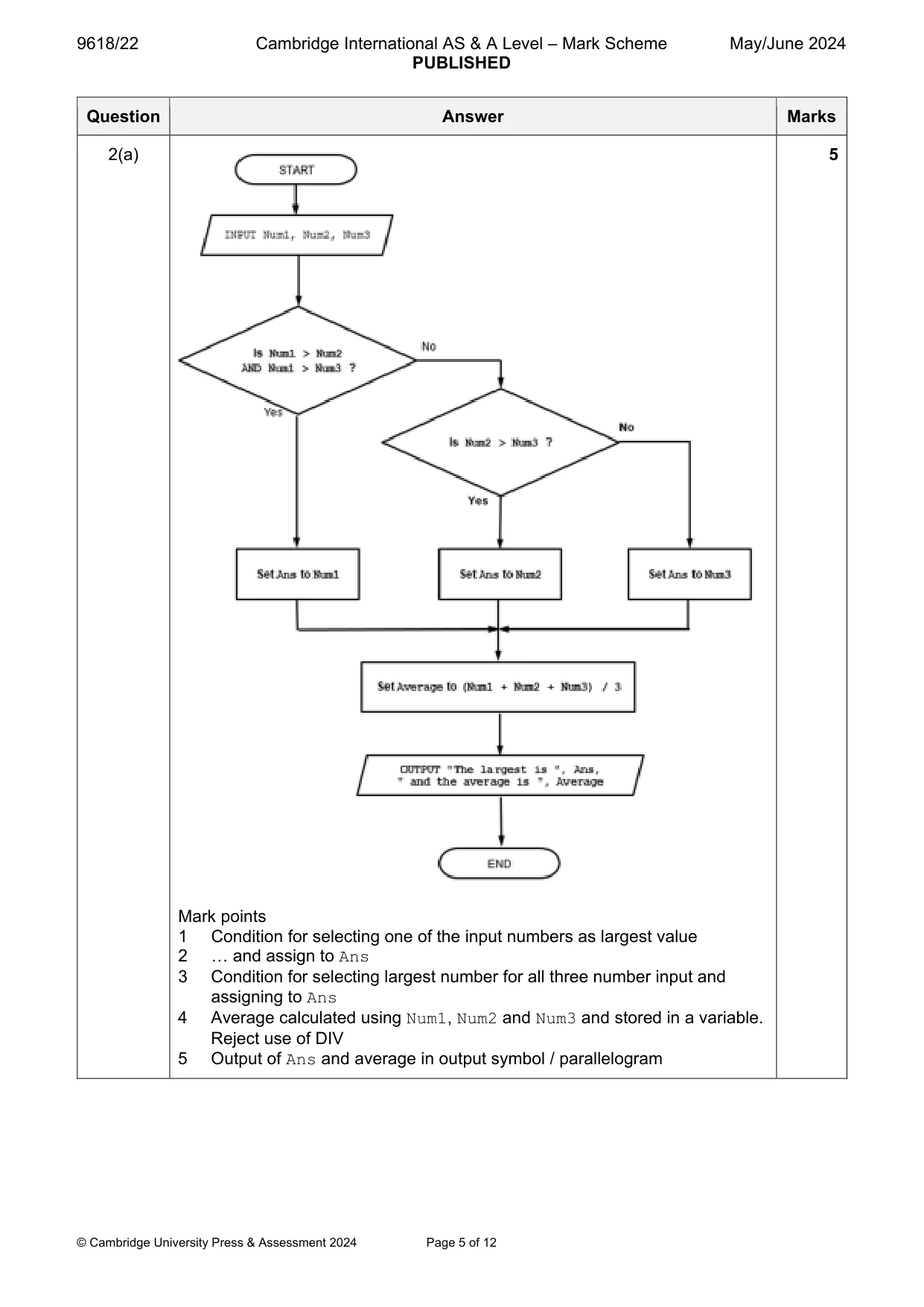
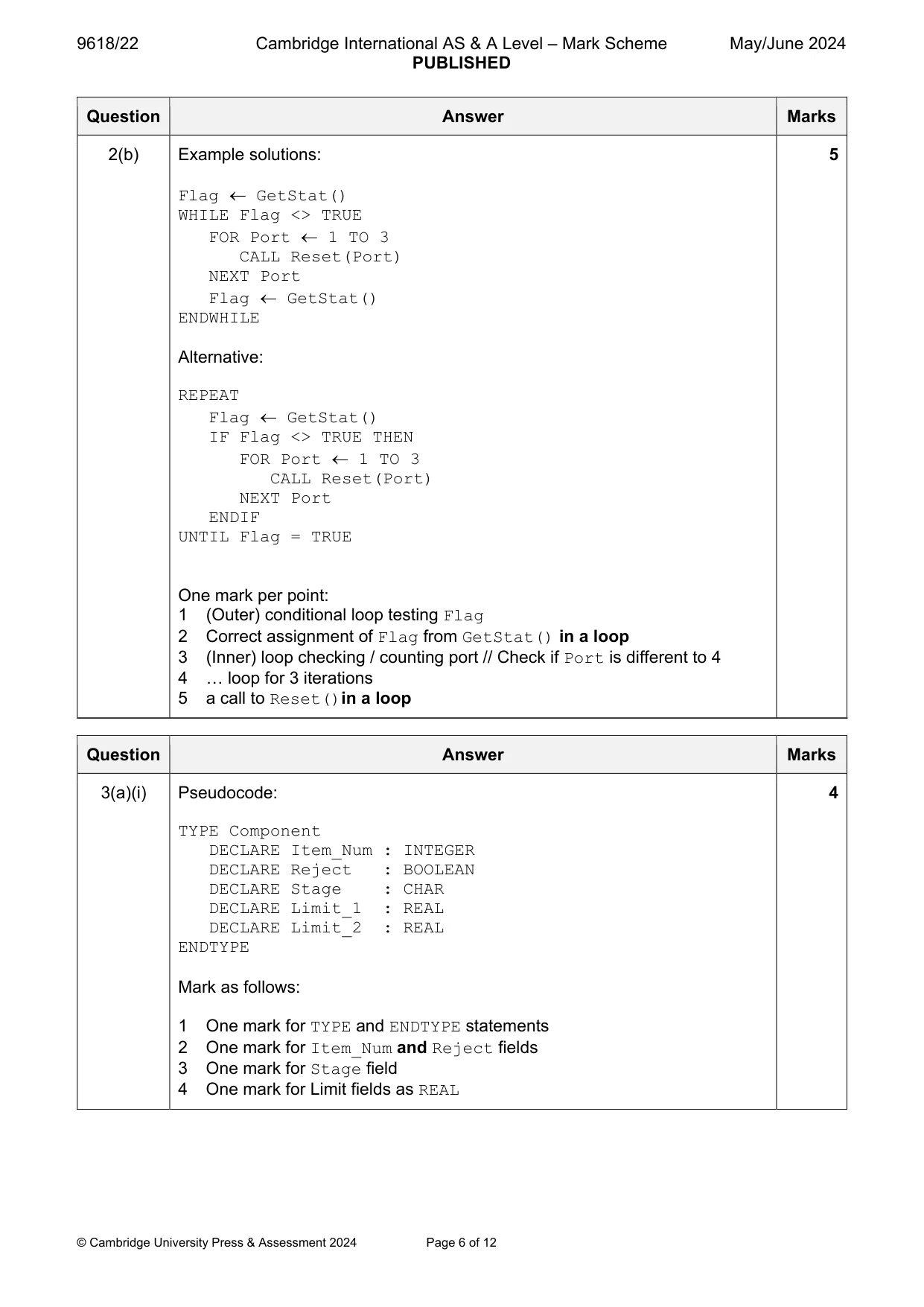
Mark scheme: 2(a) 5 Mark points 1 Condition for selecting one of the input numbers as largest value 2 … and assign to Ans 3 Condition for selecting largest number for all three number input and assigning to Ans 4 Average calculated using Num1, Num2 and Num3 and stored in a variable. Reject use of DIV 5 Output of Ans and average in output symbol / parallelogram 2(b) Example solutions: 5 Flag GetStat() WHILE Flag <> TRUE FOR Port 1 TO 3 CALL Reset(Port) NEXT Port Flag GetStat() ENDWHILE Alternative: REPEAT Flag GetStat() IF Flag <> TRUE THEN FOR Port 1 TO 3 CALL Reset(Port) NEXT Port ENDIF UNTIL Flag = TRUE One mark per point: 1 (Outer) conditional loop testing Flag 2 Correct assignment of Flag from GetStat() in a loop 3 (Inner) loop checking / counting port // Check if Port is different to 4 4 … loop for 3 iterations 5 a call to Reset()in a loop
Q3 · A factory needs a program to help manage its production of items
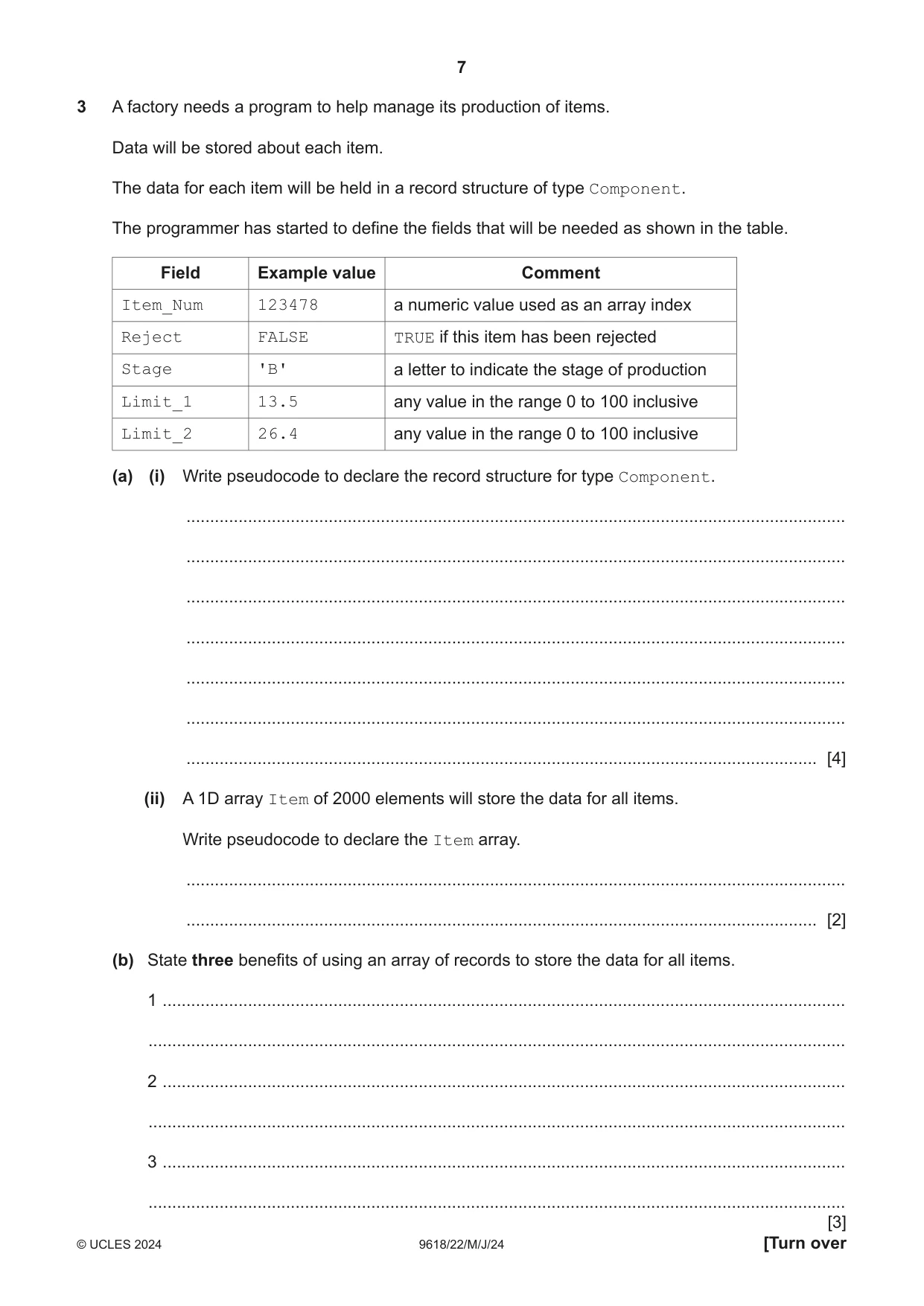
3 A factory needs a program to help manage its production of items. Data will be stored about each item. The data for each item will be held in a record structure of type Component. The programmer has started to define the fields that will be needed as shown in the table. Field Example value Comment Item_Num 123478 a numeric value used as an array index Reject FALSE TRUE if this item has been rejected Stage 'B' a letter to indicate the stage of production Limit_1 13.5 any value in the range 0 to 100 inclusive Limit_2 26.4 any value in the range 0 to 100 inclusive (a) (i) Write pseudocode to declare the record structure for type Component. ........................................................................................................................................... ........................................................................................................................................... ........................................................................................................................................... ........................................................................................................................................... ........................................................................................................................................... ........................................................................................................................................... ..................................................................................................................................... [4] (ii) A 1D array Item of 2000 elements will store the data for all items. Write pseudocode to declare the Item array. ........................................................................................................................................... ..................................................................................................................................... [2] (b) State three benefits of using an array of records to store the data for all items. 1 ................................................................................................................................................ ................................................................................................................................................... 2 ................................................................................................................................................ ................................................................................................................................................... 3 ................................................................................................................................................ ................................................................................................................................................... [3]
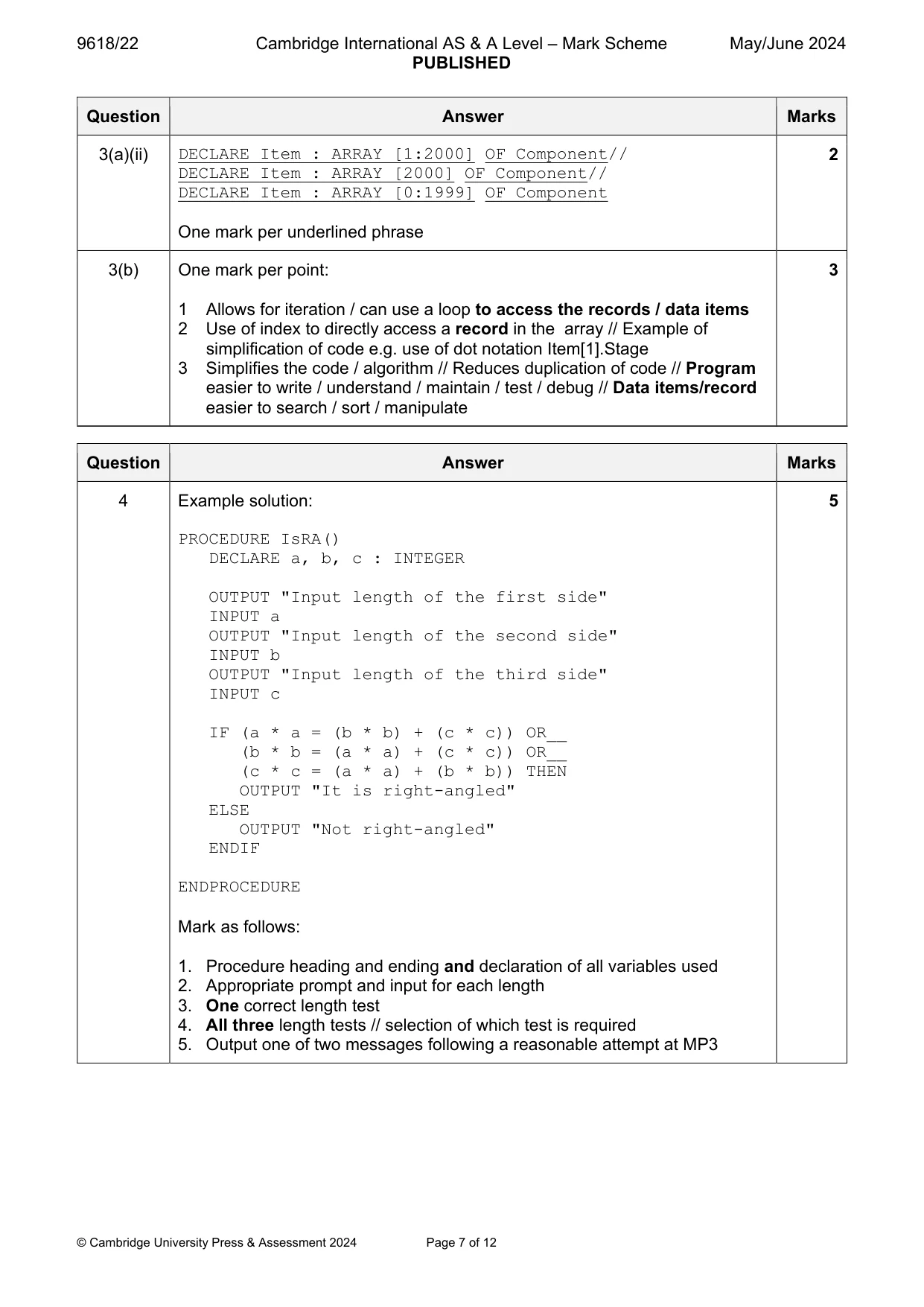
Mark scheme: 3(a)(i) Pseudocode: 4 TYPE Component DECLARE Item_Num : INTEGER DECLARE Reject : BOOLEAN DECLARE Stage : CHAR DECLARE Limit_1 : REAL DECLARE Limit_2 : REAL ENDTYPE Mark as follows: 1 One mark for TYPE and ENDTYPE statements 2 One mark for Item_Num and Reject fields 3 One mark for Stage field 4 One mark for Limit fields as REAL 3(a)(ii) DECLARE Item : ARRAY [1:2000] OF Component// 2 DECLARE Item : ARRAY [2000] OF Component// DECLARE Item : ARRAY [0:1999] OF Component One mark per underlined phrase 3(b) One mark per point: 3 1 Allows for iteration / can use a loop to access the records / data items 2 Use of index to directly access a record in the array // Example of simplification of code e.g. use of dot notation Item[1].Stage 3 Simplifies the code / algorithm // Reduces duplication of code // Program easier to write / understand / maintain / test / debug // Data items/record easier to search / sort / manipulate
Q4 · A triangle has sides of length A, B and C
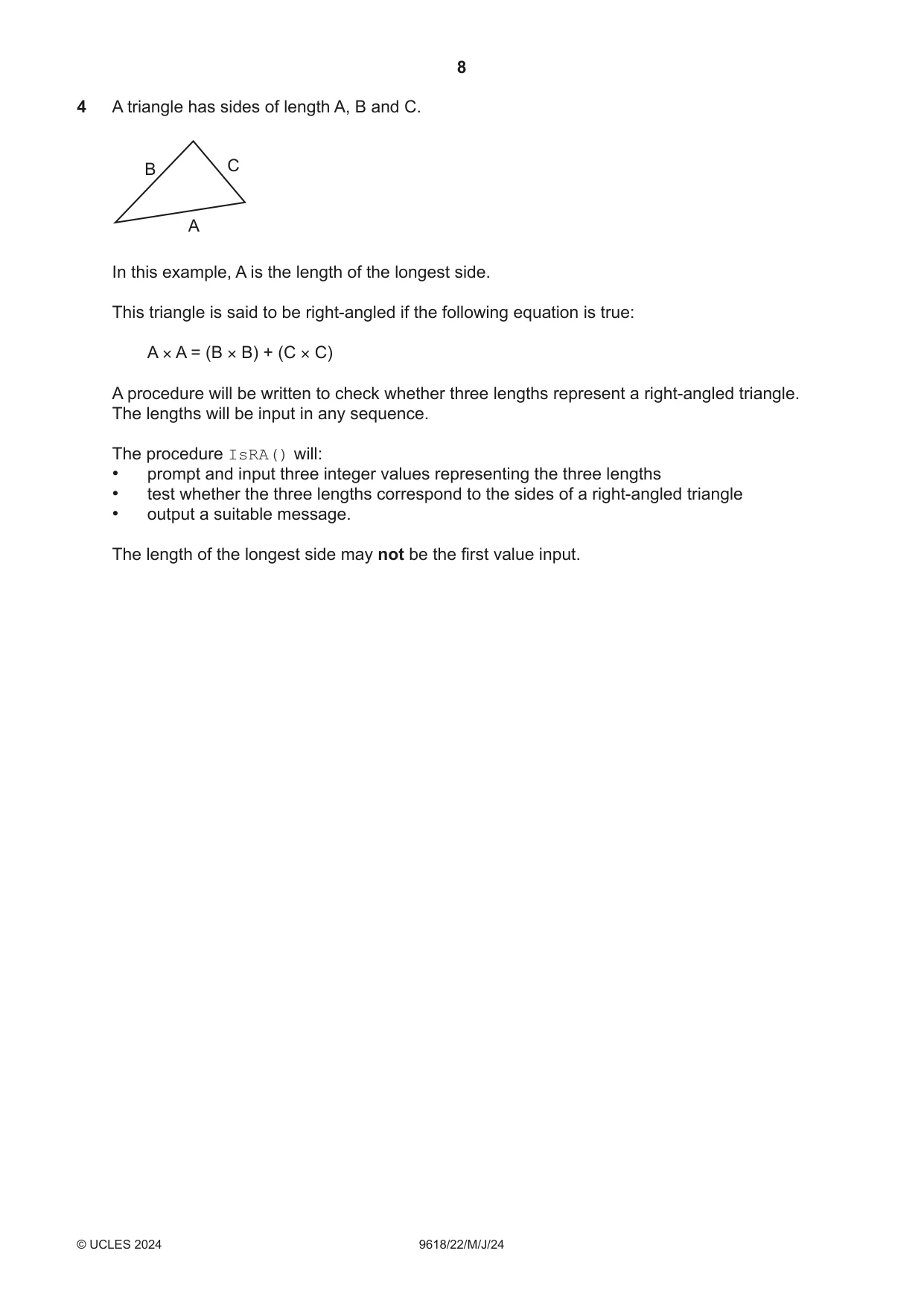
4 A triangle has sides of length A, B and C. B C A In this example, A is the length of the longest side. This triangle is said to be right‑angled if the following equation is true: A × A = (B × B) + (C × C) A procedure will be written to check whether three lengths represent a right‑angled triangle. The lengths will be input in any sequence. The procedure IsRA() will: • prompt and input three integer values representing the three lengths • test whether the three lengths correspond to the sides of a right‑angled triangle • output a suitable message. The length of the longest side may not be the first value input. Write pseudocode for the procedure IsRA(). .......................................................................................................................................................... .......................................................................................................................................................... .......................................................................................................................................................... .......................................................................................................................................................... .......................................................................................................................................................... .......................................................................................................................................................... .......................................................................................................................................................... .......................................................................................................................................................... .......................................................................................................................................................... .......................................................................................................................................................... .......................................................................................................................................................... .......................................................................................................................................................... .......................................................................................................................................................... .......................................................................................................................................................... .......................................................................................................................................................... .......................................................................................................................................................... .......................................................................................................................................................... .......................................................................................................................................................... .......................................................................................................................................................... .......................................................................................................................................................... .......................................................................................................................................................... .................................................................................................................................................... [5]
Mark scheme: 4 Example solution: 5 PROCEDURE IsRA() DECLARE a, b, c : INTEGER OUTPUT "Input length of the first side" INPUT a OUTPUT "Input length of the second side" INPUT b OUTPUT "Input length of the third side" INPUT c IF (a * a = (b * b) + (c * c)) OR__ (b * b = (a * a) + (c * c)) OR__ (c * c = (a * a) + (b * b)) THEN OUTPUT "It is right-angled" ELSE OUTPUT "Not right-angled" ENDIF ENDPROCEDURE Mark as follows: 1. Procedure heading and ending and declaration of all variables used 2. Appropriate prompt and input for each length 3. One correct length test 4. All three length tests // selection of which test is required 5. Output one of two messages following a reasonable attempt at MP3
Q5 · A program is being designed in pseudocode
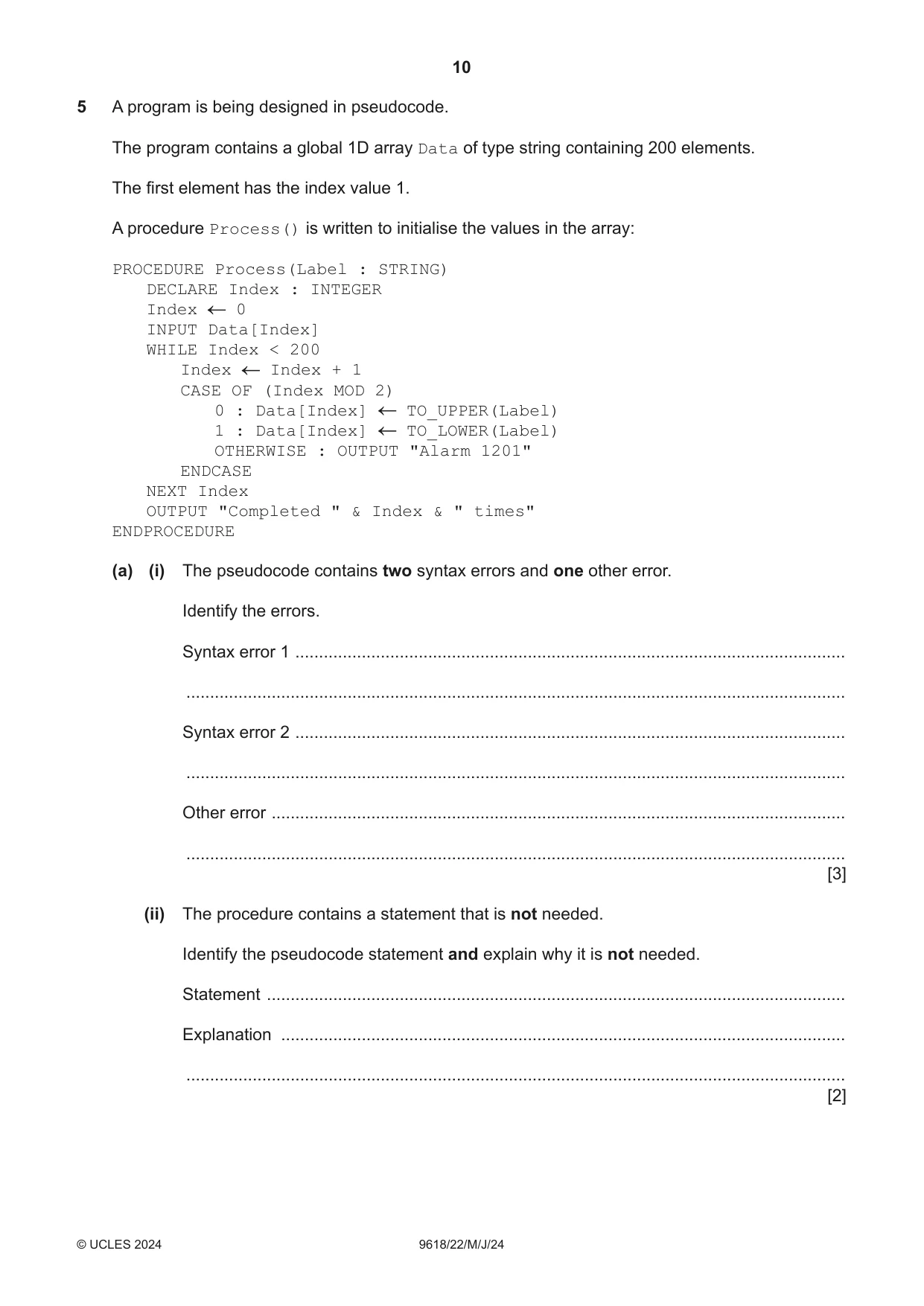
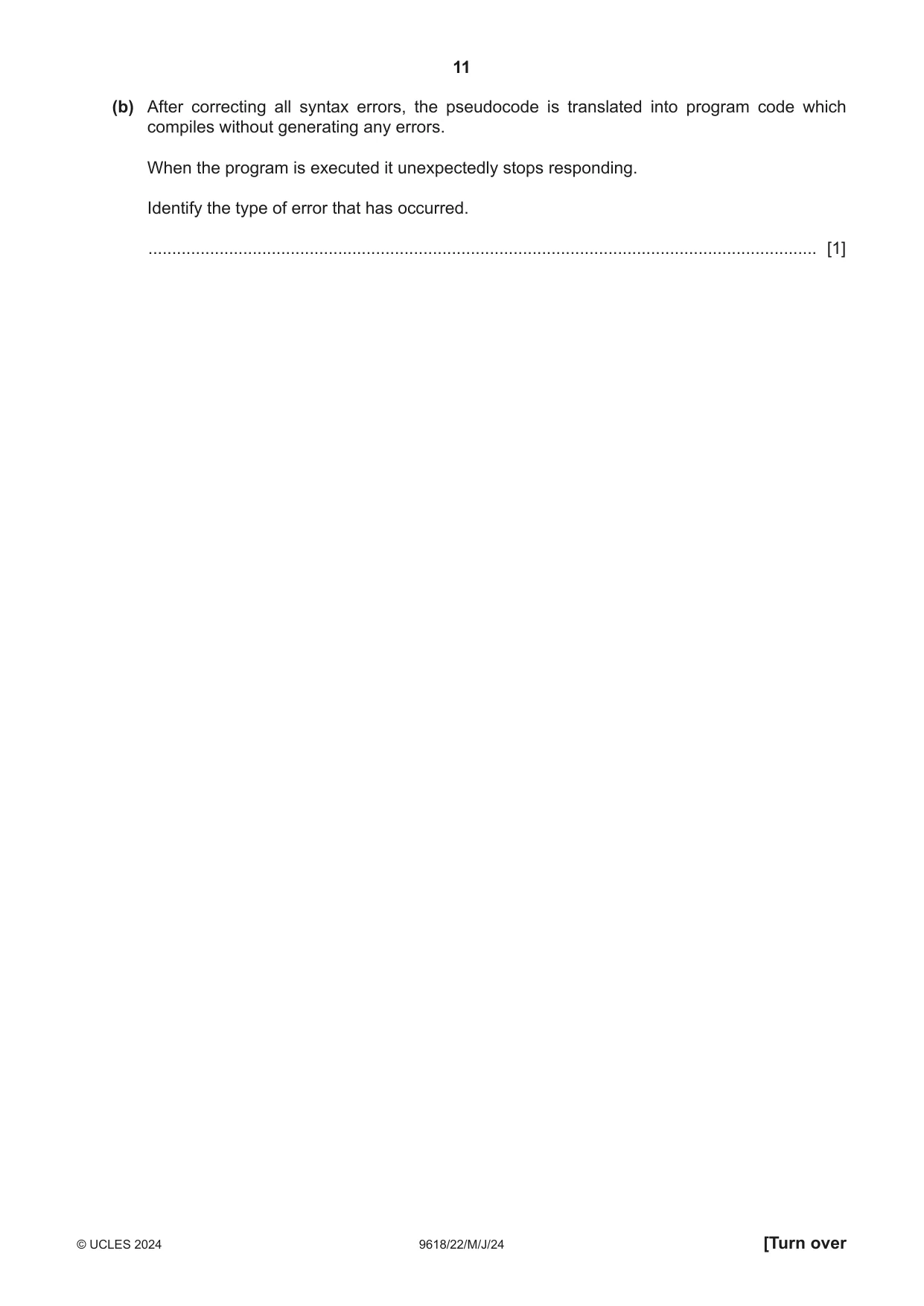
5 A program is being designed in pseudocode. The program contains a global 1D array Data of type string containing 200 elements. The first element has the index value 1. A procedure Process() is written to initialise the values in the array: PROCEDURE Process(Label : STRING) DECLARE Index : INTEGER Index 0 INPUT Data[Index] WHILE Index < 200 Index Index + 1 CASE OF (Index MOD 2) 0 : Data[Index] TO_UPPER(Label) 1 : Data[Index] TO_LOWER(Label) OTHERWISE : OUTPUT "Alarm 1201" ENDCASE NEXT Index OUTPUT "Completed " & Index & " times" ENDPROCEDURE (a) (i) The pseudocode contains two syntax errors and one other error. Identify the errors. Syntax error 1 .................................................................................................................... ........................................................................................................................................... Syntax error 2 .................................................................................................................... ........................................................................................................................................... Other error ......................................................................................................................... ........................................................................................................................................... [3] (ii) The procedure contains a statement that is not needed. Identify the pseudocode statement and explain why it is not needed. Statement .......................................................................................................................... Explanation ....................................................................................................................... ........................................................................................................................................... [2] (b) After correcting all syntax errors, the pseudocode is translated into program code which compiles without generating any errors. When the program is executed it unexpectedly stops responding. Identify the type of error that has occurred. ............................................................................................................................................. [1]
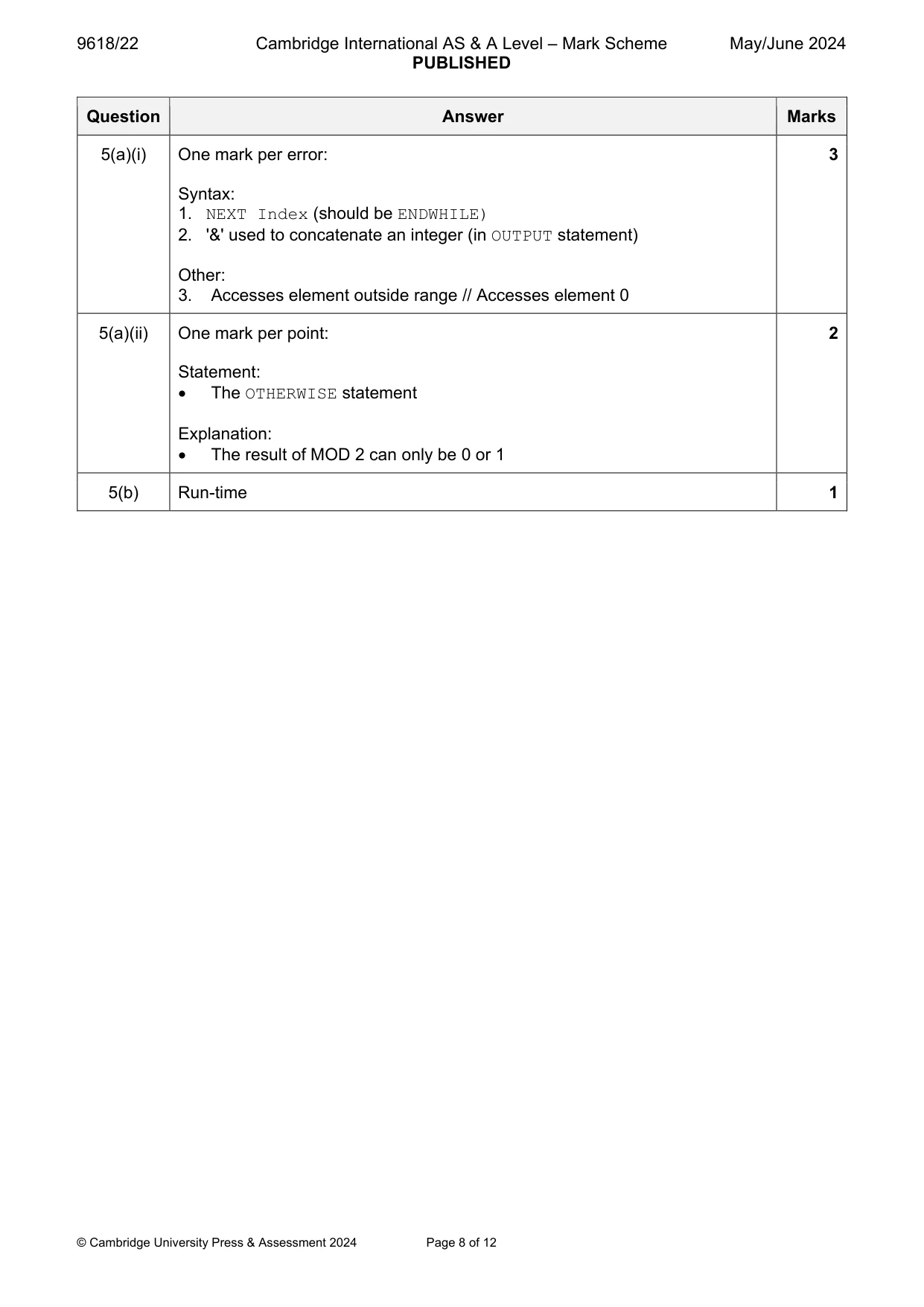
Mark scheme: 5(a)(i) One mark per error: 3 Syntax: 1. NEXT Index (should be ENDWHILE) 2. '&' used to concatenate an integer (in OUTPUT statement) Other: 3. Accesses element outside range // Accesses element 0 5(a)(ii) One mark per point: 2 Statement: The OTHERWISE statement Explanation: The result of MOD 2 can only be 0 or 1 5(b) Run-time 1
Q6 · A music player stores music in a digital form and has a display which shows the track…
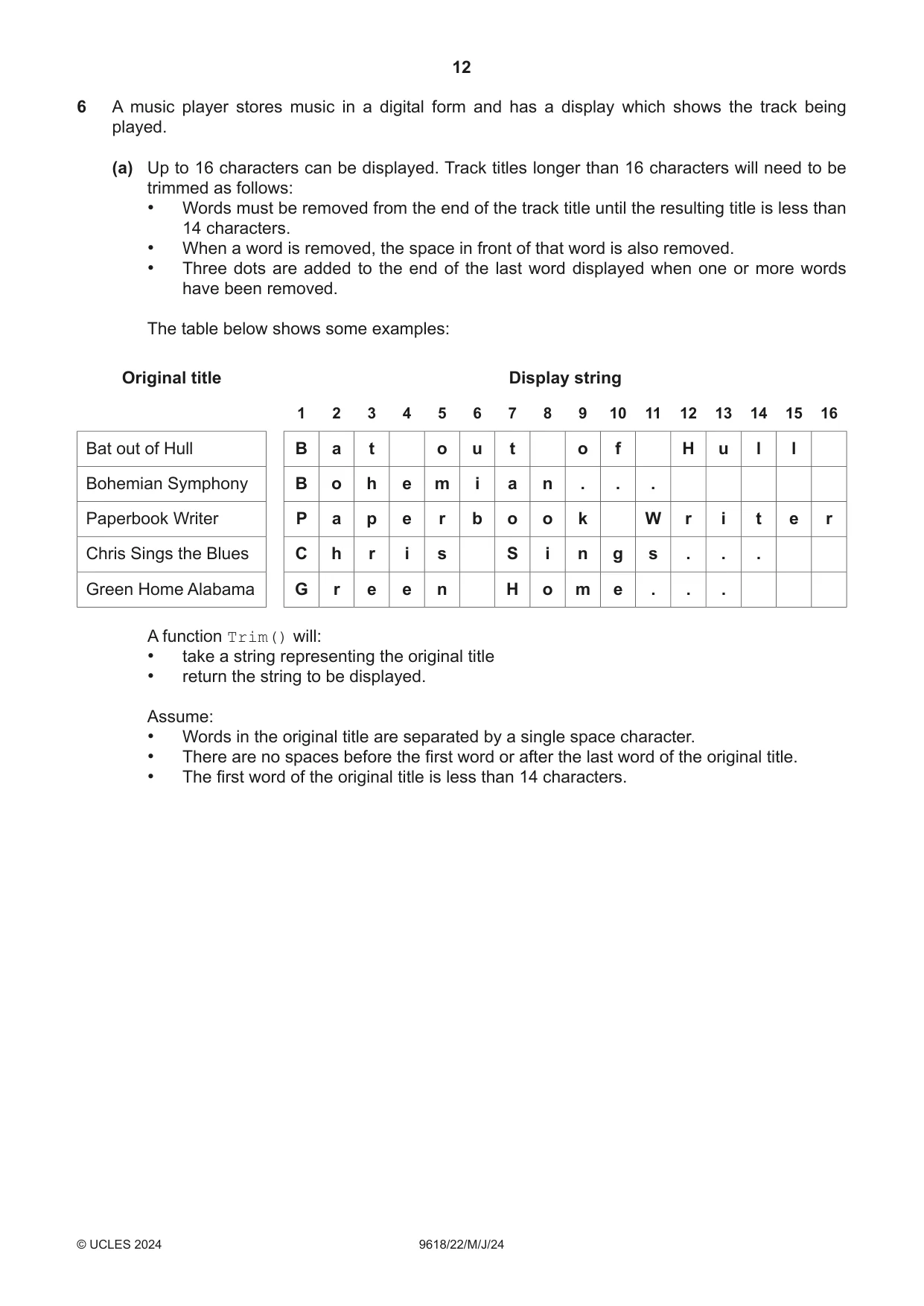
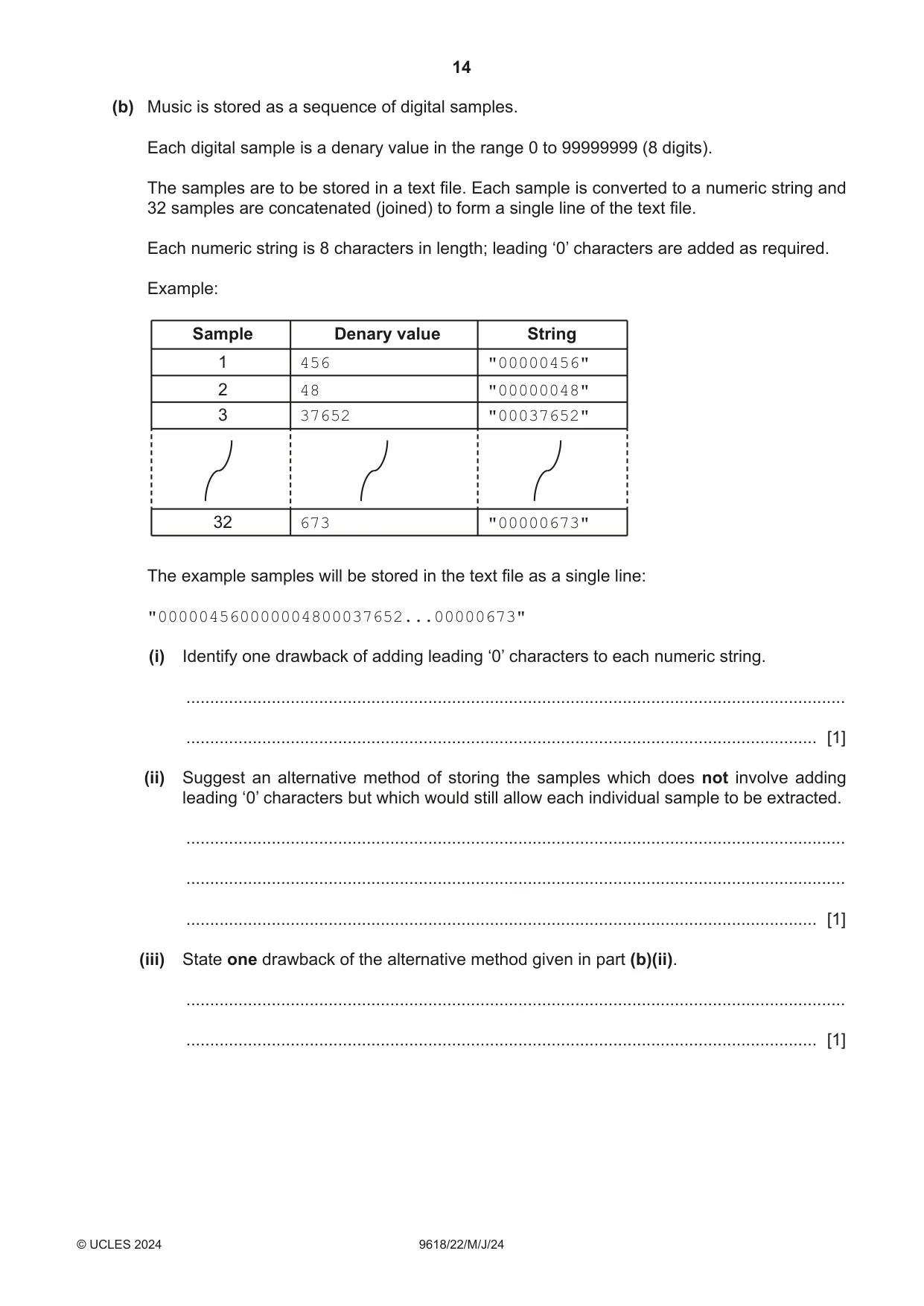
6 A music player stores music in a digital form and has a display which shows the track being played. (a) Up to 16 characters can be displayed. Track titles longer than 16 characters will need to be trimmed as follows: • Words must be removed from the end of the track title until the resulting title is less than 14 characters. • When a word is removed, the space in front of that word is also removed. • Three dots are added to the end of the last word displayed when one or more words have been removed. The table below shows some examples: Original title Display string 1 2 3 4 5 6 7 8 9 10 11 12 13 14 15 16 Bat out of Hull B a t o u t o f H u l l Bohemian Symphony B o h e m i a n . . . Paperbook Writer P a p e r b o o k W r i t e r Chris Sings the Blues C h r i s S i n g s . . . Green Home Alabama G r e e n H o m e . . . A function Trim() will: • take a string representing the original title • return the string to be displayed. Assume: • Words in the original title are separated by a single space character. • There are no spaces before the first word or after the last word of the original title. • The first word of the original title is less than 14 characters. Write pseudocode for the function Trim(). ................................................................................................................................................... ................................................................................................................................................... ................................................................................................................................................... ................................................................................................................................................... ................................................................................................................................................... ................................................................................................................................................... ................................................................................................................................................... ................................................................................................................................................... ................................................................................................................................................... ................................................................................................................................................... ................................................................................................................................................... ................................................................................................................................................... ................................................................................................................................................... ................................................................................................................................................... ................................................................................................................................................... ................................................................................................................................................... ................................................................................................................................................... ................................................................................................................................................... ................................................................................................................................................... ................................................................................................................................................... ................................................................................................................................................... ............................................................................................................................................. [7] (b) Music is stored as a sequence of digital samples. Each digital sample is a denary value in the range 0 to 99999999 (8 digits). The samples are to be stored in a text file. Each sample is converted to a numeric string and 32 samples are concatenated (joined) to form a single line of the text file. Each numeric string is 8 characters in length; leading ‘0’ characters are added as required. Example: Sample Denary value String 1 456 "00000456" 2 48 "00000048" 3 37652 "00037652" 32 673 "00000673" The example samples will be stored in the text file as a single line: "000004560000004800037652...00000673" (i) Identify one drawback of adding leading ‘0’ characters to each numeric string. ........................................................................................................................................... ..................................................................................................................................... [1] (ii) Suggest an alternative method of storing the samples which does not involve adding leading ‘0’ characters but which would still allow each individual sample to be extracted. ........................................................................................................................................... ........................................................................................................................................... ..................................................................................................................................... [1] (iii) State one drawback of the alternative method given in part (b)(ii). ........................................................................................................................................... ..................................................................................................................................... [1]
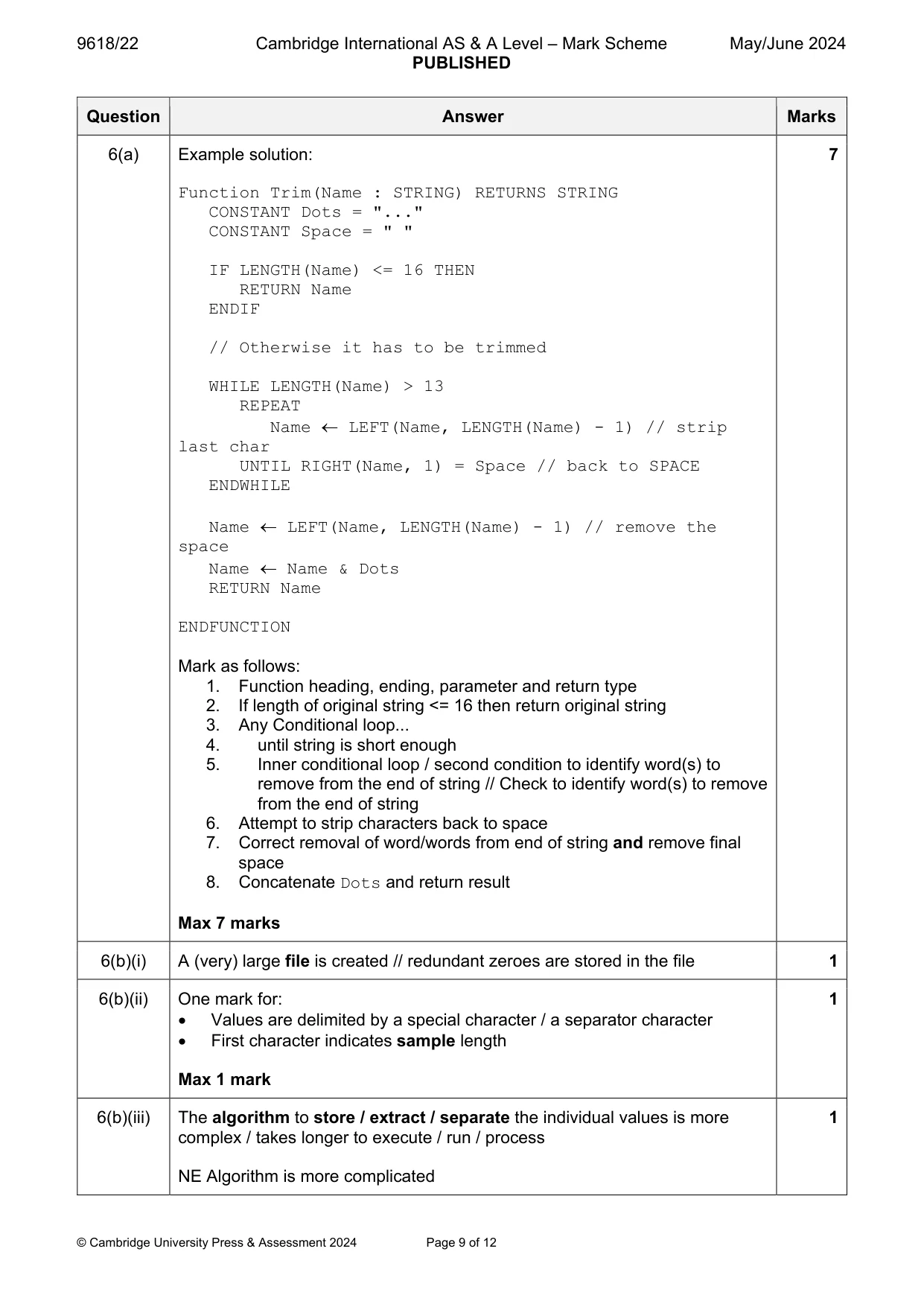
Mark scheme: 6(a) Example solution: 7 Function Trim(Name : STRING) RETURNS STRING CONSTANT Dots = "..." CONSTANT Space = " " IF LENGTH(Name) <= 16 THEN RETURN Name ENDIF // Otherwise it has to be trimmed WHILE LENGTH(Name) > 13 REPEAT Name LEFT(Name, LENGTH(Name) - 1) // strip last char UNTIL RIGHT(Name, 1) = Space // back to SPACE ENDWHILE Name LEFT(Name, LENGTH(Name) - 1) // remove the space Name Name & Dots RETURN Name ENDFUNCTION Mark as follows: 1. Function heading, ending, parameter and return type 2. If length of original string <= 16 then return original string 3. Any Conditional loop... 4. until string is short enough 5. Inner conditional loop / second condition to identify word(s) to remove from the end of string // Check to identify word(s) to remove from the end of string 6. Attempt to strip characters back to space 7. Correct removal of word/words from end of string and remove final space 8. Concatenate Dots and return result Max 7 marks 6(b)(i) A (very) large file is created // redundant zeroes are stored in the file 1 6(b)(ii) One mark for: 1 Values are delimited by a special character / a separator character First character indicates sample length Max 1 mark 6(b)(iii) The algorithm to store / extract / separate the individual values is more 1 complex / takes longer to execute / run / process NE Algorithm is more complicated
Q7 · A fitness club has a computerised membership system
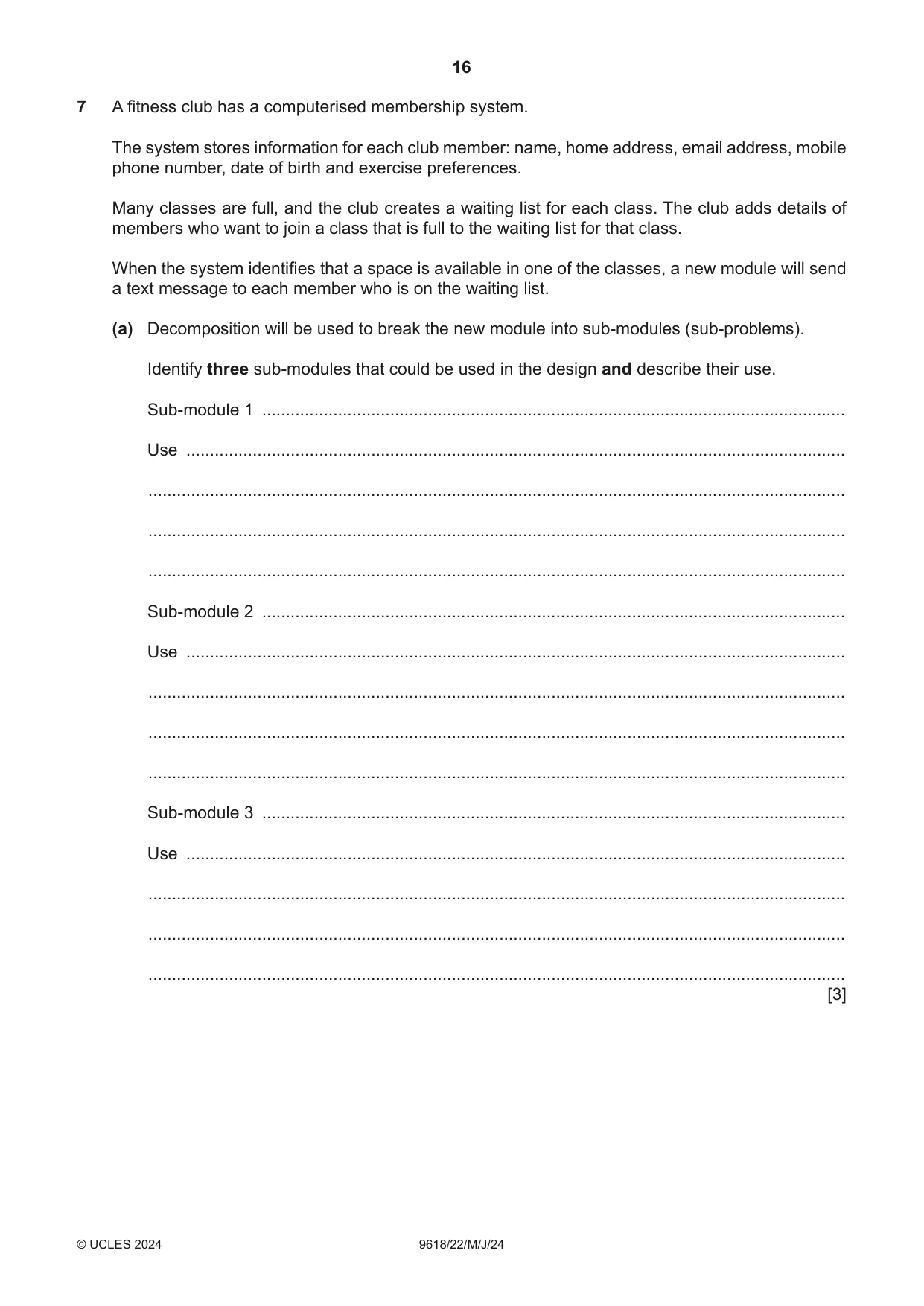
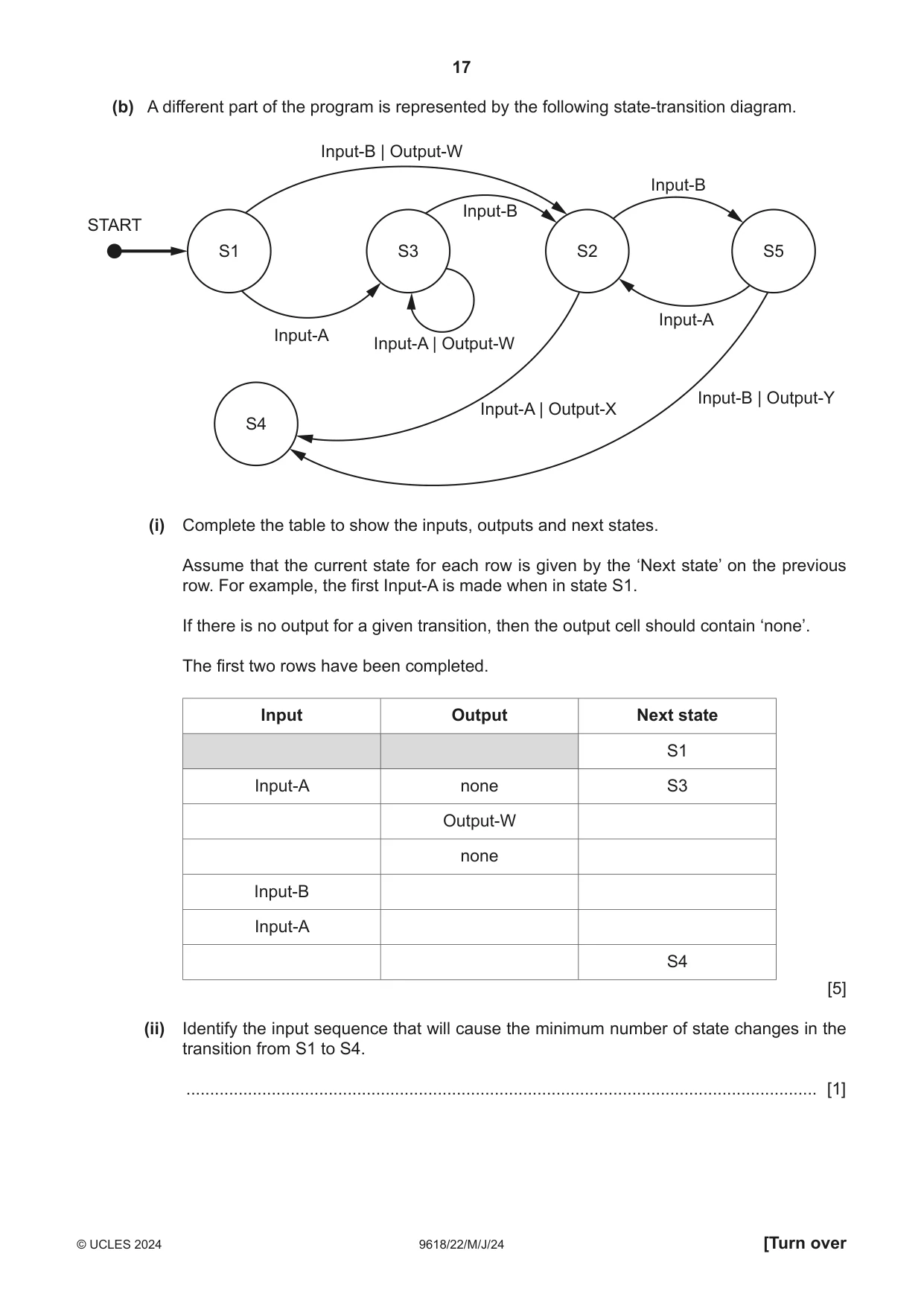
7 A fitness club has a computerised membership system. The system stores information for each club member: name, home address, email address, mobile phone number, date of birth and exercise preferences. Many classes are full, and the club creates a waiting list for each class. The club adds details of members who want to join a class that is full to the waiting list for that class. When the system identifies that a space is available in one of the classes, a new module will send a text message to each member who is on the waiting list. (a) Decomposition will be used to break the new module into sub‑modules (sub‑problems). Identify three sub‑modules that could be used in the design and describe their use. Sub‑module 1 ........................................................................................................................... Use ........................................................................................................................................... ................................................................................................................................................... ................................................................................................................................................... ................................................................................................................................................... Sub‑module 2 ........................................................................................................................... Use ........................................................................................................................................... ................................................................................................................................................... ................................................................................................................................................... ................................................................................................................................................... Sub‑module 3 ........................................................................................................................... Use ........................................................................................................................................... ................................................................................................................................................... ................................................................................................................................................... ................................................................................................................................................... [3] (b) A different part of the program is represented by the following state‑transition diagram. Input-B | Output-W Input-B Input-B START S1 S3 S2 S5 Input-A Input-A Input-A | Output-W Input-B | Output-Y Input-A | Output-X S4 (i) Complete the table to show the inputs, outputs and next states. Assume that the current state for each row is given by the ‘Next state’ on the previous row. For example, the first Input‑A is made when in state S1. If there is no output for a given transition, then the output cell should contain ‘none’. The first two rows have been completed. Input Output Next state S1 Input‑A none S3 Output‑W none Input‑B Input‑A S4 [5] (ii) Identify the input sequence that will cause the minimum number of state changes in the transition from S1 to S4. ..................................................................................................................................... [1]
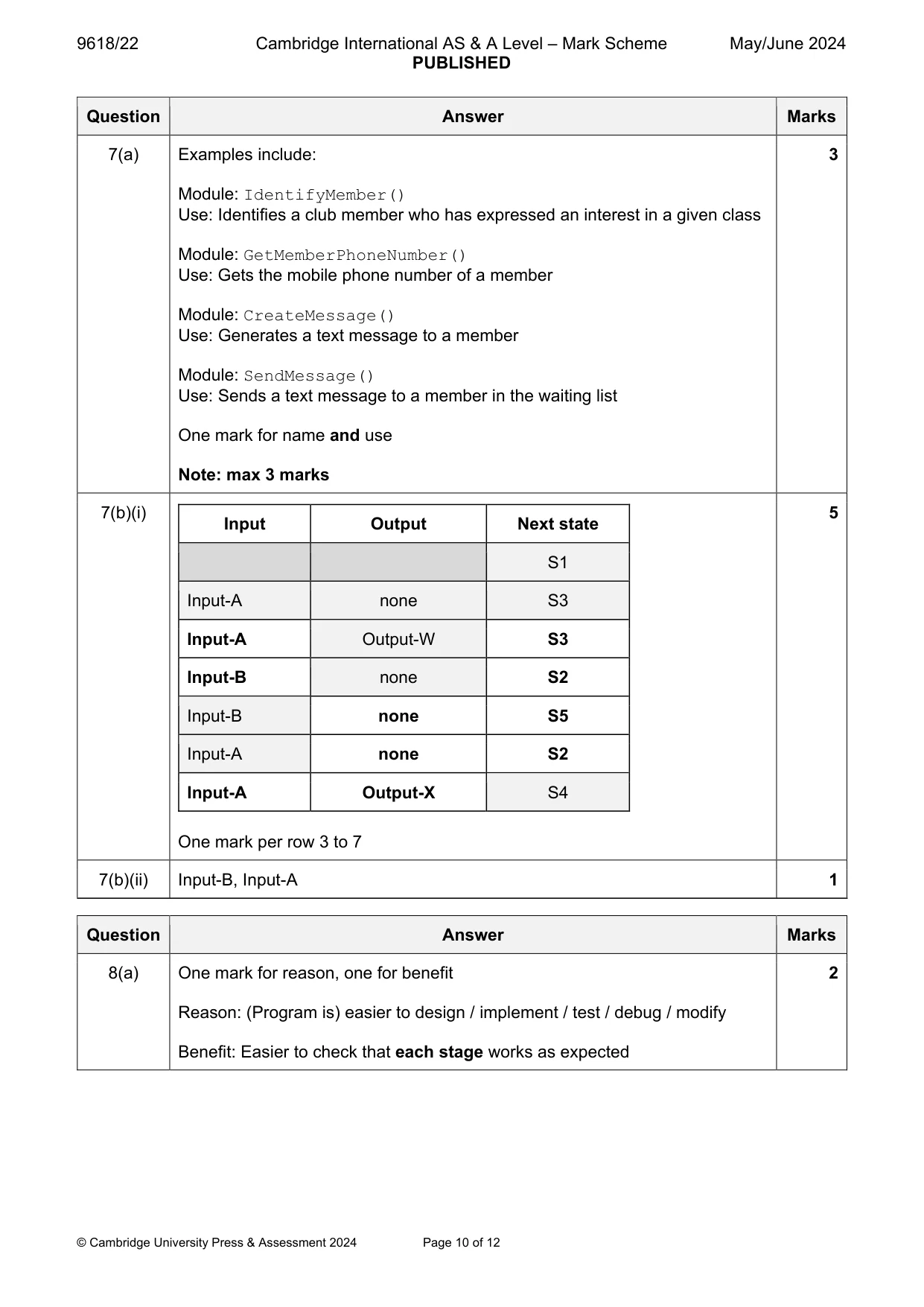
Mark scheme: 7(a) Examples include: 3 Module: IdentifyMember() Use: Identifies a club member who has expressed an interest in a given class Module: GetMemberPhoneNumber() Use: Gets the mobile phone number of a member Module: CreateMessage() Use: Generates a text message to a member Module: SendMessage() Use: Sends a text message to a member in the waiting list One mark for name and use Note: max 3 marks 7(b)(i) 5 Input Output Next state S1 Input-A none S3 Input-A Output-W S3 Input-B none S2 Input-B none S5 Input-A none S2 Input-A Output-X S4 One mark per row 3 to 7 7(b)(ii) Input-B, Input-A 1
Q8 · A teacher is designing a program to process pseudocode projects written by her students
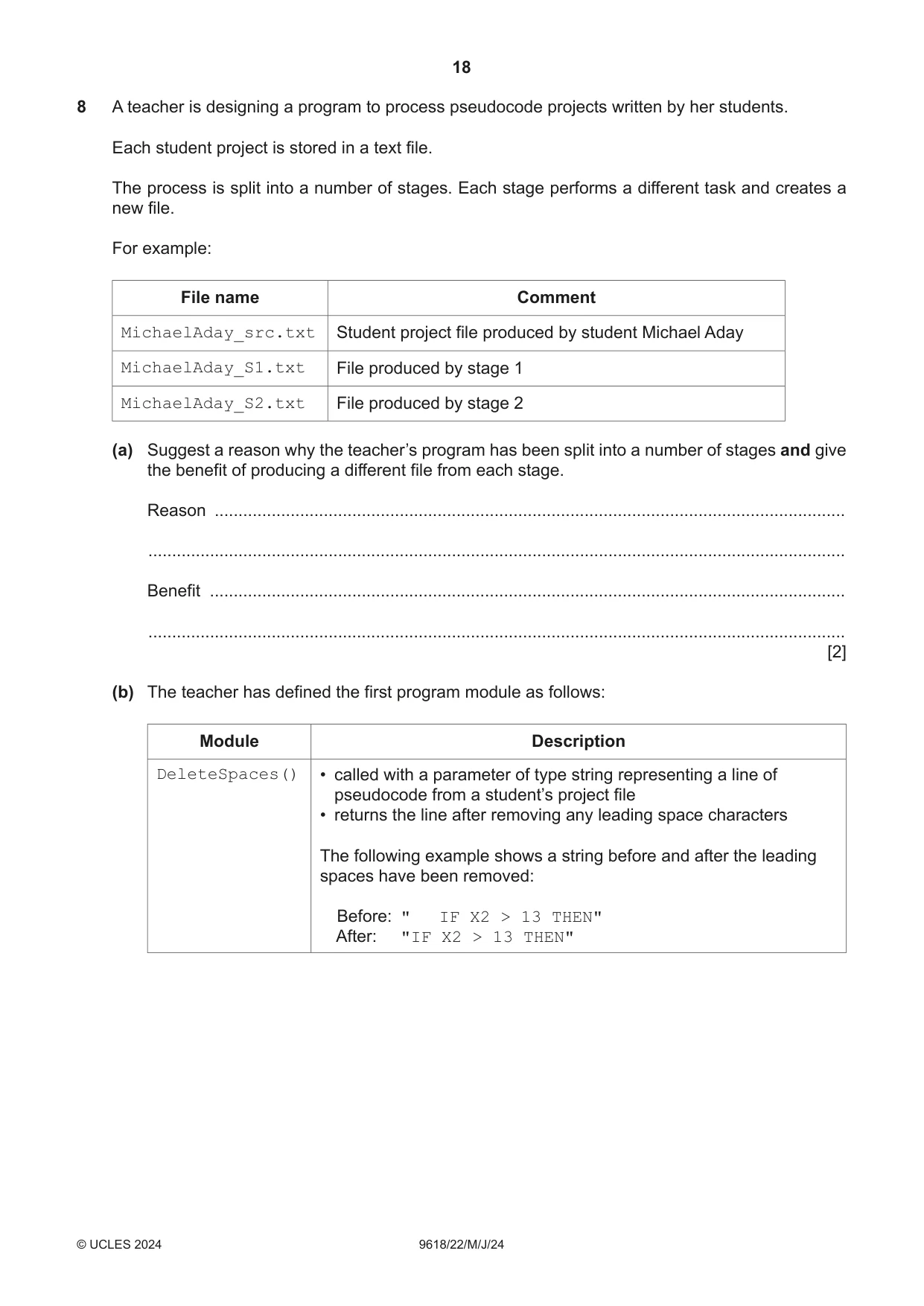
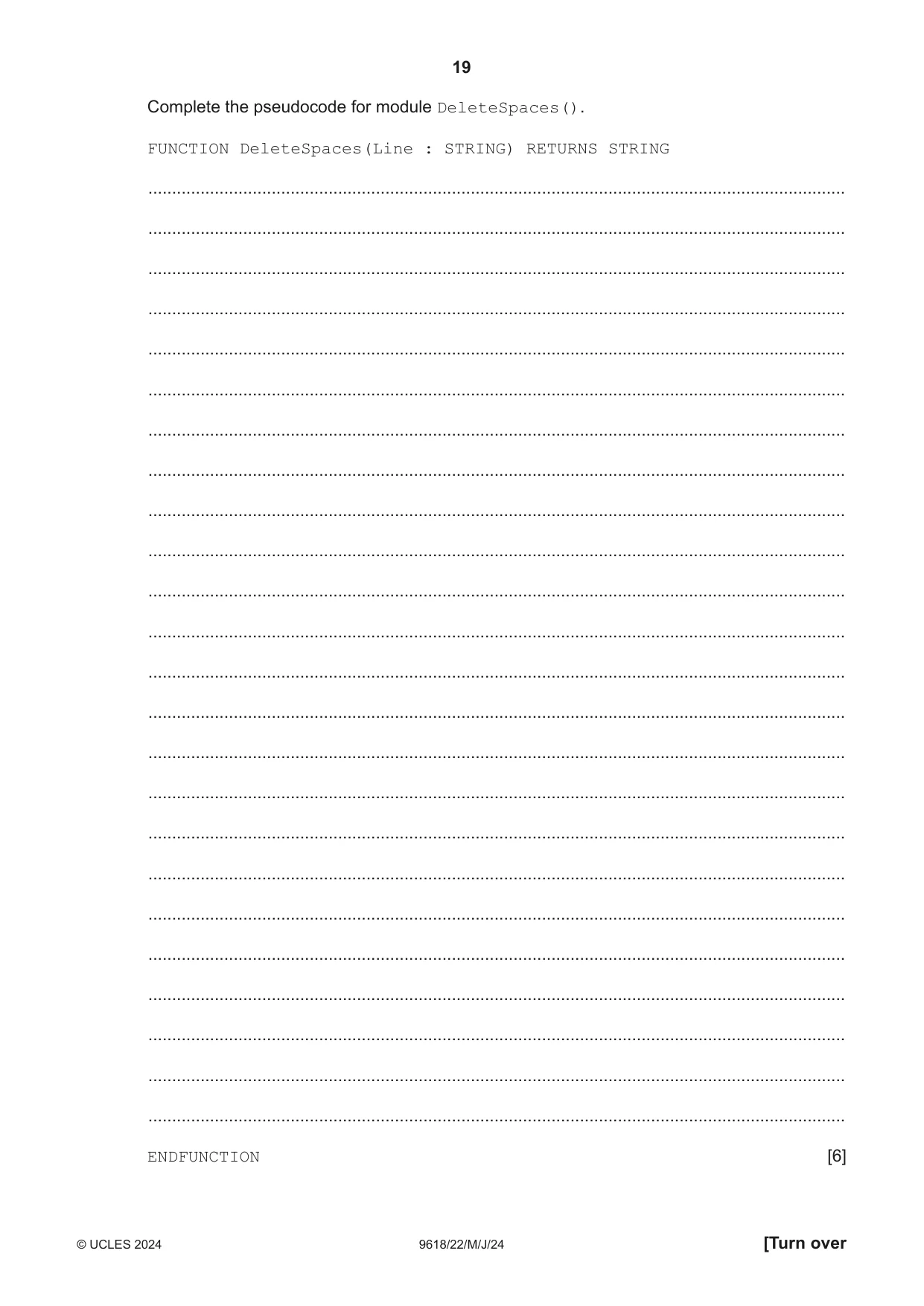
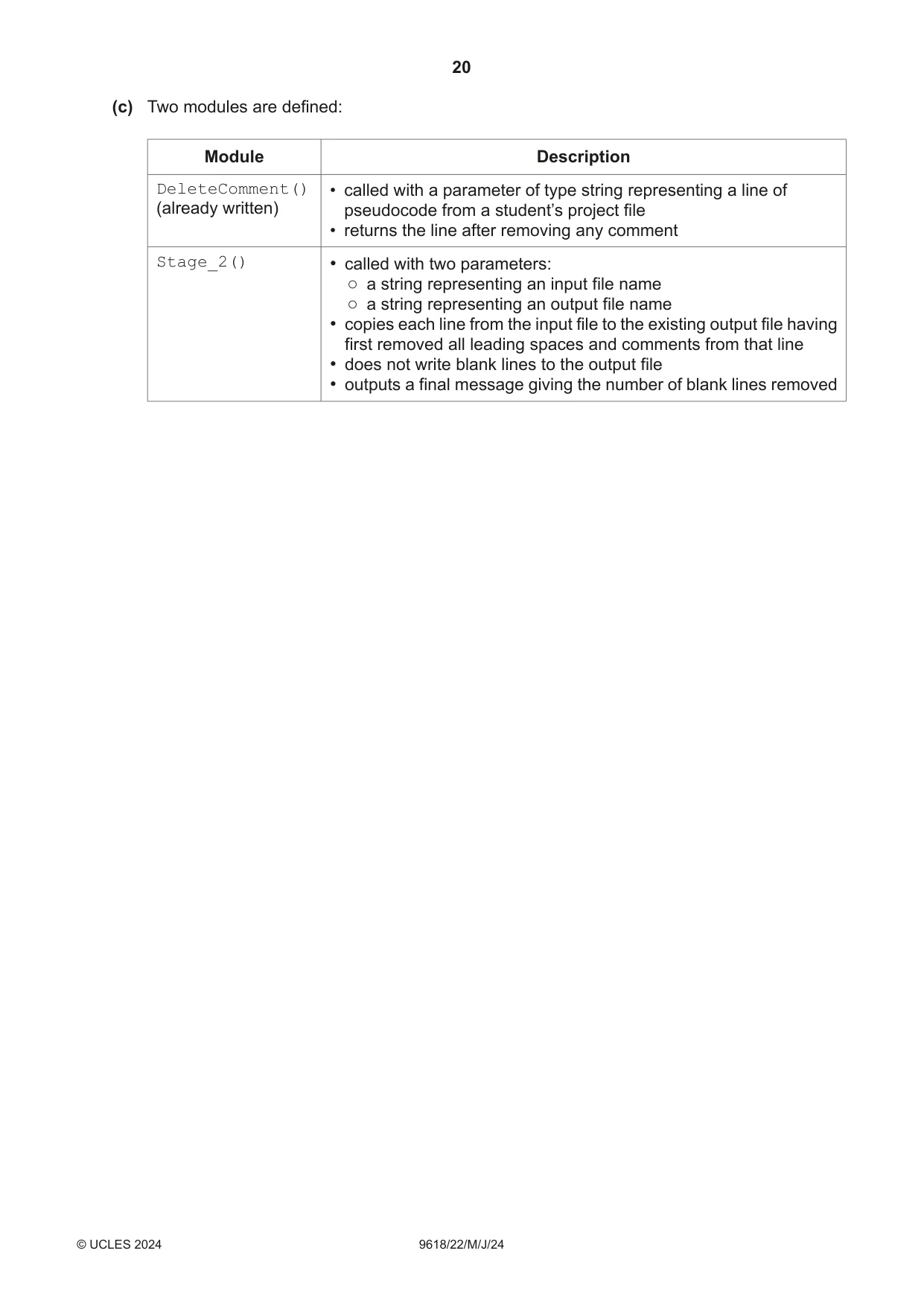
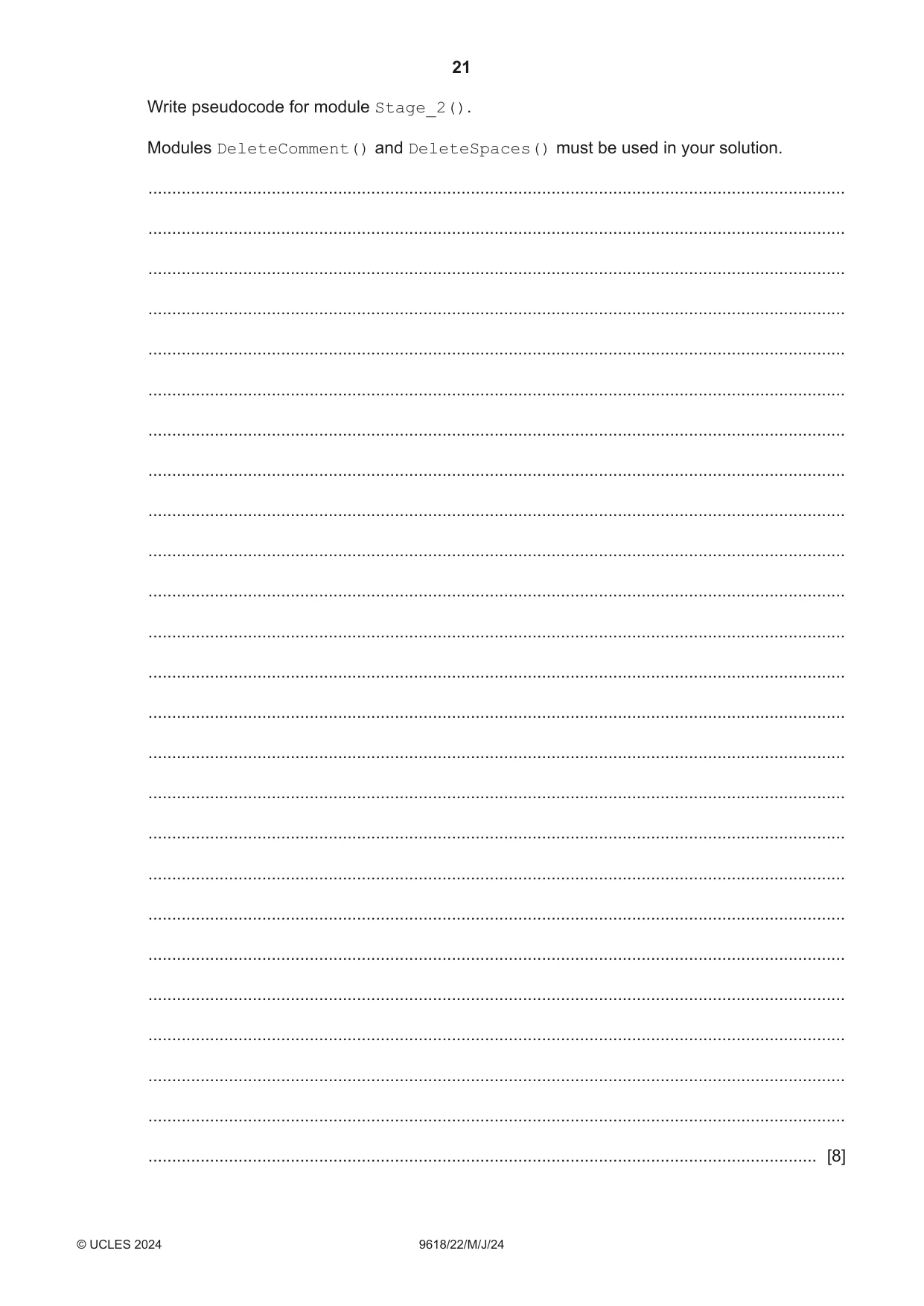
8 A teacher is designing a program to process pseudocode projects written by her students. Each student project is stored in a text file. The process is split into a number of stages. Each stage performs a different task and creates a new file. For example: File name Comment MichaelAday_src.txt Student project file produced by student Michael Aday MichaelAday_S1.txt File produced by stage 1 MichaelAday_S2.txt File produced by stage 2 (a) Suggest a reason why the teacher’s program has been split into a number of stages and give the benefit of producing a different file from each stage. Reason ..................................................................................................................................... ................................................................................................................................................... Benefit ...................................................................................................................................... ................................................................................................................................................... [2] (b) The teacher has defined the first program module as follows: Module Description DeleteSpaces() • called with a parameter of type string representing a line of pseudocode from a student’s project file • returns the line after removing any leading space characters The following example shows a string before and after the leading spaces have been removed: Before: " IF X2 > 13 THEN" After: "IF X2 > 13 THEN" Complete the pseudocode for module DeleteSpaces(). FUNCTION DeleteSpaces(Line : STRING) RETURNS STRING ................................................................................................................................................... ................................................................................................................................................... ................................................................................................................................................... ................................................................................................................................................... ................................................................................................................................................... ................................................................................................................................................... ................................................................................................................................................... ................................................................................................................................................... ................................................................................................................................................... ................................................................................................................................................... ................................................................................................................................................... ................................................................................................................................................... ................................................................................................................................................... ................................................................................................................................................... ................................................................................................................................................... ................................................................................................................................................... ................................................................................................................................................... ................................................................................................................................................... ................................................................................................................................................... ................................................................................................................................................... ................................................................................................................................................... ................................................................................................................................................... ................................................................................................................................................... ................................................................................................................................................... ENDFUNCTION [6] (c) Two modules are defined: Module Description DeleteComment() • called with a parameter of type string representing a line of (already written) pseudocode from a student’s project file • returns the line after removing any comment Stage_2() • called with two parameters: ○ a string representing an input file name ○ a string representing an output file name • copies each line from the input file to the existing output file having first removed all leading spaces and comments from that line • does not write blank lines to the output file • outputs a final message giving the number of blank lines removed
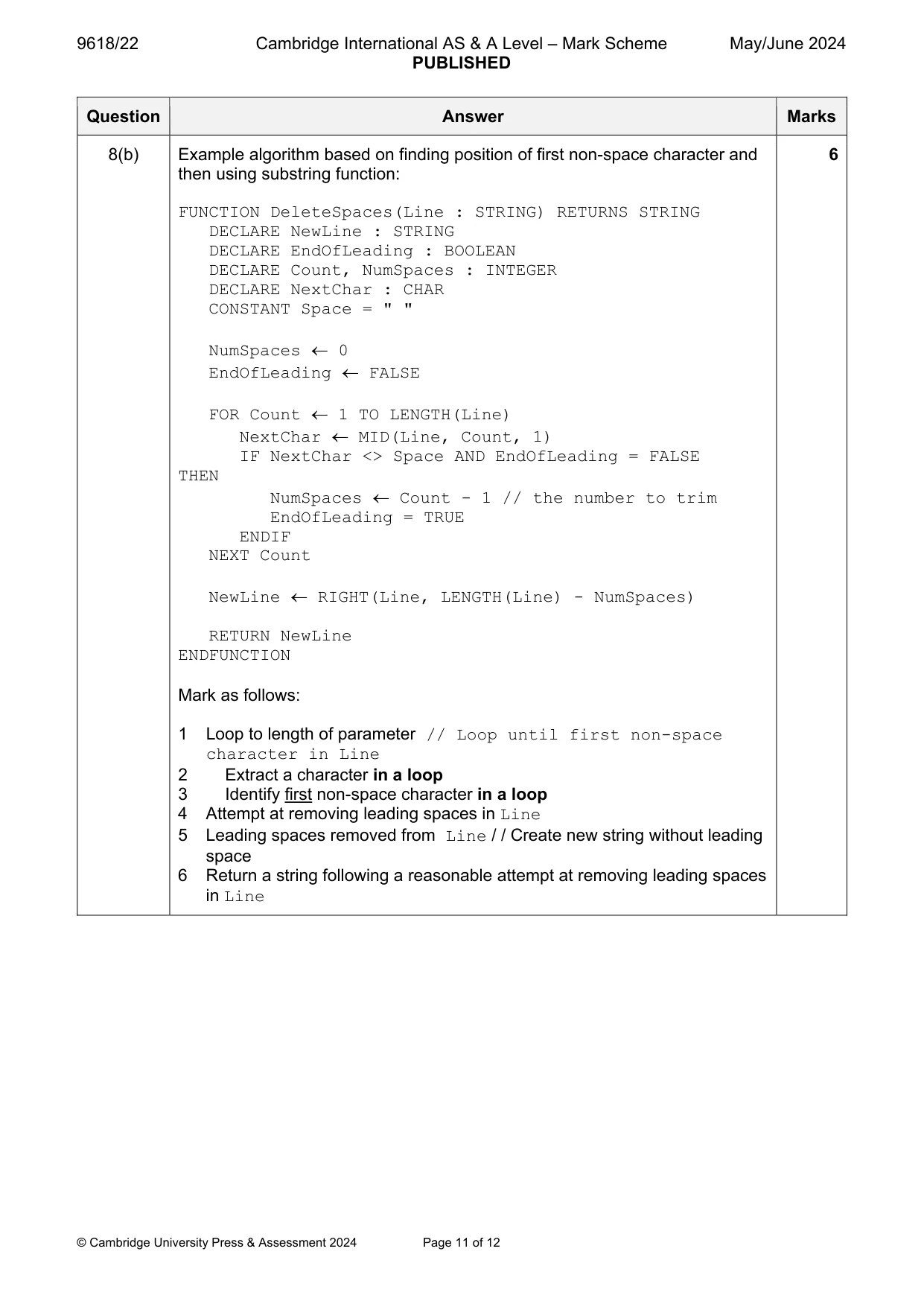
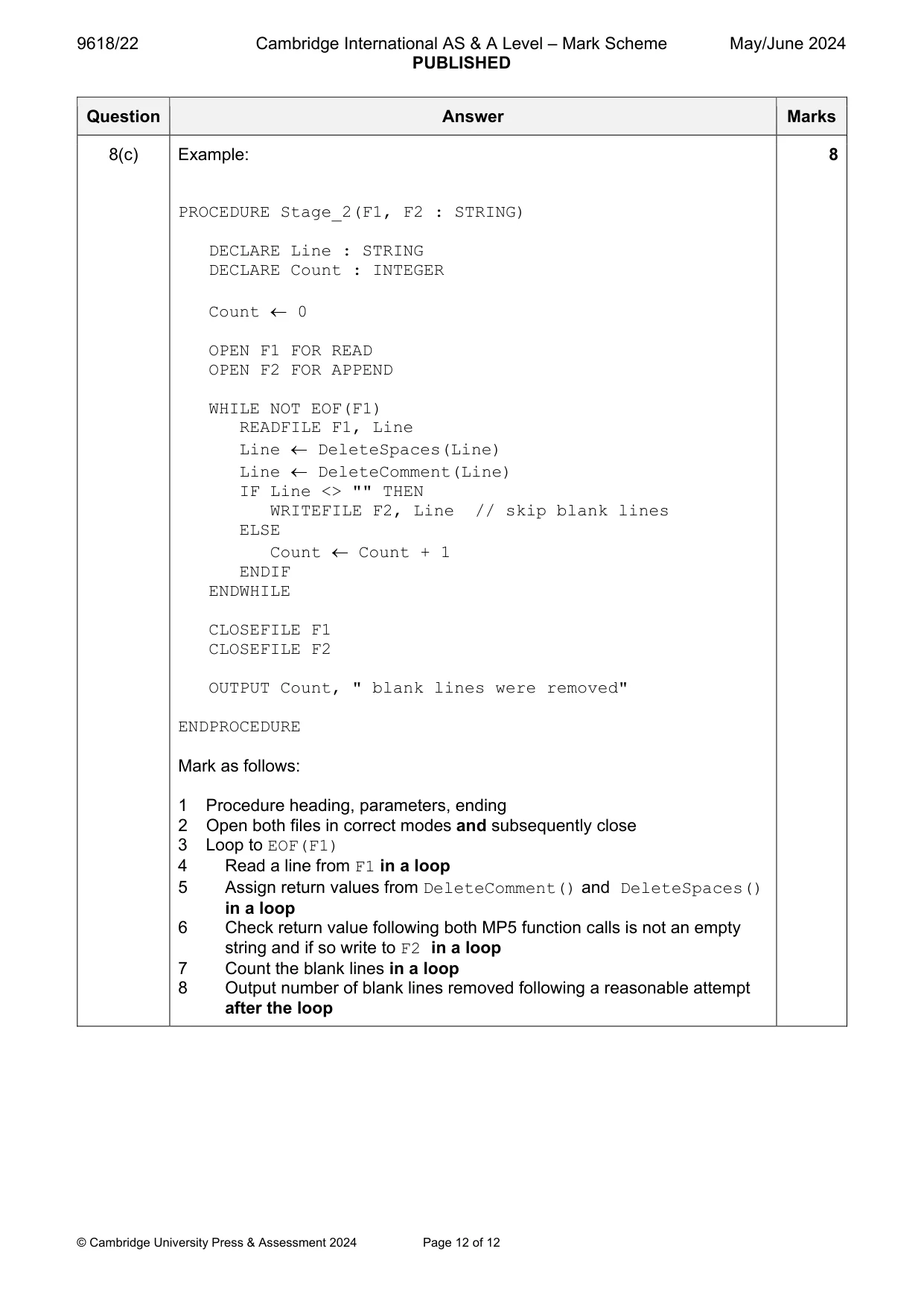
Mark scheme: 8(a) One mark for reason, one for benefit 2 Reason: (Program is) easier to design / implement / test / debug / modify Benefit: Easier to check that each stage works as expected 8(b) Example algorithm based on finding position of first non-space character and 6 then using substring function: FUNCTION DeleteSpaces(Line : STRING) RETURNS STRING DECLARE NewLine : STRING DECLARE EndOfLeading : BOOLEAN DECLARE Count, NumSpaces : INTEGER DECLARE NextChar : CHAR CONSTANT Space = " " NumSpaces 0 EndOfLeading FALSE FOR Count 1 TO LENGTH(Line) NextChar MID(Line, Count, 1) IF NextChar <> Space AND EndOfLeading = FALSE THEN NumSpaces Count - 1 // the number to trim EndOfLeading = TRUE ENDIF NEXT Count NewLine RIGHT(Line, LENGTH(Line) - NumSpaces) RETURN NewLine ENDFUNCTION Mark as follows: 1 Loop to length of parameter // Loop until first non-space character in Line 2 Extract a character in a loop 3 Identify first non-space character in a loop 4 Attempt at removing leading spaces in Line 5 Leading spaces removed from Line / / Create new string without leading space 6 Return a string following a reasonable attempt at removing leading spaces in Line 8(c) Example: 8 PROCEDURE Stage_2(F1, F2 : STRING) DECLARE Line : STRING DECLARE Count : INTEGER Count 0 OPEN F1 FOR READ OPEN F2 FOR APPEND WHILE NOT EOF(F1) READFILE F1, Line Line DeleteSpaces(Line) Line DeleteComment(Line) IF Line <> "" THEN WRITEFILE F2, Line // skip blank lines ELSE Count Count + 1 ENDIF ENDWHILE CLOSEFILE F1 CLOSEFILE F2 OUTPUT Count, " blank lines were removed" ENDPROCEDURE Mark as follows: 1 Procedure heading, parameters, ending 2 Open both files in correct modes and subsequently close 3 Loop to EOF(F1) 4 Read a line from F1 in a loop 5 Assign return values from DeleteComment() and DeleteSpaces() in a loop 6 Check return value following both MP5 function calls is not an empty string and if so write to F2 in a loop 7 Count the blank lines in a loop 8 Output number of blank lines removed following a reasonable attempt after the loop
What you needed in this session
Cambridge’s own grade thresholds for 2024 May/June, Paper 2 · Variant 2. A higher threshold means an easier paper — the bar moves with how the cohort did.