Cambridge IGCSE Information and Communication Technology (9-1) 0983 — 2023 May/June Paper 2 · Variant 1
0983/21/M/J/23 · 70 marks · ≈79 min
The question paper and its mark scheme, free to read here and free to download. This is Cambridge’s own paper, exactly as it was sat.
Question paper12 pages

Mark scheme18 pages
Answers below. Sit the paper first if you are practising.
Paper as text
Question paper, page 1
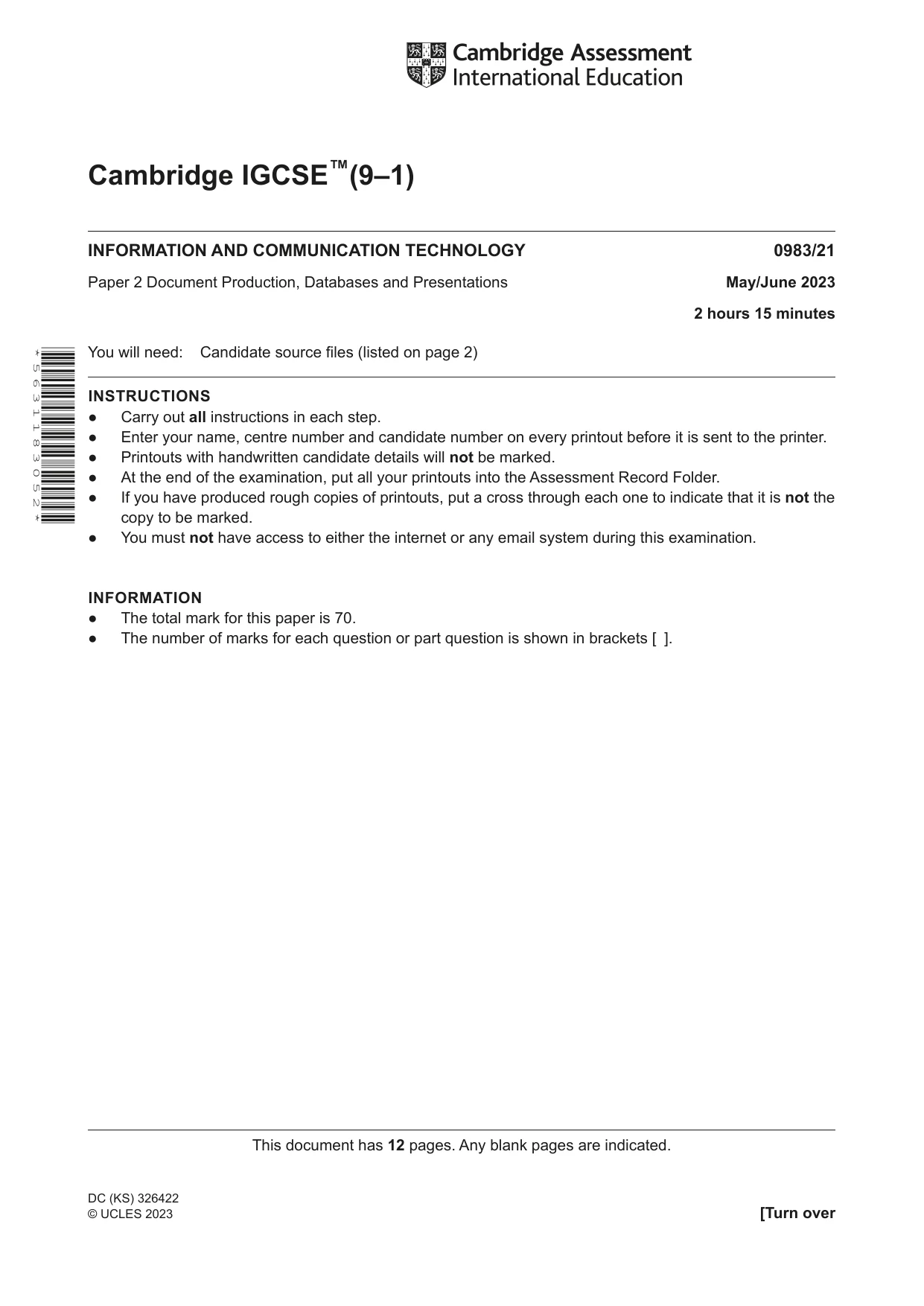
This document has 12 pages. Any blank pages are indicated. [Turn over Cambridge IGCSE™(9–1) * 5 6 3 1 1 8 3 0 5 2 * DC (KS) 326422 © UCLES 2023 INFORMATION AND COMMUNICATION TECHNOLOGY 0983/21 Paper 2 Document Production, Databases and Presentations May/June 2023 2 hours 15 minutes You will need: Candidate source files (listed on page 2) INSTRUCTIONS ● Carry out all instructions in each step. ● Enter your name, centre number and candidate number on every printout before it is sent to the printer. ● Printouts with handwritten candidate details will not be marked. ● At the end of the examination, put all your printouts into the Assessment Record Folder. ● If you have produced rough copies of printouts, put a cross through each one to indicate that it is not the copy to be marked. ● You must not have access to either the internet or any email system during this examination. INFORMATION ● The total mark for this paper is 70. ● The number of marks for each question or part question is shown in brackets [ ].
Question paper, page 2
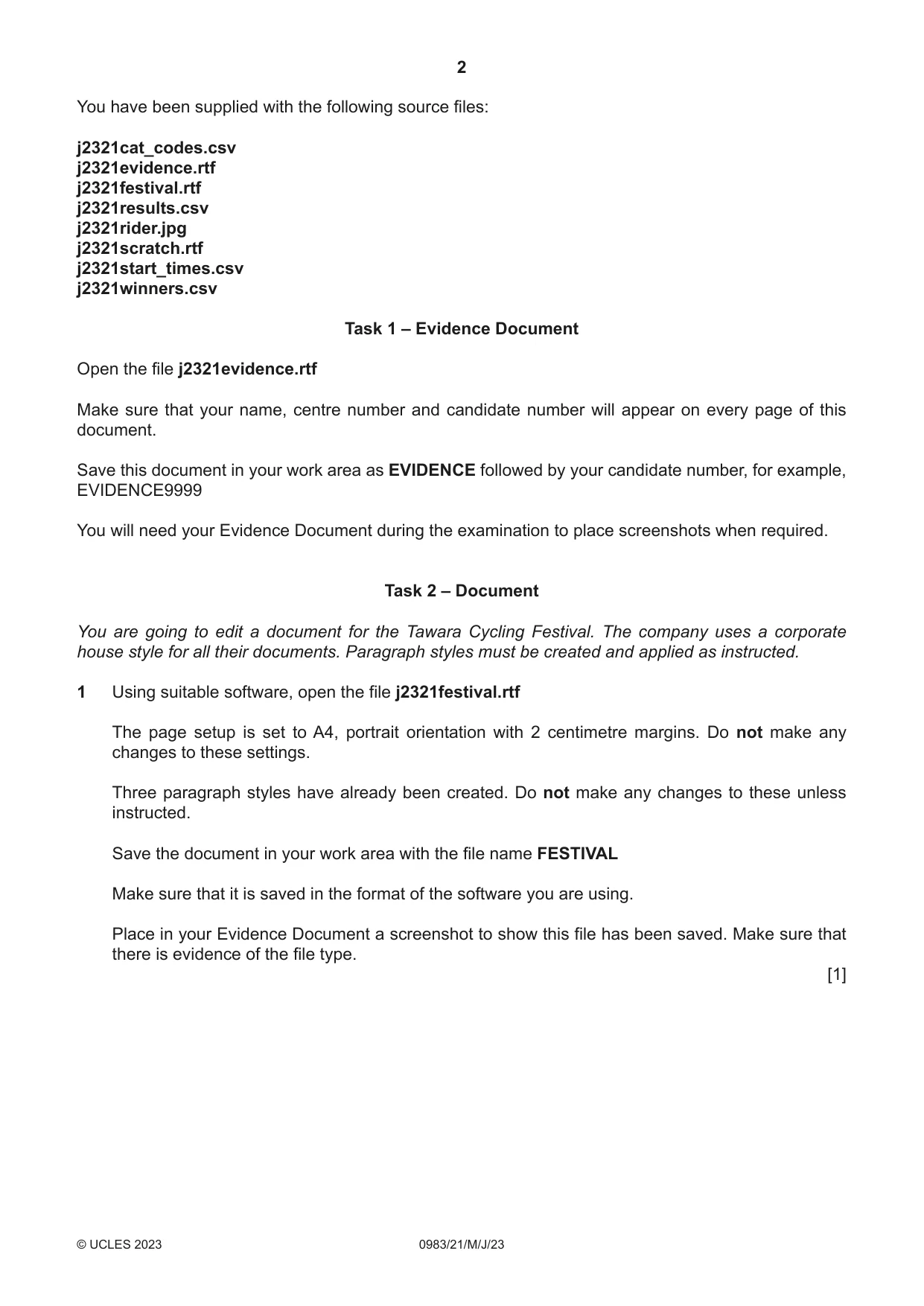
2 0983/21/M/J/23 © UCLES 2023 You have been supplied with the following source files: j2321cat_codes.csv j2321evidence.rtf j2321festival.rtf j2321results.csv j2321rider.jpg j2321scratch.rtf j2321start_times.csv j2321winners.csv Task 1 – Evidence Document Open the file j2321evidence.rtf Make sure that your name, centre number and candidate number will appear on every page of this document. Save this document in your work area as EVIDENCE followed by your candidate number, for example, EVIDENCE9999 You will need your Evidence Document during the examination to place screenshots when required. Task 2 – Document You are going to edit a document for the Tawara Cycling Festival. The company uses a corporate house style for all their documents. Paragraph styles must be created and applied as instructed. 1 Using suitable software, open the file j2321festival.rtf The page setup is set to A4, portrait orientation with 2 centimetre margins. Do not make any changes to these settings. Three paragraph styles have already been created. Do not make any changes to these unless instructed. Save the document in your work area with the file name FESTIVAL Make sure that it is saved in the format of the software you are using. Place in your Evidence Document a screenshot to show this file has been saved. Make sure that there is evidence of the file type. [1]
Question paper, page 3
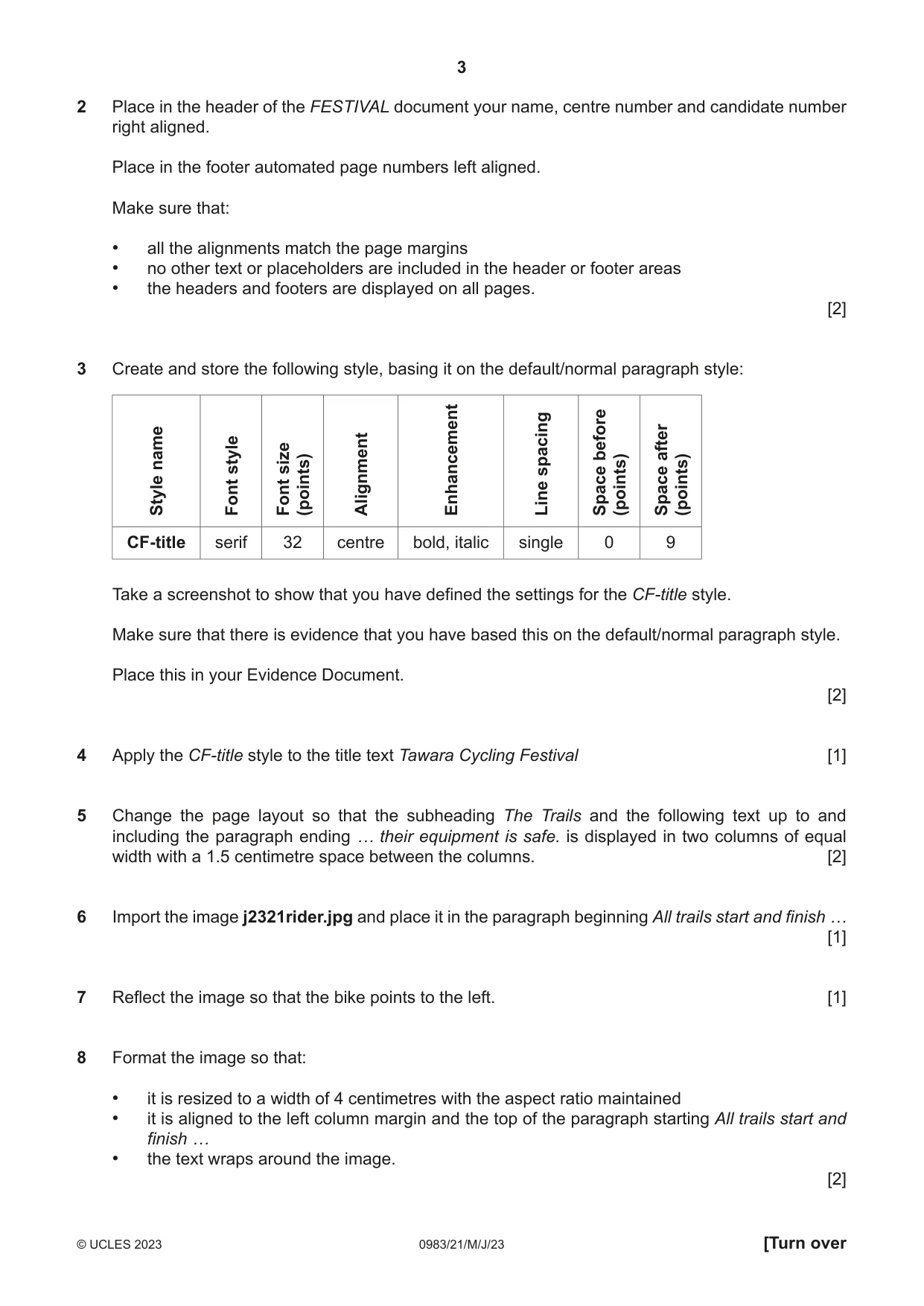
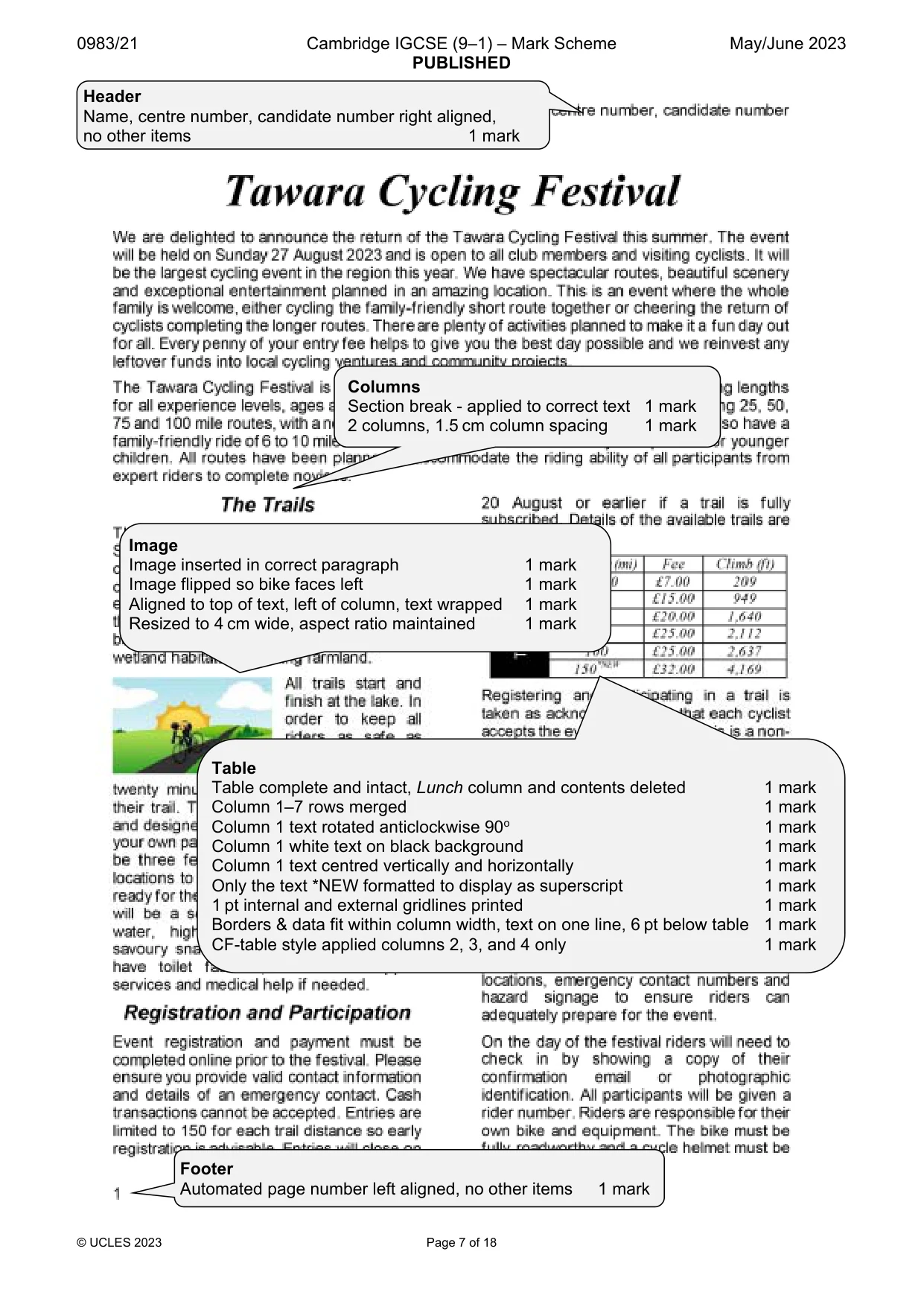
3 0983/21/M/J/23 © UCLES 2023 [Turn over 2 Place in the header of the FESTIVAL document your name, centre number and candidate number right aligned. Place in the footer automated page numbers left aligned. Make sure that: • all the alignments match the page margins • no other text or placeholders are included in the header or footer areas • the headers and footers are displayed on all pages. [2] 3 Create and store the following style, basing it on the default/normal paragraph style: Style name Font style Font size (points) Alignment Enhancement Line spacing Space before (points) Space after (points) CF‑title serif 32 centre bold, italic single 0 9 Take a screenshot to show that you have defined the settings for the CF‑title style. Make sure that there is evidence that you have based this on the default/normal paragraph style. Place this in your Evidence Document. [2] 4 Apply the CF‑title style to the title text Tawara Cycling Festival [1] 5 Change the page layout so that the subheading The Trails and the following text up to and including the paragraph ending … their equipment is safe. is displayed in two columns of equal width with a 1.5 centimetre space between the columns. [2] 6 Import the image j2321rider.jpg and place it in the paragraph beginning All trails start and finish … [1] 7 Reflect the image so that the bike points to the left. [1] 8 Format the image so that: • it is resized to a width of 4 centimetres with the aspect ratio maintained • it is aligned to the left column margin and the top of the paragraph starting All trails start and finish … • the text wraps around the image. [2]
Question paper, page 4
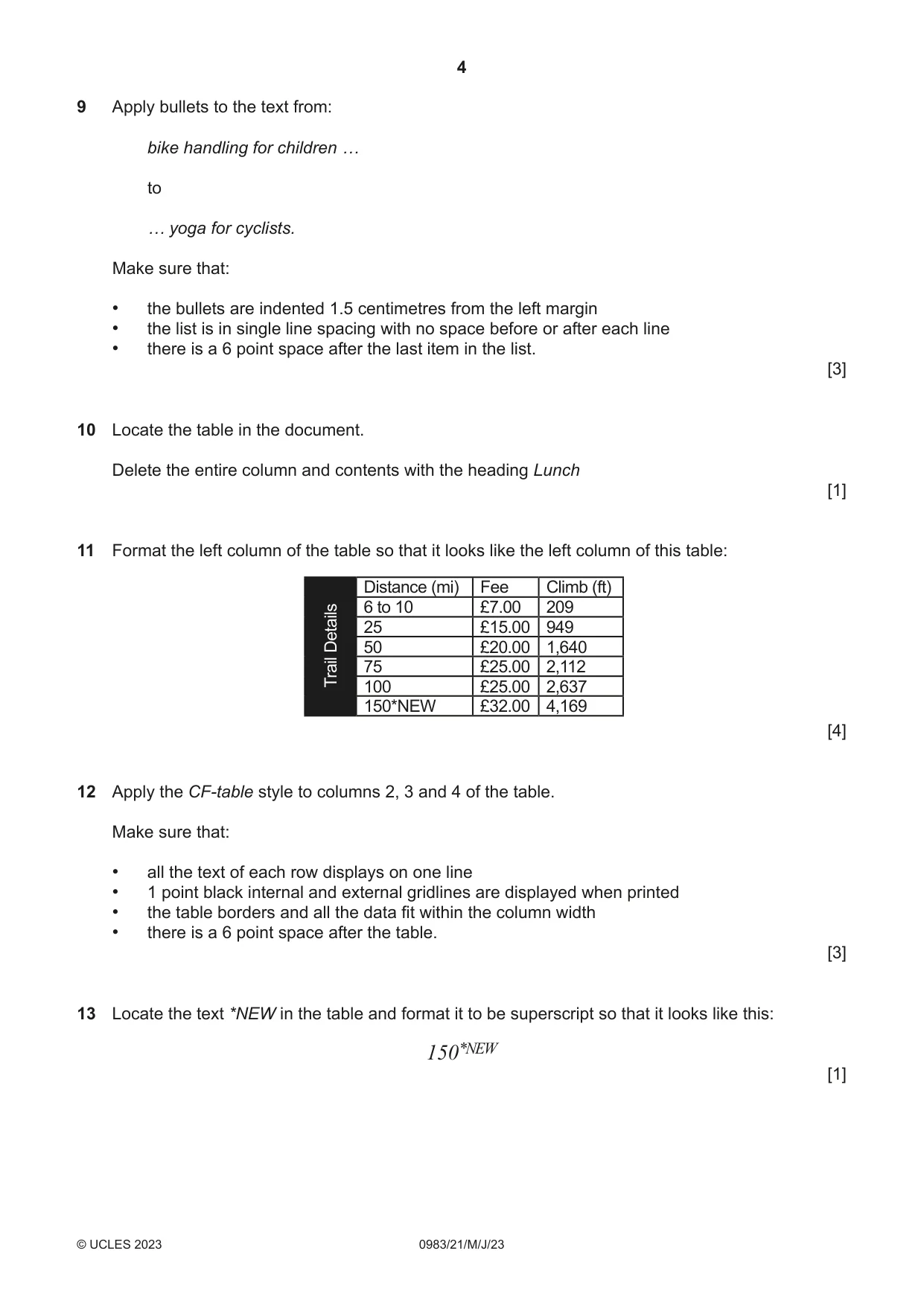
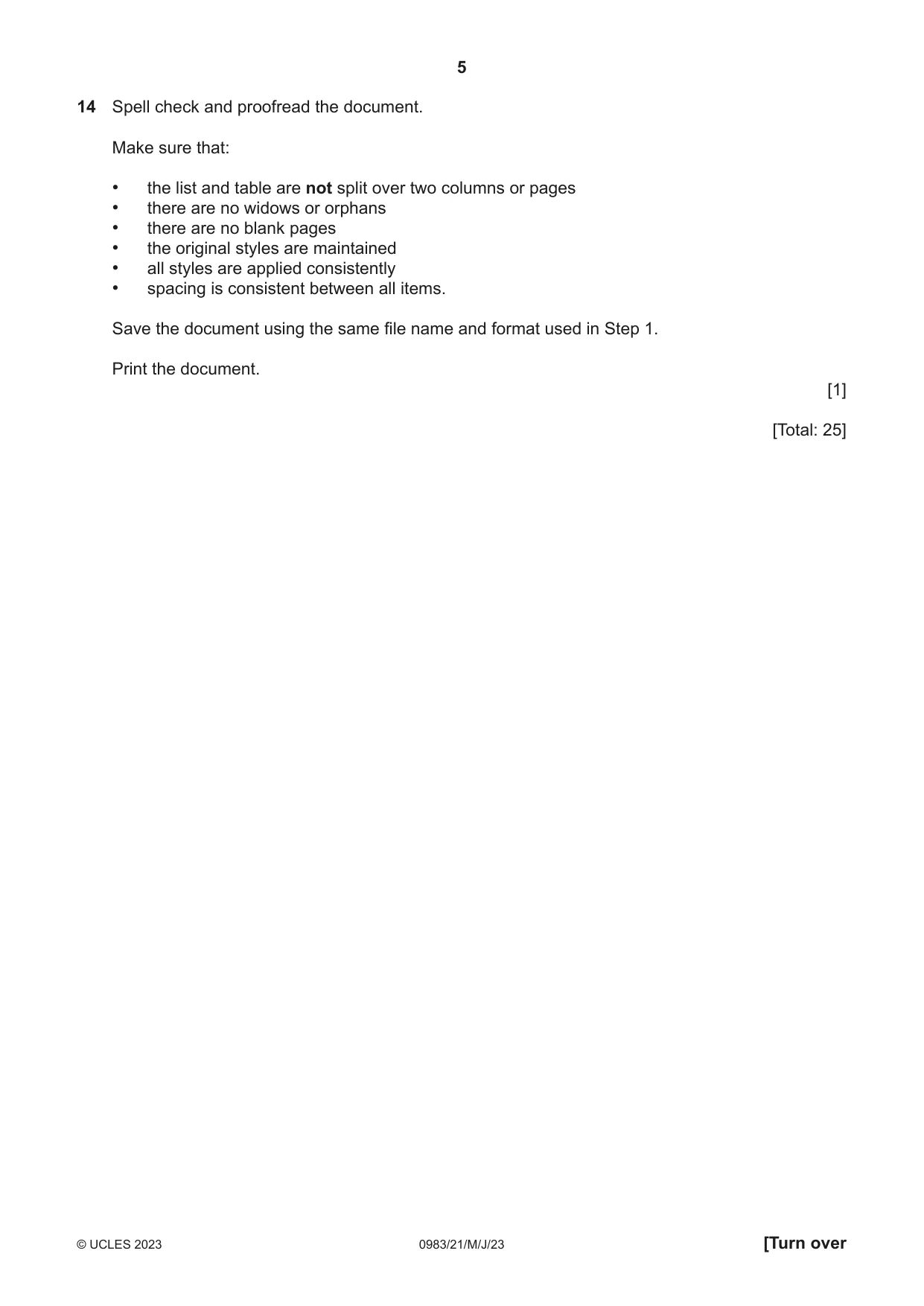
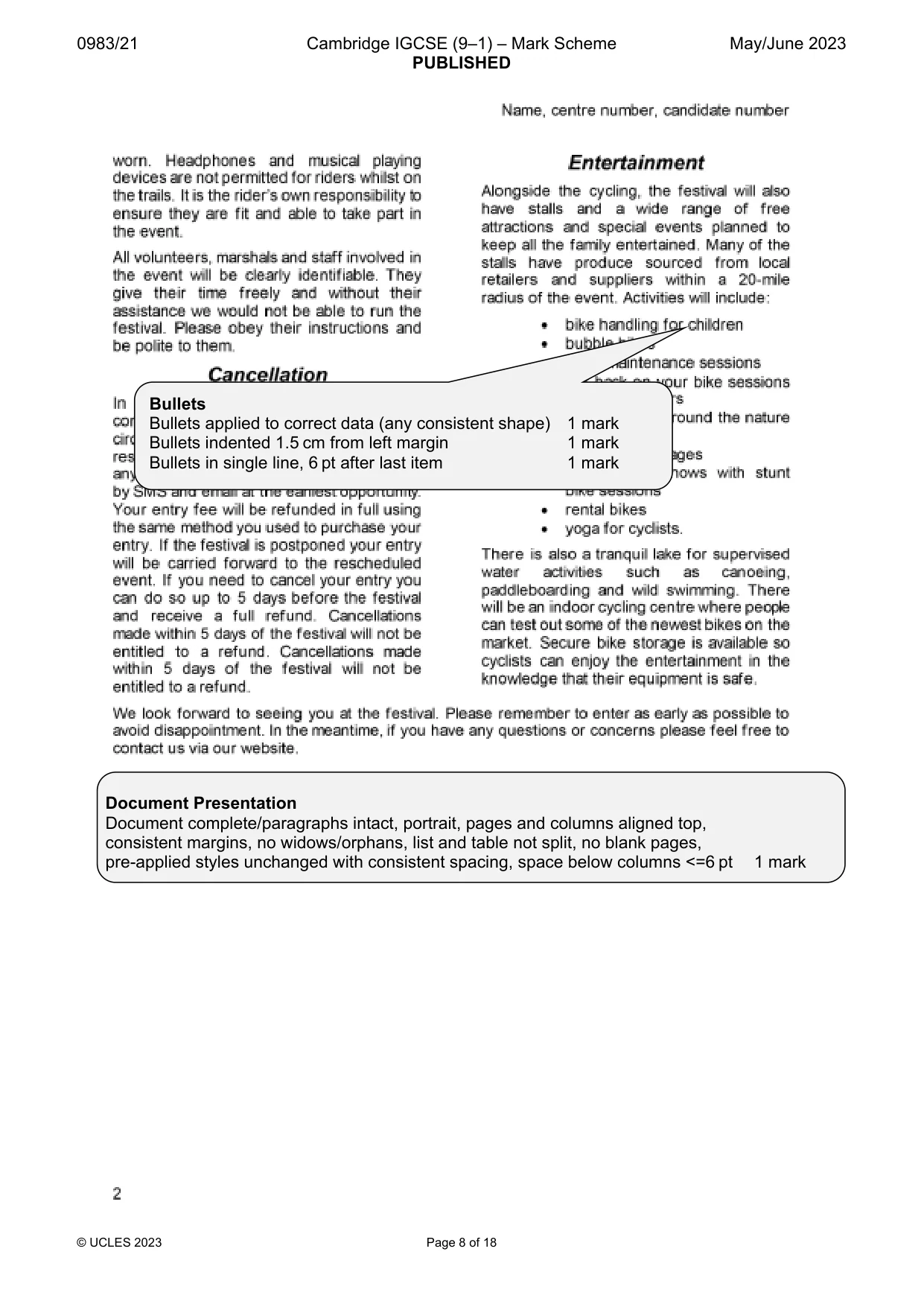
4 0983/21/M/J/23 © UCLES 2023 9 Apply bullets to the text from: bike handling for children … to … yoga for cyclists. Make sure that: • the bullets are indented 1.5 centimetres from the left margin • the list is in single line spacing with no space before or after each line • there is a 6 point space after the last item in the list. [3] 10 Locate the table in the document. Delete the entire column and contents with the heading Lunch [1] 11 Format the left column of the table so that it looks like the left column of this table: Trail Details Distance (mi) Fee Climb (ft) 6 to 10 £7.00 209 25 £15.00 949 50 £20.00 1,640 75 £25.00 2,112 100 £25.00 2,637 150*NEW £32.00 4,169 [4] 12 Apply the CF‑table style to columns 2, 3 and 4 of the table. Make sure that: • all the text of each row displays on one line • 1 point black internal and external gridlines are displayed when printed • the table borders and all the data fit within the column width • there is a 6 point space after the table. [3] 13 Locate the text *NEW in the table and format it to be superscript so that it looks like this: 150*NEW [1]
Question paper, page 5
5 0983/21/M/J/23 © UCLES 2023 [Turn over 14 Spell check and proofread the document. Make sure that: • the list and table are not split over two columns or pages • there are no widows or orphans • there are no blank pages • the original styles are maintained • all styles are applied consistently • spacing is consistent between all items. Save the document using the same file name and format used in Step 1. Print the document. [1] [Total: 25]
Question paper, page 6
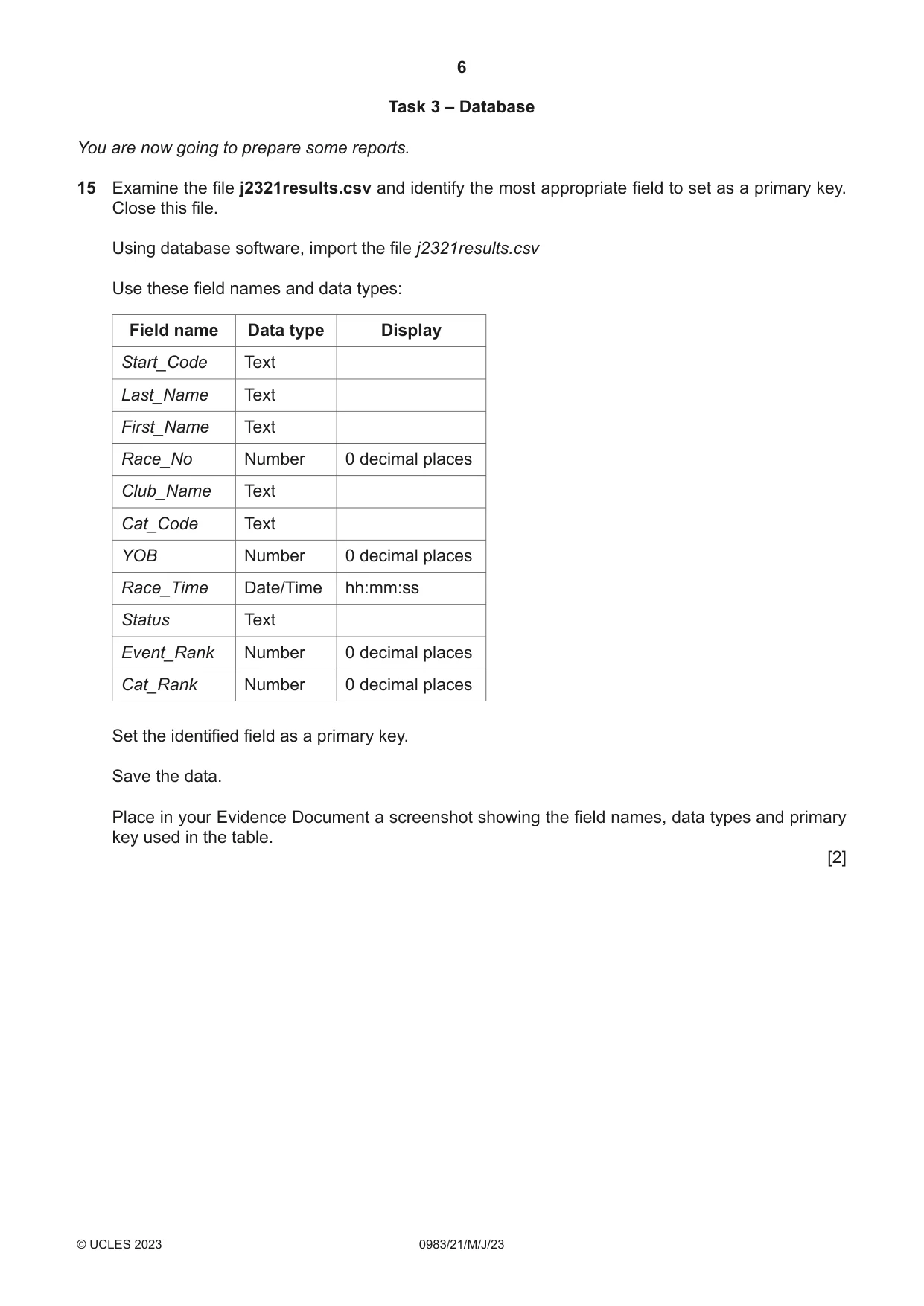
6 0983/21/M/J/23 © UCLES 2023 Task 3 – Database You are now going to prepare some reports. 15 Examine the file j2321results.csv and identify the most appropriate field to set as a primary key. Close this file. Using database software, import the file j2321results.csv Use these field names and data types: Field name Data type Display Start_Code Text Last_Name Text First_Name Text Race_No Number 0 decimal places Club_Name Text Cat_Code Text YOB Number 0 decimal places Race_Time Date/Time hh:mm:ss Status Text Event_Rank Number 0 decimal places Cat_Rank Number 0 decimal places Set the identified field as a primary key. Save the data. Place in your Evidence Document a screenshot showing the field names, data types and primary key used in the table. [2]
Question paper, page 7
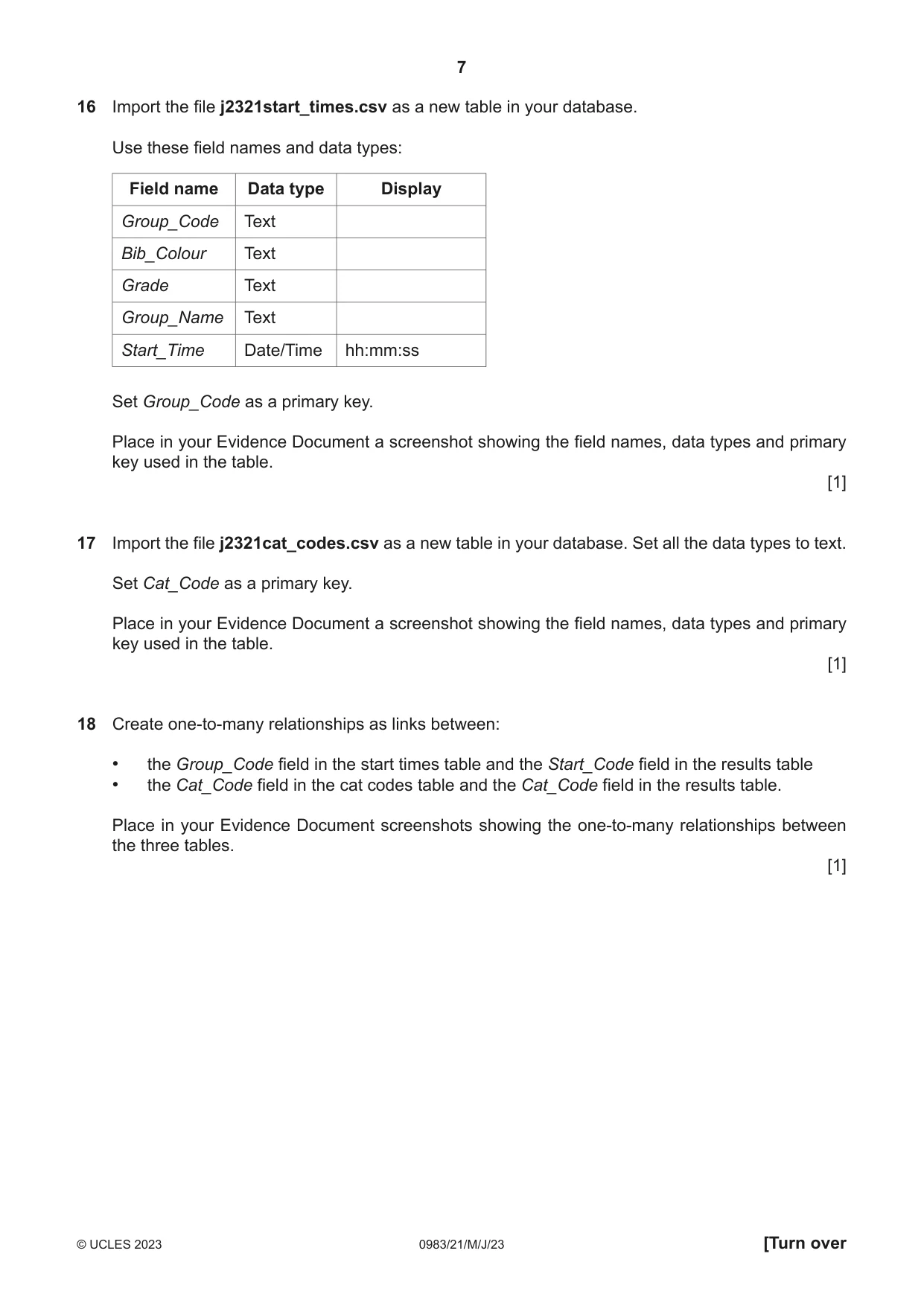
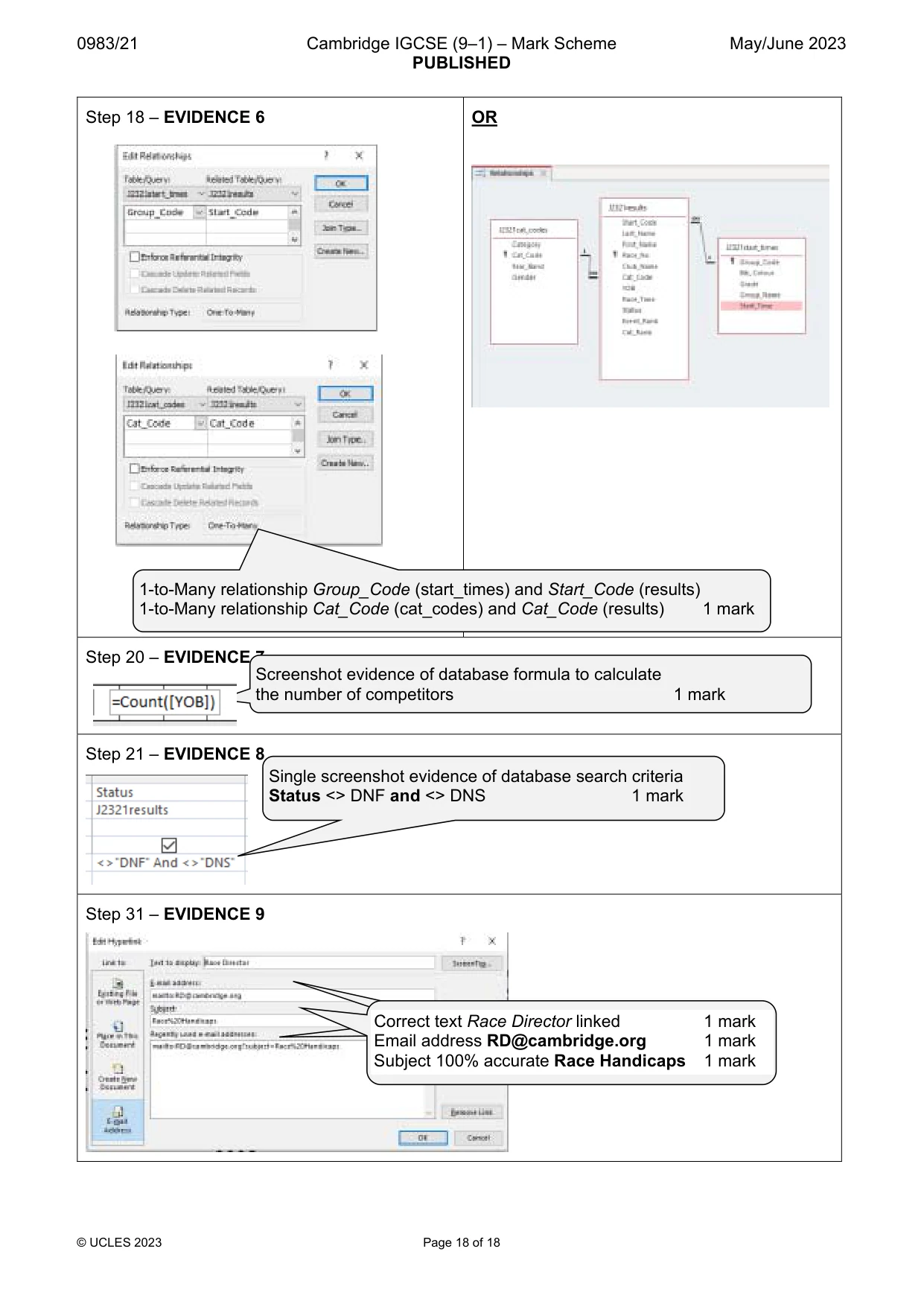
7 0983/21/M/J/23 © UCLES 2023 [Turn over 16 Import the file j2321start_times.csv as a new table in your database. Use these field names and data types: Field name Data type Display Group_Code Text Bib_Colour Text Grade Text Group_Name Text Start_Time Date/Time hh:mm:ss Set Group_Code as a primary key. Place in your Evidence Document a screenshot showing the field names, data types and primary key used in the table. [1] 17 Import the file j2321cat_codes.csv as a new table in your database. Set all the data types to text. Set Cat_Code as a primary key. Place in your Evidence Document a screenshot showing the field names, data types and primary key used in the table. [1] 18 Create one‑to‑many relationships as links between: • the Group_Code field in the start times table and the Start_Code field in the results table • the Cat_Code field in the cat codes table and the Cat_Code field in the results table. Place in your Evidence Document screenshots showing the one‑to‑many relationships between the three tables. [1]
Question paper, page 8
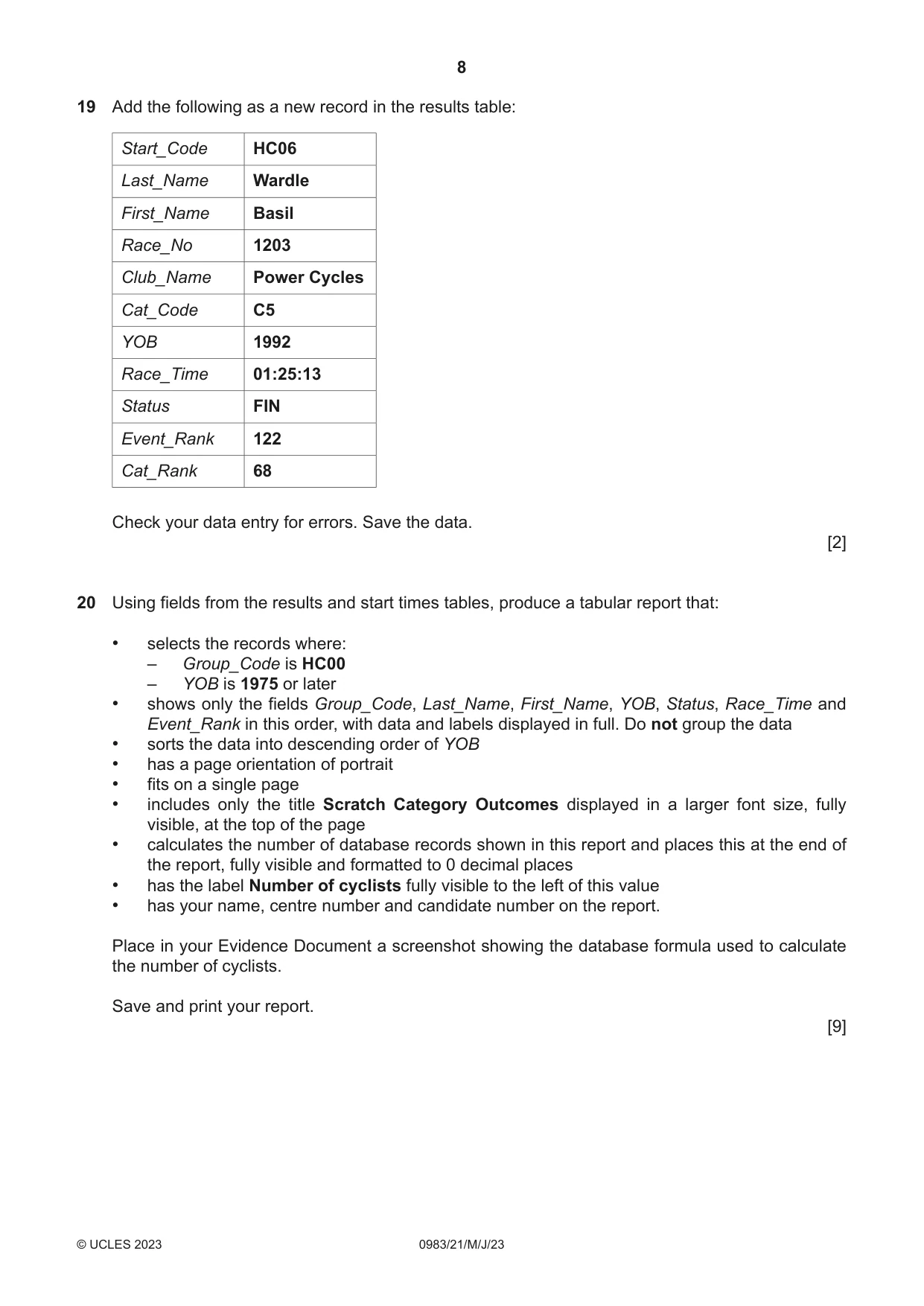
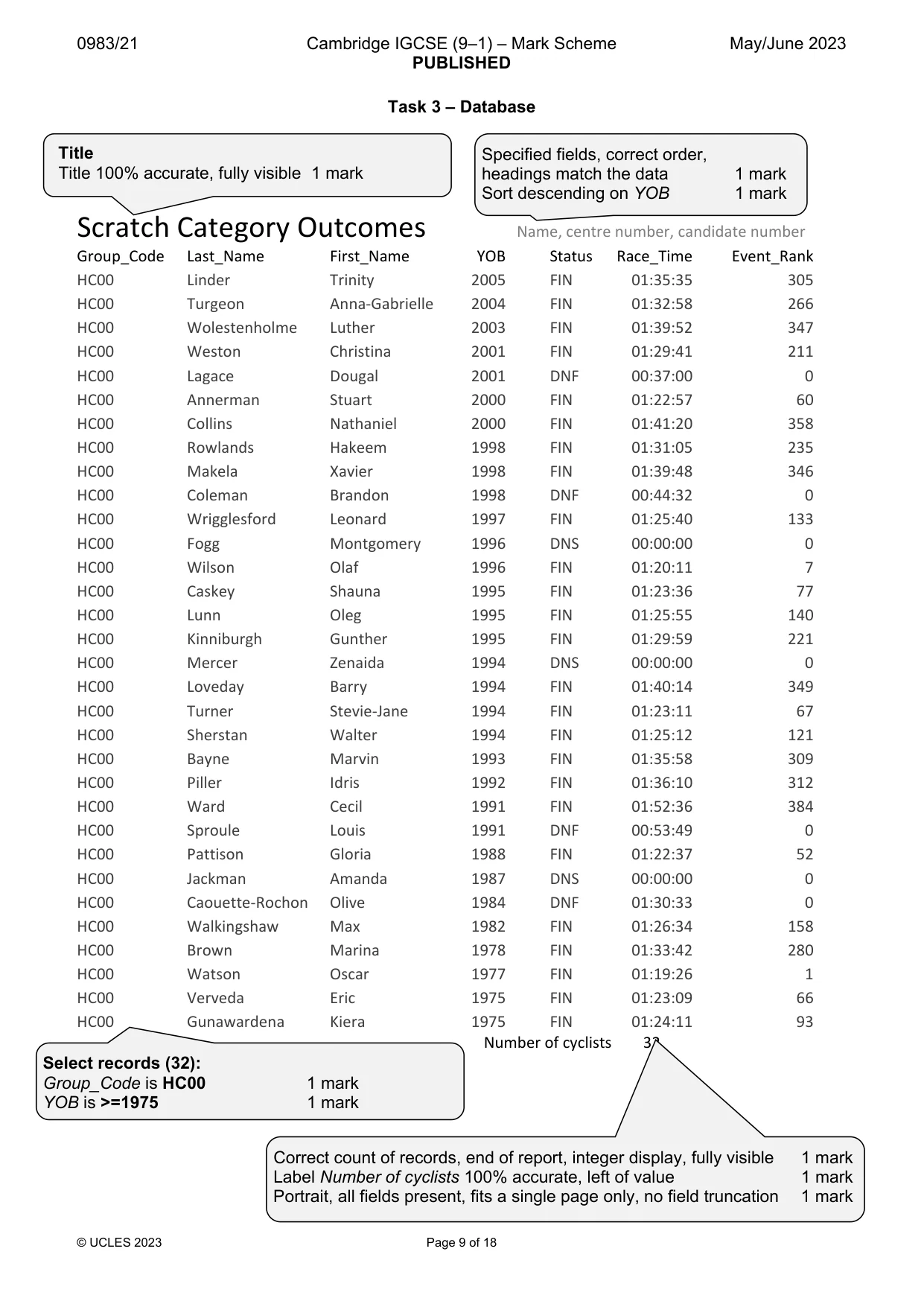
8 0983/21/M/J/23 © UCLES 2023 19 Add the following as a new record in the results table: Start_Code HC06 Last_Name Wardle First_Name Basil Race_No 1203 Club_Name Power Cycles Cat_Code C5 YOB 1992 Race_Time 01:25:13 Status FIN Event_Rank 122 Cat_Rank 68 Check your data entry for errors. Save the data. [2] 20 Using fields from the results and start times tables, produce a tabular report that: • selects the records where: – Group_Code is HC00 – YOB is 1975 or later • shows only the fields Group_Code, Last_Name, First_Name, YOB, Status, Race_Time and Event_Rank in this order, with data and labels displayed in full. Do not group the data • sorts the data into descending order of YOB • has a page orientation of portrait • fits on a single page • includes only the title Scratch Category Outcomes displayed in a larger font size, fully visible, at the top of the page • calculates the number of database records shown in this report and places this at the end of the report, fully visible and formatted to 0 decimal places • has the label Number of cyclists fully visible to the left of this value • has your name, centre number and candidate number on the report. Place in your Evidence Document a screenshot showing the database formula used to calculate the number of cyclists. Save and print your report. [9]
Question paper, page 9
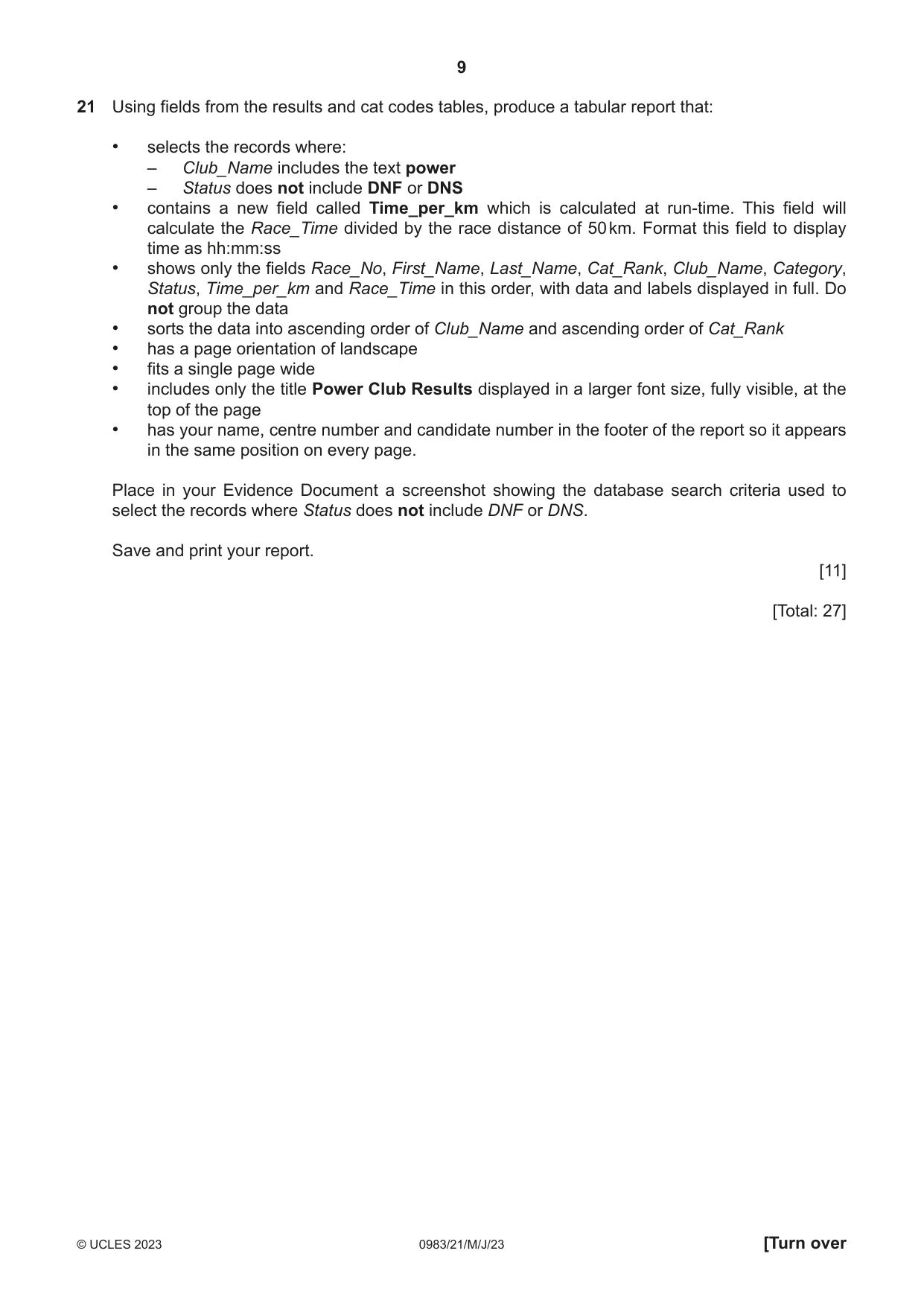
9 0983/21/M/J/23 © UCLES 2023 [Turn over 21 Using fields from the results and cat codes tables, produce a tabular report that: • selects the records where: – Club_Name includes the text power – Status does not include DNF or DNS • contains a new field called Time_per_km which is calculated at run‑time. This field will calculate the Race_Time divided by the race distance of 50 km. Format this field to display time as hh:mm:ss • shows only the fields Race_No, First_Name, Last_Name, Cat_Rank, Club_Name, Category, Status, Time_per_km and Race_Time in this order, with data and labels displayed in full. Do not group the data • sorts the data into ascending order of Club_Name and ascending order of Cat_Rank • has a page orientation of landscape • fits a single page wide • includes only the title Power Club Results displayed in a larger font size, fully visible, at the top of the page • has your name, centre number and candidate number in the footer of the report so it appears in the same position on every page. Place in your Evidence Document a screenshot showing the database search criteria used to select the records where Status does not include DNF or DNS. Save and print your report. [11] [Total: 27]
Question paper, page 10
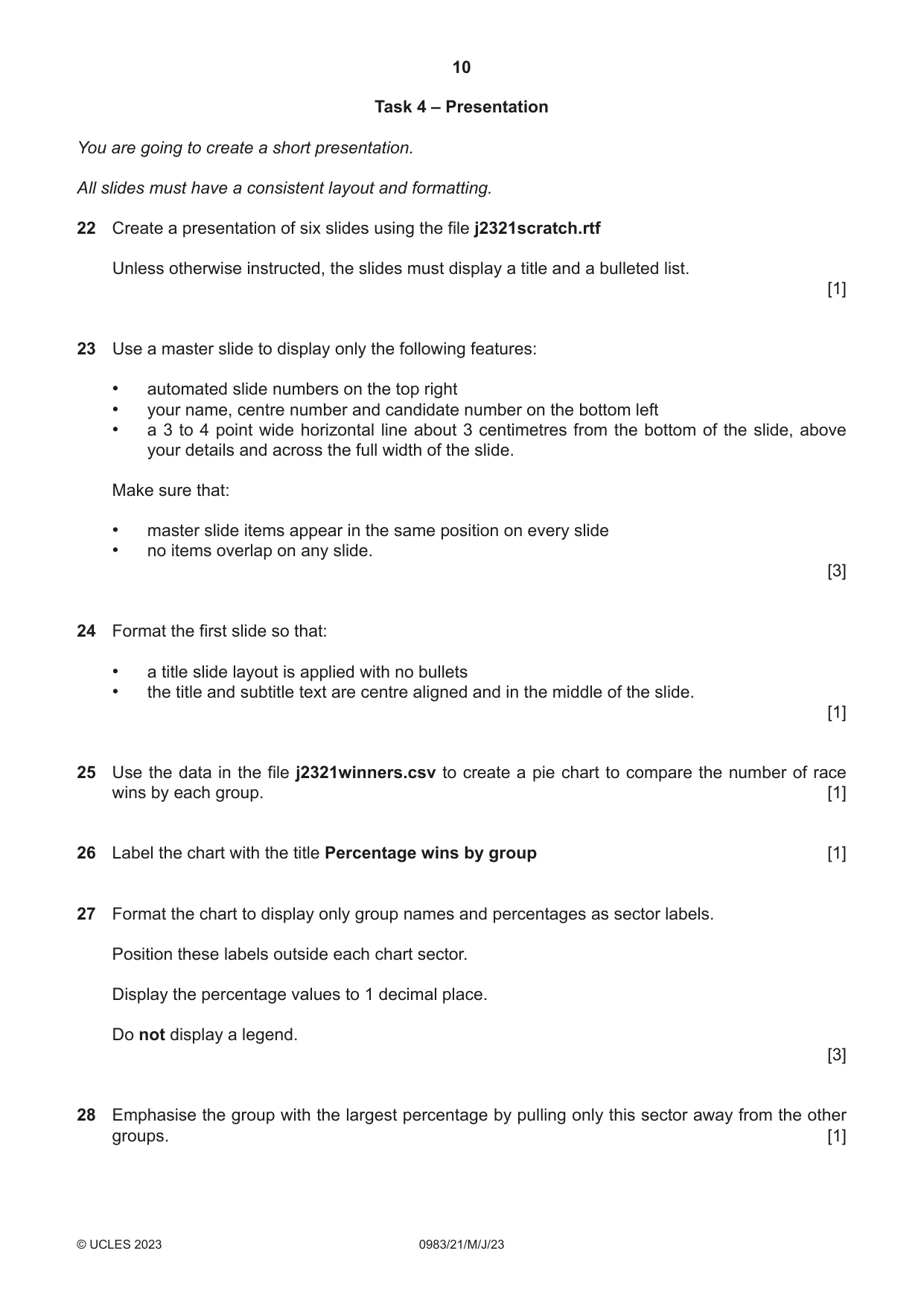
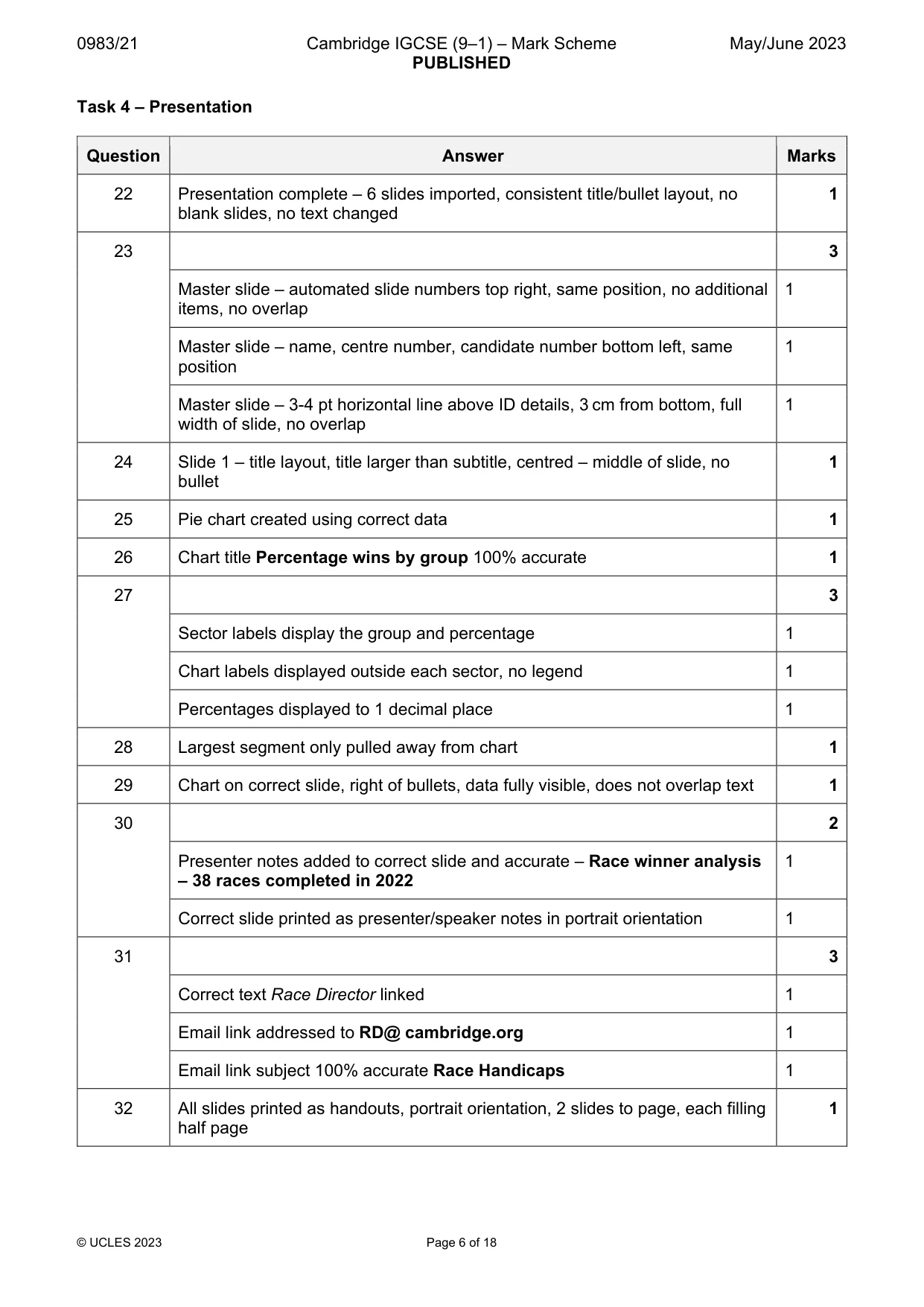
10 0983/21/M/J/23 © UCLES 2023 Task 4 – Presentation You are going to create a short presentation. All slides must have a consistent layout and formatting. 22 Create a presentation of six slides using the file j2321scratch.rtf Unless otherwise instructed, the slides must display a title and a bulleted list. [1] 23 Use a master slide to display only the following features: • automated slide numbers on the top right • your name, centre number and candidate number on the bottom left • a 3 to 4 point wide horizontal line about 3 centimetres from the bottom of the slide, above your details and across the full width of the slide. Make sure that: • master slide items appear in the same position on every slide • no items overlap on any slide. [3] 24 Format the first slide so that: • a title slide layout is applied with no bullets • the title and subtitle text are centre aligned and in the middle of the slide. [1] 25 Use the data in the file j2321winners.csv to create a pie chart to compare the number of race wins by each group. [1] 26 Label the chart with the title Percentage wins by group [1] 27 Format the chart to display only group names and percentages as sector labels. Position these labels outside each chart sector. Display the percentage values to 1 decimal place. Do not display a legend. [3] 28 Emphasise the group with the largest percentage by pulling only this sector away from the other groups. [1]
Question paper, page 11
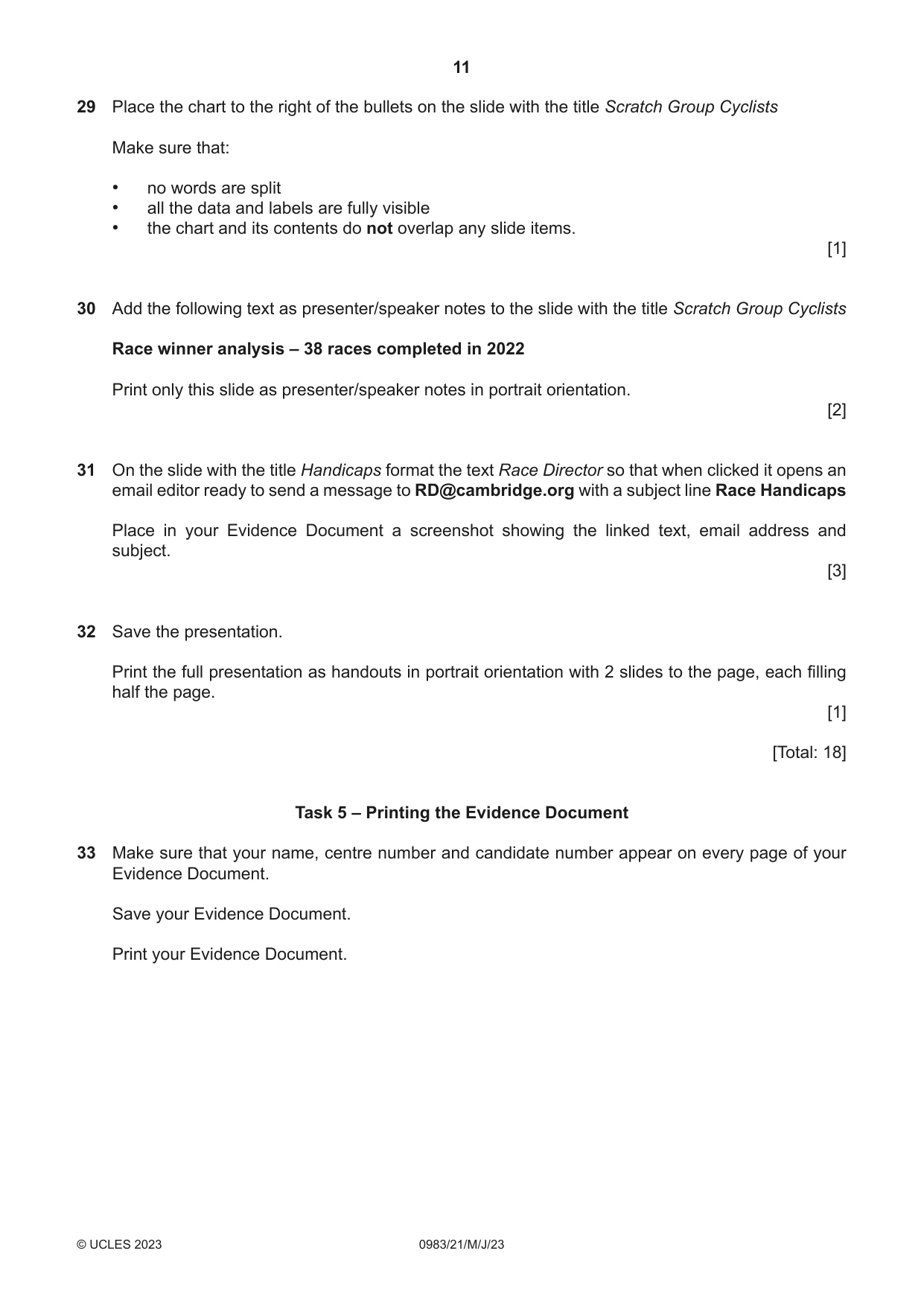
11 0983/21/M/J/23 © UCLES 2023 29 Place the chart to the right of the bullets on the slide with the title Scratch Group Cyclists Make sure that: • no words are split • all the data and labels are fully visible • the chart and its contents do not overlap any slide items. [1] 30 Add the following text as presenter/speaker notes to the slide with the title Scratch Group Cyclists Race winner analysis – 38 races completed in 2022 Print only this slide as presenter/speaker notes in portrait orientation. [2] 31 On the slide with the title Handicaps format the text Race Director so that when clicked it opens an email editor ready to send a message to RD@cambridge.org with a subject line Race Handicaps Place in your Evidence Document a screenshot showing the linked text, email address and subject. [3] 32 Save the presentation. Print the full presentation as handouts in portrait orientation with 2 slides to the page, each filling half the page. [1] [Total: 18] Task 5 – Printing the Evidence Document 33 Make sure that your name, centre number and candidate number appear on every page of your Evidence Document. Save your Evidence Document. Print your Evidence Document.
Question paper, page 12
12 0983/21/M/J/23 © UCLES 2023 Permission to reproduce items where third‑party owned material protected by copyright is included has been sought and cleared where possible. Every reasonable effort has been made by the publisher (UCLES) to trace copyright holders, but if any items requiring clearance have unwittingly been included, the publisher will be pleased to make amends at the earliest possible opportunity. To avoid the issue of disclosure of answer‑related information to candidates, all copyright acknowledgements are reproduced online in the Cambridge Assessment International Education Copyright Acknowledgements Booklet. This is produced for each series of examinations and is freely available to download at www.cambridgeinternational.org after the live examination series. Cambridge Assessment International Education is part of Cambridge Assessment. Cambridge Assessment is the brand name of the University of Cambridge Local Examinations Syndicate (UCLES), which is a department of the University of Cambridge. BLANK PAGE
Mark scheme, page 1
This document consists of 18 printed pages. © UCLES 2023 [Turn over Cambridge IGCSE™ (9–1) INFORMATION AND COMMUNICATION TECHNOLOGY 0983/21 Paper 2 Document Production, Databases and Presentations May/June 2023 MARK SCHEME Maximum Mark: 70 Published This mark scheme is published as an aid to teachers and candidates, to indicate the requirements of the examination. It shows the basis on which Examiners were instructed to award marks. It does not indicate the details of the discussions that took place at an Examiners’ meeting before marking began, which would have considered the acceptability of alternative answers. Mark schemes should be read in conjunction with the question paper and the Principal Examiner Report for Teachers. Cambridge International will not enter into discussions about these mark schemes. Cambridge International is publishing the mark schemes for the May/June 2023 series for most Cambridge IGCSE, Cambridge International A and AS Level and Cambridge Pre-U components, and some Cambridge O Level components.
Mark scheme, page 2
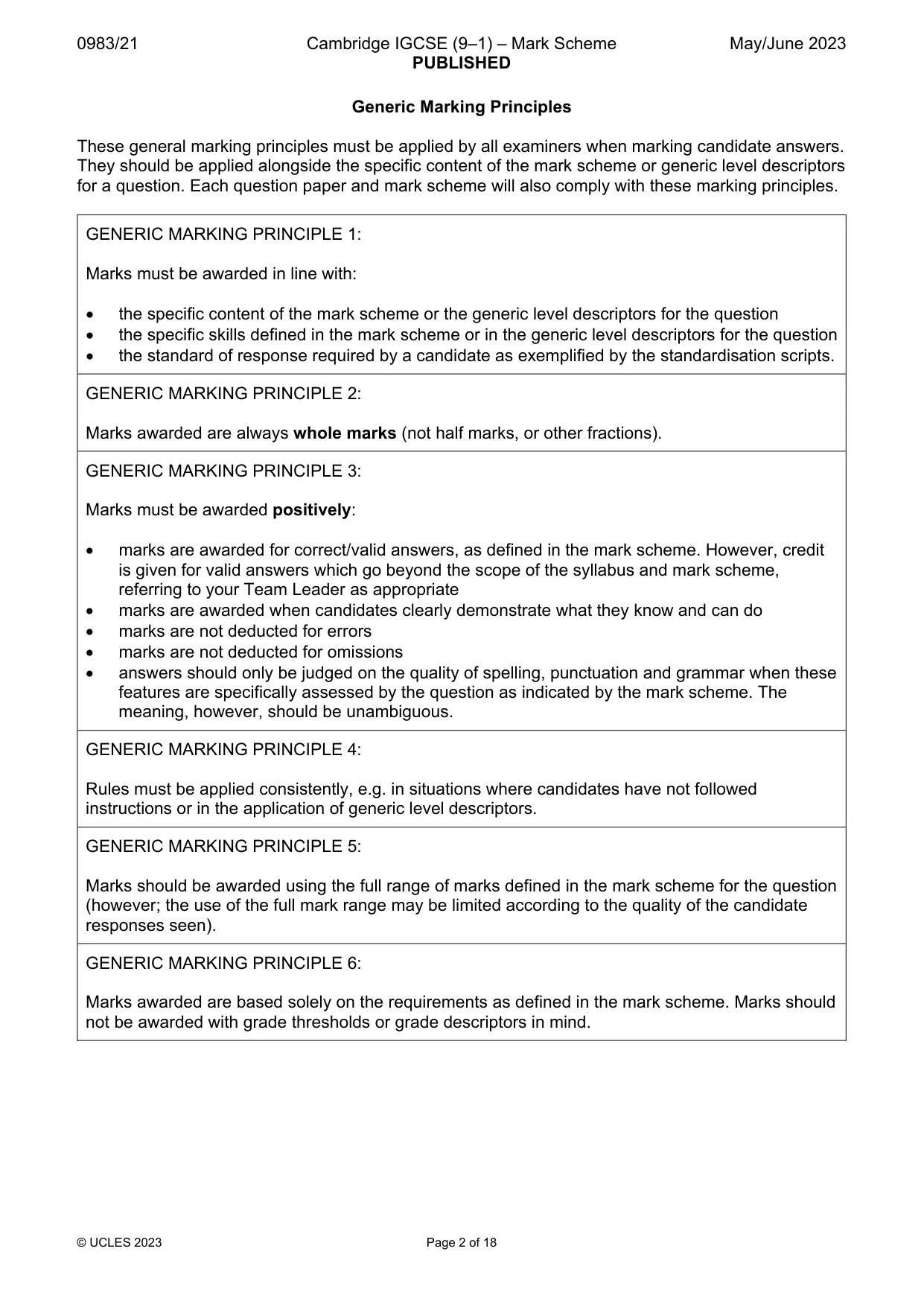
0983/21 Cambridge IGCSE (9–1) – Mark Scheme PUBLISHED May/June 2023 © UCLES 2023 Page 2 of 18 Generic Marking Principles These general marking principles must be applied by all examiners when marking candidate answers. They should be applied alongside the specific content of the mark scheme or generic level descriptors for a question. Each question paper and mark scheme will also comply with these marking principles. GENERIC MARKING PRINCIPLE 1: Marks must be awarded in line with: the specific content of the mark scheme or the generic level descriptors for the question the specific skills defined in the mark scheme or in the generic level descriptors for the question the standard of response required by a candidate as exemplified by the standardisation scripts. GENERIC MARKING PRINCIPLE 2: Marks awarded are always whole marks (not half marks, or other fractions). GENERIC MARKING PRINCIPLE 3: Marks must be awarded positively: marks are awarded for correct/valid answers, as defined in the mark scheme. However, credit is given for valid answers which go beyond the scope of the syllabus and mark scheme, referring to your Team Leader as appropriate marks are awarded when candidates clearly demonstrate what they know and can do marks are not deducted for errors marks are not deducted for omissions answers should only be judged on the quality of spelling, punctuation and grammar when these features are specifically assessed by the question as indicated by the mark scheme. The meaning, however, should be unambiguous. GENERIC MARKING PRINCIPLE 4: Rules must be applied consistently, e.g. in situations where candidates have not followed instructions or in the application of generic level descriptors. GENERIC MARKING PRINCIPLE 5: Marks should be awarded using the full range of marks defined in the mark scheme for the question (however; the use of the full mark range may be limited according to the quality of the candidate responses seen). GENERIC MARKING PRINCIPLE 6: Marks awarded are based solely on the requirements as defined in the mark scheme. Marks should not be awarded with grade thresholds or grade descriptors in mind.
Mark scheme, page 3
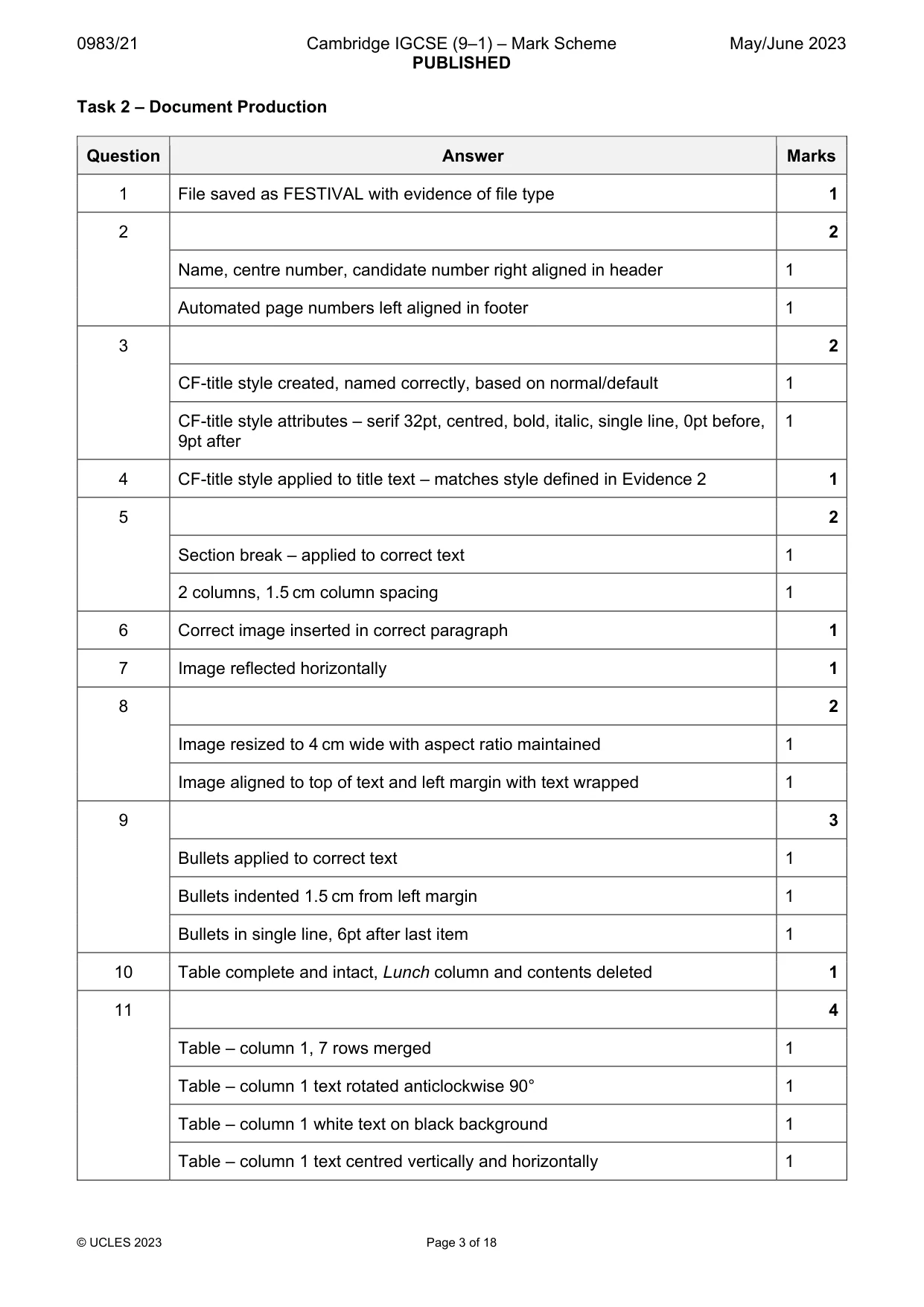
0983/21 Cambridge IGCSE (9–1) – Mark Scheme PUBLISHED May/June 2023 © UCLES 2023 Page 3 of 18 Task 2 – Document Production Question Answer Marks 1 File saved as FESTIVAL with evidence of file type 1 2 2 Name, centre number, candidate number right aligned in header 1 Automated page numbers left aligned in footer 1 3 2 CF-title style created, named correctly, based on normal/default 1 CF-title style attributes – serif 32pt, centred, bold, italic, single line, 0pt before, 9pt after 1 4 CF-title style applied to title text – matches style defined in Evidence 2 1 5 2 Section break – applied to correct text 1 2 columns, 1.5 cm column spacing 1 6 Correct image inserted in correct paragraph 1 7 Image reflected horizontally 1 8 2 Image resized to 4 cm wide with aspect ratio maintained 1 Image aligned to top of text and left margin with text wrapped 1 9 3 Bullets applied to correct text 1 Bullets indented 1.5 cm from left margin 1 Bullets in single line, 6pt after last item 1 10 Table complete and intact, Lunch column and contents deleted 1 11 4 Table – column 1, 7 rows merged 1 Table – column 1 text rotated anticlockwise 90° 1 Table – column 1 white text on black background 1 Table – column 1 text centred vertically and horizontally 1
Mark scheme, page 4
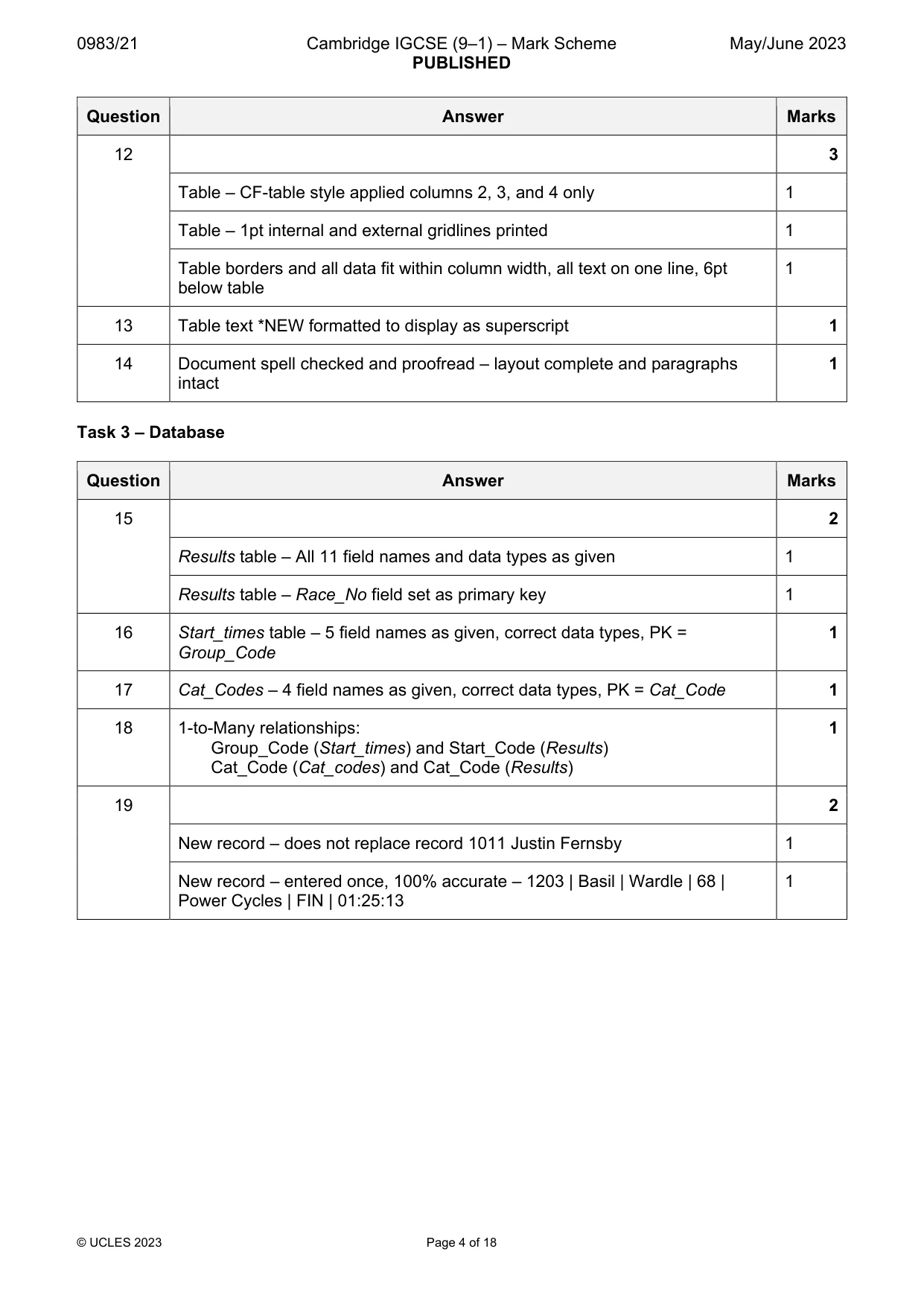
0983/21 Cambridge IGCSE (9–1) – Mark Scheme PUBLISHED May/June 2023 © UCLES 2023 Page 4 of 18 Question Answer Marks 12 3 Table – CF-table style applied columns 2, 3, and 4 only 1 Table – 1pt internal and external gridlines printed 1 Table borders and all data fit within column width, all text on one line, 6pt below table 1 13 Table text *NEW formatted to display as superscript 1 14 Document spell checked and proofread – layout complete and paragraphs intact 1 Task 3 – Database Question Answer Marks 15 2 Results table – All 11 field names and data types as given 1 Results table – Race_No field set as primary key 1 16 Start_times table – 5 field names as given, correct data types, PK = Group_Code 1 17 Cat_Codes – 4 field names as given, correct data types, PK = Cat_Code 1 18 1-to-Many relationships: Group_Code (Start_times) and Start_Code (Results) Cat_Code (Cat_codes) and Cat_Code (Results) 1 19 2 New record – does not replace record 1011 Justin Fernsby 1 New record – entered once, 100% accurate – 1203 | Basil | Wardle | 68 | Power Cycles | FIN | 01:25:13 1
Mark scheme, page 5
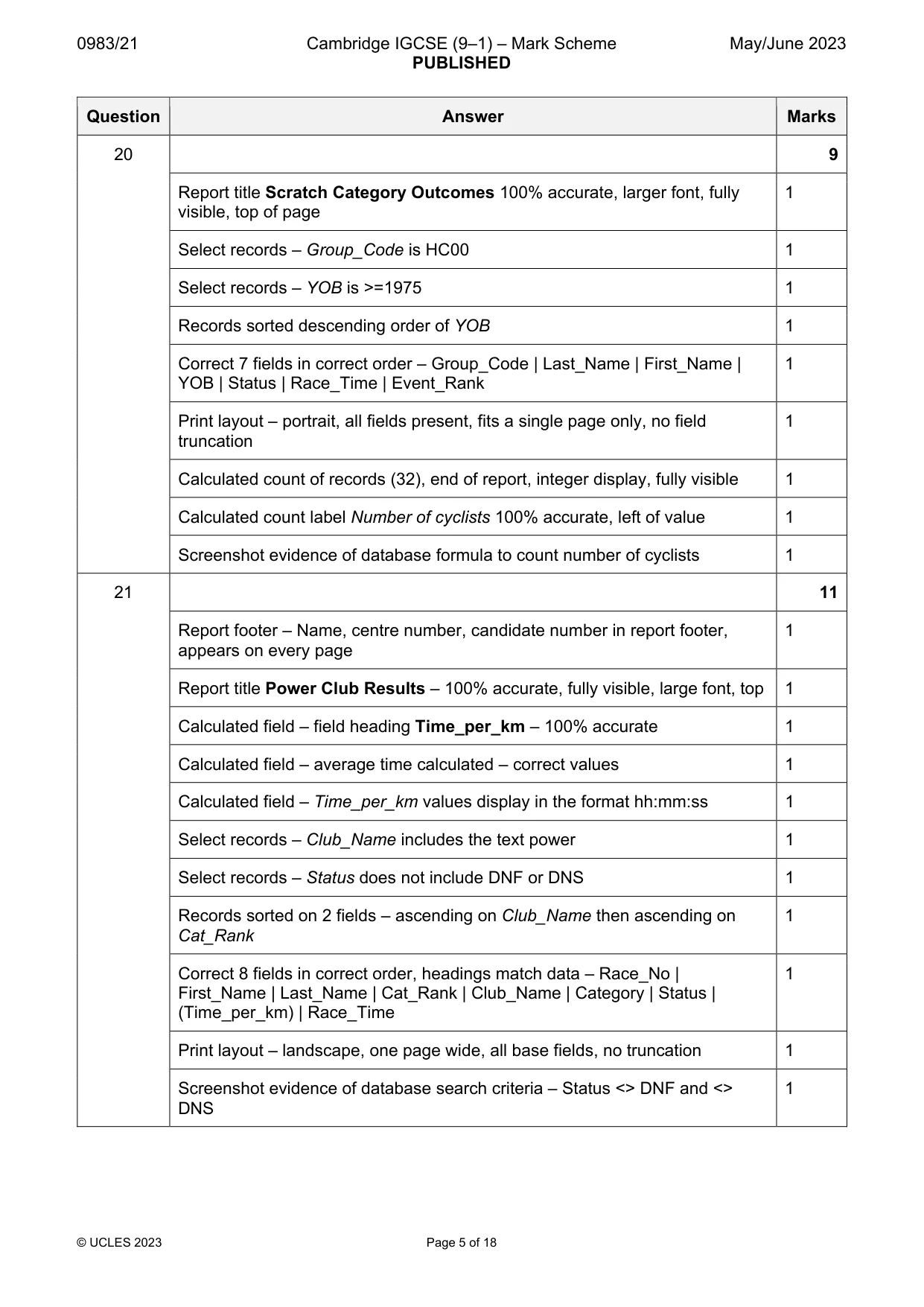
0983/21 Cambridge IGCSE (9–1) – Mark Scheme PUBLISHED May/June 2023 © UCLES 2023 Page 5 of 18 Question Answer Marks 20 9 Report title Scratch Category Outcomes 100% accurate, larger font, fully visible, top of page 1 Select records – Group_Code is HC00 1 Select records – YOB is >=1975 1 Records sorted descending order of YOB 1 Correct 7 fields in correct order – Group_Code | Last_Name | First_Name | YOB | Status | Race_Time | Event_Rank 1 Print layout – portrait, all fields present, fits a single page only, no field truncation 1 Calculated count of records (32), end of report, integer display, fully visible 1 Calculated count label Number of cyclists 100% accurate, left of value 1 Screenshot evidence of database formula to count number of cyclists 1 21 11 Report footer – Name, centre number, candidate number in report footer, appears on every page 1 Report title Power Club Results – 100% accurate, fully visible, large font, top 1 Calculated field – field heading Time_per_km – 100% accurate 1 Calculated field – average time calculated – correct values 1 Calculated field – Time_per_km values display in the format hh:mm:ss 1 Select records – Club_Name includes the text power 1 Select records – Status does not include DNF or DNS 1 Records sorted on 2 fields – ascending on Club_Name then ascending on Cat_Rank 1 Correct 8 fields in correct order, headings match data – Race_No | First_Name | Last_Name | Cat_Rank | Club_Name | Category | Status | (Time_per_km) | Race_Time 1 Print layout – landscape, one page wide, all base fields, no truncation 1 Screenshot evidence of database search criteria – Status <> DNF and <> DNS 1
Mark scheme, page 6
0983/21 Cambridge IGCSE (9–1) – Mark Scheme PUBLISHED May/June 2023 © UCLES 2023 Page 6 of 18 Task 4 – Presentation Question Answer Marks 22 Presentation complete – 6 slides imported, consistent title/bullet layout, no blank slides, no text changed 1 23 3 Master slide – automated slide numbers top right, same position, no additional items, no overlap 1 Master slide – name, centre number, candidate number bottom left, same position 1 Master slide – 3-4 pt horizontal line above ID details, 3 cm from bottom, full width of slide, no overlap 1 24 Slide 1 – title layout, title larger than subtitle, centred – middle of slide, no bullet 1 25 Pie chart created using correct data 1 26 Chart title Percentage wins by group 100% accurate 1 27 3 Sector labels display the group and percentage 1 Chart labels displayed outside each sector, no legend 1 Percentages displayed to 1 decimal place 1 28 Largest segment only pulled away from chart 1 29 Chart on correct slide, right of bullets, data fully visible, does not overlap text 1 30 2 Presenter notes added to correct slide and accurate – Race winner analysis – 38 races completed in 2022 1 Correct slide printed as presenter/speaker notes in portrait orientation 1 31 3 Correct text Race Director linked 1 Email link addressed to RD@ cambridge.org 1 Email link subject 100% accurate Race Handicaps 1 32 All slides printed as handouts, portrait orientation, 2 slides to page, each filling half page 1
Mark scheme, page 7
0983/21 Cambridge IGCSE (9–1) – Mark Scheme PUBLISHED May/June 2023 © UCLES 2023 Page 7 of 18 Header Name, centre number, candidate number right aligned, no other items 1 mark Footer Automated page number left aligned, no other items 1 mark Columns Section break - applied to correct text 1 mark 2 columns, 1.5 cm column spacing 1 mark Image Image inserted in correct paragraph 1 mark Image flipped so bike faces left 1 mark Aligned to top of text, left of column, text wrapped 1 mark Resized to 4 cm wide, aspect ratio maintained 1 mark Table Table complete and intact, Lunch column and contents deleted 1 mark Column 1–7 rows merged 1 mark Column 1 text rotated anticlockwise 90o 1 mark Column 1 white text on black background 1 mark Column 1 text centred vertically and horizontally 1 mark Only the text *NEW formatted to display as superscript 1 mark 1 pt internal and external gridlines printed 1 mark Borders & data fit within column width, text on one line, 6 pt below table 1 mark CF-table style applied columns 2, 3, and 4 only 1 mark
Mark scheme, page 8
0983/21 Cambridge IGCSE (9–1) – Mark Scheme PUBLISHED May/June 2023 © UCLES 2023 Page 8 of 18 Bullets Bullets applied to correct data (any consistent shape) 1 mark Bullets indented 1.5 cm from left margin 1 mark Bullets in single line, 6 pt after last item 1 mark Document Presentation Document complete/paragraphs intact, portrait, pages and columns aligned top, consistent margins, no widows/orphans, list and table not split, no blank pages, pre-applied styles unchanged with consistent spacing, space below columns <=6 pt 1 mark
Mark scheme, page 9
0983/21 Cambridge IGCSE (9–1) – Mark Scheme PUBLISHED May/June 2023 © UCLES 2023 Page 9 of 18 Task 3 – Database Scratch Category Outcomes Name, centre number, candidate number Group_Code Last_Name First_Name YOB Status Race_Time Event_Rank HC00 Linder Trinity 2005 FIN 01:35:35 305 HC00 Turgeon Anna-Gabrielle 2004 FIN 01:32:58 266 HC00 Wolestenholme Luther 2003 FIN 01:39:52 347 HC00 Weston Christina 2001 FIN 01:29:41 211 HC00 Lagace Dougal 2001 DNF 00:37:00 0 HC00 Annerman Stuart 2000 FIN 01:22:57 60 HC00 Collins Nathaniel 2000 FIN 01:41:20 358 HC00 Rowlands Hakeem 1998 FIN 01:31:05 235 HC00 Makela Xavier 1998 FIN 01:39:48 346 HC00 Coleman Brandon 1998 DNF 00:44:32 0 HC00 Wrigglesford Leonard 1997 FIN 01:25:40 133 HC00 Fogg Montgomery 1996 DNS 00:00:00 0 HC00 Wilson Olaf 1996 FIN 01:20:11 7 HC00 Caskey Shauna 1995 FIN 01:23:36 77 HC00 Lunn Oleg 1995 FIN 01:25:55 140 HC00 Kinniburgh Gunther 1995 FIN 01:29:59 221 HC00 Mercer Zenaida 1994 DNS 00:00:00 0 HC00 Loveday Barry 1994 FIN 01:40:14 349 HC00 Turner Stevie-Jane 1994 FIN 01:23:11 67 HC00 Sherstan Walter 1994 FIN 01:25:12 121 HC00 Bayne Marvin 1993 FIN 01:35:58 309 HC00 Piller Idris 1992 FIN 01:36:10 312 HC00 Ward Cecil 1991 FIN 01:52:36 384 HC00 Sproule Louis 1991 DNF 00:53:49 0 HC00 Pattison Gloria 1988 FIN 01:22:37 52 HC00 Jackman Amanda 1987 DNS 00:00:00 0 HC00 Caouette-Rochon Olive 1984 DNF 01:30:33 0 HC00 Walkingshaw Max 1982 FIN 01:26:34 158 HC00 Brown Marina 1978 FIN 01:33:42 280 HC00 Watson Oscar 1977 FIN 01:19:26 1 HC00 Verveda Eric 1975 FIN 01:23:09 66 HC00 Gunawardena Kiera 1975 FIN 01:24:11 93 Number of cyclists 32 Title Title 100% accurate, fully visible 1 mark Specified fields, correct order, headings match the data 1 mark Sort descending on YOB 1 mark Correct count of records, end of report, integer display, fully visible 1 mark Label Number of cyclists 100% accurate, left of value 1 mark Portrait, all fields present, fits a single page only, no field truncation 1 mark Select records (32): Group_Code is HC00 1 mark YOB is >=1975 1 mark
Mark scheme, page 10
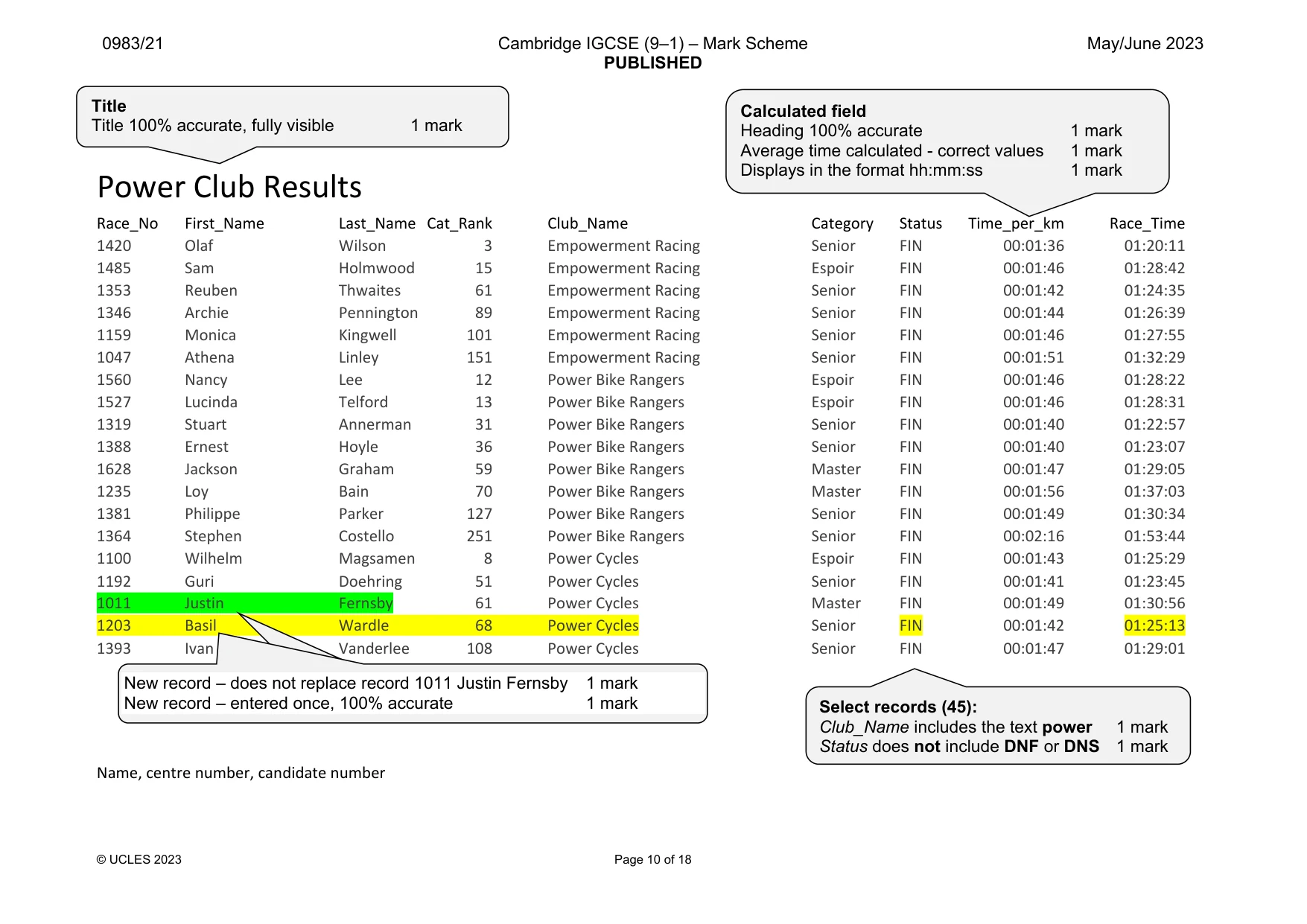
0983/21 Cambridge IGCSE (9–1) – Mark Scheme PUBLISHED May/June 2023 © UCLES 2023 Page 10 of 18 Power Club Results Race_No First_Name Last_Name Cat_Rank Club_Name Category Status Time_per_km Race_Time 1420 Olaf Wilson 3 Empowerment Racing Senior FIN 00:01:36 01:20:11 1485 Sam Holmwood 15 Empowerment Racing Espoir FIN 00:01:46 01:28:42 1353 Reuben Thwaites 61 Empowerment Racing Senior FIN 00:01:42 01:24:35 1346 Archie Pennington 89 Empowerment Racing Senior FIN 00:01:44 01:26:39 1159 Monica Kingwell 101 Empowerment Racing Senior FIN 00:01:46 01:27:55 1047 Athena Linley 151 Empowerment Racing Senior FIN 00:01:51 01:32:29 1560 Nancy Lee 12 Power Bike Rangers Espoir FIN 00:01:46 01:28:22 1527 Lucinda Telford 13 Power Bike Rangers Espoir FIN 00:01:46 01:28:31 1319 Stuart Annerman 31 Power Bike Rangers Senior FIN 00:01:40 01:22:57 1388 Ernest Hoyle 36 Power Bike Rangers Senior FIN 00:01:40 01:23:07 1628 Jackson Graham 59 Power Bike Rangers Master FIN 00:01:47 01:29:05 1235 Loy Bain 70 Power Bike Rangers Master FIN 00:01:56 01:37:03 1381 Philippe Parker 127 Power Bike Rangers Senior FIN 00:01:49 01:30:34 1364 Stephen Costello 251 Power Bike Rangers Senior FIN 00:02:16 01:53:44 1100 Wilhelm Magsamen 8 Power Cycles Espoir FIN 00:01:43 01:25:29 1192 Guri Doehring 51 Power Cycles Senior FIN 00:01:41 01:23:45 1011 Justin Fernsby 61 Power Cycles Master FIN 00:01:49 01:30:56 1203 Basil Wardle 68 Power Cycles Senior FIN 00:01:42 01:25:13 1393 Ivan Vanderlee 108 Power Cycles Senior FIN 00:01:47 01:29:01 Name, centre number, candidate number Title Title 100% accurate, fully visible 1 mark Calculated field Heading 100% accurate 1 mark Average time calculated - correct values 1 mark Displays in the format hh:mm:ss 1 mark Select records (45): Club_Name includes the text power 1 mark Status does not include DNF or DNS 1 mark New record – does not replace record 1011 Justin Fernsby 1 mark New record – entered once, 100% accurate 1 mark
Mark scheme, page 11
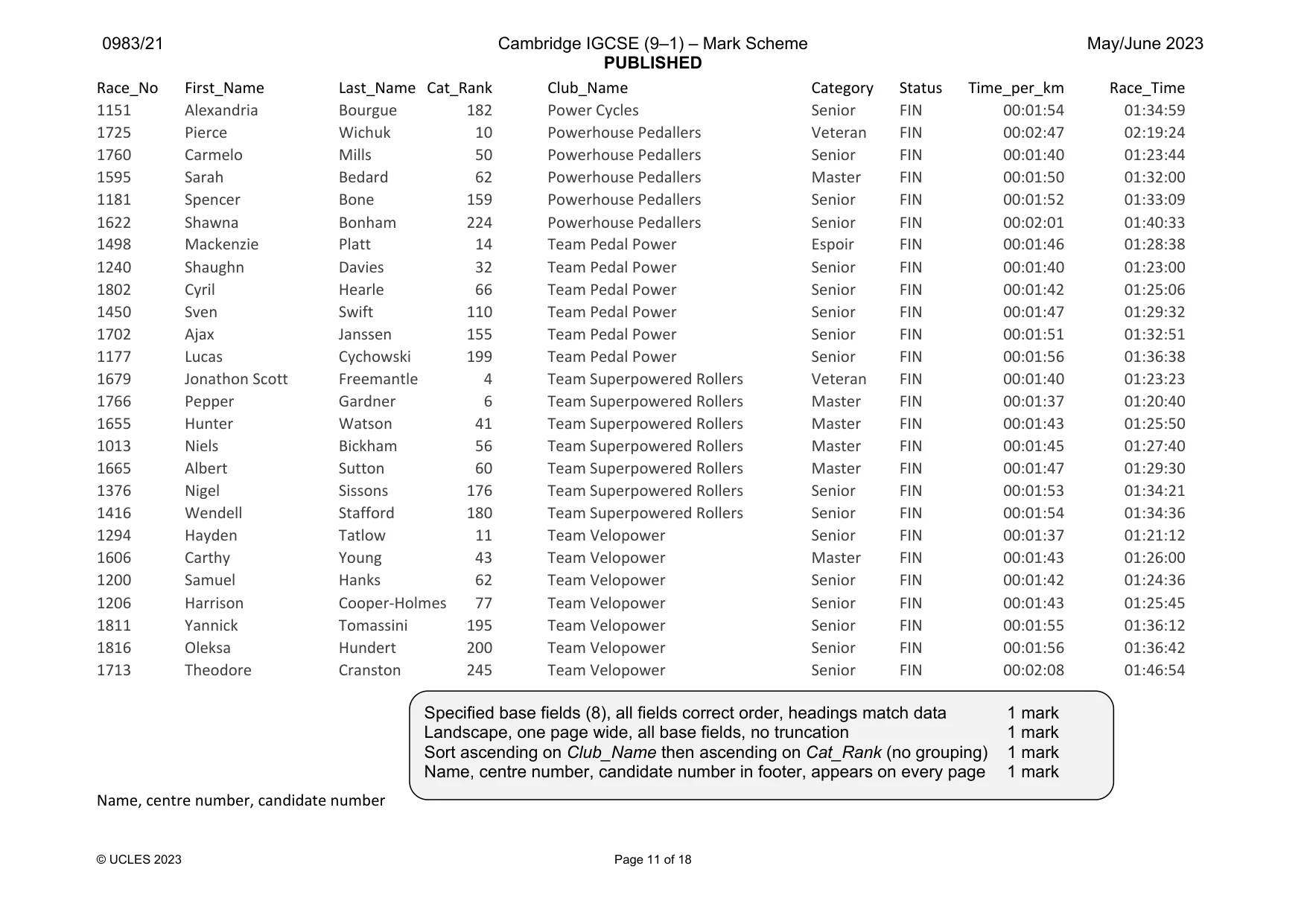
0983/21 Cambridge IGCSE (9–1) – Mark Scheme PUBLISHED May/June 2023 © UCLES 2023 Page 11 of 18 Race_No First_Name Last_Name Cat_Rank Club_Name Category Status Time_per_km Race_Time 1151 Alexandria Bourgue 182 Power Cycles Senior FIN 00:01:54 01:34:59 1725 Pierce Wichuk 10 Powerhouse Pedallers Veteran FIN 00:02:47 02:19:24 1760 Carmelo Mills 50 Powerhouse Pedallers Senior FIN 00:01:40 01:23:44 1595 Sarah Bedard 62 Powerhouse Pedallers Master FIN 00:01:50 01:32:00 1181 Spencer Bone 159 Powerhouse Pedallers Senior FIN 00:01:52 01:33:09 1622 Shawna Bonham 224 Powerhouse Pedallers Senior FIN 00:02:01 01:40:33 1498 Mackenzie Platt 14 Team Pedal Power Espoir FIN 00:01:46 01:28:38 1240 Shaughn Davies 32 Team Pedal Power Senior FIN 00:01:40 01:23:00 1802 Cyril Hearle 66 Team Pedal Power Senior FIN 00:01:42 01:25:06 1450 Sven Swift 110 Team Pedal Power Senior FIN 00:01:47 01:29:32 1702 Ajax Janssen 155 Team Pedal Power Senior FIN 00:01:51 01:32:51 1177 Lucas Cychowski 199 Team Pedal Power Senior FIN 00:01:56 01:36:38 1679 Jonathon Scott Freemantle 4 Team Superpowered Rollers Veteran FIN 00:01:40 01:23:23 1766 Pepper Gardner 6 Team Superpowered Rollers Master FIN 00:01:37 01:20:40 1655 Hunter Watson 41 Team Superpowered Rollers Master FIN 00:01:43 01:25:50 1013 Niels Bickham 56 Team Superpowered Rollers Master FIN 00:01:45 01:27:40 1665 Albert Sutton 60 Team Superpowered Rollers Master FIN 00:01:47 01:29:30 1376 Nigel Sissons 176 Team Superpowered Rollers Senior FIN 00:01:53 01:34:21 1416 Wendell Stafford 180 Team Superpowered Rollers Senior FIN 00:01:54 01:34:36 1294 Hayden Tatlow 11 Team Velopower Senior FIN 00:01:37 01:21:12 1606 Carthy Young 43 Team Velopower Master FIN 00:01:43 01:26:00 1200 Samuel Hanks 62 Team Velopower Senior FIN 00:01:42 01:24:36 1206 Harrison Cooper-Holmes 77 Team Velopower Senior FIN 00:01:43 01:25:45 1811 Yannick Tomassini 195 Team Velopower Senior FIN 00:01:55 01:36:12 1816 Oleksa Hundert 200 Team Velopower Senior FIN 00:01:56 01:36:42 1713 Theodore Cranston 245 Team Velopower Senior FIN 00:02:08 01:46:54 Name, centre number, candidate number Specified base fields (8), all fields correct order, headings match data 1 mark Landscape, one page wide, all base fields, no truncation 1 mark Sort ascending on Club_Name then ascending on Cat_Rank (no grouping) 1 mark Name, centre number, candidate number in footer, appears on every page 1 mark
Mark scheme, page 12
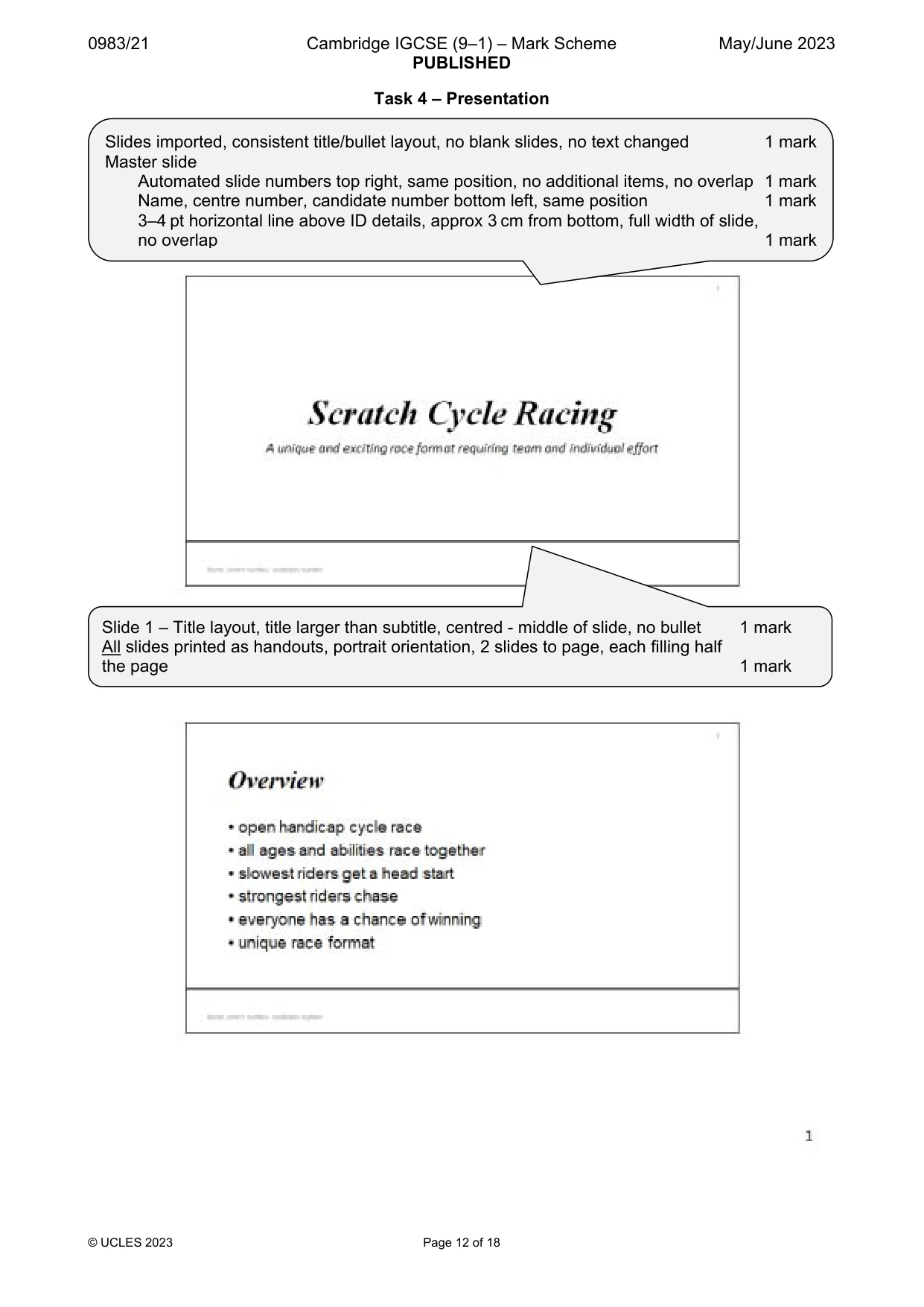
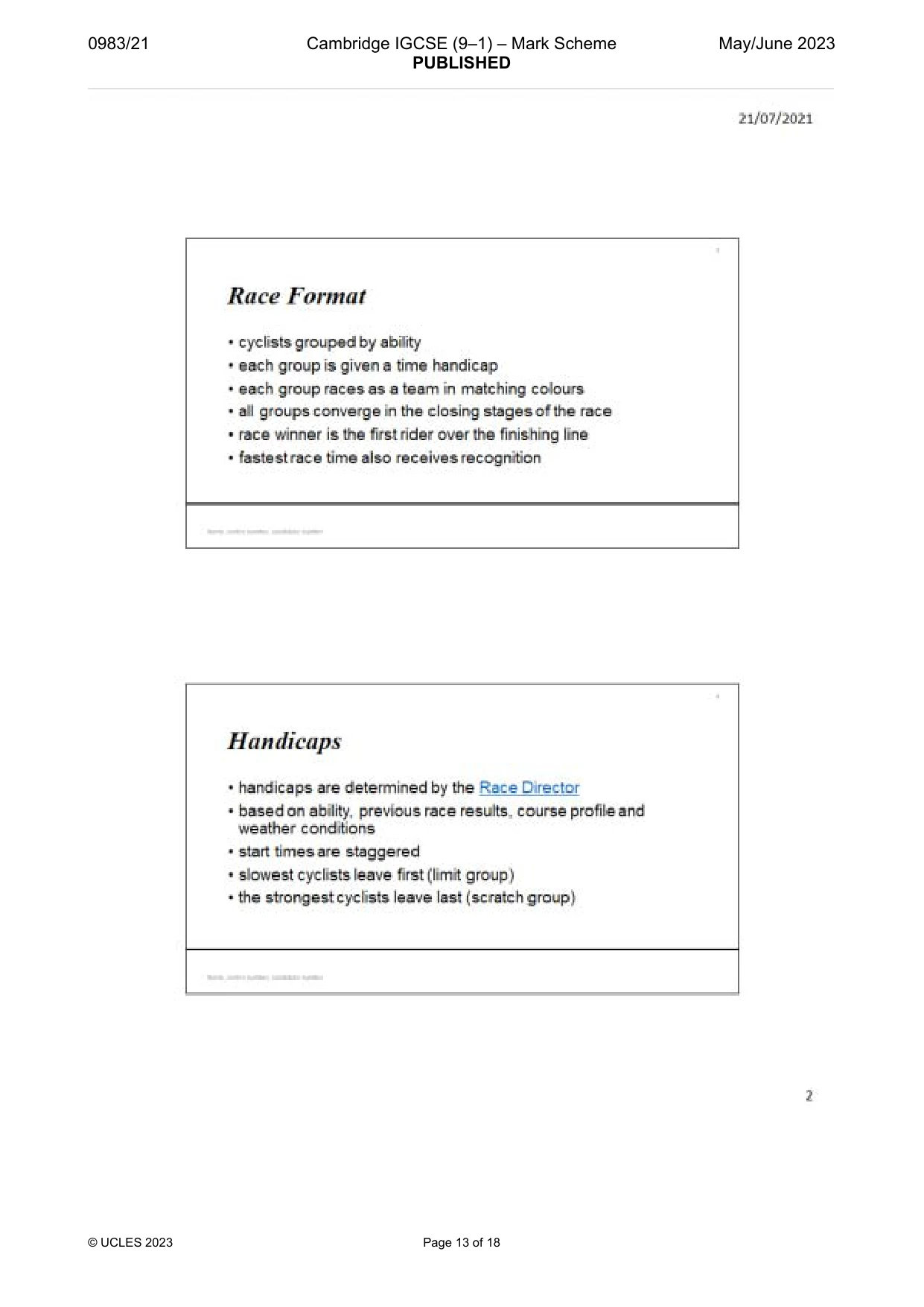
0983/21 Cambridge IGCSE (9–1) – Mark Scheme PUBLISHED May/June 2023 © UCLES 2023 Page 12 of 18 Task 4 – Presentation Slides imported, consistent title/bullet layout, no blank slides, no text changed 1 mark Master slide Automated slide numbers top right, same position, no additional items, no overlap 1 mark Name, centre number, candidate number bottom left, same position 1 mark 3–4 pt horizontal line above ID details, approx 3 cm from bottom, full width of slide, no overlap 1 mark Slide 1 – Title layout, title larger than subtitle, centred - middle of slide, no bullet 1 mark All slides printed as handouts, portrait orientation, 2 slides to page, each filling half the page 1 mark
Mark scheme, page 13
0983/21 Cambridge IGCSE (9–1) – Mark Scheme PUBLISHED May/June 2023 © UCLES 2023 Page 13 of 18
Mark scheme, page 14
0983/21 Cambridge IGCSE (9–1) – Mark Scheme PUBLISHED May/June 2023 © UCLES 2023 Page 14 of 18
Mark scheme, page 15
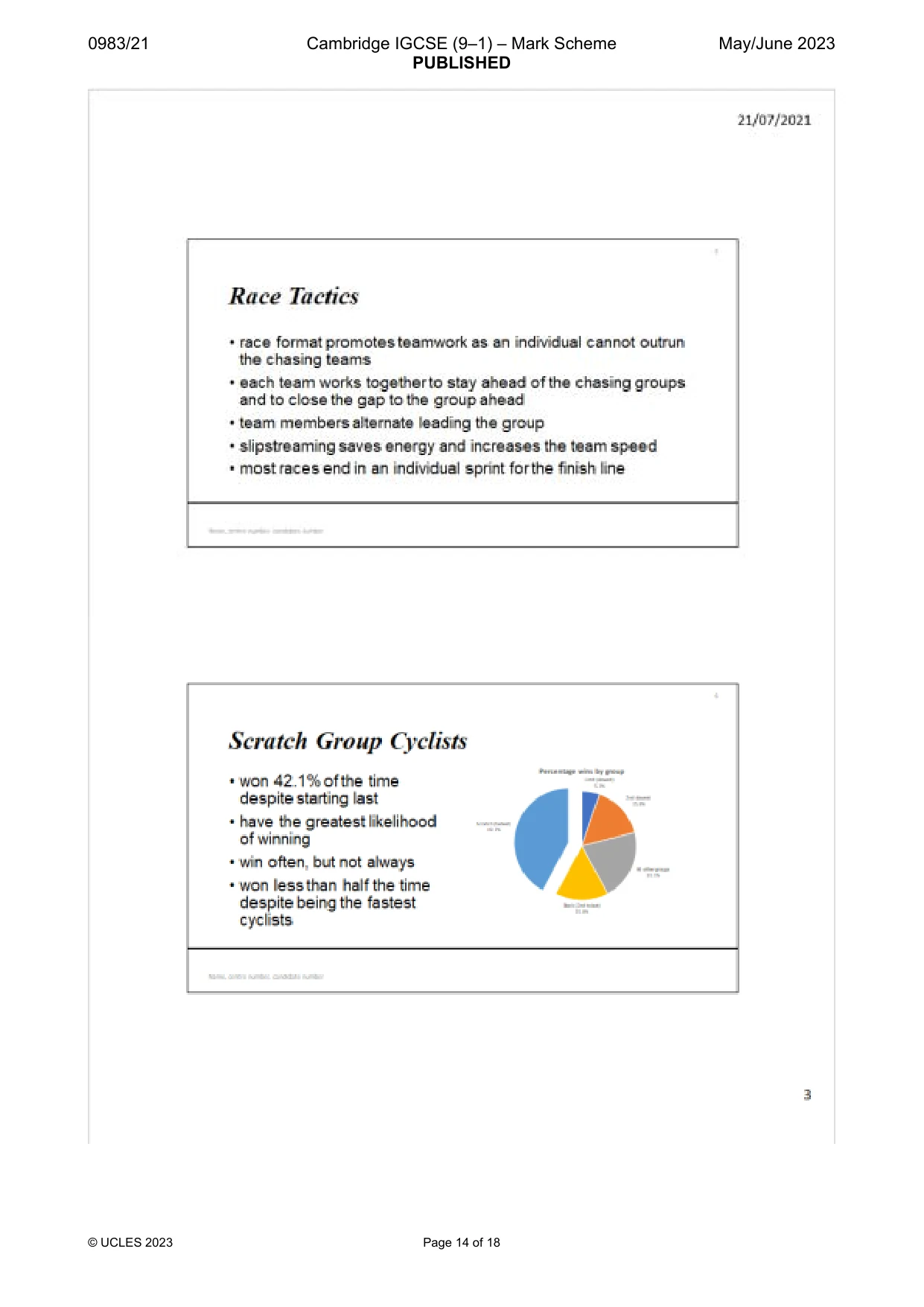
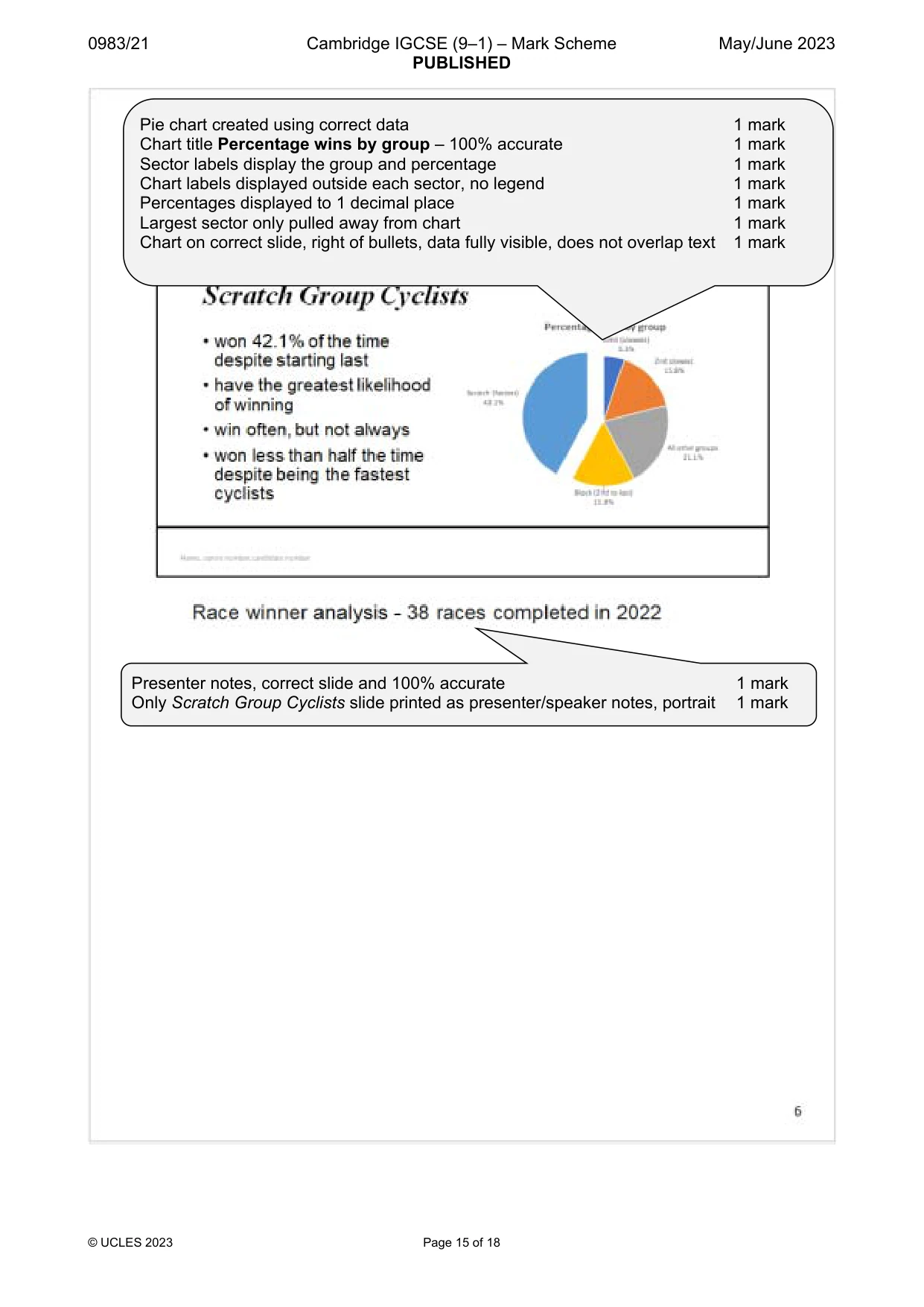
0983/21 Cambridge IGCSE (9–1) – Mark Scheme PUBLISHED May/June 2023 © UCLES 2023 Page 15 of 18 Pie chart created using correct data 1 mark Chart title Percentage wins by group – 100% accurate 1 mark Sector labels display the group and percentage 1 mark Chart labels displayed outside each sector, no legend 1 mark Percentages displayed to 1 decimal place 1 mark Largest sector only pulled away from chart 1 mark Chart on correct slide, right of bullets, data fully visible, does not overlap text 1 mark Presenter notes, correct slide and 100% accurate 1 mark Only Scratch Group Cyclists slide printed as presenter/speaker notes, portrait 1 mark
Mark scheme, page 16
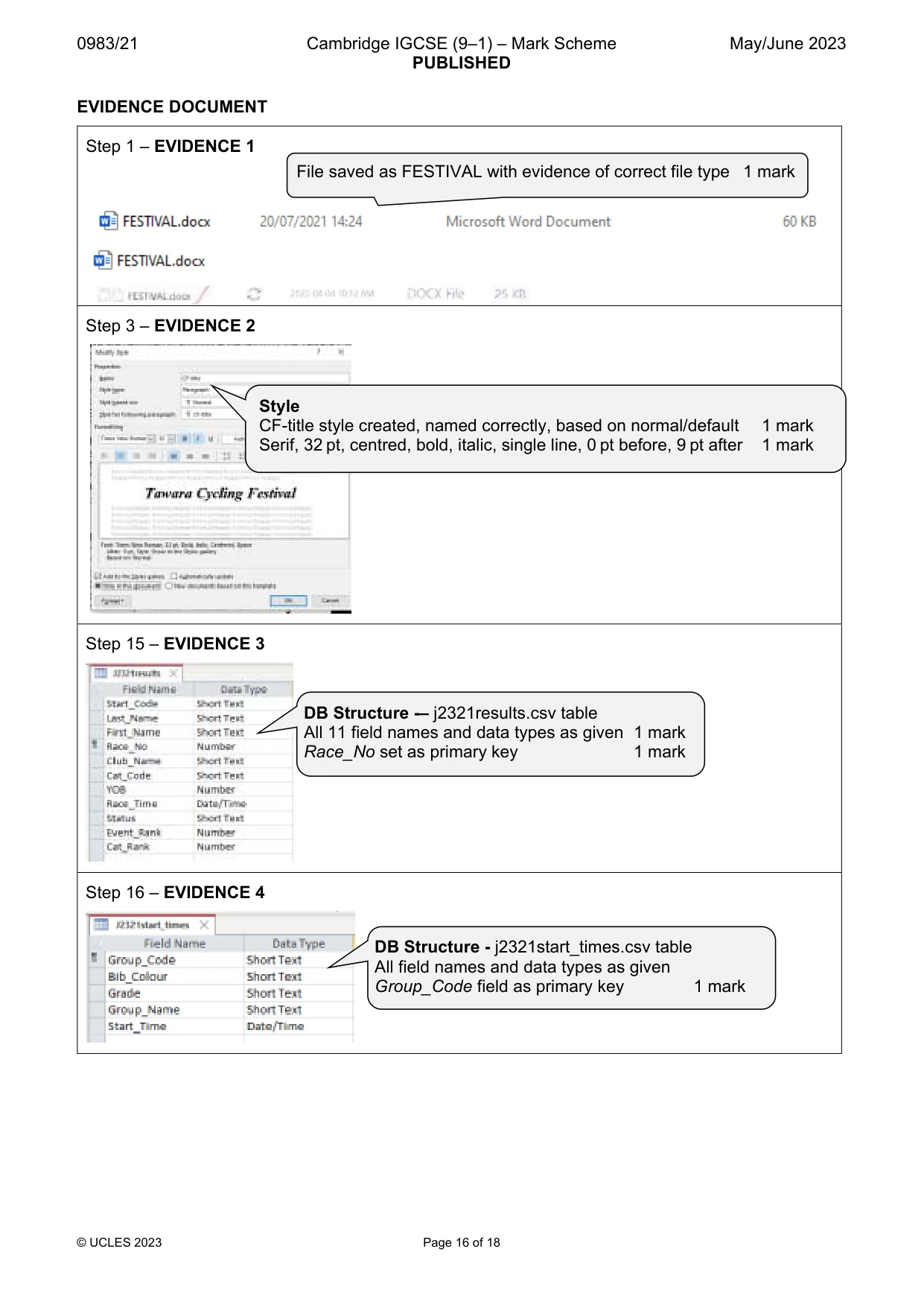
0983/21 Cambridge IGCSE (9–1) – Mark Scheme PUBLISHED May/June 2023 © UCLES 2023 Page 16 of 18 EVIDENCE DOCUMENT Step 1 – EVIDENCE 1 Step 3 – EVIDENCE 2 Step 15 – EVIDENCE 3 Step 16 – EVIDENCE 4 File saved as FESTIVAL with evidence of correct file type 1 mark Style CF-title style created, named correctly, based on normal/default 1 mark Serif, 32 pt, centred, bold, italic, single line, 0 pt before, 9 pt after 1 mark DB Structure -– j2321results.csv table All 11 field names and data types as given 1 mark Race_No set as primary key 1 mark DB Structure - j2321start_times.csv table All field names and data types as given Group_Code field as primary key 1 mark
Mark scheme, page 17
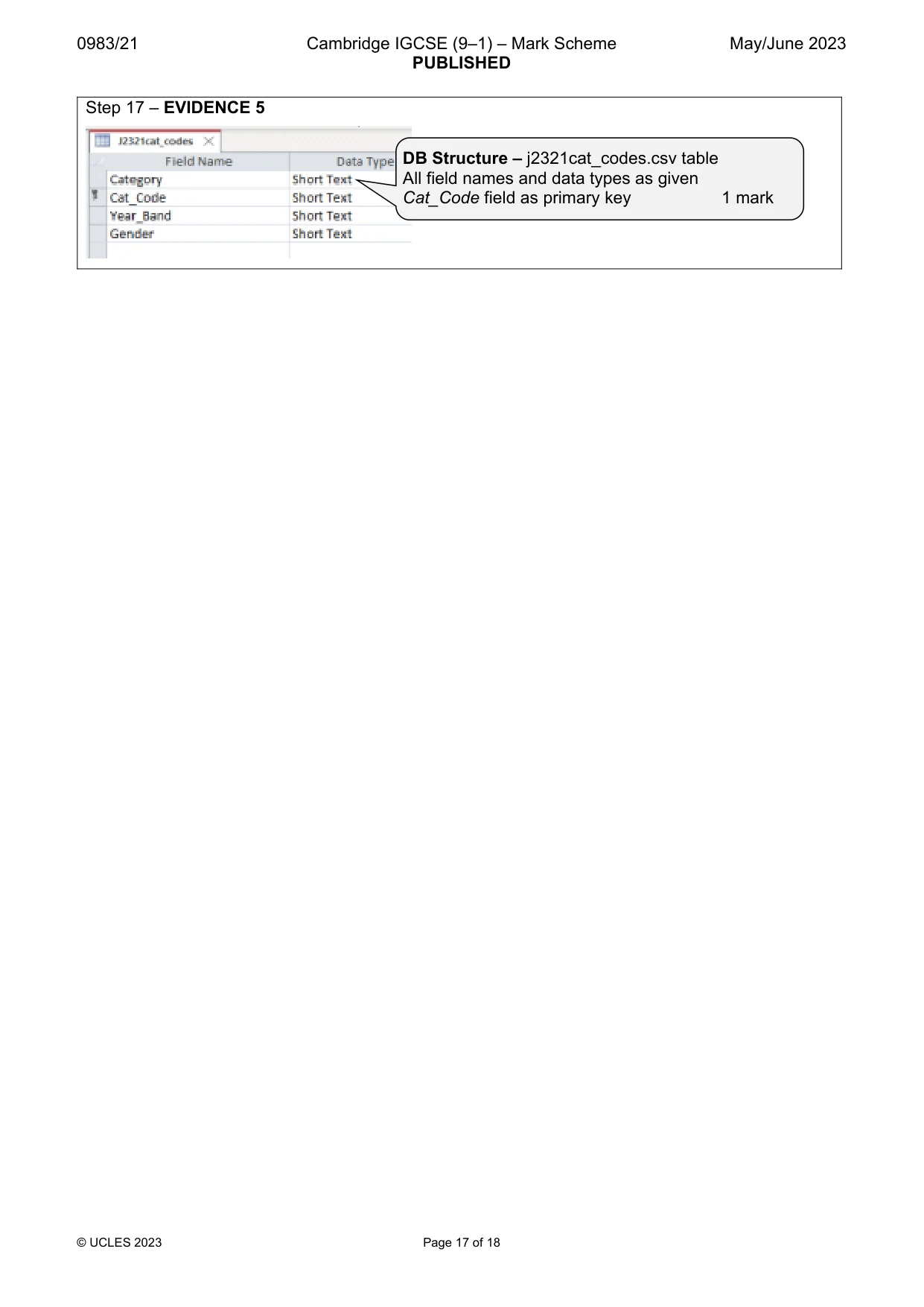
0983/21 Cambridge IGCSE (9–1) – Mark Scheme PUBLISHED May/June 2023 © UCLES 2023 Page 17 of 18 Step 17 – EVIDENCE 5 DB Structure – j2321cat_codes.csv table All field names and data types as given Cat_Code field as primary key 1 mark
Mark scheme, page 18
0983/21 Cambridge IGCSE (9–1) – Mark Scheme PUBLISHED May/June 2023 © UCLES 2023 Page 18 of 18 Step 18 – EVIDENCE 6 OR Step 20 – EVIDENCE 7 Step 21 – EVIDENCE 8 Step 31 – EVIDENCE 9 Screenshot evidence of database formula to calculate the number of competitors 1 mark Single screenshot evidence of database search criteria Status <> DNF and <> DNS 1 mark 1-to-Many relationship Group_Code (start_times) and Start_Code (results) 1-to-Many relationship Cat_Code (cat_codes) and Cat_Code (results) 1 mark Correct text Race Director linked 1 mark Email address RD@cambridge.org 1 mark Subject 100% accurate Race Handicaps 1 mark
What you needed in this session
Cambridge’s own grade thresholds for 2023 May/June, Paper 2 · Variant 1. A higher threshold means an easier paper — the bar moves with how the cohort did.