Cambridge IGCSE Information and Communication Technology (9-1) 0983 — 2023 May/June Paper 2 · Variant 2
0983/22/M/J/23 · 70 marks · ≈79 min
The question paper and its mark scheme, free to read here and free to download. This is Cambridge’s own paper, exactly as it was sat.
Question paper12 pages


Mark scheme17 pages
Answers below. Sit the paper first if you are practising.
Paper as text
Question paper, page 1
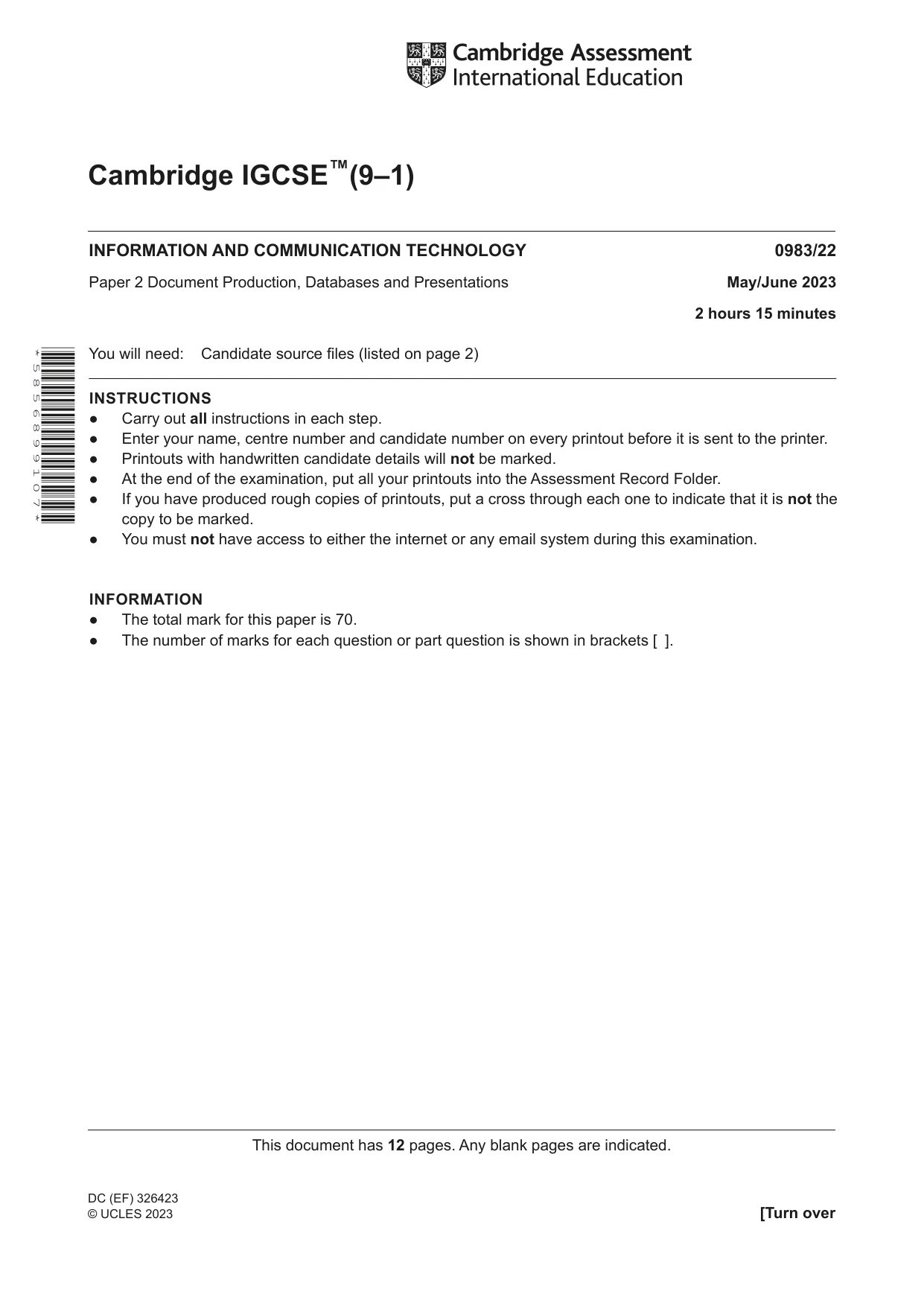
This document has 12 pages. Any blank pages are indicated. [Turn over Cambridge IGCSE™(9–1) INFORMATION AND COMMUNICATION TECHNOLOGY 0983/22 Paper 2 Document Production, Databases and Presentations May/June 2023 2 hours 15 minutes You will need: Candidate source files (listed on page 2) INSTRUCTIONS ● Carry out all instructions in each step. ● Enter your name, centre number and candidate number on every printout before it is sent to the printer. ● Printouts with handwritten candidate details will not be marked. ● At the end of the examination, put all your printouts into the Assessment Record Folder. ● If you have produced rough copies of printouts, put a cross through each one to indicate that it is not the copy to be marked. ● You must not have access to either the internet or any email system during this examination. INFORMATION ● The total mark for this paper is 70. ● The number of marks for each question or part question is shown in brackets [ ]. * 5 8 5 6 8 9 9 1 0 7 * DC (EF) 326423 © UCLES 2023
Question paper, page 2
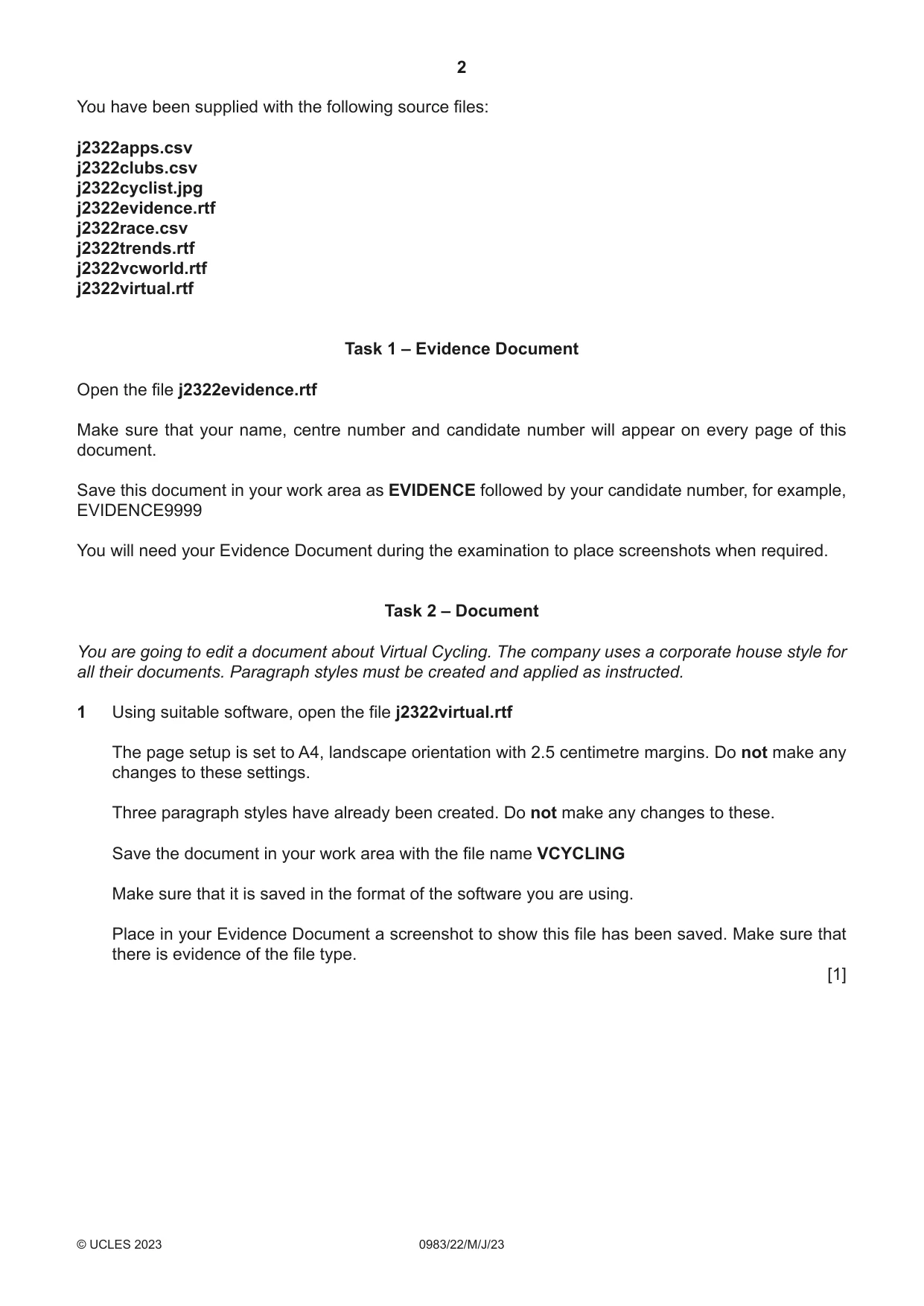
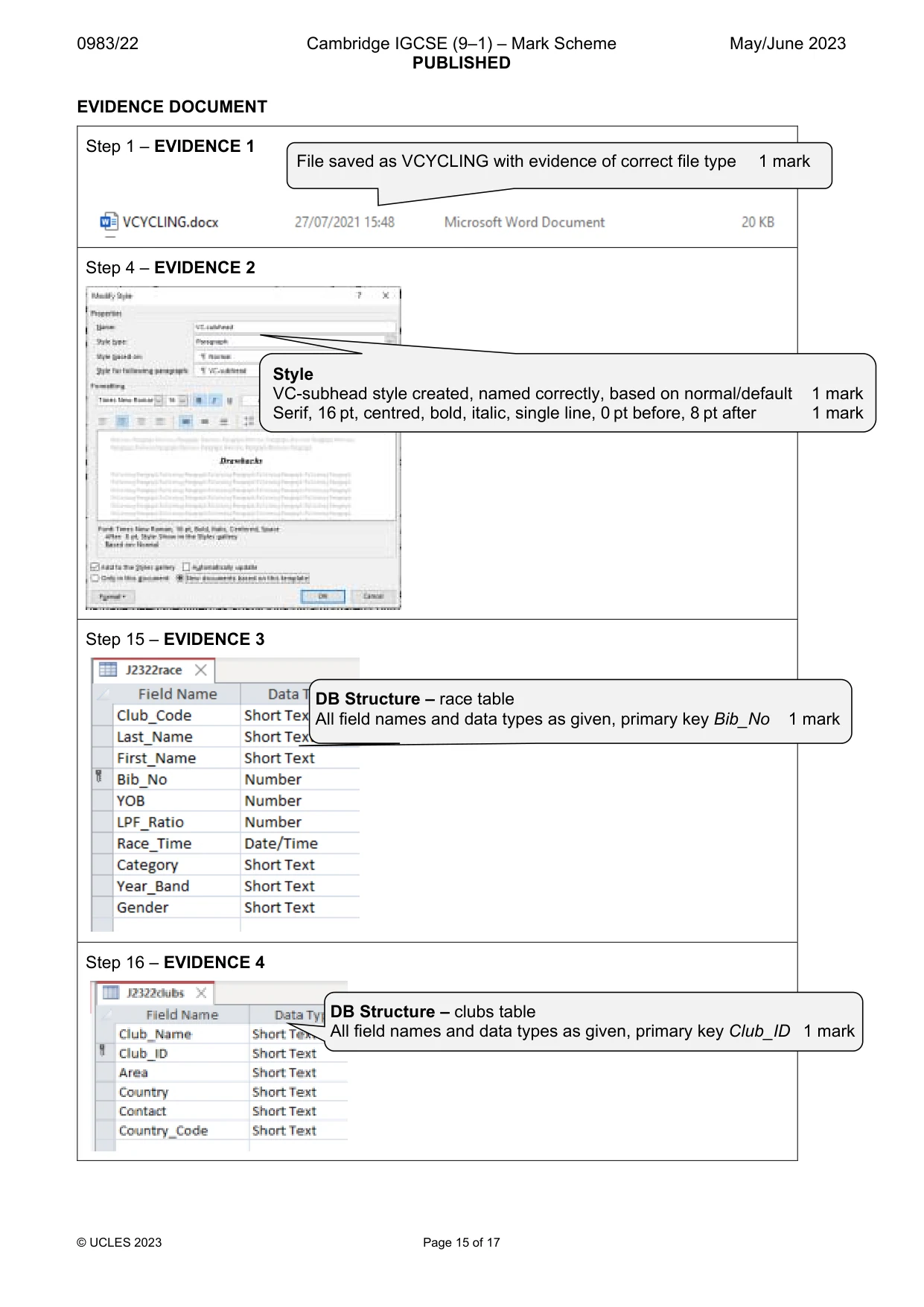
2 0983/22/M/J/23 © UCLES 2023 You have been supplied with the following source files: j2322apps.csv j2322clubs.csv j2322cyclist.jpg j2322evidence.rtf j2322race.csv j2322trends.rtf j2322vcworld.rtf j2322virtual.rtf Task 1 – Evidence Document Open the file j2322evidence.rtf Make sure that your name, centre number and candidate number will appear on every page of this document. Save this document in your work area as EVIDENCE followed by your candidate number, for example, EVIDENCE9999 You will need your Evidence Document during the examination to place screenshots when required. Task 2 – Document You are going to edit a document about Virtual Cycling. The company uses a corporate house style for all their documents. Paragraph styles must be created and applied as instructed. 1 Using suitable software, open the file j2322virtual.rtf The page setup is set to A4, landscape orientation with 2.5 centimetre margins. Do not make any changes to these settings. Three paragraph styles have already been created. Do not make any changes to these. Save the document in your work area with the file name VCYCLING Make sure that it is saved in the format of the software you are using. Place in your Evidence Document a screenshot to show this file has been saved. Make sure that there is evidence of the file type. [1]
Question paper, page 3
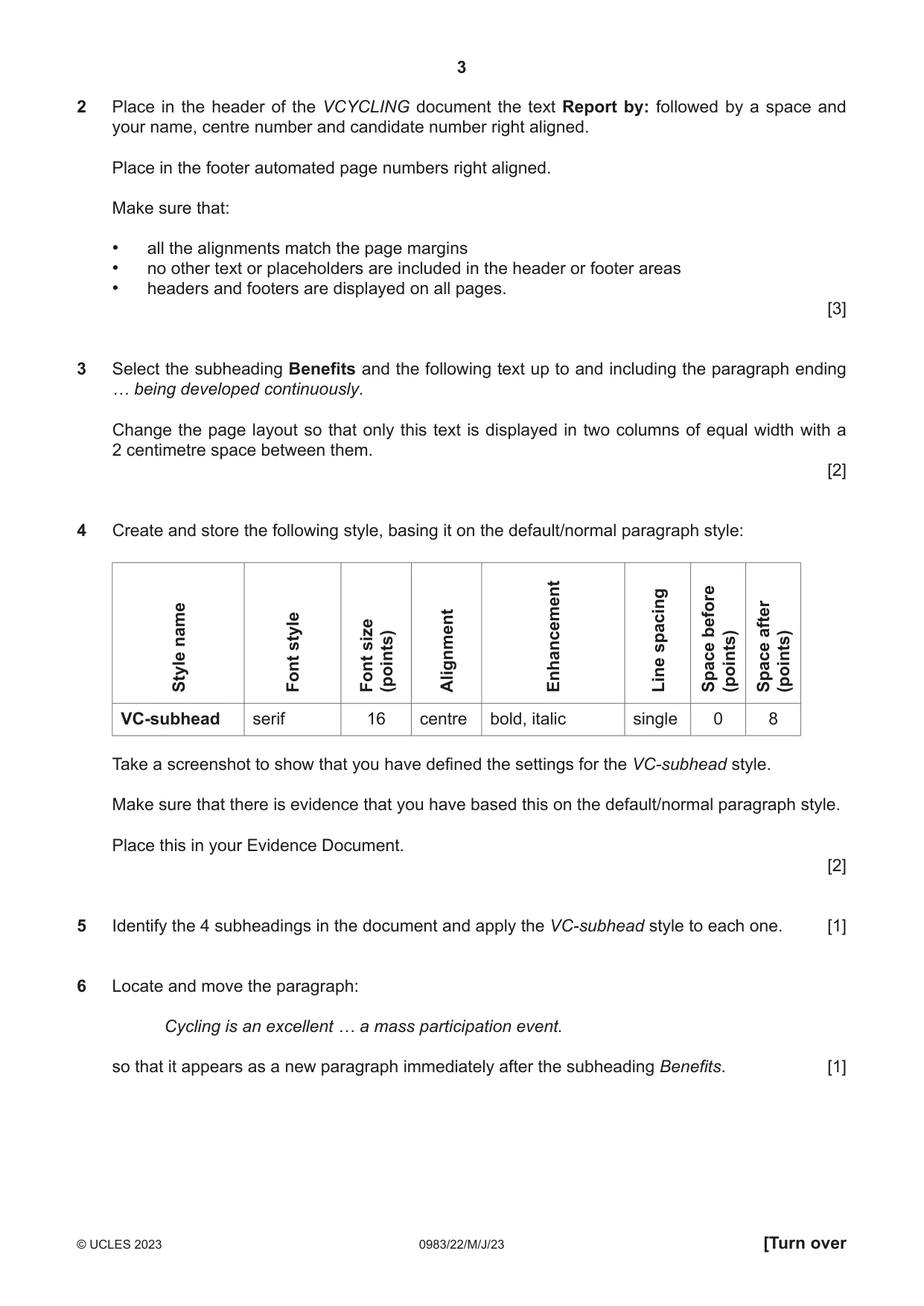
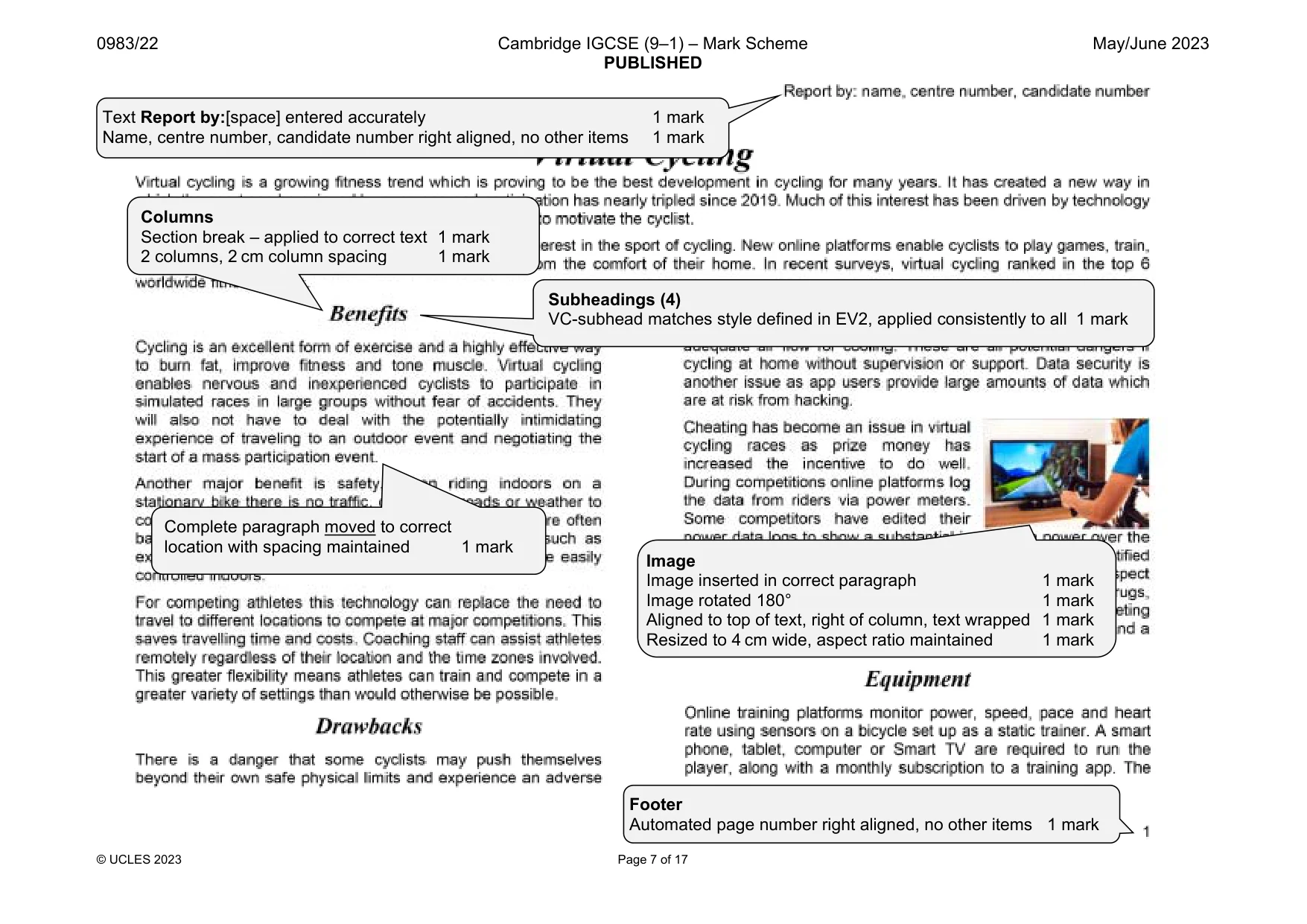
3 0983/22/M/J/23 © UCLES 2023 [Turn over 2 Place in the header of the VCYCLING document the text Report by: followed by a space and your name, centre number and candidate number right aligned. Place in the footer automated page numbers right aligned. Make sure that: • all the alignments match the page margins • no other text or placeholders are included in the header or footer areas • headers and footers are displayed on all pages. [3] 3 Select the subheading Benefits and the following text up to and including the paragraph ending … being developed continuously. Change the page layout so that only this text is displayed in two columns of equal width with a 2 centimetre space between them. [2] 4 Create and store the following style, basing it on the default/normal paragraph style: Style name Font style Font size (points) Alignment Enhancement Line spacing Space before (points) Space after (points) VC-subhead serif 16 centre bold, italic single 0 8 Take a screenshot to show that you have defined the settings for the VC-subhead style. Make sure that there is evidence that you have based this on the default/normal paragraph style. Place this in your Evidence Document. [2] 5 Identify the 4 subheadings in the document and apply the VC-subhead style to each one. [1] 6 Locate and move the paragraph: Cycling is an excellent … a mass participation event. so that it appears as a new paragraph immediately after the subheading Benefits. [1]
Question paper, page 4
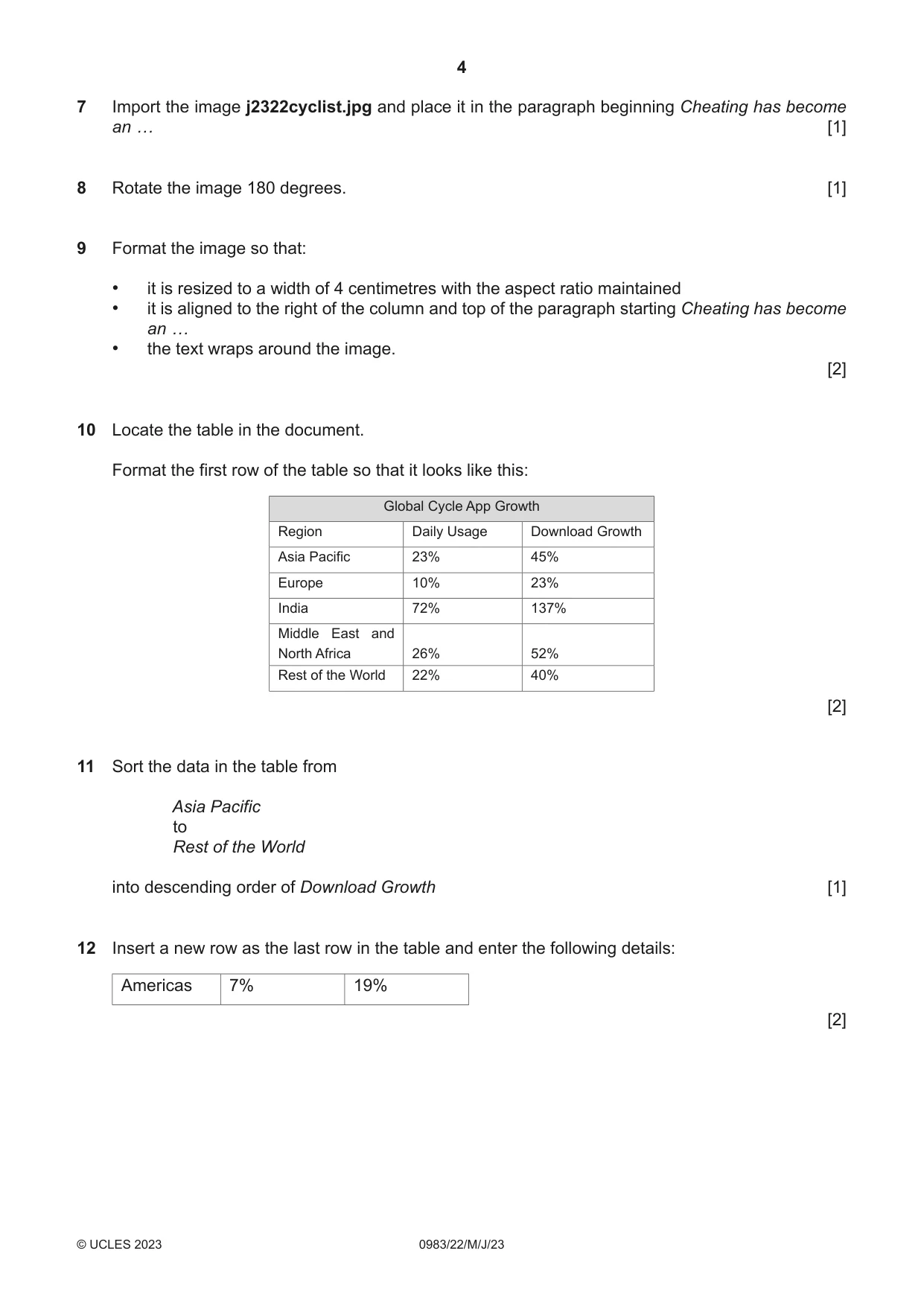
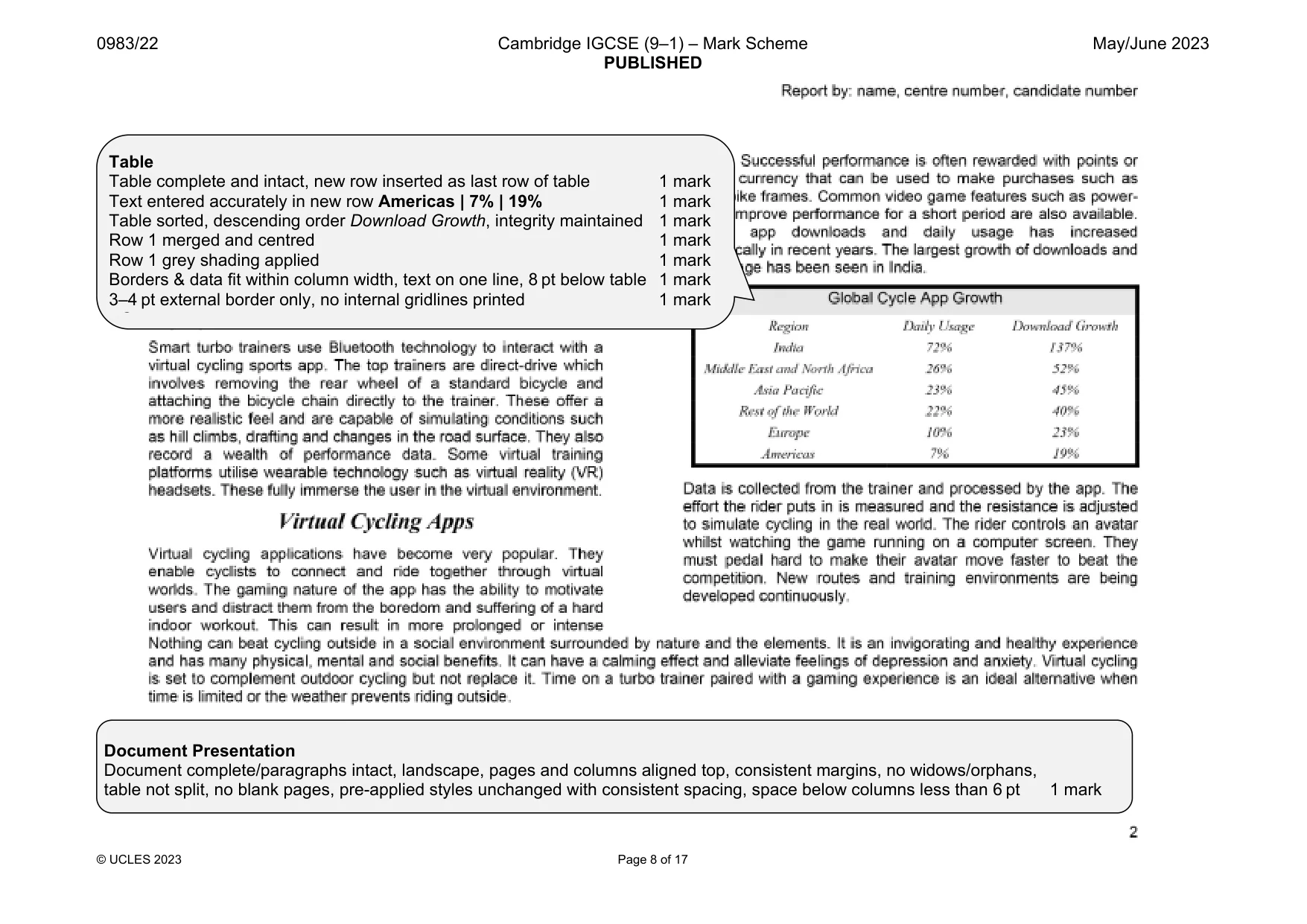
4 0983/22/M/J/23 © UCLES 2023 7 Import the image j2322cyclist.jpg and place it in the paragraph beginning Cheating has become an … [1] 8 Rotate the image 180 degrees. [1] 9 Format the image so that: • it is resized to a width of 4 centimetres with the aspect ratio maintained • it is aligned to the right of the column and top of the paragraph starting Cheating has become an … • the text wraps around the image. [2] 10 Locate the table in the document. Format the first row of the table so that it looks like this: Global Cycle App Growth Region Daily Usage Download Growth Asia Pacific 23% 45% Europe 10% 23% India 72% 137% Middle East and North Africa 26% 52% Rest of the World 22% 40% [2] 11 Sort the data in the table from Asia Pacific to Rest of the World into descending order of Download Growth [1] 12 Insert a new row as the last row in the table and enter the following details: Americas 7% 19% [2]
Question paper, page 5
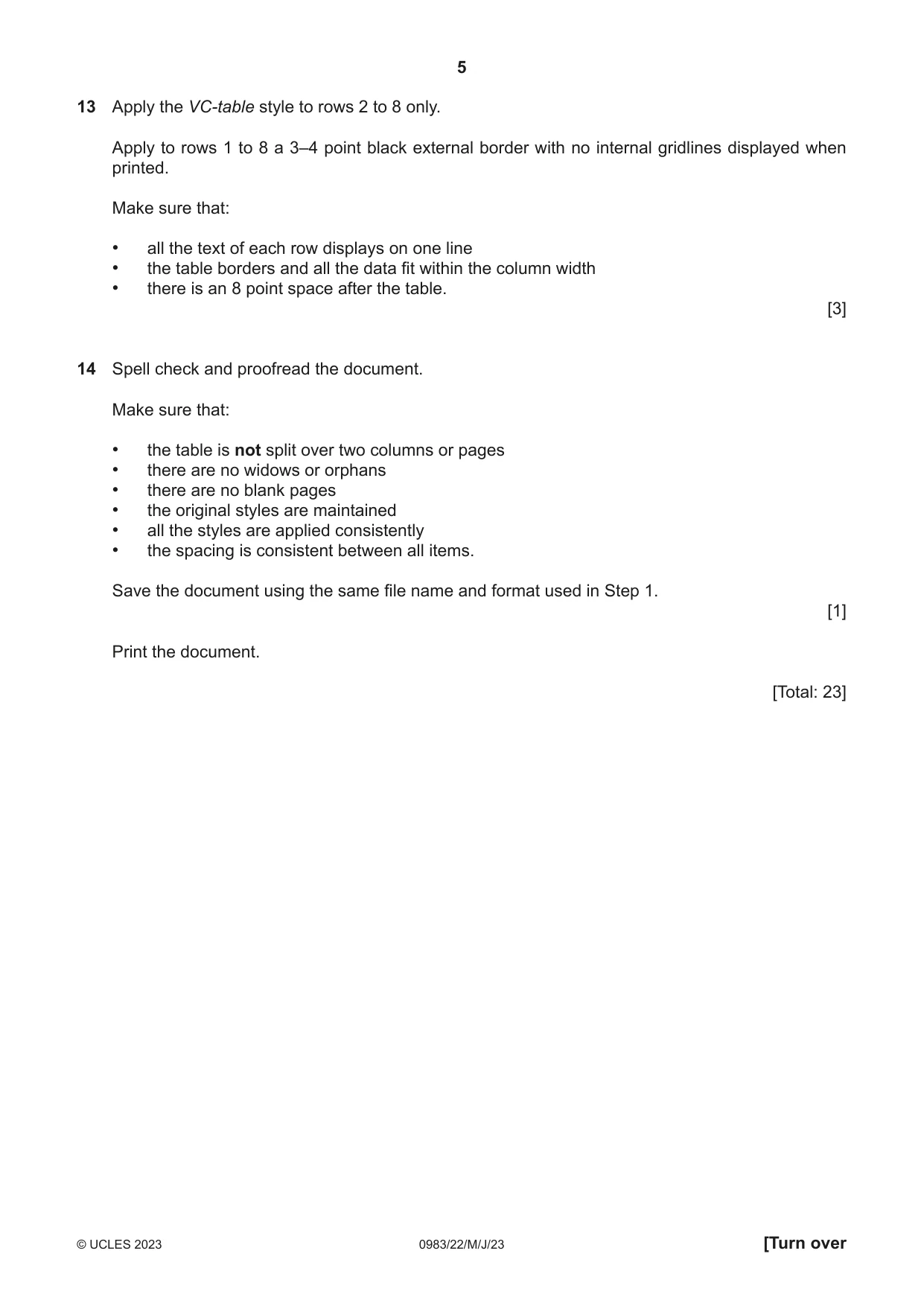
5 0983/22/M/J/23 © UCLES 2023 [Turn over 13 Apply the VC-table style to rows 2 to 8 only. Apply to rows 1 to 8 a 3–4 point black external border with no internal gridlines displayed when printed. Make sure that: • all the text of each row displays on one line • the table borders and all the data fit within the column width • there is an 8 point space after the table. [3] 14 Spell check and proofread the document. Make sure that: • the table is not split over two columns or pages • there are no widows or orphans • there are no blank pages • the original styles are maintained • all the styles are applied consistently • the spacing is consistent between all items. Save the document using the same file name and format used in Step 1. [1] Print the document. [Total: 23]
Question paper, page 6
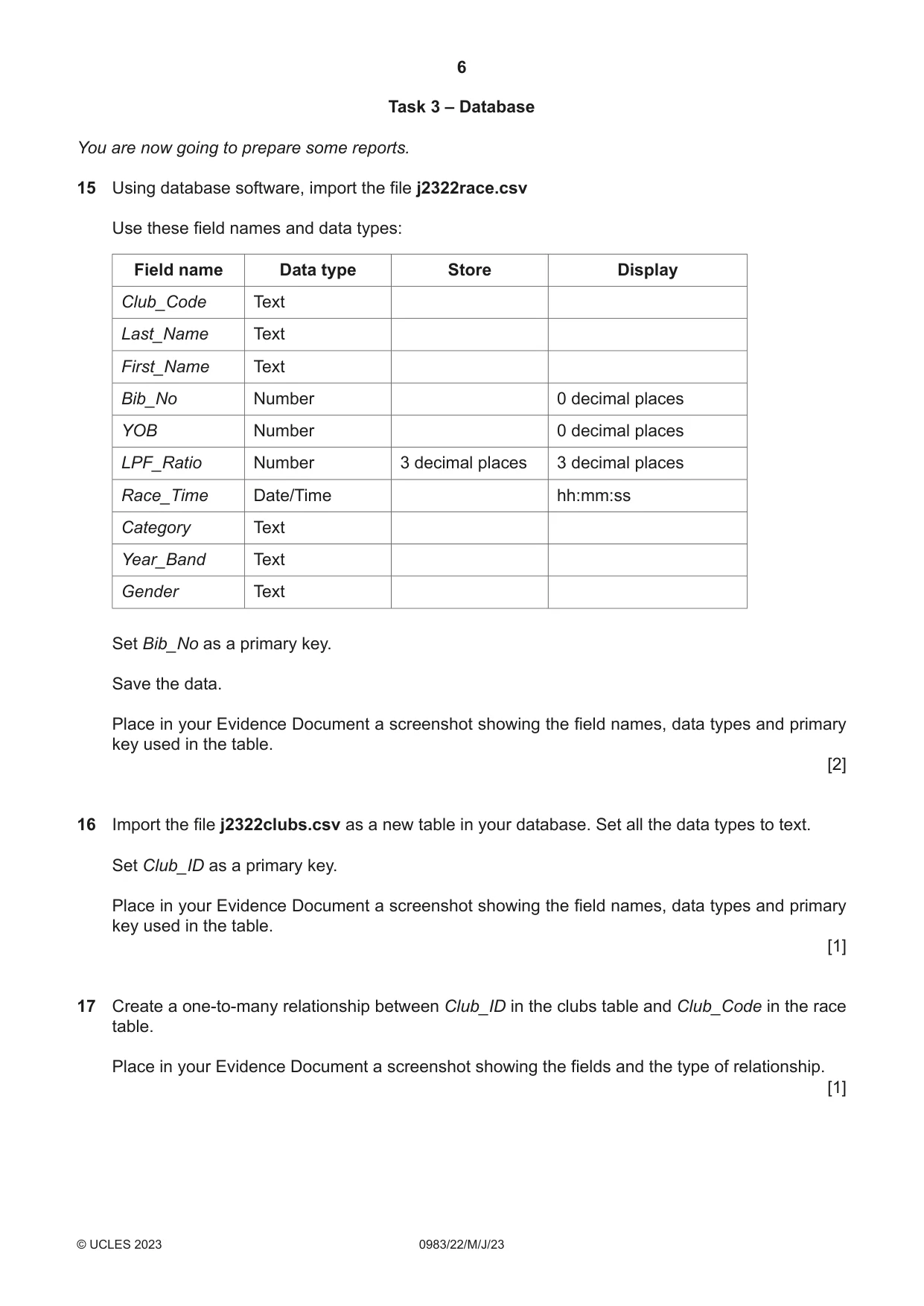
6 0983/22/M/J/23 © UCLES 2023 Task 3 – Database You are now going to prepare some reports. 15 Using database software, import the file j2322race.csv Use these field names and data types: Field name Data type Store Display Club_Code Text Last_Name Text First_Name Text Bib_No Number 0 decimal places YOB Number 0 decimal places LPF_Ratio Number 3 decimal places 3 decimal places Race_Time Date/Time hh:mm:ss Category Text Year_Band Text Gender Text Set Bib_No as a primary key. Save the data. Place in your Evidence Document a screenshot showing the field names, data types and primary key used in the table. [2] 16 Import the file j2322clubs.csv as a new table in your database. Set all the data types to text. Set Club_ID as a primary key. Place in your Evidence Document a screenshot showing the field names, data types and primary key used in the table. [1] 17 Create a one-to-many relationship between Club_ID in the clubs table and Club_Code in the race table. Place in your Evidence Document a screenshot showing the fields and the type of relationship. [1]
Question paper, page 7
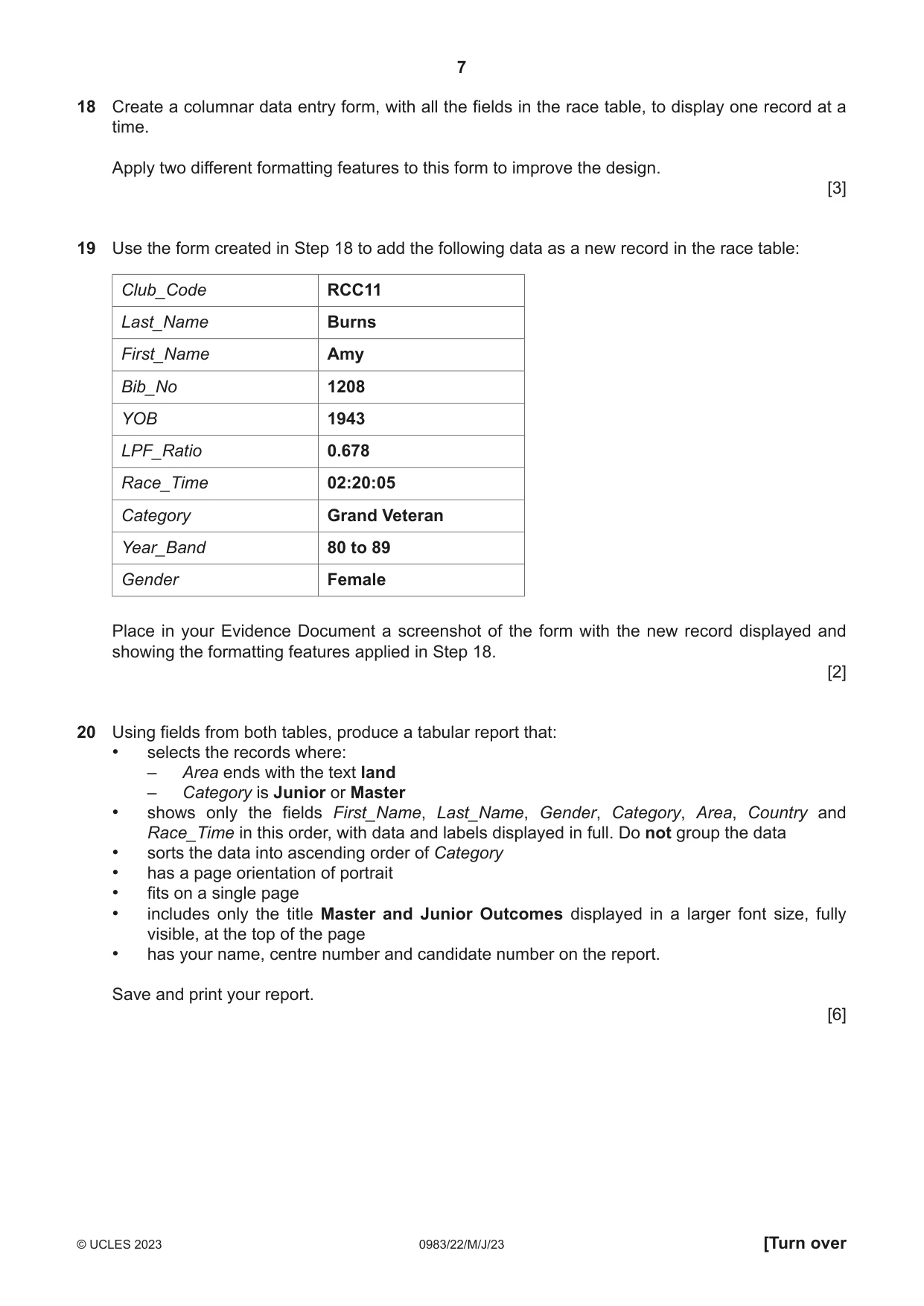
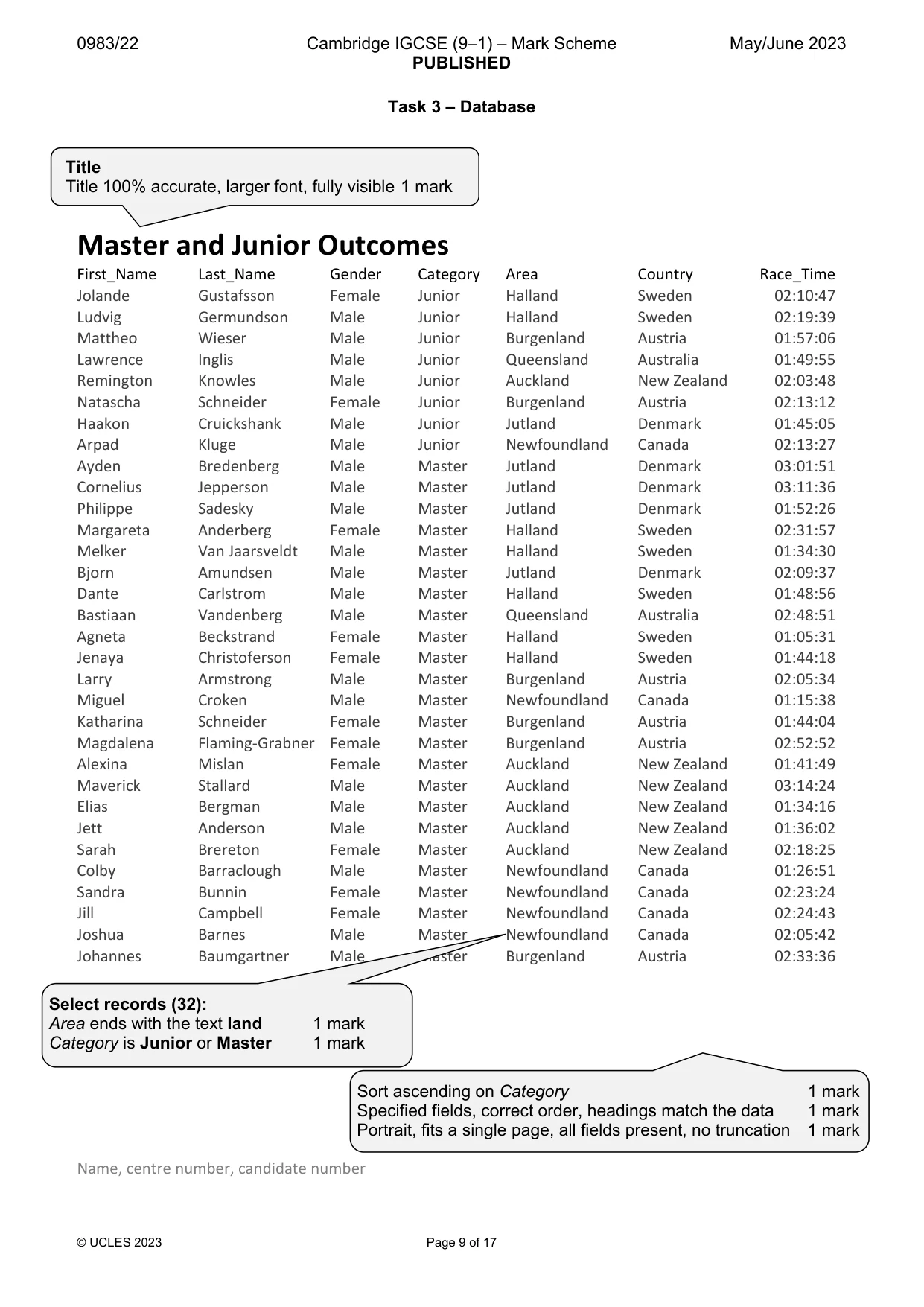
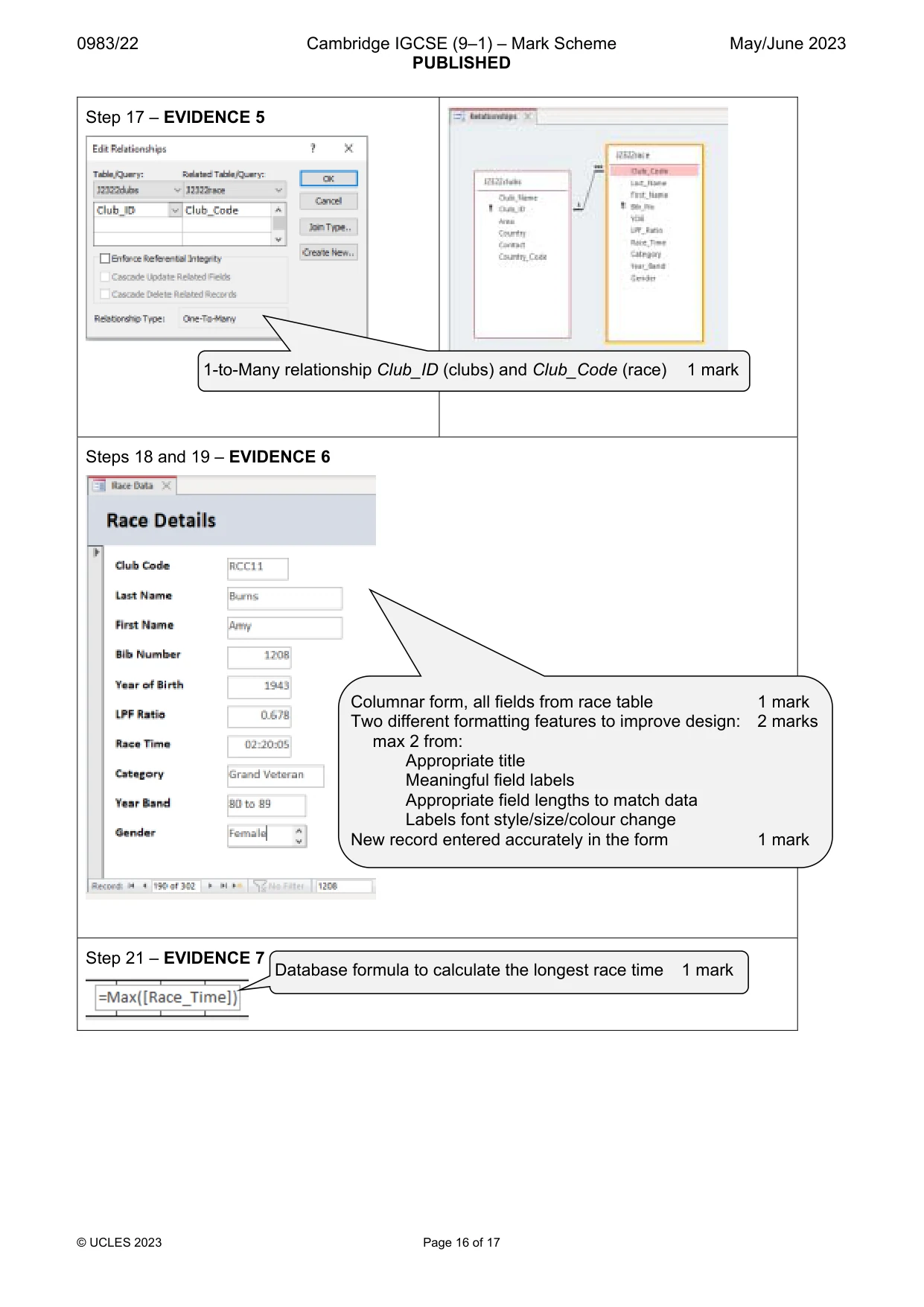
7 0983/22/M/J/23 © UCLES 2023 [Turn over 18 Create a columnar data entry form, with all the fields in the race table, to display one record at a time. Apply two different formatting features to this form to improve the design. [3] 19 Use the form created in Step 18 to add the following data as a new record in the race table: Club_Code RCC11 Last_Name Burns First_Name Amy Bib_No 1208 YOB 1943 LPF_Ratio 0.678 Race_Time 02:20:05 Category Grand Veteran Year_Band 80 to 89 Gender Female Place in your Evidence Document a screenshot of the form with the new record displayed and showing the formatting features applied in Step 18. [2] 20 Using fields from both tables, produce a tabular report that: • selects the records where: – Area ends with the text land – Category is Junior or Master • shows only the fields First_Name, Last_Name, Gender, Category, Area, Country and Race_Time in this order, with data and labels displayed in full. Do not group the data • sorts the data into ascending order of Category • has a page orientation of portrait • fits on a single page • includes only the title Master and Junior Outcomes displayed in a larger font size, fully visible, at the top of the page • has your name, centre number and candidate number on the report. Save and print your report. [6]
Question paper, page 8
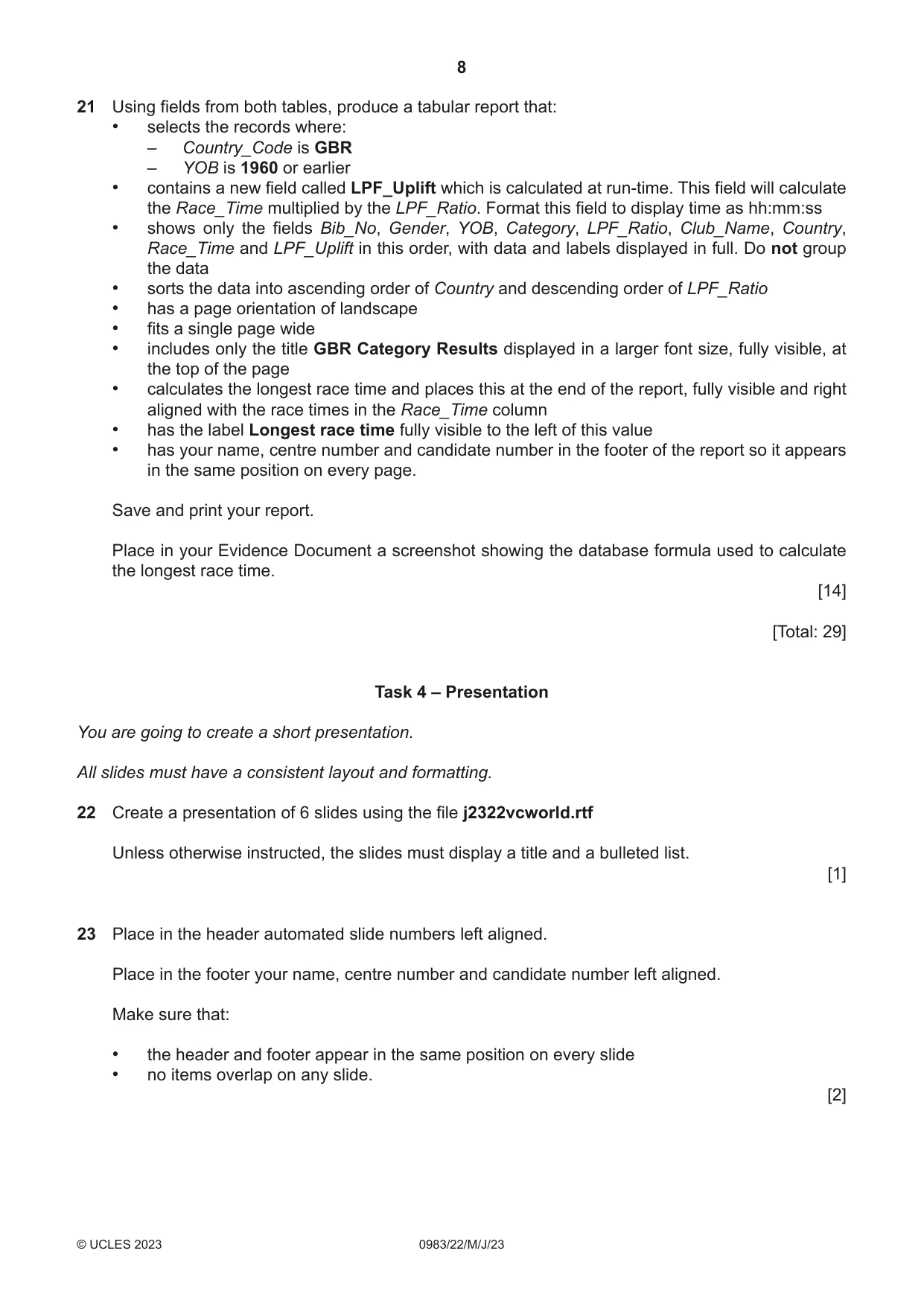
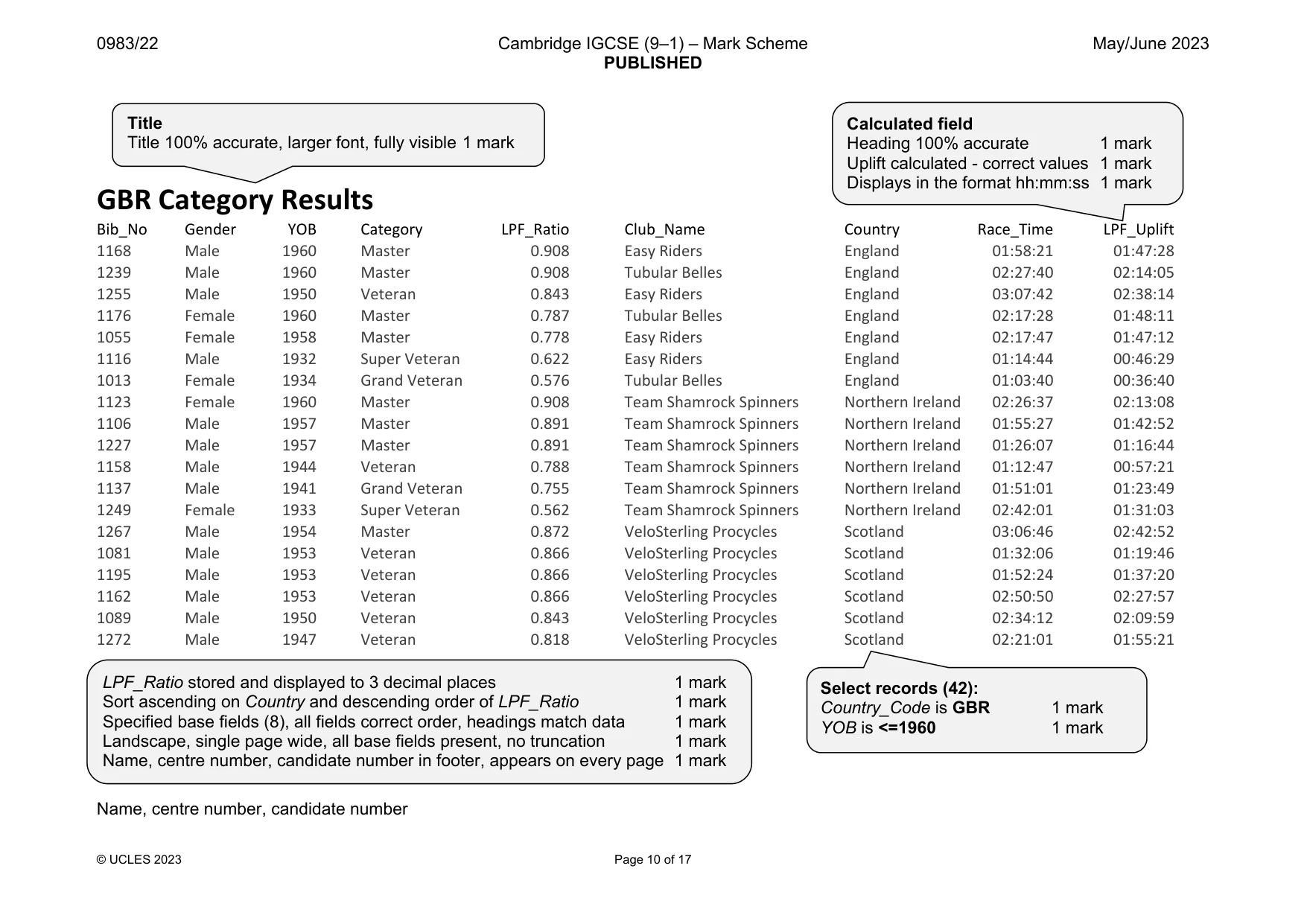
8 0983/22/M/J/23 © UCLES 2023 21 Using fields from both tables, produce a tabular report that: • selects the records where: – Country_Code is GBR – YOB is 1960 or earlier • contains a new field called LPF_Uplift which is calculated at run-time. This field will calculate the Race_Time multiplied by the LPF_Ratio. Format this field to display time as hh:mm:ss • shows only the fields Bib_No, Gender, YOB, Category, LPF_Ratio, Club_Name, Country, Race_Time and LPF_Uplift in this order, with data and labels displayed in full. Do not group the data • sorts the data into ascending order of Country and descending order of LPF_Ratio • has a page orientation of landscape • fits a single page wide • includes only the title GBR Category Results displayed in a larger font size, fully visible, at the top of the page • calculates the longest race time and places this at the end of the report, fully visible and right aligned with the race times in the Race_Time column • has the label Longest race time fully visible to the left of this value • has your name, centre number and candidate number in the footer of the report so it appears in the same position on every page. Save and print your report. Place in your Evidence Document a screenshot showing the database formula used to calculate the longest race time. [14] [Total: 29] Task 4 – Presentation You are going to create a short presentation. All slides must have a consistent layout and formatting. 22 Create a presentation of 6 slides using the file j2322vcworld.rtf Unless otherwise instructed, the slides must display a title and a bulleted list. [1] 23 Place in the header automated slide numbers left aligned. Place in the footer your name, centre number and candidate number left aligned. Make sure that: • the header and footer appear in the same position on every slide • no items overlap on any slide. [2]
Question paper, page 9
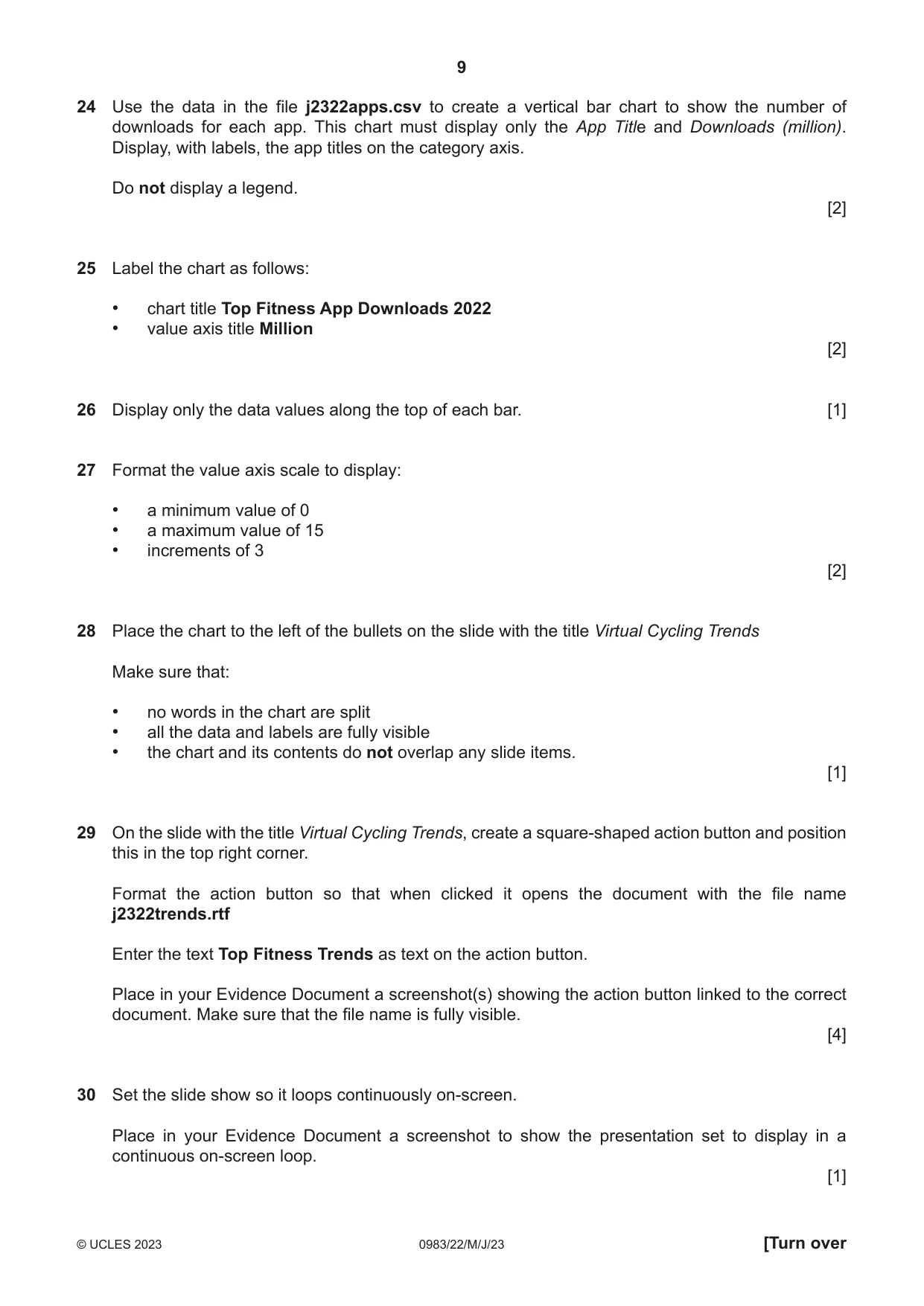
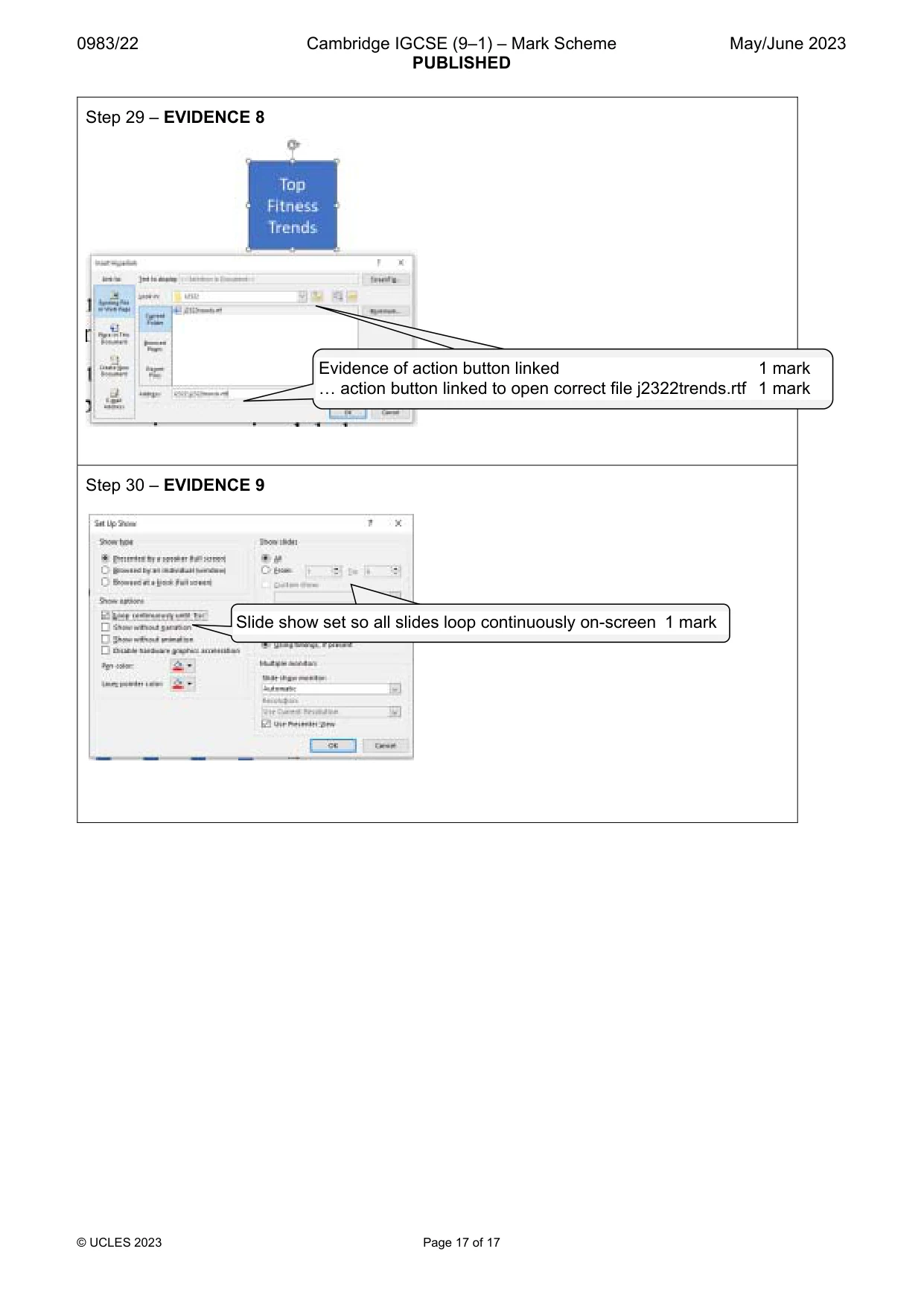
9 0983/22/M/J/23 © UCLES 2023 [Turn over 24 Use the data in the file j2322apps.csv to create a vertical bar chart to show the number of downloads for each app. This chart must display only the App Title and Downloads (million). Display, with labels, the app titles on the category axis. Do not display a legend. [2] 25 Label the chart as follows: • chart title Top Fitness App Downloads 2022 • value axis title Million [2] 26 Display only the data values along the top of each bar. [1] 27 Format the value axis scale to display: • a minimum value of 0 • a maximum value of 15 • increments of 3 [2] 28 Place the chart to the left of the bullets on the slide with the title Virtual Cycling Trends Make sure that: • no words in the chart are split • all the data and labels are fully visible • the chart and its contents do not overlap any slide items. [1] 29 On the slide with the title Virtual Cycling Trends, create a square-shaped action button and position this in the top right corner. Format the action button so that when clicked it opens the document with the file name j2322trends.rtf Enter the text Top Fitness Trends as text on the action button. Place in your Evidence Document a screenshot(s) showing the action button linked to the correct document. Make sure that the file name is fully visible. [4] 30 Set the slide show so it loops continuously on-screen. Place in your Evidence Document a screenshot to show the presentation set to display in a continuous on-screen loop. [1]
Question paper, page 10
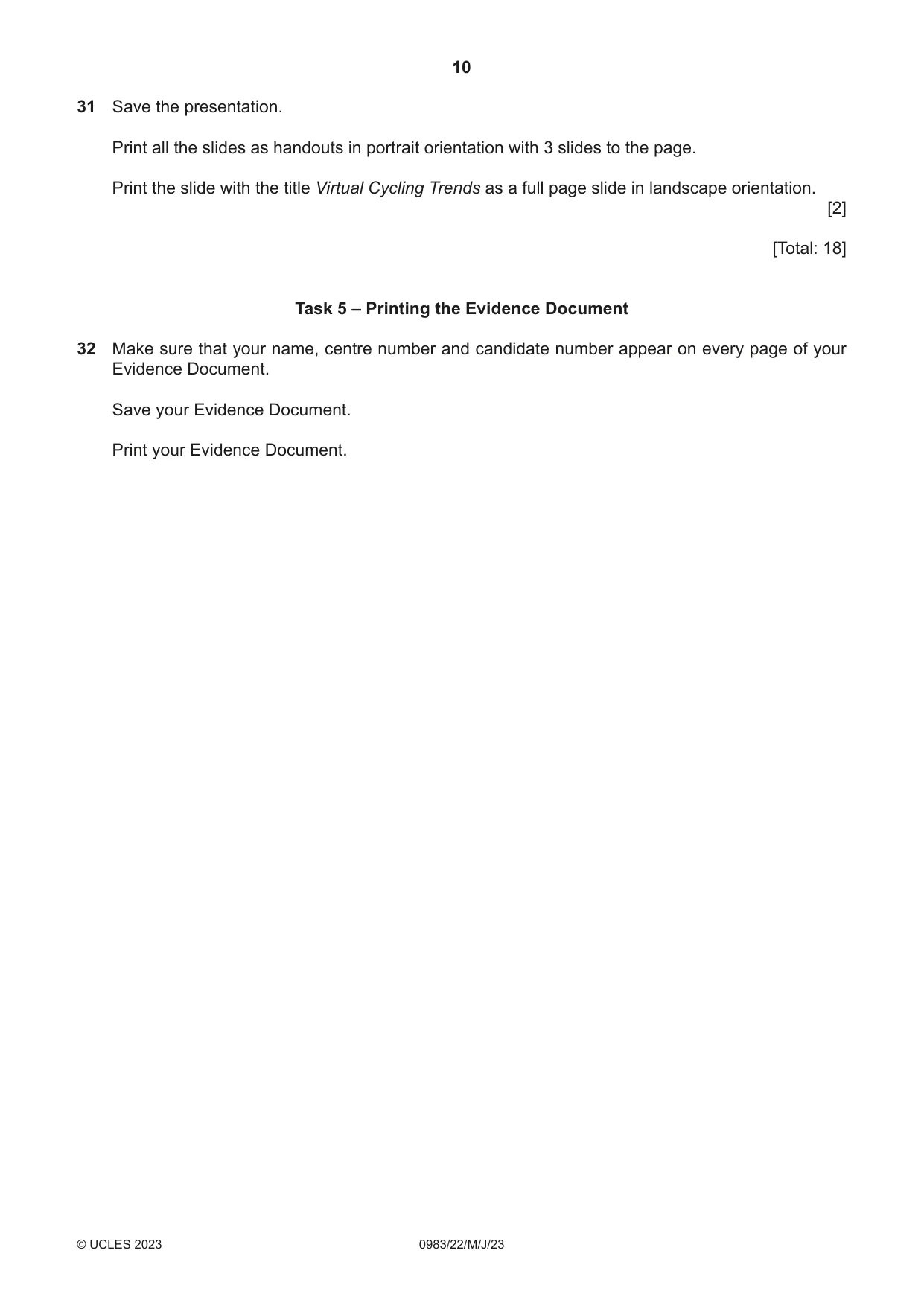
10 0983/22/M/J/23 © UCLES 2023 31 Save the presentation. Print all the slides as handouts in portrait orientation with 3 slides to the page. Print the slide with the title Virtual Cycling Trends as a full page slide in landscape orientation. [2] [Total: 18] Task 5 – Printing the Evidence Document 32 Make sure that your name, centre number and candidate number appear on every page of your Evidence Document. Save your Evidence Document. Print your Evidence Document.
Question paper, page 11
11 0983/22/M/J/23 © UCLES 2023 BLANK PAGE
Question paper, page 12
12 0983/22/M/J/23 © UCLES 2023 Permission to reproduce items where third-party owned material protected by copyright is included has been sought and cleared where possible. Every reasonable effort has been made by the publisher (UCLES) to trace copyright holders, but if any items requiring clearance have unwittingly been included, the publisher will be pleased to make amends at the earliest possible opportunity. To avoid the issue of disclosure of answer-related information to candidates, all copyright acknowledgements are reproduced online in the Cambridge Assessment International Education Copyright Acknowledgements Booklet. This is produced for each series of examinations and is freely available to download at www.cambridgeinternational.org after the live examination series. Cambridge Assessment International Education is part of Cambridge Assessment. Cambridge Assessment is the brand name of the University of Cambridge Local Examinations Syndicate (UCLES), which is a department of the University of Cambridge. BLANK PAGE
Mark scheme, page 1
This document consists of 17 printed pages. © UCLES 2023 [Turn over Cambridge IGCSE™ (9–1) INFORMATION AND COMMUNICATION TECHNOLOGY 0983/22 Paper 2 Document Production, Databases and Presentations May/June 2023 MARK SCHEME Maximum Mark: 70 Published This mark scheme is published as an aid to teachers and candidates, to indicate the requirements of the examination. It shows the basis on which Examiners were instructed to award marks. It does not indicate the details of the discussions that took place at an Examiners’ meeting before marking began, which would have considered the acceptability of alternative answers. Mark schemes should be read in conjunction with the question paper and the Principal Examiner Report for Teachers. Cambridge International will not enter into discussions about these mark schemes. Cambridge International is publishing the mark schemes for the May/June 2023 series for most Cambridge IGCSE, Cambridge International A and AS Level and Cambridge Pre-U components, and some Cambridge O Level components.
Mark scheme, page 2
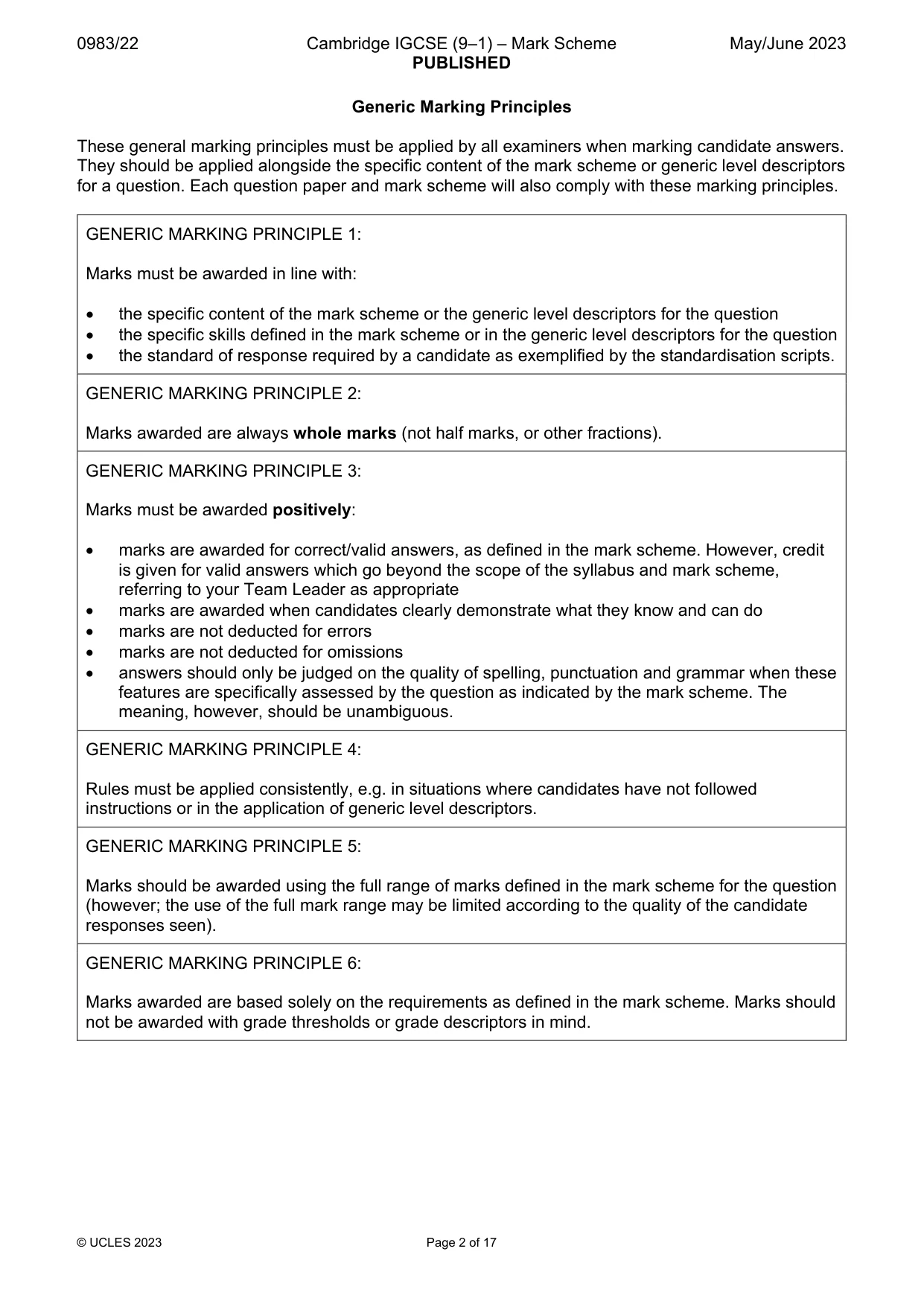
0983/22 Cambridge IGCSE (9–1) – Mark Scheme PUBLISHED May/June 2023 © UCLES 2023 Page 2 of 17 Generic Marking Principles These general marking principles must be applied by all examiners when marking candidate answers. They should be applied alongside the specific content of the mark scheme or generic level descriptors for a question. Each question paper and mark scheme will also comply with these marking principles. GENERIC MARKING PRINCIPLE 1: Marks must be awarded in line with: the specific content of the mark scheme or the generic level descriptors for the question the specific skills defined in the mark scheme or in the generic level descriptors for the question the standard of response required by a candidate as exemplified by the standardisation scripts. GENERIC MARKING PRINCIPLE 2: Marks awarded are always whole marks (not half marks, or other fractions). GENERIC MARKING PRINCIPLE 3: Marks must be awarded positively: marks are awarded for correct/valid answers, as defined in the mark scheme. However, credit is given for valid answers which go beyond the scope of the syllabus and mark scheme, referring to your Team Leader as appropriate marks are awarded when candidates clearly demonstrate what they know and can do marks are not deducted for errors marks are not deducted for omissions answers should only be judged on the quality of spelling, punctuation and grammar when these features are specifically assessed by the question as indicated by the mark scheme. The meaning, however, should be unambiguous. GENERIC MARKING PRINCIPLE 4: Rules must be applied consistently, e.g. in situations where candidates have not followed instructions or in the application of generic level descriptors. GENERIC MARKING PRINCIPLE 5: Marks should be awarded using the full range of marks defined in the mark scheme for the question (however; the use of the full mark range may be limited according to the quality of the candidate responses seen). GENERIC MARKING PRINCIPLE 6: Marks awarded are based solely on the requirements as defined in the mark scheme. Marks should not be awarded with grade thresholds or grade descriptors in mind.
Mark scheme, page 3
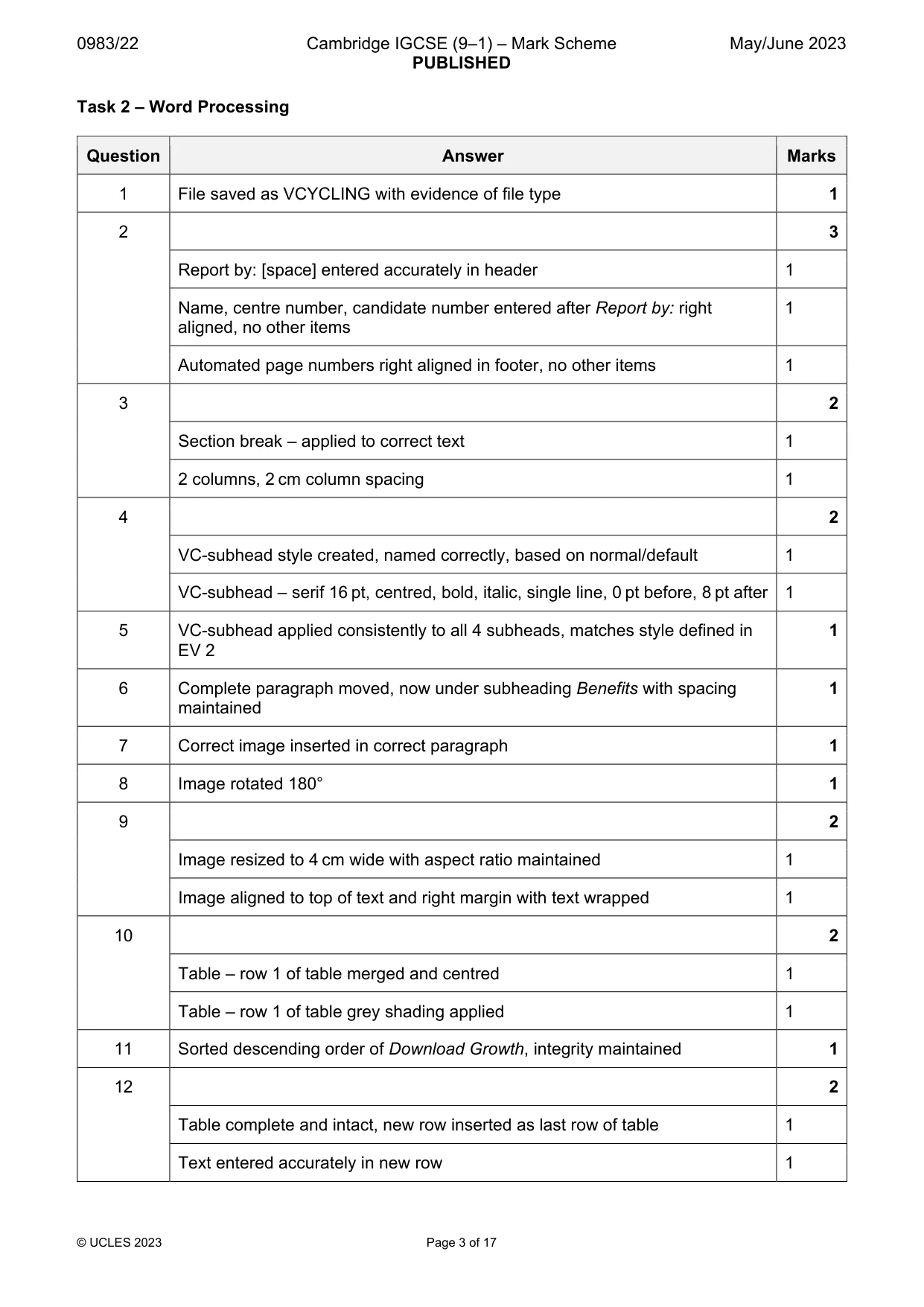
0983/22 Cambridge IGCSE (9–1) – Mark Scheme PUBLISHED May/June 2023 © UCLES 2023 Page 3 of 17 Task 2 – Word Processing Question Answer Marks 1 File saved as VCYCLING with evidence of file type 1 2 3 Report by: [space] entered accurately in header 1 Name, centre number, candidate number entered after Report by: right aligned, no other items 1 Automated page numbers right aligned in footer, no other items 1 3 2 Section break – applied to correct text 1 2 columns, 2 cm column spacing 1 4 2 VC-subhead style created, named correctly, based on normal/default 1 VC-subhead – serif 16 pt, centred, bold, italic, single line, 0 pt before, 8 pt after 1 5 VC-subhead applied consistently to all 4 subheads, matches style defined in EV 2 1 6 Complete paragraph moved, now under subheading Benefits with spacing maintained 1 7 Correct image inserted in correct paragraph 1 8 Image rotated 180° 1 9 2 Image resized to 4 cm wide with aspect ratio maintained 1 Image aligned to top of text and right margin with text wrapped 1 10 2 Table – row 1 of table merged and centred 1 Table – row 1 of table grey shading applied 1 11 Sorted descending order of Download Growth, integrity maintained 1 12 2 Table complete and intact, new row inserted as last row of table 1 Text entered accurately in new row 1
Mark scheme, page 4
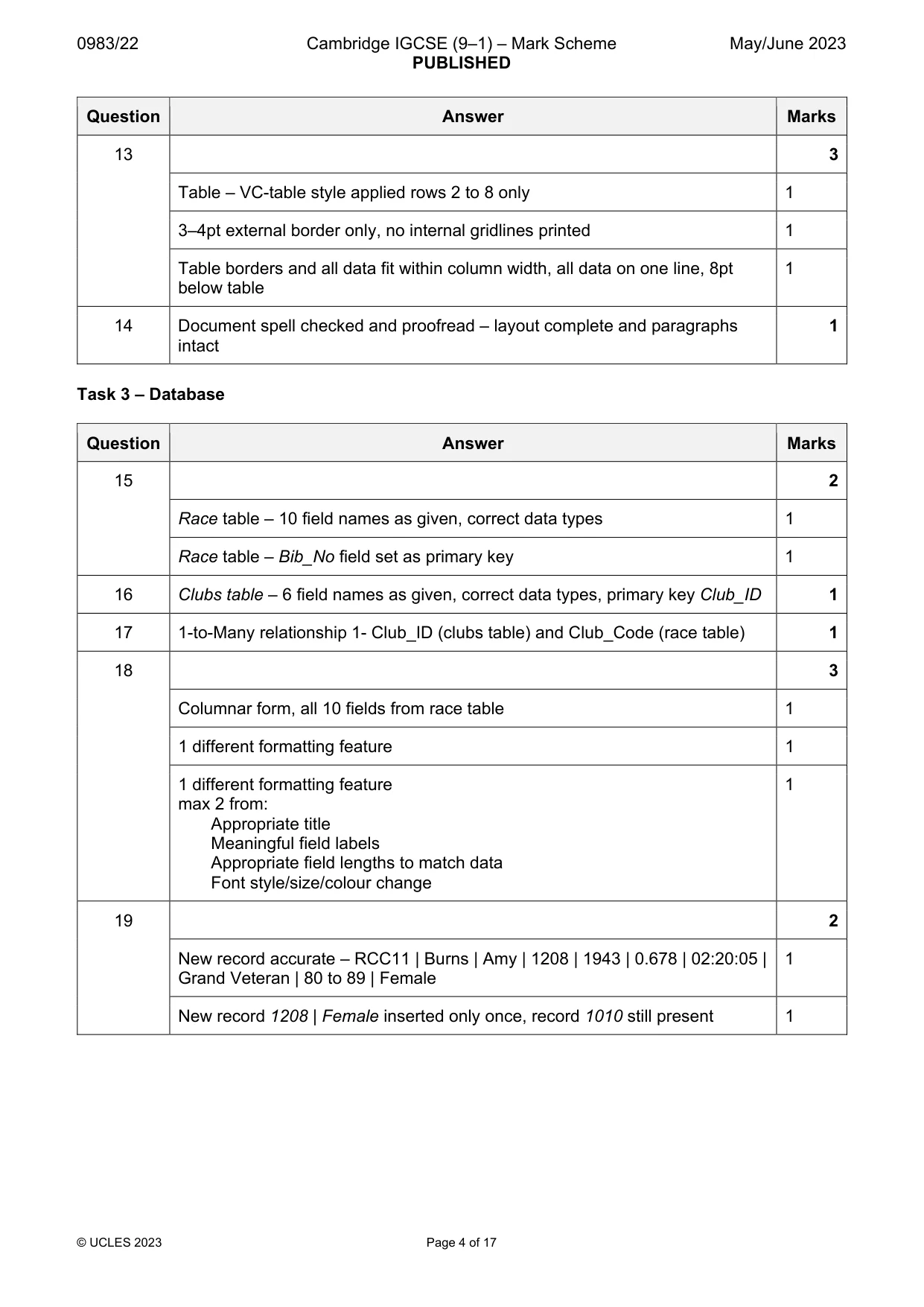
0983/22 Cambridge IGCSE (9–1) – Mark Scheme PUBLISHED May/June 2023 © UCLES 2023 Page 4 of 17 Question Answer Marks 13 3 Table – VC-table style applied rows 2 to 8 only 1 3–4pt external border only, no internal gridlines printed 1 Table borders and all data fit within column width, all data on one line, 8pt below table 1 14 Document spell checked and proofread – layout complete and paragraphs intact 1 Task 3 – Database Question Answer Marks 15 2 Race table – 10 field names as given, correct data types 1 Race table – Bib_No field set as primary key 1 16 Clubs table – 6 field names as given, correct data types, primary key Club_ID 1 17 1-to-Many relationship 1- Club_ID (clubs table) and Club_Code (race table) 1 18 3 Columnar form, all 10 fields from race table 1 1 different formatting feature 1 1 different formatting feature max 2 from: Appropriate title Meaningful field labels Appropriate field lengths to match data Font style/size/colour change 1 19 2 New record accurate – RCC11 | Burns | Amy | 1208 | 1943 | 0.678 | 02:20:05 | Grand Veteran | 80 to 89 | Female 1 New record 1208 | Female inserted only once, record 1010 still present 1
Mark scheme, page 5
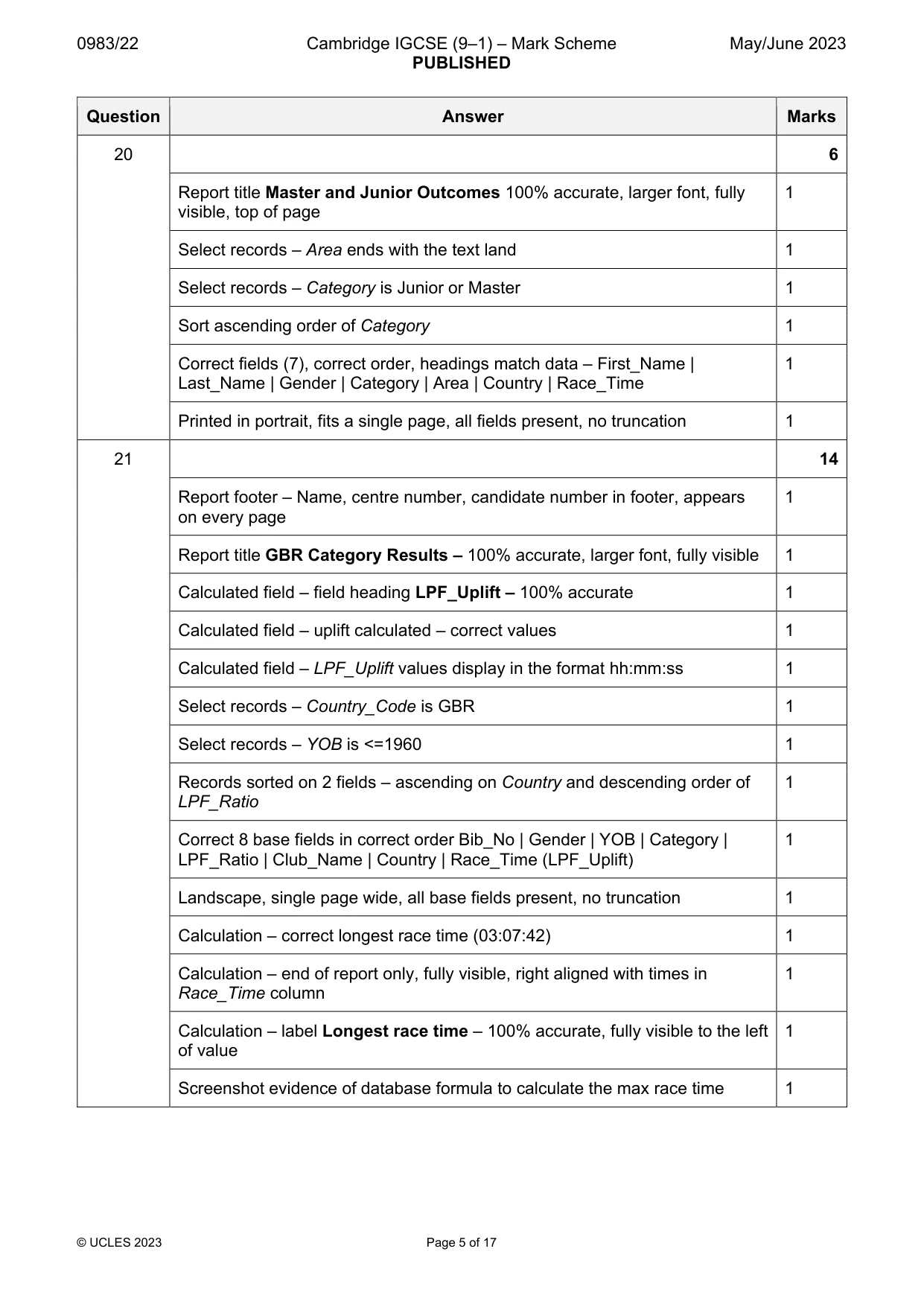
0983/22 Cambridge IGCSE (9–1) – Mark Scheme PUBLISHED May/June 2023 © UCLES 2023 Page 5 of 17 Question Answer Marks 20 6 Report title Master and Junior Outcomes 100% accurate, larger font, fully visible, top of page 1 Select records – Area ends with the text land 1 Select records – Category is Junior or Master 1 Sort ascending order of Category 1 Correct fields (7), correct order, headings match data – First_Name | Last_Name | Gender | Category | Area | Country | Race_Time 1 Printed in portrait, fits a single page, all fields present, no truncation 1 21 14 Report footer – Name, centre number, candidate number in footer, appears on every page 1 Report title GBR Category Results – 100% accurate, larger font, fully visible 1 Calculated field – field heading LPF_Uplift – 100% accurate 1 Calculated field – uplift calculated – correct values 1 Calculated field – LPF_Uplift values display in the format hh:mm:ss 1 Select records – Country_Code is GBR 1 Select records – YOB is <=1960 1 Records sorted on 2 fields – ascending on Country and descending order of LPF_Ratio 1 Correct 8 base fields in correct order Bib_No | Gender | YOB | Category | LPF_Ratio | Club_Name | Country | Race_Time (LPF_Uplift) 1 Landscape, single page wide, all base fields present, no truncation 1 Calculation – correct longest race time (03:07:42) 1 Calculation – end of report only, fully visible, right aligned with times in Race_Time column 1 Calculation – label Longest race time – 100% accurate, fully visible to the left of value 1 Screenshot evidence of database formula to calculate the max race time 1
Mark scheme, page 6
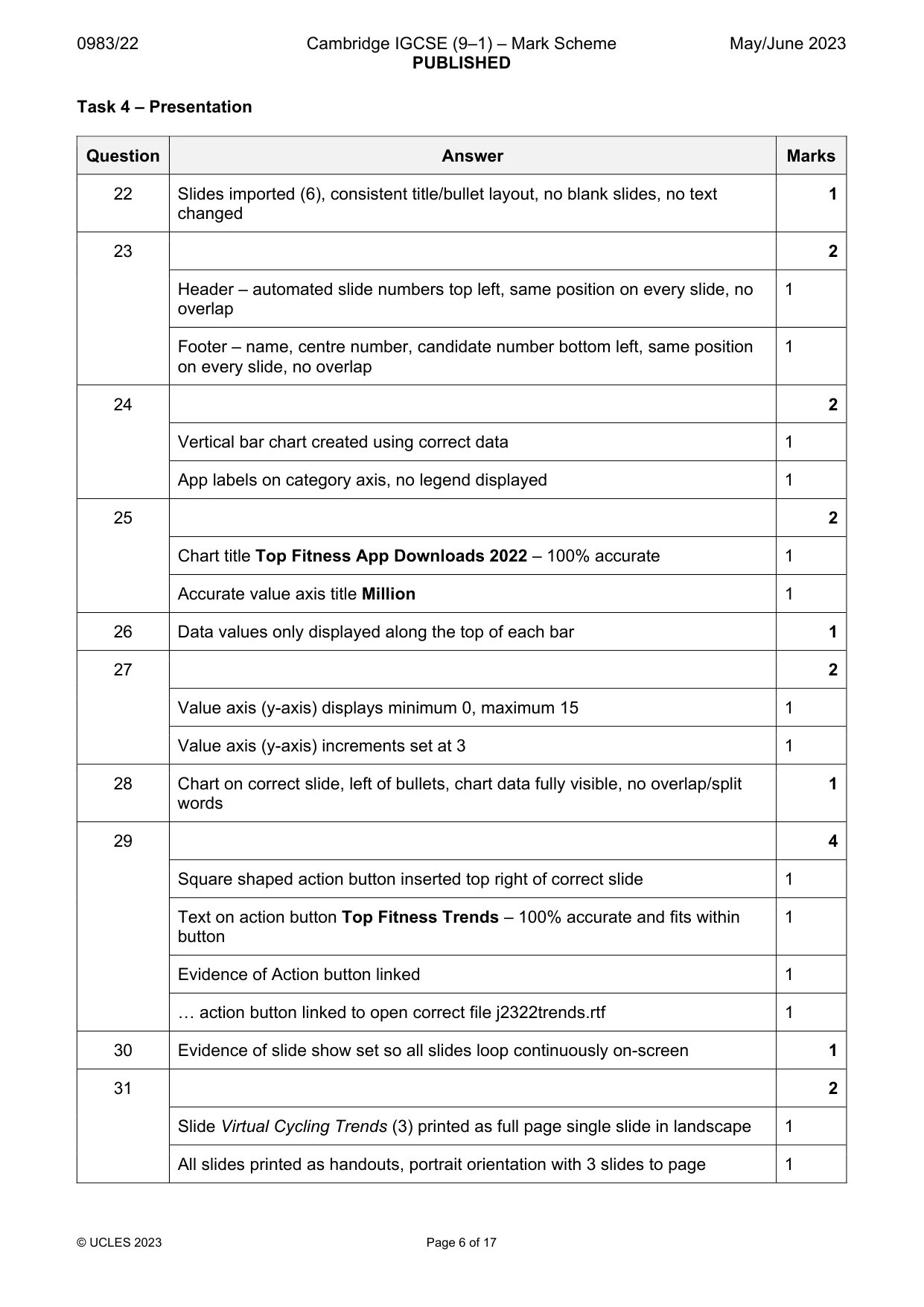
0983/22 Cambridge IGCSE (9–1) – Mark Scheme PUBLISHED May/June 2023 © UCLES 2023 Page 6 of 17 Task 4 – Presentation Question Answer Marks 22 Slides imported (6), consistent title/bullet layout, no blank slides, no text changed 1 23 2 Header – automated slide numbers top left, same position on every slide, no overlap 1 Footer – name, centre number, candidate number bottom left, same position on every slide, no overlap 1 24 2 Vertical bar chart created using correct data 1 App labels on category axis, no legend displayed 1 25 2 Chart title Top Fitness App Downloads 2022 – 100% accurate 1 Accurate value axis title Million 1 26 Data values only displayed along the top of each bar 1 27 2 Value axis (y-axis) displays minimum 0, maximum 15 1 Value axis (y-axis) increments set at 3 1 28 Chart on correct slide, left of bullets, chart data fully visible, no overlap/split words 1 29 4 Square shaped action button inserted top right of correct slide 1 Text on action button Top Fitness Trends – 100% accurate and fits within button 1 Evidence of Action button linked 1 … action button linked to open correct file j2322trends.rtf 1 30 Evidence of slide show set so all slides loop continuously on-screen 1 31 2 Slide Virtual Cycling Trends (3) printed as full page single slide in landscape 1 All slides printed as handouts, portrait orientation with 3 slides to page 1
Mark scheme, page 7
0983/22 Cambridge IGCSE (9–1) – Mark Scheme PUBLISHED May/June 2023 © UCLES 2023 Page 7 of 17 Text Report by:[space] entered accurately 1 mark Name, centre number, candidate number right aligned, no other items 1 mark Footer Automated page number right aligned, no other items 1 mark Image Image inserted in correct paragraph 1 mark Image rotated 180° 1 mark Aligned to top of text, right of column, text wrapped 1 mark Resized to 4 cm wide, aspect ratio maintained 1 mark Complete paragraph moved to correct location with spacing maintained 1 mark Subheadings (4) VC-subhead matches style defined in EV2, applied consistently to all 1 mark Columns Section break – applied to correct text 1 mark 2 columns, 2 cm column spacing 1 mark
Mark scheme, page 8
0983/22 Cambridge IGCSE (9–1) – Mark Scheme PUBLISHED May/June 2023 © UCLES 2023 Page 8 of 17 Document Presentation Document complete/paragraphs intact, landscape, pages and columns aligned top, consistent margins, no widows/orphans, table not split, no blank pages, pre-applied styles unchanged with consistent spacing, space below columns less than 6 pt 1 mark Table Table complete and intact, new row inserted as last row of table 1 mark Text entered accurately in new row Americas | 7% | 19% 1 mark Table sorted, descending order Download Growth, integrity maintained 1 mark Row 1 merged and centred 1 mark Row 1 grey shading applied 1 mark Borders & data fit within column width, text on one line, 8 pt below table 1 mark 3–4 pt external border only, no internal gridlines printed 1 mark C
Mark scheme, page 9
0983/22 Cambridge IGCSE (9–1) – Mark Scheme PUBLISHED May/June 2023 © UCLES 2023 Page 9 of 17 Task 3 – Database Master and Junior Outcomes First_Name Last_Name Gender Category Area Country Race_Time Jolande Gustafsson Female Junior Halland Sweden 02:10:47 Ludvig Germundson Male Junior Halland Sweden 02:19:39 Mattheo Wieser Male Junior Burgenland Austria 01:57:06 Lawrence Inglis Male Junior Queensland Australia 01:49:55 Remington Knowles Male Junior Auckland New Zealand 02:03:48 Natascha Schneider Female Junior Burgenland Austria 02:13:12 Haakon Cruickshank Male Junior Jutland Denmark 01:45:05 Arpad Kluge Male Junior Newfoundland Canada 02:13:27 Ayden Bredenberg Male Master Jutland Denmark 03:01:51 Cornelius Jepperson Male Master Jutland Denmark 03:11:36 Philippe Sadesky Male Master Jutland Denmark 01:52:26 Margareta Anderberg Female Master Halland Sweden 02:31:57 Melker Van Jaarsveldt Male Master Halland Sweden 01:34:30 Bjorn Amundsen Male Master Jutland Denmark 02:09:37 Dante Carlstrom Male Master Halland Sweden 01:48:56 Bastiaan Vandenberg Male Master Queensland Australia 02:48:51 Agneta Beckstrand Female Master Halland Sweden 01:05:31 Jenaya Christoferson Female Master Halland Sweden 01:44:18 Larry Armstrong Male Master Burgenland Austria 02:05:34 Miguel Croken Male Master Newfoundland Canada 01:15:38 Katharina Schneider Female Master Burgenland Austria 01:44:04 Magdalena Flaming-Grabner Female Master Burgenland Austria 02:52:52 Alexina Mislan Female Master Auckland New Zealand 01:41:49 Maverick Stallard Male Master Auckland New Zealand 03:14:24 Elias Bergman Male Master Auckland New Zealand 01:34:16 Jett Anderson Male Master Auckland New Zealand 01:36:02 Sarah Brereton Female Master Auckland New Zealand 02:18:25 Colby Barraclough Male Master Newfoundland Canada 01:26:51 Sandra Bunnin Female Master Newfoundland Canada 02:23:24 Jill Campbell Female Master Newfoundland Canada 02:24:43 Joshua Barnes Male Master Newfoundland Canada 02:05:42 Johannes Baumgartner Male Master Burgenland Austria 02:33:36 Name, centre number, candidate number Title Title 100% accurate, larger font, fully visible 1 mark Sort ascending on Category 1 mark Specified fields, correct order, headings match the data 1 mark Portrait, fits a single page, all fields present, no truncation 1 mark Select records (32): Area ends with the text land 1 mark Category is Junior or Master 1 mark
Mark scheme, page 10
0983/22 Cambridge IGCSE (9–1) – Mark Scheme PUBLISHED May/June 2023 © UCLES 2023 Page 10 of 17 GBR Category Results Bib_No Gender YOB Category LPF_Ratio Club_Name Country Race_Time LPF_Uplift 1168 Male 1960 Master 0.908 Easy Riders England 01:58:21 01:47:28 1239 Male 1960 Master 0.908 Tubular Belles England 02:27:40 02:14:05 1255 Male 1950 Veteran 0.843 Easy Riders England 03:07:42 02:38:14 1176 Female 1960 Master 0.787 Tubular Belles England 02:17:28 01:48:11 1055 Female 1958 Master 0.778 Easy Riders England 02:17:47 01:47:12 1116 Male 1932 Super Veteran 0.622 Easy Riders England 01:14:44 00:46:29 1013 Female 1934 Grand Veteran 0.576 Tubular Belles England 01:03:40 00:36:40 1123 Female 1960 Master 0.908 Team Shamrock Spinners Northern Ireland 02:26:37 02:13:08 1106 Male 1957 Master 0.891 Team Shamrock Spinners Northern Ireland 01:55:27 01:42:52 1227 Male 1957 Master 0.891 Team Shamrock Spinners Northern Ireland 01:26:07 01:16:44 1158 Male 1944 Veteran 0.788 Team Shamrock Spinners Northern Ireland 01:12:47 00:57:21 1137 Male 1941 Grand Veteran 0.755 Team Shamrock Spinners Northern Ireland 01:51:01 01:23:49 1249 Female 1933 Super Veteran 0.562 Team Shamrock Spinners Northern Ireland 02:42:01 01:31:03 1267 Male 1954 Master 0.872 VeloSterling Procycles Scotland 03:06:46 02:42:52 1081 Male 1953 Veteran 0.866 VeloSterling Procycles Scotland 01:32:06 01:19:46 1195 Male 1953 Veteran 0.866 VeloSterling Procycles Scotland 01:52:24 01:37:20 1162 Male 1953 Veteran 0.866 VeloSterling Procycles Scotland 02:50:50 02:27:57 1089 Male 1950 Veteran 0.843 VeloSterling Procycles Scotland 02:34:12 02:09:59 1272 Male 1947 Veteran 0.818 VeloSterling Procycles Scotland 02:21:01 01:55:21 Name, centre number, candidate number Title Title 100% accurate, larger font, fully visible 1 mark Calculated field Heading 100% accurate 1 mark Uplift calculated - correct values 1 mark Displays in the format hh:mm:ss 1 mark Select records (42): Country_Code is GBR 1 mark YOB is <=1960 1 mark LPF_Ratio stored and displayed to 3 decimal places 1 mark Sort ascending on Country and descending order of LPF_Ratio 1 mark Specified base fields (8), all fields correct order, headings match data 1 mark Landscape, single page wide, all base fields present, no truncation 1 mark Name, centre number, candidate number in footer, appears on every page 1 mark
Mark scheme, page 11
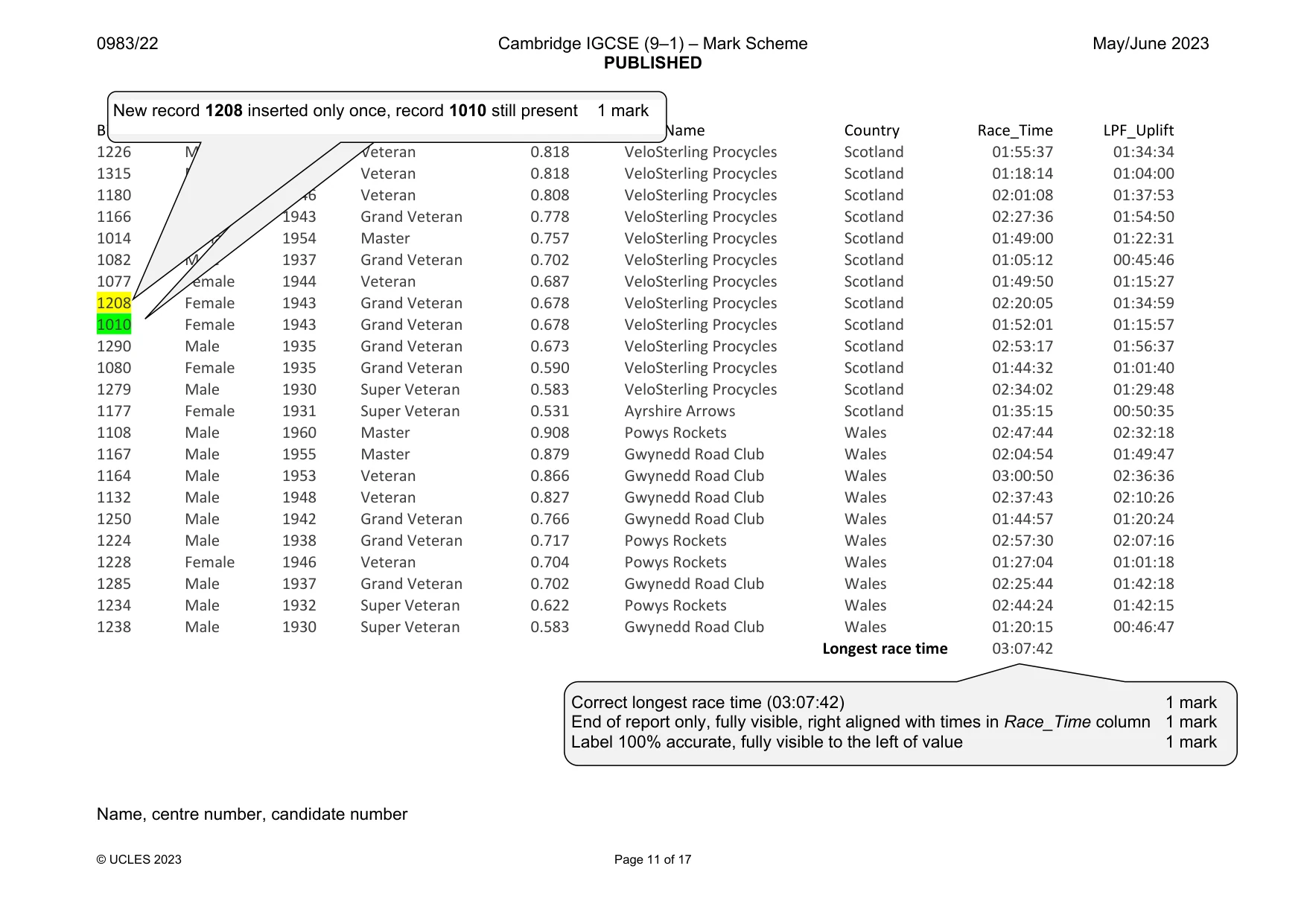
0983/22 Cambridge IGCSE (9–1) – Mark Scheme PUBLISHED May/June 2023 © UCLES 2023 Page 11 of 17 Bib_No Gender YOB Category LPF_Ratio Club_Name Country Race_Time LPF_Uplift 1226 Male 1947 Veteran 0.818 VeloSterling Procycles Scotland 01:55:37 01:34:34 1315 Male 1947 Veteran 0.818 VeloSterling Procycles Scotland 01:18:14 01:04:00 1180 Male 1946 Veteran 0.808 VeloSterling Procycles Scotland 02:01:08 01:37:53 1166 Male 1943 Grand Veteran 0.778 VeloSterling Procycles Scotland 02:27:36 01:54:50 1014 Female 1954 Master 0.757 VeloSterling Procycles Scotland 01:49:00 01:22:31 1082 Male 1937 Grand Veteran 0.702 VeloSterling Procycles Scotland 01:05:12 00:45:46 1077 Female 1944 Veteran 0.687 VeloSterling Procycles Scotland 01:49:50 01:15:27 1208 Female 1943 Grand Veteran 0.678 VeloSterling Procycles Scotland 02:20:05 01:34:59 1010 Female 1943 Grand Veteran 0.678 VeloSterling Procycles Scotland 01:52:01 01:15:57 1290 Male 1935 Grand Veteran 0.673 VeloSterling Procycles Scotland 02:53:17 01:56:37 1080 Female 1935 Grand Veteran 0.590 VeloSterling Procycles Scotland 01:44:32 01:01:40 1279 Male 1930 Super Veteran 0.583 VeloSterling Procycles Scotland 02:34:02 01:29:48 1177 Female 1931 Super Veteran 0.531 Ayrshire Arrows Scotland 01:35:15 00:50:35 1108 Male 1960 Master 0.908 Powys Rockets Wales 02:47:44 02:32:18 1167 Male 1955 Master 0.879 Gwynedd Road Club Wales 02:04:54 01:49:47 1164 Male 1953 Veteran 0.866 Gwynedd Road Club Wales 03:00:50 02:36:36 1132 Male 1948 Veteran 0.827 Gwynedd Road Club Wales 02:37:43 02:10:26 1250 Male 1942 Grand Veteran 0.766 Gwynedd Road Club Wales 01:44:57 01:20:24 1224 Male 1938 Grand Veteran 0.717 Powys Rockets Wales 02:57:30 02:07:16 1228 Female 1946 Veteran 0.704 Powys Rockets Wales 01:27:04 01:01:18 1285 Male 1937 Grand Veteran 0.702 Gwynedd Road Club Wales 02:25:44 01:42:18 1234 Male 1932 Super Veteran 0.622 Powys Rockets Wales 02:44:24 01:42:15 1238 Male 1930 Super Veteran 0.583 Gwynedd Road Club Wales 01:20:15 00:46:47 Longest race time 03:07:42 Name, centre number, candidate number Correct longest race time (03:07:42) 1 mark End of report only, fully visible, right aligned with times in Race_Time column 1 mark Label 100% accurate, fully visible to the left of value 1 mark New record 1208 inserted only once, record 1010 still present 1 mark
Mark scheme, page 12
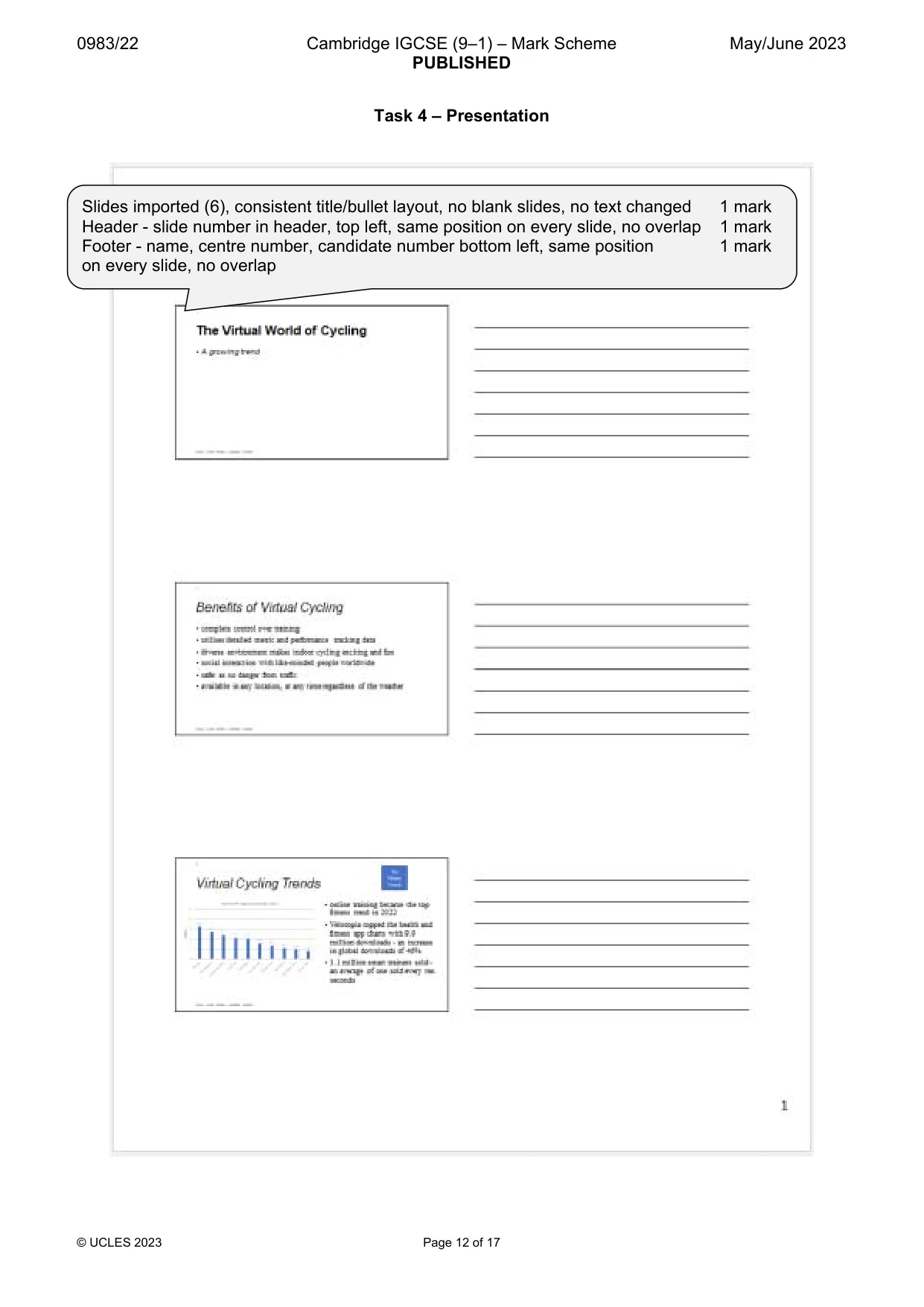
0983/22 Cambridge IGCSE (9–1) – Mark Scheme PUBLISHED May/June 2023 © UCLES 2023 Page 12 of 17 Task 4 – Presentation Slides imported (6), consistent title/bullet layout, no blank slides, no text changed 1 mark Header - slide number in header, top left, same position on every slide, no overlap 1 mark Footer - name, centre number, candidate number bottom left, same position 1 mark on every slide, no overlap
Mark scheme, page 13
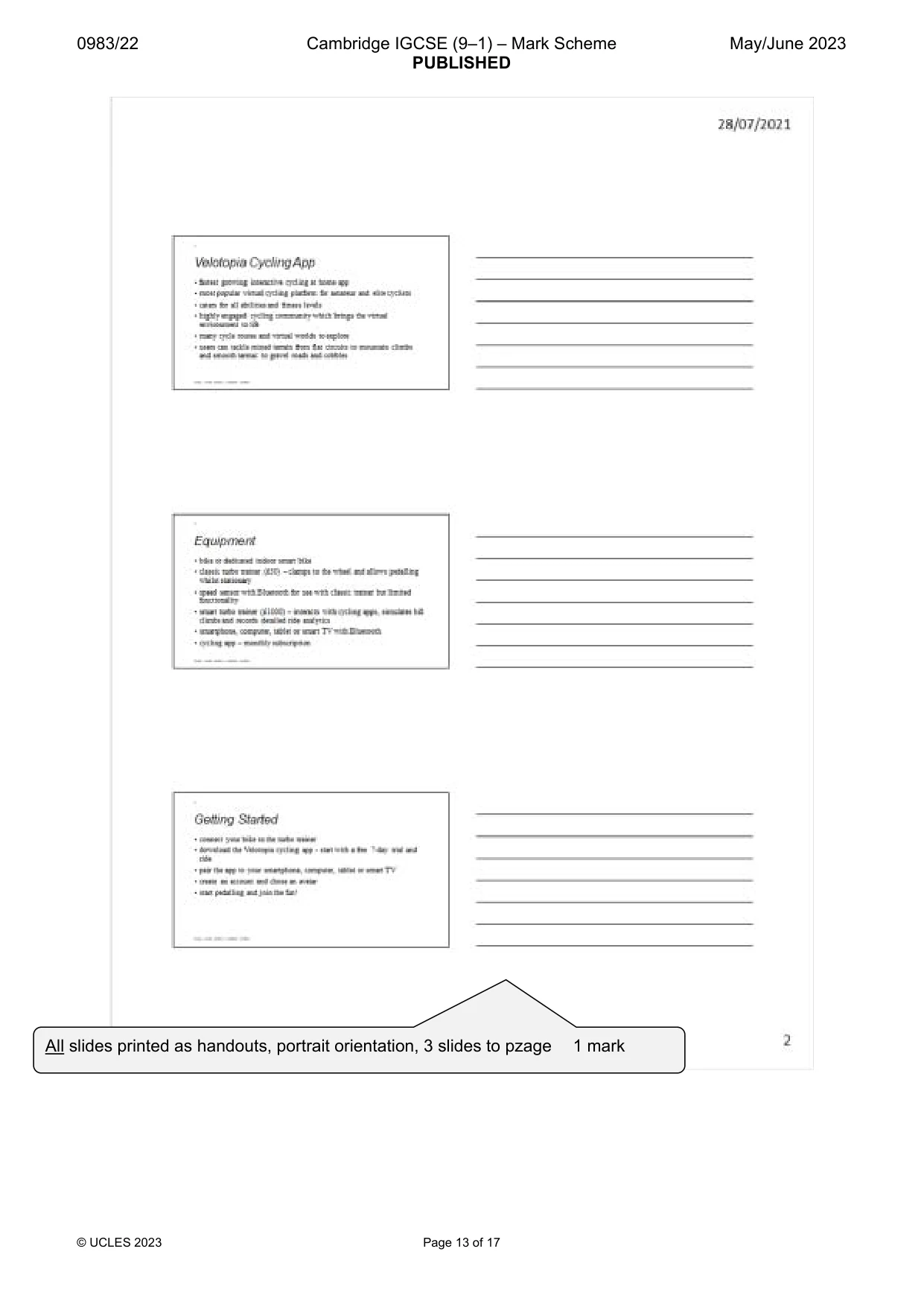
0983/22 Cambridge IGCSE (9–1) – Mark Scheme PUBLISHED May/June 2023 © UCLES 2023 Page 13 of 17 All slides printed as handouts, portrait orientation, 3 slides to pzage 1 mark
Mark scheme, page 14
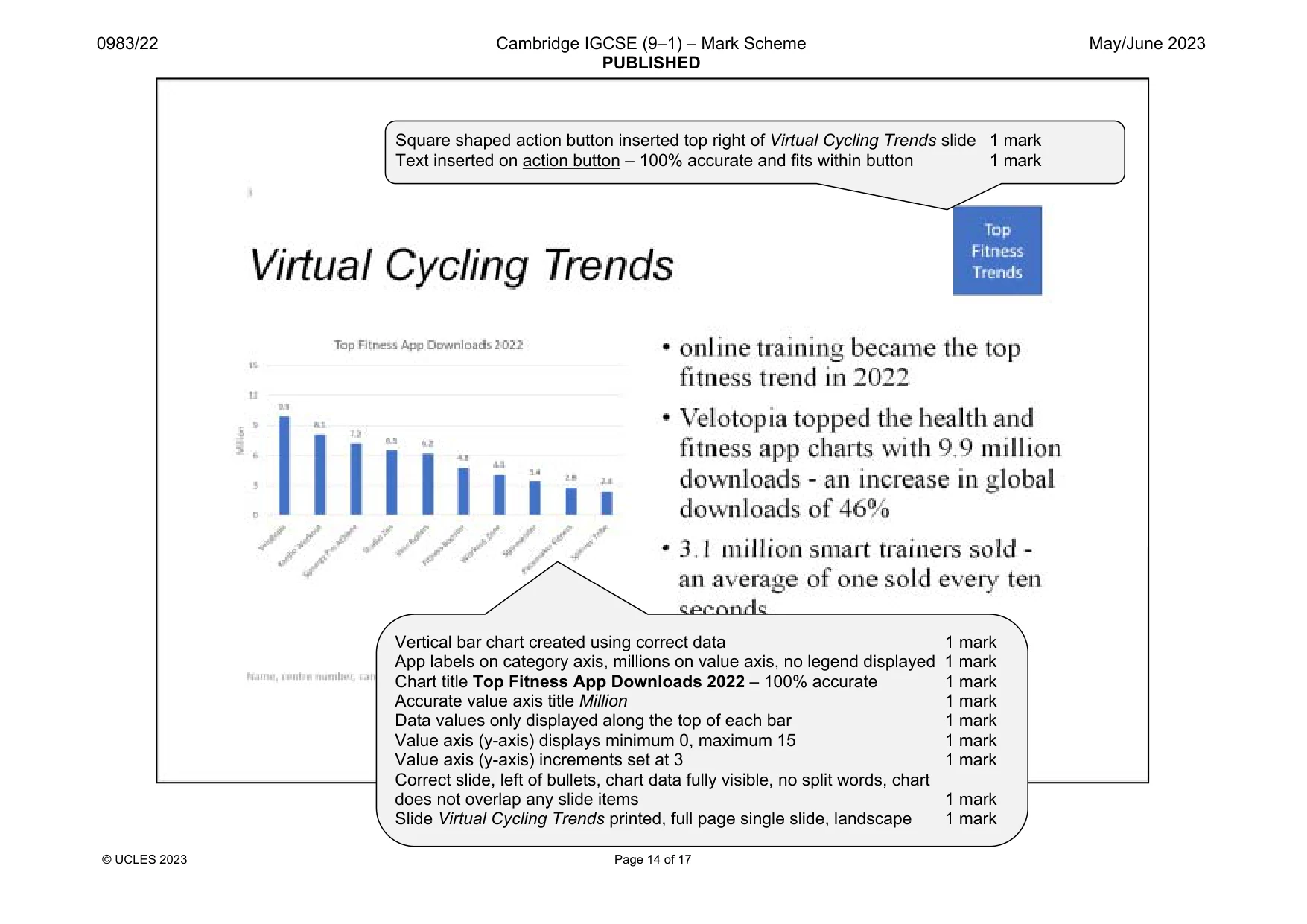
0983/22 Cambridge IGCSE (9–1) – Mark Scheme PUBLISHED May/June 2023 © UCLES 2023 Page 14 of 17 Vertical bar chart created using correct data 1 mark App labels on category axis, millions on value axis, no legend displayed 1 mark Chart title Top Fitness App Downloads 2022 – 100% accurate 1 mark Accurate value axis title Million 1 mark Data values only displayed along the top of each bar 1 mark Value axis (y-axis) displays minimum 0, maximum 15 1 mark Value axis (y-axis) increments set at 3 1 mark Correct slide, left of bullets, chart data fully visible, no split words, chart does not overlap any slide items 1 mark Slide Virtual Cycling Trends printed, full page single slide, landscape 1 mark Square shaped action button inserted top right of Virtual Cycling Trends slide 1 mark Text inserted on action button – 100% accurate and fits within button 1 mark
Mark scheme, page 15
0983/22 Cambridge IGCSE (9–1) – Mark Scheme PUBLISHED May/June 2023 © UCLES 2023 Page 15 of 17 EVIDENCE DOCUMENT Step 1 – EVIDENCE 1 Step 4 – EVIDENCE 2 Step 15 – EVIDENCE 3 Step 16 – EVIDENCE 4 File saved as VCYCLING with evidence of correct file type 1 mark Style VC-subhead style created, named correctly, based on normal/default 1 mark Serif, 16 pt, centred, bold, italic, single line, 0 pt before, 8 pt after 1 mark DB Structure – race table All field names and data types as given, primary key Bib_No 1 mark DB Structure – clubs table All field names and data types as given, primary key Club_ID 1 mark
Mark scheme, page 16
0983/22 Cambridge IGCSE (9–1) – Mark Scheme PUBLISHED May/June 2023 © UCLES 2023 Page 16 of 17 Step 17 – EVIDENCE 5 Steps 18 and 19 – EVIDENCE 6 Step 21 – EVIDENCE 7 1-to-Many relationship Club_ID (clubs) and Club_Code (race) 1 mark Database formula to calculate the longest race time 1 mark Columnar form, all fields from race table 1 mark Two different formatting features to improve design: 2 marks max 2 from: Appropriate title Meaningful field labels Appropriate field lengths to match data Labels font style/size/colour change New record entered accurately in the form 1 mark
Mark scheme, page 17
0983/22 Cambridge IGCSE (9–1) – Mark Scheme PUBLISHED May/June 2023 © UCLES 2023 Page 17 of 17 Step 29 – EVIDENCE 8 Step 30 – EVIDENCE 9 Evidence of action button linked 1 mark … action button linked to open correct file j2322trends.rtf 1 mark Slide show set so all slides loop continuously on-screen 1 mark
What you needed in this session
Cambridge’s own grade thresholds for 2023 May/June, Paper 2 · Variant 2. A higher threshold means an easier paper — the bar moves with how the cohort did.