Cambridge IGCSE Information and Communication Technology (9-1) 0983 — 2024 May/June Paper 2 · Variant 1
0983/21/M/J/24 · 70 marks · ≈79 min
The question paper and its mark scheme, free to read here and free to download. This is Cambridge’s own paper, exactly as it was sat.
Question paper12 pages

Mark scheme21 pages
Answers below. Sit the paper first if you are practising.
Paper as text
Question paper, page 1
This document has 12 pages. [Turn over Cambridge IGCSE™(9–1) INFORMATION AND COMMUNICATION TECHNOLOGY 0983/21 Paper 2 Document Production, Databases and Presentations May/June 2024 2 hours 15 minutes You will need: Candidate source files (listed on page 2) INSTRUCTIONS ● Carry out all instructions in each step. ● Enter your name, centre number and candidate number on every printout before it is sent to the printer. ● Printouts with handwritten candidate details will not be marked. ● At the end of the examination, put all your printouts into the Assessment Record Folder. ● If you have produced rough copies of printouts, put a cross through each one to indicate that it is not the copy to be marked. ● You must not have access to either the internet or any email system during this examination. INFORMATION ● The total mark for this paper is 70. ● The number of marks for each question or part question is shown in brackets [ ]. * 9 6 8 4 4 3 3 2 8 4 * DC (SL) 340893 © UCLES 2024
Question paper, page 2
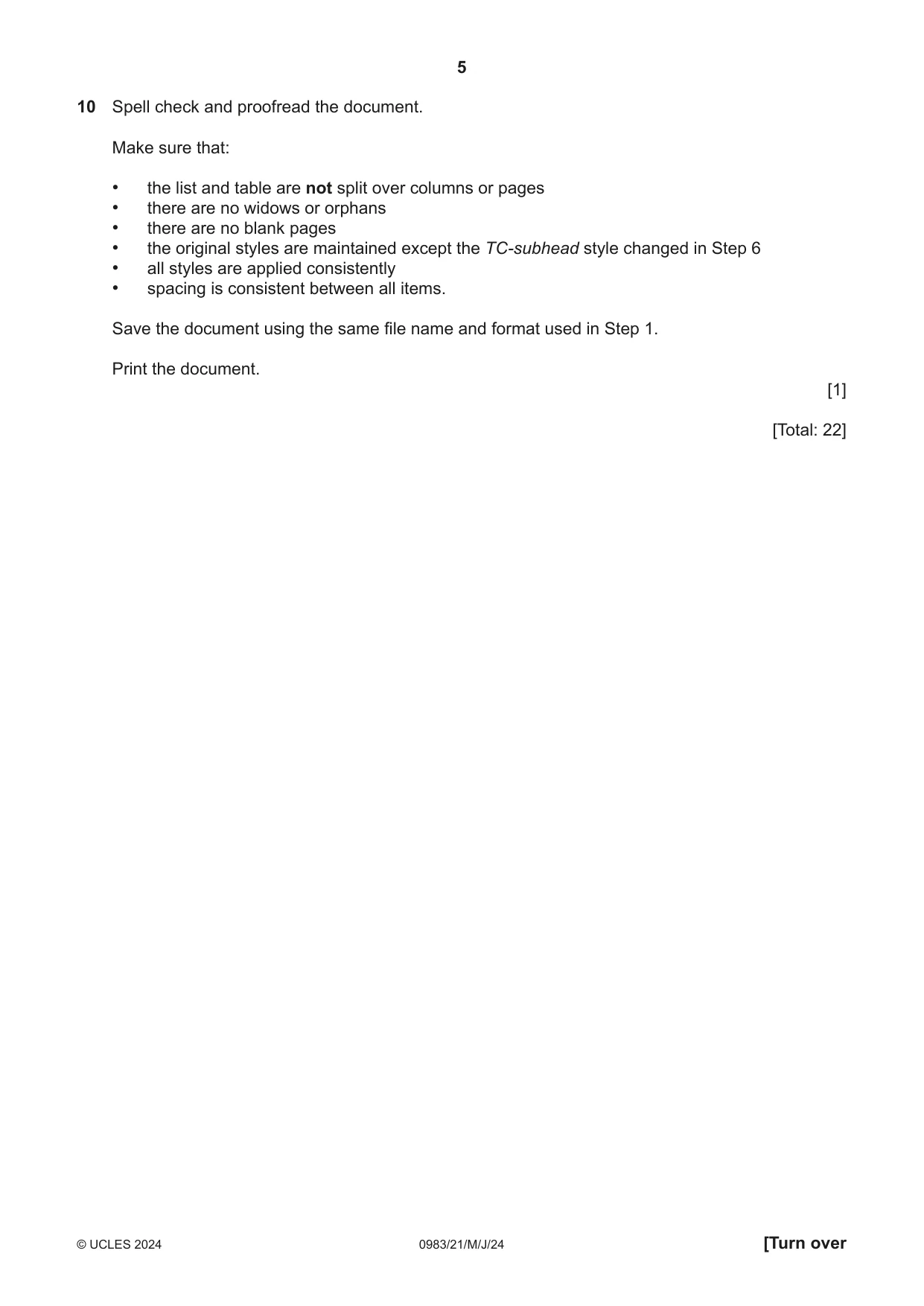
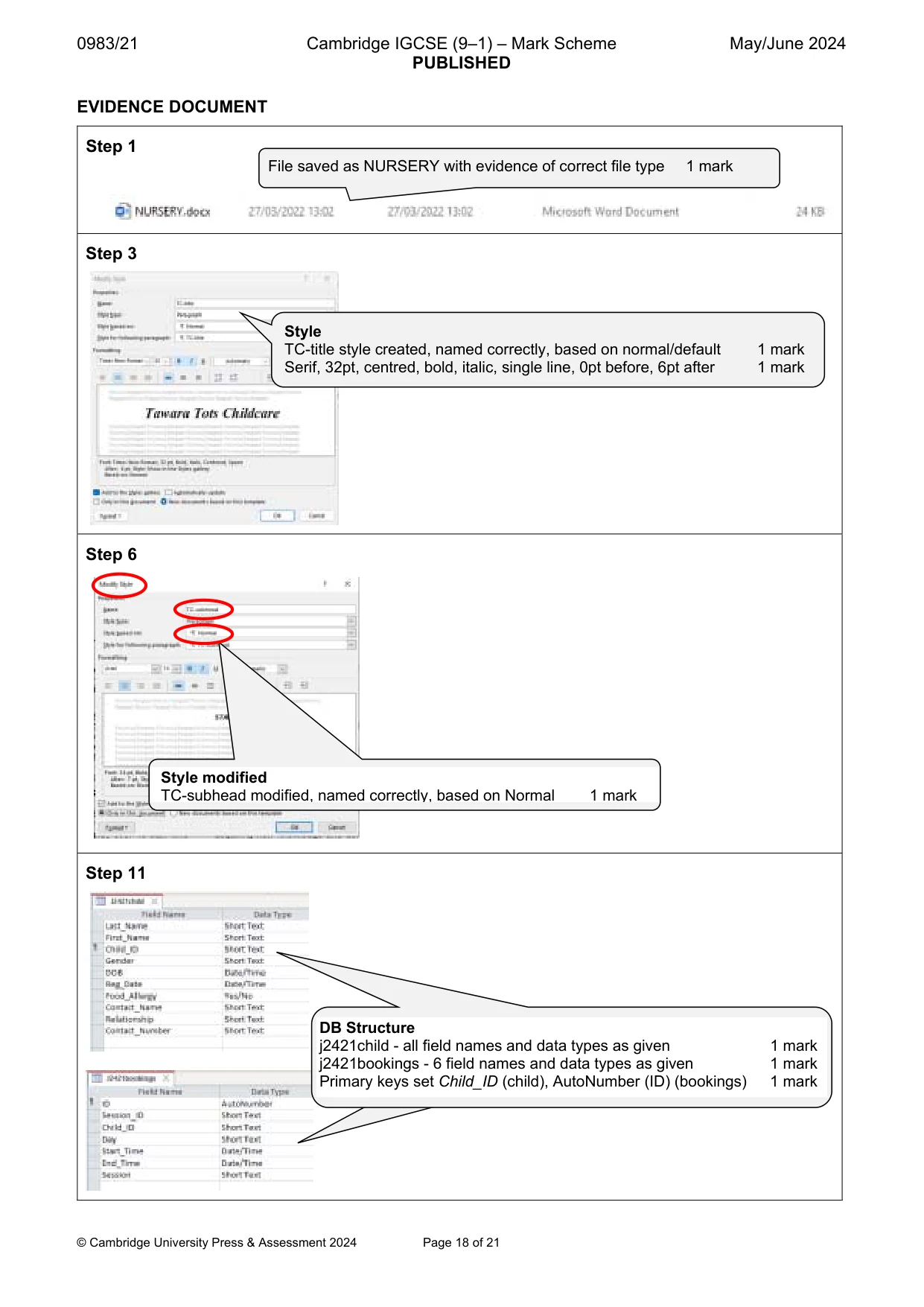
2 0983/21/M/J/24 © UCLES 2024 You have been supplied with the following source files: j2421bookings.csv j2421child.csv j2421childcare.rtf j2421evidence.rtf j2421lifelong.csv j2421logo.jpg j2421playgroup.rtf j2421test_scores.csv Task 1 – Evidence Document Open the file j2421evidence.rtf Make sure that your name, centre number and candidate number will appear on every page of this document. Save this document in your work area as EVIDENCE followed by your candidate number, for example EVIDENCE9999 You will need your Evidence Document during the examination to place screenshots in when required. Task 2 – Document You are going to edit a document for Tawara Tots Childcare. The company uses a corporate house style for all their documents. Paragraph styles must be created and applied as instructed. 1 Using a suitable software package, open the file j2421childcare.rtf The page setup is set to A4, portrait orientation with two-centimetre margins. Do not make any changes to these settings. Three paragraph styles have already been created. Do not make any changes to these unless instructed. Save the document in your work area with the file name NURSERY Make sure it is saved in the format of the software you are using. Place in your Evidence Document a screenshot to show this file has been saved. Make sure that there is evidence of the file type. [1]
Question paper, page 3
3 0983/21/M/J/24 © UCLES 2024 [Turn over 2 Place in the NURSERY document: • a right-aligned header on a single line: Prospectus produced by: followed by a space then your name, centre number and candidate number • a left-aligned footer with automated page numbers. Make sure that: • all the header details are on a single line • all the alignments match the page margins • no other text or placeholders are included in the header or footer areas • the headers and footers are displayed on all pages. [3] 3 Create and store the following style, basing it on the default/normal paragraph style: Style name Font style Font size (points) Alignment Enhancement Line spacing Space before (points) Space after (points) TC‑title serif 32 centre bold, italic single 0 6 Take a screenshot to show that you have defined the settings for the TC-title style. Make sure that there is evidence that you have based this on the default/normal paragraph style. Place this in your Evidence Document. [2] 4 Apply the TC-title style to the title text Tawara Tots Childcare [1] 5 Select the subheading Staff and the following text up to and including the paragraph ending … enjoy their new surroundings. Change the page layout so that only this text is displayed in two columns of equal width with a one-centimetre space between the columns. [2]
Question paper, page 4
4 0983/21/M/J/24 © UCLES 2024 6 The style named TC-subhead has already been created, stored and applied to the five subheadings. Modify the TC-subhead style so that only the following formatting is applied: Style name Font style Font size (points) Alignment Enhancement Line spacing Space before (points) Space after (points) TC-subhead sans-serif 14 centre italic, bold, all capitals single 0 7 Take screenshot evidence to show you have modified the TC-subhead style and the settings applied. Place this in your Evidence Document. [2] 7 Apply a numbered list, formatted as 1 to 7, to the text from: communication and language … to … arts and design Make sure that: • the numbers are aligned to the left margin of the column • the list is in single line spacing with no space before or after each line • there is a seven-point space after the last item in the list. [3] 8 Import the image j2421logo.jpg and place it in the paragraph beginning We have eight spacious playrooms … Rotate the image 180 degrees with the image size and aspect ratio maintained. Format the image so that: • it is aligned to the right margin and the top of the paragraph starting We have eight spacious playrooms … • the text wraps around the image. [3] 9 Locate the table in the document. Format the table so that: • the table width is set to 13 centimetres • all the rows are set to one-centimetre high • the data is centre aligned vertically in each row • the table is centred within the page margins. [4]
Question paper, page 5
5 0983/21/M/J/24 © UCLES 2024 [Turn over 10 Spell check and proofread the document. Make sure that: • the list and table are not split over columns or pages • there are no widows or orphans • there are no blank pages • the original styles are maintained except the TC-subhead style changed in Step 6 • all styles are applied consistently • spacing is consistent between all items. Save the document using the same file name and format used in Step 1. Print the document. [1] [Total: 22]
Question paper, page 6
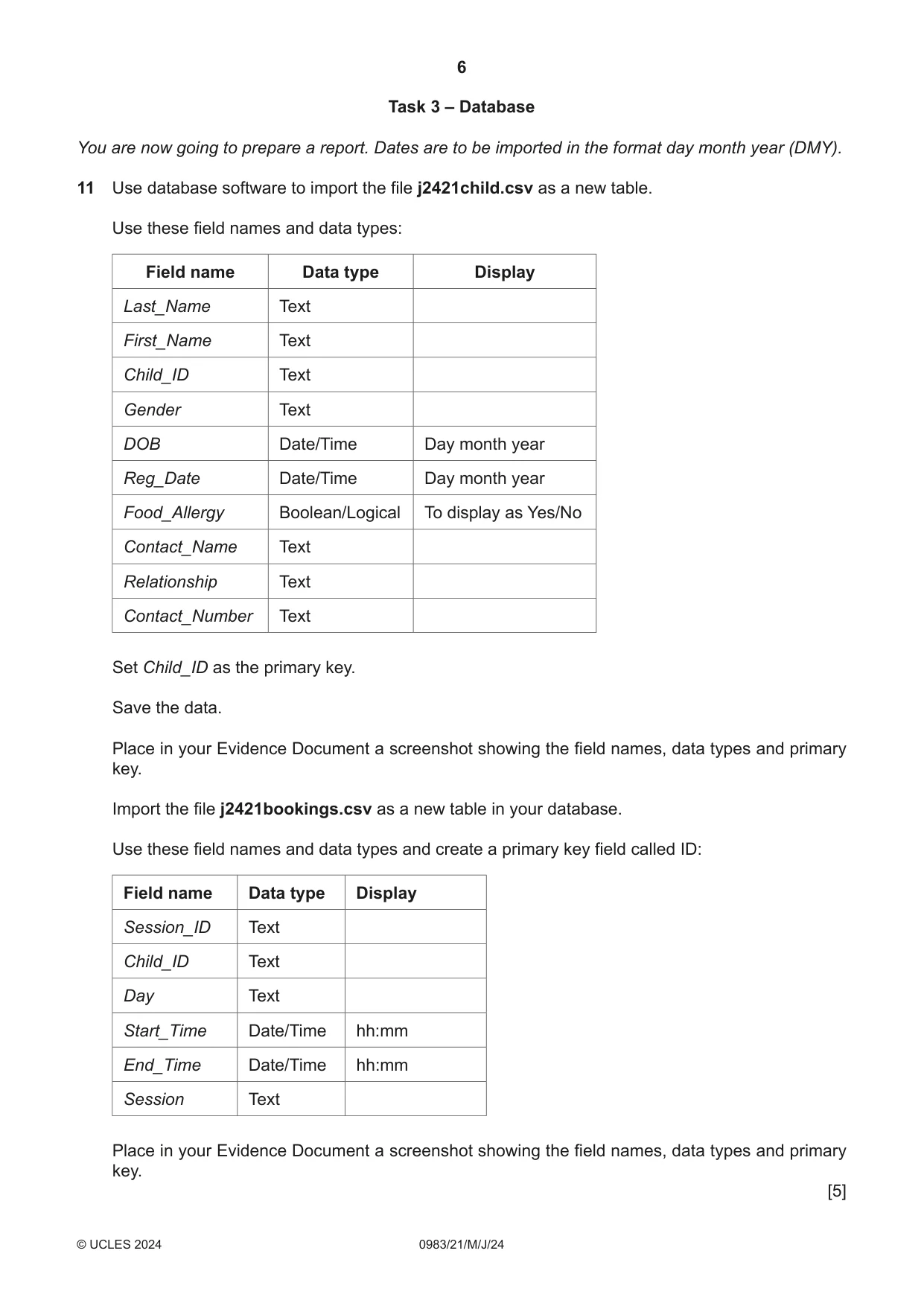
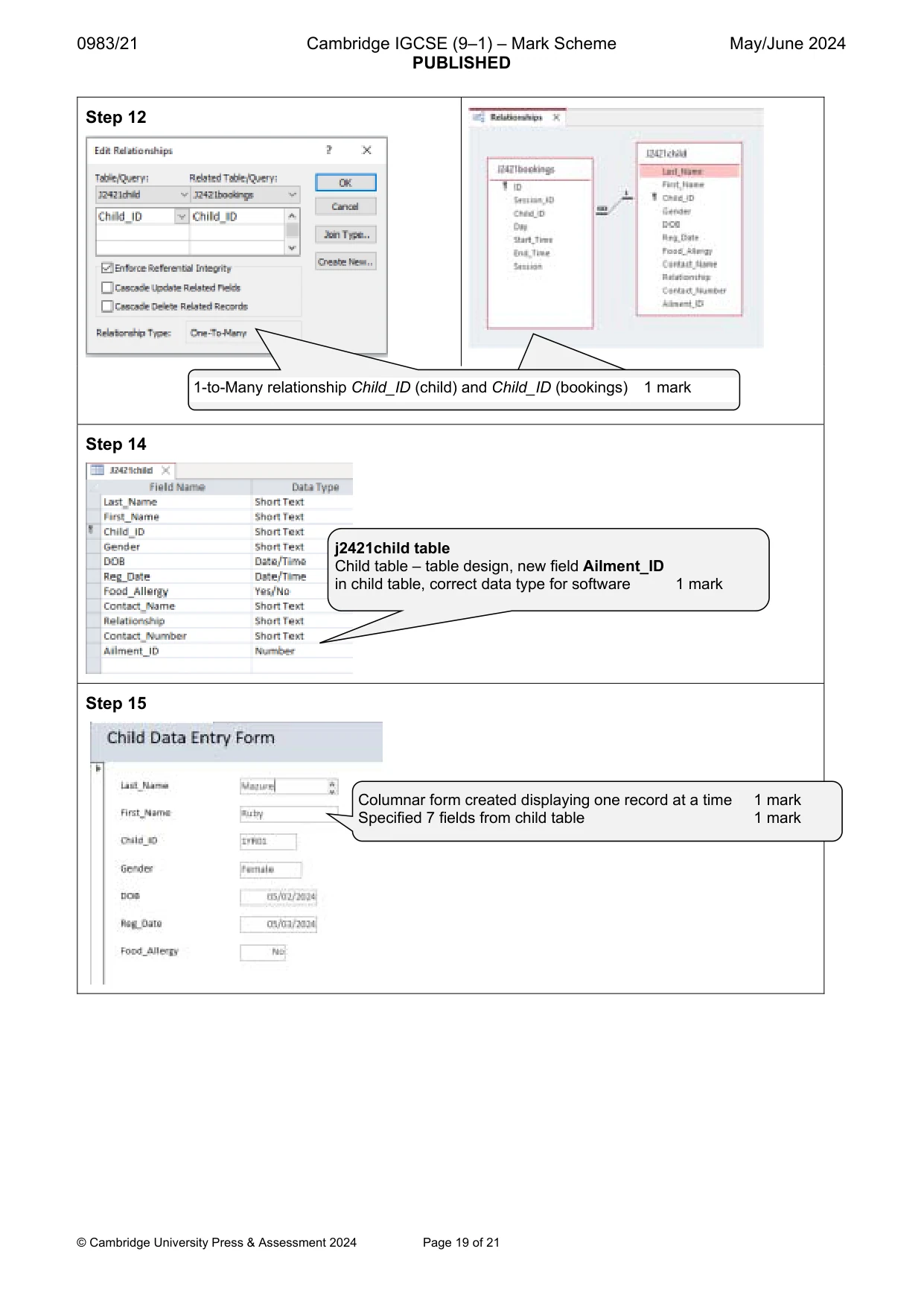
6 0983/21/M/J/24 © UCLES 2024 Task 3 – Database You are now going to prepare a report. Dates are to be imported in the format day month year (DMY). 11 Use database software to import the file j2421child.csv as a new table. Use these field names and data types: Field name Data type Display Last_Name Text First_Name Text Child_ID Text Gender Text DOB Date/Time Day month year Reg_Date Date/Time Day month year Food_Allergy Boolean/Logical To display as Yes/No Contact_Name Text Relationship Text Contact_Number Text Set Child_ID as the primary key. Save the data. Place in your Evidence Document a screenshot showing the field names, data types and primary key. Import the file j2421bookings.csv as a new table in your database. Use these field names and data types and create a primary key field called ID: Field name Data type Display Session_ID Text Child_ID Text Day Text Start_Time Date/Time hh:mm End_Time Date/Time hh:mm Session Text Place in your Evidence Document a screenshot showing the field names, data types and primary key. [5]
Question paper, page 7
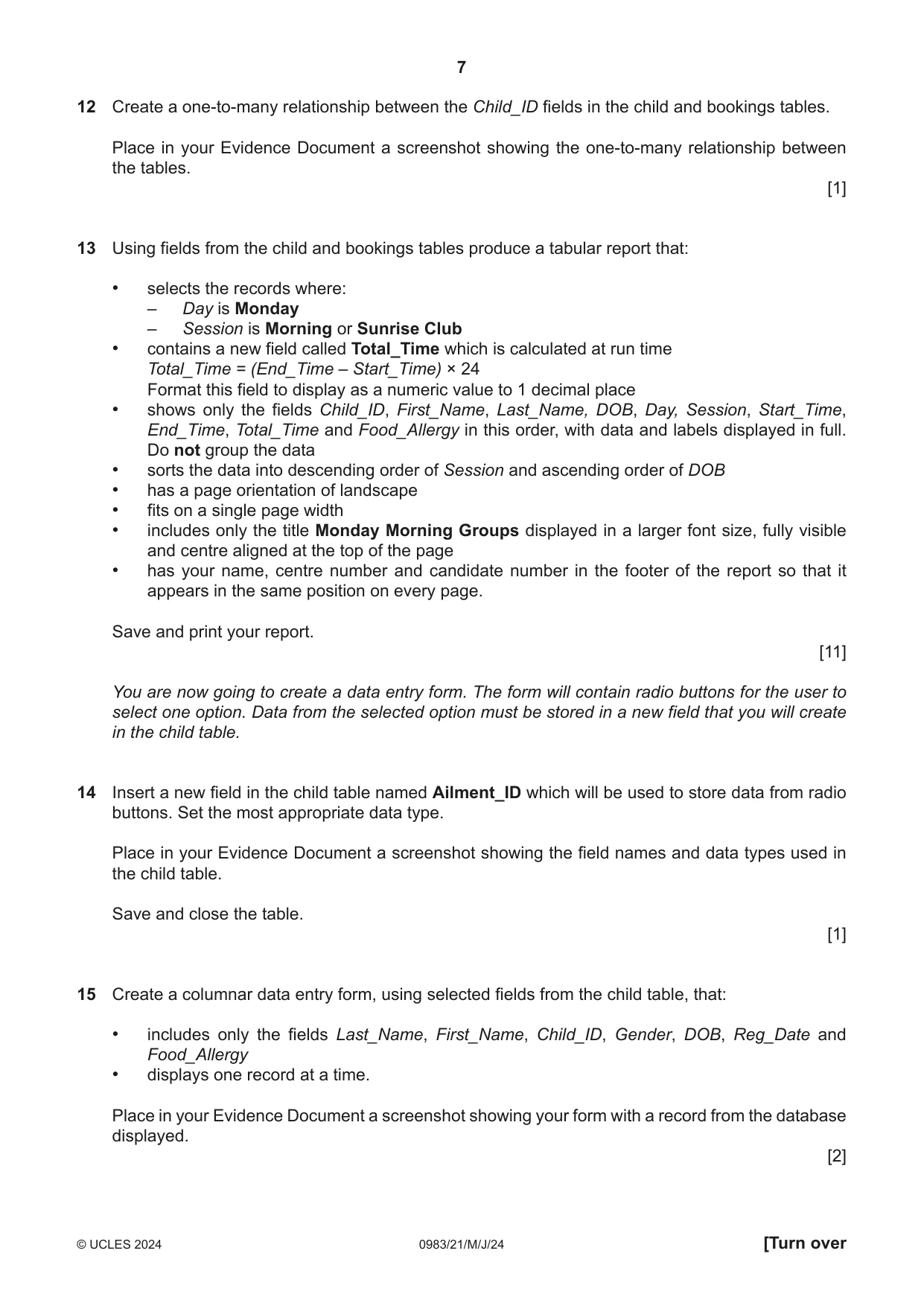
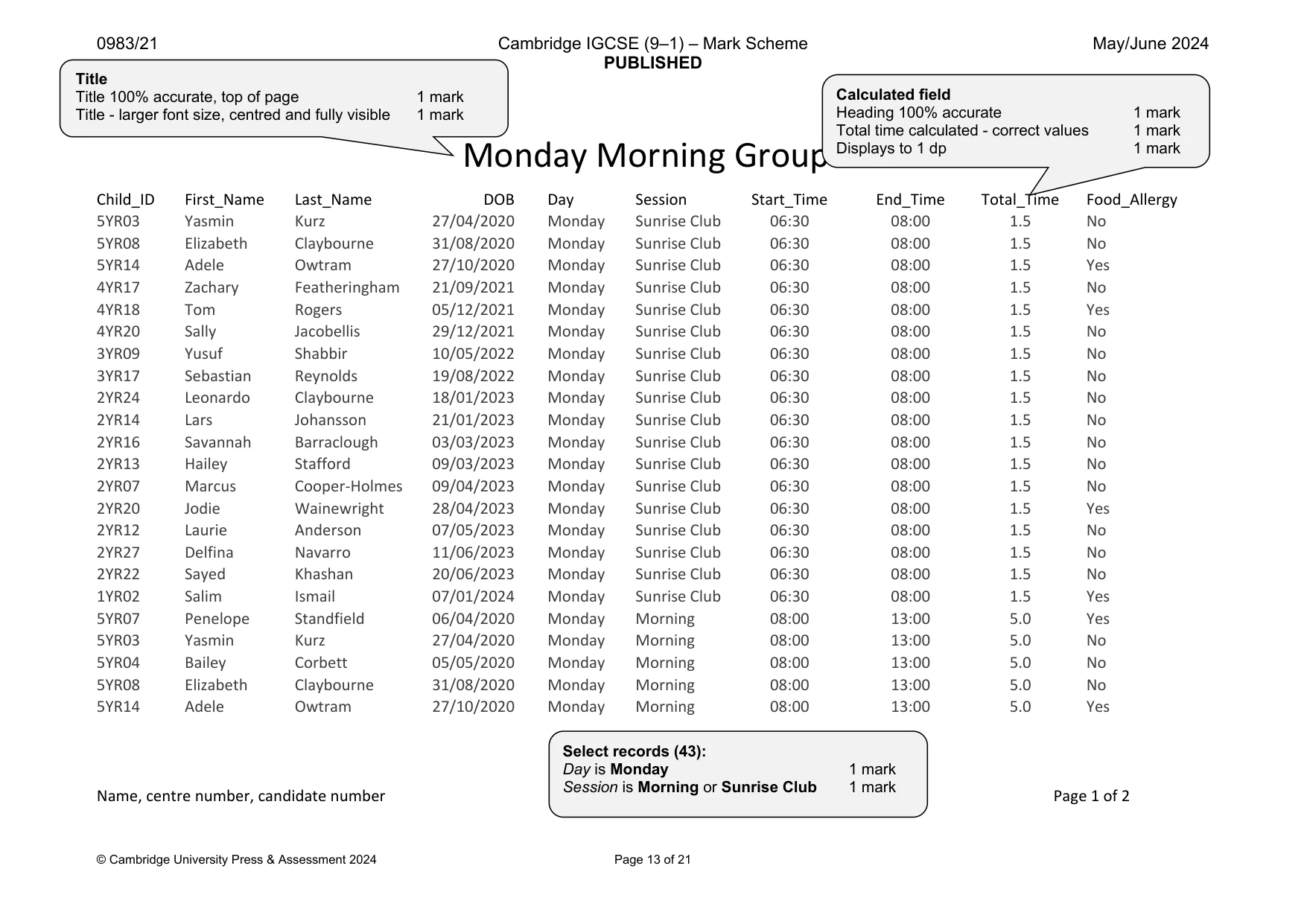
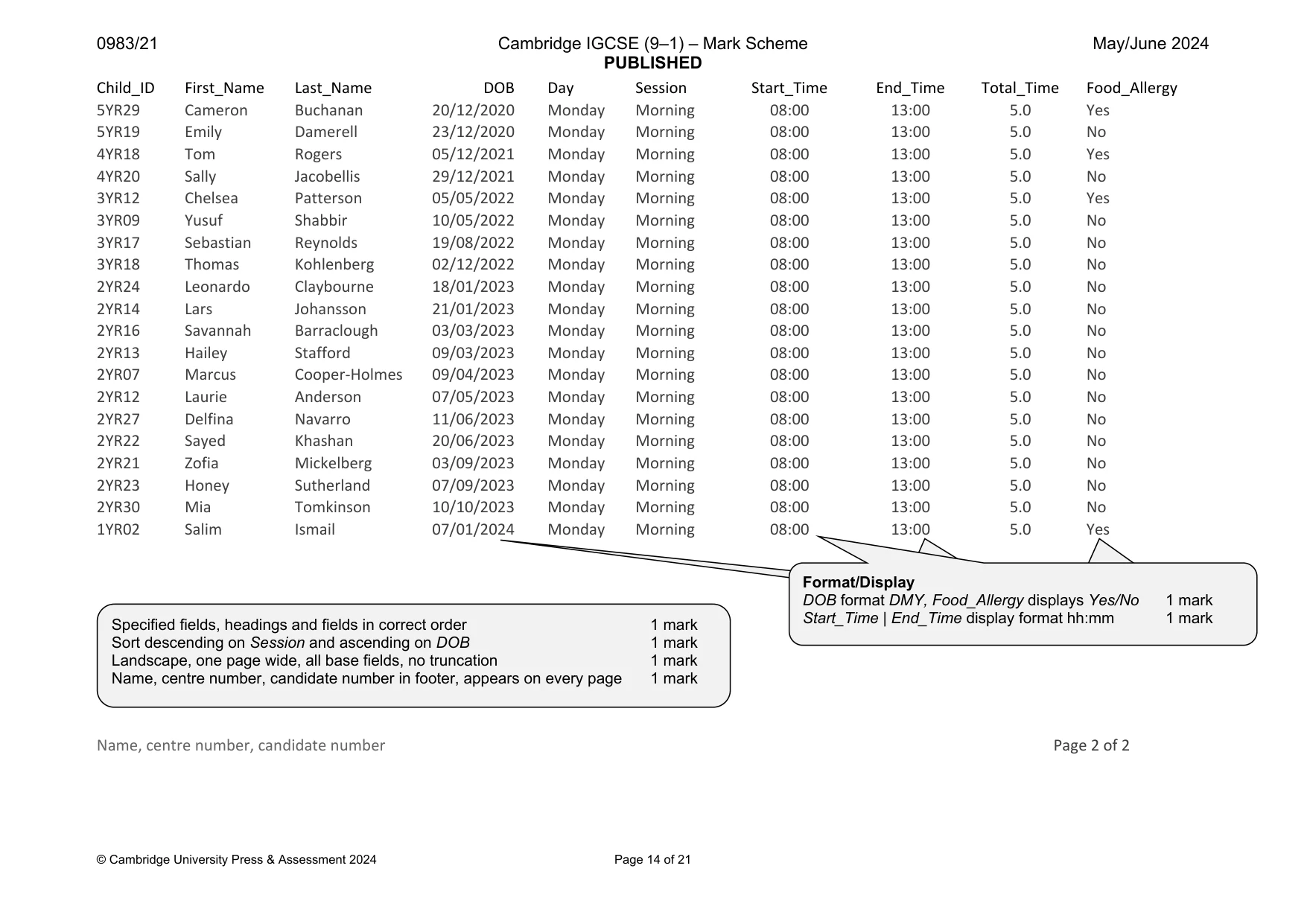
7 0983/21/M/J/24 © UCLES 2024 [Turn over 12 Create a one-to-many relationship between the Child_ID fields in the child and bookings tables. Place in your Evidence Document a screenshot showing the one-to-many relationship between the tables. [1] 13 Using fields from the child and bookings tables produce a tabular report that: • selects the records where: – Day is Monday – Session is Morning or Sunrise Club • contains a new field called Total_Time which is calculated at run time Total_Time = (End_Time – Start_Time) × 24 Format this field to display as a numeric value to 1 decimal place • shows only the fields Child_ID, First_Name, Last_Name, DOB, Day, Session, Start_Time, End_Time, Total_Time and Food_Allergy in this order, with data and labels displayed in full. Do not group the data • sorts the data into descending order of Session and ascending order of DOB • has a page orientation of landscape • fits on a single page width • includes only the title Monday Morning Groups displayed in a larger font size, fully visible and centre aligned at the top of the page • has your name, centre number and candidate number in the footer of the report so that it appears in the same position on every page. Save and print your report. [11] You are now going to create a data entry form. The form will contain radio buttons for the user to select one option. Data from the selected option must be stored in a new field that you will create in the child table. 14 Insert a new field in the child table named Ailment_ID which will be used to store data from radio buttons. Set the most appropriate data type. Place in your Evidence Document a screenshot showing the field names and data types used in the child table. Save and close the table. [1] 15 Create a columnar data entry form, using selected fields from the child table, that: • includes only the fields Last_Name, First_Name, Child_ID, Gender, DOB, Reg_Date and Food_Allergy • displays one record at a time. Place in your Evidence Document a screenshot showing your form with a record from the database displayed. [2]
Question paper, page 8
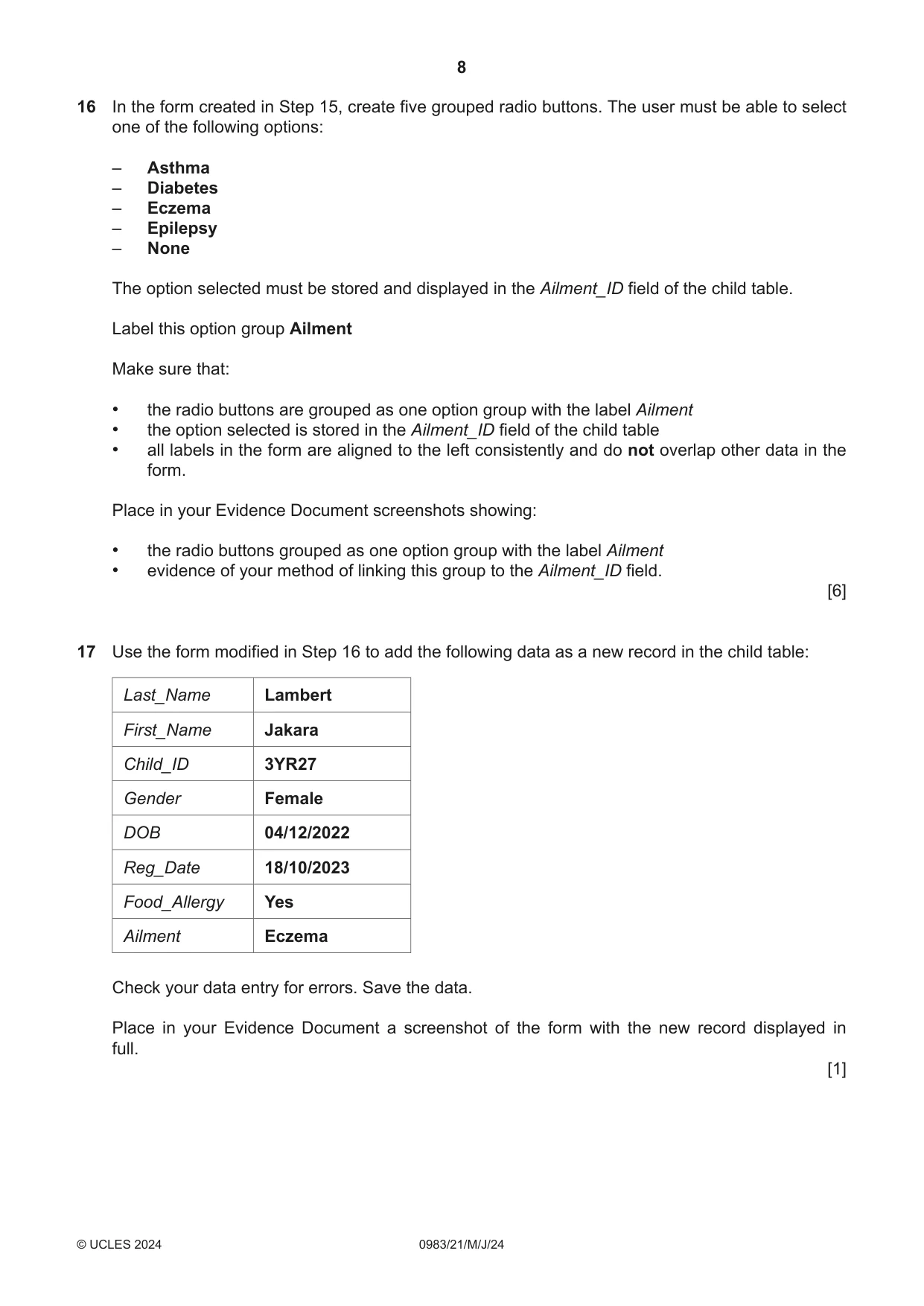
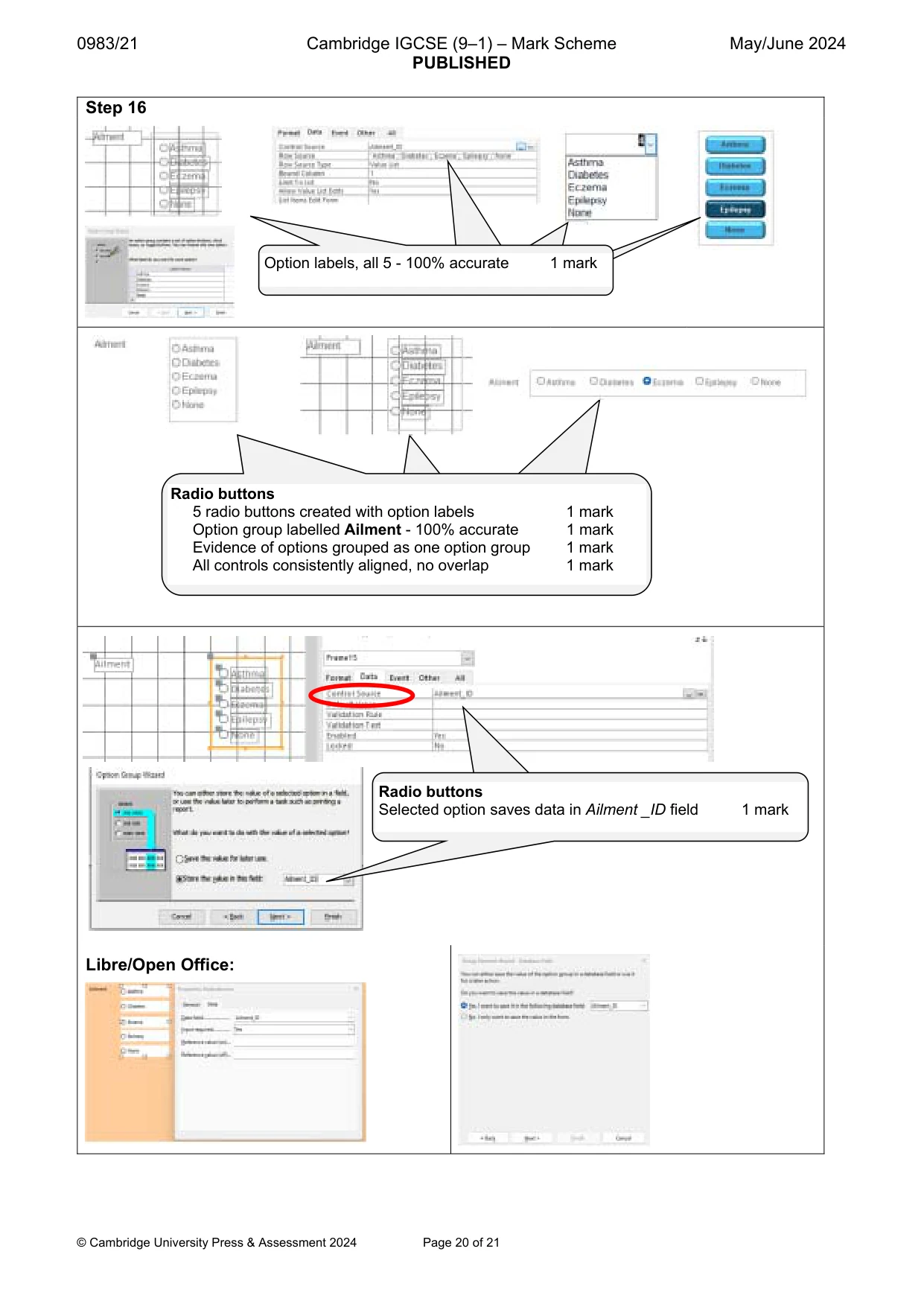
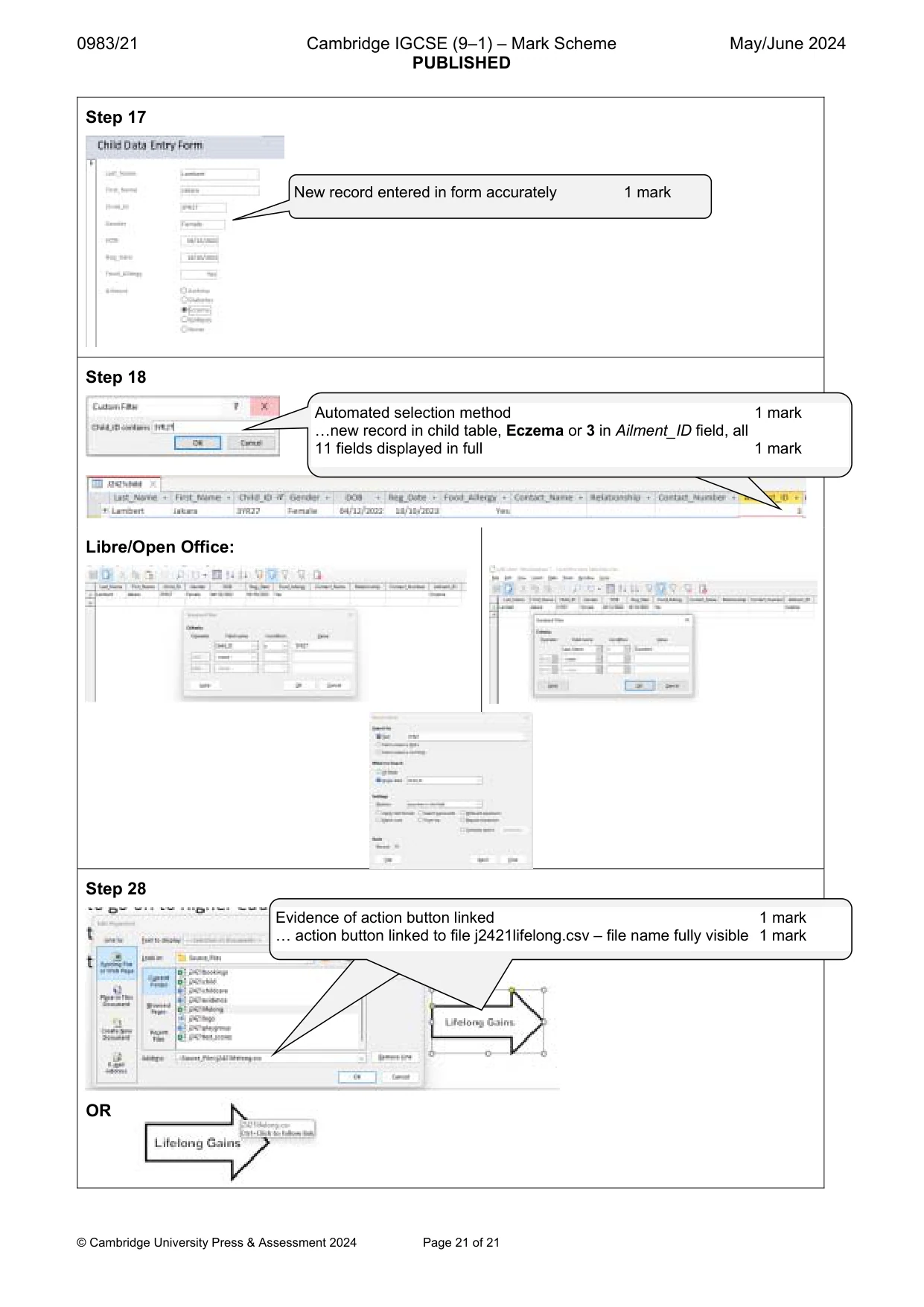
8 0983/21/M/J/24 © UCLES 2024 16 In the form created in Step 15, create five grouped radio buttons. The user must be able to select one of the following options: – Asthma – Diabetes – Eczema – Epilepsy – None The option selected must be stored and displayed in the Ailment_ID field of the child table. Label this option group Ailment Make sure that: • the radio buttons are grouped as one option group with the label Ailment • the option selected is stored in the Ailment_ID field of the child table • all labels in the form are aligned to the left consistently and do not overlap other data in the form. Place in your Evidence Document screenshots showing: • the radio buttons grouped as one option group with the label Ailment • evidence of your method of linking this group to the Ailment_ID field. [6] 17 Use the form modified in Step 16 to add the following data as a new record in the child table: Last_Name Lambert First_Name Jakara Child_ID 3YR27 Gender Female DOB 04/12/2022 Reg_Date 18/10/2023 Food_Allergy Yes Ailment Eczema Check your data entry for errors. Save the data. Place in your Evidence Document a screenshot of the form with the new record displayed in full. [1]
Question paper, page 9
9 0983/21/M/J/24 © UCLES 2024 [Turn over 18 Open the child table. Use an automated selection method to locate the new record you entered in Step 17 with the Child_ID 3YR27 Place in your Evidence Document screenshots showing: • the use of an automated selection method to find the record • the new record stored in the child table with all 11 fields displayed in full. [2] [Total: 29]
Question paper, page 10
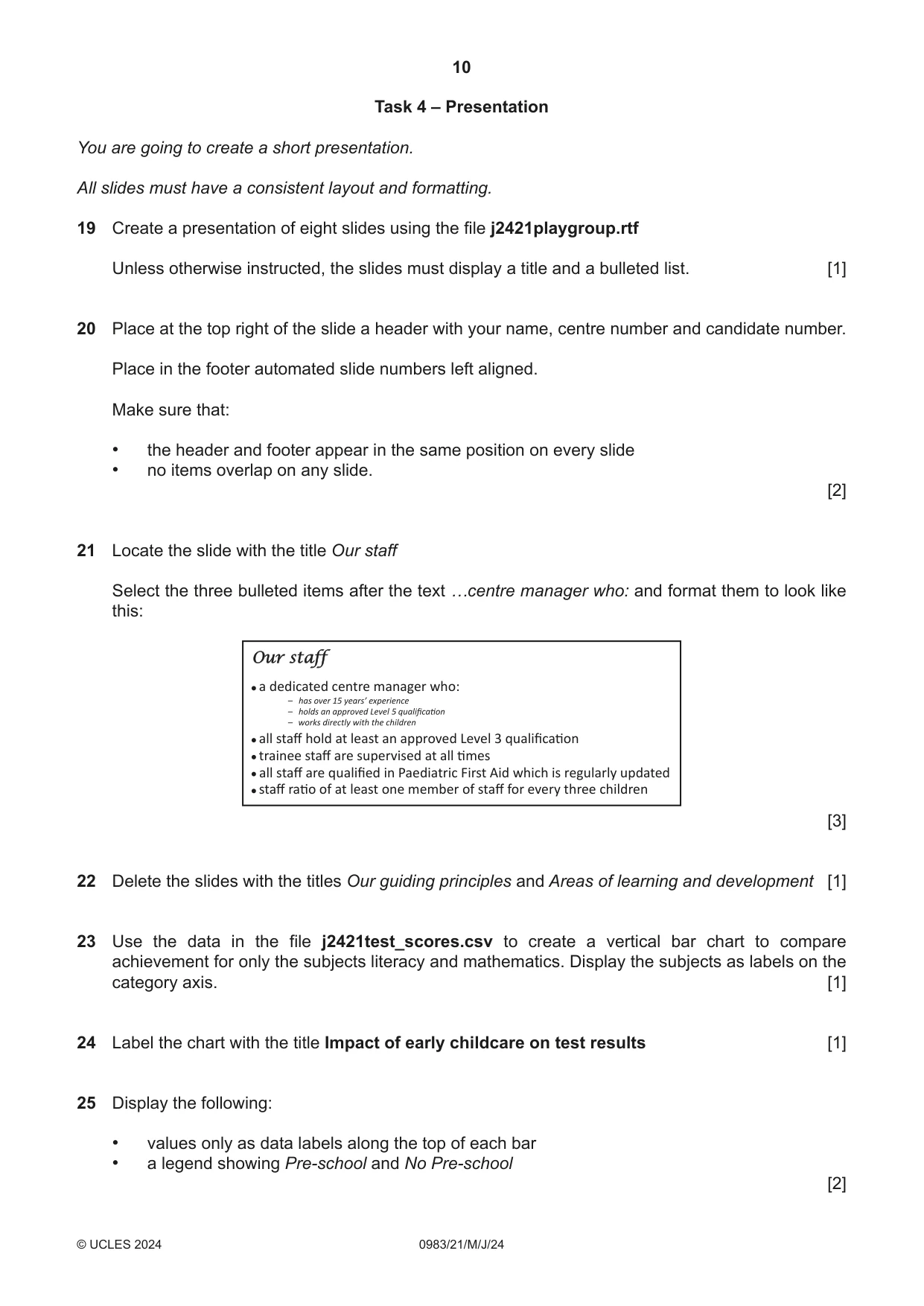
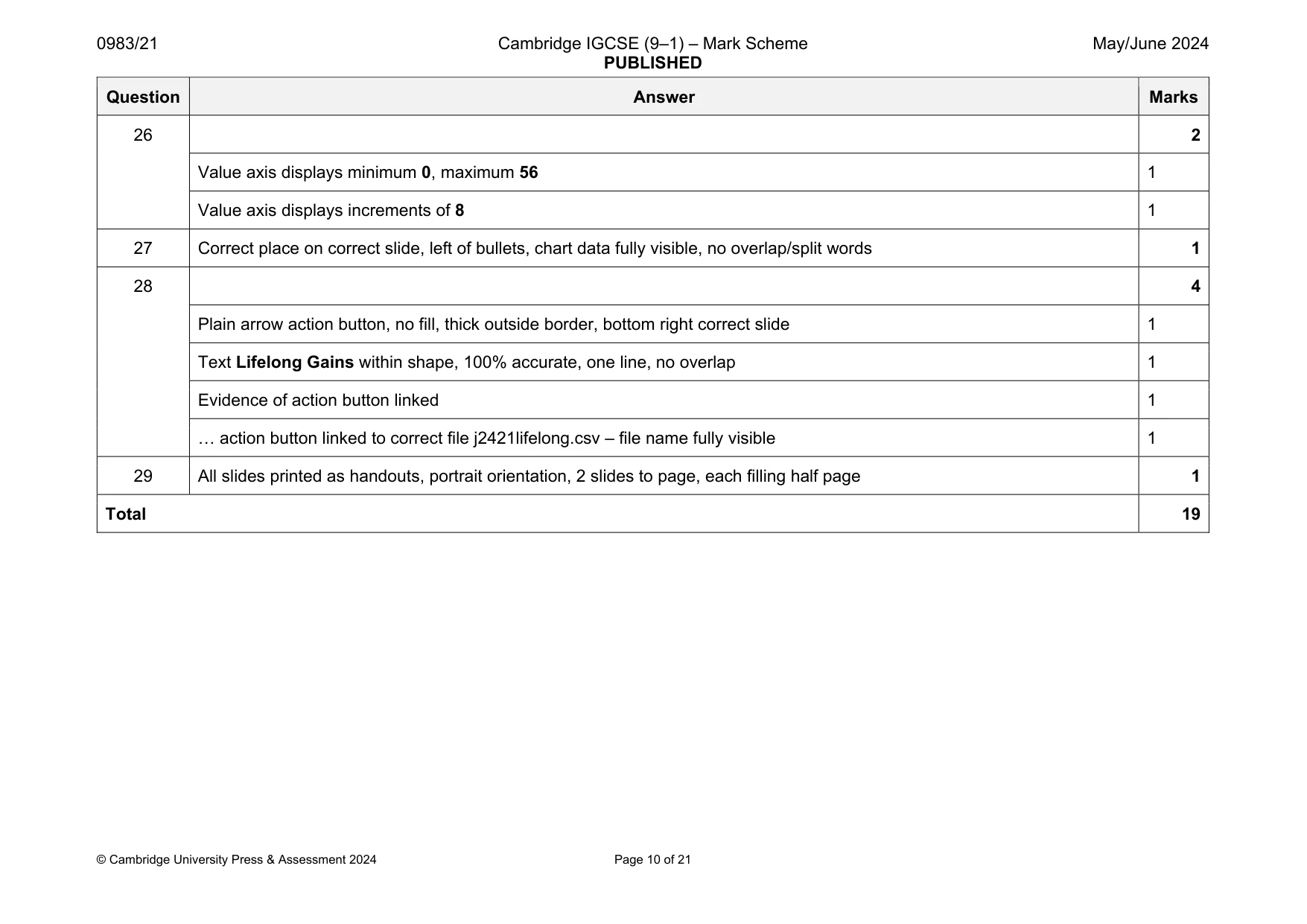
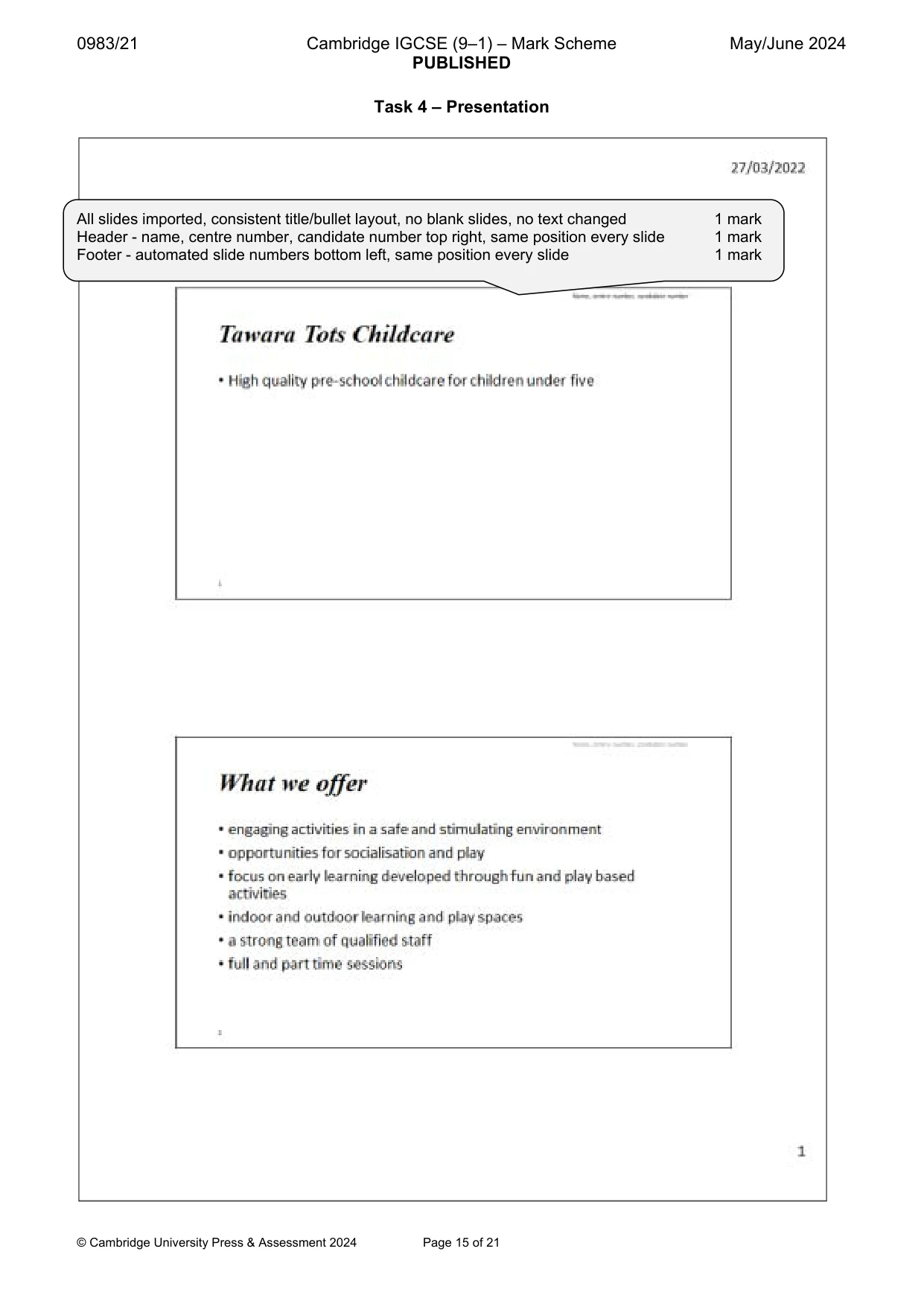
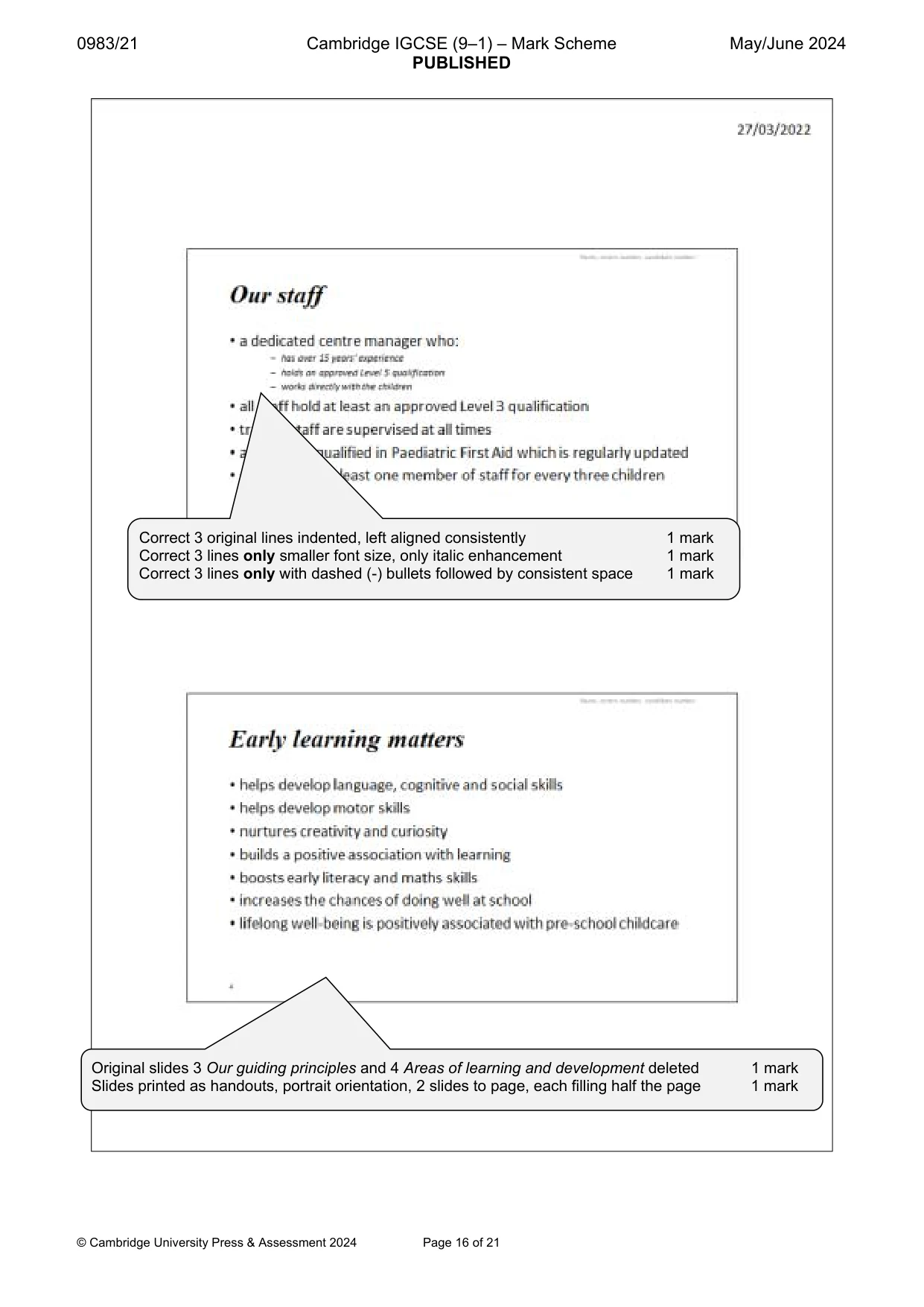
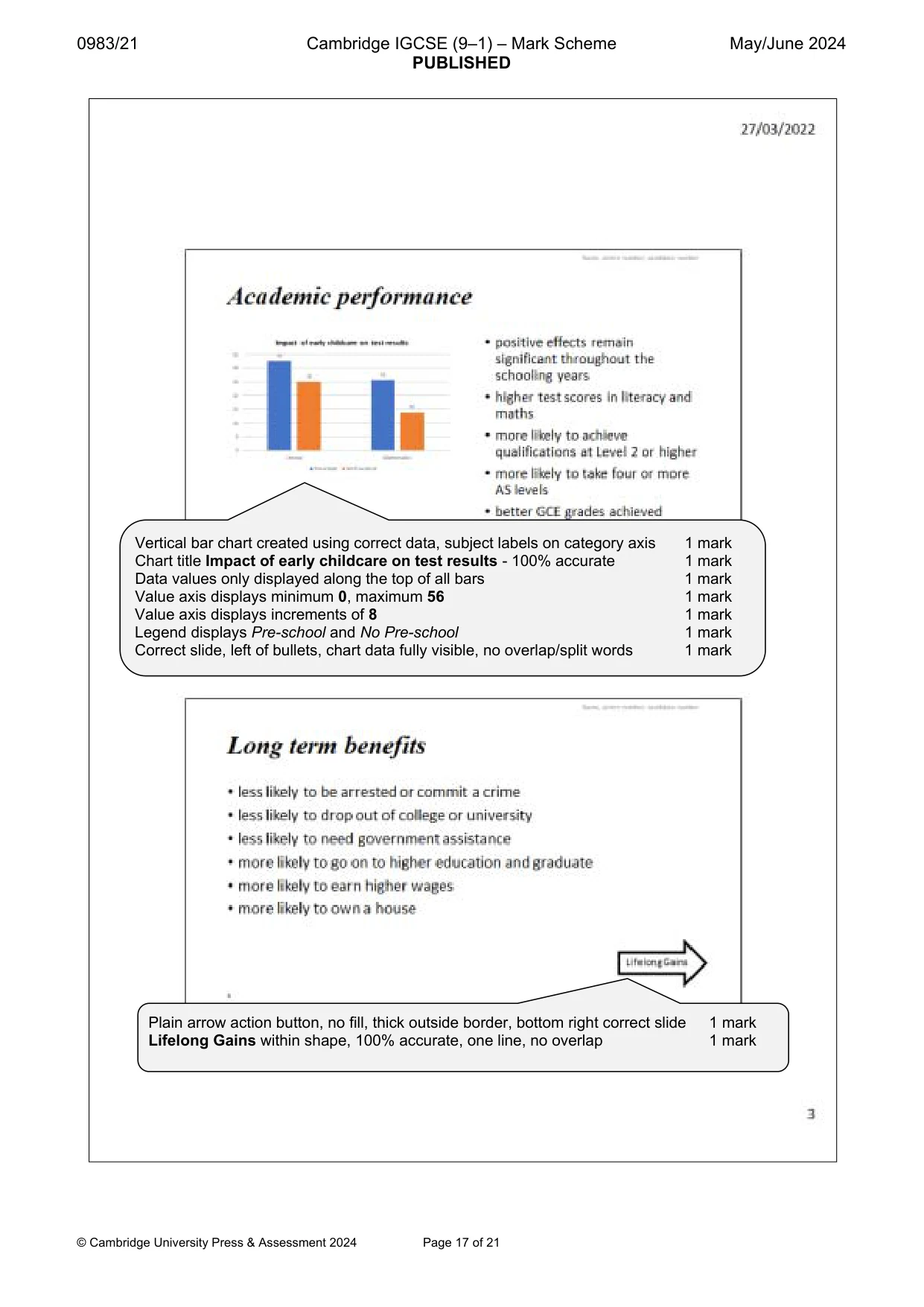
10 0983/21/M/J/24 © UCLES 2024 Task 4 – Presentation You are going to create a short presentation. All slides must have a consistent layout and formatting. 19 Create a presentation of eight slides using the file j2421playgroup.rtf Unless otherwise instructed, the slides must display a title and a bulleted list. [1] 20 Place at the top right of the slide a header with your name, centre number and candidate number. Place in the footer automated slide numbers left aligned. Make sure that: • the header and footer appear in the same position on every slide • no items overlap on any slide. [2] 21 Locate the slide with the title Our staff Select the three bulleted items after the text …centre manager who: and format them to look like this: Our staff a dedicated centre manager who: all staff hold at least an approved Level 3 qualification trainee staff are supervised at all times all staff are qualified in Paediatric First Aid which is regularly updated staff ratio of at least one member of staff for every three children [3] 22 Delete the slides with the titles Our guiding principles and Areas of learning and development [1] 23 Use the data in the file j2421test_scores.csv to create a vertical bar chart to compare achievement for only the subjects literacy and mathematics. Display the subjects as labels on the category axis. [1] 24 Label the chart with the title Impact of early childcare on test results [1] 25 Display the following: • values only as data labels along the top of each bar • a legend showing Pre-school and No Pre-school [2]
Question paper, page 11
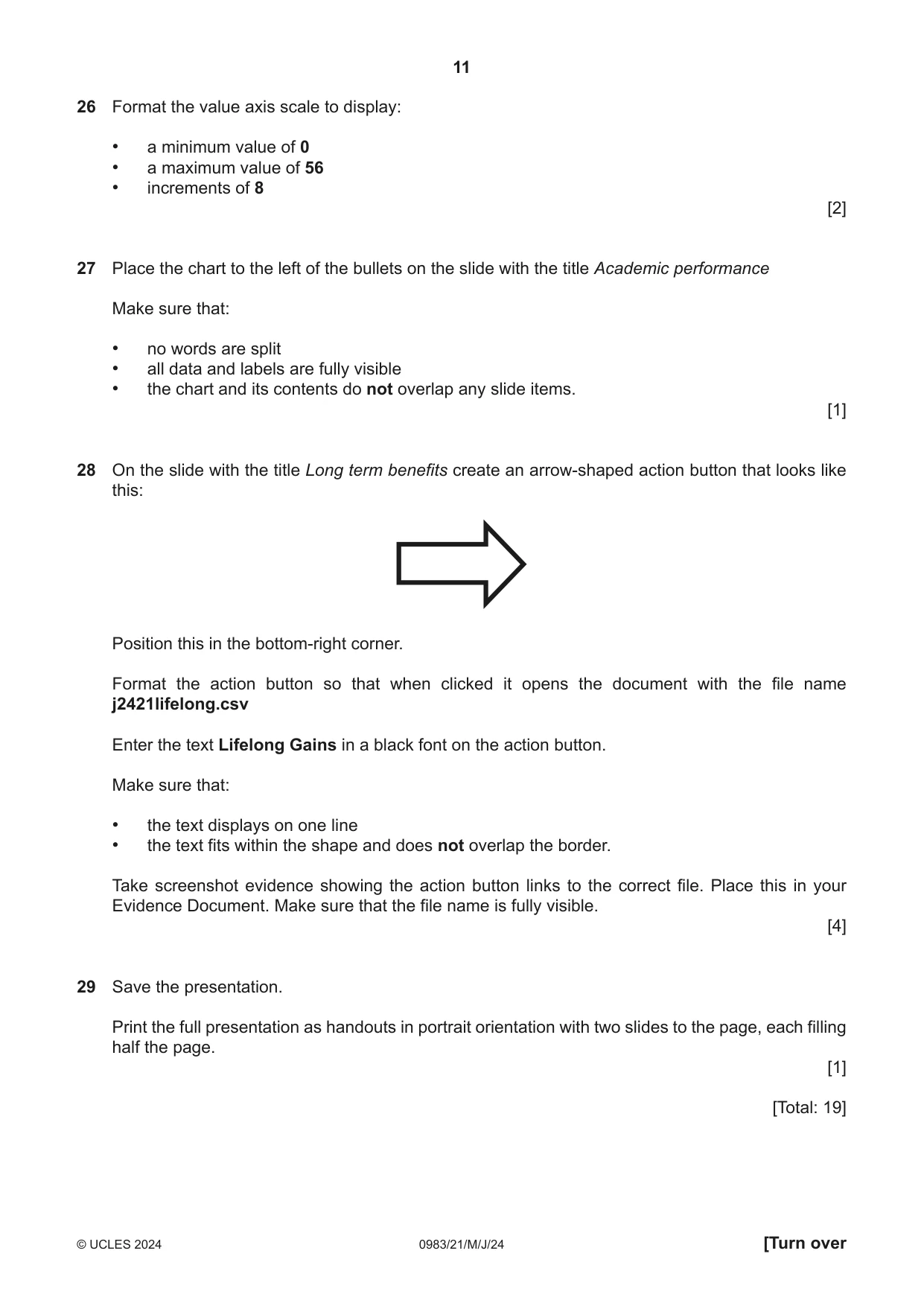
11 0983/21/M/J/24 © UCLES 2024 [Turn over 26 Format the value axis scale to display: • a minimum value of 0 • a maximum value of 56 • increments of 8 [2] 27 Place the chart to the left of the bullets on the slide with the title Academic performance Make sure that: • no words are split • all data and labels are fully visible • the chart and its contents do not overlap any slide items. [1] 28 On the slide with the title Long term benefits create an arrow-shaped action button that looks like this: Position this in the bottom-right corner. Format the action button so that when clicked it opens the document with the file name j2421lifelong.csv Enter the text Lifelong Gains in a black font on the action button. Make sure that: • the text displays on one line • the text fits within the shape and does not overlap the border. Take screenshot evidence showing the action button links to the correct file. Place this in your Evidence Document. Make sure that the file name is fully visible. [4] 29 Save the presentation. Print the full presentation as handouts in portrait orientation with two slides to the page, each filling half the page. [1] [Total: 19]
Question paper, page 12
12 0983/21/M/J/24 © UCLES 2024 Permission to reproduce items where third-party owned material protected by copyright is included has been sought and cleared where possible. Every reasonable effort has been made by the publisher (UCLES) to trace copyright holders, but if any items requiring clearance have unwittingly been included, the publisher will be pleased to make amends at the earliest possible opportunity. To avoid the issue of disclosure of answer-related information to candidates, all copyright acknowledgements are reproduced online in the Cambridge Assessment International Education Copyright Acknowledgements Booklet. This is produced for each series of examinations and is freely available to download at www.cambridgeinternational.org after the live examination series. Cambridge Assessment International Education is part of Cambridge Assessment. Cambridge Assessment is the brand name of the University of Cambridge Local Examinations Syndicate (UCLES), which is a department of the University of Cambridge. Task 5 – Printing the Evidence Document Make sure that your name, centre number and candidate number appear on every page of your Evidence Document. Save your Evidence Document. Print your Evidence Document.
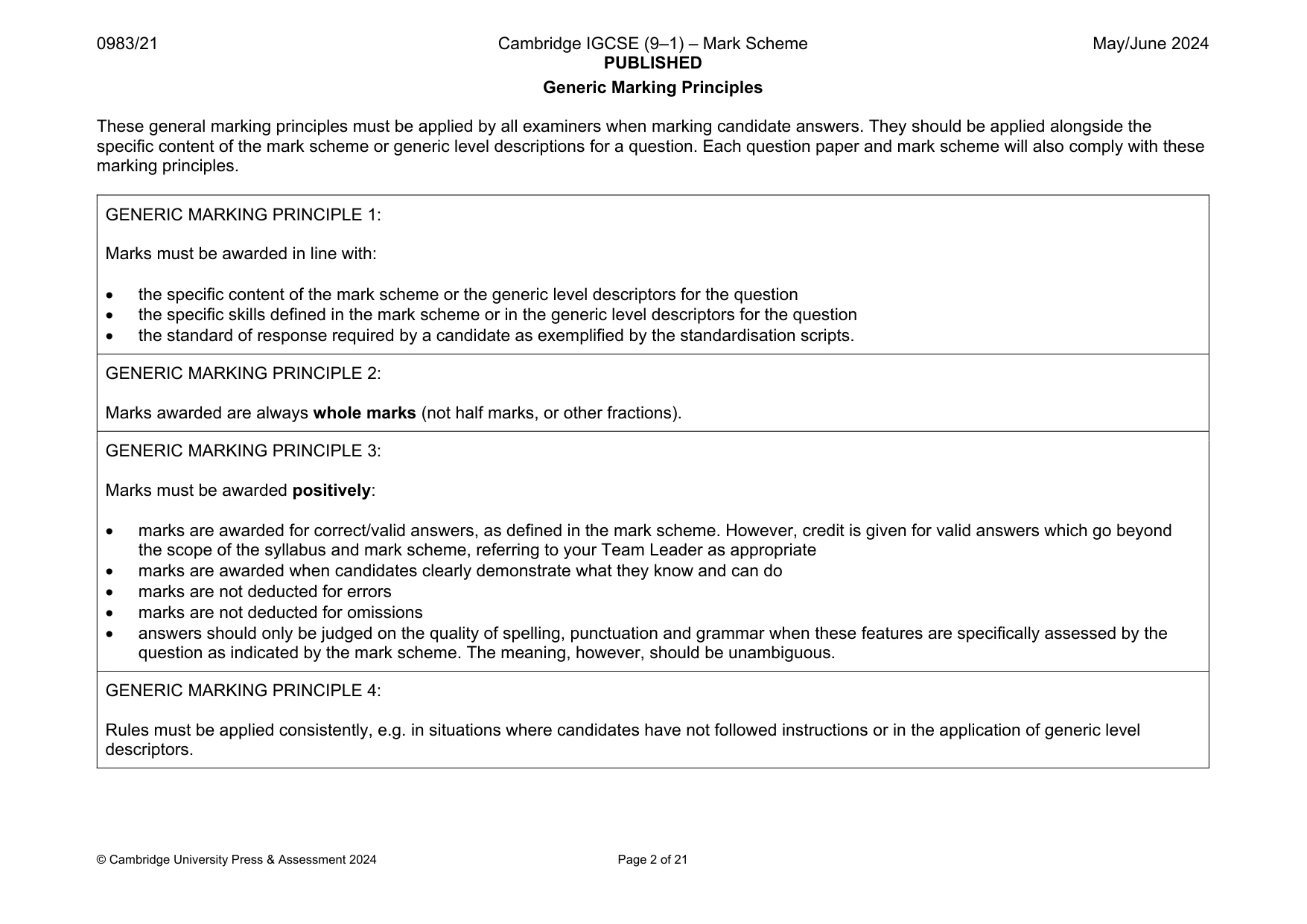
Mark scheme, page 1
This document consists of 21 printed pages. © Cambridge University Press & Assessment 2024 [Turn over Cambridge IGCSE™ (9–1) INFORMATION AND COMMUNICATION TECHNOLOGY 0983/21 Paper 2 Document Production, Databases and Presentations May/June 2024 MARK SCHEME Maximum Mark: 70 Published This mark scheme is published as an aid to teachers and candidates, to indicate the requirements of the examination. It shows the basis on which Examiners were instructed to award marks. It does not indicate the details of the discussions that took place at an Examiners’ meeting before marking began, which would have considered the acceptability of alternative answers. Mark schemes should be read in conjunction with the question paper and the Principal Examiner Report for Teachers. Cambridge International will not enter into discussions about these mark schemes. Cambridge International is publishing the mark schemes for the May/June 2024 series for most Cambridge IGCSE, Cambridge International A and AS Level and Cambridge Pre-U components, and some Cambridge O Level components.
Mark scheme, page 2
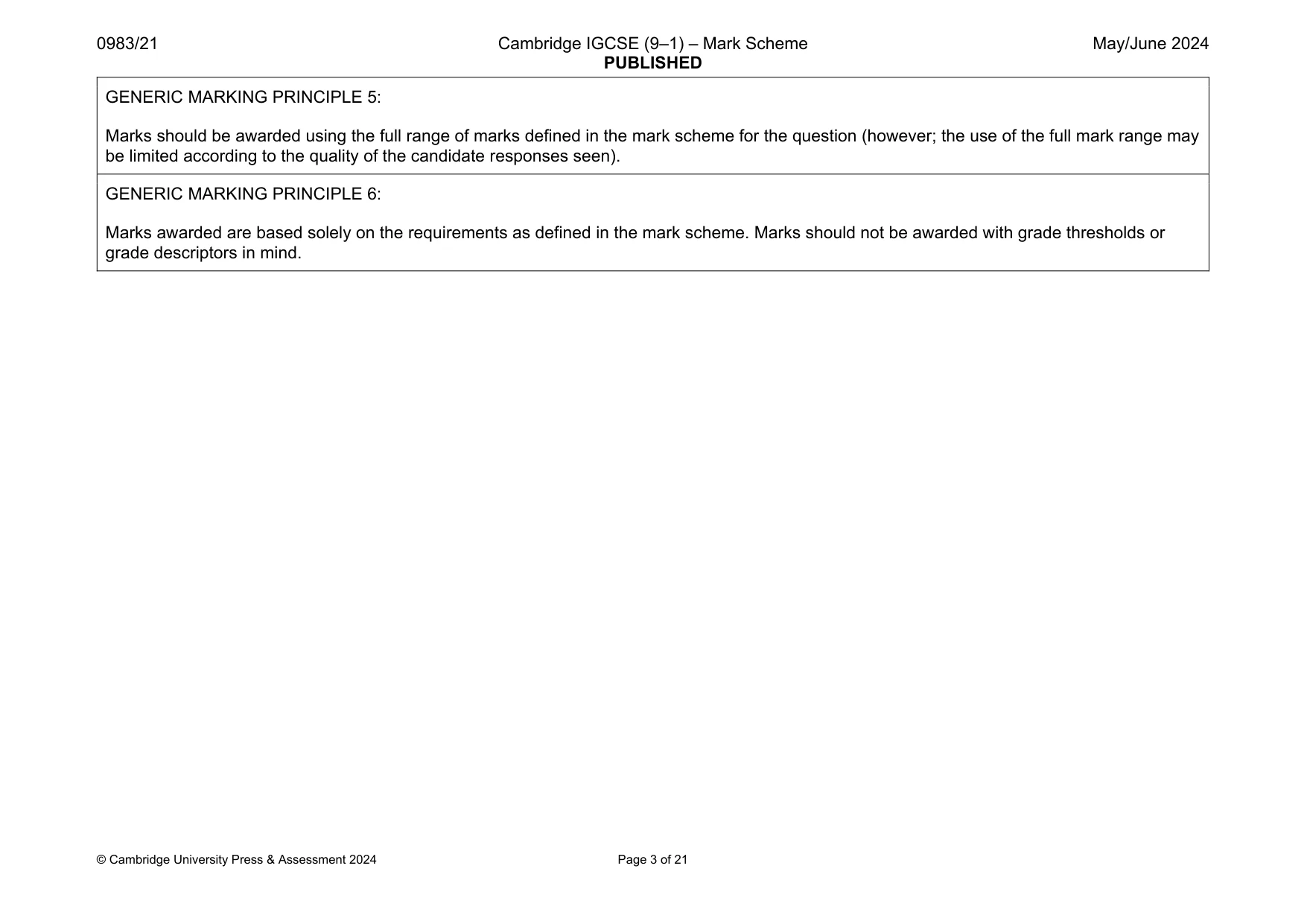
0983/21 Cambridge IGCSE (9–1) – Mark Scheme PUBLISHED May/June 2024 © Cambridge University Press & Assessment 2024 Page 2 of 21 Generic Marking Principles These general marking principles must be applied by all examiners when marking candidate answers. They should be applied alongside the specific content of the mark scheme or generic level descriptions for a question. Each question paper and mark scheme will also comply with these marking principles. GENERIC MARKING PRINCIPLE 1: Marks must be awarded in line with: the specific content of the mark scheme or the generic level descriptors for the question the specific skills defined in the mark scheme or in the generic level descriptors for the question the standard of response required by a candidate as exemplified by the standardisation scripts. GENERIC MARKING PRINCIPLE 2: Marks awarded are always whole marks (not half marks, or other fractions). GENERIC MARKING PRINCIPLE 3: Marks must be awarded positively: marks are awarded for correct/valid answers, as defined in the mark scheme. However, credit is given for valid answers which go beyond the scope of the syllabus and mark scheme, referring to your Team Leader as appropriate marks are awarded when candidates clearly demonstrate what they know and can do marks are not deducted for errors marks are not deducted for omissions answers should only be judged on the quality of spelling, punctuation and grammar when these features are specifically assessed by the question as indicated by the mark scheme. The meaning, however, should be unambiguous. GENERIC MARKING PRINCIPLE 4: Rules must be applied consistently, e.g. in situations where candidates have not followed instructions or in the application of generic level descriptors.
Mark scheme, page 3
0983/21 Cambridge IGCSE (9–1) – Mark Scheme PUBLISHED May/June 2024 © Cambridge University Press & Assessment 2024 Page 3 of 21 GENERIC MARKING PRINCIPLE 5: Marks should be awarded using the full range of marks defined in the mark scheme for the question (however; the use of the full mark range may be limited according to the quality of the candidate responses seen). GENERIC MARKING PRINCIPLE 6: Marks awarded are based solely on the requirements as defined in the mark scheme. Marks should not be awarded with grade thresholds or grade descriptors in mind.
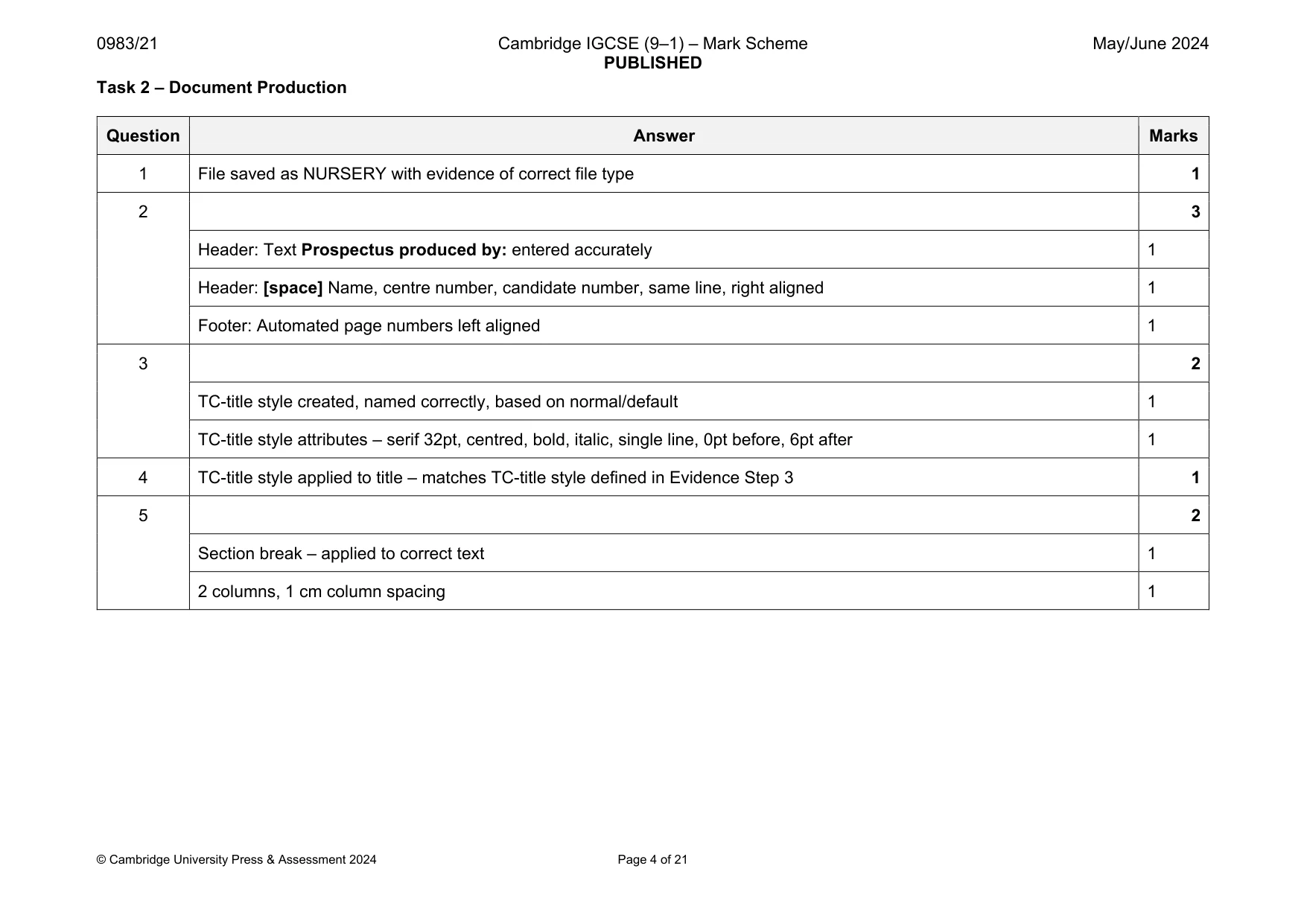
Mark scheme, page 4
0983/21 Cambridge IGCSE (9–1) – Mark Scheme PUBLISHED May/June 2024 © Cambridge University Press & Assessment 2024 Page 4 of 21 Task 2 – Document Production Question Answer Marks 1 File saved as NURSERY with evidence of correct file type 1 2 3 Header: Text Prospectus produced by: entered accurately 1 Header: [space] Name, centre number, candidate number, same line, right aligned 1 Footer: Automated page numbers left aligned 1 3 2 TC-title style created, named correctly, based on normal/default 1 TC-title style attributes – serif 32pt, centred, bold, italic, single line, 0pt before, 6pt after 1 4 TC-title style applied to title – matches TC-title style defined in Evidence Step 3 1 5 2 Section break – applied to correct text 1 2 columns, 1 cm column spacing 1
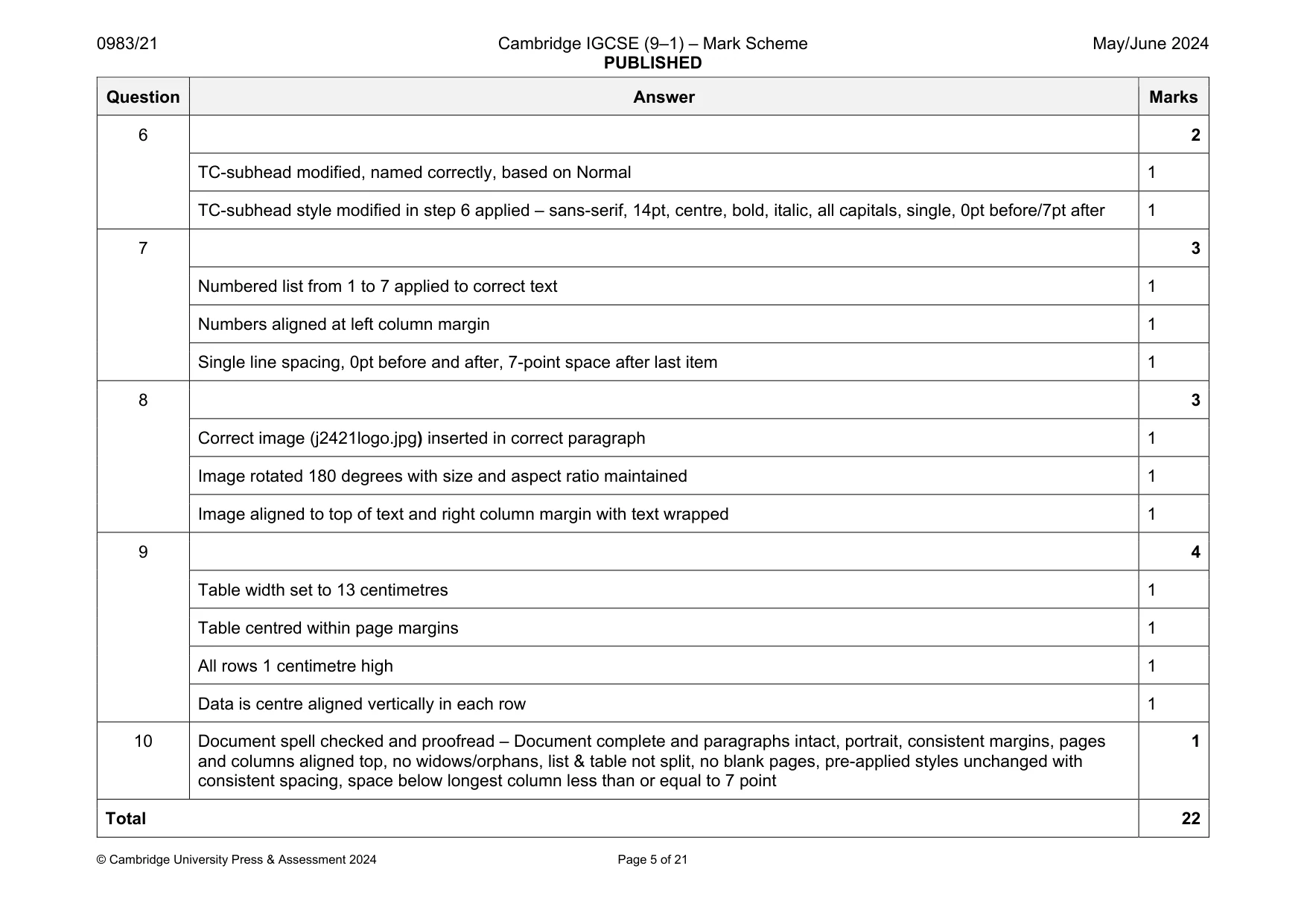
Mark scheme, page 5
0983/21 Cambridge IGCSE (9–1) – Mark Scheme PUBLISHED May/June 2024 © Cambridge University Press & Assessment 2024 Page 5 of 21 Question Answer Marks 6 2 TC-subhead modified, named correctly, based on Normal 1 TC-subhead style modified in step 6 applied – sans-serif, 14pt, centre, bold, italic, all capitals, single, 0pt before/7pt after 1 7 3 Numbered list from 1 to 7 applied to correct text 1 Numbers aligned at left column margin 1 Single line spacing, 0pt before and after, 7-point space after last item 1 8 3 Correct image (j2421logo.jpg) inserted in correct paragraph 1 Image rotated 180 degrees with size and aspect ratio maintained 1 Image aligned to top of text and right column margin with text wrapped 1 9 4 Table width set to 13 centimetres 1 Table centred within page margins 1 All rows 1 centimetre high 1 Data is centre aligned vertically in each row 1 10 Document spell checked and proofread – Document complete and paragraphs intact, portrait, consistent margins, pages and columns aligned top, no widows/orphans, list & table not split, no blank pages, pre-applied styles unchanged with consistent spacing, space below longest column less than or equal to 7 point 1 Total 22
Mark scheme, page 6
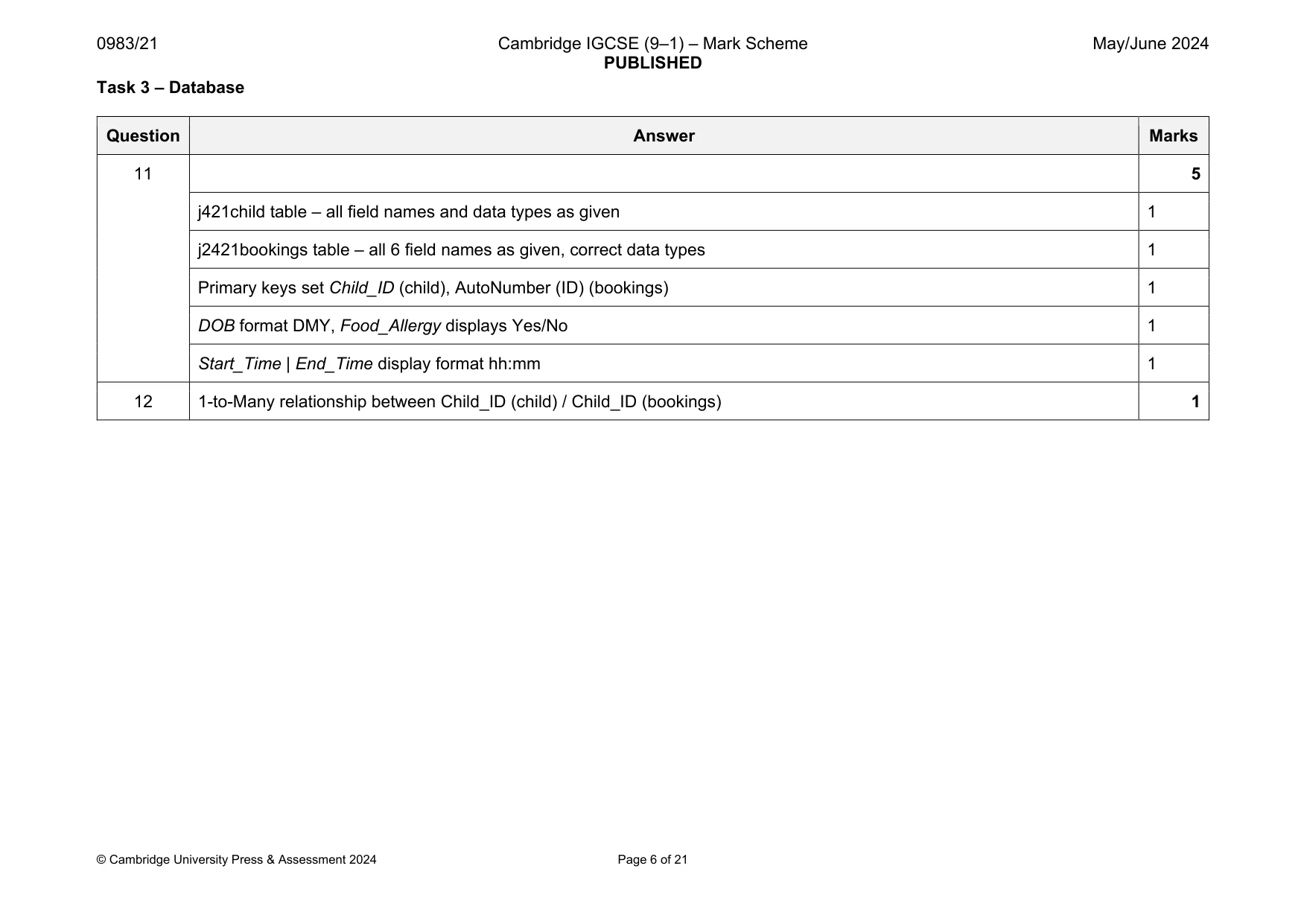
0983/21 Cambridge IGCSE (9–1) – Mark Scheme PUBLISHED May/June 2024 © Cambridge University Press & Assessment 2024 Page 6 of 21 Task 3 – Database Question Answer Marks 11 5 j421child table – all field names and data types as given 1 j2421bookings table – all 6 field names as given, correct data types 1 Primary keys set Child_ID (child), AutoNumber (ID) (bookings) 1 DOB format DMY, Food_Allergy displays Yes/No 1 Start_Time | End_Time display format hh:mm 1 12 1-to-Many relationship between Child_ID (child) / Child_ID (bookings) 1
Mark scheme, page 7
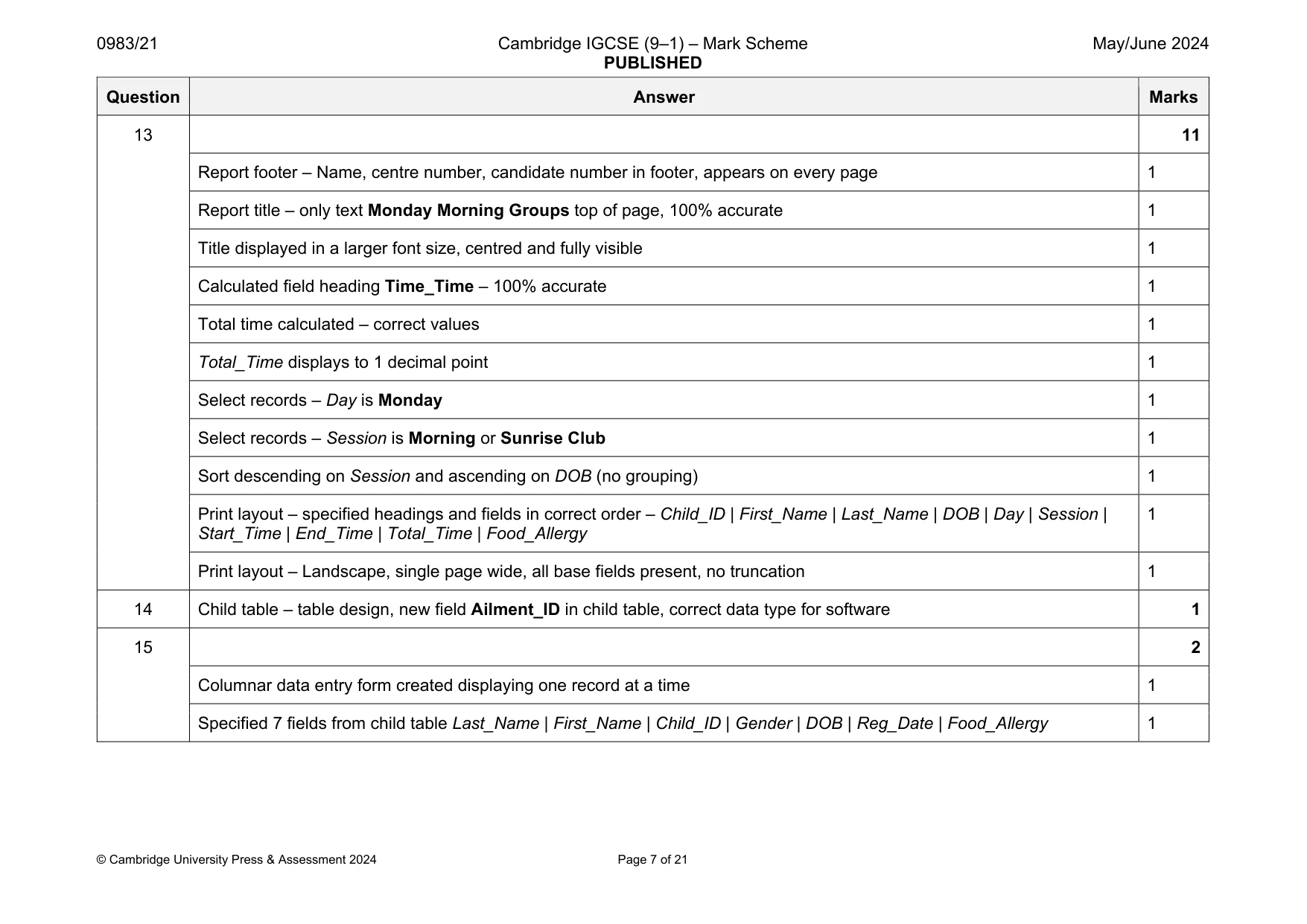
0983/21 Cambridge IGCSE (9–1) – Mark Scheme PUBLISHED May/June 2024 © Cambridge University Press & Assessment 2024 Page 7 of 21 Question Answer Marks 13 11 Report footer – Name, centre number, candidate number in footer, appears on every page 1 Report title – only text Monday Morning Groups top of page, 100% accurate 1 Title displayed in a larger font size, centred and fully visible 1 Calculated field heading Time_Time – 100% accurate 1 Total time calculated – correct values 1 Total_Time displays to 1 decimal point 1 Select records – Day is Monday 1 Select records – Session is Morning or Sunrise Club 1 Sort descending on Session and ascending on DOB (no grouping) 1 Print layout – specified headings and fields in correct order – Child_ID | First_Name | Last_Name | DOB | Day | Session | Start_Time | End_Time | Total_Time | Food_Allergy 1 Print layout – Landscape, single page wide, all base fields present, no truncation 1 14 Child table – table design, new field Ailment_ID in child table, correct data type for software 1 15 2 Columnar data entry form created displaying one record at a time 1 Specified 7 fields from child table Last_Name | First_Name | Child_ID | Gender | DOB | Reg_Date | Food_Allergy 1
Mark scheme, page 8
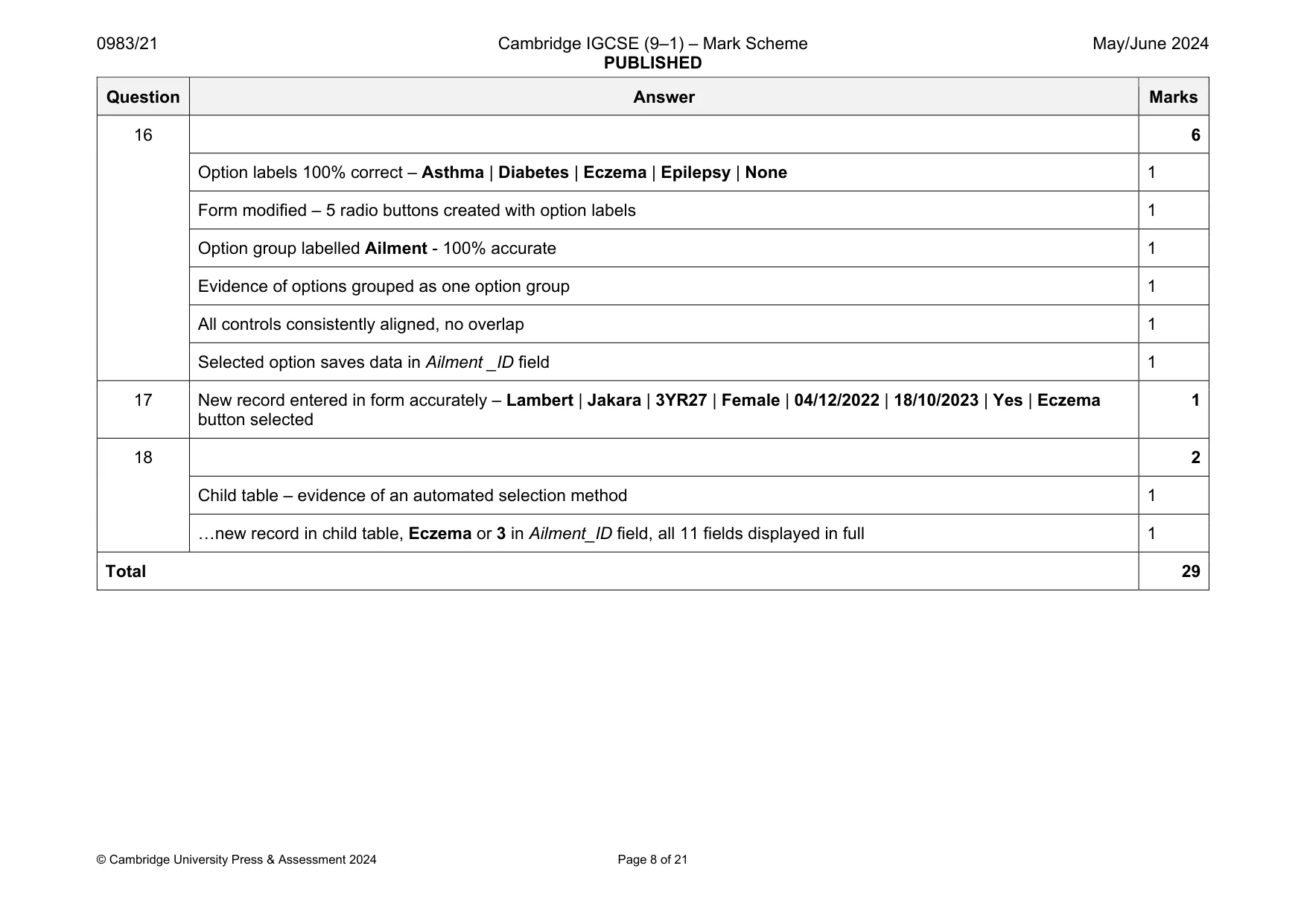
0983/21 Cambridge IGCSE (9–1) – Mark Scheme PUBLISHED May/June 2024 © Cambridge University Press & Assessment 2024 Page 8 of 21 Question Answer Marks 16 6 Option labels 100% correct – Asthma | Diabetes | Eczema | Epilepsy | None 1 Form modified – 5 radio buttons created with option labels 1 Option group labelled Ailment - 100% accurate 1 Evidence of options grouped as one option group 1 All controls consistently aligned, no overlap 1 Selected option saves data in Ailment _ID field 1 17 New record entered in form accurately – Lambert | Jakara | 3YR27 | Female | 04/12/2022 | 18/10/2023 | Yes | Eczema button selected 1 18 2 Child table – evidence of an automated selection method 1 …new record in child table, Eczema or 3 in Ailment_ID field, all 11 fields displayed in full 1 Total 29
Mark scheme, page 9
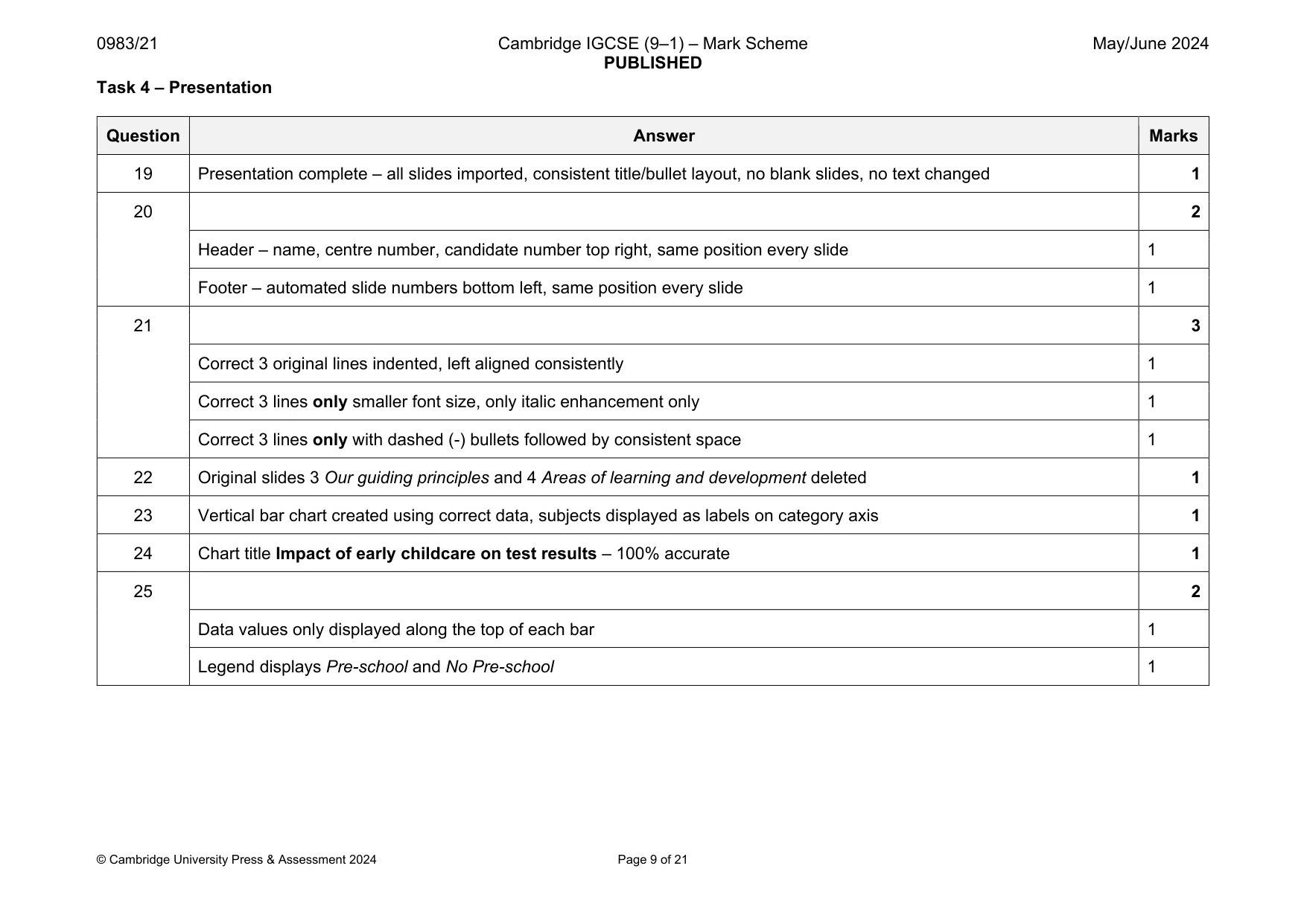
0983/21 Cambridge IGCSE (9–1) – Mark Scheme PUBLISHED May/June 2024 © Cambridge University Press & Assessment 2024 Page 9 of 21 Task 4 – Presentation Question Answer Marks 19 Presentation complete – all slides imported, consistent title/bullet layout, no blank slides, no text changed 1 20 2 Header – name, centre number, candidate number top right, same position every slide 1 Footer – automated slide numbers bottom left, same position every slide 1 21 3 Correct 3 original lines indented, left aligned consistently 1 Correct 3 lines only smaller font size, only italic enhancement only 1 Correct 3 lines only with dashed (-) bullets followed by consistent space 1 22 Original slides 3 Our guiding principles and 4 Areas of learning and development deleted 1 23 Vertical bar chart created using correct data, subjects displayed as labels on category axis 1 24 Chart title Impact of early childcare on test results – 100% accurate 1 25 2 Data values only displayed along the top of each bar 1 Legend displays Pre-school and No Pre-school 1
Mark scheme, page 10
0983/21 Cambridge IGCSE (9–1) – Mark Scheme PUBLISHED May/June 2024 © Cambridge University Press & Assessment 2024 Page 10 of 21 Question Answer Marks 26 2 Value axis displays minimum 0, maximum 56 1 Value axis displays increments of 8 1 27 Correct place on correct slide, left of bullets, chart data fully visible, no overlap/split words 1 28 4 Plain arrow action button, no fill, thick outside border, bottom right correct slide 1 Text Lifelong Gains within shape, 100% accurate, one line, no overlap 1 Evidence of action button linked 1 … action button linked to correct file j2421lifelong.csv – file name fully visible 1 29 All slides printed as handouts, portrait orientation, 2 slides to page, each filling half page 1 Total 19
Mark scheme, page 11
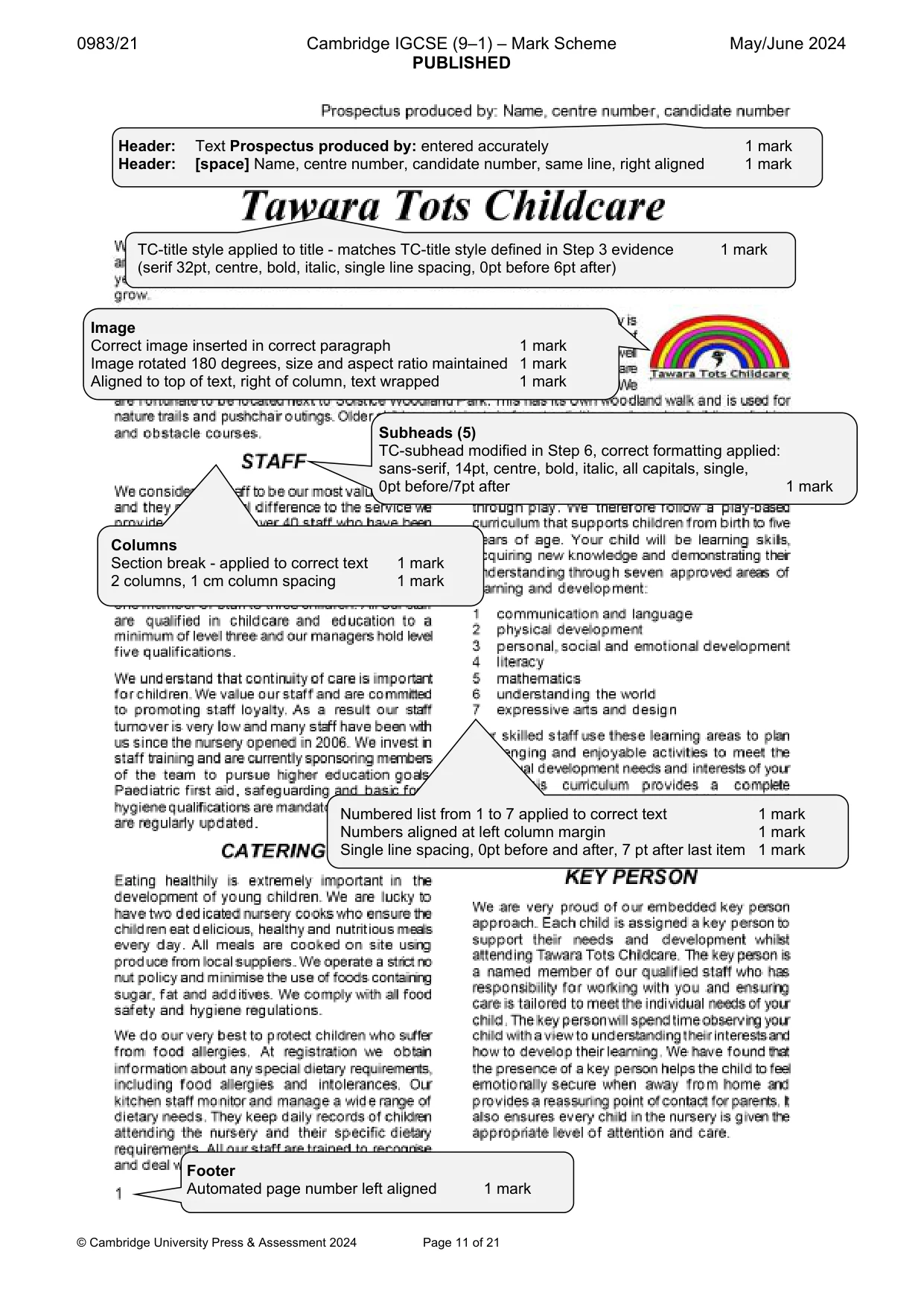
0983/21 Cambridge IGCSE (9–1) – Mark Scheme PUBLISHED May/June 2024 © Cambridge University Press & Assessment 2024 Page 11 of 21 Header: Text Prospectus produced by: entered accurately 1 mark Header: [space] Name, centre number, candidate number, same line, right aligned 1 mark TC-title style applied to title - matches TC-title style defined in Step 3 evidence 1 mark (serif 32pt, centre, bold, italic, single line spacing, 0pt before 6pt after) Image Correct image inserted in correct paragraph 1 mark Image rotated 180 degrees, size and aspect ratio maintained 1 mark Aligned to top of text, right of column, text wrapped 1 mark Columns Section break - applied to correct text 1 mark 2 columns, 1 cm column spacing 1 mark Numbered list from 1 to 7 applied to correct text 1 mark Numbers aligned at left column margin 1 mark Single line spacing, 0pt before and after, 7 pt after last item 1 mark Footer Automated page number left aligned 1 mark Subheads (5) TC-subhead modified in Step 6, correct formatting applied: sans-serif, 14pt, centre, bold, italic, all capitals, single, 0pt before/7pt after 1 mark
Mark scheme, page 12
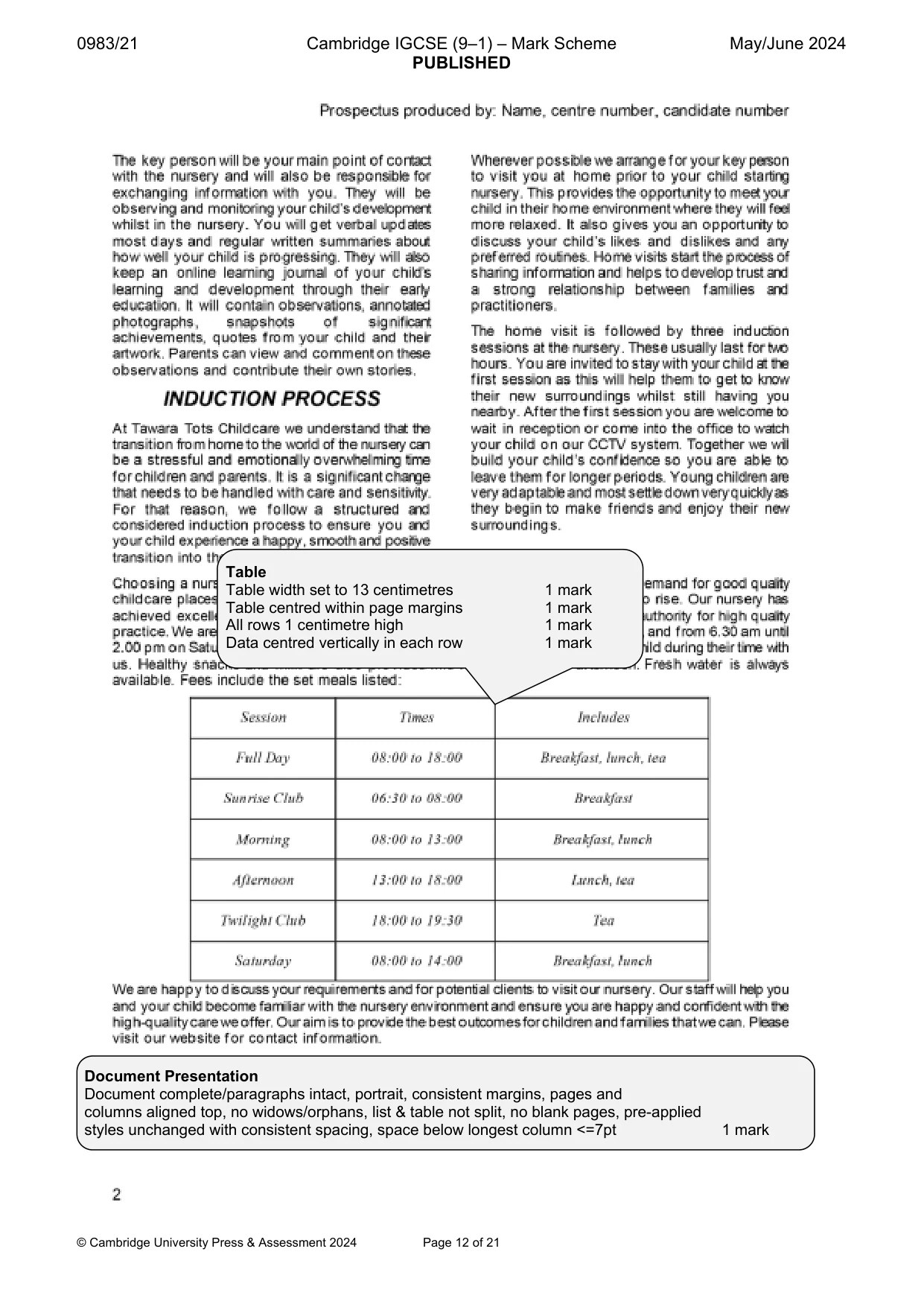
0983/21 Cambridge IGCSE (9–1) – Mark Scheme PUBLISHED May/June 2024 © Cambridge University Press & Assessment 2024 Page 12 of 21 Table Table width set to 13 centimetres 1 mark Table centred within page margins 1 mark All rows 1 centimetre high 1 mark Data centred vertically in each row 1 mark Document Presentation Document complete/paragraphs intact, portrait, consistent margins, pages and columns aligned top, no widows/orphans, list & table not split, no blank pages, pre-applied styles unchanged with consistent spacing, space below longest column <=7pt 1 mark
Mark scheme, page 13
0983/21 Cambridge IGCSE (9–1) – Mark Scheme PUBLISHED May/June 2024 © Cambridge University Press & Assessment 2024 Page 13 of 21 Monday Morning Groups Child_ID First_Name Last_Name DOB Day Session Start_Time End_Time Total_Time Food_Allergy 5YR03 Yasmin Kurz 27/04/2020 Monday Sunrise Club 06:30 08:00 1.5 No 5YR08 Elizabeth Claybourne 31/08/2020 Monday Sunrise Club 06:30 08:00 1.5 No 5YR14 Adele Owtram 27/10/2020 Monday Sunrise Club 06:30 08:00 1.5 Yes 4YR17 Zachary Featheringham 21/09/2021 Monday Sunrise Club 06:30 08:00 1.5 No 4YR18 Tom Rogers 05/12/2021 Monday Sunrise Club 06:30 08:00 1.5 Yes 4YR20 Sally Jacobellis 29/12/2021 Monday Sunrise Club 06:30 08:00 1.5 No 3YR09 Yusuf Shabbir 10/05/2022 Monday Sunrise Club 06:30 08:00 1.5 No 3YR17 Sebastian Reynolds 19/08/2022 Monday Sunrise Club 06:30 08:00 1.5 No 2YR24 Leonardo Claybourne 18/01/2023 Monday Sunrise Club 06:30 08:00 1.5 No 2YR14 Lars Johansson 21/01/2023 Monday Sunrise Club 06:30 08:00 1.5 No 2YR16 Savannah Barraclough 03/03/2023 Monday Sunrise Club 06:30 08:00 1.5 No 2YR13 Hailey Stafford 09/03/2023 Monday Sunrise Club 06:30 08:00 1.5 No 2YR07 Marcus Cooper-Holmes 09/04/2023 Monday Sunrise Club 06:30 08:00 1.5 No 2YR20 Jodie Wainewright 28/04/2023 Monday Sunrise Club 06:30 08:00 1.5 Yes 2YR12 Laurie Anderson 07/05/2023 Monday Sunrise Club 06:30 08:00 1.5 No 2YR27 Delfina Navarro 11/06/2023 Monday Sunrise Club 06:30 08:00 1.5 No 2YR22 Sayed Khashan 20/06/2023 Monday Sunrise Club 06:30 08:00 1.5 No 1YR02 Salim Ismail 07/01/2024 Monday Sunrise Club 06:30 08:00 1.5 Yes 5YR07 Penelope Standfield 06/04/2020 Monday Morning 08:00 13:00 5.0 Yes 5YR03 Yasmin Kurz 27/04/2020 Monday Morning 08:00 13:00 5.0 No 5YR04 Bailey Corbett 05/05/2020 Monday Morning 08:00 13:00 5.0 No 5YR08 Elizabeth Claybourne 31/08/2020 Monday Morning 08:00 13:00 5.0 No 5YR14 Adele Owtram 27/10/2020 Monday Morning 08:00 13:00 5.0 Yes Name, centre number, candidate number Page 1 of 2 Title Title 100% accurate, top of page 1 mark Title - larger font size, centred and fully visible 1 mark Calculated field Heading 100% accurate 1 mark Total time calculated - correct values 1 mark Displays to 1 dp 1 mark Select records (43): Day is Monday 1 mark Session is Morning or Sunrise Club 1 mark
Mark scheme, page 14
0983/21 Cambridge IGCSE (9–1) – Mark Scheme PUBLISHED May/June 2024 © Cambridge University Press & Assessment 2024 Page 14 of 21 Child_ID First_Name Last_Name DOB Day Session Start_Time End_Time Total_Time Food_Allergy 5YR29 Cameron Buchanan 20/12/2020 Monday Morning 08:00 13:00 5.0 Yes 5YR19 Emily Damerell 23/12/2020 Monday Morning 08:00 13:00 5.0 No 4YR18 Tom Rogers 05/12/2021 Monday Morning 08:00 13:00 5.0 Yes 4YR20 Sally Jacobellis 29/12/2021 Monday Morning 08:00 13:00 5.0 No 3YR12 Chelsea Patterson 05/05/2022 Monday Morning 08:00 13:00 5.0 Yes 3YR09 Yusuf Shabbir 10/05/2022 Monday Morning 08:00 13:00 5.0 No 3YR17 Sebastian Reynolds 19/08/2022 Monday Morning 08:00 13:00 5.0 No 3YR18 Thomas Kohlenberg 02/12/2022 Monday Morning 08:00 13:00 5.0 No 2YR24 Leonardo Claybourne 18/01/2023 Monday Morning 08:00 13:00 5.0 No 2YR14 Lars Johansson 21/01/2023 Monday Morning 08:00 13:00 5.0 No 2YR16 Savannah Barraclough 03/03/2023 Monday Morning 08:00 13:00 5.0 No 2YR13 Hailey Stafford 09/03/2023 Monday Morning 08:00 13:00 5.0 No 2YR07 Marcus Cooper-Holmes 09/04/2023 Monday Morning 08:00 13:00 5.0 No 2YR12 Laurie Anderson 07/05/2023 Monday Morning 08:00 13:00 5.0 No 2YR27 Delfina Navarro 11/06/2023 Monday Morning 08:00 13:00 5.0 No 2YR22 Sayed Khashan 20/06/2023 Monday Morning 08:00 13:00 5.0 No 2YR21 Zofia Mickelberg 03/09/2023 Monday Morning 08:00 13:00 5.0 No 2YR23 Honey Sutherland 07/09/2023 Monday Morning 08:00 13:00 5.0 No 2YR30 Mia Tomkinson 10/10/2023 Monday Morning 08:00 13:00 5.0 No 1YR02 Salim Ismail 07/01/2024 Monday Morning 08:00 13:00 5.0 Yes Name, centre number, candidate number Page 2 of 2 Specified fields, headings and fields in correct order 1 mark Sort descending on Session and ascending on DOB 1 mark Landscape, one page wide, all base fields, no truncation 1 mark Name, centre number, candidate number in footer, appears on every page 1 mark Format/Display DOB format DMY, Food_Allergy displays Yes/No 1 mark Start_Time | End_Time display format hh:mm 1 mark
Mark scheme, page 15
0983/21 Cambridge IGCSE (9–1) – Mark Scheme PUBLISHED May/June 2024 © Cambridge University Press & Assessment 2024 Page 15 of 21 Task 4 – Presentation All slides imported, consistent title/bullet layout, no blank slides, no text changed 1 mark Header - name, centre number, candidate number top right, same position every slide 1 mark Footer - automated slide numbers bottom left, same position every slide 1 mark
Mark scheme, page 16
0983/21 Cambridge IGCSE (9–1) – Mark Scheme PUBLISHED May/June 2024 © Cambridge University Press & Assessment 2024 Page 16 of 21 Correct 3 original lines indented, left aligned consistently 1 mark Correct 3 lines only smaller font size, only italic enhancement 1 mark Correct 3 lines only with dashed (-) bullets followed by consistent space 1 mark Original slides 3 Our guiding principles and 4 Areas of learning and development deleted 1 mark Slides printed as handouts, portrait orientation, 2 slides to page, each filling half the page 1 mark
Mark scheme, page 17
0983/21 Cambridge IGCSE (9–1) – Mark Scheme PUBLISHED May/June 2024 © Cambridge University Press & Assessment 2024 Page 17 of 21 Vertical bar chart created using correct data, subject labels on category axis 1 mark Chart title Impact of early childcare on test results - 100% accurate 1 mark Data values only displayed along the top of all bars 1 mark Value axis displays minimum 0, maximum 56 1 mark Value axis displays increments of 8 1 mark Legend displays Pre-school and No Pre-school 1 mark Correct slide, left of bullets, chart data fully visible, no overlap/split words 1 mark Plain arrow action button, no fill, thick outside border, bottom right correct slide 1 mark Lifelong Gains within shape, 100% accurate, one line, no overlap 1 mark
Mark scheme, page 18
0983/21 Cambridge IGCSE (9–1) – Mark Scheme PUBLISHED May/June 2024 © Cambridge University Press & Assessment 2024 Page 18 of 21 EVIDENCE DOCUMENT Step 1 Step 3 Step 6 Step 11 File saved as NURSERY with evidence of correct file type 1 mark Style TC-title style created, named correctly, based on normal/default 1 mark Serif, 32pt, centred, bold, italic, single line, 0pt before, 6pt after 1 mark DB Structure j2421child - all field names and data types as given 1 mark j2421bookings - 6 field names and data types as given 1 mark Primary keys set Child_ID (child), AutoNumber (ID) (bookings) 1 mark Style modified TC-subhead modified, named correctly, based on Normal 1 mark
Mark scheme, page 19
0983/21 Cambridge IGCSE (9–1) – Mark Scheme PUBLISHED May/June 2024 © Cambridge University Press & Assessment 2024 Page 19 of 21 Step 12 Step 14 Step 15 j2421child table Child table – table design, new field Ailment_ID in child table, correct data type for software 1 mark Columnar form created displaying one record at a time 1 mark Specified 7 fields from child table 1 mark 1-to-Many relationship Child_ID (child) and Child_ID (bookings) 1 mark
Mark scheme, page 20
0983/21 Cambridge IGCSE (9–1) – Mark Scheme PUBLISHED May/June 2024 © Cambridge University Press & Assessment 2024 Page 20 of 21 Step 16 Libre/Open Office: Radio buttons 5 radio buttons created with option labels 1 mark Option group labelled Ailment - 100% accurate 1 mark Evidence of options grouped as one option group 1 mark All controls consistently aligned, no overlap 1 mark Radio buttons Selected option saves data in Ailment _ID field 1 mark Option labels, all 5 - 100% accurate 1 mark
Mark scheme, page 21
0983/21 Cambridge IGCSE (9–1) – Mark Scheme PUBLISHED May/June 2024 © Cambridge University Press & Assessment 2024 Page 21 of 21 Step 17 Step 18 Libre/Open Office: Step 28 OR New record entered in form accurately 1 mark Automated selection method 1 mark …new record in child table, Eczema or 3 in Ailment_ID field, all 11 fields displayed in full 1 mark Evidence of action button linked 1 mark … action button linked to file j2421lifelong.csv – file name fully visible 1 mark
What you needed in this session
Cambridge’s own grade thresholds for 2024 May/June, Paper 2 · Variant 1. A higher threshold means an easier paper — the bar moves with how the cohort did.