Cambridge A Level Computer Science 9618 — 2025 Oct/Nov Paper 4 · Variant 3
9618/43/O/N/25 · 3 questions · 75 marks · ≈84 min
The question paper and its mark scheme, free to read here and free to download. This is Cambridge’s own paper, exactly as it was sat.
Question paper16 pages
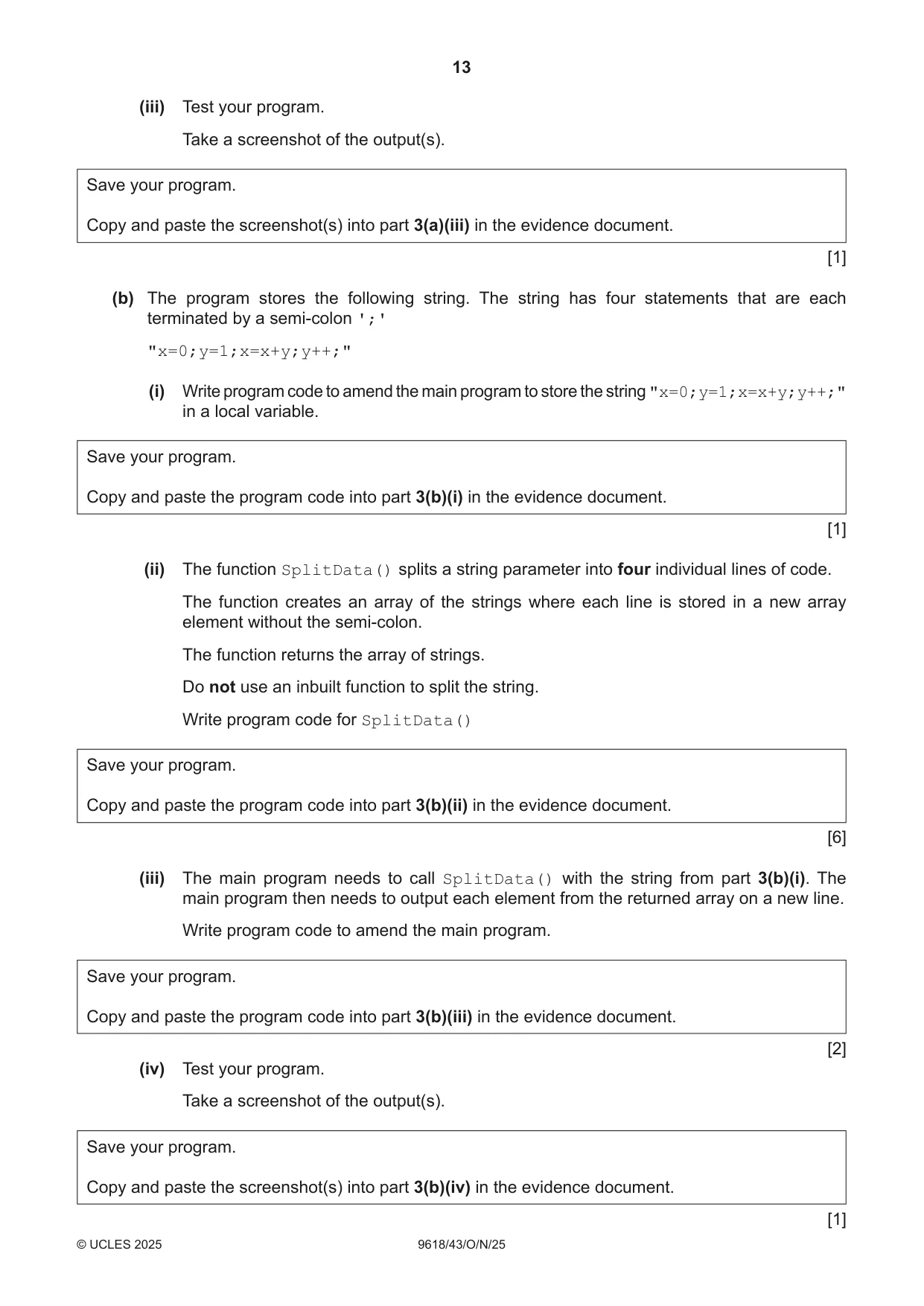


Mark scheme39 pages
Answers below. Sit the paper first if you are practising.
Questions as text
Q1 · A program stores data for a board game using Object-Oriented Programming (OOP)
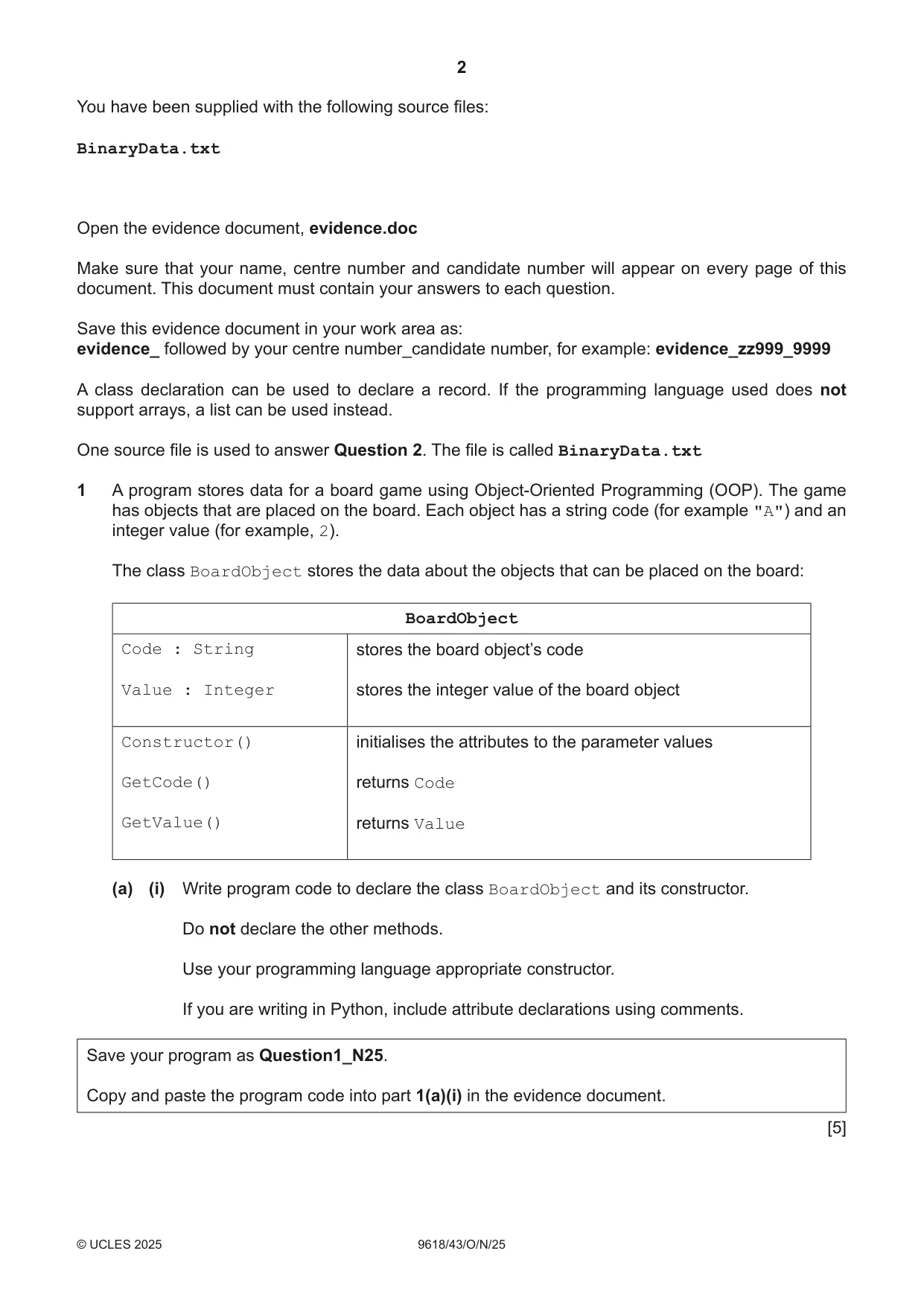
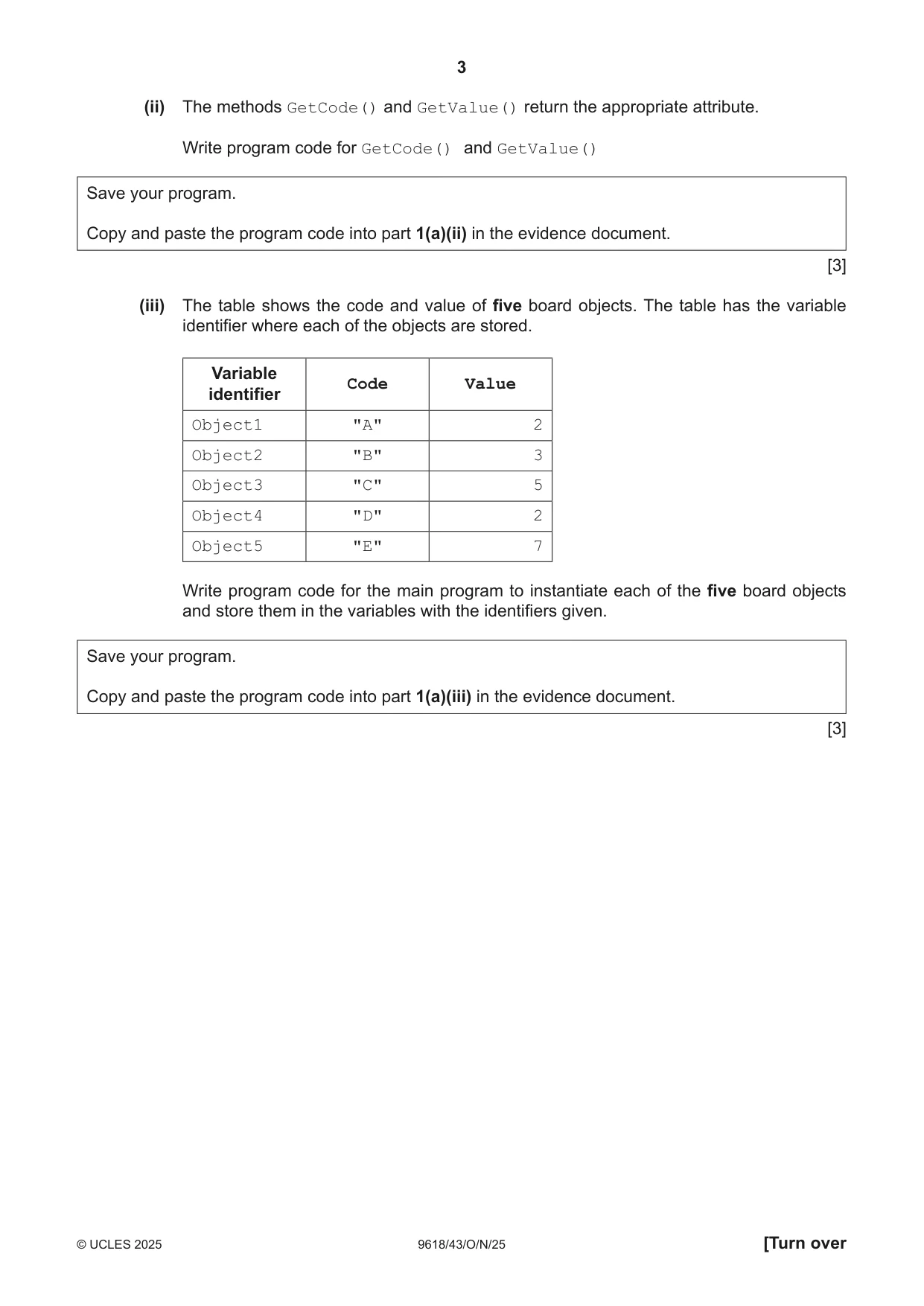
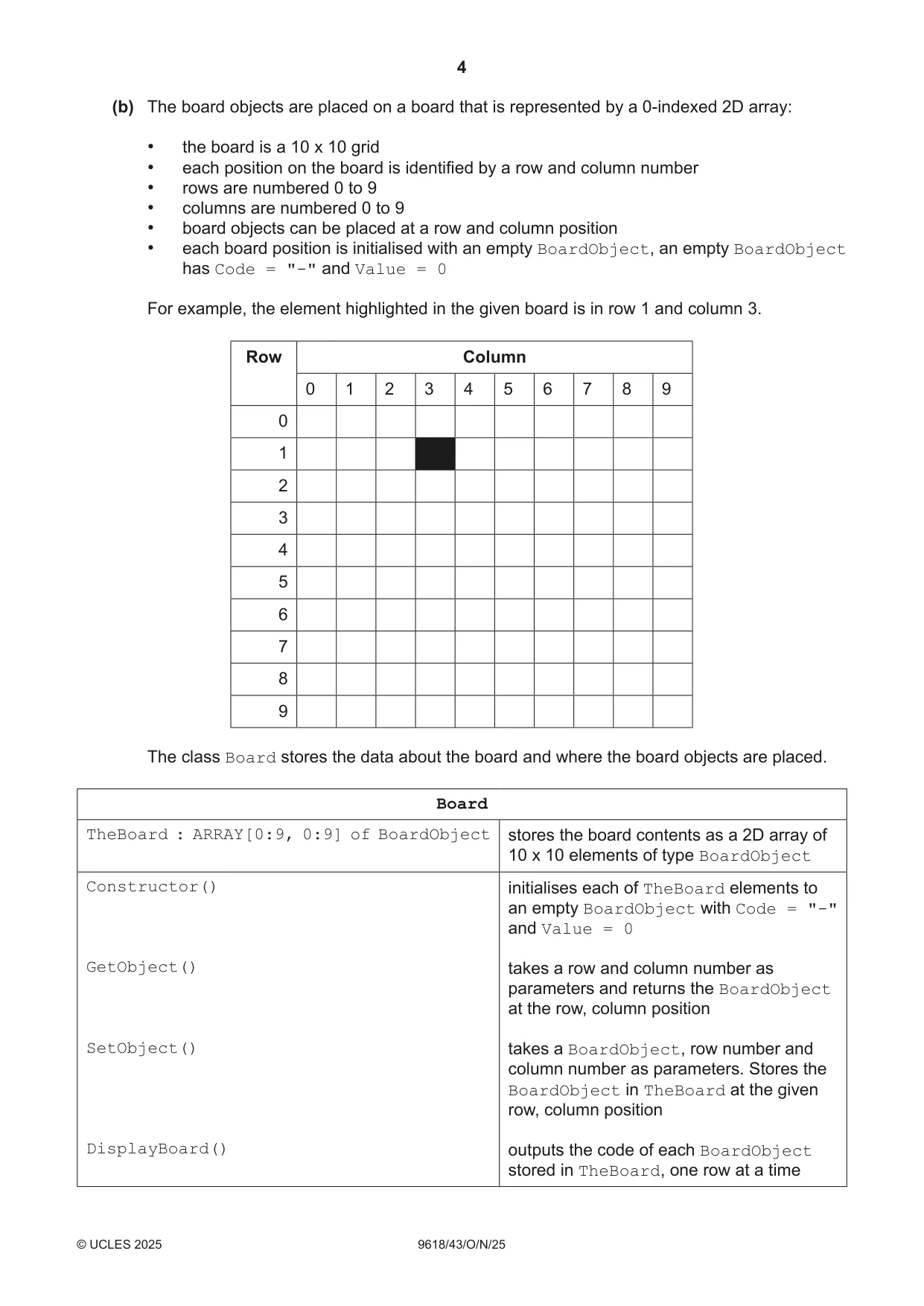
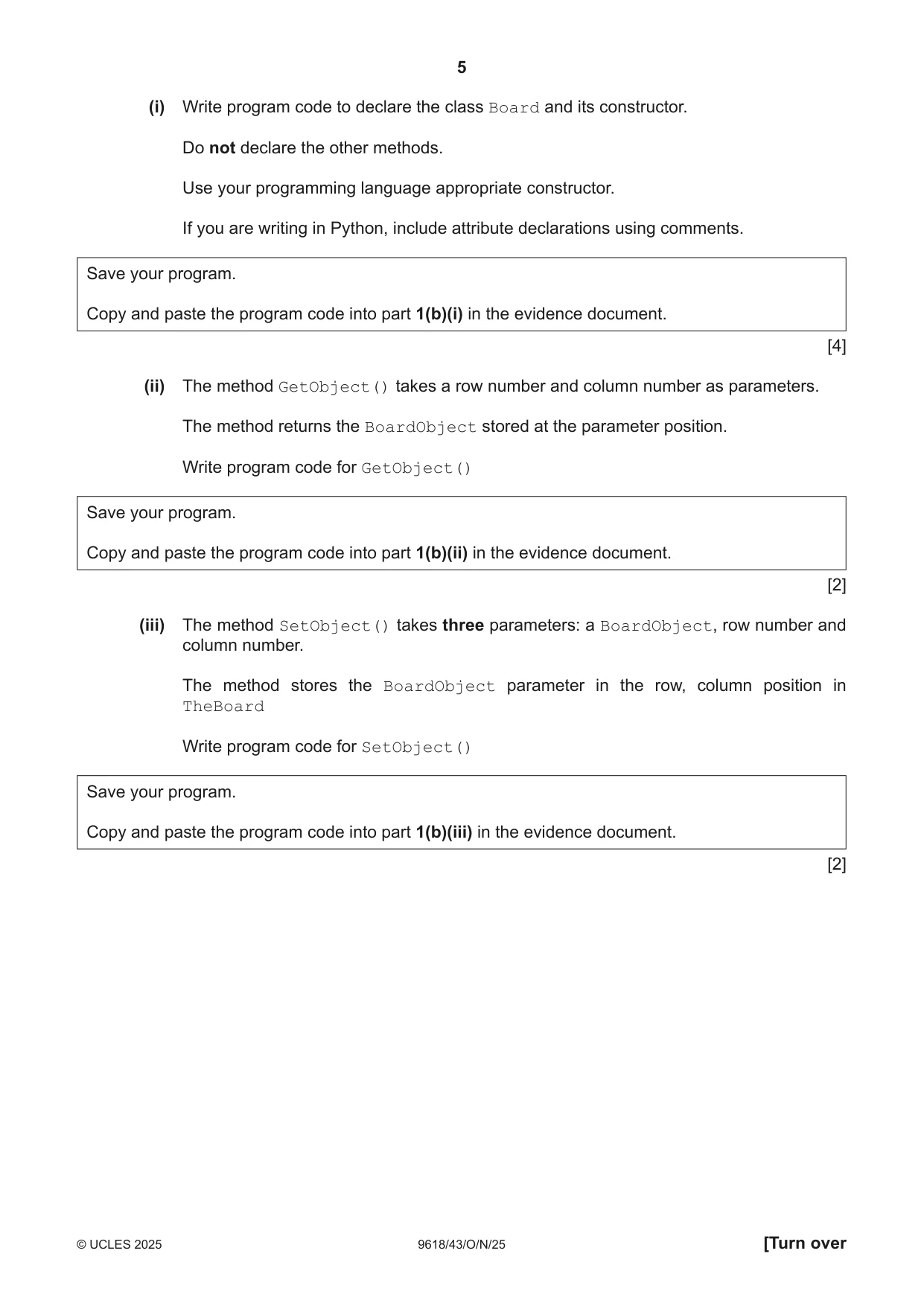
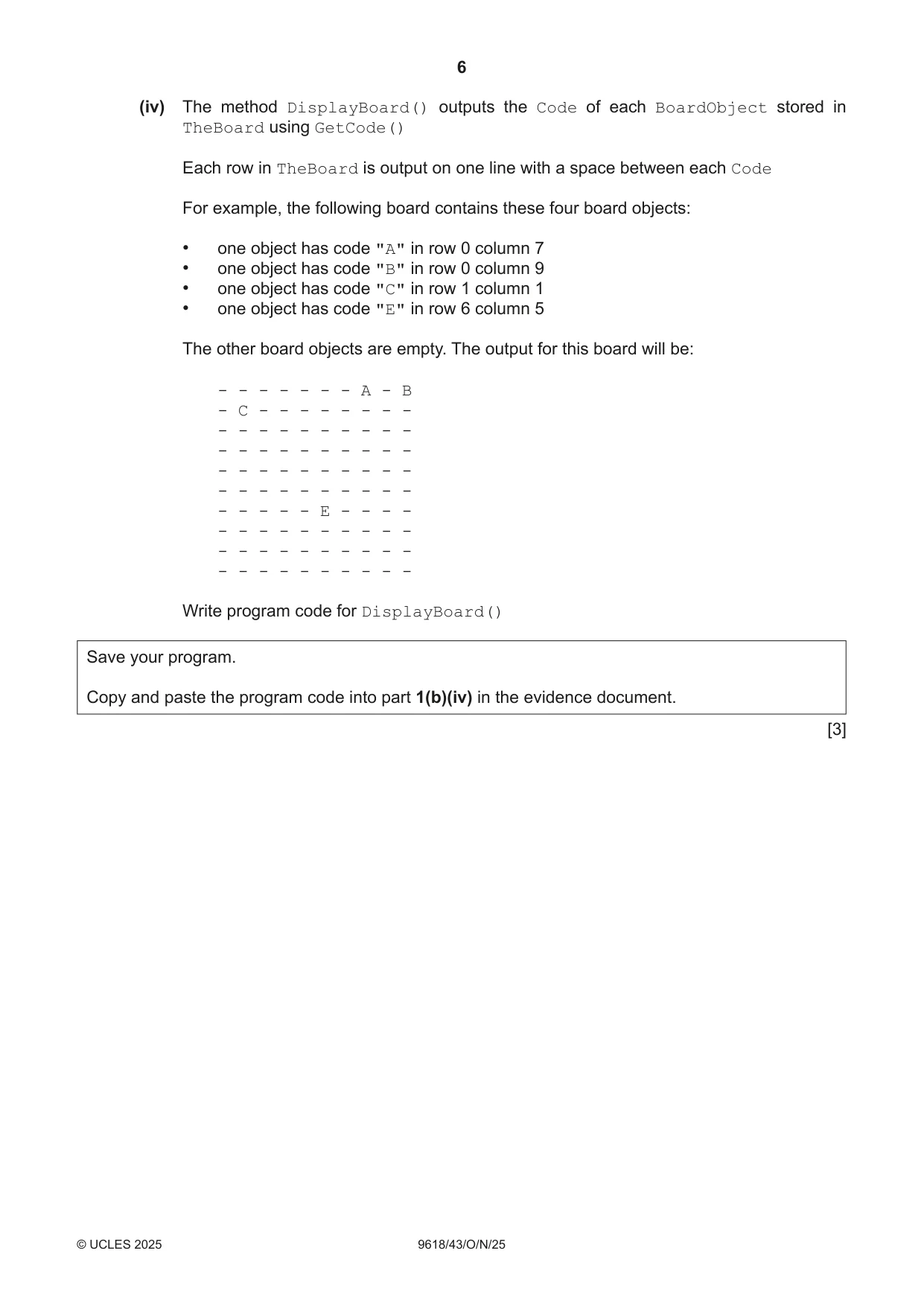
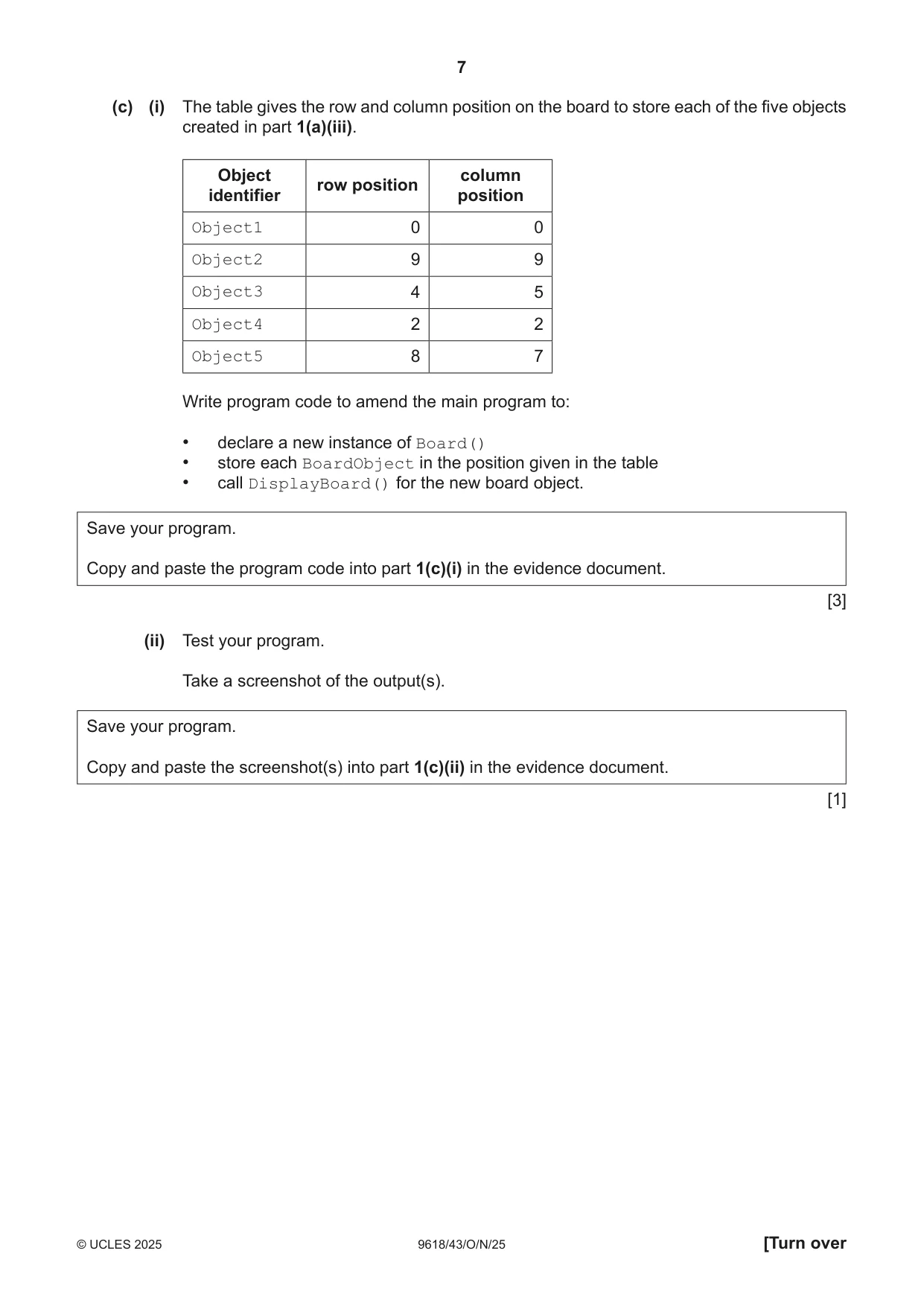
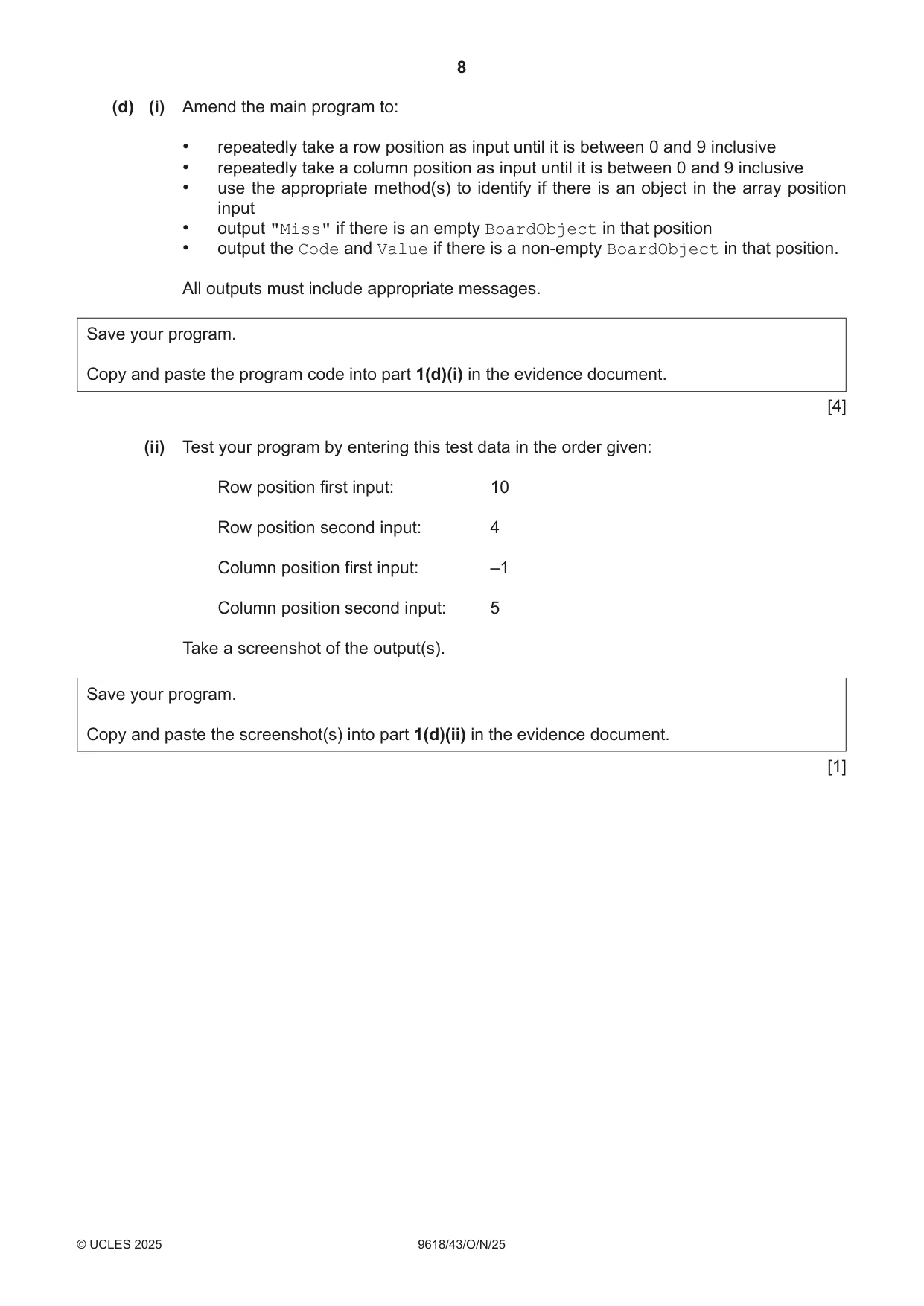
1 A program stores data for a board game using Object-Oriented Programming (OOP). The game has objects that are placed on the board. Each object has a string code (for example "A") and an integer value (for example, 2). The class BoardObject stores the data about the objects that can be placed on the board: BoardObject Code : String stores the board object’s code Value : Integer stores the integer value of the board object Constructor() initialises the attributes to the parameter values GetCode() returns Code GetValue() returns Value (a) (i) Write program code to declare the class BoardObject and its constructor. Do not declare the other methods. Use your programming language appropriate constructor. If you are writing in Python, include attribute declarations using comments. Save your program as Question1_N25. Copy and paste the program code into part 1(a)(i) in the evidence document. [5] (ii) The methods GetCode() and GetValue() return the appropriate attribute. Write program code for GetCode() and GetValue() Save your program. Copy and paste the program code into part 1(a)(ii) in the evidence document. [3] (iii) The table shows the code and value of five board objects. The table has the variable identifier where each of the objects are stored. Variable Code Value identifier Object1 "A" 2 Object2 "B" 3 Object3 "C" 5 Object4 "D" 2 Object5 "E" 7 Write program code for the main program to instantiate each of the five board objects and store them in the variables with the identifiers given. Save your program. Copy and paste the program code into part 1(a)(iii) in the evidence document. [3] (b) The board objects are placed on a board that is represented by a 0-indexed 2D array: • the board is a 10 x 10 grid • each position on the board is identified by a row and column number • rows are numbered 0 to 9 • columns are numbered 0 to 9 • board objects can be placed at a row and column position • each board position is initialised with an empty BoardObject, an empty BoardObject has Code = "-" and Value = 0 For example, the element highlighted in the given board is in row 1 and column 3. Row Column 0 1 2 3 4 5 6 7 8 9 0 1 2 3 4 5 6 7 8 9 The class Board stores the data about the board and where the board objects are placed. Board TheBoard : ARRAY[0:9, 0:9] of BoardObject stores the board contents as a 2D array of 10 x 10 elements of type BoardObject Constructor() initialises each of TheBoard elements to an empty BoardObject with Code = "-" and Value = 0 GetObject() takes a row and column number as parameters and returns the BoardObject at the row, column position SetObject() takes a BoardObject, row number and column number as parameters. Stores the BoardObject in TheBoard at the given row, column position DisplayBoard() outputs the code of each BoardObject stored in TheBoard, one row at a time (i) Write program code to declare the class Board and its constructor. Do not declare the other methods. Use your programming language appropriate constructor. If you are writing in Python, include attribute declarations using comments. Save your program. Copy and paste the program code into part 1(b)(i) in the evidence document. [4] (ii) The method GetObject() takes a row number and column number as parameters. The method returns the BoardObject stored at the parameter position. Write program code for GetObject() Save your program. Copy and paste the program code into part 1(b)(ii) in the evidence document. [2] (iii) The method SetObject() takes three parameters: a BoardObject, row number and column number. The method stores the BoardObject parameter in the row, column position in TheBoard Write program code for SetObject() Save your program. Copy and paste the program code into part 1(b)(iii) in the evidence document. [2] (iv) The method DisplayBoard() outputs the Code of each BoardObject stored in TheBoard using GetCode() Each row in TheBoard is output on one line with a space between each Code For example, the following board contains these four board objects: • one object has code "A" in row 0 column 7 • one object has code "B" in row 0 column 9 • one object has code "C" in row 1 column 1 • one object has code "E" in row 6 column 5 The other board objects are empty. The output for this board will be: - - - - - - - A - B - C - - - - - - - - - - - - - - - - - - - - - - - - - - - - - - - - - - - - - - - - - - - - - - - - - - - - - E - - - - - - - - - - - - - - - - - - - - - - - - - - - - - - - - - - Write program code for DisplayBoard() Save your program. Copy and paste the program code into part 1(b)(iv) in the evidence document. [3] (c) (i) The table gives the row and column position on the board to store each of the five objects created in part 1(a)(iii). Object column row position identifier position Object1 0 0 Object2 9 9 Object3 4 5 Object4 2 2 Object5 8 7 Write program code to amend the main program to: • declare a new instance of Board() • store each BoardObject in the position given in the table • call DisplayBoard() for the new board object. Save your program. Copy and paste the program code into part 1(c)(i) in the evidence document. [3] (ii) Test your program. Take a screenshot of the output(s). Save your program. Copy and paste the screenshot(s) into part 1(c)(ii) in the evidence document. [1] (d) (i) Amend the main program to: • repeatedly take a row position as input until it is between 0 and 9 inclusive • repeatedly take a column position as input until it is between 0 and 9 inclusive • use the appropriate method(s) to identify if there is an object in the array position input • output "Miss" if there is an empty BoardObject in that position • output the Code and Value if there is a non-empty BoardObject in that position. All outputs must include appropriate messages. Save your program. Copy and paste the program code into part 1(d)(i) in the evidence document. [4] (ii) Test your program by entering this test data in the order given: Row position first input: 10 Row position second input: 4 Column position first input: –1 Column position second input: 5 Take a screenshot of the output(s). Save your program. Copy and paste the screenshot(s) into part 1(d)(ii) in the evidence document. [1]
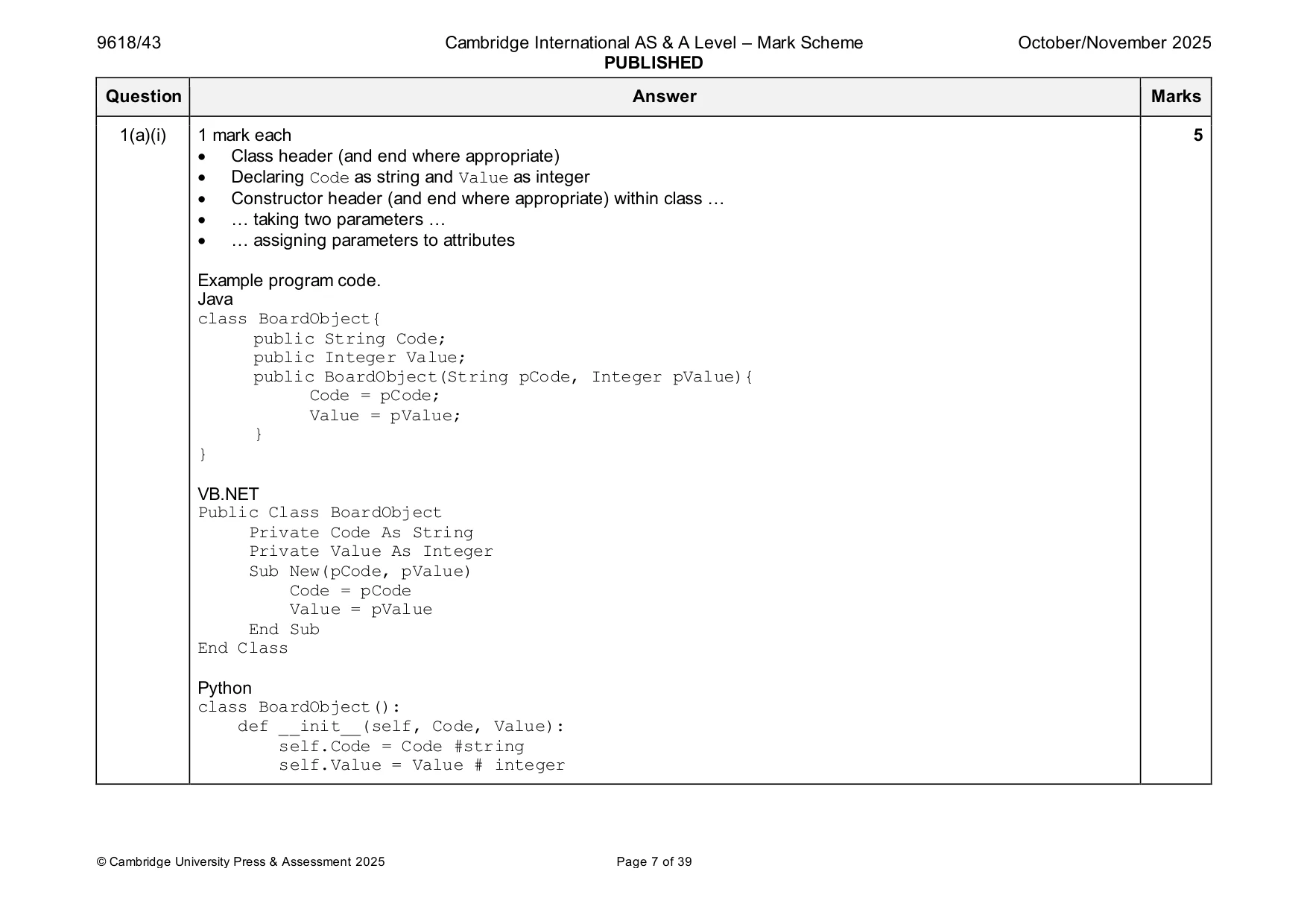
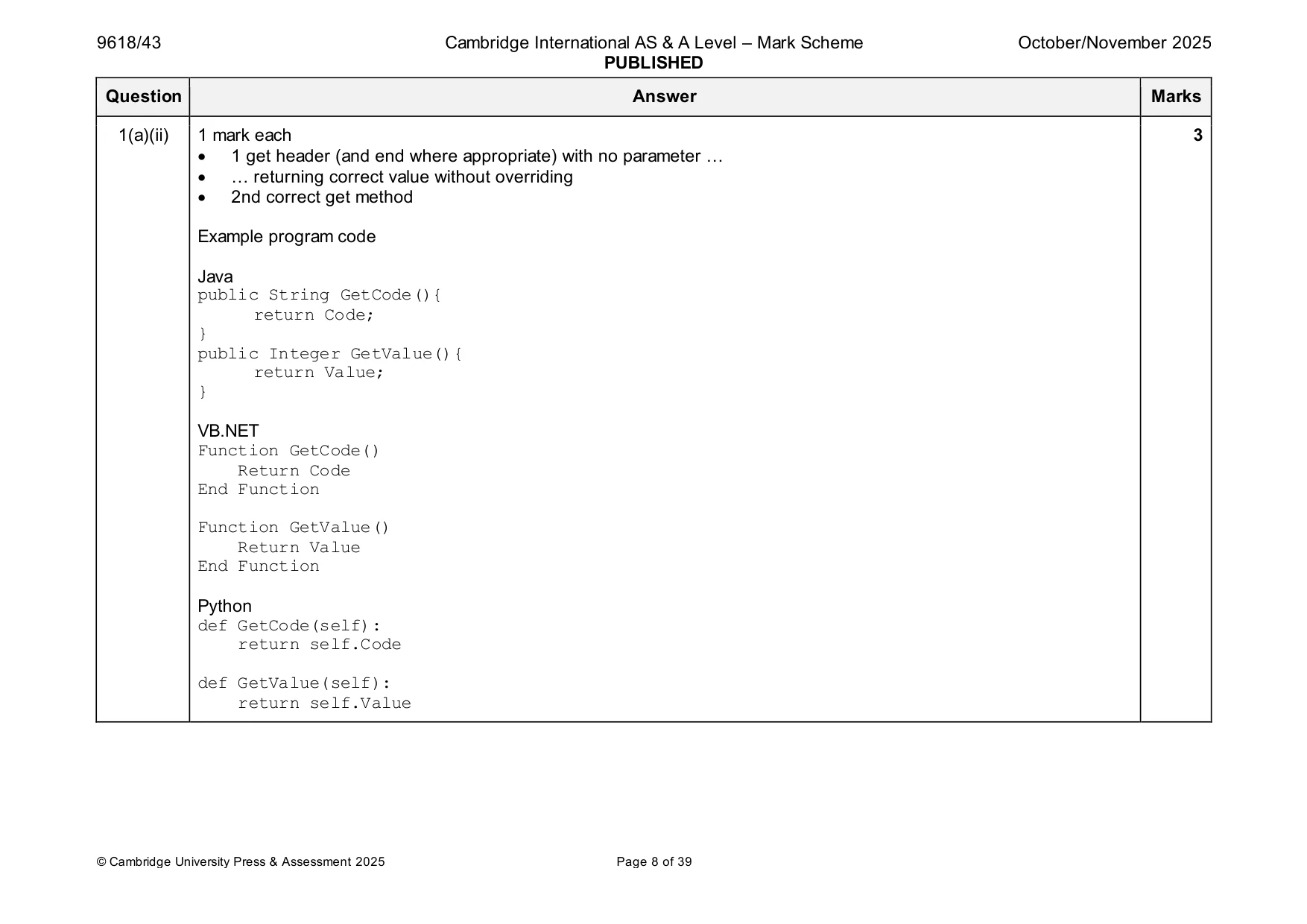
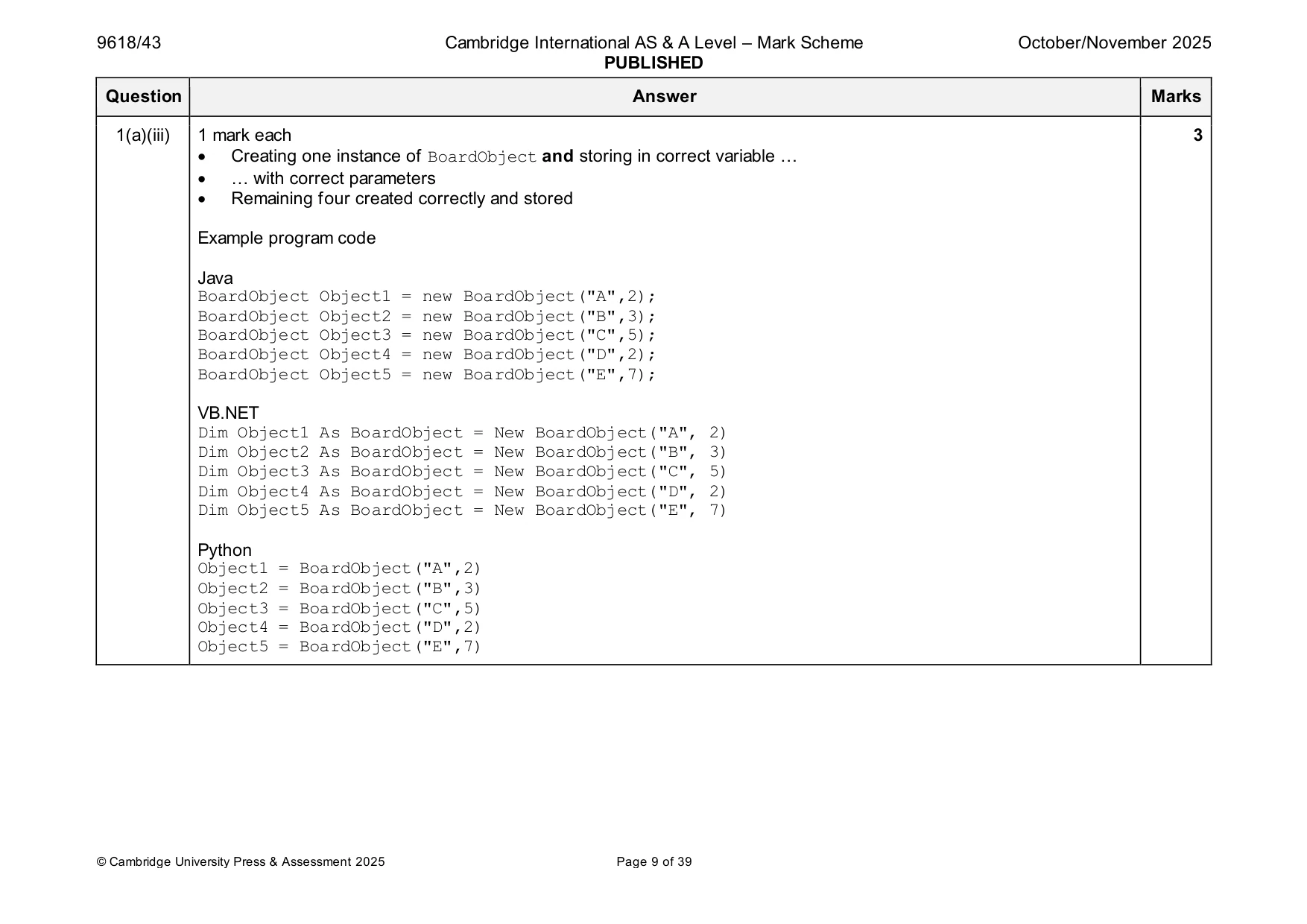
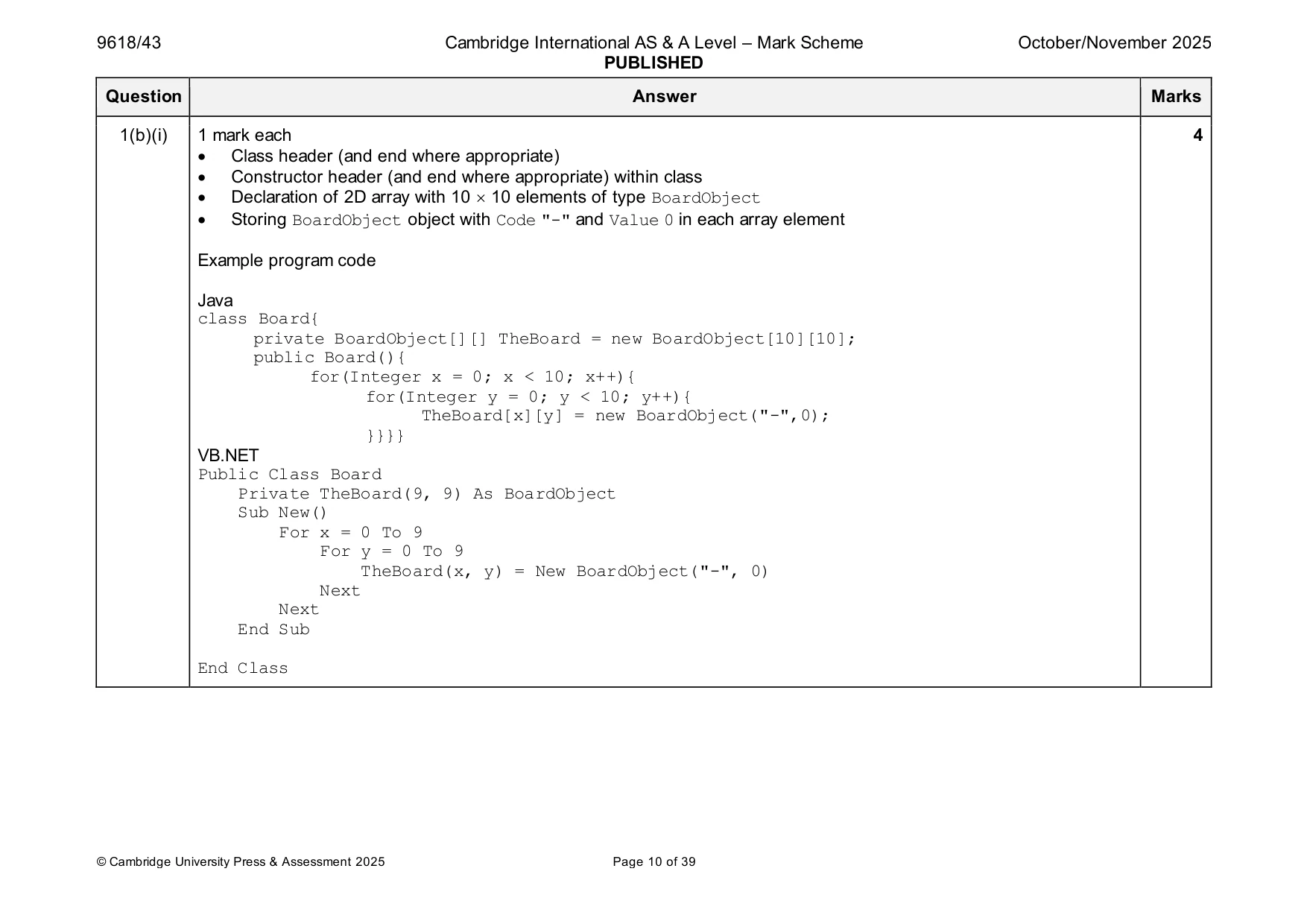
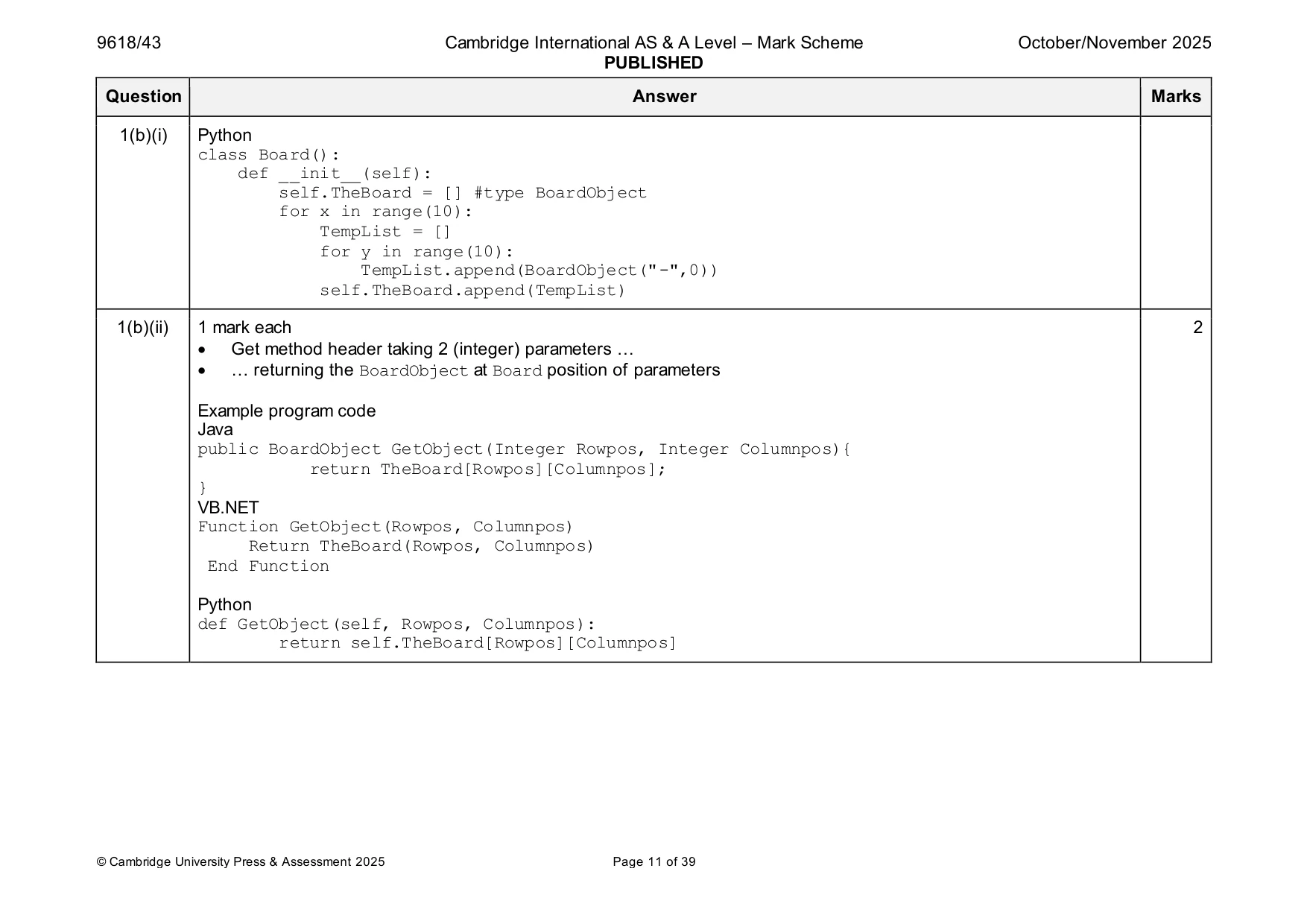
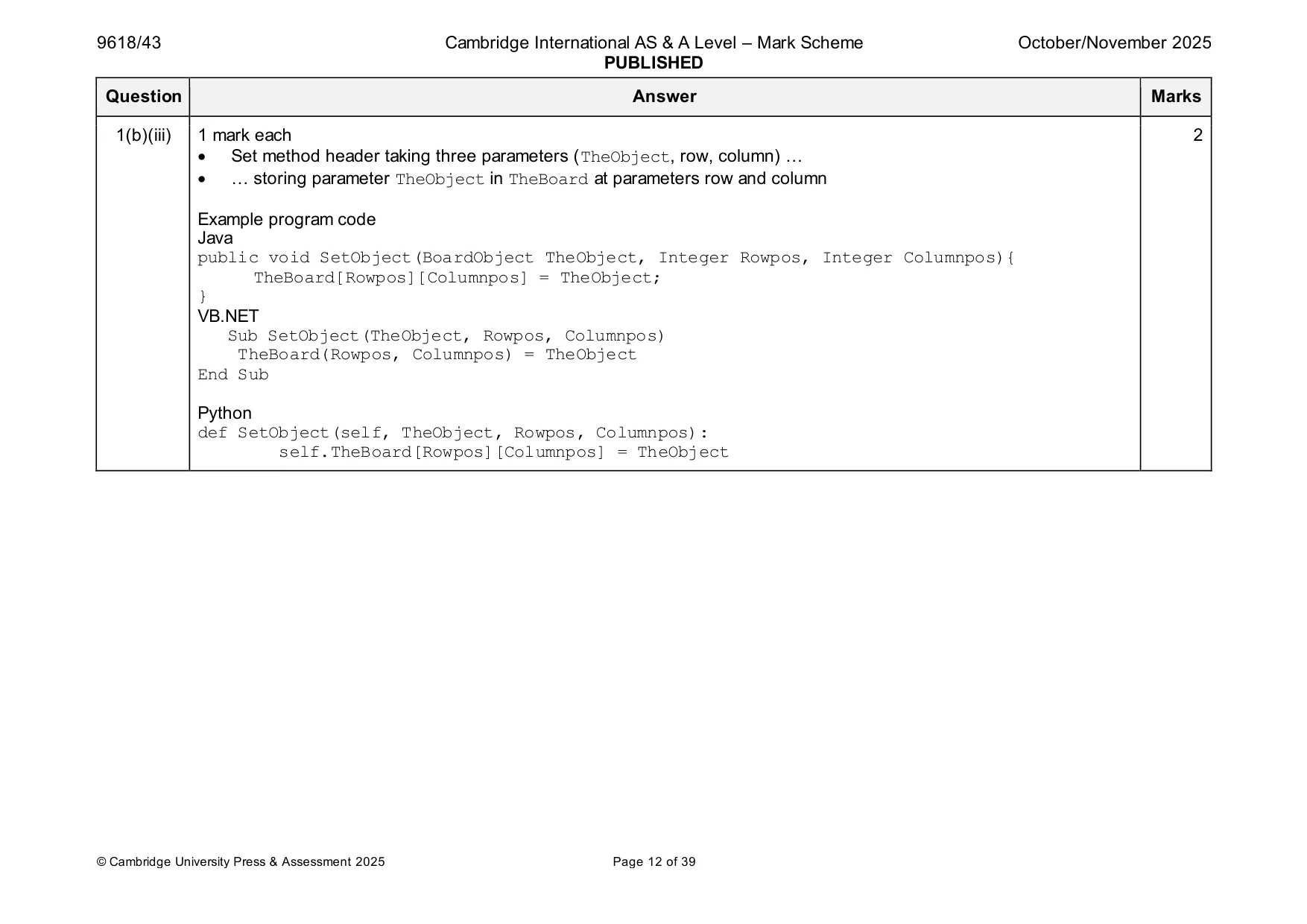
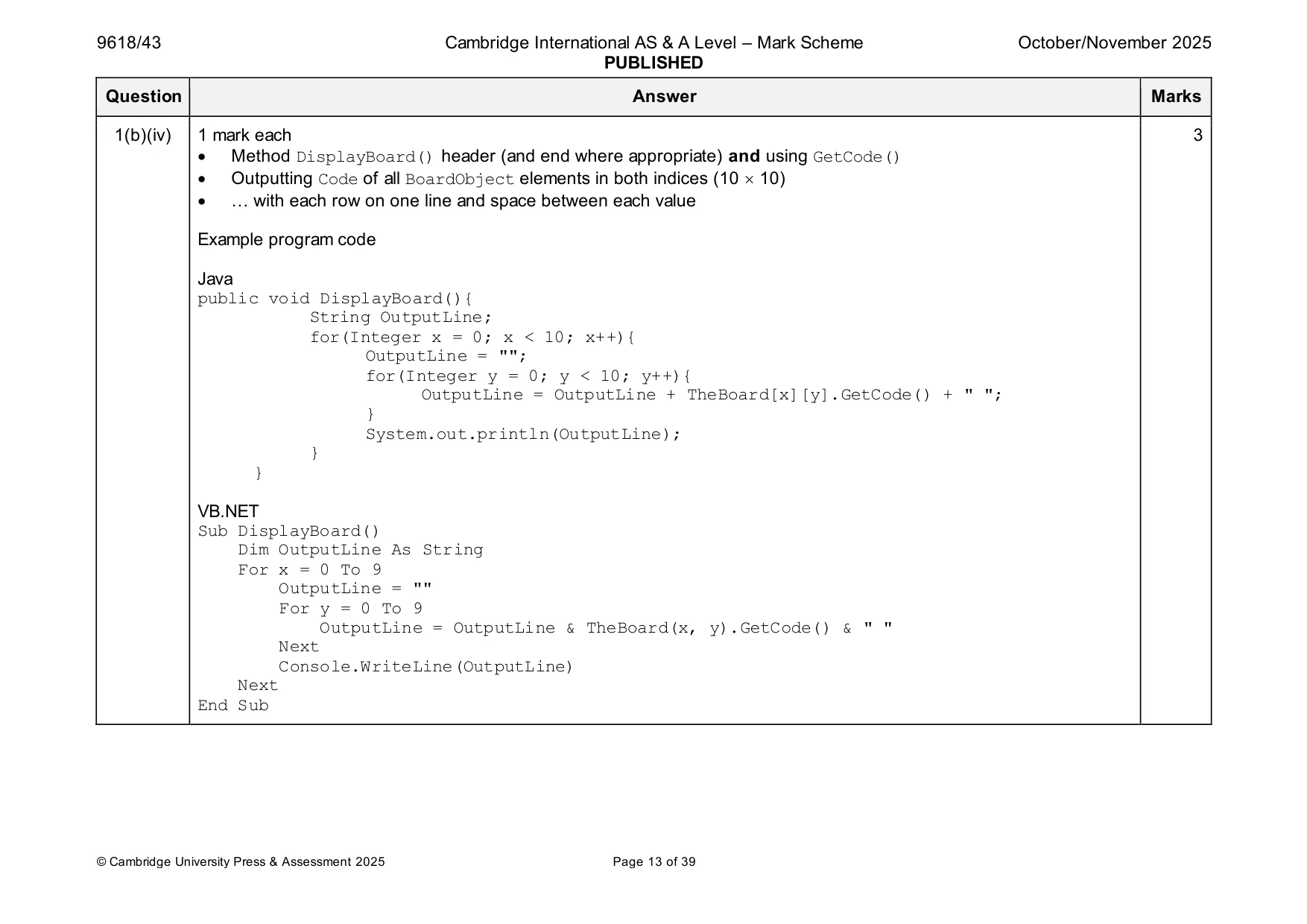
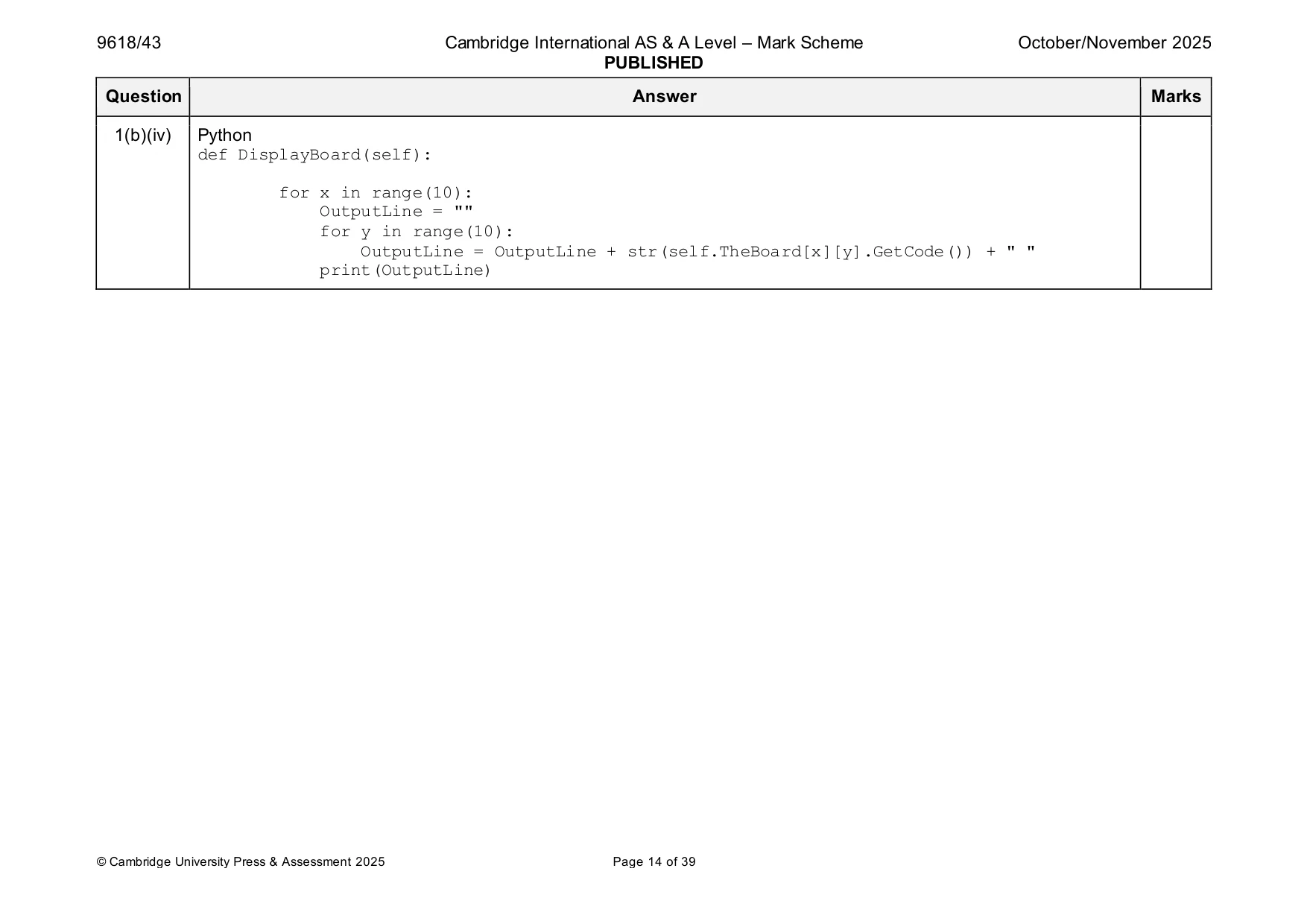
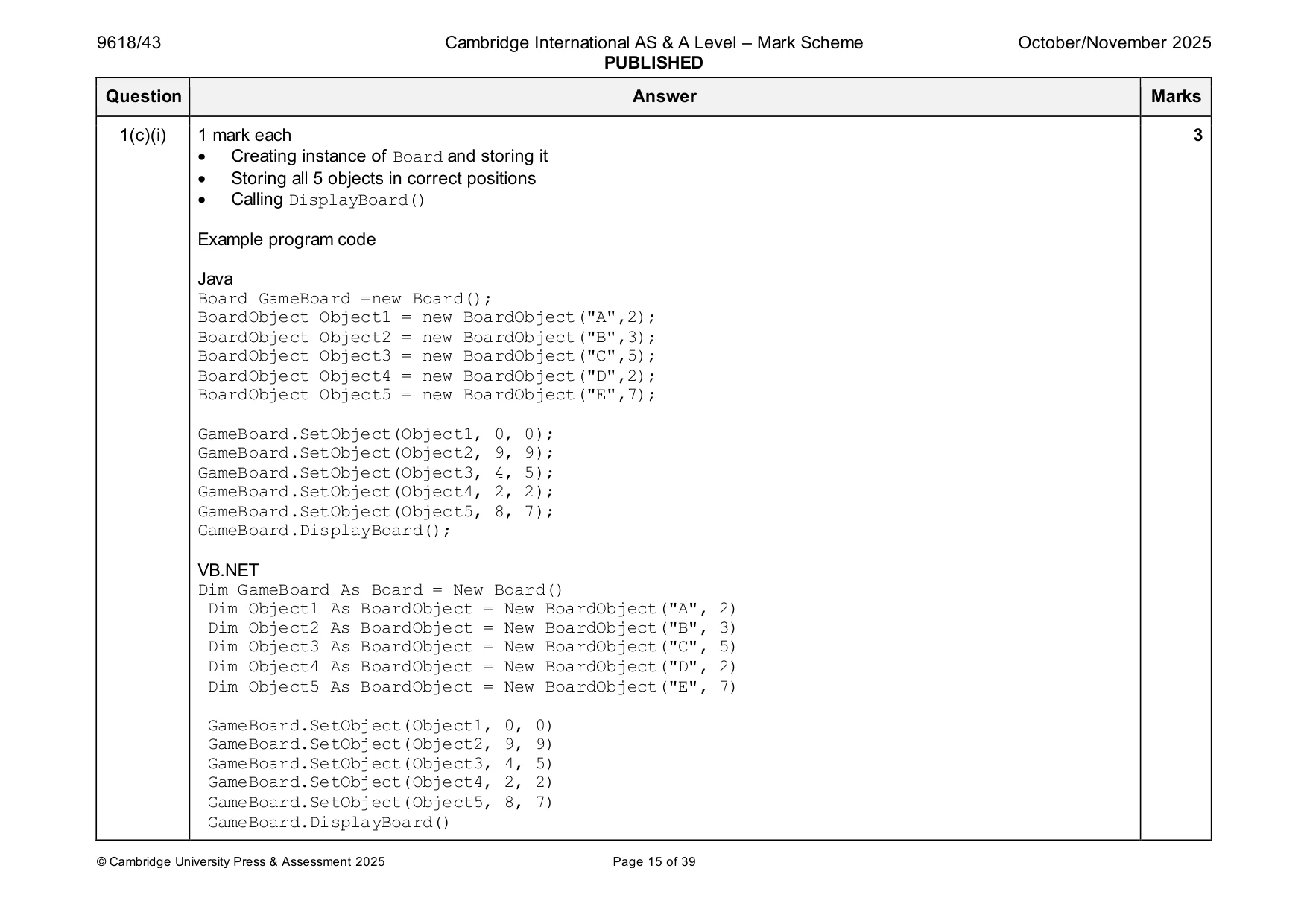
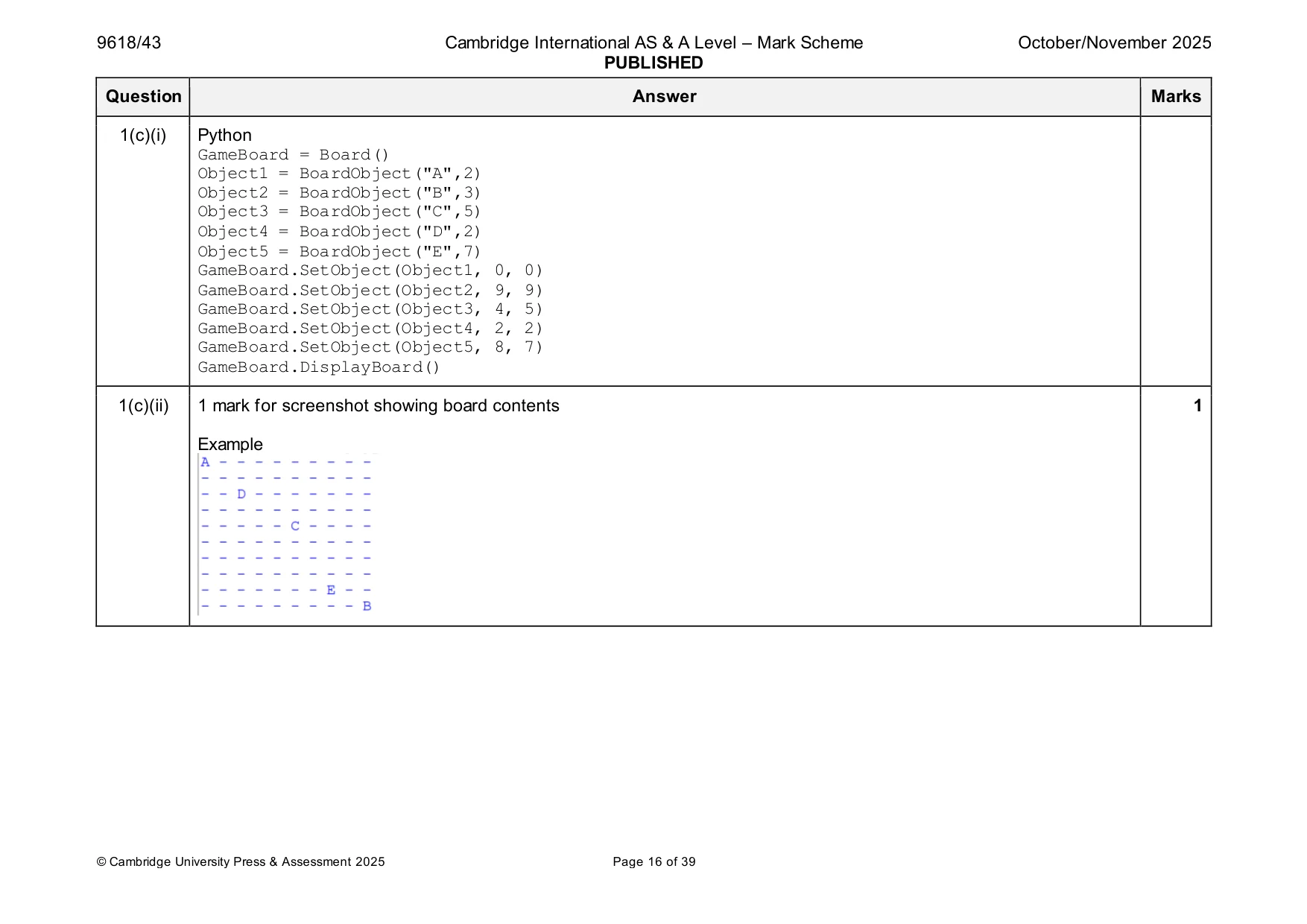
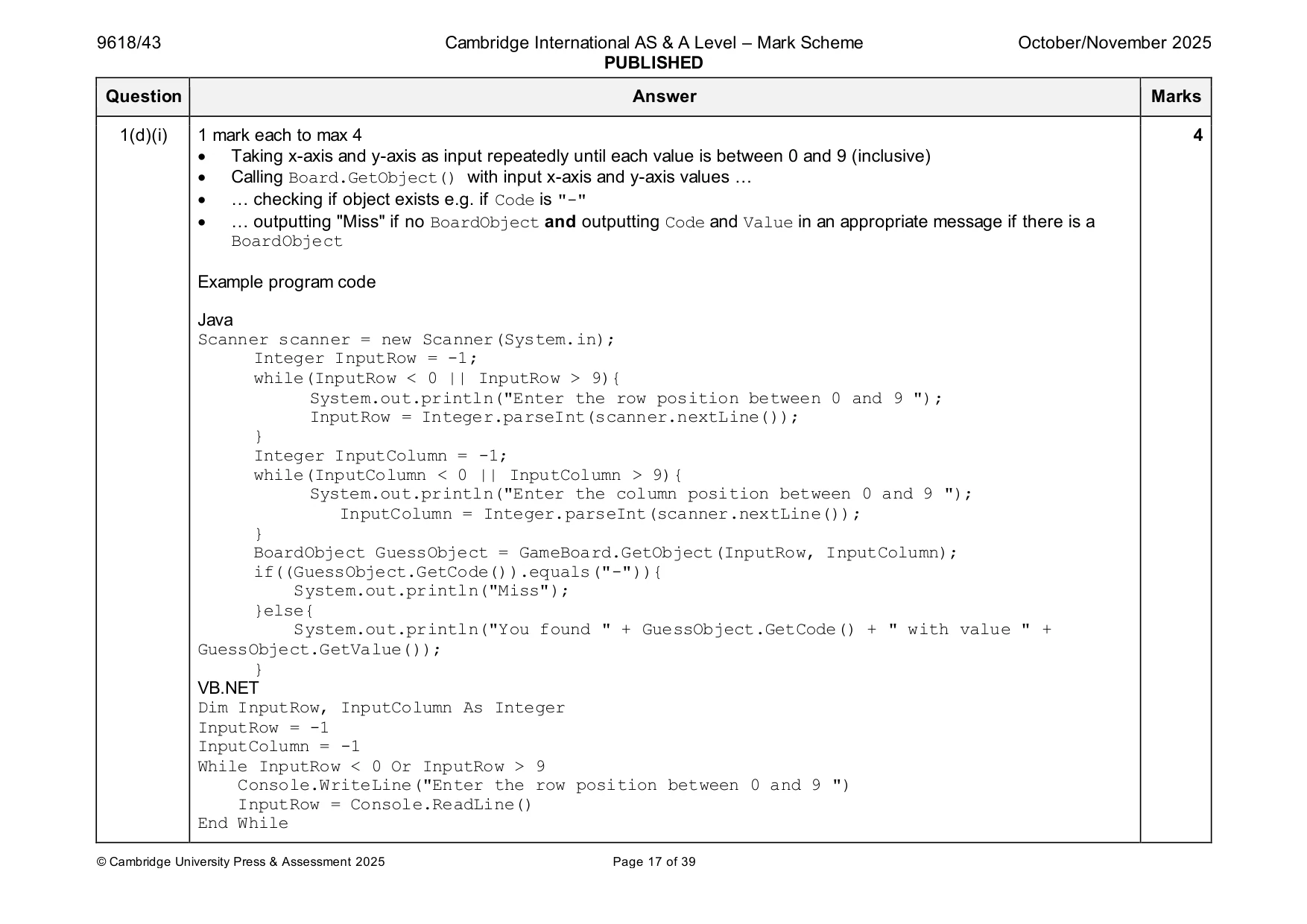
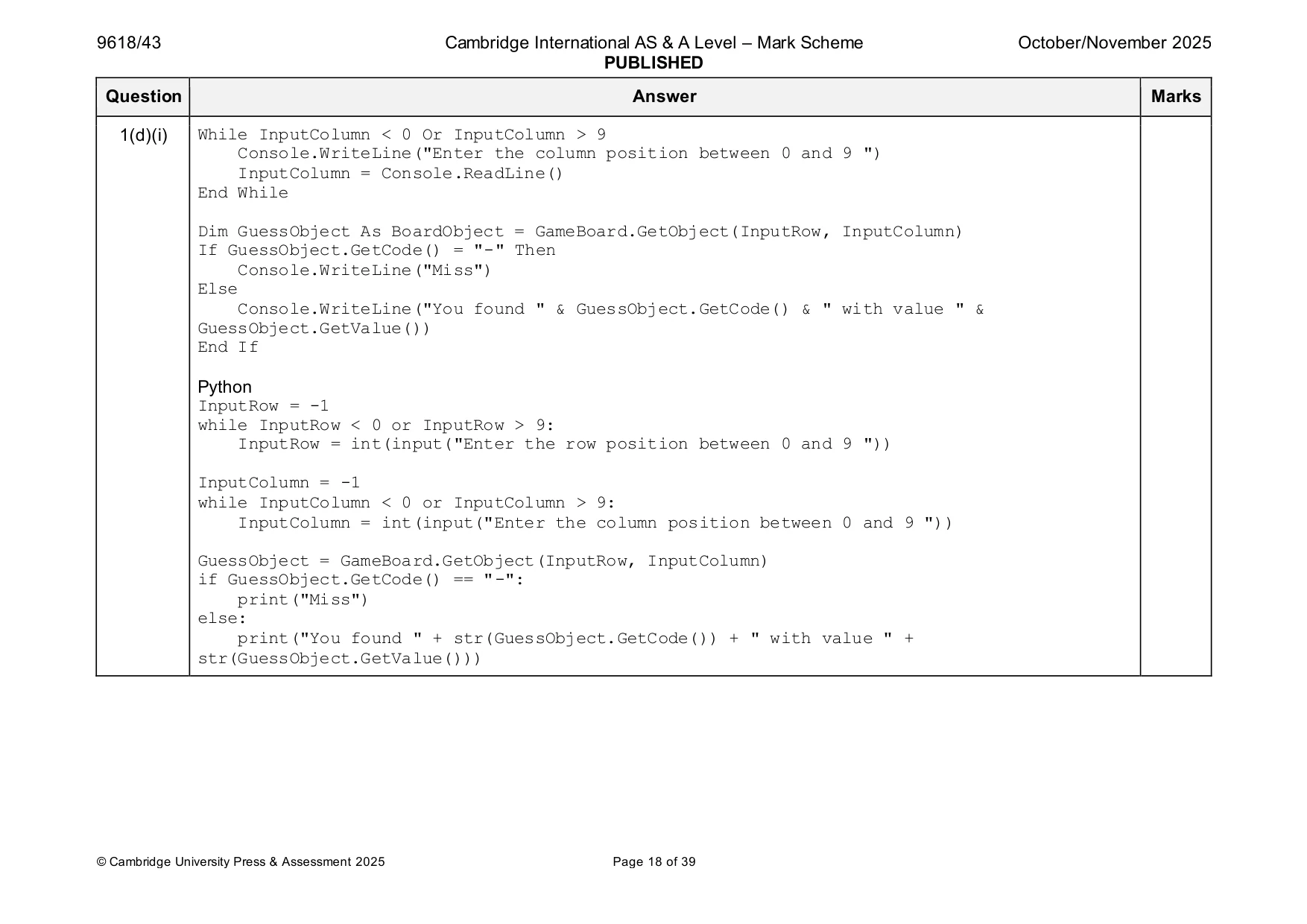
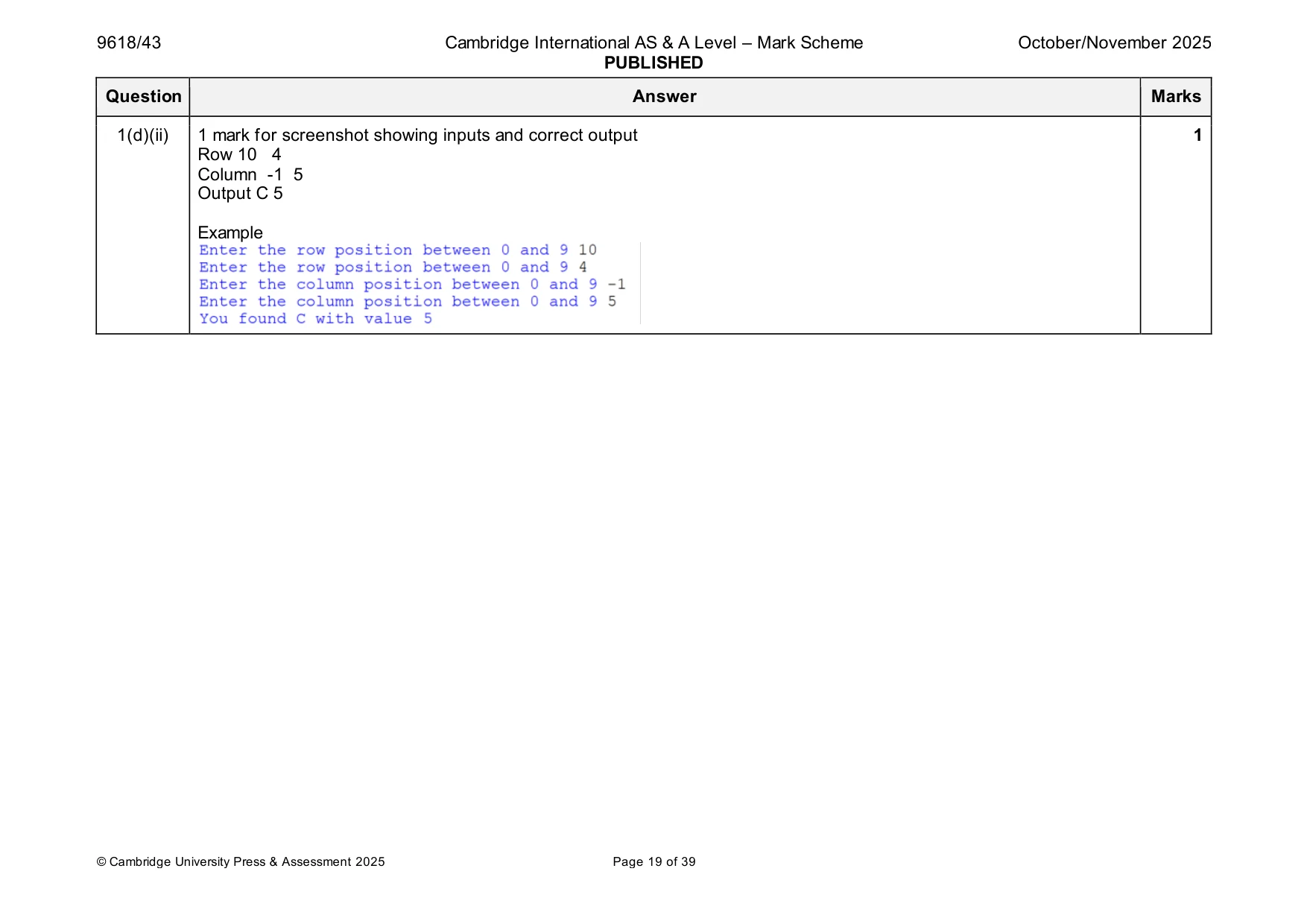
Mark scheme: Question Answer Marks 1(a)(i) 1 mark each 5 • Class header (and end where appropriate) • Declaring Code as string and Value as integer • Constructor header (and end where appropriate) within class … • … taking two parameters … • … assigning parameters to attributes Example program code. Java class BoardObject{ public String Code; public Integer Value; public BoardObject(String pCode, Integer pValue){ Code = pCode; Value = pValue; } } VB.NET Public Class BoardObject Private Code As String Private Value As Integer Sub New(pCode, pValue) Code = pCode Value = pValue End Sub End Class Python class BoardObject(): def __init__(self, Code, Value): self.Code = Code #string self.Value = Value # integer 1(a)(ii) 1 mark each 3 • 1 get header (and end where appropriate) with no parameter … • … returning correct value without overriding • 2nd correct get method Example program code Java public String GetCode(){ return Code; } public Integer GetValue(){ return Value; } VB.NET Function GetCode() Return Code End Function Function GetValue() Return Value End Function Python def GetCode(self): return self.Code def GetValue(self): return self.Value 1(a)(iii) 1 mark each 3 • Creating one instance of BoardObject and storing in correct variable … • … with correct parameters • Remaining four created correctly and stored Example program code Java BoardObject Object1 = new BoardObject("A",2); BoardObject Object2 = new BoardObject("B",3); BoardObject Object3 = new BoardObject("C",5); BoardObject Object4 = new BoardObject("D",2); BoardObject Object5 = new BoardObject("E",7); VB.NET Dim Object1 As BoardObject = New BoardObject("A", 2) Dim Object2 As BoardObject = New BoardObject("B", 3) Dim Object3 As BoardObject = New BoardObject("C", 5) Dim Object4 As BoardObject = New BoardObject("D", 2) Dim Object5 As BoardObject = New BoardObject("E", 7) Python Object1 = BoardObject("A",2) Object2 = BoardObject("B",3) Object3 = BoardObject("C",5) Object4 = BoardObject("D",2) Object5 = BoardObject("E",7) 1(b)(i) 1 mark each 4 • Class header (and end where appropriate) • Constructor header (and end where appropriate) within class • Declaration of 2D array with 10 10 elements of type BoardObject • Storing BoardObject object with Code "-" and Value 0 in each array element Example program code Java class Board{ private BoardObject[][] TheBoard = new BoardObject[10][10]; public Board(){ for(Integer x = 0; x < 10; x++){ for(Integer y = 0; y < 10; y++){ TheBoard[x][y] = new BoardObject("-",0); }}}} VB.NET Public Class Board Private TheBoard(9, 9) As BoardObject Sub New() For x = 0 To 9 For y = 0 To 9 TheBoard(x, y) = New BoardObject("-", 0) Next Next End Sub End Class 1(b)(i) Python class Board(): def __init__(self): self.TheBoard = [] #type BoardObject for x in range(10): TempList = [] for y in range(10): TempList.append(BoardObject("-",0)) self.TheBoard.append(TempList) 1(b)(ii) 1 mark each 2 • Get method header taking 2 (integer) parameters … • … returning the BoardObject at Board position of parameters Example program code Java public BoardObject GetObject(Integer Rowpos, Integer Columnpos){ return TheBoard[Rowpos][Columnpos]; } VB.NET Function GetObject(Rowpos, Columnpos) Return TheBoard(Rowpos, Columnpos) End Function Python def GetObject(self, Rowpos, Columnpos): return self.TheBoard[Rowpos][Columnpos] 1(b)(iii) 1 mark each 2 • Set method header taking three parameters (TheObject, row, column) … • … storing parameter TheObject in TheBoard at parameters row and column Example program code Java public void SetObject(BoardObject TheObject, Integer Rowpos, Integer Columnpos){ TheBoard[Rowpos][Columnpos] = TheObject; } VB.NET Sub SetObject(TheObject, Rowpos, Columnpos) TheBoard(Rowpos, Columnpos) = TheObject End Sub Python def SetObject(self, TheObject, Rowpos, Columnpos): self.TheBoard[Rowpos][Columnpos] = TheObject 1(b)(iv) 1 mark each 3 • Method DisplayBoard() header (and end where appropriate) and using GetCode() • Outputting Code of all BoardObject elements in both indices (10 10) • … with each row on one line and space between each value Example program code Java public void DisplayBoard(){ String OutputLine; for(Integer x = 0; x < 10; x++){ OutputLine = ""; for(Integer y = 0; y < 10; y++){ OutputLine = OutputLine + TheBoard[x][y].GetCode() + " "; } System.out.println(OutputLine); } } VB.NET Sub DisplayBoard() Dim OutputLine As String For x = 0 To 9 OutputLine = "" For y = 0 To 9 OutputLine = OutputLine & TheBoard(x, y).GetCode() & " " Next Console.WriteLine(OutputLine) Next End Sub 1(b)(iv) Python def DisplayBoard(self): for x in range(10): OutputLine = "" for y in range(10): OutputLine = OutputLine + str(self.TheBoard[x][y].GetCode()) + " " print(OutputLine) 1(c)(i) 1 mark each 3 • Creating instance of Board and storing it • Storing all 5 objects in correct positions • Calling DisplayBoard() Example program code Java Board GameBoard =new Board(); BoardObject Object1 = new BoardObject("A",2); BoardObject Object2 = new BoardObject("B",3); BoardObject Object3 = new BoardObject("C",5); BoardObject Object4 = new BoardObject("D",2); BoardObject Object5 = new BoardObject("E",7); GameBoard.SetObject(Object1, 0, 0); GameBoard.SetObject(Object2, 9, 9); GameBoard.SetObject(Object3, 4, 5); GameBoard.SetObject(Object4, 2, 2); GameBoard.SetObject(Object5, 8, 7); GameBoard.DisplayBoard(); VB.NET Dim GameBoard As Board = New Board() Dim Object1 As BoardObject = New BoardObject("A", 2) Dim Object2 As BoardObject = New BoardObject("B", 3) Dim Object3 As BoardObject = New BoardObject("C", 5) Dim Object4 As BoardObject = New BoardObject("D", 2) Dim Object5 As BoardObject = New BoardObject("E", 7) GameBoard.SetObject(Object1, 0, 0) GameBoard.SetObject(Object2, 9, 9) GameBoard.SetObject(Object3, 4, 5) GameBoard.SetObject(Object4, 2, 2) GameBoard.SetObject(Object5, 8, 7) GameBoard.DisplayBoard() 1(c)(i) Python GameBoard = Board() Object1 = BoardObject("A",2) Object2 = BoardObject("B",3) Object3 = BoardObject("C",5) Object4 = BoardObject("D",2) Object5 = BoardObject("E",7) GameBoard.SetObject(Object1, 0, 0) GameBoard.SetObject(Object2, 9, 9) GameBoard.SetObject(Object3, 4, 5) GameBoard.SetObject(Object4, 2, 2) GameBoard.SetObject(Object5, 8, 7) GameBoard.DisplayBoard() 1(c)(ii) 1 mark for screenshot showing board contents 1 Example 1(d)(i) 1 mark each to max 4 4 • Taking x-axis and y-axis as input repeatedly until each value is between 0 and 9 (inclusive) • Calling Board.GetObject() with input x-axis and y-axis values … • … checking if object exists e.g. if Code is "-" • … outputting "Miss" if no BoardObject and outputting Code and Value in an appropriate message if there is a BoardObject Example program code Java Scanner scanner = new Scanner(System.in); Integer InputRow = -1; while(InputRow < 0 || InputRow > 9){ System.out.println("Enter the row position between 0 and 9 "); InputRow = Integer.parseInt(scanner.nextLine()); } Integer InputColumn = -1; while(InputColumn < 0 || InputColumn > 9){ System.out.println("Enter the column position between 0 and 9 "); InputColumn = Integer.parseInt(scanner.nextLine()); } BoardObject GuessObject = GameBoard.GetObject(InputRow, InputColumn); if((GuessObject.GetCode()).equals("-")){ System.out.println("Miss"); }else{ System.out.println("You found " + GuessObject.GetCode() + " with value " + GuessObject.GetValue()); } VB.NET Dim InputRow, InputColumn As Integer InputRow = -1 InputColumn = -1 While InputRow < 0 Or InputRow > 9 Console.WriteLine("Enter the row position between 0 and 9 ") InputRow = Console.ReadLine() End While 1(d)(i) While InputColumn < 0 Or InputColumn > 9 Console.WriteLine("Enter the column position between 0 and 9 ") InputColumn = Console.ReadLine() End While Dim GuessObject As BoardObject = GameBoard.GetObject(InputRow, InputColumn) If GuessObject.GetCode() = "-" Then Console.WriteLine("Miss") Else Console.WriteLine("You found " & GuessObject.GetCode() & " with value " & GuessObject.GetValue()) End If Python InputRow = -1 while InputRow < 0 or InputRow > 9: InputRow = int(input("Enter the row position between 0 and 9 ")) InputColumn = -1 while InputColumn < 0 or InputColumn > 9: InputColumn = int(input("Enter the column position between 0 and 9 ")) GuessObject = GameBoard.GetObject(InputRow, InputColumn) if GuessObject.GetCode() == "-": print("Miss") else: print("You found " + str(GuessObject.GetCode()) + " with value " + str(GuessObject.GetValue())) 1(d)(ii) 1 mark for screenshot showing inputs and correct output 1 Row 10 4 Column -1 5 Output C 5 Example
Q2 · A program reads string data from a text file into a linear queue and then compresses the…
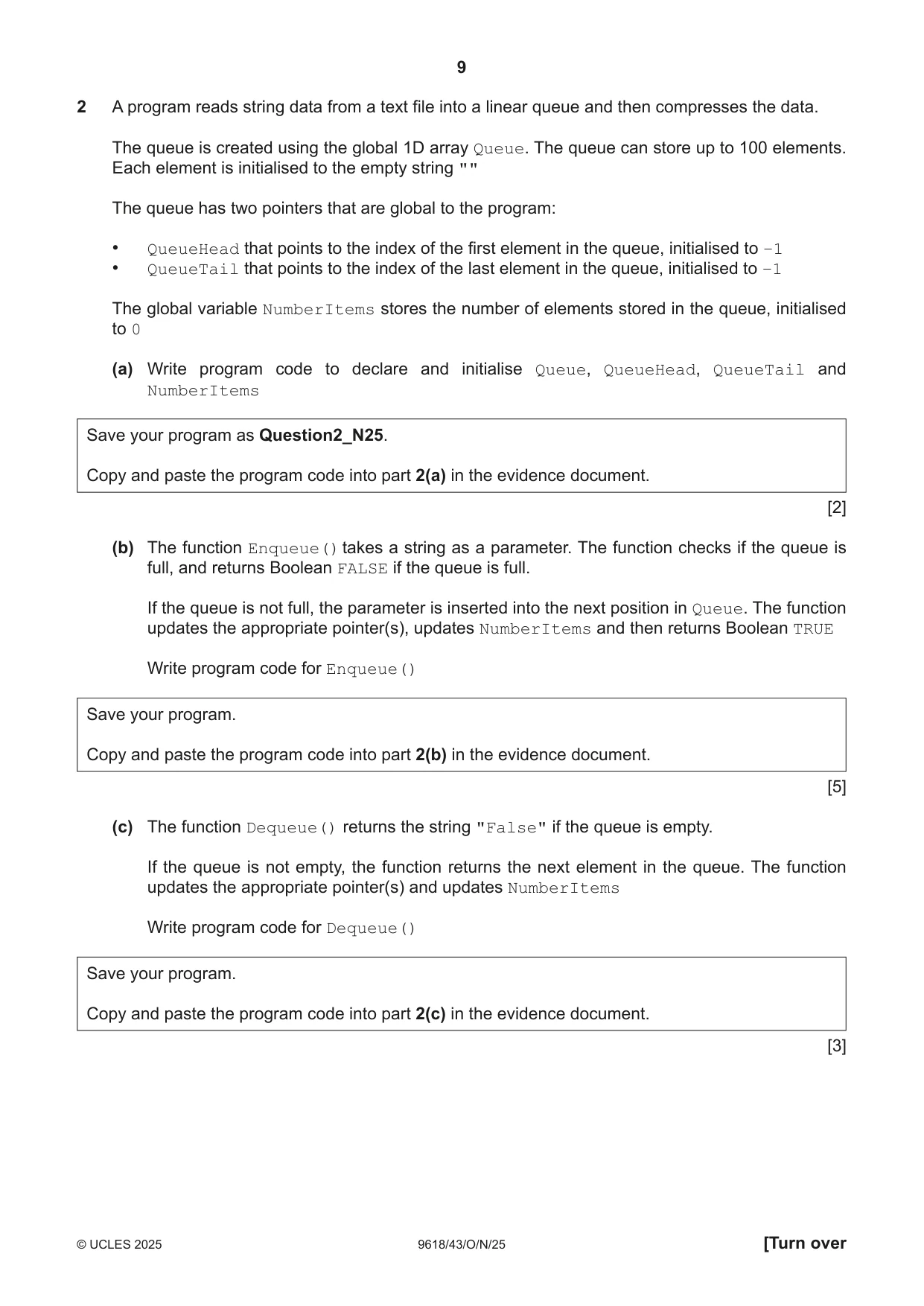
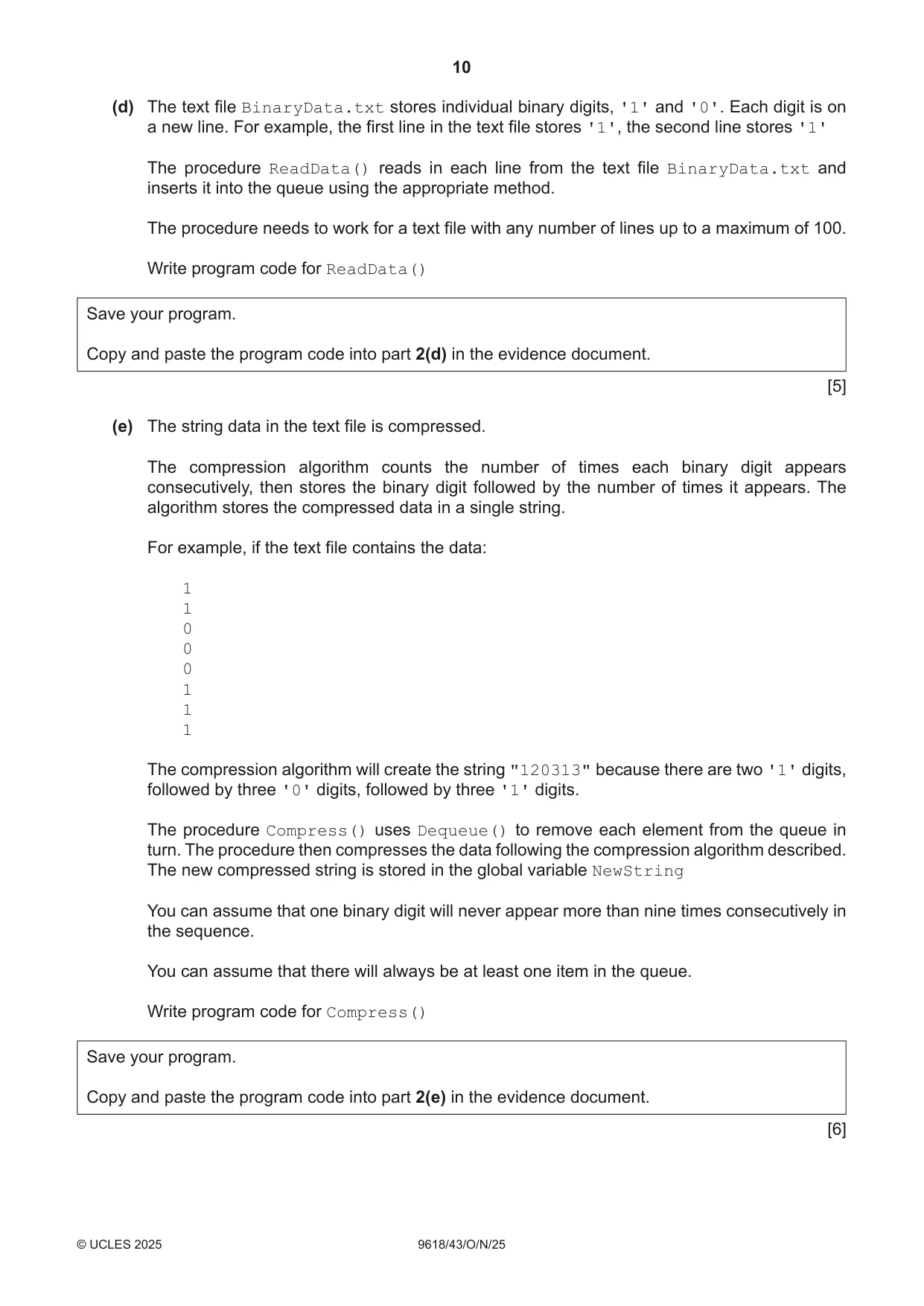
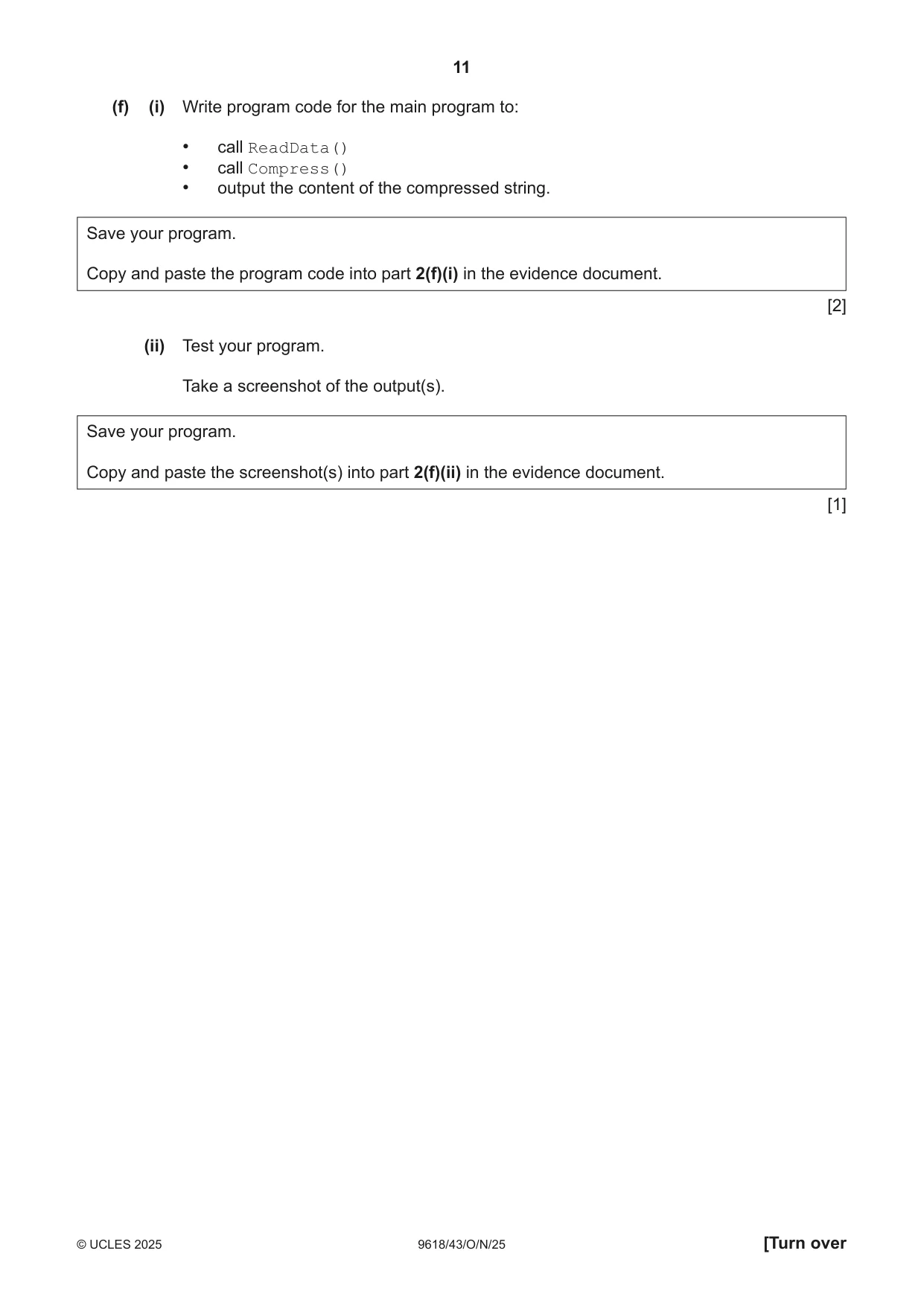
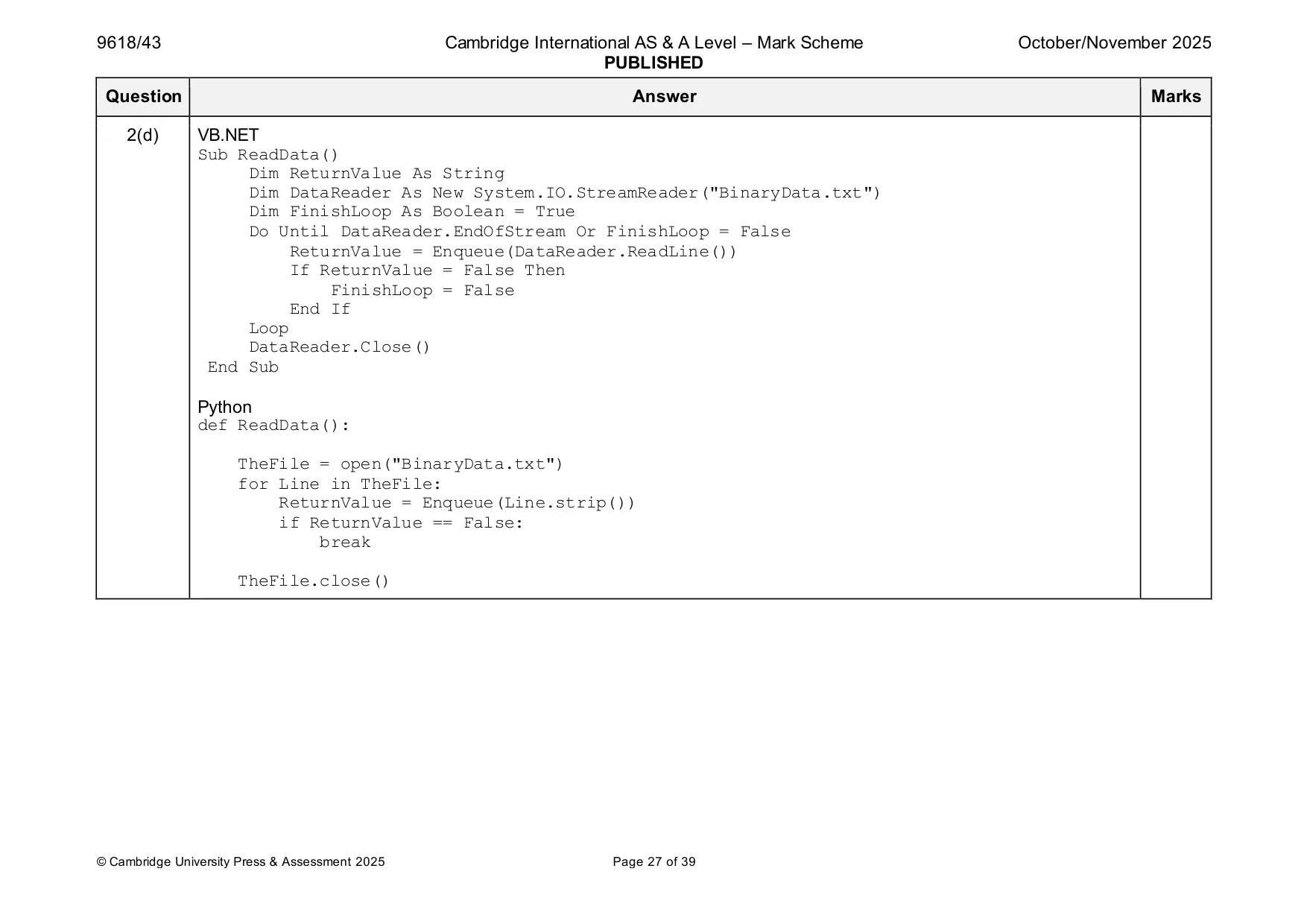
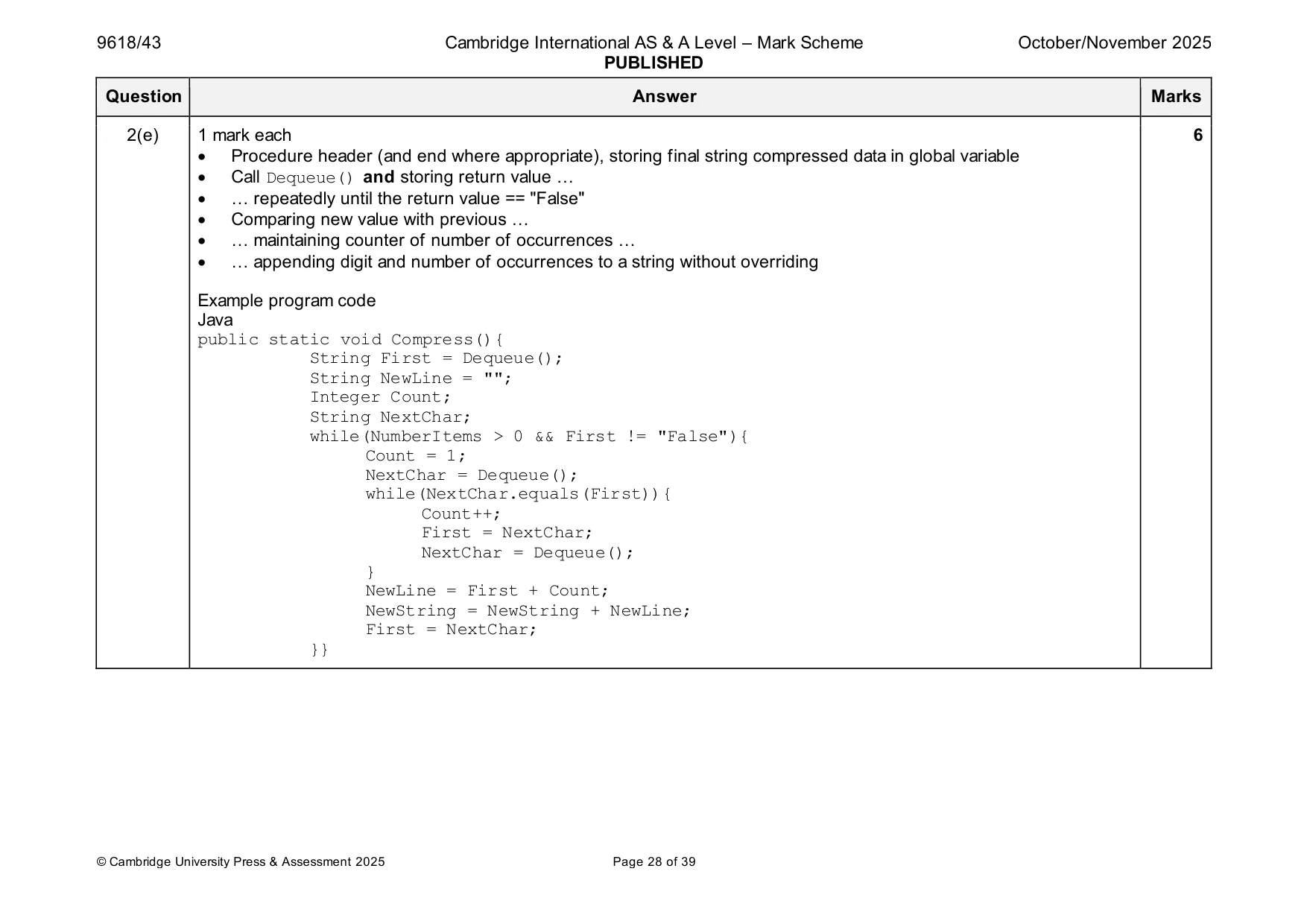
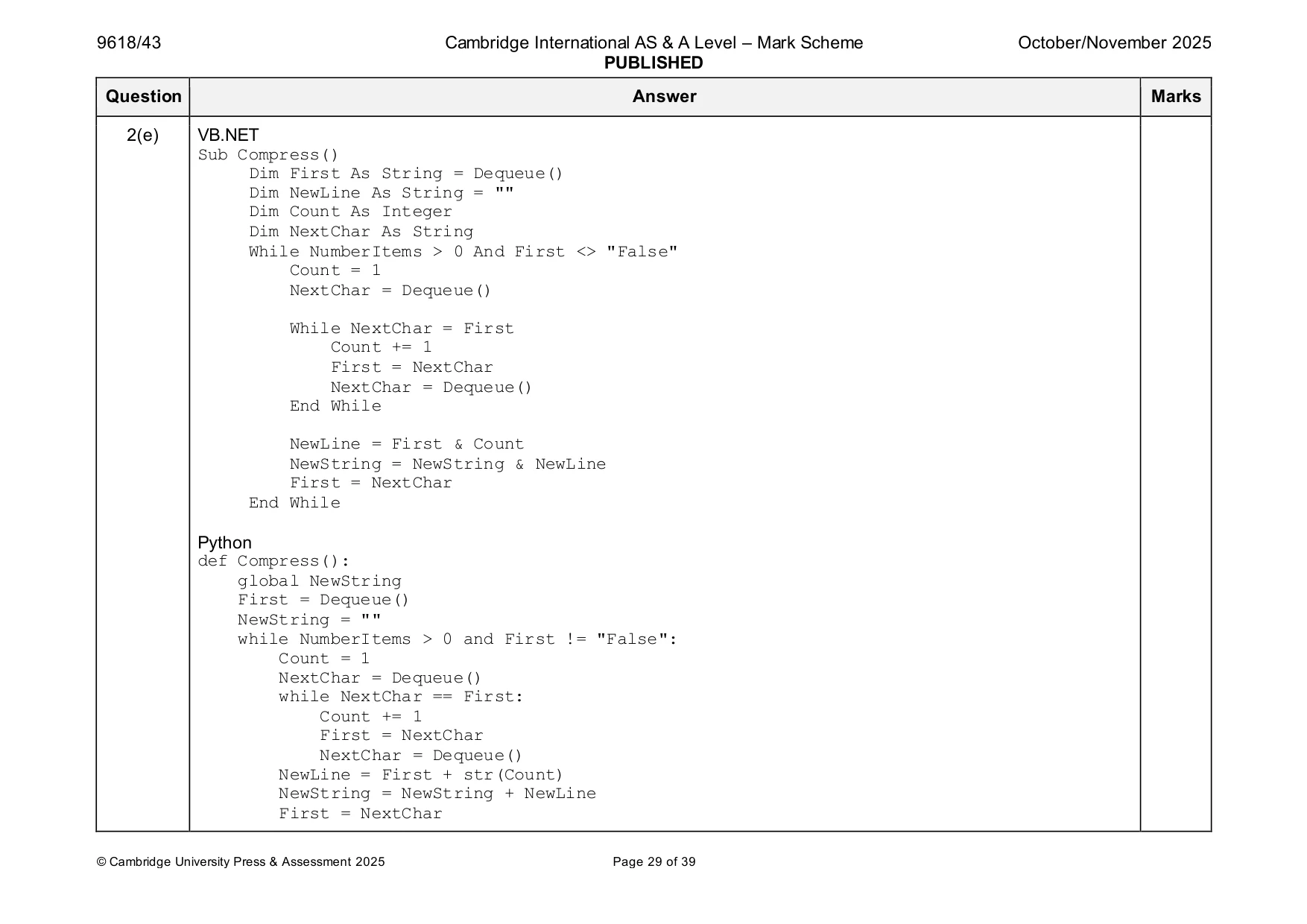
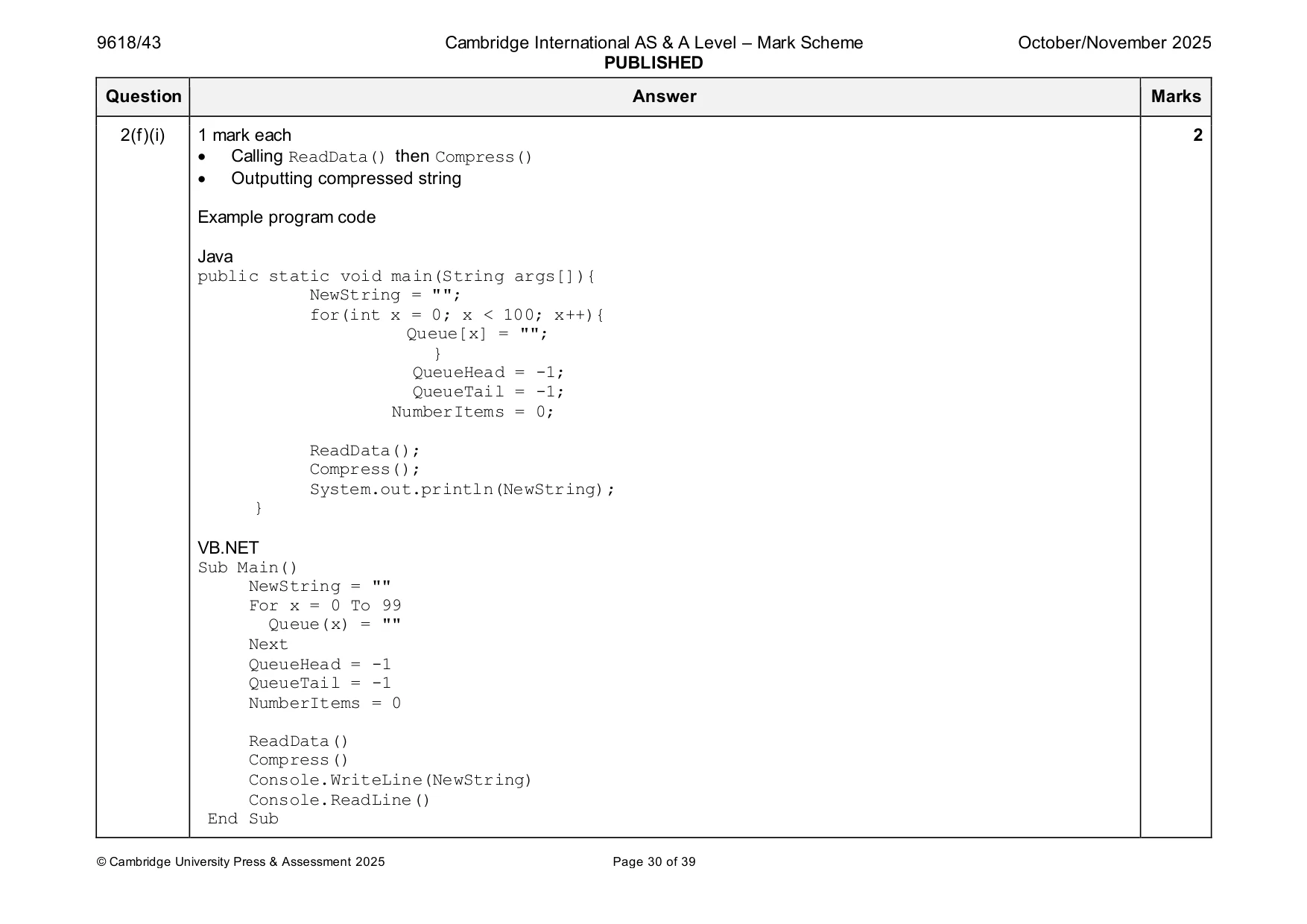
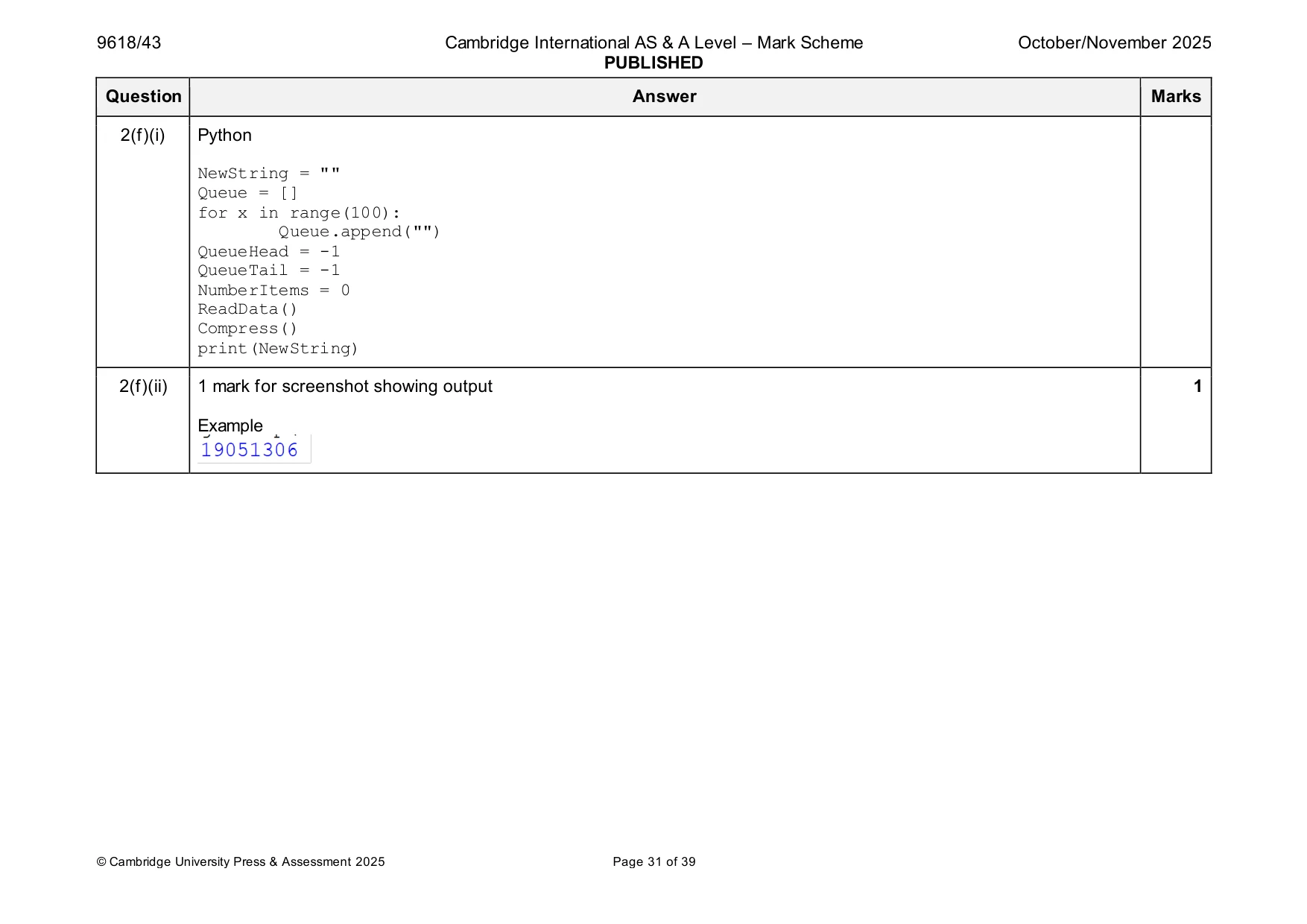
2 A program reads string data from a text file into a linear queue and then compresses the data. The queue is created using the global 1D array Queue. The queue can store up to 100 elements. Each element is initialised to the empty string "" The queue has two pointers that are global to the program: • QueueHead that points to the index of the first element in the queue, initialised to –1 • QueueTail that points to the index of the last element in the queue, initialised to –1 The global variable NumberItems stores the number of elements stored in the queue, initialised to 0 (a) Write program code to declare and initialise Queue, QueueHead, QueueTail and NumberItems Save your program as Question2_N25. Copy and paste the program code into part 2(a) in the evidence document. [2] (b) The function Enqueue() takes a string as a parameter. The function checks if the queue is full, and returns Boolean FALSE if the queue is full. If the queue is not full, the parameter is inserted into the next position in Queue. The function updates the appropriate pointer(s), updates NumberItems and then returns Boolean TRUE Write program code for Enqueue() Save your program. Copy and paste the program code into part 2(b) in the evidence document. [5] (c) The function Dequeue() returns the string "False" if the queue is empty. If the queue is not empty, the function returns the next element in the queue. The function updates the appropriate pointer(s) and updates NumberItems Write program code for Dequeue() Save your program. Copy and paste the program code into part 2(c) in the evidence document. [3] (d) The text file BinaryData.txt stores individual binary digits, '1' and '0'. Each digit is on a new line. For example, the first line in the text file stores '1', the second line stores '1' The procedure ReadData() reads in each line from the text file BinaryData.txt and inserts it into the queue using the appropriate method. The procedure needs to work for a text file with any number of lines up to a maximum of 100. Write program code for ReadData() Save your program. Copy and paste the program code into part 2(d) in the evidence document. [5] (e) The string data in the text file is compressed. The compression algorithm counts the number of times each binary digit appears consecutively, then stores the binary digit followed by the number of times it appears. The algorithm stores the compressed data in a single string. For example, if the text file contains the data: 1 1 0 0 0 1 1 1 The compression algorithm will create the string "120313" because there are two '1' digits, followed by three '0' digits, followed by three '1' digits. The procedure Compress() uses Dequeue() to remove each element from the queue in turn. The procedure then compresses the data following the compression algorithm described. The new compressed string is stored in the global variable NewString You can assume that one binary digit will never appear more than nine times consecutively in the sequence. You can assume that there will always be at least one item in the queue. Write program code for Compress() Save your program. Copy and paste the program code into part 2(e) in the evidence document. [6] (f) (i) Write program code for the main program to: • call ReadData() • call Compress() • output the content of the compressed string. Save your program. Copy and paste the program code into part 2(f)(i) in the evidence document. [2] (ii) Test your program. Take a screenshot of the output(s). Save your program. Copy and paste the screenshot(s) into part 2(f)(ii) in the evidence document. [1]
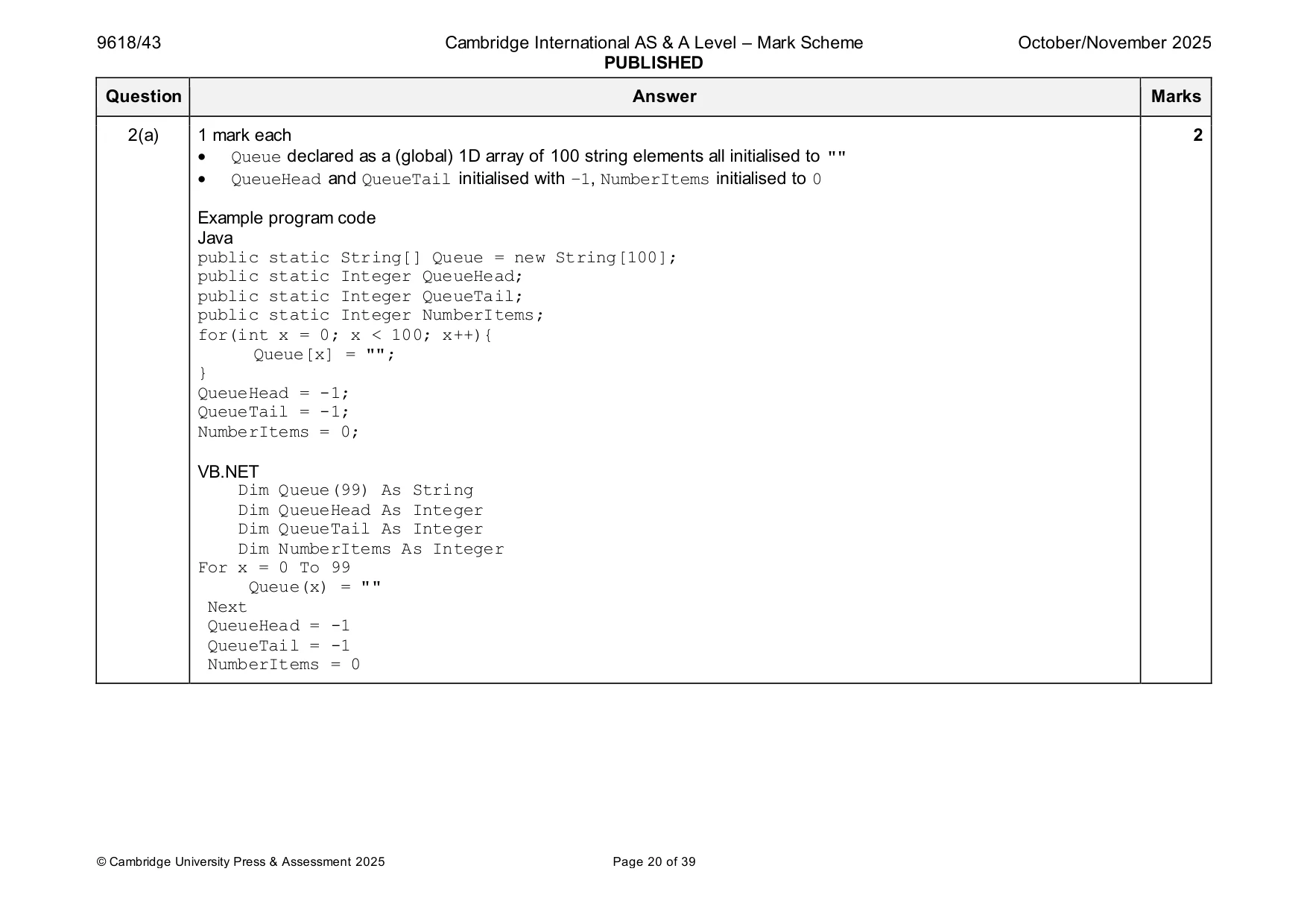
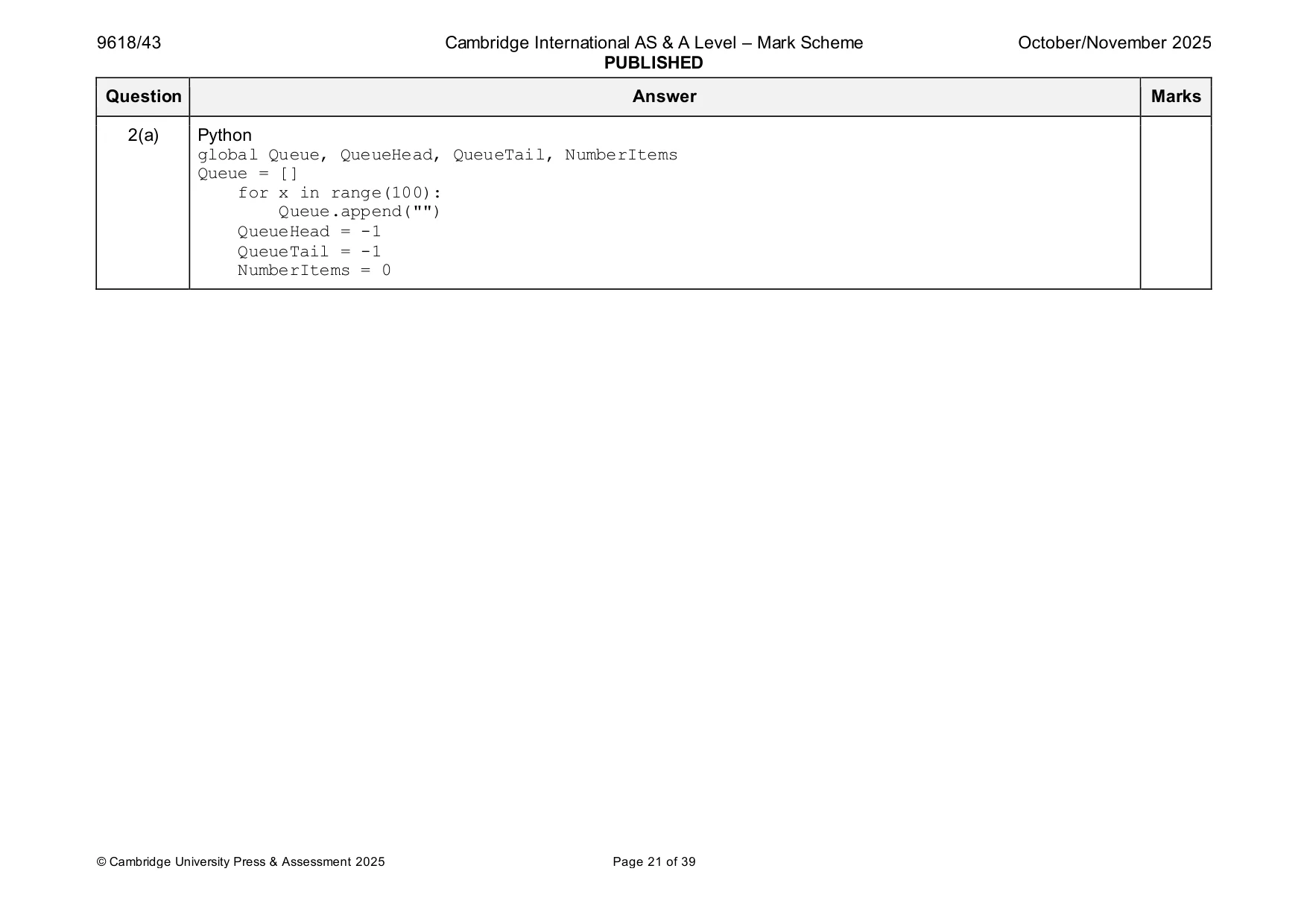
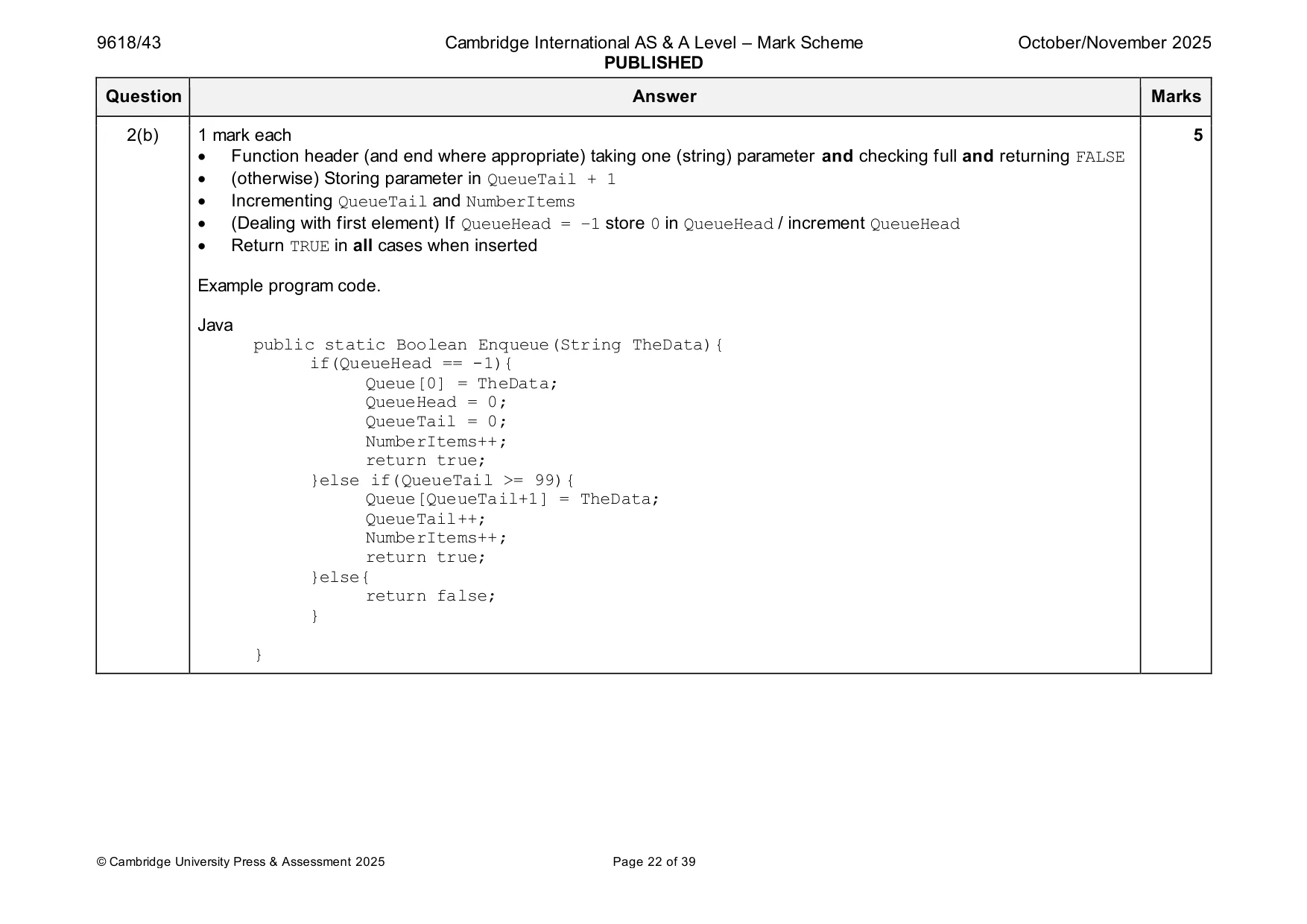
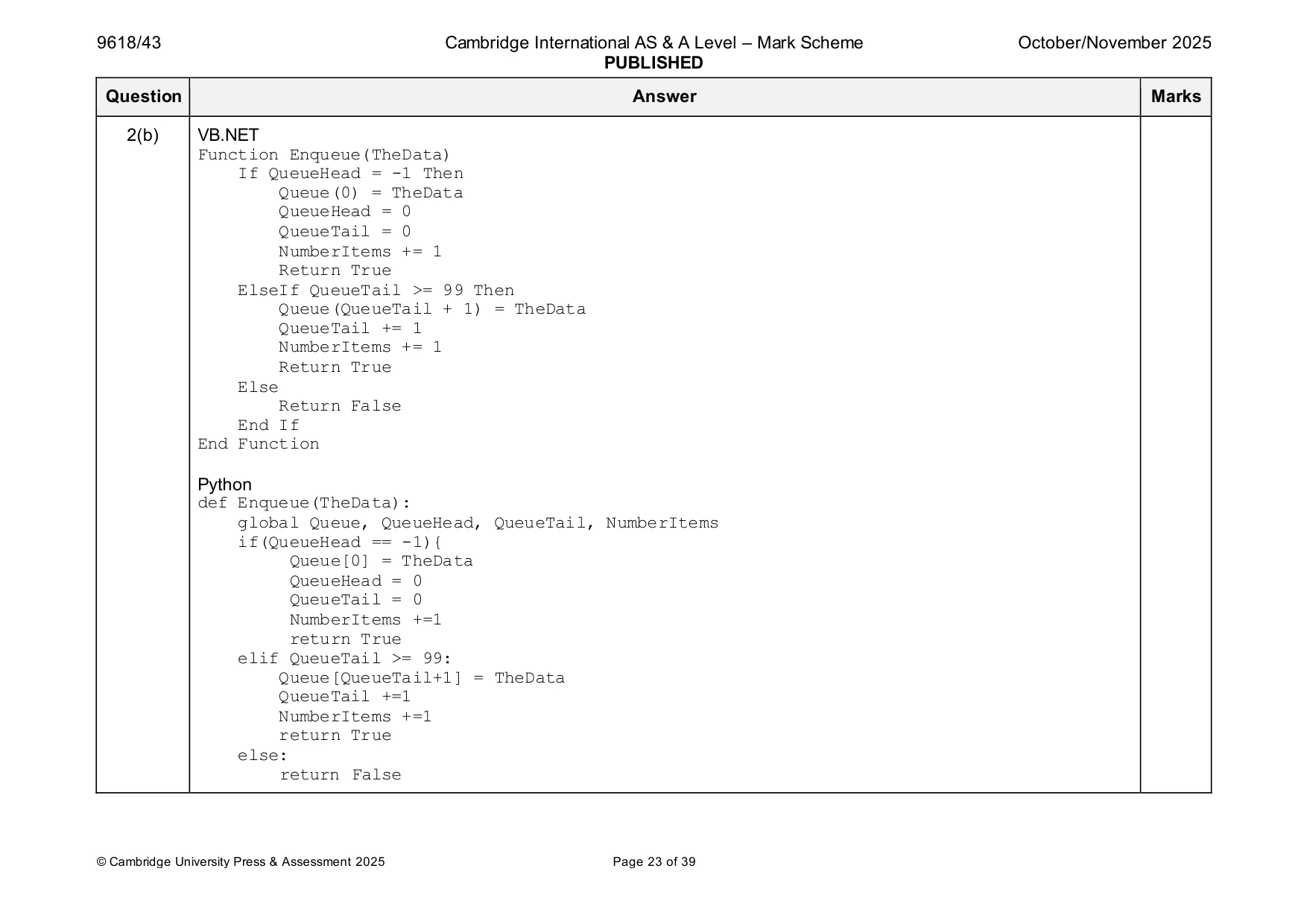
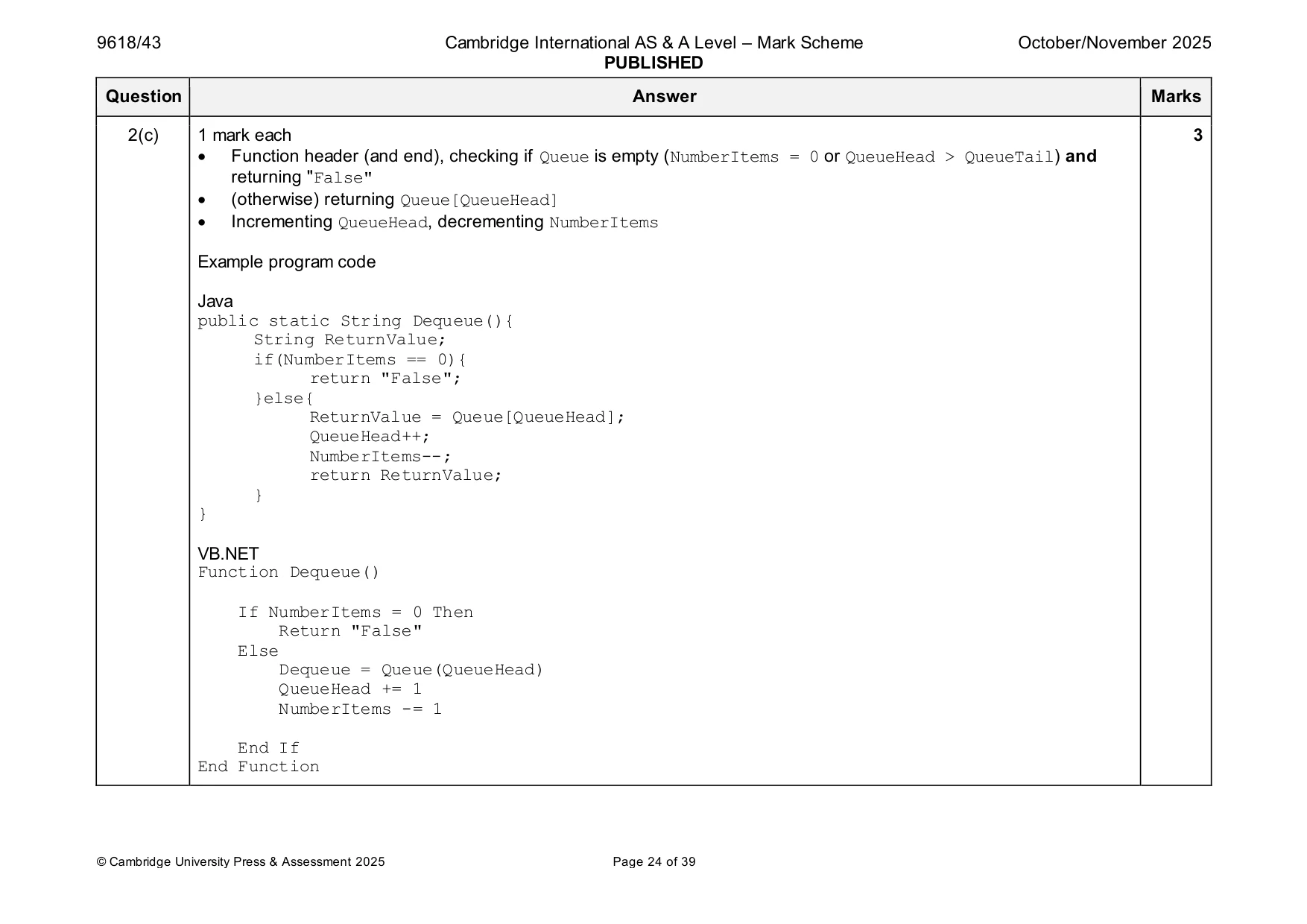
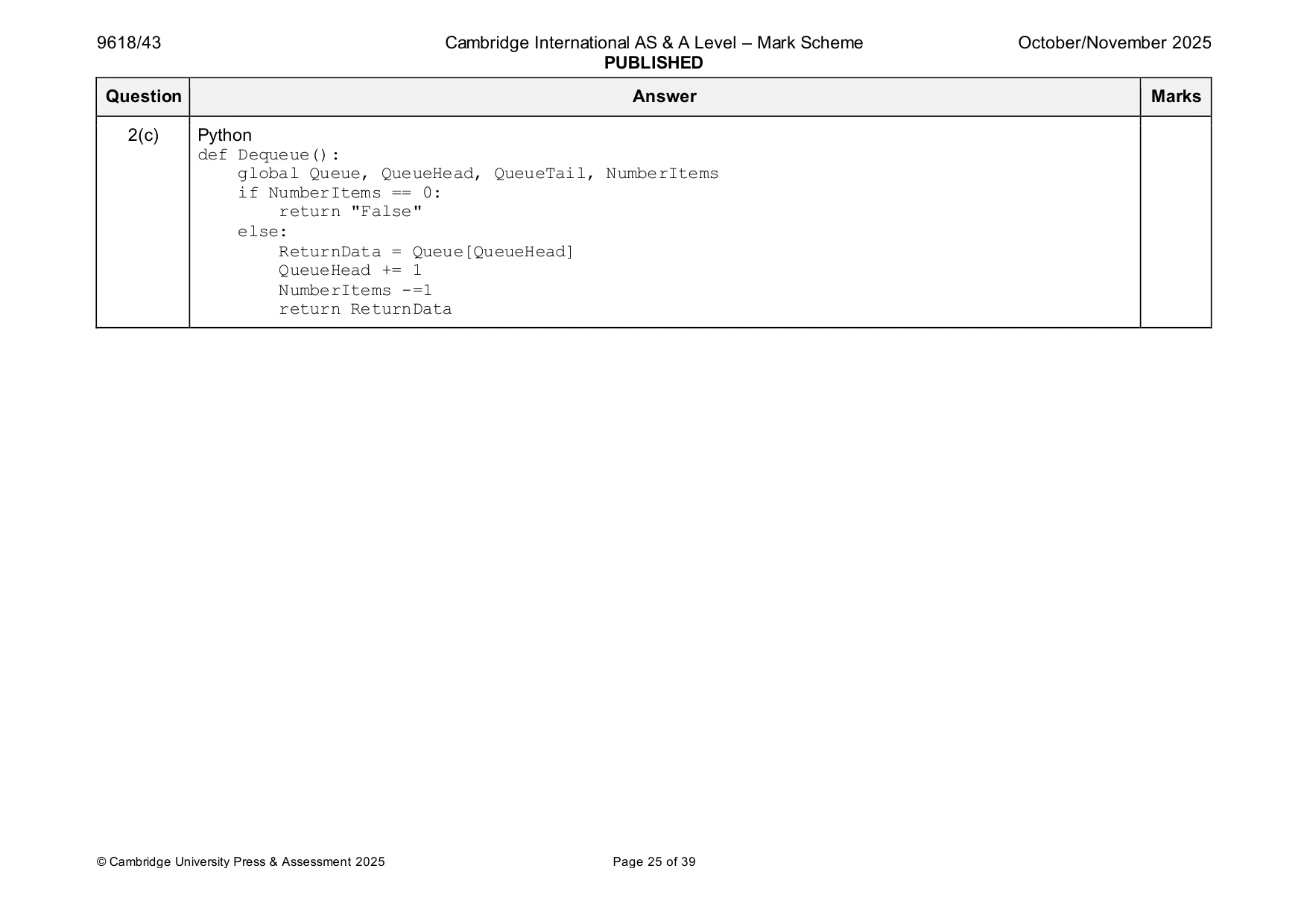
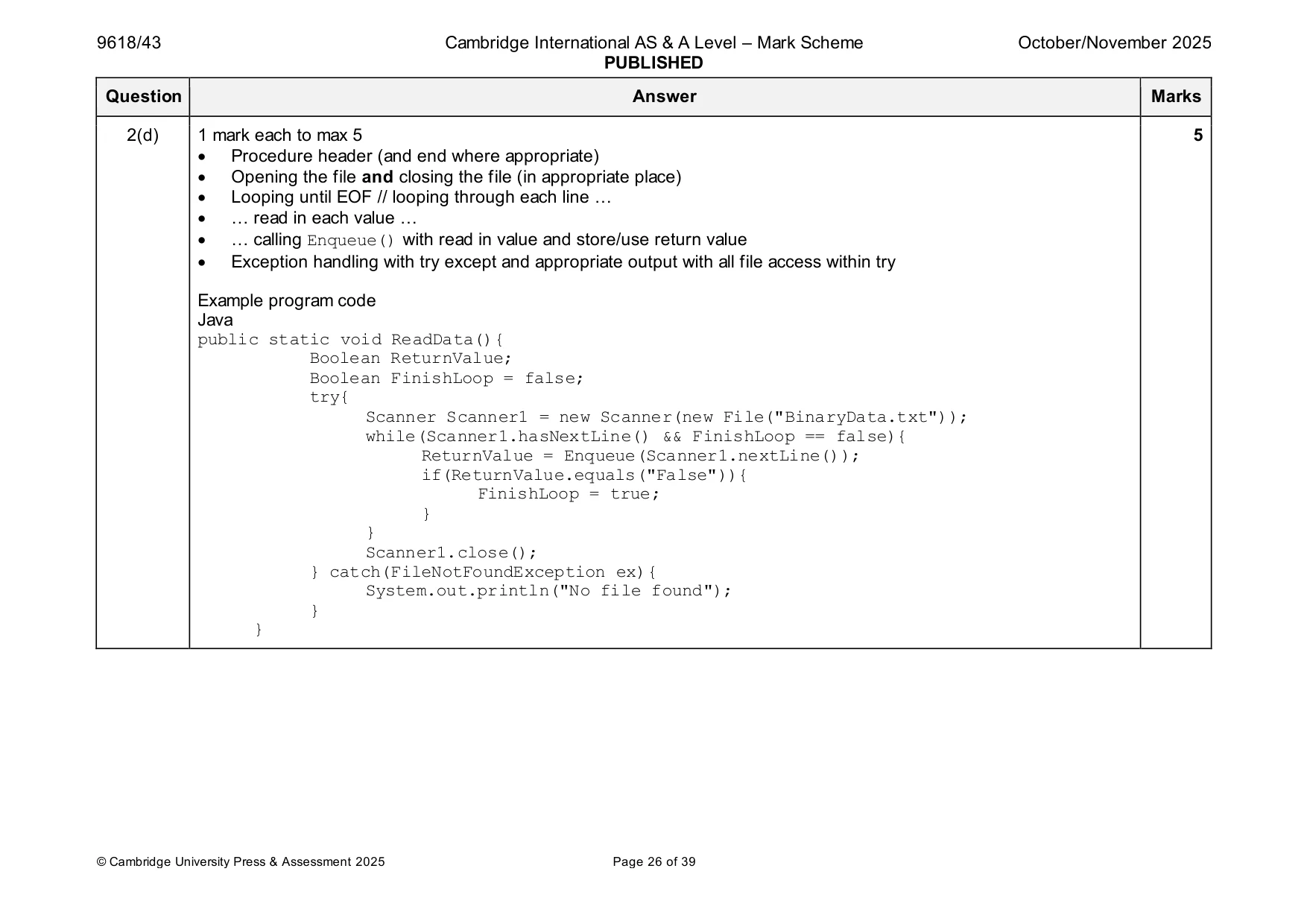
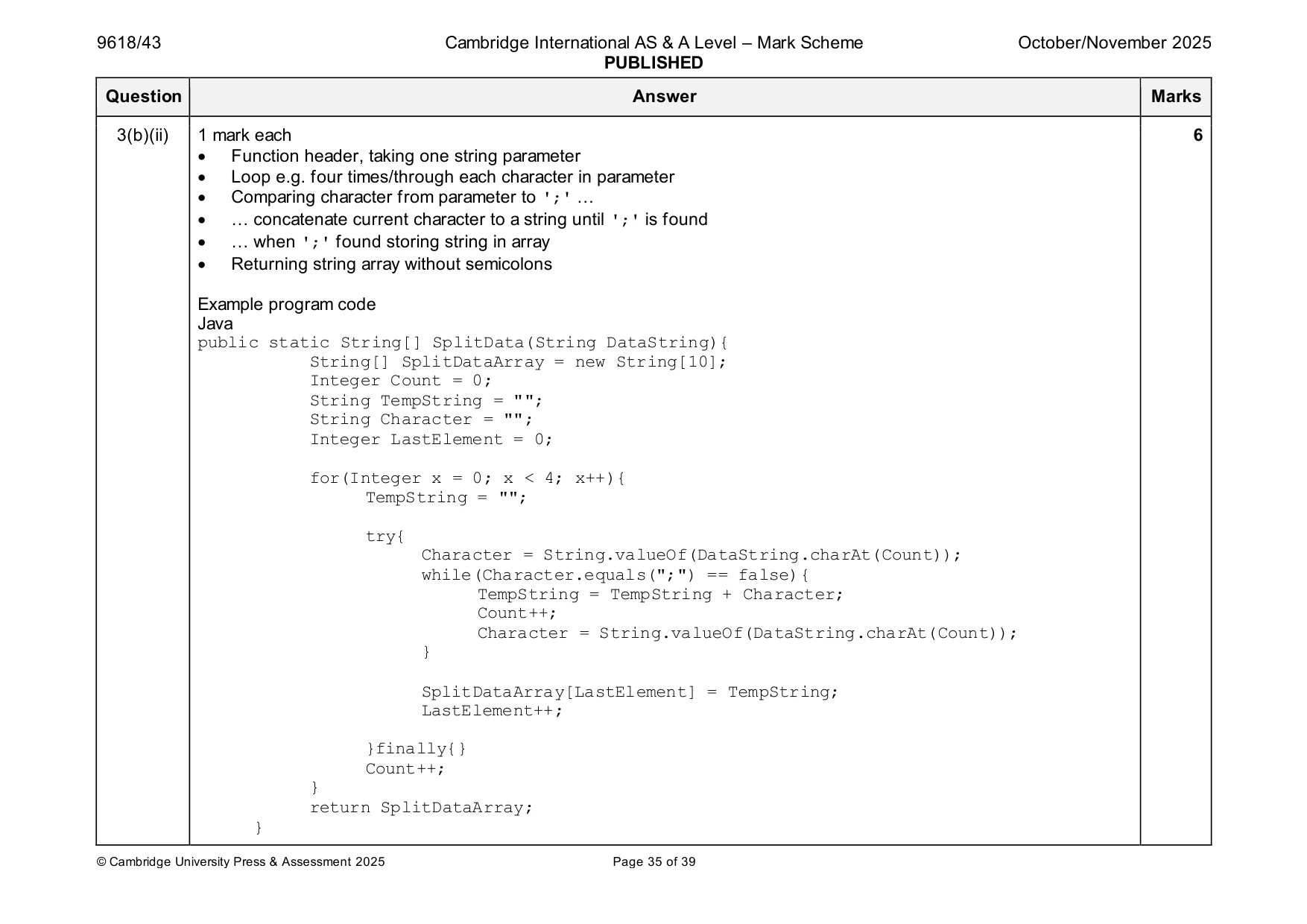
Mark scheme: 2(a) 1 mark each 2 • Queue declared as a (global) 1D array of 100 string elements all initialised to "" • QueueHead and QueueTail initialised with –1, NumberItems initialised to 0 Example program code Java public static String[] Queue = new String[100]; public static Integer QueueHead; public static Integer QueueTail; public static Integer NumberItems; for(int x = 0; x < 100; x++){ Queue[x] = ""; } QueueHead = -1; QueueTail = -1; NumberItems = 0; VB.NET Dim Queue(99) As String Dim QueueHead As Integer Dim QueueTail As Integer Dim NumberItems As Integer For x = 0 To 99 Queue(x) = "" Next QueueHead = -1 QueueTail = -1 NumberItems = 0 2(a) Python global Queue, QueueHead, QueueTail, NumberItems Queue = [] for x in range(100): Queue.append("") QueueHead = -1 QueueTail = -1 NumberItems = 0 2(b) 1 mark each 5 • Function header (and end where appropriate) taking one (string) parameter and checking full and returning FALSE • (otherwise) Storing parameter in QueueTail + 1 • Incrementing QueueTail and NumberItems • (Dealing with first element) If QueueHead = –1 store 0 in QueueHead / increment QueueHead • Return TRUE in all cases when inserted Example program code. Java public static Boolean Enqueue(String TheData){ if(QueueHead == -1){ Queue[0] = TheData; QueueHead = 0; QueueTail = 0; NumberItems++; return true; }else if(QueueTail >= 99){ Queue[QueueTail+1] = TheData; QueueTail++; NumberItems++; return true; }else{ return false; } } 2(b) VB.NET Function Enqueue(TheData) If QueueHead = -1 Then Queue(0) = TheData QueueHead = 0 QueueTail = 0 NumberItems += 1 Return True ElseIf QueueTail >= 99 Then Queue(QueueTail + 1) = TheData QueueTail += 1 NumberItems += 1 Return True Else Return False End If End Function Python def Enqueue(TheData): global Queue, QueueHead, QueueTail, NumberItems if(QueueHead == -1){ Queue[0] = TheData QueueHead = 0 QueueTail = 0 NumberItems +=1 return True elif QueueTail >= 99: Queue[QueueTail+1] = TheData QueueTail +=1 NumberItems +=1 return True else: return False 2(c) 1 mark each 3 • Function header (and end), checking if Queue is empty (NumberItems = 0 or QueueHead > QueueTail) and returning "False" • (otherwise) returning Queue[QueueHead] • Incrementing QueueHead, decrementing NumberItems Example program code Java public static String Dequeue(){ String ReturnValue; if(NumberItems == 0){ return "False"; }else{ ReturnValue = Queue[QueueHead]; QueueHead++; NumberItems--; return ReturnValue; } } VB.NET Function Dequeue() If NumberItems = 0 Then Return "False" Else Dequeue = Queue(QueueHead) QueueHead += 1 NumberItems -= 1 End If End Function 2(c) Python def Dequeue(): global Queue, QueueHead, QueueTail, NumberItems if NumberItems == 0: return "False" else: ReturnData = Queue[QueueHead] QueueHead += 1 NumberItems -=1 return ReturnData 2(d) 1 mark each to max 5 5 • Procedure header (and end where appropriate) • Opening the file and closing the file (in appropriate place) • Looping until EOF // looping through each line … • … read in each value … • … calling Enqueue() with read in value and store/use return value • Exception handling with try except and appropriate output with all file access within try Example program code Java public static void ReadData(){ Boolean ReturnValue; Boolean FinishLoop = false; try{ Scanner Scanner1 = new Scanner(new File("BinaryData.txt")); while(Scanner1.hasNextLine() && FinishLoop == false){ ReturnValue = Enqueue(Scanner1.nextLine()); if(ReturnValue.equals("False")){ FinishLoop = true; } } Scanner1.close(); } catch(FileNotFoundException ex){ System.out.println("No file found"); } } 2(d) VB.NET Sub ReadData() Dim ReturnValue As String Dim DataReader As New System.IO.StreamReader("BinaryData.txt") Dim FinishLoop As Boolean = True Do Until DataReader.EndOfStream Or FinishLoop = False ReturnValue = Enqueue(DataReader.ReadLine()) If ReturnValue = False Then FinishLoop = False End If Loop DataReader.Close() End Sub Python def ReadData(): TheFile = open("BinaryData.txt") for Line in TheFile: ReturnValue = Enqueue(Line.strip()) if ReturnValue == False: break TheFile.close() 2(e) 1 mark each 6 • Procedure header (and end where appropriate), storing final string compressed data in global variable • Call Dequeue() and storing return value … • … repeatedly until the return value == "False" • Comparing new value with previous … • … maintaining counter of number of occurrences … • … appending digit and number of occurrences to a string without overriding Example program code Java public static void Compress(){ String First = Dequeue(); String NewLine = ""; Integer Count; String NextChar; while(NumberItems > 0 && First != "False"){ Count = 1; NextChar = Dequeue(); while(NextChar.equals(First)){ Count++; First = NextChar; NextChar = Dequeue(); } NewLine = First + Count; NewString = NewString + NewLine; First = NextChar; }} 2(e) VB.NET Sub Compress() Dim First As String = Dequeue() Dim NewLine As String = "" Dim Count As Integer Dim NextChar As String While NumberItems > 0 And First <> "False" Count = 1 NextChar = Dequeue() While NextChar = First Count += 1 First = NextChar NextChar = Dequeue() End While NewLine = First & Count NewString = NewString & NewLine First = NextChar End While Python def Compress(): global NewString First = Dequeue() NewString = "" while NumberItems > 0 and First != "False": Count = 1 NextChar = Dequeue() while NextChar == First: Count += 1 First = NextChar NextChar = Dequeue() NewLine = First + str(Count) NewString = NewString + NewLine First = NextChar 2(f)(i) 1 mark each 2 • Calling ReadData() then Compress() • Outputting compressed string Example program code Java public static void main(String args[]){ NewString = ""; for(int x = 0; x < 100; x++){ Queue[x] = ""; } QueueHead = -1; QueueTail = -1; NumberItems = 0; ReadData(); Compress(); System.out.println(NewString); } VB.NET Sub Main() NewString = "" For x = 0 To 99 Queue(x) = "" Next QueueHead = -1 QueueTail = -1 NumberItems = 0 ReadData() Compress() Console.WriteLine(NewString) Console.ReadLine() End Sub 2(f)(i) Python NewString = "" Queue = [] for x in range(100): Queue.append("") QueueHead = -1 QueueTail = -1 NumberItems = 0 ReadData() Compress() print(NewString) 2(f)(ii) 1 mark for screenshot showing output 1 Example
Q3 · A program is written to perform different individual processes using arrays
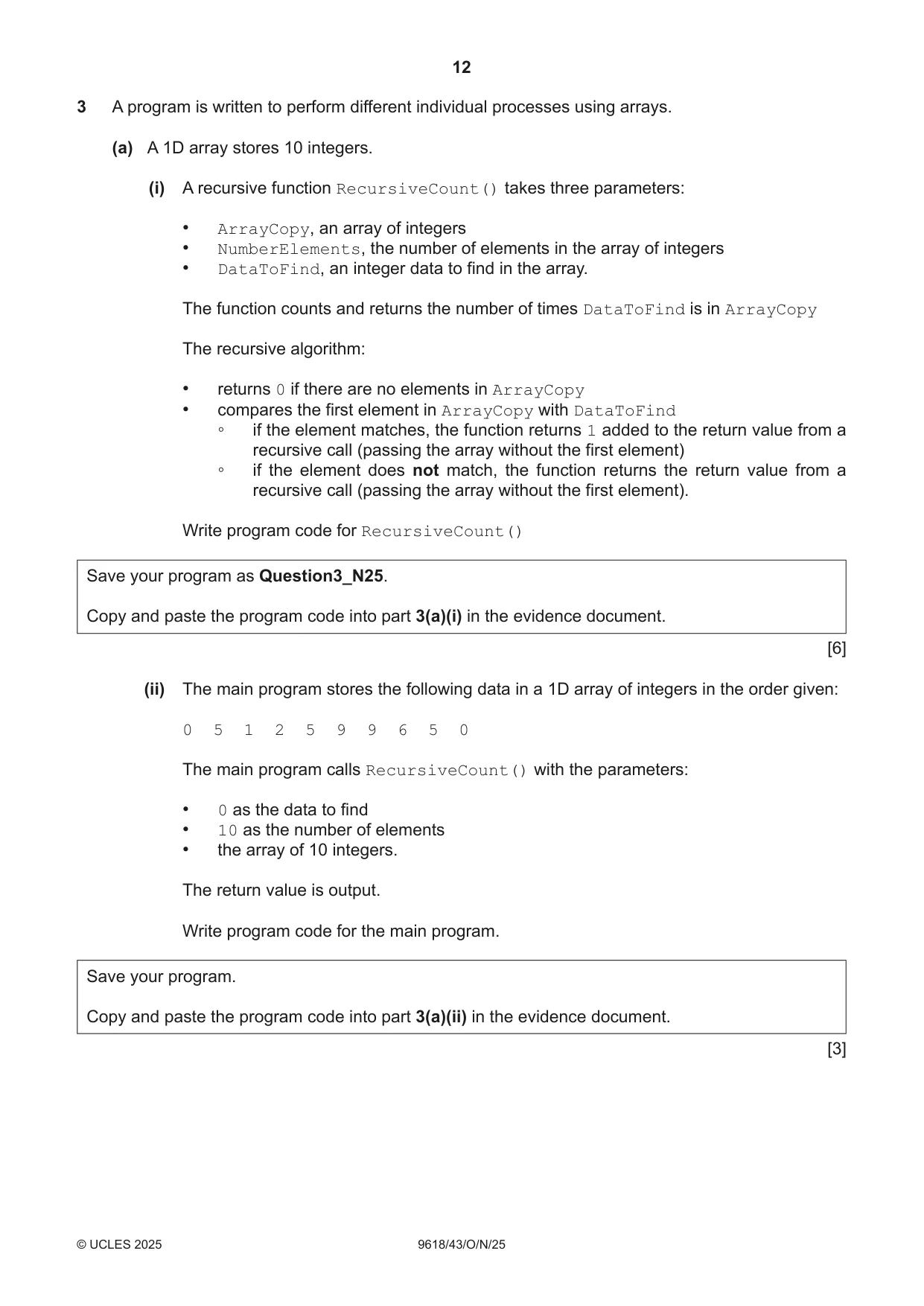
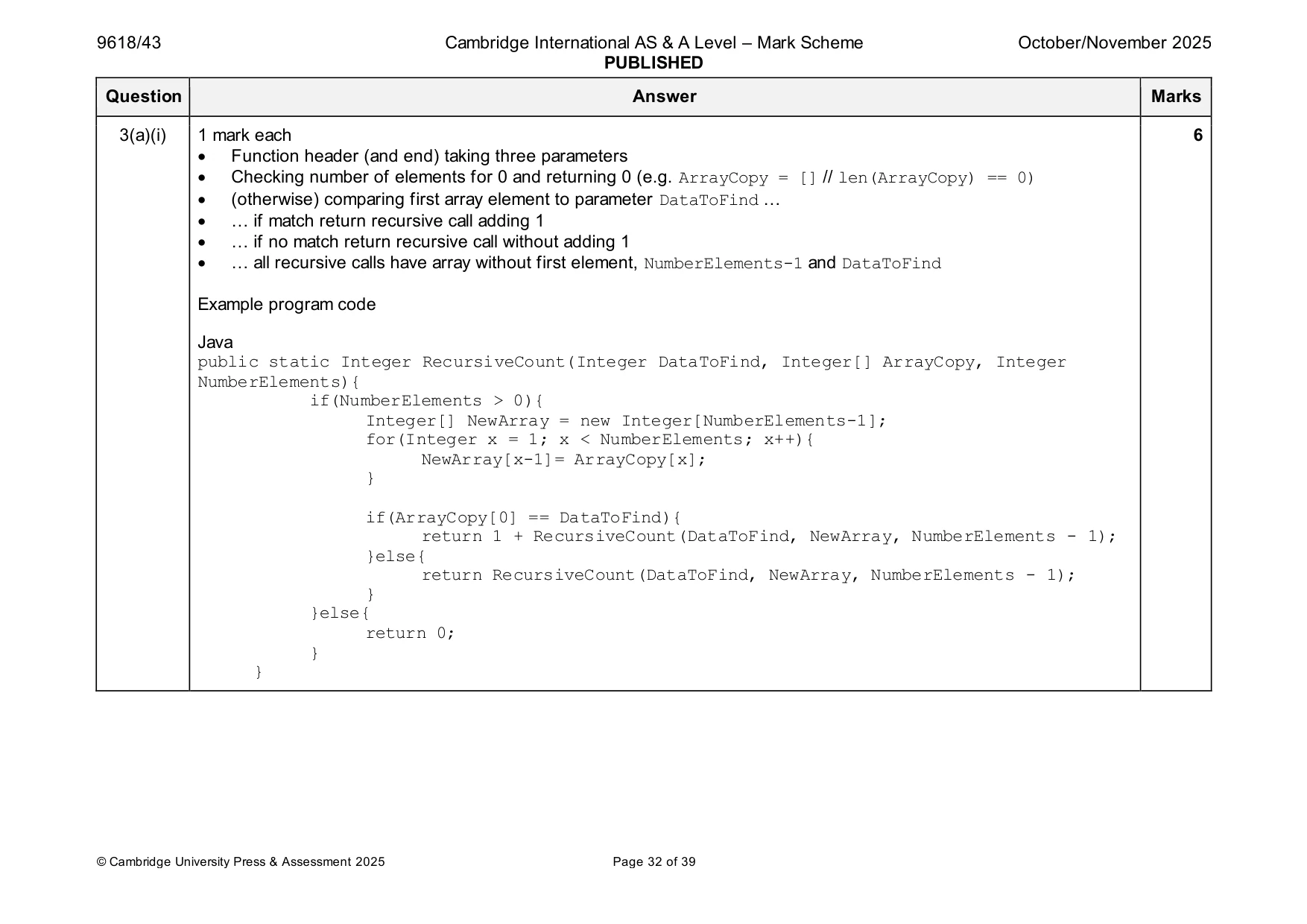
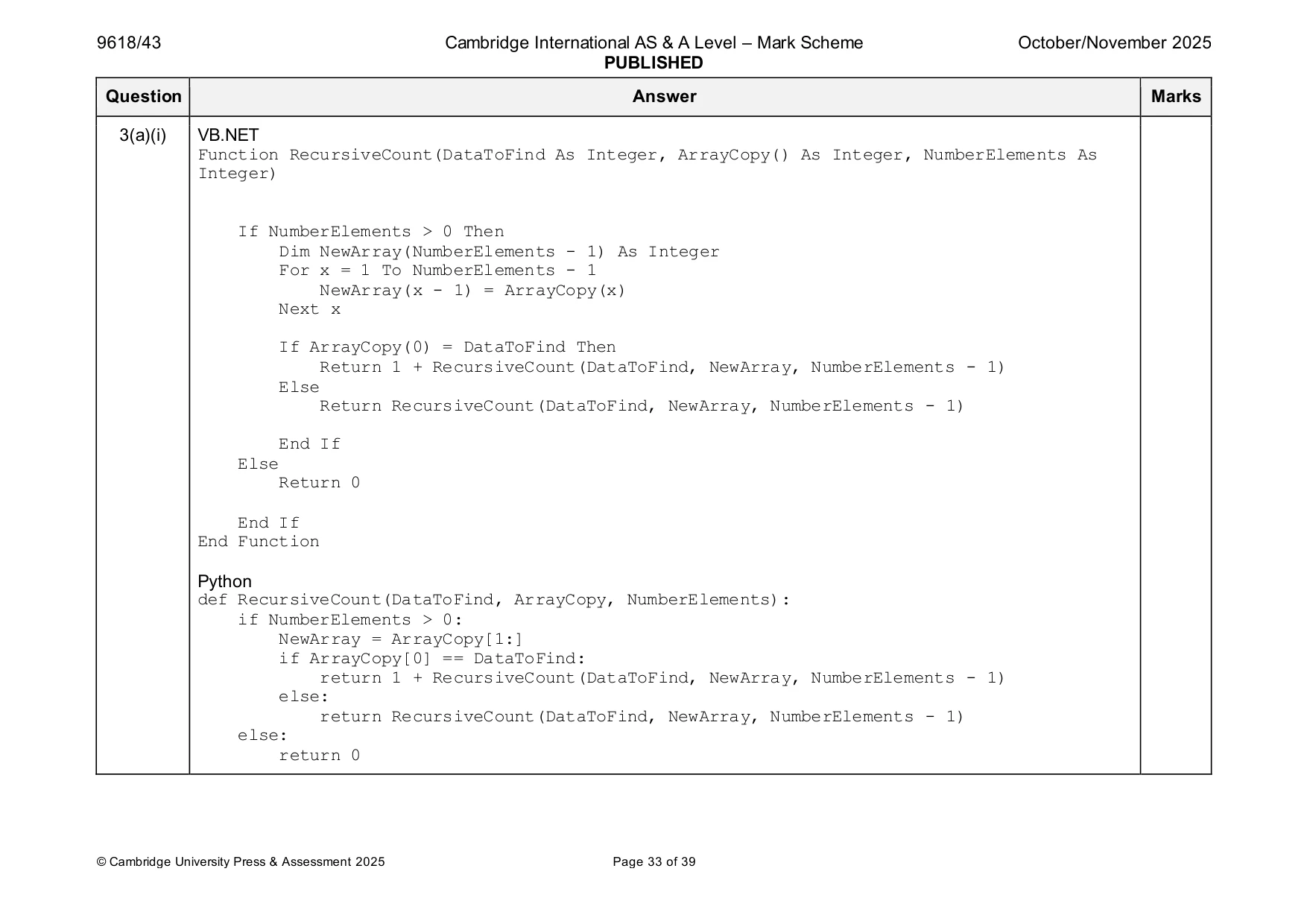
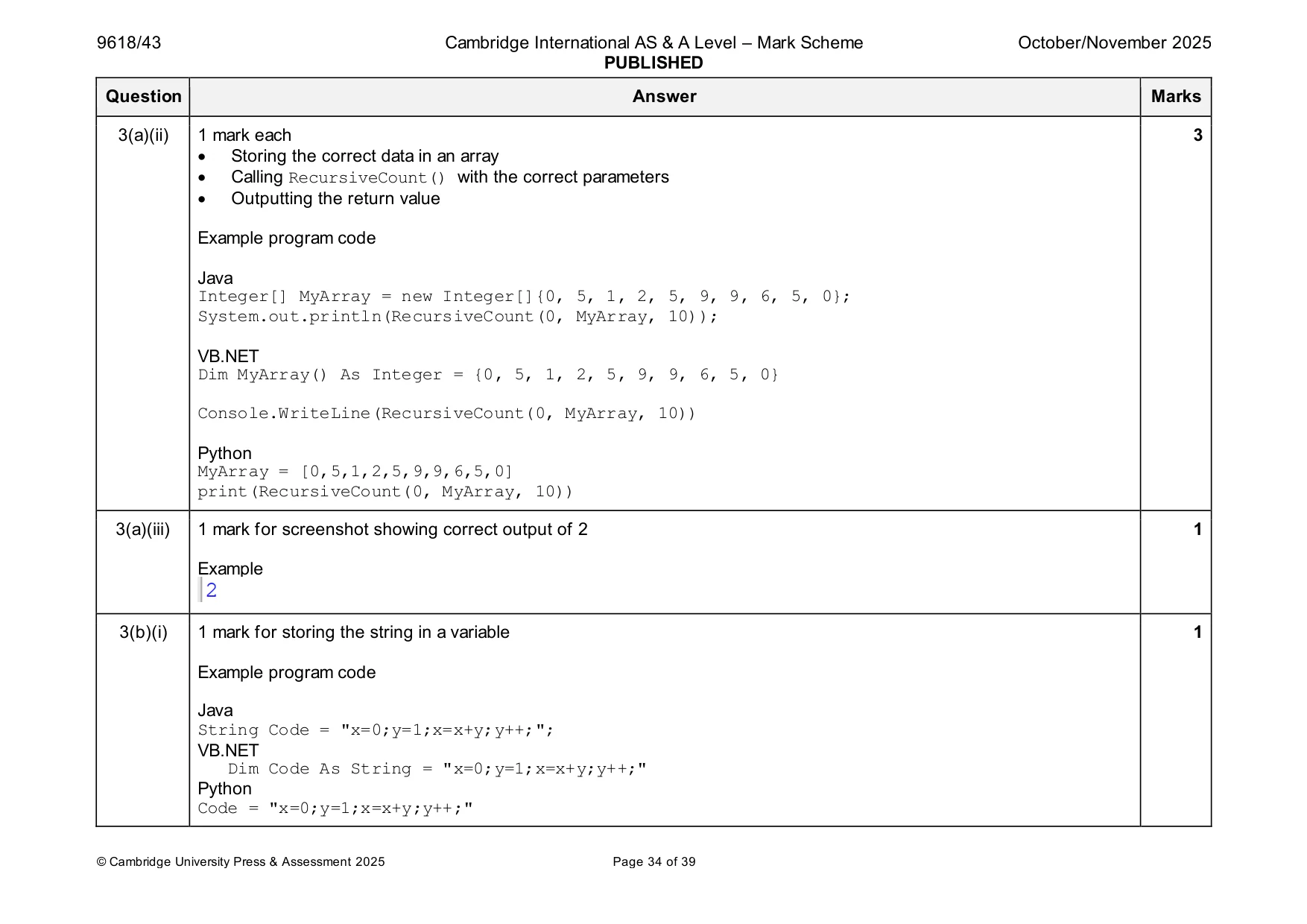
3 A program is written to perform different individual processes using arrays. (a) A 1D array stores 10 integers. (i) A recursive function RecursiveCount() takes three parameters: • ArrayCopy, an array of integers • NumberElements, the number of elements in the array of integers • DataToFind, an integer data to find in the array. The function counts and returns the number of times DataToFind is in ArrayCopy The recursive algorithm: • returns 0 if there are no elements in ArrayCopy • compares the first element in ArrayCopy with DataToFind ◦ if the element matches, the function returns 1 added to the return value from a recursive call (passing the array without the first element) ◦ if the element does not match, the function returns the return value from a recursive call (passing the array without the first element). Write program code for RecursiveCount() Save your program as Question3_N25. Copy and paste the program code into part 3(a)(i) in the evidence document. [6] (ii) The main program stores the following data in a 1D array of integers in the order given: 0 5 1 2 5 9 9 6 5 0 The main program calls RecursiveCount() with the parameters: • 0 as the data to find • 10 as the number of elements • the array of 10 integers. The return value is output. Write program code for the main program. Save your program. Copy and paste the program code into part 3(a)(ii) in the evidence document. [3] (iii) Test your program. Take a screenshot of the output(s). Save your program. Copy and paste the screenshot(s) into part 3(a)(iii) in the evidence document. [1] (b) The program stores the following string. The string has four statements that are each terminated by a semi-colon ';' "x=0;y=1;x=x+y;y++;" (i) Write program code to amend the main program to store the string "x=0;y=1;x=x+y;y++;" in a local variable. Save your program. Copy and paste the program code into part 3(b)(i) in the evidence document. [1] (ii) The function SplitData() splits a string parameter into four individual lines of code. The function creates an array of the strings where each line is stored in a new array element without the semi-colon. The function returns the array of strings. Do not use an inbuilt function to split the string. Write program code for SplitData() Save your program. Copy and paste the program code into part 3(b)(ii) in the evidence document. [6] (iii) The main program needs to call SplitData() with the string from part 3(b)(i). The main program then needs to output each element from the returned array on a new line. Write program code to amend the main program. Save your program. Copy and paste the program code into part 3(b)(iii) in the evidence document. [2] (iv) Test your program. Take a screenshot of the output(s). Save your program. Copy and paste the screenshot(s) into part 3(b)(iv) in the evidence document.
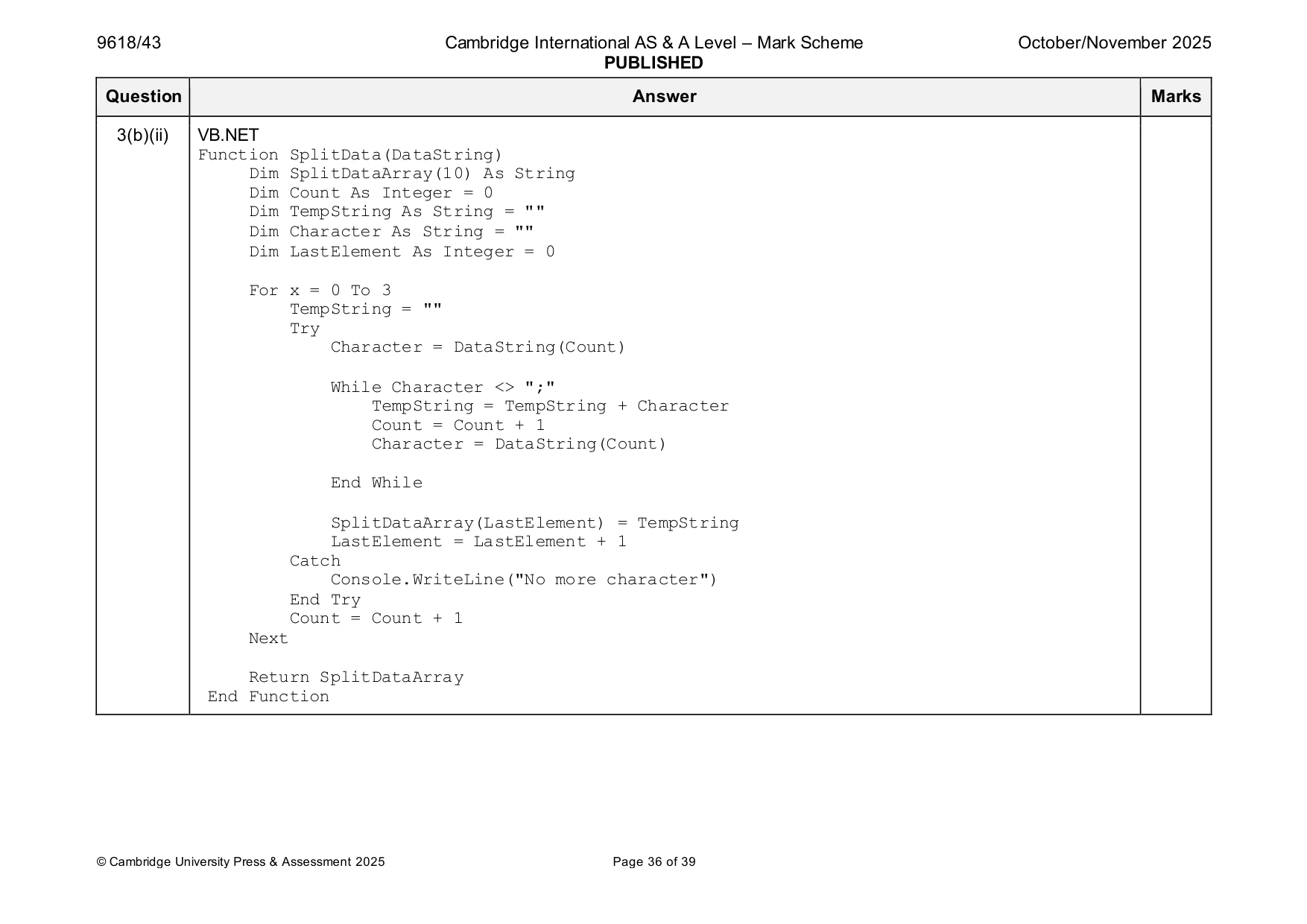
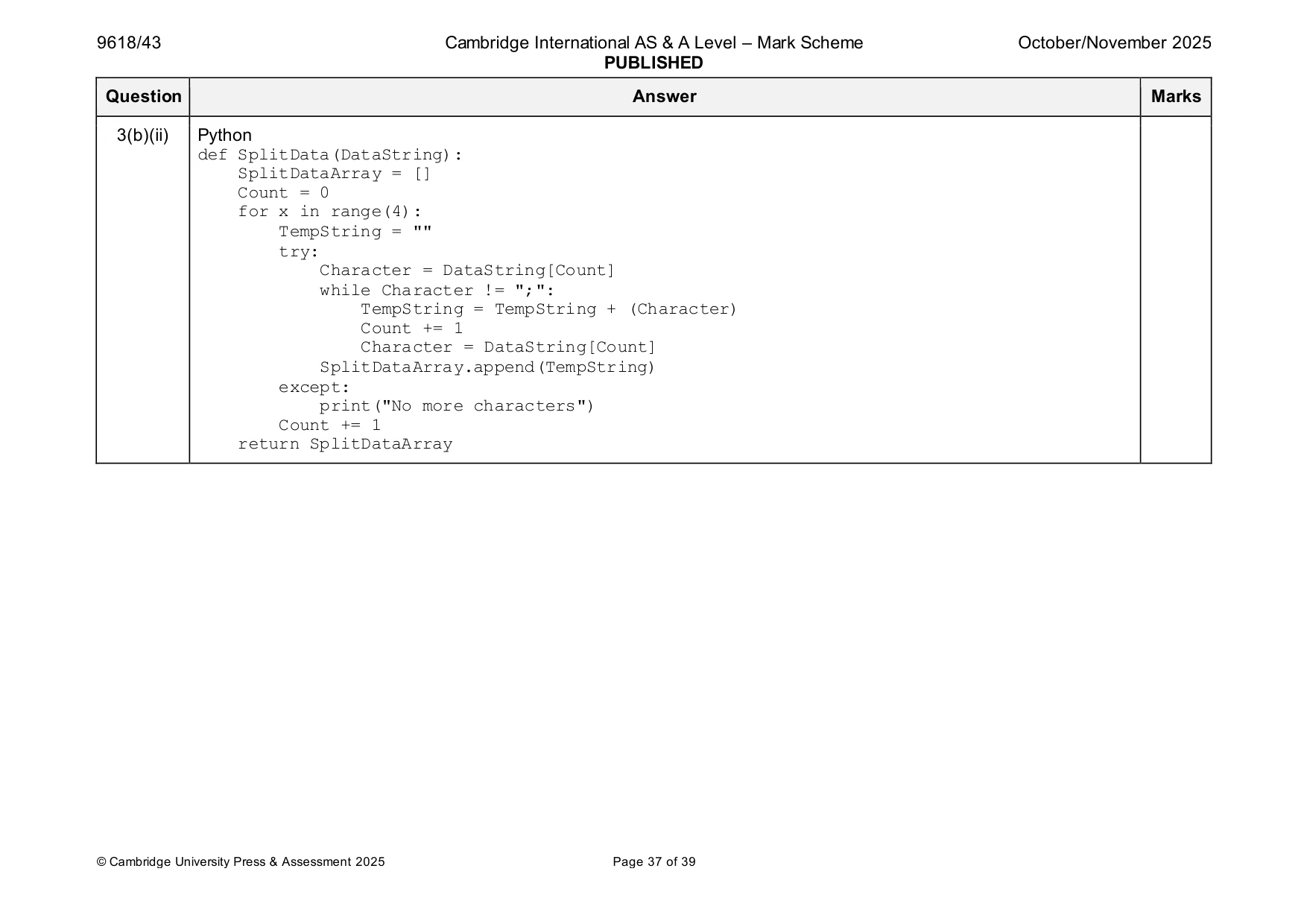
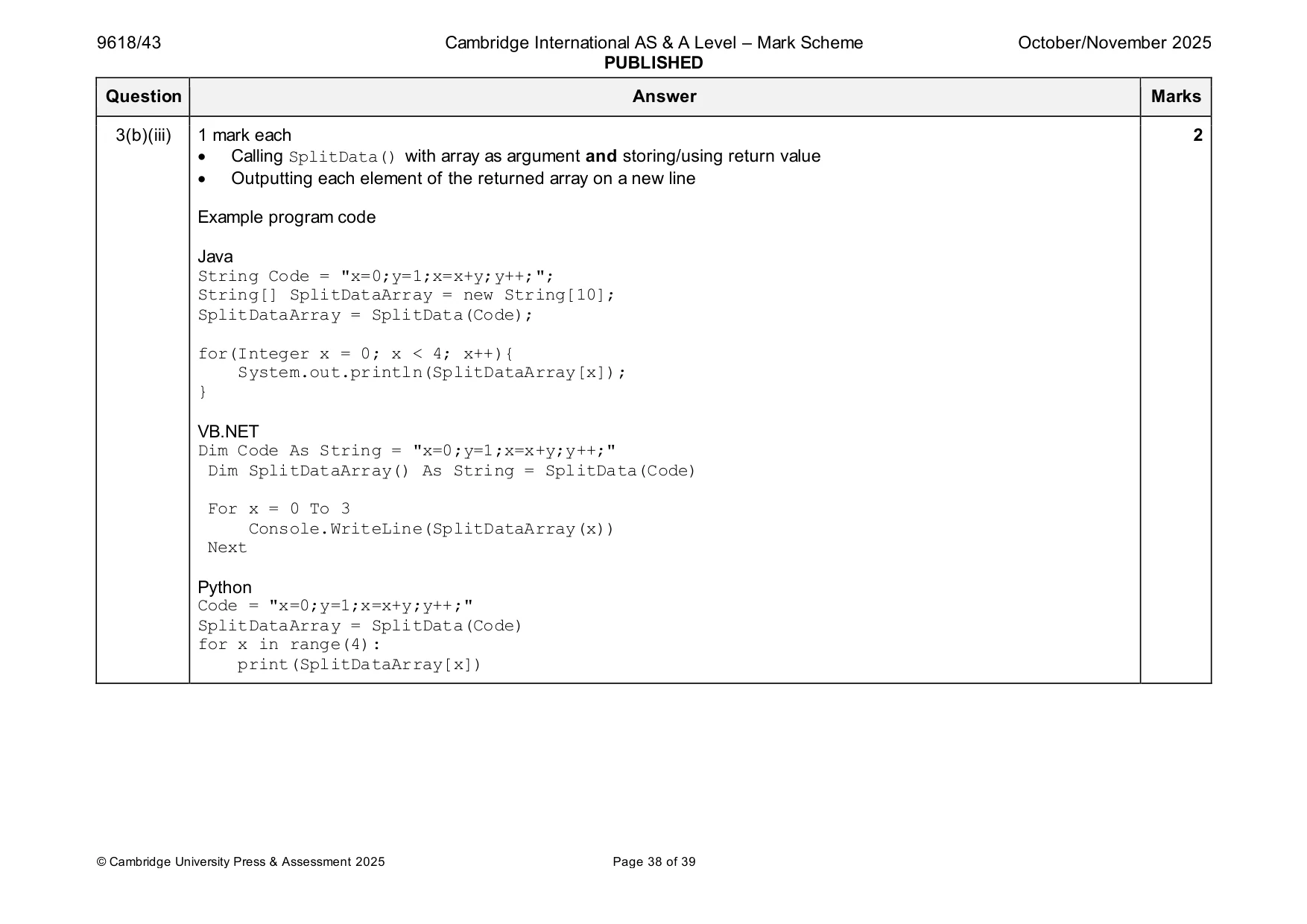
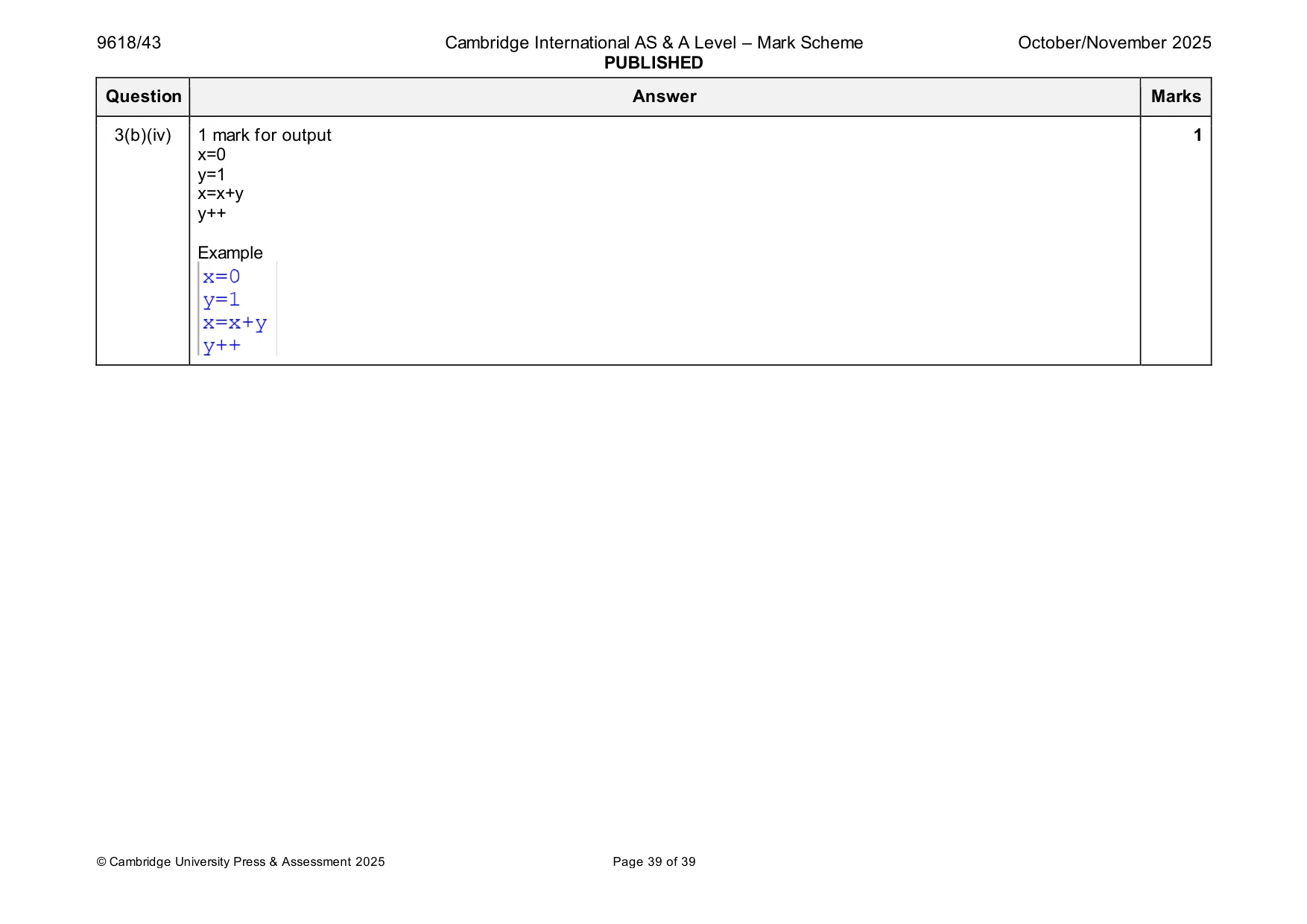
Mark scheme: 3(a)(i) 1 mark each 6 • Function header (and end) taking three parameters • Checking number of elements for 0 and returning 0 (e.g. ArrayCopy = [] // len(ArrayCopy) == 0) • (otherwise) comparing first array element to parameter DataToFind … • … if match return recursive call adding 1 • … if no match return recursive call without adding 1 • … all recursive calls have array without first element, NumberElements-1 and DataToFind Example program code Java public static Integer RecursiveCount(Integer DataToFind, Integer[] ArrayCopy, Integer NumberElements){ if(NumberElements > 0){ Integer[] NewArray = new Integer[NumberElements-1]; for(Integer x = 1; x < NumberElements; x++){ NewArray[x-1]= ArrayCopy[x]; } if(ArrayCopy[0] == DataToFind){ return 1 + RecursiveCount(DataToFind, NewArray, NumberElements - 1); }else{ return RecursiveCount(DataToFind, NewArray, NumberElements - 1); } }else{ return 0; } } 3(a)(i) VB.NET Function RecursiveCount(DataToFind As Integer, ArrayCopy() As Integer, NumberElements As Integer) If NumberElements > 0 Then Dim NewArray(NumberElements - 1) As Integer For x = 1 To NumberElements - 1 NewArray(x - 1) = ArrayCopy(x) Next x If ArrayCopy(0) = DataToFind Then Return 1 + RecursiveCount(DataToFind, NewArray, NumberElements - 1) Else Return RecursiveCount(DataToFind, NewArray, NumberElements - 1) End If Else Return 0 End If End Function Python def RecursiveCount(DataToFind, ArrayCopy, NumberElements): if NumberElements > 0: NewArray = ArrayCopy[1:] if ArrayCopy[0] == DataToFind: return 1 + RecursiveCount(DataToFind, NewArray, NumberElements - 1) else: return RecursiveCount(DataToFind, NewArray, NumberElements - 1) else: return 0 3(a)(ii) 1 mark each 3 • Storing the correct data in an array • Calling RecursiveCount() with the correct parameters • Outputting the return value Example program code Java Integer[] MyArray = new Integer[]{0, 5, 1, 2, 5, 9, 9, 6, 5, 0}; System.out.println(RecursiveCount(0, MyArray, 10)); VB.NET Dim MyArray() As Integer = {0, 5, 1, 2, 5, 9, 9, 6, 5, 0} Console.WriteLine(RecursiveCount(0, MyArray, 10)) Python MyArray = [0,5,1,2,5,9,9,6,5,0] print(RecursiveCount(0, MyArray, 10)) 3(a)(iii) 1 mark for screenshot showing correct output of 2 1 Example 3(b)(i) 1 mark for storing the string in a variable 1 Example program code Java String Code = "x=0;y=1;x=x+y;y++;"; VB.NET Dim Code As String = "x=0;y=1;x=x+y;y++;" Python Code = "x=0;y=1;x=x+y;y++;" 3(b)(ii) 1 mark each 6 • Function header, taking one string parameter • Loop e.g. four times/through each character in parameter • Comparing character from parameter to ';' … • … concatenate current character to a string until ';' is found • … when ';' found storing string in array • Returning string array without semicolons Example program code Java public static String[] SplitData(String DataString){ String[] SplitDataArray = new String[10]; Integer Count = 0; String TempString = ""; String Character = ""; Integer LastElement = 0; for(Integer x = 0; x < 4; x++){ TempString = ""; try{ Character = String.valueOf(DataString.charAt(Count)); while(Character.equals(";") == false){ TempString = TempString + Character; Count++; Character = String.valueOf(DataString.charAt(Count)); } SplitDataArray[LastElement] = TempString; LastElement++; }finally{} Count++; } return SplitDataArray; } 3(b)(ii) VB.NET Function SplitData(DataString) Dim SplitDataArray(10) As String Dim Count As Integer = 0 Dim TempString As String = "" Dim Character As String = "" Dim LastElement As Integer = 0 For x = 0 To 3 TempString = "" Try Character = DataString(Count) While Character <> ";" TempString = TempString + Character Count = Count + 1 Character = DataString(Count) End While SplitDataArray(LastElement) = TempString LastElement = LastElement + 1 Catch Console.WriteLine("No more character") End Try Count = Count + 1 Next Return SplitDataArray End Function 3(b)(ii) Python def SplitData(DataString): SplitDataArray = [] Count = 0 for x in range(4): TempString = "" try: Character = DataString[Count] while Character != ";": TempString = TempString + (Character) Count += 1 Character = DataString[Count] SplitDataArray.append(TempString) except: print("No more characters") Count += 1 return SplitDataArray 3(b)(iii) 1 mark each 2 • Calling SplitData() with array as argument and storing/using return value • Outputting each element of the returned array on a new line Example program code Java String Code = "x=0;y=1;x=x+y;y++;"; String[] SplitDataArray = new String[10]; SplitDataArray = SplitData(Code); for(Integer x = 0; x < 4; x++){ System.out.println(SplitDataArray[x]); } VB.NET Dim Code As String = "x=0;y=1;x=x+y;y++;" Dim SplitDataArray() As String = SplitData(Code) For x = 0 To 3 Console.WriteLine(SplitDataArray(x)) Next Python Code = "x=0;y=1;x=x+y;y++;" SplitDataArray = SplitData(Code) for x in range(4): print(SplitDataArray[x]) 3(b)(iv) 1 mark for output 1 x=0 y=1 x=x+y y++ Example
What you needed in this session
Cambridge’s own grade thresholds for 2025 Oct/Nov, Paper 4 · Variant 3. A higher threshold means an easier paper — the bar moves with how the cohort did.