Cambridge A Level Computer Science 9618 — 2024 May/June Paper 2 · Variant 3
9618/23/M/J/24 · 8 questions · 75 marks · ≈84 min
The question paper and its mark scheme, free to read here and free to download. This is Cambridge’s own paper, exactly as it was sat.
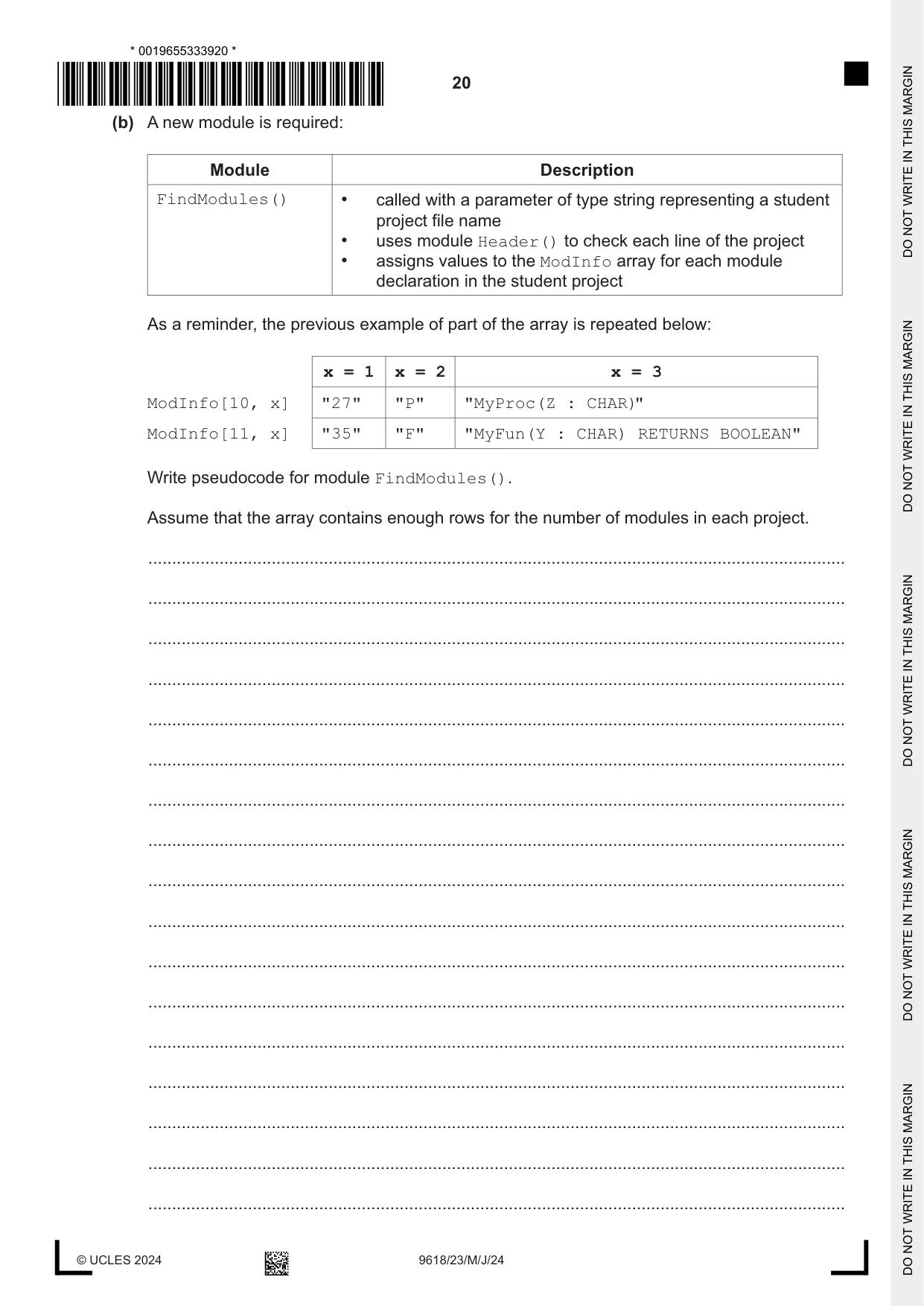
Question paper24 pages






Mark scheme13 pages
Answers below. Sit the paper first if you are practising.

Questions as text
Q1 · A program uses many complex algorithms
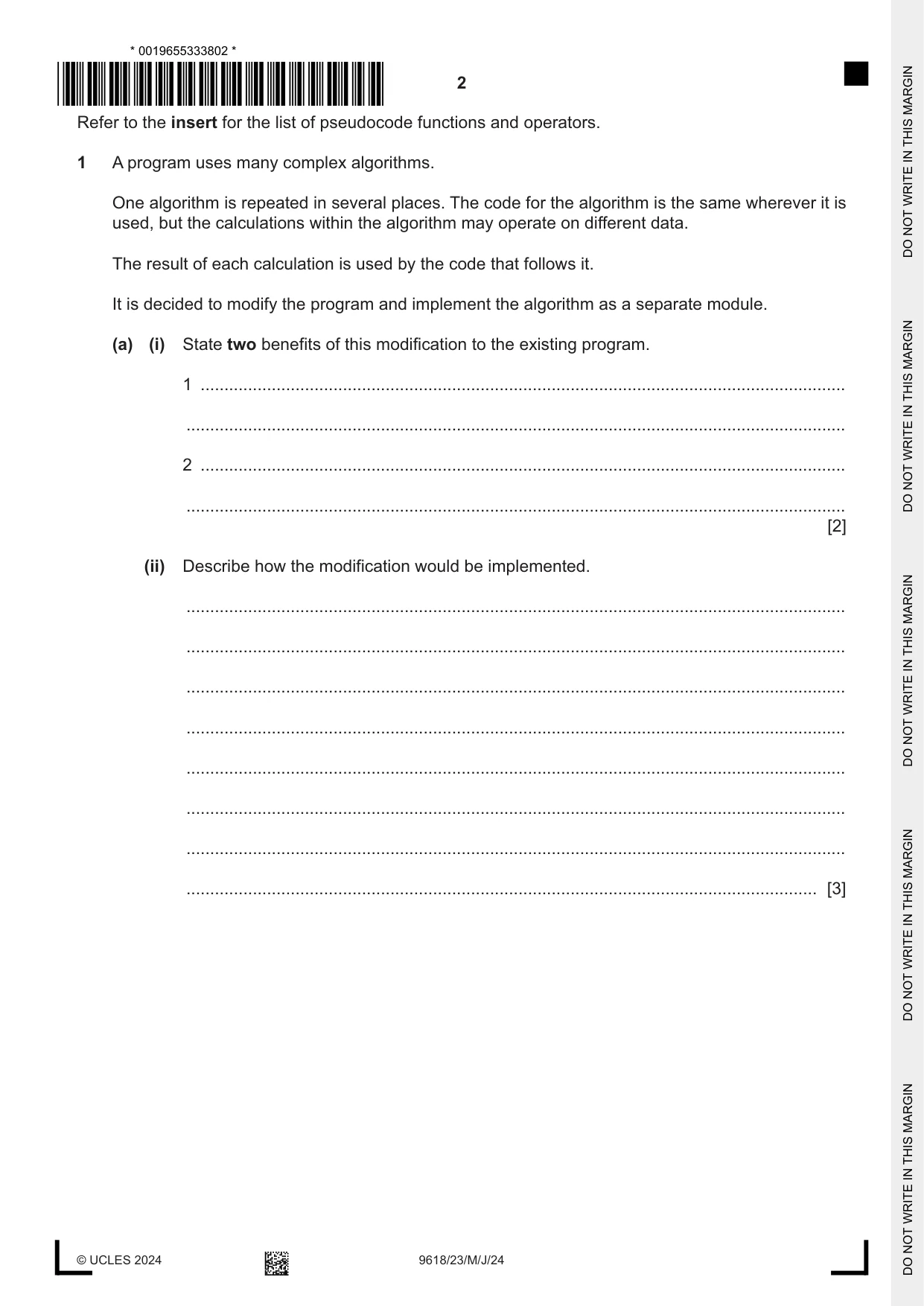
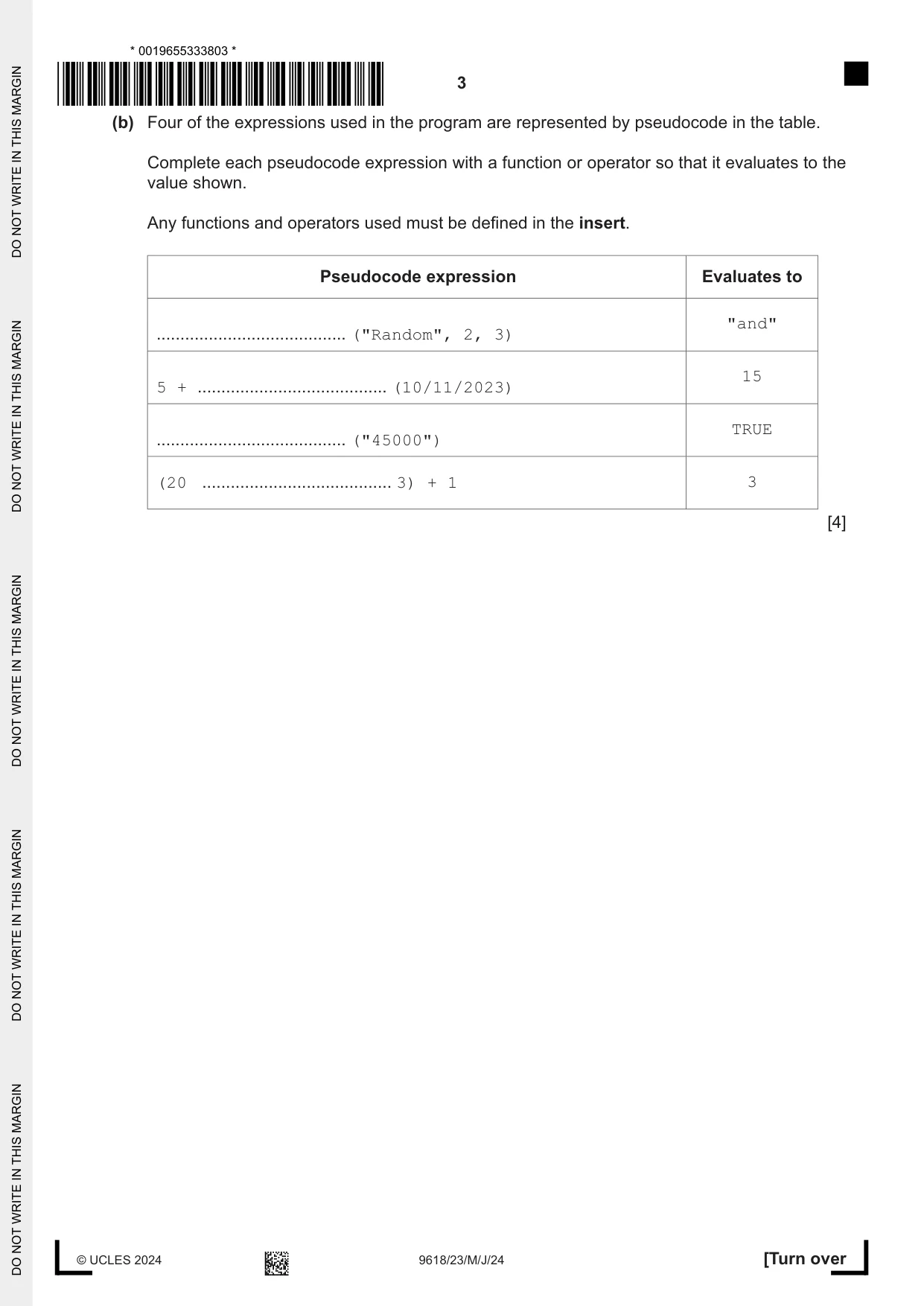
1 A program uses many complex algorithms. One algorithm is repeated in several places. The code for the algorithm is the same wherever it is used, but the calculations within the algorithm may operate on different data. The result of each calculation is used by the code that follows it. It is decided to modify the program and implement the algorithm as a separate module. (a) (i) State two benefits of this modification to the existing program. 1 ........................................................................................................................................ ........................................................................................................................................... 2 ........................................................................................................................................ ........................................................................................................................................... [2] (ii) Describe how the modification would be implemented. ........................................................................................................................................... ........................................................................................................................................... ........................................................................................................................................... ........................................................................................................................................... ........................................................................................................................................... ........................................................................................................................................... ........................................................................................................................................... ..................................................................................................................................... [3] (b) Four of the expressions used in the program are represented by pseudocode in the table. Complete each pseudocode expression with a function or operator so that it evaluates to the value shown. Any functions and operators used must be defined in the insert. Pseudocode expression Evaluates to "and" ........................................ ("Random", 2, 3) 15 5 + ........................................ (10/11/2023) TRUE ........................................ ("45000") (20 ........................................ 3) + 1 3 [4]
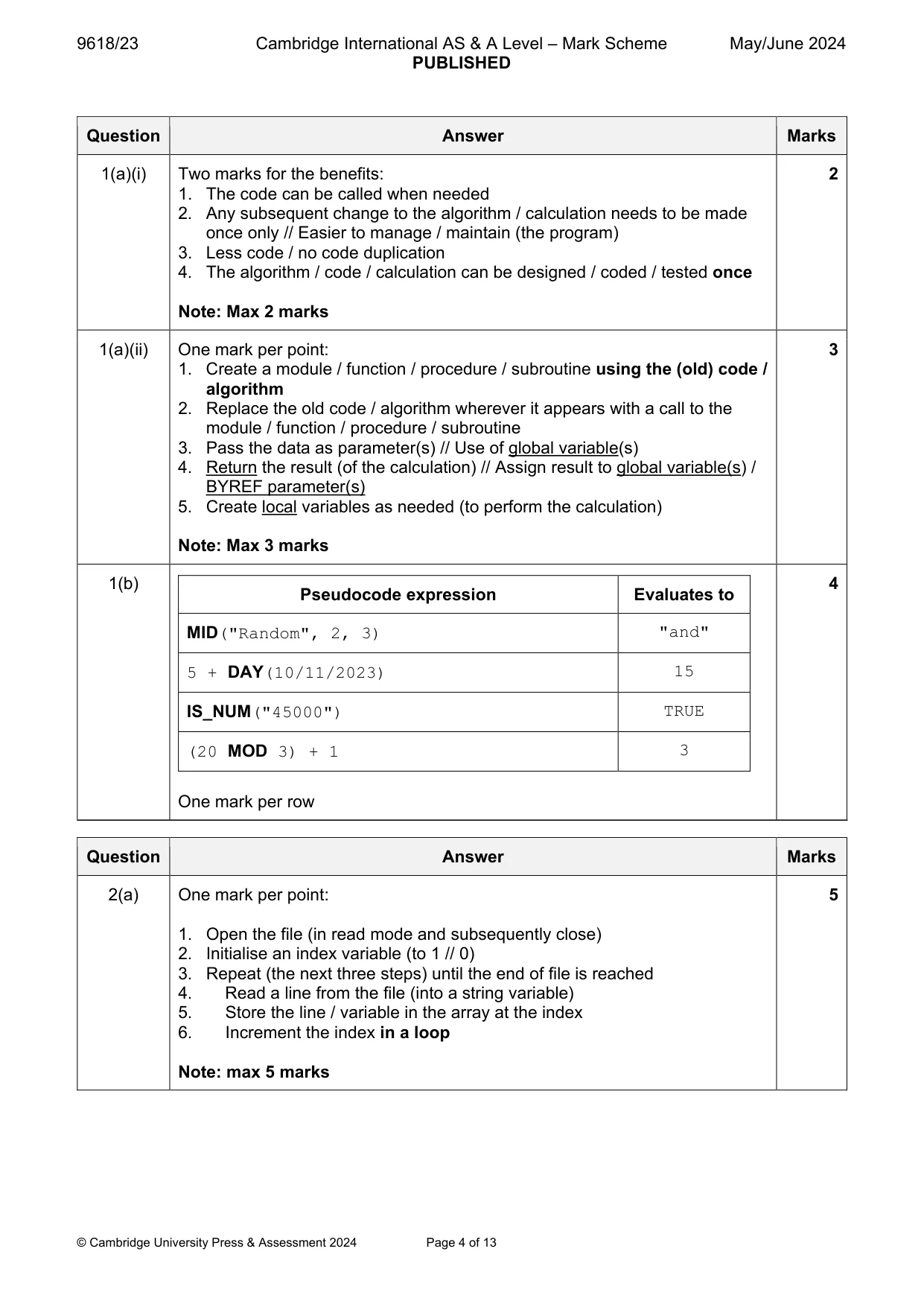
Mark scheme: Question Answer Marks 1(a)(i) Two marks for the benefits: 2 1. The code can be called when needed 2. Any subsequent change to the algorithm / calculation needs to be made once only // Easier to manage / maintain (the program) 3. Less code / no code duplication 4. The algorithm / code / calculation can be designed / coded / tested once Note: Max 2 marks 1(a)(ii) One mark per point: 3 1. Create a module / function / procedure / subroutine using the (old) code / algorithm 2. Replace the old code / algorithm wherever it appears with a call to the module / function / procedure / subroutine 3. Pass the data as parameter(s) // Use of global variable(s) 4. Return the result (of the calculation) // Assign result to global variable(s) / BYREF parameter(s) 5. Create local variables as needed (to perform the calculation) Note: Max 3 marks 1(b) 4 Pseudocode expression Evaluates to MID("Random", 2, 3) "and" 5 + DAY(10/11/2023) 15 IS_NUM("45000") TRUE (20 MOD 3) + 1 3 One mark per row
Q2 · A program uses a global 1D array of type string and a text file
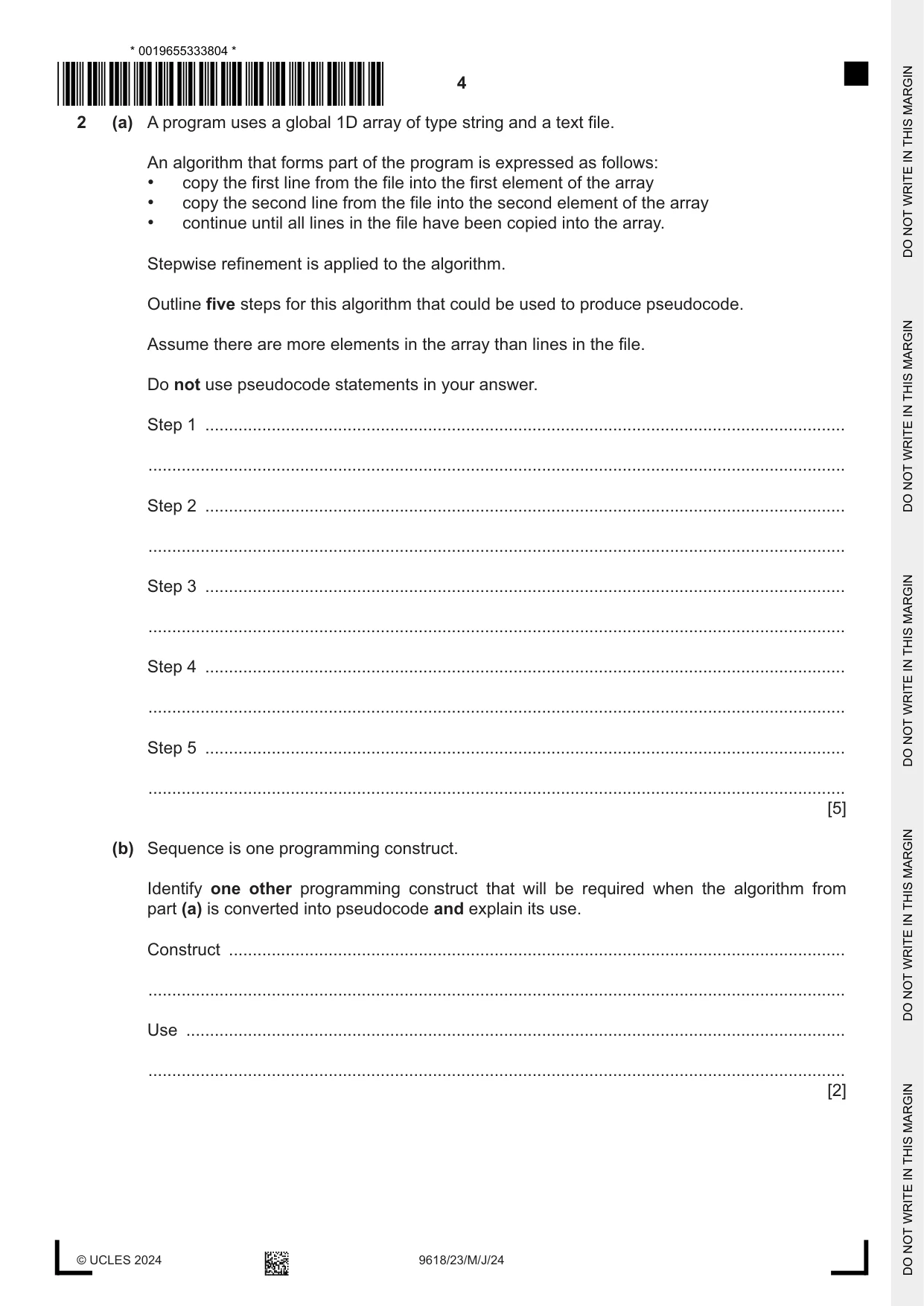
2 (a) A program uses a global 1D array of type string and a text file. An algorithm that forms part of the program is expressed as follows: • copy the first line from the file into the first element of the array • copy the second line from the file into the second element of the array • continue until all lines in the file have been copied into the array. Stepwise refinement is applied to the algorithm. Outline five steps for this algorithm that could be used to produce pseudocode. Assume there are more elements in the array than lines in the file. Do not use pseudocode statements in your answer. Step 1 ....................................................................................................................................... ................................................................................................................................................... Step 2 ....................................................................................................................................... ................................................................................................................................................... Step 3 ....................................................................................................................................... ................................................................................................................................................... Step 4 ....................................................................................................................................... ................................................................................................................................................... Step 5 ....................................................................................................................................... ................................................................................................................................................... [5] (b) Sequence is one programming construct. Identify one other programming construct that will be required when the algorithm from part (a) is converted into pseudocode and explain its use. Construct .................................................................................................................................. ................................................................................................................................................... Use ........................................................................................................................................... ................................................................................................................................................... [2]
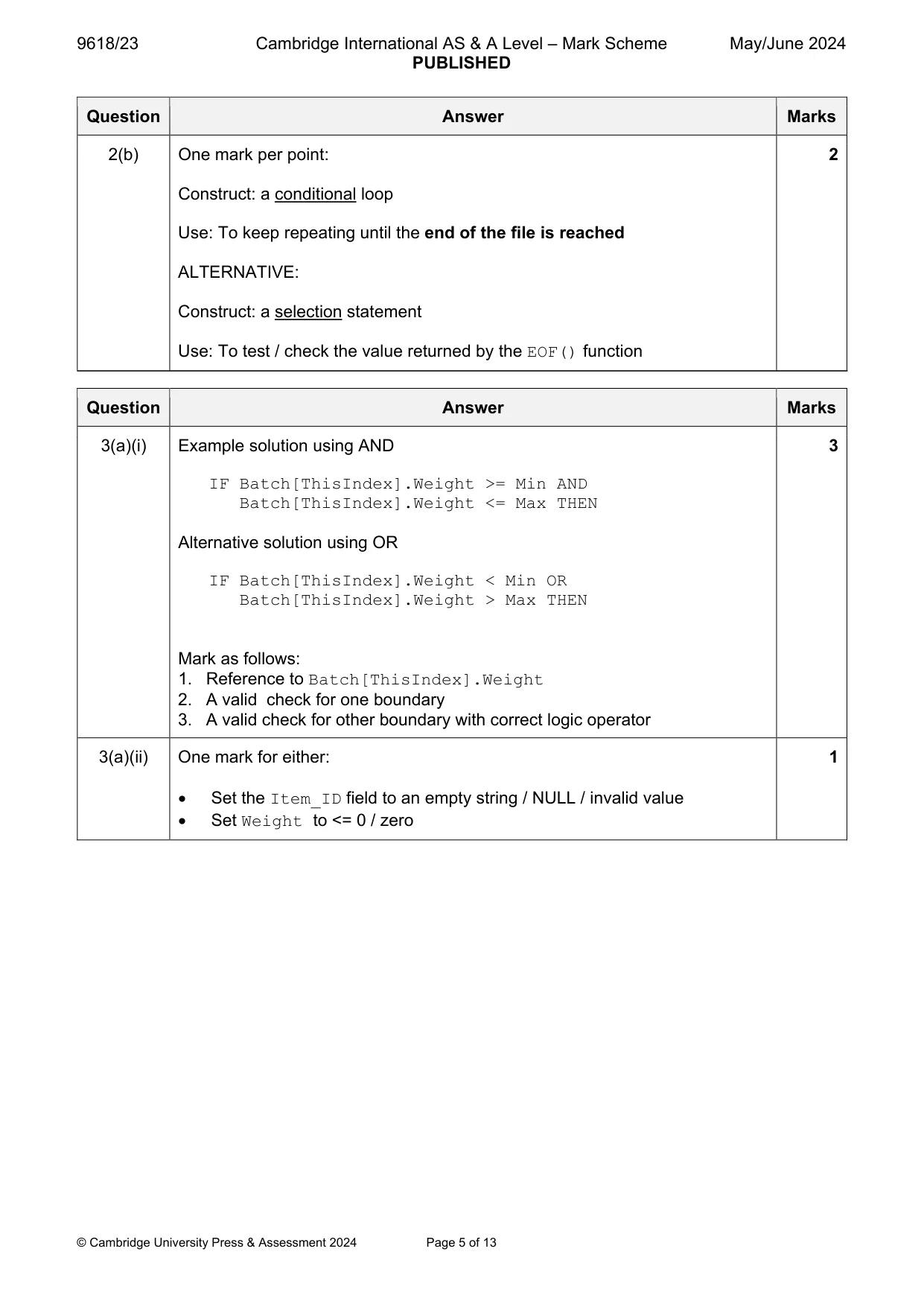
Mark scheme: 2(a) One mark per point: 5 1. Open the file (in read mode and subsequently close) 2. Initialise an index variable (to 1 // 0) 3. Repeat (the next three steps) until the end of file is reached 4. Read a line from the file (into a string variable) 5. Store the line / variable in the array at the index 6. Increment the index in a loop Note: max 5 marks 2(b) One mark per point: 2 Construct: a conditional loop Use: To keep repeating until the end of the file is reached ALTERNATIVE: Construct: a selection statement Use: To test / check the value returned by the EOF() function
Q3 · A record structure is declared to hold data relating to components being produced in a…
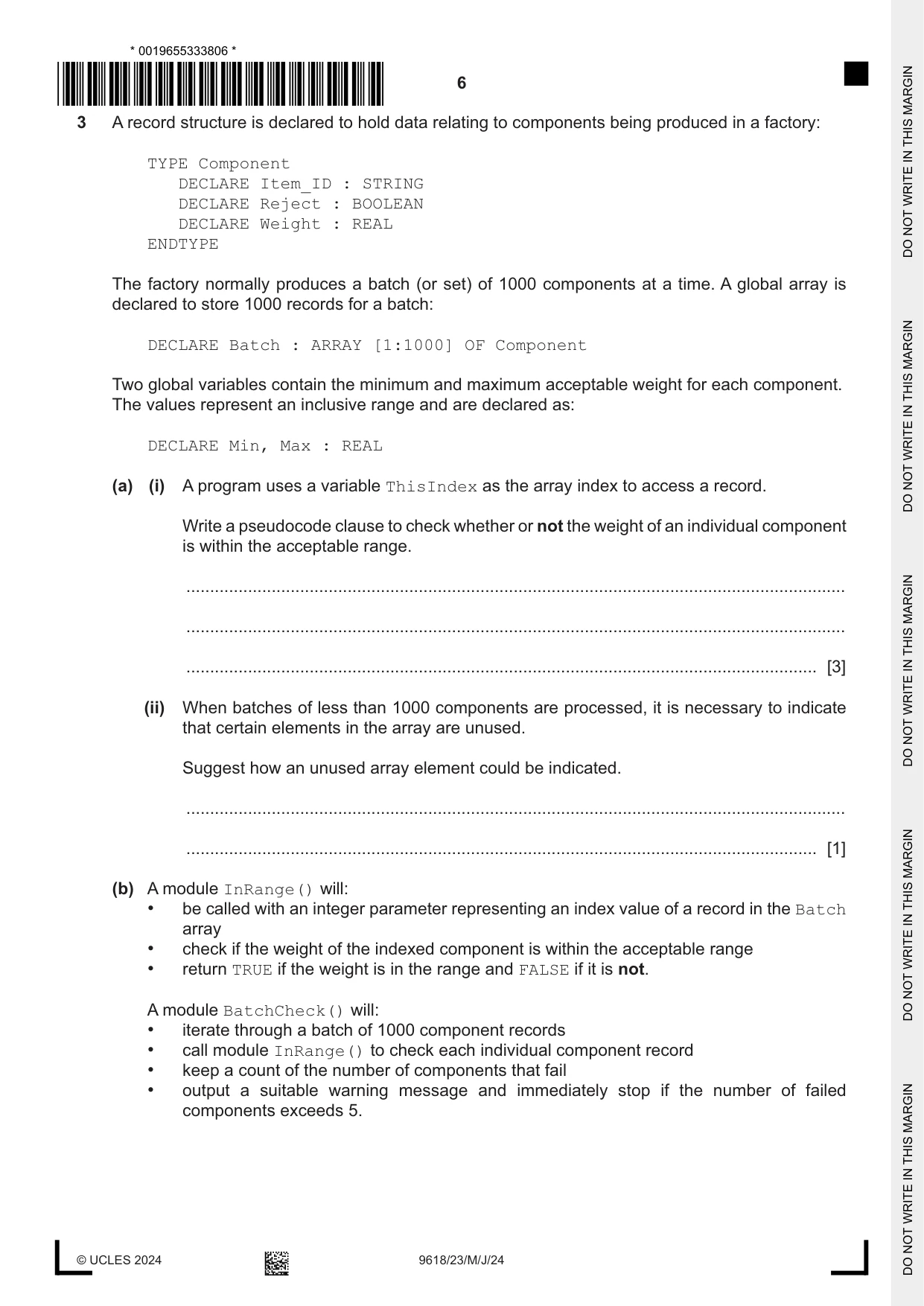
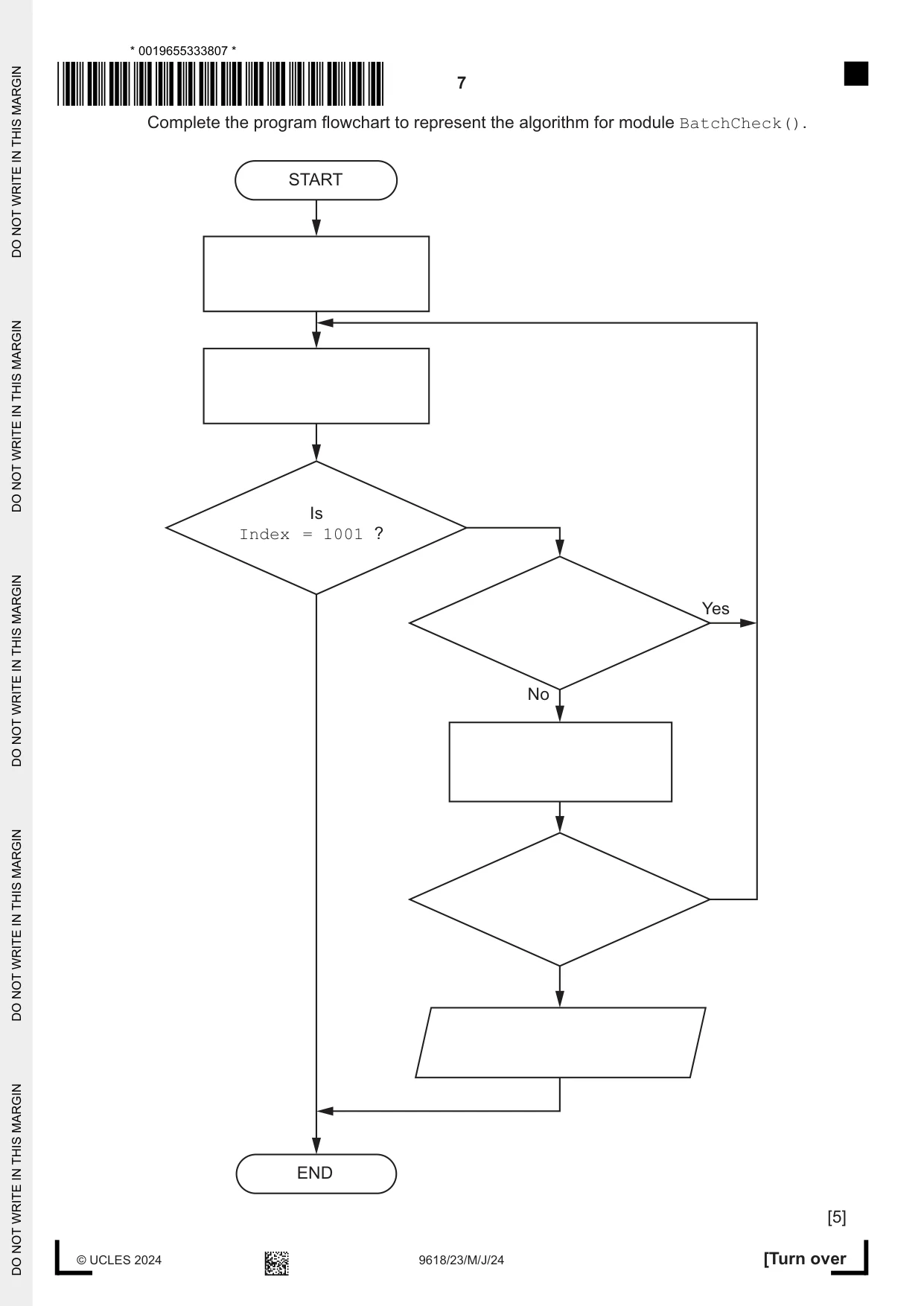
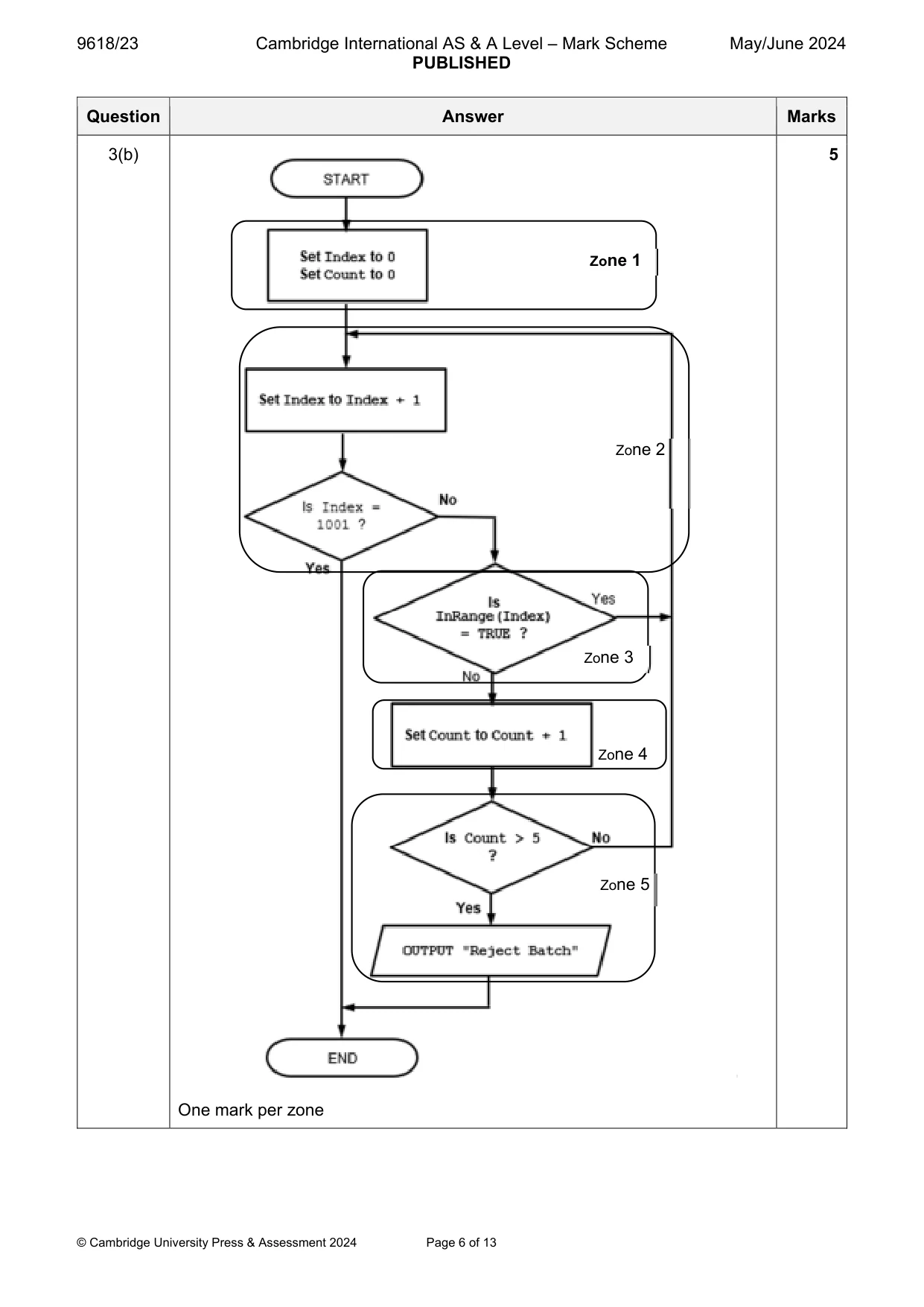
3 A record structure is declared to hold data relating to components being produced in a factory: TYPE Component DECLARE Item_ID : STRING DECLARE Reject : BOOLEAN DECLARE Weight : REAL ENDTYPE The factory normally produces a batch (or set) of 1000 components at a time. A global array is declared to store 1000 records for a batch: DECLARE Batch : ARRAY [1:1000] OF Component Two global variables contain the minimum and maximum acceptable weight for each component. The values represent an inclusive range and are declared as: DECLARE Min, Max : REAL (a) (i) A program uses a variable ThisIndex as the array index to access a record. Write a pseudocode clause to check whether or not the weight of an individual component is within the acceptable range. ........................................................................................................................................... ........................................................................................................................................... ..................................................................................................................................... [3] (ii) When batches of less than 1000 components are processed, it is necessary to indicate that certain elements in the array are unused. Suggest how an unused array element could be indicated. ........................................................................................................................................... ..................................................................................................................................... [1] (b) A module InRange() will: • be called with an integer parameter representing an index value of a record in the Batch array • check if the weight of the indexed component is within the acceptable range • return TRUE if the weight is in the range and FALSE if it is not. A module BatchCheck() will: • iterate through a batch of 1000 component records • call module InRange() to check each individual component record • keep a count of the number of components that fail • output a suitable warning message and immediately stop if the number of failed components exceeds 5. Complete the program flowchart to represent the algorithm for module BatchCheck(). START Is Index = 1001 ? Yes No END [5]
Mark scheme: 3(a)(i) Example solution using AND 3 IF Batch[ThisIndex].Weight >= Min AND Batch[ThisIndex].Weight <= Max THEN Alternative solution using OR IF Batch[ThisIndex].Weight < Min OR Batch[ThisIndex].Weight > Max THEN Mark as follows: 1. Reference to Batch[ThisIndex].Weight 2. A valid check for one boundary 3. A valid check for other boundary with correct logic operator 3(a)(ii) One mark for either: 1 Set the Item_ID field to an empty string / NULL / invalid value Set Weight to <= 0 / zero 3(b) 5 Zone 1 Zone 2 Zone 3 Zone 4 Zone 5 One mark per zone
Q4 · A procedure TwoParts() will input a sequence of real values, one at a time
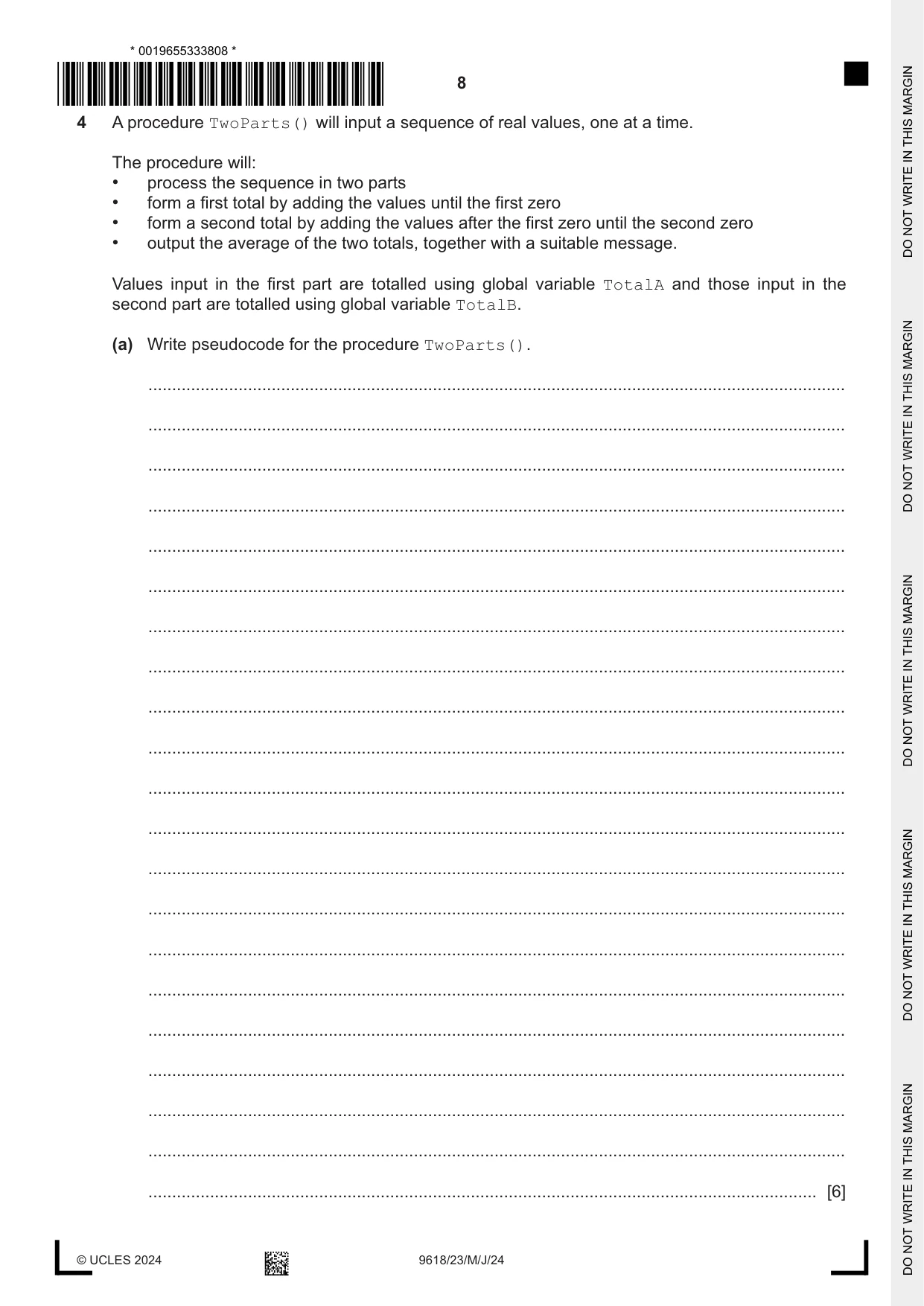
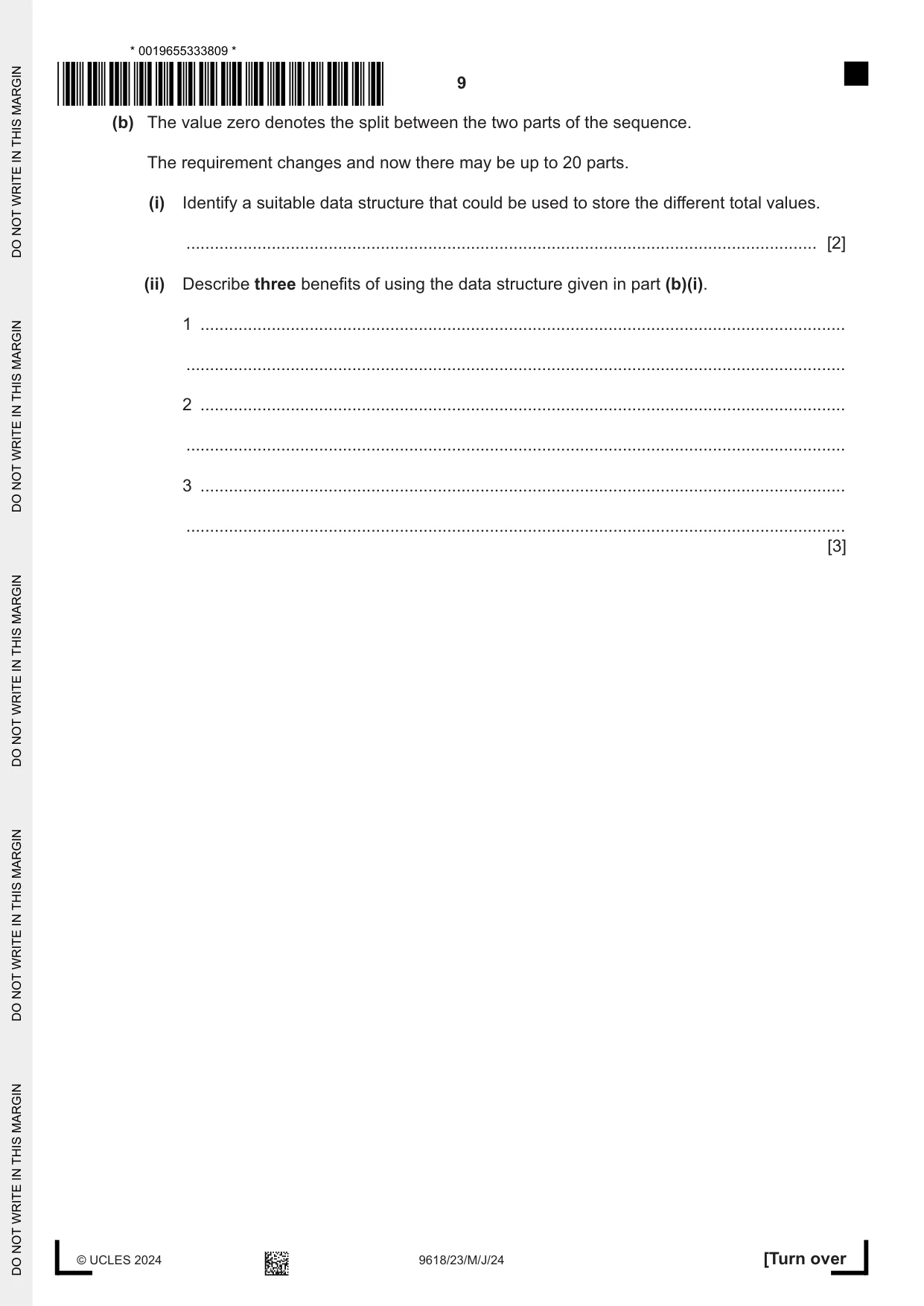
4 A procedure TwoParts() will input a sequence of real values, one at a time. The procedure will: • process the sequence in two parts • form a first total by adding the values until the first zero • form a second total by adding the values after the first zero until the second zero • output the average of the two totals, together with a suitable message. Values input in the first part are totalled using global variable TotalA and those input in the second part are totalled using global variable TotalB. (a) Write pseudocode for the procedure TwoParts(). ................................................................................................................................................... ................................................................................................................................................... ................................................................................................................................................... ................................................................................................................................................... ................................................................................................................................................... ................................................................................................................................................... ................................................................................................................................................... ................................................................................................................................................... ................................................................................................................................................... ................................................................................................................................................... ................................................................................................................................................... ................................................................................................................................................... ................................................................................................................................................... ................................................................................................................................................... ................................................................................................................................................... ................................................................................................................................................... ................................................................................................................................................... ................................................................................................................................................... ................................................................................................................................................... ................................................................................................................................................... ............................................................................................................................................. [6] (b) The value zero denotes the split between the two parts of the sequence. The requirement changes and now there may be up to 20 parts. (i) Identify a suitable data structure that could be used to store the different total values. ..................................................................................................................................... [2] (ii) Describe three benefits of using the data structure given in part (b)(i). 1 ........................................................................................................................................ ........................................................................................................................................... 2 ........................................................................................................................................ ........................................................................................................................................... 3 ........................................................................................................................................ ........................................................................................................................................... [3]
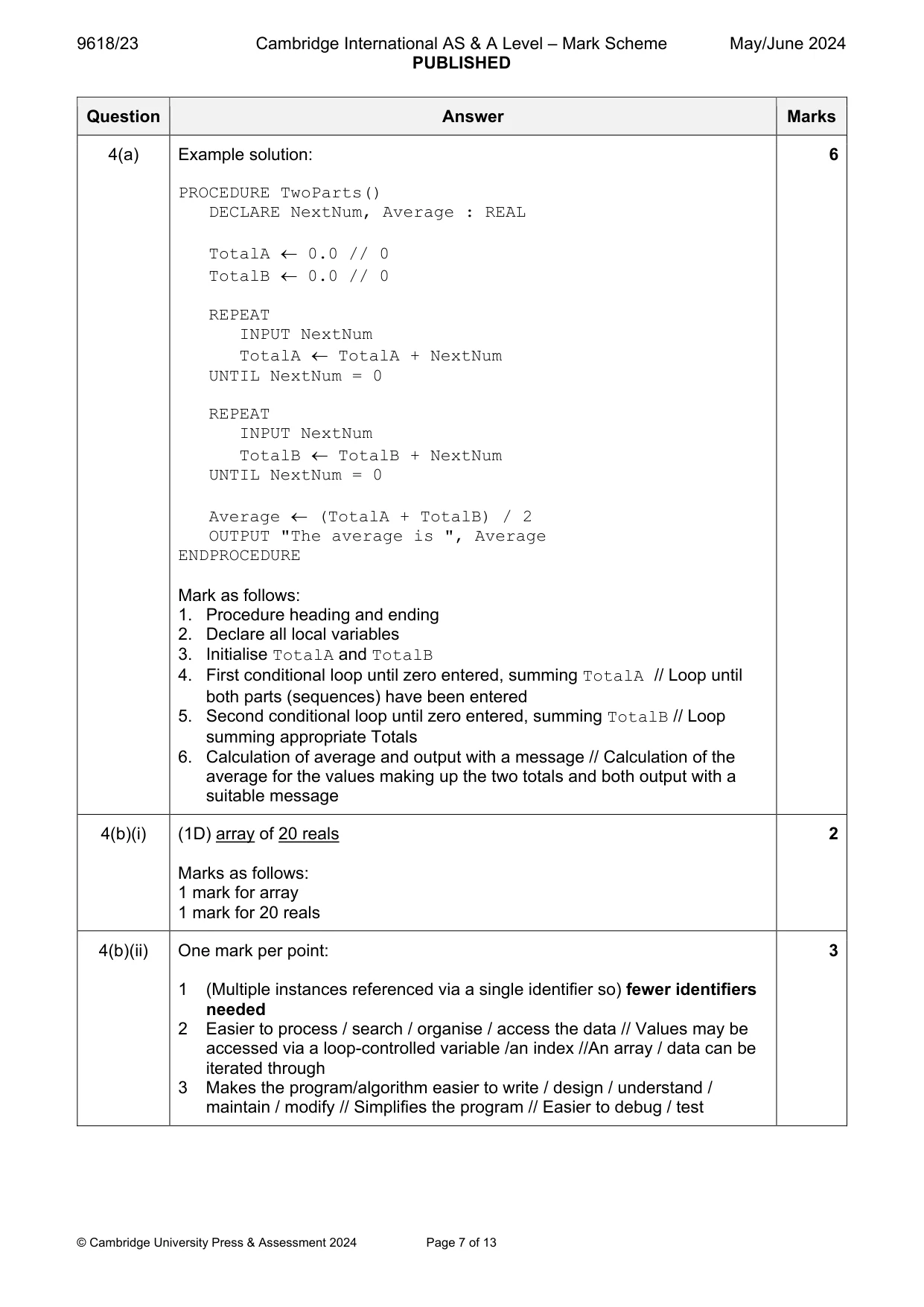
Mark scheme: 4(a) Example solution: 6 PROCEDURE TwoParts() DECLARE NextNum, Average : REAL TotalA 0.0 // 0 TotalB 0.0 // 0 REPEAT INPUT NextNum TotalA TotalA + NextNum UNTIL NextNum = 0 REPEAT INPUT NextNum TotalB TotalB + NextNum UNTIL NextNum = 0 Average (TotalA + TotalB) / 2 OUTPUT "The average is ", Average ENDPROCEDURE Mark as follows: 1. Procedure heading and ending 2. Declare all local variables 3. Initialise TotalA and TotalB 4. First conditional loop until zero entered, summing TotalA // Loop until both parts (sequences) have been entered 5. Second conditional loop until zero entered, summing TotalB // Loop summing appropriate Totals 6. Calculation of average and output with a message // Calculation of the average for the values making up the two totals and both output with a suitable message 4(b)(i) (1D) array of 20 reals 2 Marks as follows: 1 mark for array 1 mark for 20 reals 4(b)(ii) One mark per point: 3 1 (Multiple instances referenced via a single identifier so) fewer identifiers needed 2 Easier to process / search / organise / access the data // Values may be accessed via a loop-controlled variable /an index //An array / data can be iterated through 3 Makes the program/algorithm easier to write / design / understand / maintain / modify // Simplifies the program // Easier to debug / test
Q5 · A program is being designed in pseudocode
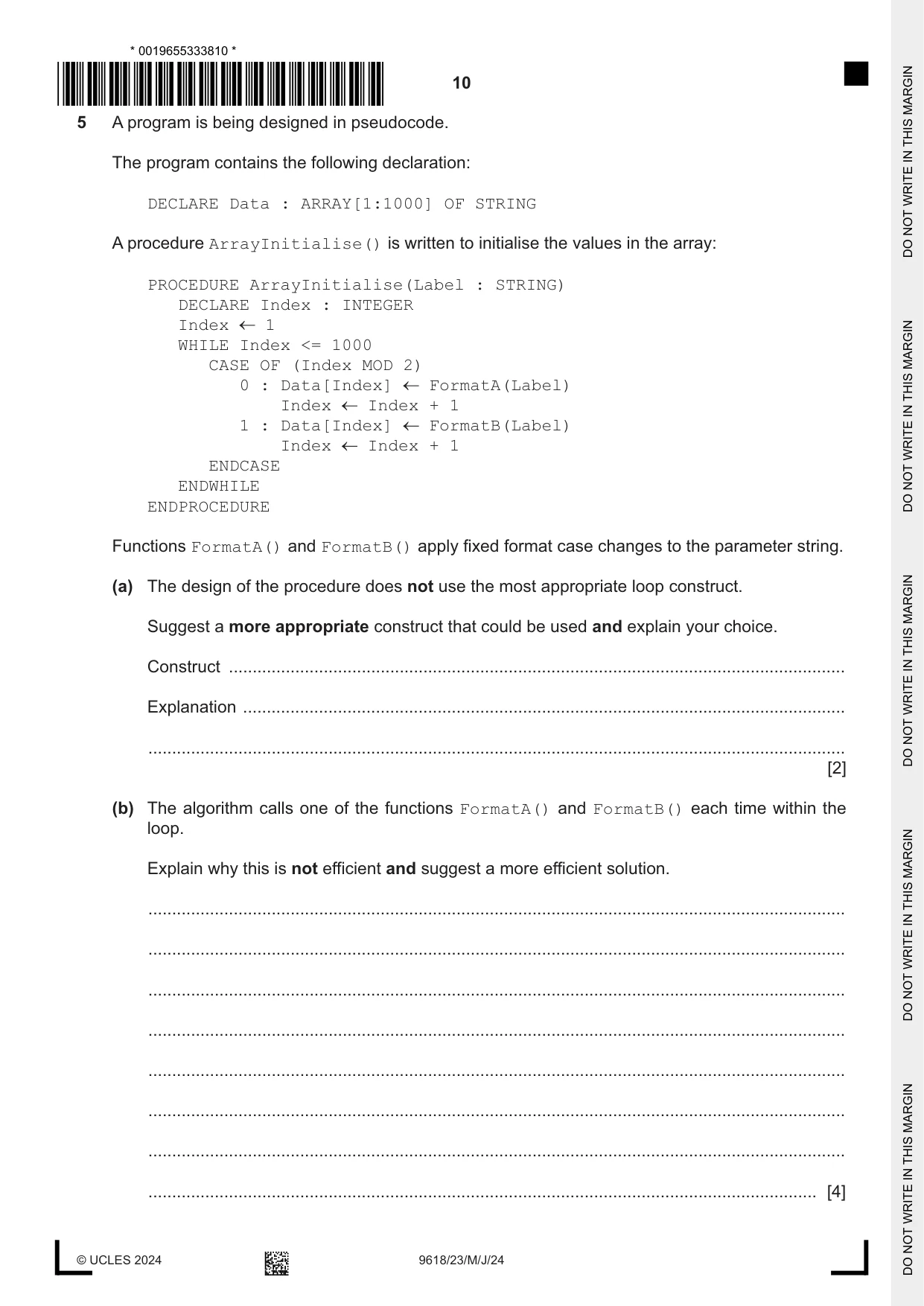
5 A program is being designed in pseudocode. The program contains the following declaration: DECLARE Data : ARRAY[1:1000] OF STRING A procedure ArrayInitialise() is written to initialise the values in the array: PROCEDURE ArrayInitialise(Label : STRING) DECLARE Index : INTEGER Index 1 WHILE Index <= 1000 CASE OF (Index MOD 2) 0 : Data[Index] FormatA(Label) Index Index + 1 1 : Data[Index] FormatB(Label) Index Index + 1 ENDCASE ENDWHILE ENDPROCEDURE Functions FormatA() and FormatB() apply fixed format case changes to the parameter string. (a) The design of the procedure does not use the most appropriate loop construct. Suggest a more appropriate construct that could be used and explain your choice. Construct .................................................................................................................................. Explanation ............................................................................................................................... ................................................................................................................................................... [2] (b) The algorithm calls one of the functions FormatA() and FormatB() each time within the loop. Explain why this is not efficient and suggest a more efficient solution. ................................................................................................................................................... ................................................................................................................................................... ................................................................................................................................................... ................................................................................................................................................... ................................................................................................................................................... ................................................................................................................................................... ................................................................................................................................................... ............................................................................................................................................. [4]
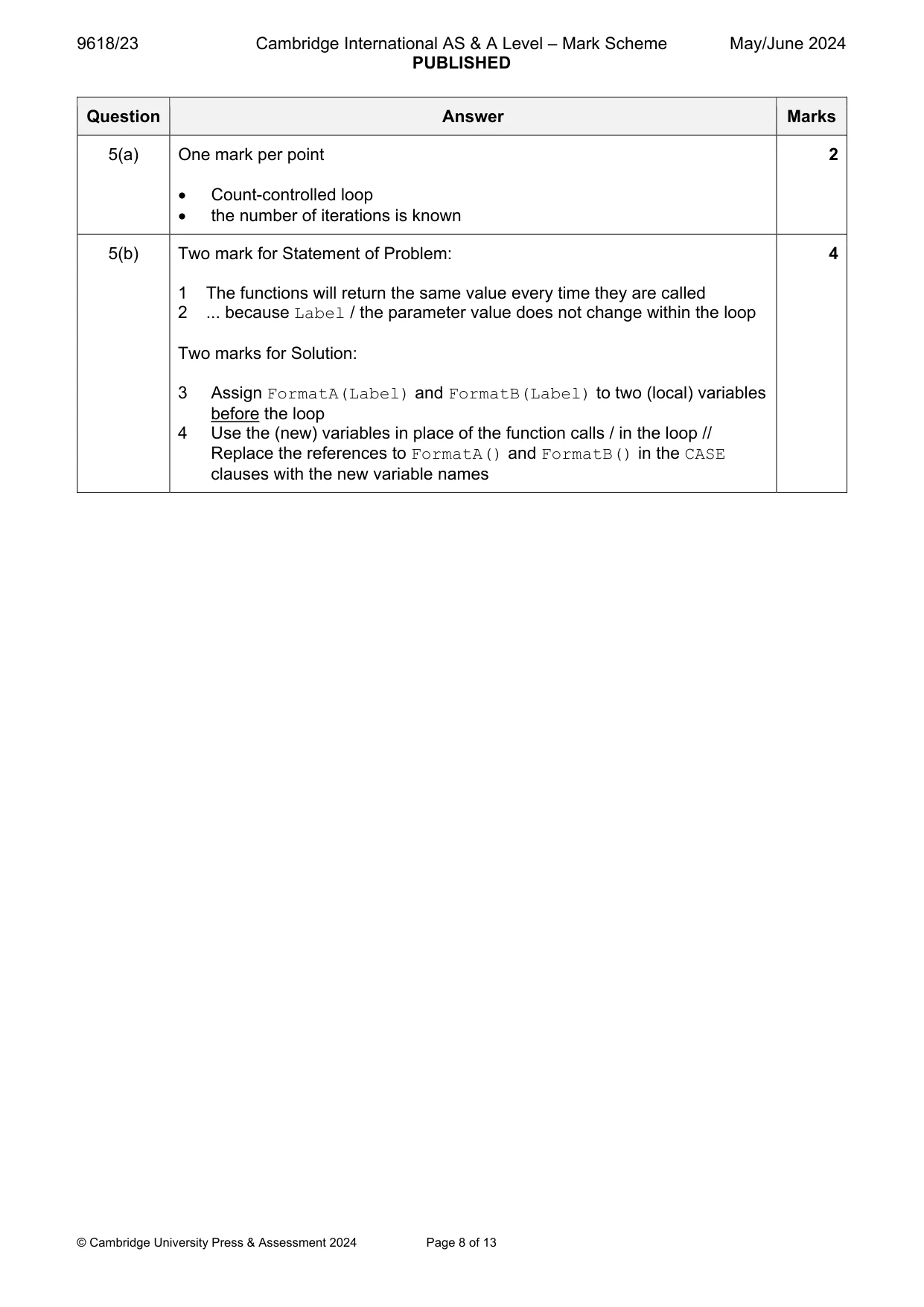
Mark scheme: 5(a) One mark per point 2 Count-controlled loop the number of iterations is known 5(b) Two mark for Statement of Problem: 4 1 The functions will return the same value every time they are called 2 ... because Label / the parameter value does not change within the loop Two marks for Solution: 3 Assign FormatA(Label) and FormatB(Label) to two (local) variables before the loop 4 Use the (new) variables in place of the function calls / in the loop // Replace the references to FormatA() and FormatB() in the CASE clauses with the new variable names
Q6 · A program displays a progress bar to inform the user of the progress of tasks that take a…
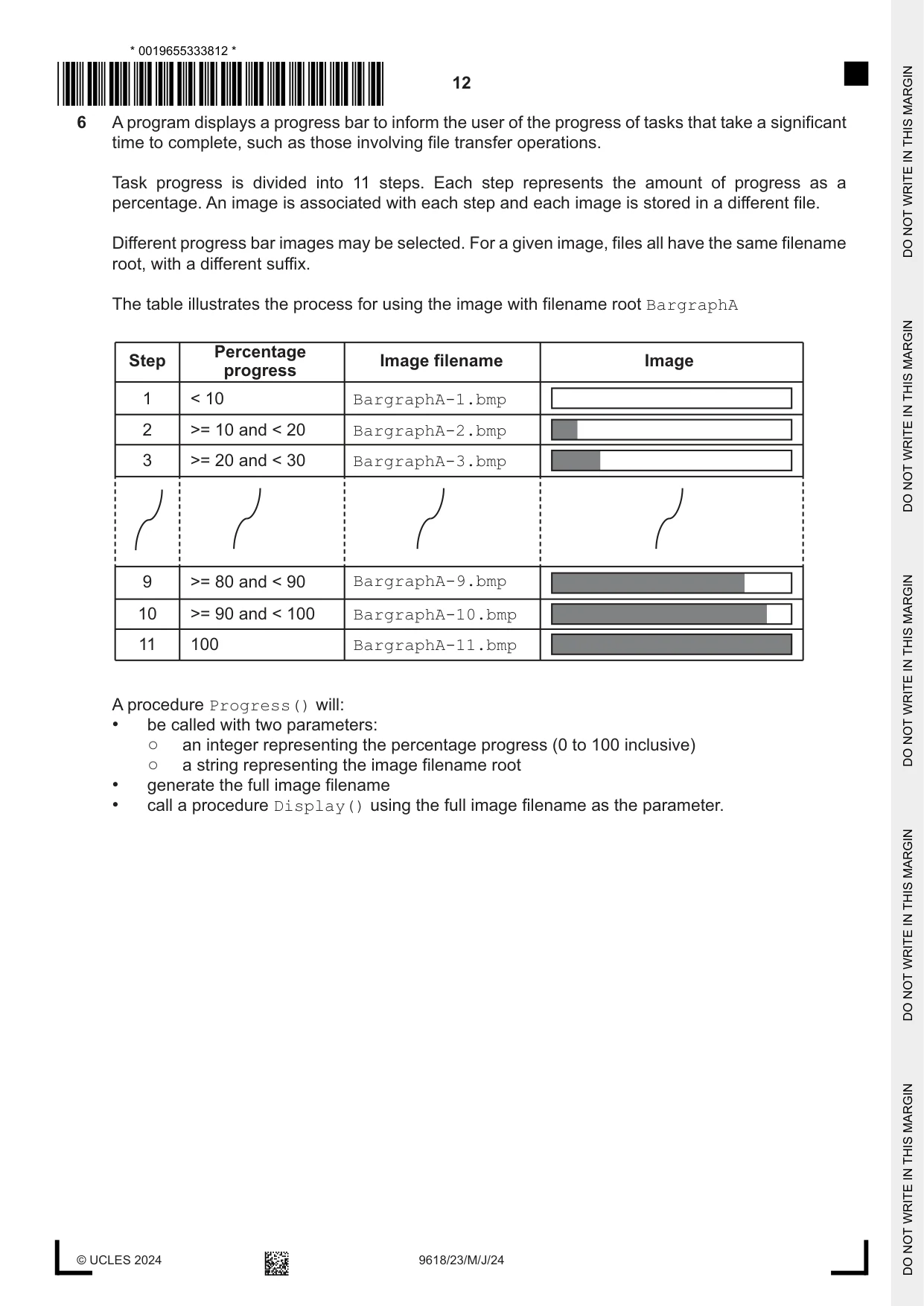
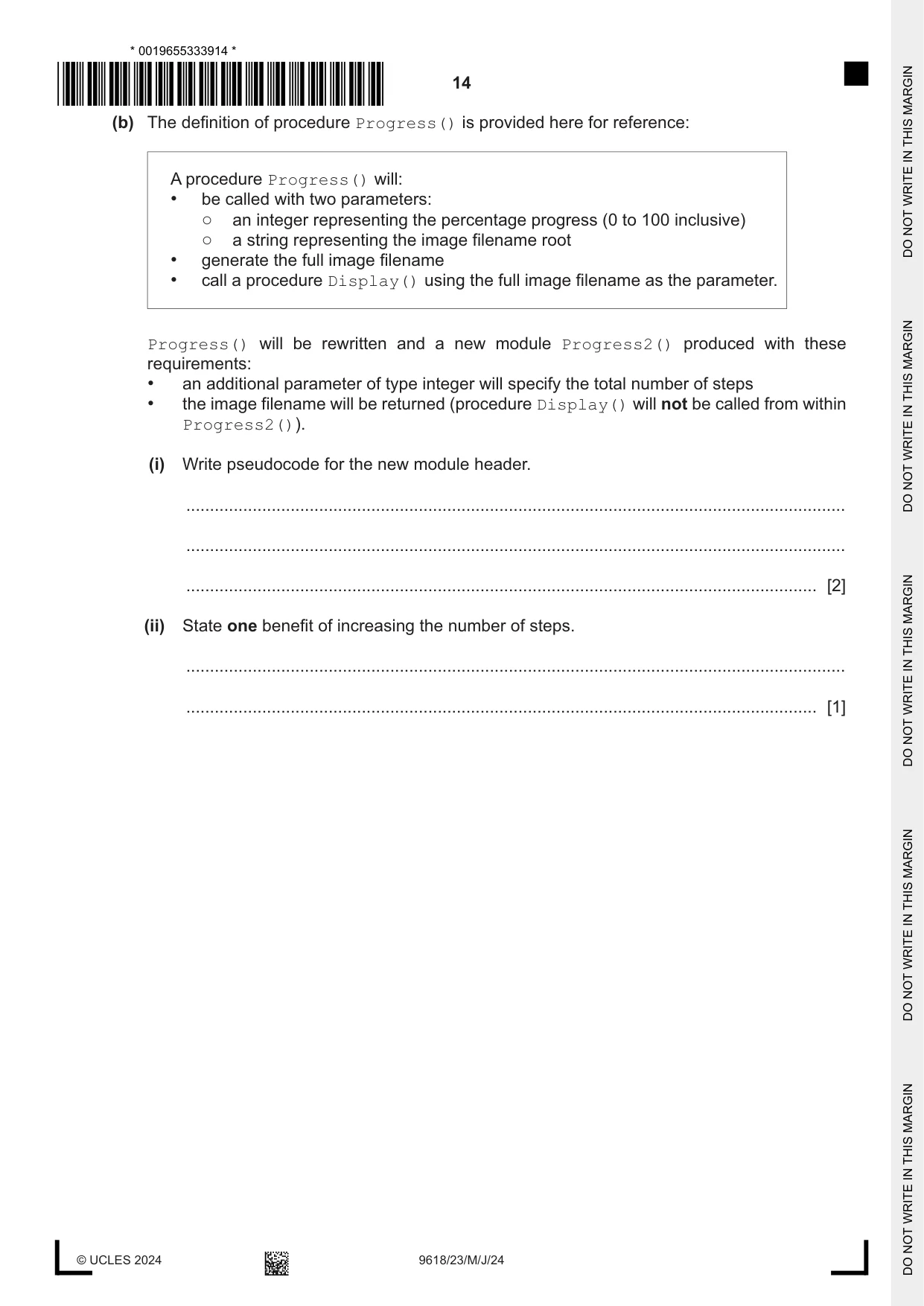
6 A program displays a progress bar to inform the user of the progress of tasks that take a significant time to complete, such as those involving file transfer operations. Task progress is divided into 11 steps. Each step represents the amount of progress as a percentage. An image is associated with each step and each image is stored in a different file. Different progress bar images may be selected. For a given image, files all have the same filename root, with a different suffix. The table illustrates the process for using the image with filename root BargraphA Percentage Step Image filename Image progress 1 < 10 BargraphA-1.bmp 2 >= 10 and < 20 BargraphA-2.bmp 3 >= 20 and < 30 BargraphA-3.bmp 9 >= 80 and < 90 BargraphA-9.bmp 10 >= 90 and < 100 BargraphA-10.bmp 11 100 BargraphA-11.bmp A procedure Progress() will: • be called with two parameters: ○ an integer representing the percentage progress (0 to 100 inclusive) ○ a string representing the image filename root • generate the full image filename • call a procedure Display() using the full image filename as the parameter. (a) Write pseudocode for procedure Progress(). ................................................................................................................................................... ................................................................................................................................................... ................................................................................................................................................... ................................................................................................................................................... ................................................................................................................................................... ................................................................................................................................................... ................................................................................................................................................... ................................................................................................................................................... ................................................................................................................................................... ................................................................................................................................................... ................................................................................................................................................... ................................................................................................................................................... ................................................................................................................................................... ................................................................................................................................................... ................................................................................................................................................... ................................................................................................................................................... ................................................................................................................................................... ................................................................................................................................................... ................................................................................................................................................... ................................................................................................................................................... ................................................................................................................................................... ................................................................................................................................................... ................................................................................................................................................... ................................................................................................................................................... ............................................................................................................................................. [6] (b) The definition of procedure Progress() is provided here for reference: A procedure Progress() will: • be called with two parameters: ○ an integer representing the percentage progress (0 to 100 inclusive) ○ a string representing the image filename root • generate the full image filename • call a procedure Display() using the full image filename as the parameter. Progress() will be rewritten and a new module Progress2() produced with these requirements: • an additional parameter of type integer will specify the total number of steps • the image filename will be returned (procedure Display() will not be called from within Progress2()). (i) Write pseudocode for the new module header. ........................................................................................................................................... ........................................................................................................................................... ..................................................................................................................................... [2] (ii) State one benefit of increasing the number of steps. ........................................................................................................................................... ..................................................................................................................................... [1]
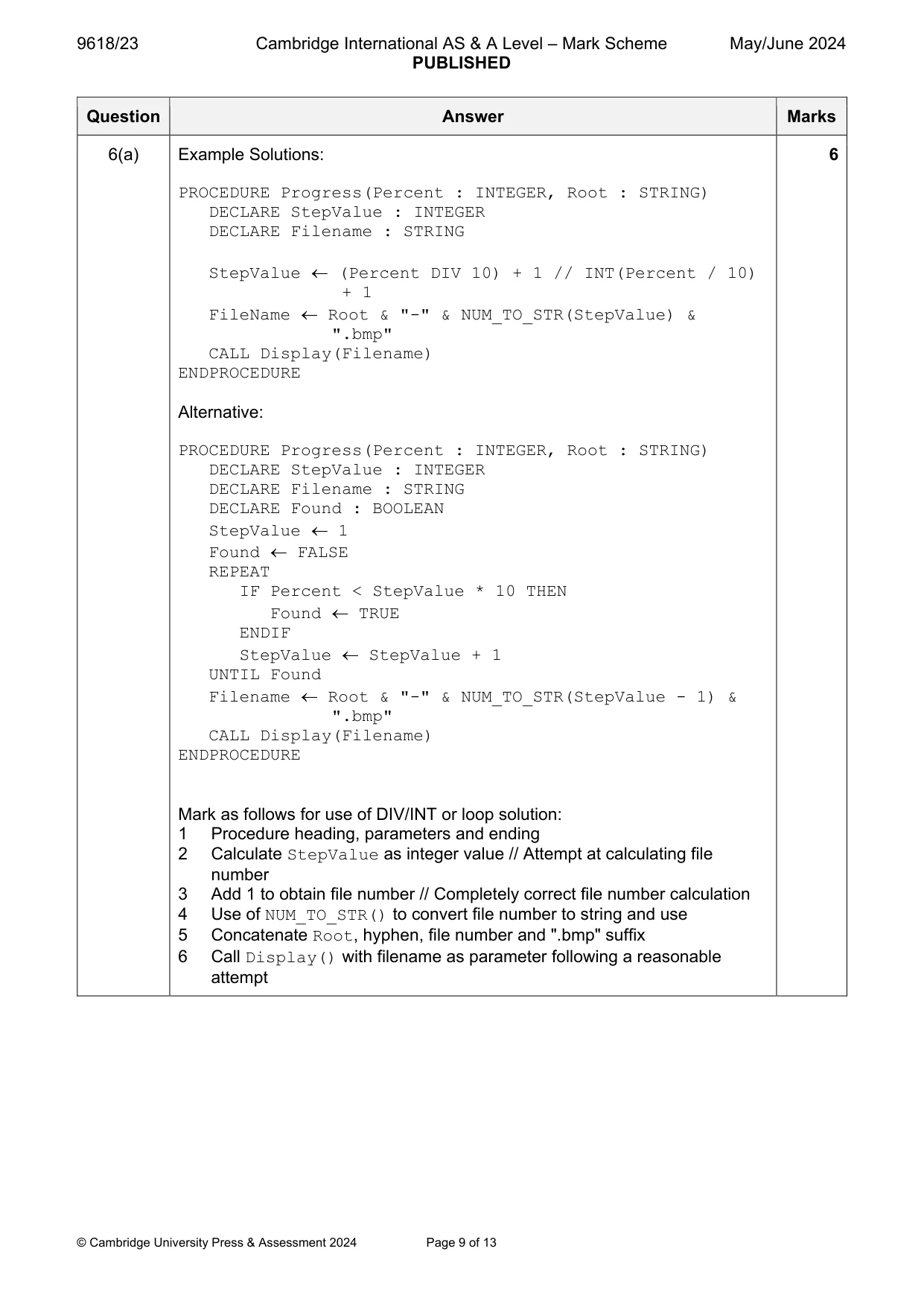
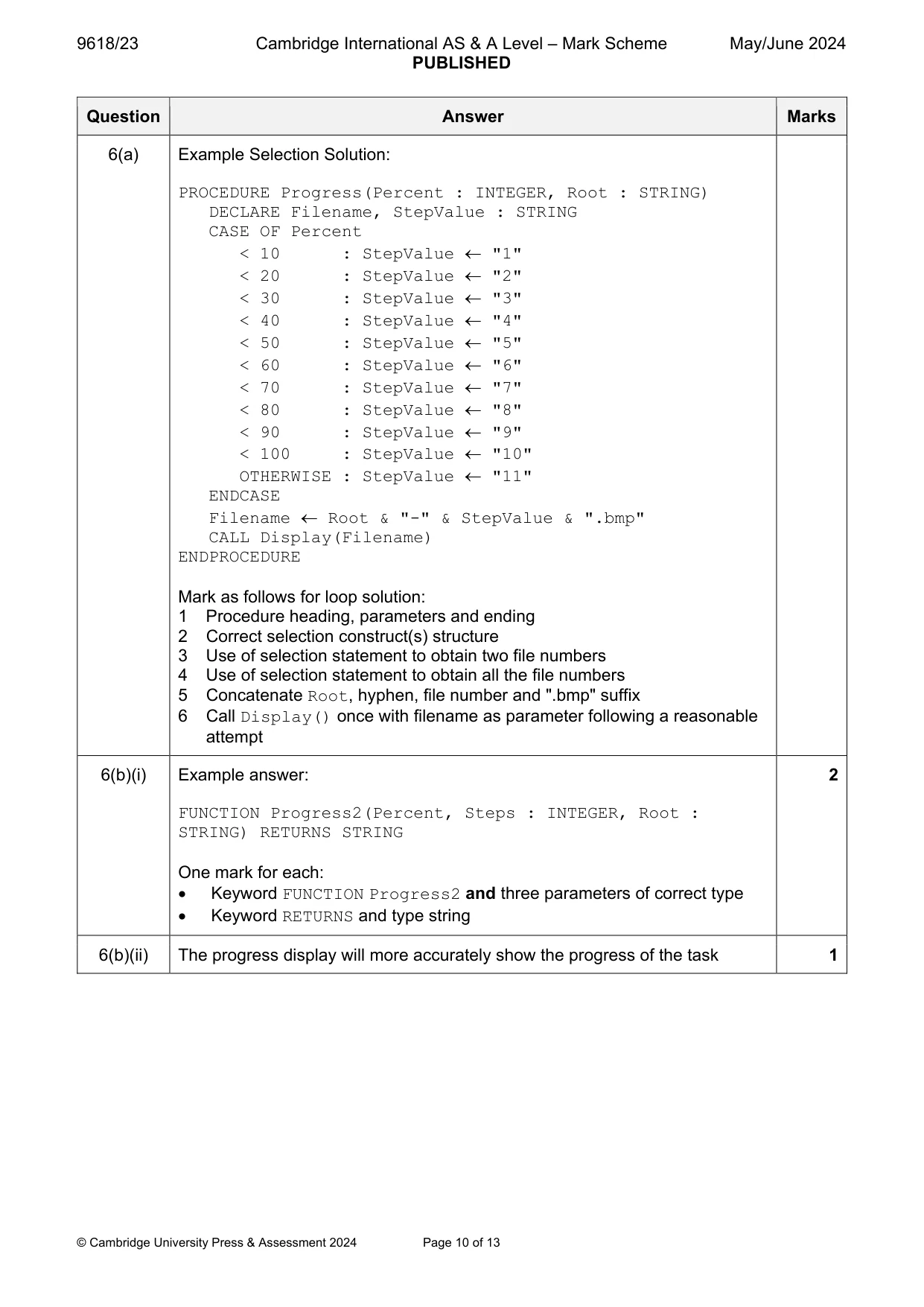
Mark scheme: 6(a) Example Solutions: 6 PROCEDURE Progress(Percent : INTEGER, Root : STRING) DECLARE StepValue : INTEGER DECLARE Filename : STRING StepValue (Percent DIV 10) + 1 // INT(Percent / 10) + 1 FileName Root & "-" & NUM_TO_STR(StepValue) & ".bmp" CALL Display(Filename) ENDPROCEDURE Alternative: PROCEDURE Progress(Percent : INTEGER, Root : STRING) DECLARE StepValue : INTEGER DECLARE Filename : STRING DECLARE Found : BOOLEAN StepValue 1 Found FALSE REPEAT IF Percent < StepValue * 10 THEN Found TRUE ENDIF StepValue StepValue + 1 UNTIL Found Filename Root & "-" & NUM_TO_STR(StepValue - 1) & ".bmp" CALL Display(Filename) ENDPROCEDURE Mark as follows for use of DIV/INT or loop solution: 1 Procedure heading, parameters and ending 2 Calculate StepValue as integer value // Attempt at calculating file number 3 Add 1 to obtain file number // Completely correct file number calculation 4 Use of NUM_TO_STR() to convert file number to string and use 5 Concatenate Root, hyphen, file number and ".bmp" suffix 6 Call Display() with filename as parameter following a reasonable attempt 6(a) Example Selection Solution: PROCEDURE Progress(Percent : INTEGER, Root : STRING) DECLARE Filename, StepValue : STRING CASE OF Percent < 10 : StepValue "1" < 20 : StepValue "2" < 30 : StepValue "3" < 40 : StepValue "4" < 50 : StepValue "5" < 60 : StepValue "6" < 70 : StepValue "7" < 80 : StepValue "8" < 90 : StepValue "9" < 100 : StepValue "10" OTHERWISE : StepValue "11" ENDCASE Filename Root & "-" & StepValue & ".bmp" CALL Display(Filename) ENDPROCEDURE Mark as follows for loop solution: 1 Procedure heading, parameters and ending 2 Correct selection construct(s) structure 3 Use of selection statement to obtain two file numbers 4 Use of selection statement to obtain all the file numbers 5 Concatenate Root, hyphen, file number and ".bmp" suffix 6 Call Display() once with filename as parameter following a reasonable attempt 6(b)(i) Example answer: 2 FUNCTION Progress2(Percent, Steps : INTEGER, Root : STRING) RETURNS STRING One mark for each: Keyword FUNCTION Progress2 and three parameters of correct type Keyword RETURNS and type string 6(b)(ii) The progress display will more accurately show the progress of the task 1
Q7 · Seven program modules form part of a program
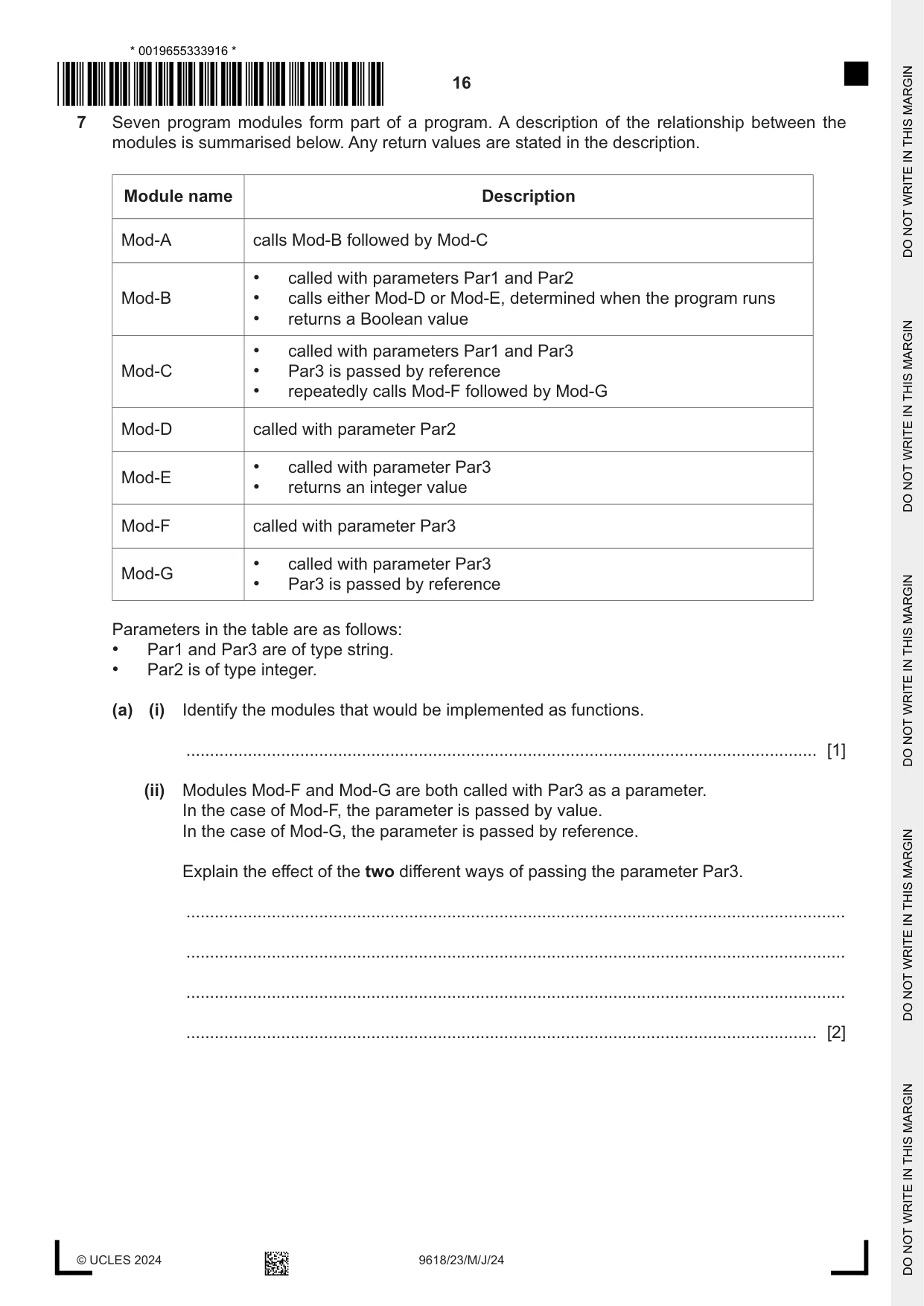
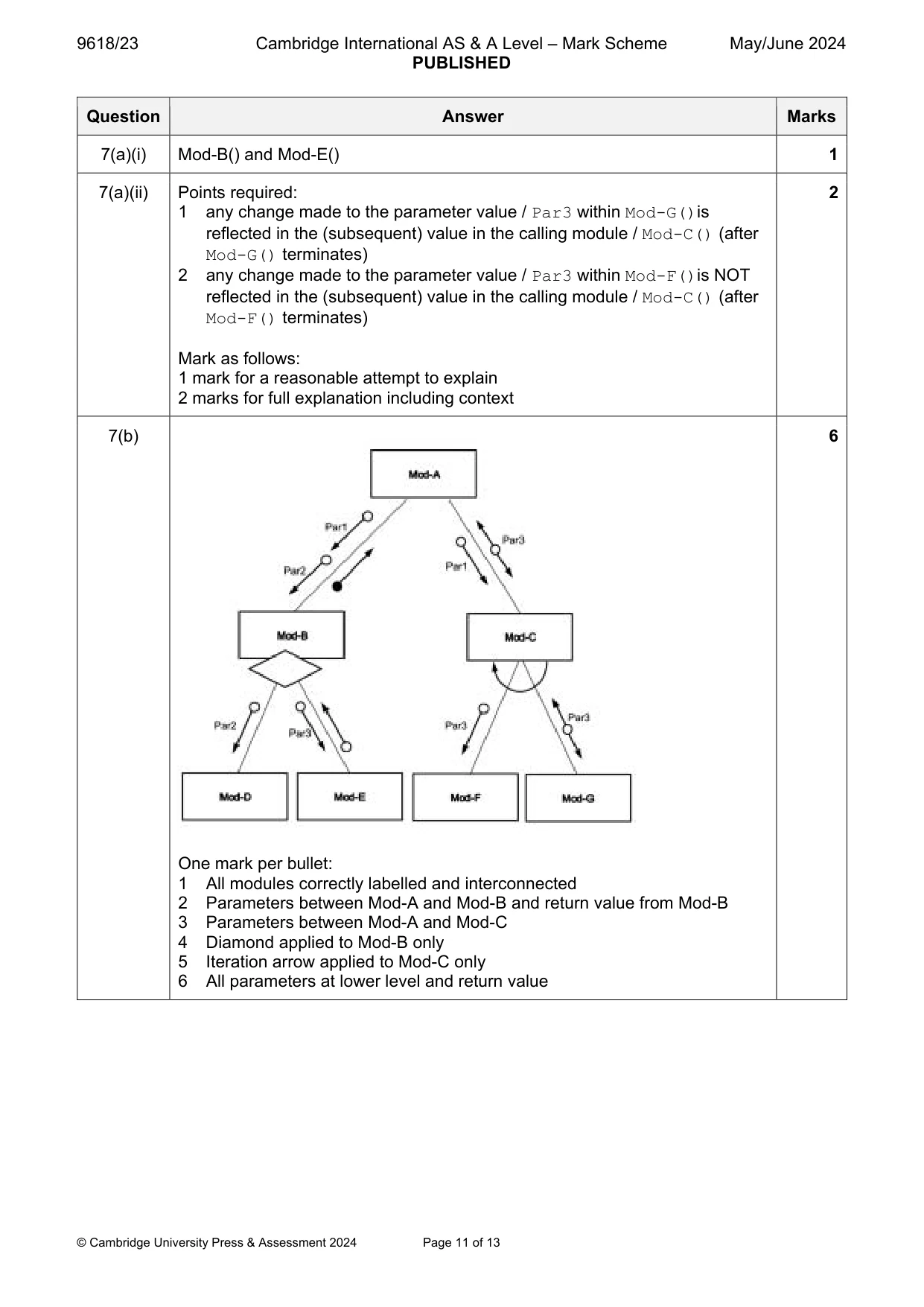
7 Seven program modules form part of a program. A description of the relationship between the modules is summarised below. Any return values are stated in the description. Module name Description Mod-A calls Mod-B followed by Mod-C • called with parameters Par1 and Par2 Mod-B • calls either Mod-D or Mod-E, determined when the program runs • returns a Boolean value • called with parameters Par1 and Par3 Mod-C • Par3 is passed by reference • repeatedly calls Mod-F followed by Mod-G Mod-D called with parameter Par2 • called with parameter Par3 Mod-E • returns an integer value Mod-F called with parameter Par3 • called with parameter Par3 Mod-G • Par3 is passed by reference Parameters in the table are as follows: • Par1 and Par3 are of type string. • Par2 is of type integer. (a) (i) Identify the modules that would be implemented as functions. ..................................................................................................................................... [1] (ii) Modules Mod-F and Mod-G are both called with Par3 as a parameter. In the case of Mod-F, the parameter is passed by value. In the case of Mod-G, the parameter is passed by reference. Explain the effect of the two different ways of passing the parameter Par3. ........................................................................................................................................... ........................................................................................................................................... ........................................................................................................................................... ..................................................................................................................................... [2] (b) Draw a structure chart to show the relationship between the seven modules and the parameters passed between them. [6]
Mark scheme: 7(a)(i) Mod-B() and Mod-E() 1 7(a)(ii) Points required: 2 1 any change made to the parameter value / Par3 within Mod-G()is reflected in the (subsequent) value in the calling module / Mod-C() (after Mod-G() terminates) 2 any change made to the parameter value / Par3 within Mod-F()is NOT reflected in the (subsequent) value in the calling module / Mod-C() (after Mod-F() terminates) Mark as follows: 1 mark for a reasonable attempt to explain 2 marks for full explanation including context 7(b) 6 One mark per bullet: 1 All modules correctly labelled and interconnected 2 Parameters between Mod-A and Mod-B and return value from Mod-B 3 Parameters between Mod-A and Mod-C 4 Diamond applied to Mod-B only 5 Iteration arrow applied to Mod-C only 6 All parameters at lower level and return value
Q8 · A teacher is designing a program to process pseudocode projects written by her students
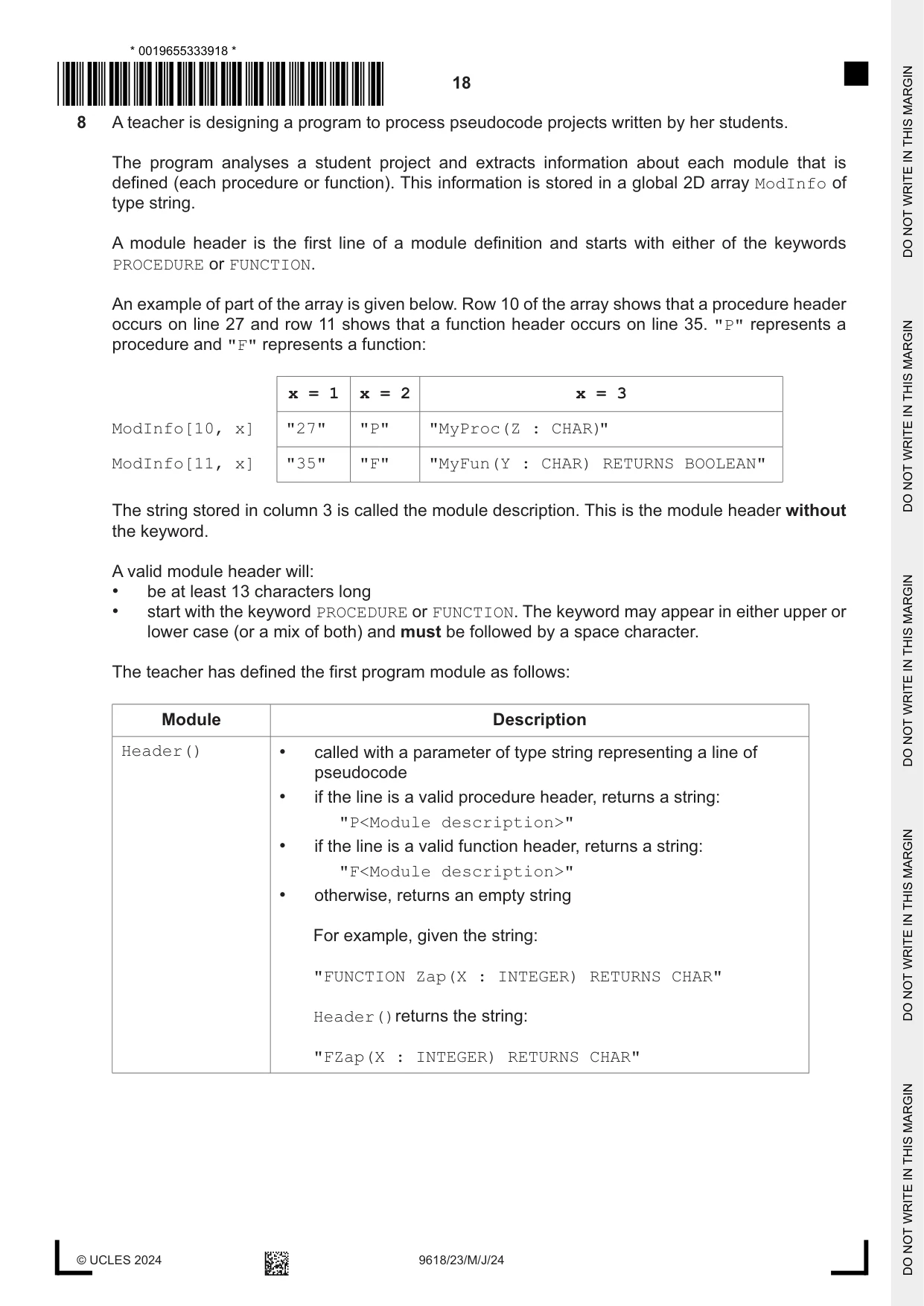
8 A teacher is designing a program to process pseudocode projects written by her students. The program analyses a student project and extracts information about each module that is defined (each procedure or function). This information is stored in a global 2D array ModInfo of type string. A module header is the first line of a module definition and starts with either of the keywords PROCEDURE or FUNCTION. An example of part of the array is given below. Row 10 of the array shows that a procedure header occurs on line 27 and row 11 shows that a function header occurs on line 35. "P" represents a procedure and "F" represents a function: x = 1 x = 2 x = 3 ModInfo[10, x] "27" "P" "MyProc(Z : CHAR)" ModInfo[11, x] "35" "F" "MyFun(Y : CHAR) RETURNS BOOLEAN" The string stored in column 3 is called the module description. This is the module header without the keyword. A valid module header will: • be at least 13 characters long • start with the keyword PROCEDURE or FUNCTION. The keyword may appear in either upper or lower case (or a mix of both) and must be followed by a space character. The teacher has defined the first program module as follows: Module Description Header() • called with a parameter of type string representing a line of pseudocode • if the line is a valid procedure header, returns a string: "P<Module description>" • if the line is a valid function header, returns a string: "F<Module description>" • otherwise, returns an empty string For example, given the string: "FUNCTION Zap(X : INTEGER) RETURNS CHAR" Header()returns the string: "FZap(X : INTEGER) RETURNS CHAR" (a) Write pseudocode for module Header(). ................................................................................................................................................... ................................................................................................................................................... ................................................................................................................................................... ................................................................................................................................................... ................................................................................................................................................... ................................................................................................................................................... ................................................................................................................................................... ................................................................................................................................................... ................................................................................................................................................... ................................................................................................................................................... ................................................................................................................................................... ................................................................................................................................................... ................................................................................................................................................... ................................................................................................................................................... ................................................................................................................................................... ................................................................................................................................................... ................................................................................................................................................... ................................................................................................................................................... ................................................................................................................................................... ................................................................................................................................................... ............................................................................................................................................. [7] (b) A new module is required: Module Description FindModules() • called with a parameter of type string representing a student project file name • uses module Header() to check each line of the project • assigns values to the ModInfo array for each module declaration in the student project As a reminder, the previous example of part of the array is repeated below: x = 1 x = 2 x = 3 ModInfo[10, x] "27" "P" "MyProc(Z : CHAR)" ModInfo[11, x] "35" "F" "MyFun(Y : CHAR) RETURNS BOOLEAN" Write pseudocode for module FindModules(). Assume that the array contains enough rows for the number of modules in each project. ................................................................................................................................................... ................................................................................................................................................... ................................................................................................................................................... ................................................................................................................................................... ................................................................................................................................................... ................................................................................................................................................... ................................................................................................................................................... ................................................................................................................................................... ................................................................................................................................................... ................................................................................................................................................... ................................................................................................................................................... ................................................................................................................................................... ................................................................................................................................................... ................................................................................................................................................... ................................................................................................................................................... ................................................................................................................................................... ...................................................................................................................................................
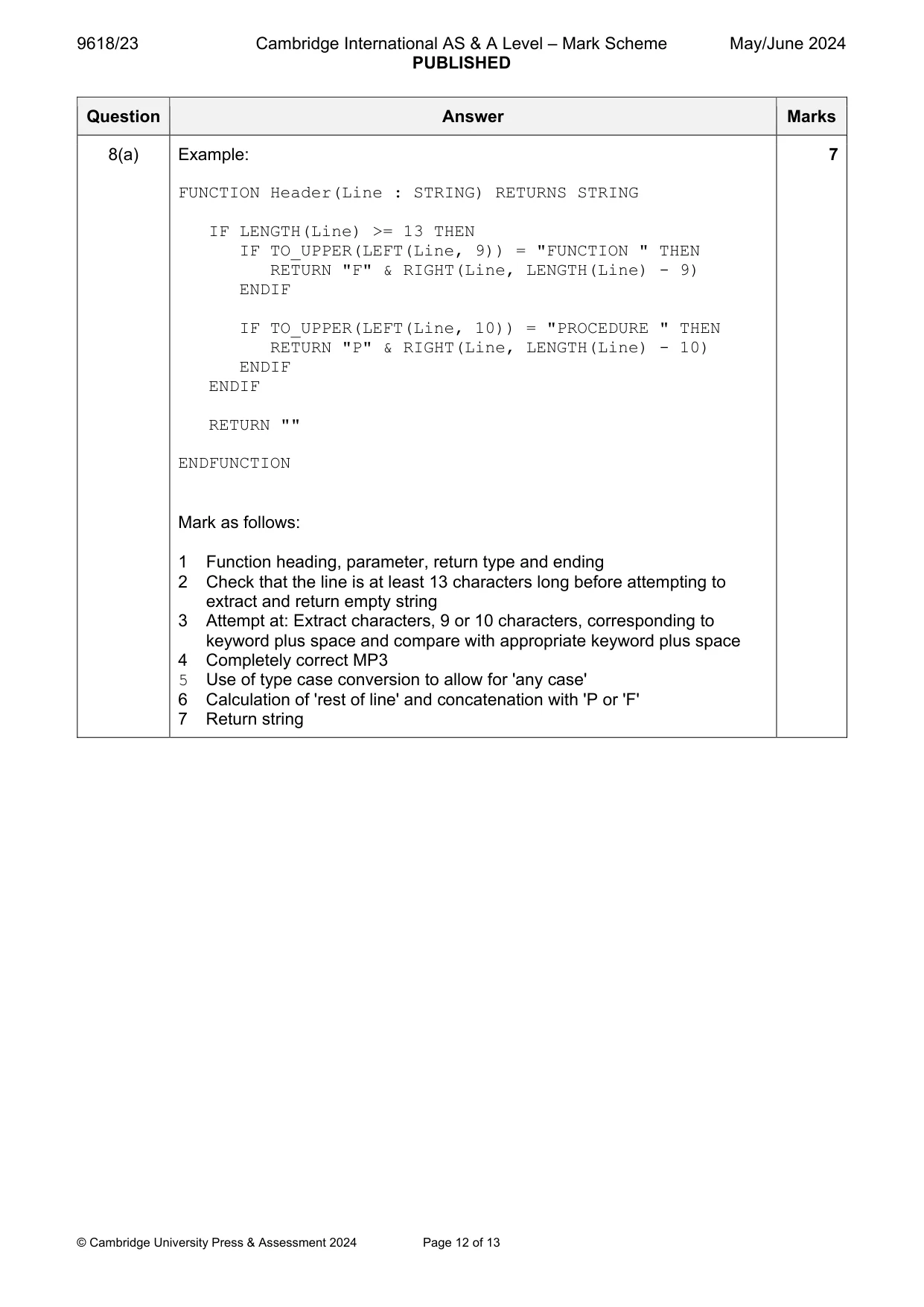
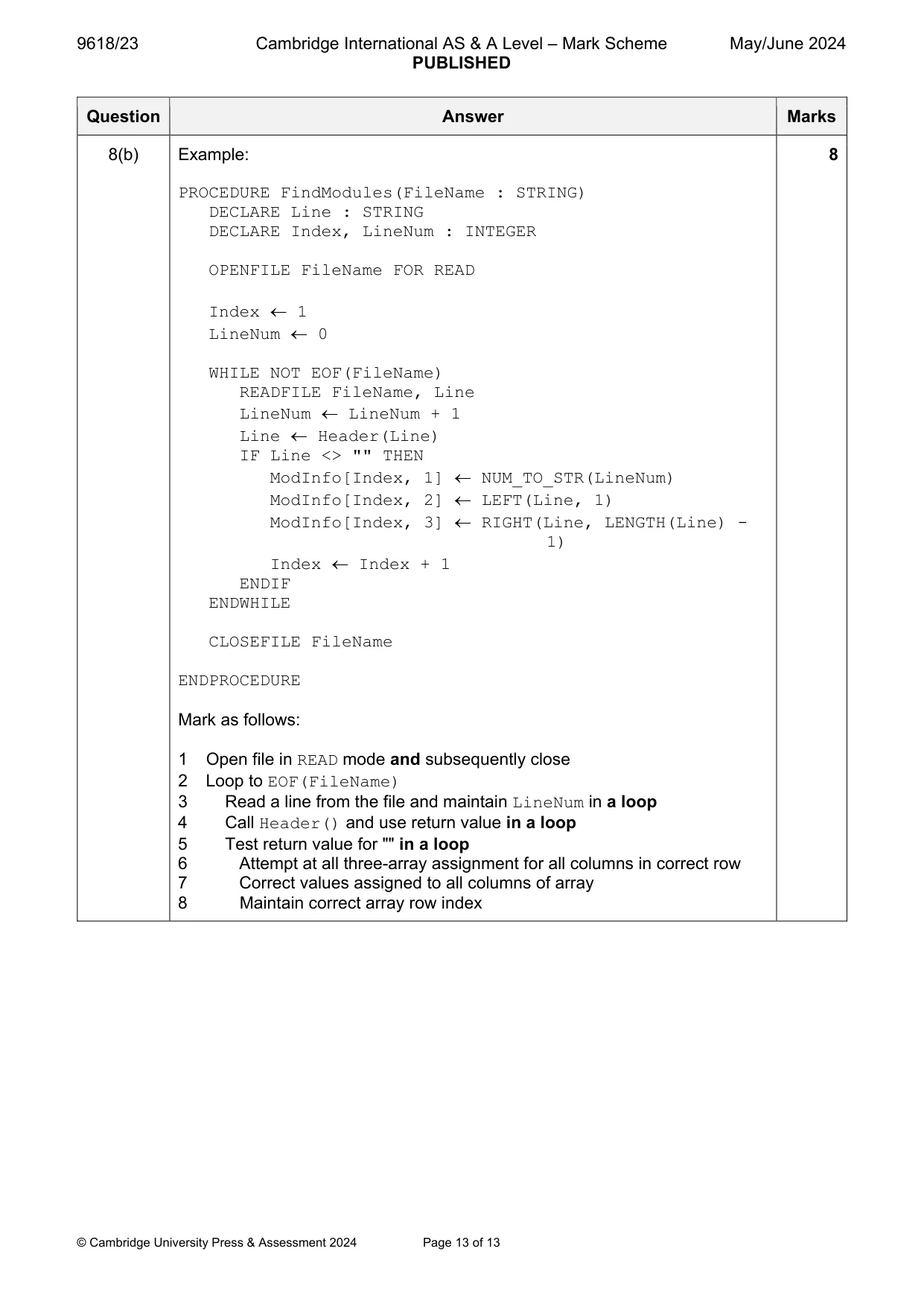
Mark scheme: 8(a) Example: 7 FUNCTION Header(Line : STRING) RETURNS STRING IF LENGTH(Line) >= 13 THEN IF TO_UPPER(LEFT(Line, 9)) = "FUNCTION " THEN RETURN "F" & RIGHT(Line, LENGTH(Line) - 9) ENDIF IF TO_UPPER(LEFT(Line, 10)) = "PROCEDURE " THEN RETURN "P" & RIGHT(Line, LENGTH(Line) - 10) ENDIF ENDIF RETURN "" ENDFUNCTION Mark as follows: 1 Function heading, parameter, return type and ending 2 Check that the line is at least 13 characters long before attempting to extract and return empty string 3 Attempt at: Extract characters, 9 or 10 characters, corresponding to keyword plus space and compare with appropriate keyword plus space 4 Completely correct MP3 5 Use of type case conversion to allow for 'any case' 6 Calculation of 'rest of line' and concatenation with 'P or 'F' 7 Return string 8(b) Example: 8 PROCEDURE FindModules(FileName : STRING) DECLARE Line : STRING DECLARE Index, LineNum : INTEGER OPENFILE FileName FOR READ Index 1 LineNum 0 WHILE NOT EOF(FileName) READFILE FileName, Line LineNum LineNum + 1 Line Header(Line) IF Line <> "" THEN ModInfo[Index, 1] NUM_TO_STR(LineNum) ModInfo[Index, 2] LEFT(Line, 1) ModInfo[Index, 3] RIGHT(Line, LENGTH(Line) - 1) Index Index + 1 ENDIF ENDWHILE CLOSEFILE FileName ENDPROCEDURE Mark as follows: 1 Open file in READ mode and subsequently close 2 Loop to EOF(FileName) 3 Read a line from the file and maintain LineNum in a loop 4 Call Header() and use return value in a loop 5 Test return value for "" in a loop 6 Attempt at all three-array assignment for all columns in correct row 7 Correct values assigned to all columns of array 8 Maintain correct array row index
What you needed in this session
Cambridge’s own grade thresholds for 2024 May/June, Paper 2 · Variant 3. A higher threshold means an easier paper — the bar moves with how the cohort did.