Cambridge A Level Computer Science 9618 — 2021 Oct/Nov Paper 4 · Variant 1
9618/41/O/N/21 · 75 marks · ≈84 min
The question paper and its mark scheme, free to read here and free to download. This is Cambridge’s own paper, exactly as it was sat.
Question paper12 pages

Mark scheme23 pages
Answers below. Sit the paper first if you are practising.
Paper as text
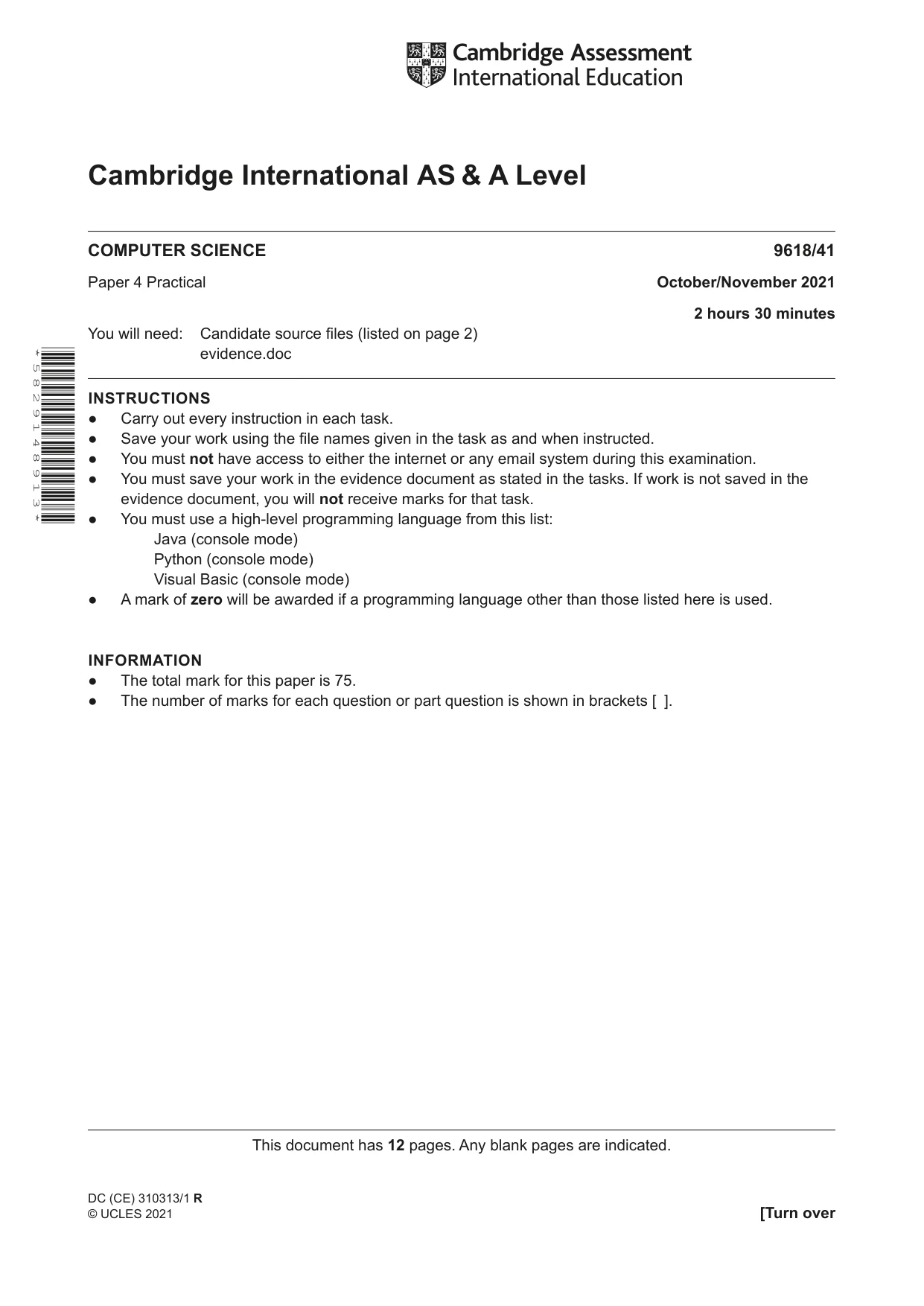
Question paper, page 1
This document has 12 pages. Any blank pages are indicated. Cambridge International AS & A Level COMPUTER SCIENCE 9618/41 Paper 4 Practical October/November 2021 2 hours 30 minutes You will need: Candidate source files (listed on page 2) evidence.doc INSTRUCTIONS ● Carry out every instruction in each task. ● Save your work using the file names given in the task as and when instructed. ● You must not have access to either the internet or any email system during this examination. ● You must save your work in the evidence document as stated in the tasks. If work is not saved in the evidence document, you will not receive marks for that task. ● You must use a high-level programming language from this list: Java (console mode) Python (console mode) Visual Basic (console mode) ● A mark of zero will be awarded if a programming language other than those listed here is used. INFORMATION ● The total mark for this paper is 75. ● The number of marks for each question or part question is shown in brackets [ ]. * 5 8 2 9 1 4 8 9 1 3 * DC (CE) 310313/1 R © UCLES 2021 [Turn over
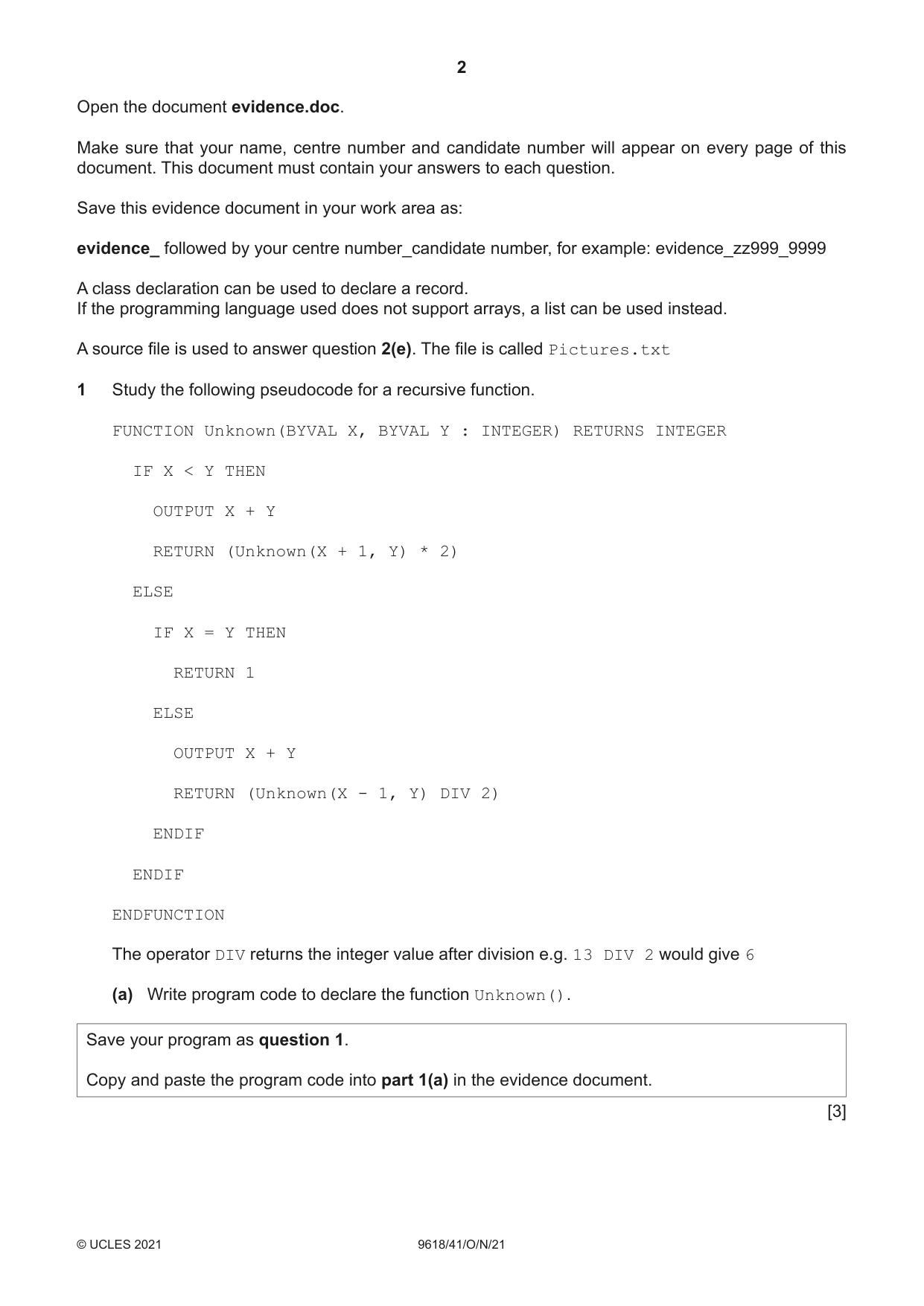
Question paper, page 2
2 9618/41/O/N/21 © UCLES 2021 Open the document evidence.doc. Make sure that your name, centre number and candidate number will appear on every page of this document. This document must contain your answers to each question. Save this evidence document in your work area as: evidence_ followed by your centre number_candidate number, for example: evidence_zz999_9999 A class declaration can be used to declare a record. If the programming language used does not support arrays, a list can be used instead. A source file is used to answer question 2(e). The file is called Pictures.txt 1 Study the following pseudocode for a recursive function. FUNCTION Unknown(BYVAL X, BYVAL Y : INTEGER) RETURNS INTEGER IF X < Y THEN OUTPUT X + Y RETURN (Unknown(X + 1, Y) * 2) ELSE IF X = Y THEN RETURN 1 ELSE OUTPUT X + Y RETURN (Unknown(X - 1, Y) DIV 2) ENDIF ENDIF ENDFUNCTION The operator DIV returns the integer value after division e.g. 13 DIV 2 would give 6 (a) Write program code to declare the function Unknown(). Save your program as question 1. Copy and paste the program code into part 1(a) in the evidence document. [3]
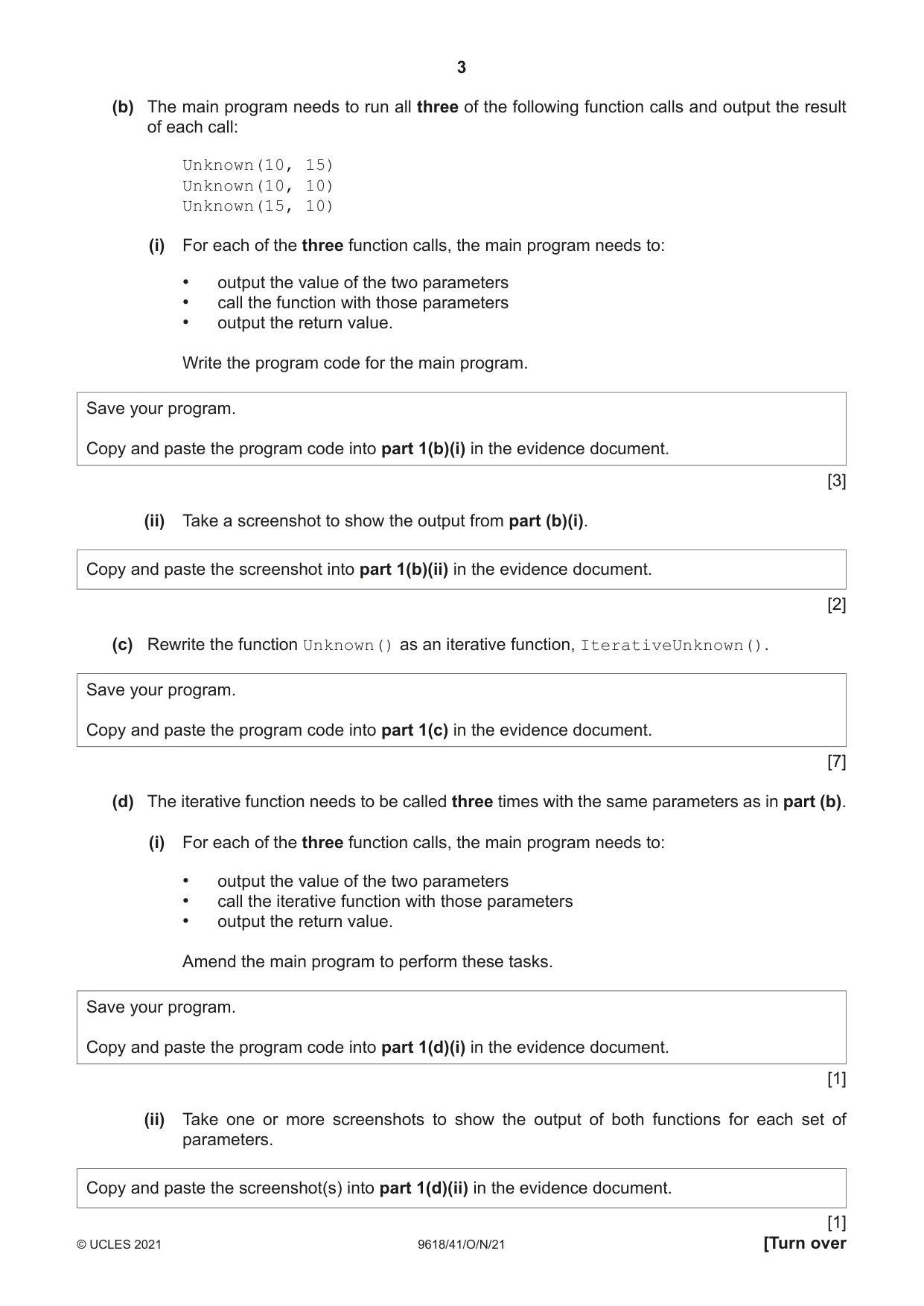
Question paper, page 3
3 9618/41/O/N/21 © UCLES 2021 [Turn over (b) The main program needs to run all three of the following function calls and output the result of each call: Unknown(10, 15) Unknown(10, 10) Unknown(15, 10) (i) For each of the three function calls, the main program needs to: • output the value of the two parameters • call the function with those parameters • output the return value. Write the program code for the main program. Save your program. Copy and paste the program code into part 1(b)(i) in the evidence document. [3] (ii) Take a screenshot to show the output from part (b)(i). Copy and paste the screenshot into part 1(b)(ii) in the evidence document. [2] (c) Rewrite the function Unknown() as an iterative function, IterativeUnknown(). Save your program. Copy and paste the program code into part 1(c) in the evidence document. [7] (d) The iterative function needs to be called three times with the same parameters as in part (b). (i) For each of the three function calls, the main program needs to: • output the value of the two parameters • call the iterative function with those parameters • output the return value. Amend the main program to perform these tasks. Save your program. Copy and paste the program code into part 1(d)(i) in the evidence document. [1] (ii) Take one or more screenshots to show the output of both functions for each set of parameters. Copy and paste the screenshot(s) into part 1(d)(ii) in the evidence document. [1]
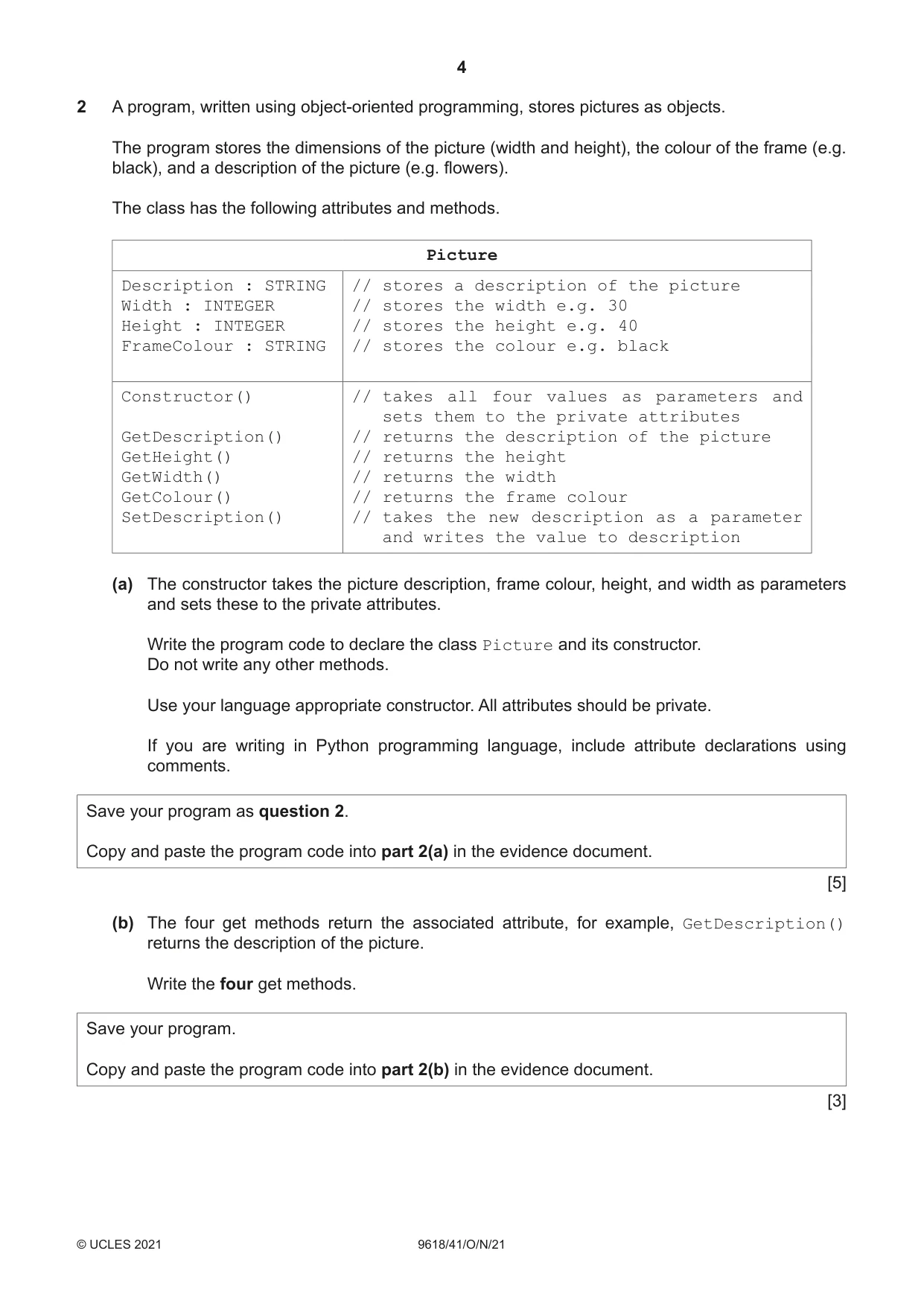
Question paper, page 4
4 9618/41/O/N/21 © UCLES 2021 2 A program, written using object-oriented programming, stores pictures as objects. The program stores the dimensions of the picture (width and height), the colour of the frame (e.g. black), and a description of the picture (e.g. flowers). The class has the following attributes and methods. Picture Description : STRING Width : INTEGER Height : INTEGER FrameColour : STRING // stores a description of the picture // stores the width e.g. 30 // stores the height e.g. 40 // stores the colour e.g. black Constructor() GetDescription() GetHeight() GetWidth() GetColour() SetDescription() // takes all four values as parameters and sets them to the private attributes // returns the description of the picture // returns the height // returns the width // returns the frame colour // takes the new description as a parameter and writes the value to description (a) The constructor takes the picture description, frame colour, height, and width as parameters and sets these to the private attributes. Write the program code to declare the class Picture and its constructor. Do not write any other methods. Use your language appropriate constructor. All attributes should be private. If you are writing in Python programming language, include attribute declarations using comments. Save your program as question 2. Copy and paste the program code into part 2(a) in the evidence document. [5] (b) The four get methods return the associated attribute, for example, GetDescription() returns the description of the picture. Write the four get methods. Save your program. Copy and paste the program code into part 2(b) in the evidence document. [3]
Question paper, page 5
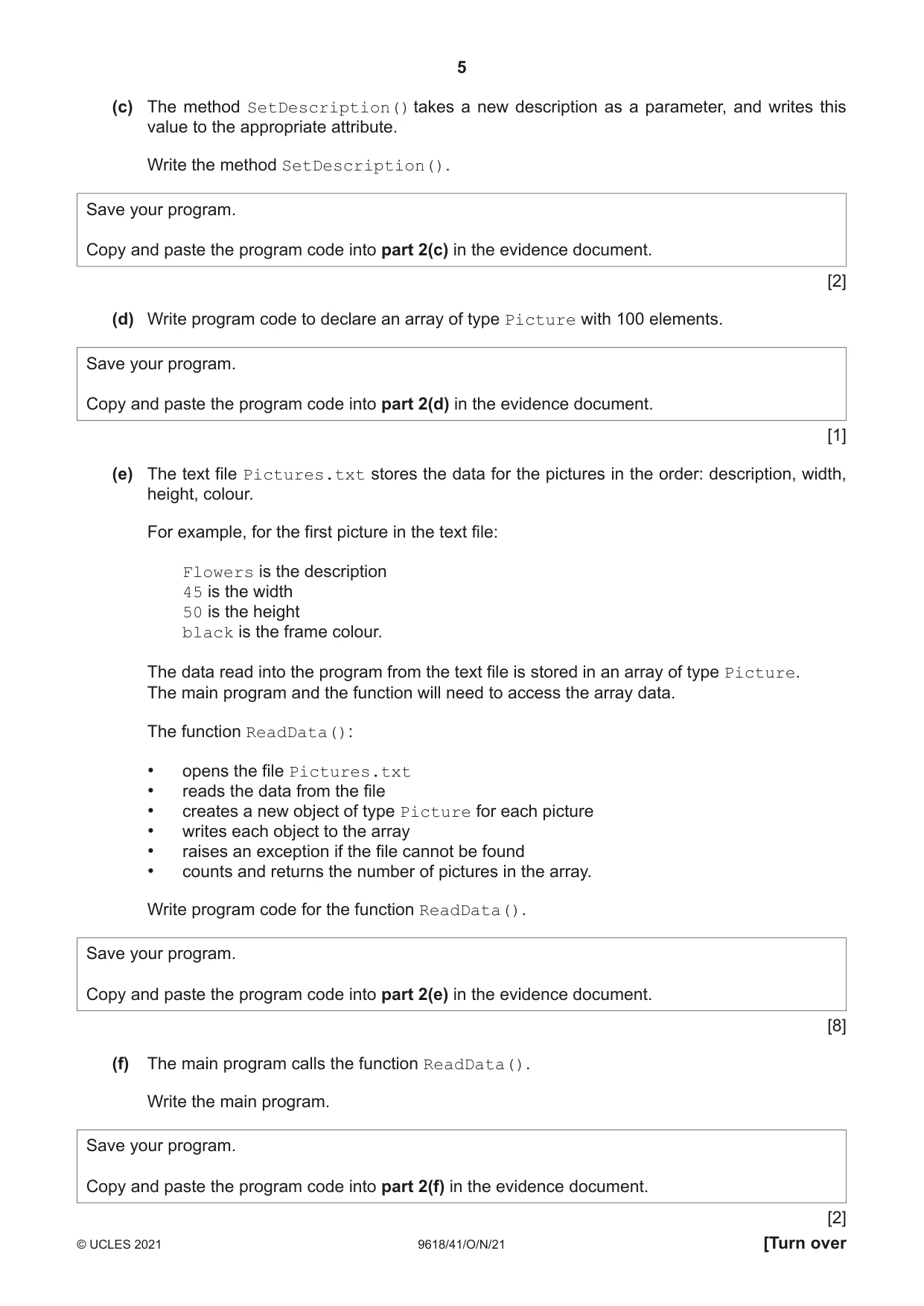
5 9618/41/O/N/21 © UCLES 2021 [Turn over (c) The method SetDescription() takes a new description as a parameter, and writes this value to the appropriate attribute. Write the method SetDescription(). Save your program. Copy and paste the program code into part 2(c) in the evidence document. [2] (d) Write program code to declare an array of type Picture with 100 elements. Save your program. Copy and paste the program code into part 2(d) in the evidence document. [1] (e) The text file Pictures.txt stores the data for the pictures in the order: description, width, height, colour. For example, for the first picture in the text file: Flowers is the description 45 is the width 50 is the height black is the frame colour. The data read into the program from the text file is stored in an array of type Picture. The main program and the function will need to access the array data. The function ReadData(): • opens the file Pictures.txt • reads the data from the file • creates a new object of type Picture for each picture • writes each object to the array • raises an exception if the file cannot be found • counts and returns the number of pictures in the array. Write program code for the function ReadData(). Save your program. Copy and paste the program code into part 2(e) in the evidence document. [8] (f) The main program calls the function ReadData(). Write the main program. Save your program. Copy and paste the program code into part 2(f) in the evidence document. [2]
Question paper, page 6
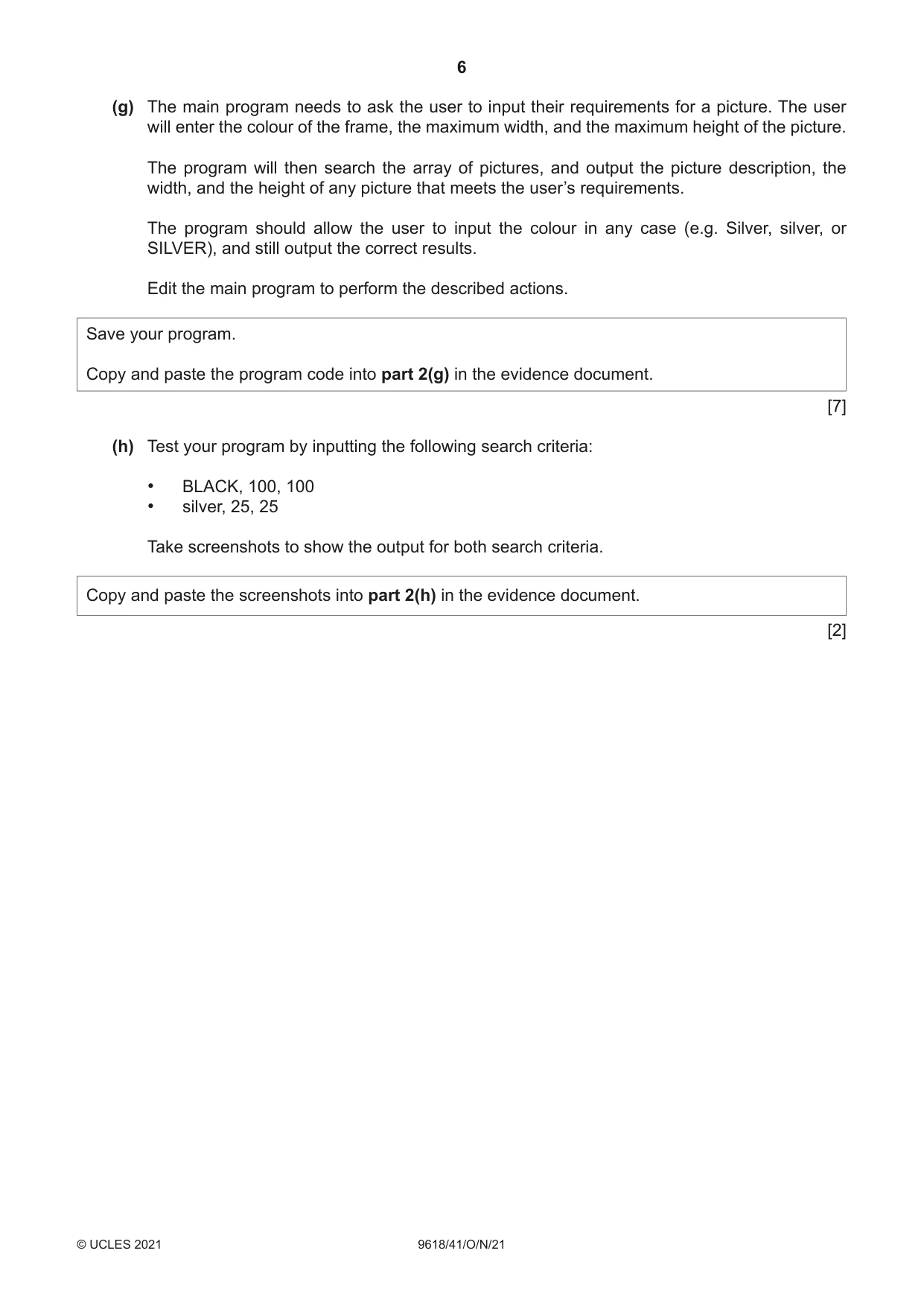
6 9618/41/O/N/21 © UCLES 2021 (g) The main program needs to ask the user to input their requirements for a picture. The user will enter the colour of the frame, the maximum width, and the maximum height of the picture. The program will then search the array of pictures, and output the picture description, the width, and the height of any picture that meets the user’s requirements. The program should allow the user to input the colour in any case (e.g. Silver, silver, or SILVER), and still output the correct results. Edit the main program to perform the described actions. Save your program. Copy and paste the program code into part 2(g) in the evidence document. [7] (h) Test your program by inputting the following search criteria: • BLACK, 100, 100 • silver, 25, 25 Take screenshots to show the output for both search criteria. Copy and paste the screenshots into part 2(h) in the evidence document. [2]
Question paper, page 7
7 9618/41/O/N/21 © UCLES 2021 [Turn over BLANK PAGE
Question paper, page 8
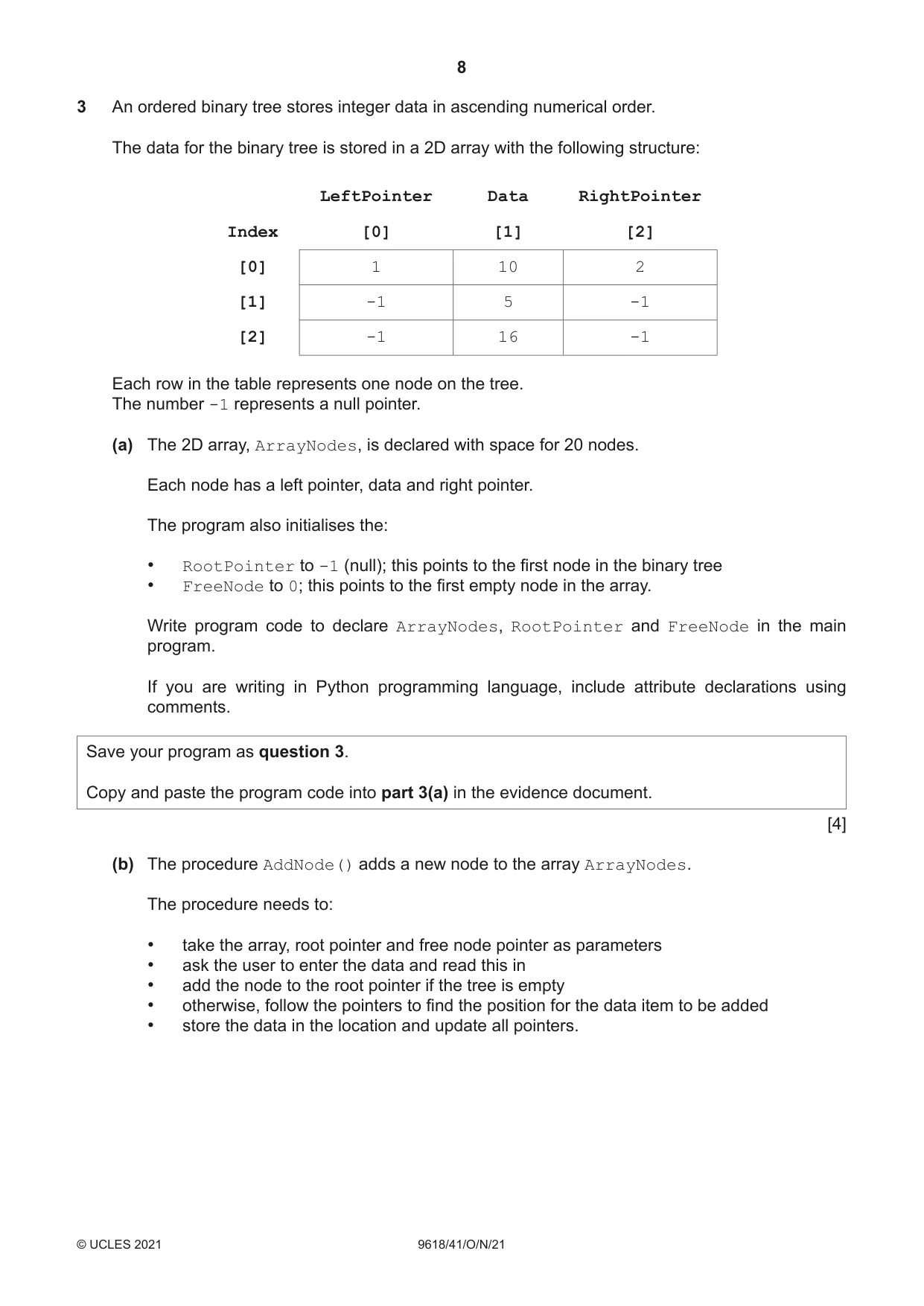
8 9618/41/O/N/21 © UCLES 2021 3 An ordered binary tree stores integer data in ascending numerical order. The data for the binary tree is stored in a 2D array with the following structure: LeftPointer Data RightPointer Index [0] [1] [2] [0] 1 10 2 [1] -1 5 -1 [2] -1 16 -1 Each row in the table represents one node on the tree. The number -1 represents a null pointer. (a) The 2D array, ArrayNodes, is declared with space for 20 nodes. Each node has a left pointer, data and right pointer. The program also initialises the: • RootPointer to -1 (null); this points to the first node in the binary tree • FreeNode to 0; this points to the first empty node in the array. Write program code to declare ArrayNodes, RootPointer and FreeNode in the main program. If you are writing in Python programming language, include attribute declarations using comments. Save your program as question 3. Copy and paste the program code into part 3(a) in the evidence document. [4] (b) The procedure AddNode() adds a new node to the array ArrayNodes. The procedure needs to: • take the array, root pointer and free node pointer as parameters • ask the user to enter the data and read this in • add the node to the root pointer if the tree is empty • otherwise, follow the pointers to find the position for the data item to be added • store the data in the location and update all pointers.
Question paper, page 9
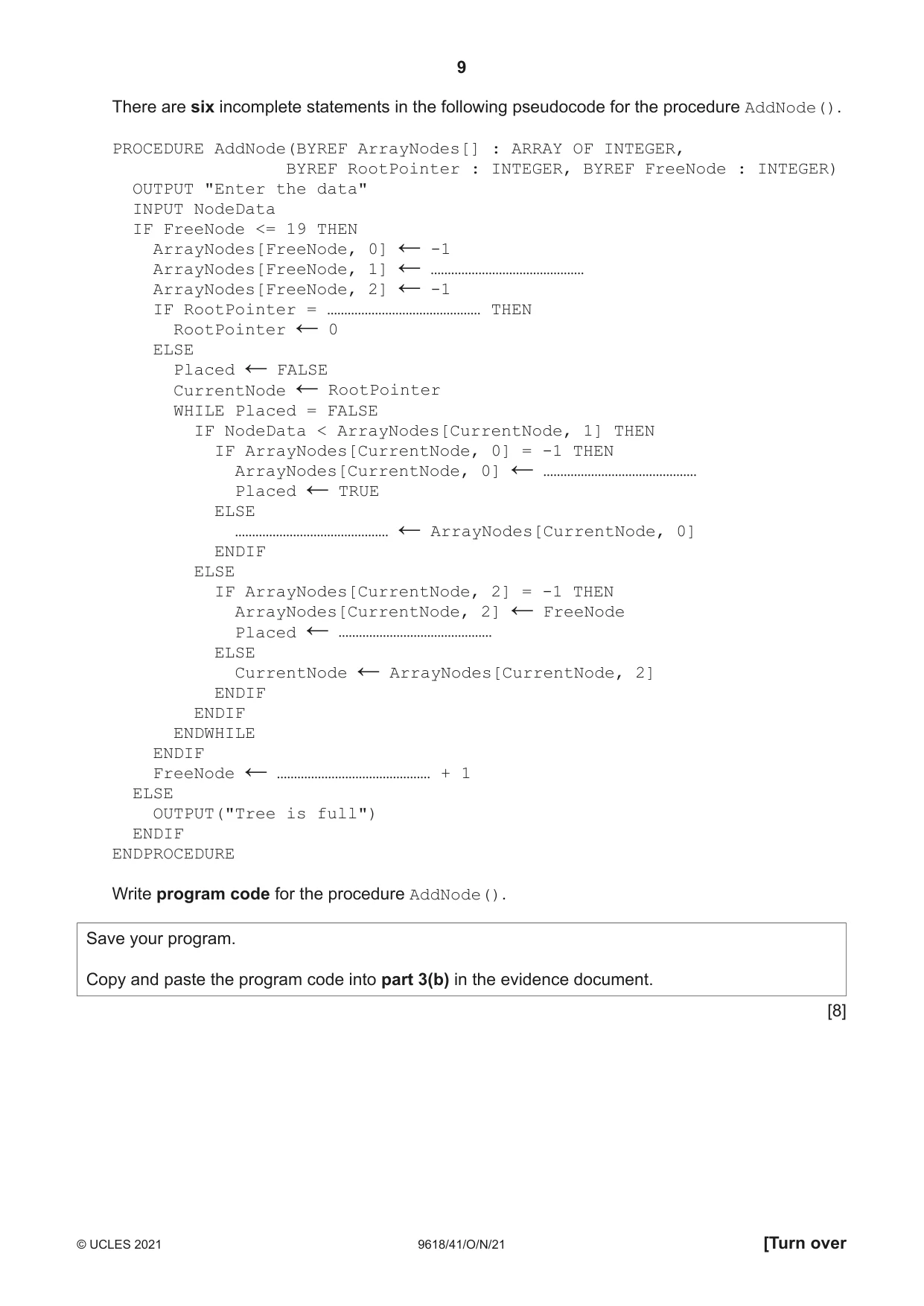
9 9618/41/O/N/21 © UCLES 2021 [Turn over There are six incomplete statements in the following pseudocode for the procedure AddNode(). PROCEDURE AddNode(BYREF ArrayNodes[] : ARRAY OF INTEGER, BYREF RootPointer : INTEGER, BYREF FreeNode : INTEGER) OUTPUT "Enter the data" INPUT NodeData IF FreeNode <= 19 THEN ArrayNodes[FreeNode, 0] ← -1 ArrayNodes[FreeNode, 1] ← ……………………………………… ArrayNodes[FreeNode, 2] ← -1 IF RootPointer = ……………………………………… THEN RootPointer ← 0 ELSE Placed ← FALSE CurrentNode ← RootPointer WHILE Placed = FALSE IF NodeData < ArrayNodes[CurrentNode, 1] THEN IF ArrayNodes[CurrentNode, 0] = -1 THEN ArrayNodes[CurrentNode, 0] ← ……………………………………… Placed ← TRUE ELSE ……………………………………… ← ArrayNodes[CurrentNode, 0] ENDIF ELSE IF ArrayNodes[CurrentNode, 2] = -1 THEN ArrayNodes[CurrentNode, 2] ← FreeNode Placed ← ……………………………………… ELSE CurrentNode ← ArrayNodes[CurrentNode, 2] ENDIF ENDIF ENDWHILE ENDIF FreeNode ← ……………………………………… + 1 ELSE OUTPUT("Tree is full") ENDIF ENDPROCEDURE Write program code for the procedure AddNode(). Save your program. Copy and paste the program code into part 3(b) in the evidence document. [8]
Question paper, page 10
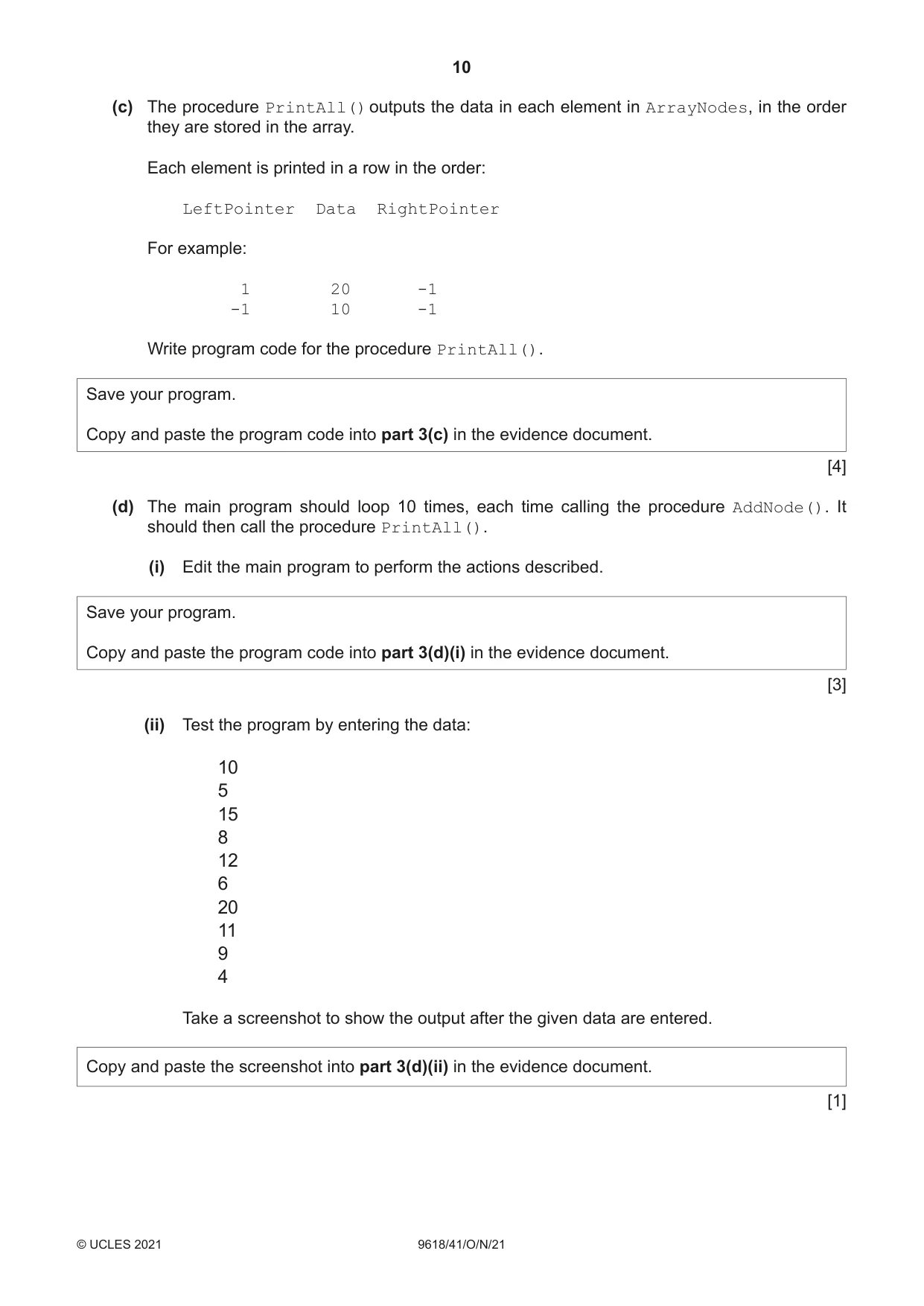
10 9618/41/O/N/21 © UCLES 2021 (c) The procedure PrintAll() outputs the data in each element in ArrayNodes, in the order they are stored in the array. Each element is printed in a row in the order: LeftPointer Data RightPointer For example: 1 20 -1 -1 10 -1 Write program code for the procedure PrintAll(). Save your program. Copy and paste the program code into part 3(c) in the evidence document. [4] (d) The main program should loop 10 times, each time calling the procedure AddNode(). It should then call the procedure PrintAll(). (i) Edit the main program to perform the actions described. Save your program. Copy and paste the program code into part 3(d)(i) in the evidence document. [3] (ii) Test the program by entering the data: 10 5 15 8 12 6 20 11 9 4 Take a screenshot to show the output after the given data are entered. Copy and paste the screenshot into part 3(d)(ii) in the evidence document. [1]
Question paper, page 11
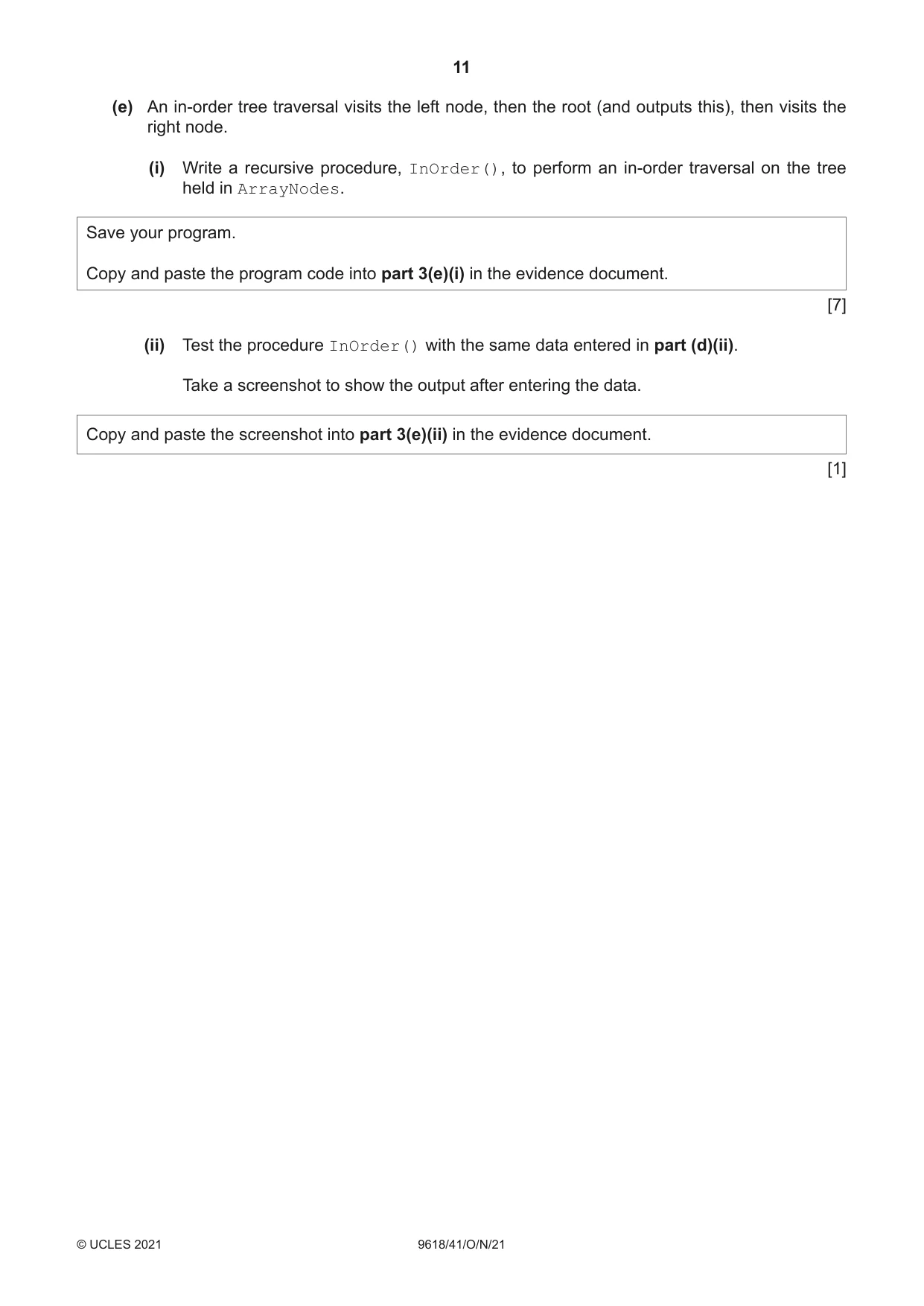
11 9618/41/O/N/21 © UCLES 2021 (e) An in-order tree traversal visits the left node, then the root (and outputs this), then visits the right node. (i) Write a recursive procedure, InOrder(), to perform an in-order traversal on the tree held in ArrayNodes. Save your program. Copy and paste the program code into part 3(e)(i) in the evidence document. [7] (ii) Test the procedure InOrder() with the same data entered in part (d)(ii). Take a screenshot to show the output after entering the data. Copy and paste the screenshot into part 3(e)(ii) in the evidence document. [1]
Question paper, page 12
12 9618/41/O/N/21 © UCLES 2021 Permission to reproduce items where third-party owned material protected by copyright is included has been sought and cleared where possible. Every reasonable effort has been made by the publisher (UCLES) to trace copyright holders, but if any items requiring clearance have unwittingly been included, the publisher will be pleased to make amends at the earliest possible opportunity. To avoid the issue of disclosure of answer-related information to candidates, all copyright acknowledgements are reproduced online in the Cambridge Assessment International Education Copyright Acknowledgements Booklet. This is produced for each series of examinations and is freely available to download at www.cambridgeinternational.org after the live examination series. Cambridge Assessment International Education is part of the Cambridge Assessment Group. Cambridge Assessment is the brand name of the University of Cambridge Local Examinations Syndicate (UCLES), which itself is a department of the University of Cambridge. BLANK PAGE
Mark scheme, page 1
This document consists of 23 printed pages. © UCLES 2021 [Turn over Cambridge International AS & A Level COMPUTER SCIENCE 9618/41 Paper 4 Practical October/November 2021 MARK SCHEME Maximum Mark: 75 Published This mark scheme is published as an aid to teachers and candidates, to indicate the requirements of the examination. It shows the basis on which Examiners were instructed to award marks. It does not indicate the details of the discussions that took place at an Examiners’ meeting before marking began, which would have considered the acceptability of alternative answers. Mark schemes should be read in conjunction with the question paper and the Principal Examiner Report for Teachers. Cambridge International will not enter into discussions about these mark schemes. Cambridge International is publishing the mark schemes for the October/November 2021 series for most Cambridge IGCSE™, Cambridge International A and AS Level components and some Cambridge O Level components.
Mark scheme, page 2
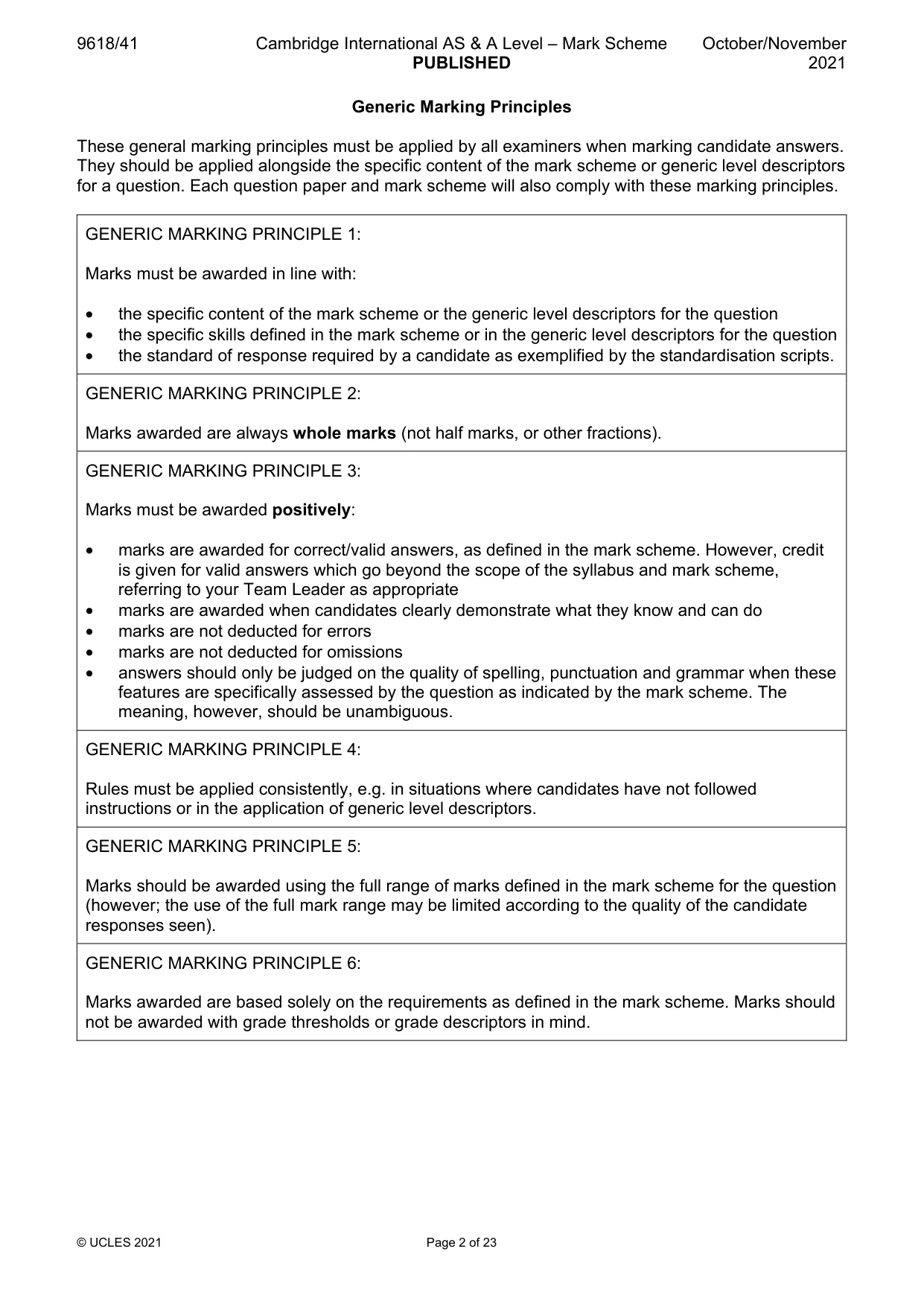
9618/41 Cambridge International AS & A Level – Mark Scheme PUBLISHED October/November 2021 © UCLES 2021 Page 2 of 23 Generic Marking Principles These general marking principles must be applied by all examiners when marking candidate answers. They should be applied alongside the specific content of the mark scheme or generic level descriptors for a question. Each question paper and mark scheme will also comply with these marking principles. GENERIC MARKING PRINCIPLE 1: Marks must be awarded in line with: • the specific content of the mark scheme or the generic level descriptors for the question • the specific skills defined in the mark scheme or in the generic level descriptors for the question • the standard of response required by a candidate as exemplified by the standardisation scripts. GENERIC MARKING PRINCIPLE 2: Marks awarded are always whole marks (not half marks, or other fractions). GENERIC MARKING PRINCIPLE 3: Marks must be awarded positively: • marks are awarded for correct/valid answers, as defined in the mark scheme. However, credit is given for valid answers which go beyond the scope of the syllabus and mark scheme, referring to your Team Leader as appropriate • marks are awarded when candidates clearly demonstrate what they know and can do • marks are not deducted for errors • marks are not deducted for omissions • answers should only be judged on the quality of spelling, punctuation and grammar when these features are specifically assessed by the question as indicated by the mark scheme. The meaning, however, should be unambiguous. GENERIC MARKING PRINCIPLE 4: Rules must be applied consistently, e.g. in situations where candidates have not followed instructions or in the application of generic level descriptors. GENERIC MARKING PRINCIPLE 5: Marks should be awarded using the full range of marks defined in the mark scheme for the question (however; the use of the full mark range may be limited according to the quality of the candidate responses seen). GENERIC MARKING PRINCIPLE 6: Marks awarded are based solely on the requirements as defined in the mark scheme. Marks should not be awarded with grade thresholds or grade descriptors in mind.
Mark scheme, page 3
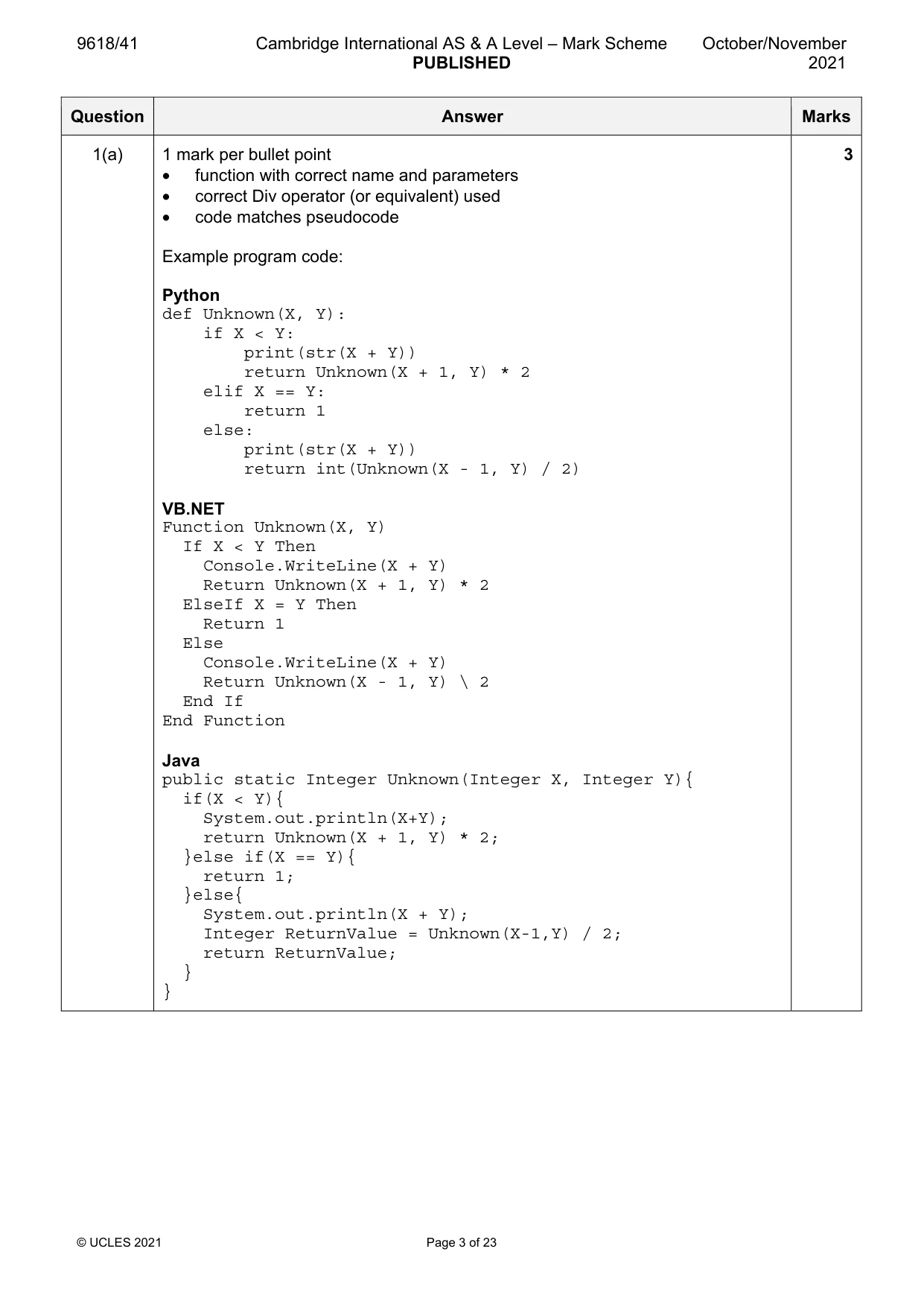
9618/41 Cambridge International AS & A Level – Mark Scheme PUBLISHED October/November 2021 © UCLES 2021 Page 3 of 23 Question Answer Marks 1(a) 1 mark per bullet point • function with correct name and parameters • correct Div operator (or equivalent) used • code matches pseudocode Example program code: Python def Unknown(X, Y): if X < Y: print(str(X + Y)) return Unknown(X + 1, Y) * 2 elif X == Y: return 1 else: print(str(X + Y)) return int(Unknown(X - 1, Y) / 2) VB.NET Function Unknown(X, Y) If X < Y Then Console.WriteLine(X + Y) Return Unknown(X + 1, Y) * 2 ElseIf X = Y Then Return 1 Else Console.WriteLine(X + Y) Return Unknown(X - 1, Y) \ 2 End If End Function Java public static Integer Unknown(Integer X, Integer Y){ if(X < Y){ System.out.println(X+Y); return Unknown(X + 1, Y) * 2; }else if(X == Y){ return 1; }else{ System.out.println(X + Y); Integer ReturnValue = Unknown(X-1,Y) / 2; return ReturnValue; } } 3
Mark scheme, page 4
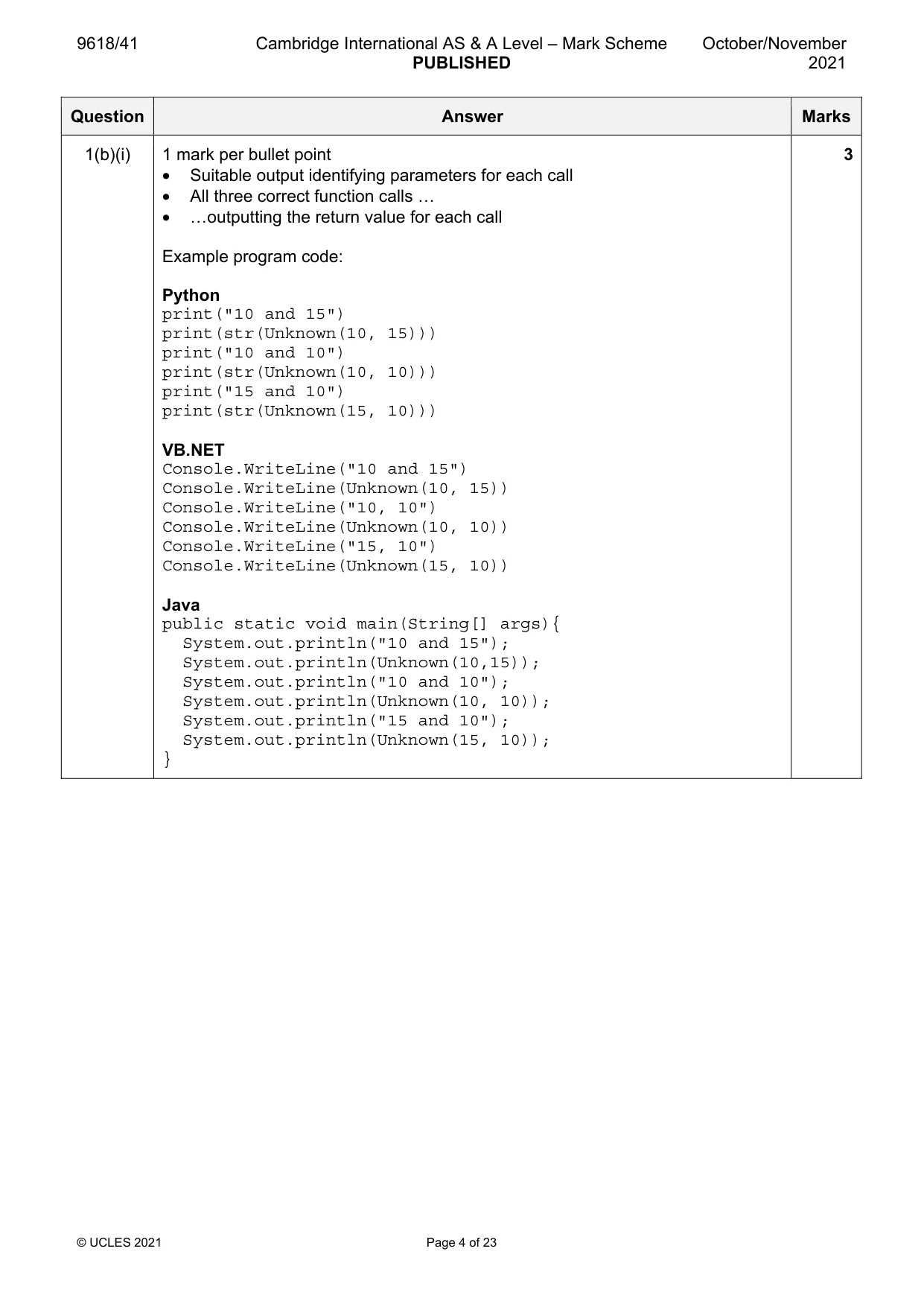
9618/41 Cambridge International AS & A Level – Mark Scheme PUBLISHED October/November 2021 © UCLES 2021 Page 4 of 23 Question Answer Marks 1(b)(i) 1 mark per bullet point • Suitable output identifying parameters for each call • All three correct function calls … • …outputting the return value for each call Example program code: Python print("10 and 15") print(str(Unknown(10, 15))) print("10 and 10") print(str(Unknown(10, 10))) print("15 and 10") print(str(Unknown(15, 10))) VB.NET Console.WriteLine("10 and 15") Console.WriteLine(Unknown(10, 15)) Console.WriteLine("10, 10") Console.WriteLine(Unknown(10, 10)) Console.WriteLine("15, 10") Console.WriteLine(Unknown(15, 10)) Java public static void main(String[] args){ System.out.println("10 and 15"); System.out.println(Unknown(10,15)); System.out.println("10 and 10"); System.out.println(Unknown(10, 10)); System.out.println("15 and 10"); System.out.println(Unknown(15, 10)); } 3
Mark scheme, page 5
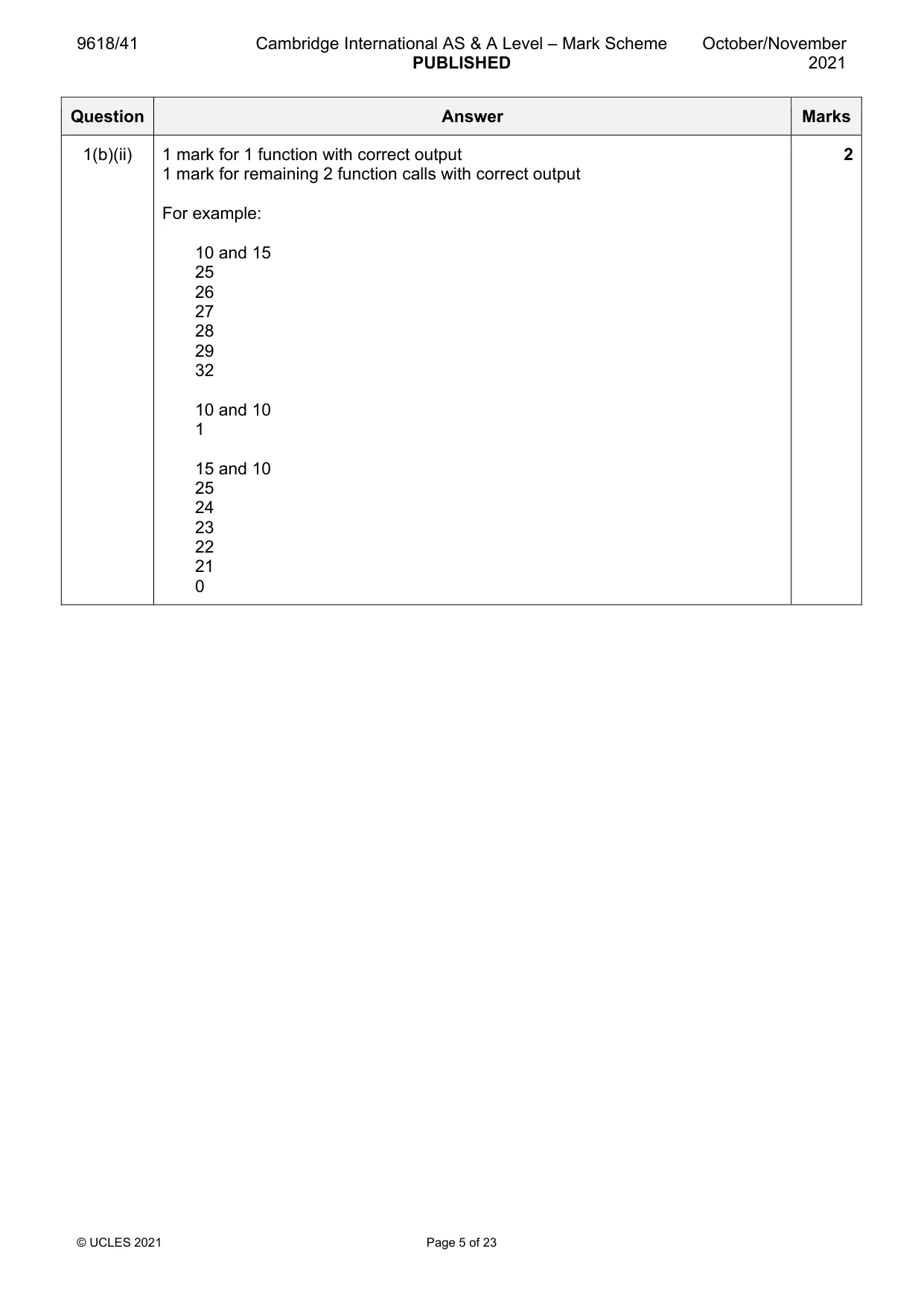
9618/41 Cambridge International AS & A Level – Mark Scheme PUBLISHED October/November 2021 © UCLES 2021 Page 5 of 23 Question Answer Marks 1(b)(ii) 1 mark for 1 function with correct output 1 mark for remaining 2 function calls with correct output For example: 10 and 15 25 26 27 28 29 32 10 and 10 1 15 and 10 25 24 23 22 21 0 2
Mark scheme, page 6
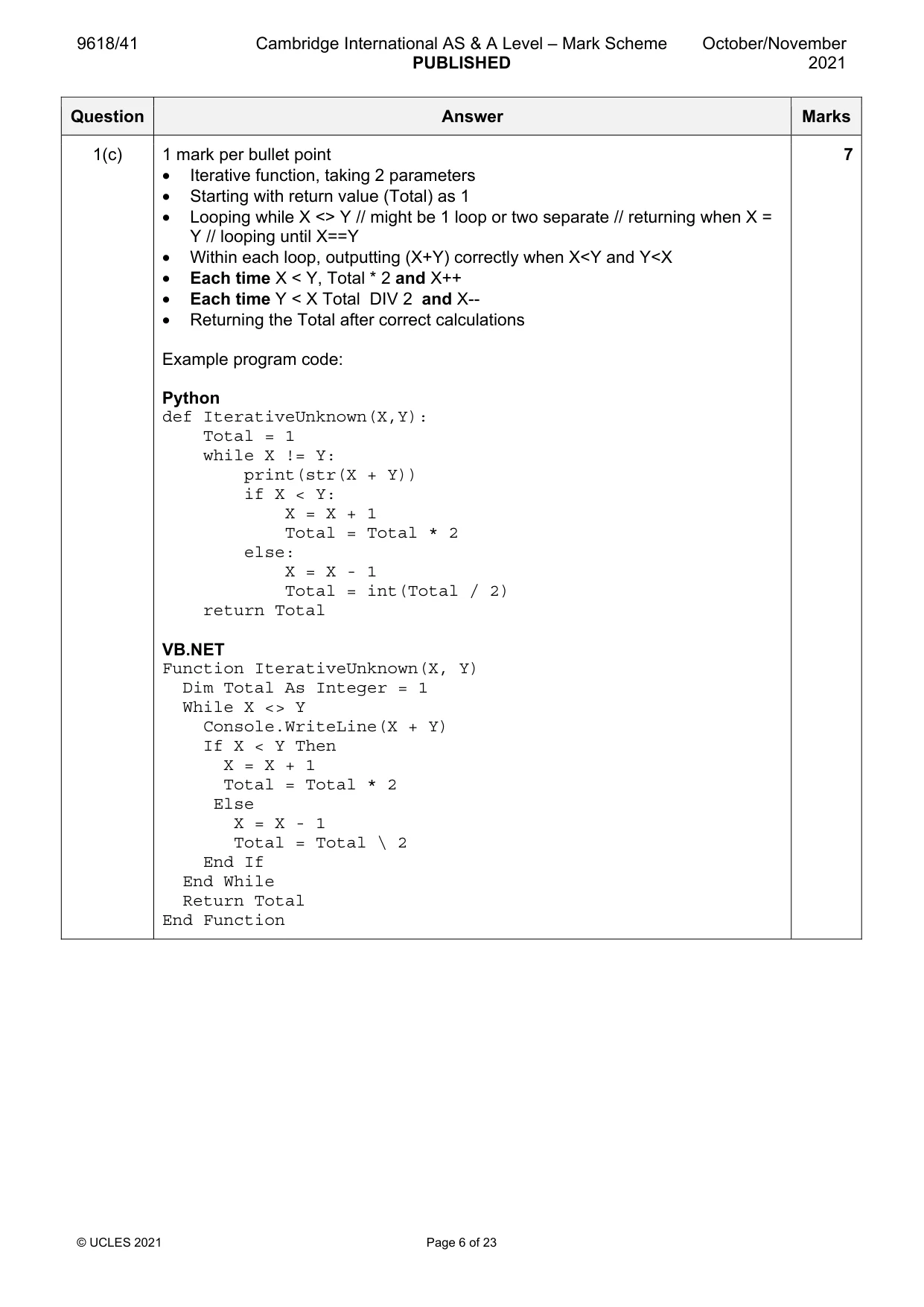
9618/41 Cambridge International AS & A Level – Mark Scheme PUBLISHED October/November 2021 © UCLES 2021 Page 6 of 23 Question Answer Marks 1(c) 1 mark per bullet point • Iterative function, taking 2 parameters • Starting with return value (Total) as 1 • Looping while X <> Y // might be 1 loop or two separate // returning when X = Y // looping until X==Y • Within each loop, outputting (X+Y) correctly when X<Y and Y<X • Each time X < Y, Total * 2 and X++ • Each time Y < X Total DIV 2 and X-- • Returning the Total after correct calculations Example program code: Python def IterativeUnknown(X,Y): Total = 1 while X != Y: print(str(X + Y)) if X < Y: X = X + 1 Total = Total * 2 else: X = X - 1 Total = int(Total / 2) return Total VB.NET Function IterativeUnknown(X, Y) Dim Total As Integer = 1 While X <> Y Console.WriteLine(X + Y) If X < Y Then X = X + 1 Total = Total * 2 Else X = X - 1 Total = Total \ 2 End If End While Return Total End Function 7
Mark scheme, page 7
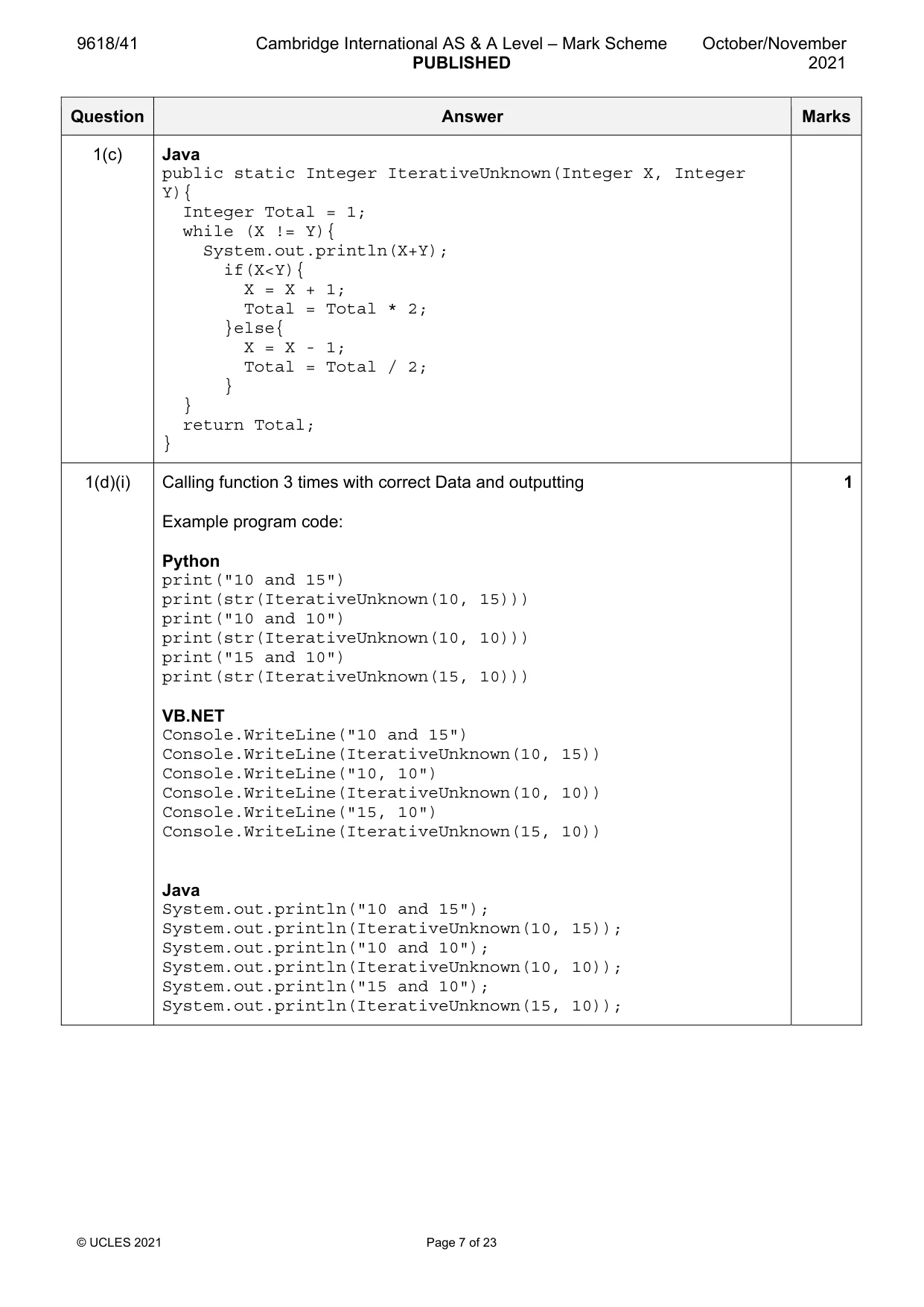
9618/41 Cambridge International AS & A Level – Mark Scheme PUBLISHED October/November 2021 © UCLES 2021 Page 7 of 23 Question Answer Marks 1(c) Java public static Integer IterativeUnknown(Integer X, Integer Y){ Integer Total = 1; while (X != Y){ System.out.println(X+Y); if(X<Y){ X = X + 1; Total = Total * 2; }else{ X = X - 1; Total = Total / 2; } } return Total; } 1(d)(i) Calling function 3 times with correct Data and outputting Example program code: Python print("10 and 15") print(str(IterativeUnknown(10, 15))) print("10 and 10") print(str(IterativeUnknown(10, 10))) print("15 and 10") print(str(IterativeUnknown(15, 10))) VB.NET Console.WriteLine("10 and 15") Console.WriteLine(IterativeUnknown(10, 15)) Console.WriteLine("10, 10") Console.WriteLine(IterativeUnknown(10, 10)) Console.WriteLine("15, 10") Console.WriteLine(IterativeUnknown(15, 10)) Java System.out.println("10 and 15"); System.out.println(IterativeUnknown(10, 15)); System.out.println("10 and 10"); System.out.println(IterativeUnknown(10, 10)); System.out.println("15 and 10"); System.out.println(IterativeUnknown(15, 10)); 1
Mark scheme, page 8
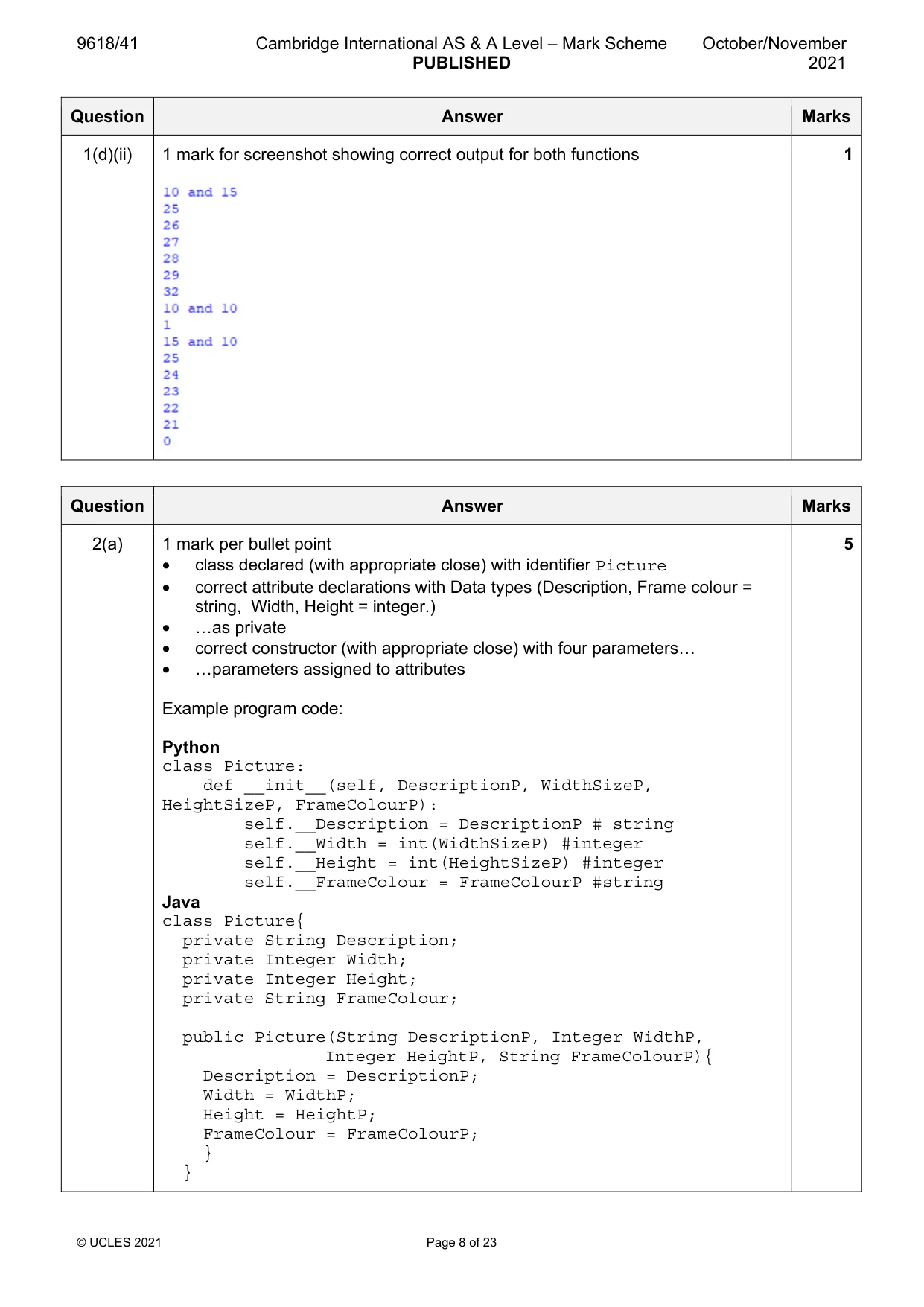
9618/41 Cambridge International AS & A Level – Mark Scheme PUBLISHED October/November 2021 © UCLES 2021 Page 8 of 23 Question Answer Marks 1(d)(ii) 1 mark for screenshot showing correct output for both functions 1 Question Answer Marks 2(a) 1 mark per bullet point • class declared (with appropriate close) with identifier Picture • correct attribute declarations with Data types (Description, Frame colour = string, Width, Height = integer.) • …as private • correct constructor (with appropriate close) with four parameters… • …parameters assigned to attributes Example program code: Python class Picture: def __init__(self, DescriptionP, WidthSizeP, HeightSizeP, FrameColourP): self.__Description = DescriptionP # string self.__Width = int(WidthSizeP) #integer self.__Height = int(HeightSizeP) #integer self.__FrameColour = FrameColourP #string Java class Picture{ private String Description; private Integer Width; private Integer Height; private String FrameColour; public Picture(String DescriptionP, Integer WidthP, Integer HeightP, String FrameColourP){ Description = DescriptionP; Width = WidthP; Height = HeightP; FrameColour = FrameColourP; } } 5
Mark scheme, page 9
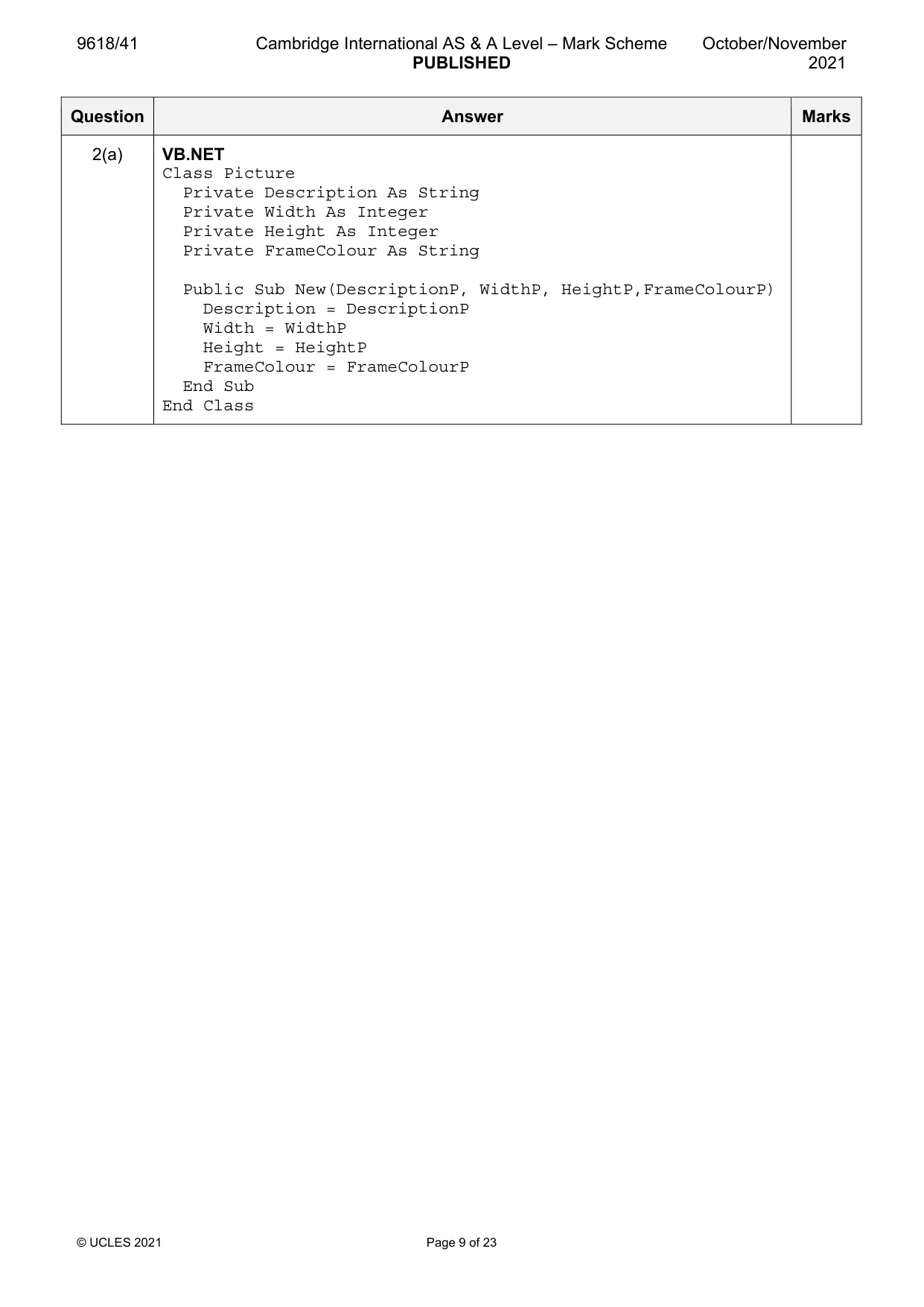
9618/41 Cambridge International AS & A Level – Mark Scheme PUBLISHED October/November 2021 © UCLES 2021 Page 9 of 23 Question Answer Marks 2(a) VB.NET Class Picture Private Description As String Private Width As Integer Private Height As Integer Private FrameColour As String Public Sub New(DescriptionP, WidthP, HeightP,FrameColourP) Description = DescriptionP Width = WidthP Height = HeightP FrameColour = FrameColourP End Sub End Class
Mark scheme, page 10
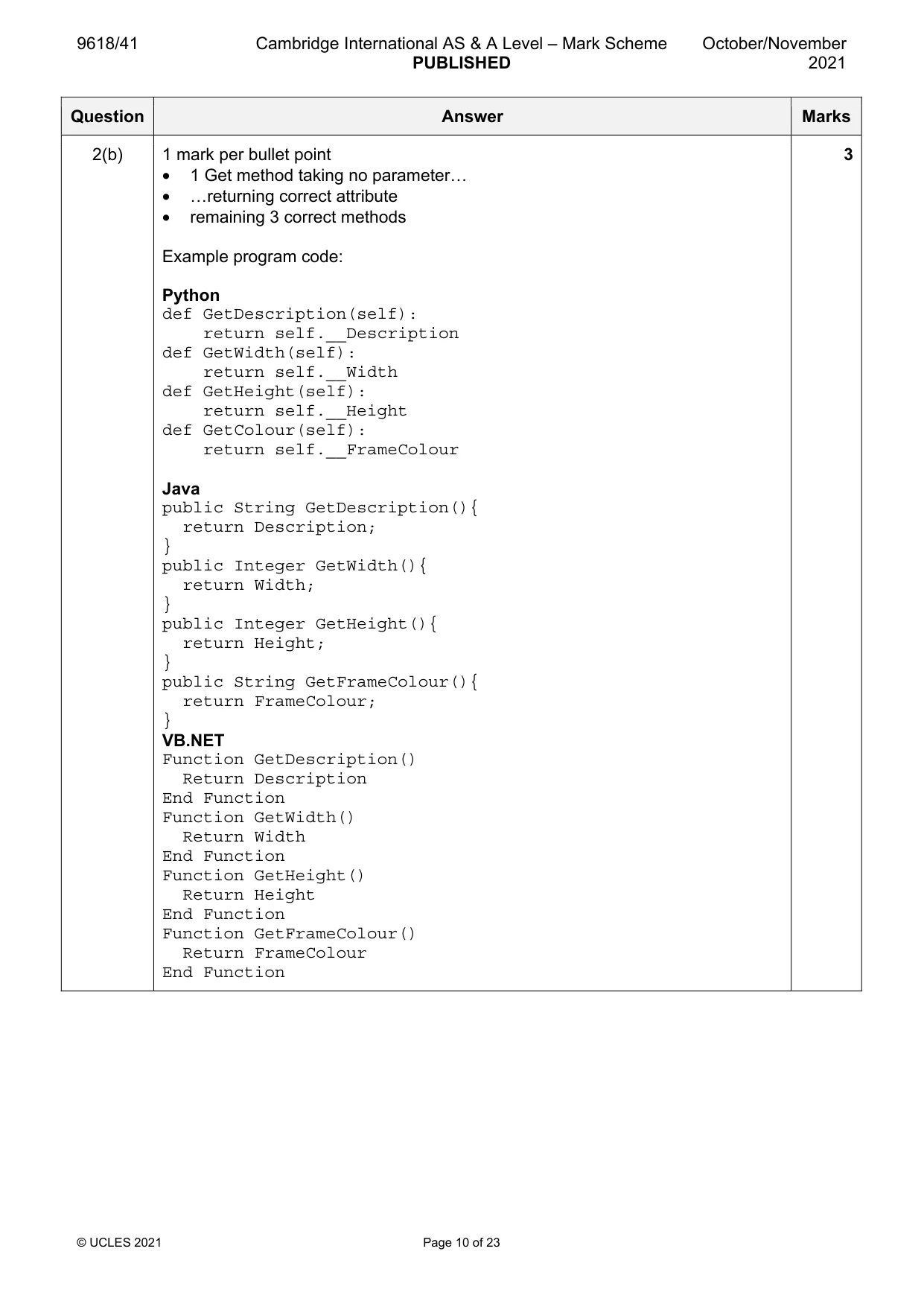
9618/41 Cambridge International AS & A Level – Mark Scheme PUBLISHED October/November 2021 © UCLES 2021 Page 10 of 23 Question Answer Marks 2(b) 1 mark per bullet point • 1 Get method taking no parameter… • …returning correct attribute • remaining 3 correct methods Example program code: Python def GetDescription(self): return self.__Description def GetWidth(self): return self.__Width def GetHeight(self): return self.__Height def GetColour(self): return self.__FrameColour Java public String GetDescription(){ return Description; } public Integer GetWidth(){ return Width; } public Integer GetHeight(){ return Height; } public String GetFrameColour(){ return FrameColour; } VB.NET Function GetDescription() Return Description End Function Function GetWidth() Return Width End Function Function GetHeight() Return Height End Function Function GetFrameColour() Return FrameColour End Function 3
Mark scheme, page 11
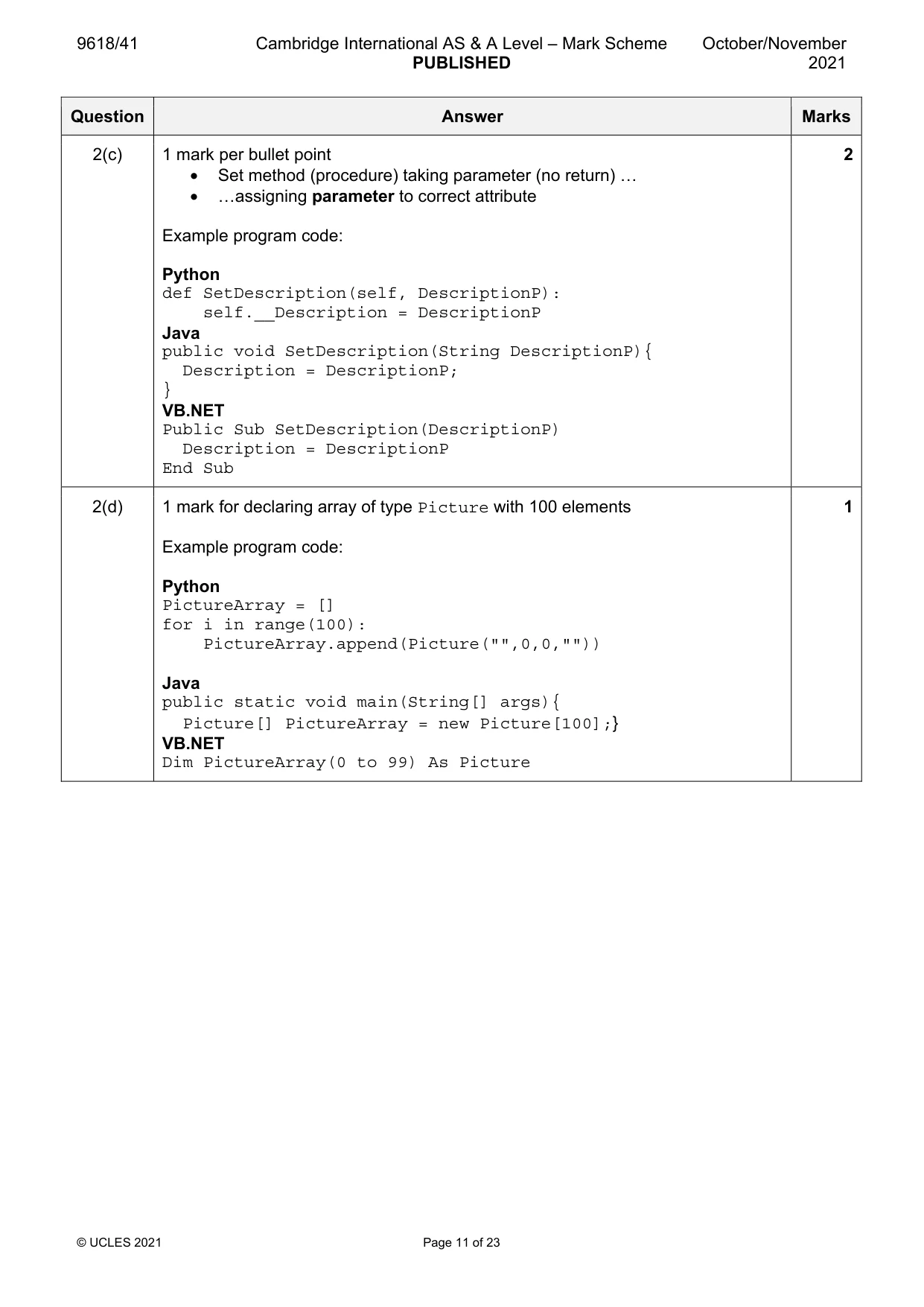
9618/41 Cambridge International AS & A Level – Mark Scheme PUBLISHED October/November 2021 © UCLES 2021 Page 11 of 23 Question Answer Marks 2(c) 1 mark per bullet point • Set method (procedure) taking parameter (no return) … • …assigning parameter to correct attribute Example program code: Python def SetDescription(self, DescriptionP): self.__Description = DescriptionP Java public void SetDescription(String DescriptionP){ Description = DescriptionP; } VB.NET Public Sub SetDescription(DescriptionP) Description = DescriptionP End Sub 2 2(d) 1 mark for declaring array of type Picture with 100 elements Example program code: Python PictureArray = [] for i in range(100): PictureArray.append(Picture("",0,0,"")) Java public static void main(String[] args){ Picture[] PictureArray = new Picture[100];} VB.NET Dim PictureArray(0 to 99) As Picture 1
Mark scheme, page 12
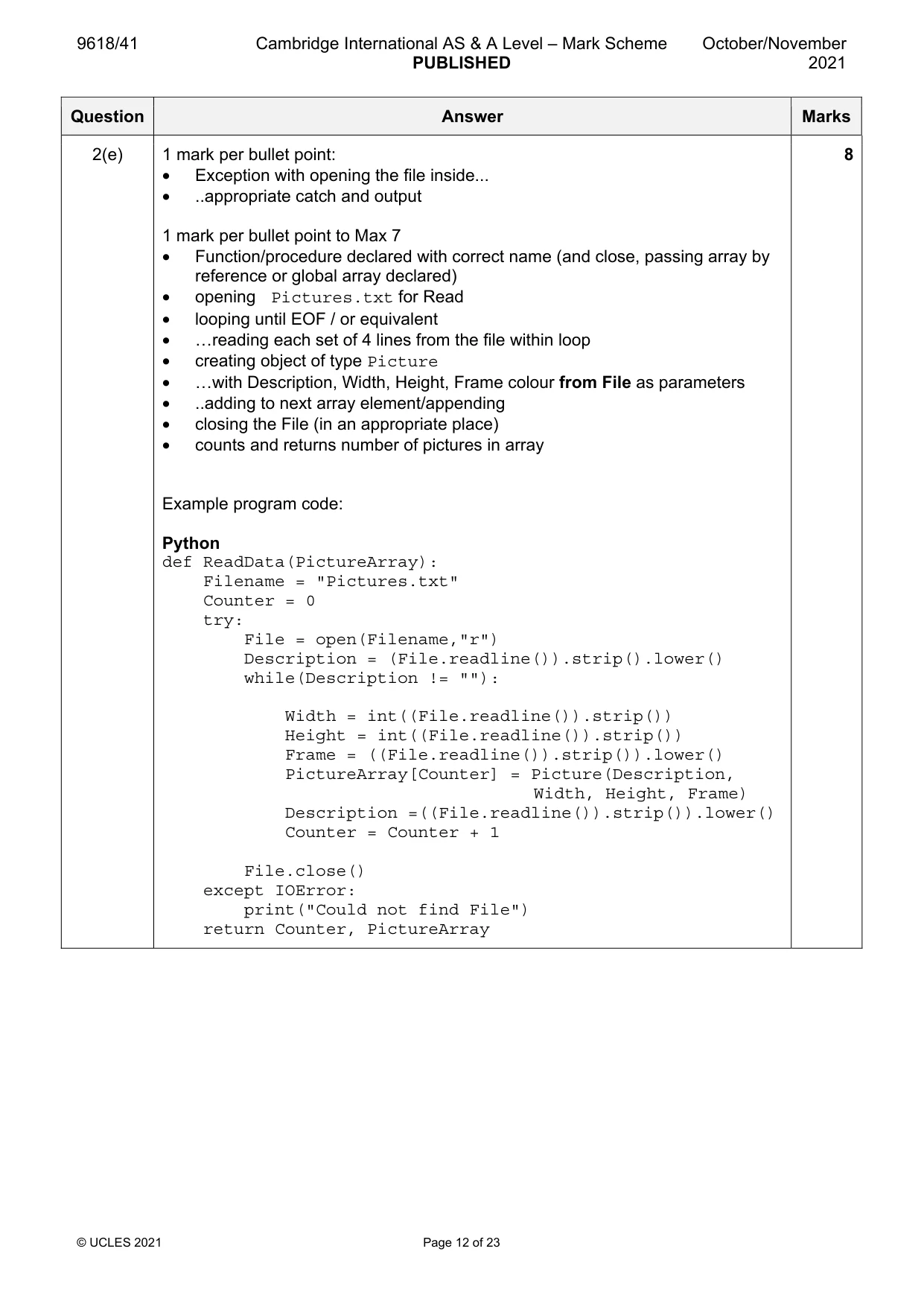
9618/41 Cambridge International AS & A Level – Mark Scheme PUBLISHED October/November 2021 © UCLES 2021 Page 12 of 23 Question Answer Marks 2(e) 1 mark per bullet point: • Exception with opening the file inside... • ..appropriate catch and output 1 mark per bullet point to Max 7 • Function/procedure declared with correct name (and close, passing array by reference or global array declared) • opening Pictures.txt for Read • looping until EOF / or equivalent • …reading each set of 4 lines from the file within loop • creating object of type Picture • …with Description, Width, Height, Frame colour from File as parameters • ..adding to next array element/appending • closing the File (in an appropriate place) • counts and returns number of pictures in array Example program code: Python def ReadData(PictureArray): Filename = "Pictures.txt" Counter = 0 try: File = open(Filename,"r") Description = (File.readline()).strip().lower() while(Description != ""): Width = int((File.readline()).strip()) Height = int((File.readline()).strip()) Frame = ((File.readline()).strip()).lower() PictureArray[Counter] = Picture(Description, Width, Height, Frame) Description =((File.readline()).strip()).lower() Counter = Counter + 1 File.close() except IOError: print("Could not find File") return Counter, PictureArray 8
Mark scheme, page 13
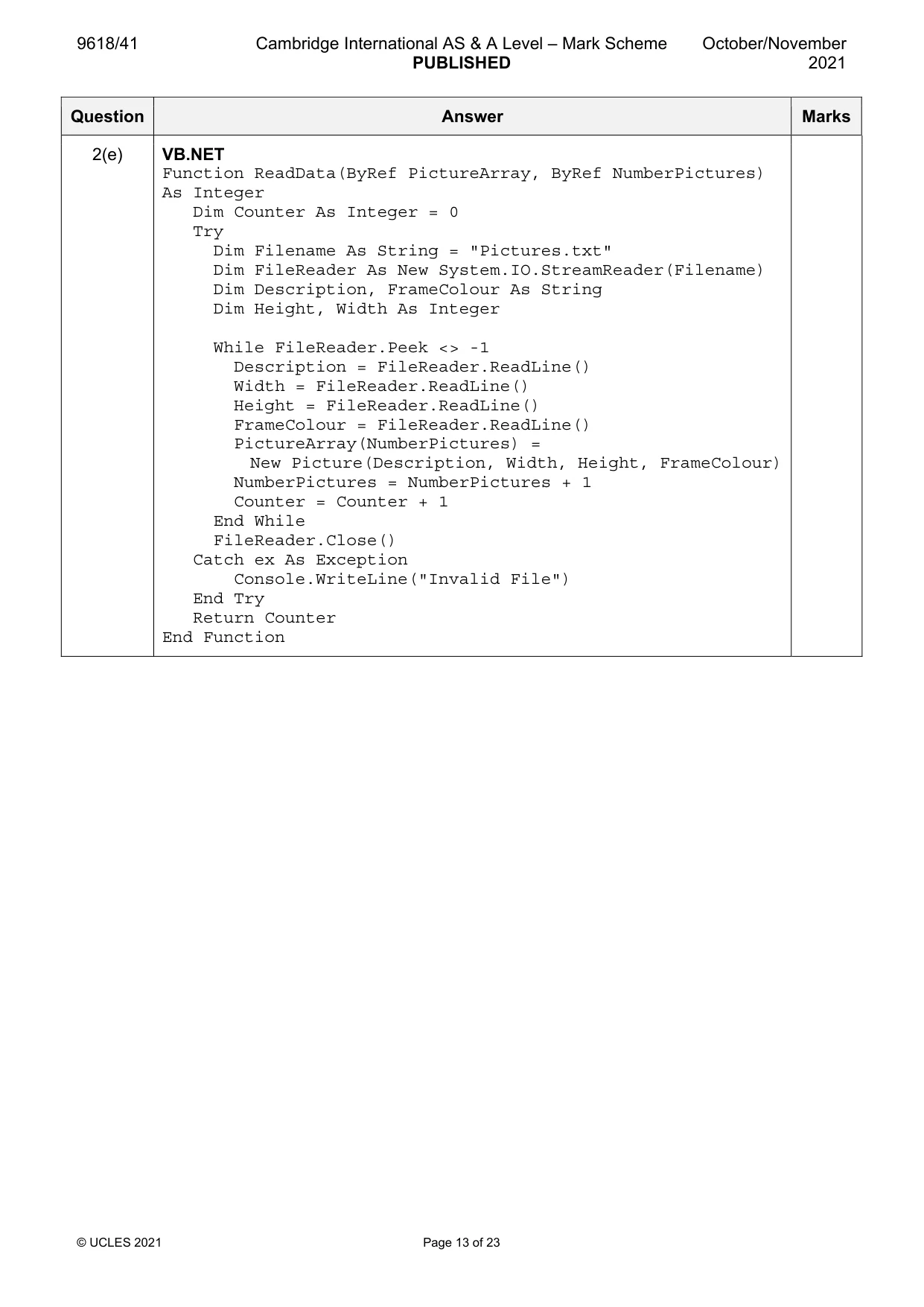
9618/41 Cambridge International AS & A Level – Mark Scheme PUBLISHED October/November 2021 © UCLES 2021 Page 13 of 23 Question Answer Marks 2(e) VB.NET Function ReadData(ByRef PictureArray, ByRef NumberPictures) As Integer Dim Counter As Integer = 0 Try Dim Filename As String = "Pictures.txt" Dim FileReader As New System.IO.StreamReader(Filename) Dim Description, FrameColour As String Dim Height, Width As Integer While FileReader.Peek <> -1 Description = FileReader.ReadLine() Width = FileReader.ReadLine() Height = FileReader.ReadLine() FrameColour = FileReader.ReadLine() PictureArray(NumberPictures) = New Picture(Description, Width, Height, FrameColour) NumberPictures = NumberPictures + 1 Counter = Counter + 1 End While FileReader.Close() Catch ex As Exception Console.WriteLine("Invalid File") End Try Return Counter End Function
Mark scheme, page 14
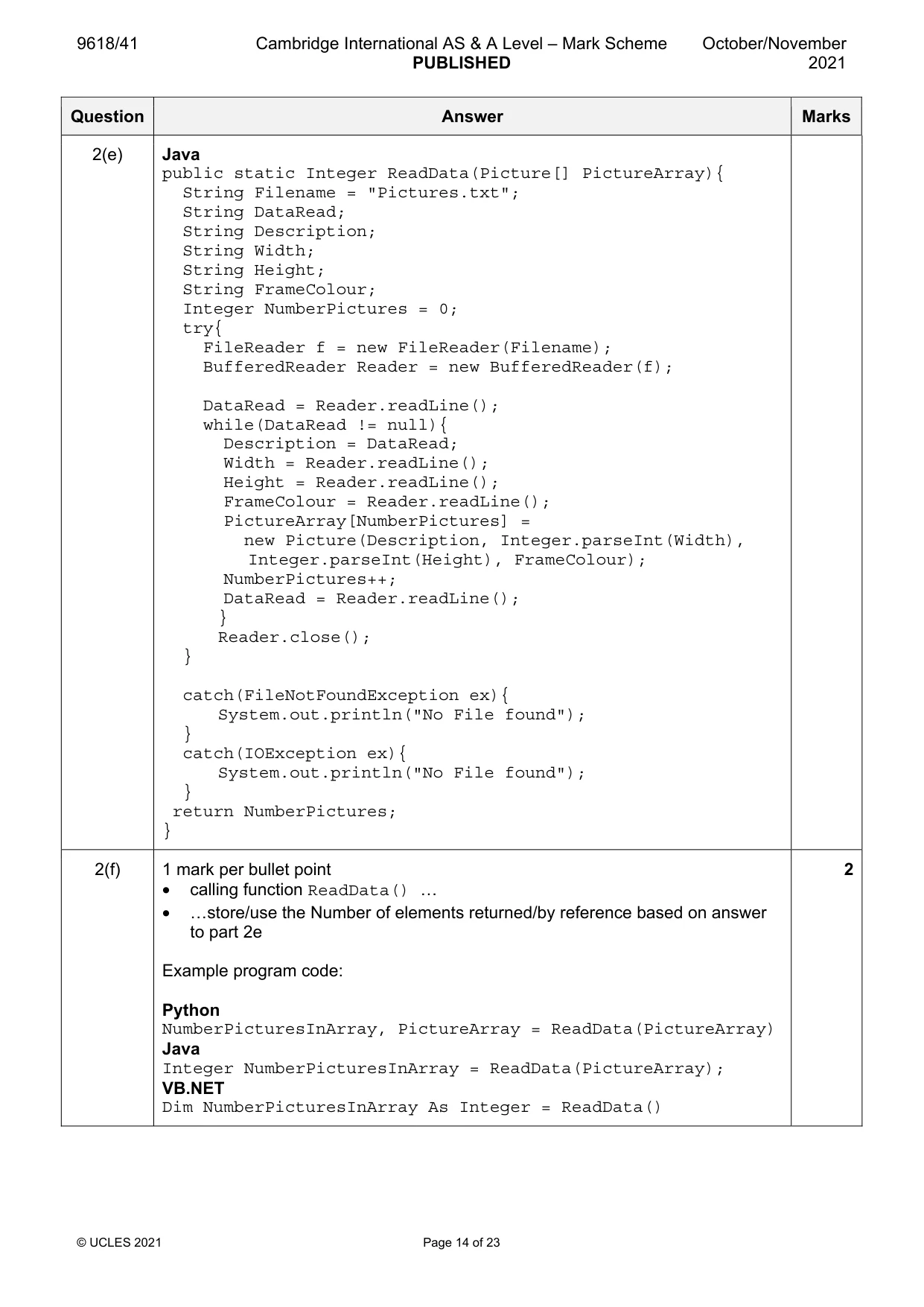
9618/41 Cambridge International AS & A Level – Mark Scheme PUBLISHED October/November 2021 © UCLES 2021 Page 14 of 23 Question Answer Marks 2(e) Java public static Integer ReadData(Picture[] PictureArray){ String Filename = "Pictures.txt"; String DataRead; String Description; String Width; String Height; String FrameColour; Integer NumberPictures = 0; try{ FileReader f = new FileReader(Filename); BufferedReader Reader = new BufferedReader(f); DataRead = Reader.readLine(); while(DataRead != null){ Description = DataRead; Width = Reader.readLine(); Height = Reader.readLine(); FrameColour = Reader.readLine(); PictureArray[NumberPictures] = new Picture(Description, Integer.parseInt(Width), Integer.parseInt(Height), FrameColour); NumberPictures++; DataRead = Reader.readLine(); } Reader.close(); } catch(FileNotFoundException ex){ System.out.println("No File found"); } catch(IOException ex){ System.out.println("No File found"); } return NumberPictures; } 2(f) 1 mark per bullet point • calling function ReadData() … • …store/use the Number of elements returned/by reference based on answer to part 2e Example program code: Python NumberPicturesInArray, PictureArray = ReadData(PictureArray) Java Integer NumberPicturesInArray = ReadData(PictureArray); VB.NET Dim NumberPicturesInArray As Integer = ReadData() 2
Mark scheme, page 15
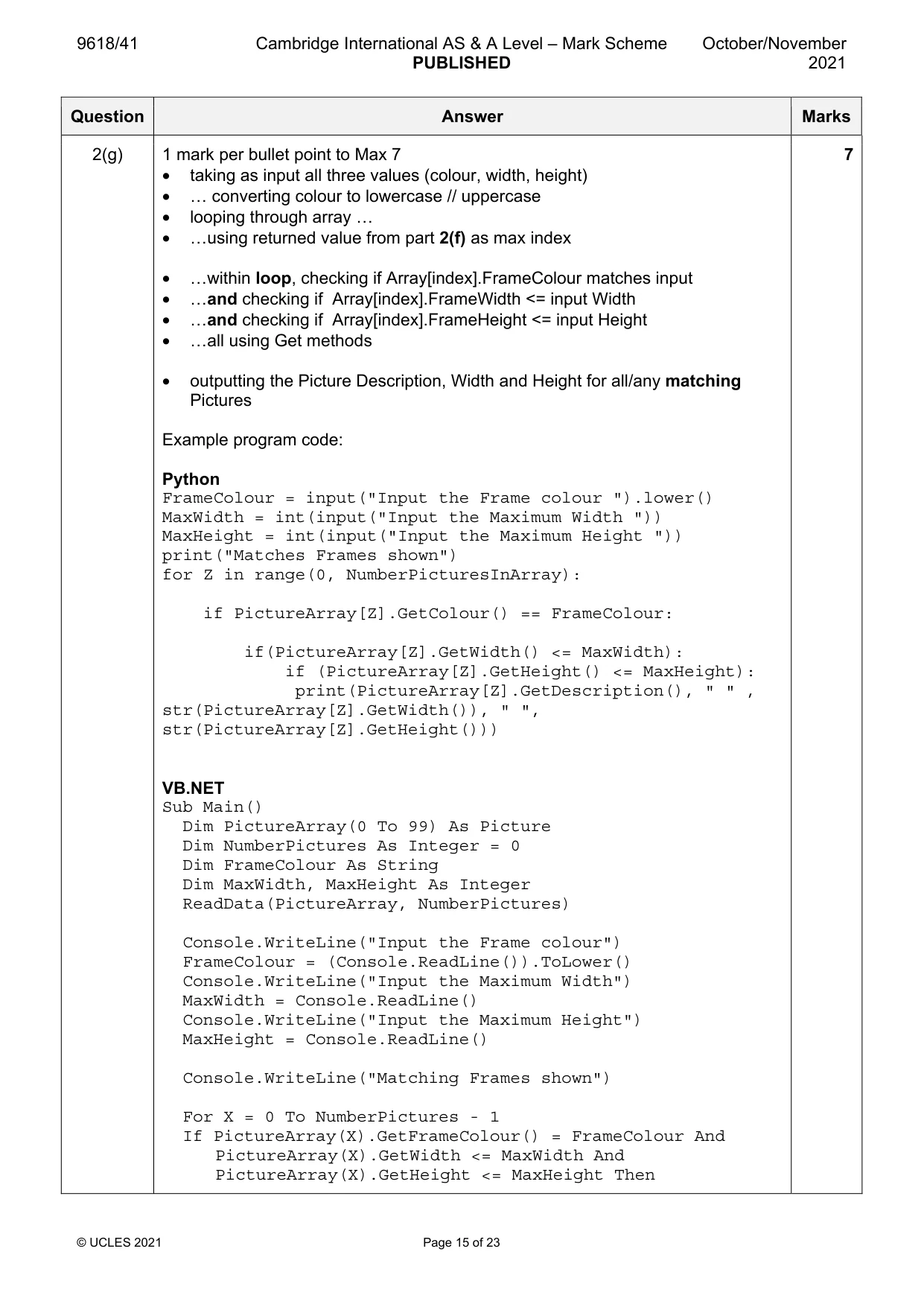
9618/41 Cambridge International AS & A Level – Mark Scheme PUBLISHED October/November 2021 © UCLES 2021 Page 15 of 23 Question Answer Marks 2(g) 1 mark per bullet point to Max 7 • taking as input all three values (colour, width, height) • … converting colour to lowercase // uppercase • looping through array … • …using returned value from part 2(f) as max index • …within loop, checking if Array[index].FrameColour matches input • …and checking if Array[index].FrameWidth <= input Width • …and checking if Array[index].FrameHeight <= input Height • …all using Get methods • outputting the Picture Description, Width and Height for all/any matching Pictures Example program code: Python FrameColour = input("Input the Frame colour ").lower() MaxWidth = int(input("Input the Maximum Width ")) MaxHeight = int(input("Input the Maximum Height ")) print("Matches Frames shown") for Z in range(0, NumberPicturesInArray): if PictureArray[Z].GetColour() == FrameColour: if(PictureArray[Z].GetWidth() <= MaxWidth): if (PictureArray[Z].GetHeight() <= MaxHeight): print(PictureArray[Z].GetDescription(), " " , str(PictureArray[Z].GetWidth()), " ", str(PictureArray[Z].GetHeight())) VB.NET Sub Main() Dim PictureArray(0 To 99) As Picture Dim NumberPictures As Integer = 0 Dim FrameColour As String Dim MaxWidth, MaxHeight As Integer ReadData(PictureArray, NumberPictures) Console.WriteLine("Input the Frame colour") FrameColour = (Console.ReadLine()).ToLower() Console.WriteLine("Input the Maximum Width") MaxWidth = Console.ReadLine() Console.WriteLine("Input the Maximum Height") MaxHeight = Console.ReadLine() Console.WriteLine("Matching Frames shown") For X = 0 To NumberPictures - 1 If PictureArray(X).GetFrameColour() = FrameColour And PictureArray(X).GetWidth <= MaxWidth And PictureArray(X).GetHeight <= MaxHeight Then 7
Mark scheme, page 16
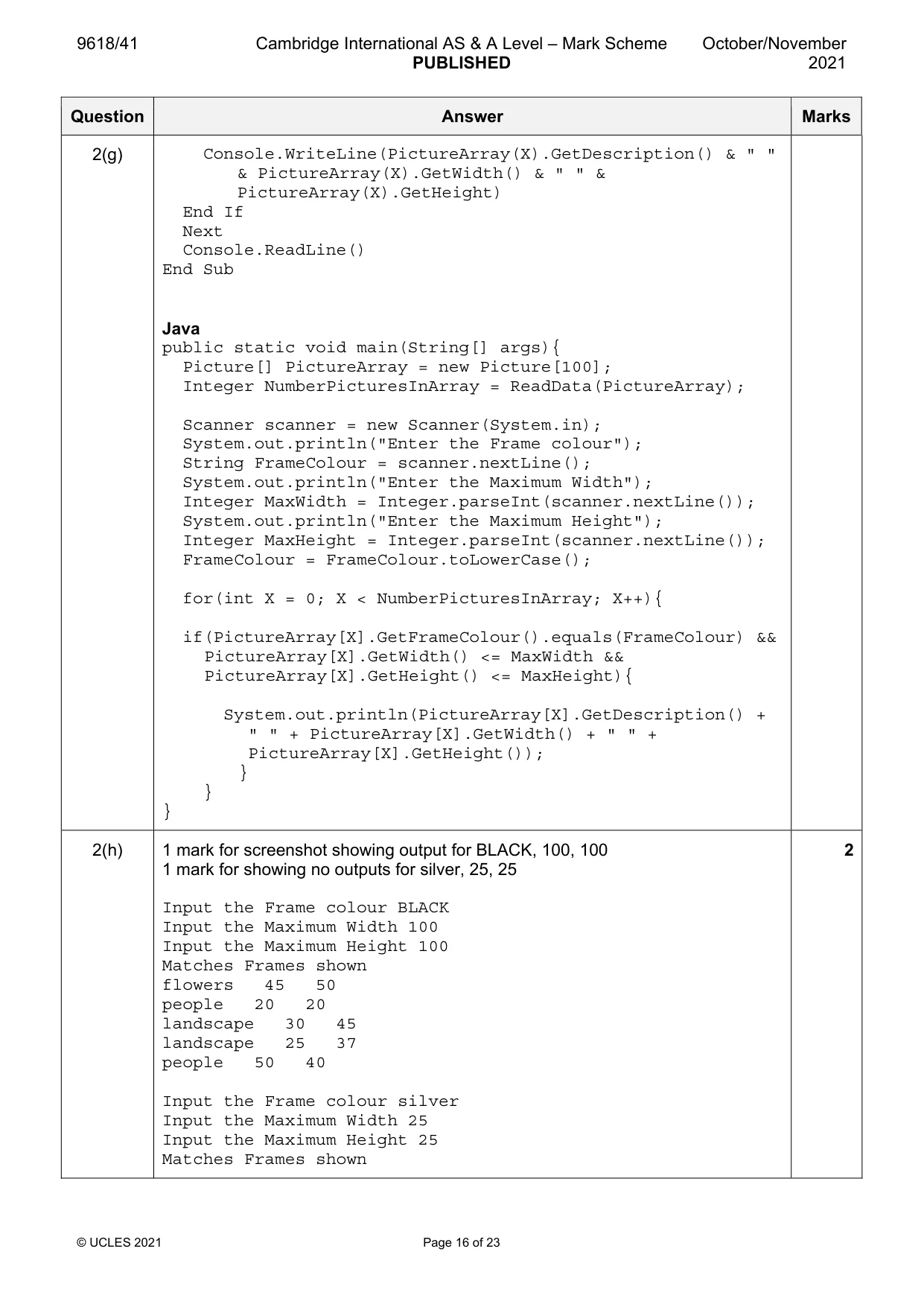
9618/41 Cambridge International AS & A Level – Mark Scheme PUBLISHED October/November 2021 © UCLES 2021 Page 16 of 23 Question Answer Marks 2(g) Console.WriteLine(PictureArray(X).GetDescription() & " " & PictureArray(X).GetWidth() & " " & PictureArray(X).GetHeight) End If Next Console.ReadLine() End Sub Java public static void main(String[] args){ Picture[] PictureArray = new Picture[100]; Integer NumberPicturesInArray = ReadData(PictureArray); Scanner scanner = new Scanner(System.in); System.out.println("Enter the Frame colour"); String FrameColour = scanner.nextLine(); System.out.println("Enter the Maximum Width"); Integer MaxWidth = Integer.parseInt(scanner.nextLine()); System.out.println("Enter the Maximum Height"); Integer MaxHeight = Integer.parseInt(scanner.nextLine()); FrameColour = FrameColour.toLowerCase(); for(int X = 0; X < NumberPicturesInArray; X++){ if(PictureArray[X].GetFrameColour().equals(FrameColour) && PictureArray[X].GetWidth() <= MaxWidth && PictureArray[X].GetHeight() <= MaxHeight){ System.out.println(PictureArray[X].GetDescription() + " " + PictureArray[X].GetWidth() + " " + PictureArray[X].GetHeight()); } } } 2(h) 1 mark for screenshot showing output for BLACK, 100, 100 1 mark for showing no outputs for silver, 25, 25 Input the Frame colour BLACK Input the Maximum Width 100 Input the Maximum Height 100 Matches Frames shown flowers 45 50 people 20 20 landscape 30 45 landscape 25 37 people 50 40 Input the Frame colour silver Input the Maximum Width 25 Input the Maximum Height 25 Matches Frames shown 2
Mark scheme, page 17
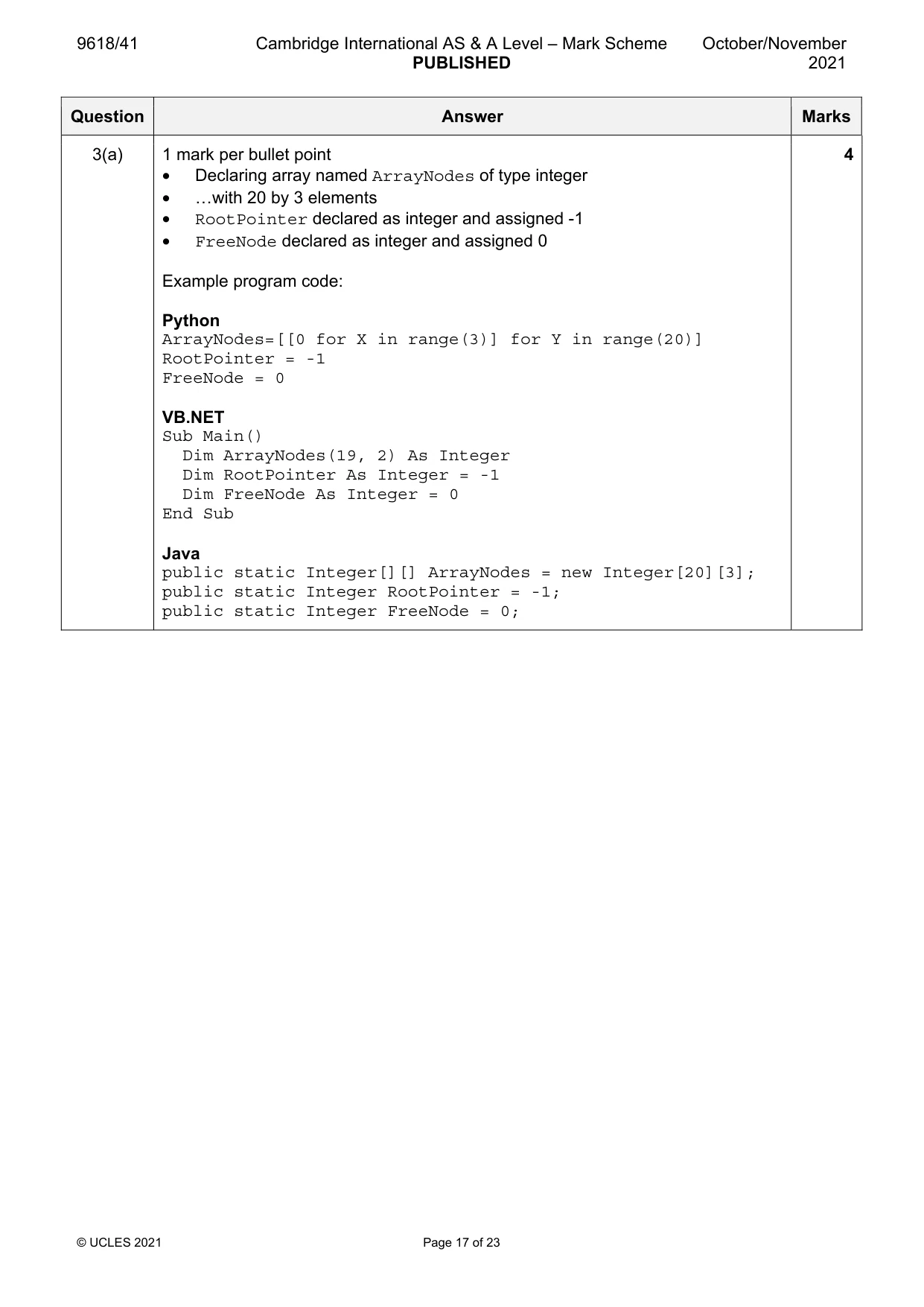
9618/41 Cambridge International AS & A Level – Mark Scheme PUBLISHED October/November 2021 © UCLES 2021 Page 17 of 23 Question Answer Marks 3(a) 1 mark per bullet point • Declaring array named ArrayNodes of type integer • …with 20 by 3 elements • RootPointer declared as integer and assigned -1 • FreeNode declared as integer and assigned 0 Example program code: Python ArrayNodes=[[0 for X in range(3)] for Y in range(20)] RootPointer = -1 FreeNode = 0 VB.NET Sub Main() Dim ArrayNodes(19, 2) As Integer Dim RootPointer As Integer = -1 Dim FreeNode As Integer = 0 End Sub Java public static Integer[][] ArrayNodes = new Integer[20][3]; public static Integer RootPointer = -1; public static Integer FreeNode = 0; 4
Mark scheme, page 18
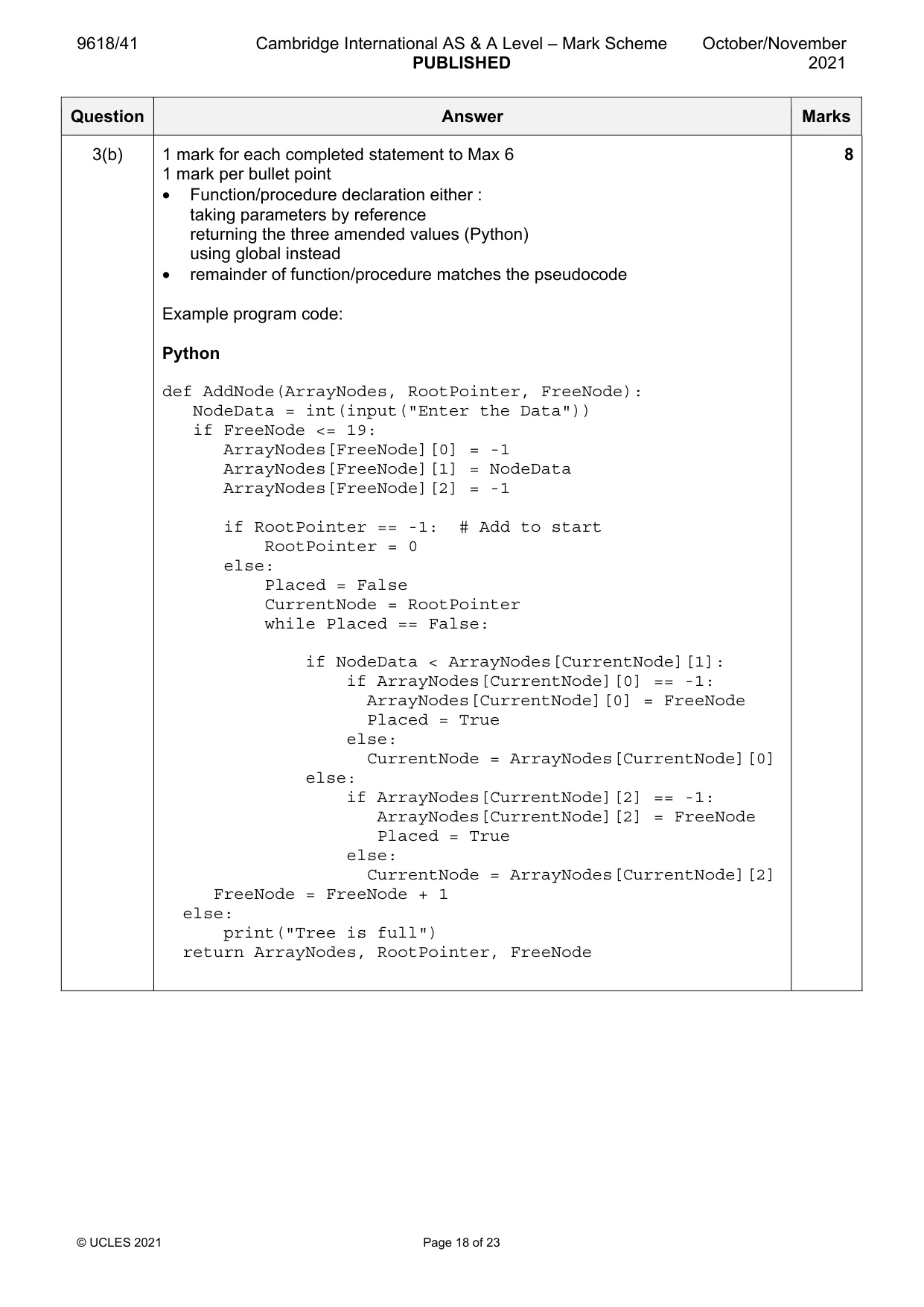
9618/41 Cambridge International AS & A Level – Mark Scheme PUBLISHED October/November 2021 © UCLES 2021 Page 18 of 23 Question Answer Marks 3(b) 1 mark for each completed statement to Max 6 1 mark per bullet point • Function/procedure declaration either : taking parameters by reference returning the three amended values (Python) using global instead • remainder of function/procedure matches the pseudocode Example program code: Python def AddNode(ArrayNodes, RootPointer, FreeNode): NodeData = int(input("Enter the Data")) if FreeNode <= 19: ArrayNodes[FreeNode][0] = -1 ArrayNodes[FreeNode][1] = NodeData ArrayNodes[FreeNode][2] = -1 if RootPointer == -1: # Add to start RootPointer = 0 else: Placed = False CurrentNode = RootPointer while Placed == False: if NodeData < ArrayNodes[CurrentNode][1]: if ArrayNodes[CurrentNode][0] == -1: ArrayNodes[CurrentNode][0] = FreeNode Placed = True else: CurrentNode = ArrayNodes[CurrentNode][0] else: if ArrayNodes[CurrentNode][2] == -1: ArrayNodes[CurrentNode][2] = FreeNode Placed = True else: CurrentNode = ArrayNodes[CurrentNode][2] FreeNode = FreeNode + 1 else: print("Tree is full") return ArrayNodes, RootPointer, FreeNode 8
Mark scheme, page 19
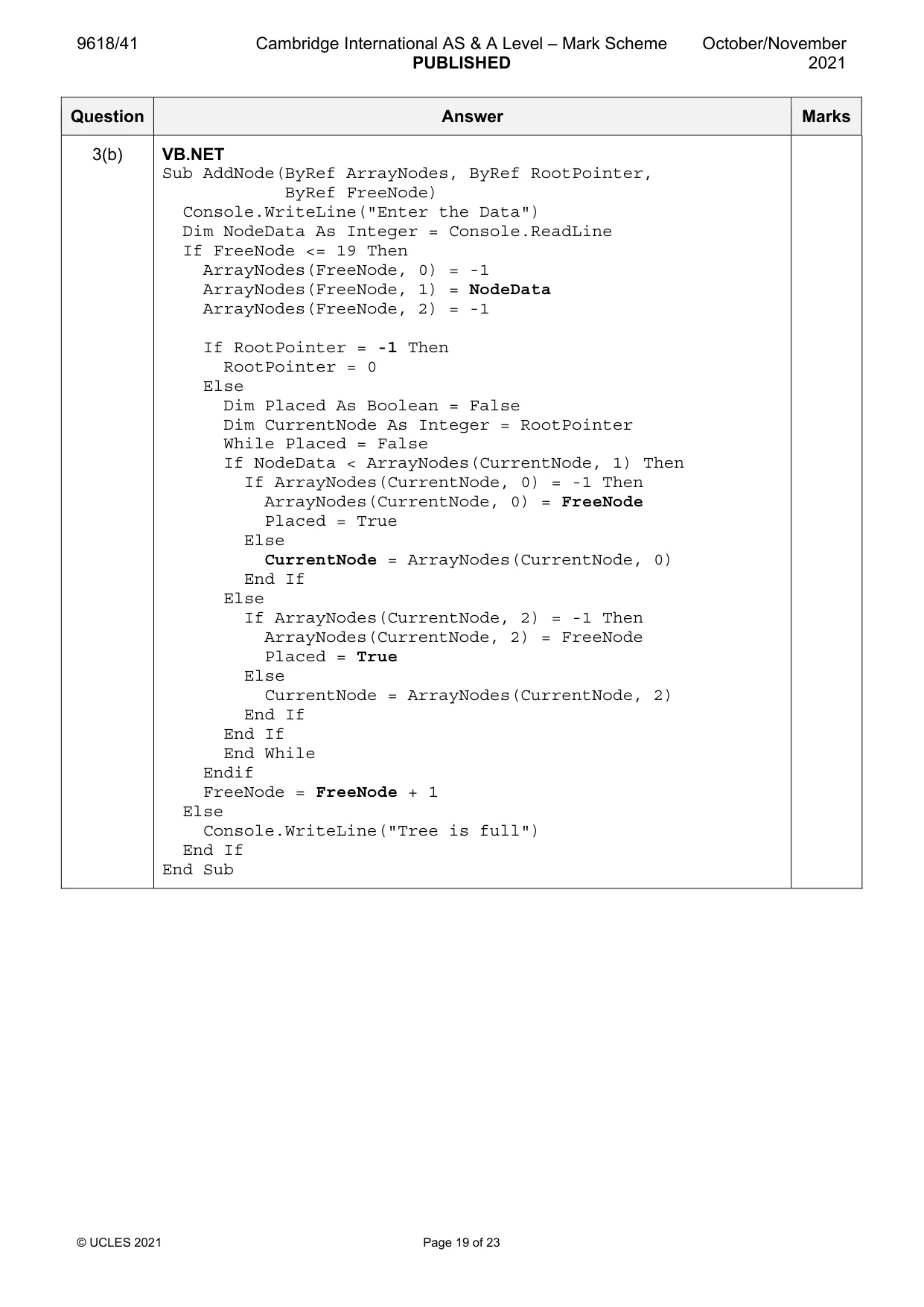
9618/41 Cambridge International AS & A Level – Mark Scheme PUBLISHED October/November 2021 © UCLES 2021 Page 19 of 23 Question Answer Marks 3(b) VB.NET Sub AddNode(ByRef ArrayNodes, ByRef RootPointer, ByRef FreeNode) Console.WriteLine("Enter the Data") Dim NodeData As Integer = Console.ReadLine If FreeNode <= 19 Then ArrayNodes(FreeNode, 0) = -1 ArrayNodes(FreeNode, 1) = NodeData ArrayNodes(FreeNode, 2) = -1 If RootPointer = -1 Then RootPointer = 0 Else Dim Placed As Boolean = False Dim CurrentNode As Integer = RootPointer While Placed = False If NodeData < ArrayNodes(CurrentNode, 1) Then If ArrayNodes(CurrentNode, 0) = -1 Then ArrayNodes(CurrentNode, 0) = FreeNode Placed = True Else CurrentNode = ArrayNodes(CurrentNode, 0) End If Else If ArrayNodes(CurrentNode, 2) = -1 Then ArrayNodes(CurrentNode, 2) = FreeNode Placed = True Else CurrentNode = ArrayNodes(CurrentNode, 2) End If End If End While Endif FreeNode = FreeNode + 1 Else Console.WriteLine("Tree is full") End If End Sub
Mark scheme, page 20
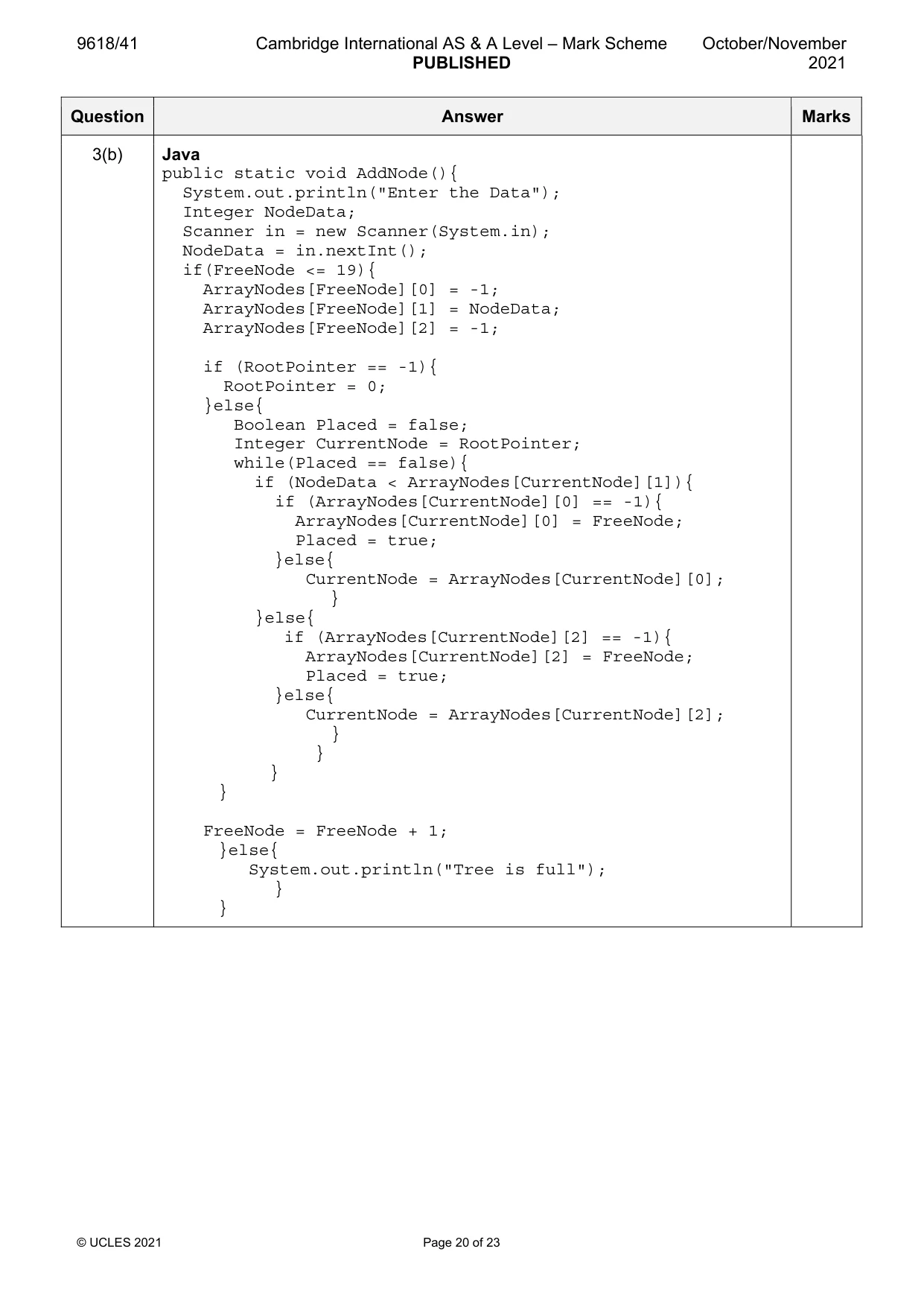
9618/41 Cambridge International AS & A Level – Mark Scheme PUBLISHED October/November 2021 © UCLES 2021 Page 20 of 23 Question Answer Marks 3(b) Java public static void AddNode(){ System.out.println("Enter the Data"); Integer NodeData; Scanner in = new Scanner(System.in); NodeData = in.nextInt(); if(FreeNode <= 19){ ArrayNodes[FreeNode][0] = -1; ArrayNodes[FreeNode][1] = NodeData; ArrayNodes[FreeNode][2] = -1; if (RootPointer == -1){ RootPointer = 0; }else{ Boolean Placed = false; Integer CurrentNode = RootPointer; while(Placed == false){ if (NodeData < ArrayNodes[CurrentNode][1]){ if (ArrayNodes[CurrentNode][0] == -1){ ArrayNodes[CurrentNode][0] = FreeNode; Placed = true; }else{ CurrentNode = ArrayNodes[CurrentNode][0]; } }else{ if (ArrayNodes[CurrentNode][2] == -1){ ArrayNodes[CurrentNode][2] = FreeNode; Placed = true; }else{ CurrentNode = ArrayNodes[CurrentNode][2]; } } } } FreeNode = FreeNode + 1; }else{ System.out.println("Tree is full"); } }
Mark scheme, page 21
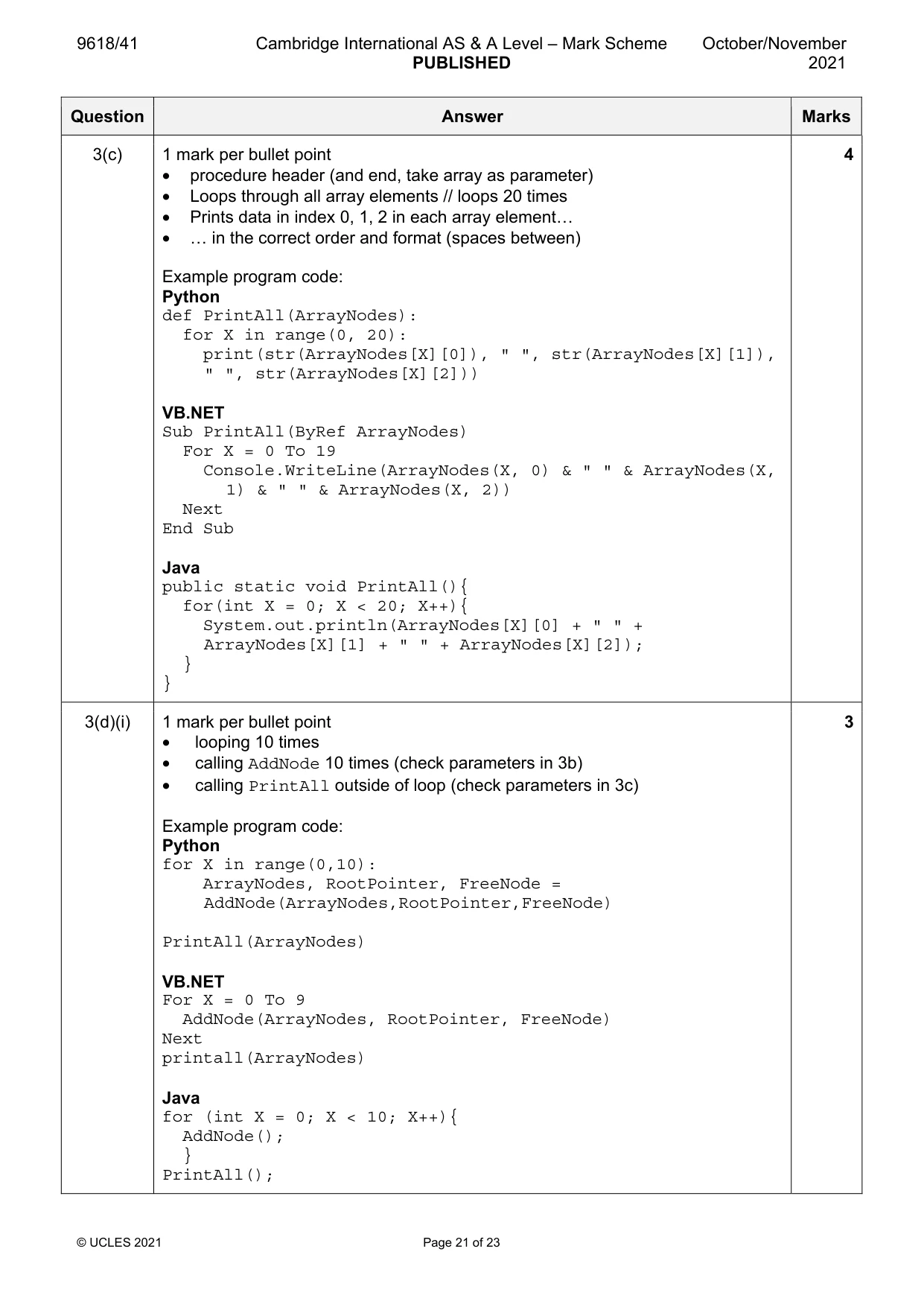
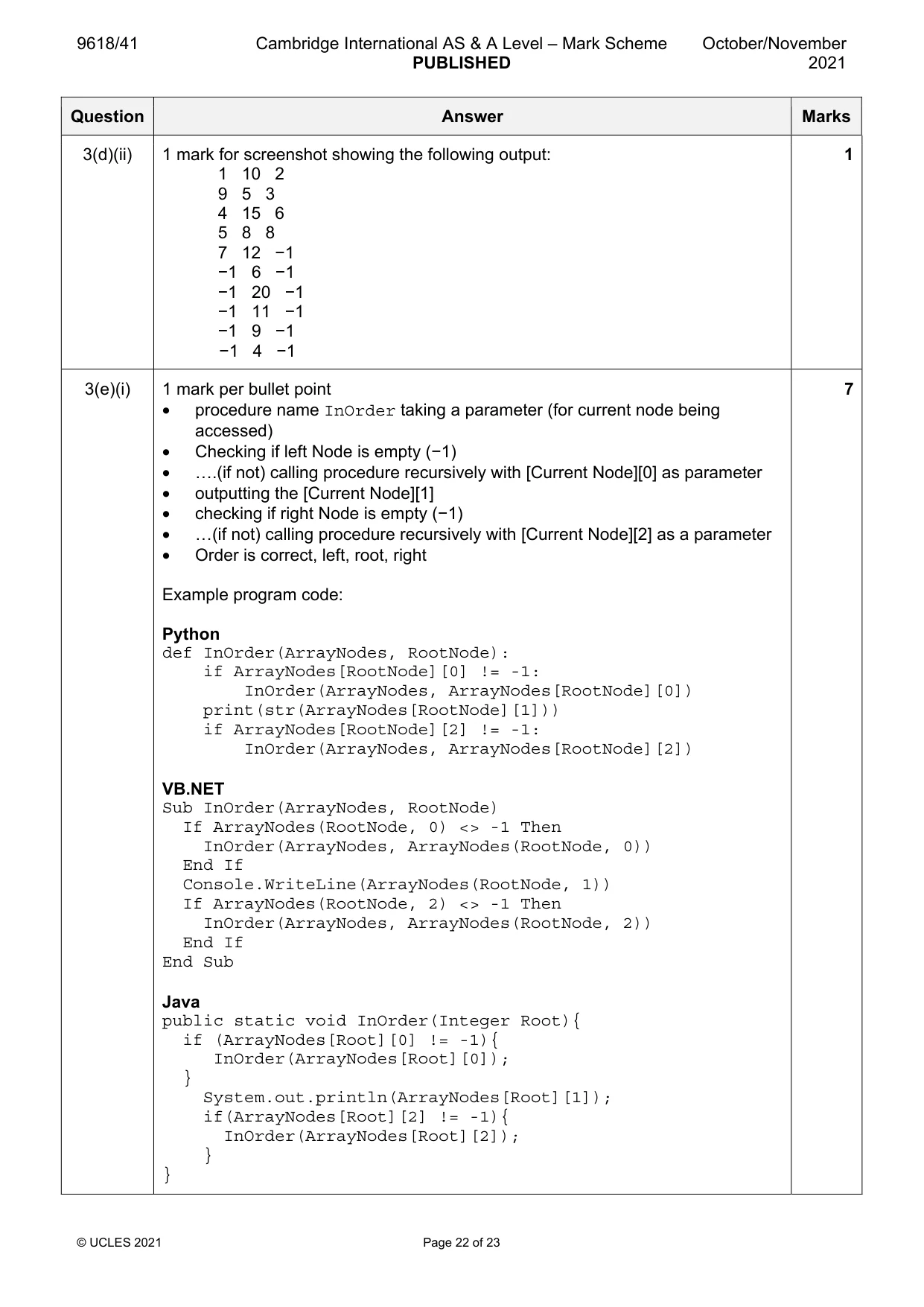
9618/41 Cambridge International AS & A Level – Mark Scheme PUBLISHED October/November 2021 © UCLES 2021 Page 21 of 23 Question Answer Marks 3(c) 1 mark per bullet point • procedure header (and end, take array as parameter) • Loops through all array elements // loops 20 times • Prints data in index 0, 1, 2 in each array element… • … in the correct order and format (spaces between) Example program code: Python def PrintAll(ArrayNodes): for X in range(0, 20): print(str(ArrayNodes[X][0]), " ", str(ArrayNodes[X][1]), " ", str(ArrayNodes[X][2])) VB.NET Sub PrintAll(ByRef ArrayNodes) For X = 0 To 19 Console.WriteLine(ArrayNodes(X, 0) & " " & ArrayNodes(X, 1) & " " & ArrayNodes(X, 2)) Next End Sub Java public static void PrintAll(){ for(int X = 0; X < 20; X++){ System.out.println(ArrayNodes[X][0] + " " + ArrayNodes[X][1] + " " + ArrayNodes[X][2]); } } 4 3(d)(i) 1 mark per bullet point • looping 10 times • calling AddNode 10 times (check parameters in 3b) • calling PrintAll outside of loop (check parameters in 3c) Example program code: Python for X in range(0,10): ArrayNodes, RootPointer, FreeNode = AddNode(ArrayNodes,RootPointer,FreeNode) PrintAll(ArrayNodes) VB.NET For X = 0 To 9 AddNode(ArrayNodes, RootPointer, FreeNode) Next printall(ArrayNodes) Java for (int X = 0; X < 10; X++){ AddNode(); } PrintAll(); 3
Mark scheme, page 22
9618/41 Cambridge International AS & A Level – Mark Scheme PUBLISHED October/November 2021 © UCLES 2021 Page 22 of 23 Question Answer Marks 3(d)(ii) 1 mark for screenshot showing the following output: 1 10 2 9 5 3 4 15 6 5 8 8 7 12 −1 −1 6 −1 −1 20 −1 −1 11 −1 −1 9 −1 −1 4 −1 1 3(e)(i) 1 mark per bullet point • procedure name InOrder taking a parameter (for current node being accessed) • Checking if left Node is empty (−1) • ….(if not) calling procedure recursively with [Current Node][0] as parameter • outputting the [Current Node][1] • checking if right Node is empty (−1) • …(if not) calling procedure recursively with [Current Node][2] as a parameter • Order is correct, left, root, right Example program code: Python def InOrder(ArrayNodes, RootNode): if ArrayNodes[RootNode][0] != -1: InOrder(ArrayNodes, ArrayNodes[RootNode][0]) print(str(ArrayNodes[RootNode][1])) if ArrayNodes[RootNode][2] != -1: InOrder(ArrayNodes, ArrayNodes[RootNode][2]) VB.NET Sub InOrder(ArrayNodes, RootNode) If ArrayNodes(RootNode, 0) <> -1 Then InOrder(ArrayNodes, ArrayNodes(RootNode, 0)) End If Console.WriteLine(ArrayNodes(RootNode, 1)) If ArrayNodes(RootNode, 2) <> -1 Then InOrder(ArrayNodes, ArrayNodes(RootNode, 2)) End If End Sub Java public static void InOrder(Integer Root){ if (ArrayNodes[Root][0] != -1){ InOrder(ArrayNodes[Root][0]); } System.out.println(ArrayNodes[Root][1]); if(ArrayNodes[Root][2] != -1){ InOrder(ArrayNodes[Root][2]); } } 7
Mark scheme, page 23
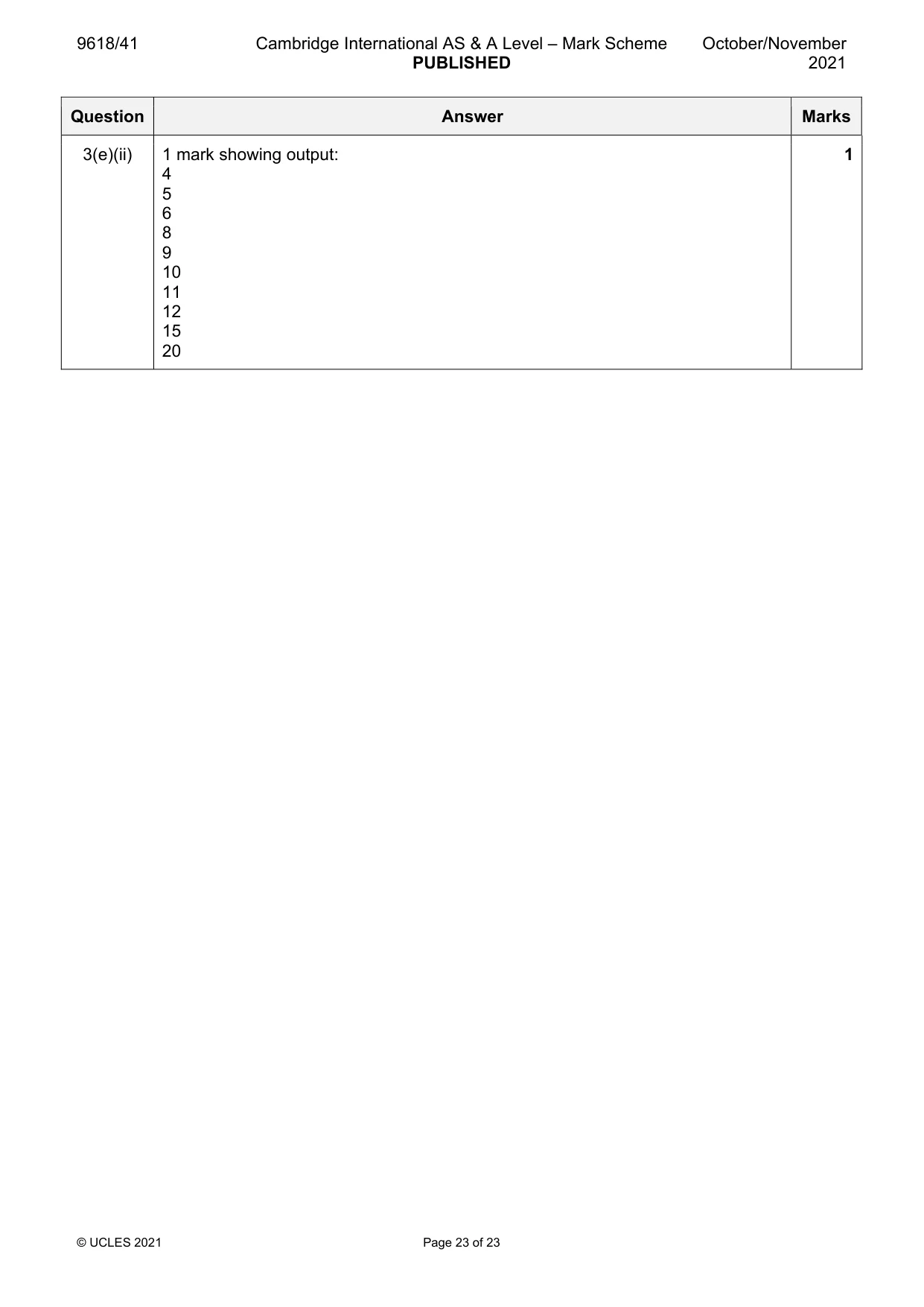
9618/41 Cambridge International AS & A Level – Mark Scheme PUBLISHED October/November 2021 © UCLES 2021 Page 23 of 23 Question Answer Marks 3(e)(ii) 1 mark showing output: 4 5 6 8 9 10 11 12 15 20 1
What you needed in this session
Cambridge’s own grade thresholds for 2021 Oct/Nov, Paper 4 · Variant 1. A higher threshold means an easier paper — the bar moves with how the cohort did.