Cambridge A Level Applied Information and Communication Technology 9713 — 2013 Oct/Nov Paper 4 · Variant 1
9713/41/O/N/13 · 90 marks · ≈101 min
The question paper and its mark scheme, free to read here and free to download. This is Cambridge’s own paper, exactly as it was sat.
Question paper4 pages
Mark scheme8 pages
Answers below. Sit the paper first if you are practising.
Paper as text
Question paper, page 1
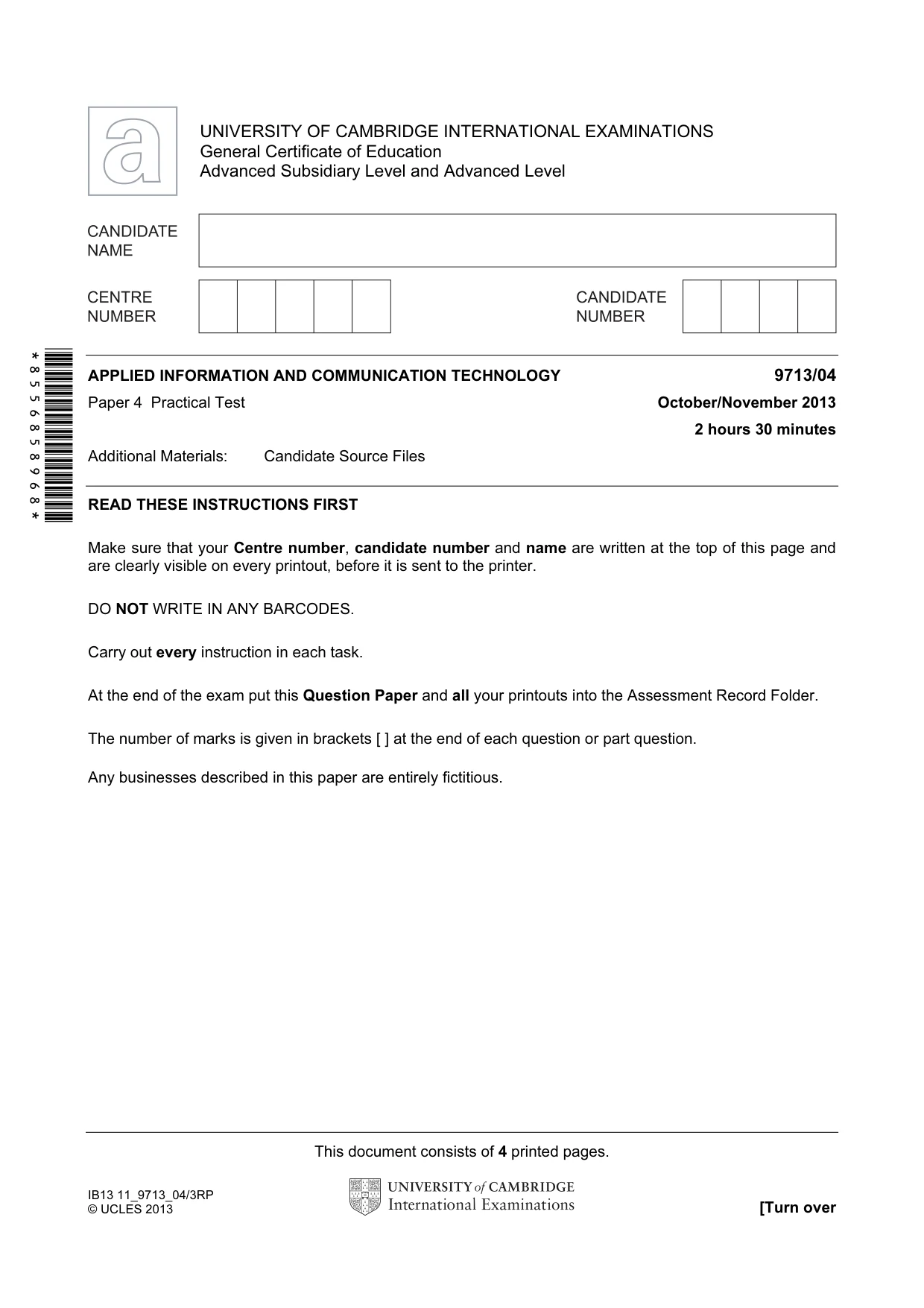
This document consists of 4 printed pages. IB13 11_9713_04/3RP © UCLES 2013 [Turn over *8556858968* UNIVERSITY OF CAMBRIDGE INTERNATIONAL EXAMINATIONS General Certificate of Education Advanced Subsidiary Level and Advanced Level APPLIED INFORMATION AND COMMUNICATION TECHNOLOGY 9713/04 Paper 4 Practical Test October/November 2013 2 hours 30 minutes Additional Materials: Candidate Source Files READ THESE INSTRUCTIONS FIRST Make sure that your Centre number, candidate number and name are written at the top of this page and are clearly visible on every printout, before it is sent to the printer. DO NOT WRITE IN ANY BARCODES. Carry out every instruction in each task. At the end of the exam put this Question Paper and all your printouts into the Assessment Record Folder. The number of marks is given in brackets [ ] at the end of each question or part question. Any businesses described in this paper are entirely fictitious.
Question paper, page 2
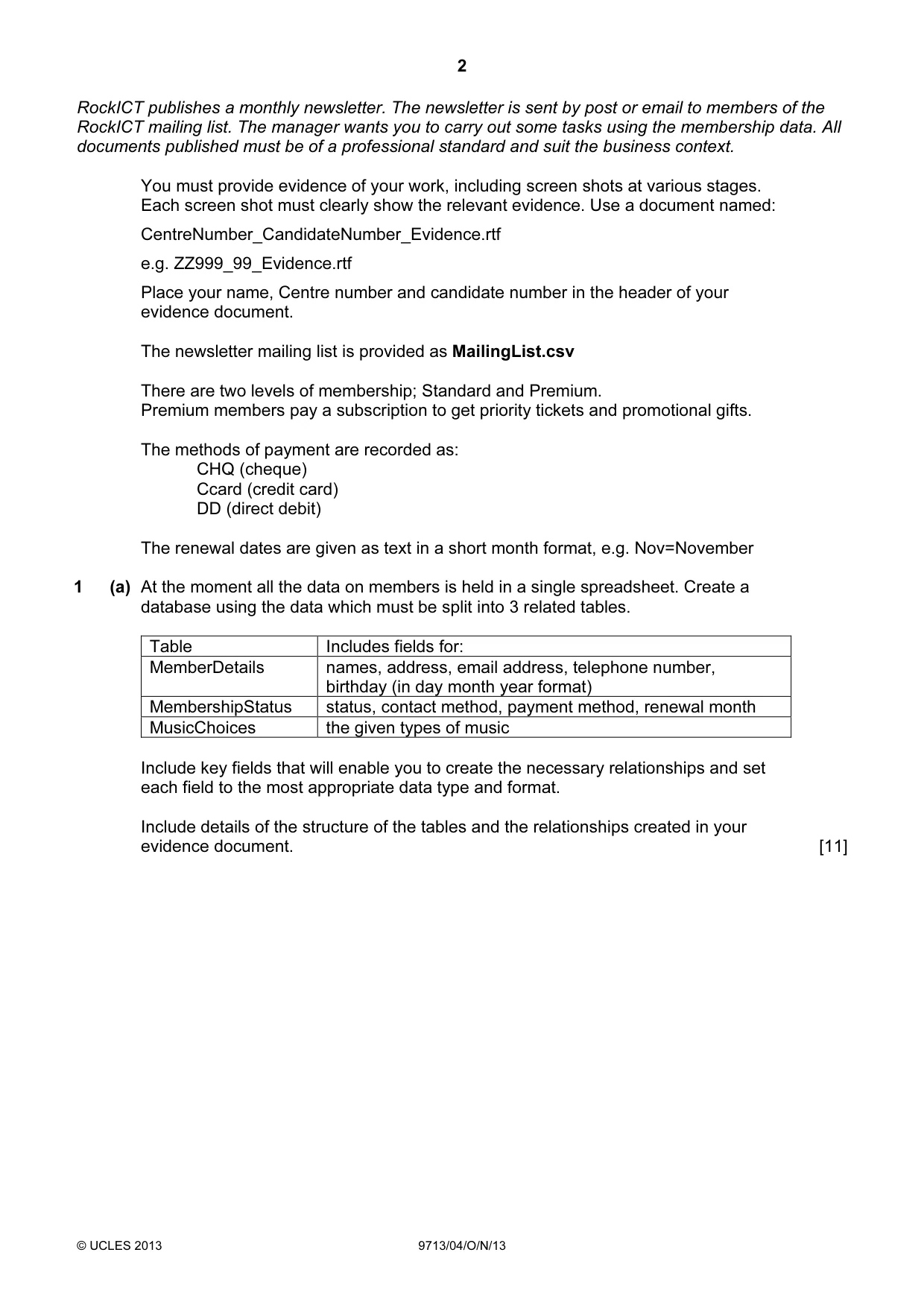
2 © UCLES 2013 9713/04/O/N/13 RockICT publishes a monthly newsletter. The newsletter is sent by post or email to members of the RockICT mailing list. The manager wants you to carry out some tasks using the membership data. All documents published must be of a professional standard and suit the business context. You must provide evidence of your work, including screen shots at various stages. Each screen shot must clearly show the relevant evidence. Use a document named: CentreNumber_CandidateNumber_Evidence.rtf e.g. ZZ999_99_Evidence.rtf Place your name, Centre number and candidate number in the header of your evidence document. The newsletter mailing list is provided as MailingList.csv There are two levels of membership; Standard and Premium. Premium members pay a subscription to get priority tickets and promotional gifts. The methods of payment are recorded as: CHQ (cheque) Ccard (credit card) DD (direct debit) The renewal dates are given as text in a short month format, e.g. Nov=November 1 (a) At the moment all the data on members is held in a single spreadsheet. Create a database using the data which must be split into 3 related tables. Table Includes fields for: MemberDetails names, address, email address, telephone number, birthday (in day month year format) MembershipStatus status, contact method, payment method, renewal month MusicChoices the given types of music Include key fields that will enable you to create the necessary relationships and set each field to the most appropriate data type and format. Include details of the structure of the tables and the relationships created in your evidence document. [11]
Question paper, page 3
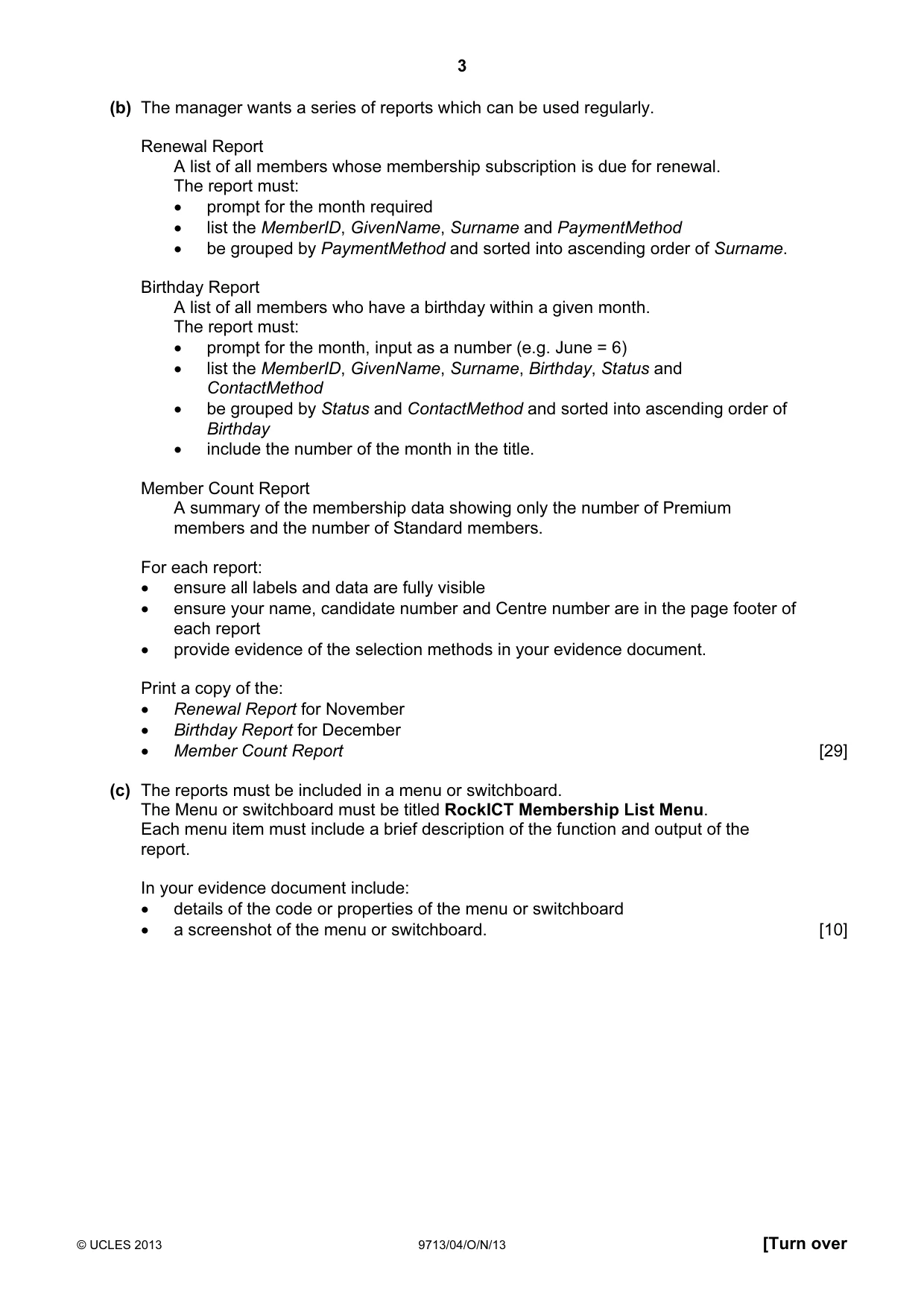
3 © UCLES 2013 9713/04/O/N/13 [Turn over (b) The manager wants a series of reports which can be used regularly. Renewal Report A list of all members whose membership subscription is due for renewal. The report must: • prompt for the month required • list the MemberID, GivenName, Surname and PaymentMethod • be grouped by PaymentMethod and sorted into ascending order of Surname. Birthday Report A list of all members who have a birthday within a given month. The report must: • prompt for the month, input as a number (e.g. June = 6) • list the MemberID, GivenName, Surname, Birthday, Status and ContactMethod • be grouped by Status and ContactMethod and sorted into ascending order of Birthday • include the number of the month in the title. Member Count Report A summary of the membership data showing only the number of Premium members and the number of Standard members. For each report: • ensure all labels and data are fully visible • ensure your name, candidate number and Centre number are in the page footer of each report • provide evidence of the selection methods in your evidence document. Print a copy of the: • Renewal Report for November • Birthday Report for December • Member Count Report [29] (c) The reports must be included in a menu or switchboard. The Menu or switchboard must be titled RockICT Membership List Menu. Each menu item must include a brief description of the function and output of the report. In your evidence document include: • details of the code or properties of the menu or switchboard • a screenshot of the menu or switchboard. [10]
Question paper, page 4
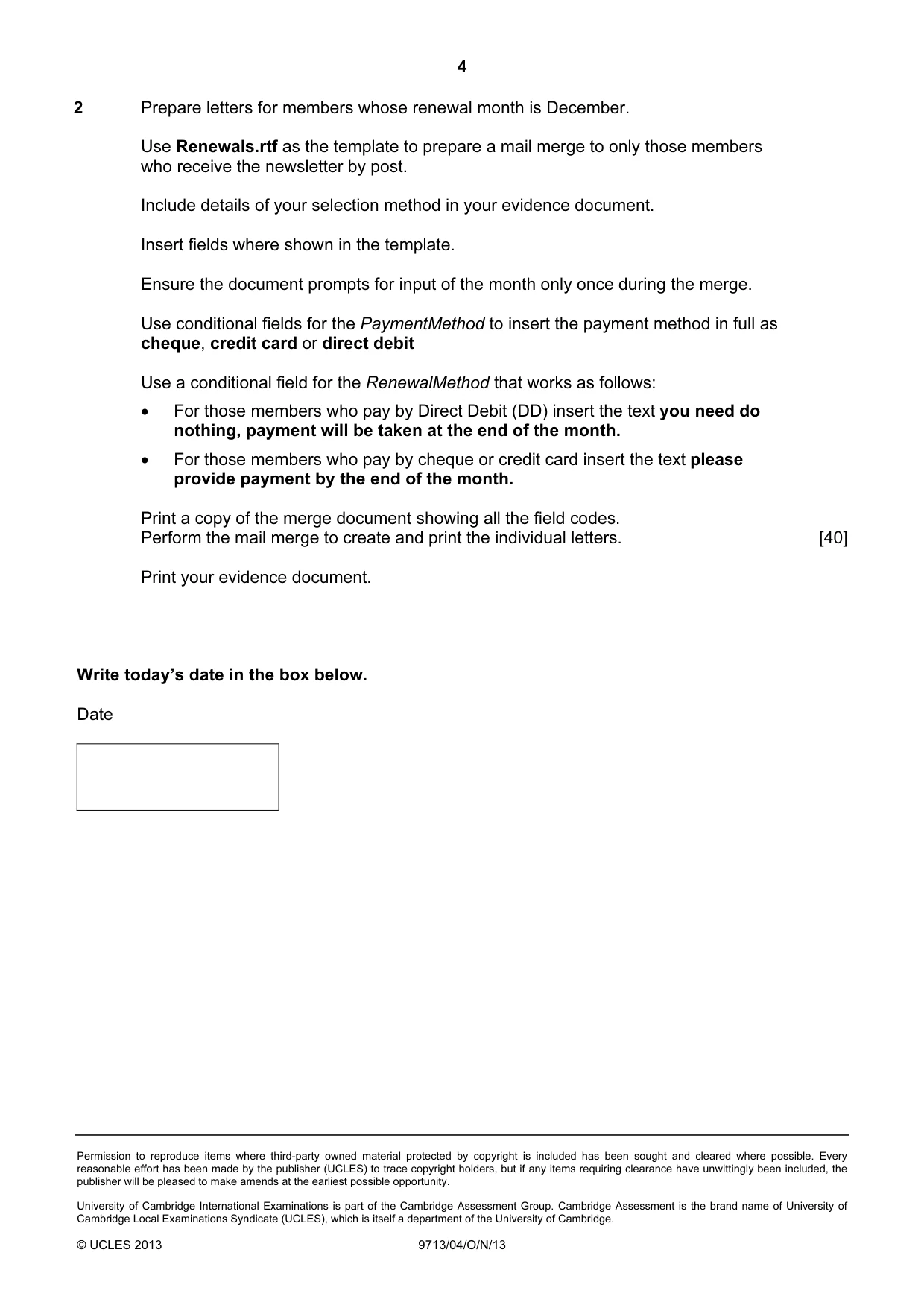
4 Permission to reproduce items where third-party owned material protected by copyright is included has been sought and cleared where possible. Every reasonable effort has been made by the publisher (UCLES) to trace copyright holders, but if any items requiring clearance have unwittingly been included, the publisher will be pleased to make amends at the earliest possible opportunity. University of Cambridge International Examinations is part of the Cambridge Assessment Group. Cambridge Assessment is the brand name of University of Cambridge Local Examinations Syndicate (UCLES), which is itself a department of the University of Cambridge. © UCLES 2013 9713/04/O/N/13 2 Prepare letters for members whose renewal month is December. Use Renewals.rtf as the template to prepare a mail merge to only those members who receive the newsletter by post. Include details of your selection method in your evidence document. Insert fields where shown in the template. Ensure the document prompts for input of the month only once during the merge. Use conditional fields for the PaymentMethod to insert the payment method in full as cheque, credit card or direct debit Use a conditional field for the RenewalMethod that works as follows: • For those members who pay by Direct Debit (DD) insert the text you need do nothing, payment will be taken at the end of the month. • For those members who pay by cheque or credit card insert the text please provide payment by the end of the month. Print a copy of the merge document showing all the field codes. Perform the mail merge to create and print the individual letters. [40] Print your evidence document. Write today’s date in the box below. Date
Mark scheme, page 1
CAMBRIDGE INTERNATIONAL EXAMINATIONS GCE Advanced Subsidiary Level and GCE Advanced Level MARK SCHEME for the October/November 2013 series 9713 APPLIED INFORMATION AND COMMUNICATION TECHNOLOGY 9713/04 Paper 4 (Practical Test B), maximum raw mark 90 This mark scheme is published as an aid to teachers and candidates, to indicate the requirements of the examination. It shows the basis on which Examiners were instructed to award marks. It does not indicate the details of the discussions that took place at an Examiners’ meeting before marking began, which would have considered the acceptability of alternative answers. Mark schemes should be read in conjunction with the question paper and the Principal Examiner Report for Teachers. Cambridge will not enter into discussions about these mark schemes. Cambridge is publishing the mark schemes for the October/November 2013 series for most IGCSE, GCE Advanced Level and Advanced Subsidiary Level components and some Ordinary Level components.
Mark scheme, page 2
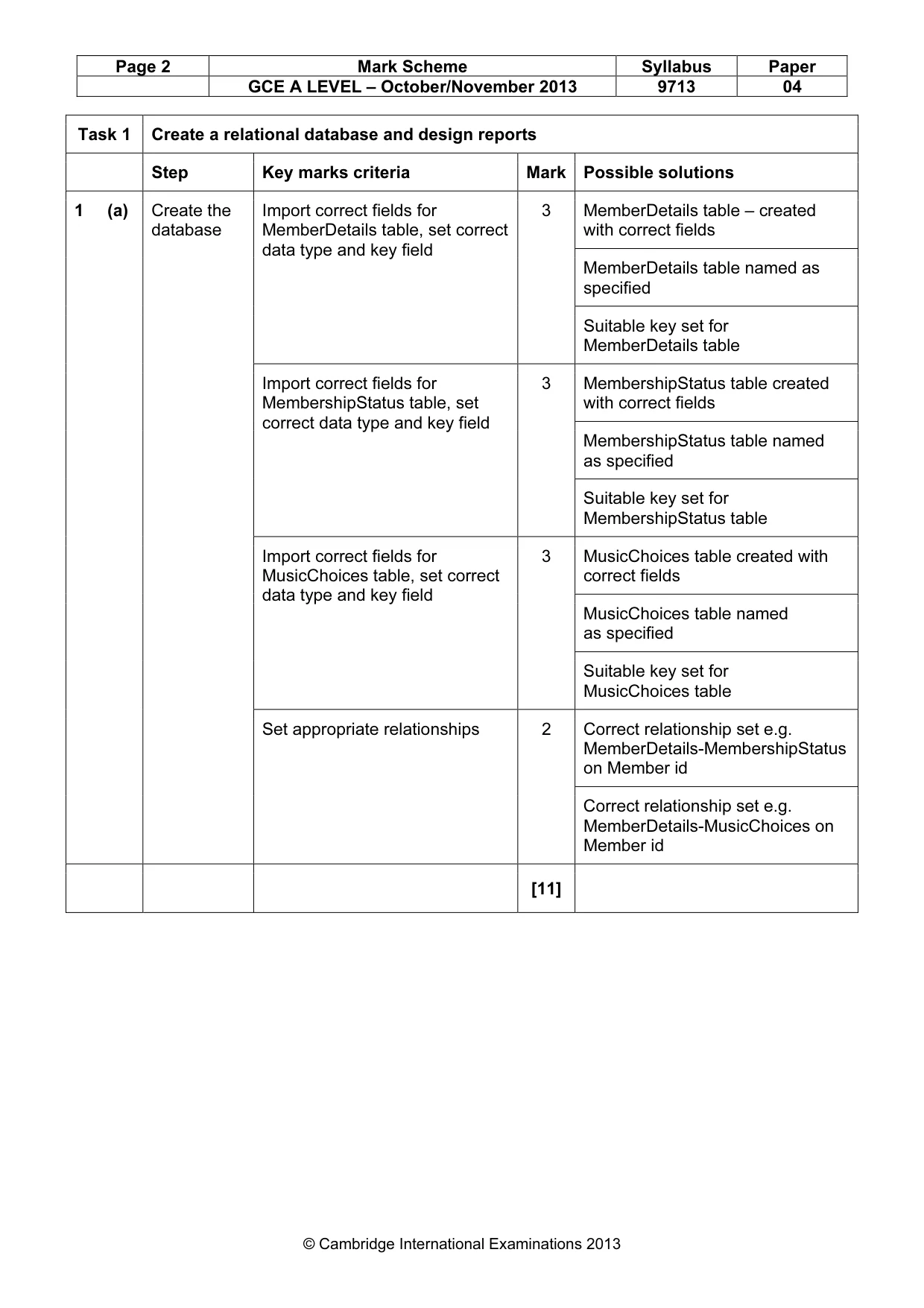
Page 2 Mark Scheme Syllabus Paper GCE A LEVEL – October/November 2013 9713 04 © Cambridge International Examinations 2013 Task 1 Create a relational database and design reports Step Key marks criteria Mark Possible solutions 1 (a) Create the database Import correct fields for MemberDetails table, set correct data type and key field 3 MemberDetails table – created with correct fields MemberDetails table named as specified Suitable key set for MemberDetails table Import correct fields for MembershipStatus table, set correct data type and key field 3 MembershipStatus table created with correct fields MembershipStatus table named as specified Suitable key set for MembershipStatus table Import correct fields for MusicChoices table, set correct data type and key field 3 MusicChoices table created with correct fields MusicChoices table named as specified Suitable key set for MusicChoices table Set appropriate relationships 2 Correct relationship set e.g. MemberDetails-MembershipStatus on Member id Correct relationship set e.g. MemberDetails-MusicChoices on Member id [11]
Mark scheme, page 3
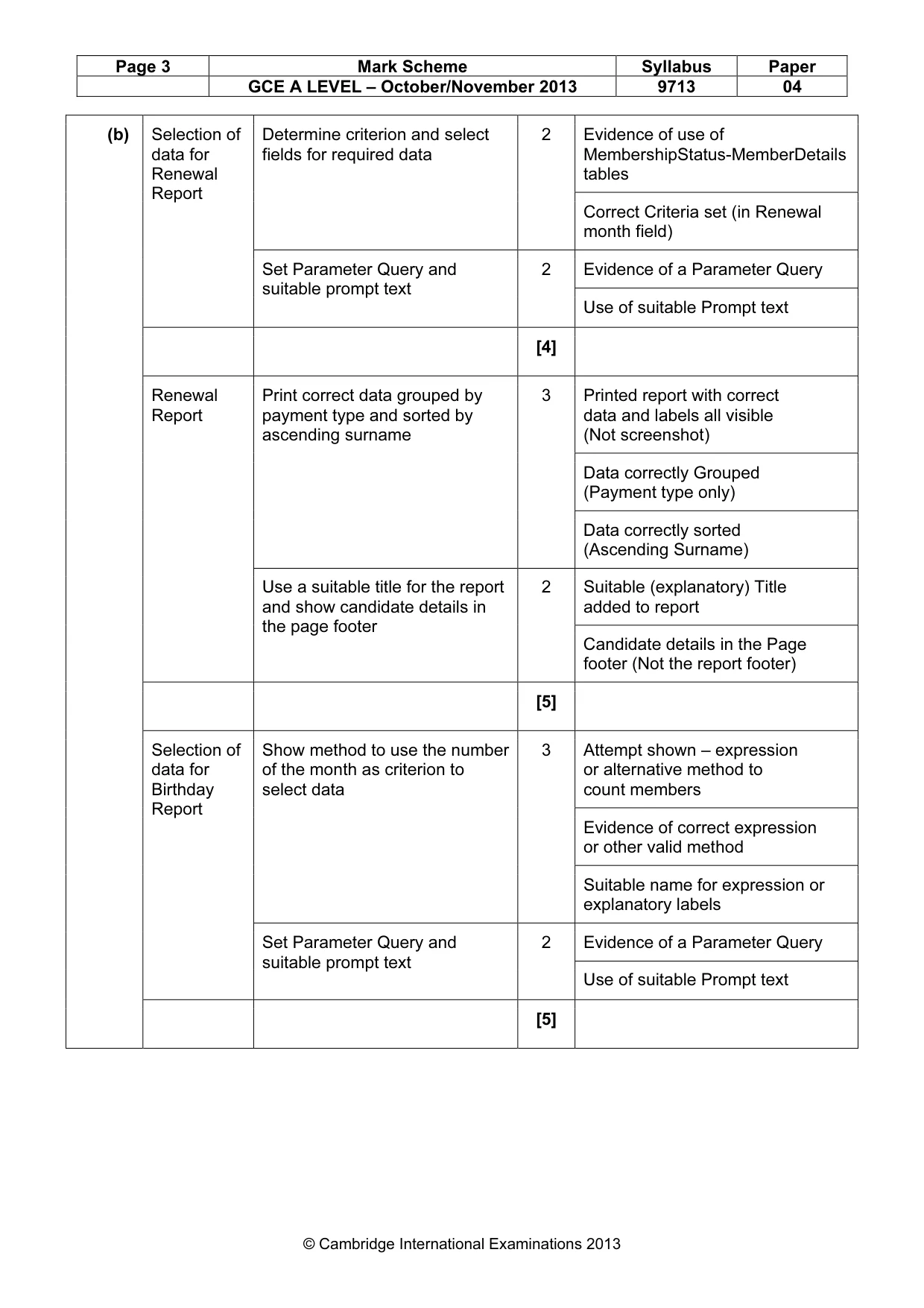
Page 3 Mark Scheme Syllabus Paper GCE A LEVEL – October/November 2013 9713 04 © Cambridge International Examinations 2013 (b) Selection of data for Renewal Report Determine criterion and select fields for required data 2 Evidence of use of MembershipStatus-MemberDetails tables Correct Criteria set (in Renewal month field) Set Parameter Query and suitable prompt text 2 Evidence of a Parameter Query Use of suitable Prompt text [4] Renewal Report Print correct data grouped by payment type and sorted by ascending surname 3 Printed report with correct data and labels all visible (Not screenshot) Data correctly Grouped (Payment type only) Data correctly sorted (Ascending Surname) Use a suitable title for the report and show candidate details in the page footer 2 Suitable (explanatory) Title added to report Candidate details in the Page footer (Not the report footer) [5] Selection of data for Birthday Report Show method to use the number of the month as criterion to select data 3 Attempt shown – expression or alternative method to count members Evidence of correct expression or other valid method Suitable name for expression or explanatory labels Set Parameter Query and suitable prompt text 2 Evidence of a Parameter Query Use of suitable Prompt text [5]
Mark scheme, page 4
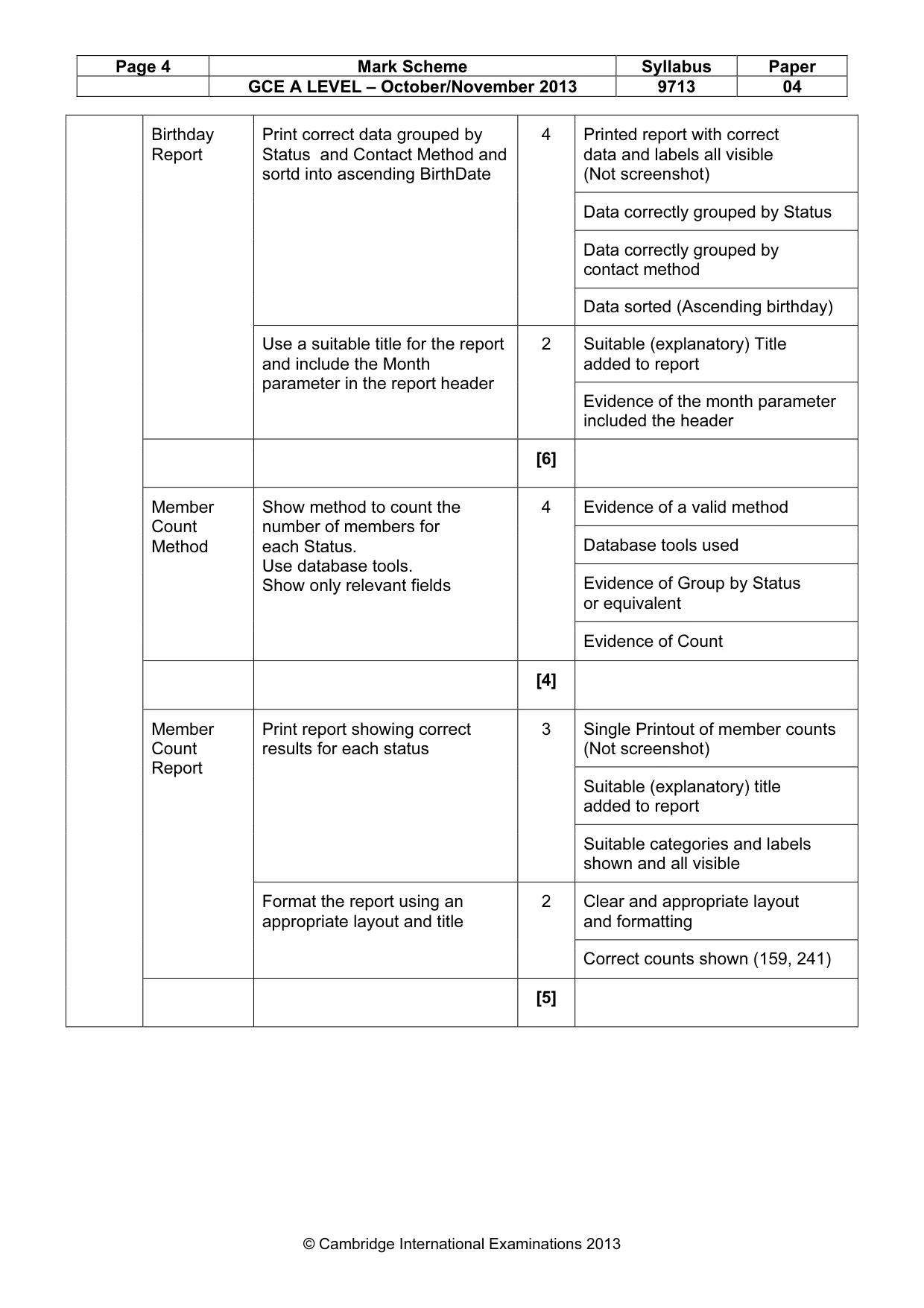
Page 4 Mark Scheme Syllabus Paper GCE A LEVEL – October/November 2013 9713 04 © Cambridge International Examinations 2013 Birthday Report Print correct data grouped by Status and Contact Method and sortd into ascending BirthDate 4 Printed report with correct data and labels all visible (Not screenshot) Data correctly grouped by Status Data correctly grouped by contact method Data sorted (Ascending birthday) Use a suitable title for the report and include the Month parameter in the report header 2 Suitable (explanatory) Title added to report Evidence of the month parameter included the header [6] Member Count Method Show method to count the number of members for each Status. Use database tools. Show only relevant fields 4 Evidence of a valid method Database tools used Evidence of Group by Status or equivalent Evidence of Count [4] Member Count Report Print report showing correct results for each status 3 Single Printout of member counts (Not screenshot) Suitable (explanatory) title added to report Suitable categories and labels shown and all visible Format the report using an appropriate layout and title 2 Clear and appropriate layout and formatting Correct counts shown (159, 241) [5]
Mark scheme, page 5
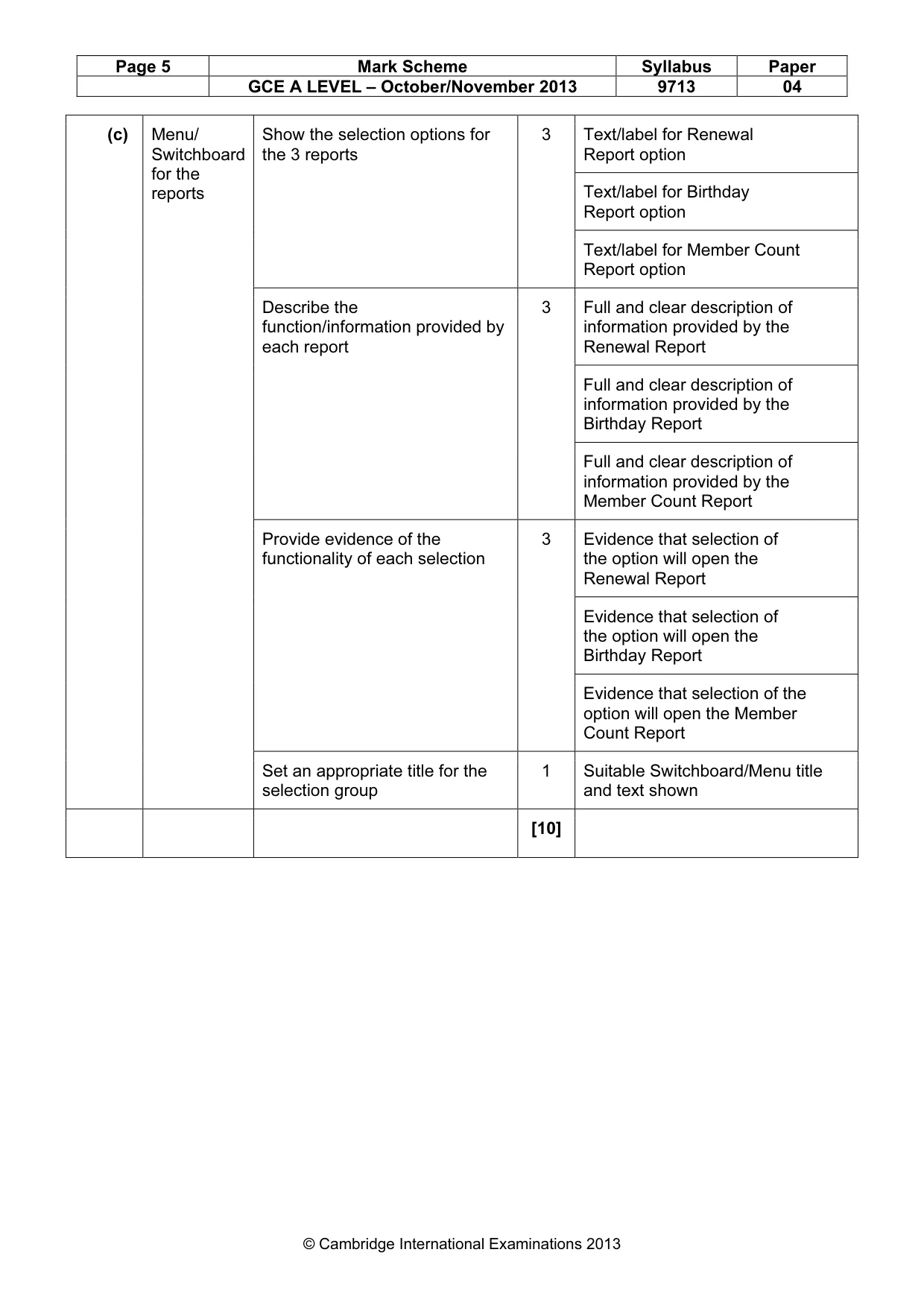
Page 5 Mark Scheme Syllabus Paper GCE A LEVEL – October/November 2013 9713 04 © Cambridge International Examinations 2013 (c) Menu/ Switchboard for the reports Show the selection options for the 3 reports 3 Text/label for Renewal Report option Text/label for Birthday Report option Text/label for Member Count Report option Describe the function/information provided by each report 3 Full and clear description of information provided by the Renewal Report Full and clear description of information provided by the Birthday Report Full and clear description of information provided by the Member Count Report Provide evidence of the functionality of each selection 3 Evidence that selection of the option will open the Renewal Report Evidence that selection of the option will open the Birthday Report Evidence that selection of the option will open the Member Count Report Set an appropriate title for the selection group 1 Suitable Switchboard/Menu title and text shown [10]
Mark scheme, page 6
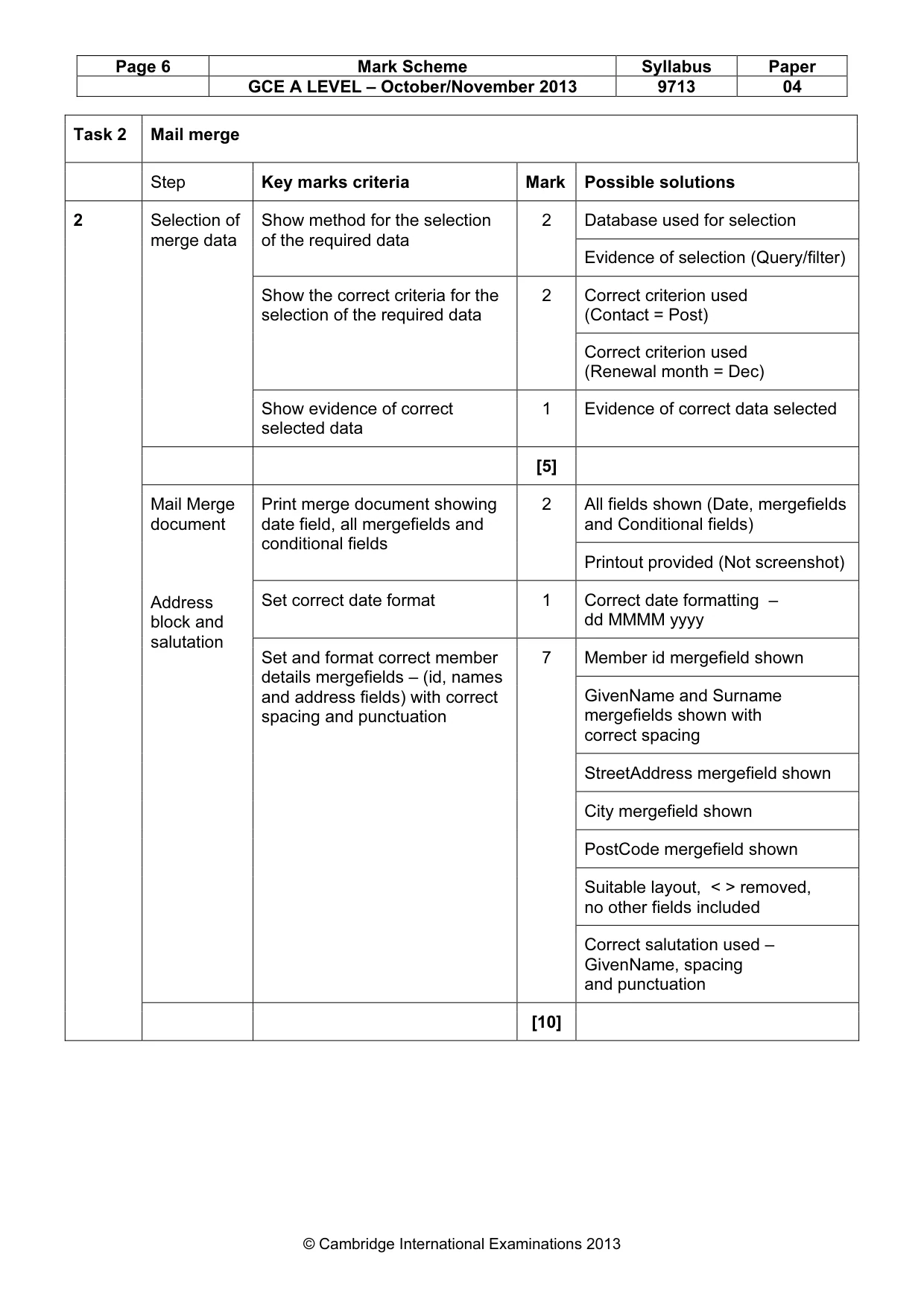
Page 6 Mark Scheme Syllabus Paper GCE A LEVEL – October/November 2013 9713 04 © Cambridge International Examinations 2013 Task 2 Mail merge Step Key marks criteria Mark Possible solutions 2 Selection of merge data Show method for the selection of the required data 2 Database used for selection Evidence of selection (Query/filter) Show the correct criteria for the selection of the required data 2 Correct criterion used (Contact = Post) Correct criterion used (Renewal month = Dec) Show evidence of correct selected data 1 Evidence of correct data selected [5] Mail Merge document Address block and salutation Print merge document showing date field, all mergefields and conditional fields 2 All fields shown (Date, mergefields and Conditional fields) Printout provided (Not screenshot) Set correct date format 1 Correct date formatting – dd MMMM yyyy Set and format correct member details mergefields – (id, names and address fields) with correct spacing and punctuation 7 Member id mergefield shown GivenName and Surname mergefields shown with correct spacing StreetAddress mergefield shown City mergefield shown PostCode mergefield shown Suitable layout, < > removed, no other fields included Correct salutation used – GivenName, spacing and punctuation [10]
Mark scheme, page 7
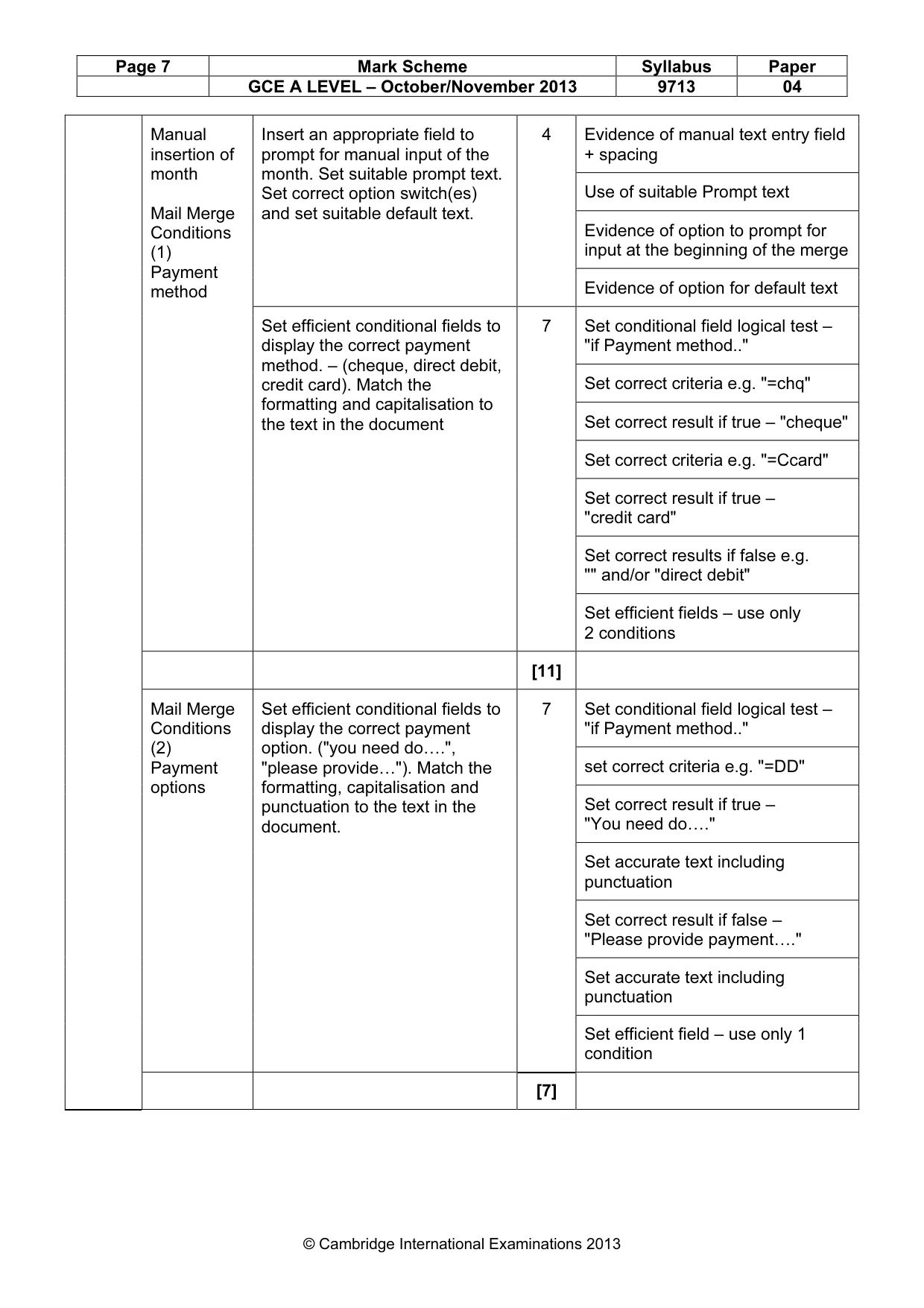
Page 7 Mark Scheme Syllabus Paper GCE A LEVEL – October/November 2013 9713 04 © Cambridge International Examinations 2013 Manual insertion of month Mail Merge Conditions (1) Payment method Insert an appropriate field to prompt for manual input of the month. Set suitable prompt text. Set correct option switch(es) and set suitable default text. 4 Evidence of manual text entry field + spacing Use of suitable Prompt text Evidence of option to prompt for input at the beginning of the merge Evidence of option for default text Set efficient conditional fields to display the correct payment method. – (cheque, direct debit, credit card). Match the formatting and capitalisation to the text in the document 7 Set conditional field logical test – "if Payment method.." Set correct criteria e.g. "=chq" Set correct result if true – "cheque" Set correct criteria e.g. "=Ccard" Set correct result if true – "credit card" Set correct results if false e.g. "" and/or "direct debit" Set efficient fields – use only 2 conditions [11] Mail Merge Conditions (2) Payment options Set efficient conditional fields to display the correct payment option. ("you need do….", "please provide…"). Match the formatting, capitalisation and punctuation to the text in the document. 7 Set conditional field logical test – "if Payment method.." set correct criteria e.g. "=DD" Set correct result if true – "You need do…." Set accurate text including punctuation Set correct result if false – "Please provide payment…." Set accurate text including punctuation Set efficient field – use only 1 condition [7]
Mark scheme, page 8
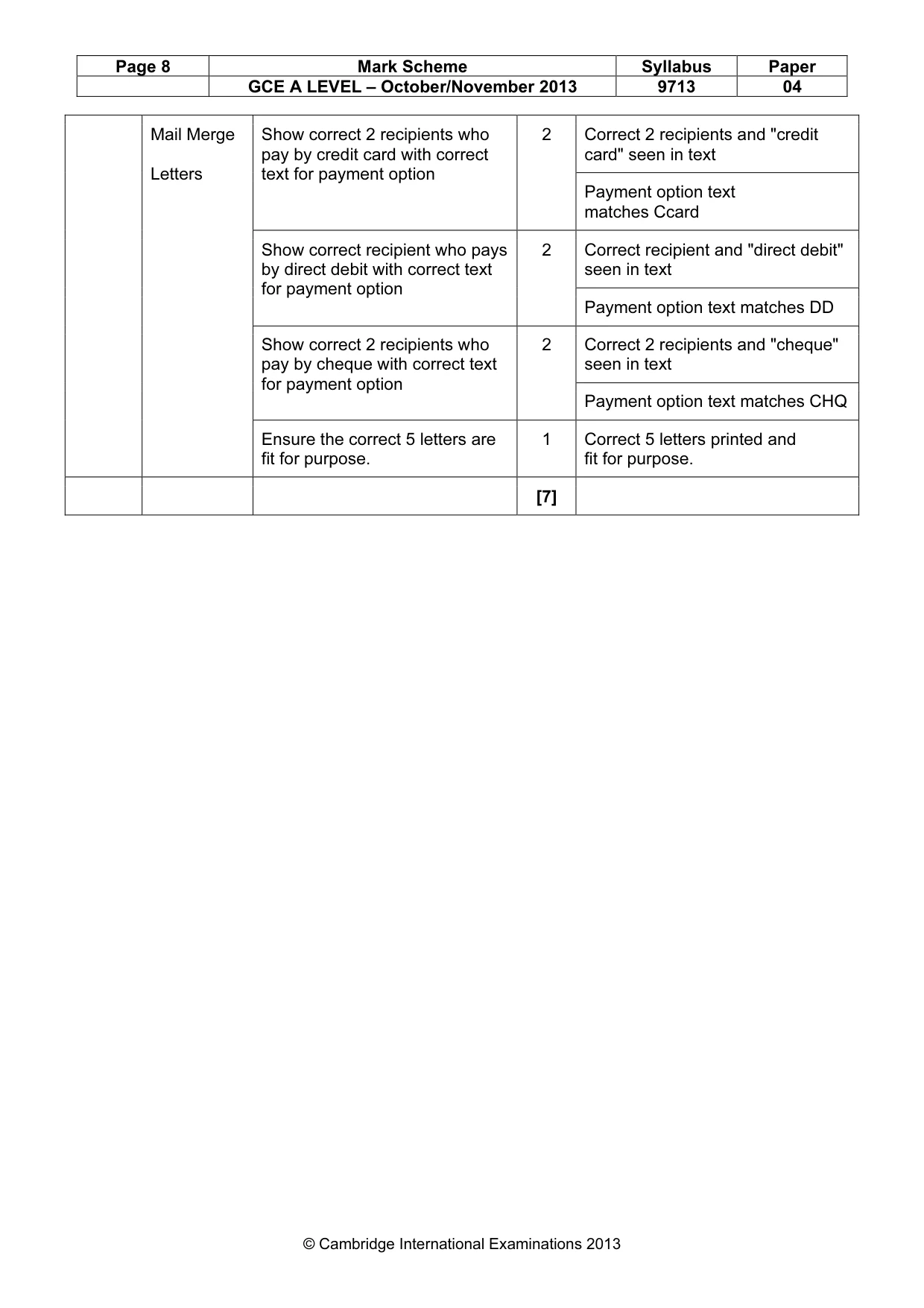
Page 8 Mark Scheme Syllabus Paper GCE A LEVEL – October/November 2013 9713 04 © Cambridge International Examinations 2013 Mail Merge Letters Show correct 2 recipients who pay by credit card with correct text for payment option 2 Correct 2 recipients and "credit card" seen in text Payment option text matches Ccard Show correct recipient who pays by direct debit with correct text for payment option 2 Correct recipient and "direct debit" seen in text Payment option text matches DD Show correct 2 recipients who pay by cheque with correct text for payment option 2 Correct 2 recipients and "cheque" seen in text Payment option text matches CHQ Ensure the correct 5 letters are fit for purpose. 1 Correct 5 letters printed and fit for purpose. [7]
What you needed in this session
Cambridge’s own grade thresholds for 2013 Oct/Nov, Paper 4 · Variant 1. A higher threshold means an easier paper — the bar moves with how the cohort did.