Cambridge A Level Applied Information and Communication Technology 9713 — 2017 May/June Paper 4 · Variant 1
9713/41/M/J/17 · 90 marks · ≈101 min
The question paper and its mark scheme, free to read here and free to download. This is Cambridge’s own paper, exactly as it was sat.
Question paper4 pages
Mark scheme7 pages
Answers below. Sit the paper first if you are practising.
Paper as text
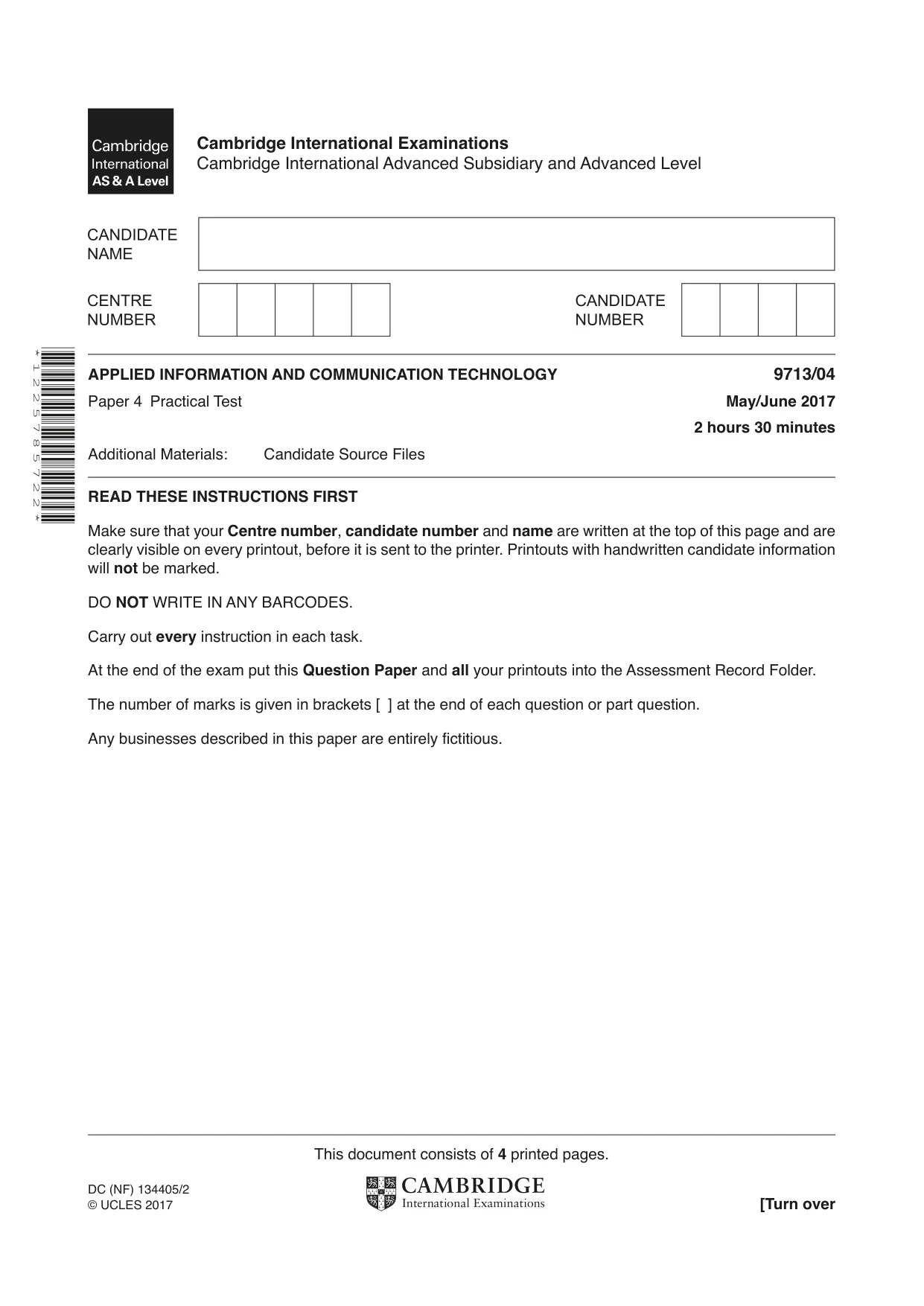
Question paper, page 1
* 1 2 2 5 7 8 5 7 2 2 * This document consists of 4 printed pages. DC (NF) 134405/2 © UCLES 2017 [Turn over Cambridge International Examinations Cambridge International Advanced Subsidiary and Advanced Level APPLIED INFORMATION AND COMMUNICATION TECHNOLOGY 9713/04 Paper 4 Practical Test May/June 2017 2 hours 30 minutes Additional Materials: Candidate Source Files READ THESE INSTRUCTIONS FIRST Make sure that your Centre number, candidate number and name are written at the top of this page and are clearly visible on every printout, before it is sent to the printer. Printouts with handwritten candidate information will not be marked. DO NOT WRITE IN ANY BARCODES. Carry out every instruction in each task. At the end of the exam put this Question Paper and all your printouts into the Assessment Record Folder. The number of marks is given in brackets [ ] at the end of each question or part question. Any businesses described in this paper are entirely fictitious.
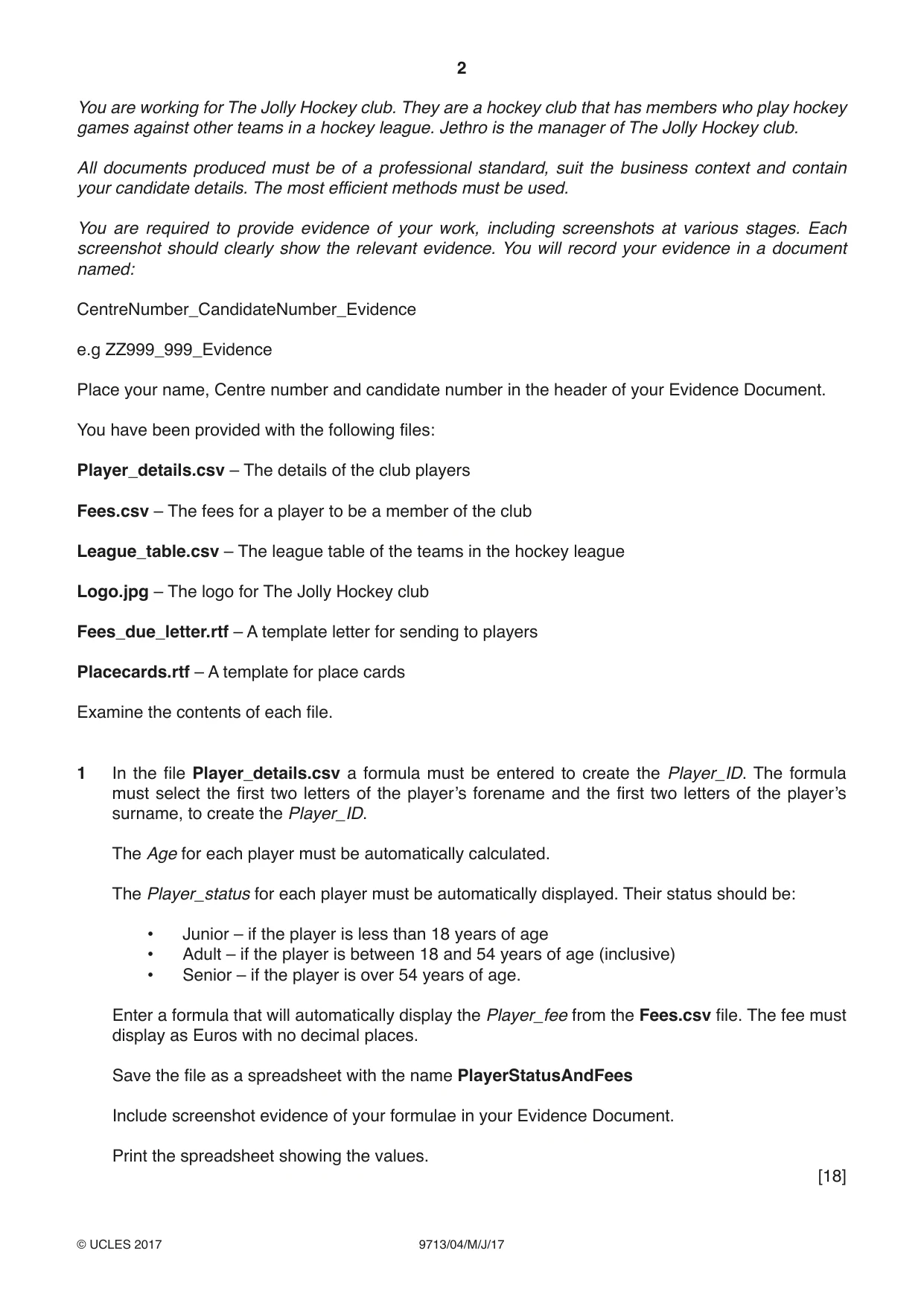
Question paper, page 2
2 9713/04/M/J/17 © UCLES 2017 You are working for The Jolly Hockey club. They are a hockey club that has members who play hockey games against other teams in a hockey league. Jethro is the manager of The Jolly Hockey club. All documents produced must be of a professional standard, suit the business context and contain your candidate details. The most efficient methods must be used. You are required to provide evidence of your work, including screenshots at various stages. Each screenshot should clearly show the relevant evidence. You will record your evidence in a document named: CentreNumber_CandidateNumber_Evidence e.g ZZ999_999_Evidence Place your name, Centre number and candidate number in the header of your Evidence Document. You have been provided with the following files: Player_details.csv – The details of the club players Fees.csv – The fees for a player to be a member of the club League_table.csv – The league table of the teams in the hockey league Logo.jpg – The logo for The Jolly Hockey club Fees_due_letter.rtf – A template letter for sending to players Placecards.rtf – A template for place cards Examine the contents of each file. 1 In the file Player_details.csv a formula must be entered to create the Player_ID. The formula must select the first two letters of the player’s forename and the first two letters of the player’s surname, to create the Player_ID. The Age for each player must be automatically calculated. The Player_status for each player must be automatically displayed. Their status should be: • Junior – if the player is less than 18 years of age • Adult – if the player is between 18 and 54 years of age (inclusive) • Senior – if the player is over 54 years of age. Enter a formula that will automatically display the Player_fee from the Fees.csv file. The fee must display as Euros with no decimal places. Save the file as a spreadsheet with the name PlayerStatusAndFees Include screenshot evidence of your formulae in your Evidence Document. Print the spreadsheet showing the values. [18]
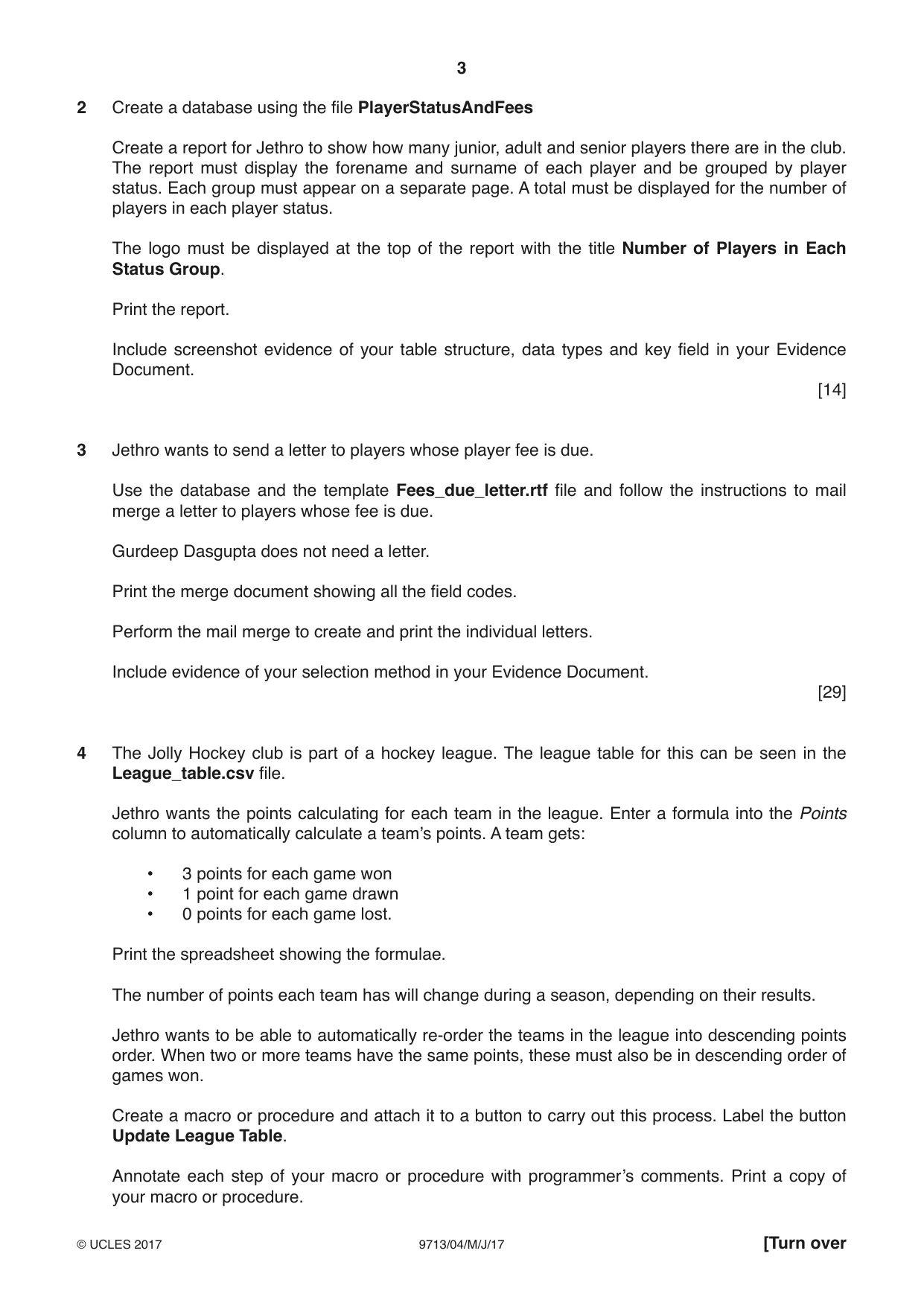
Question paper, page 3
3 9713/04/M/J/17 © UCLES 2017 [Turn over 2 Create a database using the file PlayerStatusAndFees Create a report for Jethro to show how many junior, adult and senior players there are in the club. The report must display the forename and surname of each player and be grouped by player status. Each group must appear on a separate page. A total must be displayed for the number of players in each player status. The logo must be displayed at the top of the report with the title Number of Players in Each Status Group. Print the report. Include screenshot evidence of your table structure, data types and key field in your Evidence Document. [14] 3 Jethro wants to send a letter to players whose player fee is due. Use the database and the template Fees_due_letter.rtf file and follow the instructions to mail merge a letter to players whose fee is due. Gurdeep Dasgupta does not need a letter. Print the merge document showing all the field codes. Perform the mail merge to create and print the individual letters. Include evidence of your selection method in your Evidence Document. [29] 4 The Jolly Hockey club is part of a hockey league. The league table for this can be seen in the League_table.csv file. Jethro wants the points calculating for each team in the league. Enter a formula into the Points column to automatically calculate a team’s points. A team gets: • 3 points for each game won • 1 point for each game drawn • 0 points for each game lost. Print the spreadsheet showing the formulae. The number of points each team has will change during a season, depending on their results. Jethro wants to be able to automatically re-order the teams in the league into descending points order. When two or more teams have the same points, these must also be in descending order of games won. Create a macro or procedure and attach it to a button to carry out this process. Label the button Update League Table. Annotate each step of your macro or procedure with programmer’s comments. Print a copy of your macro or procedure.
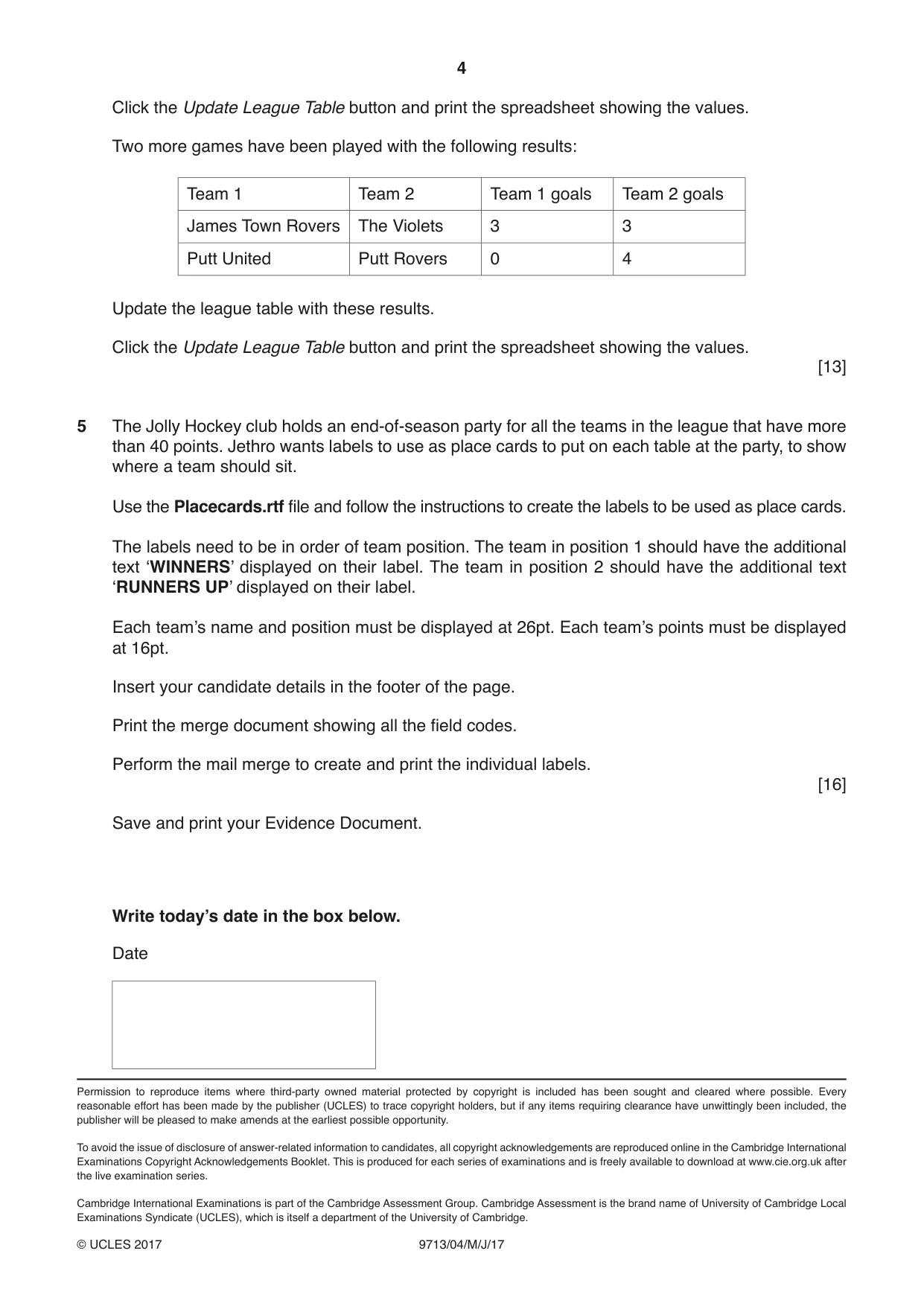
Question paper, page 4
4 9713/04/M/J/17 © UCLES 2017 Permission to reproduce items where third-party owned material protected by copyright is included has been sought and cleared where possible. Every reasonable effort has been made by the publisher (UCLES) to trace copyright holders, but if any items requiring clearance have unwittingly been included, the publisher will be pleased to make amends at the earliest possible opportunity. To avoid the issue of disclosure of answer-related information to candidates, all copyright acknowledgements are reproduced online in the Cambridge International Examinations Copyright Acknowledgements Booklet. This is produced for each series of examinations and is freely available to download at www.cie.org.uk after the live examination series. Cambridge International Examinations is part of the Cambridge Assessment Group. Cambridge Assessment is the brand name of University of Cambridge Local Examinations Syndicate (UCLES), which is itself a department of the University of Cambridge. Click the Update League Table button and print the spreadsheet showing the values. Two more games have been played with the following results: Team 1 Team 2 Team 1 goals Team 2 goals James Town Rovers The Violets 3 3 Putt United Putt Rovers 0 4 Update the league table with these results. Click the Update League Table button and print the spreadsheet showing the values. [13] 5 The Jolly Hockey club holds an end-of-season party for all the teams in the league that have more than 40 points. Jethro wants labels to use as place cards to put on each table at the party, to show where a team should sit. Use the Placecards.rtf file and follow the instructions to create the labels to be used as place cards. The labels need to be in order of team position. The team in position 1 should have the additional text ‘WINNERS’ displayed on their label. The team in position 2 should have the additional text ‘RUNNERS UP’ displayed on their label. Each team’s name and position must be displayed at 26pt. Each team’s points must be displayed at 16pt. Insert your candidate details in the footer of the page. Print the merge document showing all the field codes. Perform the mail merge to create and print the individual labels. [16] Save and print your Evidence Document. Write today’s date in the box below. Date
Mark scheme, page 1
® IGCSE is a registered trademark. This document consists of 7 printed pages. © UCLES 2017 [Turn over Cambridge International Examinations Cambridge International Advanced Subsidiary and Advanced Level APPLIED INFORMATION & COMMUNICATION TECHNOLOGY 9713/04 Paper 4 Practical Test B May/June 2017 MARK SCHEME Maximum Mark: 90 Published This mark scheme is published as an aid to teachers and candidates, to indicate the requirements of the examination. It shows the basis on which Examiners were instructed to award marks. It does not indicate the details of the discussions that took place at an Examiners’ meeting before marking began, which would have considered the acceptability of alternative answers. Mark schemes should be read in conjunction with the question paper and the Principal Examiner Report for Teachers. Cambridge will not enter into discussions about these mark schemes. Cambridge is publishing the mark schemes for the May/June 2017 series for most Cambridge IGCSE®, Cambridge International A and AS Level and Cambridge Pre-U components, and some Cambridge O Level components.
Mark scheme, page 2
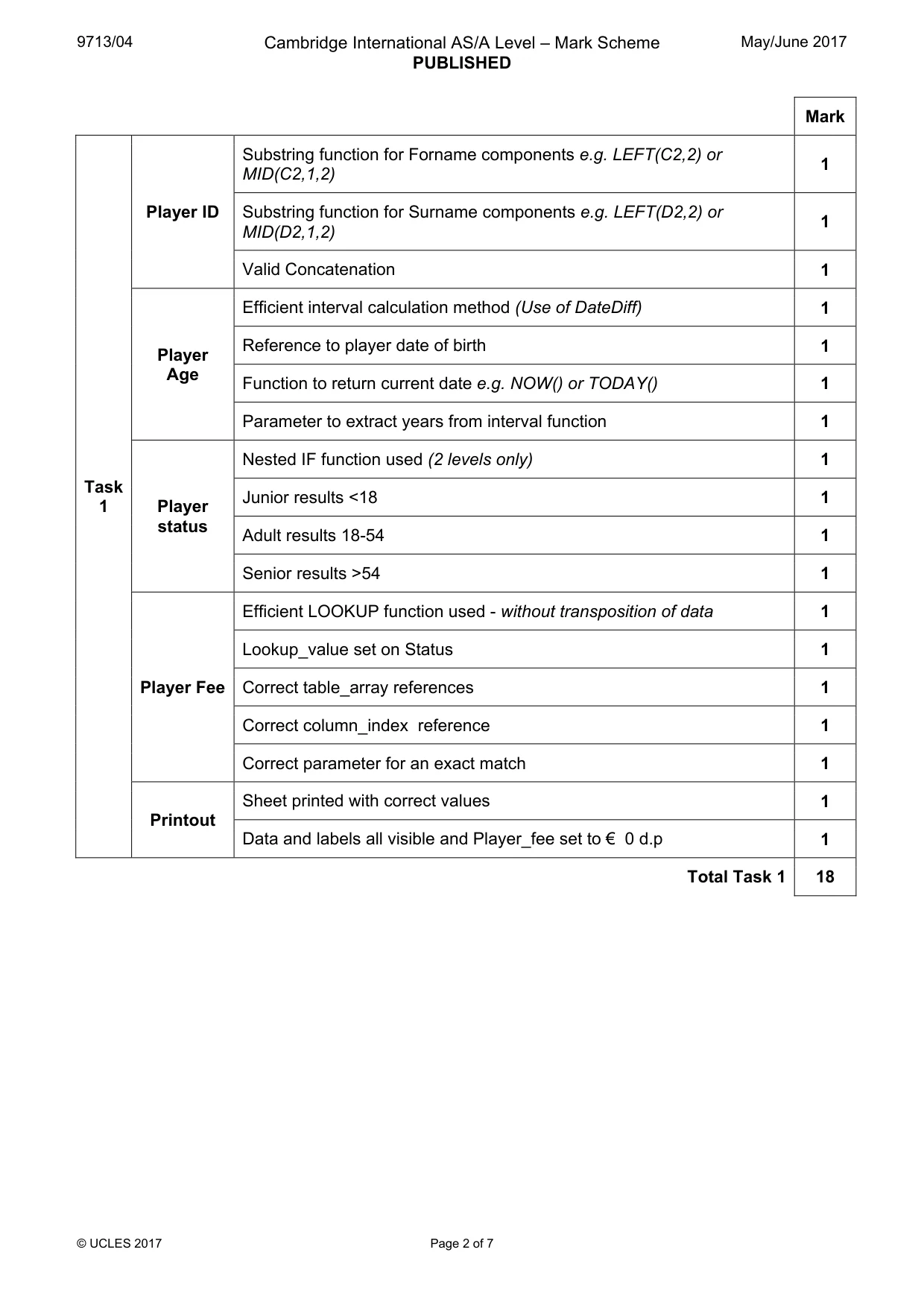
9713/04 Cambridge International AS/A Level – Mark Scheme PUBLISHED May/June 2017 © UCLES 2017 Page 2 of 7 Mark Task 1 Player ID Substring function for Forname components e.g. LEFT(C2,2) or MID(C2,1,2) 1 Substring function for Surname components e.g. LEFT(D2,2) or MID(D2,1,2) 1 Valid Concatenation 1 Player Age Efficient interval calculation method (Use of DateDiff) 1 Reference to player date of birth 1 Function to return current date e.g. NOW() or TODAY() 1 Parameter to extract years from interval function 1 Player status Nested IF function used (2 levels only) 1 Junior results <18 1 Adult results 18-54 1 Senior results >54 1 Player Fee Efficient LOOKUP function used - without transposition of data 1 Lookup_value set on Status 1 Correct table_array references 1 Correct column_index reference 1 Correct parameter for an exact match 1 Printout Sheet printed with correct values 1 Data and labels all visible and Player_fee set to € 0 d.p 1 Total Task 1 18
Mark scheme, page 3
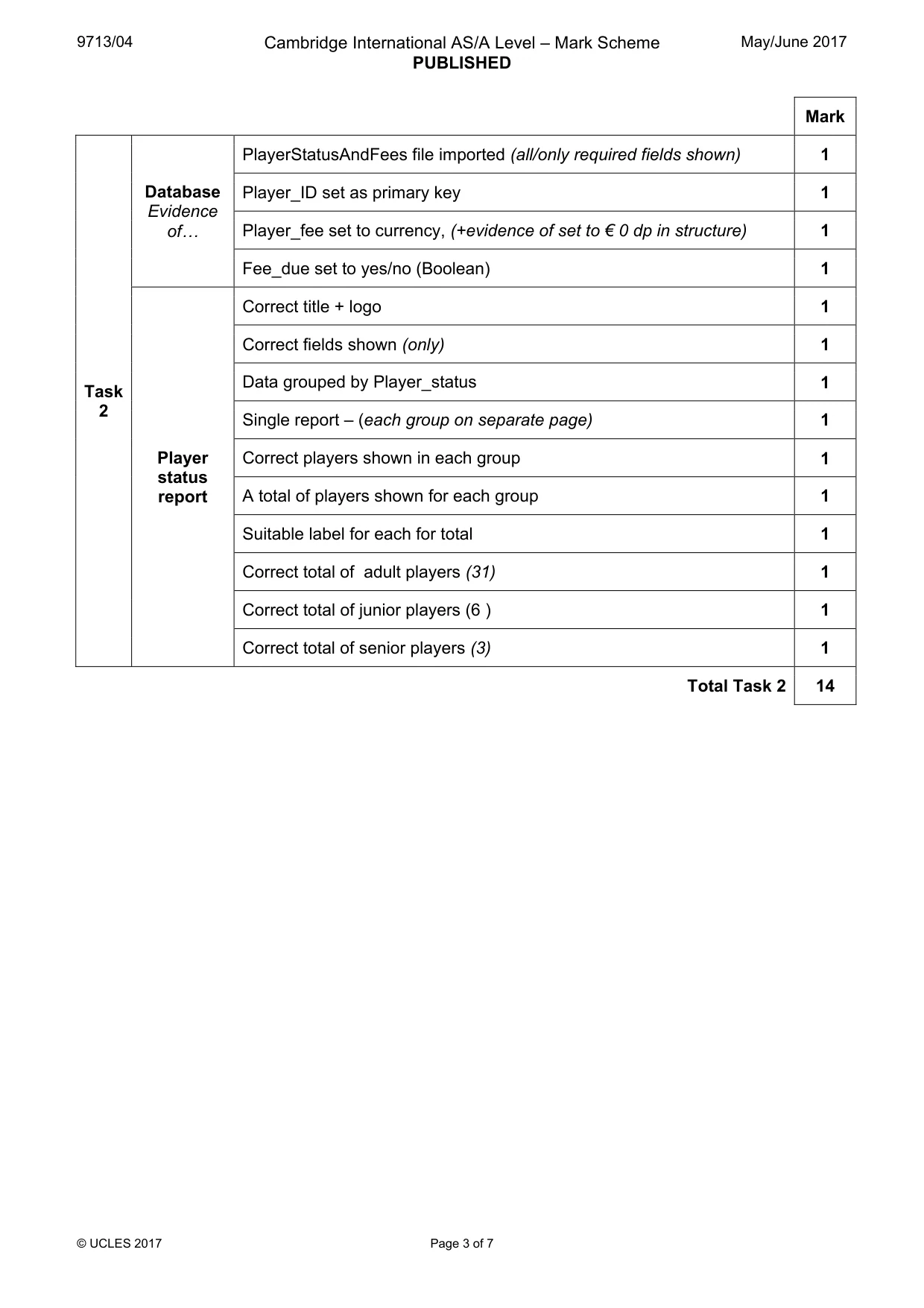
9713/04 Cambridge International AS/A Level – Mark Scheme PUBLISHED May/June 2017 © UCLES 2017 Page 3 of 7 Mark Task 2 Database Evidence of« PlayerStatusAndFees file imported (all/only required fields shown) 1 Player_ID set as primary key 1 Player_fee set to currency, (+evidence of set to € 0 dp in structure) 1 Fee_due set to yes/no (Boolean) 1 Player status report Correct title + logo 1 Correct fields shown (only) 1 Data grouped by Player_status 1 Single report – (each group on separate page) 1 Correct players shown in each group 1 A total of players shown for each group 1 Suitable label for each for total 1 Correct total of adult players (31) 1 Correct total of junior players (6 ) 1 Correct total of senior players (3) 1 Total Task 2 14
Mark scheme, page 4
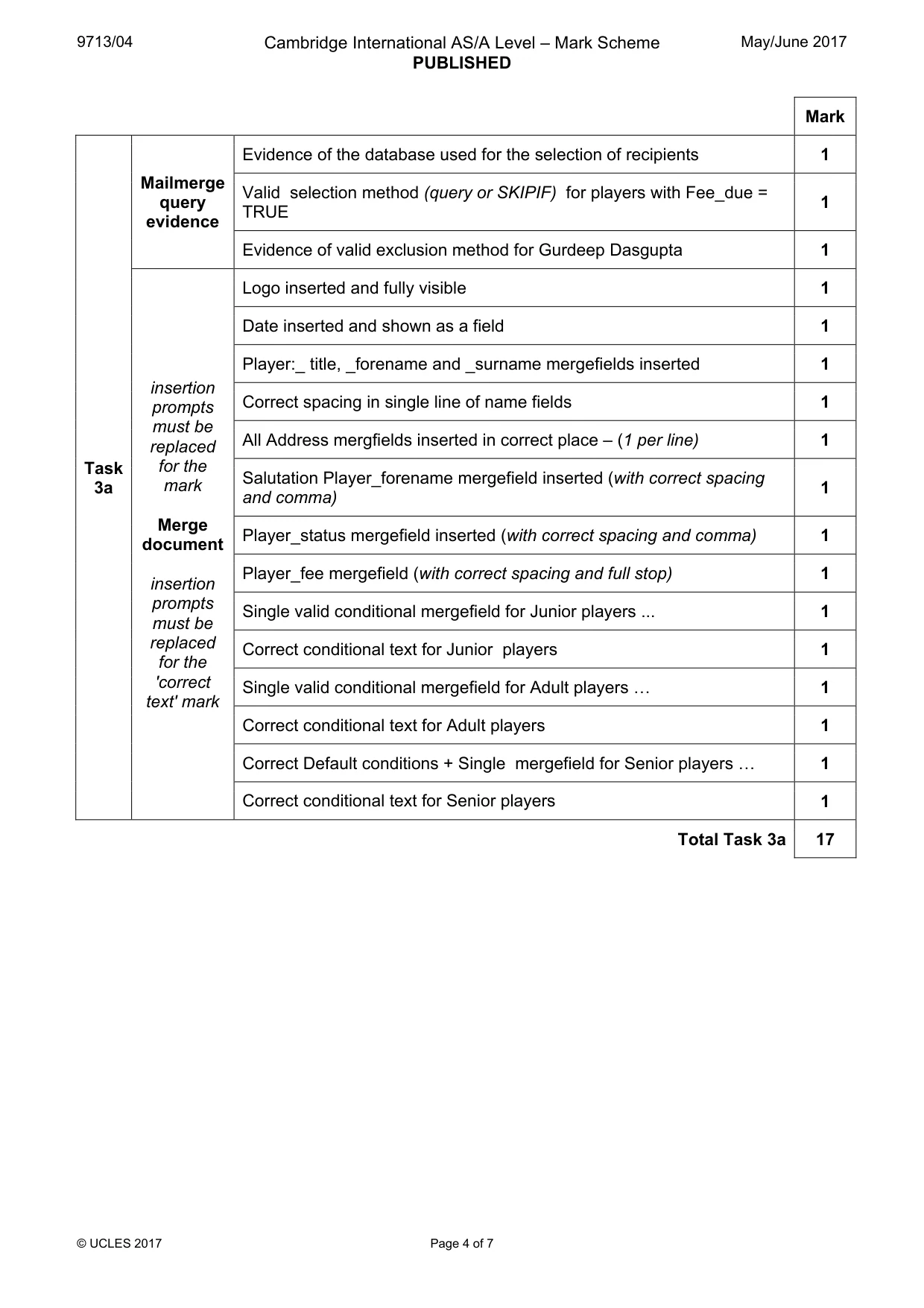
9713/04 Cambridge International AS/A Level – Mark Scheme PUBLISHED May/June 2017 © UCLES 2017 Page 4 of 7 Mark Task 3a Mailmerge query evidence Evidence of the database used for the selection of recipients 1 Valid selection method (query or SKIPIF) for players with Fee_due = TRUE 1 Evidence of valid exclusion method for Gurdeep Dasgupta 1 insertion prompts must be replaced for the mark Merge document insertion prompts must be replaced for the 'correct text' mark Logo inserted and fully visible 1 Date inserted and shown as a field 1 Player:_ title, _forename and _surname mergefields inserted 1 Correct spacing in single line of name fields 1 All Address mergfields inserted in correct place – (1 per line) 1 Salutation Player_forename mergefield inserted (with correct spacing and comma) 1 Player_status mergefield inserted (with correct spacing and comma) 1 Player_fee mergefield (with correct spacing and full stop) 1 Single valid conditional mergefield for Junior players ... 1 Correct conditional text for Junior players 1 Single valid conditional mergefield for Adult players « 1 Correct conditional text for Adult players 1 Correct Default conditions + Single mergefield for Senior players « 1 Correct conditional text for Senior players 1 Total Task 3a 17
Mark scheme, page 5
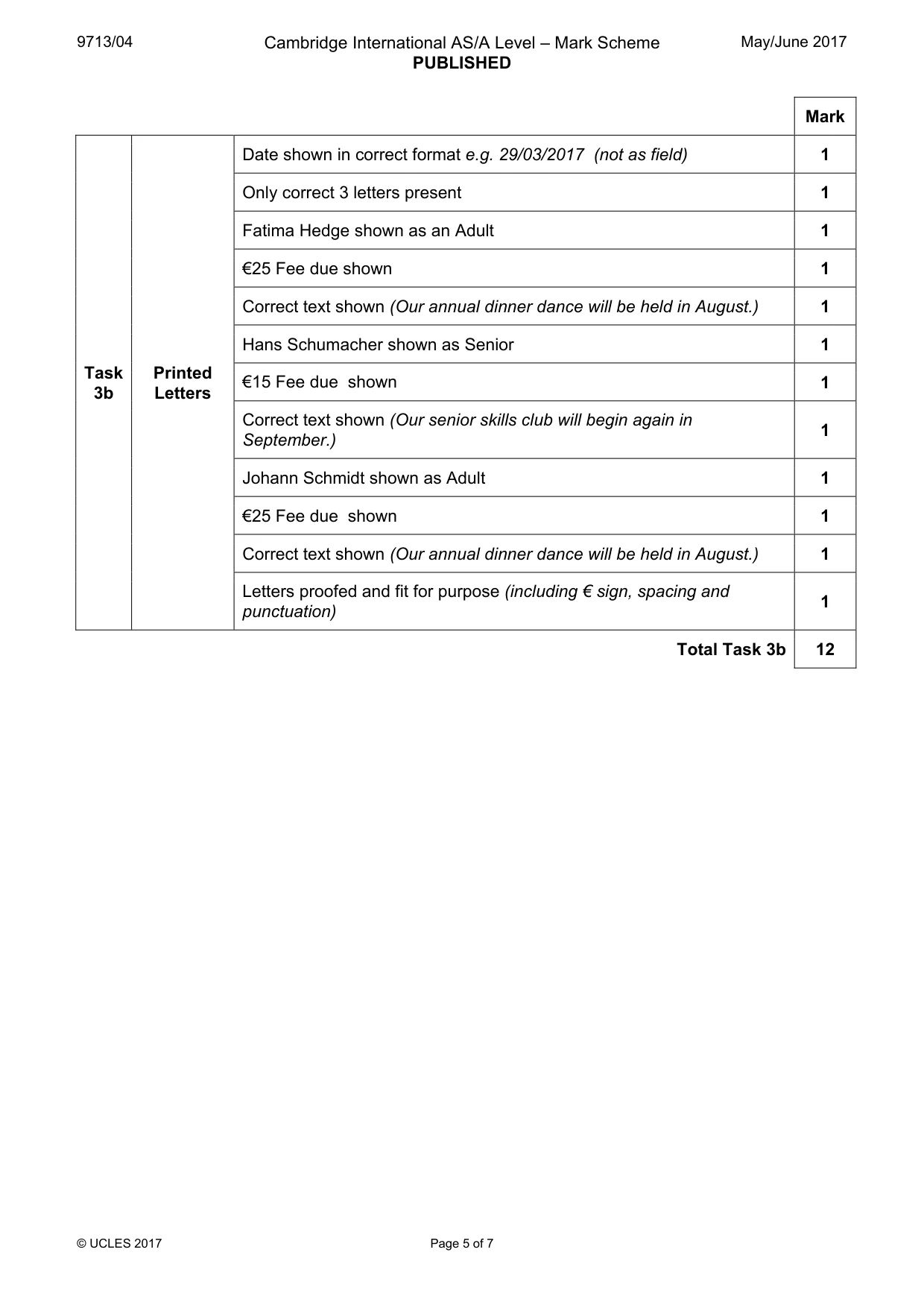
9713/04 Cambridge International AS/A Level – Mark Scheme PUBLISHED May/June 2017 © UCLES 2017 Page 5 of 7 Mark Task 3b Printed Letters Date shown in correct format e.g. 29/03/2017 (not as field) 1 Only correct 3 letters present 1 Fatima Hedge shown as an Adult 1 €25 Fee due shown 1 Correct text shown (Our annual dinner dance will be held in August.) 1 Hans Schumacher shown as Senior 1 €15 Fee due shown 1 Correct text shown (Our senior skills club will begin again in September.) 1 Johann Schmidt shown as Adult 1 €25 Fee due shown 1 Correct text shown (Our annual dinner dance will be held in August.) 1 Letters proofed and fit for purpose (including € sign, spacing and punctuation) 1 Total Task 3b 12
Mark scheme, page 6
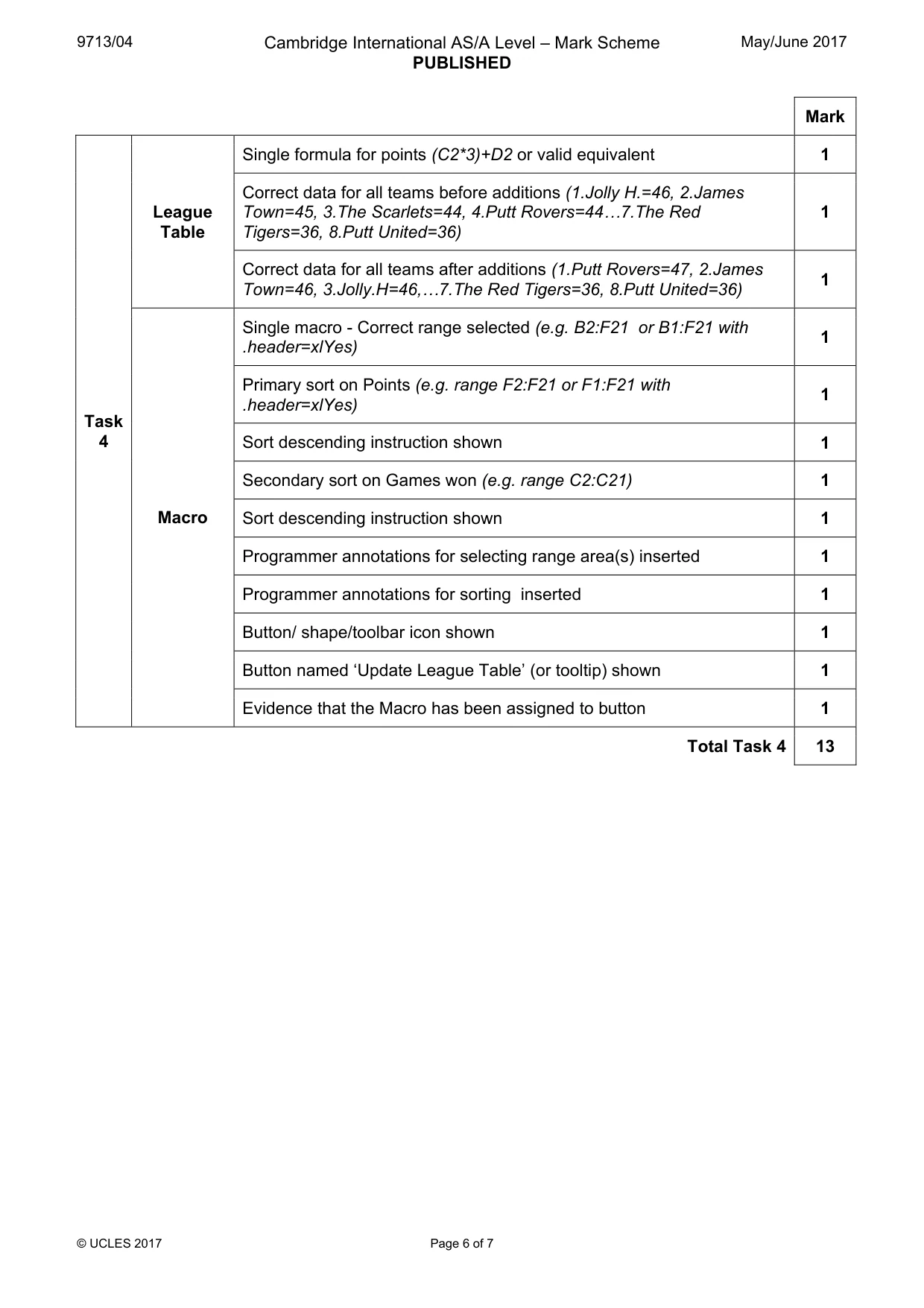
9713/04 Cambridge International AS/A Level – Mark Scheme PUBLISHED May/June 2017 © UCLES 2017 Page 6 of 7 Mark Task 4 League Table Single formula for points (C2*3)+D2 or valid equivalent 1 Correct data for all teams before additions (1.Jolly H.=46, 2.James Town=45, 3.The Scarlets=44, 4.Putt Rovers=44«7.The Red Tigers=36, 8.Putt United=36) 1 Correct data for all teams after additions (1.Putt Rovers=47, 2.James Town=46, 3.Jolly.H=46,«7.The Red Tigers=36, 8.Putt United=36) 1 Macro Single macro - Correct range selected (e.g. B2:F21 or B1:F21 with .header=xlYes) 1 Primary sort on Points (e.g. range F2:F21 or F1:F21 with .header=xlYes) 1 Sort descending instruction shown 1 Secondary sort on Games won (e.g. range C2:C21) 1 Sort descending instruction shown 1 Programmer annotations for selecting range area(s) inserted 1 Programmer annotations for sorting inserted 1 Button/ shape/toolbar icon shown 1 Button named ‘Update League Table’ (or tooltip) shown 1 Evidence that the Macro has been assigned to button 1 Total Task 4 13
Mark scheme, page 7
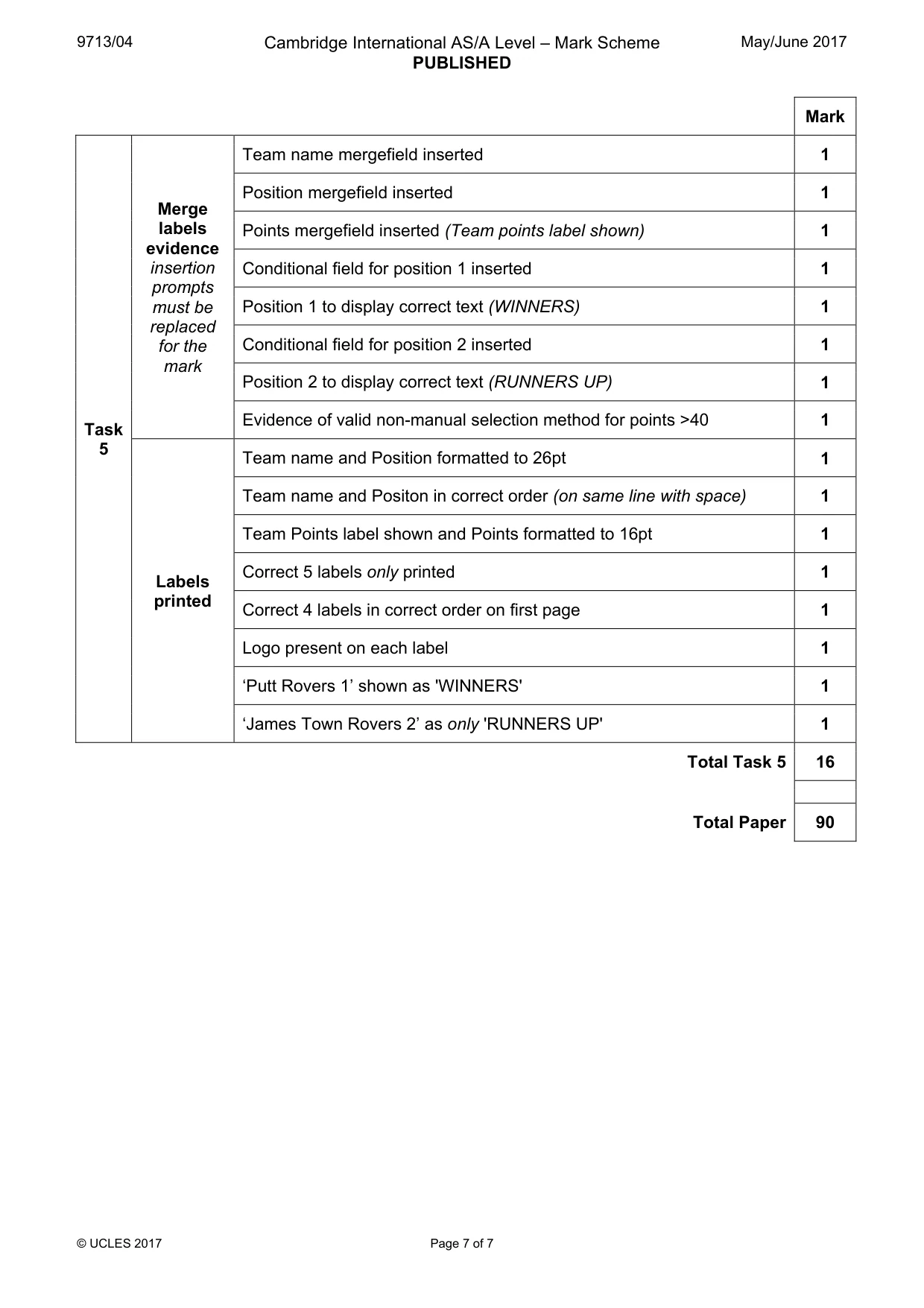
9713/04 Cambridge International AS/A Level – Mark Scheme PUBLISHED May/June 2017 © UCLES 2017 Page 7 of 7 Mark Task 5 Merge labels evidence insertion prompts must be replaced for the mark Team name mergefield inserted 1 Position mergefield inserted 1 Points mergefield inserted (Team points label shown) 1 Conditional field for position 1 inserted 1 Position 1 to display correct text (WINNERS) 1 Conditional field for position 2 inserted 1 Position 2 to display correct text (RUNNERS UP) 1 Evidence of valid non-manual selection method for points >40 1 Labels printed Team name and Position formatted to 26pt 1 Team name and Positon in correct order (on same line with space) 1 Team Points label shown and Points formatted to 16pt 1 Correct 5 labels only printed 1 Correct 4 labels in correct order on first page 1 Logo present on each label 1 ‘Putt Rovers 1’ shown as 'WINNERS' 1 ‘James Town Rovers 2’ as only 'RUNNERS UP' 1 Total Task 5 16 Total Paper 90
What you needed in this session
Cambridge’s own grade thresholds for 2017 May/June, Paper 4 · Variant 1. A higher threshold means an easier paper — the bar moves with how the cohort did.