Cambridge A Level Applied Information and Communication Technology 9713 — 2014 May/June Paper 4 · Variant 1
9713/41/M/J/14 · 90 marks · ≈101 min
The question paper and its mark scheme, free to read here and free to download. This is Cambridge’s own paper, exactly as it was sat.
Question paper8 pages


Mark scheme6 pages
Answers below. Sit the paper first if you are practising.
Paper as text
Question paper, page 1
This document consists of 5 printed pages and 3 blank pages. IB14 06_9713_04/2RP © UCLES 2014 [Turn over *7372525950* Cambridge International Examinations Cambridge International Advanced Level APPLIED INFORMATION AND COMMUNICATION TECHNOLOGY 9713/04 Paper 4 Practical Test May/June 2014 2 hours 30 minutes Additional Materials: Candidate Source Files READ THESE INSTRUCTIONS FIRST Make sure that your Centre number, candidate number and name are written at the top of this page and are clearly visible on every printout, before it is sent to the printer. DO NOT WRITE IN ANY BARCODES. Carry out every instruction in each task. At the end of the exam put this Question Paper and all your printouts into the Assessment Record Folder. The number of marks is given in brackets [ ] at the end of each question or part question. Any businesses described in this paper are entirely fictitious.
Question paper, page 2
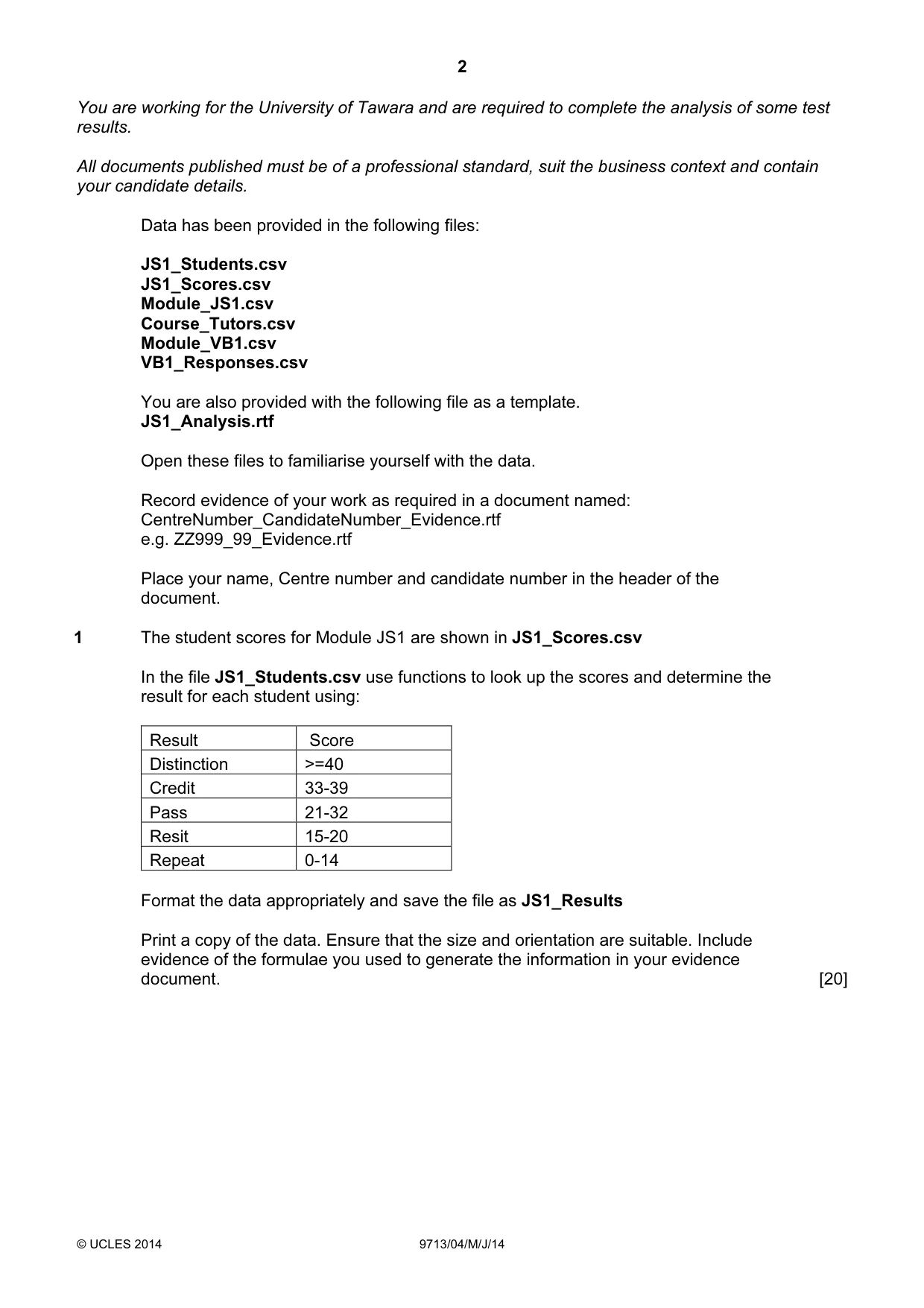
2 © UCLES 2014 9713/04/M/J/14 You are working for the University of Tawara and are required to complete the analysis of some test results. All documents published must be of a professional standard, suit the business context and contain your candidate details. Data has been provided in the following files: JS1_Students.csv JS1_Scores.csv Module_JS1.csv Course_Tutors.csv Module_VB1.csv VB1_Responses.csv You are also provided with the following file as a template. JS1_Analysis.rtf Open these files to familiarise yourself with the data. Record evidence of your work as required in a document named: CentreNumber_CandidateNumber_Evidence.rtf e.g. ZZ999_99_Evidence.rtf Place your name, Centre number and candidate number in the header of the document. 1 The student scores for Module JS1 are shown in JS1_Scores.csv In the file JS1_Students.csv use functions to look up the scores and determine the result for each student using: Result Score Distinction >=40 Credit 33-39 Pass 21-32 Resit 15-20 Repeat 0-14 Format the data appropriately and save the file as JS1_Results Print a copy of the data. Ensure that the size and orientation are suitable. Include evidence of the formulae you used to generate the information in your evidence document. [20]
Question paper, page 3
3 © UCLES 2014 9713/04/M/J/14 [Turn over 2 You are required to present an analysis of the test results. Use data in JS1_Scores.csv to prepare a vertical bar chart showing the number of correct answers for each question. The score (number of marks) for each question should be displayed as a number with each column. Choose an appropriate chart title, suitable labels for each axis and make sure there is enough information included for the data to be clearly understood. Print only the chart on a new page with your name, Centre number and candidate number in the footer. [10] 3 (a) The course tutors need the results which you have saved in step 1. Use the JS1_Analysis.rtf template file to prepare a mail merge of these results to the JS1 course tutors listed in the Course_Tutors.csv file. Insert the JS1_Results data where indicated in the template file. Only Lead tutors receive a copy of the bar chart. Where indicated, insert and edit a conditional field, to display a copy of the bar chart for the Lead tutor, or for the Assistant tutors the text: An analysis of the test is available from the Lead tutor. Include your name, Centre number and candidate number in the footer of the document. Print a copy of the merge document showing all the field codes. (b) Merge the documents. Make sure that each merged document is formatted consistently and is suitable for publication. Print the documents. [20]
Question paper, page 4
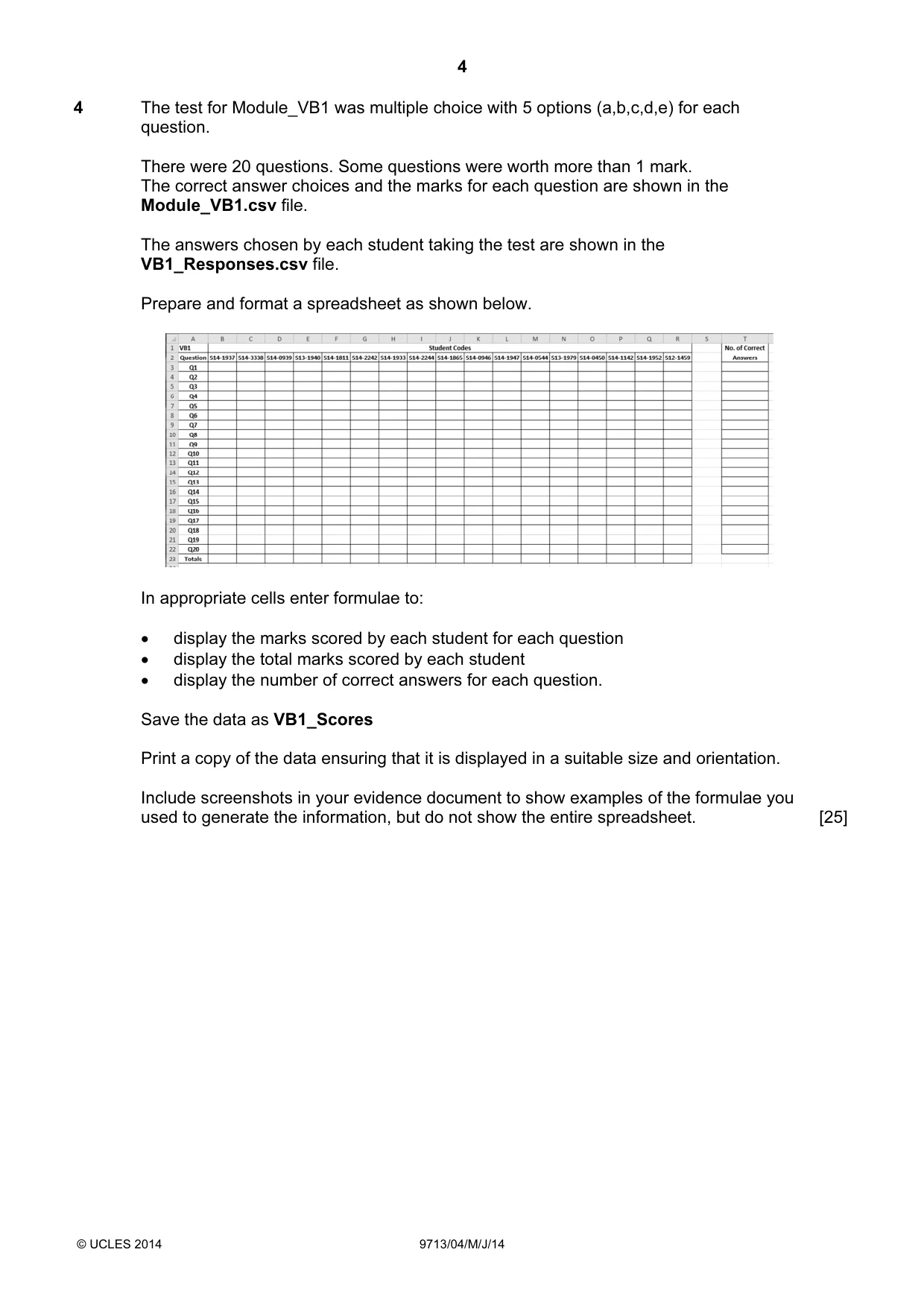
4 © UCLES 2014 9713/04/M/J/14 4 The test for Module_VB1 was multiple choice with 5 options (a,b,c,d,e) for each question. There were 20 questions. Some questions were worth more than 1 mark. The correct answer choices and the marks for each question are shown in the Module_VB1.csv file. The answers chosen by each student taking the test are shown in the VB1_Responses.csv file. Prepare and format a spreadsheet as shown below. In appropriate cells enter formulae to: • display the marks scored by each student for each question • display the total marks scored by each student • display the number of correct answers for each question. Save the data as VB1_Scores Print a copy of the data ensuring that it is displayed in a suitable size and orientation. Include screenshots in your evidence document to show examples of the formulae you used to generate the information, but do not show the entire spreadsheet. [25]
Question paper, page 5
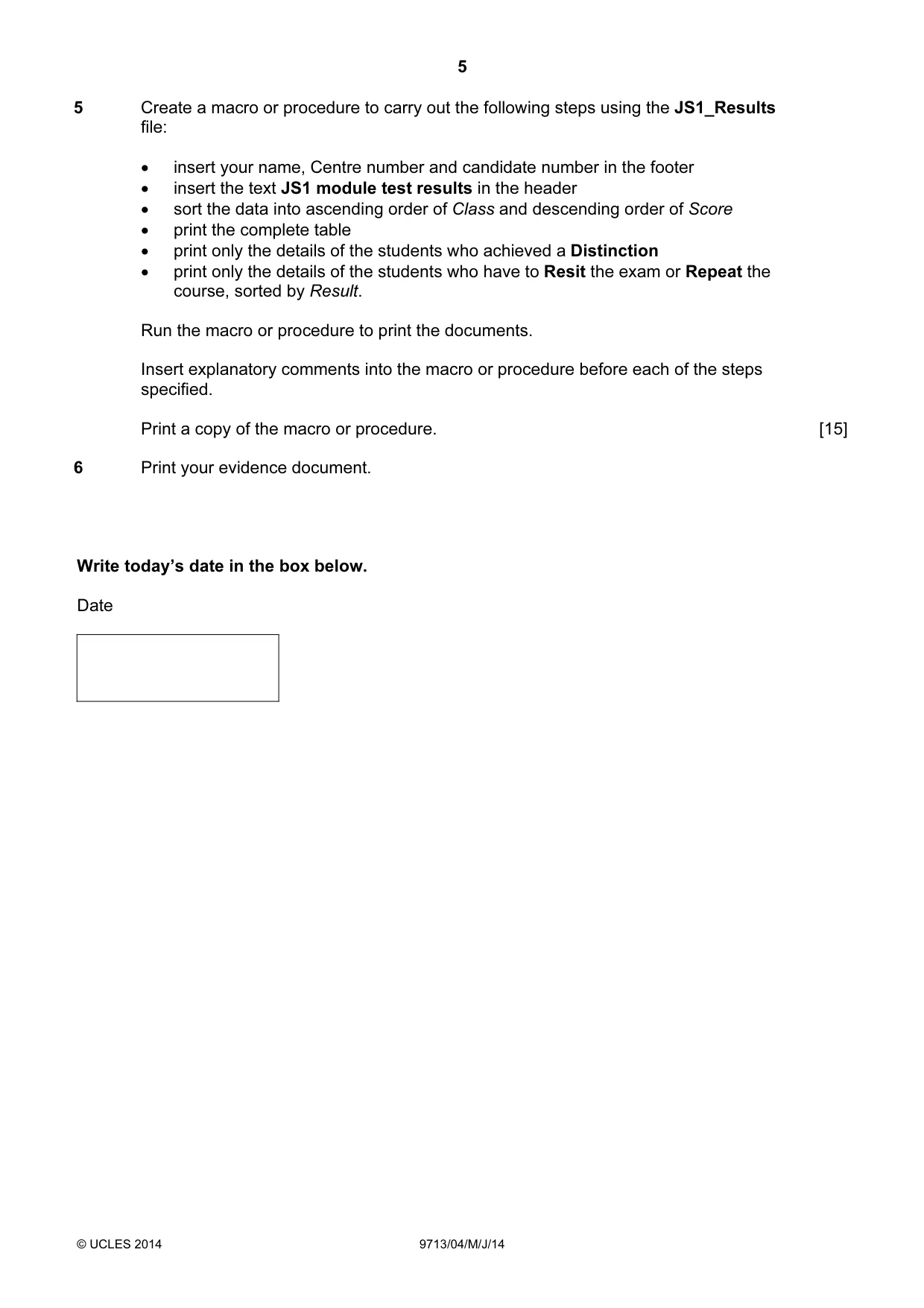
5 © UCLES 2014 9713/04/M/J/14 5 Create a macro or procedure to carry out the following steps using the JS1_Results file: • insert your name, Centre number and candidate number in the footer • insert the text JS1 module test results in the header • sort the data into ascending order of Class and descending order of Score • print the complete table • print only the details of the students who achieved a Distinction • print only the details of the students who have to Resit the exam or Repeat the course, sorted by Result. Run the macro or procedure to print the documents. Insert explanatory comments into the macro or procedure before each of the steps specified. Print a copy of the macro or procedure. [15] 6 Print your evidence document. Write today’s date in the box below. Date
Question paper, page 6
6 © UCLES 2014 9713/04/M/J/14 BLANK PAGE
Question paper, page 7
7 © UCLES 2014 9713/04/M/J/14 BLANK PAGE
Question paper, page 8
8 Permission to reproduce items where third-party owned material protected by copyright is included has been sought and cleared where possible. Every reasonable effort has been made by the publisher (UCLES) to trace copyright holders, but if any items requiring clearance have unwittingly been included, the publisher will be pleased to make amends at the earliest possible opportunity. Cambridge International Examinations is part of the Cambridge Assessment Group. Cambridge Assessment is the brand name of University of Cambridge Local Examinations Syndicate (UCLES), which is itself a department of the University of Cambridge. © UCLES 2014 9713/04/M/J/14 BLANK PAGE
Mark scheme, page 1
CAMBRIDGE INTERNATIONAL EXAMINATIONS GCE Advanced Level MARK SCHEME for the May/June 2014 series 9713 APPLIED INFORMATION AND COMMUNICATION TECHNOLOGY 9713/04 Paper 4 (Practical Test B), maximum raw mark 90 This mark scheme is published as an aid to teachers and candidates, to indicate the requirements of the examination. It shows the basis on which Examiners were instructed to award marks. It does not indicate the details of the discussions that took place at an Examiners’ meeting before marking began, which would have considered the acceptability of alternative answers. Mark schemes should be read in conjunction with the question paper and the Principal Examiner Report for Teachers. Cambridge will not enter into discussions about these mark schemes. Cambridge is publishing the mark schemes for the May/June 2014 series for most IGCSE, GCE Advanced Level and Advanced Subsidiary Level components and some Ordinary Level components.
Mark scheme, page 2
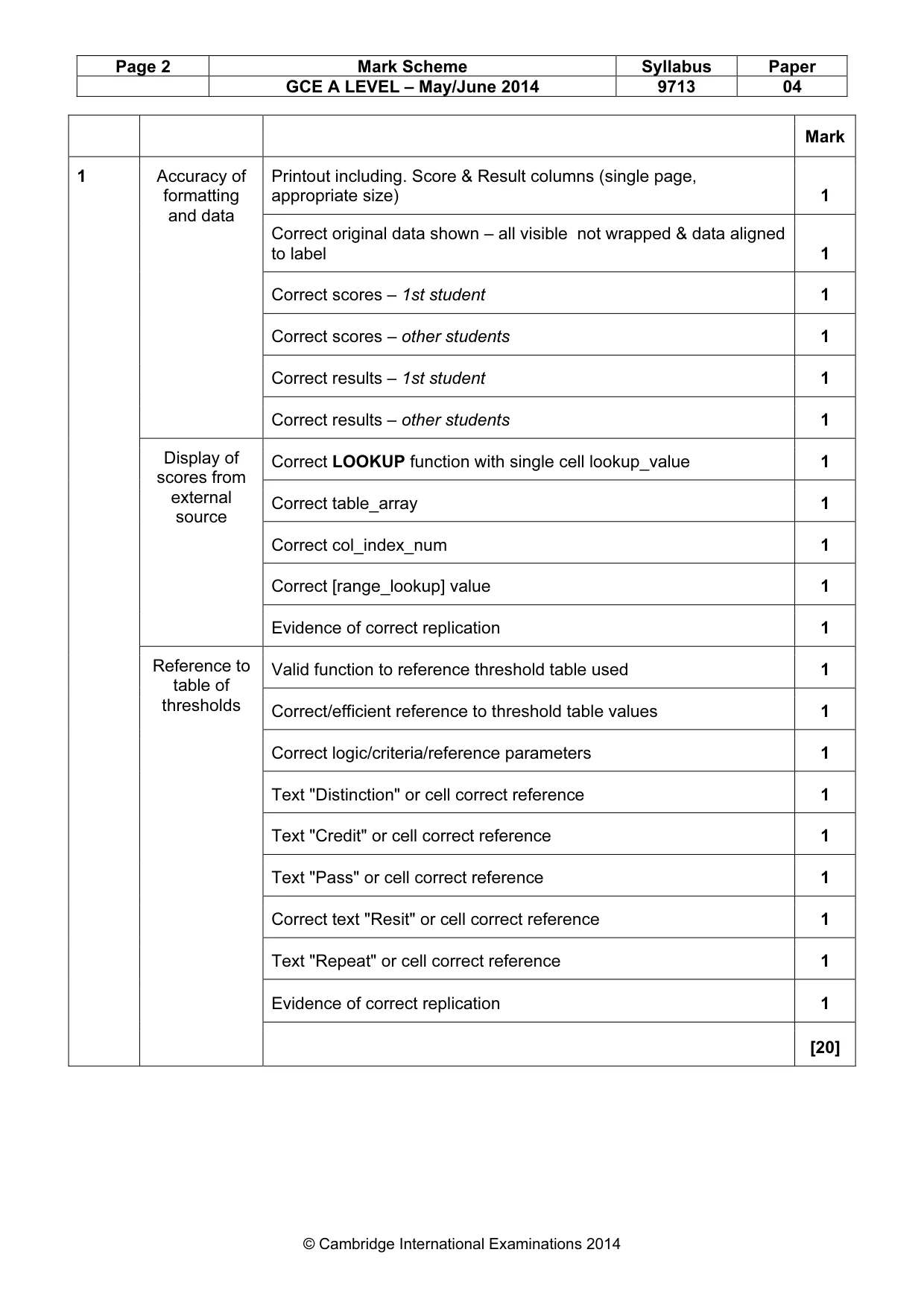
Page 2 Mark Scheme Syllabus Paper GCE A LEVEL – May/June 2014 9713 04 © Cambridge International Examinations 2014 Mark 1 Accuracy of formatting and data Printout including. Score & Result columns (single page, appropriate size) 1 Correct original data shown – all visible not wrapped & data aligned to label 1 Correct scores – 1st student 1 Correct scores – other students 1 Correct results – 1st student 1 Correct results – other students 1 Display of scores from external source Correct LOOKUP function with single cell lookup_value 1 Correct table_array 1 Correct col_index_num 1 Correct [range_lookup] value 1 Evidence of correct replication 1 Reference to table of thresholds Valid function to reference threshold table used 1 Correct/efficient reference to threshold table values 1 Correct logic/criteria/reference parameters 1 Text "Distinction" or cell correct reference 1 Text "Credit" or cell correct reference 1 Text "Pass" or cell correct reference 1 Correct text "Resit" or cell correct reference 1 Text "Repeat" or cell correct reference 1 Evidence of correct replication 1 [20]
Mark scheme, page 3
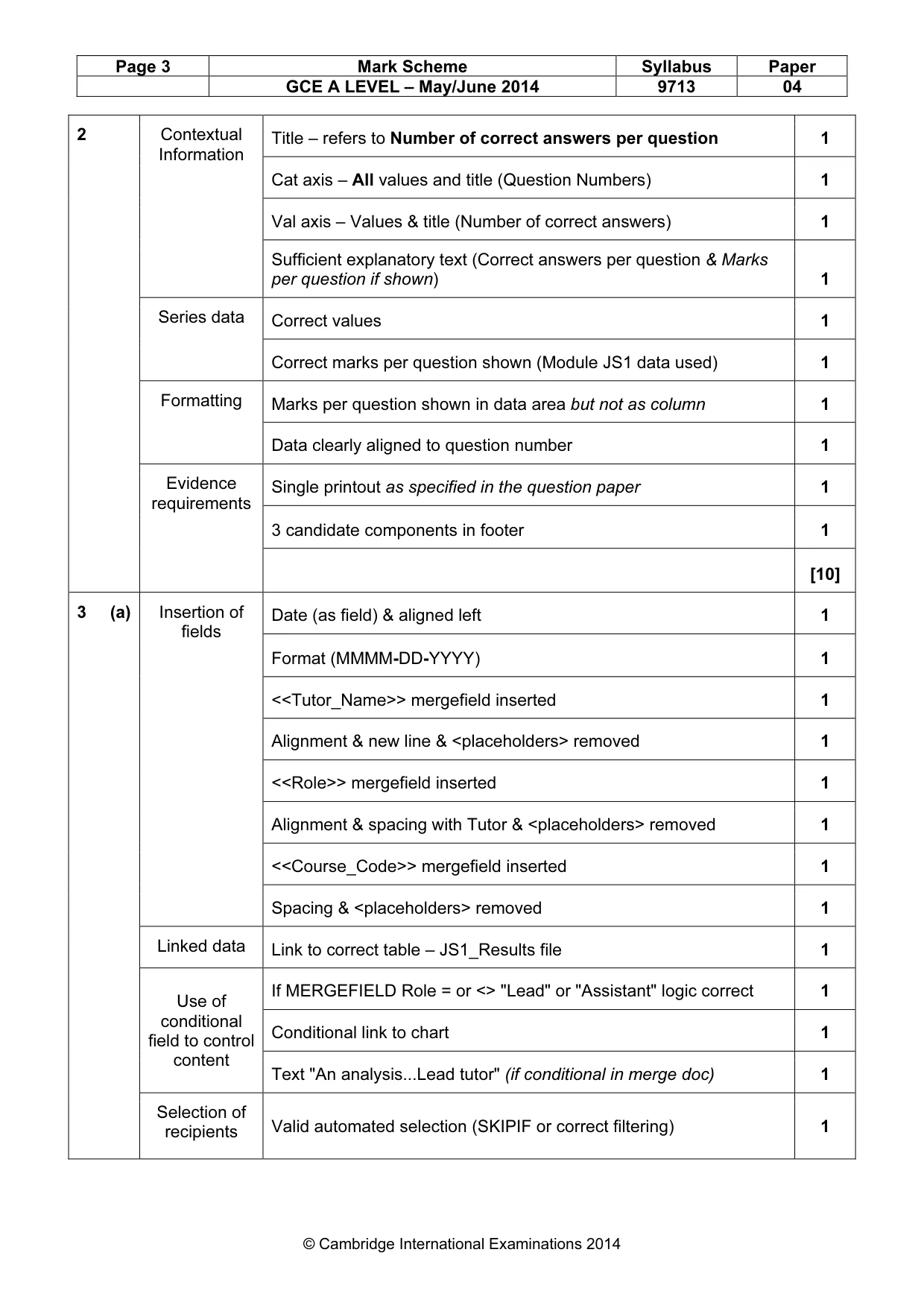
Page 3 Mark Scheme Syllabus Paper GCE A LEVEL – May/June 2014 9713 04 © Cambridge International Examinations 2014 2 Contextual Information Title – refers to Number of correct answers per question 1 Cat axis – All values and title (Question Numbers) 1 Val axis – Values & title (Number of correct answers) 1 Sufficient explanatory text (Correct answers per question & Marks per question if shown) 1 Series data Correct values 1 Correct marks per question shown (Module JS1 data used) 1 Formatting Marks per question shown in data area but not as column 1 Data clearly aligned to question number 1 Evidence requirements Single printout as specified in the question paper 1 3 candidate components in footer 1 [10] 3 (a) Insertion of fields Date (as field) & aligned left 1 Format (MMMM-DD-YYYY) 1 <<Tutor_Name>> mergefield inserted 1 Alignment & new line & <placeholders> removed 1 <<Role>> mergefield inserted 1 Alignment & spacing with Tutor & <placeholders> removed 1 <<Course_Code>> mergefield inserted 1 Spacing & <placeholders> removed 1 Linked data Link to correct table – JS1_Results file 1 Use of conditional field to control content If MERGEFIELD Role = or <> "Lead" or "Assistant" logic correct 1 Conditional link to chart 1 Text "An analysis...Lead tutor" (if conditional in merge doc) 1 Selection of recipients Valid automated selection (SKIPIF or correct filtering) 1
Mark scheme, page 4
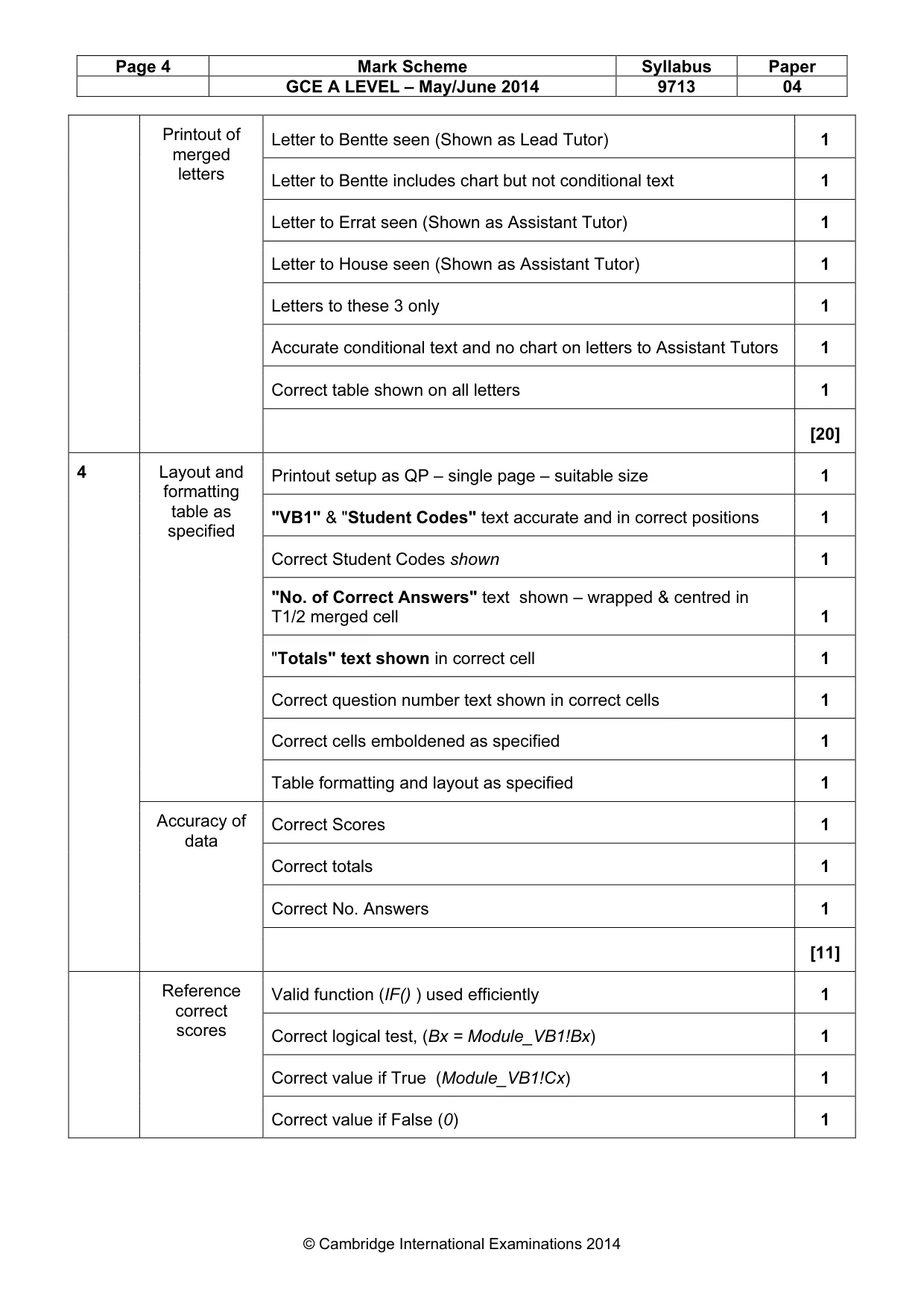
Page 4 Mark Scheme Syllabus Paper GCE A LEVEL – May/June 2014 9713 04 © Cambridge International Examinations 2014 Printout of merged letters Letter to Bentte seen (Shown as Lead Tutor) 1 Letter to Bentte includes chart but not conditional text 1 Letter to Errat seen (Shown as Assistant Tutor) 1 Letter to House seen (Shown as Assistant Tutor) 1 Letters to these 3 only 1 Accurate conditional text and no chart on letters to Assistant Tutors 1 Correct table shown on all letters 1 [20] 4 Layout and formatting table as specified Printout setup as QP – single page – suitable size 1 "VB1" & "Student Codes" text accurate and in correct positions 1 Correct Student Codes shown 1 "No. of Correct Answers" text shown – wrapped & centred in T1/2 merged cell 1 "Totals" text shown in correct cell 1 Correct question number text shown in correct cells 1 Correct cells emboldened as specified 1 Table formatting and layout as specified 1 Accuracy of data Correct Scores 1 Correct totals 1 Correct No. Answers 1 [11] Reference correct scores Valid function (IF() ) used efficiently 1 Correct logical test, (Bx = Module_VB1!Bx) 1 Correct value if True (Module_VB1!Cx) 1 Correct value if False (0) 1
Mark scheme, page 5
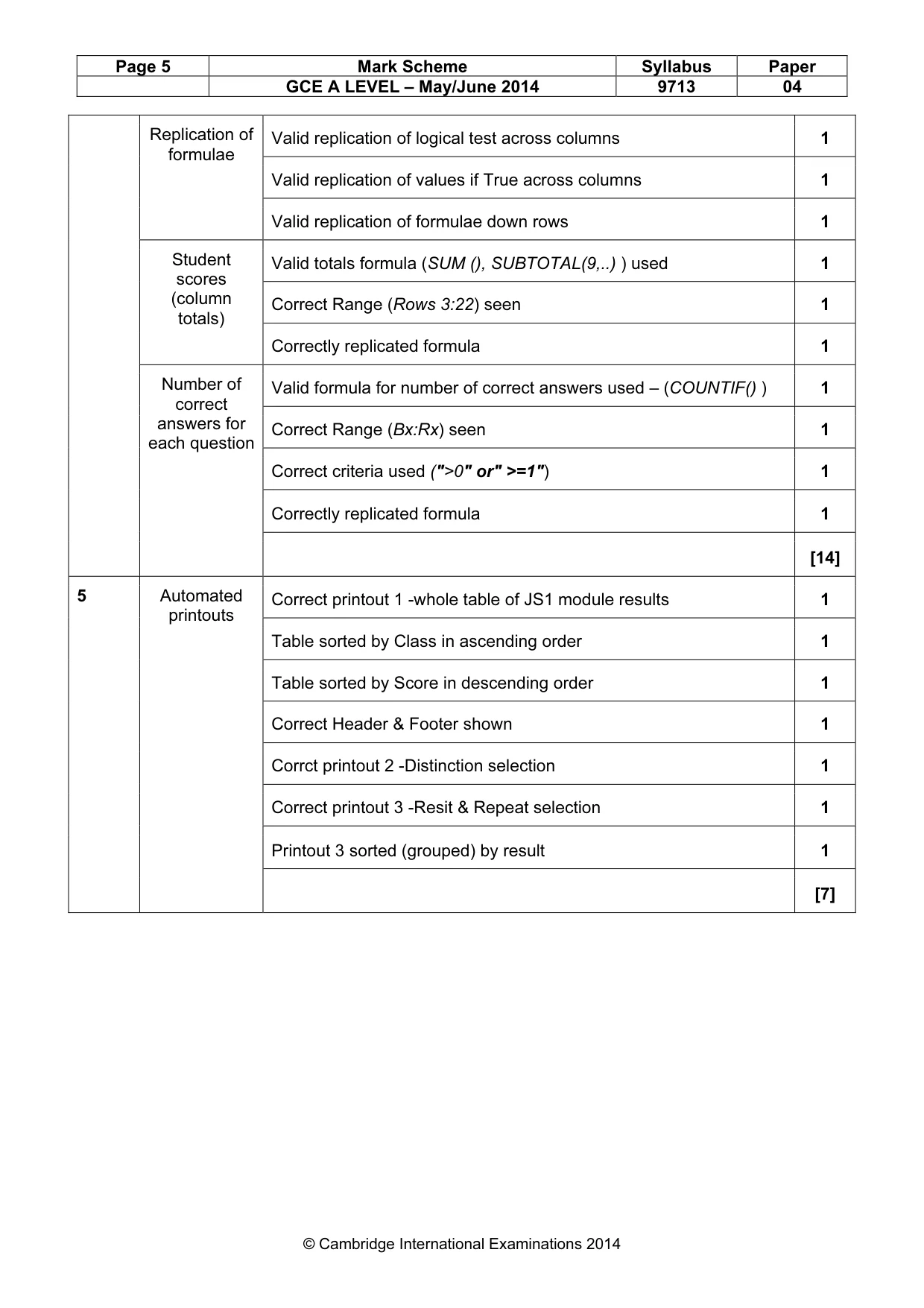
Page 5 Mark Scheme Syllabus Paper GCE A LEVEL – May/June 2014 9713 04 © Cambridge International Examinations 2014 Replication of formulae Valid replication of logical test across columns 1 Valid replication of values if True across columns 1 Valid replication of formulae down rows 1 Student scores (column totals) Valid totals formula (SUM (), SUBTOTAL(9,..) ) used 1 Correct Range (Rows 3:22) seen 1 Correctly replicated formula 1 Number of correct answers for each question Valid formula for number of correct answers used – (COUNTIF() ) 1 Correct Range (Bx:Rx) seen 1 Correct criteria used (">0" or" >=1") 1 Correctly replicated formula 1 [14] 5 Automated printouts Correct printout 1 -whole table of JS1 module results 1 Table sorted by Class in ascending order 1 Table sorted by Score in descending order 1 Correct Header & Footer shown 1 Corrct printout 2 -Distinction selection 1 Correct printout 3 -Resit & Repeat selection 1 Printout 3 sorted (grouped) by result 1 [7]
Mark scheme, page 6
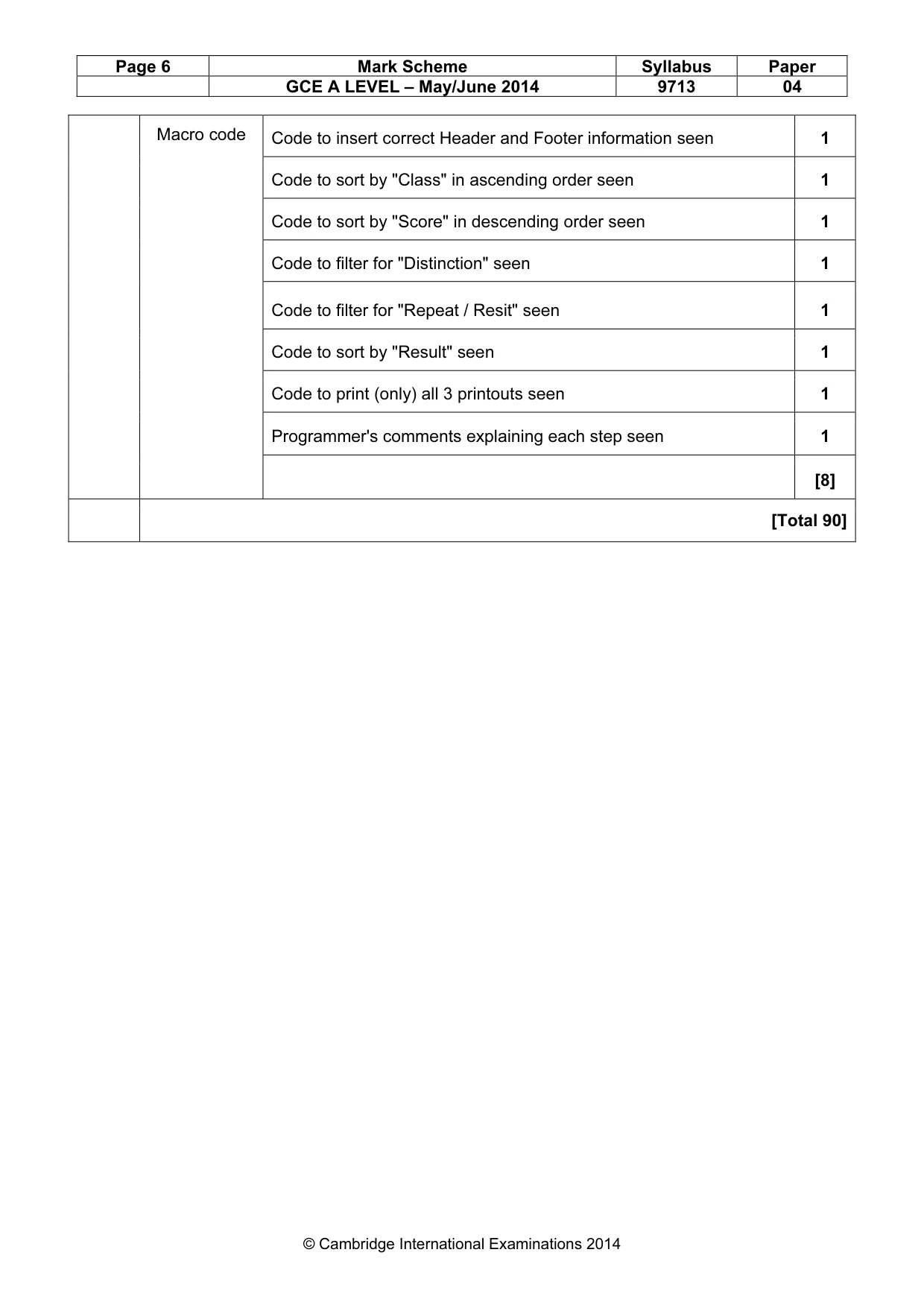
Page 6 Mark Scheme Syllabus Paper GCE A LEVEL – May/June 2014 9713 04 © Cambridge International Examinations 2014 Macro code Code to insert correct Header and Footer information seen 1 Code to sort by "Class" in ascending order seen 1 Code to sort by "Score" in descending order seen 1 Code to filter for "Distinction" seen 1 Code to filter for "Repeat / Resit" seen 1 Code to sort by "Result" seen 1 Code to print (only) all 3 printouts seen 1 Programmer's comments explaining each step seen 1 [8] [Total 90]
What you needed in this session
Cambridge’s own grade thresholds for 2014 May/June, Paper 4 · Variant 1. A higher threshold means an easier paper — the bar moves with how the cohort did.