Cambridge A Level Applied Information and Communication Technology 9713 — 2017 Oct/Nov Paper 4 · Variant 1
9713/41/O/N/17 · 90 marks · ≈101 min
The question paper and its mark scheme, free to read here and free to download. This is Cambridge’s own paper, exactly as it was sat.
Question paper8 pages


Mark scheme8 pages
Answers below. Sit the paper first if you are practising.
Paper as text
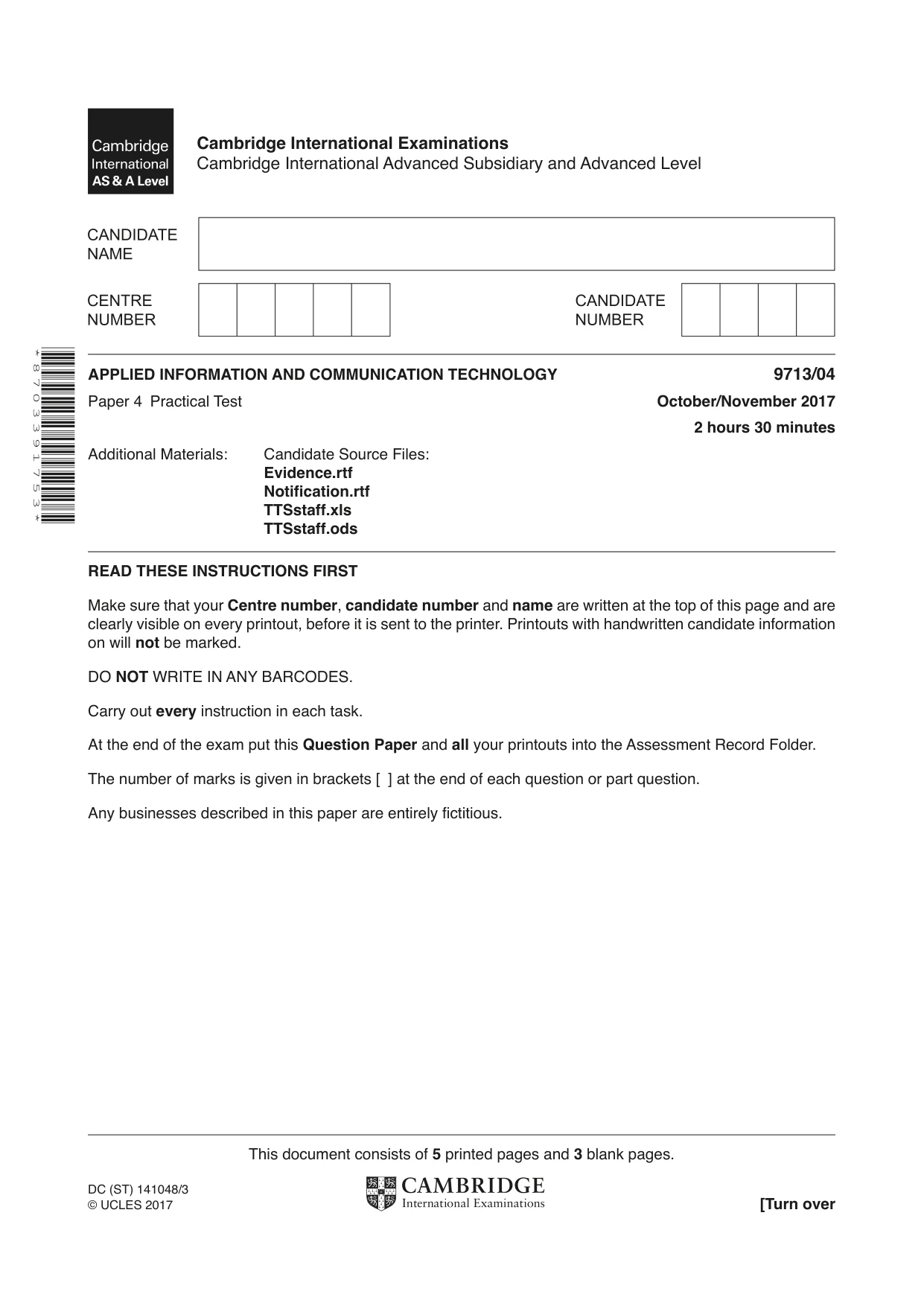
Question paper, page 1
* 8 7 0 3 3 9 1 7 5 3 * This document consists of 5 printed pages and 3 blank pages. DC (ST) 141048/3 © UCLES 2017 [Turn over Cambridge International Examinations Cambridge International Advanced Subsidiary and Advanced Level APPLIED INFORMATION AND COMMUNICATION TECHNOLOGY 9713/04 Paper 4 Practical Test October/November 2017 2 hours 30 minutes Additional Materials: Candidate Source Files: Evidence.rtf Notification.rtf TTSstaff.xls TTSstaff.ods READ THESE INSTRUCTIONS FIRST Make sure that your Centre number, candidate number and name are written at the top of this page and are clearly visible on every printout, before it is sent to the printer. Printouts with handwritten candidate information on will not be marked. DO NOT WRITE IN ANY BARCODES. Carry out every instruction in each task. At the end of the exam put this Question Paper and all your printouts into the Assessment Record Folder. The number of marks is given in brackets [ ] at the end of each question or part question. Any businesses described in this paper are entirely fictitious.
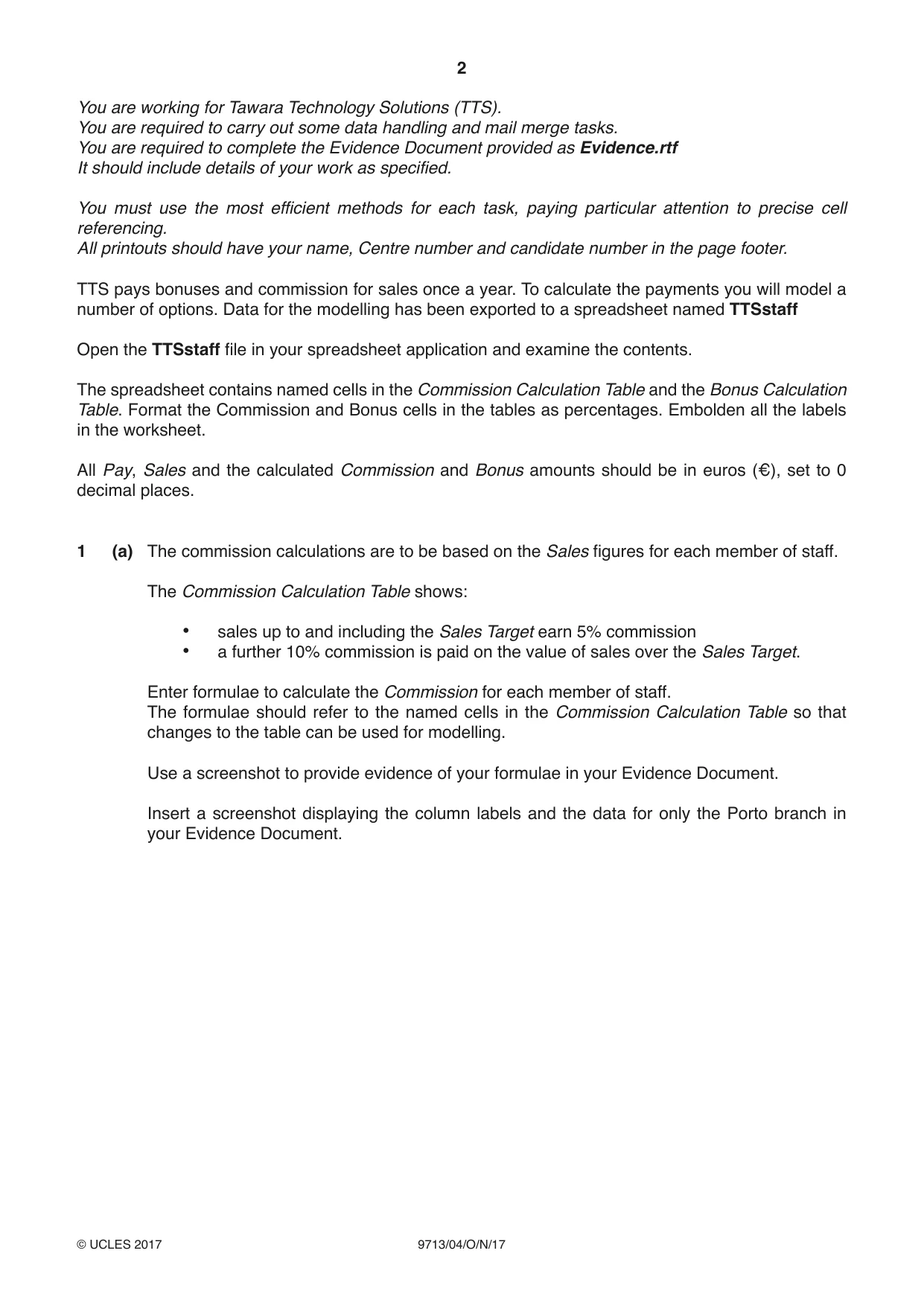
Question paper, page 2
2 9713/04/O/N/17 © UCLES 2017 You are working for Tawara Technology Solutions (TTS). You are required to carry out some data handling and mail merge tasks. You are required to complete the Evidence Document provided as Evidence.rtf It should include details of your work as specified. You must use the most efficient methods for each task, paying particular attention to precise cell referencing. All printouts should have your name, Centre number and candidate number in the page footer. TTS pays bonuses and commission for sales once a year. To calculate the payments you will model a number of options. Data for the modelling has been exported to a spreadsheet named TTSstaff Open the TTSstaff file in your spreadsheet application and examine the contents. The spreadsheet contains named cells in the Commission Calculation Table and the Bonus Calculation Table. Format the Commission and Bonus cells in the tables as percentages. Embolden all the labels in the worksheet. All Pay, Sales and the calculated Commission and Bonus amounts should be in euros (€), set to 0 decimal places. 1 (a) The commission calculations are to be based on the Sales figures for each member of staff. The Commission Calculation Table shows: • sales up to and including the Sales Target earn 5% commission • a further 10% commission is paid on the value of sales over the Sales Target. Enter formulae to calculate the Commission for each member of staff. The formulae should refer to the named cells in the Commission Calculation Table so that changes to the table can be used for modelling. Use a screenshot to provide evidence of your formulae in your Evidence Document. Insert a screenshot displaying the column labels and the data for only the Porto branch in your Evidence Document.
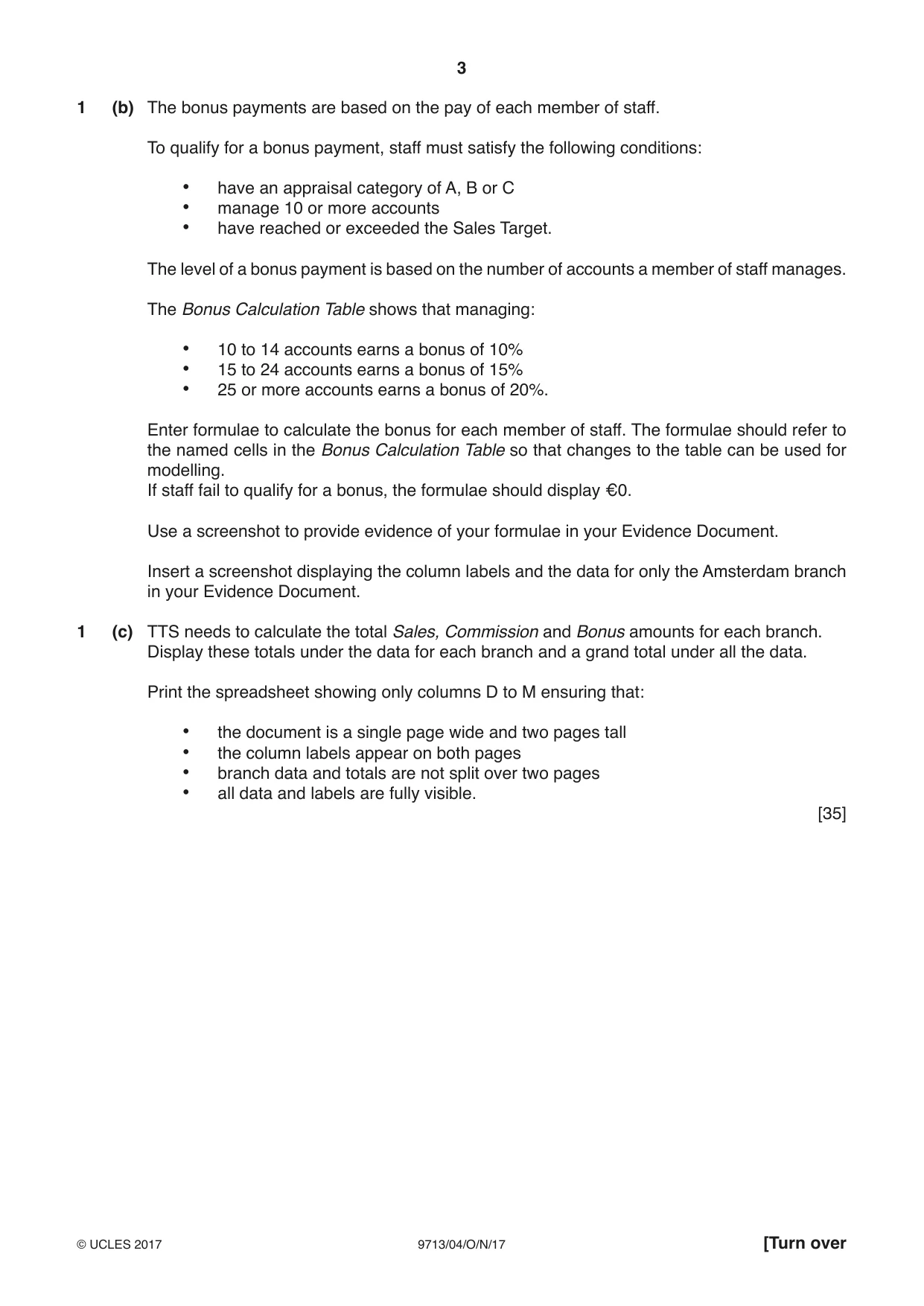
Question paper, page 3
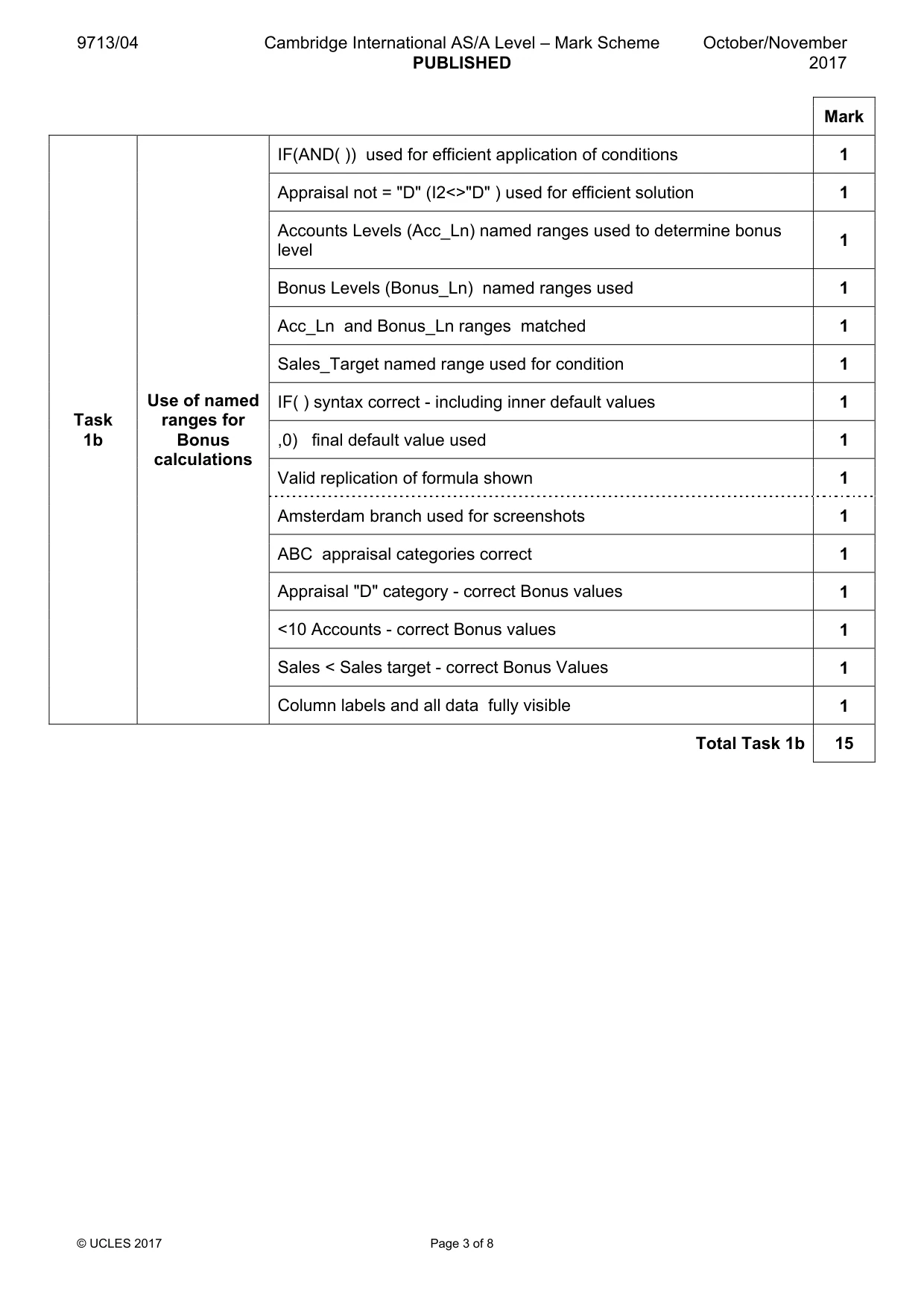
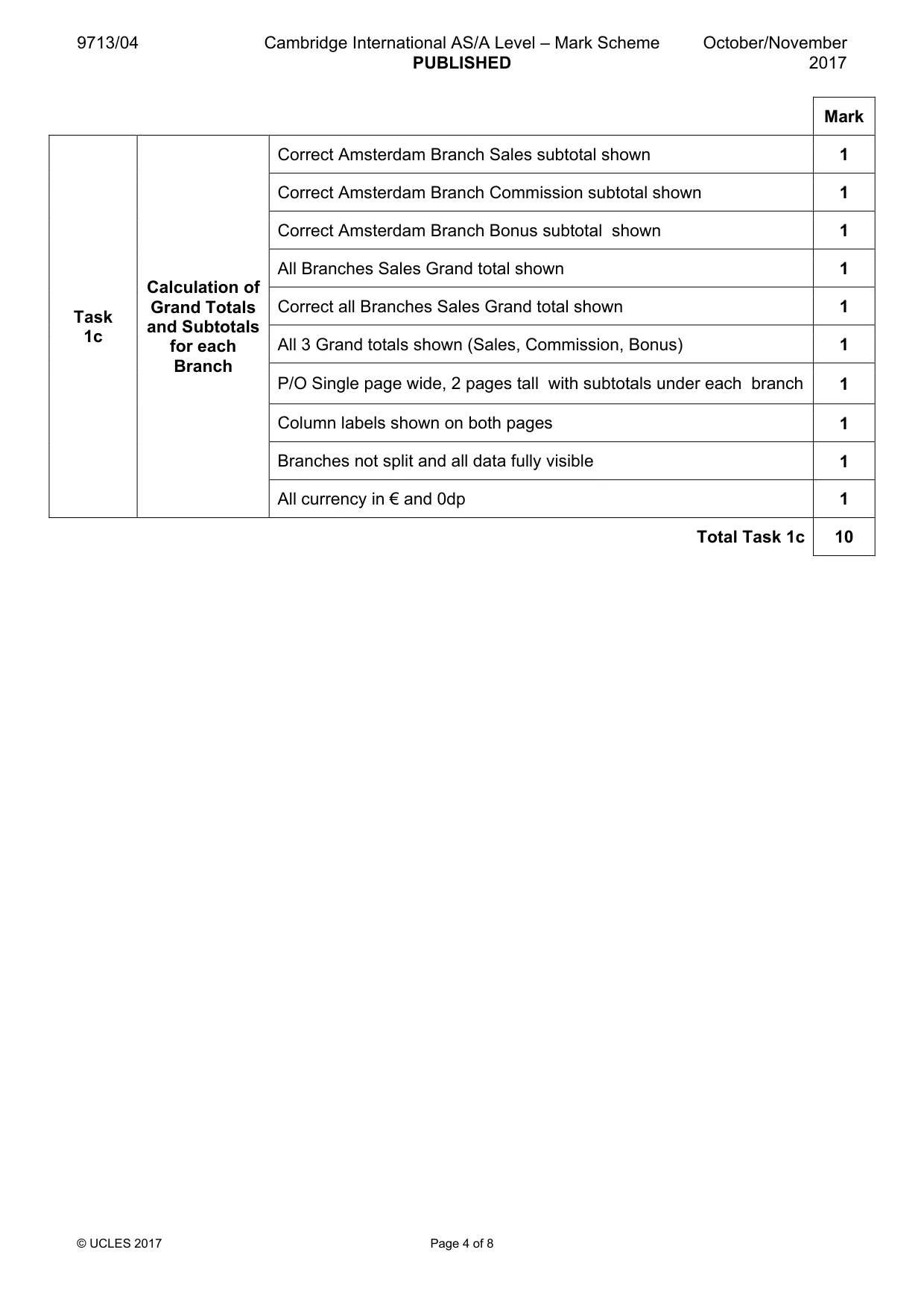
3 9713/04/O/N/17 © UCLES 2017 [Turn over 1 (b) The bonus payments are based on the pay of each member of staff. To qualify for a bonus payment, staff must satisfy the following conditions: • have an appraisal category of A, B or C • manage 10 or more accounts • have reached or exceeded the Sales Target. The level of a bonus payment is based on the number of accounts a member of staff manages. The Bonus Calculation Table shows that managing: • 10 to 14 accounts earns a bonus of 10% • 15 to 24 accounts earns a bonus of 15% • 25 or more accounts earns a bonus of 20%. Enter formulae to calculate the bonus for each member of staff. The formulae should refer to the named cells in the Bonus Calculation Table so that changes to the table can be used for modelling. If staff fail to qualify for a bonus, the formulae should display €0. Use a screenshot to provide evidence of your formulae in your Evidence Document. Insert a screenshot displaying the column labels and the data for only the Amsterdam branch in your Evidence Document. 1 (c) TTS needs to calculate the total Sales, Commission and Bonus amounts for each branch. Display these totals under the data for each branch and a grand total under all the data. Print the spreadsheet showing only columns D to M ensuring that: • the document is a single page wide and two pages tall • the column labels appear on both pages • branch data and totals are not split over two pages • all data and labels are fully visible. [35]
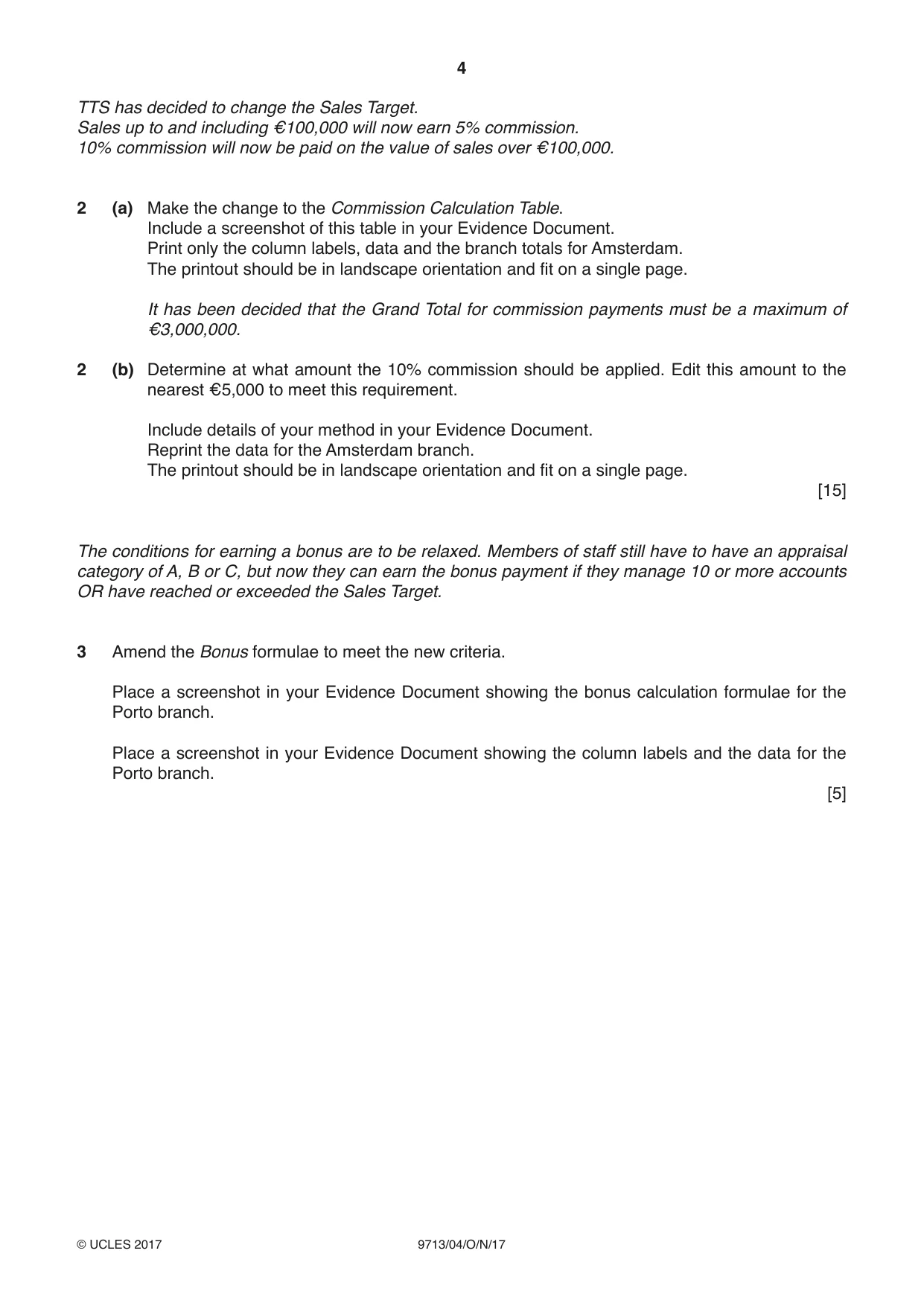
Question paper, page 4
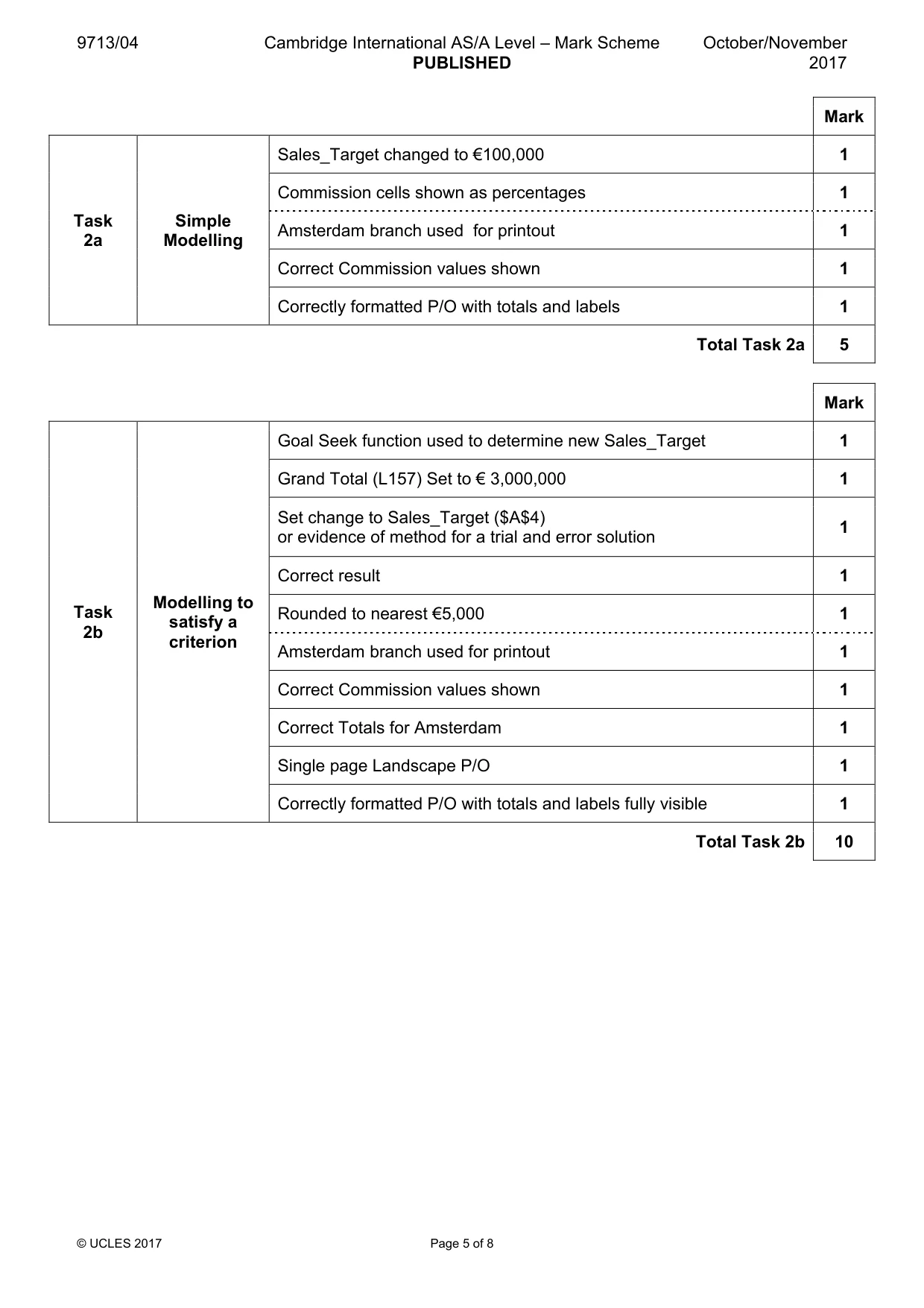
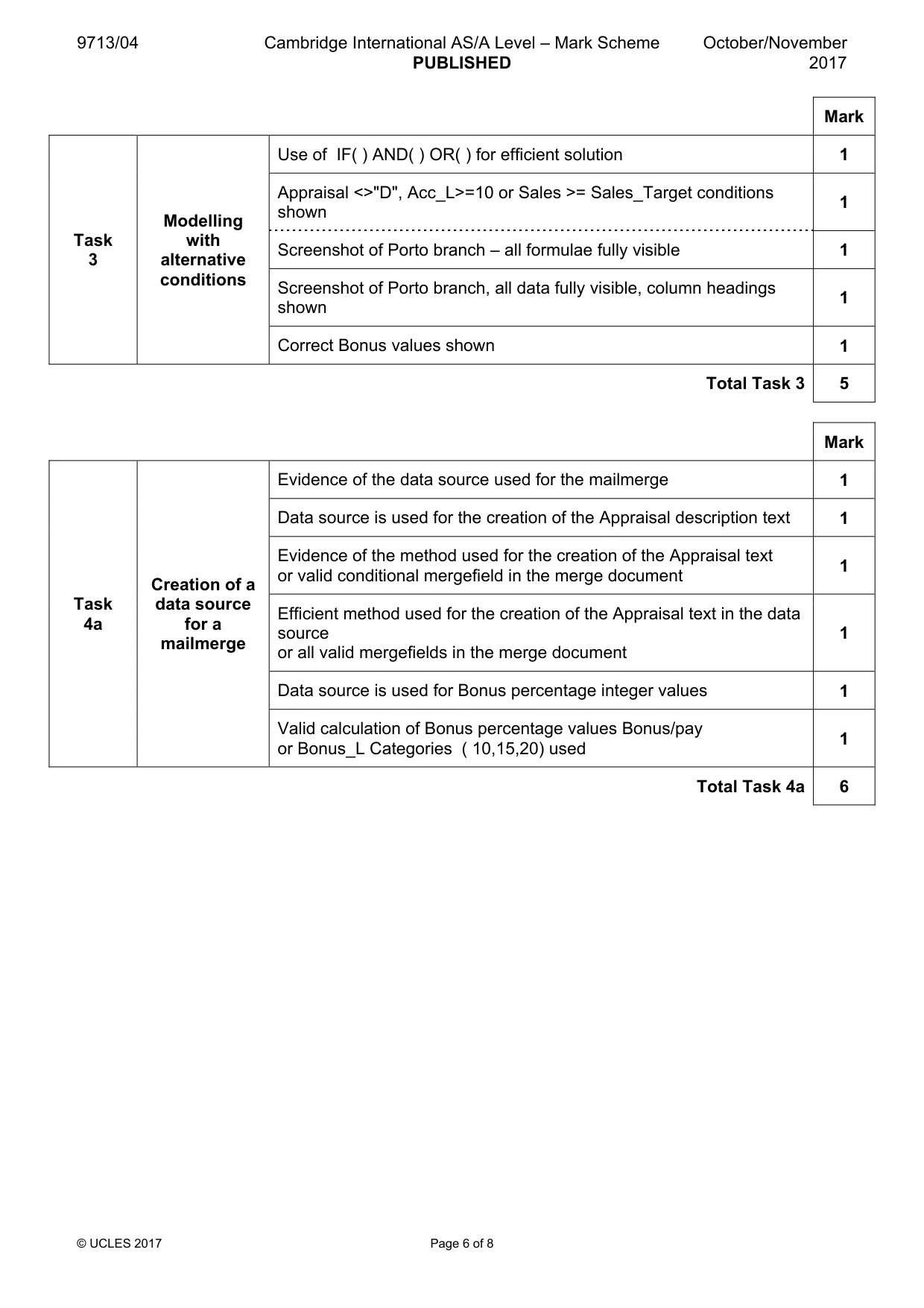
4 9713/04/O/N/17 © UCLES 2017 TTS has decided to change the Sales Target. Sales up to and including €100,000 will now earn 5% commission. 10% commission will now be paid on the value of sales over €100,000. 2 (a) Make the change to the Commission Calculation Table. Include a screenshot of this table in your Evidence Document. Print only the column labels, data and the branch totals for Amsterdam. The printout should be in landscape orientation and fit on a single page. It has been decided that the Grand Total for commission payments must be a maximum of €3,000,000. 2 (b) Determine at what amount the 10% commission should be applied. Edit this amount to the nearest €5,000 to meet this requirement. Include details of your method in your Evidence Document. Reprint the data for the Amsterdam branch. The printout should be in landscape orientation and fit on a single page. [15] The conditions for earning a bonus are to be relaxed. Members of staff still have to have an appraisal category of A, B or C, but now they can earn the bonus payment if they manage 10 or more accounts OR have reached or exceeded the Sales Target. 3 Amend the Bonus formulae to meet the new criteria. Place a screenshot in your Evidence Document showing the bonus calculation formulae for the Porto branch. Place a screenshot in your Evidence Document showing the column labels and the data for the Porto branch. [5]
Question paper, page 5
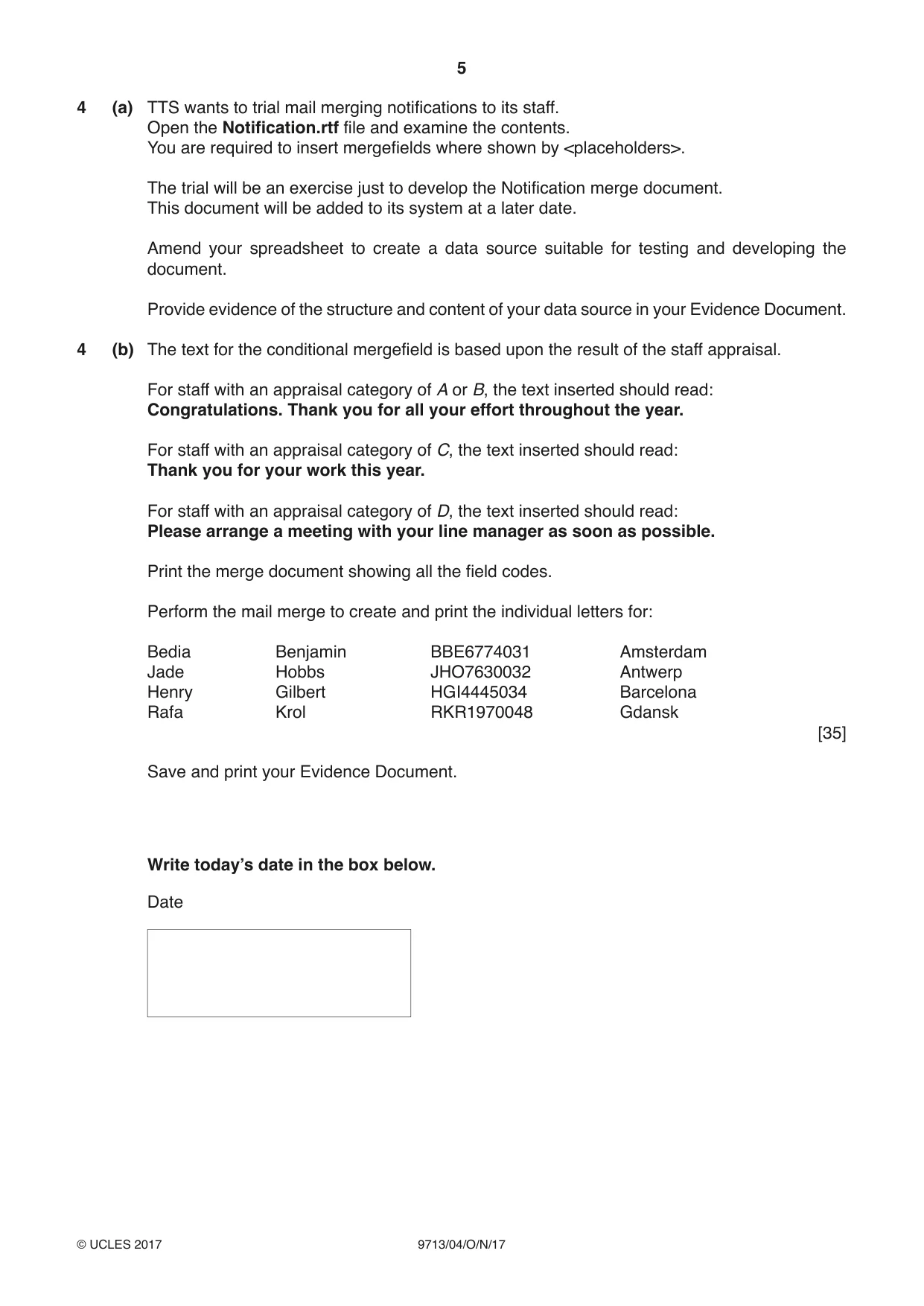
5 9713/04/O/N/17 © UCLES 2017 4 (a) TTS wants to trial mail merging notifications to its staff. Open the Notification.rtf file and examine the contents. You are required to insert mergefields where shown by <placeholders>. The trial will be an exercise just to develop the Notification merge document. This document will be added to its system at a later date. Amend your spreadsheet to create a data source suitable for testing and developing the document. Provide evidence of the structure and content of your data source in your Evidence Document. 4 (b) The text for the conditional mergefield is based upon the result of the staff appraisal. For staff with an appraisal category of A or B, the text inserted should read: Congratulations. Thank you for all your effort throughout the year. For staff with an appraisal category of C, the text inserted should read: Thank you for your work this year. For staff with an appraisal category of D, the text inserted should read: Please arrange a meeting with your line manager as soon as possible. Print the merge document showing all the field codes. Perform the mail merge to create and print the individual letters for: Bedia Benjamin BBE6774031 Amsterdam Jade Hobbs JHO7630032 Antwerp Henry Gilbert HGI4445034 Barcelona Rafa Krol RKR1970048 Gdansk [35] Save and print your Evidence Document. Write today’s date in the box below. Date
Question paper, page 6
6 9713/04/O/N/17 © UCLES 2017 BLANK PAGE
Question paper, page 7
7 9713/04/O/N/17 © UCLES 2017 BLANK PAGE
Question paper, page 8
8 9713/04/O/N/17 © UCLES 2017 Permission to reproduce items where third-party owned material protected by copyright is included has been sought and cleared where possible. Every reasonable effort has been made by the publisher (UCLES) to trace copyright holders, but if any items requiring clearance have unwittingly been included, the publisher will be pleased to make amends at the earliest possible opportunity. To avoid the issue of disclosure of answer-related information to candidates, all copyright acknowledgements are reproduced online in the Cambridge International Examinations Copyright Acknowledgements Booklet. This is produced for each series of examinations and is freely available to download at www.cie.org.uk after the live examination series. Cambridge International Examinations is part of the Cambridge Assessment Group. Cambridge Assessment is the brand name of University of Cambridge Local Examinations Syndicate (UCLES), which is itself a department of the University of Cambridge. BLANK PAGE
Mark scheme, page 1
® IGCSE is a registered trademark. This document consists of 8 printed pages. © UCLES 2017 [Turn over Cambridge Assessment International Education Cambridge International Advanced Subsidiary and Advanced Level APPLIED INFORMATION AND COMMUNICATION TECHNOLOGY 9713/04 Paper 4 Practical Test B October/November 2017 MARK SCHEME Maximum Mark: 90 Published This mark scheme is published as an aid to teachers and candidates, to indicate the requirements of the examination. It shows the basis on which Examiners were instructed to award marks. It does not indicate the details of the discussions that took place at an Examiners’ meeting before marking began, which would have considered the acceptability of alternative answers. Mark schemes should be read in conjunction with the question paper and the Principal Examiner Report for Teachers. Cambridge International will not enter into discussions about these mark schemes. Cambridge International is publishing the mark schemes for the October/November 2017 series for most Cambridge IGCSE®, Cambridge International A and AS Level components and some Cambridge O Level components.
Mark scheme, page 2
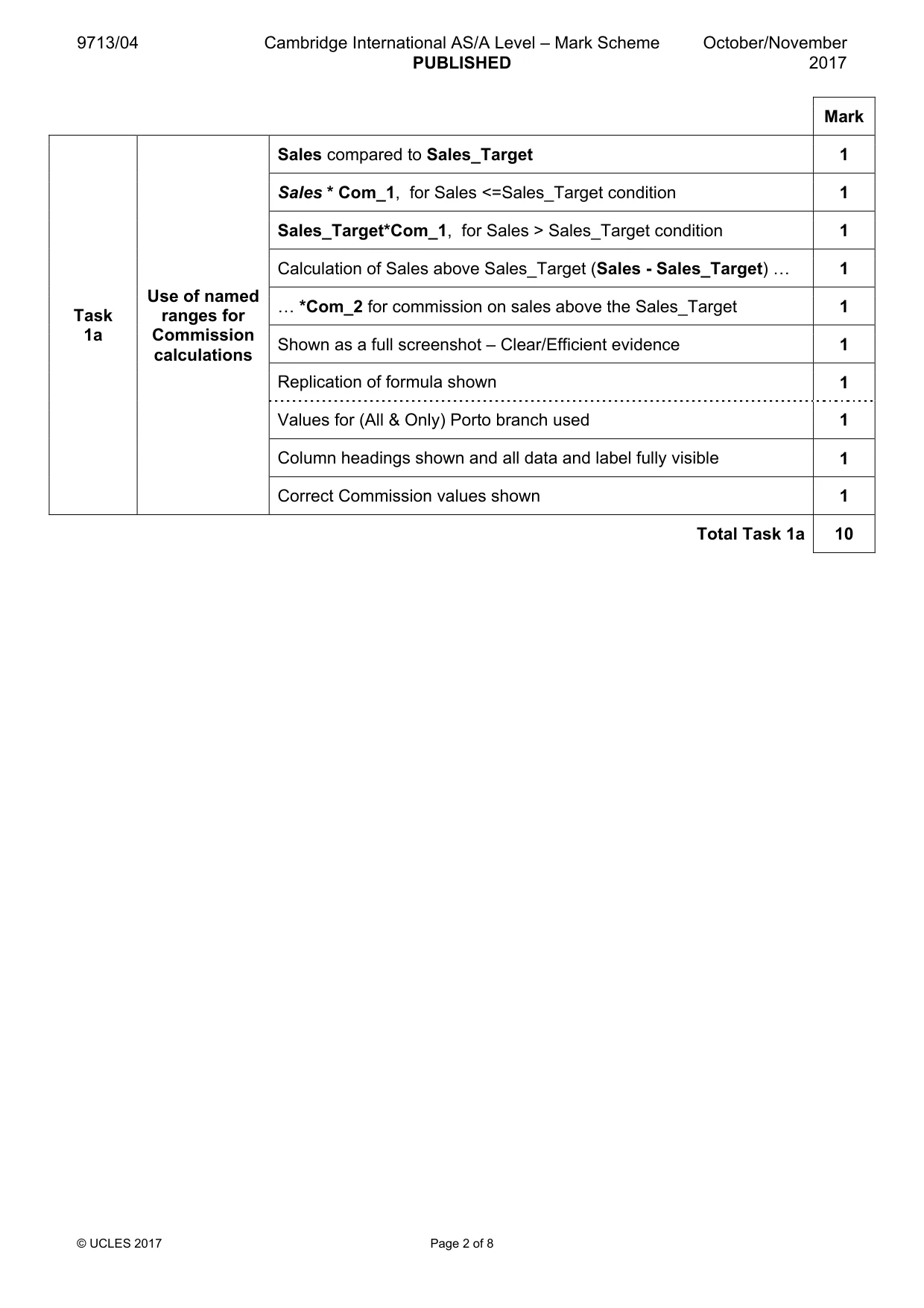
9713/04 Cambridge International AS/A Level – Mark Scheme PUBLISHED October/November 2017 © UCLES 2017 Page 2 of 8 Mark Task 1a Use of named ranges for Commission calculations Sales compared to Sales_Target 1 Sales * Com_1, for Sales <=Sales_Target condition 1 Sales_Target*Com_1, for Sales > Sales_Target condition 1 Calculation of Sales above Sales_Target (Sales - Sales_Target) « 1 « *Com_2 for commission on sales above the Sales_Target 1 Shown as a full screenshot – Clear/Efficient evidence 1 Replication of formula shown 1 Values for (All & Only) Porto branch used 1 Column headings shown and all data and label fully visible 1 Correct Commission values shown 1 Total Task 1a 10
Mark scheme, page 3
9713/04 Cambridge International AS/A Level – Mark Scheme PUBLISHED October/November 2017 © UCLES 2017 Page 3 of 8 Mark Task 1b Use of named ranges for Bonus calculations IF(AND( )) used for efficient application of conditions 1 Appraisal not = "D" (I2<>"D" ) used for efficient solution 1 Accounts Levels (Acc_Ln) named ranges used to determine bonus level 1 Bonus Levels (Bonus_Ln) named ranges used 1 Acc_Ln and Bonus_Ln ranges matched 1 Sales_Target named range used for condition 1 IF( ) syntax correct - including inner default values 1 ,0) final default value used 1 Valid replication of formula shown 1 Amsterdam branch used for screenshots 1 ABC appraisal categories correct 1 Appraisal "D" category - correct Bonus values 1 <10 Accounts - correct Bonus values 1 Sales < Sales target - correct Bonus Values 1 Column labels and all data fully visible 1 Total Task 1b 15
Mark scheme, page 4
9713/04 Cambridge International AS/A Level – Mark Scheme PUBLISHED October/November 2017 © UCLES 2017 Page 4 of 8 Mark Task 1c Calculation of Grand Totals and Subtotals for each Branch Correct Amsterdam Branch Sales subtotal shown 1 Correct Amsterdam Branch Commission subtotal shown 1 Correct Amsterdam Branch Bonus subtotal shown 1 All Branches Sales Grand total shown 1 Correct all Branches Sales Grand total shown 1 All 3 Grand totals shown (Sales, Commission, Bonus) 1 P/O Single page wide, 2 pages tall with subtotals under each branch 1 Column labels shown on both pages 1 Branches not split and all data fully visible 1 All currency in € and 0dp 1 Total Task 1c 10
Mark scheme, page 5
9713/04 Cambridge International AS/A Level – Mark Scheme PUBLISHED October/November 2017 © UCLES 2017 Page 5 of 8 Mark Task 2a Simple Modelling Sales_Target changed to €100,000 1 Commission cells shown as percentages 1 Amsterdam branch used for printout 1 Correct Commission values shown 1 Correctly formatted P/O with totals and labels 1 Total Task 2a 5 Mark Task 2b Modelling to satisfy a criterion Goal Seek function used to determine new Sales_Target 1 Grand Total (L157) Set to € 3,000,000 1 Set change to Sales_Target ($A$4) or evidence of method for a trial and error solution 1 Correct result 1 Rounded to nearest €5,000 1 Amsterdam branch used for printout 1 Correct Commission values shown 1 Correct Totals for Amsterdam 1 Single page Landscape P/O 1 Correctly formatted P/O with totals and labels fully visible 1 Total Task 2b 10
Mark scheme, page 6
9713/04 Cambridge International AS/A Level – Mark Scheme PUBLISHED October/November 2017 © UCLES 2017 Page 6 of 8 Mark Task 3 Modelling with alternative conditions Use of IF( ) AND( ) OR( ) for efficient solution 1 Appraisal <>"D", Acc_L>=10 or Sales >= Sales_Target conditions shown 1 Screenshot of Porto branch – all formulae fully visible 1 Screenshot of Porto branch, all data fully visible, column headings shown 1 Correct Bonus values shown 1 Total Task 3 5 Mark Task 4a Creation of a data source for a mailmerge Evidence of the data source used for the mailmerge 1 Data source is used for the creation of the Appraisal description text 1 Evidence of the method used for the creation of the Appraisal text or valid conditional mergefield in the merge document 1 Efficient method used for the creation of the Appraisal text in the data source or all valid mergefields in the merge document 1 Data source is used for Bonus percentage integer values 1 Valid calculation of Bonus percentage values Bonus/pay or Bonus_L Categories ( 10,15,20) used 1 Total Task 4a 6
Mark scheme, page 7
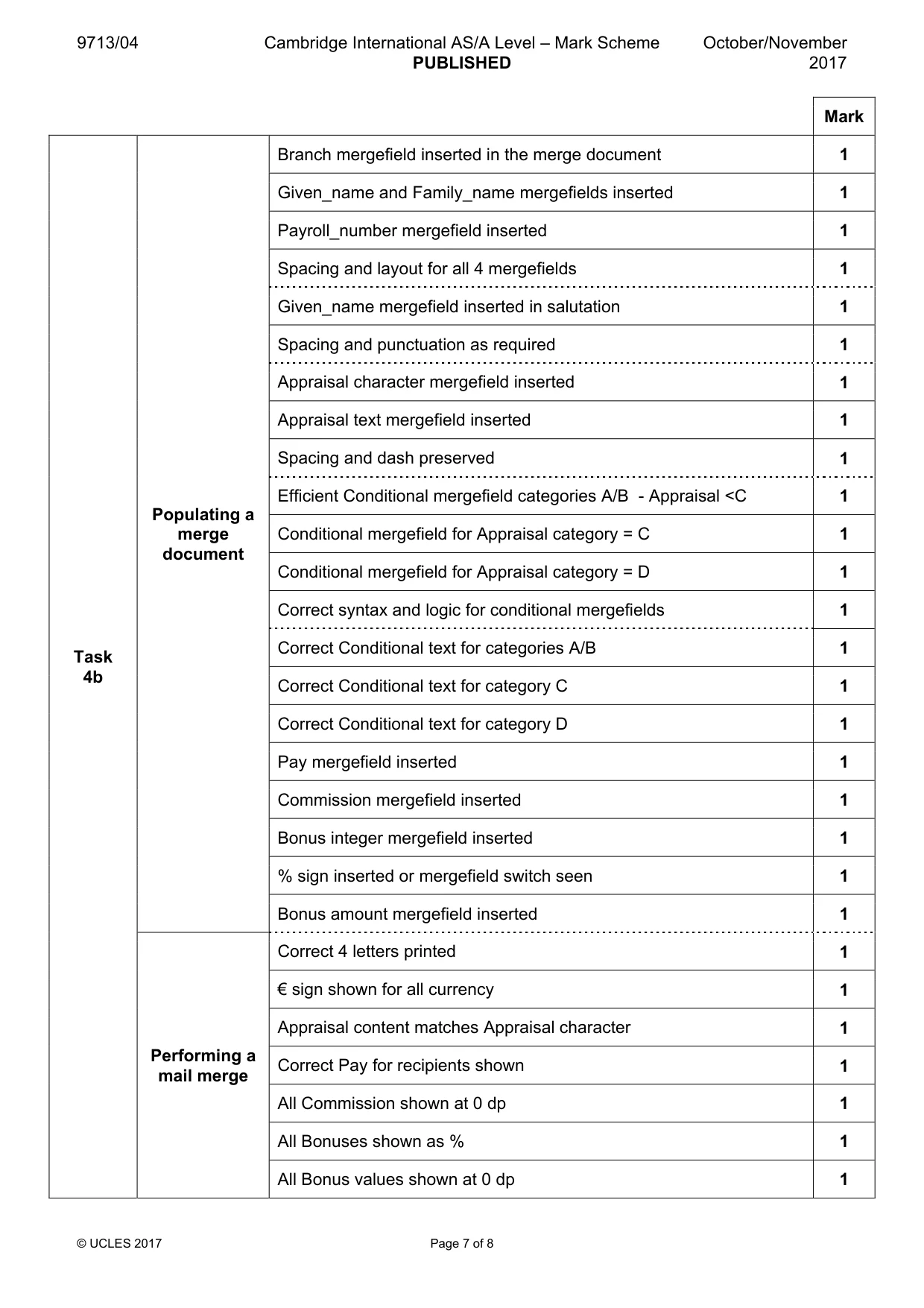
9713/04 Cambridge International AS/A Level – Mark Scheme PUBLISHED October/November 2017 © UCLES 2017 Page 7 of 8 Mark Task 4b Populating a merge document Branch mergefield inserted in the merge document 1 Given_name and Family_name mergefields inserted 1 Payroll_number mergefield inserted 1 Spacing and layout for all 4 mergefields 1 Given_name mergefield inserted in salutation 1 Spacing and punctuation as required 1 Appraisal character mergefield inserted 1 Appraisal text mergefield inserted 1 Spacing and dash preserved 1 Efficient Conditional mergefield categories A/B - Appraisal <C 1 Conditional mergefield for Appraisal category = C 1 Conditional mergefield for Appraisal category = D 1 Correct syntax and logic for conditional mergefields 1 Correct Conditional text for categories A/B 1 Correct Conditional text for category C 1 Correct Conditional text for category D 1 Pay mergefield inserted 1 Commission mergefield inserted 1 Bonus integer mergefield inserted 1 % sign inserted or mergefield switch seen 1 Bonus amount mergefield inserted 1 Performing a mail merge Correct 4 letters printed 1 € sign shown for all currency 1 Appraisal content matches Appraisal character 1 Correct Pay for recipients shown 1 All Commission shown at 0 dp 1 All Bonuses shown as % 1 All Bonus values shown at 0 dp 1
Mark scheme, page 8
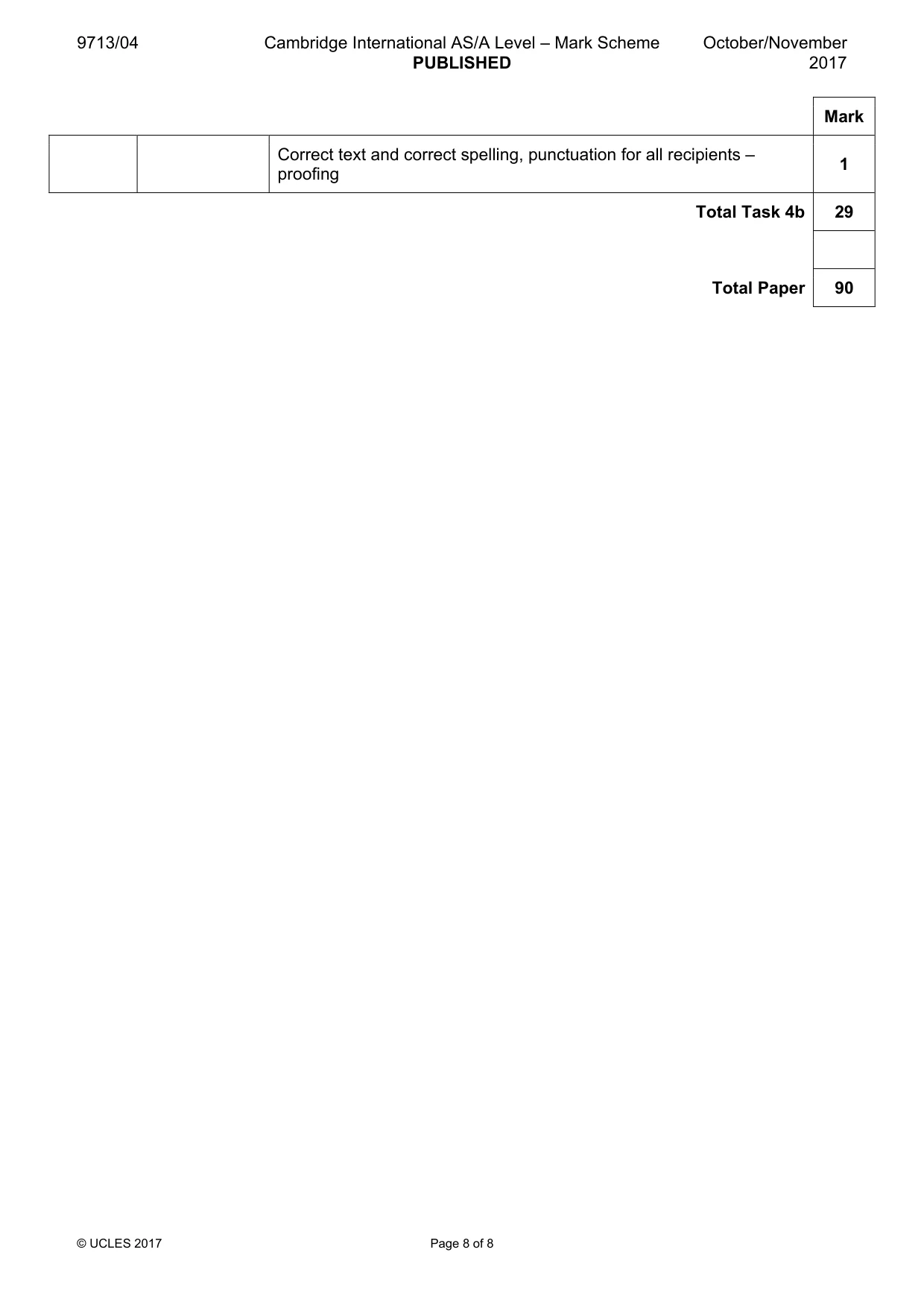
9713/04 Cambridge International AS/A Level – Mark Scheme PUBLISHED October/November 2017 © UCLES 2017 Page 8 of 8 Mark Correct text and correct spelling, punctuation for all recipients – proofing 1 Total Task 4b 29 Total Paper 90
What you needed in this session
Cambridge’s own grade thresholds for 2017 Oct/Nov, Paper 4 · Variant 1. A higher threshold means an easier paper — the bar moves with how the cohort did.