Cambridge A Level Applied Information and Communication Technology 9713 — 2017 Feb/March Paper 4 · Variant 1
9713/41/F/M/17 · 90 marks · ≈101 min
The question paper and its mark scheme, free to read here and free to download. This is Cambridge’s own paper, exactly as it was sat.
Question paper8 pages



Mark scheme5 pages
Answers below. Sit the paper first if you are practising.
Paper as text
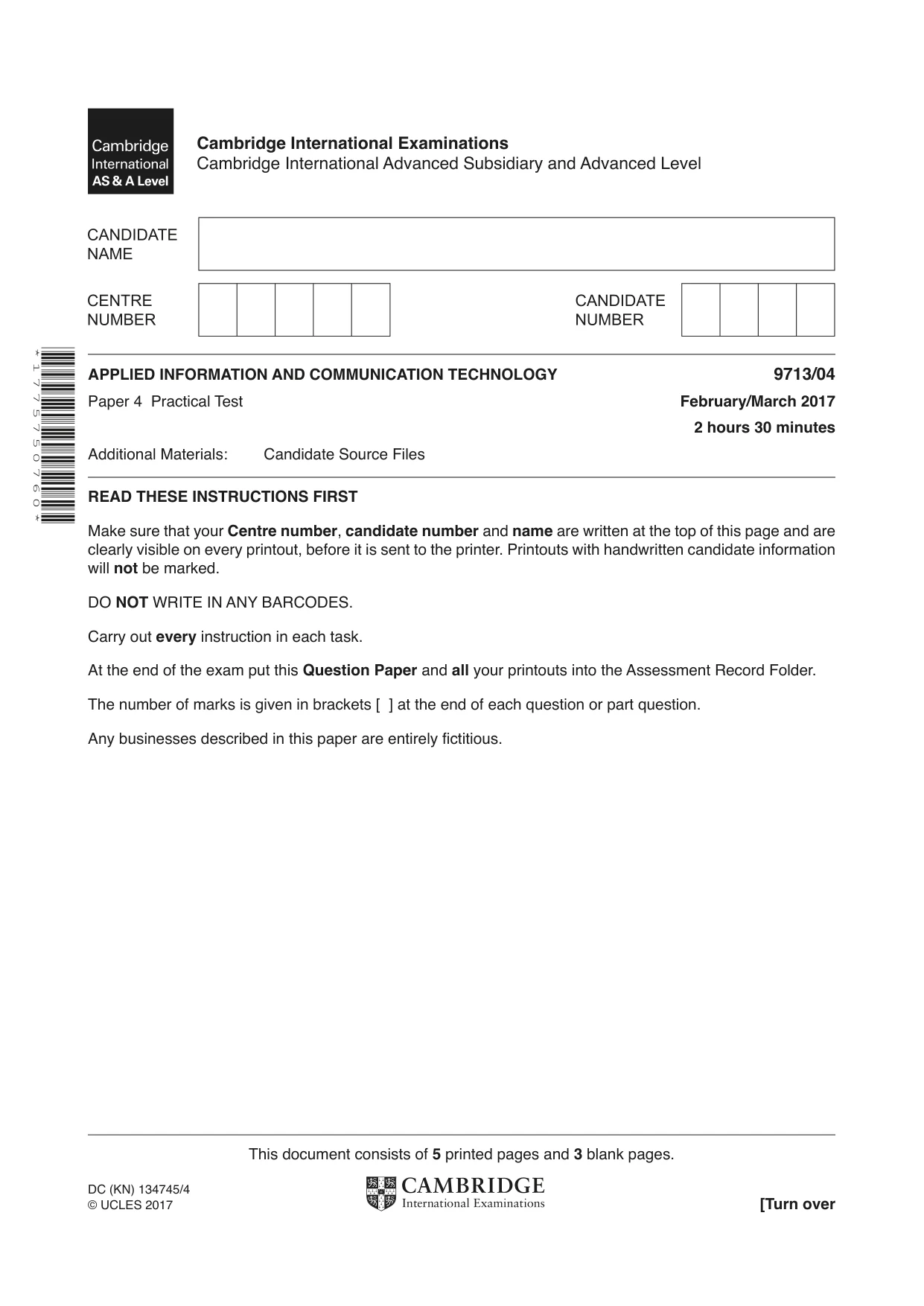
Question paper, page 1
* 1 7 7 5 7 5 0 7 6 0 * This document consists of 5 printed pages and 3 blank pages. DC (KN) 134745/4 © UCLES 2017 [Turn over Cambridge International Examinations Cambridge International Advanced Subsidiary and Advanced Level APPLIED INFORMATION AND COMMUNICATION TECHNOLOGY 9713/04 Paper 4 Practical Test February/March 2017 2 hours 30 minutes Additional Materials: Candidate Source Files READ THESE INSTRUCTIONS FIRST Make sure that your Centre number, candidate number and name are written at the top of this page and are clearly visible on every printout, before it is sent to the printer. Printouts with handwritten candidate information will not be marked. DO NOT WRITE IN ANY BARCODES. Carry out every instruction in each task. At the end of the exam put this Question Paper and all your printouts into the Assessment Record Folder. The number of marks is given in brackets [ ] at the end of each question or part question. Any businesses described in this paper are entirely fictitious.
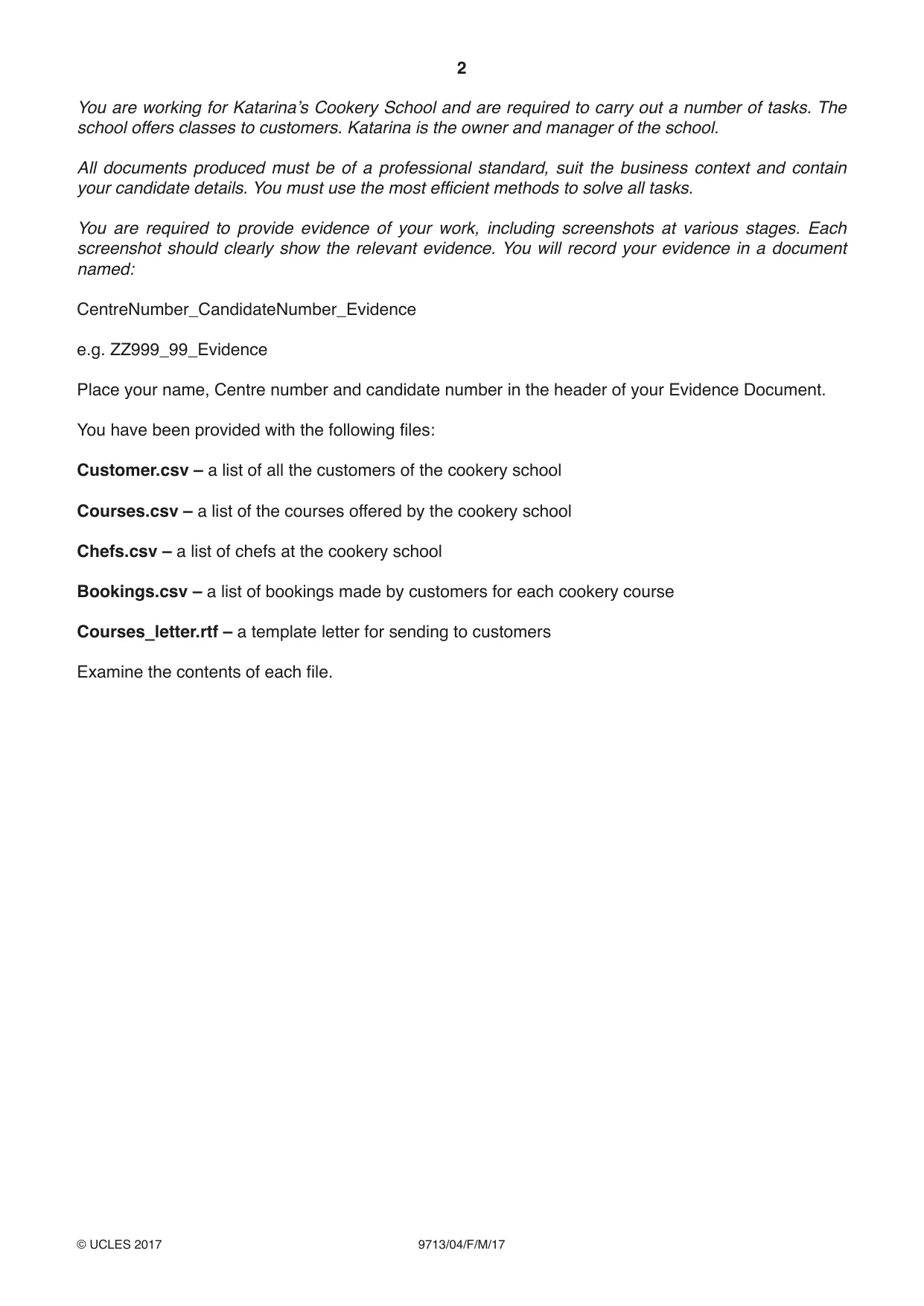
Question paper, page 2
2 9713/04/F/M/17 © UCLES 2017 You are working for Katarina’s Cookery School and are required to carry out a number of tasks. The school offers classes to customers. Katarina is the owner and manager of the school. All documents produced must be of a professional standard, suit the business context and contain your candidate details. You must use the most efficient methods to solve all tasks. You are required to provide evidence of your work, including screenshots at various stages. Each screenshot should clearly show the relevant evidence. You will record your evidence in a document named: CentreNumber_CandidateNumber_Evidence e.g. ZZ999_99_Evidence Place your name, Centre number and candidate number in the header of your Evidence Document. You have been provided with the following files: Customer.csv – a list of all the customers of the cookery school Courses.csv – a list of the courses offered by the cookery school Chefs.csv – a list of chefs at the cookery school Bookings.csv – a list of bookings made by customers for each cookery course Courses_letter.rtf – a template letter for sending to customers Examine the contents of each file.
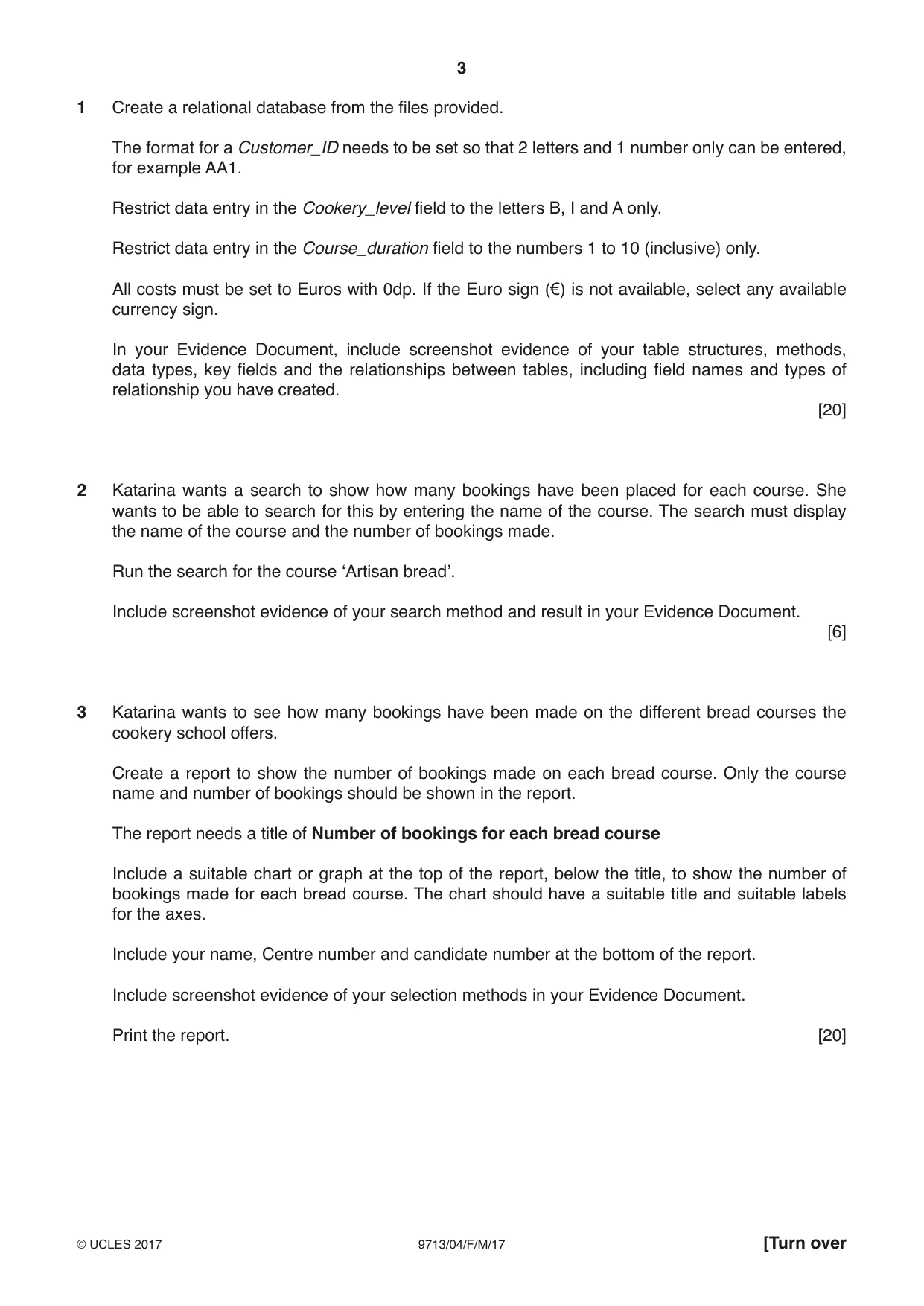
Question paper, page 3
3 9713/04/F/M/17 © UCLES 2017 [Turn over 1 Create a relational database from the files provided. The format for a Customer_ID needs to be set so that 2 letters and 1 number only can be entered, for example AA1. Restrict data entry in the Cookery_level field to the letters B, I and A only. Restrict data entry in the Course_duration field to the numbers 1 to 10 (inclusive) only. All costs must be set to Euros with 0dp. If the Euro sign (€) is not available, select any available currency sign. In your Evidence Document, include screenshot evidence of your table structures, methods, data types, key fields and the relationships between tables, including field names and types of relationship you have created. [20] 2 Katarina wants a search to show how many bookings have been placed for each course. She wants to be able to search for this by entering the name of the course. The search must display the name of the course and the number of bookings made. Run the search for the course ‘Artisan bread’. Include screenshot evidence of your search method and result in your Evidence Document. [6] 3 Katarina wants to see how many bookings have been made on the different bread courses the cookery school offers. Create a report to show the number of bookings made on each bread course. Only the course name and number of bookings should be shown in the report. The report needs a title of Number of bookings for each bread course Include a suitable chart or graph at the top of the report, below the title, to show the number of bookings made for each bread course. The chart should have a suitable title and suitable labels for the axes. Include your name, Centre number and candidate number at the bottom of the report. Include screenshot evidence of your selection methods in your Evidence Document. Print the report. [20]
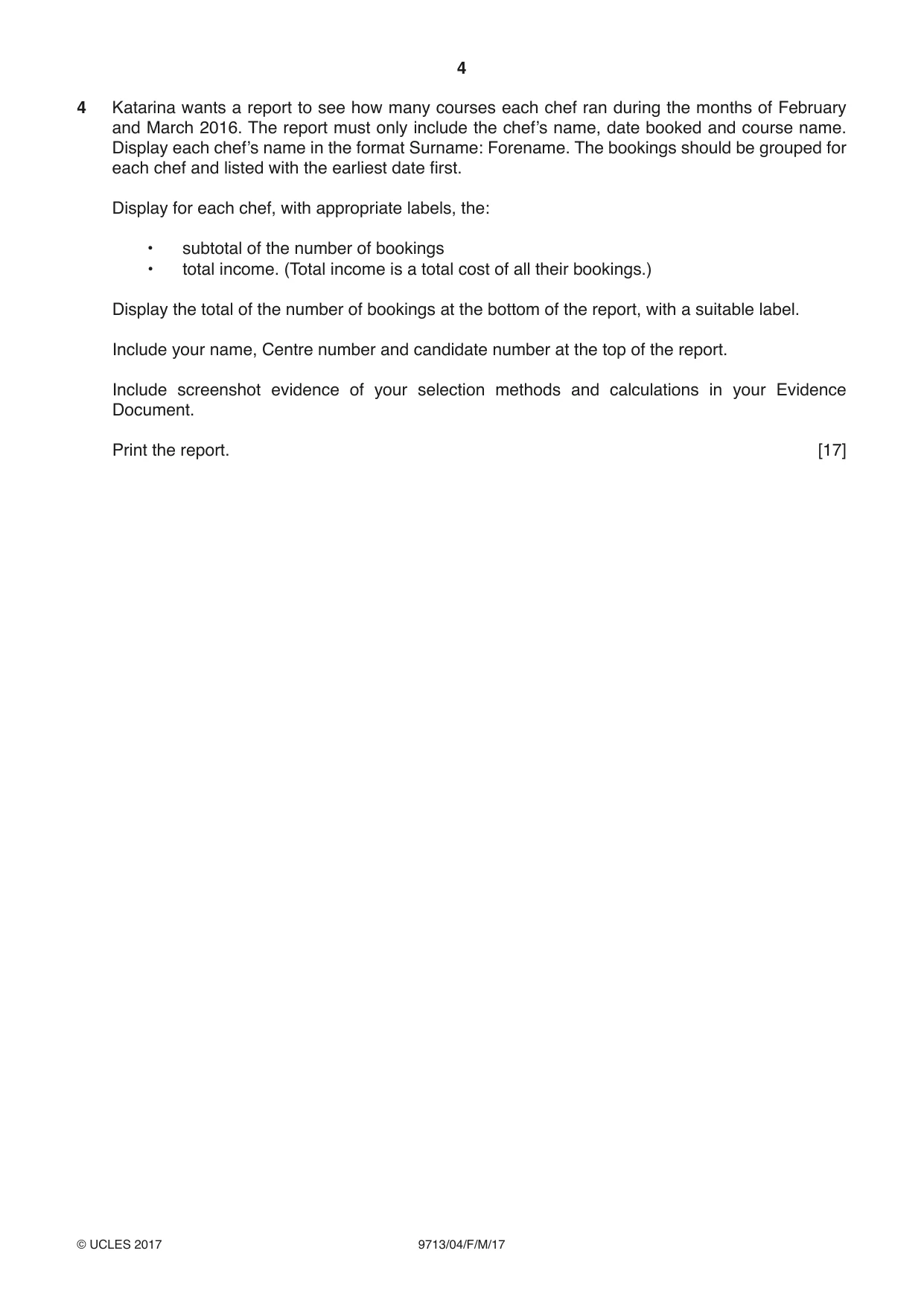
Question paper, page 4
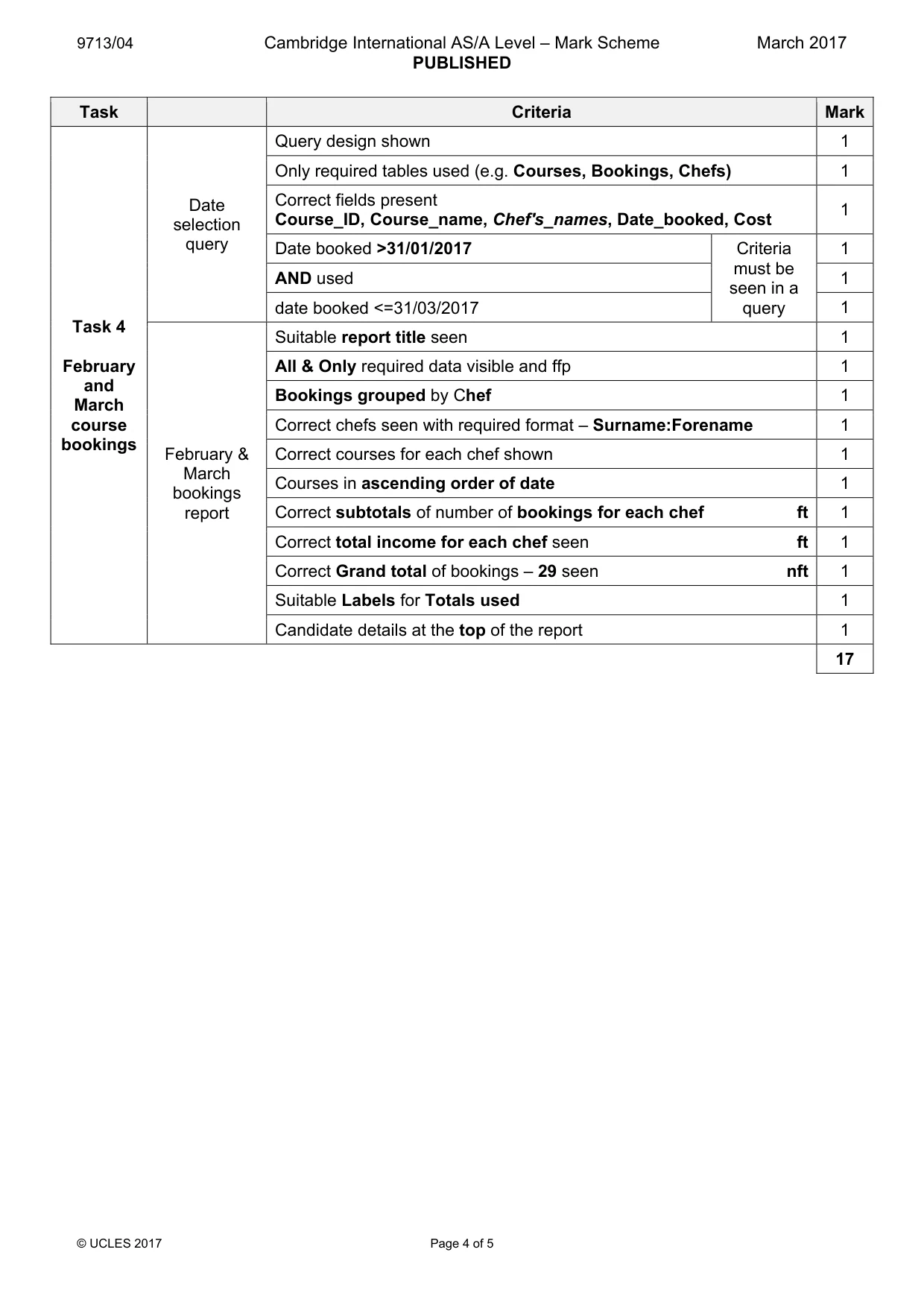
4 9713/04/F/M/17 © UCLES 2017 4 Katarina wants a report to see how many courses each chef ran during the months of February and March 2016. The report must only include the chef’s name, date booked and course name. Display each chef’s name in the format Surname: Forename. The bookings should be grouped for each chef and listed with the earliest date first. Display for each chef, with appropriate labels, the: • subtotal of the number of bookings • total income. (Total income is a total cost of all their bookings.) Display the total of the number of bookings at the bottom of the report, with a suitable label. Include your name, Centre number and candidate number at the top of the report. Include screenshot evidence of your selection methods and calculations in your Evidence Document. Print the report. [17]
Question paper, page 5
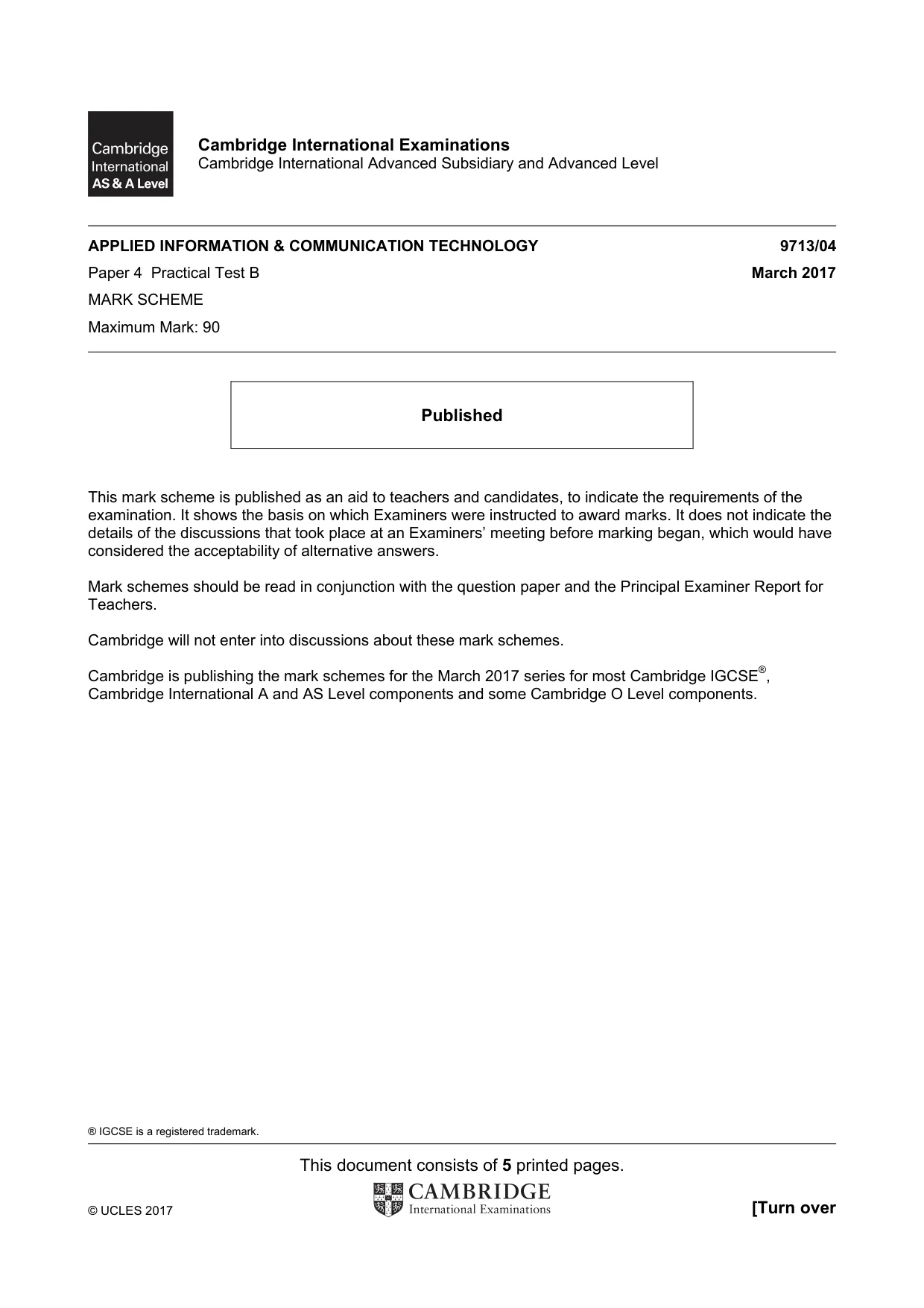
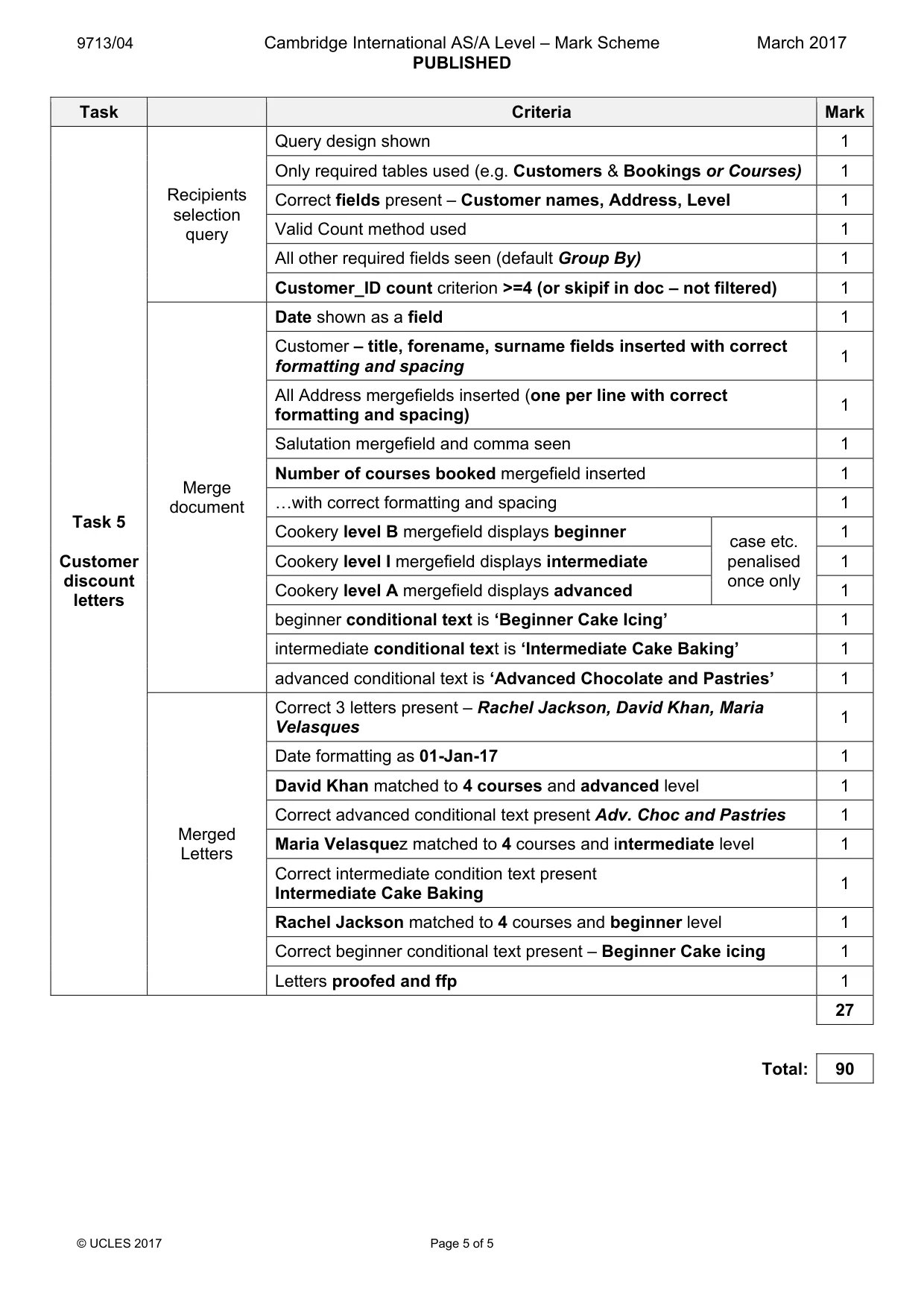
5 9713/04/F/M/17 © UCLES 2017 5 Katarina wants to send a letter to offer a discount to those customers who have booked 4 or more courses. Use the template Courses_letter.rtf and follow the instructions to create a mail merge letter for customers who qualify. A customer who has a Cookery_level of: • B is a beginner • I is intermediate • A is advanced The cookery level should appear in full and not just a single character. Where indicated, the following conditional text should appear: • beginners should be recommended to take the Beginner Cake Icing • intermediate customers should be recommended to take the Intermediate Cake Baking • advanced customers should be recommended to take the Advanced Chocolate and Pastries Print the merge document showing all the field codes. Perform the mail merge to create and print the individual letters. Include evidence of your selection method in your Evidence Document. [27] Save and print your Evidence Document. Write today’s date in the box below. Date
Question paper, page 6
6 9713/04/F/M/17 © UCLES 2017 BLANK PAGE
Question paper, page 7
7 9713/04/F/M/17 © UCLES 2017 BLANK PAGE
Question paper, page 8
8 9713/04/F/M/17 © UCLES 2017 Permission to reproduce items where third-party owned material protected by copyright is included has been sought and cleared where possible. Every reasonable effort has been made by the publisher (UCLES) to trace copyright holders, but if any items requiring clearance have unwittingly been included, the publisher will be pleased to make amends at the earliest possible opportunity. To avoid the issue of disclosure of answer-related information to candidates, all copyright acknowledgements are reproduced online in the Cambridge International Examinations Copyright Acknowledgements Booklet. This is produced for each series of examinations and is freely available to download at www.cie.org.uk after the live examination series. Cambridge International Examinations is part of the Cambridge Assessment Group. Cambridge Assessment is the brand name of University of Cambridge Local Examinations Syndicate (UCLES), which is itself a department of the University of Cambridge. BLANK PAGE
Mark scheme, page 1
® IGCSE is a registered trademark. This document consists of 5 printed pages. © UCLES 2017 [Turn over Cambridge International Examinations Cambridge International Advanced Subsidiary and Advanced Level APPLIED INFORMATION & COMMUNICATION TECHNOLOGY 9713/04 Paper 4 Practical Test B March 2017 MARK SCHEME Maximum Mark: 90 Published This mark scheme is published as an aid to teachers and candidates, to indicate the requirements of the examination. It shows the basis on which Examiners were instructed to award marks. It does not indicate the details of the discussions that took place at an Examiners’ meeting before marking began, which would have considered the acceptability of alternative answers. Mark schemes should be read in conjunction with the question paper and the Principal Examiner Report for Teachers. Cambridge will not enter into discussions about these mark schemes. Cambridge is publishing the mark schemes for the March 2017 series for most Cambridge IGCSE®, Cambridge International A and AS Level components and some Cambridge O Level components.
Mark scheme, page 2
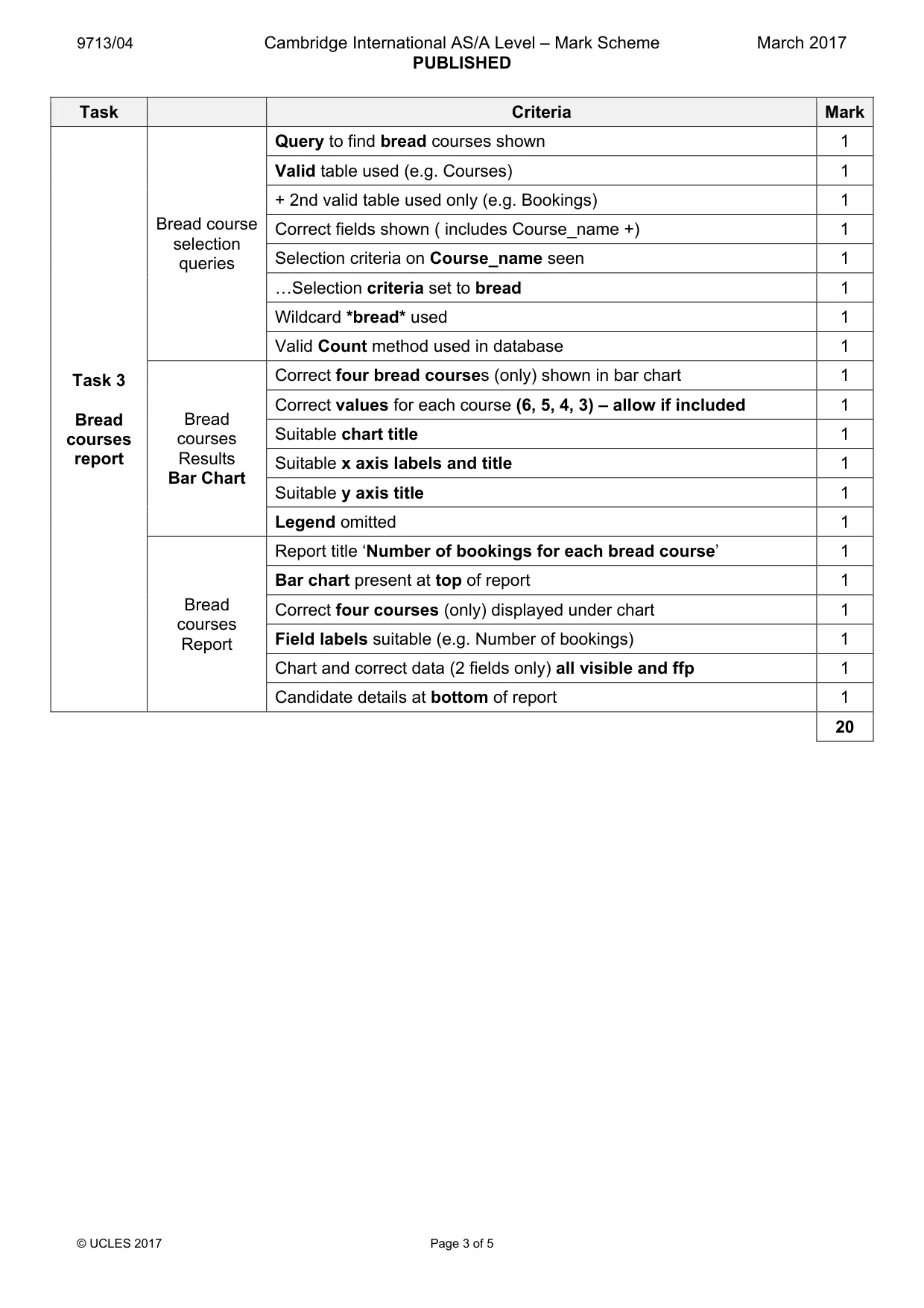
9713/04 Cambridge International AS/A Level – Mark Scheme PUBLISHED March 2017 © UCLES 2017 Page 2 of 5 Task Criteria Mark Task 1 Database set-up All 4 data files imported 1 Customer table Customer table structure shown 1 Customer_ID set as primary key 1 Input mask/formatting set for Customer_ID 1 Valid validation rule is set on Cookery_level 1 Validation rule allows entry of only B, I or A 1 «Validation error text suitable 1 Courses table Courses table structure shown 1 Course_ID set as primary key 1 Course_duration set to number 1 Cost set to currency 1 Cost formatted to € 0dp 1 Valid validation rule set on Course_duration 1 Validation rule allows entry of only numbers >0 and <=10 1 ...Validation error text suitable 1 Chefs & Bookings Chef & Bookings table structure shown 1 Chef_ID & Booking_ID set as keys 1 Relationships Customer(Customer_ID) – Bookings(Customer_ID) – 1 to many 1 Chefs(Chef_ID) – Bookings(Chef_ID) – 1 to many 1 Courses(Course_ID) – Bookings(Course_ID) – 1 to many 1 20 Task 2 Count of Bookings Number of bookings search Query design shown 1 Only Bookings and Courses table used 1 Only correct fields present Booking_ID, Course_name, Course_ID 1 Valid Count method (e.g. on Booking_ID/Course_ID) 1 Parameter query used with a suitable prompt 1 Query results showing 6 bookings for Artisan bread (2 fields only) 1 6
Mark scheme, page 3
9713/04 Cambridge International AS/A Level – Mark Scheme PUBLISHED March 2017 © UCLES 2017 Page 3 of 5 Task Criteria Mark Task 3 Bread courses report Bread course selection queries Query to find bread courses shown 1 Valid table used (e.g. Courses) 1 + 2nd valid table used only (e.g. Bookings) 1 Correct fields shown ( includes Course_name +) 1 Selection criteria on Course_name seen 1 «Selection criteria set to bread 1 Wildcard *bread* used 1 Valid Count method used in database 1 Bread courses Results Bar Chart Correct four bread courses (only) shown in bar chart 1 Correct values for each course (6, 5, 4, 3) – allow if included 1 Suitable chart title 1 Suitable x axis labels and title 1 Suitable y axis title 1 Legend omitted 1 Bread courses Report Report title ‘Number of bookings for each bread course’ 1 Bar chart present at top of report 1 Correct four courses (only) displayed under chart 1 Field labels suitable (e.g. Number of bookings) 1 Chart and correct data (2 fields only) all visible and ffp 1 Candidate details at bottom of report 1 20
Mark scheme, page 4
9713/04 Cambridge International AS/A Level – Mark Scheme PUBLISHED March 2017 © UCLES 2017 Page 4 of 5 Task Criteria Mark Task 4 February and March course bookings Date selection query Query design shown 1 Only required tables used (e.g. Courses, Bookings, Chefs) 1 Correct fields present Course_ID, Course_name, Chef's_names, Date_booked, Cost 1 Date booked >31/01/2017 Criteria must be seen in a query 1 AND used 1 date booked <=31/03/2017 1 February & March bookings report Suitable report title seen 1 All & Only required data visible and ffp 1 Bookings grouped by Chef 1 Correct chefs seen with required format – Surname:Forename 1 Correct courses for each chef shown 1 Courses in ascending order of date 1 Correct subtotals of number of bookings for each chef ft 1 Correct total income for each chef seen ft 1 Correct Grand total of bookings – 29 seen nft 1 Suitable Labels for Totals used 1 Candidate details at the top of the report 1 17
Mark scheme, page 5
9713/04 Cambridge International AS/A Level – Mark Scheme PUBLISHED March 2017 © UCLES 2017 Page 5 of 5 Task Criteria Mark Task 5 Customer discount letters Recipients selection query Query design shown 1 Only required tables used (e.g. Customers & Bookings or Courses) 1 Correct fields present – Customer names, Address, Level 1 Valid Count method used 1 All other required fields seen (default Group By) 1 Customer_ID count criterion >=4 (or skipif in doc – not filtered) 1 Merge document Date shown as a field 1 Customer – title, forename, surname fields inserted with correct formatting and spacing 1 All Address mergefields inserted (one per line with correct formatting and spacing) 1 Salutation mergefield and comma seen 1 Number of courses booked mergefield inserted 1 «with correct formatting and spacing 1 Cookery level B mergefield displays beginner case etc. penalised once only 1 Cookery level I mergefield displays intermediate 1 Cookery level A mergefield displays advanced 1 beginner conditional text is ‘Beginner Cake Icing’ 1 intermediate conditional text is ‘Intermediate Cake Baking’ 1 advanced conditional text is ‘Advanced Chocolate and Pastries’ 1 Merged Letters Correct 3 letters present – Rachel Jackson, David Khan, Maria Velasques 1 Date formatting as 01-Jan-17 1 David Khan matched to 4 courses and advanced level 1 Correct advanced conditional text present Adv. Choc and Pastries 1 Maria Velasquez matched to 4 courses and intermediate level 1 Correct intermediate condition text present Intermediate Cake Baking 1 Rachel Jackson matched to 4 courses and beginner level 1 Correct beginner conditional text present – Beginner Cake icing 1 Letters proofed and ffp 1 27 Total: 90
What you needed in this session
Cambridge’s own grade thresholds for 2017 Feb/March, Paper 4 · Variant 1. A higher threshold means an easier paper — the bar moves with how the cohort did.