Cambridge A Level Applied Information and Communication Technology 9713 — 2013 Oct/Nov Paper 2 · Variant 1
9713/21/O/N/13 · 120 marks · ≈135 min
The question paper and its mark scheme, free to read here and free to download. This is Cambridge’s own paper, exactly as it was sat.
Question paper4 pages
Mark scheme13 pages
Answers below. Sit the paper first if you are practising.
Paper as text
Question paper, page 1
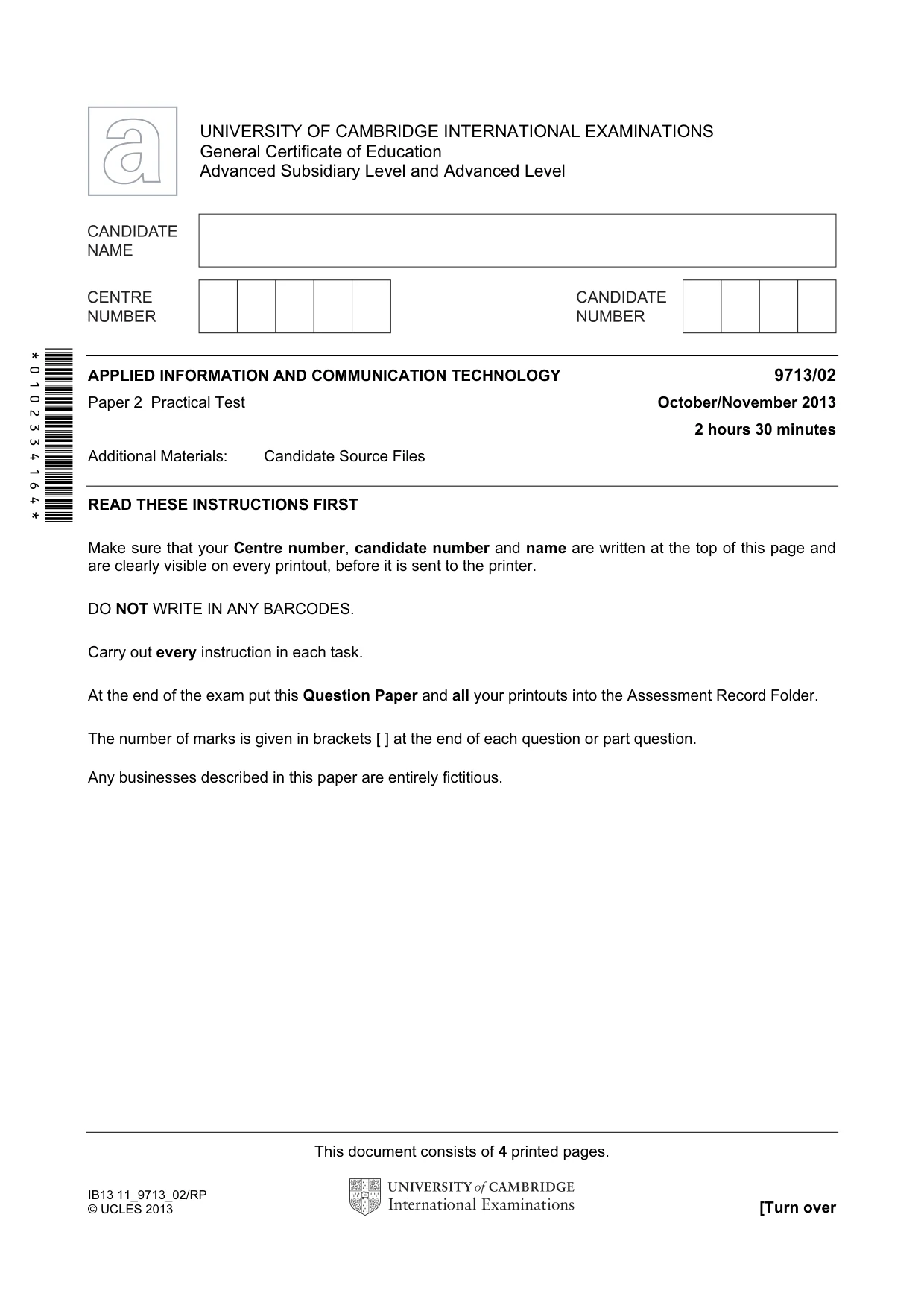
This document consists of 4 printed pages. IB13 11_9713_02/RP © UCLES 2013 [Turn over *0102334164* UNIVERSITY OF CAMBRIDGE INTERNATIONAL EXAMINATIONS General Certificate of Education Advanced Subsidiary Level and Advanced Level APPLIED INFORMATION AND COMMUNICATION TECHNOLOGY 9713/02 Paper 2 Practical Test October/November 2013 2 hours 30 minutes Additional Materials: Candidate Source Files READ THESE INSTRUCTIONS FIRST Make sure that your Centre number, candidate number and name are written at the top of this page and are clearly visible on every printout, before it is sent to the printer. DO NOT WRITE IN ANY BARCODES. Carry out every instruction in each task. At the end of the exam put this Question Paper and all your printouts into the Assessment Record Folder. The number of marks is given in brackets [ ] at the end of each question or part question. Any businesses described in this paper are entirely fictitious.
Question paper, page 2
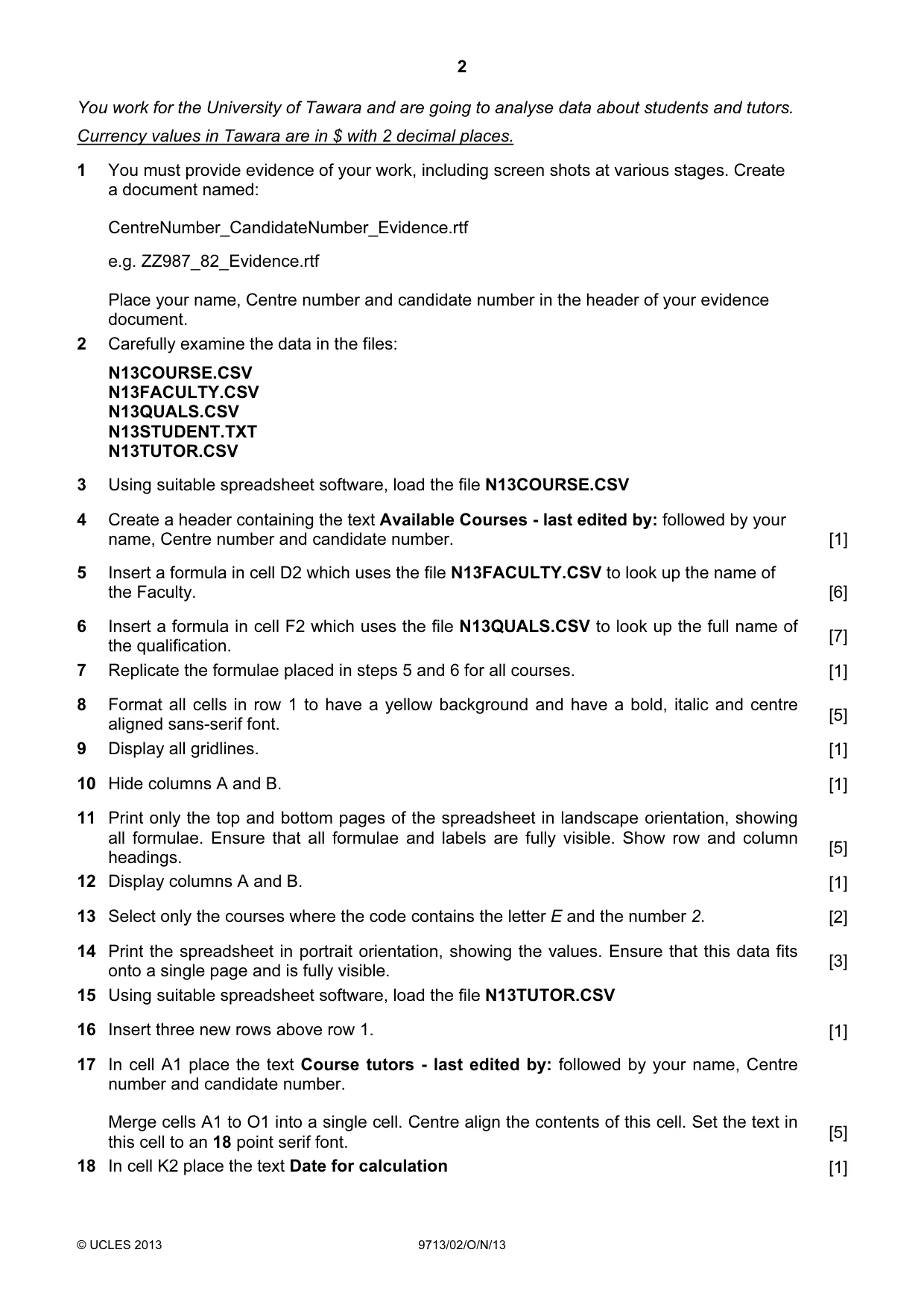
2 © UCLES 2013 9713/02/O/N/13 You work for the University of Tawara and are going to analyse data about students and tutors. Currency values in Tawara are in $ with 2 decimal places. 1 You must provide evidence of your work, including screen shots at various stages. Create a document named: CentreNumber_CandidateNumber_Evidence.rtf e.g. ZZ987_82_Evidence.rtf Place your name, Centre number and candidate number in the header of your evidence document. 2 Carefully examine the data in the files: N13COURSE.CSV N13FACULTY.CSV N13QUALS.CSV N13STUDENT.TXT N13TUTOR.CSV 3 Using suitable spreadsheet software, load the file N13COURSE.CSV 4 Create a header containing the text Available Courses - last edited by: followed by your name, Centre number and candidate number. [1] 5 Insert a formula in cell D2 which uses the file N13FACULTY.CSV to look up the name of the Faculty. [6] 6 Insert a formula in cell F2 which uses the file N13QUALS.CSV to look up the full name of the qualification. [7] 7 Replicate the formulae placed in steps 5 and 6 for all courses. [1] 8 Format all cells in row 1 to have a yellow background and have a bold, italic and centre aligned sans-serif font. [5] 9 Display all gridlines. [1] 10 Hide columns A and B. [1] 11 Print only the top and bottom pages of the spreadsheet in landscape orientation, showing all formulae. Ensure that all formulae and labels are fully visible. Show row and column headings. [5] 12 Display columns A and B. [1] 13 Select only the courses where the code contains the letter E and the number 2. [2] 14 Print the spreadsheet in portrait orientation, showing the values. Ensure that this data fits onto a single page and is fully visible. [3] 15 Using suitable spreadsheet software, load the file N13TUTOR.CSV 16 Insert three new rows above row 1. [1] 17 In cell A1 place the text Course tutors - last edited by: followed by your name, Centre number and candidate number. Merge cells A1 to O1 into a single cell. Centre align the contents of this cell. Set the text in this cell to an 18 point serif font. [5] 18 In cell K2 place the text Date for calculation [1]
Question paper, page 3
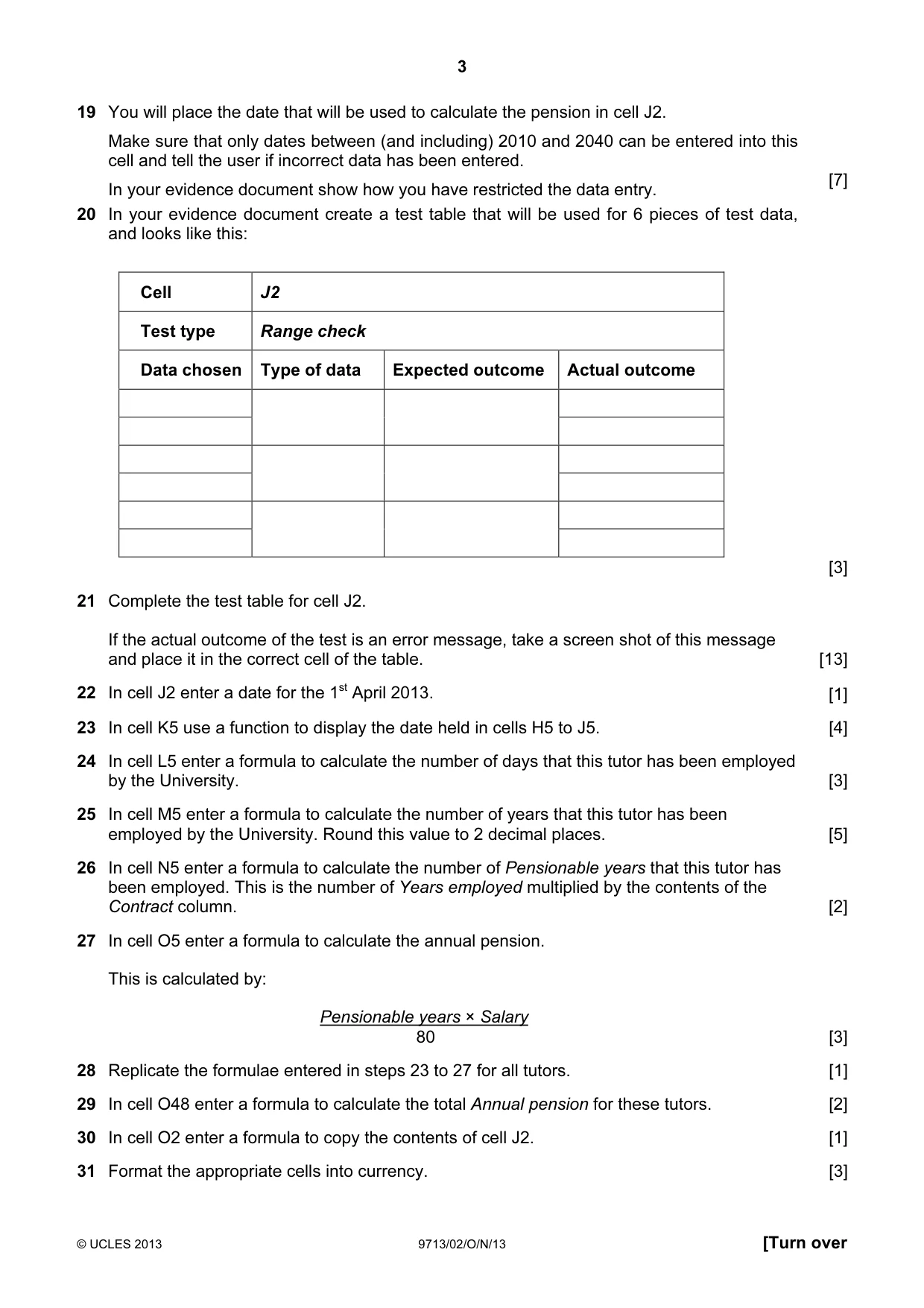
3 © UCLES 2013 9713/02/O/N/13 [Turn over 19 You will place the date that will be used to calculate the pension in cell J2. Make sure that only dates between (and including) 2010 and 2040 can be entered into this cell and tell the user if incorrect data has been entered. In your evidence document show how you have restricted the data entry. [7] 20 In your evidence document create a test table that will be used for 6 pieces of test data, and looks like this: Cell J2 Test type Range check Data chosen Type of data Expected outcome Actual outcome [3] 21 Complete the test table for cell J2. If the actual outcome of the test is an error message, take a screen shot of this message and place it in the correct cell of the table. [13] 22 In cell J2 enter a date for the 1st April 2013. [1] 23 In cell K5 use a function to display the date held in cells H5 to J5. [4] 24 In cell L5 enter a formula to calculate the number of days that this tutor has been employed by the University. [3] 25 In cell M5 enter a formula to calculate the number of years that this tutor has been employed by the University. Round this value to 2 decimal places. [5] 26 In cell N5 enter a formula to calculate the number of Pensionable years that this tutor has been employed. This is the number of Years employed multiplied by the contents of the Contract column. [2] 27 In cell O5 enter a formula to calculate the annual pension. This is calculated by: Pensionable years × Salary 80 [3] 28 Replicate the formulae entered in steps 23 to 27 for all tutors. [1] 29 In cell O48 enter a formula to calculate the total Annual pension for these tutors. [2] 30 In cell O2 enter a formula to copy the contents of cell J2. [1] 31 Format the appropriate cells into currency. [3]
Question paper, page 4
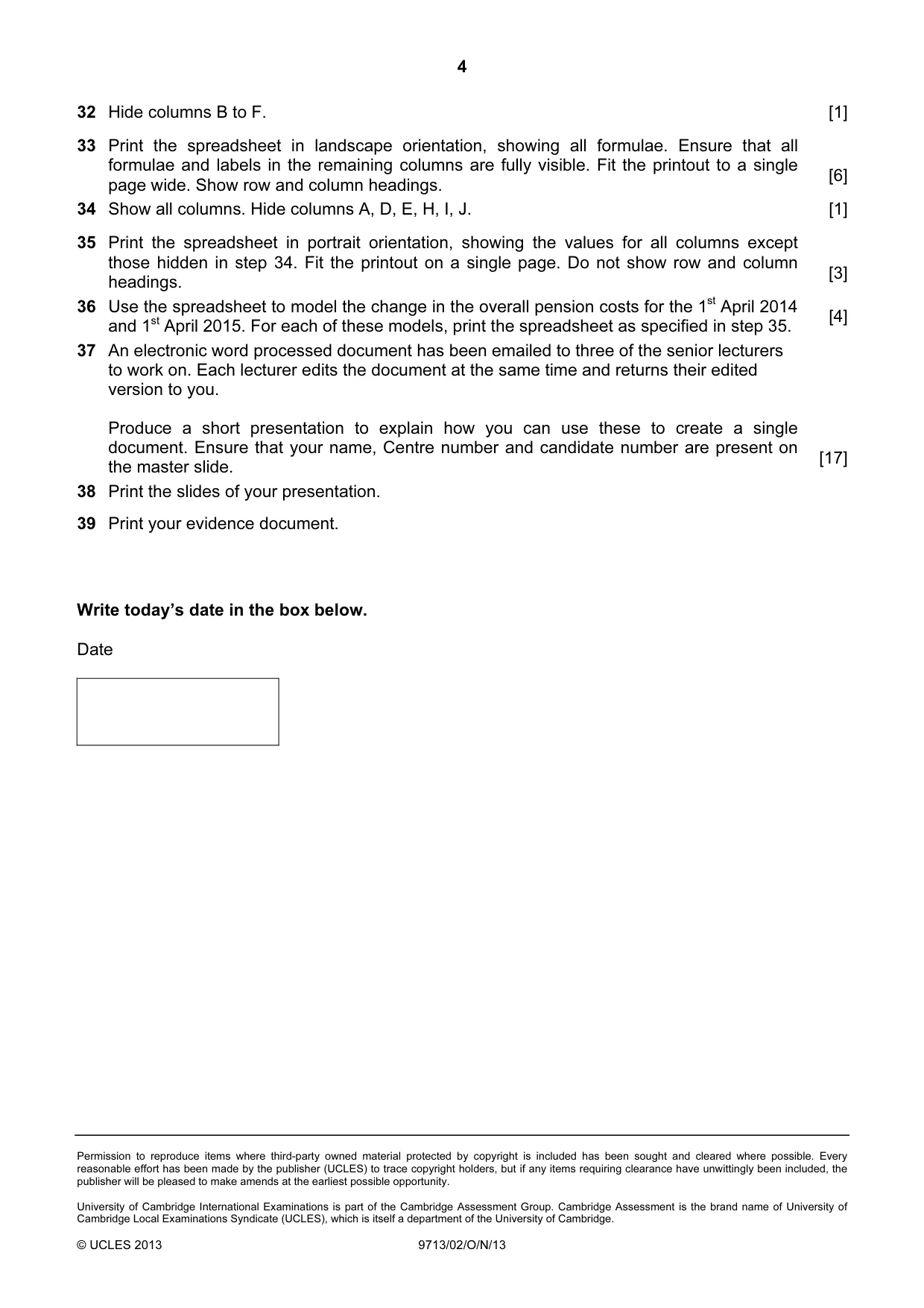
4 Permission to reproduce items where third-party owned material protected by copyright is included has been sought and cleared where possible. Every reasonable effort has been made by the publisher (UCLES) to trace copyright holders, but if any items requiring clearance have unwittingly been included, the publisher will be pleased to make amends at the earliest possible opportunity. University of Cambridge International Examinations is part of the Cambridge Assessment Group. Cambridge Assessment is the brand name of University of Cambridge Local Examinations Syndicate (UCLES), which is itself a department of the University of Cambridge. © UCLES 2013 9713/02/O/N/13 32 Hide columns B to F. [1] 33 Print the spreadsheet in landscape orientation, showing all formulae. Ensure that all formulae and labels in the remaining columns are fully visible. Fit the printout to a single page wide. Show row and column headings. [6] 34 Show all columns. Hide columns A, D, E, H, I, J. [1] 35 Print the spreadsheet in portrait orientation, showing the values for all columns except those hidden in step 34. Fit the printout on a single page. Do not show row and column headings. [3] 36 Use the spreadsheet to model the change in the overall pension costs for the 1st April 2014 and 1st April 2015. For each of these models, print the spreadsheet as specified in step 35. [4] 37 An electronic word processed document has been emailed to three of the senior lecturers to work on. Each lecturer edits the document at the same time and returns their edited version to you. Produce a short presentation to explain how you can use these to create a single document. Ensure that your name, Centre number and candidate number are present on the master slide. [17] 38 Print the slides of your presentation. 39 Print your evidence document. Write today’s date in the box below. Date
Mark scheme, page 1
CAMBRIDGE INTERNATIONAL EXAMINATIONS GCE Advanced Subsidiary Level and GCE Advanced Level MARK SCHEME for the October/November 2013 series 9713 APPLIED INFORMATION AND COMMUNICATION TECHNOLOGY 9713/02 Paper 2 (Practical Test A), maximum raw mark 120 This mark scheme is published as an aid to teachers and candidates, to indicate the requirements of the examination. It shows the basis on which Examiners were instructed to award marks. It does not indicate the details of the discussions that took place at an Examiners’ meeting before marking began, which would have considered the acceptability of alternative answers. Mark schemes should be read in conjunction with the question paper and the Principal Examiner Report for Teachers. Cambridge will not enter into discussions about these mark schemes. Cambridge is publishing the mark schemes for the October/November 2013 series for most IGCSE, GCE Advanced Level and Advanced Subsidiary Level components and some Ordinary Level components.
Mark scheme, page 2
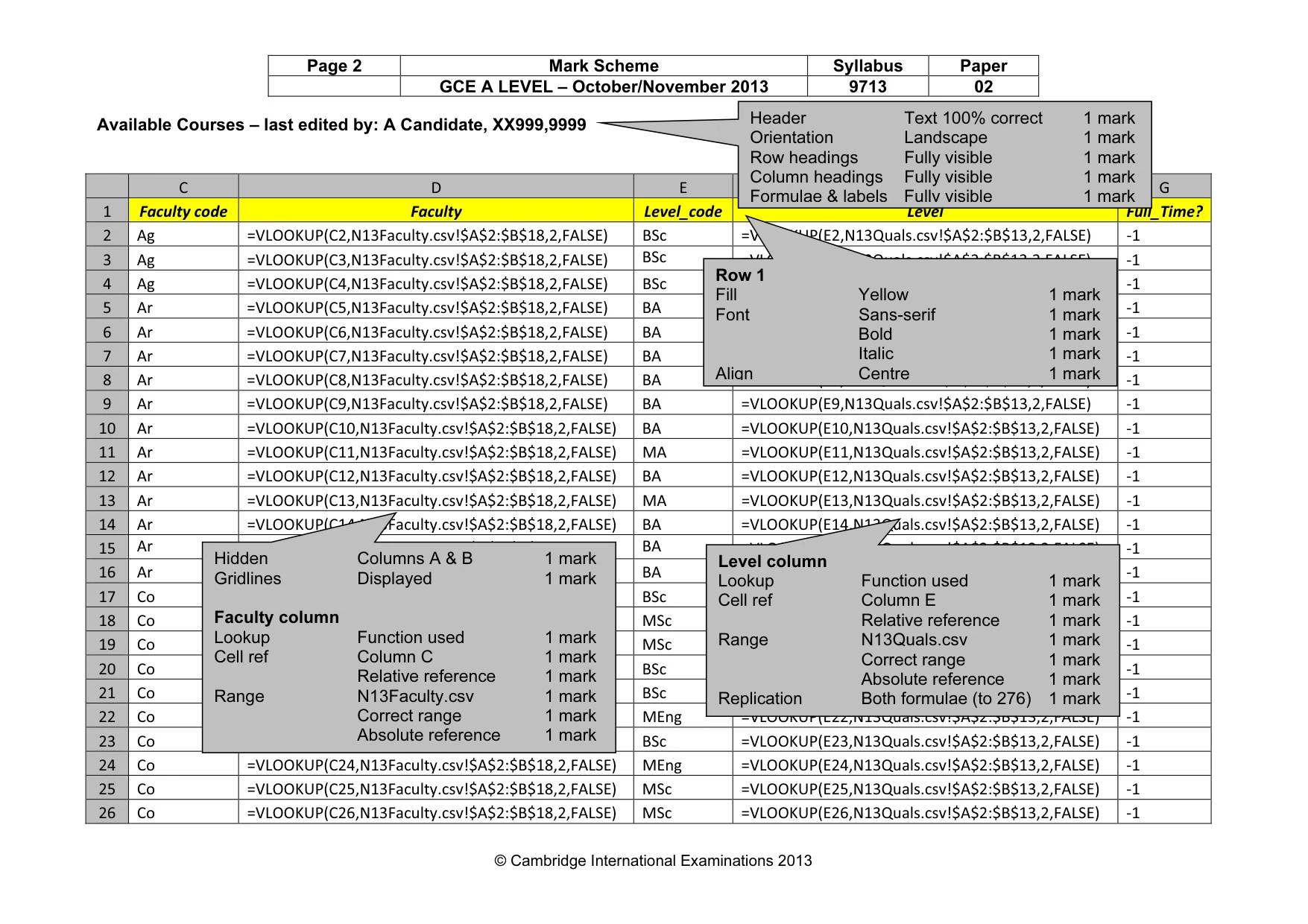
Page 2 Mark Scheme Syllabus Paper GCE A LEVEL – October/November 2013 9713 02 © Cambridge International Examinations 2013 Available Courses – last edited by: A Candidate, XX999,9999 C D E F G 1 Faculty code Faculty Level_code Level Full_Time? 2 Ag =VLOOKUP(C2,N13Faculty.csv!$A$2:$B$18,2,FALSE) BSc =VLOOKUP(E2,N13Quals.csv!$A$2:$B$13,2,FALSE) -1 3 Ag =VLOOKUP(C3,N13Faculty.csv!$A$2:$B$18,2,FALSE) BSc =VLOOKUP(E3,N13Quals.csv!$A$2:$B$13,2,FALSE) -1 4 Ag =VLOOKUP(C4,N13Faculty.csv!$A$2:$B$18,2,FALSE) BSc =VLOOKUP(E4,N13Quals.csv!$A$2:$B$13,2,FALSE) -1 5 Ar =VLOOKUP(C5,N13Faculty.csv!$A$2:$B$18,2,FALSE) BA =VLOOKUP(E5,N13Quals.csv!$A$2:$B$13,2,FALSE) -1 6 Ar =VLOOKUP(C6,N13Faculty.csv!$A$2:$B$18,2,FALSE) BA =VLOOKUP(E6,N13Quals.csv!$A$2:$B$13,2,FALSE) -1 7 Ar =VLOOKUP(C7,N13Faculty.csv!$A$2:$B$18,2,FALSE) BA =VLOOKUP(E7,N13Quals.csv!$A$2:$B$13,2,FALSE) -1 8 Ar =VLOOKUP(C8,N13Faculty.csv!$A$2:$B$18,2,FALSE) BA =VLOOKUP(E8,N13Quals.csv!$A$2:$B$13,2,FALSE) -1 9 Ar =VLOOKUP(C9,N13Faculty.csv!$A$2:$B$18,2,FALSE) BA =VLOOKUP(E9,N13Quals.csv!$A$2:$B$13,2,FALSE) -1 10 Ar =VLOOKUP(C10,N13Faculty.csv!$A$2:$B$18,2,FALSE) BA =VLOOKUP(E10,N13Quals.csv!$A$2:$B$13,2,FALSE) -1 11 Ar =VLOOKUP(C11,N13Faculty.csv!$A$2:$B$18,2,FALSE) MA =VLOOKUP(E11,N13Quals.csv!$A$2:$B$13,2,FALSE) -1 12 Ar =VLOOKUP(C12,N13Faculty.csv!$A$2:$B$18,2,FALSE) BA =VLOOKUP(E12,N13Quals.csv!$A$2:$B$13,2,FALSE) -1 13 Ar =VLOOKUP(C13,N13Faculty.csv!$A$2:$B$18,2,FALSE) MA =VLOOKUP(E13,N13Quals.csv!$A$2:$B$13,2,FALSE) -1 14 Ar =VLOOKUP(C14,N13Faculty.csv!$A$2:$B$18,2,FALSE) BA =VLOOKUP(E14,N13Quals.csv!$A$2:$B$13,2,FALSE) -1 15 Ar =VLOOKUP(C15,N13Faculty.csv!$A$2:$B$18,2,FALSE) BA =VLOOKUP(E15,N13Quals.csv!$A$2:$B$13,2,FALSE) -1 16 Ar =VLOOKUP(C16,N13Faculty.csv!$A$2:$B$18,2,FALSE) BA =VLOOKUP(E16,N13Quals.csv!$A$2:$B$13,2,FALSE) -1 17 Co =VLOOKUP(C17,N13Faculty.csv!$A$2:$B$18,2,FALSE) BSc =VLOOKUP(E17,N13Quals.csv!$A$2:$B$13,2,FALSE) -1 18 Co =VLOOKUP(C18,N13Faculty.csv!$A$2:$B$18,2,FALSE) MSc =VLOOKUP(E18,N13Quals.csv!$A$2:$B$13,2,FALSE) -1 19 Co =VLOOKUP(C19,N13Faculty.csv!$A$2:$B$18,2,FALSE) MSc =VLOOKUP(E19,N13Quals.csv!$A$2:$B$13,2,FALSE) -1 20 Co =VLOOKUP(C20,N13Faculty.csv!$A$2:$B$18,2,FALSE) BSc =VLOOKUP(E20,N13Quals.csv!$A$2:$B$13,2,FALSE) -1 21 Co =VLOOKUP(C21,N13Faculty.csv!$A$2:$B$18,2,FALSE) BSc =VLOOKUP(E21,N13Quals.csv!$A$2:$B$13,2,FALSE) -1 22 Co =VLOOKUP(C22,N13Faculty.csv!$A$2:$B$18,2,FALSE) MEng =VLOOKUP(E22,N13Quals.csv!$A$2:$B$13,2,FALSE) -1 23 Co =VLOOKUP(C23,N13Faculty.csv!$A$2:$B$18,2,FALSE) BSc =VLOOKUP(E23,N13Quals.csv!$A$2:$B$13,2,FALSE) -1 24 Co =VLOOKUP(C24,N13Faculty.csv!$A$2:$B$18,2,FALSE) MEng =VLOOKUP(E24,N13Quals.csv!$A$2:$B$13,2,FALSE) -1 25 Co =VLOOKUP(C25,N13Faculty.csv!$A$2:$B$18,2,FALSE) MSc =VLOOKUP(E25,N13Quals.csv!$A$2:$B$13,2,FALSE) -1 26 Co =VLOOKUP(C26,N13Faculty.csv!$A$2:$B$18,2,FALSE) MSc =VLOOKUP(E26,N13Quals.csv!$A$2:$B$13,2,FALSE) -1 Hidden Columns A & B 1 mark Gridlines Displayed 1 mark Faculty column Lookup Function used 1 mark Cell ref Column C 1 mark Relative reference 1 mark Range N13Faculty.csv 1 mark Correct range 1 mark Absolute reference 1 mark Level column Lookup Function used 1 mark Cell ref Column E 1 mark Relative reference 1 mark Range N13Quals.csv 1 mark Correct range 1 mark Absolute reference 1 mark Replication Both formulae (to 276) 1 mark Row 1 Fill Yellow 1 mark Font Sans-serif 1 mark Bold 1 mark Italic 1 mark Align Centre 1 mark Header Text 100% correct 1 mark Orientation Landscape 1 mark Row headings Fully visible 1 mark Column headings Fully visible 1 mark Formulae & labels Fully visible 1 mark
Mark scheme, page 3
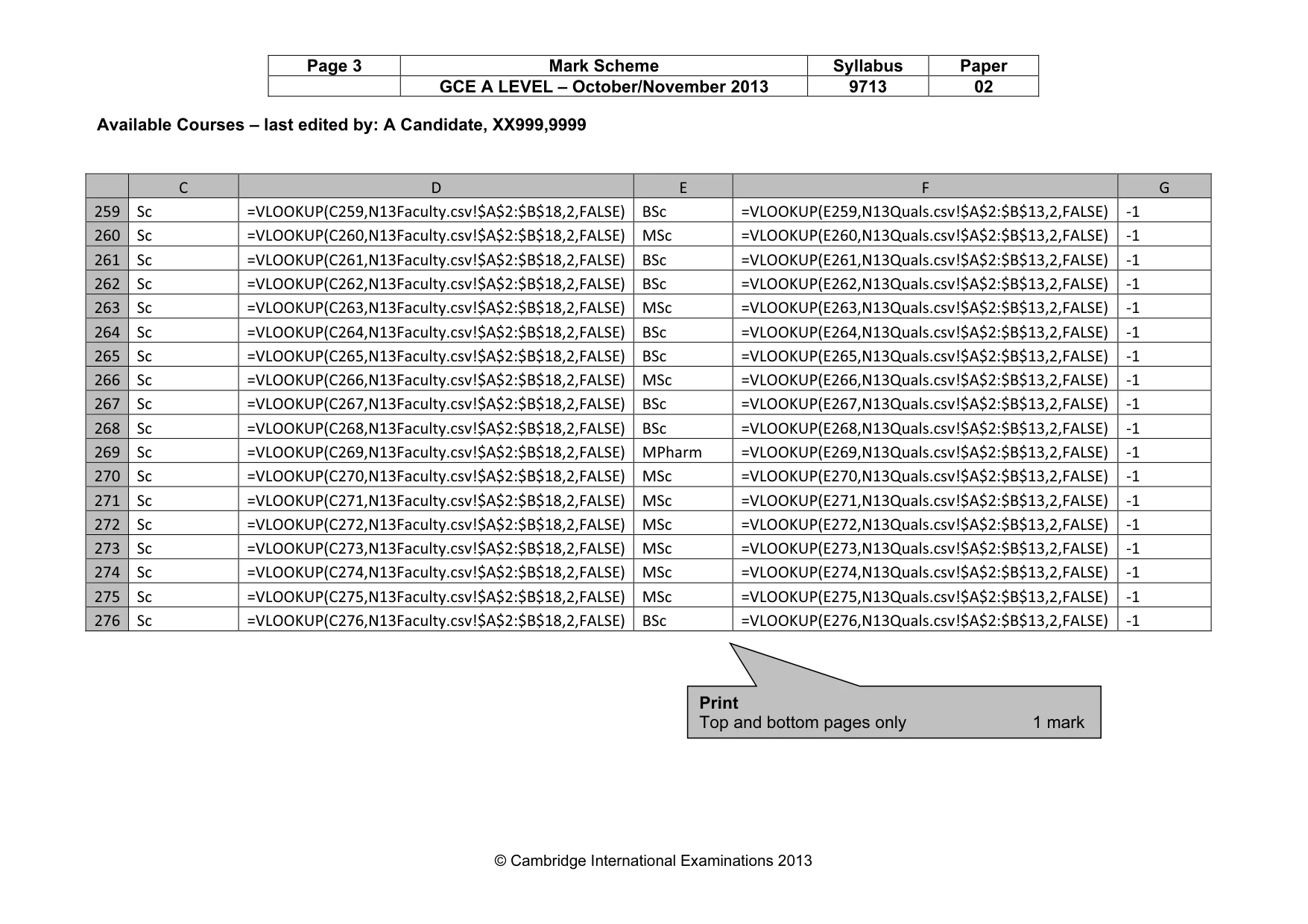
Page 3 Mark Scheme Syllabus Paper GCE A LEVEL – October/November 2013 9713 02 © Cambridge International Examinations 2013 Available Courses – last edited by: A Candidate, XX999,9999 C D E F G 259 Sc =VLOOKUP(C259,N13Faculty.csv!$A$2:$B$18,2,FALSE) BSc =VLOOKUP(E259,N13Quals.csv!$A$2:$B$13,2,FALSE) -1 260 Sc =VLOOKUP(C260,N13Faculty.csv!$A$2:$B$18,2,FALSE) MSc =VLOOKUP(E260,N13Quals.csv!$A$2:$B$13,2,FALSE) -1 261 Sc =VLOOKUP(C261,N13Faculty.csv!$A$2:$B$18,2,FALSE) BSc =VLOOKUP(E261,N13Quals.csv!$A$2:$B$13,2,FALSE) -1 262 Sc =VLOOKUP(C262,N13Faculty.csv!$A$2:$B$18,2,FALSE) BSc =VLOOKUP(E262,N13Quals.csv!$A$2:$B$13,2,FALSE) -1 263 Sc =VLOOKUP(C263,N13Faculty.csv!$A$2:$B$18,2,FALSE) MSc =VLOOKUP(E263,N13Quals.csv!$A$2:$B$13,2,FALSE) -1 264 Sc =VLOOKUP(C264,N13Faculty.csv!$A$2:$B$18,2,FALSE) BSc =VLOOKUP(E264,N13Quals.csv!$A$2:$B$13,2,FALSE) -1 265 Sc =VLOOKUP(C265,N13Faculty.csv!$A$2:$B$18,2,FALSE) BSc =VLOOKUP(E265,N13Quals.csv!$A$2:$B$13,2,FALSE) -1 266 Sc =VLOOKUP(C266,N13Faculty.csv!$A$2:$B$18,2,FALSE) MSc =VLOOKUP(E266,N13Quals.csv!$A$2:$B$13,2,FALSE) -1 267 Sc =VLOOKUP(C267,N13Faculty.csv!$A$2:$B$18,2,FALSE) BSc =VLOOKUP(E267,N13Quals.csv!$A$2:$B$13,2,FALSE) -1 268 Sc =VLOOKUP(C268,N13Faculty.csv!$A$2:$B$18,2,FALSE) BSc =VLOOKUP(E268,N13Quals.csv!$A$2:$B$13,2,FALSE) -1 269 Sc =VLOOKUP(C269,N13Faculty.csv!$A$2:$B$18,2,FALSE) MPharm =VLOOKUP(E269,N13Quals.csv!$A$2:$B$13,2,FALSE) -1 270 Sc =VLOOKUP(C270,N13Faculty.csv!$A$2:$B$18,2,FALSE) MSc =VLOOKUP(E270,N13Quals.csv!$A$2:$B$13,2,FALSE) -1 271 Sc =VLOOKUP(C271,N13Faculty.csv!$A$2:$B$18,2,FALSE) MSc =VLOOKUP(E271,N13Quals.csv!$A$2:$B$13,2,FALSE) -1 272 Sc =VLOOKUP(C272,N13Faculty.csv!$A$2:$B$18,2,FALSE) MSc =VLOOKUP(E272,N13Quals.csv!$A$2:$B$13,2,FALSE) -1 273 Sc =VLOOKUP(C273,N13Faculty.csv!$A$2:$B$18,2,FALSE) MSc =VLOOKUP(E273,N13Quals.csv!$A$2:$B$13,2,FALSE) -1 274 Sc =VLOOKUP(C274,N13Faculty.csv!$A$2:$B$18,2,FALSE) MSc =VLOOKUP(E274,N13Quals.csv!$A$2:$B$13,2,FALSE) -1 275 Sc =VLOOKUP(C275,N13Faculty.csv!$A$2:$B$18,2,FALSE) MSc =VLOOKUP(E275,N13Quals.csv!$A$2:$B$13,2,FALSE) -1 276 Sc =VLOOKUP(C276,N13Faculty.csv!$A$2:$B$18,2,FALSE) BSc =VLOOKUP(E276,N13Quals.csv!$A$2:$B$13,2,FALSE) -1 Print Top and bottom pages only 1 mark
Mark scheme, page 4
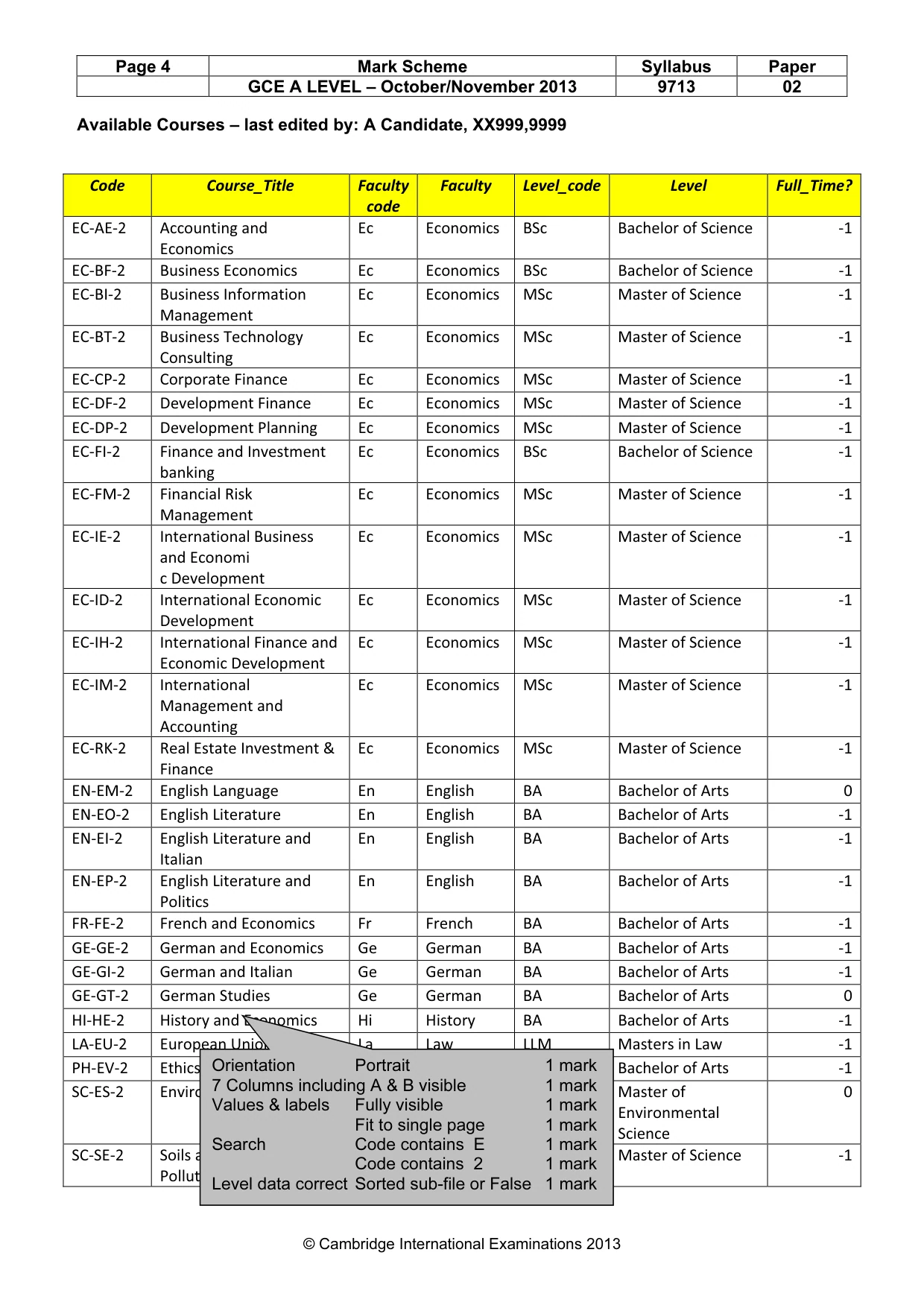
Page 4 Mark Scheme Syllabus Paper GCE A LEVEL – October/November 2013 9713 02 © Cambridge International Examinations 2013 Available Courses – last edited by: A Candidate, XX999,9999 Code Course_Title Faculty code Faculty Level_code Level Full_Time? EC-AE-2 Accounting and Economics Ec Economics BSc Bachelor of Science -1 EC-BF-2 Business Economics Ec Economics BSc Bachelor of Science -1 EC-BI-2 Business Information Management Ec Economics MSc Master of Science -1 EC-BT-2 Business Technology Consulting Ec Economics MSc Master of Science -1 EC-CP-2 Corporate Finance Ec Economics MSc Master of Science -1 EC-DF-2 Development Finance Ec Economics MSc Master of Science -1 EC-DP-2 Development Planning Ec Economics MSc Master of Science -1 EC-FI-2 Finance and Investment banking Ec Economics BSc Bachelor of Science -1 EC-FM-2 Financial Risk Management Ec Economics MSc Master of Science -1 EC-IE-2 International Business and Economi c Development Ec Economics MSc Master of Science -1 EC-ID-2 International Economic Development Ec Economics MSc Master of Science -1 EC-IH-2 International Finance and Economic Development Ec Economics MSc Master of Science -1 EC-IM-2 International Management and Accounting Ec Economics MSc Master of Science -1 EC-RK-2 Real Estate Investment & Finance Ec Economics MSc Master of Science -1 EN-EM-2 English Language En English BA Bachelor of Arts 0 EN-EO-2 English Literature En English BA Bachelor of Arts -1 EN-EI-2 English Literature and Italian En English BA Bachelor of Arts -1 EN-EP-2 English Literature and Politics En English BA Bachelor of Arts -1 FR-FE-2 French and Economics Fr French BA Bachelor of Arts -1 GE-GE-2 German and Economics Ge German BA Bachelor of Arts -1 GE-GI-2 German and Italian Ge German BA Bachelor of Arts -1 GE-GT-2 German Studies Ge German BA Bachelor of Arts 0 HI-HE-2 History and Economics Hi History BA Bachelor of Arts -1 LA-EU-2 European Union Law La Law LLM Masters in Law -1 PH-EV-2 Ethics Value & Philosophy Ph Philosophy BA Bachelor of Arts -1 SC-ES-2 Environmental Science Sc Science MEnvSci Master of Environmental Science 0 SC-SE-2 Soils and Environmental Pollution Sc Science MSc Master of Science -1 Orientation Portrait 1 mark 7 Columns including A & B visible 1 mark Values & labels Fully visible 1 mark Fit to single page 1 mark Search Code contains E 1 mark Code contains 2 1 mark Level data correct Sorted sub-file or False 1 mark
Mark scheme, page 5
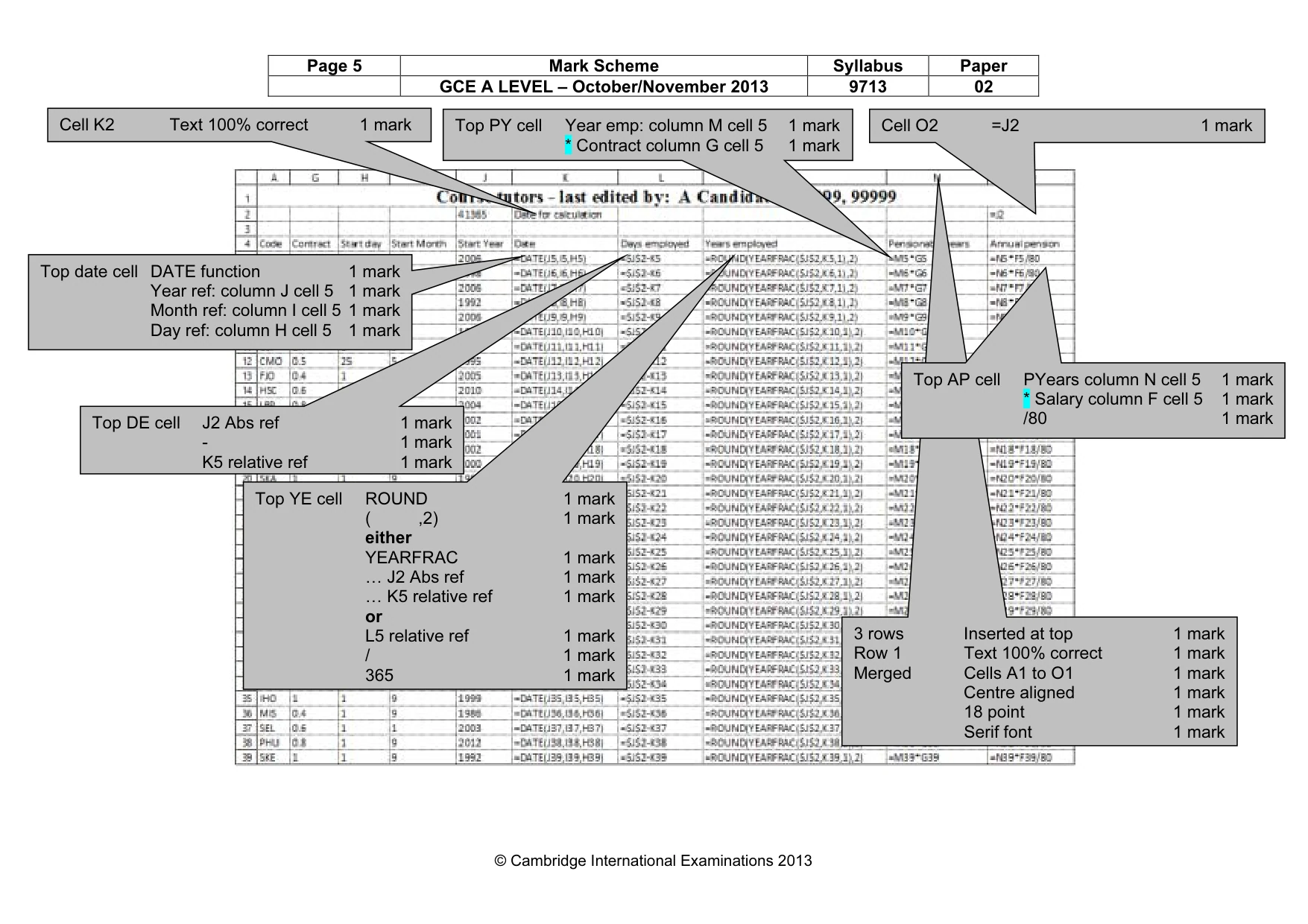
Page 5 Mark Scheme Syllabus Paper GCE A LEVEL – October/November 2013 9713 02 © Cambridge International Examinations 2013 3 rows Inserted at top 1 mark Row 1 Text 100% correct 1 mark Merged Cells A1 to O1 1 mark Centre aligned 1 mark 18 point 1 mark Serif font 1 mark Cell K2 Text 100% correct 1 mark Top YE cell ROUND 1 mark ( ,2) 1 mark either YEARFRAC 1 mark … J2 Abs ref 1 mark … K5 relative ref 1 mark or L5 relative ref 1 mark / 1 mark 365 1 mark Top DE cell J2 Abs ref 1 mark - 1 mark K5 relative ref 1 mark Top date cell DATE function 1 mark Year ref: column J cell 5 1 mark Month ref: column I cell 5 1 mark Day ref: column H cell 5 1 mark Top PY cell Year emp: column M cell 5 1 mark * Contract column G cell 5 1 mark Top AP cell PYears column N cell 5 1 mark * Salary column F cell 5 1 mark /80 1 mark Cell O2 =J2 1 mark
Mark scheme, page 6
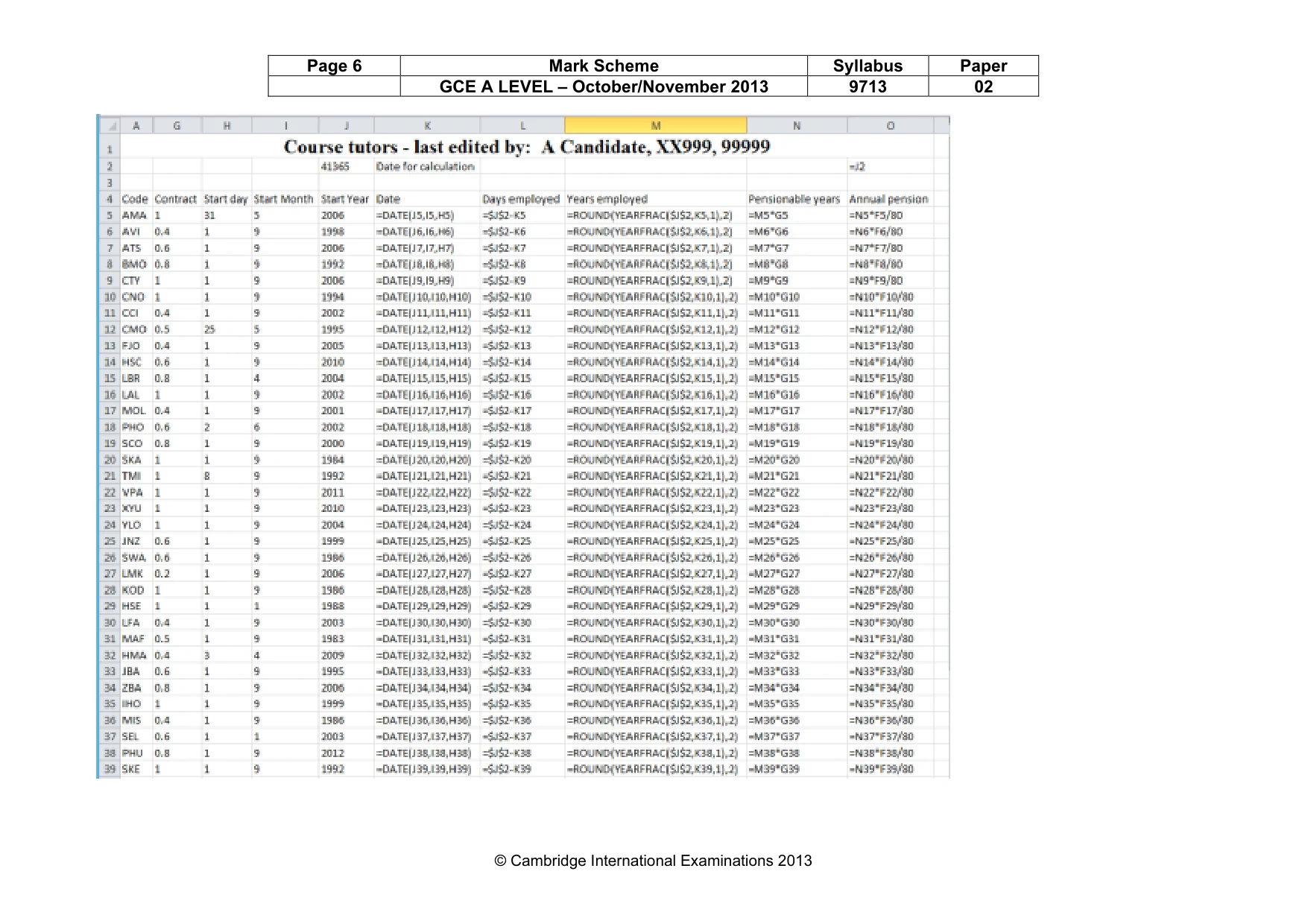
Page 6 Mark Scheme Syllabus Paper GCE A LEVEL – October/November 2013 9713 02 © Cambridge International Examinations 2013
Mark scheme, page 7
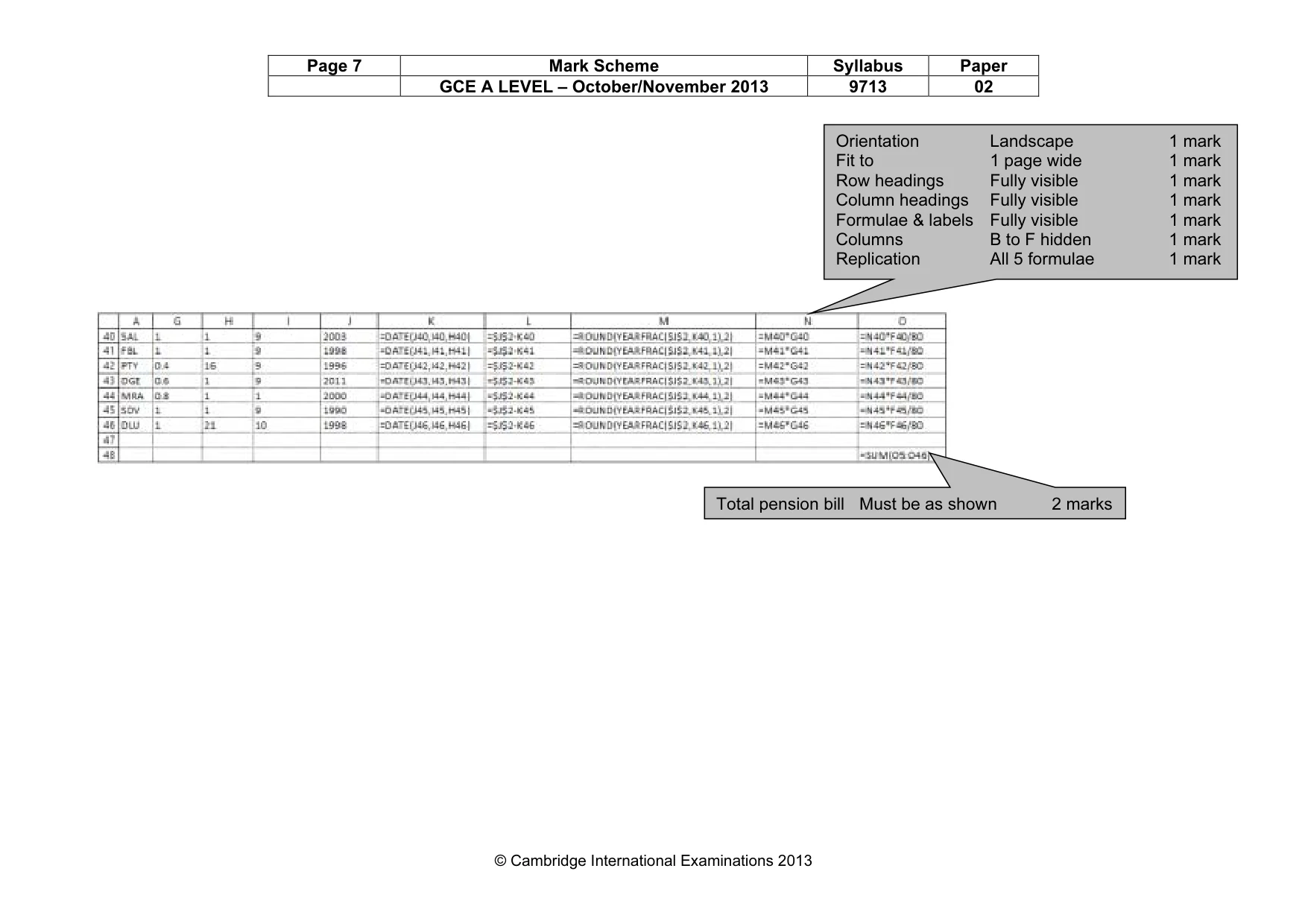
Page 7 Mark Scheme Syllabus Paper GCE A LEVEL – October/November 2013 9713 02 © Cambridge International Examinations 2013 Orientation Landscape 1 mark Fit to 1 page wide 1 mark Row headings Fully visible 1 mark Column headings Fully visible 1 mark Formulae & labels Fully visible 1 mark Columns B to F hidden 1 mark Replication All 5 formulae 1 mark Total pension bill Must be as shown 2 marks
Mark scheme, page 8
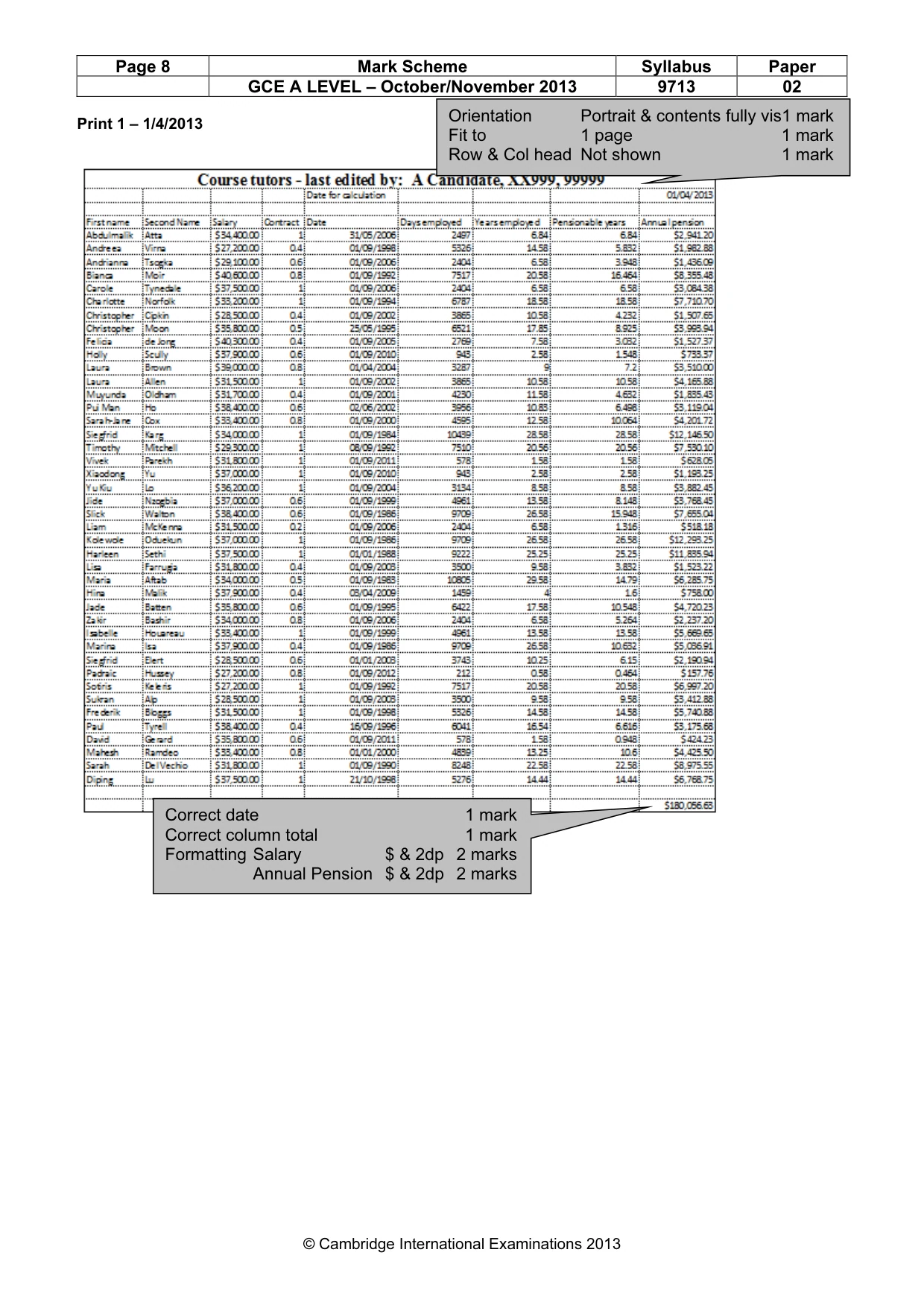
Page 8 Mark Scheme Syllabus Paper GCE A LEVEL – October/November 2013 9713 02 © Cambridge International Examinations 2013 Print 1 – 1/4/2013 Correct date 1 mark Correct column total 1 mark Formatting Salary $ & 2dp 2 marks Annual Pension $ & 2dp 2 marks Orientation Portrait & contents fully vis1 mark Fit to 1 page 1 mark Row & Col head Not shown 1 mark
Mark scheme, page 9
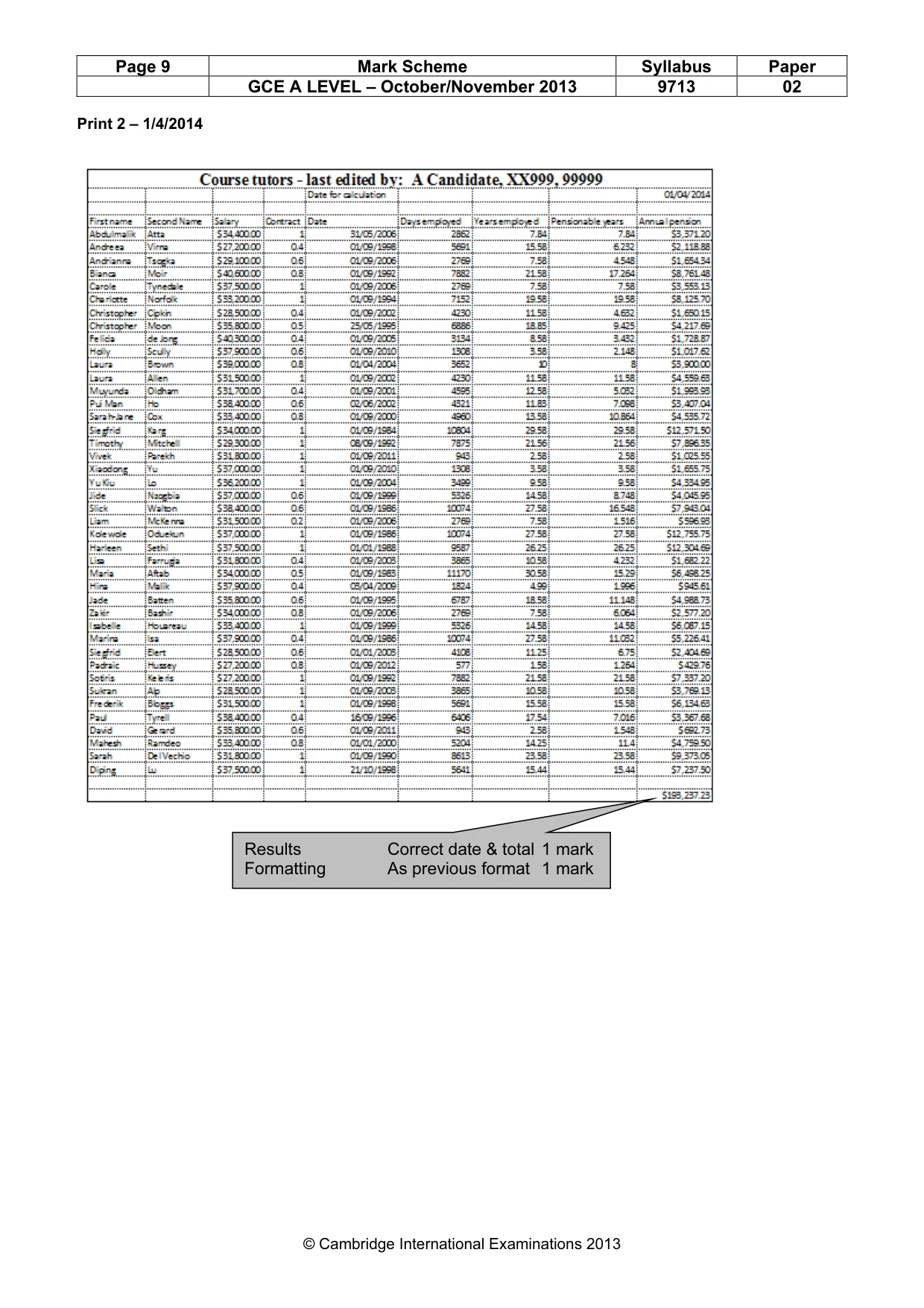
Page 9 Mark Scheme Syllabus Paper GCE A LEVEL – October/November 2013 9713 02 © Cambridge International Examinations 2013 Print 2 – 1/4/2014 Results Correct date & total 1 mark Formatting As previous format 1 mark
Mark scheme, page 10
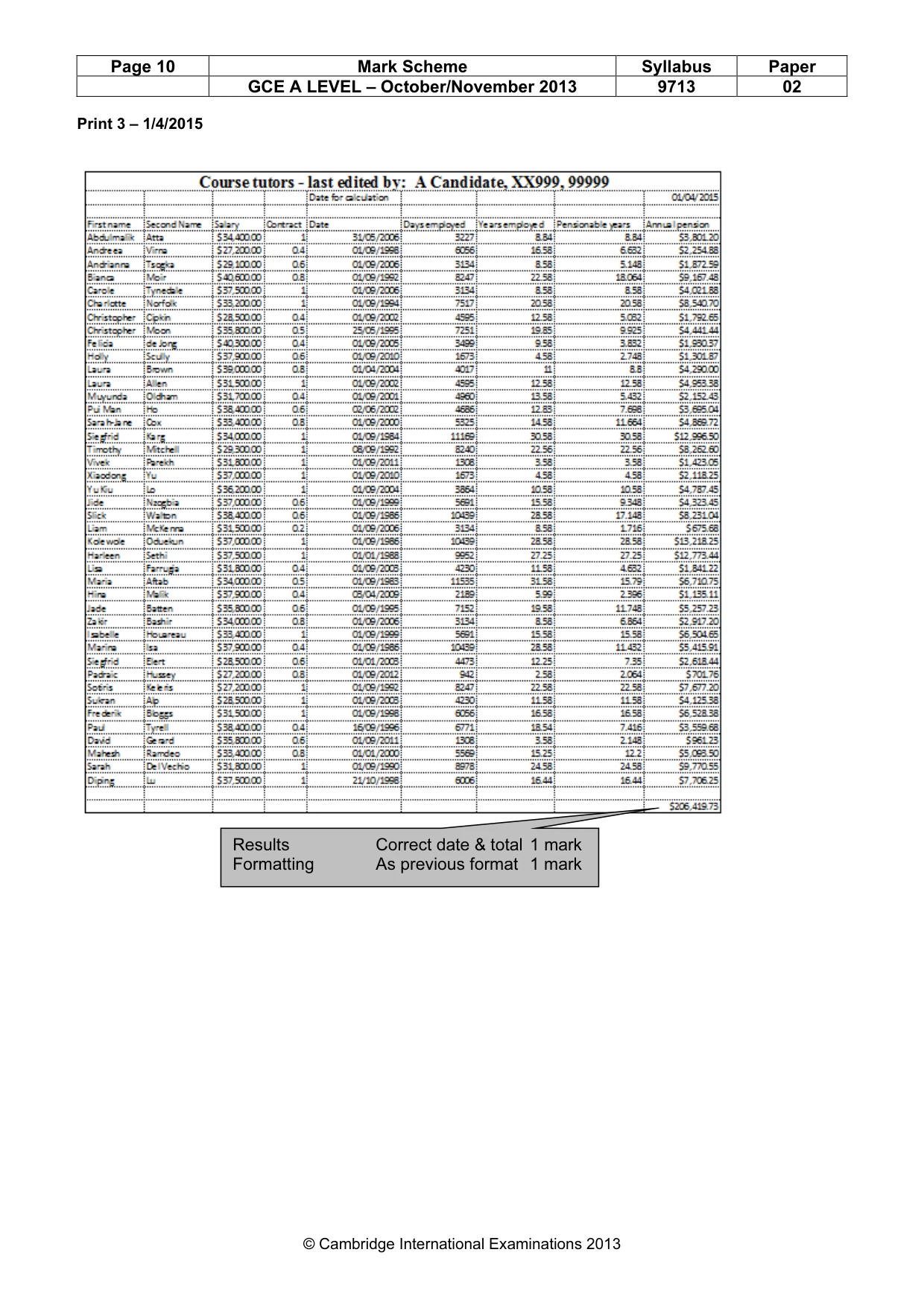
Page 10 Mark Scheme Syllabus Paper GCE A LEVEL – October/November 2013 9713 02 © Cambridge International Examinations 2013 Print 3 – 1/4/2015 Results Correct date & total 1 mark Formatting As previous format 1 mark
Mark scheme, page 11
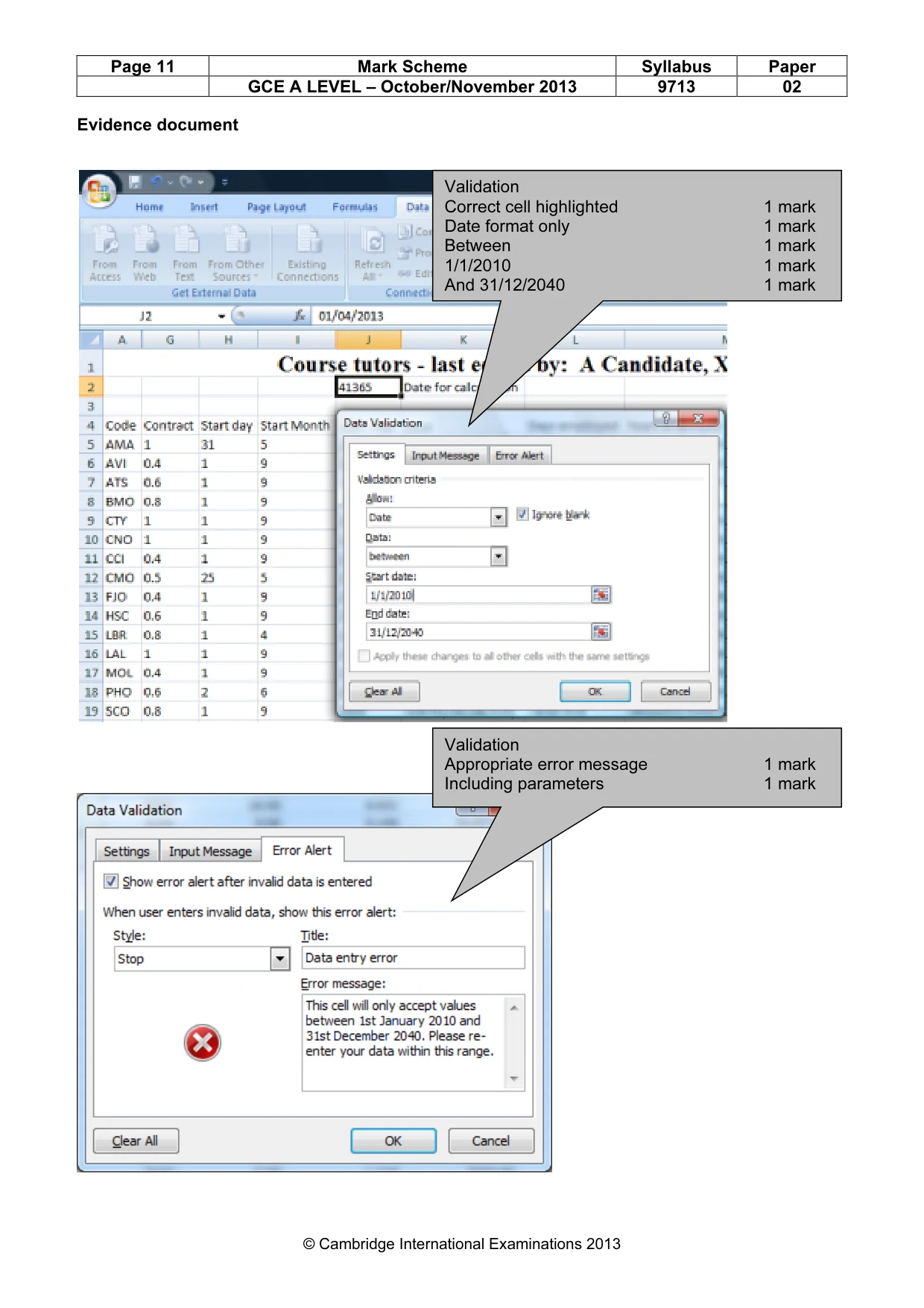
Page 11 Mark Scheme Syllabus Paper GCE A LEVEL – October/November 2013 9713 02 © Cambridge International Examinations 2013 Evidence document Validation Correct cell highlighted 1 mark Date format only 1 mark Between 1 mark 1/1/2010 1 mark And 31/12/2040 1 mark Validation Appropriate error message 1 mark Including parameters 1 mark
Mark scheme, page 12
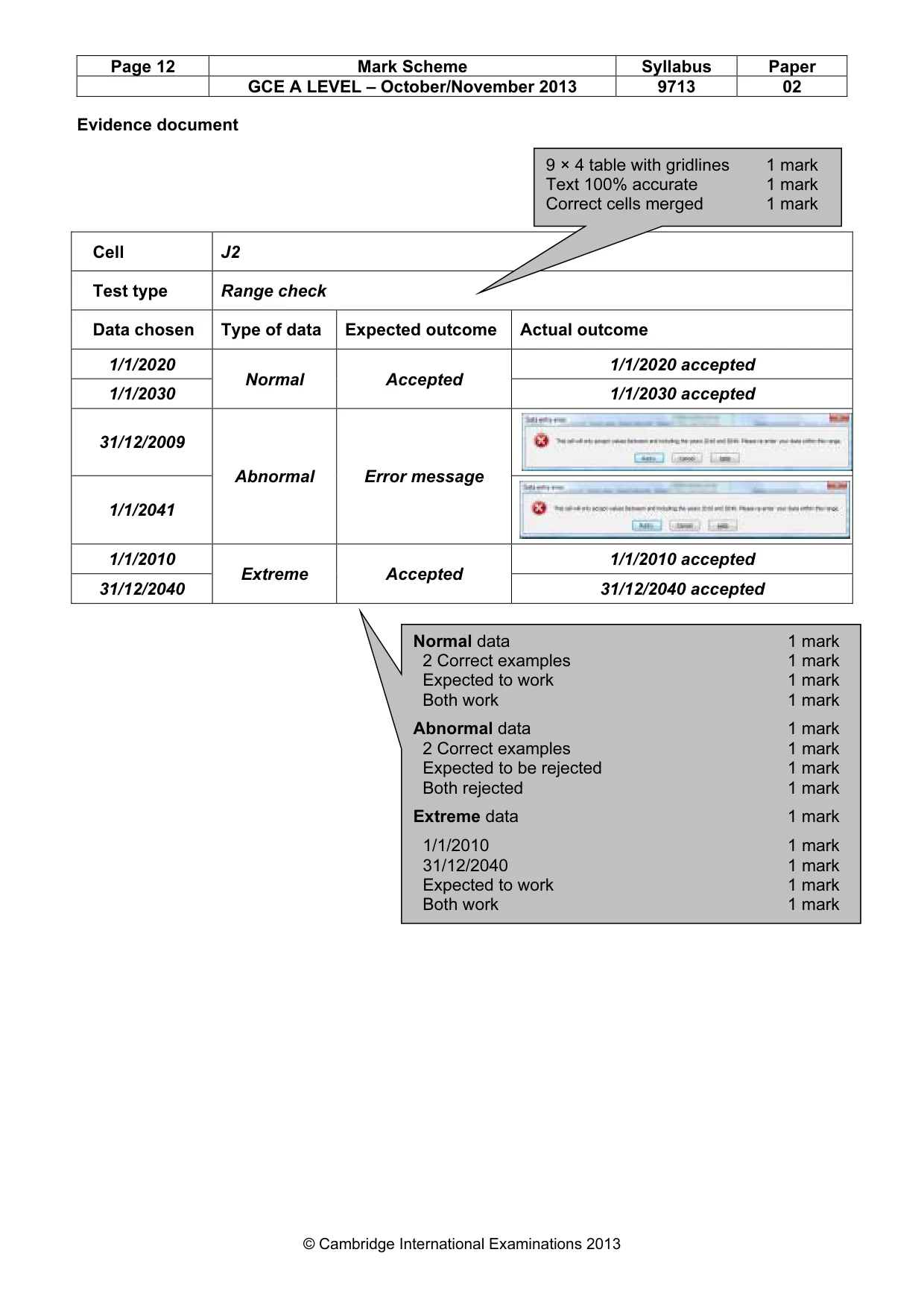
Page 12 Mark Scheme Syllabus Paper GCE A LEVEL – October/November 2013 9713 02 © Cambridge International Examinations 2013 Evidence document Cell J2 Test type Range check Data chosen Type of data Expected outcome Actual outcome 1/1/2020 Normal Accepted 1/1/2020 accepted 1/1/2030 1/1/2030 accepted 31/12/2009 Abnormal Error message 1/1/2041 1/1/2010 Extreme Accepted 1/1/2010 accepted 31/12/2040 31/12/2040 accepted 9 × 4 table with gridlines 1 mark Text 100% accurate 1 mark Correct cells merged 1 mark Normal data 1 mark 2 Correct examples 1 mark Expected to work 1 mark Both work 1 mark Abnormal data 1 mark 2 Correct examples 1 mark Expected to be rejected 1 mark Both rejected 1 mark Extreme data 1 mark 1/1/2010 1 mark 31/12/2040 1 mark Expected to work 1 mark Both work 1 mark
Mark scheme, page 13
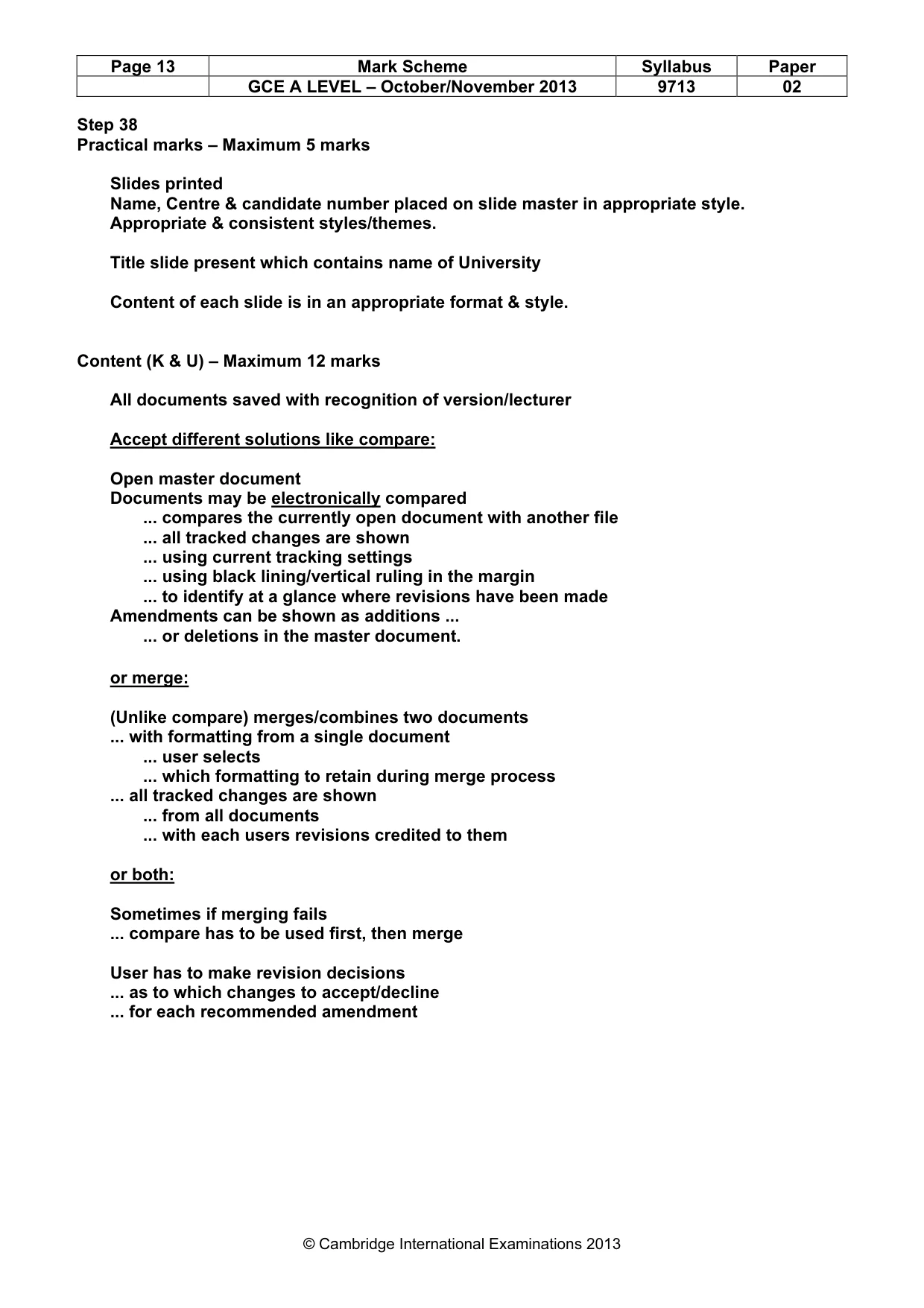
Page 13 Mark Scheme Syllabus Paper GCE A LEVEL – October/November 2013 9713 02 © Cambridge International Examinations 2013 Step 38 Practical marks – Maximum 5 marks Slides printed Name, Centre & candidate number placed on slide master in appropriate style. Appropriate & consistent styles/themes. Title slide present which contains name of University Content of each slide is in an appropriate format & style. Content (K & U) – Maximum 12 marks All documents saved with recognition of version/lecturer Accept different solutions like compare: Open master document Documents may be electronically compared ... compares the currently open document with another file ... all tracked changes are shown ... using current tracking settings ... using black lining/vertical ruling in the margin ... to identify at a glance where revisions have been made Amendments can be shown as additions ... ... or deletions in the master document. or merge: (Unlike compare) merges/combines two documents ... with formatting from a single document ... user selects ... which formatting to retain during merge process ... all tracked changes are shown ... from all documents ... with each users revisions credited to them or both: Sometimes if merging fails ... compare has to be used first, then merge User has to make revision decisions ... as to which changes to accept/decline ... for each recommended amendment
What you needed in this session
Cambridge’s own grade thresholds for 2013 Oct/Nov, Paper 2 · Variant 1. A higher threshold means an easier paper — the bar moves with how the cohort did.