Cambridge A Level Applied Information and Communication Technology 9713 — 2016 Oct/Nov Paper 2 · Variant 1
9713/21/O/N/16 · 120 marks · ≈135 min
The question paper and its mark scheme, free to read here and free to download. This is Cambridge’s own paper, exactly as it was sat.
Question paper8 pages


Mark scheme15 pages
Answers below. Sit the paper first if you are practising.
Paper as text
Question paper, page 1
This document consists of 6 printed pages and 2 blank pages. DC (LK/CGW) 115913/5 © UCLES 2016 [Turn over Cambridge International Examinations Cambridge International Advanced Subsidiary and Advanced Level * 7 1 1 0 3 7 3 2 1 1 * APPLIED INFORMATION AND COMMUNICATION TECHNOLOGY 9713/02 Paper 2 Practical Test October/November 2016 2 hours 30 minutes Additional Materials: Candidate Source Files READ THESE INSTRUCTIONS FIRST Make sure that your Centre number, candidate number and name are written at the top of this page and are clearly visible on every printout, before it is sent to the printer. Printouts with handwritten candidate information will not be marked. DO NOT WRITE IN ANY BARCODES. Carry out every instruction in each task. At the end of the exam put this Question Paper and all your printouts into the Assessment Record Folder. The number of marks is given in brackets [ ] at the end of each question or part question. Any businesses described in this paper are entirely fictitious.
Question paper, page 2
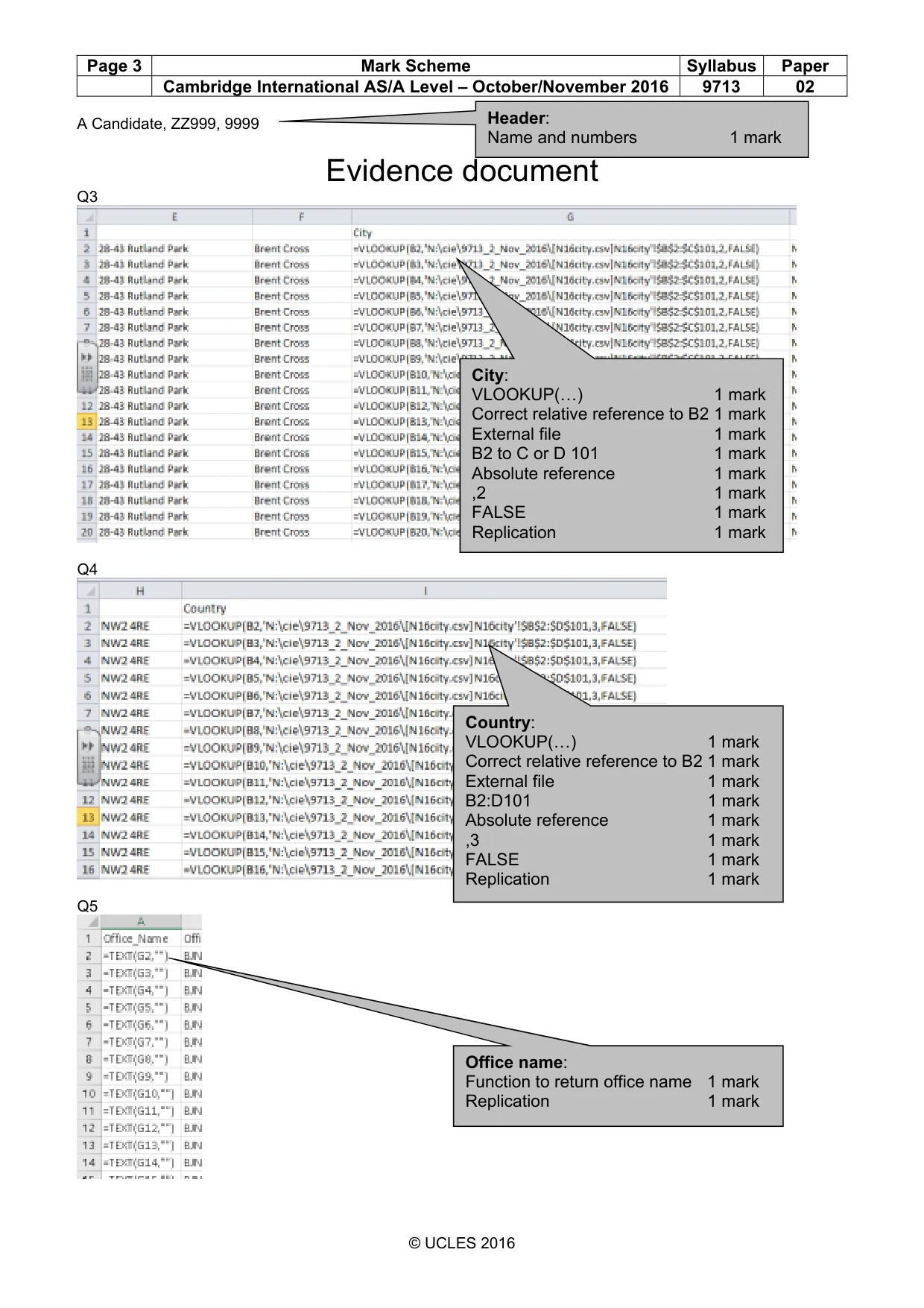
2 9713/02/O/N/16 © UCLES 2016 You work for Tawara Music who produce and sell music. The company has regional offices in 9 different cities around the world. Spreadsheet data from 8 of these offices has been combined into a file written using comma separated values. One office has sent the data in a document. You are going to manipulate this data to create a spreadsheet and use this to develop a relational database. This will be used to record and extract information about employees. You must use the most efficient method to solve each task. 1 You will provide evidence of your work, including screen shots at various stages. Make sure that these screen shots can be easily read. Open the document N16_evidence.rtf Place your name, Centre number and candidate number in the header. Save this Evidence Document with the filename: CentreNumber_CandidateNumber_Evidence e.g. ZZ999_99_Evidence [1] 2 Open the files N16staff.csv and N16data.rtf and examine the data. Manipulate the data in N16data.rtf to match the structure of N16staff.csv Add this data to the end of the file N16staff and save this file as a spreadsheet. Make sure that any omissions in the original data are corrected. Place your name, Centre number and candidate number in the header. Print only rows 140 to 157 of the spreadsheet on a single page showing the values. [8] 3 For each employee, use a function in the City column to look up the city name from the file N16city.csv Show evidence of your method in your Evidence Document. [8] 4 For each employee, use a function in the Country column to look up the country name from the file N16city.csv Show evidence of your method in your Evidence Document. [8] 5 For each employee, use a function in the Office name column to duplicate the value held in the City column. Show evidence of your method in your Evidence Document. [2] 6 In the Full name column for each employee, use a function to display each name in the format Surname: Forename Show evidence of your method in your Evidence Document. [6]
Question paper, page 3
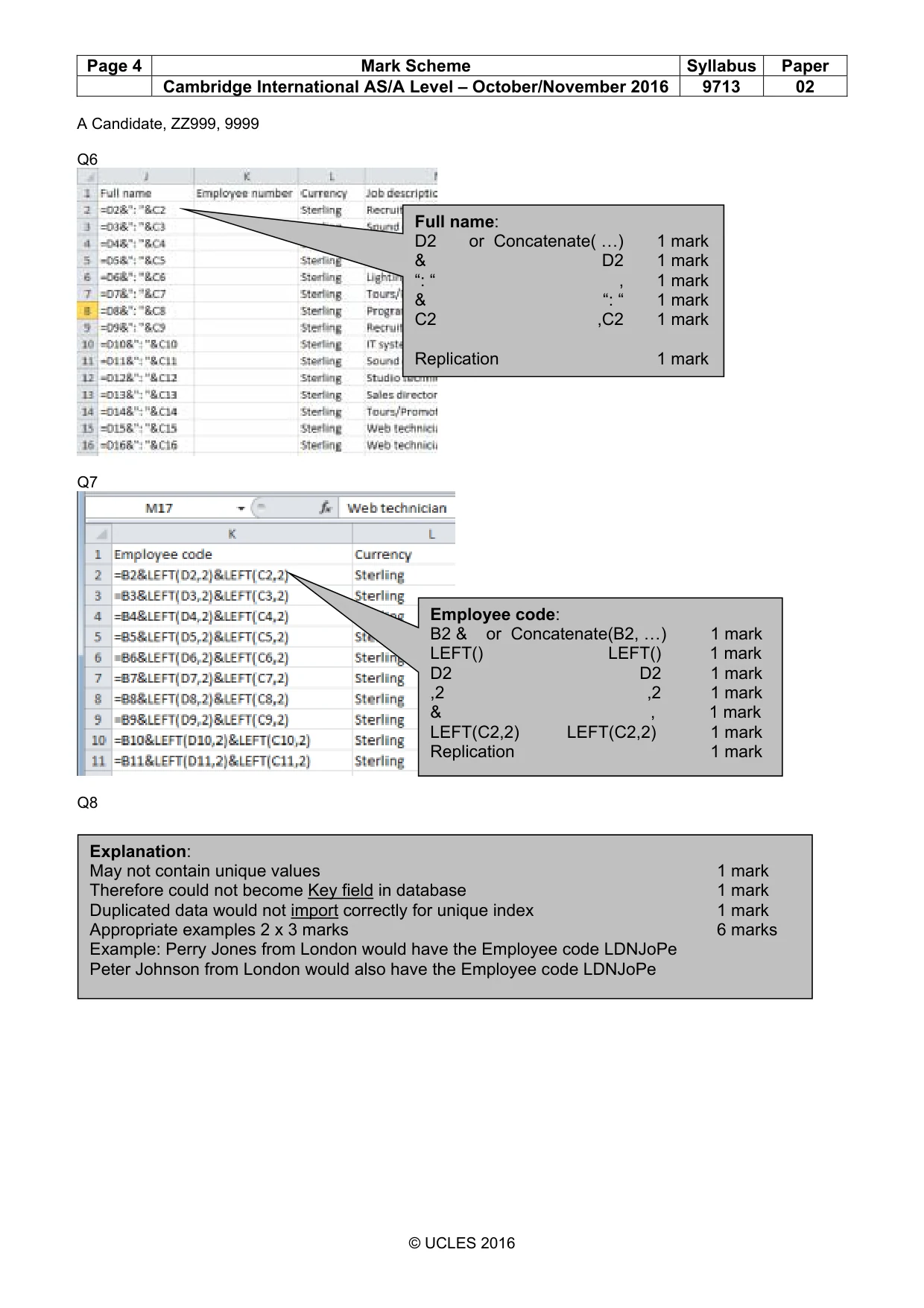
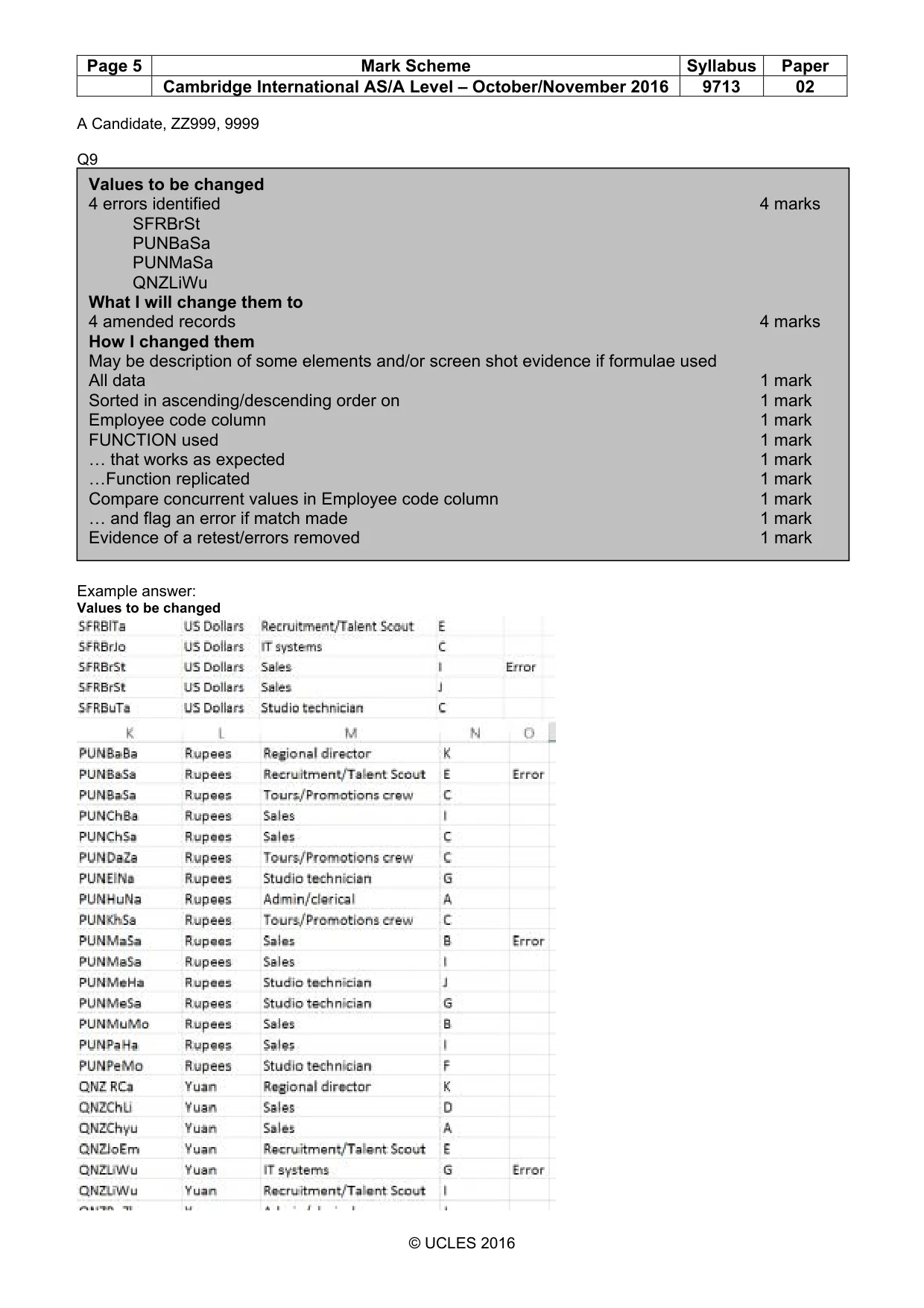
3 9713/02/O/N/16 © UCLES 2016 [Turn over 7 Use a formula to automatically generate an Employee code for each employee. The Employee code is often a 7 digit code, but can be 8 digits long. It is the employee’s Office code followed by the first 2 letters of their Surname followed by the first 2 letters of their Forename. e.g. if the Office code is LDN, the Surname is Jones and the Forename is Peter, the employee code will be LDNJoPe Show evidence of your method in your Evidence Document. Save this file. [7] 8 In your Evidence Document, explain in no more than 50 words, with your own examples, why this structure for an employee code would not be suitable for use in a relational database. [9] 9 Examine the values in the Employee code column. Find the employee codes that would cause a problem in creating efficient relationships in a database. Place in your Evidence Document, either text or screen shots to show the values that you will change. Edit, but do not remove, these values. Place in your Evidence Document, either text or screen shots to show the amended values. Place in your Evidence Document, a description and screen shots to show how you found and changed these values. Save this spreadsheet. [17] 10 Create a new database with a table called Staff using the following field names: Employee_Code Office_Code Full_Name Job_Description Pay_Grade Examine the data saved in step 9 and select the most appropriate data types for each field. Import only the required data. Set the Employee_Code as the primary key. Show evidence of the table structure and contents in your Evidence Document. [10]
Question paper, page 4
4 9713/02/O/N/16 © UCLES 2016 11 Create a new table called Office using the contents of the Office code, Office name, Currency and 5 address columns from the file saved in step 9. Choose your own field names using the naming conventions shown in step 10. Examine the data file saved in step 9 and select the most appropriate data types for each field. Import only the required data. Make sure that no data is duplicated. Set the most appropriate key field. Show evidence of the table structure and contents in your Evidence Document. [13] 12 The Pay_Grade field in the staff table must contain 1 letter. Restrict the data entry for this field to any 1 letter. Include in your Evidence Document screen shots that show how you have restricted the data entry. [3] 13 Create an appropriate relationship between these tables. Include in your Evidence Document screen shot(s) that show the relationship between these tables. Make sure that there is evidence of the field names and type of relationship you have created. [3]
Question paper, page 5
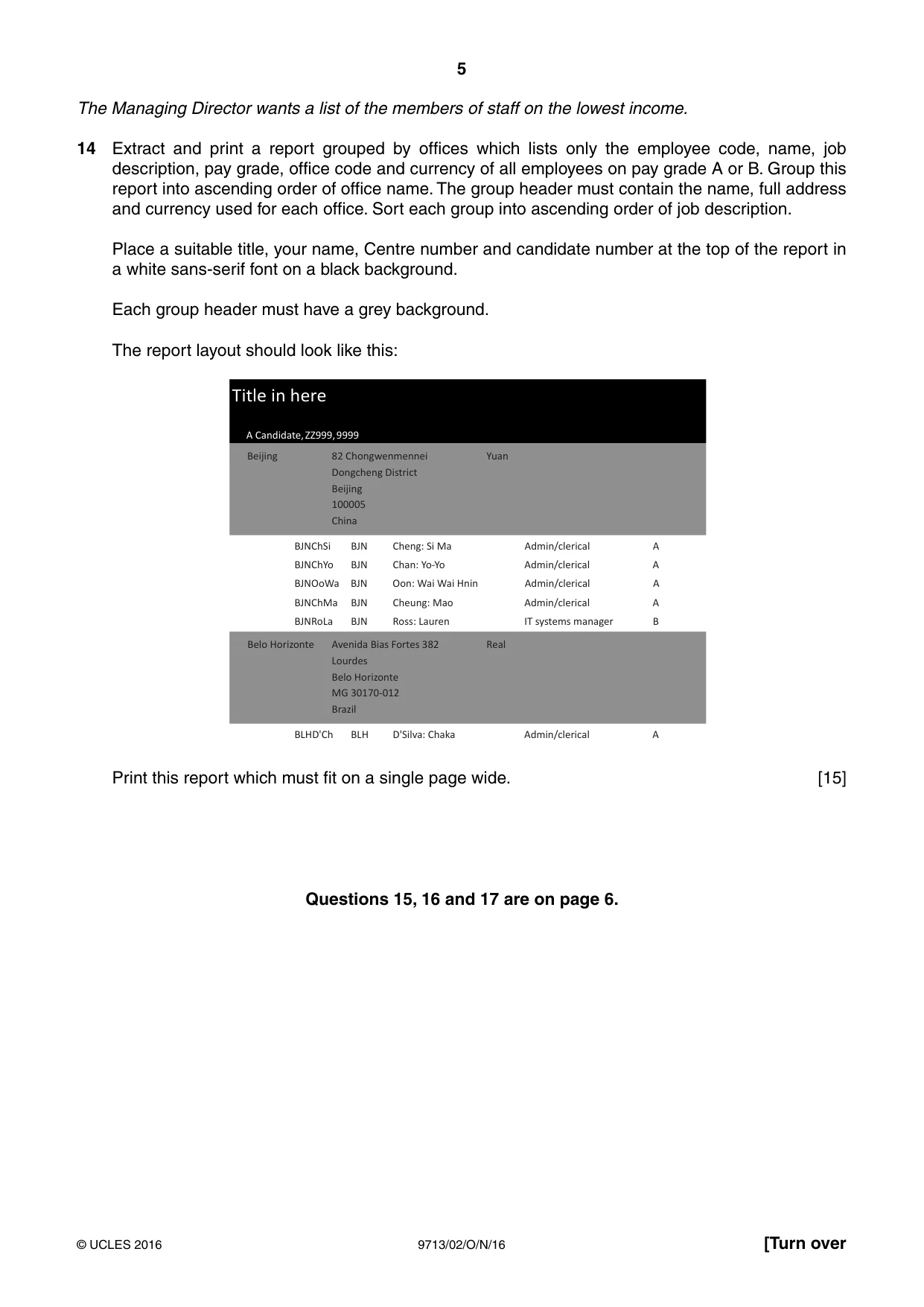
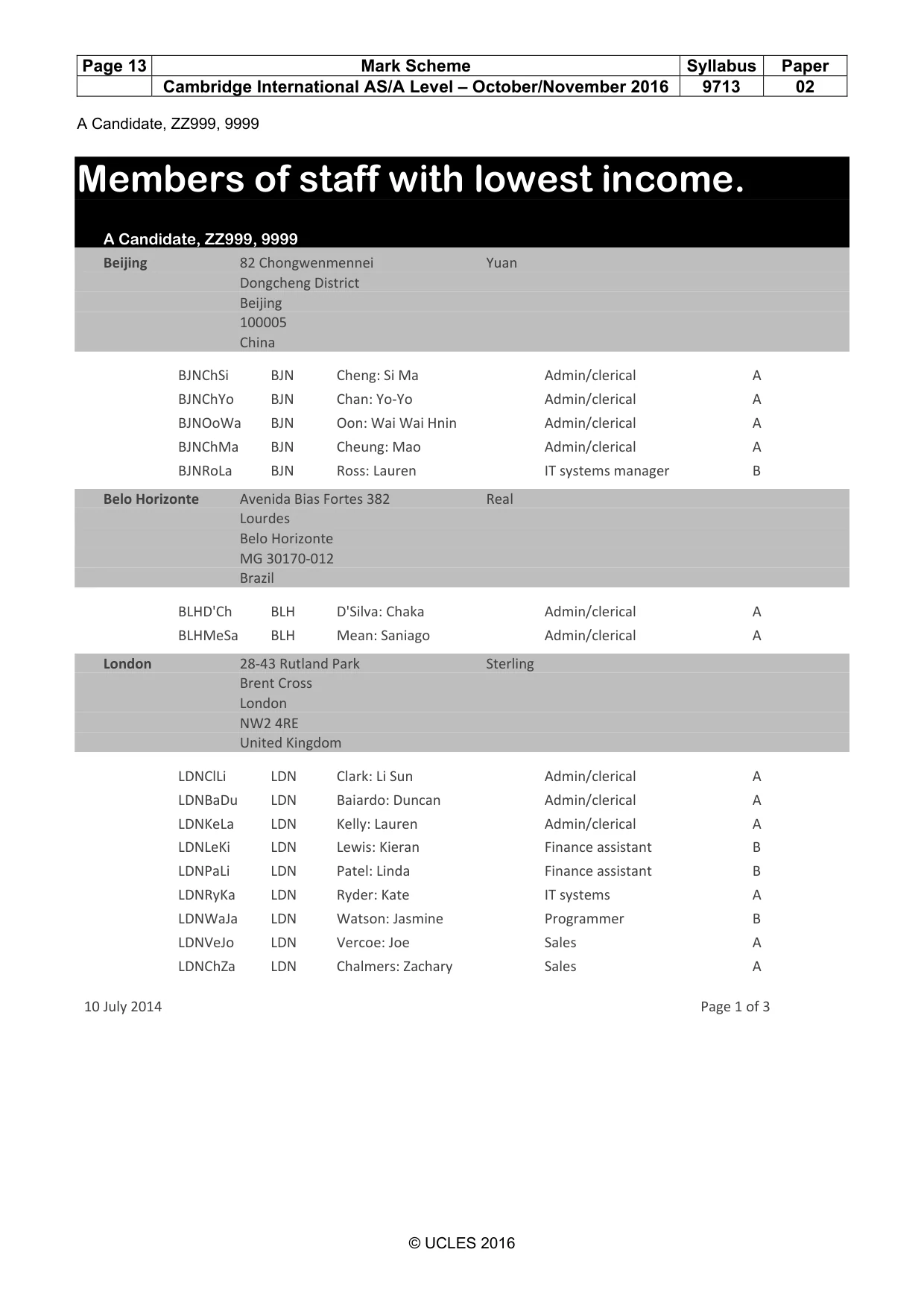
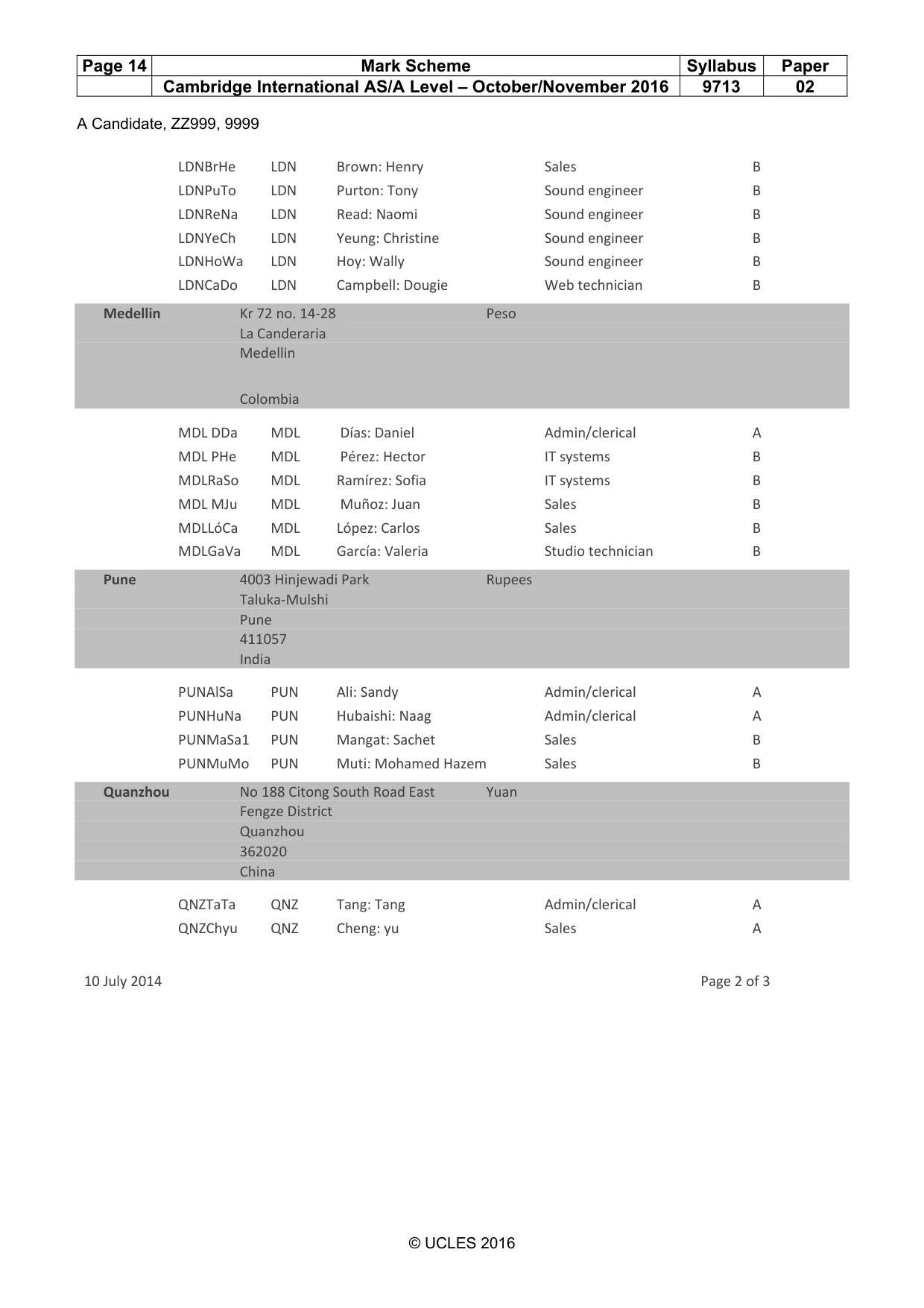
5 9713/02/O/N/16 © UCLES 2016 [Turn over The Managing Director wants a list of the members of staff on the lowest income. 14 Extract and print a report grouped by offices which lists only the employee code, name, job description, pay grade, office code and currency of all employees on pay grade A or B. Group this report into ascending order of office name. The group header must contain the name, full address and currency used for each office. Sort each group into ascending order of job description. Place a suitable title, your name, Centre number and candidate number at the top of the report in a white sans-serif font on a black background. Each group header must have a grey background. The report layout should look like this: Title in here A Candidate, ZZ999, 9999 Beijing Yuan 82 Chongwenmennei Dongcheng District Beijing 100005 China Avenida Bias Fortes 382 Lourdes Belo Horizonte MG 30170-012 Brazil Real Belo Horizonte BJNChSi BJN Cheng: Si Ma Admin/clerical A BJNChYo BJN Chan: Yo-Yo Admin/clerical A BJNOoWa BJN Oon: Wai Wai Hnin Admin/clerical A BJNChMa BJN Cheung: Mao Admin/clerical A BJNRoLa BJN Ross: Lauren IT systems manager B BLHD'Ch BLH D'Silva: Chaka Admin/clerical A Print this report which must fit on a single page wide. [15] Questions 15, 16 and 17 are on page 6.
Question paper, page 6
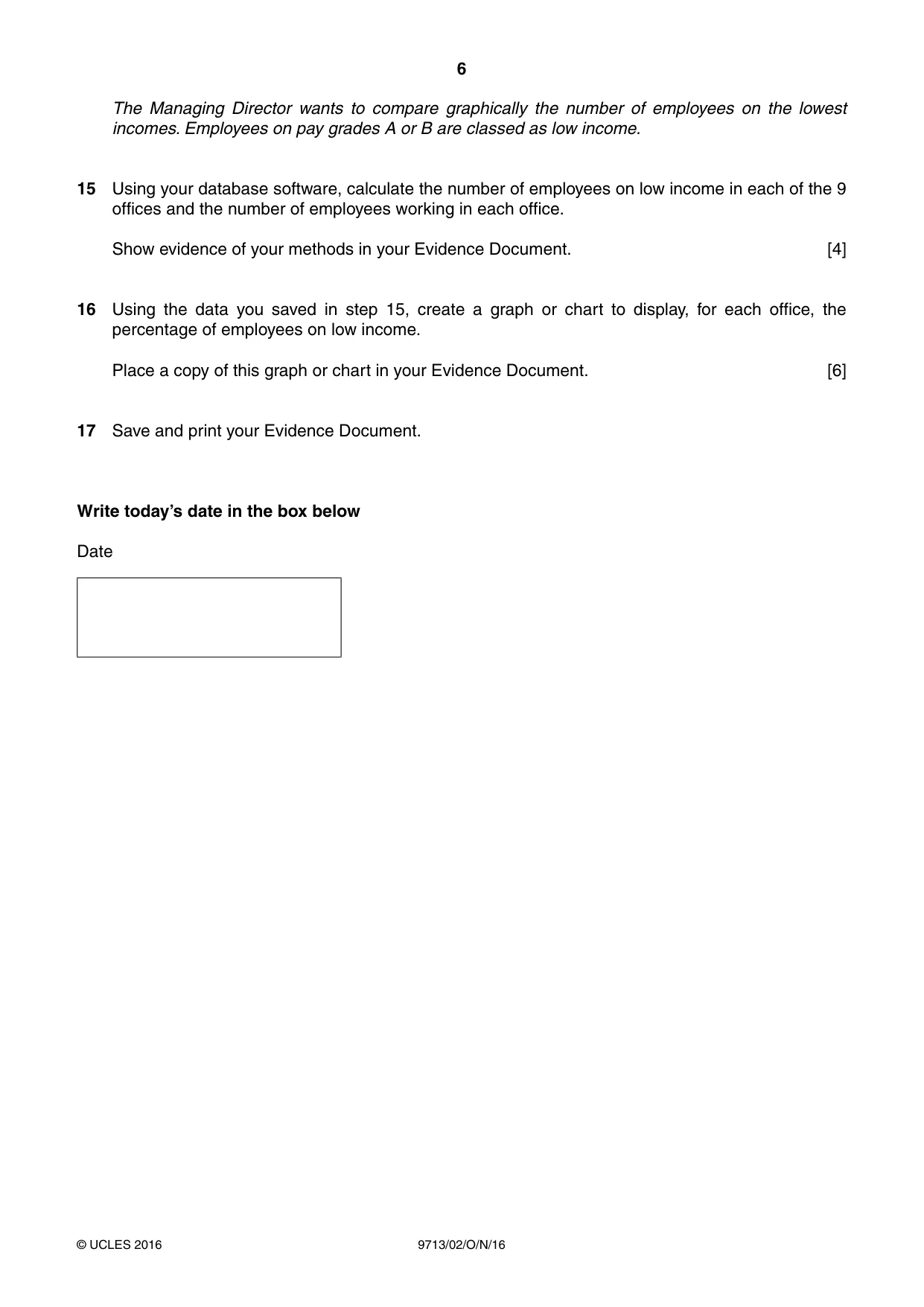
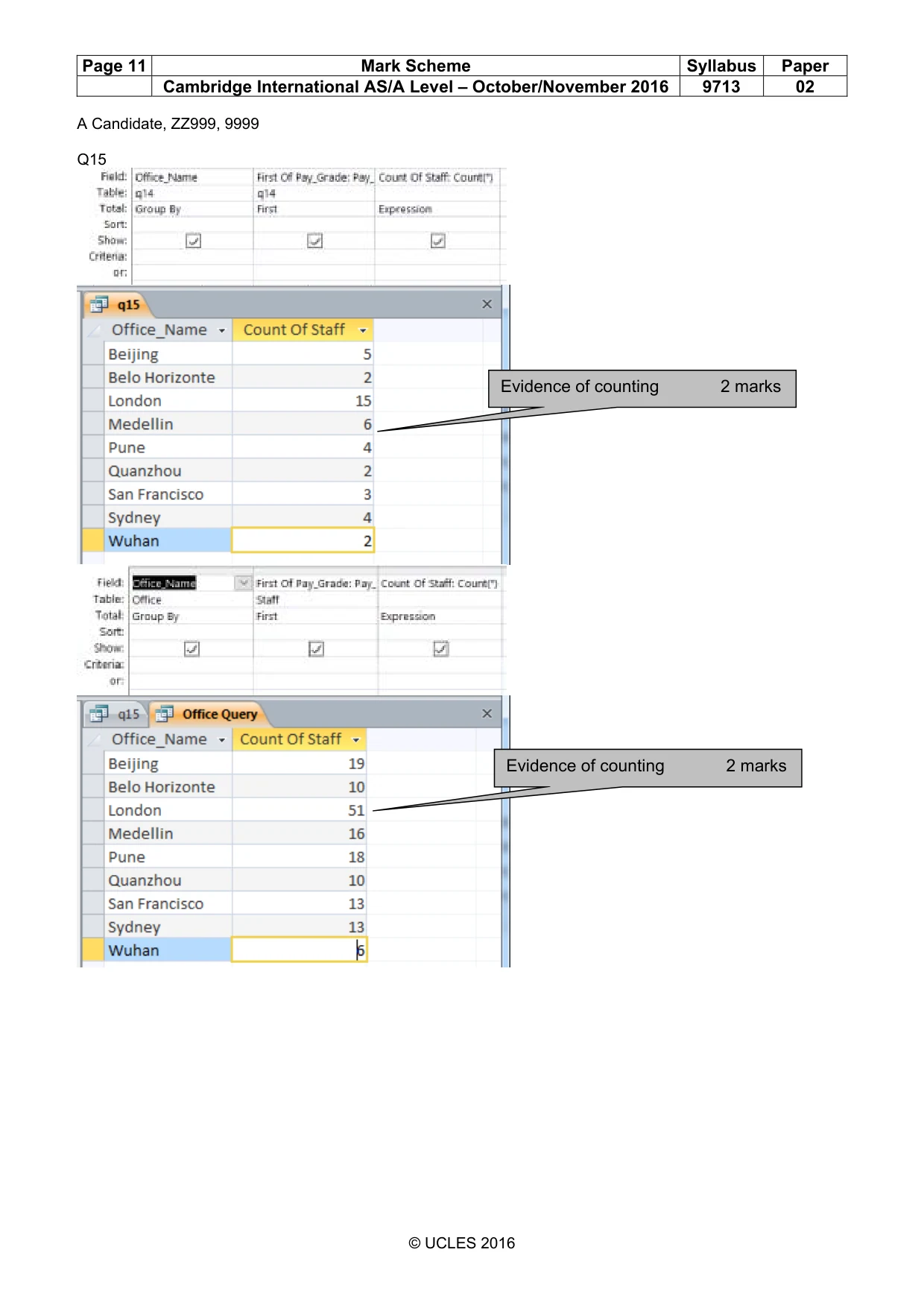
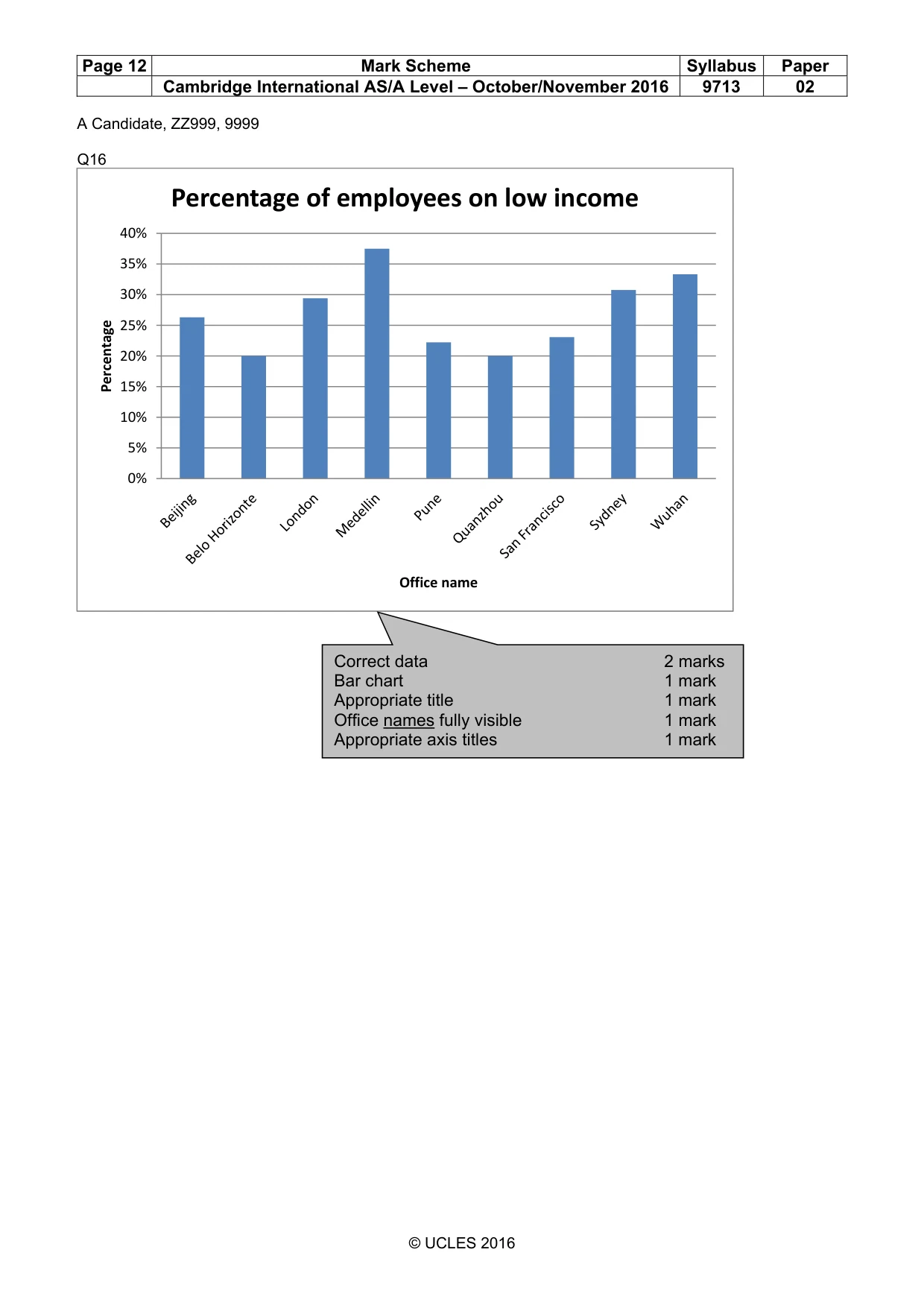
6 9713/02/O/N/16 © UCLES 2016 The Managing Director wants to compare graphically the number of employees on the lowest incomes. Employees on pay grades A or B are classed as low income. 15 Using your database software, calculate the number of employees on low income in each of the 9 offices and the number of employees working in each office. Show evidence of your methods in your Evidence Document. [4] 16 Using the data you saved in step 15, create a graph or chart to display, for each office, the percentage of employees on low income. Place a copy of this graph or chart in your Evidence Document. [6] 17 Save and print your Evidence Document. Write today’s date in the box below Date
Question paper, page 7
7 9713/02/O/N/16 © UCLES 2016 BLANK PAGE
Question paper, page 8
8 9713/02/O/N/16 © UCLES 2016 Permission to reproduce items where third-party owned material protected by copyright is included has been sought and cleared where possible. Every reasonable effort has been made by the publisher (UCLES) to trace copyright holders, but if any items requiring clearance have unwittingly been included, the publisher will be pleased to make amends at the earliest possible opportunity. To avoid the issue of disclosure of answer-related information to candidates, all copyright acknowledgements are reproduced online in the Cambridge International Examinations Copyright Acknowledgements Booklet. This is produced for each series of examinations and is freely available to download at www.cie.org.uk after the live examination series. Cambridge International Examinations is part of the Cambridge Assessment Group. Cambridge Assessment is the brand name of University of Cambridge Local Examinations Syndicate (UCLES), which is itself a department of the University of Cambridge. BLANK PAGE
Mark scheme, page 1
® IGCSE is the registered trademark of Cambridge International Examinations. This document consists of 15 printed pages. © UCLES 2016 [Turn over Cambridge International Examinations Cambridge International Advanced Subsidiary and Advanced Level APPLIED INFORMATION AND COMMUNICATION TECHNOLOGY 9713/02 Paper 2 Practical Test A October/November 2016 MARK SCHEME Maximum Mark: 120 Published This mark scheme is published as an aid to teachers and candidates, to indicate the requirements of the examination. It shows the basis on which Examiners were instructed to award marks. It does not indicate the details of the discussions that took place at an Examiners’ meeting before marking began, which would have considered the acceptability of alternative answers. Mark schemes should be read in conjunction with the question paper and the Principal Examiner Report for Teachers. Cambridge will not enter into discussions about these mark schemes. Cambridge is publishing the mark schemes for the October/November 2016 series for most Cambridge IGCSE®, Cambridge International A and AS Level components and some Cambridge O Level components.
Mark scheme, page 2
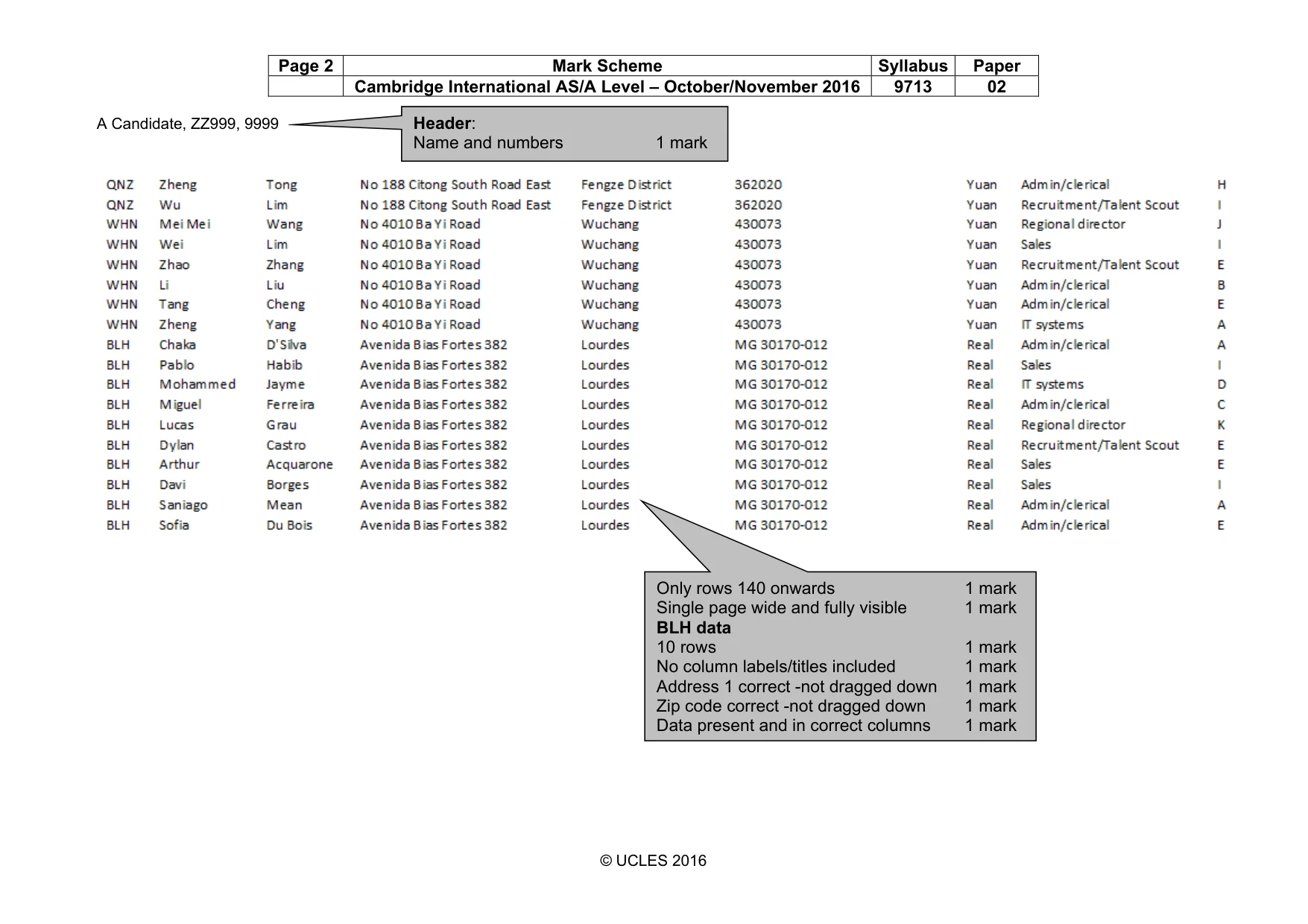
Page 2 Mark Scheme Syllabus Paper Cambridge International AS/A Level – October/November 2016 9713 02 A Candidate, ZZ999, 9999 © UCLES 2016 Header: Name and numbers 1 mark Only rows 140 onwards 1 mark Single page wide and fully visible 1 mark BLH data 10 rows 1 mark No column labels/titles included 1 mark Address 1 correct -not dragged down 1 mark Zip code correct -not dragged down 1 mark Data present and in correct columns 1 mark
Mark scheme, page 3
Page 3 Mark Scheme Syllabus Paper Cambridge International AS/A Level – October/November 2016 9713 02 A Candidate, ZZ999, 9999 © UCLES 2016 Evidence document Q3 Q4 Q5 City: VLOOKUP(…) 1 mark Correct relative reference to B2 1 mark External file 1 mark B2 to C or D 101 1 mark Absolute reference 1 mark ,2 1 mark FALSE 1 mark Replication 1 mark Header: Name and numbers 1 mark Country: VLOOKUP(…) 1 mark Correct relative reference to B2 1 mark External file 1 mark B2:D101 1 mark Absolute reference 1 mark ,3 1 mark FALSE 1 mark Replication 1 mark Office name: Function to return office name 1 mark Replication 1 mark
Mark scheme, page 4
Page 4 Mark Scheme Syllabus Paper Cambridge International AS/A Level – October/November 2016 9713 02 A Candidate, ZZ999, 9999 © UCLES 2016 Q6 Q7 Q8 Full name: D2 or Concatenate( …) 1 mark & D2 1 mark “: “ , 1 mark & “: “ 1 mark C2 ,C2 1 mark Replication 1 mark Employee code: B2 & or Concatenate(B2, …) 1 mark LEFT() LEFT() 1 mark D2 D2 1 mark ,2 ,2 1 mark & , 1 mark LEFT(C2,2) LEFT(C2,2) 1 mark Replication 1 mark Explanation: May not contain unique values 1 mark Therefore could not become Key field in database 1 mark Duplicated data would not import correctly for unique index 1 mark Appropriate examples 2 x 3 marks 6 marks Example: Perry Jones from London would have the Employee code LDNJoPe Peter Johnson from London would also have the Employee code LDNJoPe
Mark scheme, page 5
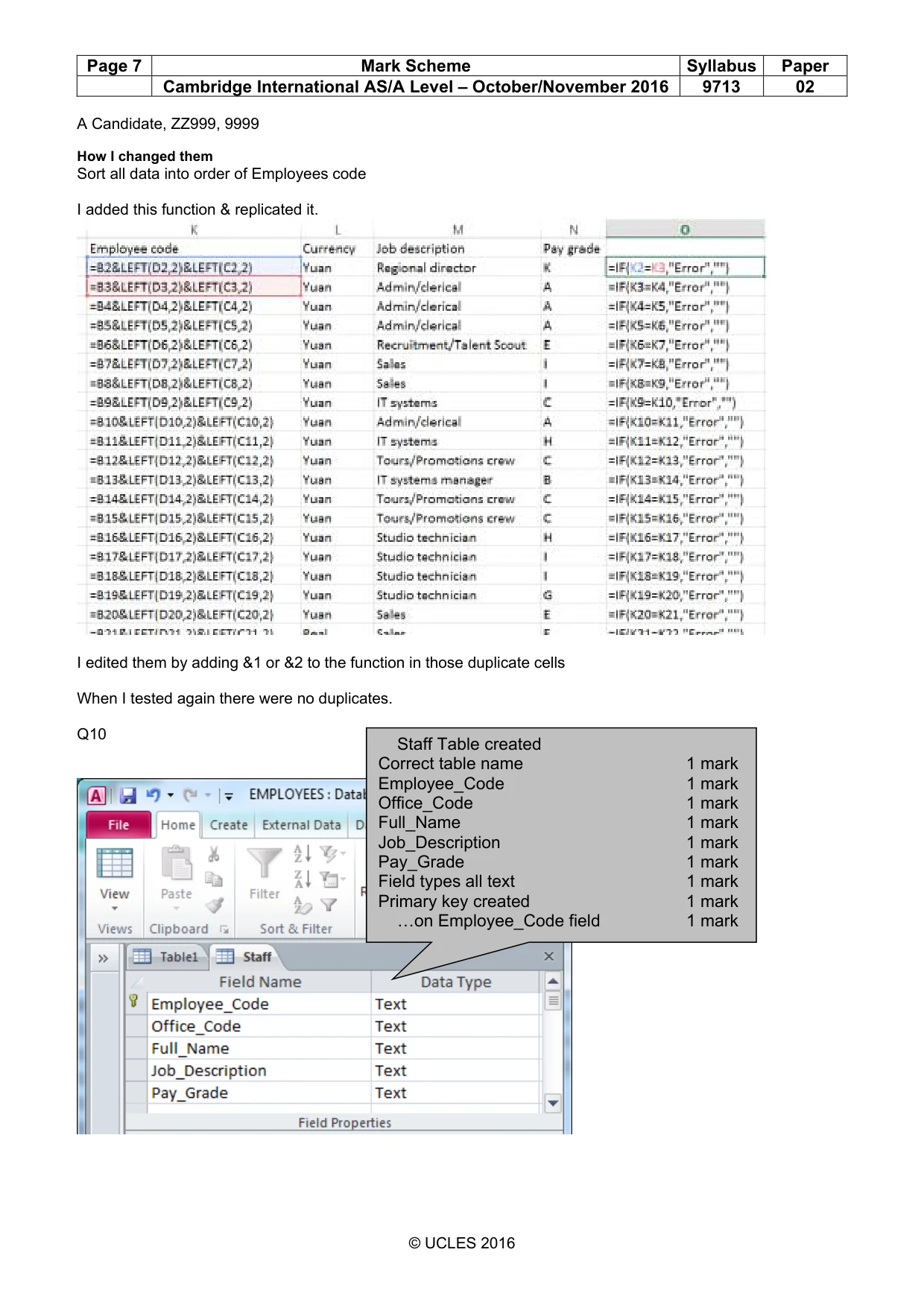
Page 5 Mark Scheme Syllabus Paper Cambridge International AS/A Level – October/November 2016 9713 02 A Candidate, ZZ999, 9999 © UCLES 2016 Q9 Example answer: Values to be changed Values to be changed 4 errors identified 4 marks SFRBrSt PUNBaSa PUNMaSa QNZLiWu What I will change them to 4 amended records 4 marks How I changed them May be description of some elements and/or screen shot evidence if formulae used All data 1 mark Sorted in ascending/descending order on 1 mark Employee code column 1 mark FUNCTION used 1 mark … that works as expected 1 mark …Function replicated 1 mark Compare concurrent values in Employee code column 1 mark … and flag an error if match made 1 mark Evidence of a retest/errors removed 1 mark
Mark scheme, page 6
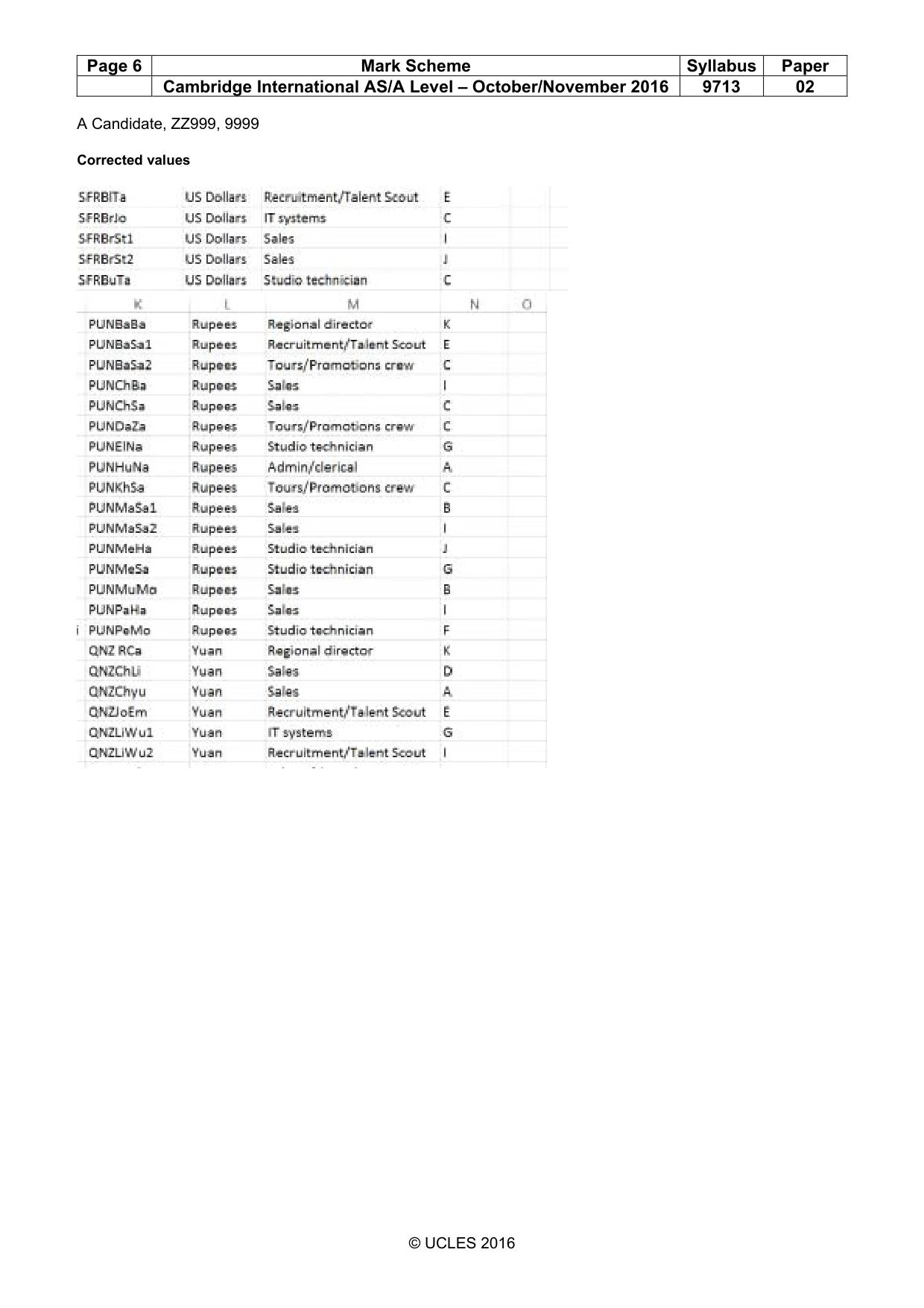
Page 6 Mark Scheme Syllabus Paper Cambridge International AS/A Level – October/November 2016 9713 02 A Candidate, ZZ999, 9999 © UCLES 2016 Corrected values
Mark scheme, page 7
Page 7 Mark Scheme Syllabus Paper Cambridge International AS/A Level – October/November 2016 9713 02 A Candidate, ZZ999, 9999 © UCLES 2016 How I changed them Sort all data into order of Employees code I added this function & replicated it. I edited them by adding &1 or &2 to the function in those duplicate cells When I tested again there were no duplicates. Q10 Staff Table created Correct table name 1 mark Employee_Code 1 mark Office_Code 1 mark Full_Name 1 mark Job_Description 1 mark Pay_Grade 1 mark Field types all text 1 mark Primary key created 1 mark …on Employee_Code field 1 mark
Mark scheme, page 8
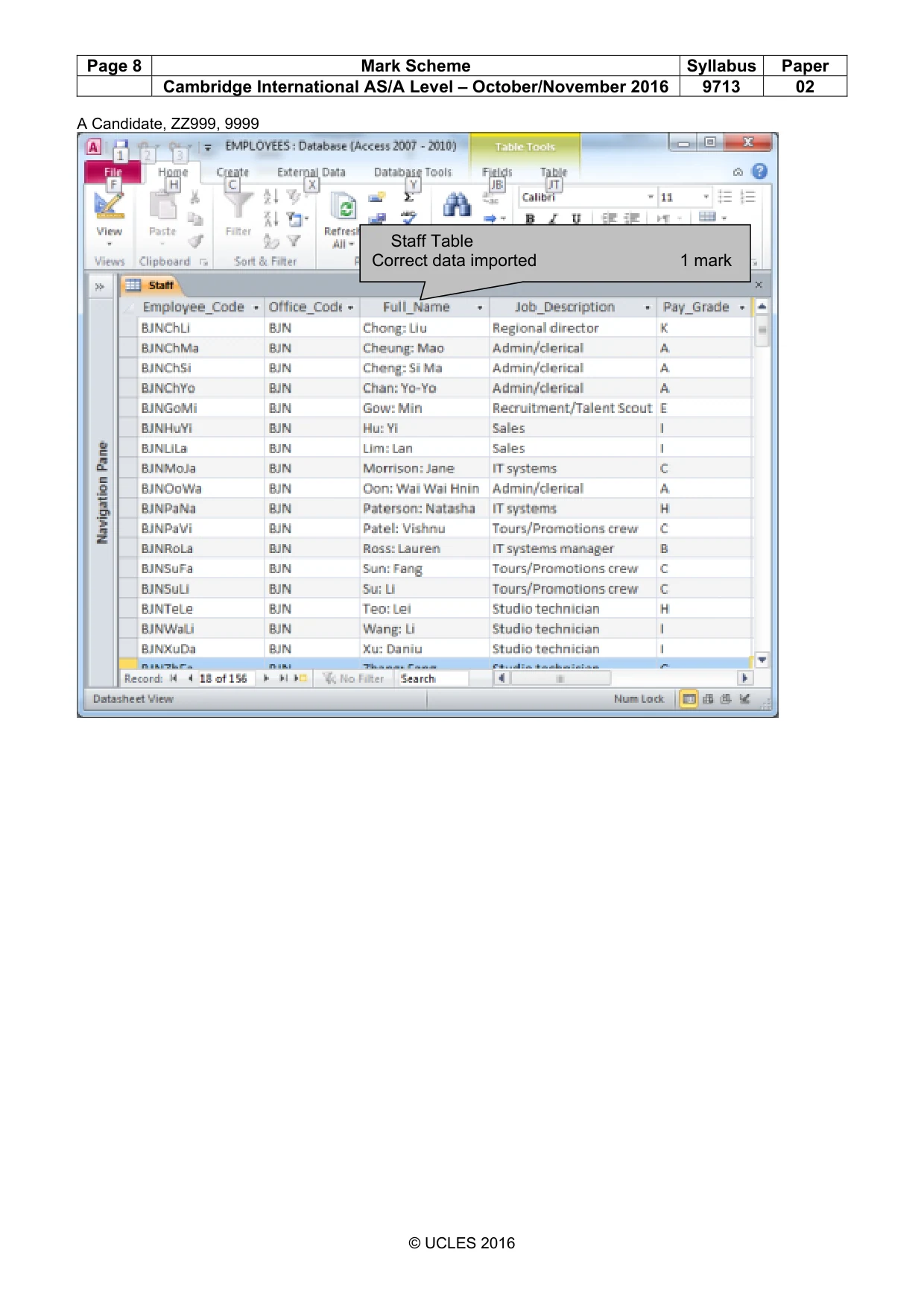
Page 8 Mark Scheme Syllabus Paper Cambridge International AS/A Level – October/November 2016 9713 02 A Candidate, ZZ999, 9999 © UCLES 2016 Staff Table Correct data imported 1 mark
Mark scheme, page 9
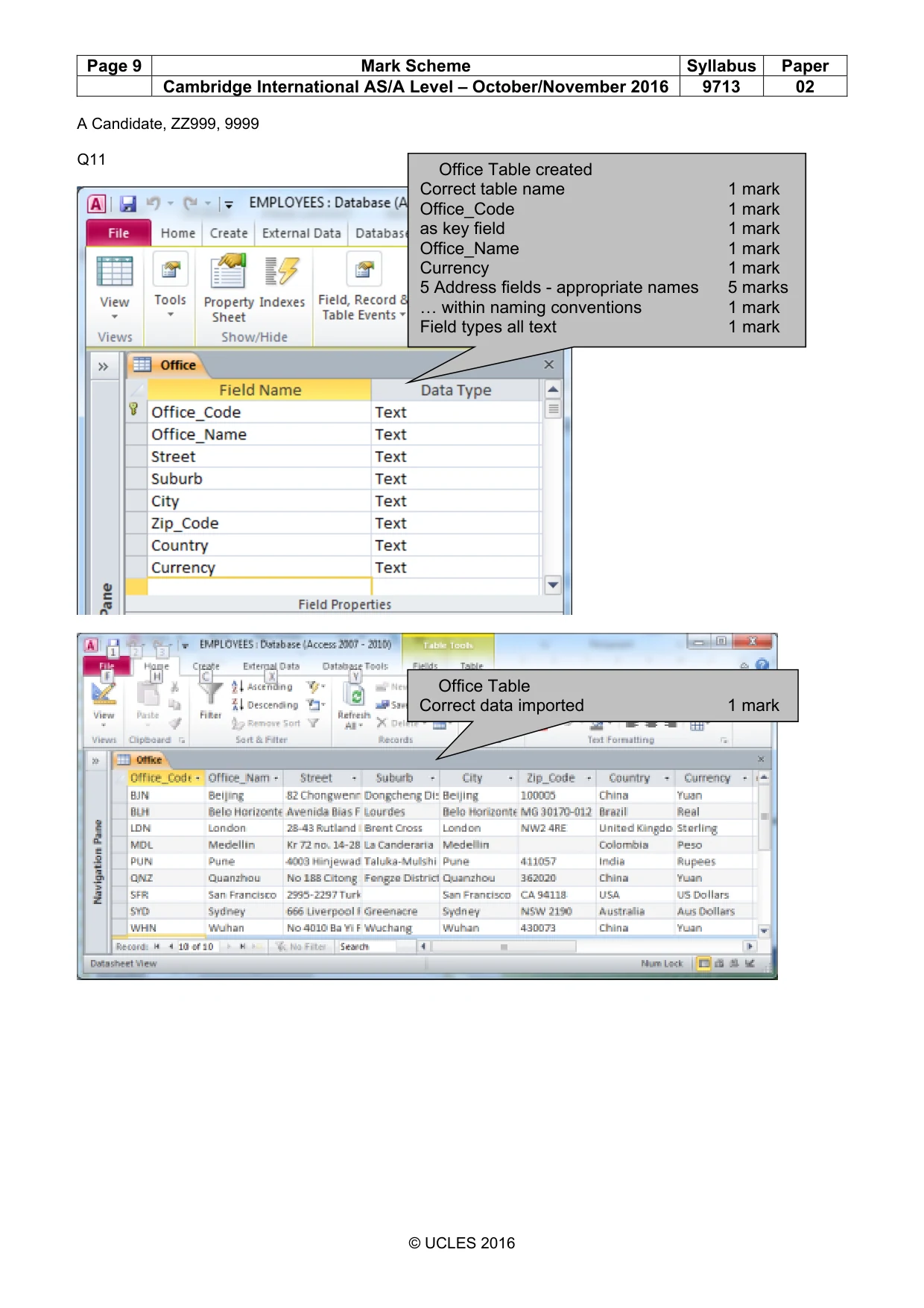
Page 9 Mark Scheme Syllabus Paper Cambridge International AS/A Level – October/November 2016 9713 02 A Candidate, ZZ999, 9999 © UCLES 2016 Q11 Office Table created Correct table name 1 mark Office_Code 1 mark as key field 1 mark Office_Name 1 mark Currency 1 mark 5 Address fields - appropriate names 5 marks … within naming conventions 1 mark Field types all text 1 mark Office Table Correct data imported 1 mark
Mark scheme, page 10
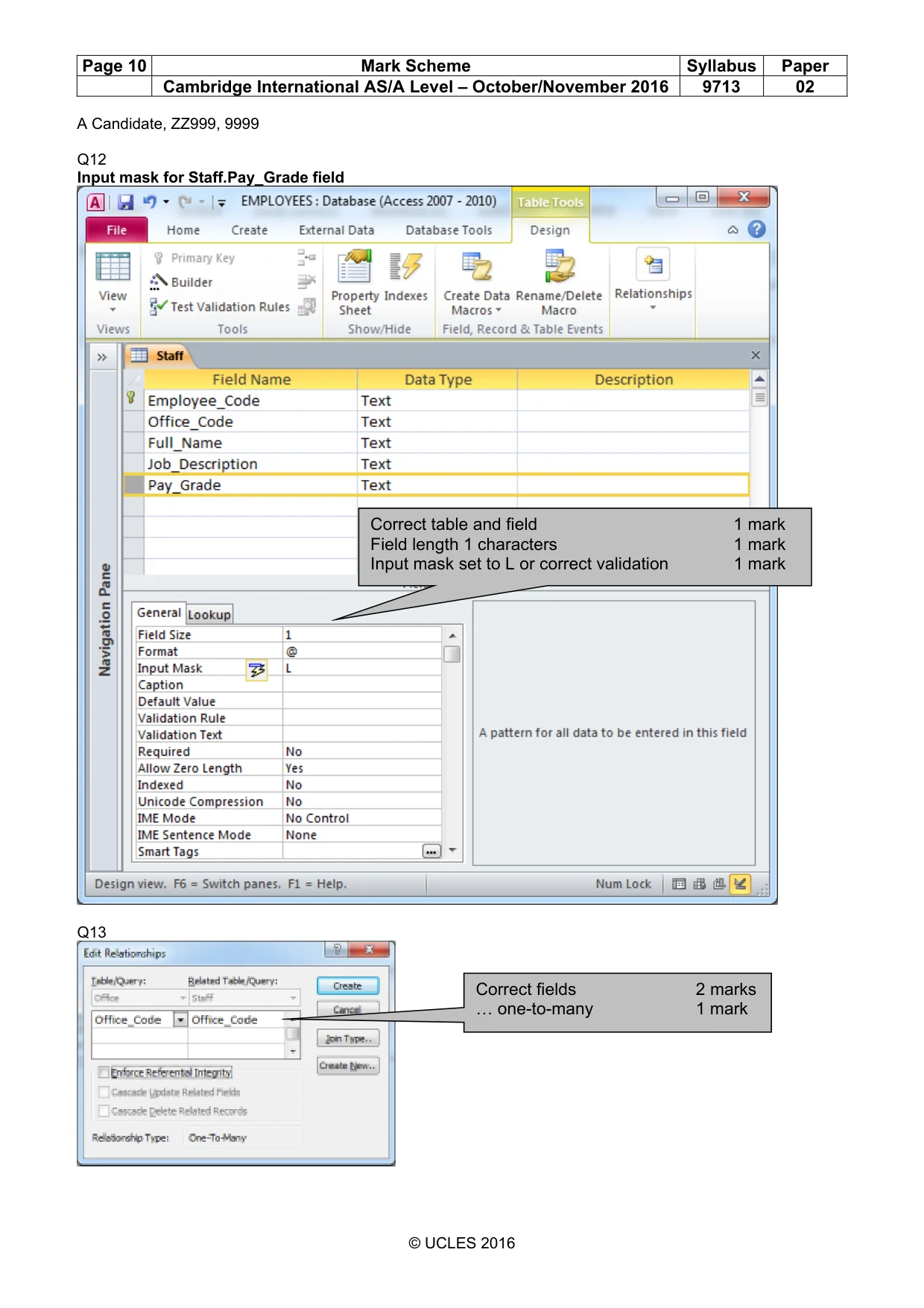
Page 10 Mark Scheme Syllabus Paper Cambridge International AS/A Level – October/November 2016 9713 02 A Candidate, ZZ999, 9999 © UCLES 2016 Q12 Input mask for Staff.Pay_Grade field Q13 Correct table and field 1 mark Field length 1 characters 1 mark Input mask set to L or correct validation 1 mark Correct fields 2 marks … one-to-many 1 mark
Mark scheme, page 11
Page 11 Mark Scheme Syllabus Paper Cambridge International AS/A Level – October/November 2016 9713 02 A Candidate, ZZ999, 9999 © UCLES 2016 Q15 Evidence of counting 2 marks Evidence of counting 2 marks
Mark scheme, page 12
Page 12 Mark Scheme Syllabus Paper Cambridge International AS/A Level – October/November 2016 9713 02 A Candidate, ZZ999, 9999 © UCLES 2016 Q16 0% 5% 10% 15% 20% 25% 30% 35% 40% Percentage Office name Percentage of employees on low income Correct data 2 marks Bar chart 1 mark Appropriate title 1 mark Office names fully visible 1 mark Appropriate axis titles 1 mark
Mark scheme, page 13
Page 13 Mark Scheme Syllabus Paper Cambridge International AS/A Level – October/November 2016 9713 02 A Candidate, ZZ999, 9999 © UCLES 2016 Members of staff with lowest income. A Candidate, ZZ999, 9999 Beijing 82 Chongwenmennei Yuan Dongcheng District Beijing 100005 China BJNChSi BJN Cheng: Si Ma Admin/clerical A BJNChYo BJN Chan: Yo-Yo Admin/clerical A BJNOoWa BJN Oon: Wai Wai Hnin Admin/clerical A BJNChMa BJN Cheung: Mao Admin/clerical A BJNRoLa BJN Ross: Lauren IT systems manager B Belo Horizonte Avenida Bias Fortes 382 Real Lourdes Belo Horizonte MG 30170-012 Brazil BLHD'Ch BLH D'Silva: Chaka Admin/clerical A BLHMeSa BLH Mean: Saniago Admin/clerical A London 28-43 Rutland Park Sterling Brent Cross London NW2 4RE United Kingdom LDNClLi LDN Clark: Li Sun Admin/clerical A LDNBaDu LDN Baiardo: Duncan Admin/clerical A LDNKeLa LDN Kelly: Lauren Admin/clerical A LDNLeKi LDN Lewis: Kieran Finance assistant B LDNPaLi LDN Patel: Linda Finance assistant B LDNRyKa LDN Ryder: Kate IT systems A LDNWaJa LDN Watson: Jasmine Programmer B LDNVeJo LDN Vercoe: Joe Sales A LDNChZa LDN Chalmers: Zachary Sales A 10 July 2014 Page 1 of 3
Mark scheme, page 14
Page 14 Mark Scheme Syllabus Paper Cambridge International AS/A Level – October/November 2016 9713 02 A Candidate, ZZ999, 9999 © UCLES 2016 A Candidate, ZZ999, 9999 LDNBrHe LDN Brown: Henry Sales B LDNPuTo LDN Purton: Tony Sound engineer B LDNReNa LDN Read: Naomi Sound engineer B LDNYeCh LDN Yeung: Christine Sound engineer B LDNHoWa LDN Hoy: Wally Sound engineer B LDNCaDo LDN Campbell: Dougie Web technician B Medellin Kr 72 no. 14-28 Peso La Canderaria Medellin Colombia MDL DDa MDL Días: Daniel Admin/clerical A MDL PHe MDL Pérez: Hector IT systems B MDLRaSo MDL Ramírez: Sofia IT systems B MDL MJu MDL Muñoz: Juan Sales B MDLLóCa MDL López: Carlos Sales B MDLGaVa MDL García: Valeria Studio technician B Pune 4003 Hinjewadi Park Rupees Taluka-Mulshi Pune 411057 India PUNAlSa PUN Ali: Sandy Admin/clerical A PUNHuNa PUN Hubaishi: Naag Admin/clerical A PUNMaSa1 PUN Mangat: Sachet Sales B PUNMuMo PUN Muti: Mohamed Hazem Sales B Quanzhou No 188 Citong South Road East Yuan Fengze District Quanzhou 362020 China QNZTaTa QNZ Tang: Tang Admin/clerical A QNZChyu QNZ Cheng: yu Sales A 10 July 2014 Page 2 of 3
Mark scheme, page 15
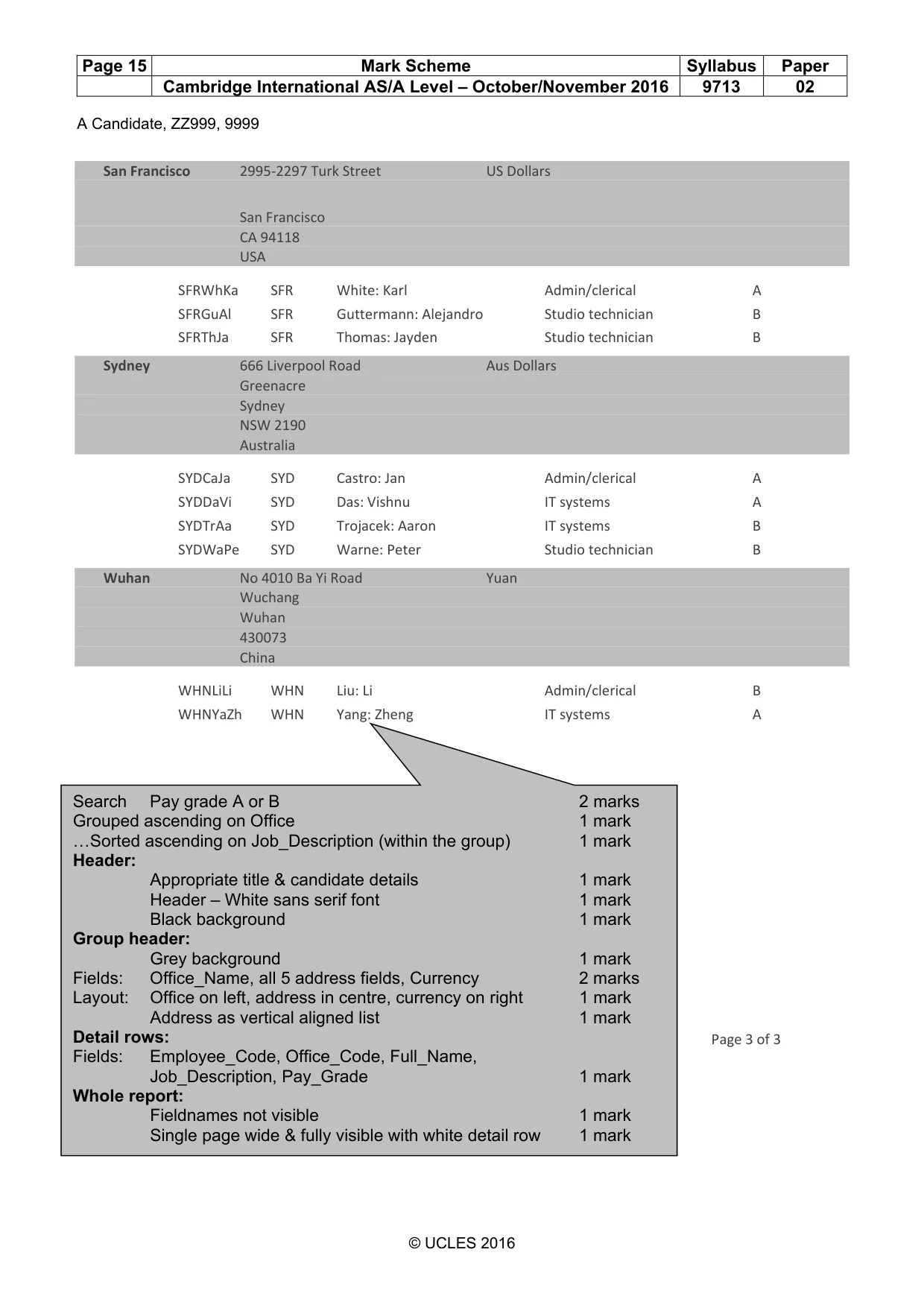
Page 15 Mark Scheme Syllabus Paper Cambridge International AS/A Level – October/November 2016 9713 02 A Candidate, ZZ999, 9999 © UCLES 2016 A Candidate, ZZ999, 9999 San Francisco 2995-2297 Turk Street US Dollars San Francisco CA 94118 USA SFRWhKa SFR White: Karl Admin/clerical A SFRGuAl SFR Guttermann: Alejandro Studio technician B SFRThJa SFR Thomas: Jayden Studio technician B Sydney 666 Liverpool Road Aus Dollars Greenacre Sydney NSW 2190 Australia SYDCaJa SYD Castro: Jan Admin/clerical A SYDDaVi SYD Das: Vishnu IT systems A SYDTrAa SYD Trojacek: Aaron IT systems B SYDWaPe SYD Warne: Peter Studio technician B Wuhan No 4010 Ba Yi Road Yuan Wuchang Wuhan 430073 China WHNLiLi WHN Liu: Li Admin/clerical B WHNYaZh WHN Yang: Zheng IT systems A 10 July 2014 Page 3 of 3 Search Pay grade A or B 2 marks Grouped ascending on Office 1 mark …Sorted ascending on Job_Description (within the group) 1 mark Header: Appropriate title & candidate details 1 mark Header – White sans serif font 1 mark Black background 1 mark Group header: Grey background 1 mark Fields: Office_Name, all 5 address fields, Currency 2 marks Layout: Office on left, address in centre, currency on right 1 mark Address as vertical aligned list 1 mark Detail rows: Fields: Employee_Code, Office_Code, Full_Name, Job_Description, Pay_Grade 1 mark Whole report: Fieldnames not visible 1 mark Single page wide & fully visible with white detail row 1 mark
What you needed in this session
Cambridge’s own grade thresholds for 2016 Oct/Nov, Paper 2 · Variant 1. A higher threshold means an easier paper — the bar moves with how the cohort did.