Cambridge A Level Applied Information and Communication Technology 9713 — 2014 May/June Paper 2 · Variant 1
9713/21/M/J/14 · 120 marks · ≈135 min
The question paper and its mark scheme, free to read here and free to download. This is Cambridge’s own paper, exactly as it was sat.
Question paper4 pages
Mark scheme16 pages
Answers below. Sit the paper first if you are practising.
Paper as text
Question paper, page 1
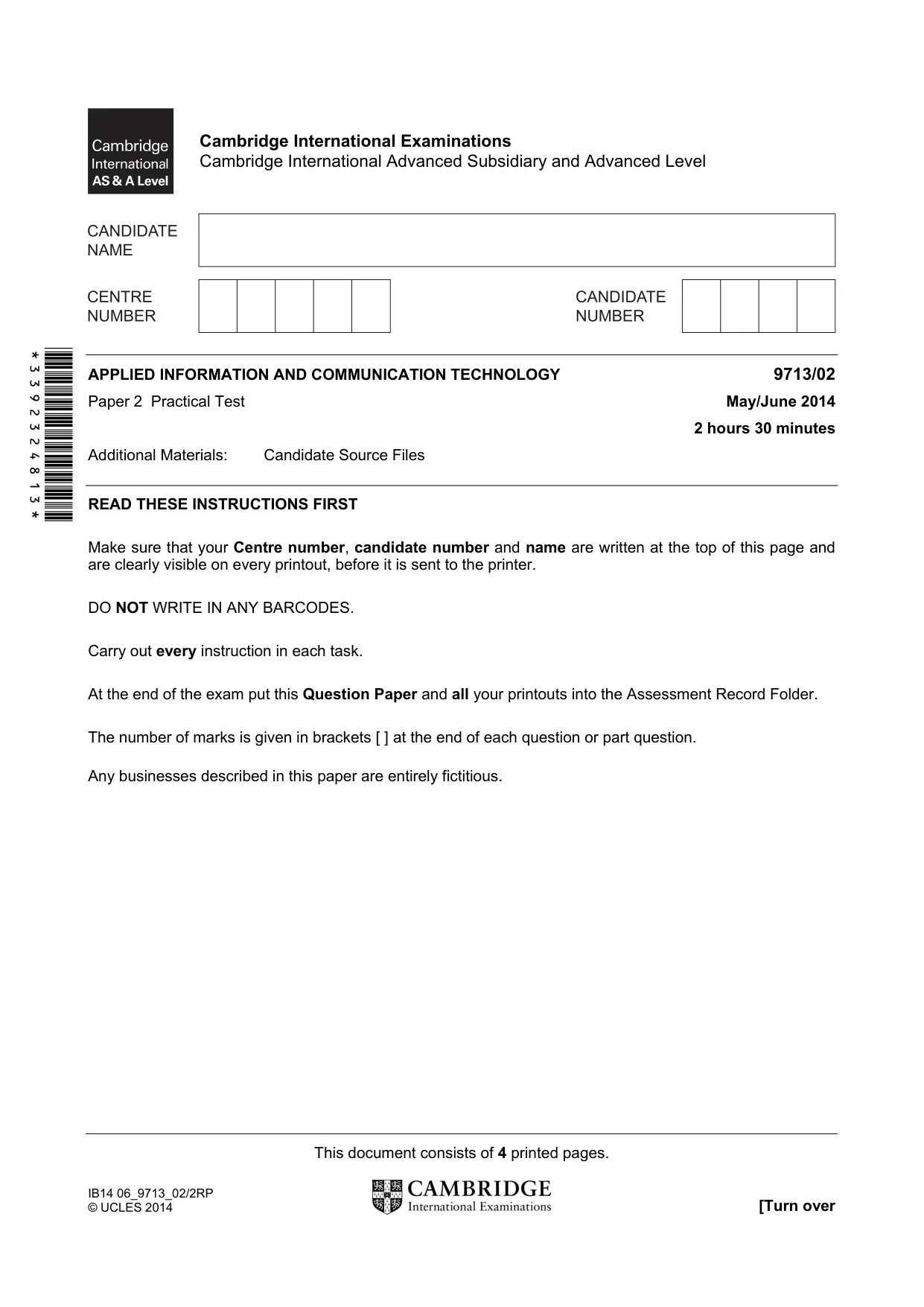
This document consists of 4 printed pages. IB14 06_9713_02/2RP © UCLES 2014 [Turn over *3392324813* Cambridge International Examinations Cambridge International Advanced Subsidiary and Advanced Level APPLIED INFORMATION AND COMMUNICATION TECHNOLOGY 9713/02 Paper 2 Practical Test May/June 2014 2 hours 30 minutes Additional Materials: Candidate Source Files READ THESE INSTRUCTIONS FIRST Make sure that your Centre number, candidate number and name are written at the top of this page and are clearly visible on every printout, before it is sent to the printer. DO NOT WRITE IN ANY BARCODES. Carry out every instruction in each task. At the end of the exam put this Question Paper and all your printouts into the Assessment Record Folder. The number of marks is given in brackets [ ] at the end of each question or part question. Any businesses described in this paper are entirely fictitious.
Question paper, page 2
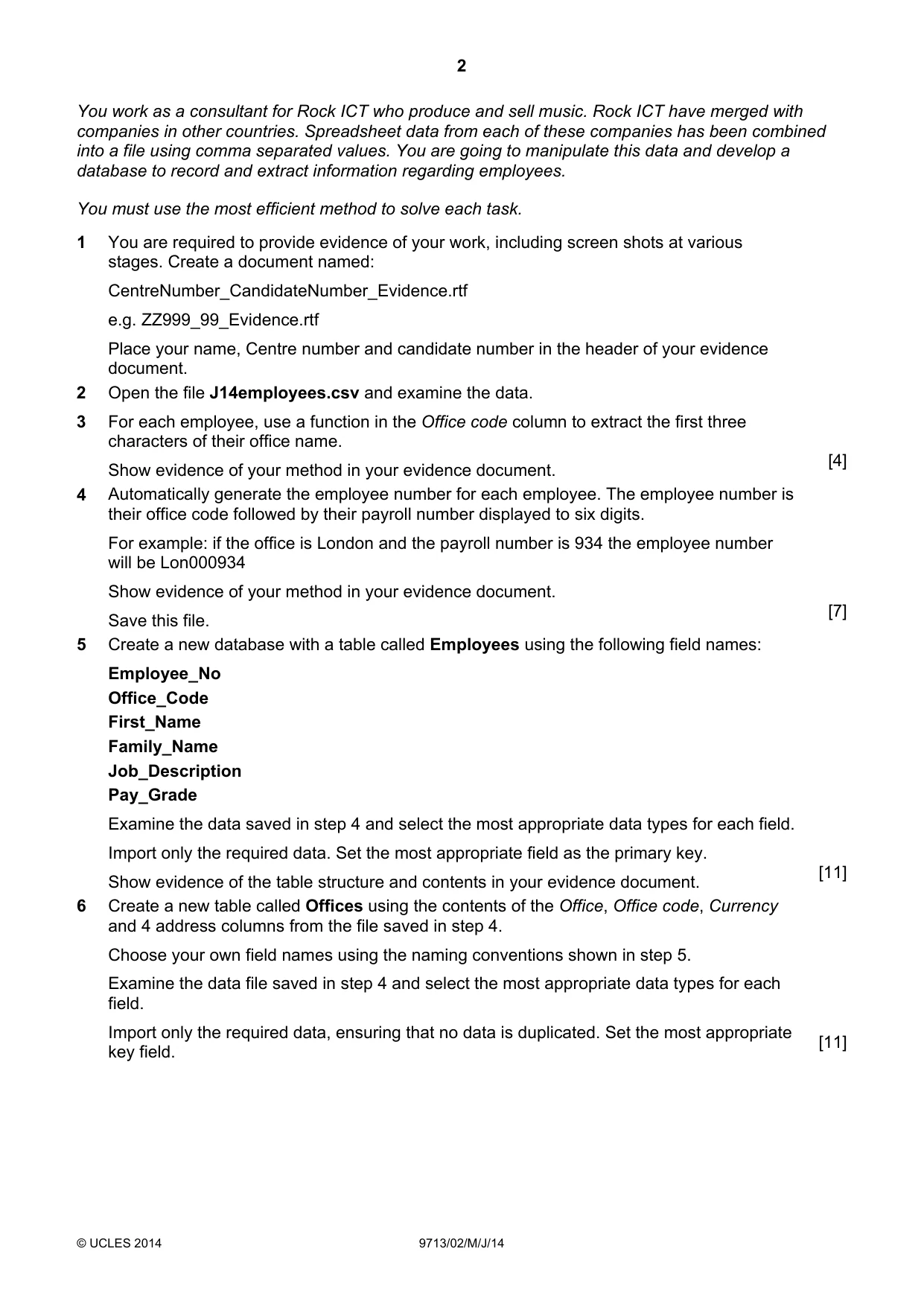
2 © UCLES 2014 9713/02/M/J/14 You work as a consultant for Rock ICT who produce and sell music. Rock ICT have merged with companies in other countries. Spreadsheet data from each of these companies has been combined into a file using comma separated values. You are going to manipulate this data and develop a database to record and extract information regarding employees. You must use the most efficient method to solve each task. 1 You are required to provide evidence of your work, including screen shots at various stages. Create a document named: CentreNumber_CandidateNumber_Evidence.rtf e.g. ZZ999_99_Evidence.rtf Place your name, Centre number and candidate number in the header of your evidence document. 2 Open the file J14employees.csv and examine the data. 3 For each employee, use a function in the Office code column to extract the first three characters of their office name. Show evidence of your method in your evidence document. [4] 4 Automatically generate the employee number for each employee. The employee number is their office code followed by their payroll number displayed to six digits. For example: if the office is London and the payroll number is 934 the employee number will be Lon000934 Show evidence of your method in your evidence document. Save this file. [7] 5 Create a new database with a table called Employees using the following field names: Employee_No Office_Code First_Name Family_Name Job_Description Pay_Grade Examine the data saved in step 4 and select the most appropriate data types for each field. Import only the required data. Set the most appropriate field as the primary key. Show evidence of the table structure and contents in your evidence document. [11] 6 Create a new table called Offices using the contents of the Office, Office code, Currency and 4 address columns from the file saved in step 4. Choose your own field names using the naming conventions shown in step 5. Examine the data file saved in step 4 and select the most appropriate data types for each field. Import only the required data, ensuring that no data is duplicated. Set the most appropriate key field. [11]
Question paper, page 3
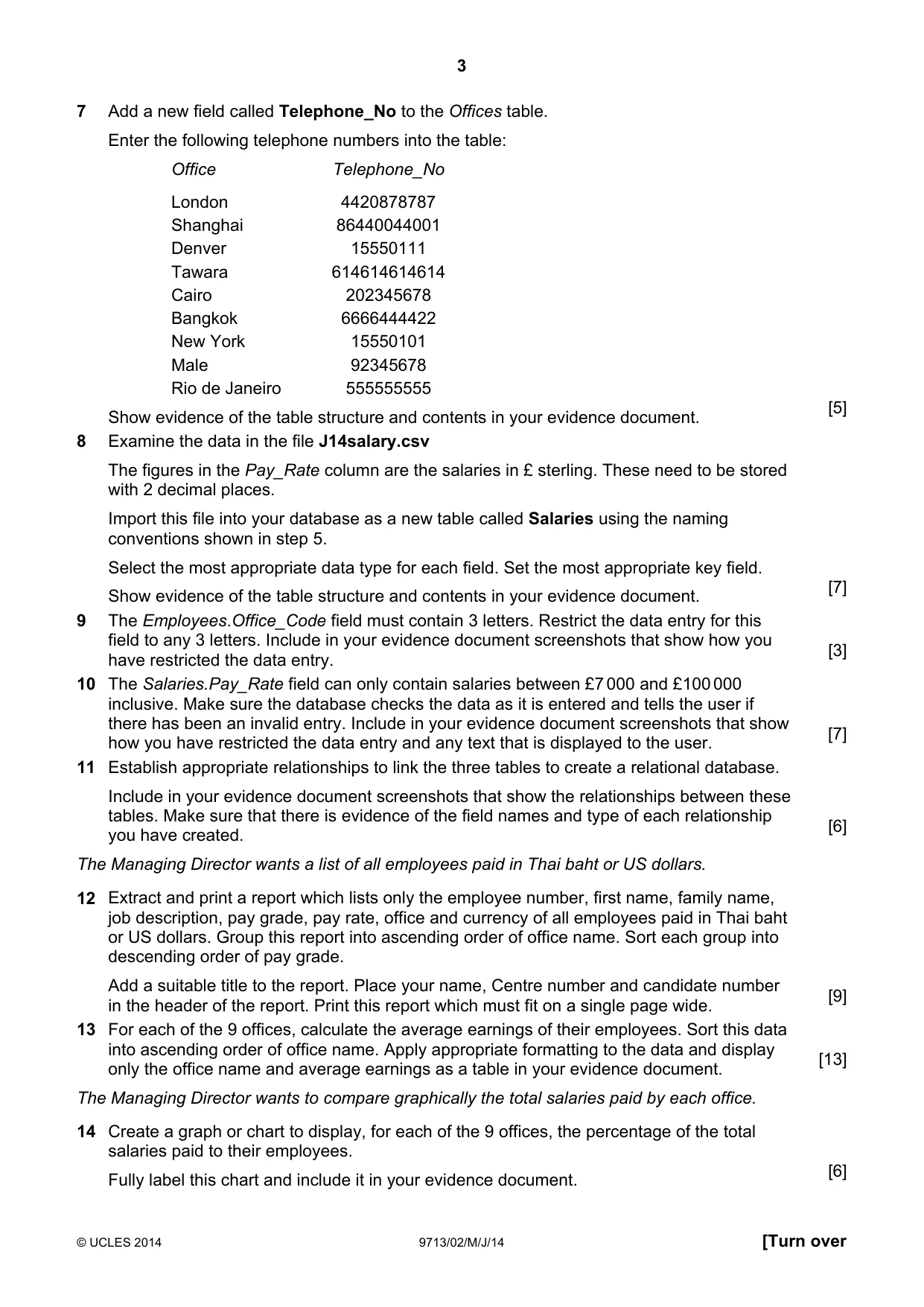
3 © UCLES 2014 9713/02/M/J/14 [Turn over 7 Add a new field called Telephone_No to the Offices table. Enter the following telephone numbers into the table: Office Telephone_No London 4420878787 Shanghai 86440044001 Denver 15550111 Tawara 614614614614 Cairo 202345678 Bangkok 6666444422 New York 15550101 Male 92345678 Rio de Janeiro 555555555 Show evidence of the table structure and contents in your evidence document. [5] 8 Examine the data in the file J14salary.csv The figures in the Pay_Rate column are the salaries in £ sterling. These need to be stored with 2 decimal places. Import this file into your database as a new table called Salaries using the naming conventions shown in step 5. Select the most appropriate data type for each field. Set the most appropriate key field. Show evidence of the table structure and contents in your evidence document. [7] 9 The Employees.Office_Code field must contain 3 letters. Restrict the data entry for this field to any 3 letters. Include in your evidence document screenshots that show how you have restricted the data entry. [3] 10 The Salaries.Pay_Rate field can only contain salaries between £7 000 and £100 000 inclusive. Make sure the database checks the data as it is entered and tells the user if there has been an invalid entry. Include in your evidence document screenshots that show how you have restricted the data entry and any text that is displayed to the user. [7] 11 Establish appropriate relationships to link the three tables to create a relational database. Include in your evidence document screenshots that show the relationships between these tables. Make sure that there is evidence of the field names and type of each relationship you have created. [6] The Managing Director wants a list of all employees paid in Thai baht or US dollars. 12 Extract and print a report which lists only the employee number, first name, family name, job description, pay grade, pay rate, office and currency of all employees paid in Thai baht or US dollars. Group this report into ascending order of office name. Sort each group into descending order of pay grade. Add a suitable title to the report. Place your name, Centre number and candidate number in the header of the report. Print this report which must fit on a single page wide. [9] 13 For each of the 9 offices, calculate the average earnings of their employees. Sort this data into ascending order of office name. Apply appropriate formatting to the data and display only the office name and average earnings as a table in your evidence document. [13] The Managing Director wants to compare graphically the total salaries paid by each office. 14 Create a graph or chart to display, for each of the 9 offices, the percentage of the total salaries paid to their employees. Fully label this chart and include it in your evidence document. [6]
Question paper, page 4
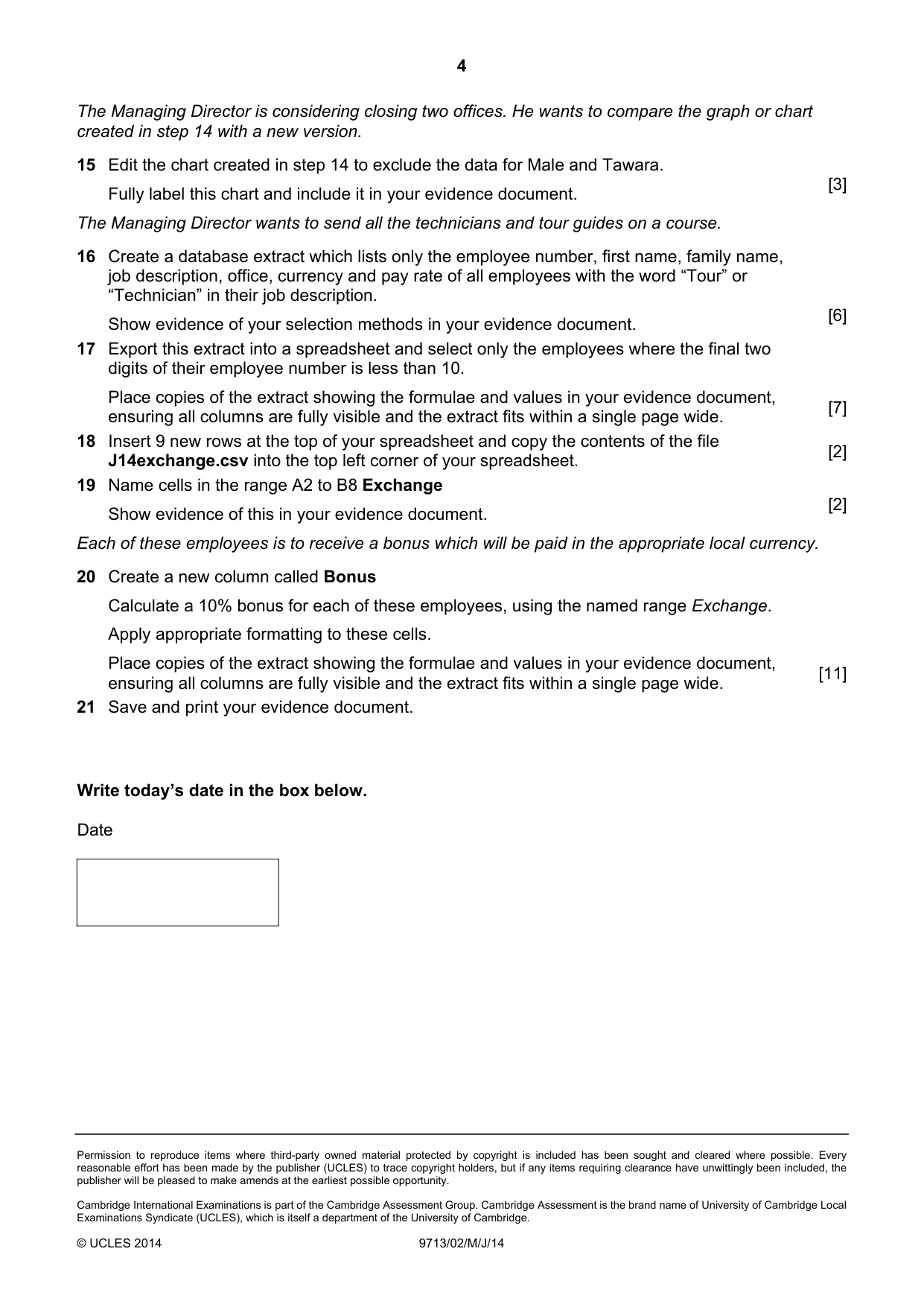
4 Permission to reproduce items where third-party owned material protected by copyright is included has been sought and cleared where possible. Every reasonable effort has been made by the publisher (UCLES) to trace copyright holders, but if any items requiring clearance have unwittingly been included, the publisher will be pleased to make amends at the earliest possible opportunity. Cambridge International Examinations is part of the Cambridge Assessment Group. Cambridge Assessment is the brand name of University of Cambridge Local Examinations Syndicate (UCLES), which is itself a department of the University of Cambridge. © UCLES 2014 9713/02/M/J/14 The Managing Director is considering closing two offices. He wants to compare the graph or chart created in step 14 with a new version. 15 Edit the chart created in step 14 to exclude the data for Male and Tawara. Fully label this chart and include it in your evidence document. [3] The Managing Director wants to send all the technicians and tour guides on a course. 16 Create a database extract which lists only the employee number, first name, family name, job description, office, currency and pay rate of all employees with the word “Tour” or “Technician” in their job description. Show evidence of your selection methods in your evidence document. [6] 17 Export this extract into a spreadsheet and select only the employees where the final two digits of their employee number is less than 10. Place copies of the extract showing the formulae and values in your evidence document, ensuring all columns are fully visible and the extract fits within a single page wide. [7] 18 Insert 9 new rows at the top of your spreadsheet and copy the contents of the file J14exchange.csv into the top left corner of your spreadsheet. [2] 19 Name cells in the range A2 to B8 Exchange Show evidence of this in your evidence document. [2] Each of these employees is to receive a bonus which will be paid in the appropriate local currency. 20 Create a new column called Bonus Calculate a 10% bonus for each of these employees, using the named range Exchange. Apply appropriate formatting to these cells. Place copies of the extract showing the formulae and values in your evidence document, ensuring all columns are fully visible and the extract fits within a single page wide. [11] 21 Save and print your evidence document. Write today’s date in the box below. Date
Mark scheme, page 1
CAMBRIDGE INTERNATIONAL EXAMINATIONS GCE Advanced Subsidiary Level and GCE Advanced Level MARK SCHEME for the May/June 2014 series 9713 APPLIED INFORMATION AND COMMUNICATION TECHNOLOGY 9713/02 Paper 2 (Practical Test), maximum raw mark 120 This mark scheme is published as an aid to teachers and candidates, to indicate the requirements of the examination. It shows the basis on which Examiners were instructed to award marks. It does not indicate the details of the discussions that took place at an Examiners’ meeting before marking began, which would have considered the acceptability of alternative answers. Mark schemes should be read in conjunction with the question paper and the Principal Examiner Report for Teachers. Cambridge will not enter into discussions about these mark schemes. Cambridge is publishing the mark schemes for the May/June 2014 series for most IGCSE, GCE Advanced Level and Advanced Subsidiary Level components and some Ordinary Level components.
Mark scheme, page 2
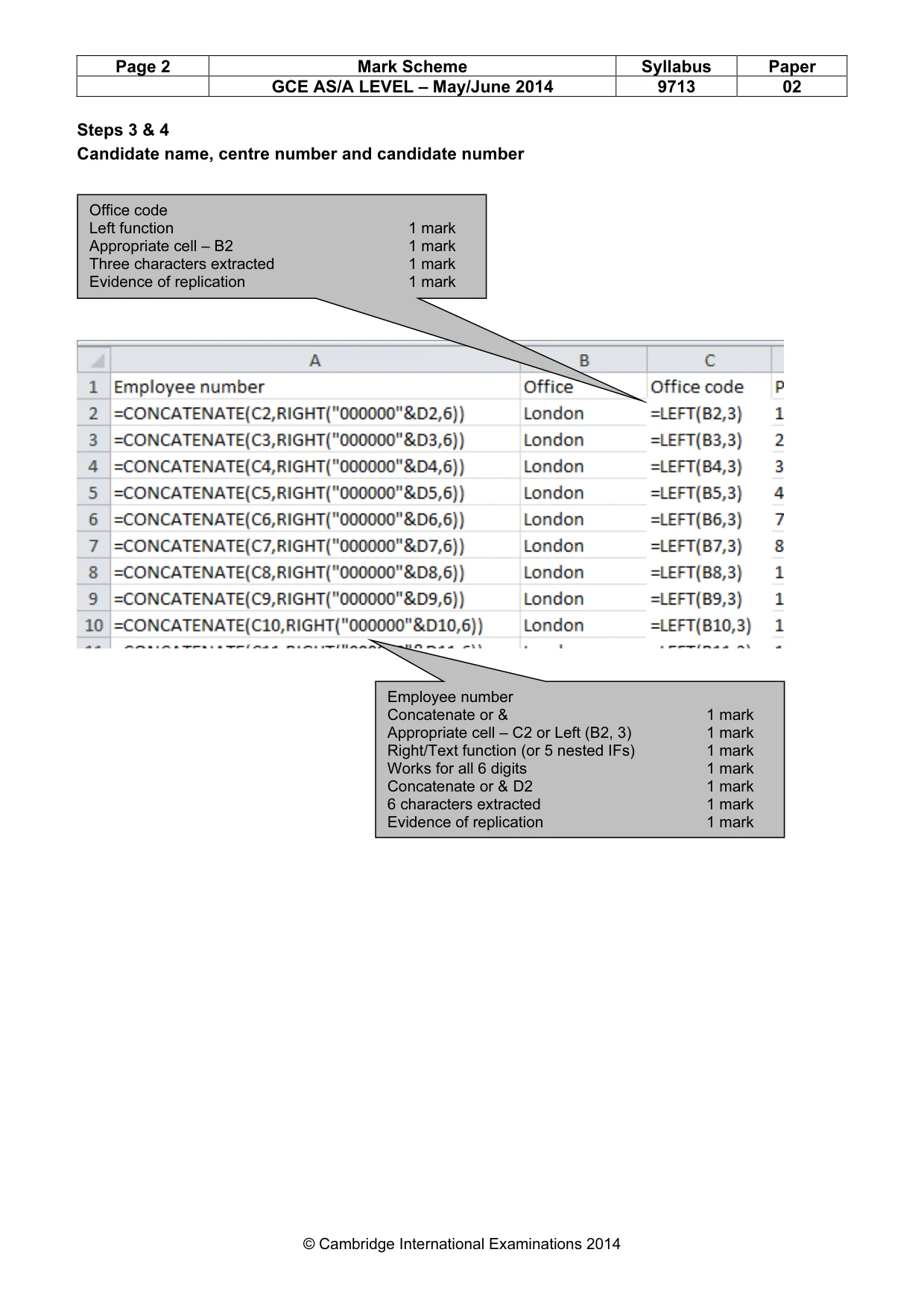
Page 2 Mark Scheme Syllabus Paper GCE AS/A LEVEL – May/June 2014 9713 02 © Cambridge International Examinations 2014 Steps 3 & 4 Candidate name, centre number and candidate number Office code Left function 1 mark Appropriate cell – B2 1 mark Three characters extracted 1 mark Evidence of replication 1 mark Employee number Concatenate or & 1 mark Appropriate cell – C2 or Left (B2, 3) 1 mark Right/Text function (or 5 nested IFs) 1 mark Works for all 6 digits 1 mark Concatenate or & D2 1 mark 6 characters extracted 1 mark Evidence of replication 1 mark
Mark scheme, page 3
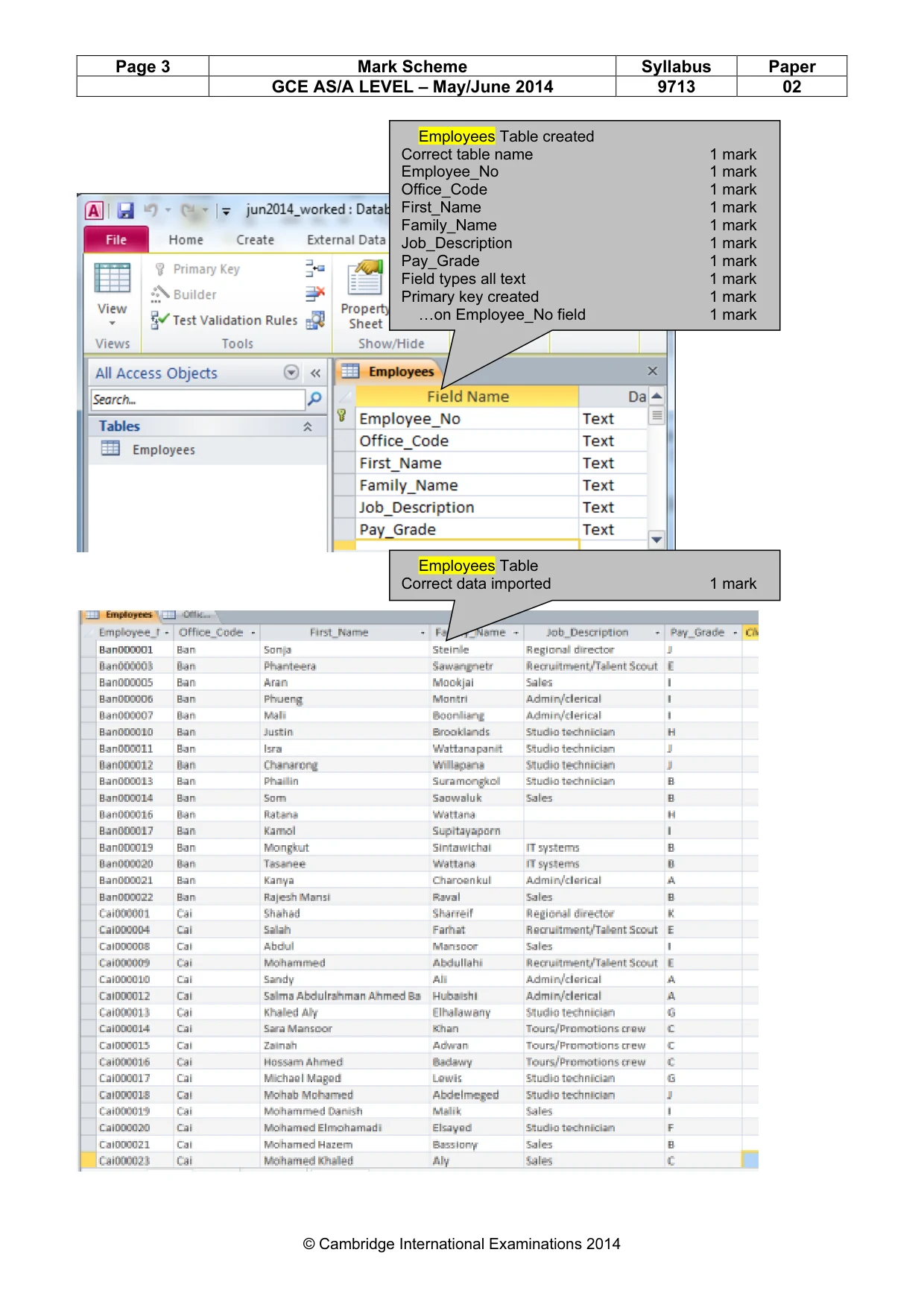
Page 3 Mark Scheme Syllabus Paper GCE AS/A LEVEL – May/June 2014 9713 02 © Cambridge International Examinations 2014 Employees Table created Correct table name 1 mark Employee_No 1 mark Office_Code 1 mark First_Name 1 mark Family_Name 1 mark Job_Description 1 mark Pay_Grade 1 mark Field types all text 1 mark Primary key created 1 mark …on Employee_No field 1 mark Employees Table Correct data imported 1 mark
Mark scheme, page 4
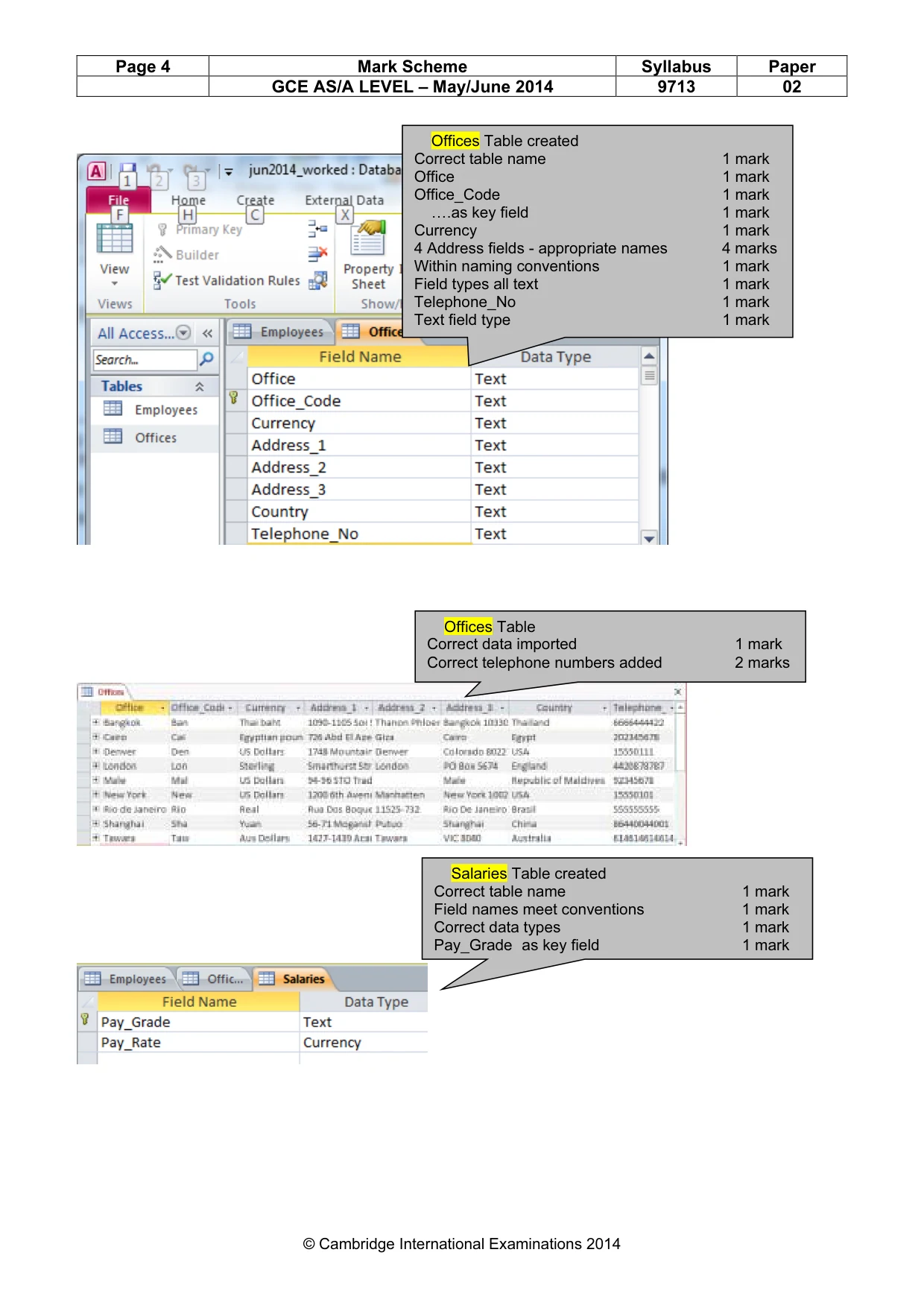
Page 4 Mark Scheme Syllabus Paper GCE AS/A LEVEL – May/June 2014 9713 02 © Cambridge International Examinations 2014 Offices Table created Correct table name 1 mark Office 1 mark Office_Code 1 mark ….as key field 1 mark Currency 1 mark 4 Address fields - appropriate names 4 marks Within naming conventions 1 mark Field types all text 1 mark Telephone_No 1 mark Text field type 1 mark Offices Table Correct data imported 1 mark Correct telephone numbers added 2 marks Salaries Table created Correct table name 1 mark Field names meet conventions 1 mark Correct data types 1 mark Pay_Grade as key field 1 mark
Mark scheme, page 5
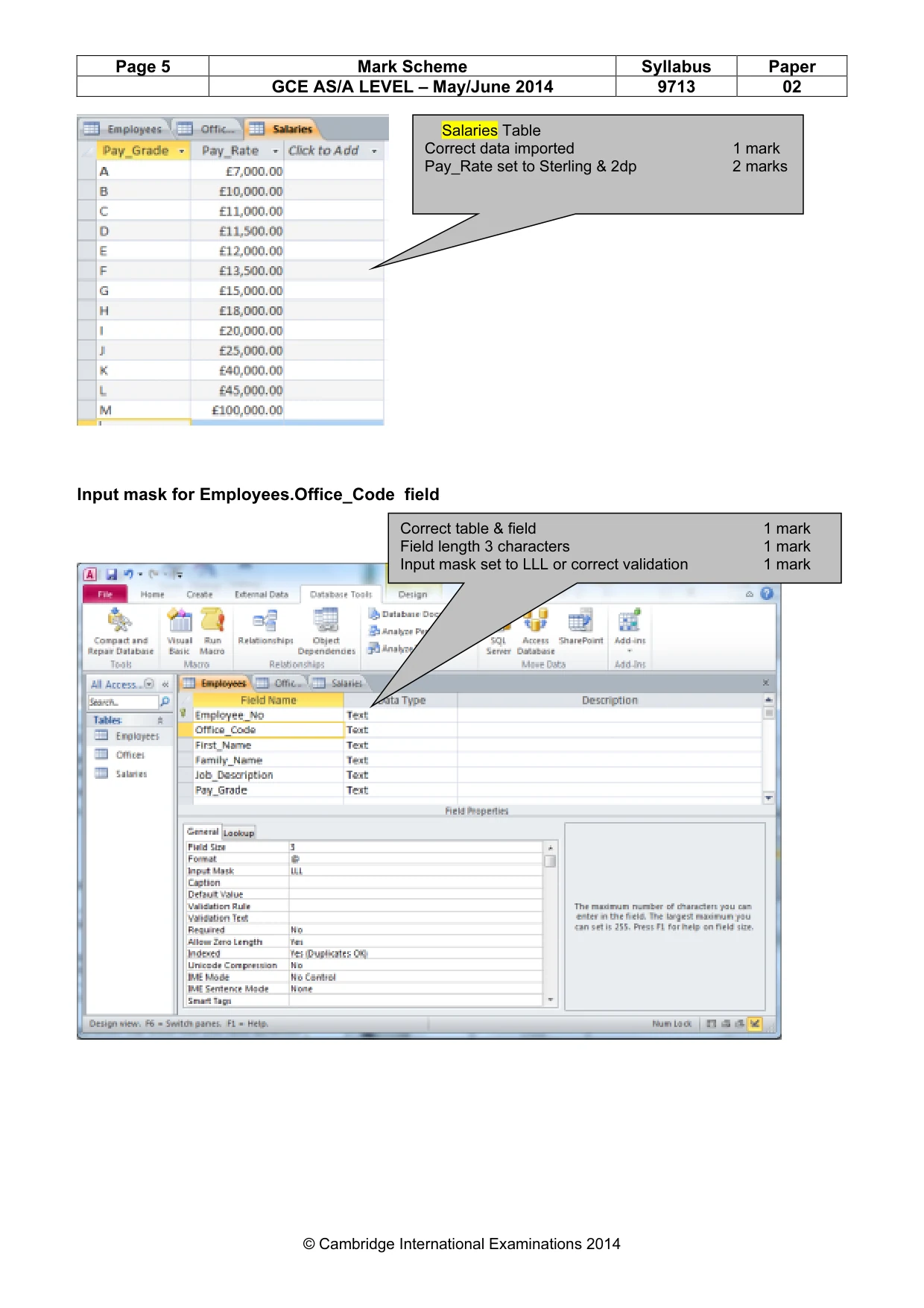
Page 5 Mark Scheme Syllabus Paper GCE AS/A LEVEL – May/June 2014 9713 02 © Cambridge International Examinations 2014 Input mask for Employees.Office_Code field Salaries Table Correct data imported 1 mark Pay_Rate set to Sterling & 2dp 2 marks Correct table & field 1 mark Field length 3 characters 1 mark Input mask set to LLL or correct validation 1 mark
Mark scheme, page 6
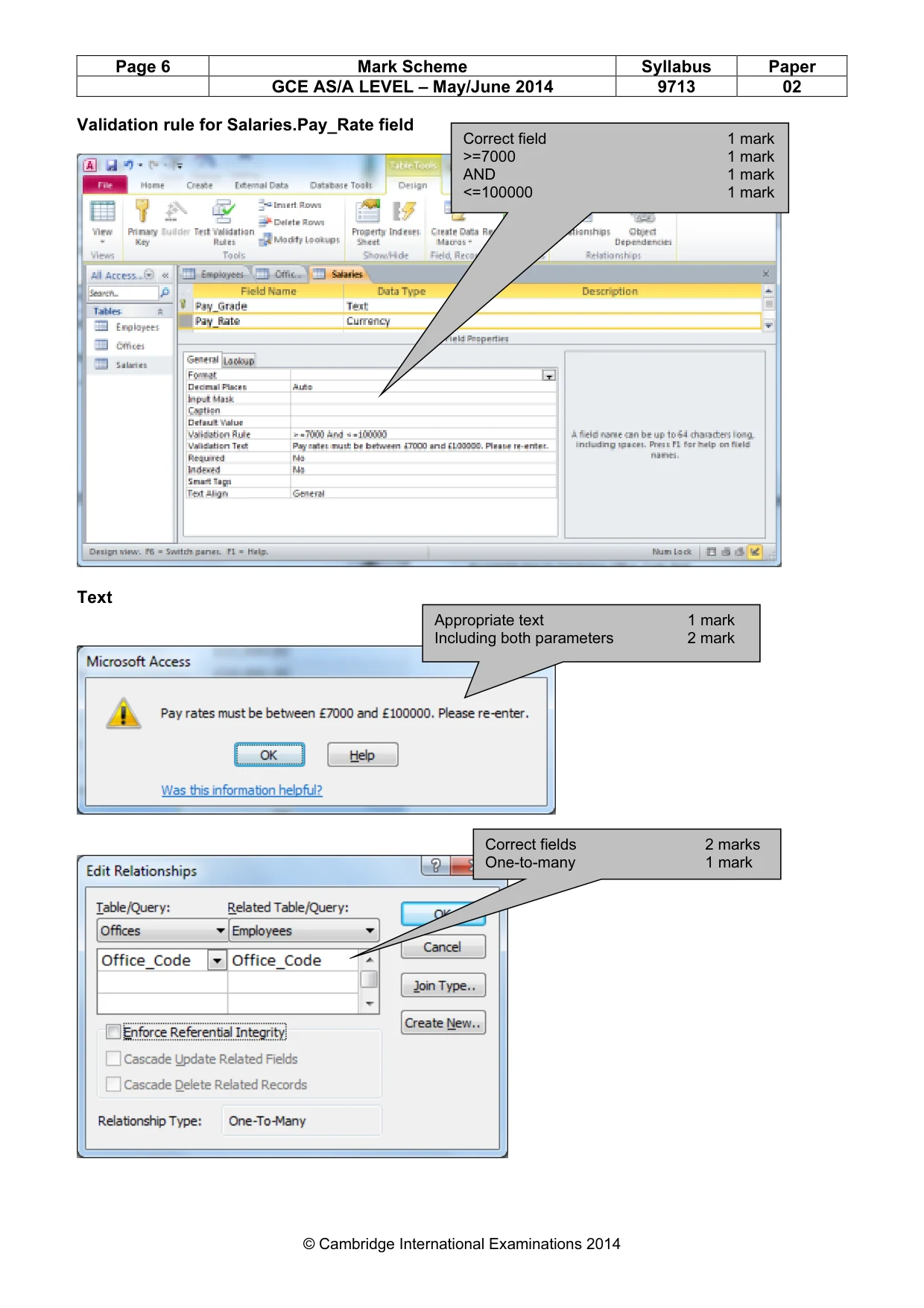
Page 6 Mark Scheme Syllabus Paper GCE AS/A LEVEL – May/June 2014 9713 02 © Cambridge International Examinations 2014 Validation rule for Salaries.Pay_Rate field Text Correct fields 2 marks One-to-many 1 mark Correct field 1 mark >=7000 1 mark AND 1 mark <=100000 1 mark Appropriate text 1 mark Including both parameters 2 mark
Mark scheme, page 7
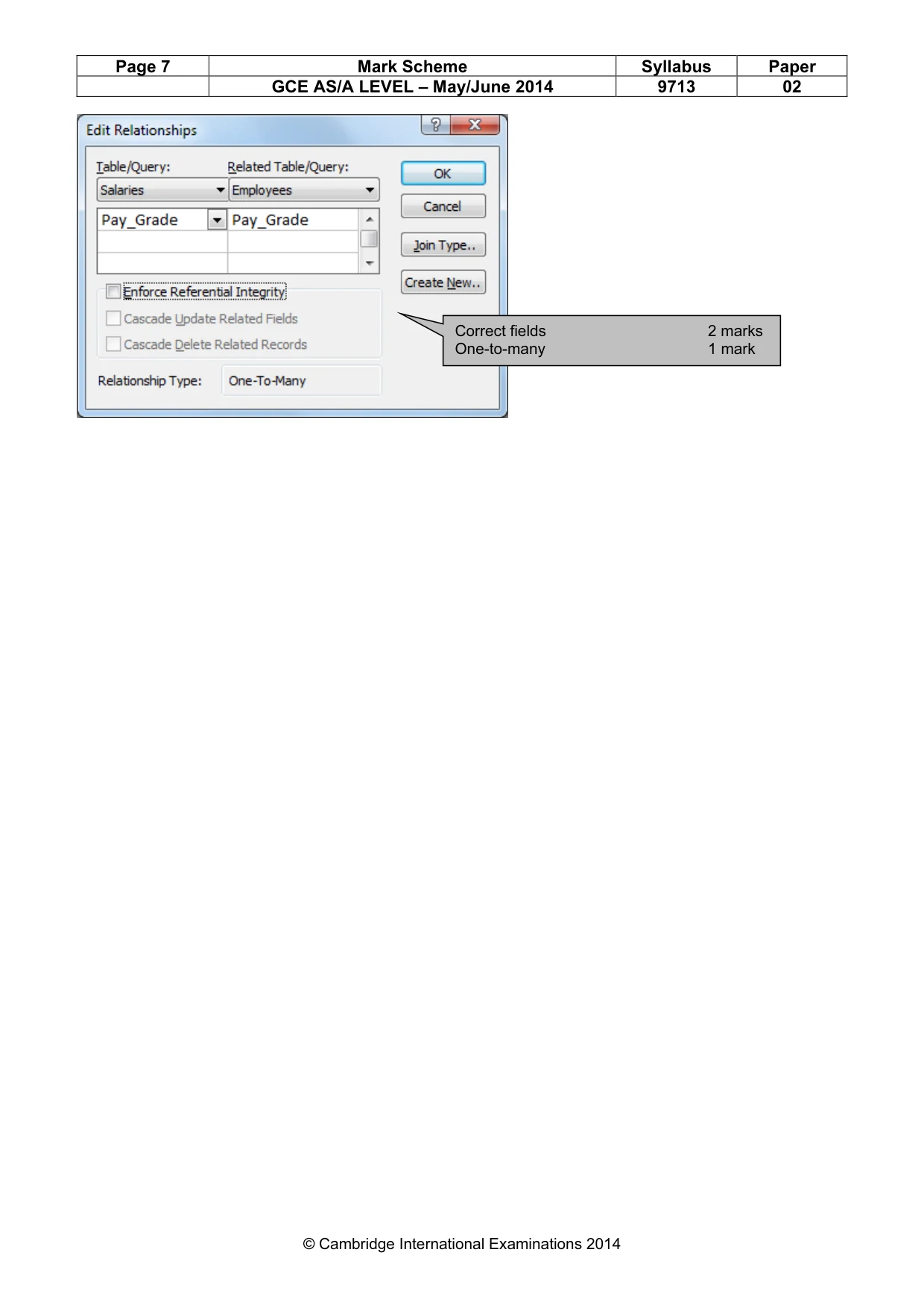
Page 7 Mark Scheme Syllabus Paper GCE AS/A LEVEL – May/June 2014 9713 02 © Cambridge International Examinations 2014 Correct fields 2 marks One-to-many 1 mark
Mark scheme, page 8
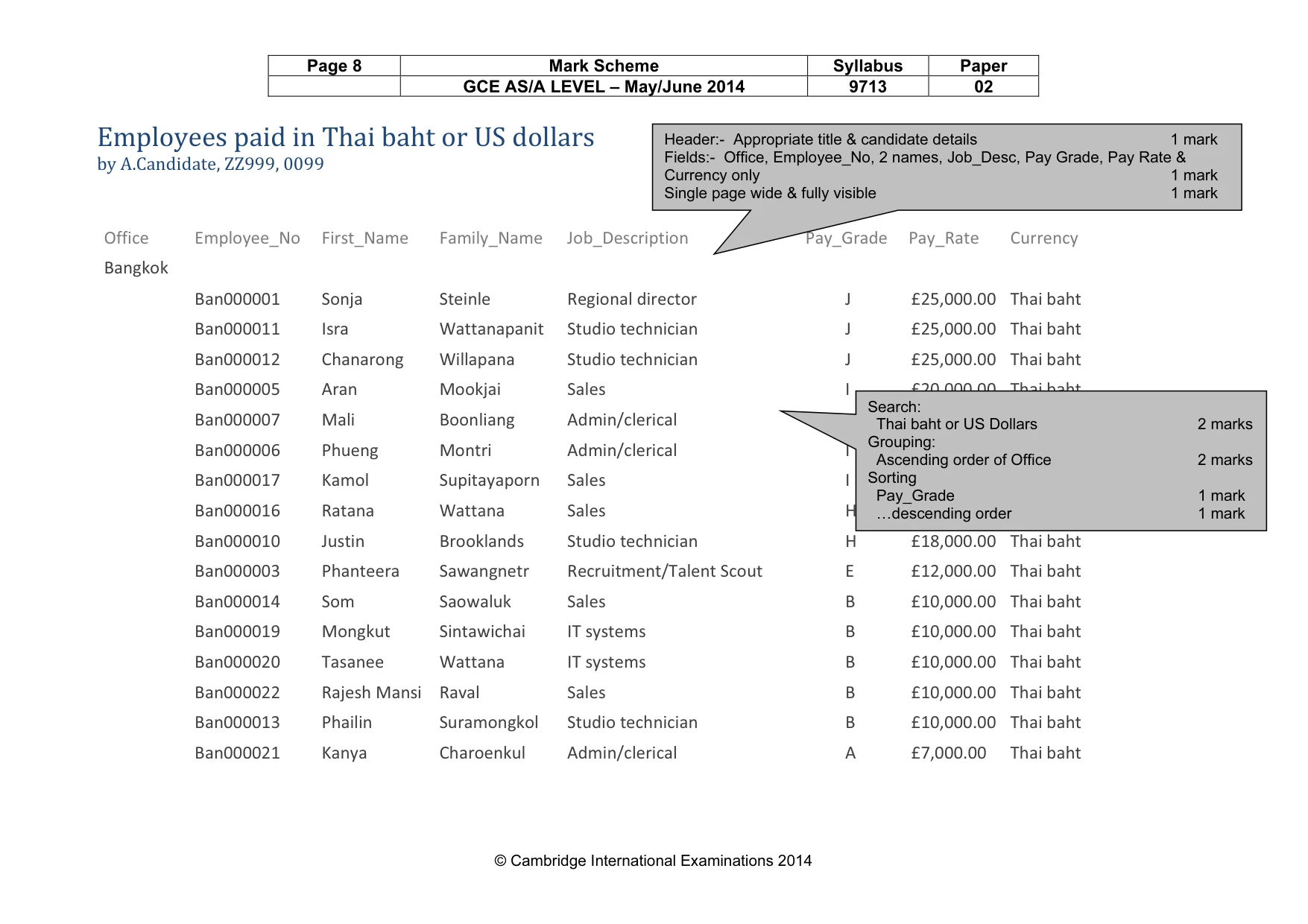
Page 8 Mark Scheme Syllabus Paper GCE AS/A LEVEL – May/June 2014 9713 02 © Cambridge International Examinations 2014 Employees paid in Thai baht or US dollars 24 August 2012 by A.Candidate, ZZ999, 0099 14:58:28 Office Employee_No First_Name Family_Name Job_Description Pay_Grade Pay_Rate Currency Bangkok Ban000001 Sonja Steinle Regional director J £25,000.00 Thai baht Ban000011 Isra Wattanapanit Studio technician J £25,000.00 Thai baht Ban000012 Chanarong Willapana Studio technician J £25,000.00 Thai baht Ban000005 Aran Mookjai Sales I £20,000.00 Thai baht Ban000007 Mali Boonliang Admin/clerical I £20,000.00 Thai baht Ban000006 Phueng Montri Admin/clerical I £20,000.00 Thai baht Ban000017 Kamol Supitayaporn Sales I £20,000.00 Thai baht Ban000016 Ratana Wattana Sales H £18,000.00 Thai baht Ban000010 Justin Brooklands Studio technician H £18,000.00 Thai baht Ban000003 Phanteera Sawangnetr Recruitment/Talent Scout E £12,000.00 Thai baht Ban000014 Som Saowaluk Sales B £10,000.00 Thai baht Ban000019 Mongkut Sintawichai IT systems B £10,000.00 Thai baht Ban000020 Tasanee Wattana IT systems B £10,000.00 Thai baht Ban000022 Rajesh Mansi Raval Sales B £10,000.00 Thai baht Ban000013 Phailin Suramongkol Studio technician B £10,000.00 Thai baht Ban000021 Kanya Charoenkul Admin/clerical A £7,000.00 Thai baht Header:- Appropriate title & candidate details 1 mark Fields:- Office, Employee_No, 2 names, Job_Desc, Pay Grade, Pay Rate & Currency only 1 mark Single page wide & fully visible 1 mark Search: Thai baht or US Dollars 2 marks Grouping: Ascending order of Office 2 marks Sorting Pay_Grade 1 mark …descending order 1 mark
Mark scheme, page 9
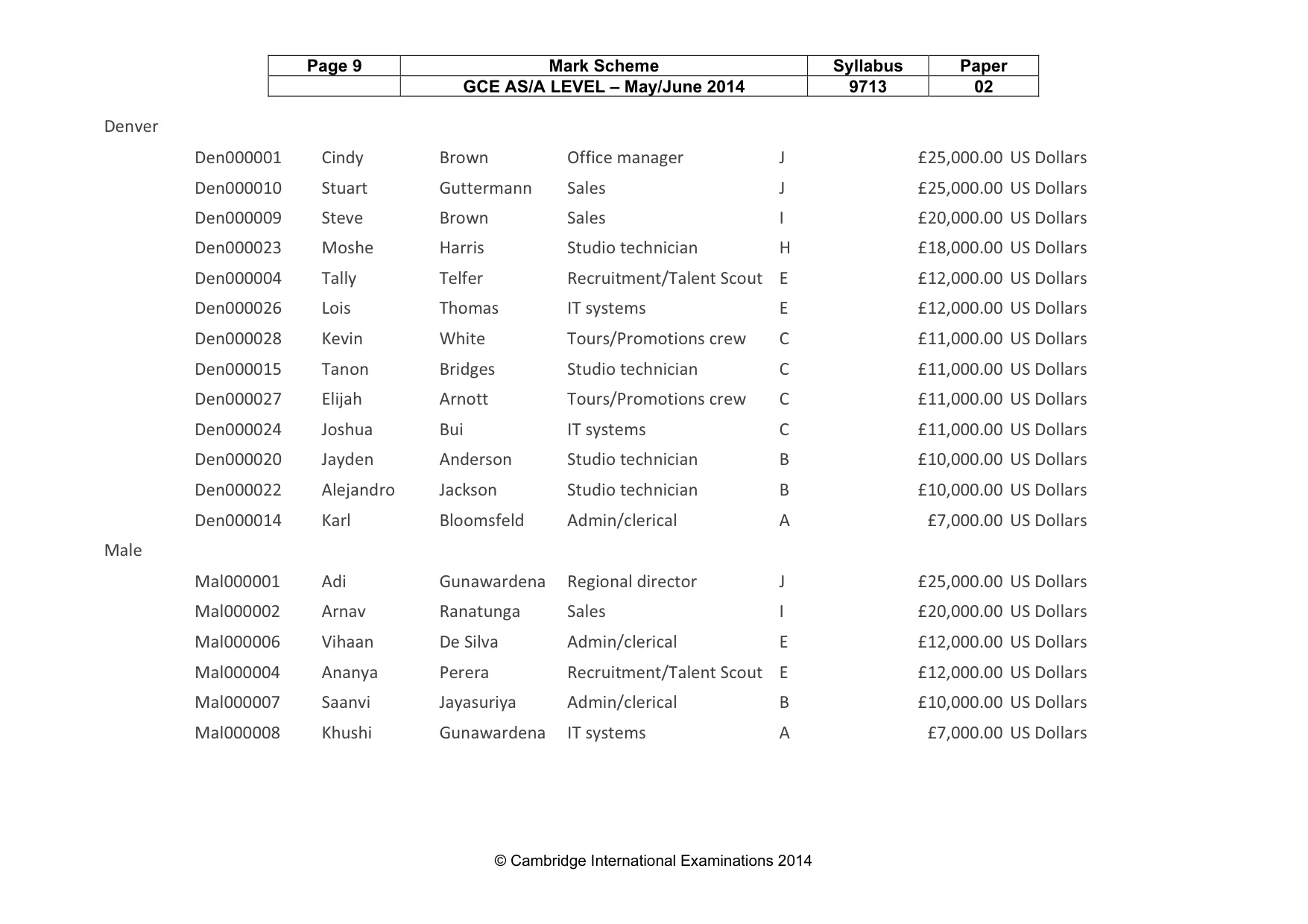
Page 9 Mark Scheme Syllabus Paper GCE AS/A LEVEL – May/June 2014 9713 02 © Cambridge International Examinations 2014 Denver Den000001 Cindy Brown Office manager J £25,000.00 US Dollars Den000010 Stuart Guttermann Sales J £25,000.00 US Dollars Den000009 Steve Brown Sales I £20,000.00 US Dollars Den000023 Moshe Harris Studio technician H £18,000.00 US Dollars Den000004 Tally Telfer Recruitment/Talent Scout E £12,000.00 US Dollars Den000026 Lois Thomas IT systems E £12,000.00 US Dollars Den000028 Kevin White Tours/Promotions crew C £11,000.00 US Dollars Den000015 Tanon Bridges Studio technician C £11,000.00 US Dollars Den000027 Elijah Arnott Tours/Promotions crew C £11,000.00 US Dollars Den000024 Joshua Bui IT systems C £11,000.00 US Dollars Den000020 Jayden Anderson Studio technician B £10,000.00 US Dollars Den000022 Alejandro Jackson Studio technician B £10,000.00 US Dollars Den000014 Karl Bloomsfeld Admin/clerical A £7,000.00 US Dollars Male Mal000001 Adi Gunawardena Regional director J £25,000.00 US Dollars Mal000002 Arnav Ranatunga Sales I £20,000.00 US Dollars Mal000006 Vihaan De Silva Admin/clerical E £12,000.00 US Dollars Mal000004 Ananya Perera Recruitment/Talent Scout E £12,000.00 US Dollars Mal000007 Saanvi Jayasuriya Admin/clerical B £10,000.00 US Dollars Mal000008 Khushi Gunawardena IT systems A £7,000.00 US Dollars
Mark scheme, page 10
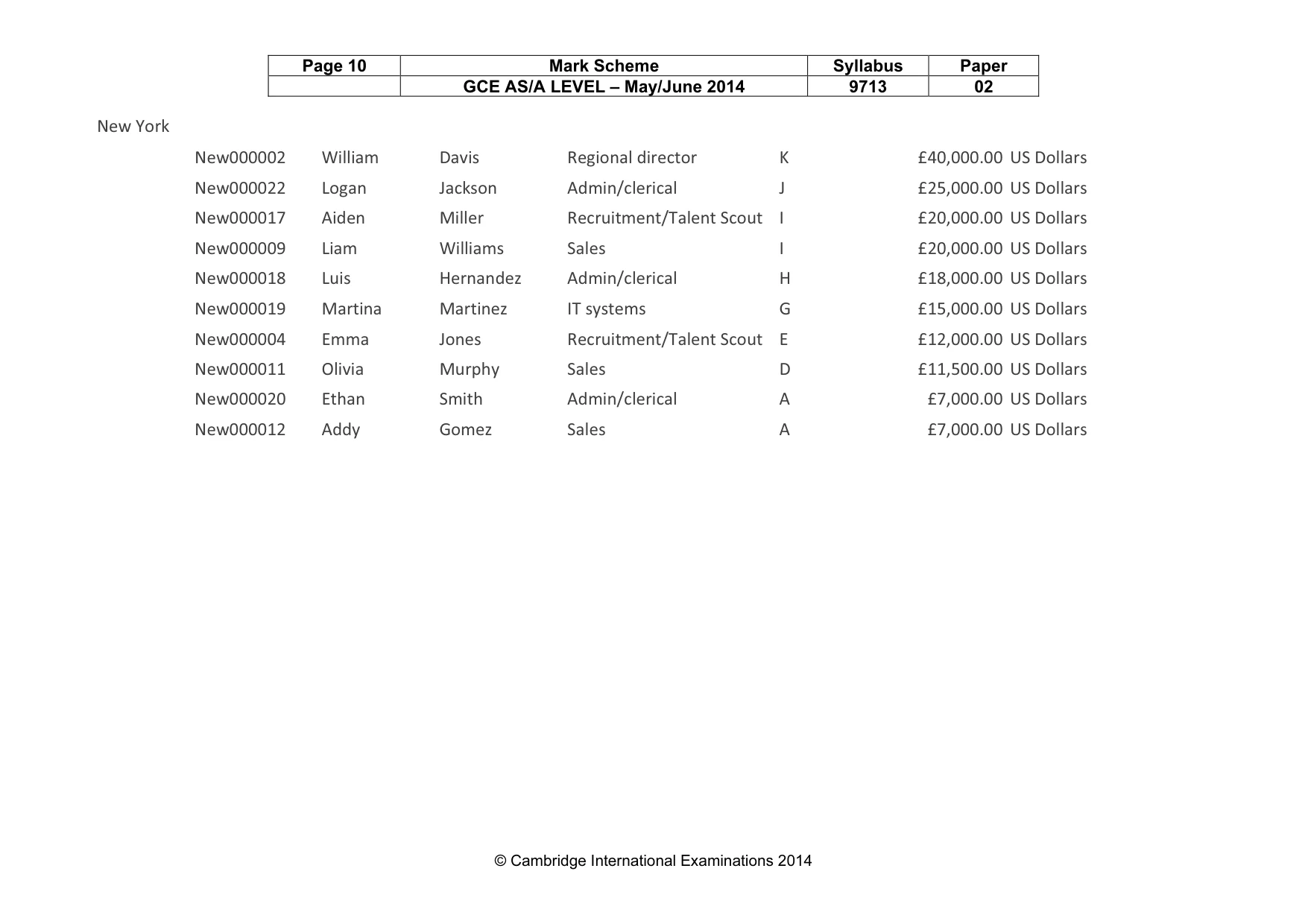
Page 10 Mark Scheme Syllabus Paper GCE AS/A LEVEL – May/June 2014 9713 02 © Cambridge International Examinations 2014 New York New000002 William Davis Regional director K £40,000.00 US Dollars New000022 Logan Jackson Admin/clerical J £25,000.00 US Dollars New000017 Aiden Miller Recruitment/Talent Scout I £20,000.00 US Dollars New000009 Liam Williams Sales I £20,000.00 US Dollars New000018 Luis Hernandez Admin/clerical H £18,000.00 US Dollars New000019 Martina Martinez IT systems G £15,000.00 US Dollars New000004 Emma Jones Recruitment/Talent Scout E £12,000.00 US Dollars New000011 Olivia Murphy Sales D £11,500.00 US Dollars New000020 Ethan Smith Admin/clerical A £7,000.00 US Dollars New000012 Addy Gomez Sales A £7,000.00 US Dollars
Mark scheme, page 11
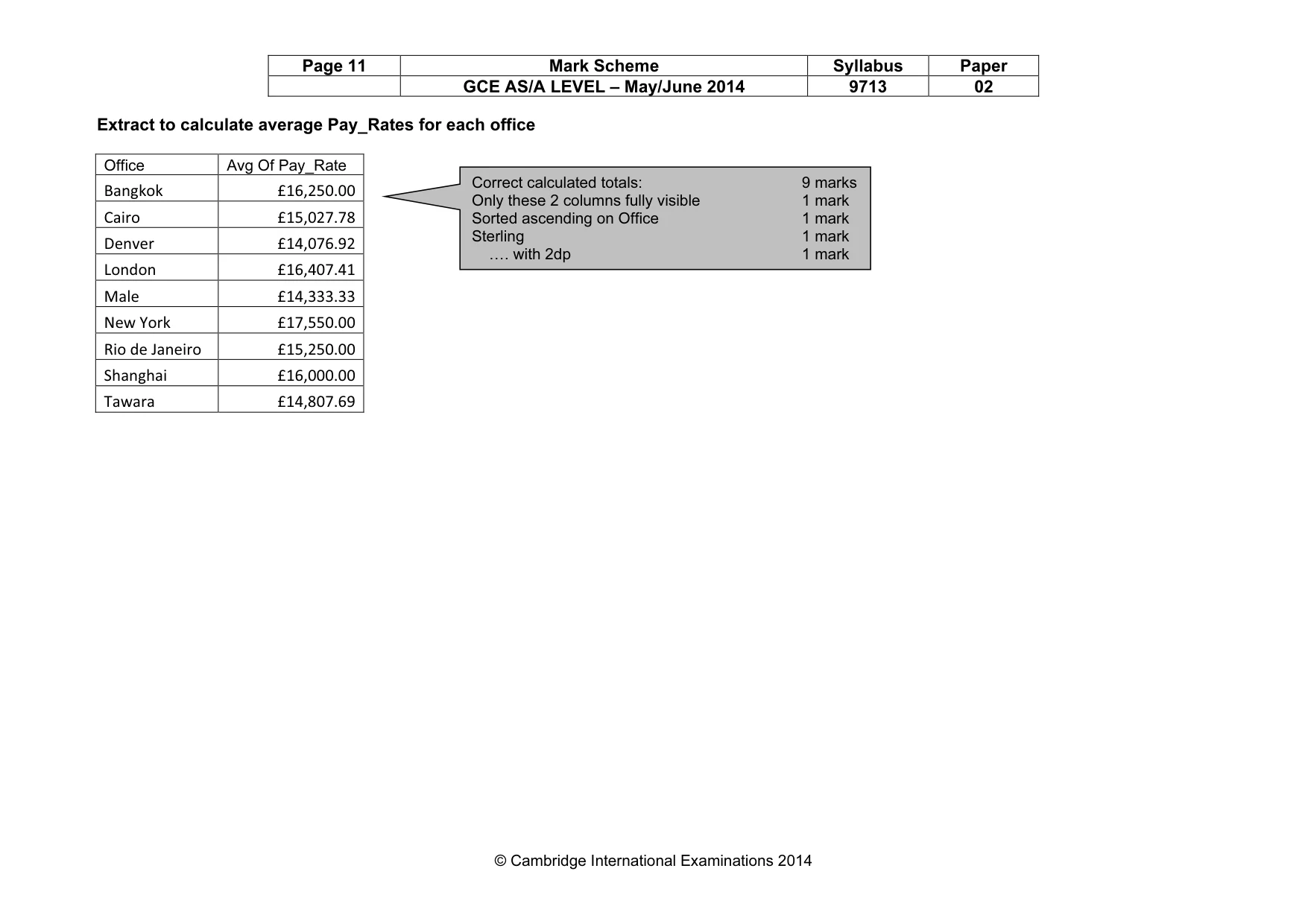
Page 11 Mark Scheme Syllabus Paper GCE AS/A LEVEL – May/June 2014 9713 02 © Cambridge International Examinations 2014 Extract to calculate average Pay_Rates for each office Office Avg Of Pay_Rate Bangkok £16,250.00 Cairo £15,027.78 Denver £14,076.92 London £16,407.41 Male £14,333.33 New York £17,550.00 Rio de Janeiro £15,250.00 Shanghai £16,000.00 Tawara £14,807.69 Correct calculated totals: 9 marks Only these 2 columns fully visible 1 mark Sorted ascending on Office 1 mark Sterling 1 mark …. with 2dp 1 mark
Mark scheme, page 12
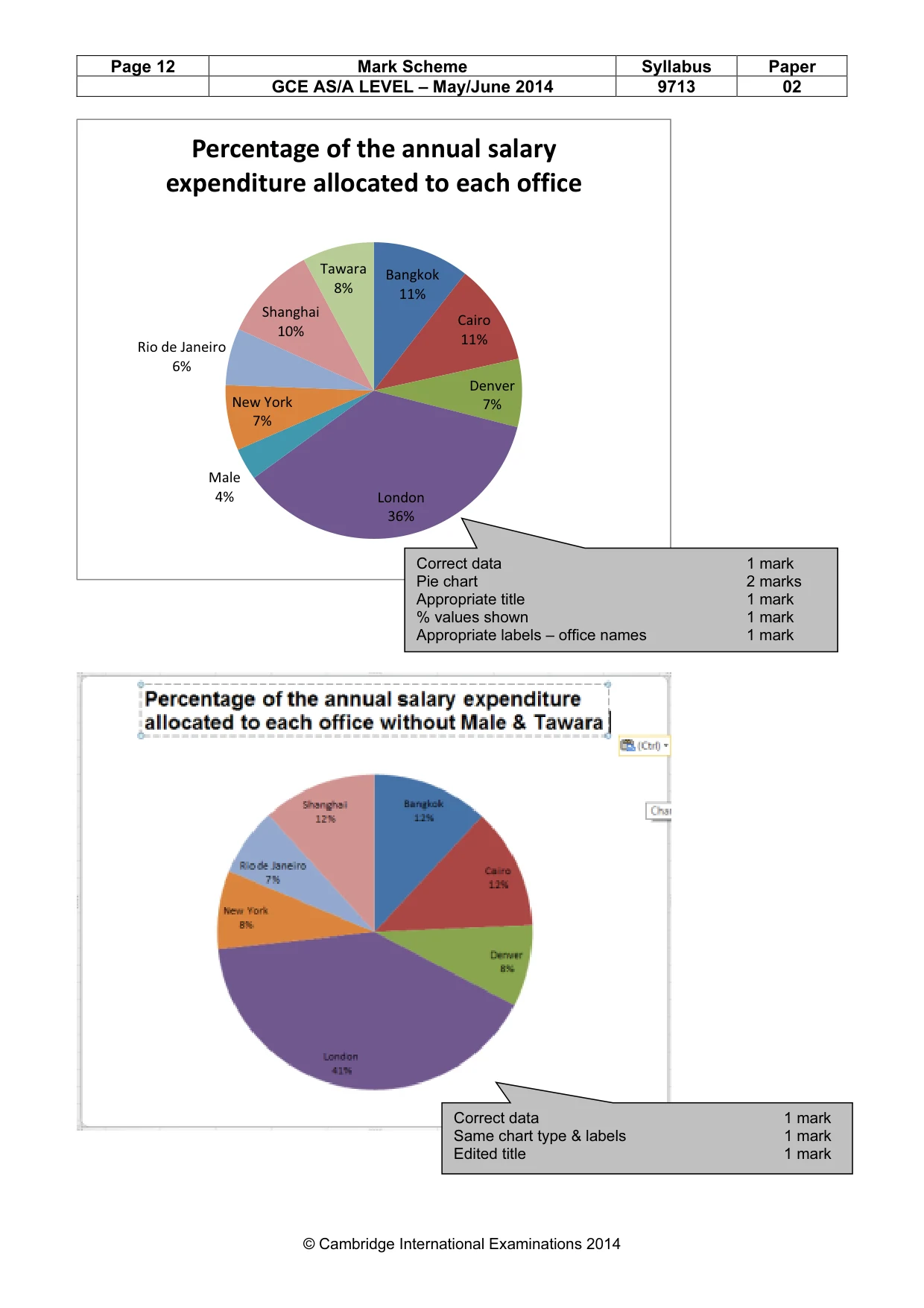
Page 12 Mark Scheme Syllabus Paper GCE AS/A LEVEL – May/June 2014 9713 02 © Cambridge International Examinations 2014 Bangkok 11% Cairo 11% Denver 7% London 36% Male 4% New York 7% Rio de Janeiro 6% Shanghai 10% Tawara 8% Percentage of the annual salary expenditure allocated to each office Correct data 1 mark Pie chart 2 marks Appropriate title 1 mark % values shown 1 mark Appropriate labels – office names 1 mark Correct data 1 mark Same chart type & labels 1 mark Edited title 1 mark
Mark scheme, page 13
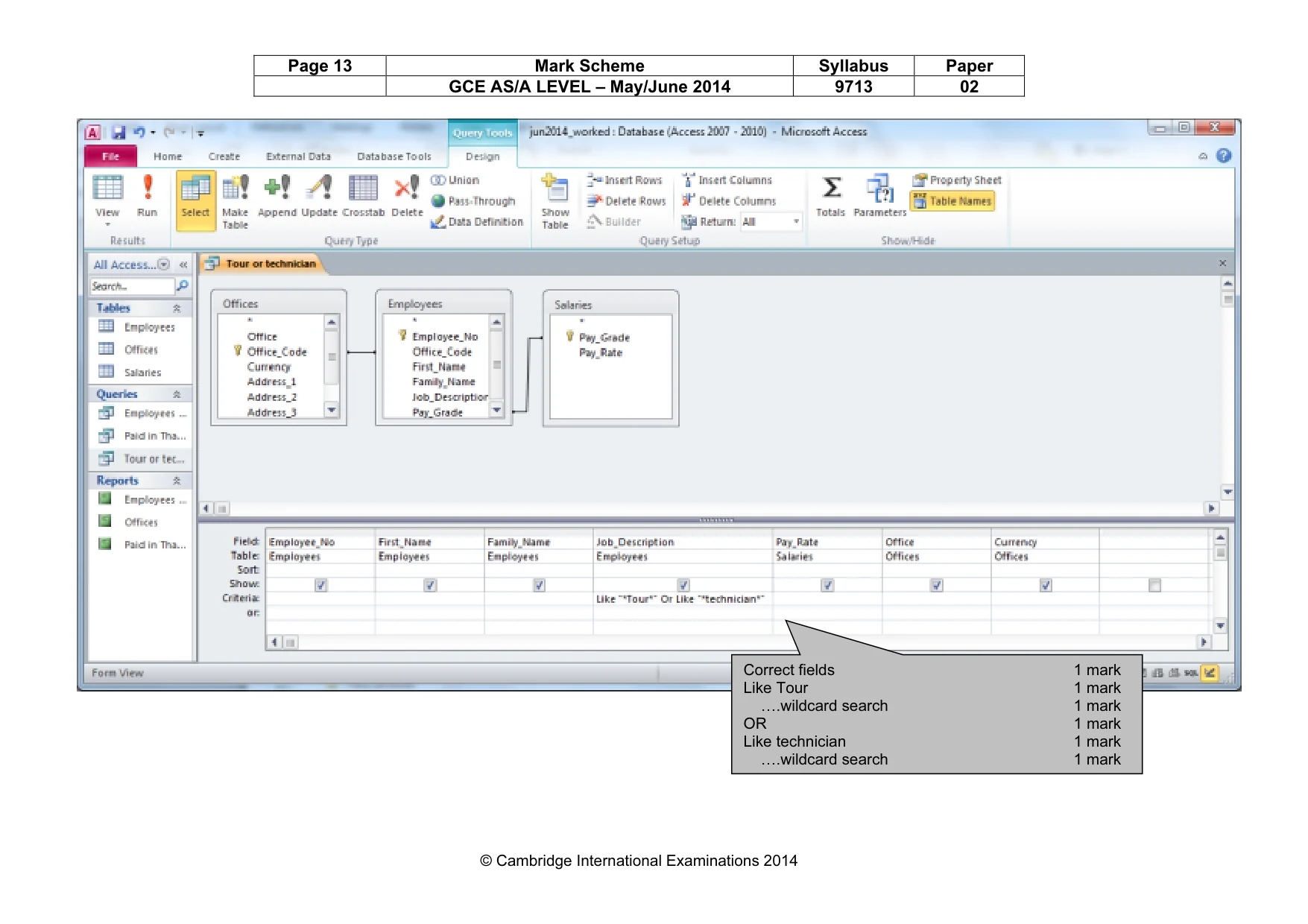
Page 13 Mark Scheme Syllabus Paper GCE AS/A LEVEL – May/June 2014 9713 02 © Cambridge International Examinations 2014 Correct fields 1 mark Like Tour 1 mark ….wildcard search 1 mark OR 1 mark Like technician 1 mark ….wildcard search 1 mark
Mark scheme, page 14
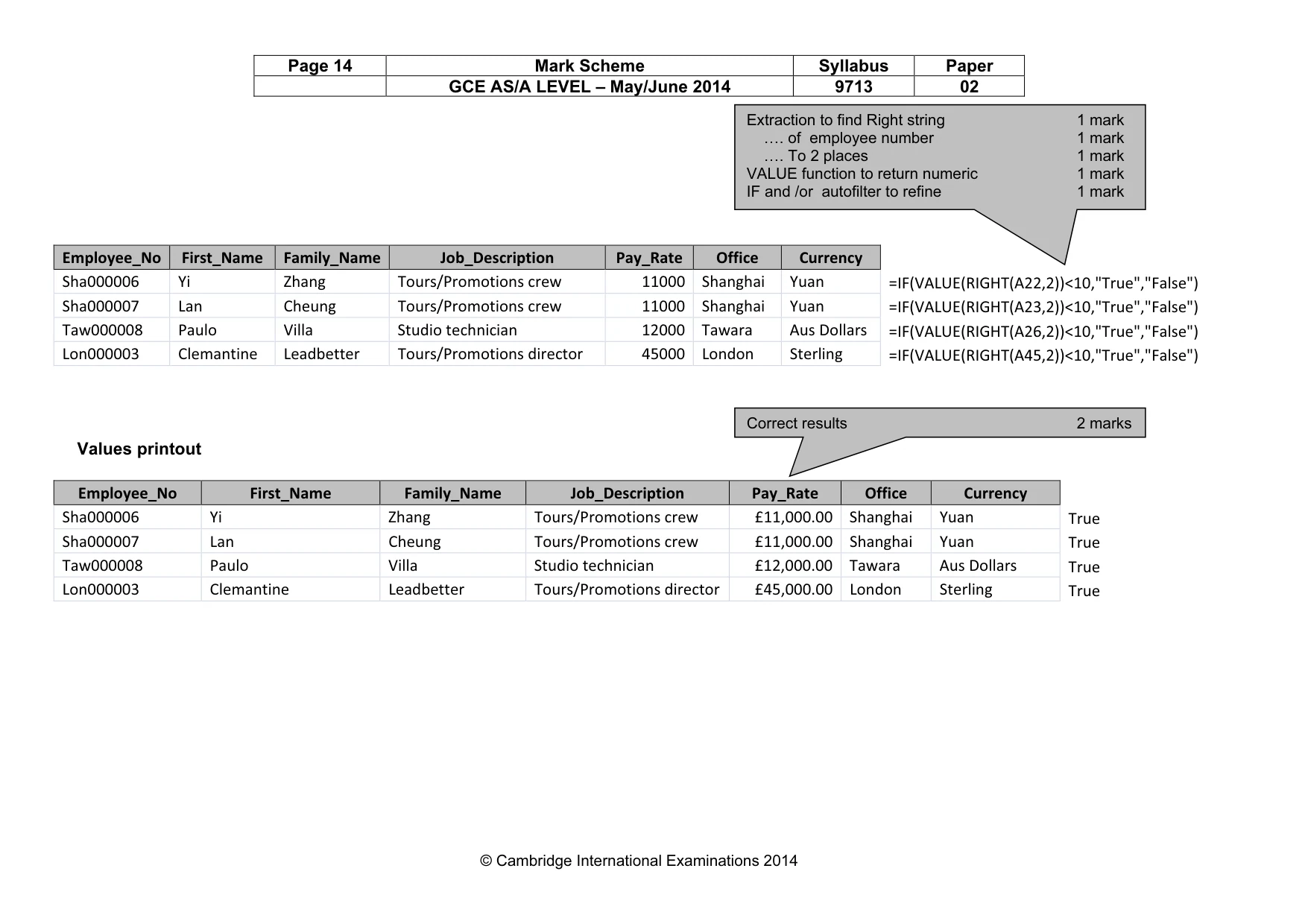
Page 14 Mark Scheme Syllabus Paper GCE AS/A LEVEL – May/June 2014 9713 02 © Cambridge International Examinations 2014 Employee_No First_Name Family_Name Job_Description Pay_Rate Office Currency Sha000006 Yi Zhang Tours/Promotions crew 11000 Shanghai Yuan =IF(VALUE(RIGHT(A22,2))<10,"True","False") Sha000007 Lan Cheung Tours/Promotions crew 11000 Shanghai Yuan =IF(VALUE(RIGHT(A23,2))<10,"True","False") Taw000008 Paulo Villa Studio technician 12000 Tawara Aus Dollars =IF(VALUE(RIGHT(A26,2))<10,"True","False") Lon000003 Clemantine Leadbetter Tours/Promotions director 45000 London Sterling =IF(VALUE(RIGHT(A45,2))<10,"True","False") Values printout Employee_No First_Name Family_Name Job_Description Pay_Rate Office Currency Sha000006 Yi Zhang Tours/Promotions crew £11,000.00 Shanghai Yuan True Sha000007 Lan Cheung Tours/Promotions crew £11,000.00 Shanghai Yuan True Taw000008 Paulo Villa Studio technician £12,000.00 Tawara Aus Dollars True Lon000003 Clemantine Leadbetter Tours/Promotions director £45,000.00 London Sterling True Extraction to find Right string 1 mark …. of employee number 1 mark …. To 2 places 1 mark VALUE function to return numeric 1 mark IF and /or autofilter to refine 1 mark Correct results 2 marks
Mark scheme, page 15
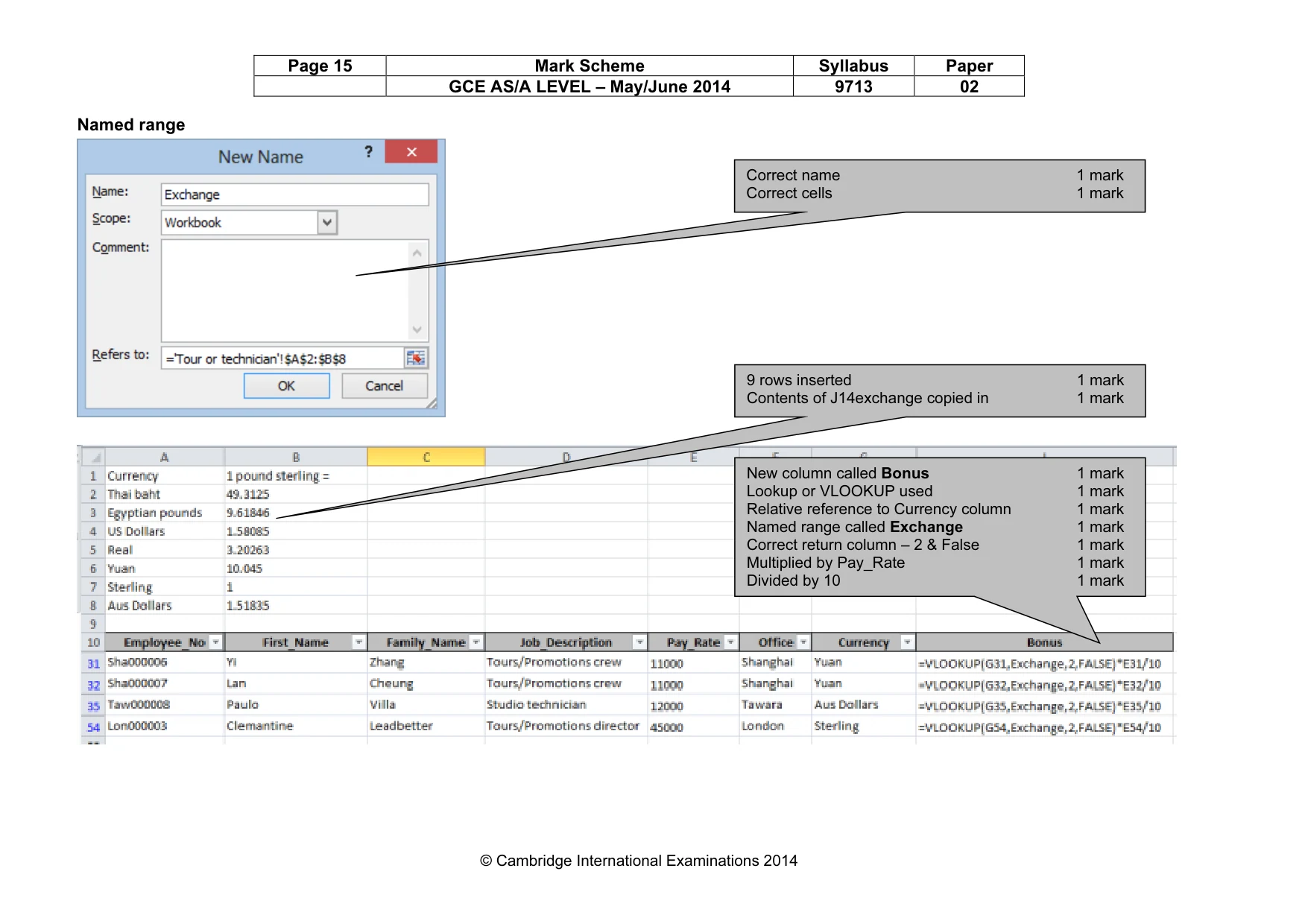
Page 15 Mark Scheme Syllabus Paper GCE AS/A LEVEL – May/June 2014 9713 02 © Cambridge International Examinations 2014 Named range Correct name 1 mark Correct cells 1 mark 9 rows inserted 1 mark Contents of J14exchange copied in 1 mark New column called Bonus 1 mark Lookup or VLOOKUP used 1 mark Relative reference to Currency column 1 mark Named range called Exchange 1 mark Correct return column – 2 & False 1 mark Multiplied by Pay_Rate 1 mark Divided by 10 1 mark
Mark scheme, page 16
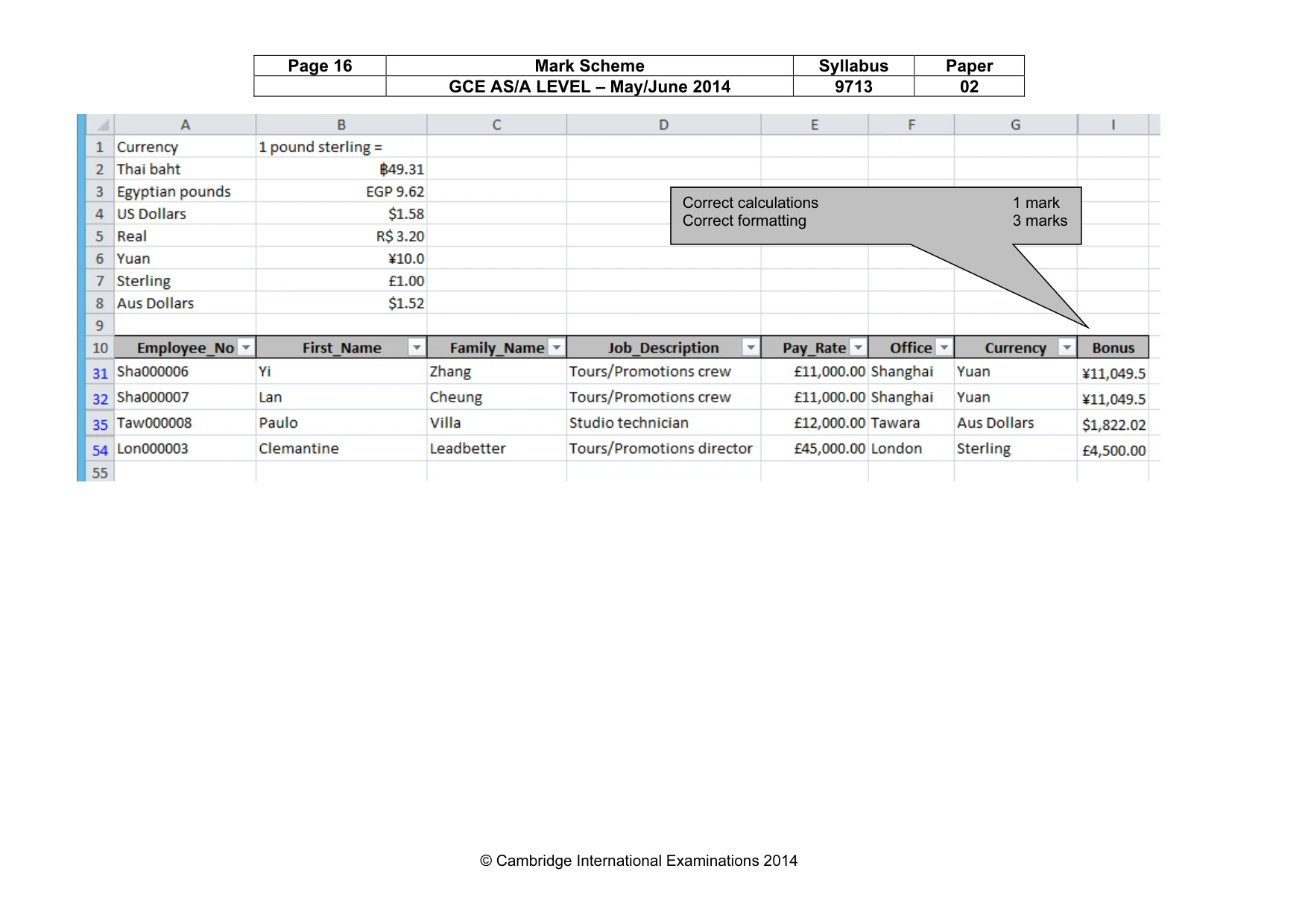
Page 16 Mark Scheme Syllabus Paper GCE AS/A LEVEL – May/June 2014 9713 02 © Cambridge International Examinations 2014 Correct calculations 1 mark Correct formatting 3 marks
What you needed in this session
Cambridge’s own grade thresholds for 2014 May/June, Paper 2 · Variant 1. A higher threshold means an easier paper — the bar moves with how the cohort did.