Cambridge A Level Applied Information and Communication Technology 9713 — 2017 May/June Paper 2 · Variant 1
9713/21/M/J/17 · 120 marks · ≈135 min
The question paper and its mark scheme, free to read here and free to download. This is Cambridge’s own paper, exactly as it was sat.
Question paper8 pages
Mark scheme20 pages
Answers below. Sit the paper first if you are practising.
Paper as text
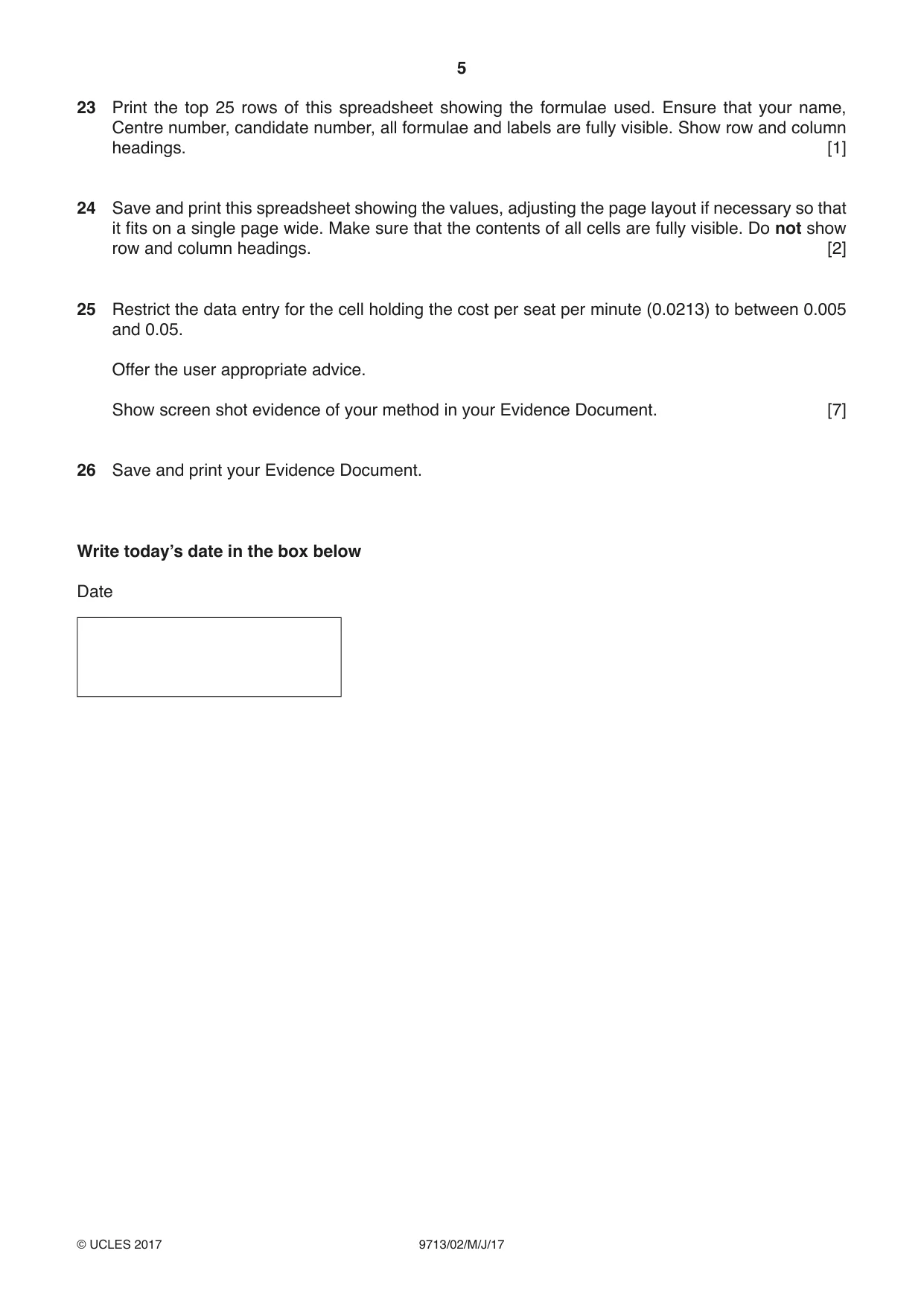
Question paper, page 1
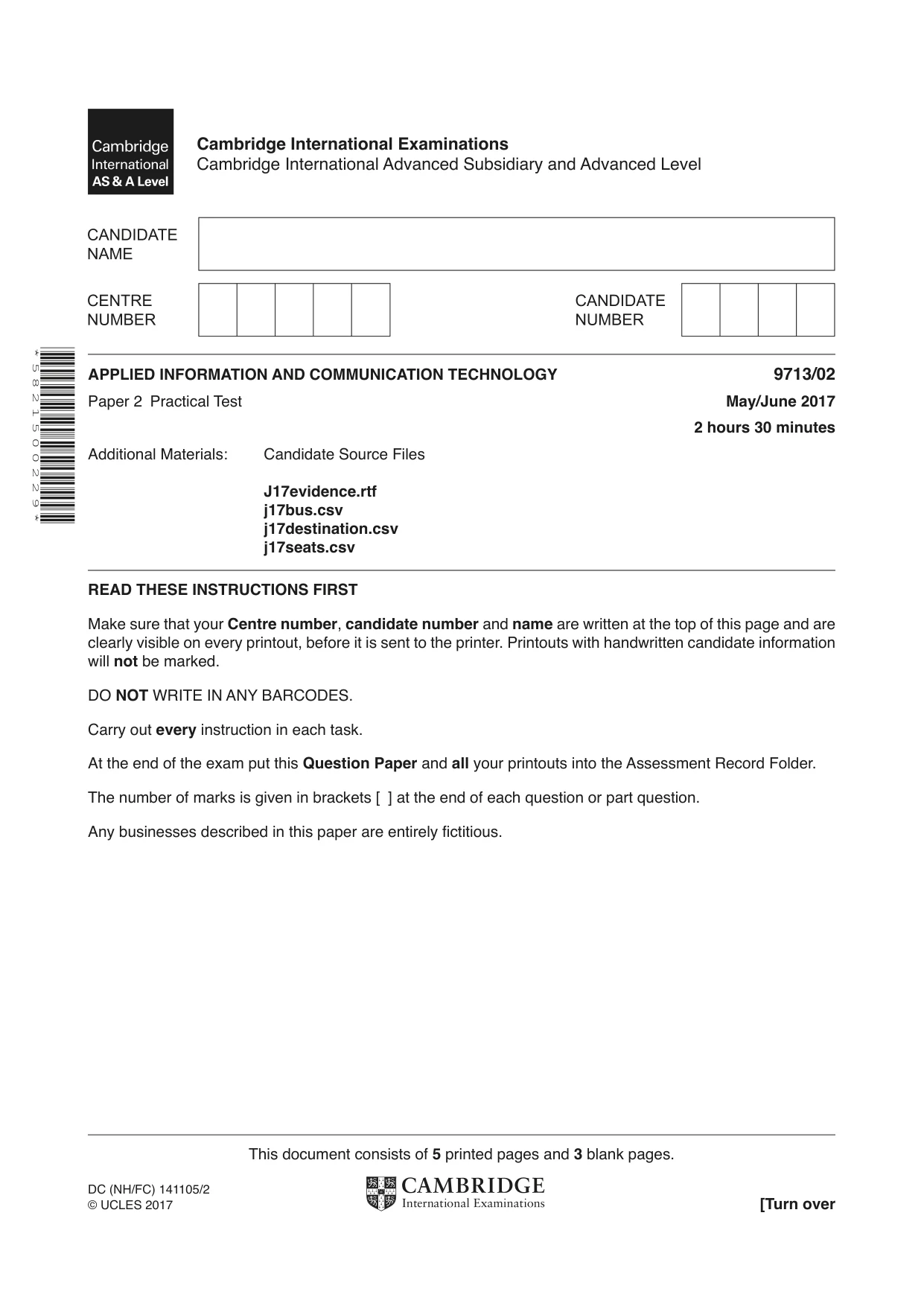
This document consists of 5 printed pages and 3 blank pages. DC (NH/FC) 141105/2 © UCLES 2017 [Turn over * 5 8 2 1 5 0 0 2 2 9 * APPLIED INFORMATION AND COMMUNICATION TECHNOLOGY 9713/02 Paper 2 Practical Test May/June 2017 2 hours 30 minutes Additional Materials: Candidate Source Files J17evidence.rtf j17bus.csv j17destination.csv j17seats.csv READ THESE INSTRUCTIONS FIRST Make sure that your Centre number, candidate number and name are written at the top of this page and are clearly visible on every printout, before it is sent to the printer. Printouts with handwritten candidate information will not be marked. DO NOT WRITE IN ANY BARCODES. Carry out every instruction in each task. At the end of the exam put this Question Paper and all your printouts into the Assessment Record Folder. The number of marks is given in brackets [ ] at the end of each question or part question. Any businesses described in this paper are entirely fictitious. Cambridge International Examinations Cambridge International Advanced Subsidiary and Advanced Level
Question paper, page 2
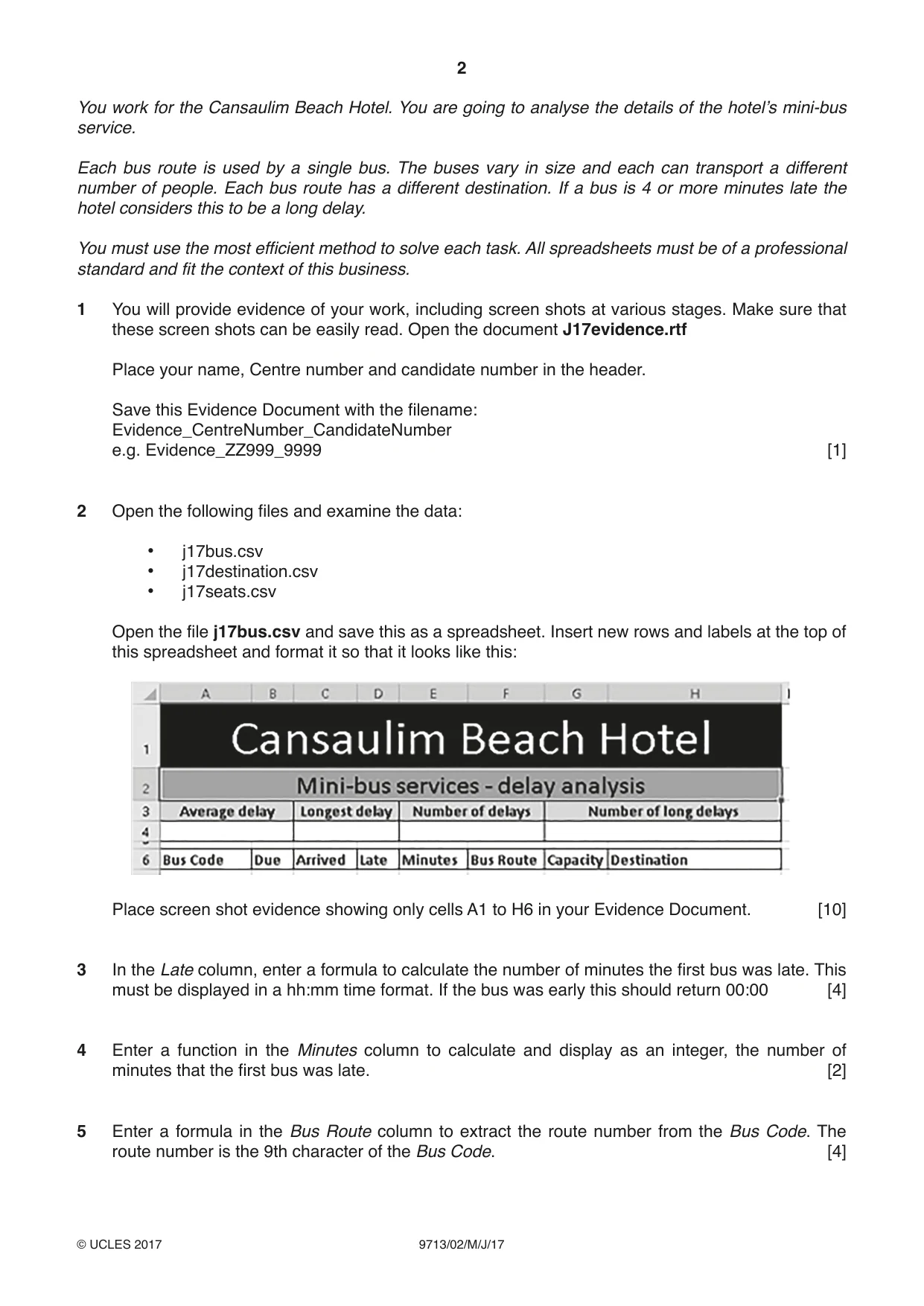
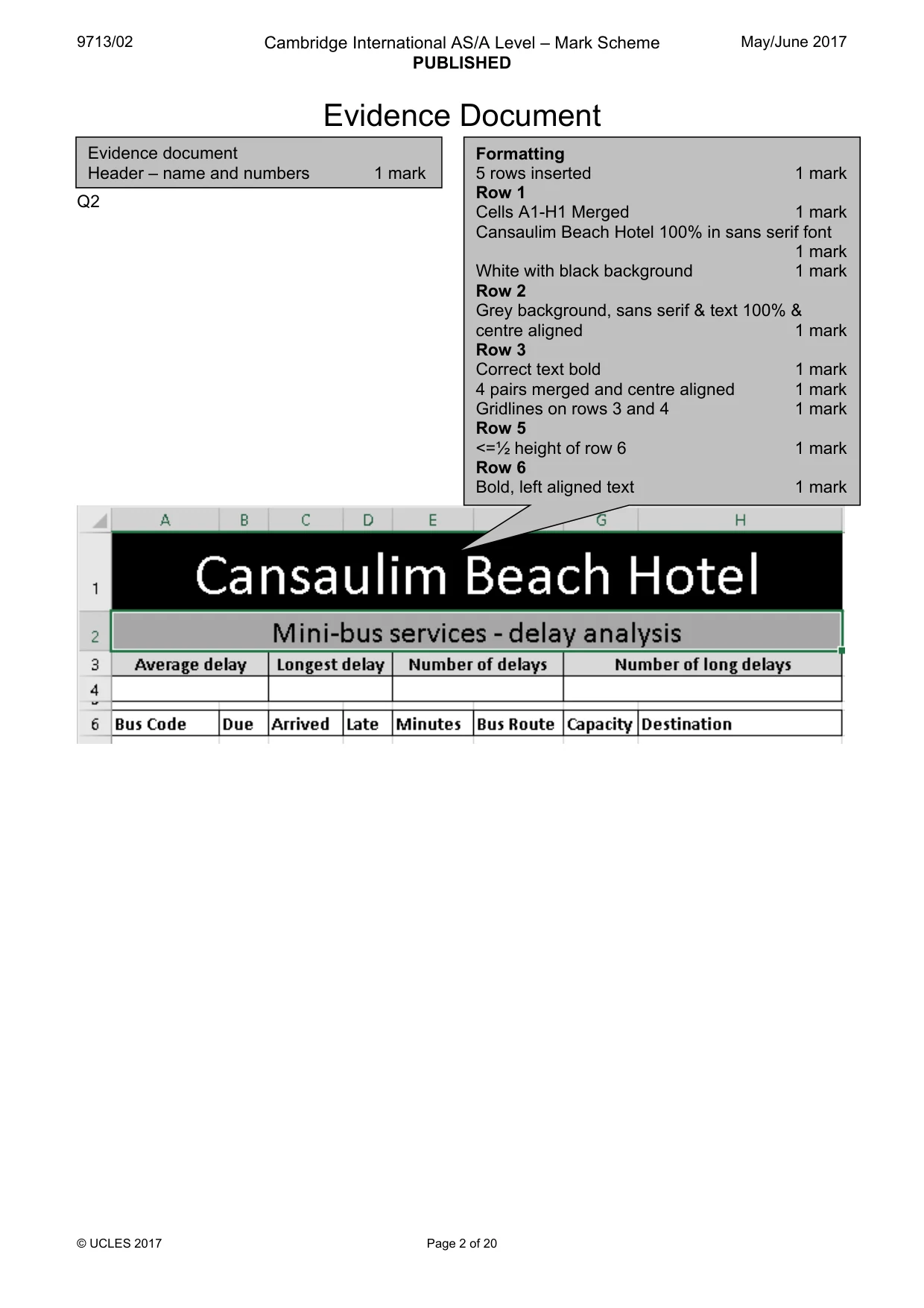
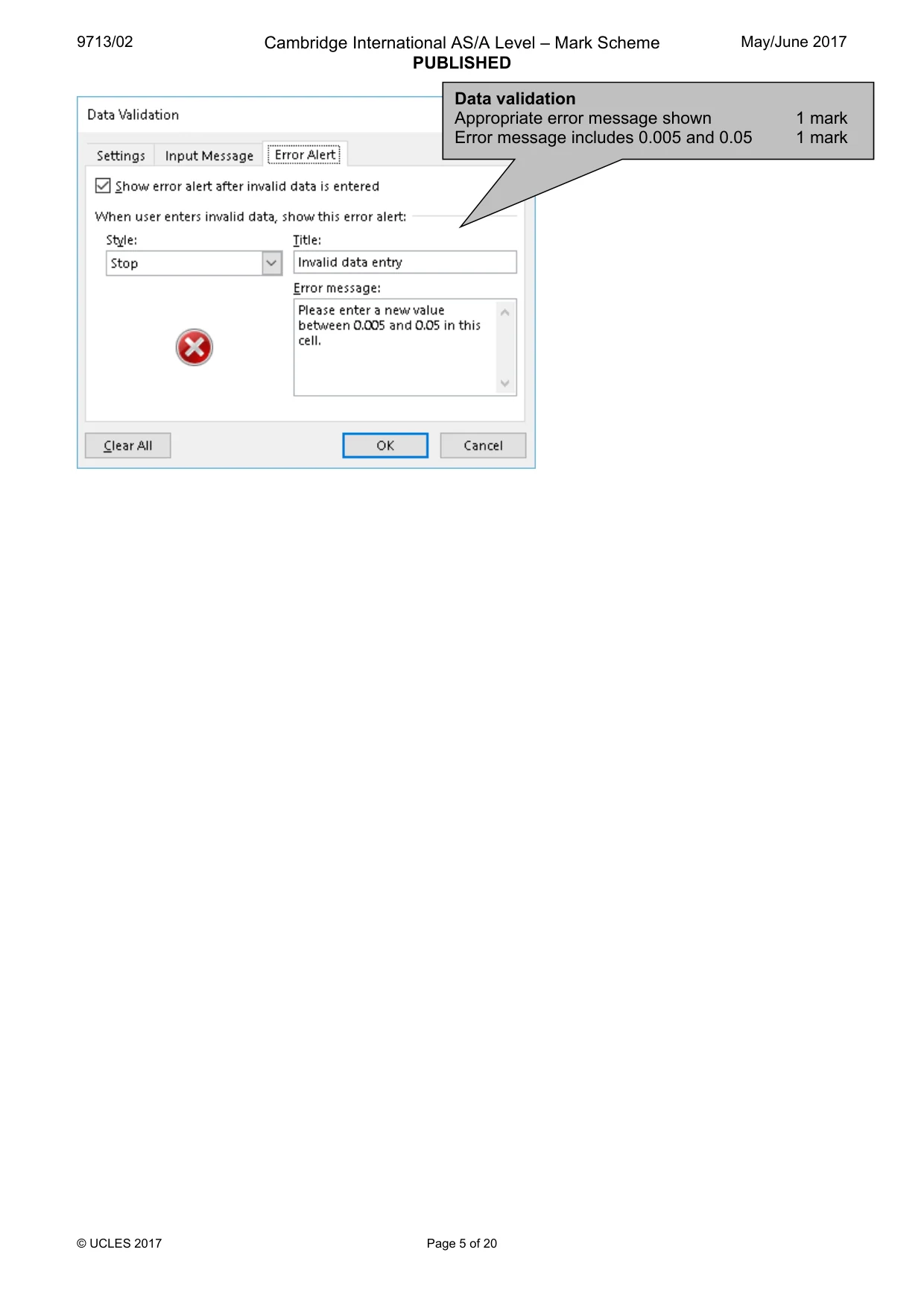
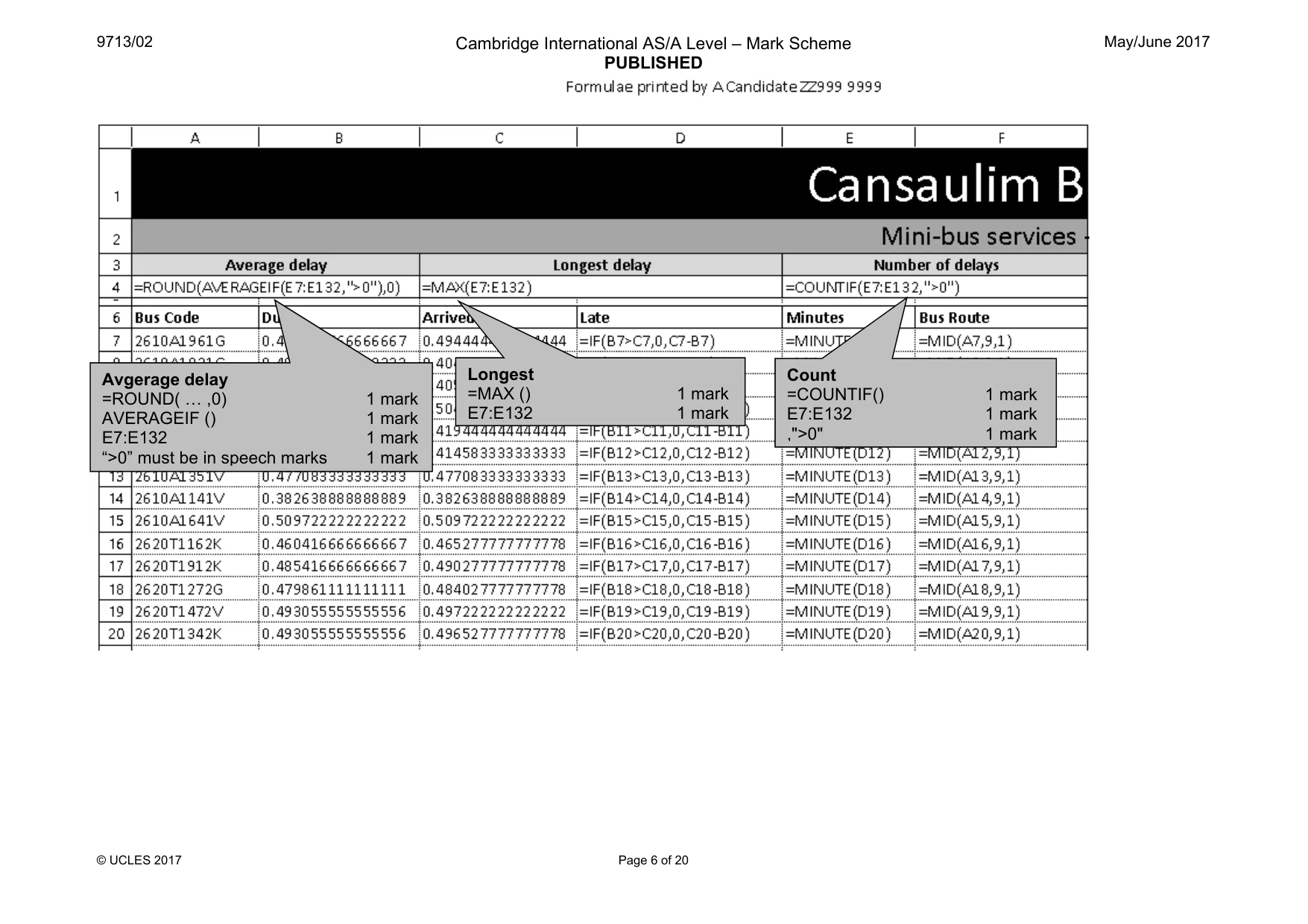
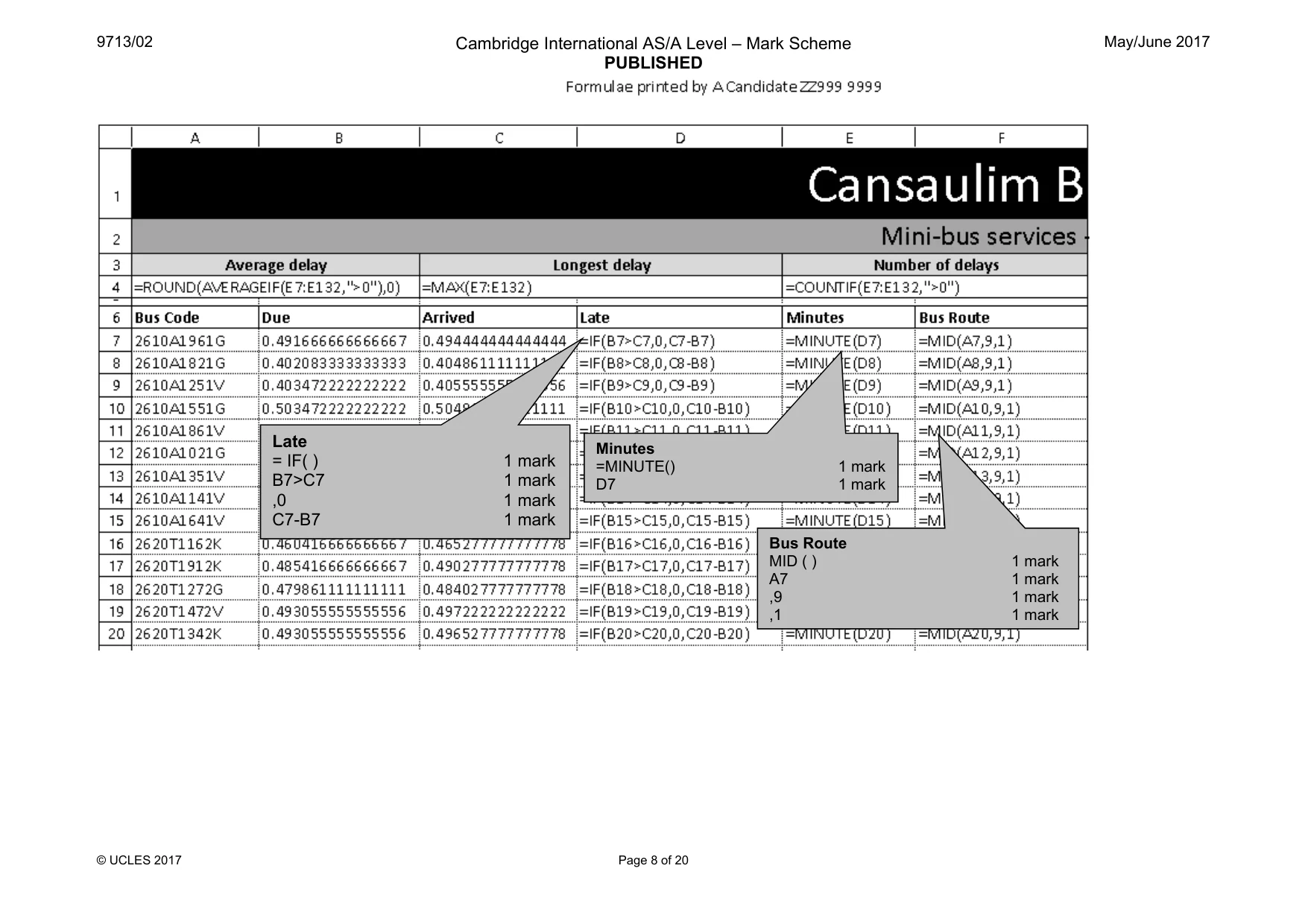
2 9713/02/M/J/17 © UCLES 2017 You work for the Cansaulim Beach Hotel. You are going to analyse the details of the hotel’s mini-bus service. Each bus route is used by a single bus. The buses vary in size and each can transport a different number of people. Each bus route has a different destination. If a bus is 4 or more minutes late the hotel considers this to be a long delay. You must use the most efficient method to solve each task. All spreadsheets must be of a professional standard and fit the context of this business. 1 You will provide evidence of your work, including screen shots at various stages. Make sure that these screen shots can be easily read. Open the document J17evidence.rtf Place your name, Centre number and candidate number in the header. Save this Evidence Document with the filename: Evidence_CentreNumber_CandidateNumber e.g. Evidence_ZZ999_9999 [1] 2 Open the following files and examine the data: • j17bus.csv • j17destination.csv • j17seats.csv Open the file j17bus.csv and save this as a spreadsheet. Insert new rows and labels at the top of this spreadsheet and format it so that it looks like this: Place screen shot evidence showing only cells A1 to H6 in your Evidence Document. [10] 3 In the Late column, enter a formula to calculate the number of minutes the first bus was late. This must be displayed in a hh:mm time format. If the bus was early this should return 00:00 [4] 4 Enter a function in the Minutes column to calculate and display as an integer, the number of minutes that the first bus was late. [2] 5 Enter a formula in the Bus Route column to extract the route number from the Bus Code. The route number is the 9th character of the Bus Code. [4]
Question paper, page 3
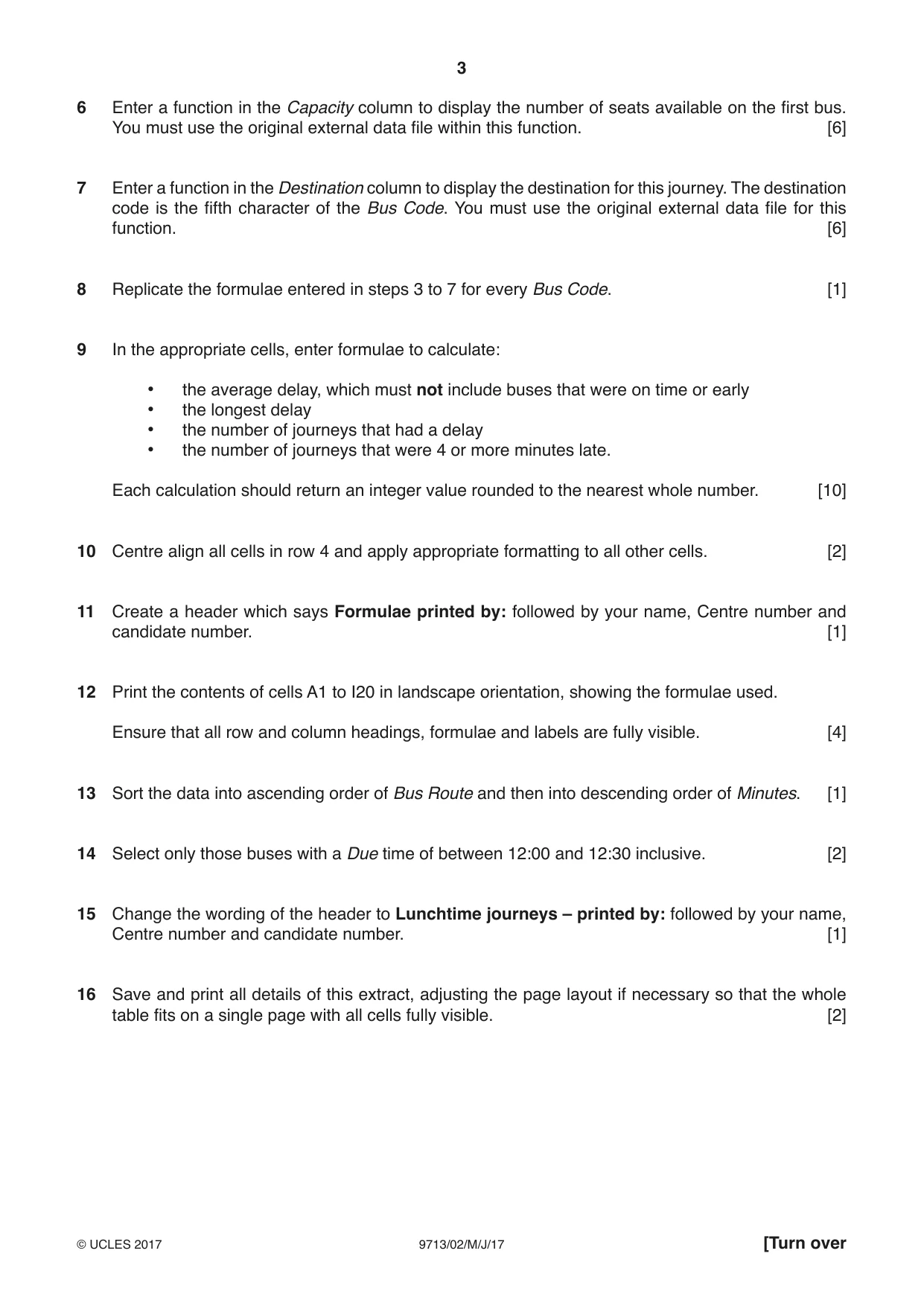
3 9713/02/M/J/17 © UCLES 2017 [Turn over 6 Enter a function in the Capacity column to display the number of seats available on the first bus. You must use the original external data file within this function. [6] 7 Enter a function in the Destination column to display the destination for this journey. The destination code is the fifth character of the Bus Code. You must use the original external data file for this function. [6] 8 Replicate the formulae entered in steps 3 to 7 for every Bus Code. [1] 9 In the appropriate cells, enter formulae to calculate: • the average delay, which must not include buses that were on time or early • the longest delay • the number of journeys that had a delay • the number of journeys that were 4 or more minutes late. Each calculation should return an integer value rounded to the nearest whole number. [10] 10 Centre align all cells in row 4 and apply appropriate formatting to all other cells. [2] 11 Create a header which says Formulae printed by: followed by your name, Centre number and candidate number. [1] 12 Print the contents of cells A1 to I20 in landscape orientation, showing the formulae used. Ensure that all row and column headings, formulae and labels are fully visible. [4] 13 Sort the data into ascending order of Bus Route and then into descending order of Minutes. [1] 14 Select only those buses with a Due time of between 12:00 and 12:30 inclusive. [2] 15 Change the wording of the header to Lunchtime journeys – printed by: followed by your name, Centre number and candidate number. [1] 16 Save and print all details of this extract, adjusting the page layout if necessary so that the whole table fits on a single page with all cells fully visible. [2]
Question paper, page 4
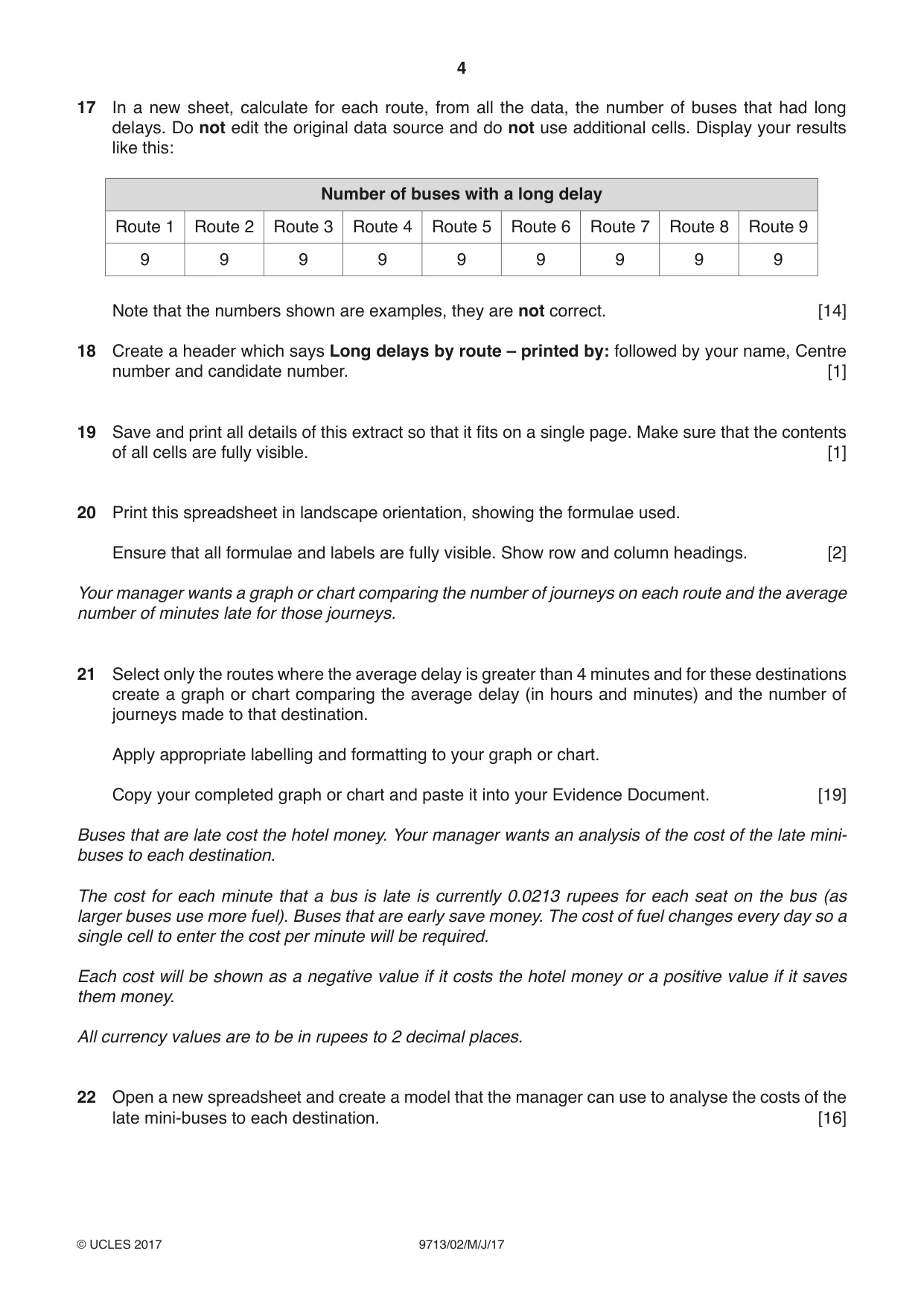
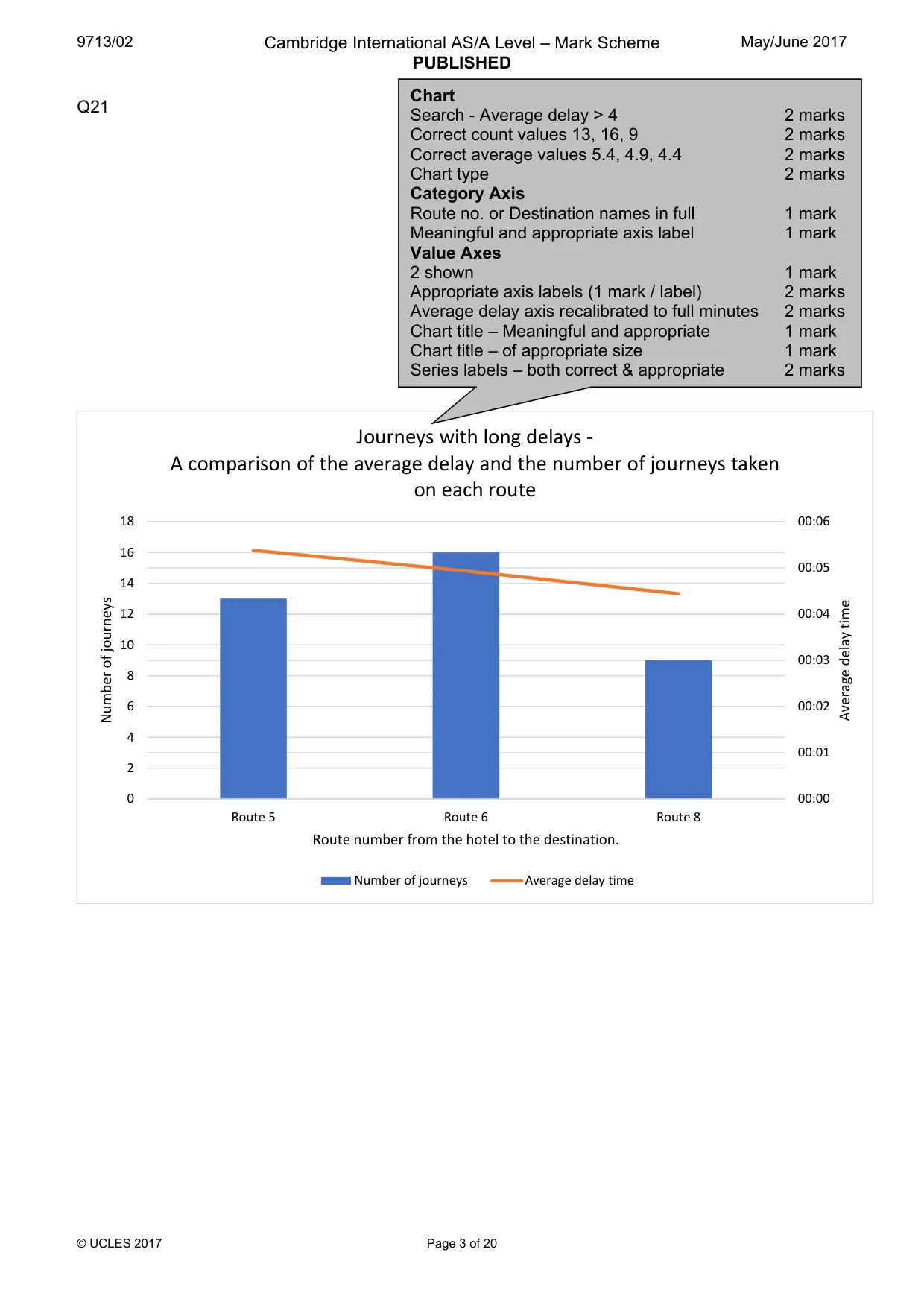
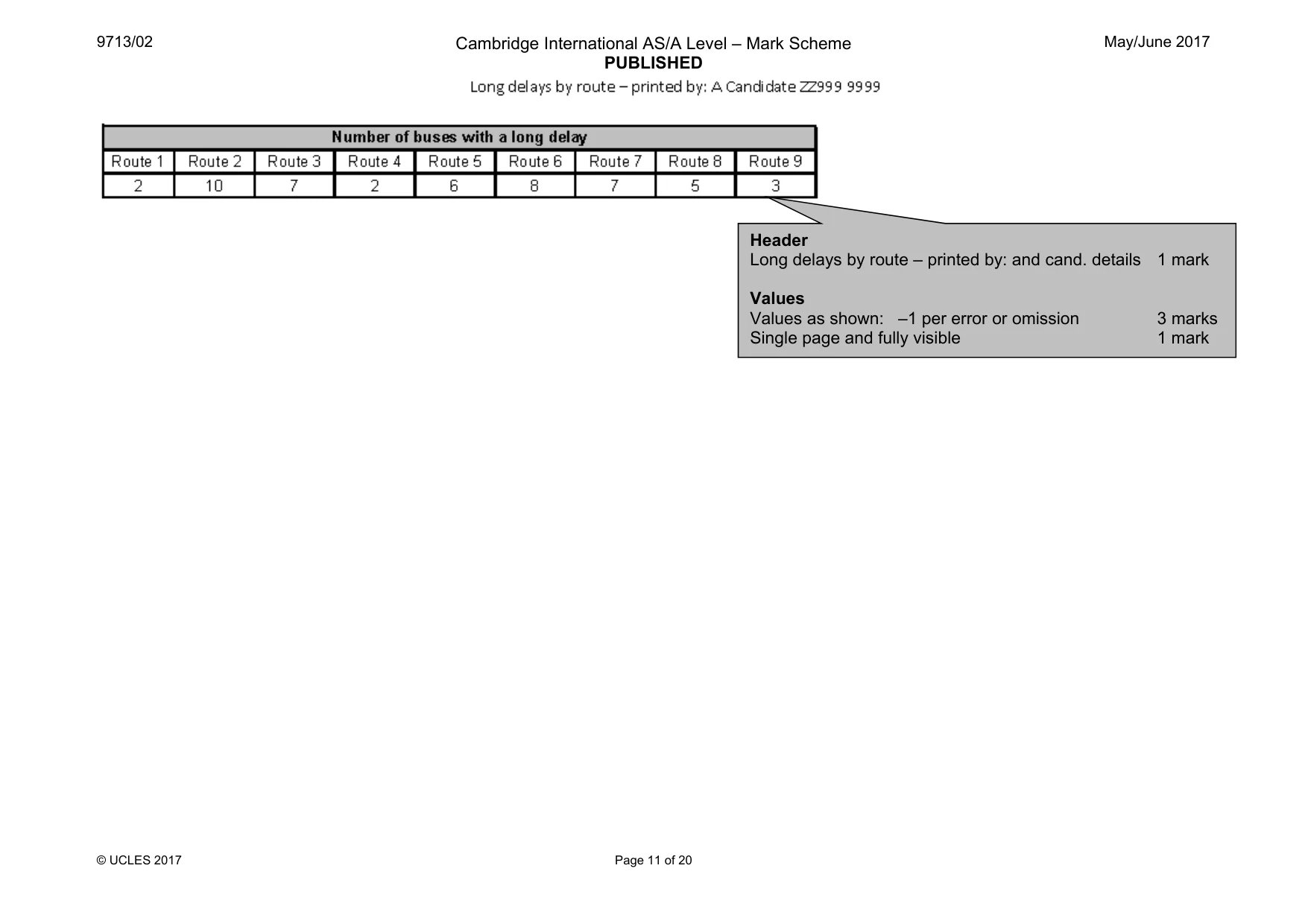
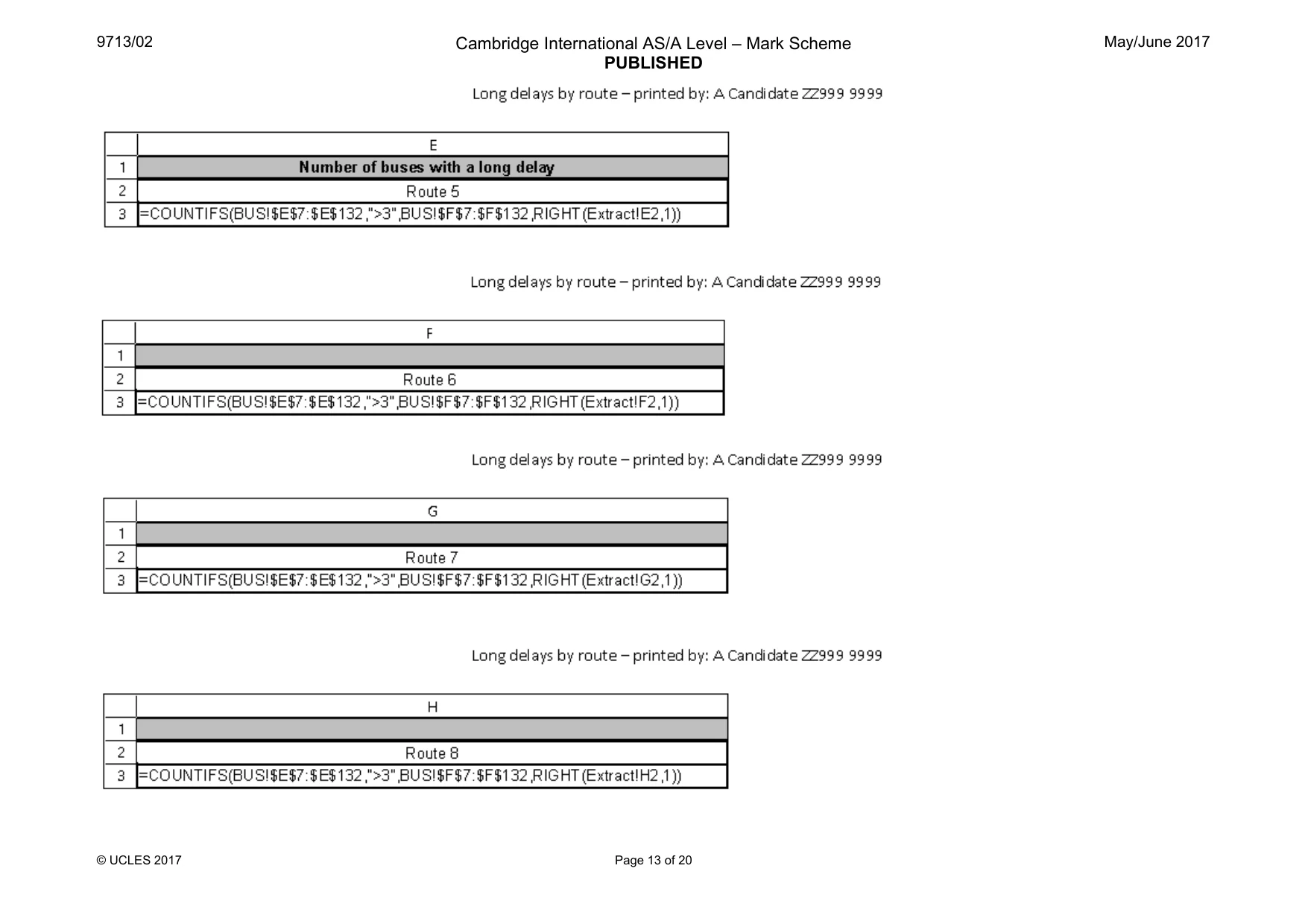
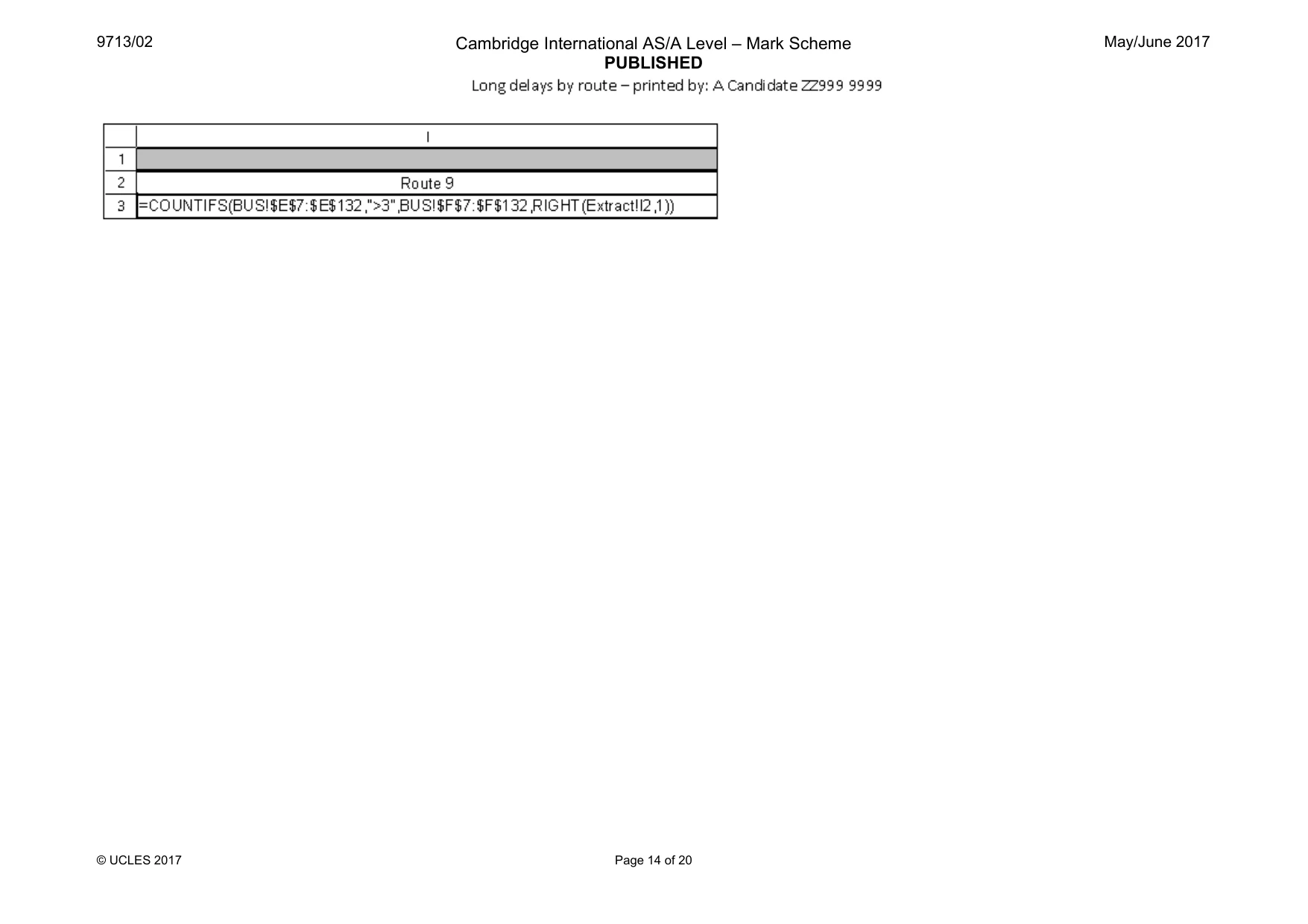
4 9713/02/M/J/17 © UCLES 2017 17 In a new sheet, calculate for each route, from all the data, the number of buses that had long delays. Do not edit the original data source and do not use additional cells. Display your results like this: Number of buses with a long delay Route 1 Route 2 Route 3 Route 4 Route 5 Route 6 Route 7 Route 8 Route 9 9 9 9 9 9 9 9 9 9 Note that the numbers shown are examples, they are not correct. [14] 18 Create a header which says Long delays by route – printed by: followed by your name, Centre number and candidate number. [1] 19 Save and print all details of this extract so that it fits on a single page. Make sure that the contents of all cells are fully visible. [1] 20 Print this spreadsheet in landscape orientation, showing the formulae used. Ensure that all formulae and labels are fully visible. Show row and column headings. [2] Your manager wants a graph or chart comparing the number of journeys on each route and the average number of minutes late for those journeys. 21 Select only the routes where the average delay is greater than 4 minutes and for these destinations create a graph or chart comparing the average delay (in hours and minutes) and the number of journeys made to that destination. Apply appropriate labelling and formatting to your graph or chart. Copy your completed graph or chart and paste it into your Evidence Document. [19] Buses that are late cost the hotel money. Your manager wants an analysis of the cost of the late mini- buses to each destination. The cost for each minute that a bus is late is currently 0.0213 rupees for each seat on the bus (as larger buses use more fuel). Buses that are early save money. The cost of fuel changes every day so a single cell to enter the cost per minute will be required. Each cost will be shown as a negative value if it costs the hotel money or a positive value if it saves them money. All currency values are to be in rupees to 2 decimal places. 22 Open a new spreadsheet and create a model that the manager can use to analyse the costs of the late mini-buses to each destination. [16]
Question paper, page 5
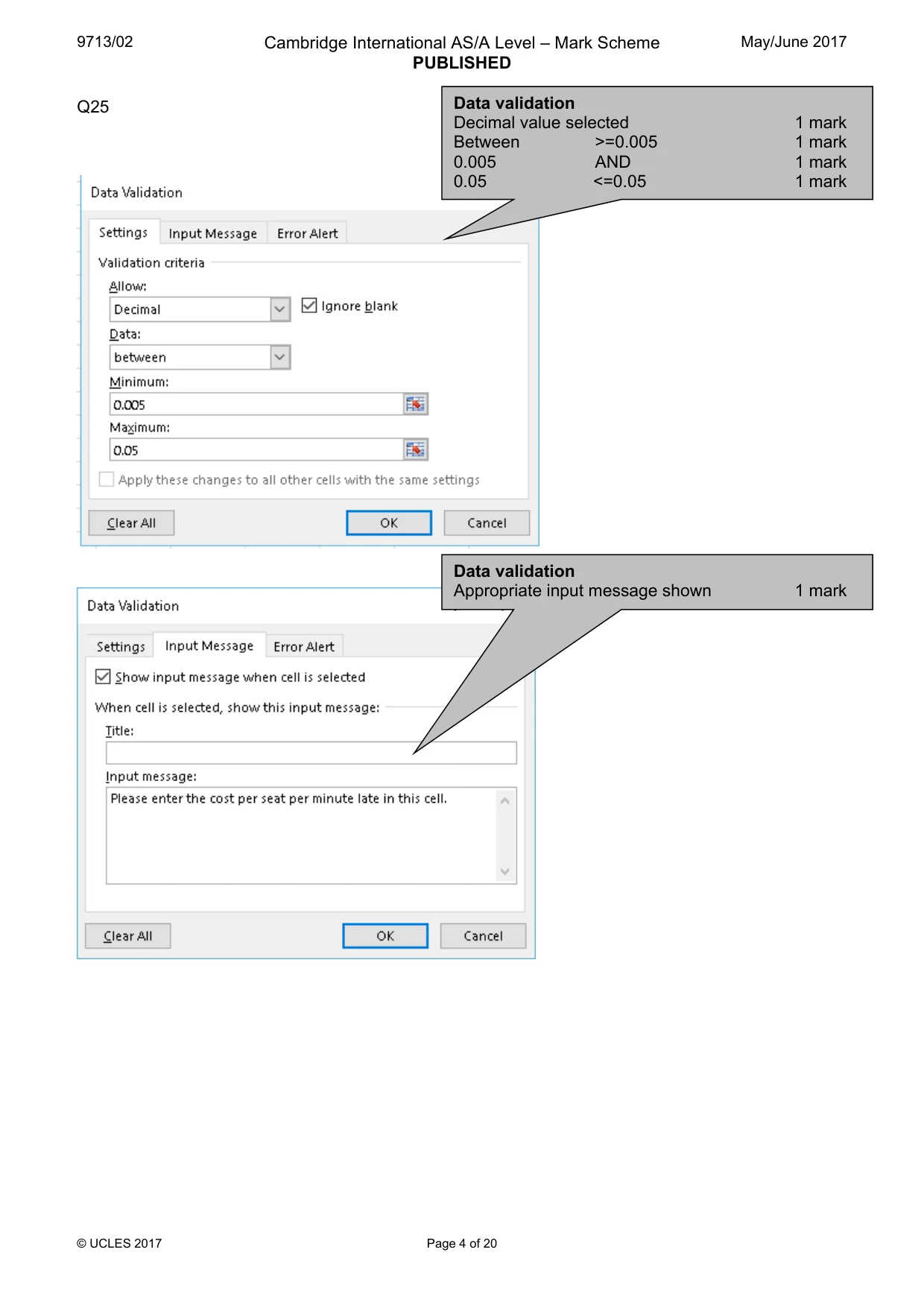
5 9713/02/M/J/17 © UCLES 2017 23 Print the top 25 rows of this spreadsheet showing the formulae used. Ensure that your name, Centre number, candidate number, all formulae and labels are fully visible. Show row and column headings. [1] 24 Save and print this spreadsheet showing the values, adjusting the page layout if necessary so that it fits on a single page wide. Make sure that the contents of all cells are fully visible. Do not show row and column headings. [2] 25 Restrict the data entry for the cell holding the cost per seat per minute (0.0213) to between 0.005 and 0.05. Offer the user appropriate advice. Show screen shot evidence of your method in your Evidence Document. [7] 26 Save and print your Evidence Document. Write today’s date in the box below Date
Question paper, page 6
6 9713/02/M/J/17 © UCLES 2017 BLANK PAGE
Question paper, page 7
7 9713/02/M/J/17 © UCLES 2017 BLANK PAGE
Question paper, page 8
8 9713/02/M/J/17 © UCLES 2017 Permission to reproduce items where third-party owned material protected by copyright is included has been sought and cleared where possible. Every reasonable effort has been made by the publisher (UCLES) to trace copyright holders, but if any items requiring clearance have unwittingly been included, the publisher will be pleased to make amends at the earliest possible opportunity. To avoid the issue of disclosure of answer-related information to candidates, all copyright acknowledgements are reproduced online in the Cambridge International Examinations Copyright Acknowledgements Booklet. This is produced for each series of examinations and is freely available to download at www.cie.org.uk after the live examination series. Cambridge International Examinations is part of the Cambridge Assessment Group. Cambridge Assessment is the brand name of University of Cambridge Local Examinations Syndicate (UCLES), which is itself a department of the University of Cambridge. BLANK PAGE
Mark scheme, page 1
® IGCSE is a registered trademark. This document consists of 20 printed pages. © UCLES 2017 [Turn over Cambridge International Examinations Cambridge International Advanced Subsidiary and Advanced Level APPLIED INFORMATION & COMMUNICATION TECHNOLOGY 9713/02 Paper 2 Practical Test A May/June 2017 MARK SCHEME Maximum Mark: 120 Published This mark scheme is published as an aid to teachers and candidates, to indicate the requirements of the examination. It shows the basis on which Examiners were instructed to award marks. It does not indicate the details of the discussions that took place at an Examiners’ meeting before marking began, which would have considered the acceptability of alternative answers. Mark schemes should be read in conjunction with the question paper and the Principal Examiner Report for Teachers. Cambridge will not enter into discussions about these mark schemes. Cambridge is publishing the mark schemes for the May/June 2017 series for most Cambridge IGCSE®, Cambridge International A and AS Level and Cambridge Pre-U components, and some Cambridge O Level components.
Mark scheme, page 2
9713/02 Cambridge International AS/A Level – Mark Scheme PUBLISHED May/June 2017 © UCLES 2017 Page 2 of 20 Evidence Document Q2 Formatting 5 rows inserted 1 mark Row 1 Cells A1-H1 Merged 1 mark Cansaulim Beach Hotel 100% in sans serif font 1 mark White with black background 1 mark Row 2 Grey background, sans serif & text 100% & centre aligned 1 mark Row 3 Correct text bold 1 mark 4 pairs merged and centre aligned 1 mark Gridlines on rows 3 and 4 1 mark Row 5 <=½ height of row 6 1 mark Row 6 Bold, left aligned text 1 mark Evidence document Header – name and numbers 1 mark
Mark scheme, page 3
9713/02 Cambridge International AS/A Level – Mark Scheme PUBLISHED May/June 2017 © UCLES 2017 Page 3 of 20 Q21 00:00 00:01 00:02 00:03 00:04 00:05 00:06 0 2 4 6 8 10 12 14 16 18 Route 5 Route 6 Route 8 Average delay time Number of journeys Route number from the hotel to the destination. Journeys with long delays - A comparison of the average delay and the number of journeys taken on each route Number of journeys Average delay time Chart Search - Average delay > 4 2 marks Correct count values 13, 16, 9 2 marks Correct average values 5.4, 4.9, 4.4 2 marks Chart type 2 marks Category Axis Route no. or Destination names in full 1 mark Meaningful and appropriate axis label 1 mark Value Axes 2 shown 1 mark Appropriate axis labels (1 mark / label) 2 marks Average delay axis recalibrated to full minutes 2 marks Chart title – Meaningful and appropriate 1 mark Chart title – of appropriate size 1 mark Series labels – both correct & appropriate 2 marks
Mark scheme, page 4
9713/02 Cambridge International AS/A Level – Mark Scheme PUBLISHED May/June 2017 © UCLES 2017 Page 4 of 20 Q25 Data validation Decimal value selected 1 mark Between >=0.005 1 mark 0.005 AND 1 mark 0.05 <=0.05 1 mark Data validation Appropriate input message shown 1 mark
Mark scheme, page 5
9713/02 Cambridge International AS/A Level – Mark Scheme PUBLISHED May/June 2017 © UCLES 2017 Page 5 of 20 Data validation Appropriate error message shown 1 mark Error message includes 0.005 and 0.05 1 mark
Mark scheme, page 6
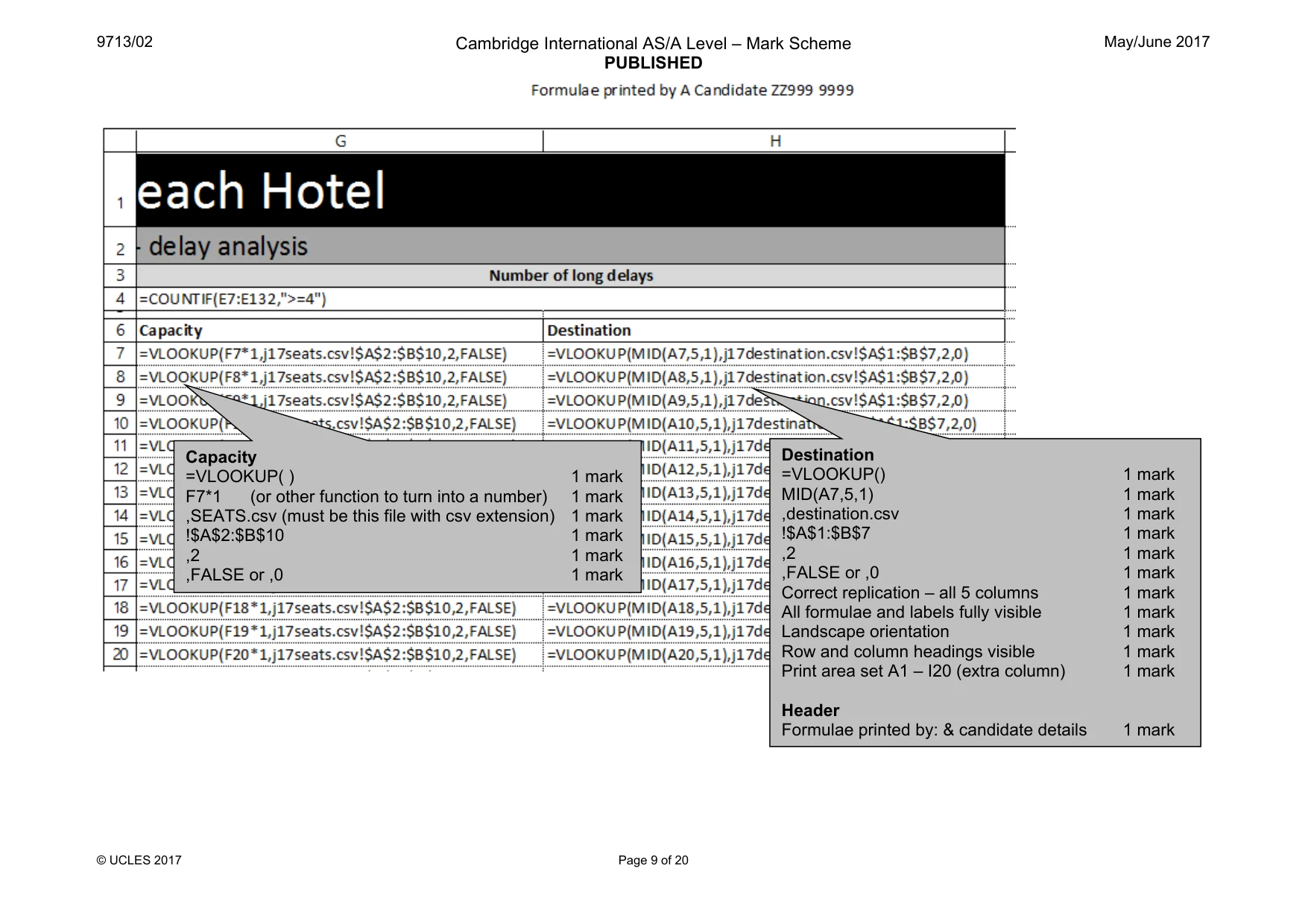
9713/02 Cambridge International AS/A Level – Mark Scheme PUBLISHED May/June 2017 © UCLES 2017 Page 6 of 20 Avgerage delay =ROUND( « ,0) 1 mark AVERAGEIF () 1 mark E7:E132 1 mark “>0” must be in speech marks 1 mark Longest =MAX () 1 mark E7:E132 1 mark Count =COUNTIF() 1 mark E7:E132 1 mark ,">0" 1 mark
Mark scheme, page 7
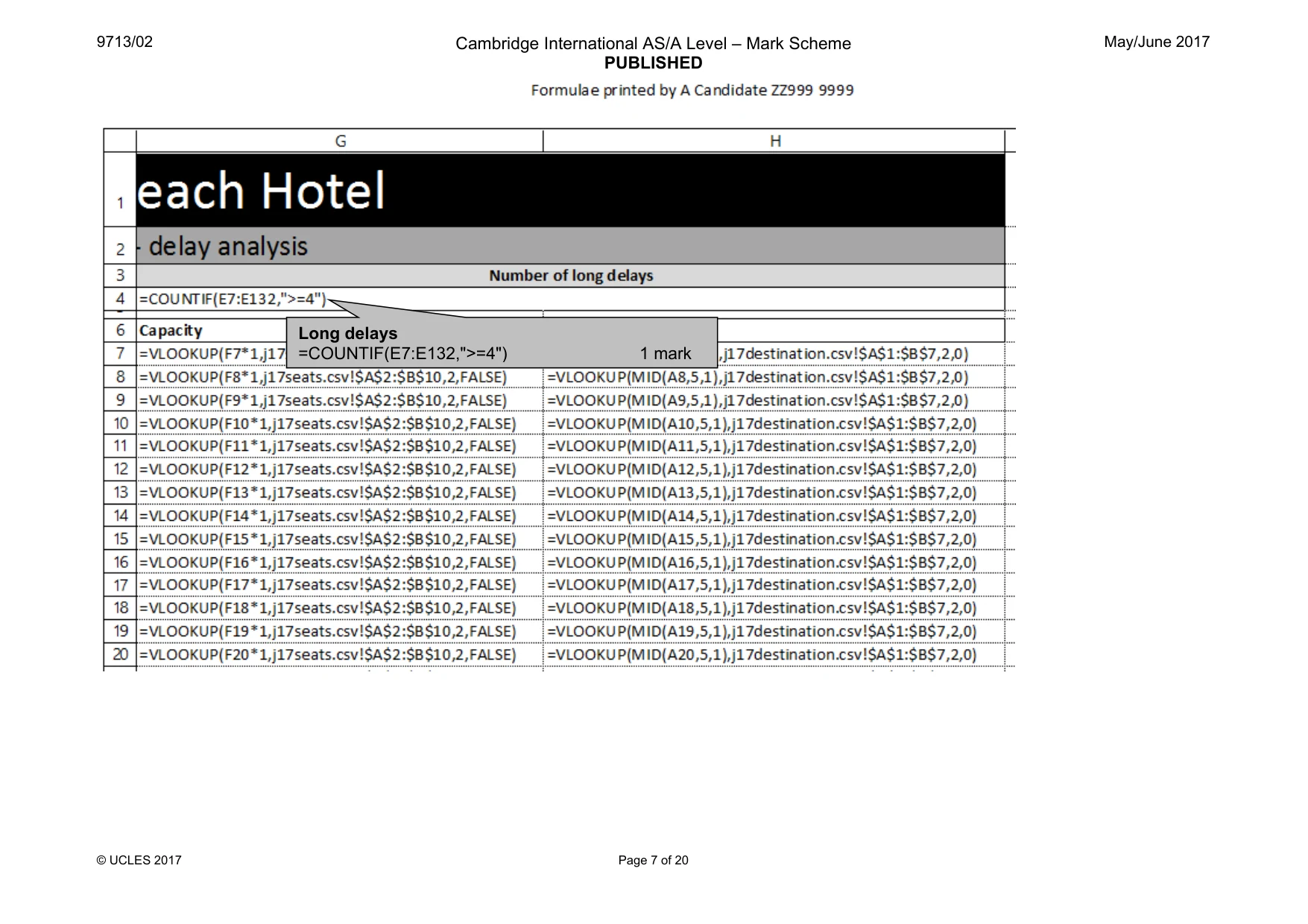
9713/02 Cambridge International AS/A Level – Mark Scheme PUBLISHED May/June 2017 © UCLES 2017 Page 7 of 20 Long delays =COUNTIF(E7:E132,">=4") 1 mark
Mark scheme, page 8
9713/02 Cambridge International AS/A Level – Mark Scheme PUBLISHED May/June 2017 © UCLES 2017 Page 8 of 20 Late = IF( ) 1 mark B7>C7 1 mark ,0 1 mark C7-B7 1 mark Minutes =MINUTE() 1 mark D7 1 mark Bus Route MID ( ) 1 mark A7 1 mark ,9 1 mark ,1 1 mark
Mark scheme, page 9
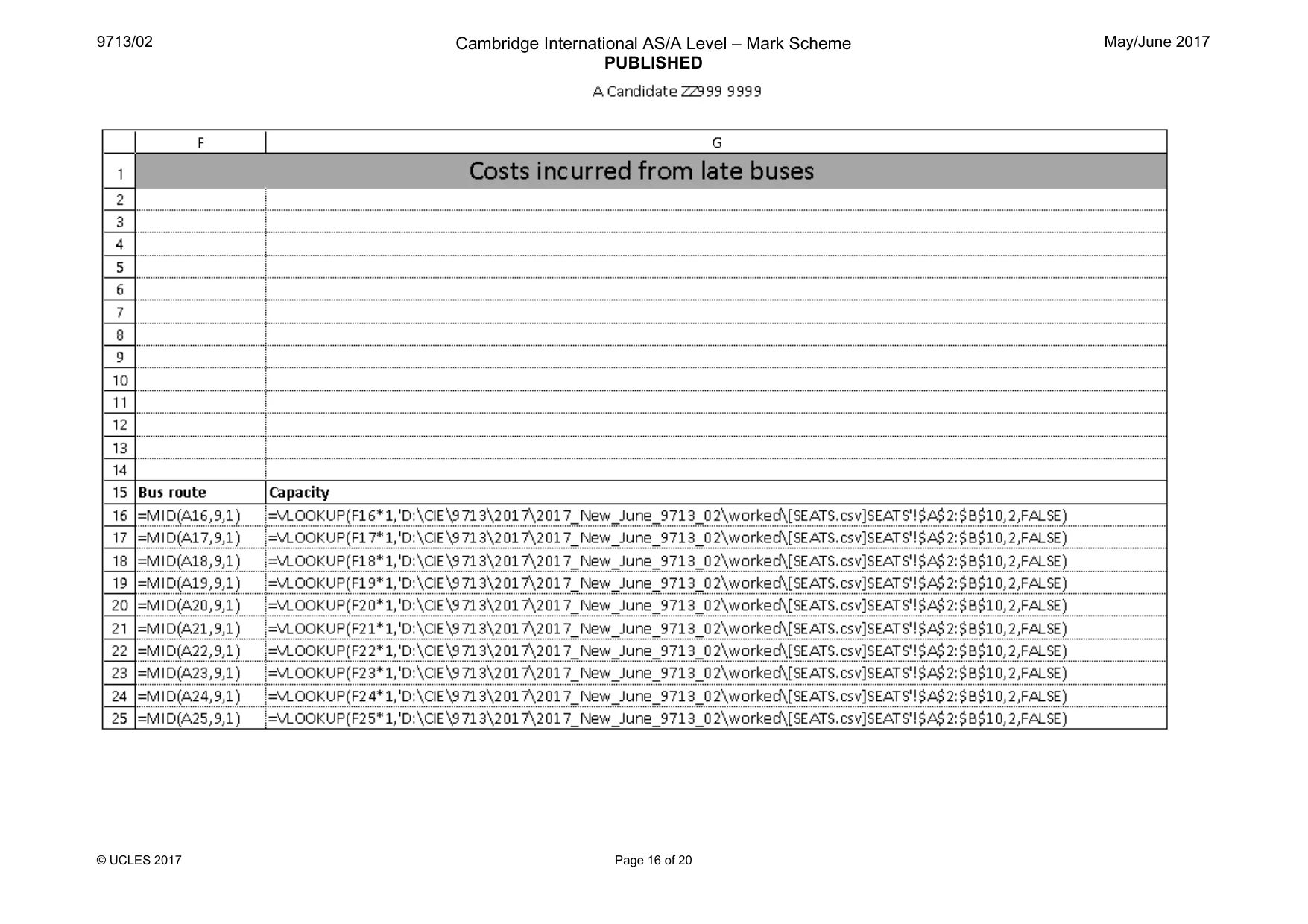
9713/02 Cambridge International AS/A Level – Mark Scheme PUBLISHED May/June 2017 © UCLES 2017 Page 9 of 20 Capacity =VLOOKUP( ) 1 mark F7*1 (or other function to turn into a number) 1 mark ,SEATS.csv (must be this file with csv extension) 1 mark !$A$2:$B$10 1 mark ,2 1 mark ,FALSE or ,0 1 mark Destination =VLOOKUP() 1 mark MID(A7,5,1) 1 mark ,destination.csv 1 mark !$A$1:$B$7 1 mark ,2 1 mark ,FALSE or ,0 1 mark Correct replication – all 5 columns 1 mark All formulae and labels fully visible 1 mark Landscape orientation 1 mark Row and column headings visible 1 mark Print area set A1 – I20 (extra column) 1 mark Header Formulae printed by: & candidate details 1 mark
Mark scheme, page 10
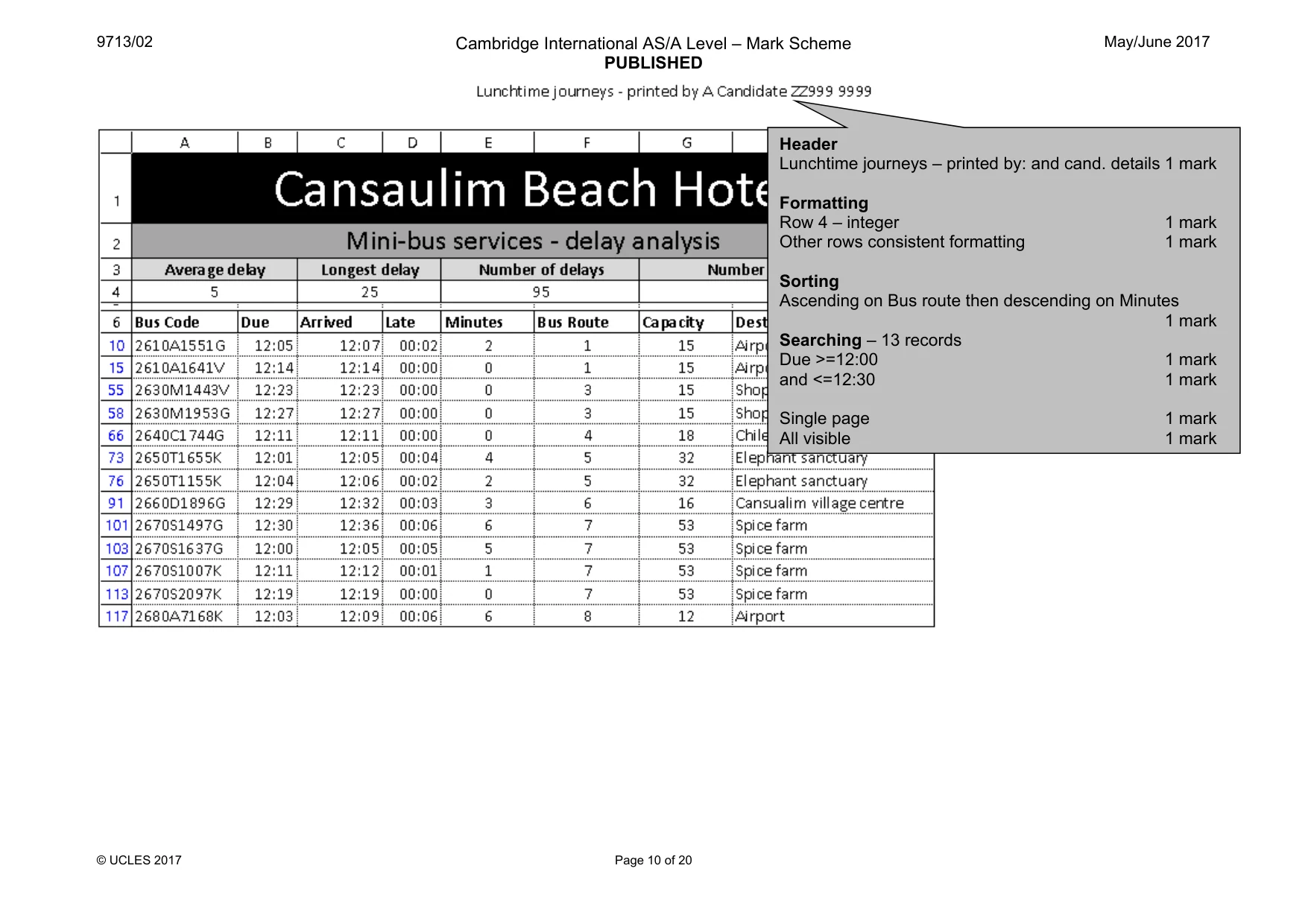
9713/02 Cambridge International AS/A Level – Mark Scheme PUBLISHED May/June 2017 © UCLES 2017 Page 10 of 20 Header Lunchtime journeys – printed by: and cand. details 1 mark Formatting Row 4 – integer 1 mark Other rows consistent formatting 1 mark Sorting Ascending on Bus route then descending on Minutes 1 mark Searching – 13 records Due >=12:00 1 mark and <=12:30 1 mark Single page 1 mark All visible 1 mark
Mark scheme, page 11
9713/02 Cambridge International AS/A Level – Mark Scheme PUBLISHED May/June 2017 © UCLES 2017 Page 11 of 20 Header Long delays by route – printed by: and cand. details 1 mark Values Values as shown: –1 per error or omission 3 marks Single page and fully visible 1 mark
Mark scheme, page 12
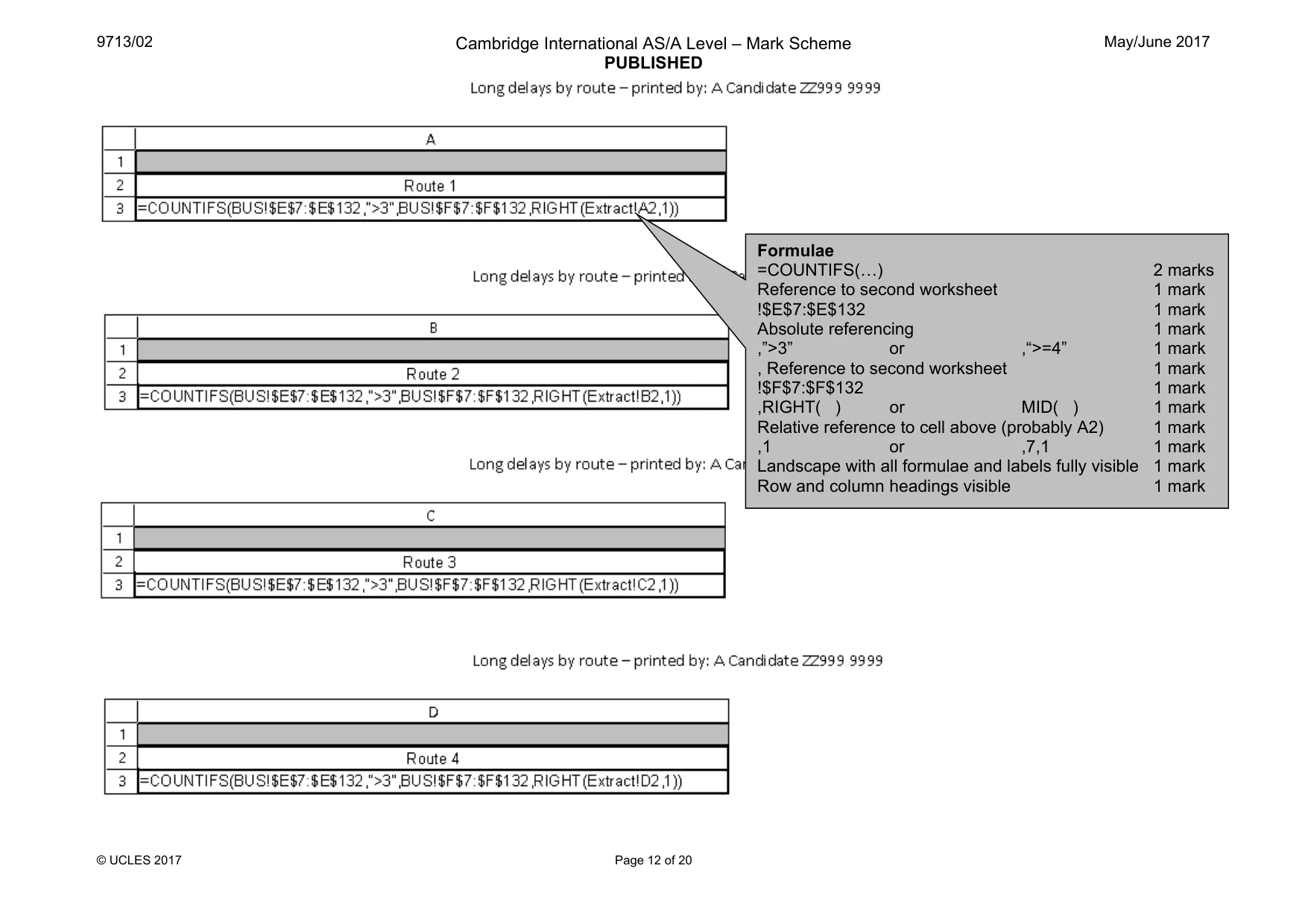
9713/02 Cambridge International AS/A Level – Mark Scheme PUBLISHED May/June 2017 © UCLES 2017 Page 12 of 20 Formulae =COUNTIFS(«) 2 marks Reference to second worksheet 1 mark !$E$7:$E$132 1 mark Absolute referencing 1 mark ,”>3” or ,“>=4” 1 mark , Reference to second worksheet 1 mark !$F$7:$F$132 1 mark ,RIGHT( ) or MID( ) 1 mark Relative reference to cell above (probably A2) 1 mark ,1 or ,7,1 1 mark Landscape with all formulae and labels fully visible 1 mark Row and column headings visible 1 mark
Mark scheme, page 13
9713/02 Cambridge International AS/A Level – Mark Scheme PUBLISHED May/June 2017 © UCLES 2017 Page 13 of 20
Mark scheme, page 14
9713/02 Cambridge International AS/A Level – Mark Scheme PUBLISHED May/June 2017 © UCLES 2017 Page 14 of 20
Mark scheme, page 15
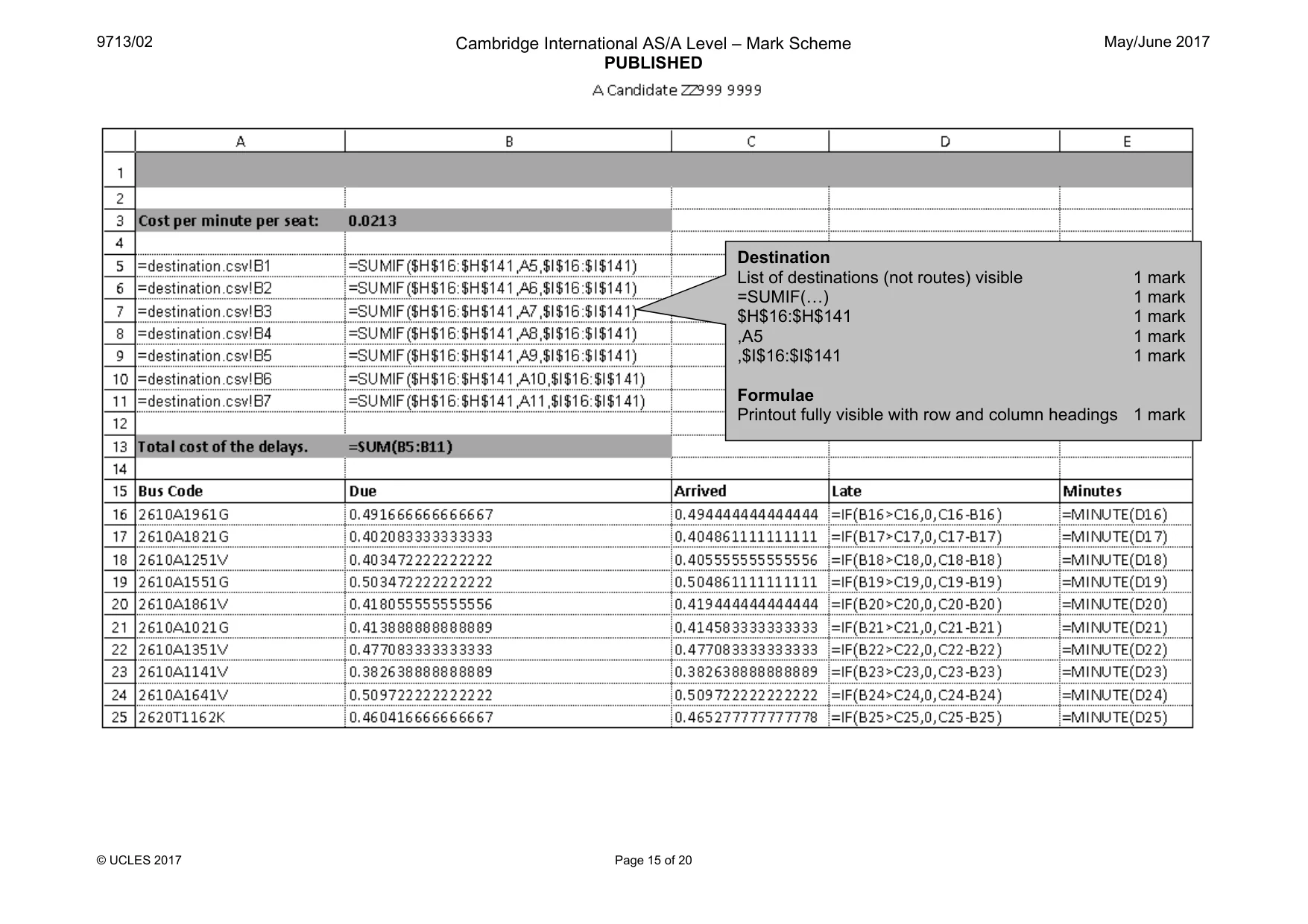
9713/02 Cambridge International AS/A Level – Mark Scheme PUBLISHED May/June 2017 © UCLES 2017 Page 15 of 20 Destination List of destinations (not routes) visible 1 mark =SUMIF(«) 1 mark $H$16:$H$141 1 mark ,A5 1 mark ,$I$16:$I$141 1 mark Formulae Printout fully visible with row and column headings 1 mark
Mark scheme, page 16
9713/02 Cambridge International AS/A Level – Mark Scheme PUBLISHED May/June 2017 © UCLES 2017 Page 16 of 20
Mark scheme, page 17
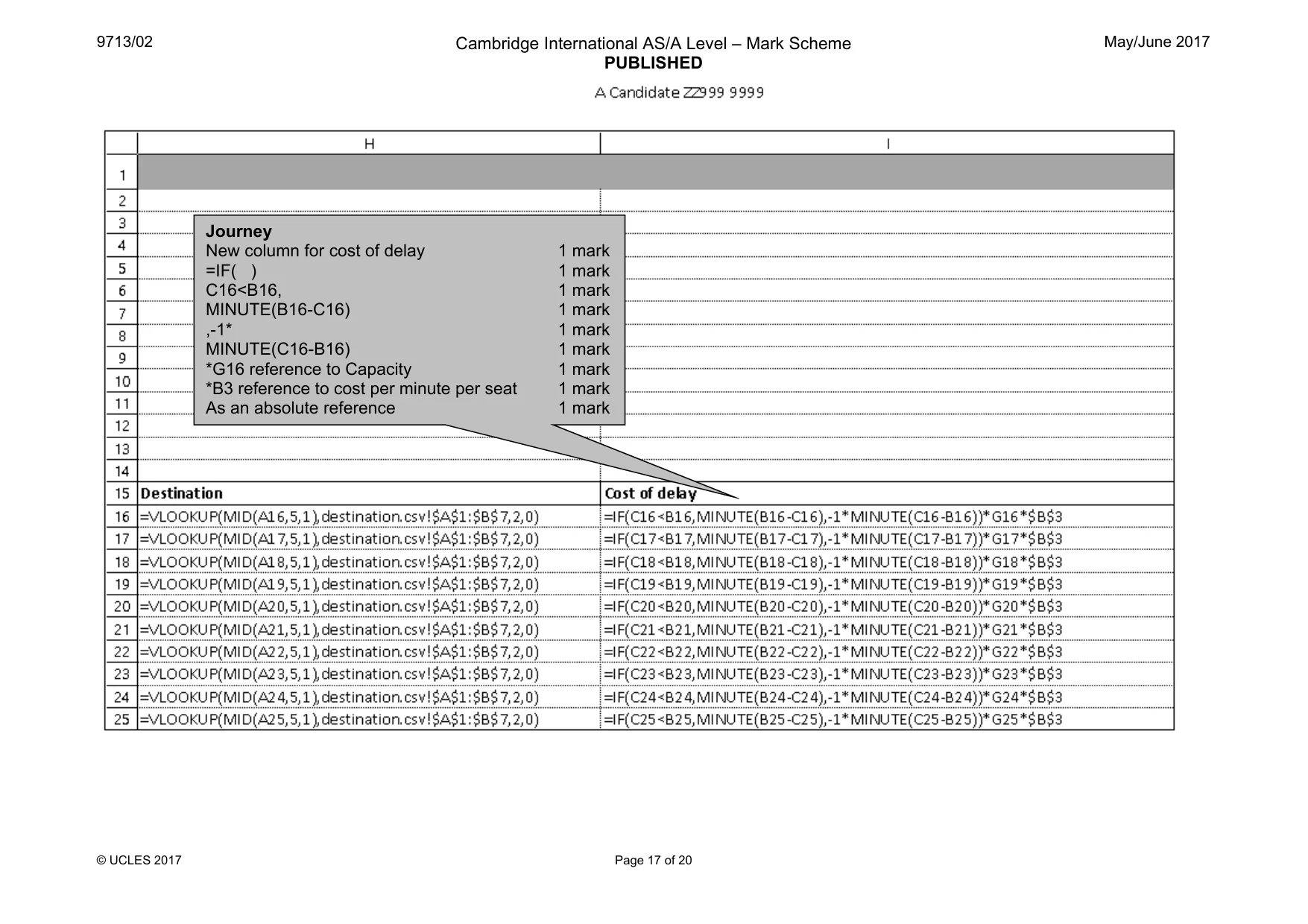
9713/02 Cambridge International AS/A Level – Mark Scheme PUBLISHED May/June 2017 © UCLES 2017 Page 17 of 20 Journey New column for cost of delay 1 mark =IF( ) 1 mark C16<B16, 1 mark MINUTE(B16-C16) 1 mark ,-1* 1 mark MINUTE(C16-B16) 1 mark *G16 reference to Capacity 1 mark *B3 reference to cost per minute per seat 1 mark As an absolute reference 1 mark
Mark scheme, page 18
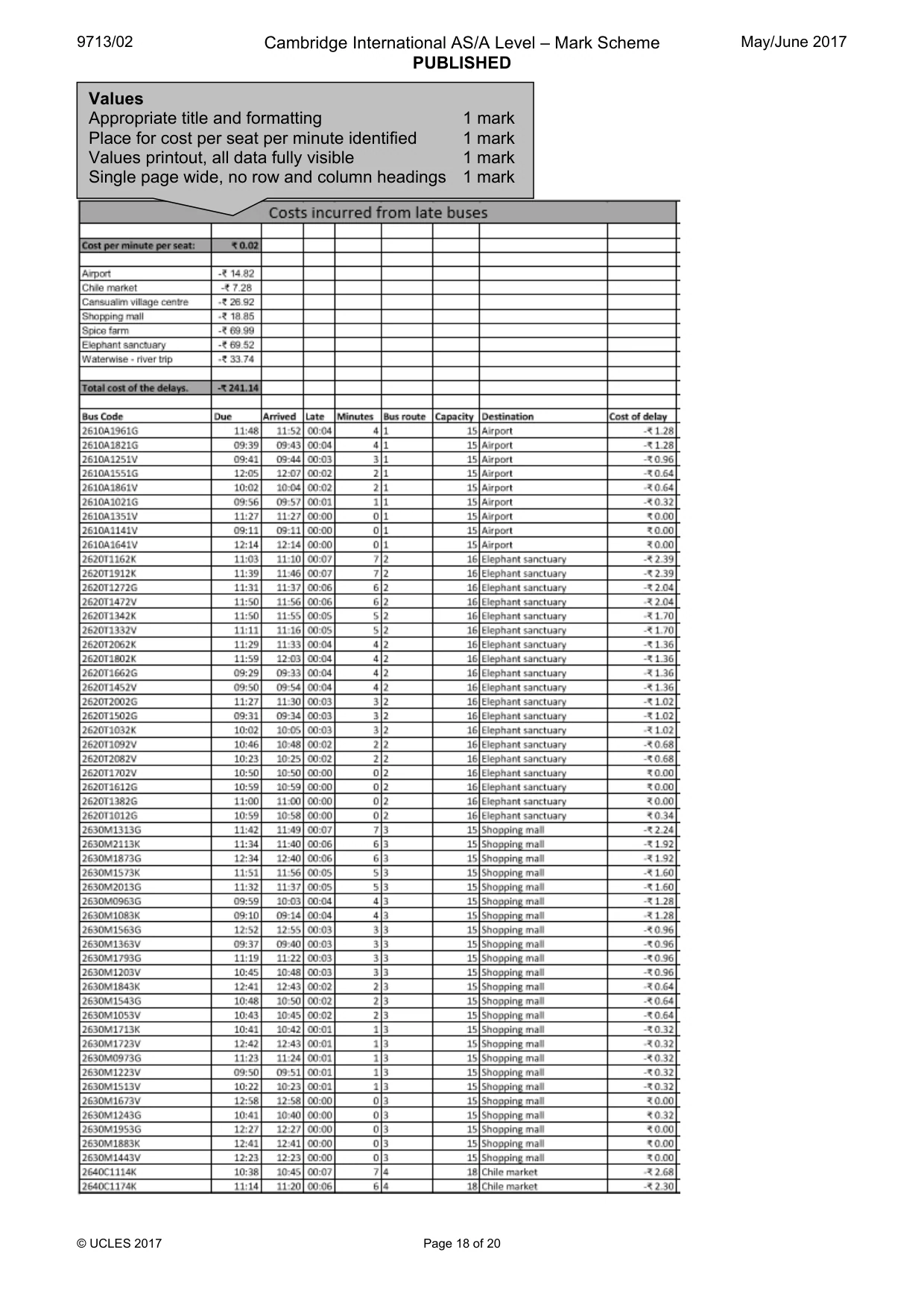
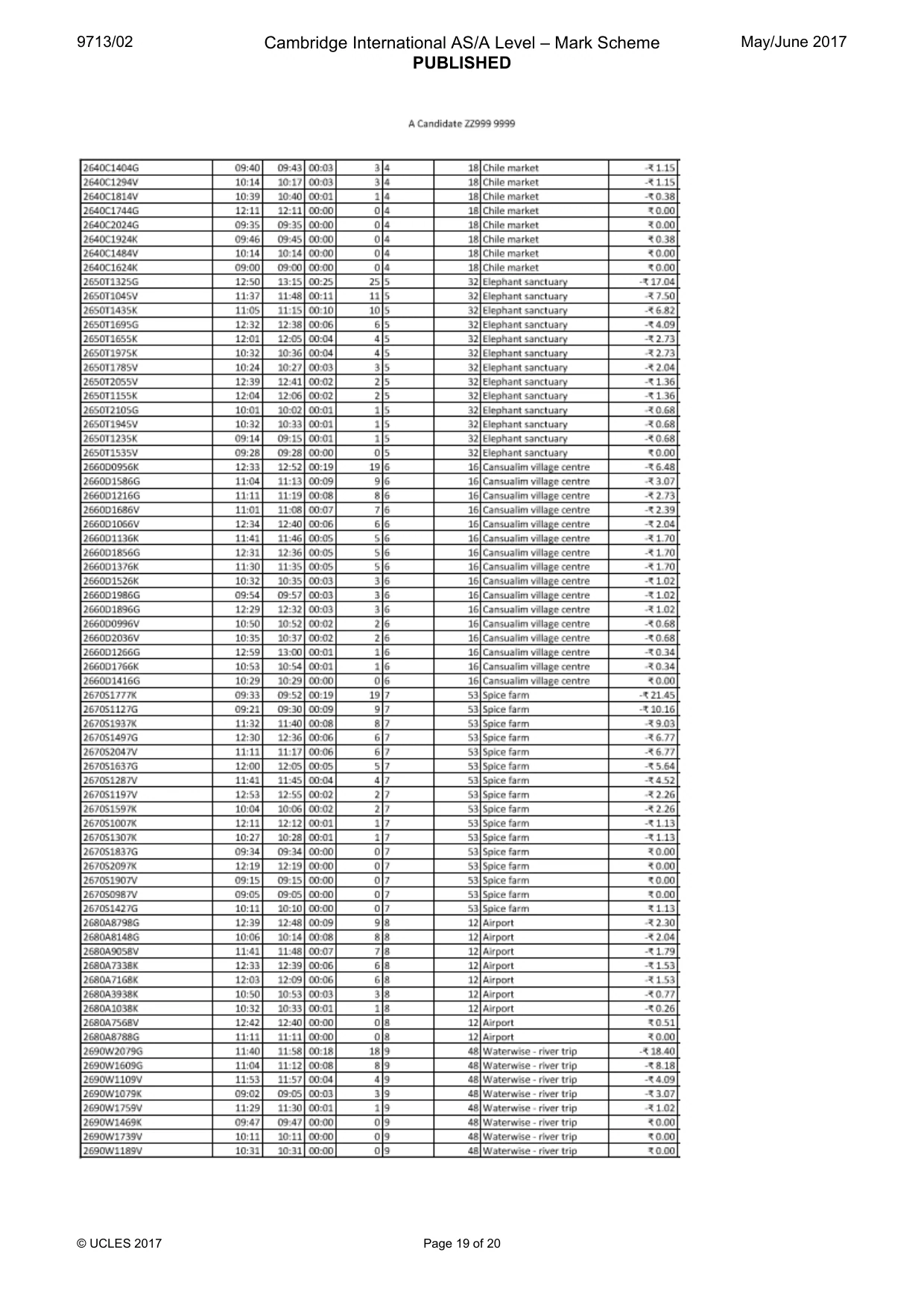
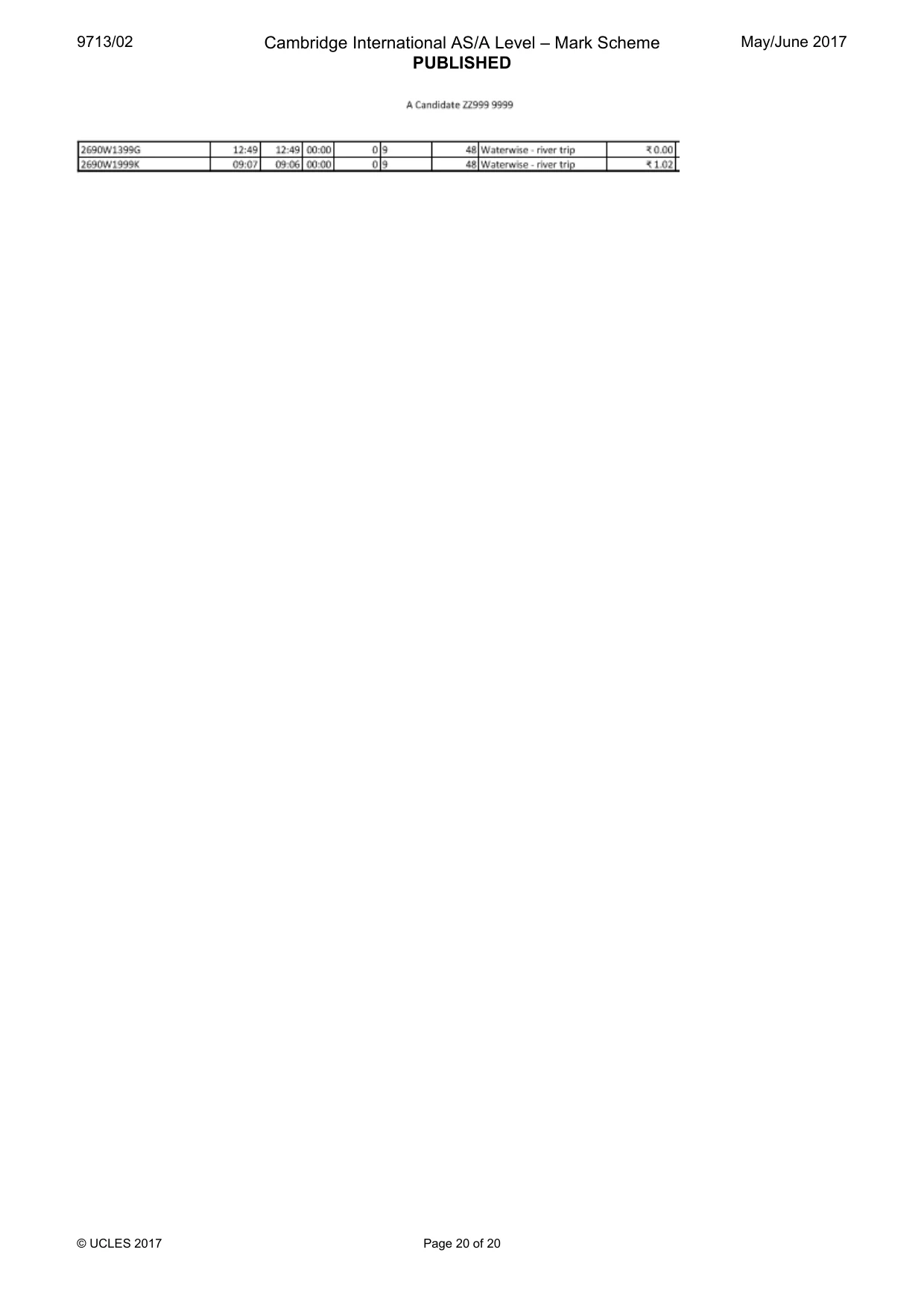
9713/02 Cambridge International AS/A Level – Mark Scheme PUBLISHED May/June 2017 © UCLES 2017 Page 18 of 20 Values Appropriate title and formatting 1 mark Place for cost per seat per minute identified 1 mark Values printout, all data fully visible 1 mark Single page wide, no row and column headings 1 mark
Mark scheme, page 19
9713/02 Cambridge International AS/A Level – Mark Scheme PUBLISHED May/June 2017 © UCLES 2017 Page 19 of 20
Mark scheme, page 20
9713/02 Cambridge International AS/A Level – Mark Scheme PUBLISHED May/June 2017 © UCLES 2017 Page 20 of 20
What you needed in this session
Cambridge’s own grade thresholds for 2017 May/June, Paper 2 · Variant 1. A higher threshold means an easier paper — the bar moves with how the cohort did.