Cambridge A Level Applied Information and Communication Technology 9713 — 2017 Feb/March Paper 2 · Variant 1
9713/21/F/M/17 · 120 marks · ≈135 min
The question paper and its mark scheme, free to read here and free to download. This is Cambridge’s own paper, exactly as it was sat.
Question paper8 pages


Mark scheme19 pages
Answers below. Sit the paper first if you are practising.
Paper as text
Question paper, page 1
* 6 1 5 5 6 6 1 0 9 8 * This document consists of 5 printed pages and 3 blank pages. DC (RW/FD) 131158/2 © UCLES 2017 [Turn over APPLIED INFORMATION AND COMMUNICATION TECHNOLOGY 9713/02 Paper 2 Practical Test February/March 2017 2 hours 30 minutes Additional Materials: Candidate Source Files: M17Dive.csv M17Diver.csv M17Site.csv M17Qual.csv M17image.jpg READ THESE INSTRUCTIONS FIRST Make sure that your Centre number, candidate number and name are written at the top of this page and are clearly visible on every printout, before it is sent to the printer. Printouts with handwritten candidate information will not be marked. DO NOT WRITE IN ANY BARCODES. Carry out every instruction in each task. At the end of the exam put this Question Paper and all your printouts into the Assessment Record Folder. The number of marks is given in brackets [ ] at the end of each question or part question. Any businesses described in this paper are entirely fictitious. Cambridge International Examinations Cambridge International Advanced Subsidiary and Advanced Level
Question paper, page 2
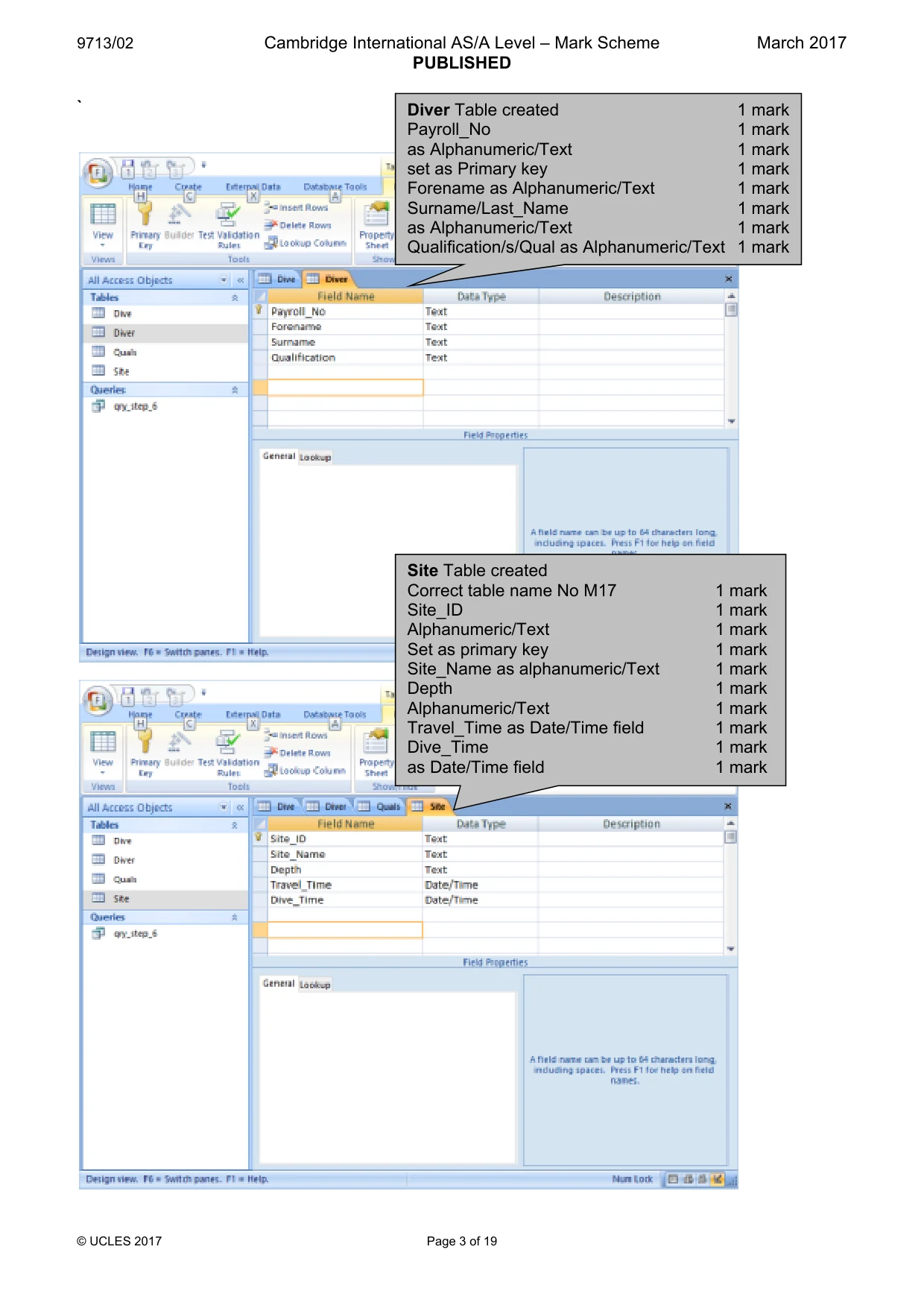
2 9713/02/F/M/17 © UCLES 2017 You work for the Tawara Dive School. The company has opened a new office in Cozumel, Mexico. You will create a database to analyse data about their diving trips. Dates are to be displayed in dd/mm/yyyy format. All times are to be displayed in hh:mm format and are set to GMT (Greenwich Mean Time). You must use the most efficient method to solve each task. 1 You are required to provide evidence of your work, including screenshots at various stages. Create a document named: CentreNumber_CandidateNumber_Evidence e.g. ZZ999_99_Evidence Place your name, Centre number and candidate number in the header of your Evidence Document. 2 Examine the data in the file M17Dive.csv In the Date column, use formulae to display the date of each dive, using the Day, Month and Year columns. Save this file. Show evidence of your formulae in your Evidence Document. [2] 3 Examine the data in the files: M17Diver.csv M17Site.csv M17Qual.csv Create a new database. Import these files and the file saved in step 2 but do not import the data in the Day, Month or Year columns. Tawara Dive School have decided that all field names must be short, meaningful, consistent in style and contain no spaces. The depth of a dive is either deep (D) or shallow (S). Some table names, field names, key fields and data types are shown on page 3. Where they are not given, choose your own. Use this information to help you create the tables: [41]
Question paper, page 3
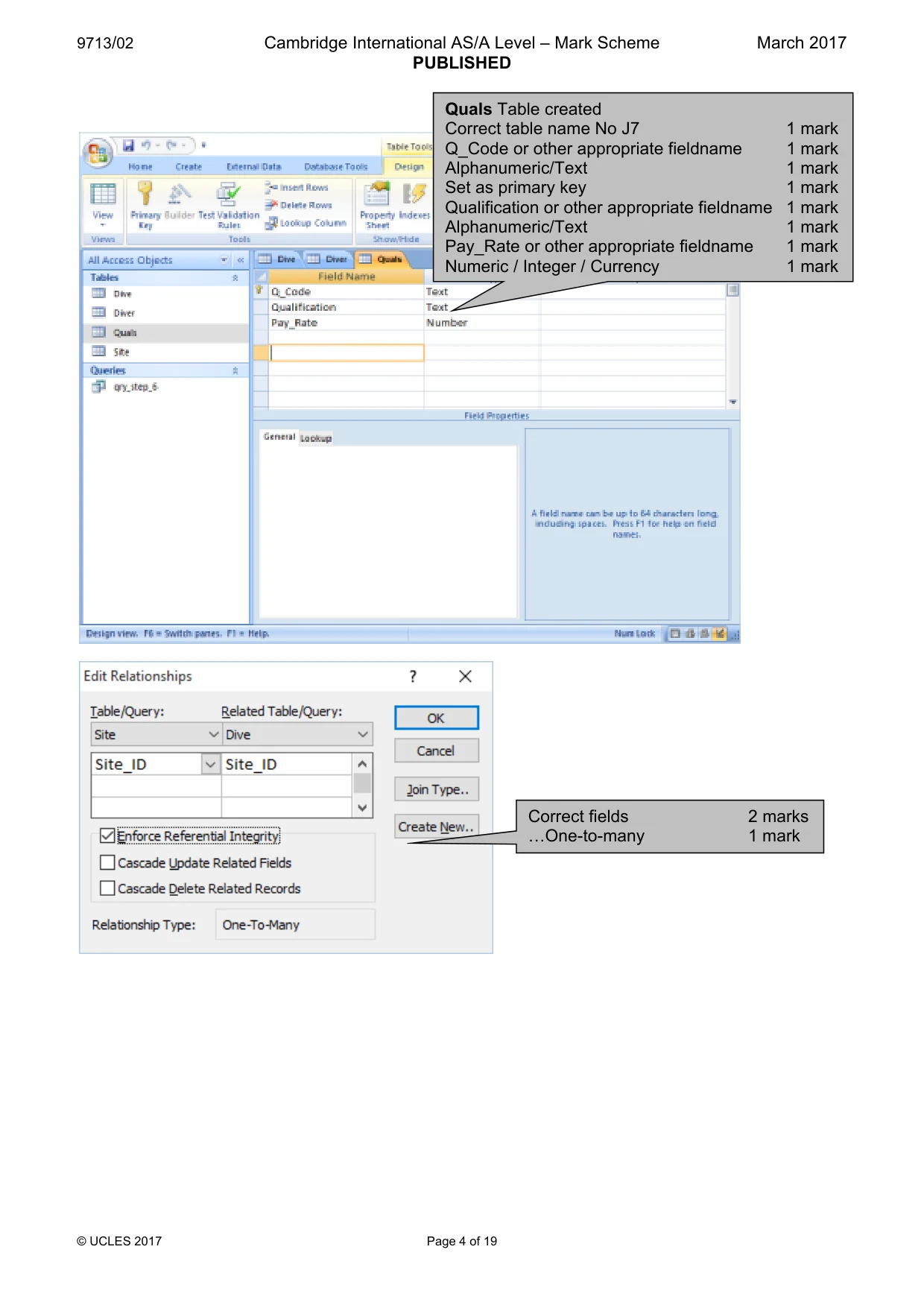
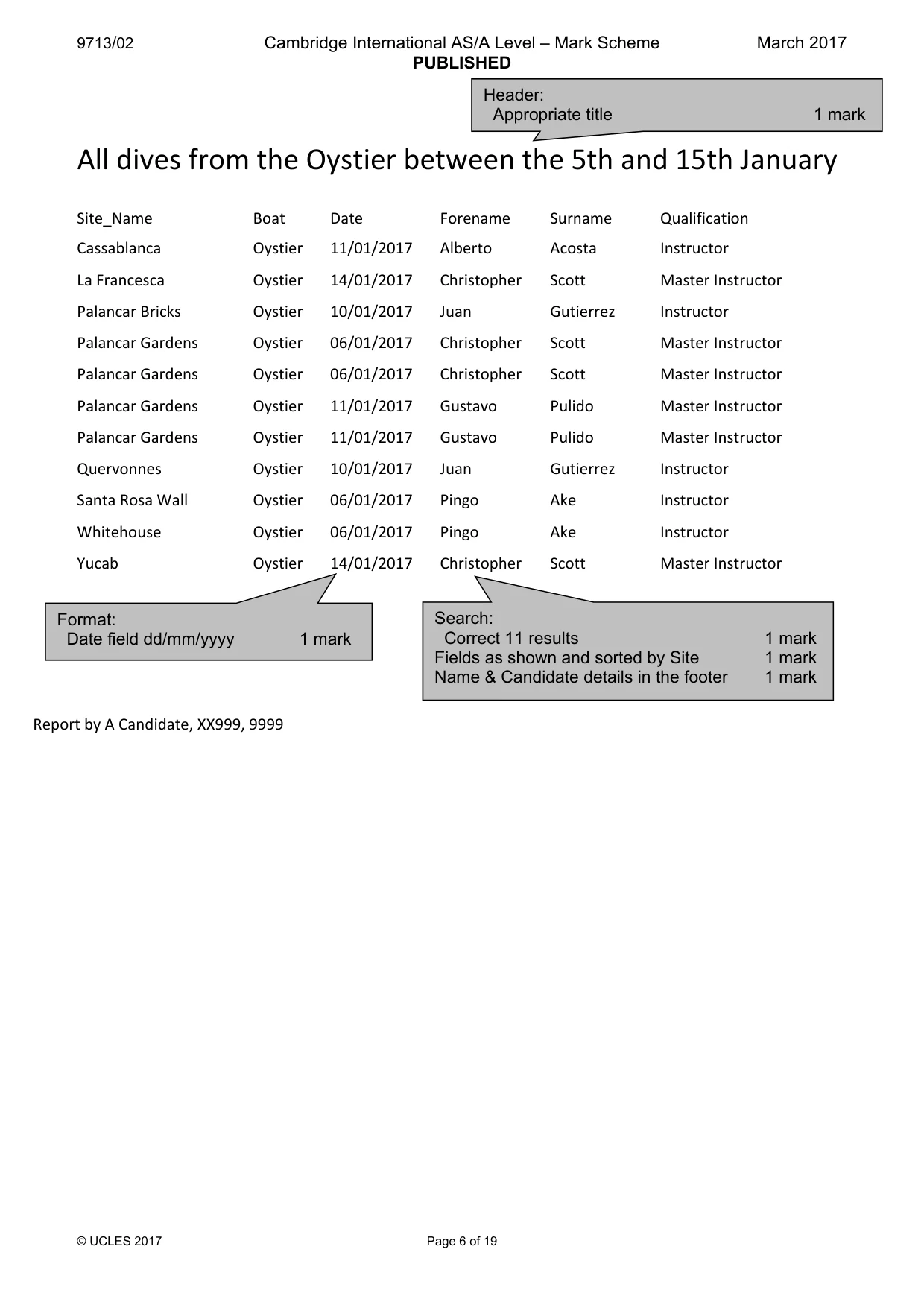
3 9713/02/F/M/17 © UCLES 2017 [Turn over Dive Site Field name Data type Field name Data type Dive_No Alphanumeric Site_ID Date Date Site_Name Site_ID Boat Travel_Time Lead_Diver Alphanumeric Diver Quals Field name Data type Field name Data type Forename Alphanumeric denotes primary key 4 Place in your Evidence Document screenshots to show the structure of the four tables, including the field names, data types and key fields. 5 Establish appropriate relationships to link the four tables to create a relational database. Place in your Evidence Document screenshots to show the relationships between these tables and each relationship type. [9] 6 Create a report of all dives from the Oystier between the 5th January 2017 and the 15th January 2017. Do not include these dates. Display only the dive site, boat name, date, the lead diver’s forename, surname and qualification. Sort the data into ascending order on the name of the dive site. Add a suitable title to the report. Make sure that your name, Centre number and candidate number are placed in the footer. Place in your Evidence Document screenshots that show how you extracted this data. Print this report. [10]
Question paper, page 4
4 9713/02/F/M/17 © UCLES 2017 7 Your manager wants to analyse the data relating to deep diving trips. Create and fully label a report that contains only the: • name of the dive site • travel time to the site • dive time • total time for each dive trip (including the travel times to and from each site). Sort the data into descending order on the total time. Calculate the average trip time for this report. Place your calculation and a suitable label in an appropriate position in the report. Add a suitable title to the report. Make sure that your name, Centre number and candidate number are placed in the footer. Place in your Evidence Document screenshots that show how you extracted this data and any calculations. Print this report. [14] 8 Create a query which contains the dive number, boat name and a new calculated field called Name. This field must contain the forename followed by a space then the surname of each lead diver. Place in your Evidence Document screenshots that show how you created this new field. Create and fully label a report that displays the number of dives taken by each lead diver from each boat. Use the Name field for the row headings, and the boat names for the column headings. Do not include the row or column totals. Place your name, Centre number and candidate number in the header. Print this report on a single portrait page, showing gridlines in the table. [11] 9 Your manager wants a list of divers and boats where the dive names contain Palancar, Columbia or Cedral. Create a report which lists the names of these lead divers as well as their pay rates, qualifications, the dates of the dives and the boat used for these trips. Group this report by the name of the lead diver. Include their pay rate and qualification in the group header. For each lead diver, group the report by the name of each dive site. Add a suitable title to the report. Make sure that the text Report created by: followed by your name, Centre number and candidate number are included in the header. Prepare this report so that it fits within the width of a portrait page and is easy to read. Print this report. [14]
Question paper, page 5
5 9713/02/F/M/17 © UCLES 2017 10 Calculate the total dive time taken by each lead diver on each day, where a lead diver has completed more than one dive. Include for each diver their full name, the date and the total dive time. Use this data to create a report that displays only the dives between the 16th and 25th January 2017. Do not include these dates. Sort this data into descending order of total dive time. Place in the header of the report: • an appropriate title • the image M17image.jpg • your name, Centre number and candidate number. Place in your Evidence Document the method(s) used to extract this data. Print this extract on a single page, displayed as a table with gridlines. [14] 11 Use the results of your search in step 10 to create a chart showing only the divers with total dive times of more than 2 hours. Place the chart in your Evidence Document. [5] 12 Save and print your Evidence Document. Write today’s date in the box below. Date
Question paper, page 6
6 9713/02/F/M/17 © UCLES 2017 BLANK PAGE
Question paper, page 7
7 9713/02/F/M/17 © UCLES 2017 BLANK PAGE
Question paper, page 8
8 9713/02/F/M/17 © UCLES 2017 Permission to reproduce items where third-party owned material protected by copyright is included has been sought and cleared where possible. Every reasonable effort has been made by the publisher (UCLES) to trace copyright holders, but if any items requiring clearance have unwittingly been included, the publisher will be pleased to make amends at the earliest possible opportunity. To avoid the issue of disclosure of answer-related information to candidates, all copyright acknowledgements are reproduced online in the Cambridge International Examinations Copyright Acknowledgements Booklet. This is produced for each series of examinations and is freely available to download at www.cie.org.uk after the live examination series. Cambridge International Examinations is part of the Cambridge Assessment Group. Cambridge Assessment is the brand name of University of Cambridge Local Examinations Syndicate (UCLES), which is itself a department of the University of Cambridge. BLANK PAGE
Mark scheme, page 1
® IGCSE is a registered trademark. This document consists of 19 printed pages. © UCLES 2017 [Turn over Cambridge International Examinations Cambridge International Advanced Subsidiary and Advanced Level APPLIED INFORMATION & COMMUNICATION TECHNOLOGY 9713/02 Paper 2 Practical Test A March 2017 MARK SCHEME Maximum Mark: 120 Published This mark scheme is published as an aid to teachers and candidates, to indicate the requirements of the examination. It shows the basis on which Examiners were instructed to award marks. It does not indicate the details of the discussions that took place at an Examiners’ meeting before marking began, which would have considered the acceptability of alternative answers. Mark schemes should be read in conjunction with the question paper and the Principal Examiner Report for Teachers. Cambridge will not enter into discussions about these mark schemes. Cambridge is publishing the mark schemes for the March 2017 series for most Cambridge IGCSE®, Cambridge International A and AS Level components and some Cambridge O Level components.
Mark scheme, page 2
9713/02 Cambridge International AS/A Level – Mark Scheme PUBLISHED March 2017 © UCLES 2017 Page 2 of 19 Evidence document Dive Table created Correct table name 1 mark Dive_No 1 mark Alphanumeric 1 mark Set as Primary key 1 mark Date as a Date field 1 mark Day, Month and Year fields not imported 1 mark Site_ID as alphanumeric/text 1 mark Boat as Alphanumeric/Text 1 mark Lead_Diver as Alphanumeric/Text 1 mark Cust, Customers, Customer, No_Clients 1 mark Numeric / Integer 1 mark Calculated date =DATE function used 1 mark Correct syntax (Year,Month,Day) 1 mark
Mark scheme, page 3
9713/02 Cambridge International AS/A Level – Mark Scheme PUBLISHED March 2017 © UCLES 2017 Page 3 of 19 ` Diver Table created 1 mark Payroll_No 1 mark as Alphanumeric/Text 1 mark set as Primary key 1 mark Forename as Alphanumeric/Text 1 mark Surname/Last_Name 1 mark as Alphanumeric/Text 1 mark Qualification/s/Qual as Alphanumeric/Text 1 mark Site Table created Correct table name No M17 1 mark Site_ID 1 mark Alphanumeric/Text 1 mark Set as primary key 1 mark Site_Name as alphanumeric/Text 1 mark Depth 1 mark Alphanumeric/Text 1 mark Travel_Time as Date/Time field 1 mark Dive_Time 1 mark as Date/Time field 1 mark
Mark scheme, page 4
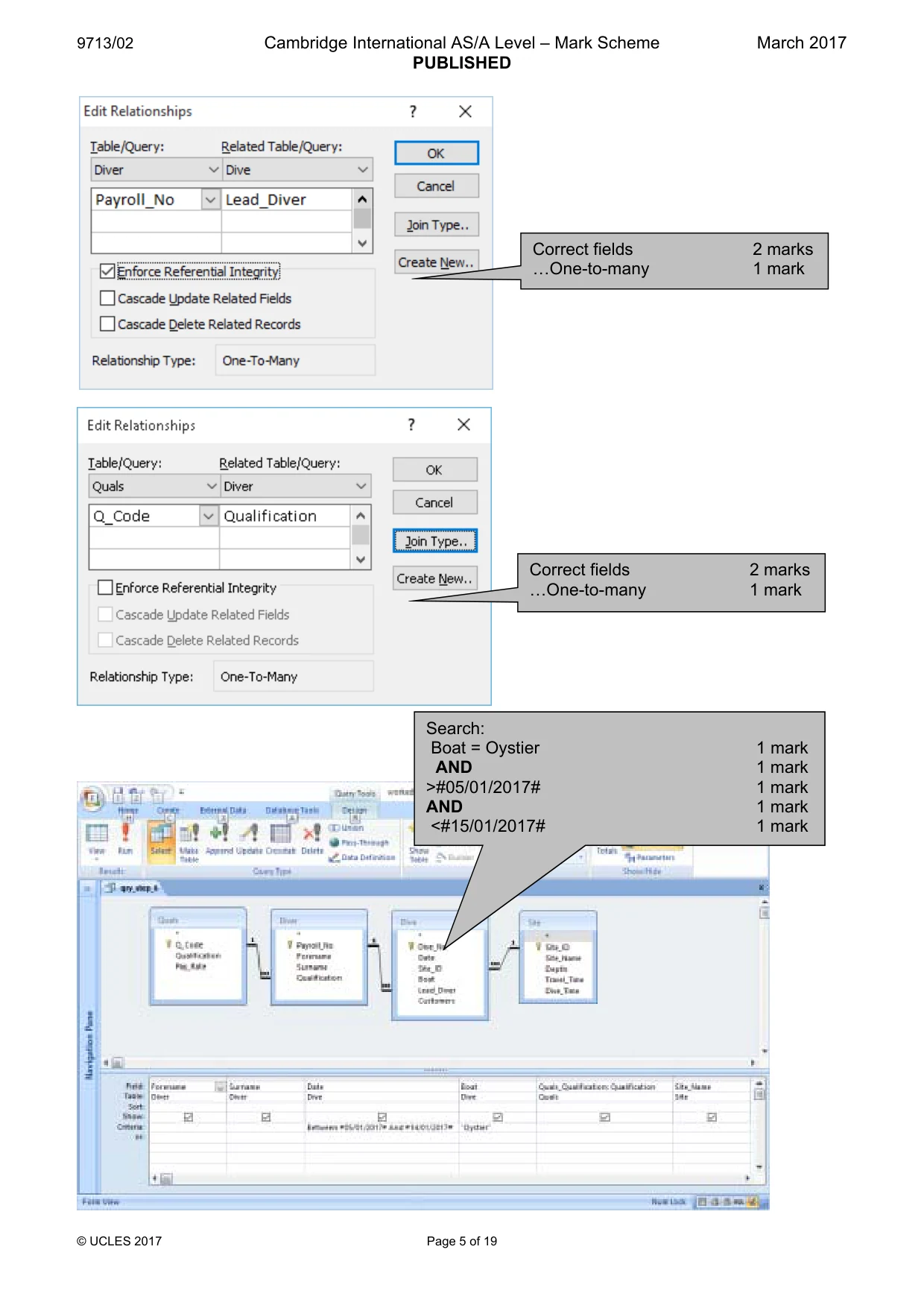
9713/02 Cambridge International AS/A Level – Mark Scheme PUBLISHED March 2017 © UCLES 2017 Page 4 of 19 Quals Table created Correct table name No J7 1 mark Q_Code or other appropriate fieldname 1 mark Alphanumeric/Text 1 mark Set as primary key 1 mark Qualification or other appropriate fieldname 1 mark Alphanumeric/Text 1 mark Pay_Rate or other appropriate fieldname 1 mark Numeric / Integer / Currency 1 mark Correct fields 2 marks «One-to-many 1 mark
Mark scheme, page 5
9713/02 Cambridge International AS/A Level – Mark Scheme PUBLISHED March 2017 © UCLES 2017 Page 5 of 19 Correct fields 2 marks «One-to-many 1 mark Correct fields 2 marks «One-to-many 1 mark Search: Boat = Oystier 1 mark AND 1 mark >#05/01/2017# 1 mark AND 1 mark <#15/01/2017# 1 mark
Mark scheme, page 6
9713/02 Cambridge International AS/A Level – Mark Scheme PUBLISHED March 2017 © UCLES 2017 Page 6 of 19 All dives from the Oystier between the 5th and 15th January Site_Name Boat Date Forename Surname Qualification Cassablanca Oystier 11/01/2017 Alberto Acosta Instructor La Francesca Oystier 14/01/2017 Christopher Scott Master Instructor Palancar Bricks Oystier 10/01/2017 Juan Gutierrez Instructor Palancar Gardens Oystier 06/01/2017 Christopher Scott Master Instructor Palancar Gardens Oystier 06/01/2017 Christopher Scott Master Instructor Palancar Gardens Oystier 11/01/2017 Gustavo Pulido Master Instructor Palancar Gardens Oystier 11/01/2017 Gustavo Pulido Master Instructor Quervonnes Oystier 10/01/2017 Juan Gutierrez Instructor Santa Rosa Wall Oystier 06/01/2017 Pingo Ake Instructor Whitehouse Oystier 06/01/2017 Pingo Ake Instructor Yucab Oystier 14/01/2017 Christopher Scott Master Instructor Report by A Candidate, XX999, 9999 Search: Correct 11 results 1 mark Fields as shown and sorted by Site 1 mark Name & Candidate details in the footer 1 mark Format: Date field dd/mm/yyyy 1 mark Header: Appropriate title 1 mark
Mark scheme, page 7
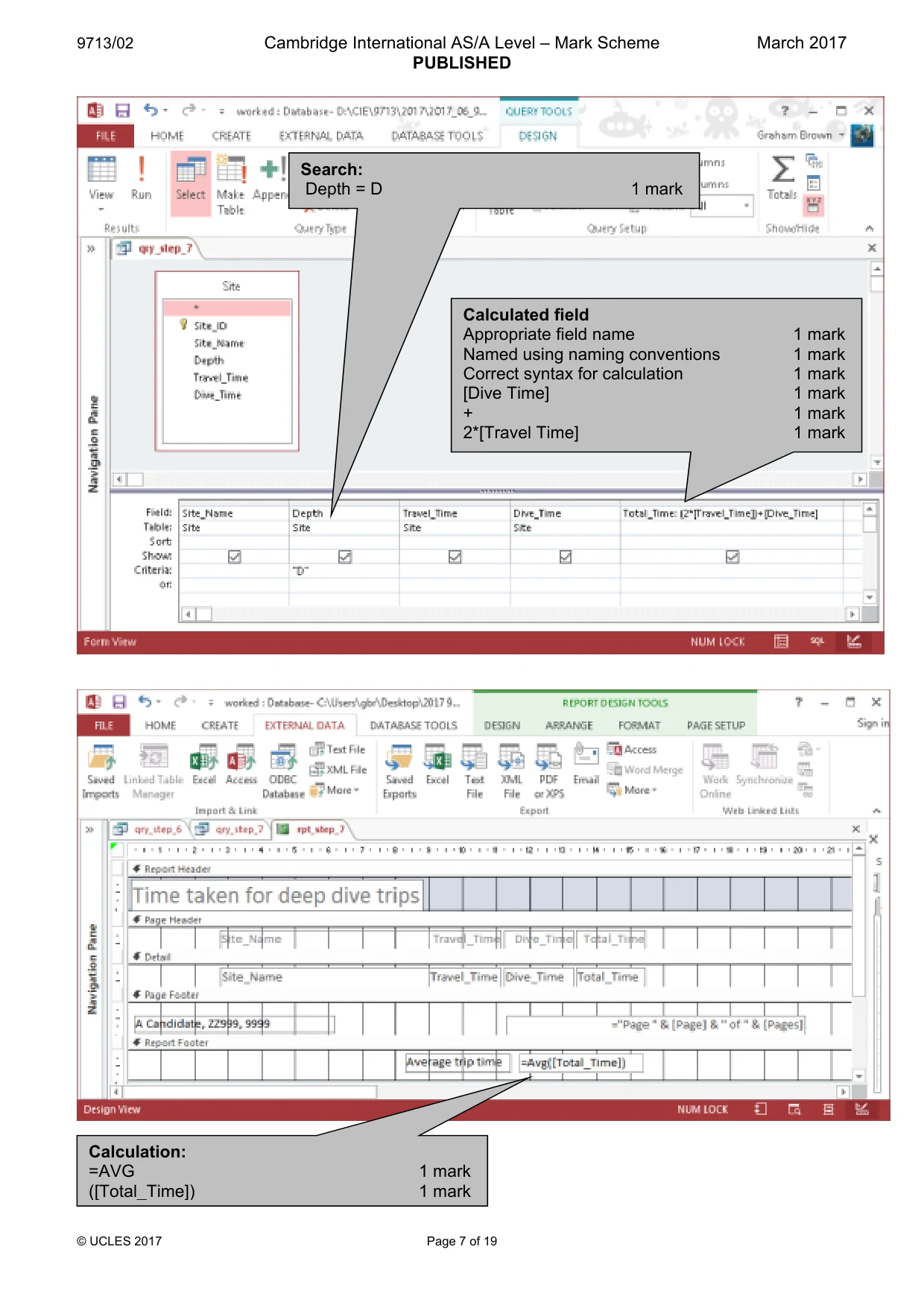
9713/02 Cambridge International AS/A Level – Mark Scheme PUBLISHED March 2017 © UCLES 2017 Page 7 of 19 Search: Depth = D 1 mark Calculation: =AVG 1 mark ([Total_Time]) 1 mark Calculated field Appropriate field name 1 mark Named using naming conventions 1 mark Correct syntax for calculation 1 mark [Dive Time] 1 mark + 1 mark 2*[Travel Time] 1 mark
Mark scheme, page 8
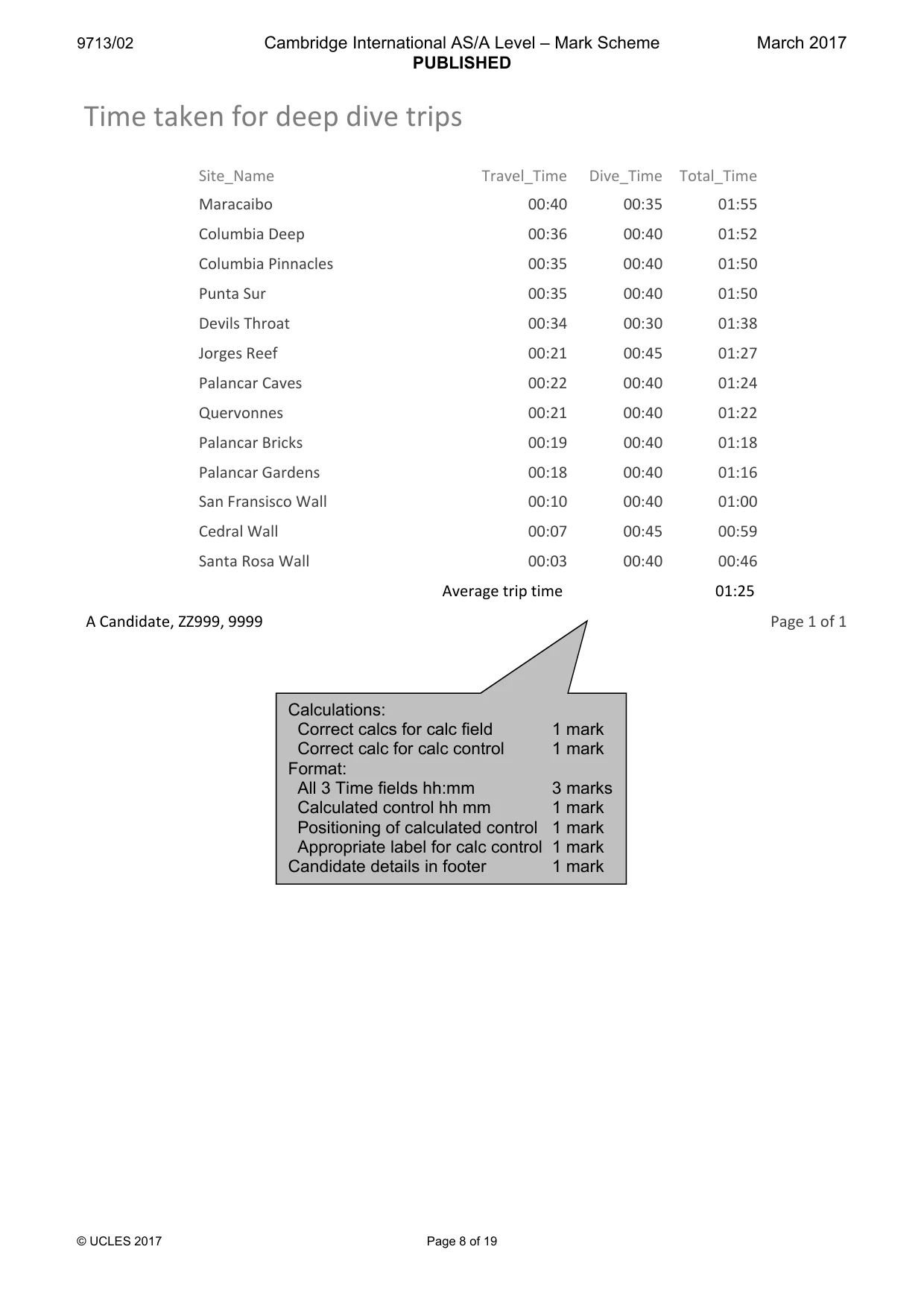
9713/02 Cambridge International AS/A Level – Mark Scheme PUBLISHED March 2017 © UCLES 2017 Page 8 of 19 Time taken for deep dive trips Site_Name Travel_Time Dive_Time Total_Time Maracaibo 00:40 00:35 01:55 Columbia Deep 00:36 00:40 01:52 Columbia Pinnacles 00:35 00:40 01:50 Punta Sur 00:35 00:40 01:50 Devils Throat 00:34 00:30 01:38 Jorges Reef 00:21 00:45 01:27 Palancar Caves 00:22 00:40 01:24 Quervonnes 00:21 00:40 01:22 Palancar Bricks 00:19 00:40 01:18 Palancar Gardens 00:18 00:40 01:16 San Fransisco Wall 00:10 00:40 01:00 Cedral Wall 00:07 00:45 00:59 Santa Rosa Wall 00:03 00:40 00:46 Average trip time 01:25 A Candidate, ZZ999, 9999 Page 1 of 1 Calculations: Correct calcs for calc field 1 mark Correct calc for calc control 1 mark Format: All 3 Time fields hh:mm 3 marks Calculated control hh mm 1 mark Positioning of calculated control 1 mark Appropriate label for calc control 1 mark Candidate details in footer 1 mark
Mark scheme, page 9
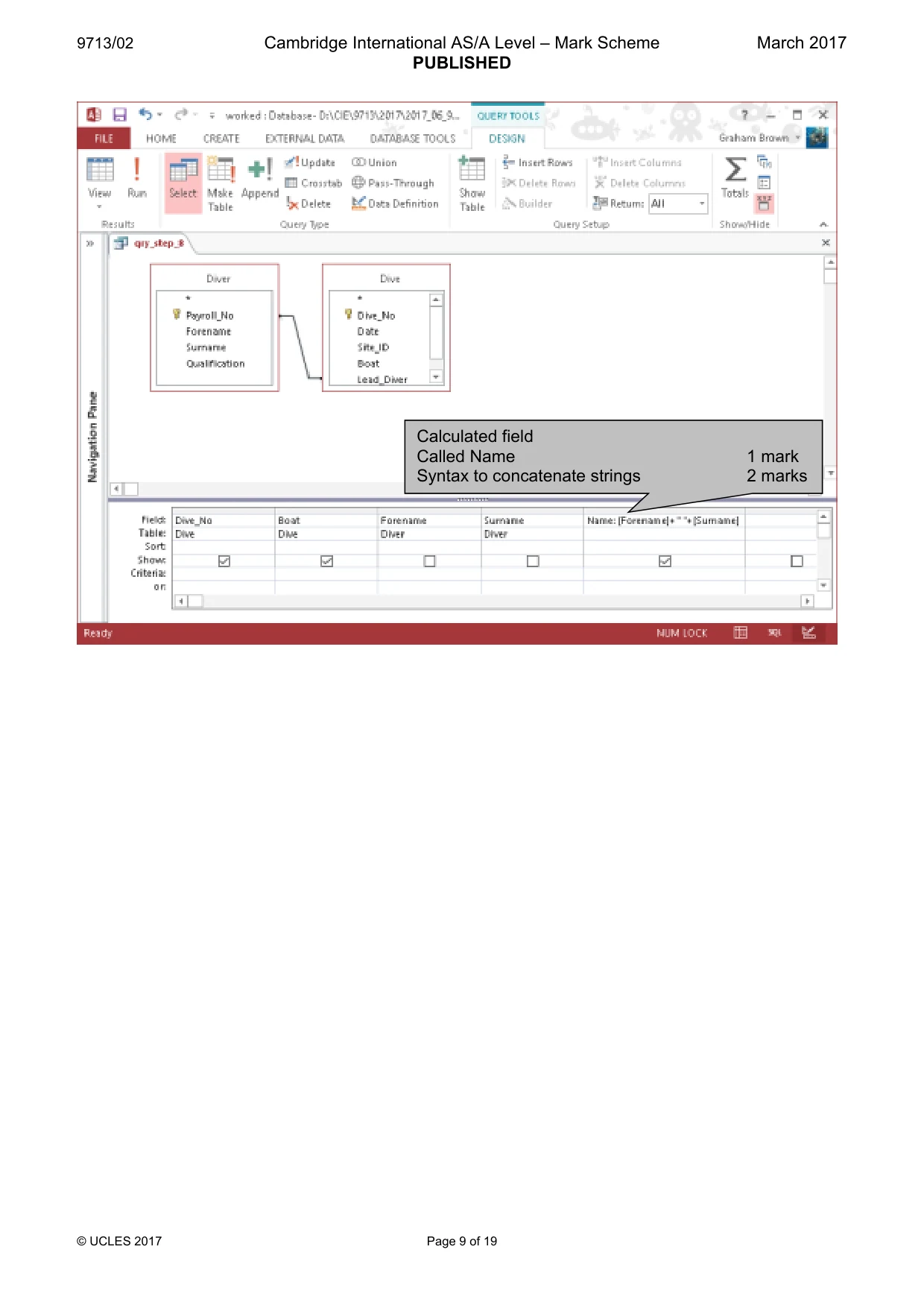
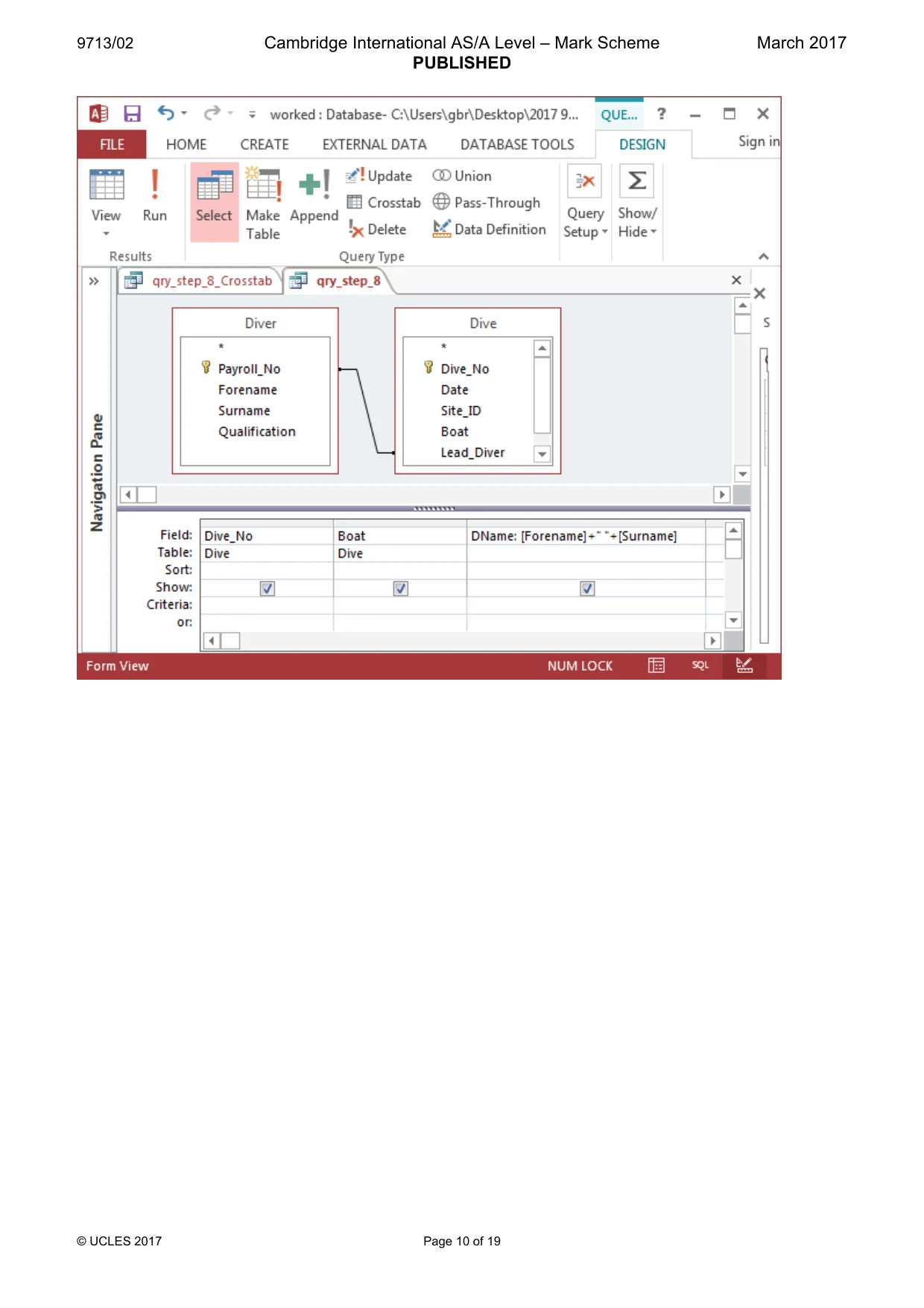
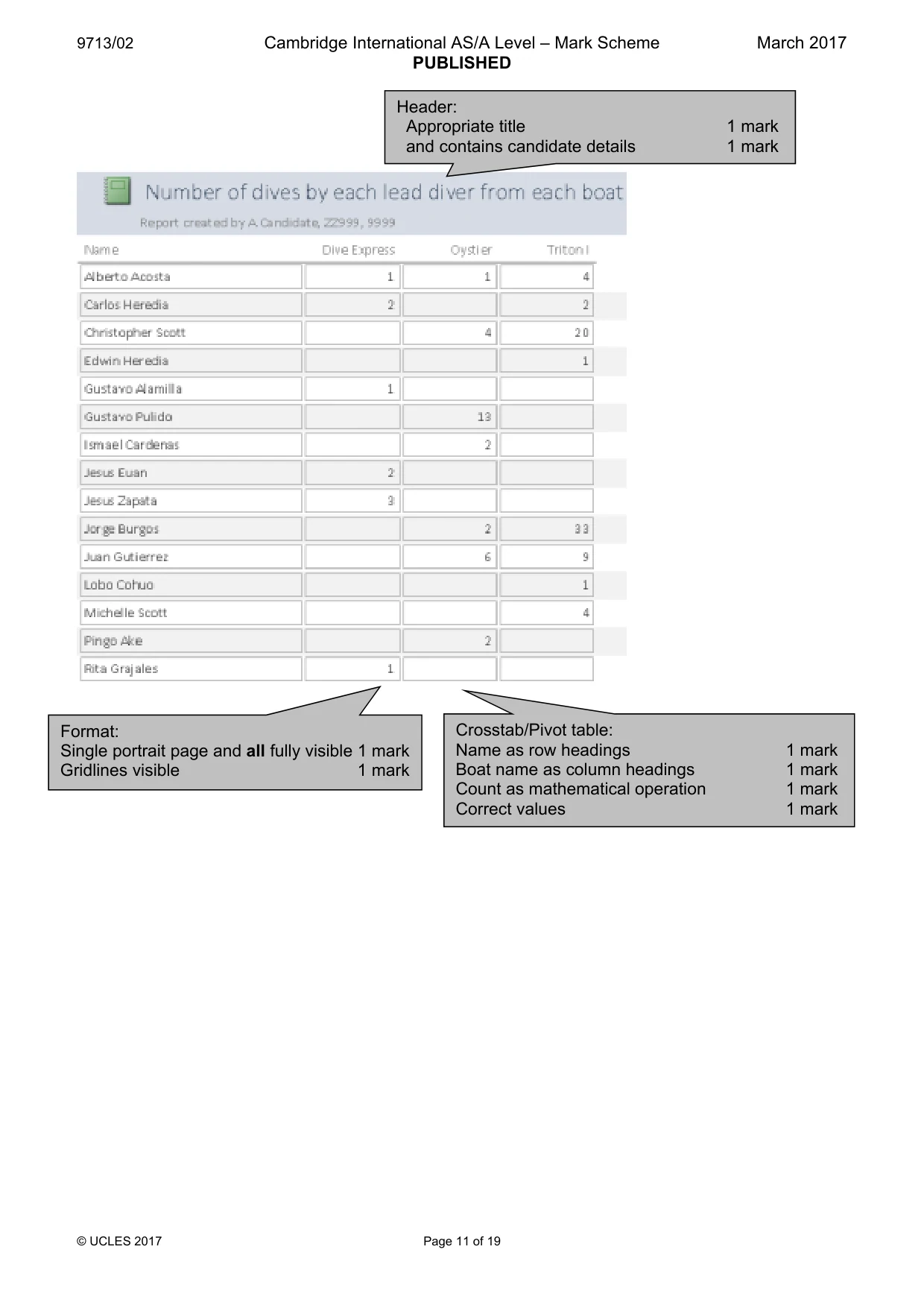
9713/02 Cambridge International AS/A Level – Mark Scheme PUBLISHED March 2017 © UCLES 2017 Page 9 of 19 Calculated field Called Name 1 mark Syntax to concatenate strings 2 marks
Mark scheme, page 10
9713/02 Cambridge International AS/A Level – Mark Scheme PUBLISHED March 2017 © UCLES 2017 Page 10 of 19
Mark scheme, page 11
9713/02 Cambridge International AS/A Level – Mark Scheme PUBLISHED March 2017 © UCLES 2017 Page 11 of 19 Format: Single portrait page and all fully visible 1 mark Gridlines visible 1 mark Crosstab/Pivot table: Name as row headings 1 mark Boat name as column headings 1 mark Count as mathematical operation 1 mark Correct values 1 mark Header: Appropriate title 1 mark and contains candidate details 1 mark
Mark scheme, page 12
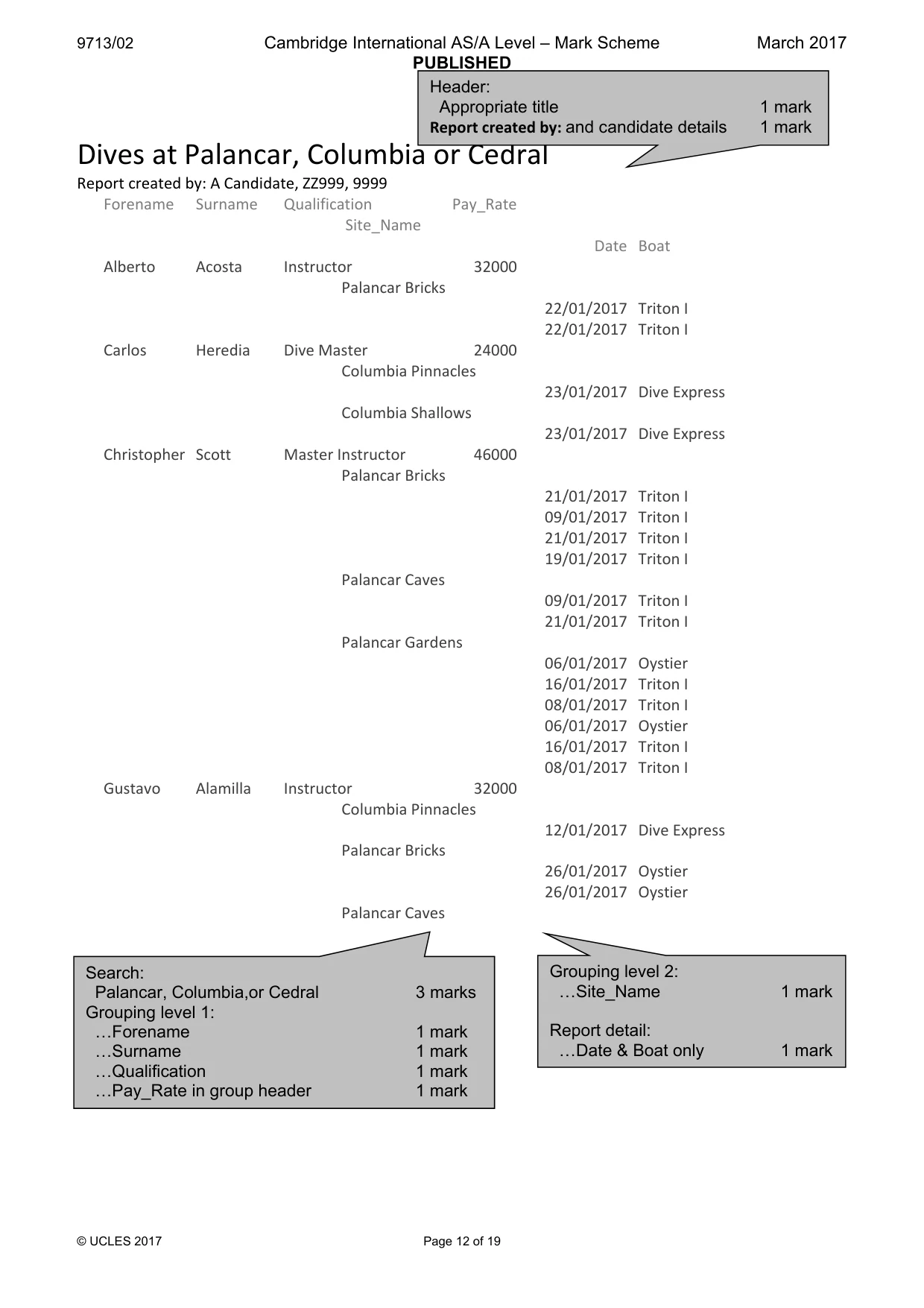
9713/02 Cambridge International AS/A Level – Mark Scheme PUBLISHED March 2017 © UCLES 2017 Page 12 of 19 Dives at Palancar, Columbia or Cedral Report created by: A Candidate, ZZ999, 9999 Forename Surname Qualification Pay_Rate Site_Name Date Boat Alberto Acosta Instructor 32000 Palancar Bricks 22/01/2017 Triton I 22/01/2017 Triton I Carlos Heredia Dive Master 24000 Columbia Pinnacles 23/01/2017 Dive Express Columbia Shallows 23/01/2017 Dive Express Christopher Scott Master Instructor 46000 Palancar Bricks 21/01/2017 Triton I 09/01/2017 Triton I 21/01/2017 Triton I 19/01/2017 Triton I Palancar Caves 09/01/2017 Triton I 21/01/2017 Triton I Palancar Gardens 06/01/2017 Oystier 16/01/2017 Triton I 08/01/2017 Triton I 06/01/2017 Oystier 16/01/2017 Triton I 08/01/2017 Triton I Gustavo Alamilla Instructor 32000 Columbia Pinnacles 12/01/2017 Dive Express Palancar Bricks 26/01/2017 Oystier 26/01/2017 Oystier Palancar Caves 27 August 2015 Page 1 of 3 Header: Appropriate title 1 mark Report created by: and candidate details 1 mark Search: Palancar, Columbia,or Cedral 3 marks Grouping level 1: «Forename 1 mark «Surname 1 mark «Qualification 1 mark «Pay_Rate in group header 1 mark Grouping level 2: «Site_Name 1 mark Report detail: «Date & Boat only 1 mark
Mark scheme, page 13
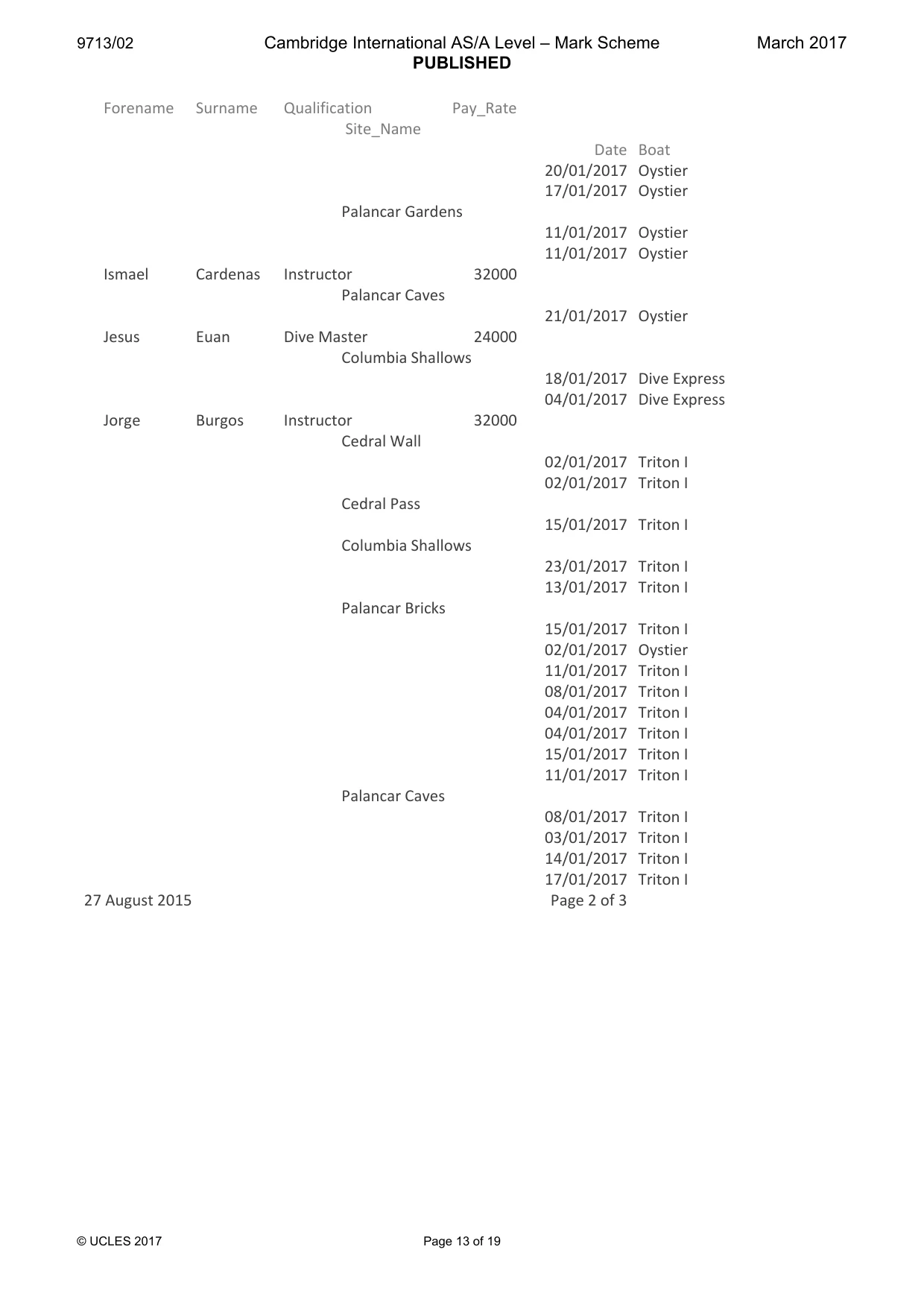
9713/02 Cambridge International AS/A Level – Mark Scheme PUBLISHED March 2017 © UCLES 2017 Page 13 of 19 Forename Surname Qualification Pay_Rate Site_Name Date Boat 20/01/2017 Oystier 17/01/2017 Oystier Palancar Gardens 11/01/2017 Oystier 11/01/2017 Oystier Ismael Cardenas Instructor 32000 Palancar Caves 21/01/2017 Oystier Jesus Euan Dive Master 24000 Columbia Shallows 18/01/2017 Dive Express 04/01/2017 Dive Express Jorge Burgos Instructor 32000 Cedral Wall 02/01/2017 Triton I 02/01/2017 Triton I Cedral Pass 15/01/2017 Triton I Columbia Shallows 23/01/2017 Triton I 13/01/2017 Triton I Palancar Bricks 15/01/2017 Triton I 02/01/2017 Oystier 11/01/2017 Triton I 08/01/2017 Triton I 04/01/2017 Triton I 04/01/2017 Triton I 15/01/2017 Triton I 11/01/2017 Triton I Palancar Caves 08/01/2017 Triton I 03/01/2017 Triton I 14/01/2017 Triton I 17/01/2017 Triton I 27 August 2015 Page 2 of 3
Mark scheme, page 14
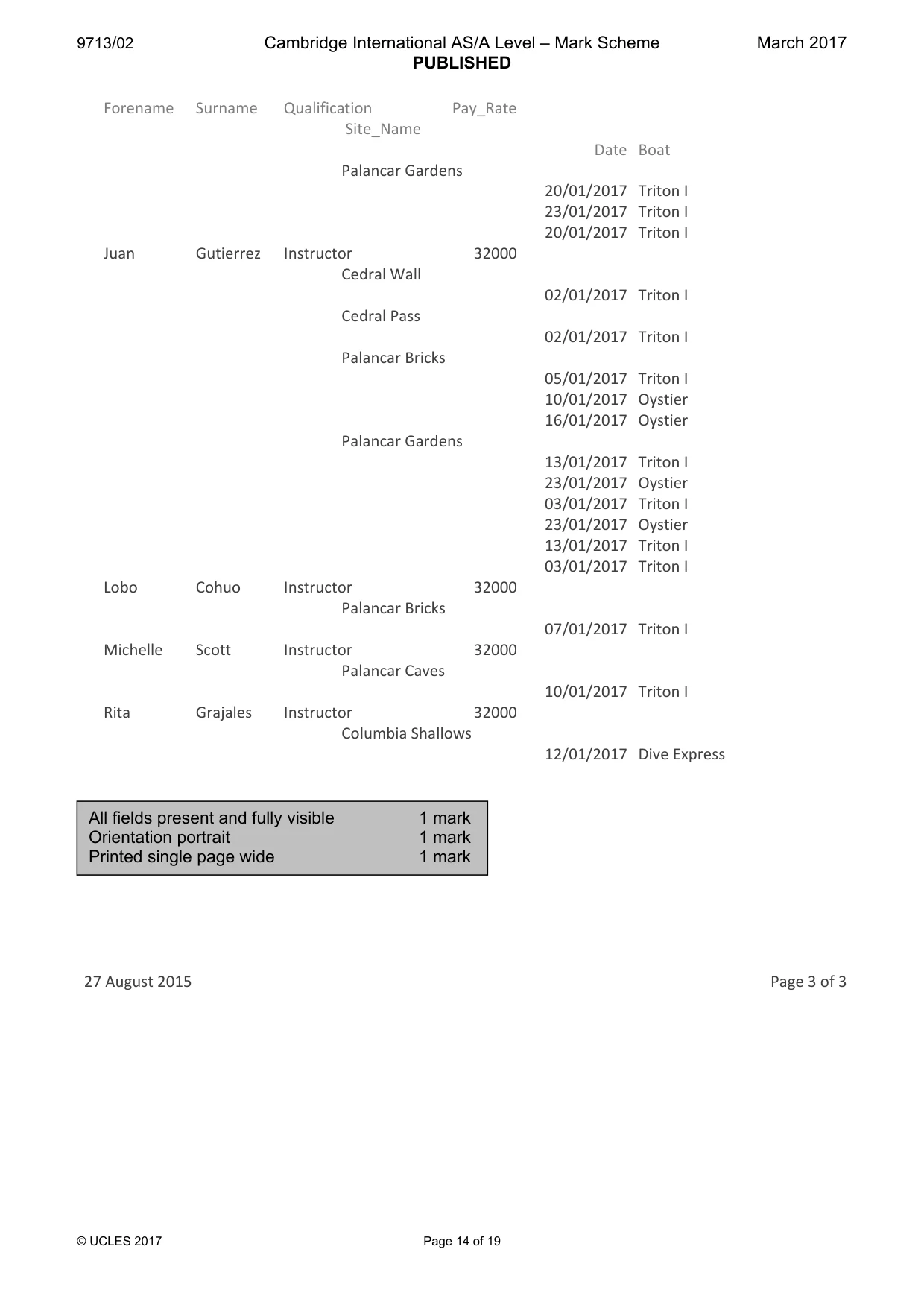
9713/02 Cambridge International AS/A Level – Mark Scheme PUBLISHED March 2017 © UCLES 2017 Page 14 of 19 Forename Surname Qualification Pay_Rate Site_Name Date Boat Palancar Gardens 20/01/2017 Triton I 23/01/2017 Triton I 20/01/2017 Triton I Juan Gutierrez Instructor 32000 Cedral Wall 02/01/2017 Triton I Cedral Pass 02/01/2017 Triton I Palancar Bricks 05/01/2017 Triton I 10/01/2017 Oystier 16/01/2017 Oystier Palancar Gardens 13/01/2017 Triton I 23/01/2017 Oystier 03/01/2017 Triton I 23/01/2017 Oystier 13/01/2017 Triton I 03/01/2017 Triton I Lobo Cohuo Instructor 32000 Palancar Bricks 07/01/2017 Triton I Michelle Scott Instructor 32000 Palancar Caves 10/01/2017 Triton I Rita Grajales Instructor 32000 Columbia Shallows 12/01/2017 Dive Express 27 August 2015 Page 3 of 3 All fields present and fully visible 1 mark Orientation portrait 1 mark Printed single page wide 1 mark
Mark scheme, page 15
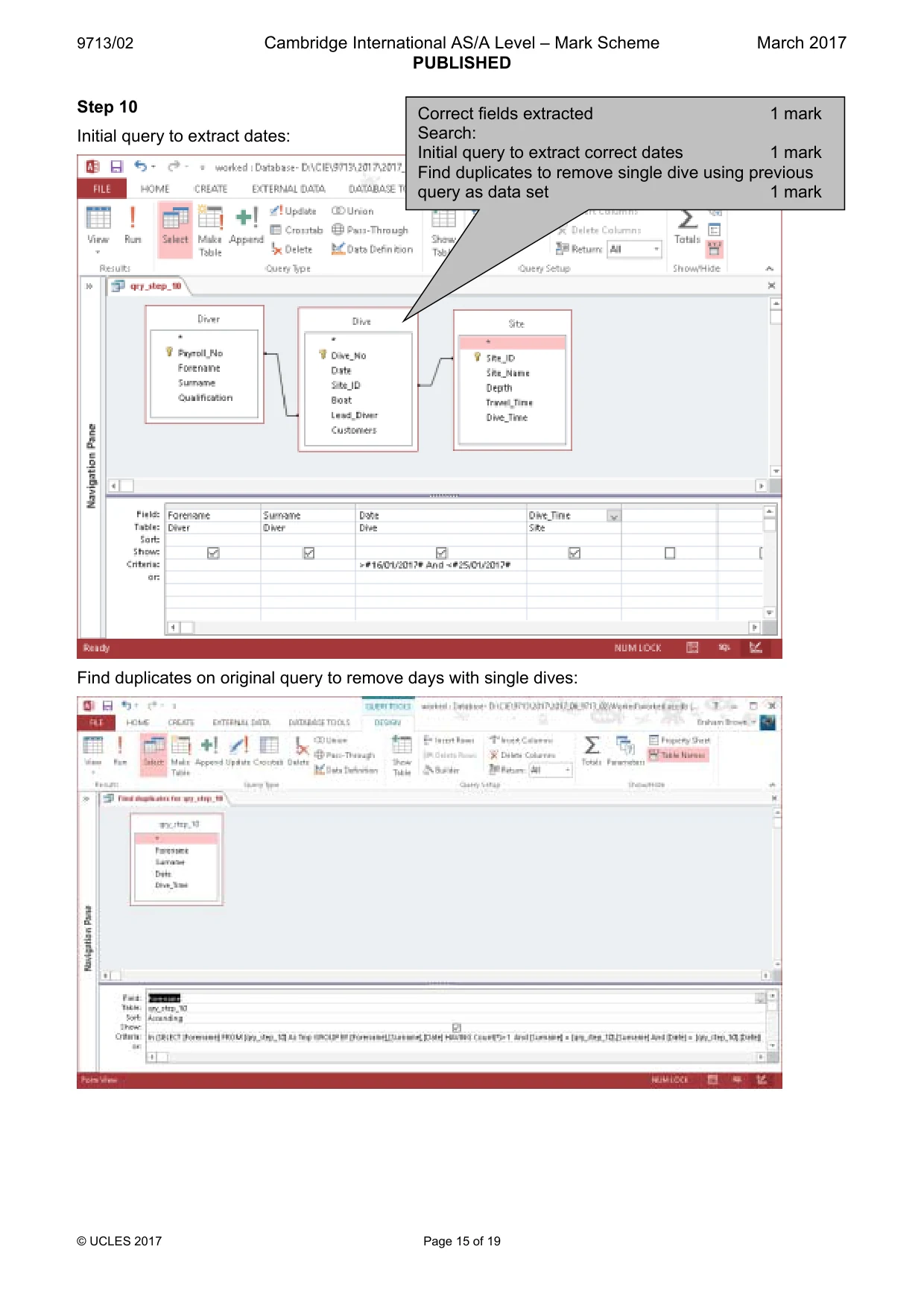
9713/02 Cambridge International AS/A Level – Mark Scheme PUBLISHED March 2017 © UCLES 2017 Page 15 of 19 Step 10 Initial query to extract dates: Find duplicates on original query to remove days with single dives: Correct fields extracted 1 mark Search: Initial query to extract correct dates 1 mark Find duplicates to remove single dive using previous query as data set 1 mark
Mark scheme, page 16
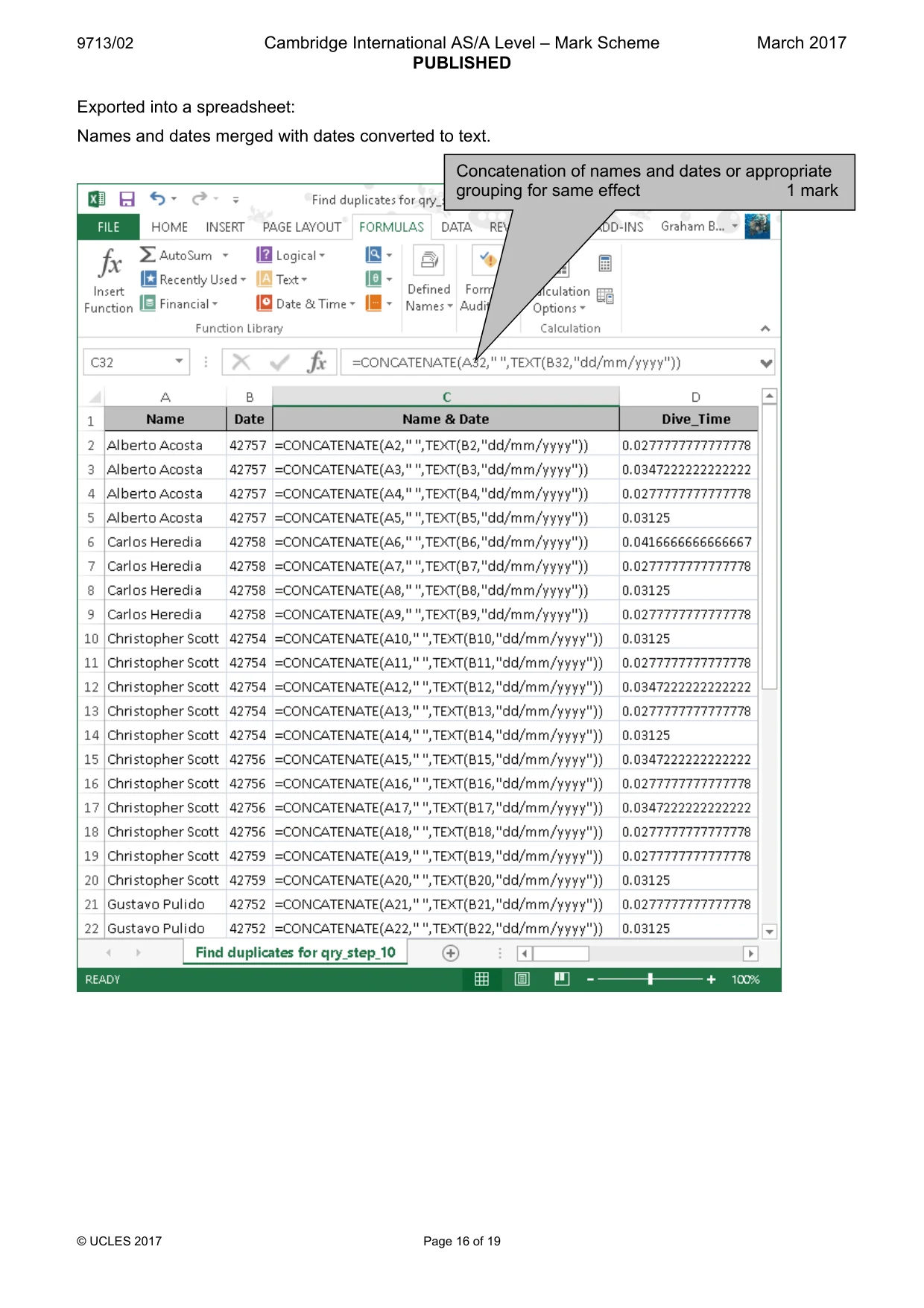
9713/02 Cambridge International AS/A Level – Mark Scheme PUBLISHED March 2017 © UCLES 2017 Page 16 of 19 Exported into a spreadsheet: Names and dates merged with dates converted to text. Concatenation of names and dates or appropriate grouping for same effect 1 mark
Mark scheme, page 17
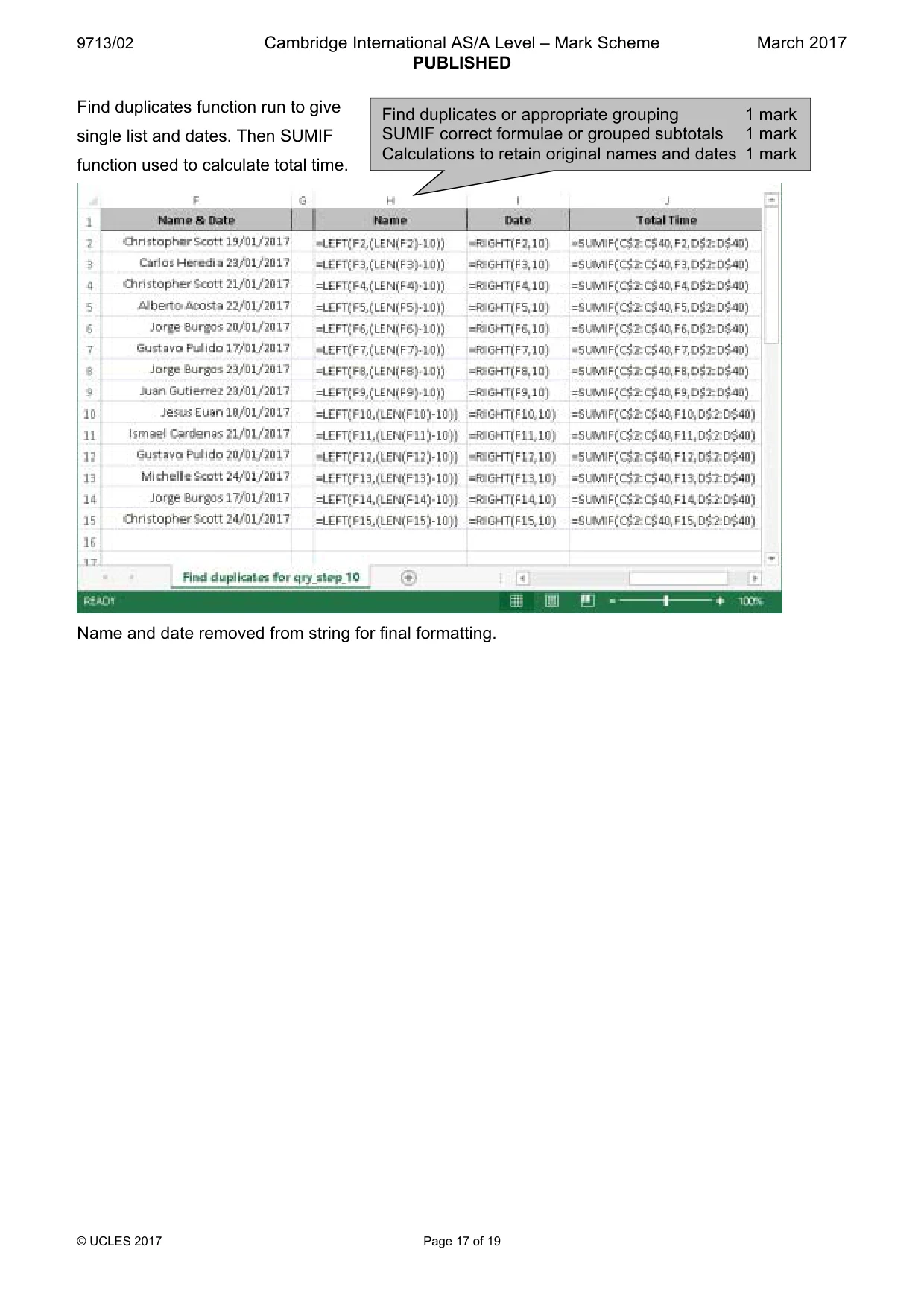
9713/02 Cambridge International AS/A Level – Mark Scheme PUBLISHED March 2017 © UCLES 2017 Page 17 of 19 Find duplicates function run to give single list and dates. Then SUMIF function used to calculate total time. Name and date removed from string for final formatting. Find duplicates or appropriate grouping 1 mark SUMIF correct formulae or grouped subtotals 1 mark Calculations to retain original names and dates 1 mark
Mark scheme, page 18
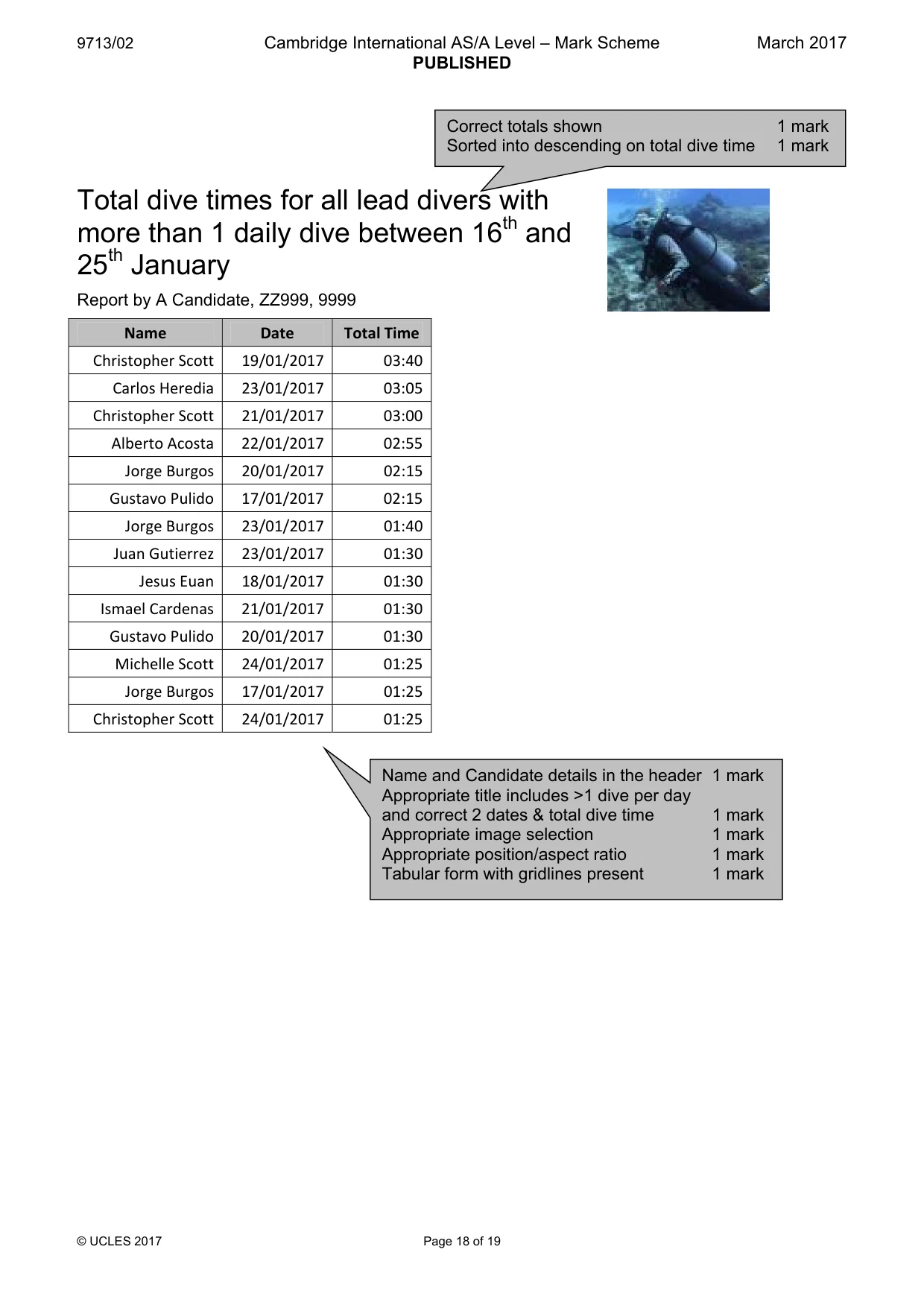
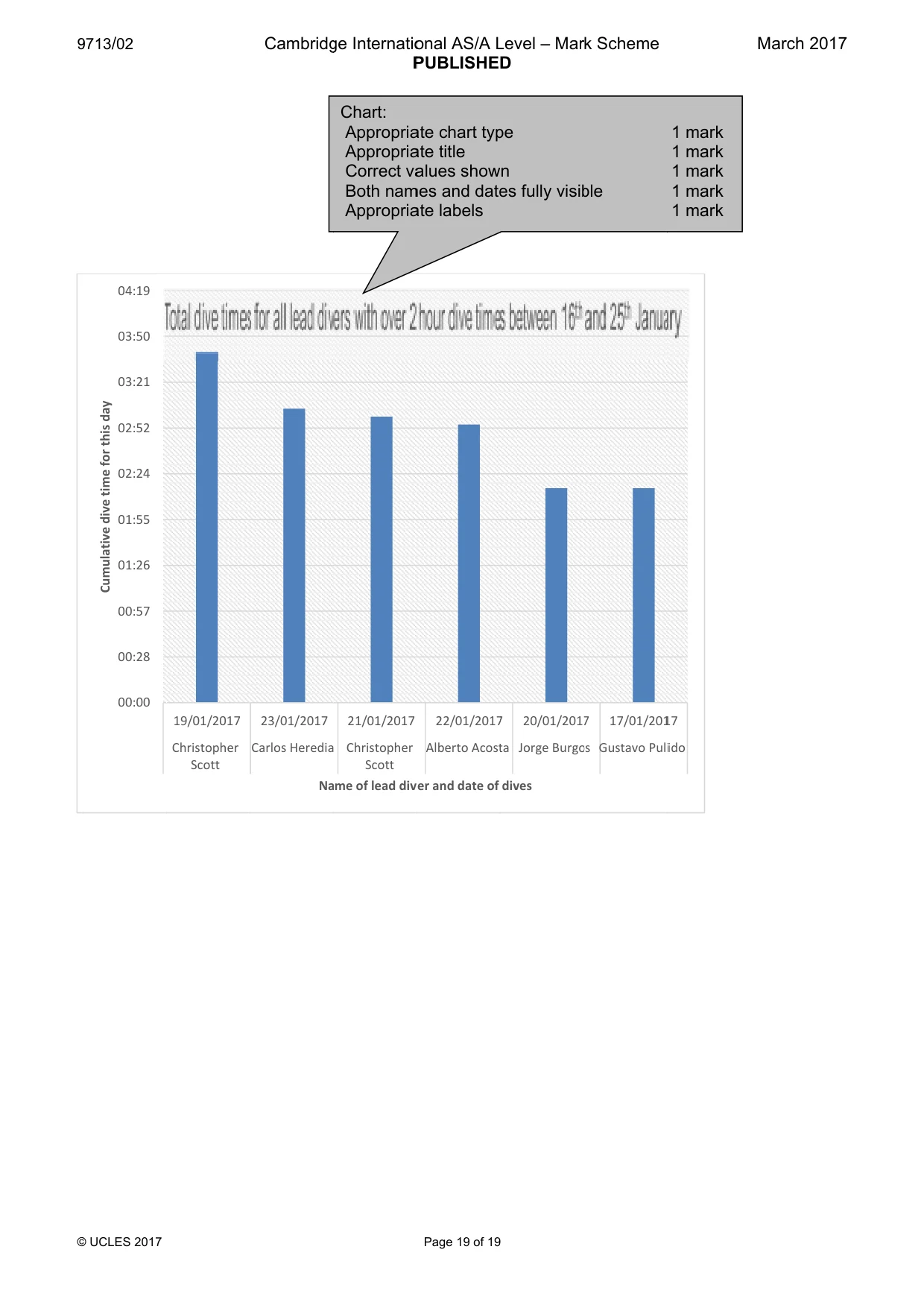
9713/02 Cambridge International AS/A Level – Mark Scheme PUBLISHED March 2017 © UCLES 2017 Page 18 of 19 Total dive times for all lead divers with more than 1 daily dive between 16th and 25th January Report by A Candidate, ZZ999, 9999 Name Date Total Time Christopher Scott 19/01/2017 03:40 Carlos Heredia 23/01/2017 03:05 Christopher Scott 21/01/2017 03:00 Alberto Acosta 22/01/2017 02:55 Jorge Burgos 20/01/2017 02:15 Gustavo Pulido 17/01/2017 02:15 Jorge Burgos 23/01/2017 01:40 Juan Gutierrez 23/01/2017 01:30 Jesus Euan 18/01/2017 01:30 Ismael Cardenas 21/01/2017 01:30 Gustavo Pulido 20/01/2017 01:30 Michelle Scott 24/01/2017 01:25 Jorge Burgos 17/01/2017 01:25 Christopher Scott 24/01/2017 01:25 Correct totals shown 1 mark Sorted into descending on total dive time 1 mark Name and Candidate details in the header 1 mark Appropriate title includes >1 dive per day and correct 2 dates & total dive time 1 mark Appropriate image selection 1 mark Appropriate position/aspect ratio 1 mark Tabular form with gridlines present 1 mark
Mark scheme, page 19
9 © 9713/02 © UCLES 2017 00:00 00:28 00:57 01:26 01:55 02:24 02:52 03:21 03:50 04:19 Cumulative dive time for this day 19/01/2017 Christopher Scott Cambridg 23/01/2017 Carlos Heredia Na ge Internatio P 21/01/2017 Christopher Scott me of lead dive Chart: Appropria Appropria Correct va Both nam Appropria onal AS/A L PUBLISHED Page 19 of 19 22/01/2017 Alberto Acost er and date of ate chart typ ate title alues show mes and date ate labels Level – Mar D 7 20/01/2017 ta Jorge Burgo dives pe n es fully visib k Scheme 7 17/01/201 os Gustavo Puli ble 17 ido 1 mark 1 mark 1 mark 1 mark 1 mark March 2017
What you needed in this session
Cambridge’s own grade thresholds for 2017 Feb/March, Paper 2 · Variant 1. A higher threshold means an easier paper — the bar moves with how the cohort did.