Cambridge A Level Applied Information and Communication Technology 9713 — 2012 Oct/Nov Paper 4 · Variant 1
9713/41/O/N/12 · 90 marks · ≈101 min
The question paper and its mark scheme, free to read here and free to download. This is Cambridge’s own paper, exactly as it was sat.
Question paper4 pages
Mark scheme4 pages
Answers below. Sit the paper first if you are practising.
Paper as text
Question paper, page 1
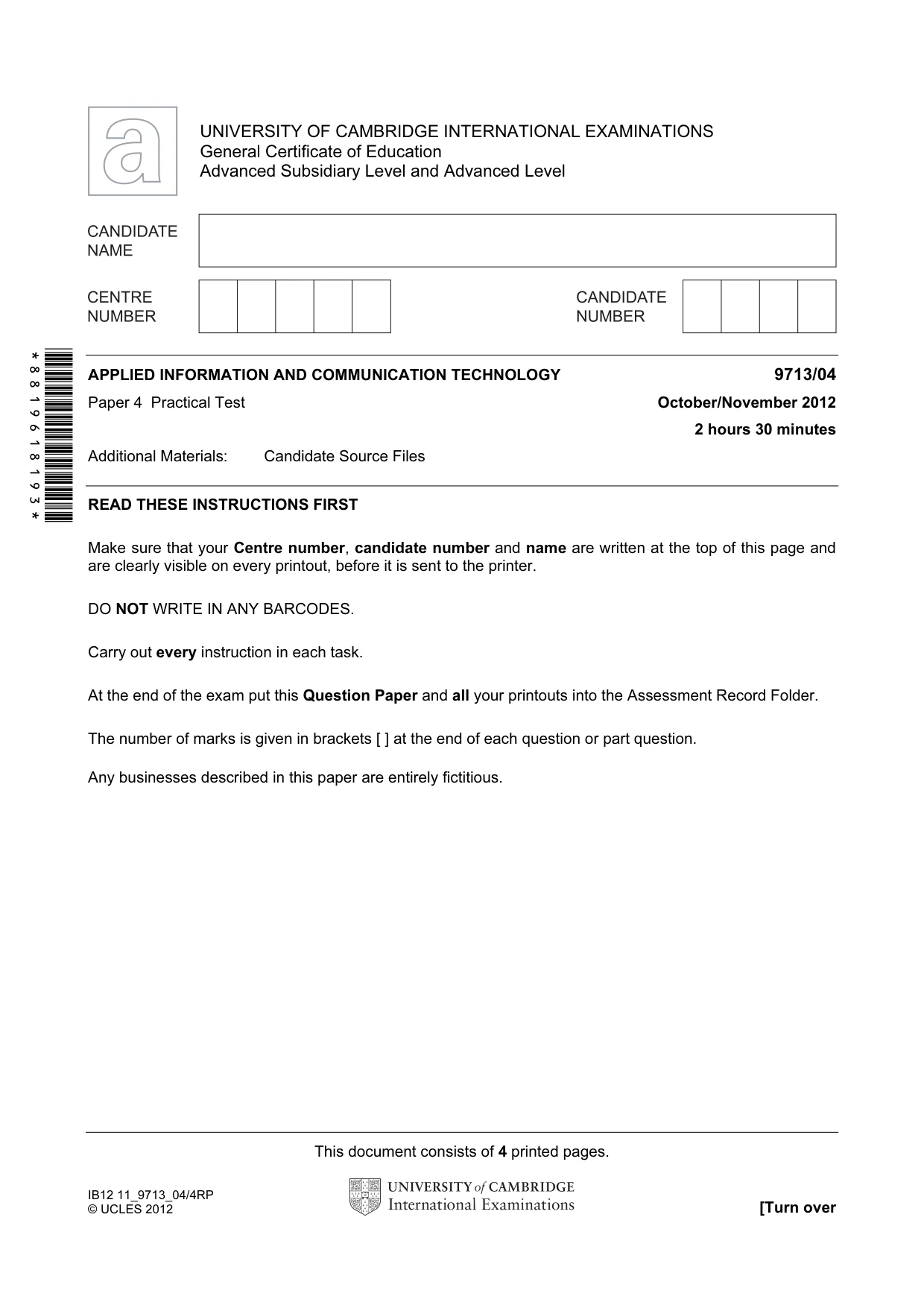
This document consists of 4 printed pages. IB12 11_9713_04/4RP © UCLES 2012 [Turn over *8819618193* UNIVERSITY OF CAMBRIDGE INTERNATIONAL EXAMINATIONS General Certificate of Education Advanced Subsidiary Level and Advanced Level APPLIED INFORMATION AND COMMUNICATION TECHNOLOGY 9713/04 Paper 4 Practical Test October/November 2012 2 hours 30 minutes Additional Materials: Candidate Source Files READ THESE INSTRUCTIONS FIRST Make sure that your Centre number, candidate number and name are written at the top of this page and are clearly visible on every printout, before it is sent to the printer. DO NOT WRITE IN ANY BARCODES. Carry out every instruction in each task. At the end of the exam put this Question Paper and all your printouts into the Assessment Record Folder. The number of marks is given in brackets [ ] at the end of each question or part question. Any businesses described in this paper are entirely fictitious.
Question paper, page 2
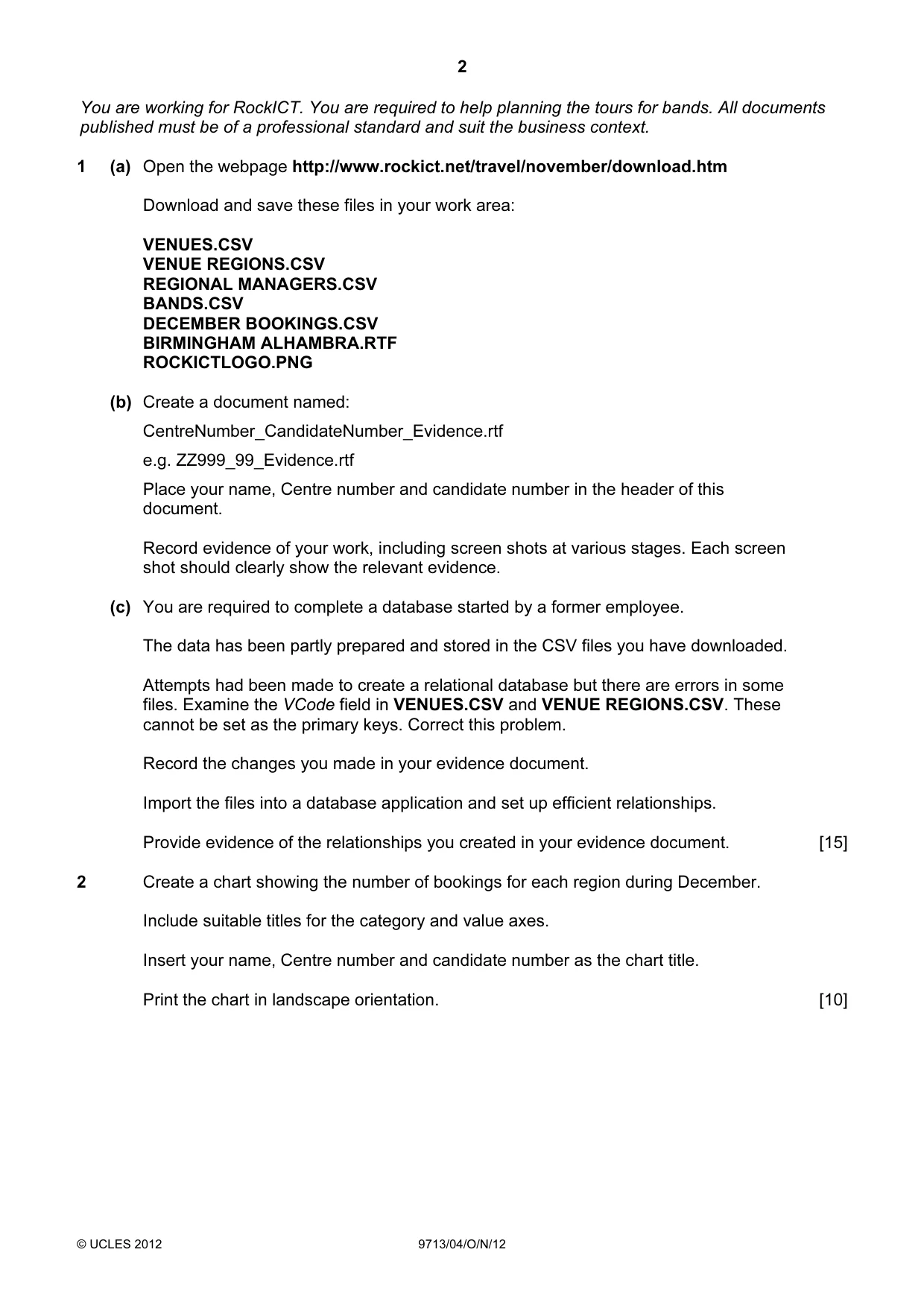
2 © UCLES 2012 9713/04/O/N/12 You are working for RockICT. You are required to help planning the tours for bands. All documents published must be of a professional standard and suit the business context. 1 (a) Open the webpage http://www.rockict.net/travel/november/download.htm Download and save these files in your work area: VENUES.CSV VENUE REGIONS.CSV REGIONAL MANAGERS.CSV BANDS.CSV DECEMBER BOOKINGS.CSV BIRMINGHAM ALHAMBRA.RTF ROCKICTLOGO.PNG (b) Create a document named: CentreNumber_CandidateNumber_Evidence.rtf e.g. ZZ999_99_Evidence.rtf Place your name, Centre number and candidate number in the header of this document. Record evidence of your work, including screen shots at various stages. Each screen shot should clearly show the relevant evidence. (c) You are required to complete a database started by a former employee. The data has been partly prepared and stored in the CSV files you have downloaded. Attempts had been made to create a relational database but there are errors in some files. Examine the VCode field in VENUES.CSV and VENUE REGIONS.CSV. These cannot be set as the primary keys. Correct this problem. Record the changes you made in your evidence document. Import the files into a database application and set up efficient relationships. Provide evidence of the relationships you created in your evidence document. [15] 2 Create a chart showing the number of bookings for each region during December. Include suitable titles for the category and value axes. Insert your name, Centre number and candidate number as the chart title. Print the chart in landscape orientation. [10]
Question paper, page 3
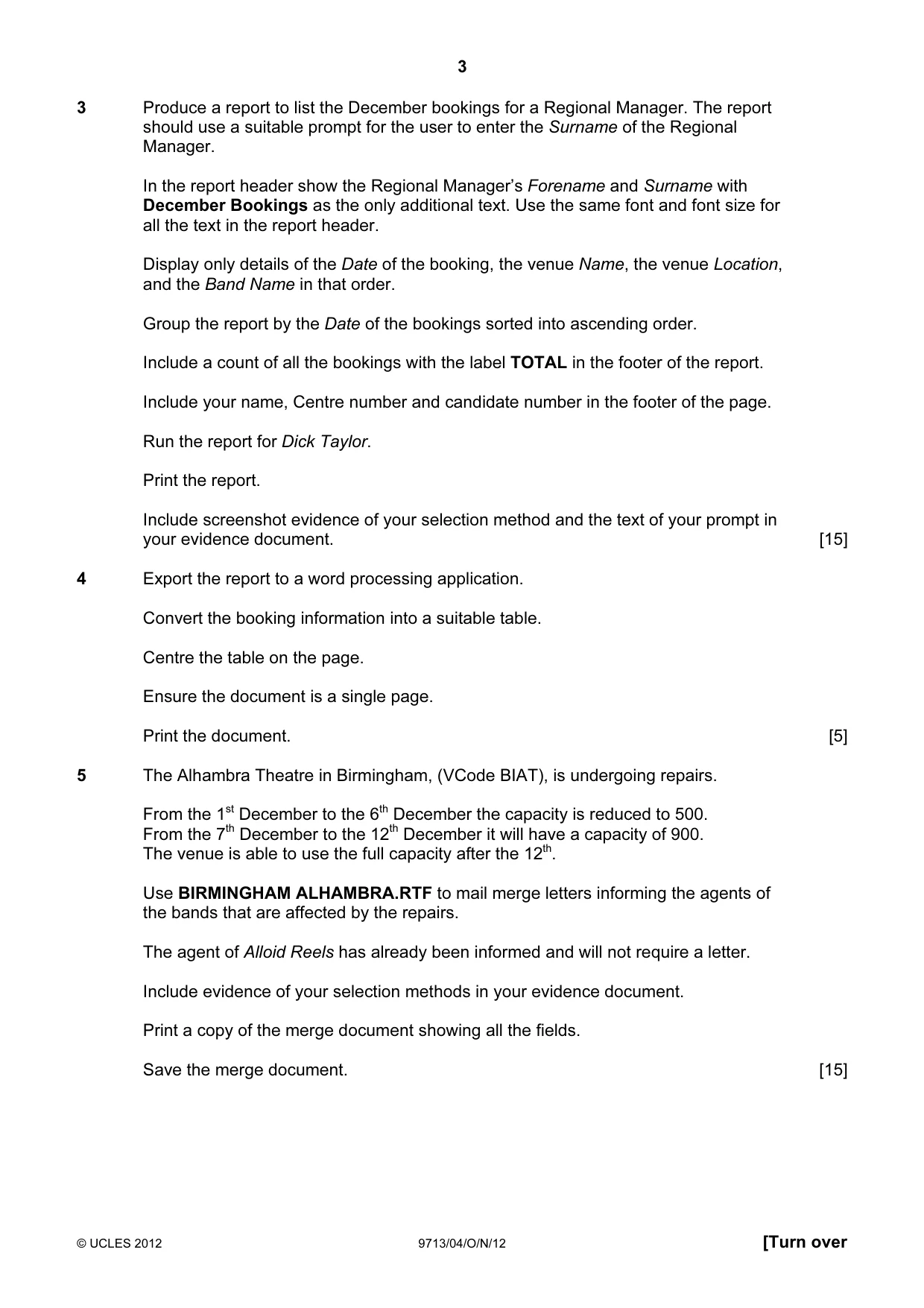
3 © UCLES 2012 9713/04/O/N/12 [Turn over 3 Produce a report to list the December bookings for a Regional Manager. The report should use a suitable prompt for the user to enter the Surname of the Regional Manager. In the report header show the Regional Manager’s Forename and Surname with December Bookings as the only additional text. Use the same font and font size for all the text in the report header. Display only details of the Date of the booking, the venue Name, the venue Location, and the Band Name in that order. Group the report by the Date of the bookings sorted into ascending order. Include a count of all the bookings with the label TOTAL in the footer of the report. Include your name, Centre number and candidate number in the footer of the page. Run the report for Dick Taylor. Print the report. Include screenshot evidence of your selection method and the text of your prompt in your evidence document. [15] 4 Export the report to a word processing application. Convert the booking information into a suitable table. Centre the table on the page. Ensure the document is a single page. Print the document. [5] 5 The Alhambra Theatre in Birmingham, (VCode BIAT), is undergoing repairs. From the 1st December to the 6th December the capacity is reduced to 500. From the 7th December to the 12th December it will have a capacity of 900. The venue is able to use the full capacity after the 12th. Use BIRMINGHAM ALHAMBRA.RTF to mail merge letters informing the agents of the bands that are affected by the repairs. The agent of Alloid Reels has already been informed and will not require a letter. Include evidence of your selection methods in your evidence document. Print a copy of the merge document showing all the fields. Save the merge document. [15]
Question paper, page 4
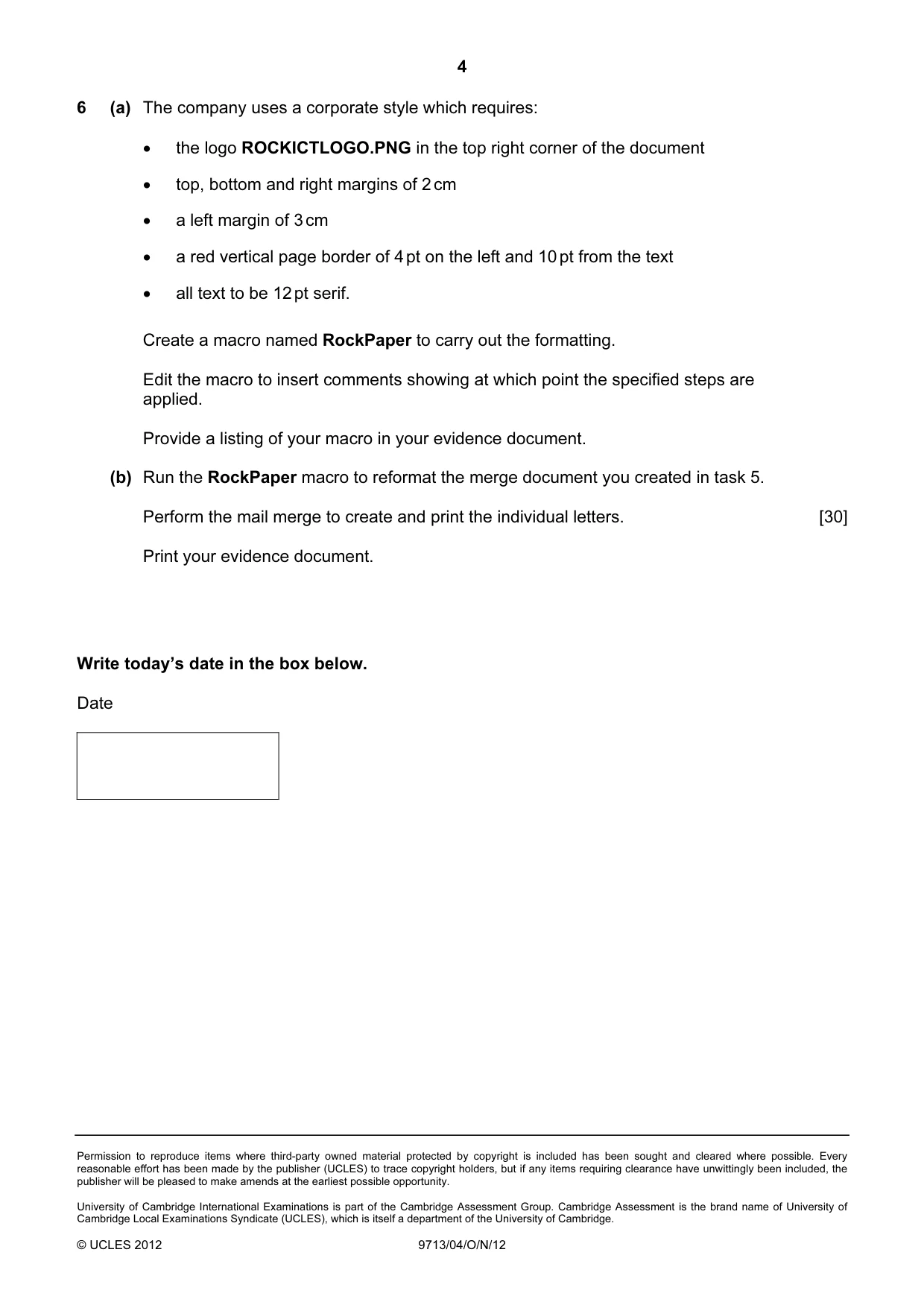
4 Permission to reproduce items where third-party owned material protected by copyright is included has been sought and cleared where possible. Every reasonable effort has been made by the publisher (UCLES) to trace copyright holders, but if any items requiring clearance have unwittingly been included, the publisher will be pleased to make amends at the earliest possible opportunity. University of Cambridge International Examinations is part of the Cambridge Assessment Group. Cambridge Assessment is the brand name of University of Cambridge Local Examinations Syndicate (UCLES), which is itself a department of the University of Cambridge. © UCLES 2012 9713/04/O/N/12 6 (a) The company uses a corporate style which requires: • the logo ROCKICTLOGO.PNG in the top right corner of the document • top, bottom and right margins of 2 cm • a left margin of 3 cm • a red vertical page border of 4 pt on the left and 10 pt from the text • all text to be 12 pt serif. Create a macro named RockPaper to carry out the formatting. Edit the macro to insert comments showing at which point the specified steps are applied. Provide a listing of your macro in your evidence document. (b) Run the RockPaper macro to reformat the merge document you created in task 5. Perform the mail merge to create and print the individual letters. [30] Print your evidence document. Write today’s date in the box below. Date
Mark scheme, page 1
CAMBRIDGE INTERNATIONAL EXAMINATIONS GCE Advanced Subsidiary Level and GCE Advanced Level MARK SCHEME for the October/November 2012 series 9713 APPLIED ICT 9713/04 Paper 4 (Practical Test B), maximum raw mark 90 This mark scheme is published as an aid to teachers and candidates, to indicate the requirements of the examination. It shows the basis on which Examiners were instructed to award marks. It does not indicate the details of the discussions that took place at an Examiners’ meeting before marking began, which would have considered the acceptability of alternative answers. Mark schemes should be read in conjunction with the question paper and the Principal Examiner Report for Teachers. Cambridge will not enter into discussions about these mark schemes. Cambridge is publishing the mark schemes for the October/November 2012 series for most IGCSE, GCE Advanced Level and Advanced Subsidiary Level components and some Ordinary Level components.
Mark scheme, page 2
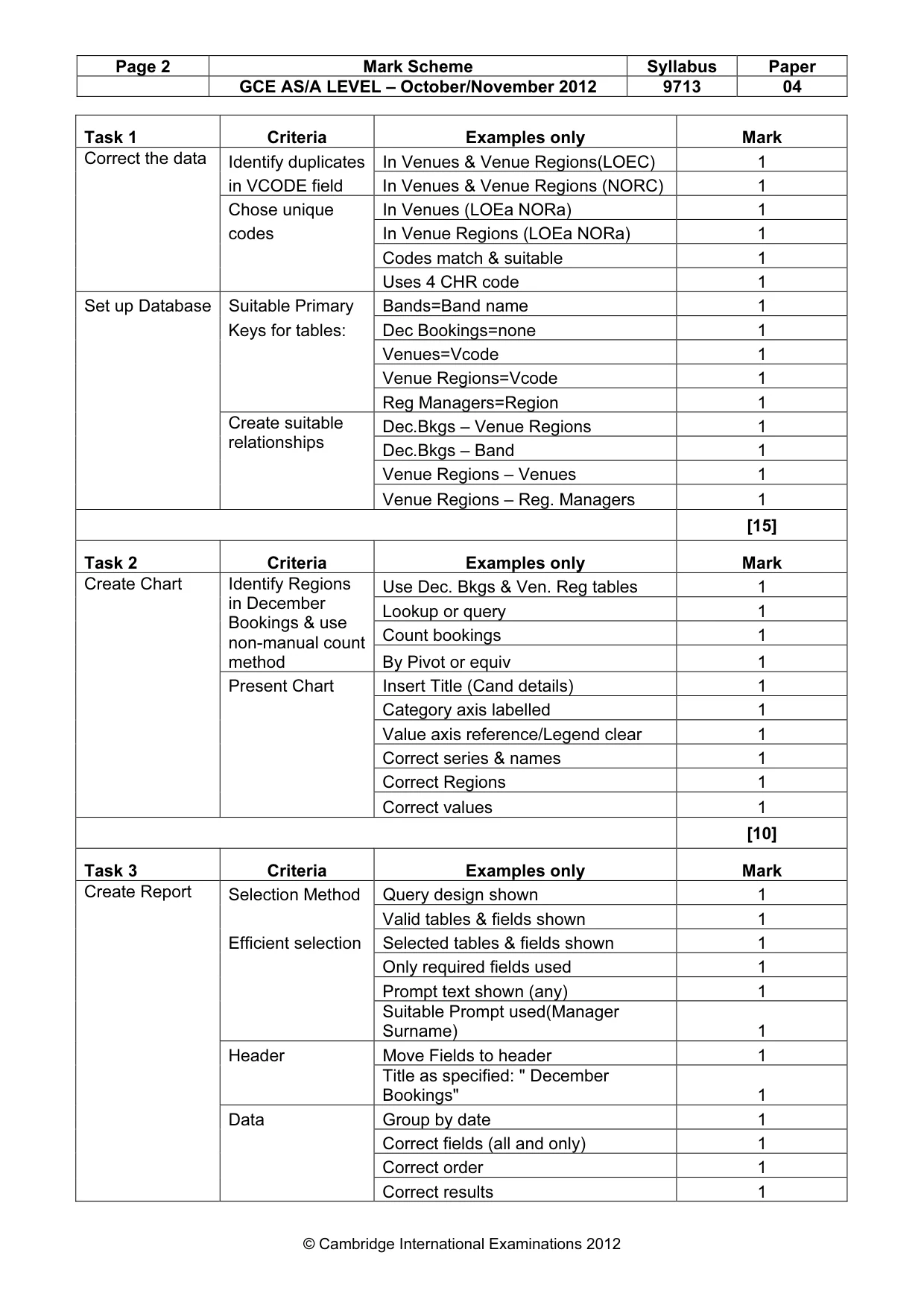
Page 2 Mark Scheme Syllabus Paper GCE AS/A LEVEL – October/November 2012 9713 04 © Cambridge International Examinations 2012 Task 1 Criteria Examples only Mark Identify duplicates In Venues & Venue Regions(LOEC) 1 in VCODE field In Venues & Venue Regions (NORC) 1 Chose unique In Venues (LOEa NORa) 1 codes In Venue Regions (LOEa NORa) 1 Codes match & suitable 1 Correct the data Uses 4 CHR code 1 Set up Database Suitable Primary Bands=Band name 1 Keys for tables: Dec Bookings=none 1 Venues=Vcode 1 Venue Regions=Vcode 1 Reg Managers=Region 1 Dec.Bkgs – Venue Regions 1 Dec.Bkgs – Band 1 Venue Regions – Venues 1 Create suitable relationships Venue Regions – Reg. Managers 1 [15] Task 2 Criteria Examples only Mark Use Dec. Bkgs & Ven. Reg tables 1 Lookup or query 1 Count bookings 1 Identify Regions in December Bookings & use non-manual count method By Pivot or equiv 1 Present Chart Insert Title (Cand details) 1 Category axis labelled 1 Value axis reference/Legend clear 1 Correct series & names 1 Correct Regions 1 Create Chart Correct values 1 [10] Task 3 Criteria Examples only Mark Create Report Selection Method Query design shown 1 Valid tables & fields shown 1 Efficient selection Selected tables & fields shown 1 Only required fields used 1 Prompt text shown (any) 1 Suitable Prompt used(Manager Surname) 1 Header Move Fields to header 1 Title as specified: " December Bookings" 1 Data Group by date 1 Correct fields (all and only) 1 Correct order 1 Correct results 1
Mark scheme, page 3
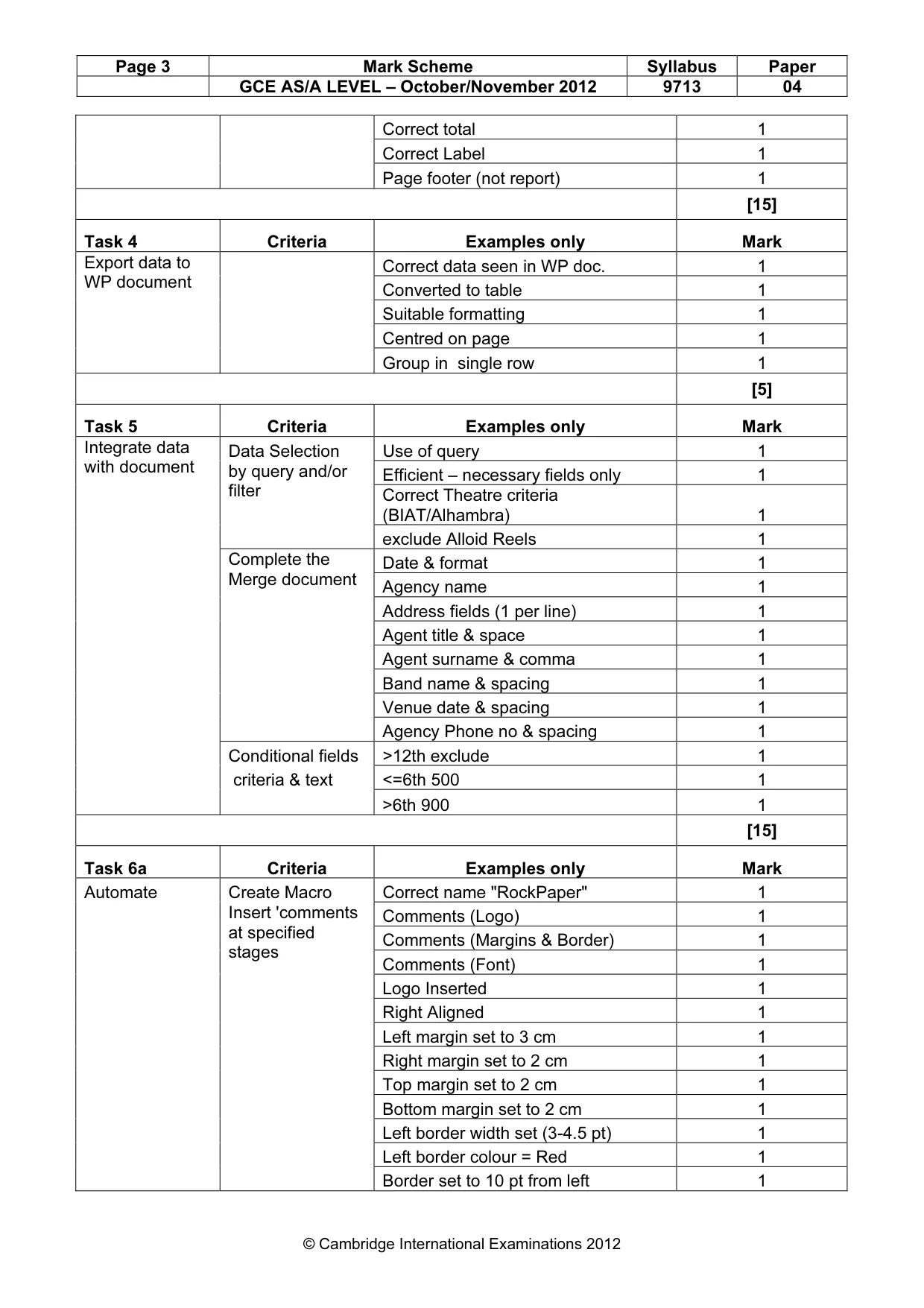
Page 3 Mark Scheme Syllabus Paper GCE AS/A LEVEL – October/November 2012 9713 04 © Cambridge International Examinations 2012 Correct total 1 Correct Label 1 Page footer (not report) 1 [15] Task 4 Criteria Examples only Mark Correct data seen in WP doc. 1 Converted to table 1 Suitable formatting 1 Centred on page 1 Export data to WP document Group in single row 1 [5] Task 5 Criteria Examples only Mark Data Selection Use of query 1 Efficient – necessary fields only 1 Correct Theatre criteria (BIAT/Alhambra) 1 by query and/or filter exclude Alloid Reels 1 Date & format 1 Agency name 1 Address fields (1 per line) 1 Agent title & space 1 Agent surname & comma 1 Band name & spacing 1 Venue date & spacing 1 Complete the Merge document Agency Phone no & spacing 1 Conditional fields >12th exclude 1 criteria & text <=6th 500 1 Integrate data with document >6th 900 1 [15] Task 6a Criteria Examples only Mark Automate Create Macro Correct name "RockPaper" 1 Comments (Logo) 1 Comments (Margins & Border) 1 Comments (Font) 1 Logo Inserted 1 Right Aligned 1 Left margin set to 3 cm 1 Right margin set to 2 cm 1 Top margin set to 2 cm 1 Bottom margin set to 2 cm 1 Left border width set (3-4.5 pt) 1 Left border colour = Red 1 Insert 'comments at specified stages Border set to 10 pt from left 1
Mark scheme, page 4
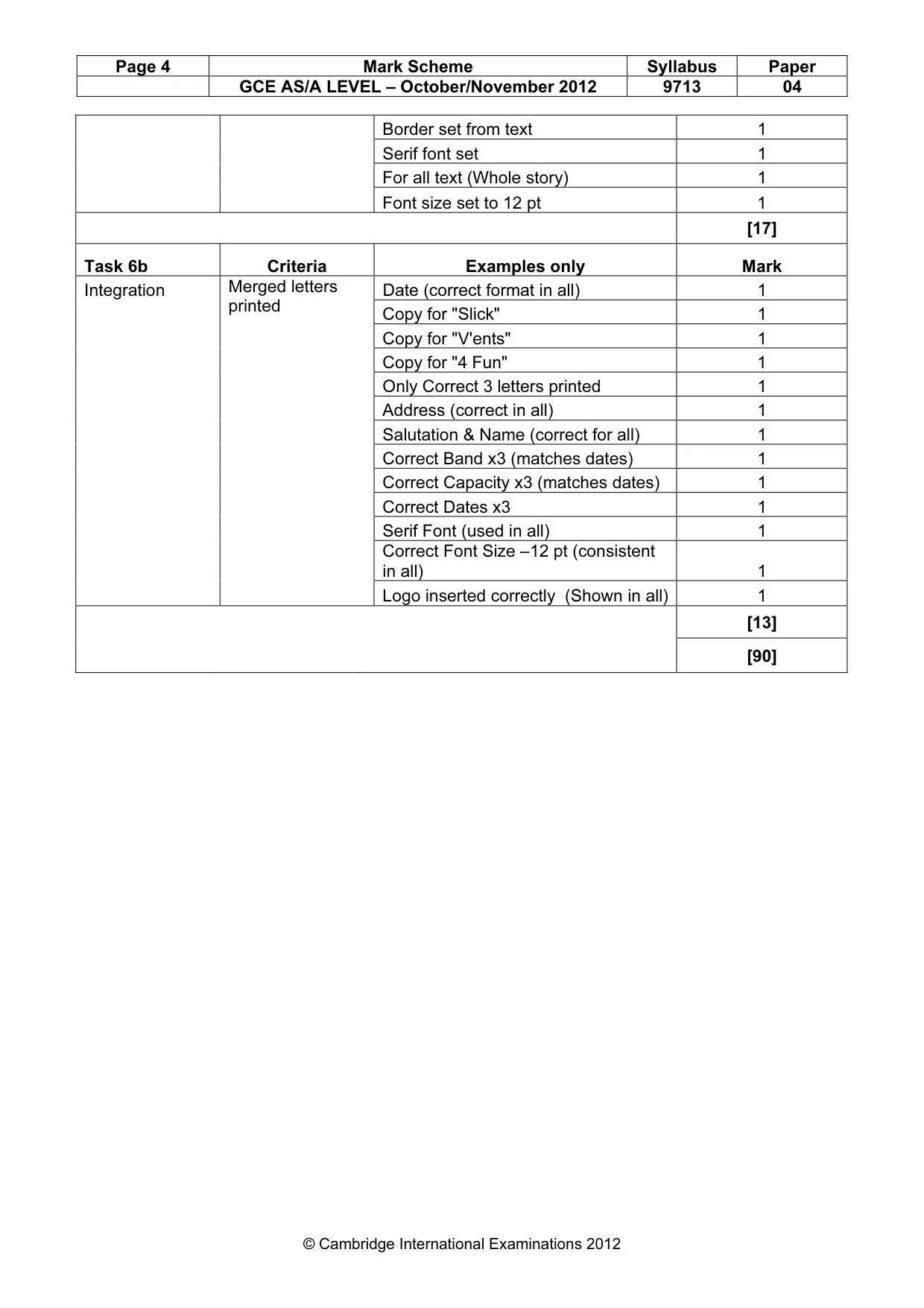
Page 4 Mark Scheme Syllabus Paper GCE AS/A LEVEL – October/November 2012 9713 04 © Cambridge International Examinations 2012 Border set from text 1 Serif font set 1 For all text (Whole story) 1 Font size set to 12 pt 1 [17] Task 6b Criteria Examples only Mark Integration Date (correct format in all) 1 Copy for "Slick" 1 Copy for "V'ents" 1 Copy for "4 Fun" 1 Only Correct 3 letters printed 1 Address (correct in all) 1 Salutation & Name (correct for all) 1 Correct Band x3 (matches dates) 1 Correct Capacity x3 (matches dates) 1 Correct Dates x3 1 Serif Font (used in all) 1 Correct Font Size –12 pt (consistent in all) 1 Merged letters printed Logo inserted correctly (Shown in all) 1 [13] [90]
What you needed in this session
Cambridge’s own grade thresholds for 2012 Oct/Nov, Paper 4 · Variant 1. A higher threshold means an easier paper — the bar moves with how the cohort did.