Cambridge A Level Applied Information and Communication Technology 9713 — 2012 Oct/Nov Paper 2 · Variant 1
9713/21/O/N/12 · 120 marks · ≈135 min
The question paper and its mark scheme, free to read here and free to download. This is Cambridge’s own paper, exactly as it was sat.
Question paper8 pages


Mark scheme21 pages
Answers below. Sit the paper first if you are practising.
Paper as text
Question paper, page 1
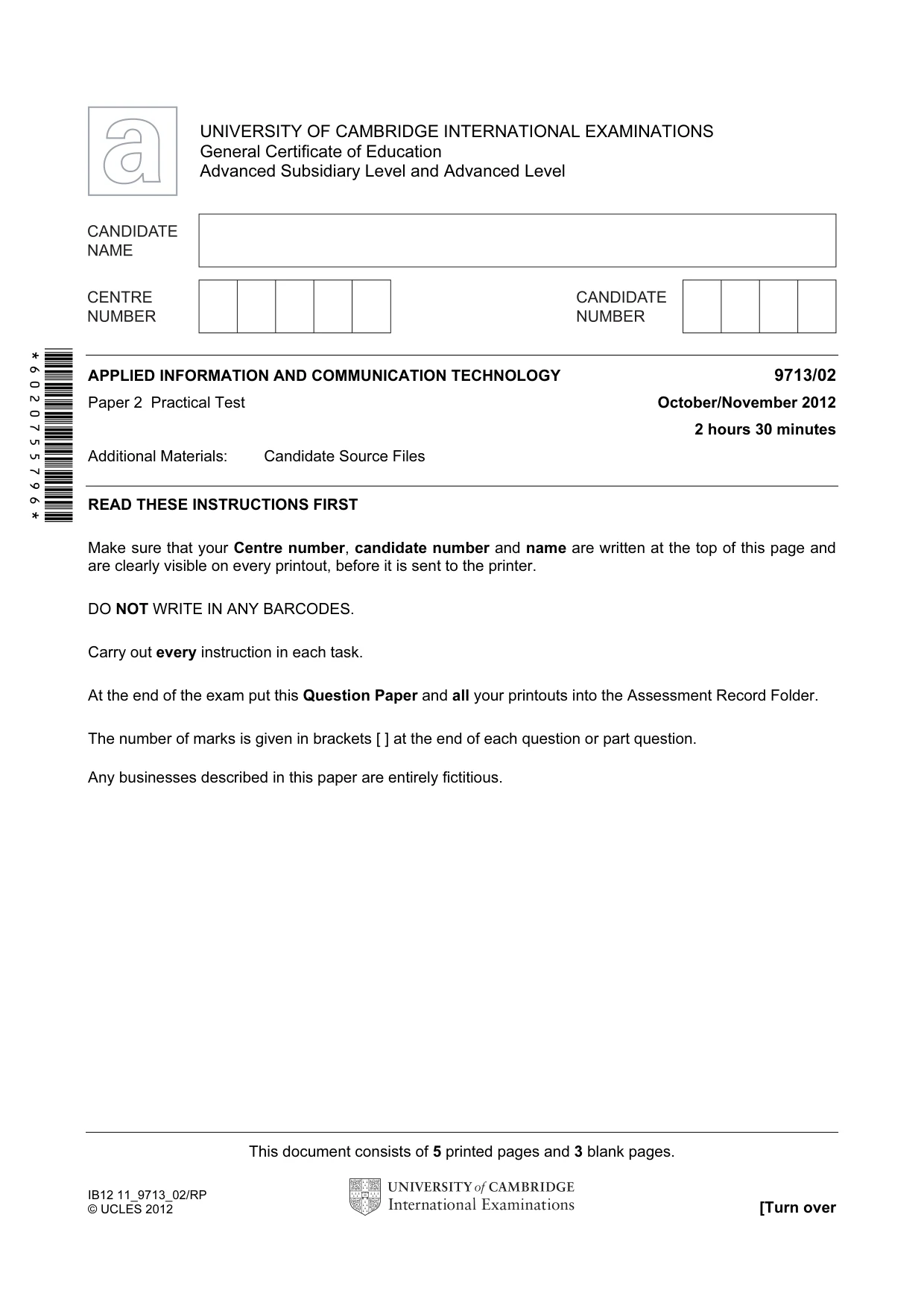
This document consists of 5 printed pages and 3 blank pages. IB12 11_9713_02/RP © UCLES 2012 [Turn over *6020755796* UNIVERSITY OF CAMBRIDGE INTERNATIONAL EXAMINATIONS General Certificate of Education Advanced Subsidiary Level and Advanced Level APPLIED INFORMATION AND COMMUNICATION TECHNOLOGY 9713/02 Paper 2 Practical Test October/November 2012 2 hours 30 minutes Additional Materials: Candidate Source Files READ THESE INSTRUCTIONS FIRST Make sure that your Centre number, candidate number and name are written at the top of this page and are clearly visible on every printout, before it is sent to the printer. DO NOT WRITE IN ANY BARCODES. Carry out every instruction in each task. At the end of the exam put this Question Paper and all your printouts into the Assessment Record Folder. The number of marks is given in brackets [ ] at the end of each question or part question. Any businesses described in this paper are entirely fictitious.
Question paper, page 2
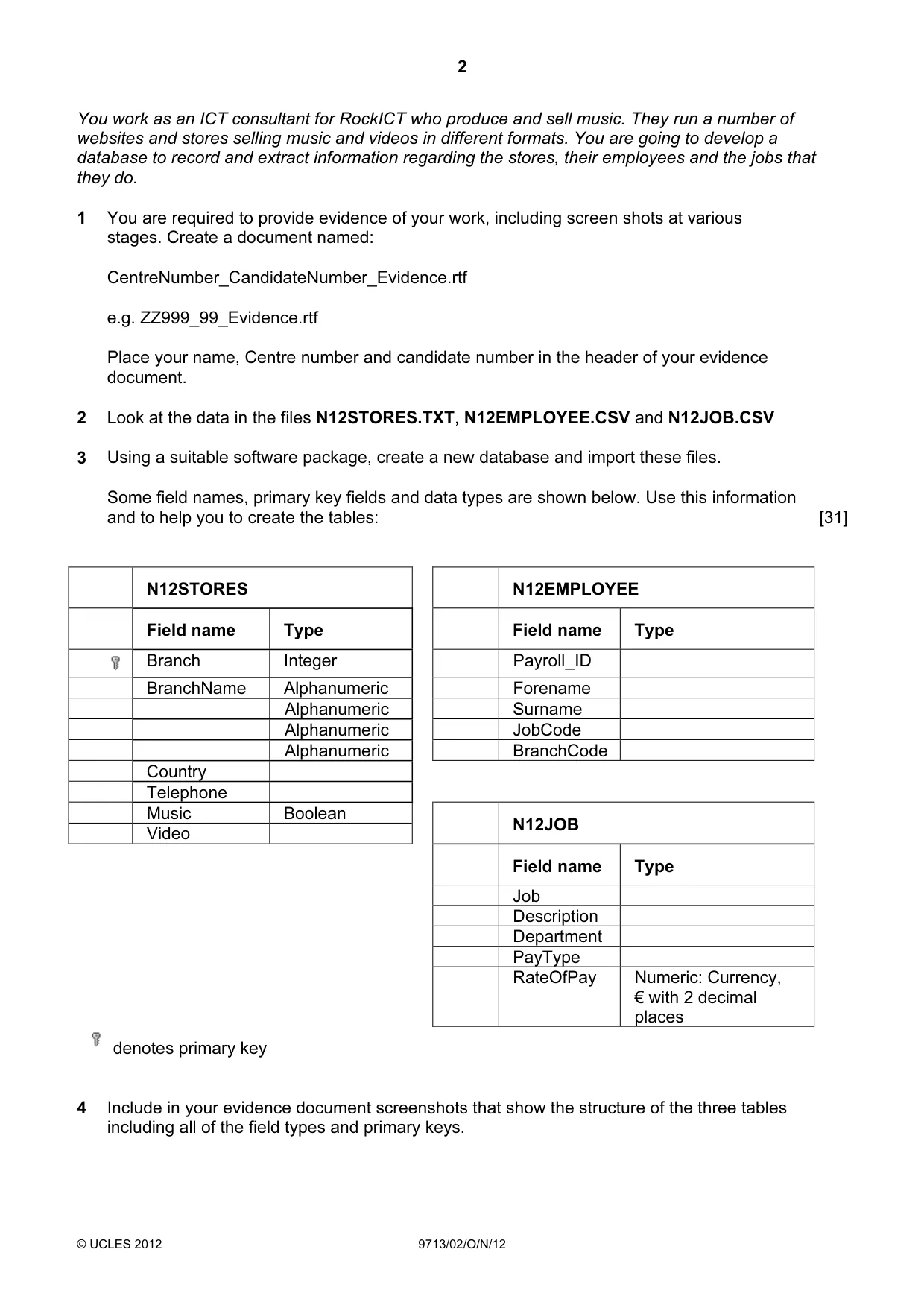
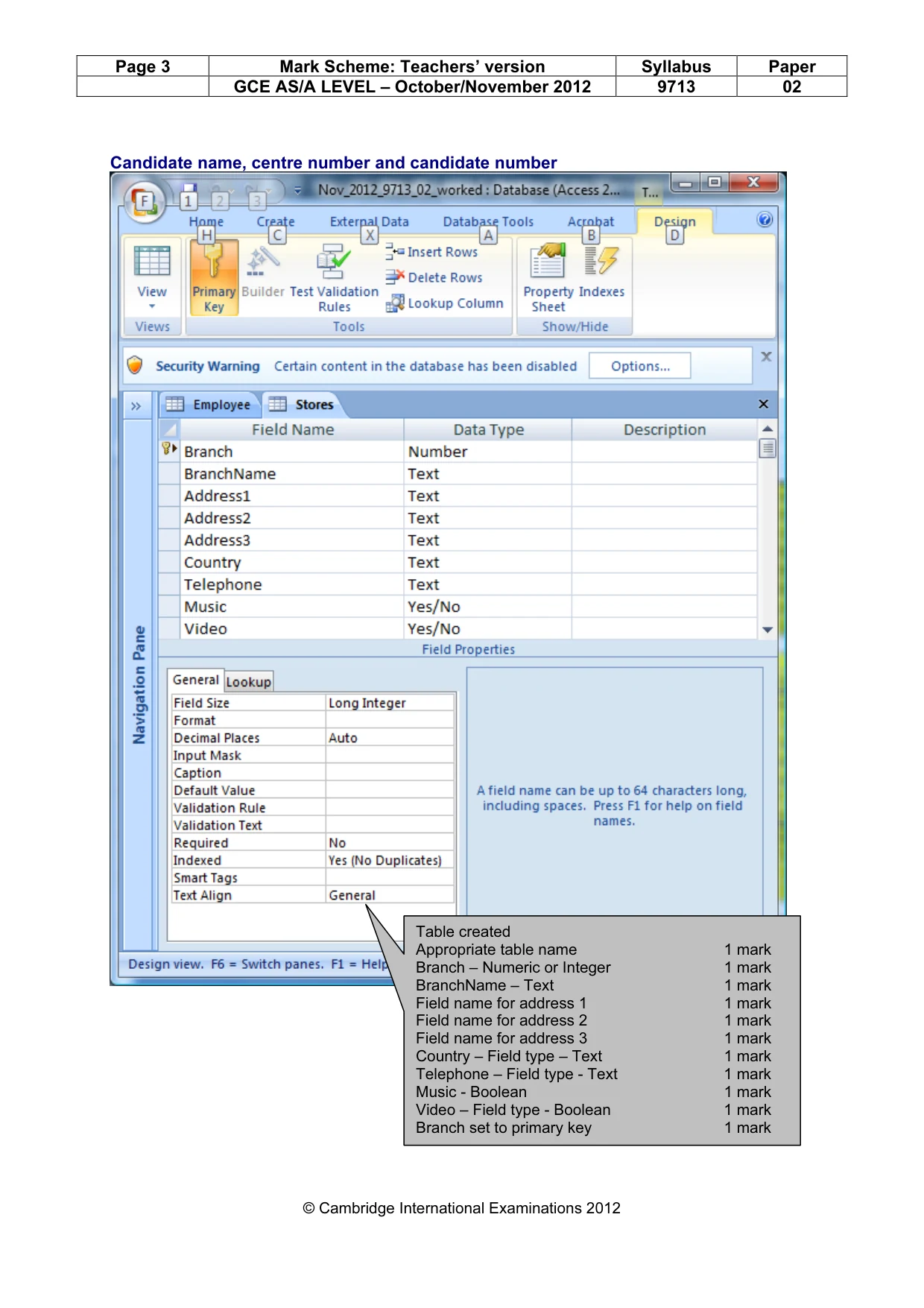
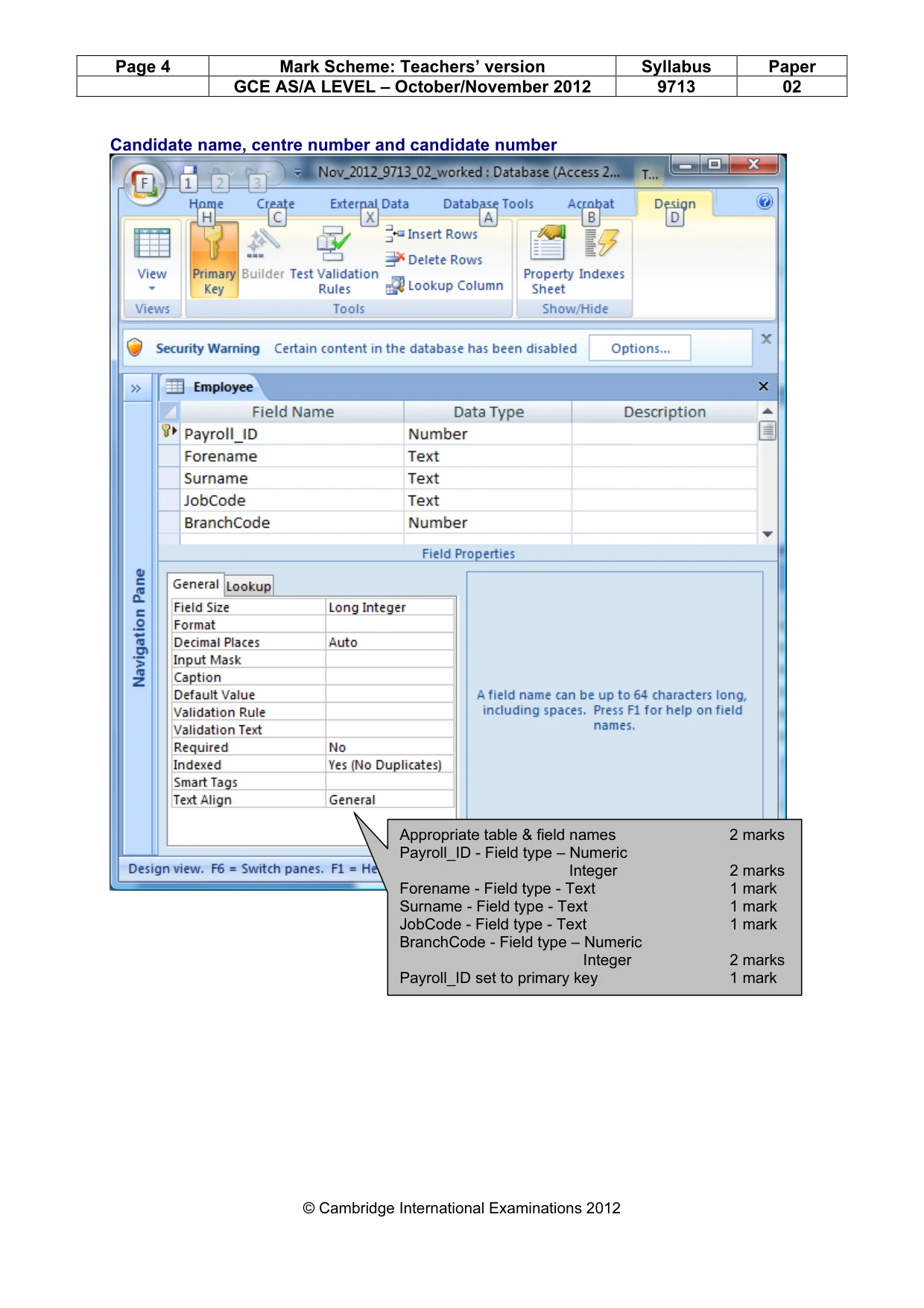
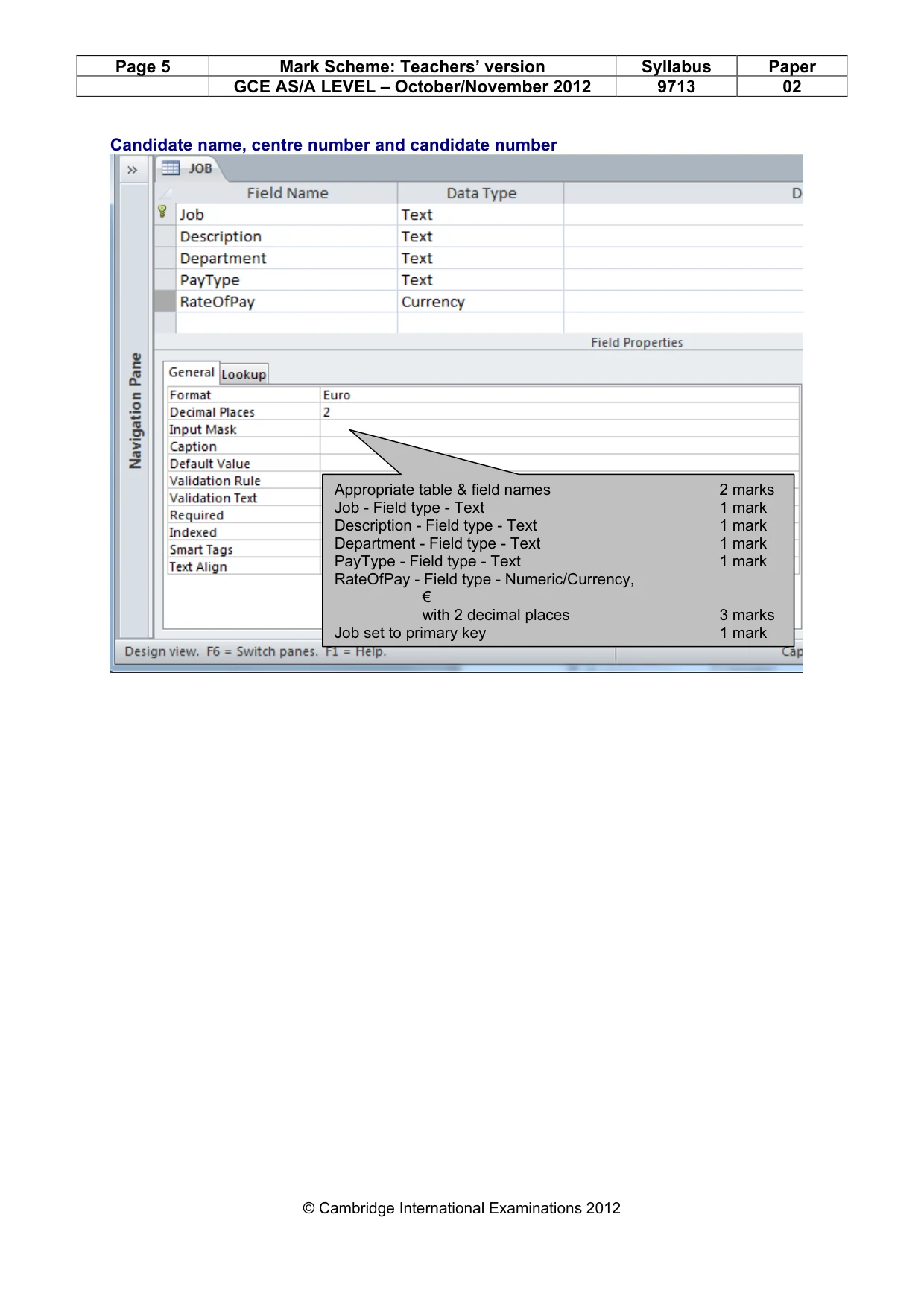
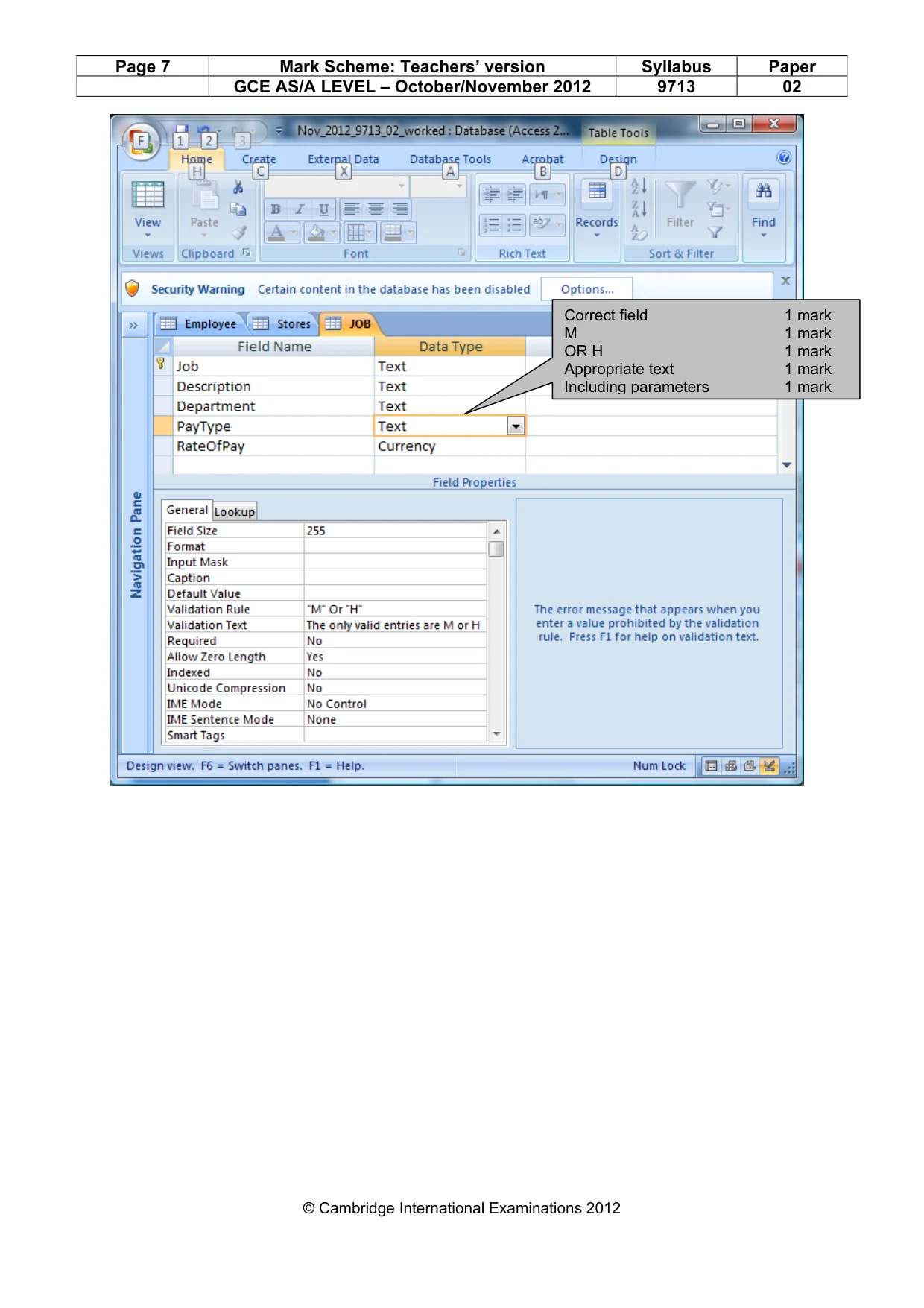
2 © UCLES 2012 9713/02/O/N/12 You work as an ICT consultant for RockICT who produce and sell music. They run a number of websites and stores selling music and videos in different formats. You are going to develop a database to record and extract information regarding the stores, their employees and the jobs that they do. 1 You are required to provide evidence of your work, including screen shots at various stages. Create a document named: CentreNumber_CandidateNumber_Evidence.rtf e.g. ZZ999_99_Evidence.rtf Place your name, Centre number and candidate number in the header of your evidence document. 2 Look at the data in the files N12STORES.TXT, N12EMPLOYEE.CSV and N12JOB.CSV 3 Using a suitable software package, create a new database and import these files. Some field names, primary key fields and data types are shown below. Use this information and to help you to create the tables: [31] N12STORES N12EMPLOYEE Field name Type Field name Type Branch Integer Payroll_ID BranchName Alphanumeric Forename Alphanumeric Surname Alphanumeric JobCode Alphanumeric BranchCode Country Telephone Music Boolean Video N12JOB Field name Type Job Description Department PayType RateOfPay Numeric: Currency, € with 2 decimal places denotes primary key 4 Include in your evidence document screenshots that show the structure of the three tables including all of the field types and primary keys.
Question paper, page 3
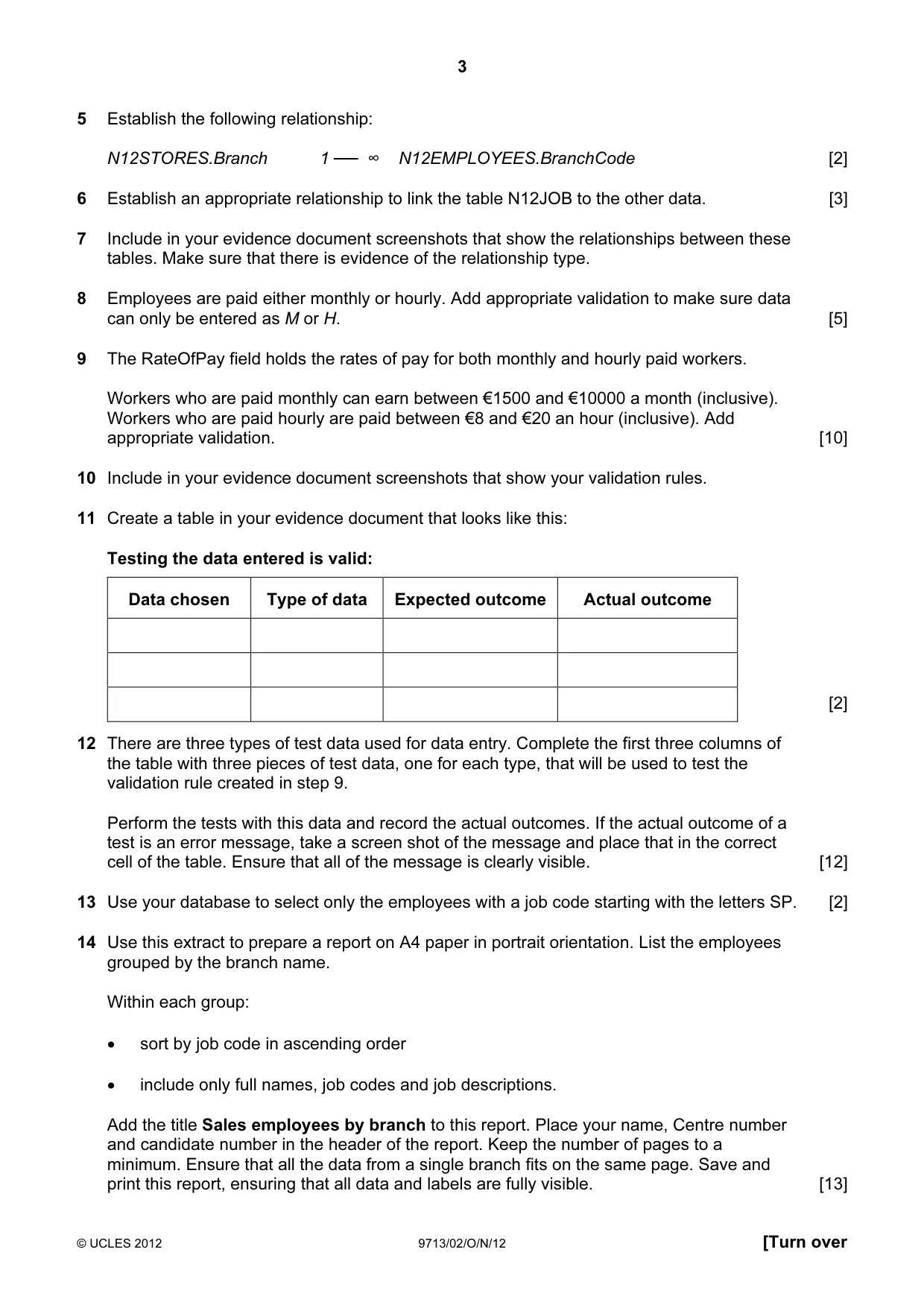
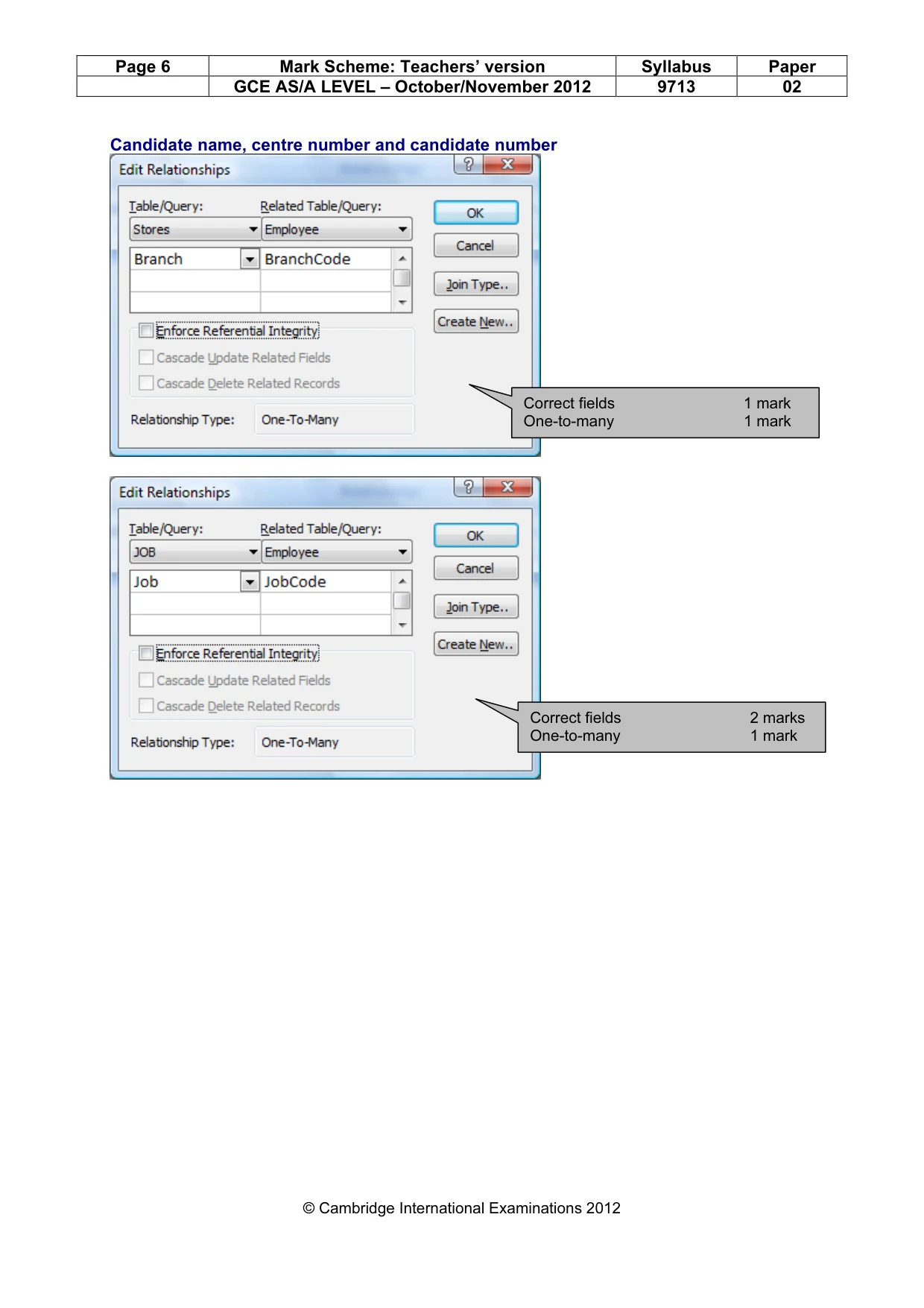
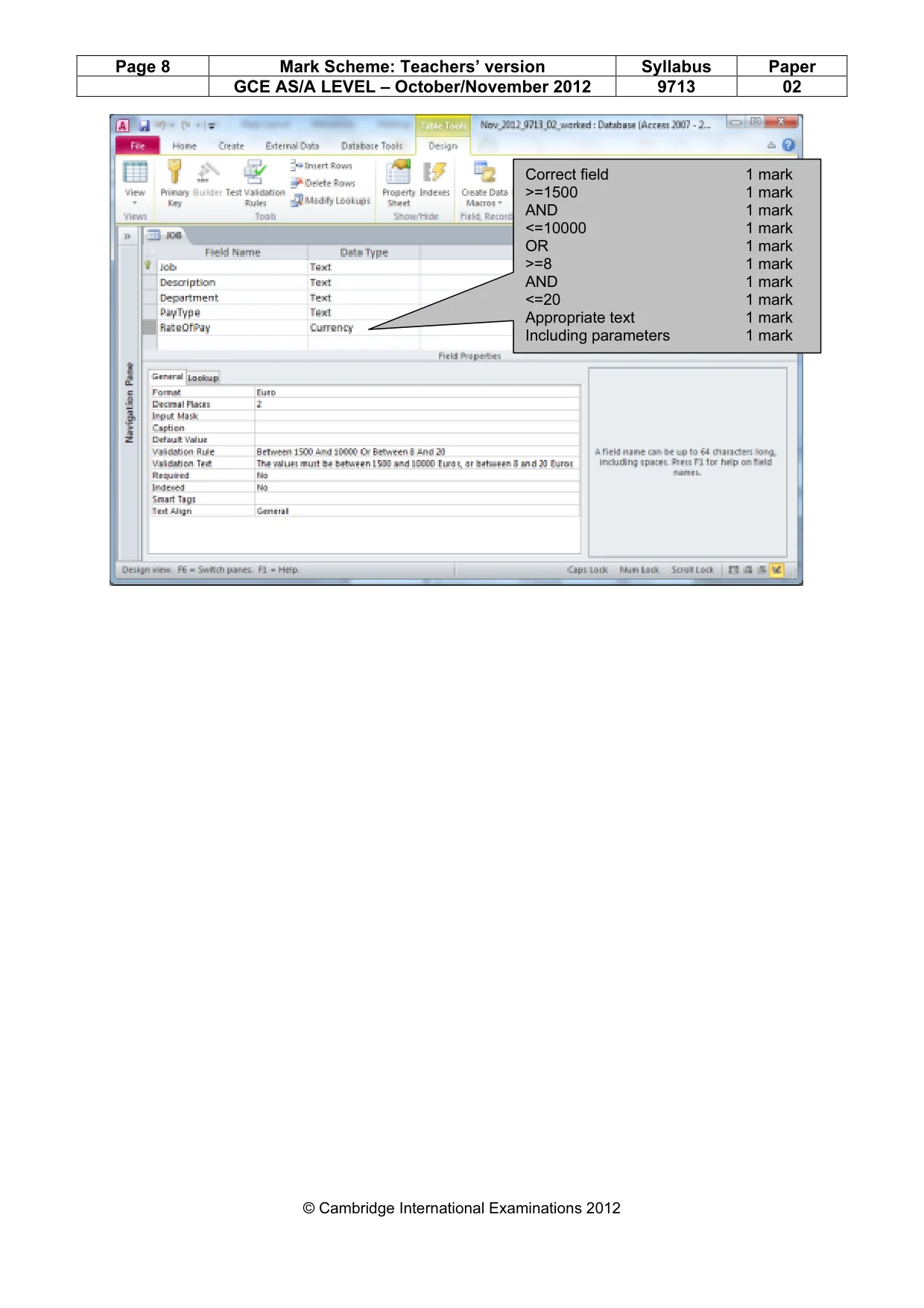
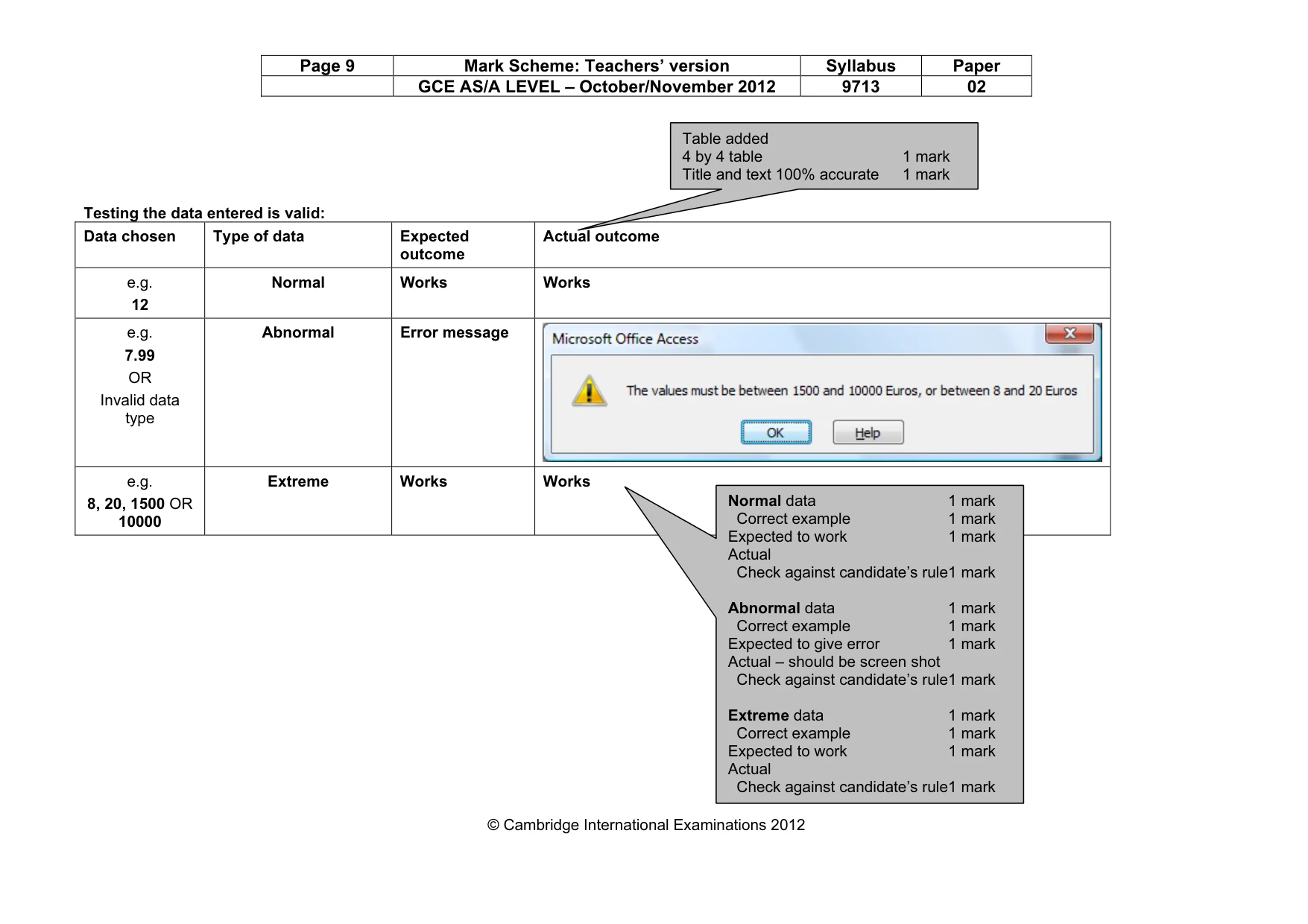
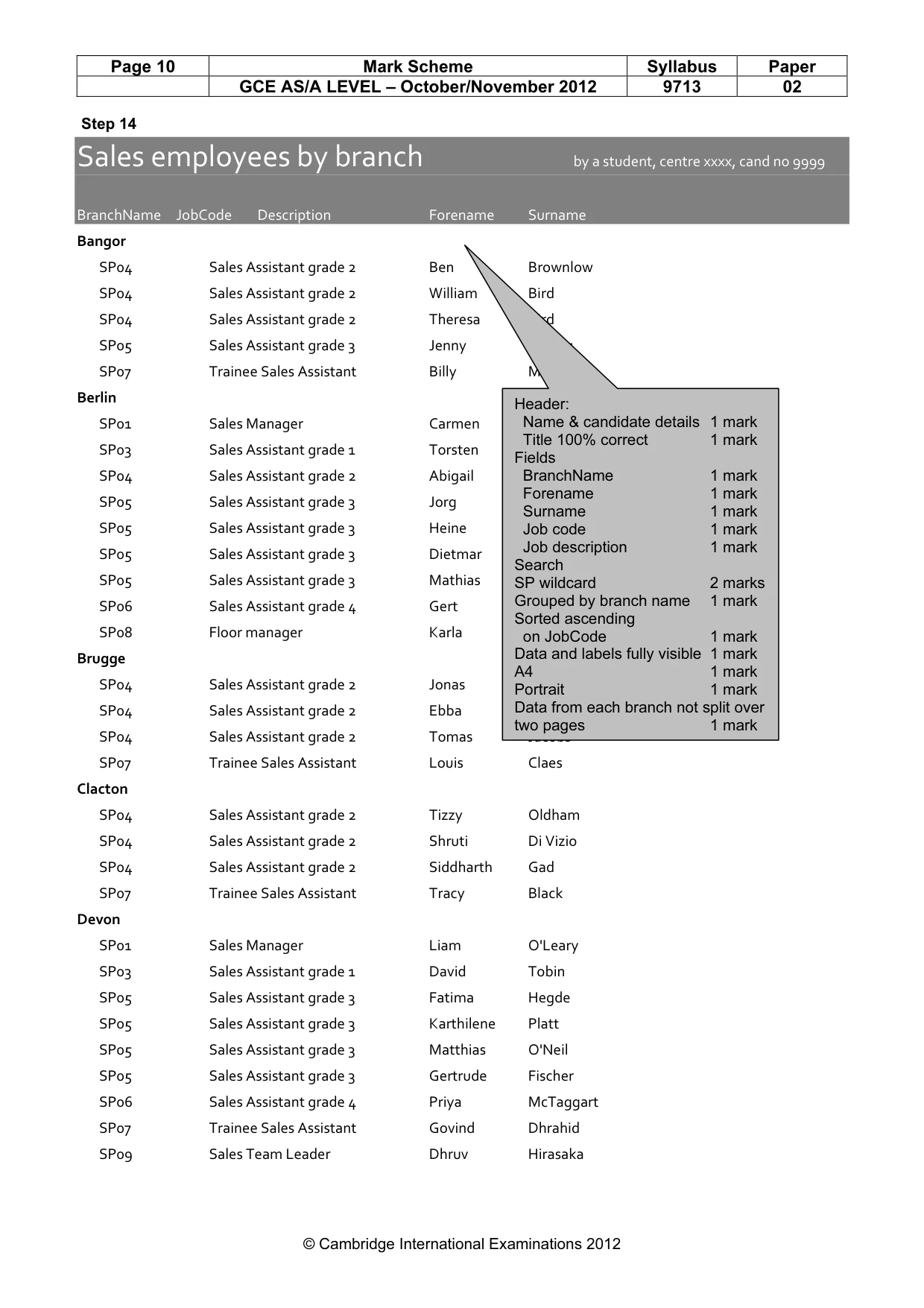
3 © UCLES 2012 9713/02/O/N/12 [Turn over 5 Establish the following relationship: N12STORES.Branch 1 ── ∞ N12EMPLOYEES.BranchCode [2] 6 Establish an appropriate relationship to link the table N12JOB to the other data. [3] 7 Include in your evidence document screenshots that show the relationships between these tables. Make sure that there is evidence of the relationship type. 8 Employees are paid either monthly or hourly. Add appropriate validation to make sure data can only be entered as M or H. [5] 9 The RateOfPay field holds the rates of pay for both monthly and hourly paid workers. Workers who are paid monthly can earn between €1500 and €10000 a month (inclusive). Workers who are paid hourly are paid between €8 and €20 an hour (inclusive). Add appropriate validation. [10] 10 Include in your evidence document screenshots that show your validation rules. 11 Create a table in your evidence document that looks like this: Testing the data entered is valid: Data chosen Type of data Expected outcome Actual outcome [2] 12 There are three types of test data used for data entry. Complete the first three columns of the table with three pieces of test data, one for each type, that will be used to test the validation rule created in step 9. Perform the tests with this data and record the actual outcomes. If the actual outcome of a test is an error message, take a screen shot of the message and place that in the correct cell of the table. Ensure that all of the message is clearly visible. [12] 13 Use your database to select only the employees with a job code starting with the letters SP. [2] 14 Use this extract to prepare a report on A4 paper in portrait orientation. List the employees grouped by the branch name. Within each group: • sort by job code in ascending order • include only full names, job codes and job descriptions. Add the title Sales employees by branch to this report. Place your name, Centre number and candidate number in the header of the report. Keep the number of pages to a minimum. Ensure that all the data from a single branch fits on the same page. Save and print this report, ensuring that all data and labels are fully visible. [13]
Question paper, page 4
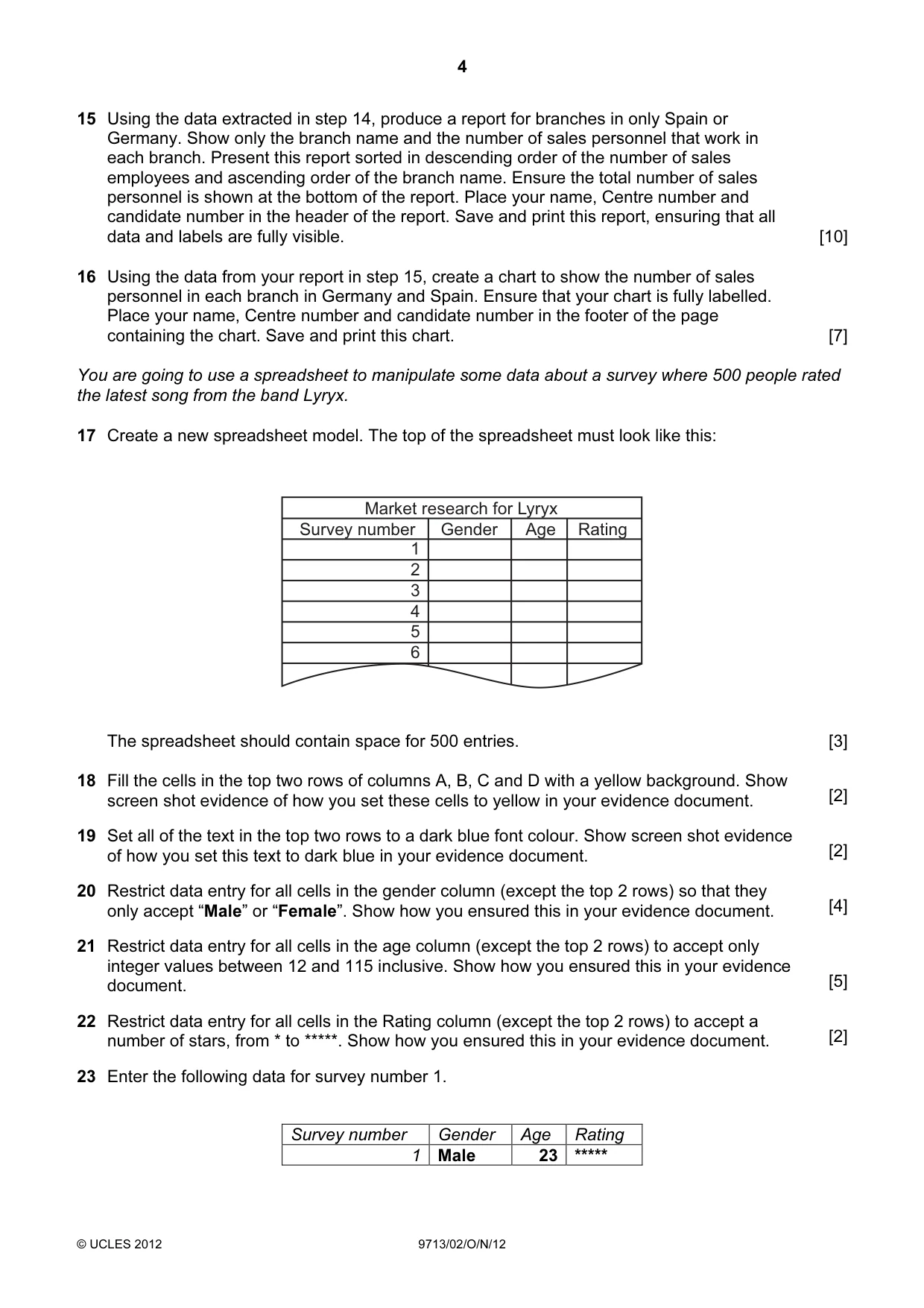
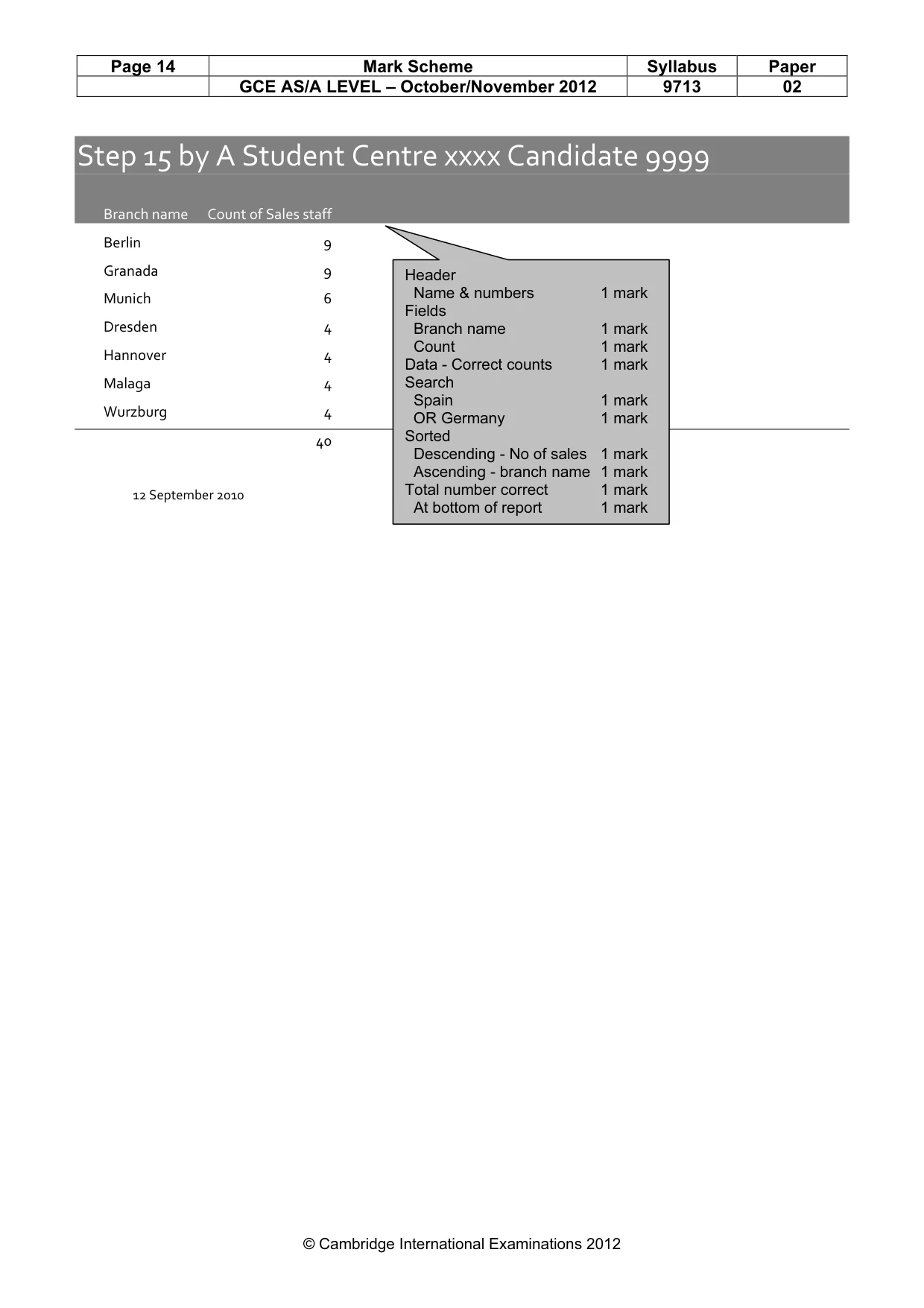
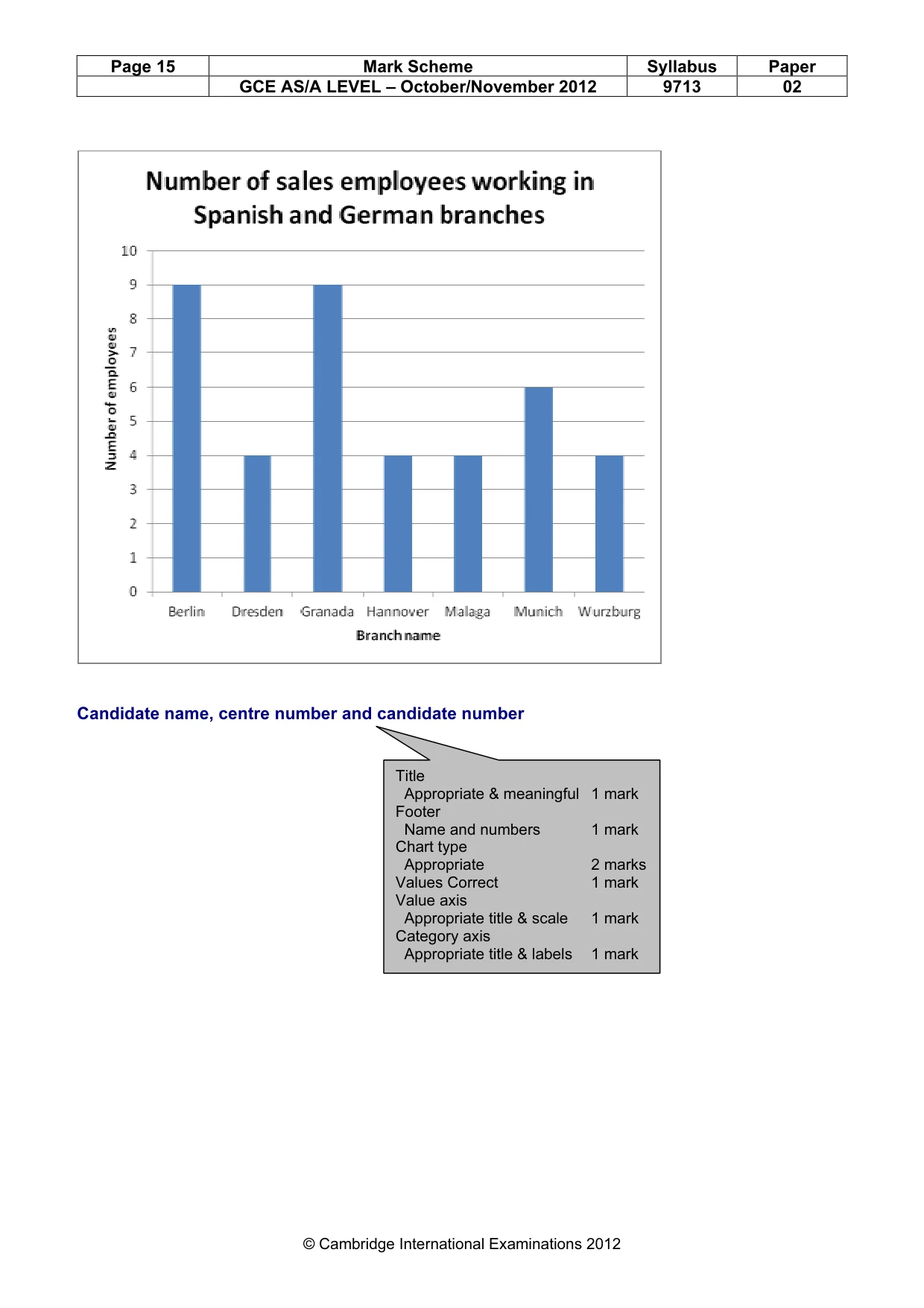
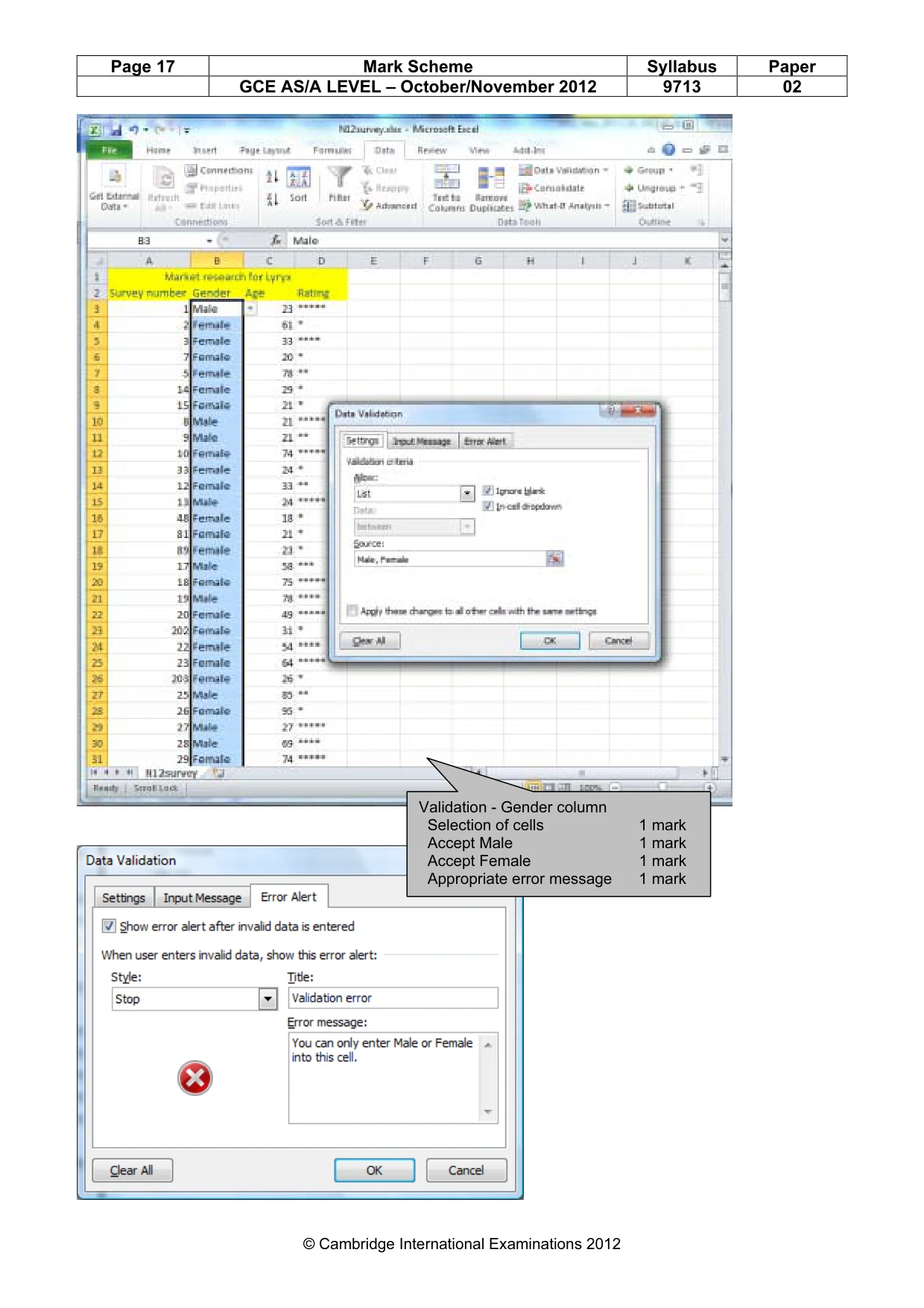
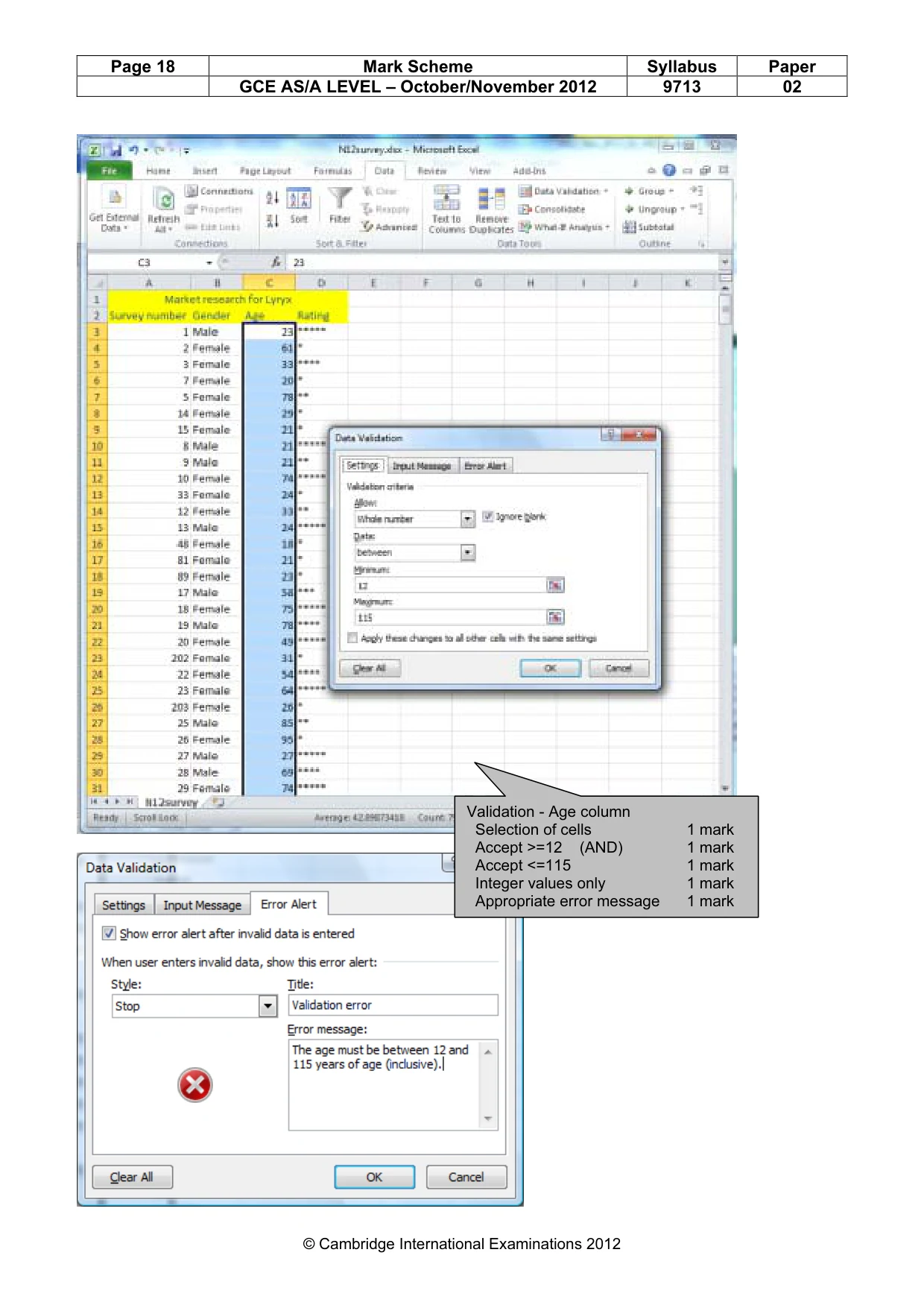
4 © UCLES 2012 9713/02/O/N/12 15 Using the data extracted in step 14, produce a report for branches in only Spain or Germany. Show only the branch name and the number of sales personnel that work in each branch. Present this report sorted in descending order of the number of sales employees and ascending order of the branch name. Ensure the total number of sales personnel is shown at the bottom of the report. Place your name, Centre number and candidate number in the header of the report. Save and print this report, ensuring that all data and labels are fully visible. [10] 16 Using the data from your report in step 15, create a chart to show the number of sales personnel in each branch in Germany and Spain. Ensure that your chart is fully labelled. Place your name, Centre number and candidate number in the footer of the page containing the chart. Save and print this chart. [7] You are going to use a spreadsheet to manipulate some data about a survey where 500 people rated the latest song from the band Lyryx. 17 Create a new spreadsheet model. The top of the spreadsheet must look like this: Market research for Lyryx Survey number Gender Age Rating 1 2 3 4 5 6 The spreadsheet should contain space for 500 entries. [3] 18 Fill the cells in the top two rows of columns A, B, C and D with a yellow background. Show screen shot evidence of how you set these cells to yellow in your evidence document. [2] 19 Set all of the text in the top two rows to a dark blue font colour. Show screen shot evidence of how you set this text to dark blue in your evidence document. [2] 20 Restrict data entry for all cells in the gender column (except the top 2 rows) so that they only accept “Male” or “Female”. Show how you ensured this in your evidence document. [4] 21 Restrict data entry for all cells in the age column (except the top 2 rows) to accept only integer values between 12 and 115 inclusive. Show how you ensured this in your evidence document. [5] 22 Restrict data entry for all cells in the Rating column (except the top 2 rows) to accept a number of stars, from * to *****. Show how you ensured this in your evidence document. [2] 23 Enter the following data for survey number 1. Survey number Gender Age Rating 1 Male 23 *****
Question paper, page 5
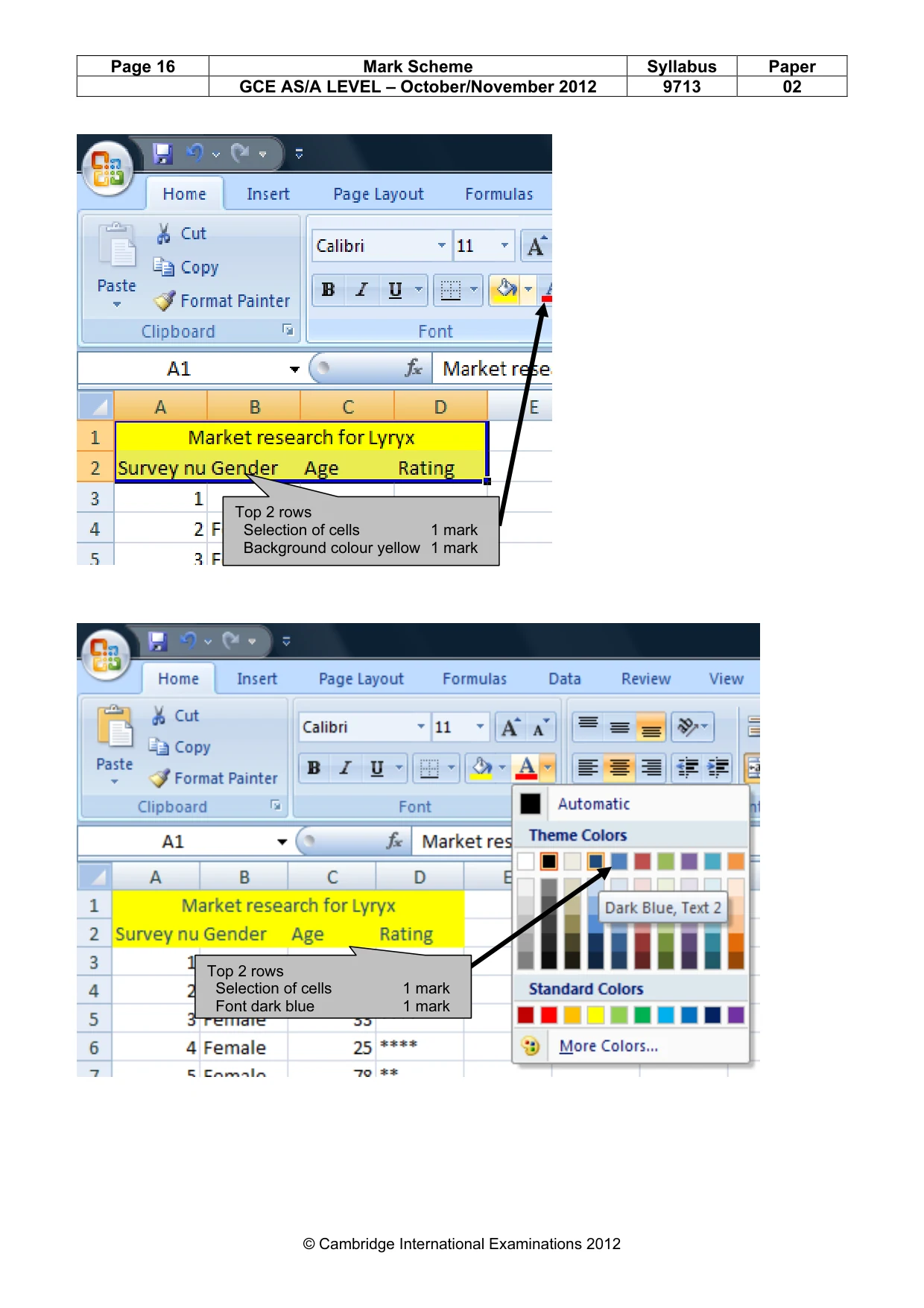
5 © UCLES 2012 9713/02/O/N/12 24 Insert the other survey results from N12SURVEY.CSV into the spreadsheet. [1] 25 Place your name, Centre number and candidate number in the header. [1] 26 Save the spreadsheet. Print only the first and last pages. 27 Find the most common rating given by females between the ages of 18 and 31 (inclusive). Record the answer to this question and show how you obtained this answer in your evidence document. [3] 28 Save and print your evidence document. Write today’s date in the box below. Date
Question paper, page 6
6 © UCLES 2012 9713/02/O/N/12 BLANK PAGE
Question paper, page 7
7 © UCLES 2012 9713/02/O/N/12 BLANK PAGE
Question paper, page 8
8 Permission to reproduce items where third-party owned material protected by copyright is included has been sought and cleared where possible. Every reasonable effort has been made by the publisher (UCLES) to trace copyright holders, but if any items requiring clearance have unwittingly been included, the publisher will be pleased to make amends at the earliest possible opportunity. University of Cambridge International Examinations is part of the Cambridge Assessment Group. Cambridge Assessment is the brand name of University of Cambridge Local Examinations Syndicate (UCLES), which is itself a department of the University of Cambridge. © UCLES 2012 9713/02/O/N/12 BLANK PAGE
Mark scheme, page 1
CAMBRIDGE INTERNATIONAL EXAMINATIONS GCE Advanced Subsidiary Level and GCE Advanced Level MARK SCHEME for the October/November 2012 series 9713 Applied ICT 9713/02 Paper 2 (Practical Test A), maximum raw mark 120 This mark scheme is published as an aid to teachers and candidates, to indicate the requirements of the examination. It shows the basis on which Examiners were instructed to award marks. It does not indicate the details of the discussions that took place at an Examiners’ meeting before marking began, which would have considered the acceptability of alternative answers. Mark schemes should be read in conjunction with the question paper and the Principal Examiner Report for Teachers. Cambridge will not enter into discussions about these mark schemes. Cambridge is publishing the mark schemes for the October/November 2012 series for most IGCSE, GCE Advanced Level and Advanced Subsidiary Level components and some Ordinary Level components.
Mark scheme, page 2
Page 2 Mark Scheme: Teachers’ version Syllabus Paper GCE AS/A LEVEL – October/November 2012 9713 02 © Cambridge International Examinations 2012 9713 – November 2012 AS Level – Paper 2 – Practical Test No marks to be awarded for any printout not containing the candidate name, candidate number and centre number
Mark scheme, page 3
Page 3 Mark Scheme: Teachers’ version Syllabus Paper GCE AS/A LEVEL – October/November 2012 9713 02 © Cambridge International Examinations 2012 Candidate name, centre number and candidate number Table created Appropriate table name 1 mark Branch – Numeric or Integer 1 mark BranchName – Text 1 mark Field name for address 1 1 mark Field name for address 2 1 mark Field name for address 3 1 mark Country – Field type – Text 1 mark Telephone – Field type - Text 1 mark Music - Boolean 1 mark Video – Field type - Boolean 1 mark Branch set to primary key 1 mark
Mark scheme, page 4
Page 4 Mark Scheme: Teachers’ version Syllabus Paper GCE AS/A LEVEL – October/November 2012 9713 02 © Cambridge International Examinations 2012 Candidate name, centre number and candidate number Appropriate table & field names 2 marks Payroll_ID - Field type – Numeric Integer 2 marks Forename - Field type - Text 1 mark Surname - Field type - Text 1 mark JobCode - Field type - Text 1 mark BranchCode - Field type – Numeric Integer 2 marks Payroll_ID set to primary key 1 mark
Mark scheme, page 5
Page 5 Mark Scheme: Teachers’ version Syllabus Paper GCE AS/A LEVEL – October/November 2012 9713 02 © Cambridge International Examinations 2012 Candidate name, centre number and candidate number Appropriate table & field names 2 marks Job - Field type - Text 1 mark Description - Field type - Text 1 mark Department - Field type - Text 1 mark PayType - Field type - Text 1 mark RateOfPay - Field type - Numeric/Currency, € with 2 decimal places 3 marks Job set to primary key 1 mark
Mark scheme, page 6
Page 6 Mark Scheme: Teachers’ version Syllabus Paper GCE AS/A LEVEL – October/November 2012 9713 02 © Cambridge International Examinations 2012 Candidate name, centre number and candidate number Correct fields 1 mark One-to-many 1 mark Correct fields 2 marks One-to-many 1 mark
Mark scheme, page 7
Page 7 Mark Scheme: Teachers’ version Syllabus Paper GCE AS/A LEVEL – October/November 2012 9713 02 © Cambridge International Examinations 2012 Correct field 1 mark M 1 mark OR H 1 mark Appropriate text 1 mark Including parameters 1 mark
Mark scheme, page 8
Page 8 Mark Scheme: Teachers’ version Syllabus Paper GCE AS/A LEVEL – October/November 2012 9713 02 © Cambridge International Examinations 2012 Correct field 1 mark >=1500 1 mark AND 1 mark <=10000 1 mark OR 1 mark >=8 1 mark AND 1 mark <=20 1 mark Appropriate text 1 mark Including parameters 1 mark
Mark scheme, page 9
Page 9 Mark Scheme: Teachers’ version Syllabus Paper GCE AS/A LEVEL – October/November 2012 9713 02 © Cambridge International Examinations 2012 Testing the data entered is valid: Data chosen Type of data Expected outcome Actual outcome e.g. 12 Normal Works Works e.g. 7.99 OR Invalid data type Abnormal Error message e.g. 8, 20, 1500 OR 10000 Extreme Works Works Table added 4 by 4 table 1 mark Title and text 100% accurate 1 mark Normal data 1 mark Correct example 1 mark Expected to work 1 mark Actual Check against candidate’s rule 1 mark Abnormal data 1 mark Correct example 1 mark Expected to give error 1 mark Actual – should be screen shot Check against candidate’s rule 1 mark Extreme data 1 mark Correct example 1 mark Expected to work 1 mark Actual Check against candidate’s rule 1 mark
Mark scheme, page 10
Page 10 Mark Scheme Syllabus Paper GCE AS/A LEVEL – October/November 2012 9713 02 © Cambridge International Examinations 2012 Step 14 Sales employees by branch by a student, centre xxxx, cand no 9999 BranchName JobCode Description Forename Surname Bangor SP04 Sales Assistant grade 2 Ben Brownlow SP04 Sales Assistant grade 2 William Bird SP04 Sales Assistant grade 2 Theresa Bird SP05 Sales Assistant grade 3 Jenny Kwong SP07 Trainee Sales Assistant Billy Mc Arthur Berlin SP01 Sales Manager Carmen Schulze SP03 Sales Assistant grade 1 Torsten Schulze SP04 Sales Assistant grade 2 Abigail Richter SP05 Sales Assistant grade 3 Jorg Maier SP05 Sales Assistant grade 3 Heine Weissmuller SP05 Sales Assistant grade 3 Dietmar Strauss SP05 Sales Assistant grade 3 Mathias Adler SP06 Sales Assistant grade 4 Gert Vogel SP08 Floor manager Karla Maier Brugge SP04 Sales Assistant grade 2 Jonas Verdonk SP04 Sales Assistant grade 2 Ebba Peeters SP04 Sales Assistant grade 2 Tomas Jacobs SP07 Trainee Sales Assistant Louis Claes Clacton SP04 Sales Assistant grade 2 Tizzy Oldham SP04 Sales Assistant grade 2 Shruti Di Vizio SP04 Sales Assistant grade 2 Siddharth Gad SP07 Trainee Sales Assistant Tracy Black Devon SP01 Sales Manager Liam O'Leary SP03 Sales Assistant grade 1 David Tobin SP05 Sales Assistant grade 3 Fatima Hegde SP05 Sales Assistant grade 3 Karthilene Platt SP05 Sales Assistant grade 3 Matthias O'Neil SP05 Sales Assistant grade 3 Gertrude Fischer SP06 Sales Assistant grade 4 Priya McTaggart SP07 Trainee Sales Assistant Govind Dhrahid SP09 Sales Team Leader Dhruv Hirasaka Header: Name & candidate details 1 mark Title 100% correct 1 mark Fields BranchName 1 mark Forename 1 mark Surname 1 mark Job code 1 mark Job description 1 mark Search SP wildcard 2 marks Grouped by branch name 1 mark Sorted ascending on JobCode 1 mark Data and labels fully visible 1 mark A4 1 mark Portrait 1 mark Data from each branch not split over two pages 1 mark
Mark scheme, page 11
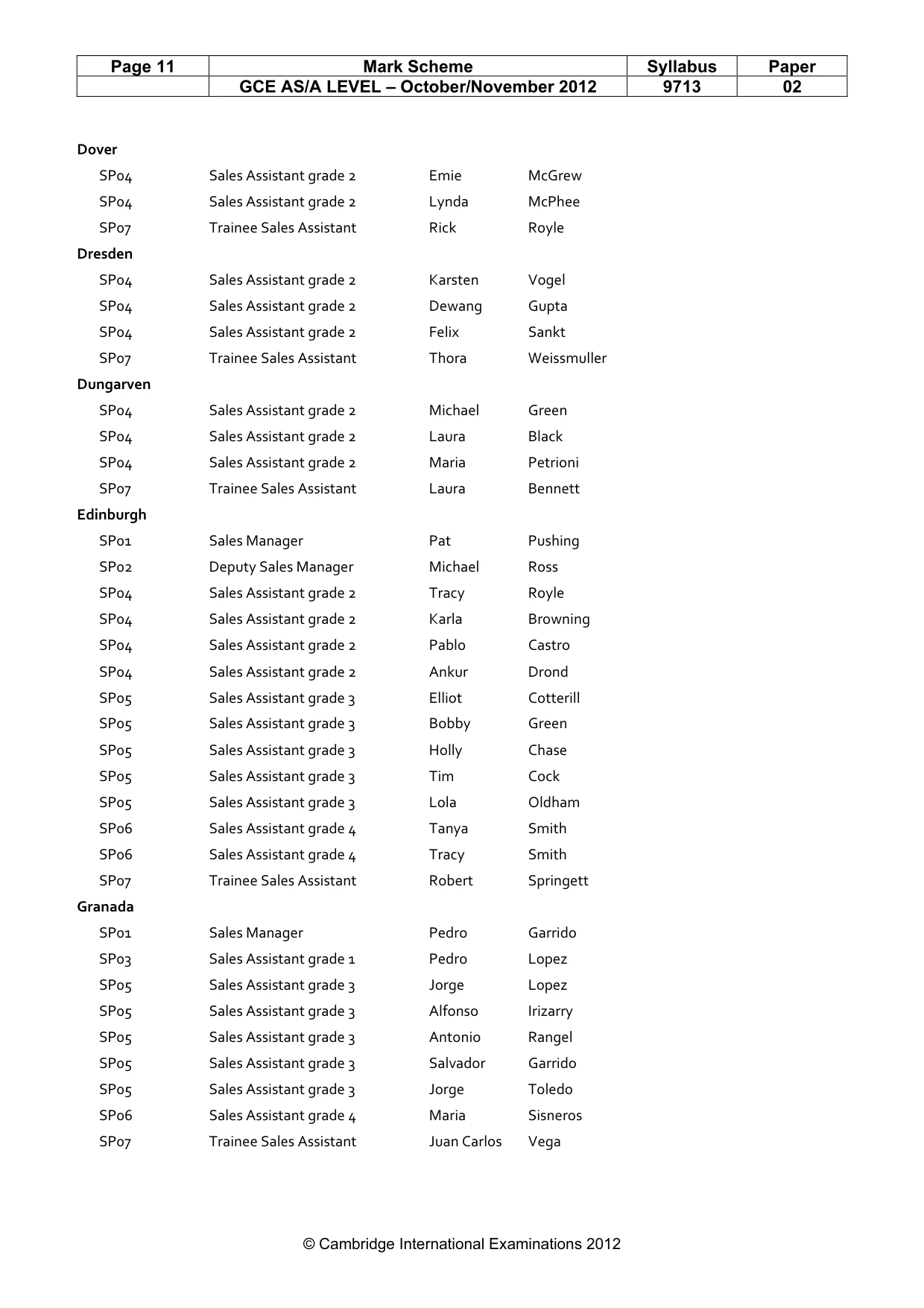
Page 11 Mark Scheme Syllabus Paper GCE AS/A LEVEL – October/November 2012 9713 02 © Cambridge International Examinations 2012 Dover SP04 Sales Assistant grade 2 Emie McGrew SP04 Sales Assistant grade 2 Lynda McPhee SP07 Trainee Sales Assistant Rick Royle Dresden SP04 Sales Assistant grade 2 Karsten Vogel SP04 Sales Assistant grade 2 Dewang Gupta SP04 Sales Assistant grade 2 Felix Sankt SP07 Trainee Sales Assistant Thora Weissmuller Dungarven SP04 Sales Assistant grade 2 Michael Green SP04 Sales Assistant grade 2 Laura Black SP04 Sales Assistant grade 2 Maria Petrioni SP07 Trainee Sales Assistant Laura Bennett Edinburgh SP01 Sales Manager Pat Pushing SP02 Deputy Sales Manager Michael Ross SP04 Sales Assistant grade 2 Tracy Royle SP04 Sales Assistant grade 2 Karla Browning SP04 Sales Assistant grade 2 Pablo Castro SP04 Sales Assistant grade 2 Ankur Drond SP05 Sales Assistant grade 3 Elliot Cotterill SP05 Sales Assistant grade 3 Bobby Green SP05 Sales Assistant grade 3 Holly Chase SP05 Sales Assistant grade 3 Tim Cock SP05 Sales Assistant grade 3 Lola Oldham SP06 Sales Assistant grade 4 Tanya Smith SP06 Sales Assistant grade 4 Tracy Smith SP07 Trainee Sales Assistant Robert Springett Granada SP01 Sales Manager Pedro Garrido SP03 Sales Assistant grade 1 Pedro Lopez SP05 Sales Assistant grade 3 Jorge Lopez SP05 Sales Assistant grade 3 Alfonso Irizarry SP05 Sales Assistant grade 3 Antonio Rangel SP05 Sales Assistant grade 3 Salvador Garrido SP05 Sales Assistant grade 3 Jorge Toledo SP06 Sales Assistant grade 4 Maria Sisneros SP07 Trainee Sales Assistant Juan Carlos Vega
Mark scheme, page 12
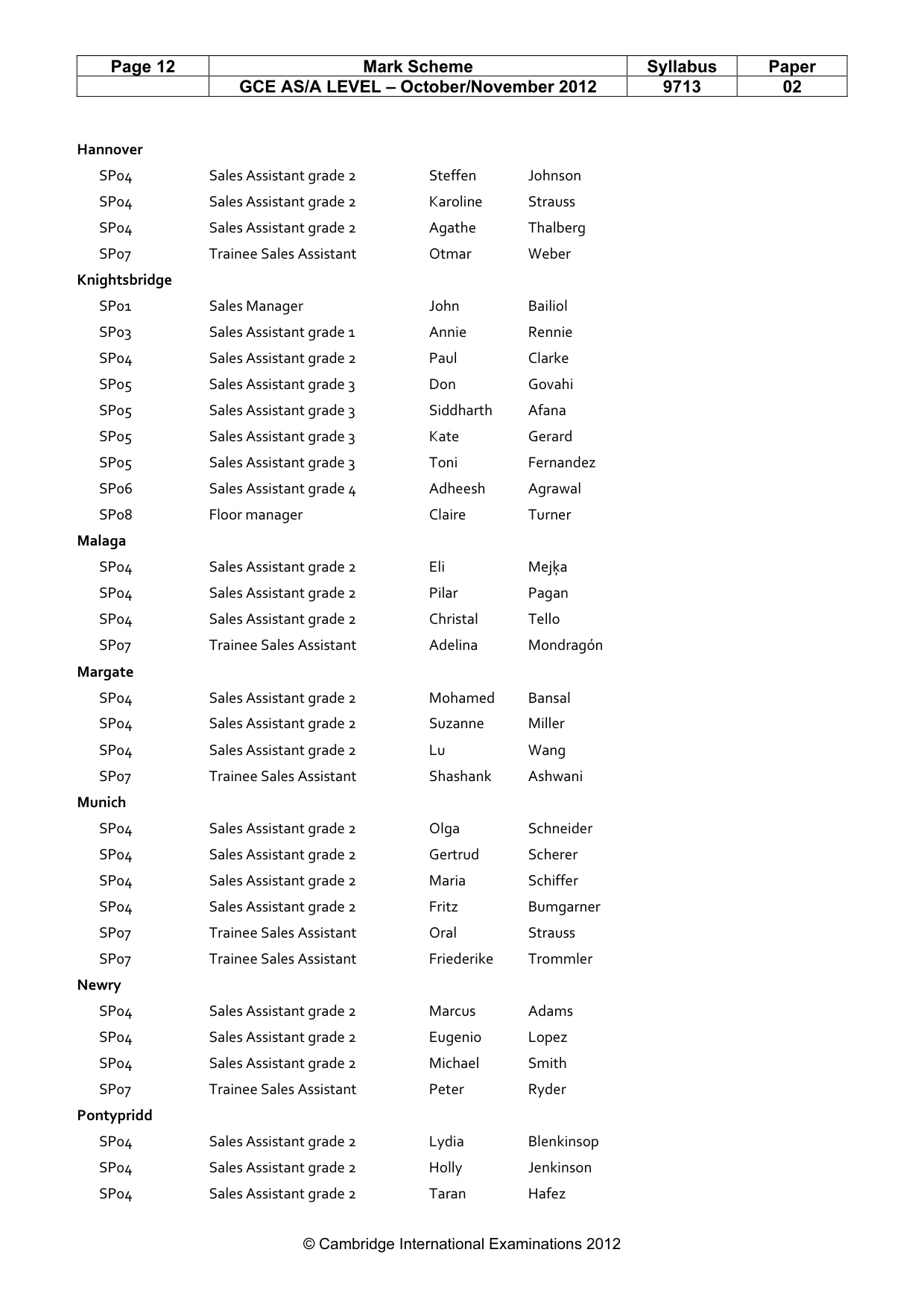
Page 12 Mark Scheme Syllabus Paper GCE AS/A LEVEL – October/November 2012 9713 02 © Cambridge International Examinations 2012 Hannover SP04 Sales Assistant grade 2 Steffen Johnson SP04 Sales Assistant grade 2 Karoline Strauss SP04 Sales Assistant grade 2 Agathe Thalberg SP07 Trainee Sales Assistant Otmar Weber Knightsbridge SP01 Sales Manager John Bailiol SP03 Sales Assistant grade 1 Annie Rennie SP04 Sales Assistant grade 2 Paul Clarke SP05 Sales Assistant grade 3 Don Govahi SP05 Sales Assistant grade 3 Siddharth Afana SP05 Sales Assistant grade 3 Kate Gerard SP05 Sales Assistant grade 3 Toni Fernandez SP06 Sales Assistant grade 4 Adheesh Agrawal SP08 Floor manager Claire Turner Malaga SP04 Sales Assistant grade 2 Eli Mejķa SP04 Sales Assistant grade 2 Pilar Pagan SP04 Sales Assistant grade 2 Christal Tello SP07 Trainee Sales Assistant Adelina Mondragón Margate SP04 Sales Assistant grade 2 Mohamed Bansal SP04 Sales Assistant grade 2 Suzanne Miller SP04 Sales Assistant grade 2 Lu Wang SP07 Trainee Sales Assistant Shashank Ashwani Munich SP04 Sales Assistant grade 2 Olga Schneider SP04 Sales Assistant grade 2 Gertrud Scherer SP04 Sales Assistant grade 2 Maria Schiffer SP04 Sales Assistant grade 2 Fritz Bumgarner SP07 Trainee Sales Assistant Oral Strauss SP07 Trainee Sales Assistant Friederike Trommler Newry SP04 Sales Assistant grade 2 Marcus Adams SP04 Sales Assistant grade 2 Eugenio Lopez SP04 Sales Assistant grade 2 Michael Smith SP07 Trainee Sales Assistant Peter Ryder Pontypridd SP04 Sales Assistant grade 2 Lydia Blenkinsop SP04 Sales Assistant grade 2 Holly Jenkinson SP04 Sales Assistant grade 2 Taran Hafez
Mark scheme, page 13
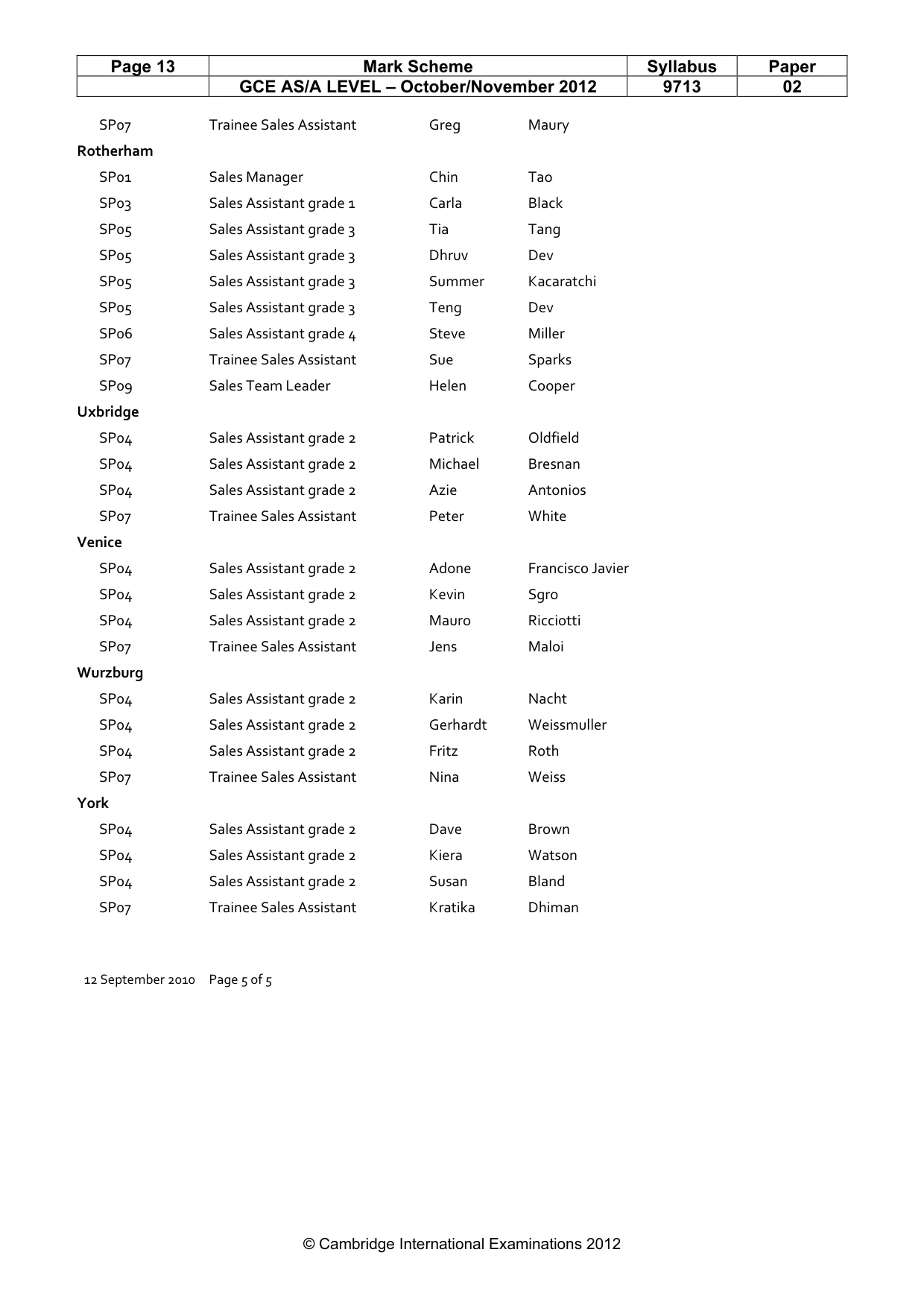
Page 13 Mark Scheme Syllabus Paper GCE AS/A LEVEL – October/November 2012 9713 02 © Cambridge International Examinations 2012 SP07 Trainee Sales Assistant Greg Maury Rotherham SP01 Sales Manager Chin Tao SP03 Sales Assistant grade 1 Carla Black SP05 Sales Assistant grade 3 Tia Tang SP05 Sales Assistant grade 3 Dhruv Dev SP05 Sales Assistant grade 3 Summer Kacaratchi SP05 Sales Assistant grade 3 Teng Dev SP06 Sales Assistant grade 4 Steve Miller SP07 Trainee Sales Assistant Sue Sparks SP09 Sales Team Leader Helen Cooper Uxbridge SP04 Sales Assistant grade 2 Patrick Oldfield SP04 Sales Assistant grade 2 Michael Bresnan SP04 Sales Assistant grade 2 Azie Antonios SP07 Trainee Sales Assistant Peter White Venice SP04 Sales Assistant grade 2 Adone Francisco Javier SP04 Sales Assistant grade 2 Kevin Sgro SP04 Sales Assistant grade 2 Mauro Ricciotti SP07 Trainee Sales Assistant Jens Maloi Wurzburg SP04 Sales Assistant grade 2 Karin Nacht SP04 Sales Assistant grade 2 Gerhardt Weissmuller SP04 Sales Assistant grade 2 Fritz Roth SP07 Trainee Sales Assistant Nina Weiss York SP04 Sales Assistant grade 2 Dave Brown SP04 Sales Assistant grade 2 Kiera Watson SP04 Sales Assistant grade 2 Susan Bland SP07 Trainee Sales Assistant Kratika Dhiman 12 September 2010 Page 5 of 5
Mark scheme, page 14
Page 14 Mark Scheme Syllabus Paper GCE AS/A LEVEL – October/November 2012 9713 02 © Cambridge International Examinations 2012 Step 15 by A Student Centre xxxx Candidate 9999 Branch name Count of Sales staff Berlin 9 Granada 9 Munich 6 Dresden 4 Hannover 4 Malaga 4 Wurzburg 4 40 12 September 2010 Header Name & numbers 1 mark Fields Branch name 1 mark Count 1 mark Data - Correct counts 1 mark Search Spain 1 mark OR Germany 1 mark Sorted Descending - No of sales 1 mark Ascending - branch name 1 mark Total number correct 1 mark At bottom of report 1 mark
Mark scheme, page 15
Page 15 Mark Scheme Syllabus Paper GCE AS/A LEVEL – October/November 2012 9713 02 © Cambridge International Examinations 2012 Candidate name, centre number and candidate number Title Appropriate & meaningful 1 mark Footer Name and numbers 1 mark Chart type Appropriate 2 marks Values Correct 1 mark Value axis Appropriate title & scale 1 mark Category axis Appropriate title & labels 1 mark
Mark scheme, page 16
Page 16 Mark Scheme Syllabus Paper GCE AS/A LEVEL – October/November 2012 9713 02 © Cambridge International Examinations 2012 Top 2 rows Selection of cells 1 mark Background colour yellow 1 mark Top 2 rows Selection of cells 1 mark Font dark blue 1 mark
Mark scheme, page 17
Page 17 Mark Scheme Syllabus Paper GCE AS/A LEVEL – October/November 2012 9713 02 © Cambridge International Examinations 2012 Validation - Gender column Selection of cells 1 mark Accept Male 1 mark Accept Female 1 mark Appropriate error message 1 mark
Mark scheme, page 18
Page 18 Mark Scheme Syllabus Paper GCE AS/A LEVEL – October/November 2012 9713 02 © Cambridge International Examinations 2012 Validation - Age column Selection of cells 1 mark Accept >=12 (AND) 1 mark Accept <=115 1 mark Integer values only 1 mark Appropriate error message 1 mark
Mark scheme, page 19
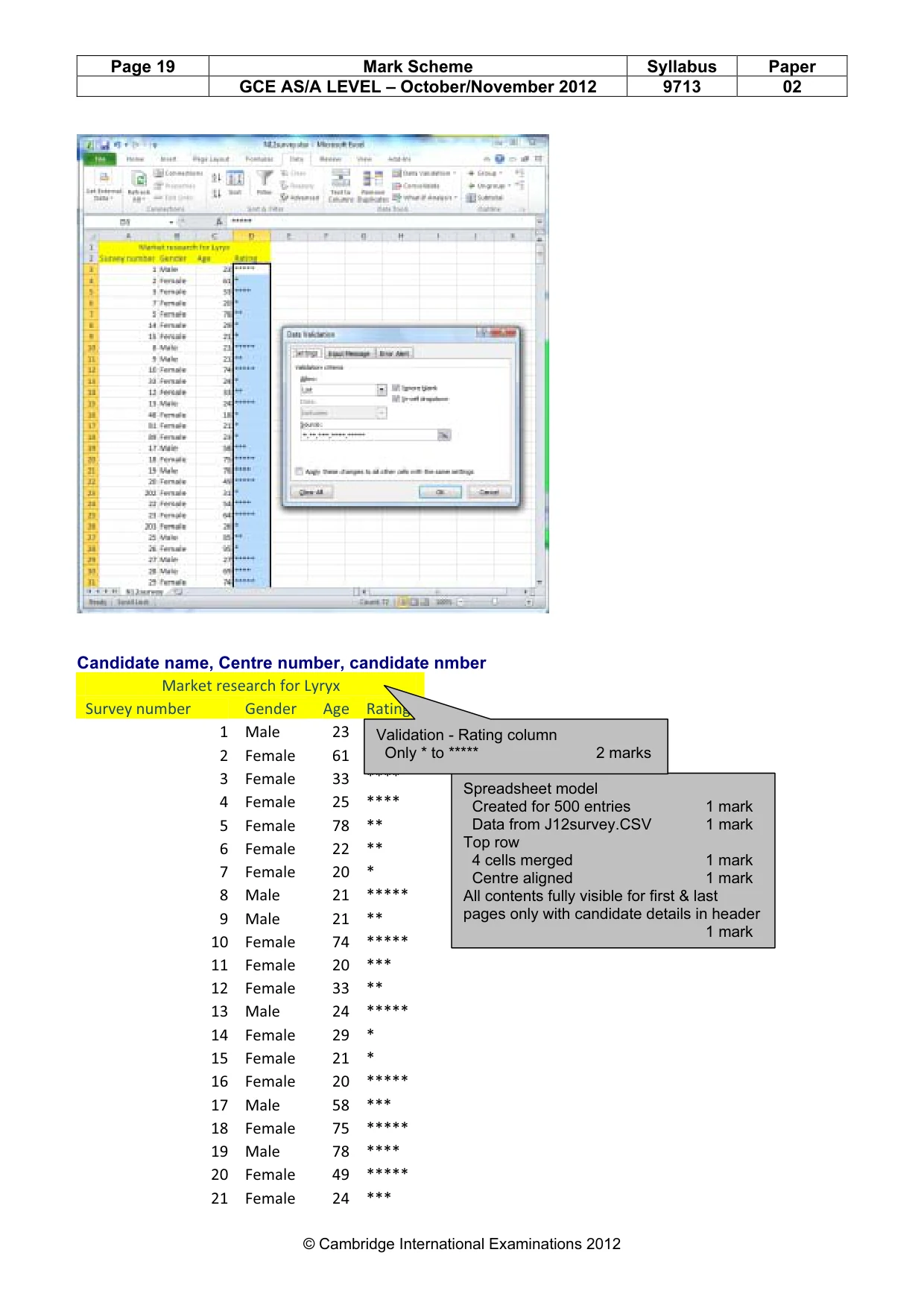
Page 19 Mark Scheme Syllabus Paper GCE AS/A LEVEL – October/November 2012 9713 02 © Cambridge International Examinations 2012 Candidate name, Centre number, candidate nmber Market research for Lyryx Survey number Gender Age Rating 1 Male 23 ***** 2 Female 61 * 3 Female 33 **** 4 Female 25 **** 5 Female 78 ** 6 Female 22 ** 7 Female 20 * 8 Male 21 ***** 9 Male 21 ** 10 Female 74 ***** 11 Female 20 *** 12 Female 33 ** 13 Male 24 ***** 14 Female 29 * 15 Female 21 * 16 Female 20 ***** 17 Male 58 *** 18 Female 75 ***** 19 Male 78 **** 20 Female 49 ***** 21 Female 24 *** Spreadsheet model Created for 500 entries 1 mark Data from J12survey.CSV 1 mark Top row 4 cells merged 1 mark Centre aligned 1 mark All contents fully visible for first & last pages only with candidate details in header 1 mark Validation - Rating column Only * to ***** 2 marks
Mark scheme, page 20
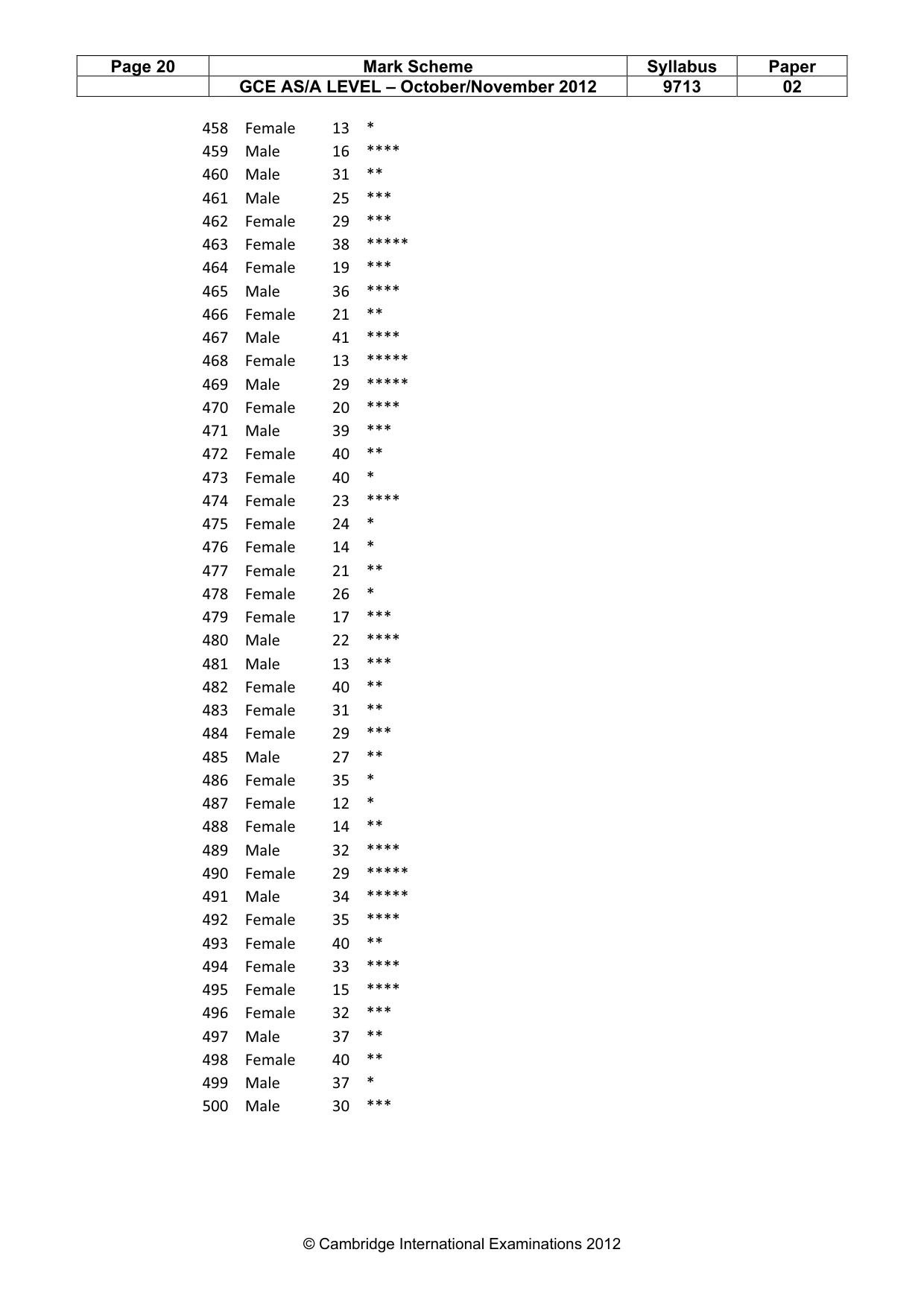
Page 20 Mark Scheme Syllabus Paper GCE AS/A LEVEL – October/November 2012 9713 02 © Cambridge International Examinations 2012 458 Female 13 * 459 Male 16 **** 460 Male 31 ** 461 Male 25 *** 462 Female 29 *** 463 Female 38 ***** 464 Female 19 *** 465 Male 36 **** 466 Female 21 ** 467 Male 41 **** 468 Female 13 ***** 469 Male 29 ***** 470 Female 20 **** 471 Male 39 *** 472 Female 40 ** 473 Female 40 * 474 Female 23 **** 475 Female 24 * 476 Female 14 * 477 Female 21 ** 478 Female 26 * 479 Female 17 *** 480 Male 22 **** 481 Male 13 *** 482 Female 40 ** 483 Female 31 ** 484 Female 29 *** 485 Male 27 ** 486 Female 35 * 487 Female 12 * 488 Female 14 ** 489 Male 32 **** 490 Female 29 ***** 491 Male 34 ***** 492 Female 35 **** 493 Female 40 ** 494 Female 33 **** 495 Female 15 **** 496 Female 32 *** 497 Male 37 ** 498 Female 40 ** 499 Male 37 * 500 Male 30 ***
Mark scheme, page 21
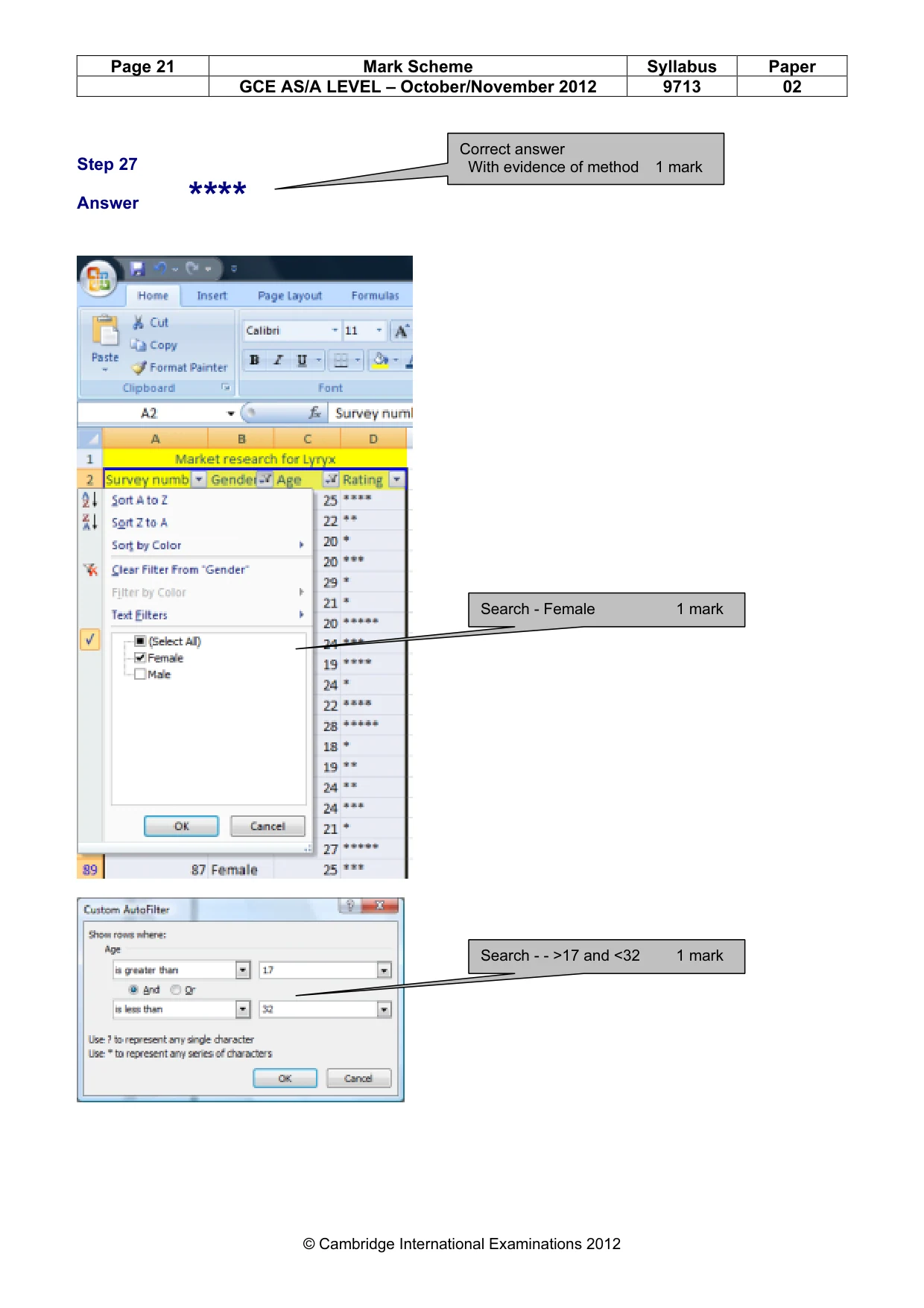
Page 21 Mark Scheme Syllabus Paper GCE AS/A LEVEL – October/November 2012 9713 02 © Cambridge International Examinations 2012 Step 27 Answer **** Correct answer With evidence of method 1 mark Search - Female 1 mark Search - - >17 and <32 1 mark
What you needed in this session
Cambridge’s own grade thresholds for 2012 Oct/Nov, Paper 2 · Variant 1. A higher threshold means an easier paper — the bar moves with how the cohort did.