Cambridge A Level Applied Information and Communication Technology 9713 — 2012 May/June Paper 4 · Variant 1
9713/41/M/J/12 · 90 marks · ≈101 min
The question paper and its mark scheme, free to read here and free to download. This is Cambridge’s own paper, exactly as it was sat.
Question paper8 pages


Mark scheme6 pages
Answers below. Sit the paper first if you are practising.
Paper as text
Question paper, page 1
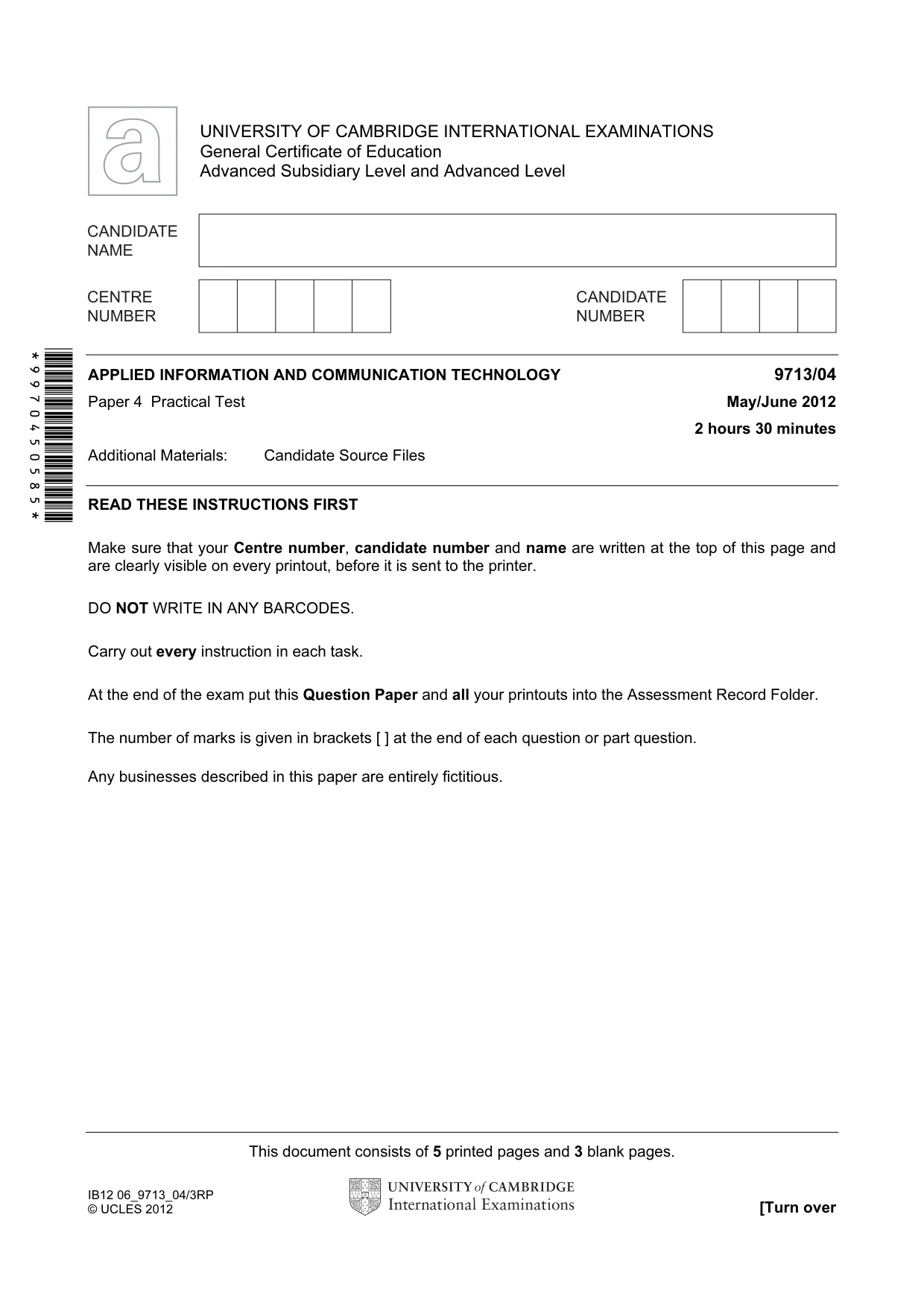
This document consists of 5 printed pages and 3 blank pages. IB12 06_9713_04/3RP © UCLES 2012 [Turn over *9970450585* UNIVERSITY OF CAMBRIDGE INTERNATIONAL EXAMINATIONS General Certificate of Education Advanced Subsidiary Level and Advanced Level APPLIED INFORMATION AND COMMUNICATION TECHNOLOGY 9713/04 Paper 4 Practical Test May/June 2012 2 hours 30 minutes Additional Materials: Candidate Source Files READ THESE INSTRUCTIONS FIRST Make sure that your Centre number, candidate number and name are written at the top of this page and are clearly visible on every printout, before it is sent to the printer. DO NOT WRITE IN ANY BARCODES. Carry out every instruction in each task. At the end of the exam put this Question Paper and all your printouts into the Assessment Record Folder. The number of marks is given in brackets [ ] at the end of each question or part question. Any businesses described in this paper are entirely fictitious.
Question paper, page 2
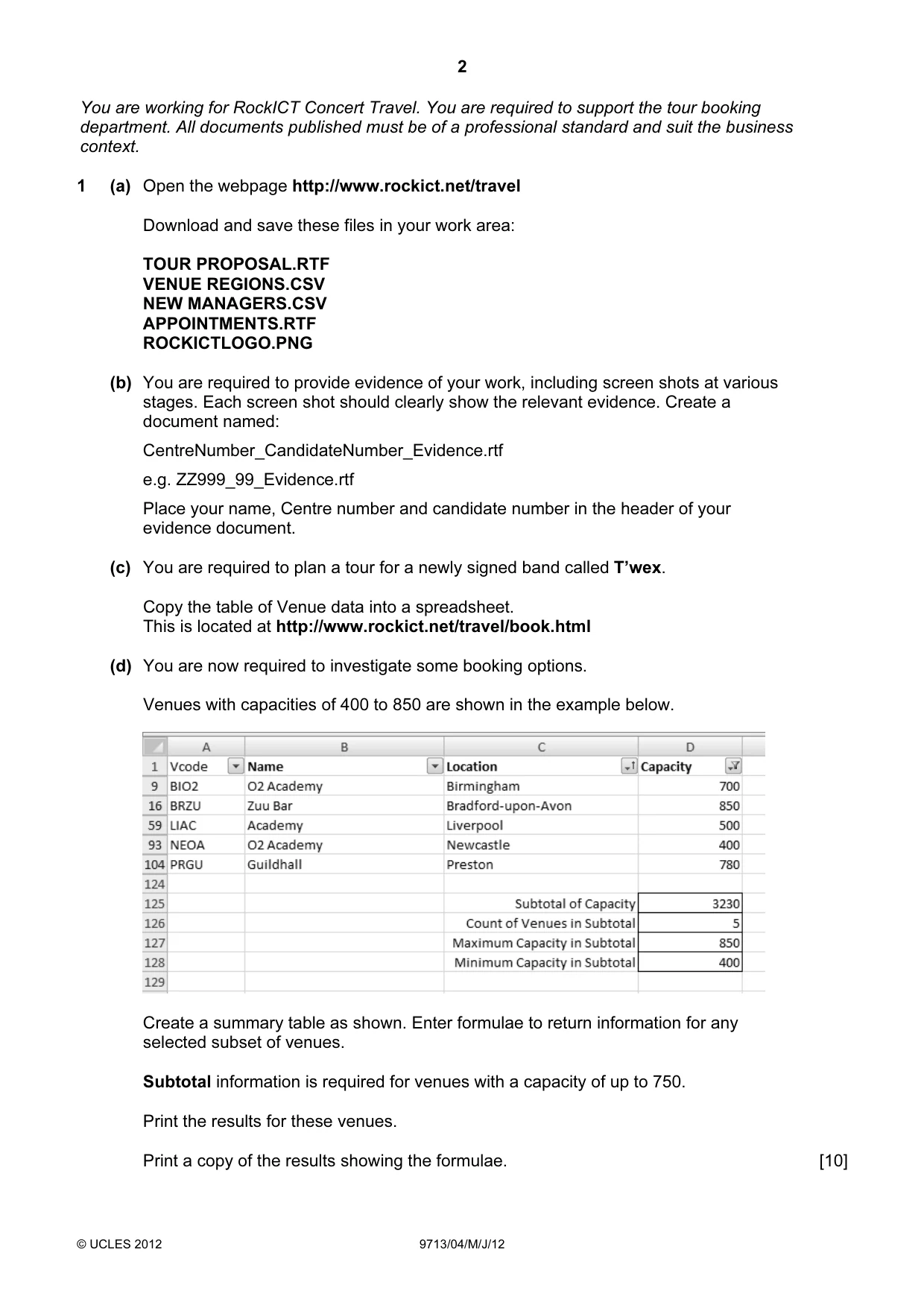
2 © UCLES 2012 9713/04/M/J/12 You are working for RockICT Concert Travel. You are required to support the tour booking department. All documents published must be of a professional standard and suit the business context. 1 (a) Open the webpage http://www.rockict.net/travel Download and save these files in your work area: TOUR PROPOSAL.RTF VENUE REGIONS.CSV NEW MANAGERS.CSV APPOINTMENTS.RTF ROCKICTLOGO.PNG (b) You are required to provide evidence of your work, including screen shots at various stages. Each screen shot should clearly show the relevant evidence. Create a document named: CentreNumber_CandidateNumber_Evidence.rtf e.g. ZZ999_99_Evidence.rtf Place your name, Centre number and candidate number in the header of your evidence document. (c) You are required to plan a tour for a newly signed band called T’wex. Copy the table of Venue data into a spreadsheet. This is located at http://www.rockict.net/travel/book.html (d) You are now required to investigate some booking options. Venues with capacities of 400 to 850 are shown in the example below. Create a summary table as shown. Enter formulae to return information for any selected subset of venues. Subtotal information is required for venues with a capacity of up to 750. Print the results for these venues. Print a copy of the results showing the formulae. [10]
Question paper, page 3
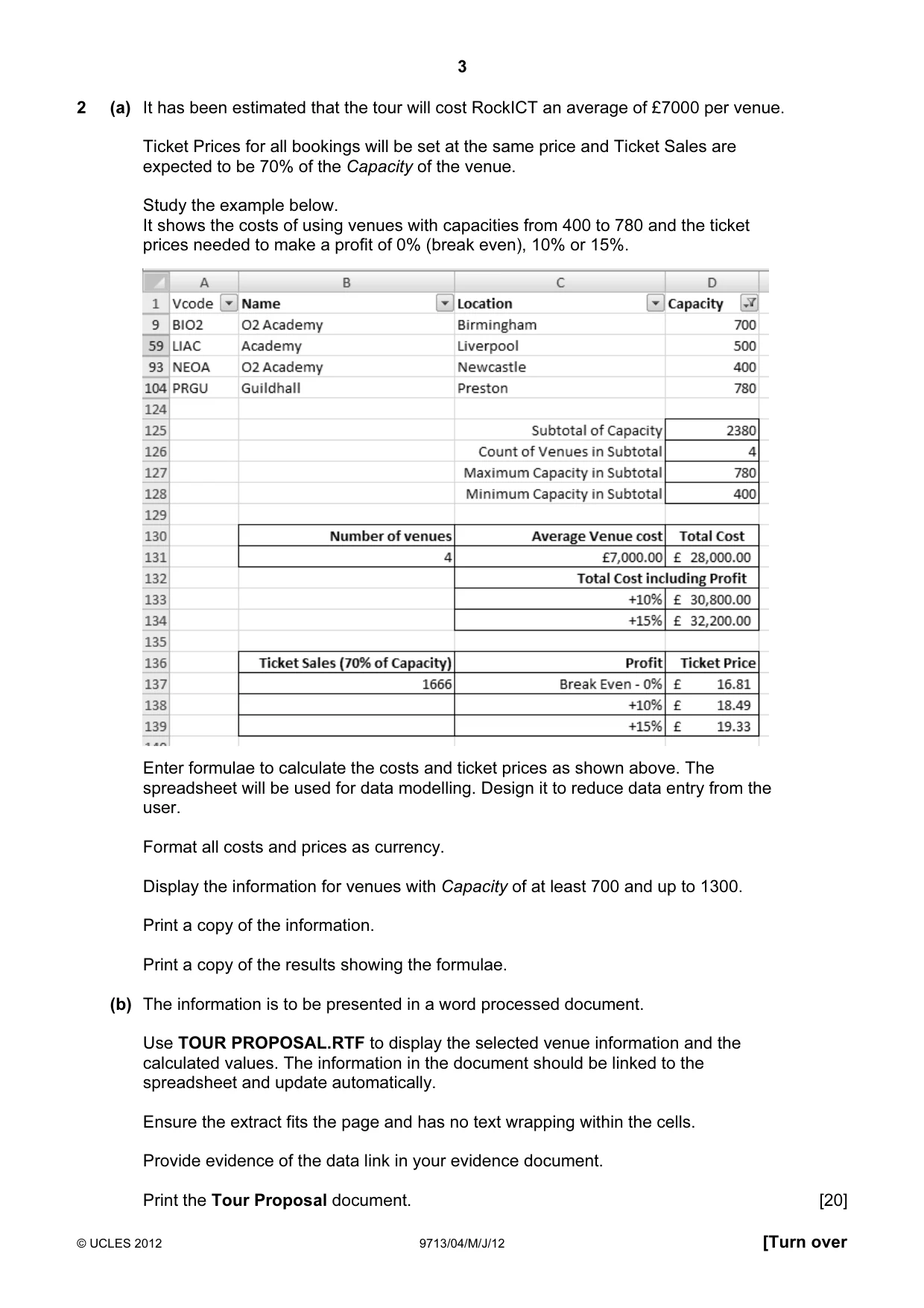
3 © UCLES 2012 9713/04/M/J/12 [Turn over 2 (a) It has been estimated that the tour will cost RockICT an average of £7000 per venue. Ticket Prices for all bookings will be set at the same price and Ticket Sales are expected to be 70% of the Capacity of the venue. Study the example below. It shows the costs of using venues with capacities from 400 to 780 and the ticket prices needed to make a profit of 0% (break even), 10% or 15%. Enter formulae to calculate the costs and ticket prices as shown above. The spreadsheet will be used for data modelling. Design it to reduce data entry from the user. Format all costs and prices as currency. Display the information for venues with Capacity of at least 700 and up to 1300. Print a copy of the information. Print a copy of the results showing the formulae. (b) The information is to be presented in a word processed document. Use TOUR PROPOSAL.RTF to display the selected venue information and the calculated values. The information in the document should be linked to the spreadsheet and update automatically. Ensure the extract fits the page and has no text wrapping within the cells. Provide evidence of the data link in your evidence document. Print the Tour Proposal document. [20]
Question paper, page 4
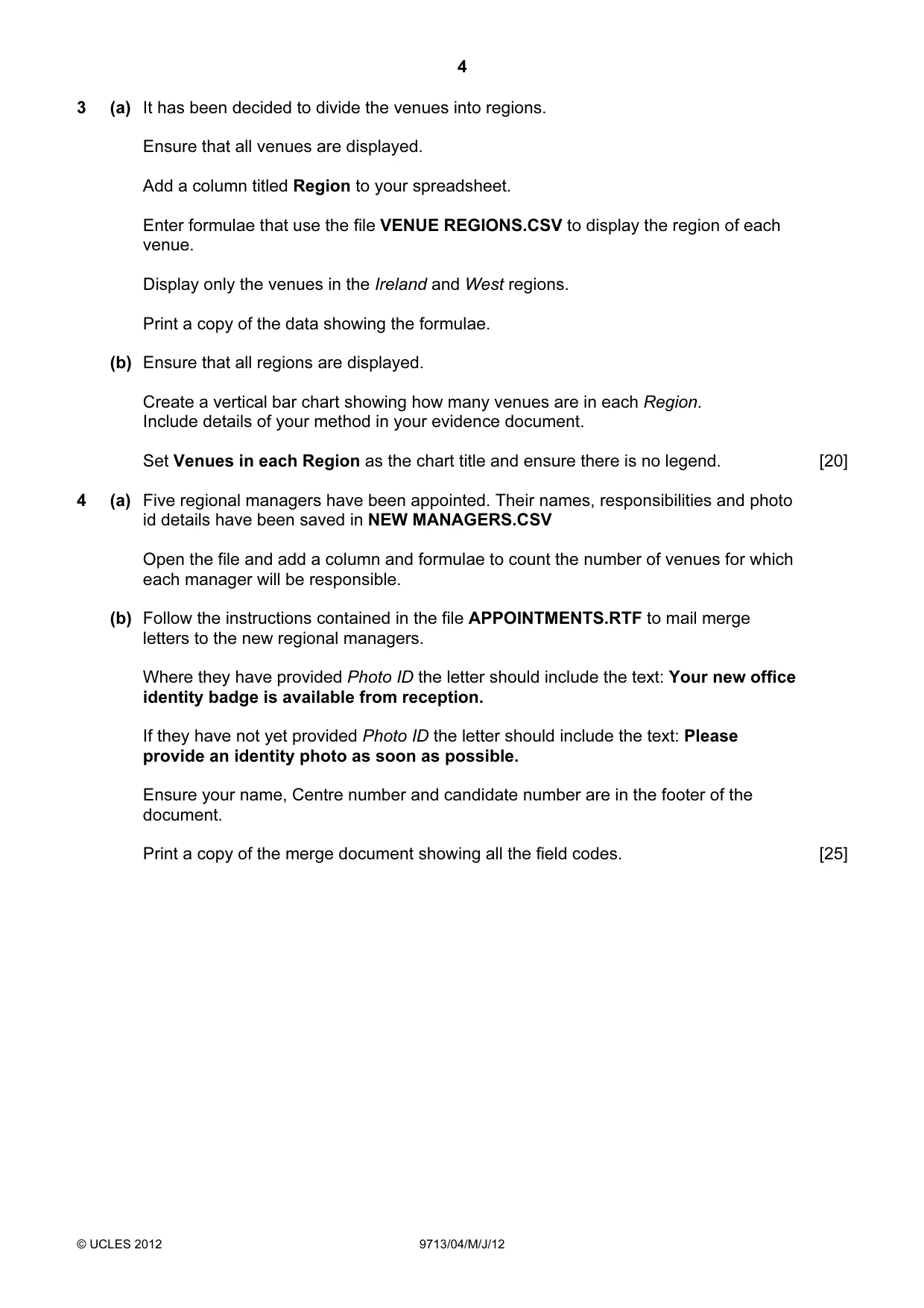
4 © UCLES 2012 9713/04/M/J/12 3 (a) It has been decided to divide the venues into regions. Ensure that all venues are displayed. Add a column titled Region to your spreadsheet. Enter formulae that use the file VENUE REGIONS.CSV to display the region of each venue. Display only the venues in the Ireland and West regions. Print a copy of the data showing the formulae. (b) Ensure that all regions are displayed. Create a vertical bar chart showing how many venues are in each Region. Include details of your method in your evidence document. Set Venues in each Region as the chart title and ensure there is no legend. [20] 4 (a) Five regional managers have been appointed. Their names, responsibilities and photo id details have been saved in NEW MANAGERS.CSV Open the file and add a column and formulae to count the number of venues for which each manager will be responsible. (b) Follow the instructions contained in the file APPOINTMENTS.RTF to mail merge letters to the new regional managers. Where they have provided Photo ID the letter should include the text: Your new office identity badge is available from reception. If they have not yet provided Photo ID the letter should include the text: Please provide an identity photo as soon as possible. Ensure your name, Centre number and candidate number are in the footer of the document. Print a copy of the merge document showing all the field codes. [25]
Question paper, page 5
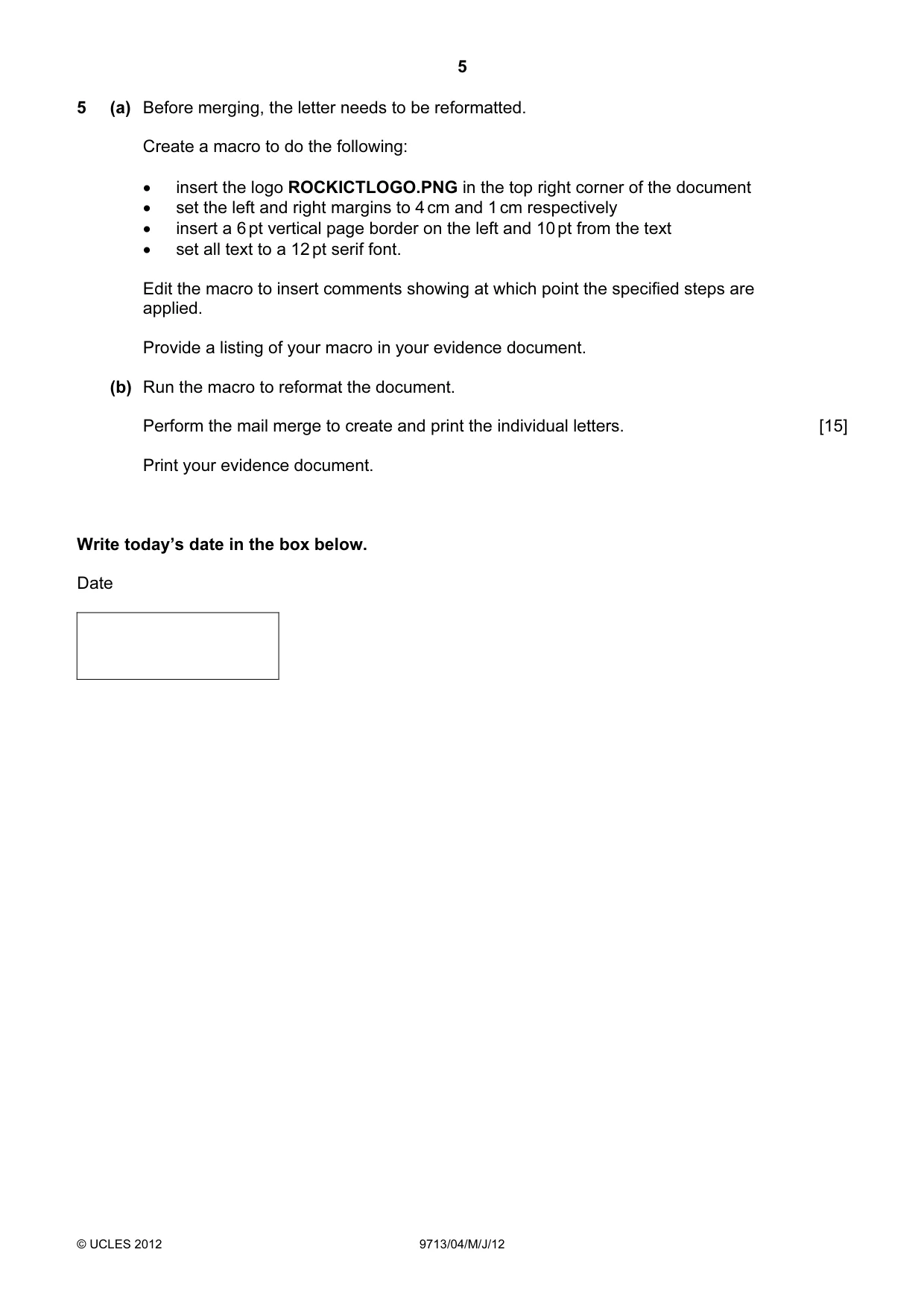
5 © UCLES 2012 9713/04/M/J/12 5 (a) Before merging, the letter needs to be reformatted. Create a macro to do the following: • insert the logo ROCKICTLOGO.PNG in the top right corner of the document • set the left and right margins to 4 cm and 1 cm respectively • insert a 6 pt vertical page border on the left and 10 pt from the text • set all text to a 12 pt serif font. Edit the macro to insert comments showing at which point the specified steps are applied. Provide a listing of your macro in your evidence document. (b) Run the macro to reformat the document. Perform the mail merge to create and print the individual letters. [15] Print your evidence document. Write today’s date in the box below. Date
Question paper, page 6
6 © UCLES 2012 9713/04/M/J/12 BLANK PAGE
Question paper, page 7
7 © UCLES 2012 9713/04/M/J/12 BLANK PAGE
Question paper, page 8
8 Permission to reproduce items where third-party owned material protected by copyright is included has been sought and cleared where possible. Every reasonable effort has been made by the publisher (UCLES) to trace copyright holders, but if any items requiring clearance have unwittingly been included, the publisher will be pleased to make amends at the earliest possible opportunity. University of Cambridge International Examinations is part of the Cambridge Assessment Group. Cambridge Assessment is the brand name of University of Cambridge Local Examinations Syndicate (UCLES), which is itself a department of the University of Cambridge. © UCLES 2012 9713/04/M/J/12 BLANK PAGE
Mark scheme, page 1
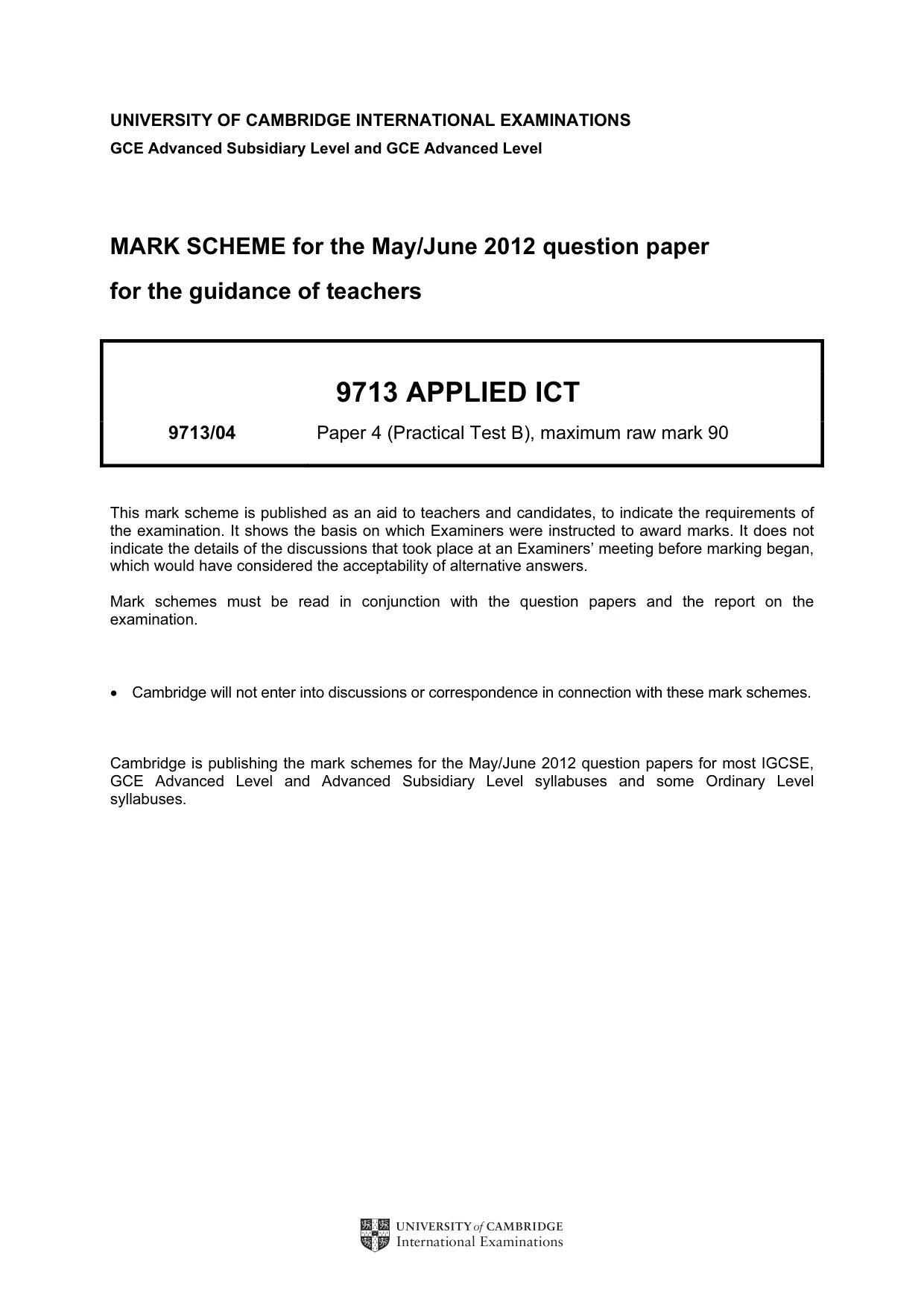
UNIVERSITY OF CAMBRIDGE INTERNATIONAL EXAMINATIONS GCE Advanced Subsidiary Level and GCE Advanced Level MARK SCHEME for the May/June 2012 question paper for the guidance of teachers 9713 APPLIED ICT 9713/04 Paper 4 (Practical Test B), maximum raw mark 90 This mark scheme is published as an aid to teachers and candidates, to indicate the requirements of the examination. It shows the basis on which Examiners were instructed to award marks. It does not indicate the details of the discussions that took place at an Examiners’ meeting before marking began, which would have considered the acceptability of alternative answers. Mark schemes must be read in conjunction with the question papers and the report on the examination. • Cambridge will not enter into discussions or correspondence in connection with these mark schemes. Cambridge is publishing the mark schemes for the May/June 2012 question papers for most IGCSE, GCE Advanced Level and Advanced Subsidiary Level syllabuses and some Ordinary Level syllabuses.
Mark scheme, page 2
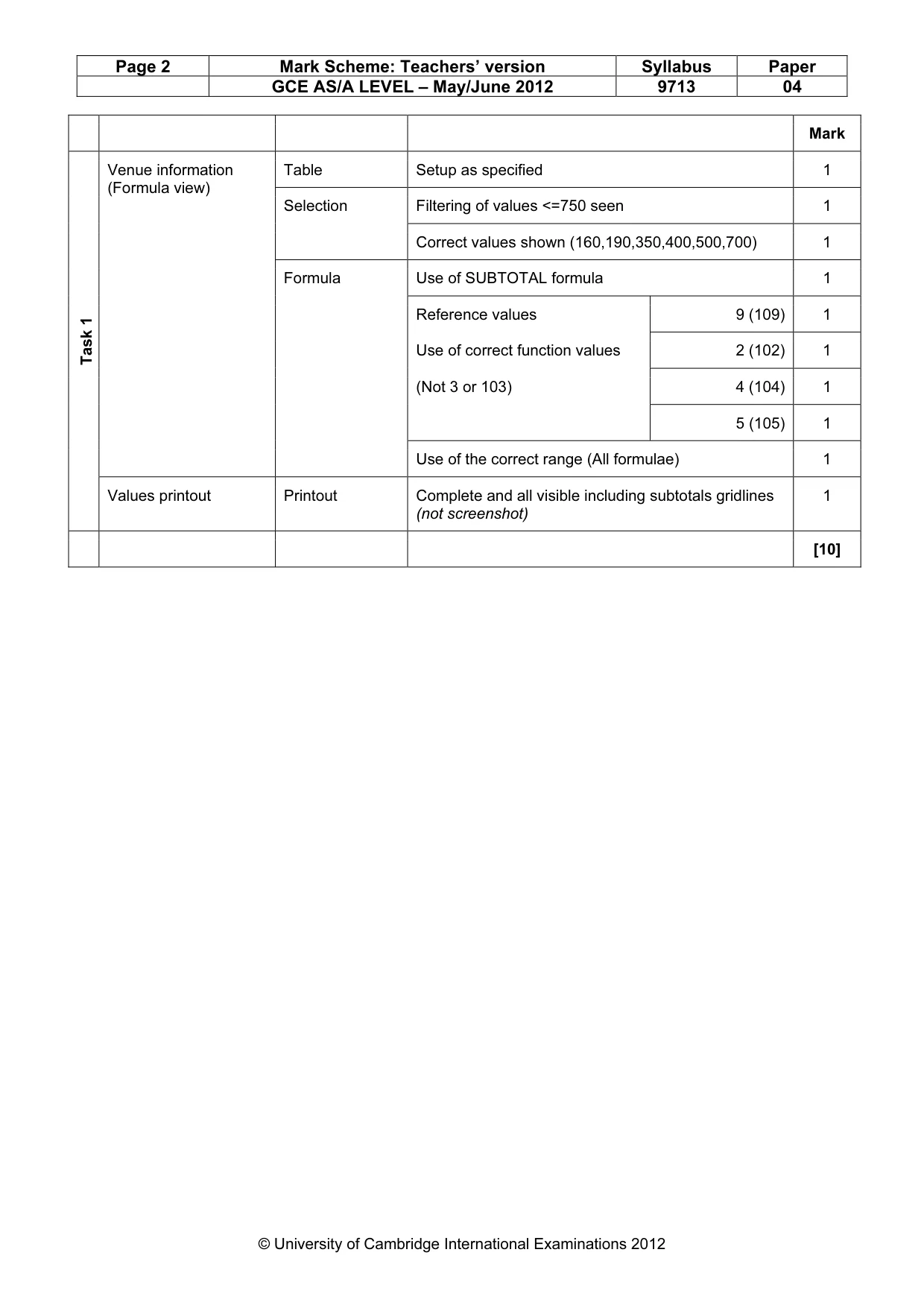
Page 2 Mark Scheme: Teachers’ version Syllabus Paper GCE AS/A LEVEL – May/June 2012 9713 04 © University of Cambridge International Examinations 2012 Mark Table Setup as specified 1 Filtering of values <=750 seen 1 Selection Correct values shown (160,190,350,400,500,700) 1 Use of SUBTOTAL formula 1 Reference values 9 (109) 1 Use of correct function values 2 (102) 1 (Not 3 or 103) 4 (104) 1 5 (105) 1 Venue information (Formula view) Formula Use of the correct range (All formulae) 1 Task 1 Values printout Printout Complete and all visible including subtotals gridlines (not screenshot) 1 [10]
Mark scheme, page 3
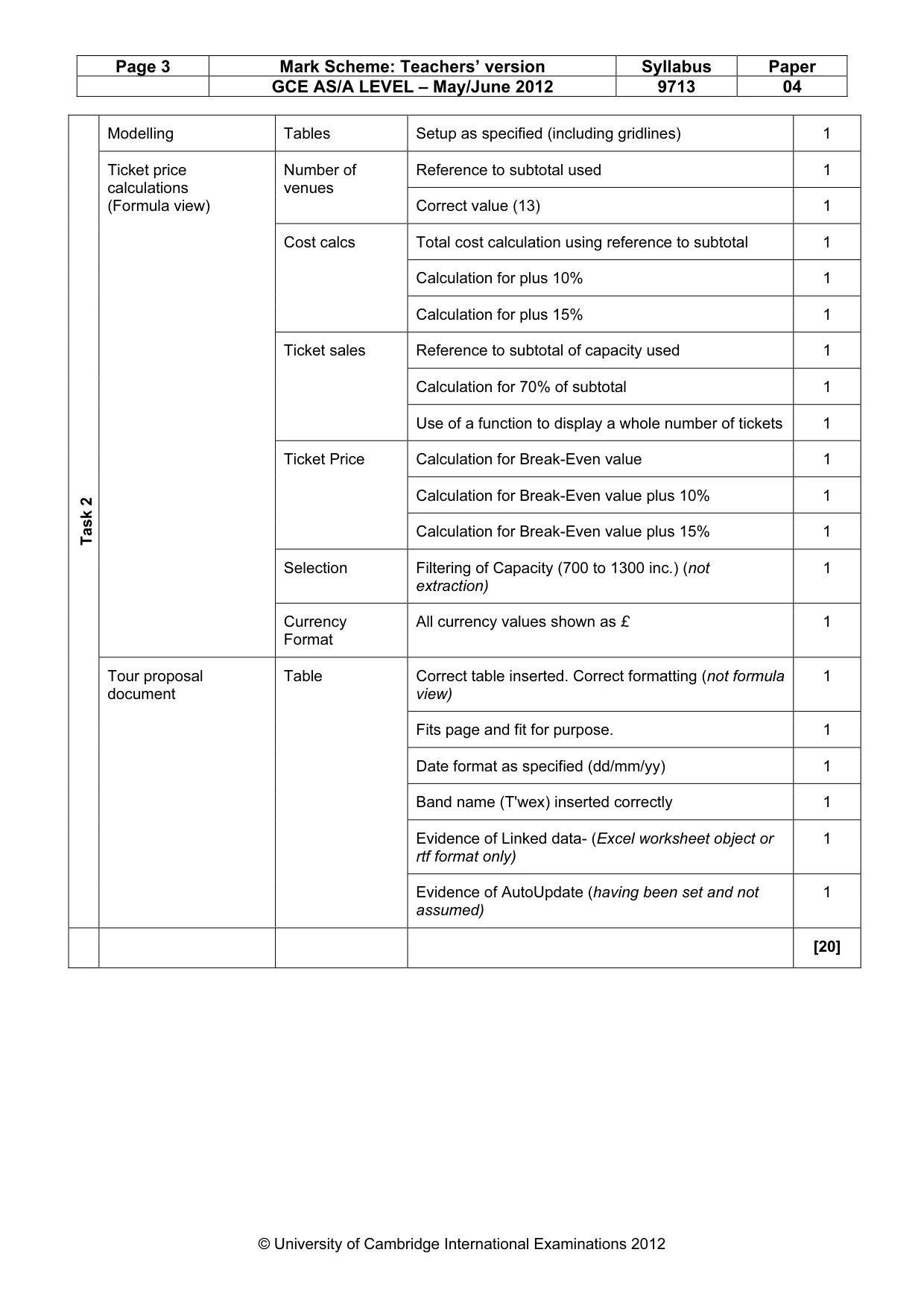
Page 3 Mark Scheme: Teachers’ version Syllabus Paper GCE AS/A LEVEL – May/June 2012 9713 04 © University of Cambridge International Examinations 2012 Modelling Tables Setup as specified (including gridlines) 1 Reference to subtotal used 1 Number of venues Correct value (13) 1 Total cost calculation using reference to subtotal 1 Calculation for plus 10% 1 Cost calcs Calculation for plus 15% 1 Reference to subtotal of capacity used 1 Calculation for 70% of subtotal 1 Ticket sales Use of a function to display a whole number of tickets 1 Calculation for Break-Even value 1 Calculation for Break-Even value plus 10% 1 Ticket Price Calculation for Break-Even value plus 15% 1 Selection Filtering of Capacity (700 to 1300 inc.) (not extraction) 1 Ticket price calculations (Formula view) Currency Format All currency values shown as £ 1 Correct table inserted. Correct formatting (not formula view) 1 Fits page and fit for purpose. 1 Date format as specified (dd/mm/yy) 1 Band name (T'wex) inserted correctly 1 Evidence of Linked data- (Excel worksheet object or rtf format only) 1 Task 2 Tour proposal document Table Evidence of AutoUpdate (having been set and not assumed) 1 [20]
Mark scheme, page 4
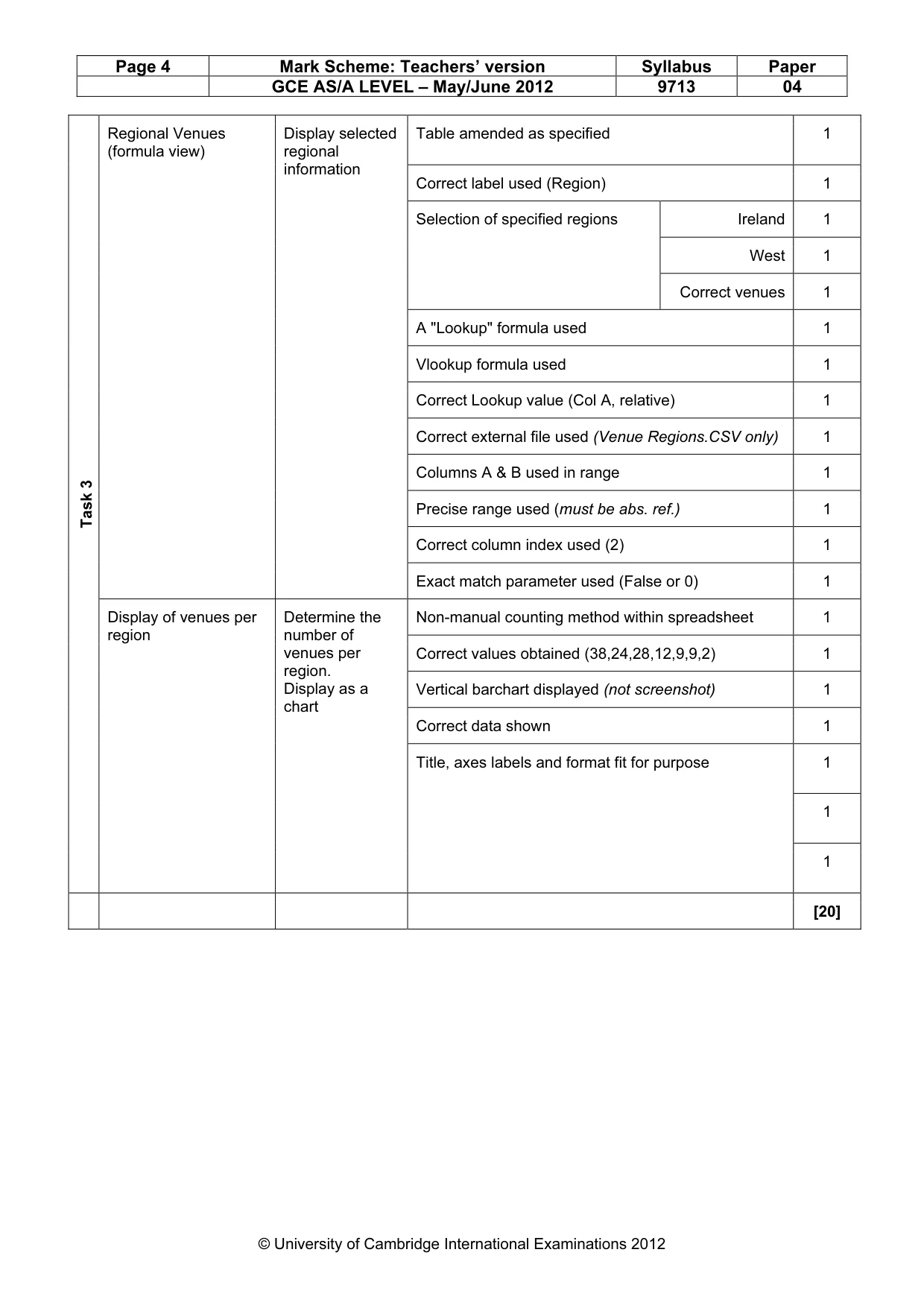
Page 4 Mark Scheme: Teachers’ version Syllabus Paper GCE AS/A LEVEL – May/June 2012 9713 04 © University of Cambridge International Examinations 2012 Table amended as specified 1 Correct label used (Region) 1 Ireland 1 West 1 Selection of specified regions Correct venues 1 A "Lookup" formula used 1 Vlookup formula used 1 Correct Lookup value (Col A, relative) 1 Correct external file used (Venue Regions.CSV only) 1 Columns A & B used in range 1 Precise range used (must be abs. ref.) 1 Correct column index used (2) 1 Regional Venues (formula view) Display selected regional information Exact match parameter used (False or 0) 1 Non-manual counting method within spreadsheet 1 Correct values obtained (38,24,28,12,9,9,2) 1 Vertical barchart displayed (not screenshot) 1 Correct data shown 1 1 1 Task 3 Display of venues per region Determine the number of venues per region. Display as a chart Title, axes labels and format fit for purpose 1 [20]
Mark scheme, page 5
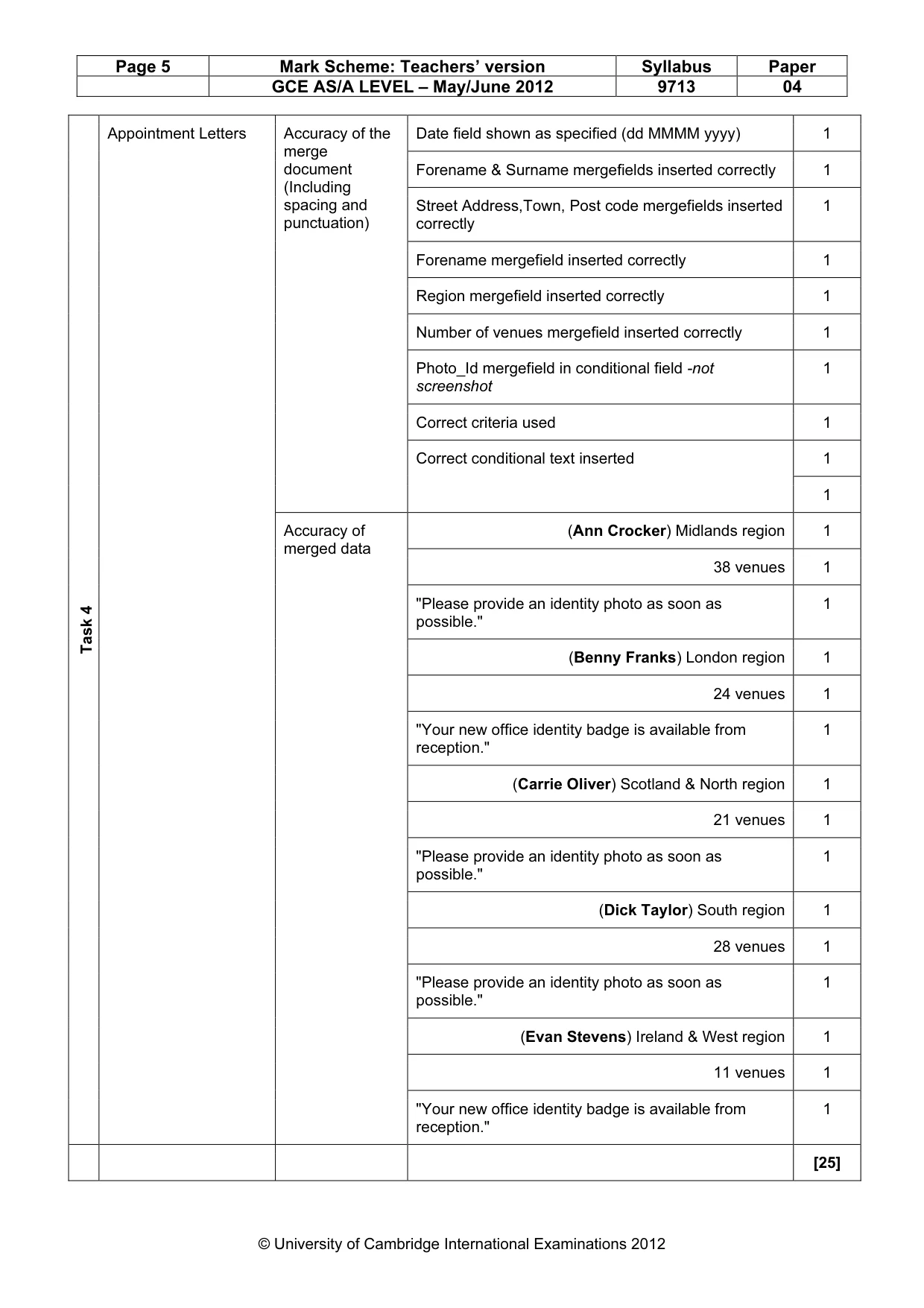
Page 5 Mark Scheme: Teachers’ version Syllabus Paper GCE AS/A LEVEL – May/June 2012 9713 04 © University of Cambridge International Examinations 2012 Date field shown as specified (dd MMMM yyyy) 1 Forename & Surname mergefields inserted correctly 1 Street Address,Town, Post code mergefields inserted correctly 1 Forename mergefield inserted correctly 1 Region mergefield inserted correctly 1 Number of venues mergefield inserted correctly 1 Photo_Id mergefield in conditional field -not screenshot 1 Correct criteria used 1 1 Accuracy of the merge document (Including spacing and punctuation) Correct conditional text inserted 1 (Ann Crocker) Midlands region 1 38 venues 1 "Please provide an identity photo as soon as possible." 1 (Benny Franks) London region 1 24 venues 1 "Your new office identity badge is available from reception." 1 (Carrie Oliver) Scotland & North region 1 21 venues 1 "Please provide an identity photo as soon as possible." 1 (Dick Taylor) South region 1 28 venues 1 "Please provide an identity photo as soon as possible." 1 (Evan Stevens) Ireland & West region 1 11 venues 1 Task 4 Appointment Letters Accuracy of merged data "Your new office identity badge is available from reception." 1 [25]
Mark scheme, page 6
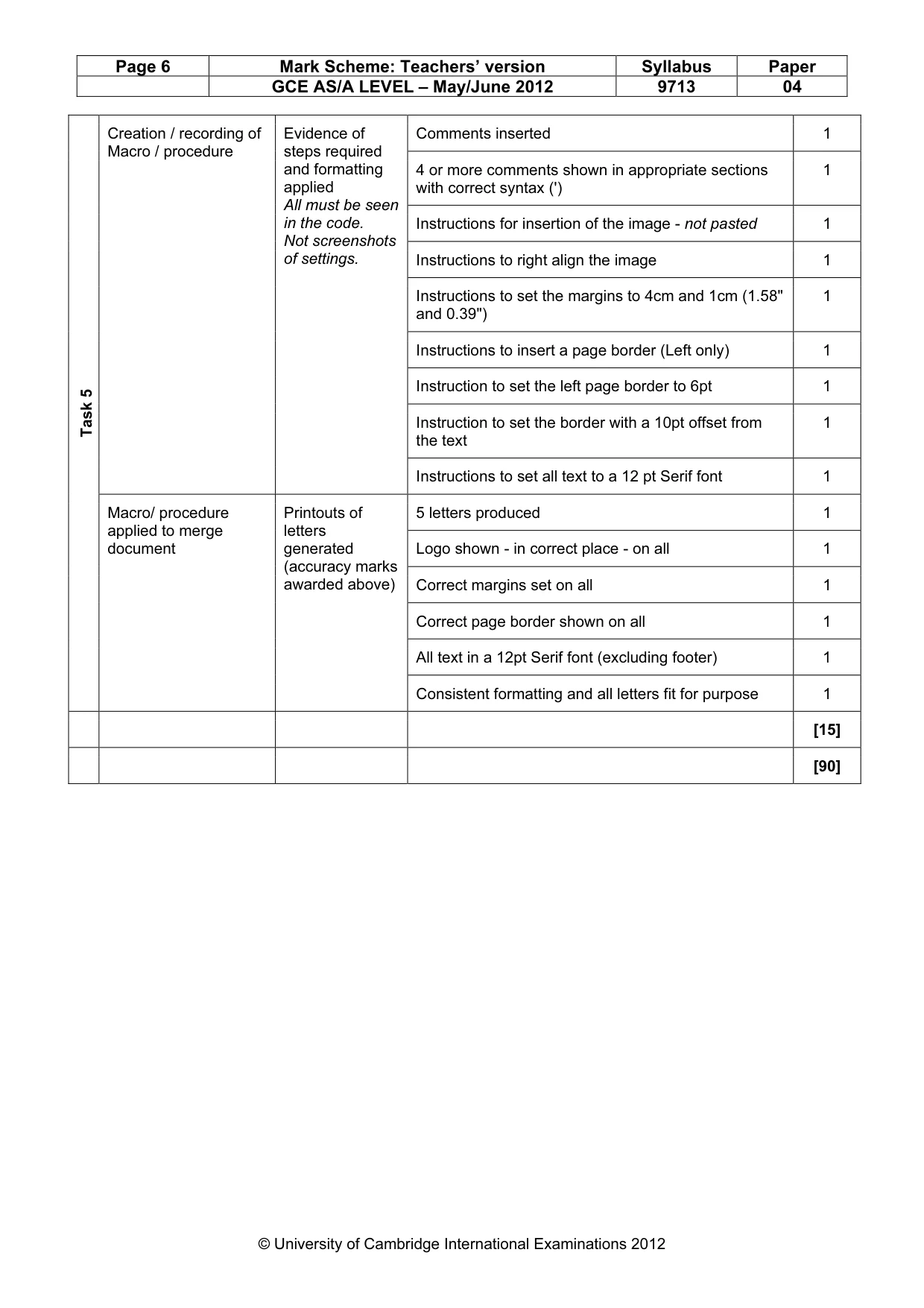
Page 6 Mark Scheme: Teachers’ version Syllabus Paper GCE AS/A LEVEL – May/June 2012 9713 04 © University of Cambridge International Examinations 2012 Comments inserted 1 4 or more comments shown in appropriate sections with correct syntax (') 1 Instructions for insertion of the image - not pasted 1 Instructions to right align the image 1 Instructions to set the margins to 4cm and 1cm (1.58" and 0.39") 1 Instructions to insert a page border (Left only) 1 Instruction to set the left page border to 6pt 1 Instruction to set the border with a 10pt offset from the text 1 Creation / recording of Macro / procedure Evidence of steps required and formatting applied All must be seen in the code. Not screenshots of settings. Instructions to set all text to a 12 pt Serif font 1 5 letters produced 1 Logo shown - in correct place - on all 1 Correct margins set on all 1 Correct page border shown on all 1 All text in a 12pt Serif font (excluding footer) 1 Task 5 Macro/ procedure applied to merge document Printouts of letters generated (accuracy marks awarded above) Consistent formatting and all letters fit for purpose 1 [15] [90]
What you needed in this session
Cambridge’s own grade thresholds for 2012 May/June, Paper 4 · Variant 1. A higher threshold means an easier paper — the bar moves with how the cohort did.