Cambridge A Level Applied Information and Communication Technology 9713 — 2011 Oct/Nov Paper 2 · Variant 1
9713/21/O/N/11 · 120 marks · ≈135 min
The question paper and its mark scheme, free to read here and free to download. This is Cambridge’s own paper, exactly as it was sat.
Question paper4 pages
Mark scheme10 pages
Answers below. Sit the paper first if you are practising.

Paper as text
Question paper, page 1
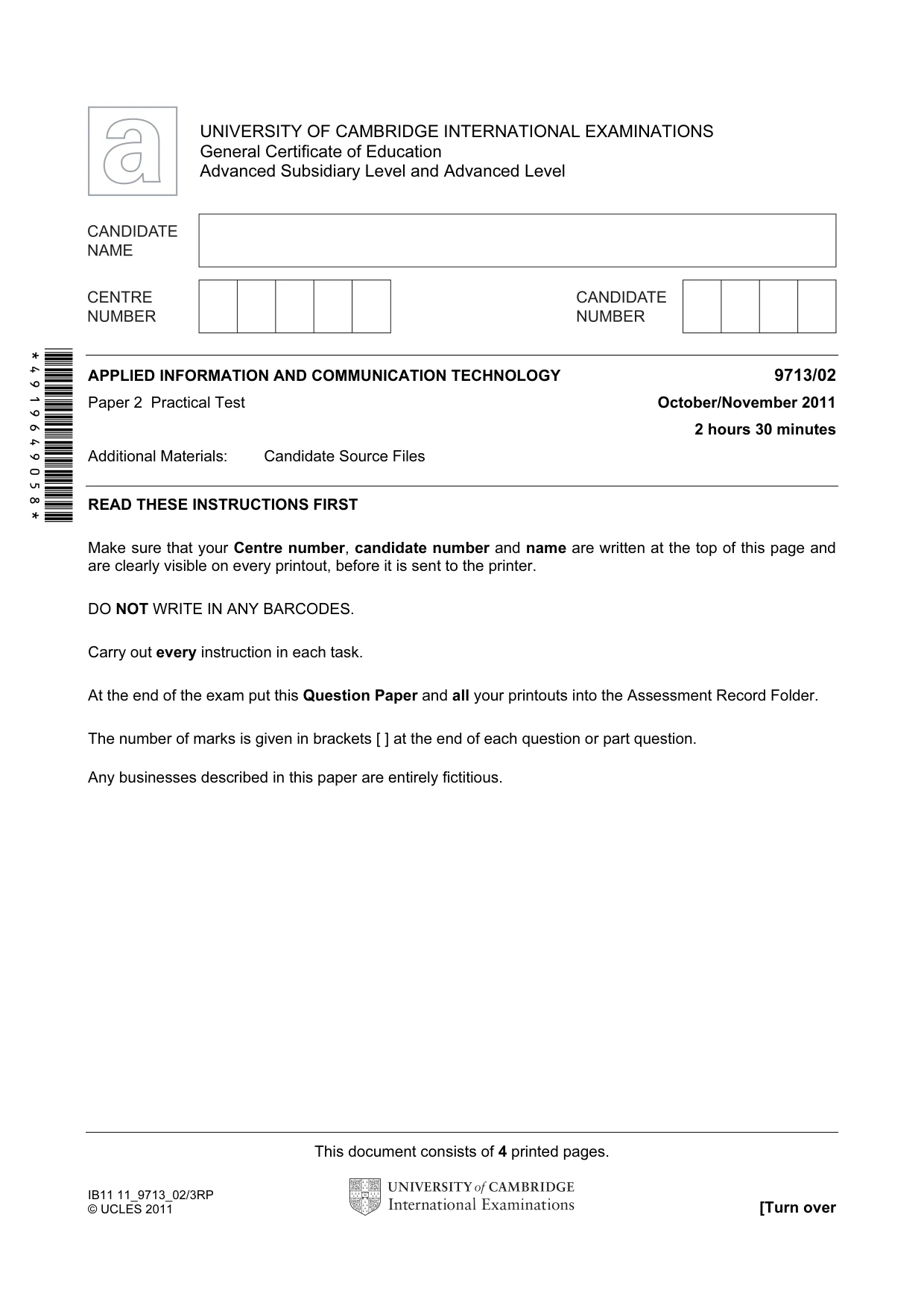
This document consists of 4 printed pages. IB11 11_9713_02/3RP © UCLES 2011 [Turn over *4919649058* UNIVERSITY OF CAMBRIDGE INTERNATIONAL EXAMINATIONS General Certificate of Education Advanced Subsidiary Level and Advanced Level APPLIED INFORMATION AND COMMUNICATION TECHNOLOGY 9713/02 Paper 2 Practical Test October/November 2011 2 hours 30 minutes Additional Materials: Candidate Source Files READ THESE INSTRUCTIONS FIRST Make sure that your Centre number, candidate number and name are written at the top of this page and are clearly visible on every printout, before it is sent to the printer. DO NOT WRITE IN ANY BARCODES. Carry out every instruction in each task. At the end of the exam put this Question Paper and all your printouts into the Assessment Record Folder. The number of marks is given in brackets [ ] at the end of each question or part question. Any businesses described in this paper are entirely fictitious.
Question paper, page 2
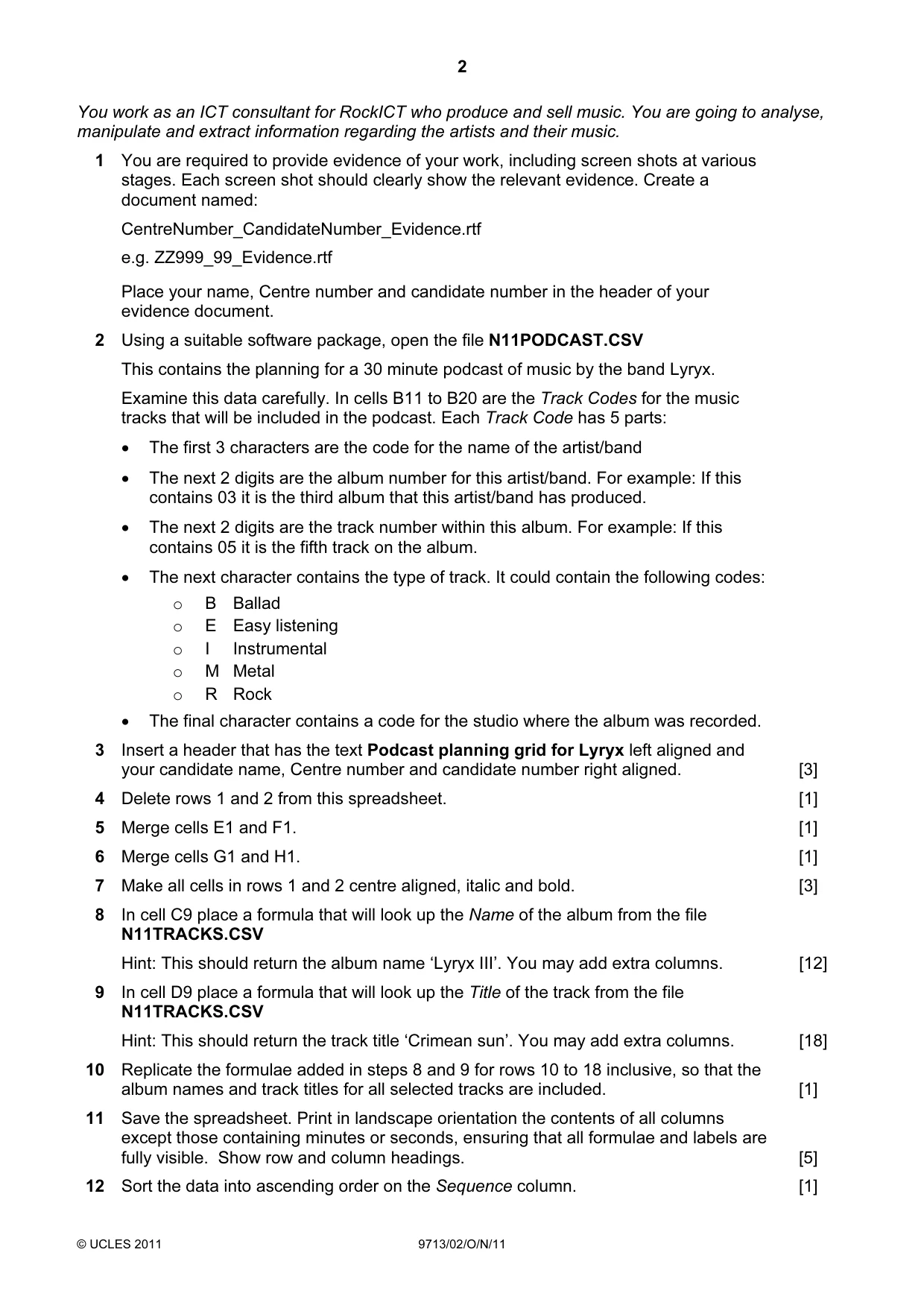
2 © UCLES 2011 9713/02/O/N/11 You work as an ICT consultant for RockICT who produce and sell music. You are going to analyse, manipulate and extract information regarding the artists and their music. 1 You are required to provide evidence of your work, including screen shots at various stages. Each screen shot should clearly show the relevant evidence. Create a document named: CentreNumber_CandidateNumber_Evidence.rtf e.g. ZZ999_99_Evidence.rtf Place your name, Centre number and candidate number in the header of your evidence document. 2 Using a suitable software package, open the file N11PODCAST.CSV This contains the planning for a 30 minute podcast of music by the band Lyryx. Examine this data carefully. In cells B11 to B20 are the Track Codes for the music tracks that will be included in the podcast. Each Track Code has 5 parts: • The first 3 characters are the code for the name of the artist/band • The next 2 digits are the album number for this artist/band. For example: If this contains 03 it is the third album that this artist/band has produced. • The next 2 digits are the track number within this album. For example: If this contains 05 it is the fifth track on the album. • The next character contains the type of track. It could contain the following codes: o B Ballad o E Easy listening o I Instrumental o M Metal o R Rock • The final character contains a code for the studio where the album was recorded. 3 Insert a header that has the text Podcast planning grid for Lyryx left aligned and your candidate name, Centre number and candidate number right aligned. [3] 4 Delete rows 1 and 2 from this spreadsheet. [1] 5 Merge cells E1 and F1. [1] 6 Merge cells G1 and H1. [1] 7 Make all cells in rows 1 and 2 centre aligned, italic and bold. [3] 8 In cell C9 place a formula that will look up the Name of the album from the file N11TRACKS.CSV Hint: This should return the album name ‘Lyryx III’. You may add extra columns. [12] 9 In cell D9 place a formula that will look up the Title of the track from the file N11TRACKS.CSV Hint: This should return the track title ‘Crimean sun’. You may add extra columns. [18] 10 Replicate the formulae added in steps 8 and 9 for rows 10 to 18 inclusive, so that the album names and track titles for all selected tracks are included. [1] 11 Save the spreadsheet. Print in landscape orientation the contents of all columns except those containing minutes or seconds, ensuring that all formulae and labels are fully visible. Show row and column headings. [5] 12 Sort the data into ascending order on the Sequence column. [1]
Question paper, page 3
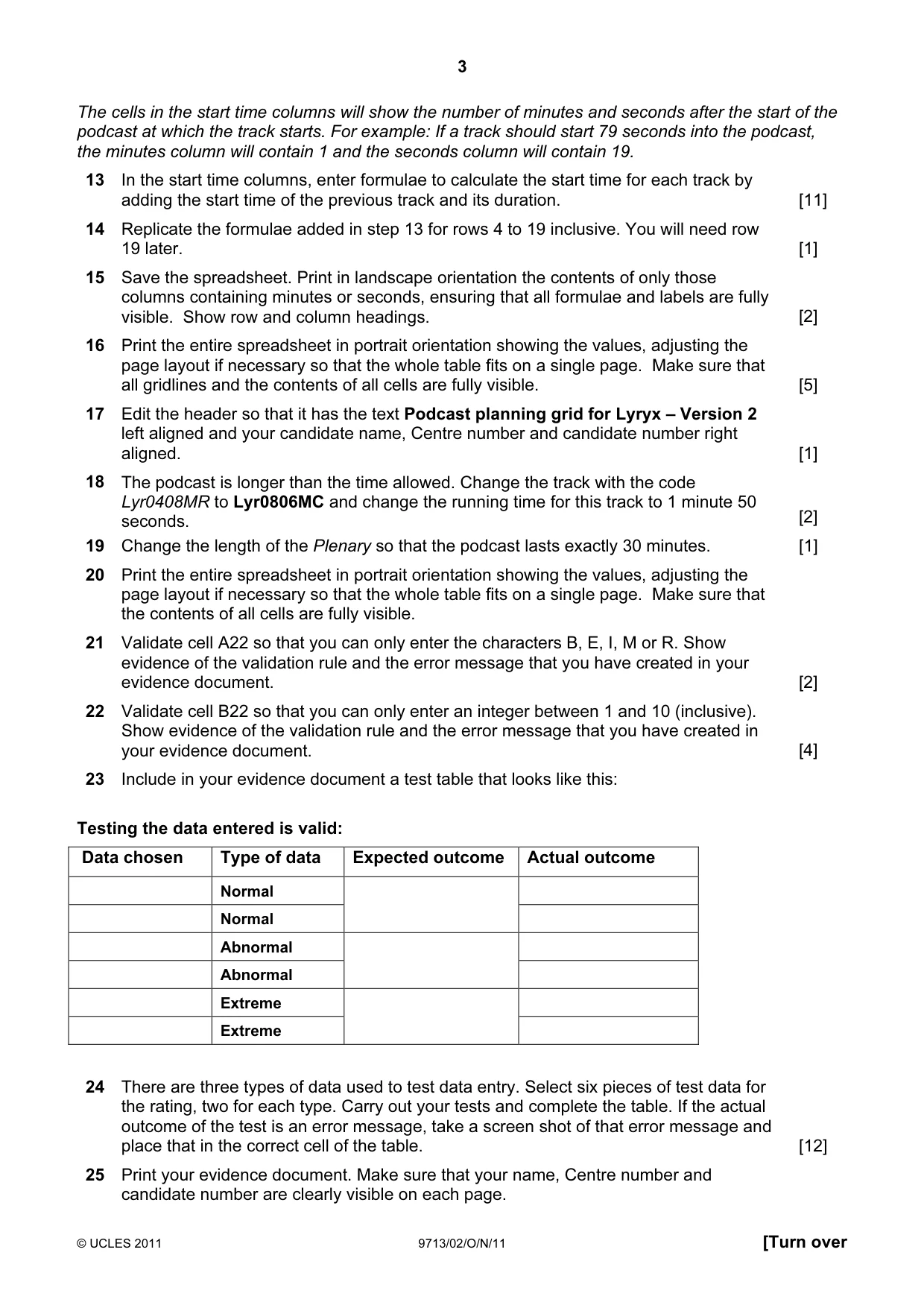
3 © UCLES 2011 9713/02/O/N/11 [Turn over The cells in the start time columns will show the number of minutes and seconds after the start of the podcast at which the track starts. For example: If a track should start 79 seconds into the podcast, the minutes column will contain 1 and the seconds column will contain 19. 13 In the start time columns, enter formulae to calculate the start time for each track by adding the start time of the previous track and its duration. [11] 14 Replicate the formulae added in step 13 for rows 4 to 19 inclusive. You will need row 19 later. [1] 15 Save the spreadsheet. Print in landscape orientation the contents of only those columns containing minutes or seconds, ensuring that all formulae and labels are fully visible. Show row and column headings. [2] 16 Print the entire spreadsheet in portrait orientation showing the values, adjusting the page layout if necessary so that the whole table fits on a single page. Make sure that all gridlines and the contents of all cells are fully visible. [5] 17 Edit the header so that it has the text Podcast planning grid for Lyryx – Version 2 left aligned and your candidate name, Centre number and candidate number right aligned. [1] 18 The podcast is longer than the time allowed. Change the track with the code Lyr0408MR to Lyr0806MC and change the running time for this track to 1 minute 50 seconds. [2] 19 Change the length of the Plenary so that the podcast lasts exactly 30 minutes. [1] 20 Print the entire spreadsheet in portrait orientation showing the values, adjusting the page layout if necessary so that the whole table fits on a single page. Make sure that the contents of all cells are fully visible. 21 Validate cell A22 so that you can only enter the characters B, E, I, M or R. Show evidence of the validation rule and the error message that you have created in your evidence document. [2] 22 Validate cell B22 so that you can only enter an integer between 1 and 10 (inclusive). Show evidence of the validation rule and the error message that you have created in your evidence document. [4] 23 Include in your evidence document a test table that looks like this: Testing the data entered is valid: Data chosen Type of data Expected outcome Actual outcome Normal Normal Abnormal Abnormal Extreme Extreme 24 There are three types of data used to test data entry. Select six pieces of test data for the rating, two for each type. Carry out your tests and complete the table. If the actual outcome of the test is an error message, take a screen shot of that error message and place that in the correct cell of the table. [12] 25 Print your evidence document. Make sure that your name, Centre number and candidate number are clearly visible on each page.
Question paper, page 4
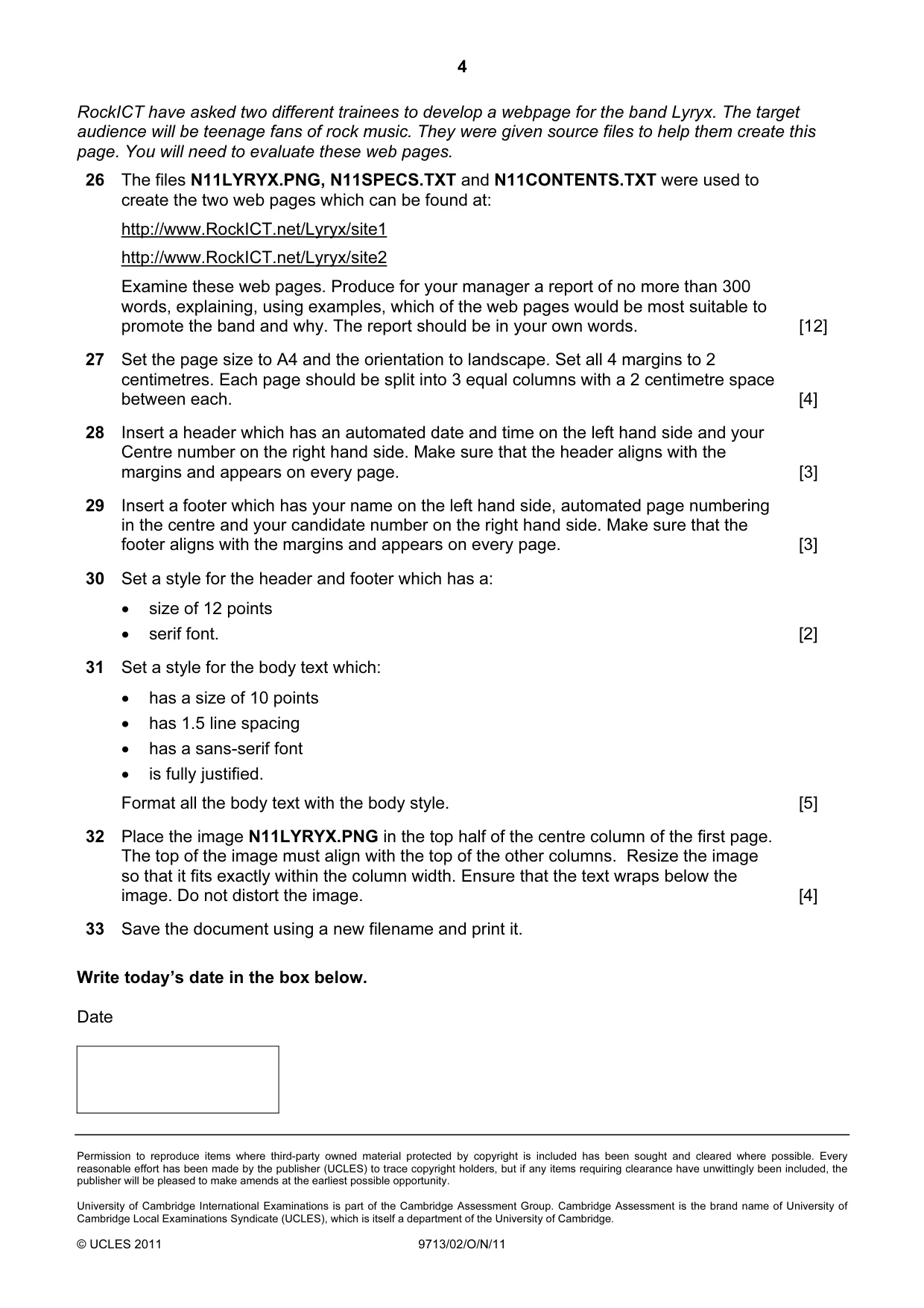
4 Permission to reproduce items where third-party owned material protected by copyright is included has been sought and cleared where possible. Every reasonable effort has been made by the publisher (UCLES) to trace copyright holders, but if any items requiring clearance have unwittingly been included, the publisher will be pleased to make amends at the earliest possible opportunity. University of Cambridge International Examinations is part of the Cambridge Assessment Group. Cambridge Assessment is the brand name of University of Cambridge Local Examinations Syndicate (UCLES), which is itself a department of the University of Cambridge. © UCLES 2011 9713/02/O/N/11 RockICT have asked two different trainees to develop a webpage for the band Lyryx. The target audience will be teenage fans of rock music. They were given source files to help them create this page. You will need to evaluate these web pages. 26 The files N11LYRYX.PNG, N11SPECS.TXT and N11CONTENTS.TXT were used to create the two web pages which can be found at: http://www.RockICT.net/Lyryx/site1 http://www.RockICT.net/Lyryx/site2 Examine these web pages. Produce for your manager a report of no more than 300 words, explaining, using examples, which of the web pages would be most suitable to promote the band and why. The report should be in your own words. [12] 27 Set the page size to A4 and the orientation to landscape. Set all 4 margins to 2 centimetres. Each page should be split into 3 equal columns with a 2 centimetre space between each. [4] 28 Insert a header which has an automated date and time on the left hand side and your Centre number on the right hand side. Make sure that the header aligns with the margins and appears on every page. [3] 29 Insert a footer which has your name on the left hand side, automated page numbering in the centre and your candidate number on the right hand side. Make sure that the footer aligns with the margins and appears on every page. [3] 30 Set a style for the header and footer which has a: • size of 12 points • serif font. [2] 31 Set a style for the body text which: • has a size of 10 points • has 1.5 line spacing • has a sans-serif font • is fully justified. Format all the body text with the body style. [5] 32 Place the image N11LYRYX.PNG in the top half of the centre column of the first page. The top of the image must align with the top of the other columns. Resize the image so that it fits exactly within the column width. Ensure that the text wraps below the image. Do not distort the image. [4] 33 Save the document using a new filename and print it. Write today’s date in the box below. Date
Mark scheme, page 1
UNIVERSITY OF CAMBRIDGE INTERNATIONAL EXAMINATIONS GCE Advanced Subsidiary Level and GCE Advanced Level MARK SCHEME for the October/November 2011 question paper for the guidance of teachers 9713 APPLIED ICT 9713/02 Paper 2 (Practical Test A), maximum raw mark 120 This mark scheme is published as an aid to teachers and candidates, to indicate the requirements of the examination. It shows the basis on which Examiners were instructed to award marks. It does not indicate the details of the discussions that took place at an Examiners’ meeting before marking began, which would have considered the acceptability of alternative answers. Mark schemes must be read in conjunction with the question papers and the report on the examination. • Cambridge will not enter into discussions or correspondence in connection with these mark schemes. Cambridge is publishing the mark schemes for the October/November 2011 question papers for most IGCSE, GCE Advanced Level and Advanced Subsidiary Level syllabuses and some Ordinary Level syllabuses.
Mark scheme, page 2
Page 2 Mark Scheme: Teachers’ version Syllabus Paper GCE AS/A LEVEL – October/November 2011 9713 02 © University of Cambridge International Examinations 2011 9713 – November 2011 AS Level – Paper 2 – Practical Test 2011_Nov_9713_02_MS_Final_published.docx No marks to be awarded for any printout not containing the candidate name, candidate number and centre number
Mark scheme, page 3
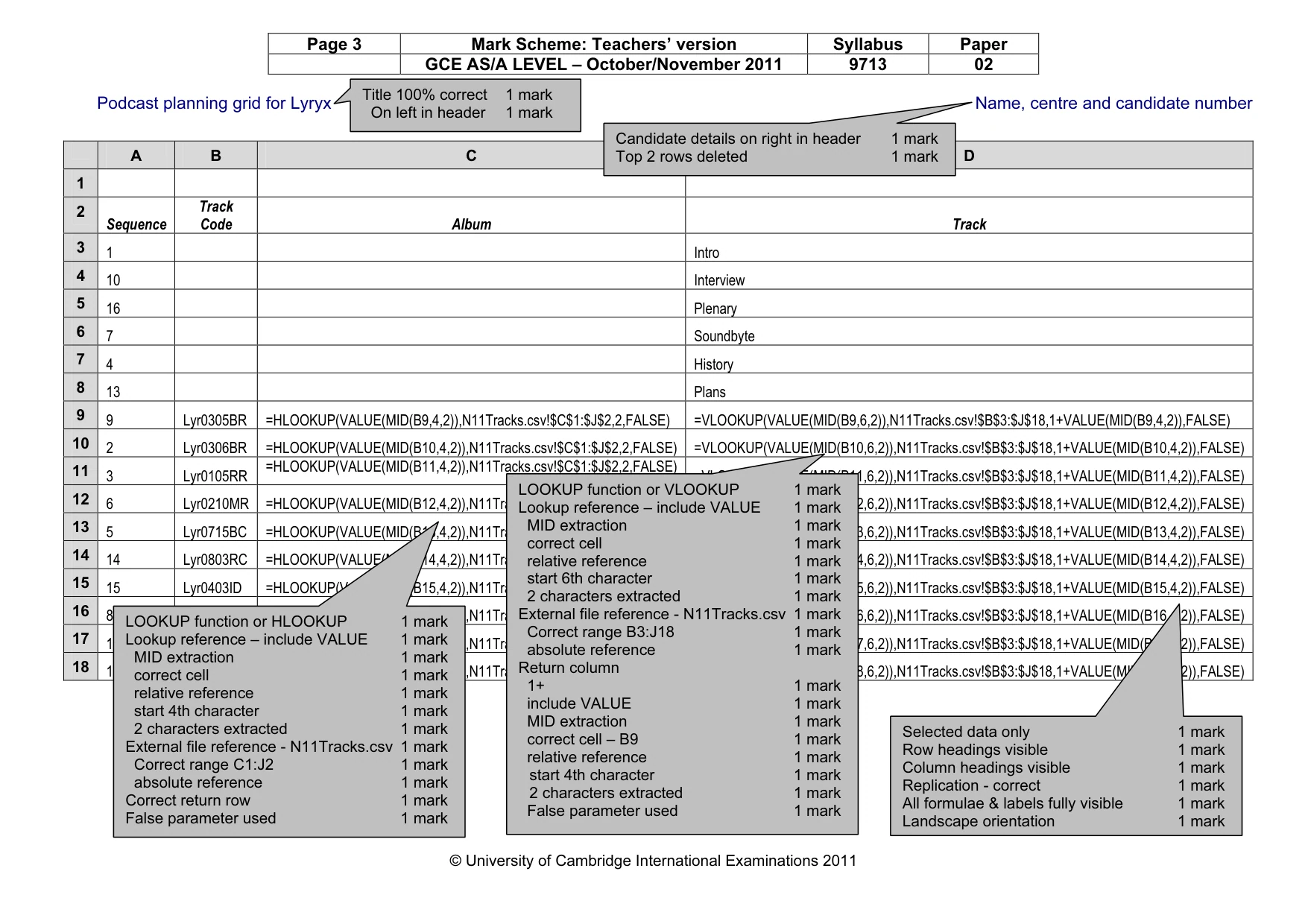
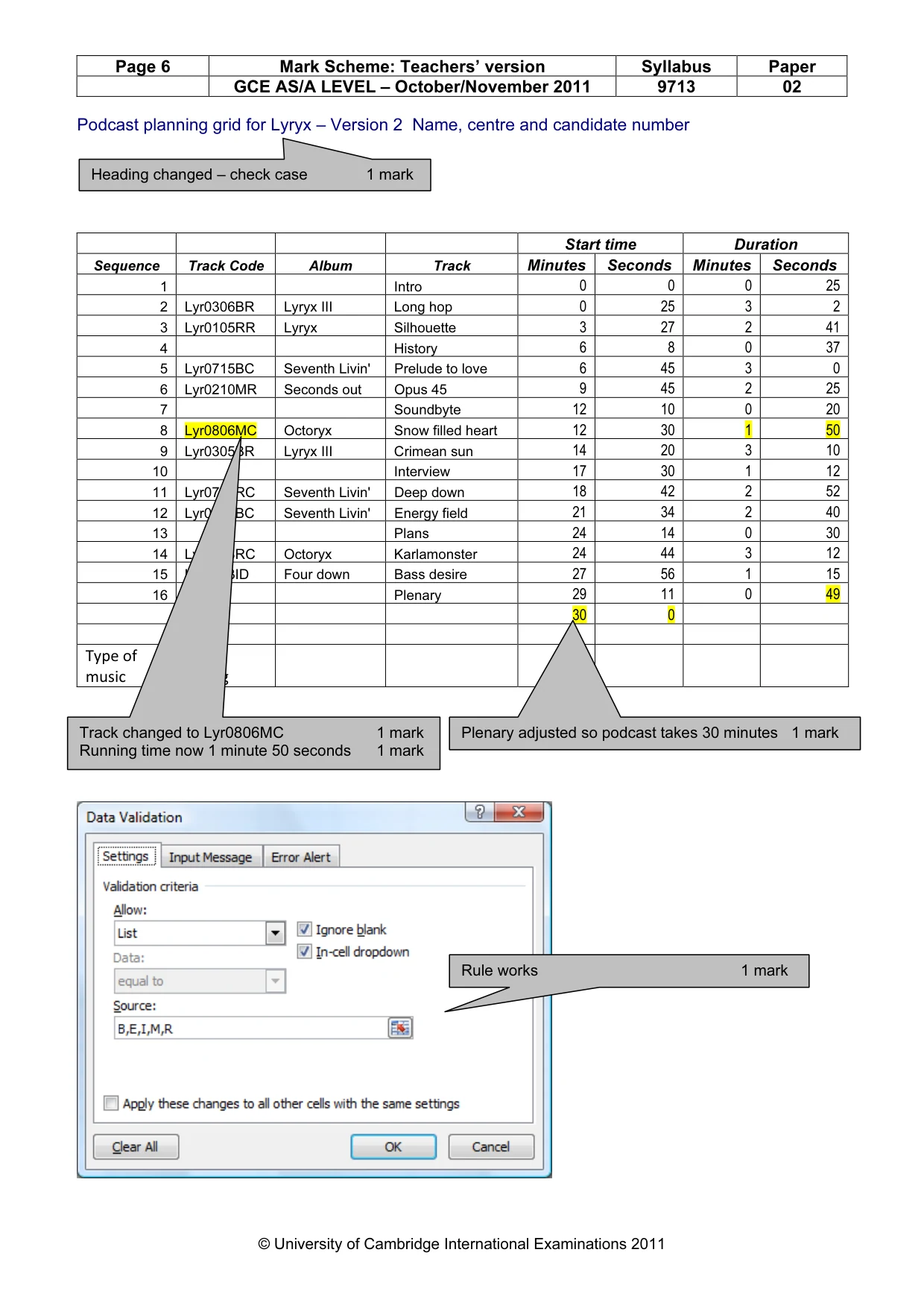
Page 3 Mark Scheme: Teachers’ version Syllabus Paper GCE AS/A LEVEL – October/November 2011 9713 02 © University of Cambridge International Examinations 2011 Podcast planning grid for Lyryx Name, centre and candidate number A B C D 1 2 Sequence Track Code Album Track 3 1 Intro 4 10 Interview 5 16 Plenary 6 7 Soundbyte 7 4 History 8 13 Plans 9 9 Lyr0305BR =HLOOKUP(VALUE(MID(B9,4,2)),N11Tracks.csv!$C$1:$J$2,2,FALSE) =VLOOKUP(VALUE(MID(B9,6,2)),N11Tracks.csv!$B$3:$J$18,1+VALUE(MID(B9,4,2)),FALSE) 10 2 Lyr0306BR =HLOOKUP(VALUE(MID(B10,4,2)),N11Tracks.csv!$C$1:$J$2,2,FALSE) =VLOOKUP(VALUE(MID(B10,6,2)),N11Tracks.csv!$B$3:$J$18,1+VALUE(MID(B10,4,2)),FALSE) 11 3 Lyr0105RR =HLOOKUP(VALUE(MID(B11,4,2)),N11Tracks.csv!$C$1:$J$2,2,FALSE) =VLOOKUP(VALUE(MID(B11,6,2)),N11Tracks.csv!$B$3:$J$18,1+VALUE(MID(B11,4,2)),FALSE) 12 6 Lyr0210MR =HLOOKUP(VALUE(MID(B12,4,2)),N11Tracks.csv!$C$1:$J$2,2,FALSE) =VLOOKUP(VALUE(MID(B12,6,2)),N11Tracks.csv!$B$3:$J$18,1+VALUE(MID(B12,4,2)),FALSE) 13 5 Lyr0715BC =HLOOKUP(VALUE(MID(B13,4,2)),N11Tracks.csv!$C$1:$J$2,2,FALSE) =VLOOKUP(VALUE(MID(B13,6,2)),N11Tracks.csv!$B$3:$J$18,1+VALUE(MID(B13,4,2)),FALSE) 14 14 Lyr0803RC =HLOOKUP(VALUE(MID(B14,4,2)),N11Tracks.csv!$C$1:$J$2,2,FALSE) =VLOOKUP(VALUE(MID(B14,6,2)),N11Tracks.csv!$B$3:$J$18,1+VALUE(MID(B14,4,2)),FALSE) 15 15 Lyr0403ID =HLOOKUP(VALUE(MID(B15,4,2)),N11Tracks.csv!$C$1:$J$2,2,FALSE) =VLOOKUP(VALUE(MID(B15,6,2)),N11Tracks.csv!$B$3:$J$18,1+VALUE(MID(B15,4,2)),FALSE) 16 8 Lyr0408MR =HLOOKUP(VALUE(MID(B16,4,2)),N11Tracks.csv!$C$1:$J$2,2,FALSE) =VLOOKUP(VALUE(MID(B16,6,2)),N11Tracks.csv!$B$3:$J$18,1+VALUE(MID(B16,4,2)),FALSE) 17 12 Lyr0705BC =HLOOKUP(VALUE(MID(B17,4,2)),N11Tracks.csv!$C$1:$J$2,2,FALSE) =VLOOKUP(VALUE(MID(B17,6,2)),N11Tracks.csv!$B$3:$J$18,1+VALUE(MID(B17,4,2)),FALSE) 18 11 Lyr0716RC =HLOOKUP(VALUE(MID(B18,4,2)),N11Tracks.csv!$C$1:$J$2,2,FALSE) =VLOOKUP(VALUE(MID(B18,6,2)),N11Tracks.csv!$B$3:$J$18,1+VALUE(MID(B18,4,2)),FALSE) Title 100% correct 1 mark On left in header 1 mark Candidate details on right in header 1 mark Top 2 rows deleted 1 mark LOOKUP function or HLOOKUP 1 mark Lookup reference – include VALUE 1 mark MID extraction 1 mark correct cell 1 mark relative reference 1 mark start 4th character 1 mark 2 characters extracted 1 mark External file reference - N11Tracks.csv 1 mark Correct range C1:J2 1 mark absolute reference 1 mark Correct return row 1 mark False parameter used 1 mark LOOKUP function or VLOOKUP 1 mark Lookup reference – include VALUE 1 mark MID extraction 1 mark correct cell 1 mark relative reference 1 mark start 6th character 1 mark 2 characters extracted 1 mark External file reference - N11Tracks.csv 1 mark Correct range B3:J18 1 mark absolute reference 1 mark Return column 1+ 1 mark include VALUE 1 mark MID extraction 1 mark correct cell – B9 1 mark relative reference 1 mark start 4th character 1 mark 2 characters extracted 1 mark False parameter used 1 mark Selected data only 1 mark Row headings visible 1 mark Column headings visible 1 mark Replication - correct 1 mark All formulae & labels fully visible 1 mark Landscape orientation 1 mark
Mark scheme, page 4
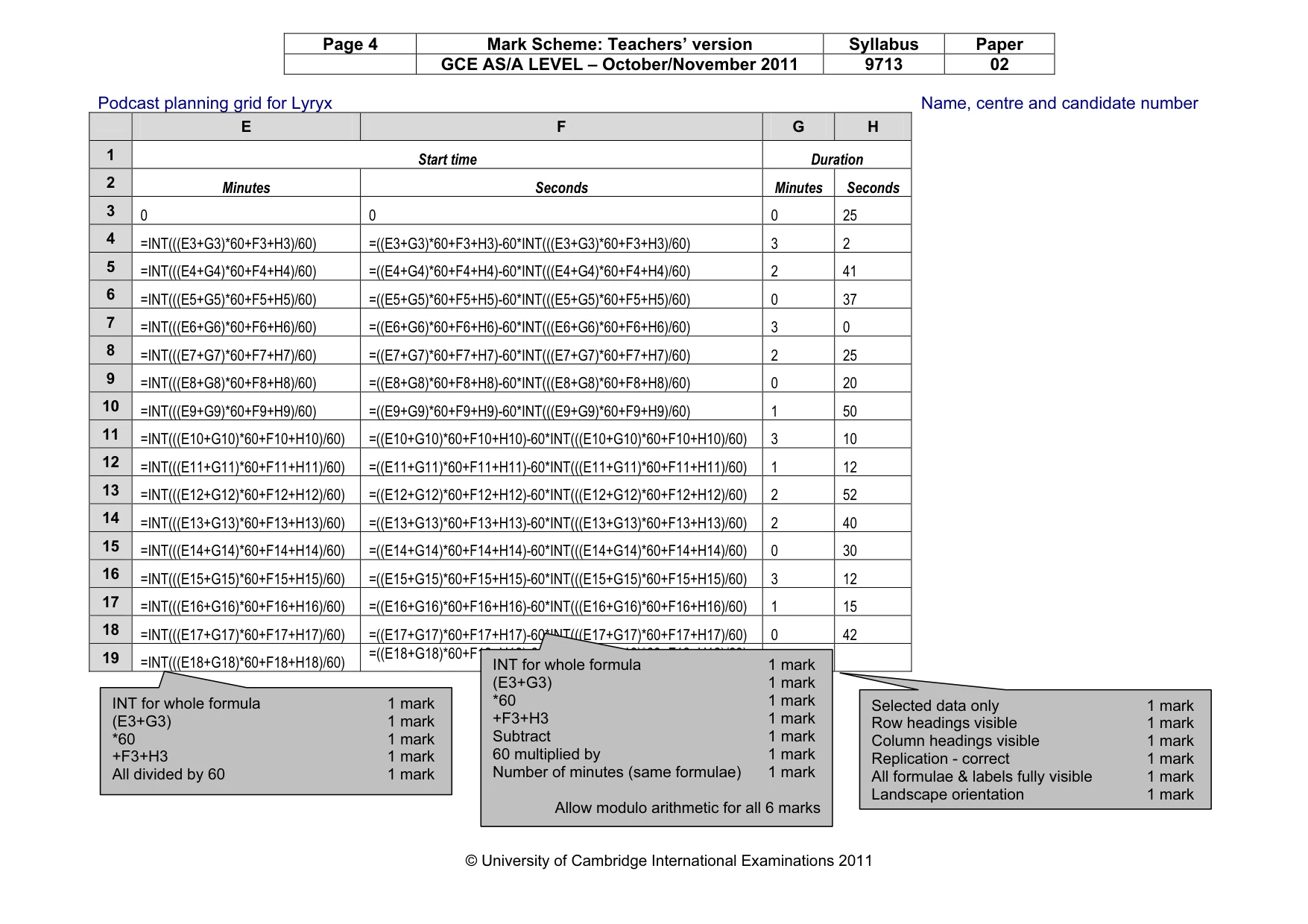
Page 4 Mark Scheme: Teachers’ version Syllabus Paper GCE AS/A LEVEL – October/November 2011 9713 02 © University of Cambridge International Examinations 2011 Podcast planning grid for Lyryx Name, centre and candidate number E F G H 1 Start time Duration 2 Minutes Seconds Minutes Seconds 3 0 0 0 25 4 =INT(((E3+G3)*60+F3+H3)/60) =((E3+G3)*60+F3+H3)-60*INT(((E3+G3)*60+F3+H3)/60) 3 2 5 =INT(((E4+G4)*60+F4+H4)/60) =((E4+G4)*60+F4+H4)-60*INT(((E4+G4)*60+F4+H4)/60) 2 41 6 =INT(((E5+G5)*60+F5+H5)/60) =((E5+G5)*60+F5+H5)-60*INT(((E5+G5)*60+F5+H5)/60) 0 37 7 =INT(((E6+G6)*60+F6+H6)/60) =((E6+G6)*60+F6+H6)-60*INT(((E6+G6)*60+F6+H6)/60) 3 0 8 =INT(((E7+G7)*60+F7+H7)/60) =((E7+G7)*60+F7+H7)-60*INT(((E7+G7)*60+F7+H7)/60) 2 25 9 =INT(((E8+G8)*60+F8+H8)/60) =((E8+G8)*60+F8+H8)-60*INT(((E8+G8)*60+F8+H8)/60) 0 20 10 =INT(((E9+G9)*60+F9+H9)/60) =((E9+G9)*60+F9+H9)-60*INT(((E9+G9)*60+F9+H9)/60) 1 50 11 =INT(((E10+G10)*60+F10+H10)/60) =((E10+G10)*60+F10+H10)-60*INT(((E10+G10)*60+F10+H10)/60) 3 10 12 =INT(((E11+G11)*60+F11+H11)/60) =((E11+G11)*60+F11+H11)-60*INT(((E11+G11)*60+F11+H11)/60) 1 12 13 =INT(((E12+G12)*60+F12+H12)/60) =((E12+G12)*60+F12+H12)-60*INT(((E12+G12)*60+F12+H12)/60) 2 52 14 =INT(((E13+G13)*60+F13+H13)/60) =((E13+G13)*60+F13+H13)-60*INT(((E13+G13)*60+F13+H13)/60) 2 40 15 =INT(((E14+G14)*60+F14+H14)/60) =((E14+G14)*60+F14+H14)-60*INT(((E14+G14)*60+F14+H14)/60) 0 30 16 =INT(((E15+G15)*60+F15+H15)/60) =((E15+G15)*60+F15+H15)-60*INT(((E15+G15)*60+F15+H15)/60) 3 12 17 =INT(((E16+G16)*60+F16+H16)/60) =((E16+G16)*60+F16+H16)-60*INT(((E16+G16)*60+F16+H16)/60) 1 15 18 =INT(((E17+G17)*60+F17+H17)/60) =((E17+G17)*60+F17+H17)-60*INT(((E17+G17)*60+F17+H17)/60) 0 42 19 =INT(((E18+G18)*60+F18+H18)/60) =((E18+G18)*60+F18+H18)-60*INT(((E18+G18)*60+F18+H18)/60) INT for whole formula 1 mark (E3+G3) 1 mark *60 1 mark +F3+H3 1 mark All divided by 60 1 mark Selected data only 1 mark Row headings visible 1 mark Column headings visible 1 mark Replication - correct 1 mark All formulae & labels fully visible 1 mark Landscape orientation 1 mark INT for whole formula 1 mark (E3+G3) 1 mark *60 1 mark +F3+H3 1 mark Subtract 1 mark 60 multiplied by 1 mark Number of minutes (same formulae) 1 mark Allow modulo arithmetic for all 6 marks
Mark scheme, page 5
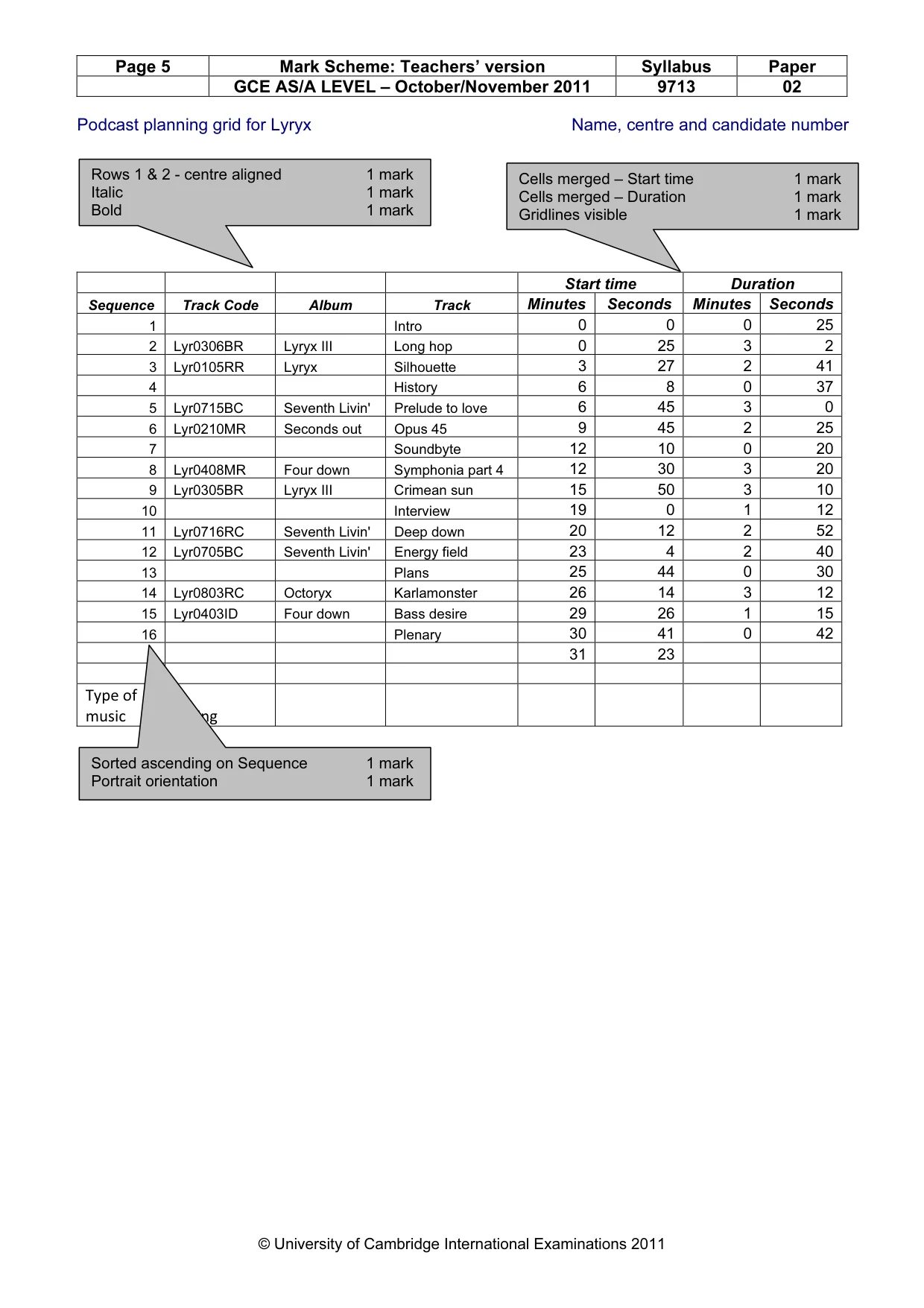
Page 5 Mark Scheme: Teachers’ version Syllabus Paper GCE AS/A LEVEL – October/November 2011 9713 02 © University of Cambridge International Examinations 2011 Podcast planning grid for Lyryx Name, centre and candidate number Start time Duration Sequence Track Code Album Track Minutes Seconds Minutes Seconds 1 Intro 0 0 0 25 2 Lyr0306BR Lyryx III Long hop 0 25 3 2 3 Lyr0105RR Lyryx Silhouette 3 27 2 41 4 History 6 8 0 37 5 Lyr0715BC Seventh Livin' Prelude to love 6 45 3 0 6 Lyr0210MR Seconds out Opus 45 9 45 2 25 7 Soundbyte 12 10 0 20 8 Lyr0408MR Four down Symphonia part 4 12 30 3 20 9 Lyr0305BR Lyryx III Crimean sun 15 50 3 10 10 Interview 19 0 1 12 11 Lyr0716RC Seventh Livin' Deep down 20 12 2 52 12 Lyr0705BC Seventh Livin' Energy field 23 4 2 40 13 Plans 25 44 0 30 14 Lyr0803RC Octoryx Karlamonster 26 14 3 12 15 Lyr0403ID Four down Bass desire 29 26 1 15 16 Plenary 30 41 0 42 31 23 Type of music Rating Cells merged – Start time 1 mark Cells merged – Duration 1 mark Gridlines visible 1 mark Rows 1 & 2 - centre aligned 1 mark Italic 1 mark Bold 1 mark Sorted ascending on Sequence 1 mark Portrait orientation 1 mark
Mark scheme, page 6
Page 6 Mark Scheme: Teachers’ version Syllabus Paper GCE AS/A LEVEL – October/November 2011 9713 02 © University of Cambridge International Examinations 2011 Podcast planning grid for Lyryx – Version 2 Name, centre and candidate number Start time Duration Sequence Track Code Album Track Minutes Seconds Minutes Seconds 1 Intro 0 0 0 25 2 Lyr0306BR Lyryx III Long hop 0 25 3 2 3 Lyr0105RR Lyryx Silhouette 3 27 2 41 4 History 6 8 0 37 5 Lyr0715BC Seventh Livin' Prelude to love 6 45 3 0 6 Lyr0210MR Seconds out Opus 45 9 45 2 25 7 Soundbyte 12 10 0 20 8 Lyr0806MC Octoryx Snow filled heart 12 30 1 50 9 Lyr0305BR Lyryx III Crimean sun 14 20 3 10 10 Interview 17 30 1 12 11 Lyr0716RC Seventh Livin' Deep down 18 42 2 52 12 Lyr0705BC Seventh Livin' Energy field 21 34 2 40 13 Plans 24 14 0 30 14 Lyr0803RC Octoryx Karlamonster 24 44 3 12 15 Lyr0403ID Four down Bass desire 27 56 1 15 16 Plenary 29 11 0 49 30 0 Type of music Rating Plenary adjusted so podcast takes 30 minutes 1 mark Heading changed – check case 1 mark Track changed to Lyr0806MC 1 mark Running time now 1 minute 50 seconds 1 mark Rule works 1 mark
Mark scheme, page 7
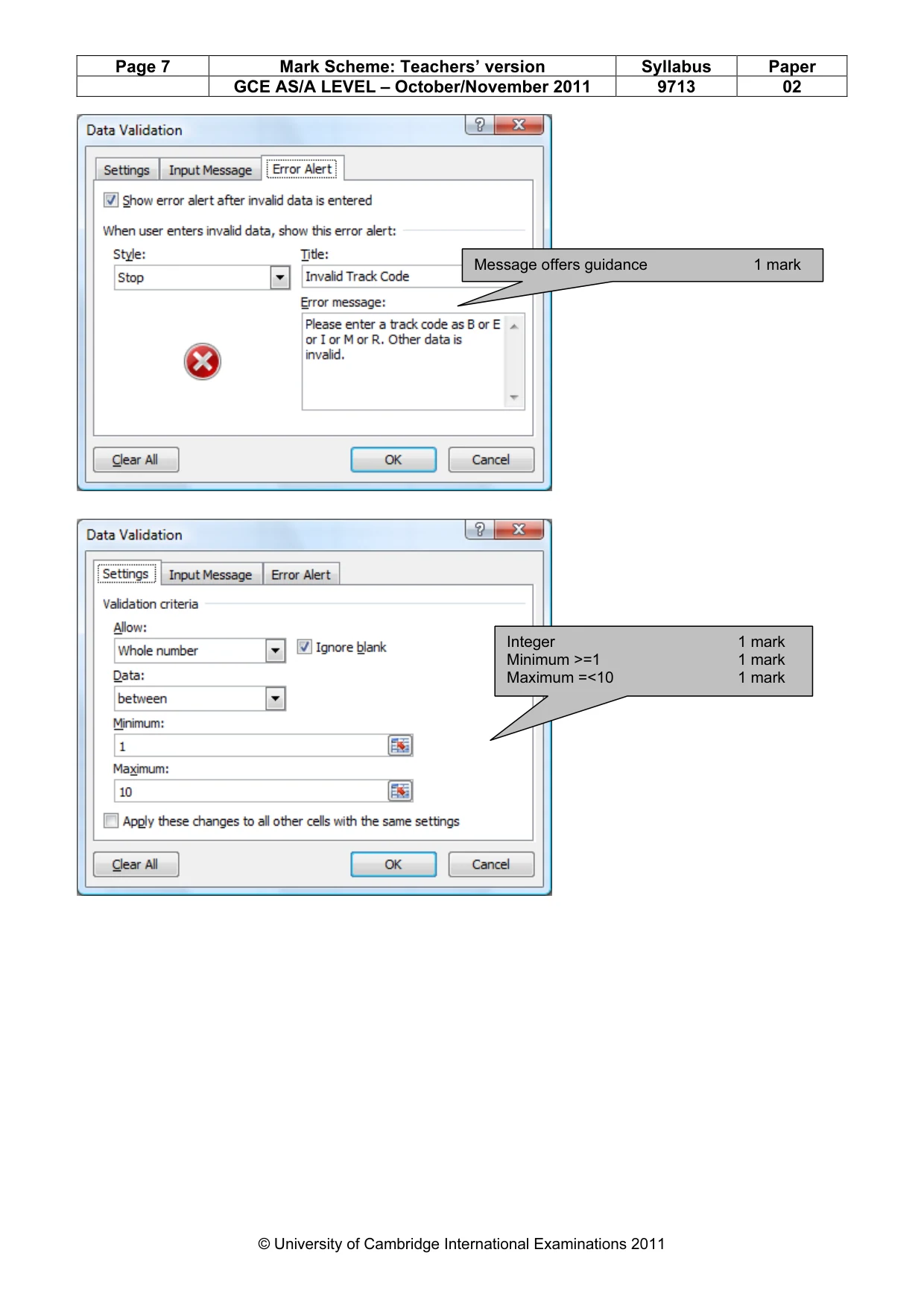
Page 7 Mark Scheme: Teachers’ version Syllabus Paper GCE AS/A LEVEL – October/November 2011 9713 02 © University of Cambridge International Examinations 2011 Message offers guidance 1 mark Integer 1 mark Minimum >=1 1 mark Maximum =<10 1 mark
Mark scheme, page 8
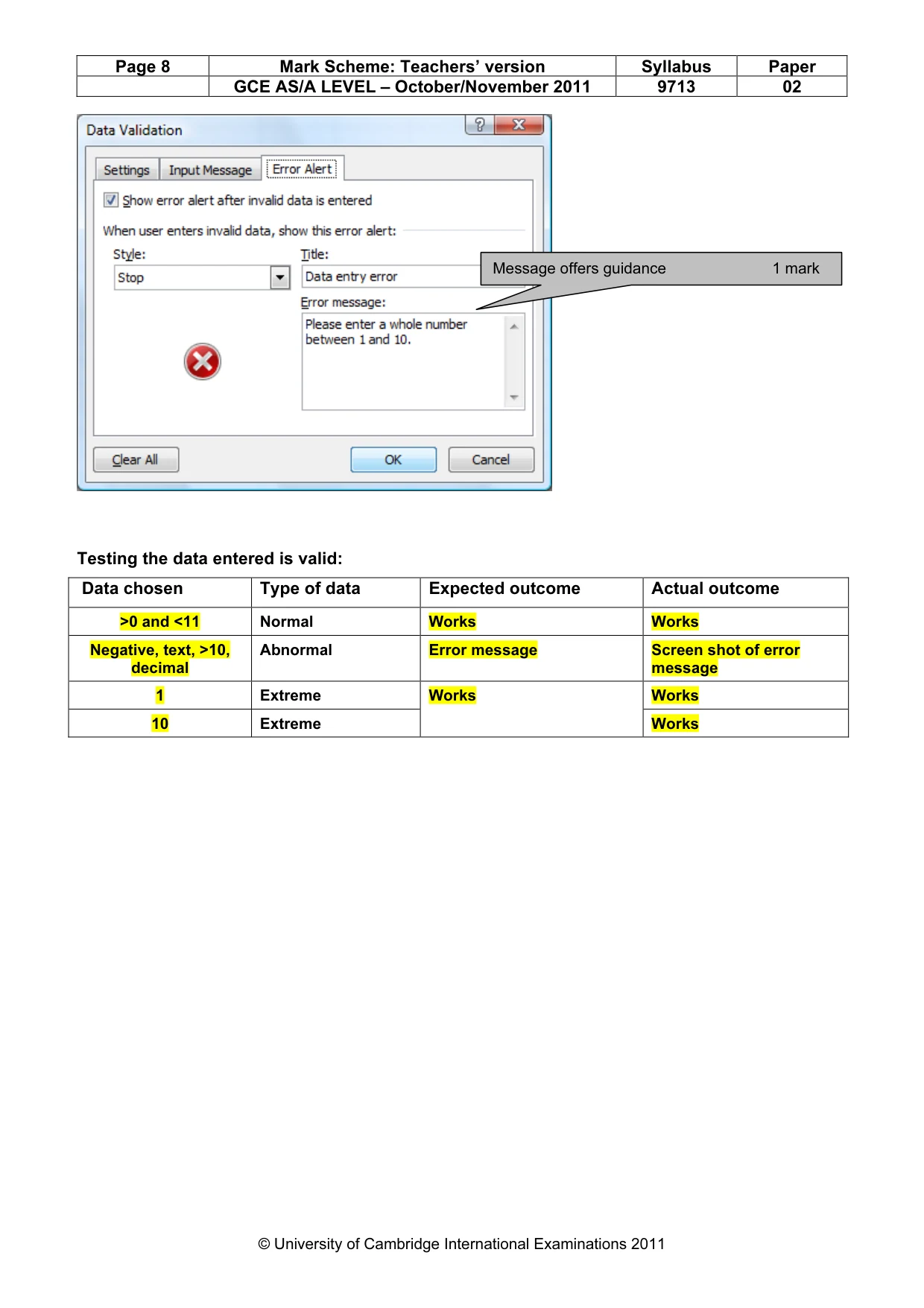
Page 8 Mark Scheme: Teachers’ version Syllabus Paper GCE AS/A LEVEL – October/November 2011 9713 02 © University of Cambridge International Examinations 2011 Testing the data entered is valid: Data chosen Type of data Expected outcome Actual outcome >0 and <11 Normal Works Works Negative, text, >10, decimal Abnormal Error message Screen shot of error message 1 Extreme Works 10 Extreme Works Works Message offers guidance 1 mark
Mark scheme, page 9
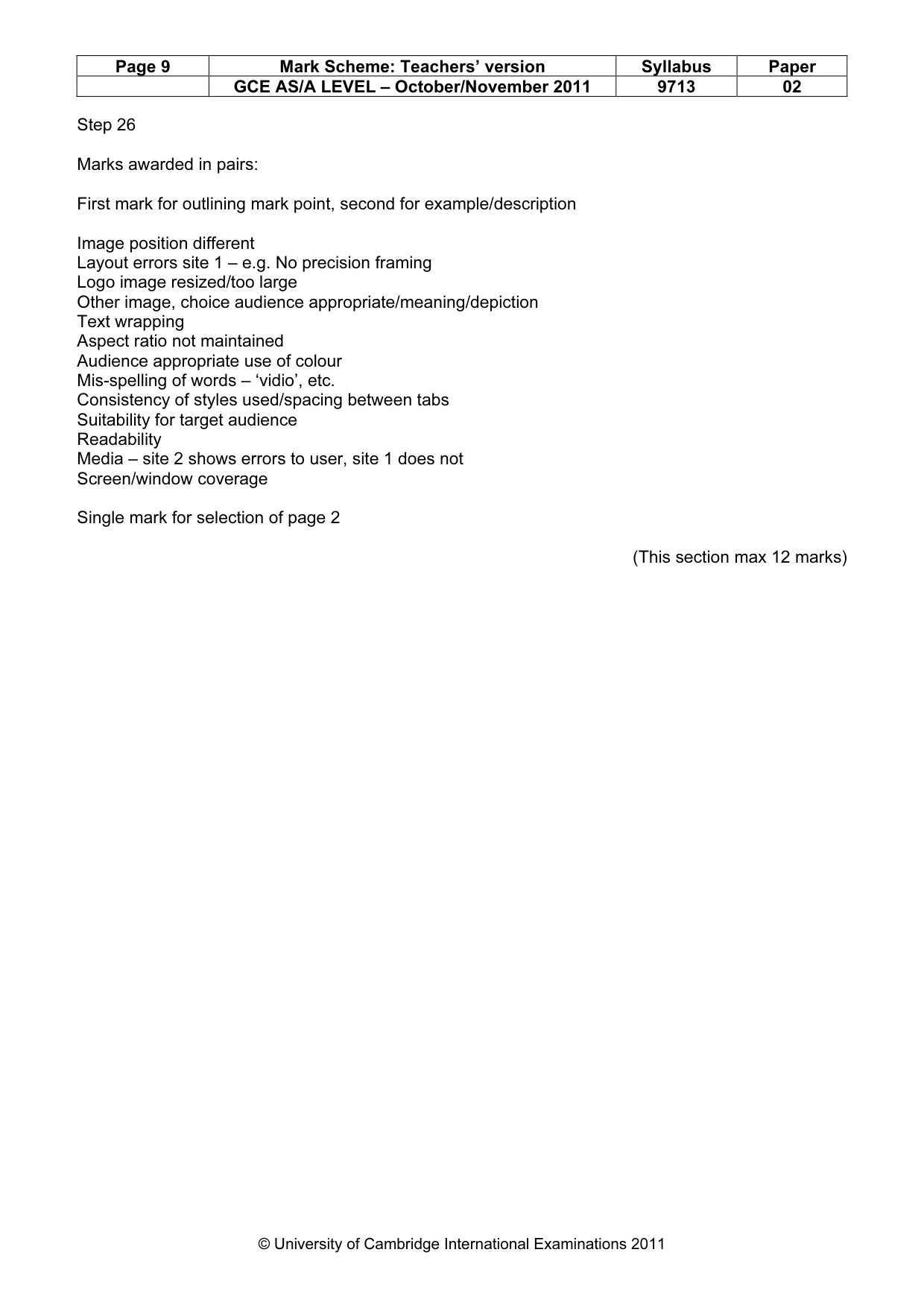
Page 9 Mark Scheme: Teachers’ version Syllabus Paper GCE AS/A LEVEL – October/November 2011 9713 02 © University of Cambridge International Examinations 2011 Step 26 Marks awarded in pairs: First mark for outlining mark point, second for example/description Image position different Layout errors site 1 – e.g. No precision framing Logo image resized/too large Other image, choice audience appropriate/meaning/depiction Text wrapping Aspect ratio not maintained Audience appropriate use of colour Mis-spelling of words – ‘vidio’, etc. Consistency of styles used/spacing between tabs Suitability for target audience Readability Media – site 2 shows errors to user, site 1 does not Screen/window coverage Single mark for selection of page 2 (This section max 12 marks)
Mark scheme, page 10
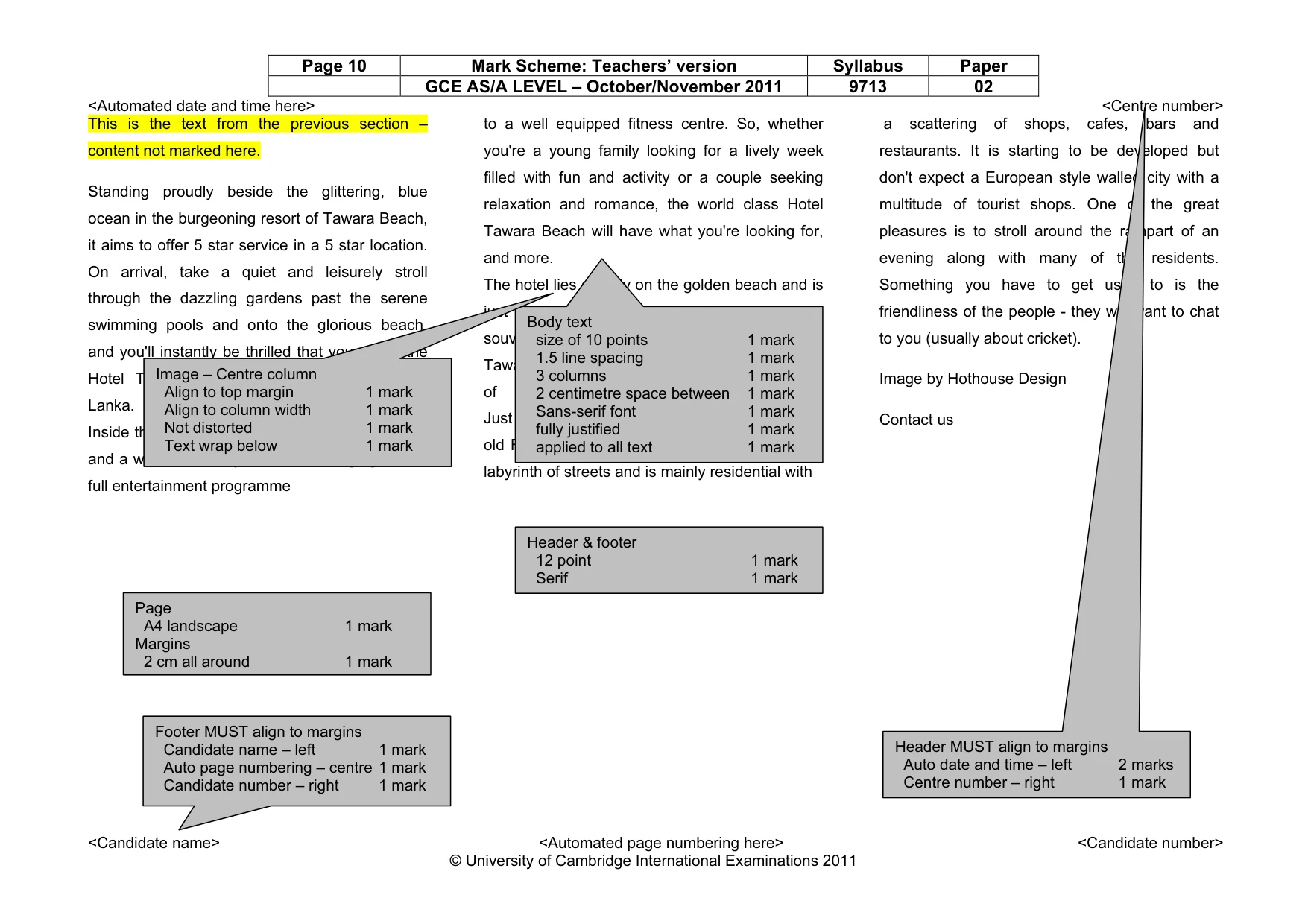
Page 10 Mark Scheme: Teachers’ version Syllabus Paper GCE AS/A LEVEL – October/November 2011 9713 02 <Automated date and time here> <Centre number> <Candidate name> <Automated page numbering here> <Candidate number> © University of Cambridge International Examinations 2011 This is the text from the previous section – content not marked here. Standing proudly beside the glittering, blue ocean in the burgeoning resort of Tawara Beach, it aims to offer 5 star service in a 5 star location. On arrival, take a quiet and leisurely stroll through the dazzling gardens past the serene swimming pools and onto the glorious beach, and you'll instantly be thrilled that you chose the Hotel Tawara Beach for your holiday in Sri Lanka. Inside the hotel you'll discover elegant bedrooms and a wonderful array of facilities ranging from a full entertainment programme to a well equipped fitness centre. So, whether you're a young family looking for a lively week filled with fun and activity or a couple seeking relaxation and romance, the world class Hotel Tawara Beach will have what you're looking for, and more. The hotel lies directly on the golden beach and is just 1.5km from the shopping centre with souvenir shops and a chemist. Venture into Tawara resort centre, 7km away, for a selection of beach bars and restaurants. Just 17km away is Galle, itself built around an old Fort jutting out into the Indian Ocean. It is a labyrinth of streets and is mainly residential with a scattering of shops, cafes, bars and restaurants. It is starting to be developed but don't expect a European style walled city with a multitude of tourist shops. One of the great pleasures is to stroll around the rampart of an evening along with many of the residents. Something you have to get used to is the friendliness of the people - they will want to chat to you (usually about cricket). Image by Hothouse Design Contact us Page A4 landscape 1 mark Margins 2 cm all around 1 mark Body text size of 10 points 1 mark 1.5 line spacing 1 mark 3 columns 1 mark 2 centimetre space between 1 mark Sans-serif font 1 mark fully justified 1 mark applied to all text 1 mark Image – Centre column Align to top margin 1 mark Align to column width 1 mark Not distorted 1 mark Text wrap below 1 mark Header MUST align to margins Auto date and time – left 2 marks Centre number – right 1 mark Footer MUST align to margins Candidate name – left 1 mark Auto page numbering – centre 1 mark Candidate number – right 1 mark Header & footer 12 point 1 mark Serif 1 mark
What you needed in this session
Cambridge’s own grade thresholds for 2011 Oct/Nov, Paper 2 · Variant 1. A higher threshold means an easier paper — the bar moves with how the cohort did.