Cambridge A Level Applied Information and Communication Technology 9713 — 2011 May/June Paper 2 · Variant 1
9713/21/M/J/11 · 120 marks · ≈135 min
The question paper and its mark scheme, free to read here and free to download. This is Cambridge’s own paper, exactly as it was sat.
Question paper8 pages


Mark scheme12 pages
Answers below. Sit the paper first if you are practising.
Paper as text
Question paper, page 1
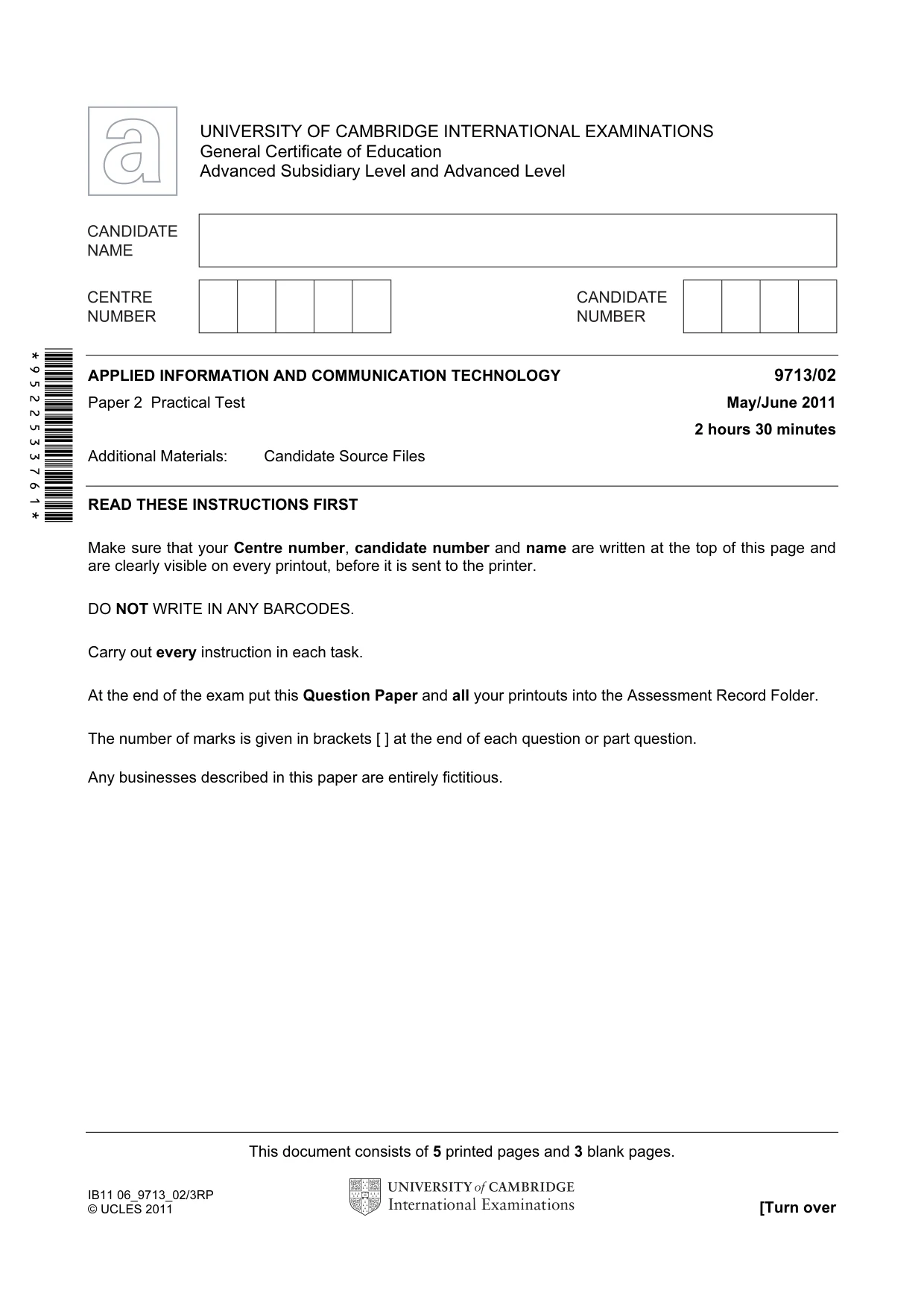
This document consists of 5 printed pages and 3 blank pages. IB11 06_9713_02/3RP © UCLES 2011 [Turn over *9522533761* UNIVERSITY OF CAMBRIDGE INTERNATIONAL EXAMINATIONS General Certificate of Education Advanced Subsidiary Level and Advanced Level APPLIED INFORMATION AND COMMUNICATION TECHNOLOGY 9713/02 Paper 2 Practical Test May/June 2011 2 hours 30 minutes Additional Materials: Candidate Source Files READ THESE INSTRUCTIONS FIRST Make sure that your Centre number, candidate number and name are written at the top of this page and are clearly visible on every printout, before it is sent to the printer. DO NOT WRITE IN ANY BARCODES. Carry out every instruction in each task. At the end of the exam put this Question Paper and all your printouts into the Assessment Record Folder. The number of marks is given in brackets [ ] at the end of each question or part question. Any businesses described in this paper are entirely fictitious.
Question paper, page 2
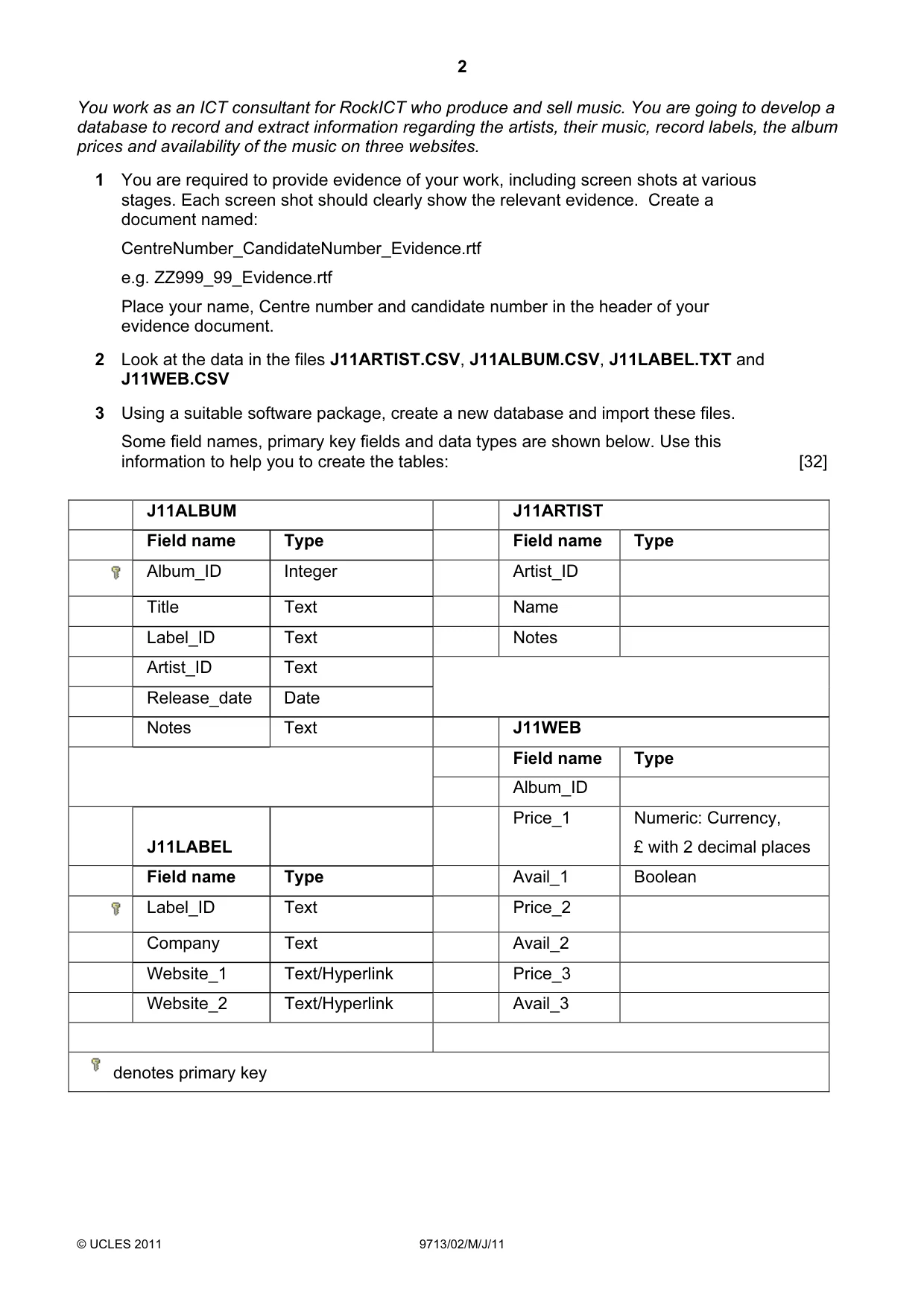
2 © UCLES 2011 9713/02/M/J/11 You work as an ICT consultant for RockICT who produce and sell music. You are going to develop a database to record and extract information regarding the artists, their music, record labels, the album prices and availability of the music on three websites. 1 You are required to provide evidence of your work, including screen shots at various stages. Each screen shot should clearly show the relevant evidence. Create a document named: CentreNumber_CandidateNumber_Evidence.rtf e.g. ZZ999_99_Evidence.rtf Place your name, Centre number and candidate number in the header of your evidence document. 2 Look at the data in the files J11ARTIST.CSV, J11ALBUM.CSV, J11LABEL.TXT and J11WEB.CSV 3 Using a suitable software package, create a new database and import these files. Some field names, primary key fields and data types are shown below. Use this information to help you to create the tables: [32] J11ALBUM J11ARTIST Field name Type Field name Type Album_ID Integer Artist_ID Title Text Name Label_ID Text Notes Artist_ID Text Release_date Date Notes Text J11WEB Field name Type Album_ID J11LABEL Price_1 Numeric: Currency, £ with 2 decimal places Field name Type Avail_1 Boolean Label_ID Text Price_2 Company Text Avail_2 Website_1 Text/Hyperlink Price_3 Website_2 Text/Hyperlink Avail_3 denotes primary key
Question paper, page 3
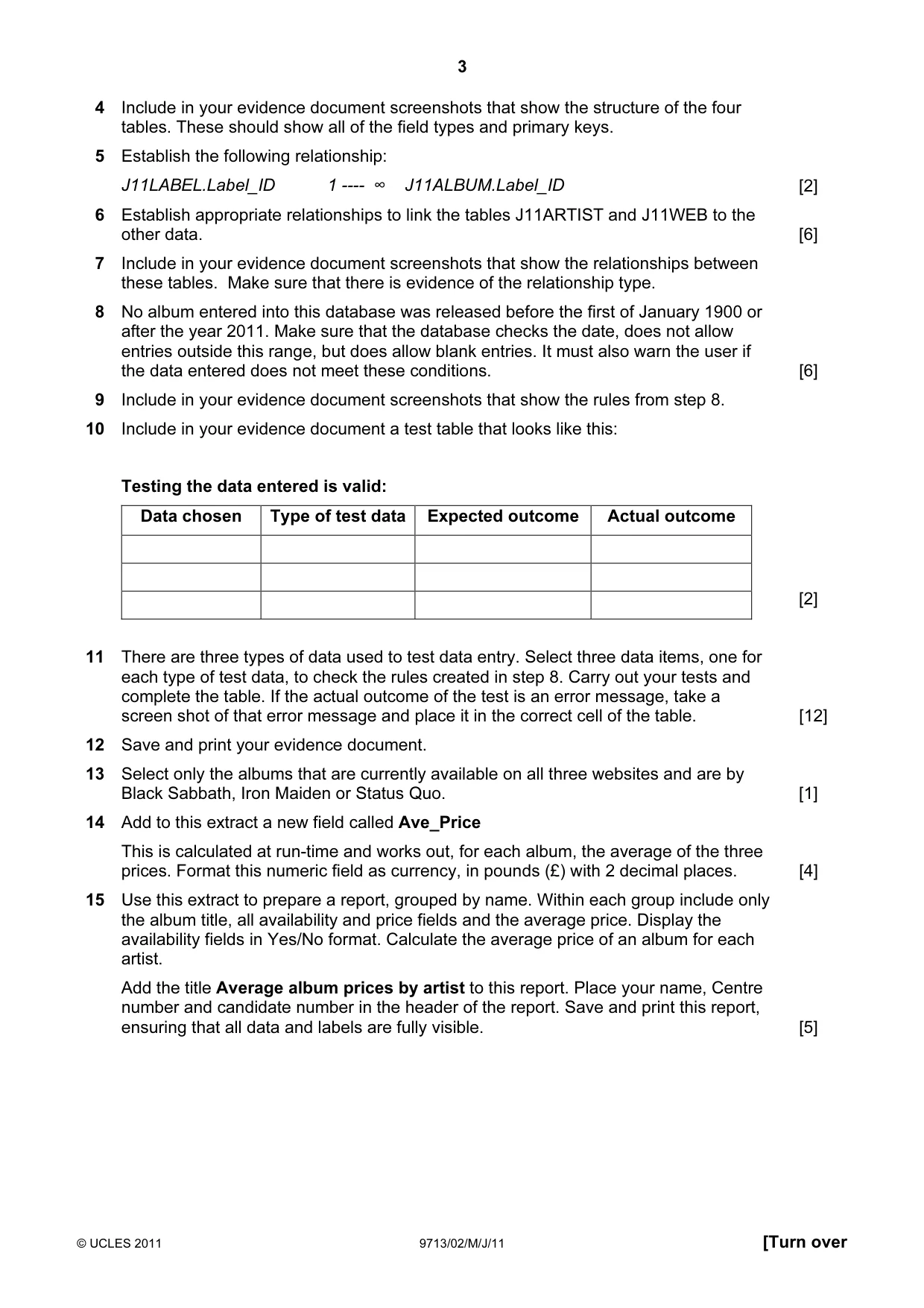
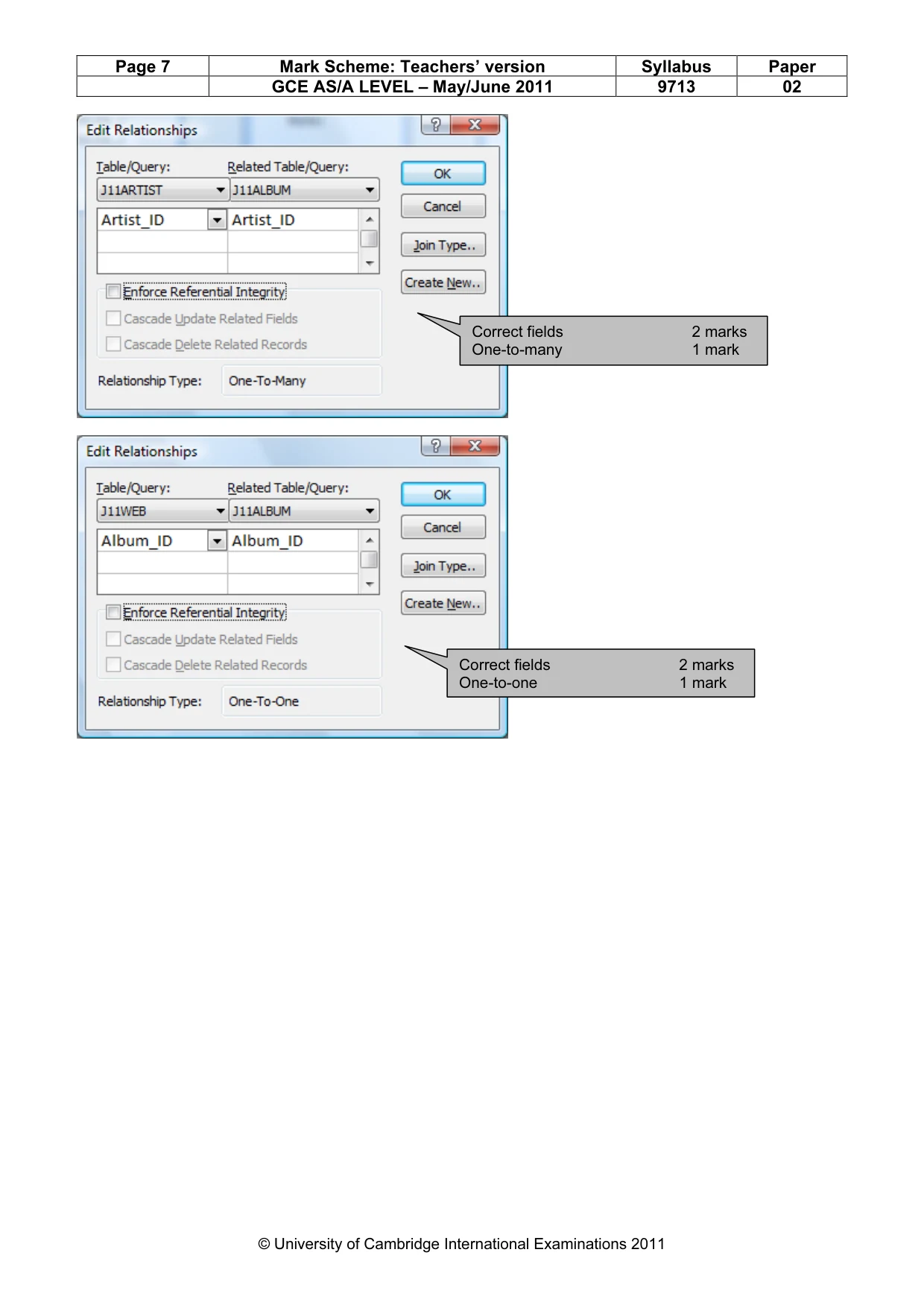
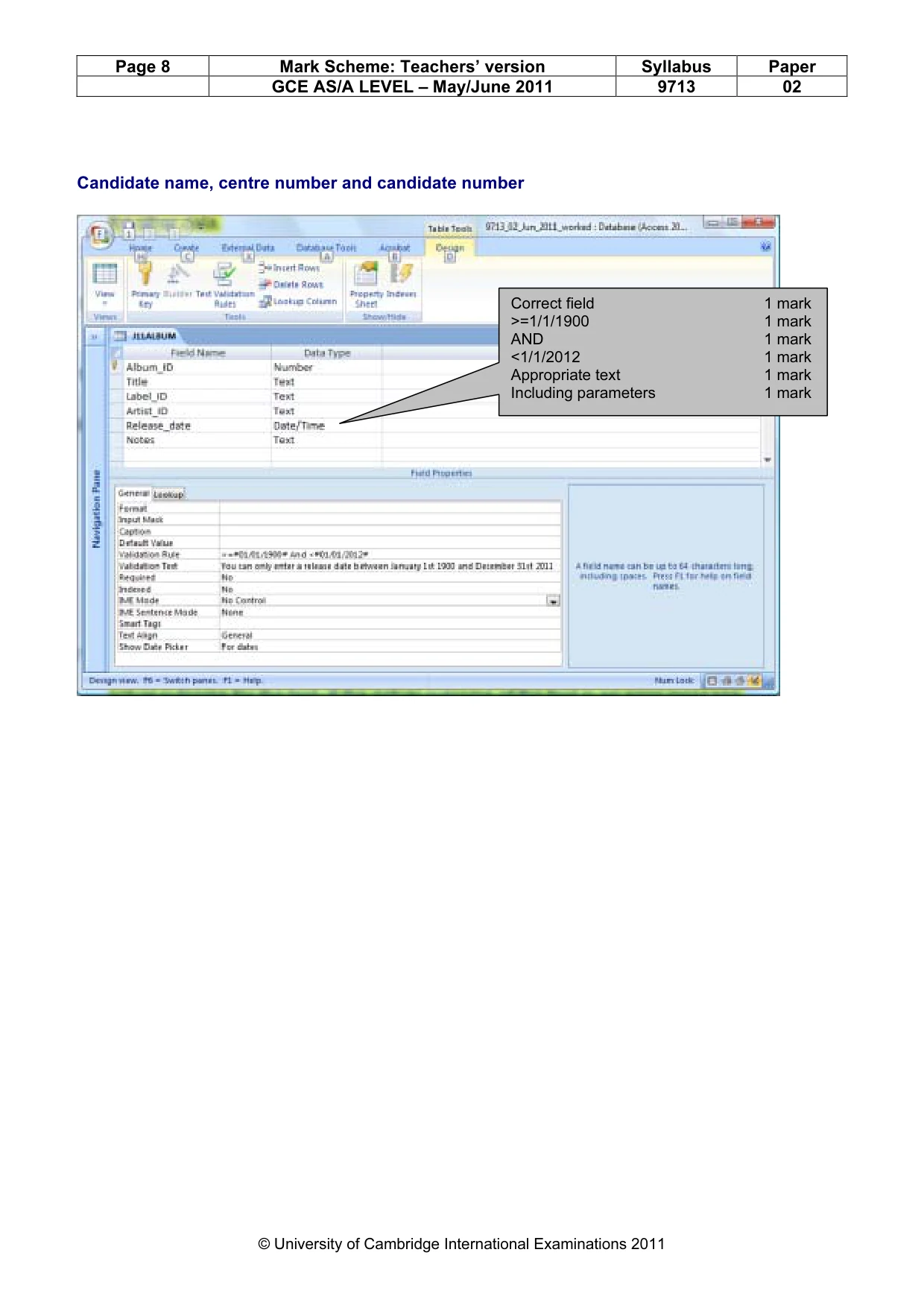
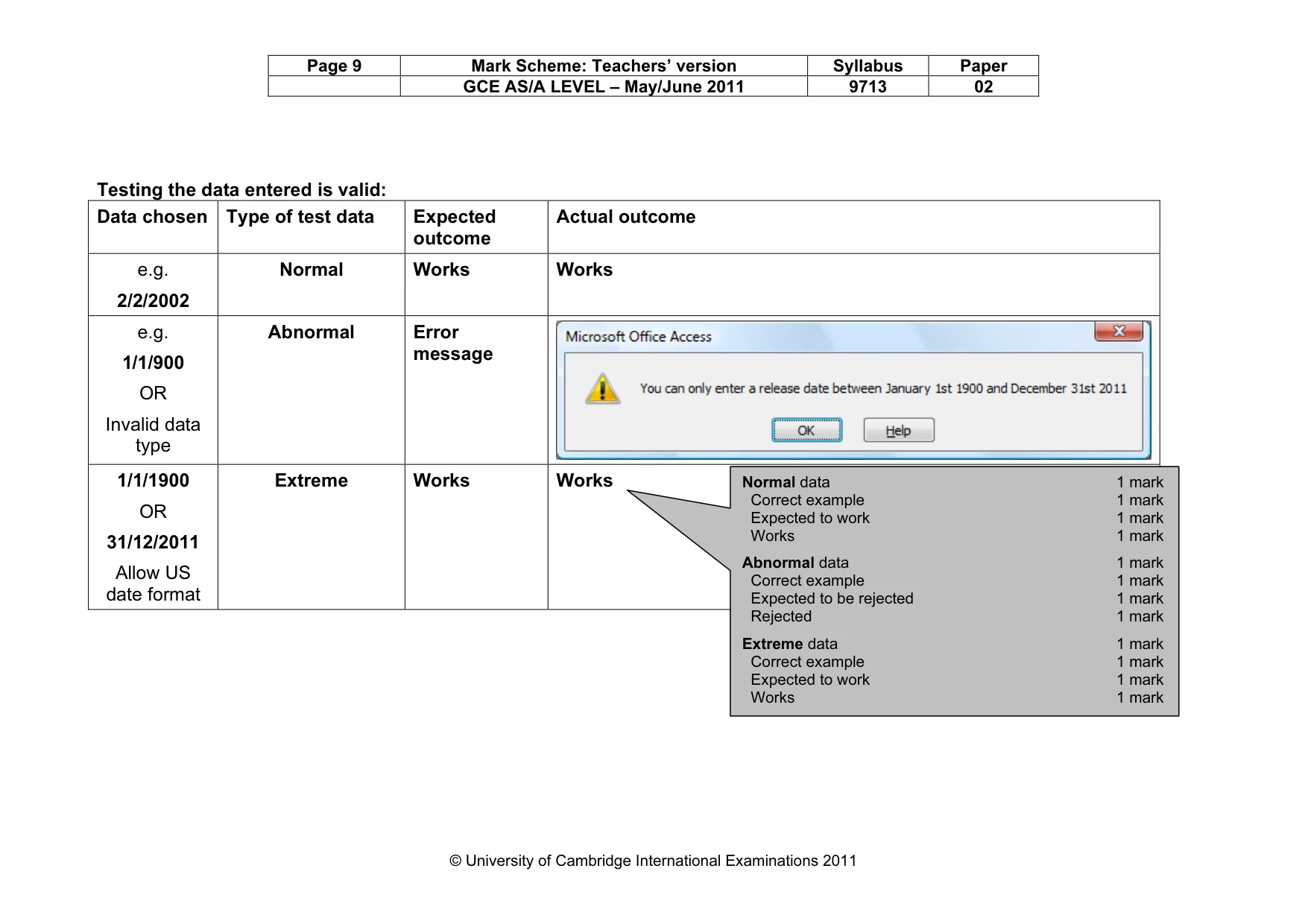
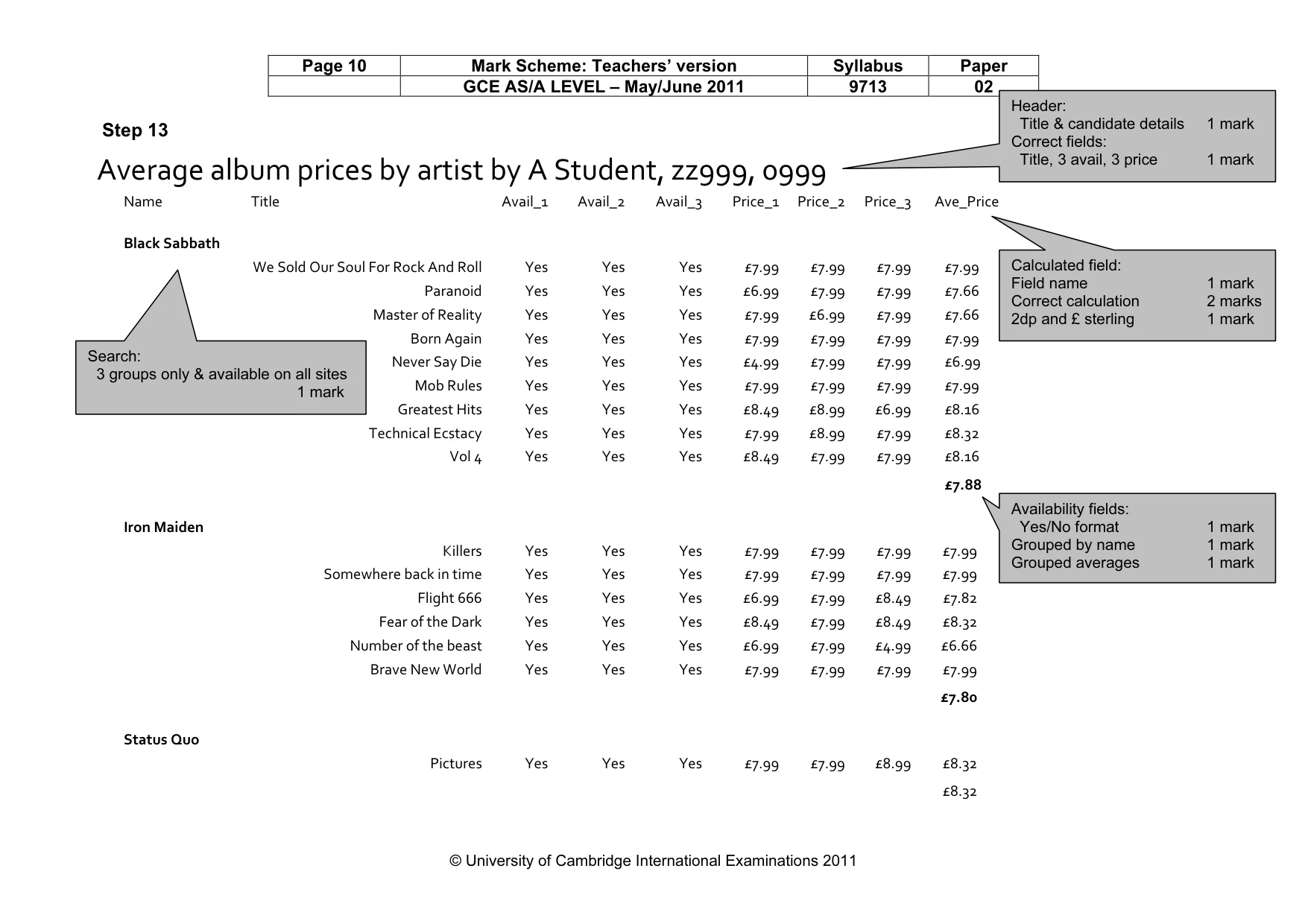
3 © UCLES 2011 9713/02/M/J/11 [Turn over 4 Include in your evidence document screenshots that show the structure of the four tables. These should show all of the field types and primary keys. 5 Establish the following relationship: J11LABEL.Label_ID 1 ---- ∞ J11ALBUM.Label_ID [2] 6 Establish appropriate relationships to link the tables J11ARTIST and J11WEB to the other data. [6] 7 Include in your evidence document screenshots that show the relationships between these tables. Make sure that there is evidence of the relationship type. 8 No album entered into this database was released before the first of January 1900 or after the year 2011. Make sure that the database checks the date, does not allow entries outside this range, but does allow blank entries. It must also warn the user if the data entered does not meet these conditions. [6] 9 Include in your evidence document screenshots that show the rules from step 8. 10 Include in your evidence document a test table that looks like this: Testing the data entered is valid: Data chosen Type of test data Expected outcome Actual outcome [2] 11 There are three types of data used to test data entry. Select three data items, one for each type of test data, to check the rules created in step 8. Carry out your tests and complete the table. If the actual outcome of the test is an error message, take a screen shot of that error message and place it in the correct cell of the table. [12] 12 Save and print your evidence document. 13 Select only the albums that are currently available on all three websites and are by Black Sabbath, Iron Maiden or Status Quo. [1] 14 Add to this extract a new field called Ave_Price This is calculated at run-time and works out, for each album, the average of the three prices. Format this numeric field as currency, in pounds (£) with 2 decimal places. [4] 15 Use this extract to prepare a report, grouped by name. Within each group include only the album title, all availability and price fields and the average price. Display the availability fields in Yes/No format. Calculate the average price of an album for each artist. Add the title Average album prices by artist to this report. Place your name, Centre number and candidate number in the header of the report. Save and print this report, ensuring that all data and labels are fully visible. [5]
Question paper, page 4
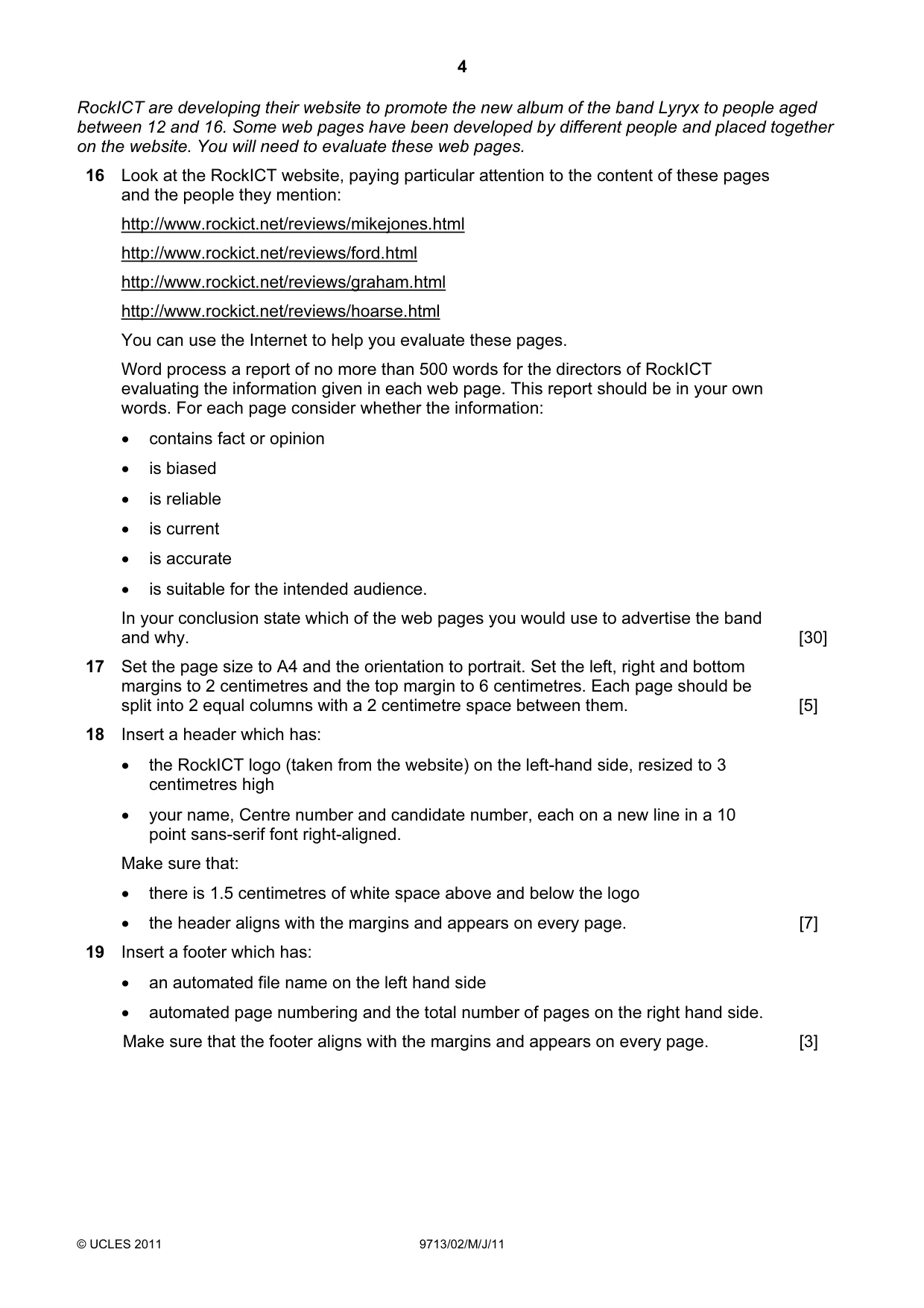
4 © UCLES 2011 9713/02/M/J/11 RockICT are developing their website to promote the new album of the band Lyryx to people aged between 12 and 16. Some web pages have been developed by different people and placed together on the website. You will need to evaluate these web pages. 16 Look at the RockICT website, paying particular attention to the content of these pages and the people they mention: http://www.rockict.net/reviews/mikejones.html http://www.rockict.net/reviews/ford.html http://www.rockict.net/reviews/graham.html http://www.rockict.net/reviews/hoarse.html You can use the Internet to help you evaluate these pages. Word process a report of no more than 500 words for the directors of RockICT evaluating the information given in each web page. This report should be in your own words. For each page consider whether the information: • contains fact or opinion • is biased • is reliable • is current • is accurate • is suitable for the intended audience. In your conclusion state which of the web pages you would use to advertise the band and why. [30] 17 Set the page size to A4 and the orientation to portrait. Set the left, right and bottom margins to 2 centimetres and the top margin to 6 centimetres. Each page should be split into 2 equal columns with a 2 centimetre space between them. [5] 18 Insert a header which has: • the RockICT logo (taken from the website) on the left-hand side, resized to 3 centimetres high • your name, Centre number and candidate number, each on a new line in a 10 point sans-serif font right-aligned. Make sure that: • there is 1.5 centimetres of white space above and below the logo • the header aligns with the margins and appears on every page. [7] 19 Insert a footer which has: • an automated file name on the left hand side • automated page numbering and the total number of pages on the right hand side. Make sure that the footer aligns with the margins and appears on every page. [3]
Question paper, page 5
5 © UCLES 2011 9713/02/M/J/11 20 Set a style for the body text which: • has a font size of 12 points • has double line spacing • has a sans-serif font • is fully justified. Format the body text with the body style. [5] 21 Save and print this report. Write today’s date in the box below. Date
Question paper, page 6
6 © UCLES 2011 9713/02/M/J/11 BLANK PAGE
Question paper, page 7
7 © UCLES 2011 9713/02/M/J/11 BLANK PAGE
Question paper, page 8
8 Permission to reproduce items where third-party owned material protected by copyright is included has been sought and cleared where possible. Every reasonable effort has been made by the publisher (UCLES) to trace copyright holders, but if any items requiring clearance have unwittingly been included, the publisher will be pleased to make amends at the earliest possible opportunity. University of Cambridge International Examinations is part of the Cambridge Assessment Group. Cambridge Assessment is the brand name of University of Cambridge Local Examinations Syndicate (UCLES), which is itself a department of the University of Cambridge. © UCLES 2011 9713/02/M/J/11 BLANK PAGE
Mark scheme, page 1
UNIVERSITY OF CAMBRIDGE INTERNATIONAL EXAMINATIONS GCE Advanced Subsidiary Level and GCE Advanced Level MARK SCHEME for the May/June 2011 question paper for the guidance of teachers 9713 APPLIED ICT 9713/02 Paper 2 (Practical Test A), maximum raw mark 120 This mark scheme is published as an aid to teachers and candidates, to indicate the requirements of the examination. It shows the basis on which Examiners were instructed to award marks. It does not indicate the details of the discussions that took place at an Examiners’ meeting before marking began, which would have considered the acceptability of alternative answers. Mark schemes must be read in conjunction with the question papers and the report on the examination. • Cambridge will not enter into discussions or correspondence in connection with these mark schemes. Cambridge is publishing the mark schemes for the May/June 2011 question papers for most IGCSE, GCE Advanced Level and Advanced Subsidiary Level syllabuses and some Ordinary Level syllabuses.
Mark scheme, page 2
Page 2 Mark Scheme: Teachers’ version Syllabus Paper GCE AS/A LEVEL – May/June 2011 9713 02 © University of Cambridge International Examinations 2011 9713 – June 2011 AS Level – Paper 2 – Practical Test 2011_Jun_9713_02_MS_Final_published.docx No marks to be awarded for any printout not containing the candidate name, candidate number and centre number
Mark scheme, page 3
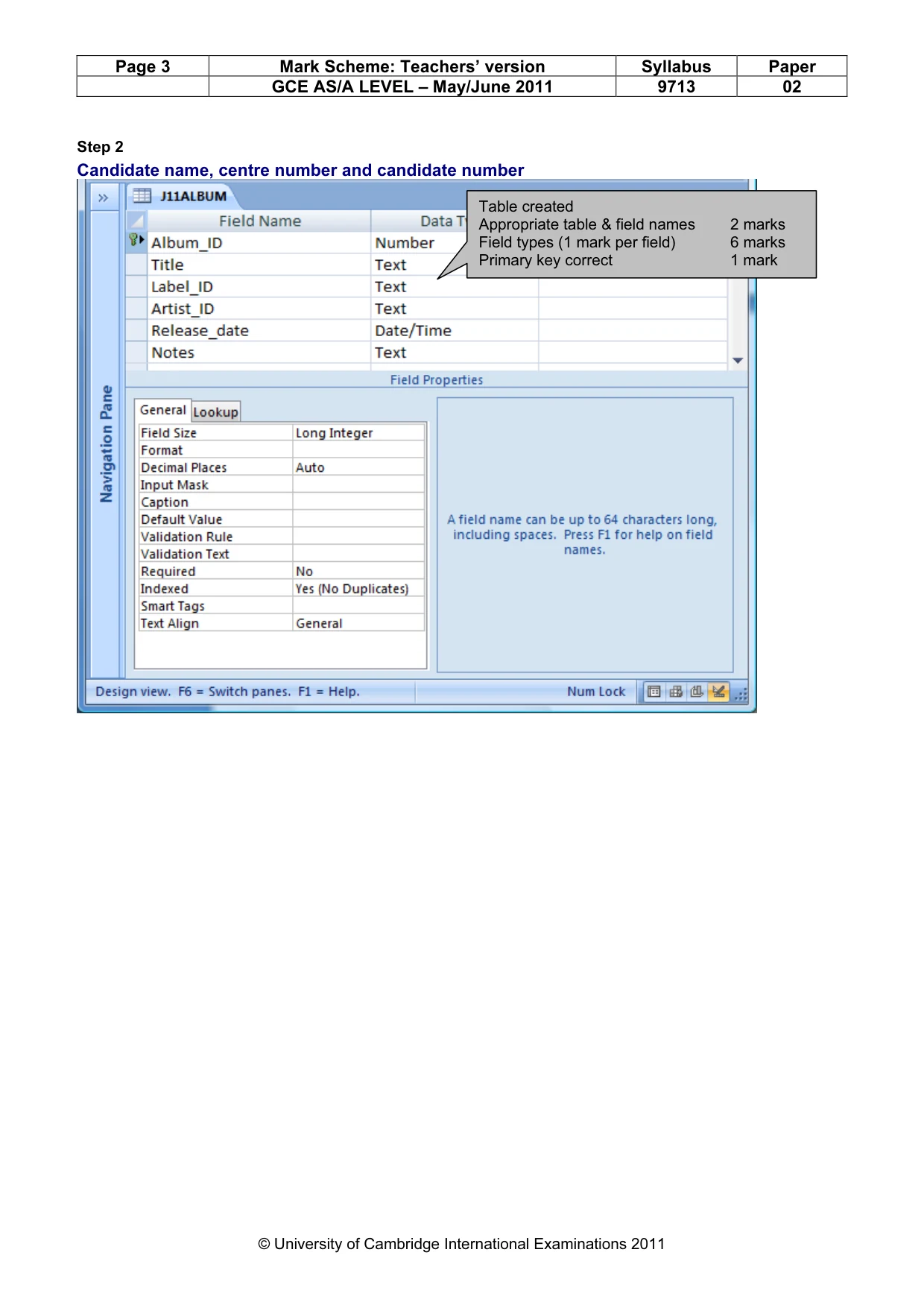
Page 3 Mark Scheme: Teachers’ version Syllabus Paper GCE AS/A LEVEL – May/June 2011 9713 02 © University of Cambridge International Examinations 2011 Step 2 Candidate name, centre number and candidate number Table created Appropriate table & field names 2 marks Field types (1 mark per field) 6 marks Primary key correct 1 mark
Mark scheme, page 4
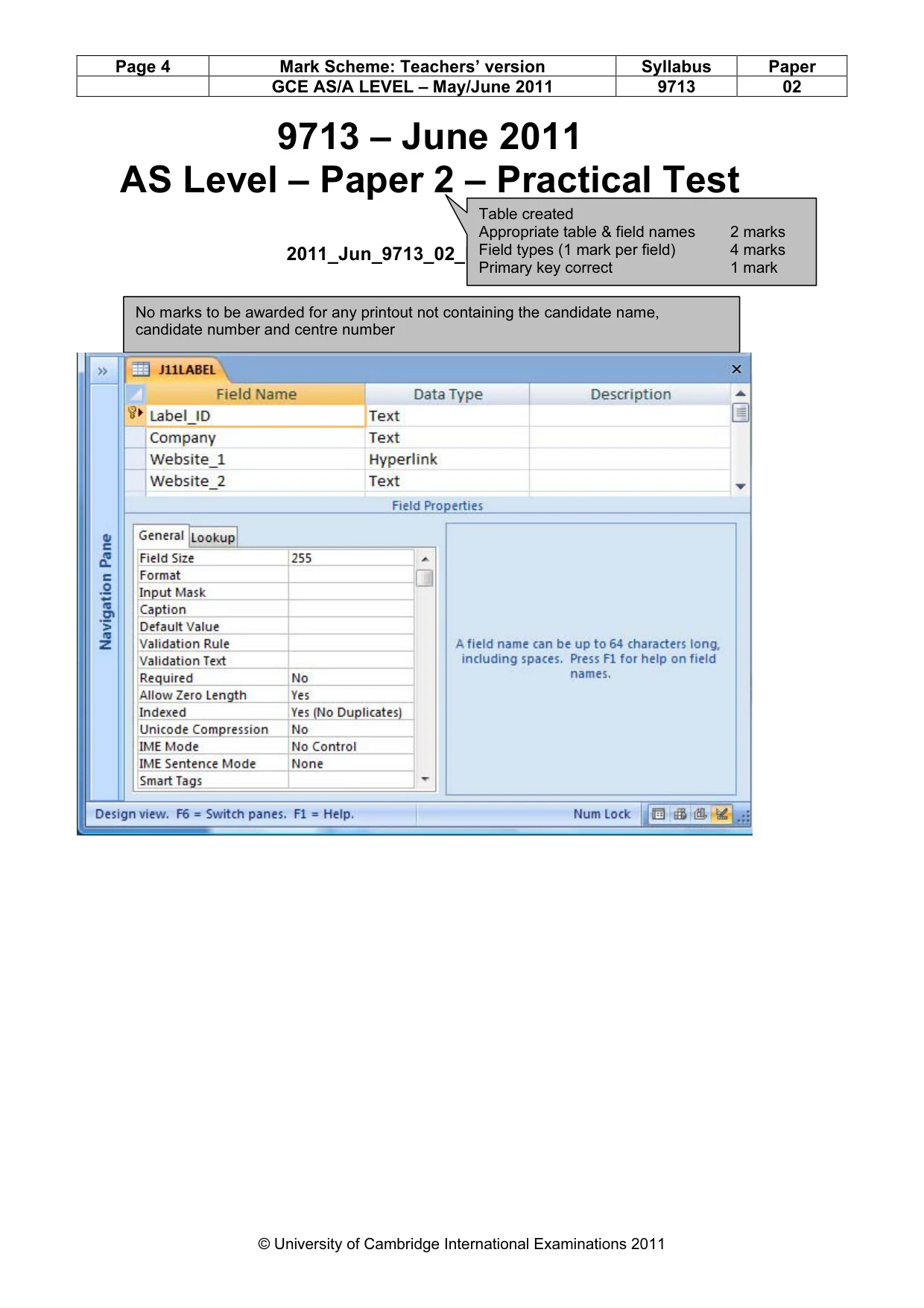
Page 4 Mark Scheme: Teachers’ version Syllabus Paper GCE AS/A LEVEL – May/June 2011 9713 02 © University of Cambridge International Examinations 2011 9713 – June 2011 AS Level – Paper 2 – Practical Test 2011_Jun_9713_02_MS_v9.docx No marks to be awarded for any printout not containing the candidate name, candidate number and centre number Table created Appropriate table & field names 2 marks Field types (1 mark per field) 4 marks Primary key correct 1 mark
Mark scheme, page 5
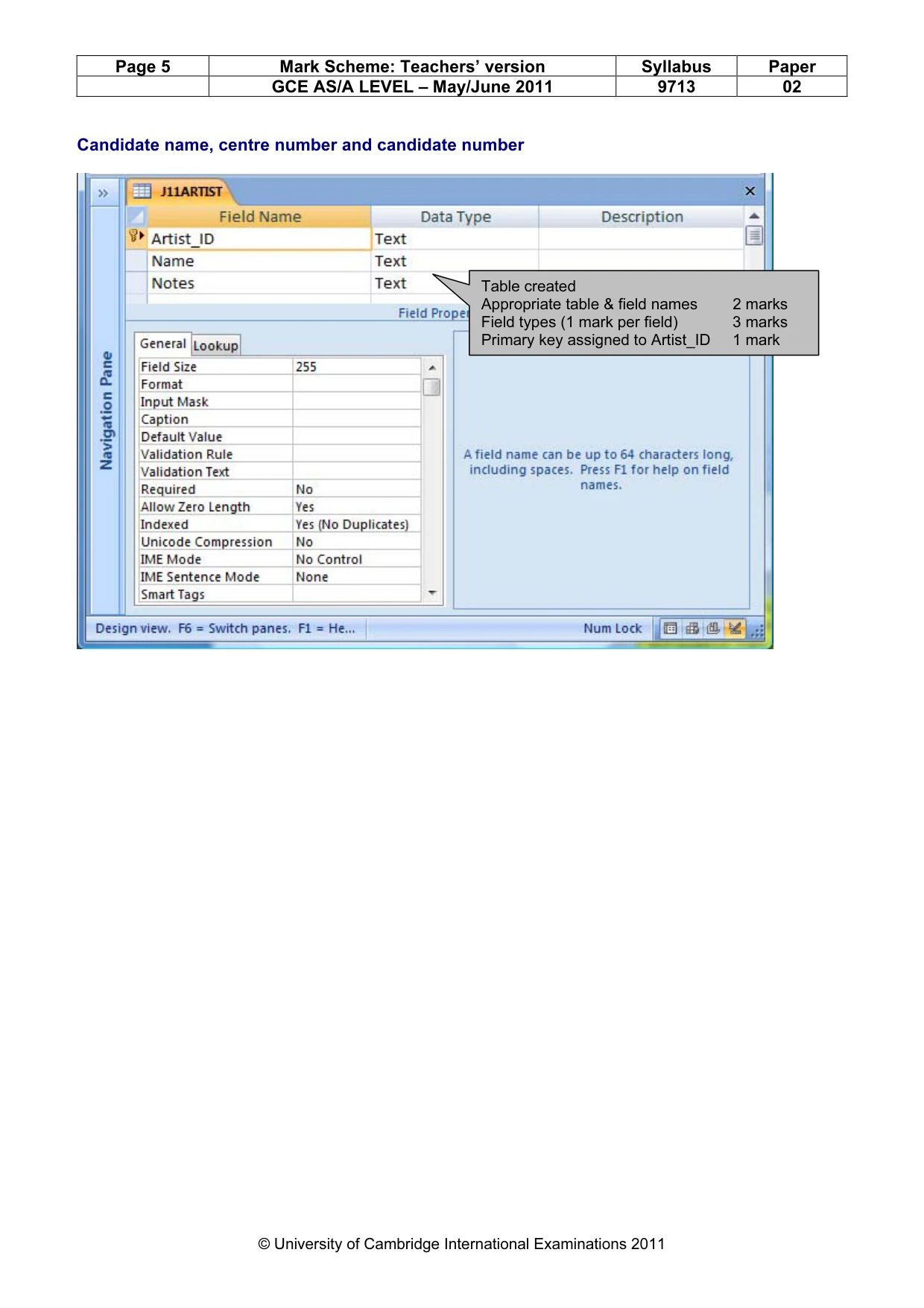
Page 5 Mark Scheme: Teachers’ version Syllabus Paper GCE AS/A LEVEL – May/June 2011 9713 02 © University of Cambridge International Examinations 2011 Candidate name, centre number and candidate number Table created Appropriate table & field names 2 marks Field types (1 mark per field) 3 marks Primary key assigned to Artist_ID 1 mark
Mark scheme, page 6
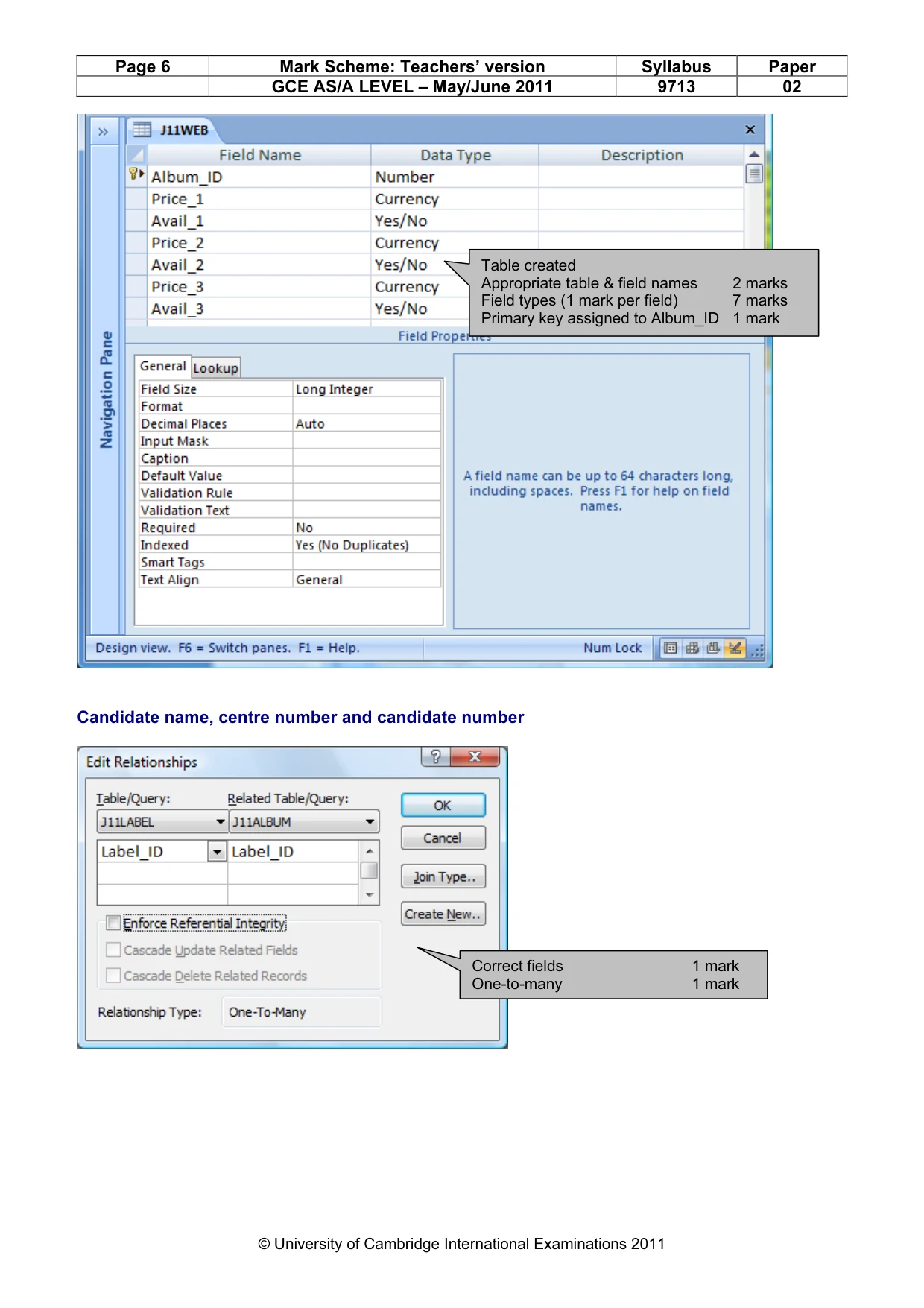
Page 6 Mark Scheme: Teachers’ version Syllabus Paper GCE AS/A LEVEL – May/June 2011 9713 02 © University of Cambridge International Examinations 2011 Candidate name, centre number and candidate number Table created Appropriate table & field names 2 marks Field types (1 mark per field) 7 marks Primary key assigned to Album_ID 1 mark Correct fields 1 mark One-to-many 1 mark
Mark scheme, page 7
Page 7 Mark Scheme: Teachers’ version Syllabus Paper GCE AS/A LEVEL – May/June 2011 9713 02 © University of Cambridge International Examinations 2011 Correct fields 2 marks One-to-many 1 mark Correct fields 2 marks One-to-one 1 mark
Mark scheme, page 8
Page 8 Mark Scheme: Teachers’ version Syllabus Paper GCE AS/A LEVEL – May/June 2011 9713 02 © University of Cambridge International Examinations 2011 Candidate name, centre number and candidate number Correct field 1 mark >=1/1/1900 1 mark AND 1 mark <1/1/2012 1 mark Appropriate text 1 mark Including parameters 1 mark
Mark scheme, page 9
Page 9 Mark Scheme: Teachers’ version Syllabus Paper GCE AS/A LEVEL – May/June 2011 9713 02 © University of Cambridge International Examinations 2011 Testing the data entered is valid: Data chosen Type of test data Expected outcome Actual outcome e.g. 2/2/2002 Normal Works Works e.g. 1/1/900 OR Invalid data type Abnormal Error message 1/1/1900 OR 31/12/2011 Allow US date format Extreme Works Works Normal data 1 mark Correct example 1 mark Expected to work 1 mark Works 1 mark Abnormal data 1 mark Correct example 1 mark Expected to be rejected 1 mark Rejected 1 mark Extreme data 1 mark Correct example 1 mark Expected to work 1 mark Works 1 mark
Mark scheme, page 10
Page 10 Mark Scheme: Teachers’ version Syllabus Paper GCE AS/A LEVEL – May/June 2011 9713 02 © University of Cambridge International Examinations 2011 Step 13 Average album prices by artist by A Student, zz999, 0999 Name Title Avail_1 Avail_2 Avail_3 Price_1 Price_2 Price_3 Ave_Price Black Sabbath We Sold Our Soul For Rock And Roll Yes Yes Yes £7.99 £7.99 £7.99 £7.99 Paranoid Yes Yes Yes £6.99 £7.99 £7.99 £7.66 Master of Reality Yes Yes Yes £7.99 £6.99 £7.99 £7.66 Born Again Yes Yes Yes £7.99 £7.99 £7.99 £7.99 Never Say Die Yes Yes Yes £4.99 £7.99 £7.99 £6.99 Mob Rules Yes Yes Yes £7.99 £7.99 £7.99 £7.99 Greatest Hits Yes Yes Yes £8.49 £8.99 £6.99 £8.16 Technical Ecstacy Yes Yes Yes £7.99 £8.99 £7.99 £8.32 Vol 4 Yes Yes Yes £8.49 £7.99 £7.99 £8.16 £7.88 Iron Maiden Killers Yes Yes Yes £7.99 £7.99 £7.99 £7.99 Somewhere back in time Yes Yes Yes £7.99 £7.99 £7.99 £7.99 Flight 666 Yes Yes Yes £6.99 £7.99 £8.49 £7.82 Fear of the Dark Yes Yes Yes £8.49 £7.99 £8.49 £8.32 Number of the beast Yes Yes Yes £6.99 £7.99 £4.99 £6.66 Brave New World Yes Yes Yes £7.99 £7.99 £7.99 £7.99 £7.80 Status Quo Pictures Yes Yes Yes £7.99 £7.99 £8.99 £8.32 £8.32 Calculated field: Field name 1 mark Correct calculation 2 marks 2dp and £ sterling 1 mark Availability fields: Yes/No format 1 mark Grouped by name 1 mark Grouped averages 1 mark Header: Title & candidate details 1 mark Correct fields: Title, 3 avail, 3 price 1 mark Search: 3 groups only & available on all sites 1 mark
Mark scheme, page 11
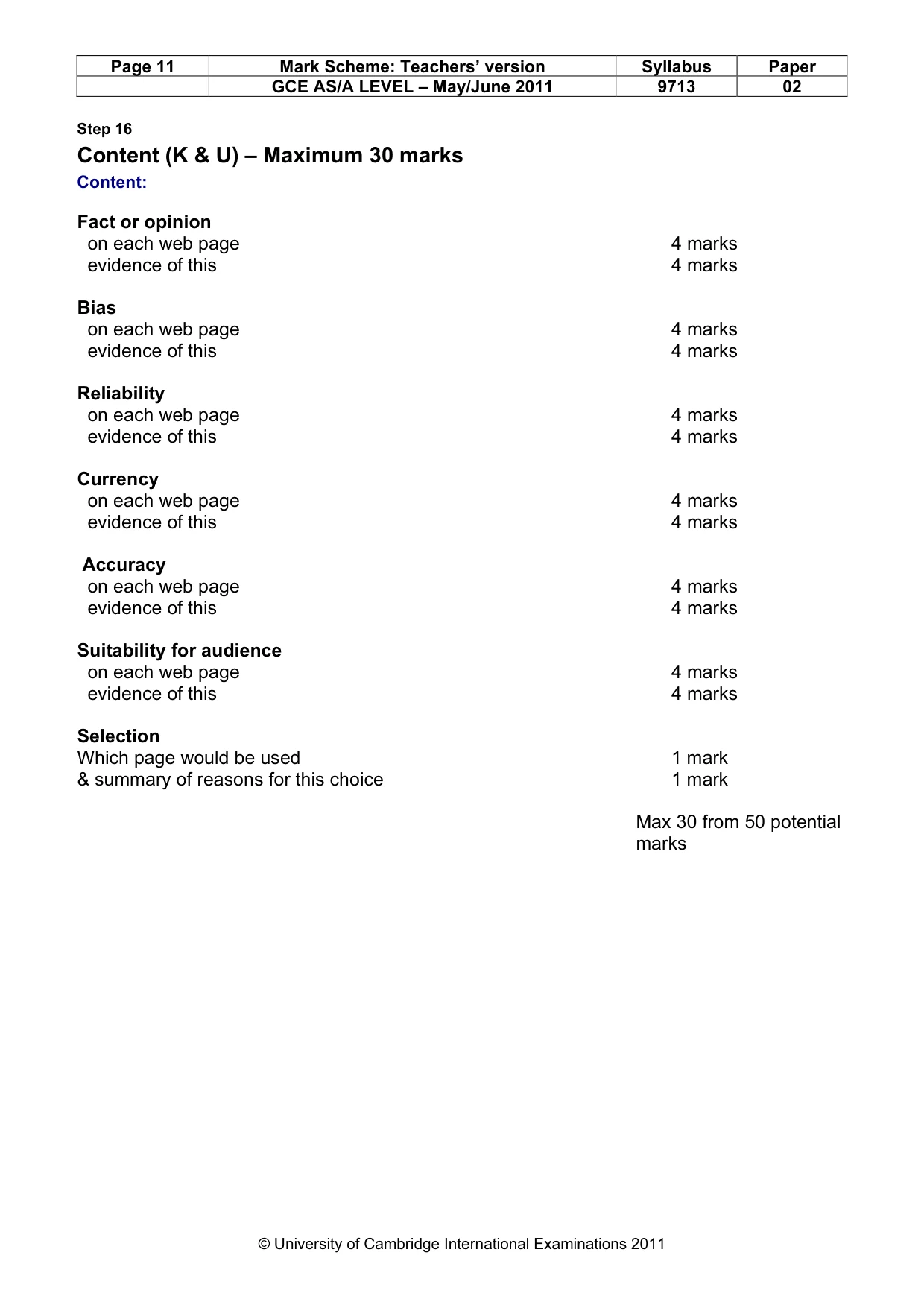
Page 11 Mark Scheme: Teachers’ version Syllabus Paper GCE AS/A LEVEL – May/June 2011 9713 02 © University of Cambridge International Examinations 2011 Step 16 Content (K & U) – Maximum 30 marks Content: Fact or opinion on each web page 4 marks evidence of this 4 marks Bias on each web page 4 marks evidence of this 4 marks Reliability on each web page 4 marks evidence of this 4 marks Currency on each web page 4 marks evidence of this 4 marks Accuracy on each web page 4 marks evidence of this 4 marks Suitability for audience on each web page 4 marks evidence of this 4 marks Selection Which page would be used 1 mark & summary of reasons for this choice 1 mark Max 30 from 50 potential marks
Mark scheme, page 12
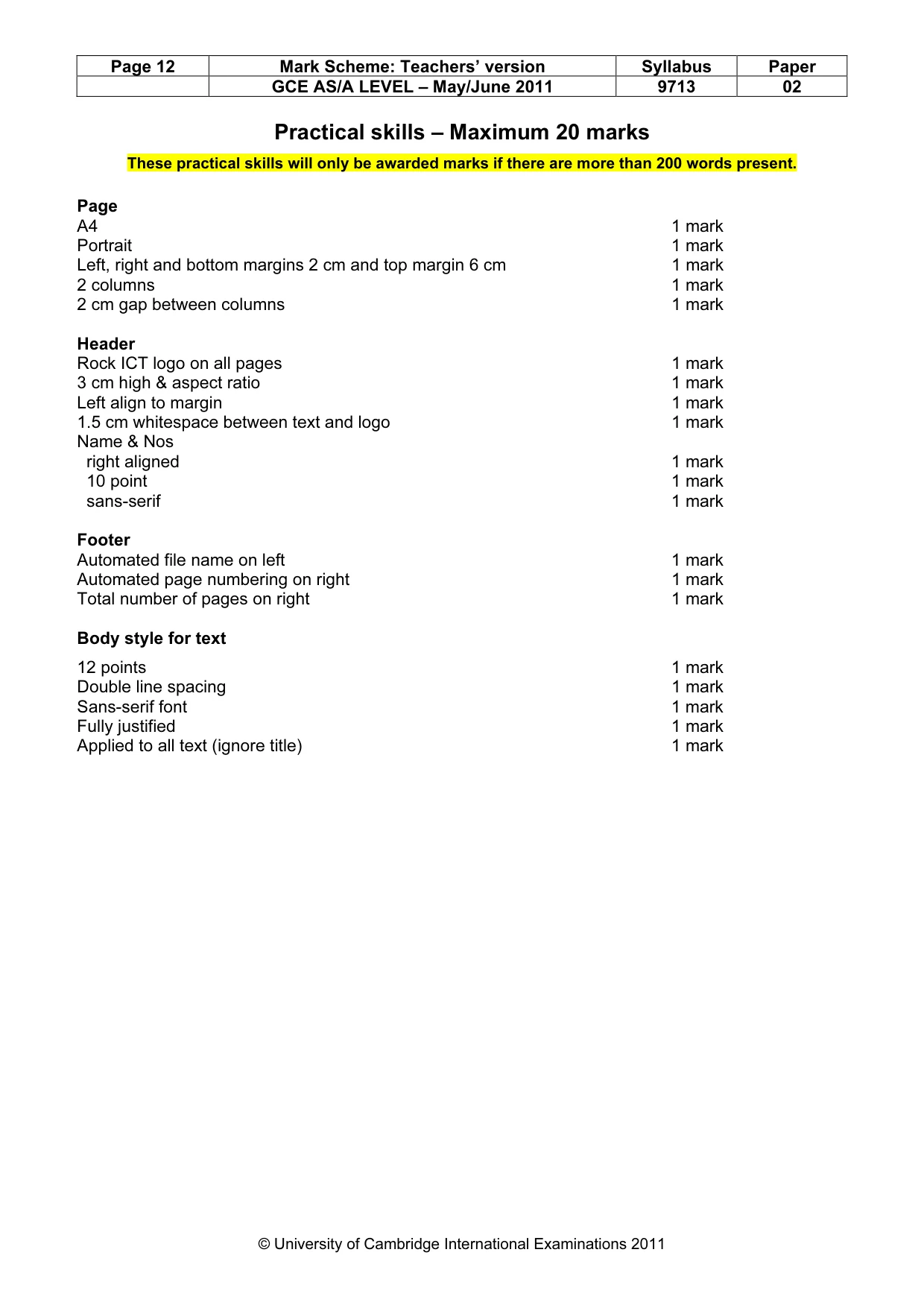
Page 12 Mark Scheme: Teachers’ version Syllabus Paper GCE AS/A LEVEL – May/June 2011 9713 02 © University of Cambridge International Examinations 2011 Practical skills – Maximum 20 marks These practical skills will only be awarded marks if there are more than 200 words present. Page A4 1 mark Portrait 1 mark Left, right and bottom margins 2 cm and top margin 6 cm 1 mark 2 columns 1 mark 2 cm gap between columns 1 mark Header Rock ICT logo on all pages 1 mark 3 cm high & aspect ratio 1 mark Left align to margin 1 mark 1.5 cm whitespace between text and logo 1 mark Name & Nos right aligned 1 mark 10 point 1 mark sans-serif 1 mark Footer Automated file name on left 1 mark Automated page numbering on right 1 mark Total number of pages on right 1 mark Body style for text 12 points 1 mark Double line spacing 1 mark Sans-serif font 1 mark Fully justified 1 mark Applied to all text (ignore title) 1 mark
What you needed in this session
Cambridge’s own grade thresholds for 2011 May/June, Paper 2 · Variant 1. A higher threshold means an easier paper — the bar moves with how the cohort did.