Cambridge A Level Applied Information and Communication Technology 9713 — 2009 Oct/Nov Paper 2 · Variant 1
9713/21/O/N/09 · 120 marks · ≈135 min
The question paper and its mark scheme, free to read here and free to download. This is Cambridge’s own paper, exactly as it was sat.
Question paper4 pages
Mark scheme12 pages
Answers below. Sit the paper first if you are practising.
Paper as text
Question paper, page 1
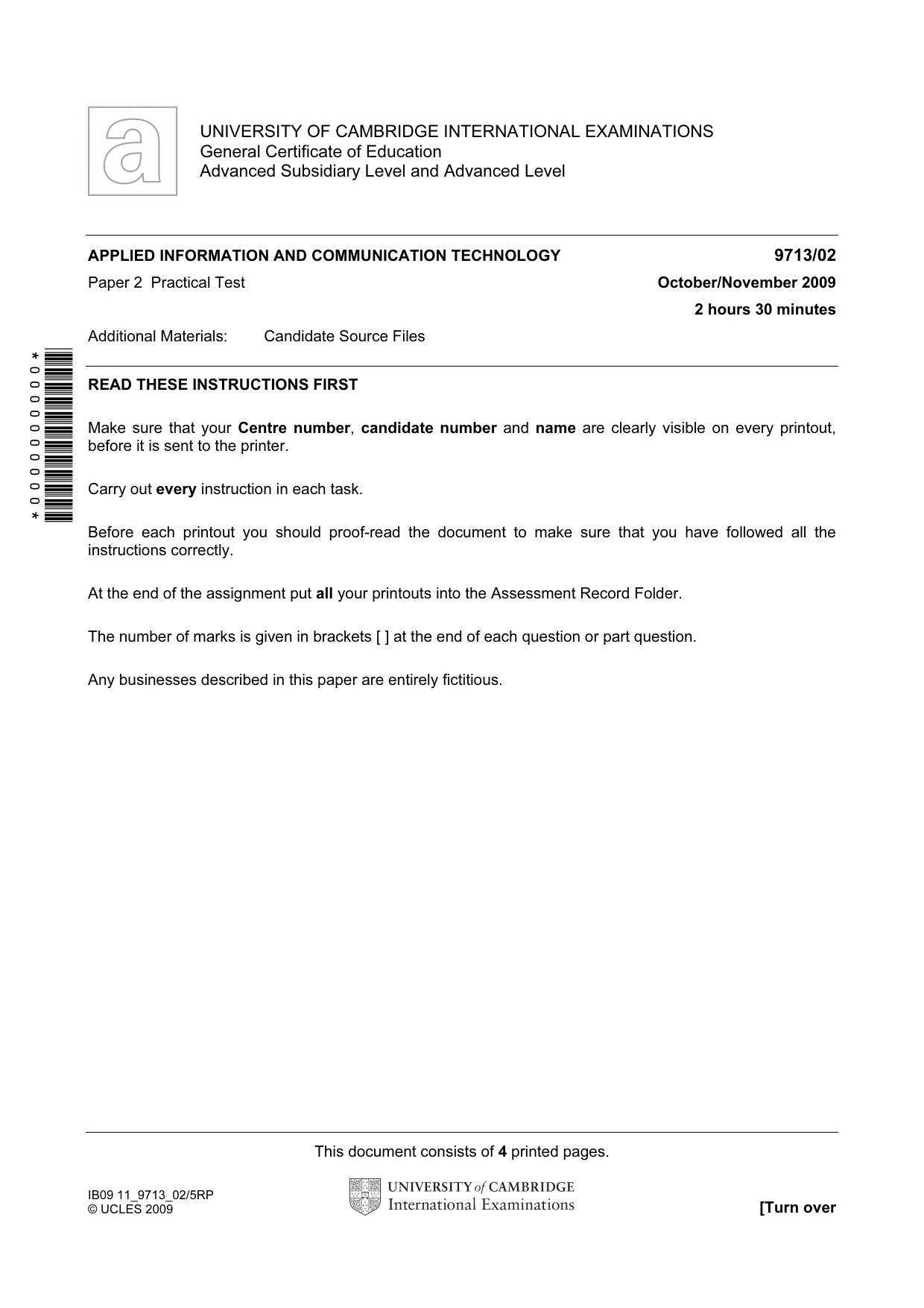
This document consists of 4 printed pages. IB09 11_9713_02/5RP © UCLES 2009 [Turn over *0000000000* UNIVERSITY OF CAMBRIDGE INTERNATIONAL EXAMINATIONS General Certificate of Education Advanced Subsidiary Level and Advanced Level APPLIED INFORMATION AND COMMUNICATION TECHNOLOGY 9713/02 Paper 2 Practical Test October/November 2009 2 hours 30 minutes Additional Materials: Candidate Source Files READ THESE INSTRUCTIONS FIRST Make sure that your Centre number, candidate number and name are clearly visible on every printout, before it is sent to the printer. Carry out every instruction in each task. Before each printout you should proof-read the document to make sure that you have followed all the instructions correctly. At the end of the assignment put all your printouts into the Assessment Record Folder. The number of marks is given in brackets [ ] at the end of each question or part question. Any businesses described in this paper are entirely fictitious.
Question paper, page 2
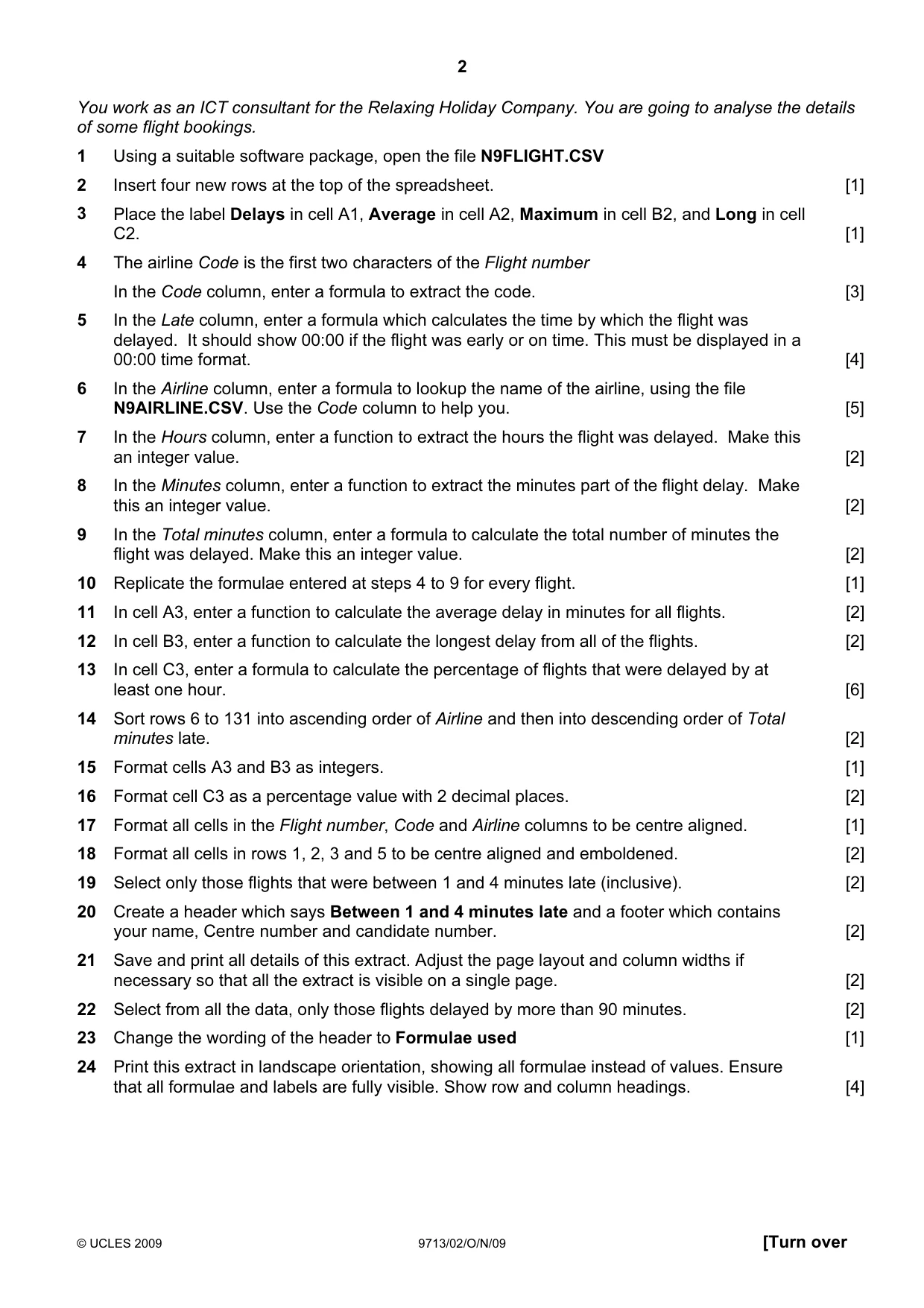
2 © UCLES 2009 9713/02/O/N/09 [Turn over You work as an ICT consultant for the Relaxing Holiday Company. You are going to analyse the details of some flight bookings. 1 Using a suitable software package, open the file N9FLIGHT.CSV 2 Insert four new rows at the top of the spreadsheet. [1] 3 Place the label Delays in cell A1, Average in cell A2, Maximum in cell B2, and Long in cell C2. [1] 4 The airline Code is the first two characters of the Flight number In the Code column, enter a formula to extract the code. [3] 5 In the Late column, enter a formula which calculates the time by which the flight was delayed. It should show 00:00 if the flight was early or on time. This must be displayed in a 00:00 time format. [4] 6 In the Airline column, enter a formula to lookup the name of the airline, using the file N9AIRLINE.CSV. Use the Code column to help you. [5] 7 In the Hours column, enter a function to extract the hours the flight was delayed. Make this an integer value. [2] 8 In the Minutes column, enter a function to extract the minutes part of the flight delay. Make this an integer value. [2] 9 In the Total minutes column, enter a formula to calculate the total number of minutes the flight was delayed. Make this an integer value. [2] 10 Replicate the formulae entered at steps 4 to 9 for every flight. [1] 11 In cell A3, enter a function to calculate the average delay in minutes for all flights. [2] 12 In cell B3, enter a function to calculate the longest delay from all of the flights. [2] 13 In cell C3, enter a formula to calculate the percentage of flights that were delayed by at least one hour. [6] 14 Sort rows 6 to 131 into ascending order of Airline and then into descending order of Total minutes late. [2] 15 Format cells A3 and B3 as integers. [1] 16 Format cell C3 as a percentage value with 2 decimal places. [2] 17 Format all cells in the Flight number, Code and Airline columns to be centre aligned. [1] 18 Format all cells in rows 1, 2, 3 and 5 to be centre aligned and emboldened. [2] 19 Select only those flights that were between 1 and 4 minutes late (inclusive). [2] 20 Create a header which says Between 1 and 4 minutes late and a footer which contains your name, Centre number and candidate number. [2] 21 Save and print all details of this extract. Adjust the page layout and column widths if necessary so that all the extract is visible on a single page. [2] 22 Select from all the data, only those flights delayed by more than 90 minutes. [2] 23 Change the wording of the header to Formulae used [1] 24 Print this extract in landscape orientation, showing all formulae instead of values. Ensure that all formulae and labels are fully visible. Show row and column headings. [4]
Question paper, page 3
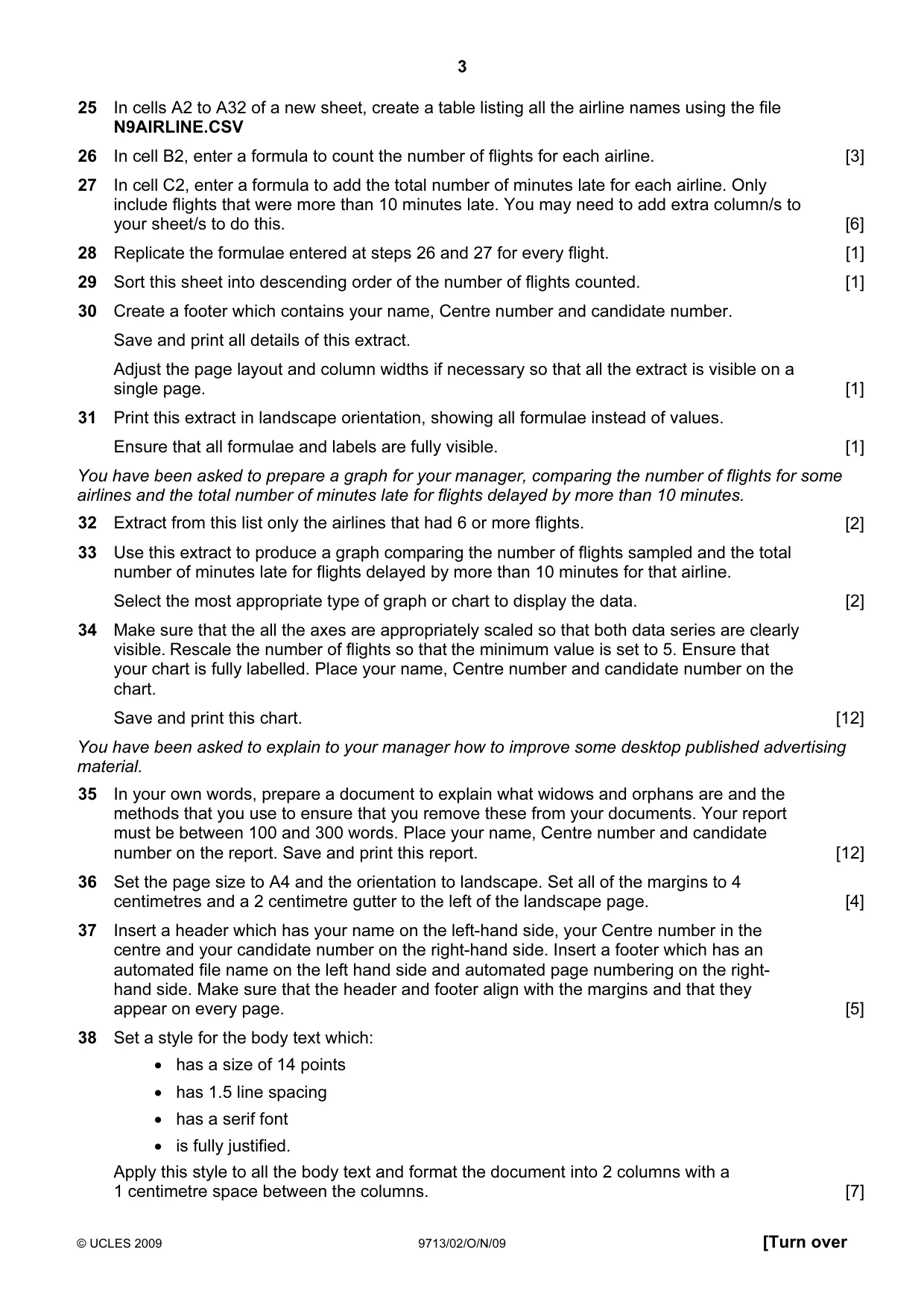
3 © UCLES 2009 9713/02/O/N/09 [Turn over 25 In cells A2 to A32 of a new sheet, create a table listing all the airline names using the file N9AIRLINE.CSV 26 In cell B2, enter a formula to count the number of flights for each airline. [3] 27 In cell C2, enter a formula to add the total number of minutes late for each airline. Only include flights that were more than 10 minutes late. You may need to add extra column/s to your sheet/s to do this. [6] 28 Replicate the formulae entered at steps 26 and 27 for every flight. [1] 29 Sort this sheet into descending order of the number of flights counted. [1] 30 Create a footer which contains your name, Centre number and candidate number. Save and print all details of this extract. Adjust the page layout and column widths if necessary so that all the extract is visible on a single page. [1] 31 Print this extract in landscape orientation, showing all formulae instead of values. Ensure that all formulae and labels are fully visible. [1] You have been asked to prepare a graph for your manager, comparing the number of flights for some airlines and the total number of minutes late for flights delayed by more than 10 minutes. 32 Extract from this list only the airlines that had 6 or more flights. [2] 33 Use this extract to produce a graph comparing the number of flights sampled and the total number of minutes late for flights delayed by more than 10 minutes for that airline. Select the most appropriate type of graph or chart to display the data. [2] 34 Make sure that the all the axes are appropriately scaled so that both data series are clearly visible. Rescale the number of flights so that the minimum value is set to 5. Ensure that your chart is fully labelled. Place your name, Centre number and candidate number on the chart. Save and print this chart. [12] You have been asked to explain to your manager how to improve some desktop published advertising material. 35 In your own words, prepare a document to explain what widows and orphans are and the methods that you use to ensure that you remove these from your documents. Your report must be between 100 and 300 words. Place your name, Centre number and candidate number on the report. Save and print this report. [12] 36 Set the page size to A4 and the orientation to landscape. Set all of the margins to 4 centimetres and a 2 centimetre gutter to the left of the landscape page. [4] 37 Insert a header which has your name on the left-hand side, your Centre number in the centre and your candidate number on the right-hand side. Insert a footer which has an automated file name on the left hand side and automated page numbering on the right- hand side. Make sure that the header and footer align with the margins and that they appear on every page. [5] 38 Set a style for the body text which: • has a size of 14 points • has 1.5 line spacing • has a serif font • is fully justified. Apply this style to all the body text and format the document into 2 columns with a 1 centimetre space between the columns. [7]
Question paper, page 4
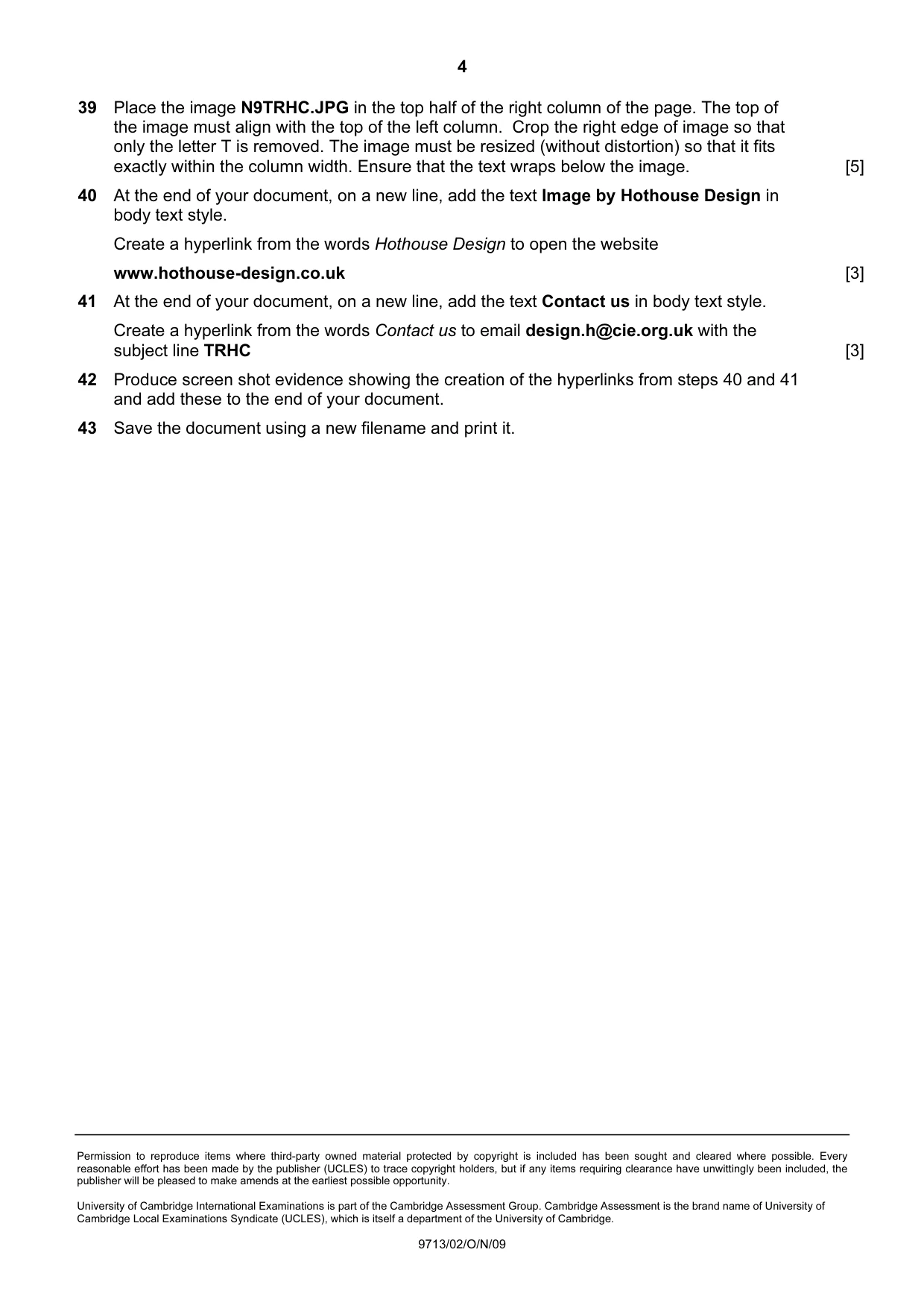
4 Permission to reproduce items where third-party owned material protected by copyright is included has been sought and cleared where possible. Every reasonable effort has been made by the publisher (UCLES) to trace copyright holders, but if any items requiring clearance have unwittingly been included, the publisher will be pleased to make amends at the earliest possible opportunity. University of Cambridge International Examinations is part of the Cambridge Assessment Group. Cambridge Assessment is the brand name of University of Cambridge Local Examinations Syndicate (UCLES), which is itself a department of the University of Cambridge. 9713/02/O/N/09 39 Place the image N9TRHC.JPG in the top half of the right column of the page. The top of the image must align with the top of the left column. Crop the right edge of image so that only the letter T is removed. The image must be resized (without distortion) so that it fits exactly within the column width. Ensure that the text wraps below the image. [5] 40 At the end of your document, on a new line, add the text Image by Hothouse Design in body text style. Create a hyperlink from the words Hothouse Design to open the website www.hothouse-design.co.uk [3] 41 At the end of your document, on a new line, add the text Contact us in body text style. Create a hyperlink from the words Contact us to email design.h@cie.org.uk with the subject line TRHC [3] 42 Produce screen shot evidence showing the creation of the hyperlinks from steps 40 and 41 and add these to the end of your document. 43 Save the document using a new filename and print it.
Mark scheme, page 1
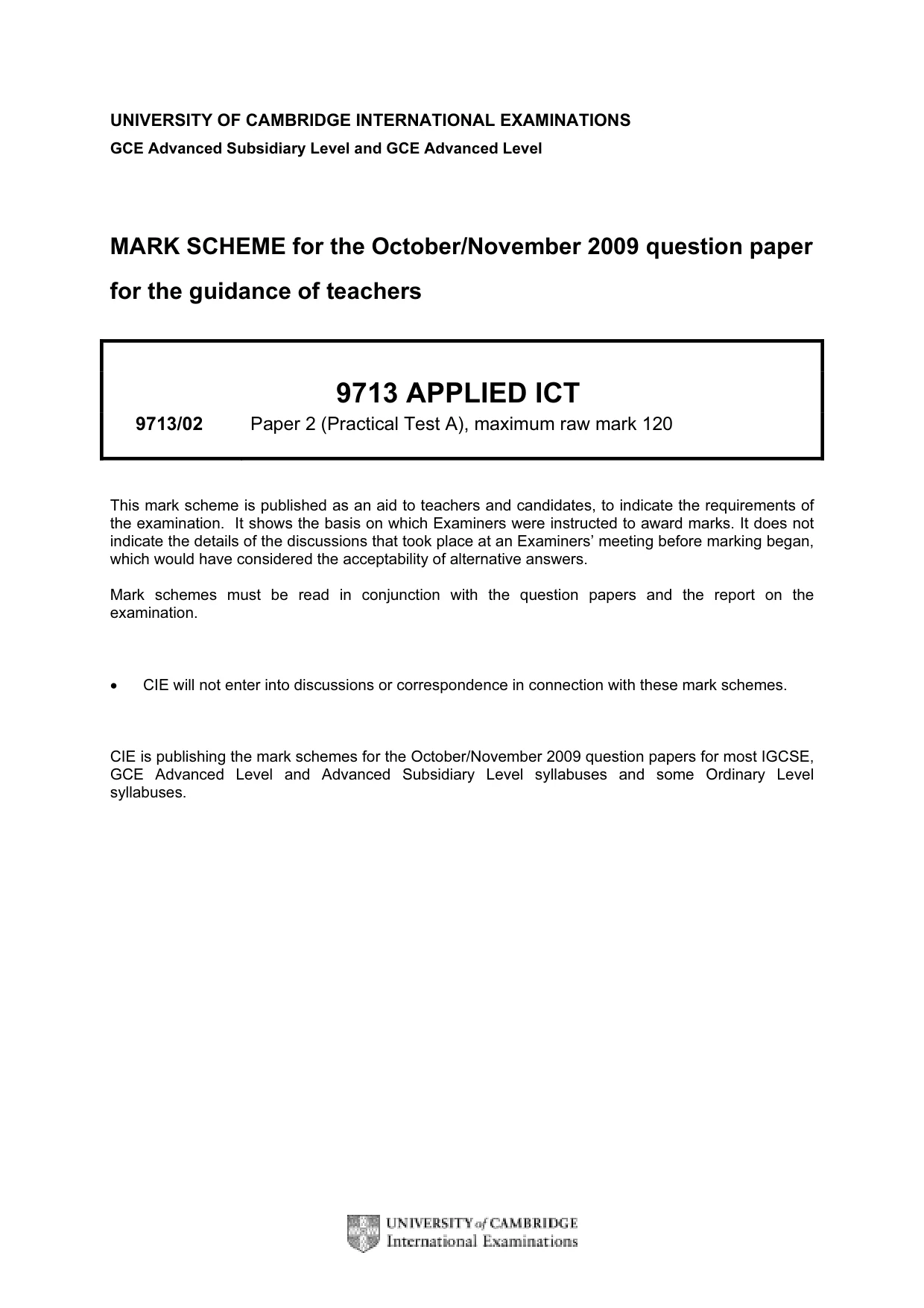
UNIVERSITY OF CAMBRIDGE INTERNATIONAL EXAMINATIONS GCE Advanced Subsidiary Level and GCE Advanced Level MARK SCHEME for the October/November 2009 question paper for the guidance of teachers 9713 APPLIED ICT 9713/02 Paper 2 (Practical Test A), maximum raw mark 120 This mark scheme is published as an aid to teachers and candidates, to indicate the requirements of the examination. It shows the basis on which Examiners were instructed to award marks. It does not indicate the details of the discussions that took place at an Examiners’ meeting before marking began, which would have considered the acceptability of alternative answers. Mark schemes must be read in conjunction with the question papers and the report on the examination. • CIE will not enter into discussions or correspondence in connection with these mark schemes. CIE is publishing the mark schemes for the October/November 2009 question papers for most IGCSE, GCE Advanced Level and Advanced Subsidiary Level syllabuses and some Ordinary Level syllabuses.
Mark scheme, page 2
Page 2 Mark Scheme: Teachers’ version Syllabus Paper GCE A/AS LEVEL – October/November 2009 9713 02 Candidate name, centre number and candidate number Page N © UCLES 2009 No marks to be awarded for any printout not containing the candidate name, candidate number and centre number
Mark scheme, page 3
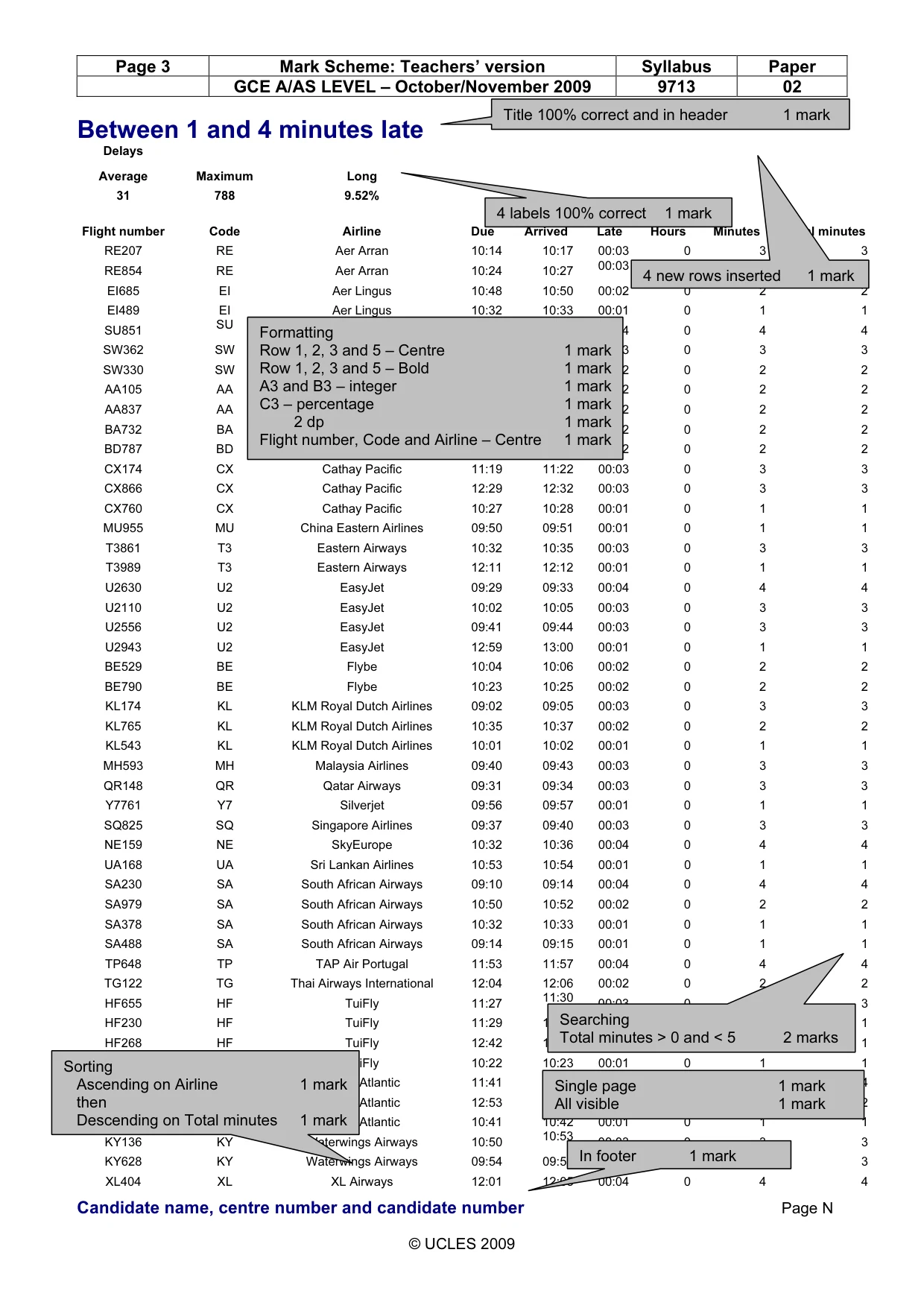
Page 3 Mark Scheme: Teachers’ version Syllabus Paper GCE A/AS LEVEL – October/November 2009 9713 02 Candidate name, centre number and candidate number Page N © UCLES 2009 Between 1 and 4 minutes late Delays Average Maximum Long 31 788 9.52% Flight number Code Airline Due Arrived Late Hours Minutes Total minutes RE207 RE Aer Arran 10:14 10:17 00:03 0 3 3 RE854 RE Aer Arran 10:24 10:27 00:03 0 3 3 EI685 EI Aer Lingus 10:48 10:50 00:02 0 2 2 EI489 EI Aer Lingus 10:32 10:33 00:01 0 1 1 SU851 SU Aeroflot 11:48 11:52 00:04 0 4 4 SW362 SW Air Namibia 12:52 12:55 00:03 0 3 3 SW330 SW Air Namibia 10:46 10:48 00:02 0 2 2 AA105 AA American Airlines 10:02 10:04 00:02 0 2 2 AA837 AA American Airlines 10:43 10:45 00:02 0 2 2 BA732 BA British Airways 12:41 12:43 00:02 0 2 2 BD787 BD British Midland 12:05 12:07 00:02 0 2 2 CX174 CX Cathay Pacific 11:19 11:22 00:03 0 3 3 CX866 CX Cathay Pacific 12:29 12:32 00:03 0 3 3 CX760 CX Cathay Pacific 10:27 10:28 00:01 0 1 1 MU955 MU China Eastern Airlines 09:50 09:51 00:01 0 1 1 T3861 T3 Eastern Airways 10:32 10:35 00:03 0 3 3 T3989 T3 Eastern Airways 12:11 12:12 00:01 0 1 1 U2630 U2 EasyJet 09:29 09:33 00:04 0 4 4 U2110 U2 EasyJet 10:02 10:05 00:03 0 3 3 U2556 U2 EasyJet 09:41 09:44 00:03 0 3 3 U2943 U2 EasyJet 12:59 13:00 00:01 0 1 1 BE529 BE Flybe 10:04 10:06 00:02 0 2 2 BE790 BE Flybe 10:23 10:25 00:02 0 2 2 KL174 KL KLM Royal Dutch Airlines 09:02 09:05 00:03 0 3 3 KL765 KL KLM Royal Dutch Airlines 10:35 10:37 00:02 0 2 2 KL543 KL KLM Royal Dutch Airlines 10:01 10:02 00:01 0 1 1 MH593 MH Malaysia Airlines 09:40 09:43 00:03 0 3 3 QR148 QR Qatar Airways 09:31 09:34 00:03 0 3 3 Y7761 Y7 Silverjet 09:56 09:57 00:01 0 1 1 SQ825 SQ Singapore Airlines 09:37 09:40 00:03 0 3 3 NE159 NE SkyEurope 10:32 10:36 00:04 0 4 4 UA168 UA Sri Lankan Airlines 10:53 10:54 00:01 0 1 1 SA230 SA South African Airways 09:10 09:14 00:04 0 4 4 SA979 SA South African Airways 10:50 10:52 00:02 0 2 2 SA378 SA South African Airways 10:32 10:33 00:01 0 1 1 SA488 SA South African Airways 09:14 09:15 00:01 0 1 1 TP648 TP TAP Air Portugal 11:53 11:57 00:04 0 4 4 TG122 TG Thai Airways International 12:04 12:06 00:02 0 2 2 HF655 HF TuiFly 11:27 11:30 00:03 0 3 3 HF230 HF TuiFly 11:29 11:30 00:01 0 1 1 HF268 HF TuiFly 12:42 12:43 00:01 0 1 1 HF612 HF TuiFly 10:22 10:23 00:01 0 1 1 VS546 VS Virgin Atlantic 11:41 11:45 00:04 0 4 4 VS655 VS Virgin Atlantic 12:53 12:55 00:02 0 2 2 VS851 VS Virgin Atlantic 10:41 10:42 00:01 0 1 1 KY136 KY Waterwings Airways 10:50 10:53 00:03 0 3 3 KY628 KY Waterwings Airways 09:54 09:57 00:03 0 3 3 XL404 XL XL Airways 12:01 12:05 00:04 0 4 4 Searching Total minutes > 0 and < 5 2 marks Formatting Row 1, 2, 3 and 5 – Centre 1 mark Row 1, 2, 3 and 5 – Bold 1 mark A3 and B3 – integer 1 mark C3 – percentage 1 mark 2 dp 1 mark Flight number, Code and Airline – Centre 1 mark Title 100% correct and in header 1 mark In footer 1 mark Sorting Ascending on Airline 1 mark then Descending on Total minutes 1 mark 4 new rows inserted 1 mark 4 labels 100% correct 1 mark Single page 1 mark All visible 1 mark
Mark scheme, page 4
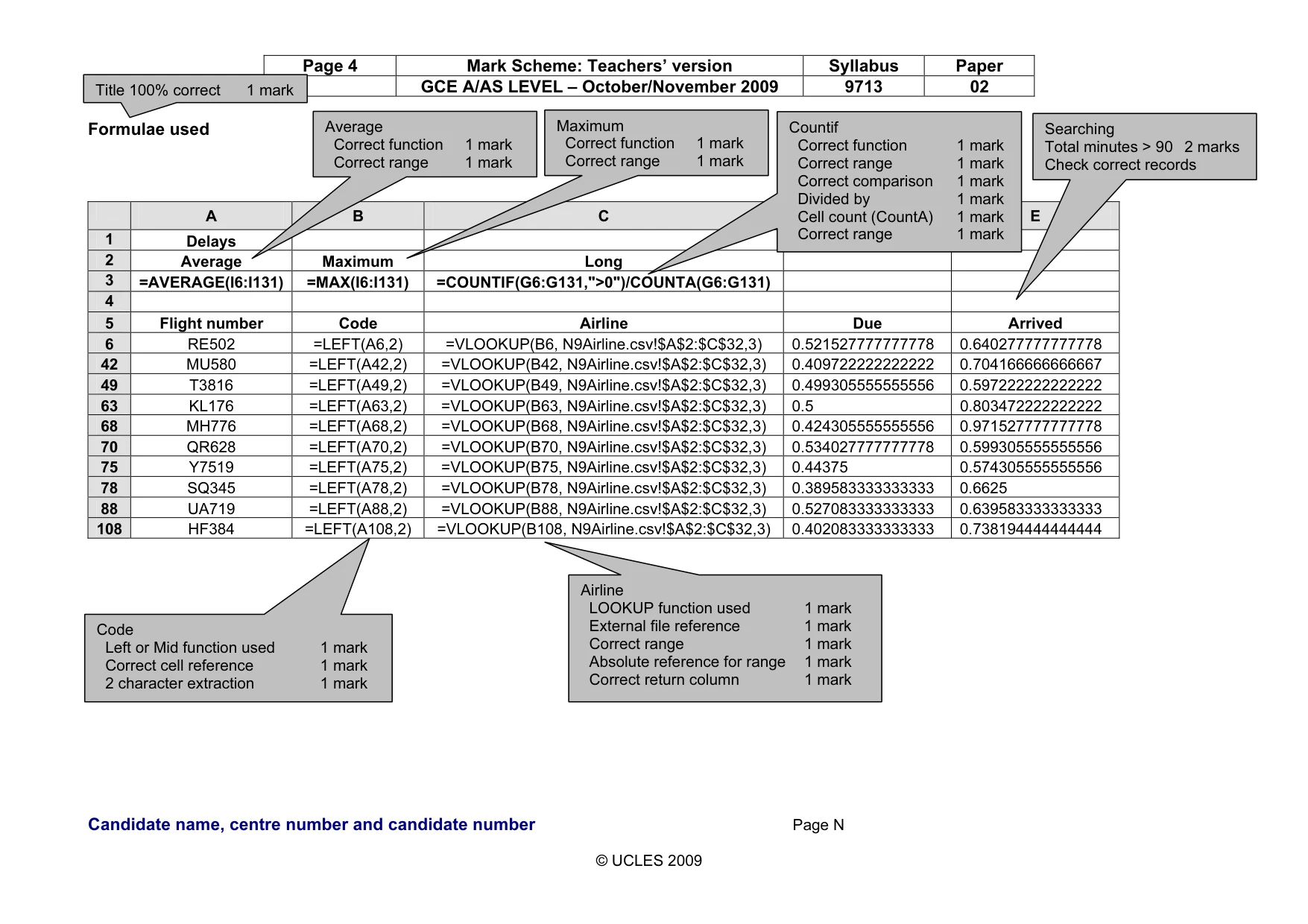
Page 4 Mark Scheme: Teachers’ version Syllabus Paper GCE A/AS LEVEL – October/November 2009 9713 02 Candidate name, centre number and candidate number Page N © UCLES 2009 Formulae used A B C D E 1 Delays 2 Average Maximum Long 3 =AVERAGE(I6:I131) =MAX(I6:I131) =COUNTIF(G6:G131,">0")/COUNTA(G6:G131) 4 5 Flight number Code Airline Due Arrived 6 RE502 =LEFT(A6,2) =VLOOKUP(B6, N9Airline.csv!$A$2:$C$32,3) 0.521527777777778 0.640277777777778 42 MU580 =LEFT(A42,2) =VLOOKUP(B42, N9Airline.csv!$A$2:$C$32,3) 0.409722222222222 0.704166666666667 49 T3816 =LEFT(A49,2) =VLOOKUP(B49, N9Airline.csv!$A$2:$C$32,3) 0.499305555555556 0.597222222222222 63 KL176 =LEFT(A63,2) =VLOOKUP(B63, N9Airline.csv!$A$2:$C$32,3) 0.5 0.803472222222222 68 MH776 =LEFT(A68,2) =VLOOKUP(B68, N9Airline.csv!$A$2:$C$32,3) 0.424305555555556 0.971527777777778 70 QR628 =LEFT(A70,2) =VLOOKUP(B70, N9Airline.csv!$A$2:$C$32,3) 0.534027777777778 0.599305555555556 75 Y7519 =LEFT(A75,2) =VLOOKUP(B75, N9Airline.csv!$A$2:$C$32,3) 0.44375 0.574305555555556 78 SQ345 =LEFT(A78,2) =VLOOKUP(B78, N9Airline.csv!$A$2:$C$32,3) 0.389583333333333 0.6625 88 UA719 =LEFT(A88,2) =VLOOKUP(B88, N9Airline.csv!$A$2:$C$32,3) 0.527083333333333 0.639583333333333 108 HF384 =LEFT(A108,2) =VLOOKUP(B108, N9Airline.csv!$A$2:$C$32,3) 0.402083333333333 0.738194444444444 Code Left or Mid function used 1 mark Correct cell reference 1 mark 2 character extraction 1 mark Airline LOOKUP function used 1 mark External file reference 1 mark Correct range 1 mark Absolute reference for range 1 mark Correct return column 1 mark Title 100% correct 1 mark Average Correct function 1 mark Correct range 1 mark Maximum Correct function 1 mark Correct range 1 mark Countif Correct function 1 mark Correct range 1 mark Correct comparison 1 mark Divided by 1 mark Cell count (CountA) 1 mark Correct range 1 mark Searching Total minutes > 90 2 marks Check correct records
Mark scheme, page 5
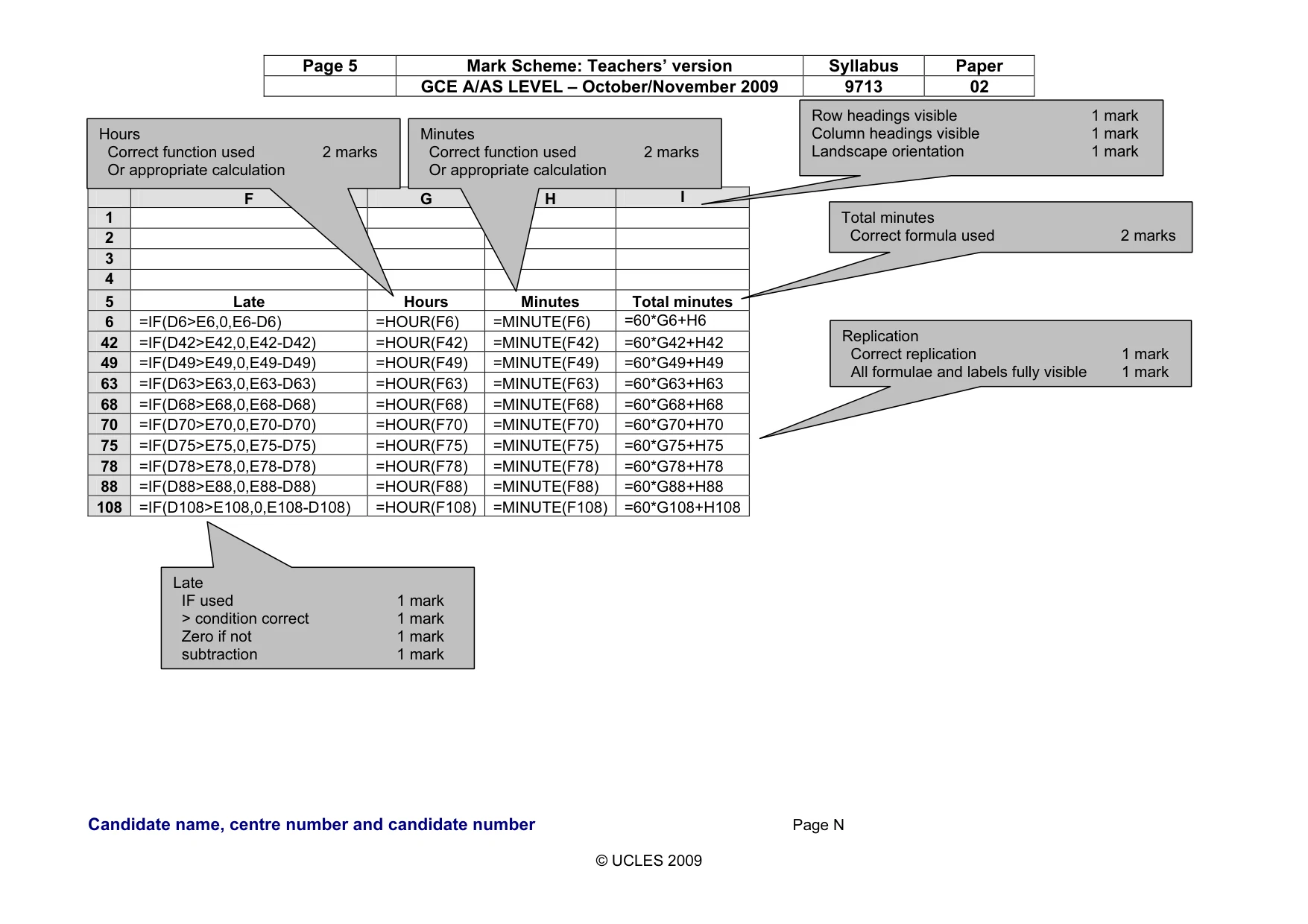
Page 5 Mark Scheme: Teachers’ version Syllabus Paper GCE A/AS LEVEL – October/November 2009 9713 02 Candidate name, centre number and candidate number Page N © UCLES 2009 F G H I 1 2 3 4 5 Late Hours Minutes Total minutes 6 =IF(D6>E6,0,E6-D6) =HOUR(F6) =MINUTE(F6) =60*G6+H6 42 =IF(D42>E42,0,E42-D42) =HOUR(F42) =MINUTE(F42) =60*G42+H42 49 =IF(D49>E49,0,E49-D49) =HOUR(F49) =MINUTE(F49) =60*G49+H49 63 =IF(D63>E63,0,E63-D63) =HOUR(F63) =MINUTE(F63) =60*G63+H63 68 =IF(D68>E68,0,E68-D68) =HOUR(F68) =MINUTE(F68) =60*G68+H68 70 =IF(D70>E70,0,E70-D70) =HOUR(F70) =MINUTE(F70) =60*G70+H70 75 =IF(D75>E75,0,E75-D75) =HOUR(F75) =MINUTE(F75) =60*G75+H75 78 =IF(D78>E78,0,E78-D78) =HOUR(F78) =MINUTE(F78) =60*G78+H78 88 =IF(D88>E88,0,E88-D88) =HOUR(F88) =MINUTE(F88) =60*G88+H88 108 =IF(D108>E108,0,E108-D108) =HOUR(F108) =MINUTE(F108) =60*G108+H108 Late IF used 1 mark > condition correct 1 mark Zero if not 1 mark subtraction 1 mark Total minutes Correct formula used 2 marks Replication Correct replication 1 mark All formulae and labels fully visible 1 mark Row headings visible 1 mark Column headings visible 1 mark Landscape orientation 1 mark Hours Correct function used 2 marks Or appropriate calculation Minutes Correct function used 2 marks Or appropriate calculation
Mark scheme, page 6
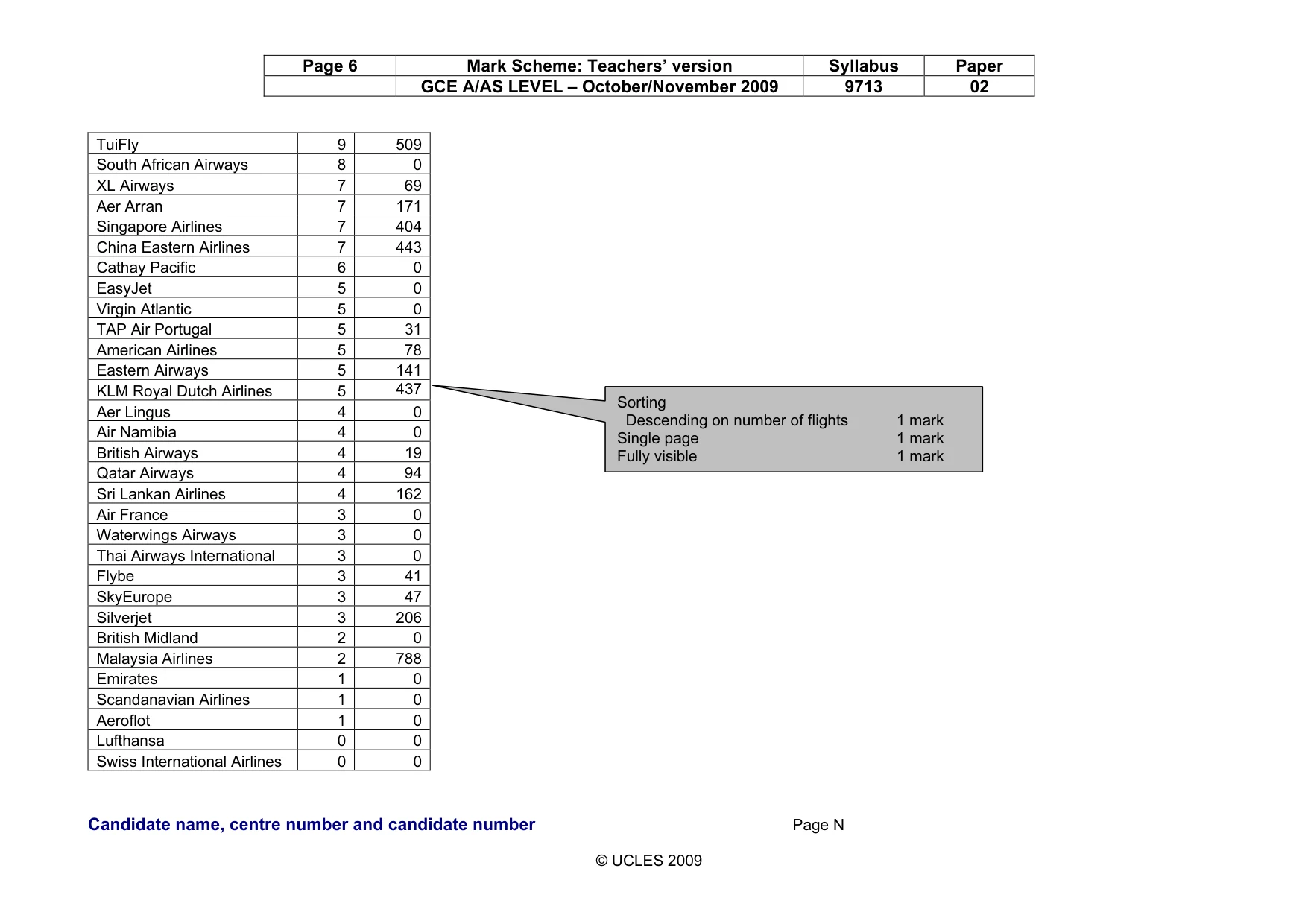
Page 6 Mark Scheme: Teachers’ version Syllabus Paper GCE A/AS LEVEL – October/November 2009 9713 02 Candidate name, centre number and candidate number Page N © UCLES 2009 TuiFly 9 509 South African Airways 8 0 XL Airways 7 69 Aer Arran 7 171 Singapore Airlines 7 404 China Eastern Airlines 7 443 Cathay Pacific 6 0 EasyJet 5 0 Virgin Atlantic 5 0 TAP Air Portugal 5 31 American Airlines 5 78 Eastern Airways 5 141 KLM Royal Dutch Airlines 5 437 Aer Lingus 4 0 Air Namibia 4 0 British Airways 4 19 Qatar Airways 4 94 Sri Lankan Airlines 4 162 Air France 3 0 Waterwings Airways 3 0 Thai Airways International 3 0 Flybe 3 41 SkyEurope 3 47 Silverjet 3 206 British Midland 2 0 Malaysia Airlines 2 788 Emirates 1 0 Scandanavian Airlines 1 0 Aeroflot 1 0 Lufthansa 0 0 Swiss International Airlines 0 0 Sorting Descending on number of flights 1 mark Single page 1 mark Fully visible 1 mark
Mark scheme, page 7
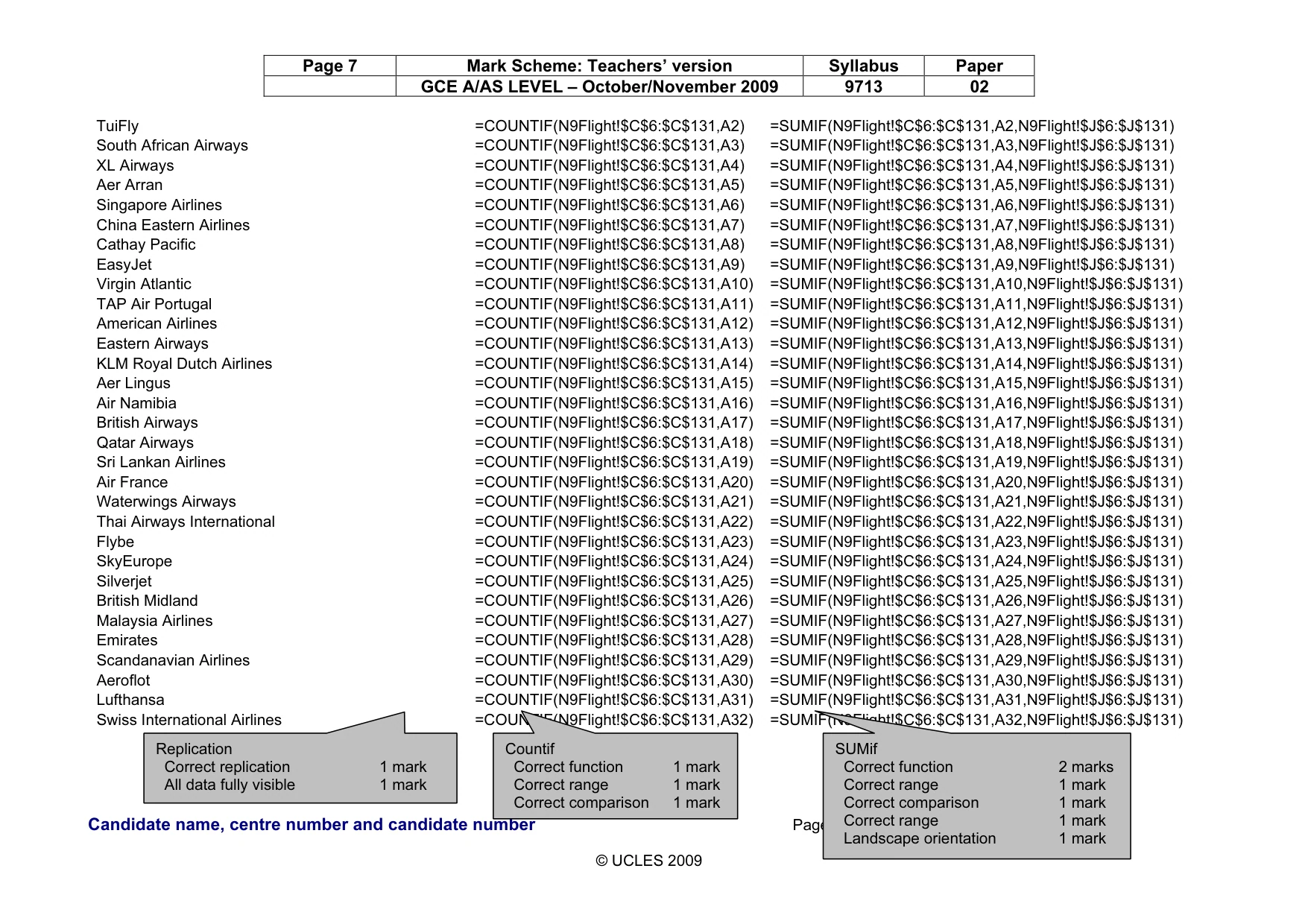
Page 7 Mark Scheme: Teachers’ version Syllabus Paper GCE A/AS LEVEL – October/November 2009 9713 02 Candidate name, centre number and candidate number Page N © UCLES 2009 TuiFly =COUNTIF(N9Flight!$C$6:$C$131,A2) =SUMIF(N9Flight!$C$6:$C$131,A2,N9Flight!$J$6:$J$131) South African Airways =COUNTIF(N9Flight!$C$6:$C$131,A3) =SUMIF(N9Flight!$C$6:$C$131,A3,N9Flight!$J$6:$J$131) XL Airways =COUNTIF(N9Flight!$C$6:$C$131,A4) =SUMIF(N9Flight!$C$6:$C$131,A4,N9Flight!$J$6:$J$131) Aer Arran =COUNTIF(N9Flight!$C$6:$C$131,A5) =SUMIF(N9Flight!$C$6:$C$131,A5,N9Flight!$J$6:$J$131) Singapore Airlines =COUNTIF(N9Flight!$C$6:$C$131,A6) =SUMIF(N9Flight!$C$6:$C$131,A6,N9Flight!$J$6:$J$131) China Eastern Airlines =COUNTIF(N9Flight!$C$6:$C$131,A7) =SUMIF(N9Flight!$C$6:$C$131,A7,N9Flight!$J$6:$J$131) Cathay Pacific =COUNTIF(N9Flight!$C$6:$C$131,A8) =SUMIF(N9Flight!$C$6:$C$131,A8,N9Flight!$J$6:$J$131) EasyJet =COUNTIF(N9Flight!$C$6:$C$131,A9) =SUMIF(N9Flight!$C$6:$C$131,A9,N9Flight!$J$6:$J$131) Virgin Atlantic =COUNTIF(N9Flight!$C$6:$C$131,A10) =SUMIF(N9Flight!$C$6:$C$131,A10,N9Flight!$J$6:$J$131) TAP Air Portugal =COUNTIF(N9Flight!$C$6:$C$131,A11) =SUMIF(N9Flight!$C$6:$C$131,A11,N9Flight!$J$6:$J$131) American Airlines =COUNTIF(N9Flight!$C$6:$C$131,A12) =SUMIF(N9Flight!$C$6:$C$131,A12,N9Flight!$J$6:$J$131) Eastern Airways =COUNTIF(N9Flight!$C$6:$C$131,A13) =SUMIF(N9Flight!$C$6:$C$131,A13,N9Flight!$J$6:$J$131) KLM Royal Dutch Airlines =COUNTIF(N9Flight!$C$6:$C$131,A14) =SUMIF(N9Flight!$C$6:$C$131,A14,N9Flight!$J$6:$J$131) Aer Lingus =COUNTIF(N9Flight!$C$6:$C$131,A15) =SUMIF(N9Flight!$C$6:$C$131,A15,N9Flight!$J$6:$J$131) Air Namibia =COUNTIF(N9Flight!$C$6:$C$131,A16) =SUMIF(N9Flight!$C$6:$C$131,A16,N9Flight!$J$6:$J$131) British Airways =COUNTIF(N9Flight!$C$6:$C$131,A17) =SUMIF(N9Flight!$C$6:$C$131,A17,N9Flight!$J$6:$J$131) Qatar Airways =COUNTIF(N9Flight!$C$6:$C$131,A18) =SUMIF(N9Flight!$C$6:$C$131,A18,N9Flight!$J$6:$J$131) Sri Lankan Airlines =COUNTIF(N9Flight!$C$6:$C$131,A19) =SUMIF(N9Flight!$C$6:$C$131,A19,N9Flight!$J$6:$J$131) Air France =COUNTIF(N9Flight!$C$6:$C$131,A20) =SUMIF(N9Flight!$C$6:$C$131,A20,N9Flight!$J$6:$J$131) Waterwings Airways =COUNTIF(N9Flight!$C$6:$C$131,A21) =SUMIF(N9Flight!$C$6:$C$131,A21,N9Flight!$J$6:$J$131) Thai Airways International =COUNTIF(N9Flight!$C$6:$C$131,A22) =SUMIF(N9Flight!$C$6:$C$131,A22,N9Flight!$J$6:$J$131) Flybe =COUNTIF(N9Flight!$C$6:$C$131,A23) =SUMIF(N9Flight!$C$6:$C$131,A23,N9Flight!$J$6:$J$131) SkyEurope =COUNTIF(N9Flight!$C$6:$C$131,A24) =SUMIF(N9Flight!$C$6:$C$131,A24,N9Flight!$J$6:$J$131) Silverjet =COUNTIF(N9Flight!$C$6:$C$131,A25) =SUMIF(N9Flight!$C$6:$C$131,A25,N9Flight!$J$6:$J$131) British Midland =COUNTIF(N9Flight!$C$6:$C$131,A26) =SUMIF(N9Flight!$C$6:$C$131,A26,N9Flight!$J$6:$J$131) Malaysia Airlines =COUNTIF(N9Flight!$C$6:$C$131,A27) =SUMIF(N9Flight!$C$6:$C$131,A27,N9Flight!$J$6:$J$131) Emirates =COUNTIF(N9Flight!$C$6:$C$131,A28) =SUMIF(N9Flight!$C$6:$C$131,A28,N9Flight!$J$6:$J$131) Scandanavian Airlines =COUNTIF(N9Flight!$C$6:$C$131,A29) =SUMIF(N9Flight!$C$6:$C$131,A29,N9Flight!$J$6:$J$131) Aeroflot =COUNTIF(N9Flight!$C$6:$C$131,A30) =SUMIF(N9Flight!$C$6:$C$131,A30,N9Flight!$J$6:$J$131) Lufthansa =COUNTIF(N9Flight!$C$6:$C$131,A31) =SUMIF(N9Flight!$C$6:$C$131,A31,N9Flight!$J$6:$J$131) Swiss International Airlines =COUNTIF(N9Flight!$C$6:$C$131,A32) =SUMIF(N9Flight!$C$6:$C$131,A32,N9Flight!$J$6:$J$131) Countif Correct function 1 mark Correct range 1 mark Correct comparison 1 mark SUMif Correct function 2 marks Correct range 1 mark Correct comparison 1 mark Correct range 1 mark Landscape orientation 1 mark Replication Correct replication 1 mark All data fully visible 1 mark
Mark scheme, page 8
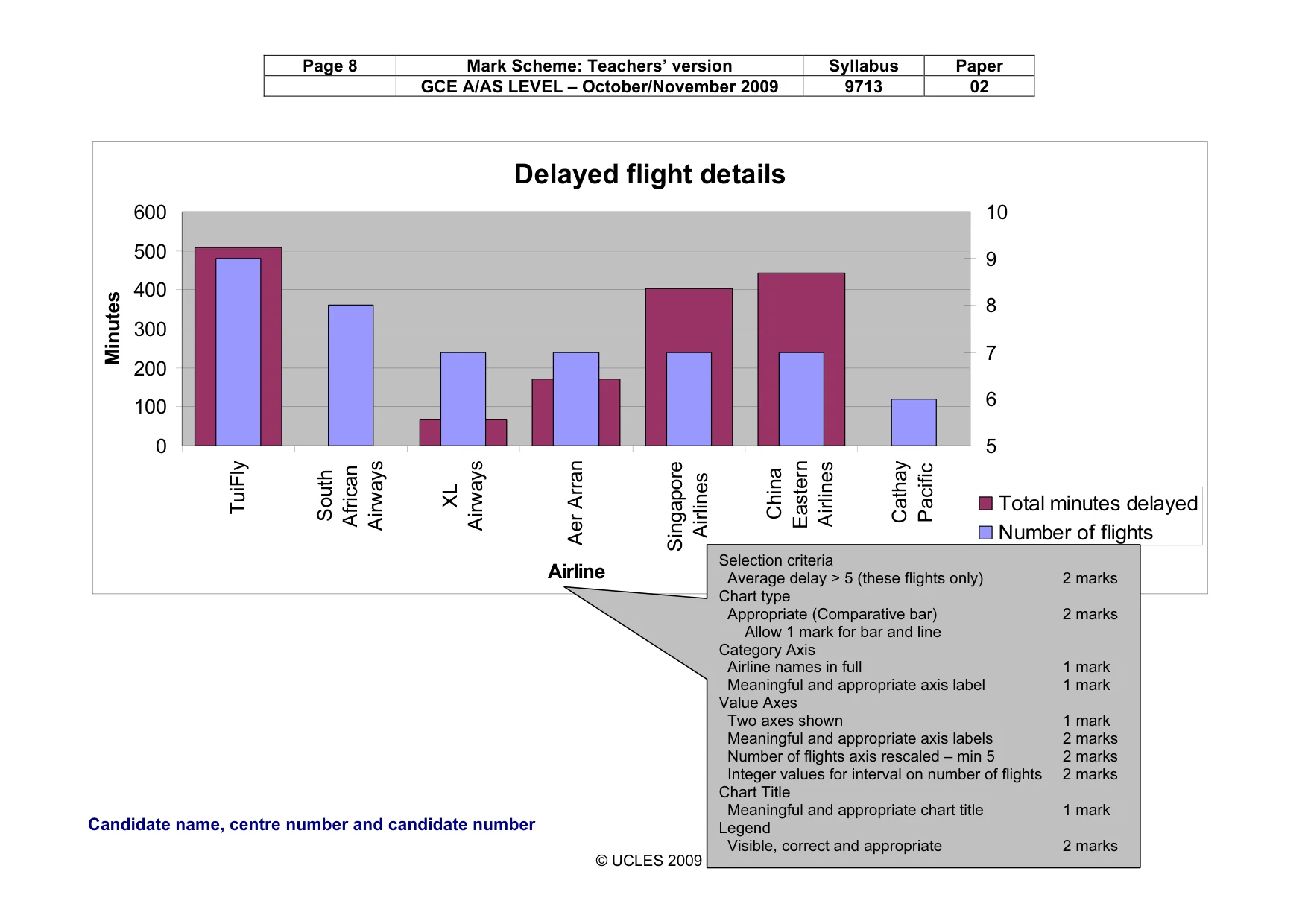
Page 8 Mark Scheme: Teachers’ version Syllabus Paper GCE A/AS LEVEL – October/November 2009 9713 02 Candidate name, centre number and candidate number Page N © UCLES 2009 Delayed flight details 0 100 200 300 400 500 600 TuiFly South African Airways XL Airways Aer Arran Singapore Airlines China Eastern Airlines Cathay Pacific Airline Minutes 5 6 7 8 9 10 Total minutes delayed Number of flights Selection criteria Average delay > 5 (these flights only) 2 marks Chart type Appropriate (Comparative bar) 2 marks Allow 1 mark for bar and line Category Axis Airline names in full 1 mark Meaningful and appropriate axis label 1 mark Value Axes Two axes shown 1 mark Meaningful and appropriate axis labels 2 marks Number of flights axis rescaled – min 5 2 marks Integer values for interval on number of flights 2 marks Chart Title Meaningful and appropriate chart title 1 mark Legend Visible, correct and appropriate 2 marks
Mark scheme, page 9
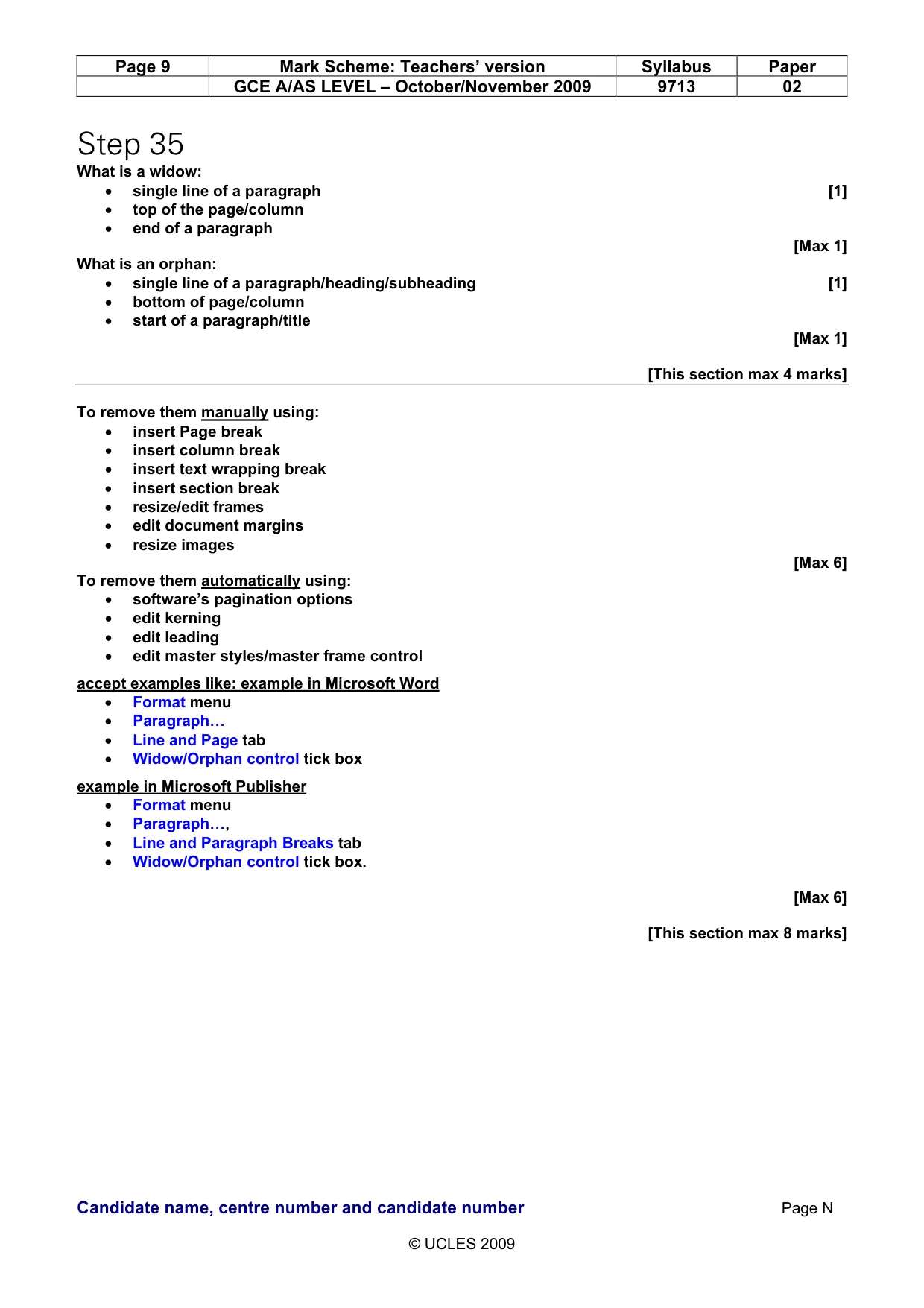
Page 9 Mark Scheme: Teachers’ version Syllabus Paper GCE A/AS LEVEL – October/November 2009 9713 02 Candidate name, centre number and candidate number Page N © UCLES 2009 Step 35 What is a widow: • single line of a paragraph [1] • top of the page/column • end of a paragraph [Max 1] What is an orphan: • single line of a paragraph/heading/subheading [1] • bottom of page/column • start of a paragraph/title [Max 1] [This section max 4 marks] To remove them manually using: • insert Page break • insert column break • insert text wrapping break • insert section break • resize/edit frames • edit document margins • resize images [Max 6] To remove them automatically using: • software’s pagination options • edit kerning • edit leading • edit master styles/master frame control accept examples like: example in Microsoft Word • Format menu • Paragraph… • Line and Page tab • Widow/Orphan control tick box example in Microsoft Publisher • Format menu • Paragraph…, • Line and Paragraph Breaks tab • Widow/Orphan control tick box. [Max 6] [This section max 8 marks]
Mark scheme, page 10
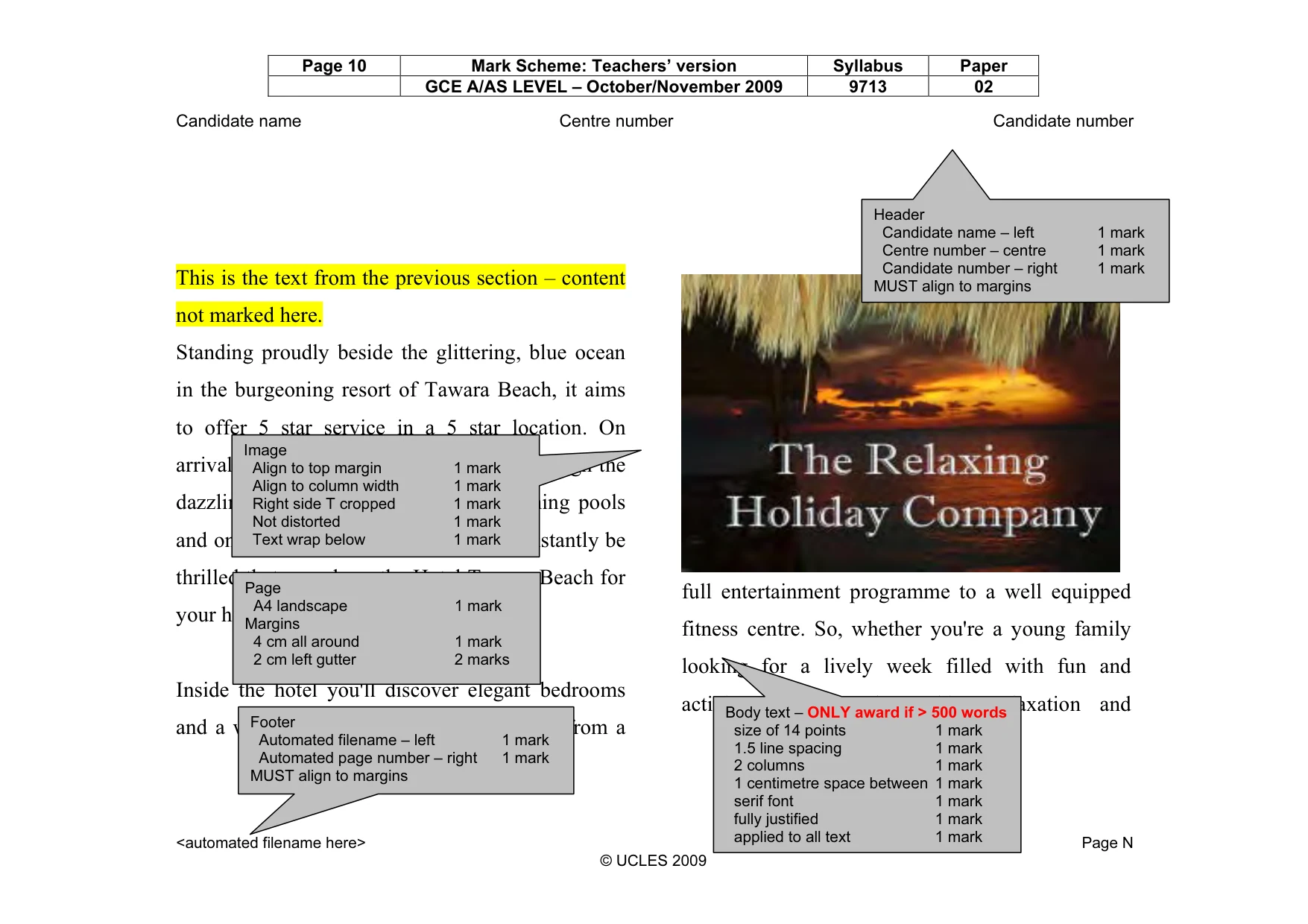
Page 10 Mark Scheme: Teachers’ version Syllabus Paper GCE A/AS LEVEL – October/November 2009 9713 02 Candidate name Centre number Candidate number <automated filename here> Page N © UCLES 2009 This is the text from the previous section – content not marked here. Standing proudly beside the glittering, blue ocean in the burgeoning resort of Tawara Beach, it aims to offer 5 star service in a 5 star location. On arrival, take a quiet and leisurely stroll through the dazzling gardens past the serene swimming pools and onto the glorious beach, and you'll instantly be thrilled that you chose the Hotel Tawara Beach for your holiday in Sri Lanka. Inside the hotel you'll discover elegant bedrooms and a wonderful array of facilities ranging from a full entertainment programme to a well equipped fitness centre. So, whether you're a young family looking for a lively week filled with fun and activity or a couple seeking relaxation and Page A4 landscape 1 mark Margins 4 cm all around 1 mark 2 cm left gutter 2 marks Footer Automated filename – left 1 mark Automated page number – right 1 mark MUST align to margins Header Candidate name – left 1 mark Centre number – centre 1 mark Candidate number – right 1 mark MUST align to margins Body text – ONLY award if > 500 words size of 14 points 1 mark 1.5 line spacing 1 mark 2 columns 1 mark 1 centimetre space between 1 mark serif font 1 mark fully justified 1 mark applied to all text 1 mark Image Align to top margin 1 mark Align to column width 1 mark Right side T cropped 1 mark Not distorted 1 mark Text wrap below 1 mark
Mark scheme, page 11
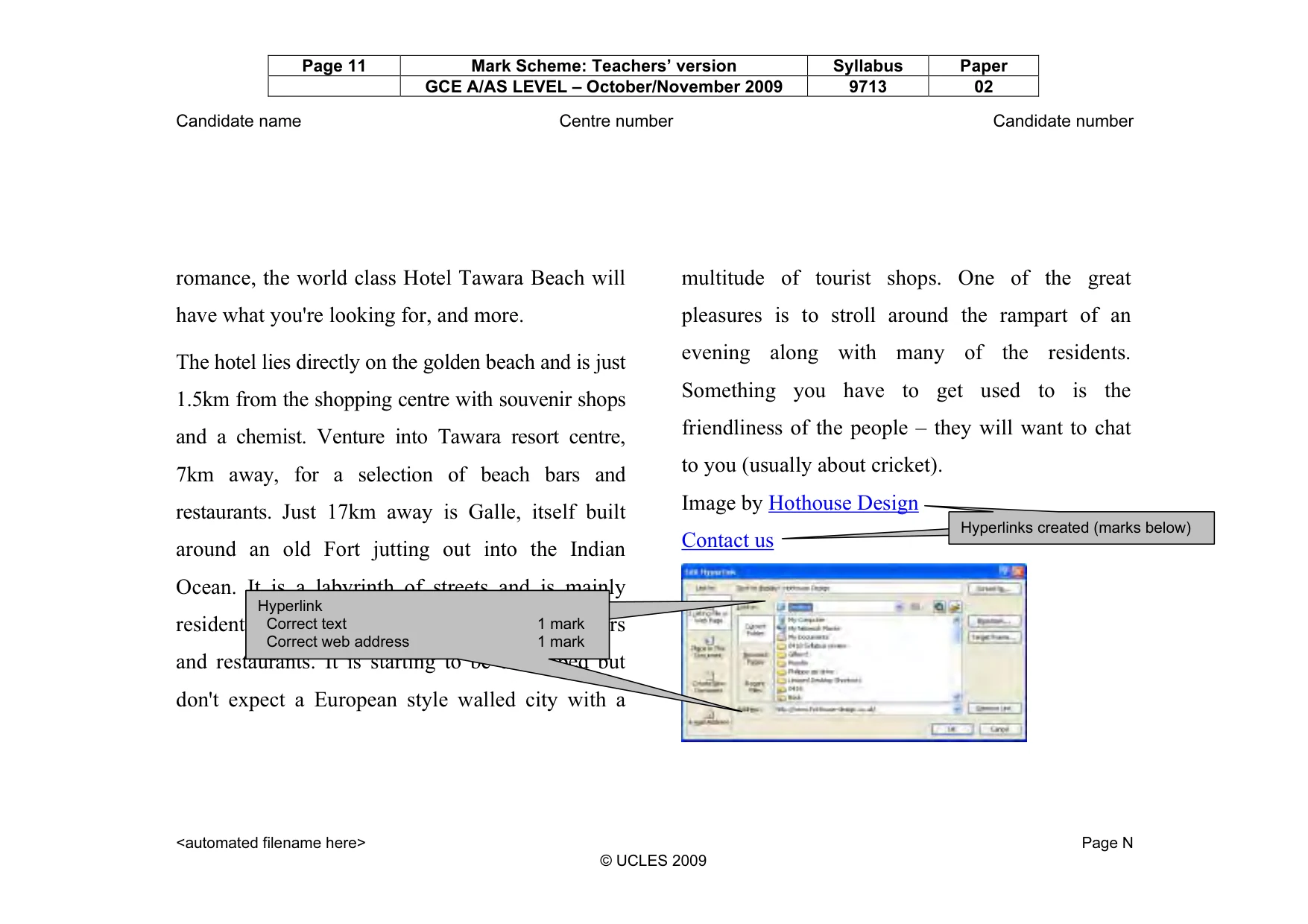
Page 11 Mark Scheme: Teachers’ version Syllabus Paper GCE A/AS LEVEL – October/November 2009 9713 02 Candidate name Centre number Candidate number <automated filename here> Page N © UCLES 2009 romance, the world class Hotel Tawara Beach will have what you're looking for, and more. The hotel lies directly on the golden beach and is just 1.5km from the shopping centre with souvenir shops and a chemist. Venture into Tawara resort centre, 7km away, for a selection of beach bars and restaurants. Just 17km away is Galle, itself built around an old Fort jutting out into the Indian Ocean. It is a labyrinth of streets and is mainly residential with a scattering of shops, cafes, bars and restaurants. It is starting to be developed but don't expect a European style walled city with a multitude of tourist shops. One of the great pleasures is to stroll around the rampart of an evening along with many of the residents. Something you have to get used to is the friendliness of the people – they will want to chat to you (usually about cricket). Image by Hothouse Design Contact us hyperlinks created (marks below) Hyperlink Correct text 1 mark Correct web address 1 mark Hyperlink Correct text 1 mark Correct web address 1 mark Hyperlinks created (marks below)
Mark scheme, page 12
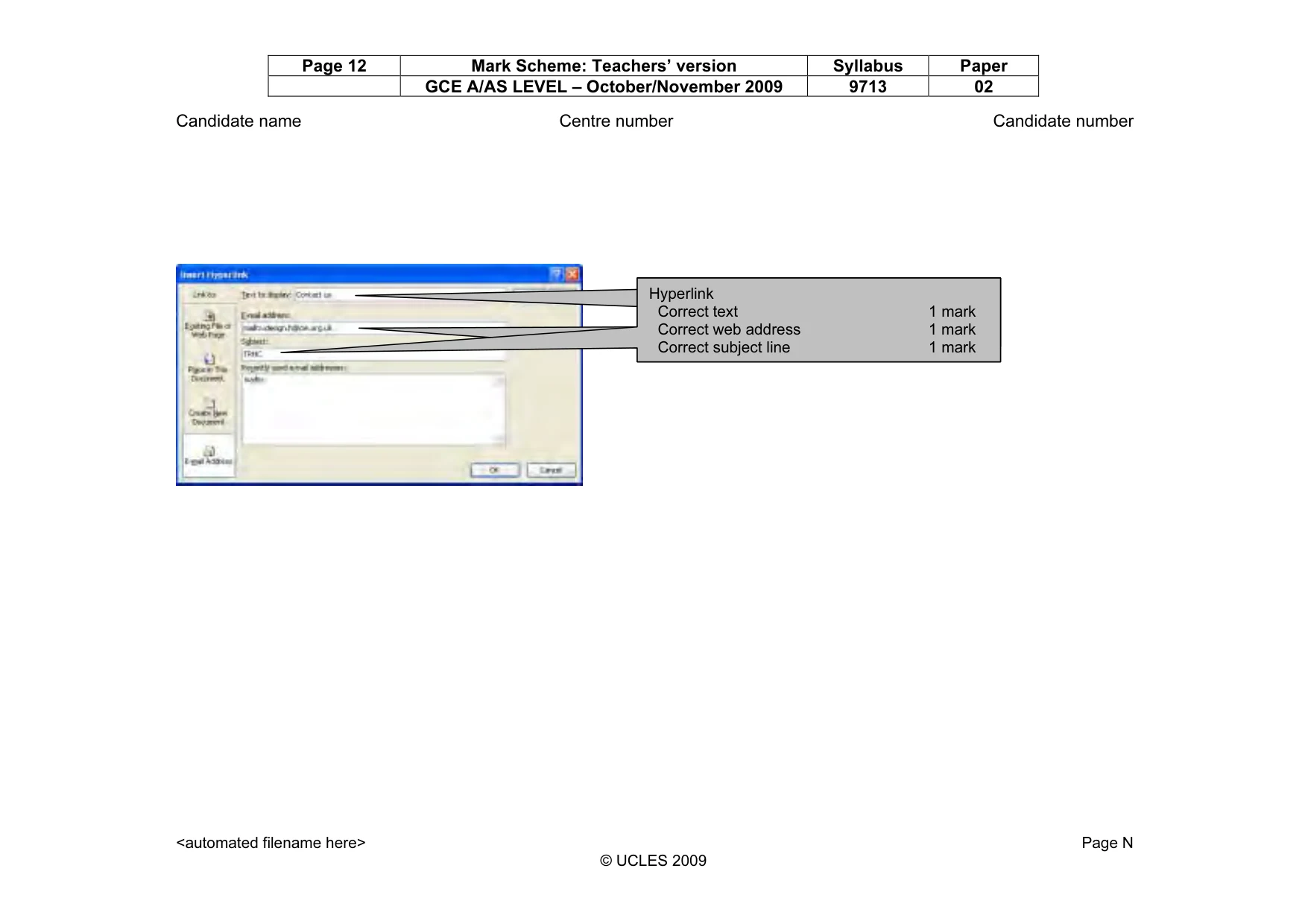
Page 12 Mark Scheme: Teachers’ version Syllabus Paper GCE A/AS LEVEL – October/November 2009 9713 02 Candidate name Centre number Candidate number <automated filename here> Page N © UCLES 2009 Hyperlink Correct text 1 mark Correct web address 1 mark Hyperlink Correct text 1 mark Correct web address 1 mark Correct subject line 1 mark Hyperlink Correct text 1 mark Correct web address 1 mark Correct subject line 1 mark
What you needed in this session
Cambridge’s own grade thresholds for 2009 Oct/Nov, Paper 2 · Variant 1. A higher threshold means an easier paper — the bar moves with how the cohort did.