Cambridge A Level Applied Information and Communication Technology 9713 — 2009 May/June Paper 2 · Variant 1
9713/21/M/J/09 · 120 marks · ≈135 min
The question paper and its mark scheme, free to read here and free to download. This is Cambridge’s own paper, exactly as it was sat.
Question paper5 pages
Mark scheme9 pages
Answers below. Sit the paper first if you are practising.
Paper as text
Question paper, page 1
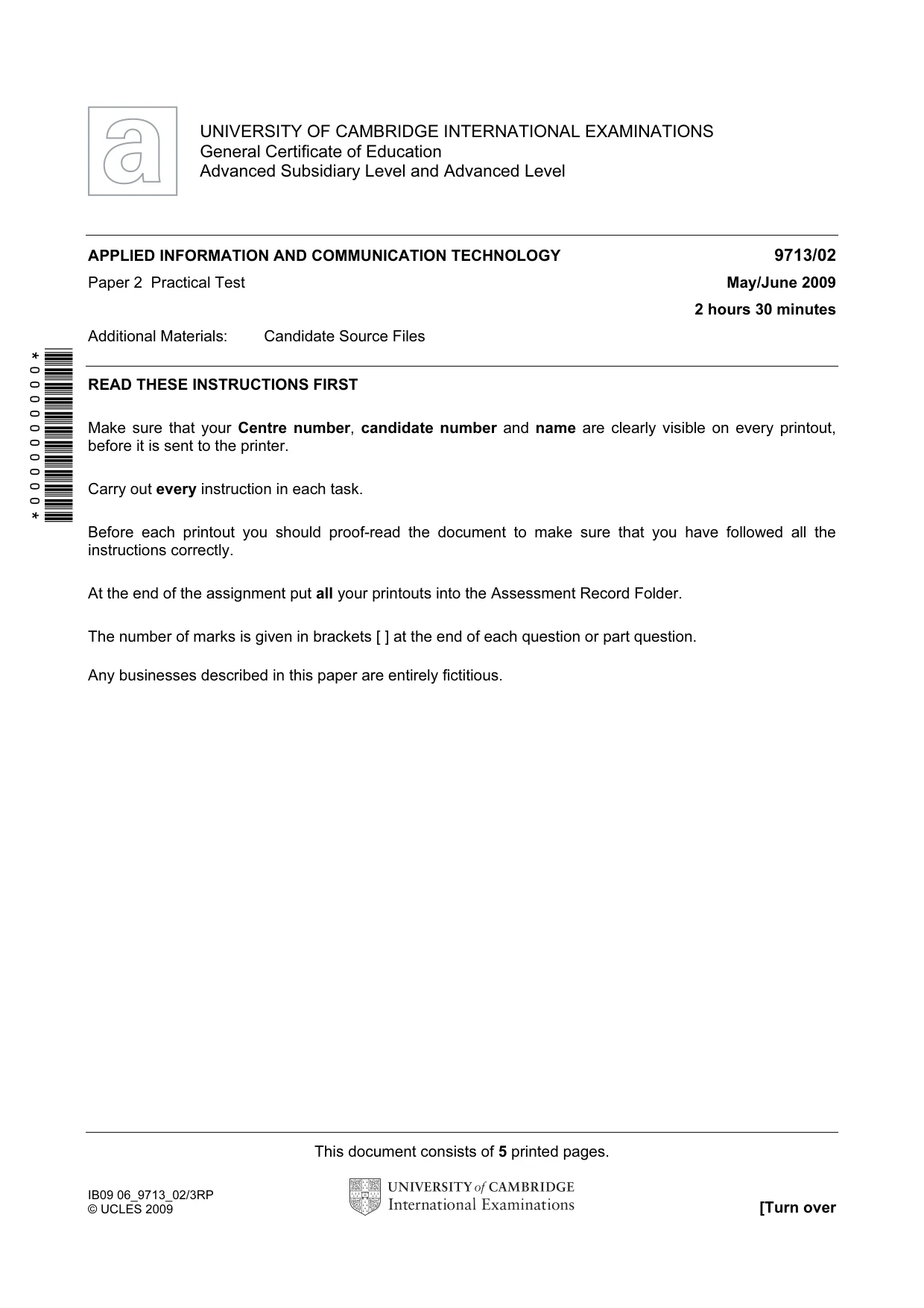
This document consists of 5 printed pages. IB09 06_9713_02/3RP © UCLES 2009 [Turn over *0000000000* UNIVERSITY OF CAMBRIDGE INTERNATIONAL EXAMINATIONS General Certificate of Education Advanced Subsidiary Level and Advanced Level APPLIED INFORMATION AND COMMUNICATION TECHNOLOGY 9713/02 Paper 2 Practical Test May/June 2009 2 hours 30 minutes Additional Materials: Candidate Source Files READ THESE INSTRUCTIONS FIRST Make sure that your Centre number, candidate number and name are clearly visible on every printout, before it is sent to the printer. Carry out every instruction in each task. Before each printout you should proof-read the document to make sure that you have followed all the instructions correctly. At the end of the assignment put all your printouts into the Assessment Record Folder. The number of marks is given in brackets [ ] at the end of each question or part question. Any businesses described in this paper are entirely fictitious.
Question paper, page 2
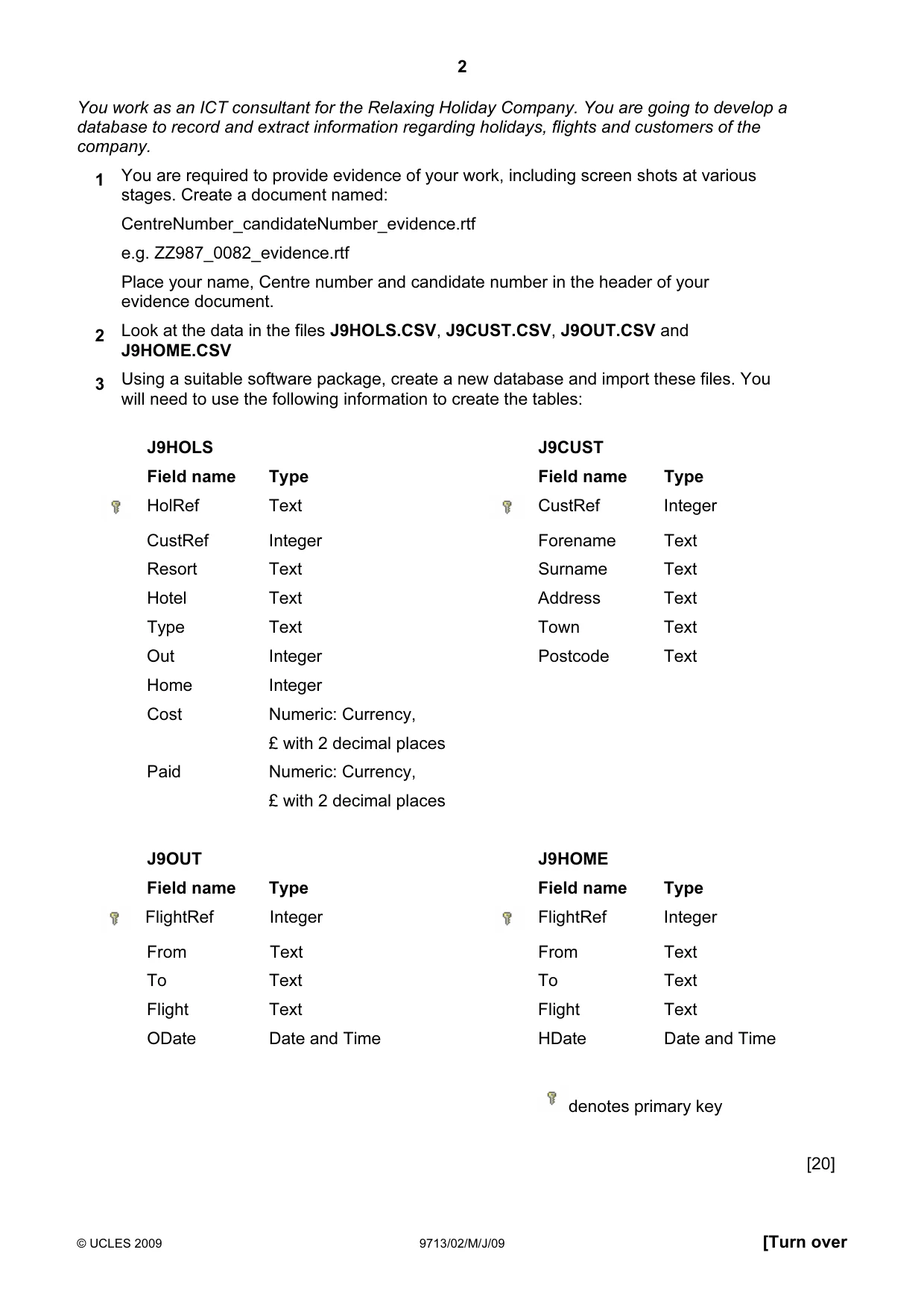
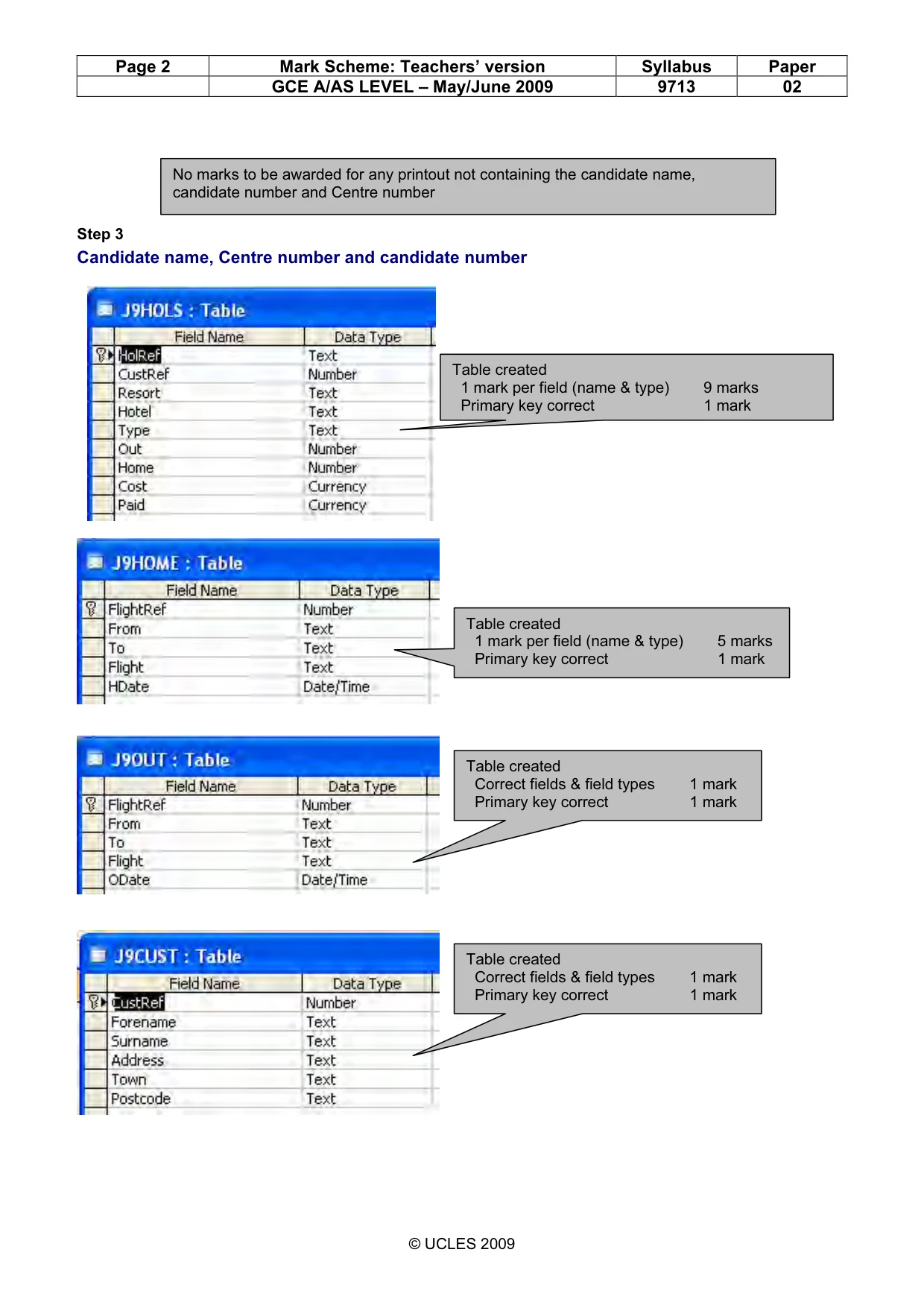
2 © UCLES 2009 9713/02/M/J/09 [Turn over You work as an ICT consultant for the Relaxing Holiday Company. You are going to develop a database to record and extract information regarding holidays, flights and customers of the company. 1 You are required to provide evidence of your work, including screen shots at various stages. Create a document named: CentreNumber_candidateNumber_evidence.rtf e.g. ZZ987_0082_evidence.rtf Place your name, Centre number and candidate number in the header of your evidence document. 2 Look at the data in the files J9HOLS.CSV, J9CUST.CSV, J9OUT.CSV and J9HOME.CSV 3 Using a suitable software package, create a new database and import these files. You will need to use the following information to create the tables: J9HOLS J9CUST Field name Type Field name Type HolRef Text CustRef Integer CustRef Integer Forename Text Resort Text Surname Text Hotel Text Address Text Type Text Town Text Out Integer Postcode Text Home Integer Cost Numeric: Currency, £ with 2 decimal places Paid Numeric: Currency, £ with 2 decimal places J9OUT J9HOME Field name Type Field name Type FlightRef Integer FlightRef Integer From Text From Text To Text To Text Flight Text Flight Text ODate Date and Time HDate Date and Time denotes primary key [20]
Question paper, page 3
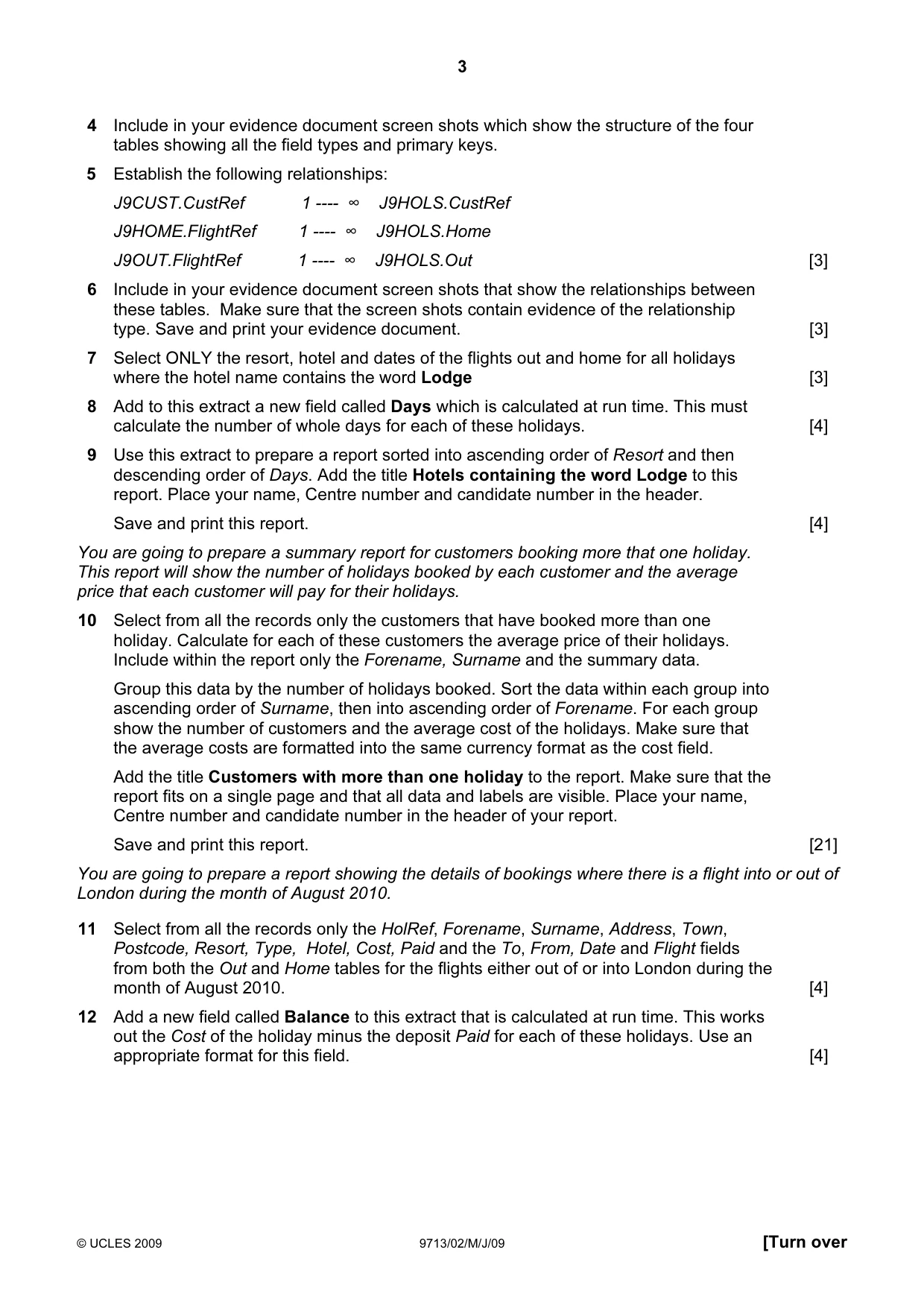
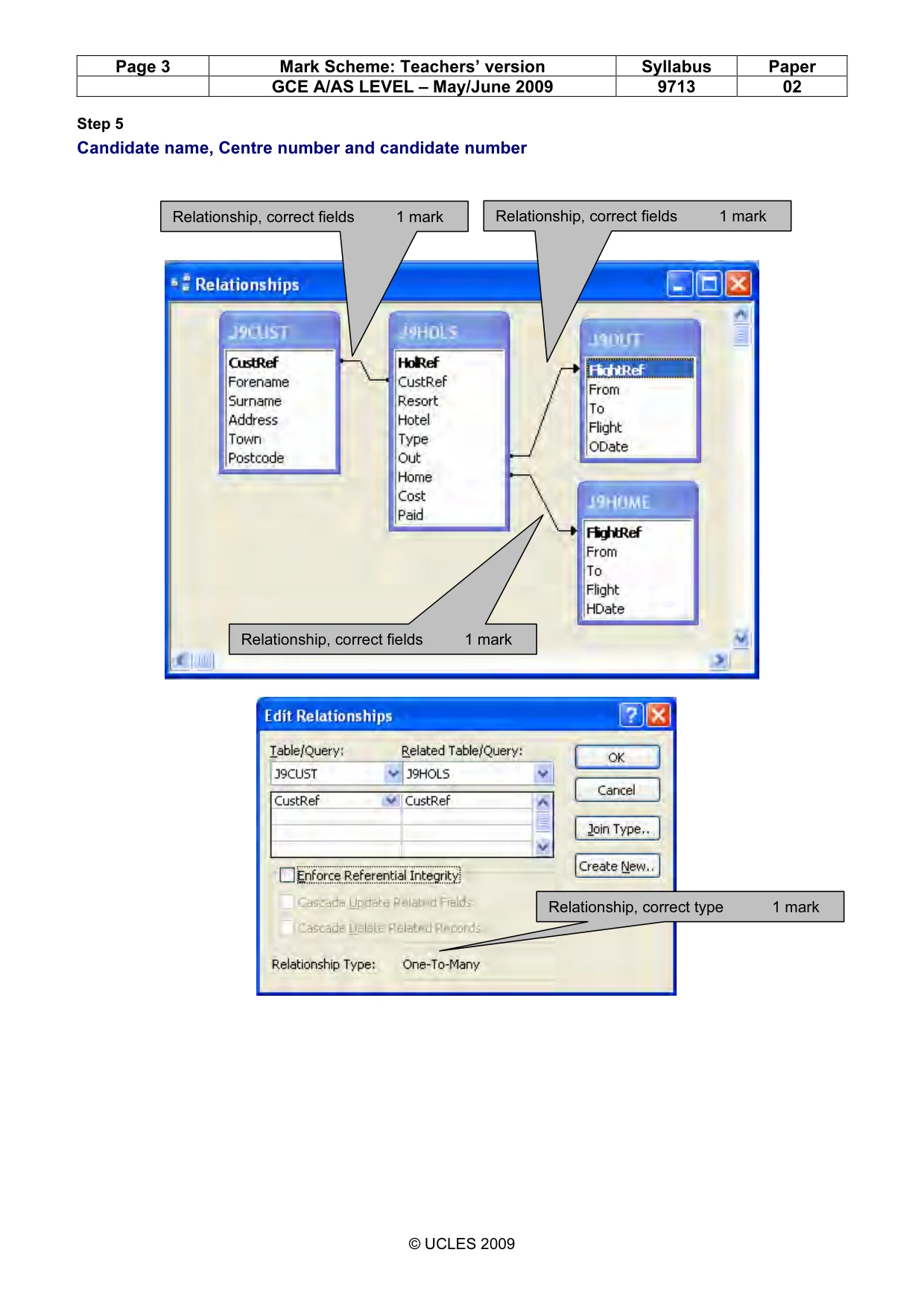
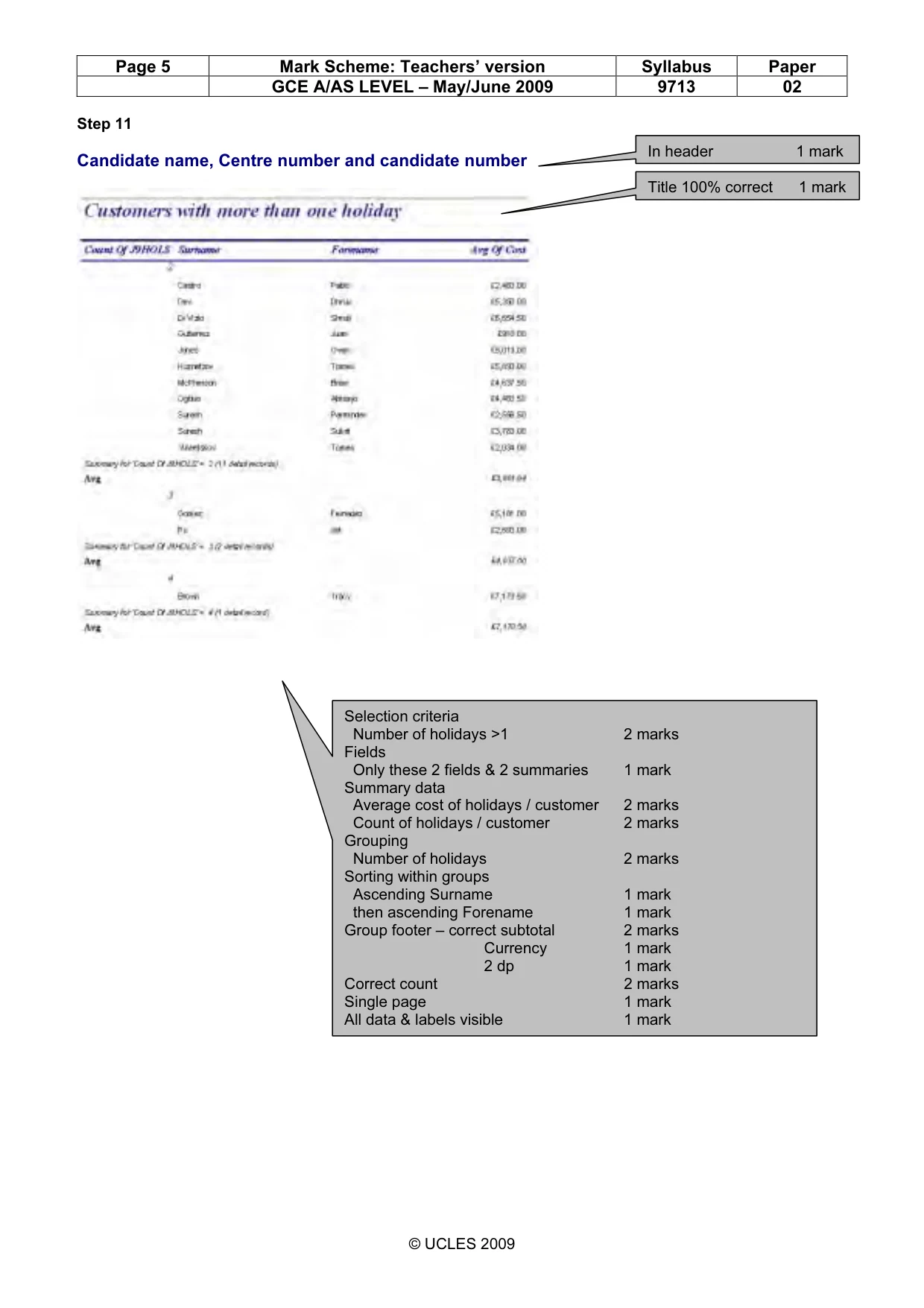
3 © UCLES 2009 9713/02/M/J/09 [Turn over 4 Include in your evidence document screen shots which show the structure of the four tables showing all the field types and primary keys. 5 Establish the following relationships: J9CUST.CustRef 1 ---- ∞ J9HOLS.CustRef J9HOME.FlightRef 1 ---- ∞ J9HOLS.Home J9OUT.FlightRef 1 ---- ∞ J9HOLS.Out [3] 6 Include in your evidence document screen shots that show the relationships between these tables. Make sure that the screen shots contain evidence of the relationship type. Save and print your evidence document. [3] 7 Select ONLY the resort, hotel and dates of the flights out and home for all holidays where the hotel name contains the word Lodge [3] 8 Add to this extract a new field called Days which is calculated at run time. This must calculate the number of whole days for each of these holidays. [4] 9 Use this extract to prepare a report sorted into ascending order of Resort and then descending order of Days. Add the title Hotels containing the word Lodge to this report. Place your name, Centre number and candidate number in the header. Save and print this report. [4] You are going to prepare a summary report for customers booking more that one holiday. This report will show the number of holidays booked by each customer and the average price that each customer will pay for their holidays. 10 Select from all the records only the customers that have booked more than one holiday. Calculate for each of these customers the average price of their holidays. Include within the report only the Forename, Surname and the summary data. Group this data by the number of holidays booked. Sort the data within each group into ascending order of Surname, then into ascending order of Forename. For each group show the number of customers and the average cost of the holidays. Make sure that the average costs are formatted into the same currency format as the cost field. Add the title Customers with more than one holiday to the report. Make sure that the report fits on a single page and that all data and labels are visible. Place your name, Centre number and candidate number in the header of your report. Save and print this report. [21] You are going to prepare a report showing the details of bookings where there is a flight into or out of London during the month of August 2010. 11 Select from all the records only the HolRef, Forename, Surname, Address, Town, Postcode, Resort, Type, Hotel, Cost, Paid and the To, From, Date and Flight fields from both the Out and Home tables for the flights either out of or into London during the month of August 2010. [4] 12 Add a new field called Balance to this extract that is calculated at run time. This works out the Cost of the holiday minus the deposit Paid for each of these holidays. Use an appropriate format for this field. [4]
Question paper, page 4
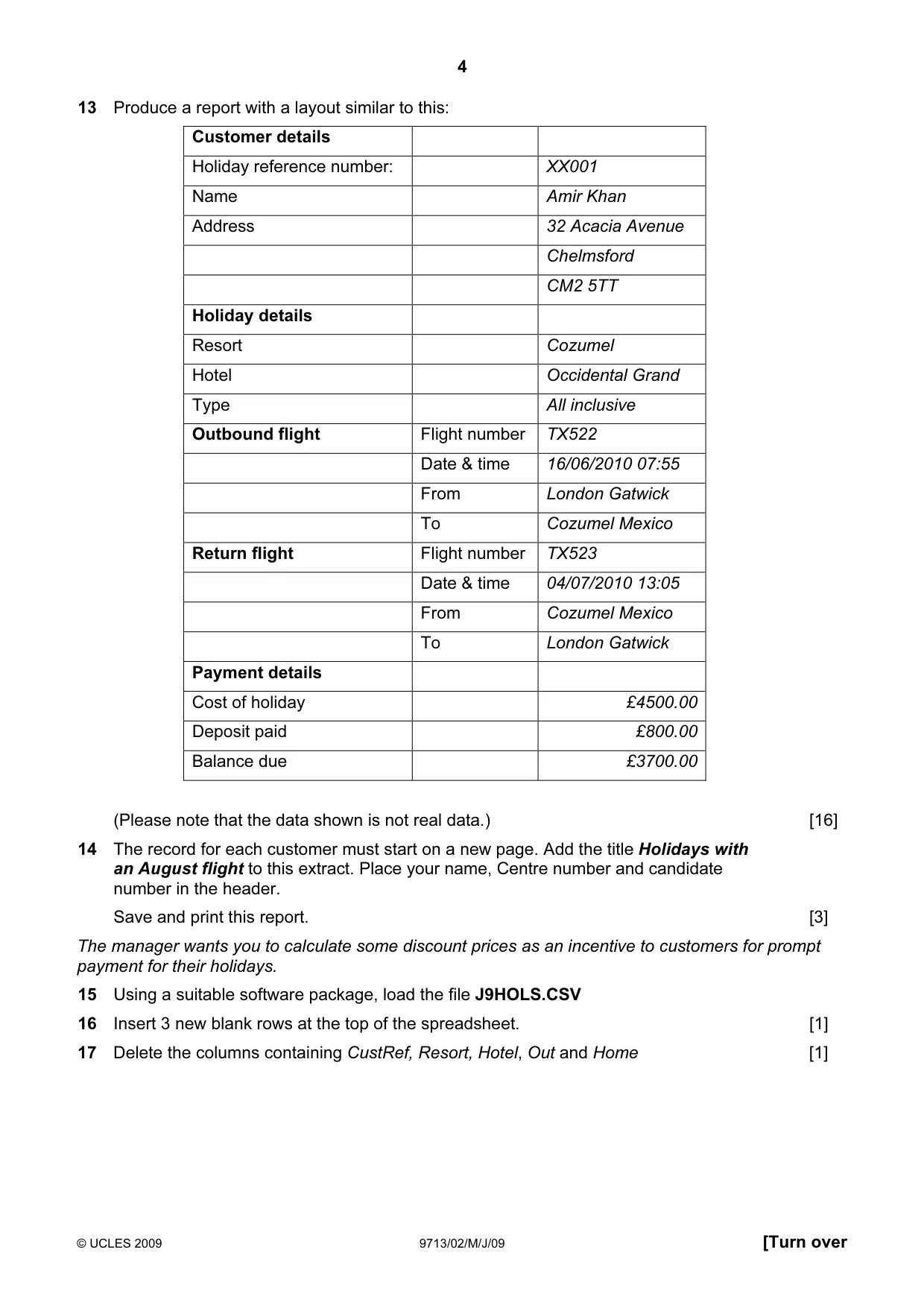
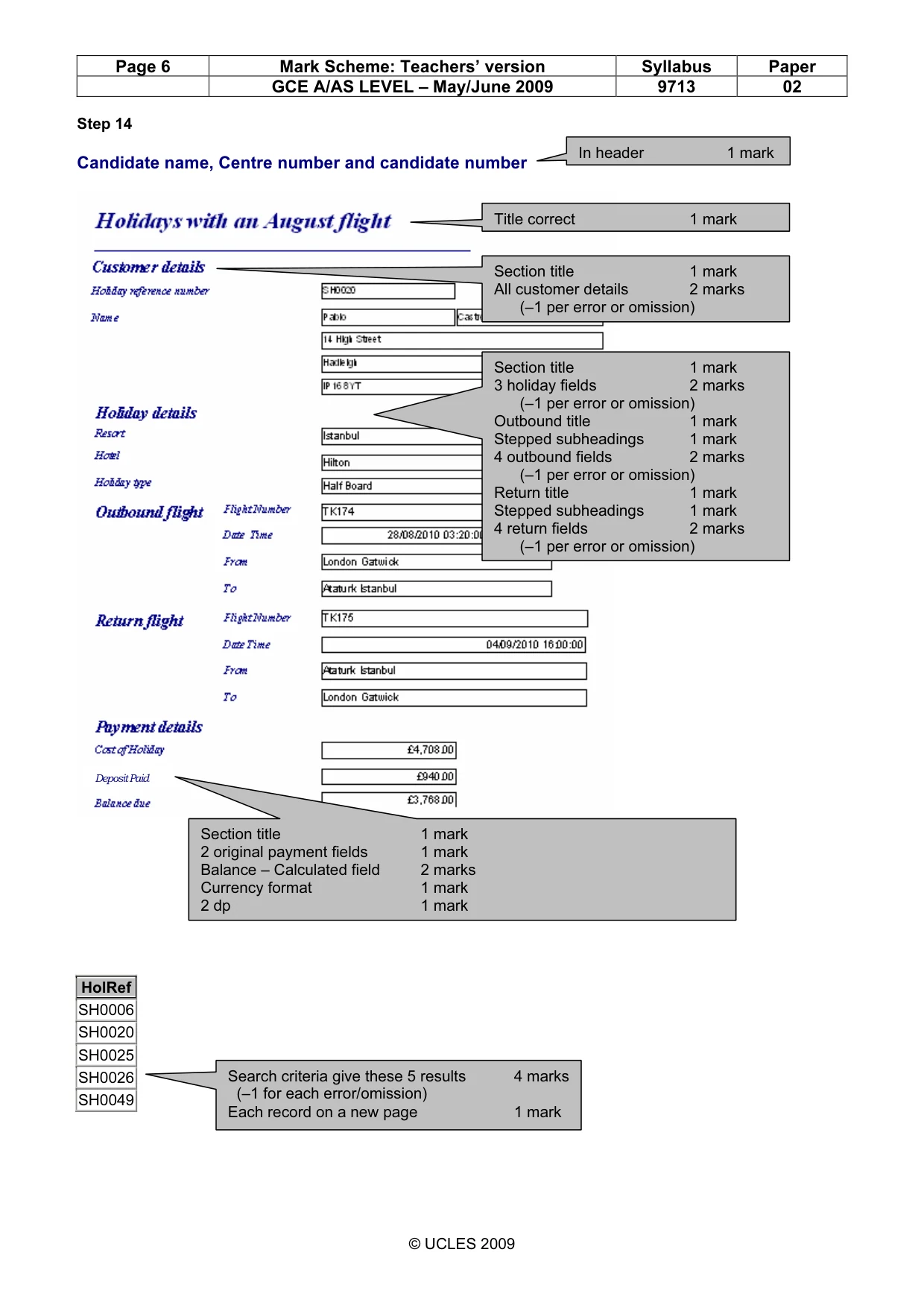
4 © UCLES 2009 9713/02/M/J/09 [Turn over 13 Produce a report with a layout similar to this: Customer details Holiday reference number: XX001 Name Amir Khan Address 32 Acacia Avenue Chelmsford CM2 5TT Holiday details Resort Cozumel Hotel Occidental Grand Type All inclusive Outbound flight Flight number TX522 Date & time 16/06/2010 07:55 From London Gatwick To Cozumel Mexico Return flight Flight number TX523 Date & time 04/07/2010 13:05 From Cozumel Mexico To London Gatwick Payment details Cost of holiday £4500.00 Deposit paid £800.00 Balance due £3700.00 (Please note that the data shown is not real data.) [16] 14 The record for each customer must start on a new page. Add the title Holidays with an August flight to this extract. Place your name, Centre number and candidate number in the header. Save and print this report. [3] The manager wants you to calculate some discount prices as an incentive to customers for prompt payment for their holidays. 15 Using a suitable software package, load the file J9HOLS.CSV 16 Insert 3 new blank rows at the top of the spreadsheet. [1] 17 Delete the columns containing CustRef, Resort, Hotel, Out and Home [1]
Question paper, page 5
5 Permission to reproduce items where third-party owned material protected by copyright is included has been sought and cleared where possible. Every reasonable effort has been made by the publisher (UCLES) to trace copyright holders, but if any items requiring clearance have unwittingly been included, the publisher will be pleased to make amends at the earliest possible opportunity. University of Cambridge International Examinations is part of the Cambridge Assessment Group. Cambridge Assessment is the brand name of University of Cambridge Local Examinations Syndicate (UCLES), which is itself a department of the University of Cambridge. 9713/02/M/J/09 18 Create a discount table in the cells A1 to F2 using the following data: [1] A B C D E F 1 Code A F H B R 2 Discount 4% 3% 2.5% 1.5% 0% 19 Format cells B2 to F2 as percentage values with 2 decimal places. [1] 20 In cell E4 place the label Discount Percentage, in F4 place the label Discount Value and in G4 place the label Balance Due 21 In cell E5 place a formula that will display the Discount Percentage. This formula will look up the first character of the string in the Type column and return the corresponding Discount from the discount table. [4] 22 In cell F5 place a formula that will calculate the Discount Value by multiplying the Discount Percentage by the Cost [1] 23 In cell G5 place a formula that will calculate the Balance Due by subtracting the Discount Value and the amount Paid from the Cost [1] 24 Replicate the formulae entered in steps 23 to 25 for all holidays. [1] 25 Format the cells in the Cost, Paid, Discount Value and Balance Due columns as currency in UK Pounds (£) with 2 decimal places. Format the cells in the Discount Percentage column as percentage values with 1 decimal place. [1] 26 Select only those holidays where the Balance Due is greater than £4000 and less than £6000. [2] 27 Create a footer which contains your name, Centre number and candidate number. [1] 28 Save and print all details of this selection, adjusting the page layout if necessary so that the whole table fits on a single page. Make sure that the contents of all cells are fully visible. 29 Print this selection showing formulae instead of values. Ensure that all formulae and labels are fully visible. The company produces a number of different documents for customers and has its own website. One of the directors suggested that the company should adopt a corporate house style. 30 The directors of the Relaxing Holiday Company want to use a corporate house style. You must prepare a document, to be given to the directors, which explains in your own words what a corporate house style is and how it could be used by the company. Your report must be between 100 and 300 words. Place your name, Centre number and candidate number on the report. Save and print this report. [20]
Mark scheme, page 1
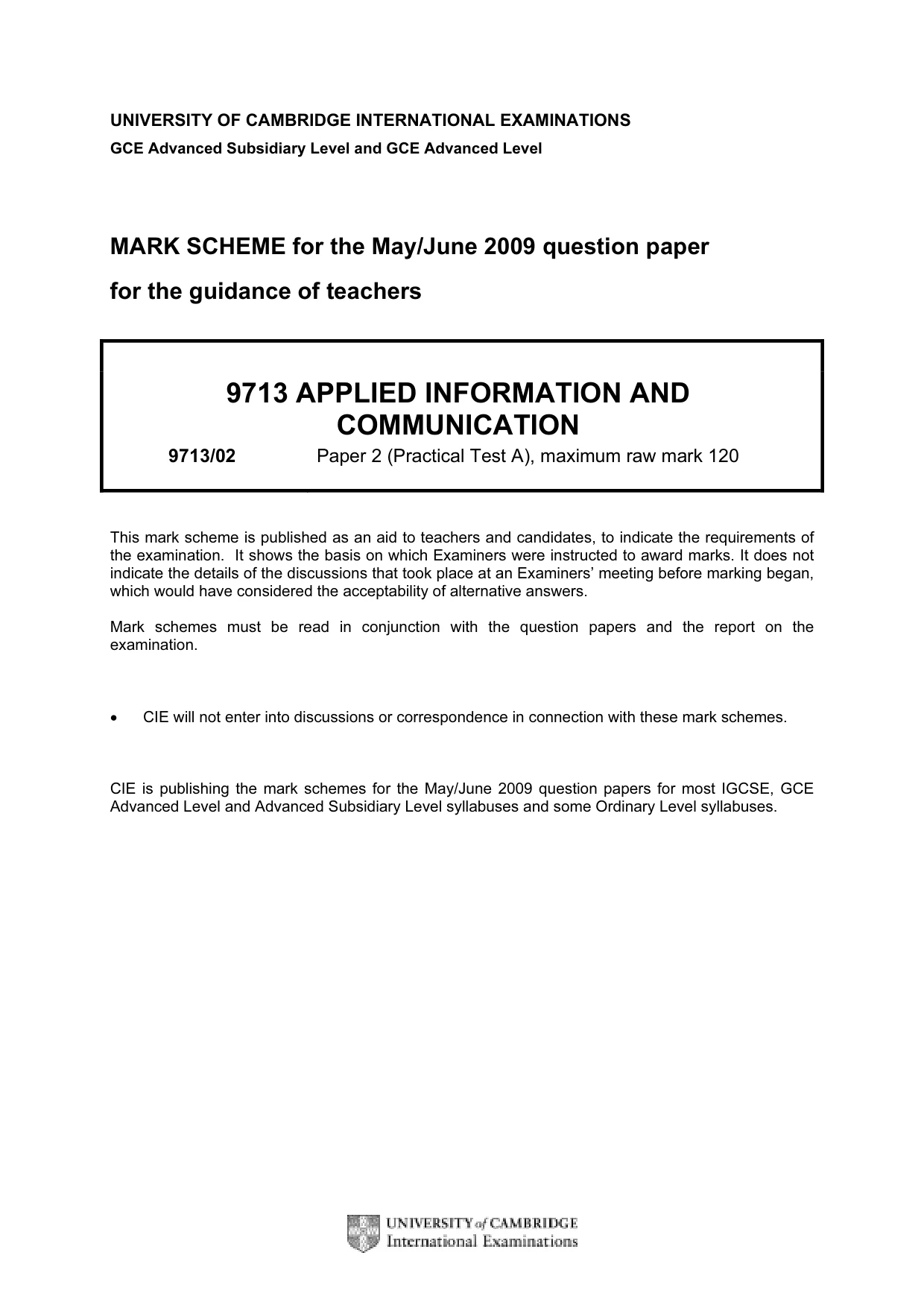
UNIVERSITY OF CAMBRIDGE INTERNATIONAL EXAMINATIONS GCE Advanced Subsidiary Level and GCE Advanced Level MARK SCHEME for the May/June 2009 question paper for the guidance of teachers 9713 APPLIED INFORMATION AND COMMUNICATION 9713/02 Paper 2 (Practical Test A), maximum raw mark 120 This mark scheme is published as an aid to teachers and candidates, to indicate the requirements of the examination. It shows the basis on which Examiners were instructed to award marks. It does not indicate the details of the discussions that took place at an Examiners’ meeting before marking began, which would have considered the acceptability of alternative answers. Mark schemes must be read in conjunction with the question papers and the report on the examination. • CIE will not enter into discussions or correspondence in connection with these mark schemes. CIE is publishing the mark schemes for the May/June 2009 question papers for most IGCSE, GCE Advanced Level and Advanced Subsidiary Level syllabuses and some Ordinary Level syllabuses.
Mark scheme, page 2
Page 2 Mark Scheme: Teachers’ version Syllabus Paper GCE A/AS LEVEL – May/June 2009 9713 02 © UCLES 2009 Step 3 Candidate name, Centre number and candidate number Table created 1 mark per field (name & type) 9 marks Primary key correct 1 mark Table created 1 mark per field (name & type) 5 marks Primary key correct 1 mark Table created Correct fields & field types 1 mark Primary key correct 1 mark Table created Correct fields & field types 1 mark Primary key correct 1 mark No marks to be awarded for any printout not containing the candidate name, candidate number and Centre number
Mark scheme, page 3
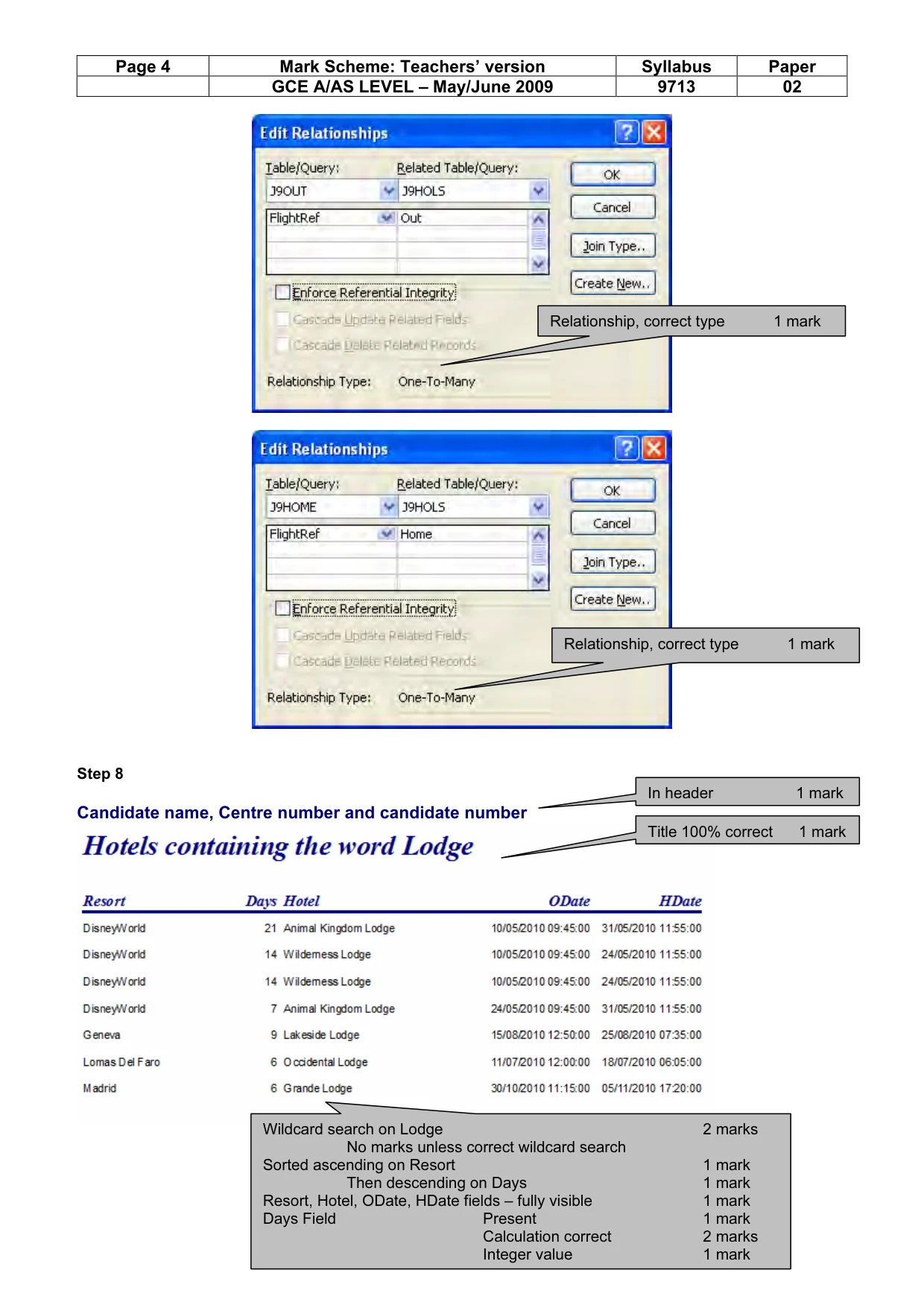
Page 3 Mark Scheme: Teachers’ version Syllabus Paper GCE A/AS LEVEL – May/June 2009 9713 02 © UCLES 2009 Step 5 Candidate name, Centre number and candidate number Relationship, correct fields 1 mark Relationship, correct fields 1 mark Relationship, correct type 1 mark Relationship, correct fields 1 mark
Mark scheme, page 4
Page 4 Mark Scheme: Teachers’ version Syllabus Paper GCE A/AS LEVEL – May/June 2009 9713 02 © UCLES 2009 Step 8 Candidate name, Centre number and candidate number In header 1 mark Relationship, correct type 1 mark Relationship, correct type 1 mark Title 100% correct 1 mark Wildcard search on Lodge 2 marks No marks unless correct wildcard search Sorted ascending on Resort 1 mark Then descending on Days 1 mark Resort, Hotel, ODate, HDate fields – fully visible 1 mark Days Field Present 1 mark Calculation correct 2 marks Integer value 1 mark
Mark scheme, page 5
Page 5 Mark Scheme: Teachers’ version Syllabus Paper GCE A/AS LEVEL – May/June 2009 9713 02 © UCLES 2009 Step 11 Candidate name, Centre number and candidate number Title 100% correct 1 mark In header 1 mark Selection criteria Number of holidays >1 2 marks Fields Only these 2 fields & 2 summaries 1 mark Summary data Average cost of holidays / customer 2 marks Count of holidays / customer 2 marks Grouping Number of holidays 2 marks Sorting within groups Ascending Surname 1 mark then ascending Forename 1 mark Group footer – correct subtotal 2 marks Currency 1 mark 2 dp 1 mark Correct count 2 marks Single page 1 mark All data & labels visible 1 mark
Mark scheme, page 6
Page 6 Mark Scheme: Teachers’ version Syllabus Paper GCE A/AS LEVEL – May/June 2009 9713 02 © UCLES 2009 Step 14 Candidate name, Centre number and candidate number HolRef SH0006 SH0020 SH0025 SH0026 SH0049 In header 1 mark Section title 1 mark All customer details 2 marks (–1 per error or omission) Title correct 1 mark Section title 1 mark 3 holiday fields 2 marks (–1 per error or omission) Outbound title 1 mark Stepped subheadings 1 mark 4 outbound fields 2 marks (–1 per error or omission) Return title 1 mark Stepped subheadings 1 mark 4 return fields 2 marks (–1 per error or omission) Section title 1 mark 2 original payment fields 1 mark Balance – Calculated field 2 marks Currency format 1 mark 2 dp 1 mark Search criteria give these 5 results 4 marks (–1 for each error/omission) Each record on a new page 1 mark Deposit Paid
Mark scheme, page 7
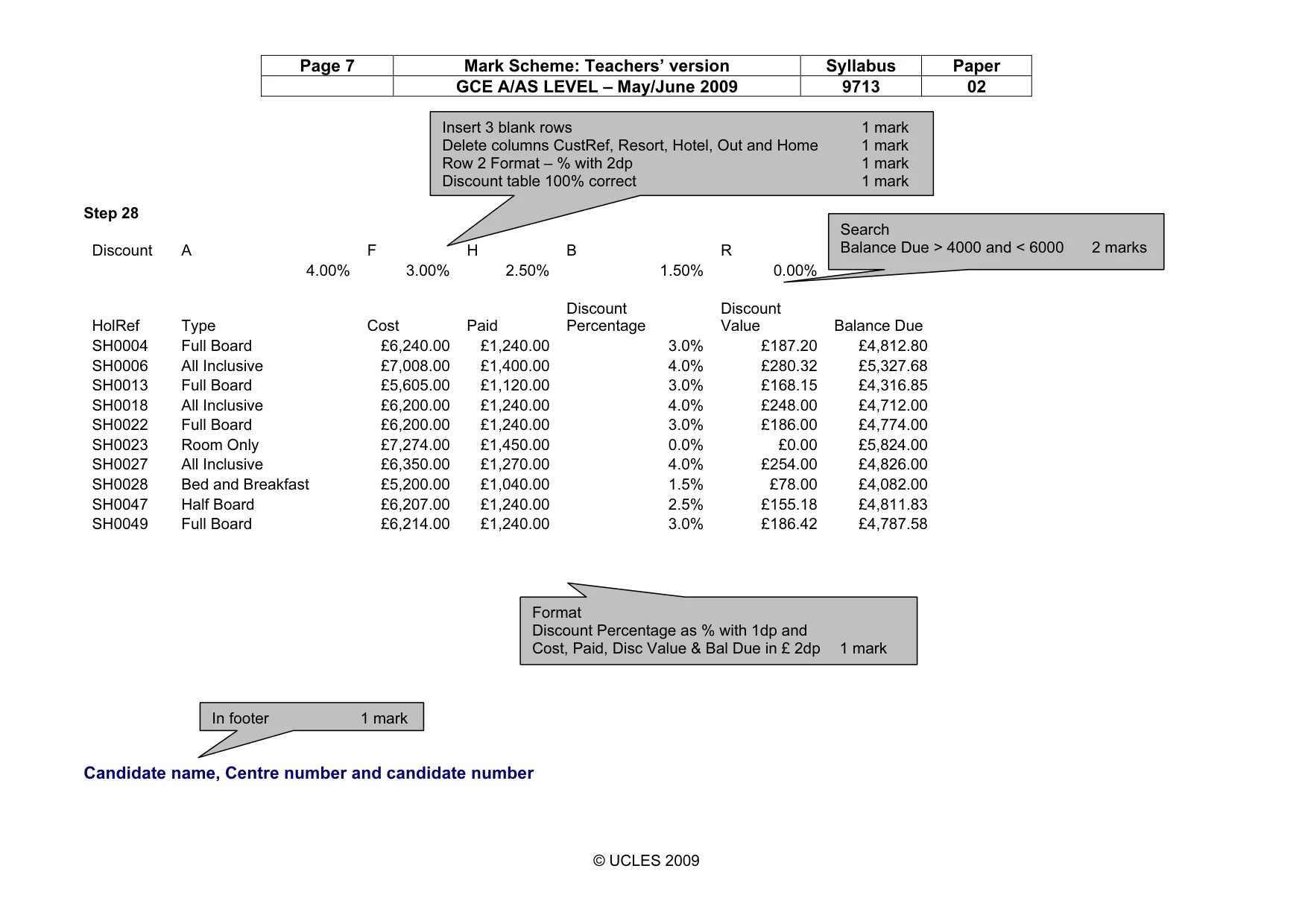
Page 7 Mark Scheme: Teachers’ version Syllabus Paper GCE A/AS LEVEL – May/June 2009 9713 02 © UCLES 2009 Step 28 Discount A F H B R 4.00% 3.00% 2.50% 1.50% 0.00% HolRef Type Cost Paid Discount Percentage Discount Value Balance Due SH0004 Full Board £6,240.00 £1,240.00 3.0% £187.20 £4,812.80 SH0006 All Inclusive £7,008.00 £1,400.00 4.0% £280.32 £5,327.68 SH0013 Full Board £5,605.00 £1,120.00 3.0% £168.15 £4,316.85 SH0018 All Inclusive £6,200.00 £1,240.00 4.0% £248.00 £4,712.00 SH0022 Full Board £6,200.00 £1,240.00 3.0% £186.00 £4,774.00 SH0023 Room Only £7,274.00 £1,450.00 0.0% £0.00 £5,824.00 SH0027 All Inclusive £6,350.00 £1,270.00 4.0% £254.00 £4,826.00 SH0028 Bed and Breakfast £5,200.00 £1,040.00 1.5% £78.00 £4,082.00 SH0047 Half Board £6,207.00 £1,240.00 2.5% £155.18 £4,811.83 SH0049 Full Board £6,214.00 £1,240.00 3.0% £186.42 £4,787.58 Candidate name, Centre number and candidate number Format Discount Percentage as % with 1dp and Cost, Paid, Disc Value & Bal Due in £ 2dp 1 mark In footer 1 mark Search Balance Due > 4000 and < 6000 2 marks Insert 3 blank rows 1 mark Delete columns CustRef, Resort, Hotel, Out and Home 1 mark Row 2 Format – % with 2dp 1 mark Discount table 100% correct 1 mark
Mark scheme, page 8
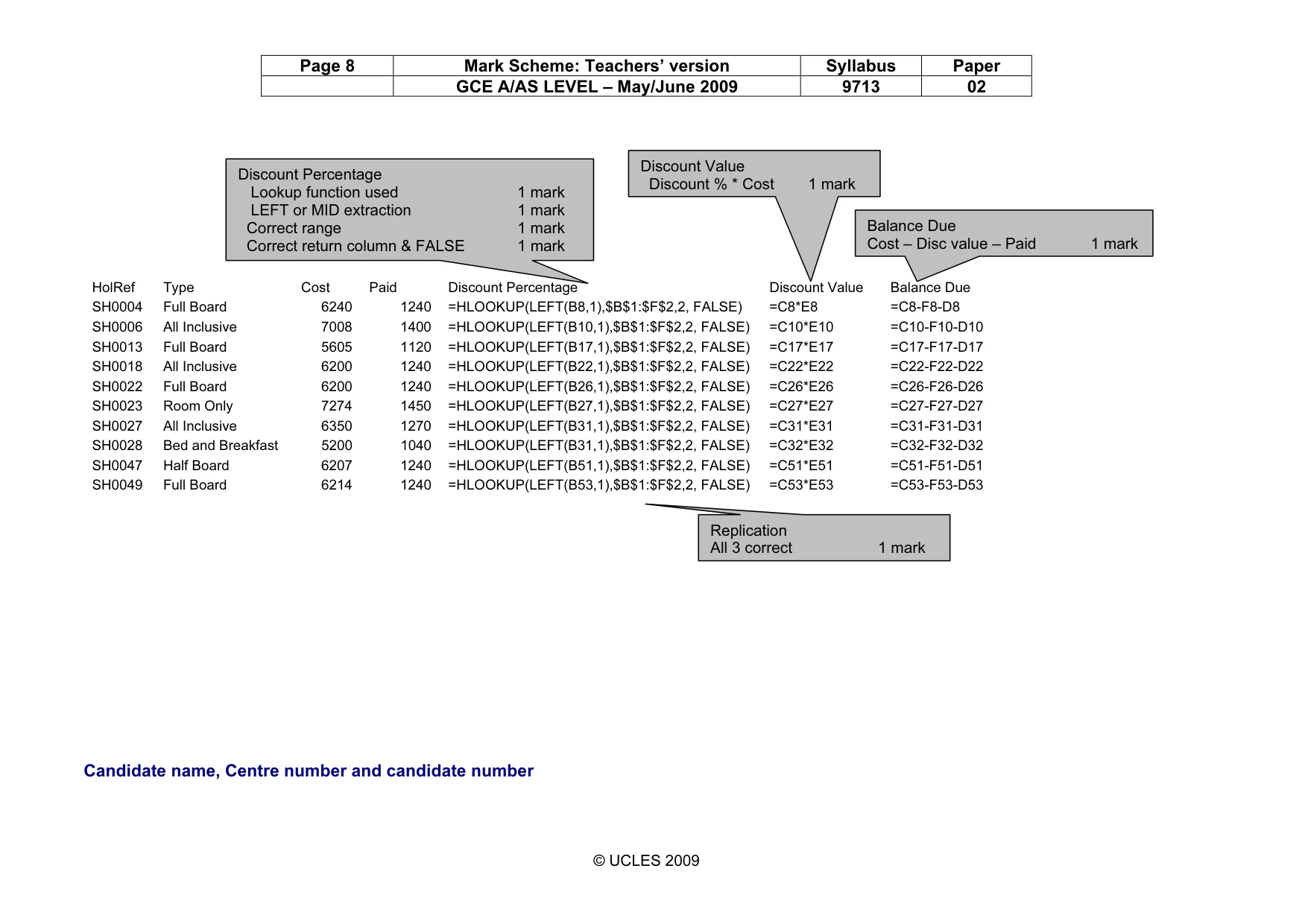
Page 8 Mark Scheme: Teachers’ version Syllabus Paper GCE A/AS LEVEL – May/June 2009 9713 02 © UCLES 2009 HolRef Type Cost Paid Discount Percentage Discount Value Balance Due SH0004 Full Board 6240 1240 =HLOOKUP(LEFT(B8,1),$B$1:$F$2,2, FALSE) =C8*E8 =C8-F8-D8 SH0006 All Inclusive 7008 1400 =HLOOKUP(LEFT(B10,1),$B$1:$F$2,2, FALSE) =C10*E10 =C10-F10-D10 SH0013 Full Board 5605 1120 =HLOOKUP(LEFT(B17,1),$B$1:$F$2,2, FALSE) =C17*E17 =C17-F17-D17 SH0018 All Inclusive 6200 1240 =HLOOKUP(LEFT(B22,1),$B$1:$F$2,2, FALSE) =C22*E22 =C22-F22-D22 SH0022 Full Board 6200 1240 =HLOOKUP(LEFT(B26,1),$B$1:$F$2,2, FALSE) =C26*E26 =C26-F26-D26 SH0023 Room Only 7274 1450 =HLOOKUP(LEFT(B27,1),$B$1:$F$2,2, FALSE) =C27*E27 =C27-F27-D27 SH0027 All Inclusive 6350 1270 =HLOOKUP(LEFT(B31,1),$B$1:$F$2,2, FALSE) =C31*E31 =C31-F31-D31 SH0028 Bed and Breakfast 5200 1040 =HLOOKUP(LEFT(B31,1),$B$1:$F$2,2, FALSE) =C32*E32 =C32-F32-D32 SH0047 Half Board 6207 1240 =HLOOKUP(LEFT(B51,1),$B$1:$F$2,2, FALSE) =C51*E51 =C51-F51-D51 SH0049 Full Board 6214 1240 =HLOOKUP(LEFT(B53,1),$B$1:$F$2,2, FALSE) =C53*E53 =C53-F53-D53 Candidate name, Centre number and candidate number Discount Percentage Lookup function used 1 mark LEFT or MID extraction 1 mark Correct range 1 mark Correct return column & FALSE 1 mark Discount Value Discount % * Cost 1 mark Balance Due Cost – Disc value – Paid 1 mark Replication All 3 correct 1 mark
Mark scheme, page 9
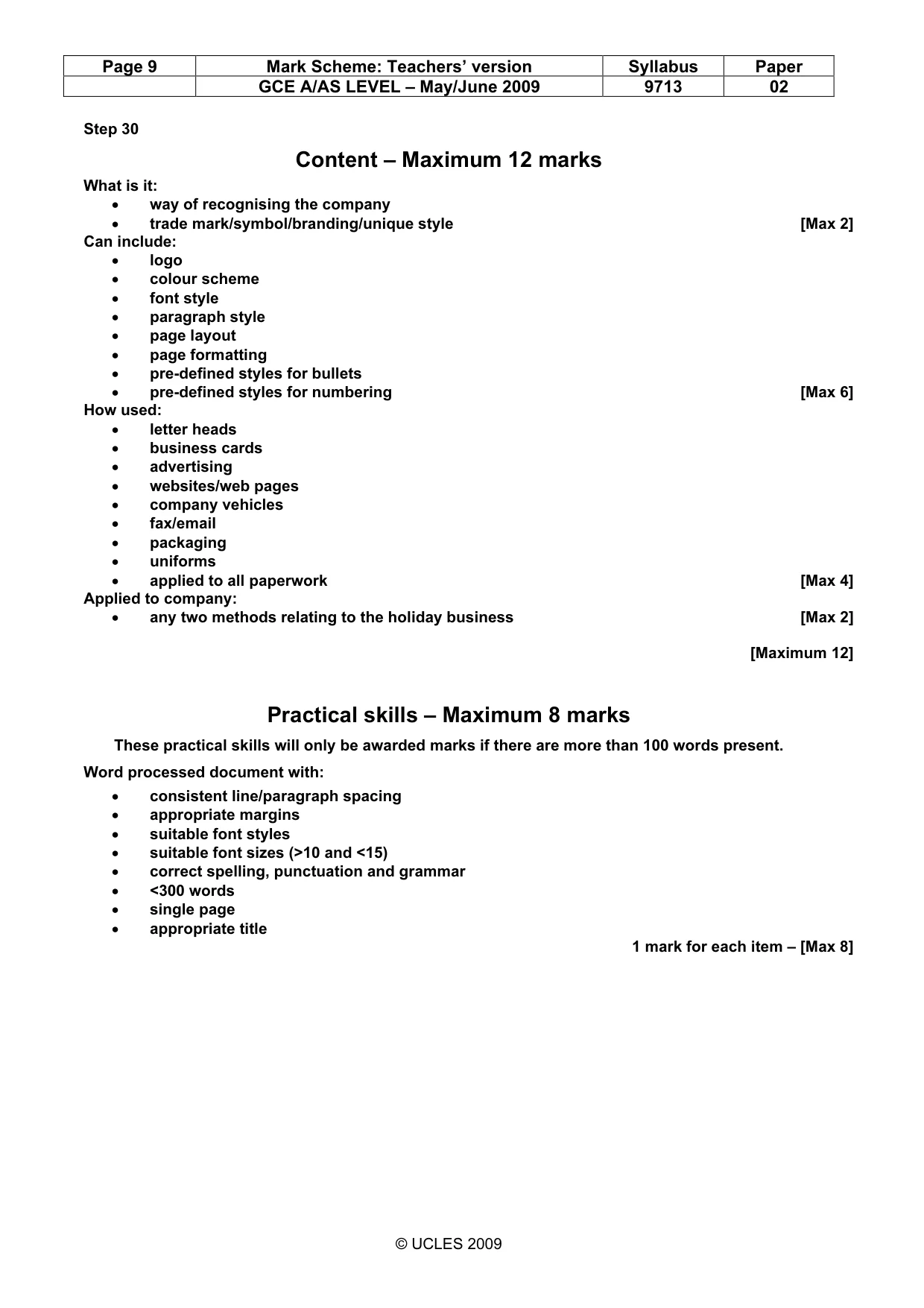
Page 9 Mark Scheme: Teachers’ version Syllabus Paper GCE A/AS LEVEL – May/June 2009 9713 02 © UCLES 2009 Step 30 Content – Maximum 12 marks What is it: • way of recognising the company • trade mark/symbol/branding/unique style [Max 2] Can include: • logo • colour scheme • font style • paragraph style • page layout • page formatting • pre-defined styles for bullets • pre-defined styles for numbering [Max 6] How used: • letter heads • business cards • advertising • websites/web pages • company vehicles • fax/email • packaging • uniforms • applied to all paperwork [Max 4] Applied to company: • any two methods relating to the holiday business [Max 2] [Maximum 12] Practical skills – Maximum 8 marks These practical skills will only be awarded marks if there are more than 100 words present. Word processed document with: • consistent line/paragraph spacing • appropriate margins • suitable font styles • suitable font sizes (>10 and <15) • correct spelling, punctuation and grammar • <300 words • single page • appropriate title 1 mark for each item – [Max 8]
What you needed in this session
Cambridge’s own grade thresholds for 2009 May/June, Paper 2 · Variant 1. A higher threshold means an easier paper — the bar moves with how the cohort did.